The Asana connector lets your AI agent act in each user's Asana account. Each user signs in to Asana once, and Scalekit stores and refreshes their tokens, so your agent never handles credentials. It comes with 210 tools.
- Tools
- 210
- What they doRead · write · destructive
- 101 · 86 · 23101 read86 write23 destructive
- Users sign in with
- OAuth
- OAuth app
- Scalekit's or your own
Setup
Install the SDK
Terminal window npm install @scalekit-sdk/node dotenvTerminal window pip install scalekit-sdk-python python-dotenvSet your credentials
Add your Scalekit credentials to your
.envfile. Find values in app.scalekit.com > Developers > API Credentials..env SCALEKIT_ENVIRONMENT_URL=<your-environment-url>SCALEKIT_CLIENT_ID=<your-client-id>SCALEKIT_CLIENT_SECRET=<your-client-secret>Create the Asana connection
In AgentKit > Connections, create an Asana connection. The name you give it is the
connection_nameyour code passes. See Configure connections.Scalekit credentials are available for Asana, so you don't need to register an OAuth app. To show your own app on the consent screen, use your own credentials instead.
Use your own OAuth app
Register your Scalekit environment with the Asana connector so Scalekit handles the authentication flow and token lifecycle for you. The connection name you create will be used to identify and invoke the connection programmatically. Then complete the configuration in your application as follows:
-
Set up auth redirects
-
In Scalekit dashboard, go to AgentKit > Connections > Create Connection. Find Asana and click Create. Copy the redirect URI. It looks like
https://<SCALEKIT_ENVIRONMENT_URL>/sso/v1/oauth/<CONNECTION_ID>/callback.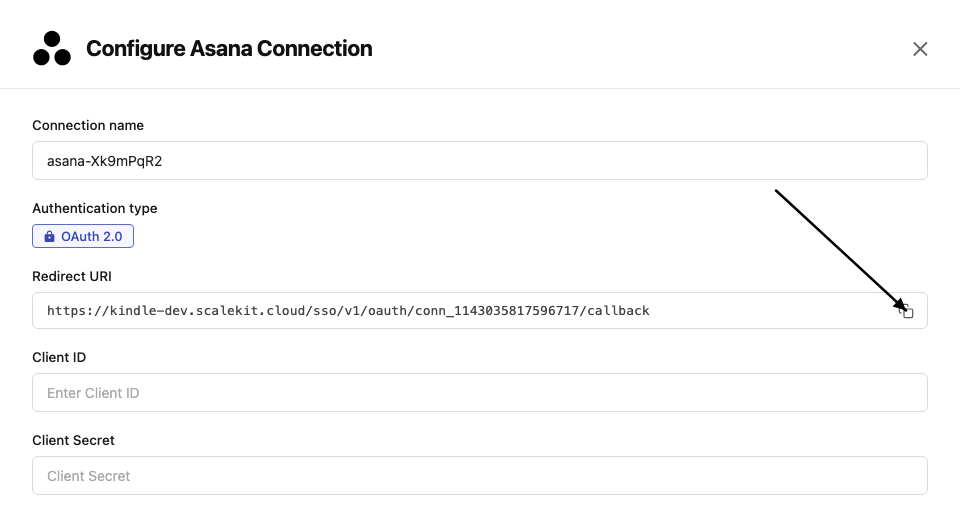
-
Go to Asana Developer Console and click Create new app. Enter an app name.
-
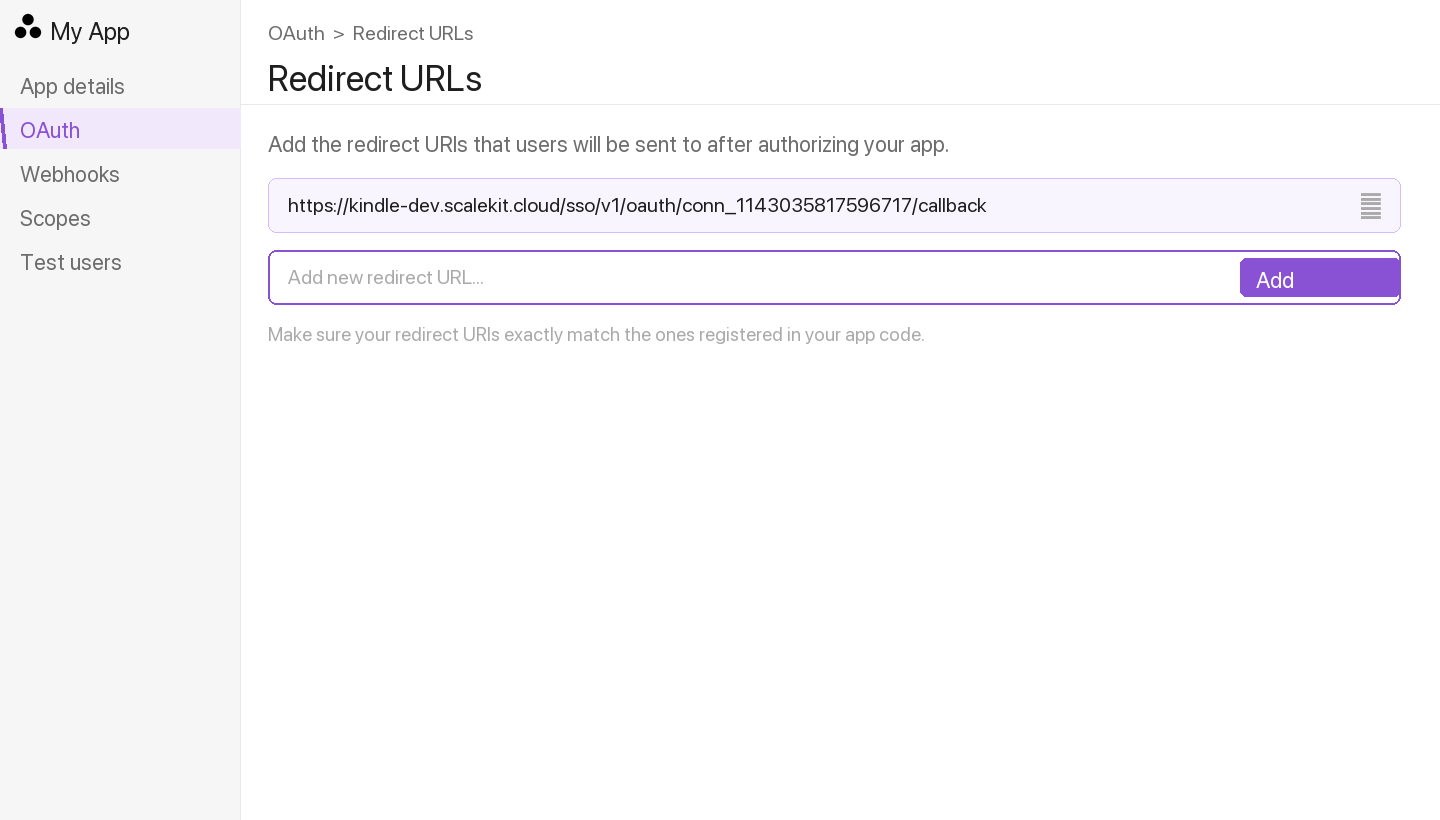
In the left menu, go to OAuth. Under Redirect URLs, click Add redirect URL, paste the redirect URI from Scalekit, and click Add.
-
-
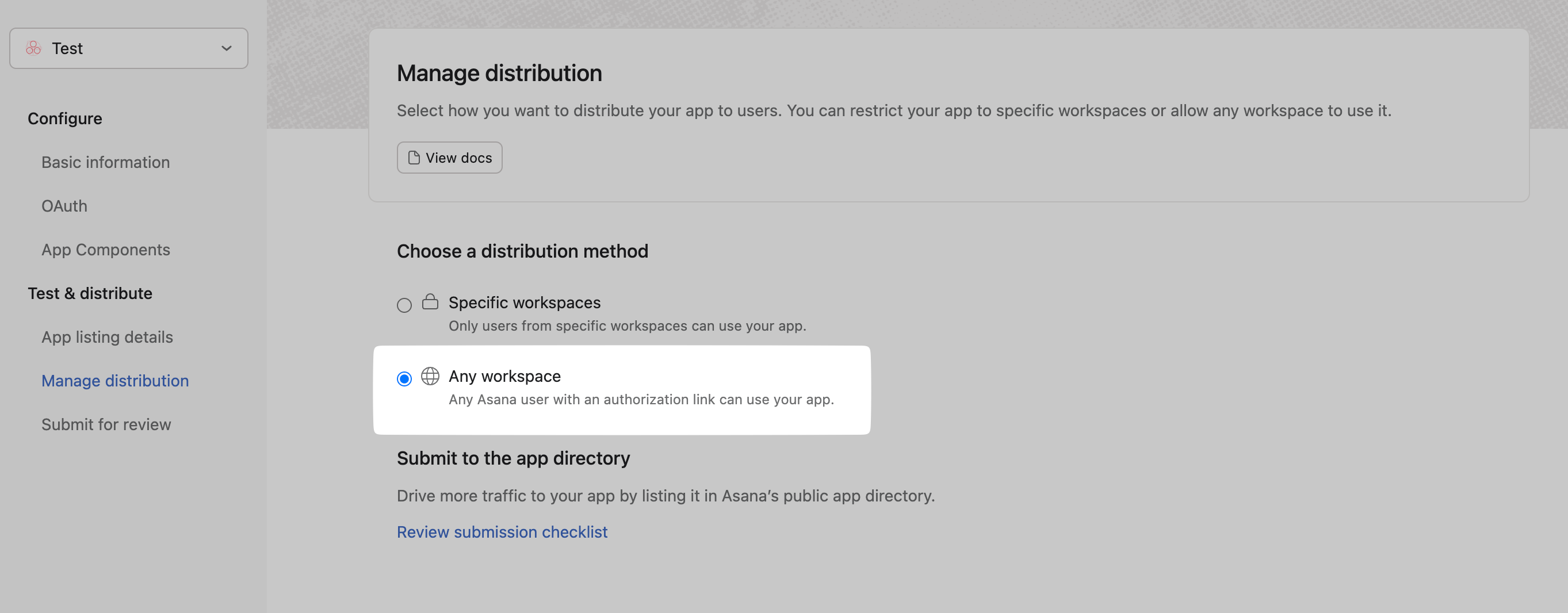
Enable multi-workspace install Optional
Enable this if you want users outside your Asana workspace to install the app.
-
In your app settings, go to OAuth → App permissions.
-
Under App install permissions, enable Allow users outside your workspace to install this app.
-
-
Get client credentials
- In Asana Developer Console, select your app.
- Under OAuth, copy your Client ID and Client Secret.
-
Add credentials in Scalekit
-
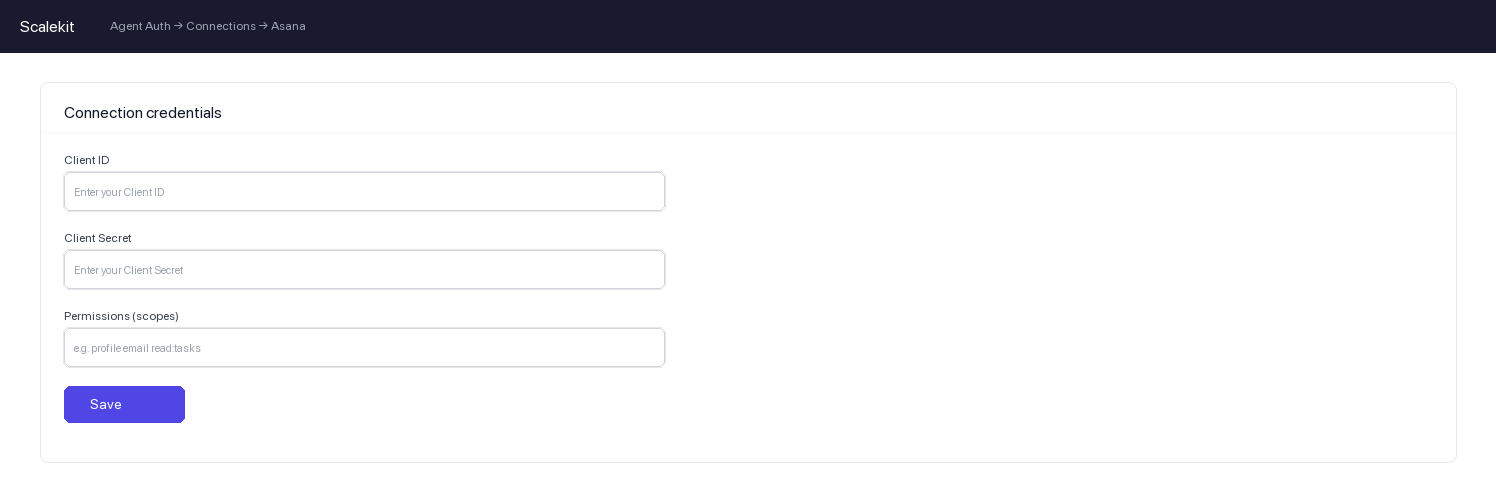
In Scalekit dashboard, go to AgentKit > Connections and open the connection you created.
-
Enter your credentials:
- Client ID (from above)
- Client Secret (from above)
- Permissions (scopes — see Asana OAuth scopes reference)
-
Click Save.
-
-
Authorize a user and make your first call
quickstart.mts import { ScalekitClient } from '@scalekit-sdk/node'import 'dotenv/config'import { createInterface } from 'node:readline/promises'const scalekit = new ScalekitClient(process.env.SCALEKIT_ENVIRONMENT_URL,process.env.SCALEKIT_CLIENT_ID,process.env.SCALEKIT_CLIENT_SECRET,)const actions = scalekit.actionsconst connector = 'asana'const identifier = 'user_123'// Generate an authorization link for the userconst { link } = await actions.getAuthorizationLink({ connectionName: connector, identifier })console.log('Authorize Asana:', link)const rl = createInterface({ input: process.stdin, output: process.stdout })await rl.question('Press Enter after authorizing...')rl.close()// Make your first callconst result = await actions.executeTool({connector,identifier,toolName: 'asana_allocations_list',toolInput: {},})console.log(result)Terminal window npx tsx quickstart.mtsquickstart.py import osfrom scalekit import ScalekitClientfrom dotenv import load_dotenvload_dotenv()scalekit_client = ScalekitClient(env_url=os.getenv("SCALEKIT_ENVIRONMENT_URL"),client_id=os.getenv("SCALEKIT_CLIENT_ID"),client_secret=os.getenv("SCALEKIT_CLIENT_SECRET"),)actions = scalekit_client.actionsconnection_name = "asana"identifier = "user_123"# Generate an authorization link for the userlink_response = actions.get_authorization_link(connection_name=connection_name,identifier=identifier,)print("Authorize Asana:", link_response.link)input("Press Enter after authorizing...")# Make your first callresult = actions.execute_tool(tool_input={},tool_name="asana_allocations_list",connection_name=connection_name,identifier=identifier,)print(result)Terminal window python quickstart.pyEach user signs in once. See Authorize a user for the full flow and statuses.
Tools
Pass the exact name toexecute_toolasana_allocation_getGet a single resource allocation record by its GID.Read-onlyGet Allocation
Get a single resource allocation record by its GID.
Inputs
allocation_gidstringrequired- GID of the allocation to retrieve
opt_fieldsstring- Comma-separated list of optional fields to include in the response
asana_allocations_listList resource allocations.Read-onlyList Allocations
List resource allocations. At least one of assignee_gid or parent_gid is required by the Asana API.
Inputs
assignee_gidstring- GID of the user to filter allocations by assignee
opt_fieldsstring- Comma-separated list of optional fields to include in the response
parent_gidstring- GID of the parent project or portfolio to filter allocations by
asana_attachment_getGet details of a specific attachment by its GID.Read-onlyGet Attachment
Get details of a specific attachment by its GID.
Inputs
attachment_gidstringrequired- GID of the attachment to retrieve
opt_fieldsstring- Comma-separated list of optional fields to include in response
asana_attachments_listList all attachments for a task or project.Read-onlyList Attachments
List all attachments for a task or project.
Inputs
parent_gidstringrequired- GID of the task or project to list attachments for
opt_fieldsstring- Comma-separated list of optional fields to include in response
asana_audit_log_events_listList audit log events captured for a workspace domain since October 2021, optionally filtered by time range, event type, actor, or resource.Read-onlyList Audit Log Events
List audit log events captured for a workspace domain since October 2021, optionally filtered by time range, event type, actor, or resource.
Inputs
workspace_gidstringrequired- GID of the workspace or organization
actor_gidstring- Filter to events triggered by the actor with this GID
end_atstring- Filter to events created before this time (exclusive, ISO 8601)
event_typestring- Filter to events of this type
resource_gidstring- Filter to events with this resource GID
start_atstring- Filter to events created after this time (inclusive, ISO 8601)
asana_budget_getGet the full record for a single budget.Read-onlyGet Budget
Get the full record for a single budget.
Inputs
budget_gidstringrequired- GID of the budget to retrieve
opt_fieldsstring- Comma-separated list of optional fields to include in response
asana_budgets_listList the budgets for a given parent project.Read-onlyList Budgets
List the budgets for a given parent project. Returns at most one budget per parent.
Inputs
parentstringrequired- GID of the project to list budgets for
opt_fieldsstring- Comma-separated list of optional fields to include in response
asana_custom_field_getGet a custom field definition by its GID.Read-onlyGet Custom Field
Get a custom field definition by its GID.
Inputs
custom_field_gidstringrequired- GID of the custom field to retrieve
opt_fieldsstring- Comma-separated list of optional fields to include in response
asana_events_listGet events that have occurred on a resource (task, project, or goal) since a sync token was created.Read-onlyGet Events for Resource
Get events that have occurred on a resource (task, project, or goal) since a sync token was created. Omit the sync token on the first call; store the returned sync token for the next call.
Inputs
resourcestringrequired- GID of the task, project, or goal to subscribe to
opt_fieldsstring- Comma-separated list of optional fields to include in response
syncstring- Sync token from a previous call. Omit on the first call.
asana_goal_custom_field_settings_listList the custom field settings applied to a goal.Read-onlyList Custom Field Settings for Goal
List the custom field settings applied to a goal.
Inputs
goal_gidstringrequired- GID of the goal whose custom field settings to list
opt_fieldsstring- Comma-separated list of optional fields to include in response
asana_goal_getGet details of a specific goal including its metric and current value.Read-onlyGet Goal
Get details of a specific goal including its metric and current value.
Inputs
goal_gidstringrequired- GID of the goal to retrieve
opt_fieldsstring- Comma-separated list of optional fields to include in response
asana_goal_parent_goals_listList all parent goals for a given goal.Read-onlyList Parent Goals
List all parent goals for a given goal.
Inputs
goal_gidstringrequired- GID of the goal whose parent goals to list
opt_fieldsstring- Comma-separated list of optional fields to include in response
asana_goal_relationship_getGet a goal relationship by its GID.Read-onlyGet Goal Relationship
Get a goal relationship by its GID.
Inputs
goal_relationship_gidstringrequired- GID of the goal relationship to retrieve
opt_fieldsstring- Comma-separated list of optional fields to include in response
asana_goal_relationships_listList goal relationships, optionally filtered by a supported goal.Read-onlyList Goal Relationships
List goal relationships, optionally filtered by a supported goal.
Inputs
supported_goal_gidstringrequired- GID of the goal whose relationships to list
opt_fieldsstring- Comma-separated list of optional fields to include in response
asana_goal_stories_listList stories (activity feed entries) for a goal.Read-onlyList Goal Stories
List stories (activity feed entries) for a goal.
Inputs
goal_gidstringrequired- GID of the goal whose stories to list
opt_fieldsstring- Comma-separated list of optional fields to include in response
asana_goals_listGet goals for a workspace, optionally filtered by team or time period.Read-onlyList Goals
Get goals for a workspace, optionally filtered by team or time period.
Inputs
workspace_gidstringrequired- GID of the workspace to list goals from
is_workspace_levelboolean- If true, filter to only workspace-level goals (not team goals)
opt_fieldsstring- Comma-separated list of optional fields to include in response
team_gidstring- GID of the team to filter goals by
asana_job_getGet the status of an async job (e.g.Read-onlyGet Job
Get the status of an async job (e.g. from project or task duplication). Poll until status is "succeeded" or "failed".
Inputs
job_gidstringrequired- GID of the async job to retrieve
opt_fieldsstring- Comma-separated list of optional fields to include in response
asana_me_getGet the profile of the authenticated user.Read-onlyGet Current User
Get the profile of the authenticated user.
Inputs
opt_fieldsstring- Comma-separated list of optional fields to include in response
asana_membership_getGet the details of a single membership record by its GID.Read-onlyGet Membership
Get the details of a single membership record by its GID.
Inputs
membership_gidstringrequired- GID of the membership record to retrieve
opt_fieldsstring- Comma-separated list of optional fields to include in the response
asana_memberships_listList memberships for a project or goal, optionally filtered by a specific member.Read-onlyList Memberships
List memberships for a project or goal, optionally filtered by a specific member.
Inputs
parent_gidstringrequired- GID of the project or goal to list memberships for
member_gidstring- GID of a member (user) to filter memberships by
opt_fieldsstring- Comma-separated list of optional fields to include in the response
asana_my_tasks_listGet tasks from the authenticated user's personal My Tasks list in a workspace.Read-onlyList My Tasks
Get tasks from the authenticated user's personal My Tasks list in a workspace.
Inputs
user_task_list_gidstringrequired- GID of the user task list (My Tasks list) to retrieve tasks from
completed_sincestring- ISO 8601 timestamp; only return tasks completed after this time
opt_fieldsstring- Comma-separated list of optional fields to include in response
asana_organization_export_getGet the status of an organization export request, including its state (pending, started, finished, or error) and the download_url once finished.Read-onlyGet Organization Export
Get the status of an organization export request, including its state (pending, started, finished, or error) and the download_url once finished. Only available to Service Accounts of an Enterprise+ organization.
Inputs
organization_export_gidstringrequired- GID of the organization export request to retrieve
opt_fieldsstring- Comma-separated list of optional fields to include in response
asana_portfolio_custom_field_settings_listList all custom field settings for a portfolio, including which custom fields are attached and their display configuration.Read-onlyList Portfolio Custom Field Settings
List all custom field settings for a portfolio, including which custom fields are attached and their display configuration.
Inputs
portfolio_gidstringrequired- GID of the portfolio to list custom field settings for
opt_fieldsstring- Comma-separated list of optional fields to include in response
asana_portfolio_getGet details of a specific portfolio by its GID.Read-onlyGet Portfolio
Get details of a specific portfolio by its GID.
Inputs
portfolio_gidstringrequired- GID of the portfolio to retrieve
opt_fieldsstring- Comma-separated list of optional fields to include in response
asana_portfolio_items_listGet all items (projects or portfolios) contained in a portfolio.Read-onlyList Portfolio Items
Get all items (projects or portfolios) contained in a portfolio.
Inputs
portfolio_gidstringrequired- GID of the portfolio whose items to list
opt_fieldsstring- Comma-separated list of optional fields to include in response
asana_portfolio_membership_getGet a single portfolio membership record by its GID.Read-onlyGet Portfolio Membership
Get a single portfolio membership record by its GID.
Inputs
portfolio_membership_gidstringrequired- GID of the portfolio membership to retrieve
opt_fieldsstring- Comma-separated list of optional fields to include in the response
asana_portfolio_memberships_for_user_listQuery portfolio memberships across a workspace.Read-onlyQuery Portfolio Memberships
Query portfolio memberships across a workspace. Specify portfolio, portfolio and user, or workspace and user.
Inputs
opt_fieldsstring- Comma-separated list of optional fields to include in response
portfoliostring- GID of a portfolio to filter memberships by
userstring- GID or 'me' of a user to filter memberships by
workspacestring- GID of a workspace to filter memberships by (requires user)
asana_portfolio_memberships_listList all members of a portfolio, optionally filtered by a specific user.Read-onlyList Portfolio Memberships
List all members of a portfolio, optionally filtered by a specific user.
Inputs
portfolio_gidstringrequired- GID of the portfolio whose memberships to list
opt_fieldsstring- Comma-separated list of optional fields to include in response
user_gidstring- GID of a user to filter memberships by
asana_portfolios_listGet all portfolios accessible to the authenticated user in a workspace.Read-onlyList Portfolios
Get all portfolios accessible to the authenticated user in a workspace.
Inputs
workspace_gidstringrequired- GID of the workspace to filter portfolios by
opt_fieldsstring- Comma-separated list of optional fields to include in response
ownerstring- GID of a user or 'me' to filter portfolios by owner
asana_project_brief_getGet the project brief (rich text overview) for a project by its project brief GID.Read-onlyGet Project Brief
Get the project brief (rich text overview) for a project by its project brief GID. Returns the title, HTML text, and related project details.
Inputs
project_brief_gidstringrequired- Globally unique identifier for the project brief to retrieve. e.g. 1234567890
opt_fieldsstring- Comma-separated list of optional fields to include in the response. e.g. title,html_text,project,project.name
asana_project_custom_field_settings_listList all custom field settings for a project, including which custom fields are attached and their display configuration.Read-onlyList Project Custom Field Settings
List all custom field settings for a project, including which custom fields are attached and their display configuration.
Inputs
project_gidstringrequired- GID of the project to list custom field settings for
opt_fieldsstring- Comma-separated list of optional fields to include in response
asana_project_getGet details of a specific project by its GID.Read-onlyGet Project
Get details of a specific project by its GID.
Inputs
project_gidstringrequired- GID of the project to retrieve
opt_fieldsstring- Comma-separated list of optional fields to include in response
asana_project_membership_getGet a specific project membership record by its GID.Read-onlyGet Project Membership
Get a specific project membership record by its GID. Returns user identity and access level details for that membership.
Inputs
project_membership_gidstringrequired- Globally unique identifier for the project membership record to retrieve. e.g. 1234567890
opt_fieldsstring- Comma-separated list of optional fields to include in the response. e.g. user,user.name,access_level,project
asana_project_memberships_listList all members of a project.Read-onlyList Project Memberships
List all members of a project. Returns membership records including user and access level details for each member of the specified project.
Inputs
project_gidstringrequired- Globally unique identifier for the project whose members to list. e.g. 1234567890
opt_fieldsstring- Comma-separated list of optional fields to include in the response. e.g. user,user.name,access_level
user_gidstring- Filter results to the membership record for a specific user GID. e.g. 987654321
asana_project_status_getGet a specific project status update by its GID.Read-onlyGet Project Status
Get a specific project status update by its GID.
Inputs
project_status_gidstringrequired- GID of the project status update to retrieve
opt_fieldsstring- Comma-separated list of optional fields to include in response
asana_project_statuses_listGet all status updates posted to a project.Read-onlyList Project Statuses
Get all status updates posted to a project.
Inputs
project_gidstringrequired- GID of the project to retrieve status updates for
opt_fieldsstring- Comma-separated list of optional fields to include in response
asana_project_task_counts_getGet task completion counts for a project, including totals for completed and incomplete tasks.Read-onlyGet Project Task Counts
Get task completion counts for a project, including totals for completed and incomplete tasks.
Inputs
project_gidstringrequired- GID of the project to retrieve task counts for
opt_fieldsstring- Comma-separated list of optional fields to include in response
asana_project_tasks_listList all tasks in a specific project.Read-onlyList Tasks in Project
List all tasks in a specific project.
Inputs
project_gidstringrequired- GID of the project to list tasks from
opt_fieldsstring- Comma-separated list of optional fields to include in response
asana_project_template_getGet the details of a single project template by its GID.Read-onlyGet Project Template
Get the details of a single project template by its GID.
Inputs
project_template_gidstringrequired- GID of the project template to retrieve
opt_fieldsstring- Comma-separated list of optional fields to include in the response
asana_project_templates_for_team_listList project templates owned by a specific team.Read-onlyList Project Templates for Team
List project templates owned by a specific team.
Inputs
team_gidstringrequired- GID of the team whose project templates to list
opt_fieldsstring- Comma-separated list of optional fields to include in response
asana_project_templates_listList project templates available in a workspace or team.Read-onlyList Project Templates
List project templates available in a workspace or team.
Inputs
opt_fieldsstring- Comma-separated list of optional fields to include in the response
team_gidstring- GID of a team to filter project templates by
workspace_gidstring- GID of the workspace to list project templates from
asana_projects_listList projects in a workspace or team.Read-onlyList Projects
List projects in a workspace or team.
Inputs
opt_fieldsstring- Comma-separated list of optional fields to include in response
teamstring- GID of a team to filter projects by
workspace_gidstring- GID of the workspace to list projects from
asana_projects_searchSearch for projects in a workspace by name or other criteria.Read-onlySearch Projects
Search for projects in a workspace by name or other criteria.
Inputs
workspace_gidstringrequired- GID of the workspace to search projects in
archivedboolean- Filter by archived status; true for archived, false for active, null for both
namestring- Filter projects by name (partial match supported)
opt_fieldsstring- Comma-separated list of optional fields to include in response
asana_rate_getGet the full record for a single rate.Read-onlyGet Rate
Get the full record for a single rate.
Inputs
rate_gidstringrequired- GID of the rate to retrieve
opt_fieldsstring- Comma-separated list of optional fields to include in response
asana_rates_listList rate records for a project, optionally filtered to a specific user or placeholder.Read-onlyList Rates
List rate records for a project, optionally filtered to a specific user or placeholder.
Inputs
opt_fieldsstring- Comma-separated list of optional fields to include in response
parentstring- GID of the project to list rates for
resourcestring- GID of a user or placeholder to filter to a specific rate
asana_reactions_listList the reactions (emoji) left on a status update or story.Read-onlyList Reactions on Object
List the reactions (emoji) left on a status update or story.
Inputs
emoji_basestringrequired- Only return reactions with this emoji base character
targetstringrequired- GID of the status update or story to fetch reactions from
opt_fieldsstring- Comma-separated list of optional fields to include in response
asana_section_getGet details of a specific section by its GID.Read-onlyGet Section
Get details of a specific section by its GID.
Inputs
section_gidstringrequired- GID of the section to retrieve
opt_fieldsstring- Comma-separated list of optional fields to include in response
asana_section_tasks_listList all tasks in a specific section in Asana.Read-onlyList Tasks in Section
List all tasks in a specific section in Asana.
Inputs
section_gidstringrequired- GID of the section whose tasks to list
opt_fieldsstring- Comma-separated list of optional fields to include in response
asana_sections_listList all sections in a project.Read-onlyList Sections
List all sections in a project.
Inputs
project_gidstringrequired- GID of the project to list sections from
opt_fieldsstring- Comma-separated list of optional fields to include in response
asana_status_update_getGet a status update by its GID.Read-onlyGet Status Update
Get a status update by its GID.
Inputs
status_update_gidstringrequired- The GID of the status update to retrieve
opt_fieldsstring- Comma-separated list of optional fields to include in response
asana_status_updates_listList status updates for a parent resource such as a project, portfolio, or goal.Read-onlyList Status Updates
List status updates for a parent resource such as a project, portfolio, or goal.
Inputs
parent_gidstringrequired- GID of the parent resource (project, portfolio, or goal) to list status updates for
opt_fieldsstring- Comma-separated list of optional fields to include in response
asana_story_getGet details of a specific story by its GID.Read-onlyGet Story
Get details of a specific story by its GID.
Inputs
story_gidstringrequired- GID of the story to retrieve
opt_fieldsstring- Comma-separated list of optional fields to include in response
asana_tag_getGet details of a specific tag by its GID.Read-onlyGet Tag
Get details of a specific tag by its GID.
Inputs
tag_gidstringrequired- GID of the tag to retrieve
opt_fieldsstring- Comma-separated list of optional fields to include in response
asana_tag_tasks_listList all tasks that have a specific tag in Asana.Read-onlyList Tasks with Tag
List all tasks that have a specific tag in Asana.
Inputs
tag_gidstringrequired- GID of the tag whose tasks to list
opt_fieldsstring- Comma-separated list of optional fields to include in response
asana_task_dependencies_listGet the list of tasks that a given task depends on.Read-onlyList Task Dependencies
Get the list of tasks that a given task depends on.
Inputs
task_gidstringrequired- GID of the task to retrieve dependencies for
opt_fieldsstring- Comma-separated list of optional fields to include in response
asana_task_dependents_listGet the list of tasks that depend on a given task (tasks blocked by this task).Read-onlyList Task Dependents
Get the list of tasks that depend on a given task (tasks blocked by this task).
Inputs
task_gidstringrequired- GID of the task to retrieve dependents for
opt_fieldsstring- Comma-separated list of optional fields to include in response
asana_task_getGet details of a specific task by its GID.Read-onlyGet Task
Get details of a specific task by its GID.
Inputs
task_gidstringrequired- GID of the task to retrieve
opt_fieldsstring- Comma-separated list of optional fields to include in response
asana_task_get_by_custom_idLook up a task by its custom external ID within a given workspace.Read-onlyGet Task by Custom ID
Look up a task by its custom external ID within a given workspace.
Inputs
custom_idstringrequired- The custom external ID of the task to look up
workspace_gidstringrequired- GID of the workspace to search within
opt_fieldsstring- Comma-separated list of optional fields to include in the response
asana_task_projects_listList the projects that a task belongs to.Read-onlyList Projects for Task
List the projects that a task belongs to.
Inputs
task_gidstringrequired- GID of the task whose projects to list
opt_fieldsstring- Comma-separated list of optional fields to include in response
asana_task_searchSearch for tasks in a workspace using text and filter criteria.Read-onlySearch Tasks
Search for tasks in a workspace using text and filter criteria.
Inputs
workspace_gidstringrequired- GID of the workspace to search tasks in
assigneestring- Filter tasks by assignee GID or 'me'
completedboolean- Filter by task completion status. True returns only completed tasks, false returns only incomplete tasks.
opt_fieldsstring- Comma-separated list of optional fields to include in response
textstring- Text to search for in task names and descriptions
asana_task_stories_listList stories (comments and activity) on a task.Read-onlyList Task Stories
List stories (comments and activity) on a task.
Inputs
task_gidstringrequired- GID of the task to list stories from
opt_fieldsstring- Comma-separated list of optional fields to include in response
asana_task_subtasks_listList all subtasks of a task.Read-onlyList Subtasks
List all subtasks of a task.
Inputs
task_gidstringrequired- GID of the parent task
opt_fieldsstring- Comma-separated list of optional fields to include in response
asana_task_template_getGet the details of a single task template by its GID.Read-onlyGet Task Template
Get the details of a single task template by its GID.
Inputs
task_template_gidstringrequired- GID of the task template to retrieve
opt_fieldsstring- Comma-separated list of optional fields to include in the response
asana_task_templates_listList task templates for a project.Read-onlyList Task Templates
List task templates for a project.
Inputs
project_gidstringrequired- GID of the project to filter task templates by
opt_fieldsstring- Comma-separated list of optional fields to include in the response
asana_task_time_tracking_entries_listList all time tracking entries logged on a specific task.Read-onlyList Task Time Tracking Entries
List all time tracking entries logged on a specific task.
Inputs
task_gidstringrequired- GID of the task whose time tracking entries to list
opt_fieldsstring- Comma-separated list of optional fields to include in the response
asana_tasks_listList tasks filtered by project, section, assignee, or workspace.Read-onlyList Tasks
List tasks filtered by project, section, assignee, or workspace. At least one of project, section, assignee, or workspace_gid is required by the Asana API.
Inputs
assigneestring- GID or 'me' to filter tasks by assignee
completed_sincestring- Only return tasks completed after this date-time (ISO 8601)
opt_fieldsstring- Comma-separated list of optional fields to include in response
projectstring- GID of a project to filter tasks by
sectionstring- GID of a section to filter tasks by
workspace_gidstring- GID of the workspace (required if assignee is set without project)
asana_team_custom_field_settings_listList the custom field settings applied to a team.Read-onlyList Custom Field Settings for Team
List the custom field settings applied to a team.
Inputs
team_gidstringrequired- GID of the team whose custom field settings to list
opt_fieldsstring- Comma-separated list of optional fields to include in response
asana_team_getGet details of a specific team by its GID.Read-onlyGet Team
Get details of a specific team by its GID.
Inputs
team_gidstringrequired- GID of the team to retrieve
opt_fieldsstring- Comma-separated list of optional fields to include in response
asana_team_membership_getGet a single team membership record by its GID.Read-onlyGet Team Membership
Get a single team membership record by its GID.
Inputs
team_membership_gidstringrequired- GID of the team membership to retrieve
opt_fieldsstring- Comma-separated list of optional fields to include in the response
asana_team_memberships_listList team memberships, optionally filtered by team, user, or workspace.Read-onlyList Team Memberships
List team memberships, optionally filtered by team, user, or workspace.
Inputs
opt_fieldsstring- Comma-separated list of optional fields to include in the response
team_gidstring- GID of the team to filter memberships by
user_gidstring- GID of the user to filter memberships by
workspace_gidstring- GID of the workspace to filter memberships by
asana_team_projects_listList all projects for a given team.Read-onlyList Team Projects
List all projects for a given team.
Inputs
team_gidstringrequired- GID of the team whose projects to list
archivedboolean- Filter by archived status; true for archived, false for active, null for both
opt_fieldsstring- Comma-separated list of optional fields to include in response
asana_team_team_memberships_listList all memberships for a specific team.Read-onlyList Team's Memberships
List all memberships for a specific team.
Inputs
team_gidstringrequired- GID of the team whose memberships to list
opt_fieldsstring- Comma-separated list of optional fields to include in the response
asana_team_users_listList the compact user records for all members of a team.Read-onlyList Users for Team
List the compact user records for all members of a team. Results are limited to 2000; for more, use the workspace users endpoint.
Inputs
team_gidstringrequired- GID of the team whose users to list
opt_fieldsstring- Comma-separated list of optional fields to include in response
asana_time_period_getGet a single time period (e.g.Read-onlyGet Time Period
Get a single time period (e.g. a quarter like 'Q1 FY23') by its GID.
Inputs
time_period_gidstringrequired- GID of the time period to retrieve
opt_fieldsstring- Comma-separated list of optional fields to include in response
asana_time_periods_listList time periods (e.g.Read-onlyList Time Periods
List time periods (e.g. quarters like 'Q1 FY23') in a workspace, used for scoping goals and portfolio reporting to a fixed timeframe.
Inputs
workspace_gidstringrequired- GID of the workspace to list time periods for
end_onstring- Only return time periods ending on or before this date (YYYY-MM-DD)
limitinteger- Maximum number of time periods to return per page (1-100)
offsetstring- Pagination token from a previous response. Omit on the first call.
opt_fieldsstring- Comma-separated list of optional fields to include in response
start_onstring- Only return time periods starting on or after this date (YYYY-MM-DD)
asana_time_tracking_categories_listList all time tracking categories available in a given workspace.Read-onlyList Time Tracking Categories
List all time tracking categories available in a given workspace.
Inputs
workspace_gidstringrequired- GID of the workspace whose time tracking categories to list
opt_fieldsstring- Comma-separated list of optional fields to include in the response
asana_time_tracking_category_entries_listList time tracking entries assigned to a specific time tracking category.Read-onlyList Time Tracking Entries for Category
List time tracking entries assigned to a specific time tracking category.
Inputs
time_tracking_category_gidstringrequired- GID of the time tracking category
end_datestring- Only return entries on or before this date (YYYY-MM-DD)
opt_fieldsstring- Comma-separated list of optional fields to include in response
start_datestring- Only return entries on or after this date (YYYY-MM-DD)
asana_time_tracking_category_getGet a single time tracking category by its GID.Read-onlyGet Time Tracking Category
Get a single time tracking category by its GID.
Inputs
time_tracking_category_gidstringrequired- GID of the time tracking category to retrieve
opt_fieldsstring- Comma-separated list of optional fields to include in the response
asana_time_tracking_entries_listList time tracking entries across a workspace, optionally filtered by user.Read-onlyList Time Tracking Entries
List time tracking entries across a workspace, optionally filtered by user.
Inputs
opt_fieldsstring- Comma-separated list of optional fields to include in the response
user_gidstring- GID of the user to filter time tracking entries by
workspace_gidstring- GID of the workspace to list time tracking entries from
asana_time_tracking_entry_getGet a single time tracking entry by its GID.Read-onlyGet Time Tracking Entry
Get a single time tracking entry by its GID.
Inputs
time_tracking_entry_gidstringrequired- GID of the time tracking entry to retrieve
opt_fieldsstring- Comma-separated list of optional fields to include in the response
asana_typeahead_searchSearch for objects in a workspace by name prefix.Read-onlyTypeahead Search
Search for objects in a workspace by name prefix. Returns users, projects, tags, tasks, and portfolios matching the query. Useful for autocomplete and ID lookup.
Inputs
querystringrequired- Name prefix to search for
workspace_gidstringrequired- GID of the workspace to search within
countinteger- Maximum number of results to return (1-20)
opt_fieldsstring- Comma-separated list of optional fields to include in response
resource_typestring- Type of resource to filter results byone of
userprojecttasktagportfolioproject_template
asana_user_favorites_listList a user's favorited objects in a workspace in Asana.Read-onlyList User Favorites
List a user's favorited objects in a workspace in Asana. Optionally filter by resource type.
Inputs
resource_typestringrequired- Filter favorites by resource typeone of
portfolioprojecttagtaskuser user_gidstringrequired- GID of the user whose favorites to list
workspace_gidstringrequired- GID of the workspace to scope the favorites
opt_fieldsstring- Comma-separated list of optional fields to include in response
asana_user_getGet the profile of a specific user by GID.Read-onlyGet User
Get the profile of a specific user by GID.
Inputs
user_gidstringrequired- GID of the user. Use 'me' for the authenticated user.
opt_fieldsstring- Comma-separated list of optional fields to include in response
asana_user_task_list_for_user_getGet the personal task list for a user in a workspace in Asana.Read-onlyGet User Task List for User
Get the personal task list for a user in a workspace in Asana.
Inputs
user_gidstringrequired- GID of the user whose task list to retrieve
workspace_gidstringrequired- GID of the workspace to scope the request
opt_fieldsstring- Comma-separated list of optional fields to include in response
asana_user_task_list_getGet a user task list by its GID in Asana.Read-onlyGet User Task List
Get a user task list by its GID in Asana.
Inputs
user_task_list_gidstringrequired- GID of the user task list to retrieve
opt_fieldsstring- Comma-separated list of optional fields to include in response
asana_user_team_memberships_listList all team memberships for a specific user.Read-onlyList User's Team Memberships
List all team memberships for a specific user.
Inputs
user_gidstringrequired- GID of the user whose team memberships to list
opt_fieldsstring- Comma-separated list of optional fields to include in the response
workspace_gidstring- GID of the workspace to filter memberships by
asana_user_teams_listList all teams a user belongs to.Read-onlyList User Teams
List all teams a user belongs to.
Inputs
user_gidstringrequired- GID of the user whose teams to list, or 'me' for the current user
opt_fieldsstring- Comma-separated list of optional fields to include in response
organization_gidstring- GID of the organization to filter teams by
asana_user_workspace_memberships_listList all workspace memberships for a specific user.Read-onlyList User Workspace Memberships
List all workspace memberships for a specific user. Returns membership records showing which workspaces the user belongs to and their role in each.
Inputs
user_gidstringrequired- Globally unique identifier for the user whose workspace memberships to list. e.g. 987654321
opt_fieldsstring- Comma-separated list of optional fields to include in the response. e.g. workspace,workspace.name,is_active
asana_users_listList users in a workspace.Read-onlyList Users
List users in a workspace.
Inputs
workspace_gidstringrequired- GID of the workspace to list users from
opt_fieldsstring- Comma-separated list of optional fields to include in response
asana_webhook_getGet a webhook by its GID.Read-onlyGet Webhook
Get a webhook by its GID.
Inputs
webhook_gidstringrequired- The GID of the webhook to retrieve
opt_fieldsstring- Comma-separated list of optional fields to include in response
asana_webhooks_listList all webhooks for a workspace.Read-onlyList Webhooks
List all webhooks for a workspace.
Inputs
workspace_gidstringrequired- GID of the workspace to list webhooks for
opt_fieldsstring- Comma-separated list of optional fields to include in response
resourcestring- GID of a resource to filter webhooks by
asana_workspace_custom_fields_listList all custom fields in a workspace.Read-onlyList Workspace Custom Fields
List all custom fields in a workspace.
Inputs
workspace_gidstringrequired- GID of the workspace to list custom fields for
opt_fieldsstring- Comma-separated list of optional fields to include in response
asana_workspace_events_listGet all events that have occurred across a workspace domain since a sync token was created.Read-onlyGet Workspace Events
Get all events that have occurred across a workspace domain since a sync token was created. Omit the sync token on the first call; store the returned sync token for the next call.
Inputs
workspace_gidstringrequired- GID of the workspace to get events for
opt_fieldsstring- Comma-separated list of optional fields to include in response
syncstring- Sync token from a previous call. Omit on the first call.
asana_workspace_getGet details of a specific workspace by its GID.Read-onlyGet Workspace
Get details of a specific workspace by its GID.
Inputs
workspace_gidstringrequired- GID of the workspace to retrieve
opt_fieldsstring- Comma-separated list of optional fields to include in response
asana_workspace_membership_getGet a specific workspace membership record by its GID.Read-onlyGet Workspace Membership
Get a specific workspace membership record by its GID. Returns user identity and workspace-level role details for that membership.
Inputs
workspace_membership_gidstringrequired- Globally unique identifier for the workspace membership record to retrieve. e.g. 1234567890
opt_fieldsstring- Comma-separated list of optional fields to include in the response. e.g. user,user.name,workspace,is_active
asana_workspace_memberships_listList all members of a workspace.Read-onlyList Workspace Memberships
List all members of a workspace. Returns membership records for all users in the specified workspace including their roles and status.
Inputs
workspace_gidstringrequired- Globally unique identifier for the workspace whose members to list. e.g. 1234567890
opt_fieldsstring- Comma-separated list of optional fields to include in the response. e.g. user,user.name,is_active
asana_workspace_teams_listList all teams in a workspace.Read-onlyList Teams in Workspace
List all teams in a workspace.
Inputs
workspace_gidstringrequired- GID of the workspace
opt_fieldsstring- Comma-separated list of optional fields to include in response
asana_workspace_user_getGet a user's workspace-level membership details.Read-onlyGet Workspace User
Get a user's workspace-level membership details. Returns the user's profile and role information within the specified workspace.
Inputs
user_gidstringrequired- Globally unique identifier for the user to look up in the workspace. e.g. 987654321
workspace_gidstringrequired- Globally unique identifier for the workspace. e.g. 1234567890
opt_fieldsstring- Comma-separated list of optional fields to include in the response. e.g. name,email,workspaces
asana_workspaces_listList all workspaces the authenticated user has access to.Read-onlyList Workspaces
List all workspaces the authenticated user has access to.
Inputs
opt_fieldsstring- Comma-separated list of optional fields to include in response
asana_allocation_createCreate a resource allocation for a user on a project.WriteCreate Allocation
Create a resource allocation for a user on a project. Optionally specify start/end dates and effort percentage.
Inputs
assignee_gidstringrequired- GID of the user to allocate to the project
parent_gidstringrequired- GID of the project this allocation is for
effort_percentnumber- Effort percentage for the allocation, from 0 to 100
end_datestring- End date of the allocation in YYYY-MM-DD format
start_datestring- Start date of the allocation in YYYY-MM-DD format
asana_allocation_updateUpdate an existing resource allocation.WriteUpdate Allocation
Update an existing resource allocation. You can update start date, end date, and/or effort percentage. Only provided fields are updated.
- Idempotent
Inputs
allocation_gidstringrequired- GID of the allocation to update
effort_percentnumber- New effort percentage for the allocation, from 0 to 100
end_datestring- New end date for the allocation in YYYY-MM-DD format
start_datestring- New start date for the allocation in YYYY-MM-DD format
asana_attachment_createUpload a file attachment to a task by URL (external/url attachment type).WriteCreate Attachment
Upload a file attachment to a task by URL (external/url attachment type).
Inputs
namestringrequired- The display name (filename) for the attachment
parent_gidstringrequired- GID of the task to attach the file to
urlstringrequired- The publicly accessible URL of the file to attach
descriptionstring- Optional description for the attachment
asana_batch_createSubmit up to 10 standard Asana API requests as a single batch call, dispatched in parallel to their existing endpoints.WriteSubmit Batch Request
Submit up to 10 standard Asana API requests as a single batch call, dispatched in parallel to their existing endpoints. Each action counts separately against rate limits, as though the requests were made individually.
Inputs
actionsarrayrequired- List of action objects to execute. Each action needs relative_path (endpoint path relative to the API base, e.g. '/tasks/1234567890') and method (get, post, put, delete, patch, or head). 'data' holds query parameters for a GET/HEAD action or the request body for post/put/patch. 'options' can hold pagination (limit, offset) and output options (fields, expand). Maximum of 10 actions; zero actions is a 400 error.
asana_budget_createCreate a budget for a project, tracking either cost or time against an estimate and a user-defined total.WriteCreate Budget
Create a budget for a project, tracking either cost or time against an estimate and a user-defined total.
Inputs
budget_typestringrequired- Whether the budget tracks cost or timeone of
costtime parentstringrequired- GID of the project this budget belongs to
actual_billable_status_filterstring- Billable status filter applied to time entries contributing to the actual valueone of
billablenon_billableany estimate_billable_status_filterstring- Billable status filter applied when estimate source is tasksone of
billablenon_billableany estimate_enabledboolean- Whether the estimate is displayed on the budget
estimate_sourcestring- Data source for the estimateone of
nonetaskscapacity_plans opt_fieldsstring- Comma-separated list of optional fields to include in response
total_enabledboolean- Whether the user-defined total is displayed on the budget
total_valuenumber- The target total. Minutes if budget_type is time, monetary amount if cost.
asana_budget_updateUpdate an existing budget's total, estimate, or actual configuration.WriteUpdate Budget
Update an existing budget's total, estimate, or actual configuration. The parent and budget type are immutable after creation.
- Idempotent
Inputs
budget_gidstringrequired- GID of the budget to update
actual_billable_status_filterstring- Billable status filter applied to time entries contributing to the actual valueone of
billablenon_billableany estimate_billable_status_filterstring- Billable status filter applied when estimate source is tasksone of
billablenon_billableany estimate_enabledboolean- Whether the estimate is displayed on the budget
estimate_sourcestring- Data source for the estimateone of
nonetaskscapacity_plans opt_fieldsstring- Comma-separated list of optional fields to include in response
total_enabledboolean- Whether the user-defined total is displayed on the budget
total_valuenumber- The target total. Minutes if budget_type is time, monetary amount if cost.
asana_custom_field_createCreate a custom field in a workspace.WriteCreate Custom Field
Create a custom field in a workspace.
Inputs
field_typestringrequired- Type of the custom field. One of: text, number, enum, multi_enum, date, peopleone of
textnumberenummulti_enumdatepeople namestringrequired- Name of the custom field
workspace_gidstringrequired- GID of the workspace in which to create the custom field
descriptionstring- Description of the custom field
opt_fieldsstring- Comma-separated list of optional fields to include in response
asana_custom_field_enum_option_createAdd an enum option to a custom field of type enum or multi_enum.WriteCreate Custom Field Enum Option
Add an enum option to a custom field of type enum or multi_enum.
Inputs
custom_field_gidstringrequired- GID of the custom field to add an enum option to
namestringrequired- Name of the enum option
colorstring- Color of the enum option (e.g. red, orange, yellow, green, teal, blue, indigo, purple, pink)
asana_custom_field_updateUpdate an existing custom field.WriteUpdate Custom Field
Update an existing custom field. Provide name and/or description to update.
- Idempotent
Inputs
custom_field_gidstringrequired- GID of the custom field to update
descriptionstring- New description for the custom field
namestring- New name for the custom field
opt_fieldsstring- Comma-separated list of optional fields to include in response
asana_enum_option_updateUpdate an enum option on a custom field.WriteUpdate Enum Option
Update an enum option on a custom field. Can change the name, color, and enabled status.
- Idempotent
Inputs
enum_option_gidstringrequired- GID of the enum option to update
namestringrequired- New name for the enum option
colorstring- New color for the enum option (e.g. red, orange, yellow, green, teal, blue, indigo, purple, pink)
enabledboolean- Whether the enum option is enabled. Disabled options are hidden from the UI.
asana_goal_add_custom_fieldAdd a custom field to a goal.WriteAdd Custom Field to Goal
Add a custom field to a goal. Optionally mark the field as important (displayed prominently on the goal).
- Idempotent
Inputs
custom_field_gidstringrequired- GID of the custom field to add to the goal
goal_gidstringrequired- GID of the goal to add the custom field to
is_importantboolean- Set to true to display this custom field prominently on the goal
asana_goal_add_followersAdd one or more followers to a goal.WriteAdd Goal Followers
Add one or more followers to a goal.
- Idempotent
Inputs
followersstringrequired- Comma-separated list of user GIDs to add as followers
goal_gidstringrequired- GID of the goal to add followers to
asana_goal_add_supporting_relationshipAdd a supporting relationship to a goal, linking a sub-goal, project, or task as a supporting resource.WriteAdd Supporting Relationship to Goal
Add a supporting relationship to a goal, linking a sub-goal, project, or task as a supporting resource.
- Idempotent
Inputs
goal_gidstringrequired- GID of the goal to add a supporting relationship to
supporting_resource_gidstringrequired- GID of the goal, project, or task to link as a supporting resource
contribution_weightnumber- Weight of the supporting resource's contribution to the goal (0–1)
asana_goal_createCreate a new goal in a workspace.WriteCreate Goal
Create a new goal in a workspace.
Inputs
namestringrequired- Name of the goal
workspace_gidstringrequired- GID of the workspace in which to create the goal
due_onstring- Due date for the goal in ISO 8601 date format (YYYY-MM-DD)
notesstring- Free-form notes / description for the goal
opt_fieldsstring- Comma-separated list of optional fields to include in response
ownerstring- GID of the user who owns this goal, or "me" for the current user
asana_goal_relationship_updateUpdate the contribution weight of an existing goal relationship (how much the supporting resource's progress contributes to the supported goal).WriteUpdate Goal Relationship
Update the contribution weight of an existing goal relationship (how much the supporting resource's progress contributes to the supported goal).
- Idempotent
Inputs
contribution_weightnumberrequired- Weight (0 to 1) that the supporting resource's progress contributes to the supported goal
goal_relationship_gidstringrequired- GID of the goal relationship to update
opt_fieldsstring- Comma-separated list of optional fields to include in response
asana_goal_remove_custom_fieldRemove a custom field setting from a goal.WriteRemove Custom Field from Goal
Remove a custom field setting from a goal.
- Idempotent
Inputs
custom_field_gidstringrequired- GID of the custom field to remove from the goal
goal_gidstringrequired- GID of the goal to remove the custom field from
asana_goal_remove_followersRemove one or more followers from a goal.WriteRemove Goal Followers
Remove one or more followers from a goal.
- Idempotent
Inputs
followersstringrequired- Comma-separated list of user GIDs to remove as followers
goal_gidstringrequired- GID of the goal to remove followers from
asana_goal_remove_supporting_relationshipRemove a supporting relationship from a goal, unlinking a sub-goal, project, or task.WriteRemove Supporting Relationship from Goal
Remove a supporting relationship from a goal, unlinking a sub-goal, project, or task.
- Idempotent
Inputs
goal_gidstringrequired- GID of the goal to remove the supporting relationship from
supporting_resource_gidstringrequired- GID of the supporting resource to unlink from the goal
asana_goal_set_metricSet or update the metric for a goal (e.g.WriteSet Goal Metric
Set or update the metric for a goal (e.g. percentage, number, currency).
- Idempotent
Inputs
goal_gidstringrequired- GID of the goal on which to set the metric
metric_typestringrequired- Type of metric for this goalone of
numberpercentagecurrencynone target_valuenumber- Target numeric value for the goal metric
unitstring- Unit label for the metric (e.g. USD, users, leads)
asana_goal_set_metric_valueUpdate the current value of a goal metric to track progress.WriteSet Goal Metric Current Value
Update the current value of a goal metric to track progress.
- Idempotent
Inputs
current_valuenumberrequired- The new current numeric value for the goal metric
goal_gidstringrequired- GID of the goal whose metric current value should be updated
asana_goal_story_createAdd a comment or story to a goal's activity feed.WriteCreate Goal Story
Add a comment or story to a goal's activity feed.
Inputs
goal_gidstringrequired- GID of the goal to add a story to
textstringrequired- Text content of the story / comment to add
asana_goal_updateUpdate an existing goal's name, notes, due date, or status.WriteUpdate Goal
Update an existing goal's name, notes, due date, or status.
- Idempotent
Inputs
goal_gidstringrequired- GID of the goal to update
due_onstring- Updated due date in ISO 8601 date format (YYYY-MM-DD)
namestring- Updated name for the goal
notesstring- Updated free-form notes / description for the goal
statusstring- Updated status of the goalone of
on_trackat_riskmissedachieved
asana_membership_createAdd a user as a member of a project or goal.WriteCreate Membership
Add a user as a member of a project or goal. Optionally specify a role for the membership.
- Idempotent
Inputs
member_gidstringrequired- GID of the user to add as a member
parent_gidstringrequired- GID of the project or goal to add the member to
rolestring- Role to assign to the new member (e.g. editor, commenter, viewer)
asana_membership_updateUpdate the role of an existing membership record.WriteUpdate Membership
Update the role of an existing membership record.
- Idempotent
Inputs
membership_gidstringrequired- GID of the membership record to update
rolestringrequired- New role to assign to the member (e.g. editor, commenter, viewer)
asana_organization_export_createCreate a request to export the complete data of an organization/workspace in JSON format.WriteCreate Organization Export
Create a request to export the complete data of an organization/workspace in JSON format. Asana completes the export asynchronously; poll Get Organization Export with the returned gid until state is 'finished', then download the data from download_url. Only available to Service Accounts of an Enterprise+ organization.
Inputs
organization_gidstringrequired- GID of the organization (workspace) to export.
opt_fieldsstring- Comma-separated list of optional fields to include in response
asana_portfolio_add_custom_fieldAdd a custom field to a portfolio.WriteAdd Custom Field to Portfolio
Add a custom field to a portfolio. Optionally mark the field as important (displayed prominently in the portfolio view).
- Idempotent
Inputs
custom_field_gidstringrequired- GID of the custom field to add to the portfolio
portfolio_gidstringrequired- GID of the portfolio to add the custom field to
is_importantboolean- Set to true to display this custom field prominently in the portfolio view
asana_portfolio_add_itemAdd a project to a portfolio.WriteAdd Item to Portfolio
Add a project to a portfolio.
- Idempotent
Inputs
item_gidstringrequired- GID of the project to add to the portfolio
portfolio_gidstringrequired- GID of the portfolio to add an item to
asana_portfolio_add_membersAdd one or more members to a portfolio by their user GIDs.WriteAdd Members to Portfolio
Add one or more members to a portfolio by their user GIDs.
- Idempotent
Inputs
membersstringrequired- Comma-separated list of user GIDs to add as members
portfolio_gidstringrequired- GID of the portfolio to add members to
asana_portfolio_createCreate a new portfolio in a workspace.WriteCreate Portfolio
Create a new portfolio in a workspace.
Inputs
namestringrequired- Name of the portfolio
workspace_gidstringrequired- GID of the workspace to create the portfolio in
colorstring- Color of the portfolioone of
dark-pinkdark-greendark-bluedark-reddark-tealdark-browndark-orangedark-purpledark-warm-graylight-pinklight-greenlight-bluelight-redlight-teallight-brownlight-orangelight-purplelight-warm-graynone opt_fieldsstring- Comma-separated list of optional fields to include in response
asana_portfolio_remove_custom_fieldRemove a custom field setting from a portfolio.WriteRemove Custom Field from Portfolio
Remove a custom field setting from a portfolio.
- Idempotent
Inputs
custom_field_gidstringrequired- GID of the custom field to remove from the portfolio
portfolio_gidstringrequired- GID of the portfolio to remove the custom field from
asana_portfolio_remove_itemRemove a project from a portfolio.WriteRemove Item from Portfolio
Remove a project from a portfolio.
- Idempotent
Inputs
item_gidstringrequired- GID of the project to remove from the portfolio
portfolio_gidstringrequired- GID of the portfolio to remove an item from
asana_portfolio_remove_membersRemove one or more members from a portfolio by their user GIDs.WriteRemove Members from Portfolio
Remove one or more members from a portfolio by their user GIDs.
- Idempotent
Inputs
membersstringrequired- Comma-separated list of user GIDs to remove from the portfolio
portfolio_gidstringrequired- GID of the portfolio to remove members from
asana_portfolio_updateUpdate a portfolio's name or color.WriteUpdate Portfolio
Update a portfolio's name or color.
- Idempotent
Inputs
portfolio_gidstringrequired- GID of the portfolio to update
colorstring- New color for the portfolioone of
dark-pinkdark-greendark-bluedark-reddark-tealdark-browndark-orangedark-purpledark-warm-graylight-pinklight-greenlight-bluelight-redlight-teallight-brownlight-orangelight-purplelight-warm-gray namestring- New name for the portfolio
opt_fieldsstring- Comma-separated list of optional fields to include in response
asana_project_add_custom_fieldAdd a custom field to a project.WriteAdd Custom Field to Project
Add a custom field to a project. Optionally mark the field as important (displayed prominently in the project view).
- Idempotent
Inputs
custom_field_gidstringrequired- GID of the custom field to add to the project
project_gidstringrequired- GID of the project to add the custom field to
is_importantboolean- Whether the custom field is important and should be displayed prominently in the project view
asana_project_add_followersAdd followers to a project by their GIDs.WriteAdd Followers to Project
Add followers to a project by their GIDs.
- Idempotent
Inputs
followersstringrequired- Comma-separated list of user GIDs to add as followers
project_gidstringrequired- GID of the project to add followers to
opt_fieldsstring- Comma-separated list of optional fields to include in response
asana_project_add_membersAdd members to a project by their GIDs.WriteAdd Members to Project
Add members to a project by their GIDs.
- Idempotent
Inputs
membersstringrequired- Comma-separated list of user GIDs or 'me' to add as members
project_gidstringrequired- GID of the project to add members to
opt_fieldsstring- Comma-separated list of optional fields to include in response
asana_project_brief_createCreate a project brief for a project.WriteCreate Project Brief
Create a project brief for a project. A project brief is a rich text overview that describes the project's goals and context. Provide the project GID and a title; optionally include plain text or HTML content for the brief body.
Inputs
project_gidstringrequired- Globally unique identifier for the project to create the brief for. e.g. 1234567890
titlestringrequired- The title of the project brief. e.g. 'Q3 Launch Plan'
html_textstring- HTML-formatted content for the project brief body. Cannot be used together with text. e.g. '<body><p>This project aims to...</p></body>'
textstring- Plain text content for the project brief body. Cannot be used together with html_text. e.g. 'This project aims to...'
asana_project_brief_updateUpdate an existing project brief.WriteUpdate Project Brief
Update an existing project brief. You can update the title, plain text body, or HTML body. Provide only the fields you want to change; omitted fields are left unchanged.
- Idempotent
Inputs
project_brief_gidstringrequired- Globally unique identifier for the project brief to update. e.g. 1234567890
html_textstring- Updated HTML content for the project brief body. Cannot be used together with text. e.g. '<body><p>Updated description</p></body>'
textstring- Updated plain text content for the project brief body. Cannot be used together with html_text.
titlestring- New title for the project brief. e.g. 'Updated Q3 Launch Plan'
asana_project_createCreate a new project in a workspace.WriteCreate Project
Create a new project in a workspace.
Inputs
namestringrequired- Name of the project
workspace_gidstringrequired- GID of the workspace to create the project in
colorstring- Color of the projectone of
dark-pinkdark-greendark-bluedark-reddark-tealdark-browndark-orangedark-purpledark-warm-graylight-pinklight-greenlight-bluelight-redlight-teallight-brownlight-orangelight-purplelight-warm-gray default_viewstring- Default view for the projectone of
listboardcalendartimelinegantt due_onstring- Due date for the project (YYYY-MM-DD)
notesstring- Free-form text description for the project
opt_fieldsstring- Comma-separated list of optional fields to include in response
privacy_settingstring- Privacy setting for the projectone of
public_to_workspaceprivateprivate_to_team start_onstring- Start date for the project (YYYY-MM-DD)
teamstring- GID of the team to share the project with
asana_project_duplicateCreate a duplicate of an existing project.WriteDuplicate Project
Create a duplicate of an existing project.
Inputs
namestringrequired- Name for the duplicated project
project_gidstringrequired- GID of the project to duplicate
opt_fieldsstring- Comma-separated list of optional fields to include in response
teamstring- GID of the team for the duplicated project
asana_project_remove_custom_fieldRemove a custom field setting from a project.WriteRemove Custom Field from Project
Remove a custom field setting from a project.
- Idempotent
Inputs
custom_field_gidstringrequired- GID of the custom field to remove from the project
project_gidstringrequired- GID of the project to remove the custom field from
asana_project_remove_followersRemove followers from a project by their GIDs.WriteRemove Followers from Project
Remove followers from a project by their GIDs.
- Idempotent
Inputs
followersstringrequired- Comma-separated list of user GIDs to remove as followers
project_gidstringrequired- GID of the project to remove followers from
asana_project_remove_membersRemove members from a project by their GIDs.WriteRemove Members from Project
Remove members from a project by their GIDs.
- Idempotent
Inputs
membersstringrequired- Comma-separated list of user GIDs to remove as members
project_gidstringrequired- GID of the project to remove members from
asana_project_save_as_templateCreate a new project template from an existing project.WriteSave Project as Template
Create a new project template from an existing project. Returns a job that asynchronously builds the template.
Inputs
namestringrequired- Name of the new project template
project_gidstringrequired- GID of the project to save as a template
publicbooleanrequired- Whether the new project template is public to its team
teamstring- GID of the team for the new template. Specify team, not workspace, for org projects.
workspacestring- GID of the workspace for the new template. Only for projects that exist in a workspace (not an org).
asana_project_status_createCreate a new status update for a project with a color-coded health indicator.WriteCreate Project Status
Create a new status update for a project with a color-coded health indicator.
Inputs
colorstringrequired- Color-coded health indicator for the status updateone of
greenyellowred project_gidstringrequired- GID of the project to post the status update to
textstringrequired- The status update text body
opt_fieldsstring- Comma-separated list of optional fields to include in response
titlestring- Optional title for the status update
asana_project_template_instantiateCreate a new project from a project template.WriteInstantiate Project Template
Create a new project from a project template. Returns a Job GID — poll asana_job_get until status is complete.
Inputs
namestringrequired- Name of the new project to create from the template
project_template_gidstringrequired- GID of the project template to instantiate
team_gidstringrequired- GID of the team the new project should belong to
is_strictboolean- If true, the endpoint will fail if any unresolvable variables are found in the template
asana_project_updateUpdate an existing project's properties.WriteUpdate Project
Update an existing project's properties.
- Idempotent
Inputs
project_gidstringrequired- GID of the project to update
archivedboolean- Whether the project is archived
colorstring- Color of the projectone of
dark-pinkdark-greendark-bluedark-reddark-tealdark-browndark-orangedark-purpledark-warm-graylight-pinklight-greenlight-bluelight-redlight-teallight-brownlight-orangelight-purplelight-warm-gray default_viewstring- Default view for the projectone of
listboardcalendartimelinegantt due_onstring- Due date for the project (YYYY-MM-DD)
namestring- New name for the project
notesstring- Free-form text description for the project
opt_fieldsstring- Comma-separated list of optional fields to include in response
privacy_settingstring- Privacy setting for the projectone of
public_to_workspaceprivateprivate_to_team start_onstring- Start date for the project (YYYY-MM-DD)
asana_rate_createCreate a rate record for a user or placeholder on a project.WriteCreate Rate
Create a rate record for a user or placeholder on a project. Modifying placeholder rates requires Enterprise or Enterprise+.
Inputs
parentstringrequired- GID of the project the rate applies to
ratenumberrequired- The monetary value of the rate
resourcestringrequired- GID of the user or placeholder the rate applies to
opt_fieldsstring- Comma-separated list of optional fields to include in response
asana_rate_updateUpdate the monetary value of an existing rate.WriteUpdate Rate
Update the monetary value of an existing rate.
- Idempotent
Inputs
rate_gidstringrequired- GID of the rate to update
opt_fieldsstring- Comma-separated list of optional fields to include in response
ratenumber- New monetary value for the rate
asana_rule_trigger_runTrigger an Asana Rule programmatically for a task, passing action data the rule's action can use.WriteRun Rule Trigger
Trigger an Asana Rule programmatically for a task, passing action data the rule's action can use.
- Idempotent
Inputs
action_dataobjectrequired- JSON object of key-value pairs made available to the rule's action
resourcestringrequired- GID of the task to run the rule against. The task must exist in the project where the rule was created.
rule_trigger_gidstringrequired- GID of the incoming web request trigger to run
asana_section_add_taskMove an existing task into a specific section.WriteAdd Task to Section
Move an existing task into a specific section. The task must already belong to the project that contains the target section.
Inputs
section_gidstringrequired- GID of the section to add the task to
task_gidstringrequired- GID of the task to add to the section
insert_afterstring- Insert the task after this task GID within the section
insert_beforestring- Insert the task before this task GID within the section
asana_section_createCreate a new section in a project.WriteCreate Section
Create a new section in a project.
Inputs
namestringrequired- Name of the section
project_gidstringrequired- GID of the project to create a section in
opt_fieldsstring- Comma-separated list of optional fields to include in response
asana_section_updateUpdate the name of a section.WriteUpdate Section
Update the name of a section.
- Idempotent
Inputs
namestringrequired- New name for the section
section_gidstringrequired- GID of the section to update
opt_fieldsstring- Comma-separated list of optional fields to include in response
asana_status_update_createCreate a status update for a project, portfolio, or goal.WriteCreate Status Update
Create a status update for a project, portfolio, or goal. This is the preferred endpoint over project_status_create as it supports the newer Asana status updates API.
Inputs
parent_gidstringrequired- GID of the parent resource (project, portfolio, or goal) to create a status update for
status_typestringrequired- The type of status for this updateone of
on_trackat_riskoff_trackon_holdcomplete textstringrequired- The body text of the status update
titlestring- The title of the status update
asana_story_createAdd a comment or story to a task.WriteCreate Story
Add a comment or story to a task.
Inputs
task_gidstringrequired- GID of the task to add the comment to
textstringrequired- Text of the comment to add to the task
opt_fieldsstring- Comma-separated list of optional fields to include in response
asana_story_updateUpdate a story (comment) in Asana.WriteUpdate Story
Update a story (comment) in Asana. Can edit the text of comments.
- Idempotent
Inputs
story_gidstringrequired- GID of the story to update
textstringrequired- Updated text content of the comment
asana_subtask_createCreate a subtask under an existing task.WriteCreate Subtask
Create a subtask under an existing task.
Inputs
namestringrequired- Name of the subtask
task_gidstringrequired- GID of the parent task
assigneestring- GID of the user to assign, or 'me'
due_onstring- Due date for the subtask (YYYY-MM-DD)
notesstring- Free-form description for the subtask
opt_fieldsstring- Comma-separated list of optional fields to include in response
asana_tag_createCreate a new tag in a workspace.WriteCreate Tag
Create a new tag in a workspace.
Inputs
namestringrequired- Name of the tag
workspace_gidstringrequired- GID of the workspace to create the tag in
colorstring- Color for the tagone of
dark-pinkdark-greendark-bluedark-reddark-tealdark-browndark-orangedark-purpledark-warm-graylight-pinklight-greenlight-bluelight-redlight-teallight-brownlight-orangelight-purplelight-warm-gray opt_fieldsstring- Comma-separated list of optional fields to include in response
asana_tag_updateUpdate a tag's name or color.WriteUpdate Tag
Update a tag's name or color.
- Idempotent
Inputs
tag_gidstringrequired- GID of the tag to update
colorstring- New color for the tagone of
dark-pinkdark-greendark-bluedark-reddark-tealdark-browndark-orangedark-purpledark-warm-graylight-pinklight-greenlight-bluelight-redlight-teallight-brownlight-orangelight-purplelight-warm-gray namestring- New name for the tag
opt_fieldsstring- Comma-separated list of optional fields to include in response
asana_task_add_dependenciesAdd dependencies to a task.WriteAdd Task Dependencies
Add dependencies to a task. Dependencies are tasks that must be completed before this task can start.
- Idempotent
Inputs
dependenciesstringrequired- Comma-separated GIDs of tasks this task depends on
task_gidstringrequired- GID of the task to add dependencies to
opt_fieldsstring- Comma-separated list of optional fields to include in response
asana_task_add_dependentsAdd dependent tasks to a task in Asana.WriteAdd Dependents to Task
Add dependent tasks to a task in Asana. Dependents are tasks that depend on this task being completed first.
- Idempotent
Inputs
dependentsstringrequired- Comma-separated list of task GIDs that depend on this task
task_gidstringrequired- GID of the task to add dependents to
asana_task_add_followersAdd followers to a task.WriteAdd Followers to Task
Add followers to a task.
- Idempotent
Inputs
followersstringrequired- Comma-separated GIDs of users to add as followers
task_gidstringrequired- GID of the task
opt_fieldsstring- Comma-separated list of optional fields to include in response
asana_task_add_projectAdd a task to a project.WriteAdd Task to Project
Add a task to a project.
- Idempotent
Inputs
projectstringrequired- GID of the project to add the task to
task_gidstringrequired- GID of the task to add to a project
insert_afterstring- Insert the task after this task in the project
insert_beforestring- Insert the task before this task in the project
sectionstring- GID of a section in the project to place the task
asana_task_add_tagAdd a tag to a task.WriteAdd Tag to Task
Add a tag to a task.
- Idempotent
Inputs
tagstringrequired- GID of the tag to add to the task
task_gidstringrequired- GID of the task
asana_task_createCreate a new task in Asana.WriteCreate Task
Create a new task in Asana.
Inputs
namestringrequired- Name of the task
assigneestring- GID of the user to assign, or 'me'
due_onstring- Due date for the task (YYYY-MM-DD)
followersstring- Comma-separated GIDs of users to follow the task
notesstring- Free-form text description of the task
opt_fieldsstring- Comma-separated list of optional fields to include in response
projectsstring- Comma-separated GIDs of projects to add the task to
start_onstring- Start date for the task (YYYY-MM-DD)
workspace_gidstring- GID of the workspace to create the task in (required if no project)
asana_task_duplicateCreate a duplicate of an existing task.WriteDuplicate Task
Create a duplicate of an existing task.
Inputs
namestringrequired- Name for the duplicated task
task_gidstringrequired- GID of the task to duplicate
includestring- Comma-separated list of fields to copy (assignee, attachments, dates, dependencies, notes, projects, subtasks, tags)
opt_fieldsstring- Comma-separated list of optional fields to include in response
asana_task_remove_dependenciesRemove dependencies from a task.WriteRemove Task Dependencies
Remove dependencies from a task.
- Idempotent
Inputs
dependenciesstringrequired- Comma-separated GIDs of dependency tasks to remove
task_gidstringrequired- GID of the task to remove dependencies from
opt_fieldsstring- Comma-separated list of optional fields to include in response
asana_task_remove_dependentsRemove one or more dependent tasks from a task.WriteRemove Task Dependents
Remove one or more dependent tasks from a task. Dependents are tasks that depend on this task (i.e., this task blocks them). Provide a comma-separated list of dependent task GIDs to unlink.
- Idempotent
Inputs
dependentsstringrequired- Comma-separated list of task GIDs to remove as dependents of this task. e.g. '111111,222222,333333'
task_gidstringrequired- Globally unique identifier for the task from which to remove dependents. e.g. 1234567890
asana_task_remove_followersRemove followers from a task.WriteRemove Followers from Task
Remove followers from a task.
- Idempotent
Inputs
followersstringrequired- Comma-separated GIDs of users to remove as followers
task_gidstringrequired- GID of the task
opt_fieldsstring- Comma-separated list of optional fields to include in response
asana_task_remove_projectRemove a task from a project.WriteRemove Task from Project
Remove a task from a project.
- Idempotent
Inputs
projectstringrequired- GID of the project to remove the task from
task_gidstringrequired- GID of the task to remove from a project
asana_task_remove_tagRemove a tag from a task.WriteRemove Tag from Task
Remove a tag from a task.
- Idempotent
Inputs
tagstringrequired- GID of the tag to remove from the task
task_gidstringrequired- GID of the task
asana_task_set_parentSet or change the parent task of a task.WriteSet Task Parent
Set or change the parent task of a task.
- Idempotent
Inputs
parentstringrequired- GID of the new parent task. Use null to make it a top-level task.
task_gidstringrequired- GID of the task to set parent for
insert_afterstring- A subtask GID to insert this task after in the parent
insert_beforestring- A subtask GID to insert this task before in the parent
opt_fieldsstring- Comma-separated list of optional fields to include in response
asana_task_template_instantiateCreate a new task from a task template.WriteInstantiate Task Template
Create a new task from a task template. Optionally assign the new task to one or more projects.
Inputs
namestringrequired- Name of the new task to create from the template
task_template_gidstringrequired- GID of the task template to instantiate
projectsstring- Comma-separated list of project GIDs to add the new task to
asana_task_time_tracking_entry_createLog a new time tracking entry on a task.WriteCreate Task Time Tracking Entry
Log a new time tracking entry on a task.
Inputs
duration_minutesintegerrequired- Duration of the time entry in minutes
entered_onstringrequired- Date the time was entered, in ISO 8601 format (YYYY-MM-DD)
task_gidstringrequired- GID of the task to log time on
asana_task_updateUpdate an existing task's properties.WriteUpdate Task
Update an existing task's properties.
- Idempotent
Inputs
task_gidstringrequired- GID of the task to update
assigneestring- GID of the user to assign, or 'me', or null to unassign
completedboolean- Mark the task as complete or incomplete
due_onstring- Due date for the task (YYYY-MM-DD)
namestring- New name for the task
notesstring- Updated description for the task
opt_fieldsstring- Comma-separated list of optional fields to include in response
start_onstring- Start date for the task (YYYY-MM-DD)
asana_team_add_userAdd a user to a team.WriteAdd User to Team
Add a user to a team.
- Idempotent
Inputs
team_gidstringrequired- GID of the team
userstringrequired- GID of the user to add to the team
opt_fieldsstring- Comma-separated list of optional fields to include in response
asana_team_createCreate a new team in an organization.WriteCreate Team
Create a new team in an organization.
Inputs
namestringrequired- Name of the new team
organization_gidstringrequired- GID of the organization in which to create the team
descriptionstring- Optional description for the team
opt_fieldsstring- Comma-separated list of optional fields to include in response
asana_team_updateUpdate a team's name or description.WriteUpdate Team
Update a team's name or description.
- Idempotent
Inputs
team_gidstringrequired- GID of the team to update
descriptionstring- New description for the team
namestring- New name for the team
opt_fieldsstring- Comma-separated list of optional fields to include in response
asana_time_tracking_category_createCreate a new time tracking category in a workspace (e.g.WriteCreate Time Tracking Category
Create a new time tracking category in a workspace (e.g. 'Development', 'Meetings').
Inputs
namestringrequired- Name of the time tracking category
workspace_gidstringrequired- GID of the workspace to create the category in
colorstring- Display color for the categoryone of
noneredorangeyellow-orangeyellowyellow-greengreenblue-greenaquablueindigopurplemagentahot-pinkpinkcool-gray opt_fieldsstring- Comma-separated list of optional fields to include in response
asana_time_tracking_category_updateUpdate an existing time tracking category's name, color, or archived state.WriteUpdate Time Tracking Category
Update an existing time tracking category's name, color, or archived state.
- Idempotent
Inputs
time_tracking_category_gidstringrequired- GID of the time tracking category to update
colorstring- Display color for the categoryone of
noneredorangeyellow-orangeyellowyellow-greengreenblue-greenaquablueindigopurplemagentahot-pinkpinkcool-gray is_archivedboolean- Whether the category is archived. Archived categories cannot be assigned to new time entries.
namestring- New name for the category
opt_fieldsstring- Comma-separated list of optional fields to include in response
asana_time_tracking_entry_updateUpdate an existing time tracking entry's duration or date.WriteUpdate Time Tracking Entry
Update an existing time tracking entry's duration or date.
- Idempotent
Inputs
time_tracking_entry_gidstringrequired- GID of the time tracking entry to update
duration_minutesinteger- Updated duration of the time entry in minutes
entered_onstring- Updated date the time was entered, in ISO 8601 format (YYYY-MM-DD)
asana_user_updateUpdate a user's name.WriteUpdate User
Update a user's name. A user can only update their own record.
- Idempotent
Inputs
namestringrequired- New name for the user
user_gidstringrequired- GID of the user to update, or 'me'
opt_fieldsstring- Comma-separated list of optional fields to include in response
asana_webhook_createCreate a webhook to receive event notifications for a resource.WriteCreate Webhook
Create a webhook to receive event notifications for a resource.
Inputs
resource_gidstringrequired- GID of the resource to watch for events
target_urlstringrequired- HTTPS URL that will receive event notifications
filtersarray- Array of filter objects to narrow which events trigger the webhook
asana_webhook_updateUpdate the filters on an existing webhook.WriteUpdate Webhook
Update the filters on an existing webhook.
- Idempotent
Inputs
webhook_gidstringrequired- The GID of the webhook to update
filtersarray- Array of filter objects to replace the webhook's existing filters
asana_workspace_add_userAdd a user to a workspace or organization in Asana.WriteAdd User to Workspace
Add a user to a workspace or organization in Asana.
- Idempotent
Inputs
user_gidstringrequired- GID or email of the user to add to the workspace
workspace_gidstringrequired- GID of the workspace to add the user to
asana_workspace_updateUpdate the name of a workspace or organization.WriteUpdate Workspace
Update the name of a workspace or organization.
- Idempotent
Inputs
namestringrequired- New name for the workspace
workspace_gidstringrequired- GID of the workspace to update
opt_fieldsstring- Comma-separated list of optional fields to include in response
asana_allocation_deletePermanently delete a resource allocation by its GID.DestructiveDelete Allocation
Permanently delete a resource allocation by its GID. This action cannot be undone.
- Idempotent
Inputs
allocation_gidstringrequired- GID of the allocation to delete
asana_attachment_deleteDelete an attachment permanently.DestructiveDelete Attachment
Delete an attachment permanently.
Inputs
attachment_gidstringrequired- GID of the attachment to delete
asana_budget_deletePermanently delete a budget.DestructiveDelete Budget
Permanently delete a budget. This action cannot be undone.
- Idempotent
Inputs
budget_gidstringrequired- GID of the budget to permanently delete
asana_custom_field_deletePermanently delete a custom field.DestructiveDelete Custom Field
Permanently delete a custom field. This action cannot be undone.
- Idempotent
Inputs
custom_field_gidstringrequired- GID of the custom field to delete
asana_goal_deletePermanently delete a goal.DestructiveDelete Goal
Permanently delete a goal. This action cannot be undone.
- Idempotent
Inputs
goal_gidstringrequired- GID of the goal to delete
asana_membership_deleteRemove a member from a project or goal by deleting the membership record.DestructiveDelete Membership
Remove a member from a project or goal by deleting the membership record. This action cannot be undone.
- Idempotent
Inputs
membership_gidstringrequired- GID of the membership to delete
asana_portfolio_deletePermanently delete a portfolio by its GID.DestructiveDelete Portfolio
Permanently delete a portfolio by its GID. This action cannot be undone.
- Idempotent
Inputs
portfolio_gidstringrequired- GID of the portfolio to delete
asana_project_brief_deletePermanently delete a project brief.DestructiveDelete Project Brief
Permanently delete a project brief. This action cannot be undone.
- Idempotent
Inputs
project_brief_gidstringrequired- GID of the project brief to permanently delete
asana_project_deleteDelete a project permanently.DestructiveDelete Project
Delete a project permanently.
Inputs
project_gidstringrequired- GID of the project to delete
asana_project_status_deletePermanently delete a project status update.DestructiveDelete Project Status Update
Permanently delete a project status update. This action cannot be undone.
- Idempotent
Inputs
project_status_gidstringrequired- GID of the project status update to permanently delete
asana_project_template_deletePermanently delete a project template.DestructiveDelete Project Template
Permanently delete a project template. This action cannot be undone.
- Idempotent
Inputs
project_template_gidstringrequired- GID of the project template to permanently delete
asana_rate_deletePermanently delete a rate.DestructiveDelete Rate
Permanently delete a rate. This action cannot be undone.
- Idempotent
Inputs
rate_gidstringrequired- GID of the rate to permanently delete
asana_section_deleteDelete a section from a project.DestructiveDelete Section
Delete a section from a project.
Inputs
section_gidstringrequired- GID of the section to delete
asana_status_update_deletePermanently delete a status update.DestructiveDelete Status Update
Permanently delete a status update.
- Idempotent
Inputs
status_update_gidstringrequired- The GID of the status update to delete
asana_story_deleteDelete a story (comment) in Asana.DestructiveDelete Story
Delete a story (comment) in Asana. This action is irreversible.
Inputs
story_gidstringrequired- GID of the story to delete
asana_tag_deleteDelete a tag permanently.DestructiveDelete Tag
Delete a tag permanently.
Inputs
tag_gidstringrequired- GID of the tag to delete
asana_task_deleteDelete a task permanently.DestructiveDelete Task
Delete a task permanently.
Inputs
task_gidstringrequired- GID of the task to delete
asana_task_template_deletePermanently delete a task template.DestructiveDelete Task Template
Permanently delete a task template. This action cannot be undone.
- Idempotent
Inputs
task_template_gidstringrequired- GID of the task template to permanently delete
asana_team_remove_userRemove a user from a team.DestructiveRemove User from Team
Remove a user from a team.
Inputs
team_gidstringrequired- GID of the team
userstringrequired- GID of the user to remove from the team
asana_time_tracking_category_deletePermanently delete a time tracking category.DestructiveDelete Time Tracking Category
Permanently delete a time tracking category. This action cannot be undone.
- Idempotent
Inputs
time_tracking_category_gidstringrequired- GID of the time tracking category to permanently delete
asana_time_tracking_entry_deletePermanently delete a time tracking entry.DestructiveDelete Time Tracking Entry
Permanently delete a time tracking entry.
- Idempotent
Inputs
time_tracking_entry_gidstringrequired- GID of the time tracking entry to delete
asana_webhook_deletePermanently delete a webhook.DestructiveDelete Webhook
Permanently delete a webhook. The webhook will no longer receive event notifications.
- Idempotent
Inputs
webhook_gidstringrequired- The GID of the webhook to delete
asana_workspace_remove_userRemove a user from a workspace or organization in Asana.DestructiveRemove User from Workspace
Remove a user from a workspace or organization in Asana.
Inputs
user_gidstringrequired- GID of the user to remove from the workspace
workspace_gidstringrequired- GID of the workspace to remove the user from
No tools match.
Workflows
Proxy API call
const result = await actions.request({ connectionName: 'asana', identifier: 'user_123', path: '/api/1.0/users/me', method: 'GET',});console.log(result);result = actions.request( connection_name='asana', identifier='user_123', path="/api/1.0/users/me", method="GET",)print(result)