

FastAPI + FastMCP quickstart
Build a production-ready MCP server with FastAPI custom middleware for OAuth token validation and Scalekit authentication.
This guide shows you how to build a production-ready FastAPI + FastMCP server with Scalekit’s OAuth authentication. You’ll implement custom middleware for token validation, expose OAuth resource metadata for client discovery, and create MCP tools that enforce authorization.
Use this quickstart when you need more control over your server’s behavior than FastMCP’s built-in provider offers. The FastAPI integration gives you flexibility to add custom middleware, implement additional endpoints, integrate with existing FastAPI applications, and handle complex authorization requirements. The full code is available on GitHub.
Prerequisites
- A Scalekit account with permission to manage MCP servers
- Python 3.11+ installed locally
- Familiarity with FastAPI and OAuth token validation
- Basic understanding of MCP server architecture
Review the FastAPI + FastMCP authorization flow
-
Register your MCP server in Scalekit
Section titled “Register your MCP server in Scalekit”Create a protected resource entry so Scalekit can issue tokens that your custom FastAPI middleware validates.
- Navigate to Dashboard > MCP Servers > Add MCP Server.
- Enter a descriptive name (for example,
Greeting MCP). - Set Server URL to
http://localhost:3002/(keep the trailing slash). - Click Save to create the server.
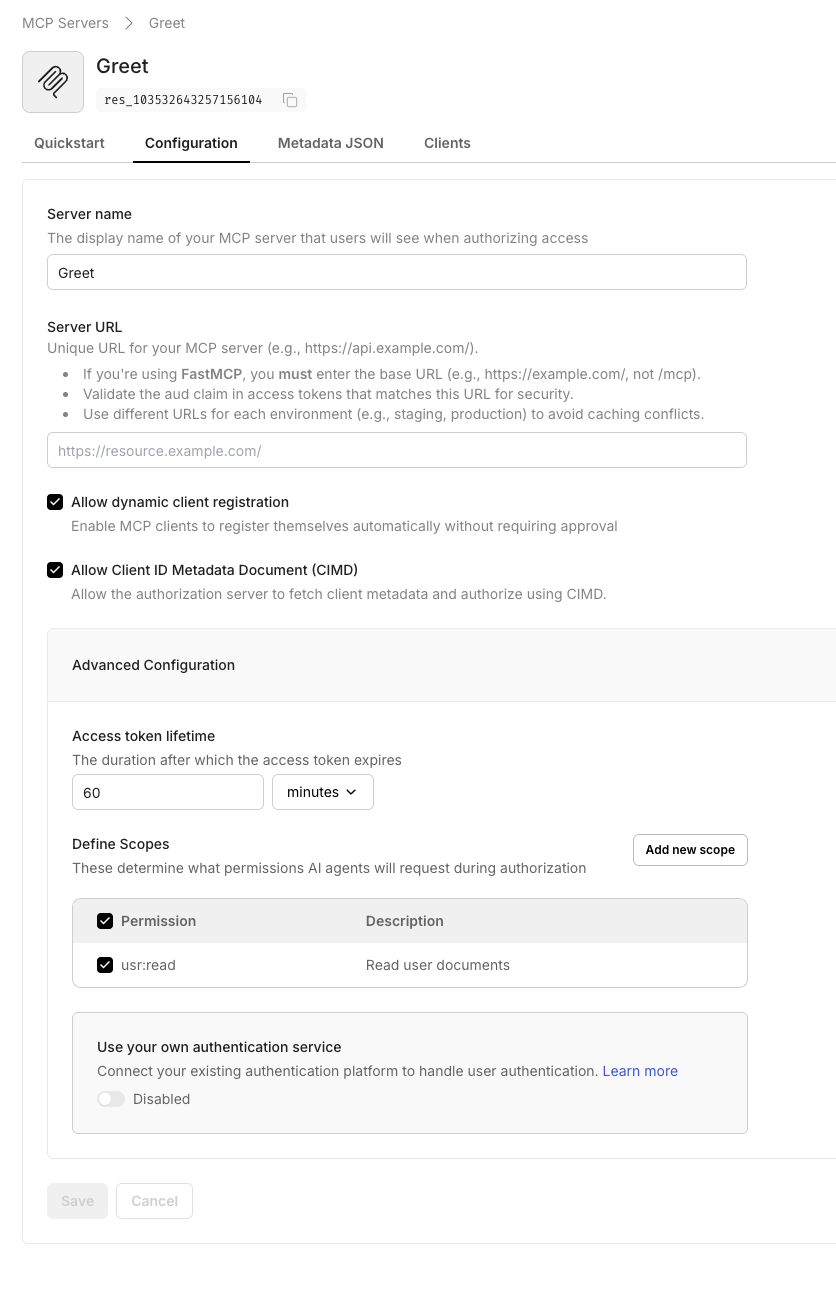
When you save, Scalekit displays the OAuth-protected resource metadata. Copy this JSON—you’ll use it in your
.envfile.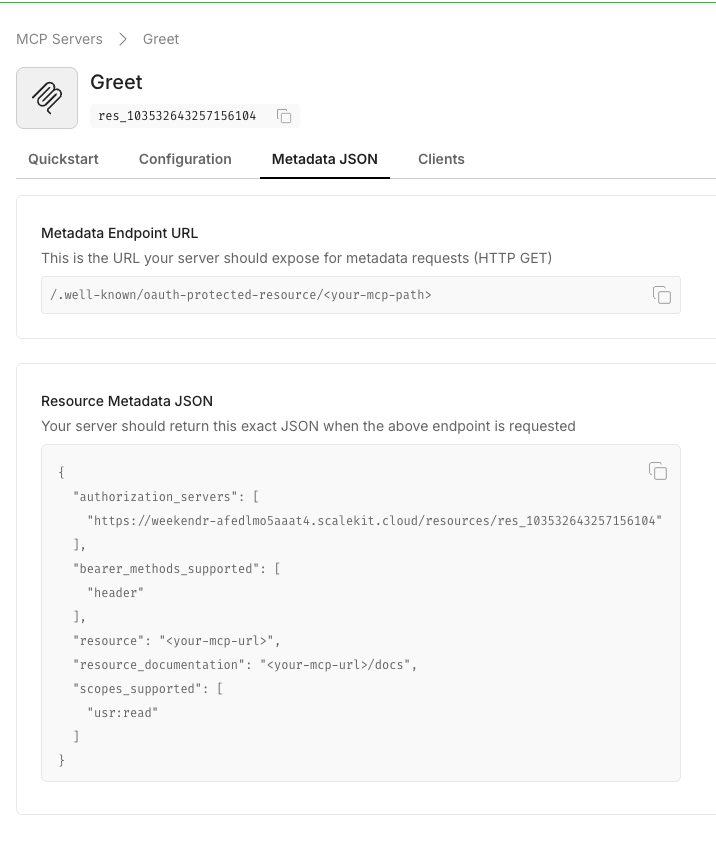
-
Create your project directory
Section titled “Create your project directory”Set up a clean directory structure with a Python virtual environment to isolate FastAPI and FastMCP dependencies.
Terminal mkdir fastapi-mcp-pythoncd fastapi-mcp-pythonpython3 -m venv .venvsource .venv/bin/activate -
Add dependencies
Section titled “Add dependencies”Create a
requirements.txtfile with all required packages and install them.Terminal cat <<'EOF' > requirements.txtmcp>=1.0.0fastapi>=0.104.0fastmcp>=0.8.0uvicorn>=0.24.0pydantic>=2.5.0python-dotenv>=1.0.0httpx>=0.25.0python-jose[cryptography]>=3.3.0cryptography>=41.0.0scalekit-sdk-python>=2.4.0starlette>=0.27.0EOFpip install -r requirements.txt -
Configure environment variables
Section titled “Configure environment variables”Create a
.envfile with your Scalekit credentials and the protected resource metadata from step 1.Terminal cat <<'EOF' > .envPORT=3002SK_ENV_URL=https://<your-env>.scalekit.comSK_CLIENT_ID=<your-client-id>SK_CLIENT_SECRET=<your-client-secret>MCP_SERVER_ID=<mcp-server-id-from-dashboard>PROTECTED_RESOURCE_METADATA='<resource-metadata-json>'EXPECTED_AUDIENCE=http://localhost:3002/EOFopen .envVariable Description PORTLocal port for the FastAPI server. Must match the Server URL registered in Scalekit (defaults to 3002).SK_ENV_URLYour Scalekit environment URL from Dashboard > Settings > API Credentials SK_CLIENT_IDClient ID from Dashboard > Settings > API Credentials. Used with SK_CLIENT_SECRETto initialize the SDK.SK_CLIENT_SECRETClient secret from Dashboard > Settings > API Credentials. Keep this secret and rotate regularly. MCP_SERVER_IDThe MCP server ID from Dashboard > MCP Servers. Not directly used in this implementation but documented for reference. PROTECTED_RESOURCE_METADATAThe complete OAuth resource metadata JSON from step 1. Clients use this to discover authorization requirements. EXPECTED_AUDIENCEThe audience value that tokens must include. Should match your server’s public URL (e.g., http://localhost:3002/). -
Implement the FastAPI + FastMCP server
Section titled “Implement the FastAPI + FastMCP server”Create
main.pywith the complete server implementation. This includes the Scalekit client initialization, authentication middleware for token validation, CORS configuration, and the greeting MCP tool.main.py 10 collapsed linesimport jsonimport osfrom fastapi import FastAPI, Request, Responsefrom fastmcp import FastMCP, Contextfrom scalekit import ScalekitClientfrom scalekit.common.scalekit import TokenValidationOptionsfrom starlette.middleware.cors import CORSMiddlewarefrom dotenv import load_dotenvload_dotenv()# Load environment variablesPORT = int(os.getenv("PORT", "3002"))SK_ENV_URL = os.getenv("SK_ENV_URL", "")SK_CLIENT_ID = os.getenv("SK_CLIENT_ID", "")SK_CLIENT_SECRET = os.getenv("SK_CLIENT_SECRET", "")EXPECTED_AUDIENCE = os.getenv("EXPECTED_AUDIENCE", "")PROTECTED_RESOURCE_METADATA = os.getenv("PROTECTED_RESOURCE_METADATA", "")# Use case: Configure OAuth resource metadata URL for MCP clients# This allows MCP clients to discover authorization requirements via WWW-Authenticate header# Security: The WWW-Authenticate header signals to clients where to obtain tokensRESOURCE_METADATA_URL = f"http://localhost:{PORT}/.well-known/oauth-protected-resource"WWW_HEADER = {"WWW-Authenticate": f'Bearer realm="OAuth", resource_metadata="{RESOURCE_METADATA_URL}"'}# Initialize Scalekit client for token validation# Security: Use SDK to validate JWT signatures and claims# This prevents accepting forged or tampered tokensscalekit_client = ScalekitClient(env_url=SK_ENV_URL,client_id=SK_CLIENT_ID,client_secret=SK_CLIENT_SECRET,)# Initialize FastMCP with stateless HTTP transport# HTTP transport allows MCP clients to connect via standard OAuth flowsmcp = FastMCP("Greeting MCP", stateless_http=True)@mcp.tool(name="greet_user",description="Greets the user with a personalized message.")async def greet_user(name: str, ctx: Context | None = None) -> dict:"""Use case: Simple greeting tool demonstrating OAuth-protected MCP operationsContext: This tool is protected by the authentication middleware"""return {"content": [{"type": "text","text": f"Hi {name}, welcome to Scalekit!"}]}# Mount FastMCP as a FastAPI application# Context: This allows us to layer FastAPI middleware on top of FastMCPmcp_app = mcp.http_app(path="/")app = FastAPI(lifespan=mcp_app.lifespan)# Enable CORS for cross-origin MCP clients# Use case: Allow MCP clients from different origins to connectapp.add_middleware(CORSMiddleware,allow_origins=["*"],allow_credentials=True,allow_methods=["GET", "POST", "OPTIONS"],allow_headers=["*"])@app.middleware("http")async def auth_middleware(request: Request, call_next):"""Security: Validate Bearer tokens on all protected endpoints.Public endpoints (health, metadata) are exempt from authentication.This prevents unauthorized access to MCP tools and operations."""# Allow public endpoints without authentication# Use case: Health checks for monitoring; metadata for client discoveryif request.url.path in {"/health", "/.well-known/oauth-protected-resource"}:return await call_next(request)# Extract Bearer token from Authorization header# Use case: OAuth 2.1 Bearer token format (RFC 6750)# Security: Reject requests without valid Bearer token prefixauth_header = request.headers.get("authorization")if not auth_header or not auth_header.startswith("Bearer "):return Response('{"error": "Missing Bearer token"}',status_code=401,headers=WWW_HEADER,media_type="application/json")token = auth_header.split("Bearer ", 1)[1].strip()# Validate token using Scalekit SDK# Security: Verifies signature, expiration, issuer, and audience claims# Context: This critical step prevents accepting tokens from other issuersoptions = TokenValidationOptions(issuer=SK_ENV_URL,audience=[EXPECTED_AUDIENCE])try:is_valid = scalekit_client.validate_access_token(token, options=options)if not is_valid:raise ValueError("Invalid token")except Exception:return Response('{"error": "Token validation failed"}',status_code=401,headers=WWW_HEADER,media_type="application/json")# Token is valid, proceed with request# This allows MCP clients to call tools with authenticated contextreturn await call_next(request)@app.get("/.well-known/oauth-protected-resource")async def oauth_metadata():"""Use case: Expose OAuth resource metadata for MCP client discoveryThis endpoint allows clients to discover authorization requirements and server capabilitiesContext: MCP clients use this metadata to initiate the OAuth flow"""if not PROTECTED_RESOURCE_METADATA:return Response('{"error": "PROTECTED_RESOURCE_METADATA config missing"}',status_code=500,media_type="application/json")metadata = json.loads(PROTECTED_RESOURCE_METADATA)return Response(json.dumps(metadata, indent=2),media_type="application/json")@app.get("/health")async def health_check():"""Use case: Health check endpoint for monitoring and load balancersContext: Keep this separate from protected endpoints for deployment health checks"""return {"status": "healthy"}# Mount the FastMCP application at root pathapp.mount("/", mcp_app)if __name__ == "__main__":import uvicorn# Start server with auto-reload for development# Production: Use 'uvicorn main:app --host 0.0.0.0 --port 3002 --workers 4' behind a reverse proxyuvicorn.run(app, host="0.0.0.0", port=PORT) -
Start the FastAPI server
Section titled “Start the FastAPI server”Start the FastAPI server in development mode with auto-reload enabled. The server will listen on
http://localhost:3002/and display logs indicating FastAPI is ready to receive authenticated MCP requests.Terminal python main.pyThe server starts on
http://localhost:3002/and logs indicate FastAPI is ready. The MCP endpoint accepts authenticated requests, and the metadata endpoint is accessible at/.well-known/oauth-protected-resource. -
Connect with MCP Inspector
Section titled “Connect with MCP Inspector”Test your server end-to-end using the MCP Inspector to verify the OAuth flow works correctly. This allows you to see the authentication handshake and test calling your MCP tools with validated tokens.
Terminal npx @modelcontextprotocol/inspector@latestIn the Inspector UI:
- Enter your MCP Server URL:
http://localhost:3002/ - Click Connect to initiate the OAuth flow
- Authenticate with Scalekit when prompted
- Run the
greet_usertool with any name
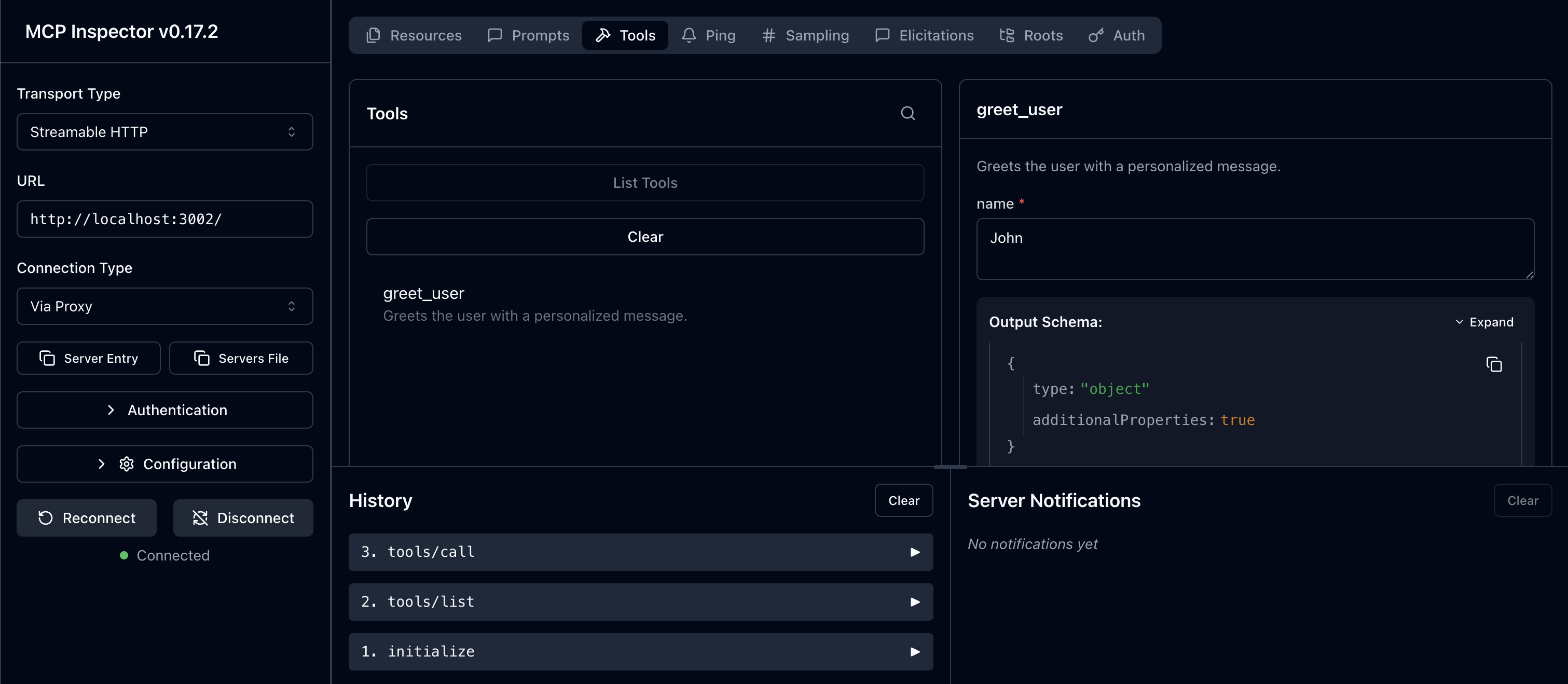
- Enter your MCP Server URL:
You now have a working FastAPI + FastMCP server with Scalekit-protected OAuth authentication. Extend this implementation by adding more MCP tools with the @mcp.tool decorator, implementing scope-based authorization using custom middleware, integrating with your existing FastAPI application, or adding features like rate limiting and request logging using FastAPI’s middleware pipeline.