


The Mailgun connector lets your AI agent act in each user's Mailgun account. Each user connects their own Mailgun API key once, and Scalekit sends it with every call, so your agent never handles credentials. It comes with 259 tools.
- Tools
- 259
- What they doRead · write · destructive
- 107 · 102 · 50107 read102 write50 destructive
- Users sign in with
- API key
Setup
Install the SDK
Terminal window npm install @scalekit-sdk/node dotenvTerminal window pip install scalekit-sdk-python python-dotenvSet your credentials
Add your Scalekit credentials to your
.envfile. Find values in app.scalekit.com > Developers > API Credentials..env SCALEKIT_ENVIRONMENT_URL=<your-environment-url>SCALEKIT_CLIENT_ID=<your-client-id>SCALEKIT_CLIENT_SECRET=<your-client-secret>Create the Mailgun connection
In AgentKit > Connections, create a Mailgun connection. The name you give it is the
connection_nameyour code passes. See Configure connections.Console steps with screenshots
Register your Scalekit environment with the Mailgun connector so Scalekit can authenticate requests on your behalf. The connection name you create will be used to identify and invoke the connection programmatically. Then complete the configuration in your application as follows:
-
Create an API key
-
Go to Mailgun > Settings > API Keys.
-
Under Mailgun API keys, click Create key. Give it a descriptive name, for example
Agent Auth.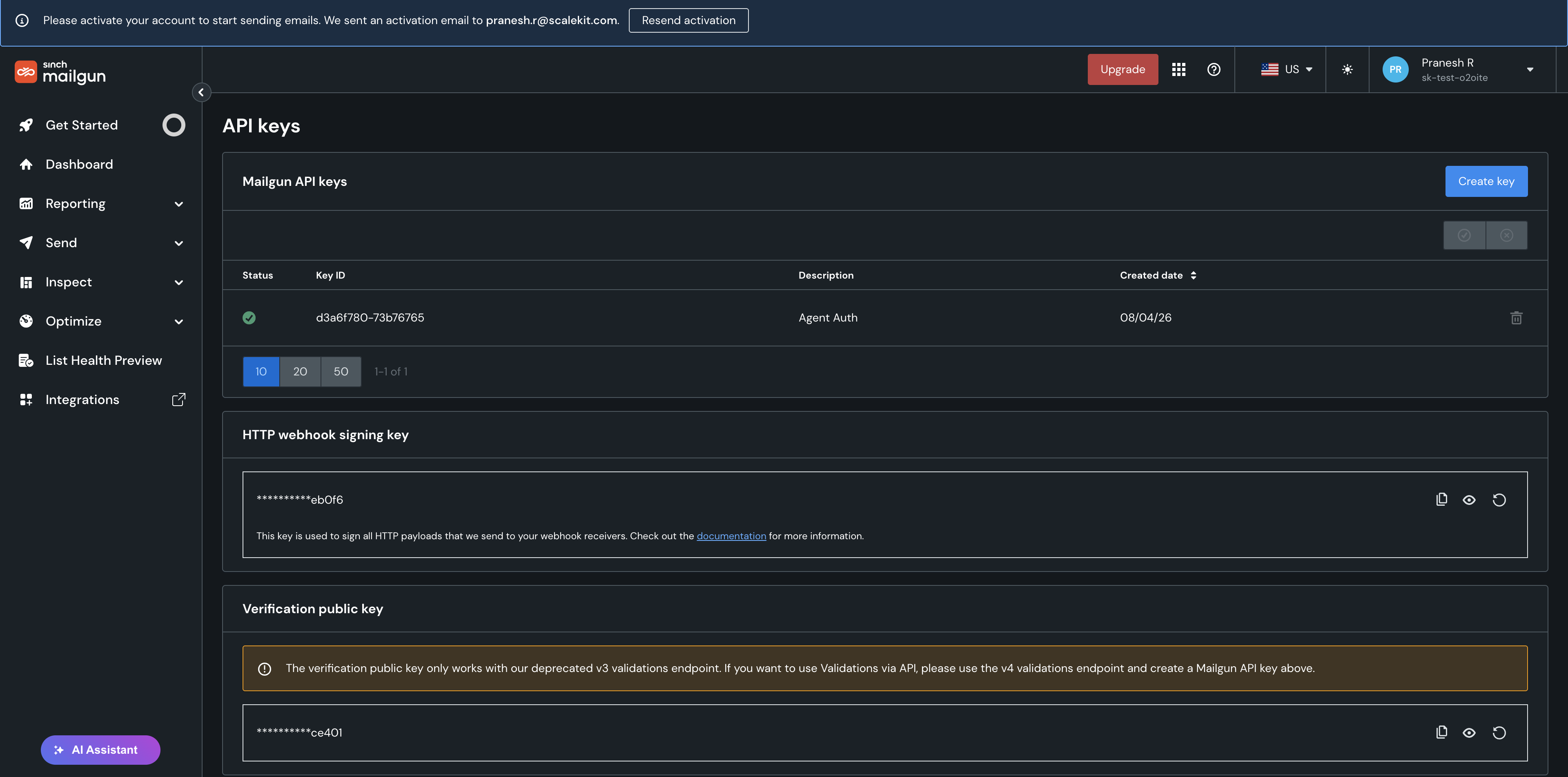
-
Copy the key. Mailgun shows the full key only once at creation — store it securely.
-
-
Add the key in Scalekit
- In Scalekit dashboard, go to AgentKit > Connections > Create Connection. Find Mailgun and click Create.
- Paste the API key you copied in step 1.
- Click Save.
-
Tools
Pass the exact name toexecute_toolmailgun_account_get_signing_keyGet the HTTP webhook signing key currently saved on your Mailgun account.Read-onlyGet Webhook Signing Key
Get the HTTP webhook signing key currently saved on your Mailgun account. This key is used to verify that incoming webhook payloads genuinely originated from Mailgun by checking their signature.
Inputs
This tool takes no inputs.
mailgun_account_ip_allowlist_listList the IP addresses allowlisted for this Mailgun account.Read-onlyList Account IP Allowlist
List the IP addresses allowlisted for this Mailgun account. When at least one entry exists, API key and SMTP credential usage is restricted to only these IP addresses — an added security layer so a leaked key/credential can't be used from an unrecognized location. This is a separate, account-security feature from the domain-level sender/recipient allowlist (mailgun_allowlist_* tools, which control suppression bypass for specific addresses).
Inputs
This tool takes no inputs.
mailgun_account_limits_getRetrieve the current custom sending limit configured on the Mailgun account, including the limit value, how many messages have already been sent in the current period, and the period unit (m=months, d=days, h=hours).Read-onlyGet Custom Sending Limit
Retrieve the current custom sending limit configured on the Mailgun account, including the limit value, how many messages have already been sent in the current period, and the period unit (m=months, d=days, h=hours). Returns a 404 if no custom limit is set.
Inputs
This tool takes no inputs.
mailgun_account_list_sandbox_recipientsGet the list of authorized email recipients for your Mailgun sandbox domain, including whether each has activated (accepted the invite) yet.Read-onlyList Sandbox Recipients
Get the list of authorized email recipients for your Mailgun sandbox domain, including whether each has activated (accepted the invite) yet.
Inputs
This tool takes no inputs.
mailgun_account_templates_getRetrieve metadata about a stored account-level template.Read-onlyGet Account Template
Retrieve metadata about a stored account-level template. If 'active' is set to yes, the content of the active version is included in the response.
Inputs
template_namestringrequired- Account-level template name to fetch.
activestring- If set to 'yes', the active version of the template (including its content) is included in the response.
mailgun_account_templates_get_versionRetrieve the information and content of a specific version of an account-level template.Read-onlyGet Account Template Version
Retrieve the information and content of a specific version of an account-level template.
Inputs
template_namestringrequired- Account-level template name the version belongs to.
version_namestringrequired- Tag of the version of the template to fetch.
mailgun_account_templates_listList account-level templates, with cursor-based pagination.Read-onlyList Account Templates
List account-level templates, with cursor-based pagination.
Inputs
limitinteger- Number of templates to retrieve. Default and max limit is 100.default
100 pstring- Pivot value used to retrieve the next/previous page of templates, taken from the 'paging' links of a prior response.
pagestring- Name of the page to retrieve relative to the pivot ('p'). Defaults to 'first'.one of
firstlastnextprevious
mailgun_account_templates_list_versionsReturn a paginated list of versions for a specific account-level template.Read-onlyList Account Template Versions
Return a paginated list of versions for a specific account-level template.
Inputs
template_namestringrequired- Account-level template name to fetch the versions for.
limitinteger- Number of versions to retrieve. Default and max limit is 100.default
100 pstring- Pivot value used to retrieve the next/previous page of versions, taken from the 'paging' links of a prior response.
pagestring- Name of the page to retrieve relative to the pivot ('p'). Defaults to 'first'.one of
firstlastnextprevious
mailgun_account_webhooks_getRetrieve a single account-level webhook by its webhook ID, including its URL, description, and subscribed event types.Read-onlyGet Account Webhook
Retrieve a single account-level webhook by its webhook ID, including its URL, description, and subscribed event types.
Inputs
webhook_idstringrequired- The ID of the account-level webhook to retrieve.
mailgun_account_webhooks_listList account-level webhooks, which receive Mailgun's POST callbacks for the given event type across every domain on the account (as opposed to domain-level webhooks, which apply to a single domain).Read-onlyList Account Webhooks
List account-level webhooks, which receive Mailgun's POST callbacks for the given event type across every domain on the account (as opposed to domain-level webhooks, which apply to a single domain). Optionally filter to a specific set of webhook IDs.
Inputs
webhook_idsstring- Comma-separated list of webhook IDs to filter results to. Omit to return all account-level webhooks.
mailgun_alerts_get_slack_channelRetrieve details (ID, name, archived status) for a specific Slack channel connected to Mailgun Alerts, looked up by its Slack channel ID.Read-onlyGet Slack Channel
Retrieve details (ID, name, archived status) for a specific Slack channel connected to Mailgun Alerts, looked up by its Slack channel ID.
Inputs
idstringrequired- The Slack channel ID to look up, e.g. C012AB3CD. Use mailgun_alerts_list_slack_channels to find channel IDs.
mailgun_alerts_list_alertsList all configured Mailgun Alerts settings records for the account, including each alert's event type, delivery channel, and channel-specific settings, plus the account's webhook signing key and Slack integration info.Read-onlyList Alerts
List all configured Mailgun Alerts settings records for the account, including each alert's event type, delivery channel, and channel-specific settings, plus the account's webhook signing key and Slack integration info.
Inputs
This tool takes no inputs.
mailgun_alerts_list_eventsList the current set of event types that Mailgun Alerts can notify on (e.g.Read-onlyList Alert Event Types
List the current set of event types that Mailgun Alerts can notify on (e.g. ip_listed, ip_delisted). Use one of the returned values as the event_type when creating or updating an alert.
Inputs
This tool takes no inputs.
mailgun_alerts_list_slack_channelsList the Slack channels visible to the Slack workspace connected to Mailgun Alerts, with cursor-based pagination.Read-onlyList Slack Channels
List the Slack channels visible to the Slack workspace connected to Mailgun Alerts, with cursor-based pagination.
Inputs
limitinteger- Maximum number of Slack channels to return in this request.
pagestring- Encoded paging cursor, taken from the 'next' or 'first' link of a previous response. Omit to fetch the first page.
mailgun_allowlist_getFetch a single allowlist record for a domain to check whether a given email address or domain is present on the allowlist.Read-onlyLookup Allowlist Record
Fetch a single allowlist record for a domain to check whether a given email address or domain is present on the allowlist. Known limitation (live-confirmed): the underlying REST executor substitutes 'value' into the URL path without percent-encoding it, so a bare domain value (e.g. 'example.com') works correctly, but an email-address value containing '@' currently fails with a generic, non-JSON 404 from Mailgun's own router rather than a normal not-found response. Use mailgun_allowlist_list (optionally with a search term) to look up email-address entries until this is fixed.
Inputs
domain_namestringrequired- The sending domain to look up the allowlist entry from.
valuestringrequired- The address or domain value to search for in the allowlist, e.g. alice@example.com or example.com.
mailgun_allowlist_listPaginate over all allowlist records (allowlisted addresses and domains) for a Mailgun domain, optionally filtering by a search term or paging via an address cursor.Read-onlyList Allowlist Records
Paginate over all allowlist records (allowlisted addresses and domains) for a Mailgun domain, optionally filtering by a search term or paging via an address cursor.
Inputs
domain_namestringrequired- The sending domain to list allowlist entries for.
addressstring- Address serving as a pagination divider between pages. Optional in practice — omit it to fetch the first page of results.
limitinteger- Maximum number of records to return per page. Optional, default 100, max 1000.default
100 pagestring- Page direction relative to the address parameter. One of next, previous, or last. If empty, returns the first page.one of
nextpreviouslast termstring- Filter records to those whose address starts with the specified substring. Optional.
mailgun_api_keys_listList Mailgun API keys on your account.Read-onlyList API Keys
List Mailgun API keys on your account. Supports filtering by domain name (for domain keys) or by key kind (domain, user, or web).
Inputs
domain_namestring- Filter results to domain keys belonging to this domain.
kindstring- Filter results by key kind.one of
domainuserweb
mailgun_bounce_classification_list_bounce_logsList bounce classification event logs for a sending domain.Read-onlyList Bounce Classification Logs
List bounce classification event logs for a sending domain. Deprecated by Mailgun: live-confirmed the endpoint now unconditionally rejects requests with "Deprecated: use POST /v1/analytics/logs" — use mailgun_logs_query instead. Kept here only for schema completeness / backward reference.
Inputs
domainstringrequired- The sender domain name to list bounce classification event logs for.
entity_idstring- The entity ID (Email Service Entity or Spam Filter / Blocklist) to filter events by, e.g. gmail.
limitinteger- Limits the number of items returned in the response.
pagestring- Encoded paging information, provided via the 'next'/'previous' links of a prior response.
rule_idstring- The bounce classification rule ID to filter events by. Optional if the page cursor is passed (i.e. required to start the first query, optional for subsequent paged requests).
sortstring- Sort field and order. Default is '@timestamp:asc'.default
@timestamp:asc
mailgun_bounce_classification_list_domain_statsList bounce classification statistics per sending domain across the account.Read-onlyList Bounce Classification Domain Stats
List bounce classification statistics per sending domain across the account. Deprecated by Mailgun in favor of POST /v2/bounce-classification/metrics, but still available.
Inputs
include_subaccountsboolean- Whether to include stats from subaccounts.default
false limitinteger- Limits the number of items returned in the response.
querystring- Query filter, e.g.: 'domain.name:example.com'.
skipinteger- Skips N items in the response, for pagination.
mailgun_bounce_classification_list_entitiesList the bounce classification entities (email service providers and spam filters/blocklists) known to Mailgun's bounce classification config.Read-onlyList Bounce Classification Entities
List the bounce classification entities (email service providers and spam filters/blocklists) known to Mailgun's bounce classification config. Takes no parameters. Deprecated by Mailgun in favor of POST /v2/bounce-classification/metrics, but still available.
Inputs
This tool takes no inputs.
mailgun_bounce_classification_list_entity_statsList bounce classification statistics broken down per entity (email service provider or spam filter/blocklist) for a specific sending domain.Read-onlyList Bounce Classification Entity Stats
List bounce classification statistics broken down per entity (email service provider or spam filter/blocklist) for a specific sending domain. Deprecated by Mailgun in favor of POST /v2/bounce-classification/metrics, but still available.
Inputs
domainstringrequired- The sender domain name to list per-entity bounce statistics for.
include_subaccountsboolean- Whether to include stats from subaccounts.default
false
mailgun_bounce_classification_list_rule_statsList bounce classification statistics broken down per bounce-classification rule for a specific domain and entity (e.g.Read-onlyList Bounce Classification Rule Stats
List bounce classification statistics broken down per bounce-classification rule for a specific domain and entity (e.g. Gmail). Deprecated by Mailgun in favor of POST /v2/bounce-classification/metrics, but still available.
Inputs
domainstringrequired- The sender domain name to list per-rule bounce statistics for.
entity_idstringrequired- The entity ID (Email Service Entity or Spam Filter / Blocklist), e.g. gmail.
include_subaccountsboolean- Whether to include stats from subaccounts.default
false
mailgun_bounce_classification_list_rulesList the bounce classification rules configured in Mailgun's bounce classification engine.Read-onlyList Bounce Classification Rules
List the bounce classification rules configured in Mailgun's bounce classification engine. Takes no parameters. Deprecated by Mailgun in favor of GET /v2/bounce-classification/config/groups/{group-id}, but still available.
Inputs
This tool takes no inputs.
mailgun_bounce_classification_list_statsList bounce classification statistics ordered by total bounces, optionally grouped by subaccount, domain, entity, or rule.Read-onlyList Bounce Classification Stats
List bounce classification statistics ordered by total bounces, optionally grouped by subaccount, domain, entity, or rule. Deprecated by Mailgun in favor of POST /v2/bounce-classification/metrics, but still available.
Inputs
groupstring- Group response by fields: subaccount.id, domain.name, entity-id, or rule-id.one of
subaccount.iddomain.nameentity-idrule-id include_subaccountsboolean- Whether to include stats from subaccounts.default
false limitinteger- Limits the number of items returned in the response.
mailgun_bounces_getFetch a single bounce (suppression) record for a specific email address on a Mailgun domain, returning the SMTP error code, error message, and creation timestamp if that address is currently suppressed due to a bounce.Read-onlyLookup Bounce Record
Fetch a single bounce (suppression) record for a specific email address on a Mailgun domain, returning the SMTP error code, error message, and creation timestamp if that address is currently suppressed due to a bounce. Returns a 404 if the address is not present in the bounces table.
Inputs
addressstringrequired- The email address to search for in the domain's bounce list.
domain_namestringrequired- The Mailgun sending domain to retrieve the bounce record from, e.g. mg.example.com.
mailgun_bounces_listPaginate through the bounce (suppression) list for a Mailgun domain.Read-onlyList Bounces
Paginate through the bounce (suppression) list for a Mailgun domain. Supports limiting the page size, moving through pages via a page direction cursor, and filtering to addresses that start with a given substring.
Inputs
domain_namestringrequired- The Mailgun sending domain to list bounces for, e.g. mg.example.com.
limitinteger- Maximum number of bounce records to return per page. Max 1000, default 100.default
100 pagestring- Page direction relative to the current cursor: next, previous, or last. Leave empty to return the first page.
termstring- Filter records to addresses that start with this substring.
mailgun_complaints_getFetch a single complaint (suppression) record for a specific email address on a Mailgun domain, checking whether that address is currently present in the complaints list and returning its creation timestamp if so.Read-onlyLookup Complaint Record
Fetch a single complaint (suppression) record for a specific email address on a Mailgun domain, checking whether that address is currently present in the complaints list and returning its creation timestamp if so. Returns a 404 if no complaint is found for the address.
Inputs
addressstringrequired- The email address to search for in the domain's complaint list.
domain_namestringrequired- The Mailgun sending domain to retrieve the complaint record from, e.g. mg.example.com.
mailgun_complaints_listPaginate through the spam complaint (suppression) list for a Mailgun domain.Read-onlyList Complaints
Paginate through the spam complaint (suppression) list for a Mailgun domain. Supports limiting the page size, moving through pages via a page direction cursor and an address divider, and filtering to addresses that start with a given substring.
Inputs
domain_namestringrequired- The Mailgun sending domain to list complaints for, e.g. mg.example.com.
addressstring- Address serving as a divider between pages, used together with the page parameter to move forward/backward through results.
limitinteger- Maximum number of complaint records to return per page. Max 1000, default 100.default
100 pagestring- Page direction relative to the address divider: next, previous, or last. Leave empty to return the first page.
termstring- Filter records to addresses that start with this substring.
mailgun_domain_keys_list_all_keysList DKIM domain keys across all domains on your Mailgun account, optionally filtered by signing domain or selector.Read-onlyList All Domain Keys
List DKIM domain keys across all domains on your Mailgun account, optionally filtered by signing domain or selector. Results are paginated; use the 'page' cursor returned in a previous response's paging links to navigate pages (omit it to start from the first page). Note: Mailgun's OpenAPI spec attaches a request body to this GET endpoint, but this tool sends these fields as query parameters instead, matching how the API actually expects them. Performance note (live-confirmed): calling this without 'signing_domain' scans all domains on the account and can take 10+ seconds or time out on accounts with many domains/keys; the same call scoped to a single 'signing_domain' returns in ~2 seconds. Prefer passing 'signing_domain' whenever you know it.
Inputs
limitinteger- Maximum number of domain keys to return per page. Default 10, max 100.default
10 pagestring- Encoded paging cursor copied from the 'next' or 'previous' link in a prior response's paging object. Omit on the first call to start from the first page.
selectorstring- Filter results to domain keys with this selector.
signing_domainstring- Filter results to domain keys belonging to this signing domain.
mailgun_domain_keys_list_domain_keysList all DKIM domain keys for a specific domain authority, including active/inactive and valid/invalid keys.Read-onlyList Domain Keys
List all DKIM domain keys for a specific domain authority, including active/inactive and valid/invalid keys.
Inputs
authority_namestringrequired- The domain authority name to list domain keys for. Must be a valid domain.
mailgun_domain_templates_getRetrieve metadata about a stored template.Read-onlyGet Template
Retrieve metadata about a stored template. If 'active' is set to yes, the content of the active version is included in the response. By default the version field is omitted; to browse other versions use the List Template Versions tool.
Inputs
domain_namestringrequired- Domain name the template is stored under. Example: mg.example.com.
template_namestringrequired- Template name to fetch.
activestring- If set to 'yes', the active version of the template (including its content) is included in the response.
mailgun_domain_templates_get_versionRetrieve the information and content of a specific version of a template.Read-onlyGet Template Version
Retrieve the information and content of a specific version of a template.
Inputs
domain_namestringrequired- Domain name the template is stored under. Example: mg.example.com.
template_namestringrequired- Template name the version belongs to.
version_namestringrequired- Tag of the version of the template to fetch.
mailgun_domain_templates_listList templates stored for a domain, with cursor-based pagination.Read-onlyList Templates
List templates stored for a domain, with cursor-based pagination.
Inputs
domain_namestringrequired- Domain name to fetch the templates for. Example: mg.example.com.
limitinteger- Number of templates to retrieve. Default and max limit is 100.default
100 pstring- Pivot value used to retrieve the next/previous page of templates, taken from the 'paging' links of a prior response.
pagestring- Name of the page to retrieve relative to the pivot ('p'). Defaults to 'first'.one of
firstlastnextprevious
mailgun_domain_templates_list_versionsReturn a paginated list of versions for a specific template.Read-onlyList Template Versions
Return a paginated list of versions for a specific template.
Inputs
domain_namestringrequired- Domain name to fetch the template versions for. Example: mg.example.com.
template_namestringrequired- Template name to fetch the versions for.
limitinteger- Number of versions to retrieve. Default and max limit is 100.default
100 pstring- Pivot value used to retrieve the next/previous page of versions, taken from the 'paging' links of a prior response.
pagestring- Name of the page to retrieve relative to the pivot ('p'). Defaults to 'first'.one of
firstlastnextprevious
mailgun_domain_tracking_get_certificate_statusGet the TLS (x509) certificate and its status for a click/open tracking domain.Read-onlyGet Tracking Certificate Status
Get the TLS (x509) certificate and its status for a click/open tracking domain. Status can be processing, active, expired, or error.
Inputs
domainstringrequired- The tracking domain of the TLS certificate, formatted as web_prefix.domain_name (web_prefix is configured in your domain's tracking settings).
mailgun_domain_tracking_get_settingsGet a domain's open, click, and unsubscribe tracking settings, including whether each is active and the web tracking scheme.Read-onlyGet Tracking Settings
Get a domain's open, click, and unsubscribe tracking settings, including whether each is active and the web tracking scheme.
Inputs
namestringrequired- The name of the domain to fetch tracking settings for.
mailgun_domain_webhooks_getRetrieve the URL(s) currently registered for a single webhook event type on a domain.Read-onlyGet Domain Webhook
Retrieve the URL(s) currently registered for a single webhook event type on a domain.
Inputs
domain_namestringrequired- The sending domain the webhook is configured on.
webhook_namestringrequired- The webhook event type to look up.one of
accepteddeliveredopenedclickedunsubscribedcomplainedtemporary_failpermanent_fail
mailgun_domain_webhooks_listReturn every webhook event type Mailgun supports for a domain and the URL(s) currently registered for each: accepted, delivered, opened, clicked, unsubscribed, complained, temporary_fail, permanent_fail.Read-onlyList Domain Webhooks
Return every webhook event type Mailgun supports for a domain and the URL(s) currently registered for each: accepted, delivered, opened, clicked, unsubscribed, complained, temporary_fail, permanent_fail. Event types with nothing configured are returned with an empty URL list. This is the classic per-domain webhook resource (v3); it is separate from account-level webhooks, which apply across every domain on the account.
Inputs
domain_namestringrequired- The sending domain to list configured webhooks for.
mailgun_domains_getFetch details for a single Mailgun domain, including its state, settings, and receiving/sending DNS record verification status.Read-onlyGet Domain
Fetch details for a single Mailgun domain, including its state, settings, and receiving/sending DNS record verification status.
Inputs
namestringrequired- The name of the domain to fetch.
mailgun_domains_listList domains on your Mailgun account.Read-onlyList Domains
List domains on your Mailgun account. Supports filtering by state (active, unverified, disabled) or authority, partial name search, sorting, and pagination (max 1000 items per page).
Inputs
authoritystring- Filter domains by a specific authority (root domain that owns/manages the DNS). Ignored if state is also specified.
include_subaccountsboolean- Include domains belonging to any subaccounts under this account.default
false limitinteger- Maximum number of domains to return. Max 1000, default 100.default
100 searchstring- Search domains by partial or complete name. Does not support wildcards.
skipinteger- Number of domains to skip before starting to return results. Default 0.default
0 sortstring- Sort order. Valid values: name, name:asc, name:desc. If not specified, domains are returned in reverse creation date order.
statestring- Filter domains by state.one of
activeunverifieddisabled
mailgun_dynamic_ip_pools_get_domain_historyRetrieve a domain's Dynamic IP Pool history records, showing when and why the domain moved between pools (e.g.Read-onlyList Domain Dynamic IP Pool History
Retrieve a domain's Dynamic IP Pool history records, showing when and why the domain moved between pools (e.g. dynamic_good, dynamic_poor).
Inputs
namestringrequired- The domain name to retrieve Dynamic IP Pool history for.
mailgun_dynamic_ip_pools_list_account_historyRetrieve Dynamic IP Pool history records for all domains across the parent account and, optionally, its subaccounts.Read-onlyList Dynamic IP Pool Account History
Retrieve Dynamic IP Pool history records for all domains across the parent account and, optionally, its subaccounts. Supports filtering by domain, time range, and which pool a domain moved to/from.
Inputs
afterstring- Filter events emitted after a given timestamp. Format: 'Mon, 02 Jan 2006 15:04:05 MST'.
beforestring- Filter events emitted before a given timestamp. Format: 'Mon, 02 Jan 2006 15:04:05 MST'.
domainstring- Filter history events by domain name.
include_subaccountsboolean- If true, includes history events from all subaccounts in addition to the parent account.default
false limitinteger- Maximum number of history events to return (1-100).
moved_fromstring- Filter events by which Dynamic IP Pool a domain was moved from (e.g. dynamic_good, dynamic_poor).
moved_tostring- Filter events by which Dynamic IP Pool a domain was moved to (e.g. dynamic_good, dynamic_poor).
mailgun_dynamic_ip_pools_list_assignable_domainsList all domains on the account (or a given subaccount) that are not yet enrolled in Dynamic IP Pools and are therefore eligible for enrollment.Read-onlyList Assignable Domains
List all domains on the account (or a given subaccount) that are not yet enrolled in Dynamic IP Pools and are therefore eligible for enrollment.
Inputs
domainstring- Regex search term to filter assignable domains by name.
subaccount_idstring- If provided, lists assignable domains belonging to this subaccount instead of the parent account. Must be a valid account ID.
mailgun_dynamic_ip_pools_list_domainsRetrieve all domains currently enrolled in Dynamic IP Pools across the parent account and its subaccounts, with sorting and filtering by account or pool.Read-onlyList Domains Assigned to Dynamic IP Pools
Retrieve all domains currently enrolled in Dynamic IP Pools across the parent account and its subaccounts, with sorting and filtering by account or pool.
Inputs
accountarray- Filter domains by account ID. Can be specified multiple times to filter by multiple accounts.
limitinteger- Maximum number of domains to return (1-100).
poolarray- Filter domains to specific Dynamic IP Pool(s). Can be specified multiple times.
sort_bystring- Field to sort domains by.one of
bounce_ratecomplaint_ratenamedefaultname sort_orderstring- Sort direction for the sort_by field.one of
ascendingdescendingdefaultascending
mailgun_dynamic_ip_pools_list_poolsReturn the list of IPs belonging to each of the account's Dynamic IP Pools (good_reputation, poor_reputation, new_senders), along with each pool's configuration.Read-onlyList All Dynamic IP Pools
Return the list of IPs belonging to each of the account's Dynamic IP Pools (good_reputation, poor_reputation, new_senders), along with each pool's configuration.
Inputs
This tool takes no inputs.
mailgun_dynamic_ip_pools_preview_domain_assignmentRun a health check on a domain and return which Dynamic IP Pool it would be placed in, without actually enrolling the domain or changing its current pool assignment.Read-onlyPreview Domain Dynamic IP Pool Assignment
Run a health check on a domain and return which Dynamic IP Pool it would be placed in, without actually enrolling the domain or changing its current pool assignment.
Inputs
namestringrequired- The domain name to preview a Dynamic IP Pool assignment for.
mailgun_events_listRetrieve a paginated list of inbound and outbound message events for a domain (e.g.Read-onlyList Events
Retrieve a paginated list of inbound and outbound message events for a domain (e.g. accepted, delivered, failed, opened, clicked, unsubscribed, complained, stored). Mailgun retains event data for at least 3 days. Supports filtering by time range, event type, recipient, sender, subject, tags, attachment name, message size, and failure severity.
Inputs
domain_namestringrequired- The sending domain to retrieve events for.
ascendingstring- Sort direction by time: 'yes' sorts ascending, 'no' sorts descending. Must be provided if 'end' is not specified. Live-confirmed: 'begin'/'end' must point the right direction for the chosen sort — for 'yes' (ascending), 'begin' must be the earlier timestamp and 'end' the later one; for 'no' (descending), it's the reverse ('begin' later, 'end' earlier). Mixing them up returns a clean 'Inconsistent range' error from Mailgun rather than silently sorting wrong.one of
yesno attachmentstring- Filter by the name of an attached file.
beginstring- Beginning of the search time range, in epoch seconds.
endstring- End of the search time range, in epoch seconds.
eventstring- Filter by event type (e.g. accepted, delivered, failed, opened, clicked, unsubscribed, complained, stored, rejected).
fromstring- Filter by the email address in the message's From MIME header.
limitinteger- Number of entries to return per page. Maximum 300.
liststring- Filter by the mailing list email address the message was originally sent to.
message_idstring- Filter by the Mailgun message id returned by the Messages API.
recipientstring- Filter by the email address of a single recipient tracked by the event.
recipientsstring- For stored events, filter by any of the message's potential recipients.
severitystring- Filter failed events by severity: 'temporary' (Mailgun will retry delivery) or 'permanent' (Mailgun will not retry).one of
temporarypermanent sizestring- Filter by message size in bytes. Mostly intended for use with range filtering expressions.
subjectstring- Filter by the message's subject line.
tagsstring- Filter by user-defined tags applied to the message.
tostring- Filter by the email address in the message's To MIME header.
mailgun_forwards_getRetrieve a single Mailgun forward (routing) rule by its ID, including its match expression, forwarding action(s), and timestamps.Read-onlyGet Forward Rule
Retrieve a single Mailgun forward (routing) rule by its ID, including its match expression, forwarding action(s), and timestamps.
Inputs
idstringrequired- The ID of the forward rule to retrieve.
mailgun_forwards_listList Mailgun forward (routing) rules on the account.Read-onlyList Forward Rules
List Mailgun forward (routing) rules on the account. By default lists all rules on the account; scope to a single domain with domain_name. Supports cursor-based pagination via the opaque 'page' token returned in the response's 'next'/'previous' links.
Inputs
domain_namestring- Scope the listing to forward rules defined on this domain only.
limitinteger- Maximum number of forward rules to return per page. Default 100.default
100 pagestring- Encoded paging cursor, taken from the 'next' or 'previous' links in a prior response. Omit to fetch the first page.
mailgun_ip_pools_get_poolRetrieve details about a single Dedicated IP Pool (DIPP) by ID, including its name, description, list of IPs, and whether it is currently linked to any domains.Read-onlyGet IP Pool
Retrieve details about a single Dedicated IP Pool (DIPP) by ID, including its name, description, list of IPs, and whether it is currently linked to any domains. If linked, the response's is_linked flag is true and linked_domains lists those domains.
Inputs
pool_idstringrequired- The ID of the dedicated IP pool (DIPP) to retrieve.
mailgun_ip_pools_list_pool_domainsRetrieve a paginated list of domains linked to a Dedicated IP Pool (DIPP), by pool ID.Read-onlyList Pool Domains
Retrieve a paginated list of domains linked to a Dedicated IP Pool (DIPP), by pool ID. Supports cursor-based pagination via the page and limit parameters.
Inputs
pool_idstringrequired- The ID of the dedicated IP pool (DIPP) to list linked domains for.
limitinteger- The maximum number of records to return, between 10 and 500. Defaults to 10.default
10 pagestring- Encoded page identifier retrieved from a previous call's paging.next or paging.first URL, used to continue pagination.
mailgun_ip_pools_list_poolsList all Dedicated IP Pools (DIPPs) on the account.Read-onlyList IP Pools
List all Dedicated IP Pools (DIPPs) on the account. For each pool, returns its basic properties (name, description, list of IPs) and indicates whether it's linked to any domains and whether it's inherited from a parent account. Takes no parameters.
Inputs
This tool takes no inputs.
mailgun_ip_warmup_getRetrieve the status of an in-flight warmup plan for a dedicated IP address, including its current stage, throttle percentage, volume sent within the current stage, and stage history.Read-onlyGet IP Warmup Status
Retrieve the status of an in-flight warmup plan for a dedicated IP address, including its current stage, throttle percentage, volume sent within the current stage, and stage history. The IP must be a dedicated IP owned by the account.
Inputs
addrstringrequired- The dedicated IP address to retrieve the warmup status for.
mailgun_ip_warmup_listRetrieve a list of in-flight warmup statuses for all dedicated IP addresses owned by the account, with pagination support via page and limit.Read-onlyList IP Warmup Statuses
Retrieve a list of in-flight warmup statuses for all dedicated IP addresses owned by the account, with pagination support via page and limit.
Inputs
limitstring- The number of results to return per page. Defaults to 10 if not specified.default
10 pagestring- Encoded page identifier retrieved from a previous call's paging.next or paging.first URL. If omitted, the first page is returned.
mailgun_ips_getGet details about a specific IP address on your Mailgun account, including whether it is dedicated or shared, and its reverse DNS (rDNS) entry.Read-onlyGet IP
Get details about a specific IP address on your Mailgun account, including whether it is dedicated or shared, and its reverse DNS (rDNS) entry.
Inputs
ipstringrequired- The IP address to get details about.
mailgun_ips_get_available_ip_countReturn the number of additional IPs (dedicated and shared) available to the account per its current billing plan.Read-onlyGet Available IP Count
Return the number of additional IPs (dedicated and shared) available to the account per its current billing plan. Note: this endpoint is kept for backwards compatibility only per Mailgun's docs; the 'shared' field in the response is deprecated and should not be relied upon.
Inputs
This tool takes no inputs.
mailgun_ips_get_domain_spillover_poolGet the DIPP (dedicated IP pool) spillover settings for a specific domain — i.e.Read-onlyGet Domain Spillover Pool
Get the DIPP (dedicated IP pool) spillover settings for a specific domain — i.e. which dedicated IP pool is used to handle overflow sending volume for this domain.
Inputs
namestringrequired- The domain's INTERNAL ID (a Mongo ObjectID, e.g. 6a709fac9163aa838dac9844) — NOT the domain's DNS name. Live-confirmed: this endpoint rejects a DNS-style name with 'parsing domain id: the provided hex string is not a valid ObjectID'. Get the internal ID from mailgun_domains_get's or mailgun_domains_list's response (the 'id' field on the domain object).
mailgun_ips_get_spillover_settingsGet the account-level DIPP (dedicated IP pool) spillover settings — the pool used to handle overflow sending volume across all domains under the account.Read-onlyGet Spillover Settings
Get the account-level DIPP (dedicated IP pool) spillover settings — the pool used to handle overflow sending volume across all domains under the account.
Inputs
This tool takes no inputs.
mailgun_ips_listList IPs belonging to the account.Read-onlyList IPs
List IPs belonging to the account. Optionally filter to only dedicated IPs or only enabled IPs. Returns the list of IP addresses (and, if the account has the DIPPs feature enabled, a list of IPs assignable to dedicated IP pools).
Inputs
dedicatedboolean- If true, return only dedicated IPs. If omitted, both dedicated and shared IPs are returned.
enabledboolean- If true, return only enabled IPs. If omitted, both enabled and disabled IPs are returned.
mailgun_ips_list_detailedList detailed information about IPs belonging to the account and its subaccounts (an additional record is returned per subaccount an IP is linked to).Read-onlyList IPs (Detailed)
List detailed information about IPs belonging to the account and its subaccounts (an additional record is returned per subaccount an IP is linked to). Supports filtering by pool, domain, subaccount, or partial IP match, plus sorting and pagination. The detailed IP view feature must be enabled for the account.
Inputs
domain_idstring- Filter IPs linked to a domain. Value can be a specific domain ID, 'any', or 'none'.
ipstring- Search for IPs containing this text (supports partial matching).
limitinteger- Maximum number of records to return. Minimum 10, maximum 100, default 10.default
10 pool_idstring- Filter IPs linked to a pool. Value can be a specific pool ID, 'any', or 'none'.
skipinteger- Number of records to skip before starting to return results. Default 0.default
0 sort_bystring- Name of the field to sort results by.
sort_orderstring- Sort results 'descending' or 'ascending'. Defaults to 'ascending'.one of
ascendingdescendingdefaultascending subaccount_idstring- Filter IPs linked to a subaccount. Value can be a specific subaccount ID, 'any', or 'none'.
mailgun_ips_list_ip_domainsGet all domains on the account where a specific IP is assigned.Read-onlyList IP Domains
Get all domains on the account where a specific IP is assigned. Matching domains are ordered by increasing id, then limit/skip are applied. If search is provided, it is split into words and results matching any word (logical OR) are returned. Note: Mailgun's OpenAPI spec marks limit, search, and skip as required query parameters for this endpoint, but the accompanying prose documents search as conditional ('if present') — this tool treats all three as optional with sensible defaults to match documented behavior.
Inputs
ipstringrequired- The IP address to filter on. Must belong to the account.
limitinteger- The maximum number of domains to return. Default 100.default
100 searchstring- Search query that returned domain names must match (split into words, matched with logical OR). If omitted, no name filter is applied.
skipinteger- The number of matching domains to skip in the response. Default 0.default
0
mailgun_limits_getGet the details of a single limit threshold for a Mailgun account by its name.Read-onlyGet Limit Threshold
Get the details of a single limit threshold for a Mailgun account by its name.
Inputs
namestringrequired- A user-friendly name that identifies this limit threshold. Used as the path identifier for get/update/delete operations.
mailgun_limits_listList all limit thresholds configured for a Mailgun account.Read-onlyList Limit Thresholds
List all limit thresholds configured for a Mailgun account.
Inputs
This tool takes no inputs.
mailgun_mailing_lists_getRetrieve details for a single Mailgun mailing list by its address, including name, description, access level, reply preference, creation timestamp, and member count.Read-onlyGet Mailing List
Retrieve details for a single Mailgun mailing list by its address, including name, description, access level, reply preference, creation timestamp, and member count.
Inputs
list_addressstringrequired- The address of the mailing list to retrieve, e.g. developers@mailgun.net.
mailgun_mailing_lists_get_memberRetrieve details for a single member of a Mailgun mailing list, including their address, name, custom variables, and subscription status.Read-onlyGet Mailing List Member
Retrieve details for a single member of a Mailgun mailing list, including their address, name, custom variables, and subscription status.
Inputs
list_addressstringrequired- The address of the mailing list the member belongs to, e.g. developers@mailgun.net.
member_addressstringrequired- The email address of the member to retrieve.
mailgun_mailing_lists_listList mailing lists on your Mailgun account, with optional pagination (limit/skip) and filtering by a specific address.Read-onlyList Mailing Lists
List mailing lists on your Mailgun account, with optional pagination (limit/skip) and filtering by a specific address.
Inputs
addressstring- Filter mailing lists matching a specific address.
limitinteger- Maximum number of mailing lists to return. Defaults to 100.default
100 skipinteger- Number of mailing lists to skip before starting to return results. Defaults to 0.default
0
mailgun_mailing_lists_list_by_pagePaginate over mailing lists on your Mailgun account.Read-onlyList Mailing Lists By Page
Paginate over mailing lists on your Mailgun account. The response includes cursor-style paging links (first/last/next/previous) for walking through all lists.
Inputs
limitinteger- Maximum number of mailing lists to return per page. Defaults to 100.default
100
mailgun_mailing_lists_list_membersList members of a Mailgun mailing list, with optional filtering by address or subscription status, and pagination (limit/skip).Read-onlyList Mailing List Members
List members of a Mailgun mailing list, with optional filtering by address or subscription status, and pagination (limit/skip).
Inputs
list_addressstringrequired- The address of the mailing list whose members should be listed, e.g. developers@mailgun.net.
addressstring- Filter results to a member matching this valid email address.
limitinteger- Maximum number of records to return. Max is 100. Defaults to 100.default
100 skipinteger- Number of members to skip before starting to return results. Defaults to 0.default
0 subscribedboolean- Filter members by whether they are subscribed or not.
mailgun_mailing_lists_list_members_by_pagePaginate over the members of a Mailgun mailing list in ascending order, using cursor-style paging (first/last/next/prev) and an optional address pivot, with optional filtering by subscription status.Read-onlyList Mailing List Members By Page
Paginate over the members of a Mailgun mailing list in ascending order, using cursor-style paging (first/last/next/prev) and an optional address pivot, with optional filtering by subscription status.
Inputs
list_addressstringrequired- The address of the mailing list whose members should be paginated, e.g. developers@mailgun.net.
addressstring- Email address to use as the pivot point for pagination.
limitinteger- Set the maximum number of members to return per page. Defaults to 100.default
100 pagestring- Which page to fetch relative to the pivot address: first, last, next, or prev.one of
firstlastnextprev subscribedboolean- Filter members by whether they are subscribed or not.
mailgun_messages_get_queue_statusGet the current sending queue status for a Mailgun domain, covering both the regular (immediate) queue and the scheduled-message queue.Read-onlyGet Messages Queue Status
Get the current sending queue status for a Mailgun domain, covering both the regular (immediate) queue and the scheduled-message queue. Each queue reports whether sending is currently disabled and, if so, the reason and until when.
Inputs
domain_namestringrequired- The name of the domain to get sending queue status for, e.g. mg.example.com.
mailgun_messages_get_stored_messageRetrieve a stored email that was previously accepted/delivered by Mailgun, using the storage key from that email's associated events (e.g.Read-onlyRetrieve Stored Message
Retrieve a stored email that was previously accepted/delivered by Mailgun, using the storage key from that email's associated events (e.g. the Accepted or Delivered event's `storage.key` field). Returns the message headers, plain-text and HTML bodies, stripped signature, and any Mailgun template metadata. Storage keys are only available for the duration of the domain's message retention policy.
Inputs
domain_namestringrequired- Domain name that was used to send the email, e.g. mg.example.com.
storage_keystringrequired- Storage key from the email's associated events (e.g. an Accepted or Delivered event's `storage.key` field). Only available for the duration of the domain's message retention policy.
mailgun_routes_getRetrieve a detailed view of a single route by its ID, including its priority, description, filter expression, actions, and creation time.Read-onlyGet Route
Retrieve a detailed view of a single route by its ID, including its priority, description, filter expression, actions, and creation time.
Inputs
idstringrequired- The unique identifier of the route to retrieve.
mailgun_routes_listGet the list of routes configured on the account.Read-onlyList Routes
Get the list of routes configured on the account. Routes are defined globally per account, not per domain, and are evaluated in priority order against incoming mail.
Inputs
limitinteger- Maximum number of records to return. Defaults to 100; cannot be larger than 1000.default
100 skipinteger- Number of records to skip, for pagination. Defaults to 0.default
0
mailgun_routes_matchCheck whether a given email address matches at least one configured route, and return the first matching route's details.Read-onlyMatch Address To Route
Check whether a given email address matches at least one configured route, and return the first matching route's details.
Inputs
addressstringrequired- The email address to test against the account's configured routes.
mailgun_send_alerts_getGet the details of a single send alert for a Mailgun account by its name.Read-onlyGet Send Alert
Get the details of a single send alert for a Mailgun account by its name.
Inputs
namestringrequired- A user-friendly name that identifies this send alert. Used as the path identifier for get/update/delete operations.
mailgun_send_alerts_listList all send alerts configured for a Mailgun account.Read-onlyList Send Alerts
List all send alerts configured for a Mailgun account.
Inputs
This tool takes no inputs.
mailgun_send_alerts_list_hitsList account hits — the history of times a configured limit threshold or send alert was triggered for a Mailgun account, including whether each is currently triggered and its latest observed value.Read-onlyList Account Hits
List account hits — the history of times a configured limit threshold or send alert was triggered for a Mailgun account, including whether each is currently triggered and its latest observed value.
Inputs
This tool takes no inputs.
mailgun_smtp_credentials_listList Mailgun SMTP credential metadata (login names, creation dates — never passwords) for a given sending domain, with pagination.Read-onlyList SMTP Credentials
List Mailgun SMTP credential metadata (login names, creation dates — never passwords) for a given sending domain, with pagination.
Inputs
domain_namestringrequired- The Mailgun sending domain to list SMTP credentials for.
limitinteger- Maximum number of credentials to return. Default 100.default
100 skipinteger- Number of results to skip, for pagination. Default 0.default
0
mailgun_stats_get_account_totalsGet email event stat totals for the entire Mailgun account (accepted, delivered, failed, opened, clicked, unsubscribed, complained, stored), optionally filtered by date range and time resolution.Read-onlyGet Account Stat Totals
Get email event stat totals for the entire Mailgun account (accepted, delivered, failed, opened, clicked, unsubscribed, complained, stored), optionally filtered by date range and time resolution. At least one event type must be specified.
Inputs
eventarrayrequired- Event type(s) to include. Multiple values are allowed and are sent as repeated 'event' query parameters. Supported values: accepted, delivered, failed, opened, clicked, unsubscribed, complained, stored.
durationstring- A duration expression (e.g. 7d, 1m) used to calculate 'start' from 'end'; when provided it overwrites the 'start' value.
endstring- End of the date range, in RFC 2822 format or Unix epoch seconds. Defaults to the current time if omitted.
resolutionstring- Time resolution to bucket the stats by: hour, day, or month. Defaults to day.one of
hourdaymonthdefaultday startstring- Start of the date range, in RFC 2822 format or Unix epoch seconds. Defaults to 7 days before now if omitted.
mailgun_stats_get_country_aggregatesGet aggregate delivery/engagement event counts broken down by recipient country (e.g.Read-onlyGet Country Aggregates
Get aggregate delivery/engagement event counts broken down by recipient country (e.g. US, RU) for a Mailgun sending domain. Returns counts of accepted, opened, clicked, unique_clicked, and unsubscribed events grouped by ISO country code.
Inputs
domain_namestringrequired- The Mailgun sending domain to scope this request to (e.g. mg.example.com). This is the email-sending domain, not the account's API region domain configured on the connection.
mailgun_stats_get_device_aggregatesGet aggregate delivery/engagement event counts broken down by the device type that triggered them ('desktop', 'mobile', 'tablet', 'unknown') for a Mailgun sending domain.Read-onlyGet Device Aggregates
Get aggregate delivery/engagement event counts broken down by the device type that triggered them ('desktop', 'mobile', 'tablet', 'unknown') for a Mailgun sending domain.
Inputs
domain_namestringrequired- The Mailgun sending domain to scope this request to (e.g. mg.example.com). This is the email-sending domain, not the account's API region domain configured on the connection.
mailgun_stats_get_domain_totalsGet email event stat totals for an entire Mailgun sending domain (accepted, delivered, failed, opened, clicked, unsubscribed, complained, stored), optionally filtered by date range and time resolution.Read-onlyGet Domain Stat Totals
Get email event stat totals for an entire Mailgun sending domain (accepted, delivered, failed, opened, clicked, unsubscribed, complained, stored), optionally filtered by date range and time resolution. At least one event type must be specified.
Inputs
domain_namestringrequired- The Mailgun sending domain to scope this request to (e.g. mg.example.com). This is the email-sending domain, not the account's API region domain configured on the connection.
eventarrayrequired- Event type(s) to include. Multiple values are allowed and are sent as repeated 'event' query parameters. Supported values: accepted, delivered, failed, opened, clicked, unsubscribed, complained, stored.
durationstring- A duration expression (e.g. 7d, 1m) used to calculate 'start' from 'end'; when provided it overwrites the 'start' value.
endstring- End of the date range, in RFC 2822 format or Unix epoch seconds. Defaults to the current time if omitted.
resolutionstring- Time resolution to bucket the stats by: hour, day, or month. Defaults to day.one of
hourdaymonthdefaultday startstring- Start of the date range, in RFC 2822 format or Unix epoch seconds. Defaults to 7 days before now if omitted.
mailgun_stats_get_filtered_totalsGet filtered and grouped email event stat totals for the entire Mailgun account.Read-onlyGet Filtered Account Totals
Get filtered and grouped email event stat totals for the entire Mailgun account. Supports filtering by a metric expression (e.g. by domain) and grouping the results by a chosen key such as domain, ip, provider, tag, or country. At least one event type must be specified.
Inputs
eventarrayrequired- Event type(s) to include. Multiple values are allowed and are sent as repeated 'event' query parameters. Supported values: accepted, delivered, failed, opened, clicked, unsubscribed, complained, stored.
durationstring- A duration expression (e.g. 7d, 1m) used to calculate 'start' from 'end'; when provided it overwrites the 'start' value.
endstring- End of the date range, in RFC 2822 format or Unix epoch seconds. Defaults to the current time if omitted.
filterstring- A filter expression for account-level metrics, e.g. 'domain:my.example.com'.
groupstring- The key to group metrics by. Must be one of: total, time, day, month, domain, ip, provider, tag, country.one of
totaltimedaymonthdomainipprovidertagcountry resolutionstring- Time resolution to bucket the stats by: hour, day, or month. Defaults to day.one of
hourdaymonthdefaultday startstring- Start of the date range, in RFC 2822 format or Unix epoch seconds. Defaults to 7 days before now if omitted.
mailgun_stats_get_provider_aggregatesGet aggregate delivery/engagement event counts broken down by email service provider (ESP), such as gmail.com or yahoo.com, for a Mailgun sending domain.Read-onlyGet Provider Aggregates
Get aggregate delivery/engagement event counts broken down by email service provider (ESP), such as gmail.com or yahoo.com, for a Mailgun sending domain.
Inputs
domain_namestringrequired- The Mailgun sending domain to scope this request to (e.g. mg.example.com). This is the email-sending domain, not the account's API region domain configured on the connection.
mailgun_stats_list_domain_totalsGet email event stat totals for all domains in the account, for a single time resolution period.Read-onlyList Domain Stat Totals
Get email event stat totals for all domains in the account, for a single time resolution period. At least one event type and a timestamp are required.
Inputs
eventarrayrequired- Event type(s) to include. Multiple values are allowed and are sent as repeated 'event' query parameters. Supported values: accepted, delivered, failed, opened, clicked, unsubscribed, complained, stored.
timestampstringrequired- The date/time of the resolution period to retrieve totals for, in RFC 2822 format or Unix epoch seconds.
limitstring- Number of domains to skip; used to page through large numbers of domains.
resolutionstring- Time resolution to bucket the stats by: hour, day, or month. Defaults to day.one of
hourdaymonthdefaultday
mailgun_subaccounts_getFetch the details of a single subaccount by ID, including its name, status (open or disabled), and creation/update timestamps.Read-onlyGet Subaccount
Fetch the details of a single subaccount by ID, including its name, status (open or disabled), and creation/update timestamps.
Inputs
subaccount_idstringrequired- The ID of the subaccount to fetch.
mailgun_subaccounts_get_custom_limitFetch the current custom monthly sending limit configured on a subaccount, including the limit value, current usage, and the period (e.g.Read-onlyGet Custom Sending Limit
Fetch the current custom monthly sending limit configured on a subaccount, including the limit value, current usage, and the period (e.g. '1m'). Returns 404 if no custom threshold has been set for the account.
Inputs
subaccount_idstringrequired- The ID of the subaccount whose custom monthly sending limit should be fetched.
mailgun_subaccounts_listFetch all subaccounts under the parent account, with optional sorting by name, name filtering, pagination, and filtering by enabled/closed status.Read-onlyList Subaccounts
Fetch all subaccounts under the parent account, with optional sorting by name, name filtering, pagination, and filtering by enabled/closed status.
Inputs
closedboolean- Include closed subaccounts (true) or exclude closed subaccounts (false). Leave unset to allow either, depending on other parameters provided.
enabledboolean- Include enabled subaccounts (true) or disabled subaccounts (false). Leave unset to allow either, depending on other parameters provided.
filterstring- Name of the subaccount to filter by (partial or complete match).
limitinteger- Number of subaccounts to return. Between 1 and 1000, default 10.default
10 skipinteger- Number of subaccounts to skip for pagination. Default 0.default
0 sortstring- Sort order by name: 'asc' for ascending, 'desc' for descending.one of
ascdesc
mailgun_subaccounts_list_delegated_ip_poolsList all dedicated IP pools (DIPPs) that the parent account has delegated to its subaccounts, returning each pool_id/subaccount_id pairing and the total count.Read-onlyList Delegated IP Pools
List all dedicated IP pools (DIPPs) that the parent account has delegated to its subaccounts, returning each pool_id/subaccount_id pairing and the total count. Takes no input parameters.
Inputs
This tool takes no inputs.
mailgun_unsubscribes_getLook up a single unsubscribe record for a Mailgun domain, to check whether a given email address is present in that domain's unsubscribe (suppression) list.Read-onlyGet Unsubscribe Record
Look up a single unsubscribe record for a Mailgun domain, to check whether a given email address is present in that domain's unsubscribe (suppression) list. Returns the address, any tags it's unsubscribed from, and when the unsubscribe was recorded. If the address isn't found, Mailgun returns an error message indicating it's not in the unsubscribers table.
Inputs
addressstringrequired- The email address to search for, e.g. alice@example.com.
domain_namestringrequired- The Mailgun domain to retrieve the unsubscribe record from, e.g. mg.example.com.
mailgun_unsubscribes_listPaginate over the list of unsubscribed (suppressed) email addresses for a Mailgun domain.Read-onlyList Unsubscribes
Paginate over the list of unsubscribed (suppressed) email addresses for a Mailgun domain. Supports limiting the page size, filtering addresses that start with a substring, and cursor-based paging using an anchor address. Returns each unsubscribe's address, tags, and creation time, plus paging links for next/previous/first/last pages.
Inputs
domain_namestringrequired- The Mailgun domain to retrieve unsubscribes from, e.g. mg.example.com.
addressstring- The address that serves as a 'divider' (cursor) between pages, used together with Page Direction. Leave blank to start from the first page. Note: Mailgun's spec marks this as required, but it is only needed for paging past the first page in practice.
limitinteger- Maximum number of unsubscribe records to return per page. Optional, default 100, max 1000.default
100 pagestring- Page direction relative to the 'address' cursor: 'next', 'previous', or 'last'. If omitted, the first page is returned.one of
nextpreviouslast termstring- Filter records to addresses that start with this substring. Leave blank to return all unsubscribes. Note: Mailgun's spec marks this as required, but it is optional in practice.
mailgun_users_getGet details for a specific user on your Mailgun account by user ID, including name, email, role, activation/disabled status, two-factor auth status, and preferences.Read-onlyGet User
Get details for a specific user on your Mailgun account by user ID, including name, email, role, activation/disabled status, two-factor auth status, and preferences. Returns a 'No such user exists' error message if the ID doesn't match any user.
Inputs
user_idstringrequired- The ID of the user on the account to retrieve, e.g. '123'.
mailgun_users_get_current_userGet the account's own user details for the API key used to authenticate this request, including name, email, role, activation/disabled status, two-factor auth status, and preferences.Read-onlyGet Current User
Get the account's own user details for the API key used to authenticate this request, including name, email, role, activation/disabled status, two-factor auth status, and preferences. Requires an API key that has a `user_id` saved on it (typically a 'web'-kind key); otherwise Mailgun returns an 'Incompatible key for this endpoint' error.
Inputs
This tool takes no inputs.
mailgun_users_listGet the users on your Mailgun account, with optional filtering by role and pagination.Read-onlyList Users
Get the users on your Mailgun account, with optional filtering by role and pagination. Returns each user's name, email, role, activation/disabled status, and other profile details, plus the total user count.
Inputs
limitinteger- The maximum number of users to return. Leave blank to use Mailgun's default page size.
rolestring- Filter users by role. Valid values: basic (== analyst), billing, support, developer, admin. Leave blank to return users of all roles.one of
basicbillingsupportdeveloperadmin skipinteger- The number of users to skip before returning results, for pagination. Leave blank to start from the beginning.
mailgun_validate_addressValidate a single email address using Mailgun's Validate service: checks syntax, DNS/mailbox deliverability signals, and flags disposable or role-based addresses.Read-onlyValidate Email Address
Validate a single email address using Mailgun's Validate service: checks syntax, DNS/mailbox deliverability signals, and flags disposable or role-based addresses. The response's 'result' and 'risk' fields are the primary signals — e.g. a 'deliverable' result generally means the recipient's mail server should accept the message. Requires the account to have email validation enabled.
Inputs
addressstringrequired- The email address to validate.
provider_lookupboolean- Whether to perform a mailbox provider lookup as part of validation. Defaults to true on Mailgun's side if omitted.
mailgun_validate_get_jobGet the status and results summary of a single bulk email-address validation job by its list ID, including quantity processed, a pass/fail summary, and (once finished) a download_url for the full results.Read-onlyGet Bulk Validation Job
Get the status and results summary of a single bulk email-address validation job by its list ID, including quantity processed, a pass/fail summary, and (once finished) a download_url for the full results.
Inputs
list_idstringrequired- The ID of the bulk validation job to look up.
mailgun_validate_list_jobsList bulk email-address validation jobs previously submitted on this account, with their status (e.g.Read-onlyList Bulk Validation Jobs
List bulk email-address validation jobs previously submitted on this account, with their status (e.g. uploading, preprocessing, running, finished) and result summary. Supports Mailgun's standard limit/skip pagination — page forward by increasing skip by the value of limit until fewer than limit items come back.
Inputs
limitinteger- Maximum number of jobs to return per page.
skipinteger- Number of jobs to skip before starting to return results, for pagination.
mailgun_account_add_sandbox_recipientAdd an authorized email recipient for your Mailgun sandbox domain.WriteAdd Sandbox Recipient
Add an authorized email recipient for your Mailgun sandbox domain. Sandbox domains can only send to explicitly authorized recipients (max 5), and the recipient must accept an invite email before they can receive test messages. Returns a 'Only 5 sandbox recipients are allowed' error if the limit has been reached.
Inputs
emailstringrequired- The email address of the new authorized sandbox recipient, e.g. alice@example.com.
mailgun_account_ip_allowlist_createAdd an IP address to the account's IP allowlist, restricting API key and SMTP credential usage to allowlisted IPs.WriteAdd Account IP Allowlist Entry
Add an IP address to the account's IP allowlist, restricting API key and SMTP credential usage to allowlisted IPs. This is a separate, account-security feature from the domain-level sender/recipient allowlist (mailgun_allowlist_* tools).
Inputs
addressstringrequired- The IP address to allowlist for account/API/SMTP access.
descriptionstring- An optional human-readable description for this allowlist entry. Defaults to an empty string if omitted.
mailgun_account_ip_allowlist_updateUpdate the description of an existing entry on the account's IP allowlist.WriteUpdate Account IP Allowlist Entry
Update the description of an existing entry on the account's IP allowlist. The IP address itself identifies which entry to update; it is not changed by this call — remove and re-add the entry to change the IP itself.
- Idempotent
Inputs
addressstringrequired- The already-allowlisted IP address whose description should be updated.
descriptionstring- The new description for this entry. Defaults to an empty string if omitted.
mailgun_account_limits_enableRe-enable a Mailgun account that was automatically disabled for exceeding its custom sending limit, restoring the account's ability to send messages.WriteRe-enable Account After Send Limit
Re-enable a Mailgun account that was automatically disabled for exceeding its custom sending limit, restoring the account's ability to send messages.
- Idempotent
Inputs
This tool takes no inputs.
mailgun_account_limits_updateSet (create or overwrite) a custom monthly sending limit for the Mailgun account, overriding the account's default limit.WriteSet Custom Sending Limit
Set (create or overwrite) a custom monthly sending limit for the Mailgun account, overriding the account's default limit. The limit value is passed as a query parameter and must be at least 1000, per Mailgun's own validation.
- Idempotent
Inputs
limitnumberrequired- The custom monthly sending limit to set for the account. Must be at least 1000 (Mailgun rejects lower values with a 400).
mailgun_account_regenerate_signing_keyCreate (if none exists) or regenerate the HTTP webhook signing key on your Mailgun account.WriteRegenerate Webhook Signing Key
Create (if none exists) or regenerate the HTTP webhook signing key on your Mailgun account. Any previously issued signing key is invalidated, so webhook consumers verifying signatures must be updated with the new key returned by this call.
Inputs
This tool takes no inputs.
mailgun_account_resend_activation_emailResend the account activation email to the Mailgun account owner.WriteResend Account Activation Email
Resend the account activation email to the Mailgun account owner. Use this if the original activation email wasn't received or expired.
Inputs
This tool takes no inputs.
mailgun_account_templates_copyCopy an existing account-level template into one or more new templates, each with a provided name and target account ID (and optionally a target domain).WriteCopy Account Template
Copy an existing account-level template into one or more new templates, each with a provided name and target account ID (and optionally a target domain). Provide 'requests' as a JSON array of {account_id, name, domain?} objects.
Inputs
requestsarrayrequired- List of copy requests. Each item must include account_id and name, and may include an optional domain to copy into a different target domain. Example: [{"account_id":"account-id-1","name":"new-template-name-1"},{"account_id":"account-id-2","name":"new-template-name-2","domain":"target-domain"}]
template_namestringrequired- The name of the source account-level template to copy.
source_versionsarray- Specific version tags to copy from the source template. If omitted or empty, all versions are copied.
mailgun_account_templates_copy_versionCopy an existing account-level template version into a new version with the provided name.WriteCopy Account Template Version
Copy an existing account-level template version into a new version with the provided name. Fails if the new version name already exists on the template.
Inputs
new_version_namestringrequired- The name for the new (copied) version. If a version with this name already exists, the copy fails.
template_namestringrequired- Account-level template name the version is stored under.
version_namestringrequired- Tag of the source version to copy.
commentstring- Comment to be used for the new version.
mailgun_account_templates_createCreate a new account-level template that is available across all domains on the account, storing its name, description, and (optionally) initial template content.WriteCreate Account Template
Create a new account-level template that is available across all domains on the account, storing its name, description, and (optionally) initial template content. If content is provided via the 'template' field, a new version is automatically created and becomes the active version. Note: binary attachments and inline file content are not supported by this tool; provide the template body as inline text/HTML/handlebars via the 'template' field only.
Inputs
namestringrequired- Name of the account-level template being stored. Supports UTF-8 characters; the name is stored down-cased.
commentstring- Version comment. Only valid if a new version is being created (i.e. 'template' is provided).
descriptionstring- Description of the template being stored.
headersstring- JSON-encoded object of MIME headers to store with the template. Only the keys From, Subject, and Reply-To are currently supported; they are inserted into the MIME at delivery time and message-level headers override template-level ones.
tagstring- Initial tag of the created version. If 'template' is provided and tag is omitted, the default value 'initial' is used.
templatestring- Content of the template (HTML/text/handlebars). If provided, an initial version is automatically created and becomes active. Binary attachments and inline file content are not supported; use inline text/HTML only.
mailgun_account_templates_create_versionAdd a new version to an existing account-level template.WriteCreate Account Template Version
Add a new version to an existing account-level template. If the template has no other versions, the first version becomes active automatically. A template can store up to 40 versions. Note: binary attachments and inline file content are not supported by this tool; provide the version content as inline text/HTML/handlebars via the 'template' field only.
Inputs
tagstringrequired- Tag of the version being created. Must be unique within the template.
templatestringrequired- Content of the new template version (HTML/text/handlebars). Binary attachments and inline file content are not supported; use inline text/HTML only.
template_namestringrequired- Name of the existing account-level template to create the new version for.
activestring- If set to 'yes', this version becomes the active version immediately.
commentstring- Comment related to the version that is being created.
headersstring- JSON-encoded object of MIME headers to store with this version. Only the keys From, Subject, and Reply-To are currently supported.
mailgun_account_templates_renameRename an existing account-level template.WriteRename Account Template
Rename an existing account-level template. Fails if a template with the new name already exists.
Inputs
new_template_namestringrequired- The name for the new (renamed) template. Fails if this name is already in use.
template_namestringrequired- The current name of the account-level template.
mailgun_account_templates_updateUpdate the description of an existing account-level template.WriteUpdate Account Template
Update the description of an existing account-level template. This endpoint only updates template-level metadata (its description); to change content, create or update a version instead.
- Idempotent
Inputs
descriptionstringrequired- Updated description of the template.
template_namestringrequired- The name of the account-level template to update.
mailgun_account_templates_update_versionUpdate information or content of a specific account-level template version.WriteUpdate Account Template Version
Update information or content of a specific account-level template version. Existing fields not included in the request are left unchanged. Note: binary attachments and inline file content are not supported by this tool; provide replacement content as inline text/HTML/handlebars via the 'template' field only.
- Idempotent
Inputs
template_namestringrequired- Account-level template name the version is stored under.
version_namestringrequired- Tag of the version of the template to be updated.
activestring- If set to 'yes', this version becomes the active version.
commentstring- Updated comment related to the version.
headersstring- JSON-encoded object of MIME headers to store with this version. Only the keys From, Subject, and Reply-To are currently supported.
templatestring- New content of the template version (HTML/text/handlebars). Binary attachments and inline file content are not supported; use inline text/HTML only. Leave blank to keep the existing content.
mailgun_account_update_featureUpdate an account-level feature flag on your Mailgun account.WriteUpdate Account Feature
Update an account-level feature flag on your Mailgun account. Each feature value must be a JSON object encoded as a string. At least one of Webhooks Redact PII or AI Insights must be provided; Mailgun returns a 'No valid updates provided' error if both are left blank.
- Idempotent
Inputs
ai_insightsstring- JSON object (encoded as a string) configuring the AI Insights feature, e.g. '{"enabled": false}'. Only required if this is the feature you're updating; leave blank otherwise.
webhooks_redact_piistring- JSON object (encoded as a string) configuring PII redaction in webhook payloads, e.g. '{"enabled": false}'. Only required if this is the feature you're updating; leave blank otherwise.
mailgun_account_update_settingsUpdate variable account-level settings on your Mailgun account: organization name, login session timeout periods, and the post-logout redirect URL.WriteUpdate Account Settings
Update variable account-level settings on your Mailgun account: organization name, login session timeout periods, and the post-logout redirect URL. At least one of Name, Inactive Session Timeout, Absolute Session Timeout, or Logout Redirect URL must be provided, or Mailgun returns a 'must be provided to update account info' error.
- Idempotent
Inputs
absolute_session_timeoutinteger- The absolute login session timeout period limit (in seconds), regardless of activity. Leave blank if not updating this setting.
inactive_session_timeoutinteger- The login session timeout period (in seconds) for inactivity. Leave blank if not updating this setting.
logout_redirect_urlstring- The URL to redirect users to upon logout. Leave blank if not updating this setting.
namestring- The new account organization name. Leave blank if not updating this setting.
mailgun_account_webhooks_createCreate an account-level webhook that receives Mailgun's POST callbacks for the given event type(s) across every domain on the account.WriteCreate Account Webhook
Create an account-level webhook that receives Mailgun's POST callbacks for the given event type(s) across every domain on the account. Webhook URLs are deduplicated by event type across account- and domain-level webhooks, so this won't double-send to a URL already registered at the domain level for the same event. Note: configuration changes can take up to 10 minutes to take effect due to caching.
Inputs
event_typesarrayrequired- One or more event types this webhook should fire for. Provide each as a separate array element; Mailgun's API accepts this parameter repeated (event_types=opened&event_types=clicked), not as a single comma-joined value.
urlstringrequired- The destination URL that will receive Mailgun's POST callback.
descriptionstring- A human-readable description of what this webhook is for.
mailgun_account_webhooks_updateReplace an existing account-level webhook's URL, subscribed event types, and description.WriteUpdate Account Webhook
Replace an existing account-level webhook's URL, subscribed event types, and description. This fully replaces the webhook's configuration rather than merging with the previous values. Note: configuration changes can take up to 10 minutes to take effect due to caching.
- Idempotent
Inputs
event_typesarrayrequired- The new set of event types this webhook should fire for, replacing the previous set. Provide each as a separate array element; Mailgun's API accepts this parameter repeated (event_types=opened&event_types=clicked), not as a single comma-joined value.
urlstringrequired- The new destination URL that will receive Mailgun's POST callback.
webhook_idstringrequired- The ID of the account-level webhook to update.
descriptionstring- A human-readable description of what this webhook is for. Omit to clear it.
mailgun_alerts_create_alertCreate a new Mailgun Alerts settings record, configuring a notification (via webhook, Slack, or email) that fires when a specific tracked event occurs (e.g.WriteAdd Alert
Create a new Mailgun Alerts settings record, configuring a notification (via webhook, Slack, or email) that fires when a specific tracked event occurs (e.g. ip_listed, ip_delisted). Use mailgun_alerts_list_events to see the current set of valid event_type values. Note: when adding a webhook alert, Mailgun validates the URL is reachable via a GET request before saving; if it doesn't return 200, the request is rejected.
Inputs
channelstringrequired- The delivery method for the alert: email, webhook, or slack.one of
emailwebhookslack event_typestringrequired- The type of event to alert on, e.g. ip_listed or ip_delisted. Use mailgun_alerts_list_events to fetch the current valid set of event types for your account.
settingsobjectrequired- Channel-specific settings object; its shape depends on the channel value. For channel=webhook use {"url": "https://yourwebhookurl.com"}. For channel=email use {"emails": ["recipient@example.com"]}. For channel=slack use {"channel_ids": ["C0123"]}.
mailgun_alerts_reset_webhook_signing_keyReset (rotate) the HMAC signing key used to verify the authenticity of Mailgun Alerts webhook payloads.WriteReset Webhook Signing Key
Reset (rotate) the HMAC signing key used to verify the authenticity of Mailgun Alerts webhook payloads. The response contains the new signing key; existing webhook consumers must be updated to use it, since the old key is invalidated immediately.
- Idempotent
Inputs
This tool takes no inputs.
mailgun_alerts_test_emailSend a test Mailgun Alerts email notification containing dummy data to the given list of email addresses, to verify the email alert channel is configured correctly.WriteSend Test Email Alert
Send a test Mailgun Alerts email notification containing dummy data to the given list of email addresses, to verify the email alert channel is configured correctly.
Inputs
emailsarrayrequired- List of email addresses to send the test alert to.
event_typestringrequired- The event type to simulate in the test alert message (e.g. ip_listed). Any valid event type can be used, it does not need an actual configured alert.
mailgun_alerts_test_slackSend a test Mailgun Alerts Slack notification containing dummy data, to verify the Slack alert channel is configured correctly.WriteSend Test Slack Alert
Send a test Mailgun Alerts Slack notification containing dummy data, to verify the Slack alert channel is configured correctly.
Inputs
event_typestringrequired- The event type to simulate in the test alert message (e.g. ip_listed). Any valid event type can be used, it does not need an actual configured alert.
channel_idsarray- Slack channel IDs to send the test message to. If omitted, the channel IDs already configured on this event's alert settings are used instead.
mailgun_alerts_test_webhookSend a test Mailgun Alerts webhook POST request containing dummy data to the given URL, to verify the webhook alert channel is configured correctly and reachable.WriteSend Test Webhook
Send a test Mailgun Alerts webhook POST request containing dummy data to the given URL, to verify the webhook alert channel is configured correctly and reachable.
Inputs
event_typestringrequired- The event type to simulate in the test alert message (e.g. ip_listed). Any valid event type can be used, it does not need an actual configured alert.
urlstringrequired- The webhook URL to send the test POST request to.
mailgun_alerts_update_alertUpdate an existing Mailgun Alerts settings record by ID, changing its event type, delivery channel, and/or channel-specific settings.WriteUpdate Alert
Update an existing Mailgun Alerts settings record by ID, changing its event type, delivery channel, and/or channel-specific settings. Note: when updating to a webhook alert, Mailgun validates the URL is reachable via a GET request before saving; if it doesn't return 200, the update is rejected with a 400.
- Idempotent
Inputs
channelstringrequired- The delivery method for the alert: email, webhook, or slack.one of
emailwebhookslack event_typestringrequired- The type of event to alert on, e.g. ip_listed or ip_delisted. Use mailgun_alerts_list_events to fetch the current valid set of event types for your account.
idstringrequired- The ID of the alert settings record to update. Obtain this from mailgun_alerts_list_alerts.
settingsobjectrequired- Channel-specific settings object; its shape depends on the channel value. For channel=webhook use {"url": "https://yourwebhookurl.com"}. For channel=email use {"emails": ["recipient@example.com"]}. For channel=slack use {"channel_ids": ["C0123"]}.
mailgun_alerts_update_slack_settingsUpdate the Slack integration settings for Mailgun Alerts, including the OAuth token, team ID, team name, and granted OAuth scope.WriteUpdate Slack Settings
Update the Slack integration settings for Mailgun Alerts, including the OAuth token, team ID, team name, and granted OAuth scope. Note: these values are normally set automatically by Mailgun's Slack OAuth connect flow rather than entered manually.
- Idempotent
Inputs
tokenstringrequired- The Slack bot OAuth token (begins with xoxb-) used to authenticate Mailgun's calls to the Slack API.
scopestring- Comma-separated list of OAuth scopes granted to this Slack token.
team_idstring- The Slack workspace (team) ID this token belongs to.
team_namestring- The Slack workspace (team) display name this token belongs to.
mailgun_allowlist_createAdd an email address or an entire domain to a Mailgun domain's allowlist table so messages from it skip spam filtering.WriteAdd Allowlist Record
Add an email address or an entire domain to a Mailgun domain's allowlist table so messages from it skip spam filtering. Provide either address or domain (address takes priority if both are given). No file attachments are involved in this endpoint.
Inputs
domain_namestringrequired- The Mailgun domain to add the allowlist entry to, e.g. example.com.
addressstring- Valid email address to add to the allowlist. Either address or domain must be supplied; if both are provided, address takes priority over domain (per Mailgun's API).
domainstring- Valid domain name to allowlist in its entirety. Either address or domain must be supplied; ignored if address is also given.
mailgun_api_keys_createCreate a new Mailgun API key.WriteCreate API Key
Create a new Mailgun API key. A role is always required. Depending on the key kind, a domain_name (for 'domain' kind) or user_id/email (for 'web' kind) should also be provided. The response includes the key's secret value exactly once, at creation time.
Inputs
rolestringrequired- Key role, which determines the permissions granted to the key. 'admin' grants full account access, 'basic' grants analyst-level (read-mostly) access, 'sending' grants domain-scoped sending access (use only with kind='domain'), and 'developer' grants developer-level access.one of
adminbasicsendingdeveloper descriptionstring- Free-text description of the key's purpose.
domain_namestring- Web domain to associate with the key. Required in practice when kind is 'domain'.
emailstring- API key user's email address. Should be provided for all keys of kind 'web'.
expirationinteger- Key lifetime in seconds. Must be greater than 0 if set. If omitted, the key does not expire (unless kind is 'web', which has a maximum 1-day validity regardless).
kindstring- Type of API key to create. Defaults to 'user' if not provided. 'web' keys are not subject to IP allowlisting and have a maximum validity of 1 day.one of
domainuserweb user_idstring- API key user's string user ID. Should be provided for all keys of kind 'web'.
user_namestring- API key user's display name.
mailgun_api_keys_regenerate_public_keyRegenerate the account's public API key.WriteRegenerate Public API Key
Regenerate the account's public API key. This invalidates the previous public key immediately; any integration relying on the old public key must be updated with the new value returned in the response.
Inputs
This tool takes no inputs.
mailgun_bounce_classification_query_stats_v2Query Mailgun's bounce classification metrics (v2), returning bounce/delay counts and rates grouped by the requested dimensions (e.g.WriteQuery Bounce Classification Stats (v2)
Query Mailgun's bounce classification metrics (v2), returning bounce/delay counts and rates grouped by the requested dimensions (e.g. domain, entity, tag) over a time window, with optional filtering and pagination. Items with zero bounces and zero delays are not returned.
Inputs
dimensionsarray- Dimensions to group/break down the returned metrics by. Valid values: entity-name, domain.name, envelope.sending-ip, account.name, envelope.i-ip-pool-name, tags, tag, recipient-domain, group-id, criticality, severity, category, timestamp. Mailgun enforces an undocumented (not in the OpenAPI spec) maximum of 4 dimensions per request, rejecting 5+ with 'too many dimensions' regardless of which ones are chosen.
durationstring- A duration in the format '48h', '60m', or '30s'. If provided, it is calculated from the end date and overwrites the start date.
endstring- An end timestamp in RFC 2822 format (e.g. 'Mon, 02 Jan 2006 22:04:05 UTC'). Defaults to the current time if omitted.
filterobject- Advanced filter expression narrowing results. Shape: {"AND": [{"attribute": <dimension or field name>, "comparator": "=", "values": [{"value": "..."}]}]}. Example: {"AND": [{"attribute": "domain.name", "comparator": "=", "values": [{"value": "example.com"}]}]}.
include_subaccountsboolean- Include stats from all subaccounts. Omitted from the request entirely if not set.
metricsarray- Metrics to return. Known values include: critical_bounce_count, non_critical_bounce_count, critical_delay_count, non_critical_delay_count, delivered_smtp_count, classified_failures_count, critical_bounce_rate, non_critical_bounce_rate, critical_delay_rate, non_critical_delay_rate.
pagination_limitinteger- The maximum number of items returned in the response. Maximum 50, default 10.
pagination_skipinteger- The number of items to skip over when satisfying the request. Set to zero for the first page, then increment by the limit for subsequent calls.
pagination_sortstring- Colon-separated value indicating the column name and sort direction for pagination, e.g. 'entity-name:asc'.
resolutionstring- Resolution of the metrics: 'day' or 'hour'.one of
dayhour startstring- A start timestamp in RFC 2822 format (e.g. 'Sun, 01 Jan 2006 22:04:05 UTC'). Defaults to 7 days before the current time if omitted.
mailgun_bounces_createAdd one or more bounce (hard-bounce suppression) records to a Mailgun domain's bounce list, stopping delivery to the listed addresses.WriteAdd Bounces
Add one or more bounce (hard-bounce suppression) records to a Mailgun domain's bounce list, stopping delivery to the listed addresses. Accepts up to 1000 bounce records per call as a JSON array; each record requires an address and may optionally include the SMTP error code, error message, and the bounce event's timestamp in RFC2822 format. Note: field names for this bulk JSON endpoint use Mailgun's legacy wire format (createdat, no underscore) which differs from the created_at field returned by the lookup/list endpoints.
Inputs
bouncesarrayrequired- Array of bounce records to add (max 1000 per call). Each item requires an address; code (SMTP error code, e.g. "550"), error (SMTP error message), and createdat (RFC2822 timestamp) are optional and default on Mailgun's side when omitted. Example: [{"address": "alice@example.com", "code": "550", "error": "Bounced", "createdat": "Thu, 11 Dec 2025 01:49:40 UTC"}]
domain_namestringrequired- The Mailgun sending domain to add the bounce records to, e.g. mg.example.com.
mailgun_complaints_createAdd one or more spam complaint records to a Mailgun domain's complaint (suppression) list.WriteAdd Complaints
Add one or more spam complaint records to a Mailgun domain's complaint (suppression) list. Accepts up to 1000 complaint records per call as a JSON array; each record requires an address and may optionally include the complaint event's timestamp in RFC2822 format. Note: field names for this bulk JSON endpoint use Mailgun's legacy wire format (createdat, no underscore) which differs from the created_at field returned by the lookup/list endpoints.
Inputs
complaintsarrayrequired- Array of complaint records to add (max 1000 per call). Each item requires an address; createdat (RFC2822 timestamp) is optional and defaults to the current time on Mailgun's side when omitted. Example: [{"address": "alice@example.com", "createdat": "Thu, 11 Dec 2025 01:49:40 UTC"}]
domain_namestringrequired- The Mailgun sending domain to add the complaint records to, e.g. mg.example.com.
mailgun_dkim_security_rotate_keyImmediately rotate the Automatic Sender Security DKIM key for a domain.WriteRotate DKIM Key
Immediately rotate the Automatic Sender Security DKIM key for a domain. This triggers a rotation even if auto-rotation is disabled on the domain. The domain must be in the 'enabled' state (fully verified) for rotation to succeed.
Inputs
domain_namestringrequired- The domain name whose DKIM key should be rotated. Must be a domain already added to your Mailgun account, in the 'enabled' state.
mailgun_dkim_security_update_rotation_policyUpdate the Automatic Sender Security DKIM key rotation policy for a domain: enable or disable auto-rotation, and optionally set the rotation interval (minimum allowed interval is 5 days, e.g.WriteUpdate DKIM Rotation Policy
Update the Automatic Sender Security DKIM key rotation policy for a domain: enable or disable auto-rotation, and optionally set the rotation interval (minimum allowed interval is 5 days, e.g. '5d').
- Idempotent
Inputs
domain_namestringrequired- The domain name whose DKIM rotation policy should be updated.
rotation_enabledbooleanrequired- If true, enables DKIM auto-rotation for the domain. If false, disables it.
rotation_intervalstring- The interval at which to rotate keys, e.g. '5d' for five days. Minimum allowed interval is 5 days. Only allowed when rotation_enabled is true.
mailgun_domain_keys_activate_keyActivate a DKIM domain key so it will be used to sign outgoing email for the given domain authority and selector.WriteActivate Domain Key
Activate a DKIM domain key so it will be used to sign outgoing email for the given domain authority and selector. Note: the DNS records for the key must already be valid before it can be activated.
- Idempotent
Inputs
authority_namestringrequired- The domain authority name to activate the key for. Must be a valid domain.
selectorstringrequired- The DKIM selector of the key to activate. Must be a valid dot atom.
mailgun_domain_keys_create_keyCreate a new DKIM domain key for a signing domain.WriteCreate Domain Key
Create a new DKIM domain key for a signing domain. Optionally set the key size (bits) or import an existing RSA private key by pasting its PEM text (PKCS #1, ASN.1 DER format) into the pem field. Note: uploading the private key as a binary file attachment is not supported by this tool; only the form-string 'pem' parameter is available. Once created or imported, private keys are never exported by Mailgun.
Inputs
selectorstringrequired- Selector to identify the new domain key. Must be unique per domain.
signing_domainstringrequired- Signing domain to associate the new domain key with.
bitsinteger- Key size in bits for a newly generated key. Valid values: 1024 or 2048. Ignored when importing via 'pem'.one of
10242048 pemstring- Existing RSA private key to import, as PEM text (PKCS #1, ASN.1 DER format). Note: only pasted PEM text is supported here, not a binary file upload.
mailgun_domain_keys_deactivate_keyDeactivate a DKIM domain key for the given domain authority and selector so it will no longer be used to sign outgoing email, even if it is still valid.WriteDeactivate Domain Key
Deactivate a DKIM domain key for the given domain authority and selector so it will no longer be used to sign outgoing email, even if it is still valid.
- Idempotent
Inputs
authority_namestringrequired- The domain authority name to deactivate the key for. Must be a valid domain.
selectorstringrequired- The DKIM selector of the key to deactivate. Must be a valid dot atom.
mailgun_domain_keys_update_selectorUpdate the DKIM selector for a domain.WriteUpdate DKIM Selector
Update the DKIM selector for a domain. The selector uniquely identifies a domain key and must be different from any of the domain's other key selectors. If omitted, no change is committed.
- Idempotent
Inputs
namestringrequired- The domain name to update the DKIM selector for.
dkim_selectorstring- New DKIM selector for the domain. Must be unique among the domain's key selectors. If omitted, no change is made.
mailgun_domain_templates_copyCopy an existing template into one or more new templates, each with a provided name and target account ID (and optionally a different target domain).WriteCopy Template
Copy an existing template into one or more new templates, each with a provided name and target account ID (and optionally a different target domain). Provide 'requests' as a JSON array of {account_id, name, domain?} objects.
Inputs
domain_namestringrequired- Domain name the source template is associated with. Example: mg.example.com.
requestsarrayrequired- List of copy requests. Each item must include account_id and name, and may include an optional domain to copy into a different target domain. Example: [{"account_id":"account-id-1","name":"new-template-name-1"},{"account_id":"account-id-2","name":"new-template-name-2","domain":"target-domain"}]
template_namestringrequired- The name of the source template to copy.
source_versionsarray- Specific version tags to copy from the source template. If omitted or empty, all versions are copied.
mailgun_domain_templates_copy_versionCopy an existing template version into a new version with the provided name.WriteCopy Template Version
Copy an existing template version into a new version with the provided name. Fails if the new version name already exists on the template.
Inputs
domain_namestringrequired- Domain name the template is associated with. Example: mg.example.com.
new_version_namestringrequired- The name for the new (copied) version. If a version with this name already exists, the copy fails.
template_namestringrequired- Template name the version is stored under.
version_namestringrequired- Tag of the source version to copy.
commentstring- Comment to be used for the new version.
mailgun_domain_templates_createCreate a new template under a Mailgun domain, storing its name, description, and (optionally) initial template content.WriteCreate Template
Create a new template under a Mailgun domain, storing its name, description, and (optionally) initial template content. If content is provided via the 'template' field, a new version is automatically created and becomes the active version. Note: binary attachments and inline file content are not supported by this tool; provide the template body as inline text/HTML/handlebars via the 'template' field only.
Inputs
domain_namestringrequired- Domain name the template will be created under. Example: mg.example.com.
namestringrequired- Name of the template being stored. Supports UTF-8 characters; the name is stored down-cased.
commentstring- Version comment. Only valid if a new version is being created (i.e. 'template' is provided).
descriptionstring- Description of the template being stored.
headersstring- JSON-encoded object of MIME headers to store with the template. Only the keys From, Subject, and Reply-To are currently supported; they are inserted into the MIME at delivery time and message-level headers override template-level ones.
tagstring- Initial tag of the created version. If 'template' is provided and tag is omitted, the default value 'initial' is used.
templatestring- Content of the template (HTML/text/handlebars). If provided, an initial version is automatically created and becomes active. Binary attachments and inline file content are not supported; use inline text/HTML only.
mailgun_domain_templates_create_versionAdd a new version to an existing template.WriteCreate Template Version
Add a new version to an existing template. If the template has no other versions, the first version becomes active automatically. A template can store up to 40 versions. Note: binary attachments and inline file content are not supported by this tool; provide the version content as inline text/HTML/handlebars via the 'template' field only.
Inputs
domain_namestringrequired- Domain name the template is associated with. Example: mg.example.com.
tagstringrequired- Tag of the version being created. Must be unique within the template.
templatestringrequired- Content of the new template version (HTML/text/handlebars). Binary attachments and inline file content are not supported; use inline text/HTML only.
template_namestringrequired- Name of the existing template to create the new version for.
activestring- If set to 'yes', this version becomes the active version immediately.
commentstring- Comment related to the version that is being created.
headersstring- JSON-encoded object of MIME headers to store with this version. Only the keys From, Subject, and Reply-To are currently supported.
mailgun_domain_templates_renameRename an existing template.WriteRename Template
Rename an existing template. Fails if a template with the new name already exists under the domain.
Inputs
domain_namestringrequired- Domain name the template is associated with. Example: mg.example.com.
new_template_namestringrequired- The name for the new (renamed) template. Fails if this name is already in use.
template_namestringrequired- The current name of the template.
mailgun_domain_templates_updateUpdate the description of an existing template.WriteUpdate Template
Update the description of an existing template. This endpoint only updates template-level metadata (its description); to change content, create or update a version instead.
- Idempotent
Inputs
descriptionstringrequired- Updated description of the template.
domain_namestringrequired- Domain name the template is associated with. Example: mg.example.com.
template_namestringrequired- The name of the template to update.
mailgun_domain_templates_update_versionUpdate information or content of a specific template version.WriteUpdate Template Version
Update information or content of a specific template version. Existing fields not included in the request are left unchanged. Note: binary attachments and inline file content are not supported by this tool; provide replacement content as inline text/HTML/handlebars via the 'template' field only.
- Idempotent
Inputs
domain_namestringrequired- Domain name the template is associated with. Example: mg.example.com.
template_namestringrequired- Template name the version is stored under.
version_namestringrequired- Tag of the version of the template to be updated.
activestring- If set to 'yes', this version becomes the active version.
commentstring- Updated comment related to the version.
headersstring- JSON-encoded object of MIME headers to store with this version. Only the keys From, Subject, and Reply-To are currently supported.
templatestring- New content of the template version (HTML/text/handlebars). Binary attachments and inline file content are not supported; use inline text/HTML only. Leave blank to keep the existing content.
mailgun_domain_tracking_generate_certificateInitiate generation of a TLS (x509) certificate for a click/open tracking domain as a background task.WriteGenerate Tracking Certificate
Initiate generation of a TLS (x509) certificate for a click/open tracking domain as a background task. The response includes a 'location' field pointing at the status endpoint you can poll to check for completion.
Inputs
domainstringrequired- The tracking domain to generate a TLS certificate for, formatted as web_prefix.domain_name (web_prefix is configured in your domain's settings).
mailgun_domain_tracking_regenerate_certificateInitiate regeneration of an expired TLS (x509) certificate for a click/open tracking domain as a background task.WriteRegenerate Tracking Certificate
Initiate regeneration of an expired TLS (x509) certificate for a click/open tracking domain as a background task. Does not regenerate a certificate that is still valid. The response includes a 'location' field pointing at the status endpoint you can poll to check for completion.
- Idempotent
Inputs
domainstringrequired- The tracking domain whose expired TLS certificate should be regenerated, formatted as web_prefix.domain_name (web_prefix is configured in your domain's settings).
mailgun_domain_tracking_update_click_trackingTurn click tracking on or off for a domain.WriteUpdate Click Tracking Settings
Turn click tracking on or off for a domain. Click tracking is considered active when set to 'htmlonly' or 'true'.
- Idempotent
Inputs
namestringrequired- The name of the domain to update click tracking for.
activestring- Click tracking state: 'htmlonly' (track clicks in HTML body only), 'true' (track in HTML and plain text), or 'false' (disabled). Omit to make no change.one of
htmlonlytruefalse
mailgun_domain_tracking_update_open_trackingTurn open tracking on or off for a domain, and optionally control whether the open-tracking pixel is placed at the top of the HTML body.WriteUpdate Open Tracking Settings
Turn open tracking on or off for a domain, and optionally control whether the open-tracking pixel is placed at the top of the HTML body.
- Idempotent
Inputs
namestringrequired- The name of the domain to update open tracking for.
activeboolean- Set true or false to toggle open tracking's active status. Omit to make no change.
place_at_the_topboolean- If true, the open-tracking pixel is placed at the top of the HTML body when inserted into the email MIME. Omit to keep the current setting.
mailgun_domain_tracking_update_unsubscribe_trackingTurn unsubscribe tracking on or off for a domain, and optionally customize the HTML and plain-text unsubscribe link footers inserted into outgoing emails.WriteUpdate Unsubscribe Tracking Settings
Turn unsubscribe tracking on or off for a domain, and optionally customize the HTML and plain-text unsubscribe link footers inserted into outgoing emails.
- Idempotent
Inputs
namestringrequired- The name of the domain to update unsubscribe tracking for.
activeboolean- Toggle the active status of unsubscribe tracking on the domain. Omit to make no change.
html_footerstring- HTML footer containing the unsubscribe link, inserted into the HTML part of outgoing email MIME. Use %unsubscribe_url% as the link placeholder.
text_footerstring- Plain-text footer containing the unsubscribe link, inserted into the plain-text part of outgoing email MIME. Use %unsubscribe_url% as the link placeholder.
mailgun_domain_webhooks_createRegister one or more URLs to receive Mailgun's POST callbacks whenever the given event type occurs for a domain (e.g.WriteCreate Domain Webhook
Register one or more URLs to receive Mailgun's POST callbacks whenever the given event type occurs for a domain (e.g. a message is delivered, opened, or bounces permanently). Up to 3 URLs are allowed per event type; webhook URLs are deduplicated by event type across both account-level and domain-level webhooks, so a URL already registered at the account level won't be double-notified. Fails if the event type already has URLs configured — use mailgun_domain_webhooks_update to replace them.
Inputs
domain_namestringrequired- The sending domain to create the webhook on.
urlsarrayrequired- One or more URLs to receive the POST callback for this event type (max 3). Provide each URL as a separate array element; Mailgun's API accepts this parameter repeated (url=https://a&url=https://b), not as a single comma-joined value.
webhook_namestringrequired- The event type this webhook fires for.one of
accepteddeliveredopenedclickedunsubscribedcomplainedtemporary_failpermanent_fail
mailgun_domain_webhooks_updateReplace the URL(s) registered for a webhook event type on a domain.WriteUpdate Domain Webhook
Replace the URL(s) registered for a webhook event type on a domain. This fully replaces the existing set of URLs for that event type (up to 3) rather than appending to it.
- Idempotent
Inputs
domain_namestringrequired- The sending domain the webhook is configured on.
urlsarrayrequired- The new set of URLs for this event type (max 3), replacing whatever was previously configured. Provide each URL as a separate array element; Mailgun's API accepts this parameter repeated (url=https://a&url=https://b), not as a single comma-joined value.
webhook_namestringrequired- The event type whose webhook URL(s) to replace.one of
accepteddeliveredopenedclickedunsubscribedcomplainedtemporary_failpermanent_fail
mailgun_domains_createCreate a new sending domain on your Mailgun account.WriteCreate Domain
Create a new sending domain on your Mailgun account. Configures DKIM/DNS authority options, SMTP credentials, spam filtering, tracking (open/click/unsubscribe) URL settings, and IP pool assignment. Note: this endpoint is multipart/form-data in Mailgun's API, but it has no binary file fields, so all options are exposed here as regular text/boolean inputs.
Inputs
namestringrequired- The name of the new domain to create.
archive_tostring- If set to a URL, each successfully delivered message is also submitted as an HTTP POST (Content-Type application/mime) to this URL, with the body being exactly what the recipient SMTP server received.
dkim_host_namestring- Set the DKIM host name for the domain being created. Must be a valid domain name (the domain being created or its root domain). Cannot be used together with force_dkim_authority or force_root_dkim_host.
dkim_key_sizestring- The size of the new domain's DKIM key. Must be either 1024 or 2048.one of
10242048 dkim_selectorstring- Explicitly set the DKIM selector for the domain being created. If the domain key does not already exist, one will be created. Must be a valid RFC 2822 atom (no dots), e.g. 'foobar' is valid but 'foo.bar' is not.
encrypt_incoming_messageboolean- Enable encrypting incoming messages for this domain. Cannot be altered via API after being set, for security purposes; contact Mailgun Support to disable. Defaults to false.default
false force_dkim_authorityboolean- If true, the domain is its own DKIM authority even if its root domain is registered on the same Mailgun account. If false, the domain shares the root domain's DKIM authority. Defaults to false.default
false force_root_dkim_hostboolean- If true, the root domain becomes the DKIM host for the domain being created even if the root domain itself is not registered with Mailgun. Verification still requires valid SPF for this domain and a valid DKIM record for the root domain; the SMTP mail-from host stays the domain being created.
ipsstring- An optional comma-separated list of IP addresses to assign to this domain. If not specified, all dedicated IP addresses on the account are assigned. Returns a 400 if a requested IP isn't assigned to the account.
message_ttlinteger- Time-to-live (TTL) in seconds for retrieving both incoming and outgoing messages. The maximum allowed TTL depends on your Mailgun subscription plan.
pool_idstring- Requested IP pool to be assigned to the domain at creation time.
require_tlsboolean- If true, messages for this domain may only be sent over a TLS connection; if a TLS connection can't be established, Mailgun will not deliver the message. If false, Mailgun still tries to upgrade the connection but falls back to plaintext SMTP. Defaults to false.default
false skip_verificationboolean- If true, the certificate and hostname are not verified when establishing a TLS connection, and Mailgun accepts any certificate during delivery. If false, Mailgun verifies the certificate and hostname and will not establish a TLS connection if either fails. Defaults to false.default
false smtp_passwordstring- Password to use for SMTP authentication on this domain. If not provided, Mailgun generates one.
spam_actionstring- How to handle inbound spam: 'disabled' (no spam filtering), 'block' (spam messages aren't delivered), or 'tag' (messages are tagged with a spam header). Defaults to disabled.one of
disabledblocktagdefaultdisabled use_automatic_sender_securityboolean- Enable Automatic Sender Security. Requires setting DNS CNAME entries for DKIM keys instead of a TXT record. Defaults to false.default
false web_prefixstring- Sets the subdomain prefix used for open/click/unsubscribe tracking URLs, e.g. <web_scheme>://<web_prefix>.<domain_name>/... Defaults to 'email'.default
email web_schemestring- Sets the scheme (http or https) used for open/click/unsubscribe tracking URLs. https requires a valid TLS certificate for the domain's tracking host. Defaults to http.one of
httphttpsdefaulthttp webhooks_redact_piiboolean- If true, Personally Identifiable Information (PII) is redacted from the payload of any webhook posted for this domain.
wildcardboolean- Allows the domain to accept inbound messages received on subdomains that have MX records pointed to Mailgun. Defaults to false.default
false
mailgun_domains_updateUpdate configuration for an existing Mailgun domain, such as SMTP credentials, spam action, wildcard, automatic sender security, or tracking web scheme/prefix.WriteUpdate Domain
Update configuration for an existing Mailgun domain, such as SMTP credentials, spam action, wildcard, automatic sender security, or tracking web scheme/prefix. Only the fields you supply are changed; any field left unset keeps its current value. Note: this endpoint is multipart/form-data in Mailgun's API, but it has no binary file fields, so all options are exposed here as regular text/boolean inputs.
- Idempotent
Inputs
namestringrequired- The name of the domain to update.
archive_tostring- If set to a URL, each successfully delivered message is also submitted as an HTTP POST (Content-Type application/mime) to this URL, with the body being exactly what the recipient SMTP server received. Leave unset to keep the current value.
mailfrom_hoststring- The mail-from hostname to update to. Must be lower case. Leave unset to keep the current value.
message_ttlinteger- Time-to-live (TTL) in seconds for retrieving both incoming and outgoing messages. Maximum allowed value depends on your subscription plan. Leave unset to keep the current value.
require_tlsboolean- If true, messages for this domain may only be sent over a TLS connection; if a TLS connection can't be established, Mailgun will not deliver the message. If false, Mailgun still tries to upgrade the connection but falls back to plaintext SMTP. Leave unset to keep the current value.
skip_verificationboolean- If true, certificate and hostname are not verified when establishing a TLS connection and Mailgun accepts any certificate during delivery. If false, Mailgun verifies the certificate and hostname and won't establish a TLS connection if either fails. Leave unset to keep the current value.
smtp_passwordstring- Updates the domain's SMTP credentials to this password. Leave unset to keep the current value.
spam_actionstring- Updates the domain's spam action. Valid values are 'disabled', 'tag', and 'block'. Leave unset to keep the current value.one of
disabledtagblock use_automatic_sender_securityboolean- Enable or disable Automatic Sender Security. If enabled, requires setting DNS CNAME entries for DKIM keys instead of a TXT record. The domain must be re-verified after changing this field. Leave unset to keep the current value.
web_prefixstring- Updates the subdomain prefix used for the domain's open/click/unsubscribe tracking features. Must be a valid atom. Updating this also requires creating a matching CNAME record in the domain's DNS zone (e.g. prefix 'zed' on my-domain.com needs a CNAME for zed.my-domain.com). Leave unset to keep the current value.
web_schemestring- Updates the scheme (http or https) used for open/click/unsubscribe tracking URLs. https requires a valid TLS certificate for the domain's tracking host. Leave unset to keep the current value.one of
httphttps webhooks_redact_piiboolean- If true, Personally Identifiable Information (PII) is redacted from the payload of any webhook posted for this domain. Leave unset to keep the current value.
wildcardboolean- Updates the domain's wildcard status, i.e. whether it accepts inbound messages received on subdomains that have MX records pointed to Mailgun. Leave unset to keep the current value.
mailgun_domains_verifyTrigger Mailgun to (re-)verify a domain's DNS records (A, CNAME, SPF, DKIM, and MX) to confirm the domain is ready and able to send/receive mail.WriteVerify Domain
Trigger Mailgun to (re-)verify a domain's DNS records (A, CNAME, SPF, DKIM, and MX) to confirm the domain is ready and able to send/receive mail.
- Idempotent
Inputs
namestringrequired- The name of the domain to verify.
mailgun_dynamic_ip_pools_add_ip_to_poolAdd a dedicated IP address to a Mailgun Dynamic IP Pool.WriteAdd IP to Dynamic IP Pool
Add a dedicated IP address to a Mailgun Dynamic IP Pool. The IP must already be a dedicated IP belonging to this account.
Inputs
ipstringrequired- The dedicated IP address to add to the given Dynamic IP Pool. Must already belong to the account.
pool_namestringrequired- Name of the Dynamic IP Pool to add the IP to.
mailgun_dynamic_ip_pools_enroll_all_domainsBegin an asynchronous background job that assigns all domains on the Mailgun account to Dynamic IP Pools, optionally including subaccount domains.WriteEnroll All Account Domains
Begin an asynchronous background job that assigns all domains on the Mailgun account to Dynamic IP Pools, optionally including subaccount domains. Dynamic IP Pools must be enabled for the account, and this must be called by a parent account user.
Inputs
include_subaccountsbooleanrequired- If true, domains belonging to subaccounts will also be enrolled in Dynamic IP Pools.
mailgun_dynamic_ip_pools_enroll_domainEnroll a single domain in the Dynamic IP Pools feature.WriteEnroll Domain in Dynamic IP Pools
Enroll a single domain in the Dynamic IP Pools feature. The domain will be assigned an IP pool based on reputation. The Dynamic IP Pools feature must be enabled and configured before enrolling domains.
Inputs
namestringrequired- The domain name to enroll in Dynamic IP Pools.
replacement_ipstringrequired- A valid dedicated IP address or the string 'shared' to assign to the domain while it is being enrolled.
mailgun_dynamic_ip_pools_init_all_poolsReplace the full membership of all Dynamic IP Pools (good_reputation, poor_reputation, new_senders) in one call.WriteInitialize/Set IPs for All Dynamic IP Pools
Replace the full membership of all Dynamic IP Pools (good_reputation, poor_reputation, new_senders) in one call. All IPs must be dedicated IPs belonging to the account, and each pool must retain at least 1 IP that is not currently warming.
Inputs
good_reputationstringrequired- Comma-separated list of dedicated IP(s) to place in the good_reputation (dynamic_good) pool.
new_sendersstringrequired- Comma-separated list of dedicated IP(s) to place in the new_senders (dynamic_new) pool.
poor_reputationstringrequired- Comma-separated list of dedicated IP(s) to place in the poor_reputation (dynamic_poor) pool.
mailgun_dynamic_ip_pools_override_domain_assignmentOverride a domain's Dynamic IP Pool assignment to a specific pool.WriteOverride Domain Dynamic IP Pool Assignment
Override a domain's Dynamic IP Pool assignment to a specific pool. While an override is present, the domain's pool will not be changed automatically by health checks.
- Idempotent
Inputs
namestringrequired- The domain name whose Dynamic IP Pool assignment should be overridden.
poolstringrequired- Name of the Dynamic IP Pool to assign to the domain (e.g. dynamic_good, dynamic_new).
mailgun_dynamic_ip_pools_update_pool_ipsAdd and/or remove dedicated IP addresses from a specific Dynamic IP Pool.WriteUpdate Dynamic IP Pool IPs
Add and/or remove dedicated IP addresses from a specific Dynamic IP Pool. At least one of Add IP(s) or Remove IP(s) must be provided. A pool must always retain at least 1 IP that is not currently warming, and a single IP cannot belong to multiple Dynamic IP Pools.
Inputs
pool_namestringrequired- Name of the Dynamic IP Pool to update.
add_ipstring- Comma-separated dedicated IP(s) to add to the pool. Provide this and/or remove_ip.
remove_ipstring- Comma-separated dedicated IP(s) to remove from the pool. Provide this and/or add_ip.
mailgun_forwards_createCreate a Mailgun forward (routing) rule.WriteCreate Forward Rule
Create a Mailgun forward (routing) rule. The rule matches incoming recipient addresses against a wildcard expression ('match', where '*' matches any sequence of characters) and, when matched, forwards the mail. Provide 'match' plus at least one forwarding action: forward_recipient (forward to one or more email addresses, up to 5), forward_url (POST the message to one or more URLs, up to 3), and/or forward_store (a URL to notify with a retrieval link when mail arrives). These three action fields are not mutually exclusive at the API level but at least one must be supplied for the rule to do anything.
Inputs
matchstringrequired- A wildcard expression matching the recipient address to forward. Case-insensitive. Only '*' (matches any sequence of characters) or literal characters are supported — not a full regex. Example: 'a.*@example.com' matches addresses starting with 'a.', not addresses starting with 'a'.
forward_recipientarray- One or more email addresses to forward matching mail to (up to 5). At least one of forward_recipient, forward_url, or forward_store must be provided.
forward_storestring- A URL which will be notified when a matching email arrives, along with a URL you can use to retrieve the stored message. Must be a valid URL that resolves. At least one of forward_recipient, forward_url, or forward_store must be provided.
forward_urlarray- One or more URLs to forward matching mail to via HTTP POST (up to 3). Each must be a valid URL that resolves. At least one of forward_recipient, forward_url, or forward_store must be provided.
mailgun_forwards_updateUpdate a single Mailgun forward (routing) rule by ID.WriteUpdate Forward Rule
Update a single Mailgun forward (routing) rule by ID. All fields are optional — only the fields you provide are changed; the rest keep their current values. Use match to change the wildcard recipient-matching expression, and forward_recipient/forward_url/forward_store to change the forwarding action(s).
- Idempotent
Inputs
idstringrequired- The ID of the forward rule to update.
forward_recipientarray- New set of email addresses to forward matching mail to (up to 5), replacing any existing recipients. Leave unset to keep the current recipients.
forward_storestring- New URL to notify (with a retrieval link) when matching mail arrives and is stored. Leave unset to keep the current value.
forward_urlarray- New set of URLs to forward matching mail to via HTTP POST (up to 3), replacing any existing URLs. Leave unset to keep the current URLs.
matchstring- New wildcard expression matching the recipient address to forward. Case-insensitive; only '*' or literal characters are supported (not a full regex). Leave unset to keep the current match expression.
mailgun_ip_pools_add_ipAdd a single dedicated IP address to a Dedicated IP Pool (DIPP) by pool ID and IP address.WriteAdd IP to Pool
Add a single dedicated IP address to a Dedicated IP Pool (DIPP) by pool ID and IP address. The account must have the DIPPs feature enabled; the IP must be a dedicated IP owned by the account and must not already belong to another pool. Domains linked to the pool (and any subaccounts it's delegated to) are updated asynchronously after this call returns.
- Idempotent
Inputs
ipstringrequired- The dedicated IP address to add to the pool. Must be a dedicated IP already owned by the account and not currently assigned to a different pool.
pool_idstringrequired- The ID of the dedicated IP pool (DIPP) to add the IP to.
mailgun_ip_pools_bulk_add_ipsAdd multiple dedicated IP addresses to a Dedicated IP Pool (DIPP) in a single call.WriteBulk Add IPs to Pool
Add multiple dedicated IP addresses to a Dedicated IP Pool (DIPP) in a single call. The account must have the DIPPs feature enabled; all IPs must be dedicated, owned by the account, and not already assigned to another pool. Domains linked to the pool (and any subaccounts it's delegated to) are updated asynchronously after this call returns.
Inputs
ipsarrayrequired- List of dedicated IP addresses to add to the pool. Each must already be a dedicated IP owned by the account and not currently assigned to a different pool. Example: ["1.2.3.4", "5.6.7.8"].
pool_idstringrequired- The ID of the dedicated IP pool (DIPP) to add the IPs to.
mailgun_ip_pools_create_poolCreate a new Dedicated IP Pool (DIPP) on the account, with a short name, a longer description, and optionally one or more dedicated IPs to seed the pool with.WriteCreate IP Pool
Create a new Dedicated IP Pool (DIPP) on the account, with a short name, a longer description, and optionally one or more dedicated IPs to seed the pool with. The account must have the DIPPs feature enabled. Returns the ID of the newly created pool.
Inputs
descriptionstringrequired- Longer, human-readable description of the new DIPP.
namestringrequired- Short name of the new DIPP.
iparray- One or more dedicated IP addresses to add to the pool at creation time. Each must already be a dedicated IP owned by the account and not currently assigned to a different pool. Provide each IP as a separate array element — Mailgun's API accepts this parameter repeated (ip=1.2.3.4&ip=5.6.7.8), not as a single comma-joined value.
mailgun_ip_pools_delegate_to_subaccountDelegate a Dedicated IP Pool (DIPP) from the parent account to a specified subaccount, making the pool available for that subaccount to use.WriteDelegate Pool to Subaccount
Delegate a Dedicated IP Pool (DIPP) from the parent account to a specified subaccount, making the pool available for that subaccount to use. Unlike legacy endpoints, this supports accounts with multiple delegated DIPPs.
- Idempotent
Inputs
pool_idstringrequired- The ID of the dedicated IP pool (DIPP) to delegate.
subaccount_idstringrequired- The ID of the subaccount to delegate the pool to.
mailgun_ip_pools_update_poolEdit an existing Dedicated IP Pool (DIPP) by ID: rename it, change its description, add or remove dedicated IPs, or link/unlink domains.WriteUpdate IP Pool
Edit an existing Dedicated IP Pool (DIPP) by ID: rename it, change its description, add or remove dedicated IPs, or link/unlink domains. You cannot edit a pool inherited from a parent account, and IPs being added must be dedicated IPs owned by the account. At least one field must be provided or the API returns an error. If the pool's IPs change and it's linked to domains, those domains are updated asynchronously after this call returns.
- Idempotent
Inputs
pool_idstringrequired- The ID of the dedicated IP pool (DIPP) to edit.
add_iparray- One or more dedicated IP addresses to add to the pool. Each must already be a dedicated IP owned by the account and not currently assigned to a different pool. Provide each IP as a separate array element — Mailgun's API accepts this parameter repeated (add_ip=1.2.3.4&add_ip=5.6.7.8), not as a single comma-joined value.
descriptionstring- New longer description for the DIPP.
link_domainarray- One or more domain IDs to link to this DIPP. Provide each domain ID as a separate array element — Mailgun's API accepts this parameter repeated, not as a single comma-joined value.
namestring- New short name for the DIPP.
remove_iparray- One or more dedicated IP addresses to remove from the pool. Provide each IP as a separate array element — Mailgun's API accepts this parameter repeated, not as a single comma-joined value.
unlink_domainarray- One or more domain IDs to unlink from this DIPP. Provide each domain ID as a separate array element — Mailgun's API accepts this parameter repeated, not as a single comma-joined value.
mailgun_ip_warmup_create_warmup_planCreate a new warmup plan for a dedicated IP address, gradually ramping up sending volume on that IP over time.WriteCreate IP Warmup Plan
Create a new warmup plan for a dedicated IP address, gradually ramping up sending volume on that IP over time. The IP must be a dedicated IP owned by the account.
Inputs
addrstringrequired- The dedicated IP address to create a warmup plan for.
mailgun_ips_assign_ip_to_all_domainsAssign a dedicated IP to every domain on your Mailgun account.WriteAssign IP To All Domains
Assign a dedicated IP to every domain on your Mailgun account. The IP must already belong to the account. This starts an asynchronous background operation on Mailgun's side; the response returns a message and a reference_id you can use to track completion (Mailgun does not expose a status-lookup endpoint for reference_id in this API version).
Inputs
ipstringrequired- The IP address to assign to all account domains. Must belong to the account.
mailgun_ips_request_new_ipRequest that Mailgun add a new dedicated IP to the account.WriteRequest New IP
Request that Mailgun add a new dedicated IP to the account. A new IP can be assigned only if the account's billing plan and limits allow it.
Inputs
This tool takes no inputs.
mailgun_ips_set_ip_bandPlace an account IP into a dedicated IP band.WriteSet IP Band
Place an account IP into a dedicated IP band. The 'Dedicated IP Bands' feature must be enabled for the account, and the IP must be a dedicated IP belonging to the account.
Inputs
addrstringrequired- The dedicated IP address to place into a band. Must belong to the account.
ip_bandstringrequired- The dedicated IP band to place the IP address into.
mailgun_ips_update_domain_spillover_poolSet or modify the dedicated IP pool (DIPP) used for spillover for a specific domain.WriteUpdate Domain Spillover Pool
Set or modify the dedicated IP pool (DIPP) used for spillover for a specific domain. The pool must contain at least one fully warmed IP address to be valid. To disable DIPP spillover for the domain, set Pool ID to an empty string.
- Idempotent
Inputs
namestringrequired- The domain's INTERNAL ID (a Mongo ObjectID, e.g. 6a709fac9163aa838dac9844) — NOT the domain's DNS name. Live-confirmed: this endpoint rejects a DNS-style name with 'parsing domain id: the provided hex string is not a valid ObjectID'. Get the internal ID from mailgun_domains_get's or mailgun_domains_list's response (the 'id' field on the domain object).
pool_idstringrequired- The ID of the dedicated IP pool that spillover IPs are assigned to. Set to an empty string to disable DIPP spillover for this domain.
mailgun_ips_update_spillover_settingsSet or modify the account-level dedicated IP pool (DIPP) used for IP spillover.WriteUpdate Spillover Settings
Set or modify the account-level dedicated IP pool (DIPP) used for IP spillover. This value applies to all domains under the account. The pool must contain at least one fully warmed IP address to be valid. To disable DIPP spillover for the account, set Pool ID to an empty string.
- Idempotent
Inputs
pool_idstringrequired- The ID of the dedicated IP pool that spillover IPs are assigned to, applied account-wide. Set to an empty string to disable DIPP spillover for the account.
mailgun_ips_update_subaccount_assignmentsLink and/or unlink dedicated IPs to/from one or more subaccounts in a single operation.WriteUpdate Subaccount IP Assignments
Link and/or unlink dedicated IPs to/from one or more subaccounts in a single operation. IPs linked to subaccounts can then be linked to subaccount domains and placed in subaccount IP pools. The account must have the centralized IP assignment feature enabled. Either subaccount_id (one or more) or all_subaccounts=true must be specified, but not both. When all_subaccounts is true or over 100 subaccounts are specified, the operation is applied to every subaccount asynchronously and the response contains 'queued' instead of 'success'. To link an IP: it must be a dedicated IP belonging to the parent account and must not be assigned to a Dynamic IP Pool on the parent account. To unlink an IP: it must not be assigned to any IP pools or domains on the subaccount. Note: Mailgun's OpenAPI spec does not formally declare a requestBody or query parameters for this operation, but its prose description documents these fields as form-encoded request parameters — this tool models them accordingly.
- Idempotent
Inputs
all_subaccountsboolean- When true, applies the operation to every subaccount of the parent account asynchronously. Cannot be combined with subaccount_id.
link_iparray- Dedicated IP address(es) to link to the given subaccount(s). May be specified as an array with multiple values.
subaccount_idarray- One or more subaccount IDs to update. Required unless all_subaccounts is true. May be specified as an array with multiple values.
unlink_iparray- Dedicated IP address(es) to unlink from the given subaccount(s). May be specified as an array with multiple values.
mailgun_limits_createCreate a limit threshold for a Mailgun account.WriteCreate Limit Threshold
Create a limit threshold for a Mailgun account. Limit thresholds track internal usage metrics (email preview or seed test counts) and record when the configured limit is reached. Requires name, metric, comparator, limit, and dimension; filters, period, and description are optional.
Inputs
comparatorstringrequired- The comparison operator used to evaluate the metric against the limit value.one of
=!=<<=>>= dimensionstringrequired- The dimension the metric is aggregated by (e.g. subaccount, domain, ip, ip_pool, recipient_provider).one of
domainipip_poolrecipient_providersubaccount limitstringrequired- The threshold limit value to compare the metric against. For limits this is typically a count, e.g. "2100".
metricstringrequired- The metric being monitored. For limit thresholds this tracks internal usage counts: email_preview_success_count (successful email previews) or seed_test_count (inbox placement tests).one of
email_preview_success_countseed_test_count namestringrequired- A user-friendly name for the limit threshold.
descriptionstring- A free-text description of what this limit does.
filtersarray- Optional list of filters to scope this limit to specific dimension values (e.g. only certain domains or subaccounts).
periodstring- The time period for the metric aggregation, in the format '1h', '1d', '1M', etc.
mailgun_limits_updateUpdate (full replacement) an existing limit threshold for a Mailgun account.WriteUpdate Limit Threshold
Update (full replacement) an existing limit threshold for a Mailgun account. This is a PUT — fetch the current limit via Get Limit Threshold first and resend all its fields, changing only what you want to change, since omitted attributes may be reset or cause validation errors.
- Idempotent
Inputs
comparatorstringrequired- The comparison operator used to evaluate the metric against the limit value.one of
=!=<<=>>= dimensionstringrequired- The dimension the metric is aggregated by (e.g. subaccount, domain, ip, ip_pool, recipient_provider).one of
domainipip_poolrecipient_providersubaccount limitstringrequired- The threshold limit value to compare the metric against. For limits this is typically a count, e.g. "2100".
metricstringrequired- The metric being monitored. For limit thresholds this tracks internal usage counts: email_preview_success_count (successful email previews) or seed_test_count (inbox placement tests).one of
email_preview_success_countseed_test_count namestringrequired- The name of the existing limit threshold to update (used as the path identifier). This endpoint performs a full replacement, so it is also sent back as the resource's name in the update payload.
descriptionstring- A free-text description of what this limit does.
filtersarray- Optional list of filters to scope this limit to specific dimension values (e.g. only certain domains or subaccounts).
periodstring- The time period for the metric aggregation, in the format '1h', '1d', '1M', etc.
mailgun_logs_queryQuery Mailgun's customer event logs for an account over a time window, optionally filtered by event type(s) and an advanced filter expression, with cursor-based pagination.WriteQuery Logs
Query Mailgun's customer event logs for an account over a time window, optionally filtered by event type(s) and an advanced filter expression, with cursor-based pagination. Returns individual log entries (not aggregated metrics). Note: the API spec marks 'duration' as required, but Mailgun's own documented behavior is that start defaults to 1 day before the current time and end defaults to the current time when omitted — duration is only needed when you want to derive the window from 'end' instead of specifying 'start' directly. All date fields are optional here for that reason.
Inputs
durationstring- A duration such as '1d' or '2h'. If provided, it is calculated from the end date and overwrites the start date.
endstring- End date/time for the query window, in RFC 2822 format. Defaults to the current time if omitted.
eventsarray- Restrict results to these event types.
filterobject- Advanced filter expression narrowing results. Shape: {"AND": [{"attribute": <field name, e.g. 'domain', 'recipient', 'tag'>, "comparator": "=", "values": [{"label": "...", "value": "..."}]}]}. Example: {"AND": [{"attribute": "domain", "comparator": "=", "values": [{"label": "example.com", "value": "example.com"}]}]}.
include_subaccountsboolean- Include logs from all subaccounts under this account.
include_totalsboolean- Include the total number of matching log entries in the response.
metric_eventsarray- Optional set of higher-level analytics metric events; these are converted internally into the corresponding raw events.
pagination_limitinteger- Maximum number of log entries to return (100 max).
pagination_sortstring- Colon-separated column name and sort direction, e.g. 'timestamp:asc'.
pagination_tokenstring- Opaque pagination token from a prior response, used to fetch the next page.
startstring- Start date/time for the query window, in RFC 2822 format. Defaults to 1 day before the current time if omitted.
mailgun_mailing_lists_bulk_add_members_jsonBulk-add up to 1000 members to a Mailgun mailing list in a single call by providing a JSON-encoded array of member addresses or member objects.WriteBulk Add Mailing List Members (JSON)
Bulk-add up to 1000 members to a Mailgun mailing list in a single call by providing a JSON-encoded array of member addresses or member objects. If the array contains more than 100 entries, Mailgun processes the upload asynchronously in the background and returns a task ID.
Inputs
list_addressstringrequired- The address of the mailing list to add members to, e.g. developers@mailgun.net.
membersstringrequired- Members to add, as a JSON-encoded array (passed as text). Provide either an array of plain email address strings, e.g. ["alice@example.com","bob@example.com"], or an array of member objects with fields address (required), name, vars (object of custom fields), and subscribed (boolean), e.g. [{"address":"alice@example.com","name":"Alice","subscribed":true}]. Up to 1000 members per call.
upsertboolean- If true, an existing member matching an address will be updated instead of causing an error. Defaults to false.default
false
mailgun_mailing_lists_createCreate a new mailing list on your Mailgun account, identified by a unique email address.WriteCreate Mailing List
Create a new mailing list on your Mailgun account, identified by a unique email address. Optionally set a display name, description, access level (who can post to the list), and where replies should be routed.
Inputs
addressstringrequired- A valid email address for the new mailing list, e.g. developers@mailgun.net. May also include a display name, e.g. "Developers <devs@mg.net>".
access_levelstring- List access level: readonly (only admins can post), members (only list members can post), or everyone (anyone can post). Defaults to readonly.one of
readonlymemberseveryonedefaultreadonly descriptionstring- A free-text description of the mailing list.
namestring- Display name for the mailing list, e.g. Developers.
reply_preferencestring- Where replies to messages sent to this list should go: list (back to the mailing list) or sender (directly to the original sender). Defaults to list.one of
listsenderdefaultlist
mailgun_mailing_lists_create_memberAdd a new member to an existing Mailgun mailing list.WriteCreate Mailing List Member
Add a new member to an existing Mailgun mailing list. Requires the list's address and the new member's email address. Optionally set a display name, custom variables (as a JSON object), whether the member starts subscribed, and whether to upsert (update instead of error) if the member already exists. For adding many members at once, use the bulk JSON upload tool instead.
Inputs
addressstringrequired- Valid email address of the member to add.
list_addressstringrequired- The address of the mailing list to add the member to, e.g. developers@mailgun.net.
namestring- An optional display name for the member.
subscribedboolean- Whether the member is subscribed. Defaults to true.default
true upsertboolean- If true, update the member if one with the same address already exists; if false, raise an error on a duplicate. Defaults to false.default
false varsstring- Optional custom variables for this member, as a JSON-ENCODED STRING (not a raw JSON object) of arbitrary key/value pairs, e.g. "{\"gender\":\"female\",\"age\":27}". Must be pre-serialized to a JSON string before passing it in — Mailgun's API only accepts this field as a string; a raw object value is silently dropped.
mailgun_mailing_lists_updateUpdate properties of an existing Mailgun mailing list, such as its address, name, description, access level, or reply routing preference.WriteUpdate Mailing List
Update properties of an existing Mailgun mailing list, such as its address, name, description, access level, or reply routing preference. Only include the fields you want to change — fields left blank are not sent and the list's existing values for them are preserved.
- Idempotent
Inputs
list_addressstringrequired- The current address of the mailing list to update, e.g. developers@mailgun.net.
access_levelstring- New access level for the list: readonly, members, or everyone. Leave unset to keep the current value (API default when creating is readonly).one of
readonlymemberseveryone addressstring- The new mailing list address, if you want to rename/change the list's address. Leave unset to keep the current address.
descriptionstring- New description for the mailing list. Leave unset to keep the current description.
list_idstring- Optional advanced List-Id override for the mailing list. Rarely needed; leave unset unless you specifically need to change this.
namestring- New display name for the mailing list. Leave unset to keep the current name.
reply_referencestring- Where replies to messages sent to this list should go: list (back to the mailing list) or sender (directly to the original sender). Leave unset to keep the current value.one of
listsender
mailgun_mailing_lists_update_memberUpdate properties of an existing member of a Mailgun mailing list, such as their address, name, custom variables, or subscription status.WriteUpdate Mailing List Member
Update properties of an existing member of a Mailgun mailing list, such as their address, name, custom variables, or subscription status. Existing properties not included in the request are left unchanged.
- Idempotent
Inputs
list_addressstringrequired- The address of the mailing list the member belongs to, e.g. developers@mailgun.net.
member_addressstringrequired- The current email address of the member to update.
addressstring- New email address for the member, if you want to change it. Leave unset to keep the current address.
namestring- New display name for the member. Leave unset to keep the current name.
subscribedboolean- Whether the member should be subscribed or not. Leave unset to keep the current subscription status.
varsstring- New custom variables for this member, as a JSON-ENCODED STRING (not a raw JSON object) of arbitrary key/value pairs, e.g. "{\"gender\":\"female\",\"age\":27}". Must be pre-serialized to a JSON string before passing it in — Mailgun's API only accepts this field as a string; a raw object value is silently dropped. Leave unset to keep the current values.
mailgun_messages_resend_stored_messageResend a previously stored email (identified by its storage key) to one or more recipients.WriteResend Stored Message
Resend a previously stored email (identified by its storage key) to one or more recipients. Note: binary attachments and inline file content are not supported by this tool; the resend uses the originally stored message content as-is.
Inputs
domain_namestringrequired- Domain name that was used to send the original email, e.g. mg.example.com.
storage_keystringrequired- Storage key from the email's associated events (e.g. an Accepted or Delivered event's `storage.key` field). Only available for the duration of the domain's message retention policy.
tostringrequired- Email address of the recipient(s) to resend the stored message to. Supports friendly name format, e.g. "Bob <bob@host.com>". Use commas to separate multiple recipients.
mailgun_messages_sendSend an email through Mailgun.WriteSend Email
Send an email through Mailgun. Provide the components of the message (from, to, subject, and a body) and Mailgun builds the MIME representation and sends it; at least one of text, html, amp-html, or template is required for the body. Supports CC/BCC, scheduled/optimized delivery, per-message DKIM and TLS overrides, click/open tracking controls, tagging, template rendering with variables, a Reply-To header, and batch personalization via recipient-variables. To/CC/BCC each take a single string value — comma-separate multiple addresses within that one field (e.g. "bob@host.com,alice@host.com"); do not pass a JSON array. Send options (o:, h:, t:, v: prefixed parameters) are limited to 16KB total. Note: binary attachments and inline file content are not supported by this tool — send text/HTML/template-based email only. Mailgun's generic per-message custom headers (h:*) and custom variables (v:*) beyond the dedicated Reply-To field are also not supported, since they require dynamically-named fields that this tool's fixed input schema cannot represent; use Recipient Variables for per-recipient custom data instead.
Inputs
domain_namestringrequired- Domain name to send the email through, e.g. mg.example.com.
tostringrequired- Email address(es) of the recipient(s). For multiple recipients, separate addresses with a comma in this single value, e.g. "bob@host.com,alice@host.com" — do NOT pass a JSON array (Mailgun's form-encoded API expects one comma-joined value here, not repeated/indexed keys). Supports friendly name format, e.g. "Bob <bob@host.com>". Duplicate addresses are automatically ignored.
amp_htmlstring- AMP part of the message. Follow Google's AMP for Email guidelines when composing this content.
bccstring- Same as `to` but for blind carbon copy recipients. For multiple BCC recipients, separate addresses with a comma in this single value — do NOT pass a JSON array. Supports friendly name format.
ccstring- Same as `to` but for carbon copy recipients. For multiple CC recipients, separate addresses with a comma in this single value — do NOT pass a JSON array. Supports friendly name format.
fromstring- Email address for the From header. Can include a friendly name, e.g. "Excited User <mailgun@example.com>". Not required if sending with a template that has a pre-set From header (in which case this overrides it if provided); otherwise required.
htmlstring- Body of the message (HTML version). At least one of text, html, amp-html, or template is required.
o_archive_tostring- Sends a copy of the successfully delivered message as an HTTP POST (Content-Type application/mime) to this URL, containing exactly what the recipient's SMTP server received. Billed as a delivered message.
o_deliver_withinstring- Maximum time window for delivering the message, in `[0-9]+h[0-9]+m` format (e.g. `1h30m`, `30m`, `24h`), minimum 5m, maximum 24h. For scheduled messages, the window starts from the scheduled time.
o_deliverytimestring- Schedules delivery for a future time, in RFC-2822 format. Depending on your plan you can schedule up to 3 or 7 days in advance (or your domain's custom message_ttl).
o_deliverytime_optimize_periodstring- Toggles Send Time Optimization (STO) per message. Set to the number of hours in `[0-9]+h` format, min 24h, max 72h. Only available on certain plans.
o_dkimstring- Enables or disables DKIM signatures on a per-message basis, overriding the domain-level DKIM setting for this message.one of
yesnotruefalse o_require_tlsstring- If 'yes', requires the message to be sent only over a TLS connection; if TLS can't be established the message is not delivered. If 'no' (default), Mailgun attempts TLS but falls back to plaintext SMTP.one of
yesnotruefalse o_secondary_dkimstring- Specify a second domain key to sign the email with, formatted as `signing_domain/selector` (e.g. `example.com/s1`). The domain key must already exist and be activated.
o_secondary_dkim_publicstring- Alias of the domain key specified in Secondary DKIM, formatted as `public_signing_domain/selector`. Secondary DKIM must also be provided.
o_sending_ipstring- Specify a dedicated IP address (owned by your account) to send this message from.
o_sending_ip_poolstring- If provided, the email is delivered using an IP from this IP Pool ID.
o_skip_verificationstring- If 'yes', the certificate and hostname of the resolved MX host are not verified when establishing TLS. If 'no' (default), Mailgun verifies them and won't establish a TLS connection if verification fails.one of
yesnotruefalse o_suppress_headersstring- Removes specified X-Mailgun headers from the delivered message. Comma-separated header names, or 'all' to remove all X-Mailgun headers. Note: X-Mailgun-Sid is used to process complaints from feedback loops.
o_tagarray- Tag string(s) to attach to the message for tracking/analytics purposes. Up to 3 tags per message.
o_testmodestring- Enables sending in test mode: the message is processed normally but not actually delivered to recipients. Set to 'yes' to enable.one of
yes o_time_zone_localizestring- Toggles Timezone Optimization (TZO) per message. Set to the preferred delivery time in `HH:mm` (24h) or `hh:mmaa` (12h with AM/PM) format. Only available on certain plans.
o_trackingstring- Toggles both click and open tracking on a per-message basis, overriding the domain-level setting.one of
yesnotruefalsehtmlonly o_tracking_clicksstring- Toggles click tracking on a per-message basis, overriding the domain-level click-tracking setting. 'htmlonly' rewrites links only in the HTML part.one of
yesnotruefalsehtmlonly o_tracking_opensstring- Toggles open tracking on a per-message basis. Has higher priority than the domain-level setting.one of
yesnotruefalse o_tracking_pixel_location_topstring- Places the open-tracking pixel at the top of the email instead of the bottom. Useful for long emails that may be truncated or have rendering issues.one of
yesnotruefalsehtmlonly recipient_variablesstring- A JSON-encoded dictionary for batch sending with personalized variables per recipient. Each key is a recipient email address; each value is a dictionary of variables for that recipient, referenced in the message as %recipient.variablename%. Maximum 1,000 recipients per batch.
reply_tostring- Sets a Reply-To header on the message via Mailgun's custom-header mechanism (sent as the `h:Reply-To` form field). This is the only individually-addressable custom header exposed by this tool; Mailgun's general h:<Header-Name> mechanism for arbitrary custom headers is not otherwise supported because it requires a dynamic field name that this tool's fixed set of inputs can't represent.
subjectstring- Message subject. Not required if sending with a template that has a pre-set Subject header (in which case this overrides it if provided); otherwise a subject or a template with a preset subject is expected.
t_textstring- Generates a plain-text version of the template alongside the HTML version. Set to 'yes' to have Mailgun create a text/plain MIME part from the template content, improving deliverability/accessibility.one of
yes t_variablesstring- A valid JSON-encoded dictionary used as input for template variable expansion.
t_versionstring- Render a specific version of the given template instead of the latest version. The `template` field must also be provided.
templatestring- Name of a template stored via the Templates API to use to render the email body. If provided, text/html/amp-html are optional.
textstring- Body of the message (plain-text version). At least one of text, html, amp-html, or template is required.
mailgun_metrics_query_account_metricsQuery aggregated Mailgun account metrics (e.g.WriteQuery Account Metrics
Query aggregated Mailgun account metrics (e.g. accepted_count, delivered_count, clicked_rate) over a time window, optionally broken down by dimensions (e.g. domain, tag, time) and narrowed by an advanced filter expression. Unlike Query Logs, this returns aggregated statistics rather than individual log entries.
Inputs
dimensionsarray- Attributes to break the metric data down by, e.g. 'domain' or 'time'.
durationstring- A duration such as '1d', '2h', or '2m'. If provided, it is calculated from the end date and overwrites the start date.
endstring- End date/time for the query window, in RFC 2822 format. Defaults to the current time if omitted.
filterobject- Advanced filter expression narrowing results. Shape: {"AND": [{"attribute": <field name, e.g. 'domain', 'tag', 'subaccount'>, "comparator": "=", "values": [{"label": "...", "value": "..."}]}]}. Example: {"AND": [{"attribute": "domain", "comparator": "=", "values": [{"label": "example.com", "value": "example.com"}]}]}.
include_aggregatesboolean- Include top-level aggregate metrics in addition to the dimensioned breakdown.
include_subaccountsboolean- Include stats from all subaccounts under this account.
metricsarray- Names of the metrics to return, e.g. 'accepted_count', 'delivered_count', 'clicked_rate'. Provide at least one metric to get meaningful results.
resolutionstring- Time bucket resolution for the returned metrics, e.g. 'day', 'hour', or 'month'. Defaults to 'day' if omitted.one of
dayhourmonth startstring- Start date/time for the query window, in RFC 2822 format. Defaults to 7 days before the current time if omitted.
mailgun_metrics_query_usage_metricsQuery aggregated Mailgun account usage metrics (e.g.WriteQuery Account Usage Metrics
Query aggregated Mailgun account usage metrics (e.g. email_validation_count, seed_test_count, archived_count) over a time window, optionally broken down by dimensions ('subaccount' or 'time') and narrowed by an advanced filter expression. This covers feature usage (validation, previews, monitoring, etc.), distinct from the delivery/engagement metrics returned by Query Account Metrics.
Inputs
dimensionsarray- Attributes to break the usage metric data down by: 'subaccount' or 'time'.
durationstring- A duration such as '1d', '2h', or '2m'. If provided, it is calculated from the end date and overwrites the start date.
endstring- End date/time for the query window, in RFC 2822 format. Defaults to the current time if omitted.
filterobject- Advanced filter expression narrowing results. Shape: {"AND": [{"attribute": <field name, e.g. 'subaccount'>, "comparator": "=", "values": [{"label": "...", "value": "..."}]}]}. Example: {"AND": [{"attribute": "subaccount", "comparator": "=", "values": [{"label": "12345", "value": "12345"}]}]}.
include_aggregatesboolean- Include top-level aggregate usage metrics in addition to the dimensioned breakdown.
include_subaccountsboolean- Include usage stats from all subaccounts under this account.
metricsarray- Names of the usage metrics to return, e.g. 'email_validation_count', 'seed_test_count'. Provide at least one metric to get meaningful results.
resolutionstring- Time bucket resolution for the returned metrics, e.g. 'day', 'hour', or 'month'. Defaults to 'day' if omitted.one of
dayhourmonth startstring- Start date/time for the query window, in RFC 2822 format. Defaults to 7 days before the current time if omitted.
mailgun_routes_createAdd a new route to the Mailgun account.WriteCreate Route
Add a new route to the Mailgun account. Routes are account-wide (not per-domain) rules that match incoming email against an expression and execute one or more actions (forward, store, stop, etc.) when it matches.
Inputs
expressionstringrequired- The filtering rule that determines when this route's actions fire, written using Mailgun's route-expression syntax (e.g. match_recipient, match_header, catch_all).
actionarray- One or more actions to execute when the expression evaluates to true, e.g. forward("url"), store(), stop(). You can pass multiple actions.
descriptionstring- An arbitrary human-readable description for this route.
priorityinteger- Smaller number indicates higher priority; higher-priority routes are evaluated first. Defaults to 0.default
0
mailgun_routes_updateUpdate an existing route.WriteUpdate Route
Update an existing route. All fields are optional — only the fields you provide are changed, everything else is left unchanged.
- Idempotent
Inputs
idstringrequired- ID of the route to update.
actionarray- One or more actions to execute when the expression evaluates to true. Only updates this field if provided.
descriptionstring- An arbitrary human-readable description for this route. Only updates this field if provided.
expressionstring- The filtering rule that determines when this route's actions fire. Only updates this field if provided.
priorityinteger- Smaller number indicates higher priority; higher-priority routes are evaluated first. Only updates this field if provided.
mailgun_send_alerts_createCreate a send alert for a Mailgun account.WriteCreate Send Alert
Create a send alert for a Mailgun account. Send alerts monitor sending health metrics (hard bounce rate, temporary fail rate, delivered rate, complained rate) and notify configured channels when a threshold is crossed. Requires name, metric, comparator, limit, and dimension; alert_channels, filters, period, and description are optional.
Inputs
comparatorstringrequired- The comparison operator used to evaluate the metric against the limit value.one of
=!=<<=>>= dimensionstringrequired- The dimension the metric is aggregated by (e.g. subaccount, domain, ip, ip_pool, recipient_provider).one of
domainipip_poolrecipient_providersubaccount limitstringrequired- The threshold limit value to compare the metric against. For send alerts this is typically a rate between 0 and 1, e.g. ".99".
metricstringrequired- The metric being monitored.one of
hard_bounce_ratetemporary_fail_ratedelivered_ratecomplained_rate namestringrequired- A user-friendly name for the send alert.
alert_channelsarray- A list of channels to notify when the alert triggers.
descriptionstring- A free-text description of what this alert does.
filtersarray- Optional list of filters to scope this alert to specific dimension values (e.g. only certain domains or subaccounts).
periodstring- The time period for the metric aggregation, in the format '1h', '1d', '1M', etc.
mailgun_send_alerts_updateUpdate (full replacement) an existing send alert for a Mailgun account.WriteUpdate Send Alert
Update (full replacement) an existing send alert for a Mailgun account. This is a PUT — fetch the current alert via Get Send Alert first and resend all its fields, changing only what you want to change (e.g. alert_channels), since omitted attributes may be reset or cause validation errors.
- Idempotent
Inputs
comparatorstringrequired- The comparison operator used to evaluate the metric against the limit value.one of
=!=<<=>>= dimensionstringrequired- The dimension the metric is aggregated by (e.g. subaccount, domain, ip, ip_pool, recipient_provider).one of
domainipip_poolrecipient_providersubaccount limitstringrequired- The threshold limit value to compare the metric against. For send alerts this is typically a rate between 0 and 1, e.g. ".98".
metricstringrequired- The metric being monitored.one of
hard_bounce_ratetemporary_fail_ratedelivered_ratecomplained_rate namestringrequired- The name of the existing send alert to update (used as the path identifier). This endpoint performs a full replacement, so it is also sent back as the resource's name in the update payload.
alert_channelsarray- A list of channels to notify when the alert triggers.
descriptionstring- A free-text description of what this alert does.
filtersarray- Optional list of filters to scope this alert to specific dimension values (e.g. only certain domains or subaccounts).
periodstring- The time period for the metric aggregation, in the format '1h', '1d', '1M', etc.
mailgun_smtp_credentials_createCreate Mailgun SMTP credentials for a given sending domain.WriteCreate SMTP Credentials
Create Mailgun SMTP credentials for a given sending domain. Supply one or more login (or mailbox) email addresses to create credentials for; passwords are auto-generated by Mailgun unless you supply your own via the single 'password' value for this call. To assign distinct custom passwords per login, call this tool once per login.
Inputs
domain_namestringrequired- The Mailgun sending domain to create SMTP credentials on.
loginarray- Email address(es) of the SMTP credential user to create. Accepts multiple values to create several credentials in one call — provide each address as a separate array element; Mailgun's API accepts this parameter repeated (login=a@x.com&login=b@x.com), not as a single comma-joined value. Either login or mailbox must be provided.
mailboxarray- Email address(es) of the SMTP credential user, usable in place of login. Accepts multiple values — provide each address as a separate array element; Mailgun's API accepts this parameter repeated, not as a single comma-joined value. Either login or mailbox must be provided.
passwordstring- Desired password for the new credential(s), if you prefer to set your own rather than have Mailgun generate one. This applies as a single value to the call — it is intentionally not a per-login list (Mailgun's own positional-matching contract for multiple distinct passwords in one call is ambiguous and this field is not sent as a query/URL parameter for security reasons, unlike login/mailbox). To assign distinct custom passwords to multiple logins, call this tool once per login. Omit entirely to let Mailgun auto-generate a password for each credential.
systemboolean- Whether these are system account credentials. Defaults to false.default
false
mailgun_smtp_credentials_updateUpdate the password of an existing Mailgun SMTP credential for a given domain and SMTP login (identified by its email-address 'spec').WriteUpdate SMTP Credentials
Update the password of an existing Mailgun SMTP credential for a given domain and SMTP login (identified by its email-address 'spec').
- Idempotent
Inputs
domain_namestringrequired- The Mailgun sending domain the credential belongs to.
login_specstringrequired- The login specification (email address) of the SMTP credential to update.
passwordstringrequired- The new password to set for this SMTP credential.
mailgun_subaccounts_createCreate a new Mailgun subaccount under your parent account.WriteCreate Subaccount
Create a new Mailgun subaccount under your parent account. Subaccounts let you isolate sending, domains, and stats for different customers or projects while billing rolls up to the parent account. Requires only a name; the newly created subaccount is returned with its id and status (initially 'open').
Inputs
namestringrequired- The name of the subaccount to create. This is a display name and does not need to be unique.
mailgun_subaccounts_delegate_ip_poolInitiate delegation of a dedicated IP pool (DIPP) to a subaccount.WriteDelegate IP Pool to Subaccount
Initiate delegation of a dedicated IP pool (DIPP) to a subaccount. If the subaccount already has a DIPP delegated to it, that DIPP is replaced. A 200 response only means the process started asynchronously (a saga) — it can still fail midway. Not usable for subaccounts with multiple inherited DIPPs. Note: Mailgun documents pool_id as a required form-encoded field for this endpoint even though it is missing from the endpoint's formal OpenAPI parameter list — it is included here as a required field to make the tool functional.
- Idempotent
Inputs
pool_idstringrequired- The ID of the dedicated IP pool (DIPP) to delegate to the subaccount. Documented in Mailgun's endpoint description as a required form field, sent as application/x-www-form-urlencoded.
subaccountIdstringrequired- The ID of the subaccount to delegate the DIPP to.
mailgun_subaccounts_disableDisable a subaccount, suspending its ability to send email or use other Mailgun features.WriteDisable Subaccount
Disable a subaccount, suspending its ability to send email or use other Mailgun features. Optionally provide a reason and a note explaining why it was disabled. Returns 400 if the subaccount is already disabled.
Inputs
subaccount_idstringrequired- The ID of the subaccount to disable.
notestring- An optional free-text note attached to the subaccount when disabling it.
reasonstring- The reason for disabling the subaccount. Optional, stored for audit/reference purposes.
mailgun_subaccounts_enableRe-enable a previously disabled subaccount, restoring its ability to send email.WriteEnable Subaccount
Re-enable a previously disabled subaccount, restoring its ability to send email. Returns 400 if the parent account has reached its allotted child (subaccount) limit.
Inputs
subaccount_idstringrequired- The ID of the subaccount to enable.
mailgun_subaccounts_update_custom_limitSet (or overwrite) a custom monthly sending limit on a subaccount, overriding the account's default limit behavior.WriteSet Custom Sending Limit
Set (or overwrite) a custom monthly sending limit on a subaccount, overriding the account's default limit behavior.
- Idempotent
Inputs
limitnumberrequired- The custom monthly sending limit to set for this subaccount, as a number of messages.
subaccount_idstringrequired- The ID of the subaccount whose custom monthly sending limit should be set.
mailgun_subaccounts_update_featureUpdate one or more feature toggles on a subaccount (email preview, inbox placement, sending, validations, bulk validations).WriteUpdate Subaccount Feature
Update one or more feature toggles on a subaccount (email preview, inbox placement, sending, validations, bulk validations). Each feature field is a JSON object (e.g. {"enabled": true}) encoded as a JSON string, sent as an application/x-www-form-urlencoded field. Provide only the feature(s) you want to change; omit the rest.
- Idempotent
Inputs
subaccount_idstringrequired- The ID of the subaccount whose feature(s) should be updated.
email_previewstring- JSON object (as a string) toggling the email preview feature for this subaccount, e.g. '{"enabled": false}'.
inbox_placementstring- JSON object (as a string) toggling the inbox placement feature for this subaccount, e.g. '{"enabled": false}'.
sendingstring- JSON object (as a string) toggling the sending feature for this subaccount, e.g. '{"enabled": false}'.
validationsstring- JSON object (as a string) toggling the email validations feature for this subaccount, e.g. '{"enabled": false}'.
validations_bulkstring- JSON object (as a string) toggling the bulk email validations feature for this subaccount, e.g. '{"enabled": false}'.
mailgun_unsubscribes_createAdd an email address to a Mailgun domain's unsubscribe (suppression) list, so future deliveries to it are suppressed for the given tag (or all of the domain's mail if no tag is given).WriteAdd Unsubscribe
Add an email address to a Mailgun domain's unsubscribe (suppression) list, so future deliveries to it are suppressed for the given tag (or all of the domain's mail if no tag is given). Sends the record as a JSON payload to Mailgun's Unsubscribe API. This tool adds one address per call; Mailgun's underlying endpoint can accept up to 1000 records in a single JSON array, but only single-record submission is exposed here.
Inputs
addressstringrequired- The email address to unsubscribe, e.g. alice@example.com.
domain_namestringrequired- The Mailgun sending domain to add the unsubscribe record to, e.g. mg.example.com.
created_atstring- Timestamp of the unsubscribe event in RFC2822 format, e.g. 'Thu, 11 Dec 2025 01:49:40 UTC'. Defaults to the current time if omitted.
tagsstring- Comma-separated list of tags to unsubscribe this address from, e.g. 'newsletter,promo'. If omitted, defaults to '*' which unsubscribes the address from all of the domain's correspondence.
mailgun_account_ip_allowlist_deleteRemove an IP address from the account's IP allowlist.DestructiveDelete Account IP Allowlist Entry
Remove an IP address from the account's IP allowlist. If this removes the last remaining entry, API key and SMTP credential usage is no longer restricted by IP.
- Idempotent
Inputs
addressstringrequired- The allowlisted IP address to remove.
mailgun_account_limits_deleteDelete the custom sending limit configured on the Mailgun account, reverting the account to Mailgun's default sending limit behavior.DestructiveDelete Custom Sending Limit
Delete the custom sending limit configured on the Mailgun account, reverting the account to Mailgun's default sending limit behavior.
- Idempotent
Inputs
This tool takes no inputs.
mailgun_account_remove_sandbox_recipientRemove an authorized email recipient from your Mailgun sandbox domain, so it can no longer receive test messages sent from the sandbox.DestructiveRemove Sandbox Recipient
Remove an authorized email recipient from your Mailgun sandbox domain, so it can no longer receive test messages sent from the sandbox. Returns an 'Invalid email address' error if the address isn't a valid email.
- Idempotent
Inputs
emailstringrequired- The email address of the authorized sandbox recipient to remove, e.g. alice@example.com.
mailgun_account_templates_clearDelete ALL account-level templates and all of their versions.DestructiveDelete All Account Templates
Delete ALL account-level templates and all of their versions. This is irreversible, affects every account-level template across all domains on the account, and takes no parameters -- there is no way to scope or undo this call.
- Idempotent
Inputs
This tool takes no inputs.
mailgun_account_templates_deleteDelete a specific account-level template.DestructiveDelete Account Template
Delete a specific account-level template. This deletes ALL versions of the specified template and is irreversible.
- Idempotent
Inputs
template_namestringrequired- Account-level template name to be deleted.
mailgun_account_templates_delete_versionDelete a specific version of an account-level template.DestructiveDelete Account Template Version
Delete a specific version of an account-level template. This is irreversible; other versions of the template are unaffected.
- Idempotent
Inputs
template_namestringrequired- Account-level template name the version is stored under.
version_namestringrequired- Tag of the version of the template to be deleted.
mailgun_account_webhooks_deleteDelete a single account-level webhook by its webhook ID.DestructiveDelete Account Webhook
Delete a single account-level webhook by its webhook ID. Note: this can take up to 10 minutes to take effect due to caching.
- Idempotent
Inputs
webhook_idstringrequired- The ID of the account-level webhook to delete.
mailgun_account_webhooks_delete_allDelete multiple account-level webhooks at once by ID, or every account-level webhook on the account.DestructiveBulk Delete Account Webhooks
Delete multiple account-level webhooks at once by ID, or every account-level webhook on the account. Provide webhook_ids for a targeted deletion, or set delete_all to true to remove all of them — not both. Note: this can take up to 10 minutes to take effect due to caching.
- Idempotent
Inputs
delete_allboolean- If true, deletes every account-level webhook on the account, ignoring webhook_ids. Defaults to false.default
false webhook_idsstring- Comma-separated list of webhook IDs to delete. Required unless delete_all is true.
mailgun_alerts_delete_alertDelete an existing Mailgun Alerts settings record by its ID, stopping future notifications for that alert configuration.DestructiveRemove Alert
Delete an existing Mailgun Alerts settings record by its ID, stopping future notifications for that alert configuration. Use mailgun_alerts_list_alerts to find the settings ID.
- Idempotent
Inputs
idstringrequired- The ID of the alert settings record to delete. Obtain this from mailgun_alerts_list_alerts.
mailgun_alerts_delete_slack_settingsDelete the Slack integration settings and any Slack-channel alert event settings for the Mailgun account.DestructiveDelete Slack Settings
Delete the Slack integration settings and any Slack-channel alert event settings for the Mailgun account. To also revoke the underlying Slack OAuth access token use mailgun_alerts_revoke_slack_oauth; to fully remove the Mailgun app from the Slack workspace, do so from Slack's own app configuration screen.
- Idempotent
Inputs
This tool takes no inputs.
mailgun_alerts_revoke_slack_oauthRevoke the Slack OAuth access token connected to this Mailgun account and delete the associated Slack settings and Slack-channel alert event settings.DestructiveRevoke Slack Access Token
Revoke the Slack OAuth access token connected to this Mailgun account and delete the associated Slack settings and Slack-channel alert event settings. Note: all Mailgun accounts connected to the same Slack workspace share the same token, so this affects all of them. To fully remove the app from Slack, do so from Slack's own app configuration screen.
- Idempotent
Inputs
This tool takes no inputs.
mailgun_allowlist_clearDelete the entire allowlist (all allowlisted addresses and domains) for a Mailgun domain.DestructiveClear Allowlist
Delete the entire allowlist (all allowlisted addresses and domains) for a Mailgun domain. This is irreversible and removes every entry in one call.
- Idempotent
Inputs
domain_namestringrequired- The domain whose entire allowlist should be cleared.
mailgun_allowlist_deleteRemove a single address or domain entry from a Mailgun domain's allowlist.DestructiveRemove Allowlist Entry
Remove a single address or domain entry from a Mailgun domain's allowlist. Known limitation (live-confirmed): the underlying REST executor substitutes 'value' into the URL path without percent-encoding it, so a bare domain value (e.g. 'example.com') works correctly, but an email-address value containing '@' currently fails with a generic, non-JSON 404 from Mailgun's own router rather than actually deleting the entry. Use mailgun_allowlist_clear to remove all entries (including email addresses) for a domain until this is fixed.
- Idempotent
Inputs
domain_namestringrequired- The domain to remove the allowlist entry from.
valuestringrequired- The address or domain value to remove from the allowlist, e.g. alice@example.com or example.com.
mailgun_api_keys_deleteDelete a Mailgun API key by its key ID.DestructiveDelete API Key
Delete a Mailgun API key by its key ID. This permanently revokes the key; any integration using it will immediately lose access.
- Idempotent
Inputs
key_idstringrequired- The Key ID generated by Mailgun on key creation, to delete.
mailgun_bounces_clearDelete all bounce (suppression) records for a Mailgun domain in a single call.DestructiveClear All Bounces
Delete all bounce (suppression) records for a Mailgun domain in a single call. Delivery to every previously bounced address resumes immediately. This is a destructive, irreversible bulk operation affecting the entire domain — use mailgun_bounces_delete to remove a single address instead.
- Idempotent
Inputs
domain_namestringrequired- The Mailgun sending domain to clear all bounce records from, e.g. mg.example.com.
mailgun_bounces_deleteRemove a single email address from a Mailgun domain's bounce (suppression) list.DestructiveRemove Bounce
Remove a single email address from a Mailgun domain's bounce (suppression) list. Delivery to that address resumes until it bounces again. Returns a 404 if the address is not currently present in the bounces table.
- Idempotent
Inputs
addressstringrequired- The email address to remove from the domain's bounce list.
domain_namestringrequired- The Mailgun sending domain to remove the bounce from, e.g. mg.example.com.
mailgun_complaints_clearDelete all spam complaint (suppression) records for a Mailgun domain in a single call.DestructiveClear All Complaints
Delete all spam complaint (suppression) records for a Mailgun domain in a single call. Delivery to every previously complained-about address resumes immediately. This is a destructive, irreversible bulk operation affecting the entire domain — use mailgun_complaints_delete to remove a single address instead.
- Idempotent
Inputs
domain_namestringrequired- The Mailgun sending domain to clear all complaint records from, e.g. mg.example.com.
mailgun_complaints_deleteRemove a single email address from a Mailgun domain's spam complaint (suppression) list.DestructiveRemove Complaint
Remove a single email address from a Mailgun domain's spam complaint (suppression) list. Delivery to that address resumes until there is another complaint. Returns a 404 if no complaint is found for the address.
- Idempotent
Inputs
addressstringrequired- The email address to remove from the domain's complaint list.
domain_namestringrequired- The Mailgun sending domain to remove the complaint from, e.g. mg.example.com.
mailgun_domain_keys_delete_keyPermanently delete a DKIM domain key identified by its signing domain and selector.DestructiveDelete Domain Key
Permanently delete a DKIM domain key identified by its signing domain and selector. Domain keys are not recoverable after deletion, and a domain must always have at least one active domain key.
- Idempotent
Inputs
selectorstringrequired- Selector of the domain key to delete.
signing_domainstringrequired- Signing domain that owns the domain key to delete.
mailgun_domain_templates_clearDelete ALL templates and all of their versions for a domain.DestructiveDelete All Templates
Delete ALL templates and all of their versions for a domain. This is irreversible and affects every template stored under the domain.
- Idempotent
Inputs
domain_namestringrequired- Domain name whose templates will all be deleted. Example: mg.example.com.
mailgun_domain_templates_deleteDelete a specific template.DestructiveDelete Template
Delete a specific template. This deletes ALL versions of the specified template and is irreversible.
- Idempotent
Inputs
domain_namestringrequired- Domain name the template is associated with. Example: mg.example.com.
template_namestringrequired- Template name to be deleted.
mailgun_domain_templates_delete_versionDelete a specific version of a template.DestructiveDelete Template Version
Delete a specific version of a template. This is irreversible; other versions of the template are unaffected.
- Idempotent
Inputs
domain_namestringrequired- Domain name the template is associated with. Example: mg.example.com.
template_namestringrequired- Template name the version is stored under.
version_namestringrequired- Tag of the version of the template to be deleted.
mailgun_domain_webhooks_deleteRemove all URL(s) registered for a single webhook event type on a domain, effectively disabling callbacks for that event type on this domain.DestructiveDelete Domain Webhook
Remove all URL(s) registered for a single webhook event type on a domain, effectively disabling callbacks for that event type on this domain.
- Idempotent
Inputs
domain_namestringrequired- The sending domain the webhook is configured on.
webhook_namestringrequired- The event type whose webhook URL(s) to remove.one of
accepteddeliveredopenedclickedunsubscribedcomplainedtemporary_failpermanent_fail
mailgun_domains_deletePermanently delete a Mailgun domain.DestructiveDelete Domain
Permanently delete a Mailgun domain. The domain must not be disabled or used as the DKIM authority for another domain, and sandbox domains cannot be deleted. Deletion happens in the background after the call returns.
- Idempotent
Inputs
namestringrequired- The name of the domain to delete.
mailgun_dynamic_ip_pools_remove_all_poolsRemove all Dynamic IP Pools from the account.DestructiveRemove All Dynamic IP Pools
Remove all Dynamic IP Pools from the account. All domains on the account (and any subaccounts) must first be removed from Dynamic IP Pools before the pools themselves can be removed. Standard dedicated IP pools are not affected.
- Idempotent
Inputs
This tool takes no inputs.
mailgun_dynamic_ip_pools_remove_domainRemove a domain from Dynamic IP Pools.DestructiveRemove Domain from Dynamic IP Pools
Remove a domain from Dynamic IP Pools. Exactly one of Replacement IP or Replacement Pool ID must be provided to determine what IP(s)/pool the domain falls back to: Replacement IP assigns the given dedicated IP(s) (or 'shared' for a shared IP), while Replacement Pool ID assigns a dedicated IP pool. Do not provide both.
- Idempotent
Inputs
namestringrequired- The domain name to remove from Dynamic IP Pools.
replacement_iparray- Dedicated IP address(es) (or 'shared') to assign to the domain instead. Can be specified multiple times. Cannot be provided together with replacement_pool_id.
replacement_pool_idstring- A valid dedicated IP pool ID to assign to the domain instead. Cannot be provided together with replacement_ip.
mailgun_dynamic_ip_pools_remove_domain_overrideRemove any Dynamic IP Pool override for a domain.DestructiveRemove Domain Dynamic IP Pool Override
Remove any Dynamic IP Pool override for a domain. After removal, the domain's pool assignment will again be managed automatically by health checks.
- Idempotent
Inputs
namestringrequired- The domain name whose Dynamic IP Pool override should be removed.
mailgun_forwards_deleteDelete a single Mailgun forward (routing) rule by ID.DestructiveDelete Forward Rule
Delete a single Mailgun forward (routing) rule by ID. By default this is scoped to the entire account; pass domain_name to scope the deletion to a specific domain — if the rule is not defined for that domain, the call returns 404.
- Idempotent
Inputs
idstringrequired- The ID of the forward rule to delete.
domain_namestring- Scope the deletion to this domain. If provided and the rule is not defined for this domain, the call returns 404 Not Found.
mailgun_ip_pools_delete_poolDelete a Dedicated IP Pool (DIPP) by ID.DestructiveDelete IP Pool
Delete a Dedicated IP Pool (DIPP) by ID. The account must have the DIPPs feature enabled, and you cannot delete a pool inherited from the parent account. If domains are linked to the pool, you must supply either replacement_pool_id (to relink those domains to another pool, which must contain at least one IP) or replacement_ip (a dedicated IP, or the special value "shared" if the account is eligible for shared IPs) to reassign them; both may be omitted only if the pool being deleted has no IPs. Affected domains and subaccounts are updated asynchronously after this call returns.
- Idempotent
Inputs
pool_idstringrequired- The ID of the dedicated IP pool (DIPP) to delete.
replacement_ipstring- Replacement IP to assign to domains previously linked to the deleted pool, or the special value "shared" to use shared IPs. Required unless replacement_pool_id is given or the pool contains no IPs.
replacement_pool_idstring- ID of a replacement dedicated IP pool to relink domains to after this pool is deleted. The replacement pool must contain at least one IP. Required unless replacement_ip is given or the pool contains no IPs.
mailgun_ip_pools_remove_ipRemove a dedicated IP address from a Dedicated IP Pool (DIPP) by pool ID and IP address.DestructiveRemove IP from Pool
Remove a dedicated IP address from a Dedicated IP Pool (DIPP) by pool ID and IP address. You cannot edit a pool inherited from a parent account. If the pool is linked to domains, those domains are updated asynchronously after this call returns.
- Idempotent
Inputs
ipstringrequired- The dedicated IP address to remove from the pool.
pool_idstringrequired- The ID of the dedicated IP pool (DIPP) to remove the IP from.
mailgun_ip_pools_revoke_delegationRevoke delegation of a Dedicated IP Pool (DIPP) from a specified subaccount.DestructiveRevoke Pool Delegation
Revoke delegation of a Dedicated IP Pool (DIPP) from a specified subaccount. The pool will no longer be available to that subaccount. Unlike legacy endpoints, this supports accounts with multiple delegated DIPPs.
- Idempotent
Inputs
pool_idstringrequired- The ID of the dedicated IP pool (DIPP) to revoke delegation for.
subaccount_idstringrequired- The ID of the subaccount to revoke the pool from.
mailgun_ip_warmup_cancel_warmup_planCancel the in-flight warmup plan for a dedicated IP address by its address.DestructiveCancel IP Warmup Plan
Cancel the in-flight warmup plan for a dedicated IP address by its address. The IP must be a dedicated IP owned by the account.
- Idempotent
Inputs
addrstringrequired- The dedicated IP address whose warmup plan should be cancelled.
mailgun_ips_remove_ip_from_all_domainsRemove an IP from every domain on the account, replacing it with a given alternative IP on all of those domains.DestructiveRemove IP From All Domains
Remove an IP from every domain on the account, replacing it with a given alternative IP on all of those domains. The IP must belong to the account. This starts an asynchronous background operation; the response returns a message and a reference_id. Live-confirmed: despite the prose documentation describing 'alternative' as present-if-needed, Mailgun's API actually rejects the call outright ('alternative' is missing) when it's omitted, matching the OpenAPI schema's formal 'required' marking rather than the prose — so this field is required.
- Idempotent
Inputs
alternativestringrequired- The IP that will replace the removed IP on all domains. Required — Mailgun rejects the request if this is omitted, despite the prose documentation suggesting it's optional.
ipstringrequired- The IP address to remove from all account domains. Must belong to the account.
mailgun_ips_remove_ip_from_domainRemove an IP from a domain's IP pool, unlink a dedicated IP pool (DIPP) from a domain, or remove the domain's entire pool — behavior depends on the 'ip' path value: a valid IP address removes that IP; the special value 'all' removes the entire domain pool (the domain will no longer exist as far as the system is concerned); the special value 'ip_pool' unlinks the DIPP currently linked to the domain (requires the DIPPs feature).DestructiveRemove IP From Domain
Remove an IP from a domain's IP pool, unlink a dedicated IP pool (DIPP) from a domain, or remove the domain's entire pool — behavior depends on the 'ip' path value: a valid IP address removes that IP; the special value 'all' removes the entire domain pool (the domain will no longer exist as far as the system is concerned); the special value 'ip_pool' unlinks the DIPP currently linked to the domain (requires the DIPPs feature). It is not possible to alter domain IPs while a DIPP is linked to the domain. If the account is not eligible for shared IPs, removing the last IP is not allowed. When unlinking a DIPP, specify exactly one of Replacement IP or Replacement Pool ID (not both); use the special value 'shared' as the replacement IP only if the account is eligible for shared IPs.
- Idempotent
Inputs
ipstringrequired- One of: a valid IP address to remove, the special value 'all' to remove the entire domain pool, or the special value 'ip_pool' to unlink the DIPP currently linked to the domain.
namestringrequired- The domain name to remove the IP/pool from. Converted internally to the domain's ID.
replacement_ipstring- Replacement IP to assign, or the special value 'shared' (only valid if the account is eligible for shared IPs). Used when unlinking a DIPP; mutually exclusive with replacement_pool_id.
replacement_pool_idstring- Replacement DIPP (dedicated IP pool) ID to link in place of the unlinked one. Mutually exclusive with replacement_ip.
mailgun_limits_deleteDelete a limit threshold from a Mailgun account by its name.DestructiveDelete Limit Threshold
Delete a limit threshold from a Mailgun account by its name.
- Idempotent
Inputs
namestringrequired- A user-friendly name that identifies this limit threshold. Used as the path identifier for get/update/delete operations.
mailgun_mailing_lists_deletePermanently delete a Mailgun mailing list and all of its members.DestructiveDelete Mailing List
Permanently delete a Mailgun mailing list and all of its members. This action cannot be undone.
- Idempotent
Inputs
list_addressstringrequired- The address of the mailing list to delete, e.g. developers@mailgun.net.
mailgun_mailing_lists_delete_memberPermanently remove a single member from a Mailgun mailing list.DestructiveDelete Mailing List Member
Permanently remove a single member from a Mailgun mailing list. This action cannot be undone.
- Idempotent
Inputs
list_addressstringrequired- The address of the mailing list the member belongs to, e.g. developers@mailgun.net.
member_addressstringrequired- The email address of the member to remove from the list.
mailgun_messages_delete_scheduledDelete all scheduled and undelivered mail from a domain's message queue.DestructiveDelete Scheduled Mail
Delete all scheduled and undelivered mail from a domain's message queue. Known limitation (live-confirmed): this endpoint does not live on the account's regular api.mailgun.net/api.eu.mailgun.net host — Mailgun returns 405 Method Not Allowed there. It must be called on the specific storage API host matching where the mail was actually queued (storage-us-east4, storage-us-west1, or storage-europe-west1.api.mailgun.net), and the Scalekit REST executor has no mechanism for a single tool call to target a host other than the connection's configured one. This tool is hardcoded to storage-us-east4.api.mailgun.net (Mailgun's default/most common storage region). If your domain's scheduled mail is actually queued in a different storage region, this call will return success but find nothing to delete — it is not a destructive risk in that case, just a silent no-op.
- Idempotent
Inputs
domain_namestringrequired- The name of the domain to delete scheduled/undelivered mail from, e.g. mg.example.com.
mailgun_routes_deletePermanently remove a route from the account by its ID.DestructiveDelete Route
Permanently remove a route from the account by its ID.
- Idempotent
Inputs
idstringrequired- ID of the route to delete.
mailgun_send_alerts_deleteDelete a send alert from a Mailgun account by its name.DestructiveDelete Send Alert
Delete a send alert from a Mailgun account by its name.
- Idempotent
Inputs
namestringrequired- A user-friendly name that identifies this send alert. Used as the path identifier for get/update/delete operations.
mailgun_smtp_credentials_clearDelete ALL Mailgun SMTP credentials for a given domain.DestructiveDelete All SMTP Credentials
Delete ALL Mailgun SMTP credentials for a given domain. This is irreversible — any applications authenticating via SMTP with these credentials will lose access immediately.
- Idempotent
Inputs
domain_namestringrequired- The Mailgun sending domain whose SMTP credentials should all be deleted.
mailgun_smtp_credentials_deleteDelete a single Mailgun SMTP credential for a given domain and SMTP login (identified by its email-address 'spec').DestructiveDelete SMTP Credentials
Delete a single Mailgun SMTP credential for a given domain and SMTP login (identified by its email-address 'spec'). This is irreversible.
- Idempotent
Inputs
domain_namestringrequired- The Mailgun sending domain the credential belongs to.
login_specstringrequired- The login specification (email address) of the SMTP credential to delete.
mailgun_subaccounts_deletePermanently delete a subaccount.DestructiveDelete Subaccount
Permanently delete a subaccount. The subaccount to delete is identified via the X-Mailgun-On-Behalf-Of request header (per Mailgun's spec for this endpoint), not a path or query parameter. This action is irreversible. Live-confirmed behavior (reproduced 3 times, immediately after other calls succeeded with a genuinely active connection): calling this against a subaccount_id that does not actually exist returns a generic '{"message":"Invalid private key"}' 401 from Mailgun, not a specific not-found error. This appears to be Mailgun's own on-behalf-of authorization layer failing closed when the target subaccount can't be resolved, rather than a credentials problem or a defect in this tool's request shape — every other tool in this connector gets a clean, specific not-found/plan-gate message for a nonexistent placeholder ID, so this is a distinctive exception worth knowing about. Could not be fully confirmed against a real subaccount (this account has none available); if this still returns 'Invalid private key' against a subaccount_id you know to be real and valid, that would indicate an actual auth/request-shape defect worth re-investigating.
- Idempotent
Inputs
subaccount_idstringrequired- The ID of the subaccount to delete. Sent as the X-Mailgun-On-Behalf-Of request header.
mailgun_subaccounts_delete_custom_limitDelete the custom monthly sending limit set on a subaccount, reverting it to the account's default limit behavior.DestructiveDelete Custom Sending Limit
Delete the custom monthly sending limit set on a subaccount, reverting it to the account's default limit behavior.
- Idempotent
Inputs
subaccount_idstringrequired- The ID of the subaccount whose custom monthly sending limit should be deleted.
mailgun_subaccounts_revoke_ip_poolInitiate revocation of a dedicated IP pool (DIPP) delegated to a subaccount.DestructiveRevoke IP Pool from Subaccount
Initiate revocation of a dedicated IP pool (DIPP) delegated to a subaccount. All domains linked to the DIPP will be unlinked. A 200 response only means the process started asynchronously (a saga) — it can still fail midway. Not usable for subaccounts with multiple inherited DIPPs.
- Idempotent
Inputs
pool_idstringrequired- The ID of the dedicated IP pool (DIPP) to revoke from the subaccount.
subaccountIdstringrequired- The ID of the subaccount to revoke the DIPP from.
mailgun_unsubscribes_clearClear (delete) every unsubscribe email address recorded for a Mailgun domain.DestructiveClear All Unsubscribes
Clear (delete) every unsubscribe email address recorded for a Mailgun domain. After this, delivery to those previously-unsubscribed addresses is no longer suppressed. This is destructive and cannot be undone.
- Idempotent
Inputs
domain_namestringrequired- The Mailgun domain to clear all unsubscribes for, e.g. mg.example.com.
mailgun_unsubscribes_deleteRemove a single email address from a Mailgun domain's unsubscribe (suppression) list.DestructiveRemove Unsubscribe
Remove a single email address from a Mailgun domain's unsubscribe (suppression) list. Delivery to the address resumes until it unsubscribes again.
- Idempotent
Inputs
addressstringrequired- The email address to remove from the unsubscribe list, e.g. alice@example.com.
domain_namestringrequired- The Mailgun domain to remove the unsubscribe record from, e.g. mg.example.com.
mailgun_validate_cancel_jobCancel a bulk email-address validation job by its list ID, stopping further processing.DestructiveCancel Bulk Validation Job
Cancel a bulk email-address validation job by its list ID, stopping further processing.
- Idempotent
Inputs
list_idstringrequired- The ID of the bulk validation job to cancel.
No tools match.


