


The Resend connector lets your AI agent act in each user's Resend account. Each user connects their own Resend access token once, and Scalekit sends it with every call, so your agent never handles credentials. It comes with 101 tools.
- Tools
- 101
- What they doRead · write · destructive
- 48 · 40 · 1348 read40 write13 destructive
- Users sign in with
- Access token
Setup
Install the SDK
Terminal window npm install @scalekit-sdk/node dotenvTerminal window pip install scalekit-sdk-python python-dotenvSet your credentials
Add your Scalekit credentials to your
.envfile. Find values in app.scalekit.com > Developers > API Credentials..env SCALEKIT_ENVIRONMENT_URL=<your-environment-url>SCALEKIT_CLIENT_ID=<your-client-id>SCALEKIT_CLIENT_SECRET=<your-client-secret>Create the Resend connection
In AgentKit > Connections, create a Resend connection. The name you give it is the
connection_nameyour code passes. See Configure connections.Console steps with screenshots
Register your Scalekit environment with the Resend connector so Scalekit can authenticate requests on your behalf. The connection name you create will be used to identify and invoke the connection programmatically. Then complete the configuration in your application as follows:
-
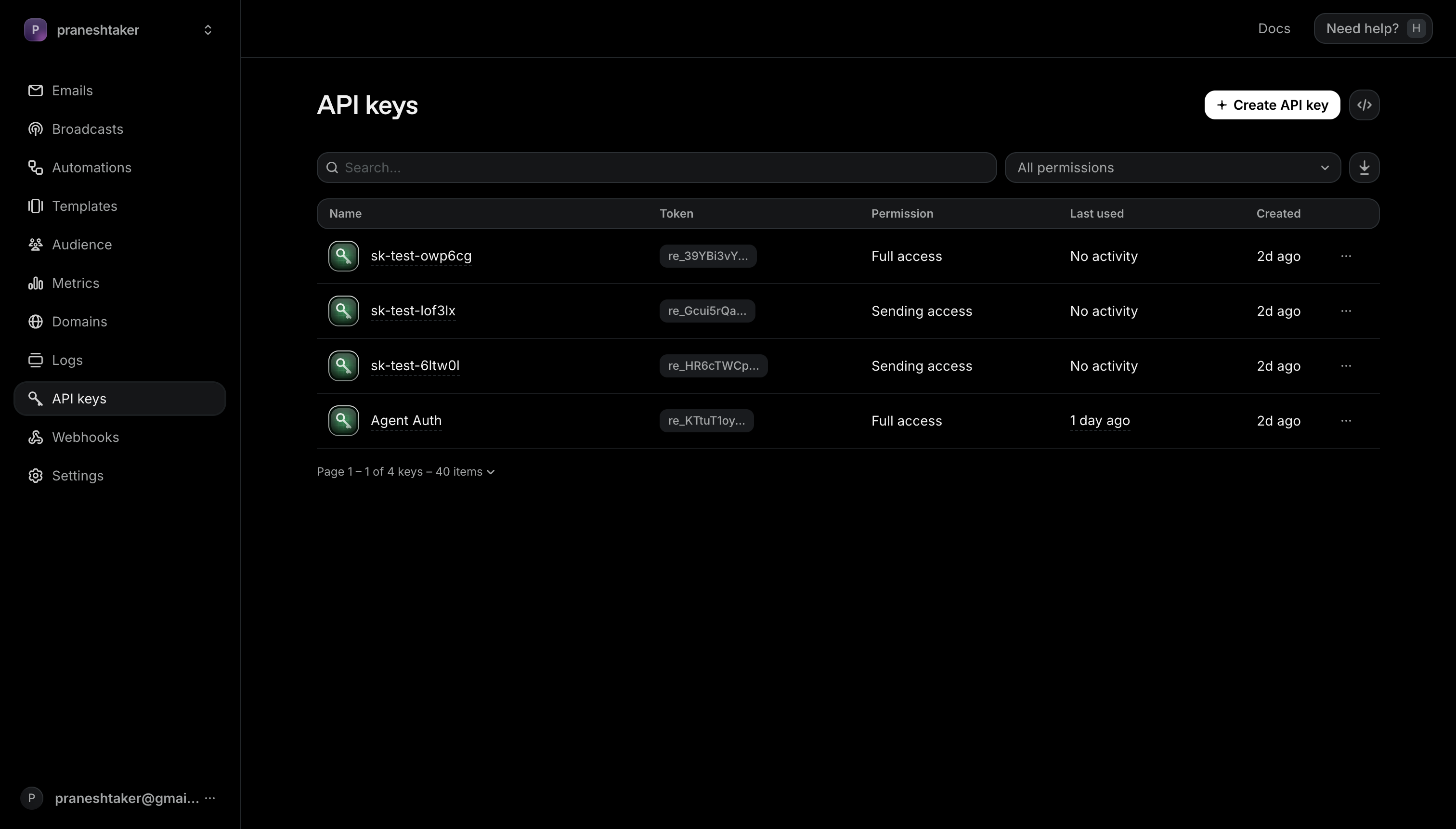
Create an API key
- Go to Resend > API Keys and click Create API Key.
- Give it a descriptive name, for example
Agent Auth, and choose the permission level your agent needs (Full access or Sending access).
-
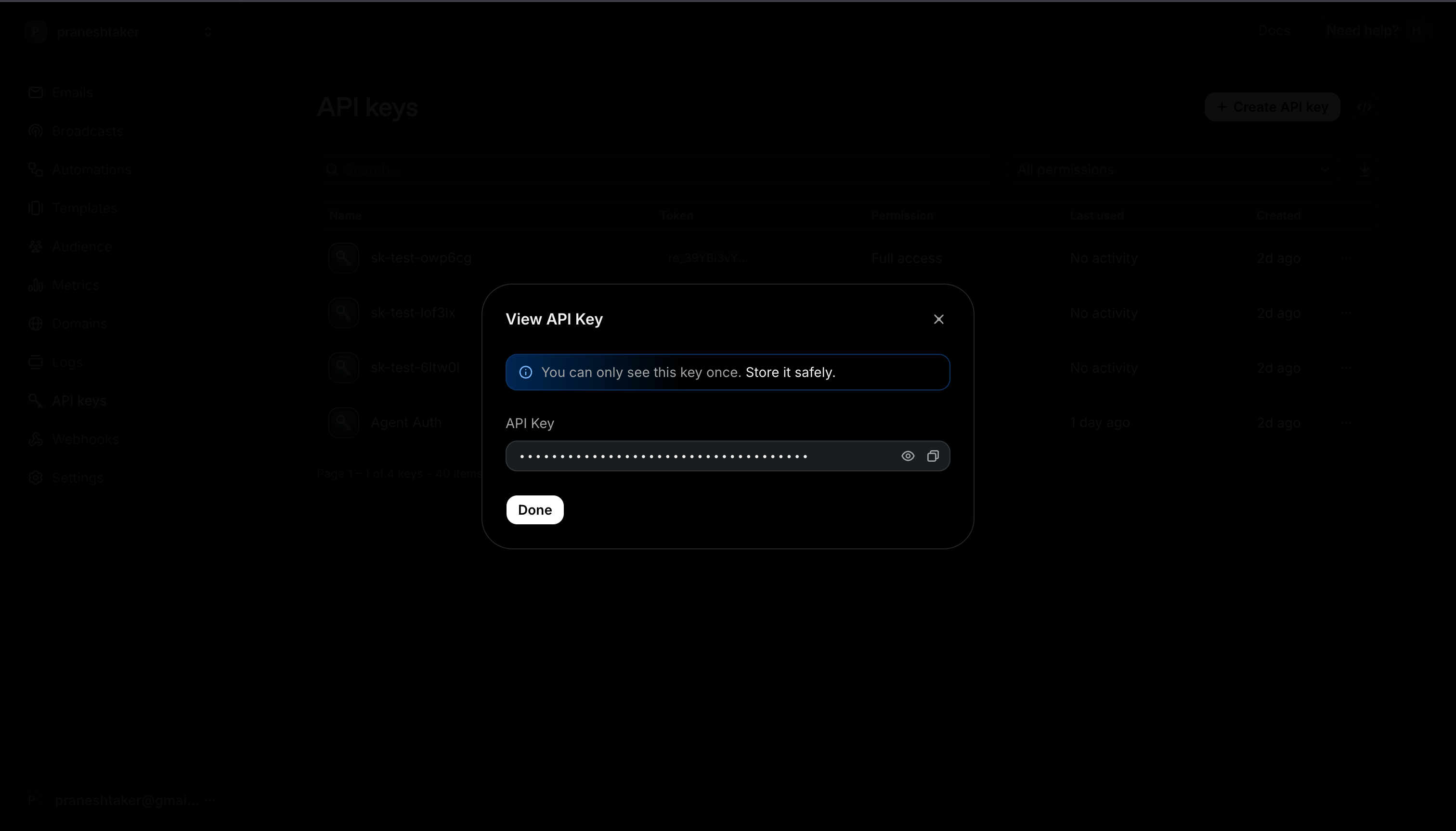
Copy the key
- Resend shows the key exactly once. Click the eye icon to reveal it, then copy it and store it securely.
-
Add the key in Scalekit
- In Scalekit dashboard, go to AgentKit > Connections > Create Connection. Find Resend and click Create.
- Paste the API key you copied in step 2.
- Click Save.
-
Authorize a user and make your first call
quickstart.mts import { ScalekitClient } from '@scalekit-sdk/node'import 'dotenv/config'import { createInterface } from 'node:readline/promises'const scalekit = new ScalekitClient(process.env.SCALEKIT_ENVIRONMENT_URL,process.env.SCALEKIT_CLIENT_ID,process.env.SCALEKIT_CLIENT_SECRET,)const actions = scalekit.actionsconst connector = 'resend'const identifier = 'user_123'// Generate an authorization link for the userconst { link } = await actions.getAuthorizationLink({ connectionName: connector, identifier })console.log('Authorize Resend:', link)const rl = createInterface({ input: process.stdin, output: process.stdout })await rl.question('Press Enter after authorizing...')rl.close()// Make your first callconst result = await actions.executeTool({connector,identifier,toolName: 'resend_api_key_list',toolInput: {},})console.log(result)Terminal window npx tsx quickstart.mtsquickstart.py import osfrom scalekit import ScalekitClientfrom dotenv import load_dotenvload_dotenv()scalekit_client = ScalekitClient(env_url=os.getenv("SCALEKIT_ENVIRONMENT_URL"),client_id=os.getenv("SCALEKIT_CLIENT_ID"),client_secret=os.getenv("SCALEKIT_CLIENT_SECRET"),)actions = scalekit_client.actionsconnection_name = "resend"identifier = "user_123"# Generate an authorization link for the userlink_response = actions.get_authorization_link(connection_name=connection_name,identifier=identifier,)print("Authorize Resend:", link_response.link)input("Press Enter after authorizing...")# Make your first callresult = actions.execute_tool(tool_input={},tool_name="resend_api_key_list",connection_name=connection_name,identifier=identifier,)print(result)Terminal window python quickstart.pyEach user opens the link once and enters their Resend credentials there. If your app already has a user's credentials, add the account from your backend instead, as the console steps above show. See Authorize a user for the full flow and statuses.
Tools
Pass the exact name toexecute_toolresend_api_key_listRetrieve a list of API keys configured on the Resend account, including each key's name, creation date, and permission level.Read-onlyList API Keys
Retrieve a list of API keys configured on the Resend account, including each key's name, creation date, and permission level. The full token value is never returned by this endpoint (only shown once at creation time). Supports cursor-based pagination via limit/after/before. Example: call with no parameters to fetch the first page, or pass after="<last_api_key_id_from_previous_page>" to fetch the next page.
Inputs
afterstring- Cursor for forward pagination. Pass the ID of an API key from the current page to fetch the page of results immediately after it.
beforestring- Cursor for backward pagination. Pass the ID of an API key from the current page to fetch the page of results immediately before it.
limitinteger- Number of API keys to return per page. Must be between 1 and 100. If omitted, the Resend API default page size is used.
resend_automation_getRetrieve the full details of a single automation by ID, including its name, status, and the steps and connections that make up its active workflow graph.Read-onlyGet Automation
Retrieve the full details of a single automation by ID, including its name, status, and the steps and connections that make up its active workflow graph.
Inputs
automation_idstringrequired- The ID of the automation to retrieve.
resend_automation_listRetrieve a list of automations configured in the Resend account, optionally filtered by status.Read-onlyList Automations
Retrieve a list of automations configured in the Resend account, optionally filtered by status. Supports cursor-based pagination via limit/after/before. Example: call with no parameters to fetch the first page, or pass status="enabled" to only see active automations.
Inputs
afterstring- Cursor for forward pagination. Pass the ID of an automation from the current page to fetch the page of results immediately after it.
beforestring- Cursor for backward pagination. Pass the ID of an automation from the current page to fetch the page of results immediately before it.
limitinteger- Number of automations to return per page. Must be between 1 and 100. If omitted, the Resend API default page size is used.
statusstring- Filter automations by status. One of "enabled" or "disabled". Leave blank to return automations of all statuses.one of
enableddisabled
resend_automation_run_getRetrieve the full details of a single automation run, including its status (running, completed, failed, cancelled), start/completion timestamps, and the steps executed so far in graph order.Read-onlyGet Automation Run
Retrieve the full details of a single automation run, including its status (running, completed, failed, cancelled), start/completion timestamps, and the steps executed so far in graph order.
Inputs
automation_idstringrequired- The ID of the automation this run belongs to.
run_idstringrequired- The ID of the automation run to retrieve.
resend_automation_runs_listRetrieve a list of runs (executions) for a given automation, optionally filtered by status.Read-onlyList Automation Runs
Retrieve a list of runs (executions) for a given automation, optionally filtered by status. Each run shows its execution status and the steps it has passed through. Supports cursor-based pagination via limit/after/before.
Inputs
automation_idstringrequired- The ID of the automation whose runs should be listed.
afterstring- Cursor for forward pagination. Pass the ID of a run from the current page to fetch the page of results immediately after it.
beforestring- Cursor for backward pagination. Pass the ID of a run from the current page to fetch the page of results immediately before it.
limitinteger- Number of runs to return per page. Must be between 1 and 100. If omitted, the Resend API default page size is used.
statusstring- Filter runs by status. Comma-separated list of one or more of: running, completed, failed, cancelled. Example: "running,completed".
resend_broadcast_getRetrieve details of a single broadcast by ID, including its status (draft, scheduled, sending, sent, canceled), subject, sender, content, and target segment.Read-onlyGet Broadcast
Retrieve details of a single broadcast by ID, including its status (draft, scheduled, sending, sent, canceled), subject, sender, content, and target segment.
Inputs
broadcast_idstringrequired- The ID of the broadcast to retrieve.
resend_broadcast_listRetrieve a list of broadcasts configured on the Resend account, including each broadcast's name, status, subject, and creation date.Read-onlyList Broadcasts
Retrieve a list of broadcasts configured on the Resend account, including each broadcast's name, status, subject, and creation date. Supports cursor-based pagination via limit/after/before. Example: call with no parameters to fetch the first page, or pass after="<last_broadcast_id_from_previous_page>" to fetch the next page.
Inputs
afterstring- Cursor for forward pagination. Pass the ID of a broadcast from the current page to fetch the page of results immediately after it.
beforestring- Cursor for backward pagination. Pass the ID of a broadcast from the current page to fetch the page of results immediately before it.
limitinteger- Number of broadcasts to return per page. Must be between 1 and 100. If omitted, the Resend API default page size is used.
resend_broadcast_metrics_getRetrieve delivery and engagement statistics for a single broadcast: counts and percentages for delivered, opened, clicked, unsubscribed, bounced, complained, and suppressed recipients, plus per-link click analytics.Read-onlyGet Broadcast Metrics
Retrieve delivery and engagement statistics for a single broadcast: counts and percentages for delivered, opened, clicked, unsubscribed, bounced, complained, and suppressed recipients, plus per-link click analytics.
Inputs
broadcast_idstringrequired- The ID of the broadcast whose metrics should be retrieved.
resend_broadcast_recipients_listRetrieve the recipients of a broadcast, filtered by delivery/engagement event type (sent, delivered, opened, clicked, bounced, complained, unsubscribed, or suppressed).Read-onlyList Broadcast Recipients
Retrieve the recipients of a broadcast, filtered by delivery/engagement event type (sent, delivered, opened, clicked, bounced, complained, unsubscribed, or suppressed). Supports cursor-based pagination via limit/after/before, an email substring filter, and a bounce_type filter that only applies when type=bounced.
Inputs
broadcast_idstringrequired- The ID of the broadcast whose recipients should be listed.
typestringrequired- Event filter. Must be one of: sent, delivered, opened, clicked, bounced, complained, unsubscribed, suppressed.
afterstring- Cursor for forward pagination. Pass the ID of a recipient from the current page to fetch the page of results immediately after it. Cannot be used together with before.
beforestring- Cursor for backward pagination. Pass the ID of a recipient from the current page to fetch the page of results immediately before it. Cannot be used together with after.
bounce_typestring- Bounce classification filter. Only applies when type=bounced. Must be one of: permanent, transient, undetermined.
emailstring- Filter recipients by an email substring match.
limitinteger- Number of recipients to return per page. Must be between 1 and 100. If omitted, the Resend API default page size (20) is used.
resend_contact_getRetrieve a single contact by ID or email address, including name, subscription status, creation date, and any custom properties.Read-onlyGet Contact
Retrieve a single contact by ID or email address, including name, subscription status, creation date, and any custom properties.
Inputs
contact_idstringrequired- The Contact ID (UUID) or email address of the contact to retrieve.
resend_contact_import_getRetrieve the status and details of a single contact import by ID, including its current status (queued, in_progress, completed, or failed), creation/completion timestamps, and counts.Read-onlyGet Contact Import
Retrieve the status and details of a single contact import by ID, including its current status (queued, in_progress, completed, or failed), creation/completion timestamps, and counts.
Inputs
import_idstringrequired- The Contact Import ID (UUID) to retrieve.
resend_contact_import_listRetrieve a list of contact imports for the Resend account, optionally filtered by status.Read-onlyList Contact Imports
Retrieve a list of contact imports for the Resend account, optionally filtered by status. Supports cursor-based pagination via limit/after/before. Example: call with no parameters to fetch the first page, or pass after="<last_import_id_from_previous_page>" to fetch the next page.
Inputs
afterstring- Cursor for forward pagination. Pass the ID of a contact import from the current page to fetch the page of results immediately after it.
beforestring- Cursor for backward pagination. Pass the ID of a contact import from the current page to fetch the page of results immediately before it.
limitinteger- Number of contact imports to return per page. Must be between 1 and 100. If omitted, the Resend API default page size is used.
statusstring- Filter contact imports by status. One of: queued, in_progress, completed, failed.one of
queuedin_progresscompletedfailed
resend_contact_listRetrieve a list of contacts in the Resend account.Read-onlyList Contacts
Retrieve a list of contacts in the Resend account. Optionally filter by segment_id. Supports cursor-based pagination via limit/after/before. Example: call with no parameters to fetch the first page, or pass after="<last_contact_id_from_previous_page>" to fetch the next page.
Inputs
afterstring- Cursor for forward pagination. Pass the ID of a contact from the current page to fetch the page of results immediately after it.
beforestring- Cursor for backward pagination. Pass the ID of a contact from the current page to fetch the page of results immediately before it.
limitinteger- Number of contacts to return per page. Must be between 1 and 100. If omitted, the Resend API default page size is used.
segment_idstring- Filter contacts by segment ID. Only contacts that belong to this segment are returned.
resend_contact_property_getRetrieve a single contact property (custom field definition) by ID, including its key, type, fallback value, and creation date.Read-onlyGet Contact Property
Retrieve a single contact property (custom field definition) by ID, including its key, type, fallback value, and creation date.
Inputs
contact_property_idstringrequired- The ID of the contact property to retrieve.
resend_contact_property_listRetrieve a list of contact properties (custom field definitions) configured in the Resend account, including each property's key, type, fallback value, and creation date.Read-onlyList Contact Properties
Retrieve a list of contact properties (custom field definitions) configured in the Resend account, including each property's key, type, fallback value, and creation date. Supports cursor-based pagination via limit/after/before.
Inputs
afterstring- Cursor for forward pagination. Pass the ID of a contact property from the current page to fetch the page of results immediately after it.
beforestring- Cursor for backward pagination. Pass the ID of a contact property from the current page to fetch the page of results immediately before it.
limitinteger- Number of contact properties to return per page. Must be between 1 and 100. If omitted, the Resend API default page size is used.
resend_contact_segments_listRetrieve a list of segments that a given contact belongs to.Read-onlyList Contact Segments
Retrieve a list of segments that a given contact belongs to. Supports cursor-based pagination via limit/after/before.
Inputs
contact_idstringrequired- The Contact ID (UUID) or email address of the contact whose segments to list.
afterstring- Cursor for forward pagination. Pass the ID of a segment from the current page to fetch the page of results immediately after it.
beforestring- Cursor for backward pagination. Pass the ID of a segment from the current page to fetch the page of results immediately before it.
limitinteger- Number of segments to return per page. Must be between 1 and 100. If omitted, the Resend API default page size is used.
resend_contact_topics_getRetrieve the topic subscription state for a contact -- for each topic, its ID, name, description, and whether the contact is opted in or opted out.Read-onlyGet Contact Topics
Retrieve the topic subscription state for a contact -- for each topic, its ID, name, description, and whether the contact is opted in or opted out. Identify the contact by ID or email. Supports cursor-based pagination via limit/after/before.
Inputs
contact_idstringrequired- The Contact ID (UUID) or email address of the contact whose topic subscriptions to retrieve.
afterstring- Cursor for forward pagination. Pass the ID of a topic from the current page to fetch the page of results immediately after it.
beforestring- Cursor for backward pagination. Pass the ID of a topic from the current page to fetch the page of results immediately before it.
limitinteger- Number of topics to return per page. Must be between 1 and 100. If omitted, the Resend API default page size is used.
resend_domain_claim_getRetrieve the latest status of a domain claim, using the ID of the placeholder domain created when the claim was started.Read-onlyGet Domain Claim
Retrieve the latest status of a domain claim, using the ID of the placeholder domain created when the claim was started. Status is one of: pending, verified, completed, blocked, expired, superseded, canceled, or failed.
Inputs
domain_idstringrequired- The ID of the placeholder domain created by the claim (returned as "domain_id" in the claim-domain response).
resend_domain_getRetrieve a single sending domain by ID, including its verification status, region, sending/receiving capabilities, DNS records, and tracking settings.Read-onlyGet Domain
Retrieve a single sending domain by ID, including its verification status, region, sending/receiving capabilities, DNS records, and tracking settings.
Inputs
domain_idstringrequired- The ID of the domain to retrieve.
resend_domain_listRetrieve a list of sending domains configured in the Resend account, including each domain's verification status, region, and creation date.Read-onlyList Domains
Retrieve a list of sending domains configured in the Resend account, including each domain's verification status, region, and creation date. Supports cursor-based pagination via limit/after/before. Example: call with no parameters to fetch the first page, or pass after="<last_domain_id_from_previous_page>" to fetch the next page.
Inputs
afterstring- Cursor for forward pagination. Pass the ID of a domain from the current page to fetch the page of results immediately after it.
beforestring- Cursor for backward pagination. Pass the ID of a domain from the current page to fetch the page of results immediately before it.
limitinteger- Number of domains to return per page. Must be between 1 and 100. If omitted, the Resend API default page size is used.
resend_email_attachment_getRetrieve a single attachment for a previously sent email, including its filename, content type, size, and a signed, time-limited download URL.Read-onlyGet Email Attachment
Retrieve a single attachment for a previously sent email, including its filename, content type, size, and a signed, time-limited download URL.
Inputs
attachment_idstringrequired- The ID of the attachment to retrieve.
email_idstringrequired- The ID of the sent email that the attachment belongs to.
resend_email_attachments_listRetrieve a list of attachments for a previously sent email, including a signed, time-limited download URL for each attachment.Read-onlyList Email Attachments
Retrieve a list of attachments for a previously sent email, including a signed, time-limited download URL for each attachment. Supports cursor-based pagination via limit/after/before. Example: call with just email_id to fetch the first page, or pass after="<last_attachment_id_from_previous_page>" to fetch the next page.
Inputs
email_idstringrequired- The ID of the sent email whose attachments should be listed.
afterstring- Pagination cursor (an attachment ID) to fetch results after this cursor. Cannot be used together with before.
beforestring- Pagination cursor (an attachment ID) to fetch results before this cursor. Cannot be used together with after.
limitinteger- Maximum number of attachments to return per page. If omitted, the Resend API default page size is used.
resend_email_getRetrieve the full details of a single sent email by its ID, including recipients, subject, body content, and its last delivery event status (e.g.Read-onlyGet Email
Retrieve the full details of a single sent email by its ID, including recipients, subject, body content, and its last delivery event status (e.g. delivered, bounced, opened).
Inputs
email_idstringrequired- The ID of the email to retrieve. This is the ID returned when the email was sent (or listed).
resend_email_listRetrieve a list of emails sent from the Resend account, including delivery status and metadata for each.Read-onlyList Emails
Retrieve a list of emails sent from the Resend account, including delivery status and metadata for each. Supports cursor-based pagination via limit/after/before. Example: call with no parameters to fetch the first page, or pass after="<last_email_id_from_previous_page>" to fetch the next page.
Inputs
afterstring- Cursor for forward pagination. Pass the ID of an email from the current page to fetch the page of results immediately after it.
beforestring- Cursor for backward pagination. Pass the ID of an email from the current page to fetch the page of results immediately before it.
limitinteger- Number of emails to return per page. Must be between 1 and 100. If omitted, the Resend API default page size is used.
resend_email_metrics_getRetrieve account-wide sending/engagement metrics for emails over a date range, with optional bucketing by time granularity and breakdown by dimension (e.g.Read-onlyGet Email Metrics
Retrieve account-wide sending/engagement metrics for emails over a date range, with optional bucketing by time granularity and breakdown by dimension (e.g. period, domain). Can be scoped to specific domain IDs or email IDs. This is an aggregate analytics endpoint, not a lookup of a single email's status.
Inputs
dimensionsstring- Comma-separated list of dimensions to break the response down by, e.g. period,domain.
domain_idstring- Comma-separated list of sending domain IDs to restrict results to.
email_idstring- Comma-separated list of email IDs to restrict results to.
end_datestring- ISO 8601 date or datetime for the end of the range. Future values are clamped to the current time.
granularitystring- Time bucket size for the period dimension. One of: hourly, daily, weekly, monthly. Defaults to daily.
metricsstring- Comma-separated list of metrics to include in the response, e.g. sent,delivered,open_rate.
sort_bystring- Field to sort the data array by: date, or any requested metric name.
sort_orderstring- Sort direction for the data array: asc or desc.
start_datestring- ISO 8601 date or datetime for the start of the range. Defaults to 6 days before end_date.
timezonestring- IANA timezone used for bucketing periods. Defaults to UTC.
resend_event_getRetrieve a single custom event definition by its ID or name, including its payload schema and creation/update timestamps.Read-onlyGet Event
Retrieve a single custom event definition by its ID or name, including its payload schema and creation/update timestamps.
Inputs
identifierstringrequired- The event ID (UUID) or event name to retrieve.
resend_event_listRetrieve a list of custom event definitions configured in the Resend account, including each event's name, payload schema, and creation date.Read-onlyList Events
Retrieve a list of custom event definitions configured in the Resend account, including each event's name, payload schema, and creation date. Supports cursor-based pagination via limit/after/before. Example: call with no parameters to fetch the first page, or pass after="<last_event_id_from_previous_page>" to fetch the next page.
Inputs
afterstring- Cursor for forward pagination. Pass the ID of an event from the current page to fetch the page of results immediately after it.
beforestring- Cursor for backward pagination. Pass the ID of an event from the current page to fetch the page of results immediately before it.
limitinteger- Number of events to return per page. Must be between 1 and 100. If omitted, the Resend API default page size is used.
resend_log_getRetrieve the full details of a single API request log by its ID, including the endpoint, HTTP method, response status, user agent, and the request/response bodies (when captured).Read-onlyGet Log
Retrieve the full details of a single API request log by its ID, including the endpoint, HTTP method, response status, user agent, and the request/response bodies (when captured).
Inputs
log_idstringrequired- The ID of the log to retrieve. This is the ID returned when listing logs.
resend_log_listRetrieve a list of API request logs for the Resend account.Read-onlyList Logs
Retrieve a list of API request logs for the Resend account. Each log entry captures the endpoint called, HTTP method, response status, user agent, and (where available) the request/response bodies. Supports cursor-based pagination via limit/after/before. Example: call with no parameters to fetch the first page, or pass after="<last_log_id_from_previous_page>" to fetch the next page.
Inputs
afterstring- Cursor for forward pagination. Pass the ID of a log from the current page to fetch the page of results immediately after it.
beforestring- Cursor for backward pagination. Pass the ID of a log from the current page to fetch the page of results immediately before it.
limitinteger- Number of logs to return per page. Must be between 1 and 100. If omitted, the Resend API default page size is used.
resend_oauth_grant_listRetrieve a list of third-party OAuth applications authorized on this Resend account, including each grant's client info, granted scopes, and revocation status.Read-onlyList OAuth Grants
Retrieve a list of third-party OAuth applications authorized on this Resend account, including each grant's client info, granted scopes, and revocation status. Supports cursor-based pagination via limit/after/before. Example: call with no parameters to fetch the first page, or pass after="<last_grant_id_from_previous_page>" to fetch the next page.
Inputs
afterstring- Cursor for forward pagination. Pass the ID of an OAuth grant from the current page to fetch the page of results immediately after it.
beforestring- Cursor for backward pagination. Pass the ID of an OAuth grant from the current page to fetch the page of results immediately before it.
limitinteger- Number of OAuth grants to return per page. Must be between 1 and 100. If omitted, the Resend API default page size is used.
resend_received_email_attachment_getRetrieve a single attachment belonging to a received (inbound) email, including its filename, content type, size, and a signed, time-limited download URL you can use to fetch the raw attachment content.Read-onlyGet Received Email Attachment
Retrieve a single attachment belonging to a received (inbound) email, including its filename, content type, size, and a signed, time-limited download URL you can use to fetch the raw attachment content.
Inputs
attachment_idstringrequired- The ID of the specific attachment to retrieve.
email_idstringrequired- The ID of the received email that owns the attachment. This is the UUID of the inbound email.
resend_received_email_attachments_listRetrieve a list of attachments for a received (inbound) email, including each attachment's filename, content type, size, and a signed, time-limited download URL.Read-onlyList Received Email Attachments
Retrieve a list of attachments for a received (inbound) email, including each attachment's filename, content type, size, and a signed, time-limited download URL. Supports cursor-based pagination via limit/after/before. Example: call with email_id set to fetch the first page, or pass after="<last_attachment_id_from_previous_page>" to fetch the next page.
Inputs
email_idstringrequired- The ID of the received email whose attachments should be listed. This is the UUID of the inbound email, not the attachment.
afterstring- Pagination cursor to fetch attachments after this attachment ID. Cannot be used together with 'before'.
beforestring- Pagination cursor to fetch attachments before this attachment ID. Cannot be used together with 'after'.
limitinteger- Maximum number of attachments to return in this page of results. If omitted, the Resend API default page size is used.
resend_received_email_getRetrieve the full details of a single received (inbound) email by its ID, including sender, recipients, subject, html/text body, headers, and attachments.Read-onlyGet Received Email
Retrieve the full details of a single received (inbound) email by its ID, including sender, recipients, subject, html/text body, headers, and attachments.
Inputs
email_idstringrequired- The ID of the received email to retrieve.
resend_received_email_listRetrieve a list of emails received on your Resend inbound/receiving domains, including sender, recipients, subject, and attachments metadata.Read-onlyList Received Emails
Retrieve a list of emails received on your Resend inbound/receiving domains, including sender, recipients, subject, and attachments metadata. Supports cursor-based pagination via limit/after/before. Example: call with no parameters to fetch the first page, or pass after="<last_email_id_from_previous_page>" to fetch the next page.
Inputs
afterstring- Pagination cursor (a received email ID) to fetch results after this cursor. Cannot be used together with before.
beforestring- Pagination cursor (a received email ID) to fetch results before this cursor. Cannot be used together with after.
limitinteger- Maximum number of received emails to return per page. If omitted, the Resend API default page size is used.
resend_segment_getRetrieve a single segment by ID from the Resend account.Read-onlyGet Segment
Retrieve a single segment by ID from the Resend account. Returns the segment's name, filter conditions, and creation timestamp.
Inputs
segment_idstringrequired- The ID of the segment to retrieve.
resend_segment_listRetrieve a list of segments configured in the Resend account, including each segment's name and creation date.Read-onlyList Segments
Retrieve a list of segments configured in the Resend account, including each segment's name and creation date. Supports cursor-based pagination via limit/after/before.
Inputs
afterstring- Cursor for forward pagination. Pass the ID of a segment from the current page to fetch the page of results immediately after it.
beforestring- Cursor for backward pagination. Pass the ID of a segment from the current page to fetch the page of results immediately before it.
limitinteger- Number of segments to return per page. Must be between 1 and 100. If omitted, the Resend API default page size is used.
resend_segment_metrics_getRetrieve account-wide contact metrics (all_contacts, subscribers, unsubscribers), optionally broken down by segment and scoped to specific segment IDs.Read-onlyGet Segment Metrics
Retrieve account-wide contact metrics (all_contacts, subscribers, unsubscribers), optionally broken down by segment and scoped to specific segment IDs. This is an aggregate analytics endpoint, not a per-segment lookup.
Inputs
dimensionsstring- Comma-separated list of dimensions to break the data down by. Valid value: segment. Defaults to no breakdown (totals only).
metricsstring- Comma-separated list of metrics to include in totals/data. Valid values: all_contacts, subscribers, unsubscribers. Defaults to all of them.
segment_idstring- Comma-separated list of segment IDs to scope the results to. If omitted, all segments are included.
sort_bystring- Field to sort the data array by. One of: date, all_contacts, subscribers, unsubscribers. Defaults to all_contacts.
sort_orderstring- Sort direction for the data array: asc or desc. Defaults to asc.
resend_suppression_getRetrieve a single suppression by ID or email address from the Resend account.Read-onlyGet Suppression
Retrieve a single suppression by ID or email address from the Resend account. Returns the suppressed email, origin (bounce, complaint, or manual), source event ID, and creation timestamp.
Inputs
suppressionstringrequired- The Suppression ID or email address to look up.
resend_suppression_listRetrieve a list of suppressed email addresses in the Resend account, including each suppression's origin (bounce, complaint, or manual), source event, and creation date.Read-onlyList Suppressions
Retrieve a list of suppressed email addresses in the Resend account, including each suppression's origin (bounce, complaint, or manual), source event, and creation date. Supports filtering by origin and cursor-based pagination via limit/after/before. Example: call with no parameters to fetch the first page, or pass after="<last_suppression_id_from_previous_page>" to fetch the next page.
Inputs
afterstring- Cursor for forward pagination. Pass the ID of a suppression from the current page to fetch the page of results immediately after it.
beforestring- Cursor for backward pagination. Pass the ID of a suppression from the current page to fetch the page of results immediately before it.
limitinteger- Number of suppressions to return per page. Must be between 1 and 100. If omitted, the Resend API default page size is used.
originstring- Filter suppressions by origin. One of: bounce, complaint, manual.one of
bouncecomplaintmanual
resend_template_getRetrieve a single email template by ID or alias from the Resend account.Read-onlyGet Template
Retrieve a single email template by ID or alias from the Resend account. Returns the template's name, sender/subject defaults, HTML/text bodies, declared variables, and publication status (draft or published).
Inputs
idstringrequired- The Template ID or alias to look up.
resend_template_listRetrieve a list of reusable email templates configured in the Resend account, including each template's publication status (draft or published) and timestamps.Read-onlyList Templates
Retrieve a list of reusable email templates configured in the Resend account, including each template's publication status (draft or published) and timestamps. Supports cursor-based pagination via limit/after/before. Example: call with no parameters to fetch the first page, or pass after="<last_template_id_from_previous_page>" to fetch the next page.
Inputs
afterstring- Cursor for forward pagination. Pass the ID of a template from the current page to fetch the page of results immediately after it.
beforestring- Cursor for backward pagination. Pass the ID of a template from the current page to fetch the page of results immediately before it.
limitinteger- Number of templates to return per page. Must be between 1 and 100. If omitted, the Resend API default page size is used.
resend_topic_getRetrieve a single topic by ID from the Resend account.Read-onlyGet Topic
Retrieve a single topic by ID from the Resend account. Returns the topic's name, description, default subscription status, visibility, and creation timestamp.
Inputs
topic_idstringrequired- The ID of the topic to retrieve.
resend_topic_listRetrieve a list of topics configured in the Resend account, including each topic's name, description, default subscription status, visibility, and creation date.Read-onlyList Topics
Retrieve a list of topics configured in the Resend account, including each topic's name, description, default subscription status, visibility, and creation date. Supports cursor-based pagination via limit/after/before. Example: call with no parameters to fetch the first page, or pass after="<last_topic_id_from_previous_page>" to fetch the next page.
Inputs
afterstring- Cursor for forward pagination. Pass the ID of a topic from the current page to fetch the page of results immediately after it.
beforestring- Cursor for backward pagination. Pass the ID of a topic from the current page to fetch the page of results immediately before it.
limitinteger- Number of topics to return per page. Must be between 1 and 100. If omitted, the Resend API default page size is used.
resend_webhook_event_attempts_listRetrieve the delivery attempts made for a single webhook event, most recent first -- each attempt shows the HTTP status code and response body returned by the receiving endpoint.Read-onlyList Webhook Event Attempts
Retrieve the delivery attempts made for a single webhook event, most recent first -- each attempt shows the HTTP status code and response body returned by the receiving endpoint. Supports forward-only cursor pagination via limit/after (this endpoint does not support a before cursor).
Inputs
event_idstringrequired- The ID of the webhook event whose delivery attempts should be listed.
webhook_idstringrequired- The ID of the webhook the event belongs to.
afterstring- Cursor for forward pagination. Pass the ID of an attempt from the current page to fetch the page of results immediately after it. This endpoint does not support a before cursor.
limitinteger- Number of attempts to return per page. Must be between 1 and 100. If omitted, the Resend API default page size (20) is used.
resend_webhook_event_getRetrieve a single webhook delivery event by ID, including its type, delivery status, next retry time (if still attempting), and the full event payload that was (or will be) sent to the endpoint.Read-onlyGet Webhook Event
Retrieve a single webhook delivery event by ID, including its type, delivery status, next retry time (if still attempting), and the full event payload that was (or will be) sent to the endpoint.
Inputs
event_idstringrequired- The ID of the webhook event to retrieve.
webhook_idstringrequired- The ID of the webhook the event belongs to.
resend_webhook_events_listRetrieve the delivery event log for a webhook endpoint -- each entry is one event Resend attempted to deliver, with its type and delivery status (success, failed, attempting, or pending).Read-onlyList Webhook Events
Retrieve the delivery event log for a webhook endpoint -- each entry is one event Resend attempted to deliver, with its type and delivery status (success, failed, attempting, or pending). Supports forward-only cursor pagination via limit/after (this endpoint does not support a before cursor).
Inputs
webhook_idstringrequired- The ID of the webhook whose events should be listed.
afterstring- Cursor for forward pagination. Pass the ID of an event from the current page to fetch the page of results immediately after it. This endpoint does not support a before cursor.
limitinteger- Number of events to return per page. Must be between 1 and 100. If omitted, the Resend API default page size (20) is used.
resend_webhook_getRetrieve a single webhook by ID from the Resend account, including its endpoint URL, subscribed event types, status (enabled/disabled), creation timestamp, and signing secret used to verify incoming payloads.Read-onlyGet Webhook
Retrieve a single webhook by ID from the Resend account, including its endpoint URL, subscribed event types, status (enabled/disabled), creation timestamp, and signing secret used to verify incoming payloads.
Inputs
webhook_idstringrequired- The ID (UUID) of the webhook to retrieve.
resend_webhook_listRetrieve a list of webhook endpoints configured in the Resend account, including each webhook's endpoint URL, subscribed event types, status, and creation date.Read-onlyList Webhooks
Retrieve a list of webhook endpoints configured in the Resend account, including each webhook's endpoint URL, subscribed event types, status, and creation date. Supports cursor-based pagination via limit/after/before. Example: call with no parameters to fetch the first page, or pass after="<last_webhook_id_from_previous_page>" to fetch the next page.
Inputs
afterstring- Cursor for forward pagination. Pass the ID (UUID) of a webhook from the current page to fetch the page of results immediately after it. Cannot be used together with before.
beforestring- Cursor for backward pagination. Pass the ID (UUID) of a webhook from the current page to fetch the page of results immediately before it. Cannot be used together with after.
limitinteger- Maximum number of webhooks to return per page. If omitted, the Resend API default page size is used.
resend_api_key_createCreate a new API key for the Resend account.WriteCreate API Key
Create a new API key for the Resend account. The full token is only returned once in the response of this call and cannot be retrieved again afterwards, so it must be saved immediately. By default the key has full_access permission; restrict it to sending_access to only allow sending emails, optionally scoped to a single domain.
Inputs
namestringrequired- A descriptive name for the API key, e.g. "Production" or "CI Pipeline".
domain_idstring- Restrict this API key to only send emails from a specific verified domain. Only used when permission is sending_access; ignored otherwise.
permissionstring- The API key's access level. "full_access" can create, delete, get, and update any resource. "sending_access" can only send emails. If omitted, the key defaults to full_access.one of
full_accesssending_access
resend_automation_createCreate a new automation workflow in Resend.WriteCreate Automation
Create a new automation workflow in Resend. An automation is a graph of steps (must include at least one "trigger" step) connected by edges describing the flow between them. Supported step types: trigger, send_email, delay, wait_for_event, condition, contact_update, contact_delete, add_to_segment -- each with a type-specific "config" object. The automation is created disabled by default; pass status="enabled" to activate it immediately.
Inputs
connectionsarrayrequired- The connections (edges) between steps in the automation graph. Each connection has a "from" step key, a "to" step key, and an optional "type" (default, condition_met, condition_not_met, timeout, event_received) which defaults to "default". Example: [{"from":"trigger1","to":"send1"}]
namestringrequired- The name of the automation, shown in the Resend dashboard.
stepsarrayrequired- The steps that compose the automation workflow. Must include at least one "trigger" step (1-150 steps total). Each step has a unique "key", a "type", and a "config" object whose shape depends on the type: trigger={event_name}, send_email={template:{id,variables?},subject?,from?,reply_to?}, delay={duration}, wait_for_event={event_name,timeout?,filter_rule?}, condition={type:rule|and|or, field, operator, value}, contact_update={first_name?,last_name?,unsubscribed?,properties?}, contact_delete={}, add_to_segment={segment_id}. Example: [{"key":"trigger1","type":"trigger","config":{"event_name":"contact.created"}}]
statusstring- The initial status of the automation. One of "enabled" or "disabled". Defaults to "disabled" if omitted, so the automation is created but not yet running.one of
enableddisableddefaultdisabled
resend_automation_stopStop a running automation, setting its status to disabled so it no longer triggers for new events.WriteStop Automation
Stop a running automation, setting its status to disabled so it no longer triggers for new events. Existing in-flight runs are not resumed. Calling this on an automation that is already stopped has no additional effect.
- Idempotent
Inputs
automation_idstringrequired- The ID of the automation to stop.
resend_automation_updateUpdate an existing automation in Resend.WriteUpdate Automation
Update an existing automation in Resend. At least one of name, status, or the (steps + connections) pair must be provided. When updating the workflow graph, steps and connections must both be provided together -- providing one without the other is rejected by the API.
- Idempotent
Inputs
automation_idstringrequired- The ID of the automation to update.
connectionsarray- Replacement set of connections (edges) between steps. Must be provided together with steps; providing only one is rejected. Each connection has a from step key, a to step key, and an optional type (defaults to "default").
namestring- New name for the automation.
statusstring- New status for the automation. One of "enabled" or "disabled".one of
enableddisabled stepsarray- Replacement set of steps for the automation workflow (1-150 steps). Must be provided together with connections; providing only one is rejected. Each step has a unique key, a type, and a type-specific config object (see Create Automation for the full shape catalog).
resend_broadcast_cancelCancel a broadcast that is currently queued or scheduled, stopping any further emails from being sent.WriteCancel Broadcast
Cancel a broadcast that is currently queued or scheduled, stopping any further emails from being sent. Emails already delivered before cancellation are not affected. Only broadcasts that have not fully sent yet can be canceled.
Inputs
broadcast_idstringrequired- The ID of the broadcast to cancel.
resend_broadcast_createCreate a broadcast email in Resend, targeted at a segment of contacts.WriteCreate Broadcast
Create a broadcast email in Resend, targeted at a segment of contacts. A broadcast is created as a draft by default -- pass send=true to send it immediately, or send=true with scheduled_at to schedule it for later. Provide html and/or text content for the message body -- at least one of the two is required by the API.
Inputs
fromstringrequired- Sender email address. To include a friendly name, use the format "Your Name <sender@domain.com>". The domain must be a verified sending domain in your Resend account.
segment_idstringrequired- The unique identifier of the segment (of contacts within an audience) this broadcast will be sent to.
subjectstringrequired- The subject line of the broadcast email.
htmlstring- The HTML version of the broadcast message body. At least one of html or text must be provided.
namestring- Internal name of the broadcast, used to identify it in the Resend dashboard. Not shown to recipients.
preview_textstring- Short preview text shown next to the subject line in most email clients' inbox lists.
reply_toarray- The email address(es) that recipient replies should be sent to. Provide an array of one or more email address strings.
scheduled_atstring- Schedule time to send the broadcast, in ISO 8601 format (natural language like "in 1 hour" is also accepted). Can only be used when send is true.
sendboolean- Whether to send the broadcast immediately (or schedule it, if scheduled_at is also provided) instead of keeping it as a draft. Defaults to false (draft).default
false textstring- The plain text version of the broadcast message body. At least one of html or text must be provided.
topic_idstring- The topic ID that this broadcast will be scoped to. Recipients who have opted out of this topic will not receive the broadcast.
resend_broadcast_sendSend a draft broadcast immediately, or schedule it for a future time by providing scheduled_at.WriteSend Broadcast
Send a draft broadcast immediately, or schedule it for a future time by providing scheduled_at. Once sent or scheduled, the broadcast can no longer be edited or deleted (a scheduled broadcast can typically still be canceled from the Resend dashboard before it goes out).
Inputs
broadcast_idstringrequired- The ID of the broadcast to send or schedule.
scheduled_atstring- Schedule time to send the broadcast, in ISO 8601 format (natural language like "in 1 hour" is also accepted). Leave blank to send immediately.
resend_broadcast_updateUpdate an existing broadcast in Resend.WriteUpdate Broadcast
Update an existing broadcast in Resend. All fields besides broadcast_id are optional; only the ones provided are changed. Typically used to edit a draft broadcast's content, sender, subject, or target segment before sending it.
- Idempotent
Inputs
broadcast_idstringrequired- The ID of the broadcast to update.
fromstring- Sender email address. To include a friendly name, use the format "Your Name <sender@domain.com>". The domain must be a verified sending domain in your Resend account.
htmlstring- The HTML version of the broadcast message body.
namestring- Internal name of the broadcast, used to identify it in the Resend dashboard. Not shown to recipients.
preview_textstring- Short preview text shown next to the subject line in most email clients' inbox lists.
reply_toarray- The email address(es) that recipient replies should be sent to. Provide an array of one or more email address strings.
segment_idstring- The unique identifier of the segment (of contacts within an audience) this broadcast will be sent to.
subjectstring- The subject line of the broadcast email.
textstring- The plain text version of the broadcast message body.
topic_idstring- The topic ID that this broadcast will be scoped to. Recipients who have opted out of this topic will not receive the broadcast.
resend_contact_createCreate a new contact in the Resend account.WriteCreate Contact
Create a new contact in the Resend account. Requires an email address; first_name, last_name, unsubscribed status, custom properties, segment membership, and topic subscriptions can all be set optionally. Returns the newly created contact's ID.
Inputs
emailstringrequired- Email address of the contact to create.
first_namestring- First name of the contact.
last_namestring- Last name of the contact.
propertiesobject- A map of custom property keys and values to create on this contact, e.g. {"plan": "pro", "signup_source": "website"}.
segmentsarray- Array of segment IDs to add the contact to on creation.
topicsarray- Array of topic subscriptions for the contact. Each item is an object with id (topic ID) and subscription ("opt_in" or "opt_out").
unsubscribedboolean- The contact's global subscription status. If true, the contact is unsubscribed from all Broadcasts. Defaults to false (subscribed) if omitted.default
false
resend_contact_import_createCreate a bulk contact import from a CSV file (max 50MB).WriteCreate Contact Import
Create a bulk contact import from a CSV file (max 50MB). Provide the file as base64-encoded content. Optionally map CSV columns to contact fields/custom properties via column_map, choose a conflict strategy for existing contacts, and pre-assign imported contacts to segments and/or topic subscriptions.
Inputs
file_content_base64stringrequired- Base64-encoded contents of the CSV file to import. Maximum file size is 50MB.
column_mapstring- JSON-encoded object mapping contact fields and custom property keys to CSV column names. Supports email, first_name, last_name, unsubscribed, and properties. Custom property mappings can include type as string, number, or boolean; defaults to string. Example: {"email":"Email","first_name":"First Name","properties":{"plan":{"column":"Plan","type":"string"}}}
on_conflictstring- Strategy to use when an imported contact already exists. One of: upsert, skip. Defaults to skip.one of
upsertskipdefaultskip segmentsstring- JSON-encoded array of segments to add imported contacts to, e.g. [{"id":"78261eea-8f8b-4381-83c6-79fa7120f1cf"}].
topicsstring- JSON-encoded array of topic subscriptions to apply to imported contacts. Each subscription must be opt_in or opt_out. Example: [{"id":"b6d24b8e-af0b-4c3c-be0c-359bbd97381e","subscription":"opt_in"}].
resend_contact_property_createCreate a new contact property (a custom field definition that can be set on individual contacts).WriteCreate Contact Property
Create a new contact property (a custom field definition that can be set on individual contacts). Requires a key and a type ("string" or "number"); an optional fallback_value can be set as the default used when a contact doesn't have this property set. Returns the newly created contact property's ID.
Inputs
keystringrequired- The property key. Maximum length is 50 characters. Only alphanumeric characters and underscores are allowed.
typestringrequired- The property type. Must be either "string" or "number".one of
stringnumber fallback_valuestring- The default value to use when this property is not set for a contact. Must match the type specified in the type field (a string value if type is "string", a number value if type is "number").
resend_contact_property_updateUpdate an existing contact property by ID.WriteUpdate Contact Property
Update an existing contact property by ID. Only the fallback_value can be changed; it must match the property's original type (a string value if the property type is "string", a number value if the property type is "number"). If fallback_value is omitted, it will be cleared (set to no default) -- there is no way to make a no-op update call.
- Idempotent
Inputs
contact_property_idstringrequired- The ID of the contact property to update.
fallback_valuestring- New default value to use when this property is not set for a contact. Must match the property's type (a string value if type is "string", a number value if type is "number").
resend_contact_segment_addAdd a contact to a segment by contact ID (or email) and segment ID.WriteAdd Contact To Segment
Add a contact to a segment by contact ID (or email) and segment ID. No request body is required.
Inputs
contact_idstringrequired- The Contact ID (UUID) or email address of the contact to add to the segment.
segment_idstringrequired- The Segment ID to add the contact to.
resend_contact_segment_removeRemove a contact from a segment by contact ID (or email) and segment ID.WriteRemove Contact From Segment
Remove a contact from a segment by contact ID (or email) and segment ID. This only removes the segment membership -- it does not delete the contact or the segment itself. No request body is required.
- Idempotent
Inputs
contact_idstringrequired- The Contact ID (UUID) or email address of the contact to remove from the segment.
segment_idstringrequired- The Segment ID to remove the contact from.
resend_contact_topics_updateUpdate topic subscriptions for a contact, identified by ID or email.WriteUpdate Contact Topics
Update topic subscriptions for a contact, identified by ID or email. Provide an array of {id, subscription} objects, where subscription is either "opt_in" or "opt_out". Only the topics included in the array are changed; topics not mentioned are left as-is.
- Idempotent
Inputs
contact_idstringrequired- The Contact ID (UUID) or email address of the contact whose topic subscriptions to update.
topicsarrayrequired- Array of topic subscriptions to apply to the contact. Each item is an object with id (the topic ID) and subscription ("opt_in" or "opt_out"). Example: [{"id": "b6d24b8e-af0b-4c3c-be0c-359bbd97381e", "subscription": "opt_in"}].
resend_contact_updateUpdate a single contact by ID or email address.WriteUpdate Contact
Update a single contact by ID or email address. Only the fields provided are updated; omitted fields are left unchanged.
- Idempotent
Inputs
contact_idstringrequired- The Contact ID (UUID) or email address of the contact to update.
emailstring- New email address for the contact.
first_namestring- New first name for the contact.
last_namestring- New last name for the contact.
propertiesobject- A map of custom property keys and values to update on this contact, e.g. {"plan": "enterprise"}.
unsubscribedboolean- The contact's global subscription status. If true, the contact is unsubscribed from all Broadcasts.
resend_domain_claimAdvanced/enterprise workflow: start a claim for a domain that another Resend account has already verified.WriteClaim Domain
Advanced/enterprise workflow: start a claim for a domain that another Resend account has already verified. The domain is recreated under your account with fresh DKIM keys, so the previous account's DNS records cannot be reused. Returns a TXT record to add to your DNS to prove ownership. Uses the same request shape as creating a domain. If an identical pending claim already exists, it is returned unchanged.
Inputs
namestringrequired- The name of the domain you want to claim from another Resend account, e.g. "example.com".
click_trackingboolean- Whether to track clicks on links within the body of HTML emails sent from this domain once claimed.default
false custom_return_pathstring- Advanced: a custom subdomain to use for the Return-Path address, e.g. "send" produces send.example.com. Defaults to "send".default
send open_trackingboolean- Whether to track the open rate of each email sent from this domain once claimed.default
false regionstring- The region where emails will be sent from once the claim is completed. One of: us-east-1, eu-west-1, sa-east-1, ap-northeast-1. Defaults to us-east-1.one of
us-east-1eu-west-1sa-east-1ap-northeast-1defaultus-east-1 tracking_subdomainstring- The subdomain to use for click and open tracking links once claimed, e.g. "track" produces track.example.com.
resend_domain_claim_verifyTrigger asynchronous DNS verification and ownership transfer for a pending domain claim, using the ID of the placeholder domain created when the claim was started.WriteVerify Domain Claim
Trigger asynchronous DNS verification and ownership transfer for a pending domain claim, using the ID of the placeholder domain created when the claim was started. The claim stays "pending" while verification runs; poll resend_domain_claim_get for status. Once "completed", the transferred domain has new DKIM records that must be added to DNS and verified via resend_domain_verify.
Inputs
domain_idstringrequired- The ID of the placeholder domain created by the claim (returned as "domain_id" in the claim-domain response).
resend_domain_createCreate a new sending domain in the Resend account.WriteCreate Domain
Create a new sending domain in the Resend account. Only the domain name is required; region, TLS mode, return-path subdomain, click/open tracking, tracking subdomain, and sending/receiving capabilities can be configured optionally. After creation, add the returned DNS records to your domain provider and call the verify-domain tool to activate it.
Inputs
namestringrequired- The domain name you want to send (and optionally receive) email from, e.g. "example.com".
capabilitiesobject- Configure whether this domain can send and/or receive email. Object shape: {"sending": "enabled"|"disabled", "receiving": "enabled"|"disabled"}. At least one capability must be enabled. Example: {"sending": "enabled", "receiving": "disabled"}.
click_trackingboolean- Whether to track clicks on links within the body of HTML emails sent from this domain.default
false custom_return_pathstring- Advanced: a custom subdomain to use for the Return-Path address, e.g. "send" produces send.example.com. Defaults to "send".default
send open_trackingboolean- Whether to track the open rate of each email sent from this domain.default
false regionstring- The region where emails will be sent from. One of: us-east-1, eu-west-1, sa-east-1, ap-northeast-1. Defaults to us-east-1.one of
us-east-1eu-west-1sa-east-1ap-northeast-1defaultus-east-1 tlsstring- TLS delivery mode. "opportunistic" attempts a secure connection but falls back to unencrypted delivery if the recipient doesn't support TLS. "enforced" requires TLS or the email will not be sent. Defaults to opportunistic.one of
opportunisticenforceddefaultopportunistic tracking_subdomainstring- The subdomain to use for click and open tracking links, e.g. "track" produces track.example.com.
resend_domain_updateUpdate settings on an existing sending domain: click/open tracking, TLS mode, tracking subdomain, and sending/receiving capabilities.WriteUpdate Domain
Update settings on an existing sending domain: click/open tracking, TLS mode, tracking subdomain, and sending/receiving capabilities. All fields are optional; only the ones provided are changed.
- Idempotent
Inputs
domain_idstringrequired- The ID of the domain to update.
capabilitiesobject- Configure whether this domain can send and/or receive email. Object shape: {"sending": "enabled"|"disabled", "receiving": "enabled"|"disabled"}. At least one capability must be enabled. Example: {"sending": "enabled", "receiving": "disabled"}.
click_trackingboolean- Whether to track clicks on links within the body of HTML emails sent from this domain.
open_trackingboolean- Whether to track the open rate of each email sent from this domain.
tlsstring- TLS delivery mode. "opportunistic" attempts a secure connection but falls back to unencrypted delivery if the recipient doesn't support TLS. "enforced" requires TLS or the email will not be sent. Defaults to opportunistic.one of
opportunisticenforceddefaultopportunistic tracking_subdomainstring- The subdomain to use for click and open tracking links, e.g. "track" produces track.example.com.
resend_domain_verifyTrigger verification of an existing domain's DNS records, including DKIM, SPF, and the tracking CNAME (if a tracking subdomain is configured).WriteVerify Domain
Trigger verification of an existing domain's DNS records, including DKIM, SPF, and the tracking CNAME (if a tracking subdomain is configured). Call this after adding the domain's DNS records to your DNS provider to move the domain from "pending" to "verified".
Inputs
domain_idstringrequired- The ID of the domain to verify.
resend_email_cancelCancel the schedule of an email that has not been sent yet.WriteCancel Scheduled Email
Cancel the schedule of an email that has not been sent yet. Only works on emails currently in a scheduled state; has no effect once an email has already been sent. Returns the full email object with its updated status.
- Idempotent
Inputs
email_idstringrequired- The ID of the scheduled email to cancel.
resend_email_sendSend a transactional email through Resend.WriteSend Email
Send a transactional email through Resend. Requires a sender (from), at least one recipient (to), and a subject. Provide either html and/or text content, or a published template (do not combine template with html/text). Supports cc, bcc, reply_to, custom headers, scheduling for later delivery, file attachments, tags for tracking, and topic-scoped sending for contacts that have opted in/out.
Inputs
fromstringrequired- Sender email address. To include a friendly name, use the format "Your Name <sender@domain.com>". The domain must be a verified sending domain in your Resend account.
subjectstringrequired- The subject line of the email.
toarrayrequired- Recipient email addresses. Provide an array of one or more email address strings. Maximum 50 recipients.
attachmentsarray- File attachments for the email. Array of objects, each with: content (base64-encoded file content), filename, path (URL to a hosted file, alternative to content), content_type (optional, derived from filename if omitted), and content_id (optional, for embedding inline images via cid: references).
bccarray- Bcc recipient email address(es). Provide an array of one or more email address strings.
ccarray- Cc recipient email address(es). Provide an array of one or more email address strings.
headersobject- Custom headers to add to the email as a JSON object, e.g. {"X-Entity-Ref-ID": "123"}.
htmlstring- The HTML version of the message body. Do not set together with template.
idempotency_keystring- A unique identifier for the request to ensure the email is only sent once, even if the request is retried. Sent as the Idempotency-Key header. Max 256 characters.
reply_toarray- Reply-to email address(es). Provide an array of one or more email address strings.
scheduled_atstring- Schedule the email to be sent later. The date should be in ISO 8601 format, e.g. 2024-08-05T11:52:01.858Z. Natural language such as "in 1 min" is also accepted by the API.
tagsarray- Tags for tracking/categorizing this email. Array of objects, each with name and value. Names and values may only contain ASCII letters, numbers, underscores, or dashes, and no more than 256 characters.
templateobject- Use a published Resend template to send the email instead of html/text. Shape: {"id": "<template_id>", "variables": {"name": "value"}}. If provided, do not include html or text.
textstring- The plain text version of the message body. Do not set together with template.
topic_idstring- The topic ID to scope the email to. If the recipient is a contact and opted-in to the topic, the email is sent; if opted-out, it is not sent. If the recipient is not a contact, the email is sent when the topic's default subscription is opt_in.
resend_email_send_batchTrigger up to 100 separate emails in a single API call.WriteSend Batch Emails
Trigger up to 100 separate emails in a single API call. Provide an array of email objects; each object follows the same shape as the single Send Email tool (requires from, to, subject; optionally cc, bcc, reply_to, html, text, template, headers, scheduled_at, attachments, tags, topic_id). Note: attachments and scheduling are NOT supported by this batch endpoint's tag-level features in the same way as single sends — refer to the Resend docs for current per-item limitations. Returns an array of created email IDs in the same order as the input.
Inputs
emailsarrayrequired- Array of email objects to send (max 100 per request). Each object requires from (sender), to (recipient email address string, or array of strings), and subject. Each object may also include: cc, bcc, reply_to (string or array of strings), html (HTML body), text (plain text body), template ({"id": "...", "variables": {...}} — do not combine with html/text), headers (custom headers object), scheduled_at (ISO 8601 datetime), attachments (array of {content, filename, path, content_type, content_id}), tags (array of {name, value}), and topic_id.
idempotency_keystring- A unique identifier for the request to ensure the batch is only sent once, even if the request is retried. Sent as the Idempotency-Key header. Max 256 characters.
resend_email_updateUpdate a single scheduled email that has not yet been sent — currently used to reschedule its send time.WriteUpdate Email
Update a single scheduled email that has not yet been sent — currently used to reschedule its send time. Provide the email_id and a new scheduled_at datetime (ISO 8601). Has no effect on emails that have already been sent.
- Idempotent
Inputs
email_idstringrequired- The ID of the scheduled email to update.
scheduled_atstringrequired- The new date and time to send the email, in ISO 8601 format.
resend_event_createCreate a custom event definition in the Resend account.WriteCreate Event
Create a custom event definition in the Resend account. An event definition is a named event type (e.g. "user_signed_up") that can later be fired for a specific contact via the Send Event tool. Optionally define a flat key/type schema describing the payload fields the event will carry.
Inputs
namestringrequired- The name of the event definition. Cannot start with the reserved "resend:" prefix. Example: "user_signed_up".
schemaobject- An optional flat key/type map defining the event payload schema. Supported value types are "string", "number", "boolean", and "date". Example: {"plan": "string", "amount": "number"}.
resend_event_sendFire an occurrence of a previously-created event definition for a specific contact.WriteSend Event
Fire an occurrence of a previously-created event definition for a specific contact. Exactly one of contact_id or email must be provided to identify the contact. An optional payload of key/value pairs can be attached, matching the event's defined schema (if any).
Inputs
eventstringrequired- The name of the event definition to fire (must already exist -- create it first with the Create Event tool).
contact_idstring- The ID (UUID) of the contact to associate with this event occurrence. Exactly one of contact_id or email must be provided.
emailstring- The email address of the contact to associate with this event occurrence. Exactly one of contact_id or email must be provided.
payloadobject- An optional payload of key/value pairs to include with the event occurrence, matching the event definition's schema (if one was defined). Example: {"plan": "pro", "amount": 49.99}.
resend_event_updateUpdate the payload schema of an existing event definition, identified by ID or name.WriteUpdate Event
Update the payload schema of an existing event definition, identified by ID or name. Pass a new flat key/type schema object, or set schema to null to clear the schema entirely.
- Idempotent
Inputs
identifierstringrequired- The event ID (UUID) or event name to update.
schemaobjectrequired- A flat key/type map defining the event payload schema. Supported value types are "string", "number", "boolean", and "date". Set to null to clear the existing schema. Example: {"plan": "string", "amount": "number"}.
resend_segment_createCreate a new segment.WriteCreate Segment
Create a new segment. Requires a name. Contacts are added to the segment afterward via the contact-segment endpoints; Resend's segments API does not accept a filter/rule object at creation time. Returns the newly created segment's ID.
Inputs
namestringrequired- The name of the segment.
resend_suppression_batch_addAdd up to 100 email addresses to the Resend account's suppression list in a single call.WriteBatch Add Suppressions
Add up to 100 email addresses to the Resend account's suppression list in a single call. Suppressed addresses will not receive further emails from this account until the suppression is removed. Example: emails=["steve.wozniak@gmail.com"].
Inputs
emailsarrayrequired- Array of 1 to 100 email addresses to add to the suppression list.
resend_suppression_batch_removeRemove up to 100 suppressions from the Resend account's suppression list in a single call.WriteBatch Remove Suppressions
Remove up to 100 suppressions from the Resend account's suppression list in a single call. Provide either emails or ids to identify which suppressions to remove, but not both.
Inputs
emailsarray- Array of 1 to 100 email addresses to remove from the suppression list. Provide this or ids, but not both.
idsarray- Array of 1 to 100 suppression IDs to remove from the suppression list. Provide this or emails, but not both.
resend_suppression_createCreate a suppression in the Resend account for a given email address.WriteCreate Suppression
Create a suppression in the Resend account for a given email address. Suppressed addresses will not receive further emails from this account until the suppression is removed.
Inputs
emailstringrequired- The email address to suppress.
resend_template_createCreate a new reusable email template in the Resend account.WriteCreate Template
Create a new reusable email template in the Resend account. Requires a name and the HTML body; sender, subject, reply-to addresses, plain text body, and typed template variables (used to personalize each send) can all be set optionally. New templates start as a draft -- use resend_template_publish to make them live.
Inputs
htmlstringrequired- The HTML version of the template body. Use {{{variable_key}}} triple-brace placeholders for any declared template variable; every placeholder referenced here must have a matching entry in "variables" or the request fails validation.
namestringrequired- The name of the template, used to identify it in the Resend dashboard.
aliasstring- A unique alias for the template, which can be used instead of its ID when getting, updating, publishing, duplicating, or deleting it.
fromstring- Default sender email address for this template. To include a friendly name, use the format "Your Name <sender@domain.com>".
reply_toarray- Default reply-to email address(es) for this template. Provide an array of one or more email address strings.
subjectstring- Default email subject line for this template. May include {{{variable_key}}} triple-brace placeholders for any declared template variable.
textstring- The plain text version of the template body. Use {{{variable_key}}} triple-brace placeholders for any declared template variable; every placeholder referenced here must have a matching entry in "variables" or the request fails validation.
variablesarray- Array of typed variables this template accepts, used to personalize each send. Each item is an object with key (the placeholder name), type (string, number, boolean, object, or list), and an optional fallback_value used when a send doesn't supply that variable. Every {{{variable_key}}} placeholder used in html, text, or subject must have a matching entry here (by key), or the request is rejected. Example: [{"key": "first_name", "type": "string", "fallback_value": "there"}].
resend_template_duplicateCreate a copy of an existing email template in the Resend account.WriteDuplicate Template
Create a copy of an existing email template in the Resend account. The duplicate is created as a new draft template with its own ID, leaving the original template unchanged.
Inputs
idstringrequired- The Template ID or alias to duplicate.
resend_template_publishPublish a template in the Resend account, making its current draft version live.WritePublish Template
Publish a template in the Resend account, making its current draft version live. Once published, the template's HTML/text bodies, sender/subject defaults, and variables reflect the most recently saved draft and are used for any future sends referencing this template.
Inputs
idstringrequired- The Template ID or alias to publish.
resend_template_updateUpdate an existing email template in the Resend account: name, alias, sender/subject defaults, reply-to addresses, HTML/text bodies, and declared variables.WriteUpdate Template
Update an existing email template in the Resend account: name, alias, sender/subject defaults, reply-to addresses, HTML/text bodies, and declared variables. All fields are optional; only the ones provided are changed. Note: updating a published template creates a new draft version -- call resend_template_publish to make the changes live.
- Idempotent
Inputs
idstringrequired- The Template ID or alias to update.
aliasstring- New unique alias for the template.
fromstring- New default sender email address. To include a friendly name, use the format "Your Name <sender@domain.com>".
htmlstring- New HTML version of the template body. Use {{{variable_key}}} triple-brace placeholders for any declared template variable; every placeholder referenced here must have a matching entry in "variables" or the request fails validation.
namestring- New name for the template.
reply_toarray- New default reply-to email address(es). Provide an array of one or more email address strings.
subjectstring- New default email subject line. May include {{{variable_key}}} triple-brace placeholders for any declared template variable.
textstring- New plain text version of the template body. Use {{{variable_key}}} triple-brace placeholders for any declared template variable; every placeholder referenced here must have a matching entry in "variables" or the request fails validation.
variablesarray- New array of typed variables this template accepts. Replaces the existing declared variables. Each item is an object with key, type (string, number, boolean, object, or list), and an optional fallback_value. Every {{{variable_key}}} placeholder used in html, text, or subject must have a matching entry here (by key), or the request is rejected. Example: [{"key": "first_name", "type": "string", "fallback_value": "there"}].
resend_topic_createCreate a new topic in the Resend account.WriteCreate Topic
Create a new topic in the Resend account. Topics let contacts opt in or out of specific kinds of communication (e.g. "Newsletter", "Product Updates"). Requires a name and a default_subscription status; description and visibility are optional.
Inputs
default_subscriptionstringrequired- The default subscription status for the topic. One of: opt_in, opt_out. Cannot be changed after creation.one of
opt_inopt_out namestringrequired- The name of the topic. Max 50 characters.
descriptionstring- A description of the topic. Max 200 characters.
visibilitystring- The visibility of the topic. One of: public, private. Public topics are visible to all contacts on the unsubscribe page. Private topics are only visible to opted-in contacts. Defaults to private.one of
publicprivatedefaultprivate
resend_topic_updateUpdate an existing topic in the Resend account.WriteUpdate Topic
Update an existing topic in the Resend account. Name, description, and visibility can be changed; only the fields provided are updated. Note: default_subscription cannot be changed after a topic is created.
- Idempotent
Inputs
topic_idstringrequired- The ID of the topic to update.
descriptionstring- The new description of the topic. Max 200 characters.
namestring- The new name of the topic. Max 50 characters.
visibilitystring- The new visibility of the topic. One of: public, private. Public topics are visible to all contacts on the unsubscribe page. Private topics are only visible to opted-in contacts.one of
publicprivate
resend_webhook_createCreate a new webhook endpoint to receive Resend email, contact, and domain event callbacks.WriteCreate Webhook
Create a new webhook endpoint to receive Resend email, contact, and domain event callbacks. The response includes a signing_secret used to verify that incoming webhook payloads genuinely came from Resend.
Inputs
endpointstringrequired- The publicly reachable URL where Resend will POST webhook event payloads.
eventsarrayrequired- Array of event types this webhook should subscribe to. At least one event type is required. Example: ["email.sent", "email.delivered", "email.bounced"].
resend_webhook_updateUpdate an existing webhook in the Resend account: its endpoint URL, the array of event types it subscribes to, and/or its status (enabled/disabled).WriteUpdate Webhook
Update an existing webhook in the Resend account: its endpoint URL, the array of event types it subscribes to, and/or its status (enabled/disabled). All body fields are optional; only the ones provided are changed. Returns the updated webhook's ID.
- Idempotent
Inputs
webhook_idstringrequired- The ID (UUID) of the webhook to update.
endpointstring- The URL where webhook events will be sent. Must be a valid HTTPS URL reachable from the internet.
eventsarray- Array of event types to subscribe this webhook to, e.g. ["email.sent", "email.delivered"]. Must contain at least one item if provided.
statusstring- The status of the webhook: "enabled" to actively receive events, or "disabled" to pause delivery without deleting the webhook.one of
enableddisabled
resend_api_key_deletePermanently remove an existing API key from the Resend account.DestructiveDelete API Key
Permanently remove an existing API key from the Resend account. This is destructive and cannot be undone -- any application currently authenticating with this key will immediately lose access.
- Idempotent
Inputs
api_key_idstringrequired- The ID of the API key to remove.
resend_automation_deletePermanently delete an existing automation from the Resend account.DestructiveDelete Automation
Permanently delete an existing automation from the Resend account. This is destructive and cannot be undone -- any contacts currently mid-workflow in this automation will stop being processed by it.
- Idempotent
Inputs
automation_idstringrequired- The ID of the automation to delete.
resend_broadcast_deletePermanently remove an existing broadcast from the Resend account.DestructiveDelete Broadcast
Permanently remove an existing broadcast from the Resend account. Only broadcasts in the draft status can be removed -- broadcasts that have already been sent or scheduled cannot be deleted this way. This is destructive and cannot be undone.
- Idempotent
Inputs
broadcast_idstringrequired- The ID of the draft broadcast to remove.
resend_contact_deletePermanently remove an existing contact from the Resend account by ID or email address.DestructiveDelete Contact
Permanently remove an existing contact from the Resend account by ID or email address. This is destructive and cannot be undone.
- Idempotent
Inputs
contact_idstringrequired- The Contact ID (UUID) or email address of the contact to remove.
resend_contact_property_deletePermanently remove an existing contact property (custom field definition) from the Resend account.DestructiveDelete Contact Property
Permanently remove an existing contact property (custom field definition) from the Resend account. This is destructive and cannot be undone -- the property definition and any values stored under it on individual contacts will no longer be accessible.
- Idempotent
Inputs
contact_property_idstringrequired- The ID of the contact property to permanently remove.
resend_domain_deletePermanently remove an existing sending domain from the Resend account.DestructiveDelete Domain
Permanently remove an existing sending domain from the Resend account. This is destructive and cannot be undone -- any emails still pending delivery through this domain, or automations/webhooks relying on it, will stop working.
- Idempotent
Inputs
domain_idstringrequired- The ID of the domain to remove.
resend_event_deletePermanently delete a custom event definition from the Resend account, identified by ID or name.DestructiveDelete Event
Permanently delete a custom event definition from the Resend account, identified by ID or name. This is destructive and cannot be undone -- automations or reporting relying on this event will stop working.
- Idempotent
Inputs
identifierstringrequired- The event ID (UUID) or event name to permanently delete.
resend_oauth_grant_revokeRevoke a third-party application's OAuth grant/access on this Resend account.DestructiveRevoke OAuth Grant
Revoke a third-party application's OAuth grant/access on this Resend account. This is destructive and cannot be undone -- the authorized app immediately loses access and must go through the OAuth authorization flow again to reconnect.
- Idempotent
Inputs
oauth_grant_idstringrequired- The ID of the OAuth grant to revoke.
resend_segment_deletePermanently remove an existing segment from the Resend account.DestructiveDelete Segment
Permanently remove an existing segment from the Resend account. This is destructive and cannot be undone -- any automations, broadcasts, or filters relying on this segment will stop working.
- Idempotent
Inputs
segment_idstringrequired- The ID of the segment to remove.
resend_suppression_deletePermanently remove a single suppression from the Resend account by ID or email address.DestructiveDelete Suppression
Permanently remove a single suppression from the Resend account by ID or email address. Once removed, the address will resume receiving emails from this account. This is destructive and cannot be undone.
- Idempotent
Inputs
suppressionstringrequired- The Suppression ID or email address to remove.
resend_template_deletePermanently remove an existing email template from the Resend account.DestructiveDelete Template
Permanently remove an existing email template from the Resend account. This is destructive and cannot be undone -- any broadcasts, automations, or send calls still referencing this template's ID or alias will fail.
- Idempotent
Inputs
idstringrequired- The Template ID or alias to remove.
resend_topic_deletePermanently remove an existing topic from the Resend account.DestructiveDelete Topic
Permanently remove an existing topic from the Resend account. This is destructive and cannot be undone -- contacts' subscription preferences for this topic will be lost.
- Idempotent
Inputs
topic_idstringrequired- The ID of the topic to remove.
resend_webhook_deletePermanently remove an existing webhook from the Resend account.DestructiveDelete Webhook
Permanently remove an existing webhook from the Resend account. This is destructive and cannot be undone -- once deleted, the endpoint will no longer receive event notifications, and the webhook's signing secret is invalidated.
- Idempotent
Inputs
webhook_idstringrequired- The ID (UUID) of the webhook to permanently delete.
No tools match.


