


The SendGrid connector lets your AI agent act in each user's SendGrid account. Each user connects their own SendGrid access token once, and Scalekit sends it with every call, so your agent never handles credentials. It comes with 391 tools.
- Tools
- 391
- What they doRead · write · destructive
- 189 · 136 · 66189 read136 write66 destructive
- Users sign in with
- Access token
Setup
Install the SDK
Terminal window npm install @scalekit-sdk/node dotenvTerminal window pip install scalekit-sdk-python python-dotenvSet your credentials
Add your Scalekit credentials to your
.envfile. Find values in app.scalekit.com > Developers > API Credentials..env SCALEKIT_ENVIRONMENT_URL=<your-environment-url>SCALEKIT_CLIENT_ID=<your-client-id>SCALEKIT_CLIENT_SECRET=<your-client-secret>Create the SendGrid connection
In AgentKit > Connections, create a SendGrid connection. The name you give it is the
connection_nameyour code passes. See Configure connections.Console steps with screenshots
Register your Scalekit environment with the SendGrid connector so Scalekit can authenticate requests on your behalf. The connection name you create will be used to identify and invoke the connection programmatically. Then complete the configuration in your application as follows:
-
Create an API key
-
Go to SendGrid > Settings > API Keys and click Create key.
-
Choose Full Access (or Restricted Access with the permissions your agent needs) and give it a descriptive name, for example
Agent Auth.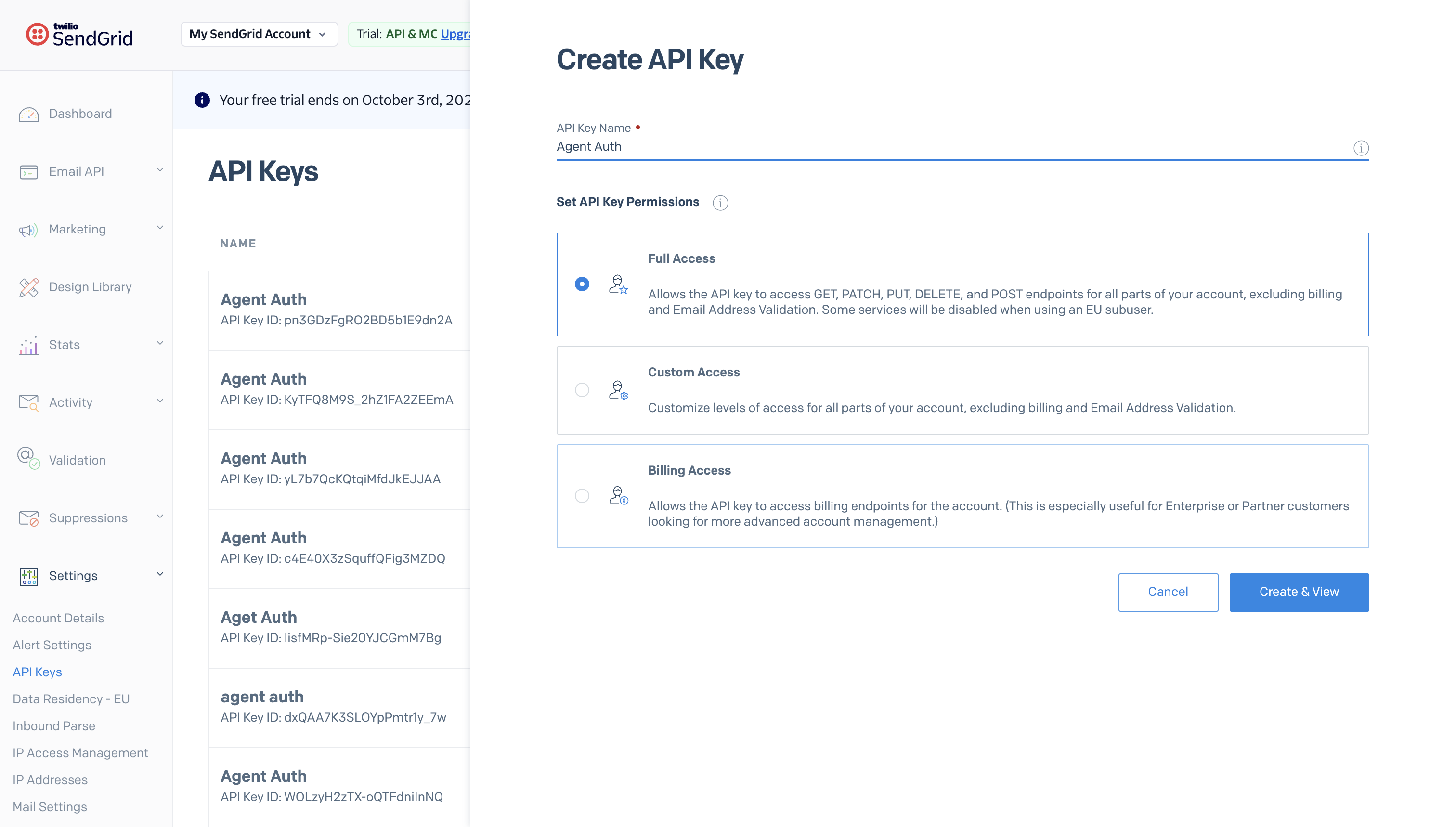
-
-
Copy the key
-
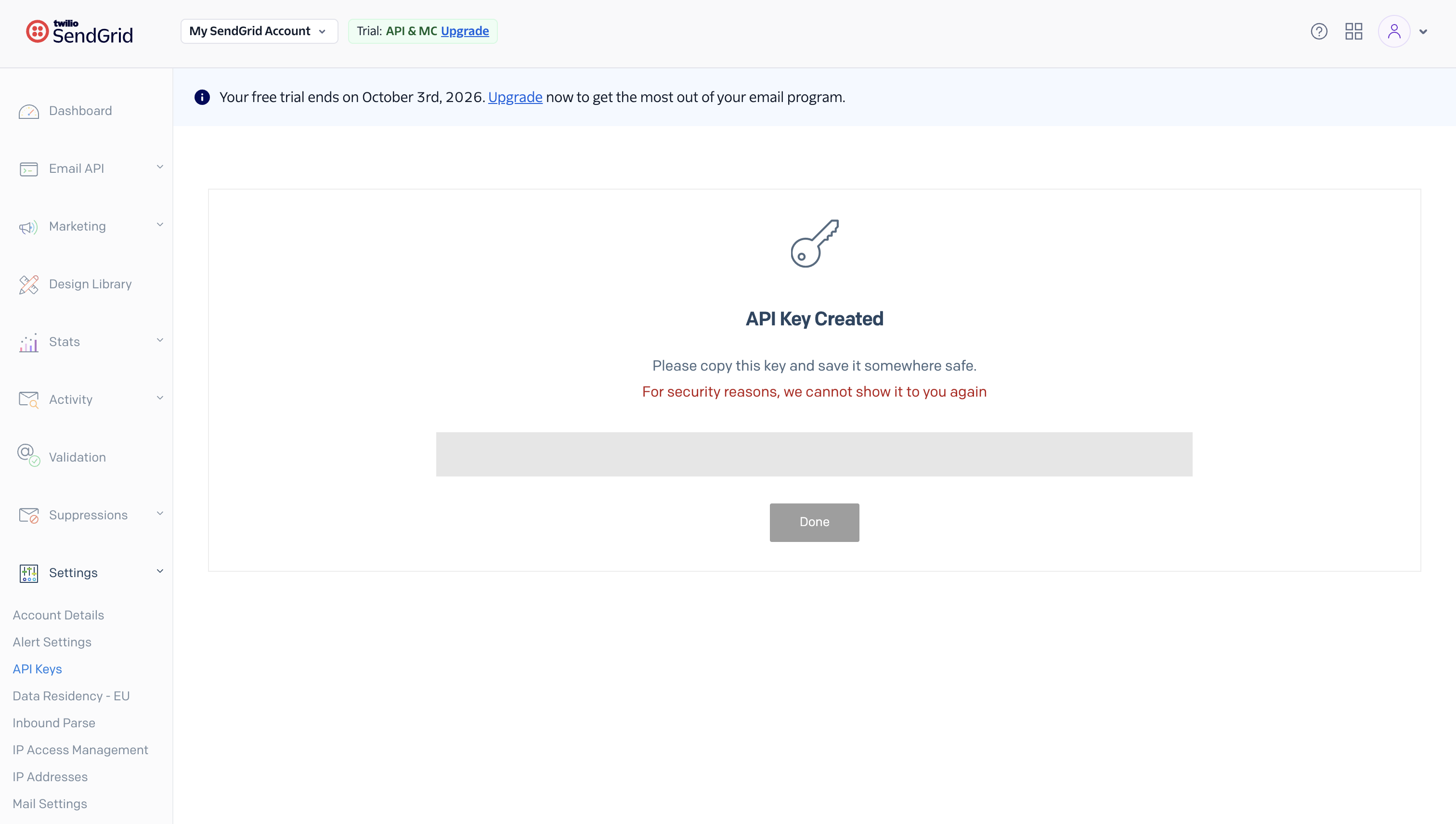
Click Create & View. SendGrid shows the key exactly once.
-
Copy it immediately and store it securely — you can’t view it again after leaving this screen.
-
-
Add the key in Scalekit
- In Scalekit dashboard, go to AgentKit > Connections > Create Connection. Find SendGrid and click Create.
- Paste the API key you copied in step 2.
- Click Save.
-
Authorize a user and make your first call
quickstart.mts import { ScalekitClient } from '@scalekit-sdk/node'import 'dotenv/config'import { createInterface } from 'node:readline/promises'const scalekit = new ScalekitClient(process.env.SCALEKIT_ENVIRONMENT_URL,process.env.SCALEKIT_CLIENT_ID,process.env.SCALEKIT_CLIENT_SECRET,)const actions = scalekit.actionsconst connector = 'sendgrid'const identifier = 'user_123'// Generate an authorization link for the userconst { link } = await actions.getAuthorizationLink({ connectionName: connector, identifier })console.log('Authorize SendGrid:', link)const rl = createInterface({ input: process.stdin, output: process.stdout })await rl.question('Press Enter after authorizing...')rl.close()// Make your first callconst result = await actions.executeTool({connector,identifier,toolName: 'sendgrid_get_contactdb_upload_status',toolInput: {},})console.log(result)Terminal window npx tsx quickstart.mtsquickstart.py import osfrom scalekit import ScalekitClientfrom dotenv import load_dotenvload_dotenv()scalekit_client = ScalekitClient(env_url=os.getenv("SCALEKIT_ENVIRONMENT_URL"),client_id=os.getenv("SCALEKIT_CLIENT_ID"),client_secret=os.getenv("SCALEKIT_CLIENT_SECRET"),)actions = scalekit_client.actionsconnection_name = "sendgrid"identifier = "user_123"# Generate an authorization link for the userlink_response = actions.get_authorization_link(connection_name=connection_name,identifier=identifier,)print("Authorize SendGrid:", link_response.link)input("Press Enter after authorizing...")# Make your first callresult = actions.execute_tool(tool_input={},tool_name="sendgrid_get_contactdb_upload_status",connection_name=connection_name,identifier=identifier,)print(result)Terminal window python quickstart.pyEach user opens the link once and enters their SendGrid credentials there. If your app already has a user's credentials, add the account from your backend instead, as the console steps above show. See Authorize a user for the full flow and statuses.
Tools
Pass the exact name toexecute_toolsendgrid_download_csvRetrieve a presigned download URL for a CSV export previously requested via the Request CSV tool.Read-onlyDownload CSV (Email Activity)
Retrieve a presigned download URL for a CSV export previously requested via the Request CSV tool. Pass the download_uuid included in the notification email SendGrid sends once the CSV is ready (the same UUID appears in that email's download link). The returned presigned_url is a time-limited, directly downloadable link to the CSV file.
Inputs
download_uuidstringrequired- The UUID identifying the CSV download request, taken from the notification email SendGrid sends once the export (requested via the Request CSV tool) is ready.
sendgrid_export_automation_statExport stats for one or more Automations as CSV data.Read-onlyExport Automation Stats
Export stats for one or more Automations as CSV data. Provide a comma-separated list of Automation IDs (up to 50) in ids. The response body is raw CSV text (not JSON) that your application can save directly as a .csv file or parse as needed. The timezone parameter only affects how dates are formatted in the CSV; it does not filter which stats are included.
Inputs
idsstringrequired- Comma-separated list of Automation IDs (1-50) for which to export stats as CSV.
timezonestring- IANA Area/Region string representing the timezone in which the stats are presented in the exported CSV, e.g. "America/Chicago". Defaults to UTC. Changes formatting only, not which stats are returned.default
UTC
sendgrid_export_single_send_statExport stats for one or more Single Sends as CSV data.Read-onlyExport Single Send Stats
Export stats for one or more Single Sends as CSV data. Provide a comma-separated list of Single Send IDs (up to 50) in ids. The response body is raw CSV text (not JSON) that your application can save directly as a .csv file or parse as needed. The timezone parameter only affects how dates are formatted in the CSV; it does not filter which stats are included.
Inputs
idsstringrequired- Comma-separated list of Single Send IDs (1-50) for which to export stats as CSV.
timezonestring- IANA Area/Region string representing the timezone in which the stats are presented in the exported CSV, e.g. "America/Chicago". Defaults to UTC. Changes formatting only, not which stats are returned.default
UTC
sendgrid_find_integration_by_idRetrieve the details of a specific External Integration by its ID, including destination, label, the configured filters.email_events array, and the destination-specific properties object (e.g.Read-onlyGet Integration
Retrieve the details of a specific External Integration by its ID, including destination, label, the configured filters.email_events array, and the destination-specific properties object (e.g. write_key and destination_region for Segment). Obtain the id from the List Integrations tool's response (the 'integration_id' field).
Inputs
idstringrequired- The ID of the Integration to retrieve. Obtain this from the List Integrations tool's response (the 'integration_id' field).
sendgrid_get_account_stateRetrieve the current state of a specific sub-account under your Twilio SendGrid partner organization.Read-onlyGet Account State
Retrieve the current state of a specific sub-account under your Twilio SendGrid partner organization. The returned state is one of: activated, deactivated, suspended, banned, or indeterminate. Suspended, banned, and indeterminate are system-assigned states and cannot be set directly (see Update Account State, which only accepts activated/deactivated).
Inputs
account_idstringrequired- The Twilio SendGrid account ID whose state should be retrieved.
sendgrid_get_alertRetrieve a single SendGrid alert by its numeric alert_id.Read-onlyGet Alert
Retrieve a single SendGrid alert by its numeric alert_id. Returns the alert's type (usage_limit or stats_notification), notification recipient (email_to), created_at/updated_at Unix timestamps, and — depending on type — its frequency (for stats_notification, e.g. daily/weekly/monthly) or percentage usage threshold (for usage_limit).
Inputs
alert_idintegerrequired- The numeric ID of the alert to retrieve. Obtain this from the List Alerts tool's response (the "id" field).
sendgrid_get_allowed_ipRetrieve a single entry from this SendGrid account's access allow list by its numeric rule_id.Read-onlyGet Allowed IP
Retrieve a single entry from this SendGrid account's access allow list by its numeric rule_id. Returns the allowed ip (or CIDR/wildcard range) along with created_at/updated_at Unix timestamps. Obtain rule_id from the List Allowed IPs tool's response (the "id" field).
Inputs
rule_idstringrequired- The numeric id of the allowed IP address entry to retrieve. Obtain this from the List Allowed IPs tool's response (the "id" field).
on_behalf_ofstring- Optional 'on-behalf-of' header value to make this call from a parent account on behalf of one of its Subusers or customer accounts. Use 'account-id <account-id>' for a customer account, or the Subuser's username for a Subuser. Uses the parent account's API key.
sendgrid_get_api_keyRetrieve a single API key's name, ID, and scopes using its api_key_id.Read-onlyGet API Key
Retrieve a single API key's name, ID, and scopes using its api_key_id. Returns HTTP 404 if the key does not exist. Use this to inspect a key's granted permission scopes after creation — the secret key value itself is never retrievable after it was first created.
Inputs
api_key_idstringrequired- The ID of the API key to retrieve. Obtain this from the List API Keys or Create API Key tool's response (the "api_key_id" field).
sendgrid_get_asm_groupRetrieve a single unsubscribe/suppression (ASM) group by its numeric ID.Read-onlyGet Suppression Group
Retrieve a single unsubscribe/suppression (ASM) group by its numeric ID. Returns the group's name, description, is_default flag, id, and unsubscribes count (the number of suppressed addresses currently in the group). Obtain the group_id from the 'List Suppression Groups' tool. You can submit this request as one of your subusers by including their ID in the on_behalf_of field.
Inputs
group_idintegerrequired- The numeric ID of the suppression group to retrieve. Obtain this from the 'List Suppression Groups' tool's response (the 'id' field).
on_behalf_ofstring- Optional 'on-behalf-of' header value to make this call from a parent account on behalf of one of its Subusers or customer accounts. Use 'account-id <account-id>' for a customer account, or the Subuser's username for a Subuser. Uses the parent account's API key.
sendgrid_get_asm_suppressionRetrieve all unsubscribe/suppression (ASM) groups for a given email address, indicating for each group whether the address is currently suppressed from it.Read-onlyGet ASM Suppression Groups for Email
Retrieve all unsubscribe/suppression (ASM) groups for a given email address, indicating for each group whether the address is currently suppressed from it. This endpoint returns a list of all groups from which the given email address has been unsubscribed (each entry in the response includes the group's id, name, description, is_default flag, and a suppressed boolean). You can submit this request as one of your subusers by including their value in the on_behalf_of field.
Inputs
emailstringrequired- The email address to search for across all unsubscribe/suppression groups. Example: "example@example.com".
on_behalf_ofstring- Optional 'on-behalf-of' header value to make this call from a parent account on behalf of one of its Subusers or customer accounts. Use 'account-id <account-id>' for a customer account, or the Subuser's username for a Subuser. Uses the parent account's API key.
sendgrid_get_authenticated_domainRetrieve the full details of a specific authenticated domain by its domain_id, including its domain/subdomain, username, DNS records (CNAME or TXT/MX and their validity), custom_spf, default, and automatic_security settings.Read-onlyGet Authenticated Domain
Retrieve the full details of a specific authenticated domain by its domain_id, including its domain/subdomain, username, DNS records (CNAME or TXT/MX and their validity), custom_spf, default, and automatic_security settings. Obtain domain_id from the 'List Authenticated Domains' tool's response (the 'id' field).
Inputs
domain_idstringrequired- The ID of the authenticated domain to retrieve. Obtain this from the 'List Authenticated Domains' tool's response (the 'id' field).
on_behalf_ofstring- Optional 'on-behalf-of' header value to make this call from a parent account on behalf of one of its Subusers or customer accounts. Use 'account-id <account-id>' for a customer account, or the Subuser's username for a Subuser. Uses the parent account's API key.
sendgrid_get_automation_statRetrieve detailed stats for a single Automation by its ID (obtain IDs from the List Automation Stats tool).Read-onlyGet Automation Stats
Retrieve detailed stats for a single Automation by its ID (obtain IDs from the List Automation Stats tool). Optionally constrain results to a date window with start_date/end_date, control time-slicing with aggregated_by ("total" or "day"), present dates in a specific timezone, and break results down per automation step with group_by=step_id (optionally filtered to specific step_ids). Results are paginated with page_size/page_token.
Inputs
idstringrequired- The ID of the Automation for which you want to retrieve statistics.
aggregated_bystring- Dictates how the stats are time-sliced. Currently, "total" and "day" are supported.one of
daytotal end_datestring- Format: YYYY-MM-DD. If included, only stats on or before this date are returned.
group_bystring- Automations can have multiple steps. Set to "step_id" to further group returned stats by step.one of
step_id page_sizeinteger- The number of elements to return on each page. Must be between 1 and 50. Defaults to 25.default
25 page_tokenstring- Cursor token for retrieving the next page of results, taken from the previous response's _metadata.next URL. Omit to get the first page.
start_datestring- Format: YYYY-MM-DD. If included, only stats on or after this date are returned.
step_idsstring- Comma-separated list of step_ids that you want stats for.
timezonestring- IANA Area/Region string representing the timezone in which the stats are presented, e.g. "America/Chicago". Defaults to UTC.default
UTC
sendgrid_get_branded_linkRetrieve a specific branded link (link branding / click-tracking domain) by its numeric ID.Read-onlyGet Branded Link
Retrieve a specific branded link (link branding / click-tracking domain) by its numeric ID. Returns the domain, subdomain, whether it's the account default, whether it has been validated, and its DNS records (domain_cname and owner_cname). Obtain the ID from the 'List Branded Links' tool. You can submit this request as one of your subusers by including their ID in the on_behalf_of field.
Inputs
idintegerrequired- The numeric ID of the branded link to retrieve. Obtain this from the 'List Branded Links' tool's response (the 'id' field).
on_behalf_ofstring- Optional 'on-behalf-of' header value to make this call from a parent account on behalf of one of its Subusers or customer accounts. Use 'account-id <account-id>' for a customer account, or the Subuser's username for a Subuser. Uses the parent account's API key.
sendgrid_get_campaignRetrieve a single Campaign from SendGrid's legacy Marketing Campaigns feature by its numeric campaign_id.Read-onlyRetrieve a single campaign
Retrieve a single Campaign from SendGrid's legacy Marketing Campaigns feature by its numeric campaign_id. Obtain campaign_id from the 'Retrieve all Campaigns' tool. This is part of SendGrid's legacy Marketing Campaigns API (Contact DB / Campaigns). It remains fully operational, but SendGrid recommends new integrations use the current Marketing Campaigns tool instead ('Get a Single Send', for /v3/marketing/singlesends). You can submit this request as one of your subusers by including their ID in the on_behalf_of field.
Inputs
campaign_idintegerrequired- The ID of the campaign you would like to retrieve. Obtain this from the 'Retrieve all Campaigns' tool's response.
on_behalf_ofstring- Optional 'on-behalf-of' header value to make this call from a parent account on behalf of one of its Subusers or customer accounts. Use 'account-id <account-id>' for a customer account, or the Subuser's username for a Subuser. Uses the parent account's API key.
sendgrid_get_campaign_scheduleRetrieve the date and time a Campaign in SendGrid's legacy Marketing Campaigns feature has been scheduled to be sent.Read-onlyView Scheduled Time of a Campaign
Retrieve the date and time a Campaign in SendGrid's legacy Marketing Campaigns feature has been scheduled to be sent. Obtain campaign_id from the 'Retrieve all Campaigns' tool. This is part of SendGrid's legacy Marketing Campaigns API (Contact DB / Campaigns). It remains fully operational, but SendGrid recommends new integrations use the current Marketing Campaigns tool instead ('Get Scheduled Time of a Single Send', for /v3/marketing/singlesends). You can submit this request as one of your subusers by including their ID in the on_behalf_of field.
Inputs
campaign_idintegerrequired- The ID of the campaign whose scheduled time you want to view. Obtain this from the 'Retrieve all Campaigns' tool's response.
on_behalf_ofstring- Optional 'on-behalf-of' header value to make this call from a parent account on behalf of one of its Subusers or customer accounts. Use 'account-id <account-id>' for a customer account, or the Subuser's username for a Subuser. Uses the parent account's API key.
sendgrid_get_client_statRetrieve email statistics segmented by a single specific client type: phone, tablet, webmail, or desktop.Read-onlyGet Client Stats by Type
Retrieve email statistics segmented by a single specific client type: phone, tablet, webmail, or desktop. SendGrid only stores up to 7 days of email activity; up to 500 items are returned per request. Use start_date (required) and optionally end_date to bound the range, and aggregated_by to group results by day, week, or month. You can also call this on behalf of a Subuser or parent-account customer using on_behalf_of.
Inputs
client_typestringrequired- The client type to retrieve stats for. Must be one of "phone", "tablet", "webmail", or "desktop".one of
phonetabletwebmaildesktop start_datestringrequired- The starting date of the statistics to retrieve. Must follow format YYYY-MM-DD.
aggregated_bystring- How to group the returned statistics. Must be either "day", "week", or "month". Leave blank for the API's default (ungrouped daily entries).one of
dayweekmonth end_datestring- The end date of the statistics to retrieve. Defaults to today. Must follow format YYYY-MM-DD.
on_behalf_ofstring- Optional 'on-behalf-of' header value to make this call from a parent account on behalf of one of its Subusers or customer accounts. Use 'account-id <account-id>' for a customer account, or the Subuser's username for a Subuser. Uses the parent account's API key.
sendgrid_get_contactRetrieve the full details and all fields for a single SendGrid Marketing Contact by its contact ID, including name, contact info, custom_fields, list_ids, segment_ids, and timestamps.Read-onlyGet a Contact by ID
Retrieve the full details and all fields for a single SendGrid Marketing Contact by its contact ID, including name, contact info, custom_fields, list_ids, segment_ids, and timestamps. Use the Get Batched Contacts by IDs tool if you need to look up multiple contacts at once, or the Get Contacts Count tool to find a contact's ID from other identifiers.
Inputs
contact_idstringrequired- The ID of the contact to retrieve. Obtain this from the List/Export contacts tools' responses (the "id" field of each contact).
sendgrid_get_contact_by_identifiersRetrieve up to 100 SendGrid Marketing Contacts that match the given values for a single identifier type.Read-onlyGet Contacts by Identifiers
Retrieve up to 100 SendGrid Marketing Contacts that match the given values for a single identifier type. identifier_type must be one of email, phone_number_id, external_id, or anonymous_id — you can only search by one identifier type per request. Use this instead of Search Contacts when you have exact identifier values and don't need other SGQL filters. Returns HTTP 200 when at least one value matches (with a per-value error message returned for any that don't), HTTP 404 when none match, and HTTP 400 if any supplied value is invalid.
Inputs
identifier_typestringrequired- The type of identifier all the values in "identifiers" belong to. Must be one of: email, phone_number_id, external_id, anonymous_id. You cannot mix identifier types in a single request.one of
emailphone_number_idexternal_idanonymous_id identifiersarrayrequired- One or more identifier values of the given identifier_type to search for among your Marketing Contacts. Example: ["jane_doe@example.com"] when identifier_type is "email".
sendgrid_get_contactdb_custom_fieldRetrieve a single custom field by ID from SendGrid's legacy Marketing Campaigns contact database (contactdb).Read-onlyRetrieve a Custom Field
Retrieve a single custom field by ID from SendGrid's legacy Marketing Campaigns contact database (contactdb). Obtain custom_field_id from the 'Retrieve all custom fields' tool. This is part of SendGrid's legacy Marketing Campaigns API (Contact DB / Campaigns). It remains fully operational, but SendGrid recommends new integrations use the current Marketing Campaigns tool instead ('Get a Field Definition', for /v3/marketing/field_definitions). You can submit this request as one of your subusers by including their ID in the on_behalf_of field.
Inputs
custom_field_idintegerrequired- The ID of the custom field to retrieve. Obtain this from the 'Retrieve all custom fields' tool's response.
on_behalf_ofstring- Optional 'on-behalf-of' header value to make this call from a parent account on behalf of one of its Subusers or customer accounts. Use 'account-id <account-id>' for a customer account, or the Subuser's username for a Subuser. Uses the parent account's API key.
sendgrid_get_contactdb_exportCheck the status of a specific recipient export job from SendGrid's legacy Marketing Campaigns contact database (contactdb), using the job id returned by the 'Export Recipients' tool.Read-onlyExport Recipients Status
Check the status of a specific recipient export job from SendGrid's legacy Marketing Campaigns contact database (contactdb), using the job id returned by the 'Export Recipients' tool. Once status is 'ready', download each file listed in 'urls' with a GET request. SendGrid recommends exporting recipients regularly as a backup. Note: unlike most contactdb endpoints, this one does not support the on-behalf-of header.
Inputs
idstringrequired- The ID of the export job to check. Obtain this from the 'Export Recipients' tool's response.
sendgrid_get_contactdb_listRetrieve a single recipient list by ID from SendGrid's legacy Marketing Campaigns contact database (contactdb).Read-onlyRetrieve a single list
Retrieve a single recipient list by ID from SendGrid's legacy Marketing Campaigns contact database (contactdb). Obtain list_id from the 'Retrieve all lists' tool. This is part of SendGrid's legacy Marketing Campaigns API (Contact DB / Campaigns). It remains fully operational, but SendGrid recommends new integrations use the current Marketing Campaigns tool instead ('Get a List', for /v3/marketing/lists). You can submit this request as one of your subusers by including their ID in the on_behalf_of field.
Inputs
list_idintegerrequired- The ID of the list to retrieve. Obtain this from the 'Retrieve all lists' tool's response.
on_behalf_ofstring- Optional 'on-behalf-of' header value to make this call from a parent account on behalf of one of its Subusers or customer accounts. Use 'account-id <account-id>' for a customer account, or the Subuser's username for a Subuser. Uses the parent account's API key.
sendgrid_get_contactdb_recipientRetrieve a single recipient by ID from SendGrid's legacy Marketing Campaigns contact database (contactdb).Read-onlyRetrieve a single recipient
Retrieve a single recipient by ID from SendGrid's legacy Marketing Campaigns contact database (contactdb). Obtain recipient_id from the 'Retrieve recipients' tool. This is part of SendGrid's legacy Marketing Campaigns API (Contact DB / Campaigns). It remains fully operational, but SendGrid recommends new integrations use the current Marketing Campaigns tool instead ('Get a Contact by ID', for /v3/marketing/contacts). You can submit this request as one of your subusers by including their ID in the on_behalf_of field.
Inputs
recipient_idstringrequired- The ID (base64-encoded email address) of the recipient to retrieve. Obtain this from the 'Retrieve recipients' tool's response.
on_behalf_ofstring- Optional 'on-behalf-of' header value to make this call from a parent account on behalf of one of its Subusers or customer accounts. Use 'account-id <account-id>' for a customer account, or the Subuser's username for a Subuser. Uses the parent account's API key.
sendgrid_get_contactdb_segmentRetrieve a single segment by ID from SendGrid's legacy Marketing Campaigns contact database (contactdb).Read-onlyRetrieve a segment
Retrieve a single segment by ID from SendGrid's legacy Marketing Campaigns contact database (contactdb). Obtain segment_id from the 'Retrieve all segments' tool. This is part of SendGrid's legacy Marketing Campaigns API (Contact DB / Campaigns). It remains fully operational, but SendGrid recommends new integrations use the current Marketing Campaigns tool instead ('Get a Segment', for /v3/marketing/segments/2.0). You can submit this request as one of your subusers by including their ID in the on_behalf_of field.
Inputs
segment_idintegerrequired- The ID of the segment to retrieve. Obtain this from the 'Retrieve all segments' tool's response.
on_behalf_ofstring- Optional 'on-behalf-of' header value to make this call from a parent account on behalf of one of its Subusers or customer accounts. Use 'account-id <account-id>' for a customer account, or the Subuser's username for a Subuser. Uses the parent account's API key.
sendgrid_get_contactdb_upload_statusCheck the current recipient-upload processing status of SendGrid's legacy Marketing Campaigns contact database (contactdb), e.g.Read-onlyGet Recipient Upload Status
Check the current recipient-upload processing status of SendGrid's legacy Marketing Campaigns contact database (contactdb), e.g. whether uploads (via the 'Add recipients' tool) are being processed normally or are delayed, and by how many seconds. This is part of SendGrid's legacy Marketing Campaigns API (Contact DB / Campaigns). It remains fully operational, but SendGrid recommends new integrations use the current Marketing Campaigns tool instead (there is no direct equivalent for /v3/marketing/contacts, which processes uploads asynchronously via job IDs instead). You can submit this request as one of your subusers by including their ID in the on_behalf_of field.
Inputs
on_behalf_ofstring- Optional 'on-behalf-of' header value to make this call from a parent account on behalf of one of its Subusers or customer accounts. Use 'account-id <account-id>' for a customer account, or the Subuser's username for a Subuser. Uses the parent account's API key.
sendgrid_get_designRetrieve a single design from your SendGrid Design Library by its ID.Read-onlyGet Design
Retrieve a single design from your SendGrid Design Library by its ID. Returns the design's name, editor ('code' or 'design'), html_content, plain_content, thumbnail_url, subject, categories, and created_at/updated_at timestamps. Useful before making a PATCH request to update a specific field.
Inputs
idstringrequired- The ID (UUID) of the design you want to retrieve. Obtain this from the List Designs tool's response (the "id" field).
sendgrid_get_email_job_for_verificationRetrieve a specific Bulk Email Address Validation Job by its job_id, including its status (Initiated, Queued, Ready, Processing, Done, or Error), the total number of segments and how many have been processed so far, whether the results CSV is available for download (is_download_available), started_at/finished_at timestamps, and any errors encountered.Read-onlyGet Bulk Email Validation Job
Retrieve a specific Bulk Email Address Validation Job by its job_id, including its status (Initiated, Queued, Ready, Processing, Done, or Error), the total number of segments and how many have been processed so far, whether the results CSV is available for download (is_download_available), started_at/finished_at timestamps, and any errors encountered. Obtain job_id from the Request Bulk Email Validation Upload URL tool's response, or from the List Bulk Email Validation Jobs tool.
Inputs
job_idstringrequired- The ID of the Bulk Email Address Validation Job to retrieve. Obtain this from the Request Bulk Email Validation Upload URL tool's response, or from the List Bulk Email Validation Jobs tool's response (the 'id' field).
sendgrid_get_event_webhookRetrieve the full settings for a single Event Webhook by webhook_id, including its enabled state, destination url, which event types it is configured to send (delivered, open, click, bounce, dropped, etc.), friendly_name, OAuth settings if configured, and public_key if signature verification is enabled.Read-onlyGet Event Webhook
Retrieve the full settings for a single Event Webhook by webhook_id, including its enabled state, destination url, which event types it is configured to send (delivered, open, click, bounce, dropped, etc.), friendly_name, OAuth settings if configured, and public_key if signature verification is enabled. Obtain the webhook_id from the List Event Webhooks tool.
Inputs
webhook_idstringrequired- The ID of the Event Webhook to retrieve. Obtain this from the List Event Webhooks tool's response (the 'id' field).
includestring- Set to 'account_status_change' to include the account_status_change field (compliance-related account status change notifications) in the response payload. Omit to leave it out.one of
account_status_change on_behalf_ofstring- Optional 'on-behalf-of' header value to make this call from a parent account on behalf of one of its Subusers or customer accounts. Use 'account-id <account-id>' for a customer account, or the Subuser's username for a Subuser. Uses the parent account's API key.
sendgrid_get_export_contactCheck the status of a SendGrid contact export job by its export id (obtained from the Export Contacts tool's response).Read-onlyExport Contacts Status
Check the status of a SendGrid contact export job by its export id (obtained from the Export Contacts tool's response). Returns status (pending, ready, or failure), created_at/completed_at/expires_at timestamps, and — once status is "ready" — a urls array of downloadable CSV/JSON file links (more than one if a max_file_size was specified in the original export request). If status is "failure", a human-readable message field explains why.
Inputs
export_idstringrequired- The ID of the export job to check, returned by the Export Contacts tool.
sendgrid_get_global_suppressionRetrieve a global suppression, or confirm whether an email address is globally suppressed.Read-onlyGet Global Suppression
Retrieve a global suppression, or confirm whether an email address is globally suppressed. If the email address is globally suppressed, the response includes that recipient_email. If it is not globally suppressed, an empty JSON object is returned.
Inputs
emailstringrequired- The email address to check or retrieve from the global suppressions list. Example: test@example.com.
on_behalf_ofstring- Optional 'on-behalf-of' header value to make this call from a parent account on behalf of one of its Subusers or customer accounts. Use 'account-id <account-id>' for a customer account, or the Subuser's username for a Subuser. Uses the parent account's API key.
sendgrid_get_import_contactCheck the status of a SendGrid contact import job by its job_id.Read-onlyImport Contacts Status
Check the status of a SendGrid contact import job by its job_id. Use the job_id returned by the Import Contacts, Add or Update a Contact, or Delete Contacts tools as the id in the path. The response's status field is one of pending (not yet started), completed (finished with no errors), errored (finished with some errors), or failed (finished with all errors, or the job was entirely unprocessable — e.g. an unsupported file format). The results object includes requested_count, created_count, updated_count, deleted_count, and errored_count, plus an errors_url you can download for details on any per-row failures. Also returns started_at and finished_at ISO8601 timestamps. Twilio SendGrid recommends exporting your contacts regularly as a backup to avoid issues or lost data.
Inputs
job_idstringrequired- The ID of the contact import job to check. Obtain this from the job_id field returned by the Import Contacts, Add or Update a Contact, or Delete Contacts tools.
sendgrid_get_integrations_by_userRetrieve all External Integrations (email event forwarding destinations, e.g.Read-onlyList Integrations
Retrieve all External Integrations (email event forwarding destinations, e.g. Segment) configured for the authenticated user. Each entry includes integration_id, user_id, destination, label, the configured filters.email_events array, and the destination-specific properties object (e.g. write_key and destination_region for Segment).
Inputs
This tool takes no inputs.
sendgrid_get_invalid_emailRetrieve details of a specific invalid email address, including the reason it was marked invalid and the Unix timestamp when it was added to the invalid emails list.Read-onlyGet Invalid Email
Retrieve details of a specific invalid email address, including the reason it was marked invalid and the Unix timestamp when it was added to the invalid emails list. Returns an array containing zero or one matching entry.
Inputs
emailstringrequired- The specific email address to look up in the invalid emails list. Example: invalid@example.com.
on_behalf_ofstring- Optional 'on-behalf-of' header value to make this call from a parent account on behalf of one of its Subusers or customer accounts. Use 'account-id <account-id>' for a customer account, or the Subuser's username for a Subuser. Uses the parent account's API key.
sendgrid_get_ip_ip_address_managementRetrieve details for a specific IP address on this SendGrid account, identified by its literal IP value.Read-onlyGet IP Address Details
Retrieve details for a specific IP address on this SendGrid account, identified by its literal IP value. Details include whether a parent is assigned, whether it warms up automatically, which IP Pools it belongs to, when it was added/last updated, and whether it's leased/enabled. Set include_region to true to also return the IP's region (us or eu). Note: this does not return Subuser assignment information — use the "Get a List of Subusers Assigned to an IP" tool for that.
Inputs
ipstringrequired- The IP address to retrieve details for, exactly as it appears on the account (from the List IP Addresses tool's response).
include_regionboolean- Whether to include the IP address's region information (us or eu) in the response. Defaults to false.default
false
sendgrid_get_ip_ipsRetrieve details for a single IP address on this SendGrid account, identified by its literal IP value, including which IP pools it belongs to (an IP can belong to multiple pools), its subusers, reverse DNS record, warm-up status, and the date it entered warmup.Read-onlyGet IP Pools For An IP
Retrieve details for a single IP address on this SendGrid account, identified by its literal IP value, including which IP pools it belongs to (an IP can belong to multiple pools), its subusers, reverse DNS record, warm-up status, and the date it entered warmup.
Inputs
ip_addressstringrequired- The IP address to retrieve IP pool and status information for, exactly as it appears on the account.
sendgrid_get_ip_pool_ip_address_managementRetrieve details for a specific IP Pool by its unique ID, including the Pool's name, a sample of up to 10 associated IP addresses, and the total number of IPs in the Pool.Read-onlyGet IP Pool Details
Retrieve details for a specific IP Pool by its unique ID, including the Pool's name, a sample of up to 10 associated IP addresses, and the total number of IPs in the Pool. Use the Get IPs Assigned to an IP Pool tool to retrieve additional IPs beyond the sample. Set include_region to true to also return IP counts broken down by region.
Inputs
poolidstringrequired- The unique ID of the IP Pool to retrieve, obtained from the List IP Pools tool's response.
include_regionboolean- Whether to return the IP Pool's region breakdown (count of IPs by region) in the response. Defaults to false.default
false
sendgrid_get_ip_pool_ipsRetrieve all of the IP addresses that belong to a specific IP pool on this SendGrid account, identified by the pool's name.Read-onlyGet IP Pool
Retrieve all of the IP addresses that belong to a specific IP pool on this SendGrid account, identified by the pool's name. Returns the pool_name and the array of IP addresses assigned to it.
Inputs
pool_namestringrequired- The name of the IP pool to retrieve the IP addresses for. Get valid pool names from the 'List IP Pools' tool.
sendgrid_get_mail_batchValidate a mail batch ID.Read-onlyValidate Mail Batch ID
Validate a mail batch ID. If the batch ID is valid, this returns HTTP 200 and the batch ID itself; if invalid, you'll receive a 400-level status code and an error message. A batch ID does not need to be assigned to a mail send to be considered valid — a successful response only confirms the batch ID has been created, not that it has been used in a send.
Inputs
batch_idstringrequired- The batch ID associated with the mail send you want to validate, obtained from the Create Mail Batch ID tool.
on_behalf_ofstring- Optional 'on-behalf-of' header value to make this call for a particular Subuser through the parent account. Uses the parent account's API key.
sendgrid_get_marketing_listRetrieve data about a specific SendGrid Marketing Campaigns contact list by its ID, including its name and contact_count.Read-onlyGet a List by ID
Retrieve data about a specific SendGrid Marketing Campaigns contact list by its ID, including its name and contact_count. Set contact_sample to true to also receive a contact_sample array containing up to 50 of the most recent contacts uploaded or attached to the list.
Inputs
idstringrequired- The ID of the marketing list you want to retrieve. Obtain this from the Get All Lists tool's response (the "id" field).
contact_sampleboolean- If true, the response includes a contact_sample array with up to 50 of the most recent contacts uploaded or attached to this list, plus the full contact_count. Defaults to false (list metadata only).default
false
sendgrid_get_messageRetrieve full Email Activity details for a single message by its message ID (msg_id), obtained from the Filter Messages tool.Read-onlyGet Message (Email Activity)
Retrieve full Email Activity details for a single message by its message ID (msg_id), obtained from the Filter Messages tool. Returns sender/recipient addresses, subject, delivery status, template and API key used, originating/outbound IP info, associated categories, and the full events timeline (e.g. processed, delivered, opened, clicked, bounced, dropped, deferred, spam_report, unsubscribe) with per-event details. Note: for Regional (EU) subusers, no Email Activity data is generated for this service.
Inputs
msg_idstringrequired- The unique message ID to fetch Email Activity details for. Obtain this from the Filter Messages tool's response (the "msg_id" field).
sendgrid_get_message_by_idGet all details for a single message from the Email Logs API by its sg_message_id, obtained from the Search Messages By Filter tool.Read-onlyGet Message By ID (Email Logs)
Get all details for a single message from the Email Logs API by its sg_message_id, obtained from the Search Messages By Filter tool. Returns sender/recipient addresses, subject, a summary status (processed, delivered, deferred, dropped, bounced, or blocked), template and API key used, originating IP, categories, marketing campaign info, and the full timeline of events (up to 100 most recent) for the message. For requests authenticated as the parent account, pass the subuser query parameter if the message belongs to a subuser.
Inputs
sg_message_idstringrequired- The ID of the message you are requesting details for.
subuserstring- For requests authenticated as the parent account, this argument must be passed if the desired message belongs to a subuser. Value is the subuser's numeric account ID as a string.
sendgrid_get_parse_settingRetrieve a specific Inbound Parse setting by its hostname.Read-onlyGet Parse Setting
Retrieve a specific Inbound Parse setting by its hostname. Returns the parse setting's url (where parsed data is POSTed), hostname, spam_check flag, and send_raw flag. Use the List Parse Settings tool to see all configured hostnames.
Inputs
hostnamestringrequired- The hostname of the Inbound Parse setting you want to retrieve, e.g. parse.yourdomain.com. Obtain this from the List Parse Settings tool's response.
on_behalf_ofstring- Optional 'on-behalf-of' header value to make this call from a parent account on behalf of one of its Subusers or customer accounts. Use 'account-id <account-id>' for a customer account, or the Subuser's username for a Subuser. Uses the parent account's API key.
sendgrid_get_pre_built_designRetrieve details about a single pre-built design provided by Twilio SendGrid, by its ID.Read-onlyGet Pre-built Design
Retrieve details about a single pre-built design provided by Twilio SendGrid, by its ID. Returns the design's name, editor ('code' or 'design'), html_content, plain_content, thumbnail_url, subject, and categories. Useful when you want to inspect a pre-built design before duplicating and modifying it.
Inputs
idstringrequired- The ID (UUID) of the pre-built design you want to retrieve. Obtain this from the List Pre-built Designs tool's response (the "id" field).
sendgrid_get_reverse_dnsRetrieve the full details of a specific Reverse DNS record by its id, including the associated IP address, rDNS hostname, domain/subdomain, users able to send from the IP, validity, and the A record (host/data) that must exist at your DNS host.Read-onlyGet Reverse DNS Record
Retrieve the full details of a specific Reverse DNS record by its id, including the associated IP address, rDNS hostname, domain/subdomain, users able to send from the IP, validity, and the A record (host/data) that must exist at your DNS host. Obtain the id from the 'List Reverse DNS Records' tool's response (the 'id' field).
Inputs
idstringrequired- The ID of the Reverse DNS record to retrieve. Obtain this from the 'List Reverse DNS Records' tool's response (the 'id' field).
on_behalf_ofstring- Optional 'on-behalf-of' header value to make this call from a parent account on behalf of one of its Subusers or customer accounts. Use 'account-id <account-id>' for a customer account, or the Subuser's username for a Subuser. Uses the parent account's API key.
sendgrid_get_scheduled_sendRetrieve the cancel/pause scheduled send information for a specific batch_id.Read-onlyGet Scheduled Send
Retrieve the cancel/pause scheduled send information for a specific batch_id. Returns an array of {batch_id, status} objects for that batch. Only scheduled sends that were assigned a batch_id and later paused or cancelled via the 'Cancel or Pause a Scheduled Send' tool will be found here.
Inputs
batch_idstringrequired- The batch ID of the scheduled send to retrieve.
on_behalf_ofstring- Optional 'on-behalf-of' header value to make this call from a parent account on behalf of one of its Subusers or customer accounts. Use 'account-id <account-id>' for a customer account, or the Subuser's username for a Subuser. Uses the parent account's API key.
sendgrid_get_security_policyRetrieve the full configuration of a single webhook security policy by its id, including its name and, depending on configuration, its OAuth client details or the signature public_key used to verify webhook payloads.Read-onlyGet Security Policy
Retrieve the full configuration of a single webhook security policy by its id, including its name and, depending on configuration, its OAuth client details or the signature public_key used to verify webhook payloads. Obtain the policy id from the List All Security Policies tool.
Inputs
idstringrequired- The ID of the webhook security policy to retrieve. Obtain this from the List All Security Policies tool's response (the 'id' field).
on_behalf_ofstring- Optional 'on-behalf-of' header value to make this call from a parent account on behalf of one of its Subusers or customer accounts. Use 'account-id <account-id>' for a customer account, or the Subuser's username for a Subuser. Uses the parent account's API key.
sendgrid_get_segment_v1Retrieve a single SendGrid Marketing Campaigns segment (v1, legacy query-DSL segments) by its segment_id, including its name, query_dsl, contacts_count, a contacts_sample of matching contacts, and timestamps.Read-onlyGet Segment by ID (v1)
Retrieve a single SendGrid Marketing Campaigns segment (v1, legacy query-DSL segments) by its segment_id, including its name, query_dsl, contacts_count, a contacts_sample of matching contacts, and timestamps. Set query_json to true to also receive the parsed SQL AST as a JSON object in the query_json field of the response.
Inputs
segment_idstringrequired- The UUID of the segment to retrieve. Obtain this from the Get List of Segments (v1) tool's response (the "id" field).
query_jsonboolean- If true, the response also includes a query_json field containing the parsed SQL AST representation of the segment's query. Defaults to false.default
false
sendgrid_get_segment_v2Retrieve a SendGrid Marketing Campaigns Segment (v2, SQL-based segmentation) by its segment ID.Read-onlyGet Segment by ID
Retrieve a SendGrid Marketing Campaigns Segment (v2, SQL-based segmentation) by its segment ID. Returns the segment's name, its SQL query_dsl, contacts_count, refresh status (query_validation, refreshes_used, max_refreshes, last_refreshed_at), and timestamps. Set contacts_sample to false to omit the contacts_sample array (a subset of matching contacts) from the response for a lighter payload. Obtain the segment_id from the 'Create Segment' or a 'List Segments' tool.
Inputs
segment_idstringrequired- The ID of the segment to retrieve. Obtain this from a segment creation or list response's 'id' field.
contacts_sampleboolean- Set to false to exclude the contacts_sample array (a sample of matching contacts) from the response, for a lighter/faster response. Defaults to true, which includes the sample.default
true
sendgrid_get_senderRetrieve the details of a specific Sender identity by its numeric id, including its nickname, from/reply_to addresses, physical address, whether it's verified (only verified Senders can send email), and whether it's locked (a Sender is locked while associated with a campaign in Draft, Scheduled, or In Progress status, and cannot be updated or deleted while locked).Read-onlyGet a Specific Sender
Retrieve the details of a specific Sender identity by its numeric id, including its nickname, from/reply_to addresses, physical address, whether it's verified (only verified Senders can send email), and whether it's locked (a Sender is locked while associated with a campaign in Draft, Scheduled, or In Progress status, and cannot be updated or deleted while locked). Obtain the id from the 'Get a List of All Senders' tool. You can submit this request as one of your subusers by including their ID in the on_behalf_of field.
Inputs
idintegerrequired- The unique numeric identifier of the Sender to retrieve. Obtain this from the 'Get a List of All Senders' tool's response (the 'id' field).
on_behalf_ofstring- Optional 'on-behalf-of' header value to make this call from a parent account on behalf of one of its Subusers or customer accounts. Use 'account-id <account-id>' for a customer account, or the Subuser's username for a Subuser. Uses the parent account's API key.
sendgrid_get_sender_identityRetrieve a single Sender Identity from SendGrid's legacy Marketing Campaigns 'Campaigns' feature by its numeric sender_id.Read-onlyView a Sender Identity
Retrieve a single Sender Identity from SendGrid's legacy Marketing Campaigns 'Campaigns' feature by its numeric sender_id. Obtain sender_id from the 'Get a List of All Sender Identities' tool. This is part of SendGrid's legacy Marketing Campaigns API (Contact DB / Campaigns). It remains fully operational, but SendGrid recommends new integrations use the current Marketing Campaigns tool instead ('View a Sender', for /v3/marketing/senders). You can submit this request as one of your subusers by including their ID in the on_behalf_of field.
Inputs
sender_idintegerrequired- The numeric ID of the Sender Identity to retrieve. Obtain this from the 'Get a List of All Sender Identities' tool's response (the 'id' field).
on_behalf_ofstring- Optional 'on-behalf-of' header value to make this call from a parent account on behalf of one of its Subusers or customer accounts. Use 'account-id <account-id>' for a customer account, or the Subuser's username for a Subuser. Uses the parent account's API key.
sendgrid_get_signed_event_webhookRetrieve the public key used to verify cryptographic signatures for a single Event Webhook by its webhook_id, for webhooks that have signature verification enabled.Read-onlyGet Signed Event Webhook Public Key
Retrieve the public key used to verify cryptographic signatures for a single Event Webhook by its webhook_id, for webhooks that have signature verification enabled. Obtain the webhook_id from the List Event Webhooks tool. Use this public key in your receiving application to verify that incoming event POST requests genuinely originated from Twilio SendGrid.
Inputs
webhook_idstringrequired- The ID of the Event Webhook whose signing public key you want to retrieve. Obtain this from the List Event Webhooks tool's response (the 'id' field).
on_behalf_ofstring- Optional 'on-behalf-of' header value to make this call from a parent account on behalf of one of its Subusers or customer accounts. Use 'account-id <account-id>' for a customer account, or the Subuser's username for a Subuser. Uses the parent account's API key.
sendgrid_get_single_sendRetrieve full details about one Twilio SendGrid Marketing Campaigns Single Send using its ID, including its name, status, categories, send_at, send_to targeting (list_ids/segment_ids/all), email_config (subject/content/sender/unsubscribe settings), and any warnings.Read-onlyGet Single Send by ID
Retrieve full details about one Twilio SendGrid Marketing Campaigns Single Send using its ID, including its name, status, categories, send_at, send_to targeting (list_ids/segment_ids/all), email_config (subject/content/sender/unsubscribe settings), and any warnings. Obtain the id from the 'Get All Single Sends' tool's response.
Inputs
idstringrequired- The ID (UUID) of the Single Send to retrieve. Obtain this from the 'Get All Single Sends' tool's response (the 'id' field).
sendgrid_get_single_send_statRetrieve detailed stats for a single Single Send by its ID (obtain IDs from the List Single Send Stats tool).Read-onlyGet Single Send Stats
Retrieve detailed stats for a single Single Send by its ID (obtain IDs from the List Single Send Stats tool). Optionally constrain results to a date window with start_date/end_date, control time-slicing with aggregated_by ("total" or "day"), present dates in a specific timezone, and break results down by A/B test variation and/or phase with group_by (comma-separated combination of ab_variation, ab_phase). Results are paginated with page_size/page_token.
Inputs
idstringrequired- The ID of the Single Send for which you want to retrieve stats.
aggregated_bystring- Dictates how the stats are time-sliced. Currently, "total" and "day" are supported.one of
daytotal end_datestring- Format: YYYY-MM-DD. If included, only stats on or before this date are returned.
group_bystring- A/B Single Sends have multiple variation IDs and phase IDs. Comma-separated combination of ab_variation and/or ab_phase allows further granularity of stats by these fields.
page_sizeinteger- The number of elements to return on each page. Must be between 1 and 50. Defaults to 25.default
25 page_tokenstring- Cursor token for retrieving the next page of results, taken from the previous response's _metadata.next URL. Omit to get the first page.
start_datestring- Format: YYYY-MM-DD. If included, only stats on or after this date are returned.
timezonestring- IANA Area/Region string representing the timezone in which the stats are presented, e.g. "America/Chicago". Defaults to UTC.default
UTC
sendgrid_get_spam_reportRetrieve a specific spam report by recipient email address.Read-onlyGet Spam Report
Retrieve a specific spam report by recipient email address. Returns an array containing the report's created timestamp (Unix), the recipient's email address, and the IP address the message was sent from. Use this to check whether -- and when -- a specific recipient marked one of your sends as spam. You can submit this request as one of your subusers by including their ID in the on_behalf_of field.
Inputs
emailstringrequired- The email address of the specific spam report to retrieve. Example: user1@example.com.
on_behalf_ofstring- Optional 'on-behalf-of' header value to make this call from a parent account on behalf of one of its Subusers or customer accounts. Use 'account-id <account-id>' for a customer account, or the Subuser's username for a Subuser. Uses the parent account's API key.
sendgrid_get_sso_certificateRetrieve a single Single Sign-On (SAML) certificate configured on this Twilio SendGrid account by its certificate ID.Read-onlyGet SSO Certificate
Retrieve a single Single Sign-On (SAML) certificate configured on this Twilio SendGrid account by its certificate ID. Returns the certificate's public_certificate (PEM), numeric id, not_before/not_after validity as unix timestamps, and the integration_id of the SSO Integration it's associated with. Obtain the cert_id from the 'Get All SSO Integrations' tool or from the response of the 'Create SSO Certificate' tool.
Inputs
cert_idstringrequired- The ID of the SSO certificate to retrieve.
sendgrid_get_sso_integrationRetrieve a single Single Sign-On (SAML) integration configured on this Twilio SendGrid account by its integration ID.Read-onlyGet SSO Integration
Retrieve a single Single Sign-On (SAML) integration configured on this Twilio SendGrid account by its integration ID. Returns the integration's name, enabled state, signin_url, signout_url, entity_id, id, single_signon_url, and audience_url. Obtain the id from the 'Get All SSO Integrations' tool. Set include_completed_integration_field to true to also receive the completed_integration field in the response.
Inputs
idstringrequired- The unique ID of the SSO integration to retrieve. Obtain this from the 'Get All SSO Integrations' tool's response.
include_completed_integration_fieldboolean- If true, the response includes the completed_integration field, indicating whether this integration's setup has been fully finished. Maps to the API's 'si' query parameter. Defaults to false.default
false
sendgrid_get_subuser_creditRetrieve a Credits overview for a single Subuser: the reset type (unlimited, recurring, or nonrecurring), the reset_frequency (monthly, weekly, or daily), and the current remain/total/used counts.Read-onlyGet Subuser Credits
Retrieve a Credits overview for a single Subuser: the reset type (unlimited, recurring, or nonrecurring), the reset_frequency (monthly, weekly, or daily), and the current remain/total/used counts. remain is null when type is unlimited; total and used are null when type is unlimited or nonrecurring.
Inputs
subuser_namestringrequired- The username of the Subuser to retrieve credit information for.
sendgrid_get_suppression_blockRetrieve a specific email address from this account's blocks suppression list.Read-onlyGet Block
Retrieve a specific email address from this account's blocks suppression list. Returns an array containing the matching block record (created Unix timestamp, email, reason, and SMTP status), or an empty array if the address is not currently blocked. You can submit this request as one of your subusers by including their value in the on_behalf_of field.
Inputs
emailstringrequired- The specific blocked email address to look up. Example: "example@example.com".
on_behalf_ofstring- Optional 'on-behalf-of' header value to make this call from a parent account on behalf of one of its Subusers or customer accounts. Use 'account-id <account-id>' for a customer account, or the Subuser's username for a Subuser. Uses the parent account's API key.
sendgrid_get_suppression_bouncesRetrieve a specific bounce record by email address from this account's bounces suppression list.Read-onlyGet Bounce
Retrieve a specific bounce record by email address from this account's bounces suppression list. Returns an array containing the matching bounce record (created Unix timestamp, email, reason, and enhanced SMTP status), or an empty array if the address has no bounce on record. You can submit this request as one of your subusers by including their value in the on_behalf_of field.
Inputs
emailstringrequired- The email address of the specific bounce record to retrieve. Example: "example@example.com".
on_behalf_ofstring- Optional 'on-behalf-of' header value to make this call from a parent account on behalf of one of its Subusers or customer accounts. Use 'account-id <account-id>' for a customer account, or the Subuser's username for a Subuser. Uses the parent account's API key.
sendgrid_get_suppression_bounces_classificationsRetrieve the number of bounces for a specific bounce classification, broken down by day and by receiving domain, in descending order.Read-onlyGet Bounce Classification Stats
Retrieve the number of bounces for a specific bounce classification, broken down by day and by receiving domain, in descending order. Valid classifications are: Content, Frequency or Volume Too High, Invalid Address, Mailbox Unavailable, Reputation, Technical Failure, and Unclassified. Optionally restrict results to a start_date/end_date range (YYYY-MM-DD, inclusive). By default the response is JSON; set accept_format to 'text/csv' to receive the same data as CSV text instead.
Inputs
classificationstringrequired- The bounce classification to filter by. Must be one of: Content, Frequency or Volume Too High, Invalid Address, Mailbox Unavailable, Reputation, Technical Failure, Unclassified.one of
ContentFrequency or Volume Too HighInvalid AddressMailbox UnavailableReputationTechnical FailureUnclassified accept_formatstring- Content type to request for the response. Use 'application/json' (default) for structured JSON, or 'text/csv' to receive the same bounce classification data as raw CSV text.one of
application/jsontext/csvdefaultapplication/json end_datestring- The end of the time range, in YYYY-MM-DD format, when a bounce was created (inclusive). Omit to leave the range unbounded on the end.
on_behalf_ofstring- Optional 'on-behalf-of' header value to make this call from a parent account on behalf of one of its Subusers or customer accounts. Use 'account-id <account-id>' for a customer account, or the Subuser's username for a Subuser. Uses the parent account's API key.
start_datestring- The start of the time range, in YYYY-MM-DD format, when a bounce was created (inclusive). Omit to leave the range unbounded on the start.
sendgrid_get_teammateRetrieve a specific Teammate's profile by username, including first/last name, email, scopes, user_type (admin, owner, or teammate), admin flag, and contact details (phone, website, address, city, state, zip, country).Read-onlyGet Teammate
Retrieve a specific Teammate's profile by username, including first/last name, email, scopes, user_type (admin, owner, or teammate), admin flag, and contact details (phone, website, address, city, state, zip, country). Get a Teammate's username from the List Teammates tool. You can submit this request as one of your subusers by including their ID in the on_behalf_of field.
Inputs
usernamestringrequired- The username of the Teammate to retrieve. Get this from the List Teammates tool.
on_behalf_ofstring- Optional 'on-behalf-of' header value to make this call from a parent account on behalf of one of its Subusers or customer accounts. Use 'account-id <account-id>' for a customer account, or the Subuser's username for a Subuser. Uses the parent account's API key.
sendgrid_get_templateRetrieve a single transactional template from SendGrid by its template_id, including its full list of versions (each version has its own id, subject, html_content, plain_content, and active flag).Read-onlyGet Template
Retrieve a single transactional template from SendGrid by its template_id, including its full list of versions (each version has its own id, subject, html_content, plain_content, and active flag). Obtain the template_id from the 'List Templates' or 'Create Template' tool. You can submit this request as one of your subusers by including their ID in the on_behalf_of field.
Inputs
template_idstringrequired- The ID (UUID) of the transactional template to retrieve. Obtain this from the 'List Templates' or 'Create Template' tool's response.
on_behalf_ofstring- Optional 'on-behalf-of' header value to make this call from a parent account on behalf of one of its Subusers or customer accounts. Use 'account-id <account-id>' for a customer account, or the Subuser's username for a Subuser. Uses the parent account's API key.
sendgrid_get_template_versionRetrieve a specific version of a transactional template in SendGrid, identified by the parent template_id and the version_id.Read-onlyGet Template Version
Retrieve a specific version of a transactional template in SendGrid, identified by the parent template_id and the version_id. Returns the version's full details, including subject, html_content, plain_content, active flag, editor, and any warnings. Obtain the template_id from the 'List Templates' tool and the version_id from the 'List Templates', 'Get Template', or 'Create Template Version' tool. You can submit this request as one of your subusers by including their ID in the on_behalf_of field.
Inputs
template_idstringrequired- The ID (UUID) of the original transactional template that owns this version. Obtain this from the 'List Templates' tool's response.
version_idstringrequired- The ID (UUID) of the template version to retrieve. Obtain this from the 'List Templates', 'Get Template', or 'Create Template Version' tool's response.
on_behalf_ofstring- Optional 'on-behalf-of' header value to make this call from a parent account on behalf of one of its Subusers or customer accounts. Use 'account-id <account-id>' for a customer account, or the Subuser's username for a Subuser. Uses the parent account's API key.
sendgrid_get_validations_email_jobsRetrieve a list of all of the authenticated user's Bulk Email Address Validation Jobs.Read-onlyList Bulk Email Validation Jobs
Retrieve a list of all of the authenticated user's Bulk Email Address Validation Jobs. Each entry in the returned 'result' array includes the job's id, status (Initiated, Queued, Ready, Processing, Done, or Error), started_at, and finished_at timestamps. Use the Get Bulk Email Validation Job tool with a specific job id for full job details, including segment progress and any errors.
Inputs
This tool takes no inputs.
sendgrid_get_warm_up_ipRetrieve the warmup status for a specific IP address.Read-onlyGet Warmup Status for an IP
Retrieve the warmup status for a specific IP address. Returns the IP address and the Unix timestamp when it entered warmup mode if it is currently warming up. Use List Warm Up IP to retrieve all IPs currently in warmup.
Inputs
ip_addressstringrequired- The IP address that you want to retrieve the warmup status for. Example: 0.0.0.0.
sendgrid_list_access_activityRetrieve a list of the IP addresses that recently attempted to access this SendGrid account, either through the web User Interface or the API.Read-onlyList Access Activity
Retrieve a list of the IP addresses that recently attempted to access this SendGrid account, either through the web User Interface or the API. Each entry includes the IP address, whether access was allowed, the authentication method used, the geographic location the attempt originated from, and Unix timestamps for the first and most recent attempt from that IP. Use limit to control how many IPs are returned (default 20).
Inputs
limitinteger- Limits the number of IP access-attempt records to return. Defaults to 20 if not specified.default
20 on_behalf_ofstring- Optional 'on-behalf-of' header value to make this call from a parent account on behalf of one of its Subusers or customer accounts. Use 'account-id <account-id>' for a customer account, or the Subuser's username for a Subuser. Uses the parent account's API key.
sendgrid_list_account_account_provisioningRetrieve all sub-accounts provisioned under your Twilio SendGrid partner/reseller organization via the Account Provisioning API.Read-onlyList Provisioned Accounts
Retrieve all sub-accounts provisioned under your Twilio SendGrid partner/reseller organization via the Account Provisioning API. Returns each account's Twilio SendGrid account ID and creation timestamp, along with cursor-based pagination info. Supports paging with offset (the last item ID successfully retrieved) and limit (page size, up to 100). This is distinct from the Subusers API — it lists accounts created through partner account provisioning.
Inputs
limitinteger- The number of accounts to return per page. Maximum 100. Defaults to 10 if not provided.default
10 offsetstring- Pagination cursor: the ID of the last account item successfully retrieved in a previous call. Omit to start from the first page. Example: sg2a2bcd3ef4ab5c67d8efab91c01de2fa.
sendgrid_list_account_ipsRetrieve a paginated list of IP addresses provisioned to a specific Twilio SendGrid sub-account (managed via the Partners/Accounts provisioning API), ordered by most recently added IP.Read-onlyList Account IPs
Retrieve a paginated list of IP addresses provisioned to a specific Twilio SendGrid sub-account (managed via the Partners/Accounts provisioning API), ordered by most recently added IP. Each result includes the IP address and its region (eu or us). Supports pagination via limit (page size) and offset (the last IP successfully retrieved in a previous call). This is intended for reseller/partner accounts managing IP allocation across sub-accounts.
Inputs
accountIDstringrequired- The Twilio SendGrid account ID (sub-account) whose provisioned IPs should be listed. Example: sg1a2bcd3ef4ab5c67d8efab91c01de2fa.
limitinteger- Number of IP items to return per page. Minimum 1, maximum 5000. Defaults to 10 if not provided.default
10 offsetstring- Pagination cursor: the IPv4 address of the last item successfully retrieved in a previous call. Omit to start from the first page. Example: 192.0.0.1.
sendgrid_list_account_offeringRetrieve the offerings (the package plus any add-ons) currently assigned to a specific sub-account under your Twilio SendGrid partner organization.Read-onlyList Account Offerings
Retrieve the offerings (the package plus any add-ons) currently assigned to a specific sub-account under your Twilio SendGrid partner organization. Each returned offering includes its name, type (package or addon), quantity, and the start/end dates indicating when it was activated and when it expires (absent if the offering has no expiry).
Inputs
account_idstringrequired- The Twilio SendGrid account ID whose offerings should be retrieved.
sendgrid_list_account_userRetrieve your user account details, including the account type ("free" or "paid") and your current sender reputation score.Read-onlyGet Account Information
Retrieve your user account details, including the account type ("free" or "paid") and your current sender reputation score.
Inputs
on_behalf_ofstring- Optional 'on-behalf-of' header value to make this call from a parent account on behalf of one of its Subusers or customer accounts. Use 'account-id <account-id>' for a customer account, or the Subuser's username for a Subuser. Uses the parent account's API key.
sendgrid_list_address_whitelistRetrieve the account's current Address Whitelist mail setting: whether the whitelist is enabled and the full list of whitelisted email addresses/domains.Read-onlyGet Address Whitelist Mail Settings
Retrieve the account's current Address Whitelist mail setting: whether the whitelist is enabled and the full list of whitelisted email addresses/domains. The Address Whitelist setting specifies addresses or domains for which mail should never be suppressed — bounces, blocks, and unsubscribes logged for whitelisted addresses/domains are still delivered as if under normal sending conditions. Note: for Regional (EU) subusers, using this feature causes customer personal information to be stored outside the EU.
Inputs
on_behalf_ofstring- Optional 'on-behalf-of' header value to make this call from a parent account on behalf of one of its Subusers or customer accounts. Use 'account-id <account-id>' for a customer account, or the Subuser's username for a Subuser. Uses the parent account's API key.
sendgrid_list_alertRetrieve all alerts configured on this SendGrid account.Read-onlyList Alerts
Retrieve all alerts configured on this SendGrid account. Alerts notify you by email either when a usage threshold is reached (type=usage_limit) or on a recurring schedule with stats summaries (type=stats_notification). Returns a JSON array of alert objects, each including id, type, email_to (notification recipient), created_at/updated_at (Unix timestamps), and — depending on type — frequency (e.g. daily/weekly/monthly for stats_notification) or percentage (usage threshold for usage_limit). No parameters are required.
Inputs
This tool takes no inputs.
sendgrid_list_all_authenticated_domain_with_userRetrieve all of the authenticated domains that have been assigned to a specific Subuser (a Subuser can have up to five associated domains).Read-onlyList All Authenticated Domains for User
Retrieve all of the authenticated domains that have been assigned to a specific Subuser (a Subuser can have up to five associated domains). This lets Subusers send mail using their parent's domain(s). When selecting a domain to send from, SendGrid checks in this order: (1) a domain assigned to the Subuser matching the From address's domain, (2) the Subuser's default domain, (3) a domain assigned to the parent user matching the From address's domain, (4) the parent's default domain, (5) sendgrid.net.
Inputs
usernamestringrequired- The username of the Subuser whose associated authenticated domains you want to retrieve.
sendgrid_list_all_security_policiesRetrieve all webhook security policies configured for your SendGrid account, including each policy's id, name, and security configuration (OAuth client details or the signature public key).Read-onlyList All Security Policies
Retrieve all webhook security policies configured for your SendGrid account, including each policy's id, name, and security configuration (OAuth client details or the signature public key). Use this to find a policy's id before calling Get Security Policy, Update Security Policy, or Delete Security Policy.
Inputs
on_behalf_ofstring- Optional 'on-behalf-of' header value to make this call from a parent account on behalf of one of its Subusers or customer accounts. Use 'account-id <account-id>' for a customer account, or the Subuser's username for a Subuser. Uses the parent account's API key.
sendgrid_list_allowed_ipRetrieve the list of IP addresses currently allowed to access this SendGrid account (the access allow list).Read-onlyList Allowed IPs
Retrieve the list of IP addresses currently allowed to access this SendGrid account (the access allow list). Each entry includes its numeric id (used to remove the address via the Delete Allowed IP tool), the allowed ip (or CIDR/wildcard range), and created_at/updated_at Unix timestamps. No parameters are required.
Inputs
on_behalf_ofstring- Optional 'on-behalf-of' header value to make this call from a parent account on behalf of one of its Subusers or customer accounts. Use 'account-id <account-id>' for a customer account, or the Subuser's username for a Subuser. Uses the parent account's API key.
sendgrid_list_api_keyRetrieve the names and IDs of all API keys belonging to the authenticated user.Read-onlyList API Keys
Retrieve the names and IDs of all API keys belonging to the authenticated user. For security reasons, the key secret itself is never returned by this endpoint — only name and api_key_id. Use the returned api_key_id with the Get/Update/Delete API Key tools. Optionally cap the number of results with limit.
Inputs
limitinteger- Maximum number of API keys to return in the result list. Omit to return all API keys.
sendgrid_list_asm_groupRetrieve all unsubscribe/suppression (ASM) groups created by this user, including each group's id, name, description, is_default flag, and unsubscribes count.Read-onlyList Suppression Groups
Retrieve all unsubscribe/suppression (ASM) groups created by this user, including each group's id, name, description, is_default flag, and unsubscribes count. Optionally filter to one or more specific group IDs; when multiple IDs are supplied they are appended as repeated 'id' query parameters (e.g. ?id=123&id=456), matching SendGrid's documented behavior. You can submit this request as one of your subusers by including their ID in the on_behalf_of field.
Inputs
group_idsarray- Optional array of suppression group IDs to filter the results to. If omitted, all suppression groups on the account are returned. Example: [123456, 234567].
on_behalf_ofstring- Optional 'on-behalf-of' header value to make this call from a parent account on behalf of one of its Subusers or customer accounts. Use 'account-id <account-id>' for a customer account, or the Subuser's username for a Subuser. Uses the parent account's API key.
sendgrid_list_asm_suppressionRetrieve a list of all suppressions (unsubscribed email addresses) across every unsubscribe/suppression (ASM) group on the account.Read-onlyList All Suppressions
Retrieve a list of all suppressions (unsubscribed email addresses) across every unsubscribe/suppression (ASM) group on the account. Each entry includes the suppressed email address, the group_id and group_name it belongs to, and a created_at UNIX timestamp indicating when the suppression was recorded. To scope results to a single group instead, use the 'List Suppressions in Group' tool. You can submit this request as one of your subusers by including their ID in the on_behalf_of field.
Inputs
on_behalf_ofstring- Optional 'on-behalf-of' header value to make this call from a parent account on behalf of one of its Subusers or customer accounts. Use 'account-id <account-id>' for a customer account, or the Subuser's username for a Subuser. Uses the parent account's API key.
sendgrid_list_assigned_ipRetrieve all IP addresses on this SendGrid account that are currently assigned (in active use for sending).Read-onlyList Assigned IPs
Retrieve all IP addresses on this SendGrid account that are currently assigned (in active use for sending). Each result includes the IP address, the IP pools it has been added to, whether it is currently warming up, and the Unix timestamp when warmup started. Unassigned IPs are not returned by this endpoint.
Inputs
This tool takes no inputs.
sendgrid_list_authenticated_domainRetrieve a paginated list of all domains you have authenticated in this SendGrid account.Read-onlyList Authenticated Domains
Retrieve a paginated list of all domains you have authenticated in this SendGrid account. Use limit to set the page size and offset to control the starting position within the list (e.g. limit=10, offset=10 requests the second page). Supports filtering by exact username, searching by domain name, and excluding subuser-owned domains. Returns a JSON array of authenticated domain objects (id, domain, subdomain, username, ips, custom_spf, default, dns records, valid, etc.).
Inputs
domainstring- Search for authenticated domains whose domain name matches or contains this value.
exclude_subusersboolean- When true, excludes authenticated domains owned by subusers from the results, returning only the parent account's domains.
limitinteger- The maximum number of authenticated domains to return in a single page. If omitted, SendGrid's default page size is used.
offsetinteger- Number of items to skip over before starting to return results. 0 (default) starts at the beginning of the list. Use multiples of limit to page through results, e.g. offset=10 with limit=10 requests the second page.default
0 on_behalf_ofstring- Optional 'on-behalf-of' header value to make this call from a parent account on behalf of one of its Subusers or customer accounts. Use 'account-id <account-id>' for a customer account, or the Subuser's username for a Subuser. Uses the parent account's API key.
usernamestring- Filter results to only the authenticated domain(s) associated with this exact username.
sendgrid_list_authenticated_domain_with_userRetrieve the authenticated domain that has been assigned to a specific Subuser.Read-onlyList Authenticated Domain for User
Retrieve the authenticated domain that has been assigned to a specific Subuser. Authenticated domains can be associated with Subusers from a parent account so the Subuser can send mail using the parent's domain; to associate a domain, the parent account must first authenticate and validate it, then assign it via the subuser management tools. If the Subuser has multiple domains assigned (via the bulk assignment endpoint), use the List All Authenticated Domains for User tool instead to retrieve all of them.
Inputs
usernamestringrequired- The username of the Subuser whose associated authenticated domain you want to retrieve.
sendgrid_list_automation_statRetrieve stats for all Automations in this SendGrid Marketing Campaigns account.Read-onlyList Automation Stats
Retrieve stats for all Automations in this SendGrid Marketing Campaigns account. By default, all Automations are returned; pass a comma-separated list of Automation IDs in automation_ids to scope the results to a specific selection (up to 25 IDs). Each result entry includes the Automation id, the aggregation period ("total" or a YYYY-MM-DD date), the step_id (if grouped by step), and a stats object with counters such as delivered, opens, unique_opens, clicks, unique_clicks, bounces, spam_reports, and unsubscribes. Results are paginated: use page_size (1-50, default 25) to control page length and page_token (from the response's _metadata.next URL) to fetch subsequent pages.
Inputs
automation_idsstring- Comma-separated list of Automation IDs (up to 25) for which to retrieve stats. If omitted, stats for all Automations are returned.
page_sizeinteger- The number of elements to return on each page. Must be between 1 and 50. Defaults to 25.default
25 page_tokenstring- Cursor token for retrieving the next page of results, taken from the previous response's _metadata.next URL. Omit to get the first page.
sendgrid_list_batched_contactRetrieve a set of SendGrid Marketing Contacts identified by their IDs in a single call, more efficient than making a series of individual Get a Contact by ID requests.Read-onlyGet Batched Contacts by IDs
Retrieve a set of SendGrid Marketing Contacts identified by their IDs in a single call, more efficient than making a series of individual Get a Contact by ID requests. Supply up to 100 contact IDs as an array of strings in the ids field. Returns the same full contact detail object (name, contact info, custom_fields, list_ids, segment_ids, timestamps) for each matched contact.
Inputs
idsarrayrequired- Array of contact IDs to retrieve, up to 100 entries. Example: ["01EN1XCXA3AXZTM9ND3ZBFN27H", "01EN1XCXA3AXZTM9ND3ZBFN27I"].
sendgrid_list_bounce_purgeRetrieve the account's current Bounce Purge mail setting: whether it is enabled, and the configured maximum age (in days) of contacts kept in the hard and soft bounce suppression lists before they are automatically purged.Read-onlyGet Bounce Purge Mail Settings
Retrieve the account's current Bounce Purge mail setting: whether it is enabled, and the configured maximum age (in days) of contacts kept in the hard and soft bounce suppression lists before they are automatically purged. A hard bounce means the message was permanently undeliverable (e.g. invalid or unknown recipient address); a soft bounce means the message reached the recipient's mail server but bounced back before delivery (e.g. a full inbox). Returns an object with 'enabled' (boolean), 'soft_bounces' (integer days, nullable), and 'hard_bounces' (integer days, nullable).
Inputs
on_behalf_ofstring- Optional 'on-behalf-of' header value to make this call from a parent account on behalf of one of its Subusers or customer accounts. Use 'account-id <account-id>' for a customer account, or the Subuser's username for a Subuser. Uses the parent account's API key.
sendgrid_list_branded_linkRetrieve all branded links (link branding / click-tracking domains) configured on your SendGrid account.Read-onlyList Branded Links
Retrieve all branded links (link branding / click-tracking domains) configured on your SendGrid account. Each returned object includes the domain, subdomain, whether it's the account default, whether it has been validated, and its DNS records. Optionally limit the number of results returned per page. You can submit this request as one of your subusers by including their ID in the on_behalf_of field.
Inputs
limitinteger- Limits the number of branded links returned. If omitted, all branded links on the account are returned.
on_behalf_ofstring- Optional 'on-behalf-of' header value to make this call from a parent account on behalf of one of its Subusers or customer accounts. Use 'account-id <account-id>' for a customer account, or the Subuser's username for a Subuser. Uses the parent account's API key.
sendgrid_list_browser_statRetrieve email statistics (from SendGrid's Advanced Stats API) segmented by browser type (e.g.Read-onlyRetrieve Stats by Browser
Retrieve email statistics (from SendGrid's Advanced Stats API) segmented by browser type (e.g. Chrome, Firefox, Safari), across a date range. SendGrid only stores up to 7 days of this activity. Requires start_date; end_date defaults to today. Optionally filter to specific browsers (up to 10), time-slice with aggregated_by (day/week/month), and paginate with limit/offset. Returns an array of {date, stats: [{type, name, metrics: {clicks, unique_clicks}}]} objects.
Inputs
start_datestringrequired- The starting date of the statistics to retrieve. Must follow format YYYY-MM-DD.
aggregated_bystring- How to group the statistics. Must be either 'day', 'week', or 'month'.one of
dayweekmonth browsersarray- The browsers to get statistics for, e.g. ["Chrome", "Firefox"]. Up to 10 different browsers may be included. Leave blank to return stats for all browsers.
end_datestring- The end date of the statistics to retrieve. Defaults to today. Must follow format YYYY-MM-DD.
limitinteger- The number of results to return. Leave blank to use the API's default page size (500).
offsetinteger- The point in the list to begin retrieving results.
on_behalf_ofstring- Optional 'on-behalf-of' header value to make this call from a parent account on behalf of one of its Subusers or customer accounts. Use 'account-id <account-id>' for a customer account, or the Subuser's username for a Subuser. Uses the parent account's API key.
sendgrid_list_campaignRetrieve a paginated list of all Campaigns in SendGrid's legacy Marketing Campaigns feature, newest first.Read-onlyRetrieve all Campaigns
Retrieve a paginated list of all Campaigns in SendGrid's legacy Marketing Campaigns feature, newest first. Returns an empty array if no campaigns exist. Use limit to set the page size and offset to page through additional results. This is part of SendGrid's legacy Marketing Campaigns API (Contact DB / Campaigns). It remains fully operational, but SendGrid recommends new integrations use the current Marketing Campaigns tool instead ('Get all Single Sends', for /v3/marketing/singlesends). You can submit this request as one of your subusers by including their ID in the on_behalf_of field.
Inputs
limitinteger- The maximum number of campaigns to return for this page. Defaults to 10 if omitted.default
10 offsetinteger- The number of campaigns to skip before starting to return results, for pagination. 0 is the first page.default
0 on_behalf_ofstring- Optional 'on-behalf-of' header value to make this call from a parent account on behalf of one of its Subusers or customer accounts. Use 'account-id <account-id>' for a customer account, or the Subuser's username for a Subuser. Uses the parent account's API key.
sendgrid_list_category_mc_singlesendsRetrieve all the categories associated with your Twilio SendGrid Marketing Campaigns Single Sends.Read-onlyGet All Categories
Retrieve all the categories associated with your Twilio SendGrid Marketing Campaigns Single Sends. Returns your latest 1,000 unique categories in ascending order. Use this to discover valid category values before calling the Search Single Send tool with a categories filter, or before creating/updating a Single Send with categories. No parameters are required.
Inputs
This tool takes no inputs.
sendgrid_list_category_statRetrieve email statistics (blocks, bounces, clicks, delivered, opens, spam reports, unsubscribes, etc.) for one or more of your categories over a date range.Read-onlyRetrieve Email Statistics for Categories
Retrieve email statistics (blocks, bounces, clicks, delivered, opens, spam reports, unsubscribes, etc.) for one or more of your categories over a date range. Requires start_date and at least one category (up to 10). If you do not narrow down further, this returns a sum for each category grouped by aggregated_by (day/week/month). Returns an array of {date, stats: [{type, name, metrics: {...}}]} objects.
Inputs
categoriesarrayrequired- The individual categories that you want to retrieve statistics for, e.g. ["newsletter", "promo"]. You may include up to 10 different categories.
start_datestringrequired- The starting date of the statistics to retrieve. Must follow format YYYY-MM-DD.
aggregated_bystring- How to group the statistics. Must be either 'day', 'week', or 'month'.one of
dayweekmonth end_datestring- The end date of the statistics to retrieve. Defaults to today. Must follow format YYYY-MM-DD.
on_behalf_ofstring- Optional 'on-behalf-of' header value to make this call from a parent account on behalf of one of its Subusers or customer accounts. Use 'account-id <account-id>' for a customer account, or the Subuser's username for a Subuser. Uses the parent account's API key.
sendgrid_list_category_stat_sumRetrieve the total sum of each email statistic (blocks, bounces, clicks, delivered, opens, spam reports, unsubscribes, etc.) for every category over a given date range.Read-onlyRetrieve Sums of Category Stats
Retrieve the total sum of each email statistic (blocks, bounces, clicks, delivered, opens, spam reports, unsubscribes, etc.) for every category over a given date range. Requires start_date. If you do not narrow down further, this returns a sum for each category in groups of 10 (via limit/offset). Sort the results by a single metric with sort_by_metric and sort_by_direction. Returns a {date, stats: [{type, name, metrics: {...}}]} object.
Inputs
start_datestringrequired- The starting date of the statistics to retrieve. Must follow format YYYY-MM-DD.
aggregated_bystring- How to group the statistics. Must be either 'day', 'week', or 'month'.one of
dayweekmonth end_datestring- The end date of the statistics to retrieve. Defaults to today. Must follow format YYYY-MM-DD.
limitinteger- Limits the number of category results returned. Defaults to 5.default
5 offsetinteger- The point in the list to begin retrieving results. Defaults to 0.default
0 on_behalf_ofstring- Optional 'on-behalf-of' header value to make this call from a parent account on behalf of one of its Subusers or customer accounts. Use 'account-id <account-id>' for a customer account, or the Subuser's username for a Subuser. Uses the parent account's API key.
sort_by_directionstring- The direction to sort in: 'asc' or 'desc'.one of
descasc sort_by_metricstring- The single metric to sort results by, e.g. 'delivered', 'opens', 'clicks'. Defaults to 'delivered'.default
delivered
sendgrid_list_category_statsRetrieve a paginated list of all category names used to group your emails on this SendGrid account (this returns the category names themselves, not statistics — use the 'Retrieve Email Statistics for Categories' tool for stats).Read-onlyList All Categories
Retrieve a paginated list of all category names used to group your emails on this SendGrid account (this returns the category names themselves, not statistics — use the 'Retrieve Email Statistics for Categories' tool for stats). Use limit to set the page size and offset to page through additional results. Optionally filter with category to perform a prefix search on category names. Returns an array of {category} objects.
Inputs
categorystring- Allows you to perform a prefix search on this particular category, e.g. 'news' matches 'newsletter' and 'news_alerts'.
limitinteger- Sets the page size, i.e. maximum number of items from the list to be returned for a single API request. Defaults to 50.default
50 offsetinteger- The number of items in the list to skip over before starting to retrieve items for the requested page. Defaults to 0 (the start of the first page). Use multiples of the page size (limit) to move to further pages, e.g. an offset of 10 with limit 10 requests the second page.default
0 on_behalf_ofstring- Optional 'on-behalf-of' header value to make this call from a parent account on behalf of one of its Subusers or customer accounts. Use 'account-id <account-id>' for a customer account, or the Subuser's username for a Subuser. Uses the parent account's API key.
sendgrid_list_click_tracking_settingRetrieve the account's current Click Tracking setting.Read-onlyGet Click Tracking Settings
Retrieve the account's current Click Tracking setting. Click Tracking rewrites all links and URLs in your emails to point through SendGrid's servers (or your branded click-tracking domain) so that link clicks can be tracked; SendGrid can track up to 1000 links per email. Returns 'enabled' (whether click tracking is on for HTML emails) and 'enable_text' (whether click tracking also applies to plain-text emails). You can submit this request as one of your subusers by including their ID in the on_behalf_of field.
Inputs
on_behalf_ofstring- Optional 'on-behalf-of' header value to make this call from a parent account on behalf of one of its Subusers or customer accounts. Use 'account-id <account-id>' for a customer account, or the Subuser's username for a Subuser. Uses the parent account's API key.
sendgrid_list_click_tracking_statRetrieve click-tracking stats for a single Automation's embedded links.Read-onlyList Automation Click Tracking Stats
Retrieve click-tracking stats for a single Automation's embedded links. Each result entry gives the clicked URL (including any {{custom_fields}} substitutions), its url_location (0-indexed position within the message), the step_id it belongs to, and the number of clicks it received. Optionally group/filter by step_id. Results are paginated with page_size/page_token, and the response also includes a total_clicks count.
Inputs
idstringrequired- The ID of the Automation you want to get click tracking stats for.
group_bystring- Automations can have multiple steps. Set to "step_id" to further group returned link-click stats by step.one of
step_id page_sizeinteger- The number of elements to return on each page. Must be between 1 and 50. Defaults to 25.default
25 page_tokenstring- Cursor token for retrieving the next page of results, taken from the previous response's _metadata.next URL. Omit to get the first page.
step_idsstring- Comma-separated list of step_ids that you want the link stats for.
sendgrid_list_client_statRetrieve email statistics segmented by client type (phone, tablet, webmail, desktop) for a date range.Read-onlyList Client Stats
Retrieve email statistics segmented by client type (phone, tablet, webmail, desktop) for a date range. SendGrid only stores up to 7 days of email activity; up to 500 items are returned per request. Use start_date (required) and optionally end_date to bound the range, and aggregated_by to group results by day, week, or month. You can also call this on behalf of a Subuser or parent-account customer using on_behalf_of.
Inputs
start_datestringrequired- The starting date of the statistics to retrieve. Must follow format YYYY-MM-DD.
aggregated_bystring- How to group the returned statistics. Must be either "day", "week", or "month". Leave blank for the API's default (ungrouped daily entries).one of
dayweekmonth end_datestring- The end date of the statistics to retrieve. Defaults to today. Must follow format YYYY-MM-DD.
on_behalf_ofstring- Optional 'on-behalf-of' header value to make this call from a parent account on behalf of one of its Subusers or customer accounts. Use 'account-id <account-id>' for a customer account, or the Subuser's username for a Subuser. Uses the parent account's API key.
sendgrid_list_contactRetrieve up to 50 of the most recently uploaded or list-attached contacts from SendGrid Marketing Contacts, sorted by email address.Read-onlyGet Sample Contacts
Retrieve up to 50 of the most recently uploaded or list-attached contacts from SendGrid Marketing Contacts, sorted by email address. The response also includes the full total contact_count for the account. Note that pagination of this endpoint has been deprecated by SendGrid — use the Get Batched Contacts by IDs tool or Export Contacts for retrieving larger or complete sets of contacts. Takes no input parameters.
Inputs
This tool takes no inputs.
sendgrid_list_contact_by_emailRetrieve up to 100 SendGrid Marketing Contacts matching the given email address(es), including any alternate_emails.Read-onlyGet Contacts by Emails
Retrieve up to 100 SendGrid Marketing Contacts matching the given email address(es), including any alternate_emails. Email addresses are treated as a primary key, so use this endpoint instead of Search Contacts whenever you have exact addresses and don't need other SGQL filters. Addresses do not need to match the case they're stored in, but results are always returned lower-cased; empty strings in the input are ignored. Returns HTTP 200 when at least one address matches (with a per-address error message returned for any that don't), HTTP 404 when none match, and HTTP 400 if any supplied address is invalid. Optionally narrow further by a specific phone_number_id, external_id, or anonymous_id.
Inputs
emailsarrayrequired- One or more primary and/or alternate email addresses to search for among your Marketing Contacts. Each entry is at most 100 characters. Example: ["jane_doe@example.com", "john_doe@example.com"].
anonymous_idstring- Optional. The contact's Anonymous ID used to further narrow the search. Maximum 254 characters.
external_idstring- Optional. The contact's External ID used to further narrow the search. Maximum 254 characters.
phone_number_idstring- Optional. The contact's Phone Number ID used to further narrow the search. Must be a valid phone number.
sendgrid_list_contact_count_mc_contactsRetrieve the total number of contacts stored in SendGrid Marketing Contacts for this account, plus a billable_count for the current billing month, and (for parent accounts with subusers) a billable_breakdown showing each subuser's billable contact usage.Read-onlyGet Total Contact Count
Retrieve the total number of contacts stored in SendGrid Marketing Contacts for this account, plus a billable_count for the current billing month, and (for parent accounts with subusers) a billable_breakdown showing each subuser's billable contact usage. Takes no input parameters.
Inputs
This tool takes no inputs.
sendgrid_list_contact_count_mc_listsRetrieve the number of contacts currently on a specific SendGrid Marketing Campaigns list, identified by list id.Read-onlyGet List Contact Count
Retrieve the number of contacts currently on a specific SendGrid Marketing Campaigns list, identified by list id. Returns contact_count (total contacts on the list) and billable_count (the portion of those contacts that count toward your account's billing).
Inputs
idstringrequired- The ID of the list to get the contact count for. Obtain this from the Get a List by ID tool's response (the "id" field).
sendgrid_list_contactdb_custom_fieldRetrieve all custom fields defined on SendGrid's legacy Marketing Campaigns contact database (contactdb).Read-onlyRetrieve all custom fields
Retrieve all custom fields defined on SendGrid's legacy Marketing Campaigns contact database (contactdb). Each entry includes its id, name, and type. This is part of SendGrid's legacy Marketing Campaigns API (Contact DB / Campaigns). It remains fully operational, but SendGrid recommends new integrations use the current Marketing Campaigns tool instead ('Get all Field Definitions', for /v3/marketing/field_definitions). You can submit this request as one of your subusers by including their ID in the on_behalf_of field.
Inputs
on_behalf_ofstring- Optional 'on-behalf-of' header value to make this call from a parent account on behalf of one of its Subusers or customer accounts. Use 'account-id <account-id>' for a customer account, or the Subuser's username for a Subuser. Uses the parent account's API key.
sendgrid_list_contactdb_exportRetrieve details of every recipient export job (in flight or recently completed) for SendGrid's legacy Marketing Campaigns contact database (contactdb).Read-onlyGet All Existing Exports
Retrieve details of every recipient export job (in flight or recently completed) for SendGrid's legacy Marketing Campaigns contact database (contactdb). Each entry's export_type shows what kind of export it is (contacts_export, list_export, or segment_export) and status shows its stage (pending, ready, or failure); entries with status 'ready' include download 'urls'. Use this if you have exports in flight but don't know their job IDs. Note: unlike most contactdb endpoints, this one does not support the on-behalf-of header.
Inputs
This tool takes no inputs.
sendgrid_list_contactdb_listRetrieve all recipient lists in SendGrid's legacy Marketing Campaigns contact database (contactdb).Read-onlyRetrieve all lists
Retrieve all recipient lists in SendGrid's legacy Marketing Campaigns contact database (contactdb). Returns an empty array if you have no lists. This is part of SendGrid's legacy Marketing Campaigns API (Contact DB / Campaigns). It remains fully operational, but SendGrid recommends new integrations use the current Marketing Campaigns tool instead ('Get all Lists', for /v3/marketing/lists). You can submit this request as one of your subusers by including their ID in the on_behalf_of field.
Inputs
on_behalf_ofstring- Optional 'on-behalf-of' header value to make this call from a parent account on behalf of one of its Subusers or customer accounts. Use 'account-id <account-id>' for a customer account, or the Subuser's username for a Subuser. Uses the parent account's API key.
sendgrid_list_contactdb_list_recipientsRetrieve all recipients on a single list from SendGrid's legacy Marketing Campaigns contact database (contactdb), paginated.Read-onlyRetrieve all recipients on a List
Retrieve all recipients on a single list from SendGrid's legacy Marketing Campaigns contact database (contactdb), paginated. Use page and page_size to page through results. Obtain list_id from the 'Retrieve all lists' tool. This is part of SendGrid's legacy Marketing Campaigns API (Contact DB / Campaigns). It remains fully operational, but SendGrid recommends new integrations use the current Marketing Campaigns tool instead ('Get Contacts on a List', for /v3/marketing/lists). You can submit this request as one of your subusers by including their ID in the on_behalf_of field.
Inputs
list_idintegerrequired- The ID of the list whose recipients you want to retrieve. Obtain this from the 'Retrieve all lists' tool's response.
on_behalf_ofstring- Optional 'on-behalf-of' header value to make this call from a parent account on behalf of one of its Subusers or customer accounts. Use 'account-id <account-id>' for a customer account, or the Subuser's username for a Subuser. Uses the parent account's API key.
pageinteger- Page index of the first recipient to return. Must be a positive integer.
page_sizeinteger- Number of recipients to return per page. Must be between 1 and 1000.
sendgrid_list_contactdb_recipientRetrieve all recipients in SendGrid's legacy Marketing Campaigns contact database (contactdb), paginated.Read-onlyRetrieve recipients
Retrieve all recipients in SendGrid's legacy Marketing Campaigns contact database (contactdb), paginated. Because deleting a page of recipients can produce an empty page before the true end of the list, keep paging with increasing 'page' values until you get a 404 rather than stopping at the first empty page. This is part of SendGrid's legacy Marketing Campaigns API (Contact DB / Campaigns). It remains fully operational, but SendGrid recommends new integrations use the current Marketing Campaigns tool instead ('Get all Contacts', for /v3/marketing/contacts). You can submit this request as one of your subusers by including their ID in the on_behalf_of field.
Inputs
on_behalf_ofstring- Optional 'on-behalf-of' header value to make this call from a parent account on behalf of one of its Subusers or customer accounts. Use 'account-id <account-id>' for a customer account, or the Subuser's username for a Subuser. Uses the parent account's API key.
pageinteger- Page index of the first recipient to return. Must be a positive integer.
page_sizeinteger- Number of recipients to return per page. Must be between 1 and 1000.
sendgrid_list_contactdb_recipient_billable_countRetrieve the number of recipients in SendGrid's legacy Marketing Campaigns contact database (contactdb) that you are billed for — the highest number of recipients your account has ever held at one time.Read-onlyRetrieve the count of billable recipients
Retrieve the number of recipients in SendGrid's legacy Marketing Campaigns contact database (contactdb) that you are billed for — the highest number of recipients your account has ever held at one time. This is part of SendGrid's legacy Marketing Campaigns API (Contact DB / Campaigns). It remains fully operational, but SendGrid recommends new integrations use the current Marketing Campaigns tool instead ('Get all Contacts Count', for /v3/marketing/contacts, though billing counts may differ in definition). You can submit this request as one of your subusers by including their ID in the on_behalf_of field.
Inputs
on_behalf_ofstring- Optional 'on-behalf-of' header value to make this call from a parent account on behalf of one of its Subusers or customer accounts. Use 'account-id <account-id>' for a customer account, or the Subuser's username for a Subuser. Uses the parent account's API key.
sendgrid_list_contactdb_recipient_countRetrieve the total number of recipients currently in SendGrid's legacy Marketing Campaigns contact database (contactdb).Read-onlyRetrieve a Count of Recipients
Retrieve the total number of recipients currently in SendGrid's legacy Marketing Campaigns contact database (contactdb). This is part of SendGrid's legacy Marketing Campaigns API (Contact DB / Campaigns). It remains fully operational, but SendGrid recommends new integrations use the current Marketing Campaigns tool instead ('Get all Contacts Count', for /v3/marketing/contacts). You can submit this request as one of your subusers by including their ID in the on_behalf_of field.
Inputs
on_behalf_ofstring- Optional 'on-behalf-of' header value to make this call from a parent account on behalf of one of its Subusers or customer accounts. Use 'account-id <account-id>' for a customer account, or the Subuser's username for a Subuser. Uses the parent account's API key.
sendgrid_list_contactdb_recipient_listsRetrieve every list a given recipient belongs to in SendGrid's legacy Marketing Campaigns contact database (contactdb).Read-onlyRetrieve the lists that a recipient is on
Retrieve every list a given recipient belongs to in SendGrid's legacy Marketing Campaigns contact database (contactdb). Obtain recipient_id from the 'Retrieve recipients' tool. This is part of SendGrid's legacy Marketing Campaigns API (Contact DB / Campaigns). It remains fully operational, but SendGrid recommends new integrations use the current Marketing Campaigns tool instead ('Get Lists a Contact Belongs to', for /v3/marketing/contacts). You can submit this request as one of your subusers by including their ID in the on_behalf_of field.
Inputs
recipient_idstringrequired- The ID (base64-encoded email address) of the recipient whose lists you want to retrieve. Obtain this from the 'Retrieve recipients' tool's response.
on_behalf_ofstring- Optional 'on-behalf-of' header value to make this call from a parent account on behalf of one of its Subusers or customer accounts. Use 'account-id <account-id>' for a customer account, or the Subuser's username for a Subuser. Uses the parent account's API key.
sendgrid_list_contactdb_reserved_fieldList all field names that are reserved by SendGrid's legacy Marketing Campaigns contact database (contactdb) and therefore cannot be used as a custom field name — e.g.Read-onlyRetrieve reserved fields
List all field names that are reserved by SendGrid's legacy Marketing Campaigns contact database (contactdb) and therefore cannot be used as a custom field name — e.g. first_name, last_name, email, created_at, updated_at, last_emailed, last_clicked, last_opened, lists, campaigns. Check this before creating a custom field. This is part of SendGrid's legacy Marketing Campaigns API (Contact DB / Campaigns). It remains fully operational, but SendGrid recommends new integrations use the current Marketing Campaigns tool instead ('Get all Field Definitions', which separates reserved fields from custom fields for /v3/marketing/field_definitions). You can submit this request as one of your subusers by including their ID in the on_behalf_of field.
Inputs
on_behalf_ofstring- Optional 'on-behalf-of' header value to make this call from a parent account on behalf of one of its Subusers or customer accounts. Use 'account-id <account-id>' for a customer account, or the Subuser's username for a Subuser. Uses the parent account's API key.
sendgrid_list_contactdb_segmentRetrieve all segments in SendGrid's legacy Marketing Campaigns contact database (contactdb), including their conditions and recipient counts.Read-onlyRetrieve all segments
Retrieve all segments in SendGrid's legacy Marketing Campaigns contact database (contactdb), including their conditions and recipient counts. This is part of SendGrid's legacy Marketing Campaigns API (Contact DB / Campaigns). It remains fully operational, but SendGrid recommends new integrations use the current Marketing Campaigns tool instead ('Get List of Segments', for /v3/marketing/segments/2.0). You can submit this request as one of your subusers by including their ID in the on_behalf_of field.
Inputs
on_behalf_ofstring- Optional 'on-behalf-of' header value to make this call from a parent account on behalf of one of its Subusers or customer accounts. Use 'account-id <account-id>' for a customer account, or the Subuser's username for a Subuser. Uses the parent account's API key.
sendgrid_list_contactdb_segment_recipientsRetrieve all recipients in a segment from SendGrid's legacy Marketing Campaigns contact database (contactdb), paginated.Read-onlyRetrieve recipients on a segment
Retrieve all recipients in a segment from SendGrid's legacy Marketing Campaigns contact database (contactdb), paginated. Obtain segment_id from the 'Retrieve all segments' tool. This is part of SendGrid's legacy Marketing Campaigns API (Contact DB / Campaigns). It remains fully operational, but SendGrid recommends new integrations use the current Marketing Campaigns tool instead ('Get Contacts by Segment ID', for /v3/marketing/segments). You can submit this request as one of your subusers by including their ID in the on_behalf_of field.
Inputs
segment_idintegerrequired- The ID of the segment whose recipients you want to retrieve. Obtain this from the 'Retrieve all segments' tool's response.
on_behalf_ofstring- Optional 'on-behalf-of' header value to make this call from a parent account on behalf of one of its Subusers or customer accounts. Use 'account-id <account-id>' for a customer account, or the Subuser's username for a Subuser. Uses the parent account's API key.
pageinteger- Page index of the first recipient to return.
page_sizeinteger- Number of recipients to return per page.
sendgrid_list_creditRetrieve the current credit balance for your account.Read-onlyGet Credit Balance
Retrieve the current credit balance for your account. Each account has a credit balance, which is a base number of emails it can send before receiving per-email charges. Returns the remaining, total, overage, and used credit counts, along with the last/next reset dates and reset frequency.
Inputs
on_behalf_ofstring- Optional 'on-behalf-of' header value to make this call from a parent account on behalf of one of its Subusers or customer accounts. Use 'account-id <account-id>' for a customer account, or the Subuser's username for a Subuser. Uses the parent account's API key.
sendgrid_list_default_authenticated_domainRetrieve the default domain authentication for your account (or for a specific domain, if provided).Read-onlyGet Default Authenticated Domain
Retrieve the default domain authentication for your account (or for a specific domain, if provided). When creating or updating a domain authentication, it can be marked as the default; the default domain is used to send all mail unless another authenticated domain matches the From address's domain, in which case that one overrides the default. If no default is set, this returns general information about your domain authentication status instead. Returns an array of authenticated domain objects (each with DNS records, validity, and associated subusers).
Inputs
domainstring- Optional domain name to look up the default authentication for, e.g. "example.com". If omitted, returns the account-wide default authentication status.
on_behalf_ofstring- Optional 'on-behalf-of' header value to make this call from a parent account on behalf of one of its Subusers or customer accounts. Use 'account-id <account-id>' for a customer account, or the Subuser's username for a Subuser. Uses the parent account's API key.
sendgrid_list_default_branded_linkRetrieve the default branded link -- the actual link-branding domain used for click-tracked URLs when sending messages.Read-onlyGet Default Branded Link
Retrieve the default branded link -- the actual link-branding domain used for click-tracked URLs when sending messages. If you have more than one branded link, the default is determined in this order: the validated branded link marked as default (set via 'Create a Branded Link' or 'Update a Branded Link'), then legacy branded links migrated from the whitelabel wizard, then SendGrid's own default branded links (e.g. 100.ct.sendgrid.net). Optionally filter by a specific domain to check its default branded link instead of the account-wide default. You can submit this request as one of your subusers by including their ID in the on_behalf_of field.
Inputs
domainstring- Optional domain name to match against when finding the default branded link, e.g. 'example.com'. If omitted, returns the account-wide default branded link.
on_behalf_ofstring- Optional 'on-behalf-of' header value to make this call from a parent account on behalf of one of its Subusers or customer accounts. Use 'account-id <account-id>' for a customer account, or the Subuser's username for a Subuser. Uses the parent account's API key.
sendgrid_list_designRetrieve a paginated list of designs stored in your SendGrid Design Library (this does not include SendGrid's pre-built designs, which are retrieved via a separate endpoint).Read-onlyList Designs
Retrieve a paginated list of designs stored in your SendGrid Design Library (this does not include SendGrid's pre-built designs, which are retrieved via a separate endpoint). By default up to 100 results are returned per request; use page_size to control the page length and page_token (taken from the previous response's _metadata) to fetch subsequent pages. Set summary to false to receive the full design object (including html_content and plain_content) for each result instead of just the default summary fields.
Inputs
page_sizeinteger- Number of results to return per page. Defaults to 100 if not specified.default
100 page_tokenstring- Pagination token for a specific page of results, taken from the _metadata.next or _metadata.prev URL of a previous response.
summaryboolean- When true (default), returns only summary fields for each design. Set to false to return all fields, including html_content and plain_content.default
true
sendgrid_list_device_statRetrieve email statistics segmented by device type (desktop, webmail, phone, tablet, other) for a date range.Read-onlyList Device Stats
Retrieve email statistics segmented by device type (desktop, webmail, phone, tablet, other) for a date range. SendGrid only stores up to 7 days of email activity; up to 500 items are returned per request by default (override with limit/offset). Use start_date (required) and optionally end_date to bound the range, and aggregated_by to group results by day, week, or month. You can also call this on behalf of a Subuser or parent-account customer using on_behalf_of.
Inputs
start_datestringrequired- The starting date of the statistics to retrieve. Must follow format YYYY-MM-DD.
aggregated_bystring- How to group the returned statistics. Must be either "day", "week", or "month". Leave blank for the API's default (ungrouped daily entries).one of
dayweekmonth end_datestring- The end date of the statistics to retrieve. Defaults to today. Must follow format YYYY-MM-DD.
limitinteger- The number of results to return. Leave blank to use the API's default page size (500).
offsetinteger- The point in the list to begin retrieving results, for paginating beyond the first page.
on_behalf_ofstring- Optional 'on-behalf-of' header value to make this call from a parent account on behalf of one of its Subusers or customer accounts. Use 'account-id <account-id>' for a customer account, or the Subuser's username for a Subuser. Uses the parent account's API key.
sendgrid_list_emailRetrieve the email address currently on file for your SendGrid account.Read-onlyGet Account Email
Retrieve the email address currently on file for your SendGrid account.
Inputs
on_behalf_ofstring- Optional 'on-behalf-of' header value to make this call from a parent account on behalf of one of its Subusers or customer accounts. Use 'account-id <account-id>' for a customer account, or the Subuser's username for a Subuser. Uses the parent account's API key.
sendgrid_list_enforced_tls_settingRetrieve the account's current Enforced TLS settings: require_tls (whether recipients must support TLS 1.1+) and require_valid_cert (whether recipients must present a valid certificate).Read-onlyGet Enforced TLS Settings
Retrieve the account's current Enforced TLS settings: require_tls (whether recipients must support TLS 1.1+) and require_valid_cert (whether recipients must present a valid certificate). If either is true, SendGrid will drop messages to recipients that don't meet the requirement and log a block event with 'TLS required but not supported'.
Inputs
on_behalf_ofstring- Optional 'on-behalf-of' header value to make this call from a parent account on behalf of one of its Subusers or customer accounts. Use 'account-id <account-id>' for a customer account, or the Subuser's username for a Subuser. Uses the parent account's API key.
sendgrid_list_engagement_quality_scoreRetrieve your SendGrid Engagement Quality (SEQ) scores for a specified date range (from/to, inclusive, UTC, YYYY-MM-DD).Read-onlyGet Engagement Quality Scores
Retrieve your SendGrid Engagement Quality (SEQ) scores for a specified date range (from/to, inclusive, UTC, YYYY-MM-DD). SEQ scores summarize how well your email program is performing, ranging from 1 (worst) to 5 (best), based on metrics like open rate, spam rate, bounce rate, bounce classification, and engagement recency. A response of HTTP 200 includes a 'result' array with one entry per day in range; the 'score' and 'metrics' fields are omitted for any day the account wasn't eligible for scoring (e.g., fewer than 1,000 messages sent in the trailing 30 days, or open tracking disabled). A response of HTTP 202 means scores for the requested range aren't calculated yet — SEQ scores are computed asynchronously, so retry later.
Inputs
fromstringrequired- The starting date (inclusive) in YYYY-MM-DD format (UTC) for which you want to retrieve SendGrid Engagement Quality scores.
tostringrequired- The ending date (inclusive) in YYYY-MM-DD format (UTC) for which you want to retrieve SendGrid Engagement Quality scores.
on_behalf_ofstring- Optional 'on-behalf-of' header value to make this call from a parent account on behalf of one of its Subusers or customer accounts. Use 'account-id <account-id>' for a customer account, or the Subuser's username for a Subuser. Uses the parent account's API key.
sendgrid_list_event_webhookRetrieve all of your Event Webhooks configured in SendGrid.Read-onlyList Event Webhooks
Retrieve all of your Event Webhooks configured in SendGrid. Each webhook is returned as an object in the webhooks array with its configuration (which event types it sends, its destination URL, enabled state, friendly_name, OAuth settings if configured, and public_key if signature verification is enabled) plus its unique id. Also returns max_allowed, the maximum number of Event Webhooks permitted on your current SendGrid plan. Use a returned webhook's id with the Get/Update/Delete Event Webhook tools or the signed-webhook tools.
Inputs
includestring- Set to 'account_status_change' to include the account_status_change field (compliance-related account status change notifications) in the response payload for each webhook. Omit to leave it out of the response.one of
account_status_change on_behalf_ofstring- Optional 'on-behalf-of' header value to make this call from a parent account on behalf of one of its Subusers or customer accounts. Use 'account-id <account-id>' for a customer account, or the Subuser's username for a Subuser. Uses the parent account's API key.
sendgrid_list_export_contactRetrieve details of all current contact export jobs, whether in flight or recently completed.Read-onlyGet All Existing Exports
Retrieve details of all current contact export jobs, whether in flight or recently completed. Each returned object's export_type field indicates the kind of export (contacts_export, list_export, or segment_export) and its status field indicates the processing stage (pending, ready, or failure). Exports that are ready include a urls field listing the downloadable file URLs. Use this tool if you have exports in flight but don't know their IDs, which are otherwise required by the Export Contacts Status tool. Takes no input parameters.
Inputs
This tool takes no inputs.
sendgrid_list_field_definitionRetrieve all Custom Field and Reserved Field definitions configured for SendGrid Marketing Contacts.Read-onlyGet All Field Definitions
Retrieve all Custom Field and Reserved Field definitions configured for SendGrid Marketing Contacts. custom_fields lists the fields you've created (each with id, name, field_type); reserved_fields lists SendGrid's built-in fields (e.g. first_name, email, created_at), some of which are read_only and cannot be set via the API. Use the returned custom field id values with the Update Custom Field Definition and Delete Custom Field Definition tools. Takes no input parameters.
Inputs
This tool takes no inputs.
sendgrid_list_forward_bounceRetrieve the account's current Forward Bounce mail setting: whether it is enabled, and the email address (if any) that bounce reports are being forwarded to.Read-onlyGet Forward Bounce Mail Settings
Retrieve the account's current Forward Bounce mail setting: whether it is enabled, and the email address (if any) that bounce reports are being forwarded to. Returns an object with 'enabled' (boolean) and 'email' (string, nullable).
Inputs
on_behalf_ofstring- Optional 'on-behalf-of' header value to make this call from a parent account on behalf of one of its Subusers or customer accounts. Use 'account-id <account-id>' for a customer account, or the Subuser's username for a Subuser. Uses the parent account's API key.
sendgrid_list_forward_spamRetrieve the account's current Forward Spam mail setting: whether it is enabled, and the email address(es) (if any) that spam reports are being forwarded to.Read-onlyGet Forward Spam Mail Settings
Retrieve the account's current Forward Spam mail setting: whether it is enabled, and the email address(es) (if any) that spam reports are being forwarded to. Returns an object with 'enabled' (boolean) and 'email' (string, possibly a comma-separated list of addresses).
Inputs
on_behalf_ofstring- Optional 'on-behalf-of' header value to make this call from a parent account on behalf of one of its Subusers or customer accounts. Use 'account-id <account-id>' for a customer account, or the Subuser's username for a Subuser. Uses the parent account's API key.
sendgrid_list_geo_statRetrieve email statistics segmented by country and, for the US and CA, state/province.Read-onlyList Geographic Stats
Retrieve email statistics segmented by country and, for the US and CA, state/province. SendGrid only stores up to 7 days of email activity; up to 500 items are returned per request by default (override with limit/offset). Not available for Regional (EU) Subusers due to PII restrictions. Use start_date (required) and optionally end_date to bound the range, country to filter to a single supported country (US or CA), and aggregated_by to group results by day, week, or month. You can also call this on behalf of a Subuser or parent-account customer using on_behalf_of.
Inputs
start_datestringrequired- The starting date of the statistics to retrieve. Must follow format YYYY-MM-DD.
aggregated_bystring- How to group the returned statistics. Must be either "day", "week", or "month". Leave blank for the API's default (ungrouped daily entries).one of
dayweekmonth countrystring- The country to see statistics for. Currently only supported for "US" and "CA". Leave blank to see stats for all countries.one of
USCA end_datestring- The end date of the statistics to retrieve. Defaults to today. Must follow format YYYY-MM-DD.
limitinteger- The number of results to return. Leave blank to use the API's default page size (500).
offsetinteger- The point in the list to begin retrieving results, for paginating beyond the first page.
on_behalf_ofstring- Optional 'on-behalf-of' header value to make this call from a parent account on behalf of one of its Subusers or customer accounts. Use 'account-id <account-id>' for a customer account, or the Subuser's username for a Subuser. Uses the parent account's API key.
sendgrid_list_global_suppressionRetrieve a paginated list of all email addresses that are globally suppressed -- recipients who will not receive any of your email, regardless of which unsubscribe/suppression (ASM) group is used, until removed.Read-onlyList Global Suppressions
Retrieve a paginated list of all email addresses that are globally suppressed -- recipients who will not receive any of your email, regardless of which unsubscribe/suppression (ASM) group is used, until removed. Use limit to set the page size (max 500) and offset to skip past already-retrieved items for subsequent pages. Optionally filter by start_time/end_time (Unix timestamps, inclusive) marking when the recipient was added to the list, or by an email address prefix/substring (use '%25' as a wildcard, with reserved characters percent-encoded, e.g. '@' as '%40'). You can submit this request as one of your subusers by including their ID in the on_behalf_of field.
Inputs
emailstring- Filter results by the associated email address. For example, 'sales' returns records with email addresses starting with 'sales'. Use '%25' as a wildcard, e.g. '%25market' matches any address containing 'market'. Reserved characters (e.g. '@' as '%40') should be percent-encoded.
end_timeinteger- End of the time range, as a Unix timestamp, when an unsubscribe/suppression entry was created (inclusive). Omit to leave the range unbounded on the end.
limitinteger- Maximum number of suppression entries to return for this page. Maximum allowed is 500. If omitted, the API's default page size is used.
offsetinteger- Number of items to skip before starting to return results, for pagination. 0 is the first page; use multiples of limit to request subsequent pages.default
0 on_behalf_ofstring- Optional 'on-behalf-of' header value to make this call from a parent account on behalf of one of its Subusers or customer accounts. Use 'account-id <account-id>' for a customer account, or the Subuser's username for a Subuser. Uses the parent account's API key.
start_timeinteger- Start of the time range, as a Unix timestamp, when an unsubscribe/suppression entry was created (inclusive). Omit to leave the range unbounded on the start.
sendgrid_list_google_analytics_tracking_settingRetrieve the account's current setting for Google Analytics tracking on outgoing emails.Read-onlyGet Google Analytics Settings
Retrieve the account's current setting for Google Analytics tracking on outgoing emails. Returns 'enabled' (whether Google Analytics tagging is on) plus the default UTM parameters applied to tracked links: utm_source (referrer source), utm_medium (marketing medium, e.g. 'email'), utm_campaign (campaign name), utm_term (paid keywords), and utm_content (used to differentiate ads/links). See Google's URL Builder and Campaign Building best practices for how these values are used. You can submit this request as one of your subusers by including their ID in the on_behalf_of field.
Inputs
on_behalf_ofstring- Optional 'on-behalf-of' header value to make this call from a parent account on behalf of one of its Subusers or customer accounts. Use 'account-id <account-id>' for a customer account, or the Subuser's username for a Subuser. Uses the parent account's API key.
sendgrid_list_invalid_emailRetrieve a paginated list of email addresses that SendGrid has marked as invalid (e.g.Read-onlyList Invalid Emails
Retrieve a paginated list of email addresses that SendGrid has marked as invalid (e.g. malformed or with an unknown mail domain), along with the reason and the Unix timestamp each was added. Use limit to set the page size (max 500) and offset to skip past already-retrieved items for subsequent pages. Optionally filter by start_time/end_time (Unix timestamps, inclusive) or by a specific email address.
Inputs
emailstring- Filter results to only the invalid email entry matching this exact email address.
end_timeinteger- End of the time range, as a Unix timestamp, when an invalid email was created (inclusive). Omit to leave the range unbounded on the end.
limitinteger- Maximum number of invalid email entries to return for this page. Maximum allowed is 500. If omitted, the API's default page size is used.
offsetinteger- Number of items to skip before starting to return results, for pagination. 0 is the first page; use multiples of limit to request subsequent pages.default
0 on_behalf_ofstring- Optional 'on-behalf-of' header value to make this call from a parent account on behalf of one of its Subusers or customer accounts. Use 'account-id <account-id>' for a customer account, or the Subuser's username for a Subuser. Uses the parent account's API key.
start_timeinteger- Start of the time range, as a Unix timestamp, when an invalid email was created (inclusive). Omit to leave the range unbounded on the start.
sendgrid_list_ip_assigned_to_ip_poolRetrieve the IP addresses assigned to a specific IP Pool on this SendGrid account, identified by the Pool's unique ID.Read-onlyList IPs Assigned to an IP Pool
Retrieve the IP addresses assigned to a specific IP Pool on this SendGrid account, identified by the Pool's unique ID. Each entry includes the ip, its region (when include_region is set), and the Pools it belongs to. Use limit together with after_key to paginate through results.
Inputs
poolidstringrequired- The unique ID of the IP Pool to list IPs for, obtained from the List IP Pools tool's response.
after_keyinteger- Pagination cursor: return IPs beginning right after this key. Use together with limit to paginate through results.
include_regionboolean- Whether to include each IP address's region information in the response. Defaults to false.default
false limitinteger- The number of results to return. Use together with after_key to paginate through results.
sendgrid_list_ip_ip_address_managementRetrieve a list of all IP addresses associated with this SendGrid account.Read-onlyList IP Addresses
Retrieve a list of all IP addresses associated with this SendGrid account. Each entry includes the ip, the IP Pools it's assigned to, whether it warms up automatically, when it was added/last updated, and whether it is leased/enabled/parent-assigned. Supports filtering by ip, is_leased, is_enabled, is_parent_assigned, pool, a start_added_at/end_added_at time window, and region. Note: is_parent_assigned and pool cannot both be set (an IP can't be assigned to a pool unless a parent is assigned first). Use limit together with after_key or before_key (not both) to paginate through results.
Inputs
after_keyinteger- Pagination cursor: return items beginning right after this key. Use together with limit to paginate forward. Cannot be combined with before_key.
before_keystring- Pagination cursor: return items beginning right before this key. Use together with limit to paginate backward. Cannot be combined with after_key.
end_added_atinteger- Together with start_added_at, sets a time window (Unix timestamp). Only IPs added to the account within this window are returned. This sets the end of the window.
include_regionboolean- Whether to include each IP's region information in the response. Defaults to false.default
false ipstring- Filter results to a single IP address. When set, only that IP's details are returned (if it exists on the account).
is_enabledboolean- Filter by whether the IP is billed and able to send email. Applies to non-Twilio-SendGrid IPs added to the account; value is null for Twilio SendGrid IPs.
is_leasedboolean- Filter by whether the IP is leased from Twilio SendGrid. If false, the IP is the customer's own IP added to their account rather than a Twilio SendGrid IP.
is_parent_assignedboolean- Filter by whether a parent account is able to send email from the IP. Cannot be used together with pool (an IP must have a parent assigned before it can be assigned to a Pool).
limitinteger- The number of results to return. Use together with after_key or before_key to paginate through results.
poolstring- Filter results to only IP addresses belonging to this IP Pool (by pool ID/name). Cannot be used together with is_parent_assigned.
regionstring- Filter by region. "all" returns pools with at least one IP regardless of region; "eu" or "us" returns pools with at least one IP in that region. If omitted, all pools are returned, including empty ones.one of
alleuus start_added_atinteger- Together with end_added_at, sets a time window (Unix timestamp). Only IPs added to the account within this window are returned. This sets the beginning of the window.
sendgrid_list_ip_ipsRetrieve a paginated list of all IP addresses on this SendGrid account, both assigned and unassigned.Read-onlyList IP Addresses
Retrieve a paginated list of all IP addresses on this SendGrid account, both assigned and unassigned. Each result includes warm-up status, the IP pools it belongs to, assigned subusers, and reverse DNS (whitelabel) info; start_date reflects when warmup began for that IP. Use limit to control page size and offset to page through results, and optionally filter to a single ip, a specific subuser, or exclude whitelist/reverse-DNS records with exclude_whitelabels. Results can be sorted with sort_by_direction.
Inputs
exclude_whitelabelsboolean- Whether to exclude reverse DNS records (whitelabels) from the response. Set to true to omit them. Defaults to including them when omitted.
ipstring- Filter results to a single IP address. Omit to list all IP addresses on the account. Example: 192.168.1.1.
limitinteger- Maximum number of items to return for a single page. Must be at least 1. Defaults to 10 if omitted.default
10 offsetinteger- The number of items to skip before starting to return results, for paging through the list. Defaults to 0 (the first page). Use multiples of limit for subsequent pages.default
0 sort_by_directionstring- The direction to sort the results, either ascending (asc) or descending (desc). Omit to use the API's default ordering.one of
descasc subuserstring- Filter results to IP addresses available to a specific subuser username. Omit to list IPs across the whole account.
sendgrid_list_ip_pool_ip_address_managementRetrieve a list of this account's IP Pools along with a sample of each Pool's associated IP addresses (up to 10 IPs per Pool by default).Read-onlyList IP Pools
Retrieve a list of this account's IP Pools along with a sample of each Pool's associated IP addresses (up to 10 IPs per Pool by default). Use the Get IPs Assigned to an IP Pool tool to retrieve additional IPs beyond the sample. Each account may have a maximum of 100 IP Pools. Supports filtering by ip and region, and pagination via limit/after_key.
Inputs
after_keyinteger- Pagination cursor: return IP Pools beginning right after this key. Use together with limit to paginate through results.
include_regionboolean- Whether to return each IP Pool's region information in the response. Defaults to false.default
false ipstring- Filter results to only IP Pools that contain this specific IP address.
limitinteger- The number of results to return. Use together with after_key to paginate through results.
regionstring- Filter by region. "all" returns pools with at least one IP regardless of region; "eu" or "us" returns pools with at least one IP in that region. If omitted, all pools are returned, including empty ones.one of
alleuus
sendgrid_list_ip_pool_ipsRetrieve all IP pools that exist on this SendGrid account.Read-onlyList IP Pools
Retrieve all IP pools that exist on this SendGrid account. Each result returns the pool's name. Use the 'Retrieve all the IPs in a specified pool' tool to see which IP addresses belong to a given pool.
Inputs
This tool takes no inputs.
sendgrid_list_mail_settingRetrieve a paginated list of all mail settings for the account (e.g.Read-onlyList Mail Settings
Retrieve a paginated list of all mail settings for the account (e.g. Address Whitelist, Bounce Purge, Event Notification, Footer, Forward Bounce, Forward Spam, Legacy Email Template, Plain Content, Spam Checker). Each setting is returned with a name, title, description, and an 'enabled' status (true/false). Use 'limit' to control page size and 'offset' to page through results if the list is larger than 'limit'.
Inputs
limitinteger- Sets the page size, i.e. the maximum number of items from the list to be returned for a single API request. If omitted, SendGrid's default page size is used.
offsetinteger- The number of items in the list to skip over before starting to retrieve items for the requested page. 0 (the default) is the start of the first page; use multiples of 'limit' to request subsequent pages.default
0 on_behalf_ofstring- Optional 'on-behalf-of' header value to make this call from a parent account on behalf of one of its Subusers or customer accounts. Use 'account-id <account-id>' for a customer account, or the Subuser's username for a Subuser. Uses the parent account's API key.
sendgrid_list_mailbox_provider_statRetrieve email statistics segmented by recipient mailbox provider (e.g.Read-onlyList Mailbox Provider Stats
Retrieve email statistics segmented by recipient mailbox provider (e.g. Gmail, Yahoo, Outlook). SendGrid only stores up to 7 days of email activity; up to 500 items are returned per request by default (override with limit/offset). Use start_date (required) and optionally end_date to bound the range, mailbox_providers to filter to specific providers (up to 10), and aggregated_by to group results by day, week, or month. You can also call this on behalf of a Subuser or parent-account customer using on_behalf_of.
Inputs
start_datestringrequired- The starting date of the statistics to retrieve. Must follow format YYYY-MM-DD.
aggregated_bystring- How to group the returned statistics. Must be either "day", "week", or "month". Leave blank for the API's default (ungrouped daily entries).one of
dayweekmonth end_datestring- The end date of the statistics to retrieve. Defaults to today. Must follow format YYYY-MM-DD.
limitinteger- The number of results to return. Leave blank to use the API's default page size (500).
mailbox_providersarray- The mailbox providers to get statistics for, e.g. ["Gmail", "Yahoo"]. Up to 10 providers may be specified. Leave blank to include all mailbox providers.
offsetinteger- The point in the list to begin retrieving results, for paginating beyond the first page.
on_behalf_ofstring- Optional 'on-behalf-of' header value to make this call from a parent account on behalf of one of its Subusers or customer accounts. Use 'account-id <account-id>' for a customer account, or the Subuser's username for a Subuser. Uses the parent account's API key.
sendgrid_list_marketing_listRetrieve a paginated array of all of your SendGrid Marketing Campaigns contact lists, including each list's id, name, and contact_count.Read-onlyGet All Lists
Retrieve a paginated array of all of your SendGrid Marketing Campaigns contact lists, including each list's id, name, and contact_count. Use page_size and page_token to page through results when you have many lists.
Inputs
page_sizenumber- Maximum number of lists to return per page. Minimum 1, maximum 1000. Defaults to 100 if omitted.default
100 page_tokenstring- A pagination token from a previous response's metadata, used to fetch the next page of results. Omit to fetch the first page.
sendgrid_list_messageSearch your Email Activity by filtering messages with a SendGrid query string.Read-onlyFilter Messages (Email Activity)
Search your Email Activity by filtering messages with a SendGrid query string. The query must use the format query={query_type}="{query_content}", URL-encoded — for example, to find messages sent to a specific address, use query=to_email%3D%22example%40example.com%22. Combine up to 160 filter conditions in a single query using AND/OR (see SendGrid's Query Reference docs for the full list of query types such as to_email, from_email, subject, status, msg_id, and date ranges). Returns up to `limit` abbreviated message records (from_email, msg_id, subject, to_email, status, opens_count, clicks_count, last_event_time) — use the Get Message tool with a msg_id to fetch full details for one message.
Inputs
querystringrequired- SendGrid Email Activity query string used to filter messages, e.g. to_email="example@example.com". Combine up to 160 conditions with AND/OR. Do not URL-encode it yourself — the tool handles that.
limitinteger- The maximum number of messages to return. Must be greater than 0 and less than or equal to 1000. Defaults to 10 if not provided.default
10
sendgrid_list_messages_by_filterList recent messages within Email Logs, or search for messages using a filter query.Read-onlySearch Messages By Filter (Email Logs)
List recent messages within Email Logs, or search for messages using a filter query. Allowed query fields and operators: sg_message_id (=), subject (=), to_email (=), status (IN), reason (=), categories (IN), sg_message_id_created_at (>, <, >=, <=). Up to 160 conditions can be combined with AND (nesting is not allowed); the IN operator accepts a list of string values, e.g. status IN ('delivered', 'processed'). Returns a page of up to 'limit' messages, each with from_email, sg_message_id, subject, to_email, status, reason, and sg_message_id_created_at — use the Get Message By ID tool with an sg_message_id to fetch full event details for one message. Omit 'query' to list recent messages without filtering.
Inputs
limitinteger- Number of messages to return (1-1000). Defaults to 10 if not provided.default
10 querystring- Filter query string. Allowed fields/operators: sg_message_id (=), subject (=), to_email (=), status (IN), reason (=), categories (IN), sg_message_id_created_at (>, <, >=, <=). Combine up to 160 conditions with AND; nesting is not allowed. IN accepts a list of string values: field IN ('value1', 'value2'). Omit to list recent messages without filtering.
subusersarray- For requests authenticated as the parent account, pass this if the desired messages belong to a subuser. You can only call this endpoint for 1 subuser at a time, so this array may contain at most 1 entry (the subuser's numeric account ID as a string).
sendgrid_list_monthly_statRetrieve the monthly email statistics for all Subusers over the given month.Read-onlyList Monthly Stats for All Subusers
Retrieve the monthly email statistics for all Subusers over the given month. date (required, format YYYY-MM-DD) selects the month to report on. Optionally narrow results with subuser (a substring search of Subuser usernames), sort with sort_by_metric and sort_by_direction, and page with limit and offset. Note: you cannot sort by bounce_drops, deferred, invalid_emails, processed, spam_report_drops, spam_reports, or unsubscribe_drops.
Inputs
datestringrequired- The date within the month to retrieve statistics for. Must be formatted YYYY-MM-DD; only the year and month are used.
limitinteger- The number of results to return. Defaults to 5.default
5 offsetinteger- The point in the list to begin retrieving results from. Defaults to 0.default
0 sort_by_directionstring- The direction to sort results: 'desc' (descending) or 'asc' (ascending). Leave blank for the API default.one of
descasc sort_by_metricstring- The metric to sort results by. Valid values: blocks, bounces, clicks, delivered, opens, requests, unique_clicks, unique_opens, unsubscribes.one of
blocksbouncesclicksdeliveredopensrequestsunique_clicksunique_opensunsubscribes subuserstring- A substring search of your Subusers' usernames, to narrow results to matching Subusers.
sendgrid_list_offeringRetrieve the full catalog of offerings available under your Twilio SendGrid partner organization.Read-onlyList Available Offerings
Retrieve the full catalog of offerings available under your Twilio SendGrid partner organization. Each catalog entry describes an offering (its name, type — package or addon, and quantity) along with the entitlements it grants, such as monthly email send limits, dedicated IP count, and maximum teammates/subusers. Use this to discover valid offering names before assigning them to an account via Create Account or Update Account Offerings.
Inputs
This tool takes no inputs.
sendgrid_list_open_tracking_settingRetrieve the account's current Open Tracking setting.Read-onlyGet Open Tracking Settings
Retrieve the account's current Open Tracking setting. Open Tracking adds an invisible tracking image at the end of outgoing emails; when the recipient's email client loads images, a request is made to SendGrid's servers and an open event is logged (visible in the Statistics portal, Email Activity interface, and reported via the Event Webhook). Returns a single 'enabled' boolean indicating whether open tracking is currently on. You can submit this request as one of your subusers by including their ID in the on_behalf_of field.
Inputs
on_behalf_ofstring- Optional 'on-behalf-of' header value to make this call from a parent account on behalf of one of its Subusers or customer accounts. Use 'account-id <account-id>' for a customer account, or the Subuser's username for a Subuser. Uses the parent account's API key.
sendgrid_list_parse_settingRetrieve all of your current Inbound Parse settings.Read-onlyList Parse Settings
Retrieve all of your current Inbound Parse settings. Each entry in the result array describes one parse setting: the hostname whose incoming mail is parsed, the destination url where parsed message data is POSTed, whether spam_check is enabled, and whether send_raw (raw MIME content) is enabled.
Inputs
on_behalf_ofstring- Optional 'on-behalf-of' header value to make this call from a parent account on behalf of one of its Subusers or customer accounts. Use 'account-id <account-id>' for a customer account, or the Subuser's username for a Subuser. Uses the parent account's API key.
sendgrid_list_parse_staticRetrieve usage statistics for your Inbound Parse Webhook, showing how many emails were received and parsed over a given date range.Read-onlyList Parse Webhook Stats
Retrieve usage statistics for your Inbound Parse Webhook, showing how many emails were received and parsed over a given date range. Requires start_date (YYYY-MM-DD); end_date defaults to the day the request is made if omitted. Optionally group results by day, week, or month with aggregated_by, and paginate through results with limit/offset. Each returned entry includes a date and a stats array with a received count. Useful for monitoring Parse Webhook volume and spotting drops in inbound email processing.
Inputs
start_datestringrequired- The first date to include in the statistics range, in YYYY-MM-DD format. Required.
aggregated_bystring- Groups the returned statistics by day, week, or month. Omit to receive one entry per day.one of
dayweekmonth end_datestring- The last date to include in the statistics range, in YYYY-MM-DD format. If omitted, SendGrid defaults this to the day the request is made.
limitinteger- Maximum number of statistics entries to return per page. Omit to use the API's default page size.
offsetinteger- Number of statistics entries to skip before returning results, used to paginate through a large date range.
on_behalf_ofstring- Optional 'on-behalf-of' header value to make this call from a parent account on behalf of one of its Subusers or customer accounts. Use 'account-id <account-id>' for a customer account, or the Subuser's username for a Subuser. Uses the parent account's API key.
sendgrid_list_partner_settingRetrieve a paginated list of all partner integration settings available to be enabled on this SendGrid account.Read-onlyList Partner Settings
Retrieve a paginated list of all partner integration settings available to be enabled on this SendGrid account. Each entry includes the partner's title, name, description, and whether it is currently enabled. Use limit to control the page size and offset to move through additional pages (e.g. offset=10 with limit=10 requests the second page).
Inputs
limitinteger- Sets the page size, i.e. the maximum number of items returned for a single request. If omitted, the default page size is used.
offsetinteger- The number of items in the list to skip over before starting to retrieve items for the requested page. Defaults to 0 (the start of the list). E.g. with a page size (limit) of 10, an offset of 10 requests the second page.default
0 on_behalf_ofstring- Optional 'on-behalf-of' header value to make this call from a parent account on behalf of one of its Subusers or customer accounts. Use 'account-id <account-id>' for a customer account, or the Subuser's username for a Subuser. Uses the parent account's API key.
sendgrid_list_pending_teammateRetrieve a list of all pending Teammate invitations on your SendGrid account -- invites that have been sent but not yet accepted.Read-onlyList Pending Teammates
Retrieve a list of all pending Teammate invitations on your SendGrid account -- invites that have been sent but not yet accepted. Each entry includes the invited email address, the scopes/admin flag they will receive on acceptance, the invite token (used to resend or delete the invite), and the Unix timestamp when the invite expires. Invitations are valid for 7 days from creation and can be resent at any time to reset the expiration window. You can submit this request as one of your subusers by including their ID in the on_behalf_of field.
Inputs
on_behalf_ofstring- Optional 'on-behalf-of' header value to make this call from a parent account on behalf of one of its Subusers or customer accounts. Use 'account-id <account-id>' for a customer account, or the Subuser's username for a Subuser. Uses the parent account's API key.
sendgrid_list_pre_built_designRetrieve a paginated list of pre-built designs provided by Twilio SendGrid (not the designs stored in your own Design Library — use the List Designs tool for those).Read-onlyList Pre-built Designs
Retrieve a paginated list of pre-built designs provided by Twilio SendGrid (not the designs stored in your own Design Library — use the List Designs tool for those). Useful for finding the ID of a SendGrid pre-built design you want to duplicate and customize. Returns up to page_size results per call (default 100), plus a _metadata object with a page_token for the next page.
Inputs
page_sizeinteger- The number of pre-built designs to return per page. Defaults to 100 if omitted.default
100 page_tokenstring- A pagination token from a previous response's _metadata.next field, used to fetch the next page of results. Omit to fetch the first page.
summaryboolean- If true (the default), only summary fields are returned for each design. Set to false to return all fields, including full html_content and plain_content.default
true
sendgrid_list_profileRetrieve your current profile details on file for your SendGrid account, including address, city, state, zip, country, company, phone, and website.Read-onlyGet User Profile
Retrieve your current profile details on file for your SendGrid account, including address, city, state, zip, country, company, phone, and website.
Inputs
on_behalf_ofstring- Optional 'on-behalf-of' header value to make this call from a parent account on behalf of one of its Subusers or customer accounts. Use 'account-id <account-id>' for a customer account, or the Subuser's username for a Subuser. Uses the parent account's API key.
sendgrid_list_remaining_ip_countGet the number of IP addresses that can still be added to your SendGrid account during the current billing period, along with the price per additional IP.Read-onlyGet Remaining IP Count
Get the number of IP addresses that can still be added to your SendGrid account during the current billing period, along with the price per additional IP. Returns a results array containing an object with remaining (how many more IPs you can add), period (the time window this limit resets on, e.g. 'month'), and price_per_ip (the current cost to add one more IP). Useful before calling IP-provisioning tools like 'Add IPs' to confirm you have headroom.
Inputs
This tool takes no inputs.
sendgrid_list_reputationRetrieve sender reputation scores for your Subusers.Read-onlyList Subuser Reputations
Retrieve sender reputation scores for your Subusers. A Subuser's reputation reflects how recipients and recipient mail servers have reacted to mail sent from that Subuser; bounces, spam reports, and other negative signals lower it. Use usernames to filter to a comma-separated list of specific Subuser usernames, or leave it blank to retrieve reputations for all Subusers. Note: for Regional (EU) Subusers, reputation scores do not calculate accurately due to data-residency restrictions. Returns an array of {username, reputation} objects.
Inputs
usernamesstring- A comma-separated list of Subuser usernames to retrieve reputations for, e.g. 'subuser_a,subuser_b'. Leave blank to retrieve reputations for all Subusers on the account.
sendgrid_list_reverse_dnsRetrieve a paginated list of all Reverse DNS records created for this SendGrid account's dedicated IP addresses.Read-onlyList Reverse DNS Records
Retrieve a paginated list of all Reverse DNS records created for this SendGrid account's dedicated IP addresses. Use limit to set the page size and offset to control the starting position within the list (e.g. limit=10, offset=10 requests the second page). Supports a prefix search on the ip field, e.g. '192.' to match all IPs starting with that segment. Returns an array of Reverse DNS record objects (id, ip, rdns, domain, subdomain, valid, a_record, etc.).
Inputs
ipstring- An IP address segment to use for a prefix search, e.g. '192.' matches all Reverse DNS records whose IP starts with that segment.
limitinteger- The maximum number of Reverse DNS records to return in a single page. If omitted, SendGrid's default page size is used.
offsetinteger- Number of items to skip over before starting to return results. 0 (default) starts at the beginning of the list. Use multiples of limit to page through results, e.g. offset=10 with limit=10 requests the second page.default
0 on_behalf_ofstring- Optional 'on-behalf-of' header value to make this call from a parent account on behalf of one of its Subusers or customer accounts. Use 'account-id <account-id>' for a customer account, or the Subuser's username for a Subuser. Uses the parent account's API key.
sendgrid_list_scheduled_sendRetrieve all cancelled and paused scheduled send information for this account.Read-onlyList Scheduled Sends
Retrieve all cancelled and paused scheduled send information for this account. Only returns scheduled sends that were assigned a batch_id — if a send was scheduled via the Mail Send endpoint's send_at field but without a batch_id, it will not appear here even though it is still scheduled for delivery. Assign a batch_id to any scheduled send you may need to pause or cancel in the future. Returns an array of {batch_id, status} objects.
Inputs
on_behalf_ofstring- Optional 'on-behalf-of' header value to make this call from a parent account on behalf of one of its Subusers or customer accounts. Use 'account-id <account-id>' for a customer account, or the Subuser's username for a Subuser. Uses the parent account's API key.
sendgrid_list_scopeRetrieve the full list of permission scopes (e.g.Read-onlyList API Key Scopes
Retrieve the full list of permission scopes (e.g. mail.send, alerts.create, alerts.read) assigned to the API key used to authenticate this request. API keys in SendGrid can be restricted to a subset of scopes; this endpoint reports exactly which scopes the calling key currently has. To inspect the scopes of a different API key, use the 'Retrieve an existing API key' tool with that key's ID instead.
Inputs
on_behalf_ofstring- Optional 'on-behalf-of' header value to make this call from a parent account on behalf of one of its Subusers or customer accounts. Use 'account-id <account-id>' for a customer account, or the Subuser's username for a Subuser. Uses the parent account's API key.
sendgrid_list_segment_v1Retrieve a list of SendGrid Marketing Campaigns segments (v1, legacy query-DSL segments scoped to a single parent list).Read-onlyGet List of Segments (v1)
Retrieve a list of SendGrid Marketing Campaigns segments (v1, legacy query-DSL segments scoped to a single parent list). Filter by ids (returns only segments with those IDs and ignores the other filters), by parent_list_ids (comma-separated list IDs; returns segments whose parent_list_id matches any of them), and/or no_parent_list_id (true to include segments with no parent list). With no filters supplied, all segments are returned. Zero matches returns HTTP 200 with an empty results array. Note: this is the legacy Segments v1 API — for segments built with the newer SQL query_dsl language, use the Segmenting Contacts V2 tools instead.
Inputs
idsarray- A list of segment IDs to retrieve. When provided, the parent_list_ids and no_parent_list_id filters are ignored and only segments matching these IDs are returned. Example: ["12099613-91e5-4d09-a900-df7626325288"].
no_parent_list_idboolean- If true, includes segments that have no parent_list_id (i.e. are not scoped to a single list). Defaults to false. Ignored if ids is set.default
false parent_list_idsstring- A comma-separated list of up to 50 list IDs. Only segments whose parent_list_id matches one of these will be returned. Ignored if ids is set.
sendgrid_list_segment_v2Retrieve a list of SendGrid Marketing Campaigns segments (v2, SQL-based query_dsl segments).Read-onlyGet List of Segments (v2)
Retrieve a list of SendGrid Marketing Campaigns segments (v2, SQL-based query_dsl segments). Filter by ids (returns only segments with those IDs and ignores the other filters), by parent_list_ids (comma-separated list IDs, up to 50; returns segments whose parent list matches any of them), and/or no_parent_list_id (true to include segments with no parent list). With no filters supplied, all segments are returned. Zero matches returns HTTP 200 with an empty result set. Note: this is the Segmenting Contacts V2 (SQL query_dsl) API — for legacy segments, use the v1 Segment tools instead.
Inputs
idsarray- A list of segment IDs to retrieve. When provided, the parent_list_ids and no_parent_list_id filters are ignored and only segments matching these IDs are returned. Example: ["12099613-91e5-4d09-a900-df7626325288"].
no_parent_list_idboolean- If true, includes segments that have no parent_list_id (i.e. are not scoped to a single list). Defaults to false. Ignored if ids is set.default
false parent_list_idsstring- A comma-separated list of up to 50 list IDs. Only segments whose parent list matches one of these will be returned. Ignored if ids is set. Note: this is a different parameter shape than the parent_list_ids used when creating a segment (which takes a JSON array).
sendgrid_list_senderRetrieve a list of all Sender identities configured for SendGrid Marketing Campaigns single sends on this account.Read-onlyGet a List of All Senders
Retrieve a list of all Sender identities configured for SendGrid Marketing Campaigns single sends on this account. Each returned Sender includes its id, nickname, from/reply_to addresses, physical address, verified and locked flags, and timestamps. No parameters are required. You can submit this request as one of your subusers by including their ID in the on_behalf_of field.
Inputs
on_behalf_ofstring- Optional 'on-behalf-of' header value to make this call from a parent account on behalf of one of its Subusers or customer accounts. Use 'account-id <account-id>' for a customer account, or the Subuser's username for a Subuser. Uses the parent account's API key.
sendgrid_list_sender_identityRetrieve a list of all Sender Identities configured for SendGrid's legacy Marketing Campaigns 'Campaigns' feature on this account.Read-onlyGet a List of All Sender Identities
Retrieve a list of all Sender Identities configured for SendGrid's legacy Marketing Campaigns 'Campaigns' feature on this account. Each returned Sender Identity includes its id, nickname, from/reply_to addresses, physical address, verified and locked flags, and timestamps. No parameters are required. This is part of SendGrid's legacy Marketing Campaigns API (Contact DB / Campaigns). It remains fully operational, but SendGrid recommends new integrations use the current Marketing Campaigns tool instead ('Get a List of All Senders', for /v3/marketing/senders). You can submit this request as one of your subusers by including their ID in the on_behalf_of field.
Inputs
on_behalf_ofstring- Optional 'on-behalf-of' header value to make this call from a parent account on behalf of one of its Subusers or customer accounts. Use 'account-id <account-id>' for a customer account, or the Subuser's username for a Subuser. Uses the parent account's API key.
sendgrid_list_single_sendRetrieve all of your Twilio SendGrid Marketing Campaigns Single Sends (one-time marketing email campaigns).Read-onlyGet All Single Sends
Retrieve all of your Twilio SendGrid Marketing Campaigns Single Sends (one-time marketing email campaigns). Returns condensed details for each Single Send, including its id, name, status (draft/scheduled/triggered), categories, is_abtest, send_at, and timestamps. Use page_size and page_token to page through results when you have many Single Sends. For the full details of one Single Send (including its email_config and send_to targeting), pass its id to the Get Single Send by ID tool.
Inputs
page_sizenumber- Maximum number of Single Sends to return per page. Minimum 1, maximum 1000. Defaults to 100 if omitted.default
100 page_tokenstring- A pagination token from a previous response's _metadata.next value, used to fetch the next page of results. Omit to fetch the first page.
sendgrid_list_single_send_statRetrieve stats for all Single Sends in this SendGrid Marketing Campaigns account.Read-onlyList Single Send Stats
Retrieve stats for all Single Sends in this SendGrid Marketing Campaigns account. By default, all Single Sends are returned; pass a comma-separated list of Single Send IDs in singlesend_ids to scope the results (up to 25 IDs). Each result entry includes the Single Send id, ab_variation/ab_phase (for A/B tests), the aggregation period, and a stats object with counters such as delivered, opens, unique_opens, clicks, unique_clicks, bounces, spam_reports, and unsubscribes. Results are paginated: use page_size (1-50, default 25) and page_token (from the response's _metadata.next URL).
Inputs
page_sizeinteger- The number of elements to return on each page. Must be between 1 and 50. Defaults to 25.default
25 page_tokenstring- Cursor token for retrieving the next page of results, taken from the previous response's _metadata.next URL. Omit to get the first page.
singlesend_idsstring- Comma-separated list of Single Send IDs (up to 25) for which to retrieve stats. If omitted, stats for all Single Sends are returned.
sendgrid_list_single_send_tracking_statRetrieve click-tracking stats for a single Single Send's embedded links.Read-onlyList Single Send Click Tracking Stats
Retrieve click-tracking stats for a single Single Send's embedded links. Each result entry gives the clicked URL (including any {{custom_fields}} substitutions), its url_location (0-indexed position within the message or variation), the A/B ab_variation/ab_phase it belongs to, and the number of clicks it received. Optionally group/filter by A/B variation and/or phase. Results are paginated with page_size/page_token, and the response also includes a total_clicks count.
Inputs
idstringrequired- The ID of the Single Send for which you want to retrieve link stats.
ab_phase_idstring- Filter results to a specific A/B phase: "test" or "send".one of
testsend ab_variation_idstring- Filter results to a specific A/B variation ID for this Single Send.
group_bystring- A/B Single Sends have multiple variation IDs and phase IDs. Comma-separated combination of ab_variation and/or ab_phase allows further granularity of link stats by these fields.
page_sizeinteger- The number of elements to return on each page. Must be between 1 and 50. Defaults to 25.default
25 page_tokenstring- Cursor token for retrieving the next page of results, taken from the previous response's _metadata.next URL. Omit to get the first page.
sendgrid_list_spam_reportRetrieve a paginated list of spam reports: recipients who marked your email as spam, the Unix timestamp when they did so, and the sending IP address.Read-onlyList Spam Reports
Retrieve a paginated list of spam reports: recipients who marked your email as spam, the Unix timestamp when they did so, and the sending IP address. Use limit to set the page size (max 500) and offset to skip past already-retrieved items for subsequent pages. Optionally filter by start_time/end_time (Unix timestamps, inclusive) or by an email address prefix/substring (supports '%25' as a wildcard, with reserved characters percent-encoded).
Inputs
emailstring- Filter results by the associated email address. For example, 'sales' returns records with email addresses starting with 'sales'. Use '%25' as a wildcard, e.g. '%25market' matches any address containing 'market'. Reserved characters (e.g. '@' as '%40') should be percent-encoded.
end_timeinteger- End of the time range, as a Unix timestamp, when a spam report was created (inclusive). Omit to leave the range unbounded on the end.
limitinteger- Maximum number of spam report entries to return for this page. Maximum allowed is 500. If omitted, the API's default page size is used.
offsetinteger- Number of items to skip before starting to return results, for pagination. 0 is the first page; use multiples of limit to request subsequent pages.default
0 on_behalf_ofstring- Optional 'on-behalf-of' header value to make this call from a parent account on behalf of one of its Subusers or customer accounts. Use 'account-id <account-id>' for a customer account, or the Subuser's username for a Subuser. Uses the parent account's API key.
start_timeinteger- Start of the time range, as a Unix timestamp, when a spam report was created (inclusive). Omit to leave the range unbounded on the start.
sendgrid_list_sso_integrationRetrieve all Single Sign-On (SAML) integrations configured on this Twilio SendGrid account.Read-onlyGet All SSO Integrations
Retrieve all Single Sign-On (SAML) integrations configured on this Twilio SendGrid account. Each integration includes its name, enabled state, signin_url, signout_url, entity_id, id, single_signon_url, and audience_url. The returned 'id' values can be used with the other SSO Certificate and SSO Integration tools to manage this account's SAML configuration. Set include_completed_integration_field to true to also receive the completed_integration field on each integration.
Inputs
include_completed_integration_fieldboolean- If true, the response includes the completed_integration field for each SSO integration, indicating whether its setup has been fully finished. Maps to the API's 'si' query parameter.default
false
sendgrid_list_sso_integration_certificateRetrieve all Single Sign-On (SAML) certificates associated with a specific SSO Integration, identified by integration_id.Read-onlyGet All SSO Certificates by Integration
Retrieve all Single Sign-On (SAML) certificates associated with a specific SSO Integration, identified by integration_id. Each returned certificate includes its numeric id, public_certificate (PEM), not_before/not_after validity as unix timestamps, and intergration_id (sic, per SendGrid's API field name). Obtain the integration_id from the 'Get All SSO Integrations' tool's response.
Inputs
integration_idstringrequired- An ID that matches a certificate to a specific IdP integration. Obtain this from the 'Get All SSO Integrations' tool's response.
sendgrid_list_stat_statsRetrieve global email statistics for the account across a given date range.Read-onlyList Global Email Stats
Retrieve global email statistics for the account across a given date range. Parent accounts see either their own aggregated stats or, when the on_behalf_of field is set, the aggregated stats of a specific Subuser; Subuser accounts always see only their own stats. Use start_date (required) and optionally end_date to bound the range, and aggregated_by to group results by day, week, or month.
Inputs
start_datestringrequired- The starting date of the statistics to retrieve. Must follow format YYYY-MM-DD.
aggregated_bystring- How to group the returned statistics. Must be either "day", "week", or "month". Leave blank for the API's default (ungrouped daily entries).one of
dayweekmonth end_datestring- The end date of the statistics to retrieve. Defaults to today. Must follow format YYYY-MM-DD.
limitinteger- The number of results to return. Leave blank to use the API's default page size (500).
offsetinteger- The point in the list to begin retrieving results, for paginating beyond the first page.
on_behalf_ofstring- Optional 'on-behalf-of' header value to make this call from a parent account on behalf of one of its Subusers or customer accounts. Use 'account-id <account-id>' for a customer account, or the Subuser's username for a Subuser. Uses the parent account's API key.
sendgrid_list_stat_subusersRetrieve email statistics for one or more specific Subusers over a date range.Read-onlyList Subuser Email Statistics
Retrieve email statistics for one or more specific Subusers over a date range. subusers (required) lists which Subuser usernames to retrieve stats for — you may include up to 10. start_date (required, format YYYY-MM-DD) is the beginning of the range; end_date defaults to today. Use aggregated_by to group results by day, week, or month, and limit/offset to page through results. Returns an array of {date, stats: [{type, name, metrics: {...}}]} objects.
Inputs
start_datestringrequired- The starting date of the statistics to retrieve. Must follow format YYYY-MM-DD.
subusersarrayrequired- The Subuser usernames to retrieve statistics for. Up to 10 usernames may be provided. Example: ["subuser_a", "subuser_b"].
aggregated_bystring- How to group the statistics. Must be either 'day', 'week', or 'month'. Leave blank for the API's default (ungrouped daily entries).one of
dayweekmonth end_datestring- The end date of the statistics to retrieve. Defaults to today. Must follow format YYYY-MM-DD.
limitinteger- Limits the number of results returned per page. Leave blank to use the API's default.
offsetinteger- The point in the list to begin retrieving results from, for paginating beyond the first page.
sendgrid_list_stat_sumRetrieve the total sums of each email statistic metric across all Subusers over a given date range.Read-onlyList Subuser Statistic Totals
Retrieve the total sums of each email statistic metric across all Subusers over a given date range. start_date (required, format YYYY-MM-DD) is the beginning of the range; end_date defaults to today. Use aggregated_by to group totals by day, week, or month, sort_by_metric/sort_by_direction to sort, and limit/offset to page through results.
Inputs
start_datestringrequired- The starting date of the statistics to retrieve. Must follow format YYYY-MM-DD.
aggregated_bystring- How to group the statistics. Must be either 'day', 'week', or 'month'. Leave blank for the API's default (ungrouped daily entries).one of
dayweekmonth end_datestring- The end date of the statistics to retrieve. Defaults to today. Must follow format YYYY-MM-DD.
limitinteger- Limits the number of results returned per page. Defaults to 5.default
5 offsetinteger- The point in the list to begin retrieving results from. Defaults to 0.default
0 sort_by_directionstring- The direction to sort results: 'desc' (descending) or 'asc' (ascending). Leave blank for the API default.one of
descasc sort_by_metricstring- The single metric to sort results by. Defaults to 'delivered'.default
delivered
sendgrid_list_sub_user_assigned_to_ipRetrieve the list of Subuser IDs that have been assigned the specified IP address on this SendGrid account.Read-onlyList Subusers Assigned to an IP
Retrieve the list of Subuser IDs that have been assigned the specified IP address on this SendGrid account. Use the SendGrid Subusers API separately to retrieve more details about each returned Subuser. Use after_key together with limit (maximum 100) to paginate through results — if the response's after_key is non-null, more Subusers remain to be fetched.
Inputs
ipstringrequired- The IP address to list assigned Subusers for, exactly as it appears on the account.
after_keyinteger- Pagination cursor: return Subusers beginning right after this key. Use together with limit to paginate through results.
limitinteger- The maximum number of Subuser IDs to return. Maximum allowed value is 100. Use together with after_key to paginate through results.
sendgrid_list_subscription_tracking_settingRetrieve your account's current settings for subscription tracking.Read-onlyGet Subscription Tracking Settings
Retrieve your account's current settings for subscription tracking. Subscription tracking adds links to the bottom of your emails that allow recipients to subscribe to, or unsubscribe from, your emails. Returns whether the setting is enabled, the HTML/plain-text unsubscribe link content, the landing page HTML, the custom replacement tag, and the unsubscribe redirect URL.
Inputs
on_behalf_ofstring- Optional 'on-behalf-of' header value to make this call from a parent account on behalf of one of its Subusers or customer accounts. Use 'account-id <account-id>' for a customer account, or the Subuser's username for a Subuser. Uses the parent account's API key.
sendgrid_list_subuserRetrieve a paginated list of your account's Subusers.Read-onlyList Subusers
Retrieve a paginated list of your account's Subusers. Filter to a specific Subuser with username, restrict to a region with region (all/global/eu), and include each Subuser's region in the response with include_region. Use limit to set the page size and offset to page through additional results.
Inputs
include_regionboolean- Whether to include each Subuser's region in the response. If false or omitted, the region field is left out of the response.default
false limitinteger- Sets the page size, i.e. the maximum number of items returned for a single request. Leave blank to use the API's default page size.
offsetinteger- The number of items to skip over before starting to retrieve items for the requested page. 0 (the default) represents the beginning of the list. Use multiples of the limit page size to request subsequent pages.default
0 regionstring- Filter for Subusers in this region. "all" explicitly requests every Subuser regardless of region; Subusers not pinned to a region appear as "global". Leave blank to return all Subusers.one of
allglobaleu usernamestring- Filter the list to the Subuser with this exact username. Leave blank to return all Subusers.
sendgrid_list_subuser_branded_linkRetrieve the branded link (link branding / click-tracking domain) associated with a specific subuser.Read-onlyList Subuser's Branded Link
Retrieve the branded link (link branding / click-tracking domain) associated with a specific subuser. Branded links can be associated with subusers from a parent account so the subuser can send mail using the parent's branded link; to associate one, the parent account must first create and validate a branded link, then assign it via the 'Associate Branded Link With Subuser' tool or the Subuser Management page of the SendGrid app.
Inputs
usernamestringrequired- The username of the subuser whose associated branded link you want to retrieve.
sendgrid_list_subuser_by_templateRetrieve the Subusers that a specified Teammate can access and act on behalf of, including the scopes available for each Subuser.Read-onlyList Teammate Subuser Access
Retrieve the Subusers that a specified Teammate can access and act on behalf of, including the scopes available for each Subuser. If the Teammate is an administrator, every Subuser on the account is returned. Use after_subuser_id (the last Subuser ID from a previous response's _metadata.next_params.after_subuser_id) together with limit to paginate through large result sets, and optionally filter to a single Subuser by username.
Inputs
teammate_namestringrequired- The username of the Teammate whose Subuser access you want to retrieve. Get this from the List Teammates tool.
after_subuser_idinteger- The Subuser ID from which to begin retrieving Subusers, used to page through results. Pass the after_subuser_id value from a previous response's _metadata.next_params to fetch the next batch. Omit to start from the beginning.
limitinteger- Maximum number of Subusers to return for this request. Defaults to 100 if omitted.default
100 usernamestring- Filter the returned Subusers to only the one matching this Subuser username.
sendgrid_list_subuser_engagement_quality_scoreRetrieve SendGrid Engagement Quality (SEQ) scores for your Subusers or customer accounts for a specific date (YYYY-MM-DD, UTC).Read-onlyGet Subusers' Engagement Quality Scores
Retrieve SendGrid Engagement Quality (SEQ) scores for your Subusers or customer accounts for a specific date (YYYY-MM-DD, UTC). SEQ scores summarize how well an account's email program is performing, ranging from 1 (worst) to 5 (best), based on metrics like open rate, spam rate, bounce rate, bounce classification, and engagement recency. A response of HTTP 200 includes a 'result' array with one entry per Subuser/customer account belonging to the requesting parent or reseller account; the 'score' and 'metrics' fields are omitted for any account not eligible for scoring on that date. Use 'limit' and 'after_key' together to paginate through large result sets (the response's '_metadata.next_params.after_key' gives you the next after_key to request). A response of HTTP 202 means scores for the requested date aren't calculated yet — SEQ scores are computed asynchronously, so retry later.
Inputs
datestringrequired- The date in YYYY-MM-DD format (UTC) for which you want to retrieve SendGrid Engagement Quality scores for your Subusers or customer accounts.
after_keyinteger- Pagination cursor. When set, the API returns items starting after the item specified by this key. Use in combination with 'limit' to iterate through paginated results; obtain the next after_key from the previous response's '_metadata.next_params.after_key'.
limitinteger- The number of results to return, from 0 to 1000. Use in combination with after_key to iterate through paginated results. Defaults to 1000.default
1000 on_behalf_ofstring- Optional 'on-behalf-of' header value to make this call from a parent account on behalf of one of its Subusers or customer accounts. Use 'account-id <account-id>' for a customer account, or the Subuser's username for a Subuser. Uses the parent account's API key.
sendgrid_list_subuser_monthly_statRetrieve the monthly email statistics for a single Subuser.Read-onlyList Subuser Monthly Stats
Retrieve the monthly email statistics for a single Subuser. date (required, format YYYY-MM-DD) selects the month to report on. Optionally sort results with sort_by_metric and sort_by_direction, and page through results with limit and offset. Note: you cannot sort by bounce_drops, deferred, invalid_emails, processed, spam_report_drops, spam_reports, or unsubscribe_drops.
Inputs
datestringrequired- The date within the month to retrieve statistics for. Must be formatted YYYY-MM-DD; only the year and month are used.
subuser_namestringrequired- The username of the Subuser to retrieve monthly statistics for.
limitinteger- The number of results to return. Defaults to 5.default
5 offsetinteger- The point in the list to begin retrieving results from. Defaults to 0.default
0 sort_by_directionstring- The direction to sort results: 'desc' (descending) or 'asc' (ascending). Leave blank for the API default.one of
descasc sort_by_metricstring- The metric to sort results by. Valid values: blocks, bounces, clicks, delivered, opens, requests, unique_clicks, unique_opens, unsubscribes. Defaults to 'delivered'.one of
blocksbouncesclicksdeliveredopensrequestsunique_clicksunique_opensunsubscribesdefaultdelivered
sendgrid_list_suppression_blockRetrieve a paginated list of all email addresses currently on this account's blocks suppression list.Read-onlyList Blocks
Retrieve a paginated list of all email addresses currently on this account's blocks suppression list. Each entry includes the email address, a created Unix timestamp, the block reason, and an SMTP status code. Use limit to set the page size (max 500, default determined by the API) and offset to page through additional results. Optionally filter by start_time/end_time (Unix timestamps bounding when the block was created) or by email (supports the '%25' wildcard, e.g. '%25market' matches any address containing 'market'). You can submit this request as one of your subusers by including their value in the on_behalf_of field.
Inputs
emailstring- Filter results by the blocked email address. For example, 'sales' returns addresses starting with 'sales'. You can also use '%25' as a wildcard, e.g. '%25market' returns addresses containing 'market' anywhere, and '%25market%25tree' returns addresses containing 'market' followed by 'tree'. Reserved characters like '@' should be percent-encoded (e.g. '%40').
end_timeinteger- The end of the time range when a blocked email was created (inclusive), as a Unix timestamp. Leave blank to not filter by end time.
limitinteger- The maximum number of blocks to return for this request (page size). Maximum allowed is 500. Leave blank to use the API's default page size.
offsetinteger- The number of items to skip before starting to retrieve results, used for pagination. Use multiples of the page size (limit) to request subsequent pages. Defaults to 0 (the first page).default
0 on_behalf_ofstring- Optional 'on-behalf-of' header value to make this call from a parent account on behalf of one of its Subusers or customer accounts. Use 'account-id <account-id>' for a customer account, or the Subuser's username for a Subuser. Uses the parent account's API key.
start_timeinteger- The start of the time range when a blocked email was created (inclusive), as a Unix timestamp. Leave blank to not filter by start time.
sendgrid_list_suppression_bouncesRetrieve a paginated list of all email addresses currently on this account's bounces suppression list.Read-onlyList Bounces
Retrieve a paginated list of all email addresses currently on this account's bounces suppression list. Each entry includes the bounced email address, a created Unix timestamp, the bounce reason (typically a bounce code, enhanced code, and description), and an enhanced SMTP status. Use limit to set the page size (max 500) and offset to page through additional results. Optionally filter by start_time/end_time (Unix timestamps bounding when the bounce was created) or by email (supports the '%25' wildcard, e.g. '%25market' matches any address containing 'market'). You can submit this request as one of your subusers by including their value in the on_behalf_of field.
Inputs
emailstring- Filter results by the bounced email address. For example, 'sales' returns addresses starting with 'sales'. You can also use '%25' as a wildcard, e.g. '%25market' returns addresses containing 'market' anywhere, and '%25market%25tree' returns addresses containing 'market' followed by 'tree'. Reserved characters like '@' should be percent-encoded (e.g. '%40').
end_timeinteger- The end of the time range when a bounce was created (inclusive), as a Unix timestamp. Leave blank to not filter by end time.
limitinteger- The maximum number of bounces to return for this request (page size). Maximum allowed is 500. Leave blank to use the API's default page size.
offsetinteger- The number of items to skip before starting to retrieve results, used for pagination. Use multiples of the page size (limit) to request subsequent pages. Defaults to 0 (the first page).default
0 on_behalf_ofstring- Optional 'on-behalf-of' header value to make this call from a parent account on behalf of one of its Subusers or customer accounts. Use 'account-id <account-id>' for a customer account, or the Subuser's username for a Subuser. Uses the parent account's API key.
start_timeinteger- The start of the time range when a bounce was created (inclusive), as a Unix timestamp. Leave blank to not filter by start time.
sendgrid_list_suppression_bounces_classificationsRetrieve the total number of bounces by classification (e.g.Read-onlyList Bounce Classification Totals
Retrieve the total number of bounces by classification (e.g. Content, Invalid Address, Mailbox Unavailable, Reputation, Technical Failure, Unclassified, Frequency or Volume Too High), broken down per day and returned in descending order for each day. Optionally bound the range with start_date/end_date (YYYY-MM-DD format). Set response_format to 'text/csv' to receive the data as CSV instead of the default JSON object. You can submit this request as one of your subusers by including their value in the on_behalf_of field.
Inputs
end_datestring- The end of the time range, in YYYY-MM-DD format, when a bounce was created (inclusive). Leave blank to not filter by end date.
on_behalf_ofstring- Optional 'on-behalf-of' header value to make this call from a parent account on behalf of one of its Subusers or customer accounts. Use 'account-id <account-id>' for a customer account, or the Subuser's username for a Subuser. Uses the parent account's API key.
response_formatstring- The content type to receive from this endpoint, sent as the Accept header. Use "application/json" (default) for a structured JSON object, or "text/csv" to receive the same data as CSV text.one of
application/jsontext/csvdefaultapplication/json start_datestring- The start of the time range, in YYYY-MM-DD format, when a bounce was created (inclusive). Leave blank to not filter by start date.
sendgrid_list_suppression_from_asm_groupRetrieve all suppressed email addresses that belong to a given unsubscribe/suppression (ASM) group.Read-onlyList Suppressions in Group
Retrieve all suppressed email addresses that belong to a given unsubscribe/suppression (ASM) group. Returns a simple array of email address strings. You can submit this request as one of your subusers by including their ID in the on_behalf_of field.
Inputs
group_idintegerrequired- The ID of the unsubscribe group whose suppressed email addresses you want to retrieve. Obtain this from the 'List Suppression Groups' tool's response (the 'id' field).
on_behalf_ofstring- Optional 'on-behalf-of' header value to make this call from a parent account on behalf of one of its Subusers or customer accounts. Use 'account-id <account-id>' for a customer account, or the Subuser's username for a Subuser. Uses the parent account's API key.
sendgrid_list_teammateRetrieve a paginated list of all current Teammates on your SendGrid account, including each teammate's username, name, email, user_type (admin, owner, or teammate), admin flag, and contact details (phone, website, address, city, state, zip, country).Read-onlyList Teammates
Retrieve a paginated list of all current Teammates on your SendGrid account, including each teammate's username, name, email, user_type (admin, owner, or teammate), admin flag, and contact details (phone, website, address, city, state, zip, country). Use limit to set the page size (max 500, defaults to 500) and offset to skip past already-retrieved items for subsequent pages. You can submit this request as one of your subusers by including their ID in the on_behalf_of field.
Inputs
limitinteger- Maximum number of teammates to return for this page. Maximum allowed is 500. Defaults to 500 if omitted.default
500 offsetinteger- Number of items to skip before starting to return results, for pagination. 0 is the first page; use multiples of limit to request subsequent pages.default
0 on_behalf_ofstring- Optional 'on-behalf-of' header value to make this call from a parent account on behalf of one of its Subusers or customer accounts. Use 'account-id <account-id>' for a customer account, or the Subuser's username for a Subuser. Uses the parent account's API key.
sendgrid_list_template_mail_settingsRetrieve the account's current legacy email template mail setting: whether it is enabled, and the wrapper HTML content (containing the '<% body %>' placeholder token) used to wrap outgoing email bodies.Read-onlyGet Legacy Template Mail Settings
Retrieve the account's current legacy email template mail setting: whether it is enabled, and the wrapper HTML content (containing the '<% body %>' placeholder token) used to wrap outgoing email bodies. This refers to SendGrid's original (legacy) email templates; Dynamic Transactional Templates are now recommended for most use cases. Returns an object with 'enabled' (boolean) and 'html_content' (string).
Inputs
on_behalf_ofstring- Optional 'on-behalf-of' header value to make this call from a parent account on behalf of one of its Subusers or customer accounts. Use 'account-id <account-id>' for a customer account, or the Subuser's username for a Subuser. Uses the parent account's API key.
sendgrid_list_template_templatesRetrieve a paged list of transactional templates in your SendGrid account, including each template's versions.Read-onlyList Templates
Retrieve a paged list of transactional templates in your SendGrid account, including each template's versions. Filter by generation ('legacy', 'dynamic', or 'legacy,dynamic' for both) and control page length with page_size (1-200, required). Use page_token (taken from the previous response's _metadata.next or _metadata.prev URL) to move between pages. Returns a 'result' array of template objects plus a '_metadata' object describing pagination (self/next/prev URLs and total count). You can submit this request as one of your subusers by including their ID in the on_behalf_of field.
Inputs
page_sizeintegerrequired- The number of templates to return per page of results. Must be between 1 and 200.
generationsstring- Comma-delimited filter for which generations of templates to return. Valid values: 'legacy', 'dynamic', or 'legacy,dynamic' (both). If omitted, SendGrid returns all templates regardless of generation.one of
legacydynamiclegacy,dynamic on_behalf_ofstring- Optional 'on-behalf-of' header value to make this call from a parent account on behalf of one of its Subusers or customer accounts. Use 'account-id <account-id>' for a customer account, or the Subuser's username for a Subuser. Uses the parent account's API key.
page_tokenstring- Pagination token for a specific page of results, taken from the _metadata.next or _metadata.prev URL of a previous response.
sendgrid_list_tracking_settingRetrieve a list of all tracking settings on the account (open tracking, click tracking, subscription tracking, and Google Analytics tracking).Read-onlyList Tracking Settings
Retrieve a list of all tracking settings on the account (open tracking, click tracking, subscription tracking, and Google Analytics tracking). Each entry includes the setting's short name (e.g. 'open', 'click'), a human-readable title, a description of what it tracks, and whether it is currently enabled. Use the 'Get Click Tracking Settings', 'Get Open Tracking Settings', or 'Get Google Analytics Settings' tools to retrieve and update the full detail of an individual setting. You can submit this request as one of your subusers by including their ID in the on_behalf_of field.
Inputs
on_behalf_ofstring- Optional 'on-behalf-of' header value to make this call from a parent account on behalf of one of its Subusers or customer accounts. Use 'account-id <account-id>' for a customer account, or the Subuser's username for a Subuser. Uses the parent account's API key.
sendgrid_list_usernameRetrieve your current SendGrid account username and its associated numeric user ID.Read-onlyGet Account Username
Retrieve your current SendGrid account username and its associated numeric user ID.
Inputs
on_behalf_ofstring- Optional 'on-behalf-of' header value to make this call from a parent account on behalf of one of its Subusers or customer accounts. Use 'account-id <account-id>' for a customer account, or the Subuser's username for a Subuser. Uses the parent account's API key.
sendgrid_list_verified_senderRetrieve all the Sender Identities (verified and unverified) associated with your SendGrid account.Read-onlyGet All Verified Senders
Retrieve all the Sender Identities (verified and unverified) associated with your SendGrid account. Use limit to cap the number of results returned; use last_seen_id to page through results (returns senders with an ID occurring after the given value); use id to retrieve information about only one specific Sender Identity. Returns a 'results' array of Sender Identity objects, each including id, nickname, from_email, from_name, reply_to, reply_to_name, address, city, state, zip, country, verified, and locked.
Inputs
idinteger- Returns information about only the Sender Identity with this specific numeric ID.
last_seen_idinteger- Returns senders with an ID number occurring after the passed in ID, providing a starting point for iterating through paginated results.
limitinteger- Specifies the maximum number of Sender Identities to return. Can be used alone or combined with last_seen_id to iterate through paginated results.
sendgrid_list_verified_sender_domainRetrieve a list of domains known to implement DMARC, categorized by failure type: hard failures (mail will not be delivered when the domain is used as a Sender Identity, e.g.Read-onlyDomain Warn List
Retrieve a list of domains known to implement DMARC, categorized by failure type: hard failures (mail will not be delivered when the domain is used as a Sender Identity, e.g. yahoo.com) and soft failures (mail may sometimes be rejected, e.g. gmail.com). Use this to check whether a domain you're about to use as a Sender Identity is likely to have deliverability problems due to its DMARC policy. Returns a 'results' object with 'soft_failures' and 'hard_failures' string arrays.
Inputs
This tool takes no inputs.
sendgrid_list_verified_sender_steps_completedDetermine which of SendGrid's sender verification processes have been completed for this account.Read-onlyCompleted Steps
Determine which of SendGrid's sender verification processes have been completed for this account. Returns a 'results' object with two booleans: 'domain_verified' (Domain Authentication completed) and 'sender_verified' (Single Sender Verification completed). An account may have one, both, or neither completed. If neither is complete, sending may be restricted until you authenticate a domain or verify a single sender.
Inputs
This tool takes no inputs.
sendgrid_list_warm_up_ipRetrieve all of your account's IP addresses that are currently in warmup mode.Read-onlyList IPs Currently in Warmup
Retrieve all of your account's IP addresses that are currently in warmup mode. Each result includes the IP address and the Unix timestamp when it entered warmup mode. Use Get Warm Up IP to check a single IP, or Stop IP Warm Up to remove one from warmup mode.
Inputs
This tool takes no inputs.
sendgrid_search_contactSearch SendGrid Marketing Contacts using a Segmentation Query Language (SGQL) query string.Read-onlySearch Contacts
Search SendGrid Marketing Contacts using a Segmentation Query Language (SGQL) query string. Returns only the first 50 contacts that match the search criteria, along with a contact_count of the total number matched. Because contact emails are stored in lower case, comparing by email in your query requires the email in the query to be lower case (use SGQL's lower() function if needed). If the query takes longer than 20 seconds, a 408 Request Timeout status is returned. Use the Get Contacts by Emails or Get Contacts by Identifiers tools instead when you have exact values and don't need SGQL filtering. Example query: "email LIKE 'jane%' AND CONTAINS(list_ids, 'e2f2f214-6c17-4562-add9-4a4b41ea6d90')".
Inputs
querystringrequired- An SGQL (Segmentation Query Language) search string used to match contacts. Email address comparisons must use lower-case values. Example: "email LIKE 'jane%' AND CONTAINS(list_ids, 'e2f2f214-6c17-4562-add9-4a4b41ea6d90')".
sendgrid_search_contactdb_recipientSearch recipients in SendGrid's legacy Marketing Campaigns contact database (contactdb) using the same condition structure as segments, without creating a saved segment.Read-onlySearch recipients
Search recipients in SendGrid's legacy Marketing Campaigns contact database (contactdb) using the same condition structure as segments, without creating a saved segment. Provide 'list_id' to scope the search to one list, and 'conditions' (field, value, operator, and_or) to filter — valid operators depend on field type: dates support eq/ne/lt(before)/gt(after)/empty/not_empty; text supports contains/eq/ne/empty/not_empty; numbers support eq/lt/gt/empty/not_empty; email clicks/opens (field 'clicks.campaign_identifier' or 'opens.campaign_identifier') support eq(opened)/ne(not opened). The first condition must have and_or of '' and every subsequent condition must specify 'and' or 'or'. All condition values must be strings. This is part of SendGrid's legacy Marketing Campaigns API (Contact DB / Campaigns). It remains fully operational, but SendGrid recommends new integrations use the current Marketing Campaigns tool instead ('Search Contacts', for /v3/marketing/contacts/search). You can submit this request as one of your subusers by including their ID in the on_behalf_of field.
Inputs
conditionsarrayrequired- The conditions a recipient must match to be included in the results.
list_idintegerrequired- The ID of the contactdb list to limit this search to. Obtain this from the 'Retrieve all lists' tool.
on_behalf_ofstring- Optional 'on-behalf-of' header value to make this call from a parent account on behalf of one of its Subusers or customer accounts. Use 'account-id <account-id>' for a customer account, or the Subuser's username for a Subuser. Uses the parent account's API key.
sendgrid_search_contactdb_recipients_by_fieldSearch SendGrid's legacy Marketing Campaigns contact database (contactdb) for recipients matching one or more exact field=value pairs passed directly as the request's query string, e.g.Read-onlySearch recipients by field
Search SendGrid's legacy Marketing Campaigns contact database (contactdb) for recipients matching one or more exact field=value pairs passed directly as the request's query string, e.g. GET /v3/contactdb/recipients/search?first_name=John. Field names can be reserved fields (first_name, last_name, email, etc.) or any custom field defined on this account. This is distinct from the sendgrid_search_contactdb_recipient tool, which requires 'list_id' and a structured 'conditions' array and cannot express a simple exact-match lookup. This is part of SendGrid's legacy Marketing Campaigns API (Contact DB / Campaigns). It remains fully operational, but SendGrid recommends new integrations use the current Marketing Campaigns tool instead ('Search Contacts', for /v3/marketing/contacts/search). You can submit this request as one of your subusers by including their ID in the on_behalf_of field.
Inputs
query_stringstringrequired- One or more 'field=value' pairs to match exactly, joined with '&' and already URL-encoded, e.g. 'first_name=John&last_name=Miller'. Field names may be reserved recipient fields or any custom field on this account.
on_behalf_ofstring- Optional 'on-behalf-of' header value to make this call from a parent account on behalf of one of its Subusers or customer accounts. Use 'account-id <account-id>' for a customer account, or the Subuser's username for a Subuser. Uses the parent account's API key.
sendgrid_search_single_sendSearch your Twilio SendGrid Marketing Campaigns Single Sends by any combination of name (leading/trailing wildcard match), status, and categories.Read-onlyGet Single Sends Search
Search your Twilio SendGrid Marketing Campaigns Single Sends by any combination of name (leading/trailing wildcard match), status, and categories. For example, to find all Single Sends that are drafts or scheduled AND associated with the category 'shoes', set status to ["draft", "scheduled"] and categories to ["shoes"]. All fields are optional filters — omit a field to not filter on it. Use page_size and page_token to page through results. Returns condensed details for each matching Single Send, the same shape as the Get All Single Sends tool.
Inputs
categoriesarray- Filter by categories associated with the Single Send. Matches any Single Send that has at least one of the listed categories. Omit to not filter by categories.
namestring- Leading and trailing wildcard search on the name of the Single Send. Maximum 100 characters. Omit to not filter by name.
page_sizenumber- Maximum number of matching Single Sends to return per page. Minimum 1, maximum 1000. Defaults to 100 if omitted.default
100 page_tokenstring- A pagination token from a previous response's _metadata.next value, used to fetch the next page of results. Omit to fetch the first page.
statusarray- Filter by the current status of the Single Send. Array of one or more of: draft, scheduled, triggered. Matches any Single Send whose status is in this list. Omit to not filter by status.
sendgrid_search_suppression_from_asm_groupSearch an unsubscribe/suppression (ASM) group for multiple suppressed email addresses at once.Read-onlySearch Suppressions in Group
Search an unsubscribe/suppression (ASM) group for multiple suppressed email addresses at once. Given a group_id and a list of candidate email addresses, this read-only lookup (implemented as a POST with a search body) returns only the subset of those addresses that are actually unsubscribed from the given group. Useful for checking suppression status of many recipients before sending a campaign. You can submit this request as one of your subusers by including their ID in the on_behalf_of field.
Inputs
group_idintegerrequired- The ID of the suppression group to search within. Obtain this from the 'List Suppression Groups' tool's response (the 'id' field).
recipient_emailsarrayrequired- Array of candidate email addresses to check against this suppression group. Only the addresses that are actually suppressed in the group are returned. Example: ["test1@example.com", "test2@example.com"].
on_behalf_ofstring- Optional 'on-behalf-of' header value to make this call from a parent account on behalf of one of its Subusers or customer accounts. Use 'account-id <account-id>' for a customer account, or the Subuser's username for a Subuser. Uses the parent account's API key.
sendgrid_verify_sender_tokenVerify a pending Sender Identity using the verification token SendGrid generated and included in the verification email sent to the address pending verification.Read-onlyVerify Sender Request
Verify a pending Sender Identity using the verification token SendGrid generated and included in the verification email sent to the address pending verification. Completing this marks the Sender Identity as verified. Returns an empty body on success (HTTP 204). The token is single-use and tied to a specific Sender Identity; it cannot be looked up separately from the verification email.
Inputs
tokenstringrequired- The verification token generated by SendGrid and included in the verification email sent to the address pending verification.
sendgrid_activate_template_versionActivate a specific version of a transactional template in SendGrid, identified by the parent template_id and the version_id.WriteActivate Template Version
Activate a specific version of a transactional template in SendGrid, identified by the parent template_id and the version_id. Activating a version deactivates any other currently active version for the same template, since only one version can be active at a time. Safe to re-run: activating an already-active version produces the same end state. Obtain the template_id and version_id from the 'List Templates', 'Get Template', or 'Create Template Version' tool. Returns the activated version object, including any warnings about the template. You can submit this request as one of your subusers by including their ID in the on_behalf_of field.
- Idempotent
Inputs
template_idstringrequired- The ID (UUID) of the original transactional template that owns this version. Obtain this from the 'List Templates' tool's response.
version_idstringrequired- The ID (UUID) of the template version to activate. Obtain this from the 'List Templates', 'Get Template', or 'Create Template Version' tool's response.
on_behalf_ofstring- Optional 'on-behalf-of' header value to make this call from a parent account on behalf of one of its Subusers or customer accounts. Use 'account-id <account-id>' for a customer account, or the Subuser's username for a Subuser. Uses the parent account's API key.
sendgrid_add_account_ipsProvision new IP address(es) to a specific Twilio SendGrid sub-account (via the Partners/Accounts provisioning API).WriteAdd Account IPs
Provision new IP address(es) to a specific Twilio SendGrid sub-account (via the Partners/Accounts provisioning API). Requires a count (how many IPs to add, maximum 10 per request) and a region (all IPs added in one request must be from the same region: eu or us). Returns the list of newly assigned IP addresses and the region they belong to.
Inputs
accountIDstringrequired- The Twilio SendGrid account ID (sub-account) to add IP addresses to. Example: sg1a2bcd3ef4ab5c67d8efab91c01de2fa.
countintegerrequired- Number of IP addresses to add to the account. Minimum 1, maximum 10 per request.
regionstringrequired- The region to provision the new IP addresses from. All IPs added in a single request come from the same region.one of
euus
sendgrid_add_contactdb_recipientAdd one or more recipients to SendGrid's legacy Marketing Campaigns contact database (contactdb), or update them if a recipient with the same email already exists.WriteAdd recipients
Add one or more recipients to SendGrid's legacy Marketing Campaigns contact database (contactdb), or update them if a recipient with the same email already exists. Each recipient object must include 'email'; you can also set 'first_name', 'last_name', and any of your own custom field names as additional keys on the same object — unlike the 'first_name'/'last_name' shown here, arbitrary custom field keys are NOT declared individually by this tool's schema, so add them directly by name. Rate limit: 3 requests per 2 seconds, up to 1000 recipients per request (so up to 1500/second sustained). This is part of SendGrid's legacy Marketing Campaigns API (Contact DB / Campaigns). It remains fully operational, but SendGrid recommends new integrations use the current Marketing Campaigns tool instead ('Add or Update a Contact', for /v3/marketing/contacts). You can submit this request as one of your subusers by including their ID in the on_behalf_of field.
- Idempotent
Inputs
recipientsarrayrequired- One or more recipient objects to add or update, each requiring at least 'email'. Besides email/first_name/last_name shown here, you may add any other key matching one of your contactdb custom field names (see the 'Retrieve all custom fields' tool) — for example {"email": "a@example.com", "pet": "Fluffy"} sets the custom field 'pet'.
on_behalf_ofstring- Optional 'on-behalf-of' header value to make this call from a parent account on behalf of one of its Subusers or customer accounts. Use 'account-id <account-id>' for a customer account, or the Subuser's username for a Subuser. Uses the parent account's API key.
sendgrid_add_integrationCreate a new External Integration for forwarding SendGrid email events to a third-party destination (currently only 'Segment' is supported).WriteCreate Integration
Create a new External Integration for forwarding SendGrid email events to a third-party destination (currently only 'Segment' is supported). Requires destination, filters (which SendGrid email events to forward), and properties (the destination-specific connection details — for Segment, write_key and destination_region). Each destination has a maximum number of allowed Integration instances per user (e.g. up to 10 Segment Integrations). Returns the created Integration, including its generated integration_id.
Inputs
destinationstringrequired- The third-party destination to forward email events to. Currently only 'Segment' is supported.one of
Segment filtersobjectrequired- Configurable filters controlling which SendGrid email events are forwarded to the destination. Shape: {"email_events": ["processed", "open"]}. Valid email_events values: drop, processed, deferred, group_unsubscribe, bounce, delivered, click, unsubscribe, open, group_resubscribe, spamreport, machine_opened.
propertiesobjectrequired- Destination-specific connection properties required to send events to the third-party application. For Segment, shape: {"write_key": "1234-abc", "destination_region": "US"}. write_key must be 6-51 characters; destination_region must be 'EU' or 'US'.
labelstring- A nickname for this Integration, for your own reference. Defaults to 'Untitled Integration' if omitted.default
Untitled Integration
sendgrid_add_ip_ip_address_managementAdd a Twilio SendGrid IP address to this account.WriteAdd IP Address
Add a Twilio SendGrid IP address to this account. You must specify whether the IP should automatically warm up (is_auto_warmup) and whether a parent account is able to send email from it (is_parent_assigned). Optionally assign up to 100 Subuser IDs to the IP at creation time, choose its region (eu or us), and request that the response include region information. Returns the newly added IP's details on success (HTTP 201). This does not return Subuser assignment details for existing IPs — use the "Get a List of Subusers Assigned to an IP" tool for that.
Inputs
is_auto_warmupbooleanrequired- Whether the IP address should be set to automatically warm up (gradually increase sending volume) after being added.
is_parent_assignedbooleanrequired- Whether a parent account on this SendGrid account is able to send email from this IP address.
include_regionboolean- Whether the response should include the IP address's region information. Defaults to false.default
false regionstring- The region this IP address belongs to. Valid values: eu or us. Leave blank to use the account's default region behavior.one of
euus subusersarray- An array of Subuser IDs to assign this IP address to at creation time. Maximum 100 entries.
sendgrid_add_ip_ipsAdd new dedicated IP address(es) to your Twilio SendGrid account.WriteAdd IP Addresses
Add new dedicated IP address(es) to your Twilio SendGrid account. Specify how many IPs to purchase/add (count), optionally assign the new IPs to specific subusers, and optionally start them in warmup mode. Returns the list of added IPs (each with any assigned subusers), the number of IPs remaining that can still be added to the account, and whether the IPs are in warmup.
Inputs
countintegerrequired- The number of IP addresses to add to the account. Example: 2.
subusersarray- Array of subuser usernames to be assigned a send IP from the newly added IPs. Each username must already exist as a Subuser on your account. Example: ["subuser1", "subuser2"].
warmupboolean- Whether to put the newly added IP(s) into warmup mode immediately. Defaults to false.default
false
sendgrid_add_ip_to_allow_listAdd one or more IP addresses to this SendGrid account's access allow list, granting them permission to access the account through the User Interface or API.WriteAdd IP to Allow List
Add one or more IP addresses to this SendGrid account's access allow list, granting them permission to access the account through the User Interface or API. Pass an array of objects, each with an "ip" field (a plain IP, a CIDR range like 192.168.1.0/24, or a wildcard like 192.*.*.*). Once added, each IP is assigned a numeric id (returned in the response) that can later be used to remove it via the Get/Delete Allowed IP tools. Returns HTTP 201 with the created allow-list entries, including their ids and created_at/updated_at timestamps.
Inputs
ipsarrayrequired- An array of objects, each containing an "ip" field for an IP address (or CIDR/wildcard range) to add to the allow list. Example: [{"ip": "192.168.1.1"}, {"ip": "192.168.1.3/32"}].
on_behalf_ofstring- Optional 'on-behalf-of' header value to make this call from a parent account on behalf of one of its Subusers or customer accounts. Use 'account-id <account-id>' for a customer account, or the Subuser's username for a Subuser. Uses the parent account's API key.
sendgrid_add_ip_to_authenticated_domainAdd an IP address to an existing authenticated domain in SendGrid, identified by domain_id.WriteAdd IP to Authenticated Domain
Add an IP address to an existing authenticated domain in SendGrid, identified by domain_id. This is used to manually specify additional IP addresses for a domain's custom SPF record (relevant when the domain uses manual security with custom_spf enabled). Returns the updated authenticated domain object, including its full list of associated IPs.
Inputs
domain_idintegerrequired- The ID of the authenticated domain to add the IP address to. Obtain this from the 'List Authenticated Domains' tool's response (the 'id' field).
ipstringrequired- The IP address to associate with the domain's custom SPF record.
on_behalf_ofstring- Optional 'on-behalf-of' header value to make this call from a parent account on behalf of one of its Subusers or customer accounts. Use 'account-id <account-id>' for a customer account, or the Subuser's username for a Subuser. Uses the parent account's API key.
sendgrid_add_ip_to_ip_poolAdd a single IP address to an existing IP pool on this SendGrid account.WriteAdd IP To Pool
Add a single IP address to an existing IP pool on this SendGrid account. The same IP address can be added to multiple pools. It may take up to 60 seconds for the IP to actually appear in the pool after this call succeeds. Before adding an IP to a pool, it must already be activated for sending in the SendGrid dashboard (Settings > IP Addresses > Edit > 'Allow my account to send mail using this IP address'). Use the 'List IP Addresses' tool to see all available IPs on the account.
Inputs
ipstringrequired- The IP address to add to the named pool. Must already be an active IP on your account.
pool_namestringrequired- The name of the IP pool to add the IP address to. If the name contains spaces, it will be URL-encoded automatically (e.g. "Test Pool" becomes "Test%20Pool").
sendgrid_add_ips_to_ip_poolAppend a batch of IP addresses to an existing SendGrid IP Pool by pool ID.WriteAdd IPs to an IP Pool
Append a batch of IP addresses to an existing SendGrid IP Pool by pool ID. This operation requires all IP assignments in the batch to succeed; if any single IP fails to be assigned (e.g., it doesn't exist on the account or is already in the pool), the entire call returns an error and none of the IPs are added. Returns the pool's name, id, and full list of assigned IPs on success.
Inputs
ipsarrayrequired- An array of IP addresses to assign to the specified IP Pool. All assignments must succeed or the whole request fails. Example: ["127.0.0.1", "127.0.0.2"].
poolidstringrequired- The unique ID of the IP Pool to add IP addresses to. Obtain this from the List IP Pools tool.
sendgrid_add_recipient_to_contactdb_listAdd a single existing recipient to a list in SendGrid's legacy Marketing Campaigns contact database (contactdb).WriteAdd a Single Recipient to a List
Add a single existing recipient to a list in SendGrid's legacy Marketing Campaigns contact database (contactdb). The recipient must already exist in your contactdb; use the 'Add recipients' tool first if they don't. No request body is needed. Obtain list_id from the 'Retrieve all lists' tool and recipient_id from the 'Retrieve recipients' tool. This is part of SendGrid's legacy Marketing Campaigns API (Contact DB / Campaigns). It remains fully operational, but SendGrid recommends new integrations use the current Marketing Campaigns tool instead ('Add a Contact to a List', for /v3/marketing/lists). You can submit this request as one of your subusers by including their ID in the on_behalf_of field.
- Idempotent
Inputs
list_idintegerrequired- The ID of the list to add the recipient to. Obtain this from the 'Retrieve all lists' tool's response.
recipient_idstringrequired- The ID (base64-encoded email address) of the recipient to add. Obtain this from the 'Retrieve recipients' or 'Add recipients' tool's response.
on_behalf_ofstring- Optional 'on-behalf-of' header value to make this call from a parent account on behalf of one of its Subusers or customer accounts. Use 'account-id <account-id>' for a customer account, or the Subuser's username for a Subuser. Uses the parent account's API key.
sendgrid_add_recipients_to_contactdb_listAdd multiple existing recipients to a list in SendGrid's legacy Marketing Campaigns contact database (contactdb), by their recipient IDs (base64-encoded email addresses — pass them exactly as returned from recipient endpoints).WriteAdd Multiple Recipients to a List
Add multiple existing recipients to a list in SendGrid's legacy Marketing Campaigns contact database (contactdb), by their recipient IDs (base64-encoded email addresses — pass them exactly as returned from recipient endpoints). The recipients must already exist in your contactdb; use the 'Add recipients' tool first if they don't. Obtain list_id from the 'Retrieve all lists' tool and recipient_ids from the 'Retrieve recipients' tool. This is part of SendGrid's legacy Marketing Campaigns API (Contact DB / Campaigns). It remains fully operational, but SendGrid recommends new integrations use the current Marketing Campaigns tool instead ('Add Multiple Contacts to a List', for /v3/marketing/lists). You can submit this request as one of your subusers by including their ID in the on_behalf_of field.
- Idempotent
Inputs
list_idintegerrequired- The ID of the list to add recipients to. Obtain this from the 'Retrieve all lists' tool's response.
recipient_idsarrayrequired- The recipient IDs (base64-encoded email addresses) to add to this list. Obtain these from the 'Retrieve recipients' or 'Add recipients' tool's response.
on_behalf_ofstring- Optional 'on-behalf-of' header value to make this call from a parent account on behalf of one of its Subusers or customer accounts. Use 'account-id <account-id>' for a customer account, or the Subuser's username for a Subuser. Uses the parent account's API key.
sendgrid_add_sub_users_to_ipAppend a batch of Subuser IDs to a specified IP address on this SendGrid account.WriteAssign Subusers to an IP
Append a batch of Subuser IDs to a specified IP address on this SendGrid account. This operation requires all Subuser assignments in the batch to succeed — if any single assignment fails, the whole request returns an error and no changes are made. Returns the IP address and the array of Subuser IDs that were assigned.
Inputs
ipstringrequired- The IP address to assign Subusers to, exactly as it appears on the account.
subusersarrayrequired- An array of Subuser IDs to assign to the specified IP address. All assignments in the batch must succeed or the entire request fails. Example: ["12345", "67890"].
sendgrid_add_suppression_to_asm_groupAdd one or more email addresses to an unsubscribe/suppression (ASM) group, so that future sends associated with that group will skip these recipients.WriteAdd Suppression to Group
Add one or more email addresses to an unsubscribe/suppression (ASM) group, so that future sends associated with that group will skip these recipients. If group_id refers to a group that has been deleted or does not exist, the supplied addresses are added to the global suppressions list instead. You can submit this request as one of your subusers by including their ID in the on_behalf_of field. Returns the recipient_emails that were added (HTTP 201).
Inputs
group_idintegerrequired- The ID of the unsubscribe group to add suppressions to. Obtain this from the 'List Suppression Groups' tool's response (the 'id' field).
recipient_emailsarrayrequired- Array of email addresses to add to this suppression group. Example: ["test1@example.com", "test2@example.com"].
on_behalf_ofstring- Optional 'on-behalf-of' header value to make this call from a parent account on behalf of one of its Subusers or customer accounts. Use 'account-id <account-id>' for a customer account, or the Subuser's username for a Subuser. Uses the parent account's API key.
sendgrid_associate_branded_link_with_subuserAssociate (assign) an already-authenticated and validated branded link owned by a parent account with a single subuser, so the subuser can send mail using the parent's branded link for click-tracking.WriteAssociate Branded Link With Subuser
Associate (assign) an already-authenticated and validated branded link owned by a parent account with a single subuser, so the subuser can send mail using the parent's branded link for click-tracking. The parent account must first create the branded link and validate it before it can be associated. Once associated, the subuser will use the parent's branded link but will not be able to see or modify it (unless the subuser separately creates their own branded link). Returns the branded link object now associated with the subuser.
Inputs
link_idintegerrequired- The ID of the branded link (owned by the parent account) to associate with the subuser. Obtain this from the 'List Branded Links' tool's response (the 'id' field).
usernamestringrequired- The username of the subuser account that this branded link should be associated with.
sendgrid_associate_subuser_with_domainAssociate (assign) an already-authenticated domain owned by a parent account with a single subuser, so the subuser can send mail using the parent's domain.WriteAssociate Subuser With Domain
Associate (assign) an already-authenticated domain owned by a parent account with a single subuser, so the subuser can send mail using the parent's domain. The parent account must first authenticate and validate the domain before it can be associated. The subuser will default to using the assigned domain but will not be able to see or modify it (unless the subuser separately authenticates their own domain, which overrides the assignment). To associate more than one domain with a subuser, use the 'Associate Subuser With Domain (Multiple)' tool instead. Returns the authenticated domain object now associated with the subuser.
Inputs
domain_idintegerrequired- The ID of the authenticated domain (owned by the parent account) to associate with the subuser. Obtain this from the 'List Authenticated Domains' tool's response (the 'id' field).
usernamestringrequired- The username of the subuser this authenticated domain should be associated with.
sendgrid_associate_subuser_with_domain_multipleAssociate an already-authenticated domain owned by a parent account with a subuser, for accounts that allow a subuser to have up to five associated authenticated domains (unlike the single-domain 'Associate Subuser With Domain' tool, this variant supports subusers with more than one assigned domain).WriteAssociate Subuser With Domain (Multiple)
Associate an already-authenticated domain owned by a parent account with a subuser, for accounts that allow a subuser to have up to five associated authenticated domains (unlike the single-domain 'Associate Subuser With Domain' tool, this variant supports subusers with more than one assigned domain). The parent account must first authenticate and validate the domain. When selecting which domain to send from, SendGrid checks in order: (1) a domain assigned by the subuser matching the From address domain, (2) the subuser's default domain, (3) a domain assigned by the parent matching the From address domain, (4) the parent's default domain, (5) sendgrid.net. Returns the authenticated domain object now associated with the subuser.
Inputs
domain_idintegerrequired- The ID of the authenticated domain (owned by the parent account) to associate with the subuser. Obtain this from the 'List Authenticated Domains' tool's response (the 'id' field).
usernamestringrequired- The username of the subuser this authenticated domain should be associated with.
sendgrid_authenticate_accountAuthenticate and log in to Twilio SendGrid as the primary admin identity of a specific partner-provisioned sub-account, using single sign-on (SSO).WriteAuthenticate Account (SSO)
Authenticate and log in to Twilio SendGrid as the primary admin identity of a specific partner-provisioned sub-account, using single sign-on (SSO). On success the API responds with an HTTP 303 redirect whose Location header points to a one-time SSO login URL at app.sendgrid.com — there is no JSON response body. Note this only authenticates the account's primary admin identity; any additional teammates or subusers must still log in directly via app.sendgrid.com.
Inputs
account_idstringrequired- The Twilio SendGrid account ID to authenticate via single sign-on.
sendgrid_authenticate_domainAuthenticate a new domain in SendGrid (domain authentication / whitelabel), allowing SendGrid to sign your emails with DKIM and SPF using your own domain instead of sendgrid.net.WriteAuthenticate a Domain
Authenticate a new domain in SendGrid (domain authentication / whitelabel), allowing SendGrid to sign your emails with DKIM and SPF using your own domain instead of sendgrid.net. To authenticate a domain for a subuser, either supply the username field directly (the subuser will then see and be able to modify this authenticated domain), or authenticate it under the parent account and associate it afterward via the 'Associate Subuser With Domain' tool (the subuser gets a default domain they cannot see or modify unless they authenticate their own). Returns the created authenticated domain object, including the DNS records (CNAME or TXT/MX) you must add with your DNS host to complete verification.
Inputs
domainstringrequired- The root domain to authenticate, e.g. example.com. Do not include a subdomain here — use the subdomain field for that.
automatic_securityboolean- Whether to allow SendGrid to automatically manage your SPF records, DKIM keys, and DKIM key rotation (Automated Security). Set to false for manual security, where you manage TXT/MX records yourself and can set custom_spf.
custom_dkim_selectorstring- A custom DKIM selector for this domain. Must be exactly three letters or numbers (e.g. 's01'). If omitted, SendGrid assigns one automatically.
custom_spfboolean- Whether to use a custom SPF record instead of letting SendGrid manage your SPF. Only available for authenticated domains set up for manual security (automatic_security=false).
defaultboolean- Whether to use this authenticated domain as the fallback (default) domain when no other authenticated domain matches the sender's 'From' address.
ipsarray- IP addresses to include in the custom SPF record for this authenticated domain. Only meaningful when custom_spf is true (manual security).
on_behalf_ofstring- Optional 'on-behalf-of' header value to make this call from a parent account on behalf of one of its Subusers or customer accounts. Use 'account-id <account-id>' for a customer account, or the Subuser's username for a Subuser. Uses the parent account's API key.
regionstring- The region this authenticated domain should be created in. Allowed values: 'global' or 'eu'. Defaults to 'global'.one of
globaleudefaultglobal subdomainstring- The subdomain or custom return-path to use for this authenticated domain (e.g. 'mail' or 'news'). If omitted, SendGrid generates one automatically.
usernamestring- The username to associate this authenticated domain with. Provide this to authenticate the domain directly on behalf of a subuser (the subuser will then be able to see and modify it). Leave blank to authenticate under your own (parent) account.
sendgrid_creat_asm_groupCreate a new unsubscribe/suppression (ASM) group in SendGrid.WriteCreate Suppression Group
Create a new unsubscribe/suppression (ASM) group in SendGrid. A suppression group lets recipients opt out of a specific category of email (e.g. a newsletter) without unsubscribing from all mail from you. Both name (max 30 characters) and description (max 100 characters) are required to create a group, even though the underlying API schema does not mark them structurally required. Optionally mark the new group as the account's default suppression group. To add email addresses to the group afterward, use the 'Add Suppression to Suppression Group' tool. You can submit this request as one of your subusers by including their ID in the on_behalf_of field. Returns the created group's id, name, description, and is_default flag (HTTP 201).
Inputs
descriptionstringrequired- A brief description of the suppression group. Required when creating a group. Maximum 100 characters.
namestringrequired- The name of the suppression group. Required when creating a group. Maximum 30 characters. Must be unique among your suppression groups.
is_defaultboolean- Whether this should become the account's default suppression group, used when no other group is specified for a send. Defaults to false if omitted.
on_behalf_ofstring- Optional 'on-behalf-of' header value to make this call from a parent account on behalf of one of its Subusers or customer accounts. Use 'account-id <account-id>' for a customer account, or the Subuser's username for a Subuser. Uses the parent account's API key.
sendgrid_create_accountCreate a new Twilio SendGrid sub-account under your partner/reseller organization via the Account Provisioning API, assigning it one or more offerings (a package such as email infrastructure, plus optional add-ons like Marketing Campaigns or Dedicated IP Addresses).WriteCreate Account
Create a new Twilio SendGrid sub-account under your partner/reseller organization via the Account Provisioning API, assigning it one or more offerings (a package such as email infrastructure, plus optional add-ons like Marketing Campaigns or Dedicated IP Addresses). Optionally supply a profile with the account holder's contact details. Returns the newly created account_id. Requires the 'offerings' array to include at least one package-type offering.
Inputs
offeringsarrayrequired- List of offerings to assign to the new account. Each entry has a required 'name' (offering name, e.g. org.ei.free.v1), a required 'type' (either 'package' or 'addon'), and an optional 'quantity' (must be 1 if type is 'package'). Every account must have exactly one package offering; add-ons are optional and may have larger quantities.
profileobject- Optional profile information for the account holder. Shape: {"first_name": "...", "last_name": "...", "company_name": "...", "company_website": "...", "email": "...", "phone": "...", "timezone": "..."}. All sub-fields are optional. phone must use E.164 format (max 15 digits, e.g. +14155552671). timezone must be a valid IANA time zone name (e.g. Asia/Tokyo).
test_account_headerstring- Optional value for the T-Test-Account custom request header. Set ONLY when provisioning a test account (never for real customer accounts).
sendgrid_create_alertCreate a new SendGrid alert that notifies you by email about account activity.WriteCreate Alert
Create a new SendGrid alert that notifies you by email about account activity. Two alert types are supported: 'stats_notification' sends periodic email statistics summaries (requires 'frequency'), and 'usage_limit' sends a one-time notification when your email usage crosses a specified percentage threshold of your plan's limit (requires 'percentage'). Always provide 'type' and 'email_to'; provide 'frequency' when type is stats_notification, or 'percentage' when type is usage_limit.
Inputs
email_tostringrequired- The email address this alert's notifications will be sent to. Required for all alert types.
typestringrequired- The type of alert to create. 'stats_notification' sends recurring email statistics summaries. 'usage_limit' sends a notification when email usage reaches a given percentage of your plan limit.one of
stats_notificationusage_limit frequencystring- How frequently the alert will be sent. Required (and only applicable) when 'type' is 'stats_notification'. Valid values: daily, weekly, monthly. Omit when type is 'usage_limit'.one of
dailyweeklymonthly on_behalf_ofstring- Optional 'on-behalf-of' header value to make this call from a parent account on behalf of one of its Subusers or customer accounts. Use 'account-id <account-id>' for a customer account, or the Subuser's username for a Subuser. Uses the parent account's API key.
percentageinteger- The usage percentage threshold (1-100) that, once reached, triggers this alert. Required (and only applicable) when 'type' is 'usage_limit'. Omit when type is 'stats_notification'.
sendgrid_create_api_keyCreate a new SendGrid API key for the authenticated user.WriteCreate API Key
Create a new SendGrid API key for the authenticated user. name is required and does not need to be unique — a unique api_key_id is generated for each key. scopes is optional: a list of permission strings (see SendGrid's API Key Permissions List documentation); omitting scopes creates a key with Full Access permissions. The response's api_key field contains the actual secret key value, which is returned only once at creation time — store it immediately, since it cannot be retrieved again (use Get/List API Key to see name/scopes later, never the secret). Fails with HTTP 403 if the account has already reached the maximum of 100 API keys.
Inputs
namestringrequired- The name used to describe this API Key. Does not need to be unique.
scopesarray- The individual permission scopes granted to this API Key, e.g. ["mail.send", "alerts.create", "alerts.read"]. If omitted, the key is created with Full Access (all scopes).
sendgrid_create_branded_linkCreate a new branded link (link branding / click-tracking domain) in SendGrid.WriteCreate Branded Link
Create a new branded link (link branding / click-tracking domain) in SendGrid. Branded links replace the default sendgrid.net tracking domain used for click-tracked URLs in your emails with your own domain, which improves deliverability and trust. Supply the root domain (should match your FROM email address) and, optionally, a subdomain to use for the DNS records -- the subdomain must differ from any subdomain already used for domain authentication. You can mark this as the account's default branded link, and choose the sending region (eu or us). You can submit this request as one of your subusers by including their ID in the on_behalf_of field. Returns the created branded link object, including the DNS records (domain_cname and owner_cname) you must add with your DNS host before the link can validate successfully -- use the 'Validate a Branded Link' tool afterward to confirm.
Inputs
domainstringrequired- The root domain to create the link branding for. This should match the domain of your FROM email address, e.g. example.com.
defaultboolean- Whether this branded link should become the default link branding used for tracked links when no other branded link matches the sender. Defaults to false.default
false on_behalf_ofstring- Optional 'on-behalf-of' header value to make this call from a parent account on behalf of one of its Subusers or customer accounts. Use 'account-id <account-id>' for a customer account, or the Subuser's username for a Subuser. Uses the parent account's API key.
regionstring- The sending region this branded link should be created in. Allowed values: 'eu' or 'us'. If omitted, SendGrid uses the account's default region.one of
euus subdomainstring- The subdomain to create the link branding for, used to generate the DNS records. Must be different from the subdomain used for authenticating your sending domain. If omitted, SendGrid generates one automatically.
sendgrid_create_campaignCreate a new Campaign in SendGrid's legacy Marketing Campaigns feature, in Draft status.WriteCreate a Campaign
Create a new Campaign in SendGrid's legacy Marketing Campaigns feature, in Draft status. Only 'title' is required to create the campaign; you do not need subject, sender_id, content, or a list/segment yet — but you must set all of those (via the 'Update a Campaign' tool) before you can send or schedule it. You may have up to 250 campaigns. Obtain sender_id from the 'Get a List of All Sender Identities' tool, and list_ids/segment_ids from the 'Retrieve all Lists' and 'Retrieve all Segments' contactdb tools. This is part of SendGrid's legacy Marketing Campaigns API (Contact DB / Campaigns). It remains fully operational, but SendGrid recommends new integrations use the current Marketing Campaigns tool instead ('Create a Single Send', for /v3/marketing/singlesends). You can submit this request as one of your subusers by including their ID in the on_behalf_of field.
Inputs
titlestringrequired- The display title of your campaign. Shown to you in the Marketing Campaigns UI only — never seen by recipients.
categoriesarray- Categories to associate with this campaign, for tracking/reporting purposes.
custom_unsubscribe_urlstring- The URL of a custom unsubscribe landing page you host, for recipients to opt out of this suppression group. Cannot be combined with suppression_group_id.
editorstring- Which editor was used to create this campaign's content in the SendGrid UI.one of
codedesign html_contentstring- The HTML body of your marketing email.
ip_poolstring- The name of the IP pool to send this campaign from.
list_idsarray- The IDs of the contactdb Lists you are sending this campaign to. You can combine list_ids and segment_ids.
on_behalf_ofstring- Optional 'on-behalf-of' header value to make this call from a parent account on behalf of one of its Subusers or customer accounts. Use 'account-id <account-id>' for a customer account, or the Subuser's username for a Subuser. Uses the parent account's API key.
plain_contentstring- The plain-text body of your marketing email.
segment_idsarray- The IDs of the contactdb Segments you are sending this campaign to. Limited to 10 segment IDs. You can combine list_ids and segment_ids.
sender_idinteger- The ID of the Sender Identity to send this campaign from. Obtain this from the 'Get a List of All Sender Identities' tool.
subjectstring- The subject line your recipients will see.
suppression_group_idinteger- The unsubscribe group this campaign belongs to, letting recipients opt out of this type of email. Cannot be combined with custom_unsubscribe_url.
sendgrid_create_contactdb_custom_fieldCreate a custom field on SendGrid's legacy Marketing Campaigns contact database (contactdb).WriteCreate a Custom Field
Create a custom field on SendGrid's legacy Marketing Campaigns contact database (contactdb). You can create up to 120 custom fields. Both name and type are required. type must be one of 'text', 'number', or 'date'. This is part of SendGrid's legacy Marketing Campaigns API (Contact DB / Campaigns). It remains fully operational, but SendGrid recommends new integrations use the current Marketing Campaigns tool instead ('Create Custom Field Definition', for /v3/marketing/field_definitions). You can submit this request as one of your subusers by including their ID in the on_behalf_of field.
Inputs
namestringrequired- The name of the custom field. Must not collide with a reserved field name (see the 'Retrieve reserved fields' tool).
typestringrequired- The data type of the custom field.one of
textnumberdate on_behalf_ofstring- Optional 'on-behalf-of' header value to make this call from a parent account on behalf of one of its Subusers or customer accounts. Use 'account-id <account-id>' for a customer account, or the Subuser's username for a Subuser. Uses the parent account's API key.
sendgrid_create_contactdb_exportStart an asynchronous export of lists and/or segments of recipients from SendGrid's legacy Marketing Campaigns contact database (contactdb), as CSV or JSON files.WriteExport Recipients
Start an asynchronous export of lists and/or segments of recipients from SendGrid's legacy Marketing Campaigns contact database (contactdb), as CSV or JSON files. Set notifications.email to true to receive an emailed link when the export is ready, or poll the 'Export Recipients Status' tool with the returned job id. Provide list_ids and/or segment_ids to select what to export. If the export exceeds max_file_size (in MB), it is split into multiple files. Obtain list_ids from 'Retrieve all lists' and segment_ids from 'Retrieve all segments'. Note: unlike most contactdb endpoints, this one does not support the on-behalf-of header.
Inputs
file_typestring- The file format for the export.one of
csvjsondefaultcsv list_idsarray- IDs of the contactdb lists to export.
max_file_sizeinteger- The maximum size of a single export file, in MB. If the export is larger, it is split into multiple files.default
5000 notificationsobject- Shape: {"email": true}. Set email to true to have SendGrid email you a link to the exported file(s) once ready, instead of (or in addition to) polling for status.
segment_idsarray- IDs of the contactdb segments to export.
sendgrid_create_contactdb_listCreate a new recipient list in SendGrid's legacy Marketing Campaigns contact database (contactdb).WriteCreate a List
Create a new recipient list in SendGrid's legacy Marketing Campaigns contact database (contactdb). The name must be unique against all other lists and segments. This is part of SendGrid's legacy Marketing Campaigns API (Contact DB / Campaigns). It remains fully operational, but SendGrid recommends new integrations use the current Marketing Campaigns tool instead ('Create a List', for /v3/marketing/lists). You can submit this request as one of your subusers by including their ID in the on_behalf_of field.
Inputs
namestringrequired- The name for the new list. Must be unique against all other contactdb list and segment names.
on_behalf_ofstring- Optional 'on-behalf-of' header value to make this call from a parent account on behalf of one of its Subusers or customer accounts. Use 'account-id <account-id>' for a customer account, or the Subuser's username for a Subuser. Uses the parent account's API key.
sendgrid_create_contactdb_segmentCreate a new segment in SendGrid's legacy Marketing Campaigns contact database (contactdb), defined by conditions recipients must match.WriteCreate a Segment
Create a new segment in SendGrid's legacy Marketing Campaigns contact database (contactdb), defined by conditions recipients must match. Omit list_id to build the segment from your entire contactdb rather than a specific list. Valid operators depend on field type: dates support eq/ne/lt(before)/gt(after)/empty/not_empty; text supports contains/eq/ne/empty/not_empty; numbers support eq/lt/gt/empty/not_empty; email clicks/opens (field 'clicks.campaign_identifier' or 'opens.campaign_identifier') support eq(opened)/ne(not opened). The first condition must have and_or of '' and every subsequent condition must specify 'and' or 'or'. All condition values must be strings. This is part of SendGrid's legacy Marketing Campaigns API (Contact DB / Campaigns). It remains fully operational, but SendGrid recommends new integrations use the current Marketing Campaigns tool instead ('Create a Segment', for /v3/marketing/segments/2.0). You can submit this request as one of your subusers by including their ID in the on_behalf_of field.
Inputs
conditionsarrayrequired- The conditions a recipient must match to be included in this segment.
namestringrequired- The name of this segment.
list_idinteger- The contactdb list ID to build this segment from. Omit to build the segment from your entire contactdb instead of a specific list.
on_behalf_ofstring- Optional 'on-behalf-of' header value to make this call from a parent account on behalf of one of its Subusers or customer accounts. Use 'account-id <account-id>' for a customer account, or the Subuser's username for a Subuser. Uses the parent account's API key.
sendgrid_create_designCreate a new email Design in your SendGrid Design Library by supplying HTML content (and optionally a name, editor mode, and plain text).WriteCreate Design
Create a new email Design in your SendGrid Design Library by supplying HTML content (and optionally a name, editor mode, and plain text). This lets you add designs using your own tooling or migrate templates you already own without relying on the Design Library UI. Be mindful of styling constraints across email clients when writing raw HTML — see SendGrid's Cross-Platform Email Design guide for best practices. The Design Library can also convert compatible HTML elements into drag-and-drop modules editable in the visual editor. Returns the created design's id, along with its stored html_content/plain_content and created_at/updated_at timestamps.
Inputs
html_contentstringrequired- The HTML content of the design. Maximum 1,048,576 characters. Follow cross-platform email design best practices (inline styles, table-based layouts, etc.) for the widest client compatibility.
editorstring- Optional. Which SendGrid editor this design is associated with: "code" (raw HTML/code editor) or "design" (drag-and-drop visual editor). If omitted, SendGrid selects a default editor mode.one of
codedesign namestring- Optional name for the new design, shown in the Design Library. If omitted, SendGrid assigns a default name.
plain_contentstring- Optional plain-text version of the design's content. Maximum 1,048,576 characters. If omitted, SendGrid automatically generates plain text from html_content.
sendgrid_create_event_webhookCreate a new Event Webhook that POSTs email activity events to a URL you specify.WriteCreate Event Webhook
Create a new Event Webhook that POSTs email activity events to a URL you specify. Only 'url' is required; each event-type flag (delivered, open, click, bounce, dropped, deferred, processed, unsubscribe, spam_report, group_unsubscribe, group_resubscribe) defaults to unset/false if omitted, meaning that event type will not be sent. Optionally set 'enabled' (defaults to enabled server-side if omitted), a 'friendly_name' for your own reference, and OAuth verification via oauth_client_id + oauth_client_secret + oauth_token_url (all three must be provided together if you want OAuth configured at creation time). Signature verification cannot be configured at creation time; use the dedicated toggle-signature-verification tool after creating the webhook. Returns the created webhook object including its generated 'id', which you'll need to later update, delete, or manage this webhook.
Inputs
urlstringrequired- The URL where SendGrid should send event data via HTTP POST requests.
bounceboolean- Set true to receive 'bounce' events, sent when a receiving server could not or would not accept a message. Omit or false to not receive these.
clickboolean- Set true to receive 'click' events, sent when a recipient clicks a link in the message. Requires Click Tracking to be enabled on the account. Omit or false to not receive these.
deferredboolean- Set true to receive 'deferred' events, sent when a recipient's email server temporarily rejects a message. Omit or false to not receive these.
deliveredboolean- Set true to receive 'delivered' events, sent when a message has been successfully delivered to the receiving server. Omit or false to not receive these.
droppedboolean- Set true to receive 'dropped' events, sent when SendGrid does not attempt delivery of a message (e.g. invalid recipient, spam content, unsubscribed address). Omit or false to not receive these.
enabledboolean- Set true to enable this Event Webhook, or false to create it disabled. Leave blank to use SendGrid's default (enabled).
friendly_namestring- An optional friendly name to help you differentiate this webhook from others in the SendGrid dashboard. For convenience only; use the returned 'id' for programmatic references.
group_resubscribeboolean- Set true to receive 'group_resubscribe' events, sent when a recipient resubscribes to a specific unsubscribe group. Requires Subscription Tracking to be enabled. Omit or false to not receive these.
group_unsubscribeboolean- Set true to receive 'group_unsubscribe' events, sent when a recipient unsubscribes from a specific unsubscribe group. Requires Subscription Tracking to be enabled. Omit or false to not receive these.
oauth_client_idstring- OAuth client ID SendGrid will pass to your OAuth server/service provider to generate an access token. Must be provided together with oauth_client_secret and oauth_token_url to configure OAuth at creation time.
oauth_client_secretstring- OAuth client secret SendGrid will pass to your OAuth server/service provider to generate an access token. Only needed once to create the token; SendGrid stores it. Must be provided together with oauth_client_id and oauth_token_url.
oauth_token_urlstring- URL of your OAuth server/service provider where SendGrid sends the client ID and secret to generate an access token. Must be provided together with oauth_client_id (and typically oauth_client_secret).
on_behalf_ofstring- Optional 'on-behalf-of' header value to make this call from a parent account on behalf of one of its Subusers or customer accounts. Use 'account-id <account-id>' for a customer account, or the Subuser's username for a Subuser. Uses the parent account's API key.
openboolean- Set true to receive 'open' events, sent when a recipient opens the HTML message. Requires Open Tracking to be enabled on the account. Omit or false to not receive these.
processedboolean- Set true to receive 'processed' events, sent when a message has been received by SendGrid and is ready to be delivered. Omit or false to not receive these.
spam_reportboolean- Set true to receive 'spam_report' events, sent when a recipient marks the message as spam. Omit or false to not receive these.
unsubscribeboolean- Set true to receive 'unsubscribe' events, sent when a recipient clicks a message's subscription management link. Requires Subscription Tracking to be enabled. Omit or false to not receive these.
sendgrid_create_field_definitionCreate a new custom field definition for SendGrid Marketing Contacts, with the given name and field_type.WriteCreate Custom Field Definition
Create a new custom field definition for SendGrid Marketing Contacts, with the given name and field_type. Field names must be case-insensitively unique — you may create "CamelCase" or "camelcase" but not both — and cannot collide with any Reserved Field name. Names may only contain alphanumeric characters (A-Z, 0-9) and underscores, and must begin with a letter or underscore (a name starting with a number will break sending in Marketing Campaigns). field_type must be Text, Number, or Date, which determines how the field can be used when building segments. You can have up to 500 custom fields. Save the returned id — it's required to later update or delete this field.
Inputs
field_typestringrequired- The data type of the custom field. Must be one of: Text, Number, Date. This determines how the field can be used when building contact segments.one of
TextNumberDate namestringrequired- The name of the new custom field. Must be case-insensitively unique across all custom and reserved fields, use only letters/numbers/underscores, and start with a letter or underscore. 1-100 characters.
sendgrid_create_global_suppressionAdd one or more email addresses to the global suppressions group.WriteCreate Global Suppression
Add one or more email addresses to the global suppressions group. Recipients on the global suppression list will not receive any of your email regardless of which unsubscribe/suppression (ASM) group is used, until removed. Returns the recipient_emails that are now globally suppressed (HTTP 201).
Inputs
recipient_emailsarrayrequired- Array of email addresses to add to the global suppressions group. Example: ["test1@example.com", "test2@example.com"].
on_behalf_ofstring- Optional 'on-behalf-of' header value to make this call from a parent account on behalf of one of its Subusers or customer accounts. Use 'account-id <account-id>' for a customer account, or the Subuser's username for a Subuser. Uses the parent account's API key.
sendgrid_create_ip_pool_ip_address_managementCreate a named IP Pool on this SendGrid account and optionally assign IP addresses to it at creation time.WriteCreate IP Pool
Create a named IP Pool on this SendGrid account and optionally assign IP addresses to it at creation time. All IP assignments in the request must succeed — if any fail, the Pool is not created and the request returns an error. Each IP Pool may have a maximum of 100 assigned IP addresses, and each account may have a maximum of 100 IP Pools. Returns the new Pool's name, id, and assigned ips.
Inputs
namestringrequired- The name to assign to the new IP Pool. An IP Pool name cannot begin with a space or a period.
ipsarray- An array of IP addresses to assign to the new IP Pool at creation time. All assignments must succeed. Maximum 100 entries.
sendgrid_create_ip_pool_ipsCreate a new, empty IP pool on this SendGrid account, identified by a unique name (max 64 characters).WriteCreate IP Pool
Create a new, empty IP pool on this SendGrid account, identified by a unique name (max 64 characters). Before an IP pool can be created and used, the underlying IP address(es) must already be activated for sending in the SendGrid dashboard (Settings > IP Addresses > Edit > 'Allow my account to send mail using this IP address'). Use the 'Add an IP address to a pool' tool afterward to populate it.
Inputs
namestringrequired- The name of the new IP pool. Must be unique on the account and no more than 64 characters.
sendgrid_create_mail_batchGenerate a new mail batch ID.WriteCreate Mail Batch ID
Generate a new mail batch ID. Once created, associate this batch ID with a mail send by passing it in the batch_id field of the Send Email tool's request body — this groups multiple Send Email calls under the same batch ID. A batch ID associated with a mail send can later be used to pause or cancel that send via SendGrid's Scheduled Sends API. Returns the new batch_id on success (HTTP 201).
Inputs
on_behalf_ofstring- Optional 'on-behalf-of' header value to make this call for a particular Subuser through the parent account. Useful for automating bulk updates or administering a Subuser without changing the authentication in your code. Uses the parent account's API key.
sendgrid_create_marketing_listCreate a new contacts list in SendGrid Marketing Campaigns.WriteCreate List
Create a new contacts list in SendGrid Marketing Campaigns. Once created, you can add contacts to the list (e.g. via the Add/Update Contacts tool) and, from the SendGrid UI, trigger an automation whenever a new contact is added to the list. Returns the new list's id, name, and contact_count.
Inputs
namestringrequired- The name for the new contacts list. Must be unique within your account, 1-100 characters.
sendgrid_create_parse_settingCreate a new Inbound Parse setting so SendGrid can parse incoming email for a domain and POST the parsed data to your application.WriteCreate Parse Setting
Create a new Inbound Parse setting so SendGrid can parse incoming email for a domain and POST the parsed data to your application. Requires hostname, a specific domain or subdomain (e.g. parse.yourdomain.com) that has been authenticated on your SendGrid account and whose MX records point to SendGrid, and url, the publicly reachable endpoint where SendGrid will POST the parsed message data (your endpoint must respond with HTTP 200). Optionally set spam_check to have SendGrid check parsed content for spam before posting, and send_raw to receive the full raw MIME content as JSON instead of the default parsed/split fields.
Inputs
hostnamestringrequired- The specific domain or subdomain used exclusively to parse incoming email, e.g. parse.yourdomain.com. This domain must already be authenticated on your SendGrid account and have its MX records pointed to SendGrid.
urlstringrequired- The publicly reachable URL where SendGrid will POST the parsed message data for emails received at hostname. Your endpoint must return an HTTP 200 status to acknowledge receipt.
on_behalf_ofstring- Optional 'on-behalf-of' header value to make this call from a parent account on behalf of one of its Subusers or customer accounts. Use 'account-id <account-id>' for a customer account, or the Subuser's username for a Subuser. Uses the parent account's API key.
send_rawboolean- Set to true to have SendGrid POST the original raw MIME content of the parsed email as a JSON payload, instead of splitting it into individual parsed fields. Defaults to false.default
false spam_checkboolean- Set to true to have SendGrid check the parsed content of incoming emails for spam before POSTing them to your url. Defaults to false.default
false
sendgrid_create_scheduled_sendCancel or pause a scheduled send associated with a batch_id (obtained from the SendGrid batch ID generation endpoint and attached to a Mail Send request via its batch_id field).WriteCancel or Pause a Scheduled Send
Cancel or pause a scheduled send associated with a batch_id (obtained from the SendGrid batch ID generation endpoint and attached to a Mail Send request via its batch_id field). Once a scheduled send is set to 'pause' or 'cancel', use the 'Update Scheduled Send' tool to change its status, or delete the status entirely to let the send proceed as originally scheduled. Attempting to set a status on a scheduled send that already has one results in a 400 error, as does exceeding the maximum number of cancellations/pauses allowed for a send.
Inputs
batch_idstringrequired- The batch ID identifying the group of scheduled mail sends to cancel or pause. Must start with an alphanumeric character.
statusstringrequired- The action to apply to this scheduled send: 'pause' temporarily holds delivery (can later be resumed by deleting the status), or 'cancel' permanently stops delivery.one of
pausecancel on_behalf_ofstring- Optional 'on-behalf-of' header value to make this call from a parent account on behalf of one of its Subusers or customer accounts. Use 'account-id <account-id>' for a customer account, or the Subuser's username for a Subuser. Uses the parent account's API key.
sendgrid_create_security_policyCreate a new webhook security policy for your SendGrid account.WriteCreate Security Policy
Create a new webhook security policy for your SendGrid account. Provide a user-defined name and at least one of oauth (OAuth 2.0 configuration used to authenticate calls under this policy: client_id, client_secret, token_url, and optional scopes) or signature (set enabled to true to turn on ECDSA signature verification). At least one of oauth or signature must be supplied for the policy to be valid — you may also supply both. On success, returns the created policy, including its generated id and, if signature verification was enabled, a public_key you can use to verify webhook payload signatures.
Inputs
namestringrequired- A user-defined name to identify this security policy, used later when selecting it for an event webhook.
oauthobject- OAuth 2.0 configuration used to authenticate webhook calls made under this policy. Shape: {"client_id": "...", "client_secret": "...", "token_url": "...", "scopes": ["..."]}. Typically client_id and token_url are needed for OAuth verification to function; scopes is optional. Provide this, signature, or both when creating the policy.
on_behalf_ofstring- Optional 'on-behalf-of' header value to make this call from a parent account on behalf of one of its Subusers or customer accounts. Use 'account-id <account-id>' for a customer account, or the Subuser's username for a Subuser. Uses the parent account's API key.
signatureobject- Signature (ECDSA) verification configuration. Shape: {"enabled": true}. Set enabled to true to turn on signature verification for this policy; SendGrid generates a public_key (returned in the response) you use to verify webhook payload signatures. Provide this, oauth, or both when creating the policy.
sendgrid_create_segmentCreate a new SendGrid Marketing Campaigns segment (v2, SQL-based) by defining a name and a query_dsl SQL query that filters your contacts to determine segment membership.WriteCreate Segment
Create a new SendGrid Marketing Campaigns segment (v2, SQL-based) by defining a name and a query_dsl SQL query that filters your contacts to determine segment membership. The segment name must be unique — creation fails if a segment with the same name already exists. Optionally scope the segment to a single parent list via parent_list_ids (only one list ID is currently supported, passed as a single-item array). Returns the created segment, including its generated id, contacts_count, a contacts_sample, and a status object describing the query's validation state.
Inputs
namestringrequired- A unique name for the new segment, 1-100 characters. Segment creation fails if this name is already in use by another segment.
query_dslstringrequired- A SQL query string that filters contacts to determine segment membership, using SendGrid's supported SQL subset. Example: "SELECT contact_id FROM contact_data WHERE first_name = 'John'".
parent_list_idsarray- An array of list IDs to scope this segment to. Only one list ID is currently supported (pass a single-item array); SendGrid plans to support more in the future. Leave unset for a segment not scoped to a specific list.
sendgrid_create_senderCreate a new Sender identity for SendGrid Marketing Campaigns single sends (you may create up to 100 unique Senders).WriteCreate a Sender
Create a new Sender identity for SendGrid Marketing Campaigns single sends (you may create up to 100 unique Senders). Requires nickname, from (with email and name), reply_to (with email), address, city, and country. Senders must be verified before they can be used to send: if your domain has been authenticated, the new Sender auto-verifies on creation; otherwise SendGrid emails a verification link to from.email. You can submit this request as one of your subusers by including their ID in the on_behalf_of field.
Inputs
addressstringrequired- The physical street address of the Sender. Required by CAN-SPAM regulations.
citystringrequired- The city of the Sender's physical address.
countrystringrequired- The country of the Sender's physical address.
fromobjectrequired- The address your recipients will see the email come from. Shape: {"email": "orders@example.com", "name": "Example Orders"}. Both email and name are required.
nicknamestringrequired- A nickname for the Sender used only for internal identification in the SendGrid dashboard; it is never shown to email recipients.
reply_toobjectrequired- The address your recipients will reply to. Shape: {"email": "support@example.com", "name": "Example Support"}. email is required; name is optional.
address_2string- Additional Sender address information, such as a suite or unit number.
on_behalf_ofstring- Optional 'on-behalf-of' header value to make this call from a parent account on behalf of one of its Subusers or customer accounts. Use 'account-id <account-id>' for a customer account, or the Subuser's username for a Subuser. Uses the parent account's API key.
statestring- The state or region of the Sender's physical address.
zipstring- The zip/postal code of the Sender's physical address.
sendgrid_create_sender_identityCreate a new Sender Identity used by SendGrid's legacy Marketing Campaigns 'Campaigns' feature (you may create up to 100 unique Sender Identities).WriteCreate a Sender Identity
Create a new Sender Identity used by SendGrid's legacy Marketing Campaigns 'Campaigns' feature (you may create up to 100 unique Sender Identities). Requires nickname, address, city, and country; from and reply_to are optional but if provided must include at least an email address. Sender Identities must be verified before they can be used to send: if your domain has been authenticated, the new Sender Identity auto-verifies on creation; otherwise SendGrid emails a verification link to from.email. This is part of SendGrid's legacy Marketing Campaigns API (Contact DB / Campaigns). It remains fully operational, but SendGrid recommends new integrations use the current Marketing Campaigns tool instead ('Create a Sender', which manages the newer /v3/marketing/senders resource used by Single Sends). You can submit this request as one of your subusers by including their ID in the on_behalf_of field.
Inputs
addressstringrequired- The physical street address of the Sender Identity. Required by CAN-SPAM regulations.
citystringrequired- The city of the Sender Identity's physical address.
countrystringrequired- The country of the Sender Identity's physical address.
nicknamestringrequired- A nickname for the Sender Identity used only for internal identification in the SendGrid dashboard; it is never shown to email recipients.
address_2string- Additional Sender Identity address information, such as a suite or unit number.
fromobject- The address your recipients will see the email come from. Shape: {"email": "orders@example.com", "name": "Example Orders"}. If provided, email is required.
on_behalf_ofstring- Optional 'on-behalf-of' header value to make this call from a parent account on behalf of one of its Subusers or customer accounts. Use 'account-id <account-id>' for a customer account, or the Subuser's username for a Subuser. Uses the parent account's API key.
reply_toobject- The address your recipients will reply to. Shape: {"email": "support@example.com", "name": "Example Support"}. If provided, email is required.
statestring- The state or region of the Sender Identity's physical address.
zipstring- The zip/postal code of the Sender Identity's physical address.
sendgrid_create_single_sendCreate a new Single Send (a one-time marketing email campaign) in SendGrid Marketing Campaigns.WriteCreate Single Send
Create a new Single Send (a one-time marketing email campaign) in SendGrid Marketing Campaigns. Only name is required. Use email_config to set the content: either subject/html_content/plain_content directly, or a design_id (in which case omit subject/html_content/plain_content). Use send_to to target list_ids, segment_ids, and/or all=true (at least one of list_ids/segment_ids is required before it can later be scheduled, unless all is true). This endpoint only creates a draft — it does not send or schedule the Single Send. Any send_at value provided here only prepopulates the send date in the UI; use the 'Schedule Single Send' endpoint or the SendGrid application to actually schedule delivery. If migrating from the legacy Single Sends API, pass all template data inside email_config instead of a separate template ID.
Inputs
namestringrequired- The name of the Single Send, used to identify it in the SendGrid dashboard. Must be between 1 and 100 characters.
categoriesarray- Category names to associate with this Single Send for grouping/reporting in the SendGrid dashboard. Maximum 10 unique categories.
email_configobject- The email content and sending configuration. Shape: {"subject": "...", "html_content": "...", "plain_content": "...", "generate_plain_content": true, "design_id": null, "editor": "code", "suppression_group_id": 12345, "custom_unsubscribe_url": null, "sender_id": 1, "ip_pool": null}. Provide subject/html_content/plain_content OR design_id, not both. You must provide either suppression_group_id or custom_unsubscribe_url.
send_atstring- An ISO 8601 date-time when you'd like the Single Send to be sent. Note: this only prepopulates the send date in the SendGrid UI; the Single Send remains an unscheduled draft until scheduled via the 'Schedule Single Send' tool or the SendGrid application. Do not use the literal value 'now' here (that is only valid on the Schedule Single Send endpoint).
send_toobject- Recipient targeting for this Single Send. Shape: {"list_ids": ["<uuid>", ...], "segment_ids": ["<uuid>", ...], "all": false}. list_ids (max 50) and segment_ids (max 10) are recipient list/segment UUIDs; set all to true to target every contact (in which case list_ids/segment_ids are not required). At least one of list_ids, segment_ids, or all=true is required before the Single Send can later be scheduled to send.
sendgrid_create_sso_certificateCreate a new Single Sign-On (SAML) certificate in Twilio SendGrid and associate it with an existing SSO Integration.WriteCreate SSO Certificate
Create a new Single Sign-On (SAML) certificate in Twilio SendGrid and associate it with an existing SSO Integration. Provide the IdP's public x509 certificate (as a PEM string) so SendGrid can verify SAML requests are signed by a recognized Identity Provider, and the integration_id of the SSO Integration this certificate belongs to (obtained from the 'Get All SSO Integrations' tool). Optionally set enabled to activate the certificate immediately. Returns the created certificate, including its numeric id, not_before/not_after validity timestamps (as unix timestamps), and the associated integration_id.
Inputs
integration_idstringrequired- The ID of the SSO Integration this certificate should be associated with. Obtain this from the 'id' field returned by the 'Get All SSO Integrations' tool.
public_certificatestringrequired- The IdP's public x509 SAML signing certificate as a PEM-formatted string. SendGrid uses this to verify that SAML requests it receives were signed by a recognized Identity Provider.
enabledboolean- Whether this certificate should be enabled immediately upon creation. Defaults to false.default
false
sendgrid_create_sso_integrationCreate a new Single Sign-On (SAML) Integration in Twilio SendGrid, defining the connection between your account and an Identity Provider (IdP) such as Okta.WriteCreate SSO Integration
Create a new Single Sign-On (SAML) Integration in Twilio SendGrid, defining the connection between your account and an Identity Provider (IdP) such as Okta. Requires a name for the integration, whether it's enabled, the IdP's signin_url (the IdP's SAML POST endpoint, called 'Embed Link' in the SendGrid UI), a signout_url (used for IdP-initiated logout redirects), and an entity_id (the SAML issuer ID supplied by your IdP). After creation, add one or more SSO certificates (via the 'Create SSO Certificate' tool) referencing this integration's returned id to complete the SAML trust relationship. Returns the created integration including its id, single_signon_url, and audience_url — the SendGrid-side URLs your IdP should be configured to POST SAML responses to.
Inputs
enabledbooleanrequired- Whether this SSO integration is enabled.
entity_idstringrequired- An identifier supplied by your IdP that identifies Twilio SendGrid in the SAML interaction. Called the 'SAML Issuer ID' in the Twilio SendGrid UI.
namestringrequired- A name for this SSO integration. Can be anything meaningful for your organization, e.g. 'Twilio SendGrid' or 'Okta Production'.
signin_urlstringrequired- The IdP's SAML POST endpoint that receives requests and initiates an SSO login flow. Called the 'Embed Link' in the Twilio SendGrid UI.
signout_urlstringrequired- The URL used only for an IdP-initiated authentication flow. When a user logs out after authenticating from their IdP, they are returned to this URL.
completed_integrationboolean- Whether the SSO integration setup is complete. This is typically set to true only after certificates have been added and the SAML configuration has been fully verified.
sendgrid_create_sso_teammateCreate a new SSO Teammate in Twilio SendGrid.WriteCreate SSO Teammate
Create a new SSO Teammate in Twilio SendGrid. The email address provided also functions as the Teammate's username and cannot be changed after creation; it must match the address assigned to the user in your Identity Provider. Assign permissions with exactly one of three approaches: set is_admin=true to grant all scopes (do not also set scopes or persona), set persona to one of accountant/developer/marketer/observer for a preset permission bundle (do not also set is_admin=true or scopes), or set individual scopes directly (do not also set is_admin=true or persona). To restrict this Teammate to acting only on behalf of specific Subusers, set has_restricted_subuser_access=true and populate subuser_access with the Subuser IDs and per-Subuser permission_type/scopes (a Teammate cannot have both parent-account scopes and restricted Subuser access).
Inputs
emailstringrequired- The Teammate's email address. This also functions as the Teammate's username and must match the address assigned to the user in your IdP. Cannot be changed after creation.
first_namestringrequired- The Teammate's first name.
last_namestringrequired- The Teammate's last name.
has_restricted_subuser_accessboolean- Set to true to restrict this Teammate so they can only operate on behalf of the Subusers listed in subuser_access. Must be true if subuser_access is populated. When true, the Teammate cannot also have individual scopes, a persona, or is_admin=true at the parent-account level.
is_adminboolean- Set to true if the Teammate should have admin permissions (all scopes). Do not also set scopes or persona when this is true. Only required if you are granting admin access; omit otherwise.
personastring- Assigns a preset bundle of permissions commonly required for a type of user. Only used as an alternative to is_admin/scopes — do not set alongside is_admin=true or scopes. One of: accountant, developer, marketer, observer.one of
accountantdevelopermarketerobserver scopesarray- Individual permission scopes to assign to the Teammate. Do not set alongside is_admin=true or persona — those already allocate a group of permissions. See SendGrid's Teammate Permissions documentation for the full list of valid scope strings, e.g. mail.send, stats.read, templates.read.
subuser_accessarray- Specifies which Subusers this Teammate may access and act on behalf of. If populated, has_restricted_subuser_access must be set to true. Each entry requires id (the Subuser's numeric ID from the Subusers API) and permission_type ('admin' for full access to that Subuser, or 'restricted' to scope down to specific per-Subuser scopes). scopes is only used (and only meaningful) when permission_type is 'restricted'.
sendgrid_create_subuserCreate a new Subuser under the current account.WriteCreate Subuser
Create a new Subuser under the current account. Requires username, email, password, and at least one IP address to assign. Optionally pin the Subuser to a region (global or eu) and request that the region be included in the response with include_region. Returns the created Subuser's details, including its user_id and credit allocation.
Inputs
emailstringrequired- The email address of the Subuser.
ipsarrayrequired- The IP addresses to assign to this Subuser. Example: ["1.1.1.1", "2.2.2.2"].
passwordstringrequired- The password this Subuser will use when logging into SendGrid.
usernamestringrequired- The username for the new Subuser. Must be unique across the account.
include_regionboolean- Whether the Subuser's region should be included in the response. Regional email is in Public Beta and requires a SendGrid Pro plan or above.default
false regionstring- The region to pin this Subuser to: "global" or "eu". Leave blank to use the account's default region behavior.one of
globaleu
sendgrid_create_templateCreate a new transactional template in SendGrid.WriteCreate Template
Create a new transactional template in SendGrid. Supply a name for the template and, optionally, a generation ('legacy' or 'dynamic') -- 'dynamic' templates support Handlebars variables via dynamic_template_data when sending mail. Creating a template only establishes its name and generation; use the 'Create Template Version' tool afterward to add the actual HTML/text content and subject. Returns the created template object, including its id (a UUID) which you will need for subsequent version/update/delete calls. You can submit this request as one of your subusers by including their ID in the on_behalf_of field.
Inputs
namestringrequired- The name for the new transactional template. Maximum 100 characters.
generationstring- The kind of template to create: 'legacy' (classic substitution-tag templates) or 'dynamic' (Handlebars-based Dynamic Templates, recommended for new templates). If omitted, SendGrid defaults to 'legacy'.one of
legacydynamic on_behalf_ofstring- Optional 'on-behalf-of' header value to make this call from a parent account on behalf of one of its Subusers or customer accounts. Use 'account-id <account-id>' for a customer account, or the Subuser's username for a Subuser. Uses the parent account's API key.
sendgrid_create_template_versionCreate a new version of a transactional template in SendGrid, identified by template_id.WriteCreate Template Version
Create a new version of a transactional template in SendGrid, identified by template_id. A version holds the actual subject, html_content, and plain_content that gets sent when the template (and, if applicable, this specific version) is used in a Mail Send call. Set active to 1 to make this version the one actively used by the template (this deactivates any other currently active version), or 0 to create it inactive. If plain_content is omitted, SendGrid can auto-generate it from html_content (controlled by generate_plain_content, default true). For Dynamic Templates only, test_data supplies mock Handlebars data used for template preview/test sends. Returns the created version object, including its id (a UUID) needed for the 'Get Template Version' tool. You can submit this request as one of your subusers by including their ID in the on_behalf_of field.
Inputs
namestringrequired- The name of this transactional template version. Maximum 100 characters.
subjectstringrequired- The subject line for this transactional template version. Maximum 255 characters. Supports Handlebars substitutions for Dynamic Templates.
template_idstringrequired- The ID (UUID) of the transactional template to create a new version for. Obtain this from the 'List Templates' or 'Create Template' tool's response.
activeinteger- Whether this version should become the active version for the template: 1 (active) or 0 (inactive). Setting a new version active deactivates any other currently active version for the same template. If omitted, SendGrid uses its own default.one of
01 editorstring- Which SendGrid editor this version is associated with: 'code' (raw HTML/code editor) or 'design' (drag-and-drop visual editor). If omitted, SendGrid selects a default editor mode.one of
codedesign generate_plain_contentboolean- If true (default), plain_content is always (re)generated from html_content, overwriting any plain_content you supply. If false, plain_content is used exactly as provided and not altered.default
true html_contentstring- The HTML content of this version. Maximum 1,048,576 bytes. Supports Handlebars substitutions for Dynamic Templates (e.g. {{customer_name}}).
on_behalf_ofstring- Optional 'on-behalf-of' header value to make this call from a parent account on behalf of one of its Subusers or customer accounts. Use 'account-id <account-id>' for a customer account, or the Subuser's username for a Subuser. Uses the parent account's API key.
plain_contentstring- The plain-text content of this version. Maximum 1,048,576 bytes. If omitted and generate_plain_content is true (the default), SendGrid generates this automatically from html_content.
test_datastring- For Dynamic Templates only, mock JSON data used to populate Handlebars placeholders when previewing or test-sending this version. Submitted as a JSON-encoded string, e.g. '{"customer_name": "Alex"}'.
sendgrid_create_verified_senderCreate a new Sender Identity (Single Sender) for domain-less verified sending.WriteCreate Verified Sender
Create a new Sender Identity (Single Sender) for domain-less verified sending. Upon submission a verification email is sent to from_email; the sender must complete that verification before it can be used to send mail. If you need to resend the verification email, use the Resend Verified Sender tool with the returned id. If you need to authenticate a whole domain instead of a single sender, use the domain authentication tools instead. Requires nickname, from_email, from_name, reply_to, address, city, and country (SendGrid enforces the physical-address fields for CAN-SPAM compliance); address2, state, zip, and reply_to_name are optional.
Inputs
addressstringrequired- The physical street address of the sender, required by anti-spam regulations (CAN-SPAM). Maximum 100 characters.
citystringrequired- The city of the sender's physical address. Maximum 150 characters.
countrystringrequired- The country of the sender's physical address. Maximum 100 characters.
from_emailstringrequired- The email address recipients will see this sender's mail come from. A verification email is sent to this address after creation. Maximum 256 characters.
from_namestringrequired- The display name shown alongside from_email to recipients, e.g. "Example Orders". Maximum 256 characters.
nicknamestringrequired- An internal nickname for this Sender Identity, used only for identification in the SendGrid dashboard (never shown to recipients). Maximum 100 characters.
reply_tostringrequired- The email address recipients' replies will be sent to. Maximum 256 characters.
address2string- Additional address information, such as a suite or unit number. Maximum 100 characters.
reply_to_namestring- The display name shown alongside reply_to. Maximum 256 characters.
statestring- The two-letter state or region code of the sender's physical address. Maximum 2 characters.
zipstring- The zip/postal code of the sender's physical address. Maximum 10 characters.
sendgrid_duplicate_designDuplicate one of your existing SendGrid Design Library designs.WriteDuplicate Design
Duplicate one of your existing SendGrid Design Library designs. This is often the easiest way to create something new — modify the copy instead of building from scratch. No fields are required: if 'name' is left blank, the duplicate is named 'Duplicate: <original design name>'. The duplicate receives its own unique ID distinct from the source design.
Inputs
idstringrequired- The ID (UUID) of the design you want to duplicate. Obtain this from the List Designs or Get Design tool's response (the "id" field).
editorstring- Which editor was used to create the design. Valid values: 'code' (HTML code editor) or 'design' (drag-and-drop design editor). If omitted, the value from the original design is retained.one of
codedesign namestring- The name of the new duplicated design. If omitted, the duplicate is automatically named 'Duplicate: <original design name>'.
sendgrid_duplicate_pre_built_designDuplicate one of the pre-built designs provided by Twilio SendGrid into your own Design Library.WriteDuplicate Pre-built Design
Duplicate one of the pre-built designs provided by Twilio SendGrid into your own Design Library. No fields are required: if 'name' is left blank, the duplicate is named 'Duplicate: <original design name>'. The new duplicate is assigned its own unique ID in your Design Library, distinct from the source pre-built design.
Inputs
idstringrequired- The ID (UUID) of the pre-built design you want to duplicate. Obtain this from the List Pre-built Designs tool's response (the "id" field).
editorstring- Which editor the duplicate should be associated with. Valid values: 'code' (HTML code editor) or 'design' (drag-and-drop design editor). If omitted, the value from the original pre-built design is retained.one of
codedesign namestring- The name of the new duplicated design in your Design Library. If omitted, the duplicate is automatically named 'Duplicate: <original design name>'.
sendgrid_duplicate_single_sendDuplicate an existing Twilio SendGrid Marketing Campaigns Single Send using its Single Send ID.WriteDuplicate Single Send
Duplicate an existing Twilio SendGrid Marketing Campaigns Single Send using its Single Send ID. Duplicating is useful when you want to create a new Single Send but don't want to start from scratch — once duplicated, update the copy with the Update Single Send tool. If you leave name blank, the duplicate is assigned the name of the original Single Send with 'Copy of ' prepended to it (trimmed to fit the 100-character limit). Returns the full details of the new duplicate, including its own unique id.
Inputs
idstringrequired- The ID (UUID) of the Single Send to duplicate. Obtain this from the 'Get All Single Sends' tool's response (the 'id' field).
namestring- The name of the new duplicated Single Send. If left blank, the duplicate is assigned the name of the Single Send it was copied from with 'Copy of ' prepended (trimmed if it exceeds 100 characters). Maximum 100 characters.
sendgrid_duplicate_templateDuplicate an existing transactional template in SendGrid, identified by its template_id.WriteDuplicate Template
Duplicate an existing transactional template in SendGrid, identified by its template_id. This creates a new template (with a new id) that copies over the source template's versions. Optionally give the new template a different name; if omitted, SendGrid names the copy automatically. Returns the newly created template object, including its new id. You can submit this request as one of your subusers by including their ID in the on_behalf_of field.
Inputs
template_idstringrequired- The ID (UUID) of the transactional template to duplicate. Obtain this from the 'List Templates' or 'Create Template' tool's response.
namestring- The name for the new (duplicated) transactional template. Maximum 100 characters. If omitted, SendGrid assigns a name automatically.
on_behalf_ofstring- Optional 'on-behalf-of' header value to make this call from a parent account on behalf of one of its Subusers or customer accounts. Use 'account-id <account-id>' for a customer account, or the Subuser's username for a Subuser. Uses the parent account's API key.
sendgrid_email_dns_recordSend SendGrid-generated DNS record information (via email) to a co-worker so they can enter the records into your DNS provider to validate a domain and/or link branding setup.WriteEmail DNS Records
Send SendGrid-generated DNS record information (via email) to a co-worker so they can enter the records into your DNS provider to validate a domain and/or link branding setup. Provide at least one of link_id (to email the DNS records for Link Branding) or domain_id (to email the DNS records for Domain Authentication) — passing both generates an email covering both setups. The specific record types included (CNAME vs. TXT/MX) depend on whether Automated Security is enabled for that domain/link. Obtain domain_id from the List Authenticated Domains tool and link_id from the branded links endpoint. Returns an empty body on success (HTTP 204).
Inputs
emailstringrequired- The email address the DNS record information should be sent to.
domain_idinteger- The ID of your SendGrid authenticated domain whose DNS records should be emailed. Provide this, link_id, or both. Obtain this ID from the 'List Authenticated Domains' tool's response (the 'id' field).
link_idinteger- The ID of the branded link whose DNS records should be emailed. Provide this, domain_id, or both. Obtain this ID from the 'Retrieve all branded links' endpoint.
messagestring- A custom text block to include in the body of the email sent with the DNS records. Defaults to 'Please set these DNS records in our hosting solution.' if not provided.default
Please set these DNS records in our hosting solution.
sendgrid_export_contactStart an export job for SendGrid Marketing Contacts, optionally scoped to specific contact lists (list_ids) and/or segments (segment_ids); omit both to export all contacts.WriteExport Contacts
Start an export job for SendGrid Marketing Contacts, optionally scoped to specific contact lists (list_ids) and/or segments (segment_ids); omit both to export all contacts. Set file_type to "csv" or "json" to choose the output format, and optionally cap max_file_size (in MB) — files larger than this are split into multiple parts. Set notifications.email to true to also receive an email with a link once the export is ready. The response returns an export job id; poll the Export Contacts Status tool with that id to retrieve the download urls once status is "ready".
Inputs
file_typestring- The file format for the exported contacts. Must be either "csv" or "json".one of
csvjson list_idsarray- IDs of the contact lists to export. Omit to not scope the export to specific lists. Example: ["e2f2f214-6c17-4562-add9-4a4b41ea6d90"].
max_file_sizeinteger- The maximum size of an export file in MB. If the export exceeds this size, SendGrid splits it into multiple output files. Defaults to 5000.default
5000 notificationsobject- Notification options for this export. Shape: {"email": true} to also receive an email with a download link once the export is ready.
segment_idsarray- IDs of the contact segments to export. Omit to not scope the export to specific segments. Example: ["a12abc12-1a23-1234-a123-1a2b3c4d5e6f"].
sendgrid_import_contactStart a CSV-based bulk contact import job (up to one million contacts or 5GB, whichever is smaller) into SendGrid Marketing Contacts.WriteImport Contacts
Start a CSV-based bulk contact import job (up to one million contacts or 5GB, whichever is smaller) into SendGrid Marketing Contacts. This is step one of a two-step process: this call sets up the import job and returns an upload_uri and upload_headers; you must then separately PUT your (optionally gzip-compressed) CSV file to that upload_uri using the given headers, e.g. `curl --upload-file "file/path.csv" "UPLOAD_URI" -H "HEADER"`. field_mappings must be an array aligned with your CSV's columns, where each entry is either a reserved/custom field definition ID to map that column to, or null to skip the column (use the Get All Field Definitions tool to find valid field IDs). Optionally scope imported contacts to one or more list_ids. Use the job_id from the response with the Import Contacts Status tool to monitor progress.
Inputs
field_mappingsarrayrequired- Ordered list mapping each CSV column to a reserved/custom field definition ID, or null to skip that column. Example: [null, "w1", "_rf1"] skips column 0, maps column 1 to custom field "w1", and maps column 2 to reserved field "_rf1". Use the Get All Field Definitions tool to find valid IDs. At least one entry is required.
file_typestringrequired- The type of file being imported. Currently only "csv" is supported (gzip-compressed CSV is also accepted at the upload step).one of
csv list_idsarray- All imported contacts will be added to each of these list IDs. Omit to import without assigning to any list.
sendgrid_invite_teammateInvite a new Teammate to your SendGrid account via email.WriteInvite Teammate
Invite a new Teammate to your SendGrid account via email. Set the teammate's initial permissions using the scopes array, or grant full admin access by setting is_admin to true (leave scopes empty in that case -- a teammate should not have both individual scopes and admin rights). SendGrid automatically grants the minimum baseline scopes every teammate needs to function, in addition to whatever you specify. Returns the invite's token, email, scopes, and admin flag (HTTP 201). The invite expires after 7 days, but can be resent at any time to reset the expiration. You can submit this request as one of your subusers by including their ID in the on_behalf_of field.
Inputs
emailstringrequired- The new teammate's email address, where the invitation will be sent. Between 5 and 255 characters. Example: teammate1@example.com.
is_adminboolean- Set to true to grant the new teammate full admin access (all scopes). When true, scopes should be left empty. Defaults to false.default
false on_behalf_ofstring- Optional 'on-behalf-of' header value to make this call from a parent account on behalf of one of its Subusers or customer accounts. Use 'account-id <account-id>' for a customer account, or the Subuser's username for a Subuser. Uses the parent account's API key.
scopesarray- List of permission scopes to grant the new teammate, e.g. ["user.profile.read", "user.profile.update"]. Should be an empty array when is_admin is true, since an admin automatically receives all scopes. See SendGrid's Teammate Permissions documentation for the full list of valid scope strings. Defaults to an empty array.
sendgrid_list_email_job_for_verificationStart a new Bulk Email Address Validation Job by requesting a presigned upload URL and the headers required to use it.WriteRequest Bulk Email Validation Upload URL
Start a new Bulk Email Address Validation Job by requesting a presigned upload URL and the headers required to use it. Provide the file_type ('csv' or 'zip') of the list of email addresses you intend to upload. The response contains a job_id, an upload_uri, and an upload_headers array; you must then send those email addresses directly to upload_uri (including the returned headers) in a separate follow-up request outside of this tool, matching the content-type indicated by file_type. Once uploaded, use the Get Bulk Email Validation Job tool with the returned job_id to track processing progress.
Inputs
file_typestringrequired- The file type of the email address list you will upload for Bulk Email Address Validation. Must be 'csv' or 'zip'.one of
csvzip
sendgrid_refresh_segmentManually trigger a refresh of a SendGrid Marketing Campaigns Segment (v2) by its segment ID, re-running the segment's SQL query against current contacts.WriteManually Refresh Segment
Manually trigger a refresh of a SendGrid Marketing Campaigns Segment (v2) by its segment ID, re-running the segment's SQL query against current contacts. Requires user_time_zone (an IANA time zone, e.g. 'America/Chicago') because SendGrid caps manual refreshes per day (currently 2) and resets that count at midnight in the given time zone. Returns HTTP 202 Accepted with a job_id for the refresh job (used only for internal tracking, not for polling status).
Inputs
segment_idstringrequired- The ID (UUID) of the segment to refresh. Obtain this from a segment creation or list response's 'id' field.
user_time_zonestringrequired- The IANA time zone used to reset this segment's daily manual-refresh count at midnight local time. Must be a valid IANA time zone name (see https://en.wikipedia.org/wiki/List_of_tz_database_time_zones).
sendgrid_request_csvKick off a backend job that generates a CSV export of your Email Activity.WriteRequest CSV (Email Activity)
Kick off a backend job that generates a CSV export of your Email Activity. The CSV covers events from the last 30 days (up to 1 million events) and is filtered using the same SendGrid query syntax as the Filter Messages tool (e.g. to_email="example@example.com"); omit the query to export everything in range. Once the file is ready, SendGrid emails the account owner a download notification containing a UUID — pass that UUID to the Download CSV tool to get the actual presigned download link. This endpoint is rate-limited to 1 request every 12 hours, and the resulting download link expires after 3 days.
Inputs
querystring- Optional SendGrid Email Activity query string (SQL-like syntax) to filter which messages are included in the CSV, e.g. to_email="example@example.com". Omit to include all messages from the last 30 days.
sendgrid_resend_teammate_inviteResend a pending Teammate invitation in SendGrid, identified by its invite token.WriteResend Teammate Invite
Resend a pending Teammate invitation in SendGrid, identified by its invite token. Teammate invitations expire after 7 days; resending an invite resets that expiration window. Obtain the token from the pending invite listing (returned when the invite was originally created). Returns the invite's details (email, scopes, admin flag) on success. You can submit this request as one of your subusers by including their ID in the on_behalf_of field.
Inputs
tokenstringrequired- The token for the pending Teammate invite you want to resend. This is returned when the invitation was created.
on_behalf_ofstring- Optional 'on-behalf-of' header value to make this call from a parent account on behalf of one of its Subusers or customer accounts. Use 'account-id <account-id>' for a customer account, or the Subuser's username for a Subuser. Uses the parent account's API key.
sendgrid_resend_verified_senderResend the verification email for a specific Sender Identity by its id.WriteResend Verified Sender Request
Resend the verification email for a specific Sender Identity by its id. Useful when the original verification email was lost, expired, or never received. Obtain the id from the Get All Verified Senders tool's response (the 'id' field). Returns an empty body on success (HTTP 204). Each call sends another verification email, so repeated calls are not side-effect free.
Inputs
idstringrequired- The id of the Sender Identity to resend the verification email for. Obtain this from the Get All Verified Senders tool's response (the 'id' field).
sendgrid_reset_sender_identity_verificationResend the verification email for a specific unverified Sender Identity used by SendGrid's legacy Marketing Campaigns 'Campaigns' feature, by its numeric sender_id.WriteResend a Sender Identity Verification
Resend the verification email for a specific unverified Sender Identity used by SendGrid's legacy Marketing Campaigns 'Campaigns' feature, by its numeric sender_id. Use this if the original verification email was lost, expired, or never received. Returns an empty body on success (HTTP 204). Obtain sender_id from the 'Get a List of All Sender Identities' tool. This is part of SendGrid's legacy Marketing Campaigns API (Contact DB / Campaigns). It remains fully operational, but SendGrid recommends new integrations use the current Marketing Campaigns tool instead ('Resend a Sender Verification', for /v3/marketing/senders). You can submit this request as one of your subusers by including their ID in the on_behalf_of field.
Inputs
sender_idintegerrequired- The numeric ID of the Sender Identity whose verification email should be resent. Obtain this from the 'Get a List of All Sender Identities' tool's response (the 'id' field).
on_behalf_ofstring- Optional 'on-behalf-of' header value to make this call from a parent account on behalf of one of its Subusers or customer accounts. Use 'account-id <account-id>' for a customer account, or the Subuser's username for a Subuser. Uses the parent account's API key.
sendgrid_reset_sender_verificationResend the verification email for a specific unverified Sender identity by its numeric id.WriteResend a Sender Verification
Resend the verification email for a specific unverified Sender identity by its numeric id. Use this if the original verification email was lost, expired, or never received. Returns an empty body on success (HTTP 204). Obtain the id from the 'Get a List of All Senders' tool. You can submit this request as one of your subusers by including their ID in the on_behalf_of field.
Inputs
idintegerrequired- The unique numeric identifier of the Sender whose verification email should be resent. Obtain this from the 'Get a List of All Senders' tool's response (the 'id' field).
on_behalf_ofstring- Optional 'on-behalf-of' header value to make this call from a parent account on behalf of one of its Subusers or customer accounts. Use 'account-id <account-id>' for a customer account, or the Subuser's username for a Subuser. Uses the parent account's API key.
sendgrid_schedule_campaignSchedule a specific date and time for a Draft Campaign in SendGrid's legacy Marketing Campaigns feature to be sent.WriteSchedule a Campaign
Schedule a specific date and time for a Draft Campaign in SendGrid's legacy Marketing Campaigns feature to be sent. If you have the flexibility, scheduling for off-peak times (avoiding the top and bottom of the hour) can lower deferral rates. Obtain campaign_id from the 'Retrieve all Campaigns' tool. This is part of SendGrid's legacy Marketing Campaigns API (Contact DB / Campaigns). It remains fully operational, but SendGrid recommends new integrations use the current Marketing Campaigns tool instead ('Schedule a Single Send', for /v3/marketing/singlesends). You can submit this request as one of your subusers by including their ID in the on_behalf_of field.
Inputs
campaign_idintegerrequired- The ID of the campaign you would like to schedule. Obtain this from the 'Retrieve all Campaigns' tool's response.
send_atintegerrequired- The Unix timestamp for the date and time you would like this campaign to be sent.
on_behalf_ofstring- Optional 'on-behalf-of' header value to make this call from a parent account on behalf of one of its Subusers or customer accounts. Use 'account-id <account-id>' for a customer account, or the Subuser's username for a Subuser. Uses the parent account's API key.
sendgrid_schedule_single_sendSend a Twilio SendGrid Marketing Campaigns Single Send immediately, or schedule it to be sent at a future time.WriteSchedule Single Send
Send a Twilio SendGrid Marketing Campaigns Single Send immediately, or schedule it to be sent at a future time. To send immediately, set send_at to the literal string 'now'. To schedule for future delivery, set send_at to an ISO 8601 date-time (yyyy-MM-ddTHH:mm:ssZ). The Single Send must already have valid send_to targeting and email_config content (set via Create Single Send or Update Single Send) before it can be scheduled. Returns the resulting send_at and status ('scheduled').
- Idempotent
Inputs
idstringrequired- The ID (UUID) of the Single Send to schedule or send. Obtain this from the 'Get All Single Sends' tool's response (the 'id' field).
send_atstringrequired- When to send the Single Send: either the literal string 'now' to send immediately, or an ISO 8601 date-time (yyyy-MM-ddTHH:mm:ssZ) in the future to schedule delivery.
sendgrid_send_campaignImmediately send an existing Draft Campaign in SendGrid's legacy Marketing Campaigns feature.WriteSend a Campaign
Immediately send an existing Draft Campaign in SendGrid's legacy Marketing Campaigns feature. No request body is needed — this just tells SendGrid to send the resource that already exists. The campaign must have a subject, sender, content, and at least one list or segment set (via 'Update a Campaign') before it can be sent. Obtain campaign_id from the 'Retrieve all Campaigns' tool. This is part of SendGrid's legacy Marketing Campaigns API (Contact DB / Campaigns). It remains fully operational, but SendGrid recommends new integrations use the current Marketing Campaigns tool instead ('Send a Single Send Now', for /v3/marketing/singlesends). You can submit this request as one of your subusers by including their ID in the on_behalf_of field.
Inputs
campaign_idintegerrequired- The ID of the campaign you would like to send immediately. Obtain this from the 'Retrieve all Campaigns' tool's response.
on_behalf_ofstring- Optional 'on-behalf-of' header value to make this call from a parent account on behalf of one of its Subusers or customer accounts. Use 'account-id <account-id>' for a customer account, or the Subuser's username for a Subuser. Uses the parent account's API key.
sendgrid_send_mailSend an email through Twilio SendGrid's v3 Mail Send API.WriteSend Email
Send an email through Twilio SendGrid's v3 Mail Send API. For the common case, provide a sender (from), one or more recipients (to), a subject, and html_content and/or text_content (or a dynamic_template_id with dynamic_template_data). For advanced multi-recipient batch sends where each recipient needs different content or variables, supply the full personalizations array instead — when personalizations is provided it fully replaces the simple to/cc/bcc/dynamic_template_data fields. Also supports cc, bcc, reply_to, attachments, custom headers, categories, scheduled sending (send_at), suppression group handling (asm), IP pool selection, and mail/tracking settings. A successful call returns HTTP 202 Accepted with an empty body.
Inputs
fromobjectrequired- The sender email address. Must be a verified sender identity or domain in your Twilio SendGrid account. Shape: {"email": "sender@example.com", "name": "Optional Sender Name"}.
asmobject- Unsubscribe/suppression group handling for this email. Shape: {"group_id": 12345, "groups_to_display": [12345, 67890]}. group_id is the unsubscribe group to associate with the email; groups_to_display (max 25) controls which groups appear on the recipient's unsubscribe preferences page.
attachmentsarray- File attachments for the email. Array of objects, each with base64-encoded content and a filename. Optional type (MIME type), disposition ("attachment" or "inline"), and content_id (used with disposition=inline to embed inline images via cid: references in HTML content).
batch_idstring- An ID representing a batch of emails to be sent together, obtained from SendGrid's batch ID generation endpoint. Including it allows this send to be grouped with, paused, or cancelled alongside other emails in the same batch.
bccarray- Bcc recipient(s). Array of objects, each with a required email and optional name. Maximum 1000 entries.
categoriesarray- Category names for grouping/reporting on this send in the SendGrid dashboard. Maximum 10 categories, each up to 255 characters. Use custom_args instead for tracking individual sends.
ccarray- Cc recipient(s). Array of objects, each with a required email and optional name. Maximum 1000 entries.
contentarray- Advanced override for the message body. Array of objects, each with a MIME type and value, e.g. [{"type": "text/plain", "value": "Hello"}, {"type": "text/html", "value": "<p>Hello</p>"}]. When set, this fully replaces html_content and text_content.
custom_argsstring- Custom tracking values carried alongside the email and its activity data, returned later in event webhooks. Per SendGrid's API schema this is submitted as a JSON-encoded string (not a raw JSON object), max 10,000 bytes total. Overridden by any custom_args set inside an individual personalization.
dynamic_template_dataobject- Key/value data used to populate a Dynamic Template's Handlebars placeholders (only applies when template_id starts with 'd-'). Applied to the auto-built personalization when the personalizations field is not used directly.
headersobject- Custom email headers as a JSON object of name/value pairs. Cannot override reserved headers such as x-sg-id, x-sg-eid, received, dkim-signature, Content-Type, Content-Transfer-Encoding, To, From, Subject, Reply-To, CC, BCC.
html_contentstring- The HTML body of the email. Combined automatically with text_content (if also provided) into the content array sent to SendGrid. Ignored if the content field is set directly.
ip_pool_namestring- The name of an IP Pool to send this email from, for accounts using dedicated IP addresses. Must be 2-64 characters.
mail_settingsobject- Mail handling settings such as bypass_list_management, bypass_spam_management, bypass_bounce_management, bypass_unsubscribe_management, footer, and sandbox_mode. Each is an object with at least an "enable" boolean. Example: {"sandbox_mode": {"enable": true}} to validate a request without actually sending.
personalizationsarray- Advanced/full control: an array of personalization objects, each defining recipients (to, cc, bcc) and per-recipient-group overrides (from, subject, headers, substitutions, dynamic_template_data, custom_args, send_at) for a batched or highly customized send. Maximum 1000 entries. When this field is provided (non-empty), it fully replaces the simple to/cc/bcc/dynamic_template_data fields — do not set both.
reply_toobject- Reply-to email address for this message. Shape: {"email": "reply@example.com", "name": "Optional Name"}.
send_atinteger- Unix timestamp specifying when the email should be sent. Cannot be scheduled more than 72 hours in advance. Overridden by any send_at set inside an individual personalization.
subjectstring- The subject line of the email. Applies to all recipients unless overridden inside an individual personalization (when using the advanced personalizations field). Not required if a template_id supplies its own subject.
template_idstring- A SendGrid email template ID. A template that contains a subject and content will override any subject/content values specified elsewhere. If the ID begins with 'd-', it is a Dynamic Template and works with dynamic_template_data.
text_contentstring- The plain text body of the email. Combined automatically with html_content (if also provided) into the content array sent to SendGrid. Ignored if the content field is set directly.
toarray- Recipient(s) for the email. Array of objects, each with a required email and optional name. Required unless the advanced personalizations field is supplied instead. Example: [{"email": "alex@example.com", "name": "Alex"}].
tracking_settingsobject- Tracking settings such as click_tracking, open_tracking, subscription_tracking, and ganalytics. Each is an object with at least an "enable" boolean. Example: {"click_tracking": {"enable": true}, "open_tracking": {"enable": true}}.
sendgrid_send_test_campaignSend a test copy of a Campaign from SendGrid's legacy Marketing Campaigns feature to a single email address, without affecting the campaign's Draft/Scheduled status or your real recipients.WriteSend a Test Campaign
Send a test copy of a Campaign from SendGrid's legacy Marketing Campaigns feature to a single email address, without affecting the campaign's Draft/Scheduled status or your real recipients. Obtain campaign_id from the 'Retrieve all Campaigns' tool. This is part of SendGrid's legacy Marketing Campaigns API (Contact DB / Campaigns). It remains fully operational, but SendGrid recommends new integrations use the current Marketing Campaigns tool instead ('Send a Test Single Send', for /v3/marketing/singlesends). You can submit this request as one of your subusers by including their ID in the on_behalf_of field.
Inputs
campaign_idintegerrequired- The ID of the campaign to send a test of. Obtain this from the 'Retrieve all Campaigns' tool's response.
tostringrequired- The email address that should receive the test campaign.
on_behalf_ofstring- Optional 'on-behalf-of' header value to make this call from a parent account on behalf of one of its Subusers or customer accounts. Use 'account-id <account-id>' for a customer account, or the Subuser's username for a Subuser. Uses the parent account's API key.
sendgrid_send_test_marketing_emailSend a test marketing email (built from a Dynamic Transactional Template) to up to 10 email addresses, before using the template in a real Single Send or Automation.WriteSend Test Marketing Email
Send a test marketing email (built from a Dynamic Transactional Template) to up to 10 email addresses, before using the template in a real Single Send or Automation. Requires template_id (a Dynamic Template ID, which starts with "d-") and emails. You must also supply either sender_id (a verified sender's numeric ID) or from_address (a verified sender email address) — at least one of the two is required by the API. Optionally override the active template version with version_id_override, set a custom_unsubscribe_url, or associate the test send with an unsubscribe suppression_group_id. Note: this endpoint only works with Dynamic Transactional Templates; legacy Transactional Templates will not be delivered. A successful call returns HTTP 202 Accepted.
Inputs
emailsarrayrequired- An array of 1-10 unique email addresses you want to send the test message to.
template_idstringrequired- The ID of the Dynamic Transactional Template to use for this test send. If the template contains a subject and content, those override anything specified elsewhere.
custom_unsubscribe_urlstring- A custom unsubscribe URL to include in the test email instead of SendGrid's default.
from_addressstring- A verified sender email address to send the test from. Either this or sender_id is required by the API (at least one must be set).
sender_idinteger- The numeric ID of a verified sender to send the test from. Either this or from_address is required by the API (at least one must be set).
suppression_group_idinteger- The numeric ID of the unsubscribe (suppression) group to associate with this test send.
version_id_overridestring- Overrides the active template with an alternative template version by its version ID. If blank, the active template version is used.
sendgrid_set_up_reverse_dnsSet up a Reverse DNS (rDNS) record for a dedicated IP address in SendGrid.WriteSet Up Reverse DNS
Set up a Reverse DNS (rDNS) record for a dedicated IP address in SendGrid. Reverse DNS improves email deliverability by allowing receiving mail servers to verify that the sending IP address matches the domain it claims to send from. Requires the IP address and the root sending domain; optionally accepts a subdomain (which should match the subdomain used for an authenticated domain). Returns the created Reverse DNS record, including the A record (host/data) you must add with your DNS host to complete setup — use the 'Validate Reverse DNS' tool afterward to confirm the DNS change has propagated.
Inputs
domainstringrequired- The root, or sending, domain that will be used to send mail from the IP address.
ipstringrequired- The IP address for which you want to set up reverse DNS.
on_behalf_ofstring- Optional 'on-behalf-of' header value to make this call from a parent account on behalf of one of its Subusers or customer accounts. Use 'account-id <account-id>' for a customer account, or the Subuser's username for a Subuser. Uses the parent account's API key.
subdomainstring- The subdomain that will be used to send emails from the IP address. This should be the same as the subdomain used to set up an authenticated domain. If omitted, SendGrid generates one automatically.
sendgrid_test_event_webhookSend a fake event notification via HTTP POST to a URL to verify your Event Webhook receiver is configured correctly, before relying on it for real event data.WriteTest Event Webhook
Send a fake event notification via HTTP POST to a URL to verify your Event Webhook receiver is configured correctly, before relying on it for real event data. Provide the destination url and, optionally, the id of an existing saved webhook to test its OAuth credentials. To test OAuth, supply oauth_client_id and oauth_token_url; if the webhook already has OAuth credentials saved, you can omit oauth_client_secret and SendGrid will reuse the stored secret — otherwise, for brand-new OAuth credentials, you must supply all three of oauth_client_id, oauth_client_secret, and oauth_token_url together. Returns HTTP 204 with no body on success.
Inputs
urlstringrequired- The URL where you would like the test event notification to be sent. Must be a publicly reachable endpoint that can accept an HTTP POST.
idstring- The ID of an existing, saved Event Webhook to test. Obtain this from the List Event Webhooks tool's response (the 'id' field). Provide this if you want to test a previously saved webhook's stored OAuth credentials alongside oauth_client_id and oauth_token_url.
oauth_client_idstring- The OAuth client ID SendGrid sends to your OAuth server to generate an access token, used only when testing OAuth configuration. Required together with oauth_token_url (and oauth_client_secret, unless the webhook identified by id already has a saved secret).
oauth_client_secretstring- The OAuth client secret used to generate an access token, used only when testing OAuth configuration with brand-new (not yet saved) credentials. Not needed if testing a saved webhook (via id) that already has a stored secret. Required together with oauth_client_id and oauth_token_url when provided.
oauth_token_urlstring- The URL where SendGrid sends the OAuth client ID and secret to generate an access token, used only when testing OAuth configuration. Required together with oauth_client_id.
on_behalf_ofstring- Optional 'on-behalf-of' header value to make this call from a parent account on behalf of one of its Subusers or customer accounts. Use 'account-id <account-id>' for a customer account, or the Subuser's username for a Subuser. Uses the parent account's API key.
sendgrid_update_account_offeringChange the offerings assigned to a specific sub-account under your Twilio SendGrid partner organization.WriteUpdate Account Offerings
Change the offerings assigned to a specific sub-account under your Twilio SendGrid partner organization. This replaces the account's package offering (an account can have only one package at a time) and associates the specified add-on offerings (e.g. Marketing Campaigns, Dedicated IP Addresses, Expert Services). Returns the resulting full list of offerings now assigned to the account.
- Idempotent
Inputs
account_idstringrequired- The Twilio SendGrid account ID whose offerings should be updated.
offeringsarrayrequired- The full list of offerings to assign to the account. Each entry has a required 'name' (offering name, e.g. org.ei.free.v1), a required 'type' (either 'package' or 'addon'), and an optional 'quantity' (must be 1 if type is 'package'). Include exactly one 'package' offering; add-ons are optional.
sendgrid_update_account_stateUpdate the state of a specific sub-account under your Twilio SendGrid partner organization.WriteUpdate Account State
Update the state of a specific sub-account under your Twilio SendGrid partner organization. Only 'activated' and 'deactivated' can be set directly through this endpoint (the other possible read states — suspended, banned, indeterminate — are system-assigned and cannot be set via this call). Returns HTTP 204 with no body on success.
- Idempotent
Inputs
account_idstringrequired- The Twilio SendGrid account ID whose state should be updated.
statestringrequired- The new state to set for the account. Only 'activated' and 'deactivated' are accepted by this endpoint.one of
activateddeactivated
sendgrid_update_address_whitelistUpdate the account's Address Whitelist mail setting, which specifies email addresses or domains for which mail should never be suppressed (bounces, blocks, and unsubscribes logged for whitelisted addresses/domains are still delivered as if under normal sending conditions).WriteUpdate Address Whitelist Mail Settings
Update the account's Address Whitelist mail setting, which specifies email addresses or domains for which mail should never be suppressed (bounces, blocks, and unsubscribes logged for whitelisted addresses/domains are still delivered as if under normal sending conditions). Set 'enabled' to true or false to toggle the setting. Passing only 'enabled' does not alter the current 'list' of entries; any 'list' you do pass fully overwrites the existing list, so include all entries you wish to retain plus any new ones — to remove entries, pass a 'list' containing only the entries you want to keep. Avoid whitelisting generic domains (e.g. gmail.com, yahoo.com), since doing so causes emails to ignore recipient unsubscribes, which may violate CAN-SPAM and damage sending reputation. Note: for Regional (EU) subusers, using this feature causes customer personal information to be stored outside the EU. Only the fields you explicitly provide are changed. Returns the resulting Address Whitelist settings object.
- Idempotent
Inputs
enabledboolean- Indicates if your email address whitelist should be enabled. Omit to leave the current value unchanged.
listarray- Either a single email address or a domain (all addresses on that domain will be whitelisted) per entry. This fully replaces the entire existing whitelist entry list when provided — include all entries you want to retain plus any new ones. Omit to leave the current list unchanged.
on_behalf_ofstring- Optional 'on-behalf-of' header value to make this call from a parent account on behalf of one of its Subusers or customer accounts. Use 'account-id <account-id>' for a customer account, or the Subuser's username for a Subuser. Uses the parent account's API key.
sendgrid_update_alertUpdate an existing SendGrid alert (by alert_id).WriteUpdate Alert
Update an existing SendGrid alert (by alert_id). email_to, frequency, and percentage are all optional — only the fields you provide are changed. frequency only applies to alerts of type stats_notification (e.g. "daily", "weekly", "monthly") and is ignored for usage_limit alerts. percentage only applies to alerts of type usage_limit (the usage percentage threshold that triggers the alert) and is ignored for stats_notification alerts. Returns the full updated alert object.
- Idempotent
Inputs
alert_idintegerrequired- The numeric ID of the alert to update. Obtain this from the List Alerts tool's response (the "id" field).
email_tostring- The new email address the alert's notifications should be sent to. Example: test@example.com.
frequencystring- The new frequency at which a stats_notification alert sends its summary, e.g. "daily", "weekly", or "monthly". Only meaningful for alerts of type stats_notification; ignored for usage_limit alerts.
percentageinteger- The new usage percentage threshold (0-100) at which a usage_limit alert will be sent. Only meaningful for alerts of type usage_limit; ignored for stats_notification alerts.
sendgrid_update_api_keyReplace an existing SendGrid API key's name and scopes, identified by api_key_id.WriteUpdate API Key (Name and Scopes)
Replace an existing SendGrid API key's name and scopes, identified by api_key_id. Both name and scopes are required by this endpoint — scopes must contain at least one permission scope string. If you only want to change scopes, pass the key's existing name unchanged; if you only want to rename a key without touching its scopes, use the Update API Key Name tool instead. See SendGrid's API Key Permissions List documentation for valid scope strings.
- Idempotent
Inputs
api_key_idstringrequired- The ID of the API key to update. Obtain this from the List API Keys tool's response (the "api_key_id" field).
namestringrequired- The name to set for this API Key. If you are only changing scopes, pass the key's current name here so it is not altered.
scopesarrayrequired- The full list of permission scopes this API Key should have after the update (replaces any existing scopes). Must contain at least one scope string, e.g. ["user.profile.read", "user.profile.update"].
sendgrid_update_api_key_nameRename an existing SendGrid API key identified by api_key_id.WriteUpdate API Key Name
Rename an existing SendGrid API key identified by api_key_id. Only the name is changed — the key's scopes are left untouched. Use the Update API Key (name and scopes) tool instead if you also need to change the key's permission scopes.
- Idempotent
Inputs
api_key_idstringrequired- The ID of the API key to rename. Obtain this from the List API Keys tool's response (the "api_key_id" field).
namestringrequired- The new name for the API Key.
sendgrid_update_asm_groupUpdate an existing unsubscribe/suppression (ASM) group identified by group_id.WriteUpdate Suppression Group
Update an existing unsubscribe/suppression (ASM) group identified by group_id. This is a partial update -- supply only the fields you want to change: name (max 30 characters), description (max 100 characters), and/or is_default. Fields left blank are unchanged. You can submit this request as one of your subusers by including their ID in the on_behalf_of field. Returns the updated group object including id, name, description, is_default, and unsubscribes count. Note: SendGrid's API returns HTTP 201 for this update, not 200.
- Idempotent
Inputs
group_idintegerrequired- The numeric ID of the suppression group to update. Obtain this from the 'List Suppression Groups' tool's response (the 'id' field).
descriptionstring- New description for the suppression group. Maximum 100 characters. Leave blank to keep the existing description.
is_defaultboolean- Whether this should become the account's default suppression group. Leave blank to keep the current setting.
namestring- New name for the suppression group. Maximum 30 characters. Leave blank to keep the existing name.
on_behalf_ofstring- Optional 'on-behalf-of' header value to make this call from a parent account on behalf of one of its Subusers or customer accounts. Use 'account-id <account-id>' for a customer account, or the Subuser's username for a Subuser. Uses the parent account's API key.
sendgrid_update_authenticated_domainUpdate the settings of an existing authenticated domain in SendGrid, identified by domain_id.WriteUpdate Authenticated Domain
Update the settings of an existing authenticated domain in SendGrid, identified by domain_id. Use default to make this domain the account-wide fallback used when no other authenticated domain matches a sender's 'From' address, and custom_spf to toggle whether a custom SPF record is generated for manual security (only applicable when the domain is not using Automated Security). Only the fields you provide are changed. Returns the updated authenticated domain object(s).
- Idempotent
Inputs
domain_idstringrequired- The ID of the authenticated domain to update. Obtain this from the 'List Authenticated Domains' tool's response (the 'id' field).
custom_spfboolean- Whether to generate a custom SPF record for this domain instead of letting SendGrid manage SPF automatically. Only applies to domains configured for manual security (automatic_security=false). Defaults to false.default
false defaultboolean- Whether this authenticated domain should become the account-wide fallback (default) domain used when no other authenticated domain matches the sender's 'From' address. Defaults to false.default
false on_behalf_ofstring- Optional 'on-behalf-of' header value to make this call from a parent account on behalf of one of its Subusers or customer accounts. Use 'account-id <account-id>' for a customer account, or the Subuser's username for a Subuser. Uses the parent account's API key.
sendgrid_update_bounce_purgeUpdate the account's Bounce Purge mail setting, which configures the maximum age (in days) of contacts kept in the hard and soft bounce suppression lists — contacts older than their configured age are automatically deleted.WriteUpdate Bounce Purge Mail Settings
Update the account's Bounce Purge mail setting, which configures the maximum age (in days) of contacts kept in the hard and soft bounce suppression lists — contacts older than their configured age are automatically deleted. A hard bounce means the message was permanently undeliverable (e.g. invalid or unknown recipient address); a soft bounce means the message reached the recipient's mail server but bounced back before delivery (e.g. a full inbox). Set 'enabled' to true or false to toggle automatic purging. 'soft_bounces' and 'hard_bounces' each accept a number of days, or null to clear that specific age limit. Only the fields you explicitly provide are changed — omit a field to leave its current value unchanged. Returns the resulting Bounce Purge settings object.
- Idempotent
Inputs
enabledboolean- Indicates if the Bounce Purge mail setting should be enabled. Omit to leave the current value unchanged.
hard_bouncesinteger- The number of days after which SendGrid will purge all contacts from your hard bounces suppression list. Omit to leave the current value unchanged.
on_behalf_ofstring- Optional 'on-behalf-of' header value to make this call from a parent account on behalf of one of its Subusers or customer accounts. Use 'account-id <account-id>' for a customer account, or the Subuser's username for a Subuser. Uses the parent account's API key.
soft_bouncesinteger- The number of days after which SendGrid will purge all contacts from your soft bounces suppression list. Omit to leave the current value unchanged.
sendgrid_update_branded_linkUpdate an existing branded link (link branding / click-tracking domain), identified by its numeric ID.WriteUpdate Branded Link
Update an existing branded link (link branding / click-tracking domain), identified by its numeric ID. Currently the only updatable field is default, used to change whether this branded link is used for tracked links when no other branded link matches the sender. If default is omitted, no changes are made and the current branded link object is returned unchanged. You can submit this request as one of your subusers by including their ID in the on_behalf_of field. Returns the updated branded link object.
- Idempotent
Inputs
idintegerrequired- The numeric ID of the branded link to update. Obtain this from the 'List Branded Links' tool's response (the 'id' field).
defaultboolean- Whether this branded link should become the default link branding used for tracked links when no other branded link matches the sender. This is the only field this endpoint can update; if omitted, no changes are made.
on_behalf_ofstring- Optional 'on-behalf-of' header value to make this call from a parent account on behalf of one of its Subusers or customer accounts. Use 'account-id <account-id>' for a customer account, or the Subuser's username for a Subuser. Uses the parent account's API key.
sendgrid_update_campaignUpdate a Campaign in SendGrid's legacy Marketing Campaigns feature, especially useful for filling in the fields you skipped when you created it with just a title.WriteUpdate a Campaign
Update a Campaign in SendGrid's legacy Marketing Campaigns feature, especially useful for filling in the fields you skipped when you created it with just a title. You can only update a campaign while it is in Draft status. Per SendGrid's API, title, subject, categories, html_content, and plain_content must ALL be supplied together on every call to this endpoint — it does not support omitting some of them for a partial update. Obtain campaign_id from the 'Retrieve all Campaigns' tool. This is part of SendGrid's legacy Marketing Campaigns API (Contact DB / Campaigns). It remains fully operational, but SendGrid recommends new integrations use the current Marketing Campaigns tool instead ('Update a Single Send', for /v3/marketing/singlesends). You can submit this request as one of your subusers by including their ID in the on_behalf_of field.
- Idempotent
Inputs
campaign_idintegerrequired- The ID of the campaign you would like to update. Obtain this from the 'Retrieve all Campaigns' tool's response.
categoriesarrayrequired- The categories you want to tag on this campaign.
html_contentstringrequired- The HTML content of this campaign.
plain_contentstringrequired- The plain content of this campaign.
subjectstringrequired- The subject line your recipients will see.
titlestringrequired- The display title of your campaign.
on_behalf_ofstring- Optional 'on-behalf-of' header value to make this call from a parent account on behalf of one of its Subusers or customer accounts. Use 'account-id <account-id>' for a customer account, or the Subuser's username for a Subuser. Uses the parent account's API key.
sendgrid_update_campaign_scheduleChange the scheduled send date and time for a Campaign in SendGrid's legacy Marketing Campaigns feature that has already been scheduled.WriteUpdate a Scheduled Campaign
Change the scheduled send date and time for a Campaign in SendGrid's legacy Marketing Campaigns feature that has already been scheduled. Obtain campaign_id from the 'Retrieve all Campaigns' tool. This is part of SendGrid's legacy Marketing Campaigns API (Contact DB / Campaigns). It remains fully operational, but SendGrid recommends new integrations use the current Marketing Campaigns tool instead ('Update a Scheduled Single Send', for /v3/marketing/singlesends). You can submit this request as one of your subusers by including their ID in the on_behalf_of field.
- Idempotent
Inputs
campaign_idintegerrequired- The ID of the scheduled campaign to reschedule. Obtain this from the 'Retrieve all Campaigns' tool's response.
send_atintegerrequired- The new Unix timestamp for the date and time you would like this campaign to be sent.
on_behalf_ofstring- Optional 'on-behalf-of' header value to make this call from a parent account on behalf of one of its Subusers or customer accounts. Use 'account-id <account-id>' for a customer account, or the Subuser's username for a Subuser. Uses the parent account's API key.
sendgrid_update_click_tracking_settingEnable or disable the account's Click Tracking setting.WriteUpdate Click Tracking Settings
Enable or disable the account's Click Tracking setting. Click Tracking rewrites all links and URLs in your emails to point through SendGrid's servers (or your branded click-tracking domain) so that link clicks can be tracked; SendGrid can track up to 1000 links per email. Set 'enabled' to true to turn click tracking on, or false to turn it off. Omit 'enabled' to leave the current setting unchanged. Returns the resulting click tracking settings object (including 'enable_text' for plain-text emails). You can submit this request as one of your subusers by including their ID in the on_behalf_of field.
- Idempotent
Inputs
enabledboolean- The setting you want to use for click tracking: true to enable, false to disable. Omit to leave the current value unchanged.
on_behalf_ofstring- Optional 'on-behalf-of' header value to make this call from a parent account on behalf of one of its Subusers or customer accounts. Use 'account-id <account-id>' for a customer account, or the Subuser's username for a Subuser. Uses the parent account's API key.
sendgrid_update_contactUpsert (insert or update) up to 30,000 SendGrid Marketing Contacts in a single call, and optionally add them to one or more contact lists.WriteAdd or Update a Contact
Upsert (insert or update) up to 30,000 SendGrid Marketing Contacts in a single call, and optionally add them to one or more contact lists. Creation/update is processed asynchronously: a successful call returns HTTP 202 with a 'job_id' you can poll via the Import Contacts Status endpoint to confirm the contacts were actually added or updated. Each contact object in 'contacts' must include at least one of 'email', 'phone_number_id', 'external_id', or 'anonymous_id' to identify it. If a contact with a matching identifier already exists, all of its existing identifiers must be present in the update for it to match, and any field you omit is left unchanged (a contact's own 'id' cannot be used to target an update). Emails are lower-cased automatically, so an existing contact will be updated even if the submitted email differs only in case. Custom field values in 'custom_fields' require the custom field to already exist (create it first via the Create Custom Field Definition endpoint) and are keyed by the custom field's ID (e.g. 'w1').
- Idempotent
Inputs
contactsarrayrequired- One or more contact objects to upsert. Each contact must include at least one of 'email', 'phone_number_id', 'external_id', or 'anonymous_id' as an identifier. Minimum 1, maximum 30,000 entries (and 6MB total request size).
list_idsarray- Array of List ID strings (UUIDs) that these contacts will be added to. Omit to upsert the contacts without adding them to any list.
sendgrid_update_contactdb_listRename a recipient list in SendGrid's legacy Marketing Campaigns contact database (contactdb).WriteUpdate a List
Rename a recipient list in SendGrid's legacy Marketing Campaigns contact database (contactdb). Obtain list_id from the 'Retrieve all lists' tool. This is part of SendGrid's legacy Marketing Campaigns API (Contact DB / Campaigns). It remains fully operational, but SendGrid recommends new integrations use the current Marketing Campaigns tool instead ('Update a List', for /v3/marketing/lists). You can submit this request as one of your subusers by including their ID in the on_behalf_of field.
- Idempotent
Inputs
list_idintegerrequired- The ID of the list to rename. Obtain this from the 'Retrieve all lists' tool's response.
namestringrequired- The new name for this list. Must be unique against all other contactdb list and segment names.
on_behalf_ofstring- Optional 'on-behalf-of' header value to make this call from a parent account on behalf of one of its Subusers or customer accounts. Use 'account-id <account-id>' for a customer account, or the Subuser's username for a Subuser. Uses the parent account's API key.
sendgrid_update_contactdb_recipientUpdate one or more existing recipients in SendGrid's legacy Marketing Campaigns contact database (contactdb).WriteUpdate Recipient
Update one or more existing recipients in SendGrid's legacy Marketing Campaigns contact database (contactdb). Each recipient object must include 'email' to identify which recipient to update; you can also set 'first_name', 'last_name', and any of your own custom field names as additional keys. This is part of SendGrid's legacy Marketing Campaigns API (Contact DB / Campaigns). It remains fully operational, but SendGrid recommends new integrations use the current Marketing Campaigns tool instead ('Add or Update a Contact', for /v3/marketing/contacts). You can submit this request as one of your subusers by including their ID in the on_behalf_of field.
- Idempotent
Inputs
recipientsarrayrequired- One or more recipient objects to update, each requiring at least 'email'. Besides email/first_name/last_name shown here, you may add any other key matching one of your contactdb custom field names (see the 'Retrieve all custom fields' tool) — for example {"email": "a@example.com", "pet": "Fluffy"} sets the custom field 'pet'.
on_behalf_ofstring- Optional 'on-behalf-of' header value to make this call from a parent account on behalf of one of its Subusers or customer accounts. Use 'account-id <account-id>' for a customer account, or the Subuser's username for a Subuser. Uses the parent account's API key.
sendgrid_update_contactdb_segmentUpdate a segment in SendGrid's legacy Marketing Campaigns contact database (contactdb).WriteUpdate a segment
Update a segment in SendGrid's legacy Marketing Campaigns contact database (contactdb). name is required on every call; list_id and conditions are optional and, if omitted, leave the segment's current list/conditions unchanged. Obtain segment_id from the 'Retrieve all segments' tool. This is part of SendGrid's legacy Marketing Campaigns API (Contact DB / Campaigns). It remains fully operational, but SendGrid recommends new integrations use the current Marketing Campaigns tool instead ('Update a Segment', for /v3/marketing/segments/2.0). You can submit this request as one of your subusers by including their ID in the on_behalf_of field.
- Idempotent
Inputs
namestringrequired- The new name for this segment.
segment_idintegerrequired- The ID of the segment to update. Obtain this from the 'Retrieve all segments' tool's response.
conditionsarray- The conditions a recipient must match to be included in this segment. Omit to leave the current conditions unchanged.
list_idinteger- The contactdb list ID this segment should be built from. Omit to leave the current list association unchanged.
on_behalf_ofstring- Optional 'on-behalf-of' header value to make this call from a parent account on behalf of one of its Subusers or customer accounts. Use 'account-id <account-id>' for a customer account, or the Subuser's username for a Subuser. Uses the parent account's API key.
sendgrid_update_designMake a partial update to a single design in your SendGrid Design Library.WriteUpdate Design
Make a partial update to a single design in your SendGrid Design Library. Only the fields you supply are changed; all other fields on the design remain untouched. For example, to rename a design without touching its content, pass only 'name'. Supports updating name, html_content, plain_content, generate_plain_content, subject, and categories.
- Idempotent
Inputs
idstringrequired- The ID (UUID) of the design you want to update. Obtain this from the List Designs or Get Design tool's response (the "id" field).
categoriesarray- New list of category labels applied to the design (replaces the existing list). Maximum 10 unique categories, each up to 255 characters. Omit to leave the current categories unchanged.
generate_plain_contentboolean- SendGrid's own default is true if this is included in the request at all: plain_content is then always auto-generated from html_content, overwriting any plain_content you supply. Set to false to keep your own plain_content value untouched. Omit this field entirely (leave blank) to make no change to the design's existing generate_plain_content behavior.
html_contentstring- New HTML content for the design, up to 1,048,576 characters. Omit to leave the current HTML content unchanged.
namestring- New name for the design, up to 100 characters. Omit to leave the current name unchanged.
plain_contentstring- New plain-text content for the design, up to 1,048,576 characters. If omitted and generate_plain_content is true, plain text is auto-generated from html_content instead.
subjectstring- New subject line for the design, up to 5,000 characters. Omit to leave the current subject unchanged.
sendgrid_update_emailUpdate the email address currently on file for your SendGrid account.WriteUpdate Account Email
Update the email address currently on file for your SendGrid account. Returns the new email address on success.
- Idempotent
Inputs
emailstringrequired- The new email address that you would like to use for your account. Must be a valid, deliverable email address.
on_behalf_ofstring- Optional 'on-behalf-of' header value to make this call from a parent account on behalf of one of its Subusers or customer accounts. Use 'account-id <account-id>' for a customer account, or the Subuser's username for a Subuser. Uses the parent account's API key.
sendgrid_update_enforced_tls_settingUpdate the account's Enforced TLS settings.WriteUpdate Enforced TLS Settings
Update the account's Enforced TLS settings. Set require_tls to true to require recipients to support TLS 1.1 or higher, and/or require_valid_cert to true to require recipients to present a valid certificate; if either condition isn't met, SendGrid drops the message and logs a block event with 'TLS required but not supported'. Only the fields you explicitly provide are changed — leave a field unset to keep its current value. Returns the resulting Enforced TLS settings object.
- Idempotent
Inputs
on_behalf_ofstring- Optional 'on-behalf-of' header value to make this call from a parent account on behalf of one of its Subusers or customer accounts. Use 'account-id <account-id>' for a customer account, or the Subuser's username for a Subuser. Uses the parent account's API key.
require_tlsboolean- Whether to require recipients to support TLS 1.1 or higher. Omit to leave the current value unchanged.
require_valid_certboolean- Whether to require recipients to have a valid certificate. Omit to leave the current value unchanged.
versionnumber- The minimum TLS version to require: 1.1, 1.2, or 1.3. Omit to leave the current value unchanged.one of
1.11.21.3
sendgrid_update_event_webhookUpdate a single Event Webhook by webhook_id: change its destination url, enable/disable it, toggle which event types it sends (delivered, open, click, bounce, dropped, processed, deferred, spam_report, unsubscribe, group_unsubscribe, group_resubscribe), set a friendly_name, or configure/disable OAuth (oauth_client_id, oauth_client_secret, oauth_token_url — pass empty strings on all three to disable OAuth).WriteUpdate Event Webhook
Update a single Event Webhook by webhook_id: change its destination url, enable/disable it, toggle which event types it sends (delivered, open, click, bounce, dropped, processed, deferred, spam_report, unsubscribe, group_unsubscribe, group_resubscribe), set a friendly_name, or configure/disable OAuth (oauth_client_id, oauth_client_secret, oauth_token_url — pass empty strings on all three to disable OAuth). Note: enabling signature verification is a separate operation, use the Toggle Signed Event Webhook Verification tool for that. Obtain webhook_id from the List Event Webhooks tool.
- Idempotent
Inputs
urlstringrequired- The URL where you want the Event Webhook to send POST requests containing event data. No two webhooks on the same account may share a URL — SendGrid will return an error if this URL is already used by another webhook.
webhook_idstringrequired- The ID of the Event Webhook to update. Obtain this from the List Event Webhooks tool's response (the 'id' field).
bounceboolean- Set to true to receive bounce events (receiving server could not or would not accept the message).
clickboolean- Set to true to receive click events (recipient clicked a link within the message). Requires Click Tracking to be enabled to receive this event type.
deferredboolean- Set to true to receive deferred events (recipient's mail server temporarily rejected the message).
deliveredboolean- Set to true to receive delivered events (message successfully delivered to the receiving server).
droppedboolean- Set to true to receive dropped events (message was not delivered by Twilio SendGrid, accompanied by a reason such as invalid SMTPAPI header, spam content, unsubscribed address, bounced address, or recipient list over package quota).
enabledboolean- Set to true to enable the Event Webhook, or false to disable it. Disabling does not delete the webhook, it just stops it from sending events.
friendly_namestring- An optional friendly name to help you differentiate this webhook from others in your account. For convenience only — it is not unique and should not be relied on programmatically; use webhook_id instead.
group_resubscribeboolean- Set to true to receive group_resubscribe events (recipients resubscribing to a specific unsubscribe group). Requires Subscription Tracking to be enabled to receive this event type.
group_unsubscribeboolean- Set to true to receive group_unsubscribe events (recipients unsubscribing from a specific unsubscribe group, via link or preferences update). Requires Subscription Tracking to be enabled to receive this event type.
includestring- Set to 'account_status_change' to include the account_status_change field (compliance-related account status change notifications) in the response payload. Omit to leave it out.one of
account_status_change oauth_client_idstring- The OAuth client ID SendGrid will send to your OAuth server or service provider to generate an access token. Required together with oauth_token_url when configuring OAuth. Pass an empty string on all three OAuth fields to disable OAuth for this webhook.
oauth_client_secretstring- The OAuth client secret SendGrid will send to your OAuth server or service provider to generate an access token. Needed only once to create the token — SendGrid stores it, so you can update oauth_client_id and oauth_token_url later without resupplying it. Required together with oauth_client_id and oauth_token_url when first configuring OAuth.
oauth_token_urlstring- The URL where SendGrid will send the OAuth client ID and secret to generate an access token. This should be your OAuth server or service provider. Required together with oauth_client_id when configuring OAuth.
on_behalf_ofstring- Optional 'on-behalf-of' header value to make this call from a parent account on behalf of one of its Subusers or customer accounts. Use 'account-id <account-id>' for a customer account, or the Subuser's username for a Subuser. Uses the parent account's API key.
openboolean- Set to true to receive open events (recipient opened the HTML message). Requires Open Tracking to be enabled to receive this event type.
processedboolean- Set to true to receive processed events (message received by Twilio SendGrid and ready to be delivered).
spam_reportboolean- Set to true to receive spam_report events (recipient marked the message as spam).
unsubscribeboolean- Set to true to receive unsubscribe events (recipient clicked the message's subscription management link). Requires Subscription Tracking to be enabled to receive this event type.
sendgrid_update_field_definitionRename an existing custom field definition for SendGrid Marketing Contacts, identified by custom_field_id.WriteUpdate Custom Field Definition
Rename an existing custom field definition for SendGrid Marketing Contacts, identified by custom_field_id. Only Custom Fields you created can be renamed with this tool — Reserved Fields (SendGrid's built-in fields) cannot be updated. Use the Get All Field Definitions tool to find a custom field's id.
- Idempotent
Inputs
custom_field_idstringrequired- The ID of the custom field definition to rename. Obtain this from the Get All Field Definitions or Create Custom Field Definition tool's response (the "id" field).
namestringrequired- The new name for this custom field. Must be case-insensitively unique across all custom and reserved fields, use only letters/numbers/underscores, and start with a letter or underscore. 1-100 characters.
sendgrid_update_forward_bounceUpdate the account's Forward Bounce mail setting.WriteUpdate Forward Bounce Mail Settings
Update the account's Forward Bounce mail setting. Enabling this setting forwards a copy of every bounce report to the 'email' address you specify. Set 'enabled' to true or false to toggle forwarding, and 'email' to the address that should receive bounce reports (pass null to clear a previously set address). Only the fields you explicitly provide are changed — omit a field to leave its current value unchanged. Returns the resulting Forward Bounce settings object.
- Idempotent
Inputs
emailstring- The email address that bounce reports should be forwarded to. Pass null (or omit) to leave the current value unchanged, or an empty configuration to clear it.
enabledboolean- Indicates if the bounce forwarding mail setting should be enabled. Omit to leave the current value unchanged.
on_behalf_ofstring- Optional 'on-behalf-of' header value to make this call from a parent account on behalf of one of its Subusers or customer accounts. Use 'account-id <account-id>' for a customer account, or the Subuser's username for a Subuser. Uses the parent account's API key.
sendgrid_update_forward_spamUpdate the account's Forward Spam mail setting.WriteUpdate Forward Spam Mail Settings
Update the account's Forward Spam mail setting. Enabling this setting forwards a copy of every spam report to the 'email' address(es) you specify — pass a single address, or a comma-separated string of multiple addresses (e.g. 'address1@example.com, address2@example.com'). This setting may also be used to receive emails sent to 'abuse@' and 'postmaster@' role addresses on an authenticated domain. Set 'enabled' to true or false to toggle forwarding. Only the fields you explicitly provide are changed — omit a field to leave its current value unchanged. Returns the resulting Forward Spam settings object.
- Idempotent
Inputs
emailstring- The email address(es) where spam reports should be forwarded. Provide a single address, or a comma-separated string of multiple addresses. Omit to leave the current value unchanged.
enabledboolean- Indicates if the Forward Spam mail setting should be enabled. Omit to leave the current value unchanged.
on_behalf_ofstring- Optional 'on-behalf-of' header value to make this call from a parent account on behalf of one of its Subusers or customer accounts. Use 'account-id <account-id>' for a customer account, or the Subuser's username for a Subuser. Uses the parent account's API key.
sendgrid_update_google_analytics_tracking_settingUpdate the account's setting for Google Analytics tracking on outgoing emails.WriteUpdate Google Analytics Settings
Update the account's setting for Google Analytics tracking on outgoing emails. Set 'enabled' to true to turn on Google Analytics tagging of links, or false to turn it off. Optionally set the default UTM parameters applied to tracked links: utm_source (referrer source), utm_medium (marketing medium, e.g. 'email'), utm_campaign (campaign name), utm_term (paid keywords), and utm_content (used to differentiate ads/links). Only the fields you explicitly provide are changed -- omit a field to leave its current value unchanged. See Google's URL Builder and Campaign Building best practices for how these values are used. Returns the resulting Google Analytics settings object. You can submit this request as one of your subusers by including their ID in the on_behalf_of field.
- Idempotent
Inputs
enabledboolean- Whether Google Analytics tagging should be enabled for tracked links. Omit to leave the current value unchanged.
on_behalf_ofstring- Optional 'on-behalf-of' header value to make this call from a parent account on behalf of one of its Subusers or customer accounts. Use 'account-id <account-id>' for a customer account, or the Subuser's username for a Subuser. Uses the parent account's API key.
utm_campaignstring- The name of the campaign this email is part of. Omit to leave the current value unchanged.
utm_contentstring- Used to differentiate ads or links that otherwise point to the same URL. Omit to leave the current value unchanged.
utm_mediumstring- Name of the marketing medium, e.g. 'email'. Omit to leave the current value unchanged.
utm_sourcestring- Name of the referrer source, e.g. the site or publication driving traffic. Omit to leave the current value unchanged.
utm_termstring- Any paid keywords associated with this campaign. Omit to leave the current value unchanged.
sendgrid_update_integrationUpdate an existing Twilio SendGrid marketing Integration (currently only the Segment destination is supported) by its id.WriteUpdate Integration
Update an existing Twilio SendGrid marketing Integration (currently only the Segment destination is supported) by its id. This is a partial update: only the fields you provide are changed. destination is the integration type (only "Segment" is currently valid). label is the integration's display nickname (defaults to "Untitled Integration" if never set). email_events lists which SendGrid email event types (drop, processed, deferred, group_unsubscribe, bounce, delivered, click, unsubscribe, open, group_resubscribe, spamreport, machine_opened) are forwarded to the destination. write_key is the Segment Source write key (6-51 characters) events are forwarded to, and destination_region selects whether Segment's EU or US region receives the events. Returns the full updated Integration object on success.
- Idempotent
Inputs
idstringrequired- The ID of the Integration you would like to update. Obtain this from a prior list/create Integration call's "integration_id" field.
destinationstring- The third-party destination type for this Integration. Currently the only supported value is "Segment". Leave blank to keep the current destination.one of
Segment destination_regionstring- Which Segment region should receive forwarded events. Only applicable when destination is Segment. Leave blank to keep the current region.one of
EUUS email_eventsarray- The SendGrid email event types to forward to the Integration's destination. Provide all event types you want forwarded; this fully replaces the current list when set. Valid values: drop, processed, deferred, group_unsubscribe, bounce, delivered, click, unsubscribe, open, group_resubscribe, spamreport, machine_opened. Leave blank to keep the current filters.
labelstring- The nickname for the Integration, shown in the SendGrid dashboard. Defaults to "Untitled Integration" if never set. Leave blank to keep the current label.
write_keystring- The write key provided by the Segment Source you'd like events forwarded to. Must be between 6 and 51 characters. Only applicable when destination is Segment. Leave blank to keep the current write key.
sendgrid_update_ipUpdate settings for an existing IP address on this SendGrid account, identified by its literal IP value.WriteUpdate IP Address Settings
Update settings for an existing IP address on this SendGrid account, identified by its literal IP value. You can toggle whether the IP is set to automatically warm up (is_auto_warmup), whether a parent account can send email from it (is_parent_assigned), and whether it is enabled and billed for sending (is_enabled — applies only to non-Twilio-SendGrid IPs added to your account; its value is null for Twilio SendGrid IPs). At least one of is_auto_warmup, is_parent_assigned, or is_enabled must be provided in the request. Returns the updated IP's ip, is_auto_warmup, is_parent_assigned, and is_enabled values.
- Idempotent
Inputs
ipstringrequired- The IP address to update, exactly as it appears on the account (from the List IP Addresses tool's response).
is_auto_warmupboolean- Whether the IP address should be set to automatically warm up (gradually increase sending volume). At least one of is_auto_warmup, is_parent_assigned, or is_enabled must be provided in the request.
is_enabledboolean- Whether the IP address is billed and able to send email. Applies only to non-Twilio-SendGrid IPs added to your account; this value is null for Twilio SendGrid IPs. At least one of is_auto_warmup, is_parent_assigned, or is_enabled must be provided in the request.
is_parent_assignedboolean- Whether a parent account on this SendGrid account is able to send email from this IP address. At least one of is_auto_warmup, is_parent_assigned, or is_enabled must be provided in the request.
sendgrid_update_ip_pool_ip_address_managementRename an existing IP Pool on this SendGrid account, identified by its unique ID.WriteRename IP Pool
Rename an existing IP Pool on this SendGrid account, identified by its unique ID. The new name cannot start with a dot/period (.) or a space. Returns the Pool's updated name and id.
- Idempotent
Inputs
namestringrequired- The new name to assign to the IP Pool. Cannot begin with a space or a period.
poolidstringrequired- The unique ID of the IP Pool to rename, obtained from the List IP Pools tool's response.
sendgrid_update_ip_pool_ipsRename an existing IP pool on this SendGrid account.WriteRename IP Pool
Rename an existing IP pool on this SendGrid account. Identify the pool to rename with pool_name (its current name), and supply name with the new name (max 64 characters). Returns the pool's updated name on success.
- Idempotent
Inputs
namestringrequired- The new name for the IP pool, replacing pool_name. Must be no more than 64 characters.
pool_namestringrequired- The current name of the IP pool that you want to rename. Get valid pool names from the 'List IP Pools' tool.
sendgrid_update_marketing_listUpdate the name of an existing SendGrid Marketing Campaigns contact list, identified by its list ID.WriteUpdate List
Update the name of an existing SendGrid Marketing Campaigns contact list, identified by its list ID. This is the only field this endpoint can change. Returns the updated list's id, name, and contact_count. Use the Get a List by ID or Create List tool to find a list's id.
- Idempotent
Inputs
idstringrequired- The ID of the list to rename. Obtain this from the Get a List by ID or Create List tool's response (the "id" field).
namestringrequired- The new name for the list. Should be unique within your account, 1-100 characters recommended.
sendgrid_update_open_tracking_settingEnable or disable the account's Open Tracking setting.WriteUpdate Open Tracking Settings
Enable or disable the account's Open Tracking setting. Open Tracking adds an invisible tracking image at the end of outgoing emails; when the recipient's email client loads images, a request is made to SendGrid's servers and an open event is logged (visible in the Statistics portal, Email Activity interface, and reported via the Event Webhook). Set 'enabled' to true to turn open tracking on, or false to turn it off. Returns the resulting open tracking settings object. You can submit this request as one of your subusers by including their ID in the on_behalf_of field.
- Idempotent
Inputs
enabledboolean- The new status you want to set for open tracking: true to enable, false to disable. Omit to leave the current value unchanged.
on_behalf_ofstring- Optional 'on-behalf-of' header value to make this call from a parent account on behalf of one of its Subusers or customer accounts. Use 'account-id <account-id>' for a customer account, or the Subuser's username for a Subuser. Uses the parent account's API key.
sendgrid_update_parse_settingUpdate an existing Inbound Parse setting, identified by its hostname.WriteUpdate Parse Setting
Update an existing Inbound Parse setting, identified by its hostname. You can change the destination url that receives parsed email data, toggle spam_check, or toggle send_raw. Only the fields you provide are changed; any field you leave blank keeps its current value. Use the List Parse Settings tool to find configured hostnames, or Get Parse Setting to inspect the current configuration before updating. On success, returns the updated parse setting.
- Idempotent
Inputs
hostnamestringrequired- The hostname of the existing Inbound Parse setting to update, e.g. parse.yourdomain.com. Must match a hostname you've already configured (see the List Parse Settings tool).
on_behalf_ofstring- Optional 'on-behalf-of' header value to make this call from a parent account on behalf of one of its Subusers or customer accounts. Use 'account-id <account-id>' for a customer account, or the Subuser's username for a Subuser. Uses the parent account's API key.
send_rawboolean- Set to true to have SendGrid POST the original raw MIME content of the parsed email as a JSON payload instead of pre-split parsed fields, or false to use the default parsed fields. Leave blank to keep the current setting unchanged.
spam_checkboolean- Set to true to have SendGrid check the parsed content of incoming emails for spam before POSTing them to your url, or false to disable spam checking. Leave blank to keep the current setting unchanged.
urlstring- New publicly reachable URL where SendGrid should POST parsed message data for emails received at this hostname. Your endpoint must return HTTP 200. Leave blank to keep the current URL unchanged.
sendgrid_update_passwordUpdate the password for your SendGrid account.WriteUpdate Account Password
Update the password for your SendGrid account. Requires both the current (old) password and the new password. Returns an empty object on success.
- Idempotent
Inputs
new_passwordstringrequired- The new password you would like to use for your account.
old_passwordstringrequired- The current password for your account, required to authorize the change.
on_behalf_ofstring- Optional 'on-behalf-of' header value to make this call from a parent account on behalf of one of its Subusers or customer accounts. Use 'account-id <account-id>' for a customer account, or the Subuser's username for a Subuser. Uses the parent account's API key.
sendgrid_update_profileUpdate your current profile details on file for your SendGrid account.WriteUpdate User Profile
Update your current profile details on file for your SendGrid account. You must provide at least one field. Only the fields you explicitly provide are changed — omit a field to leave its current value unchanged. Returns the resulting profile object.
- Idempotent
Inputs
addressstring- The street address for this user profile. Omit to leave the current value unchanged.
address2string- An optional second line for the street address of this user profile (e.g., suite or unit number). Omit to leave the current value unchanged.
citystring- The city for the user profile. Omit to leave the current value unchanged.
companystring- The company that this user profile is associated with. Omit to leave the current value unchanged.
countrystring- The country of this user profile. Omit to leave the current value unchanged.
first_namestring- The first name of the user. Omit to leave the current value unchanged.
last_namestring- The last name of the user. Omit to leave the current value unchanged.
on_behalf_ofstring- Optional 'on-behalf-of' header value to make this call from a parent account on behalf of one of its Subusers or customer accounts. Use 'account-id <account-id>' for a customer account, or the Subuser's username for a Subuser. Uses the parent account's API key.
phonestring- The phone number for the user. Omit to leave the current value unchanged.
statestring- The state for this user. Omit to leave the current value unchanged.
websitestring- The website associated with this user. Omit to leave the current value unchanged.
zipstring- The zip/postal code for this user. Omit to leave the current value unchanged.
sendgrid_update_scheduled_sendUpdate the cancel/pause status of a scheduled send for the given batch_id.WriteUpdate Scheduled Send
Update the cancel/pause status of a scheduled send for the given batch_id. Use this only after a status has already been set via the 'Cancel or Pause a Scheduled Send' tool — attempting to set a status on a batch_id that has never had one set will result in a 400 error. Returns an empty body on success (HTTP 204).
- Idempotent
Inputs
batch_idstringrequired- The batch ID of the scheduled send whose status you want to update.
statusstringrequired- The new status to apply to this scheduled send: 'cancel' to permanently stop delivery, or 'pause' to temporarily hold it.one of
cancelpause on_behalf_ofstring- Optional 'on-behalf-of' header value to make this call from a parent account on behalf of one of its Subusers or customer accounts. Use 'account-id <account-id>' for a customer account, or the Subuser's username for a Subuser. Uses the parent account's API key.
sendgrid_update_security_policyUpdate an existing webhook security policy identified by id.WriteUpdate Security Policy
Update an existing webhook security policy identified by id. You can rename the policy and/or replace its oauth or signature configuration. Only the fields you provide are changed; any field left blank keeps its current value. Obtain the policy id from the List All Security Policies tool. On success, returns the updated policy.
- Idempotent
Inputs
idstringrequired- The ID of the webhook security policy to update. Obtain this from the List All Security Policies tool's response (the 'id' field).
namestring- New user-defined name for this security policy. Leave blank to keep the current name.
oauthobject- Replacement OAuth 2.0 configuration for this policy. Shape: {"client_id": "...", "client_secret": "...", "token_url": "...", "scopes": ["..."]}. Leave blank to keep the current OAuth configuration unchanged.
on_behalf_ofstring- Optional 'on-behalf-of' header value to make this call from a parent account on behalf of one of its Subusers or customer accounts. Use 'account-id <account-id>' for a customer account, or the Subuser's username for a Subuser. Uses the parent account's API key.
signatureobject- Replacement signature (ECDSA) verification configuration. Shape: {"enabled": true}. Leave blank to keep the current signature configuration unchanged.
sendgrid_update_segmentUpdate an existing SendGrid Marketing Campaigns segment (v2, SQL-based), identified by segment_id.WriteUpdate Segment
Update an existing SendGrid Marketing Campaigns segment (v2, SQL-based), identified by segment_id. Provide a new name and/or a new query_dsl SQL query — at least one should be supplied, since a request with neither set changes nothing. If updating the name, it must be unique across all segments on the account. Returns the updated segment, including contacts_count, contacts_sample, and a status object describing the new query's validation state.
- Idempotent
Inputs
segment_idstringrequired- The ID of the segment to update. Obtain this from the Get List of Segments (v2) or Create Segment tool's response (the "id" field).
namestring- A new unique name for the segment, 1-100 characters. Leave blank to keep the current name. Must not match an existing segment's name. At least one of name or query_dsl should be provided.
query_dslstring- A new SQL query string that redefines which contacts belong to this segment, using SendGrid's supported SQL subset. Leave blank to keep the current query. Example: "SELECT contact_id FROM contact_data WHERE first_name = 'John'". At least one of name or query_dsl should be provided.
sendgrid_update_senderUpdate an existing Sender identity by its numeric id.WriteUpdate a Sender
Update an existing Sender identity by its numeric id. All fields are optional and this performs a partial update — only include the fields you want to change. Updating from.email requires re-verification: if your domain has been authenticated, the Sender auto-verifies again, otherwise SendGrid emails a new verification link to the new from.email. A locked Sender (one associated with a campaign in Draft, Scheduled, or In Progress status) cannot be updated. Obtain the id from the 'Get a List of All Senders' tool. You can submit this request as one of your subusers by including their ID in the on_behalf_of field.
- Idempotent
Inputs
idintegerrequired- The unique numeric identifier of the Sender to update. Obtain this from the 'Get a List of All Senders' tool's response (the 'id' field).
addressstring- The physical street address of the Sender. Omit to keep the current value.
address_2string- Additional Sender address information, such as a suite or unit number. Omit to keep the current value.
citystring- The city of the Sender's physical address. Omit to keep the current value.
countrystring- The country of the Sender's physical address. Omit to keep the current value.
fromobject- The address your recipients will see the email come from. Shape: {"email": "orders@example.com", "name": "Example Orders"}. Changing email triggers re-verification. Omit to keep the current value.
nicknamestring- A nickname for the Sender used only for internal identification in the SendGrid dashboard; it is never shown to email recipients.
on_behalf_ofstring- Optional 'on-behalf-of' header value to make this call from a parent account on behalf of one of its Subusers or customer accounts. Use 'account-id <account-id>' for a customer account, or the Subuser's username for a Subuser. Uses the parent account's API key.
reply_toobject- The address your recipients will reply to. Shape: {"email": "support@example.com", "name": "Example Support"}. Omit to keep the current value.
statestring- The state or region of the Sender's physical address. Omit to keep the current value.
zipstring- The zip/postal code of the Sender's physical address. Omit to keep the current value.
sendgrid_update_sender_identityUpdate an existing Sender Identity used by SendGrid's legacy Marketing Campaigns 'Campaigns' feature, by its numeric sender_id.WriteUpdate a Sender Identity
Update an existing Sender Identity used by SendGrid's legacy Marketing Campaigns 'Campaigns' feature, by its numeric sender_id. All fields are optional and this performs a partial update — only include the fields you want to change. Updating from.email requires re-verification. A locked Sender Identity (one associated with a campaign in Draft, Scheduled, or In Progress status) cannot be updated. Obtain sender_id from the 'Get a List of All Sender Identities' tool. This is part of SendGrid's legacy Marketing Campaigns API (Contact DB / Campaigns). It remains fully operational, but SendGrid recommends new integrations use the current Marketing Campaigns tool instead ('Update a Sender', for /v3/marketing/senders). You can submit this request as one of your subusers by including their ID in the on_behalf_of field.
- Idempotent
Inputs
sender_idintegerrequired- The numeric ID of the Sender Identity to update. Obtain this from the 'Get a List of All Sender Identities' tool's response (the 'id' field).
addressstring- The physical street address of the Sender Identity. Omit to keep the current value.
address_2string- Additional Sender Identity address information. Omit to keep the current value.
citystring- The city of the Sender Identity's physical address. Omit to keep the current value.
countrystring- The country of the Sender Identity's physical address. Omit to keep the current value.
fromobject- The address your recipients will see the email come from. Shape: {"email": "orders@example.com", "name": "Example Orders"}. Changing email triggers re-verification. Omit to keep the current value.
nicknamestring- A nickname for the Sender Identity used only for internal identification in the SendGrid dashboard; it is never shown to email recipients. Omit to keep the current value.
on_behalf_ofstring- Optional 'on-behalf-of' header value to make this call from a parent account on behalf of one of its Subusers or customer accounts. Use 'account-id <account-id>' for a customer account, or the Subuser's username for a Subuser. Uses the parent account's API key.
reply_toobject- The address your recipients will reply to. Shape: {"email": "support@example.com", "name": "Example Support"}. Omit to keep the current value.
statestring- The state or region of the Sender Identity's physical address. Omit to keep the current value.
zipstring- The zip/postal code of the Sender Identity's physical address. Omit to keep the current value.
sendgrid_update_signed_event_webhookEnable or disable cryptographic signature verification for a single Event Webhook by webhook_id.WriteToggle Signed Event Webhook Verification
Enable or disable cryptographic signature verification for a single Event Webhook by webhook_id. Set enabled to true to turn on signing (the response will include the public_key you use to verify incoming event requests) or false to turn it off (the response's public_key will be an empty string). Obtain the webhook_id from the List Event Webhooks tool.
- Idempotent
Inputs
enabledbooleanrequired- Set to true to enable signature verification for this webhook, or false to disable it.
webhook_idstringrequired- The ID of the Event Webhook to enable/disable signature verification for. Obtain this from the List Event Webhooks tool's response (the 'id' field).
on_behalf_ofstring- Optional 'on-behalf-of' header value to make this call from a parent account on behalf of one of its Subusers or customer accounts. Use 'account-id <account-id>' for a customer account, or the Subuser's username for a Subuser. Uses the parent account's API key.
sendgrid_update_single_sendUpdate an existing draft Twilio SendGrid Marketing Campaigns Single Send by its ID.WriteUpdate Single Send
Update an existing draft Twilio SendGrid Marketing Campaigns Single Send by its ID. Pass name (required by the API) plus any of categories, send_at, send_to, or email_config that you want to change — fields you omit remain unaltered. This endpoint updates the draft only; it does not send or schedule it. Any send_at value set here only prepopulates the send date in the SendGrid UI — use the Schedule Single Send tool (or the SendGrid application) to actually schedule delivery. Returns the updated Single Send object.
- Idempotent
Inputs
idstringrequired- The ID (UUID) of the Single Send to update. Obtain this from the 'Get All Single Sends' tool's response (the 'id' field).
namestringrequired- The name of the Single Send, used to identify it in the SendGrid dashboard. Required by this endpoint even when you are only changing other fields. Must be between 1 and 100 characters.
categoriesarray- Category names to associate with this Single Send for grouping/reporting in the SendGrid dashboard. Maximum 10 unique categories. Omit to leave categories unchanged.
email_configobject- The email content and sending configuration. Shape: {"subject": "...", "html_content": "...", "plain_content": "...", "generate_plain_content": true, "design_id": null, "editor": "code", "suppression_group_id": 12345, "custom_unsubscribe_url": null, "sender_id": 1, "ip_pool": null}. Provide subject/html_content/plain_content OR design_id, not both. You must provide either suppression_group_id or custom_unsubscribe_url. Omit to leave the current email content unchanged.
send_atstring- An ISO 8601 date-time when you'd like the Single Send to be sent. This only prepopulates the send date in the SendGrid UI; the Single Send remains an unscheduled draft until scheduled via the Schedule Single Send tool or the SendGrid application. Do not use the literal value 'now' here (only valid on the Schedule Single Send endpoint). Omit to leave unchanged.
send_toobject- Recipient targeting for this Single Send. Shape: {"list_ids": ["<uuid>", ...], "segment_ids": ["<uuid>", ...], "all": false}. list_ids (max 50) and segment_ids (max 10) are recipient list/segment UUIDs; set all to true to target every contact. At least one of list_ids, segment_ids, or all=true is required before the Single Send can later be scheduled to send. Omit to leave the current targeting unchanged.
sendgrid_update_sso_certificateUpdate an existing Single Sign-On (SAML) certificate in Twilio SendGrid by its certificate ID.WriteUpdate SSO Certificate
Update an existing Single Sign-On (SAML) certificate in Twilio SendGrid by its certificate ID. All fields are optional — supply only the ones you want to change: a new public_certificate (PEM), enabled flag, or integration_id to reassign the certificate to a different SSO Integration. Obtain the cert_id from the 'Get All SSO Integrations' tool or the 'Create SSO Certificate' tool's response. Returns the updated certificate.
- Idempotent
Inputs
cert_idstringrequired- The ID of the SSO certificate to update.
enabledboolean- Whether this certificate should be enabled or disabled.
integration_idstring- The ID of the SSO Integration this certificate should be reassociated with. Obtain this from the 'id' field returned by the 'Get All SSO Integrations' tool.
public_certificatestring- The IdP's public x509 SAML signing certificate as a PEM-formatted string, replacing the certificate's current value. SendGrid uses this to verify that SAML requests it receives were signed by a recognized Identity Provider.
sendgrid_update_sso_integrationModify an existing Single Sign-On (SAML) Integration in Twilio SendGrid, identified by its id.WriteUpdate SSO Integration
Modify an existing Single Sign-On (SAML) Integration in Twilio SendGrid, identified by its id. Per SendGrid's API, name, enabled, signin_url, signout_url, and entity_id must all be resent with this request (the API does not support a true partial patch of only changed fields) — fetch the current values first with the 'Get SSO Integration' tool if you only intend to change one field. Obtain the id from the 'Get All SSO Integrations' tool. Returns the updated integration including its single_signon_url and audience_url.
- Idempotent
Inputs
enabledbooleanrequired- Whether this SSO integration is enabled.
entity_idstringrequired- An identifier supplied by your IdP that identifies Twilio SendGrid in the SAML interaction. Called the 'SAML Issuer ID' in the Twilio SendGrid UI.
idstringrequired- The unique ID of the SSO integration to update. Obtain this from the 'Get All SSO Integrations' tool's response.
namestringrequired- A name for this SSO integration. Can be anything meaningful for your organization, e.g. 'Twilio SendGrid' or 'Okta Production'.
signin_urlstringrequired- The IdP's SAML POST endpoint that receives requests and initiates an SSO login flow. Called the 'Embed Link' in the Twilio SendGrid UI.
signout_urlstringrequired- The URL used only for an IdP-initiated authentication flow. When a user logs out after authenticating from their IdP, they are returned to this URL.
completed_integrationboolean- Whether the SSO integration setup is complete. Typically set to true only after certificates have been added and the SAML configuration has been fully verified.
include_completed_integration_fieldboolean- If true, the response includes the completed_integration field. Maps to the API's 'si' query parameter. Defaults to false.default
false
sendgrid_update_sso_teammateModify an existing SSO Teammate in Twilio SendGrid, identified by username (the Teammate's email address).WriteUpdate SSO Teammate
Modify an existing SSO Teammate in Twilio SendGrid, identified by username (the Teammate's email address). Only the parent user and Teammates with admin permissions can update another Teammate's permissions. Assign permissions with exactly one of three approaches: set is_admin=true to grant all scopes (do not also set scopes or persona), set persona to one of accountant/developer/marketer/observer for a preset permission bundle, or set individual scopes directly. To restrict this Teammate to acting only on behalf of specific Subusers, set has_restricted_subuser_access=true and populate subuser_access. All fields other than the username path identifier are optional, but first_name and last_name are required by SendGrid's API on every update call.
- Idempotent
Inputs
first_namestringrequired- The Teammate's first name. Required by SendGrid's API on every update call, even if unchanged.
last_namestringrequired- The Teammate's last name. Required by SendGrid's API on every update call, even if unchanged.
usernamestringrequired- The Teammate's username, which is set to their email address. Must match the address assigned to the Teammate in your IdP.
has_restricted_subuser_accessboolean- Set to true to restrict this Teammate so they can only operate on behalf of the Subusers listed in subuser_access. Must be true if subuser_access is populated.
is_adminboolean- Set to true if the Teammate should have admin permissions (all scopes). Do not also set scopes or persona when this is true.
personastring- Assigns a preset bundle of permissions commonly required for a type of user. Only used as an alternative to is_admin/scopes — do not set alongside is_admin=true or scopes. One of: accountant, developer, marketer, observer.one of
accountantdevelopermarketerobserver scopesarray- Individual permission scopes to assign to the Teammate. Do not set alongside is_admin=true or persona. See SendGrid's Teammate Permissions documentation for the full list of valid scope strings, e.g. mail.send, stats.read, templates.read.
subuser_accessarray- Specifies which Subusers this Teammate may access and act on behalf of. If populated, has_restricted_subuser_access must be set to true. Each entry requires id (the Subuser's numeric ID from the Subusers API) and permission_type ('admin' or 'restricted'); scopes only applies to 'restricted' entries.
sendgrid_update_subscription_tracking_settingUpdate your account's settings for subscription tracking.WriteUpdate Subscription Tracking Settings
Update your account's settings for subscription tracking. Subscription tracking adds links to the bottom of your emails that allow recipients to subscribe to, or unsubscribe from, your emails. Only the fields you explicitly provide are changed — omit a field to leave its current value unchanged. Returns the resulting Subscription Tracking settings object.
- Idempotent
Inputs
enabledboolean- Indicates if subscription tracking should be enabled for this account. Omit to leave the current value unchanged.
html_contentstring- The information and HTML for your unsubscribe link. Must include the "<% %>" tag, which SendGrid replaces with the unsubscribe URL. Omit to leave the current value unchanged.
landingstring- The HTML that will be displayed on the page that recipients see after clicking the unsubscribe link, hosted on SendGrid's server. Omit to leave the current value unchanged.
on_behalf_ofstring- Optional 'on-behalf-of' header value to make this call from a parent account on behalf of one of its Subusers or customer accounts. Use 'account-id <account-id>' for a customer account, or the Subuser's username for a Subuser. Uses the parent account's API key.
plain_contentstring- The information in plain text for your unsubscribe link. Must include the "<% %>" tag, otherwise recipients will have no URL for unsubscribing. Omit to leave the current value unchanged.
replacestring- Your custom defined replacement tag for your templates. Use this tag to place your unsubscribe content anywhere in your email template instead of the default "<% %>" tag. Omit to leave the current value unchanged.
urlstring- The URL where you would like your recipients sent to unsubscribe, if you're hosting the unsubscribe landing page yourself instead of using SendGrid's. Must be a valid URI. Omit to leave the current value unchanged.
sendgrid_update_subuserEnable or disable a Subuser identified by subuser_name.WriteEnable/Disable Subuser
Enable or disable a Subuser identified by subuser_name. Set disabled to true to disable (block) the Subuser, or false to re-enable it. Returns HTTP 204 with no body on success.
- Idempotent
Inputs
disabledbooleanrequired- Whether this Subuser should be disabled. true disables (blocks) the Subuser; false enables it.
subuser_namestringrequired- The username of the Subuser to enable or disable.
sendgrid_update_subuser_creditUpdate (reset) the Credits configuration for a Subuser.WriteUpdate Subuser Credits
Update (reset) the Credits configuration for a Subuser. type is required: 'unlimited' removes any credit cap (do not include total in this case); 'recurring' resets the Subuser's credits to total every time a reset occurs per reset_frequency (monthly, weekly, or daily); 'nonrecurring' resets credits to total a single time. reset_frequency is required when type is 'recurring'. Returns the Subuser's updated Credits object (type, reset_frequency, remain, total, used).
- Idempotent
Inputs
subuser_namestringrequired- The username of the Subuser whose credits should be updated.
typestringrequired- The credit reset type: 'unlimited' (no cap, do not set total), 'recurring' (resets to total on each reset_frequency interval), or 'nonrecurring' (resets to total once).one of
unlimitedrecurringnonrecurring reset_frequencystring- How often credits reset: 'monthly', 'weekly', or 'daily'. Required when type is 'recurring'; ignored otherwise.one of
monthlyweeklydaily totalinteger- Total number of credits to reset the Subuser to. Required when type is 'recurring' or 'nonrecurring'. Do not include this field when type is 'unlimited'. Minimum 1.
sendgrid_update_subuser_ipReplace the full set of IP addresses assigned to a Subuser.WriteUpdate Subuser IPs
Replace the full set of IP addresses assigned to a Subuser. Each Subuser should be assigned to at least one IP address from which its mail will be sent — often the same IP as the parent account, but a Subuser can have one or more of its own dedicated IPs. This call replaces the Subuser's entire IP assignment list with the ips array you provide (it is not additive). Returns the resulting list of IPs assigned to the Subuser.
- Idempotent
Inputs
ipsarrayrequired- The full list of IP addresses to assign to the Subuser, replacing any existing assignment. Each entry must be a valid IPv4 address already provisioned on the parent account. Example: ["127.0.0.1"].
subuser_namestringrequired- The username of the Subuser whose assigned IPs should be updated.
sendgrid_update_subuser_remaining_creditAdjust the remaining credits for a Subuser by a relative amount.WriteUpdate Subuser Remaining Credits
Adjust the remaining credits for a Subuser by a relative amount. Provide allocation_update as a positive integer to add credits to the Subuser's current remaining balance, or a negative integer to subtract from it. Returns the Subuser's updated Credits object (type, reset_frequency, remain, total, used).
- Idempotent
Inputs
allocation_updateintegerrequired- The number of credits to add to (positive number) or subtract from (negative number) the Subuser's current remaining credits.
subuser_namestringrequired- The username of the Subuser whose remaining credits should be adjusted.
sendgrid_update_subuser_website_accessEnable or disable website access for a Subuser, while still preserving that Subuser's email send functionality.WriteUpdate Subuser Website Access
Enable or disable website access for a Subuser, while still preserving that Subuser's email send functionality. Set disabled to true to block website (dashboard/login) access, or false to allow it. This does not affect the Subuser's ability to send email via the API or SMTP. Returns HTTP 204 with no body on success.
- Idempotent
Inputs
disabledbooleanrequired- Whether or not to disable website access for the Subuser. true means disabled (blocked from logging into the SendGrid website), false means enabled. Email sending is unaffected either way.
subuser_namestringrequired- The username of the Subuser whose website access should be toggled.
sendgrid_update_teammateUpdate an existing Teammate's permissions in SendGrid, identified by username.WriteUpdate Teammate
Update an existing Teammate's permissions in SendGrid, identified by username. This call fully replaces the Teammate's permission set: to promote them to admin, set is_admin to true (scopes must then be an empty array); otherwise set is_admin to false and pass the complete list of scopes the Teammate should have. Only the parent user or another admin Teammate can update a Teammate's permissions, and admin users can only update permissions (not other profile fields). Get a Teammate's username from the List Teammates tool. You can submit this request as one of your subusers by including their ID in the on_behalf_of field.
- Idempotent
Inputs
is_adminbooleanrequired- Set to true to promote this Teammate to admin (full access, all scopes); when true, scopes must be an empty array. Set to false and supply scopes for a limited-permission Teammate.
scopesarrayrequired- Complete list of permission scopes the Teammate should have, e.g. ["user.profile.read", "user.profile.edit"]. Must be an empty array when is_admin is true. See SendGrid's Teammate Permissions documentation for the full list of valid scope strings.
usernamestringrequired- The username of the Teammate whose permissions you want to update. Get this from the List Teammates tool.
on_behalf_ofstring- Optional 'on-behalf-of' header value to make this call from a parent account on behalf of one of its Subusers or customer accounts. Use 'account-id <account-id>' for a customer account, or the Subuser's username for a Subuser. Uses the parent account's API key.
sendgrid_update_template_mail_settingsUpdate the account's legacy email template mail setting.WriteUpdate Legacy Template Mail Settings
Update the account's legacy email template mail setting. This refers to SendGrid's original (legacy) email templates, which wrap an HTML wrapper template around your email content — useful for marketing or other HTML-formatted messages. SendGrid now recommends Dynamic Transactional Templates instead for most use cases. Set 'enabled' to true or false to toggle the legacy wrapper, and 'html_content' to the wrapper HTML, which must include the literal token '<% body %>' marking where your email's own content will be inserted (e.g. '<html><body><% body %></body></html>'). Only the fields you explicitly provide are changed — omit a field to leave its current value unchanged. Returns the resulting Template settings object.
- Idempotent
Inputs
enabledboolean- Indicates if the legacy email template mail setting should be enabled. Omit to leave the current value unchanged.
html_contentstring- The new HTML content for your legacy email template. Must include the literal token '<% body %>' where your email content should be inserted. Required in practice when enabling this setting for the first time; omit to leave the current value unchanged.
on_behalf_ofstring- Optional 'on-behalf-of' header value to make this call from a parent account on behalf of one of its Subusers or customer accounts. Use 'account-id <account-id>' for a customer account, or the Subuser's username for a Subuser. Uses the parent account's API key.
sendgrid_update_template_templatesEdit the name of an existing transactional template in SendGrid, identified by its template_id.WriteUpdate Template
Edit the name of an existing transactional template in SendGrid, identified by its template_id. This only renames the template -- it cannot change the template's content or generation. To edit the template's actual content, create a new template version with the 'Create Template Version' tool instead. If name is omitted, no changes are made and the current template object is returned unchanged. Returns the updated template object. You can submit this request as one of your subusers by including their ID in the on_behalf_of field.
- Idempotent
Inputs
template_idstringrequired- The ID (UUID) of the transactional template to update. Obtain this from the 'List Templates' or 'Create Template' tool's response.
namestring- The new name for the transactional template. Maximum 100 characters. This is the only field this endpoint can update; if omitted, no changes are made.
on_behalf_ofstring- Optional 'on-behalf-of' header value to make this call from a parent account on behalf of one of its Subusers or customer accounts. Use 'account-id <account-id>' for a customer account, or the Subuser's username for a Subuser. Uses the parent account's API key.
sendgrid_update_template_versionEdit an existing transactional template version in SendGrid, identified by the parent template_id and the version_id.WriteUpdate Template Version
Edit an existing transactional template version in SendGrid, identified by the parent template_id and the version_id. SendGrid's API requires 'name' and 'subject' to be resent on every edit call even though this is a partial update -- supply the version's current name/subject if you don't intend to change them. All other fields (html_content, plain_content, generate_plain_content, active, editor, test_data) are optional; only the ones you explicitly provide are changed, the rest keep their current stored value. Set active to 1 to make this version the one actively used by the template (deactivates any other currently active version), or 0 to leave it inactive. Returns the updated version object. You can submit this request as one of your subusers by including their ID in the on_behalf_of field.
- Idempotent
Inputs
namestringrequired- Name of the transactional template version. Required by SendGrid on every edit call -- pass the version's existing name if you're not changing it. Maximum 100 characters.
subjectstringrequired- Subject line of the transactional template version. Required by SendGrid on every edit call -- pass the version's existing subject if you're not changing it. Maximum 255 characters. Supports Handlebars substitutions for Dynamic Templates.
template_idstringrequired- The ID (UUID) of the original transactional template that owns this version. Obtain this from the 'List Templates' tool's response.
version_idstringrequired- The ID (UUID) of the template version to edit. Obtain this from the 'List Templates', 'Get Template', or 'Create Template Version' tool's response.
activeinteger- Whether this version should become the active version for the template: 1 (active) or 0 (inactive). Setting a version active deactivates any other currently active version for the same template. Omit to leave the current active state unchanged.one of
01 editorstring- Which SendGrid editor this version is associated with: 'code' (raw HTML/code editor) or 'design' (drag-and-drop visual editor). Omit to leave the current editor mode unchanged.one of
codedesign generate_plain_contentboolean- If true, plain_content is always (re)generated from html_content, overwriting any plain_content you supply. If false, plain_content is used exactly as provided (or left unchanged) and not altered. Defaults to true.default
true html_contentstring- The HTML content of the version. Maximum 1,048,576 bytes. Omit to leave the current HTML content unchanged.
on_behalf_ofstring- Optional 'on-behalf-of' header value to make this call from a parent account on behalf of one of its Subusers or customer accounts. Use 'account-id <account-id>' for a customer account, or the Subuser's username for a Subuser. Uses the parent account's API key.
plain_contentstring- Text/plain content of the transactional template version. Maximum 1,048,576 bytes. Omit to leave the current plain-text content unchanged (or, if generate_plain_content is true, it will be regenerated from html_content).
test_datastring- For Dynamic Templates only, mock JSON data used to populate Handlebars placeholders when previewing or test-sending this version. Submitted as a JSON-encoded string, e.g. '{"customer_name": "Alex"}'. Omit to leave the current test data unchanged.
sendgrid_update_usernameUpdate the username associated with your SendGrid account.WriteUpdate Username
Update the username associated with your SendGrid account. Provide the new username you would like to use; the account's current username on file is returned in the response. You can submit this request as one of your subusers by including their ID in the on_behalf_of field.
- Idempotent
Inputs
usernamestringrequired- The new username you would like to use for your account.
on_behalf_ofstring- Optional 'on-behalf-of' header value to make this call from a parent account on behalf of one of its Subusers or customer accounts. Use 'account-id <account-id>' for a customer account, or the Subuser's username for a Subuser. Uses the parent account's API key.
sendgrid_update_verified_senderUpdate an existing Sender Identity by its id (obtain this from the Get All Verified Senders tool's response).WriteEdit Verified Sender
Update an existing Sender Identity by its id (obtain this from the Get All Verified Senders tool's response). Unlike a full replace, this is a partial update: only the fields you provide are changed, and any field left blank remains unaltered on the existing sender. Returns the full updated Sender Identity object, including its verified and locked status.
- Idempotent
Inputs
idstringrequired- The id of the Sender Identity to update. Obtain this from the Get All Verified Senders tool's response (the 'id' field).
addressstring- New physical street address of the sender. Leave blank to keep the current value. Maximum 100 characters.
address2string- New additional address information, such as a suite or unit number. Leave blank to keep the current value. Maximum 100 characters.
citystring- New city of the sender's physical address. Leave blank to keep the current value. Maximum 150 characters.
countrystring- New country of the sender's physical address. Leave blank to keep the current value. Maximum 100 characters.
from_emailstring- New email address recipients will see this sender's mail come from. Leave blank to keep the current value. Maximum 256 characters.
from_namestring- New display name shown alongside from_email to recipients. Leave blank to keep the current value. Maximum 256 characters.
nicknamestring- New internal nickname for this Sender Identity, used only for identification in the SendGrid dashboard. Leave blank to keep the current value. Maximum 100 characters.
reply_tostring- New email address recipients' replies will be sent to. Leave blank to keep the current value. Maximum 256 characters.
reply_to_namestring- New display name shown alongside reply_to. Leave blank to keep the current value. Maximum 256 characters.
statestring- New two-letter state or region code. Leave blank to keep the current value. Maximum 2 characters.
zipstring- New zip/postal code of the sender's physical address. Leave blank to keep the current value. Maximum 10 characters.
sendgrid_validate_authenticated_domainValidate a domain authentication by ID: SendGrid re-checks the DNS records (CNAME/SPF/DKIM, depending on the domain's setup) required for that authenticated domain and reports whether it is now valid.WriteValidate Authenticated Domain
Validate a domain authentication by ID: SendGrid re-checks the DNS records (CNAME/SPF/DKIM, depending on the domain's setup) required for that authenticated domain and reports whether it is now valid. If validation fails, the response's validation_results object explains which specific record (e.g. mail_cname, dkim1, dkim2, spf) is invalid and why. Safe to re-run at any time; it only re-checks DNS state and does not modify the domain's configuration.
- Idempotent
Inputs
idintegerrequired- The numeric ID of the authenticated domain to validate. Obtain this from the List Authenticated Domains tool's response (the "id" field).
on_behalf_ofstring- Optional 'on-behalf-of' header value to make this call from a parent account on behalf of one of its Subusers or customer accounts. Use 'account-id <account-id>' for a customer account, or the Subuser's username for a Subuser. Uses the parent account's API key.
sendgrid_validate_branded_linkValidate a branded link (link branding / click-tracking domain) by ID: SendGrid re-checks the DNS records (domain_cname and owner_cname) required for that branded link and reports whether it is now valid.WriteValidate Branded Link
Validate a branded link (link branding / click-tracking domain) by ID: SendGrid re-checks the DNS records (domain_cname and owner_cname) required for that branded link and reports whether it is now valid. If validation fails, the response's validation_results object explains which specific record is invalid and why (the reason field is null when a record is valid). Safe to re-run at any time; it only re-checks DNS state and does not modify the branded link's configuration. You can submit this request as one of your subusers by including their ID in the on_behalf_of field.
- Idempotent
Inputs
idintegerrequired- The numeric ID of the branded link to validate. Obtain this from the 'List Branded Links' tool's response (the 'id' field).
on_behalf_ofstring- Optional 'on-behalf-of' header value to make this call from a parent account on behalf of one of its Subusers or customer accounts. Use 'account-id <account-id>' for a customer account, or the Subuser's username for a Subuser. Uses the parent account's API key.
sendgrid_validate_emailValidate a single email address using SendGrid's Email Address Validation service.WriteValidate Email
Validate a single email address using SendGrid's Email Address Validation service. Returns a verdict (Valid, Risky, or Invalid), a numeric quality score, and granular checks covering domain DNS records, disposable-address detection, role-address detection, and known/suspected bounce history. Use the optional 'source' field to label where the validation originated (e.g. 'signup', 'checkout') for your own tracking; it is echoed back in the response but does not affect the validation result.
Inputs
emailstringrequired- The email address to validate, e.g. 'example@example.com'.
sourcestring- A one-word classifier for where this validation originated, e.g. 'signup' or 'checkout'. Optional and purely for your own tracking/reporting; it is echoed back in the response's 'source' field.
sendgrid_validate_reverse_dnsValidate a Reverse DNS record by its id, checking whether the required A record has been correctly set up at your DNS host.WriteValidate Reverse DNS Record
Validate a Reverse DNS record by its id, checking whether the required A record has been correctly set up at your DNS host. Always check the validation_results.a_record.valid field of the response: if false, this only means SendGrid could not determine validity right now (check validation_results.a_record.reason for why) — the record may still be valid and DNS propagation can take time. Obtain the id from the 'List Reverse DNS Records' tool's response (the 'id' field).
Inputs
idstringrequired- The ID of the Reverse DNS record to validate. Obtain this from the 'List Reverse DNS Records' tool's response (the 'id' field).
on_behalf_ofstring- Optional 'on-behalf-of' header value to make this call from a parent account on behalf of one of its Subusers or customer accounts. Use 'account-id <account-id>' for a customer account, or the Subuser's username for a Subuser. Uses the parent account's API key.
sendgrid_warm_up_ipPut a SendGrid IP address into warmup mode.WriteStart Warming Up an IP Address
Put a SendGrid IP address into warmup mode. While in warmup mode, SendGrid gradually ramps up the volume of mail sent from that IP to build sender reputation. Use the List/Get Warm Up IP tools to check status, and Stop IP Warm Up to remove an IP from warmup mode. Returns the IP address and the Unix timestamp when it entered warmup mode.
Inputs
ipstringrequired- The IP address that you want to begin warming up. Must be an IP already provisioned to your SendGrid account. Example: 0.0.0.0.
sendgrid_delete_accountPermanently delete a specific sub-account under your Twilio SendGrid partner/reseller organization by its account ID.DestructiveDelete Account
Permanently delete a specific sub-account under your Twilio SendGrid partner/reseller organization by its account ID. This is an IRREVERSIBLE action: it revokes the account's API keys and SSO access (locking the account user out and blocking access to SendGrid data), removes all offerings and configured resources such as dedicated IPs, and cancels billing immediately. Returns HTTP 204 with no body on success.
- Idempotent
Inputs
account_idstringrequired- The Twilio SendGrid account ID of the account to permanently delete.
sendgrid_delete_alertPermanently delete a SendGrid alert by its numeric alert_id.DestructiveDelete Alert
Permanently delete a SendGrid alert by its numeric alert_id. This immediately stops the alert from sending future notifications and cannot be undone. Returns an empty body on success (HTTP 204).
- Idempotent
Inputs
alert_idintegerrequired- The numeric ID of the alert to delete. Obtain this from the List Alerts tool's response (the "id" field).
sendgrid_delete_allowed_ipRemove a single specific IP address from this SendGrid account's access allow list by its numeric rule_id.DestructiveDelete Allowed IP
Remove a single specific IP address from this SendGrid account's access allow list by its numeric rule_id. Obtain rule_id from the List Allowed IPs tool's response (the "id" field). WARNING: it is possible to remove your own IP address, which will block your own access to the account UI/API; if this happens you will need to open a SendGrid support ticket to regain access. Returns an empty body on success (HTTP 204).
- Idempotent
Inputs
rule_idstringrequired- The numeric id of the allowed IP address entry to delete. Obtain this from the List Allowed IPs tool's response (the "id" field).
on_behalf_ofstring- Optional 'on-behalf-of' header value to make this call from a parent account on behalf of one of its Subusers or customer accounts. Use 'account-id <account-id>' for a customer account, or the Subuser's username for a Subuser. Uses the parent account's API key.
sendgrid_delete_allowed_ipsRemove one or more IP addresses from this SendGrid account's access allow list.DestructiveDelete Allowed IPs
Remove one or more IP addresses from this SendGrid account's access allow list. Pass an array of the numeric ids associated with the IPs you want to remove (obtain ids from the List Allowed IPs tool's response). WARNING: it is possible to remove your own IP address, which will block your own access to the account UI/API; if this happens you will need to open a SendGrid support ticket to regain access, so double-check the ids before calling this tool. Returns an empty body on success (HTTP 204).
- Idempotent
Inputs
idsarrayrequired- An array of the numeric ids of the allowed IPs to remove. Obtain these from the List Allowed IPs tool's response (the "id" field of each entry). Example: [1, 2, 3].
on_behalf_ofstring- Optional 'on-behalf-of' header value to make this call from a parent account on behalf of one of its Subusers or customer accounts. Use 'account-id <account-id>' for a customer account, or the Subuser's username for a Subuser. Uses the parent account's API key.
sendgrid_delete_api_keyPermanently revoke a SendGrid API key identified by api_key_id.DestructiveDelete API Key
Permanently revoke a SendGrid API key identified by api_key_id. Authentication using the revoked key will start failing after a short propagation delay. Returns HTTP 404 if the key does not exist. This cannot be undone — a new key must be created if access is needed again.
- Idempotent
Inputs
api_key_idstringrequired- The ID of the API key to revoke/delete. Obtain this from the List API Keys tool's response (the "api_key_id" field).
sendgrid_delete_asm_groupPermanently delete an unsubscribe/suppression (ASM) group by its numeric ID.DestructiveDelete Suppression Group
Permanently delete an unsubscribe/suppression (ASM) group by its numeric ID. Deleting a group removes the suppression it provided, meaning email will once again be sent to the previously suppressed addresses -- avoid this unless a recipient indicates they wish to receive email from you again. If a recipient later uses the 'one-click unsubscribe' option on an email that referenced this now-deleted group, they will instead be added to the global suppression list. Returns an empty body on success (HTTP 204). You can submit this request as one of your subusers by including their ID in the on_behalf_of field.
- Idempotent
Inputs
group_idintegerrequired- The numeric ID of the suppression group to permanently delete. Obtain this from the 'List Suppression Groups' tool's response (the 'id' field).
on_behalf_ofstring- Optional 'on-behalf-of' header value to make this call from a parent account on behalf of one of its Subusers or customer accounts. Use 'account-id <account-id>' for a customer account, or the Subuser's username for a Subuser. Uses the parent account's API key.
sendgrid_delete_authenticated_domainPermanently delete an authenticated domain from SendGrid, identified by domain_id.DestructiveDelete Authenticated Domain
Permanently delete an authenticated domain from SendGrid, identified by domain_id. Emails sent using this domain will no longer be authenticated (signed with your own DKIM/SPF); SendGrid falls back to its default signing behavior. This action cannot be undone. Returns an empty body on success (HTTP 204).
- Idempotent
Inputs
domain_idstringrequired- The ID of the authenticated domain to permanently delete. Obtain this from the 'List Authenticated Domains' tool's response (the 'id' field).
on_behalf_ofstring- Optional 'on-behalf-of' header value to make this call from a parent account on behalf of one of its Subusers or customer accounts. Use 'account-id <account-id>' for a customer account, or the Subuser's username for a Subuser. Uses the parent account's API key.
sendgrid_delete_branded_linkPermanently delete a branded link (link branding / click-tracking domain) by its numeric ID.DestructiveDelete Branded Link
Permanently delete a branded link (link branding / click-tracking domain) by its numeric ID. This immediately stops SendGrid from using this branded domain for tracked links and cannot be undone. Returns an empty body on success (HTTP 204). The call does not return the deleted link's details, so use the 'Get Branded Link' tool first if you need to record them before deletion. You can submit this request as one of your subusers by including their ID in the on_behalf_of field.
- Idempotent
Inputs
idintegerrequired- The numeric ID of the branded link to delete. Obtain this from the 'List Branded Links' tool's response (the 'id' field).
on_behalf_ofstring- Optional 'on-behalf-of' header value to make this call from a parent account on behalf of one of its Subusers or customer accounts. Use 'account-id <account-id>' for a customer account, or the Subuser's username for a Subuser. Uses the parent account's API key.
sendgrid_delete_campaignPermanently delete a Campaign from SendGrid's legacy Marketing Campaigns feature by its numeric campaign_id.DestructiveDelete a Campaign
Permanently delete a Campaign from SendGrid's legacy Marketing Campaigns feature by its numeric campaign_id. Returns an empty body on success (HTTP 204). Obtain campaign_id from the 'Retrieve all Campaigns' tool. This is part of SendGrid's legacy Marketing Campaigns API (Contact DB / Campaigns). It remains fully operational, but SendGrid recommends new integrations use the current Marketing Campaigns tool instead ('Delete a Single Send', for /v3/marketing/singlesends). You can submit this request as one of your subusers by including their ID in the on_behalf_of field.
- Idempotent
Inputs
campaign_idintegerrequired- The ID of the campaign you would like to delete. Obtain this from the 'Retrieve all Campaigns' tool's response.
on_behalf_ofstring- Optional 'on-behalf-of' header value to make this call from a parent account on behalf of one of its Subusers or customer accounts. Use 'account-id <account-id>' for a customer account, or the Subuser's username for a Subuser. Uses the parent account's API key.
sendgrid_delete_contact_identifierDelete a single identifier (email, phone number ID, external ID, or anonymous ID) from a SendGrid Marketing Contact, without deleting the contact itself.DestructiveDelete a Contact Identifier
Delete a single identifier (email, phone number ID, external ID, or anonymous ID) from a SendGrid Marketing Contact, without deleting the contact itself. The contact must have at least one identifier remaining after the deletion — if the contact only has one identifier, this request will fail asynchronously. Deletion is processed asynchronously; the response returns a job_id you can check via the Import Contacts Status tool.
- Idempotent
Inputs
contact_idstringrequired- The contact_id of the contact you want to remove the identifier from.
identifier_typestringrequired- The type of identifier to remove from the contact. Must be one of EMAIL, PHONENUMBERID, EXTERNALID, or ANONYMOUSID.one of
EMAILPHONENUMBERIDEXTERNALIDANONYMOUSID identifier_valuestringrequired- The value of the identifier to remove from the contact, matching the type specified in identifier_type. Example: for PHONENUMBERID, "15555555555".
sendgrid_delete_contact_mc_contactsDelete one or more contacts from SendGrid Marketing Contacts, or delete every contact on the account.DestructiveDelete Contacts
Delete one or more contacts from SendGrid Marketing Contacts, or delete every contact on the account. Provide either ids (a comma-separated list of contact IDs) for targeted bulk deletion, or set delete_all_contacts to "true" to remove ALL contacts on the account — exactly one of these two must be supplied. Deletion is processed asynchronously; the response returns a job_id you can use to track status. Twilio SendGrid recommends exporting your contacts regularly as a backup before performing deletions.
- Idempotent
Inputs
delete_all_contactsstring- Must be set to the string "true" to delete ALL contacts on the account. Required unless ids is supplied. WARNING: this is irreversible and removes every contact.one of
truefalse idsstring- A comma-separated list of contact IDs to delete. Required unless delete_all_contacts is set to "true". Example: "YUBh,YUJh,YUZh".
sendgrid_delete_contact_mc_listsRemove one or more contacts from a specific SendGrid Marketing Campaigns list, identified by list id.DestructiveRemove Contacts from a List
Remove one or more contacts from a specific SendGrid Marketing Campaigns list, identified by list id. The contacts themselves are NOT deleted from your account — only their membership in this particular list is removed; they remain on any other lists and in your overall contacts. The removal is processed asynchronously; the response returns a job_id you can use to track status.
- Idempotent
Inputs
contact_idsstringrequired- A comma-separated list of contact IDs to remove from this list. Obtain contact IDs from the Search Contacts or Get Contacts by IDs tools. Example: "YUBh,YUJh,YUZh".
idstringrequired- The ID of the list to remove contacts from. Obtain this from the Get a List by ID tool's response (the "id" field).
sendgrid_delete_contactdb_custom_fieldDelete a custom field by ID from SendGrid's legacy Marketing Campaigns contact database (contactdb).DestructiveDelete a Custom Field
Delete a custom field by ID from SendGrid's legacy Marketing Campaigns contact database (contactdb). Fails if the custom field is still in use by a segment condition. The delete is processed asynchronously (HTTP 202). Obtain custom_field_id from the 'Retrieve all custom fields' tool. This is part of SendGrid's legacy Marketing Campaigns API (Contact DB / Campaigns). It remains fully operational, but SendGrid recommends new integrations use the current Marketing Campaigns tool instead ('Delete a Field Definition', for /v3/marketing/field_definitions). You can submit this request as one of your subusers by including their ID in the on_behalf_of field.
- Idempotent
Inputs
custom_field_idintegerrequired- The ID of the custom field to delete. Obtain this from the 'Retrieve all custom fields' tool's response.
on_behalf_ofstring- Optional 'on-behalf-of' header value to make this call from a parent account on behalf of one of its Subusers or customer accounts. Use 'account-id <account-id>' for a customer account, or the Subuser's username for a Subuser. Uses the parent account's API key.
sendgrid_delete_contactdb_listDelete a single recipient list by ID from SendGrid's legacy Marketing Campaigns contact database (contactdb).DestructiveDelete a List
Delete a single recipient list by ID from SendGrid's legacy Marketing Campaigns contact database (contactdb). Set delete_contacts to true to also delete every contact on the list from your entire contactdb, not just remove them from this list. Processed asynchronously (HTTP 202). Obtain list_id from the 'Retrieve all lists' tool. This is part of SendGrid's legacy Marketing Campaigns API (Contact DB / Campaigns). It remains fully operational, but SendGrid recommends new integrations use the current Marketing Campaigns tool instead ('Delete a List', for /v3/marketing/lists). You can submit this request as one of your subusers by including their ID in the on_behalf_of field.
- Idempotent
Inputs
list_idintegerrequired- The ID of the list to delete. Obtain this from the 'Retrieve all lists' tool's response.
delete_contactsboolean- If true, also permanently delete every contact on this list from your entire contactdb (not just remove them from the list). If false or omitted, only the list itself is deleted.
on_behalf_ofstring- Optional 'on-behalf-of' header value to make this call from a parent account on behalf of one of its Subusers or customer accounts. Use 'account-id <account-id>' for a customer account, or the Subuser's username for a Subuser. Uses the parent account's API key.
sendgrid_delete_contactdb_listsDelete multiple recipient lists at once from SendGrid's legacy Marketing Campaigns contact database (contactdb), by their numeric IDs.DestructiveDelete Multiple Lists
Delete multiple recipient lists at once from SendGrid's legacy Marketing Campaigns contact database (contactdb), by their numeric IDs. This does not delete the recipients themselves, only the lists. Returns an empty body on success (HTTP 204). Obtain list IDs from the 'Retrieve all lists' tool. This is part of SendGrid's legacy Marketing Campaigns API (Contact DB / Campaigns). It remains fully operational, but SendGrid recommends new integrations use the current Marketing Campaigns tool instead ('Delete Multiple Lists', for /v3/marketing/lists). You can submit this request as one of your subusers by including their ID in the on_behalf_of field.
- Idempotent
Inputs
list_idsarrayrequired- The IDs of the lists to delete. Obtain these from the 'Retrieve all lists' tool's response.
on_behalf_ofstring- Optional 'on-behalf-of' header value to make this call from a parent account on behalf of one of its Subusers or customer accounts. Use 'account-id <account-id>' for a customer account, or the Subuser's username for a Subuser. Uses the parent account's API key.
sendgrid_delete_contactdb_recipientPermanently delete a single recipient by ID from SendGrid's legacy Marketing Campaigns contact database (contactdb), removing them from all lists and segments.DestructiveDelete a Recipient
Permanently delete a single recipient by ID from SendGrid's legacy Marketing Campaigns contact database (contactdb), removing them from all lists and segments. Use this where required by applicable privacy law. Returns an empty body on success (HTTP 204). Obtain recipient_id from the 'Retrieve recipients' tool. This is part of SendGrid's legacy Marketing Campaigns API (Contact DB / Campaigns). It remains fully operational, but SendGrid recommends new integrations use the current Marketing Campaigns tool instead ('Delete a Contact', for /v3/marketing/contacts). You can submit this request as one of your subusers by including their ID in the on_behalf_of field.
- Idempotent
Inputs
recipient_idstringrequired- The ID (base64-encoded email address) of the recipient to delete. Obtain this from the 'Retrieve recipients' tool's response.
on_behalf_ofstring- Optional 'on-behalf-of' header value to make this call from a parent account on behalf of one of its Subusers or customer accounts. Use 'account-id <account-id>' for a customer account, or the Subuser's username for a Subuser. Uses the parent account's API key.
sendgrid_delete_contactdb_recipientsPermanently delete one or more recipients, by ID, from SendGrid's legacy Marketing Campaigns contact database (contactdb).DestructiveDelete Recipients
Permanently delete one or more recipients, by ID, from SendGrid's legacy Marketing Campaigns contact database (contactdb). Use this to remove recipients from all lists and segments at once, including where required by applicable privacy law. Obtain recipient IDs from the 'Retrieve recipients' tool. This is part of SendGrid's legacy Marketing Campaigns API (Contact DB / Campaigns). It remains fully operational, but SendGrid recommends new integrations use the current Marketing Campaigns tool instead ('Delete Contacts', for /v3/marketing/contacts). You can submit this request as one of your subusers by including their ID in the on_behalf_of field.
- Idempotent
Inputs
recipient_idsarrayrequired- The IDs (base64-encoded email addresses) of the recipients to delete. Obtain these from the 'Retrieve recipients' tool's response.
on_behalf_ofstring- Optional 'on-behalf-of' header value to make this call from a parent account on behalf of one of its Subusers or customer accounts. Use 'account-id <account-id>' for a customer account, or the Subuser's username for a Subuser. Uses the parent account's API key.
sendgrid_delete_contactdb_segmentDelete a segment by ID from SendGrid's legacy Marketing Campaigns contact database (contactdb).DestructiveDelete a segment
Delete a segment by ID from SendGrid's legacy Marketing Campaigns contact database (contactdb). Set delete_contacts to true to also delete every recipient matching the segment from your entire contactdb, not just the segment definition. Returns an empty body on success (HTTP 204). Obtain segment_id from the 'Retrieve all segments' tool. This is part of SendGrid's legacy Marketing Campaigns API (Contact DB / Campaigns). It remains fully operational, but SendGrid recommends new integrations use the current Marketing Campaigns tool instead ('Delete a Segment', for /v3/marketing/segments/2.0). You can submit this request as one of your subusers by including their ID in the on_behalf_of field.
- Idempotent
Inputs
segment_idintegerrequired- The ID of the segment to delete. Obtain this from the 'Retrieve all segments' tool's response.
delete_contactsboolean- If true, also permanently delete every recipient matching this segment from your entire contactdb. If false or omitted, only the segment definition is deleted.
on_behalf_ofstring- Optional 'on-behalf-of' header value to make this call from a parent account on behalf of one of its Subusers or customer accounts. Use 'account-id <account-id>' for a customer account, or the Subuser's username for a Subuser. Uses the parent account's API key.
sendgrid_delete_designPermanently delete a single design from your SendGrid Design Library by its ID.DestructiveDelete Design
Permanently delete a single design from your SendGrid Design Library by its ID. This action cannot be undone — double-check the ID before calling. Returns an empty body on success (HTTP 204).
- Idempotent
Inputs
idstringrequired- The ID (UUID) of the design you want to permanently delete. Obtain this from the List Designs tool's response (the "id" field).
sendgrid_delete_event_webhookPermanently delete a single Event Webhook by webhook_id.DestructiveDelete Event Webhook
Permanently delete a single Event Webhook by webhook_id. Unlike Get/Update Event Webhook, this endpoint requires a webhook_id and does not fall back to your oldest webhook — this prevents accidentally deleting the wrong webhook. If you only want to stop a webhook from sending events without deleting it, use the Update Event Webhook tool with enabled set to false instead. Obtain webhook_id from the List Event Webhooks tool. Returns HTTP 204 with no body on success.
- Idempotent
Inputs
webhook_idstringrequired- The ID of the Event Webhook to permanently delete. Obtain this from the List Event Webhooks tool's response (the 'id' field).
on_behalf_ofstring- Optional 'on-behalf-of' header value to make this call from a parent account on behalf of one of its Subusers or customer accounts. Use 'account-id <account-id>' for a customer account, or the Subuser's username for a Subuser. Uses the parent account's API key.
sendgrid_delete_field_definitionPermanently delete a custom field definition from SendGrid Marketing Contacts, identified by custom_field_id.DestructiveDelete Custom Field Definition
Permanently delete a custom field definition from SendGrid Marketing Contacts, identified by custom_field_id. Only Custom Fields you created can be deleted with this tool — Reserved Fields (SendGrid's built-in fields) cannot be deleted. This cannot be undone; any contact data stored in this field is lost. Use the Get All Field Definitions tool to find a custom field's id.
- Idempotent
Inputs
custom_field_idstringrequired- The ID of the custom field definition to delete. Obtain this from the Get All Field Definitions tool's response (the "id" field).
sendgrid_delete_global_suppressionRemove an email address from the global suppressions group.DestructiveDelete Global Suppression
Remove an email address from the global suppressions group. Once removed, email will once again be sent to this address. This should be avoided unless the recipient has indicated they wish to receive email from you again; use bypass filters instead if you need to deliver to an otherwise-suppressed address for a one-off exception. Returns an empty body on success (HTTP 204).
- Idempotent
Inputs
emailstringrequired- The email address to remove from the global suppressions list. Example: test@example.com.
on_behalf_ofstring- Optional 'on-behalf-of' header value to make this call from a parent account on behalf of one of its Subusers or customer accounts. Use 'account-id <account-id>' for a customer account, or the Subuser's username for a Subuser. Uses the parent account's API key.
sendgrid_delete_integrationPermanently delete one or more External Integrations by ID.DestructiveDelete Integrations
Permanently delete one or more External Integrations by ID. Provide a comma-delimited list of integration_id values (obtainable from the List Integrations tool's response) to delete them in a single call. This cannot be undone.
- Idempotent
Inputs
idsstringrequired- Comma-delimited list of Integration IDs to delete, e.g. '5a1234,5a5678'. Obtain these from the List Integrations tool's response (the 'integration_id' field).
sendgrid_delete_invalid_emailRemove a single specific email address from the invalid emails suppression list.DestructiveDelete Invalid Email
Remove a single specific email address from the invalid emails suppression list. Returns an empty body on success (HTTP 204).
- Idempotent
Inputs
emailstringrequired- The specific email address to remove from the invalid emails list. Example: invalid@example.com.
on_behalf_ofstring- Optional 'on-behalf-of' header value to make this call from a parent account on behalf of one of its Subusers or customer accounts. Use 'account-id <account-id>' for a customer account, or the Subuser's username for a Subuser. Uses the parent account's API key.
sendgrid_delete_invalid_emailsRemove email addresses from the invalid emails suppression list, either all at once or a specific set.DestructiveDelete Invalid Emails
Remove email addresses from the invalid emails suppression list, either all at once or a specific set. You must supply exactly one strategy: set delete_all to true to remove every invalid email address on the account, OR leave delete_all false/omitted and supply the specific addresses to remove in emails. Returns an empty body on success (HTTP 204).
- Idempotent
Inputs
delete_allboolean- If true, removes every email address from the invalid emails list, ignoring the emails field. Use with caution — this cannot be undone. Defaults to false.default
false emailsarray- Array of specific email addresses to remove from the invalid emails list. Required (and used) only when delete_all is false or omitted; ignored if delete_all is true.
on_behalf_ofstring- Optional 'on-behalf-of' header value to make this call from a parent account on behalf of one of its Subusers or customer accounts. Use 'account-id <account-id>' for a customer account, or the Subuser's username for a Subuser. Uses the parent account's API key.
sendgrid_delete_ip_from_authenticated_domainRemove a single IP address from a domain authentication's custom SPF record.DestructiveDelete IP from Authenticated Domain
Remove a single IP address from a domain authentication's custom SPF record. Requires the numeric ID of the authenticated domain (obtainable from the List Authenticated Domains tool) and the exact IP address string to remove. Only applies to domains using custom SPF (custom_spf: true) with per-IP SPF entries. On success, returns the full updated domain authentication object (including the remaining ips list, DNS records, and validity flags).
- Idempotent
Inputs
idintegerrequired- The numeric ID of the authenticated domain to remove the IP from. Obtain this from the List Authenticated Domains tool's response (the "id" field).
ipstringrequired- The exact IP address string to remove from this domain's custom SPF record, e.g. "192.168.1.1".
on_behalf_ofstring- Optional 'on-behalf-of' header value to make this call from a parent account on behalf of one of its Subusers or customer accounts. Use 'account-id <account-id>' for a customer account, or the Subuser's username for a Subuser. Uses the parent account's API key.
sendgrid_delete_ip_from_ip_poolRemove a single IP address from an IP pool on this SendGrid account.DestructiveRemove IP From Pool
Remove a single IP address from an IP pool on this SendGrid account. This unassigns the IP from the pool but does not remove it from the account or any other pools it belongs to. Returns an empty body on success (HTTP 204).
- Idempotent
Inputs
ipstringrequired- The IP address to remove from the named pool.
pool_namestringrequired- The name of the IP pool to remove the IP address from.
sendgrid_delete_ip_pool_ip_address_managementDelete an IP Pool from this SendGrid account, identified by its unique ID.DestructiveDelete IP Pool
Delete an IP Pool from this SendGrid account, identified by its unique ID. This unassigns all IP addresses associated with the Pool but does not remove those IP addresses from your account — they remain available to assign elsewhere. Returns an empty body on success (HTTP 204).
- Idempotent
Inputs
poolidstringrequired- The unique ID of the IP Pool to delete, obtained from the List IP Pools tool's response.
sendgrid_delete_ip_pool_ipsDelete an IP pool from this SendGrid account, identified by its name.DestructiveDelete IP Pool
Delete an IP pool from this SendGrid account, identified by its name. This unassigns any IP addresses from the pool but does not remove those IP addresses from the account. Returns an empty body on success (HTTP 204).
- Idempotent
Inputs
pool_namestringrequired- The name of the IP pool to delete. Get valid pool names from the 'List IP Pools' tool.
sendgrid_delete_ips_from_ip_poolRemove a batch of IP addresses from a SendGrid IP Pool by pool ID.DestructiveDelete IPs from an IP Pool
Remove a batch of IP addresses from a SendGrid IP Pool by pool ID. The specified IPs are unassigned from the pool, but this does NOT remove them from your SendGrid account — they remain available to be assigned to another pool. Returns an empty body on success (HTTP 204).
- Idempotent
Inputs
ipsarrayrequired- An array of IP addresses to remove from the specified IP Pool. The IPs remain on your account; only their pool assignment is removed. Example: ["127.0.0.1", "127.0.0.2"].
poolidstringrequired- The unique ID of the IP Pool to remove IP addresses from. Obtain this from the List IP Pools tool.
sendgrid_delete_marketing_listPermanently delete a SendGrid Marketing Campaigns contact list by its ID.DestructiveDelete a List
Permanently delete a SendGrid Marketing Campaigns contact list by its ID. By default only the list itself is removed and its contacts remain in your account and on any other lists (HTTP 204, empty body). Set delete_contacts to true to also start an asynchronous job that deletes every contact who was on this list; in that case the response is HTTP 200 with a job_id you can use to track the job's status. This action is irreversible.
- Idempotent
Inputs
idstringrequired- The ID of the list to delete. Obtain this from the Get a List by ID tool's response (the "id" field).
delete_contactsboolean- If true, also starts an asynchronous job to delete every contact associated with this list. Defaults to false, in which case only the list is removed and its contacts are kept (on the account and on any other lists).default
false
sendgrid_delete_parse_settingPermanently delete an existing Inbound Parse setting by its hostname.DestructiveDelete Parse Setting
Permanently delete an existing Inbound Parse setting by its hostname. This stops SendGrid from parsing and forwarding incoming email received at that hostname. This action cannot be undone — use the Get Parse Setting tool first if you want to confirm the setting's current configuration before deleting it. Returns HTTP 204 with no response body on success.
- Idempotent
Inputs
hostnamestringrequired- The hostname of the Inbound Parse setting to permanently delete, e.g. parse.yourdomain.com. Obtain this from the List Parse Settings tool's response. This action cannot be undone.
on_behalf_ofstring- Optional 'on-behalf-of' header value to make this call from a parent account on behalf of one of its Subusers or customer accounts. Use 'account-id <account-id>' for a customer account, or the Subuser's username for a Subuser. Uses the parent account's API key.
sendgrid_delete_pending_teammatePermanently delete a pending Teammate invitation in SendGrid, identified by its invite token.DestructiveDelete Pending Teammate
Permanently delete a pending Teammate invitation in SendGrid, identified by its invite token. This cancels an outstanding invite before it has been accepted -- it does not remove an already-active teammate. Obtain the token from the pending invite listing (returned when the invite was created, e.g. in the 'pending_id'/token field). Returns an empty body on success (HTTP 204). You can submit this request as one of your subusers by including their ID in the on_behalf_of field.
- Idempotent
Inputs
tokenstringrequired- The token for the pending Teammate invite you want to delete. This is returned when the invitation was created.
on_behalf_ofstring- Optional 'on-behalf-of' header value to make this call from a parent account on behalf of one of its Subusers or customer accounts. Use 'account-id <account-id>' for a customer account, or the Subuser's username for a Subuser. Uses the parent account's API key.
sendgrid_delete_recipient_from_contactdb_listRemove a single recipient from a single list in SendGrid's legacy Marketing Campaigns contact database (contactdb), without deleting the recipient from your contactdb entirely.DestructiveDelete a Single Recipient from a Single List
Remove a single recipient from a single list in SendGrid's legacy Marketing Campaigns contact database (contactdb), without deleting the recipient from your contactdb entirely. Returns an empty body on success (HTTP 204). Obtain list_id from the 'Retrieve all lists' tool and recipient_id from the 'Retrieve recipients' tool. This is part of SendGrid's legacy Marketing Campaigns API (Contact DB / Campaigns). It remains fully operational, but SendGrid recommends new integrations use the current Marketing Campaigns tool instead ('Remove a Contact from a List', for /v3/marketing/lists). You can submit this request as one of your subusers by including their ID in the on_behalf_of field.
- Idempotent
Inputs
list_idintegerrequired- The ID of the list to remove the recipient from. Obtain this from the 'Retrieve all lists' tool's response.
recipient_idstringrequired- The ID (base64-encoded email address) of the recipient to remove from this list. Obtain this from the 'Retrieve recipients' tool's response.
on_behalf_ofstring- Optional 'on-behalf-of' header value to make this call from a parent account on behalf of one of its Subusers or customer accounts. Use 'account-id <account-id>' for a customer account, or the Subuser's username for a Subuser. Uses the parent account's API key.
sendgrid_delete_reverse_dnsPermanently delete a Reverse DNS record from SendGrid, identified by id.DestructiveDelete Reverse DNS Record
Permanently delete a Reverse DNS record from SendGrid, identified by id. This action cannot be undone. Obtain the id from the 'List Reverse DNS Records' tool's response (the 'id' field). Returns an empty body on success (HTTP 204).
- Idempotent
Inputs
idstringrequired- The ID of the Reverse DNS record to permanently delete. Obtain this from the 'List Reverse DNS Records' tool's response (the 'id' field).
on_behalf_ofstring- Optional 'on-behalf-of' header value to make this call from a parent account on behalf of one of its Subusers or customer accounts. Use 'account-id <account-id>' for a customer account, or the Subuser's username for a Subuser. Uses the parent account's API key.
sendgrid_delete_scheduled_sendDelete a previously created cancellation or pause of a scheduled send batch in Twilio SendGrid, identified by its batch_id.DestructiveDelete Scheduled Send Cancellation
Delete a previously created cancellation or pause of a scheduled send batch in Twilio SendGrid, identified by its batch_id. This does not delete the batch or the emails themselves — it removes the cancel/pause instruction, allowing the batch to send as originally scheduled. Note: cancellations removed less than 10 minutes before the original scheduled send time are not guaranteed to take effect. Returns HTTP 204 No Content on success.
- Idempotent
Inputs
batch_idstringrequired- The batch ID whose cancellation/pause you want to remove. Obtain this from SendGrid's batch ID generation endpoint or from the original mail send request that used this batch_id.
on_behalf_ofstring- Optional 'on-behalf-of' header value to make this call from a parent account on behalf of one of its Subusers or customer accounts. Use 'account-id <account-id>' for a customer account, or the Subuser's username for a Subuser. Uses the parent account's API key.
sendgrid_delete_scheduled_single_sendCancel the scheduled sending of a Twilio SendGrid Marketing Campaigns Single Send using its ID.DestructiveDelete Single Send Schedule
Cancel the scheduled sending of a Twilio SendGrid Marketing Campaigns Single Send using its ID. This only cancels the schedule — it does NOT delete the Single Send itself (use the Delete Single Send by ID tool for that). Returns the Single Send's resulting send_at and status.
- Idempotent
Inputs
idstringrequired- The ID (UUID) of the scheduled Single Send whose schedule you want to cancel. Obtain this from the 'Get All Single Sends' tool's response (the 'id' field).
sendgrid_delete_security_policyPermanently delete a webhook security policy by its id.DestructiveDelete Security Policy
Permanently delete a webhook security policy by its id. This action cannot be undone. Optionally set force to true to force the deletion. Obtain the policy id from the List All Security Policies tool. Returns HTTP 200 with a policy field in the response body (typically null on success).
- Idempotent
Inputs
idstringrequired- The ID of the webhook security policy to permanently delete. Obtain this from the List All Security Policies tool's response (the 'id' field). This action cannot be undone.
forceboolean- Set to true to force deletion of this security policy. Leave blank or set to false for standard deletion behavior.
on_behalf_ofstring- Optional 'on-behalf-of' header value to make this call from a parent account on behalf of one of its Subusers or customer accounts. Use 'account-id <account-id>' for a customer account, or the Subuser's username for a Subuser. Uses the parent account's API key.
sendgrid_delete_segment_v1Permanently delete a SendGrid Marketing Campaigns segment (v1, legacy query-DSL segments) by its segment_id.DestructiveDelete Segment (v1)
Permanently delete a SendGrid Marketing Campaigns segment (v1, legacy query-DSL segments) by its segment_id. Deleting a segment does NOT delete the contacts associated with it — they remain in your overall contacts and in any other lists or segments they belong to. This action is irreversible.
- Idempotent
Inputs
segment_idstringrequired- The UUID of the segment to permanently delete. Obtain this from the Get List of Segments (v1) tool's response (the "id" field).
sendgrid_delete_segment_v2Permanently delete a SendGrid Marketing Campaigns Segment (v2, SQL-based segmentation) by its segment ID.DestructiveDelete Segment
Permanently delete a SendGrid Marketing Campaigns Segment (v2, SQL-based segmentation) by its segment ID. This does not delete the contacts themselves, only the segment definition. The call returns HTTP 202 Accepted with an empty body. Obtain the segment_id from a 'Get Segment by ID' or list-segments tool response.
- Idempotent
Inputs
segment_idstringrequired- The ID of the segment to delete. Obtain this from a segment creation or list response's 'id' field.
sendgrid_delete_senderPermanently delete an existing Sender identity by its numeric id.DestructiveDelete a Sender
Permanently delete an existing Sender identity by its numeric id. A locked Sender (one associated with a campaign in Draft, Scheduled, or In Progress status) cannot be deleted. Returns an empty body on success (HTTP 204). Obtain the id from the 'Get a List of All Senders' tool. You can submit this request as one of your subusers by including their ID in the on_behalf_of field.
- Idempotent
Inputs
idintegerrequired- The unique numeric identifier of the Sender to delete. Obtain this from the 'Get a List of All Senders' tool's response (the 'id' field).
on_behalf_ofstring- Optional 'on-behalf-of' header value to make this call from a parent account on behalf of one of its Subusers or customer accounts. Use 'account-id <account-id>' for a customer account, or the Subuser's username for a Subuser. Uses the parent account's API key.
sendgrid_delete_sender_identityPermanently delete a Sender Identity used by SendGrid's legacy Marketing Campaigns 'Campaigns' feature, by its numeric sender_id.DestructiveDelete a Sender Identity
Permanently delete a Sender Identity used by SendGrid's legacy Marketing Campaigns 'Campaigns' feature, by its numeric sender_id. A locked Sender Identity (one associated with a campaign in Draft, Scheduled, or In Progress status) cannot be deleted. Returns an empty body on success (HTTP 204). Obtain sender_id from the 'Get a List of All Sender Identities' tool. This is part of SendGrid's legacy Marketing Campaigns API (Contact DB / Campaigns). It remains fully operational, but SendGrid recommends new integrations use the current Marketing Campaigns tool instead ('Delete a Sender', for /v3/marketing/senders). You can submit this request as one of your subusers by including their ID in the on_behalf_of field.
- Idempotent
Inputs
sender_idintegerrequired- The numeric ID of the Sender Identity to delete. Obtain this from the 'Get a List of All Sender Identities' tool's response (the 'id' field).
on_behalf_ofstring- Optional 'on-behalf-of' header value to make this call from a parent account on behalf of one of its Subusers or customer accounts. Use 'account-id <account-id>' for a customer account, or the Subuser's username for a Subuser. Uses the parent account's API key.
sendgrid_delete_single_sendPermanently delete one Twilio SendGrid Marketing Campaigns Single Send using its ID.DestructiveDelete Single Send by ID
Permanently delete one Twilio SendGrid Marketing Campaigns Single Send using its ID. Obtain valid IDs from the 'Get All Single Sends' tool's response. This is a permanent, unrecoverable operation. Returns an empty body on success (HTTP 204).
- Idempotent
Inputs
idstringrequired- The ID (UUID) of the Single Send to delete. Obtain this from the 'Get All Single Sends' tool's response (the 'id' field).
sendgrid_delete_single_sendsPermanently delete multiple Twilio SendGrid Marketing Campaigns Single Sends in one call, using a comma-separated list of their Single Send IDs (up to 50 at a time).DestructiveBulk Delete Single Sends
Permanently delete multiple Twilio SendGrid Marketing Campaigns Single Sends in one call, using a comma-separated list of their Single Send IDs (up to 50 at a time). Retrieve valid IDs from the 'Get All Single Sends' tool's response. This is a permanent, unrecoverable operation — the deleted Single Sends cannot be restored. Returns an empty body on success (HTTP 204).
- Idempotent
Inputs
idsstringrequired- A comma-separated list of Single Send IDs to delete, between 1 and 50 IDs. Obtain these from the 'Get All Single Sends' tool's response (the 'id' field of each entry). Example: "2f6dec81-43b9-4c67-a890-3a38cb63b54a,7dce758d-1155-4102-88d2-ca65565ac98b".
sendgrid_delete_spam_reportDelete a specific spam report by recipient email address.DestructiveDelete Spam Report
Delete a specific spam report by recipient email address. Deleting a spam report removes the suppression, meaning email will once again be sent to this previously-suppressed address -- avoid this unless the recipient has indicated they wish to receive your email again; use bypass filters instead for a one-off delivery exception. Returns an empty body on success (HTTP 204). You can submit this request as one of your subusers by including their ID in the on_behalf_of field.
- Idempotent
Inputs
emailstringrequired- The email address of the specific spam report to delete. Example: user1@example.com.
on_behalf_ofstring- Optional 'on-behalf-of' header value to make this call from a parent account on behalf of one of its Subusers or customer accounts. Use 'account-id <account-id>' for a customer account, or the Subuser's username for a Subuser. Uses the parent account's API key.
sendgrid_delete_spam_reportsDelete spam reports, removing the suppression so email will once again be sent to the affected address(es).DestructiveDelete Spam Reports
Delete spam reports, removing the suppression so email will once again be sent to the affected address(es). This should be avoided unless a recipient indicates they wish to receive email from you again; use bypass filters instead for a one-off exception. You must supply exactly one strategy: set delete_all to true to remove every spam report on the account, OR leave delete_all false/omitted and supply the specific addresses to remove in emails. Returns an empty body on success (HTTP 204).
- Idempotent
Inputs
delete_allboolean- If true, deletes every email address on the spam report list, ignoring the emails field. Use with caution — this cannot be undone. Defaults to false.default
false emailsarray- Array of specific email addresses to remove from the spam report list. Required (and used) only when delete_all is false or omitted; ignored if delete_all is true.
on_behalf_ofstring- Optional 'on-behalf-of' header value to make this call from a parent account on behalf of one of its Subusers or customer accounts. Use 'account-id <account-id>' for a customer account, or the Subuser's username for a Subuser. Uses the parent account's API key.
sendgrid_delete_sso_certificatePermanently delete a Single Sign-On (SAML) certificate from this Twilio SendGrid account by its certificate ID.DestructiveDelete SSO Certificate
Permanently delete a Single Sign-On (SAML) certificate from this Twilio SendGrid account by its certificate ID. Obtain the cert_id from the 'Get All SSO Integrations' tool or the 'Create SSO Certificate' tool's response. This is irreversible; deleting a certificate that is still in active use may break SAML-based logins for the associated SSO Integration until a replacement certificate is added.
- Idempotent
Inputs
cert_idstringrequired- The ID of the SSO certificate to delete.
sendgrid_delete_sso_integrationPermanently delete a Single Sign-On (SAML) Integration configuration in Twilio SendGrid, identified by its id.DestructiveDelete SSO Integration
Permanently delete a Single Sign-On (SAML) Integration configuration in Twilio SendGrid, identified by its id. Obtain the id from the 'Get All SSO Integrations' tool. This also invalidates the SAML trust relationship with the associated Identity Provider — Teammates who rely on this integration for login will no longer be able to authenticate via SSO through it. This cannot be undone.
- Idempotent
Inputs
idstringrequired- The unique ID of the SSO integration to delete. Obtain this from the 'Get All SSO Integrations' tool's response.
sendgrid_delete_sub_users_from_ipRemove a batch of Subuser IDs from a specified IP address on this SendGrid account.DestructiveRemove Subusers from an IP
Remove a batch of Subuser IDs from a specified IP address on this SendGrid account. Provide the Subuser IDs to unassign; this only removes their assignment to this IP and does not delete the Subusers themselves. Returns an empty body on success (HTTP 204).
- Idempotent
Inputs
ipstringrequired- The IP address to remove Subusers from, exactly as it appears on the account.
subusersarrayrequired- An array of Subuser IDs to remove from the specified IP address. Example: ["12345", "67890"].
sendgrid_delete_subuserPermanently delete a Subuser identified by subuser_name.DestructiveDelete Subuser
Permanently delete a Subuser identified by subuser_name. This is a permanent action — once deleted, a Subuser cannot be retrieved or restored. Returns HTTP 204 with no body on success.
- Idempotent
Inputs
subuser_namestringrequired- The username of the Subuser to permanently delete.
sendgrid_delete_suppression_blockDelete a specific email address from this account's blocks suppression list, allowing future emails to that address to be delivered again.DestructiveDelete Block
Delete a specific email address from this account's blocks suppression list, allowing future emails to that address to be delivered again. Returns an empty body on success (HTTP 204). You can submit this request as one of your subusers by including their value in the on_behalf_of field.
- Idempotent
Inputs
emailstringrequired- The specific blocked email address to remove from the blocks list. Example: "example@example.com".
on_behalf_ofstring- Optional 'on-behalf-of' header value to make this call from a parent account on behalf of one of its Subusers or customer accounts. Use 'account-id <account-id>' for a customer account, or the Subuser's username for a Subuser. Uses the parent account's API key.
sendgrid_delete_suppression_blocksDelete email addresses from this account's blocks suppression list.DestructiveDelete Blocks
Delete email addresses from this account's blocks suppression list. There are two mutually exclusive ways to use this tool: (1) set delete_all to true to remove every blocked email address on the account, or (2) leave delete_all unset/false and supply the specific addresses to remove in the emails array. Do not set both delete_all and a non-empty emails array in the same call. Returns an empty body on success (HTTP 204). You can submit this request as one of your subusers by including their value in the on_behalf_of field.
- Idempotent
Inputs
delete_allboolean- Set to true to delete every blocked email address on the account. Omit or set to false when deleting only the specific addresses listed in emails. Do not combine with a non-empty emails array.
emailsarray- The specific blocked email addresses to delete from the blocks list. Required unless delete_all is set to true. Example: ["example1@example.com", "example2@example.com"].
on_behalf_ofstring- Optional 'on-behalf-of' header value to make this call from a parent account on behalf of one of its Subusers or customer accounts. Use 'account-id <account-id>' for a customer account, or the Subuser's username for a Subuser. Uses the parent account's API key.
sendgrid_delete_suppression_bounceRemove a single specific email address from this account's bounces suppression list, allowing future emails to that address to be delivered again.DestructiveDelete Bounce
Remove a single specific email address from this account's bounces suppression list, allowing future emails to that address to be delivered again. Returns an empty body on success (HTTP 204). You can submit this request as one of your subusers by including their value in the on_behalf_of field.
- Idempotent
Inputs
emailstringrequired- The email address to remove from the bounces list. Example: "example@example.com".
on_behalf_ofstring- Optional 'on-behalf-of' header value to make this call from a parent account on behalf of one of its Subusers or customer accounts. Use 'account-id <account-id>' for a customer account, or the Subuser's username for a Subuser. Uses the parent account's API key.
sendgrid_delete_suppression_bouncesDelete email addresses from this account's bounces suppression list.DestructiveDelete Bounces
Delete email addresses from this account's bounces suppression list. There are two mutually exclusive ways to use this tool: (1) set delete_all to true to remove every bounced email address on the account, or (2) leave delete_all unset/false and supply the specific addresses to remove in the emails array. WARNING: you cannot set both emails and delete_all in the same call. Returns an empty body on success (HTTP 204). You can submit this request as one of your subusers by including their value in the on_behalf_of field.
- Idempotent
Inputs
delete_allboolean- Set to true to delete every bounced email address on the account. This should not be used together with the emails parameter. Omit or set to false when deleting only the specific addresses listed in emails.
emailsarray- Delete multiple specific email addresses from the bounces list at the same time. This should not be used together with the delete_all parameter. Example: ["example1@example.com", "example2@example.com"].
on_behalf_ofstring- Optional 'on-behalf-of' header value to make this call from a parent account on behalf of one of its Subusers or customer accounts. Use 'account-id <account-id>' for a customer account, or the Subuser's username for a Subuser. Uses the parent account's API key.
sendgrid_delete_suppression_from_asm_groupRemove a single suppressed email address from an unsubscribe/suppression (ASM) group.DestructiveDelete Suppression from Group
Remove a single suppressed email address from an unsubscribe/suppression (ASM) group. Removing the address lifts the suppression, meaning email will once again be sent to it -- avoid this unless the recipient indicates they wish to receive email from you again. You can use bypass filters to deliver messages to otherwise suppressed addresses when exceptions are required, instead of removing the suppression outright. Returns an empty body on success (HTTP 204). You can submit this request as one of your subusers by including their ID in the on_behalf_of field.
- Idempotent
Inputs
emailstringrequired- The email address to remove from the suppression group.
group_idintegerrequired- The ID of the suppression group that the email address should be removed from. Obtain this from the 'List Suppression Groups' tool's response (the 'id' field).
on_behalf_ofstring- Optional 'on-behalf-of' header value to make this call from a parent account on behalf of one of its Subusers or customer accounts. Use 'account-id <account-id>' for a customer account, or the Subuser's username for a Subuser. Uses the parent account's API key.
sendgrid_delete_teammatePermanently delete a Teammate from your SendGrid account, identified by username.DestructiveDelete Teammate
Permanently delete a Teammate from your SendGrid account, identified by username. Only the parent user or another admin Teammate can delete a Teammate. This does not affect pending (not-yet-accepted) invitations -- use the Delete Pending Teammate tool for those. Returns an empty body on success (HTTP 204). You can submit this request as one of your subusers by including their ID in the on_behalf_of field.
- Idempotent
Inputs
usernamestringrequired- The username of the Teammate to delete. Get this from the List Teammates tool.
on_behalf_ofstring- Optional 'on-behalf-of' header value to make this call from a parent account on behalf of one of its Subusers or customer accounts. Use 'account-id <account-id>' for a customer account, or the Subuser's username for a Subuser. Uses the parent account's API key.
sendgrid_delete_templatePermanently delete a transactional template in SendGrid, identified by its template_id.DestructiveDelete Template
Permanently delete a transactional template in SendGrid, identified by its template_id. This also deletes all versions of the template and cannot be undone -- any mail sends referencing this template_id will subsequently fail. Obtain the template_id from the 'List Templates' or 'Create Template' tool. Returns an empty body on success (HTTP 204). You can submit this request as one of your subusers by including their ID in the on_behalf_of field.
- Idempotent
Inputs
template_idstringrequired- The ID (UUID) of the transactional template to delete. Obtain this from the 'List Templates' or 'Create Template' tool's response.
on_behalf_ofstring- Optional 'on-behalf-of' header value to make this call from a parent account on behalf of one of its Subusers or customer accounts. Use 'account-id <account-id>' for a customer account, or the Subuser's username for a Subuser. Uses the parent account's API key.
sendgrid_delete_template_versionPermanently delete a specific version of a transactional template in SendGrid, identified by the parent template_id and the version_id.DestructiveDelete Template Version
Permanently delete a specific version of a transactional template in SendGrid, identified by the parent template_id and the version_id. This cannot be undone -- any mail sends referencing this specific version_id will subsequently fail. Deleting a version does not delete the parent template or its other versions. Obtain the template_id and version_id from the 'List Templates', 'Get Template', or 'Create Template Version' tool. Returns an empty body on success (HTTP 204). You can submit this request as one of your subusers by including their ID in the on_behalf_of field.
- Idempotent
Inputs
template_idstringrequired- The ID (UUID) of the original transactional template that owns this version. Obtain this from the 'List Templates' tool's response.
version_idstringrequired- The ID (UUID) of the template version to permanently delete. Obtain this from the 'List Templates', 'Get Template', or 'Create Template Version' tool's response.
on_behalf_ofstring- Optional 'on-behalf-of' header value to make this call from a parent account on behalf of one of its Subusers or customer accounts. Use 'account-id <account-id>' for a customer account, or the Subuser's username for a Subuser. Uses the parent account's API key.
sendgrid_delete_verified_senderPermanently delete a Sender Identity (Single Sender) by its id.DestructiveDelete Verified Sender
Permanently delete a Sender Identity (Single Sender) by its id. Obtain the id from the Get All Verified Senders tool's response (the 'id' field). Deleting a Sender Identity that is still in use by scheduled or automated sends may cause those sends to fail. Returns an empty body on success (HTTP 204).
- Idempotent
Inputs
idstringrequired- The id of the Sender Identity to permanently delete. Obtain this from the Get All Verified Senders tool's response (the 'id' field).
sendgrid_disassociate_authenticated_domain_from_userDisassociate (unassign) the authenticated domain currently assigned to a specific Subuser.DestructiveDisassociate Authenticated Domain from User
Disassociate (unassign) the authenticated domain currently assigned to a specific Subuser. This does not delete the authenticated domain itself — it only removes the link between the domain and the given Subuser, so that Subuser can no longer send mail using the parent account's authenticated domain. If the Subuser has multiple domains assigned via the bulk assignment endpoint, use the equivalent bulk-disassociation endpoint instead. Returns HTTP 204 with no body on success.
- Idempotent
Inputs
usernamestringrequired- The username of the Subuser whose authenticated domain association should be removed.
sendgrid_disassociate_branded_link_from_subuserTake a branded (link branding) link away from a subuser.DestructiveDisassociate Branded Link From Subuser
Take a branded (link branding) link away from a subuser. Link branding can be associated with subusers from the parent account so that subusers can send mail using their parent's link branding; this endpoint removes that association. To associate link branding in the first place, the parent account must create and validate a branded link, then associate it with the subuser via the API or the Subuser Management page of the Twilio SendGrid App. Returns an empty body on success (HTTP 204).
- Idempotent
Inputs
usernamestringrequired- The username of the subuser account that you want to disassociate a branded link from.
sendgrid_disassociate_subuser_from_domainDisassociate (unassign) an authenticated domain from a subuser, for accounts where the subuser has up to five associated authenticated domains.DestructiveDisassociate Subuser From Domain
Disassociate (unassign) an authenticated domain from a subuser, for accounts where the subuser has up to five associated authenticated domains. After this call, the subuser will no longer be able to send mail using that domain unless it is re-associated. Provide the username query parameter to identify which subuser's association to remove from the domain_id; if omitted, SendGrid removes the association for whichever subuser is currently linked to this domain. Returns an empty body on success (HTTP 204).
- Idempotent
Inputs
domain_idintegerrequired- The ID of the authenticated domain to disassociate from the subuser. Obtain this from the 'List Authenticated Domains' tool's response (the 'id' field).
usernamestring- The username of the subuser whose association with this authenticated domain should be removed. Recommended to always specify explicitly to avoid ambiguity.
sendgrid_erase_recipient_email_dataPermanently delete personal email data (recipients' names, email addresses, subject lines, categories, and IP addresses) associated with the given list of recipient email addresses from your SendGrid account.DestructiveErase Recipients' Email Data
Permanently delete personal email data (recipients' names, email addresses, subject lines, categories, and IP addresses) associated with the given list of recipient email addresses from your SendGrid account. Accepts up to 5,000 email addresses per request (or a total payload of 256Kb, whichever comes first). All addresses are filtered for uniqueness and validated for structural correctness; invalid addresses are returned in an error response. This endpoint is rate limited to 100 requests per minute — batch multiple addresses into a single call rather than making many small calls. Deletion applies only to the account making the request and does NOT cascade from a parent account to its Subusers; use the on_behalf_of field to erase a specific Subuser's recipient data instead. This action is irreversible. Returns a job_id you can use to track the asynchronous erasure job.
Inputs
email_addressesarrayrequired- List of unique recipient email addresses whose personal data will be permanently erased. Maximum 5,000 addresses or 256Kb total payload per request, whichever comes first. Example: ["user1@example.com", "user2@example.com"].
on_behalf_ofstring- Optional 'on-behalf-of' header value to make this call from a parent account on behalf of one of its Subusers or customer accounts. Use 'account-id <account-id>' for a customer account, or the Subuser's username for a Subuser. Uses the parent account's API key.
sendgrid_remove_account_ipsRemove one or more provisioned IP address(es) from a specific Twilio SendGrid sub-account (via the Partners/Accounts provisioning API).DestructiveRemove Account IPs
Remove one or more provisioned IP address(es) from a specific Twilio SendGrid sub-account (via the Partners/Accounts provisioning API). Provide up to 10 specific IPv4 addresses to remove per request. Returns an empty body on success (HTTP 204).
- Idempotent
Inputs
accountIDstringrequired- The Twilio SendGrid account ID (sub-account) to remove IP addresses from. Example: sg1a2bcd3ef4ab5c67d8efab91c01de2fa.
ipsarrayrequired- List of specific IPv4 addresses to remove from the account. Minimum 1, maximum 10 per request. Example: ["174.0.0.3", "192.0.0.1"].
sendgrid_stop_ip_warm_upRemove an IP address from warmup mode.DestructiveStop Warming Up an IP Address
Remove an IP address from warmup mode. Once removed, the IP will send mail at full (non-throttled) volume immediately. To review the IP's warmup status before removing it, use the Get Warm Up IP tool first. Returns an empty body on success (HTTP 204).
- Idempotent
Inputs
ip_addressstringrequired- The IP address that you want to remove from warmup mode. Example: 0.0.0.0.
sendgrid_unschedule_campaignUnschedule a Campaign in SendGrid's legacy Marketing Campaigns feature that has already been scheduled to be sent, returning it to Draft status.DestructiveUnschedule a Scheduled Campaign
Unschedule a Campaign in SendGrid's legacy Marketing Campaigns feature that has already been scheduled to be sent, returning it to Draft status. Returns an empty body on success (HTTP 204). If the campaign is already in the process of being sent, it can no longer be unscheduled. Obtain campaign_id from the 'Retrieve all Campaigns' tool. This is part of SendGrid's legacy Marketing Campaigns API (Contact DB / Campaigns). It remains fully operational, but SendGrid recommends new integrations use the current Marketing Campaigns tool instead ('Delete a Scheduled Single Send', for /v3/marketing/singlesends). You can submit this request as one of your subusers by including their ID in the on_behalf_of field.
- Idempotent
Inputs
campaign_idintegerrequired- The ID of the scheduled campaign to unschedule. Obtain this from the 'Retrieve all Campaigns' tool's response.
on_behalf_ofstring- Optional 'on-behalf-of' header value to make this call from a parent account on behalf of one of its Subusers or customer accounts. Use 'account-id <account-id>' for a customer account, or the Subuser's username for a Subuser. Uses the parent account's API key.
No tools match.


