


The Twilio connector lets your AI agent act in each user's Twilio account. Each user connects their own Twilio username and password once, and Scalekit sends it with every call, so your agent never handles credentials. It comes with 61 tools.
- Tools
- 61
- What they doRead · write · destructive
- 31 · 22 · 831 read22 write8 destructive
- Users sign in with
- Username and password
What you can do
- Send and manage messages: send SMS and MMS, list and fetch messages and their media, and redact or delete them
- Make and control calls: place outbound calls, redirect or end live calls, and look up call history
- Run conferences: dial in, mute, hold, or remove participants and end or update live conferences
- Verify users: send one-time codes by SMS, call, or email and check the codes users enter
- Manage phone numbers: search available local, mobile, and toll-free numbers, then buy, configure, or release them
- Work with conversations: create conversations, add participants, and send, list, or delete messages in them
Setup
Install the SDK
Terminal window npm install @scalekit-sdk/node dotenvTerminal window pip install scalekit-sdk-python python-dotenvSet your credentials
Add your Scalekit credentials to your
.envfile. Find values in app.scalekit.com > Developers > API Credentials..env SCALEKIT_ENVIRONMENT_URL=<your-environment-url>SCALEKIT_CLIENT_ID=<your-client-id>SCALEKIT_CLIENT_SECRET=<your-client-secret>Create the Twilio connection
In AgentKit > Connections, create a Twilio connection. The name you give it is the
connection_nameyour code passes. See Configure connections.Console steps with screenshots
Connect Twilio to Scalekit using your Account SID and Auth Token. Scalekit stores these credentials securely and injects them into every tool call — your agent code never handles them directly.
-
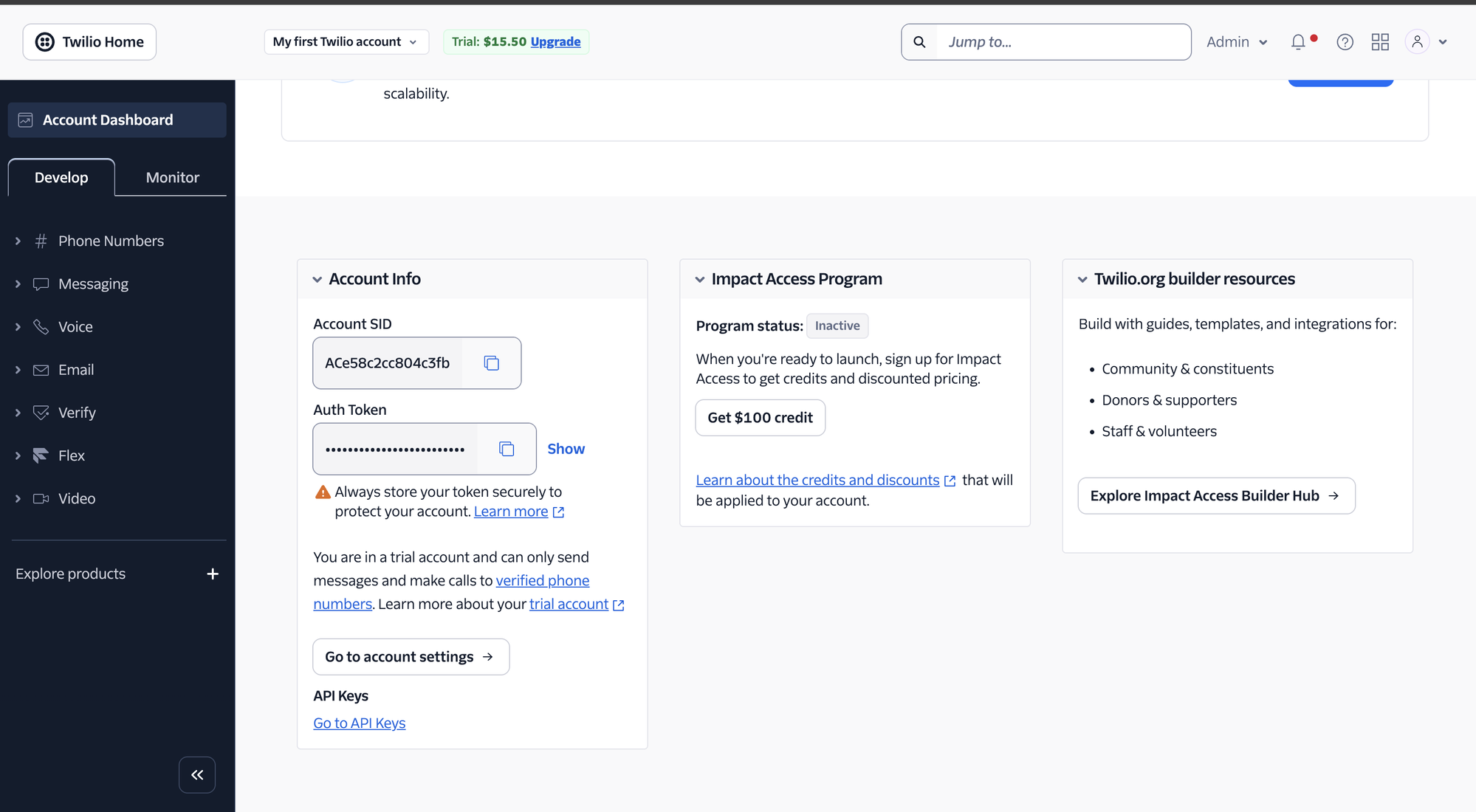
Get your Account SID and Auth Token
- Log in to the Twilio Console.
- On the Account Dashboard, scroll down to the Account Info section.
- Copy your Account SID (starts with
AC). - Click Show next to Auth Token to reveal it, then copy it.
-
Create a connection in Scalekit
- In the Scalekit dashboard, go to AgentKit → Connections → Create Connection.
- Search for Twilio and click Create.
- Enter your Account SID in the Account SID field.
- Enter your Auth Token in the Auth Token field.
- Click Save and note the Connection name — use this as
connection_namein your code.
-
Tools
Pass the exact name toexecute_tooltwilio_account_getRetrieve details of a Twilio account by its SID.Read-onlyGet Account
Retrieve details of a Twilio account by its SID.
Inputs
This tool takes no inputs.
twilio_accounts_listList accounts and subaccounts belonging to the current Twilio account, optionally filtered by friendly name or status.Read-onlyList Accounts
List accounts and subaccounts belonging to the current Twilio account, optionally filtered by friendly name or status.
Inputs
friendly_namestring- Only return accounts matching this exact friendly name.
page_sizeinteger- The number of accounts to return per page.
statusstring- Only return accounts with this status.one of
activesuspendedclosed
twilio_applications_listList TwiML Applications on the account, optionally filtered by friendly name.Read-onlyList Applications
List TwiML Applications on the account, optionally filtered by friendly name.
Inputs
friendly_namestring- Only return applications matching this exact friendly name.
page_sizeinteger- The number of applications to return per page.
twilio_available_numbers_localSearch for available local phone numbers that can be purchased in a given country.Read-onlySearch Available Local Numbers
Search for available local phone numbers that can be purchased in a given country.
Inputs
country_codestringrequired- The ISO 3166-1 alpha-2 country code to search for numbers in.
area_codestring- Filter by area code.
containsstring- A pattern to match phone numbers against. Use * for wildcards.
sms_enabledstring- Filter for numbers that are SMS-capable.
voice_enabledstring- Filter for numbers that are voice-capable.
twilio_available_numbers_mobileSearch for available mobile phone numbers that can be purchased in a given country.Read-onlySearch Available Mobile Numbers
Search for available mobile phone numbers that can be purchased in a given country.
Inputs
country_codestringrequired- Two-letter country code (e.g., GB, DE).
area_codestring- Filter by area code.
containsstring- A pattern to match phone numbers against. Use * for wildcards.
sms_enabledstring- Only return SMS-capable numbers.
voice_enabledstring- Only return voice-capable numbers.
twilio_available_numbers_toll_freeSearch for available toll-free phone numbers that can be purchased in a given country.Read-onlySearch Available Toll-Free Numbers
Search for available toll-free phone numbers that can be purchased in a given country.
Inputs
country_codestringrequired- The ISO 3166-1 alpha-2 country code to search for numbers in.
area_codestring- Filter by area code.
containsstring- A pattern to match phone numbers against. Use * for wildcards.
twilio_balance_getGet the current account's balance and currency.Read-onlyGet Account Balance
Get the current account's balance and currency.
Inputs
This tool takes no inputs.
twilio_call_getRetrieve details of a specific phone call by its SID, including status, duration, and pricing information.Read-onlyGet Call
Retrieve details of a specific phone call by its SID, including status, duration, and pricing information.
Inputs
call_sidstringrequired- The unique identifier of the Call resource to retrieve.
twilio_calls_listRetrieve a list of phone calls made to and from the account, with optional filtering by number, status, and date.Read-onlyList Calls
Retrieve a list of phone calls made to and from the account, with optional filtering by number, status, and date.
Inputs
end_timestring- Filter by calls started on or before this date (YYYY-MM-DD format).
from_numberstring- Filter by the phone number that initiated the call.
page_sizeinteger- The number of results to return per page. Maximum is 1000.
start_timestring- Filter by calls started on or after this date (YYYY-MM-DD format).
statusstring- Filter by call status. Values: queued, ringing, in-progress, completed, busy, failed, no-answer, canceled.
tostring- Filter by the phone number that received the call.
twilio_conference_getRetrieve details of a specific conference by its SID, including status, friendly name, and region.Read-onlyGet Conference
Retrieve details of a specific conference by its SID, including status, friendly name, and region.
Inputs
conference_sidstringrequired- The unique identifier of the Conference resource to retrieve.
twilio_conference_participant_getRetrieve details of a single participant in a Twilio conference.Read-onlyGet Conference Participant
Retrieve details of a single participant in a Twilio conference.
Inputs
call_sidstringrequired- The SID of the participant's call.
conference_sidstringrequired- The SID of the conference the participant belongs to.
twilio_conferences_listRetrieve a list of conferences for the account, with optional filtering by name, status, date, and pagination.Read-onlyList Conferences
Retrieve a list of conferences for the account, with optional filtering by name, status, date, and pagination.
Inputs
date_createdstring- Filter conferences created on this date (YYYY-MM-DD format).
friendly_namestring- Filter conferences by their friendly name.
page_sizeinteger- The number of results to return per page. Maximum is 1000.
statusstring- Filter by conference status. Values: init, in-progress, completed.
twilio_conversation_getRetrieve the details of a specific Twilio Conversation by its SID.Read-onlyGet Conversation
Retrieve the details of a specific Twilio Conversation by its SID.
Inputs
conversation_sidstringrequired- The unique SID of the conversation to retrieve.
twilio_conversation_messages_listList all messages in a Twilio Conversation.Read-onlyList Conversation Messages
List all messages in a Twilio Conversation. Optionally control the sort order and page size.
Inputs
conversation_sidstringrequired- The unique SID of the conversation to list messages for.
orderstring- The sort order of messages. One of: asc, desc.
page_sizeinteger- The number of messages to return per page.
twilio_conversation_participants_listList all participants in a Twilio Conversation.Read-onlyList Conversation Participants
List all participants in a Twilio Conversation.
Inputs
conversation_sidstringrequired- The unique SID of the conversation to list participants for.
page_sizeinteger- The number of participants to return per page.
twilio_conversations_listList all Twilio Conversations.Read-onlyList Conversations
List all Twilio Conversations. Optionally filter by state and control page size.
Inputs
page_sizeinteger- The number of conversations to return per page.
statestring- Filter conversations by state. One of: active, inactive, closed.
twilio_lookup_phone_numberLook up information about a phone number, such as formatting, carrier, line type, and caller name, using Twilio Lookup.Read-onlyLookup Phone Number
Look up information about a phone number, such as formatting, carrier, line type, and caller name, using Twilio Lookup.
Inputs
phone_numberstringrequired- The phone number to look up, in E.164 format.
fieldsstring- Comma-separated list of data packages to include, e.g. line_type_intelligence, caller_name, sim_swap.
twilio_message_getRetrieve the details of a specific message by its SID.Read-onlyGet Message
Retrieve the details of a specific message by its SID.
Inputs
message_sidstringrequired- The unique identifier of the message to retrieve
twilio_message_media_listRetrieve a list of media resources associated with a specific message.Read-onlyList Message Media
Retrieve a list of media resources associated with a specific message.
Inputs
message_sidstringrequired- The SID of the message to list media for
page_sizeinteger- Number of media resources to return per page (1-1000, default 50)
twilio_messages_listRetrieve a list of messages associated with your Twilio account, with optional filtering by recipient, sender, or date sent.Read-onlyList Messages
Retrieve a list of messages associated with your Twilio account, with optional filtering by recipient, sender, or date sent.
Inputs
date_sentstring- Filter by date sent (YYYY-MM-DD format)
from_numberstring- Filter by messages sent from this phone number in E.164 format
page_sizeinteger- Number of messages to return per page (1-1000, default 50)
tostring- Filter by messages sent to this phone number in E.164 format
twilio_messaging_services_listRetrieve a list of all Messaging Services associated with your Twilio account.Read-onlyList Messaging Services
Retrieve a list of all Messaging Services associated with your Twilio account.
Inputs
page_sizeinteger- Number of Messaging Services to return per page (1-1000, default 50)
twilio_phone_number_getRetrieve details of a specific incoming phone number by its SID.Read-onlyGet Phone Number
Retrieve details of a specific incoming phone number by its SID.
Inputs
phone_number_sidstringrequired- The SID of the incoming phone number to retrieve.
twilio_phone_numbers_listList all incoming phone numbers on the Twilio account.Read-onlyList Phone Numbers
List all incoming phone numbers on the Twilio account.
Inputs
friendly_namestring- Filter by friendly name of the phone number.
page_sizeinteger- Number of results to return per page.
phone_numberstring- Filter by phone number in E.164 format.
twilio_queues_listList call queues on the account, used with TwiML's <Enqueue> and <Dequeue> verbs.Read-onlyList Queues
List call queues on the account, used with TwiML's <Enqueue> and <Dequeue> verbs.
Inputs
page_sizeinteger- The number of queues to return per page.
twilio_recording_getRetrieve details of a specific call recording by its SID, including duration, status, and source.Read-onlyGet Recording
Retrieve details of a specific call recording by its SID, including duration, status, and source.
Inputs
recording_sidstringrequired- The unique identifier of the Recording resource to retrieve.
twilio_recordings_listRetrieve a list of call recordings for the account, with optional filtering by call SID, date, and pagination.Read-onlyList Recordings
Retrieve a list of call recordings for the account, with optional filtering by call SID, date, and pagination.
Inputs
call_sidstring- Filter recordings by the Call SID they are associated with.
date_createdstring- Filter recordings created on this date (YYYY-MM-DD format).
page_sizeinteger- The number of results to return per page. Maximum is 1000.
twilio_usage_records_listRetrieve usage records for a Twilio account, optionally filtered by category and date range.Read-onlyList Usage Records
Retrieve usage records for a Twilio account, optionally filtered by category and date range.
Inputs
categorystring- The usage category to filter by (e.g., sms, calls, phonenumbers).
end_datestring- The end date for the usage records in YYYY-MM-DD format.
page_sizeinteger- Number of results to return per page.
start_datestring- The start date for the usage records in YYYY-MM-DD format.
twilio_usage_records_todayRetrieve today's usage records for a Twilio account, optionally filtered by category.Read-onlyList Today's Usage Records
Retrieve today's usage records for a Twilio account, optionally filtered by category.
Inputs
categorystring- The usage category to filter by (e.g., sms, calls, phonenumbers).
twilio_verification_getRetrieve the status and details of a specific verification by its SID.Read-onlyGet Verification
Retrieve the status and details of a specific verification by its SID.
Inputs
service_sidstringrequired- The SID of the Verify service.
verification_sidstringrequired- The SID of the verification to retrieve.
twilio_verify_service_getRetrieve details of a specific Twilio Verify service by its SID.Read-onlyGet Verify Service
Retrieve details of a specific Twilio Verify service by its SID.
Inputs
service_sidstringrequired- The unique SID of the Verify service to retrieve.
twilio_verify_services_listList all Twilio Verify services on the account.Read-onlyList Verify Services
List all Twilio Verify services on the account.
Inputs
page_sizeinteger- Number of results to return per page. Maximum is 1000.
twilio_application_createCreate a TwiML Application — a reusable, named set of voice and SMS webhook URLs that phone numbers or API calls can reference instead of repeating the same URLs everywhere.WriteCreate Application
Create a TwiML Application — a reusable, named set of voice and SMS webhook URLs that phone numbers or API calls can reference instead of repeating the same URLs everywhere.
Inputs
friendly_namestring- A descriptive name for the application. Up to 64 characters.
public_application_connect_enabledboolean- Whether to allow other Twilio accounts to dial this application using Dial verb.
sms_fallback_urlstring- The URL Twilio calls when an error occurs retrieving or executing TwiML from sms_url.
sms_methodstring- The HTTP method Twilio uses to request sms_url. Either GET or POST.one of
GETPOST sms_urlstring- The URL Twilio calls when a phone number assigned to this application receives an incoming SMS.
status_callbackstring- The URL Twilio calls to pass status parameters (such as call ended) after an event.
voice_caller_id_lookupboolean- Whether to look up the caller's caller-ID name from the CNAM database.
voice_fallback_urlstring- The URL Twilio calls when an error occurs retrieving or executing TwiML from voice_url.
voice_methodstring- The HTTP method Twilio uses to request voice_url. Either GET or POST.one of
GETPOST voice_urlstring- The URL Twilio calls when a phone number assigned to this application receives a call.
twilio_call_createMake an outbound phone call from your Twilio account.WriteCreate Call
Make an outbound phone call from your Twilio account. Requires a URL that returns TwiML instructions for handling the call.
Inputs
from_numberstringrequired- The Twilio phone number or client identifier to use as the caller ID.
tostringrequired- The phone number, SIP address, or client identifier to call.
urlstringrequired- The absolute URL that returns the TwiML instructions for the call.
machine_detectionstring- Whether to detect if a human, answering machine, or fax picked up.one of
EnableDetectMessageEnd methodstring- The HTTP method Twilio uses to request the url.one of
GETPOST recordboolean- Whether to record the call.
status_callbackstring- The URL Twilio calls to send status information about the call.
timeoutinteger- How long to let the phone ring before assuming there is no answer.
twilio_call_recording_createStart recording a live, in-progress Twilio call.WriteStart Call Recording
Start recording a live, in-progress Twilio call.
Inputs
call_sidstringrequired- The SID of the call to start recording.
recording_channelsstring- The number of channels in the recording.one of
monodual recording_trackstring- The audio track to record.one of
inboundoutboundboth trimstring- Whether to trim leading and trailing silence from the recording.one of
trim-silencedo-not-trim
twilio_call_recording_updatePause, resume, or stop an in-progress recording of a live Twilio call.WriteUpdate Call Recording
Pause, resume, or stop an in-progress recording of a live Twilio call.
- Idempotent
Inputs
call_sidstringrequired- The SID of the call whose recording should be updated.
recording_sidstringrequired- The SID of the recording to update.
statusstringrequired- The new status for the recording.one of
in-progresspausedstopped pause_behaviorstring- Whether to record silence or skip recording while paused.one of
skipsilence
twilio_call_updateModify a live phone call: redirect it to new TwiML instructions, or end it by setting status to 'completed' or 'canceled'.WriteUpdate Call
Modify a live phone call: redirect it to new TwiML instructions, or end it by setting status to 'completed' or 'canceled'.
- Idempotent
Inputs
call_sidstringrequired- The SID of the call to update.
methodstring- The HTTP method Twilio uses to request the url.one of
GETPOST statusstring- Set to 'completed' to hang up an in-progress call, or 'canceled' to cancel a queued or ringing call.one of
canceledcompleted urlstring- A new absolute URL that returns TwiML instructions to redirect the call to.
twilio_conference_participant_createDial a new participant into an existing Twilio conference.WriteAdd Conference Participant
Dial a new participant into an existing Twilio conference.
Inputs
conference_sidstringrequired- The SID of the conference to add the participant to.
from_numberstringrequired- The phone number or Client identifier that is calling the participant.
tostringrequired- The phone number, SIP address, or Client identifier to dial into the conference.
beepstring- Whether to play a notification beep when the participant joins.one of
truefalseonEnteronExit end_conference_on_exitboolean- Whether to end the conference when this participant leaves.
labelstring- A label for this participant, usable to later fetch, update, or delete them.
mutedboolean- Whether the participant should join muted.
start_conference_on_enterboolean- Whether to start the conference when this participant joins, if not already started.
status_callbackstring- The URL Twilio calls with status information about the participant's call.
twilio_conference_participant_updateMute, hold, or coach a participant in a live Twilio conference.WriteUpdate Conference Participant
Mute, hold, or coach a participant in a live Twilio conference.
- Idempotent
Inputs
call_sidstringrequired- The SID of the participant's call.
conference_sidstringrequired- The SID of the conference the participant belongs to.
beep_on_exitboolean- Whether to play a notification beep when this participant leaves.
end_conference_on_exitboolean- Whether to end the conference when this participant leaves.
holdboolean- Whether the participant should be put on hold.
mutedboolean- Whether the participant should be muted.
twilio_conference_updateUpdate an in-progress conference: end it by setting status to 'completed', or play an announcement into it.WriteUpdate Conference
Update an in-progress conference: end it by setting status to 'completed', or play an announcement into it.
- Idempotent
Inputs
conference_sidstringrequired- The SID of the conference to update.
announce_methodstring- The HTTP method Twilio uses to request the announce_url.one of
GETPOST announce_urlstring- A URL returning audio (MP3 or TwiML) to play into the conference.
statusstring- Set to 'completed' to end the conference and disconnect all participants.one of
completed
twilio_conversation_createCreate a new Twilio Conversation, so participants and messages can be added to it.WriteCreate Conversation
Create a new Twilio Conversation, so participants and messages can be added to it. Existing tools can only get, list, or delete conversations.
Inputs
attributesstring- Free-form JSON metadata to store on the conversation, as a string.
friendly_namestring- Human-readable name for the conversation. Up to 256 characters.
messaging_service_sidstring- The SID of the Messaging Service this conversation belongs to.
statestring- The initial state of the conversation.one of
inactiveactiveclosed timers_closedstring- ISO-8601 duration of inactivity after which the conversation is switched to the 'closed' state (minimum 10 minutes).
timers_inactivestring- ISO-8601 duration of inactivity after which the conversation is switched to the 'inactive' state (minimum 1 minute).
unique_namestring- An application-defined string that uniquely identifies this conversation, usable in place of the SID in the URL.
twilio_conversation_message_createSend a new message into a Twilio Conversation.WriteSend Conversation Message
Send a new message into a Twilio Conversation. Existing tools can only list or delete conversation messages.
Inputs
conversation_sidstringrequired- The unique SID of the conversation to send the message into.
attributesstring- Free-form JSON metadata to store on the message, as a string.
authorstring- The channel-specific identifier of the message's author. Defaults to 'system'.
bodystring- The text content of the message. Up to 1,600 characters. Ignored if content_sid is set.
content_sidstring- The SID of a Rich Content template to use for this message. If set, this overrides body and media_sid.
content_variablesstring- JSON string of variable values to resolve in the Content Template referenced by content_sid.
media_sidstring- The SID of a previously-uploaded Media resource to attach to this message.
subjectstring- The subject of the message, for channels that support it (e.g. email). Up to 256 characters.
twilio_conversation_participant_createAdd a participant to a Twilio Conversation, either as an SDK-connected Conversation User (identity) or as an external SMS/WhatsApp address (messaging_binding_address).WriteAdd Conversation Participant
Add a participant to a Twilio Conversation, either as an SDK-connected Conversation User (identity) or as an external SMS/WhatsApp address (messaging_binding_address). Provide exactly one of identity or messaging_binding_address, not both. Existing tools can only list participants.
Inputs
conversation_sidstringrequired- The unique SID of the conversation to add the participant to.
attributesstring- Free-form JSON metadata to store on the participant, as a string.
identitystring- The Conversations SDK identity of the participant, for participants connecting via the Conversations SDK. Do not set together with messaging_binding_address.
messaging_binding_addressstring- The participant's SMS or WhatsApp address (e.g. a phone number). Together with messaging_binding_proxy_address, uniquely identifies the participant. Do not set together with identity.
messaging_binding_proxy_addressstring- The Twilio phone or WhatsApp number this participant will see messages from. Required together with messaging_binding_address for non-SDK participants.
role_sidstring- The SID of a conversation-level Role to assign to this participant.
twilio_message_createSend a new SMS or MMS message from your Twilio account.WriteSend Message
Send a new SMS or MMS message from your Twilio account. Requires a sender (from_number or messaging_service_sid) and either body text or media_url.
Inputs
bodystringrequired- The text content of the message. Up to 1,600 characters.
tostringrequired- The recipient's phone number in E.164 format.
from_numberstring- Your Twilio phone number to send from, in E.164 format. Required if messaging_service_sid is not set.
media_urlarray- URLs of media to include for MMS. jpeg, jpg, gif, and png are fully supported.
messaging_service_sidstring- The SID of the Messaging Service to send from, instead of a specific from_number.
status_callbackstring- The URL Twilio calls to send message status callback requests.
twilio_message_updateUpdate a message resource.WriteUpdate Message
Update a message resource. Set body to an empty string to redact the text content of a message, or set status to 'canceled' to cancel a message that is still scheduled to send.
- Idempotent
Inputs
message_sidstringrequired- The SID of the message resource to update.
bodystring- The new body of the message. Pass an empty string to redact the message text.
statusstring- Set to 'canceled' to cancel a message that is still scheduled to send.one of
canceled
twilio_phone_number_createPurchase a new incoming phone number for your Twilio account.WriteBuy Phone Number
Purchase a new incoming phone number for your Twilio account. Provide either phone_number for a specific number, or area_code to have Twilio pick one.
Inputs
area_codestring- The desired US/Canada area code for the new number, if phone_number is not set.
friendly_namestring- A descriptive name for the new phone number.
phone_numberstring- The specific phone number to purchase, in E.164 format.
sms_urlstring- The URL Twilio calls when the number receives an incoming SMS.
voice_urlstring- The URL Twilio calls to answer an incoming call to the number.
twilio_phone_number_updateUpdate the configuration of an existing Twilio incoming phone number, such as its webhook URLs or friendly name.WriteUpdate Phone Number
Update the configuration of an existing Twilio incoming phone number, such as its webhook URLs or friendly name.
- Idempotent
Inputs
phone_number_sidstringrequired- The SID of the incoming phone number to update.
friendly_namestring- A new descriptive name for the phone number.
sms_urlstring- The URL Twilio calls when the number receives an incoming SMS.
status_callbackstring- The URL Twilio calls to send status information about the number.
voice_urlstring- The URL Twilio calls to answer an incoming call to the number.
twilio_queue_createCreate a call queue, used with TwiML's <Enqueue> and <Dequeue> verbs to hold callers (e.g.WriteCreate Queue
Create a call queue, used with TwiML's <Enqueue> and <Dequeue> verbs to hold callers (e.g. for a callback or a simple call center).
Inputs
friendly_namestringrequired- A descriptive name for this queue. Up to 64 characters.
max_sizeinteger- The maximum number of calls allowed in the queue at once. Default 1000, maximum 5000.
twilio_subaccount_createCreate a new subaccount under the current Twilio account.WriteCreate Subaccount
Create a new subaccount under the current Twilio account. Subaccounts let you isolate resources (phone numbers, usage, billing) per project or customer while staying under one parent account.
Inputs
friendly_namestring- A human-readable description of the subaccount. Defaults to 'SubAccount Created at {timestamp}' if omitted.
twilio_verification_checkCheck a one-time verification code entered by a user against a Twilio Verify service.WriteCheck Verification
Check a one-time verification code entered by a user against a Twilio Verify service. Provide either 'to' or 'verification_sid'.
Inputs
codestringrequired- The verification code entered by the user.
service_sidstringrequired- The SID of the Verify service to check against.
tostring- The phone number or email address being verified. Required if verification_sid is not set.
verification_sidstring- The SID of the verification to check. Required if 'to' is not set.
twilio_verification_createStart a phone or email verification by sending a one-time code via Twilio Verify.WriteStart Verification
Start a phone or email verification by sending a one-time code via Twilio Verify.
Inputs
channelstringrequired- The verification method to use.one of
smscallemailwhatsapp service_sidstringrequired- The SID of the Verify service to use.
tostringrequired- The phone number (E.164 format) or email address to verify.
localestring- The locale to use for the verification message.
twilio_verification_updateUpdate the status of a pending Twilio Verify verification: cancel it, or force-approve it without checking a code.WriteUpdate Verification
Update the status of a pending Twilio Verify verification: cancel it, or force-approve it without checking a code.
- Idempotent
Inputs
service_sidstringrequired- The SID of the Verify service the verification belongs to.
statusstringrequired- The new status for the verification.one of
canceledapproved verification_sidstringrequired- The SID of the verification to update.
twilio_verify_service_createCreate a new Twilio Verify service for sending verification codes via SMS, call, email, or WhatsApp.WriteCreate Verify Service
Create a new Twilio Verify service for sending verification codes via SMS, call, email, or WhatsApp.
Inputs
friendly_namestringrequired- A descriptive name for the Verify service.
code_lengthinteger- The length of the verification code to generate. Must be between 4 and 10.
lookup_enabledstring- Whether to perform a lookup on the phone number before sending verification.
psd2_enabledstring- Whether to enable PSD2 compliance for the service.
skip_sms_to_landlinesstring- Whether to skip sending SMS to landline phone numbers.
twilio_verify_service_updateUpdate settings of an existing Twilio Verify service, such as its code length or friendly name.WriteUpdate Verify Service
Update settings of an existing Twilio Verify service, such as its code length or friendly name.
- Idempotent
Inputs
service_sidstringrequired- The SID of the Verify service to update.
code_lengthinteger- Number of digits in the verification code (4-10).
friendly_namestring- A new human-readable name for this verification service.
lookup_enabledstring- Enable phone number lookup before verification.
psd2_enabledstring- Enable PSD2 compliant verification messages.
skip_sms_to_landlinesstring- Skip SMS delivery to landline numbers.
twilio_call_deleteDelete a call record from the account.DestructiveDelete Call
Delete a call record from the account. This permanently removes the call log entry.
- Idempotent
Inputs
call_sidstringrequired- The unique identifier of the Call resource to delete.
twilio_conference_participant_deleteRemove (kick) a participant from a live Twilio conference.DestructiveRemove Conference Participant
Remove (kick) a participant from a live Twilio conference.
- Idempotent
Inputs
call_sidstringrequired- The SID of the participant's call to remove.
conference_sidstringrequired- The SID of the conference the participant belongs to.
twilio_conversation_deleteDelete a Twilio Conversation by its SID.DestructiveDelete Conversation
Delete a Twilio Conversation by its SID. This permanently removes the conversation and all associated data.
- Idempotent
Inputs
conversation_sidstringrequired- The unique SID of the conversation to delete.
twilio_conversation_message_deleteDelete a specific message from a Twilio Conversation by its SID.DestructiveDelete Conversation Message
Delete a specific message from a Twilio Conversation by its SID.
- Idempotent
Inputs
conversation_sidstringrequired- The unique SID of the conversation containing the message.
message_sidstringrequired- The unique SID of the message to delete.
twilio_message_deletePermanently delete a message resource from your Twilio account.DestructiveDelete Message
Permanently delete a message resource from your Twilio account. This action cannot be undone.
- Idempotent
Inputs
message_sidstringrequired- The unique identifier of the message to delete
twilio_phone_number_deleteRelease (delete) an incoming phone number from your Twilio account.DestructiveRelease Phone Number
Release (delete) an incoming phone number from your Twilio account. This action cannot be undone.
- Idempotent
Inputs
phone_number_sidstringrequired- The SID of the incoming phone number to release.
twilio_recording_deletePermanently delete a call recording from the account.DestructiveDelete Recording
Permanently delete a call recording from the account. This action cannot be undone.
- Idempotent
Inputs
recording_sidstringrequired- The unique identifier of the Recording resource to delete.
twilio_verify_service_deleteDelete a Twilio Verify service by its SID.DestructiveDelete Verify Service
Delete a Twilio Verify service by its SID. This action is irreversible.
- Idempotent
Inputs
service_sidstringrequired- The unique SID of the Verify service to delete.
No tools match.


