


The Twitter / X (Bearer Token) connector lets your AI agent act in each user's Twitter / X (Bearer Token) account. Each user connects their own Twitter / X (Bearer Token) access token once, and Scalekit sends it with every call, so your agent never handles credentials. It comes with 44 tools.
- Tools
- 44
- What they doRead · write · destructive
- 41 · 2 · 141 read2 write1 destructive
- Users sign in with
- Access token
Setup
Install the SDK
Terminal window npm install @scalekit-sdk/node dotenvTerminal window pip install scalekit-sdk-python python-dotenvSet your credentials
Add your Scalekit credentials to your
.envfile. Find values in app.scalekit.com > Developers > API Credentials..env SCALEKIT_ENVIRONMENT_URL=<your-environment-url>SCALEKIT_CLIENT_ID=<your-client-id>SCALEKIT_CLIENT_SECRET=<your-client-secret>Create the Twitter / X (Bearer Token) connection
In AgentKit > Connections, create a Twitter / X (Bearer Token) connection. The name you give it is the
connection_nameyour code passes. See Configure connections.Console steps with screenshots
Register a Twitter Bearer Token with Scalekit to make app-only requests — reading public tweets, users, and search results without acting on behalf of a specific user. You’ll need a Bearer Token from an app in the X Developer Console.
-
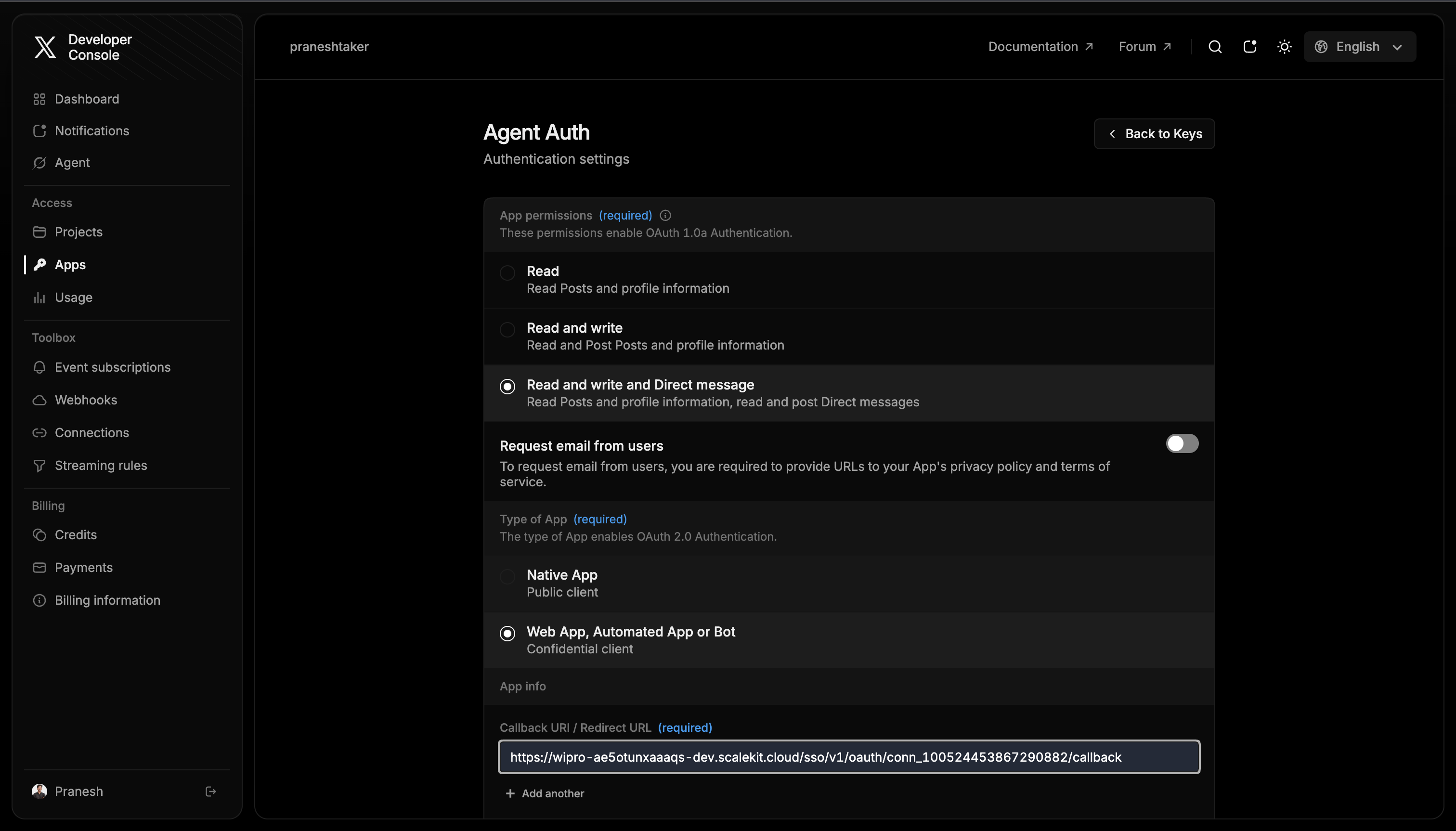
Choose or create an app in the X Developer Console
-
Go to the X Developer Console and sign in.
-
Under Access > Apps, either select an existing app or click + Create App.
-
-
Generate a Bearer Token
-
Open your app and go to the Keys & Tokens tab.
-
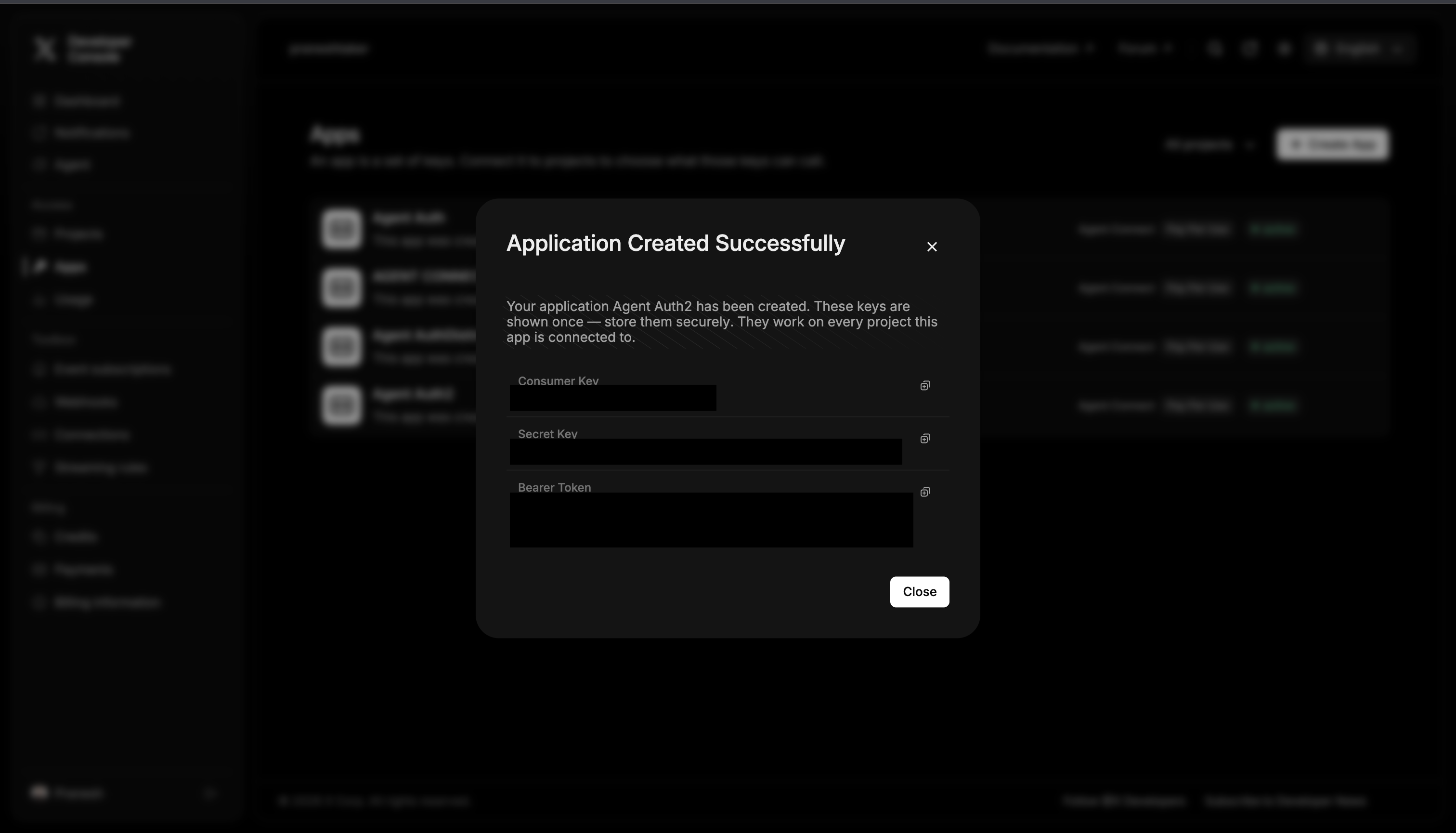
Under App-Only Authentication, click Generate next to Bearer Token (or Regenerate if one already exists).
-
Copy the token immediately — X shows it in full only once.
-
-
Add the token in Scalekit
- In Scalekit dashboard, go to AgentKit > Connections > Create Connection. Search for Twitter Bearer and click Create.
- Paste the Bearer Token you copied in step 2.
- Click Save.
-
Authorize a user and make your first call
quickstart.mts import { ScalekitClient } from '@scalekit-sdk/node'import 'dotenv/config'import { createInterface } from 'node:readline/promises'const scalekit = new ScalekitClient(process.env.SCALEKIT_ENVIRONMENT_URL,process.env.SCALEKIT_CLIENT_ID,process.env.SCALEKIT_CLIENT_SECRET,)const actions = scalekit.actionsconst connector = 'twitterbearer'const identifier = 'user_123'// Generate an authorization link for the userconst { link } = await actions.getAuthorizationLink({ connectionName: connector, identifier })console.log('Authorize Twitter / X (Bearer Token):', link)const rl = createInterface({ input: process.stdin, output: process.stdout })await rl.question('Press Enter after authorizing...')rl.close()// Make your first callconst result = await actions.executeTool({connector,identifier,toolName: 'twitterbearer_activity_subscriptions_list',toolInput: {},})console.log(result)Terminal window npx tsx quickstart.mtsquickstart.py import osfrom scalekit import ScalekitClientfrom dotenv import load_dotenvload_dotenv()scalekit_client = ScalekitClient(env_url=os.getenv("SCALEKIT_ENVIRONMENT_URL"),client_id=os.getenv("SCALEKIT_CLIENT_ID"),client_secret=os.getenv("SCALEKIT_CLIENT_SECRET"),)actions = scalekit_client.actionsconnection_name = "twitterbearer"identifier = "user_123"# Generate an authorization link for the userlink_response = actions.get_authorization_link(connection_name=connection_name,identifier=identifier,)print("Authorize Twitter / X (Bearer Token):", link_response.link)input("Press Enter after authorizing...")# Make your first callresult = actions.execute_tool(tool_input={},tool_name="twitterbearer_activity_subscriptions_list",connection_name=connection_name,identifier=identifier,)print(result)Terminal window python quickstart.pyEach user opens the link once and enters their Twitter / X credentials there. If your app already has a user's credentials, add the account from your backend instead, as the console steps above show. See Authorize a user for the full flow and statuses.
Tools
Pass the exact name toexecute_tooltwitterbearer_activity_subscriptions_listList existing X activity subscriptions for the authenticated app.Read-onlyList Activity Subscriptions
List existing X activity subscriptions for the authenticated app. Complements Create Activity Subscription, which only covers creating new subscriptions on this same resource.
Inputs
This tool takes no inputs.
twitterbearer_community_getGet details of an X Community by its ID: name, description, access type, join policy, and member count.Read-onlyGet Community by ID
Get details of an X Community by its ID: name, description, access type, join policy, and member count.
Inputs
idstringrequired- Community ID to look up
community_fieldsstring- Comma-separated Community fields to include, e.g. access,created_at,description,member_count,name
twitterbearer_compliance_job_getRetrieves status, download/upload URLs, and other details for an existing Twitter compliance job specified by its unique ID.Read-onlyRetrieve Compliance Job by ID
Retrieves status, download/upload URLs, and other details for an existing Twitter compliance job specified by its unique ID.
Inputs
idstringrequired- Compliance job ID
twitterbearer_compliance_jobs_listReturns a list of recent compliance jobs, filtered by type (tweets or users) and optionally by status.Read-onlyRetrieve Compliance Jobs
Returns a list of recent compliance jobs, filtered by type (tweets or users) and optionally by status.
Inputs
typestringrequired- Type of compliance jobs to listone of
tweetsusers statusstring- Filter by job statusone of
createdin_progressfailedcomplete
twitterbearer_followers_getRetrieves a list of users who follow a specified public Twitter user ID.Read-onlyGet Followers by User ID
Retrieves a list of users who follow a specified public Twitter user ID.
Inputs
idstringrequired- Twitter user ID to get followers for
expansionsstring- Comma-separated expansions
max_resultsinteger- Max results per page (1-1000)
pagination_tokenstring- Pagination token for next page
user_fieldsstring- Comma-separated user fields
twitterbearer_following_getRetrieves users followed by a specific Twitter user, allowing pagination and customization of returned user and tweet data fields via expansions.Read-onlyGet Following by User ID
Retrieves users followed by a specific Twitter user, allowing pagination and customization of returned user and tweet data fields via expansions.
Inputs
idstringrequired- Twitter user ID
expansionsstring- Comma-separated expansions
max_resultsinteger- Max results per page (1-1000)
pagination_tokenstring- Pagination token for next page
user_fieldsstring- Comma-separated user fields
twitterbearer_full_archive_searchSearches the full archive of public Tweets from March 2006 onwards.Read-onlySearch Full Archive of Tweets
Searches the full archive of public Tweets from March 2006 onwards. Use start_time and end_time together for a defined time window. Requires Academic Research access.
Inputs
querystringrequired- Search query using X search syntax
end_timestring- ISO 8601 end time
expansionsstring- Comma-separated expansions
max_resultsinteger- Max results per page (10-500)
next_tokenstring- Next page token
since_idstring- Minimum tweet ID
start_timestring- ISO 8601 start time e.g. 2021-01-01T00:00:00Z
tweet_fieldsstring- Comma-separated tweet fields
until_idstring- Maximum tweet ID
user_fieldsstring- Comma-separated user fields
twitterbearer_full_archive_search_countsReturns a count of Tweets from the full archive that match a specified query, aggregated by day, hour, or minute.Read-onlyGet Full Archive Search Counts
Returns a count of Tweets from the full archive that match a specified query, aggregated by day, hour, or minute. start_time must be before end_time if both are provided. since_id/until_id cannot be used with start_time/end_time.
Inputs
querystringrequired- Search query
end_timestring- ISO 8601 end time
granularitystring- Aggregation granularityone of
minutehourday next_tokenstring- Next page token
since_idstring- Minimum tweet ID
start_timestring- ISO 8601 start time
until_idstring- Maximum tweet ID
twitterbearer_likes_compliance_streamStreams real-time compliance events (unlikes) for Likes so downstream systems can stay in sync.Read-onlyGet Likes Compliance Stream
Streams real-time compliance events (unlikes) for Likes so downstream systems can stay in sync. Requires Enterprise access and App-Only OAuth 2.0 auth.
Inputs
backfill_minutesinteger- Minutes of backfill to stream on reconnect (0-5)
end_timestring- ISO 8601 end time
start_timestring- ISO 8601 start time
twitterbearer_list_followers_getFetches a list of users who follow a specific Twitter List, identified by its ID.Read-onlyGet List Followers
Fetches a list of users who follow a specific Twitter List, identified by its ID. Ensure the authenticated user has access if the list is private.
Inputs
idstringrequired- Twitter List ID
expansionsstring- Comma-separated expansions
max_resultsinteger- Max results per page (1-100)
pagination_tokenstring- Pagination token for next page
user_fieldsstring- Comma-separated user fields
twitterbearer_list_lookupReturns metadata for a specific Twitter List, identified by its ID.Read-onlyLookup List by ID
Returns metadata for a specific Twitter List, identified by its ID. Does not return list members. Can expand the owner's User object via the expansions parameter.
Inputs
idstringrequired- Twitter List ID
expansionsstring- Comma-separated expansions
list_fieldsstring- Comma-separated list fields
user_fieldsstring- Comma-separated user fields
twitterbearer_list_members_getFetches members of a specific Twitter List, identified by its unique ID.Read-onlyFetch List Members by ID
Fetches members of a specific Twitter List, identified by its unique ID.
Inputs
idstringrequired- Twitter List ID
expansionsstring- Comma-separated expansions
max_resultsinteger- Max results per page (1-100)
pagination_tokenstring- Pagination token for next page
user_fieldsstring- Comma-separated user fields
twitterbearer_list_timeline_getFetches the most recent Tweets posted by members of a specified Twitter List.Read-onlyList Posts Timeline by List ID
Fetches the most recent Tweets posted by members of a specified Twitter List.
Inputs
idstringrequired- Twitter List ID
expansionsstring- Comma-separated expansions
max_resultsinteger- Max results per page (1-100)
pagination_tokenstring- Pagination token for next page
tweet_fieldsstring- Comma-separated tweet fields
user_fieldsstring- Comma-separated user fields
twitterbearer_media_batch_lookupRetrieves details for one or more pieces of media identified by their media keys.Read-onlyLook Up Media by Keys
Retrieves details for one or more pieces of media identified by their media keys.
Inputs
media_keysstringrequired- Comma-separated list of media keys (up to 100)
media_fieldsstring- Comma-separated media fields
twitterbearer_media_lookupRetrieves details for a single piece of media by its media key.Read-onlyLook Up Media by Key
Retrieves details for a single piece of media by its media key.
Inputs
media_keystringrequired- Media key to look up
media_fieldsstring- Comma-separated media fields
twitterbearer_openapi_spec_getFetches the OpenAPI specification (JSON) for Twitter's API v2.Read-onlyFetch OpenAPI Specification
Fetches the OpenAPI specification (JSON) for Twitter's API v2. Used to programmatically understand the API's structure for developing client libraries or tools.
Inputs
This tool takes no inputs.
twitterbearer_post_lookupFetches comprehensive details for a single Tweet by its unique ID, provided the Tweet exists and is accessible.Read-onlyLook Up Post by ID
Fetches comprehensive details for a single Tweet by its unique ID, provided the Tweet exists and is accessible.
Inputs
idstringrequired- Tweet ID
expansionsstring- Comma-separated expansions
media_fieldsstring- Comma-separated media fields
tweet_fieldsstring- Comma-separated tweet fields
user_fieldsstring- Comma-separated user fields
twitterbearer_post_quotes_getRetrieves Tweets that quote a specified Tweet.Read-onlyRetrieve Posts that Quote a Post
Retrieves Tweets that quote a specified Tweet. Requires a valid Tweet ID.
Inputs
idstringrequired- Tweet ID
expansionsstring- Comma-separated expansions
max_resultsinteger- Max results per page (1-100)
pagination_tokenstring- Pagination token for next page
tweet_fieldsstring- Comma-separated tweet fields
twitterbearer_post_retweeters_getRetrieves users who publicly retweeted a specified public Post ID, excluding Quote Tweets and retweets from private accounts.Read-onlyGet Post Retweeters
Retrieves users who publicly retweeted a specified public Post ID, excluding Quote Tweets and retweets from private accounts.
Inputs
idstringrequired- Tweet ID
expansionsstring- Comma-separated expansions
max_resultsinteger- Max results per page (1-100)
pagination_tokenstring- Pagination token for next page
user_fieldsstring- Comma-separated user fields
twitterbearer_post_retweets_getRetrieves Tweets that Retweeted a specified public or authenticated-user-accessible Tweet ID.Read-onlyRetrieve Retweets of a Post
Retrieves Tweets that Retweeted a specified public or authenticated-user-accessible Tweet ID. Optionally customize the response with fields and expansions.
Inputs
idstringrequired- Tweet ID
expansionsstring- Comma-separated expansions
max_resultsinteger- Max results per page (1-100)
pagination_tokenstring- Pagination token for next page
tweet_fieldsstring- Comma-separated tweet fields
twitterbearer_posts_lookupRetrieves detailed information for one or more Posts (Tweets) identified by their unique IDs.Read-onlyGet Tweets by IDs
Retrieves detailed information for one or more Posts (Tweets) identified by their unique IDs. Allows selection of specific fields and expansions.
Inputs
idsstringrequired- Comma-separated list of Tweet IDs (up to 100)
expansionsstring- Comma-separated expansions
media_fieldsstring- Comma-separated media fields
tweet_fieldsstring- Comma-separated tweet fields
user_fieldsstring- Comma-separated user fields
twitterbearer_recent_searchSearches Tweets from the last 7 days matching a query using X's search syntax.Read-onlySearch Recent Tweets
Searches Tweets from the last 7 days matching a query using X's search syntax. Ideal for real-time analysis, trend monitoring, or retrieving posts from specific users (e.g., from:username). Note: impression_count returns 0 for other users' tweets — use retweet_count, like_count, or quote_count for engagement filtering instead.
Inputs
querystringrequired- Search query using X search syntax, e.g. from:username -is:retweet
end_timestring- ISO 8601 end time
expansionsstring- Comma-separated expansions
max_resultsinteger- Max results per page (10-100)
media_fieldsstring- Comma-separated media fields
next_tokenstring- Next page token
since_idstring- Minimum tweet ID
start_timestring- ISO 8601 start time
tweet_fieldsstring- Comma-separated tweet fields
until_idstring- Maximum tweet ID
user_fieldsstring- Comma-separated user fields
twitterbearer_recent_tweet_countsRetrieves the count of Tweets matching a specified search query within the last 7 days, aggregated by 'minute', 'hour', or 'day'.Read-onlyFetch Recent Tweet Counts
Retrieves the count of Tweets matching a specified search query within the last 7 days, aggregated by 'minute', 'hour', or 'day'.
Inputs
querystringrequired- Search query
end_timestring- ISO 8601 end time
granularitystring- Aggregation granularityone of
minutehourday since_idstring- Minimum tweet ID
start_timestring- ISO 8601 start time
until_idstring- Maximum tweet ID
twitterbearer_space_getRetrieves details for a Twitter Space by its ID, allowing for customization and expansion of related data.Read-onlyLook Up Space by ID
Retrieves details for a Twitter Space by its ID, allowing for customization and expansion of related data.
Inputs
idstringrequired- Twitter Space ID
expansionsstring- Comma-separated expansions
space_fieldsstring- Comma-separated space fields
user_fieldsstring- Comma-separated user fields
twitterbearer_space_posts_getRetrieves Tweets that were shared/posted during a Twitter Space broadcast.Read-onlyRetrieve Posts from a Space
Retrieves Tweets that were shared/posted during a Twitter Space broadcast. Returns Tweets that participants explicitly shared during the Space session, NOT audio transcripts. Most Spaces have zero associated Tweets — empty results are normal.
Inputs
idstringrequired- Twitter Space ID
expansionsstring- Comma-separated expansions
max_resultsinteger- Max results per page (1-100)
tweet_fieldsstring- Comma-separated tweet fields
twitterbearer_spaces_by_creator_getRetrieves Twitter Spaces created by a list of specified User IDs, with options to customize returned data fields.Read-onlyGet Spaces by Creator IDs
Retrieves Twitter Spaces created by a list of specified User IDs, with options to customize returned data fields.
Inputs
user_idsstringrequired- Comma-separated list of user IDs to get spaces for
expansionsstring- Comma-separated expansions
space_fieldsstring- Comma-separated space fields
user_fieldsstring- Comma-separated user fields
twitterbearer_spaces_getFetches detailed information for one or more Twitter Spaces (live, scheduled, or ended) by their unique IDs.Read-onlyGet Space Information by IDs
Fetches detailed information for one or more Twitter Spaces (live, scheduled, or ended) by their unique IDs. At least one Space ID must be provided.
Inputs
idsstringrequired- Comma-separated list of Space IDs
expansionsstring- Comma-separated expansions
space_fieldsstring- Comma-separated space fields
user_fieldsstring- Comma-separated user fields
twitterbearer_spaces_searchSearches for Twitter Spaces by a textual query.Read-onlySearch for Spaces
Searches for Twitter Spaces by a textual query. Optionally filter by state (live, scheduled, all) to discover audio conversations.
Inputs
querystringrequired- Text to search for in Space titles
expansionsstring- Comma-separated expansions
max_resultsinteger- Max results per page (1-100)
space_fieldsstring- Comma-separated space fields
statestring- Filter by space stateone of
livescheduledall
twitterbearer_tweet_label_streamStream real-time Tweet label events (apply/remove).Read-onlyGet Tweets Label Stream
Stream real-time Tweet label events (apply/remove). Requires Enterprise access and App-Only OAuth 2.0 auth. Returns PublicTweetNotice or PublicTweetUnviewable events. 403 errors indicate missing Enterprise access or wrong auth type.
Inputs
backfill_minutesinteger- Minutes of backfill to stream on reconnect (0-5)
end_timestring- YYYY-MM-DDTHH:mm:ssZ. Latest UTC timestamp from which Post labels will be provided.
start_timestring- YYYY-MM-DDTHH:mm:ssZ. Earliest UTC timestamp from which Post labels will be provided.
twitterbearer_tweet_usage_getFetches Tweet usage statistics for a Project (e.g., consumption, caps, daily breakdowns for Project and Client Apps) to monitor API limits.Read-onlyFetch Tweet Usage Data
Fetches Tweet usage statistics for a Project (e.g., consumption, caps, daily breakdowns for Project and Client Apps) to monitor API limits. Data can be retrieved for 1 to 90 days.
Inputs
daysinteger- Number of days to retrieve usage data for, default 7
usage_fieldsstring- Comma-separated usage fields to include
twitterbearer_tweets_compliance_streamStreams real-time compliance events (deletions, scrubs, edits) for Tweets so downstream systems can stay in sync.Read-onlyGet Tweets Compliance Stream
Streams real-time compliance events (deletions, scrubs, edits) for Tweets so downstream systems can stay in sync. Requires Enterprise access and App-Only OAuth 2.0 auth.
Inputs
partitionintegerrequired- Partition number to connect to (1-4)
backfill_minutesinteger- Minutes of backfill to stream on reconnect (0-5)
end_timestring- ISO 8601 end time
start_timestring- ISO 8601 start time
twitterbearer_user_followed_lists_getReturns metadata (not Tweets) for lists a specific Twitter user follows.Read-onlyGet User's Followed Lists
Returns metadata (not Tweets) for lists a specific Twitter user follows. Optionally includes expanded owner details.
Inputs
idstringrequired- Twitter user ID
expansionsstring- Comma-separated expansions
list_fieldsstring- Comma-separated list fields
max_resultsinteger- Max results per page (1-100)
pagination_tokenstring- Pagination token for next page
user_fieldsstring- Comma-separated user fields
twitterbearer_user_list_memberships_getRetrieves all Twitter Lists a specified user is a member of, including public Lists and private Lists the authenticated user is authorized to view.Read-onlyGet User's List Memberships
Retrieves all Twitter Lists a specified user is a member of, including public Lists and private Lists the authenticated user is authorized to view.
Inputs
idstringrequired- Twitter user ID
expansionsstring- Comma-separated expansions
list_fieldsstring- Comma-separated list fields
max_resultsinteger- Max results per page (1-100)
pagination_tokenstring- Pagination token for next page
user_fieldsstring- Comma-separated user fields
twitterbearer_user_lookupRetrieves detailed public information for a Twitter user by their ID.Read-onlyLook Up User by ID
Retrieves detailed public information for a Twitter user by their ID. Optionally expand related data (e.g., pinned tweets) and specify particular user or tweet fields to return.
Inputs
idstringrequired- Twitter user ID
expansionsstring- Comma-separated expansions
tweet_fieldsstring- Comma-separated tweet fields
user_fieldsstring- Comma-separated user fields
twitterbearer_user_lookup_by_usernameFetches public profile information for a valid and existing Twitter user by their username.Read-onlyLook Up User by Username
Fetches public profile information for a valid and existing Twitter user by their username. Optionally expands related data like pinned Tweets. Results may be limited for protected profiles not followed by the authenticated user.
Inputs
usernamestringrequired- Twitter username without the @ symbol, e.g. elonmusk
expansionsstring- Comma-separated expansions
tweet_fieldsstring- Comma-separated tweet fields
user_fieldsstring- Comma-separated user fields
twitterbearer_user_mentions_getRetrieves Posts (Tweets) that mention the specified user, most recent first.Read-onlyGet User's Mentions
Retrieves Posts (Tweets) that mention the specified user, most recent first.
Inputs
idstringrequired- User ID whose mentions should be retrieved
end_timestring- ISO 8601 end time
expansionsstring- Comma-separated expansions
max_resultsinteger- Max results per page (5-100)
pagination_tokenstring- Pagination token for next page
since_idstring- Minimum tweet ID
start_timestring- ISO 8601 start time
tweet_fieldsstring- Comma-separated tweet fields
until_idstring- Maximum tweet ID
user_fieldsstring- Comma-separated user fields
twitterbearer_user_owned_lists_getRetrieves Lists created (owned) by a specific Twitter user, not Lists they follow or are subscribed to.Read-onlyGet User's Owned Lists
Retrieves Lists created (owned) by a specific Twitter user, not Lists they follow or are subscribed to.
Inputs
idstringrequired- Twitter user ID
expansionsstring- Comma-separated expansions
list_fieldsstring- Comma-separated list fields
max_resultsinteger- Max results per page (1-100)
pagination_tokenstring- Pagination token for next page
user_fieldsstring- Comma-separated user fields
twitterbearer_user_posts_getRetrieves a collection of Posts (Tweets) authored by the specified user, most recent first.Read-onlyGet User's Posts
Retrieves a collection of Posts (Tweets) authored by the specified user, most recent first.
Inputs
idstringrequired- User ID whose Posts should be retrieved
end_timestring- ISO 8601 end time
excludestring- Comma-separated types to exclude: replies,retweets
expansionsstring- Comma-separated expansions
max_resultsinteger- Max results per page (5-100)
pagination_tokenstring- Pagination token for next page
since_idstring- Minimum tweet ID
start_timestring- ISO 8601 start time
tweet_fieldsstring- Comma-separated tweet fields
until_idstring- Maximum tweet ID
user_fieldsstring- Comma-separated user fields
twitterbearer_users_compliance_streamStreams real-time compliance events (account deletions, deactivations, username changes, suspensions) for Users so downstream systems can stay in sync.Read-onlyGet Users Compliance Stream
Streams real-time compliance events (account deletions, deactivations, username changes, suspensions) for Users so downstream systems can stay in sync. Requires Enterprise access and App-Only OAuth 2.0 auth.
Inputs
partitionintegerrequired- Partition number to connect to (1-4)
backfill_minutesinteger- Minutes of backfill to stream on reconnect (0-5)
end_timestring- ISO 8601 end time
start_timestring- ISO 8601 start time
twitterbearer_users_lookupRetrieves detailed information for specified X (formerly Twitter) user IDs.Read-onlyLook Up Users by IDs
Retrieves detailed information for specified X (formerly Twitter) user IDs. Optionally customize returned fields and expand related entities like pinned tweets.
Inputs
idsstringrequired- Comma-separated list of Twitter user IDs (up to 100)
expansionsstring- Comma-separated expansions
tweet_fieldsstring- Comma-separated tweet fields
user_fieldsstring- Comma-separated user fields
twitterbearer_users_lookup_by_usernameRetrieves detailed information for 1 to 100 Twitter users by their usernames (each 1-15 alphanumeric characters/underscores).Read-onlyLook Up Users by Username
Retrieves detailed information for 1 to 100 Twitter users by their usernames (each 1-15 alphanumeric characters/underscores). Allows customizable user/tweet fields and expansion of related data like pinned tweets.
Inputs
usernamesstringrequired- Comma-separated list of Twitter usernames without @ symbols (up to 100)
expansionsstring- Comma-separated expansions
tweet_fieldsstring- Comma-separated tweet fields
user_fieldsstring- Comma-separated user fields
twitterbearer_activity_subscription_createCreates a subscription for a single X activity event type, scoped to exactly one of a user (filter_user_id) or a keyword (filter_keyword) - Twitter rejects requests providing neither or both - delivered to a registered webhook.WriteCreate Activity Subscription
Creates a subscription for a single X activity event type, scoped to exactly one of a user (filter_user_id) or a keyword (filter_keyword) - Twitter rejects requests providing neither or both - delivered to a registered webhook. OAuth2 user-context tokens must hold the scope matching the requested event_type: dm.read for chat.* and dm.* events, like.read for like.* events, mute.read for mute.* events, block.read for block.* events, and tweet.read for all other event types. Mute and block subscriptions are actor-only.
Inputs
event_typestringrequired- Activity event type in dot notationone of
profile.update.bioprofile.update.profile_pictureprofile.update.banner_pictureprofile.update.screennameprofile.update.geoprofile.update.urlprofile.update.verified_badgeprofile.update.affiliate_badgeprofile.update.handlenews.newfollow.followfollow.unfollowspaces.startspaces.endbroadcast.chatchat.receivedchat.sentchat.conversation.joinchat.conversation.member_addedchat.conversation.member_removedchat.conversation.admin_addedchat.conversation.admin_removedchat.update.group_namechat.update.restrictionsdm.sentdm.receiveddm.indicate_typingdm.readpost.createpost.deletepost.mention.createpost.reply.createpost.quote.createpost.repost.createlike.createmute.mutemute.unmuteblock.blockblock.unblock filter_directionstring- Optional direction filter for directional events. Not supported for mute.* or block.* events.one of
inboundoutbound filter_keywordstring- Optional keyword filter
filter_user_idstring- User the subscription is scoped to. For mute.* and block.* events, this must be the authenticated source user.
tagstring- Optional caller-defined tag
webhook_idstring- Webhook to deliver the subscription events to
twitterbearer_compliance_job_createCreates a new compliance job to check the status of Tweet or user IDs.WriteCreate Compliance Job
Creates a new compliance job to check the status of Tweet or user IDs. Upload IDs as a plain text file (one ID per line) to the upload_url received in the response.
Inputs
typestringrequired- Type of compliance jobone of
tweetsusers resumableboolean- Whether the job should be resumable
twitterbearer_activity_subscription_deleteDeletes one or more X activity subscriptions by ID (up to 100 at a time), stopping future activity event notifications for them.DestructiveDelete Activity Subscriptions
Deletes one or more X activity subscriptions by ID (up to 100 at a time), stopping future activity event notifications for them.
- Idempotent
Inputs
subscription_idsarrayrequired- IDs of the activity subscriptions to delete (1 to 100)
No tools match.


