


The WhatsApp connector lets your AI agent act in each user's WhatsApp account. Each user connects their own WhatsApp access token once, and Scalekit sends it with every call, so your agent never handles credentials. It comes with 36 tools.
- Tools
- 36
- What they doRead · write · destructive
- 13 · 18 · 513 read18 write5 destructive
- Users sign in with
- Access token
Setup
Install the SDK
Terminal window npm install @scalekit-sdk/node dotenvTerminal window pip install scalekit-sdk-python python-dotenvSet your credentials
Add your Scalekit credentials to your
.envfile. Find values in app.scalekit.com > Developers > API Credentials..env SCALEKIT_ENVIRONMENT_URL=<your-environment-url>SCALEKIT_CLIENT_ID=<your-client-id>SCALEKIT_CLIENT_SECRET=<your-client-secret>Create the WhatsApp connection
In AgentKit > Connections, create a WhatsApp connection. The name you give it is the
connection_nameyour code passes. See Configure connections.Console steps with screenshots
Generate a permanent access token for a Meta system user so Scalekit can call the WhatsApp Business Cloud API on your behalf. System user tokens don’t expire on their own like standard user tokens, which makes them the right fit for a server-to-server connection.
-
Open System users in Meta Business Settings
- Go to Meta Business Settings for the business portfolio that owns your WhatsApp Business Account.
- Under Users, click System users.
-
Create a system user
-
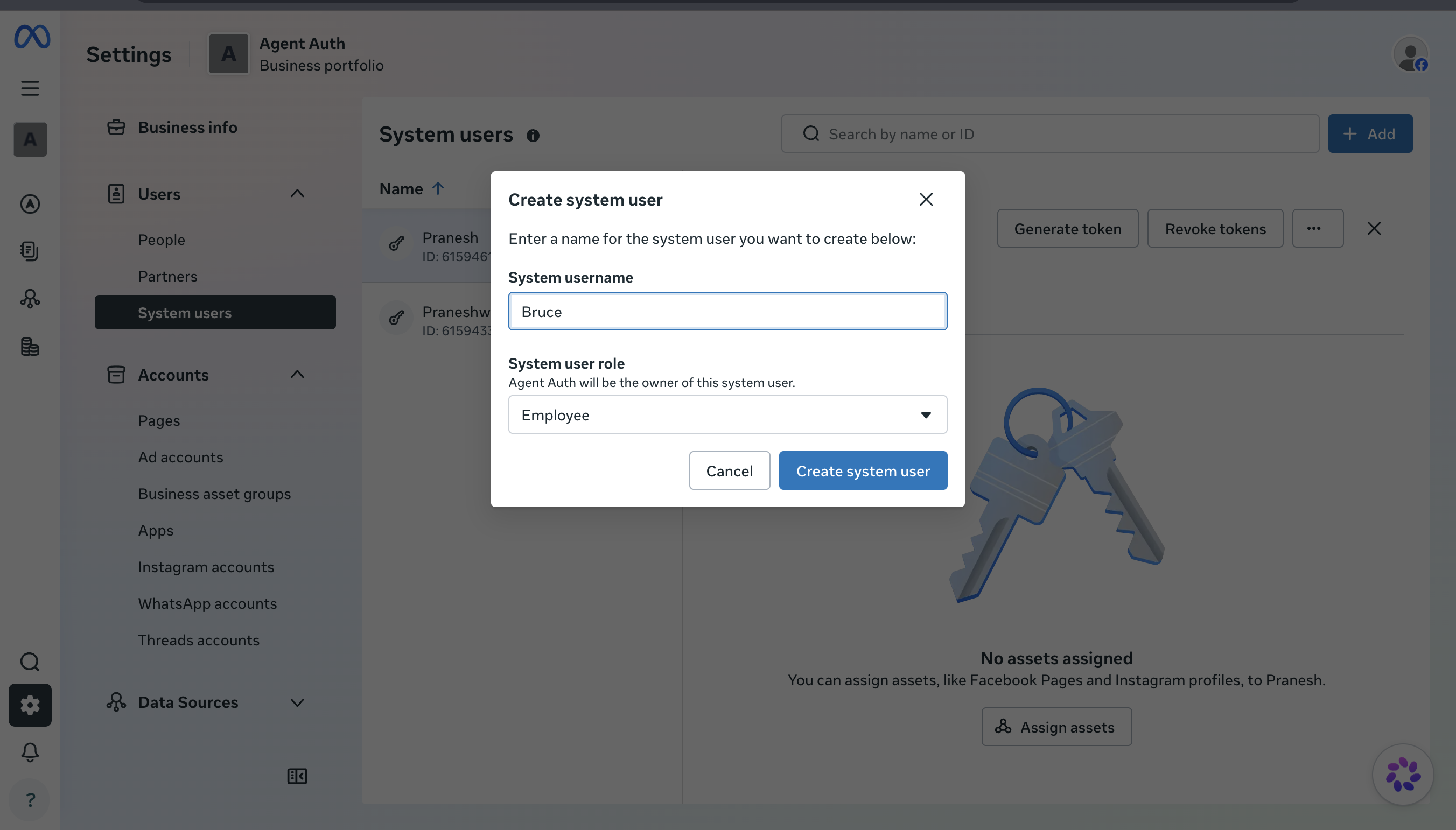
Click Add, then Create system user.
-
Give it a name (for example,
Scalekit) and set the System user role to Employee. -
Click Create system user.
-
-
Assign your WhatsApp Business Account to the system user
-
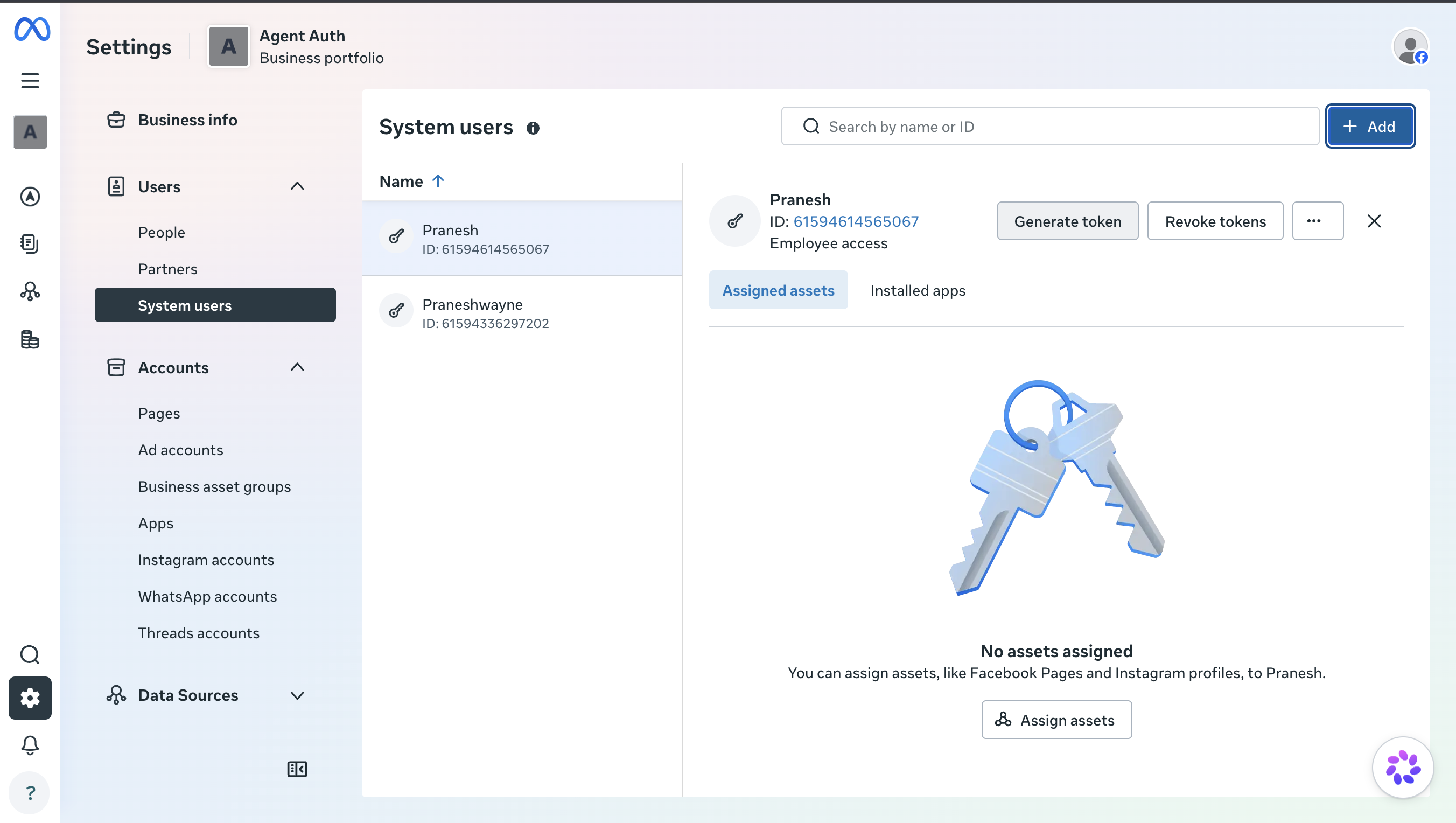
Select the system user you just created from the list.
-
Click Assign assets, choose WhatsApp accounts, and select the WhatsApp Business Account you want Scalekit to access.
-
Grant Full control so the system user can send and receive messages, and manage templates and phone numbers.
-
-
Generate the access token
-
With the system user still selected, click Generate token.
-
Select your WhatsApp app, set an expiration (choose Never for a long-lived server-to-server connection), and select the
whatsapp_business_messagingandwhatsapp_business_managementpermissions. -
Click Generate token and copy the token immediately.
-
-
Add the token in Scalekit
- In the Scalekit dashboard, go to AgentKit > Connections > Create Connection. Find WhatsApp and click Create.
- Paste the system user access token you copied and click Save.
-
Authorize a user and make your first call
quickstart.mts import { ScalekitClient } from '@scalekit-sdk/node'import 'dotenv/config'import { createInterface } from 'node:readline/promises'const scalekit = new ScalekitClient(process.env.SCALEKIT_ENVIRONMENT_URL,process.env.SCALEKIT_CLIENT_ID,process.env.SCALEKIT_CLIENT_SECRET,)const actions = scalekit.actionsconst connector = 'whatsapp'const identifier = 'user_123'// Generate an authorization link for the userconst { link } = await actions.getAuthorizationLink({ connectionName: connector, identifier })console.log('Authorize WhatsApp:', link)const rl = createInterface({ input: process.stdin, output: process.stdout })await rl.question('Press Enter after authorizing...')rl.close()// Make your first callconst result = await actions.executeTool({connector,identifier,toolName: 'whatsapp_businesses_list',toolInput: {},})console.log(result)Terminal window npx tsx quickstart.mtsquickstart.py import osfrom scalekit import ScalekitClientfrom dotenv import load_dotenvload_dotenv()scalekit_client = ScalekitClient(env_url=os.getenv("SCALEKIT_ENVIRONMENT_URL"),client_id=os.getenv("SCALEKIT_CLIENT_ID"),client_secret=os.getenv("SCALEKIT_CLIENT_SECRET"),)actions = scalekit_client.actionsconnection_name = "whatsapp"identifier = "user_123"# Generate an authorization link for the userlink_response = actions.get_authorization_link(connection_name=connection_name,identifier=identifier,)print("Authorize WhatsApp:", link_response.link)input("Press Enter after authorizing...")# Make your first callresult = actions.execute_tool(tool_input={},tool_name="whatsapp_businesses_list",connection_name=connection_name,identifier=identifier,)print(result)Terminal window python quickstart.pyEach user opens the link once and enters their WhatsApp credentials there. If your app already has a user's credentials, add the account from your backend instead, as the console steps above show. See Authorize a user for the full flow and statuses.
Tools
Pass the exact name toexecute_toolwhatsapp_business_account_getGet details for a WhatsApp Business Account, such as its name, currency, timezone, and message template namespace.Read-onlyGet Business Account
Get details for a WhatsApp Business Account, such as its name, currency, timezone, and message template namespace. Returns the requested fields as a JSON object. Use whatsapp_phone_numbers_list to see the phone numbers under this account.
Inputs
waba_idstringrequired- The WhatsApp Business Account ID.
fieldsstring- Comma-separated list of fields to return.
whatsapp_business_profile_getGet the WhatsApp Business Profile (about, address, description, email, vertical, websites, profile picture) for a phone number.Read-onlyGet Business Profile
Get the WhatsApp Business Profile (about, address, description, email, vertical, websites, profile picture) for a phone number.
Inputs
phone_number_idstringrequired- The WhatsApp Business phone number ID.
fieldsstring- Comma-separated list of fields to return.
whatsapp_businesses_listList the Meta Business Manager accounts the connected access token can act on.Read-onlyList Accessible Businesses
List the Meta Business Manager accounts the connected access token can act on. Returns each business's id and name. Start here to discover a business_id, then use whatsapp_owned_wabas_list or whatsapp_client_wabas_list to find WhatsApp Business Account ids under it.
Inputs
fieldsstring- Comma-separated list of fields to return per business.
limitinteger- Max number of businesses to return per page.
whatsapp_client_wabas_listList the WhatsApp Business Accounts (WABAs) shared with a Business Manager account through Embedded Signup, but not owned by it.Read-onlyList Client WhatsApp Business Accounts
List the WhatsApp Business Accounts (WABAs) shared with a Business Manager account through Embedded Signup, but not owned by it. Returns each WABA's id, name, message template namespace, and timezone. Use whatsapp_businesses_list first to find the business_id. Use whatsapp_owned_wabas_list instead for WABAs this business owns directly.
Inputs
business_idstringrequired- The Meta Business Manager account ID.
fieldsstring- Comma-separated list of fields to return per WABA.
limitinteger- Max number of WABAs to return per page.
whatsapp_media_get_urlRetrieve the temporary download URL and metadata for an uploaded or received WhatsApp media item.Read-onlyGet Media URL
Retrieve the temporary download URL and metadata for an uploaded or received WhatsApp media item. The URL expires after 5 minutes.
Inputs
media_idstringrequired- The WhatsApp media ID.
whatsapp_message_template_getGet a single message template's details by exact name, including approval status and components.Read-onlyGet Message Template
Get a single message template's details by exact name, including approval status and components.
Inputs
namestringrequired- Exact template name to look up.
waba_idstringrequired- The WhatsApp Business Account ID.
fieldsstring- Comma-separated list of fields to return.
whatsapp_message_templates_listList message templates configured on the WhatsApp Business Account, with optional filters.Read-onlyList Message Templates
List message templates configured on the WhatsApp Business Account, with optional filters.
Inputs
waba_idstringrequired- The WhatsApp Business Account ID.
fieldsstring- Comma-separated list of fields to return per template.
limitinteger- Max number of templates to return per page.
statusstring- Filter templates by status.
whatsapp_owned_wabas_listList the WhatsApp Business Accounts (WABAs) that a Business Manager account owns.Read-onlyList Owned WhatsApp Business Accounts
List the WhatsApp Business Accounts (WABAs) that a Business Manager account owns. Returns each WABA's id, name, message template namespace, and timezone. Use whatsapp_businesses_list first to find the business_id. Use whatsapp_client_wabas_list instead for WABAs shared with this business rather than owned by it.
Inputs
business_idstringrequired- The Meta Business Manager account ID.
fieldsstring- Comma-separated list of fields to return per WABA.
limitinteger- Max number of WABAs to return per page.
whatsapp_phone_number_getGet metadata for a WhatsApp Business phone number (verification status, quality rating, display number).Read-onlyGet Phone Number Info
Get metadata for a WhatsApp Business phone number (verification status, quality rating, display number).
Inputs
phone_number_idstringrequired- The WhatsApp Business phone number ID.
fieldsstring- Comma-separated list of fields to return.
whatsapp_phone_numbers_listList the phone numbers registered under a WhatsApp Business Account.Read-onlyList Phone Numbers
List the phone numbers registered under a WhatsApp Business Account. Returns each number's id, display number, verified name, and quality rating. Use whatsapp_phone_number_get for a single phone number's full details.
Inputs
waba_idstringrequired- The WhatsApp Business Account ID.
fieldsstring- Comma-separated list of fields to return per phone number.
limitinteger- Max number of phone numbers to return per page.
whatsapp_qr_code_getGet a single WhatsApp QR code or short link by its code id.Read-onlyGet QR Code
Get a single WhatsApp QR code or short link by its code id. Returns the prefilled message and deep link URL. Use whatsapp_qr_codes_list to find the code id first.
Inputs
phone_number_idstringrequired- The WhatsApp Business phone number ID.
qr_code_idstringrequired- The QR code's id.
whatsapp_qr_codes_listList all WhatsApp QR codes and short links created for a phone number.Read-onlyList QR Codes
List all WhatsApp QR codes and short links created for a phone number. Returns each code's id, prefilled message, and deep link URL. Use whatsapp_qr_code_get for a single code's full details.
Inputs
phone_number_idstringrequired- The WhatsApp Business phone number ID.
whatsapp_subscribed_apps_listList the apps currently subscribed to webhook events for a WhatsApp Business Account.Read-onlyList Subscribed Apps
List the apps currently subscribed to webhook events for a WhatsApp Business Account. Returns each subscribed app's id, name, and any override callback URI. Use whatsapp_subscribed_apps_subscribe to add this app to the list.
Inputs
waba_idstringrequired- The WhatsApp Business Account ID.
whatsapp_business_profile_updateUpdate the WhatsApp Business Profile fields for a phone number.WriteUpdate Business Profile
Update the WhatsApp Business Profile fields for a phone number.
- Idempotent
Inputs
phone_number_idstringrequired- The WhatsApp Business phone number ID.
aboutstring- Short business description (max 139 characters).
addressstring- Business address.
descriptionstring- Business description.
emailstring- Business contact email.
verticalstring- Industry vertical.
websitesarray- Up to 2 business website URLs.
whatsapp_mark_message_readMark an inbound WhatsApp message as read (shows blue ticks to the sender).WriteMark Message Read
Mark an inbound WhatsApp message as read (shows blue ticks to the sender).
- Idempotent
Inputs
message_idstringrequired- The WhatsApp message ID (wamid) of the inbound message to mark as read.
phone_number_idstringrequired- The WhatsApp Business phone number ID that received the message.
whatsapp_message_template_createCreate a new WhatsApp message template and submit it for Meta review.WriteCreate Message Template
Create a new WhatsApp message template and submit it for Meta review. Must be approved before it can be used to send messages.
Inputs
categorystringrequired- Template category.
componentsarrayrequired- Array of component objects (header/body/footer/button) defining the template's content and variable placeholders.
languagestringrequired- Language code for the template.
namestringrequired- Template name — lowercase alphanumeric and underscores only.
waba_idstringrequired- The WhatsApp Business Account ID to create the template under.
whatsapp_message_template_updateEdit an existing message template's category and/or components.WriteUpdate Message Template
Edit an existing message template's category and/or components. Returns the template's updated status, which resets to pending Meta review. Use whatsapp_message_template_get or whatsapp_message_templates_list first to find the template's numeric id.
- Idempotent
Inputs
template_idstringrequired- Numeric id of the template to update (not its name).
categorystring- New template category.
componentsarray- Replacement array of component objects (header/body/footer/button) defining the template's content.
whatsapp_phone_number_registerComplete Cloud API registration for a phone number after its ownership is verified, setting its two-step verification PIN.WriteRegister Phone Number
Complete Cloud API registration for a phone number after its ownership is verified, setting its two-step verification PIN. Returns a success confirmation. Use after whatsapp_phone_number_verify_code. Use whatsapp_phone_number_deregister to reverse this.
Inputs
phone_number_idstringrequired- The WhatsApp Business phone number ID to register.
pinstringrequired- A 6-digit PIN used for two-step verification on this phone number.
whatsapp_phone_number_request_codeRequest an SMS or voice verification code to confirm ownership of a phone number before registering it with the Cloud API.WriteRequest Verification Code
Request an SMS or voice verification code to confirm ownership of a phone number before registering it with the Cloud API. Returns a success confirmation. Run this before whatsapp_phone_number_verify_code and whatsapp_phone_number_register when adding a new number.
Inputs
code_methodstringrequired- How to deliver the verification code.
languagestringrequired- Locale for the verification message.
phone_number_idstringrequired- The WhatsApp Business phone number ID to verify.
whatsapp_phone_number_set_pinSet or update the two-step verification PIN for a WhatsApp Business phone number.WriteSet Two-Step Verification PIN
Set or update the two-step verification PIN for a WhatsApp Business phone number. Returns a success confirmation. Another user re-registering this phone number will need this PIN. There is no API to disable two-step verification once set.
- Idempotent
Inputs
phone_number_idstringrequired- The WhatsApp Business phone number ID.
pinstringrequired- New 6-digit two-step verification PIN.
whatsapp_phone_number_verify_codeSubmit the verification code received via SMS or voice call to confirm ownership of a phone number.WriteVerify Code
Submit the verification code received via SMS or voice call to confirm ownership of a phone number. Returns a success confirmation. Use after whatsapp_phone_number_request_code. Follow with whatsapp_phone_number_register to complete registration.
Inputs
codestringrequired- The verification code received via SMS or voice call.
phone_number_idstringrequired- The WhatsApp Business phone number ID being verified.
whatsapp_qr_code_createCreate a WhatsApp QR code or short link pre-filled with a message, for customers to start a chat.WriteCreate QR Code
Create a WhatsApp QR code or short link pre-filled with a message, for customers to start a chat. Returns the code id, prefilled message, deep link URL, and optionally a QR image URL. Use whatsapp_qr_code_update to change an existing code's message instead of creating a duplicate.
Inputs
phone_number_idstringrequired- The WhatsApp Business phone number ID the code should message.
prefilled_messagestringrequired- Message text pre-filled when a customer opens the chat (max 140 characters).
generate_qr_imagestring- Image format for a generated QR code image.
whatsapp_qr_code_updateUpdate the pre-filled message on an existing WhatsApp QR code or short link.WriteUpdate QR Code
Update the pre-filled message on an existing WhatsApp QR code or short link. Returns the code id, updated prefilled message, and deep link URL. Use whatsapp_qr_codes_list or whatsapp_qr_code_get to find the code id first.
- Idempotent
Inputs
phone_number_idstringrequired- The WhatsApp Business phone number ID.
prefilled_messagestringrequired- New pre-filled message text (max 140 characters).
qr_code_idstringrequired- The QR code's id to update.
whatsapp_send_contacts_messageSend one or more WhatsApp contact cards to a recipient.WriteSend Contacts Message
Send one or more WhatsApp contact cards to a recipient. Returns the message id once accepted by Meta. Use whatsapp_send_text_message for plain text instead. Only deliverable within the 24-hour customer service window; use whatsapp_send_template_message to start a new conversation.
Inputs
contactsarrayrequired- Array of contact card objects (name, phones, emails, org, etc.) following WhatsApp's contact schema.
phone_number_idstringrequired- The WhatsApp Business phone number ID sending the message.
tostringrequired- Recipient's WhatsApp ID or phone number in E.164 format.
whatsapp_send_interactive_messageSend an interactive WhatsApp message — reply buttons, a list menu, or a call-to-action URL button.WriteSend Interactive Message
Send an interactive WhatsApp message — reply buttons, a list menu, or a call-to-action URL button. Returns the message id once accepted by Meta. Use whatsapp_send_text_message for plain text. Only deliverable within the 24-hour customer service window; use whatsapp_send_template_message to start a new conversation.
Inputs
interactiveobjectrequired- The full interactive object: type (button, list, or cta_url), optional header/footer, body, and action.
phone_number_idstringrequired- The WhatsApp Business phone number ID sending the message.
tostringrequired- Recipient's WhatsApp ID or phone number in E.164 format.
whatsapp_send_location_messageSend a WhatsApp message containing a map pin for a specific location.WriteSend Location Message
Send a WhatsApp message containing a map pin for a specific location. Returns the message id once accepted by Meta. Only deliverable within the 24-hour customer service window; use whatsapp_send_template_message to start a new conversation.
Inputs
latitudenumberrequired- Location latitude.
longitudenumberrequired- Location longitude.
phone_number_idstringrequired- The WhatsApp Business phone number ID sending the message.
tostringrequired- Recipient's WhatsApp ID or phone number in E.164 format.
addressstring- Address of the location.
namestring- Name of the location.
whatsapp_send_media_messageSend an image, video, document, or audio WhatsApp message, referencing media either by an uploaded media_id or a public link.WriteSend Media Message
Send an image, video, document, or audio WhatsApp message, referencing media either by an uploaded media_id or a public link.
Inputs
media_typestringrequired- Type of media being sent.
phone_number_idstringrequired- The WhatsApp Business phone number ID sending the message.
tostringrequired- Recipient's WhatsApp ID or phone number in E.164 format.
captionstring- Caption text. Supported for image, video, and document — not audio.
filenamestring- Filename to display. Only used for document media.
media_idstring- ID of a previously uploaded media file. Provide this or media_link, not both.
media_linkstring- Publicly accessible URL of the media file. Provide this or media_id, not both.
whatsapp_send_reaction_messageSend an emoji reaction to a previously received WhatsApp message, or remove a reaction with an empty emoji.WriteSend Reaction
Send an emoji reaction to a previously received WhatsApp message, or remove a reaction with an empty emoji. Returns the message id once accepted by Meta. Use whatsapp_mark_message_read to acknowledge a message without reacting to it.
Inputs
emojistringrequired- A single emoji to react with. Pass an empty string to remove a previous reaction.
message_idstringrequired- The WhatsApp message ID (wamid) being reacted to.
phone_number_idstringrequired- The WhatsApp Business phone number ID sending the reaction.
tostringrequired- Recipient's WhatsApp ID or phone number in E.164 format.
whatsapp_send_template_messageSend a pre-approved WhatsApp message template.WriteSend Template Message
Send a pre-approved WhatsApp message template. Required to initiate contact with a recipient outside the 24-hour customer service window.
Inputs
language_codestringrequired- Language code the template was approved in.
phone_number_idstringrequired- The WhatsApp Business phone number ID sending the message.
template_namestringrequired- Name of the approved message template.
tostringrequired- Recipient's WhatsApp ID or phone number in E.164 format.
componentsarray- Array of template component objects (header/body/button parameters) matching the template's variable placeholders.
whatsapp_send_text_messageSend a plain text WhatsApp message to a recipient.WriteSend Text Message
Send a plain text WhatsApp message to a recipient.
Inputs
bodystringrequired- The message text (max 4096 characters).
phone_number_idstringrequired- The WhatsApp Business phone number ID sending the message.
tostringrequired- Recipient's WhatsApp ID or phone number in E.164 format.
preview_urlboolean- Whether to render a link preview if the text contains a URL.
whatsapp_subscribed_apps_subscribeSubscribe this app to receive webhook events (messages, status updates) for a WhatsApp Business Account, optionally overriding the callback URL for just this WABA.WriteSubscribe App to Webhooks
Subscribe this app to receive webhook events (messages, status updates) for a WhatsApp Business Account, optionally overriding the callback URL for just this WABA. Returns the subscription record, including the app id and any override callback URI. Use whatsapp_subscribed_apps_list to see current subscriptions, or whatsapp_subscribed_apps_unsubscribe to remove one.
- Idempotent
Inputs
waba_idstringrequired- The WhatsApp Business Account ID.
override_callback_uristring- A callback URL to use for this WABA instead of the app's default webhook URL.
verify_tokenstring- Verification token Meta will echo back when validating the override callback URI.
whatsapp_media_deleteDelete a previously uploaded WhatsApp media item.DestructiveDelete Media
Delete a previously uploaded WhatsApp media item.
- Idempotent
Inputs
media_idstringrequired- The WhatsApp media ID to delete.
whatsapp_message_template_deleteDelete a message template by name, optionally scoped to a single language version.DestructiveDelete Message Template
Delete a message template by name, optionally scoped to a single language version. Returns a success confirmation. Use whatsapp_message_templates_list first to find the exact name. Provide template_id together with name to remove only that language; name alone removes every language.
- Idempotent
Inputs
namestringrequired- Exact template name to delete.
waba_idstringrequired- The WhatsApp Business Account ID.
template_idstring- Numeric id of one specific language version to delete. Omit to delete all languages of this template name.
whatsapp_phone_number_deregisterDeregister a phone number from the Cloud API, stopping it from sending or receiving messages until re-registered.DestructiveDeregister Phone Number
Deregister a phone number from the Cloud API, stopping it from sending or receiving messages until re-registered. Returns a success confirmation. Use whatsapp_phone_number_register to re-register the number afterward.
- Idempotent
Inputs
phone_number_idstringrequired- The WhatsApp Business phone number ID to deregister.
whatsapp_qr_code_deleteDelete a WhatsApp QR code or short link.DestructiveDelete QR Code
Delete a WhatsApp QR code or short link. Returns a success confirmation. Use whatsapp_qr_codes_list to find the code id first.
- Idempotent
Inputs
phone_number_idstringrequired- The WhatsApp Business phone number ID.
qr_code_idstringrequired- The QR code's id to delete.
whatsapp_subscribed_apps_unsubscribeUnsubscribe this app from webhook events for a WhatsApp Business Account, stopping delivery of messages and status updates.DestructiveUnsubscribe App from Webhooks
Unsubscribe this app from webhook events for a WhatsApp Business Account, stopping delivery of messages and status updates. Returns a success confirmation. Use whatsapp_subscribed_apps_list to confirm current subscriptions first.
- Idempotent
Inputs
waba_idstringrequired- The WhatsApp Business Account ID.
No tools match.


