


The Gainsight connector lets your AI agent act in each user's Gainsight account. Each user connects their own Gainsight API key once, and Scalekit sends it with every call, so your agent never handles credentials. It comes with 28 tools.
- Tools
- 28
- What they doRead · write · destructive
- 14 · 13 · 114 read13 write1 destructive
- Users sign in with
- API key
Setup
Install the SDK
Terminal window npm install @scalekit-sdk/node dotenvTerminal window pip install scalekit-sdk-python python-dotenvSet your credentials
Add your Scalekit credentials to your
.envfile. Find values in app.scalekit.com > Developers > API Credentials..env SCALEKIT_ENVIRONMENT_URL=<your-environment-url>SCALEKIT_CLIENT_ID=<your-client-id>SCALEKIT_CLIENT_SECRET=<your-client-secret>Create the Gainsight connection
In AgentKit > Connections, create a Gainsight connection. The name you give it is the
connection_nameyour code passes. See Configure connections.Console steps with screenshots
Register your Scalekit environment with the Gainsight connector so Scalekit can proxy API requests using your Gainsight access key. There is no redirect URI or OAuth flow.
-
Generate a Gainsight access key
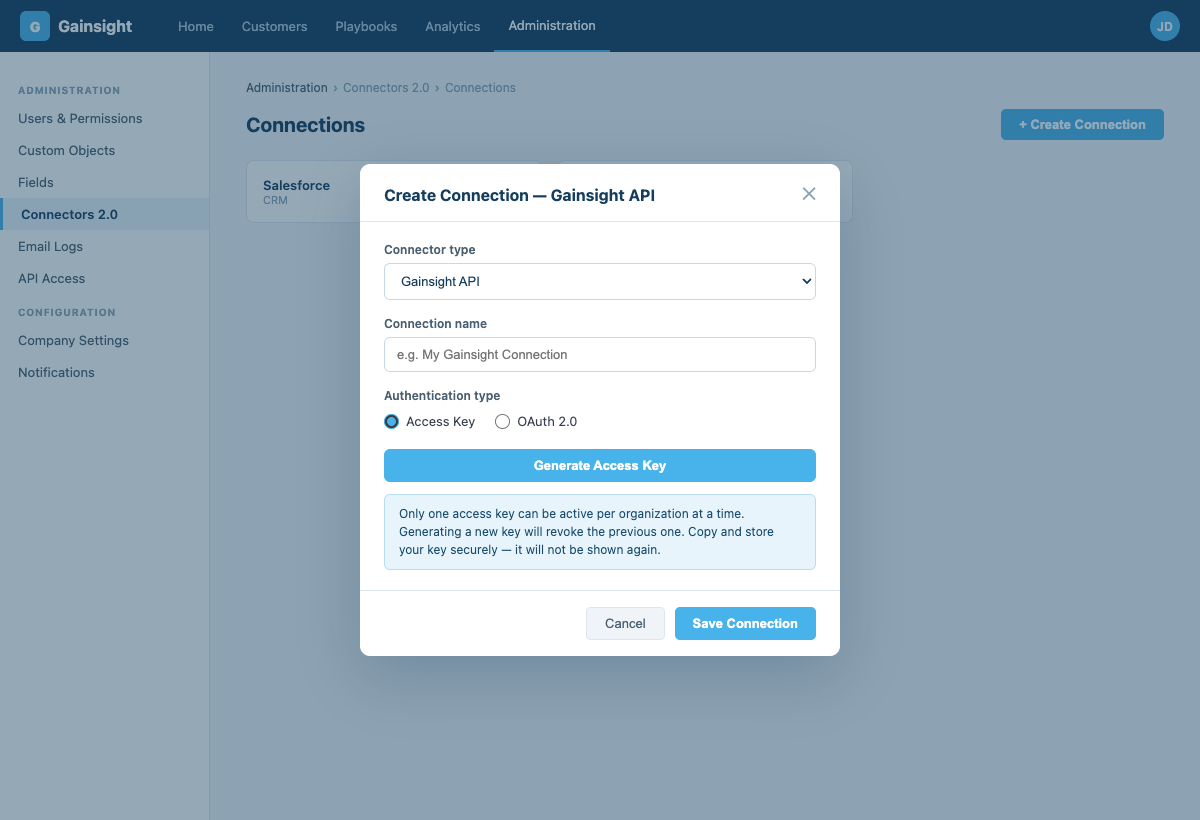
- Sign in to Gainsight and go to Administration → Connectors 2.0 → Connections.
- Click + Create Connection.
- Select Gainsight API as the connector type, enter a connection name, and choose Access Key as the authentication type.
- Click Generate Access Key.
-
Create a connection in Scalekit
- In Scalekit dashboard, go to AgentKit > Connections > Create Connection. Find Gainsight and click Create.
- Note the Connection name — use this as
connection_namein your code (e.g.,gainsight). - Click Save.
-
Add a connected account
In the dashboard, to test
- Open the connection and click the Connected Accounts tab → Add account.
- Fill in:
- Your User’s ID — a unique identifier for this user in your system (e.g.,
user_123) - Tenant Domain — your Gainsight hostname without
https://(e.g.,mycompany.gainsightcloud.com) - Access Key — the key you generated in step 1
- Your User’s ID — a unique identifier for this user in your system (e.g.,
- Click Save.
In production
Each user adds their own account through the authorization link: they enter their credentials on the page it opens.
From your backend, if your app already has the credentials
For example, when users enter them on a settings page in your app:
import { ConnectorStatus } from '@scalekit-sdk/node'// Never hard-code API keys — read from secure storage or user inputconst gainsightKey = getUserGainsightKey(); // retrieve from your secure storeconst authorizationDetails = {details: {case: 'staticAuth',value: {details: {domain: 'mycompany.gainsightcloud.com',api_key: gainsightKey,},},},};let { connectedAccount } = await scalekit.actions.upsertConnectedAccount({connectionName: 'gainsight',identifier: 'user_123',authorizationDetails,});// Make sure the account is ACTIVE before the first tool call.if (connectedAccount?.status !== ConnectorStatus.ACTIVE) {({ connectedAccount } = await scalekit.actions.upsertConnectedAccount({connectionName: 'gainsight',identifier: 'user_123',authorizationDetails,}));}# Never hard-code API keys — read from secure storage or user inputgainsight_key = get_user_gainsight_key() # retrieve from your secure storeauthorization_details = {"static_auth": {"domain": "mycompany.gainsightcloud.com","api_key": gainsight_key,},}response = scalekit_client.actions.upsert_connected_account(connection_name="gainsight",identifier="user_123",authorization_details=authorization_details,)# Make sure the account is ACTIVE before the first tool call.if response.connected_account.status != "ACTIVE":response = scalekit_client.actions.upsert_connected_account(connection_name="gainsight",identifier="user_123",authorization_details=authorization_details,)
-
Authorize a user and make your first call
quickstart.mts import { ScalekitClient } from '@scalekit-sdk/node'import 'dotenv/config'import { createInterface } from 'node:readline/promises'const scalekit = new ScalekitClient(process.env.SCALEKIT_ENVIRONMENT_URL,process.env.SCALEKIT_CLIENT_ID,process.env.SCALEKIT_CLIENT_SECRET,)const actions = scalekit.actionsconst connector = 'gainsight'const identifier = 'user_123'// Generate an authorization link for the userconst { link } = await actions.getAuthorizationLink({ connectionName: connector, identifier })console.log('Authorize Gainsight:', link)const rl = createInterface({ input: process.stdin, output: process.stdout })await rl.question('Press Enter after authorizing...')rl.close()// Make your first callconst result = await actions.executeTool({connector,identifier,toolName: 'gainsight_company_query',toolInput: {},})console.log(result)Terminal window npx tsx quickstart.mtsquickstart.py import osfrom scalekit import ScalekitClientfrom dotenv import load_dotenvload_dotenv()scalekit_client = ScalekitClient(env_url=os.getenv("SCALEKIT_ENVIRONMENT_URL"),client_id=os.getenv("SCALEKIT_CLIENT_ID"),client_secret=os.getenv("SCALEKIT_CLIENT_SECRET"),)actions = scalekit_client.actionsconnection_name = "gainsight"identifier = "user_123"# Generate an authorization link for the userlink_response = actions.get_authorization_link(connection_name=connection_name,identifier=identifier,)print("Authorize Gainsight:", link_response.link)input("Press Enter after authorizing...")# Make your first callresult = actions.execute_tool(tool_input={},tool_name="gainsight_company_query",connection_name=connection_name,identifier=identifier,)print(result)Terminal window python quickstart.pyEach user opens the link once and enters their Gainsight credentials there. If your app already has a user's credentials, add the account from your backend instead, as the console steps above show. See Authorize a user for the full flow and statuses.
Tools
Pass the exact name toexecute_toolgainsight_company_querySearch and filter Gainsight company records by any field.Read-onlyQuery Companies
Search and filter Gainsight company records by any field. Returns up to 5000 records per call.
Inputs
limitinteger- Maximum number of records to return per call (1–5000). Default: 100.
offsetinteger- Number of records to skip, used for pagination. Default: 0.
orderByobject- Sort specification as an object with field names as keys and 'asc' or 'desc' as values. Custom fields use '__gc' suffix; lookup fields use '__gr'.
selectarray- Field names to return. Omit to get standard fields (Name, Gsid, Status, Stage, ARR, etc.).
whereobject- Filter object with conditions array and expression string. Each condition uses name (field name), alias, value array, and operator.
gainsight_cta_listSearch and filter CTAs in Gainsight Cockpit with field selection and pagination.Read-onlyList CTAs
Search and filter CTAs in Gainsight Cockpit with field selection and pagination. Returns up to 1000 CTAs per request.
Inputs
linkedObjectboolean- Set to true to include linked object data in the associatedRecords field of each CTA response.
pageNumberinteger- Page number to fetch, starting from 1. Default: 1.
pageSizeinteger- Number of records per page (1–1000). Default: 50.
selectarray- Field names to return. Custom fields must be appended with '__gc'; lookup fields with '__gr'. Omit to get standard CTA fields.
whereobject- Filter object with conditions array and expression string. Each condition uses either fieldName (regular fields) or associatedRecord: true (linked object filter).
gainsight_goal_fetchFetches/queries Customer Goal records in Gainsight.Read-onlyFetch Customer Goals
Fetches/queries Customer Goal records in Gainsight. Select which fields to return, and optionally filter by company, relationship, status, opportunity, or any custom attribute.
Inputs
selectarrayrequired- Field names to return for each goal.
page_numberinteger- Page number to fetch, starting from 1.
page_sizeinteger- Number of records to return per page.
whereobject- Filter conditions with a conditions array (fieldName, value, operator, alias) and an expression combining their aliases.
gainsight_object_describeReturn the full field schema for any Gainsight MDA object, including field names, types, and picklist values.Read-onlyDescribe Object
Return the full field schema for any Gainsight MDA object, including field names, types, and picklist values. Use gainsight_object_list to find valid object names.
Inputs
object_namestringrequired- Gainsight MDA object name. Use exact names: Company, call_to_action, activity_timeline, or custom objects ending in __gc (e.g. MyObj__gc).
children_levelinteger- Depth of child levels to include.
include_childrenboolean- Include child objects in the response.
include_hidden_columnsboolean- Include hidden columns in the response.
include_picklist_detailsboolean- Include picklist field details in the response.
gainsight_object_listList all standard and custom objects available in Gainsight MDA.Read-onlyList Objects
List all standard and custom objects available in Gainsight MDA. Use this to discover object names before calling gainsight_object_query or gainsight_object_describe.
Inputs
emboolean- Exclude object mappings from the response.
postring- Filter by parent object name.
gainsight_object_queryQuery any standard or custom Gainsight MDA object by name.Read-onlyQuery Object
Query any standard or custom Gainsight MDA object by name. Custom objects use the __gc suffix (e.g. MyObject__gc). Use gainsight_object_list to discover available object names.
Inputs
object_namestringrequired- Gainsight MDA object name, e.g. Company, activity_timeline, call_to_action, or a custom object like MyObj__gc.
limitinteger- Maximum number of records to return per call (1–5000). Default: 100.
offsetinteger- Number of records to skip, used for pagination. Default: 0.
orderByobject- Sort specification as an object with field names as keys and 'asc' or 'desc' as values.
selectarray- Field names to return. Custom fields end with '__gc'; lookup traversals use '__gr'. Omit for all fields.
whereobject- Filter object with conditions array and expression string. Each condition uses name, alias, value array, and operator.
gainsight_playbook_listList Playbooks configured in Gainsight Cockpit, optionally filtered by entity type, active status, and playbook type.Read-onlyList Playbooks
List Playbooks configured in Gainsight Cockpit, optionally filtered by entity type, active status, and playbook type. Useful for discovering valid playbook names before referencing one in gainsight_cta_create's playbook field.
Inputs
activeboolean- Restrict to active (true) or inactive (false) playbooks. Omit to return both.
entity_typestring- Restrict to playbooks configured for this entity type, e.g. COMPANY or GLOBAL.
typestring- Comma-separated playbook types to filter by, e.g. Risk,Expansion.
gainsight_query_company_personQuery contact-to-company associations in Gainsight.Read-onlyQuery Company Person
Query contact-to-company associations in Gainsight. Each record links a person to a company with their role, title, and primary company designation.
Inputs
limitinteger- Maximum number of records to return per call (1–5000). Default: 100.
offsetinteger- Number of records to skip, used for pagination. Default: 0.
orderByobject- Sort specification as an object with field names as keys and 'asc' or 'desc' as values.
selectarray- Field names to return. Key fields: Gsid, Person_ID, Company_ID, Active, IsPrimaryCompany, Role, Title, SfdcContactId, SfdcAccountId. Omit for standard fields.
whereobject- Filter object with conditions array and expression string. Each condition uses name, alias, value array, and operator.
gainsight_query_relationshipsSearch and filter Gainsight relationship records by any field.Read-onlyQuery Relationships
Search and filter Gainsight relationship records by any field. Returns up to 5000 records per call.
Inputs
limitinteger- Maximum number of records to return per call (1–5000). Default: 100.
offsetinteger- Number of records to skip, used for pagination. Default: 0.
orderByobject- Sort specification as an object with field names as keys and 'asc' or 'desc' as values.
selectarray- Field names to return, e.g. Name, Arr, Mrr. Omit for standard relationship fields.
whereobject- Filter object with conditions array and expression string. Each condition uses name, alias, value array, and operator.
gainsight_query_scorecardQuery a Gainsight scorecard object for health score data.Read-onlyQuery Scorecard Measures
Query a Gainsight scorecard object for health score data. Pass the object name from your Gainsight configuration, e.g. cs_scorecard_master.
Inputs
scorecard_objectstringrequired- Name of the scorecard object to query, e.g. cs_scorecard_master. Use gainsight_object_list to discover the exact name in your instance.
limitinteger- Maximum number of records to return per call (1–5000). Default: 100.
offsetinteger- Number of records to skip, used for pagination. Default: 0.
selectarray- Field names to return. Use gainsight_object_describe with the scorecard object name to discover available fields.
whereobject- Filter object with conditions array and expression string.
gainsight_resolve_userLook up Gainsight users by email or filter.Read-onlyResolve User
Look up Gainsight users by email or filter. Use this to find a user's GSID before assigning them as a CTA or success plan owner.
Inputs
email_searchstring- Substring to match against user email addresses, case-insensitive. Useful for finding a user by partial email.
limitinteger- Maximum number of records to return per call (1–5000). Default: 50.
offsetinteger- Number of records to skip, used for pagination. Default: 0.
orderByobject- Sort specification as an object with field names as keys and 'asc' or 'desc' as values.
selectarray- Field names to return. Key fields: Gsid, Name, Email, IsActive, Username, ExternalId. Omit for standard fields.
whereobject- Filter object with conditions array and expression string. Each condition uses name, alias, value array, and operator.
gainsight_success_plan_listSearch and filter Success Plans in Gainsight with field selection and pagination.Read-onlyList Success Plans
Search and filter Success Plans in Gainsight with field selection and pagination. Returns up to 1000 records per request.
Inputs
pageNumberinteger- Page number to fetch, starting from 1. Default: 1.
pageSizeinteger- Number of records per page (1–1000). Default: 50.
selectarray- Field names to return. Custom fields use '__gc' suffix; lookup fields use '__gr'. Omit to get standard Success Plan fields.
whereobject- Filter object with conditions array and expression string. Each condition uses fieldName, alias, value array, and operator.
gainsight_task_listList all tasks for a given CTA.Read-onlyList Tasks
List all tasks for a given CTA. Returns up to 1000 tasks per page. Use gainsight_cta_list to get the CTA's GSID.
Inputs
cta_gsidstringrequired- GSID of the parent CTA this record belongs to. Retrieve it from gainsight_cta_list.
includesstring- Comma-separated custom field API names to include beyond the default fields, e.g. DT_Date__gc,DT_DateTime__gc.
pninteger- Page number to fetch, starting from 1. Default: 1.
psinteger- Number of tasks per page (max 1000). Default: 1000.
gainsight_timeline_querySearch and filter Gainsight Timeline activity records by any field.Read-onlyQuery Timeline Activities
Search and filter Gainsight Timeline activity records by any field. Returns up to 5000 records per call, sorted by creation date descending by default.
Inputs
limitinteger- Maximum number of records to return per call (1–5000). Default: 50.
offsetinteger- Number of records to skip, used for pagination. Default: 0.
orderByobject- Sort specification as an object with field names as keys and 'asc' or 'desc' as values.
selectarray- Field names to return. Custom fields use the format 'Prefix__FieldName__c'. Omit to get standard timeline fields.
whereobject- Filter object with conditions array and expression string. Each condition uses name, alias, value array, and operator.
gainsight_company_createCreate a new company record in Gainsight.WriteCreate Company
Create a new company record in Gainsight. Use gainsight_company_query afterward to retrieve its GSID for linking CTAs, timeline activities, or success plans.
Inputs
namestringrequired- Name of the company.
arrnumber- Annual recurring revenue for this company.
csm_first_namestring- First name of the assigned Customer Success Manager.
csm_last_namestring- Last name of the assigned Customer Success Manager.
employeesinteger- Number of employees at this company.
external_record_idstring- Your external identifier for this company (e.g. from your CRM), used to keep records in sync across systems.
industrystring- Industry the company operates in.
renewal_datestring- Renewal date in YYYY-MM-DD format.
stagestring- Lifecycle stage as configured in your Gainsight instance (e.g. New Customer, Kicked Off, Launched).
statusstring- Status value as configured in your Gainsight instance.
gainsight_company_updateUpdate one or more fields on an existing Gainsight company, identified by its GSID.WriteUpdate Company
Update one or more fields on an existing Gainsight company, identified by its GSID. Only the fields you include are changed — all other fields remain untouched.
- Idempotent
Inputs
company_gsidstringrequired- GSID of the company to update. Retrieve it from gainsight_company_query.
arrnumber- New annual recurring revenue.
employeesinteger- New employee headcount.
industrystring- New industry classification.
namestring- New name for the company.
renewal_datestring- New renewal date in YYYY-MM-DD format.
stagestring- New lifecycle stage as configured in your Gainsight instance.
statusstring- New status value as configured in your Gainsight instance.
gainsight_cta_createCreate a Call to Action in Gainsight Cockpit linked to a company.WriteCreate CTA
Create a Call to Action in Gainsight Cockpit linked to a company. Type, reason, status, and priority must match values configured in your Gainsight instance.
Inputs
company_gsidstringrequired- GSID of the company to link this record to. Retrieve it from gainsight_company_query.
cta_typestringrequired- CTA type as configured in your Gainsight instance, e.g. Risk, Expansion, Renewal. Check your Gainsight admin settings for valid values.
namestringrequired- Display name for this CTA, shown in the Gainsight Cockpit.
owner_emailstringrequired- Email address of the Gainsight user to assign as owner. Resolved to an internal user ID automatically.
reference_idstringrequired- Your external identifier for this record, returned in error responses so you can match failures back to your source data.
commentsstring- Free-text notes or context to attach to this CTA.
due_datestring- Due date in YYYY-MM-DD format.
playbookstring- Name of the playbook to apply. Must match a playbook configured in your Gainsight instance.
prioritystring- Priority level for this record. Accepted values: High, Medium, Low.one of
HighMediumLow reasonstring- Reason name as configured in your Gainsight instance. Check your Gainsight admin settings for valid values.
statusstring- Status value as configured in your Gainsight instance. Check your Gainsight admin settings for valid values.
gainsight_cta_updateUpdate one or more fields on an existing CTA.WriteUpdate CTA
Update one or more fields on an existing CTA. Only the fields you include are changed — all other fields remain untouched.
- Idempotent
Inputs
gsidstringrequired- Gainsight internal ID (GSID) of the CTA to update. Retrieve it from gainsight_cta_list.
reference_idstringrequired- Your external identifier for this record, returned in error responses so you can match failures back to your source data.
commentsstring- Free-text notes or context to attach to this CTA.
due_datestring- Due date in YYYY-MM-DD format.
is_closedboolean- Set to true to mark this CTA as closed.
namestring- New display name for this CTA.
owner_emailstring- Email address of the Gainsight user to assign as owner. Resolved to an internal user ID automatically.
prioritystring- Priority level for this record. Accepted values: High, Medium, Low.one of
HighMediumLow reasonstring- Reason name as configured in your Gainsight instance. Check your Gainsight admin settings for valid values.
statusstring- Status value as configured in your Gainsight instance. Check your Gainsight admin settings for valid values.
gainsight_goal_createCreates a Customer Goal record in Gainsight.WriteCreate Customer Goal
Creates a Customer Goal record in Gainsight. Customer Goals track outcomes you're driving toward with a company, relationship, or globally. GoalTypeId and StatusId are internal Gainsight IDs configured in your instance (Administration > Customer Goals) — not free-text names.
Inputs
entity_typestringrequired- Level this goal is tracked at: COMPANY, RELATIONSHIP, or GLOBAL.one of
COMPANYRELATIONSHIPGLOBAL goal_type_idstringrequired- Internal Gainsight ID of the goal type, as configured in your instance.
namestringrequired- Name of the goal.
status_idstringrequired- Internal Gainsight ID of the goal status, as configured in your instance.
company_namestring- Name of the company this goal belongs to. Required when entity_type is COMPANY.
descriptionstring- Description of the goal. HTML is supported.
due_datestring- Due date in YYYY-MM-DD format.
gainsight_goal_updateUpdates an existing Customer Goal record in Gainsight by its GSID.WriteUpdate Customer Goal
Updates an existing Customer Goal record in Gainsight by its GSID. Only the fields you include are changed — all other fields remain untouched.
- Idempotent
Inputs
gsidstringrequired- Gainsight internal ID (GSID) of the goal to update. Retrieve it from gainsight_goal_fetch.
descriptionstring- New description of the goal. HTML is supported.
due_datestring- New due date in YYYY-MM-DD format.
namestring- New name for the goal.
status_idstring- New internal Gainsight status ID, as configured in your instance.
gainsight_object_createInsert up to 50 records into any standard or custom Gainsight MDA object by name.WriteCreate Object Records
Insert up to 50 records into any standard or custom Gainsight MDA object by name. Custom objects use the __gc suffix (e.g. MyObject__gc). Use gainsight_object_describe to see the fields available on an object.
Inputs
object_namestringrequired- Gainsight MDA object name to insert into, e.g. Company, company_person, or a custom object like MyObj__gc.
recordsarrayrequired- Array of record objects to insert, each a map of field name to value. Up to 50 records per call.
gainsight_object_updateUpdate up to 50 records on any standard or custom Gainsight MDA object by name, matching existing records via one or more key fields (usually Gsid).WriteUpdate Object Records
Update up to 50 records on any standard or custom Gainsight MDA object by name, matching existing records via one or more key fields (usually Gsid). Only the fields you include on each record are changed.
- Idempotent
Inputs
object_namestringrequired- Gainsight MDA object name to update, e.g. Company, company_person, or a custom object like MyObj__gc.
recordsarrayrequired- Array of record objects to update. Each must include the key field(s) plus any fields to change, as a map of field name to value.
key_fieldsstring- Comma-separated field name(s) used to match each record to an existing one. Up to 3 fields of type String, Gsid, Number, or Email.default
Gsid
gainsight_success_plan_updateUpdate one or more fields on an existing success plan.WriteUpdate Success Plan
Update one or more fields on an existing success plan. Only the fields you include are changed — all other fields remain untouched.
- Idempotent
Inputs
plan_gsidstringrequired- GSID of the success plan to update. Retrieve it from gainsight_success_plan_list.
reference_idstringrequired- Your external identifier for this record, returned in error responses so you can match failures back to your source data.
due_datestring- Due date in YYYY-MM-DD format.
namestring- New display name for this success plan.
owner_emailstring- Email address of the Gainsight user to assign as owner. Resolved to an internal user ID automatically.
statusstring- Status value as configured in your Gainsight instance. Check your Gainsight admin settings for valid values.
templatesarray- Names of templates to append to this success plan. Must match template names configured in your Gainsight instance.
gainsight_task_createCreate a task under an existing CTA in Gainsight Cockpit.WriteCreate Task
Create a task under an existing CTA in Gainsight Cockpit. The parent CTA must already exist — use gainsight_cta_list to get its GSID.
Inputs
cta_gsidstringrequired- GSID of the parent CTA this record belongs to. Retrieve it from gainsight_cta_list.
due_datestringrequired- Due date in YYYY-MM-DD format.
namestringrequired- Display name for this task, shown in Gainsight Cockpit.
owner_emailstringrequired- Email address of the Gainsight user to assign as owner. Resolved to an internal user ID automatically.
reference_idstringrequired- Your external identifier for this record, returned in error responses so you can match failures back to your source data.
descriptionstring- Optional free-text description providing additional context for this task.
prioritystring- Priority level for this record. Accepted values: High, Medium, Low.one of
HighMediumLow statusstring- Status value as configured in your Gainsight instance. Check your Gainsight admin settings for valid values.
gainsight_task_updateUpdate one or more fields on an existing task in Gainsight Cockpit.WriteUpdate Task
Update one or more fields on an existing task in Gainsight Cockpit. Only the fields you include are changed — all other fields remain untouched.
- Idempotent
Inputs
gsidstringrequired- Gainsight internal ID (GSID) of the task to update. Retrieve it from gainsight_task_list.
reference_idstringrequired- Your external identifier for this record, returned in error responses so you can match failures back to your source data.
descriptionstring- Optional free-text description providing additional context for this task.
due_datestring- Due date in YYYY-MM-DD format.
due_date_criteriastring- When changing due_date, optionally cascade the new date to related open items.one of
ALL_OPEN_TASKSOPEN_TASKS_AND_CTANO namestring- New display name for this task.
owner_emailstring- Email address of the Gainsight user to assign as owner. Resolved to an internal user ID automatically.
prioritystring- Priority level for this record. Accepted values: High, Medium, Low.one of
HighMediumLow statusstring- Status value as configured in your Gainsight instance. Check your Gainsight admin settings for valid values.
gainsight_timeline_createLog a new Timeline activity linked to a company in Gainsight.WriteCreate Timeline Activity
Log a new Timeline activity linked to a company in Gainsight. The external_id acts as an idempotency key — re-submitting the same value will not create a duplicate.
Inputs
activity_datestringrequired- Date and time of the activity in ISO 8601 format, e.g. 2024-01-15T10:30:00.000+0000.
authorstringrequired- Email address of the Gainsight user authoring this activity. Must exist as an active user in your Gainsight instance.
company_gsidstringrequired- GSID of the company to link this record to. Retrieve it from gainsight_company_query.
external_idstringrequired- Unique ID from your system used as an idempotency key. Re-submitting the same ID will not create a duplicate activity.
notesstringrequired- Body text of the activity. Accepts plain text or HTML.
subjectstringrequired- Title of the activity shown in the Timeline feed. Maximum 255 characters.
type_namestringrequired- Activity type as configured in your Gainsight instance, e.g. Meeting, Email, Phone Call.
context_namestring- The entity type this activity is attached to. Accepted values: Company, Relationship, CTA, SuccessPlan. Defaults to Company.
duration_minsinteger- Duration of the activity in minutes.
internal_attendeesarray- List of internal Gainsight user emails attending this activity.
gainsight_timeline_updateUpdate one or more fields on an existing Timeline activity.WriteUpdate Timeline Activity
Update one or more fields on an existing Timeline activity. Both activity_gsid and activity_type_id are required to identify the record.
- Idempotent
Inputs
activity_gsidstringrequired- GSID of the Timeline activity to update. Returned as activityId in the gainsight_timeline_create response.
notesstringrequired- Body text of the activity. Accepts plain text or HTML.
subjectstringrequired- Title of the activity shown in the Timeline feed. Maximum 255 characters.
activity_datestring- Date and time of the activity in ISO 8601 format, e.g. 2024-01-15T10:30:00.000+0000.
activity_type_idstring- GSID of the activity type. Required to identify the record type on update. Find it via gainsight_object_describe on the activity_timeline object.
company_namestring- Company name to re-link this activity to. Resolved to GsCompanyId automatically via lookup.
internal_attendeesarray- Updated list of internal Gainsight user names attending this activity.
gainsight_object_deleteDelete a single record from any standard or custom Gainsight MDA object by its GSID.DestructiveDelete Object Record
Delete a single record from any standard or custom Gainsight MDA object by its GSID. This works for any object exposed via the generic MDA API, including records not covered by a dedicated delete tool (e.g. call_to_action, success_plan, cockpit_task).
Inputs
gsidstringrequired- The GSID of the record to delete.
object_namestringrequired- Gainsight MDA object name the record belongs to, e.g. Company, call_to_action, or a custom object like MyObj__gc.
No tools match.


