The HubSpot connector lets your AI agent act in each user's HubSpot account. Each user signs in to HubSpot once, and Scalekit stores and refreshes their tokens, so your agent never handles credentials. It comes with 457 tools.
- Tools
- 457
- What they doRead · write · destructive
- 198 · 179 · 80198 read179 write80 destructive
- Users sign in with
- OAuth
- OAuth app
- Scalekit's or your own
What you can do
- Manage contacts: create, update, search, and list contacts; batch create, update, upsert, read, and archive
- Manage companies and deals: create and update company records and deals; batch create, update, upsert, read, and archive
- Manage tickets and tasks: create and update support tickets; create tasks with due dates and priorities
- Batch operations with inline associations: create contacts, companies, deals, or tickets and link them to related records in a single call
- Log engagements: record calls, meetings, notes, and emails against any CRM record
- Search, associate, and extend: full-text search across all CRM objects, batch-manage associations, list owners, discover properties, and work with custom objects
Setup
Install the SDK
Terminal window npm install @scalekit-sdk/node dotenvTerminal window pip install scalekit-sdk-python python-dotenvSet your credentials
Add your Scalekit credentials to your
.envfile. Find values in app.scalekit.com > Developers > API Credentials..env SCALEKIT_ENVIRONMENT_URL=<your-environment-url>SCALEKIT_CLIENT_ID=<your-client-id>SCALEKIT_CLIENT_SECRET=<your-client-secret>Create the HubSpot connection
In AgentKit > Connections, create a HubSpot connection. The name you give it is the
connection_nameyour code passes. See Configure connections.Scalekit credentials are available for HubSpot, so you don't need to register an OAuth app. To show your own app on the consent screen, use your own credentials instead.
Use your own OAuth app
Register your Scalekit environment with the HubSpot connector so Scalekit handles the authentication flow and token lifecycle for you. The connection name you create will be used to identify and invoke the connection programmatically. Then complete the configuration in your application as follows:
-
Set up auth redirects
-
In Scalekit dashboard, go to AgentKit > Connections > Create Connection. Find HubSpot and click Create. Copy the redirect URI. It looks like
https://<SCALEKIT_ENVIRONMENT_URL>/sso/v1/oauth/<CONNECTION_ID>/callback.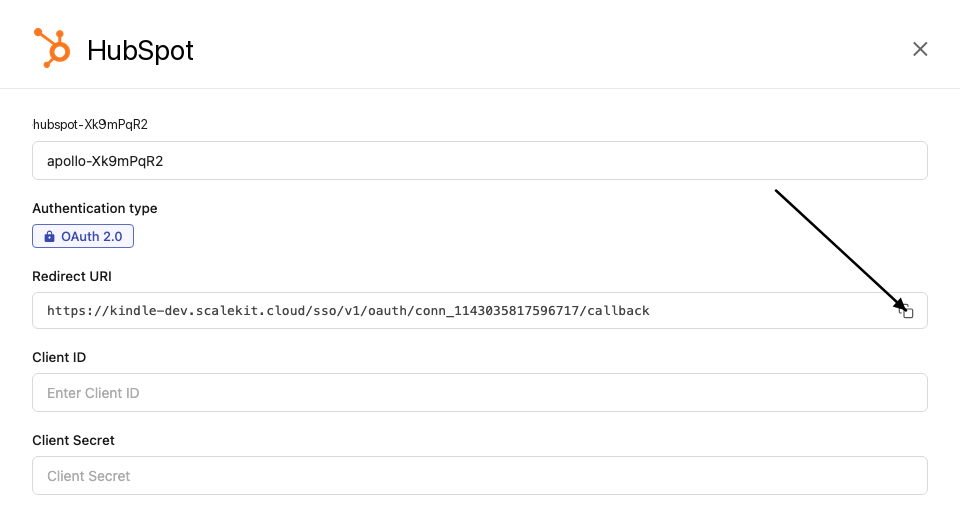
-
Log in to your HubSpot developer dashboard, click Manage apps, click Create app, and select Public app. If you already have an existing HubSpot app, open that app instead — see the Choosing a HubSpot app type section above for guidance on Public, Private, and legacy apps.
-
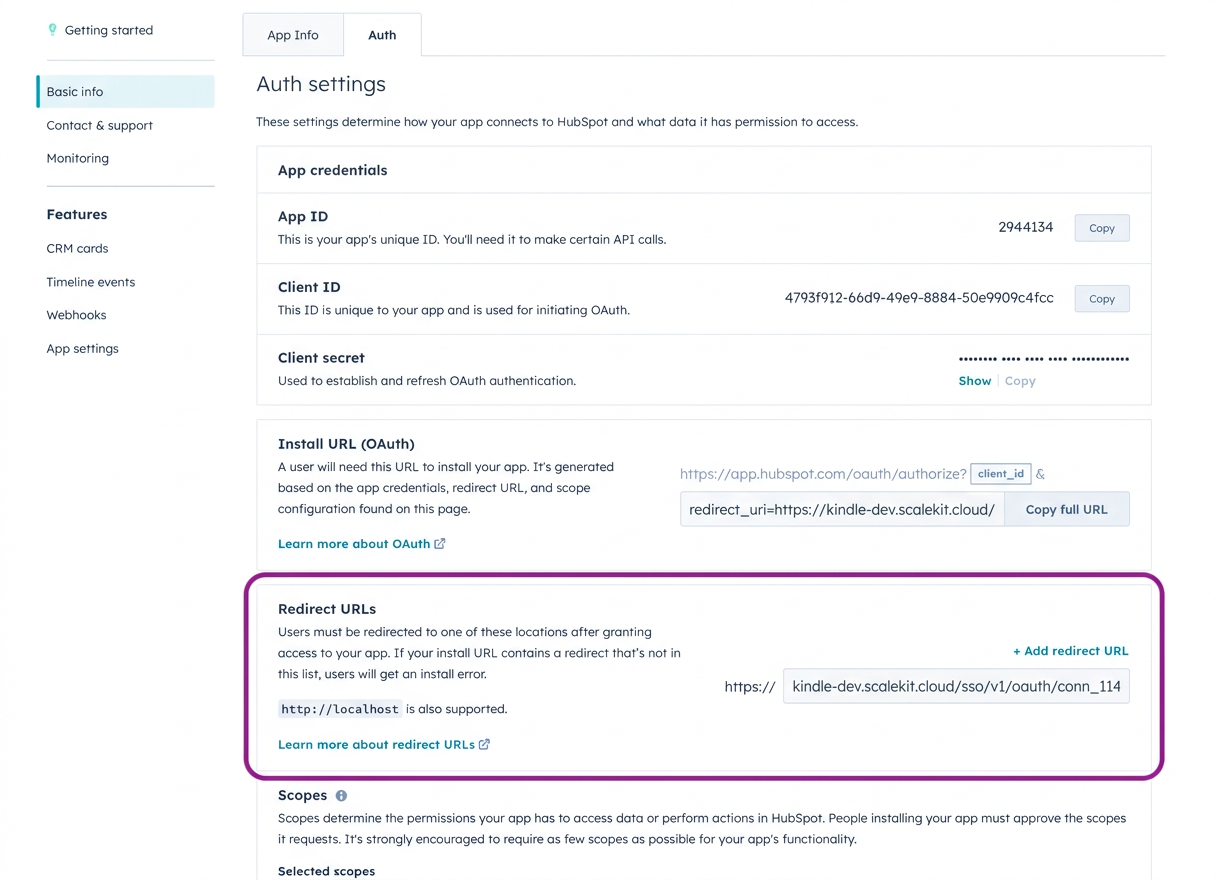
Go to Auth > Auth settings > Redirect URL, paste the redirect URI from Scalekit, and click Save.
-
Under Auth > Auth settings > Scopes, select the scopes your application needs. The scopes you select here must match exactly what you configure in Scalekit. For a read-only CRM enrichment flow, start with:
crm.objects.contacts.readcrm.objects.companies.readcrm.objects.deals.readThese assume a modern Public app with dotted scope names. For legacy apps or the full scope reference, see the Required and optional scopes section on this page.
-
-
Get client credentials
-
In your HubSpot app, go to Auth > Auth settings.
-
Copy your Client ID and Client Secret.
-
-
Add credentials in Scalekit
-
In Scalekit dashboard, go to AgentKit > Connections and open the connection you created.
-
Enter your credentials:
- Client ID (from your HubSpot app)
- Client Secret (from your HubSpot app)
- Permissions (OAuth scope strings such as
crm.objects.contacts.read, entered exactly as configured in the HubSpot app). For a full list of available scopes and guidance on optional scopes, see the Required and optional scopes section on this page.
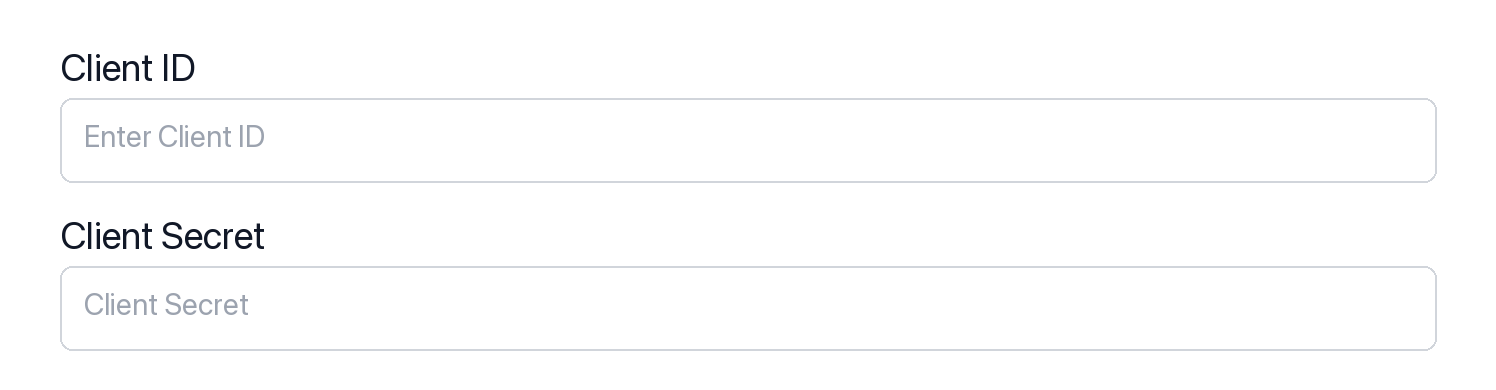
-
Click Save.
-
-
Authorize a user and make your first call
quickstart.mts import { ScalekitClient } from '@scalekit-sdk/node'import 'dotenv/config'import { createInterface } from 'node:readline/promises'const scalekit = new ScalekitClient(process.env.SCALEKIT_ENVIRONMENT_URL,process.env.SCALEKIT_CLIENT_ID,process.env.SCALEKIT_CLIENT_SECRET,)const actions = scalekit.actionsconst connector = 'hubspot'const identifier = 'user_123'// Generate an authorization link for the userconst { link } = await actions.getAuthorizationLink({ connectionName: connector, identifier })console.log('Authorize HubSpot:', link)const rl = createInterface({ input: process.stdin, output: process.stdout })await rl.question('Press Enter after authorizing...')rl.close()// Make your first call — list CRM ownersconst result = await actions.executeTool({connector,identifier,toolName: 'hubspot_owners_list',toolInput: {},})console.log('HubSpot owners:', result)Terminal window npx tsx quickstart.mtsquickstart.py import osfrom scalekit import ScalekitClientfrom dotenv import load_dotenvload_dotenv()scalekit_client = ScalekitClient(env_url=os.getenv("SCALEKIT_ENVIRONMENT_URL"),client_id=os.getenv("SCALEKIT_CLIENT_ID"),client_secret=os.getenv("SCALEKIT_CLIENT_SECRET"),)actions = scalekit_client.actionsconnection_name = "hubspot"identifier = "user_123"# Generate an authorization link for the userlink_response = actions.get_authorization_link(connection_name=connection_name,identifier=identifier,)print("Authorize HubSpot:", link_response.link)input("Press Enter after authorizing...")# Make your first call — list CRM ownersresult = actions.execute_tool(tool_input={},tool_name="hubspot_owners_list",connection_name=connection_name,identifier=identifier,)print("HubSpot owners:", result)Terminal window python quickstart.pyEach user signs in once. See Authorize a user for the full flow and statuses.
Choosing a HubSpot app type
Section titled “Choosing a HubSpot app type”HubSpot has three app shapes. The shape you choose determines which OAuth flow, scope format, and Scalekit configuration apply.
| App type | OAuth redirect | Scope format | Use with Scalekit |
|---|---|---|---|
| Public app | Supported | Modern (crm.objects.contacts.read) | Recommended |
| Private app | Not supported | N/A — static API token only | Not supported |
| Legacy / developer-account app | Supported | Bare strings (contacts, automation) | Supported — enter bare strings in Permissions |
Public apps are the standard choice for production integrations. They support the OAuth redirect flow that Scalekit manages, and they use the modern dotted scope format.
Private apps issue static API tokens and have no OAuth redirect endpoint. Scalekit’s HubSpot connector requires an OAuth flow, so Private apps are not compatible.
Legacy apps (older apps created in HubSpot developer test accounts before the current console) still support OAuth but use an older scope vocabulary. If you already have a legacy app, you can connect it — you just need to enter the older bare scope strings exactly as HubSpot lists them in that app’s Auth > Scopes page.
Required and optional scopes
Section titled “Required and optional scopes”HubSpot’s OAuth connection requires one scope and supports up to 23 optional scopes. Grant only the scopes your tools actually need — a smaller scope set means a simpler consent screen and a faster app review for public listings.
Required scope
oauth — included automatically on every HubSpot connection. You do not need to add it manually.
Optional scopes
Add scopes that match the tools you plan to call. Common choices:
| Scope | Enables |
|---|---|
crm.objects.contacts.read | Read contacts |
crm.objects.contacts.write | Create and update contacts |
crm.objects.companies.read | Read companies |
crm.objects.companies.write | Create and update companies |
crm.objects.deals.read | Read deals |
crm.objects.deals.write | Create and update deals |
crm.objects.line_items.read | Read line items |
crm.objects.line_items.write | Create and update line items |
crm.objects.quotes.read | Read quotes |
crm.lists.read | Read contact lists |
crm.lists.write | Create and manage contact lists |
tickets | Read and write support tickets |
forms | Read forms and form submissions |
automation | Read and trigger workflows and engagements |
e-commerce | Products and orders |
See HubSpot’s scope reference for the full list.
Configure optional scopes in your HubSpot app
In your HubSpot app, go to Auth > Auth settings > Scopes. You’ll see three categories: Required scopes (always requested), Conditionally required scopes, and Optional scopes (requested only when the user’s account has access to them).

Click Add new scope and select the optional scopes your app needs. Optional scopes let users without access to a feature still install your app — HubSpot simply skips those scopes at consent time.
Enable the same optional scopes in Scalekit
- Open the connection in AgentKit > Connections.
- In the Permissions field, enter the scopes you need, space-separated. Example for a read-only CRM flow:
crm.objects.contacts.read crm.objects.companies.read crm.objects.deals.read. - Make sure the scope set here matches exactly what you’ve configured in your HubSpot app. A mismatch causes an
invalid_scopeerror when the user authorizes.
Getting resource IDs
Section titled “Getting resource IDs”Most HubSpot batch and update tools require record IDs. Always fetch IDs from the API — never guess or hard-code them.
| Resource | Tool to get ID | Field in response |
|---|---|---|
| Contact ID | hubspot_contacts_search or hubspot_contacts_list | results[].id |
| Company ID | hubspot_companies_search | results[].id |
| Deal ID | hubspot_deals_search | results[].id |
| Ticket ID | hubspot_tickets_search | results[].id |
| Line Item ID | hubspot_deal_line_items_get | results[].id |
| Product ID | hubspot_products_list | results[].id |
| Owner ID | hubspot_owners_list | results[].id |
| Pipeline ID | hubspot_deal_pipelines_list | results[].id |
| Pipeline Stage ID | hubspot_deal_pipelines_list | results[].stages[].id |
| Custom Object Type ID | hubspot_schemas_list | results[].objectTypeId |
| Custom Object Record ID | hubspot_custom_object_records_search | results[].id |
| Quote ID | hubspot_quote_get | id |
Association type IDs
When linking records, use the correct association_type_id for the object pair:
| From → To | Association Type ID |
|---|---|
| Contact → Company (primary) | 1 |
| Contact → Company | 279 |
| Contact → Deal | 4 |
| Contact → Ticket | 15 |
| Deal → Contact | 3 |
| Deal → Company | 5 |
| Ticket → Contact | 16 |
| Ticket → Company | 340 |
| Line Item → Deal | 20 |
| Company → Contact | 280 |
| Company → Deal | 6 |
Tools
Pass the exact name toexecute_toolhubspot_account_details_getRetrieve account details for the HubSpot portal including hub ID, timezone, currency, and data hosting location.Read-onlyGet Account Details
Retrieve account details for the HubSpot portal including hub ID, timezone, currency, and data hosting location.
Inputs
This tool takes no inputs.
Also accepts
schema_versionandtool_versionto pin a version.hubspot_all_files_listList files stored in the HubSpot file manager, with pagination and date-range filtering.Read-onlyList Files
List files stored in the HubSpot file manager, with pagination and date-range filtering. Requires the 'files' scope.
Inputs
afterstring- Pagination cursor for the next page of results.
archivedboolean- If true, return only archived (soft-deleted) records.
created_afterstring- Return records created on or after this ISO 8601 datetime.
created_beforestring- Return records created on or before this ISO 8601 datetime.
limitinteger- Maximum number of results to return per page (max 100).
parent_folder_idstring- Restrict results to files inside a specific folder.
propertiesstring- Comma-separated list of additional file properties to include in the response.
sortstring- Property to sort results by; prefix with '-' for descending order.
updated_afterstring- Return records updated on or after this ISO 8601 datetime.
updated_beforestring- Return records updated on or before this ISO 8601 datetime.
Also accepts
schema_versionandtool_versionto pin a version.hubspot_association_labels_listList all association label definitions between two CRM object types.Read-onlyList Association Labels
List all association label definitions between two CRM object types.
Inputs
from_object_typestringrequired- From object type.
to_object_typestringrequired- To object type.
Also accepts
schema_versionandtool_versionto pin a version.hubspot_association_limits_getRetrieve the configured association limits between two specific CRM object types.Read-onlyGet Association Limits
Retrieve the configured association limits between two specific CRM object types.
Inputs
from_object_typestringrequired- The source CRM object type.
to_object_typestringrequired- The target CRM object type.
hubspot_association_limits_listRetrieve all configured association limits across every object type pair in the account.Read-onlyList Association Limits
Retrieve all configured association limits across every object type pair in the account.
Inputs
This tool takes no inputs.
hubspot_associations_batch_readRetrieve associations (including labels) for many CRM records at once in a single batch call, given their IDs.Read-onlyBatch Read Associations
Retrieve associations (including labels) for many CRM records at once in a single batch call, given their IDs.
Inputs
from_object_typestringrequired- The CRM object type of the source records.
inputsstringrequired- JSON array of {"id": "<record_id>"} objects to fetch associations for. Pass as a JSON array via the SDK, not as a string.
to_object_typestringrequired- The CRM object type to fetch associations for.
hubspot_audit_logs_getRetrieve account audit logs filtered by user, event type, object type, or date range.Read-onlyGet Audit Logs
Retrieve account audit logs filtered by user, event type, object type, or date range.
Inputs
acting_user_idinteger- Filter by user ID who performed the action.
afterstring- Pagination cursor.
fill_final_timestampboolean- Include final timestamp in response.
limitinteger- Maximum number of results per page.
occurred_afterstring- Return logs after this timestamp.
occurred_beforestring- Return logs before this timestamp.
sortstring- Sort parameters.
Also accepts
schema_versionandtool_versionto pin a version.hubspot_blog_post_getRetrieve a single blog post from HubSpot CMS by its post ID.Read-onlyGet Blog Post
Retrieve a single blog post from HubSpot CMS by its post ID. Requires the 'content' scope.
Inputs
post_idstringrequired- ID of the blog post to retrieve.
archivedboolean- If true, return only archived (soft-deleted) records.
propertystring- Comma-separated list of blog post properties to include in the response.
Also accepts
schema_versionandtool_versionto pin a version.hubspot_blog_post_revision_getRetrieve a specific historical revision of a blog post by revision ID.Read-onlyGet Specific Blog Post Revision
Retrieve a specific historical revision of a blog post by revision ID. Requires the 'content' scope.
Inputs
post_idstringrequired- ID of the blog post.
revision_idstringrequired- ID of the specific revision to retrieve.
Also accepts
schema_versionandtool_versionto pin a version.hubspot_blog_post_revisions_listList the revision history of a blog post in HubSpot CMS.Read-onlyGet Blog Post Revisions
List the revision history of a blog post in HubSpot CMS. Requires the 'content' scope.
Inputs
post_idstringrequired- ID of the blog post whose revisions to list.
afterstring- Pagination cursor for the next page of results.
beforestring- Pagination cursor for the previous page of results.
limitinteger- Maximum number of results to return per page (max 100).
Also accepts
schema_versionandtool_versionto pin a version.hubspot_blog_posts_batch_readRetrieve multiple blog posts by ID in a single request (up to 100).Read-onlyBatch Read Blog Posts
Retrieve multiple blog posts by ID in a single request (up to 100). Requires the 'content' scope.
Inputs
inputsstringrequired- JSON array of post IDs (strings) to fetch, e.g. ["<post_id>", ...].
Also accepts
schema_versionandtool_versionto pin a version.hubspot_blog_posts_listList blog posts in HubSpot CMS.Read-onlyList Blog Posts
List blog posts in HubSpot CMS. Supports pagination, sorting, and archived/date-range filtering. Requires the 'content' scope.
Inputs
afterstring- Pagination cursor for the next page of results.
archivedboolean- If true, include archived (soft-deleted) records alongside active ones (matches confirmed behavior on the sibling authors-list endpoint; this is not an exclusive filter).
content_group_idstring- Filter to posts belonging to a specific blog.
created_afterstring- Return records created on or after this ISO 8601 datetime.
created_atstring- Return records created at exactly this ISO 8601 datetime.
created_beforestring- Return records created on or before this ISO 8601 datetime.
limitinteger- Maximum number of results to return per page (max 100).
propertystring- Comma-separated list of blog post properties to include in the response.
sortarray- Fields to sort results by; prefix a field with '-' for descending order. Multiple fields are applied in order.
updated_afterstring- Return records updated on or after this ISO 8601 datetime.
updated_atstring- Return records updated at exactly this ISO 8601 datetime.
updated_beforestring- Return records updated on or before this ISO 8601 datetime.
Also accepts
schema_versionandtool_versionto pin a version.hubspot_blog_settings_getList blogs configured in the HubSpot account along with their settings (name, slug, language, description, access rules).Read-onlyGet Blog Settings
List blogs configured in the HubSpot account along with their settings (name, slug, language, description, access rules). Supports pagination, sorting, and archived/date-range filtering. Requires the 'content' scope.
Inputs
afterstring- Pagination cursor for the next page of results.
archivedboolean- If true, include archived blogs alongside active ones (matches confirmed behavior on the sibling authors-list endpoint; this is not an exclusive filter).
created_afterstring- Return blogs created on or after this ISO 8601 datetime.
created_atstring- Return blogs created at exactly this ISO 8601 datetime.
created_beforestring- Return blogs created on or before this ISO 8601 datetime.
limitinteger- Maximum number of results to return per page (default 100).
sortarray- Fields to sort results by; prefix a field with '-' for descending order.
updated_afterstring- Return blogs updated on or after this ISO 8601 datetime.
updated_atstring- Return blogs updated at exactly this ISO 8601 datetime.
updated_beforestring- Return blogs updated on or before this ISO 8601 datetime.
Also accepts
schema_versionandtool_versionto pin a version.hubspot_blog_tag_getRetrieve a single blog tag from HubSpot CMS by tag ID.Read-onlyGet Blog Tag
Retrieve a single blog tag from HubSpot CMS by tag ID. Requires the 'content' scope.
Inputs
tag_idstringrequired- ID of the blog tag to retrieve.
propertystring- Comma-separated list of blog tag properties to include in the response.
Also accepts
schema_versionandtool_versionto pin a version.hubspot_blog_topics_searchSearch blog topics using HubSpot's legacy Blog Topics API.Read-onlySearch Blog Topics
Search blog topics using HubSpot's legacy Blog Topics API. 'Topics' is the legacy name for what the newer CMS v3 API calls blog tags (see hubspot_blog_tags_list / hubspot_blog_tag_get for the modern equivalent); this endpoint offers search-by-name/slug/id and active/blog-ID filtering not available on the v3 tags endpoints. Requires the 'content' scope.
Inputs
activeboolean- Restrict results to topics that are (or are not) associated with any published blog posts.
bloginteger- Restrict results to topics used on a specific blog.
casingstring- Set to 'snake' to have the response returned with snake_case field names instead of camelCase.one of
snake createdinteger- Filter results by creation date, in milliseconds since the Unix epoch.
idstring- Search for topics by ID. Supports exact value matching.
limitinteger- Maximum number of results to return per page.
namestring- Search for topics by name. Supports exact value matching.
offsetinteger- Number of results to skip, for pagination.
qstring- Search for topics whose name or URL slug contains this string.
slugstring- Search for topics by URL-friendly slug.
Also accepts
schema_versionandtool_versionto pin a version.hubspot_bulk_export_statusCheck the status of a bulk export job and retrieve the download URL when complete.Read-onlyGet Export Status
Check the status of a bulk export job and retrieve the download URL when complete.
Inputs
export_idstringrequired- Export job ID.
Also accepts
schema_versionandtool_versionto pin a version.hubspot_call_getRetrieve a single call engagement by its ID.Read-onlyGet Call
Retrieve a single call engagement by its ID.
Inputs
call_idstringrequired- Call ID.
archivedboolean- Return archived record.
associationsstring- Associations to return.
id_propertystring- ID property name.
propertiesstring- Properties to return.
properties_with_historystring- Properties with history.
Also accepts
schema_versionandtool_versionto pin a version.hubspot_call_transcript_getRetrieve the full transcript for a recorded HubSpot call by transcript ID.Read-onlyGet Call Transcript
Retrieve the full transcript for a recorded HubSpot call by transcript ID.
Inputs
transcript_idstringrequired- The unique ID of the call transcript.
hubspot_calls_listRetrieve a plain paginated list of calls from HubSpot, without search filters.Read-onlyList Calls
Retrieve a plain paginated list of calls from HubSpot, without search filters.
Inputs
afterstring- Pagination cursor from the previous response's paging.next.after field.
archivedboolean- Whether to include archived records in the results.
limitnumber- Number of results to return per page (max 100).
propertiesstring- Comma-separated list of properties to include in the response.
hubspot_calls_searchSearch HubSpot call engagements using filters and full-text search.Read-onlySearch Calls
Search HubSpot call engagements using filters and full-text search. Returns logged calls with their properties.
Inputs
afterstring- Pagination offset to get results starting from a specific position
filterGroupsstring- JSON string containing filter groups for advanced filtering
limitnumber- Number of results to return per page (max 100)
propertiesstring- Comma-separated list of properties to include in the response
querystring- Full-text search term across call properties
hubspot_campaign_assets_getList all assets of a specific type associated with a HubSpot campaign.Read-onlyGet Campaign Assets
List all assets of a specific type associated with a HubSpot campaign. Optionally include asset metrics by providing startDate and endDate.
Inputs
assetTypestringrequired- Type of assets to retrieve. Accepted values: MARKETING_EMAIL, LANDING_PAGE, BLOG_POST, CTA, SOCIAL.
campaignGuidstringrequired- The unique GUID of the campaign.
afterstring- Pagination cursor from previous response paging.next.after.
endDatestring- End date for asset metrics (YYYY-MM-DD).
limitstring- Maximum number of results per page.
startDatestring- Start date for asset metrics (YYYY-MM-DD).
Also accepts
schema_versionandtool_versionto pin a version.hubspot_campaign_getRetrieve details of a specific HubSpot marketing campaign by campaign ID.Read-onlyGet Campaign
Retrieve details of a specific HubSpot marketing campaign by campaign ID.
Inputs
campaign_idstringrequired- ID of the campaign to retrieve
hubspot_campaign_revenue_getRetrieve revenue attribution report for a specific HubSpot marketing campaign.Read-onlyGet Campaign Revenue
Retrieve revenue attribution report for a specific HubSpot marketing campaign.
Inputs
campaignGuidstringrequired- The unique GUID of the campaign.
attributionModelstring- Revenue attribution model for calculating deal revenue credit.
endDatestring- End date for attribution data (YYYY-MM-DD).
startDatestring- Start date for attribution data (YYYY-MM-DD).
Also accepts
schema_versionandtool_versionto pin a version.hubspot_campaigns_listList all HubSpot marketing campaigns with pagination support.Read-onlyList Campaigns
List all HubSpot marketing campaigns with pagination support.
Inputs
afterstring- Pagination cursor for the next page of results
limitnumber- Number of campaigns to return per page
hubspot_comment_getRetrieve a single comment from HubSpot CMS by comment ID.Read-onlyGet Comment
Retrieve a single comment from HubSpot CMS by comment ID. Requires the 'content' scope.
Inputs
comment_idstringrequired- ID of the comment to retrieve.
Also accepts
schema_versionandtool_versionto pin a version.hubspot_comments_listList blog/page comments in HubSpot CMS, optionally filtered by content ID, moderation state, or free-text query.Read-onlyList Comments
List blog/page comments in HubSpot CMS, optionally filtered by content ID, moderation state, or free-text query. Requires the 'content' scope.
Inputs
content_idinteger- Restrict results to comments on a specific blog post or page.
limitinteger- Number of comments to return.
offsetinteger- Row offset to start returning results from.
portal_idinteger- The Hub ID (portal ID) of the HubSpot account the comments belong to.
querystring- Free-text search matched against comment content.
reverseboolean- If true, return comments oldest to newest instead of newest to oldest.
statestring- Restrict results to comments in this moderation state.one of
APPROVEDSPAMREJECTEDPENDING_MODERATION
Also accepts
schema_versionandtool_versionto pin a version.hubspot_companies_batch_readRetrieve a company record from HubSpot CRM using the batch read API.Read-onlyBatch Read Companys
Retrieve a company record from HubSpot CRM using the batch read API. Returns the specified properties for the record.
Inputs
inputsstringrequired- JSON array of record IDs to read. Each item has an 'id' field.
propertiesstring- JSON array of property names to return. Omit to get default properties.
hubspot_companies_listRetrieve a plain paginated list of companies from HubSpot, without search filters.Read-onlyList Companies
Retrieve a plain paginated list of companies from HubSpot, without search filters.
Inputs
afterstring- Pagination cursor from the previous response's paging.next.after field.
archivedboolean- Whether to include archived records in the results.
limitnumber- Number of results to return per page (max 100).
propertiesstring- Comma-separated list of properties to include in the response.
hubspot_companies_searchSearch HubSpot companies using full-text search and pagination.Read-onlySearch Companies
Search HubSpot companies using full-text search and pagination. Returns matching companies with specified properties.
Inputs
afterstring- Pagination offset to get results starting from a specific position
filterGroupsstring- JSON string containing filter groups for advanced filtering
limitnumber- Number of results to return per page (max 100)
propertiesarray- List of properties to include in the response
querystring- Search term for full-text search across company properties
hubspot_company_getRetrieve details of a specific company from HubSpot by company ID.Read-onlyGet Company
Retrieve details of a specific company from HubSpot by company ID. Returns company properties and associated data.
Inputs
company_idstringrequired- ID of the company to retrieve
propertiesstring- Comma-separated list of properties to include in the response
hubspot_contact_email_events_getRetrieve marketing email events for a specific contact by their email address.Read-onlyGet Contact Email Events
Retrieve marketing email events for a specific contact by their email address. Returns open, click, bounce, and unsubscribe events.
Inputs
emailstringrequired- Email address of the contact to retrieve events for
eventTypestring- Filter by event type (e.g., OPEN, CLICK, BOUNCE, UNSUBSCRIBE)
limitnumber- Number of events to return per page
hubspot_contact_getRetrieve details of a specific contact from HubSpot by contact ID.Read-onlyGet Contact
Retrieve details of a specific contact from HubSpot by contact ID. Returns contact properties and associated data.
Inputs
contact_idstringrequired- ID of the contact to retrieve
propertiesstring- Comma-separated list of properties to include in the response
hubspot_contact_list_membership_getRetrieve all HubSpot lists that a specific contact belongs to, identified by contact ID.Read-onlyGet Contact List Membership
Retrieve all HubSpot lists that a specific contact belongs to, identified by contact ID.
Inputs
contact_idstringrequired- ID of the contact to retrieve list memberships for
hubspot_contact_sequence_enrollments_getRetrieve all sequence enrollments for a specific contact, showing which sequences they are currently enrolled in.Read-onlyGet Contact Sequence Enrollments
Retrieve all sequence enrollments for a specific contact, showing which sequences they are currently enrolled in.
Inputs
contact_idstringrequired- The ID of the contact whose sequence enrollments to retrieve.
hubspot_contacts_batch_readRetrieve a contact record from HubSpot CRM using the batch read API.Read-onlyBatch Read Contacts
Retrieve a contact record from HubSpot CRM using the batch read API. Returns the specified properties for the record.
Inputs
inputsstringrequired- JSON array of record IDs to read. Each item has an 'id' field.
propertiesstring- JSON array of property names to return. Omit to get default properties.
hubspot_contacts_listRetrieve a list of contacts from HubSpot with filtering and pagination.Read-onlyList Contacts
Retrieve a list of contacts from HubSpot with filtering and pagination. Returns contact properties and supports pagination through cursor-based navigation.
Inputs
afterstring- Pagination cursor to get the next set of results
archivedboolean- Whether to include archived contacts in the results
limitnumber- Number of results to return per page (max 100)
propertiesstring- Comma-separated list of properties to include in the response
hubspot_contacts_searchSearch HubSpot contacts using full-text search and pagination.Read-onlySearch Contacts
Search HubSpot contacts using full-text search and pagination. Returns matching contacts with specified properties.
Inputs
afterstring- Pagination offset to get results starting from a specific position
filterGroupsstring- JSON string containing filter groups for advanced filtering
limitnumber- Number of results to return per page (max 100)
propertiesarray- List of properties to include in the response
querystring- Search term for full-text search across contact properties
hubspot_content_audit_logs_getRetrieve the content audit log in HubSpot CMS, recording who changed what content and when (pages, posts, HubDB tables, redirects, domains, and more).Read-onlyGet Content Audit Log
Retrieve the content audit log in HubSpot CMS, recording who changed what content and when (pages, posts, HubDB tables, redirects, domains, and more). Requires the 'content' scope.
Inputs
afterstring- Pagination cursor for the next page of results.
beforestring- Pagination cursor for the previous page of results.
event_typesarray- Restrict results to one or more event (action) types.
limitinteger- Maximum number of results to return per page.
object_idsarray- Restrict results to one or more specific content object IDs.
object_typesarray- Restrict results to one or more content object types.
sortarray- Fields to sort results by.
user_idsarray- Restrict results to changes made by one or more specific user IDs.
Also accepts
schema_versionandtool_versionto pin a version.hubspot_custom_object_record_getRetrieve a specific record of a HubSpot custom object by object type ID and record ID.Read-onlyGet Custom Object Record
Retrieve a specific record of a HubSpot custom object by object type ID and record ID.
Inputs
object_type_idstringrequired- The object type ID of the custom object (e.g., contacts)
record_idstringrequired- ID of the record to retrieve
propertiesstring- Comma-separated list of properties to include in the response
hubspot_custom_object_records_batch_readRetrieve a batch of custom object records by internal ID or unique property value.Read-onlyBatch Read Custom Object Records
Retrieve a batch of custom object records by internal ID or unique property value.
Inputs
inputsstringrequired- JSON array of record IDs to read. Each item: {"id": "<record_id>"}. Up to 100 records.
object_type_idstringrequired- The object type ID or fully qualified name of the custom object.
propertiesstring- JSON array of property names to return. Leave empty for defaults.
hubspot_custom_object_records_searchSearch records of a HubSpot custom object by object type ID.Read-onlySearch Custom Object Records
Search records of a HubSpot custom object by object type ID. Use hubspot_schemas_list to find the objectTypeId for your custom object.
Inputs
object_type_idstringrequired- The object type ID of the custom object (e.g., contacts)
afterstring- Pagination offset to get results starting from a specific position
filterGroupsstring- JSON string containing filter groups for advanced filtering
limitnumber- Number of results to return per page (max 100)
propertiesstring- Comma-separated list of properties to include in the response
querystring- Full-text search term across record properties
hubspot_deal_getRetrieve details of a specific deal from HubSpot by deal ID.Read-onlyGet Deal
Retrieve details of a specific deal from HubSpot by deal ID. Returns deal properties and associated data.
Inputs
deal_idstringrequired- ID of the deal to retrieve
associationsstring- Comma-separated list of object types to retrieve associations for
propertiesstring- Comma-separated list of properties to include in the response
hubspot_deal_line_items_getRetrieve all line items associated with a specific HubSpot deal.Read-onlyGet Deal Line Items
Retrieve all line items associated with a specific HubSpot deal.
Inputs
deal_idstringrequired- ID of the deal to retrieve line items for
hubspot_deal_pipelines_listRetrieve all deal pipelines in HubSpot, including pipeline stages.Read-onlyGet Deal Pipelines
Retrieve all deal pipelines in HubSpot, including pipeline stages. Use this to get valid pipeline IDs and stage IDs for creating or updating deals.
Inputs
archivedstring- Include archived pipelines in the response
hubspot_deals_batch_readRetrieve a deal record from HubSpot CRM using the batch read API.Read-onlyBatch Read Deals
Retrieve a deal record from HubSpot CRM using the batch read API. Returns the specified properties for the record.
Inputs
inputsstringrequired- JSON array of record IDs to read. Each item has an 'id' field.
propertiesstring- JSON array of property names to return. Omit to get default properties.
hubspot_deals_listRetrieve a plain paginated list of deals from HubSpot, without search filters.Read-onlyList Deals
Retrieve a plain paginated list of deals from HubSpot, without search filters.
Inputs
afterstring- Pagination cursor from the previous response's paging.next.after field.
archivedboolean- Whether to include archived records in the results.
limitnumber- Number of results to return per page (max 100).
propertiesstring- Comma-separated list of properties to include in the response.
hubspot_deals_searchSearch HubSpot deals using full-text search and pagination.Read-onlySearch Deals
Search HubSpot deals using full-text search and pagination. Returns matching deals with specified properties.
Inputs
afterstring- Pagination offset to get results starting from a specific position
filterGroupsstring- JSON string containing filter groups for advanced filtering
limitnumber- Number of results to return per page (max 100)
propertiesarray- List of properties to include in the response
querystring- Search term for full-text search across deal properties
hubspot_domain_getRetrieve details for a single domain connected to the HubSpot account by domain ID.Read-onlyGet Domain
Retrieve details for a single domain connected to the HubSpot account by domain ID. Requires the 'cms.domains.read' scope.
Inputs
domain_idstringrequired- ID of the domain to retrieve.
Also accepts
schema_versionandtool_versionto pin a version.hubspot_domains_listList domains connected to the HubSpot account (used for hosting pages, blogs, and email).Read-onlyList Domains
List domains connected to the HubSpot account (used for hosting pages, blogs, and email). Requires the 'cms.domains.read' scope.
Inputs
afterstring- Pagination cursor for the next page of results.
archivedboolean- If true, return only archived (soft-deleted) records.
limitinteger- Maximum number of results to return per page (max 100).
Also accepts
schema_versionandtool_versionto pin a version.hubspot_email_engagement_getRetrieve a single email engagement record by its ID.Read-onlyGet Email Engagement
Retrieve a single email engagement record by its ID.
Inputs
email_idstringrequired- Email ID.
archivedboolean- Return archived record.
associationsstring- Associations to return.
id_propertystring- ID property name.
propertiesstring- Properties to return.
properties_with_historystring- Properties with history.
Also accepts
schema_versionandtool_versionto pin a version.hubspot_email_statistics_histogramRetrieve a time-series histogram of marketing email statistics (opens, clicks, deliveries, etc.) bucketed by a specified interval over a time range.Read-onlyGet Email Statistics Histogram
Retrieve a time-series histogram of marketing email statistics (opens, clicks, deliveries, etc.) bucketed by a specified interval over a time range.
Inputs
endTimestampstringrequired- End of the time range for the histogram in ISO 8601 date-time format
intervalstringrequired- Time bucket interval for grouping histogram dataone of
SECONDMINUTEQUARTER_HOURHOURDAYWEEKMONTHQUARTERYEAR startTimestampstringrequired- Start of the time range for the histogram in ISO 8601 date-time format
afterstring- Pagination cursor to get the next set of results
emailIdsarray- List of marketing email IDs to filter histogram data by
hubspot_email_statistics_listRetrieve aggregated send, open, click, and other statistics for marketing emails over a specified time range.Read-onlyList Email Statistics
Retrieve aggregated send, open, click, and other statistics for marketing emails over a specified time range. Optionally filter by specific email IDs.
Inputs
endTimestampstringrequired- End of the time range for statistics in ISO 8601 date-time format
startTimestampstringrequired- Start of the time range for statistics in ISO 8601 date-time format
emailIdsarray- List of marketing email IDs to filter statistics by
propertystring- Comma-separated list of metric properties to include in the response
hubspot_emails_listRetrieve a plain paginated list of emails from HubSpot, without search filters.Read-onlyList Emails
Retrieve a plain paginated list of emails from HubSpot, without search filters.
Inputs
afterstring- Pagination cursor from the previous response's paging.next.after field.
archivedboolean- Whether to include archived records in the results.
limitnumber- Number of results to return per page (max 100).
propertiesstring- Comma-separated list of properties to include in the response.
hubspot_emails_searchSearch HubSpot email engagements (logged emails) using filters and full-text search.Read-onlySearch Emails
Search HubSpot email engagements (logged emails) using filters and full-text search. Returns logged email records with their properties.
Inputs
afterstring- Pagination offset to get results starting from a specific position
filterGroupsstring- JSON string containing filter groups for advanced filtering
limitnumber- Number of results to return per page (max 100)
propertiesstring- Comma-separated list of properties to include in the response
querystring- Full-text search term across email properties
hubspot_engagements_listList engagements (notes, tasks, calls, emails, meetings) from HubSpot CRM.Read-onlyList Engagements
List engagements (notes, tasks, calls, emails, meetings) from HubSpot CRM. Supports filtering by engagement type and pagination.
Inputs
engagement_typestringrequired- Type of engagement to listone of
notestaskscallsemailsmeetings afterstring- Pagination cursor to get the next page of results
limitinteger- Number of results to return (max 100)
hubspot_event_definition_getRetrieve a single custom behavioral event definition by its internal event name.Read-onlyGet Event Definition
Retrieve a single custom behavioral event definition by its internal event name.
Inputs
event_namestringrequired- The internal name of the custom event definition to retrieve.
Also accepts
schema_versionandtool_versionto pin a version.hubspot_event_definitions_listRetrieve custom behavioral event definitions (schemas) configured in this HubSpot account, optionally filtered by a search string.Read-onlyList Event Definitions
Retrieve custom behavioral event definitions (schemas) configured in this HubSpot account, optionally filtered by a search string. Only returns custom event definitions — use hubspot_event_types_list for the full inventory including standard analytics events.
Inputs
afterstring- Pagination cursor from a previous response.
include_propertiesboolean- Whether to include each definition's property details in the response.
limitinteger- Maximum number of definitions to return.
search_stringstring- Filter definitions whose name matches this search string.
Also accepts
schema_versionandtool_versionto pin a version.hubspot_event_types_listRetrieve an account-wide inventory of all event types that have occurrence data available, including standard analytics events (e.g.Read-onlyList Event Types
Retrieve an account-wide inventory of all event types that have occurrence data available, including standard analytics events (e.g. page views, sequence email opens) as well as custom events and app events. Distinct from hubspot_event_definitions_list, which only returns custom event definitions.
Inputs
This tool takes no inputs.
Also accepts
schema_versionandtool_versionto pin a version.hubspot_events_listRetrieve behavioral event occurrences that have already happened (analytics events and custom events), optionally filtered by event type, CRM object, or time range.Read-onlyList Event Occurrences
Retrieve behavioral event occurrences that have already happened (analytics events and custom events), optionally filtered by event type, CRM object, or time range. This queries recorded occurrences — use hubspot_event_definitions_list or hubspot_event_types_list to see what event types exist.
Inputs
event_typestring- Filter to occurrences of a specific event, by its fully qualified name.
idstring- Retrieve a single occurrence by its unique event ID, instead of filtering a list.
object_idstring- Filter to occurrences associated with a specific record ID. Requires object_type to also be set.
object_typestring- Filter to occurrences associated with a specific CRM object type (e.g. contact, company, deal). Required when object_id is provided.
occurred_afterstring- Only return occurrences that happened after this timestamp (ISO 8601 or Unix millis).
occurred_beforestring- Only return occurrences that happened before this timestamp (ISO 8601 or Unix millis).
Also accepts
schema_versionandtool_versionto pin a version.hubspot_export_details_getRetrieve details and download URL for a completed bulk export job.Read-onlyGet Export Details
Retrieve details and download URL for a completed bulk export job.
Inputs
task_idstringrequired- Task ID.
Also accepts
schema_versionandtool_versionto pin a version.hubspot_export_getRetrieve detailed information about a specific CRM export by its export ID.Read-onlyGet Export
Retrieve detailed information about a specific CRM export by its export ID.
Inputs
export_idstringrequired- Export ID.
Also accepts
schema_versionandtool_versionto pin a version.hubspot_feedback_submission_getRetrieve a single feedback submission by ID, including survey type, response, and contact association.Read-onlyGet Feedback Submission
Retrieve a single feedback submission by ID, including survey type, response, and contact association.
Inputs
submission_idstringrequired- The unique ID of the feedback submission.
archivedboolean- Whether to return only archived submissions.
associationsstring- Object types to retrieve associated IDs for.
id_propertystring- Name of a unique property to use for lookup.
propertiesstring- Properties to include in the response.
properties_with_historystring- Properties to return with their full change history.
hubspot_feedback_submissions_listList feedback survey submissions (NPS, CSAT, CES) from HubSpot with pagination.Read-onlyList Feedback Submissions
List feedback survey submissions (NPS, CSAT, CES) from HubSpot with pagination.
Inputs
afterstring- Pagination cursor from the previous response.
archivedboolean- Whether to return only archived submissions.
associationsstring- Object types to retrieve associated IDs for.
limitinteger- Number of results per page (max 100).
propertiesstring- Properties to include in the response.
properties_with_historystring- Properties to return with their full change history.
hubspot_file_getRetrieve metadata for a file stored in HubSpot by its file ID.Read-onlyGet File
Retrieve metadata for a file stored in HubSpot by its file ID.
Inputs
file_idstringrequired- File ID.
propertiesstring- Properties to return.
Also accepts
schema_versionandtool_versionto pin a version.hubspot_file_import_from_url_status_getCheck the status of an asynchronous file import task started by hubspot_file_import_from_url.Read-onlyGet File Import Task Status
Check the status of an asynchronous file import task started by hubspot_file_import_from_url. Once status is COMPLETE, the response includes the new file's details. Requires the 'files' scope.
Inputs
task_idstringrequired- ID of the import task to check, returned by hubspot_file_import_from_url.
Also accepts
schema_versionandtool_versionto pin a version.hubspot_file_signed_url_getGet a signed download URL for a file in HubSpot.Read-onlyGet File Download URL
Get a signed download URL for a file in HubSpot. The URL expires after the specified duration.
Inputs
file_idstringrequired- File ID.
expiration_secondsinteger- Expiration seconds.
sizestring- Image resize size.
upscaleboolean- Upscale image to fit size.
Also accepts
schema_versionandtool_versionto pin a version.hubspot_files_searchSearch files in the HubSpot file manager by name, type, extension, path, dimensions, size, hash, dates, or ID ranges.Read-onlySearch Files
Search files in the HubSpot file manager by name, type, extension, path, dimensions, size, hash, dates, or ID ranges.
Inputs
afterstring- Pagination cursor.
allows_anonymous_accessboolean- Public files only.
beforestring- Before timestamp.
created_atstring- Exact creation time.
created_at_gtestring- Created after.
created_at_ltestring- Created before.
encodingstring- File encoding.
expires_atstring- Exact expiry time.
expires_at_gtestring- Expiring after.
expires_at_ltestring- Expiring before.
extensionstring- File extension.
file_md5string- MD5 hash.
heightinteger- Exact image/video height.
height_gteinteger- Minimum height.
height_lteinteger- Maximum height.
id_gteinteger- Minimum file ID.
id_lteinteger- Maximum file ID.
idsarray- Specific file IDs to match.
is_usable_in_contentboolean- Usable in content.
limitinteger- Page size.
namestring- File name search.
parent_folder_idsarray- Restrict to specific parent folders.
pathstring- File path.
propertiesarray- Properties to return.
sizeinteger- Exact file size.
size_gteinteger- Min file size.
size_lteinteger- Max file size.
sortarray- Sort field.
typestring- File type.
updated_atstring- Exact update time.
updated_at_gtestring- Updated after.
updated_at_ltestring- Updated before.
urlstring- Exact URL search.
widthinteger- Exact image/video width.
width_gteinteger- Minimum width.
width_lteinteger- Maximum width.
Also accepts
schema_versionandtool_versionto pin a version.hubspot_folder_getRetrieve a single file manager folder by ID.Read-onlyGet Folder
Retrieve a single file manager folder by ID.
Inputs
folder_idstringrequired- The unique ID of the folder to retrieve.
propertiesstring- JSON array of property names to include in the response.
hubspot_folders_listList folders in the HubSpot file manager, with pagination and optional parent-folder filtering.Read-onlyList Folders
List folders in the HubSpot file manager, with pagination and optional parent-folder filtering. Requires the 'files' scope.
Inputs
afterstring- Pagination cursor for the next page of results.
limitinteger- Maximum number of results to return per page (max 100).
namestring- Filter folders by exact name.
parent_folder_idstring- Restrict results to sub-folders of a specific folder.
sortstring- Property to sort results by; prefix with '-' for descending order.
Also accepts
schema_versionandtool_versionto pin a version.hubspot_forecast_getRetrieve a single forecast by its ID.Read-onlyGet Forecast
Retrieve a single forecast by its ID.
Inputs
forecast_idstringrequired- Forecast ID.
archivedboolean- Return archived.
associationsstring- Associations to return.
id_propertystring- ID property name.
propertiesstring- Properties to return.
properties_with_historystring- Properties with history.
Also accepts
schema_versionandtool_versionto pin a version.hubspot_forecast_types_listRetrieve all available forecast type definitions.Read-onlyList Forecast Types
Retrieve all available forecast type definitions.
Inputs
This tool takes no inputs.
Also accepts
schema_versionandtool_versionto pin a version.hubspot_forecasts_listRetrieve a list of sales forecasts.Read-onlyList Forecasts
Retrieve a list of sales forecasts.
Inputs
afterstring- Pagination cursor.
archivedboolean- Return archived forecasts.
associationsstring- Associations to return.
limitinteger- Page size.
propertiesstring- Properties to return.
properties_with_historystring- Properties with history.
Also accepts
schema_versionandtool_versionto pin a version.hubspot_form_getRetrieve a single HubSpot form definition by ID.Read-onlyGet Form
Retrieve a single HubSpot form definition by ID.
Inputs
formIdstringrequired- Form ID from the URL or hubspot_forms_list.
archivedboolean- Set to true to retrieve the form even if it has been archived.
hubspot_form_submissions_getRetrieve all submissions for a specific HubSpot form.Read-onlyGet Form Submissions
Retrieve all submissions for a specific HubSpot form. Returns submitted field values and submission timestamps.
Inputs
form_idstringrequired- ID of the form to retrieve submissions for
afterstring- Pagination offset token for the next page
limitnumber- Number of submissions to return per page
hubspot_forms_listList all HubSpot marketing forms.Read-onlyList Forms
List all HubSpot marketing forms. Returns form IDs, names, and field definitions.
Inputs
afterstring- Pagination cursor for the next page of results
formTypesstring- Comma-separated list of form types to filter by (e.g., hubspot,captured,flow)
limitnumber- Number of forms to return per page (max 50)
hubspot_goal_getRetrieve a single HubSpot goal by its ID.Read-onlyGet Goal
Retrieve a single HubSpot goal by its ID.
Inputs
goal_idstringrequired- The unique ID of the goal.
associationsstring- Comma-separated associated object types to include.
propertiesstring- Comma-separated list of properties to return.
hubspot_goal_target_getRetrieve a single HubSpot goal target by ID.Read-onlyGet Goal Target
Retrieve a single HubSpot goal target by ID. Goal targets are the specific targets assigned to users within a goal.
Inputs
goal_target_idstringrequired- The unique ID of the goal target.
archivedboolean- Whether to return only archived goal targets.
associationsstring- Object types to retrieve associated IDs for.
id_propertystring- Name of a unique property to use for lookup.
propertiesstring- Properties to include in the response.
properties_with_historystring- Properties to return with full change history.
hubspot_goal_targets_listList HubSpot goal targets — the specific targets assigned to users within goals — with optional property filters and pagination.Read-onlyList Goal Targets
List HubSpot goal targets — the specific targets assigned to users within goals — with optional property filters and pagination.
Inputs
afterstring- Pagination cursor from the previous response.
archivedboolean- Whether to return only archived goal targets.
associationsstring- Object types to retrieve associated IDs for.
limitinteger- Number of results per page (max 100).
propertiesstring- Properties to include in the response.
properties_with_historystring- Properties to return with full change history.
hubspot_goals_listList HubSpot goals with optional property selection and pagination.Read-onlyList Goals
List HubSpot goals with optional property selection and pagination.
Inputs
afterstring- Pagination cursor from the previous response.
associationsstring- Comma-separated associated object types to include.
limitinteger- Number of results per page (max 100).
propertiesstring- Comma-separated list of properties to return.
hubspot_hubdb_draft_tables_listList the draft (unpublished) versions of HubDB tables in the HubSpot account.Read-onlyList HubDB Draft Tables
List the draft (unpublished) versions of HubDB tables in the HubSpot account. Requires the 'hubdb' scope.
Inputs
afterstring- Pagination cursor for the next page of results.
archivedboolean- If true, return only archived (soft-deleted) records.
content_typestring- Restrict results to tables with a specific content type.
created_afterstring- Return records created on or after this ISO 8601 datetime.
created_atstring- Return records created at exactly this ISO 8601 datetime.
created_beforestring- Return records created on or before this ISO 8601 datetime.
is_get_localized_schemaboolean- Whether to return the table schema localized for the current account language.
limitinteger- Maximum number of results to return per page (max 100).
sortarray- Fields to sort results by; prefix a field with '-' for descending order.
updated_afterstring- Return records updated on or after this ISO 8601 datetime.
updated_atstring- Return records updated at exactly this ISO 8601 datetime.
updated_beforestring- Return records updated on or before this ISO 8601 datetime.
Also accepts
schema_versionandtool_versionto pin a version.hubspot_hubdb_row_draft_getRetrieve a single row from the draft (unpublished) version of a HubDB table by row ID.Read-onlyGet HubDB Draft Row
Retrieve a single row from the draft (unpublished) version of a HubDB table by row ID. For the published copy of the row, use hubspot_hubdb_row_get instead. Requires the 'hubdb' scope.
Inputs
row_idstringrequired- ID of the row to retrieve.
table_id_or_namestringrequired- ID or internal name of the HubDB table.
archivedboolean- If true, return the row only if it has been archived (soft-deleted).
Also accepts
schema_versionandtool_versionto pin a version.hubspot_hubdb_row_getRetrieve a single row from the published version of a HubDB table by row ID.Read-onlyGet HubDB Row
Retrieve a single row from the published version of a HubDB table by row ID. For the unpublished draft copy of the row, use hubspot_hubdb_row_draft_get instead. Requires the 'hubdb' scope.
Inputs
row_idstringrequired- ID of the row to retrieve.
table_id_or_namestringrequired- ID or internal name of the HubDB table.
archivedboolean- If true, return the row only if it has been archived (soft-deleted).
Also accepts
schema_versionandtool_versionto pin a version.hubspot_hubdb_rows_batch_readRetrieve multiple rows from a HubDB table's draft version by row ID in a single request.Read-onlyBatch Read HubDB Rows
Retrieve multiple rows from a HubDB table's draft version by row ID in a single request. Requires the 'hubdb' scope.
Inputs
inputsstringrequired- JSON array of row IDs (strings) to fetch, e.g. ["<row_id>", ...].
table_id_or_namestringrequired- ID or internal name of the HubDB table.
Also accepts
schema_versionandtool_versionto pin a version.hubspot_hubdb_rows_draft_getList rows from the draft (unpublished) version of a HubDB table, with pagination and sorting.Read-onlyGet HubDB Draft Rows
List rows from the draft (unpublished) version of a HubDB table, with pagination and sorting. Requires the 'hubdb' scope.
Inputs
table_id_or_namestringrequired- ID or internal name of the HubDB table.
afterstring- Pagination cursor for the next page of results.
limitinteger- Maximum number of results to return per page (max 100).
sortstring- Property to sort results by; prefix with '-' for descending order.
Also accepts
schema_versionandtool_versionto pin a version.hubspot_hubdb_rows_getList rows from the published version of a HubDB table, with pagination and sorting.Read-onlyGet HubDB Rows (published)
List rows from the published version of a HubDB table, with pagination and sorting. Requires the 'hubdb' scope.
Inputs
table_id_or_namestringrequired- ID or internal name of the HubDB table.
afterstring- Pagination cursor for the next page of results.
archivedboolean- If true, return only archived (soft-deleted) rows.
limitinteger- Maximum number of results to return per page (max 100).
offsetinteger- Row offset to start returning results from.
propertiesarray- Restrict which row properties are included in the response.
sortarray- Fields to sort results by; prefix a field with '-' for descending order.
Also accepts
schema_versionandtool_versionto pin a version.hubspot_hubdb_table_draft_getRetrieve metadata for the draft (unpublished) version of a HubDB table by table ID or name.Read-onlyGet HubDB Draft Table
Retrieve metadata for the draft (unpublished) version of a HubDB table by table ID or name. Requires the 'hubdb' scope.
Inputs
table_id_or_namestringrequired- ID or internal name of the HubDB table.
Also accepts
schema_versionandtool_versionto pin a version.hubspot_hubdb_table_getRetrieve metadata for the published version of a HubDB table by table ID or name.Read-onlyGet HubDB Table (published)
Retrieve metadata for the published version of a HubDB table by table ID or name. Requires the 'hubdb' scope.
Inputs
table_id_or_namestringrequired- ID or internal name of the HubDB table.
Also accepts
schema_versionandtool_versionto pin a version.hubspot_hubdb_tables_listList HubDB tables in the HubSpot account.Read-onlyList HubDB Tables
List HubDB tables in the HubSpot account. Requires the 'hubdb' scope.
Inputs
afterstring- Pagination cursor for the next page of results.
archivedboolean- If true, return only archived (soft-deleted) records.
content_typestring- Restrict results to tables with a specific content type.
created_afterstring- Return records created on or after this ISO 8601 datetime.
created_atstring- Return records created at exactly this ISO 8601 datetime.
created_beforestring- Return records created on or before this ISO 8601 datetime.
is_get_localized_schemaboolean- Whether to return the table schema localized for the current account language.
limitinteger- Maximum number of results to return per page (max 100).
sortarray- Fields to sort results by; prefix a field with '-' for descending order.
updated_afterstring- Return records updated on or after this ISO 8601 datetime.
updated_atstring- Return records updated at exactly this ISO 8601 datetime.
updated_beforestring- Return records updated on or before this ISO 8601 datetime.
Also accepts
schema_versionandtool_versionto pin a version.hubspot_import_errors_getRetrieve validation errors for a specific import job.Read-onlyGet Import Errors
Retrieve validation errors for a specific import job.
Inputs
import_idstringrequired- Import ID.
afterstring- Pagination cursor.
include_error_messageboolean- Include error message.
include_row_databoolean- Include row data.
limitinteger- Page size.
Also accepts
schema_versionandtool_versionto pin a version.hubspot_import_getGet details and status of a specific import job by its ID.Read-onlyGet Import Info
Get details and status of a specific import job by its ID.
Inputs
import_idstringrequired- Import ID.
Also accepts
schema_versionandtool_versionto pin a version.hubspot_imports_listRetrieve all active and recently completed CRM imports.Read-onlyGet Active Imports
Retrieve all active and recently completed CRM imports.
Inputs
afterstring- Pagination cursor.
limitinteger- Page size.
Also accepts
schema_versionandtool_versionto pin a version.hubspot_inboxes_listRetrieve all conversation inboxes in the HubSpot account.Read-onlyList Inboxes
Retrieve all conversation inboxes in the HubSpot account.
Inputs
afterstring- Pagination cursor.
archivedboolean- Return archived inboxes only.
limitinteger- Maximum results per page.
sortstring- Sort parameters.
Also accepts
schema_versionandtool_versionto pin a version.hubspot_landing_page_getRetrieve a single landing page from HubSpot CMS by its page ID.Read-onlyGet Landing Page
Retrieve a single landing page from HubSpot CMS by its page ID. Requires the 'content' scope.
Inputs
page_idstringrequired- ID of the landing page to retrieve.
archivedboolean- If true, return only archived (soft-deleted) records.
propertystring- Comma-separated list of landing page properties to include in the response.
Also accepts
schema_versionandtool_versionto pin a version.hubspot_landing_page_revision_getRetrieve a specific historical revision of a landing page by revision ID.Read-onlyGet Specific Landing Page Revision
Retrieve a specific historical revision of a landing page by revision ID. Requires the 'content' scope.
Inputs
page_idstringrequired- ID of the landing page.
revision_idstringrequired- ID of the specific revision to retrieve.
Also accepts
schema_versionandtool_versionto pin a version.hubspot_landing_page_revisions_listList the revision history of a landing page in HubSpot CMS.Read-onlyGet Landing Page Revisions
List the revision history of a landing page in HubSpot CMS. Requires the 'content' scope.
Inputs
page_idstringrequired- ID of the landing page whose revisions to list.
afterstring- Pagination cursor for the next page of results.
beforestring- Pagination cursor for the previous page of results.
limitinteger- Maximum number of results to return per page (max 100).
Also accepts
schema_versionandtool_versionto pin a version.hubspot_landing_pages_batch_readRetrieve multiple landing pages by ID in a single request (up to 100).Read-onlyBatch Read Landing Pages
Retrieve multiple landing pages by ID in a single request (up to 100). Requires the 'content' scope.
Inputs
inputsstringrequired- JSON array of page IDs (strings) to fetch, e.g. ["<page_id>", ...].
Also accepts
schema_versionandtool_versionto pin a version.hubspot_landing_pages_listList landing pages in HubSpot CMS.Read-onlyList Landing Pages
List landing pages in HubSpot CMS. Supports pagination, sorting, and archived/date-range filtering. Requires the 'content' scope.
Inputs
afterstring- Pagination cursor for the next page of results.
archivedboolean- If true, return only archived (soft-deleted) records.
created_afterstring- Return records created on or after this ISO 8601 datetime.
created_atstring- Return records created at exactly this ISO 8601 datetime.
created_beforestring- Return records created on or before this ISO 8601 datetime.
limitinteger- Maximum number of results to return per page (max 100).
propertystring- Comma-separated list of landing page properties to include in the response.
sortarray- Fields to sort results by; prefix a field with '-' for descending order. Multiple fields are applied in order.
updated_afterstring- Return records updated on or after this ISO 8601 datetime.
updated_atstring- Return records updated at exactly this ISO 8601 datetime.
updated_beforestring- Return records updated on or before this ISO 8601 datetime.
Also accepts
schema_versionandtool_versionto pin a version.hubspot_lead_getRetrieve a single HubSpot lead by its ID with specified properties.Read-onlyGet Lead
Retrieve a single HubSpot lead by its ID with specified properties.
Inputs
lead_idstringrequired- The unique ID of the lead.
archivedboolean- Whether to return only archived leads.
associationsstring- Object types to retrieve associated IDs for.
id_propertystring- Name of a unique property to use for lookup instead of the internal object ID.
propertiesstring- Properties to include in the response.
properties_with_historystring- Properties to return with full change history.
hubspot_line_item_getRetrieve a single line item by ID.Read-onlyGet Line Item
Retrieve a single line item by ID.
Inputs
line_item_idstringrequired- The ID of the line item to retrieve.
propertiesstring- Comma-separated list of properties to include in the response.
hubspot_line_items_batch_readRetrieve a line item record from HubSpot CRM using the batch read API.Read-onlyBatch Read Line Items
Retrieve a line item record from HubSpot CRM using the batch read API. Returns the specified properties for the record.
Inputs
inputsstringrequired- JSON array of record IDs to read. Each item has an 'id' field.
propertiesstring- JSON array of property names to return. Omit to get default properties.
hubspot_line_items_listRetrieve a plain paginated list of line items from HubSpot, without search filters.Read-onlyList Line Items
Retrieve a plain paginated list of line items from HubSpot, without search filters.
Inputs
afterstring- Pagination cursor from the previous response's paging.next.after field.
archivedboolean- Whether to include archived records in the results.
limitnumber- Number of results to return per page (max 100).
propertiesstring- Comma-separated list of properties to include in the response.
hubspot_list_folders_getRetrieve the list folders nested directly under a given parent folder (root folder by default).Read-onlyGet List Folders
Retrieve the list folders nested directly under a given parent folder (root folder by default).
Inputs
folderIdstring- The parent folder ID to list child folders for. Defaults to the root folder (0).
hubspot_list_getRetrieve a specific CRM list by its list ID.Read-onlyGet List
Retrieve a specific CRM list by its list ID.
Inputs
list_idstringrequired- List ID.
include_filtersboolean- Include filters.
Also accepts
schema_versionandtool_versionto pin a version.hubspot_list_get_by_nameRetrieve a HubSpot list by its name instead of its numeric ID.Read-onlyGet List By Name
Retrieve a HubSpot list by its name instead of its numeric ID.
Inputs
listNamestringrequired- The exact name of the list to find.
objectTypeIdstringrequired- The object type ID the list contains records of, e.g. 0-1 for contacts.
includeFiltersboolean- Whether to include the list's filter definition in the response.
hubspot_list_memberships_batch_readCheck list membership for multiple records at once, across any of their lists, in a single batch call.Read-onlyBatch Read List Memberships
Check list membership for multiple records at once, across any of their lists, in a single batch call.
Inputs
inputsstringrequired- JSON array of {"recordId": "<id>", "objectTypeId": "<type>"} objects to check. Pass as a JSON array via the SDK, not as a string.
hubspot_list_memberships_getFetch memberships of a list sorted by recordId.Read-onlyGet List Memberships
Fetch memberships of a list sorted by recordId. Use after/before for pagination; after takes precedence over before when both are provided.
Inputs
list_idstringrequired- The ILS ID of the list.
afterstring- Paging offset token for the next page (ascending order).
beforestring- Paging offset token for the previous page (descending order).
limitinteger- Number of records to return per page (max 250, default 100).
Also accepts
schema_versionandtool_versionto pin a version.hubspot_list_memberships_join_order_getRetrieve a list's memberships ordered by when each record was added, oldest first.Read-onlyGet List Memberships By Join Order
Retrieve a list's memberships ordered by when each record was added, oldest first.
Inputs
listIdstringrequired- The numeric ID of the list.
afterstring- Pagination cursor from the previous response.
beforestring- Pagination cursor to page backwards.
limitinteger- Maximum number of memberships to return per page.
hubspot_list_schedule_conversion_getRetrieve the scheduled conversion details for a dynamic list being converted to static.Read-onlyGet List Scheduled Conversion
Retrieve the scheduled conversion details for a dynamic list being converted to static.
Inputs
listIdstringrequired- The numeric ID of the list.
hubspot_lists_listRetrieve all CRM lists with optional filters and pagination.Read-onlyList All Lists
Retrieve all CRM lists with optional filters and pagination.
Inputs
include_filtersboolean- Include filter definitions in response.
list_idsstring- Filter by specific list IDs.
Also accepts
schema_versionandtool_versionto pin a version.hubspot_lists_searchSearch CRM lists by name, IDs, object type, or processing type with pagination.Read-onlySearch Lists
Search CRM lists by name, IDs, object type, or processing type with pagination.
Inputs
additional_propertiesarrayrequired- Additional properties.
countinteger- Page size.
list_idsarray- List IDs to filter.
object_type_idstring- Object type ID.
offsetinteger- Pagination offset.
processing_typesarray- Processing types.
querystring- Search query.
sortstring- Sort.
Also accepts
schema_versionandtool_versionto pin a version.hubspot_marketing_email_ab_test_variation_getRetrieve the A/B test variation details for a marketing email.Read-onlyGet Marketing Email A/B Test Variation
Retrieve the A/B test variation details for a marketing email.
Inputs
emailIdstringrequired- The ID of the marketing email. Get it from hubspot_marketing_emails_list.
hubspot_marketing_email_draft_getRetrieve the draft (unpublished) version of a marketing email.Read-onlyGet Marketing Email Draft
Retrieve the draft (unpublished) version of a marketing email.
Inputs
emailIdstringrequired- The ID of the marketing email. Get it from hubspot_marketing_emails_list.
hubspot_marketing_email_getRetrieve a single marketing email by its ID, including subject, body, send configuration, and metadata.Read-onlyGet Marketing Email
Retrieve a single marketing email by its ID, including subject, body, send configuration, and metadata.
Inputs
emailIdstringrequired- The ID of the marketing email to retrieve
archivedboolean- Whether to return the email even if it has been archived
includedPropertiesstring- Comma-separated list of property names to include in the response, limiting which fields are returned
includeStatsboolean- Whether to include send, open, click, and other statistics in the response
marketingCampaignNamesboolean- Whether to include the names of marketing campaigns associated with the email
variantStatsboolean- Whether to include statistics broken down by A/B test variant
workflowNamesboolean- Whether to include the names of workflows in which this email is used
hubspot_marketing_email_revision_getRetrieve a single revision of a marketing email.Read-onlyGet Marketing Email Revision
Retrieve a single revision of a marketing email.
Inputs
emailIdstringrequired- The ID of the marketing email. Get it from hubspot_marketing_emails_list.
revisionIdstringrequired- The ID of the revision to retrieve.
hubspot_marketing_email_revisions_listRetrieve the revision history of a marketing email.Read-onlyList Marketing Email Revisions
Retrieve the revision history of a marketing email.
Inputs
emailIdstringrequired- The ID of the marketing email. Get it from hubspot_marketing_emails_list.
afterstring- Pagination cursor from the previous response.
limitinteger- Maximum number of revisions to return per page.
hubspot_marketing_emails_listList marketing emails in the account with optional filtering and pagination.Read-onlyList Marketing Emails
List marketing emails in the account with optional filtering and pagination. Use this to find email IDs before getting, updating, publishing, or deleting one.
Inputs
afterstring- Pagination cursor from the previous response's paging.next.after field.
archivedboolean- Whether to return only archived marketing emails.
campaignstring- Filter to emails associated with a specific campaign GUID.
createdAfterstring- Only return emails created after this ISO 8601 timestamp.
createdBeforestring- Only return emails created before this ISO 8601 timestamp.
includeStatsboolean- Whether to include send/open/click statistics in the response.
isPublishedboolean- Filter to only published (true) or only unpublished/draft (false) emails.
limitinteger- Maximum number of results to return per page.
typestring- Filter by marketing email type, e.g. AUTOMATED_EMAIL, BATCH_EMAIL, RSS_EMAIL.
updatedAfterstring- Only return emails updated after this ISO 8601 timestamp.
updatedBeforestring- Only return emails updated before this ISO 8601 timestamp.
hubspot_marketing_event_contact_participation_breakdown_getRetrieve a paginated breakdown of every marketing event a single contact has participated in.Read-onlyGet Contact Marketing Event Participation Breakdown
Retrieve a paginated breakdown of every marketing event a single contact has participated in.
Inputs
contact_identifierstringrequired- The contact's HubSpot ID or email address.
afterstring- Pagination cursor from the previous response.
limitinteger- Maximum number of results to return per page.
statestring- Filter to a single participation state.one of
registeredattendedcancelledwaitlisted
hubspot_marketing_event_getRetrieve a single HubSpot marketing event by its external event ID and account ID.Read-onlyGet Marketing Event
Retrieve a single HubSpot marketing event by its external event ID and account ID.
Inputs
external_account_idstringrequired- The external account ID of the app that created the event.
external_event_idstringrequired- The external event ID in the app that created the event.
hubspot_marketing_event_lists_getRetrieve the contact lists associated with a marketing event, identified by your external event and account IDs.Read-onlyGet Marketing Event Lists
Retrieve the contact lists associated with a marketing event, identified by your external event and account IDs.
Inputs
external_account_idstringrequired- Your account ID in the external event system.
external_event_idstringrequired- Your unique identifier for this event in your system.
hubspot_marketing_event_participations_breakdown_getRetrieve a paginated, per-contact breakdown of participation state for a marketing event.Read-onlyGet Marketing Event Participations Breakdown
Retrieve a paginated, per-contact breakdown of participation state for a marketing event.
Inputs
external_account_idstringrequired- Your account ID in the external event system.
external_event_idstringrequired- Your unique identifier for this event in your system.
afterstring- Pagination cursor from the previous response.
contact_identifierstring- Filter to a single contact by ID or email.
limitinteger- Maximum number of results to return per page.
statestring- Filter to a single participation state.one of
registeredattendedcancelledwaitlisted
hubspot_marketing_event_participations_getRetrieve attendance/participation counters (registered, attended, cancelled) for a marketing event.Read-onlyGet Marketing Event Participations
Retrieve attendance/participation counters (registered, attended, cancelled) for a marketing event.
Inputs
external_account_idstringrequired- Your account ID in the external event system.
external_event_idstringrequired- Your unique identifier for this event in your system.
hubspot_marketing_events_listList HubSpot marketing events (webinars, conferences, virtual events) with optional filters and pagination.Read-onlyList Marketing Events
List HubSpot marketing events (webinars, conferences, virtual events) with optional filters and pagination.
Inputs
afterstring- Pagination cursor from the previous response.
limitinteger- Number of results per page.
object_idstring- CRM object ID to get associated marketing events for.
object_typestring- CRM object type to get associated marketing events for.
qstring- Search query to filter events by name.
hubspot_meeting_getRetrieve a single meeting engagement by its ID.Read-onlyGet Meeting
Retrieve a single meeting engagement by its ID.
Inputs
meeting_idstringrequired- Meeting ID.
archivedboolean- Return archived record.
associationsstring- Associations to return.
id_propertystring- ID property name.
propertiesstring- Properties to return.
properties_with_historystring- Properties with history.
Also accepts
schema_versionandtool_versionto pin a version.hubspot_meeting_links_listList all HubSpot meeting scheduler links (booking pages) for the connected account.Read-onlyList Meeting Links
List all HubSpot meeting scheduler links (booking pages) for the connected account.
Inputs
afterstring- Pagination cursor from the previous response.
limitinteger- Number of meeting links to return per page.
namestring- Filter meeting links by name.
organizer_user_idstring- Filter meeting links by the organizer's HubSpot user ID.
typestring- Filter by meeting link type.one of
GROUP_CALENDARPERSONAL_LINKROUND_ROBIN_CALENDAR
hubspot_meetings_listRetrieve a plain paginated list of meetings from HubSpot, without search filters.Read-onlyList Meetings
Retrieve a plain paginated list of meetings from HubSpot, without search filters.
Inputs
afterstring- Pagination cursor from the previous response's paging.next.after field.
archivedboolean- Whether to include archived records in the results.
limitnumber- Number of results to return per page (max 100).
propertiesstring- Comma-separated list of properties to include in the response.
hubspot_meetings_searchSearch HubSpot meeting engagements using filters and full-text search.Read-onlySearch Meetings
Search HubSpot meeting engagements using filters and full-text search. Returns logged meetings with their properties.
Inputs
afterstring- Pagination offset to get results starting from a specific position
filterGroupsstring- JSON string containing filter groups for advanced filtering
limitnumber- Number of results to return per page (max 100)
propertiesstring- Comma-separated list of properties to include in the response
querystring- Full-text search term across meeting properties
hubspot_note_getRetrieve a single note engagement by its ID.Read-onlyGet Note
Retrieve a single note engagement by its ID.
Inputs
note_idstringrequired- Note ID.
archivedboolean- Return archived record.
associationsstring- Associations to return.
id_propertystring- ID property name.
propertiesstring- Properties to return.
properties_with_historystring- Properties with history.
Also accepts
schema_versionandtool_versionto pin a version.hubspot_notes_listRetrieve a plain paginated list of notes from HubSpot, without search filters.Read-onlyList Notes
Retrieve a plain paginated list of notes from HubSpot, without search filters.
Inputs
afterstring- Pagination cursor from the previous response's paging.next.after field.
archivedboolean- Whether to include archived records in the results.
limitnumber- Number of results to return per page (max 100).
propertiesstring- Comma-separated list of properties to include in the response.
hubspot_notes_searchSearch HubSpot note engagements using filters and full-text search.Read-onlySearch Notes
Search HubSpot note engagements using filters and full-text search. Returns logged notes with their content and timestamps.
Inputs
afterstring- Pagination offset to get results starting from a specific position
filterGroupsstring- JSON string containing filter groups for advanced filtering
limitnumber- Number of results to return per page (max 100)
propertiesstring- Comma-separated list of properties to include in the response
querystring- Full-text search term across note content
hubspot_object_properties_listRetrieve all properties defined for a HubSpot CRM object type (contacts, companies, deals, tickets, etc.).Read-onlyList Object Properties
Retrieve all properties defined for a HubSpot CRM object type (contacts, companies, deals, tickets, etc.).
Inputs
object_typestringrequired- The CRM object type to list properties for
archivedstring- Include archived properties in the response
hubspot_owner_getRetrieve a single HubSpot owner (user) by owner ID.Read-onlyGet Owner
Retrieve a single HubSpot owner (user) by owner ID.
Inputs
owner_idstringrequired- The unique ID of the owner. Get it from hubspot_owners_list.
archivedboolean- Set to true to retrieve the owner even if it has been deactivated.
hubspot_owners_listList all HubSpot owners (users).Read-onlyList Owners
List all HubSpot owners (users). Use this to find owner IDs for assigning contacts, deals, tickets, and other CRM records.
Inputs
afterstring- Pagination cursor for the next page of results
emailstring- Filter owners by email address
limitnumber- Number of owners to return per page (max 500)
hubspot_pipeline_audit_log_getRetrieve the audit log for a specific pipeline showing all changes made over time.Read-onlyGet Pipeline Audit Log
Retrieve the audit log for a specific pipeline showing all changes made over time.
Inputs
object_typestringrequired- Object type.
pipeline_idstringrequired- Pipeline ID.
Also accepts
schema_versionandtool_versionto pin a version.hubspot_pipeline_getRetrieve a single pipeline by ID for a given CRM object type.Read-onlyGet Pipeline
Retrieve a single pipeline by ID for a given CRM object type.
Inputs
object_typestringrequired- The CRM object type the pipeline belongs to.
pipeline_idstringrequired- The ID of the pipeline to retrieve.
hubspot_pipeline_stage_audit_log_getRetrieve the audit log of changes made to a single pipeline stage.Read-onlyGet Pipeline Stage Audit Log
Retrieve the audit log of changes made to a single pipeline stage.
Inputs
object_typestringrequired- The CRM object type the pipeline belongs to.
pipeline_idstringrequired- The ID of the pipeline the stage belongs to.
stage_idstringrequired- The ID of the stage to retrieve the audit log for.
hubspot_pipeline_stage_getRetrieve a single pipeline stage by ID.Read-onlyGet Pipeline Stage
Retrieve a single pipeline stage by ID.
Inputs
object_typestringrequired- The CRM object type the pipeline belongs to.
pipeline_idstringrequired- The ID of the pipeline the stage belongs to.
stage_idstringrequired- The ID of the stage to retrieve.
hubspot_pipeline_stages_listRetrieve all stages of a single pipeline.Read-onlyList Pipeline Stages
Retrieve all stages of a single pipeline.
Inputs
object_typestringrequired- The CRM object type the pipeline belongs to.
pipeline_idstringrequired- The ID of the pipeline to list stages for.
hubspot_pipelines_listRetrieve all pipelines defined for a given CRM object type (e.g.Read-onlyList Pipelines
Retrieve all pipelines defined for a given CRM object type (e.g. deals, tickets, or a custom object).
Inputs
object_typestringrequired- The CRM object type to list pipelines for.
hubspot_product_getRetrieve a single product by its ID.Read-onlyGet Product
Retrieve a single product by its ID.
Inputs
product_idstringrequired- Product ID.
archivedboolean- Return archived.
associationsstring- Associations.
id_propertystring- ID property name.
propertiesstring- Properties.
properties_with_historystring- Properties with history.
Also accepts
schema_versionandtool_versionto pin a version.hubspot_products_batch_readRetrieve a product record from HubSpot CRM using the batch read API.Read-onlyBatch Read Products
Retrieve a product record from HubSpot CRM using the batch read API. Returns the specified properties for the record.
Inputs
inputsstringrequired- JSON array of record IDs to read. Each item has an 'id' field.
propertiesstring- JSON array of property names to return. Omit to get default properties.
hubspot_products_listRetrieve a list of products from the HubSpot product library.Read-onlyList Products
Retrieve a list of products from the HubSpot product library.
Inputs
afterstring- Pagination cursor for the next page of results
limitnumber- Number of products to return per page (max 100)
propertiesstring- Comma-separated list of product properties to include in response
hubspot_property_groups_listRetrieve all property groups for the specified object type.Read-onlyList Property Groups
Retrieve all property groups for the specified object type.
Inputs
object_typestringrequired- Object type.
localestring- Locale for the response.
Also accepts
schema_versionandtool_versionto pin a version.hubspot_property_validation_rule_getRetrieve the validation rule for a specific property on a given object type.Read-onlyGet Property Validation Rule
Retrieve the validation rule for a specific property on a given object type.
Inputs
object_type_idstringrequired- Object type ID.
property_namestringrequired- Property name.
rule_typestringrequired- Rule type.
Also accepts
schema_versionandtool_versionto pin a version.hubspot_quote_getRetrieve a specific HubSpot quote by its ID.Read-onlyGet Quote
Retrieve a specific HubSpot quote by its ID.
Inputs
quote_idstringrequired- ID of the quote to retrieve
propertiesstring- Comma-separated list of quote properties to include in response
hubspot_quotes_listRetrieve a paginated list of quote records.Read-onlyList Quotes
Retrieve a paginated list of quote records.
Inputs
afterstring- Pagination cursor.
archivedboolean- Return archived.
associationsstring- Associations to return.
limitinteger- Page size.
propertiesstring- Properties.
properties_with_historystring- Properties with history.
Also accepts
schema_versionandtool_versionto pin a version.hubspot_record_associations_getRetrieve all associations for a specific CRM record.Read-onlyGet Record Associations
Retrieve all associations for a specific CRM record.
Inputs
object_idstringrequired- Object ID.
object_typestringrequired- Object type.
to_object_typestringrequired- To object type.
afterstring- Pagination cursor.
limitinteger- Page size.
Also accepts
schema_versionandtool_versionto pin a version.hubspot_record_list_memberships_getRetrieve all lists that a given CRM record is a member of, identified by object type and record ID.Read-onlyGet Lists for a Record
Retrieve all lists that a given CRM record is a member of, identified by object type and record ID.
Inputs
object_type_idstringrequired- The object type ID of the record.
record_idstringrequired- The ID of the CRM record.
Also accepts
schema_versionandtool_versionto pin a version.hubspot_record_with_history_getRetrieve a CRM record including full property change history for specified properties.Read-onlyGet Record with Property History
Retrieve a CRM record including full property change history for specified properties.
Inputs
object_idstringrequired- Object ID.
object_typestringrequired- Object type.
properties_with_historystringrequired- Properties with history.
archivedboolean- Return archived.
associationsstring- Associations.
id_propertystring- ID property.
propertiesstring- Additional properties.
Also accepts
schema_versionandtool_versionto pin a version.hubspot_schema_getRetrieve the full schema definition (properties, associations, labels) for a single custom object type.Read-onlyGet Custom Object Schema
Retrieve the full schema definition (properties, associations, labels) for a single custom object type.
Inputs
object_typestringrequired- Fully qualified name or object type ID of the schema to retrieve.
include_association_definitionsboolean- Whether to include association definitions in the response. Defaults to true.
include_audit_metadataboolean- Whether to include audit metadata (created/updated by) in the response. Defaults to true.
include_property_definitionsboolean- Whether to include property definitions in the response. Defaults to true.
hubspot_schemas_batch_readRetrieve multiple custom object schemas at once by object type, in a single batch request.Read-onlyBatch Read Custom Object Schemas
Retrieve multiple custom object schemas at once by object type, in a single batch request.
Inputs
inputsstringrequired- JSON array of object type names or IDs to fetch schemas for. Pass as a JSON array via the SDK, not as a string.
include_association_definitionsboolean- Whether to include association definitions in the response.
include_audit_metadataboolean- Whether to include audit metadata in the response.
include_property_definitionsboolean- Whether to include property definitions in the response.
hubspot_schemas_listList all custom object schemas defined in HubSpot.Read-onlyList Custom Object Schemas
List all custom object schemas defined in HubSpot. Returns object type IDs, labels, and property definitions needed to work with custom objects.
Inputs
archivedstring- Include archived schemas in the response
hubspot_sequence_getRetrieve details of a specific sequence by ID, including its steps, status, and settings.Read-onlyGet Sequence
Retrieve details of a specific sequence by ID, including its steps, status, and settings.
Inputs
sequence_idstringrequired- The ID of the sequence to retrieve.
user_idstringrequired- The ID of the HubSpot user associated with the sequence.
hubspot_sequences_listList all sequences in HubSpot.Read-onlyList Sequences
List all sequences in HubSpot. Returns a paginated list of sequences with their IDs, names, and status.
Inputs
user_idstringrequired- The ID of the HubSpot user whose sequences to list.
afterstring- Cursor token for the next page of results.
limitinteger- Maximum number of sequences to return per page.
namestring- Filter sequences by name.
hubspot_site_page_getRetrieve a single website (site) page from HubSpot CMS by its page ID.Read-onlyGet Website Page
Retrieve a single website (site) page from HubSpot CMS by its page ID. Requires the 'content' scope.
Inputs
page_idstringrequired- ID of the site page to retrieve.
archivedboolean- If true, return only archived (soft-deleted) records.
propertystring- Comma-separated list of page properties to include in the response.
Also accepts
schema_versionandtool_versionto pin a version.hubspot_site_page_revision_getRetrieve a specific historical revision of a website (site) page by revision ID.Read-onlyGet Specific Page Revision
Retrieve a specific historical revision of a website (site) page by revision ID. Requires the 'content' scope.
Inputs
page_idstringrequired- ID of the site page.
revision_idstringrequired- ID of the specific revision to retrieve.
Also accepts
schema_versionandtool_versionto pin a version.hubspot_site_page_revisions_listList the revision history of a website (site) page in HubSpot CMS.Read-onlyGet Page Revisions
List the revision history of a website (site) page in HubSpot CMS. Requires the 'content' scope.
Inputs
page_idstringrequired- ID of the site page whose revisions to list.
afterstring- Pagination cursor for the next page of results.
beforestring- Pagination cursor for the previous page of results.
limitinteger- Maximum number of results to return per page (max 100).
Also accepts
schema_versionandtool_versionto pin a version.hubspot_site_pages_batch_readRetrieve multiple website (site) pages by ID in a single request (up to 100).Read-onlyBatch Read Site Pages
Retrieve multiple website (site) pages by ID in a single request (up to 100). Requires the 'content' scope.
Inputs
inputsstringrequired- JSON array of page IDs (strings) to fetch, e.g. ["<page_id>", ...].
Also accepts
schema_versionandtool_versionto pin a version.hubspot_site_pages_listList website (site) pages in HubSpot CMS.Read-onlyList Website Pages
List website (site) pages in HubSpot CMS. Supports pagination, sorting, and archived/date-range filtering. Requires the 'content' scope.
Inputs
afterstring- Pagination cursor for the next page of results.
archivedboolean- If true, return only archived (soft-deleted) records.
created_afterstring- Return records created on or after this ISO 8601 datetime.
created_atstring- Return records created at exactly this ISO 8601 datetime.
created_beforestring- Return records created on or before this ISO 8601 datetime.
limitinteger- Maximum number of results to return per page (max 100).
propertystring- Comma-separated list of page properties to include in the response.
sortarray- Fields to sort results by; prefix a field with '-' for descending order. Multiple fields are applied in order.
updated_afterstring- Return records updated on or after this ISO 8601 datetime.
updated_atstring- Return records updated at exactly this ISO 8601 datetime.
updated_beforestring- Return records updated on or before this ISO 8601 datetime.
Also accepts
schema_versionandtool_versionto pin a version.hubspot_site_searchRun a full-text search across a HubSpot-hosted website's public pages, blog posts, and knowledge base articles using the legacy Content Search v2 API (the same index that powers the on-site search widget).Read-onlySite Search
Run a full-text search across a HubSpot-hosted website's public pages, blog posts, and knowledge base articles using the legacy Content Search v2 API (the same index that powers the on-site search widget). Requires the portal's Hub ID (use hubspot_account_details_get to look it up) and the 'content' scope. For the newer, richer v3 endpoint see hubspot_site_search_v3.
Inputs
portal_idstringrequired- The Hub ID (portal ID) of the HubSpot account to search against.
termstringrequired- Search term to run against the site's indexed content.
analyticsboolean- Whether to enable tracking links in results for site search analytics.
autocompleteboolean- Whether to run the query in autocomplete mode (matches partial terms as-you-type).
boost_recentstring- Time window used to boost recently published/updated content in the ranking.
content_typesarray- Restrict results to one or more content types.
domainarray- Restrict results to one or more domains, for accounts with multiple sites.
group_idarray- Restrict results to one or more content group (blog) IDs.
hubdb_querystring- Additional HubDB-specific query used to filter results when searching a table via table_id.
languagestring- Restrict results to a specific document language.
limitinteger- Maximum number of results to return per page (max 100).
match_prefixboolean- Inverts the path_prefix filter's default matching behavior.
max_boostnumber- Maximum multiplier applied by the popularity boost.
offsetinteger- Number of results to skip, for pagination.
path_prefixarray- Restrict results to URLs starting with one or more path prefixes (max 30 characters each).
popularity_boostnumber- Weight applied to boost more popular (higher-traffic) content in the ranking.
propertiesarray- Restrict full-text matching to specific content properties instead of all indexed fields.
result_lengthstring- Controls how much of the result description/snippet is returned.one of
LONGSHORT table_idstring- HubDB table ID to scope the search to, for searching dynamic pages backed by that table.
Also accepts
schema_versionandtool_versionto pin a version.hubspot_site_search_indexed_data_getRetrieve the indexed search data HubSpot has stored for a specific content asset by ID.Read-onlyGet Site Search Indexed Data
Retrieve the indexed search data HubSpot has stored for a specific content asset by ID. Useful for debugging why a particular page, post, or article is not being returned from a site search query. Requires the 'content' scope.
Inputs
content_idstringrequired- ID of the content asset (page, post, or article) to fetch indexed search data for.
content_typestring- Restrict the lookup to a specific content type.
Also accepts
schema_versionandtool_versionto pin a version.hubspot_site_search_v3Run a full-text search across a HubSpot-hosted website's public pages, blog posts, and knowledge base articles using the v3 site search API.Read-onlySite Search (v3)
Run a full-text search across a HubSpot-hosted website's public pages, blog posts, and knowledge base articles using the v3 site search API. Richer than hubspot_site_search (v2): supports content-type filtering, path prefix, language, popularity/recency boosting, and HubDB dynamic page queries. Requires the 'site-search-read' scope (not 'content').
Inputs
analyticsboolean- Whether to record this request in HubSpot's site search analytics.
autocompleteboolean- Whether to run the query in autocomplete mode (matches partial terms as-you-type).
boost_limitnumber- Maximum number of top results eligible for recency/popularity boosting.
boost_recentstring- Weight search results by recency.
content_typearray- Restrict results to a single content type (legacy alias; prefer content_types for the validated enum).
content_typesarray- Restrict results to one or more content types.
domainarray- Restrict results to one or more domains, for accounts with multiple sites.
group_idarray- Restrict results to one or more content group (blog) IDs.
hubdb_querystring- Additional HubDB-specific query string, for searching dynamic pages backed by a HubDB table.
languagestring- Restrict results to a specific document language.
limitinteger- Maximum number of results to return per page.
match_prefixboolean- Whether to match the search term as a prefix rather than a whole-word/phrase match.
offsetinteger- Number of results to skip, for pagination.
path_prefixarray- Restrict results to URLs starting with one or more path prefixes.
popularity_boostnumber- Weight search results by page popularity/traffic.
propertiesarray- Restrict full-text matching to specific content properties instead of all indexed fields.
qstring- Search term to run against the site's indexed content.
result_lengthstring- Controls how much of the result description/snippet is returned.one of
LONGSHORT table_idinteger- HubDB table ID to scope the search to, for searching dynamic pages backed by that table.
Also accepts
schema_versionandtool_versionto pin a version.hubspot_source_code_content_getDownload the raw content of a file in the HubSpot CMS Developer File System (themes, templates, modules, CSS/JS).Read-onlyGet Source Code File Content
Download the raw content of a file in the HubSpot CMS Developer File System (themes, templates, modules, CSS/JS). Returns the file's raw bytes/text, not a JSON object. Requires the 'content' scope.
Inputs
environmentstringrequired- Whether to download the file from the draft (unpublished) or published (live) file system.one of
draftpublished pathstringrequired- Path to the file in the Developer File System, without a leading slash.
Also accepts
schema_versionandtool_versionto pin a version.hubspot_source_code_metadata_getFetch metadata (timestamps, size, folder structure) for a file or folder in the HubSpot CMS Developer File System (themes, templates, modules, CSS/JS).Read-onlyGet Source Code File Metadata
Fetch metadata (timestamps, size, folder structure) for a file or folder in the HubSpot CMS Developer File System (themes, templates, modules, CSS/JS). Requires the 'content' scope.
Inputs
environmentstringrequired- Whether to look up the file in the draft (unpublished) or published (live) file system.one of
draftpublished pathstringrequired- Path to the file or folder in the Developer File System, without a leading slash.
propertiesstring- Comma-separated list of additional metadata properties to retrieve.
Also accepts
schema_versionandtool_versionto pin a version.hubspot_subscription_definitions_listRetrieve all email subscription type definitions for the portal.Read-onlyList Subscription Definitions
Retrieve all email subscription type definitions for the portal.
Inputs
This tool takes no inputs.
Also accepts
schema_versionandtool_versionto pin a version.hubspot_subscription_status_getGet the email subscription status for a contact by their email address.Read-onlyGet Subscription Status
Get the email subscription status for a contact by their email address.
Inputs
email_addressstringrequired- Contact email address.
Also accepts
schema_versionandtool_versionto pin a version.hubspot_task_getRetrieve a single task by its ID.Read-onlyGet Task
Retrieve a single task by its ID.
Inputs
task_idstringrequired- Task ID.
archivedboolean- Return archived record.
associationsstring- Associations to return.
id_propertystring- ID property name.
propertiesstring- Properties to return.
properties_with_historystring- Properties with history.
Also accepts
schema_versionandtool_versionto pin a version.hubspot_tasks_listRetrieve a plain paginated list of tasks from HubSpot, without search filters.Read-onlyList Tasks
Retrieve a plain paginated list of tasks from HubSpot, without search filters.
Inputs
afterstring- Pagination cursor from the previous response's paging.next.after field.
archivedboolean- Whether to include archived records in the results.
limitnumber- Number of results to return per page (max 100).
propertiesstring- Comma-separated list of properties to include in the response.
hubspot_tasks_searchSearch HubSpot tasks using filters and full-text search.Read-onlySearch Tasks
Search HubSpot tasks using filters and full-text search. Returns tasks with their subject, status, due date, and priority.
Inputs
afterstring- Pagination offset to get results starting from a specific position
filterGroupsstring- JSON string containing filter groups for advanced filtering
limitnumber- Number of results to return per page (max 100)
propertiesstring- Comma-separated list of properties to include in the response
querystring- Full-text search term across task properties
hubspot_teams_listRetrieve all teams in the HubSpot account.Read-onlyList Teams
Retrieve all teams in the HubSpot account.
Inputs
This tool takes no inputs.
Also accepts
schema_versionandtool_versionto pin a version.hubspot_thread_getRetrieve a specific conversation thread by its ID.Read-onlyGet Thread
Retrieve a specific conversation thread by its ID.
Inputs
thread_idstringrequired- Thread ID.
archivedboolean- Return archived thread.
propertystring- Specific property to return.
Also accepts
schema_versionandtool_versionto pin a version.hubspot_thread_messages_getRetrieve all messages in a specific conversation thread.Read-onlyGet Thread Messages
Retrieve all messages in a specific conversation thread.
Inputs
thread_idstringrequired- Thread ID.
afterstring- Pagination cursor.
archivedboolean- Return archived messages only.
limitinteger- Page size.
propertystring- Specific property to return.
sortstring- Sort parameters.
Also accepts
schema_versionandtool_versionto pin a version.hubspot_threads_listRetrieve a paginated list of conversation threads, optionally filtered by inbox or status.Read-onlyList Threads
Retrieve a paginated list of conversation threads, optionally filtered by inbox or status.
Inputs
afterstring- Pagination cursor.
archivedboolean- Return archived threads only.
associated_contact_idinteger- Filter by associated contact ID.
associated_ticket_idinteger- Filter by associated ticket ID.
inbox_idstring- Inbox ID.
latest_message_afterstring- Filter by latest message timestamp.
limitinteger- Page size.
propertystring- Property to return.
sortstring- Sort parameters.
thread_statusstring- Filter by thread status.
Also accepts
schema_versionandtool_versionto pin a version.hubspot_ticket_getRetrieve details of a specific HubSpot support ticket by ticket ID.Read-onlyGet Ticket
Retrieve details of a specific HubSpot support ticket by ticket ID.
Inputs
ticket_idstringrequired- ID of the ticket to retrieve
propertiesstring- Comma-separated list of properties to include in the response
hubspot_tickets_batch_readRetrieve a ticket record from HubSpot CRM using the batch read API.Read-onlyBatch Read Tickets
Retrieve a ticket record from HubSpot CRM using the batch read API. Returns the specified properties for the record.
Inputs
inputsstringrequired- JSON array of record IDs to read. Each item has an 'id' field.
propertiesstring- JSON array of property names to return. Omit to get default properties.
hubspot_tickets_listRetrieve a plain paginated list of tickets from HubSpot, without search filters.Read-onlyList Tickets
Retrieve a plain paginated list of tickets from HubSpot, without search filters.
Inputs
afterstring- Pagination cursor from the previous response's paging.next.after field.
archivedboolean- Whether to include archived records in the results.
limitnumber- Number of results to return per page (max 100).
propertiesstring- Comma-separated list of properties to include in the response.
hubspot_tickets_searchSearch HubSpot support tickets using filters and full-text search.Read-onlySearch Tickets
Search HubSpot support tickets using filters and full-text search. Returns matching tickets with their properties.
Inputs
afterstring- Pagination offset to get results starting from a specific position
filterGroupsstring- JSON string containing filter groups for advanced filtering
limitnumber- Number of results to return per page (max 100)
propertiesstring- Comma-separated list of properties to include in the response
querystring- Full-text search term across ticket properties
hubspot_timeline_event_getRetrieve a single timeline event instance by its template ID and event ID.Read-onlyGet Timeline Event
Retrieve a single timeline event instance by its template ID and event ID.
Inputs
event_idstringrequired- The ID of the event instance to retrieve.
event_template_idstringrequired- The ID of the event template the event was created from.
hubspot_timeline_event_template_getRetrieve a single timeline event template by ID.Read-onlyGet Timeline Event Template
Retrieve a single timeline event template by ID.
Inputs
app_idintegerrequired- The ID of the HubSpot developer app that owns the template.
event_template_idstringrequired- The ID of the event template to retrieve.
hubspot_timeline_event_templates_listRetrieve all timeline event templates defined for an app.Read-onlyList Timeline Event Templates
Retrieve all timeline event templates defined for an app.
Inputs
app_idintegerrequired- The ID of the HubSpot developer app that owns the event templates.
hubspot_url_redirect_getRetrieve a single URL redirect rule from HubSpot CMS by its ID.Read-onlyGet URL Redirect
Retrieve a single URL redirect rule from HubSpot CMS by its ID. Requires the 'content' scope.
Inputs
url_redirect_idstringrequired- ID of the URL redirect rule to retrieve.
Also accepts
schema_versionandtool_versionto pin a version.hubspot_url_redirects_listList URL redirect rules configured in HubSpot CMS.Read-onlyGet URL Redirects
List URL redirect rules configured in HubSpot CMS. Requires the 'content' scope.
Inputs
afterstring- Pagination cursor for the next page of results.
archivedboolean- If true, return only archived (soft-deleted) records.
created_afterstring- Return records created on or after this ISO 8601 datetime.
created_beforestring- Return records created on or before this ISO 8601 datetime.
limitinteger- Maximum number of results to return per page (max 100).
sortstring- Property to sort results by; prefix with '-' for descending order.
updated_afterstring- Return records updated on or after this ISO 8601 datetime.
updated_beforestring- Return records updated on or before this ISO 8601 datetime.
Also accepts
schema_versionandtool_versionto pin a version.hubspot_user_getRetrieve details of a specific user by their user ID.Read-onlyGet User
Retrieve details of a specific user by their user ID.
Inputs
user_idstringrequired- User ID.
id_propertystring- How to interpret the userId — as a user ID or email address.
Also accepts
schema_versionandtool_versionto pin a version.hubspot_users_listRetrieve a list of all users in the HubSpot account.Read-onlyList Users
Retrieve a list of all users in the HubSpot account.
Inputs
afterstring- Pagination cursor.
limitinteger- Page size.
Also accepts
schema_versionandtool_versionto pin a version.hubspot_webhook_settings_getRetrieve the current webhook target URL and throttling settings for an app.Read-onlyGet Webhook Settings
Retrieve the current webhook target URL and throttling settings for an app.
Inputs
app_idintegerrequired- The ID of the HubSpot developer app to look up webhook settings for.
hubspot_webhook_subscription_getRetrieve a single webhook event subscription by ID.Read-onlyGet Webhook Subscription
Retrieve a single webhook event subscription by ID.
Inputs
app_idintegerrequired- The ID of the HubSpot developer app that owns the subscription.
subscription_idintegerrequired- The ID of the webhook subscription to retrieve.
hubspot_webhook_subscriptions_listRetrieve all webhook event subscriptions configured for an app.Read-onlyList Webhook Subscriptions
Retrieve all webhook event subscriptions configured for an app.
Inputs
app_idintegerrequired- The ID of the HubSpot developer app to list subscriptions for.
hubspot_workflow_email_campaigns_getRetrieve email campaigns associated with one or more HubSpot workflows.Read-onlyGet Workflow Email Campaigns
Retrieve email campaigns associated with one or more HubSpot workflows. Filter by flow IDs to see which email campaigns a specific workflow sends.
Inputs
flowIdstringrequired- Comma-separated list of flow IDs to filter email campaigns by specific workflows.
afterstring- Pagination cursor from the previous response to fetch the next page.
beforestring- Pagination cursor from the previous response to fetch the previous page.
limitinteger- Maximum number of results to return per page.
hubspot_workflow_getRetrieve details of a specific automation workflow by flow ID, including its trigger, actions, and enrollment criteria.Read-onlyGet Workflow
Retrieve details of a specific automation workflow by flow ID, including its trigger, actions, and enrollment criteria.
Inputs
flow_idstringrequired- The ID of the workflow to retrieve.
hubspot_workflow_get_v3Retrieve metadata for a specific v3 workflow by its v3 workflow ID, including name, type, enabled status, and optionally validation errors and statistics.Read-onlyGet Legacy Workflow
Retrieve metadata for a specific v3 workflow by its v3 workflow ID, including name, type, enabled status, and optionally validation errors and statistics.
Inputs
workflow_idstringrequired- The ID of the v3 workflow to retrieve.
errorsboolean- Whether to include validation errors and warnings in the response.
statsboolean- Whether to include workflow statistics in the response.
hubspot_workflow_performance_getRetrieve performance metrics (enrollment and completion counts over time) for a single automation workflow.Read-onlyGet Workflow Performance
Retrieve performance metrics (enrollment and completion counts over time) for a single automation workflow.
Inputs
flow_idstringrequired- The ID of the workflow to retrieve performance metrics for.
bucket_typestring- How to bucket the performance data. Accepted values: DAY, WEEK, MONTH.one of
DAYWEEKMONTH endinteger- End of the reporting window, as epoch milliseconds.
startinteger- Start of the reporting window, as epoch milliseconds.
hubspot_workflows_batch_readRetrieve multiple automation workflows (flows) at once by ID, in a single batch request.Read-onlyBatch Read Workflows
Retrieve multiple automation workflows (flows) at once by ID, in a single batch request.
Inputs
flow_idsstringrequired- JSON array of workflow (flow) IDs to fetch. Pass as a JSON array via the SDK, not as a string.
hubspot_workflows_listList all automation workflows in HubSpot.Read-onlyList Workflows
List all automation workflows in HubSpot. Returns workflow IDs, names, types, and enabled status.
Inputs
afterstring- Cursor token for the next page of results.
limitinteger- Maximum number of workflows to return per page.
hubspot_workflows_list_v3List all v3 (v2) automation workflows in HubSpot.Read-onlyList Legacy Workflows
List all v3 (v2) automation workflows in HubSpot. Returns the workflow IDs required by the Enroll in Workflow and Unenroll from Workflow tools. Use this instead of List Workflows when you need to enroll or unenroll a contact.
Inputs
This tool takes no inputs.
hubspot_association_createCreate a default association between two HubSpot CRM objects.WriteCreate Association
Create a default association between two HubSpot CRM objects. For example, associate a contact with a deal, or a company with a ticket.
- Idempotent
Inputs
from_object_idstringrequired- ID of the source object
from_object_typestringrequired- Type of the source object (e.g. contacts, companies, deals, tickets)
to_object_idstringrequired- ID of the target object
to_object_typestringrequired- Type of the target object (e.g. contacts, companies, deals, tickets)
hubspot_association_label_createCreate a new association label between two CRM object types.WriteCreate Association Label
Create a new association label between two CRM object types.
Inputs
from_object_typestringrequired- From object type.
labelstringrequired- Label display text.
namestringrequired- Label name.
to_object_typestringrequired- To object type.
inverse_labelstring- Inverse label.
Also accepts
schema_versionandtool_versionto pin a version.hubspot_association_label_updateUpdate an existing association label definition.WriteUpdate Association Label
Update an existing association label definition.
- Idempotent
Inputs
association_type_idstringrequired- Association type ID.
from_object_typestringrequired- From object type.
labelstringrequired- Label display text.
to_object_typestringrequired- To object type.
inverse_labelstring- Inverse label.
Also accepts
schema_versionandtool_versionto pin a version.hubspot_association_limits_batch_createConfigure a maximum number of associations allowed between two CRM object types.WriteCreate Association Limits
Configure a maximum number of associations allowed between two CRM object types.
- Idempotent
Inputs
from_object_typestringrequired- The source CRM object type.
inputsstringrequired- JSON array of limit configurations, each with associationTypeId, maxToObjectIds, and categoryId. Pass as a JSON array via the SDK, not as a string.
to_object_typestringrequired- The target CRM object type.
hubspot_association_limits_batch_updateUpdate previously configured association limits between two CRM object types.WriteUpdate Association Limits
Update previously configured association limits between two CRM object types.
- Idempotent
Inputs
from_object_typestringrequired- The source CRM object type.
inputsstringrequired- JSON array of updated limit configurations, each with associationTypeId, maxToObjectIds, and categoryId. Pass as a JSON array via the SDK, not as a string.
to_object_typestringrequired- The target CRM object type.
hubspot_association_setCreate or update a labeled association between two CRM records.WriteSet Labeled Association
Create or update a labeled association between two CRM records.
- Idempotent
Inputs
association_categorystringrequired- Association category.
association_type_idintegerrequired- Association type ID.
object_idstringrequired- From object ID.
object_typestringrequired- From object type.
to_object_idstringrequired- To object ID.
to_object_typestringrequired- To object type.
Also accepts
schema_versionandtool_versionto pin a version.hubspot_associations_batch_createCreate one or more associations between HubSpot records using the batch API.WriteBatch Create Associations
Create one or more associations between HubSpot records using the batch API. Pass arrays of IDs — up to 100 pairs per call.
- Idempotent
Inputs
from_object_typestringrequired- Object type of the source records (e.g. contacts, deals, companies, tickets)
inputsstringrequired- JSON array of association objects in HubSpot v4 format.
to_object_typestringrequired- Object type of the target records (e.g. deals, companies, contacts, tickets)
hubspot_associations_batch_create_defaultCreate default (unlabeled) associations between many pairs of CRM records in a single batch call.WriteBatch Create Default Associations
Create default (unlabeled) associations between many pairs of CRM records in a single batch call.
- Idempotent
Inputs
from_object_typestringrequired- The CRM object type of the source records.
inputsstringrequired- JSON array of {"from":{"id":"<id>"},"to":{"id":"<id>"}} pairs to associate. Pass as a JSON array via the SDK, not as a string.
to_object_typestringrequired- The CRM object type of the target records.
hubspot_blog_post_createCreate a new blog post in HubSpot CMS.WriteCreate Blog Post
Create a new blog post in HubSpot CMS. Requires the 'content' scope.
Inputs
content_group_idstringrequired- ID of the parent blog (content group) this post is published under.
namestringrequired- Title of the blog post.
additional_propertiesobject- Additional raw HubSpot blog post fields to merge into the request (e.g. widgets, layoutSections, archivedAt).
blog_author_idstring- ID of the blog author to attribute this post to.
campaignstring- HubSpot marketing campaign GUID to associate with this post.
featured_imagestring- URL of the featured image.
featured_image_alt_textstring- Alt text for the featured image.
html_titlestring- Browser tab / SEO title for the post.
languagestring- ISO 639 language code for this post (used for multi-language variants).
link_rel_canonical_urlstring- Canonical URL to use for this post's <link rel="canonical"> tag, overriding the default.
meta_descriptionstring- SEO meta description for the post.
passwordstring- Password to protect the post with. Leave unset for no password protection.
post_bodystring- HTML content of the blog post body.
post_summarystring- Short summary shown on blog listing pages.
publish_datestring- ISO 8601 datetime to schedule publishing.
publish_immediatelyboolean- Whether to publish the post immediately rather than leaving it as a draft/scheduled.
rss_bodystring- HTML content to use in the RSS feed for this post, if different from postBody.
rss_summarystring- Summary text to use in the RSS feed for this post, if different from postSummary.
slugstring- URL path segment for the post.
statestring- Current state of the post (e.g. DRAFT, PUBLISHED, SCHEDULED).
tag_idsarray- IDs of blog tags to associate with this post.
use_featured_imageboolean- Whether to show a featured image on the post.
Also accepts
schema_versionandtool_versionto pin a version.hubspot_blog_post_revision_restoreRestore a blog post to a previous revision.WriteRestore Blog Post Revision
Restore a blog post to a previous revision. Requires the 'content' scope.
- Idempotent
Inputs
post_idstringrequired- ID of the blog post.
revision_idstringrequired- ID of the revision to restore.
Also accepts
schema_versionandtool_versionto pin a version.hubspot_blog_post_updateUpdate an existing blog post in HubSpot CMS by post ID.WriteUpdate Blog Post
Update an existing blog post in HubSpot CMS by post ID. Only provided fields are changed. Requires the 'content' scope.
- Idempotent
Inputs
post_idstringrequired- ID of the blog post to update.
additional_propertiesobject- Additional raw HubSpot blog post fields to merge into the request (e.g. widgets, layoutSections, archivedAt).
blog_author_idstring- ID of the blog author to attribute this post to.
campaignstring- HubSpot marketing campaign GUID to associate with this post.
content_group_idstring- ID of the parent blog (content group) this post is published under.
featured_imagestring- URL of the featured image.
featured_image_alt_textstring- Alt text for the featured image.
html_titlestring- Browser tab / SEO title for the post.
languagestring- ISO 639 language code for this post (used for multi-language variants).
link_rel_canonical_urlstring- Canonical URL to use for this post's <link rel="canonical"> tag, overriding the default.
meta_descriptionstring- SEO meta description for the post.
namestring- Title of the blog post.
passwordstring- Password to protect the post with. Leave unset for no password protection.
post_bodystring- HTML content of the blog post body.
post_summarystring- Short summary shown on blog listing pages.
publish_datestring- ISO 8601 datetime to schedule publishing.
publish_immediatelyboolean- Whether to publish the post immediately rather than leaving it as a draft/scheduled.
rss_bodystring- HTML content to use in the RSS feed for this post, if different from postBody.
rss_summarystring- Summary text to use in the RSS feed for this post, if different from postSummary.
slugstring- URL path segment for the post.
statestring- Current state of the post (e.g. DRAFT, PUBLISHED, SCHEDULED).
tag_idsarray- IDs of blog tags to associate with this post.
use_featured_imageboolean- Whether to show a featured image on the post.
Also accepts
schema_versionandtool_versionto pin a version.hubspot_blog_posts_batch_createCreate multiple blog posts in a single request (up to 100).WriteBatch Create Blog Posts
Create multiple blog posts in a single request (up to 100). Requires the 'content' scope.
Inputs
inputsstringrequired- JSON array for the batch request. Each item is a full blog post object, e.g. {"name": "...", "contentGroupId": "...", "slug": "..."}.
Also accepts
schema_versionandtool_versionto pin a version.hubspot_blog_posts_batch_updateUpdate multiple blog posts in a single request (up to 100).WriteBatch Update Blog Posts
Update multiple blog posts in a single request (up to 100). Requires the 'content' scope.
- Idempotent
Inputs
inputsstringrequired- JSON array for the batch request. Each item: {"id": "<post_id>", ...fields to update}.
Also accepts
schema_versionandtool_versionto pin a version.hubspot_blog_tag_createCreate a new blog tag in HubSpot CMS.WriteCreate Blog Tag
Create a new blog tag in HubSpot CMS. Requires the 'content' scope.
Inputs
namestringrequired- Name of the blog tag.
languagestring- ISO 639 language code for this tag. Omit to make the tag available for all languages.
slugstring- URL-friendly identifier for the tag.
translated_from_idinteger- ID of the primary tag this tag was translated from, for multi-language tag groups.
Also accepts
schema_versionandtool_versionto pin a version.hubspot_blog_tag_updateUpdate an existing blog tag in HubSpot CMS by tag ID.WriteUpdate Blog Tag
Update an existing blog tag in HubSpot CMS by tag ID. Requires the 'content' scope.
- Idempotent
Inputs
tag_idstringrequired- ID of the blog tag to update.
languagestring- ISO 639 language code for this tag. Omit to make the tag available for all languages.
namestring- Name of the blog tag.
slugstring- URL-friendly identifier for the tag.
translated_from_idinteger- ID of the primary tag this tag was translated from, for multi-language tag groups.
Also accepts
schema_versionandtool_versionto pin a version.hubspot_bulk_exportInitiate a bulk export of CRM records for the specified object type.WriteBulk Export
Initiate a bulk export of CRM records for the specified object type.
Inputs
export_namestringrequired- Name for the export.
export_typestringrequired- Type of export.
formatstringrequired- File format for the export.
include_labeled_associationsstringrequired- Include labeled associations.
include_primary_display_propertystringrequired- Include primary display property for associated objects.
languagestringrequired- Language for the export.
object_propertiesstringrequired- Properties to include in the export.
object_typestringrequired- CRM object type to export.
override_association_limitstringrequired- Override 1000 association limit per row.
associated_object_typestring- Associated object types to include.
export_internal_values_optionsstring- How to export internal values.
list_idstring- List ID for LIST exports.
public_crm_search_requestobject- Advanced filter and sort criteria for the export.
Also accepts
schema_versionandtool_versionto pin a version.hubspot_call_logLog a call engagement in HubSpot CRM.WriteLog Call
Log a call engagement in HubSpot CRM. Records details of a phone call including title, duration, notes, status, and direction.
Inputs
hs_call_titlestringrequired- Title or subject of the call
hs_timestampstringrequired- Date and time when the call took place (ISO 8601 format)
hs_call_bodystring- Notes or transcript from the call
hs_call_directionstring- Direction of the callone of
INBOUNDOUTBOUND hs_call_durationnumber- Duration of the call in milliseconds
hs_call_statusstring- Outcome status of the callone of
COMPLETEDBUSYFAILEDNO_ANSWERCANCELEDQUEUEDIN_PROGRESS
hubspot_call_updateUpdate an existing call engagement in HubSpot CRM by call ID.WriteUpdate Call
Update an existing call engagement in HubSpot CRM by call ID. Provide any fields to update — only the fields you include will be changed.
- Idempotent
Inputs
call_idstringrequired- ID of the call to update
hs_call_bodystring- Notes or transcript from the call
hs_call_directionstring- Direction of the callone of
INBOUNDOUTBOUND hs_call_durationnumber- Duration of the call in milliseconds
hs_call_from_numberstring- Phone number the call originated from
hs_call_recording_urlstring- HTTPS URL pointing to the call recording (.mp3 or .wav)
hs_call_statusstring- Outcome status of the callone of
COMPLETEDBUSYFAILEDNO_ANSWERCANCELEDQUEUEDIN_PROGRESSCALLING_CRM_USERCONNECTINGMISSEDRINGING hs_call_titlestring- Title or subject of the call
hs_call_to_numberstring- Phone number that received the call
hs_timestampstring- Date and time when the call took place
hubspot_owner_idstring- ID of the HubSpot owner associated with the call
hubspot_campaign_asset_createAssociate a marketing asset with a HubSpot campaign.WriteAssociate Asset to Campaign
Associate a marketing asset with a HubSpot campaign. Supported asset types include BLOG_POST, LANDING_PAGE, MARKETING_EMAIL, CTA, FORM, VIDEO, SOCIAL_POST, WORKFLOW, and more.
- Idempotent
Inputs
assetIdstringrequired- The unique ID of the asset to associate.
assetTypestringrequired- Type of asset. Accepted values: MARKETING_EMAIL, LANDING_PAGE, BLOG_POST, CTA, SOCIAL.
campaignGuidstringrequired- The unique GUID of the campaign.
Also accepts
schema_versionandtool_versionto pin a version.hubspot_campaign_createCreate a new HubSpot marketing campaign.WriteCreate Campaign
Create a new HubSpot marketing campaign.
Inputs
propertiesobjectrequired- Campaign property key-value pairs.
Also accepts
schema_versionandtool_versionto pin a version.hubspot_campaign_updateUpdate an existing HubSpot marketing campaign by its GUID.WriteUpdate Campaign
Update an existing HubSpot marketing campaign by its GUID.
Inputs
campaignGuidstringrequired- The unique GUID of the campaign to update.
propertiesobjectrequired- Campaign property key-value pairs to update.
Also accepts
schema_versionandtool_versionto pin a version.hubspot_comment_createCreate a new comment on a blog post or other content in HubSpot CMS.WriteCreate Comment
Create a new comment on a blog post or other content in HubSpot CMS. Requires the 'content' scope.
Inputs
collection_idintegerrequired- ID of the blog containing the post being commented on.
commentstringrequired- Text content of the comment.
content_author_emailstringrequired- Email address of the blog post's author.
content_author_namestringrequired- Name of the blog post's author.
content_idintegerrequired- ID of the blog post or content being commented on.
content_permalinkstringrequired- Public URL of the blog post or content being commented on.
content_titlestringrequired- Title of the blog post or content being commented on.
user_emailstringrequired- Email address of the person leaving the comment.
user_namestringrequired- Name of the person leaving the comment.
user_urlstring- Optional homepage URL for the person leaving the comment.
Also accepts
schema_versionandtool_versionto pin a version.hubspot_comment_updateUpdate a comment's moderation state or text in HubSpot CMS.WriteUpdate Comment
Update a comment's moderation state or text in HubSpot CMS. Requires the 'content' scope.
- Idempotent
Inputs
comment_idstringrequired- ID of the comment to update.
commentstring- Updated comment text.
statestring- New moderation state for the comment.one of
UNAPPROVEDAPPROVEDSPAMDELETED
Also accepts
schema_versionandtool_versionto pin a version.hubspot_companies_batch_createCreate one or more companys in HubSpot using the batch API.WriteBatch Create Companies
Create one or more companys in HubSpot using the batch API. Pass a list of records — up to 100 per call.
Inputs
inputsstringrequired- JSON array of objects to create in HubSpot batch format.
hubspot_companies_batch_updateUpdate one or more companys in HubSpot using the batch API.WriteBatch Update Companies
Update one or more companys in HubSpot using the batch API. Pass a list of records with IDs — up to 100 per call.
Inputs
inputsstringrequired- JSON array of objects to update in HubSpot batch format.
hubspot_companies_batch_upsertUpsert one or more companys in HubSpot using the batch API.WriteBatch Upsert Companies
Upsert one or more companys in HubSpot using the batch API. Pass a list of records — up to 100 per call.
- Idempotent
Inputs
inputsstringrequired- JSON array of objects to upsert in HubSpot batch format.
hubspot_company_createCreate a new company in HubSpot CRM.WriteCreate Company
Create a new company in HubSpot CRM. Requires a company name as the unique identifier. Supports additional properties like domain, industry, phone, location, and revenue information.
Inputs
namestringrequired- Company name (required, serves as primary identifier)
annualrevenuenumber- Annual revenue of the company
citystring- Company city location
countrystring- Company country location
descriptionstring- Company description or overview
domainstring- Company website domain
industrystring- Industry type of the company
numberofemployeesnumber- Number of employees at the company
phonestring- Company phone number
statestring- Company state or region
hubspot_company_updateUpdate an existing company in HubSpot CRM by company ID.WriteUpdate Company
Update an existing company in HubSpot CRM by company ID. Provide any fields to update.
- Idempotent
Inputs
company_idstringrequired- ID of the company to update
annualrevenuestring- Annual revenue of the company
citystring- City where the company is located
countrystring- Country where the company is located
descriptionstring- Description of the company
domainstring- Company website domain
industrystring- Industry the company operates in
namestring- Name of the company
numberofemployeesnumber- Number of employees at the company
phonestring- Company phone number
statestring- State or region where the company is located
websitestring- Company website URL
hubspot_contact_createCreate a new contact in HubSpot CRM.WriteCreate Contact
Create a new contact in HubSpot CRM. Requires an email address as the unique identifier. Supports additional properties like name, company, phone, and lifecycle stage.
Inputs
emailstringrequired- Primary email address for the contact (required, serves as unique identifier)
companystring- Company name where the contact works
firstnamestring- First name of the contact
hs_lead_statusstring- Lead status of the contactone of
NEWOPENIN_PROGRESSOPEN_DEALUNQUALIFIEDATTEMPTED_TO_CONTACTCONNECTEDBAD_TIMING jobtitlestring- Job title of the contact
lastnamestring- Last name of the contact
lifecyclestagestring- Lifecycle stage of the contactone of
subscriberleadmarketingqualifiedleadsalesqualifiedleadopportunitycustomerevangelistother phonestring- Phone number of the contact
websitestring- Personal or company website URL
hubspot_contact_updateUpdate an existing contact in HubSpot CRM by contact ID.WriteUpdate Contact
Update an existing contact in HubSpot CRM by contact ID. Provide any fields to update.
- Idempotent
Inputs
contact_idstringrequired- ID of the contact to update
companystring- Company name where the contact works
emailstring- Primary email address of the contact
firstnamestring- First name of the contact
hs_lead_statusstring- Lead status of the contact
jobtitlestring- Job title of the contact
lastnamestring- Last name of the contact
lifecyclestagestring- Lifecycle stage of the contact
phonestring- Phone number of the contact
websitestring- Website URL of the contact
hubspot_contacts_batch_createCreate one or more contacts in HubSpot using the batch API.WriteBatch Create Contacts
Create one or more contacts in HubSpot using the batch API. Pass the inputs array in native HubSpot format — up to 100 records per call.
Inputs
inputsstringrequired- JSON array of contact objects in HubSpot batch format. Each item has a 'properties' object and optional 'associations' array.
hubspot_contacts_batch_updateUpdate one or more contacts in HubSpot using the batch API.WriteBatch Update Contacts
Update one or more contacts in HubSpot using the batch API. Pass a list of records with IDs — up to 100 per call.
Inputs
inputsstringrequired- JSON array of objects to update in HubSpot batch format.
hubspot_contacts_batch_upsertUpsert one or more contacts in HubSpot using the batch API.WriteBatch Upsert Contacts
Upsert one or more contacts in HubSpot using the batch API. Pass a list of records — up to 100 per call.
- Idempotent
Inputs
inputsstringrequired- JSON array of objects to upsert in HubSpot batch format.
hubspot_custom_object_record_createCreate a new record for a HubSpot custom object type.WriteCreate Custom Object Record
Create a new record for a HubSpot custom object type.
Inputs
object_type_idstringrequired- The object type ID of the custom object (e.g., contacts)
propertiesstringrequired- JSON object containing the properties for the new record
hubspot_custom_object_record_updateUpdate an existing record of a HubSpot custom object by object type ID and record ID.WriteUpdate Custom Object Record
Update an existing record of a HubSpot custom object by object type ID and record ID. Use hubspot_schemas_list to discover available object type IDs and their properties.
- Idempotent
Inputs
object_type_idstringrequired- The object type ID of the custom object (e.g., contacts)
propertiesobjectrequired- Key-value pairs of custom object properties to update
record_idstringrequired- ID of the record to update
hubspot_custom_object_records_batch_createCreate a batch of custom object records in a single call.WriteBatch Create Custom Object Records
Create a batch of custom object records in a single call. Up to 100 per request.
Inputs
inputsstringrequired- JSON array of records to create. Each item: {"properties": {...}}. Up to 100 records.
object_type_idstringrequired- The object type ID or fully qualified name of the custom object.
hubspot_custom_object_records_batch_updateUpdate a batch of custom object records by internal ID or unique property value.WriteBatch Update Custom Object Records
Update a batch of custom object records by internal ID or unique property value.
- Idempotent
Inputs
inputsstringrequired- JSON array of updates. Each item: {"id": "<record_id>", "properties": {...}}. Up to 100 records.
object_type_idstringrequired- The object type ID or fully qualified name of the custom object.
hubspot_custom_object_records_batch_upsertCreate or update a batch of custom object records by unique property value.WriteBatch Upsert Custom Object Records
Create or update a batch of custom object records by unique property value. Up to 100 per request.
- Idempotent
Inputs
inputsstringrequired- JSON array of records to upsert. Each item: {"idProperty": "<unique property name>", "id": "<value>", "properties": {...}}. Up to 100 records.
object_type_idstringrequired- The object type ID or fully qualified name of the custom object.
hubspot_deal_createCreate a new deal in HubSpot CRM.WriteCreate Deal
Create a new deal in HubSpot CRM. Requires dealname and dealstage. Supports additional properties like amount, pipeline, close date, and deal type.
Inputs
dealnamestringrequired- Name of the deal (required)
dealstagestringrequired- Current stage of the deal (required)
amountnumber- Deal amount/value
closedatestring- Expected close date (YYYY-MM-DD format)
dealtypestring- Type of deal
descriptionstring- Deal description
hs_prioritystring- Deal priority (high, medium, low)one of
highmediumlow pipelinestring- Deal pipeline
hubspot_deal_splits_readRetrieve deal split records for a batch of deal IDs.WriteRead Deal Splits
Retrieve deal split records for a batch of deal IDs.
Inputs
inputsarrayrequired- Deal split IDs to read.
Also accepts
schema_versionandtool_versionto pin a version.hubspot_deal_splits_upsertCreate or update deal splits for a batch of deals.WriteUpsert Deal Splits
Create or update deal splits for a batch of deals.
Inputs
inputsarrayrequired- Deal split inputs to upsert.
Also accepts
schema_versionandtool_versionto pin a version.hubspot_deal_updateUpdate an existing deal in HubSpot CRM by deal ID.WriteUpdate Deal
Update an existing deal in HubSpot CRM by deal ID. Provide any fields to update.
- Idempotent
Inputs
deal_idstringrequired- ID of the deal to update
amountnumber- Updated deal amount/value
closedatestring- Updated expected close date (YYYY-MM-DD format)
dealnamestring- Updated name of the deal
dealstagestring- Updated stage of the deal
dealtypestring- Updated type of deal
descriptionstring- Updated deal description
hs_prioritystring- Updated deal priorityone of
highmediumlow pipelinestring- Updated deal pipeline
hubspot_deals_batch_createCreate one or more deals in HubSpot using the batch API.WriteBatch Create Deals
Create one or more deals in HubSpot using the batch API. Pass a list of records — up to 100 per call.
Inputs
inputsstringrequired- JSON array of objects to create in HubSpot batch format.
hubspot_deals_batch_updateUpdate one or more deals in HubSpot using the batch API.WriteBatch Update Deals
Update one or more deals in HubSpot using the batch API. Pass a list of records with IDs — up to 100 per call.
Inputs
inputsstringrequired- JSON array of objects to update in HubSpot batch format.
hubspot_deals_batch_upsertUpsert one or more deals in HubSpot using the batch API.WriteBatch Upsert Deals
Upsert one or more deals in HubSpot using the batch API. Pass a list of records — up to 100 per call.
- Idempotent
Inputs
inputsstringrequired- JSON array of objects to upsert in HubSpot batch format.
hubspot_email_createCreate an email engagement in HubSpot CRM to log an email interaction on a record's timeline.WriteCreate Email
Create an email engagement in HubSpot CRM to log an email interaction on a record's timeline. Use this to record sent, received, or forwarded emails against contacts, companies, or deals.
Inputs
hs_email_directionstringrequired- Direction the email was sentone of
EMAILINCOMING_EMAILFORWARDED_EMAIL hs_timestampstringrequired- Date and time of the email
hs_email_headersstring- Email headers as a JSON-escaped string containing sender and recipient details
hs_email_htmlstring- HTML body of the email
hs_email_statusstring- Send status of the emailone of
BOUNCEDFAILEDSCHEDULEDSENDINGSENT hs_email_subjectstring- Subject line of the email
hs_email_textstring- Plain-text body of the email
hubspot_owner_idstring- ID of the HubSpot owner associated with the email
hubspot_email_updateUpdate an existing email engagement in HubSpot CRM by email ID.WriteUpdate Email
Update an existing email engagement in HubSpot CRM by email ID. Provide any fields to update — only the fields you include will be changed.
- Idempotent
Inputs
email_idstringrequired- ID of the email engagement to update
hs_email_directionstring- Direction the email was sentone of
EMAILINCOMING_EMAILFORWARDED_EMAIL hs_email_headersstring- Email headers as a JSON-escaped string containing sender and recipient details
hs_email_htmlstring- HTML body of the email
hs_email_statusstring- Send status of the emailone of
BOUNCEDFAILEDSCHEDULEDSENDINGSENT hs_email_subjectstring- Subject line of the email
hs_email_textstring- Plain-text body of the email
hs_timestampstring- Date and time of the email
hubspot_owner_idstring- ID of the HubSpot owner associated with the email
hubspot_event_definition_createDefine a new custom behavioral event type (schema) in HubSpot.WriteCreate Event Definition
Define a new custom behavioral event type (schema) in HubSpot. Once created, occurrences can be sent to it with hubspot_event_send or hubspot_events_send_batch. The CRM object association cannot be changed after creation.
Inputs
labelstringrequired- Human-readable label for the event, shown in the HubSpot UI. Max 100 characters.
descriptionstring- Description of what this event represents.
include_default_propertiesboolean- Whether to include HubSpot's default event properties (e.g. source, URL). Defaults to true.
namestring- Internal name for the event. Max 50 characters. Auto-generated from the label if omitted.
primary_objectstring- The CRM object type this event is associated with: CONTACT, COMPANY, DEAL, TICKET, or a custom object name. Defaults to CONTACT if omitted. Cannot be changed after creation.
property_definitionsarray- Up to 50 custom property definitions to capture on each occurrence of this event. Pass as a JSON array of objects, each with at least a name, label, and type.
Also accepts
schema_versionandtool_versionto pin a version.hubspot_event_definition_updateUpdate the label and/or description of an existing custom behavioral event definition.WriteUpdate Event Definition
Update the label and/or description of an existing custom behavioral event definition. These are the only two fields that can be modified after creation — the CRM object association and properties cannot be changed via this endpoint.
- Idempotent
Inputs
event_namestringrequired- The internal name of the custom event definition to update.
descriptionstring- New description of what this event represents.
labelstring- New human-readable label for the event.
Also accepts
schema_versionandtool_versionto pin a version.hubspot_event_sendSend a single custom behavioral event occurrence to HubSpot for an existing custom event definition.WriteSend Custom Event
Send a single custom behavioral event occurrence to HubSpot for an existing custom event definition. The event must already be defined (see hubspot_event_definition_create) before occurrences can be sent. Identify the target CRM record via object_id, email, or utk.
Inputs
event_namestringrequired- The fully qualified or internal name of the custom event to send, as returned by hubspot_event_definition_create or hubspot_event_definitions_list.
emailstring- Email address identifying the contact, used instead of object_id for contact-associated events.
object_idstring- The CRM object ID (contact, company, deal, ticket, or custom object record) this occurrence should be associated with.
occurred_atstring- When the event occurred, as an ISO 8601 datetime. Only used to backdate occurrences; omit to use the current time.
propertiesobject- Key-value pairs of custom property values for this event occurrence, matching the properties defined on the event definition.
utkstring- The HubSpot user token (hubspotutk cookie value) identifying the contact, used instead of object_id or email.
uuidstring- A unique identifier for this event occurrence, used to prevent duplicate processing. Auto-generated by HubSpot if omitted.
Also accepts
schema_versionandtool_versionto pin a version.hubspot_events_send_batchSend up to 500 custom behavioral event occurrences to HubSpot in a single batch request.WriteSend Custom Events Batch
Send up to 500 custom behavioral event occurrences to HubSpot in a single batch request. Each event must reference an already-defined custom event (see hubspot_event_definition_create) and identify its target CRM record via objectId, email, or utk.
Inputs
eventsarrayrequired- Array of event occurrence objects (up to 500). Each object supports the same fields as hubspot_event_send: eventName (required), and one of objectId/email/utk, plus optional properties, occurredAt, and uuid. Pass as a JSON array via the SDK, or as a JSON-encoded string.
Also accepts
schema_versionandtool_versionto pin a version.hubspot_file_import_from_urlCreate a new file in the HubSpot file manager by importing it from a publicly reachable URL (asynchronous, no multipart upload required).WriteImport File From URL
Create a new file in the HubSpot file manager by importing it from a publicly reachable URL (asynchronous, no multipart upload required). Returns a task ID; poll hubspot_file_import_from_url_status_get to check completion and get the new file's ID. Requires the 'files' scope.
Inputs
accessstringrequired- Privacy/indexing level for the new file.one of
PUBLIC_INDEXABLEPUBLIC_NOT_INDEXABLEPRIVATEHIDDEN_INDEXABLEHIDDEN_NOT_INDEXABLEHIDDEN_PRIVATEHIDDEN_SENSITIVESENSITIVE urlstringrequired- Publicly reachable URL to download the new file from.
duplicate_validation_scopestring- Where to look for a duplicate file before importing.one of
ENTIRE_PORTALEXACT_FOLDER duplicate_validation_strategystring- What to do if a duplicate file is found.one of
NONEREJECTRETURN_EXISTING expires_atstring- ISO 8601 datetime when the imported file should expire.
folder_idstring- Destination folder ID. One of folder_id or folder_path is required by HubSpot but neither is enforced here; omitting both imports to the root.
folder_pathstring- Destination folder path. Created automatically if it doesn't already exist.
namestring- Name to give the file in the file manager.
overwriteboolean- If true, overwrite an existing file with the same name/extension in the destination folder.
ttlstring- Time-to-live after which the file is automatically deleted.
Also accepts
schema_versionandtool_versionto pin a version.hubspot_file_updateUpdate metadata for an existing file in the HubSpot file manager (name, folder, or access level).WriteUpdate File
Update metadata for an existing file in the HubSpot file manager (name, folder, or access level). Requires the 'files' scope.
- Idempotent
Inputs
file_idstringrequired- ID of the file to update.
accessstring- New privacy/indexing level for the file.one of
PUBLIC_INDEXABLEPUBLIC_NOT_INDEXABLEPRIVATEHIDDEN_INDEXABLEHIDDEN_NOT_INDEXABLEHIDDEN_PRIVATEHIDDEN_SENSITIVESENSITIVE clear_expiresboolean- Remove the file's existing expiration date, if any.
expires_atstring- New expiration date/time for the file, in ISO 8601 format.
folder_idstring- Move the file into this folder ID. Do not set together with folder_path.
folder_pathstring- Move the file into this folder path. Do not set together with folder_id.
is_usable_in_contentboolean- Whether this file can be used in content (e.g. inserted into pages, emails).
namestring- New name for the file.
Also accepts
schema_versionandtool_versionto pin a version.hubspot_folder_createCreate a new folder in the HubSpot file manager.WriteCreate Folder
Create a new folder in the HubSpot file manager. Requires the 'files' scope.
Inputs
namestringrequired- Name of the new folder.
parent_folder_idstring- ID of the parent folder to nest this folder under. Do not set together with parent_path.
parent_pathstring- Path of the parent folder to nest this folder under. Do not set together with parent_folder_id.
Also accepts
schema_versionandtool_versionto pin a version.hubspot_folder_updateUpdate a file manager folder's name or parent folder by folder ID.WriteUpdate Folder
Update a file manager folder's name or parent folder by folder ID.
- Idempotent
Inputs
folder_idstringrequired- The unique ID of the folder to update.
namestring- New name for the folder.
parent_folder_idstring- New parent folder ID to move this folder under.
hubspot_form_createCreate a new HubSpot form with fields, configuration, and submission settings.WriteCreate Form
Create a new HubSpot form with fields, configuration, and submission settings.
Inputs
archivedbooleanrequired- Whether the form is archived.
configurationobjectrequired- Form configuration including post-submit action, language, lifecycle stages, and notification settings.
createdAtstringrequired- Creation timestamp in ISO 8601 format.
displayOptionsobjectrequired- Visual display options for the form including submit button text, CSS styling, and render mode.
fieldGroupsarrayrequired- Array of field groups defining the form layout and fields.
formTypestringrequired- Type of form. Accepted values: hubspot, captured, flow, blog_comment, hubspot_internal.
legalConsentOptionsobjectrequired- GDPR legal consent configuration. Accepted types: none, implicit_consent_to_process, legitimate_interest, explicit_consent_to_process.
namestringrequired- Display name for the form.
Also accepts
schema_versionandtool_versionto pin a version.hubspot_form_partial_updatePartially update a HubSpot form definition — only the fields provided are changed, unlike hubspot_form_update which requires a full replacement.WritePartially Update Form
Partially update a HubSpot form definition — only the fields provided are changed, unlike hubspot_form_update which requires a full replacement.
- Idempotent
Inputs
formIdstringrequired- The unique ID of the form to update.
archivedboolean- Set to true to archive the form.
configurationstring- Partial form configuration to merge in. Pass as a JSON object via the SDK, not as a string.
displayOptionsstring- Partial display options to merge in. Pass as a JSON object via the SDK, not as a string.
fieldGroupsstring- Replacement array of field groups defining the form layout and fields. Pass as a JSON array via the SDK, not as a string.
legalConsentOptionsstring- Legal consent configuration. Pass as a JSON object via the SDK, not as a string.
namestring- New display name for the form.
hubspot_form_updateUpdate all fields of a HubSpot form definition.WriteUpdate Form
Update all fields of a HubSpot form definition. This is a full update — all required fields must be provided.
- Idempotent
Inputs
archivedbooleanrequired- Whether the form is archived.
configurationobjectrequired- Form configuration including post-submit action, language, lifecycle stages, and notification settings.
createdAtstringrequired- Creation timestamp in ISO 8601 format.
displayOptionsobjectrequired- Visual display options for the form.
fieldGroupsarrayrequired- Array of field groups defining the form layout and fields.
formIdstringrequired- The unique ID of the form to update.
formTypestringrequired- The type of form.
legalConsentOptionsobjectrequired- GDPR legal consent configuration. Accepted types: none, implicit_consent_to_process, legitimate_interest, explicit_consent_to_process.
namestringrequired- The display name of the form.
Also accepts
schema_versionandtool_versionto pin a version.hubspot_goal_target_updateUpdate an existing goal target record by its ID.WriteUpdate Goal Target
Update an existing goal target record by its ID.
Inputs
goal_target_idstringrequired- Goal target ID.
id_propertystring- ID property name.
propertiesobject- Properties to update.
Also accepts
schema_versionandtool_versionto pin a version.hubspot_goal_targets_batch_updateBatch update multiple goal target records.WriteBatch Update Goal Targets
Batch update multiple goal target records.
Inputs
inputsarrayrequired- Goal target updates.
Also accepts
schema_versionandtool_versionto pin a version.hubspot_goal_targets_createCreate a new goal target record with specified properties and optional associations.WriteCreate Goal Targets
Create a new goal target record with specified properties and optional associations.
Inputs
associationsarrayrequired- Associations to link with this goal target.
propertiesobjectrequired- Goal target properties.
Also accepts
schema_versionandtool_versionto pin a version.hubspot_graphql_executeExecute a GraphQL query against HubSpot data using the CRM GraphQL endpoint.WriteExecute GraphQL Query
Execute a GraphQL query against HubSpot data using the CRM GraphQL endpoint.
Inputs
querystringrequired- GraphQL query string.
operation_namestring- Operation name.
variablesobject- Query variables.
Also accepts
schema_versionandtool_versionto pin a version.hubspot_hubdb_row_cloneClone a single existing row within the draft version of a HubDB table, creating a duplicate row.WriteClone HubDB Row
Clone a single existing row within the draft version of a HubDB table, creating a duplicate row. For cloning many rows at once, use hubspot_hubdb_rows_batch_clone instead. Requires the 'hubdb' scope.
Inputs
row_idstringrequired- ID of the row to clone.
table_id_or_namestringrequired- ID or internal name of the HubDB table.
namestring- Optional name for the cloned row.
Also accepts
schema_versionandtool_versionto pin a version.hubspot_hubdb_row_createCreate a new row in a HubDB table.WriteCreate HubDB Row
Create a new row in a HubDB table. The new row is added to the draft version; call hubspot_hubdb_table_publish afterward to make it live. Requires the 'hubdb' scope.
Inputs
table_id_or_namestringrequired- ID or internal name of the HubDB table.
valuesstringrequired- JSON object mapping column names to values for this row.
child_table_idstring- ID of a child table to associate with this row, for multi-level dynamic pages.
display_indexinteger- Position index controlling where this row is displayed within the table's row order.
pathstring- URL path suffix for the row's dynamic page (only used if the table drives dynamic pages).
row_namestring- HTML title for the row's dynamic page (only used if the table drives dynamic pages).
Also accepts
schema_versionandtool_versionto pin a version.hubspot_hubdb_row_updateUpdate an existing row in a HubDB table by row ID.WriteUpdate HubDB Row
Update an existing row in a HubDB table by row ID. This updates the table's draft version; call hubspot_hubdb_table_publish afterward to make the change live. Only provided fields are changed. Requires the 'hubdb' scope.
- Idempotent
Inputs
row_idstringrequired- ID of the row to update.
table_id_or_namestringrequired- ID or internal name of the HubDB table.
display_indexinteger- Position index controlling where this row is displayed within the table's row order.
pathstring- URL path suffix for the row's dynamic page.
row_namestring- HTML title for the row's dynamic page.
valuesstring- JSON object mapping column names to values for this row.
Also accepts
schema_versionandtool_versionto pin a version.hubspot_hubdb_rows_batch_cloneClone multiple existing rows within a HubDB table's draft version in a single request.WriteBatch Clone HubDB Rows
Clone multiple existing rows within a HubDB table's draft version in a single request. Requires the 'hubdb' scope.
Inputs
inputsstringrequired- JSON array for the batch request. Each item clones one row: {"id": "<row_id>", "name": "<optional new name>"}.
table_id_or_namestringrequired- ID or internal name of the HubDB table.
Also accepts
schema_versionandtool_versionto pin a version.hubspot_hubdb_rows_batch_createCreate multiple rows in a HubDB table in a single request.WriteBatch Create HubDB Rows
Create multiple rows in a HubDB table in a single request. New rows are added to the draft version; call hubspot_hubdb_table_publish afterward to make them live. Requires the 'hubdb' scope.
Inputs
inputsstringrequired- JSON array for the batch request. Each item is a row object, e.g. {"values": {"col": "value"}, "path": "...", "name": "..."}.
table_id_or_namestringrequired- ID or internal name of the HubDB table.
Also accepts
schema_versionandtool_versionto pin a version.hubspot_hubdb_rows_batch_replaceReplace multiple rows in a HubDB table's draft version wholesale in a single request (up to 100).WriteBatch Replace HubDB Rows
Replace multiple rows in a HubDB table's draft version wholesale in a single request (up to 100). Unlike batch update, unspecified columns in 'values' are cleared rather than left unchanged. Call hubspot_hubdb_table_publish afterward to make the changes live. Requires the 'hubdb' scope.
- Idempotent
Inputs
inputsstringrequired- JSON array for the batch request. Each item wholesale-replaces one row: {"id": "<row_id>", "values": {...all column values}}.
table_id_or_namestringrequired- ID or internal name of the HubDB table.
Also accepts
schema_versionandtool_versionto pin a version.hubspot_hubdb_rows_batch_updateUpdate multiple rows in a HubDB table's draft version in a single request.WriteBatch Update HubDB Rows
Update multiple rows in a HubDB table's draft version in a single request. Call hubspot_hubdb_table_publish afterward to make the changes live. Requires the 'hubdb' scope.
- Idempotent
Inputs
inputsstringrequired- JSON array for the batch request. Each item: {"id": "<row_id>", "values": {...fields to update}}.
table_id_or_namestringrequired- ID or internal name of the HubDB table.
Also accepts
schema_versionandtool_versionto pin a version.hubspot_hubdb_table_createCreate a new HubDB table in the HubSpot account.WriteCreate HubDB Table
Create a new HubDB table in the HubSpot account. Requires the 'hubdb' scope.
Inputs
hubdb_namestringrequired- Internal name of the table (lowercase letters, digits, underscores only; cannot start with a digit).
labelstringrequired- User-facing display label for the table.
additional_propertiesobject- Additional raw HubDB table fields to merge into the request (e.g. dynamicMetaTags).
allow_child_tablesboolean- Whether this table can have child tables for multi-level dynamic pages.
allow_public_api_accessboolean- Whether this table's published data is readable without authentication.
columnsstring- JSON array of column definitions for the table.
enable_child_table_pagesboolean- Whether child table rows can power their own dynamic pages.
use_for_pagesboolean- Whether rows in this table can drive dynamic pages.
Also accepts
schema_versionandtool_versionto pin a version.hubspot_hubdb_table_draft_resetDiscard unpublished draft changes on a HubDB table, reverting the draft to match the published version.WriteReset HubDB Draft
Discard unpublished draft changes on a HubDB table, reverting the draft to match the published version. Requires the 'hubdb' scope.
- Idempotent
Inputs
table_id_or_namestringrequired- ID or internal name of the HubDB table.
Also accepts
schema_versionandtool_versionto pin a version.hubspot_hubdb_table_draft_updateUpdate the draft version of a HubDB table's metadata (label, settings, columns).WriteUpdate HubDB Draft Table
Update the draft version of a HubDB table's metadata (label, settings, columns). Only provided fields are changed. Requires the 'hubdb' scope.
- Idempotent
Inputs
table_id_or_namestringrequired- ID or internal name of the HubDB table.
additional_propertiesobject- Additional raw HubDB table fields to merge into the request (e.g. dynamicMetaTags).
allow_child_tablesboolean- Whether this table can have child tables for multi-level dynamic pages.
allow_public_api_accessboolean- Whether this table's published data is readable without authentication.
archivedboolean- Set to false to restore an archived table via this draft update, or true to archive it.
columnsstring- JSON array of column definitions for the table.
enable_child_table_pagesboolean- Whether child table rows can power their own dynamic pages.
labelstring- User-facing display label for the table.
use_for_pagesboolean- Whether rows in this table can drive dynamic pages.
Also accepts
schema_versionandtool_versionto pin a version.hubspot_hubdb_table_publishPublish (push live) the draft version of a HubDB table, making draft row/column changes visible in the published table.WritePublish HubDB Table
Publish (push live) the draft version of a HubDB table, making draft row/column changes visible in the published table. Requires the 'hubdb' scope.
- Idempotent
Inputs
table_id_or_namestringrequired- ID or internal name of the HubDB table.
Also accepts
schema_versionandtool_versionto pin a version.hubspot_hubdb_table_unpublishUnpublish a HubDB table so that website pages using its data stop rendering that data, without deleting the table or its rows.WriteUnpublish HubDB Table
Unpublish a HubDB table so that website pages using its data stop rendering that data, without deleting the table or its rows. The table and its data remain intact and can be republished later. Requires the 'hubdb' scope.
- Idempotent
Inputs
table_id_or_namestringrequired- ID or internal name of the HubDB table.
Also accepts
schema_versionandtool_versionto pin a version.hubspot_import_cancelCancel an active import job.WriteCancel Import
Cancel an active import job.
Inputs
import_idstringrequired- Import ID.
Also accepts
schema_versionandtool_versionto pin a version.hubspot_landing_page_createCreate a new landing page in HubSpot CMS.WriteCreate Landing Page
Create a new landing page in HubSpot CMS. Requires the 'content' scope.
Inputs
namestringrequired- Title of the page.
template_pathstringrequired- Path to the template used to render the page (without a leading slash).
additional_propertiesobject- Additional raw HubSpot page fields to merge into the request (e.g. layoutSections, widgets, translations, archivedAt).
author_namestring- Name of the content author to display.
campaignstring- HubSpot marketing campaign GUID to associate with this page.
domainstring- Custom domain to publish the page on. Leave blank to use the primary domain.
featured_imagestring- URL of the featured image.
featured_image_alt_textstring- Alt text for the featured image.
html_titlestring- Browser tab / SEO title for the page.
languagestring- ISO 639 language code for this page (used for multi-language variants).
meta_descriptionstring- SEO meta description for the page.
publish_datestring- ISO 8601 datetime to schedule publishing.
slugstring- URL path segment for the page.
statestring- Current state of the page (e.g. DRAFT, PUBLISHED, SCHEDULED).
use_featured_imageboolean- Whether to show a featured image on the page.
Also accepts
schema_versionandtool_versionto pin a version.hubspot_landing_page_revision_restoreRestore a landing page to a previous revision.WriteRestore Landing Page Revision
Restore a landing page to a previous revision. Requires the 'content' scope.
- Idempotent
Inputs
page_idstringrequired- ID of the landing page.
revision_idstringrequired- ID of the revision to restore.
Also accepts
schema_versionandtool_versionto pin a version.hubspot_landing_page_updateUpdate an existing landing page in HubSpot CMS by page ID.WriteUpdate Landing Page
Update an existing landing page in HubSpot CMS by page ID. Only provided fields are changed. Requires the 'content' scope.
- Idempotent
Inputs
page_idstringrequired- ID of the landing page to update.
additional_propertiesobject- Additional raw HubSpot page fields to merge into the request (e.g. layoutSections, widgets, translations, archivedAt).
author_namestring- Name of the content author to display.
campaignstring- HubSpot marketing campaign GUID to associate with this page.
domainstring- Custom domain to publish the page on. Leave blank to use the primary domain.
featured_imagestring- URL of the featured image.
featured_image_alt_textstring- Alt text for the featured image.
html_titlestring- Browser tab / SEO title for the page.
languagestring- ISO 639 language code for this page (used for multi-language variants).
meta_descriptionstring- SEO meta description for the page.
namestring- Title of the page.
publish_datestring- ISO 8601 datetime to schedule publishing.
slugstring- URL path segment for the page.
statestring- Current state of the page (e.g. DRAFT, PUBLISHED, SCHEDULED).
template_pathstring- Path to the template used to render the page (without a leading slash).
use_featured_imageboolean- Whether to show a featured image on the page.
Also accepts
schema_versionandtool_versionto pin a version.hubspot_landing_pages_batch_createCreate multiple landing pages in a single request (up to 100).WriteBatch Create Landing Pages
Create multiple landing pages in a single request (up to 100). Requires the 'content' scope.
Inputs
inputsstringrequired- JSON array for the batch request. Each item is a full landing page object, e.g. {"name": "...", "templatePath": "...", "slug": "..."}.
Also accepts
schema_versionandtool_versionto pin a version.hubspot_landing_pages_batch_updateUpdate multiple landing pages in a single request (up to 100).WriteBatch Update Landing Pages
Update multiple landing pages in a single request (up to 100). Requires the 'content' scope.
- Idempotent
Inputs
inputsstringrequired- JSON array for the batch request. Each item: {"id": "<page_id>", ...fields to update}.
Also accepts
schema_versionandtool_versionto pin a version.hubspot_lead_createCreate a new lead in HubSpot CRM with optional pipeline stage and contact associations.WriteCreate Lead
Create a new lead in HubSpot CRM with optional pipeline stage and contact associations.
Inputs
associationsarrayrequired- Objects to associate with this lead.
hs_lead_namestringrequired- Name of the lead.
hs_pipelinestring- Pipeline ID for this lead.
hs_pipeline_stagestring- Pipeline stage ID.
propertiesobject- Additional lead properties as key-value pairs.
hubspot_lead_updateUpdate an existing HubSpot lead by ID.WriteUpdate Lead
Update an existing HubSpot lead by ID. Only provided fields are modified.
Inputs
lead_idstringrequired- The unique ID of the lead to update.
hs_lead_namestring- Updated lead name.
hs_pipelinestring- Updated pipeline ID.
hs_pipeline_stagestring- Updated pipeline stage ID.
id_propertystring- Name of a unique property to use for lookup instead of the internal object ID.
propertiesobject- Additional lead properties as key-value pairs.
hubspot_leads_searchSearch HubSpot leads using filters, full-text query, and property selection.WriteSearch Leads
Search HubSpot leads using filters, full-text query, and property selection.
Inputs
filterGroupsarrayrequired- Filter groups for advanced lead filtering.
limitintegerrequired- Number of results to return (max 100).
propertiesarrayrequired- Properties to return for each lead.
sortsarrayrequired- Sort criteria as property name strings.
afterstring- Pagination cursor from the previous response.
querystring- Full-text search query across lead properties.
hubspot_line_item_createCreate a new line item in HubSpot.WriteCreate Line Item
Create a new line item in HubSpot. Line items represent individual products or services in a deal.
Inputs
namestringrequired- Name of the line item
deal_idstring- ID of the deal to associate this line item with
hs_product_idstring- ID of the associated product from HubSpot product library
pricestring- Unit price of the line item
quantitystring- Quantity of the line item
hubspot_line_item_updateUpdate properties of an existing line item.WriteUpdate Line Item
Update properties of an existing line item.
- Idempotent
Inputs
line_item_idstringrequired- The ID of the line item to update.
propertiesstringrequired- JSON object of property name/value pairs to update. Pass as a JSON object via the SDK, not as a string.
hubspot_line_items_batch_createCreate one or more line items in HubSpot using the batch API.WriteBatch Create Line Items
Create one or more line items in HubSpot using the batch API. Pass a list of records — up to 100 per call.
Inputs
inputsstringrequired- JSON array of objects to create in HubSpot batch format.
hubspot_line_items_batch_updateUpdate one or more line items in HubSpot using the batch API.WriteBatch Update Line Items
Update one or more line items in HubSpot using the batch API. Pass a list of records with IDs — up to 100 per call.
Inputs
inputsstringrequired- JSON array of objects to update in HubSpot batch format.
hubspot_line_items_searchSearch line item records using filters, sorting, and pagination.WriteSearch Line Items
Search line item records using filters, sorting, and pagination.
Inputs
afterstringrequired- Pagination cursor.
filter_groupsarrayrequired- Filter groups.
limitintegerrequired- Page size.
propertiesarrayrequired- Properties to return.
sortsarrayrequired- Sort order.
querystring- Search query string.
Also accepts
schema_versionandtool_versionto pin a version.hubspot_list_createCreate a new HubSpot CRM list for contacts, companies, or deals.WriteCreate List
Create a new HubSpot CRM list for contacts, companies, or deals. Supports static (MANUAL), one-time snapshot (SNAPSHOT), and auto-updating dynamic (DYNAMIC) lists.
Inputs
namestringrequired- Display name of the list. Must be unique across all public lists in the portal.
objectTypeIdstringrequired- Object type the list will contain. Use 0-1 for contacts, 0-2 for companies, 0-3 for deals.
processingTypestringrequired- How list membership is determined. MANUAL for static lists, SNAPSHOT for a one-time filter run, DYNAMIC for continuously updated lists.one of
MANUALSNAPSHOTDYNAMIC customPropertiesstring- Custom key-value metadata to attach to the list.
filterBranchstring- Nested filter tree defining membership criteria for DYNAMIC or SNAPSHOT lists.
listFolderIdinteger- ID of the folder to place this list in. Defaults to the root folder if omitted.
listPermissionsstring- Teams and users that should have edit access to this list, identified by their numeric HubSpot IDs.
membershipSettingsstring- Controls whether unassigned records are included in the list and which team owns the membership.
hubspot_list_filters_updateReplace the filter branch of a DYNAMIC HubSpot list.WriteUpdate List Filters
Replace the filter branch of a DYNAMIC HubSpot list. The new filterBranch fully replaces the existing definition — include any filters you want to keep. The list immediately begins reprocessing its membership after the update.
- Idempotent
Inputs
filterBranchstringrequired- The new filter branch definition that replaces the existing one. Must be a complete OR root branch with nested AND branches.
listIdstringrequired- The ID of the list whose filters should be updated.
hubspot_list_folder_createCreate a new folder for organizing HubSpot lists.WriteCreate List Folder
Create a new folder for organizing HubSpot lists.
Inputs
namestringrequired- The name of the folder to create.
parentFolderIdstring- The folder this should be created in. Defaults to the root folder (0) if omitted.
hubspot_list_folder_moveMove a HubSpot list folder under a different parent folder.WriteMove List Folder
Move a HubSpot list folder under a different parent folder.
- Idempotent
Inputs
folderIdstringrequired- The ID of the folder to move.
newParentFolderIdstringrequired- The ID of the new parent folder. Use 0 for the root folder.
hubspot_list_folder_renameRename a HubSpot list folder.WriteRename List Folder
Rename a HubSpot list folder.
- Idempotent
Inputs
folderIdstringrequired- The ID of the list folder to rename.
namestringrequired- The new name for the folder.
hubspot_list_memberships_addAdd one or more records to a MANUAL HubSpot list by their record IDs.WriteAdd Contacts to List
Add one or more records to a MANUAL HubSpot list by their record IDs.
- Idempotent
Inputs
listIdstringrequired- ID of the list to add contacts to.
recordIdsstringrequired- JSON array of contact record IDs to add to the list.
hubspot_list_memberships_add_and_removeAdd and/or remove specific records from a HubSpot list in a single atomic call.WriteAdd And Remove List Memberships
Add and/or remove specific records from a HubSpot list in a single atomic call.
- Idempotent
Inputs
listIdstringrequired- The numeric ID of the list.
recordIdsToAddstringrequired- JSON array of record IDs to add to the list. Pass as a JSON array via the SDK, not as a string.
recordIdsToRemovestringrequired- JSON array of record IDs to remove from the list. Pass as a JSON array via the SDK, not as a string.
hubspot_list_memberships_add_from_listCopy every record from a source list into a destination list.WriteAdd Memberships From List
Copy every record from a source list into a destination list.
- Idempotent
Inputs
listIdstringrequired- The numeric ID of the list.
sourceListIdstringrequired- The ID of the list whose records should be copied in.
hubspot_list_move_to_folderMove a HubSpot list into a folder.WriteMove List To Folder
Move a HubSpot list into a folder.
- Idempotent
Inputs
folderIdstringrequired- The ID of the destination folder. Use 0 for the root folder.
listIdstringrequired- The numeric ID of the list.
hubspot_list_name_updateRename a HubSpot CRM list.WriteUpdate List Name
Rename a HubSpot CRM list. The new name must be unique across all public lists in the portal. Optionally return filter definitions in the response by setting includeFilters to true.
- Idempotent
Inputs
listIdstringrequired- The ID of the list to update.
listNamestringrequired- The new name for the list.
includeFiltersboolean- Whether to include filter branch definitions in the response.
hubspot_list_restoreRestore a previously deleted CRM list by its list ID.WriteRestore Deleted List
Restore a previously deleted CRM list by its list ID.
- Idempotent
Inputs
list_idstringrequired- List ID.
Also accepts
schema_versionandtool_versionto pin a version.hubspot_list_schedule_conversion_setSchedule (or update the schedule of) a dynamic list's conversion to a static list, either on a fixed date or after a period of inactivity.WriteSchedule List Conversion
Schedule (or update the schedule of) a dynamic list's conversion to a static list, either on a fixed date or after a period of inactivity.
- Idempotent
Inputs
conversion_typestringrequired- The type of scheduled conversion.one of
CONVERSION_DATEINACTIVITY listIdstringrequired- The numeric ID of the list.
dayinteger- Day component of the conversion date. Required when conversion_type is CONVERSION_DATE.
monthinteger- Month component (1-12) of the conversion date. Required when conversion_type is CONVERSION_DATE.
offsetinteger- Number of time_unit periods of inactivity before conversion. Required when conversion_type is INACTIVITY.
time_unitstring- Unit of the inactivity period. Required when conversion_type is INACTIVITY.one of
DAYWEEKMONTH yearinteger- Year component of the conversion date. Required when conversion_type is CONVERSION_DATE.
hubspot_marketing_email_ab_test_create_variationCreate an A/B test variation of an existing marketing email.WriteCreate Marketing Email A/B Test Variation
Create an A/B test variation of an existing marketing email.
Inputs
contentIdstringrequired- The ID of the marketing email to A/B test.
variationNamestringrequired- Name of the variation to create.
hubspot_marketing_email_cloneClone an existing marketing email into a new draft.WriteClone Marketing Email
Clone an existing marketing email into a new draft.
Inputs
idstringrequired- The ID of the marketing email to clone.
cloneNamestring- The name to assign to the cloned email.
languagestring- The language code for the cloned email.
hubspot_marketing_email_createCreate a new HubSpot marketing email.WriteCreate Marketing Email
Create a new HubSpot marketing email.
Inputs
namestringrequired- Internal name for the email.
activeDomainstring- The active domain of the email.
archivedboolean- Set to true to archive the email.
businessUnitIdinteger- ID of the business unit to associate with the email.
campaignstring- Campaign GUID to associate this email with.
contentobject- Email body content including flexAreas, widgets, and styleSettings.
feedbackSurveyIdstring- The ID of the feedback survey linked to the email.
folderIdV2integer- ID of the folder where the email will be stored.
fromobject- Sender details: fromName, replyTo, customReplyTo.
jitterSendTimeboolean- Randomize send time slightly to avoid all sends at exactly the same moment.
languagestring- Language code, e.g. en, fr, de, es.
publishDatestring- Scheduled send date in ISO 8601 format.
rssDataobject- RSS email configuration: hubspotBlogId, url, maxEntries, timing.
sendOnPublishboolean- Set to true to send immediately on publish.
statestring- Email state. Common values: DRAFT, SCHEDULED, PUBLISHED.
subcategorystring- Email subcategory. Common values: batch, automated, blog_email, rss_to_email, localtime.
subjectstring- Email subject line.
subscriptionDetailsobject- Subscription configuration: subscriptionId, officeLocationId, preferencesGroupId.
testingobject- AB testing configuration.
toobject- Recipient configuration: contactLists, contactIlsLists, contactIds, suppressGraymail.
webversionobject- Web version settings: enabled, slug, title, metaDescription, redirectToUrl.
Also accepts
schema_versionandtool_versionto pin a version.hubspot_marketing_email_draft_updateCreate or update the draft version of a marketing email, such as its subject, content, or name, without affecting the currently published version.WriteUpdate Marketing Email Draft
Create or update the draft version of a marketing email, such as its subject, content, or name, without affecting the currently published version.
- Idempotent
Inputs
emailIdstringrequired- The ID of the marketing email. Get it from hubspot_marketing_emails_list.
archivedboolean- Whether the email is archived.
campaignstring- The ID of the campaign this email is associated to.
contentstring- Email content object (widgets, HTML title, etc.). Pass as a JSON object via the SDK, not as a string.
namestring- Internal name of the email.
subjectstring- Email subject line.
hubspot_marketing_email_publishPublish (or send) a marketing email, making its current draft content live.WritePublish Marketing Email
Publish (or send) a marketing email, making its current draft content live.
- Idempotent
Inputs
emailIdstringrequired- The ID of the marketing email. Get it from hubspot_marketing_emails_list.
hubspot_marketing_email_updateUpdate an existing HubSpot marketing email by its ID.WriteUpdate Marketing Email
Update an existing HubSpot marketing email by its ID.
Inputs
emailIdstringrequired- The ID of the marketing email to update.
activeDomainstring- The active domain of the email.
archivedboolean- Set to true to archive the email.
businessUnitIdinteger- ID of the business unit to associate with the email.
campaignstring- Campaign GUID to associate this email with.
contentobject- Email body content including flexAreas, widgets, and styleSettings.
feedbackSurveyIdstring- The ID of the feedback survey linked to the email.
folderIdV2integer- ID of the folder where the email will be stored.
fromobject- Sender details: fromName, replyTo, customReplyTo.
jitterSendTimeboolean- Randomize send time slightly to avoid all sends at exactly the same moment.
languagestring- Language code, e.g. en, fr, de, es.
namestring- Internal name for the email.
publishDatestring- Scheduled send date in ISO 8601 format.
rssDataobject- RSS email configuration: hubspotBlogId, url, maxEntries, timing.
sendOnPublishboolean- Set to true to send immediately on publish.
statestring- Email state. Common values: DRAFT, SCHEDULED, PUBLISHED.
subcategorystring- Email subcategory. Common values: batch, automated, blog_email, rss_to_email, localtime.
subjectstring- Email subject line shown to recipients.
subscriptionDetailsobject- Subscription configuration: subscriptionId, officeLocationId, preferencesGroupId.
testingobject- AB testing configuration.
toobject- Recipient configuration: contactLists, contactIlsLists, contactIds, suppressGraymail.
webversionobject- Web version settings: enabled, slug, title, metaDescription, redirectToUrl.
Also accepts
schema_versionandtool_versionto pin a version.hubspot_marketing_event_attendance_recordRecord attendance for contacts at a marketing event.WriteRecord Event Attendance
Record attendance for contacts at a marketing event.
Inputs
external_account_idstringrequired- External account ID.
external_event_idstringrequired- External event ID.
inputsarrayrequired- Contacts to record attendance for.
subscriber_statestringrequired- Subscriber state.
Also accepts
schema_versionandtool_versionto pin a version.hubspot_marketing_event_attendance_record_by_emailRecord attendance for contacts at a marketing event, identified by email address instead of internal contact ID.WriteRecord Event Attendance By Email
Record attendance for contacts at a marketing event, identified by email address instead of internal contact ID.
Inputs
external_event_idstringrequired- Your unique identifier for this event in your system.
inputsstringrequired- Array of contact objects. Each needs email, interactionDateTime (ms timestamp), contactProperties (can be {}), and properties (can be {}). Pass as a JSON array via the SDK, not as a string.
subscriber_statestringrequired- The attendance state. Accepted values: register, attend, cancel.
external_account_idstring- Your account ID in the external event system.
hubspot_marketing_event_cancelMark a marketing event as cancelled, identified by your external event and account IDs.WriteCancel Marketing Event
Mark a marketing event as cancelled, identified by your external event and account IDs.
- Idempotent
Inputs
external_account_idstringrequired- Your account ID in the external event system.
external_event_idstringrequired- Your unique identifier for this event in your system.
hubspot_marketing_event_completeMark a marketing event as completed.WriteComplete Marketing Event
Mark a marketing event as completed.
Inputs
end_date_timestringrequired- Event end date and time.
external_account_idstringrequired- External account ID.
external_event_idstringrequired- External event ID.
start_date_timestringrequired- Event start date and time.
Also accepts
schema_versionandtool_versionto pin a version.hubspot_marketing_event_createCreate a new marketing event in HubSpot.WriteCreate Marketing Event
Create a new marketing event in HubSpot.
Inputs
custom_propertiesarrayrequired- Custom properties for the marketing event.
event_namestringrequired- Event name.
event_organizerstringrequired- Event organizer name.
external_account_idstringrequired- External account ID.
external_event_idstringrequired- External event ID.
end_date_timestring- End date/time.
event_cancelledboolean- Whether the event is cancelled.
event_completedboolean- Whether the event is completed.
event_descriptionstring- Event description.
event_typestring- Event type.
event_urlstring- Event URL.
start_date_timestring- Start date/time.
Also accepts
schema_versionandtool_versionto pin a version.hubspot_marketing_event_list_associateAssociate a contact list with a marketing event for audience targeting, identified by your external event and account IDs.WriteAssociate List With Marketing Event
Associate a contact list with a marketing event for audience targeting, identified by your external event and account IDs.
- Idempotent
Inputs
external_account_idstringrequired- Your account ID in the external event system.
external_event_idstringrequired- Your unique identifier for this event in your system.
list_idstringrequired- The ID of the contact list to associate with the event.
hubspot_marketing_event_updatePartially update a marketing event's details, identified by your external event and account IDs.WriteUpdate Marketing Event
Partially update a marketing event's details, identified by your external event and account IDs.
- Idempotent
Inputs
external_account_idstringrequired- Your account ID in the external event system.
external_event_idstringrequired- Your unique identifier for this event in your system.
custom_propertiesstring- Array of custom property objects (can be empty []). Pass as a JSON array via the SDK, not as a string.
end_date_timestring- ISO 8601 end date and time of the event.
event_cancelledboolean- Whether the event has been cancelled.
event_completedboolean- Whether the event has been completed.
event_descriptionstring- Description of the marketing event.
event_namestring- The name of the marketing event.
event_organizerstring- The name of the organizer of the marketing event.
start_date_timestring- ISO 8601 start date and time of the event.
hubspot_marketing_event_upsertCreate or update multiple marketing events in a single batch request.WriteUpsert Marketing Event
Create or update multiple marketing events in a single batch request.
Inputs
inputsarrayrequired- Array of marketing event objects to upsert.
Also accepts
schema_versionandtool_versionto pin a version.hubspot_meeting_logLog a meeting engagement in HubSpot CRM.WriteLog Meeting
Log a meeting engagement in HubSpot CRM. Records details of a meeting including title, start/end time, description, and outcome.
Inputs
hs_meeting_end_timestringrequired- End time of the meeting (ISO 8601 format)
hs_meeting_start_timestringrequired- Start time of the meeting (ISO 8601 format)
hs_meeting_titlestringrequired- Title of the meeting
hs_timestampstringrequired- Timestamp for the meeting (ISO 8601 format)
hs_meeting_bodystring- Description or agenda for the meeting
hs_meeting_outcomestring- Outcome of the meetingone of
SCHEDULEDCOMPLETEDNO_SHOWCANCELED
hubspot_meeting_updateUpdate an existing meeting engagement in HubSpot CRM by meeting ID.WriteUpdate Meeting
Update an existing meeting engagement in HubSpot CRM by meeting ID. Provide any fields to update — only the fields you include will be changed.
- Idempotent
Inputs
meeting_idstringrequired- ID of the meeting to update
hs_internal_meeting_notesstring- Internal notes not shared with attendees
hs_meeting_bodystring- Description or agenda for the meeting
hs_meeting_end_timestring- End time of the meeting (ISO 8601 format)
hs_meeting_locationstring- Location of the meeting
hs_meeting_outcomestring- Outcome of the meetingone of
SCHEDULEDCOMPLETEDRESCHEDULEDNO_SHOWCANCELED hs_meeting_start_timestring- Start time of the meeting (ISO 8601 format)
hs_meeting_titlestring- Title of the meeting
hs_timestampstring- Timestamp for the meeting (ISO 8601 format)
hubspot_owner_idstring- ID of the HubSpot owner associated with the meeting
hubspot_note_createCreate a note in HubSpot CRM to log interactions, meeting summaries, or important information.WriteCreate Note
Create a note in HubSpot CRM to log interactions, meeting summaries, or important information. Notes can be associated with contacts, companies, or deals.
Inputs
propsobjectrequired- Note properties. hs_note_body (required) is the note content. hs_timestamp (required) is Unix ms timestamp e.g. 1700000000000.
hubspot_note_logLog a note engagement in HubSpot CRM.WriteLog Note
Log a note engagement in HubSpot CRM. Creates a text note that can be associated with contacts, companies, or deals.
Inputs
hs_note_bodystringrequired- Content of the note
hs_timestampstringrequired- Timestamp for the note (ISO 8601 format)
hubspot_note_updateUpdate an existing note in HubSpot CRM by note ID.WriteUpdate Note
Update an existing note in HubSpot CRM by note ID. Provide any fields to update — only the fields you include will be changed.
- Idempotent
Inputs
note_idstringrequired- ID of the note to update
hs_note_bodystring- Text content of the note
hs_timestampstring- Date and time of the note
hubspot_owner_idstring- ID of the HubSpot owner associated with the note
hubspot_pipeline_createCreate a new pipeline for the specified object type.WriteCreate Pipeline
Create a new pipeline for the specified object type.
Inputs
display_orderintegerrequired- Display order.
labelstringrequired- Pipeline label.
object_typestringrequired- Object type.
stagesarrayrequired- Pipeline stages.
pipeline_idstring- Optional pipeline identifier.
Also accepts
schema_versionandtool_versionto pin a version.hubspot_pipeline_stage_createCreate a new stage within an existing pipeline.WriteCreate Pipeline Stage
Create a new stage within an existing pipeline.
Inputs
display_orderintegerrequired- Display order.
labelstringrequired- Stage label.
metadataobjectrequired- Stage metadata.
object_typestringrequired- Object type.
pipeline_idstringrequired- Pipeline ID.
stage_idstring- Optional custom stage identifier.
Also accepts
schema_versionandtool_versionto pin a version.hubspot_pipeline_stage_updateUpdate an existing stage within a pipeline.WriteUpdate Pipeline Stage
Update an existing stage within a pipeline.
- Idempotent
Inputs
display_orderintegerrequired- Display order.
labelstringrequired- Stage label.
metadataobjectrequired- Stage metadata.
object_typestringrequired- Object type.
pipeline_idstringrequired- Pipeline ID.
stage_idstringrequired- Stage ID.
Also accepts
schema_versionandtool_versionto pin a version.hubspot_pipeline_updateUpdate an existing pipeline for the specified object type.WriteUpdate Pipeline
Update an existing pipeline for the specified object type.
- Idempotent
Inputs
display_orderintegerrequired- Display order.
labelstringrequired- Pipeline label.
object_typestringrequired- Object type.
pipeline_idstringrequired- Pipeline ID.
stagesarrayrequired- Pipeline stages to replace.
validate_deal_stage_usagesboolean- Validate deal stage usages before delete.
validate_referencesboolean- Validate references before delete.
Also accepts
schema_versionandtool_versionto pin a version.hubspot_product_createCreate a new product in the HubSpot product library.WriteCreate Product
Create a new product in the HubSpot product library.
Inputs
namestringrequired- Name of the product
descriptionstring- Description of the product
hs_skustring- Stock keeping unit (SKU) identifier for the product
pricestring- Price of the product
hubspot_product_updateUpdate an existing product in the HubSpot product library by its product ID.WriteUpdate Product
Update an existing product in the HubSpot product library by its product ID.
- Idempotent
Inputs
product_idstringrequired- The ID of the product to update.
descriptionstring- New description of the product.
hs_cost_of_goods_soldstring- Cost of goods sold for the product.
hs_recurring_billing_periodstring- Billing period for recurring products (e.g. P1M for monthly, P1Y for annual).
hs_skustring- New stock keeping unit (SKU) identifier for the product.
idPropertystring- The name of a unique property to use as the identifier instead of the default productId.
namestring- New name of the product.
pricestring- New unit price of the product.
propertiesstring- Arbitrary key-value pairs of any HubSpot product properties to update.
hubspot_products_searchSearch product records using filters, sorting, and pagination.WriteSearch Products
Search product records using filters, sorting, and pagination.
Inputs
afterstringrequired- Pagination cursor.
filter_groupsarrayrequired- Filter groups.
limitintegerrequired- Page size.
propertiesarrayrequired- Properties to return.
sortsarrayrequired- Sort order.
querystring- Search query string.
Also accepts
schema_versionandtool_versionto pin a version.hubspot_property_createCreate a custom property on any HubSpot CRM object type (contacts, companies, deals, tickets, etc.).WriteCreate Property
Create a custom property on any HubSpot CRM object type (contacts, companies, deals, tickets, etc.).
Inputs
field_typestringrequired- UI field type for the property.one of
booleancheckboxcalculation_equationcheckboxdatefilehtmlnumberphonenumberradioselecttexttextarea group_namestringrequired- Property group this field belongs to. Get groups from HubSpot or use defaults like contactinformation.
labelstringrequired- Display label shown in HubSpot UI.
object_typestringrequired- CRM object type to create the property on.one of
contactscompaniesdealsticketsproductsline_itemsquotesleads property_namestringrequired- Internal name for the property (lowercase, underscores, no spaces).
property_typestringrequired- Data type of the property.one of
booldatedatetimeenumerationnumberphone_numberstring calculation_formulastring- Formula for calculated properties. Only applicable when fieldType=calculation_equation.
currency_property_namestring- Property name used to determine the currency for currency-type properties.
data_sensitivitystring- Sensitivity level of the property data.one of
highly_sensitivenon_sensitivesensitive descriptionstring- Optional description of the property.
display_orderinteger- Display order for the property. Lower positive integers appear first; -1 places after all positive values.
external_optionsboolean- Set to true for enumeration properties that pull options from HubSpot users. Use with referencedObjectType='OWNER'.
form_fieldboolean- Whether the property can be used in HubSpot forms.
hasUniqueValueboolean- Set to true to enforce unique values across all records.
hiddenboolean- Set to true to hide the property in HubSpot UI.
number_display_hintstring- Controls how number values are formatted in HubSpot.one of
currencydurationformattedpercentageprobabilityunformatted optionsarray- Options for enumeration/select fields.
referenced_object_typestring- Set to 'OWNER' when externalOptions is true to pull option values from HubSpot users.
show_currency_symbolboolean- Whether to display the currency symbol alongside the property value.
text_display_hintstring- Controls the display format for text properties.one of
domain_nameemailip_addressmulti_linephone_numberphysical_addresspostal_codeunformatted_single_line
hubspot_property_group_createCreate a new property group for the specified object type.WriteCreate Property Group
Create a new property group for the specified object type.
Inputs
labelstringrequired- Display label.
namestringrequired- Group name.
object_typestringrequired- Object type.
display_orderinteger- Display order.
Also accepts
schema_versionandtool_versionto pin a version.hubspot_property_group_updateUpdate an existing property group for the specified object type.WriteUpdate Property Group
Update an existing property group for the specified object type.
- Idempotent
Inputs
group_namestringrequired- Group name.
object_typestringrequired- Object type.
display_orderinteger- Display order.
labelstring- Display label.
Also accepts
schema_versionandtool_versionto pin a version.hubspot_property_updateUpdate an existing custom property on a HubSpot CRM object.WriteUpdate Property
Update an existing custom property on a HubSpot CRM object. Only provided fields are modified.
Inputs
object_typestringrequired- CRM object type the property belongs to.one of
contactscompaniesdealsticketsproductsline_itemsquotesleads property_namestringrequired- Internal name of the property to update.
calculation_formulastring- Updated formula for calculated properties.
currency_property_namestring- Updated property name used to determine currency for currency-type properties.
descriptionstring- New description for the property.
display_orderinteger- Display order for the property.
field_typestring- Updated UI field type.one of
booleancheckboxcalculation_equationcheckboxdatefilehtmlnumberphonenumberradioselecttexttextarea form_fieldboolean- Whether the property can be used in HubSpot forms.
group_namestring- The property group to move this property to.
hiddenboolean- Set to true to hide the property in HubSpot UI.
labelstring- New display label for the property.
number_display_hintstring- Updated display format for number properties.one of
currencydurationformattedpercentageprobabilityunformatted optionsarray- Updated options for enumeration fields.
property_typestring- Updated data type of the property.one of
booldatedatetimeenumerationnumberphone_numberstring show_currency_symbolboolean- Whether to display the currency symbol alongside the value.
text_display_hintstring- Updated display format for text properties.one of
domain_nameemailip_addressmulti_linephone_numberphysical_addresspostal_codeunformatted_single_line
hubspot_property_validation_rule_setCreate or update the validation rule for a specific property on a given object type.WriteSet Property Validation Rule
Create or update the validation rule for a specific property on a given object type.
- Idempotent
Inputs
object_type_idstringrequired- Object type ID.
property_namestringrequired- Property name.
rule_argumentsstringrequired- Arguments defining the constraints for the validation rule.
rule_typestringrequired- Rule type.
should_apply_normalizationboolean- Whether normalization should be applied to the value.
Also accepts
schema_versionandtool_versionto pin a version.hubspot_quote_createCreate a new quote in HubSpot.WriteCreate Quote
Create a new quote in HubSpot. Requires a title and language. Optionally associate with a deal and set expiration date, currency, status, and additional properties. Returns the created quote ID.
Inputs
hs_expiration_datestringrequired- Expiration date of the quote (YYYY-MM-DD format)
hs_languagestringrequired- Language of the quote (ISO 639-1 code, e.g. en, de, fr, es)
hs_titlestringrequired- Title of the quote
deal_idstring- ID of the deal to associate this quote with
hs_currencystring- Currency code for the quote (e.g. USD, EUR).
hs_sender_company_namestring- Sender company name shown on the quote.
hs_statusstring- Status of the quote (DRAFT, PENDING_APPROVAL, APPROVED, REJECTED)one of
DRAFTPENDING_APPROVALREJECTEDAPPROVEDAPPROVAL_NOT_NEEDEDACCEPTEDVOID propertiesobject- Additional HubSpot quote properties as a JSON object.
hubspot_quote_updateUpdate an existing quote in HubSpot by its quote ID.WriteUpdate Quote
Update an existing quote in HubSpot by its quote ID. Use this to change the title, status, expiration date, or currency of a quote.
- Idempotent
Inputs
quote_idstringrequired- The ID of the quote to update.
hs_currencystring- Currency code for the quote (ISO 4217).
hs_expiration_datestring- New expiration date for the quote (YYYY-MM-DD).
hs_languagestring- Language of the quote (ISO 639-1 code).
hs_statusstring- New status of the quote.one of
DRAFTPENDING_APPROVALAPPROVEDREJECTED hs_titlestring- New title of the quote.
idPropertystring- The name of a unique property to use as the identifier instead of the default quoteId.
propertiesstring- Arbitrary key-value pairs of any HubSpot quote properties to update.
hubspot_quotes_searchSearch quote records using filters, sorting, and pagination.WriteSearch Quotes
Search quote records using filters, sorting, and pagination.
Inputs
afterstringrequired- Pagination cursor.
filter_groupsarrayrequired- Filter groups.
limitintegerrequired- Page size.
propertiesarrayrequired- Properties to return.
sortsarrayrequired- Sort order.
querystring- Search query string.
Also accepts
schema_versionandtool_versionto pin a version.hubspot_schema_association_createCreate a new association definition between a custom object schema and another object type.WriteCreate Schema Association
Create a new association definition between a custom object schema and another object type.
Inputs
from_object_type_idstringrequired- From object type ID.
namestringrequired- Association name.
object_type_idstringrequired- Object type ID.
to_object_type_idstringrequired- To object type ID.
Also accepts
schema_versionandtool_versionto pin a version.hubspot_schema_createCreate a new custom CRM object schema (type definition) in HubSpot.WriteCreate Custom Object Schema
Create a new custom CRM object schema (type definition) in HubSpot.
Inputs
associated_objectsarrayrequired- Associated object types.
labelsobjectrequired- Display labels.
namestringrequired- Schema name.
propertiesarrayrequired- Property definitions.
required_propertiesarrayrequired- Required property names.
descriptionstring- Schema description.
primary_display_propertystring- Primary display property.
searchable_propertiesarray- Searchable properties.
secondary_display_propertiesarray- Secondary display properties.
Also accepts
schema_versionandtool_versionto pin a version.hubspot_schema_updateUpdate an existing custom CRM object schema definition.WriteUpdate Custom Object Schema
Update an existing custom CRM object schema definition.
Inputs
object_typestringrequired- Object type.
allows_sensitive_propertiesboolean- Allows sensitive properties.
clear_descriptionboolean- Clear description.
descriptionstring- Description.
labelsobject- Display labels.
primary_display_propertystring- Primary display property.
required_propertiesarray- Required properties.
restorableboolean- Restorable.
searchable_propertiesarray- Searchable properties.
secondary_display_propertiesarray- Secondary display properties.
Also accepts
schema_versionandtool_versionto pin a version.hubspot_sequence_enrollEnroll a contact into a HubSpot sequence.WriteEnroll in Sequence
Enroll a contact into a HubSpot sequence. Requires the sequence ID, contact ID, sender email, and the enrolling user's ID.
Inputs
contact_idstringrequired- The ID of the contact to enroll in the sequence.
sender_emailstringrequired- The email address of the sender enrolling the contact.
sequence_idstringrequired- The ID of the sequence to enroll the contact in.
user_idstringrequired- The ID of the HubSpot user enrolling the contact.
sender_alias_addressstring- An alias email address used by the sender when enrolling the contact.
hubspot_site_page_createCreate a new website (site) page in HubSpot CMS.WriteCreate Website Page
Create a new website (site) page in HubSpot CMS. Requires the 'content' scope.
Inputs
namestringrequired- Title of the page.
template_pathstringrequired- Path to the template used to render the page (without a leading slash).
additional_propertiesobject- Additional raw HubSpot page fields to merge into the request (e.g. layoutSections, widgets, translations, archivedAt).
author_namestring- Name of the content author to display.
campaignstring- HubSpot marketing campaign GUID to associate with this page.
domainstring- Custom domain to publish the page on. Leave blank to use the primary domain.
featured_imagestring- URL of the featured image.
featured_image_alt_textstring- Alt text for the featured image.
html_titlestring- Browser tab / SEO title for the page.
languagestring- ISO 639 language code for this page (used for multi-language variants).
meta_descriptionstring- SEO meta description for the page.
publish_datestring- ISO 8601 datetime to schedule publishing.
slugstring- URL path segment for the page.
statestring- Current state of the page (e.g. DRAFT, PUBLISHED, SCHEDULED).
use_featured_imageboolean- Whether to show a featured image on the page.
Also accepts
schema_versionandtool_versionto pin a version.hubspot_site_page_revision_restoreRestore a website (site) page to a previous revision.WriteRestore Page Revision
Restore a website (site) page to a previous revision. Requires the 'content' scope.
- Idempotent
Inputs
page_idstringrequired- ID of the site page.
revision_idstringrequired- ID of the revision to restore.
Also accepts
schema_versionandtool_versionto pin a version.hubspot_site_page_updateUpdate an existing website (site) page in HubSpot CMS by page ID.WriteUpdate Website Page
Update an existing website (site) page in HubSpot CMS by page ID. Only provided fields are changed. Requires the 'content' scope.
- Idempotent
Inputs
page_idstringrequired- ID of the site page to update.
additional_propertiesobject- Additional raw HubSpot page fields to merge into the request (e.g. layoutSections, widgets, translations, archivedAt).
author_namestring- Name of the content author to display.
campaignstring- HubSpot marketing campaign GUID to associate with this page.
domainstring- Custom domain to publish the page on. Leave blank to use the primary domain.
featured_imagestring- URL of the featured image.
featured_image_alt_textstring- Alt text for the featured image.
html_titlestring- Browser tab / SEO title for the page.
languagestring- ISO 639 language code for this page (used for multi-language variants).
meta_descriptionstring- SEO meta description for the page.
namestring- Title of the page.
publish_datestring- ISO 8601 datetime to schedule publishing.
slugstring- URL path segment for the page.
statestring- Current state of the page (e.g. DRAFT, PUBLISHED, SCHEDULED).
template_pathstring- Path to the template used to render the page (without a leading slash).
use_featured_imageboolean- Whether to show a featured image on the page.
Also accepts
schema_versionandtool_versionto pin a version.hubspot_site_pages_batch_createCreate multiple website (site) pages in a single request (up to 100).WriteBatch Create Site Pages
Create multiple website (site) pages in a single request (up to 100). Requires the 'content' scope.
Inputs
inputsstringrequired- JSON array for the batch request. Each item is a full page object, e.g. {"name": "...", "templatePath": "...", "slug": "..."}.
Also accepts
schema_versionandtool_versionto pin a version.hubspot_site_pages_batch_updateUpdate multiple website (site) pages in a single request (up to 100).WriteBatch Update Site Pages
Update multiple website (site) pages in a single request (up to 100). Requires the 'content' scope.
- Idempotent
Inputs
inputsstringrequired- JSON array for the batch request. Each item: {"id": "<page_id>", ...fields to update}.
Also accepts
schema_versionandtool_versionto pin a version.hubspot_source_code_extractAsynchronously extract a zip package already uploaded to the HubSpot CMS Developer File System, unpacking its contents in place into the containing folder.WriteExtract Source Code Zip Package
Asynchronously extract a zip package already uploaded to the HubSpot CMS Developer File System, unpacking its contents in place into the containing folder. Requires the 'content' scope.
Inputs
pathstringrequired- Path to the zip file to extract in the Developer File System, without a leading slash.
Also accepts
schema_versionandtool_versionto pin a version.hubspot_task_completeMark a HubSpot task as completed or update its status.WriteComplete Task
Mark a HubSpot task as completed or update its status. Use the task ID from hubspot_tasks_search or hubspot_task_create.
- Idempotent
Inputs
task_idstringrequired- ID of the task to update
hs_task_bodystring- Updated notes for the task
hs_task_statusstring- New status to set for the taskone of
NOT_STARTEDIN_PROGRESSCOMPLETEDDEFERREDWAITING
hubspot_task_createCreate a new task in HubSpot CRM.WriteCreate Task
Create a new task in HubSpot CRM. Tasks can be assigned to owners and associated with contacts, companies, or deals.
Inputs
hs_task_subjectstringrequired- Subject or title of the task
hs_timestampstringrequired- Due date and time for the task (ISO 8601 format)
hs_task_bodystring- Notes or description for the task
hs_task_prioritystring- Priority level of the taskone of
HIGHMEDIUMLOW hs_task_statusstring- Status of the taskone of
NOT_STARTEDIN_PROGRESSCOMPLETEDDEFERREDWAITING hs_task_typestring- Type of taskone of
EMAILCALLTODO
hubspot_task_updateUpdate an existing task record in HubSpot CRM.WriteUpdate Task
Update an existing task record in HubSpot CRM.
Inputs
task_idstringrequired- Task ID.
hs_task_bodystring- Task notes.
hs_task_prioritystring- Task priority.
hs_task_statusstring- Task status.
hs_task_subjectstring- Task subject.
hs_task_typestring- Task type.
hs_timestampstring- Due date.
propertiesobject- Additional properties.
Also accepts
schema_versionandtool_versionto pin a version.hubspot_thread_message_sendSend a new message to a conversation thread.WriteSend Message
Send a new message to a conversation thread. Option 1 (MESSAGE): requires senderActorId, channelId, channelAccountId, recipients. Option 2 (COMMENT): only requires type, text, and attachments.
Inputs
textstringrequired- Message text.
thread_idstringrequired- Thread ID.
typestringrequired- Message type.
attachmentsarray- Message attachments.
channel_account_idstring- Channel account ID.
channel_idstring- Channel ID.
recipientsarray- Message recipients.
rich_textstring- Rich text content.
sender_actor_idstring- Sender actor ID.
subjectstring- Message subject.
Also accepts
schema_versionandtool_versionto pin a version.hubspot_thread_updateUpdate a conversation thread status, assignment, or inbox.WriteUpdate Thread
Update a conversation thread status, assignment, or inbox.
Inputs
thread_idstringrequired- Thread ID to update.
archivedboolean- Archive or restore thread.
archived_queryboolean- Filter archived threads.
statusstring- Thread status.
Also accepts
schema_versionandtool_versionto pin a version.hubspot_ticket_createCreate a new support ticket in HubSpot.WriteCreate Ticket
Create a new support ticket in HubSpot. Use hubspot_deal_pipelines_list with object type 'tickets' to find valid pipeline and stage IDs.
Inputs
hs_pipeline_stagestringrequired- Pipeline stage ID for the ticket
subjectstringrequired- Subject of the ticket
contentstring- Detailed description of the support issue
hs_pipelinestring- Pipeline ID for the ticket (defaults to '0' for the default pipeline)
hs_ticket_prioritystring- Priority level of the ticketone of
HIGHMEDIUMLOW
hubspot_ticket_updateUpdate an existing HubSpot support ticket by ticket ID.WriteUpdate Ticket
Update an existing HubSpot support ticket by ticket ID. Provide any fields to update.
- Idempotent
Inputs
ticket_idstringrequired- ID of the ticket to update
contentstring- Updated description of the support issue
hs_pipelinestring- Updated pipeline ID for the ticket
hs_pipeline_stagestring- Updated pipeline stage ID for the ticket
hs_ticket_prioritystring- Updated priority level of the ticketone of
HIGHMEDIUMLOW subjectstring- Updated subject of the ticket
hubspot_tickets_batch_createCreate one or more tickets in HubSpot using the batch API.WriteBatch Create Tickets
Create one or more tickets in HubSpot using the batch API. Pass a list of records — up to 100 per call.
Inputs
inputsstringrequired- JSON array of objects to create in HubSpot batch format.
hubspot_tickets_batch_updateUpdate one or more tickets in HubSpot using the batch API.WriteBatch Update Tickets
Update one or more tickets in HubSpot using the batch API. Pass a list of records with IDs — up to 100 per call.
Inputs
inputsstringrequired- JSON array of objects to update in HubSpot batch format.
hubspot_tickets_batch_upsertUpsert one or more tickets in HubSpot using the batch API.WriteBatch Upsert Tickets
Upsert one or more tickets in HubSpot using the batch API. Pass a list of records — up to 100 per call.
- Idempotent
Inputs
inputsstringrequired- JSON array of objects to upsert in HubSpot batch format.
hubspot_timeline_event_createSend a single custom timeline event onto a CRM record's timeline, using a previously created event template.WriteCreate Timeline Event
Send a single custom timeline event onto a CRM record's timeline, using a previously created event template.
Inputs
event_template_idstringrequired- The ID of the event template this event is an instance of. Get it from hubspot_timeline_event_templates_list.
tokensstringrequired- Key-value pairs matching the tokens defined on the event template. Pass as a JSON object via the SDK, not as a string.
emailstring- Email address to identify the contact, if the event is for a contact and object_id is not known.
extra_datastring- Additional event-specific data available to the template's markdown, as a JSON object.
idstring- Optional unique identifier for this event. Leave empty to let HubSpot generate one. `{{uuid}}` anywhere in the value generates a unique string.
object_idstring- The CRM object ID the event should appear on. Required for every object type except contacts.
utkstring- The HubSpot user token (hubspotutk cookie value) to identify the contact instead of object_id or email.
hubspot_timeline_event_template_createCreate a new timeline event template for an app, defining how future events of this type render on a CRM record's timeline.WriteCreate Timeline Event Template
Create a new timeline event template for an app, defining how future events of this type render on a CRM record's timeline.
Inputs
app_idintegerrequired- The ID of the HubSpot developer app that will own this template.
namestringrequired- The template name.
object_typestringrequired- The type of CRM object this template is for. Contacts, companies, tickets, and deals are supported.
tokensstringrequired- JSON array of token definitions usable in the template markdown. Each needs name, label, and type (string, number, date, enumeration). Pass as a JSON array via the SDK, not as a string.
detail_templatestring- Markdown with Handlebars tokens rendered when the timeline entry is expanded.
header_templatestring- Markdown with Handlebars tokens rendered as the timeline entry header.
hubspot_timeline_event_template_token_createAdd a new token (custom property placeholder) to an existing timeline event template.WriteCreate Timeline Event Template Token
Add a new token (custom property placeholder) to an existing timeline event template.
Inputs
app_idintegerrequired- The ID of the HubSpot developer app that owns the template.
event_template_idstringrequired- The ID of the event template to add the token to.
labelstringrequired- Label used for list segmentation and reporting.
namestringrequired- Unique token name referenced in the templates. Alphanumeric, periods, dashes, or underscores only.
typestringrequired- The data type of the token.one of
stringnumberdateenumeration object_property_namestring- The name of the CRM object property this token should populate, if any.
optionsstring- If type is enumeration, the list of {label, value} options to choose from. Pass as a JSON array via the SDK, not as a string.
hubspot_timeline_event_template_token_updateUpdate an existing token on a timeline event template.WriteUpdate Timeline Event Template Token
Update an existing token on a timeline event template.
- Idempotent
Inputs
app_idintegerrequired- The ID of the HubSpot developer app that owns the template.
event_template_idstringrequired- The ID of the event template the token belongs to.
token_namestringrequired- The name of the token to update.
labelstring- New label for the token.
optionsstring- New list of {label, value} options if type is enumeration. Pass as a JSON array via the SDK, not as a string.
hubspot_timeline_event_template_updateUpdate an existing timeline event template's name or rendering templates.WriteUpdate Timeline Event Template
Update an existing timeline event template's name or rendering templates.
- Idempotent
Inputs
app_idintegerrequired- The ID of the HubSpot developer app that owns the template.
event_template_idstringrequired- The ID of the event template to update.
detail_templatestring- New detail markdown template.
header_templatestring- New header markdown template.
namestring- New template name.
hubspot_timeline_events_batch_createSend multiple custom timeline events in a single batch call.WriteBatch Create Timeline Events
Send multiple custom timeline events in a single batch call.
Inputs
inputsstringrequired- JSON array of timeline event objects to create. Each needs eventTemplateId, tokens, and one of objectId/email/utk. Pass as a JSON array via the SDK, not as a string.
hubspot_transactional_email_sendSend a transactional (single) email using a HubSpot email template.WriteSend Transactional Email
Send a transactional (single) email using a HubSpot email template.
Inputs
email_idintegerrequired- Email template ID.
messageobjectrequired- Email delivery details.
contact_propertiesobject- Contact property values to set.
custom_propertiesobject- Custom property values for template.
Also accepts
schema_versionandtool_versionto pin a version.hubspot_url_redirect_createCreate a new URL redirect rule in HubSpot CMS.WriteCreate URL Redirect
Create a new URL redirect rule in HubSpot CMS. Requires the 'content' scope.
Inputs
destinationstringrequired- The URL the visitor is redirected to when routePrefix matches.
route_prefixstringrequired- The incoming URL, path, or pattern to match for redirection.
content_group_idstring- ID of a blog (content group) this redirect is scoped to, if it should only apply within that blog.
is_match_full_urlboolean- If true, routePrefix must match the entire URL, not just the path.
is_match_query_stringboolean- If true, the query string must also match.
is_only_after_not_foundboolean- If true, this redirect only applies when no matching page/post is found.
is_patternboolean- If true, routePrefix is treated as a wildcard pattern rather than an exact path.
is_protocol_agnosticboolean- If true, the redirect matches regardless of http/https.
is_regexboolean- If true, route_prefix is interpreted as a regular expression rather than a literal path/pattern.
is_trailing_slash_optionalboolean- If true, a trailing slash on the incoming URL is optional.
labelstring- Internal label to help identify this redirect rule in the HubSpot UI.
namestring- Internal name for this redirect rule (distinct from the label shown in the UI).
notestring- Free-text internal note about why this redirect exists.
precedenceinteger- Order in which this redirect is evaluated relative to others (lower runs first).
redirect_styleinteger- HTTP redirect type: 301 (permanent), 302 (temporary), or 305 (proxy).one of
301302305
Also accepts
schema_versionandtool_versionto pin a version.hubspot_url_redirect_updateUpdate an existing URL redirect rule in HubSpot CMS by its ID.WriteUpdate URL Redirect
Update an existing URL redirect rule in HubSpot CMS by its ID. Only provided fields are changed. Requires the 'content' scope.
- Idempotent
Inputs
url_redirect_idstringrequired- ID of the URL redirect rule to update.
content_group_idstring- ID of a blog (content group) this redirect is scoped to, if it should only apply within that blog.
destinationstring- The URL the visitor is redirected to when routePrefix matches.
is_match_full_urlboolean- If true, routePrefix must match the entire URL, not just the path.
is_match_query_stringboolean- If true, the query string must also match.
is_only_after_not_foundboolean- If true, this redirect only applies when no matching page/post is found.
is_patternboolean- If true, routePrefix is treated as a wildcard pattern rather than an exact path.
is_protocol_agnosticboolean- If true, the redirect matches regardless of http/https.
is_regexboolean- If true, route_prefix is interpreted as a regular expression rather than a literal path/pattern.
is_trailing_slash_optionalboolean- If true, a trailing slash on the incoming URL is optional.
labelstring- Internal label to help identify this redirect rule in the HubSpot UI.
namestring- Internal name for this redirect rule (distinct from the label shown in the UI).
notestring- Free-text internal note about why this redirect exists.
precedenceinteger- Order in which this redirect is evaluated relative to others (lower runs first).
redirect_styleinteger- HTTP redirect type: 301 (permanent), 302 (temporary), or 305 (proxy).one of
301302305 route_prefixstring- The incoming URL, path, or pattern to match for redirection.
Also accepts
schema_versionandtool_versionto pin a version.hubspot_user_createProvision a new user in the HubSpot account via the Settings User Provisioning API.WriteCreate User
Provision a new user in the HubSpot account via the Settings User Provisioning API. Requires an email address; optionally assigns a permission set (role), primary/secondary teams, and controls whether a welcome email is sent.
Inputs
emailstringrequired- Email address of the user to create.
primary_team_idstring- ID of the team to set as the user's primary team.
role_idstring- ID of the permission set (role) to assign to the user.
secondary_team_idsarray- IDs of additional teams the user should belong to.
send_welcome_emailboolean- Whether to send the user a welcome email prompting them to set a password and log in. Defaults to true.
Also accepts
schema_versionandtool_versionto pin a version.hubspot_user_updateModify an existing HubSpot user's role/permission set, primary team, secondary teams, or super admin status via the Settings User Provisioning API.WriteUpdate User
Modify an existing HubSpot user's role/permission set, primary team, secondary teams, or super admin status via the Settings User Provisioning API.
- Idempotent
Inputs
user_idstringrequired- User ID (or email, if id_property is EMAIL) of the user to update.
id_propertystring- How to interpret user_id — as a user ID or email address.
primary_team_idstring- ID of the team to set as the user's primary team.
role_idstring- ID of the permission set (role) to assign to the user.
secondary_team_idsarray- IDs of additional teams the user should belong to. Replaces the existing set.
super_adminboolean- Whether the user should be granted super admin status.
Also accepts
schema_versionandtool_versionto pin a version.hubspot_webhook_settings_updateCreate or update the webhook target URL and throttling settings for an app.WriteUpdate Webhook Settings
Create or update the webhook target URL and throttling settings for an app. HubSpot delivers all subscribed events to this URL.
- Idempotent
Inputs
app_idintegerrequired- The ID of the HubSpot developer app to configure webhook settings for.
max_concurrent_requestsintegerrequired- Maximum number of concurrent webhook requests HubSpot should send.
periodstringrequired- The throttling time window. Accepted values: SECONDLY, ROLLING_MINUTE.one of
SECONDLYROLLING_MINUTE target_urlstringrequired- A publicly reachable URL where HubSpot will POST event payloads.
hubspot_webhook_subscription_createCreate a new webhook event subscription for an app, so HubSpot delivers matching events to the app's configured target URL.WriteCreate Webhook Subscription
Create a new webhook event subscription for an app, so HubSpot delivers matching events to the app's configured target URL.
Inputs
app_idintegerrequired- The ID of the HubSpot developer app to add the subscription to.
event_typestringrequired- Type of CRM event to listen for, e.g. contact.creation, contact.propertyChange, deal.creation, deal.propertyChange, company.merge, deal.deletion.
activeboolean- Whether the subscription is active immediately. Defaults to false (paused) if omitted.
property_namestring- Required when event_type is a propertyChange event: the property to watch for changes.
hubspot_webhook_subscription_updateActivate or pause a single webhook event subscription.WriteUpdate Webhook Subscription
Activate or pause a single webhook event subscription.
- Idempotent
Inputs
activebooleanrequired- Set to true to activate the subscription, false to pause it.
app_idintegerrequired- The ID of the HubSpot developer app that owns the subscription.
subscription_idintegerrequired- The ID of the webhook subscription to update.
hubspot_webhook_subscriptions_batch_updateUpdate multiple webhook subscriptions (e.g.WriteBatch Update Webhook Subscriptions
Update multiple webhook subscriptions (e.g. activate or pause) for an app in a single batch call.
- Idempotent
Inputs
app_idintegerrequired- The ID of the HubSpot developer app that owns the subscriptions.
inputsstringrequired- JSON array of {"id": "<subscription_id>", "active": <bool>} objects. Pass as a JSON array via the SDK, not as a string.
hubspot_workflow_createCreate a new automation workflow in HubSpot.WriteCreate Workflow
Create a new automation workflow in HubSpot. Use type CONTACT_FLOW for contact-based workflows. The workflow starts disabled by default unless isEnabled is set to true.
Inputs
namestringrequired- Display name of the workflow.
objectTypeIdstringrequired- Object type the workflow operates on.
typestringrequired- Workflow type. Use CONTACT_FLOW for contact-based workflows.one of
CONTACT_FLOWPLATFORM_FLOW actionsstring- Array of action steps in the workflow. Each action type can be STATIC_BRANCH, LIST_BRANCH, AB_TEST_BRANCH, CUSTOM_CODE, WEBHOOK, or SINGLE_CONNECTION.
blockedDatesstring- Dates on which workflow actions are suppressed.
canEnrollFromSalesforceboolean- Whether contacts can be enrolled from Salesforce. Only applicable for CONTACT_FLOW type.
customPropertiesstring- Custom metadata key-value pairs attached to the workflow.
dataSourcesstring- Data sources the workflow can reference, such as associated objects.
descriptionstring- Optional description of the workflow's purpose.
enrollmentCriteriastring- Criteria for enrolling contacts into the workflow.
enrollmentSchedulestring- Schedule for re-enrollment checks.
eventAnchorstring- The anchor point for date-based workflows, referencing a contact property or a static date.
flowTypestring- Flow sub-type. Use WORKFLOW for standard automation or ACTION_SET for action-only flows.one of
ACTION_SETWORKFLOWUNKNOWN goalFilterBranchstring- Filter branch defining the goal criteria that unenrolls contacts when met. Only for CONTACT_FLOW.
isEnabledboolean- Whether the workflow is active immediately after creation. Defaults to false.
startActionIdstring- The ID of the first action to execute in the workflow.
suppressionFilterBranchstring- Filter branch defining contacts to exclude from enrollment. Only for PLATFORM_FLOW type.
suppressionListIdsstring- Array of list IDs whose members are excluded from workflow enrollment.
timeWindowsstring- Time windows that restrict when workflow actions can execute.
unEnrollmentSettingstring- Controls when and how contacts are unenrolled. Only for CONTACT_FLOW.
uuidstring- Optional stable identifier for the workflow, preserved across revisions.
hubspot_workflow_enrollEnroll a contact into a HubSpot workflow by workflow ID and the contact's email address.WriteEnroll in Workflow
Enroll a contact into a HubSpot workflow by workflow ID and the contact's email address.
Inputs
emailstringrequired- The email address of the contact to enroll in the workflow.
workflow_idstringrequired- The ID of the workflow to enroll the contact into.
hubspot_workflow_unenrollRemove a contact from a HubSpot workflow by workflow ID and the contact's email address.WriteUnenroll from Workflow
Remove a contact from a HubSpot workflow by workflow ID and the contact's email address.
- Idempotent
Inputs
emailstringrequired- The email address of the contact to unenroll from the workflow.
workflow_idstringrequired- The ID of the workflow to unenroll the contact from.
hubspot_workflow_updateReplace a HubSpot workflow's full definition by flow ID.WriteUpdate Workflow
Replace a HubSpot workflow's full definition by flow ID. Requires the current revisionId for optimistic locking — fetch it first with Get Workflow. Provide all required fields (actions, blockedDates, customProperties, timeWindows, type, isEnabled) plus the revisionId.
- Idempotent
Inputs
flow_idstringrequired- The ID of the workflow to update.
isEnabledbooleanrequired- Whether the workflow should be active after the update.
revisionIdstringrequired- The current revision ID of the workflow, used for optimistic locking to prevent concurrent overwrites.
typestringrequired- Workflow type. Must match the existing workflow type.one of
CONTACT_FLOWPLATFORM_FLOW actionsstring- Array of action steps in the workflow. Replaces the existing actions. Each action type can be STATIC_BRANCH, LIST_BRANCH, AB_TEST_BRANCH, CUSTOM_CODE, WEBHOOK, or SINGLE_CONNECTION.
blockedDatesstring- Array of date ranges during which the workflow will not send actions.
canEnrollFromSalesforceboolean- Whether contacts can be enrolled from Salesforce. Only applicable for CONTACT_FLOW type.
customPropertiesstring- Custom metadata key-value pairs attached to the workflow.
descriptionstring- Updated description of the workflow's purpose.
enrollmentCriteriastring- How contacts are enrolled into the workflow.one of
LIST_BASEDEVENT_BASEDMANUALDATASET enrollmentSchedulestring- Schedule for re-enrollment checks.one of
DAILYWEEKLYMONTHLY_SPECIFIC_DAYSMONTHLY_RELATIVE_DAYSYEARLYPROPERTY_BASED goalFilterBranchstring- Filter branch defining the goal criteria that unenrolls contacts when met. Only for CONTACT_FLOW workflows.
namestring- New display name for the workflow.
startActionIdstring- The ID of the first action to execute in the workflow.
suppressionFilterBranchstring- Filter branch defining contacts to exclude from enrollment. Only for PLATFORM_FLOW workflows.
suppressionListIdsstring- Array of list IDs whose members are excluded from workflow enrollment.
timeWindowsstring- Time windows that restrict when workflow actions can execute.
unEnrollmentSettingstring- Controls when and how contacts are unenrolled from the workflow. Only for CONTACT_FLOW workflows.
uuidstring- Optional stable identifier for the workflow, useful for tracking across revisions.
hubspot_association_deleteRemove all associations between two specific HubSpot CRM records.DestructiveDelete Association
Remove all associations between two specific HubSpot CRM records.
- Idempotent
Inputs
object_idstringrequired- The HubSpot ID of the source record.
object_typestringrequired- The CRM object type of the source record.
to_object_idstringrequired- The HubSpot ID of the target record.
to_object_typestringrequired- The CRM object type of the target record.
hubspot_association_label_deleteDelete a custom association label definition.DestructiveDelete Association Label
Delete a custom association label definition.
Inputs
association_type_idstringrequired- Association type ID.
from_object_typestringrequired- From object type.
to_object_typestringrequired- To object type.
Also accepts
schema_versionandtool_versionto pin a version.hubspot_association_labels_batch_archiveRemove specific association labels between many pairs of CRM records in a single batch call, without removing the underlying association.DestructiveBatch Archive Association Labels
Remove specific association labels between many pairs of CRM records in a single batch call, without removing the underlying association.
- Idempotent
Inputs
from_object_typestringrequired- The CRM object type of the source records.
inputsstringrequired- JSON array of {from, to, types} objects identifying which labeled associations to remove. Pass as a JSON array via the SDK, not as a string.
to_object_typestringrequired- The CRM object type of the target records.
hubspot_association_limits_batch_purgeRemove previously configured association limits between two CRM object types.DestructiveRemove Association Limits
Remove previously configured association limits between two CRM object types.
- Idempotent
Inputs
from_object_typestringrequired- The source CRM object type.
inputsstringrequired- JSON array of {associationTypeId, categoryId} objects identifying which limits to remove. Pass as a JSON array via the SDK, not as a string.
to_object_typestringrequired- The target CRM object type.
hubspot_associations_batch_archiveRemove an association between two HubSpot CRM objects using the v4 associations API.DestructiveBatch Archive Associations
Remove an association between two HubSpot CRM objects using the v4 associations API.
Inputs
from_object_typestringrequired- The type of the source object
inputsstringrequired- JSON array of associations to archive in HubSpot v4 format.
to_object_typestringrequired- The type of the target object
hubspot_blog_post_archiveArchive (soft-delete) a blog post in HubSpot CMS by post ID.DestructiveArchive Blog Post
Archive (soft-delete) a blog post in HubSpot CMS by post ID. Requires the 'content' scope.
- Idempotent
Inputs
post_idstringrequired- ID of the blog post to archive.
archivedboolean- If true, request a permanent hard-delete of an already-archived post instead of a soft-delete/archive. HubSpot currently rejects hard deletes for this resource family ('Hard deletes of objects are not supported'), so leave this false/unset for a normal archive.
Also accepts
schema_versionandtool_versionto pin a version.hubspot_blog_posts_batch_archiveArchive multiple blog posts in a single request (up to 100).DestructiveBatch Archive Blog Posts
Archive multiple blog posts in a single request (up to 100). Requires the 'content' scope.
- Idempotent
Inputs
inputsstringrequired- JSON array of post IDs (strings) to archive, e.g. ["<post_id>", ...].
Also accepts
schema_versionandtool_versionto pin a version.hubspot_blog_tag_deletePermanently delete a blog tag from HubSpot CMS by tag ID.DestructiveDelete Blog Tag
Permanently delete a blog tag from HubSpot CMS by tag ID. Requires the 'content' scope.
- Idempotent
Inputs
tag_idstringrequired- ID of the blog tag to delete.
archivedboolean- If true, request a permanent hard-delete of an already-archived tag instead of a soft-delete. HubSpot currently rejects hard deletes for this resource family ('Hard deletes of objects are not supported'), so leave this false/unset for a normal delete.
Also accepts
schema_versionandtool_versionto pin a version.hubspot_call_deleteArchive (soft delete) a single call by ID.DestructiveDelete Call
Archive (soft delete) a single call by ID. Archived records can typically be restored within 90 days.
- Idempotent
Inputs
call_idstringrequired- The ID of the call to delete.
hubspot_campaign_asset_deleteRemove the association between a marketing asset and a campaign.DestructiveDisassociate Asset from Campaign
Remove the association between a marketing asset and a campaign.
- Idempotent
Inputs
assetIdstringrequired- The unique ID of the asset to disassociate.
assetTypestringrequired- Type of asset to disassociate.
campaignGuidstringrequired- The unique GUID of the campaign.
Also accepts
schema_versionandtool_versionto pin a version.hubspot_campaign_deletePermanently delete a HubSpot marketing campaign by its GUID.DestructiveDelete Campaign
Permanently delete a HubSpot marketing campaign by its GUID.
- Idempotent
Inputs
campaignGuidstringrequired- The unique GUID of the campaign to delete.
Also accepts
schema_versionandtool_versionto pin a version.hubspot_comment_deletePermanently delete a comment from HubSpot CMS by comment ID.DestructiveDelete Comment
Permanently delete a comment from HubSpot CMS by comment ID. Requires the 'content' scope.
- Idempotent
Inputs
comment_idstringrequired- ID of the comment to delete.
Also accepts
schema_versionandtool_versionto pin a version.hubspot_companies_batch_archiveArchive (soft delete) a company in HubSpot CRM using the batch archive API.DestructiveBatch Archive Companys
Archive (soft delete) a company in HubSpot CRM using the batch archive API. Archived records are hidden from the UI but can be restored.
- Idempotent
Inputs
inputsstringrequired- JSON array of record IDs to archive. Each item has an 'id' field.
hubspot_companies_mergeMerge two company records into one, keeping the primary company.DestructiveMerge Companies
Merge two company records into one, keeping the primary company.
Inputs
object_id_to_mergestringrequired- Record ID to merge.
primary_object_idstringrequired- Primary record ID.
Also accepts
schema_versionandtool_versionto pin a version.hubspot_company_deleteArchive (soft delete) a single company by ID.DestructiveDelete Company
Archive (soft delete) a single company by ID. Archived records can typically be restored within 90 days.
- Idempotent
Inputs
company_idstringrequired- The ID of the company to delete.
hubspot_contact_deleteArchive (soft delete) a single contact by ID.DestructiveDelete Contact
Archive (soft delete) a single contact by ID. Archived records can typically be restored within 90 days.
- Idempotent
Inputs
contact_idstringrequired- The ID of the contact to delete.
hubspot_contact_gdpr_deletePermanently delete a contact and its associated content to comply with GDPR erasure requests.DestructiveGDPR Delete Contact
Permanently delete a contact and its associated content to comply with GDPR erasure requests. Unlike hubspot_contact_delete (which archives), this cannot be undone.
- Idempotent
Inputs
object_idstringrequired- The contact's ID, or the value of id_property if set.
id_propertystring- The property to use to look up the contact. Defaults to the record ID.
hubspot_contacts_batch_archiveArchive (soft delete) a contact in HubSpot CRM using the batch archive API.DestructiveBatch Archive Contacts
Archive (soft delete) a contact in HubSpot CRM using the batch archive API. Archived records are hidden from the UI but can be restored.
- Idempotent
Inputs
inputsstringrequired- JSON array of record IDs to archive. Each item has an 'id' field.
hubspot_contacts_mergeMerge two contact records into one, keeping the primary contact.DestructiveMerge Contacts
Merge two contact records into one, keeping the primary contact.
Inputs
object_id_to_mergestringrequired- Record ID to merge.
primary_object_idstringrequired- Primary record ID.
Also accepts
schema_versionandtool_versionto pin a version.hubspot_custom_object_record_deleteArchive (soft delete) a single custom object record by ID.DestructiveDelete Custom Object Record
Archive (soft delete) a single custom object record by ID.
- Idempotent
Inputs
object_type_idstringrequired- The object type ID or fully qualified name of the custom object.
record_idstringrequired- The ID of the record to delete.
hubspot_custom_object_records_batch_archiveArchive (soft delete) a batch of custom object records by ID.DestructiveBatch Archive Custom Object Records
Archive (soft delete) a batch of custom object records by ID.
- Idempotent
Inputs
inputsstringrequired- JSON array of record IDs to archive. Each item: {"id": "<record_id>"}. Up to 100 records.
object_type_idstringrequired- The object type ID or fully qualified name of the custom object.
hubspot_custom_object_records_mergeMerge two custom object records of the same type into one.DestructiveMerge Custom Object Records
Merge two custom object records of the same type into one.
Inputs
object_id_to_mergestringrequired- The ID of the record to merge into the primary (this record will be removed).
object_type_idstringrequired- The object type ID or fully qualified name of the custom object.
primary_object_idstringrequired- The ID of the record to keep as primary after the merge.
hubspot_deal_deleteArchive (soft delete) a single deal by ID.DestructiveDelete Deal
Archive (soft delete) a single deal by ID. Archived records can typically be restored within 90 days.
- Idempotent
Inputs
deal_idstringrequired- The ID of the deal to delete.
hubspot_deals_batch_archiveArchive (soft delete) a deal in HubSpot CRM using the batch archive API.DestructiveBatch Archive Deals
Archive (soft delete) a deal in HubSpot CRM using the batch archive API. Archived records are hidden from the UI but can be restored.
- Idempotent
Inputs
inputsstringrequired- JSON array of record IDs to archive. Each item has an 'id' field.
hubspot_deals_mergeMerge two deal records of the same type into one, keeping the primary deal.DestructiveMerge Deals
Merge two deal records of the same type into one, keeping the primary deal.
Inputs
object_id_to_mergestringrequired- Record ID to merge.
primary_object_idstringrequired- Primary record ID.
Also accepts
schema_versionandtool_versionto pin a version.hubspot_email_deleteArchive (soft delete) a single email by ID.DestructiveDelete Email
Archive (soft delete) a single email by ID. Archived records can typically be restored within 90 days.
- Idempotent
Inputs
email_idstringrequired- The ID of the email to delete.
hubspot_event_definition_deletePermanently delete a custom behavioral event definition, along with all of its recorded occurrences.DestructiveDelete Event Definition
Permanently delete a custom behavioral event definition, along with all of its recorded occurrences. This cannot be undone.
- Idempotent
Inputs
event_namestringrequired- The internal name of the custom event definition to delete.
Also accepts
schema_versionandtool_versionto pin a version.hubspot_file_deletePermanently delete a file from the HubSpot file manager by file ID.DestructiveDelete File
Permanently delete a file from the HubSpot file manager by file ID. Requires the 'files' scope.
- Idempotent
Inputs
file_idstringrequired- ID of the file to delete.
Also accepts
schema_versionandtool_versionto pin a version.hubspot_file_gdpr_deletePermanently delete a file for GDPR compliance.DestructiveGDPR Delete File
Permanently delete a file for GDPR compliance. This cannot be undone, unlike hubspot_file_delete which only archives the file.
- Idempotent
Inputs
file_idstringrequired- The unique ID of the file to permanently delete.
hubspot_folder_deleteDelete a file manager folder by ID.DestructiveDelete Folder
Delete a file manager folder by ID.
- Idempotent
Inputs
folder_idstringrequired- The unique ID of the folder to delete.
hubspot_form_deleteArchive a HubSpot form definition.DestructiveArchive Form
Archive a HubSpot form definition. New submissions will not be accepted and the form will be permanently deleted after 3 months.
- Idempotent
Inputs
formIdstringrequired- The unique ID of the form to delete.
Also accepts
schema_versionandtool_versionto pin a version.hubspot_goal_target_deletePermanently delete a goal target record.DestructiveDelete Goal Target
Permanently delete a goal target record.
Inputs
goal_target_idstringrequired- Goal target ID.
Also accepts
schema_versionandtool_versionto pin a version.hubspot_hubdb_row_deletePermanently delete a row from a HubDB table's draft version by row ID.DestructiveDelete HubDB Row
Permanently delete a row from a HubDB table's draft version by row ID. Call hubspot_hubdb_table_publish afterward to make the deletion live. Requires the 'hubdb' scope.
- Idempotent
Inputs
row_idstringrequired- ID of the row to delete.
table_id_or_namestringrequired- ID or internal name of the HubDB table.
Also accepts
schema_versionandtool_versionto pin a version.hubspot_hubdb_rows_batch_purgePermanently delete multiple rows from a HubDB table's draft version by row ID in a single request.DestructiveBatch Delete HubDB Rows
Permanently delete multiple rows from a HubDB table's draft version by row ID in a single request. Requires the 'hubdb' scope.
- Idempotent
Inputs
inputsstringrequired- JSON array for the batch request. A JSON array of row IDs (strings) to permanently delete.
table_id_or_namestringrequired- ID or internal name of the HubDB table.
Also accepts
schema_versionandtool_versionto pin a version.hubspot_hubdb_table_archivePermanently delete (archive) a HubDB table by table ID or name.DestructiveArchive HubDB Table
Permanently delete (archive) a HubDB table by table ID or name. Requires the 'hubdb' scope.
- Idempotent
Inputs
table_id_or_namestringrequired- ID or internal name of the HubDB table.
Also accepts
schema_versionandtool_versionto pin a version.hubspot_hubdb_table_version_deletePermanently delete a specific historical version (snapshot) of a HubDB table, without affecting the current table or its other versions.DestructiveDelete HubDB Table Version
Permanently delete a specific historical version (snapshot) of a HubDB table, without affecting the current table or its other versions. Requires the 'hubdb' scope.
- Idempotent
Inputs
table_id_or_namestringrequired- ID or internal name of the HubDB table.
version_idintegerrequired- ID of the specific table version (snapshot) to delete.
Also accepts
schema_versionandtool_versionto pin a version.hubspot_landing_page_archiveArchive (soft-delete) a landing page in HubSpot CMS by page ID.DestructiveArchive Landing Page
Archive (soft-delete) a landing page in HubSpot CMS by page ID. Requires the 'content' scope.
- Idempotent
Inputs
page_idstringrequired- ID of the landing page to archive.
archivedboolean- If true, request a permanent hard-delete of an already-archived page instead of a soft-delete/archive. HubSpot currently rejects hard deletes for pages ('Hard deletes of objects are not supported'), so leave this false/unset for a normal archive.
Also accepts
schema_versionandtool_versionto pin a version.hubspot_landing_pages_batch_archiveArchive multiple landing pages in a single request (up to 100).DestructiveBatch Archive Landing Pages
Archive multiple landing pages in a single request (up to 100). Requires the 'content' scope.
- Idempotent
Inputs
inputsstringrequired- JSON array of page IDs (strings) to archive, e.g. ["<page_id>", ...].
Also accepts
schema_versionandtool_versionto pin a version.hubspot_line_item_deleteArchive (soft delete) a single line item by ID.DestructiveDelete Line Item
Archive (soft delete) a single line item by ID. Archived records can typically be restored within 90 days.
- Idempotent
Inputs
line_item_idstringrequired- The ID of the line item to delete.
hubspot_line_items_batch_archiveArchive (soft delete) a line item in HubSpot CRM using the batch archive API.DestructiveBatch Archive Line Items
Archive (soft delete) a line item in HubSpot CRM using the batch archive API. Archived records are hidden from the UI but can be restored.
- Idempotent
Inputs
inputsstringrequired- JSON array of record IDs to archive. Each item has an 'id' field.
hubspot_list_deletePermanently delete a HubSpot CRM list by its list ID.DestructiveDelete List
Permanently delete a HubSpot CRM list by its list ID. This removes the list definition but does not delete the records it contains.
Inputs
listIdstringrequired- The ID of the list to delete.
hubspot_list_folder_deleteDelete a HubSpot list folder by ID.DestructiveDelete List Folder
Delete a HubSpot list folder by ID.
- Idempotent
Inputs
folderIdstringrequired- The ID of the list folder to delete.
hubspot_list_memberships_delete_allRemove every record from a HubSpot list, emptying it without deleting the list itself.DestructiveDelete All List Memberships
Remove every record from a HubSpot list, emptying it without deleting the list itself.
- Idempotent
Inputs
listIdstringrequired- The numeric ID of the list.
hubspot_list_memberships_removeRemove one or more records from a MANUAL HubSpot list by their record IDs.DestructiveRemove Contacts from List
Remove one or more records from a MANUAL HubSpot list by their record IDs.
- Idempotent
Inputs
listIdstringrequired- ID of the list to remove contacts from.
recordIdsstringrequired- JSON array of contact record IDs to remove from the list.
hubspot_list_schedule_conversion_cancelCancel a previously scheduled conversion of a dynamic list to static.DestructiveCancel List Scheduled Conversion
Cancel a previously scheduled conversion of a dynamic list to static.
- Idempotent
Inputs
listIdstringrequired- The numeric ID of the list.
hubspot_marketing_email_deletePermanently delete a HubSpot marketing email by its ID.DestructiveDelete Marketing Email
Permanently delete a HubSpot marketing email by its ID.
- Idempotent
Inputs
emailIdstringrequired- The ID of the marketing email to delete.
archivedboolean- Filter for archived emails.
Also accepts
schema_versionandtool_versionto pin a version.hubspot_marketing_email_draft_resetDiscard the draft version of a marketing email, resetting it back to match the currently published version.DestructiveReset Marketing Email Draft
Discard the draft version of a marketing email, resetting it back to match the currently published version.
- Idempotent
Inputs
emailIdstringrequired- The ID of the marketing email. Get it from hubspot_marketing_emails_list.
hubspot_marketing_email_revision_restoreRestore a marketing email to a previous revision, making it the current published version.DestructiveRestore Marketing Email Revision
Restore a marketing email to a previous revision, making it the current published version.
- Idempotent
Inputs
emailIdstringrequired- The ID of the marketing email. Get it from hubspot_marketing_emails_list.
revisionIdstringrequired- The ID of the revision to restore.
hubspot_marketing_email_unpublishUnpublish a marketing email, or cancel a scheduled send.DestructiveUnpublish Marketing Email
Unpublish a marketing email, or cancel a scheduled send.
- Idempotent
Inputs
emailIdstringrequired- The ID of the marketing email. Get it from hubspot_marketing_emails_list.
hubspot_marketing_event_deletePermanently delete a marketing event, identified by your external event and account IDs.DestructiveDelete Marketing Event
Permanently delete a marketing event, identified by your external event and account IDs.
- Idempotent
Inputs
external_account_idstringrequired- Your account ID in the external event system.
external_event_idstringrequired- Your unique identifier for this event in your system.
hubspot_marketing_event_list_disassociateRemove the association between a contact list and a marketing event, identified by your external event and account IDs.DestructiveDisassociate List From Marketing Event
Remove the association between a contact list and a marketing event, identified by your external event and account IDs.
- Idempotent
Inputs
external_account_idstringrequired- Your account ID in the external event system.
external_event_idstringrequired- Your unique identifier for this event in your system.
list_idstringrequired- The ID of the contact list to disassociate from the event.
hubspot_marketing_events_batch_deletePermanently delete multiple marketing events at once, identified by their external event, account, and app IDs.DestructiveBatch Delete Marketing Events
Permanently delete multiple marketing events at once, identified by their external event, account, and app IDs.
- Idempotent
Inputs
inputsstringrequired- JSON array of {appId, externalAccountId, externalEventId} objects identifying events to delete. Pass as a JSON array via the SDK, not as a string.
hubspot_meeting_deleteArchive (soft delete) a single meeting by ID.DestructiveDelete Meeting
Archive (soft delete) a single meeting by ID. Archived records can typically be restored within 90 days.
- Idempotent
Inputs
meeting_idstringrequired- The ID of the meeting to delete.
hubspot_note_deleteArchive (soft delete) a single note by ID.DestructiveDelete Note
Archive (soft delete) a single note by ID. Archived records can typically be restored within 90 days.
- Idempotent
Inputs
note_idstringrequired- The ID of the note to delete.
hubspot_pipeline_deletePermanently delete a pipeline for the specified object type.DestructiveDelete Pipeline
Permanently delete a pipeline for the specified object type.
Inputs
object_typestringrequired- Object type.
pipeline_idstringrequired- Pipeline ID.
validate_referencesboolean- Validate references.
Also accepts
schema_versionandtool_versionto pin a version.hubspot_pipeline_stage_deletePermanently delete a stage from a pipeline.DestructiveDelete Pipeline Stage
Permanently delete a stage from a pipeline.
Inputs
object_typestringrequired- Object type.
pipeline_idstringrequired- Pipeline ID.
stage_idstringrequired- Stage ID.
Also accepts
schema_versionandtool_versionto pin a version.hubspot_product_deleteArchive (soft delete) a single product by ID.DestructiveDelete Product
Archive (soft delete) a single product by ID. Archived records can typically be restored within 90 days.
- Idempotent
Inputs
product_idstringrequired- The ID of the product to delete.
hubspot_products_batch_archiveArchive (soft delete) a product in HubSpot CRM using the batch archive API.DestructiveBatch Archive Products
Archive (soft delete) a product in HubSpot CRM using the batch archive API. Archived records are hidden from the UI but can be restored.
- Idempotent
Inputs
inputsstringrequired- JSON array of record IDs to archive. Each item has an 'id' field.
hubspot_property_deletePermanently delete a custom property from a HubSpot CRM object.DestructiveDelete Property
Permanently delete a custom property from a HubSpot CRM object. Built-in HubSpot properties cannot be deleted.
Inputs
object_typestringrequired- CRM object type the property belongs to.one of
contactscompaniesdealsticketsproductsline_itemsquotesleads property_namestringrequired- Internal name of the custom property to delete.
hubspot_property_group_deletePermanently delete a property group for the specified object type.DestructiveDelete Property Group
Permanently delete a property group for the specified object type.
Inputs
group_namestringrequired- Group name.
object_typestringrequired- Object type.
Also accepts
schema_versionandtool_versionto pin a version.hubspot_quote_deleteArchive (soft delete) a single quote by ID.DestructiveDelete Quote
Archive (soft delete) a single quote by ID. Archived records can typically be restored within 90 days.
- Idempotent
Inputs
quote_idstringrequired- The ID of the quote to delete.
hubspot_schema_association_deleteDelete an existing association definition between a custom object schema and another object type.DestructiveDelete Schema Association
Delete an existing association definition between a custom object schema and another object type.
- Idempotent
Inputs
association_identifierstringrequired- The ID of the association definition to delete. Get it from hubspot_schema_get.
object_type_idstringrequired- The fully qualified name or ID of the custom object type that owns the association.
hubspot_schema_deleteDelete a custom CRM object schema.DestructiveDelete Custom Object Schema
Delete a custom CRM object schema. Set purge=true to permanently delete including all records.
Inputs
object_typestringrequired- Object type.
archivedboolean- Purge schema.
Also accepts
schema_versionandtool_versionto pin a version.hubspot_site_page_archiveArchive (soft-delete) a website (site) page in HubSpot CMS by page ID.DestructiveArchive Website Page
Archive (soft-delete) a website (site) page in HubSpot CMS by page ID. Requires the 'content' scope.
- Idempotent
Inputs
page_idstringrequired- ID of the site page to archive.
archivedboolean- If true, request a permanent hard-delete of an already-archived page instead of a soft-delete/archive. HubSpot currently rejects hard deletes for pages ('Hard deletes of objects are not supported'), so leave this false/unset for a normal archive.
Also accepts
schema_versionandtool_versionto pin a version.hubspot_site_pages_batch_archiveArchive multiple website (site) pages in a single request (up to 100).DestructiveBatch Archive Site Pages
Archive multiple website (site) pages in a single request (up to 100). Requires the 'content' scope.
- Idempotent
Inputs
inputsstringrequired- JSON array of page IDs (strings) to archive, e.g. ["<page_id>", ...].
Also accepts
schema_versionandtool_versionto pin a version.hubspot_source_code_deletePermanently delete a file from the HubSpot CMS Developer File System (themes, templates, modules, CSS/JS).DestructiveDelete Source Code File
Permanently delete a file from the HubSpot CMS Developer File System (themes, templates, modules, CSS/JS). Requires the 'content' scope.
- Idempotent
Inputs
environmentstringrequired- Whether to delete the file from the draft (unpublished) or published (live) file system.one of
draftpublished pathstringrequired- Path to the file to delete in the Developer File System, without a leading slash.
Also accepts
schema_versionandtool_versionto pin a version.hubspot_task_deleteArchive (soft delete) a single task by ID.DestructiveDelete Task
Archive (soft delete) a single task by ID. Archived records can typically be restored within 90 days.
- Idempotent
Inputs
task_idstringrequired- The ID of the task to delete.
hubspot_ticket_deleteArchive (soft delete) a single ticket by ID.DestructiveDelete Ticket
Archive (soft delete) a single ticket by ID. Archived records can typically be restored within 90 days.
- Idempotent
Inputs
ticket_idstringrequired- The ID of the ticket to delete.
hubspot_tickets_batch_archiveArchive (soft delete) a ticket in HubSpot CRM using the batch archive API.DestructiveBatch Archive Tickets
Archive (soft delete) a ticket in HubSpot CRM using the batch archive API. Archived records are hidden from the UI but can be restored.
- Idempotent
Inputs
inputsstringrequired- JSON array of record IDs to archive. Each item has an 'id' field.
hubspot_tickets_mergeMerge two support tickets into one, keeping the primary ticket.DestructiveMerge Tickets
Merge two support tickets into one, keeping the primary ticket.
Inputs
object_id_to_mergestringrequired- The ID of the ticket to merge into the primary (this ticket will be removed).
primary_object_idstringrequired- The ID of the ticket to keep as primary after the merge.
hubspot_timeline_event_template_deleteDelete a timeline event template.DestructiveDelete Timeline Event Template
Delete a timeline event template. Existing events created from it are not removed.
- Idempotent
Inputs
app_idintegerrequired- The ID of the HubSpot developer app that owns the template.
event_template_idstringrequired- The ID of the event template to delete.
hubspot_timeline_event_template_token_deleteDelete a token from a timeline event template.DestructiveDelete Timeline Event Template Token
Delete a token from a timeline event template.
- Idempotent
Inputs
app_idintegerrequired- The ID of the HubSpot developer app that owns the template.
event_template_idstringrequired- The ID of the event template the token belongs to.
token_namestringrequired- The name of the token to delete.
hubspot_url_redirect_deletePermanently delete a URL redirect rule from HubSpot CMS by its ID.DestructiveDelete URL Redirect
Permanently delete a URL redirect rule from HubSpot CMS by its ID. Requires the 'content' scope.
- Idempotent
Inputs
url_redirect_idstringrequired- ID of the URL redirect rule to delete.
Also accepts
schema_versionandtool_versionto pin a version.hubspot_user_deletePermanently remove (deprovision) a user from the HubSpot account via the Settings User Provisioning API.DestructiveDelete User
Permanently remove (deprovision) a user from the HubSpot account via the Settings User Provisioning API. This does not deactivate a paid seat — it removes the user's access entirely.
- Idempotent
Inputs
user_idstringrequired- User ID (or email, if id_property is EMAIL) of the user to remove.
id_propertystring- How to interpret user_id — as a user ID or email address.
Also accepts
schema_versionandtool_versionto pin a version.hubspot_webhook_settings_deleteDelete an app's webhook settings, stopping all webhook delivery for that app.DestructiveDelete Webhook Settings
Delete an app's webhook settings, stopping all webhook delivery for that app.
- Idempotent
Inputs
app_idintegerrequired- The ID of the HubSpot developer app whose webhook settings should be removed.
hubspot_webhook_subscription_deleteDelete a webhook event subscription.DestructiveDelete Webhook Subscription
Delete a webhook event subscription.
- Idempotent
Inputs
app_idintegerrequired- The ID of the HubSpot developer app that owns the subscription.
subscription_idintegerrequired- The ID of the webhook subscription to delete.
hubspot_workflow_deletePermanently delete a HubSpot workflow by its workflow ID.DestructiveDelete Workflow
Permanently delete a HubSpot workflow by its workflow ID. This action cannot be undone.
Inputs
flow_idstringrequired- The ID of the workflow to delete.
No tools match.
Workflows
Proxy API call
const result = await actions.request({ connectionName: 'hubspot', identifier: 'user_123', path: '/crm/v3/owners', method: 'GET',});console.log(result);result = actions.request( connection_name='hubspot', identifier='user_123', path="/crm/v3/owners", method="GET")print(result)Create a contact
const contact = await actions.executeTool({ connector: 'hubspot', identifier: 'user_123', toolName: 'hubspot_contact_create', toolInput: { email: 'jane.smith@acme.com', firstname: 'Jane', lastname: 'Smith', jobtitle: 'VP of Engineering', company: 'Acme Corp', lifecyclestage: 'lead', },});console.log('Created contact ID:', contact.id);contact = actions.execute_tool( connection_name='hubspot', identifier='user_123', tool_name="hubspot_contact_create", tool_input={ "email": "jane.smith@acme.com", "firstname": "Jane", "lastname": "Smith", "jobtitle": "VP of Engineering", "company": "Acme Corp", "lifecyclestage": "lead", },)print("Created contact ID:", contact["id"])Search deals
const deals = await actions.executeTool({ connector: 'hubspot', identifier: 'user_123', toolName: 'hubspot_deals_search', toolInput: { query: 'enterprise', filterGroups: JSON.stringify([{ filters: [{ propertyName: 'dealstage', operator: 'EQ', value: 'qualifiedtobuy' }] }]), properties: 'dealname,amount,dealstage,closedate', limit: 10, },});console.log('Found deals:', deals.results);import json
deals = actions.execute_tool( connection_name='hubspot', identifier='user_123', tool_name="hubspot_deals_search", tool_input={ "query": "enterprise", "filterGroups": json.dumps([{ "filters": [{"propertyName": "dealstage", "operator": "EQ", "value": "qualifiedtobuy"}] }]), "properties": "dealname,amount,dealstage,closedate", "limit": 10, },)print("Found deals:", deals["results"])Log a call
const call = await actions.executeTool({ connector: 'hubspot', identifier: 'user_123', toolName: 'hubspot_call_log', toolInput: { hs_call_title: 'Q4 Renewal Discussion', hs_timestamp: new Date().toISOString(), hs_call_body: 'Discussed renewal terms. Customer is interested in the enterprise plan.', hs_call_direction: 'OUTBOUND', hs_call_duration: 900000, // 15 minutes in ms hs_call_status: 'COMPLETED', },});console.log('Logged call ID:', call.id);from datetime import datetime, timezone
call = actions.execute_tool( connection_name='hubspot', identifier='user_123', tool_name="hubspot_call_log", tool_input={ "hs_call_title": "Q4 Renewal Discussion", "hs_timestamp": datetime.now(timezone.utc).isoformat(), "hs_call_body": "Discussed renewal terms. Customer is interested in the enterprise plan.", "hs_call_direction": "OUTBOUND", "hs_call_duration": 900000, # 15 minutes in ms "hs_call_status": "COMPLETED", },)print("Logged call ID:", call["id"])Create and associate a ticket
// Create the ticketconst ticket = await actions.executeTool({ connector: 'hubspot', identifier: 'user_123', toolName: 'hubspot_ticket_create', toolInput: { subject: 'Cannot export data to CSV', hs_pipeline_stage: '1', // "New" stage content: 'Customer reports that the CSV export button is unresponsive on the Reports page.', hs_ticket_priority: 'HIGH', },});
// Associate with a contactawait actions.executeTool({ connector: 'hubspot', identifier: 'user_123', toolName: 'hubspot_association_create', toolInput: { from_object_type: 'tickets', from_object_id: ticket.id, to_object_type: 'contacts', to_object_id: '12345', },});console.log('Ticket created and associated:', ticket.id);# Create the ticketticket = actions.execute_tool( connection_name='hubspot', identifier='user_123', tool_name="hubspot_ticket_create", tool_input={ "subject": "Cannot export data to CSV", "hs_pipeline_stage": "1", # "New" stage "content": "Customer reports that the CSV export button is unresponsive on the Reports page.", "hs_ticket_priority": "HIGH", },)
# Associate with a contactactions.execute_tool( connection_name='hubspot', identifier='user_123', tool_name="hubspot_association_create", tool_input={ "from_object_type": "tickets", "from_object_id": ticket["id"], "to_object_type": "contacts", "to_object_id": "12345", },)print("Ticket created and associated:", ticket["id"])