


The LeadIQ connector lets your AI agent act in each user's LeadIQ account. Each user connects their own LeadIQ API key once, and Scalekit sends it with every call, so your agent never handles credentials. It comes with 14 tools.
- Tools
- 14
- What they doRead · write · destructive
- 11 · 3 · 011 read3 write0 destructive
- Users sign in with
- API key
What you can do
- Search contacts: look up verified work emails, direct dials, and mobile numbers by LinkedIn URL, email, or name
- Preview before consuming credits: check whether LeadIQ has a work email or phone for a person without spending credits
- Enrich companies: fetch firmographics including industry, employee count, and location by domain or name
- Advanced prospecting: filter contacts by title, seniority, industry, company size, and location; get results flat or grouped by company
- Manage prospect lists: create lists, add contacts, and retrieve saved prospects (requires Prospector plan)
- Monitor quota: check API credit usage, plan limits, and subscription status before making credit-consuming calls
Setup
Install the SDK
Terminal window npm install @scalekit-sdk/node dotenvTerminal window pip install scalekit-sdk-python python-dotenvSet your credentials
Add your Scalekit credentials to your
.envfile. Find values in app.scalekit.com > Developers > API Credentials..env SCALEKIT_ENVIRONMENT_URL=<your-environment-url>SCALEKIT_CLIENT_ID=<your-client-id>SCALEKIT_CLIENT_SECRET=<your-client-secret>Create the LeadIQ connection
In AgentKit > Connections, create a LeadIQ connection. The name you give it is the
connection_nameyour code passes. See Configure connections.Console steps with screenshots
Register your LeadIQ API key with Scalekit so it stores it securely and injects it into every request. LeadIQ uses API key authentication.
-
Get your LeadIQ API key
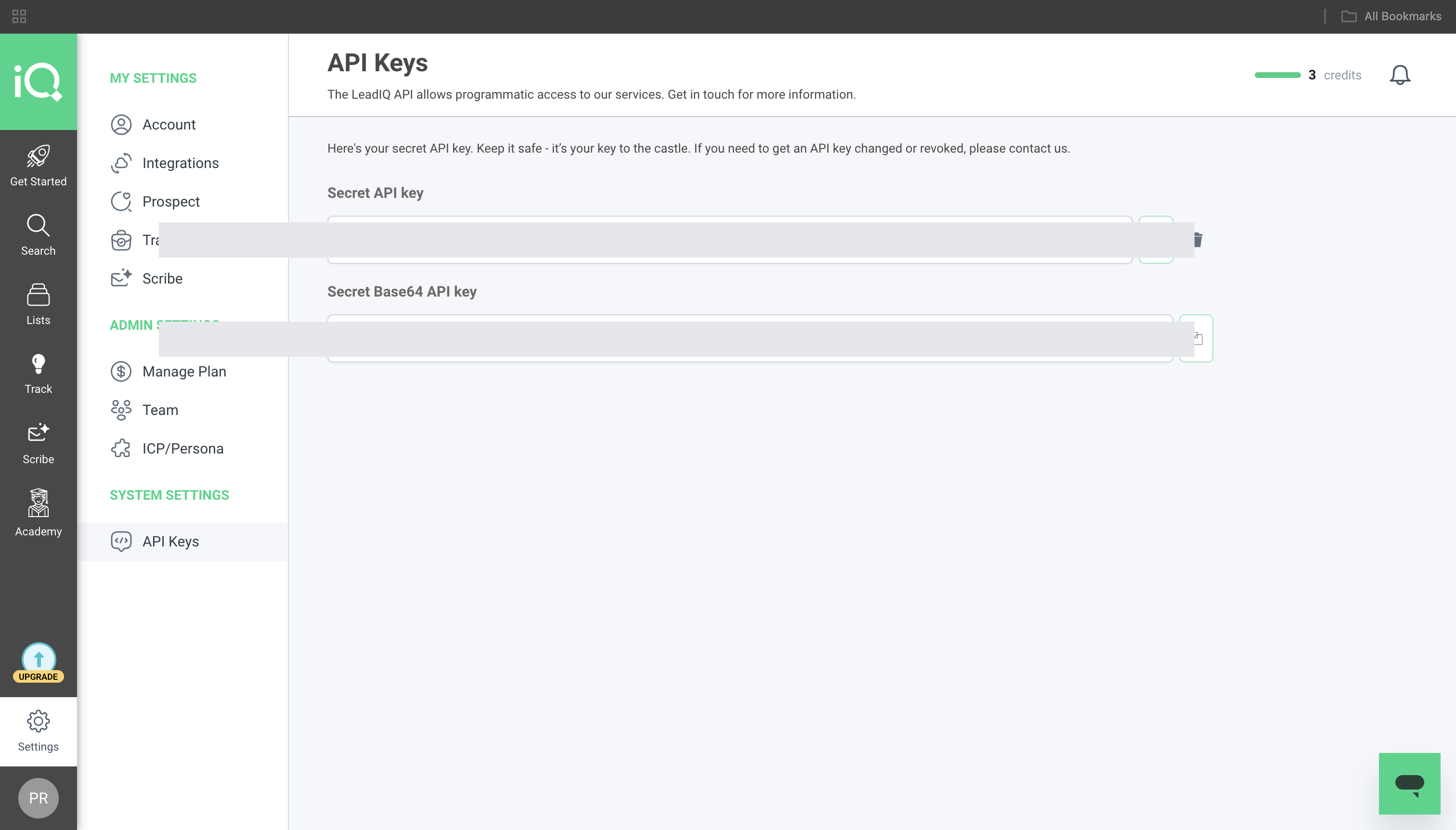
- Sign in to LeadIQ and go to Settings → API Keys.
- Copy the Secret API key value, or click Generate new API key to create one dedicated to this integration.
-
Create a connection in Scalekit
- In Scalekit dashboard, go to AgentKit → Connections → Create Connection. Find LeadIQ and click Create.
- Note the Connection name — you will use this as
connection_namein your code (e.g.,leadiq). - Click Save.
-
Add a connected account
Connected accounts link a specific user identifier in your system to their LeadIQ API key. Add one in the dashboard to test. In production, each user adds their own through the authorization link: they enter their credentials on the page it opens.
In the dashboard, to test
- Open the connection you created and click the Connected Accounts tab → Add account.
- Fill in:
- Your User’s ID — a unique identifier for this user in your system (e.g.,
user_123) - API Key — the LeadIQ API key from step 1
- Your User’s ID — a unique identifier for this user in your system (e.g.,
- Click Create Account.
From your backend, if your app already has the credentials
For example, when users enter them on a settings page in your app:
import { Scalekit, ConnectorStatus } from '@scalekit-sdk/node';const scalekit = new Scalekit(process.env.SCALEKIT_ENVIRONMENT_URL,process.env.SCALEKIT_CLIENT_ID,process.env.SCALEKIT_CLIENT_SECRET,);// Never hard-code credentials — read from secure storage or user inputconst leadiqApiKey = getUserLeadIQApiKey(); // retrieve from your secure storeconst authorizationDetails = {details: {case: 'staticAuth',value: {details: {username: leadiqApiKey,},},},};let { connectedAccount } = await scalekit.actions.upsertConnectedAccount({connectionName: 'leadiq',identifier: 'user_123',authorizationDetails,});// Make sure the account is ACTIVE before the first tool call.if (connectedAccount?.status !== ConnectorStatus.ACTIVE) {({ connectedAccount } = await scalekit.actions.upsertConnectedAccount({connectionName: 'leadiq',identifier: 'user_123',authorizationDetails,}));}import osfrom scalekit import ScalekitClientscalekit_client = ScalekitClient(env_url=os.environ["SCALEKIT_ENVIRONMENT_URL"],client_id=os.environ["SCALEKIT_CLIENT_ID"],client_secret=os.environ["SCALEKIT_CLIENT_SECRET"],)# Never hard-code credentials — read from secure storage or user inputleadiq_api_key = get_user_leadiq_api_key() # retrieve from your secure storeauthorization_details = {"static_auth": {"username": leadiq_api_key}}response = scalekit_client.actions.upsert_connected_account(connection_name="leadiq",identifier="user_123",authorization_details=authorization_details,)# Make sure the account is ACTIVE before the first tool call.if response.connected_account.status != "ACTIVE":response = scalekit_client.actions.upsert_connected_account(connection_name="leadiq",identifier="user_123",authorization_details=authorization_details,)
-
Tools
Pass the exact name toexecute_toolleadiq_flat_advanced_searchSearch across LeadIQ's full contact database using advanced filters for title, seniority, company, industry, location, and more.Read-onlyAdvanced People Search
Search across LeadIQ's full contact database using advanced filters for title, seniority, company, industry, location, and more. Returns a flat list of matching contacts. Consumes credits per result.
Inputs
company_excluded_filterobject- Exclude contacts at companies matching these criteria
company_filterobject- Filter by company attributes including name, domain, industry, size, and location
contact_excluded_filterobject- Exclude contacts matching these criteria
contact_filterobject- Filter contacts by title, seniority, role, location, and more
limitinteger- Maximum number of contacts to return (default 10)
skipinteger- Number of results to skip for pagination (default 0)
leadiq_get_accountRetrieve the current LeadIQ account details including active plans, product subscriptions, billing status, and credit usage (available and used).Read-onlyGet Account
Retrieve the current LeadIQ account details including active plans, product subscriptions, billing status, and credit usage (available and used). Use this to check remaining search credits before making enrichment calls.
Inputs
This tool takes no inputs.
leadiq_get_companyRetrieve a single company record by its LeadIQ company ID, returning full firmographic details: industry, employee count, headquarters location, funding, and known email domains.Read-onlyGet Company
Retrieve a single company record by its LeadIQ company ID, returning full firmographic details: industry, employee count, headquarters location, funding, and known email domains. Use Search Company, or the company objects embedded in People Search / Advanced Search results, to find a company ID first.
Inputs
idstringrequired- LeadIQ company ID to retrieve
leadiq_get_listRetrieve a specific prospect list by ID, including its contacts with name, title, company, email, and LinkedIn URL.Read-onlyGet Prospect List
Retrieve a specific prospect list by ID, including its contacts with name, title, company, email, and LinkedIn URL. Use Get Prospect Lists first to find the list ID.
Inputs
idstringrequired- ID of the prospect list to retrieve
prospects_cursorstring- Pagination cursor from a previous response to get the next batch of prospects
prospects_limitinteger- Maximum number of prospects to return from the list (default 25)
leadiq_get_listsRetrieve all prospect lists in the LeadIQ account.Read-onlyGet Prospect Lists
Retrieve all prospect lists in the LeadIQ account. Returns list metadata including name, status, and timestamps. Use the returned list IDs with Get Prospect List to fetch contacts.
Inputs
cursorstring- Pagination cursor from a previous response's nextCursor field
limitinteger- Maximum number of lists to return per page
leadiq_get_prospectRetrieve a single prospect record by ID, including full contact details: emails, phones, LinkedIn, title, company, and location.Read-onlyGet Prospect
Retrieve a single prospect record by ID, including full contact details: emails, phones, LinkedIn, title, company, and location.
Inputs
idstringrequired- ID of the prospect to retrieve
leadiq_get_usageRetrieve API credit usage for the current billing period — plan credit counts, usage caps, trial usage, and subscription status.Read-onlyGet Usage
Retrieve API credit usage for the current billing period — plan credit counts, usage caps, trial usage, and subscription status. Use this to monitor quota before making credit-consuming calls.
Inputs
This tool takes no inputs.
leadiq_grouped_advanced_searchSearch LeadIQ's contact database with advanced filters and get results grouped by company.Read-onlyAdvanced Search Grouped by Company
Search LeadIQ's contact database with advanced filters and get results grouped by company. Each result contains a company record with its top matching contacts. Useful for account-based prospecting. Consumes credits per contact returned.
Inputs
company_excluded_filterobject- Exclude companies matching these criteria
company_filterobject- Filter by company name, domain, industry, size, location, and more
contact_excluded_filterobject- Exclude contacts matching these criteria
contact_filterobject- Filter contacts by title, seniority, role, location, and more
limitinteger- Maximum number of companies to return (default 10)
limit_per_companyinteger- Maximum number of contacts to return per company (default 5)
skipinteger- Number of companies to skip for pagination (default 0)
leadiq_search_companySearch for a company by name, domain, or LinkedIn URL.Read-onlySearch Company
Search for a company by name, domain, or LinkedIn URL. Returns firmographic data including employee count, industry, headquarters location, and funding information.
Inputs
domainstring- Company website domain
linkedin_idstring- LinkedIn company numeric ID
linkedin_urlstring- LinkedIn company page URL
namestring- Company name to search for
strictboolean- Enable strict matching — only return exact name or domain matches
leadiq_search_peopleSearch for a person by LinkedIn URL, email, or name + company.Read-onlySearch People
Search for a person by LinkedIn URL, email, or name + company. At least one of: linkedin_url, email, or first_name+last_name must be provided. Returns verified work emails, direct dials, and current job details. Consumes LeadIQ credits per result.
Inputs
company_domainstring- Domain of the person's current company
company_namestring- Current company name of the person
contains_work_contact_infoboolean- Only return results that have at least one work email or work phone
emailstring- Known email address of the person
first_namestring- First name of the person to search for
full_namestring- Full name of the person (alternative to first_name + last_name)
last_namestring- Last name of the person to search for
limitinteger- Maximum number of results to return (default 10, max 25)
linkedin_urlstring- LinkedIn profile URL of the person
skipinteger- Number of results to skip for pagination (default 0)
leadiq_search_people_previewCheck whether LeadIQ has a work email or phone number for a person without consuming credits.Read-onlySearch People Preview
Check whether LeadIQ has a work email or phone number for a person without consuming credits. Use this before calling Search People to avoid wasting credits on contacts with no data.
Inputs
company_domainstring- Domain of the person's current company
company_namestring- Current company name of the person
emailstring- Known email address of the person
first_namestring- First name of the person
full_namestring- Full name of the person
last_namestring- Last name of the person
linkedin_urlstring- LinkedIn profile URL of the person
leadiq_add_prospect_to_listAdd a contact to an existing LeadIQ prospect list.WriteAdd Prospect to List
Add a contact to an existing LeadIQ prospect list. Provide first name, last name, and any known contact details. Use Get Prospect Lists to find the list ID.
Inputs
first_namestringrequired- First name of the prospect
last_namestringrequired- Last name of the prospect
list_idstringrequired- ID of the prospect list to add the contact to
companystring- Current company name of the prospect
company_domainstring- Website domain of the prospect's company
company_industrystring- Industry of the prospect's company
linkedin_urlstring- LinkedIn profile URL of the prospect
mobile_phonestring- Mobile phone number of the prospect
notesstring- Internal notes about this prospect
senioritystring- Seniority level of the prospect
titlestring- Job title of the prospect
work_emailstring- Work email address of the prospect
work_phonestring- Work phone number of the prospect
leadiq_create_listCreate a new prospect list in LeadIQ to organize contacts for outreach campaigns.WriteCreate Prospect List
Create a new prospect list in LeadIQ to organize contacts for outreach campaigns. Returns the created list ID for use with Add Prospect to List.
Inputs
namestringrequired- Name of the prospect list
descriptionstring- Optional description of the prospect list
leadiq_submit_person_feedbackReport incorrect or outdated contact data back to LeadIQ to improve data quality.WriteSubmit Person Feedback
Report incorrect or outdated contact data back to LeadIQ to improve data quality. Mark an email or phone as correct or invalid, and optionally provide a correction or bounce reason.
Inputs
valuestringrequired- The contact info value being reported (email address or phone number)
company_domainstring- Company domain for additional context
company_namestring- Company name for additional context
invalid_reasonstring- Specific bounce or invalidity reason code (for invalid emails)
linkedin_urlstring- LinkedIn URL of the person the feedback is about
person_idstring- LeadIQ person ID associated with the contact info
statusstring- Whether the contact info is correct or invalidone of
CorrectInvalid titlestring- Job title of the person at the time the contact info was used
typestring- Type of contact information being reported
No tools match.
Workflows
Check credit quota before searching
Always check available credits before calling tools that consume them (leadiq_search_people, leadiq_flat_advanced_search, leadiq_grouped_advanced_search).
const usage = await actions.executeTool({ toolName: 'leadiq_get_usage', connector: 'leadiq', identifier: 'user_123', toolInput: {},});console.log(usage.data?.usage);usage = actions.execute_tool( tool_name="leadiq_get_usage", connection_name="leadiq", identifier="user_123", tool_input={},)print(usage.data)Preview contact availability before consuming credits
Use leadiq_search_people_preview to check whether LeadIQ has a work email or phone for a person before calling leadiq_search_people. The preview call does not consume credits.
const preview = await actions.executeTool({  toolName: 'leadiq_search_people_preview',  connector: 'leadiq',  identifier: 'user_123',  toolInput: {    linkedin_url: 'https://www.linkedin.com/in/janedoe',  },});
if (preview.data?.data?.searchPeoplePreview?.hasEmail) {  // Safe to call leadiq_search_people — credits will be consumed}
preview = actions.execute_tool( tool_name="leadiq_search_people_preview", connection_name="leadiq", identifier="user_123", tool_input={"linkedin_url": "https://www.linkedin.com/in/janedoe"},)
result = preview.data.get("data", {}).get("searchPeoplePreview", {})if result.get("hasEmail"): # Safe to call leadiq_search_people — credits will be consumed passLook up a contact by LinkedIn URL, email, or name
// By LinkedIn URL (most precise)const contact = await actions.executeTool({ toolName: 'leadiq_search_people', connector: 'leadiq', identifier: 'user_123', toolInput: { linkedin_url: 'https://www.linkedin.com/in/janedoe', limit: 1, },});
// By name + companyconst byName = await actions.executeTool({ toolName: 'leadiq_search_people', connector: 'leadiq', identifier: 'user_123', toolInput: { first_name: 'Jane', last_name: 'Doe', company_name: 'Acme Corp', limit: 5, },});# By LinkedIn URL (most precise)contact = actions.execute_tool( tool_name="leadiq_search_people", connection_name="leadiq", identifier="user_123", tool_input={ "linkedin_url": "https://www.linkedin.com/in/janedoe", "limit": 1, },)
# By name + companyby_name = actions.execute_tool( tool_name="leadiq_search_people", connection_name="leadiq", identifier="user_123", tool_input={ "first_name": "Jane", "last_name": "Doe", "company_name": "Acme Corp", "limit": 5, },)Enrich a company by domain or name
const company = await actions.executeTool({ toolName: 'leadiq_search_company', connector: 'leadiq', identifier: 'user_123', toolInput: { domain: 'acme.com', },});console.log(company.data?.data?.searchCompany);company = actions.execute_tool( tool_name="leadiq_search_company", connection_name="leadiq", identifier="user_123", tool_input={"domain": "acme.com"},)print(company.data)Advanced people search with industry and seniority filters
Pass filter objects as Python dicts or JavaScript objects — not JSON-encoded strings.
const results = await actions.executeTool({ toolName: 'leadiq_flat_advanced_search', connector: 'leadiq', identifier: 'user_123', toolInput: { company_filter: { industries: ['Software Development'], sizes: [{ min: 50, max: 500 }], }, contact_filter: { seniorities: ['VP', 'Director'], }, limit: 10, },});const people = results.data?.data?.flatAdvancedSearch?.people ?? [];results = actions.execute_tool( tool_name="leadiq_flat_advanced_search", connection_name="leadiq", identifier="user_123", tool_input={ "company_filter": { "industries": ["Software Development"], "sizes": [{"min": 50, "max": 500}], }, "contact_filter": { "seniorities": ["VP", "Director"], }, "limit": 10, },)people = results.data.get("data", {}).get("flatAdvancedSearch", {}).get("people", [])Advanced search grouped by company (account-based prospecting)
Returns results organized by company, each with a list of matching contacts. Useful for account-based outreach.
const grouped = await actions.executeTool({ toolName: 'leadiq_grouped_advanced_search', connector: 'leadiq', identifier: 'user_123', toolInput: { company_filter: { industries: ['Financial Services'], sizes: [{ min: 200, max: 5000 }], }, contact_filter: { seniorities: ['Executive', 'VP'], }, limit: 5, // number of companies limit_per_company: 3, // contacts per company },});const companies = grouped.data?.data?.groupedAdvancedSearch?.companies ?? [];grouped = actions.execute_tool( tool_name="leadiq_grouped_advanced_search", connection_name="leadiq", identifier="user_123", tool_input={ "company_filter": { "industries": ["Financial Services"], "sizes": [{"min": 200, "max": 5000}], }, "contact_filter": { "seniorities": ["Executive", "VP"], }, "limit": 5, # number of companies "limit_per_company": 3, # contacts per company },)companies = ( grouped.data.get("data", {}) .get("groupedAdvancedSearch", {}) .get("companies", []))Report incorrect contact data
Help improve LeadIQ data quality by reporting bounced emails or wrong phone numbers.
await actions.executeTool({ toolName: 'leadiq_submit_person_feedback', connector: 'leadiq', identifier: 'user_123', toolInput: { value: 'jane.doe@acme.com', status: 'Invalid', type: 'WorkEmail', invalid_reason: 'EmailBounceCode550', },});actions.execute_tool( tool_name="leadiq_submit_person_feedback", connection_name="leadiq", identifier="user_123", tool_input={ "value": "jane.doe@acme.com", "status": "Invalid", "type": "WorkEmail", "invalid_reason": "EmailBounceCode550", },)

