
The Close connector lets your AI agent act in each user's Close account. Each user signs in to Close once, and Scalekit stores and refreshes their tokens, so your agent never handles credentials. It comes with 103 tools.
- Tools
- 103
- What they doRead · write · destructive
- 46 · 39 · 1846 read39 write18 destructive
- Users sign in with
- OAuth
- OAuth app
- Scalekit's or your own
What you can do
- Manage leads: create, update, search, merge, and delete leads with their contacts, addresses, and custom fields
- Track opportunities: create and update deals with status, value, and confidence, and manage pipelines
- Log activities: record calls, emails, SMS, and notes on leads, and send emails and SMS
- Manage tasks: create, assign, complete, and bulk-update tasks with due dates
- Run sequences: build scheduled email and call sequences and enroll, pause, or remove contacts
- Save searches and bulk edit: create Smart Views, export matching leads, and bulk edit or delete them
Setup
Install the SDK
Terminal window npm install @scalekit-sdk/node dotenvTerminal window pip install scalekit-sdk-python python-dotenvSet your credentials
Add your Scalekit credentials to your
.envfile. Find values in app.scalekit.com > Developers > API Credentials..env SCALEKIT_ENVIRONMENT_URL=<your-environment-url>SCALEKIT_CLIENT_ID=<your-client-id>SCALEKIT_CLIENT_SECRET=<your-client-secret>Create the Close connection
In AgentKit > Connections, create a Close connection. The name you give it is the
connection_nameyour code passes. See Configure connections.Scalekit credentials are available for Close, so you don't need to register an OAuth app. To show your own app on the consent screen, use your own credentials instead.
Use your own OAuth app
Register your Scalekit environment with the Close connector so Scalekit handles the OAuth flow and token lifecycle for you. The connection name you create will be used to identify and invoke the connection programmatically.
-
Create a Close OAuth app
- Sign in to Close and go to Settings → Developer → OAuth Apps.
- Click Create New OAuth App.
- Enter an app name and description.
- In the Redirect URIs field, paste the redirect URI from Scalekit (see next step — you can come back to add it).
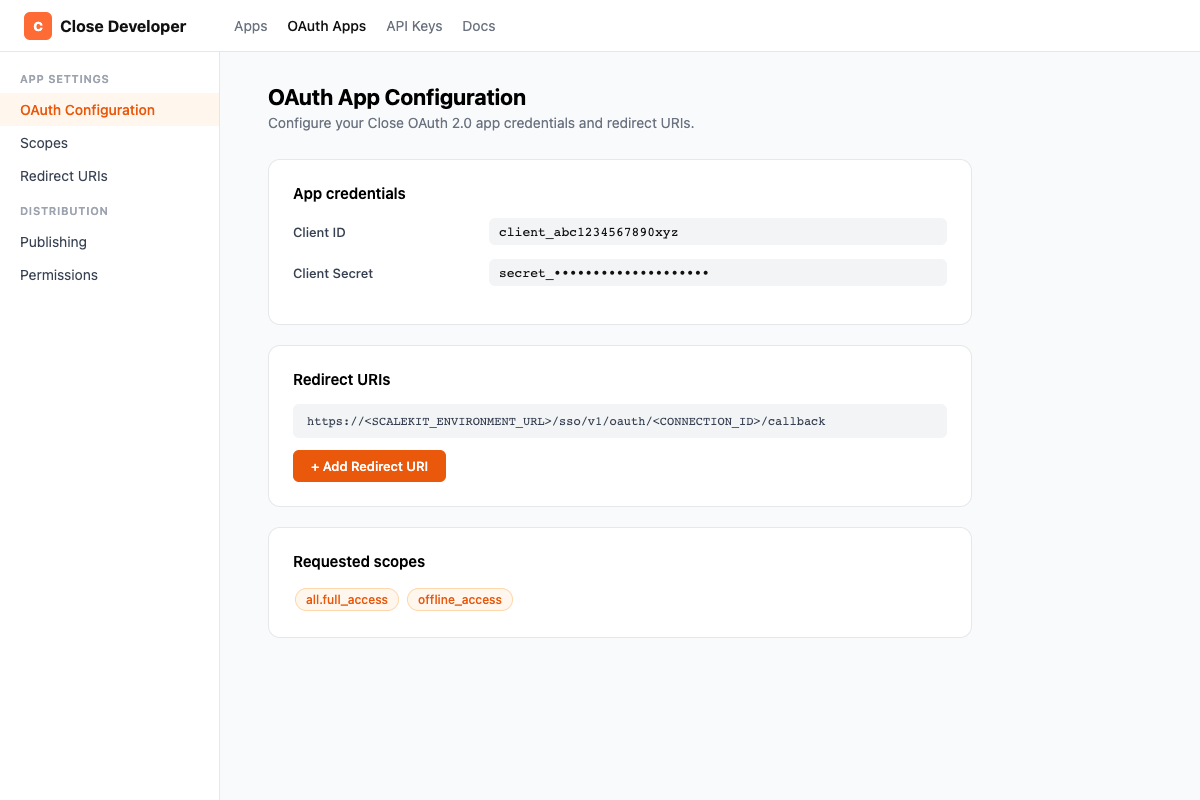
- Copy your Client ID and Client Secret from the app detail page.
-
Set up the connection in Scalekit
- In Scalekit dashboard, go to AgentKit > Connections > Create Connection.
- Find Close and click Create.
- Copy the Redirect URI shown — it looks like:
https://<SCALEKIT_ENVIRONMENT_URL>/sso/v1/oauth/<CONNECTION_ID>/callback - Note the Connection name (e.g.,
close) — use this asconnection_namein your code.
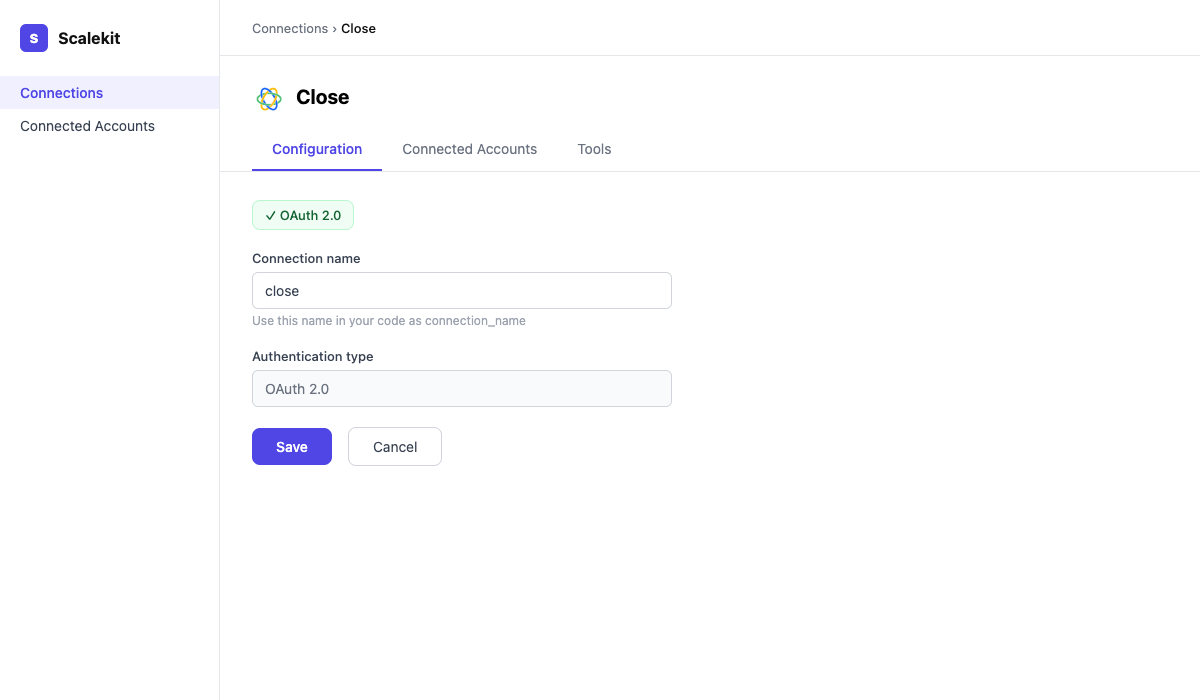
- Return to your Close OAuth app and add the redirect URI you copied.
- Back in Scalekit, enter your Client ID and Client Secret. Scopes are granted automatically by Close — no additional scope configuration is needed.
- Click Save.
-
Add a connected account
Via dashboard (for testing)
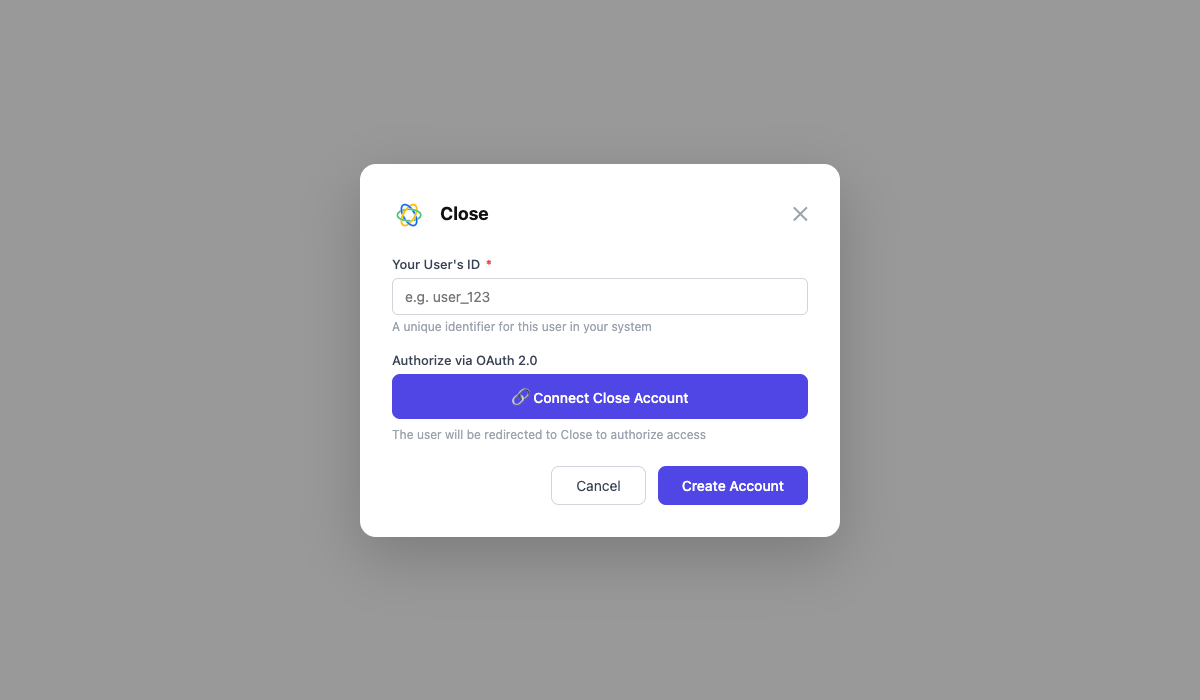
- In the connection page, click the Connected Accounts tab → Add account.
- Enter a User ID and click Save. You will be redirected to Close to authorize access.
Via API (for production)
const { link } = await scalekit.actions.getAuthorizationLink({connectionName: 'close',identifier: 'user_123',});// Redirect your user to `link` to authorize accessconsole.log('Authorize at:', link);response = scalekit_client.actions.get_authorization_link(connection_name="close",identifier="user_123")# Redirect your user to response.link to authorize accessprint("Authorize at:", response.link)
-
Authorize a user and make your first call
quickstart.mts import { ScalekitClient } from '@scalekit-sdk/node'import 'dotenv/config'import { createInterface } from 'node:readline/promises'const scalekit = new ScalekitClient(process.env.SCALEKIT_ENVIRONMENT_URL,process.env.SCALEKIT_CLIENT_ID,process.env.SCALEKIT_CLIENT_SECRET,)const actions = scalekit.actionsconst connector = 'close'const identifier = 'user_123'// Generate an authorization link for the userconst { link } = await actions.getAuthorizationLink({ connectionName: connector, identifier })console.log('Authorize Close:', link)const rl = createInterface({ input: process.stdin, output: process.stdout })await rl.question('Press Enter after authorizing...')rl.close()// Make your first callconst result = await actions.executeTool({connector,identifier,toolName: 'close_activities_list',toolInput: {},})console.log(result)Terminal window npx tsx quickstart.mtsquickstart.py import osfrom scalekit import ScalekitClientfrom dotenv import load_dotenvload_dotenv()scalekit_client = ScalekitClient(env_url=os.getenv("SCALEKIT_ENVIRONMENT_URL"),client_id=os.getenv("SCALEKIT_CLIENT_ID"),client_secret=os.getenv("SCALEKIT_CLIENT_SECRET"),)actions = scalekit_client.actionsconnection_name = "close"identifier = "user_123"# Generate an authorization link for the userlink_response = actions.get_authorization_link(connection_name=connection_name,identifier=identifier,)print("Authorize Close:", link_response.link)input("Press Enter after authorizing...")# Make your first callresult = actions.execute_tool(tool_input={},tool_name="close_activities_list",connection_name=connection_name,identifier=identifier,)print(result)Terminal window python quickstart.pyEach user signs in once. See Authorize a user for the full flow and statuses.
Tools
Pass the exact name toexecute_toolclose_activities_listList all activity types for a lead in Close (calls, emails, notes, SMS, etc.).Read-onlyList Activities
List all activity types for a lead in Close (calls, emails, notes, SMS, etc.).
Inputs
_fieldsstring- Comma-separated list of fields to return.
_limitinteger- Maximum number of results to return.
_order_bystring- Sort field. Default: date_created.
_skipinteger- Number of results to skip (offset).
_typestring- Activity type: Note, Call, Email, Sms, etc.
contact_idstring- Filter by contact ID.
lead_idstring- Filter by lead ID.
user_idstring- Filter by user ID.
close_call_getRetrieve a single call activity by ID.Read-onlyGet Call
Retrieve a single call activity by ID.
Inputs
call_idstringrequired- ID of the call activity.
close_calls_listList call activities in Close, optionally filtered by lead, contact, or user.Read-onlyList Calls
List call activities in Close, optionally filtered by lead, contact, or user.
Inputs
_fieldsstring- Comma-separated list of fields to return.
_limitinteger- Maximum number of results to return.
_skipinteger- Number of results to skip (offset).
contact_idstring- Filter by contact ID.
lead_idstring- Filter by lead ID.
user_idstring- Filter by user ID.
close_comment_getRetrieve a single comment by ID.Read-onlyGet Comment
Retrieve a single comment by ID.
Inputs
comment_idstringrequired- ID of the comment.
close_comment_threads_listList comment threads in Close, optionally filtered by thread ID or the object the thread is attached to.Read-onlyList Comment Threads
List comment threads in Close, optionally filtered by thread ID or the object the thread is attached to.
Inputs
_limitinteger- Maximum number of results to return. Defaults to 100.
_skipinteger- Number of results to skip (offset). Defaults to 0.
idsstring- Only return threads with these IDs (comma-separated).
object_idsstring- Only return threads attached to these object IDs (comma-separated), e.g. activity or note IDs.
close_comments_listList comments on an object.Read-onlyList Comments
List comments on an object. Provide either object_id or thread_id to filter results.
Inputs
_fieldsstring- Comma-separated list of fields to return.
_limitinteger- Maximum number of results to return.
_skipinteger- Number of results to skip (offset).
object_idstring- ID of the object to fetch comments for.
thread_idstring- ID of the comment thread.
close_contact_getRetrieve a single contact by ID from Close.Read-onlyGet Contact
Retrieve a single contact by ID from Close.
Inputs
contact_idstringrequired- ID of the contact.
_fieldsstring- Comma-separated list of fields to return.
close_contacts_listList contacts in Close, optionally filtered by lead.Read-onlyList Contacts
List contacts in Close, optionally filtered by lead.
Inputs
_fieldsstring- Comma-separated list of fields to return.
_limitinteger- Maximum number of results to return.
_skipinteger- Number of results to skip (offset).
lead_idstring- Filter contacts by lead ID.
close_custom_activities_listList or filter Custom Activity instances (user-defined activity types) in Close.Read-onlyList Custom Activities
List or filter Custom Activity instances (user-defined activity types) in Close.
Inputs
_fieldsstring- Comma-separated list of fields to return.
_limitinteger- Maximum number of results to return.
_skipinteger- Number of results to skip (offset).
contact_idstring- Filter by contact ID.
custom_activity_type_idstring- Filter by Custom Activity Type ID.
date_created__gtestring- Only include activities created on or after this date/time (ISO 8601).
date_created__ltestring- Only include activities created on or before this date/time (ISO 8601).
lead_idstring- Filter by lead ID.
user_idstring- Filter by the user who created the activity.
close_custom_field_contact_getRetrieve a single contact custom field by ID.Read-onlyGet Contact Custom Field
Retrieve a single contact custom field by ID.
Inputs
custom_field_idstringrequired- ID of the custom field.
close_custom_field_lead_getRetrieve a single lead custom field by ID.Read-onlyGet Lead Custom Field
Retrieve a single lead custom field by ID.
Inputs
custom_field_idstringrequired- ID of the custom field.
close_custom_field_opportunity_getRetrieve a single opportunity custom field by ID.Read-onlyGet Opportunity Custom Field
Retrieve a single opportunity custom field by ID.
Inputs
custom_field_idstringrequired- ID of the custom field.
close_custom_fields_contact_listList all custom fields defined for contacts in Close.Read-onlyList Contact Custom Fields
List all custom fields defined for contacts in Close.
Inputs
_fieldsstring- Comma-separated list of fields to return.
_limitinteger- Maximum number of results to return.
_skipinteger- Number of results to skip (offset).
close_custom_fields_lead_listList all custom fields defined for leads in Close.Read-onlyList Lead Custom Fields
List all custom fields defined for leads in Close.
Inputs
_fieldsstring- Comma-separated list of fields to return.
_limitinteger- Maximum number of results to return.
_skipinteger- Number of results to skip (offset).
close_custom_fields_opportunity_listList all custom fields defined for opportunitys in Close.Read-onlyList Opportunity Custom Fields
List all custom fields defined for opportunitys in Close.
Inputs
_fieldsstring- Comma-separated list of fields to return.
_limitinteger- Maximum number of results to return.
_skipinteger- Number of results to skip (offset).
close_custom_object_types_listList the Custom Object Types (schemas) defined for the organization in Close.Read-onlyList Custom Object Types
List the Custom Object Types (schemas) defined for the organization in Close.
Inputs
_fieldsstring- Comma-separated list of fields to return.
_limitinteger- Maximum number of results to return.
_skipinteger- Number of results to skip (offset).
close_custom_objects_listList Custom Object instances attached to a lead in Close.Read-onlyList Custom Objects
List Custom Object instances attached to a lead in Close.
Inputs
lead_idstringrequired- ID of the lead whose Custom Object instances to list.
_fieldsstring- Comma-separated list of fields to return.
_limitinteger- Maximum number of results to return.
_skipinteger- Number of results to skip (offset).
custom_object_type_idstring- Filter by Custom Object Type ID.
close_email_getRetrieve a single email activity by ID.Read-onlyGet Email
Retrieve a single email activity by ID.
Inputs
email_idstringrequired- ID of the email activity.
close_emails_listList email activities in Close, optionally filtered by lead or user.Read-onlyList Emails
List email activities in Close, optionally filtered by lead or user.
Inputs
_fieldsstring- Comma-separated list of fields to return.
_limitinteger- Maximum number of results to return.
_skipinteger- Number of results to skip (offset).
contact_idstring- Filter by contact ID.
lead_idstring- Filter by lead ID.
user_idstring- Filter by user ID.
close_events_listList the organization's event log in Close (create/update/delete actions across objects), available up to 30 days back.Read-onlyList Events
List the organization's event log in Close (create/update/delete actions across objects), available up to 30 days back.
Inputs
_limitinteger- Maximum number of results to return. Defaults to 100.
_skipinteger- Number of results to skip (offset). Defaults to 0.
actionstring- Filter by event action, e.g. created, updated, deleted.
date_updated__gtestring- Only include events at or after this date/time (ISO 8601).
date_updated__ltestring- Only include events at or before this date/time (ISO 8601).
lead_idstring- Events for the given lead, including any of its related objects.
object_idstring- Filter by a specific object's ID.
object_typestring- Filter by object type, e.g. lead, contact, opportunity.
user_idstring- Only return events performed by this user.
close_lead_getRetrieve a single lead by ID from Close.Read-onlyGet Lead
Retrieve a single lead by ID from Close.
Inputs
lead_idstringrequired- ID of the lead to retrieve.
_fieldsstring- Comma-separated list of fields to return.
close_lead_statuses_listList the lead statuses configured for the organization in Close.Read-onlyList Lead Statuses
List the lead statuses configured for the organization in Close.
Inputs
This tool takes no inputs.
close_leads_listList and search leads in Close.Read-onlyList Leads
List and search leads in Close. Supports full-text search and sorting.
Inputs
_fieldsstring- Comma-separated list of fields to return.
_limitinteger- Maximum number of results to return.
_order_bystring- Field to sort by. Prefix with - for descending.
_skipinteger- Number of results to skip (offset).
querystring- Full-text search query to filter leads.
close_me_getRetrieve information about the authenticated Close user.Read-onlyGet Current User
Retrieve information about the authenticated Close user.
Inputs
This tool takes no inputs.
close_note_getRetrieve a single note activity by ID.Read-onlyGet Note
Retrieve a single note activity by ID.
Inputs
note_idstringrequired- ID of the note activity.
close_notes_listList note activities in Close, optionally filtered by lead or user.Read-onlyList Notes
List note activities in Close, optionally filtered by lead or user.
Inputs
_fieldsstring- Comma-separated list of fields to return.
_limitinteger- Maximum number of results to return.
_skipinteger- Number of results to skip (offset).
contact_idstring- Filter by contact ID.
lead_idstring- Filter by lead ID.
user_idstring- Filter by user ID.
close_opportunities_listList opportunities in Close, with optional filters by lead, user, or status.Read-onlyList Opportunities
List opportunities in Close, with optional filters by lead, user, or status.
Inputs
_fieldsstring- Comma-separated list of fields to return.
_limitinteger- Maximum number of results to return.
_order_bystring- Field to sort by. Prefix with - for descending.
_skipinteger- Number of results to skip (offset).
lead_idstring- Filter by lead ID.
status_idstring- Filter by opportunity status ID.
status_typestring- Filter by status type: active, won, or lost.
user_idstring- Filter by assigned user ID.
close_opportunity_getRetrieve a single opportunity by ID from Close.Read-onlyGet Opportunity
Retrieve a single opportunity by ID from Close.
Inputs
opportunity_idstringrequired- ID of the opportunity.
_fieldsstring- Comma-separated list of fields to return.
close_opportunity_statuses_listList the opportunity statuses (stages) configured for the organization in Close, across all pipelines.Read-onlyList Opportunity Statuses
List the opportunity statuses (stages) configured for the organization in Close, across all pipelines.
Inputs
_fieldsstring- Comma-separated list of fields to return.
close_pipeline_getRetrieve a single pipeline by ID.Read-onlyGet Pipeline
Retrieve a single pipeline by ID.
Inputs
pipeline_idstringrequired- ID of the pipeline.
close_pipelines_listList all opportunity pipelines in the Close organization.Read-onlyList Pipelines
List all opportunity pipelines in the Close organization.
Inputs
_fieldsstring- Comma-separated list of fields to return.
_limitinteger- Maximum number of results to return.
_skipinteger- Number of results to skip (offset).
close_report_activity_getGet an aggregated activity report (calls, emails, etc.Read-onlyGet Activity Report
Get an aggregated activity report (calls, emails, etc. sent/received per user or time period) from Close's Reporting API. Provide either datetime_range or relative_range for the time window.
Inputs
metricsarrayrequired- List of metric keys to retrieve, e.g. calls.outbound.all.count, emails.sent.all.count.
typestringrequired- Report type.one of
overviewcomparison datetime_rangeobject- Explicit time range as an object with ISO 8601 'start' and 'end'. Use this or relative_range, not both.
queryobject- Optional filter restricting the report to a saved search, e.g. {"type": "saved_search", "saved_search_id": "save_abc123"}.
relative_rangestring- Relative time period. One of: today, yesterday, this-week, last-week, this-month, last-month, this-quarter, last-quarter, this-year, last-year, all-time. Use this or datetime_range, not both.one of
todayyesterdaythis-weeklast-weekthis-monthlast-monththis-quarterlast-quarterthis-yearlast-yearall-time usersarray- Restrict the report to these user IDs.
close_sequence_getRetrieve a single sequence by ID.Read-onlyGet Sequence
Retrieve a single sequence by ID.
Inputs
sequence_idstringrequired- ID of the sequence.
close_sequence_subscription_getRetrieve a single sequence subscription by ID.Read-onlyGet Sequence Subscription
Retrieve a single sequence subscription by ID.
Inputs
subscription_idstringrequired- ID of the subscription.
close_sequence_subscriptions_listList sequence subscriptions.Read-onlyList Sequence Subscriptions
List sequence subscriptions. Provide one of lead_id, contact_id, or sequence_id to filter results.
Inputs
_fieldsstring- Comma-separated list of fields to return.
_limitinteger- Maximum number of results to return.
_skipinteger- Number of results to skip (offset).
contact_idstring- Filter by contact ID.
lead_idstring- Filter by lead ID.
sequence_idstring- Filter by sequence ID.
close_sequences_listList email/activity sequences in Close.Read-onlyList Sequences
List email/activity sequences in Close.
Inputs
_fieldsstring- Comma-separated list of fields to return.
_limitinteger- Maximum number of results to return.
_skipinteger- Number of results to skip (offset).
close_smart_view_getRetrieve a single Smart View (saved search) by ID from Close, including its stored query definition and sharing settings.Read-onlyGet Smart View
Retrieve a single Smart View (saved search) by ID from Close, including its stored query definition and sharing settings.
Inputs
smart_view_idstringrequired- ID of the Smart View to retrieve.
close_smart_views_listList Smart Views (saved searches) in Close.Read-onlyList Smart Views
List Smart Views (saved searches) in Close. Smart Views are reusable, optionally-shared search filters over leads, contacts, opportunities, or activities. Filter by object type and paginate with limit/skip.
Inputs
_limitinteger- Maximum number of results to return.
_skipinteger- Number of results to skip (offset).
typestring- Filter Smart Views by the object type they search over.one of
leadcontactopportunitycallemailsmsmeetingnotewhatsapp_messagecustom_activityform_submission
close_sms_getRetrieve a single SMS activity by ID.Read-onlyGet SMS
Retrieve a single SMS activity by ID.
Inputs
sms_idstringrequired- ID of the SMS activity.
close_sms_listList SMS activities in Close, optionally filtered by lead or user.Read-onlyList SMS
List SMS activities in Close, optionally filtered by lead or user.
Inputs
_fieldsstring- Comma-separated list of fields to return.
_limitinteger- Maximum number of results to return.
_skipinteger- Number of results to skip (offset).
contact_idstring- Filter by contact ID.
lead_idstring- Filter by lead ID.
user_idstring- Filter by user ID.
close_task_getRetrieve a single task by ID from Close.Read-onlyGet Task
Retrieve a single task by ID from Close.
Inputs
task_idstringrequired- ID of the task.
_fieldsstring- Comma-separated list of fields to return.
close_tasks_listList tasks in Close.Read-onlyList Tasks
List tasks in Close. Filter by lead, assigned user, type, or completion status.
Inputs
_fieldsstring- Comma-separated list of fields to return.
_limitinteger- Maximum number of results to return.
_order_bystring- Sort field. Prefix with - for descending.
_skipinteger- Number of results to skip (offset).
_typestring- Task type: lead, incoming_email, email, automated_email, outgoing_call.
assigned_tostring- Filter by assigned user ID.
is_completeboolean- Filter by completion: true or false.
lead_idstring- Filter by lead ID.
viewstring- Predefined view: inbox, future, or archive.
close_user_getRetrieve a single user by ID from Close.Read-onlyGet User
Retrieve a single user by ID from Close.
Inputs
user_idstringrequired- ID of the user.
_fieldsstring- Comma-separated list of fields to return.
close_users_listList all users in the Close organization.Read-onlyList Users
List all users in the Close organization.
Inputs
_fieldsstring- Comma-separated list of fields to return.
_limitinteger- Maximum number of results to return.
_skipinteger- Number of results to skip (offset).
close_webhook_getRetrieve a single webhook subscription by ID.Read-onlyGet Webhook
Retrieve a single webhook subscription by ID.
Inputs
webhook_idstringrequired- ID of the webhook.
close_webhooks_listList all webhook subscriptions in Close.Read-onlyList Webhooks
List all webhook subscriptions in Close.
Inputs
_fieldsstring- Comma-separated list of fields to return.
_limitinteger- Maximum number of results to return.
_skipinteger- Number of results to skip (offset).
close_bulk_edit_createInitiate a bulk edit action across all leads matching a search query.WriteBulk Edit Leads
Initiate a bulk edit action across all leads matching a search query. The 'type' field selects the edit (e.g. set_lead_status, set_custom_field, clear_custom_field); depending on 'type', lead_status_id or custom_field_id/custom_field_value become required. See Close's Bulk Actions documentation for the full type-to-field mapping.
Inputs
s_queryobjectrequired- Structured search-query object selecting which leads to edit, e.g. {"type": "and", "queries": [{"type": "object_type", "object_type": "lead"}]}.
typestringrequired- Bulk edit action to perform.
custom_field_idstring- ID of the custom field to set or clear. Required when type is set_custom_field or clear_custom_field.
custom_field_operationstring- How to apply custom_field_value: replace the existing value, add to it, or remove it. Defaults to replace.one of
replaceaddremove custom_field_valuestring- New value for the custom field, as a string. Required when type is set_custom_field.
lead_status_idstring- ID of the lead status to apply. Required when type is set_lead_status.
results_limitinteger- Maximum number of matching leads to edit.
send_done_emailboolean- Whether to send a confirmation email when the bulk edit completes. Defaults to true.
sortarray- Sort order applied to matching leads before the results_limit cutoff is applied.
close_call_createLog an external call activity on a lead in Close.WriteCreate Call
Log an external call activity on a lead in Close.
Inputs
lead_idstringrequired- ID of the lead for this call.
statusstringrequired- Call outcome: completed, no_answer, wrong_number, left_voicemail, etc.
contact_idstring- ID of the contact called.
directionstring- Call direction: inbound or outbound.
durationinteger- Call duration in seconds.
notestring- Notes about the call.
phonestring- Phone number called.
recording_urlstring- HTTPS URL of the call recording.
close_call_updateUpdate a call activity's note, status, or duration.WriteUpdate Call
Update a call activity's note, status, or duration.
- Idempotent
Inputs
call_idstringrequired- ID of the call to update.
durationinteger- Updated call duration in seconds.
notestring- Updated call notes.
statusstring- Updated call status.
close_comment_createPost a comment on a Close object (lead, opportunity, etc.).WriteCreate Comment
Post a comment on a Close object (lead, opportunity, etc.).
Inputs
bodystringrequired- Comment text body.
object_idstringrequired- ID of the object to comment on.
close_comment_updateUpdate the text of an existing comment.WriteUpdate Comment
Update the text of an existing comment.
- Idempotent
Inputs
commentstringrequired- Updated comment text.
comment_idstringrequired- ID of the comment to update.
close_contact_createCreate a new contact in Close and associate it with a lead.WriteCreate Contact
Create a new contact in Close and associate it with a lead.
Inputs
lead_idstringrequired- ID of the lead to associate this contact with.
emailsstring- JSON array of email objects, e.g. [{"email": "jane@acme.com", "type": "office"}].
namestring- Full name of the contact.
phonesstring- JSON array of phone objects, e.g. [{"phone": "+1234567890", "type": "office"}].
titlestring- Job title of the contact.
close_contact_updateUpdate a contact's name, title, phone numbers, or email addresses.WriteUpdate Contact
Update a contact's name, title, phone numbers, or email addresses.
- Idempotent
Inputs
contact_idstringrequired- ID of the contact to update.
emailsstring- JSON array of email objects.
namestring- New full name.
phonesstring- JSON array of phone objects.
titlestring- New job title.
close_custom_field_contact_createCreate a new custom field for contacts in Close.WriteCreate Contact Custom Field
Create a new custom field for contacts in Close.
Inputs
namestringrequired- Name of the custom field.
typestringrequired- Field type: text, number, date, url, choices, etc.
close_custom_field_contact_updateUpdate a contact custom field's name or choices.WriteUpdate Contact Custom Field
Update a contact custom field's name or choices.
- Idempotent
Inputs
custom_field_idstringrequired- ID of the custom field to update.
namestring- New name for the custom field.
close_custom_field_lead_createCreate a new custom field for leads in Close.WriteCreate Lead Custom Field
Create a new custom field for leads in Close.
Inputs
namestringrequired- Name of the custom field.
typestringrequired- Field type: text, number, date, url, choices, etc.
close_custom_field_lead_updateUpdate a lead custom field's name or choices.WriteUpdate Lead Custom Field
Update a lead custom field's name or choices.
- Idempotent
Inputs
custom_field_idstringrequired- ID of the custom field to update.
namestring- New name for the custom field.
close_custom_field_opportunity_createCreate a new custom field for opportunitys in Close.WriteCreate Opportunity Custom Field
Create a new custom field for opportunitys in Close.
Inputs
namestringrequired- Name of the custom field.
typestringrequired- Field type: text, number, date, url, choices, etc.
close_custom_field_opportunity_updateUpdate a opportunity custom field's name or choices.WriteUpdate Opportunity Custom Field
Update a opportunity custom field's name or choices.
- Idempotent
Inputs
custom_field_idstringrequired- ID of the custom field to update.
namestring- New name for the custom field.
close_email_createLog or send an email activity on a lead in Close.WriteCreate Email
Log or send an email activity on a lead in Close.
Inputs
lead_idstringrequired- ID of the lead for this email.
statusstringrequired- Email status: inbox, draft, scheduled, outbox, sent.
body_htmlstring- HTML email body.
body_textstring- Plain text email body.
contact_idstring- ID of the contact this email is for.
senderstring- Sender email address.
subjectstring- Email subject line.
tostring- JSON array of recipient emails, e.g. [{"email": "jane@acme.com"}].
close_email_updateUpdate an email activity's status, subject, or body.WriteUpdate Email
Update an email activity's status, subject, or body.
- Idempotent
Inputs
email_idstringrequired- ID of the email to update.
body_htmlstring- New HTML body.
body_textstring- New plain text body.
statusstring- New email status: draft, scheduled, outbox, sent.
subjectstring- New subject line.
close_export_lead_createKick off an asynchronous export of leads matching a search query, delivered as a downloadable CSV or JSON file.WriteExport Leads
Kick off an asynchronous export of leads matching a search query, delivered as a downloadable CSV or JSON file. Poll the returned export's status via a get-export call until status is 'done'.
Inputs
formatstringrequired- File format for the export.one of
csvjson date_formatstring- How dates are formatted in the export. Defaults to original.one of
originaliso8601excel fieldsarray- Specific fields to include in the export. Omit to include the default field set.
include_activitiesboolean- Whether to include activity data in the export (JSON format only).
include_smart_fieldsboolean- Whether to include calculated (smart) fields in the export.
results_limitinteger- Maximum number of matching leads to export.
s_queryobject- Structured search-query object narrowing which leads are exported, e.g. {"type": "and", "queries": [{"type": "object_type", "object_type": "lead"}]}. Omit to export all leads.
send_done_emailboolean- Whether to send a confirmation email with the download link when the export completes. Defaults to true.
sortarray- Sort order applied to matching leads before the results_limit cutoff is applied.
close_field_enrichment_createUse Close's AI field enrichment to populate a custom field on a lead or contact.WriteEnrich Field
Use Close's AI field enrichment to populate a custom field on a lead or contact. By default the enriched value is written back onto the record (set_new_value defaults to true).
Inputs
field_idstringrequired- ID of the custom field to enrich.
object_idstringrequired- ID of the lead or contact to enrich.
object_typestringrequired- Type of the object being enriched.one of
leadcontact organization_idstringrequired- ID of the Close organization the object belongs to.
overwrite_existing_valueboolean- Whether to overwrite the field if it already has a value. Defaults to false.
set_new_valueboolean- Whether to write the enriched value back onto the field. Defaults to true.
close_lead_createCreate a new lead in Close with name, contacts, addresses, and custom fields.WriteCreate Lead
Create a new lead in Close with name, contacts, addresses, and custom fields.
Inputs
namestringrequired- Name of the lead / company.
descriptionstring- Description or notes about the lead.
status_idstring- Lead status ID.
urlstring- Website URL of the lead.
close_lead_mergeMerge two leads into one.WriteMerge Leads
Merge two leads into one. The source lead is merged into the destination lead.
Inputs
destinationstringrequired- ID of the lead to merge into (will be kept).
sourcestringrequired- ID of the lead to merge from (will be deleted).
close_lead_updateUpdate an existing lead's name, status, description, or custom fields.WriteUpdate Lead
Update an existing lead's name, status, description, or custom fields.
- Idempotent
Inputs
lead_idstringrequired- ID of the lead to update.
descriptionstring- Updated description.
namestring- New name for the lead.
status_idstring- New lead status ID.
urlstring- New website URL.
close_note_createCreate a note activity on a lead in Close.WriteCreate Note
Create a note activity on a lead in Close.
Inputs
lead_idstringrequired- ID of the lead to attach this note to.
notestringrequired- Note body text (plain text).
contact_idstring- ID of the contact this note relates to.
close_note_updateUpdate the body text of a note activity.WriteUpdate Note
Update the body text of a note activity.
- Idempotent
Inputs
notestringrequired- Updated note body text.
note_idstringrequired- ID of the note to update.
close_opportunity_createCreate a new opportunity (deal) in Close and associate it with a lead.WriteCreate Opportunity
Create a new opportunity (deal) in Close and associate it with a lead.
Inputs
lead_idstringrequired- ID of the lead for this opportunity.
status_idstringrequired- ID of the opportunity status.
confidenceinteger- Win probability percentage (0-100).
date_wonstring- Date won (YYYY-MM-DD), set when status is won.
expected_datestring- Expected close date (YYYY-MM-DD).
notestring- Note about this opportunity.
valueinteger- Monetary value of the opportunity in cents.
value_currencystring- Currency code, e.g. USD.
value_periodstring- Billing period: one_time, monthly, or annual.
close_opportunity_updateUpdate an opportunity's status, value, note, or confidence.WriteUpdate Opportunity
Update an opportunity's status, value, note, or confidence.
- Idempotent
Inputs
opportunity_idstringrequired- ID of the opportunity to update.
confidenceinteger- Win probability (0-100).
date_wonstring- Date won (YYYY-MM-DD).
expected_datestring- Expected close date (YYYY-MM-DD).
notestring- Updated note.
status_idstring- New status ID.
valueinteger- Updated monetary value in cents.
value_currencystring- Currency code, e.g. USD.
value_periodstring- Billing period: one_time, monthly, or annual.
close_pipeline_createCreate a new opportunity pipeline in Close.WriteCreate Pipeline
Create a new opportunity pipeline in Close.
Inputs
namestringrequired- Name of the pipeline.
close_pipeline_updateUpdate an existing pipeline's name or statuses.WriteUpdate Pipeline
Update an existing pipeline's name or statuses.
- Idempotent
Inputs
pipeline_idstringrequired- ID of the pipeline to update.
namestring- New pipeline name.
close_sequence_createCreate a new sequence (a series of automated call/email steps sent on a schedule) in Close.WriteCreate Sequence
Create a new sequence (a series of automated call/email steps sent on a schedule) in Close.
Inputs
namestringrequired- Name of the sequence.
scheduleobject- Sending schedule as an object with a 'ranges' array of {weekday, start, end} time windows (weekday: 1=Monday .. 7=Sunday, start/end as HH:MM).
stepsarray- Initial list of sequence steps. Each step is an object with step_type (call or email), delay (seconds after the previous step), and for email steps an email_template_id.
timezonestring- IANA timezone the schedule ranges are evaluated in.
close_sequence_subscription_createEnroll a contact in a Close sequence.WriteSubscribe Contact to Sequence
Enroll a contact in a Close sequence.
Inputs
contact_idstringrequired- ID of the contact to enroll.
sequence_idstringrequired- ID of the sequence to enroll in.
sender_account_idstring- ID of the sender email account.
close_sequence_subscription_updatePause or resume a contact's sequence subscription.WriteUpdate Sequence Subscription
Pause or resume a contact's sequence subscription.
- Idempotent
Inputs
subscription_idstringrequired- ID of the subscription to update.
pauseboolean- Set to true to pause the subscription, false to resume.
close_sequence_updateUpdate a sequence's name or steps.WriteUpdate Sequence
Update a sequence's name or steps. Warning: if 'steps' is included, any existing step not present in the list is removed from the sequence entirely.
- Idempotent
Inputs
sequence_idstringrequired- ID of the sequence to update.
namestring- New name for the sequence.
stepsarray- Full replacement list of steps to keep on the sequence, each referencing an existing step by id (e.g. [{"id": "seqstep_abc123"}]). Any existing step omitted from this list is removed from the sequence.
close_smart_view_createCreate a new Smart View (saved search) in Close.WriteCreate Smart View
Create a new Smart View (saved search) in Close. Provide the object type to search over and an s_query search-query object describing the filter conditions. Set is_shared to true to make it visible to the whole organization instead of just the creator.
Inputs
namestringrequired- Display name of the Smart View.
s_queryobjectrequired- Structured search-query object defining the filter conditions, e.g. {"query": {"type": "and", "queries": [{"type": "object_type", "object_type": "lead"}]}}.
descriptionstring- Optional description of what this Smart View filters for.
is_sharedboolean- Whether this Smart View is shared with the whole organization. Defaults to false (private to the creator).
typestring- Object type this Smart View searches over. Defaults to lead.one of
leadcontactopportunitycallemailsmsmeetingnotewhatsapp_messagecustom_activityform_submission
close_smart_view_updateUpdate an existing Smart View's name, description, sharing setting, or search-query definition in Close.WriteUpdate Smart View
Update an existing Smart View's name, description, sharing setting, or search-query definition in Close.
- Idempotent
Inputs
smart_view_idstringrequired- ID of the Smart View to update.
descriptionstring- Updated description of what this Smart View filters for.
is_sharedboolean- Whether this Smart View is shared with the whole organization.
namestring- Updated display name of the Smart View.
s_queryobject- Updated structured search-query object defining the filter conditions.
close_sms_createLog or send an SMS activity on a lead in Close.WriteCreate SMS
Log or send an SMS activity on a lead in Close.
Inputs
lead_idstringrequired- ID of the lead for this SMS.
statusstringrequired- SMS status: inbox, draft, scheduled, outbox, sent.
contact_idstring- ID of the contact for this SMS.
local_phonestring- Your local phone number to send from.
remote_phonestring- Recipient phone number.
textstring- Body text of the SMS message.
close_sms_updateUpdate an SMS activity's text or status.WriteUpdate SMS
Update an SMS activity's text or status.
- Idempotent
Inputs
sms_idstringrequired- ID of the SMS to update.
statusstring- New SMS status.
textstring- Updated message text.
close_task_createCreate a new task in Close and assign it to a lead and user.WriteCreate Task
Create a new task in Close and assign it to a lead and user.
Inputs
lead_idstringrequired- ID of the lead to associate this task with.
_typestring- Task type, default is lead.
assigned_tostring- User ID to assign the task to.
datestring- Task due date (YYYY-MM-DD or ISO 8601).
is_completeboolean- Whether the task is already complete.
textstring- Task description / title.
close_task_updateUpdate a task's text, assigned user, due date, or completion status.WriteUpdate Task
Update a task's text, assigned user, due date, or completion status.
- Idempotent
Inputs
task_idstringrequired- ID of the task to update.
assigned_tostring- New assigned user ID.
datestring- New due date (YYYY-MM-DD).
is_completeboolean- Mark task as complete or incomplete.
textstring- New task description.
close_tasks_bulk_updateBulk-update assigned_to, date, or is_complete across every task matching the given filters.WriteBulk Update Tasks
Bulk-update assigned_to, date, or is_complete across every task matching the given filters. This is distinct from close_task_update, which updates a single task by ID. Provide at least one filter_* field to scope the update — omitting all filters updates every task in the organization.
- Idempotent
Inputs
assigned_tostring- New assigned user ID to set on matching tasks.
datestring- New due date (YYYY-MM-DD) to set on matching tasks.
filter_assigned_tostring- Only update tasks currently assigned to this user ID.
filter_id_instring- Only update tasks with one of these IDs (comma-separated).
filter_is_completeboolean- Only update tasks currently in this completion state.
filter_lead_idstring- Only update tasks belonging to this lead ID.
filter_typestring- Only update tasks of this type.
is_completeboolean- New completion state to set on matching tasks.
close_webhook_createCreate a new webhook subscription to receive Close event notifications.WriteCreate Webhook
Create a new webhook subscription to receive Close event notifications.
Inputs
eventsstringrequired- JSON array of event objects to subscribe to, e.g. [{"object_type":"lead","action":"created"}].
urlstringrequired- HTTPS endpoint URL to receive webhook events.
verify_sslboolean- Whether to verify SSL certificates.
close_webhook_updateUpdate a webhook subscription's URL or event subscriptions.WriteUpdate Webhook
Update a webhook subscription's URL or event subscriptions.
- Idempotent
Inputs
webhook_idstringrequired- ID of the webhook to update.
eventsstring- New JSON array of event objects.
urlstring- New HTTPS endpoint URL.
verify_sslboolean- Whether to verify SSL certificates.
close_bulk_delete_createInitiate a bulk delete action across all leads matching a search query or Smart View.DestructiveBulk Delete Leads
Initiate a bulk delete action across all leads matching a search query or Smart View. This permanently deletes every matching lead — scope s_query carefully, ideally with results_limit set, before running.
Inputs
s_queryobjectrequired- Structured search-query object selecting which leads to delete, e.g. {"type": "and", "queries": [{"type": "object_type", "object_type": "lead"}]}.
results_limitinteger- Maximum number of matching leads to delete.
send_done_emailboolean- Whether to send a confirmation email when the bulk delete completes. Defaults to true.
sortarray- Sort order applied to matching leads before the results_limit cutoff is applied.
close_call_deleteDelete a call activity from Close.DestructiveDelete Call
Delete a call activity from Close.
Inputs
call_idstringrequired- ID of the call to delete.
close_comment_deleteDelete a comment from Close.DestructiveDelete Comment
Delete a comment from Close.
Inputs
comment_idstringrequired- ID of the comment to delete.
close_contact_deleteDelete a contact from Close.DestructiveDelete Contact
Delete a contact from Close.
Inputs
contact_idstringrequired- ID of the contact to delete.
close_custom_field_contact_deleteDelete a contact custom field from Close.DestructiveDelete Contact Custom Field
Delete a contact custom field from Close.
Inputs
custom_field_idstringrequired- ID of the custom field to delete.
close_custom_field_lead_deleteDelete a lead custom field from Close.DestructiveDelete Lead Custom Field
Delete a lead custom field from Close.
Inputs
custom_field_idstringrequired- ID of the custom field to delete.
close_custom_field_opportunity_deleteDelete a opportunity custom field from Close.DestructiveDelete Opportunity Custom Field
Delete a opportunity custom field from Close.
Inputs
custom_field_idstringrequired- ID of the custom field to delete.
close_email_deleteDelete an email activity from Close.DestructiveDelete Email
Delete an email activity from Close.
Inputs
email_idstringrequired- ID of the email to delete.
close_lead_deletePermanently delete a lead and all its associated data from Close.DestructiveDelete Lead
Permanently delete a lead and all its associated data from Close.
Inputs
lead_idstringrequired- ID of the lead to delete.
close_note_deleteDelete a note activity from Close.DestructiveDelete Note
Delete a note activity from Close.
Inputs
note_idstringrequired- ID of the note to delete.
close_opportunity_deleteDelete an opportunity from Close.DestructiveDelete Opportunity
Delete an opportunity from Close.
Inputs
opportunity_idstringrequired- ID of the opportunity to delete.
close_pipeline_deleteDelete a pipeline from Close.DestructiveDelete Pipeline
Delete a pipeline from Close.
Inputs
pipeline_idstringrequired- ID of the pipeline to delete.
close_sequence_deleteDelete a sequence from Close.DestructiveDelete Sequence
Delete a sequence from Close.
Inputs
sequence_idstringrequired- ID of the sequence to delete.
close_sequence_subscription_deleteRemove a contact's sequence subscription from Close, stopping any further steps from being sent to them.DestructiveDelete Sequence Subscription
Remove a contact's sequence subscription from Close, stopping any further steps from being sent to them.
Inputs
subscription_idstringrequired- ID of the sequence subscription to delete.
close_smart_view_deletePermanently delete a Smart View (saved search) from Close.DestructiveDelete Smart View
Permanently delete a Smart View (saved search) from Close.
Inputs
smart_view_idstringrequired- ID of the Smart View to delete.
close_sms_deleteDelete an SMS activity from Close.DestructiveDelete SMS
Delete an SMS activity from Close.
Inputs
sms_idstringrequired- ID of the SMS to delete.
close_task_deleteDelete a task from Close.DestructiveDelete Task
Delete a task from Close.
Inputs
task_idstringrequired- ID of the task to delete.
close_webhook_deleteDelete a webhook subscription from Close.DestructiveDelete Webhook
Delete a webhook subscription from Close.
Inputs
webhook_idstringrequired- ID of the webhook to delete.
No tools match.
Workflows
Proxy API call
// Fetch the authenticated user's profileconst me = await actions.request({ connectionName: 'close', identifier: 'user_123', path: '/api/v1/me/', method: 'GET',});console.log(me);# Fetch the authenticated user's profileme = actions.request( connection_name="close", identifier="user_123", path="/api/v1/me/", method="GET")print(me)Basic example — get the current user
const me = await actions.executeTool({ toolName: 'close_me_get', connector: 'close', identifier: 'user_123', toolInput: {},});console.log(me);me = actions.execute_tool( tool_name="close_me_get", connection_name="close", identifier="user_123", tool_input={})print(me)Advanced enrichment workflow
This example shows a complete lead enrichment pipeline: find a lead, attach activities, enroll in a sequence, and track progress — all in one automated flow.
const opts = { connector: 'close', identifier: 'user_123' };
async function enrichAndEnrollLead(companyName: string, contactEmail: string) { // 1. Find or create the lead const searchResult = await actions.executeTool({ toolName: 'close_leads_list', ...opts, toolInput: { query: companyName, _limit: 1 }, });
let leadId: string; if (searchResult.data.length > 0) { leadId = searchResult.data[0].id; console.log(`Found existing lead: ${leadId}`); } else { const newLead = await actions.executeTool({ toolName: 'close_lead_create', ...opts, toolInput: { name: companyName }, }); leadId = newLead.id; console.log(`Created lead: ${leadId}`); }
// 2. Create a contact on the lead const contact = await actions.executeTool({ toolName: 'close_contact_create', ...opts, toolInput: { lead_id: leadId, name: contactEmail.split('@')[0], emails: JSON.stringify([{ email: contactEmail, type: 'office' }]), }, }); console.log(`Created contact: ${contact.id}`);
// 3. Create an opportunity on the lead const pipelines = await actions.executeTool({ toolName: 'close_pipelines_list', ...opts, toolInput: {}, }); const pipeline = pipelines.data[0]; const activeStatus = pipeline.statuses.find((s: any) => s.type === 'active'); if (!activeStatus) throw new Error('No active status found in pipeline');
const opportunity = await actions.executeTool({ toolName: 'close_opportunity_create', ...opts, toolInput: { lead_id: leadId, status_id: activeStatus.id, value: 500000, // $5,000.00 in cents value_currency: 'USD', value_period: 'one_time', confidence: 30, }, }); console.log(`Created opportunity: ${opportunity.id} — $${opportunity.value / 100}`);
// 4. Log a note summarizing the enrichment await actions.executeTool({ toolName: 'close_note_create', ...opts, toolInput: { lead_id: leadId, note: `Lead enriched automatically. Contact ${contactEmail} created. Opportunity ${opportunity.id} opened.`, }, });
// 5. Create a follow-up task const tomorrow = new Date(); tomorrow.setDate(tomorrow.getDate() + 1); await actions.executeTool({ toolName: 'close_task_create', ...opts, toolInput: { lead_id: leadId, text: `Follow up with ${contactEmail}`, date: tomorrow.toISOString().split('T')[0], }, });
// 6. Enroll the contact in a sequence (if sequences exist) const sequences = await actions.executeTool({ toolName: 'close_sequences_list', ...opts, toolInput: { _limit: 1 }, });
if (sequences.data.length > 0) { const subscription = await actions.executeTool({ toolName: 'close_sequence_subscription_create', ...opts, toolInput: { contact_id: contact.id, sequence_id: sequences.data[0].id, }, }); console.log(`Enrolled contact in sequence. Subscription: ${subscription.id}`); }
return { leadId, contactId: contact.id, opportunityId: opportunity.id };}
// Run the enrichmentenrichAndEnrollLead('Acme Corp', 'jane@acme.com').then(console.log);from datetime import date, timedelta
def execute(tool_name, tool_input): return actions.execute_tool( tool_name=tool_name, connection_name="close", identifier="user_123", tool_input=tool_input )
def enrich_and_enroll_lead(company_name: str, contact_email: str): # 1. Find or create the lead search = execute("close_leads_list", {"query": company_name, "_limit": 1}) if search["data"]: lead_id = search["data"][0]["id"] print(f"Found existing lead: {lead_id}") else: lead = execute("close_lead_create", {"name": company_name}) lead_id = lead["id"] print(f"Created lead: {lead_id}")
# 2. Create a contact on the lead contact = execute("close_contact_create", { "lead_id": lead_id, "name": contact_email.split("@")[0], "emails": json.dumps([{"email": contact_email, "type": "office"}]), }) print(f"Created contact: {contact['id']}")
# 3. Create an opportunity pipelines = execute("close_pipelines_list", {}) pipeline = pipelines["data"][0] active_status = next(s for s in pipeline["statuses"] if s["type"] == "active")
opp = execute("close_opportunity_create", { "lead_id": lead_id, "status_id": active_status["id"], "value": 500000, # $5,000.00 in cents "value_currency": "USD", "value_period": "one_time", "confidence": 30, }) print(f"Created opportunity: {opp['id']} — ${opp['value'] / 100:.2f}")
# 4. Log a note execute("close_note_create", { "lead_id": lead_id, "note": ( f"Lead enriched automatically. " f"Contact {contact_email} created. " f"Opportunity {opp['id']} opened." ), })
# 5. Create a follow-up task tomorrow = (date.today() + timedelta(days=1)).isoformat() execute("close_task_create", { "lead_id": lead_id, "text": f"Follow up with {contact_email}", "date": tomorrow, })
# 6. Enroll in a sequence if one exists sequences = execute("close_sequences_list", {"_limit": 1}) if sequences["data"]: sub = execute("close_sequence_subscription_create", { "contact_id": contact["id"], "sequence_id": sequences["data"][0]["id"], }) print(f"Enrolled contact in sequence. Subscription: {sub['id']}")
return { "lead_id": lead_id, "contact_id": contact["id"], "opportunity_id": opp["id"] }
result = enrich_and_enroll_lead("Acme Corp", "jane@acme.com")print(result)Required scopes
Close OAuth apps automatically include both required scopes — no manual scope selection is needed.
| Scope | Required for |
|---|---|
all.full_access | Every tool in this connector (leads, contacts, opportunities, tasks, notes, calls, emails, SMS, pipelines, sequences, webhooks, users, custom fields) |
offline_access | All tools — enables the refresh token so sessions persist beyond 1 hour |