


The Slack MCP connector routes your AI agent's tool calls to Slack's own MCP server through Scalekit. Each user signs in to Slack once, and Scalekit stores and refreshes their tokens, so your agent never handles credentials. It comes with 19 tools.
- Tools
- 19
- What they doRead · write · destructive
- 12 · 6 · 112 read6 write1 destructive
- Users sign in with
- OAuth
- OAuth app
- Scalekit's or your own
What you can do
- Send messages: post to channels, DMs, and threads across your Slack workspace
- Read conversations: retrieve channel history, thread replies, and direct messages
- Search channels and users: find channels, team members, and public messages by keyword
- Manage canvases: create, read, and update Slack Canvas documents
- React to messages: add and retrieve emoji reactions on any message
- Schedule messages: deliver messages to channels at a specified future time
Setup
Install the SDK
Terminal window npm install @scalekit-sdk/node dotenvTerminal window pip install scalekit-sdk-python python-dotenvSet your credentials
Add your Scalekit credentials to your
.envfile. Find values in app.scalekit.com > Developers > API Credentials..env SCALEKIT_ENVIRONMENT_URL=<your-environment-url>SCALEKIT_CLIENT_ID=<your-client-id>SCALEKIT_CLIENT_SECRET=<your-client-secret>Create the Slack MCP connection
In AgentKit > Connections, create a Slack MCP connection. The name you give it is the
connection_nameyour code passes. See Configure connections.Scalekit credentials are available for Slack, so you don't need to register an OAuth app. To show your own app on the consent screen, use your own credentials instead.
Use your own OAuth app
Slack serves Model Context Protocol (MCP) traffic only to apps that have its MCP server turned on. Enable MCP access on the Slack app whose client ID and secret you use for the connection, then create the connection in Scalekit.
-
Enable MCP access in your Slack app
- Go to api.slack.com/apps and open the app whose Client ID and Client Secret you configure on the Slack MCP connection. MCP access applies per app, so enabling it on any other app has no effect on the connection.
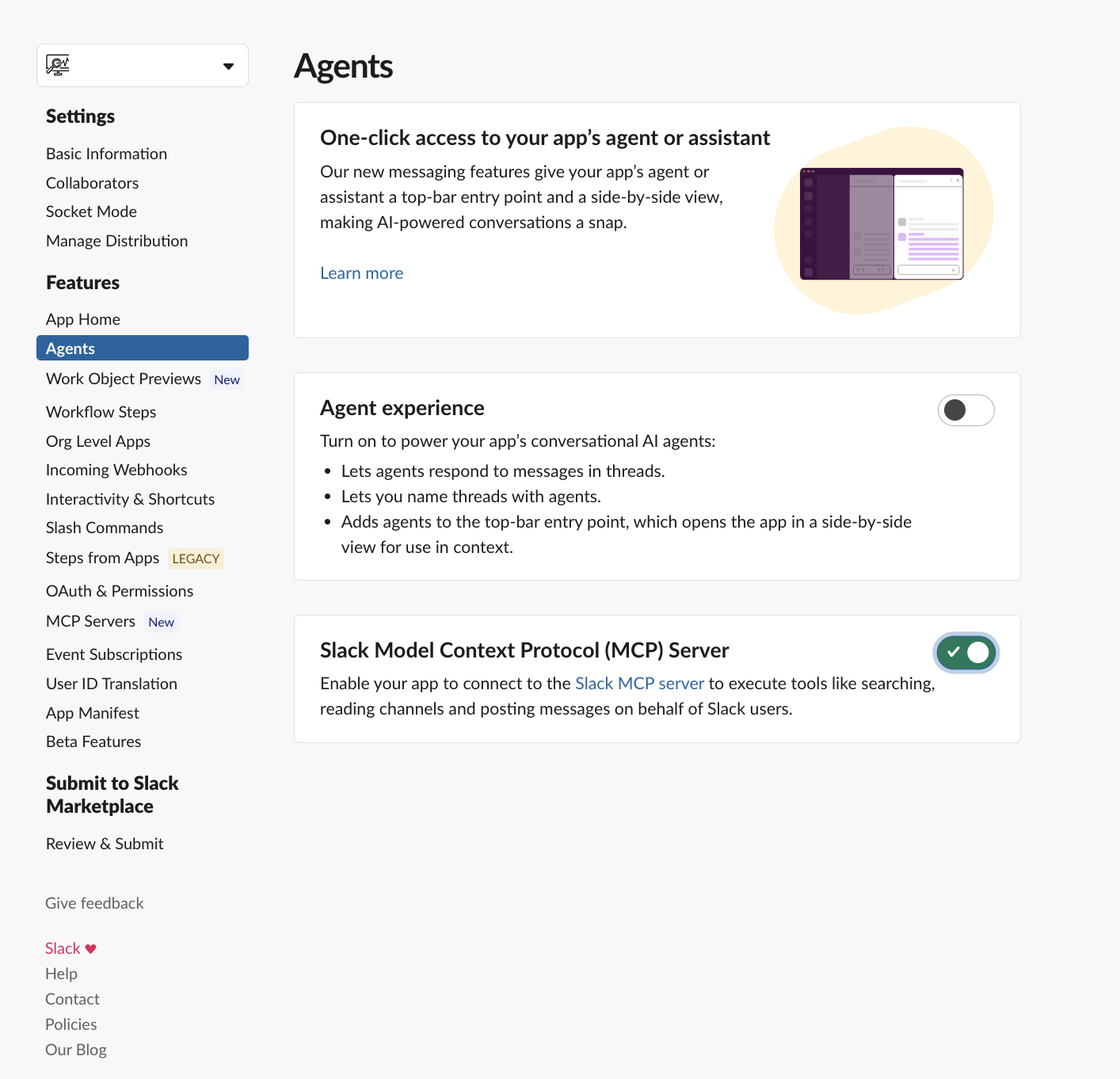
- In the left sidebar, under Features, click Agents & AI Apps. Some workspaces label this item Agents.
- Turn on Slack Model Context Protocol (MCP) Server.
-
Connect in Scalekit
In Scalekit dashboard, go to AgentKit > Connections > Create Connection. Find Slack MCP and click Create. Enter the Client ID and Client Secret of the same Slack app, then click Save.
-
Authorize a user and make your first call
quickstart.mts import { ScalekitClient } from '@scalekit-sdk/node'import 'dotenv/config'import { createInterface } from 'node:readline/promises'const scalekit = new ScalekitClient(process.env.SCALEKIT_ENVIRONMENT_URL,process.env.SCALEKIT_CLIENT_ID,process.env.SCALEKIT_CLIENT_SECRET,)const actions = scalekit.actionsconst connector = 'slackmcp'const identifier = 'user_123'// Generate an authorization link for the userconst { link } = await actions.getAuthorizationLink({ connectionName: connector, identifier })console.log('Authorize Slack MCP:', link)const rl = createInterface({ input: process.stdin, output: process.stdout })await rl.question('Press Enter after authorizing...')rl.close()// Make your first callconst result = await actions.executeTool({connector,identifier,toolName: 'slackmcp_slack_read_user_profile',toolInput: {},})console.log(result)Terminal window npx tsx quickstart.mtsquickstart.py import osfrom scalekit import ScalekitClientfrom dotenv import load_dotenvload_dotenv()scalekit_client = ScalekitClient(env_url=os.getenv("SCALEKIT_ENVIRONMENT_URL"),client_id=os.getenv("SCALEKIT_CLIENT_ID"),client_secret=os.getenv("SCALEKIT_CLIENT_SECRET"),)actions = scalekit_client.actionsconnection_name = "slackmcp"identifier = "user_123"# Generate an authorization link for the userlink_response = actions.get_authorization_link(connection_name=connection_name,identifier=identifier,)print("Authorize Slack MCP:", link_response.link)input("Press Enter after authorizing...")# Make your first callresult = actions.execute_tool(tool_input={},tool_name="slackmcp_slack_read_user_profile",connection_name=connection_name,identifier=identifier,)print(result)Terminal window python quickstart.pyEach user signs in once. See Authorize a user for the full flow and statuses.
Tools
Pass the exact name toexecute_toolslackmcp_slack_get_reactionsRetrieve all emoji reactions on a specific Slack message.Read-onlySlack Get Reactions
Retrieve all emoji reactions on a specific Slack message.
Inputs
channel_idstringrequired- ID of the Slack channel. Get it from slack_search_channels.
message_tsstringrequired- Timestamp of the message. Get it from slack_read_channel or slack_read_thread.
slackmcp_slack_list_channel_membersList members of a Slack channel, group, or group DM with profile details.Read-onlySlack List Channel Members
List members of a Slack channel, group, or group DM with profile details.
Inputs
channel_idstringrequired- ID of the Slack channel. Get it from slack_search_channels.
cursorstring- Pagination cursor from the previous response to fetch the next page.
include_botsboolean- Include bots and apps in the member list (default: false)
include_deletedboolean- Include deleted/deactivated users in the member list (default: false)
limitinteger- Maximum number of results to return per page.
response_formatstring- Level of detail in the response. Accepted values: detailed, concise, ids_only.
slackmcp_slack_read_canvasRetrieve the Markdown content and section ID mapping of a Slack Canvas document.Read-onlySlack Read Canvas
Retrieve the Markdown content and section ID mapping of a Slack Canvas document.
Inputs
canvas_idstringrequired- ID of the Slack canvas document. Get it from slack_search_public.
slackmcp_slack_read_channelRead messages from a Slack channel in reverse chronological order (newest first).Read-onlySlack Read Channel
Read messages from a Slack channel in reverse chronological order (newest first).
Inputs
channel_idstringrequired- ID of the Slack channel. Get it from slack_search_channels.
cursorstring- Pagination cursor from the previous response to fetch the next page.
lateststring- Only return messages before this Unix timestamp (e.g. 1640995200.000000).
limitinteger- Maximum number of results to return per page.
oldeststring- Only return messages after this Unix timestamp (e.g. 1609459200.000000).
response_formatstring- Level of detail in the response. Accepted values: detailed, concise, ids_only.
slackmcp_slack_read_fileRead a Slack file's content by file ID.Read-onlySlack Read File
Read a Slack file's content by file ID. Returns text or base64-encoded content.
Inputs
file_idstringrequired- ID of the Slack file. Get it from slack_search_public.
slackmcp_slack_read_threadRead all messages in a Slack thread — the parent message and its replies.Read-onlySlack Read Thread
Read all messages in a Slack thread — the parent message and its replies.
Inputs
channel_idstringrequired- ID of the Slack channel. Get it from slack_search_channels.
message_tsstringrequired- Timestamp of the message. Get it from slack_read_channel or slack_read_thread.
cursorstring- Pagination cursor from the previous response to fetch the next page.
lateststring- Only return messages before this Unix timestamp (e.g. 1640995200.000000).
limitinteger- Maximum number of results to return per page.
oldeststring- Only return messages after this Unix timestamp (e.g. 1609459200.000000).
response_formatstring- Level of detail in the response. Accepted values: detailed, concise, ids_only.
slackmcp_slack_read_user_profileRetrieve detailed profile information for a Slack user including status and contact info.Read-onlySlack Read User Profile
Retrieve detailed profile information for a Slack user including status and contact info.
Inputs
include_localeboolean- Include user's locale information. Default: false
response_formatstring- Level of detail in the response. Accepted values: detailed, concise, ids_only.
user_idstring- ID of the Slack user. Get it from slack_search_users.
slackmcp_slack_search_channelsSearch for Slack channels by name or description and return channel IDs and metadata.Read-onlySlack Search Channels
Search for Slack channels by name or description and return channel IDs and metadata.
Inputs
querystringrequired- Search query string.
channel_typesstring- Comma-separated channel types to filter. Accepted values: public_channel, private_channel, mpim, im.
cursorstring- Pagination cursor from the previous response to fetch the next page.
include_archivedboolean- Include archived channels in the search results
limitinteger- Maximum number of results to return per page.
response_formatstring- Level of detail in the response. Accepted values: detailed, concise, ids_only.
slackmcp_slack_search_emojisSearch custom emojis available in this Slack workspace by name.Read-onlySlack Search Emojis
Search custom emojis available in this Slack workspace by name.
Inputs
querystringrequired- Search query string.
slackmcp_slack_search_publicSearch messages and files in public Slack channels only.Read-onlySlack Search Public
Search messages and files in public Slack channels only.
Inputs
querystringrequired- Search query string.
afterstring- Only messages after this Unix timestamp (inclusive)
beforestring- Only messages before this Unix timestamp (inclusive)
content_typesstring- Comma-separated content types to search. Accepted values: messages, files.
context_channel_idstring- Channel ID to boost relevance of results from that channel.
cursorstring- Pagination cursor from the previous response to fetch the next page.
include_botsboolean- Include bot messages (default: false)
include_contextboolean- Include surrounding context messages for each result. Defaults to true.
limitinteger- Maximum number of results to return per page.
max_context_lengthinteger- Max character length for each context message. Longer messages are truncated.
only_my_channelsboolean- Limit results to public channels the user is a member of. Set to true when the user asks to search only their own or joined channels. Default: false.
response_formatstring- Level of detail in the response. Accepted values: detailed, concise, ids_only.
sortstring- Sort by relevance or date (default: 'score'). Options: 'score', 'timestamp'
sort_dirstring- Sort direction (default: 'desc'). Options: 'asc', 'desc'
slackmcp_slack_search_public_and_privateSearch messages and files across all Slack channels including private ones the user has access to.Read-onlySlack Search Public And Private
Search messages and files across all Slack channels including private ones the user has access to.
Inputs
querystringrequired- Search query string.
afterstring- Only messages after this Unix timestamp (inclusive)
beforestring- Only messages before this Unix timestamp (inclusive)
channel_typesstring- Comma-separated channel types to filter. Accepted values: public_channel, private_channel, mpim, im.
content_typesstring- Comma-separated content types to search. Accepted values: messages, files.
context_channel_idstring- Channel ID to boost relevance of results from that channel.
cursorstring- Pagination cursor from the previous response to fetch the next page.
include_botsboolean- Include bot messages (default: false)
include_contextboolean- Include surrounding context messages for each result. Defaults to true.
limitinteger- Maximum number of results to return per page.
max_context_lengthinteger- Max character length for each context message. Longer messages are truncated.
only_my_channelsboolean- Limit results to channels the user is a member of. Set to true when the user asks to search only their own or joined channels. Default: false.
response_formatstring- Level of detail in the response. Accepted values: detailed, concise, ids_only.
sortstring- Sort by relevance or date (default: 'score'). Options: 'score', 'timestamp'
sort_dirstring- Sort direction (default: 'desc'). Options: 'asc', 'desc'
slackmcp_slack_search_usersSearch for Slack users by name, email, or profile attributes.Read-onlySlack Search Users
Search for Slack users by name, email, or profile attributes.
Inputs
querystringrequired- Search query string.
cursorstring- Pagination cursor from the previous response to fetch the next page.
limitinteger- Maximum number of results to return per page.
response_formatstring- Level of detail in the response. Accepted values: detailed, concise, ids_only.
slackmcp_slack_add_reactionAdd an emoji reaction to a Slack message.WriteSlack Add Reaction
Add an emoji reaction to a Slack message. Requires the channel ID, message timestamp, and emoji name.
- Idempotent
Inputs
channel_idstringrequired- ID of the Slack channel. Get it from slack_search_channels.
emojistringrequired- Reaction (emoji) name without colons
message_tsstringrequired- Timestamp of the message. Get it from slack_read_channel or slack_read_thread.
slackmcp_slack_create_canvasCreate a Slack Canvas document from Canvas-flavored Markdown content.WriteSlack Create Canvas
Create a Slack Canvas document from Canvas-flavored Markdown content.
Inputs
contentstringrequired- Canvas-flavored Markdown content for the canvas body.
titlestringrequired- Display name shown at the top of the canvas.
slackmcp_slack_create_conversationCreate a channel, DM, or group DM.WriteSlack Create Conversation
Create a channel, DM, or group DM. Returns a channel ID for sending messages.
Inputs
channel_namestring- Name for the new channel (lowercase, hyphens, max 80 chars). Omit to create a DM instead.
is_privateboolean- If true, creates a private channel. Only used with channel_name. Default: false.
user_idsarray- Slack user IDs to invite. 1 ID = DM, 2–8 IDs = group DM, up to 1000 IDs for a channel.
slackmcp_slack_schedule_messageSchedule a message for future delivery to a Slack channel at a specified Unix timestamp.WriteSlack Schedule Message
Schedule a message for future delivery to a Slack channel at a specified Unix timestamp.
Inputs
channel_idstringrequired- ID of the Slack channel. Get it from slack_search_channels.
messagestringrequired- Message content to schedule
post_atintegerrequired- Unix timestamp (seconds) for when to send the scheduled message.
reply_broadcastboolean- Broadcast thread reply to channel
thread_tsstring- Timestamp of the parent message to reply in a thread. Get it from slack_read_channel.
slackmcp_slack_send_messageSend a message to a Slack channel or user.WriteSlack Send Message
Send a message to a Slack channel or user. Use a user ID as channel_id to send a DM.
Inputs
channel_idstringrequired- ID of the Slack channel. Get it from slack_search_channels.
messagestringrequired- Add a message
draft_idstring- ID of a previously saved draft to delete after sending.
reply_broadcastboolean- Also send to conversation
thread_tsstring- Timestamp of the parent message to reply in a thread. Get it from slack_read_channel.
unfurl_app_linksboolean- Set to true to enable link previews from installed apps (e.g. GitHub, Jira) in the message.
slackmcp_slack_send_message_draftSave a message as a draft in a Slack channel without sending it.WriteSlack Send Message Draft
Save a message as a draft in a Slack channel without sending it.
Inputs
channel_idstringrequired- ID of the Slack channel. Get it from slack_search_channels.
messagestringrequired- The message content in standard markdown
thread_tsstring- Timestamp of the parent message to reply in a thread. Get it from slack_read_channel.
slackmcp_slack_update_canvasUpdate an existing Slack Canvas document by appending, replacing, or deleting content.DestructiveSlack Update Canvas
Update an existing Slack Canvas document by appending, replacing, or deleting content. Prefer `sections` for atomic multi-edit operations; `action`/`content`/`section_id` remain as a legacy single-edit path.
Inputs
canvas_idstringrequired- ID of the canvas to update. Get it from slack_search_public.
actionstring- Legacy single-edit type. Prefer `sections`. One of append, prepend, replace.one of
appendprependreplace contentstring- Legacy single-edit markdown content. Prefer `sections`.
section_idstring- Legacy single-edit target section ID from slack_read_canvas. Prefer `sections`.
sectionsarray- Preferred: array of edit operations applied atomically against a single document snapshot. Max 100 operations. Use this for any update with one or more edits.
No tools match.
Workflows
Proxy API call
import { ScalekitClient } from '@scalekit-sdk/node'import 'dotenv/config'
const scalekit = new ScalekitClient( process.env.SCALEKIT_ENVIRONMENT_URL, process.env.SCALEKIT_CLIENT_ID, process.env.SCALEKIT_CLIENT_SECRET,)const actions = scalekit.actions
const connector = 'slackmcp'const identifier = 'user_123'
// Read a channel's message historyconst result = await actions.executeTool({ connector, identifier, toolName: 'slackmcp_slack_read_channel', toolInput: { channel_id: 'C01234567' },})console.log(result)from scalekit import ScalekitClientimport os
scalekit_client = ScalekitClient( os.environ['SCALEKIT_ENVIRONMENT_URL'], os.environ['SCALEKIT_CLIENT_ID'], os.environ['SCALEKIT_CLIENT_SECRET'],)
connector = 'slackmcp'identifier = 'user_123'
# Read a channel's message historyresult = scalekit_client.actions.execute_tool( connection_name=connector, identifier=identifier, tool_name='slackmcp_slack_read_channel', tool_input={'channel_id': 'C01234567'},)print(result)

