


The Slack connector lets your AI agent act in each user's Slack account. Each user signs in to Slack once, and Scalekit stores and refreshes their tokens, so your agent never handles credentials. It comes with 96 tools.
- Tools
- 96
- What they doRead · write · destructive
- 33 · 49 · 1433 read49 write14 destructive
- Users sign in with
- OAuth
- OAuth app
- Scalekit's or your own
What you can do
- Send messages: post to channels, DMs, and threads on behalf of your users
- Read conversations: retrieve channel history, thread replies, and direct messages
- Manage channels: create channels, invite members, and update channel settings
- Look up users: search for team members by name, email, or username
- Upload files: share files and attachments into any conversation
Setup
Install the SDK
Terminal window npm install @scalekit-sdk/node dotenvTerminal window pip install scalekit-sdk-python python-dotenvSet your credentials
Add your Scalekit credentials to your
.envfile. Find values in app.scalekit.com > Developers > API Credentials..env SCALEKIT_ENVIRONMENT_URL=<your-environment-url>SCALEKIT_CLIENT_ID=<your-client-id>SCALEKIT_CLIENT_SECRET=<your-client-secret>Create the Slack connection
In AgentKit > Connections, create a Slack connection. The name you give it is the
connection_nameyour code passes. See Configure connections.Scalekit credentials are available for Slack, so you don't need to register an OAuth app. To show your own app on the consent screen, use your own credentials instead.
Use your own OAuth app
Register your Scalekit environment with the Slack connector so Scalekit handles the authentication flow and token lifecycle for you. The connection name you create will be used to identify and invoke the connection programmatically. Then complete the configuration in your application as follows:
-
Set up auth redirects
-
In Scalekit dashboard, go to AgentKit > Connections > Create Connection. Find Slack and click Create. Copy the redirect URI. It looks like
https://<SCALEKIT_ENVIRONMENT_URL>/sso/v1/oauth/<CONNECTION_ID>/callback.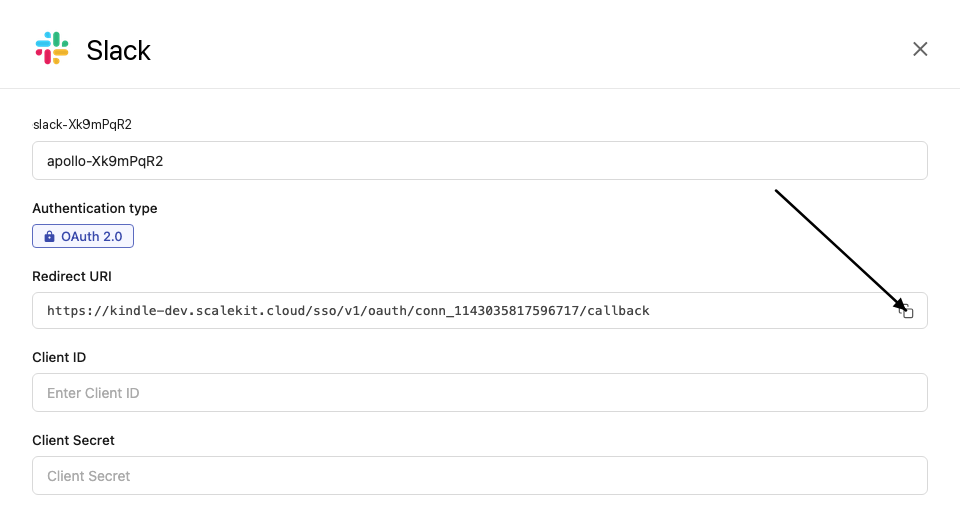
-
Log in to api.slack.com/apps and click Create New App.
-
Select From scratch, enter an app name, and select your workspace.
-
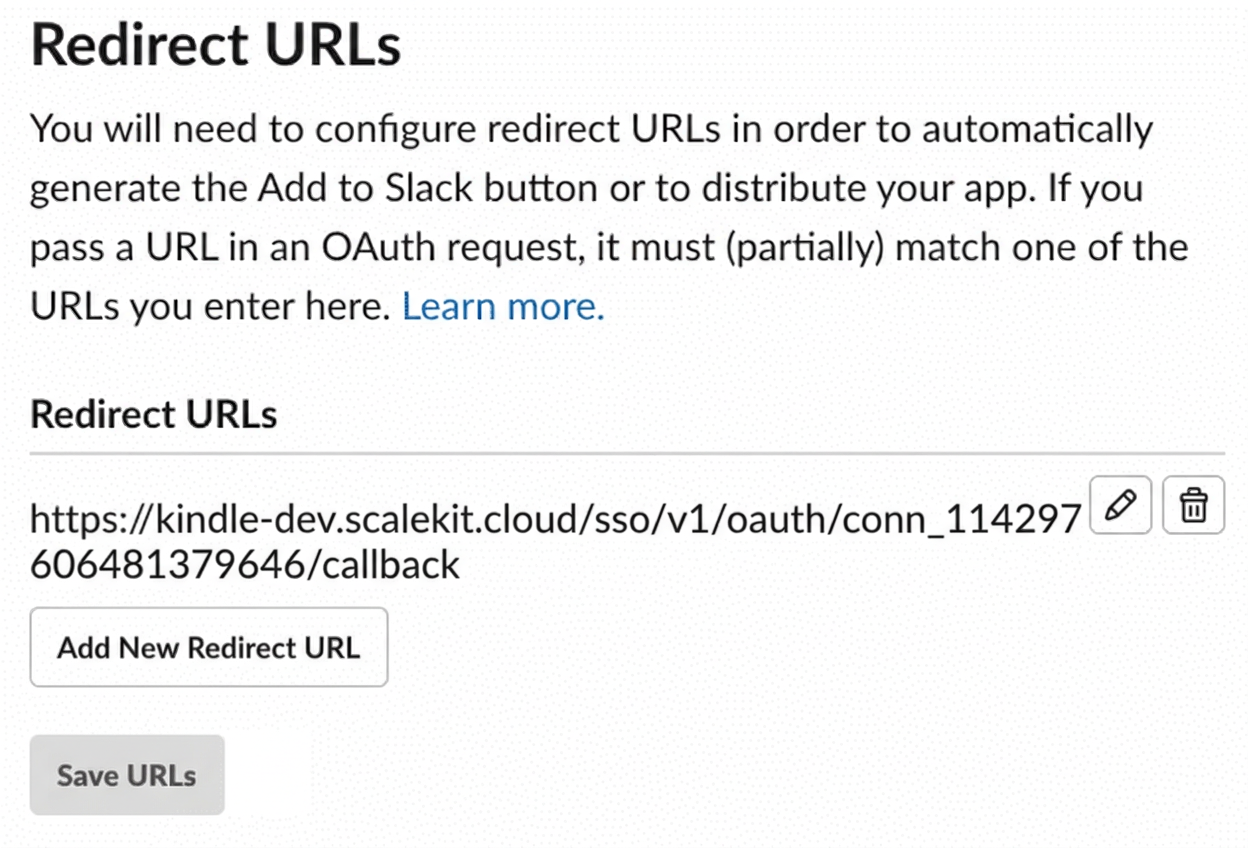
Go to OAuth & Permissions and scroll to Redirect URLs.
-
Click Add New Redirect URL and paste the redirect URI from Scalekit. Click Add.
-
-
Enable distribution
-
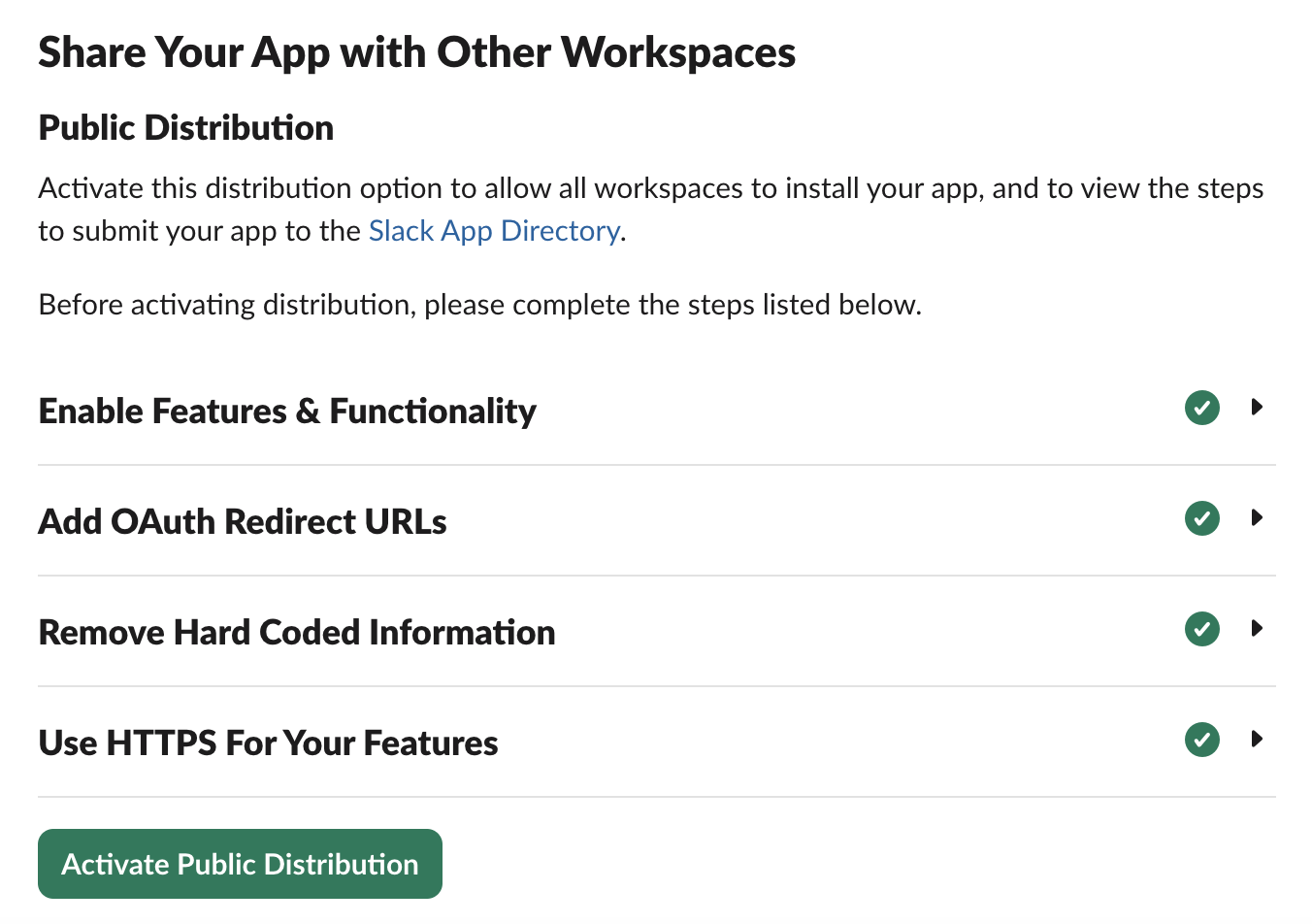
In your Slack app settings, go to Manage Distribution.
-
Under Share Your App with Other Workspaces, complete the checklist Slack shows for your app. This can include accepting Slack’s distribution agreement, adding support and privacy URLs, and confirming that the redirect URL you added above is valid.
-
Click Activate Public Distribution.
Slack app distribution must be active before users can authorize the app from external workspaces. If distribution is not active, OAuth can succeed in your development workspace but fail when a user tries to connect a second workspace.
-
From Basic Information, copy the Client ID and Client Secret.
-
-
Add credentials in Scalekit
- In Scalekit dashboard, go to AgentKit > Connections and open the connection you created.
Choose Bot scope for most agents, including agents that read channel history or send messages as your Slack app. Bot scope makes the agent act as the Slack app or bot; use User scope only when the agent must act as the authorizing Slack user.
-
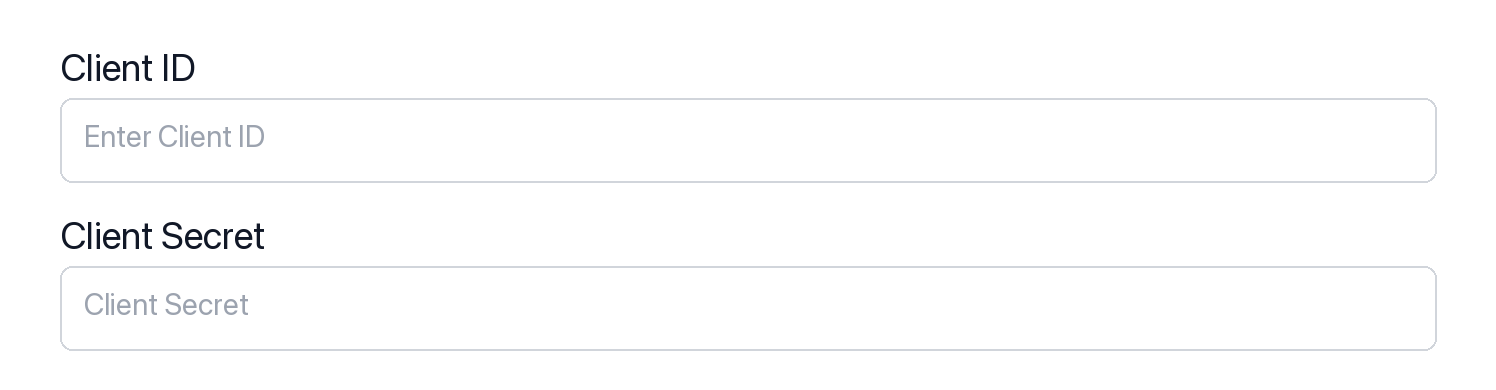
Enter your credentials:
- Client ID
- Client Secret
- Permissions (scopes — see Slack Scopes documentation)
-
Click Save.
-
Authorize a user and make your first call
quickstart.mts import { ScalekitClient } from '@scalekit-sdk/node'import 'dotenv/config'import { createInterface } from 'node:readline/promises'const scalekit = new ScalekitClient(process.env.SCALEKIT_ENVIRONMENT_URL,process.env.SCALEKIT_CLIENT_ID,process.env.SCALEKIT_CLIENT_SECRET,)const actions = scalekit.actionsconst connector = 'slack'const identifier = 'user_123'// Generate an authorization link for the userconst { link } = await actions.getAuthorizationLink({ connectionName: connector, identifier })console.log('Authorize Slack:', link)const rl = createInterface({ input: process.stdin, output: process.stdout })await rl.question('Press Enter after authorizing...')rl.close()// Make your first callconst result = await actions.executeTool({connector,identifier,toolName: 'slack_auth_test',toolInput: {},})console.log(result)Terminal window npx tsx quickstart.mtsquickstart.py import osfrom scalekit import ScalekitClientfrom dotenv import load_dotenvload_dotenv()scalekit_client = ScalekitClient(env_url=os.getenv("SCALEKIT_ENVIRONMENT_URL"),client_id=os.getenv("SCALEKIT_CLIENT_ID"),client_secret=os.getenv("SCALEKIT_CLIENT_SECRET"),)actions = scalekit_client.actionsconnection_name = "slack"identifier = "user_123"# Generate an authorization link for the userlink_response = actions.get_authorization_link(connection_name=connection_name,identifier=identifier,)print("Authorize Slack:", link_response.link)input("Press Enter after authorizing...")# Make your first callresult = actions.execute_tool(tool_input={},tool_name="slack_auth_test",connection_name=connection_name,identifier=identifier,)print(result)Terminal window python quickstart.pyEach user signs in once. See Authorize a user for the full flow and statuses.
Tools
Pass the exact name toexecute_toolslack_auth_testVerify the current Slack connection's authentication and identity.Read-onlyTest Authentication
Verify the current Slack connection's authentication and identity. Returns the connected team, user, and bot identity for the active token.
Inputs
This tool takes no inputs.
slack_fetch_conversation_historyPage messages in one Slack channel or DM in time order.Read-onlyFetch Slack Conversation History
Page messages in one Slack channel or DM in time order. Returns messages and a next_cursor. Use fetch_conversation_history to read a channel. Use search_messages to find text across the workspace. Use get_conversation_replies for one thread.
Inputs
channelstringrequired- Channel ID, channel name (#general), or user ID for DM
cursorstring- Paginate through collections by cursor for pagination
lateststring- End of time range of messages to include in results
limitinteger- Number of messages to return (1-1000, default 100)
oldeststring- Start of time range of messages to include in results
slack_get_bot_infoRetrieve information about a bot user in Slack, such as its name and icons.Read-onlyGet Bot Info
Retrieve information about a bot user in Slack, such as its name and icons. Requires a valid Slack OAuth2 connection with the users:read scope.
Inputs
botstring- Bot user to get info on. Defaults to the calling bot's own identity if omitted.
slack_get_conversation_infoGet metadata for one Slack channel, including settings and optional member count.Read-onlyGet Slack Conversation Info
Get metadata for one Slack channel, including settings and optional member count. Returns the channel object. Use get_conversation_info for one known channel. Use list_channels when you do not have the id.
Inputs
channelstringrequired- Channel ID, channel name (#general), or user ID for DM
include_localeboolean- Set to true to include the locale for this conversation
include_num_membersboolean- Set to true to include the member count for the conversation
slack_get_conversation_repliesPage replies in one Slack thread by parent timestamp.Read-onlyGet Slack Conversation Replies
Page replies in one Slack thread by parent timestamp. Returns messages and a next_cursor. Use get_conversation_replies for a thread. Use fetch_conversation_history for the channel's main timeline.
Inputs
channelstringrequired- Channel ID, channel name (#general), or user ID for DM
tsstringrequired- Timestamp of the parent message to get replies for
cursorstring- Pagination cursor for retrieving next page of results
inclusiveboolean- Include messages with latest or oldest timestamp in results
lateststring- End of time range of messages to include in results
limitinteger- Number of messages to return (default 100, max 1000)
oldeststring- Start of time range of messages to include in results
slack_get_dnd_infoRetrieve a Slack user's current Do Not Disturb status, including whether it is active and when it ends.Read-onlyGet Do Not Disturb Info
Retrieve a Slack user's current Do Not Disturb status, including whether it is active and when it ends. Requires a valid Slack OAuth2 connection with the dnd:read scope.
Inputs
userstring- User to fetch Do Not Disturb status for. Defaults to the authenticated user.
slack_get_file_infoGet metadata and comments for one Slack file by id.Read-onlyGet File Info
Get metadata and comments for one Slack file by id. Returns the file object. Use get_file_info for a known file id. Use list_files or search_files when you do not have the id.
Inputs
filestringrequired- Specify a file by providing its ID.
cursorstring- Pagination cursor from a previous call's response_metadata.next_cursor.
limitinteger- The maximum number of items to return.
slack_get_permalinkRetrieve a permalink URL for a specific existing Slack message, identified by its channel and timestamp.Read-onlyGet Message Permalink
Retrieve a permalink URL for a specific existing Slack message, identified by its channel and timestamp.
Inputs
channelstringrequired- The ID of the conversation or channel containing the message.
message_tsstringrequired- A message's ts value, uniquely identifying it within a channel.
slack_get_reactionsRead emoji reactions on one Slack message, file, or file comment.Read-onlyGet Reactions
Read emoji reactions on one Slack message, file, or file comment. Returns the item and its reactions. Use get_reactions for one item. Use list_reactions for items a user has reacted to.
Inputs
channelstring- Channel where the message to get reactions for was posted. Required when looking up a message.
filestring- File to get reactions for.
file_commentstring- File comment to get reactions for.
fullboolean- If true, always return the complete reaction list.default
false timestampstring- Timestamp of the message to get reactions for. Required when looking up a message.
slack_get_reminder_infoRetrieve details about a specific Slack reminder by its ID.Read-onlyGet Reminder Info
Retrieve details about a specific Slack reminder by its ID. Requires a valid Slack OAuth2 connection with the reminders:read scope.
Inputs
reminderstringrequired- The ID of the reminder to look up.
slack_get_team_dnd_infoRetrieve the Do Not Disturb status for up to 50 users on a Slack team at once.Read-onlyGet Team Do Not Disturb Info
Retrieve the Do Not Disturb status for up to 50 users on a Slack team at once. Requires a valid Slack OAuth2 connection with the dnd:read scope.
Inputs
usersstringrequired- Comma-separated list of user IDs to fetch Do Not Disturb status for (up to 50).
slack_get_team_infoRetrieve information about the current Slack team/workspace, such as its name, domain, and icon.Read-onlyGet Team Info
Retrieve information about the current Slack team/workspace, such as its name, domain, and icon. Requires a valid Slack OAuth2 connection with the team:read scope.
Inputs
teamstring- Team to get info on. If omitted, returns information about the current team.
slack_get_user_infoRetrieves detailed information about a specific Slack user, including profile data, status, and workspace information.Read-onlyGet User Info
Retrieves detailed information about a specific Slack user, including profile data, status, and workspace information. Requires a valid Slack OAuth2 connection with users:read scope.
Inputs
userstringrequired- User ID to get information about
include_localeboolean- Set to true to include locale information for the user
slack_get_user_presenceGets the current presence status of a Slack user (active, away, etc.).Read-onlyGet User Presence
Gets the current presence status of a Slack user (active, away, etc.). Indicates whether the user is currently online and available. Requires a valid Slack OAuth2 connection with users:read scope.
Inputs
userstringrequired- User ID to check presence for
slack_get_user_profileRetrieve detailed profile information for a Slack user, including custom profile fields.Read-onlyGet User Profile
Retrieve detailed profile information for a Slack user, including custom profile fields. Requires a valid Slack OAuth2 connection with the users.profile:read scope.
Inputs
include_labelsboolean- Include labels for each custom profile field ID.default
false userstring- User to retrieve profile info for. Defaults to the authenticated user if omitted.
slack_list_bookmarksList the bookmarks on a Slack channel.Read-onlyList Bookmarks
List the bookmarks on a Slack channel. Requires a valid Slack OAuth2 connection with the bookmarks:read scope.
Inputs
channel_idstringrequired- Channel whose bookmarks should be listed.
slack_list_channel_membersList the member user IDs of a Slack channel.Read-onlyList Channel Members
List the member user IDs of a Slack channel. Requires a valid Slack OAuth2 connection with channels:read (public) or groups:read (private) scope.
Inputs
channelstringrequired- Channel ID or channel name to list members for
cursorstring- Pagination cursor from a previous response's response_metadata.next_cursor
limitinteger- Maximum number of members to return per page
slack_list_channelsList public and private Slack channels the caller can see.Read-onlyList Slack Channels
List public and private Slack channels the caller can see. Returns channels and a next_cursor. Use list_channels to browse the workspace. Use list_user_conversations for one user's membership. Use get_conversation_info for one channel's metadata.
Inputs
cursorstring- Pagination cursor for retrieving next page of results
exclude_archivedboolean- Exclude archived channels from the list
limitinteger- Number of channels to return (default 100, max 1000)
team_idstring- Encoded team ID to list channels for (optional)
typesstring- Mix and match channel types (public_channel, private_channel, mpim, im)
slack_list_connect_invitesLists Slack Connect invitations that have been sent or received and are not yet accepted or denied.Read-onlyList Pending Slack Connect Invites
Lists Slack Connect invitations that have been sent or received and are not yet accepted or denied. Requires a valid Slack OAuth2 connection with the conversations.connect:manage scope.
Inputs
countinteger- Maximum number of invites to return
cursorstring- Pagination cursor for the next page of results
team_idstring- Encoded team ID, required only when using an org-level token
slack_list_emojiList the custom emoji available for a Slack team.Read-onlyList Custom Emoji
List the custom emoji available for a Slack team. Requires a valid Slack OAuth2 connection with the emoji:read scope.
Inputs
This tool takes no inputs.
slack_list_filesList Slack files, optionally filtered by user, channel, type, or time range.Read-onlyList Files
List Slack files, optionally filtered by user, channel, type, or time range. Returns files and paging fields. Use list_files to browse with filters. Use search_files for a text query. Use get_file_info for one file id.
Inputs
channelstring- Filter files appearing in a specific channel, indicated by its ID.
countinteger- Number of items to return per page.
pageinteger- Page number of results to return.
ts_fromstring- Filter files created after this UNIX timestamp (inclusive).
ts_tostring- Filter files created before this UNIX timestamp (inclusive).
typesstring- Comma-separated list of file types to filter by (e.g., images, pdfs, docs).
userstring- Filter files created by a single user.
slack_list_pinned_itemsList the messages and files pinned to a Slack channel.Read-onlyList Pinned Items
List the messages and files pinned to a Slack channel. Requires a valid Slack OAuth2 connection with the pins:read scope.
Inputs
channelstringrequired- Channel to get pinned items for.
slack_list_reactionsList Slack items a user has reacted to.Read-onlyList Reactions
List Slack items a user has reacted to. Returns items and a next_cursor. Use list_reactions for a user's reaction history. Use get_reactions for one message or file.
Inputs
cursorstring- Pagination cursor from a previous call's response_metadata.next_cursor.
fullboolean- If true, always return the complete reaction list for each item.default
false limitinteger- The maximum number of items to return.
userstring- Show reactions made by this user. Defaults to the authenticated user.
slack_list_remindersList all reminders created by or for the authenticated Slack user.Read-onlyList Reminders
List all reminders created by or for the authenticated Slack user. Requires a valid Slack OAuth2 connection with the reminders:read scope.
Inputs
This tool takes no inputs.
slack_list_scheduled_messagesList Slack messages waiting to send, optionally filtered by channel or time.Read-onlyList Scheduled Messages
List Slack messages waiting to send, optionally filtered by channel or time. Returns scheduled_messages and a next_cursor. Use list_scheduled_messages to browse the queue. Use search_messages for text already posted.
Inputs
channelstring- The channel of the scheduled messages. Omit to list across all channels.
cursorstring- Pagination cursor from a previous call's response_metadata.next_cursor.
lateststring- A UNIX timestamp of the latest value in the time range.
limitinteger- Maximum number of original entries to return.
oldeststring- A UNIX timestamp of the oldest value in the time range.
slack_list_user_conversationsList Slack conversations one user belongs to.Read-onlyList User Conversations
List Slack conversations one user belongs to. Returns channels and a next_cursor. Use list_user_conversations for one member. Use list_channels to browse the whole workspace.
Inputs
cursorstring- Pagination cursor from a previous call's next_cursor value.
exclude_archivedboolean- Set to true to exclude archived channels from the list.
limitinteger- The maximum number of items to return.
typesstring- Comma-separated list of channel types to include (public_channel, private_channel, mpim, im).
userstring- Browse conversations by a specific user ID's membership. Defaults to the authenticated user if omitted.
slack_list_usergroup_usersList all users belonging to a Slack User Group.Read-onlyList User Group Members
List all users belonging to a Slack User Group. Requires a valid Slack OAuth2 connection with the usergroups:read scope.
Inputs
usergroupstringrequired- The encoded ID of the User Group to list members for.
include_disabledboolean- Allow results for disabled User Groups.default
false
slack_list_usergroupsList all User Groups (@handle groups) for a Slack team.Read-onlyList User Groups
List all User Groups (@handle groups) for a Slack team. Requires a valid Slack OAuth2 connection with the usergroups:read scope.
Inputs
include_countboolean- Include the number of users in each User Group.default
false include_disabledboolean- Include disabled User Groups in the results.default
false include_usersboolean- Include the list of users for each User Group.default
false
slack_list_usersLists all users in a Slack workspace, including information about their status, profile, and presence.Read-onlyList Users
Lists all users in a Slack workspace, including information about their status, profile, and presence. Requires a valid Slack OAuth2 connection with users:read scope.
Inputs
cursorstring- Pagination cursor for fetching additional pages of users
include_localeboolean- Set to true to include locale information for each user
limitnumber- Number of users to return (1-1000)
team_idstring- Encoded team ID to list users for (if using org tokens)
slack_lookup_user_by_emailFind a user by their registered email address in a Slack workspace.Read-onlyLookup User by Email
Find a user by their registered email address in a Slack workspace. Requires a valid Slack OAuth2 connection with users:read.email scope. Cannot be used by custom bot users.
Inputs
emailstringrequired- Email address to search for users by
slack_search_allSearch for both messages and files across the Slack workspace matching a query in a single call.Read-onlySearch Slack Messages and Files
Search for both messages and files across the Slack workspace matching a query in a single call. Requires a valid Slack OAuth2 connection with search:read scope (user-token authorization; not available to bot tokens).
Inputs
querystringrequired- Search query. Supports Slack search modifiers like from:, in:, before:, after:
countinteger- Number of results to return per page
highlightboolean- Enable query highlight markers in results
pageinteger- Page number of results to return
sortstring- Sort results by relevance score or by timestamp
sort_dirstring- Sort direction
slack_search_filesSearch Slack files by query text and Slack modifiers.Read-onlySearch Files
Search Slack files by query text and Slack modifiers. Returns matching files with pagination. Use search_files to find files by text. Use list_files to browse with filters. Needs a user token with search:read.
Inputs
querystringrequired- Search query. Supports Slack search modifiers such as from:, in:, and before:.
countinteger- Number of results to return per page.
highlightboolean- Enable query highlight markers in the returned results.default
false pageinteger- Page number of results to return.
sortstring- Return matches sorted by either score (relevance) or timestamp (recency).one of
scoretimestampdefaultscore sort_dirstring- Sort direction: ascending (asc) or descending (desc).one of
ascdescdefaultdesc team_idstring- Encoded team ID to search in. Required if using an org-wide token.
slack_search_messagesSearch posted Slack messages by query text and Slack modifiers (from:, in:, before:).Read-onlySearch Messages
Search posted Slack messages by query text and Slack modifiers (from:, in:, before:). Returns matching messages with pagination. Use search_messages to find text. Use fetch_conversation_history to page one channel in time order. Needs a user token with search:read.
Inputs
querystringrequired- Search query. Supports Slack search modifiers such as from:, in:, and before:.
countinteger- Number of results to return per page. Maximum of 100.
highlightboolean- Enable query highlight markers in the returned message text.default
false pageinteger- Page number of results to return.
sortstring- Return matches sorted by either score (relevance) or timestamp (recency).one of
scoretimestampdefaultscore sort_dirstring- Sort direction: ascending (asc) or descending (desc).one of
ascdescdefaultdesc
slack_add_bookmarkAdd a bookmark to a Slack channel, such as a link.WriteAdd Bookmark
Add a bookmark to a Slack channel, such as a link. Requires a valid Slack OAuth2 connection with the bookmarks:write scope.
Inputs
channel_idstringrequired- Channel to add the bookmark to.
titlestringrequired- Title for the bookmark.
typestringrequired- Type of the bookmark, e.g. 'link'.
emojistring- Emoji to display alongside the bookmark, e.g. ':pushpin:'.
entity_idstring- ID of the entity being bookmarked. Only applies to 'message' or 'file' bookmark types.
linkstring- URL to bookmark. Required when type is 'link'.
slack_add_reactionAdd an emoji reaction to a Slack message.WriteAdd Reaction to Message
Add an emoji reaction to a Slack message. Returns ok. Use add_reaction to react. Use remove_reaction to take it off. Use get_reactions to read reactions on one item.
Inputs
channelstringrequired- Channel ID or channel name where the message exists
namestringrequired- Emoji name to react with (without colons)
timestampstringrequired- Timestamp of the message to add reaction to
slack_add_reminderCreate a Slack reminder for a user.WriteAdd Reminder
Create a Slack reminder for a user. Requires a valid Slack OAuth2 connection with the reminders:write scope.
Inputs
textstringrequired- The content of the reminder.
timestringrequired- When this reminder should happen: a UNIX timestamp, the number of seconds until the reminder, or a natural-language string like 'in 15 minutes' or 'every Thursday'.
userstring- The user who will receive the reminder. Defaults to the reminder's creator if omitted.
slack_close_conversationClose a direct message or multi-person direct message conversation in Slack.WriteClose Conversation
Close a direct message or multi-person direct message conversation in Slack. Requires a valid Slack OAuth2 connection with the im:write or mpim:write scope.
- Idempotent
Inputs
channelstringrequired- Conversation to close.
slack_complete_reminderMark a Slack reminder as complete.WriteComplete Reminder
Mark a Slack reminder as complete. Requires a valid Slack OAuth2 connection with the reminders:write scope.
- Idempotent
Inputs
reminderstringrequired- The ID of the reminder to mark as complete.
slack_complete_upload_externalStep 2 of Slack's current file-upload flow: finalize file(s) previously uploaded to the URL returned by slack_get_upload_url_external, and optionally share them to a channel or thread.WriteComplete External Upload
Step 2 of Slack's current file-upload flow: finalize file(s) previously uploaded to the URL returned by slack_get_upload_url_external, and optionally share them to a channel or thread. Requires a valid Slack OAuth2 connection with the files:write scope.
Inputs
filesarrayrequired- Array of uploaded files to finalize. Each item must have 'id' (the file_id from slack_get_upload_url_external) and may include 'title'.
channel_idstring- Channel ID to share the completed files to.
initial_commentstring- Message text to introduce the uploaded file(s) with.
thread_tsstring- Timestamp of the parent message, to share the file(s) as a threaded reply.
slack_create_canvasCreate a new standalone Canvas, or one tabbed in a channel.WriteCreate Canvas
Create a new standalone Canvas, or one tabbed in a channel. The entire Canvases feature is otherwise uncovered by this connector. Requires a valid Slack OAuth2 connection with the canvases:write scope.
Inputs
channel_idstring- Channel ID to tab this canvas in. Required for free/standard workspaces to create a canvas.
document_contentobject- Structure describing the initial content, e.g. {"type": "markdown", "markdown": "# Hello"}. Markdown content is limited to 1 MiB.
titlestring- Title of the newly created canvas.
slack_create_channelCreates a new public or private channel in a Slack workspace.WriteCreate Channel
Creates a new public or private channel in a Slack workspace. Requires a valid Slack OAuth2 connection with channels:manage scope for public channels or groups:write scope for private channels.
Inputs
namestringrequired- Name of the channel to create (without # prefix)
is_privateboolean- Create a private channel instead of public
team_idstring- Encoded team ID to create channel in (if using org tokens)
slack_create_usergroupCreate a new Slack User Group (@handle group) for mentioning a set of users at once.WriteCreate User Group
Create a new Slack User Group (@handle group) for mentioning a set of users at once. Requires a valid Slack OAuth2 connection with the usergroups:write scope.
Inputs
namestringrequired- A name for the User Group. Must be unique among User Groups.
channelsstring- Comma-separated string of encoded channel IDs the User Group uses as its default channels.
descriptionstring- A short description of the User Group.
handlestring- A mention handle. Must be unique among channels, users, and User Groups.
include_countboolean- Include the number of users in the User Group in the response.default
false
slack_disable_usergroupDisable an existing Slack User Group.WriteDisable User Group
Disable an existing Slack User Group. Requires a valid Slack OAuth2 connection with the usergroups:write scope.
- Idempotent
Inputs
usergroupstringrequired- The encoded ID of the User Group to disable.
include_countboolean- Include the number of users in the User Group in the response.default
false
slack_edit_bookmarkEdit an existing Slack channel bookmark's title, link, or emoji.WriteEdit Bookmark
Edit an existing Slack channel bookmark's title, link, or emoji. Requires a valid Slack OAuth2 connection with the bookmarks:write scope.
- Idempotent
Inputs
bookmark_idstringrequired- ID of the bookmark to update.
channel_idstringrequired- Channel where the bookmark resides.
emojistring- New emoji to associate with the bookmark, e.g. ':pushpin:'.
linkstring- New URL for the bookmark.
titlestring- New display title for the bookmark.
slack_edit_canvasApply a list of change operations to an existing Slack Canvas (insert_at_end, insert_at_start, or replace, each with markdown document_content).WriteEdit Slack Canvas
Apply a list of change operations to an existing Slack Canvas (insert_at_end, insert_at_start, or replace, each with markdown document_content). Requires a valid Slack OAuth2 connection with canvases:write scope.
Inputs
canvas_idstringrequired- ID of the canvas to edit
changesarrayrequired- Array of change operation objects to apply, e.g. [{"operation": "insert_at_end", "document_content": {"type": "markdown", "markdown": "## New section"}}]
slack_enable_usergroupEnable a previously disabled Slack User Group.WriteEnable User Group
Enable a previously disabled Slack User Group. Requires a valid Slack OAuth2 connection with the usergroups:write scope.
- Idempotent
Inputs
usergroupstringrequired- The encoded ID of the User Group to enable.
include_countboolean- Include the number of users in the User Group in the response.default
false
slack_end_dnd_snoozeEnd the current Slack user's active Do Not Disturb snooze early.WriteEnd Do Not Disturb Snooze
End the current Slack user's active Do Not Disturb snooze early. Requires a valid Slack OAuth2 connection with the dnd:write scope.
- Idempotent
Inputs
This tool takes no inputs.
slack_get_upload_url_externalStep 1 of Slack's current file-upload flow: request an upload URL and file ID for a given filename and size.WriteGet External Upload URL
Step 1 of Slack's current file-upload flow: request an upload URL and file ID for a given filename and size. Use slack_complete_upload_external afterward to finalize and share the uploaded file. The classic files.upload method was sunset on 2025-11-12; this is the only way to upload new file content today. Requires a valid Slack OAuth2 connection with the files:write scope.
Inputs
filenamestringrequired- Name of the file being uploaded.
lengthintegerrequired- Size of the file to upload, in bytes.
alt_txtstring- Description of the image for accessibility, max 1000 characters.
snippet_typestring- Syntax type of the snippet being uploaded, if any (e.g. python, json).
slack_invite_users_to_channelInvites one or more users to a Slack channel.WriteInvite Users to Channel
Invites one or more users to a Slack channel. Requires a valid Slack OAuth2 connection with channels:write scope for public channels or groups:write for private channels.
Inputs
channelstringrequired- Channel ID or channel name (#general) to invite users to
usersstringrequired- Comma-separated list of user IDs to invite to the channel
slack_join_conversationJoins an existing Slack channel.WriteJoin Conversation
Joins an existing Slack channel. The authenticated user will become a member of the channel. Requires a valid Slack OAuth2 connection with channels:write scope for public channels.
- Idempotent
Inputs
channelstringrequired- Channel ID or channel name (#general) to join
slack_leave_conversationLeaves a Slack channel.WriteLeave Conversation
Leaves a Slack channel. The authenticated user will be removed from the channel and will no longer receive messages from it. Requires a valid Slack OAuth2 connection with channels:write scope for public channels or groups:write for private channels.
- Idempotent
Inputs
channelstringrequired- Channel ID or channel name (#general) to leave
slack_mark_conversation_readSet the read cursor in a Slack channel or conversation to a given message, marking everything up to and including it as read.WriteMark Conversation Read
Set the read cursor in a Slack channel or conversation to a given message, marking everything up to and including it as read. Requires a valid Slack OAuth2 connection with the conversations:write scope.
- Idempotent
Inputs
channelstringrequired- Channel or conversation to set the read cursor for.
tsstringrequired- Unique identifier (timestamp) of the message marked as most recently seen in this conversation.
slack_open_conversationOpen or resume a direct message or multi-person direct message in Slack.WriteOpen Conversation
Open or resume a direct message or multi-person direct message in Slack. Provide either an existing im/mpim channel ID to resume, or a list of user IDs to start a new one. Requires a valid Slack OAuth2 connection with the im:write scope.
Inputs
channelstring- Resume a conversation by supplying an existing im or mpim channel ID. Provide this or users, not both.
return_imboolean- If true, the response includes the full IM channel definition even if the channel already existed.default
false usersstring- Comma-separated list of user IDs. If only one user is included, this creates a 1:1 DM.
slack_open_viewOpen a modal view for a Slack user in response to a trigger (e.g., a slash command or button click).WriteOpen Modal View
Open a modal view for a Slack user in response to a trigger (e.g., a slash command or button click). Requires a valid Slack OAuth2 connection.
Inputs
trigger_idstringrequired- Exchange a trigger to post the view to the user. Trigger IDs expire after 3 seconds.
viewobjectrequired- A view payload object describing the modal to display.
slack_pin_messagePin a message to a Slack channel.WritePin Message to Channel
Pin a message to a Slack channel. Pinned messages are highlighted and easily accessible to channel members. Requires a valid Slack OAuth2 connection with pins:write scope.
Inputs
channelstringrequired- Channel ID or channel name where the message exists
timestampstringrequired- Timestamp of the message to pin
slack_publish_viewPublish a static App Home view for a specific Slack user.WritePublish App Home View
Publish a static App Home view for a specific Slack user. Requires a valid Slack OAuth2 connection.
- Idempotent
Inputs
user_idstringrequired- The id of the user you want to publish the App Home view to.
viewobjectrequired- A view payload object of type 'home' describing the App Home content.
hashstring- A string representing view state, used to protect against race conditions between multiple publishes.
slack_push_viewPush a new modal view onto the stack of an existing root modal view for a Slack user.WritePush Modal View
Push a new modal view onto the stack of an existing root modal view for a Slack user. Requires a valid Slack OAuth2 connection.
Inputs
trigger_idstringrequired- Exchange a trigger to post the view to the user. Trigger IDs expire after 3 seconds.
viewobjectrequired- A view payload object describing the modal to push onto the stack.
slack_rename_channelRename a Slack channel.WriteRename Slack Channel
Rename a Slack channel. Requires a valid Slack OAuth2 connection with channels:manage (bot) or channels:write (user) scope, or groups:write for private channels.
Inputs
channelstringrequired- ID of the channel to rename
namestringrequired- New name for the channel (lowercase letters, numbers, hyphens, underscores; max 80 characters)
slack_rename_conversationRename an existing Slack channel.WriteRename Conversation
Rename an existing Slack channel. Requires a valid Slack OAuth2 connection with the conversations:write scope.
Inputs
channelstringrequired- ID of the conversation to rename.
namestringrequired- New name for the conversation.
slack_schedule_rich_messageSchedule a Slack message, including Block Kit, for a future Unix time.WriteSchedule Rich Slack Message
Schedule a Slack message, including Block Kit, for a future Unix time. Returns scheduled_message_id and post_at. Use schedule_rich_message for later delivery. Use send_rich_message to post now.
Inputs
channelstringrequired- Channel ID, channel name (#general), or user ID for DM
post_atintegerrequired- Unix timestamp (seconds) for when the message should be sent
textstringrequired- Fallback message text, shown in notifications and clients that can't render blocks/attachments
attachmentsarray- Array of legacy attachment objects for additional message formatting
blocksarray- Array of Block Kit block elements for rich message formatting
reply_broadcastboolean- Used in conjunction with thread_ts to broadcast reply to channel
thread_tsstring- Timestamp of parent message to reply in thread
unfurl_linksboolean- Enable or disable link previews
unfurl_mediaboolean- Enable or disable media link previews
slack_send_ephemeral_messageSend a Slack message that only one user can see in a channel.WriteSend Ephemeral Slack Message
Send a Slack message that only one user can see in a channel. Returns channel and message timestamp. Use send_ephemeral_message for a private in-channel notice. Use send_message when everyone in the channel should see it.
Inputs
channelstringrequired- Channel ID or channel name where the ephemeral message should appear
textstringrequired- Fallback message text, shown in notifications and clients that can't render blocks/attachments
userstringrequired- User ID of the user who should see the ephemeral message
attachmentsarray- Array of legacy attachment objects for additional message formatting
blocksarray- Array of Block Kit block elements for rich message formatting
thread_tsstring- Timestamp of parent message to post the ephemeral message in a thread
slack_send_me_messageSend an italic /me-style action line to a Slack channel.WriteSend Me Message
Send an italic /me-style action line to a Slack channel. Returns channel and message timestamp. Use send_me_message for an action line. Use send_message for a normal chat line.
Inputs
channelstringrequired- Channel to send the message to. Can be a public channel, private group, or IM channel.
textstringrequired- Text of the message to send.
slack_send_messageSend plain text to a Slack channel or DM, optionally in a thread.WriteSend Slack Message
Send plain text to a Slack channel or DM, optionally in a thread. Returns channel and message timestamp. Use send_message for text. Use send_rich_message when the message needs Block Kit or attachments.
Inputs
channelstringrequired- Channel ID, channel name (#general), or user ID for DM
textstringrequired- Message text content
attachmentsstring- JSON-encoded array of attachment objects for additional message formatting
blocksstring- JSON-encoded array of Block Kit block elements for rich message formatting
reply_broadcastboolean- Used in conjunction with thread_ts to broadcast reply to channel
thread_tsstring- Timestamp of parent message to reply in thread
unfurl_linksboolean- Enable or disable link previews
unfurl_mediaboolean- Enable or disable media link previews
Also accepts
schema_versionandtool_versionto pin a version.slack_send_rich_messageSend a Slack message with Block Kit blocks or legacy attachments.WriteSend Rich Slack Message
Send a Slack message with Block Kit blocks or legacy attachments. Returns channel and message timestamp. Use send_rich_message for rich layout. Use send_message for plain text.
Inputs
channelstringrequired- Channel ID, channel name (#general), or user ID for DM
textstringrequired- Fallback message text, shown in notifications and clients that can't render blocks/attachments
attachmentsarray- Array of legacy attachment objects for additional message formatting
blocksarray- Array of Block Kit block elements for rich message formatting
reply_broadcastboolean- Used in conjunction with thread_ts to broadcast reply to channel
thread_tsstring- Timestamp of parent message to reply in thread
unfurl_linksboolean- Enable or disable link previews
unfurl_mediaboolean- Enable or disable media link previews
slack_set_channel_purposeSet the purpose/description for a Slack channel.WriteSet Slack Channel Purpose
Set the purpose/description for a Slack channel. Requires a valid Slack OAuth2 connection with channels:write.topic (or channels:manage) scope, or groups:write.topic for private channels.
Inputs
channelstringrequired- ID of the channel to update
purposestringrequired- New purpose/description string (max 250 characters)
slack_set_channel_topicSet the topic for a Slack channel.WriteSet Slack Channel Topic
Set the topic for a Slack channel. Requires a valid Slack OAuth2 connection with channels:write.topic (or channels:manage) scope, or groups:write.topic for private channels.
Inputs
channelstringrequired- ID of the channel to update
topicstringrequired- New topic string (max 250 characters, no formatting or linkification)
slack_set_conversation_purposeSet the purpose (description) for a Slack conversation.WriteSet Conversation Purpose
Set the purpose (description) for a Slack conversation. Requires a valid Slack OAuth2 connection with the conversations:write scope.
- Idempotent
Inputs
channelstringrequired- Conversation to set the purpose of.
purposestringrequired- The new purpose text for the conversation.
slack_set_conversation_topicSet the topic for a Slack conversation.WriteSet Conversation Topic
Set the topic for a Slack conversation. Does not support formatting or linkification. Requires a valid Slack OAuth2 connection with the conversations:write scope.
- Idempotent
Inputs
channelstringrequired- Conversation to set the topic of.
topicstringrequired- The new topic string. Does not support formatting or linkification.
slack_set_dnd_snoozeTurn on Do Not Disturb snooze for the current Slack user for a given number of minutes.WriteSet Do Not Disturb Snooze
Turn on Do Not Disturb snooze for the current Slack user for a given number of minutes. Requires a valid Slack OAuth2 connection with the dnd:write scope.
- Idempotent
Inputs
num_minutesintegerrequired- Number of minutes, from now, to snooze notifications for.
slack_set_user_presenceManually set the authenticated user's Slack presence to active or away.WriteSet User Presence
Manually set the authenticated user's Slack presence to active or away. Requires a valid Slack OAuth2 connection with the users:write scope.
- Idempotent
Inputs
presencestringrequired- The presence to set: auto (active) or away.one of
autoaway
slack_set_user_statusSet the user's custom status with text and emoji.WriteSet User Status
Set the user's custom status with text and emoji. This appears in their profile and can include an expiration time. Requires a valid Slack OAuth2 connection with users.profile:write scope.
Inputs
status_emojistring- Emoji to display with status (without colons)
status_expirationinteger- Unix timestamp when status should expire
status_textstring- Status text to display
slack_unarchive_channelUnarchive a Slack channel.WriteUnarchive Slack Channel
Unarchive a Slack channel. Requires a valid Slack OAuth2 connection with channels:write (user) or groups:write scope. Note: Slack currently only supports unarchiving via a User Token, not a Bot Token - use a User Token Scope for this tool.
- Idempotent
Inputs
channelstringrequired- ID of the channel to unarchive
slack_unarchive_conversationReverse the archival of a Slack channel, restoring it to active use.WriteUnarchive Conversation
Reverse the archival of a Slack channel, restoring it to active use. Requires a valid Slack OAuth2 connection with the conversations:write scope.
Inputs
channelstringrequired- ID of the conversation to unarchive.
slack_unfurl_messageProvide custom unfurl (link preview) content for a URL posted in an existing Slack message.WriteUnfurl Message Link
Provide custom unfurl (link preview) content for a URL posted in an existing Slack message. Requires a valid Slack OAuth2 connection with the links:write scope.
- Idempotent
Inputs
channelstringrequired- Channel ID of the message.
tsstringrequired- Timestamp of the message to add unfurl behavior to.
unfurlsobjectrequired- JSON object with keys set to URLs featured in the message, each mapped to its unfurl attachment payload.
slack_update_messageEdit an existing Slack message by channel and timestamp.WriteUpdate Slack Message
Edit an existing Slack message by channel and timestamp. Returns the updated message timestamp. Use update_message to change text that is already posted. Use send_message to post a new line.
- Idempotent
Inputs
channelstringrequired- Channel ID, channel name (#general), or user ID for DM where the message was sent
tsstringrequired- Timestamp of the message to update
attachmentsarray- Array of attachment objects for additional message formatting
blocksarray- Array of Block Kit block elements for rich message formatting
textstring- New message text content
slack_update_usergroupUpdate the name, handle, description, or default channels of an existing Slack User Group.WriteUpdate User Group
Update the name, handle, description, or default channels of an existing Slack User Group. Only the fields you provide are changed. Requires a valid Slack OAuth2 connection with the usergroups:write scope.
- Idempotent
Inputs
usergroupstringrequired- The encoded ID of the User Group to update.
channelsstring- Comma-separated string of encoded channel IDs the User Group uses as its default channels.
descriptionstring- A new short description of the User Group.
handlestring- A new mention handle. Must be unique among channels, users, and User Groups.
include_countboolean- Include the number of users in the User Group in the response.default
false namestring- A new name for the User Group. Must be unique among User Groups.
slack_update_usergroup_usersReplace the entire member list of a Slack User Group with a new set of users.WriteUpdate User Group Members
Replace the entire member list of a Slack User Group with a new set of users. Requires a valid Slack OAuth2 connection with the usergroups:write scope.
- Idempotent
Inputs
usergroupstringrequired- The encoded ID of the User Group to update.
usersstringrequired- Comma-separated string of encoded user IDs that represent the entire new list of users for the User Group.
include_countboolean- Include the number of users in the User Group in the response.default
false
slack_update_viewUpdate an existing modal view in place, identified by its view_id or external_id.WriteUpdate Modal View
Update an existing modal view in place, identified by its view_id or external_id. Requires a valid Slack OAuth2 connection.
- Idempotent
Inputs
viewobjectrequired- A view payload object describing the modal's new content.
external_idstring- A unique identifier of the view set by the developer, unique per team. Provide either this or view_id.
hashstring- A string representing view state, used to protect against race conditions between multiple updates.
view_idstring- A unique identifier of the view to update. Provide either this or external_id.
slack_archive_channelArchive a Slack channel.DestructiveArchive Slack Channel
Archive a Slack channel. Requires a valid Slack OAuth2 connection with channels:manage (bot) or channels:write (user) scope, or groups:write for private channels.
- Idempotent
Inputs
channelstringrequired- ID of the channel to archive
slack_archive_conversationArchive a public or private Slack channel.DestructiveArchive Conversation
Archive a public or private Slack channel. Requires a valid Slack OAuth2 connection with the conversations:write scope.
Inputs
channelstringrequired- ID of the conversation to archive.
slack_delete_fileDelete a file uploaded to Slack.DestructiveDelete File
Delete a file uploaded to Slack. Requires a valid Slack OAuth2 connection with the files:write scope.
Inputs
filestringrequired- ID of the file to delete.
slack_delete_messageDelete an existing Slack message by channel and timestamp.DestructiveDelete Slack Message
Delete an existing Slack message by channel and timestamp. Returns ok and the deleted timestamp. Use delete_message to remove a posted message. Use update_message to change its text.
Inputs
channelstringrequired- Channel ID, channel name (#general), or user ID for DM where the message was sent
tsstringrequired- Timestamp of the message to delete
slack_delete_reminderDelete a Slack reminder.DestructiveDelete Reminder
Delete a Slack reminder. Requires a valid Slack OAuth2 connection with the reminders:write scope.
Inputs
reminderstringrequired- The ID of the reminder to delete.
slack_delete_scheduled_messageCancel a queued Slack message before it sends.DestructiveDelete Scheduled Message
Cancel a queued Slack message before it sends. Returns ok. Use delete_scheduled_message on a scheduled_message_id from list_scheduled_messages or schedule_rich_message.
Inputs
channelstringrequired- The channel the scheduled message is posting to.
scheduled_message_idstringrequired- The scheduled_message_id returned from a prior call to slack_schedule_rich_message.
as_userboolean- Pass true to delete the message as the authed user, requires the chat:write:user scope.
slack_kick_from_conversationRemove a user from a Slack conversation.DestructiveRemove User From Conversation
Remove a user from a Slack conversation. Requires a valid Slack OAuth2 connection with the conversations:write scope.
Inputs
channelstringrequired- ID of the conversation to remove the user from.
userstringrequired- User ID to be removed.
slack_kick_user_from_channelRemove a user from a Slack channel.DestructiveRemove User from Slack Channel
Remove a user from a Slack channel. Requires a valid Slack OAuth2 connection with channels:manage (bot) or channels:write (user) scope, or groups:write for private channels.
- Idempotent
Inputs
channelstringrequired- ID of the channel to remove the user from
userstringrequired- ID of the user to remove
slack_remove_bookmarkRemove a bookmark from a Slack channel.DestructiveRemove Bookmark
Remove a bookmark from a Slack channel. Requires a valid Slack OAuth2 connection with the bookmarks:write scope.
- Idempotent
Inputs
bookmark_idstringrequired- ID of the bookmark to remove.
channel_idstringrequired- Channel where the bookmark resides.
slack_remove_pinUn-pin a message from a Slack channel.DestructiveRemove Pin
Un-pin a message from a Slack channel. Requires a valid Slack OAuth2 connection with the pins:write scope.
Inputs
channelstringrequired- Channel where the item is pinned.
timestampstring- Timestamp of the message to un-pin.
slack_remove_reactionRemove an emoji reaction from a Slack message.DestructiveRemove Reaction from Message
Remove an emoji reaction from a Slack message. Returns ok. Use remove_reaction to clear a reaction. Use add_reaction to add one.
- Idempotent
Inputs
channelstringrequired- Channel ID or channel name where the message exists
namestringrequired- Emoji name to remove (without colons)
timestampstringrequired- Timestamp of the message to remove reaction from
slack_revoke_file_public_urlRevoke public, external sharing access for a file uploaded to Slack, disabling its public URL.DestructiveRevoke File Public Sharing
Revoke public, external sharing access for a file uploaded to Slack, disabling its public URL. Requires a valid Slack OAuth2 connection with the files:write scope.
- Idempotent
Inputs
filestringrequired- File to revoke public sharing for.
slack_unpin_messageRemove a pinned message from a Slack channel.DestructiveUnpin Message
Remove a pinned message from a Slack channel. Requires a valid Slack OAuth2 connection with pins:write scope.
- Idempotent
Inputs
channelstringrequired- Channel ID or channel name where the message is pinned
timestampstringrequired- Timestamp of the pinned message to unpin
No tools match.
Triggers
Section titled “Triggers”Triggers send your server an event when something happens in a connected Slack workspace. Subscribe the connection once; events from every workspace connected through it reach your endpoint.
slack_app_mentionFires when someone mentions your Slack app in a channel it is in.WebhookApp mentioned
Fires when someone mentions your Slack app in a channel it is in.
- Per connection
- Needs your own app
Needs
- Events to subscribe to
app_mention- Scopes
app_mentions:read
Filters
- Channel IDoptional
- Receive events from this channel only. Leave empty for every channel the app is in.
slack_message_postedFires when someone posts a message in a channel your Slack app is in. Bot messages and edits are not sent.WebhookMessage posted
Fires when someone posts a message in a channel your Slack app is in. Bot messages and edits are not sent.
- Per connection
- Needs your own app
Needs
- Events to subscribe to
message.channels(public channels)message.groups(private channels)- Scopes
channels:historygroups:history
Filters
- Channel IDoptional
- Receive events from this channel only. Leave empty for every channel the app is in.
Set up in Slack
Follow Set up a webhook trigger. The connection must use your own Slack app (Bring your own credentials). At api.slack.com/apps, open your app:
| Step | Where in your Slack app |
|---|---|
| Signing secret | Basic Information > App Credentials > Signing Secret |
| Webhook URL | Event Subscriptions > turn on Enable Events > Request URL. Save the signing secret in Scalekit first: Slack checks the URL right away |
| Events | Event Subscriptions > Subscribe to bot events: add each trigger’s events, then Save Changes |
Subscribe only to the events your triggers use. Events that match no trigger subscription aren’t delivered.
The Channel ID is at the bottom of a channel’s details in Slack. In each event, resource_id is the channel ID and payload is the body Slack sent, with the message under payload.event. See Event fields.
Workflows
Proxy API call
const result = await actions.request({  connectionName: 'slack',  identifier: 'user_123',  path: '/api/auth.test',  method: 'POST',});console.log(result);
// If you use slack_fetch_conversation_history, message text can contain// Slack mention tokens like <@U09NZ1V7KPF>. Resolve the user ID with// slack_get_user_info before showing messages to end users.
result = actions.request( connection_name='slack', identifier='user_123', path="/api/auth.test", method="POST")print(result)
# If you use slack_fetch_conversation_history, message text can contain# Slack mention tokens like <@U09NZ1V7KPF>. Resolve the user ID with# slack_get_user_info before showing messages to end users.Execute a tool
const result = await actions.executeTool({ connector: 'slack', identifier: 'user_123', toolName: 'slack_add_reaction', toolInput: {},});console.log(result);result = actions.execute_tool( tool_input={}, tool_name='slack_add_reaction', connection_name='slack', identifier='user_123',)print(result)

