


The Supabase connector lets your AI agent act in each user's Supabase account. Each user signs in to Supabase once, and Scalekit stores and refreshes their tokens, so your agent never handles credentials. It comes with 163 tools.
- Tools
- 163
- What they doRead · write · destructive
- 77 · 52 · 3477 read52 write34 destructive
- Users sign in with
- OAuth
- OAuth app
- Scalekit's or your own
Setup
Install the SDK
Terminal window npm install @scalekit-sdk/node dotenvTerminal window pip install scalekit-sdk-python python-dotenvSet your credentials
Add your Scalekit credentials to your
.envfile. Find values in app.scalekit.com > Developers > API Credentials..env SCALEKIT_ENVIRONMENT_URL=<your-environment-url>SCALEKIT_CLIENT_ID=<your-client-id>SCALEKIT_CLIENT_SECRET=<your-client-secret>Create the Supabase connection
In AgentKit > Connections, create a Supabase connection. The name you give it is the
connection_nameyour code passes. See Configure connections.Scalekit credentials are available for Supabase, so you don't need to register an OAuth app. To show your own app on the consent screen, use your own credentials instead.
Use your own OAuth app
Register your Scalekit environment with Supabase so Scalekit handles the OAuth flow and token lifecycle for your users. Create a Supabase OAuth app, then add its Client ID and Client Secret to your Scalekit connection.
-
Copy the redirect URI from Scalekit
-
In the Scalekit dashboard, go to AgentKit > Connections > Create Connection. Find Supabase and click Create.
-
Click Use your own credentials and copy the redirect URI. It looks like
https://<SCALEKIT_ENVIRONMENT_URL>/sso/v1/oauth/<CONNECTION_ID>/callback.
-
-
Create an OAuth app in Supabase
-
Sign in to the Supabase dashboard and go to your organization’s Settings > OAuth Apps.
-
Under Published apps, click Publish OAuth app.
-
Give the app a Name (for example,
Agent Connect).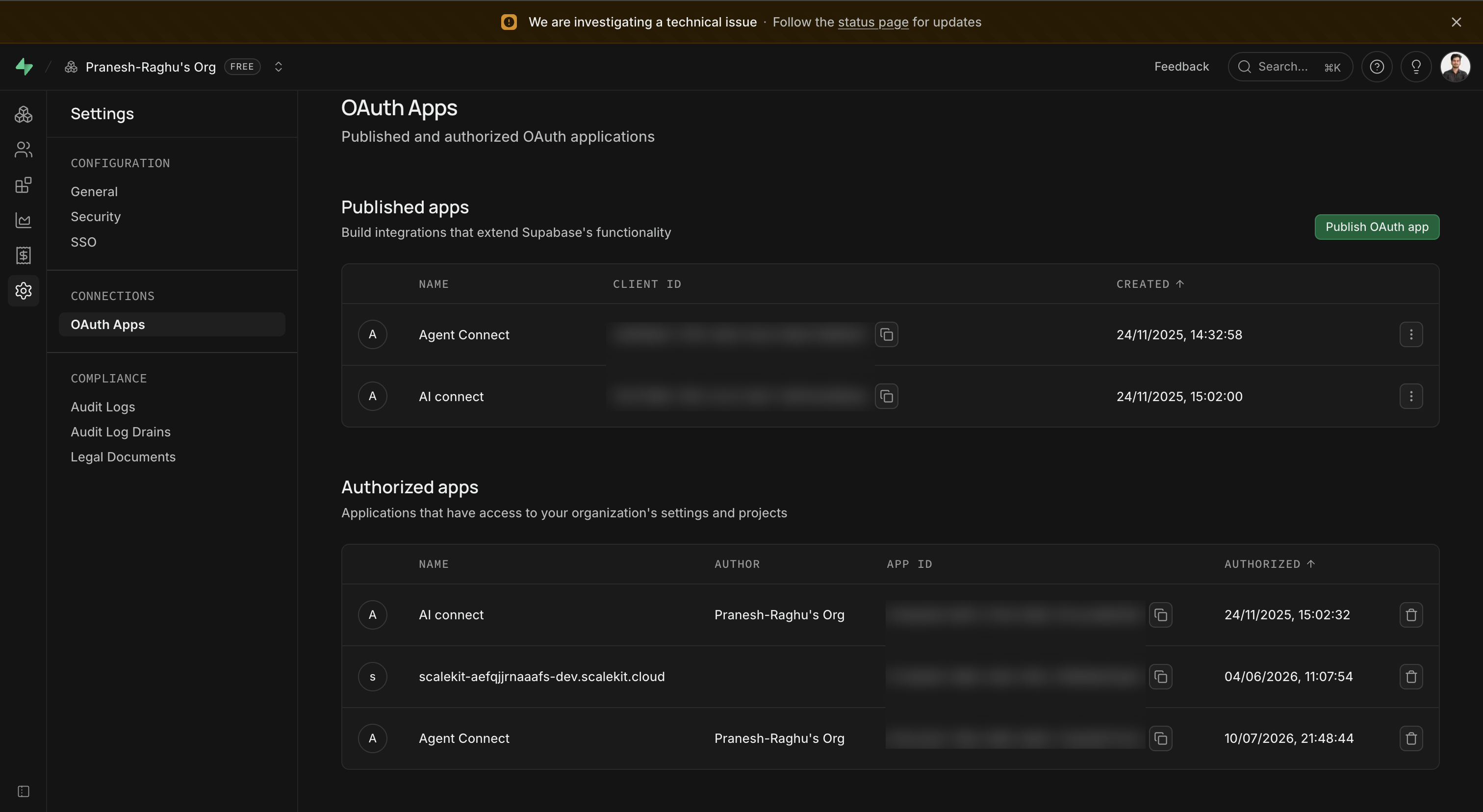
-
-
Add the redirect URI
-
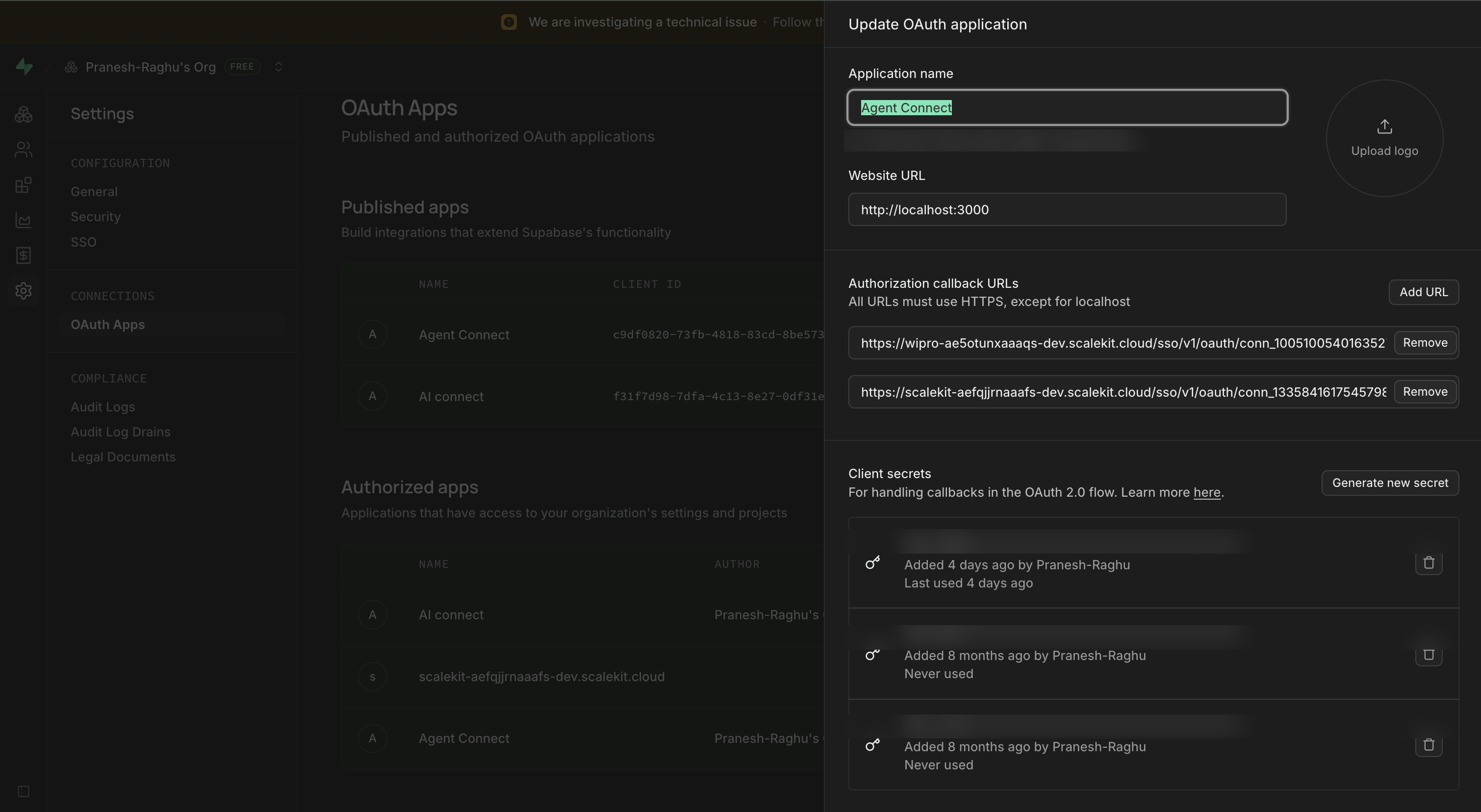
Open the app you created and add the redirect URI you copied from Scalekit under Authorization callback URLs.
-
Click Add URL, then save your changes.
-
-
Copy your Client ID and Client Secret
-
Copy the Client ID shown in the Published apps table, or from the app’s detail panel next to the app name.
-
Under Client secrets, click Generate new secret and copy it immediately — Supabase only shows the full secret once.
-
-
Add credentials in Scalekit
- Return to the connection you created in Scalekit and enter:
- Client ID — from your Supabase OAuth app
- Client Secret — from your Supabase OAuth app
- Click Save.
- Return to the connection you created in Scalekit and enter:
-
Authorize a user and make your first call
quickstart.mts import { ScalekitClient } from '@scalekit-sdk/node'import 'dotenv/config'import { createInterface } from 'node:readline/promises'const scalekit = new ScalekitClient(process.env.SCALEKIT_ENVIRONMENT_URL,process.env.SCALEKIT_CLIENT_ID,process.env.SCALEKIT_CLIENT_SECRET,)const actions = scalekit.actionsconst connector = 'supabase'const identifier = 'user_123'// Generate an authorization link for the userconst { link } = await actions.getAuthorizationLink({ connectionName: connector, identifier })console.log('Authorize Supabase:', link)const rl = createInterface({ input: process.stdin, output: process.stdout })await rl.question('Press Enter after authorizing...')rl.close()// Make your first callconst result = await actions.executeTool({connector,identifier,toolName: 'supabase_get_profile',toolInput: {},})console.log(result)Terminal window npx tsx quickstart.mtsquickstart.py import osfrom scalekit import ScalekitClientfrom dotenv import load_dotenvload_dotenv()scalekit_client = ScalekitClient(env_url=os.getenv("SCALEKIT_ENVIRONMENT_URL"),client_id=os.getenv("SCALEKIT_CLIENT_ID"),client_secret=os.getenv("SCALEKIT_CLIENT_SECRET"),)actions = scalekit_client.actionsconnection_name = "supabase"identifier = "user_123"# Generate an authorization link for the userlink_response = actions.get_authorization_link(connection_name=connection_name,identifier=identifier,)print("Authorize Supabase:", link_response.link)input("Press Enter after authorizing...")# Make your first callresult = actions.execute_tool(tool_input={},tool_name="supabase_get_profile",connection_name=connection_name,identifier=identifier,)print(result)Terminal window python quickstart.pyEach user signs in once. See Authorize a user for the full flow and statuses.
Tools
Pass the exact name toexecute_toolsupabase_diff_branch[Beta] Diff a Supabase database branch against production, returning a plain-text schema diff (SQL statements) that can be reviewed or applied as a migration.Read-onlyDiff Branch
[Beta] Diff a Supabase database branch against production, returning a plain-text schema diff (SQL statements) that can be reviewed or applied as a migration. Use this to preview schema changes made on a development branch before merging. By default uses the Migra diffing engine; set pgdelta to true to use pg-delta instead. Optionally restrict the diff to specific schemas.
Inputs
branch_id_or_refstringrequired- The 20-character branch reference (lowercase letters, same format as a project ref) or, for legacy branches, the branch UUID. Found in the Supabase dashboard for the branch you want to diff.
included_schemasstring- Comma-separated list of Postgres schema names to include in the diff (e.g. "public,auth"). If omitted, the API's default schema selection is used.
pgdeltaboolean- When true, use pg-delta instead of Migra to compute the schema diff. Defaults to false (Migra).default
false
supabase_generate_typescript_typesGenerate TypeScript type definitions for a Supabase project's database schema, for use with supabase-js.Read-onlyGenerate TypeScript Types
Generate TypeScript type definitions for a Supabase project's database schema, for use with supabase-js. Requires the project ref; optionally scope generation to specific comma-separated schemas (defaults to public). The response is a JSON object with a single 'types' field containing the generated TypeScript source as a string — it is not a general-purpose JSON object with typed fields.
Inputs
refstringrequired- Project reference ID (the 20-character lowercase project ref shown in the Supabase dashboard URL).
included_schemasstring- Comma-separated list of database schemas to include when generating types. Example: public,auth. Defaults to public.default
public
supabase_get_action_runGet the current status of a Supabase Environments action run (the automated clone/pull/health/configure/migrate/seed/deploy pipeline used to spin up a preview branch).Read-onlyGet Action Run
Get the current status of a Supabase Environments action run (the automated clone/pull/health/configure/migrate/seed/deploy pipeline used to spin up a preview branch). Returns the run's id, branch_id, per-step run_steps array (name, status, timestamps), workdir, check_run_id, and created_at/updated_at.
Inputs
refstringrequired- The 20-character project reference ID (lowercase letters only). Found in the project's Supabase dashboard URL or Settings > General.
run_idstringrequired- The unique ID of the action run to look up, as returned by list_action_runs or when a branch action was triggered.
supabase_get_action_run_logsGet the plain-text logs produced by a Supabase Environments action run (the clone/pull/health/configure/migrate/seed/deploy pipeline used to spin up a preview branch).Read-onlyGet Action Run Logs
Get the plain-text logs produced by a Supabase Environments action run (the clone/pull/health/configure/migrate/seed/deploy pipeline used to spin up a preview branch). Useful for diagnosing why a branch action step failed. Returns the raw log output as text, not JSON.
Inputs
refstringrequired- The 20-character project reference ID (lowercase letters only). Found in the project's Supabase dashboard URL or Settings > General.
run_idstringrequired- The unique ID of the action run whose logs you want to retrieve, as returned by list_action_runs or get_action_run.
supabase_get_auth_service_configGet a project's Auth (GoTrue) service configuration.Read-onlyGet Auth Service Config
Get a project's Auth (GoTrue) service configuration. Returns a large object describing signup restrictions, external OAuth provider settings (Apple, Azure, Bitbucket, Google, etc.), SMTP/email settings, rate limits, session settings, and more. Requires only the project ref.
Inputs
refstringrequired- The Supabase project reference ID, a 20-character lowercase string that identifies the project. Found in the project URL or Project Settings.
supabase_get_available_regions[Beta] Get the list of regions available for creating a new Supabase project under an organization, along with recommended regions.Read-onlyGet Available Regions
[Beta] Get the list of regions available for creating a new Supabase project under an organization, along with recommended regions. Optionally narrow recommendations by continent and desired compute instance size. Returns a recommendations object (a smartGroup and specific regions) and an all object listing every available region grouped the same way.
Inputs
organization_slugstringrequired- The organization's slug identifier, as shown in the Supabase dashboard URL (e.g. app.supabase.com/org/<slug>).
continentstring- Continent code used to bias region recommendations. One of NA (North America), SA (South America), EU (Europe), AF (Africa), AS (Asia), OC (Oceania), AN (Antarctica).one of
NASAEUAFASOCAN desired_instance_sizestring- Desired compute instance size, used to filter regions that support it. Omit to default to the smallest possible size. One of nano, micro, small, medium, large, xlarge, 2xlarge, 4xlarge, 8xlarge, 12xlarge, 16xlarge, 24xlarge, 24xlarge_optimized_memory, 24xlarge_optimized_cpu, 24xlarge_high_memory, 48xlarge, 48xlarge_optimized_memory, 48xlarge_optimized_cpu, 48xlarge_high_memory.one of
nanomicrosmallmediumlargexlarge2xlarge4xlarge8xlarge12xlarge16xlarge24xlarge24xlarge_optimized_memory24xlarge_optimized_cpu24xlarge_high_memory48xlarge48xlarge_optimized_memory48xlarge_optimized_cpu48xlarge_high_memory
supabase_get_backup_scheduleGet the daily backup schedule configured for a Supabase project.Read-onlyGet Backup Schedule
Get the daily backup schedule configured for a Supabase project. Requires only the project ref. Returns schedule_for (the UTC time of day backups run, in HH:MM:SS format) and updated_at (when the schedule was last changed). Only available on the Enterprise organization plan.
Inputs
refstringrequired- Project reference ID (the 20-character lowercase project ref shown in the Supabase dashboard URL).
supabase_get_branchFetch a specific database branch of a Supabase project by its name.Read-onlyGet Branch
Fetch a specific database branch of a Supabase project by its name. Returns the branch's id, project_ref, git_branch, persistent flag, status, timestamps, and related metadata.
Inputs
namestringrequired- Name of the branch to retrieve, e.g. 'preview-login-page'.
refstringrequired- Project reference ID (20-character lowercase string) that owns the branch.
supabase_get_branch_configFetch the configuration of a Supabase database branch, including its Postgres version/engine, release channel, status, and database connection details (db_host, db_port, db_user, db_pass, jwt_secret).Read-onlyGet Branch Config
Fetch the configuration of a Supabase database branch, including its Postgres version/engine, release channel, status, and database connection details (db_host, db_port, db_user, db_pass, jwt_secret). Note: the response includes sensitive credentials — handle it securely.
Inputs
branch_id_or_refstringrequired- Branch reference (20-character lowercase string) or the deprecated branch UUID.
supabase_get_database_diskGet the current disk attributes for a Supabase project's database, including disk type (gp3 or io2), size in GB, IOPS, throughput (gp3 only), and when it was last modified.Read-onlyGet Database Disk
Get the current disk attributes for a Supabase project's database, including disk type (gp3 or io2), size in GB, IOPS, throughput (gp3 only), and when it was last modified. Requires only the project ref.
Inputs
refstringrequired- The 20-character project reference ID (lowercase letters only). Found in the project's Supabase dashboard URL or Settings > General.
supabase_get_database_metadataGet database metadata for a Supabase project, listing each database and its schemas by name.Read-onlyGet Database Metadata
Get database metadata for a Supabase project, listing each database and its schemas by name. Requires only the project ref. Returns a 'databases' array, where each entry has a name and a nested 'schemas' array of schema names. Note: this is an experimental, deprecated endpoint that may change or be removed in future API versions — use with caution.
Inputs
refstringrequired- Project reference ID (the 20-character lowercase project ref shown in the Supabase dashboard URL).
supabase_get_database_openapiGet the auto-generated PostgREST OpenAPI specification for a Supabase project's database — the same specification served by the project's /rest/v1/ endpoint, useful for discovering available tables, columns, and REST operations without querying the project directly.Read-onlyGet Database OpenAPI Spec
Get the auto-generated PostgREST OpenAPI specification for a Supabase project's database — the same specification served by the project's /rest/v1/ endpoint, useful for discovering available tables, columns, and REST operations without querying the project directly. Requires the project ref; optionally scope to a specific database schema (defaults to public). Returns the raw OpenAPI specification as a JSON object.
Inputs
refstringrequired- Project reference ID (the 20-character lowercase project ref shown in the Supabase dashboard URL).
schemastring- The database schema to generate the PostgREST OpenAPI spec for. Defaults to public.default
public
supabase_get_disk_utilizationGet current disk utilization for a Supabase project's database: total filesystem size, available bytes, and used bytes, as of a timestamp.Read-onlyGet Disk Utilization
Get current disk utilization for a Supabase project's database: total filesystem size, available bytes, and used bytes, as of a timestamp. Requires only the project ref.
Inputs
refstringrequired- The 20-character project reference ID (lowercase letters only). Found in the project's Supabase dashboard URL or Settings > General.
supabase_get_functionRetrieve metadata for a specific Supabase Edge Function by slug, including its status, version, verify_jwt setting, and entrypoint/import-map paths.Read-onlyGet Function
Retrieve metadata for a specific Supabase Edge Function by slug, including its status, version, verify_jwt setting, and entrypoint/import-map paths. Does not include the function's source code; use get_function_body for that. Requires the project ref and function slug.
Inputs
function_slugstringrequired- Slug (identifier) of the Edge Function to retrieve, e.g. 'hello-world'. Alphanumeric characters, underscores, and hyphens only.
refstringrequired- The 20-character project reference ID (lowercase letters only). Found in the project's Supabase dashboard URL or Settings > General.
supabase_get_function_bodyRetrieve the raw Deno/TypeScript source code (the deployed bundle contents) of a specific Supabase Edge Function by slug.Read-onlyGet Function Body
Retrieve the raw Deno/TypeScript source code (the deployed bundle contents) of a specific Supabase Edge Function by slug. Returns the function body as plain text, not JSON. Requires the project ref and function slug.
Inputs
function_slugstringrequired- Slug (identifier) of the Edge Function whose source code you want, e.g. 'hello-world'. Alphanumeric characters, underscores, and hyphens only.
refstringrequired- The 20-character project reference ID (lowercase letters only). Found in the project's Supabase dashboard URL or Settings > General.
supabase_get_hostname_config[Beta] Get a Supabase project's custom hostname configuration, including the current status (e.g.Read-onlyGet Custom Hostname Config
[Beta] Get a Supabase project's custom hostname configuration, including the current status (e.g. not_started, initiated, challenge_verified, origin_setup_completed, services_reconfigured), the configured custom_hostname, and Cloudflare-backed SSL/verification detail. Requires only the project ref.
Inputs
refstringrequired- The 20-character project reference ID (lowercase letters only). Found in the project's Supabase dashboard URL or Settings > General.
supabase_get_jit_accessGet the user-id to role mappings for just-in-time (JIT) database access on a Supabase project.Read-onlyGet JIT Access Mappings
Get the user-id to role mappings for just-in-time (JIT) database access on a Supabase project. Returns the list of users who have been authorized to assume specific Postgres roles, including per-role expiry and network restrictions. Requires the project ref.
Inputs
refstringrequired- The 20-character project reference ID (lowercase letters only). Found in the project's Supabase dashboard URL or Settings > General.
supabase_get_jit_access_config[Beta] Get a Supabase project's temporary (just-in-time) access configuration.Read-onlyGet JIT Access Config
[Beta] Get a Supabase project's temporary (just-in-time) access configuration. Returns whether JIT access is enabled or disabled for the project, or an unavailable state with a reason (e.g., postgres_upgrade_required, temporarily_unavailable). Requires the project ref.
Inputs
refstringrequired- The 20-character project reference ID (lowercase letters only). Found in the project's Supabase dashboard URL or Settings > General.
supabase_get_legacy_api_keysCheck whether JWT-based legacy (anon, service_role) API keys are still enabled for a project.Read-onlyGet Legacy API Keys Status
Check whether JWT-based legacy (anon, service_role) API keys are still enabled for a project. Returns {"enabled": bool}. Distinct from the new API keys system already covered by Get Project API Key(s), which returns the actual key objects rather than a single enabled flag. Note: Supabase's docs mark this endpoint as scheduled for future removal (check for HTTP 404).
Inputs
refstringrequired- The 20-character project reference ID (lowercase letters only). Found in the project's Supabase dashboard URL or Settings > General.
supabase_get_legacy_signing_keyGet info about the project's original JWT secret when imported as a legacy signing key (id, algorithm, status, public_jwk, timestamps).Read-onlyGet Legacy Signing Key
Get info about the project's original JWT secret when imported as a legacy signing key (id, algorithm, status, public_jwk, timestamps). Distinct from the new asymmetric signing-keys system already covered by List/Create/Get Project Signing Key(s).
Inputs
refstringrequired- The 20-character project reference ID (lowercase letters only). Found in the project's Supabase dashboard URL or Settings > General.
supabase_get_migrationFetch an existing entry from a Supabase project's database migration history by version.Read-onlyGet Migration
Fetch an existing entry from a Supabase project's database migration history by version. Returns the migration version, name, SQL statements, rollback statements, creator, and idempotency key. Note: this endpoint is only available to selected partner OAuth apps and may return a 403 for other apps. Requires the project ref and migration version.
Inputs
refstringrequired- The 20-character project reference ID (lowercase letters only). Found in the project's Supabase dashboard URL or Settings > General.
versionstringrequired- The migration version identifier, typically a numeric timestamp (e.g., 20250312000000) matching the migration filename prefix.
supabase_get_network_restrictions[Beta] Get a Supabase project's network restrictions (database firewall allow-list).Read-onlyGet Network Restrictions
[Beta] Get a Supabase project's network restrictions (database firewall allow-list). Returns entitlement (whether restrictions are allowed on this plan), config (the currently requested dbAllowedCidrs / dbAllowedCidrsV6 CIDR lists), old_config (the previously applied config, if a newer one is pending), status (stored or applied), and timestamps. Requires the project ref.
Inputs
refstringrequired- The 20-character project reference ID (lowercase letters only). Found in the project's Supabase dashboard URL or Settings > General.
supabase_get_organizationGet information about a Supabase organization by its slug.Read-onlyGet Organization
Get information about a Supabase organization by its slug. Returns the organization's id, name, plan, opt-in tags, and allowed release channels.
Inputs
slugstringrequired- Slug (identifier) of the organization to look up, e.g. 'tsrqponmlkjihgfedcba'.
supabase_get_organization_entitlementsGet the feature entitlements available to a Supabase organization based on its billing plan and any account-specific overrides.Read-onlyGet Organization Entitlements
Get the feature entitlements available to a Supabase organization based on its billing plan and any account-specific overrides. Returns an array of entitlement objects, each describing a feature key (e.g. instances.high_availability, auth.saml_2, branching_limit), its type (boolean, numeric, or set), whether the organization hasAccess to it, and its config/limits.
Inputs
slugstringrequired- The organization's slug identifier, as shown in the Supabase dashboard URL (e.g. app.supabase.com/org/<slug>).
supabase_get_organization_project_claimPreview a pending project claim for an organization using a claim token: returns the project's ref and name, plus a preview of validation warnings, errors, informational notes, and any members that would exceed the free project limit if the claim is completed.Read-onlyGet Organization Project Claim
Preview a pending project claim for an organization using a claim token: returns the project's ref and name, plus a preview of validation warnings, errors, informational notes, and any members that would exceed the free project limit if the claim is completed. Requires the organization slug and the claim token.
Inputs
slugstringrequired- Slug (identifier) of the organization previewing the claim.
tokenstringrequired- The project claim token, obtained from Create Project Claim Token.
supabase_get_performance_advisorsGet Supabase's automated performance advisor lints for a project, such as unindexed foreign keys, unused indexes, or duplicate indexes.Read-onlyGet Performance Advisors
Get Supabase's automated performance advisor lints for a project, such as unindexed foreign keys, unused indexes, or duplicate indexes. Returns an object with a lints array; each lint includes name, title, level (ERROR/WARN/INFO), categories, description, detail, remediation, and metadata. Note: this is an experimental Supabase endpoint and may change or be removed in future API versions.
Inputs
refstringrequired- The 20-character project reference ID (lowercase letters only). Found in the project's Supabase dashboard URL or Settings > General.
supabase_get_pgsodium_config[Beta] Get the pgsodium encryption configuration for a Supabase project.Read-onlyGet Pgsodium Config
[Beta] Get the pgsodium encryption configuration for a Supabase project. Returns the project's root_key used by pgsodium for column-level and vault encryption. Requires the project ref.
Inputs
refstringrequired- The 20-character project reference ID (lowercase letters only). Found in the project's Supabase dashboard URL or Settings > General.
supabase_get_pooler_configGet a Supabase project's connection pooler (Supavisor) configuration.Read-onlyGet Pooler Config
Get a Supabase project's connection pooler (Supavisor) configuration. Returns an array of pooler config objects, each including identifier, database_type (PRIMARY or READ_REPLICA), db_user, db_host, db_port, db_name, connection_string, pool_mode (transaction or session), default_pool_size, and max_client_conn. Requires the project ref.
Inputs
refstringrequired- The 20-character project reference ID (lowercase letters only). Found in the project's Supabase dashboard URL or Settings > General.
supabase_get_postgres_configGet a Supabase project's Postgres database configuration.Read-onlyGet Postgres Config
Get a Supabase project's Postgres database configuration. Returns the current values of tunable Postgres settings such as max_connections, max_wal_size, effective_cache_size, maintenance_work_mem, session_replication_role, statement timeouts, and logging options. Requires the project ref.
Inputs
refstringrequired- The 20-character project reference ID (lowercase letters only). Found in the project's Supabase dashboard URL or Settings > General.
supabase_get_postgres_upgrade_eligibility[Beta] Check whether a Supabase project is eligible to upgrade its Postgres version.Read-onlyGet Postgres Upgrade Eligibility
[Beta] Check whether a Supabase project is eligible to upgrade its Postgres version. Returns eligible (boolean), current_app_version, current_app_version_release_channel, latest_app_version, an array of target_upgrade_versions (each with postgres_version, release_channel, app_version), duration_estimate_hours, and any validation_errors blocking the upgrade. Requires the project ref.
Inputs
refstringrequired- The 20-character project reference ID (lowercase letters only). Found in the project's Supabase dashboard URL or Settings > General.
supabase_get_postgres_upgrade_status[Beta] Get the latest status of a Supabase project's Postgres upgrade.Read-onlyGet Postgres Upgrade Status
[Beta] Get the latest status of a Supabase project's Postgres upgrade. Returns a databaseUpgradeStatus object (null if no upgrade has been initiated) with initiated_at, latest_status_at, target_version, status, progress (e.g. 0_requested through 10_completed_post_physical_backup), and error (if the upgrade failed). Requires the project ref; optionally scope the lookup to a specific tracking_id.
Inputs
refstringrequired- The 20-character project reference ID (lowercase letters only). Found in the project's Supabase dashboard URL or Settings > General.
tracking_idstring- Optional tracking ID returned when the upgrade was initiated, used to look up the status of that specific upgrade attempt. Example: 9f4d3a20-6b2e-4a7e-8c91-1d5f3e7a2b4c.
supabase_get_postgrest_service_configGet a Supabase project's PostgREST (Data API) service configuration, identified by its project ref.Read-onlyGet PostgREST Service Config
Get a Supabase project's PostgREST (Data API) service configuration, identified by its project ref. Returns db_schema, max_rows, db_extra_search_path, db_pool, db_pool_acquisition_timeout, and the PostgREST jwt_secret.
Inputs
refstringrequired- The project ref to fetch the PostgREST config for. A 20-character lowercase string that uniquely identifies a Supabase project. Example: 'abcdefghijklmnopqrst'.
supabase_get_profileGet the authenticated user's Supabase profile.Read-onlyGet Profile
Get the authenticated user's Supabase profile. Returns the user's GoTrue id, primary email, and username. Takes no parameters.
Inputs
This tool takes no inputs.
supabase_get_projectGet a specific Supabase project that belongs to the authenticated user or organization, identified by its project ref.Read-onlyGet Project
Get a specific Supabase project that belongs to the authenticated user or organization, identified by its project ref. Returns the project's id, ref, organization details, name, region, status, and database connection info.
Inputs
refstringrequired- The project ref to fetch. A 20-character lowercase string that uniquely identifies a Supabase project. Example: 'abcdefghijklmnopqrst'.
supabase_get_project_api_keyGet a single Supabase project API key by its ID, identified by the project ref and key ID (UUID).Read-onlyGet Project API Key
Get a single Supabase project API key by its ID, identified by the project ref and key ID (UUID). Set reveal=true to include the plaintext key value in the response — otherwise only metadata is returned.
Inputs
idstringrequired- The UUID of the API key to fetch.
refstringrequired- The project ref the API key belongs to. A 20-character lowercase string that uniquely identifies a Supabase project. Example: 'abcdefghijklmnopqrst'.
revealboolean- Whether to include the plaintext API key value in the response. Defaults to false.default
false
supabase_get_project_api_keysRetrieve all API keys (legacy, publishable, and secret) configured for a Supabase project.Read-onlyGet Project API Keys
Retrieve all API keys (legacy, publishable, and secret) configured for a Supabase project. By default secret values are redacted; set reveal to true to include the actual key values (hash/api_key) in the response. Returns an array of API key objects with id, type, name, description, prefix, and timestamps.
Inputs
refstringrequired- The 20-character project reference ID (lowercase letters only). Found in the project's Supabase dashboard URL or Settings > General.
revealboolean- Whether to reveal the actual secret values of the API keys (hash, api_key) in the response. Defaults to false (redacted) when omitted.
supabase_get_project_claim_tokenGet the existing project claim token for a Supabase project, if one has been created.Read-onlyGet Project Claim Token
Get the existing project claim token for a Supabase project, if one has been created. A claim token lets another organization claim ownership of the project. Requires only the project ref.
Inputs
refstringrequired- The 20-character project reference ID (lowercase letters only). Found in the project's Supabase dashboard URL or Settings > General.
supabase_get_project_disk_autoscale_configGet a Supabase project's disk autoscale configuration: the growth percentage applied when scaling, the minimum increment size in GB, and the maximum size the disk is allowed to grow to.Read-onlyGet Project Disk Autoscale Config
Get a Supabase project's disk autoscale configuration: the growth percentage applied when scaling, the minimum increment size in GB, and the maximum size the disk is allowed to grow to. Requires only the project ref.
Inputs
refstringrequired- The 20-character project reference ID (lowercase letters only). Found in the project's Supabase dashboard URL or Settings > General.
supabase_get_project_function_combined_statsGet combined invocation statistics for a single Edge Function in a Supabase project, bucketed at the given interval.Read-onlyGet Project Function Combined Stats
Get combined invocation statistics for a single Edge Function in a Supabase project, bucketed at the given interval. Requires the project ref, the interval, and the function_id.
Inputs
function_idstringrequired- UUID of the Edge Function to get statistics for.
intervalstringrequired- Bucket size for the returned statistics.one of
15min1hr3hr1day refstringrequired- The 20-character project reference ID (lowercase letters only). Found in the project's Supabase dashboard URL or Settings > General.
supabase_get_project_logsQuery a project's unified log stream (edge_logs, postgres_logs, etc.) using ClickHouse SQL.Read-onlyGet Project Logs
Query a project's unified log stream (edge_logs, postgres_logs, etc.) using ClickHouse SQL. Returns an object with a "result" array of matching log rows and an optional "error" field. If iso_timestamp_start and iso_timestamp_end are omitted, only the last 1 minute of logs is queried. The timestamp range must not exceed 24 hours.
Inputs
refstringrequired- The Supabase project reference ID, a 20-character lowercase string that identifies the project. Found in the project URL or Project Settings.
iso_timestamp_endstring- End of the time range to query, as an ISO 8601 timestamp. Must be paired with iso_timestamp_start and the range must not exceed 24 hours.
iso_timestamp_startstring- Start of the time range to query, as an ISO 8601 timestamp. Must be paired with iso_timestamp_end and the range must not exceed 24 hours.
sqlstring- A custom SQL query written in ClickHouse SQL dialect to execute against the log stream. Filter by the "source" column to target specific log sources such as edge_logs or postgres_logs.
supabase_get_project_pgbouncer_configGet a Supabase project's legacy PgBouncer connection pooler settings: default pool size, max client connections, pool mode, connection string, and timeout/lifetime settings.Read-onlyGet Project PgBouncer Config
Get a Supabase project's legacy PgBouncer connection pooler settings: default pool size, max client connections, pool mode, connection string, and timeout/lifetime settings. For the actively managed Supavisor pooler, see Get Pooler Config instead. Requires only the project ref.
Inputs
refstringrequired- The 20-character project reference ID (lowercase letters only). Found in the project's Supabase dashboard URL or Settings > General.
supabase_get_project_signing_keyGet information about a single JWT signing key for a Supabase project by its UUID.Read-onlyGet Project Signing Key
Get information about a single JWT signing key for a Supabase project by its UUID. Returns the key's algorithm (EdDSA, ES256, RS256, or HS256), status (in_use, previously_used, revoked, or standby), public_jwk, and timestamps. Use List Project Signing Keys to find the id.
Inputs
idstringrequired- UUID of the signing key to retrieve.
refstringrequired- The 20-character project reference ID (lowercase letters only). Found in the project's Supabase dashboard URL or Settings > General.
supabase_get_project_signing_keysList all JWT signing keys for a project.Read-onlyList Project Signing Keys
List all JWT signing keys for a project. Returns an object with a "keys" array; each entry has id, algorithm (EdDSA, ES256, RS256, or HS256), status (in_use, previously_used, revoked, or standby), public_jwk, created_at, and updated_at. Requires only the project ref.
Inputs
refstringrequired- The Supabase project reference ID, a 20-character lowercase string that identifies the project. Found in the project URL or Project Settings.
supabase_get_project_tpa_integrationGet details of a single third-party auth (TPA) integration configured for a project, identified by its integration ID.Read-onlyGet Project Third-Party Auth Integration
Get details of a single third-party auth (TPA) integration configured for a project, identified by its integration ID. Returns an object with id, type, oidc_issuer_url, jwks_url, custom_jwks, resolved_jwks, inserted_at, updated_at, and resolved_at.
Inputs
refstringrequired- The Supabase project reference ID, a 20-character lowercase string that identifies the project. Found in the project URL or Project Settings.
tpa_idstringrequired- The unique ID (UUID) of the third-party auth integration to retrieve.
supabase_get_project_usage_api_countGet a time series of a Supabase project's API request counts broken down by service (auth, realtime, REST, storage), bucketed at the given interval.Read-onlyGet Project Usage API Count
Get a time series of a Supabase project's API request counts broken down by service (auth, realtime, REST, storage), bucketed at the given interval. Requires the project ref; interval defaults to the API's own default if omitted.
Inputs
refstringrequired- The 20-character project reference ID (lowercase letters only). Found in the project's Supabase dashboard URL or Settings > General.
intervalstring- Bucket size for the returned time series.one of
15min30min1hr3hr1day3day7day
supabase_get_project_usage_request_countGet the total API request count for a Supabase project.Read-onlyGet Project Usage Request Count
Get the total API request count for a Supabase project. Requires only the project ref.
Inputs
refstringrequired- The 20-character project reference ID (lowercase letters only). Found in the project's Supabase dashboard URL or Settings > General.
supabase_get_projects_for_organizationGet a paginated list of Supabase projects belonging to a specific organization, identified by its slug.Read-onlyGet Projects For Organization
Get a paginated list of Supabase projects belonging to a specific organization, identified by its slug. Supports offset-based pagination (offset/limit), text search by project name, sorting, and filtering by project status. Returns an object with a 'projects' array (each including ref, name, region, status, and databases) and pagination metadata.
Inputs
slugstringrequired- Slug of the organization whose projects to list. Example: 'tsrqponmlkjihgfedcba'.
limitinteger- Number of projects to return per page. Between 1 and 100. Defaults to 100.default
100 offsetinteger- Number of projects to skip for pagination. Defaults to 0.default
0 searchstring- Search projects by name (case-insensitive substring match).
sortstring- Sort order for the returned projects. One of: name_asc, name_desc, created_asc, created_desc. Defaults to name_asc.one of
name_ascname_desccreated_asccreated_descdefaultname_asc statusesstring- Comma-separated list of project statuses to filter by, e.g. 'ACTIVE_HEALTHY,INACTIVE'. Supported values include ACTIVE_HEALTHY and INACTIVE.
supabase_get_readonly_mode_statusReturn a Supabase project's readonly mode status.Read-onlyGet Readonly Mode Status
Return a Supabase project's readonly mode status. Indicates whether readonly mode is currently enabled, whether a temporary override is active, and the timestamp until which the override remains active. Requires the project ref.
Inputs
refstringrequired- The 20-character project reference ID (lowercase letters only). Found in the project's Supabase dashboard URL or Settings > General.
supabase_get_realtime_configGet a Supabase project's Realtime service configuration: whether it is restricted to private channels, connection pool size, and the concurrent user, event, byte, channel, join, presence, and payload-size rate limits.Read-onlyGet Realtime Config
Get a Supabase project's Realtime service configuration: whether it is restricted to private channels, connection pool size, and the concurrent user, event, byte, channel, join, presence, and payload-size rate limits. Requires only the project ref.
Inputs
refstringrequired- The 20-character project reference ID (lowercase letters only). Found in the project's Supabase dashboard URL or Settings > General.
supabase_get_restore_pointGet restore points created for a Supabase project's database.Read-onlyGet Restore Point
Get restore points created for a Supabase project's database. Returns the restore point's name, status (AVAILABLE, PENDING, REMOVED, or FAILED), and completion timestamp. Optionally filter by restore point name. Requires the project ref.
Inputs
refstringrequired- The 20-character project reference ID (lowercase letters only). Found in the project's Supabase dashboard URL or Settings > General.
namestring- Optional name of a specific restore point to look up. Maximum 20 characters. If omitted, the most recent restore point information is returned.
supabase_get_security_advisorsGet Supabase's automated security advisor lints for a project, such as exposed auth.users tables, RLS misconfigurations, or leaked service keys.Read-onlyGet Security Advisors
Get Supabase's automated security advisor lints for a project, such as exposed auth.users tables, RLS misconfigurations, or leaked service keys. Returns an object with a lints array; each lint includes name, title, level (ERROR/WARN/INFO), categories, description, detail, remediation, and metadata. Note: this is an experimental Supabase endpoint and may change or be removed in future API versions.
Inputs
refstringrequired- The 20-character project reference ID (lowercase letters only). Found in the project's Supabase dashboard URL or Settings > General.
lint_typestring- Optional filter restricting results to a specific lint type. Currently only 'sql' is supported.one of
sql
supabase_get_services_healthGet the health status of one or more of a Supabase project's services.Read-onlyGet Services Health
Get the health status of one or more of a Supabase project's services. Returns an array of service health objects, each with name (auth, db, db_postgres_user, pooler, realtime, rest, storage, or pg_bouncer), status (COMING_UP, ACTIVE_HEALTHY, or UNHEALTHY), an info object with service-specific details, and an error message if unhealthy. Requires the project ref and the list of services to check.
Inputs
refstringrequired- The 20-character project reference ID (lowercase letters only). Found in the project's Supabase dashboard URL or Settings > General.
servicesarrayrequired- Array of service names to check the health of. Each entry must be one of: auth, db, db_postgres_user, pooler, realtime, rest, storage, pg_bouncer. Example: ["auth", "rest"].
timeout_msinteger- Optional timeout in milliseconds for each service health check, between 0 and 10000. Example: 2000.
supabase_get_snippetGet a specific saved SQL snippet by its ID.Read-onlyGet Snippet
Get a specific saved SQL snippet by its ID. Returns the snippet's metadata (name, description, visibility, owner, project) and its SQL content. Requires the snippet's UUID.
Inputs
idstringrequired- The UUID of the SQL snippet to retrieve, as shown in the Supabase SQL Editor URL or returned by list_snippets.
supabase_get_ssl_enforcement_config[Beta] Get a Supabase project's SSL enforcement configuration.Read-onlyGet SSL Enforcement Config
[Beta] Get a Supabase project's SSL enforcement configuration. Returns the current configuration, including whether SSL is enforced for direct database connections, and whether the configuration was applied successfully. Requires the project ref.
Inputs
refstringrequired- The 20-character project reference ID (lowercase letters only). Found in the project's Supabase dashboard URL or Settings > General.
supabase_get_sso_providerRetrieve a single SAML SSO provider configured for a Supabase project, identified by its UUID.Read-onlyGet SSO Provider
Retrieve a single SAML SSO provider configured for a Supabase project, identified by its UUID. Returns the provider's id, SAML configuration (entity_id, metadata_url, metadata_xml, attribute_mapping, name_id_format), associated domains, and timestamps.
Inputs
provider_idstringrequired- The UUID of the SSO provider to retrieve.
refstringrequired- The 20-character project reference ID (lowercase letters only). Found in the project's Supabase dashboard URL or Settings > General.
supabase_get_storage_configGet a Supabase project's Storage service configuration: the file size limit, and feature flags for image transformation, the S3 protocol, cache purging, the Iceberg catalog, and vector buckets.Read-onlyGet Storage Config
Get a Supabase project's Storage service configuration: the file size limit, and feature flags for image transformation, the S3 protocol, cache purging, the Iceberg catalog, and vector buckets. Requires only the project ref.
Inputs
refstringrequired- The 20-character project reference ID (lowercase letters only). Found in the project's Supabase dashboard URL or Settings > General.
supabase_get_vanity_subdomain_config[Beta] Get the current vanity subdomain configuration for a Supabase project.Read-onlyGet Vanity Subdomain Config
[Beta] Get the current vanity subdomain configuration for a Supabase project. Only available on the Pro, Team, or Enterprise organization plan. Requires only the project ref. Returns a status (not-used, custom-domain-used, or active) and the custom_domain if one is configured.
Inputs
refstringrequired- The 20-character project reference ID (lowercase letters only). Found in the project's Supabase dashboard URL or Settings > General.
supabase_list_action_runsList all Supabase Environments action runs for a project, paginated with offset/limit.Read-onlyList Action Runs
List all Supabase Environments action runs for a project, paginated with offset/limit. Each run represents an automated clone/pull/health/configure/migrate/seed/deploy pipeline execution (e.g. for a preview branch). Returns an array of run objects with id, branch_id, run_steps, workdir, check_run_id, and timestamps.
Inputs
refstringrequired- The 20-character project reference ID (lowercase letters only). Found in the project's Supabase dashboard URL or Settings > General.
limitnumber- Maximum number of action runs to return per page. KNOWN LIMITATION: Supabase's endpoint requires this as a literal JSON number and does not coerce query-string values, so passing any value here (of any type) currently causes a 400 from Supabase. Omit this field; the API returns all runs without it.
offsetnumber- Number of action runs to skip before starting to return results, for pagination. KNOWN LIMITATION: Supabase's endpoint requires this as a literal JSON number and does not coerce query-string values, so passing any value here (of any type) currently causes a 400 from Supabase. Omit this field; the API returns all runs without it.
supabase_list_available_restore_versionsList the Postgres versions available to restore a Supabase project to.Read-onlyList Available Restore Versions
List the Postgres versions available to restore a Supabase project to. Returns an available_versions array, each entry with version, release_channel (internal, alpha, beta, ga, withdrawn, or preview), and postgres_engine (13, 14, 15, 17, or 17-oriole). Requires the project ref.
Inputs
refstringrequired- The 20-character project reference ID (lowercase letters only). Found in the project's Supabase dashboard URL or Settings > General.
supabase_list_backupsList all backups for a Supabase project's database.Read-onlyList Backups
List all backups for a Supabase project's database. Returns the backup region, whether WAL-G and point-in-time recovery (PITR) are enabled, an array of backup objects (id, is_physical_backup, status, inserted_at), and physical backup date range data. Requires the project ref.
Inputs
refstringrequired- The 20-character project reference ID (lowercase letters only). Found in the project's Supabase dashboard URL or Settings > General.
supabase_list_branchesList all database branches for a Supabase project.Read-onlyList Branches
List all database branches for a Supabase project. Returns an array of branch objects, each including id, name, project_ref, git_branch, persistent flag, status, and timestamps.
Inputs
refstringrequired- Project reference ID (20-character lowercase string) whose branches to list.
supabase_list_bucketsList all Supabase Storage buckets for a project.Read-onlyList Storage Buckets
List all Supabase Storage buckets for a project. Returns an array of bucket objects with id, name, owner, public flag, created_at, and updated_at.
Inputs
refstringrequired- The 20-character project reference ID (lowercase letters only). Found in the project's Supabase dashboard URL or Settings > General.
supabase_list_functionsList all Edge Functions previously deployed to a Supabase project.Read-onlyList Functions
List all Edge Functions previously deployed to a Supabase project. Returns an array of function objects including id, slug, name, status, version, and timestamps. Requires only the project ref.
Inputs
refstringrequired- The 20-character project reference ID (lowercase letters only). Found in the project's Supabase dashboard URL or Settings > General.
supabase_list_jit_accessList all user-id to role mappings for just-in-time (JIT) database access on a Supabase project, including both direct authorizations and pending or accepted external user invites.Read-onlyList JIT Access
List all user-id to role mappings for just-in-time (JIT) database access on a Supabase project, including both direct authorizations and pending or accepted external user invites. Returns each user's id, email (if known), and the Postgres roles they can assume, with expiry and allowed network CIDRs. Requires only the project ref.
Inputs
refstringrequired- The 20-character project reference ID (lowercase letters only). Found in the project's Supabase dashboard URL or Settings > General.
supabase_list_migration_historyList the versions and names of database migrations that have already been applied to a Supabase project, in the order they were recorded.Read-onlyList Migration History
List the versions and names of database migrations that have already been applied to a Supabase project, in the order they were recorded. Note: this endpoint is only available to selected partner OAuth apps and may return a 403 for other apps. Requires the project ref.
Inputs
refstringrequired- The 20-character project reference ID (lowercase letters only). Found in the project's Supabase dashboard URL or Settings > General.
supabase_list_network_bans[Beta] Get a Supabase project's network bans (IP addresses temporarily blocked, typically after repeated failed authentication attempts).Read-onlyList Network Bans
[Beta] Get a Supabase project's network bans (IP addresses temporarily blocked, typically after repeated failed authentication attempts). Returns banned_ipv4_addresses, an array of banned IP address strings. Requires the project ref. Takes no request body.
Inputs
refstringrequired- The 20-character project reference ID (lowercase letters only). Found in the project's Supabase dashboard URL or Settings > General.
supabase_list_network_bans_enriched[Beta] Get a Supabase project's network bans enriched with additional information about which databases each ban affects.Read-onlyList Network Bans (Enriched)
[Beta] Get a Supabase project's network bans enriched with additional information about which databases each ban affects. Returns banned_ipv4_addresses, an array of objects each with banned_address, identifier, and type. Requires the project ref. Takes no request body.
Inputs
refstringrequired- The 20-character project reference ID (lowercase letters only). Found in the project's Supabase dashboard URL or Settings > General.
supabase_list_organization_membersList all members of a Supabase organization.Read-onlyList Organization Members
List all members of a Supabase organization. Returns an array of member objects with user_id, user_name, email, role_name, mfa_enabled, and avatar_url.
Inputs
slugstringrequired- The organization's slug identifier, as shown in the Supabase dashboard URL (e.g. app.supabase.com/org/<slug>).
supabase_list_organizationsList all Supabase organizations that the authenticated user currently belongs to.Read-onlyList Organizations
List all Supabase organizations that the authenticated user currently belongs to. Returns an array of organization objects, each including id, slug, and name. Takes no parameters.
Inputs
This tool takes no inputs.
supabase_list_project_addonsList the billing addons currently applied to a Supabase project, including the active compute instance size, plus every addon option that can be provisioned along with its pricing metadata.Read-onlyList Project Addons
List the billing addons currently applied to a Supabase project, including the active compute instance size, plus every addon option that can be provisioned along with its pricing metadata. Requires only the project ref.
Inputs
refstringrequired- The 20-character project reference ID (lowercase letters only). Found in the project's Supabase dashboard URL or Settings > General.
supabase_list_project_tpa_integrationsList all third-party auth (TPA) integrations configured for a project.Read-onlyList Project Third-Party Auth Integrations
List all third-party auth (TPA) integrations configured for a project. Returns an array of objects, each with id, type, oidc_issuer_url, jwks_url, custom_jwks, resolved_jwks, inserted_at, updated_at, and resolved_at. Requires only the project ref.
Inputs
refstringrequired- The Supabase project reference ID, a 20-character lowercase string that identifies the project. Found in the project URL or Project Settings.
supabase_list_projectsList all Supabase projects accessible to the authenticated user or organization.Read-onlyList Projects
List all Supabase projects accessible to the authenticated user or organization. Returns an array of project objects, each including id, organization_id, name, region, created_at, status, and a database object with the project's Postgres host. Takes no parameters.
Inputs
This tool takes no inputs.
supabase_list_secretsReturn all secrets (Edge Function environment variables) previously added to the specified Supabase project.Read-onlyList Secrets
Return all secrets (Edge Function environment variables) previously added to the specified Supabase project. Returns an array of secret objects, each including name, value, and updated_at.
Inputs
refstringrequired- The 20-character project reference ID (lowercase letters only). Found in the project's Supabase dashboard URL or Settings > General.
supabase_list_snippetsList saved SQL snippets (SQL Editor queries) for the currently authenticated user, optionally filtered to a single project.Read-onlyList Snippets
List saved SQL snippets (SQL Editor queries) for the currently authenticated user, optionally filtered to a single project. Supports cursor-based pagination and sorting. Returns an array of snippet summaries (id, name, description, owner, project, timestamps).
Inputs
cursorstring- Opaque pagination cursor from a previous response, used to fetch the next page of results.
limitstring- Maximum number of snippets to return per page. Between 1 and 100.
project_refstring- The 20-character project reference ID to filter snippets to. If omitted, snippets across all accessible projects are returned.
sort_bystring- Field to sort results by: 'name' or 'inserted_at'.one of
nameinserted_at sort_orderstring- Sort direction to apply to sort_by: 'asc' or 'desc'.one of
ascdesc
supabase_list_sso_providerList all SSO (SAML 2.0) identity providers configured for a project.Read-onlyList SSO Providers
List all SSO (SAML 2.0) identity providers configured for a project. Returns an object with an "items" array; each entry includes id and a nested saml object with entity_id, metadata_url, metadata_xml, attribute_mapping, and name_id_format. Requires only the project ref. Returns a 404 if SAML 2.0 support is not enabled for the project.
Inputs
refstringrequired- The Supabase project reference ID, a 20-character lowercase string that identifies the project. Found in the project URL or Project Settings.
supabase_read_only_query[Beta] Run a SQL query against a Supabase project's database as the restricted supabase_read_only_user role.Read-onlyRun Read-Only SQL Query
[Beta] Run a SQL query against a Supabase project's database as the restricted supabase_read_only_user role. Only read-style (SELECT-like) statements are accepted — the database role backing this endpoint lacks INSERT/UPDATE/DELETE/DDL privileges, so write statements will be rejected by Postgres. All table/view/function references in the query must be schema-qualified (e.g. public.users, not users). Optionally supply positional query parameters.
Inputs
querystringrequired- The read-only SQL query to execute. Must be a SELECT-style statement only (no INSERT/UPDATE/DELETE/DDL) and must use fully schema-qualified names (e.g. public.pg_stat_activity).
refstringrequired- The 20-character project reference ID (lowercase letters only). Found in the project's Supabase dashboard URL or Settings > General.
parametersarray- Optional array of positional parameter values to bind into the query (referenced as $1, $2, ... in the SQL). Pass null or omit if the query has no parameters.
supabase_scrape_project_metricsScrape a project's infrastructure metrics in Prometheus exposition format (plain text, not JSON).Read-onlyScrape Project Metrics
Scrape a project's infrastructure metrics in Prometheus exposition format (plain text, not JSON). Not deprecated, but a lower-priority/edge-case addition since the response cannot be parsed as JSON — treat the result as raw text.
Inputs
refstringrequired- The 20-character project reference ID (lowercase letters only). Found in the project's Supabase dashboard URL or Settings > General.
supabase_accept_invite_external_jit_accessAccept a pending invitation for just-in-time (JIT) database access on a Supabase project, activating the roles that were granted with Invite External JIT Access.WriteAccept Invite External JIT Access
Accept a pending invitation for just-in-time (JIT) database access on a Supabase project, activating the roles that were granted with Invite External JIT Access. Requires the project ref, the invited email address, and the invite token.
Inputs
emailstringrequired- Email address the invite was sent to.
refstringrequired- The 20-character project reference ID (lowercase letters only). Found in the project's Supabase dashboard URL or Settings > General.
tokenstringrequired- The invite token to accept.
supabase_activate_custom_hostname[Beta] Activate a previously initialized custom hostname for a Supabase project.WriteActivate Custom Hostname
[Beta] Activate a previously initialized custom hostname for a Supabase project. Call this after the DNS configuration has been verified (see Verify DNS Config) to make the custom hostname live. Requires only the project ref. Returns the current hostname configuration status and Cloudflare-backed detail.
Inputs
refstringrequired- The 20-character project reference ID (lowercase letters only). Found in the project's Supabase dashboard URL or Settings > General.
supabase_activate_vanity_subdomain_config[Beta] Activate a vanity subdomain for a Supabase project, giving it a custom *.supabase.co-style subdomain instead of the project ref-based domain.WriteActivate Vanity Subdomain
[Beta] Activate a vanity subdomain for a Supabase project, giving it a custom *.supabase.co-style subdomain instead of the project ref-based domain. Only available on the Pro, Team, or Enterprise organization plan. Requires the project ref and the desired vanity_subdomain (check availability first with the Check Vanity Subdomain Availability tool). Returns the resulting custom_domain.
Inputs
refstringrequired- The 20-character project reference ID (lowercase letters only). Found in the project's Supabase dashboard URL or Settings > General.
vanity_subdomainstringrequired- The desired vanity subdomain label (up to 63 characters), e.g. 'acme-prod'. The resulting domain will be <vanity_subdomain>.supabase.co.
supabase_apply_migrationApply a new database migration to a Supabase project by running the given SQL and recording it in the project's migration history.WriteApply Migration
Apply a new database migration to a Supabase project by running the given SQL and recording it in the project's migration history. Optionally name the migration and provide rollback SQL. Note: this endpoint is only available to selected partner OAuth apps and may return a 403 for other apps. Supply an Idempotency-Key header value to ensure the same migration is only tracked once if the request is retried. Requires the project ref and a query.
Inputs
querystringrequired- The SQL statements to run as this migration. Cannot be empty.
refstringrequired- The 20-character project reference ID (lowercase letters only). Found in the project's Supabase dashboard URL or Settings > General.
idempotency_keystring- A unique key to ensure the same migration is tracked only once, even if this request is retried. Sent as the Idempotency-Key header.
namestring- Optional name for the migration, used to build the migration's file/version label.
rollbackstring- Optional SQL statements that undo this migration, stored alongside it in the migration history for reference.
supabase_apply_project_addonApply or update a billing addon on a Supabase project, for example scaling the project's compute instance up or down, enabling point-in-time recovery at a given retention window, or provisioning a dedicated IPv4 address.WriteApply Project Addon
Apply or update a billing addon on a Supabase project, for example scaling the project's compute instance up or down, enabling point-in-time recovery at a given retention window, or provisioning a dedicated IPv4 address. Selecting a new variant of an addon_type that is already active replaces the existing selection. Compute changes can cause a brief restart. Requires the project ref, the addon_variant to select, and its addon_type.
- Idempotent
Inputs
addon_typestringrequired- The category of addon that addon_variant belongs to.one of
custom_domaincompute_instancepitripv4auth_mfa_phoneauth_mfa_web_authnlog_drainetl_pipeline addon_variantstringrequired- The addon variant to apply. Compute addons (ci_micro..ci_48xlarge_high_memory) resize the project's compute instance. cd_default applies the custom domain addon. pitr_7/pitr_14/pitr_28 enable point-in-time-recovery at that retention window. ipv4_default provisions a dedicated IPv4 address. Example: pitr_7.one of
ci_microci_smallci_mediumci_largeci_xlargeci_2xlargeci_4xlargeci_8xlargeci_12xlargeci_16xlargeci_24xlargeci_24xlarge_optimized_cpuci_24xlarge_optimized_memoryci_24xlarge_high_memoryci_48xlargeci_48xlarge_optimized_cpuci_48xlarge_optimized_memoryci_48xlarge_high_memorycd_defaultpitr_7pitr_14pitr_28ipv4_default refstringrequired- The 20-character project reference ID (lowercase letters only). Found in the project's Supabase dashboard URL or Settings > General.
supabase_bulk_create_secretsCreate multiple Edge Function secrets in a single call and add them to the specified Supabase project.WriteBulk Create Secrets
Create multiple Edge Function secrets in a single call and add them to the specified Supabase project. Provide an array of {name, value} objects. Secret names must not start with the SUPABASE_ prefix, which is reserved. Existing secrets with the same name are overwritten.
Inputs
refstringrequired- The project ref to create secrets in. A 20-character lowercase string that uniquely identifies a Supabase project. Example: 'abcdefghijklmnopqrst'.
secretsarrayrequired- Array of secret objects to create, each with a 'name' (must not start with SUPABASE_, max 256 chars) and a 'value' (max 24576 chars). Example: [{"name":"OPENAI_API_KEY","value":"sk-example-secret"}].
supabase_bulk_update_functionsBulk update Edge Functions for a Supabase project.WriteBulk Update Functions
Bulk update Edge Functions for a Supabase project. Creates a new function or replaces an existing one for each entry provided; the operation is idempotent but you must manually bump each function's version to force redeployment. Requires the project ref and an array of function objects (id, slug, name, status, version required per entry). Returns the resulting list of functions.
- Idempotent
Inputs
functionsarrayrequired- Array of function objects to create or replace. Each item requires id, slug, name, status (ACTIVE, REMOVED, or THROTTLED), and version. Optional fields: created_at (unix epoch ms), verify_jwt, import_map, entrypoint_path, import_map_path, ezbr_sha256. Example: [{"id": "3c078cce-ad70-4148-9f37-4da362789053", "slug": "hello-world", "name": "Hello World", "status": "ACTIVE", "version": 2, "verify_jwt": true, "entrypoint_path": "index.ts"}]
refstringrequired- The 20-character project reference ID (lowercase letters only). Found in the project's Supabase dashboard URL or Settings > General.
supabase_cancel_project_restorationCancel an in-progress restoration of a Supabase project (e.g.WriteCancel Project Restoration
Cancel an in-progress restoration of a Supabase project (e.g. a restore from backup or pause/unpause restore). Has no request body; returns an empty 200 response on success. Calling this when no restoration is in progress may return an error.
Inputs
refstringrequired- The 20-character project reference ID (lowercase letters only). Found in the project's Supabase dashboard URL or Settings > General.
supabase_check_vanity_subdomain_availability[Beta] Check whether a vanity subdomain label is available for a Supabase project before activating it.WriteCheck Vanity Subdomain Availability
[Beta] Check whether a vanity subdomain label is available for a Supabase project before activating it. Only available on the Pro, Team, or Enterprise organization plan. Requires the project ref and the vanity_subdomain label to check. Returns an available boolean.
Inputs
refstringrequired- The 20-character project reference ID (lowercase letters only). Found in the project's Supabase dashboard URL or Settings > General.
vanity_subdomainstringrequired- The vanity subdomain label (up to 63 characters) to check for availability, e.g. 'acme-prod'.
supabase_create_branchCreate a new database branch (preview environment) from a Supabase project.WriteCreate Branch
Create a new database branch (preview environment) from a Supabase project. Requires a unique branch_name. Optionally link a git_branch, mark it persistent, set the region/instance size/Postgres engine/release channel, seed initial secrets, copy production data, or register a notify_url webhook. Returns the created branch object.
Inputs
branch_namestringrequired- Unique name for the new branch, e.g. 'preview-login-page'. Must be at least 1 character.
refstringrequired- Project reference ID (20-character lowercase string) to branch from.
desired_instance_sizestring- Compute instance size for the branch database.one of
piconanomicrosmallmediumlargexlarge2xlarge4xlarge8xlarge12xlarge16xlarge24xlarge24xlarge_optimized_memory24xlarge_optimized_cpu24xlarge_high_memory48xlarge48xlarge_optimized_memory48xlarge_optimized_cpu48xlarge_high_memory git_branchstring- Git branch to associate with this database branch, e.g. 'feature/login-page'.
is_defaultboolean- Whether this branch should be marked as the default branch for the project.
notify_urlstring- HTTP endpoint that Supabase calls with branch status updates, e.g. 'https://example.com/webhooks/branches'.
persistentboolean- Whether the branch should persist (not be automatically cleaned up) rather than being an ephemeral preview branch.
postgres_enginestring- Postgres engine version to use for the branch. If not provided, the latest version is used.one of
151717-oriole regionstring- AWS region to deploy the branch's database in, e.g. 'us-east-1'. Defaults to the parent project's region if omitted.
release_channelstring- Release channel to run the branch on. If not provided, GA (general availability) is used.one of
internalalphabetagawithdrawnpreview secretsobject- Key-value map of secrets (environment variables) to seed into the new branch. Example: {"MY_SECRET": "value"}.
with_databoolean- Whether to copy data from the parent project's production database into the new branch.
supabase_create_legacy_signing_keySet up a project's existing (legacy) JWT secret as an in_use signing key, so it appears alongside keys from the new asymmetric signing-keys system.WriteCreate Legacy Signing Key
Set up a project's existing (legacy) JWT secret as an in_use signing key, so it appears alongside keys from the new asymmetric signing-keys system. Takes no request body beyond the project ref.
Inputs
refstringrequired- The 20-character project reference ID (lowercase letters only). Found in the project's Supabase dashboard URL or Settings > General.
supabase_create_login_role[Beta] Create a temporary Postgres login role for use with the Supabase CLI, with an auto-generated password.WriteCreate Login Role
[Beta] Create a temporary Postgres login role for use with the Supabase CLI, with an auto-generated password. Requires the project ref and whether the role should be read_only. Returns the created role name, its temporary password, and ttl_seconds indicating how long the role remains valid.
Inputs
read_onlybooleanrequired- Whether the created role should have read-only database access. Set to true for a read-only role, false for read-write.
refstringrequired- Project reference ID (the 20-character lowercase project ref shown in the Supabase dashboard URL).
supabase_create_organizationCreate a new Supabase organization owned by the authenticated user.WriteCreate Organization
Create a new Supabase organization owned by the authenticated user. Requires a name (up to 256 characters). Returns the created organization's id, slug, and name.
Inputs
namestringrequired- Name for the new organization, up to 256 characters, e.g. 'Acme'.
supabase_create_projectCreate a new Supabase project inside an organization.WriteCreate Project
Create a new Supabase project inside an organization. Requires organization_slug, a project name, and a database password (db_pass). Optionally set the AWS region (deprecated in favor of region_selection), the desired compute instance size, and other advanced options. Returns the created project object including its ref, status, and organization_id.
Inputs
db_passstringrequired- Password for the project's Postgres database. Choose a strong, unique password — it cannot be retrieved later, only reset.
namestringrequired- Name of the project to create. Maximum 256 characters. Example: 'acme-prod'.
organization_slugstringrequired- Slug of the organization that will own the project. Required. Example: 'tsrqponmlkjihgfedcba'.
desired_instance_sizestring- Desired compute instance size for the new project. Omit to default to the smallest possible size. One of: nano, micro, small, medium, large, xlarge, 2xlarge, 4xlarge, 8xlarge, 12xlarge, 16xlarge, 24xlarge, 24xlarge_optimized_memory, 24xlarge_optimized_cpu, 24xlarge_high_memory, 48xlarge, 48xlarge_optimized_memory, 48xlarge_optimized_cpu, 48xlarge_high_memory.one of
nanomicrosmallmediumlargexlarge2xlarge4xlarge8xlarge12xlarge16xlarge24xlarge24xlarge_optimized_memory24xlarge_optimized_cpu24xlarge_high_memory48xlarge48xlarge_optimized_memory48xlarge_optimized_cpu48xlarge_high_memory high_availabilityboolean- Experimental. Whether to enable high availability for the project.
kps_enabledboolean- Deprecated. This field is ignored in this request.
organization_idstring- Deprecated. Use organization_slug instead. Numeric/legacy organization identifier.
planstring- Deprecated. Subscription plan is now set at the organization level and is ignored in this request. One of: free, pro.one of
freepro regionstring- Deprecated. AWS region the project's server resides in. Prefer region_selection instead. One of: us-east-1, us-east-2, us-west-1, us-west-2, ap-east-1, ap-southeast-1, ap-northeast-1, ap-northeast-2, ap-southeast-2, eu-west-1, eu-west-2, eu-west-3, eu-north-1, eu-central-1, eu-central-2, ca-central-1, ap-south-1, sa-east-1.one of
us-east-1us-east-2us-west-1us-west-2ap-east-1ap-southeast-1ap-northeast-1ap-northeast-2ap-southeast-2eu-west-1eu-west-2eu-west-3eu-north-1eu-central-1eu-central-2ca-central-1ap-south-1sa-east-1 region_selectionobject- Region selection object. Only one of region or region_selection should be specified. Shape is either {"type":"specific","code":"us-east-1"} or {"type":"smartGroup","code":"americas"} (smartGroup codes: americas, emea, apac).
template_urlstring- Template URL used to create the project from the CLI, as a full URI.
supabase_create_project_api_keyCreate a new API key for a Supabase project, identified by its project ref.WriteCreate Project API Key
Create a new API key for a Supabase project, identified by its project ref. Choose a type (publishable or secret) and a lowercase snake_case name (4-64 chars). Optionally add a description or a secret JWT template. Set reveal=true to include the plaintext key value in the response — otherwise only metadata is returned.
Inputs
namestringrequired- Name for the new API key. Must be lowercase snake_case, start with a letter or underscore, and be 4-64 characters long. Example: 'ci_secret_key'.
refstringrequired- The project ref to create the API key in. A 20-character lowercase string that uniquely identifies a Supabase project. Example: 'abcdefghijklmnopqrst'.
typestringrequired- The type of API key to create. One of: publishable, secret.one of
publishablesecret descriptionstring- Optional human-readable description of what this key is used for.
revealboolean- Whether to include the plaintext API key value in the response. Defaults to false.default
false secret_jwt_templateobject- Optional JSON object defining a custom JWT template for this secret key.
supabase_create_project_claim_tokenCreate a project claim token for a Supabase project, so another organization can claim ownership of it via Claim Project For Organization.WriteCreate Project Claim Token
Create a project claim token for a Supabase project, so another organization can claim ownership of it via Claim Project For Organization. Requires only the project ref.
Inputs
refstringrequired- The 20-character project reference ID (lowercase letters only). Found in the project's Supabase dashboard URL or Settings > General.
supabase_create_project_signing_keyCreate a new JWT signing key for a Supabase project's Auth service.WriteCreate Project Signing Key
Create a new JWT signing key for a Supabase project's Auth service. The new key is created in standby status by default (not yet used to sign new JWTs) unless status is set to in_use. Optionally bring your own private JWK instead of letting Supabase generate one. Returns the created signing key object with id, algorithm, status, public_jwk, and timestamps.
Inputs
algorithmstringrequired- The signing algorithm for the new key.one of
EdDSAES256RS256HS256 refstringrequired- The 20-character project reference ID (lowercase letters only). Found in the project's Supabase dashboard URL or Settings > General.
private_jwkobject- Optional bring-your-own private JWK object (JSON Web Key) to use for this signing key instead of having Supabase generate one. Shape depends on the key type (kty: RSA, EC, or oct) and must include the fields required by that key type (e.g. for RSA: kty, n, e, d, p, q, dp, dq, qi).
statusstring- The initial status of the new signing key. Defaults to standby (not yet used to sign new tokens).one of
in_usestandbydefaultstandby
supabase_create_project_tpa_integrationCreate a new third-party auth (TPA) integration for a Supabase project, allowing an external OIDC-compatible identity provider (such as Firebase Auth or Auth0) to issue JWTs that Supabase's API and RLS policies will accept.WriteCreate Third-Party Auth Integration
Create a new third-party auth (TPA) integration for a Supabase project, allowing an external OIDC-compatible identity provider (such as Firebase Auth or Auth0) to issue JWTs that Supabase's API and RLS policies will accept. Provide either oidc_issuer_url (Supabase resolves the JWKS automatically) or jwks_url, or supply a static custom_jwks object directly. Returns the created integration with id, type, and resolved configuration.
Inputs
refstringrequired- The 20-character project reference ID (lowercase letters only). Found in the project's Supabase dashboard URL or Settings > General.
custom_jwksobject- A static JSON Web Key Set object to use directly instead of resolving keys dynamically from jwks_url or oidc_issuer_url. Shape: {"keys": [...]}.
jwks_urlstring- The URL of the third-party provider's JSON Web Key Set (JWKS) endpoint, used to verify JWT signatures. Provide this if oidc_issuer_url is not available.
oidc_issuer_urlstring- The OIDC issuer URL of the third-party auth provider. Supabase uses this to auto-discover the provider's JWKS endpoint.
supabase_create_restore_pointCreate a named restore point for a Supabase project's database.WriteCreate Restore Point
Create a named restore point for a Supabase project's database. A restore point is a labeled marker of the database's current state that can later be used as a target when restoring backups. This is a safe, non-destructive operation — it only creates a marker and does not modify or overwrite any existing data.
Inputs
namestringrequired- A short, human-readable label for the restore point (max 20 characters). Used later to identify this point when restoring. Example: before-upgrade.
refstringrequired- The 20-character lowercase Supabase project reference ID. Found in the project's dashboard URL or via the List Projects tool. Example: abcdefghijklmnopqrst.
supabase_create_sso_providerCreate a new SAML 2.0 SSO provider for a Supabase project's Auth service, enabling users from an identity provider to sign in via SSO.WriteCreate SSO Provider
Create a new SAML 2.0 SSO provider for a Supabase project's Auth service, enabling users from an identity provider to sign in via SSO. Requires type set to 'saml' plus either metadata_xml or metadata_url describing the identity provider. Optionally restrict the provider to specific email domains and map SAML attributes to user fields. Requires SAML 2.0 support to be enabled for the project. Returns the created provider with id, saml config, and domains.
Inputs
refstringrequired- The 20-character project reference ID (lowercase letters only). Found in the project's Supabase dashboard URL or Settings > General.
typestringrequired- The type of SSO provider to create. Currently only 'saml' is supported.one of
saml attribute_mappingobject- Mapping of SAML assertion attributes to Supabase user fields. Shape: {"keys": {"<field>": {"name": "<saml_attribute_name>"}}}.
domainsarray- List of email domains that should be routed to this SSO provider for sign-in.
metadata_urlstring- URL to the identity provider's SAML metadata XML document. Provide this or metadata_xml (at least one is required by the SAML provider).
metadata_xmlstring- The identity provider's SAML metadata as an inline XML string. Provide this or metadata_url.
name_id_formatstring- The SAML NameID format the identity provider should use when asserting the user's identifier.one of
urn:oasis:names:tc:SAML:1.1:nameid-format:unspecifiedurn:oasis:names:tc:SAML:2.0:nameid-format:transienturn:oasis:names:tc:SAML:1.1:nameid-format:emailAddressurn:oasis:names:tc:SAML:2.0:nameid-format:persistent
supabase_deploy_functionDeploy a Supabase Edge Function, creating it if it does not already exist or updating it if it does.WriteDeploy Function
Deploy a Supabase Edge Function, creating it if it does not already exist or updating it if it does. Uploads a single source file's contents (as base64) along with metadata describing the entrypoint. Sent as multipart/form-data. Set bundleOnly to true to only validate/bundle without activating the deployment. Requires the project ref, the function's entrypoint path, and the file content.
Inputs
entrypoint_pathstringrequired- Relative path of the function's entrypoint file within the uploaded bundle, e.g. 'index.ts'.
file_content_base64stringrequired- Base64-encoded contents of the function's source file (the bundled Deno/TypeScript entrypoint) to upload.
refstringrequired- The 20-character project reference ID (lowercase letters only). Found in the project's Supabase dashboard URL or Settings > General.
bundle_onlyboolean- When true, only bundles and validates the function without activating the new deployment. Boolean.default
false file_namestring- Filename to use for the uploaded source file, matching the entrypoint_path (e.g. 'index.ts').default
index.ts import_map_pathstring- Relative path of an import map file (deno.json or import_map.json) within the uploaded bundle, if one is used.
namestring- Display name for the function. If omitted, the slug is used as the display name.
slugstring- Slug (identifier) for the function being deployed, e.g. 'hello-world'. If omitted, the slug is derived from metadata.name.
static_patternsarray- Optional array of glob patterns matching additional static files in the bundle that should be served as-is (not executed).
verify_jwtboolean- Whether Supabase should verify a JWT on incoming requests to this function before invoking it.
supabase_disable_readonly_mode_temporarilyTemporarily disable a Supabase project's database readonly mode for the next 15 minutes.WriteTemporarily Disable Readonly Mode
Temporarily disable a Supabase project's database readonly mode for the next 15 minutes. Readonly mode is normally enabled automatically when a project approaches its disk space limit to prevent disk-full errors; disabling it allows write operations to resume so you can free up space (e.g., run DELETE/VACUUM) or complete an upgrade. The override automatically expires after 15 minutes and readonly mode is re-enabled if the underlying disk-space condition still applies — writes performed while temporarily unlocked can worsen a disk-full condition, so free up space quickly during the window.
Inputs
refstringrequired- The 20-character lowercase Supabase project reference ID. Found in the project's dashboard URL or via the List Projects tool. Example: abcdefghijklmnopqrst.
supabase_enable_database_webhook[Beta] Enable the Database Webhooks feature on a Supabase project, so Postgres table changes can trigger HTTP requests.WriteEnable Database Webhook
[Beta] Enable the Database Webhooks feature on a Supabase project, so Postgres table changes can trigger HTTP requests. Requires only the project ref.
- Idempotent
Inputs
refstringrequired- The 20-character project reference ID (lowercase letters only). Found in the project's Supabase dashboard URL or Settings > General.
supabase_invite_external_jit_accessInvite an external user by email to a Supabase project's database for just-in-time (JIT) access, setting the Postgres roles they can assume, an optional expiry per role, allowed source network CIDRs, and whether the role is limited to database branches.WriteInvite External JIT Access
Invite an external user by email to a Supabase project's database for just-in-time (JIT) access, setting the Postgres roles they can assume, an optional expiry per role, allowed source network CIDRs, and whether the role is limited to database branches. The invited user must accept the invite with Accept Invite External JIT Access before the access becomes active.
Inputs
emailstringrequired- Email address of the external user to invite.
refstringrequired- The 20-character project reference ID (lowercase letters only). Found in the project's Supabase dashboard URL or Settings > General.
rolesarrayrequired- Array of role objects to grant. Each has a required 'role' name, plus optional 'expires_at' (unix timestamp), 'allowed_networks' ({allowed_cidrs: [{cidr}], allowed_cidrs_v6: [{cidr}]}), and 'branches_only' (boolean).
supabase_modify_database_diskModify a Supabase project's database disk: change its type (gp3 or io2), size in GB, IOPS, or (gp3 only) throughput in MiB/s.WriteModify Database Disk
Modify a Supabase project's database disk: change its type (gp3 or io2), size in GB, IOPS, or (gp3 only) throughput in MiB/s. Requires the project ref, disk type, size_gb, and iops; throughput_mibps only applies to gp3 disks.
Inputs
iopsintegerrequired- Provisioned IOPS for the disk.
refstringrequired- The 20-character project reference ID (lowercase letters only). Found in the project's Supabase dashboard URL or Settings > General.
size_gbintegerrequired- Size of the disk in GB.
typestringrequired- The disk type to use.one of
gp3io2 throughput_mibpsinteger- Throughput in MiB/s. Only valid when type is gp3.
supabase_patch_migrationPatch an existing entry in a Supabase project's database migration history, identified by its version.WritePatch Migration
Patch an existing entry in a Supabase project's database migration history, identified by its version. Lets you update the recorded migration name and/or its rollback SQL without re-running the migration. Note: this endpoint is only available to selected partner OAuth apps — if your OAuth app doesn't have this permission, the API will reject the request.
- Idempotent
Inputs
refstringrequired- The 20-character project reference ID (lowercase letters only). Found in the project's Supabase dashboard URL or Settings > General.
versionstringrequired- The version identifier of the migration history entry to patch, as a numeric timestamp string.
namestring- New name to record for this migration history entry. Pass null or omit to leave the existing name unchanged.
rollbackstring- New rollback SQL statement to record for this migration history entry. Pass null or omit to leave the existing rollback SQL unchanged.
supabase_patch_network_restrictions[Alpha] Update a Supabase project's network restrictions (database firewall allow-list) by adding or removing CIDR ranges.WritePatch Network Restrictions
[Alpha] Update a Supabase project's network restrictions (database firewall allow-list) by adding or removing CIDR ranges. Provide add_ipv4/add_ipv6 to append CIDRs to the allow-list, and remove_ipv4/remove_ipv6 to remove them. At least one of these should be provided. Returns the updated network restrictions configuration. Requires the project ref.
Inputs
refstringrequired- The 20-character project reference ID (lowercase letters only). Found in the project's Supabase dashboard URL or Settings > General.
add_ipv4array- Array of IPv4 CIDR ranges to add to the database allow-list. Example: ["203.0.113.0/24"].
add_ipv6array- Array of IPv6 CIDR ranges to add to the database allow-list. Example: ["2001:db8::/32"].
remove_ipv4array- Array of IPv4 CIDR ranges to remove from the database allow-list. Example: ["198.51.100.0/24"].
remove_ipv6array- Array of IPv6 CIDR ranges to remove from the database allow-list. Example: ["2001:db8:1::/48"].
supabase_restore_branchCancel a scheduled deletion for a Supabase database branch and restore it to an active state.WriteRestore Branch
Cancel a scheduled deletion for a Supabase database branch and restore it to an active state. Requires branch_id_or_ref. Use this after calling Delete Branch with force=false (which schedules deletion with a 1-hour grace period) if you want to keep the branch instead. Returns a message field with the value 'Branch restoration initiated'.
Inputs
branch_id_or_refstringrequired- The branch's project ref (20-character lowercase string) or the deprecated UUID branch ID.
supabase_setup_read_replica[Beta] Set up a new read replica for a Supabase project in the given region.WriteSetup Read Replica
[Beta] Set up a new read replica for a Supabase project in the given region. Requires the project ref and the AWS region the replica should reside in.
Inputs
read_replica_regionstringrequired- The region the read replica should reside in.one of
us-east-1us-east-2us-west-1us-west-2ap-east-1ap-southeast-1ap-northeast-1ap-northeast-2ap-southeast-2eu-west-1eu-west-2eu-west-3eu-north-1eu-central-1eu-central-2ca-central-1ap-south-1sa-east-1 refstringrequired- The 20-character project reference ID (lowercase letters only). Found in the project's Supabase dashboard URL or Settings > General.
supabase_update_action_run_statusUpdate the status of one or more steps of an ongoing Supabase Environments action run (clone, pull, health, configure, migrate, seed, deploy).WriteUpdate Action Run Status
Update the status of one or more steps of an ongoing Supabase Environments action run (clone, pull, health, configure, migrate, seed, deploy). Typically called by CI/automation to report progress of a branch provisioning pipeline. Provide only the step(s) whose status changed; each accepts one of CREATED, DEAD, EXITED, PAUSED, REMOVING, RESTARTING, RUNNING.
- Idempotent
Inputs
refstringrequired- The 20-character project reference ID (lowercase letters only). Found in the project's Supabase dashboard URL or Settings > General.
run_idstringrequired- The unique ID of the action run whose step statuses are being updated.
clonestring- New status for the 'clone' step. One of CREATED, DEAD, EXITED, PAUSED, REMOVING, RESTARTING, RUNNING.one of
CREATEDDEADEXITEDPAUSEDREMOVINGRESTARTINGRUNNING configurestring- New status for the 'configure' step. One of CREATED, DEAD, EXITED, PAUSED, REMOVING, RESTARTING, RUNNING.one of
CREATEDDEADEXITEDPAUSEDREMOVINGRESTARTINGRUNNING deploystring- New status for the 'deploy' step. One of CREATED, DEAD, EXITED, PAUSED, REMOVING, RESTARTING, RUNNING.one of
CREATEDDEADEXITEDPAUSEDREMOVINGRESTARTINGRUNNING healthstring- New status for the 'health' step. One of CREATED, DEAD, EXITED, PAUSED, REMOVING, RESTARTING, RUNNING.one of
CREATEDDEADEXITEDPAUSEDREMOVINGRESTARTINGRUNNING migratestring- New status for the 'migrate' step. One of CREATED, DEAD, EXITED, PAUSED, REMOVING, RESTARTING, RUNNING.one of
CREATEDDEADEXITEDPAUSEDREMOVINGRESTARTINGRUNNING pullstring- New status for the 'pull' step. One of CREATED, DEAD, EXITED, PAUSED, REMOVING, RESTARTING, RUNNING.one of
CREATEDDEADEXITEDPAUSEDREMOVINGRESTARTINGRUNNING seedstring- New status for the 'seed' step. One of CREATED, DEAD, EXITED, PAUSED, REMOVING, RESTARTING, RUNNING.one of
CREATEDDEADEXITEDPAUSEDREMOVINGRESTARTINGRUNNING
supabase_update_auth_service_configUpdate a Supabase project's Auth (GoTrue) service configuration.WriteUpdate Auth Service Config
Update a Supabase project's Auth (GoTrue) service configuration. Supports over 200 optional settings covering signup restrictions, JWT/session lifetime, SMTP and email templates, SMS/phone OTP providers, external OAuth providers (Apple, Azure, Google, GitHub, etc.), MFA (TOTP/WebAuthn/phone), passkeys, rate limits, CAPTCHA, Auth hooks, and the project's built-in OAuth server. Only the fields you provide are changed; omitted fields keep their current value. Requires the project ref. Returns the updated auth config object.
- Idempotent
Inputs
refstringrequired- The 20-character project reference ID (lowercase letters only). Found in the project's Supabase dashboard URL or Settings > General.
api_max_request_durationinteger- Maximum duration, in seconds, Auth allows for a single API request before timing out.
custom_oauth_enabledboolean- Whether custom (non-catalog) OAuth provider configurations are enabled for this project.
db_max_pool_sizeinteger- Maximum size of the database connection pool used by the Auth service.
db_max_pool_size_unitstring- Unit for db_max_pool_size: a fixed number of connections, or a percentage of the project's total available connections.one of
connectionspercent disable_signupboolean- Whether to disable new user signups. When true, only existing users can sign in; new signups are rejected.
external_anonymous_users_enabledboolean- Whether anonymous sign-ins are enabled for the project.
external_apple_additional_client_idsstring- Comma-separated list of additional OAuth client IDs accepted for Sign in with Apple (e.g. for multiple native apps).
external_apple_client_idstring- OAuth client ID registered with Apple, used for Sign in with Apple.
external_apple_email_optionalboolean- When true, a verified email address is not required to complete Sign in with Apple.
external_apple_enabledboolean- Whether Sign in with Apple is enabled for this project.
external_apple_secretstring- OAuth client secret registered with Apple, used for Sign in with Apple. Treated as a secret.
external_azure_client_idstring- OAuth client ID registered with Azure, used for Sign in with Azure.
external_azure_email_optionalboolean- When true, a verified email address is not required to complete Sign in with Azure.
external_azure_enabledboolean- Whether Sign in with Azure is enabled for this project.
external_azure_secretstring- OAuth client secret registered with Azure, used for Sign in with Azure. Treated as a secret.
external_azure_urlstring- Base URL of the self-hosted/on-prem Azure instance to authenticate against.
external_bitbucket_client_idstring- OAuth client ID registered with Bitbucket, used for Sign in with Bitbucket.
external_bitbucket_email_optionalboolean- When true, a verified email address is not required to complete Sign in with Bitbucket.
external_bitbucket_enabledboolean- Whether Sign in with Bitbucket is enabled for this project.
external_bitbucket_secretstring- OAuth client secret registered with Bitbucket, used for Sign in with Bitbucket. Treated as a secret.
external_discord_client_idstring- OAuth client ID registered with Discord, used for Sign in with Discord.
external_discord_email_optionalboolean- When true, a verified email address is not required to complete Sign in with Discord.
external_discord_enabledboolean- Whether Sign in with Discord is enabled for this project.
external_discord_secretstring- OAuth client secret registered with Discord, used for Sign in with Discord. Treated as a secret.
external_email_enabledboolean- Whether email-based sign-up and sign-in (password or OTP) is enabled.
external_facebook_client_idstring- OAuth client ID registered with Facebook, used for Sign in with Facebook.
external_facebook_email_optionalboolean- When true, a verified email address is not required to complete Sign in with Facebook.
external_facebook_enabledboolean- Whether Sign in with Facebook is enabled for this project.
external_facebook_secretstring- OAuth client secret registered with Facebook, used for Sign in with Facebook. Treated as a secret.
external_figma_client_idstring- OAuth client ID registered with Figma, used for Sign in with Figma.
external_figma_email_optionalboolean- When true, a verified email address is not required to complete Sign in with Figma.
external_figma_enabledboolean- Whether Sign in with Figma is enabled for this project.
external_figma_secretstring- OAuth client secret registered with Figma, used for Sign in with Figma. Treated as a secret.
external_github_client_idstring- OAuth client ID registered with Github, used for Sign in with Github.
external_github_email_optionalboolean- When true, a verified email address is not required to complete Sign in with Github.
external_github_enabledboolean- Whether Sign in with Github is enabled for this project.
external_github_secretstring- OAuth client secret registered with Github, used for Sign in with Github. Treated as a secret.
external_gitlab_client_idstring- OAuth client ID registered with Gitlab, used for Sign in with Gitlab.
external_gitlab_email_optionalboolean- When true, a verified email address is not required to complete Sign in with Gitlab.
external_gitlab_enabledboolean- Whether Sign in with Gitlab is enabled for this project.
external_gitlab_secretstring- OAuth client secret registered with Gitlab, used for Sign in with Gitlab. Treated as a secret.
external_gitlab_urlstring- Base URL of the self-hosted/on-prem Gitlab instance to authenticate against.
external_google_additional_client_idsstring- Comma-separated list of additional OAuth client IDs accepted for Sign in with Google (e.g. for multiple native apps).
external_google_client_idstring- OAuth client ID registered with Google, used for Sign in with Google.
external_google_email_optionalboolean- When true, a verified email address is not required to complete Sign in with Google.
external_google_enabledboolean- Whether Sign in with Google is enabled for this project.
external_google_secretstring- OAuth client secret registered with Google, used for Sign in with Google. Treated as a secret.
external_google_skip_nonce_checkboolean- When true, skips validating the OIDC nonce claim for Sign in with Google. Only disable this if you understand the replay-attack risk.
external_kakao_client_idstring- OAuth client ID registered with Kakao, used for Sign in with Kakao.
external_kakao_email_optionalboolean- When true, a verified email address is not required to complete Sign in with Kakao.
external_kakao_enabledboolean- Whether Sign in with Kakao is enabled for this project.
external_kakao_secretstring- OAuth client secret registered with Kakao, used for Sign in with Kakao. Treated as a secret.
external_keycloak_client_idstring- OAuth client ID registered with Keycloak, used for Sign in with Keycloak.
external_keycloak_email_optionalboolean- When true, a verified email address is not required to complete Sign in with Keycloak.
external_keycloak_enabledboolean- Whether Sign in with Keycloak is enabled for this project.
external_keycloak_secretstring- OAuth client secret registered with Keycloak, used for Sign in with Keycloak. Treated as a secret.
external_keycloak_urlstring- Base URL of the self-hosted/on-prem Keycloak instance to authenticate against.
external_linkedin_oidc_client_idstring- OAuth client ID registered with LinkedIn (OIDC), used for Sign in with LinkedIn (OIDC).
external_linkedin_oidc_email_optionalboolean- When true, a verified email address is not required to complete Sign in with LinkedIn (OIDC).
external_linkedin_oidc_enabledboolean- Whether Sign in with LinkedIn (OIDC) is enabled for this project.
external_linkedin_oidc_secretstring- OAuth client secret registered with LinkedIn (OIDC), used for Sign in with LinkedIn (OIDC). Treated as a secret.
external_notion_client_idstring- OAuth client ID registered with Notion, used for Sign in with Notion.
external_notion_email_optionalboolean- When true, a verified email address is not required to complete Sign in with Notion.
external_notion_enabledboolean- Whether Sign in with Notion is enabled for this project.
external_notion_secretstring- OAuth client secret registered with Notion, used for Sign in with Notion. Treated as a secret.
external_phone_enabledboolean- Whether phone-based sign-up and sign-in (SMS OTP) is enabled.
external_slack_client_idstring- OAuth client ID registered with Slack, used for Sign in with Slack.
external_slack_email_optionalboolean- When true, a verified email address is not required to complete Sign in with Slack.
external_slack_enabledboolean- Whether Sign in with Slack is enabled for this project.
external_slack_oidc_client_idstring- OAuth client ID registered with Slack (OIDC), used for Sign in with Slack (OIDC).
external_slack_oidc_email_optionalboolean- When true, a verified email address is not required to complete Sign in with Slack (OIDC).
external_slack_oidc_enabledboolean- Whether Sign in with Slack (OIDC) is enabled for this project.
external_slack_oidc_secretstring- OAuth client secret registered with Slack (OIDC), used for Sign in with Slack (OIDC). Treated as a secret.
external_slack_secretstring- OAuth client secret registered with Slack, used for Sign in with Slack. Treated as a secret.
external_spotify_client_idstring- OAuth client ID registered with Spotify, used for Sign in with Spotify.
external_spotify_email_optionalboolean- When true, a verified email address is not required to complete Sign in with Spotify.
external_spotify_enabledboolean- Whether Sign in with Spotify is enabled for this project.
external_spotify_secretstring- OAuth client secret registered with Spotify, used for Sign in with Spotify. Treated as a secret.
external_twitch_client_idstring- OAuth client ID registered with Twitch, used for Sign in with Twitch.
external_twitch_email_optionalboolean- When true, a verified email address is not required to complete Sign in with Twitch.
external_twitch_enabledboolean- Whether Sign in with Twitch is enabled for this project.
external_twitch_secretstring- OAuth client secret registered with Twitch, used for Sign in with Twitch. Treated as a secret.
external_twitter_client_idstring- OAuth client ID registered with Twitter, used for Sign in with Twitter.
external_twitter_email_optionalboolean- When true, a verified email address is not required to complete Sign in with Twitter.
external_twitter_enabledboolean- Whether Sign in with Twitter is enabled for this project.
external_twitter_secretstring- OAuth client secret registered with Twitter, used for Sign in with Twitter. Treated as a secret.
external_web3_ethereum_enabledboolean- Whether Sign-in with Ethereum (Web3 wallet) is enabled.
external_web3_solana_enabledboolean- Whether Sign-in with Solana (Web3 wallet) is enabled.
external_workos_client_idstring- OAuth client ID registered with Workos, used for Sign in with Workos.
external_workos_enabledboolean- Whether Sign in with Workos is enabled for this project.
external_workos_secretstring- OAuth client secret registered with Workos, used for Sign in with Workos. Treated as a secret.
external_workos_urlstring- Base URL of the self-hosted/on-prem Workos instance to authenticate against.
external_x_client_idstring- OAuth client ID registered with X (Twitter), used for Sign in with X (Twitter).
external_x_email_optionalboolean- When true, a verified email address is not required to complete Sign in with X (Twitter).
external_x_enabledboolean- Whether Sign in with X (Twitter) is enabled for this project.
external_x_secretstring- OAuth client secret registered with X (Twitter), used for Sign in with X (Twitter). Treated as a secret.
external_zoom_client_idstring- OAuth client ID registered with Zoom, used for Sign in with Zoom.
external_zoom_email_optionalboolean- When true, a verified email address is not required to complete Sign in with Zoom.
external_zoom_enabledboolean- Whether Sign in with Zoom is enabled for this project.
external_zoom_secretstring- OAuth client secret registered with Zoom, used for Sign in with Zoom. Treated as a secret.
hook_after_user_created_enabledboolean- Whether the 'after user created' Auth hook is enabled. When enabled, Auth calls the configured URI at the relevant point in the auth flow.
hook_after_user_created_secretsstring- Comma-separated list of base64/HMAC signing secrets used to verify requests to the 'after user created' hook came from Supabase Auth.
hook_after_user_created_uristring- URI Auth calls for the 'after user created' hook. Supports 'https://', 'http://' (local dev), or 'pg-functions://' for a Postgres function.
hook_before_user_created_enabledboolean- Whether the 'before user created' Auth hook is enabled. When enabled, Auth calls the configured URI at the relevant point in the auth flow.
hook_before_user_created_secretsstring- Comma-separated list of base64/HMAC signing secrets used to verify requests to the 'before user created' hook came from Supabase Auth.
hook_before_user_created_uristring- URI Auth calls for the 'before user created' hook. Supports 'https://', 'http://' (local dev), or 'pg-functions://' for a Postgres function.
hook_custom_access_token_enabledboolean- Whether the 'custom access token' Auth hook is enabled. When enabled, Auth calls the configured URI at the relevant point in the auth flow.
hook_custom_access_token_secretsstring- Comma-separated list of base64/HMAC signing secrets used to verify requests to the 'custom access token' hook came from Supabase Auth.
hook_custom_access_token_uristring- URI Auth calls for the 'custom access token' hook. Supports 'https://', 'http://' (local dev), or 'pg-functions://' for a Postgres function.
hook_mfa_verification_attempt_enabledboolean- Whether the 'mfa verification attempt' Auth hook is enabled. When enabled, Auth calls the configured URI at the relevant point in the auth flow.
hook_mfa_verification_attempt_secretsstring- Comma-separated list of base64/HMAC signing secrets used to verify requests to the 'mfa verification attempt' hook came from Supabase Auth.
hook_mfa_verification_attempt_uristring- URI Auth calls for the 'mfa verification attempt' hook. Supports 'https://', 'http://' (local dev), or 'pg-functions://' for a Postgres function.
hook_password_verification_attempt_enabledboolean- Whether the 'password verification attempt' Auth hook is enabled. When enabled, Auth calls the configured URI at the relevant point in the auth flow.
hook_password_verification_attempt_secretsstring- Comma-separated list of base64/HMAC signing secrets used to verify requests to the 'password verification attempt' hook came from Supabase Auth.
hook_password_verification_attempt_uristring- URI Auth calls for the 'password verification attempt' hook. Supports 'https://', 'http://' (local dev), or 'pg-functions://' for a Postgres function.
hook_send_email_enabledboolean- Whether the 'send email' Auth hook is enabled. When enabled, Auth calls the configured URI at the relevant point in the auth flow.
hook_send_email_secretsstring- Comma-separated list of base64/HMAC signing secrets used to verify requests to the 'send email' hook came from Supabase Auth.
hook_send_email_uristring- URI Auth calls for the 'send email' hook. Supports 'https://', 'http://' (local dev), or 'pg-functions://' for a Postgres function.
hook_send_sms_enabledboolean- Whether the 'send sms' Auth hook is enabled. When enabled, Auth calls the configured URI at the relevant point in the auth flow.
hook_send_sms_secretsstring- Comma-separated list of base64/HMAC signing secrets used to verify requests to the 'send sms' hook came from Supabase Auth.
hook_send_sms_uristring- URI Auth calls for the 'send sms' hook. Supports 'https://', 'http://' (local dev), or 'pg-functions://' for a Postgres function.
jwt_expinteger- Expiry time (in seconds) for access tokens (JWTs) issued by Auth. Between 0 and 604800 (7 days).
mailer_allow_unverified_email_sign_insboolean- Whether users with an unverified email address are allowed to sign in.
mailer_autoconfirmboolean- When true, new users are automatically confirmed without needing to click a confirmation email link.
mailer_notifications_email_changed_enabledboolean- Whether to send a notification email to the user when their email changed occurs.
mailer_notifications_identity_linked_enabledboolean- Whether to send a notification email to the user when their identity linked occurs.
mailer_notifications_identity_unlinked_enabledboolean- Whether to send a notification email to the user when their identity unlinked occurs.
mailer_notifications_mfa_factor_enrolled_enabledboolean- Whether to send a notification email to the user when their mfa factor enrolled occurs.
mailer_notifications_mfa_factor_unenrolled_enabledboolean- Whether to send a notification email to the user when their mfa factor unenrolled occurs.
mailer_notifications_password_changed_enabledboolean- Whether to send a notification email to the user when their password changed occurs.
mailer_notifications_phone_changed_enabledboolean- Whether to send a notification email to the user when their phone changed occurs.
mailer_otp_expinteger- Expiry time (in seconds) for email OTP / magic link tokens.
mailer_otp_lengthinteger- Number of digits in generated email OTP codes. Between 6 and 10.
mailer_secure_email_change_enabledboolean- When true, changing a user's email address requires confirmation from both the old and the new email address.
mailer_subjects_confirmationstring- Subject line used for the 'confirmation' auth email template.
mailer_subjects_email_changestring- Subject line used for the 'email change' auth email template.
mailer_subjects_email_changed_notificationstring- Subject line used for the 'email changed notification' auth email template.
mailer_subjects_identity_linked_notificationstring- Subject line used for the 'identity linked notification' auth email template.
mailer_subjects_identity_unlinked_notificationstring- Subject line used for the 'identity unlinked notification' auth email template.
mailer_subjects_invitestring- Subject line used for the 'invite' auth email template.
mailer_subjects_magic_linkstring- Subject line used for the 'magic link' auth email template.
mailer_subjects_mfa_factor_enrolled_notificationstring- Subject line used for the 'mfa factor enrolled notification' auth email template.
mailer_subjects_mfa_factor_unenrolled_notificationstring- Subject line used for the 'mfa factor unenrolled notification' auth email template.
mailer_subjects_password_changed_notificationstring- Subject line used for the 'password changed notification' auth email template.
mailer_subjects_phone_changed_notificationstring- Subject line used for the 'phone changed notification' auth email template.
mailer_subjects_reauthenticationstring- Subject line used for the 'reauthentication' auth email template.
mailer_subjects_recoverystring- Subject line used for the 'recovery' auth email template.
mailer_templates_confirmation_contentstring- Custom HTML body template for the 'confirmation' auth email. Supports GoTrue template variables (e.g. {{ .ConfirmationURL }}).
mailer_templates_email_change_contentstring- Custom HTML body template for the 'email change' auth email. Supports GoTrue template variables (e.g. {{ .ConfirmationURL }}).
mailer_templates_email_changed_notification_contentstring- Custom HTML body template for the 'email changed notification' auth email. Supports GoTrue template variables (e.g. {{ .ConfirmationURL }}).
mailer_templates_identity_linked_notification_contentstring- Custom HTML body template for the 'identity linked notification' auth email. Supports GoTrue template variables (e.g. {{ .ConfirmationURL }}).
mailer_templates_identity_unlinked_notification_contentstring- Custom HTML body template for the 'identity unlinked notification' auth email. Supports GoTrue template variables (e.g. {{ .ConfirmationURL }}).
mailer_templates_invite_contentstring- Custom HTML body template for the 'invite' auth email. Supports GoTrue template variables (e.g. {{ .ConfirmationURL }}).
mailer_templates_magic_link_contentstring- Custom HTML body template for the 'magic link' auth email. Supports GoTrue template variables (e.g. {{ .ConfirmationURL }}).
mailer_templates_mfa_factor_enrolled_notification_contentstring- Custom HTML body template for the 'mfa factor enrolled notification' auth email. Supports GoTrue template variables (e.g. {{ .ConfirmationURL }}).
mailer_templates_mfa_factor_unenrolled_notification_contentstring- Custom HTML body template for the 'mfa factor unenrolled notification' auth email. Supports GoTrue template variables (e.g. {{ .ConfirmationURL }}).
mailer_templates_password_changed_notification_contentstring- Custom HTML body template for the 'password changed notification' auth email. Supports GoTrue template variables (e.g. {{ .ConfirmationURL }}).
mailer_templates_phone_changed_notification_contentstring- Custom HTML body template for the 'phone changed notification' auth email. Supports GoTrue template variables (e.g. {{ .ConfirmationURL }}).
mailer_templates_reauthentication_contentstring- Custom HTML body template for the 'reauthentication' auth email. Supports GoTrue template variables (e.g. {{ .ConfirmationURL }}).
mailer_templates_recovery_contentstring- Custom HTML body template for the 'recovery' auth email. Supports GoTrue template variables (e.g. {{ .ConfirmationURL }}).
mfa_max_enrolled_factorsinteger- Maximum number of MFA factors a single user may enroll.
mfa_phone_enroll_enabledboolean- Whether users are allowed to enroll a phone-number (SMS OTP) MFA factor.
mfa_phone_max_frequencyinteger- Minimum number of seconds between MFA SMS challenge messages sent to the same phone number (0-32767).
mfa_phone_otp_lengthinteger- Number of digits in generated MFA phone OTP codes (0-32767).
mfa_phone_templatestring- Custom SMS message template used when sending an MFA phone OTP challenge. Supports the {{ .Code }} variable.
mfa_phone_verify_enabledboolean- Whether phone-number (SMS OTP) MFA verification is enabled at sign-in.
mfa_totp_enroll_enabledboolean- Whether users are allowed to enroll a new TOTP (authenticator app) MFA factor.
mfa_totp_verify_enabledboolean- Whether TOTP (authenticator app) MFA verification is enabled at sign-in.
mfa_web_authn_enroll_enabledboolean- Whether users are allowed to enroll a new WebAuthn (hardware key / platform authenticator) MFA factor.
mfa_web_authn_verify_enabledboolean- Whether WebAuthn MFA verification is enabled at sign-in.
nimbus_oauth_client_idstring- Client ID for Supabase's internal Nimbus OAuth integration (advanced/internal use).
nimbus_oauth_client_secretstring- Client secret for Supabase's internal Nimbus OAuth integration (advanced/internal use). Treated as a secret.
oauth_server_allow_dynamic_registrationboolean- Whether third-party OAuth clients may register themselves dynamically (RFC 7591 Dynamic Client Registration) against this project's OAuth server.
oauth_server_authorization_pathstring- Custom path used for the OAuth authorization endpoint when this project acts as an OAuth server.
oauth_server_enabledboolean- Whether this project can act as an OAuth 2.1 authorization server, issuing tokens to third-party client apps.
passkey_enabledboolean- Whether passkey (WebAuthn passwordless) sign-in is enabled for this project.
password_hibp_enabledboolean- When true, passwords are checked against the Have I Been Pwned breached-password database and rejected if found.
password_min_lengthinteger- Minimum required password length. Between 6 and 32767 characters.
password_required_charactersstring- Character sets that must each appear at least once in a password, expressed as a colon-separated list of character classes (e.g. lowercase:uppercase:digits). Empty string means no requirement.one of
abcdefghijklmnopqrstuvwxyzABCDEFGHIJKLMNOPQRSTUVWXYZ:0123456789abcdefghijklmnopqrstuvwxyz:ABCDEFGHIJKLMNOPQRSTUVWXYZ:0123456789abcdefghijklmnopqrstuvwxyz:ABCDEFGHIJKLMNOPQRSTUVWXYZ:0123456789:!@#$%^&*()_+-=[]{};'\\:"|<>?,./`~ rate_limit_anonymous_usersinteger- Rate limit on anonymous sign-ins, expressed as a per-hour or per-interval integer cap enforced by Auth.
rate_limit_email_sentinteger- Rate limit on emails sent, expressed as a per-hour or per-interval integer cap enforced by Auth.
rate_limit_otpinteger- Rate limit on OTP requests, expressed as a per-hour or per-interval integer cap enforced by Auth.
rate_limit_sms_sentinteger- Rate limit on SMS messages sent, expressed as a per-hour or per-interval integer cap enforced by Auth.
rate_limit_token_refreshinteger- Rate limit on token refresh requests, expressed as a per-hour or per-interval integer cap enforced by Auth.
rate_limit_verifyinteger- Rate limit on OTP/token verification attempts, expressed as a per-hour or per-interval integer cap enforced by Auth.
rate_limit_web3integer- Rate limit on Web3 (wallet) sign-in attempts, expressed as a per-hour or per-interval integer cap enforced by Auth.
refresh_token_rotation_enabledboolean- Auth config field 'refresh_token_rotation_enabled' (refresh token rotation enabled).
saml_enabledboolean- Whether this project can act as a SAML 2.0 Service Provider for SSO sign-in.
saml_external_urlstring- The external base URL used in this project's SAML Service Provider metadata (issuer / ACS URL).
security_captcha_enabledboolean- Whether CAPTCHA verification is required on sign-up, sign-in, and password recovery.
security_captcha_providerstring- The CAPTCHA provider to use when CAPTCHA is enabled.one of
turnstilehcaptcha security_captcha_secretstring- Secret key for the configured CAPTCHA provider, used to verify CAPTCHA tokens server-side.
security_manual_linking_enabledboolean- Whether users may manually link additional identities/providers to their existing account.
security_refresh_token_reuse_intervalinteger- Grace period, in seconds, during which a previously used (rotated) refresh token is still accepted, to tolerate network retries.
security_sb_forwarded_for_enabledboolean- Whether to trust the 'X-Forwarded-For' header to determine client IP addresses (for rate limiting and logs) when behind a trusted proxy.
security_update_password_require_reauthenticationboolean- Whether users must reauthenticate (re-enter credentials) before changing their password.
sessions_inactivity_timeoutnumber- Number of seconds of inactivity after which a session is revoked. 0 disables the timeout.
sessions_single_per_userboolean- When true, signing in on a new device/browser revokes the user's other active sessions.
sessions_tagsstring- Comma-separated list of tags used to group and manage sessions (e.g. by client type).
sessions_timeboxnumber- Maximum lifetime of a session in seconds, after which the user must sign in again, regardless of activity. 0 disables the limit.
site_urlstring- The base URL of the site, used as an allowed redirect URL for authentication flows (e.g. password recovery, email confirmation links).
sms_autoconfirmboolean- When true, new users signing up with a phone number are automatically confirmed without an SMS OTP challenge.
sms_max_frequencyinteger- Minimum number of seconds between SMS messages sent to the same phone number, for rate limiting (0-32767).
sms_messagebird_access_keystring- MessageBird API access key, required when sms_provider is 'messagebird'.
sms_messagebird_originatorstring- MessageBird originator (sender ID or phone number) shown to recipients, required when sms_provider is 'messagebird'.
sms_otp_expinteger- Expiry time (in seconds) for SMS OTP codes.
sms_otp_lengthinteger- Number of digits in generated SMS OTP codes (0-32767).
sms_providerstring- The SMS delivery provider used to send phone OTP messages.one of
messagebirdtextlocaltwiliotwilio_verifyvonage sms_templatestring- Custom SMS message template used for sign-up/sign-in phone OTP challenges. Supports the {{ .Code }} variable.
sms_test_otpstring- Comma-separated list of phone-number=otp pairs used for test/demo sign-ins without sending real SMS (e.g. '+15555550100=123456').
sms_test_otp_valid_untilstring- ISO 8601 timestamp after which the configured sms_test_otp values stop working.
sms_textlocal_api_keystring- Textlocal API key, required when sms_provider is 'textlocal'.
sms_textlocal_senderstring- Textlocal sender ID shown to recipients, required when sms_provider is 'textlocal'.
sms_twilio_account_sidstring- Twilio Account SID, required when sms_provider is 'twilio'.
sms_twilio_auth_tokenstring- Twilio Auth Token, required when sms_provider is 'twilio'.
sms_twilio_content_sidstring- Twilio Content SID for the WhatsApp/Messaging template used to send OTP codes via Twilio, when applicable.
sms_twilio_message_service_sidstring- Twilio Messaging Service SID used to send OTP messages, required when sms_provider is 'twilio' and a Messaging Service is used instead of a single from-number.
sms_twilio_verify_account_sidstring- Twilio Account SID used with Twilio Verify, required when sms_provider is 'twilio_verify'.
sms_twilio_verify_auth_tokenstring- Twilio Auth Token used with Twilio Verify, required when sms_provider is 'twilio_verify'.
sms_twilio_verify_message_service_sidstring- Twilio Verify Messaging Service SID, required when sms_provider is 'twilio_verify' and a Messaging Service is used.
sms_vonage_api_keystring- Vonage API key, required when sms_provider is 'vonage'.
sms_vonage_api_secretstring- Vonage API secret, required when sms_provider is 'vonage'.
sms_vonage_fromstring- Vonage sender ID or phone number shown to recipients, required when sms_provider is 'vonage'.
smtp_admin_emailstring- The 'from' email address used when Auth sends emails via the configured SMTP server.
smtp_hoststring- Hostname of the custom SMTP server used to send auth emails instead of Supabase's default mailer.
smtp_max_frequencyinteger- Minimum number of seconds between emails sent to the same address, used for rate limiting (0-32767).
smtp_passstring- Password or API key used to authenticate with the custom SMTP server. Treated as a secret.
smtp_portstring- Port number of the custom SMTP server (as a string), e.g. '587' or '465'.
smtp_sender_namestring- Display name shown as the sender on outgoing auth emails.
smtp_userstring- Username used to authenticate with the custom SMTP server.
uri_allow_liststring- Comma-separated list of additional redirect URLs allowed after auth actions (sign-in, sign-up, password reset). Supports wildcards.
webauthn_rp_display_namestring- Human-readable Relying Party name shown to users during passkey/WebAuthn registration prompts.
webauthn_rp_idstring- WebAuthn Relying Party ID — typically your application's domain (without scheme or path).
webauthn_rp_originsstring- Comma-separated list of allowed WebAuthn origins (full URLs, including scheme) that may perform passkey registration/authentication.
supabase_update_backup_scheduleUpdate the time of day (in UTC) at which a Supabase project's daily backup runs.WriteUpdate Backup Schedule
Update the time of day (in UTC) at which a Supabase project's daily backup runs. The new schedule takes effect on the next backup window that includes the new time; if that time has already passed today, the first backup at the new time occurs the following day. Only available on the Enterprise organization plan, and the schedule can only be updated 3 times per 24 hours.
- Idempotent
Inputs
refstringrequired- The 20-character project reference ID (lowercase letters only). Found in the project's Supabase dashboard URL or Settings > General.
schedule_forstringrequired- Time of day to schedule daily backups, in UTC. Format: HH:MM:SS.
supabase_update_branch_configUpdate the configuration of a Supabase database branch.WriteUpdate Branch Config
Update the configuration of a Supabase database branch. Provide the branch_id_or_ref and any of branch_name, git_branch, persistent, status, request_review, or notify_url to change. Fields left blank are unchanged. Returns the updated branch object.
- Idempotent
Inputs
branch_id_or_refstringrequired- Branch reference (20-character lowercase string) or the deprecated branch UUID to update.
branch_namestring- New name for the branch. Leave blank to keep the current name.
git_branchstring- New Git branch to associate with this database branch. Leave blank to keep the current association.
notify_urlstring- HTTP endpoint that Supabase calls with branch status updates, e.g. 'https://example.com/webhooks/branches'.
persistentboolean- Whether the branch should persist rather than being cleaned up as an ephemeral preview branch.
request_reviewboolean- Whether to request a review for this branch (e.g., to trigger a merge/review workflow).
statusstring- Status to set on the branch.one of
CREATING_PROJECTRUNNING_MIGRATIONSMIGRATIONS_PASSEDMIGRATIONS_FAILEDFUNCTIONS_DEPLOYEDFUNCTIONS_FAILED
supabase_update_functionUpdate an existing Supabase Edge Function's metadata and/or source code (JSON content type).WriteUpdate Function
Update an existing Supabase Edge Function's metadata and/or source code (JSON content type). Provide the project ref and the function's slug, then any of name, body (the Deno/TypeScript source), or verify_jwt to change. Fields left blank are unchanged. Returns the updated function object.
- Idempotent
Inputs
function_slugstringrequired- Slug (identifier) of the Edge Function to update, e.g. 'hello-world'. Alphanumeric, underscores, and hyphens only.
refstringrequired- Project reference ID (20-character lowercase string). Found in the project's Supabase dashboard URL or via the List Projects tool.
bodystring- New Deno/TypeScript source code for the function. Leave blank to keep the current code.
namestring- New display name for the function. Leave blank to keep the current name.
verify_jwtboolean- Whether Supabase should verify a JWT on incoming requests to this function before invoking it. Leave blank to keep the current setting.
supabase_update_hostname_config[Beta] Initialize or update a Supabase project's custom hostname configuration by supplying the desired custom_hostname.WriteUpdate Custom Hostname Config
[Beta] Initialize or update a Supabase project's custom hostname configuration by supplying the desired custom_hostname. This starts the process of provisioning the custom domain; follow up with Verify DNS Config and Activate Custom Hostname once DNS records are in place. Requires the project ref and custom_hostname.
Inputs
custom_hostnamestringrequired- The fully-qualified custom hostname to configure for this project, e.g. 'docs.example.com'. Maximum 253 characters.
refstringrequired- The 20-character project reference ID (lowercase letters only). Found in the project's Supabase dashboard URL or Settings > General.
supabase_update_jit_accessUpdate the just-in-time (JIT) database access mapping for a single user on a Supabase project — this replaces the set of Postgres roles the given user_id is allowed to assume, along with per-role expiry, allowed network (CIDR) restrictions, and whether the role is limited to database branches.WriteUpdate JIT Access Mapping
Update the just-in-time (JIT) database access mapping for a single user on a Supabase project — this replaces the set of Postgres roles the given user_id is allowed to assume, along with per-role expiry, allowed network (CIDR) restrictions, and whether the role is limited to database branches. Provide the full desired roles array; it replaces any existing mapping for that user.
- Idempotent
Inputs
refstringrequired- The 20-character project reference ID (lowercase letters only). Found in the project's Supabase dashboard URL or Settings > General.
rolesarrayrequired- Array of role mapping objects to grant to user_id. Each object requires a role name and may include expires_at (unix timestamp, seconds), allowed_networks ({allowed_cidrs: [{cidr}], allowed_cidrs_v6: [{cidr}]}), and branches_only (boolean). Example: [{"role": "postgres", "expires_at": 1740787200, "allowed_networks": {"allowed_cidrs": [{"cidr": "203.0.113.0/24"}]}, "branches_only": false}]
user_idstringrequired- UUID of the user to update the JIT role mapping for.
supabase_update_jit_access_config[Beta] Enable or disable a Supabase project's just-in-time (JIT) temporary database access feature.WriteUpdate JIT Access Configuration
[Beta] Enable or disable a Supabase project's just-in-time (JIT) temporary database access feature. When disabled, existing JIT role mappings stop granting access. The response reports whether the change applied successfully, or an unavailable state (e.g. postgres_upgrade_required) if it could not be applied.
- Idempotent
Inputs
refstringrequired- The 20-character project reference ID (lowercase letters only). Found in the project's Supabase dashboard URL or Settings > General.
statestringrequired- Desired state of the JIT temporary access feature for this project.one of
enableddisabled
supabase_update_network_restrictions[Beta] Apply network restrictions (database allowed CIDR ranges) to a Supabase project.WriteUpdate Network Restrictions
[Beta] Apply network restrictions (database allowed CIDR ranges) to a Supabase project. Replaces the project's current dbAllowedCidrs and dbAllowedCidrsV6 lists with the values provided. Omit a field to leave that list unchanged. Requires the project ref. Returns the applied/pending configuration along with entitlement and status.
Inputs
refstringrequired- The 20-character project reference ID (lowercase letters only). Found in the project's Supabase dashboard URL or Settings > General.
dbAllowedCidrsarray- IPv4 CIDR ranges allowed to connect to the project's Postgres database. Example: ["203.0.113.0/24"]. Pass an empty array to remove all IPv4 restrictions (allow all).
dbAllowedCidrsV6array- IPv6 CIDR ranges allowed to connect to the project's Postgres database. Example: ["2001:db8::/32"]. Pass an empty array to remove all IPv6 restrictions (allow all).
supabase_update_pgsodium_config[Beta] Update the pgsodium encryption root_key for a Supabase project.WriteUpdate Pgsodium Config
[Beta] Update the pgsodium encryption root_key for a Supabase project. Warning: rotating the root_key can cause all data previously encrypted with the older key to become permanently inaccessible. Requires the project ref and the new root_key value. Returns the updated pgsodium config.
- Idempotent
Inputs
refstringrequired- The 20-character project reference ID (lowercase letters only). Found in the project's Supabase dashboard URL or Settings > General.
root_keystringrequired- The new pgsodium root_key to set for the project, typically a base64-encoded string. Warning: changing this makes data encrypted with the previous key unreadable.
supabase_update_pooler_configUpdate a Supabase project's Supavisor connection pooler configuration — the default pool size (max database connections per pool) and/or the pooler mode (transaction or session).WriteUpdate Pooler Config
Update a Supabase project's Supavisor connection pooler configuration — the default pool size (max database connections per pool) and/or the pooler mode (transaction or session). Only the fields you provide are changed; omit a field to leave it unchanged.
- Idempotent
Inputs
refstringrequired- The 20-character project reference ID (lowercase letters only). Found in the project's Supabase dashboard URL or Settings > General.
default_pool_sizeinteger- Default number of database connections per pool, between 0 and 3000. Pass null or omit to leave unchanged.
pool_modestring- Dedicated pooler mode for the project: 'transaction' (connections returned to pool after each transaction) or 'session' (connection held for the client's whole session). Pass null or omit to leave unchanged.one of
transactionsession
supabase_update_postgres_configUpdate a Supabase project's Postgres database configuration (postgresql.conf-style settings), such as connection limits, memory allocation (shared_buffers, work_mem, maintenance_work_mem), logging behavior, replication/WAL parameters, and parallel worker limits.WriteUpdate Postgres Config
Update a Supabase project's Postgres database configuration (postgresql.conf-style settings), such as connection limits, memory allocation (shared_buffers, work_mem, maintenance_work_mem), logging behavior, replication/WAL parameters, and parallel worker limits. Only the fields you provide are changed; all fields are optional. Some settings require a database restart to take effect — set restart_database to true to apply them immediately, or leave false to apply on the next scheduled restart.
- Idempotent
Inputs
refstringrequired- The 20-character project reference ID (lowercase letters only). Found in the project's Supabase dashboard URL or Settings > General.
checkpoint_timeoutstring- Maximum time between automatic WAL checkpoints. Default unit: s. Optional — pass null or omit to leave the current value unchanged.
cron_log_statementboolean- Maps to the Postgres GUC 'cron.log_statement'. Controls whether pg_cron logs each job's SQL statement before executing it. Optional — pass null or omit to leave the current value unchanged.
effective_cache_sizestring- Planner's estimate of the effective size of the disk cache available to a single query (e.g. '4GB'). Accepts a size with unit. Optional — pass null or omit to leave the current value unchanged.
hot_standby_feedbackboolean- Sends feedback from a hot standby to prevent query conflicts on the primary. Optional — pass null or omit to leave the current value unchanged.
log_autovacuum_min_durationstring- Logs autovacuum activity that runs longer than this duration (e.g. '10s'). Default unit: ms. Optional — pass null or omit to leave the current value unchanged.
log_checkpointsboolean- Logs each checkpoint. Optional — pass null or omit to leave the current value unchanged.
log_connectionsboolean- Logs each successful connection. Optional — pass null or omit to leave the current value unchanged.
log_disconnectionsboolean- Logs the end of each session, including duration. Optional — pass null or omit to leave the current value unchanged.
log_durationboolean- Logs the duration of each completed statement. Optional — pass null or omit to leave the current value unchanged.
log_lock_waitsboolean- Logs long lock waits. Optional — pass null or omit to leave the current value unchanged.
log_recovery_conflict_waitsboolean- Logs recovery conflict waits longer than deadlock_timeout. Optional — pass null or omit to leave the current value unchanged.
log_replication_commandsboolean- Logs each replication command. Optional — pass null or omit to leave the current value unchanged.
log_startup_progress_intervalstring- Time between progress updates for long-running startup operations (e.g. '10s'). Default unit: ms. Optional — pass null or omit to leave the current value unchanged.
log_temp_filesstring- Logs the use of temporary files larger than this size. Optional — pass null or omit to leave the current value unchanged.
logical_decoding_work_memstring- Amount of memory used by logical decoding, before some data is written to local disk (e.g. '64MB'). Optional — pass null or omit to leave the current value unchanged.
maintenance_work_memstring- Maximum memory used for maintenance operations such as VACUUM and CREATE INDEX (e.g. '64MB'). Optional — pass null or omit to leave the current value unchanged.
max_connectionsinteger- Maximum number of concurrent database connections. Optional — pass null or omit to leave the current value unchanged.
max_locks_per_transactioninteger- Maximum number of locks per transaction. Optional — pass null or omit to leave the current value unchanged.
max_logical_replication_workersinteger- Maximum number of logical replication workers. Optional — pass null or omit to leave the current value unchanged.
max_parallel_maintenance_workersinteger- Maximum number of parallel workers for maintenance operations. Optional — pass null or omit to leave the current value unchanged.
max_parallel_workersinteger- Maximum number of workers for parallel operations. Optional — pass null or omit to leave the current value unchanged.
max_parallel_workers_per_gatherinteger- Maximum number of parallel workers per gather node. Optional — pass null or omit to leave the current value unchanged.
max_replication_slotsinteger- Maximum number of replication slots. Optional — pass null or omit to leave the current value unchanged.
max_slot_wal_keep_sizestring- Maximum WAL size retained by replication slots (e.g. '1GB'). Optional — pass null or omit to leave the current value unchanged.
max_standby_archive_delaystring- Maximum delay before canceling queries on a standby due to conflicts from archived WAL. Optional — pass null or omit to leave the current value unchanged.
max_standby_streaming_delaystring- Maximum delay before canceling queries on a standby due to conflicts from streamed WAL. Optional — pass null or omit to leave the current value unchanged.
max_sync_workers_per_subscriptioninteger- Maximum number of table synchronization workers per subscription. Optional — pass null or omit to leave the current value unchanged.
max_wal_sendersinteger- Maximum number of concurrent connections from standby servers or streaming backup clients. Optional — pass null or omit to leave the current value unchanged.
max_wal_sizestring- Maximum size WAL is allowed to grow to between automatic checkpoints (e.g. '1GB'). Optional — pass null or omit to leave the current value unchanged.
max_worker_processesinteger- Maximum number of background processes the system can support. Optional — pass null or omit to leave the current value unchanged.
restart_databaseboolean- Whether to restart the database immediately to apply configuration changes that require a restart. If false, such changes apply on the next scheduled restart. Optional — pass null or omit to leave the current value unchanged.
session_replication_rolestring- Controls firing of replication-related triggers and rules for the current session. Optional — pass null or omit to leave the current value unchanged.one of
originreplicalocal shared_buffersstring- Amount of memory used for shared memory buffers (e.g. '256MB'). Optional — pass null or omit to leave the current value unchanged.
statement_timeoutstring- Abort any statement that takes more than this duration. Default unit: ms. Optional — pass null or omit to leave the current value unchanged.
track_activity_query_sizestring- Size reserved for pg_stat_activity.query, in bytes (e.g. '1024'). Optional — pass null or omit to leave the current value unchanged.
track_commit_timestampboolean- Records commit time of transactions. Optional — pass null or omit to leave the current value unchanged.
wal_keep_sizestring- Minimum size of past WAL files retained for standby servers (e.g. '1GB'). Optional — pass null or omit to leave the current value unchanged.
wal_sender_timeoutstring- Terminate replication connections inactive for longer than this duration. Default unit: ms. Optional — pass null or omit to leave the current value unchanged.
work_memstring- Amount of memory used for query working space before writing to temporary disk files (e.g. '4MB'). Optional — pass null or omit to leave the current value unchanged.
supabase_update_postgrest_service_configUpdate a Supabase project's PostgREST (Data API) service configuration, identified by its project ref.WriteUpdate PostgREST Service Config
Update a Supabase project's PostgREST (Data API) service configuration, identified by its project ref. All fields are optional — only the fields you provide are changed. Configure the exposed schema(s), extra search path, max rows per request, and database connection pool settings. Returns the updated configuration.
- Idempotent
Inputs
refstringrequired- The project ref to update the PostgREST config for. A 20-character lowercase string that uniquely identifies a Supabase project. Example: 'abcdefghijklmnopqrst'.
db_extra_search_pathstring- Extra schemas to add to the search_path of every request, comma-separated.
db_poolinteger- Number of connections PostgREST keeps open to the database. Between 0 and 1000. If omitted, automatically configured based on compute size.
db_pool_acquisition_timeoutinteger- Seconds PostgREST waits to acquire a database connection before erroring. Between 0 and 60. If omitted, defaults to 10.
db_schemastring- Comma-separated list of schema(s) to expose via the Data API, e.g. 'public,storage'.
max_rowsinteger- Maximum number of rows returned from a view, table, or stored procedure. Between 0 and 1000000.
supabase_update_projectUpdate a Supabase project's name, identified by its project ref.WriteUpdate Project
Update a Supabase project's name, identified by its project ref. Currently the only updatable field is the project name (1-256 characters). Returns the project ref on success.
- Idempotent
Inputs
namestringrequired- New name for the project. Between 1 and 256 characters.
refstringrequired- The project ref to update. A 20-character lowercase string that uniquely identifies a Supabase project. Example: 'abcdefghijklmnopqrst'.
supabase_update_project_api_keyUpdate the name, description, or secret JWT template of an existing API key for a Supabase project.WriteUpdate Project API Key
Update the name, description, or secret JWT template of an existing API key for a Supabase project. Identify the key by its UUID id. At least one of name, description, or secret_jwt_template should be provided.
- Idempotent
Inputs
idstringrequired- The UUID of the API key to update.
refstringrequired- The 20-character project reference ID (lowercase letters only). Found in the project's Supabase dashboard URL or Settings > General.
descriptionstring- New human-readable description for the API key. Pass null to clear an existing description.
namestring- New name for the API key. Must be 4-64 characters, lowercase letters/digits/underscores, starting with a letter or underscore (pattern ^[a-z_][a-z0-9_]+$).
revealboolean- Whether to reveal the actual secret value of the API key in the response. Defaults to false (redacted) when omitted.
secret_jwt_templateobject- Optional JWT template object controlling custom claims embedded when this key mints JWTs. Pass null to clear an existing template.
supabase_update_project_signing_keyUpdate a JWT signing key for a Supabase project, mainly to change its status (e.g., promote a standby key to in_use, or revoke a key).WriteUpdate Project Signing Key
Update a JWT signing key for a Supabase project, mainly to change its status (e.g., promote a standby key to in_use, or revoke a key). Requires the project ref and the signing key's UUID. Returns the updated signing key object including id, algorithm, status, public_jwk, created_at, and updated_at.
- Idempotent
Inputs
idstringrequired- UUID of the signing key to update.
refstringrequired- Project reference ID (the 20-character lowercase project ref shown in the Supabase dashboard URL).
statusstringrequired- New status for the signing key. One of: in_use, previously_used, revoked, standby. Example: standby.one of
in_usepreviously_usedrevokedstandby
supabase_update_realtime_configUpdate a Supabase project's Realtime service configuration: restrict to private channels, connection pool size, concurrent user/event/byte/channel/join/presence/payload-size rate limits, presence, or suspend the service entirely.WriteUpdate Realtime Config
Update a Supabase project's Realtime service configuration: restrict to private channels, connection pool size, concurrent user/event/byte/channel/join/presence/payload-size rate limits, presence, or suspend the service entirely. All fields are optional; only the fields provided are changed. Requires the project ref.
- Idempotent
Inputs
refstringrequired- The 20-character project reference ID (lowercase letters only). Found in the project's Supabase dashboard URL or Settings > General.
connection_poolinteger- Connection pool size for Realtime Authorization (1-100).
max_bytes_per_secondinteger- Maximum number of bytes per second per channel (1-10000000).
max_channels_per_clientinteger- Maximum number of channels per client (1-10000).
max_concurrent_usersinteger- Maximum number of concurrent users (1-50000).
max_events_per_secondinteger- Maximum number of events per second per channel (1-50000).
max_joins_per_secondinteger- Maximum number of channel joins per second (1-5000).
max_payload_size_in_kbinteger- Maximum payload size in KB (1-10000).
max_presence_events_per_secondinteger- Maximum number of presence events per second (1-5000).
presence_enabledboolean- Whether to enable presence.
private_onlyboolean- Whether to only allow private channels.
suspendboolean- Set to true to disable the Realtime service for this project; false to re-enable it.
supabase_update_ssl_enforcement_config[Beta] Update a Supabase project's SSL enforcement configuration for the database.WriteUpdate SSL Enforcement Config
[Beta] Update a Supabase project's SSL enforcement configuration for the database. Set database to true to require SSL for all direct Postgres connections. Requires the project ref. Returns the currentConfig after the change and whether it was appliedSuccessfully.
- Idempotent
Inputs
databasebooleanrequired- Whether to enforce SSL for direct Postgres database connections. Set to true to require SSL; false to allow non-SSL connections.
refstringrequired- The 20-character project reference ID (lowercase letters only). Found in the project's Supabase dashboard URL or Settings > General.
supabase_update_sso_providerUpdate an existing SAML SSO provider on a Supabase project, identified by its UUID.WriteUpdate SSO Provider
Update an existing SAML SSO provider on a Supabase project, identified by its UUID. All body fields are optional — only the fields you provide are updated. Supports updating the SAML metadata (via metadata_xml or metadata_url), allowed email domains, attribute mapping, and the SAML name ID format. Returns the updated provider configuration. Requires SAML 2.0 to already be enabled for the project.
- Idempotent
Inputs
provider_idstringrequired- UUID of the SSO provider to update.
refstringrequired- Project reference ID (the 20-character lowercase project ref shown in the Supabase dashboard URL).
attribute_mappingobject- Object mapping SAML assertion attributes to Supabase user fields. Shape: {"keys": {"<field>": {"name": "<saml-attribute-name>", "names": ["alt-name"], "default": <value>, "array": false}}}. Example: {"keys": {"email": {"name": "http://schemas.xmlsoap.org/ws/2005/05/identity/claims/emailaddress"}}}
domainsarray- Array of email domains that should be routed to this SSO provider. Example: ["acme.com", "contractors.acme.com"].
metadata_urlstring- URL where the SAML IdP metadata XML can be fetched. Example: https://sso.acme.com/metadata.xml. Provide either metadata_url or metadata_xml, not both.
metadata_xmlstring- Raw SAML IdP metadata XML content. Provide either metadata_xml or metadata_url, not both.
name_id_formatstring- SAML NameID format to use. One of the four standard SAML NameID format URNs. Example: urn:oasis:names:tc:SAML:2.0:nameid-format:persistent.one of
urn:oasis:names:tc:SAML:1.1:nameid-format:unspecifiedurn:oasis:names:tc:SAML:2.0:nameid-format:transienturn:oasis:names:tc:SAML:1.1:nameid-format:emailAddressurn:oasis:names:tc:SAML:2.0:nameid-format:persistent
supabase_update_storage_configUpdate a Supabase project's Storage service configuration: the maximum upload file size in bytes, and feature flags for image transformation, the S3 protocol, and cache purging.WriteUpdate Storage Config
Update a Supabase project's Storage service configuration: the maximum upload file size in bytes, and feature flags for image transformation, the S3 protocol, and cache purging. All fields are optional; only the fields provided are changed. Requires the project ref.
- Idempotent
Inputs
refstringrequired- The 20-character project reference ID (lowercase letters only). Found in the project's Supabase dashboard URL or Settings > General.
fileSizeLimitinteger- Maximum upload file size in bytes, up to 536870912000 (500GB).
imageTransformationEnabledboolean- Whether image transformation is enabled.
purgeCacheEnabledboolean- Whether cache purging is enabled.
s3ProtocolEnabledboolean- Whether the S3-compatible protocol is enabled for this project's storage.
supabase_upsert_migrationUpsert an entry into a Supabase project's database migration history without actually applying the SQL.WriteUpsert Migration
Upsert an entry into a Supabase project's database migration history without actually applying the SQL. Only available to selected partner OAuth apps and may return a 403 for other apps. Requires the project ref and the migration SQL query; name and rollback SQL are optional. Optionally pass an Idempotency-Key header value to ensure the same migration is tracked only once.
- Idempotent
Inputs
querystringrequired- The SQL statement(s) that make up this migration. Example: create table public.widgets(id bigint primary key);
refstringrequired- The 20-character project reference ID (lowercase letters only). Found in the project's Supabase dashboard URL or Settings > General.
idempotency_keystring- Optional value for the Idempotency-Key header, ensuring the same migration is tracked only once even if this request is retried.
namestring- Optional human-readable name for the migration entry, used to build the migration filename.
rollbackstring- Optional SQL statement(s) to roll back this migration. Example: drop table if exists public.widgets;
supabase_verify_dns_config[Beta] Attempt to verify the DNS configuration for a Supabase project's custom hostname.WriteVerify DNS Config
[Beta] Attempt to verify the DNS configuration for a Supabase project's custom hostname. Call this after the required DNS records (from Update Custom Hostname Config) have been added to your domain's DNS provider. Requires only the project ref. Returns the current hostname configuration status and detail once verification is attempted.
Inputs
refstringrequired- The 20-character project reference ID (lowercase letters only). Found in the project's Supabase dashboard URL or Settings > General.
supabase_bulk_delete_secrets[DESTRUCTIVE, IRREVERSIBLE] Permanently delete one or more secrets (Edge Function environment variables) from a Supabase project by name.DestructiveBulk Delete Secrets
[DESTRUCTIVE, IRREVERSIBLE] Permanently delete one or more secrets (Edge Function environment variables) from a Supabase project by name. Once deleted, the secret's value cannot be recovered, and any Edge Function that reads the deleted secret at runtime will get an undefined/missing value the next time it is invoked, which can cause those functions to fail or misbehave immediately. Double-check the secret names before calling this — there is no confirmation step and no way to undo the deletion. Requires the project ref and an array of secret names to delete.
- Idempotent
Inputs
refstringrequired- The 20-character project reference ID (lowercase letters only). Found in the project's Supabase dashboard URL or Settings > General.
secret_namesarrayrequired- Array of secret names to permanently delete from the project. Example: ["OPENAI_API_KEY", "STRIPE_SECRET_KEY"]. Use the List Secrets tool first to confirm exact names.
supabase_claim_project_for_organizationComplete a project claim, transferring ownership of the project to the specified organization using its claim token.DestructiveClaim Project For Organization
Complete a project claim, transferring ownership of the project to the specified organization using its claim token. Use Get Organization Project Claim first to preview warnings and errors before completing the claim. Requires the organization slug and the claim token.
Inputs
slugstringrequired- Slug (identifier) of the organization claiming the project.
tokenstringrequired- The project claim token, obtained from Create Project Claim Token.
supabase_deactivate_vanity_subdomain_config[Beta] Delete a Supabase project's vanity subdomain configuration, removing the custom subdomain and reverting the project's API/Auth URLs to the default Supabase domain.DestructiveDeactivate Vanity Subdomain
[Beta] Delete a Supabase project's vanity subdomain configuration, removing the custom subdomain and reverting the project's API/Auth URLs to the default Supabase domain. Requires the project ref. Returns 200 with no meaningful body on success.
- Idempotent
Inputs
refstringrequired- The 20-character project reference ID (lowercase letters only). Found in the project's Supabase dashboard URL or Settings > General.
supabase_delete_branchDelete a Supabase database branch (preview environment) by its branch ref.DestructiveDelete Branch
Delete a Supabase database branch (preview environment) by its branch ref. Requires branch_id_or_ref, the branch's project ref (or deprecated UUID branch ID). By default the branch is deleted immediately; set force to false to schedule deletion with a 1-hour grace period instead (only available when soft deletion is enabled for the project). Returns a message field with value 'ok' on success.
- Idempotent
Inputs
branch_id_or_refstringrequired- The branch's project ref (20-character lowercase string) or the deprecated UUID branch ID.
forceboolean- Whether to delete the branch immediately (true, the default) or schedule deletion with a 1-hour grace period (false). Scheduled deletion is only available when soft deletion is enabled for the project.default
true
supabase_delete_functionDelete a Supabase Edge Function with the specified slug from a project.DestructiveDelete Function
Delete a Supabase Edge Function with the specified slug from a project. Requires the project ref and the function's slug. This permanently removes the function and its deployed code; it cannot be undone. Returns 200 with no meaningful body on success.
- Idempotent
Inputs
function_slugstringrequired- Slug (identifier) of the Edge Function to delete, e.g. 'hello-world'. Alphanumeric characters, underscores, and hyphens only.
refstringrequired- The 20-character project reference ID (lowercase letters only). Found in the project's Supabase dashboard URL or Settings > General.
supabase_delete_hostname_config[Beta] Delete a Supabase project's custom hostname configuration, removing the custom domain from the project.DestructiveDelete Custom Hostname Config
[Beta] Delete a Supabase project's custom hostname configuration, removing the custom domain from the project. Requires the project ref. Optionally set remove_addon to true to also remove the custom domain add-on from the project's subscription (default false, which keeps the add-on but clears the hostname configuration). Returns 200 with no meaningful body on success.
- Idempotent
Inputs
refstringrequired- The 20-character project reference ID (lowercase letters only). Found in the project's Supabase dashboard URL or Settings > General.
remove_addonboolean- If true, also removes the custom domain add-on from the project's subscription in addition to clearing the hostname configuration. Defaults to false.default
false
supabase_delete_invite_external_jit_accessRevoke and delete a pending invitation for an external user to receive just-in-time (JIT) database access on a Supabase project.DestructiveDelete External JIT Access Invite
Revoke and delete a pending invitation for an external user to receive just-in-time (JIT) database access on a Supabase project. Once deleted, the invite link becomes invalid immediately and the invited user can no longer use it to gain database access. This action is irreversible — a new invite must be created from scratch if access is still needed.
- Idempotent
Inputs
invite_idstringrequired- The UUID of the external JIT access invite to revoke and delete. Example: 55555555-5555-4555-8555-555555555555.
refstringrequired- The 20-character lowercase Supabase project reference ID. Found in the project's dashboard URL or via the List Projects tool. Example: abcdefghijklmnopqrst.
supabase_delete_jit_accessRemove all just-in-time (JIT) database access mappings for a specific user on a Supabase project, immediately revoking that user's database access.DestructiveDelete JIT Access By User ID
Remove all just-in-time (JIT) database access mappings for a specific user on a Supabase project, immediately revoking that user's database access. This action takes effect immediately and is irreversible — the user loses direct database access right away and must be re-granted JIT access (via a new invite) if access is needed again.
- Idempotent
Inputs
refstringrequired- The 20-character lowercase Supabase project reference ID. Found in the project's dashboard URL or via the List Projects tool. Example: abcdefghijklmnopqrst.
user_idstringrequired- The UUID of the user whose JIT database access mappings should be revoked. Example: 55555555-5555-4555-8555-555555555555.
supabase_delete_login_roles[Beta] Delete the existing database login role(s) used by the Supabase CLI for this project.DestructiveDelete CLI Login Roles
[Beta] Delete the existing database login role(s) used by the Supabase CLI for this project. Once deleted, any CLI sessions or scripts relying on those login roles will lose database access immediately and will need to re-authenticate to obtain new roles. This action is irreversible.
- Idempotent
Inputs
refstringrequired- The 20-character lowercase Supabase project reference ID. Found in the project's dashboard URL or via the List Projects tool. Example: abcdefghijklmnopqrst.
supabase_delete_network_bans[Beta, DESTRUCTIVE] Remove one or more IPv4 addresses from a Supabase project's network ban list, immediately restoring their ability to connect to the project's database and services.DestructiveDelete Network Bans
[Beta, DESTRUCTIVE] Remove one or more IPv4 addresses from a Supabase project's network ban list, immediately restoring their ability to connect to the project's database and services. This is a security-relevant operation: addresses are usually banned automatically after repeated failed connection attempts, and un-banning an address that was blocked for a legitimate reason (e.g. a compromised or malicious client) re-opens that access path. Only use this to unblock IP addresses you have verified are safe (e.g. your own office/CI IP that was auto-banned). Requires the project ref and an array of IPv4 addresses to unban.
- Idempotent
Inputs
ipv4_addressesarrayrequired- Array of IPv4 addresses to remove from the project's network ban list. Each address is unbanned immediately and can reconnect to the project right away. Example: ["203.0.113.10", "198.51.100.24"].
refstringrequired- The 20-character project reference ID (lowercase letters only). Found in the project's Supabase dashboard URL or Settings > General.
identifierstring- Optional free-form identifier for this unban request, used for audit/tracking purposes on Supabase's side. Not required for the operation to succeed.
requester_ipboolean- Whether to also include the requester's own public IP address (the caller of this API) in the list of addresses to unban. Defaults to false.default
false
supabase_delete_project[DESTRUCTIVE, IRREVERSIBLE] Permanently delete a Supabase project.DestructiveDelete Project
[DESTRUCTIVE, IRREVERSIBLE] Permanently delete a Supabase project. This deletes the project's Postgres database, all stored data, all Storage objects, all Edge Functions, all API keys, all backups, and all configuration associated with the project. There is no undo and no recovery once this completes. Anything depending on the project's API URL, database connection string, or API keys will stop working immediately. Only call this when the caller has explicitly confirmed they want the project permanently destroyed. Requires the project ref.
- Idempotent
Inputs
refstringrequired- The 20-character project reference ID (lowercase letters only) of the project to permanently delete. Found in the project's Supabase dashboard URL or Settings > General.
supabase_delete_project_api_key[DESTRUCTIVE, IRREVERSIBLE] Permanently delete an API key from a Supabase project by its UUID.DestructiveDelete Project API Key
[DESTRUCTIVE, IRREVERSIBLE] Permanently delete an API key from a Supabase project by its UUID. Any application, service, or client using this key to authenticate against the project's API loses access immediately and irreversibly — there is no way to restore a deleted key. If the key being deleted is the project's only secret or publishable key, deleting it can break all API access until a replacement key is created. Use the was_compromised and reason parameters to record why the key was deleted for audit purposes. Requires the project ref and the API key's UUID.
- Idempotent
Inputs
idstringrequired- The UUID of the API key to permanently delete.
refstringrequired- The 20-character project reference ID (lowercase letters only). Found in the project's Supabase dashboard URL or Settings > General.
reasonstring- Optional free-form reason describing why this API key is being deleted, recorded for audit purposes.
revealboolean- Whether to include the actual secret value of the deleted API key in the response. Defaults to false (redacted) when omitted.
was_compromisedboolean- Whether this key is being deleted because it was compromised (leaked, exposed publicly, etc). Defaults to false when omitted.
supabase_delete_project_claim_tokenRevoke the project claim token for a Supabase project.DestructiveDelete Project Claim Token
Revoke the project claim token for a Supabase project. Once revoked, the token can no longer be used to claim the project into another organization. Requires only the project ref.
- Idempotent
Inputs
refstringrequired- The 20-character project reference ID (lowercase letters only). Found in the project's Supabase dashboard URL or Settings > General.
supabase_delete_project_tpa_integrationPermanently remove a third-party auth (TPA) integration from a Supabase project's Auth config, identified by its UUID.DestructiveDelete Project TPA Integration
Permanently remove a third-party auth (TPA) integration from a Supabase project's Auth config, identified by its UUID. This disconnects the external OIDC/JWKS-based auth integration; existing JWTs issued by it will no longer be trusted. Requires the project ref and the tpa_id. Returns the deleted integration's details.
- Idempotent
Inputs
refstringrequired- The 20-character project reference ID (lowercase letters only). Found in the project's Supabase dashboard URL or Settings > General.
tpa_idstringrequired- UUID of the third-party auth integration to remove. Obtain it from the list of configured TPA integrations for the project.
supabase_delete_sso_providerPermanently remove a SAML SSO provider from a Supabase project's Auth config, identified by its UUID.DestructiveDelete SSO Provider
Permanently remove a SAML SSO provider from a Supabase project's Auth config, identified by its UUID. Users authenticating through this provider will lose SSO access until it is reconfigured. Requires the project ref and the provider_id. Returns the deleted provider's SAML config, domains, and timestamps.
- Idempotent
Inputs
provider_idstringrequired- UUID of the SSO provider to remove. Obtain it from the list of configured SSO providers for the project.
refstringrequired- The 20-character project reference ID (lowercase letters only). Found in the project's Supabase dashboard URL or Settings > General.
supabase_disable_preview_branchingDisable preview (database) branching for a Supabase project.DestructiveDisable Preview Branching
Disable preview (database) branching for a Supabase project. Requires the project ref. This deletes all existing branches for the project and turns off the branching feature; it cannot be undone from this call. Returns 200 with no meaningful body on success.
- Idempotent
Inputs
refstringrequired- The 20-character project reference ID (lowercase letters only). Found in the project's Supabase dashboard URL or Settings > General.
supabase_merge_branchMerge a Supabase database branch's migrations and edge functions into its parent (production) branch.DestructiveMerge Branch
Merge a Supabase database branch's migrations and edge functions into its parent (production) branch. Requires branch_id_or_ref. Optionally specify migration_version to merge up to a specific migration only; if omitted, all pending migrations are merged. This changes the production database schema and cannot be undone from this call. Returns a workflow_run_id to track progress and a message field with value 'ok'.
Inputs
branch_id_or_refstringrequired- The branch's project ref (20-character lowercase string) or the deprecated UUID branch ID.
migration_versionstring- Optional migration version timestamp (e.g. '20250312000000') to merge up to. If omitted, all pending migrations on the branch are merged into the parent branch.
supabase_pause_project[DESTRUCTIVE] Pause a Supabase project.DestructivePause Project
[DESTRUCTIVE] Pause a Supabase project. Pausing stops the project's Postgres database and all associated services (API, Auth, Storage, Realtime, Edge Functions), making the project completely inaccessible to end users and client applications until it is restored. Existing data is preserved while paused, but all active database connections are dropped immediately and any application relying on this project will start failing requests right away. Requires the project ref. Has no request body and returns an empty 200 response on success.
Inputs
refstringrequired- The 20-character project reference ID (lowercase letters only) of the project to pause. Found in the project's Supabase dashboard URL or Settings > General.
supabase_push_branchPush the parent (production) branch's migrations and edge functions down into a Supabase database branch.DestructivePush Branch
Push the parent (production) branch's migrations and edge functions down into a Supabase database branch. Requires branch_id_or_ref. Optionally specify migration_version to push up to a specific migration only; if omitted, all pending migrations from the parent are pushed. This changes the branch's database schema and cannot be undone from this call. Returns a workflow_run_id to track progress and a message field with value 'ok'.
Inputs
branch_id_or_refstringrequired- The branch's project ref (20-character lowercase string) or the deprecated UUID branch ID.
migration_versionstring- Optional migration version timestamp (e.g. '20250312000000') to push up to. If omitted, all pending migrations from the parent branch are pushed to this branch.
supabase_remove_project_addonRemove a billing addon from a Supabase project, or revert a compute instance to its previous (smaller) size.DestructiveRemove Project Addon
Remove a billing addon from a Supabase project, or revert a compute instance to its previous (smaller) size. This immediately disables the selected addon variant — for compute addons (ci_*), the project's compute instance is rolled back to its prior size, which can cause a brief restart/downtime; for PITR addons (pitr_*), point-in-time-recovery retention is disabled and existing recovery history beyond the new retention window is lost; for the IPv4 addon, the dedicated IPv4 address is released. This action takes effect immediately and cannot be undone from this tool — re-adding the addon must be done through the Supabase dashboard billing page.
- Idempotent
Inputs
addon_variantstringrequired- The addon variant to remove. Compute addons (ci_micro..ci_48xlarge_high_memory) revert the project's compute instance to its previous size. cd_default removes the custom domain addon. pitr_7/pitr_14/pitr_28 disable point-in-time-recovery at that retention window. ipv4_default releases the dedicated IPv4 address. Example: pitr_7.one of
ci_microci_smallci_mediumci_largeci_xlargeci_2xlargeci_4xlargeci_8xlargeci_12xlargeci_16xlargeci_24xlargeci_24xlarge_optimized_cpuci_24xlarge_optimized_memoryci_24xlarge_high_memoryci_48xlargeci_48xlarge_optimized_cpuci_48xlarge_optimized_memoryci_48xlarge_high_memorycd_defaultpitr_7pitr_14pitr_28ipv4_default refstringrequired- The 20-character lowercase Supabase project reference ID. Found in the project's dashboard URL or via the List Projects tool. Example: abcdefghijklmnopqrst.
supabase_remove_project_signing_keyPermanently remove a JWT signing key from a Supabase project's Auth config, identified by its UUID.DestructiveRemove Project Signing Key
Permanently remove a JWT signing key from a Supabase project's Auth config, identified by its UUID. Only possible if the key has been in revoked status for a while; keys that are in_use, previously_used, or standby cannot be removed. Requires the project ref and the signing key id. Returns the removed key's algorithm, status, and timestamps.
- Idempotent
Inputs
idstringrequired- UUID of the signing key to remove. The key must currently be in revoked status. Obtain it from the list of the project's Auth signing keys.
refstringrequired- The 20-character project reference ID (lowercase letters only). Found in the project's Supabase dashboard URL or Settings > General.
supabase_remove_read_replica[Beta] Remove an existing read replica from a Supabase project.DestructiveRemove Read Replica
[Beta] Remove an existing read replica from a Supabase project. Requires the project ref and the database_identifier of the replica to remove. This action is irreversible; a new replica must be set up from scratch if needed again.
Inputs
database_identifierstringrequired- Identifier of the read replica database to remove.
refstringrequired- The 20-character project reference ID (lowercase letters only). Found in the project's Supabase dashboard URL or Settings > General.
supabase_reset_branchReset a Supabase database branch, re-running its migrations from scratch and discarding any data or ad-hoc schema changes made on the branch since it was created.DestructiveReset Branch
Reset a Supabase database branch, re-running its migrations from scratch and discarding any data or ad-hoc schema changes made on the branch since it was created. Requires branch_id_or_ref. Optionally specify migration_version to reset up to a specific migration only; if omitted, all migrations are replayed. This is a destructive operation that cannot be undone. Returns a workflow_run_id to track progress and a message field with value 'ok'.
Inputs
branch_id_or_refstringrequired- The branch's project ref (20-character lowercase string) or the deprecated UUID branch ID.
migration_versionstring- Optional migration version timestamp (e.g. '20250312000000') to reset up to. If omitted, all migrations are replayed from scratch.
supabase_restart_project[DESTRUCTIVE] Restart a Supabase project's underlying infrastructure.DestructiveRestart Project
[DESTRUCTIVE] Restart a Supabase project's underlying infrastructure. This forcibly restarts the project's Postgres database and associated services, immediately dropping all active database connections and in-flight requests. Client applications will see connection errors or brief downtime until the restart completes and services come back online. Data itself is not affected, but any transaction in progress at the moment of restart may be interrupted. Requires the project ref. Has no request body and returns an empty 200 response on success.
Inputs
refstringrequired- The 20-character project reference ID (lowercase letters only) of the project to restart. Found in the project's Supabase dashboard URL or Settings > General.
supabase_restore_physical_backupRestore a physical backup for a Supabase project's database.DestructiveRestore Physical Backup
Restore a physical backup for a Supabase project's database. WARNING: this is a highly destructive, irreversible operation — restoring a backup overwrites the project's CURRENT database with the contents of the selected backup, permanently discarding all data written after that backup was taken. The project's database becomes unavailable during the restore, and there is no automatic undo; if you need the current state afterward, create a restore point or manual backup first.
Inputs
idintegerrequired- The numeric ID of the physical backup to restore, as returned by the project's backups listing. Example: 12345.
refstringrequired- The 20-character lowercase Supabase project reference ID. Found in the project's dashboard URL or via the List Projects tool. Example: abcdefghijklmnopqrst.
supabase_restore_pitr_backupRestore a Supabase project's database to a specific point in time using Point-In-Time-Recovery (PITR).DestructiveRestore PITR Backup
Restore a Supabase project's database to a specific point in time using Point-In-Time-Recovery (PITR). WARNING: this is a highly destructive, irreversible operation — it overwrites the project's CURRENT database with its state as of the given recovery timestamp, permanently discarding all data written after that timestamp. The database becomes unavailable during the restore, and there is no automatic undo; only project's with a PITR add-on and a target time within the retention window can be restored.
Inputs
recovery_time_target_unixintegerrequired- The target recovery time as a Unix timestamp (seconds since epoch). The database is restored to its state at this exact point in time. Must fall within the project's PITR retention window. Example: 1740787200 (2025-03-01T00:00:00Z).
refstringrequired- The 20-character lowercase Supabase project reference ID. Found in the project's dashboard URL or via the List Projects tool. Example: abcdefghijklmnopqrst.
supabase_restore_project[DESTRUCTIVE] Restore (unpause) a previously paused Supabase project, bringing its Postgres database and associated services back online.DestructiveRestore Project
[DESTRUCTIVE] Restore (unpause) a previously paused Supabase project, bringing its Postgres database and associated services back online. This action changes project state and can trigger a lengthy provisioning process on Supabase's infrastructure; depending on how long the project was paused, restoring may take several minutes and, for very old paused projects, is not always guaranteed to succeed without support intervention. Requires the project ref. Has no request body and returns an empty 200 response on success.
Inputs
refstringrequired- The 20-character project reference ID (lowercase letters only) of the paused project to restore. Found in the project's Supabase dashboard URL or Settings > General.
supabase_rollback_migrationsRoll back database migrations for a Supabase project and remove them from the migration history table.DestructiveRollback Database Migrations
Roll back database migrations for a Supabase project and remove them from the migration history table. Only available to selected partner OAuth apps. WARNING: this is a destructive, irreversible operation from the tool's perspective — any migration with a version greater than or equal to the given threshold is rolled back and its history entry permanently deleted; this does not automatically undo schema/data changes unless the migrations themselves define down-migrations, so verify what the rollback will do before running it.
- Idempotent
Inputs
gtestringrequired- Roll back all migrations with a version number greater than or equal to this value. Migration versions are typically timestamps formatted as YYYYMMDDHHMMSS. Example: 20250312000000.
refstringrequired- The 20-character lowercase Supabase project reference ID. Found in the project's dashboard URL or via the List Projects tool. Example: abcdefghijklmnopqrst.
supabase_run_query[Beta] Run an arbitrary SQL query directly against a Supabase project's Postgres database and return the result rows.DestructiveRun Query
[Beta] Run an arbitrary SQL query directly against a Supabase project's Postgres database and return the result rows. WARNING: unless read_only is set to true, this can execute ANY SQL, including INSERT/UPDATE/DELETE/DROP statements that permanently modify or destroy data — treat it as a destructive, non-idempotent operation and review the query carefully before running it. Supports parameterized queries via the optional parameters array. Requires the project ref and a query.
Inputs
querystringrequired- The SQL statement to execute against the project's Postgres database. Cannot be empty. Can be any valid SQL, including statements that modify data or schema.
refstringrequired- The 20-character project reference ID (lowercase letters only). Found in the project's Supabase dashboard URL or Settings > General.
parametersarray- Optional array of positional parameter values to bind into the query (e.g. for $1, $2 placeholders), to avoid SQL injection when including user-supplied values.
read_onlyboolean- When true, the query is executed against a read-only replica/transaction and any write statement is rejected. Strongly recommended for exploratory queries.
supabase_shutdown_realtimeForcibly shut down all active Realtime connections for a Supabase project.DestructiveShutdown Realtime
Forcibly shut down all active Realtime connections for a Supabase project. Connected clients are disconnected immediately and must reconnect; use this to clear stuck connections after a configuration change. Requires only the project ref.
- Idempotent
Inputs
refstringrequired- The 20-character project reference ID (lowercase letters only). Found in the project's Supabase dashboard URL or Settings > General.
supabase_undoInitiate an undo (rollback) of a Supabase project's database to a previously created restore point.DestructiveUndo To Restore Point
Initiate an undo (rollback) of a Supabase project's database to a previously created restore point. Requires the project ref and the exact name of an existing restore point (use the Get Restore Point tool to look up valid names). This is a destructive, irreversible operation that replaces the current database state with the older restore point's data. Returns 201 with no response body on success.
Inputs
namestringrequired- Name of the existing restore point to undo (roll back) the database to. Maximum 20 characters. Must exactly match a restore point returned by the Get Restore Point tool.
refstringrequired- The 20-character project reference ID (lowercase letters only). Found in the project's Supabase dashboard URL or Settings > General.
supabase_update_database_passwordUpdate the Postgres database password for a Supabase project.DestructiveUpdate Database Password
Update the Postgres database password for a Supabase project. This is marked destructive because rotating the password immediately invalidates any existing direct database connections (including connection poolers and integrations) that use the old password — they will fail to reconnect until updated with the new password.
- Idempotent
Inputs
passwordstringrequired- New database password. Must be at least 4 characters. Choose a strong, unique password — this is the credential used for direct Postgres connections.
refstringrequired- The 20-character project reference ID (lowercase letters only). Found in the project's Supabase dashboard URL or Settings > General.
supabase_update_legacy_api_keysDisable or re-enable JWT-based legacy (anon, service_role) API keys for a project.DestructiveUpdate Legacy API Keys Status
Disable or re-enable JWT-based legacy (anon, service_role) API keys for a project. The enabled flag is passed as a query parameter, not a request body. Note: Supabase's docs mark this endpoint as scheduled for future removal (check for HTTP 404).
- Idempotent
Inputs
enabledbooleanrequired- Whether legacy (anon, service_role) API keys should be enabled for this project.
refstringrequired- The 20-character project reference ID (lowercase letters only). Found in the project's Supabase dashboard URL or Settings > General.
supabase_upgrade_postgres_version[Beta, DESTRUCTIVE] Initiate an in-place upgrade of a Supabase project's Postgres major version.DestructiveUpgrade Postgres Version
[Beta, DESTRUCTIVE] Initiate an in-place upgrade of a Supabase project's Postgres major version. This is an infrastructure-level operation: the project's database is taken offline for a period during the upgrade, all active connections are dropped, and the upgrade cannot be cancelled once it starts. Always ensure a recent backup exists before calling this. On success the API returns a tracking_id that can be used to monitor the upgrade's progress; it does not mean the upgrade has completed. Requires the project ref and the target Postgres version.
Inputs
refstringrequired- The 20-character project reference ID (lowercase letters only) of the project whose Postgres version will be upgraded. Found in the project's Supabase dashboard URL or Settings > General.
target_versionstringrequired- The target Postgres major version number to upgrade the project to. Example: "17".
release_channelstring- Optional release channel to source the target Postgres version from. One of: internal, alpha, beta, ga, withdrawn, preview. If omitted, Supabase uses its default channel for the target version.one of
internalalphabetagawithdrawnpreview
No tools match.


