The Google BigQuery connector lets your AI agent act in each user's Google BigQuery account. Each user signs in to Google BigQuery once, and Scalekit stores and refreshes their tokens, so your agent never handles credentials. It comes with 47 tools.
- Tools
- 47
- What they doRead · write · destructive
- 23 · 17 · 723 read17 write7 destructive
- Users sign in with
- OAuth
- OAuth app
- Your own Google app
What you can do
- Run SQL queries: execute queries directly or as background jobs, then check status and page through results
- Explore datasets and tables: list projects, datasets, and tables, and read table schemas and rows without writing SQL
- Manage datasets and tables: create, update, delete, and restore datasets, and create, change, or delete tables and views
- Load and copy data: stream rows into tables and run load, copy, and export jobs
- Manage routines and models: create, update, and delete stored procedures and functions, and inspect or update ML models
- Control access: set access policies on tables and routines, and add row access policies that limit which rows users see
Setup
Install the SDK
Terminal window npm install @scalekit-sdk/node dotenvTerminal window pip install scalekit-sdk-python python-dotenvSet your credentials
Add your Scalekit credentials to your
.envfile. Find values in app.scalekit.com > Developers > API Credentials..env SCALEKIT_ENVIRONMENT_URL=<your-environment-url>SCALEKIT_CLIENT_ID=<your-client-id>SCALEKIT_CLIENT_SECRET=<your-client-secret>Create the Google BigQuery connection
In AgentKit > Connections, create a Google BigQuery connection and copy its redirect URI. The name you give it is the
connection_nameyour code passes. See Configure connections.Register a Google OAuth app
Google BigQuery connections use your own OAuth app. Register one with Google and add the redirect URI you copied.
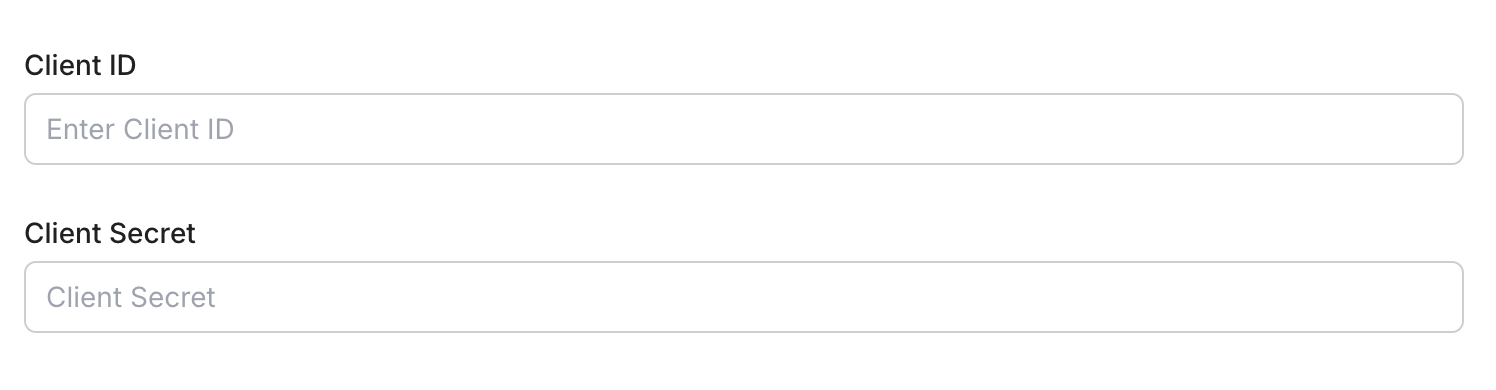
Then enter the app's Client ID and Client Secret on the Google BigQuery connection.
Console steps with screenshots
Register your Scalekit environment with the Google BigQuery connector so Scalekit handles the authentication flow and token lifecycle for you. The connection name you create will be used to identify and invoke the connection programmatically. Then complete the configuration in your application as follows:
-
Set up auth redirects
-
In Scalekit dashboard, go to AgentKit > Connections > Create Connection. Find Google BigQuery and click Create. Click Use your own credentials and copy the redirect URI. It looks like
https://<SCALEKIT_ENVIRONMENT_URL>/sso/v1/oauth/<CONNECTION_ID>/callback.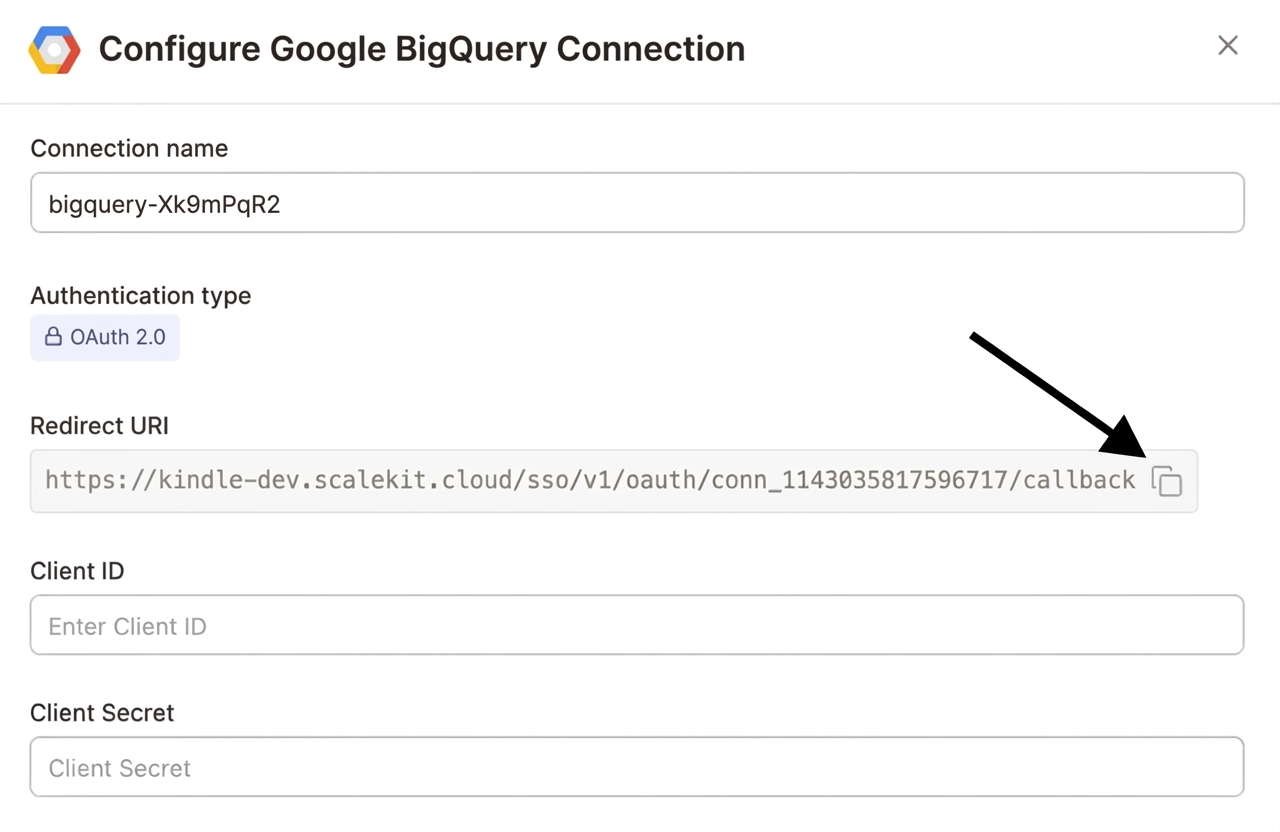
-
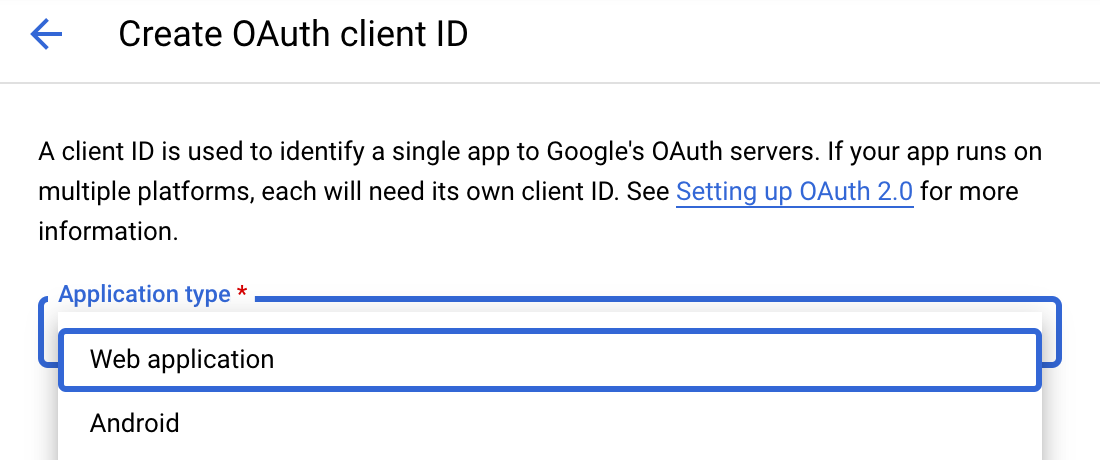
Navigate to Google Cloud Console → APIs & Services → Credentials. Select + Create Credentials, then OAuth client ID. Choose Web application from the Application type menu.
-
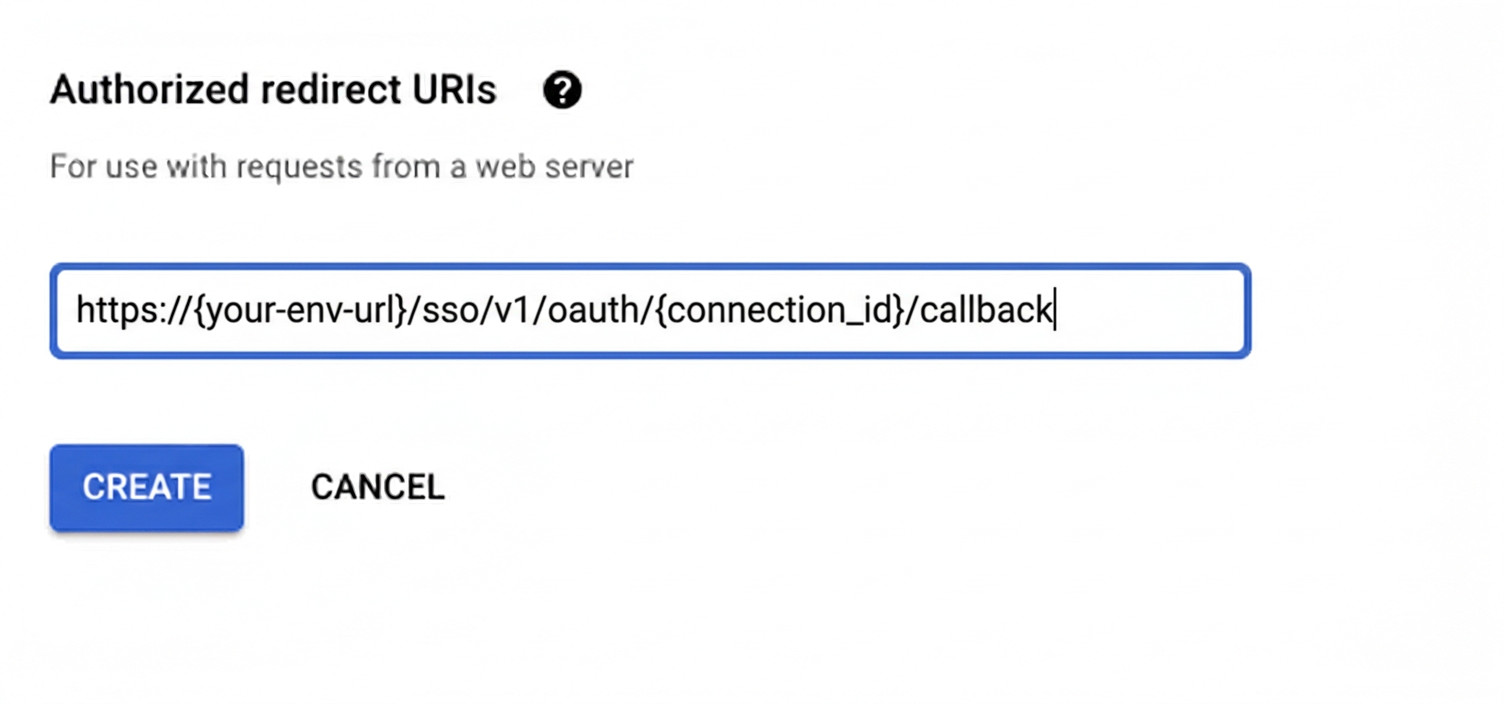
Under Authorized redirect URIs, click + Add URI, paste the redirect URI, and click Create.
-
-
Enable the BigQuery API
-
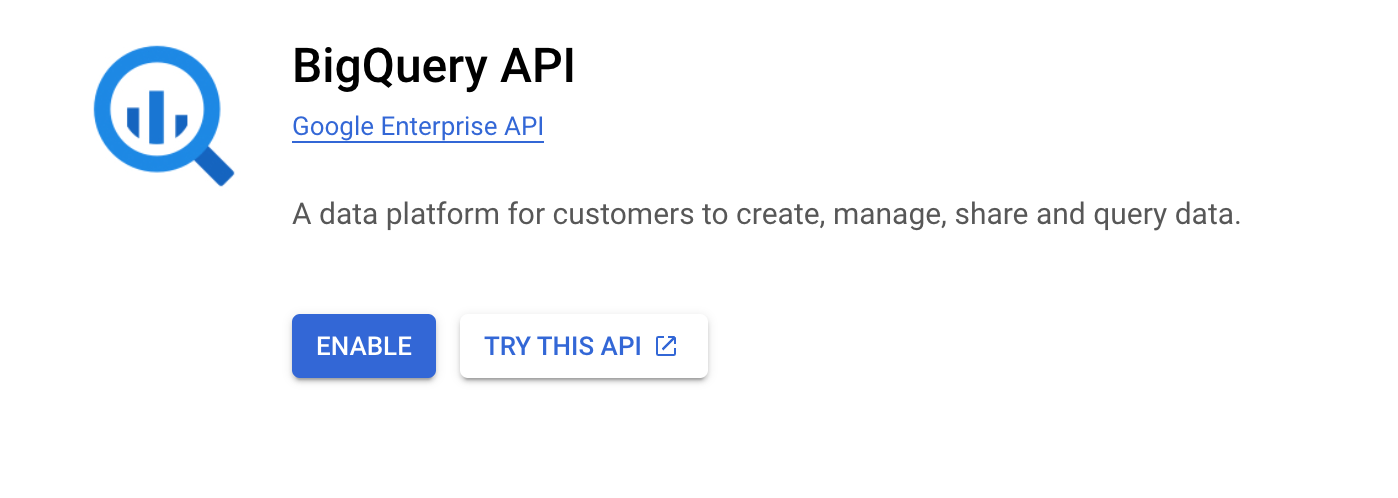
In Google Cloud Console, go to APIs & Services → Library. Search for “BigQuery API” and click Enable.
-
-
Get client credentials
- Google provides your Client ID and Client Secret after you create the OAuth client ID in step 1.
-
Add credentials in Scalekit
-
In Scalekit dashboard, go to AgentKit > Connections and open the connection you created.
-
Enter your credentials:
- Client ID (from above)
- Client Secret (from above)
- Permissions (scopes — see Google API Scopes reference)
-
Click Save.
-
-
Authorize a user and make your first call
quickstart.mts import { ScalekitClient } from '@scalekit-sdk/node'import 'dotenv/config'import { createInterface } from 'node:readline/promises'const scalekit = new ScalekitClient(process.env.SCALEKIT_ENVIRONMENT_URL,process.env.SCALEKIT_CLIENT_ID,process.env.SCALEKIT_CLIENT_SECRET,)const actions = scalekit.actionsconst connector = 'bigquery'const identifier = 'user_123'// Generate an authorization link for the userconst { link } = await actions.getAuthorizationLink({ connectionName: connector, identifier })console.log('Authorize Google BigQuery:', link)const rl = createInterface({ input: process.stdin, output: process.stdout })await rl.question('Press Enter after authorizing...')rl.close()// Make your first callconst result = await actions.executeTool({connector,identifier,toolName: 'bigquery_list_projects',toolInput: {},})console.log(result)Terminal window npx tsx quickstart.mtsquickstart.py import osfrom scalekit import ScalekitClientfrom dotenv import load_dotenvload_dotenv()scalekit_client = ScalekitClient(env_url=os.getenv("SCALEKIT_ENVIRONMENT_URL"),client_id=os.getenv("SCALEKIT_CLIENT_ID"),client_secret=os.getenv("SCALEKIT_CLIENT_SECRET"),)actions = scalekit_client.actionsconnection_name = "bigquery"identifier = "user_123"# Generate an authorization link for the userlink_response = actions.get_authorization_link(connection_name=connection_name,identifier=identifier,)print("Authorize Google BigQuery:", link_response.link)input("Press Enter after authorizing...")# Make your first callresult = actions.execute_tool(tool_input={},tool_name="bigquery_list_projects",connection_name=connection_name,identifier=identifier,)print(result)Terminal window python quickstart.pyEach user signs in once. See Authorize a user for the full flow and statuses.
Tools
Pass the exact name toexecute_toolbigquery_get_datasetRetrieve metadata for a specific BigQuery dataset, including location, description, labels, access controls, and creation/modification times.Read-onlyGet Dataset
Retrieve metadata for a specific BigQuery dataset, including location, description, labels, access controls, and creation/modification times.
Inputs
dataset_idstringrequired- The ID of the dataset to retrieve
project_idstringrequired- The Google Cloud project ID that owns this BigQuery resource.
bigquery_get_jobRetrieve the status and configuration of a BigQuery job by its job ID.Read-onlyGet Job
Retrieve the status and configuration of a BigQuery job by its job ID. Use this to poll for completion of an async query job submitted via Insert Query Job.
Inputs
job_idstringrequired- The ID of the job to retrieve
project_idstringrequired- The Google Cloud project ID that owns this BigQuery resource.
locationstring- Geographic location where the job was created, e.g. US or EU
bigquery_get_modelRetrieve metadata for a specific BigQuery ML model, including model type, feature columns, label columns, and training run details.Read-onlyGet Model
Retrieve metadata for a specific BigQuery ML model, including model type, feature columns, label columns, and training run details.
Inputs
dataset_idstringrequired- The ID of the dataset containing the model
model_idstringrequired- The ID of the model to retrieve
project_idstringrequired- The Google Cloud project ID that owns this BigQuery resource.
bigquery_get_query_resultsRetrieve the results of a completed BigQuery query job.Read-onlyGet Query Results
Retrieve the results of a completed BigQuery query job. Supports pagination via page tokens. Use after polling Get Job until status is DONE.
Inputs
job_idstringrequired- The ID of the completed query job
project_idstringrequired- The Google Cloud project ID that owns this BigQuery resource.
locationstring- Geographic location where the job was created, e.g. US or EU
max_resultsinteger- Maximum number of rows to return per page
page_tokenstring- Page token from a previous response to retrieve the next page of results
timeout_msinteger- Maximum milliseconds to wait if the query has not yet completed
bigquery_get_routineRetrieve the definition and metadata of a specific BigQuery routine (stored procedure or UDF), including its arguments, return type, and body.Read-onlyGet Routine
Retrieve the definition and metadata of a specific BigQuery routine (stored procedure or UDF), including its arguments, return type, and body.
Inputs
dataset_idstringrequired- The ID of the dataset containing the routine
project_idstringrequired- The Google Cloud project ID that owns this BigQuery resource.
routine_idstringrequired- The ID of the routine to retrieve
bigquery_get_routine_iam_policyRetrieve the IAM access control policy currently set on a BigQuery routine (stored procedure or UDF).Read-onlyGet Routine IAM Policy
Retrieve the IAM access control policy currently set on a BigQuery routine (stored procedure or UDF).
Inputs
dataset_idstringrequired- The ID of the dataset containing the routine
project_idstringrequired- The Google Cloud project ID that owns this BigQuery resource.
routine_idstringrequired- The ID of the routine to fetch the IAM policy for
requested_policy_versioninteger- The policy format version to be returned
bigquery_get_row_access_policyRetrieve the definition of a single row access policy on a BigQuery table.Read-onlyGet Row Access Policy
Retrieve the definition of a single row access policy on a BigQuery table.
Inputs
dataset_idstringrequired- The ID of the dataset containing the table
project_idstringrequired- The Google Cloud project ID that owns this BigQuery resource.
row_access_policy_idstringrequired- The ID of the row access policy to retrieve
table_idstringrequired- The ID of the table containing the row access policy
bigquery_get_row_access_policy_iam_policyRetrieve the IAM policy for a row access policy on a BigQuery table.Read-onlyGet Row Access Policy IAM Policy
Retrieve the IAM policy for a row access policy on a BigQuery table.
Inputs
dataset_idstringrequired- The ID of the dataset containing the table
project_idstringrequired- The Google Cloud project ID that owns this BigQuery resource.
row_access_policy_idstringrequired- The ID of the row access policy to get the IAM policy for
table_idstringrequired- The ID of the table containing the row access policy
requested_policy_versioninteger- The IAM policy format version to be returned
bigquery_get_service_accountRetrieve the email address of the BigQuery-managed service account for this project.Read-onlyGet Service Account
Retrieve the email address of the BigQuery-managed service account for this project. Used, for example, to grant that service account access to a Cloud Storage bucket for load or export jobs.
Inputs
project_idstringrequired- The Google Cloud project ID that owns this BigQuery resource.
bigquery_get_tableRetrieve metadata and schema for a specific BigQuery table or view, including column names, types, descriptions, and table properties.Read-onlyGet Table
Retrieve metadata and schema for a specific BigQuery table or view, including column names, types, descriptions, and table properties.
Inputs
dataset_idstringrequired- The ID of the dataset containing the table
project_idstringrequired- The Google Cloud project ID that owns this BigQuery resource.
table_idstringrequired- The ID of the table or view to retrieve
bigquery_get_table_iam_policyRetrieve the IAM access control policy currently set on a BigQuery table or view.Read-onlyGet Table IAM Policy
Retrieve the IAM access control policy currently set on a BigQuery table or view.
Inputs
dataset_idstringrequired- The ID of the dataset containing the table
project_idstringrequired- The Google Cloud project ID that owns this BigQuery resource.
table_idstringrequired- The ID of the table to fetch the IAM policy for
requested_policy_versioninteger- The policy format version to be returned
bigquery_list_datasetsList all BigQuery datasets in the project.Read-onlyList Datasets
List all BigQuery datasets in the project. Supports filtering by label and pagination.
Inputs
project_idstringrequired- The Google Cloud project ID that owns this BigQuery resource.
allboolean- If true, includes hidden datasets in the results
filterstring- Label filter expression to restrict results, e.g. labels.env:prod
max_resultsinteger- Maximum number of datasets to return per page
page_tokenstring- Page token from a previous response to retrieve the next page
bigquery_list_jobsList BigQuery jobs in the project.Read-onlyList Jobs
List BigQuery jobs in the project. Supports filtering by state and projection, and pagination.
Inputs
project_idstringrequired- The Google Cloud project ID that owns this BigQuery resource.
all_usersboolean- If true, returns jobs for all users in the project; otherwise returns only the current user's jobs
max_resultsinteger- Maximum number of jobs to return per page
page_tokenstring- Page token from a previous response to retrieve the next page
projectionstring- Controls the fields returned: minimal (default) or full
state_filterstring- Filter jobs by state: done, pending, or running
bigquery_list_modelsList all BigQuery ML models in a dataset, including their model type, training status, and creation time.Read-onlyList Models
List all BigQuery ML models in a dataset, including their model type, training status, and creation time.
Inputs
dataset_idstringrequired- The ID of the dataset to list models from
project_idstringrequired- The Google Cloud project ID that owns this BigQuery resource.
max_resultsinteger- Maximum number of models to return per page
page_tokenstring- Page token from a previous response to retrieve the next page
bigquery_list_projectsList Google Cloud projects accessible to the authenticated account that have BigQuery enabled.Read-onlyList Projects
List Google Cloud projects accessible to the authenticated account that have BigQuery enabled. Use this first to discover valid project_id values for every other bigquery_* tool.
Inputs
max_resultsinteger- Maximum number of projects to return per page
page_tokenstring- Page token from a previous response to retrieve the next page
bigquery_list_routinesList all stored procedures and user-defined functions (UDFs) in a BigQuery dataset.Read-onlyList Routines
List all stored procedures and user-defined functions (UDFs) in a BigQuery dataset.
Inputs
dataset_idstringrequired- The ID of the dataset to list routines from
project_idstringrequired- The Google Cloud project ID that owns this BigQuery resource.
filterstring- Filter expression to restrict results, e.g. routineType:SCALAR_FUNCTION
max_resultsinteger- Maximum number of routines to return per page
page_tokenstring- Page token from a previous response to retrieve the next page
bigquery_list_row_access_policiesList the row access policies defined on a BigQuery table.Read-onlyList Row Access Policies
List the row access policies defined on a BigQuery table. Supports pagination.
Inputs
dataset_idstringrequired- The ID of the dataset containing the table
project_idstringrequired- The Google Cloud project ID that owns this BigQuery resource.
table_idstringrequired- The ID of the table to list row access policies for
page_tokenstring- Page token from a previous response to retrieve the next page
bigquery_list_table_dataRead rows directly from a BigQuery table without writing a SQL query.Read-onlyList Table Data
Read rows directly from a BigQuery table without writing a SQL query. Supports pagination, row offset, and field selection.
Inputs
dataset_idstringrequired- The ID of the dataset containing the table
project_idstringrequired- The Google Cloud project ID that owns this BigQuery resource.
table_idstringrequired- The ID of the table to read rows from
max_resultsinteger- Maximum number of rows to return per page
page_tokenstring- Page token from a previous response to retrieve the next page
selected_fieldsstring- Comma-separated list of fields to return; if omitted all fields are returned
start_indexinteger- Zero-based row index to start reading from
bigquery_list_tablesList all tables and views in a BigQuery dataset.Read-onlyList Tables
List all tables and views in a BigQuery dataset. Supports pagination.
Inputs
dataset_idstringrequired- The ID of the dataset to list tables from
project_idstringrequired- The Google Cloud project ID that owns this BigQuery resource.
max_resultsinteger- Maximum number of tables to return per page
page_tokenstring- Page token from a previous response to retrieve the next page
bigquery_run_queryExecute a SQL query synchronously against BigQuery and return results immediately.Read-onlyRun Query
Execute a SQL query synchronously against BigQuery and return results immediately. Best for short-running queries. For long-running queries use Insert Query Job instead.
Inputs
project_idstringrequired- The Google Cloud project ID that owns this BigQuery resource.
querystringrequired- SQL query to execute
create_sessionboolean- If true, creates a new session and returns a session ID in the response
dry_runboolean- If true, validates the query and returns estimated bytes processed without executing
locationstring- Geographic location of the dataset, e.g. US or EU
max_resultsinteger- Maximum number of rows to return in the response
timeout_msinteger- Maximum milliseconds to wait for query completion before returning
use_legacy_sqlboolean- Use BigQuery legacy SQL syntax instead of standard SQLdefault
false
bigquery_test_routine_iam_permissionsCheck which of a given set of IAM permissions the caller has on a BigQuery routine.Read-onlyTest Routine IAM Permissions
Check which of a given set of IAM permissions the caller has on a BigQuery routine.
Inputs
dataset_idstringrequired- The ID of the dataset containing the routine
permissionsarrayrequired- The set of IAM permissions to check
project_idstringrequired- The Google Cloud project ID that owns this BigQuery resource.
routine_idstringrequired- The ID of the routine to test permissions against
bigquery_test_row_access_policy_iam_permissionsCheck which of a given set of IAM permissions the caller has on a row access policy.Read-onlyTest Row Access Policy IAM Permissions
Check which of a given set of IAM permissions the caller has on a row access policy.
Inputs
dataset_idstringrequired- The ID of the dataset containing the table
permissionsarrayrequired- The set of IAM permissions to check
project_idstringrequired- The Google Cloud project ID that owns this BigQuery resource.
row_access_policy_idstringrequired- The ID of the row access policy to test permissions against
table_idstringrequired- The ID of the table containing the row access policy
bigquery_test_table_iam_permissionsCheck which of a given set of IAM permissions the caller has on a BigQuery table or view.Read-onlyTest Table IAM Permissions
Check which of a given set of IAM permissions the caller has on a BigQuery table or view. This is a read-only check despite being a POST request — no state is modified.
Inputs
dataset_idstringrequired- The ID of the dataset containing the table
permissionsarrayrequired- The set of IAM permissions to check
project_idstringrequired- The Google Cloud project ID that owns this BigQuery resource.
table_idstringrequired- The ID of the table to test permissions against
bigquery_cancel_jobRequest cancellation of a running BigQuery job.WriteCancel Job
Request cancellation of a running BigQuery job. Cancellation is best-effort; the job may complete before the cancellation takes effect.
Inputs
job_idstringrequired- The ID of the job to cancel
project_idstringrequired- The Google Cloud project ID that owns this BigQuery resource.
locationstring- Geographic location where the job was created, e.g. US or EU
bigquery_insert_datasetCreate a new BigQuery dataset in the specified project.WriteInsert Dataset
Create a new BigQuery dataset in the specified project.
Inputs
dataset_idstringrequired- The ID to assign to the new dataset
project_idstringrequired- The Google Cloud project ID that owns this BigQuery resource.
default_partition_expiration_msinteger- Default lifetime in milliseconds for partitions in partitioned tables created in this dataset
default_table_expiration_msinteger- Default lifetime in milliseconds for tables created in this dataset
descriptionstring- A description of the dataset
friendly_namestring- A human-readable display name for the dataset
labelsobject- Key-value labels to attach to the dataset, e.g. {"env": "prod"}
locationstring- Geographic location where the dataset should be created, e.g. US or EU
bigquery_insert_jobSubmit an asynchronous BigQuery job (load, extract, copy, or query).WriteInsert Job
Submit an asynchronous BigQuery job (load, extract, copy, or query). Use this instead of Run Query for long-running or non-query operations. Poll the job status with Get Job, then fetch results with Get Query Results if it was a query job.
Inputs
configurationobjectrequired- The full BigQuery JobConfiguration resource. Must specify exactly one of query, load, extract, or copy. See https://cloud.google.com/bigquery/docs/reference/rest/v2/Job#JobConfiguration for the full schema.
project_idstringrequired- The Google Cloud project ID that owns this BigQuery resource.
job_idstring- Caller-specified job ID, used later to poll the job with Get Job
labelsobject- Labels to attach to the job as key-value pairs
locationstring- Geographic location where the job should run, e.g. US or EU
bigquery_insert_routineCreate a new stored procedure or user-defined function (UDF) in a BigQuery dataset.WriteInsert Routine
Create a new stored procedure or user-defined function (UDF) in a BigQuery dataset.
Inputs
dataset_idstringrequired- The ID of the dataset to create the routine in
definition_bodystringrequired- The SQL body of the function or procedure
project_idstringrequired- The Google Cloud project ID that owns this BigQuery resource.
routine_idstringrequired- The ID to assign to the new routine
routine_typestringrequired- The type of routine to createone of
SCALAR_FUNCTIONPROCEDURETABLE_VALUED_FUNCTIONAGGREGATE_FUNCTION argumentsarray- The list of input/output arguments for the routine
descriptionstring- A description of the routine
languagestring- The language of the routine bodyone of
SQLJAVASCRIPT return_typeobject- The return type of the routine, as a StandardSqlDataType object
bigquery_insert_row_access_policyCreate a new row access policy on a BigQuery table, restricting which rows a set of grantee principals can see via a SQL boolean filter predicate.WriteInsert Row Access Policy
Create a new row access policy on a BigQuery table, restricting which rows a set of grantee principals can see via a SQL boolean filter predicate.
Inputs
dataset_idstringrequired- The ID of the dataset containing the table
filter_predicatestringrequired- A SQL boolean expression restricting which rows are visible to the grantees
granteesarrayrequired- The principals this row access policy grants row visibility to
project_idstringrequired- The Google Cloud project ID that owns this BigQuery resource.
row_access_policy_idstringrequired- The ID to assign to the new row access policy
table_idstringrequired- The ID of the table to create the row access policy on
bigquery_insert_tableCreate a new BigQuery table or view in the specified dataset.WriteInsert Table
Create a new BigQuery table or view in the specified dataset.
Inputs
dataset_idstringrequired- The ID of the dataset in which to create the table
project_idstringrequired- The Google Cloud project ID that owns this BigQuery resource.
table_idstringrequired- The ID to assign to the new table
descriptionstring- A description of the table
expiration_timestring- The time when this table expires, in milliseconds since the epoch, as a string
friendly_namestring- A human-readable display name for the table
labelsobject- Key-value labels to attach to the table, e.g. {"env": "prod"}
schemaobject- The table schema, as the BigQuery Table.schema resource: an object with a 'fields' array, e.g. {"fields":[{"name":"col1","type":"STRING"}]}
bigquery_insert_table_dataStream insert rows directly into a BigQuery table via the tabledata.insertAll API.WriteInsert Table Data
Stream insert rows directly into a BigQuery table via the tabledata.insertAll API.
Inputs
dataset_idstringrequired- The ID of the dataset containing the table
project_idstringrequired- The Google Cloud project ID that owns this BigQuery resource.
rowsarrayrequired- Rows to insert, where each row is a plain object mapping column names to values
table_idstringrequired- The ID of the table to insert rows into
ignore_unknown_valuesboolean- If true, values for fields not present in the table schema are ignored
skip_invalid_rowsboolean- If true, rows with invalid data are skipped and remaining valid rows are inserted
template_suffixstring- If specified, rows are inserted into a template table named tableId + templateSuffix
bigquery_replace_datasetFull replace of a dataset's mutable metadata (PUT semantics) — any field you omit will be reset to its default, unlike bigquery_update_dataset which only changes fields you provide.WriteReplace Dataset
Full replace of a dataset's mutable metadata (PUT semantics) — any field you omit will be reset to its default, unlike bigquery_update_dataset which only changes fields you provide.
- Idempotent
Inputs
dataset_idstringrequired- The ID of the dataset to replace
project_idstringrequired- The Google Cloud project ID that owns this BigQuery resource.
default_partition_expiration_msinteger- Default lifetime in milliseconds for partitions in partitioned tables created in this dataset
default_table_expiration_msinteger- Default lifetime in milliseconds for tables created in this dataset
descriptionstring- A description of the dataset
friendly_namestring- A human-readable display name for the dataset
labelsobject- Key-value labels to attach to the dataset, e.g. {"env": "prod"}
bigquery_replace_tableFull replace of a table's mutable metadata (PUT semantics) — any field you omit will be reset to its default, unlike bigquery_update_table which only changes fields you provide.WriteReplace Table
Full replace of a table's mutable metadata (PUT semantics) — any field you omit will be reset to its default, unlike bigquery_update_table which only changes fields you provide.
- Idempotent
Inputs
dataset_idstringrequired- The ID of the dataset containing the table
project_idstringrequired- The Google Cloud project ID that owns this BigQuery resource.
table_idstringrequired- The ID of the table to replace
descriptionstring- A description of the table
expiration_timestring- The time when this table expires, in milliseconds since the epoch, as a string
friendly_namestring- A human-readable display name for the table
labelsobject- Key-value labels to attach to the table, e.g. {"env": "prod"}
schemaobject- The table schema, as the BigQuery Table.schema resource: an object with a 'fields' array, e.g. {"fields":[{"name":"col1","type":"STRING"}]}
bigquery_set_routine_iam_policySet the IAM access control policy on a BigQuery routine (stored procedure or UDF), replacing any existing policy bindings.WriteSet Routine IAM Policy
Set the IAM access control policy on a BigQuery routine (stored procedure or UDF), replacing any existing policy bindings.
Inputs
bindingsarrayrequired- The complete list of IAM policy bindings to set on the routine. Each item binds a role to a list of members, e.g. {"role":"roles/bigquery.dataViewer","members":["user:x@example.com"]}. This replaces the entire bindings list.
dataset_idstringrequired- The ID of the dataset containing the routine
project_idstringrequired- The Google Cloud project ID that owns this BigQuery resource.
routine_idstringrequired- The ID of the routine to set the IAM policy on
policy_etagstring- The etag of the existing policy, used for optimistic concurrency control
update_maskstring- A FieldMask specifying which fields of the policy to modify
bigquery_set_table_iam_policySet the IAM access control policy on a BigQuery table or view, replacing any existing policy bindings.WriteSet Table IAM Policy
Set the IAM access control policy on a BigQuery table or view, replacing any existing policy bindings.
Inputs
bindingsarrayrequired- The complete list of IAM policy bindings to set on the table. Each item binds a role to a list of members, e.g. {"role":"roles/bigquery.dataViewer","members":["user:x@example.com"]}. This replaces the entire bindings list.
dataset_idstringrequired- The ID of the dataset containing the table
project_idstringrequired- The Google Cloud project ID that owns this BigQuery resource.
table_idstringrequired- The ID of the table to set the IAM policy on
policy_etagstring- The etag of the existing policy, used for optimistic concurrency control
update_maskstring- A FieldMask specifying which fields of the policy to modify
bigquery_undelete_datasetRestore a recently deleted BigQuery dataset.WriteUndelete Dataset
Restore a recently deleted BigQuery dataset. Undeletion is only possible for a short retention window after deletion.
Inputs
dataset_idstringrequired- The ID of the deleted dataset to restore
project_idstringrequired- The Google Cloud project ID that owns this BigQuery resource.
creation_timestring- The original dataset's creationTime timestamp, used to disambiguate which deleted generation to restore
bigquery_update_datasetUpdate metadata for an existing BigQuery dataset, such as its friendly name, description, default table expiration, or labels.WriteUpdate Dataset
Update metadata for an existing BigQuery dataset, such as its friendly name, description, default table expiration, or labels.
- Idempotent
Inputs
dataset_idstringrequired- The ID of the dataset to update
project_idstringrequired- The Google Cloud project ID that owns this BigQuery resource.
default_partition_expiration_msinteger- Default lifetime in milliseconds for partitions in partitioned tables created in this dataset
default_table_expiration_msinteger- Default lifetime in milliseconds for tables created in this dataset
descriptionstring- A description of the dataset
friendly_namestring- A human-readable display name for the dataset
labelsobject- Key-value labels to attach to the dataset, e.g. {"env": "prod"}
bigquery_update_modelUpdate metadata for an existing BigQuery ML model, such as its friendly name, description, expiration time, or labels.WriteUpdate Model
Update metadata for an existing BigQuery ML model, such as its friendly name, description, expiration time, or labels.
- Idempotent
Inputs
dataset_idstringrequired- The ID of the dataset containing the model
model_idstringrequired- The ID of the model to update
project_idstringrequired- The Google Cloud project ID that owns this BigQuery resource.
descriptionstring- A description of the model
expiration_timestring- Expiration time for the model, in milliseconds since the epoch, as a string
friendly_namestring- A human-readable display name for the model
labelsobject- Key-value labels to attach to the model, e.g. {"env": "prod"}
bigquery_update_routineReplace the definition of an existing BigQuery routine (stored procedure or UDF).WriteUpdate Routine
Replace the definition of an existing BigQuery routine (stored procedure or UDF). This is a full-replace operation — the complete routine definition must be supplied.
- Idempotent
Inputs
dataset_idstringrequired- The ID of the dataset containing the routine
definition_bodystringrequired- The SQL body of the function or procedure
project_idstringrequired- The Google Cloud project ID that owns this BigQuery resource.
routine_idstringrequired- The ID of the routine to update
routine_typestringrequired- The type of routineone of
SCALAR_FUNCTIONPROCEDURETABLE_VALUED_FUNCTIONAGGREGATE_FUNCTION argumentsarray- The list of input/output arguments for the routine
descriptionstring- A description of the routine
languagestring- The language of the routine bodyone of
SQLJAVASCRIPT return_typeobject- The return type of the routine, as a StandardSqlDataType object
bigquery_update_row_access_policyFull replace of an existing row access policy on a BigQuery table (PUT semantics — rowAccessPolicies has no separate patch method, only this full-replace update, matching bigquery_update_routine's pattern).WriteUpdate Row Access Policy
Full replace of an existing row access policy on a BigQuery table (PUT semantics — rowAccessPolicies has no separate patch method, only this full-replace update, matching bigquery_update_routine's pattern). Both filter_predicate and grantees must be supplied.
- Idempotent
Inputs
dataset_idstringrequired- The ID of the dataset containing the table
filter_predicatestringrequired- A SQL boolean expression restricting which rows are visible to the grantees
granteesarrayrequired- The principals this row access policy grants row visibility to
project_idstringrequired- The Google Cloud project ID that owns this BigQuery resource.
row_access_policy_idstringrequired- The ID of the row access policy to update
table_idstringrequired- The ID of the table containing the row access policy
bigquery_update_tableUpdate metadata for an existing BigQuery table, such as its schema (e.g.WriteUpdate Table
Update metadata for an existing BigQuery table, such as its schema (e.g. adding columns), description, friendly name, labels, or expiration time.
- Idempotent
Inputs
dataset_idstringrequired- The ID of the dataset containing the table
project_idstringrequired- The Google Cloud project ID that owns this BigQuery resource.
table_idstringrequired- The ID of the table to update
descriptionstring- A description of the table
expiration_timestring- The time when this table expires, in milliseconds since the epoch, as a string
friendly_namestring- A human-readable display name for the table
labelsobject- Key-value labels to attach to the table, e.g. {"env": "prod"}
schemaobject- The updated table schema, as the BigQuery Table.schema resource: an object with a 'fields' array, e.g. {"fields":[{"name":"col1","type":"STRING"}]}
bigquery_batch_delete_row_access_policiesDelete multiple row access policies from a BigQuery table in a single call.DestructiveBatch Delete Row Access Policies
Delete multiple row access policies from a BigQuery table in a single call.
Inputs
dataset_idstringrequired- The ID of the dataset containing the table
policy_idsarrayrequired- The IDs of the row access policies to delete
project_idstringrequired- The Google Cloud project ID that owns this BigQuery resource.
table_idstringrequired- The ID of the table to delete row access policies from
forceboolean- If true, allows removing all row access policies on the table even though this would make the table fully accessible to all existing table readersdefault
false
bigquery_delete_datasetDelete a BigQuery dataset.DestructiveDelete Dataset
Delete a BigQuery dataset. By default the dataset must be empty; set delete_contents to true to also delete all tables within it.
- Idempotent
Inputs
dataset_idstringrequired- The ID of the dataset to delete
project_idstringrequired- The Google Cloud project ID that owns this BigQuery resource.
delete_contentsboolean- If true, deletes all tables in the dataset before deleting the dataset itselfdefault
false
bigquery_delete_jobDelete a BigQuery job's metadata.DestructiveDelete Job
Delete a BigQuery job's metadata. This only works on jobs that are in a DONE state and still within the job retention window.
- Idempotent
Inputs
job_idstringrequired- The ID of the DONE job to delete
project_idstringrequired- The Google Cloud project ID that owns this BigQuery resource.
locationstring- Geographic location where the job was created, e.g. US or EU
bigquery_delete_modelDelete a BigQuery ML model from a dataset.DestructiveDelete Model
Delete a BigQuery ML model from a dataset. This permanently removes the model and cannot be undone.
- Idempotent
Inputs
dataset_idstringrequired- The ID of the dataset containing the model
model_idstringrequired- The ID of the model to delete
project_idstringrequired- The Google Cloud project ID that owns this BigQuery resource.
bigquery_delete_routineDelete a stored procedure or user-defined function (UDF) from a BigQuery dataset.DestructiveDelete Routine
Delete a stored procedure or user-defined function (UDF) from a BigQuery dataset. This permanently removes the routine and cannot be undone.
- Idempotent
Inputs
dataset_idstringrequired- The ID of the dataset containing the routine
project_idstringrequired- The Google Cloud project ID that owns this BigQuery resource.
routine_idstringrequired- The ID of the routine to delete
bigquery_delete_row_access_policyPermanently delete a row access policy from a BigQuery table.DestructiveDelete Row Access Policy
Permanently delete a row access policy from a BigQuery table.
- Idempotent
Inputs
dataset_idstringrequired- The ID of the dataset containing the table
project_idstringrequired- The Google Cloud project ID that owns this BigQuery resource.
row_access_policy_idstringrequired- The ID of the row access policy to delete
table_idstringrequired- The ID of the table containing the row access policy
forceboolean- If true, allows deleting the last remaining row access policy on the table even though this would make the table fully accessible to all existing table readersdefault
false
bigquery_delete_tablePermanently delete a BigQuery table or view from a dataset.DestructiveDelete Table
Permanently delete a BigQuery table or view from a dataset.
- Idempotent
Inputs
dataset_idstringrequired- The ID of the dataset containing the table
project_idstringrequired- The Google Cloud project ID that owns this BigQuery resource.
table_idstringrequired- The ID of the table to delete
No tools match.
Workflows
Proxy API call
const result = await actions.request({ connectionName: 'bigquery', identifier: 'user_123', path: '/bigquery/v2/projects', method: 'GET',});console.log(result);result = actions.request( connection_name='bigquery', identifier='user_123', path="/bigquery/v2/projects", method="GET",)print(result)Execute a tool
const result = await actions.executeTool({ connector: 'bigquery', identifier: 'user_123', toolName: 'bigquery_list_projects', toolInput: {},});console.log(result);result = actions.execute_tool( connection_name='bigquery', identifier='user_123', tool_name='bigquery_list_projects', tool_input={},)print(result)Google OAuth consent screen verification
Before you use your own Google OAuth credentials in production, understand what end users see on Google’s consent screen when they authorize a connected account.
| Audience type | Consent screen behavior | When to use |
|---|---|---|
| Internal | Shows your App Name and logo from Branding settings | Only users in your Google Workspace or Cloud Identity organization can authorize the connector |
| External | Shows {env_name}.scalekit.dev until Google verifies your app | Any user with a Google account can authorize the connector |
Why External is required for most AgentKit connectors:
- Internal restricts authorization to users in your Google Workspace or Cloud Identity organization. Users with
@gmail.comor other Google accounts outside your organization cannot complete OAuth. - External is required when end users outside your organization authorize tool access through connected accounts.
- Organization-managed OAuth clients follow the same rules as personal or developer OAuth clients. Switching to an org-owned client does not bypass Google verification.
- Until Google completes verification of your External app, users see
scalekit.devon the consent screen. After verification, your App Name and logo appear.
During development:
- Add Test users under APIs & Services → OAuth consent screen while publishing status is Testing.
- On unverified apps, users can click Advanced → Go to app (unsafe) to proceed during testing.
- Google Workspace admins may need to allowlist your OAuth client.
For Google’s verification requirements and timeline, refer to Google’s OAuth consent screen verification guide.