


The Zoho CRM connector lets your AI agent act in each user's Zoho CRM account. Each user signs in to Zoho CRM once, and Scalekit stores and refreshes their tokens, so your agent never handles credentials. It comes with 89 tools.
- Tools
- 89
- What they doRead · write · destructive
- 42 · 36 · 1142 read36 write11 destructive
- Users sign in with
- OAuth
- OAuth app
- Scalekit's or your own
What you can do
- Manage leads and contacts: create, update, search, and delete leads and contacts, and convert leads into accounts and deals
- Manage accounts and deals: create, update, search, and delete accounts and deals, and assign contact roles on deals
- Log activities: create and update tasks, events, calls, and notes, and cancel meetings
- Query any module: list, search, and query records in standard or custom modules and their related lists
- Send email and files: send emails from CRM records and upload, download, or delete attachments
- Run bulk updates: export or import large record sets with bulk jobs and mass update field values
Setup
Install the SDK
Terminal window npm install @scalekit-sdk/node dotenvTerminal window pip install scalekit-sdk-python python-dotenvSet your credentials
Add your Scalekit credentials to your
.envfile. Find values in app.scalekit.com > Developers > API Credentials..env SCALEKIT_ENVIRONMENT_URL=<your-environment-url>SCALEKIT_CLIENT_ID=<your-client-id>SCALEKIT_CLIENT_SECRET=<your-client-secret>Create the Zoho CRM connection
In AgentKit > Connections, create a Zoho CRM connection. The name you give it is the
connection_nameyour code passes. See Configure connections.Scalekit credentials are available for Zoho CRM, so you don't need to register an OAuth app. To show your own app on the consent screen, use your own credentials instead.
Use your own OAuth app
Register your Scalekit environment with the Zoho CRM connector so Scalekit handles the authentication flow and token lifecycle for you. The connection name you create will be used to identify and invoke the connection programmatically. Then complete the configuration in your application as follows:
-
Set up auth redirects
-
In Scalekit dashboard, go to AgentKit > Connections > Create Connection. Find Zoho CRM and click Create. Copy the redirect URI. It looks like
https://<SCALEKIT_ENVIRONMENT_URL>/sso/v1/oauth/<CONNECTION_ID>/callback. -
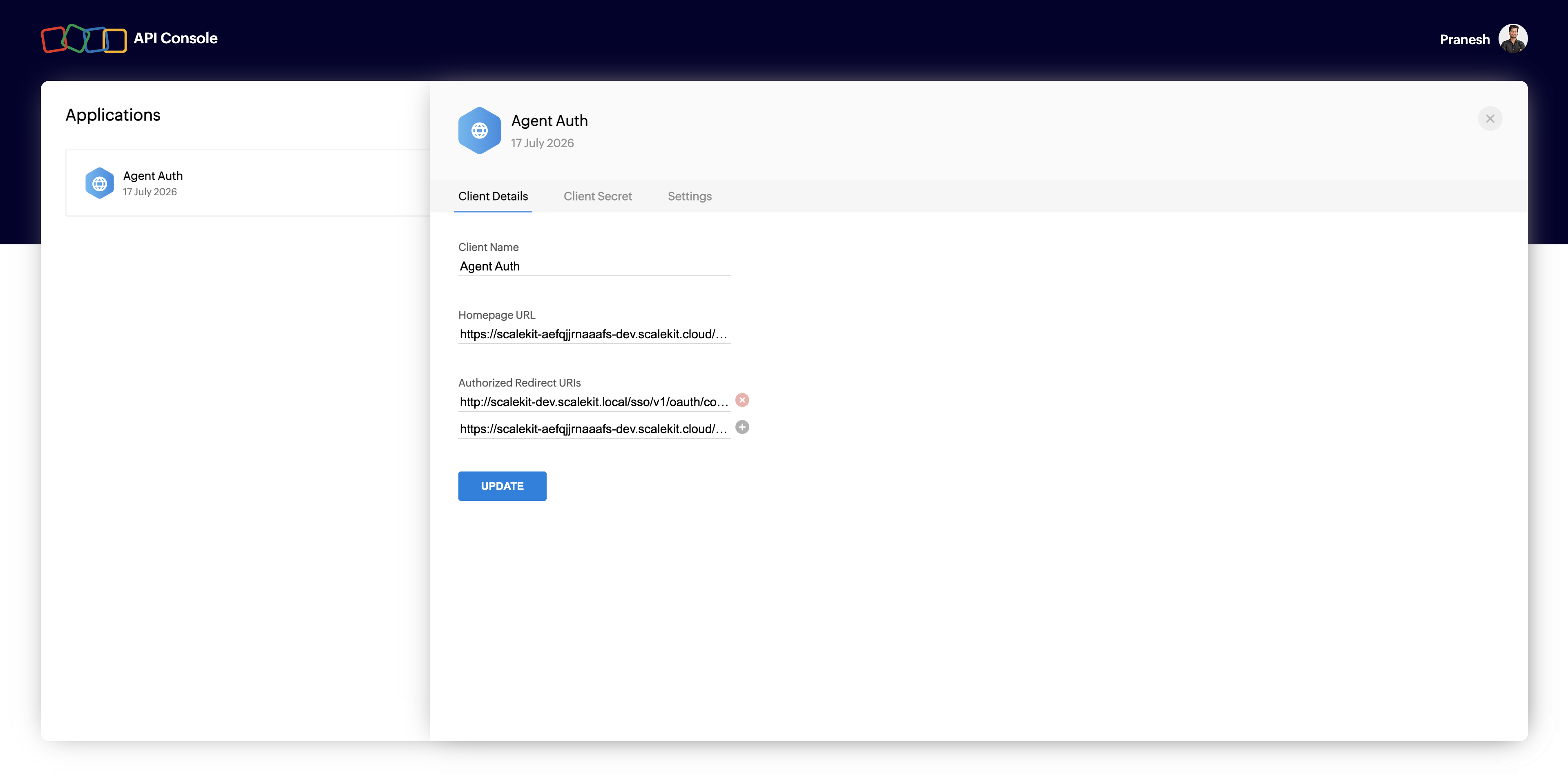
Go to Zoho API Console and click Add Client > Server-based Applications.
-
Enter a Client Name and Homepage URL. Under Authorized Redirect URIs, paste the redirect URI from Scalekit, then click Create.
-
-
Get client credentials
- On the app you created, go to the Client Secret tab.
- Copy the Client ID and Client Secret. Zoho only shows the full secret once — store it securely.
-
Match your Zoho data center Multi-DC accounts only
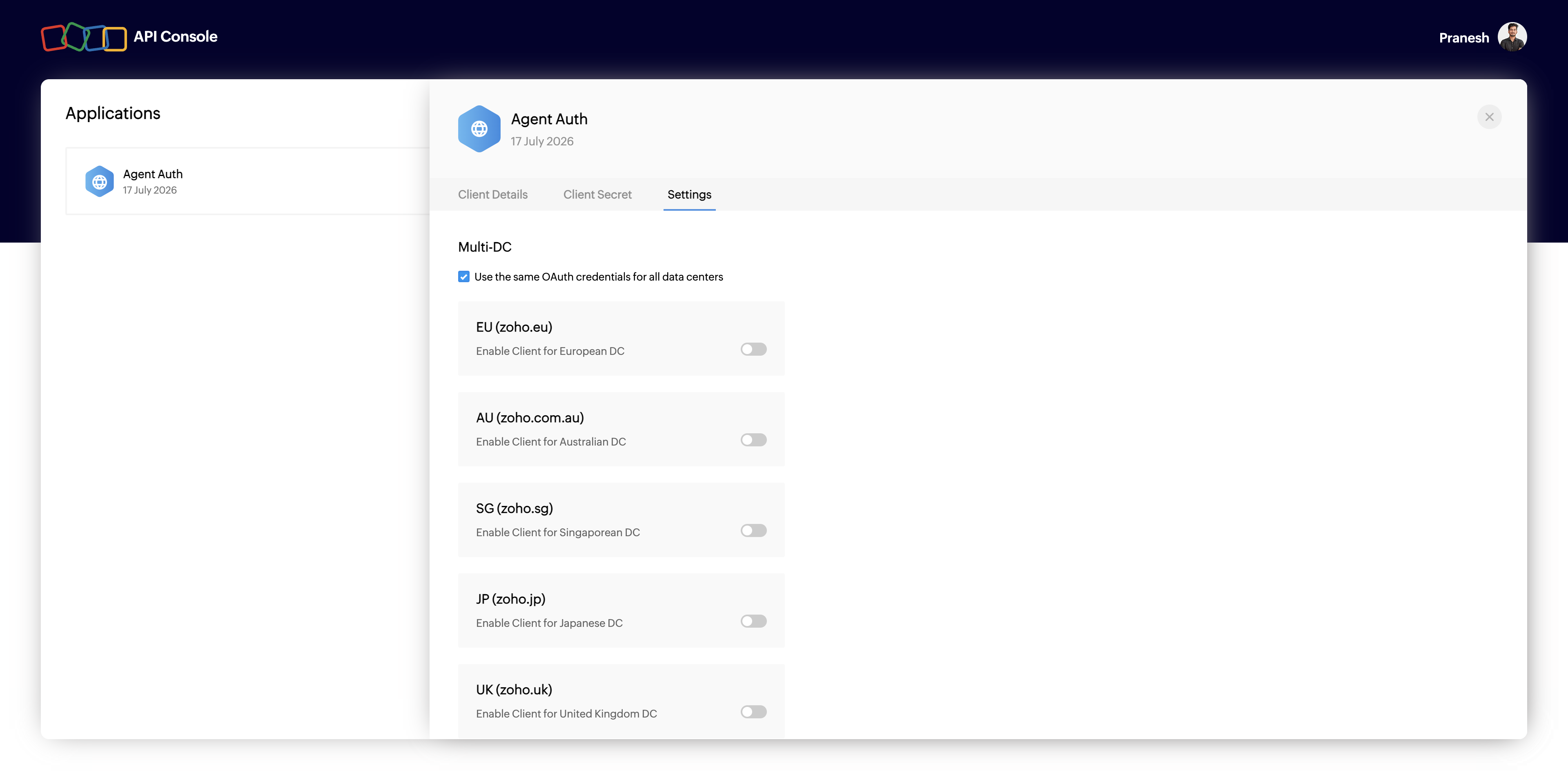
Zoho hosts accounts in different regional data centers (
zoho.com,zoho.eu,zoho.in, and others). If your users sign in from a data center other than the default, enable it here so their tokens resolve correctly.-
Go to the Settings tab on your app.
-
Under Multi-DC, enable the data centers your users belong to (for example, EU (zoho.eu) or IN (zoho.in)).
-
-
Add credentials in Scalekit
- In the Scalekit dashboard, open the connection you created and enter:
- Client ID (from step 2)
- Client Secret (from step 2)
- Scopes (see Zoho CRM OAuth scopes reference — grant only what your agent needs, for example
ZohoCRM.modules.ALL)
- Click Save.
- In the Scalekit dashboard, open the connection you created and enter:
-
Authorize a user and make your first call
quickstart.mts import { ScalekitClient } from '@scalekit-sdk/node'import 'dotenv/config'import { createInterface } from 'node:readline/promises'const scalekit = new ScalekitClient(process.env.SCALEKIT_ENVIRONMENT_URL,process.env.SCALEKIT_CLIENT_ID,process.env.SCALEKIT_CLIENT_SECRET,)const actions = scalekit.actionsconst connector = 'zohocrm'const identifier = 'user_123'// Generate an authorization link for the userconst { link } = await actions.getAuthorizationLink({ connectionName: connector, identifier })console.log('Authorize Zoho CRM:', link)const rl = createInterface({ input: process.stdin, output: process.stdout })await rl.question('Press Enter after authorizing...')rl.close()// Make your first callconst result = await actions.executeTool({connector,identifier,toolName: 'zohocrm_v8_accounts_list',toolInput: {},})console.log(result)Terminal window npx tsx quickstart.mtsquickstart.py import osfrom scalekit import ScalekitClientfrom dotenv import load_dotenvload_dotenv()scalekit_client = ScalekitClient(env_url=os.getenv("SCALEKIT_ENVIRONMENT_URL"),client_id=os.getenv("SCALEKIT_CLIENT_ID"),client_secret=os.getenv("SCALEKIT_CLIENT_SECRET"),)actions = scalekit_client.actionsconnection_name = "zohocrm"identifier = "user_123"# Generate an authorization link for the userlink_response = actions.get_authorization_link(connection_name=connection_name,identifier=identifier,)print("Authorize Zoho CRM:", link_response.link)input("Press Enter after authorizing...")# Make your first callresult = actions.execute_tool(tool_input={},tool_name="zohocrm_v8_accounts_list",connection_name=connection_name,identifier=identifier,)print(result)Terminal window python quickstart.pyEach user signs in once. See Authorize a user for the full flow and statuses.
Tools
Pass the exact name toexecute_toolzohocrm_v8_account_getRetrieve a single account from Zoho CRM by its record ID.Read-onlyGet Account
Retrieve a single account from Zoho CRM by its record ID.
Inputs
record_idstringrequired- The unique Zoho CRM record ID of the account
zohocrm_v8_account_searchSearch for accounts in Zoho CRM using Zoho's criteria syntax, with optional pagination.Read-onlySearch Accounts
Search for accounts in Zoho CRM using Zoho's criteria syntax, with optional pagination.
Inputs
criteriastringrequired- Search criteria in Zoho CRM criteria syntax
pageinteger- Page number of results to return
per_pageinteger- Number of accounts to return per page
zohocrm_v8_accounts_listList accounts in Zoho CRM with optional field selection, sorting, and pagination.Read-onlyList Accounts
List accounts in Zoho CRM with optional field selection, sorting, and pagination.
Inputs
fieldsstring- Comma-separated list of account fields to returndefault
id,Account_Name,Phone,Website,Created_Time pageinteger- Page number of results to return
per_pageinteger- Number of accounts to return per page
sort_bystring- The field to sort results by
sort_orderstring- The sort direction
zohocrm_v8_attachment_downloadDownload a file attachment from a Zoho CRM record by attachment ID.Read-onlyDownload Attachment
Download a file attachment from a Zoho CRM record by attachment ID. Returns the raw file bytes, not a JSON payload.
Inputs
attachment_idstringrequired- ID of the attachment to download
modulestringrequired- API name of the Zoho CRM module the record belongs to
record_idstringrequired- ID of the record the attachment belongs to
zohocrm_v8_attachment_listList the file attachments on a single Zoho CRM record.Read-onlyList Attachments
List the file attachments on a single Zoho CRM record.
Inputs
modulestringrequired- API name of the Zoho CRM module the record belongs to
record_idstringrequired- ID of the record to list attachments for
fieldsstring- Comma-separated list of Attachment field API names to include for each resultdefault
id,File_Name,Size,Created_Time pagestring- Page number of results to retrieve
per_pagestring- Number of attachments to return per page
zohocrm_v8_blueprint_getGet the available blueprint transitions for a Zoho CRM record, including each transition's ID, required fields, and current field values.Read-onlyGet Blueprint Details
Get the available blueprint transitions for a Zoho CRM record, including each transition's ID, required fields, and current field values.
Inputs
modulestringrequired- API name of the Zoho CRM module the record belongs to
record_idstringrequired- ID of the record whose blueprint state to retrieve
zohocrm_v8_bulk_read_job_getCheck the status of a Zoho CRM Bulk Read job and get the download URL once it has completed.Read-onlyGet Bulk Read Job
Check the status of a Zoho CRM Bulk Read job and get the download URL once it has completed.
Inputs
job_idstringrequired- ID of the bulk read job to check, as returned by zohocrm_v8_bulk_read_job_create.
zohocrm_v8_bulk_write_job_getCheck the status and result counts of a Zoho CRM Bulk Write job.Read-onlyGet Bulk Write Job
Check the status and result counts of a Zoho CRM Bulk Write job.
Inputs
job_idstringrequired- ID of the bulk write job to check, as returned by zohocrm_v8_bulk_write_job_create.
zohocrm_v8_calls_listList call activities from Zoho CRM.Read-onlyList Calls
List call activities from Zoho CRM. Supports selecting specific fields, pagination, and sorting.
Inputs
fieldsstring- Comma-separated list of call field API names to returndefault
id,Subject,Call_Type,Call_Start_Time,Created_Time pageinteger- The page number of results to fetch. Defaults to 1.
per_pageinteger- The number of results per page. Defaults to 200.
sort_bystring- The API name of the field to sort results by
sort_orderstring- The sort direction: asc or desc
zohocrm_v8_campaign_getRetrieve a single marketing campaign from Zoho CRM by its record ID.Read-onlyGet Campaign
Retrieve a single marketing campaign from Zoho CRM by its record ID.
Inputs
record_idstringrequired- The Zoho CRM ID of the campaign to retrieve
zohocrm_v8_campaigns_listList marketing campaigns in Zoho CRM with optional field selection, pagination, and sorting.Read-onlyList Campaigns
List marketing campaigns in Zoho CRM with optional field selection, pagination, and sorting.
Inputs
fieldsstring- Comma-separated list of field API names to return for each campaigndefault
id,Campaign_Name,Type,Status,Start_Date,Created_Time pageinteger- Page number to fetch
per_pageinteger- Number of campaigns to return per page
sort_bystring- Field API name to sort results by
sort_orderstring- Direction to sort resultsone of
ascdesc
zohocrm_v8_contact_getRetrieve a single contact from Zoho CRM by its record ID.Read-onlyGet Contact
Retrieve a single contact from Zoho CRM by its record ID.
Inputs
record_idstringrequired- The unique Zoho CRM record ID of the contact to retrieve.
zohocrm_v8_contact_searchSearch for contacts in Zoho CRM using Zoho's criteria query syntax.Read-onlySearch Contacts
Search for contacts in Zoho CRM using Zoho's criteria query syntax.
Inputs
criteriastringrequired- Search criteria using Zoho's query syntax: (fieldname:operator:value). Combine multiple conditions with 'and' or 'or', e.g. (Last_Name:equals:Smith)and(Email:starts_with:jane).
pageinteger- The page number of results to return.
per_pageinteger- The number of contacts to return per page.
zohocrm_v8_contacts_listList contacts from Zoho CRM with optional field selection, sorting, and pagination.Read-onlyList Contacts
List contacts from Zoho CRM with optional field selection, sorting, and pagination.
Inputs
fieldsstring- Comma-separated list of field API names to return for each contact.default
id,Last_Name,Email,Phone,Account_Name,Created_Time pageinteger- The page number of results to return.
per_pageinteger- The number of contacts to return per page.
sort_bystring- The field API name to sort results by.
sort_orderstring- The order to sort results in.one of
ascdesc
zohocrm_v8_deal_contact_roles_listList the contact roles associated with a deal in Zoho CRM.Read-onlyList Deal Contact Roles
List the contact roles associated with a deal in Zoho CRM. Each entry links a contact to the deal with a role name such as Decision Maker or Influencer.
Inputs
deal_idstringrequired- The ID of the deal whose contact roles to list
fieldsstring- Comma-separated list of Contact field API names to include for each linked contactdefault
id,Full_Name,Email
zohocrm_v8_deal_getFetch a single deal record from Zoho CRM by its record ID.Read-onlyGet Deal
Fetch a single deal record from Zoho CRM by its record ID.
Inputs
record_idstringrequired- The unique identifier of the deal to fetch
zohocrm_v8_deal_searchSearch for deals in Zoho CRM using Zoho's criteria query syntax.Read-onlySearch Deals
Search for deals in Zoho CRM using Zoho's criteria query syntax.
Inputs
criteriastringrequired- Search criteria written in Zoho's criteria query syntax
pageinteger- Page number of results to retrieve
per_pageinteger- Number of records to return per page
zohocrm_v8_deals_listList deals from Zoho CRM with optional field selection, sorting, and pagination.Read-onlyList Deals
List deals from Zoho CRM with optional field selection, sorting, and pagination.
Inputs
fieldsstring- Comma-separated list of field API names to include in the responsedefault
id,Deal_Name,Amount,Stage,Closing_Date,Created_Time pageinteger- Page number of results to retrieve
per_pageinteger- Number of records to return per page
sort_bystring- Field API name to sort results by
sort_orderstring- Direction to sort results in
zohocrm_v8_event_getRetrieve a single event (meeting) from Zoho CRM by its record ID.Read-onlyGet Event
Retrieve a single event (meeting) from Zoho CRM by its record ID.
Inputs
record_idstringrequired- The Zoho CRM ID of the event to retrieve
zohocrm_v8_events_listList events (meetings) in Zoho CRM with optional field selection, pagination, and sorting.Read-onlyList Events
List events (meetings) in Zoho CRM with optional field selection, pagination, and sorting.
Inputs
fieldsstring- Comma-separated list of field API names to return for each eventdefault
id,Event_Title,Start_DateTime,End_DateTime,Created_Time pageinteger- Page number to fetch
per_pageinteger- Number of events to return per page
sort_bystring- Field API name to sort results by
sort_orderstring- Direction to sort resultsone of
ascdesc
zohocrm_v8_lead_conversion_options_getGet the existing Accounts, Contacts, and Deals that Zoho CRM would match against when converting a lead, to check for likely duplicates before converting.Read-onlyGet Lead Conversion Options
Get the existing Accounts, Contacts, and Deals that Zoho CRM would match against when converting a lead, to check for likely duplicates before converting.
Inputs
record_idstringrequired- The unique ID of the lead record to check conversion options for
zohocrm_v8_lead_getRetrieve a single lead from Zoho CRM by its record ID.Read-onlyGet Lead
Retrieve a single lead from Zoho CRM by its record ID. Returns all standard and custom fields for the lead.
Inputs
record_idstringrequired- The unique ID of the lead record to retrieve
zohocrm_v8_lead_searchSearch leads in Zoho CRM using Zoho's criteria syntax, matching on any combination of lead fields.Read-onlySearch Leads
Search leads in Zoho CRM using Zoho's criteria syntax, matching on any combination of lead fields.
Inputs
criteriastringrequired- Search expression using Zoho's criteria syntax to match leads
pageinteger- Page number of results to fetch
per_pageinteger- Number of matching lead records to return per page
zohocrm_v8_leads_listList leads from Zoho CRM.Read-onlyList Leads
List leads from Zoho CRM. Supports selecting specific fields, sorting, and pagination through large result sets.
Inputs
fieldsstring- Comma-separated list of Lead field API names to include in each returned recorddefault
id,Last_Name,Company,Email,Lead_Status,Created_Time pageinteger- Page number of results to fetch
per_pageinteger- Number of lead records to return per page
sort_bystring- API name of the field to sort results by
sort_orderstring- Sort direction applied to sort_by
zohocrm_v8_mass_update_status_getCheck the status and progress counts of a Zoho CRM Mass Update job.Read-onlyGet Mass Update Status
Check the status and progress counts of a Zoho CRM Mass Update job.
Inputs
job_idstringrequired- ID of the mass update job to check, as returned by zohocrm_v8_mass_update_create.
modulestringrequired- The Zoho CRM module API name the mass update job was run against.
zohocrm_v8_module_describeGet metadata for a single Zoho CRM module, including its related lists, layouts, and record-conversion settings.Read-onlyDescribe Module
Get metadata for a single Zoho CRM module, including its related lists, layouts, and record-conversion settings.
Inputs
module_api_namestringrequired- The API name of the module to describe.
zohocrm_v8_module_fields_getList every field defined on a Zoho CRM module, including custom fields, data types, and picklist values.Read-onlyGet Module Fields
List every field defined on a Zoho CRM module, including custom fields, data types, and picklist values. Use this before creating or updating records to discover the real field API names.
Inputs
modulestringrequired- The Zoho CRM module API name whose fields to list.
zohocrm_v8_modules_listList every standard and custom module in the Zoho CRM org, including whether each module is creatable, editable, deletable, and API-supported.Read-onlyList Modules
List every standard and custom module in the Zoho CRM org, including whether each module is creatable, editable, deletable, and API-supported.
Inputs
This tool takes no inputs.
zohocrm_v8_note_getRetrieve a single note from Zoho CRM by its record ID.Read-onlyGet Note
Retrieve a single note from Zoho CRM by its record ID.
Inputs
note_idstringrequired- The unique Zoho CRM record ID of the note to retrieve.
zohocrm_v8_notes_listList the notes attached to a record in Zoho CRM, such as a lead, contact, account, or deal.Read-onlyList Notes
List the notes attached to a record in Zoho CRM, such as a lead, contact, account, or deal.
Inputs
parent_idstringrequired- The ID of the record whose notes to list
parent_modulestringrequired- The API name of the module the notes belong to, e.g. Leads, Deals, Contacts, Accounts
fieldsstring- Comma-separated list of Note field API names to include in each returned recorddefault
id,Note_Title,Note_Content,Created_Time pageinteger- The page number of results to fetch. Defaults to 1.
per_pageinteger- The number of results per page. Defaults to 200.
zohocrm_v8_org_getFetch details about the connected Zoho CRM organization, including company name, primary currency, time zone, and license/edition information.Read-onlyGet Organization Details
Fetch details about the connected Zoho CRM organization, including company name, primary currency, time zone, and license/edition information.
Inputs
This tool takes no inputs.
zohocrm_v8_picklist_values_getList the configured values for a picklist field in Zoho CRM.Read-onlyGet Picklist Values
List the configured values for a picklist field in Zoho CRM. Use zohocrm_module_fields_get first to find the field's internal ID.
Inputs
field_idstringrequired- The internal ID of the picklist field whose values to list.
modulestringrequired- The Zoho CRM module API name that owns this field.
zohocrm_v8_record_getRetrieve a single record by ID from any Zoho CRM module, including modules without a dedicated get tool (e.g.Read-onlyGet Record
Retrieve a single record by ID from any Zoho CRM module, including modules without a dedicated get tool (e.g. Products, Quotes, Sales_Orders, Vendors, Purchase_Orders).
Inputs
modulestringrequired- The Zoho CRM module API name to operate on
record_idstringrequired- The unique ID of the record
zohocrm_v8_records_listList records from any Zoho CRM module, including modules without a dedicated list tool (e.g.Read-onlyList Records
List records from any Zoho CRM module, including modules without a dedicated list tool (e.g. Products, Quotes, Sales_Orders, Vendors, Purchase_Orders). Supports selecting fields, sorting, and pagination.
Inputs
fieldsstringrequired- Comma-separated list of field API names to include in each returned record
modulestringrequired- The Zoho CRM module API name to operate on
pageinteger- Page number of results to fetch
per_pageinteger- Number of records to return per page
sort_bystring- API name of the field to sort results by
sort_orderstring- Sort direction applied to sort_by
zohocrm_v8_tag_listList the tags defined for a Zoho CRM module.Read-onlyList Tags
List the tags defined for a Zoho CRM module. Returns the org-wide tag definitions available for that module, not the tags applied to any specific record.
Inputs
modulestringrequired- API name of the Zoho CRM module to list tags for
zohocrm_v8_task_getRetrieve a single task from Zoho CRM by its record ID.Read-onlyGet Task
Retrieve a single task from Zoho CRM by its record ID.
Inputs
record_idstringrequired- The unique Zoho CRM record ID of the task to retrieve.
zohocrm_v8_task_searchSearch for tasks in Zoho CRM using Zoho's criteria query syntax.Read-onlySearch Tasks
Search for tasks in Zoho CRM using Zoho's criteria query syntax.
Inputs
criteriastringrequired- Search criteria using Zoho's query syntax: (fieldname:operator:value). Combine multiple conditions with 'and' or 'or', e.g. (Status:equals:Completed)and(Priority:equals:High).
pageinteger- The page number of results to return.
per_pageinteger- The number of tasks to return per page.
zohocrm_v8_tasks_listList tasks from Zoho CRM.Read-onlyList Tasks
List tasks from Zoho CRM. Supports selecting specific fields, pagination, and sorting.
Inputs
fieldsstring- Comma-separated list of task field API names to returndefault
id,Subject,Status,Due_Date,Created_Time pageinteger- The page number of results to fetch. Defaults to 1.
per_pageinteger- The number of results per page. Defaults to 200.
sort_bystring- The API name of the field to sort results by
sort_orderstring- The sort direction: asc or desc
zohocrm_v8_user_getGet details for a single user in the Zoho CRM organization by user ID.Read-onlyGet User
Get details for a single user in the Zoho CRM organization by user ID.
Inputs
user_idstringrequired- ID of the user to retrieve
zohocrm_v8_users_listList users in the Zoho CRM organization, optionally filtered by user status type.Read-onlyList Users
List users in the Zoho CRM organization, optionally filtered by user status type.
Inputs
pagestring- Page number of results to retrieve
per_pagestring- Number of users to return per page
typestring- Filter users by status type
zohocrm_v8_account_createCreate a new account (company or organization) in Zoho CRM.WriteCreate Account
Create a new account (company or organization) in Zoho CRM. Account_Name is required by Zoho for every account.
Inputs
Account_Namestringrequired- The name of the account (company or organization)
Annual_Revenuenumber- The account's annual revenue
Billing_Citystring- The city of the account's billing address
Billing_Codestring- The postal or ZIP code of the account's billing address
Billing_Countrystring- The country of the account's billing address
Billing_Statestring- The state or province of the account's billing address
Billing_Streetstring- The street address of the account's billing address
Descriptionstring- Free-form notes about the account
Employeesinteger- The number of employees at the account
Industrystring- The industry the account operates in
Ownershipstring- The ownership type of the account
Phonestring- The account's primary phone number
Websitestring- The account's company website
zohocrm_v8_account_updateUpdate an existing account in Zoho CRM by its record ID.WriteUpdate Account
Update an existing account in Zoho CRM by its record ID. Only the fields provided are changed; all other fields are left as-is.
- Idempotent
Inputs
record_idstringrequired- The unique Zoho CRM record ID of the account to update
Account_Namestring- The name of the account (company or organization)
Annual_Revenuenumber- The account's annual revenue
Billing_Citystring- The city of the account's billing address
Billing_Codestring- The postal or ZIP code of the account's billing address
Billing_Countrystring- The country of the account's billing address
Billing_Statestring- The state or province of the account's billing address
Billing_Streetstring- The street address of the account's billing address
Descriptionstring- Free-form notes about the account
Employeesinteger- The number of employees at the account
Industrystring- The industry the account operates in
Ownershipstring- The ownership structure of the account's company
Phonestring- The account's primary phone number
Websitestring- The account's company website
zohocrm_v8_attachment_uploadAttach a file or a URL link to a single Zoho CRM record.WriteUpload Attachment
Attach a file or a URL link to a single Zoho CRM record. Provide either file_content_base64 (with filename) to upload raw file bytes, or attachment_url to attach a link instead — Zoho accepts only one of the two per call.
Inputs
modulestringrequired- API name of the Zoho CRM module the record belongs to
record_idstringrequired- ID of the record to attach the file or link to
attachment_urlstring- URL of a hosted file to attach as a link instead of uploading raw bytes. Mutually exclusive with file_content_base64.
file_content_base64string- Base64-encoded contents of the file to upload. Mutually exclusive with attachment_url.
filenamestring- Name the uploaded file will have in Zoho CRM, including extension. Required when file_content_base64 is provided.
titlestring- Title for the attachment link. Only used with attachment_url; defaults to the linked page's meta-title if omitted.
zohocrm_v8_blueprint_updateMove a Zoho CRM record to its next blueprint state by executing a single transition.WriteExecute Blueprint Transition
Move a Zoho CRM record to its next blueprint state by executing a single transition. Use zohocrm_v8_blueprint_get first to find valid transition_id values and their required fields.
Inputs
modulestringrequired- API name of the Zoho CRM module the record belongs to
record_idstringrequired- ID of the record to transition
transition_idstringrequired- ID of the blueprint transition to execute, from zohocrm_v8_blueprint_get.
dataobject- Object of field API name to value pairs required by the transition, if any.
zohocrm_v8_bulk_read_job_createCreate a Zoho CRM Bulk Read job to export a large number of records from a module as a downloadable file.WriteCreate Bulk Read Job
Create a Zoho CRM Bulk Read job to export a large number of records from a module as a downloadable file. Poll zohocrm_v8_bulk_read_job_get with the returned job_id for status and the download URL.
Inputs
fieldsarrayrequired- Field API names to include in the exported file.
modulestringrequired- The Zoho CRM module API name to export records from.
callback_urlstring- URL Zoho should notify via POST once the job completes.
criteriaobject- Free-form Zoho bulk-read criteria object used to filter which records are exported, e.g. {"field":{"api_name":"Last_Name"},"comparator":"equal","value":"Smith"}. Omit to export all records.
file_typestring- Format of the exported file: csv or ics (ics only for Events/Tasks/Calls).default
csv pageinteger- Page of records to export (each page covers up to 200,000 records).
zohocrm_v8_bulk_write_job_createCreate a Zoho CRM Bulk Write job to insert, update, or upsert a large number of records from a previously uploaded file.WriteCreate Bulk Write Job
Create a Zoho CRM Bulk Write job to insert, update, or upsert a large number of records from a previously uploaded file. Poll zohocrm_v8_bulk_write_job_get with the returned job_id for status.
Inputs
field_mappingsarrayrequired- Array of objects mapping each source file column index to a module field API name, e.g. [{"api_name":"Last_Name","index":0}].
file_idstringrequired- ID of the previously uploaded file to import, obtained from Zoho's file upload API.
modulestringrequired- The Zoho CRM module API name to write records into.
operationstringrequired- Bulk write operation to perform: insert, update, or upsert.
callback_urlstring- URL Zoho should notify via POST once the job completes.
find_bystring- Field API name used to match existing records for update/upsert operations.default
id ignore_emptyboolean- Whether empty values in the file should be ignored instead of clearing the corresponding field.default
false
zohocrm_v8_call_createLog a new call activity in Zoho CRM.WriteCreate Call
Log a new call activity in Zoho CRM. Subject is required by Zoho for every call.
Inputs
Call_Durationstringrequired- The duration of the call
Call_Start_Timestringrequired- The date and time the call started
Call_Typestringrequired- The direction of the call
Subjectstringrequired- The subject or title of the call
Descriptionstring- Free-form notes about the call
Outgoing_Call_Statusstring- The outcome status of an outbound call
What_Idstring- The ID of the related record this call is about, such as a deal or account
What_Modulestring- The Zoho module the related record (What_Id) belongs to
zohocrm_v8_campaign_createCreate a new marketing campaign in Zoho CRM.WriteCreate Campaign
Create a new marketing campaign in Zoho CRM. Campaign_Name is required by Zoho for every campaign.
Inputs
Campaign_Namestringrequired- The name of the campaign
Actual_Costnumber- The actual cost incurred for the campaign
Budgeted_Costnumber- The budgeted cost for the campaign
Descriptionstring- Free-form notes about the campaign
End_Datestring- The date the campaign ends
Expected_Revenuenumber- The revenue expected to be generated from the campaign
Start_Datestring- The date the campaign starts
Statusstring- The current status of the campaign
Typestring- The kind of campaign
zohocrm_v8_campaign_updateUpdate an existing marketing campaign in Zoho CRM.WriteUpdate Campaign
Update an existing marketing campaign in Zoho CRM. All data fields are optional; only the fields you provide are changed.
- Idempotent
Inputs
record_idstringrequired- The Zoho CRM ID of the campaign to update
Actual_Costnumber- The actual cost incurred for the campaign
Budgeted_Costnumber- The budgeted cost for the campaign
Campaign_Namestring- The name of the campaign
Descriptionstring- Free-form notes about the campaign
End_Datestring- The date the campaign ends
Expected_Revenuenumber- The revenue expected to be generated from the campaign
Start_Datestring- The date the campaign starts
Statusstring- The current status of the campaign
Typestring- The kind of campaign
zohocrm_v8_contact_createCreate a new contact in Zoho CRM.WriteCreate Contact
Create a new contact in Zoho CRM. Last_Name is required by Zoho for every contact.
Inputs
Last_Namestringrequired- The contact's last name.
Account_Namestring- The name of the account (company) this contact is associated with.
Departmentstring- The department the contact works in.
Descriptionstring- Free-form notes about the contact.
Emailstring- The contact's primary email address.
First_Namestring- The contact's first name.
Lead_Sourcestring- Where the contact originated from.
Mailing_Citystring- The city of the contact's mailing address.
Mailing_Countrystring- The country of the contact's mailing address.
Mailing_Statestring- The state or province of the contact's mailing address.
Mailing_Streetstring- The street address of the contact's mailing address.
Mailing_Zipstring- The postal or ZIP code of the contact's mailing address.
Mobilestring- The contact's mobile phone number.
Phonestring- The contact's primary phone number.
Titlestring- The contact's job title.
zohocrm_v8_contact_updateUpdate an existing contact in Zoho CRM.WriteUpdate Contact
Update an existing contact in Zoho CRM. All data fields are optional; only the fields provided are changed.
- Idempotent
Inputs
record_idstringrequired- The unique Zoho CRM record ID of the contact to update.
Account_Namestring- Updated name of the account (company) this contact is associated with.
Departmentstring- Updated department for the contact.
Descriptionstring- Updated free-form notes about the contact.
Emailstring- Updated primary email address for the contact.
First_Namestring- Updated first name for the contact.
Last_Namestring- Updated last name for the contact.
Lead_Sourcestring- Updated source the contact originated from.
Mailing_Citystring- Updated city of the contact's mailing address.
Mailing_Countrystring- Updated country of the contact's mailing address.
Mailing_Statestring- Updated state or province of the contact's mailing address.
Mailing_Streetstring- Updated street address of the contact's mailing address.
Mailing_Zipstring- Updated postal or ZIP code of the contact's mailing address.
Mobilestring- Updated mobile phone number for the contact.
Phonestring- Updated primary phone number for the contact.
Titlestring- Updated job title for the contact.
zohocrm_v8_deal_contact_role_addLink a contact to a deal in Zoho CRM, specifying the role the contact plays such as Decision Maker or Influencer.WriteAdd Deal Contact Role
Link a contact to a deal in Zoho CRM, specifying the role the contact plays such as Decision Maker or Influencer.
- Idempotent
Inputs
contact_idstringrequired- The ID of the contact to link to the deal
deal_idstringrequired- The ID of the deal to add the contact role to
rolestringrequired- The role the contact plays in the deal
zohocrm_v8_deal_createCreate a new deal in Zoho CRM.WriteCreate Deal
Create a new deal in Zoho CRM. Deal_Name and Stage are required by Zoho for every deal.
Inputs
Deal_Namestringrequired- The name of the deal
Stagestringrequired- The current stage of the deal in its sales pipeline
Account_Namestring- The name of the account (company) associated with this deal
Amountnumber- The monetary value of the deal
Closing_Datestring- The expected or actual closing date of the deal
Contact_Namestring- The record ID of the primary contact associated with this deal
Descriptionstring- Free-form notes about the deal
Lead_Sourcestring- Where the deal originated from
Pipelinestring- The sales pipeline this deal belongs to
Probabilityinteger- The likelihood of the deal closing, as a percentage
Typestring- The category of business this deal represents
zohocrm_v8_deal_updateUpdate an existing deal in Zoho CRM by its record ID.WriteUpdate Deal
Update an existing deal in Zoho CRM by its record ID. All data fields are optional, so only the fields you provide are changed.
- Idempotent
Inputs
record_idstringrequired- The unique identifier of the deal to update
Account_Namestring- Updated account (company) associated with this deal
Amountnumber- Updated monetary value of the deal
Closing_Datestring- Updated expected or actual closing date of the deal
Contact_Namestring- Updated record ID of the primary contact associated with this deal
Deal_Namestring- Updated name of the deal
Descriptionstring- Updated free-form notes about the deal
Lead_Sourcestring- Updated source the deal originated from
Pipelinestring- Updated sales pipeline this deal belongs to
Probabilityinteger- Updated likelihood of the deal closing, as a percentage
Stagestring- Updated stage of the deal in its sales pipeline
Typestring- Updated category of business this deal represents
zohocrm_v8_event_createCreate a new event (meeting) in Zoho CRM.WriteCreate Event
Create a new event (meeting) in Zoho CRM. Event_Title, Start_DateTime, and End_DateTime are required by Zoho for every event. Invite participants by user, contact, lead, or email so the meeting can later be cancelled with zohocrm_meeting_cancel, which requires at least one invited participant.
Inputs
End_DateTimestringrequired- The date and time the event ends, in ISO 8601 format with timezone offset
Event_Titlestringrequired- The title of the event
Start_DateTimestringrequired- The date and time the event starts, in ISO 8601 format with timezone offset
All_dayboolean- Whether the event lasts the entire daydefault
false Descriptionstring- Free-form notes about the event
participant_contact_idsstring- Comma-separated Zoho CRM contact IDs to invite as participants
participant_emailsstring- Comma-separated external email addresses to invite as participants
participant_lead_idsstring- Comma-separated Zoho CRM lead IDs to invite as participants
participant_user_idsstring- Comma-separated Zoho CRM user IDs to invite as participants
Venuestring- Where the event takes place
zohocrm_v8_event_updateUpdate an existing event (meeting) in Zoho CRM.WriteUpdate Event
Update an existing event (meeting) in Zoho CRM. All data fields are optional; only the fields you provide are changed.
- Idempotent
Inputs
record_idstringrequired- The Zoho CRM ID of the event to update
All_dayboolean- Whether the event lasts the entire day
Descriptionstring- Free-form notes about the event
End_DateTimestring- The date and time the event ends, in ISO 8601 format with timezone offset
Event_Titlestring- The title of the event
Start_DateTimestring- The date and time the event starts, in ISO 8601 format with timezone offset
Venuestring- Where the event takes place
zohocrm_v8_lead_convertConvert a qualified lead in Zoho CRM into an Account and Contact, optionally creating a Deal at the same time.WriteConvert Lead
Convert a qualified lead in Zoho CRM into an Account and Contact, optionally creating a Deal at the same time.
- Idempotent
Inputs
record_idstringrequired- The unique ID of the lead record to convert
create_dealboolean- Whether to also create a Deal as part of the conversion
deal_closing_datestring- Expected closing date for the new Deal
deal_namestring- Name for the Deal created during conversion
deal_stagestring- Sales pipeline stage for the new Deal
notify_lead_ownerboolean- Whether to notify the lead owner after conversion
notify_new_entity_ownerboolean- Whether to notify the owner of the newly created Account, Contact, or Deal
overwriteboolean- Whether to overwrite the fields of an existing matched Account or Contact with this lead's data
zohocrm_v8_lead_createCreate a new lead in Zoho CRM.WriteCreate Lead
Create a new lead in Zoho CRM. Last_Name and Company are required by Zoho for every lead.
Inputs
Companystringrequired- The lead's company name
Last_Namestringrequired- The lead's last name
Descriptionstring- Free-form notes about the lead
Designationstring- The lead's job title
Emailstring- The lead's email address
First_Namestring- The lead's first name
Industrystring- The lead's industry
Lead_Sourcestring- Where the lead originated from
Lead_Statusstring- Current qualification status of the lead
Mobilestring- The lead's mobile number
Phonestring- The lead's phone number
Websitestring- The lead's company website
zohocrm_v8_lead_updateUpdate an existing lead in Zoho CRM by its record ID.WriteUpdate Lead
Update an existing lead in Zoho CRM by its record ID. Only the fields provided are changed; all other fields on the lead are left as-is.
- Idempotent
Inputs
record_idstringrequired- The unique ID of the lead record to update
Companystring- The lead's company name
Descriptionstring- Free-form notes about the lead
Designationstring- The lead's job title
Emailstring- The lead's email address
First_Namestring- The lead's first name
Industrystring- The lead's industry
Last_Namestring- The lead's last name
Lead_Sourcestring- Where the lead originated from
Lead_Statusstring- Current qualification status of the lead
Mobilestring- The lead's mobile number
Phonestring- The lead's phone number
Websitestring- The lead's company website
zohocrm_v8_mass_update_createUpdate one field (up to three for Deals) across many Zoho CRM records at once, selected either by explicit record IDs or by a custom view ID.WriteCreate Mass Update Job
Update one field (up to three for Deals) across many Zoho CRM records at once, selected either by explicit record IDs or by a custom view ID. Poll zohocrm_v8_mass_update_status_get with the returned job_id for progress.
Inputs
fieldsobjectrequired- Object of field API name to new value pairs to apply to every matched record. Up to three fields for Deals, one field for all other modules. Email, lookup, layout, multi-line, and line-item fields are not supported.
modulestringrequired- The Zoho CRM module API name whose records should be mass updated.
cvidstring- Custom view ID whose matching records should all be updated, up to 500 (or 50,000 when scheduled). Mutually exclusive with ids.
idsarray- Explicit record IDs to update, up to 500 per call (50,000 when scheduled). Mutually exclusive with cvid.
over_writeboolean- For multi-select picklist fields, whether to replace existing values instead of appending to them.
zohocrm_v8_meeting_cancelCancel an existing meeting (event) in Zoho CRM, optionally notifying attendees by email.WriteCancel Meeting
Cancel an existing meeting (event) in Zoho CRM, optionally notifying attendees by email.
- Idempotent
Inputs
record_idstringrequired- The Zoho CRM ID of the meeting (event) to cancel
send_cancelling_mailboolean- Whether to notify attendees that the meeting was cancelleddefault
true
zohocrm_v8_note_createAttach a note to any record in Zoho CRM, such as a lead, contact, account, or deal.WriteCreate Note
Attach a note to any record in Zoho CRM, such as a lead, contact, account, or deal. Note_Content is required by Zoho for every note.
Inputs
Note_Contentstringrequired- The body text of the note
parent_idstringrequired- The ID of the record to attach the note to
parent_modulestringrequired- The API name of the module the note attaches to, e.g. Leads, Deals, Contacts, Accounts
Note_Titlestring- The title of the note
zohocrm_v8_note_updateUpdate an existing note in Zoho CRM.WriteUpdate Note
Update an existing note in Zoho CRM. Only the fields provided are changed.
- Idempotent
Inputs
note_idstringrequired- The unique Zoho CRM record ID of the note to update.
Note_Contentstring- Updated body text of the note.
Note_Titlestring- Updated title of the note.
zohocrm_v8_record_change_ownerReassign an existing record in any Zoho CRM module to a different owner.WriteChange Record Owner
Reassign an existing record in any Zoho CRM module to a different owner.
- Idempotent
Inputs
modulestringrequired- The Zoho CRM module API name that contains the record.
owner_idstringrequired- The Zoho user ID of the new record owner.
record_idstringrequired- The unique ID of the record to reassign.
zohocrm_v8_record_cloneCreate a copy of an existing record in a Zoho CRM module.WriteClone Record
Create a copy of an existing record in a Zoho CRM module. Each call creates a brand-new record, even when called again with identical input.
Inputs
modulestringrequired- The Zoho CRM module API name that contains the record to clone.
record_idstringrequired- The unique ID of the record to clone.
zohocrm_v8_record_createCreate a new record in any Zoho CRM module, including modules without a dedicated create tool (e.g.WriteCreate Record
Create a new record in any Zoho CRM module, including modules without a dedicated create tool (e.g. Products, Quotes, Sales_Orders, Vendors, Purchase_Orders). Always inserts a new record; use zohocrm_v8_record_upsert instead if you want to update a matching existing record.
Inputs
modulestringrequired- The Zoho CRM module API name to operate on
recordobjectrequired- Free-form object of field API name to value pairs for the record to create.
zohocrm_v8_record_upsertInsert a new record or update an existing one in any Zoho CRM module, matching on the given duplicate-check fields.WriteUpsert Record
Insert a new record or update an existing one in any Zoho CRM module, matching on the given duplicate-check fields. Works across standard and custom modules such as Leads, Contacts, and Deals.
- Idempotent
Inputs
modulestringrequired- The Zoho CRM module API name to upsert the record into.
recordobjectrequired- Free-form object of field API name to value pairs for the record to insert or update.
duplicate_check_fieldsarray- Field API names Zoho uses to detect an existing matching record during the upsert.
zohocrm_v8_records_queryRun a SELECT-only Zoho CRM Object Query Language (COQL) query across one or more modules.WriteQuery Records (COQL)
Run a SELECT-only Zoho CRM Object Query Language (COQL) query across one or more modules. Use this for filtering and joins that the standard list APIs cannot express.
- Idempotent
Inputs
select_querystringrequired- Full Zoho COQL SELECT statement to execute
zohocrm_v8_send_mailSend an email from a Zoho CRM record (e.g.WriteSend Mail
Send an email from a Zoho CRM record (e.g. a Lead or Contact) using the record's Send Mail action. Requires the 'ZohoCRM.send_mail.all.CREATE' (or module-specific send_mail) OAuth scope on the connection.
Inputs
contentstringrequired- The body of the email
modulestringrequired- The Zoho CRM module API name the record belongs to
record_idstringrequired- The unique ID of the record to send the email from
subjectstringrequired- The subject line of the email
toarrayrequired- Recipients of the email
bccarray- Blind carbon-copy recipients
ccarray- Carbon-copy recipients
fromobject- The sender of the email
mail_formatstring- The format of the email contentone of
htmltext template_idstring- ID of an email template to use instead of raw content
zohocrm_v8_tag_createDefine a new tag for a Zoho CRM module.WriteCreate Tag
Define a new tag for a Zoho CRM module. This creates the org-wide tag definition only — it does not apply the tag to any record. Use zohocrm_record_tags_add to apply an existing tag to a record.
Inputs
modulestringrequired- API name of the Zoho CRM module to create the tag in
namestringrequired- Name of the new tag to define
zohocrm_v8_task_createCreate a new task in Zoho CRM.WriteCreate Task
Create a new task in Zoho CRM. Subject is required by Zoho for every task.
Inputs
Subjectstringrequired- The subject or title of the task
Descriptionstring- Free-form notes about the task
Due_Datestring- The date the task is due
Prioritystring- The priority level of the task
Statusstring- The current status of the task
What_Idstring- The ID of the related record this task is about, such as a deal or account
What_Modulestring- The Zoho module the related record (What_Id) belongs to
zohocrm_v8_task_updateUpdate an existing task in Zoho CRM.WriteUpdate Task
Update an existing task in Zoho CRM. All data fields are optional; only the fields provided are changed.
- Idempotent
Inputs
record_idstringrequired- The unique Zoho CRM record ID of the task to update.
Descriptionstring- Updated free-form notes about the task.
Due_Datestring- Updated due date for the task.
Prioritystring- Updated priority level of the task.
Statusstring- Updated status of the task.
Subjectstring- Updated subject or title of the task.
zohocrm_v8_webhook_createCreate a workflow-triggered webhook that notifies an external URL when records change in a Zoho CRM module.WriteCreate Webhook
Create a workflow-triggered webhook that notifies an external URL when records change in a Zoho CRM module. Associate the webhook with a workflow rule in Zoho CRM settings to actually trigger it. Requires the 'ZohoCRM.settings.automation_actions.ALL' OAuth scope on the connection.
Inputs
http_methodstringrequired- The HTTP method used to call the URLone of
GETPOSTPUTDELETE module_api_namestringrequired- API name of the module the webhook monitors
module_idstringrequired- Internal ID of the module the webhook monitors
namestringrequired- A unique name for the webhook
urlstringrequired- The external URL that receives the webhook request
authentication_typestring- Authentication type for the webhook call
bodyobject- Custom request body configuration for POST/PUT webhooks
descriptionstring- A description of what the webhook is for
headersobject- Header values to send with the webhook request, mapped from record fields or custom values
url_parametersobject- Custom query parameters to append to the URL for GET webhooks
zohocrm_v8_account_deletePermanently delete an account from Zoho CRM by its record ID.DestructiveDelete Account
Permanently delete an account from Zoho CRM by its record ID. This action cannot be undone.
- Idempotent
Inputs
record_idstringrequired- The unique Zoho CRM record ID of the account to delete
zohocrm_v8_attachment_deletePermanently delete a file attachment from a Zoho CRM record by attachment ID.DestructiveDelete Attachment
Permanently delete a file attachment from a Zoho CRM record by attachment ID.
- Idempotent
Inputs
attachment_idstringrequired- ID of the attachment to delete
modulestringrequired- API name of the Zoho CRM module the record belongs to
record_idstringrequired- ID of the record the attachment belongs to
zohocrm_v8_contact_deletePermanently delete a contact from Zoho CRM by its record ID.DestructiveDelete Contact
Permanently delete a contact from Zoho CRM by its record ID. This action cannot be undone.
- Idempotent
Inputs
record_idstringrequired- The unique Zoho CRM record ID of the contact to delete.
zohocrm_v8_deal_contact_role_removeRemove a contact's role association from a deal in Zoho CRM.DestructiveRemove Deal Contact Role
Remove a contact's role association from a deal in Zoho CRM. This unlinks the contact from the deal but does not delete the contact or the deal.
- Idempotent
Inputs
contact_idstringrequired- The ID of the contact to unlink from the deal
deal_idstringrequired- The ID of the deal to remove the contact role from
zohocrm_v8_deal_deleteDelete a deal from Zoho CRM by its record ID.DestructiveDelete Deal
Delete a deal from Zoho CRM by its record ID. Deleted records are moved to Zoho's recycle bin rather than being purged immediately.
- Idempotent
Inputs
record_idstringrequired- The unique identifier of the deal to delete
zohocrm_v8_event_deletePermanently delete an event (meeting) from Zoho CRM by its record ID.DestructiveDelete Event
Permanently delete an event (meeting) from Zoho CRM by its record ID. This action cannot be undone.
- Idempotent
Inputs
record_idstringrequired- The Zoho CRM ID of the event to delete
zohocrm_v8_lead_deletePermanently delete a lead from Zoho CRM by its record ID.DestructiveDelete Lead
Permanently delete a lead from Zoho CRM by its record ID. This action cannot be undone.
- Idempotent
Inputs
record_idstringrequired- The unique ID of the lead record to delete
zohocrm_v8_note_deletePermanently delete a note from Zoho CRM by its record ID.DestructiveDelete Note
Permanently delete a note from Zoho CRM by its record ID. This action cannot be undone.
- Idempotent
Inputs
note_idstringrequired- The unique Zoho CRM record ID of the note to delete.
zohocrm_v8_record_deleteDelete a record by ID from any Zoho CRM module, including modules without a dedicated delete tool (e.g.DestructiveDelete Record
Delete a record by ID from any Zoho CRM module, including modules without a dedicated delete tool (e.g. Products, Quotes, Sales_Orders, Vendors, Purchase_Orders). Deleted records are moved to Zoho's recycle bin rather than being purged immediately.
- Idempotent
Inputs
modulestringrequired- The Zoho CRM module API name to operate on
record_idstringrequired- The unique ID of the record
zohocrm_v8_task_deletePermanently delete a task from Zoho CRM by its record ID.DestructiveDelete Task
Permanently delete a task from Zoho CRM by its record ID. This action cannot be undone.
- Idempotent
Inputs
record_idstringrequired- The unique Zoho CRM record ID of the task to delete.
No tools match.


