

What is Modular SSO
Add SAML and OIDC enterprise SSO to an app that keeps its own users and sessions. See what Scalekit runs, what your app keeps, and the path to build it.
Modular SSO adds enterprise single sign-on (SSO) to an app that already signs users in. Your app keeps its users, its sessions and its login page, whether that’s your own code or an auth system such as Auth0, Amazon Cognito, Firebase or Supabase. Scalekit links your app to each enterprise customer’s identity provider (IdP), such as Okta or Microsoft Entra ID, over SAML or OIDC.
Use Modular SSO when an enterprise customer asks for SSO and you don’t want to replace the login you have.
Want Scalekit to run the whole login, with users, sessions and roles? Use Full Stack Auth instead. It includes SSO.
What Scalekit runs and what your app keeps
Section titled “What Scalekit runs and what your app keeps”| Scalekit | Your app |
|---|---|
| Connects to each customer’s IdP over SAML or OIDC | Stores your users in your own database |
| Gives each customer’s IT admin a portal to set up their IdP | Creates the session after login and ends it at logout |
| Returns the signed-in user’s profile in one format for every IdP | Decides each user’s roles and access, using attributes the IdP sends |
| Sends each user to their company’s IdP, picked by organization, connection or email domain | Decides which users sign in with SSO and which use your existing login |
The customer’s IdP enforces its own sign-in policies, such as multi-factor authentication (MFA).
How a login works
Section titled “How a login works”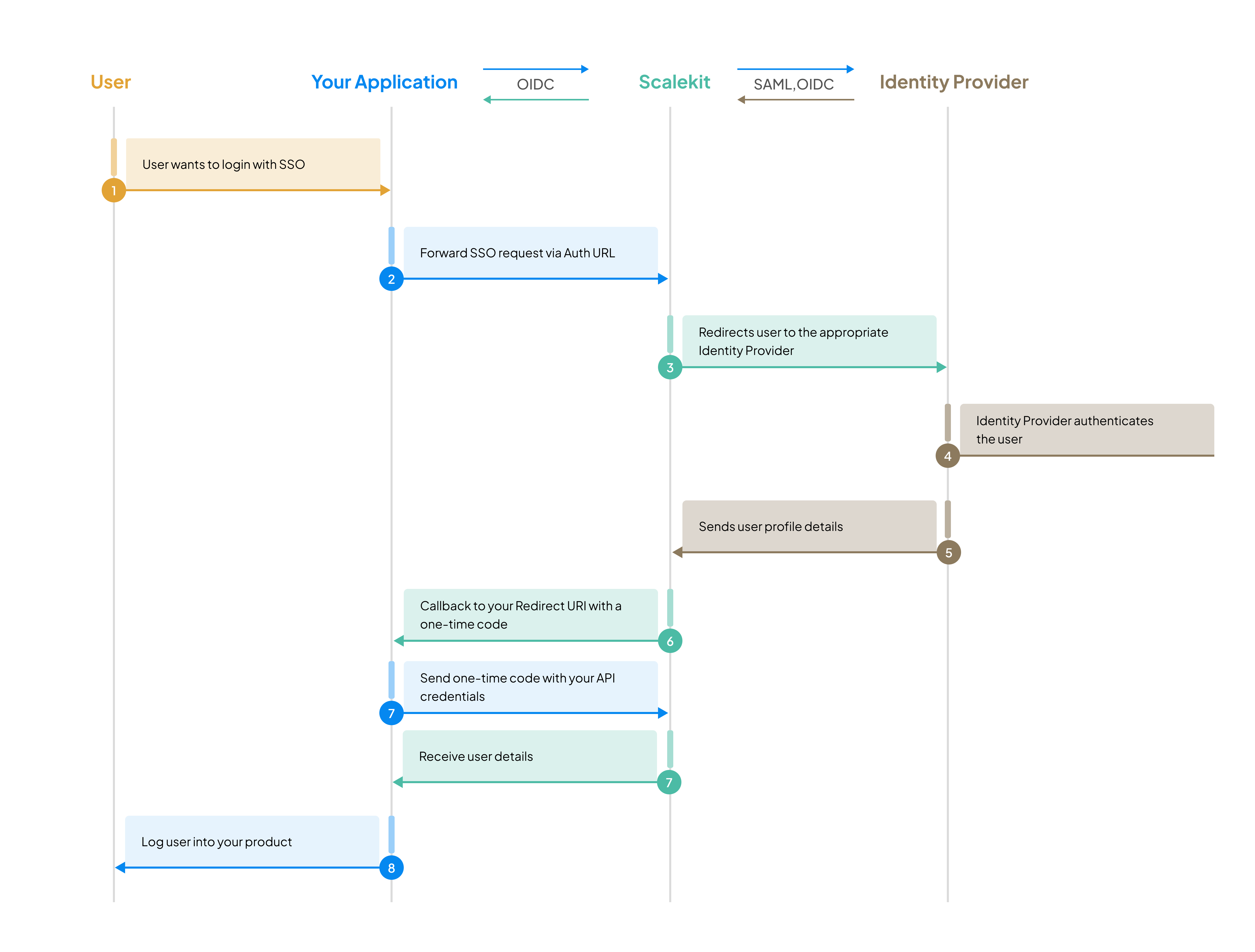
- A user chooses to sign in with SSO in your app, for example by entering their work email.
- Your app builds an authorization URL that names the user’s organization, connection or email domain, and redirects the user to it.
- Scalekit sends the user to their company’s IdP, where they sign in.
- The IdP sends the result to Scalekit, which redirects the user to your app’s callback URL with a one-time code.
- Your app exchanges the code for the user’s profile, finds or creates the user in your database and starts its own session.
Users can also start from their IdP’s dashboard, such as an Okta tile. Your app turns that into the same flow; see IdP-initiated SSO.
What you’ll build
Section titled “What you’ll build”- Quickstart: sign in a test user through the SSO simulator.
- How Modular SSO works: organizations, connections, domains and what your callback receives.
- Choose how to integrate: your own code, or Auth0, Cognito, Firebase or Supabase.
- Handle the callback and find the user: check the response, find or create the user and start your session.
- Onboard an enterprise customer: create their organization and give their IT admin the admin portal.
- Production readiness checklist: what to check before your first customer goes live.