


The Amplitude Analytics connector lets your AI agent act in each user's Amplitude Analytics account. Each user connects their own Amplitude Analytics API key and secret once, and Scalekit sends it with every call, so your agent never handles credentials. It comes with 74 tools.
- Tools
- 74
- What they doRead · write · destructive
- 43 · 23 · 843 read23 write8 destructive
- Users sign in with
- API key
Setup
Install the SDK
Terminal window npm install @scalekit-sdk/node dotenvTerminal window pip install scalekit-sdk-python python-dotenvSet your credentials
Add your Scalekit credentials to your
.envfile. Find values in app.scalekit.com > Developers > API Credentials..env SCALEKIT_ENVIRONMENT_URL=<your-environment-url>SCALEKIT_CLIENT_ID=<your-client-id>SCALEKIT_CLIENT_SECRET=<your-client-secret>Create the Amplitude Analytics connection
In AgentKit > Connections, create an Amplitude Analytics connection. The name you give it is the
connection_nameyour code passes. See Configure connections.Console steps with screenshots
Register your Amplitude API Key and Secret Key with Scalekit so it can authenticate and proxy requests on behalf of your users. Amplitude uses HTTP Basic Auth — the API Key is the username and the Secret Key is the password. There is no redirect URI or OAuth flow.
-
Find your Amplitude data residency region
Amplitude runs two separate data residency regions with different credentials and API hosts. Before generating keys, confirm which region your project (or organization) lives in:
Region API host US (default) amplitude.comEU analytics.eu.amplitude.com -
Get your API Key
-
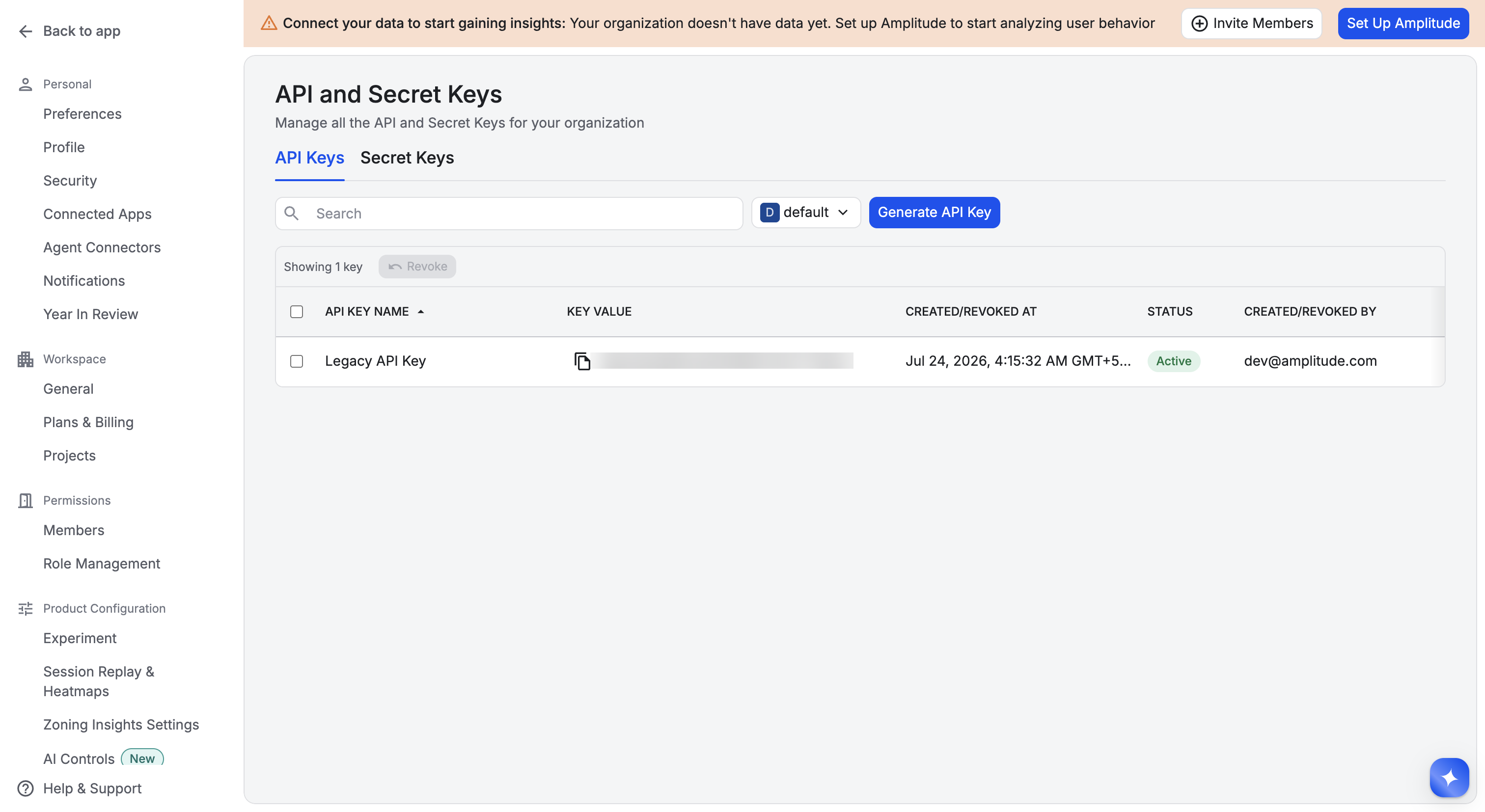
Sign in to Amplitude and go to Settings → Agent Connectors (or API and Secret Keys) → API Keys.
-
Click Generate API Key, or copy an existing key’s value.
-
-
Get your Secret Key
-
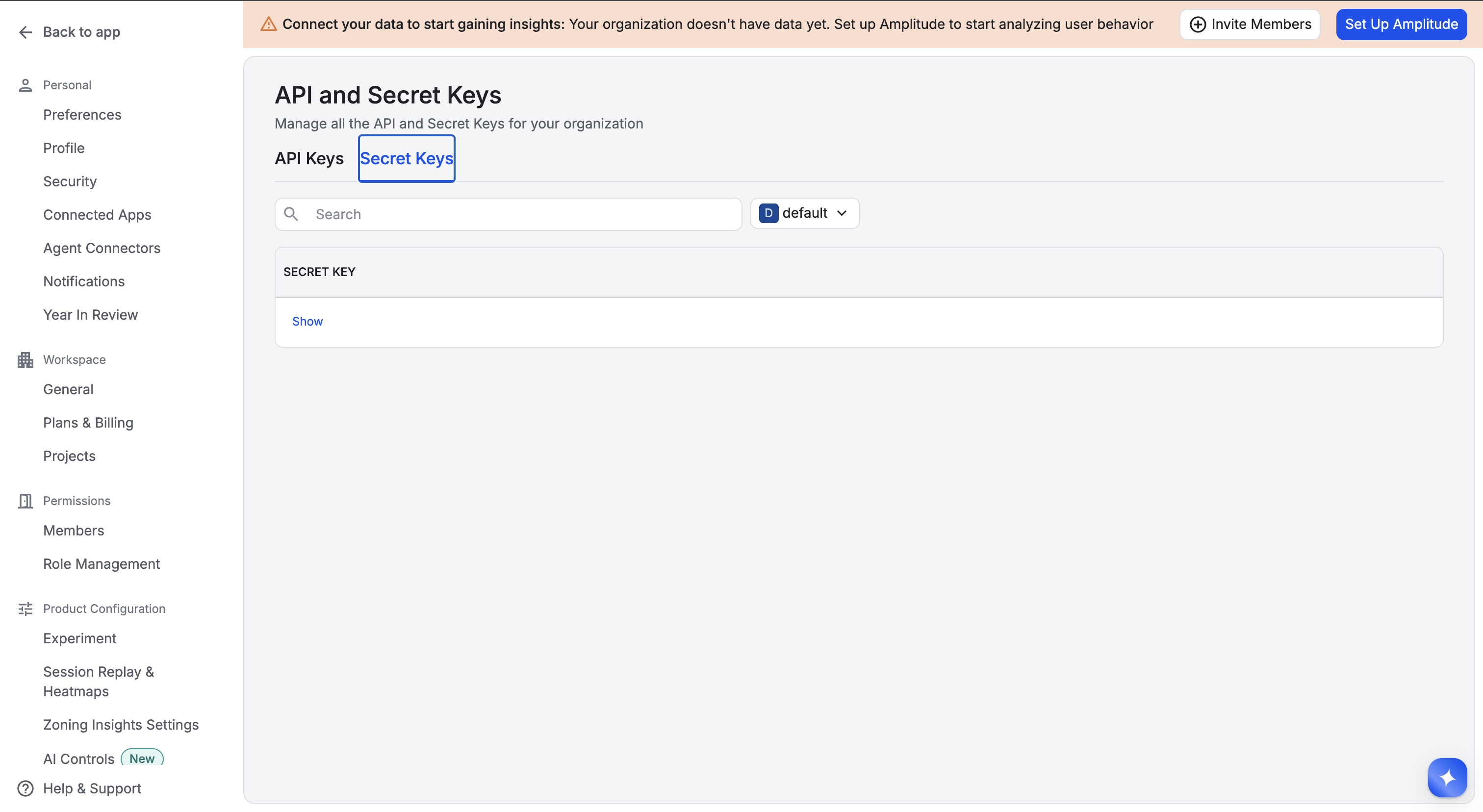
Click the Secret Keys tab.
-
Click Show next to the secret key that matches the API key you copied in step 2, and copy it.
-
-
Create a connection in Scalekit
- In the Scalekit dashboard, go to AgentKit → Connections → Create Connection.
- Search for Amplitude Analytics and click Create.
- Note the Connection name — use this as
connection_namein your code (e.g.,amplitudeanalytics).
-
Add a connected account
Connected accounts link a specific user identifier in your system to an Amplitude API Key, Secret Key, and region. Add one in the dashboard to test. In production, each user adds their own through the authorization link: they enter their credentials on the page it opens.
In the dashboard, to test
- Open the connection and click the Connected Accounts tab → Add account.
- Fill in Your User’s ID, API Key, Secret Key, and select the Data Residency Region that matches your keys.
- Click Save.
From your backend, if your app already has the credentials
For example, when users enter them on a settings page in your app:
import { ConnectorStatus } from '@scalekit-sdk/node'// Upsert the account, then make sure it is ACTIVE before the first tool call.async function connectUser(connectionName, identifier, details) {const authorizationDetails = { details: { case: 'staticAuth', value: { details } } }let { connectedAccount } = await scalekit.actions.upsertConnectedAccount({connectionName,identifier,authorizationDetails,})if (connectedAccount?.status !== ConnectorStatus.ACTIVE) {;({ connectedAccount } = await scalekit.actions.upsertConnectedAccount({connectionName,identifier,authorizationDetails,}))}return connectedAccount}// US region (default) — omit `domain` or set it to 'amplitude.com'await connectUser('amplitudeanalytics', 'user_123', {username: 'your-amplitude-api-key',password: 'your-amplitude-secret-key',domain: 'amplitude.com',})// EU regionawait connectUser('amplitudeanalytics', 'user_123', {username: 'your-eu-amplitude-api-key',password: 'your-eu-amplitude-secret-key',domain: 'analytics.eu.amplitude.com',})# Upsert the account, then make sure it is ACTIVE before the first tool call.def connect_user(connection_name, identifier, details):authorization_details = {"static_auth": details}response = scalekit_client.actions.upsert_connected_account(connection_name=connection_name,identifier=identifier,authorization_details=authorization_details,)if response.connected_account.status != "ACTIVE":response = scalekit_client.actions.upsert_connected_account(connection_name=connection_name,identifier=identifier,authorization_details=authorization_details,)return response.connected_account# US region (default) — omit domain or set it to "amplitude.com"connect_user("amplitudeanalytics", "user_123", {"username": "your-amplitude-api-key","password": "your-amplitude-secret-key","domain": "amplitude.com",})# EU regionconnect_user("amplitudeanalytics", "user_123", {"username": "your-eu-amplitude-api-key","password": "your-eu-amplitude-secret-key","domain": "analytics.eu.amplitude.com",})
-
Tools
Pass the exact name toexecute_toolamplitudeanalytics_export_eventsExport raw event data uploaded to Amplitude within a date range as a zip archive of NDJSON files.Read-onlyExport Events
Export raw event data uploaded to Amplitude within a date range as a zip archive of NDJSON files. The response is a binary zip file, not JSON — save it to disk rather than parsing it as JSON. start and end use the YYYYMMDDTHH format (e.g. 20220201T05), and the start-end range cannot exceed 365 days. Exported events reflect each event's upload time to Amplitude, not its original client-side event time, and typically become available roughly 2 hours after upload. The response is capped at 4GB; a range that would exceed that returns a 400 error — use Amplitude's Amazon S3 export instead for larger data. Returns 404 if there is no data in the requested range, and 504 if the export is too large and times out while being generated.
Inputs
endstringrequired- End of the export range, in YYYYMMDDTHH format (year, month, day, hour). The start-end range cannot exceed 365 days.
startstringrequired- Start of the export range, in YYYYMMDDTHH format (year, month, day, hour).
amplitudeanalytics_get_active_and_new_user_countsPull the Active/New User Counts chart from the Amplitude Dashboard REST API: count of active or new users per interval over a date range, with optional segment filters and a single group-by property.Read-onlyGet Active and New User Counts
Pull the Active/New User Counts chart from the Amplitude Dashboard REST API: count of active or new users per interval over a date range, with optional segment filters and a single group-by property. Response shape: {"data": {"series": [[number,...]], "seriesMeta": [string,...], "xValues": ["YYYY-MM-DD",...]}}. Rate limits: 5 concurrent requests shared with other Amplitude Dashboard/Cohort API calls, up to 108,000 cost per hour.
Inputs
endstringrequired- End date of the query range, format YYYYMMDD (e.g. 20260131).
startstringrequired- Start date of the query range, format YYYYMMDD (e.g. 20260101).
group_bystring- Property to group results by, e.g. gp:country. This endpoint supports only one group-by property.
intervalinteger- Time bucket size for the returned series: 1 (daily), 7 (weekly), or 30 (monthly). Defaults to 1.one of
1730default1 metricstring- Which user count to compute: new (users first seen in each interval) or active (users active in each interval). Defaults to active.one of
newactivedefaultactive segment_definitionsstring- JSON-encoded array of segment definitions to split the count by cohort/property segments, e.g. [{"prop":"gp:country","op":"is","values":["US"]}].
amplitudeanalytics_get_annotationRetrieve a single chart annotation by its ID.Read-onlyGet Annotation
Retrieve a single chart annotation by its ID.
Inputs
annotation_idintegerrequired- The ID of the annotation to retrieve.
amplitudeanalytics_get_annotation_categoryRetrieve a single chart annotation category by its ID.Read-onlyGet Annotation Category
Retrieve a single chart annotation category by its ID.
Inputs
category_idintegerrequired- The ID of the annotation category to retrieve.
amplitudeanalytics_get_average_session_lengthPull the Average Session Length chart from the Amplitude Dashboard REST API: average session length in seconds for each day in the given date range.Read-onlyGet Average Session Length
Pull the Average Session Length chart from the Amplitude Dashboard REST API: average session length in seconds for each day in the given date range. Response shape: {"data": {"series": [[number,...]], "seriesMeta": [{"segmentIndex": 0}], "xValues": ["YYYY-MM-DD",...]}}. Rate limits: 5 concurrent requests shared with other Amplitude Dashboard/Cohort API calls, up to 108,000 cost per hour.
Inputs
endstringrequired- End date of the query range, format YYYYMMDD (e.g. 20260104).
startstringrequired- Start date of the query range, format YYYYMMDD (e.g. 20260101).
amplitudeanalytics_get_average_sessions_per_userPull the Average Sessions Per User chart from the Amplitude Dashboard REST API: average number of sessions per user for each day in the given date range.Read-onlyGet Average Sessions Per User
Pull the Average Sessions Per User chart from the Amplitude Dashboard REST API: average number of sessions per user for each day in the given date range. Response shape: {"data": {"series": [[number,...]], "seriesMeta": [{"segmentIndex": 0}], "xValues": ["YYYY-MM-DD",...]}}. Rate limits: 5 concurrent requests shared with other Amplitude Dashboard/Cohort API calls, up to 108,000 cost per hour.
Inputs
endstringrequired- End date of the query range, format YYYYMMDD (e.g. 20260104).
startstringrequired- Start date of the query range, format YYYYMMDD (e.g. 20260101).
amplitudeanalytics_get_chart_resultsGet results from any existing saved Amplitude chart by its chart ID, without having to know or replicate the chart's own query definition.Read-onlyGet Chart Results
Get results from any existing saved Amplitude chart by its chart ID, without having to know or replicate the chart's own query definition. Find the chart_id in the chart's URL in the Amplitude web app, e.g. the 'abc123' segment in https://analytics.amplitude.com/yourorg/chart/abc123. Per Amplitude's docs, the response's exact shape varies by the chart's underlying type (event segmentation, funnel, retention, etc.) — expect a shape similar to the corresponding dedicated endpoint (e.g. amplitudeanalytics_get_event_segmentation's response shape for an Event Segmentation chart). Despite the path ending in /csv, Amplitude's own documentation confirms this returns JSON, not a CSV file. Rate limits: 5 concurrent requests shared with other Amplitude Dashboard/Cohort API calls, up to 108,000 cost per hour.
Inputs
chart_idstringrequired- The ID of the saved chart to fetch results for, taken from the chart's URL in the Amplitude web app.
amplitudeanalytics_get_cohort_membership_fileDownload the completed cohort membership export started with amplitudeanalytics_request_cohort_membership, once amplitudeanalytics_get_cohort_membership_status reports it complete.Read-onlyDownload Cohort Membership File
Download the completed cohort membership export started with amplitudeanalytics_request_cohort_membership, once amplitudeanalytics_get_cohort_membership_status reports it complete. Small cohorts return the gzip-compressed member data directly; large cohorts return an HTTP 302 redirect to a pre-signed download URL valid for 1 minute (the request_id-based link itself stays valid for 7 days). CONFIRMED (live-tested): routing, auth, and path-templating all work correctly — a numeric request_id gets a clean, well-formed error: {"details":"Cohort download not found"}. IMPORTANT CONFIRMED QUIRK (same pattern as get_cohort_membership_status and the DSAR API's get_dsar_request_status): a non-numeric request_id instead returns a generic, unhelpful raw HTML '404: Not Found' from an edge/routing layer in front of Amplitude, before its own logic runs. Always pass the exact request_id returned by amplitudeanalytics_request_cohort_membership.
Inputs
request_idstringrequired- The request_id returned by amplitudeanalytics_request_cohort_membership, must be in a completed state per amplitudeanalytics_get_cohort_membership_status. CONFIRMED: a non-numeric value returns a generic, unhelpful raw HTML 404 rather than a clear error (same pattern as the DSAR API's request_id) — always use the exact value returned.
amplitudeanalytics_get_cohort_membership_statusCheck the status of an asynchronous cohort membership export previously started with amplitudeanalytics_request_cohort_membership.Read-onlyGet Cohort Membership Export Status
Check the status of an asynchronous cohort membership export previously started with amplitudeanalytics_request_cohort_membership. Once the status reports completion, call amplitudeanalytics_get_cohort_membership_file to download the data. Note: Amplitude's documented async_status values are inconsistently formatted across their own sources (space-separated like "JOB COMPLETED" on the current docs page, vs underscore-separated "JOB_COMPLETED" seen elsewhere) — treat the exact string loosely (e.g. case/format-insensitive contains-"COMPLETE" check) rather than a strict equality match. CONFIRMED (live-tested): routing, auth, and path-templating all work correctly — a numeric request_id (matching the numeric-looking IDs Amplitude actually issues) gets a clean, well-formed error: {"details":"No job exists with request_id: <id>"}. IMPORTANT CONFIRMED QUIRK (same pattern found on the DSAR API's get_dsar_request_status): a non-numeric request_id instead returns a generic, unhelpful raw HTML '404: Not Found' from what appears to be an edge/routing layer in front of Amplitude, before its own logic runs. Always pass the exact request_id string returned by amplitudeanalytics_request_cohort_membership, not an arbitrary placeholder.
Inputs
request_idstringrequired- The request_id returned by amplitudeanalytics_request_cohort_membership. CONFIRMED: a non-numeric value returns a generic, unhelpful raw HTML 404 rather than a clear error (same pattern as the DSAR API's request_id) — always use the exact value amplitudeanalytics_request_cohort_membership returned.
amplitudeanalytics_get_cohort_usageCheck how much of the Behavioral Cohorts Download API's monthly quota has been used.Read-onlyGet Cohort Download Usage
Check how much of the Behavioral Cohorts Download API's monthly quota has been used. Growth and Enterprise plans are limited to 500 download requests per month; this shows the current usage count and when it resets.
Inputs
This tool takes no inputs.
amplitudeanalytics_get_dsar_output_fileDownload a single completed output file from a Data Subject Access Request (DSAR) job.Read-onlyGet DSAR Output File
Download a single completed output file from a Data Subject Access Request (DSAR) job. Requires a connected account whose API Key/Secret Key fields hold Amplitude's ORGANIZATION-level credentials, not the project-level credentials most other tools in this connector use — use the same separate, organization-credentialed connected account you used to create the request. Amplitude's org-level keys are not self-service — request them from Amplitude Support. CONFIRMED (live-tested): calling this with project-level credentials instead correctly returns a clean 403 'Invalid API Key' — routing and path-templating reach Amplitude correctly; the only blocker is the credential tier. Call this only after amplitudeanalytics_get_dsar_request_status reports the job's status as done, using the request_id of that job and an output_id taken from one of the URLs in its urls list. The response is the raw output file itself, not JSON.
Inputs
output_idintegerrequired- An integer identifying which output file to download, taken from one of the download URLs in amplitudeanalytics_get_dsar_request_status's urls list.
request_idintegerrequired- The requestId of the DSAR job, from amplitudeanalytics_create_dsar_request or amplitudeanalytics_get_dsar_request_status.
amplitudeanalytics_get_dsar_request_statusCheck the status of a Data Subject Access Request (DSAR) job previously created with amplitudeanalytics_create_dsar_request.Read-onlyGet DSAR Request Status
Check the status of a Data Subject Access Request (DSAR) job previously created with amplitudeanalytics_create_dsar_request. Requires a connected account whose API Key/Secret Key fields hold Amplitude's ORGANIZATION-level credentials, not the project-level credentials most other tools in this connector use — use the same separate, organization-credentialed connected account you used to create the request. Amplitude's org-level keys are not self-service — request them from Amplitude Support. CONFIRMED (live-tested): calling this with project-level credentials and a purely numeric request_id (matching the integer requestId Amplitude actually returns from create_dsar_request) correctly returns a clean 403 'Invalid API Key' — routing and path-templating reach Amplitude correctly; the only blocker is the credential tier. FIXED: request_id is typed as an integer (matching the requestId Amplitude actually returns and amplitudeanalytics_get_dsar_output_file's own request_id type) specifically because a non-numeric value was confirmed to produce a generic, unhelpful raw HTML '404: Not Found' from a routing layer in front of Amplitude, instead of a clear error — the integer type now rejects a malformed value immediately with a clear schema-validation error rather than letting it round-trip to that confusing response. The response includes status (one of staging, submitted, done, or failed), failReason if the job failed, urls with download links once the job is done, and expires indicating when those download links expire. Once status is done, download the output files with amplitudeanalytics_get_dsar_output_file.
Inputs
request_idintegerrequired- The requestId returned when the DSAR job was created with amplitudeanalytics_create_dsar_request, used to check this specific job's status. Typed as an integer (not a string) because a non-numeric value was confirmed to produce a confusing raw HTML 404 from a routing layer in front of Amplitude, rather than a clear error — this type constraint rejects bad input immediately instead.
amplitudeanalytics_get_event_categoryRetrieve a single event category from Amplitude's taxonomy, looked up by its category_name.Read-onlyGet Event Category
Retrieve a single event category from Amplitude's taxonomy, looked up by its category_name. Unlike amplitudeanalytics_update_event_category and amplitudeanalytics_delete_event_category (which are keyed by category_id), this endpoint is keyed by category_name — this matches Amplitude's documented Taxonomy API and is not an inconsistency to fix.
Inputs
category_namestringrequired- The name of the event category to retrieve.
amplitudeanalytics_get_event_propertyRetrieve a single named event property from Amplitude's taxonomy.Read-onlyGet Event Property
Retrieve a single named event property from Amplitude's taxonomy. Unlike amplitudeanalytics_get_event_type, amplitudeanalytics_get_user_property, and amplitudeanalytics_get_group_property (each keyed by a path parameter), Amplitude's Taxonomy API exposes single-event-property lookup as a query-string filter (event_property) on the same list endpoint used by amplitudeanalytics_list_event_properties, rather than as its own path — this matches Amplitude's documented Taxonomy API and is not an inconsistency to fix. Set event_type to look up an event-specific property override instead of a shared property.
Inputs
event_propertystringrequired- The name of the event property to retrieve.
event_typestring- If set, looks up the event-specific property override for this event type instead of the shared property of the same name.
amplitudeanalytics_get_event_segmentationPull Event Segmentation chart data from the Amplitude Dashboard REST API: measure an event (uniques, totals, or another metric) over a date range, with optional segment filters and up to two group-by properties.Read-onlyGet Event Segmentation
Pull Event Segmentation chart data from the Amplitude Dashboard REST API: measure an event (uniques, totals, or another metric) over a date range, with optional segment filters and up to two group-by properties. Rate limits: 5 concurrent requests shared with other Amplitude Dashboard/Cohort API calls. CONFIRMED (live-tested): the measurement values histogram, sums, and value_avg require a group-by, but NOT via the separate group_by field on this tool — that field maps to the chart-level g parameter, which these three measurement types ignore for their own validation. Instead, embed group_by directly inside the event field's own JSON string, e.g. event: '{"event_type":"session_start","group_by":[{"type":"event","value":"gp:country"}]}'. Without this, Amplitude rejects the request with 'Missing required group bys' regardless of what the group_by field is set to. uniques, totals, average, pct_dau, and formula do not have this requirement and work correctly with the separate group_by/second_group_by fields.
Inputs
endstringrequired- End date of the query range, format YYYYMMDD (e.g. 20260131).
eventstringrequired- JSON-encoded primary event definition: {"event_type": "...", "filters"?: [{"subprop_type", "subprop_key", "subprop_op", "subprop_value"}], "group_by"?: [{"type", "value"}]}. Example: {"event_type":"sign_up"}.
startstringrequired- Start date of the query range, format YYYYMMDD (e.g. 20260101).
formulastring- Formula expression combining event A and (optionally) event B, e.g. "UNIQUES(A)/UNIQUES(B)". Required only when measurement is set to "formula"; ignored otherwise.
group_bystring- Property to group results by, e.g. gp:country or a user/event property name.
intervalinteger- Time bucket size for the returned series: -300000 (real-time), -3600000 (hourly), 1 (daily), 7 (weekly), or 30 (monthly). Defaults to 1.one of
-300000-36000001730default1 limitinteger- Maximum number of group-by values to return (max 1000). Defaults to 100.default
100 measurementstring- Aggregation to compute: uniques, totals, pct_dau, average, histogram, sums, value_avg, or formula. Defaults to uniques. CONFIRMED: histogram, sums, and value_avg require a group-by embedded inside the event field's own JSON (e.g. {"event_type":"...","group_by":[{"type":"event","value":"gp:country"}]}) — the separate group_by field on this tool does not satisfy this requirement for these three measurements specifically.one of
uniquestotalspct_dauaveragehistogramsumsvalue_avgformuladefaultuniques rolling_averageinteger- Rolling average window size, in units of the chosen interval (days/weeks/months). Smooths the returned series.
rolling_windowinteger- Rolling window size, in units of the chosen interval (days/weeks/months). Aggregates each point over a trailing window.
second_eventstring- JSON-encoded second event definition, same shape as event. Used together with formula to compare two events.
second_group_bystring- Second property to group results by, applied after group_by.
segment_definitionsstring- JSON-encoded array of segment definitions to split the event by cohort/property segments, e.g. [{"prop":"gp:country","op":"is","values":["US"]}].
user_typestring- Restrict the measurement to a user type: any (all users) or active (only currently active users). Defaults to any.one of
anyactivedefaultany
amplitudeanalytics_get_event_streaming_metricsGet the delivery-metrics summary for an Amplitude Event Streaming sync over a time window.Read-onlyGet Event Streaming Metrics
Get the delivery-metrics summary for an Amplitude Event Streaming sync over a time window. The response includes timePeriod, eventsDelivered, eventsNotDelivered, deliveryRate, latencyInSeconds (p95), successOnFirstAttempt, successAfterRetry, eventsExpired, and eventsDiscarded. Amplitude retains at most 90 days of data for this endpoint — requesting an older range returns a 500 error.
Inputs
sync_idstringrequired- The Event Streaming sync to get delivery metrics for.
time_periodstringrequired- Preset time window to summarize metrics over. Use CUSTOM together with start and end for an explicit window.one of
TEN_MINUTESONE_HOURFOUR_HOURSONE_DAYONE_WEEKTWO_WEEKSCUSTOM endstring- Exclusive end of the custom time window, ISO 8601. Required only when time_period is CUSTOM.
startstring- Inclusive start of the custom time window, ISO 8601. Required only when time_period is CUSTOM.
amplitudeanalytics_get_event_typeRetrieve a single event type from Amplitude's taxonomy by its event_type name.Read-onlyGet Event Type
Retrieve a single event type from Amplitude's taxonomy by its event_type name. CONFIRMED (live-tested): if the event type has is_hidden_from_dropdowns set to true, this single-item lookup returns 'Not found' even though the event type still fully exists and appears in amplitudeanalytics_list_event_types — this is a real, reproducible quirk of this specific endpoint, not a sign the event is missing. If a lookup unexpectedly 404s, check amplitudeanalytics_list_event_types first before assuming the event doesn't exist.
Inputs
event_typestringrequired- The name of the event type to retrieve.
amplitudeanalytics_get_events_summaryList the visible events tracked in this Amplitude project along with the current week's totals, uniques, and DAU percentage for each — the 'Events List' endpoint of the Dashboard REST API.Read-onlyGet Events Summary
List the visible events tracked in this Amplitude project along with the current week's totals, uniques, and DAU percentage for each — the 'Events List' endpoint of the Dashboard REST API. Distinct from amplitudeanalytics_list_event_types (Taxonomy API), which returns taxonomy metadata (descriptions, categories, deletion state) rather than usage totals. Amplitude's docs specify no query parameters for this endpoint and note that hidden events are excluded from the response. Response shape: {"data": [{"value": string, "display": string, "totals": number, "non_active": boolean, "deleted": boolean, "hidden": boolean, "flow_hidden": boolean}, ...]}. Rate limits: 5 concurrent requests shared with other Amplitude Dashboard/Cohort API calls, up to 108,000 cost per hour.
Inputs
This tool takes no inputs.
amplitudeanalytics_get_funnel_resultsPull Funnel Analysis chart data from the Amplitude Dashboard REST API: step-by-step conversion and drop-off for an ordered (or unordered/sequential) sequence of two or more events over a date range.Read-onlyGet Funnel Results
Pull Funnel Analysis chart data from the Amplitude Dashboard REST API: step-by-step conversion and drop-off for an ordered (or unordered/sequential) sequence of two or more events over a date range. Rate limits: 5 concurrent requests shared with other Amplitude Dashboard/Cohort API calls.
Inputs
endstringrequired- End date of the query range, format YYYYMMDD (e.g. 20260131).
funnel_stepsarrayrequired- Ordered array of JSON-encoded event definitions describing the funnel steps, at least 2 required, e.g. ["{\"event_type\":\"sign_up\"}", "{\"event_type\":\"activated\"}"]. Each array element is sent as a repeated `e` query parameter in step order.
startstringrequired- Start date of the query range, format YYYYMMDD (e.g. 20260101).
conversion_window_secondsinteger- Maximum time, in seconds, a user has to complete the full funnel after the first step. Defaults to 2592000 (30 days).default
2592000 group_bystring- Property to group results by, e.g. gp:country. Funnels support only one group-by property (unlike event segmentation, which supports two).
intervalinteger- Time bucket size for the returned series: -300000 (real-time), -3600000 (hourly), 1 (daily), 7 (weekly), or 30 (monthly). Defaults to 1.one of
-300000-36000001730default1 limitinteger- Maximum number of group-by values to return (max 1000). Defaults to 100.default
100 modestring- Step-order strictness: ordered (steps must occur in the given order), unordered (any order), or sequential (given order, with no other funnel events occurring in between). Defaults to ordered.one of
orderedunorderedsequentialdefaultordered segment_definitionsstring- JSON-encoded array of segment definitions to split the funnel by cohort/property segments, e.g. [{"prop":"gp:country","op":"is","values":["US"]}].
user_filterstring- Restrict the funnel to a user type: new (users new in the date range) or active (currently active users). Defaults to active. Note: this is a DIFFERENT enum than amplitudeanalytics_get_event_segmentation's user_type field (which uses any/active).one of
newactivedefaultactive
amplitudeanalytics_get_group_propertyRetrieve a single group property from Amplitude's Taxonomy by name.Read-onlyGet Group Property
Retrieve a single group property from Amplitude's Taxonomy by name.
Inputs
group_propertystringrequired- The name of the group property to retrieve.
amplitudeanalytics_get_realtime_active_usersPull the Real-time Active User Count chart from the Amplitude Dashboard REST API: active user numbers with 5-minute granularity for the last two days, compared against the same period the day before.Read-onlyGet Real-time Active Users
Pull the Real-time Active User Count chart from the Amplitude Dashboard REST API: active user numbers with 5-minute granularity for the last two days, compared against the same period the day before. UNCONFIRMED: Amplitude's docs show a raw example URL with an '?i=5' query parameter but do not provide a formal parameter table describing it anywhere on the page — interval_minutes is exposed here defensively for that documented example value; omit it to use Amplitude's default (standard 5-minute) granularity. Response shape: {"data": {"xValues": ["HH:MM",...], "seriesLabels": ["Today","Yesterday"], "series": [[number,...],[number,...]]}}. Rate limits: 5 concurrent requests shared with other Amplitude Dashboard/Cohort API calls, up to 108,000 cost per hour.
Inputs
interval_minutesinteger- Granularity in minutes for the returned series. UNCONFIRMED beyond a raw example in Amplitude's docs showing i=5; the standard behavior is 5-minute granularity for the last two days. Omit to use Amplitude's default.
amplitudeanalytics_get_retention_analysisPull the Retention Analysis chart from the Amplitude Dashboard REST API: what fraction of users who did a 'start' action came back to do a 'return' action, over a date range, with optional bracket/rolling/n-day retention modes, segment filters, and one group-by property.Read-onlyGet Retention Analysis
Pull the Retention Analysis chart from the Amplitude Dashboard REST API: what fraction of users who did a 'start' action came back to do a 'return' action, over a date range, with optional bracket/rolling/n-day retention modes, segment filters, and one group-by property. Response shape: {"data": {"series": [{"dates": [string,...], "values": {date: [{"count": number, "outof": number, "incomplete": boolean}]}, "combined": [{"count": number, "outof": number, "incomplete": boolean}]}], "seriesMeta": [{"segmentIndex": number, "eventIndex": number}]}}. Rate limits: 5 concurrent requests shared with other Amplitude Dashboard/Cohort API calls, up to 108,000 cost per hour.
Inputs
endstringrequired- End date of the query range, format YYYYMMDD (e.g. 20260131).
return_eventstringrequired- JSON-encoded event object for the 'returning' action. Amplitude documents two special event_type values here: '_all' (all events) or '_active' (all active events). A regular event definition like {"event_type":"opened_app"} is also accepted.
startstringrequired- Start date of the query range, format YYYYMMDD (e.g. 20260101).
start_eventstringrequired- JSON-encoded event object for the 'start' action. Amplitude documents two special event_type values here: '_new' (users new in the date range) or '_active' (all active users). A regular event definition like {"event_type":"sign_up"} is also accepted.
group_bystring- Property to group results by, e.g. gp:country. Limited to one property.
intervalinteger- Time bucket size: 1 (daily), 7 (weekly), or 30 (monthly). Defaults to 1.one of
1730default1 retention_bracketsstring- JSON-encoded array of day brackets, required only when retention_mode is 'bracket'. Format: [[0,4]] for a single 0-4 day bracket; multiple brackets can be listed.
retention_modestring- Retention calculation type: bracket (returning within specific day brackets, requires retention_brackets), rolling (returning at any point after, unbounded), or n-day (returning on exactly day N). Defaults to n-day.one of
bracketrollingn-daydefaultn-day segment_definitionsstring- JSON-encoded array of segment definitions to split retention by cohort/property segments, e.g. [{"prop":"gp:country","op":"is","values":["US"]}].
amplitudeanalytics_get_revenue_ltvPull the Revenue LTV (lifetime value) chart from the Amplitude Dashboard REST API: ARPU, ARPPU, total revenue, or paying-user counts for cohorts of new users, tracked over time since each cohort's first day.Read-onlyGet Revenue LTV
Pull the Revenue LTV (lifetime value) chart from the Amplitude Dashboard REST API: ARPU, ARPPU, total revenue, or paying-user counts for cohorts of new users, tracked over time since each cohort's first day. Response shape: {"data": {"seriesLabels": [string,...], "series": [{"dates": [string,...], "values": {"YYYY-MM-DD": {"r1d": number, "r2d": number, "r90d": number, "count": number, "paid": number, "total_amount": number}}}]}}. Rate limits: 5 concurrent requests shared with other Amplitude Dashboard/Cohort API calls, up to 108,000 cost per hour.
Inputs
endstringrequired- End date of the query range, format YYYYMMDD (e.g. 20260131).
startstringrequired- Start date of the query range, format YYYYMMDD (e.g. 20260101).
group_bystring- Property to group results by, e.g. gp:country. Limited to one property.
intervalinteger- Time bucket size for the new-user cohorts: 1 (daily), 7 (weekly), or 30 (monthly). Defaults to 1.one of
1730default1 metricinteger- Which revenue metric to compute: 0 = ARPU (average revenue per user), 1 = ARPPU (average revenue per paying user), 2 = Total Revenue, 3 = Paying Users (count). Defaults to 0.one of
0123default0 segment_definitionsstring- JSON-encoded array of segment definitions to split the metric by cohort/property segments, e.g. [{"prop":"gp:country","op":"is","values":["US"]}].
amplitudeanalytics_get_session_length_distributionPull the Session Length Distribution chart from the Amplitude Dashboard REST API: sessions grouped into time buckets over a date range, with optional custom bucket sizing.Read-onlyGet Session Length Distribution
Pull the Session Length Distribution chart from the Amplitude Dashboard REST API: sessions grouped into time buckets over a date range, with optional custom bucket sizing. Response shape: {"data": {"series": [[number,...]], "xValues": ["lowerBound-upperBound", ...]}}. Rate limits: 5 concurrent requests shared with other Amplitude Dashboard/Cohort API calls, up to 108,000 cost per hour.
Inputs
endstringrequired- End date of the query range, format YYYYMMDD (e.g. 20260131).
startstringrequired- Start date of the query range, format YYYYMMDD (e.g. 20260101).
bin_maxnumber- Maximum value for bucketing, in units of bin_time_unit. Omit to use Amplitude's own default bucketing.
bin_minnumber- Minimum value for bucketing, in units of bin_time_unit. Omit to use Amplitude's own default bucketing.
bin_sizenumber- Size of each bucket, in units of bin_time_unit. Omit to use Amplitude's own default bucketing.
bin_time_unitstring- Time unit for the histogram bucket sizes: hours, minutes, or seconds. Used together with bin_min/bin_max/bin_size to define custom buckets.one of
hoursminutesseconds
amplitudeanalytics_get_session_replay_filesGet download links for a single Amplitude session replay's recorded event files.Read-onlyGet Session Replay Files
Get download links for a single Amplitude session replay's recorded event files. Returns a files array of presigned S3 URLs — these URLs expire after 15 minutes, so download the files promptly after calling this.
Inputs
replay_idstringrequired- The replay to fetch files for, formatted as 'device_id/session_id'.
page_sizeinteger- Maximum number of file entries to return per page. Maximum 1000.default
100 page_tokenstring- Opaque pagination cursor from a previous response.
versioninteger- Session replay data format version to request.one of
23default3
amplitudeanalytics_get_user_activityGet a single user's summary profile and their most recent (or earliest) individual events from the Amplitude Dashboard REST API.Read-onlyGet User Activity
Get a single user's summary profile and their most recent (or earliest) individual events from the Amplitude Dashboard REST API. Response shape: {"userData": {"user_id", "canonical_amplitude_id", "merged_amplitude_ids", "num_events", "num_sessions", "usage_time", "first_used", "last_used", "purchases", "revenue", "platform", "os", "version", "device", "device_type", "carrier", "country", "region", "city", "dma", "language", "start_version", "device_ids", "last_location", "properties"}, "events": [...]}. Rate limits: this endpoint allows up to 10 concurrent requests and up to 360 queries per hour (higher than the 5-concurrent/108,000-cost-per-hour limit shared by most other Dashboard REST API endpoints).
Inputs
userstringrequired- The Amplitude ID of the user to fetch activity for.
directionstring- Which end of the user's event history to return: earliest (the user's first events) or latest (their most recent events). Defaults to latest.one of
earliestlatestdefaultlatest limitinteger- Number of events to return, up to 1000. Amplitude may return more events than this to avoid returning a partial session. Defaults to 1000.default
1000 offsetinteger- Zero-indexed offset, from the most recent event, of where to start returning events from.
amplitudeanalytics_get_user_compositionPull the User Composition chart from the Amplitude Dashboard REST API: distribution of users across the values of a single user property, over a date range.Read-onlyGet User Composition
Pull the User Composition chart from the Amplitude Dashboard REST API: distribution of users across the values of a single user property, over a date range. Response shape: {"data": {"series": [[number,...]], "seriesLabels": [string,...], "xValues": [string,...]}}. Rate limits: 5 concurrent requests shared with other Amplitude Dashboard/Cohort API calls, up to 108,000 cost per hour.
Inputs
endstringrequired- End date of the query range, format YYYYMMDD (e.g. 20260131).
propertystringrequired- The user property to show the distribution of. Built-in options documented by Amplitude: version, country, city, region, DMA, language, platform, os, device, start_version, paying. For a custom user property, prefix its name with 'gp:'.
startstringrequired- Start date of the query range, format YYYYMMDD (e.g. 20260101).
amplitudeanalytics_get_user_mappingLook up user identity mappings (aliases) for one or more Amplitude user IDs.Read-onlyGet User Mapping
Look up user identity mappings (aliases) for one or more Amplitude user IDs. The response is an object keyed by each requested user_id, where each value has mapped_from[] and mapped_to[] arrays of {amplitude_id, user_id} pairs describing merged/aliased identities. This is the only User Mapping (Aliasing) API endpoint included in this connector — it uses project-level HTTP Basic Auth, matching the rest of this connector's tools, while the write/map/unmap endpoints live on a different host entirely and are intentionally excluded. CONFIRMED (live-tested): this parameter is genuinely sent as a JSON request body on a GET request (non-standard, but this codebase's HTTP layer attaches a body regardless of method) — an empty user_ids array produced the specific Amplitude error 'Request must have a list of userIds', which only makes sense if Amplitude actually received and inspected the array, proving the GET-with-body mechanism delivers this field end-to-end.
Inputs
user_idsarrayrequired- Amplitude user IDs to look up mappings for (1 to 100 IDs per request).
amplitudeanalytics_get_user_propertyRetrieve a single user property by name from Amplitude's taxonomy.Read-onlyGet User Property
Retrieve a single user property by name from Amplitude's taxonomy. CONFIRMED (live-tested): Amplitude auto-prepends 'gp:' to custom user property names on creation regardless of what name amplitudeanalytics_create_user_property was called with — use amplitudeanalytics_list_user_properties to see each property's actual stored name (e.g. 'gp:plan_type'), and pass that exact name here. Passing the plain, unprefixed name returns 'Not found' even immediately after a successful create.
Inputs
user_propertystringrequired- The name of the user property to retrieve, exactly as stored by Amplitude. CONFIRMED: custom properties are auto-prefixed with 'gp:' on creation — use amplitudeanalytics_list_user_properties to find the exact stored name if a plain lookup returns 'Not found'.
amplitudeanalytics_list_annotation_categoriesList all chart annotation categories in the Amplitude project, or filter to a single category by name.Read-onlyList Annotation Categories
List all chart annotation categories in the Amplitude project, or filter to a single category by name.
Inputs
categorystring- If set, only returns the category matching this exact name instead of all categories.
amplitudeanalytics_list_annotationsList chart annotations, optionally filtered by category, by chart, or by a date range.Read-onlyList Annotations
List chart annotations, optionally filtered by category, by chart, or by a date range. CONFIRMED (live-tested): category and chart_id do NOT combine as a logical AND, and Amplitude does NOT error if both are set — category silently wins and chart_id is dropped entirely, even when the chart_id value is otherwise invalid (an invalid chart_id alone 404s, but the identical value alongside a valid category causes no error at all). Set only one of the two at a time; if both are set, only category takes effect. chart_id also only accepts real chart IDs already known to Amplitude's project (it 404s on an unknown value) — this connector has no chart-listing tool, so chart-scoped filtering/annotations are only usable if you already have a real chart_id from Amplitude's own UI.
Inputs
categorystring- Filter to annotations in this category. CONFIRMED: if chart_id is also set, this one silently wins — chart_id is dropped without error.
chart_idstring- Filter to annotations scoped to this chart. CONFIRMED: if category is also set, this field is silently ignored (no error, no effect) — category wins. Must be a real chart ID Amplitude recognizes; an unknown value 404s when used alone.
endstring- Only return annotations before this ISO 8601 timestamp.
startstring- Only return annotations after this ISO 8601 timestamp.
amplitudeanalytics_list_cohortsList all behavioral cohorts defined in the Amplitude project.Read-onlyList Cohorts
List all behavioral cohorts defined in the Amplitude project. Returns each cohort's id, name, description, size, published/archived state, owners, viewers, definition, and last-computed time. Use this to find a cohort's id before calling amplitudeanalytics_request_cohort_membership.
Inputs
include_sync_infoboolean- If true, include each cohort's sync destination metadata (syncMetadata) in the response — e.g. which downstream destinations (ad platforms, warehouses) the cohort is synced to. Defaults to false.default
false
amplitudeanalytics_list_event_categoriesList all event categories defined in Amplitude's taxonomy.Read-onlyList Event Categories
List all event categories defined in Amplitude's taxonomy.
Inputs
This tool takes no inputs.
amplitudeanalytics_list_event_propertiesGet the event properties defined in Amplitude's taxonomy — either the shared properties used across all events, or (if event_type is set) the properties specific to one event type.Read-onlyList Event Properties
Get the event properties defined in Amplitude's taxonomy — either the shared properties used across all events, or (if event_type is set) the properties specific to one event type. Note: per Amplitude's documentation, this parameter is sent as a JSON request body on a GET request (non-standard); this matches the documented behavior but has not been empirically verified against a live account — if it fails, the parameter may need to move to a query string instead.
Inputs
event_typestring- If set, returns properties specific to this event type. If omitted, returns the shared properties used across all events.
amplitudeanalytics_list_event_typesList event types defined in Amplitude's taxonomy, optionally including deleted ones.Read-onlyList Event Types
List event types defined in Amplitude's taxonomy, optionally including deleted ones.
Inputs
show_deletedboolean- Include deleted event types in the results. Defaults to excluding them.default
false
amplitudeanalytics_list_group_propertiesList group properties defined in Amplitude's Taxonomy.Read-onlyList Group Properties
List group properties defined in Amplitude's Taxonomy. Pass group_type to scope the list to that group type (e.g. 'org'); omit it to list properties shared across group types rather than any single type's properties.
Inputs
group_typestring- Group type to filter the list to. If omitted, returns properties shared across group types rather than any single type's properties.
amplitudeanalytics_list_session_replaysList Amplitude Session Replay recordings, optionally filtered by time range, Amplitude user ID, or an explicit set of replay IDs, with pagination and sort order control.Read-onlyList Session Replays
List Amplitude Session Replay recordings, optionally filtered by time range, Amplitude user ID, or an explicit set of replay IDs, with pagination and sort order control. amplitude_id and replay_id are mutually exclusive filters, and replay_id is also mutually exclusive with page_token; when replay_id is set, page_size is ignored and the response's next_page_token is always null. Each replay in the response includes replay_id, session_id, device_id, amplitude_id, start_time, end_time, and retention_in_days, plus a top-level next_page_token for pagination.
Inputs
amplitude_idinteger- Filter to session replays for this Amplitude user ID. Mutually exclusive with replay_id — set one or the other, not both.
end_timestring- Upper bound (ISO 8601) on replay start time — only return replays that started before this time.
page_sizeinteger- Maximum number of replays to return per page. Maximum 200. Ignored when replay_id is set, since all matching replay_id entries are returned in a single page.default
50 page_tokenstring- Opaque pagination cursor from a previous response's next_page_token. Mutually exclusive with replay_id.
replay_idarray- One or more specific replays to fetch, each formatted as 'device_id/session_id', up to 100 values. Mutually exclusive with amplitude_id and page_token. When set, page_size is ignored and the response's next_page_token is always null.
sort_orderstring- Sort order for results by replay start time.one of
ascdescdefaultasc start_timestring- Lower bound (ISO 8601) on replay start time — only return replays that started at or after this time.
amplitudeanalytics_list_user_deletion_jobsList Amplitude user-deletion jobs submitted within a date range.Read-onlyList User Deletion Jobs
List Amplitude user-deletion jobs submitted within a date range. The start_day-end_day range cannot exceed 6 months. Returns an array of job objects, each with day, status (Staging, Submitted, or Done), amplitude_ids (the Amplitude user IDs in that day's job), app, and active_scrub_done_date.
Inputs
end_daystringrequired- End of the date range to list deletion jobs for, in YYYY-MM-DD format. The start_day-end_day range cannot exceed 6 months.
start_daystringrequired- Start of the date range to list deletion jobs for, in YYYY-MM-DD format.
amplitudeanalytics_list_user_propertiesList user properties in Amplitude's taxonomy, optionally including previously deleted ones.Read-onlyList User Properties
List user properties in Amplitude's taxonomy, optionally including previously deleted ones.
Inputs
show_deletedboolean- Whether to include previously deleted user properties in the results.default
false
amplitudeanalytics_lookup_table_getRetrieve a single lookup table's metadata by name, via the current Lookup Table API 2 (/api/3/lookup_table/{name}).Read-onlyGet Lookup Table
Retrieve a single lookup table's metadata by name, via the current Lookup Table API 2 (/api/3/lookup_table/{name}).
Inputs
namestringrequired- The name of the lookup table to retrieve.
amplitudeanalytics_lookup_tables_listList all lookup tables configured in the project, via the current Lookup Table API 2 (/api/3/lookup_table).Read-onlyList Lookup Tables
List all lookup tables configured in the project, via the current Lookup Table API 2 (/api/3/lookup_table). Lookup tables augment user/event properties by mapping an existing property to enrichment columns uploaded as a CSV.
Inputs
This tool takes no inputs.
amplitudeanalytics_request_cohort_membershipStart an asynchronous export of an Amplitude cohort's membership (the users/devices in the cohort).Read-onlyRequest Cohort Membership Export
Start an asynchronous export of an Amplitude cohort's membership (the users/devices in the cohort). Returns a request_id — poll amplitudeanalytics_get_cohort_membership_status with that id until it reports completion, then call amplitudeanalytics_get_cohort_membership_file to download the data. Each call starts a NEW export job, so this is not idempotent even though it uses GET. CONFIRMED (live-tested): routing, auth, and path-templating all work correctly — a nonexistent cohort_id gets a bare 404 from Amplitude (not a JSON error body, unlike most other endpoints in this connector; this appears to be how this specific /api/5/cohorts/request/:id endpoint behaves for an unknown cohort, not a connector-side issue).
Inputs
cohort_idstringrequired- The Amplitude cohort id to export membership for. Find it via amplitudeanalytics_list_cohorts.
include_user_propertiesinteger- Set to 1 to include each member's user properties in the exported file, 0 to export identifiers only. Amplitude expects the literal integer 0 or 1, not a boolean. Defaults to 0.one of
01default0 property_keysarray- Specific user property names to include in the export, only used when include_user_properties is 1. Omit to include all user properties.
amplitudeanalytics_search_usersLook up a user in Amplitude by Amplitude ID, Device ID, User ID, or a User ID prefix, via the Dashboard REST API's User Search endpoint.Read-onlySearch Users
Look up a user in Amplitude by Amplitude ID, Device ID, User ID, or a User ID prefix, via the Dashboard REST API's User Search endpoint. Use the matched amplitude_id with amplitudeanalytics_get_user_activity to pull that user's activity. Response shape: {"matches": [{"user_id": string, "amplitude_id": number}, ...], "type": "match_user_or_device_id" | "nomatch"}. Rate limits: this endpoint allows up to 10 concurrent requests and up to 360 queries per hour (higher than the 5-concurrent/108,000-cost-per-hour limit shared by most other Dashboard REST API endpoints).
Inputs
userstringrequired- The Amplitude ID, Device ID, User ID, or User ID prefix to search for.
amplitudeanalytics_bulk_assign_annotation_categoryAssign an existing annotation category to multiple annotations at once.WriteBulk Assign Annotation Category
Assign an existing annotation category to multiple annotations at once.
Inputs
annotation_idsarrayrequired- Array of annotation IDs to assign to this category.
category_idintegerrequired- The ID of the category to assign to the given annotations.
amplitudeanalytics_create_annotationCreate a chart annotation marking a single date or a date range, either globally visible on all charts or scoped to one chart.WriteCreate Annotation
Create a chart annotation marking a single date or a date range, either globally visible on all charts or scoped to one chart. CONFIRMED (live-tested): category and chart_id are both validated against real resources already known to Amplitude — an unrecognized category name or chart_id 404s rather than being auto-created or accepted as free text; use amplitudeanalytics_create_annotation_category first if the category doesn't exist yet. If category is omitted, Amplitude defaults it to the built-in 'Uncategorized' category rather than leaving it unset (asymmetric with chart_id, which stays genuinely null when omitted). This connector has no chart-listing tool, so chart_id is only usable if you already have a real chart ID from Amplitude's own UI.
Inputs
labelstringrequired- The annotation's display label.
startstringrequired- Start of the annotation's date (or date range), ISO 8601 format (YYYY-MM-DDThh:mmTZD).
categorystring- Name of the annotation category to file this under.
chart_idstring- The chart to scope this annotation to. Omit to create a global annotation visible on all charts.
detailsstring- Extra free-text details about the annotation.
endstring- End of the annotation's date range, ISO 8601 format (YYYY-MM-DDThh:mmTZD). Omit for a single-date annotation.
amplitudeanalytics_create_annotation_categoryCreate a new category for organizing chart annotations in Amplitude.WriteCreate Annotation Category
Create a new category for organizing chart annotations in Amplitude.
Inputs
categorystringrequired- The name of the category to create.
amplitudeanalytics_create_dsar_requestCreate a Data Subject Access Request (DSAR) job that collects all of a specific user's data from Amplitude for a given date range.WriteCreate DSAR Request
Create a Data Subject Access Request (DSAR) job that collects all of a specific user's data from Amplitude for a given date range. Requires a connected account whose API Key/Secret Key fields hold Amplitude's ORGANIZATION-level credentials, not the project-level credentials most other tools in this connector use — create a separate connected account with this connector and enter your organization's API Key and Secret Key in the same username/password fields. Amplitude's org-level keys are not self-service — request them from Amplitude Support (per Amplitude's own docs), they are not generated via the dashboard like project-level keys. CONFIRMED (live-tested): calling this with project-level credentials instead correctly returns a clean 403 'Invalid API Key' — routing, auth header construction, and body mapping all reach Amplitude correctly; the only blocker is the credential tier. Identify the data subject with user_id, amplitude_id, or both — user_id is required if amplitude_id is not set, and amplitude_id is required if user_id is not set; this cross-field requirement cannot be enforced by the input schema alone. Returns 202 Accepted with a numeric requestId — poll amplitudeanalytics_get_dsar_request_status with that ID until the job completes, then download the results with amplitudeanalytics_get_dsar_output_file.
Inputs
end_datestringrequired- End of the date range to collect the user's data for, in YYYY-MM-DD format.
start_datestringrequired- Start of the date range to collect the user's data for, in YYYY-MM-DD format.
amplitude_idinteger- Amplitude's numeric user ID for the data subject. Required if user_id is not set.
user_idstring- Your application's user ID for the data subject. Required if amplitude_id is not set.
amplitudeanalytics_create_event_categoryCreate a new event category in Amplitude's taxonomy, used to group related event types.WriteCreate Event Category
Create a new event category in Amplitude's taxonomy, used to group related event types.
Inputs
category_namestringrequired- The name of the event category to create.
amplitudeanalytics_create_event_propertyCreate a new event property in Amplitude's taxonomy.WriteCreate Event Property
Create a new event property in Amplitude's taxonomy. If event_type is set, this creates an event-specific property override for that event type; if omitted, this creates a shared property used across all events.
Inputs
event_propertystringrequired- The name of the event property to create.
classificationsstring- Comma-separated classification tags to apply to this property, from: PII, SENSITIVE, REVENUE. Only valid on shared properties — setting this on an event-specific override returns an error.
descriptionstring- A human-readable description of what this event property represents.
enum_valuesstring- Comma-separated list of allowed values for this property. Only valid when type is 'enum'.
event_typestring- If set, scopes this as an event-specific property override for this event type. If omitted, creates a shared property used across all events.
is_array_typeboolean- Whether this property's values are an array of the given type rather than a single value.
is_hiddenboolean- Whether this property is hidden from the Amplitude UI. Only settable on already-ingested properties.
is_requiredboolean- Whether this property is required to be present on every occurrence of the event.
regexstring- A regular expression the property's values must match. Only valid when type is 'string'.
typestring- The property's data type.one of
stringnumberbooleanenumany
amplitudeanalytics_create_event_typeCreate a new event type in Amplitude's taxonomy, optionally assigning it a category, description, tags, owner, and visibility flags.WriteCreate Event Type
Create a new event type in Amplitude's taxonomy, optionally assigning it a category, description, tags, owner, and visibility flags.
Inputs
event_typestringrequired- The name of the event type to create.
categorystring- Name of an existing event category to assign this event type to.
descriptionstring- Free-text description of what this event type represents.
is_activeboolean- Whether the event type is active. If omitted, Amplitude applies its own default.
is_hidden_from_dropdownsboolean- Whether to hide this event type from dropdown selectors. CONFIRMED (live-tested): this took effect immediately on a purely taxonomy-declared event type that was never actually ingested — contrary to Amplitude's documented 'only settable on already-ingested event types' — and setting it true made amplitudeanalytics_get_event_type return 'Not found' for that event even though it remained fully visible in amplitudeanalytics_list_event_types.
is_hidden_from_pathfinderboolean- Whether to hide this event type from Pathfinder. Amplitude documents this as only settable on already-ingested event types; not independently verified (the sibling is_hidden_from_dropdowns field was confirmed to take effect immediately on a never-ingested event, contrary to its own equivalent documentation, so this one may behave the same way — unconfirmed).
is_hidden_from_persona_resultsboolean- Whether to hide this event type from Persona results. Amplitude documents this as only settable on already-ingested event types; not independently verified (the sibling is_hidden_from_dropdowns field was confirmed to take effect immediately on a never-ingested event, contrary to its own equivalent documentation, so this one may behave the same way — unconfirmed).
is_hidden_from_timelineboolean- Whether to hide this event type from Timeline. Amplitude documents this as only settable on already-ingested event types; not independently verified (the sibling is_hidden_from_dropdowns field was confirmed to take effect immediately on a never-ingested event, contrary to its own equivalent documentation, so this one may behave the same way — unconfirmed).
ownerstring- Identifier or email of the event type's owner.
tagsstring- Comma-separated list of tags to apply to this event type.
amplitudeanalytics_create_group_propertyCreate a new group property in Amplitude's Taxonomy — a custom property scoped to a specific group type (e.g.WriteCreate Group Property
Create a new group property in Amplitude's Taxonomy — a custom property scoped to a specific group type (e.g. 'org', 'company') rather than to users or events. Only group_property and group_type are explicitly confirmed by Amplitude's group-property docs; the remaining descriptive fields (description, type, regex, enum_values, is_array_type, is_hidden, classifications) are inferred by analogy with the sibling event/user property taxonomy endpoints and are not explicitly documented for group properties — an incorrect one is simply rejected with a 400, not destructive. No delete or restore endpoint exists for group properties.
Inputs
group_propertystringrequired- The name of the group property to create. Per Amplitude's Taxonomy docs, custom group properties may need a 'grp:' prefix (platform-defined properties do not) — this field is confirmed by Amplitude's docs, but verify the exact prefix convention against your account.
classificationsstring- Data classification tags to apply to this property (e.g. PII markers), matching whatever classifications are configured in the Amplitude project's data governance settings. INFERRED from the sibling event/user property taxonomy endpoints — Amplitude's group-property docs do not confirm this field exists for group properties; verify empirically before relying on it.
descriptionstring- Human-readable description of what this property represents. INFERRED from the sibling event/user property taxonomy endpoints — not explicitly confirmed for group properties by Amplitude's docs; verify empirically before relying on it.
enum_valuesstring- Allowed values for this property when type is 'enum'. INFERRED from the sibling event/user property taxonomy endpoints, including the assumption that it's a plain string here rather than an array — not explicitly confirmed for group properties by Amplitude's docs; verify the exact expected format empirically.
group_typestring- The group type this property belongs to (e.g. 'org', 'company'). Confirmed by Amplitude's Taxonomy docs as a valid create field. Returns 404 if the group type doesn't exist, 409 if the property already exists on that type.
is_array_typeboolean- Whether this property holds an array of values rather than a single value. INFERRED from the sibling event/user property taxonomy endpoints — not explicitly confirmed for group properties by Amplitude's docs; verify empirically before relying on it.
is_hiddenboolean- Whether this property is hidden from Amplitude's UI pickers (e.g. the chart builder's property list). INFERRED from the sibling event/user property taxonomy endpoints — not explicitly confirmed for group properties by Amplitude's docs; verify empirically before relying on it.
regexstring- A regular expression that values of this property must match. INFERRED from the sibling event/user property taxonomy endpoints — not explicitly confirmed for group properties by Amplitude's docs; verify empirically before relying on it.
typestring- The data type of this property. INFERRED from the sibling event/user property taxonomy endpoints — not explicitly confirmed for group properties by Amplitude's docs; verify empirically before relying on it.one of
stringnumberbooleanenumany
amplitudeanalytics_create_releaseCreate a release annotation in Amplitude, marking a version rollout with a start (and optionally end) time.WriteCreate Release
Create a release annotation in Amplitude, marking a version rollout with a start (and optionally end) time. When chart_visibility is true (the default), the release appears as an annotation on charts. Amplitude's docs only document a 200 success response and a 400 bad-request response for this endpoint — there is no documented 201.
Inputs
release_startstringrequired- Start date/time of the release window, format 'yyyy-MM-dd HH:mm:ss' in UTC.
titlestringrequired- Name of this release, shown wherever the release annotation is displayed.
versionstringrequired- Version identifier for this release.
chart_visibilityboolean- When true, this release appears as an annotation on charts. Defaults to true.default
true created_bystring- Name or identifier of who created this release, for display purposes.
descriptionstring- Free-text description of what this release contains.
platformsarray- Platforms this release applies to.
release_endstring- End date/time of the release window, format 'yyyy-MM-dd HH:mm:ss' in UTC. Omit for an open-ended release.
amplitudeanalytics_create_user_propertyCreate a new user property in Amplitude's taxonomy.WriteCreate User Property
Create a new user property in Amplitude's taxonomy. Unlike event properties, user properties have no event_type or is_required field — they always apply globally to the user profile, not to a specific event.
Inputs
user_propertystringrequired- The name of the user property to create. CONFIRMED (live-tested): Amplitude auto-prepends 'gp:' to custom user property names regardless of whether you include it here — the property is always stored with the prefix. Use amplitudeanalytics_list_user_properties afterward to see the actual stored name, and use that exact name (with 'gp:') for amplitudeanalytics_get_user_property.
classificationsstring- Comma-separated classification tags to apply to this property, from: PII, SENSITIVE, REVENUE.
descriptionstring- A human-readable description of what this user property represents.
enum_valuesstring- Comma-separated list of allowed values for this property. Only valid when type is 'enum'.
is_array_typeboolean- Whether this property's values are an array of the given type rather than a single value.
is_hiddenboolean- Whether this property is hidden from the Amplitude UI.
regexstring- A regular expression the property's values must match. Only valid when type is 'string'.
typestring- The property's data type.one of
stringnumberbooleanenumany
amplitudeanalytics_remove_user_from_deletionRemove a single user from a pending Amplitude user-deletion job before it locks, preventing their data from being deleted.WriteRemove User From Deletion
Remove a single user from a pending Amplitude user-deletion job before it locks, preventing their data from being deleted. This is a protective/cancel action, not a destructive one. It only works while the job is still in Staging status (within the roughly 3-day window after amplitudeanalytics_submit_user_deletion); once the job's status has flipped to Submitted, it is too late and this call has no effect. Use amplitudeanalytics_list_user_deletion_jobs to confirm a job's current status and day before calling this.
- Idempotent
Inputs
amplitude_idintegerrequired- The Amplitude user ID to remove from the pending deletion job.
job_daystringrequired- The deletion job's day, in YYYY-MM-DD format — the same day used when the job was originally submitted (see amplitudeanalytics_list_user_deletion_jobs).
amplitudeanalytics_restore_event_propertyRestore a previously deleted event property back to active status.WriteRestore Event Property
Restore a previously deleted event property back to active status. CONFIRMED (live-tested): this only works for properties that were 'live' (actually seen on ingested events) before being soft-deleted. For a purely taxonomy-declared property that was never ingested, amplitudeanalytics_delete_event_property removes it entirely rather than soft-deleting it (it also disappears from amplitudeanalytics_list_event_properties, not just from active view), so this restore call fails with 'Not found' — there is nothing left to restore. This mirrors the identical, separately-confirmed behavior of amplitudeanalytics_restore_event_type and amplitudeanalytics_restore_user_property.
Inputs
event_propertystringrequired- The name of the previously deleted event property to restore.
amplitudeanalytics_restore_event_typeRestore a previously deleted event type back to active/tracked status.WriteRestore Event Type
Restore a previously deleted event type back to active/tracked status. CONFIRMED (live-tested): this only works for event types that were 'live' (actually ingested) before being soft-deleted. For a purely taxonomy-declared 'planned' event type that was deleted with amplitudeanalytics_delete_event_type, deletion removes it from the plan entirely rather than soft-deleting it, so this restore call will fail with 'Not found' — there is nothing left to restore.
Inputs
event_typestringrequired- The name of the deleted event type to restore.
amplitudeanalytics_restore_user_propertyRestore a previously deleted user property back to active status.WriteRestore User Property
Restore a previously deleted user property back to active status. CONFIRMED (live-tested): this only works for properties that were 'live' (actually seen on ingested events) before being soft-deleted. For a purely taxonomy-declared property that was never ingested, amplitudeanalytics_delete_user_property removes it entirely rather than soft-deleting it, so this restore call fails with 'Not found' — there is nothing left to restore. This mirrors the identical, separately-confirmed behavior of amplitudeanalytics_restore_event_type and amplitudeanalytics_restore_event_property.
Inputs
user_propertystringrequired- The name of the previously deleted user property to restore.
amplitudeanalytics_update_annotationPartially update an existing chart annotation.WriteUpdate Annotation
Partially update an existing chart annotation. Only the fields you provide are changed; omitted fields keep their current value. Set chart_id to null to make a chart-scoped annotation global again. KNOWN AMPLITUDE API BUG (live-tested): setting end to null does NOT clear the end date, despite Amplitude's own documentation stating it should — the request is sent correctly and the call succeeds, but the annotation retains its previous end value. Other fields (e.g. details) update correctly in the same call, so this is isolated to end specifically. chart_id and category are both validated against real charts/categories in the project — an unknown value 404s rather than being accepted as free text.
Inputs
annotation_idintegerrequired- The ID of the annotation to update.
categorystring- New category name for this annotation.
chart_idstring- New chart to scope this annotation to. Set explicitly to null to make it global again.
detailsstring- New free-text details.
endstring- New end time, ISO 8601. Amplitude's docs say setting this explicitly to null removes the end time, but this was live-tested and CONFIRMED NOT TO WORK — the annotation keeps its previous end value regardless. This is an Amplitude API-side limitation, not a mapping bug (the null value is sent correctly).
labelstring- New label for the annotation.
startstring- New start time, ISO 8601.
amplitudeanalytics_update_annotation_categoryRename an existing chart annotation category.WriteUpdate Annotation Category
Rename an existing chart annotation category.
Inputs
categorystringrequired- The new name for the category.
category_idintegerrequired- The ID of the annotation category to rename.
amplitudeanalytics_update_cohort_membershipAdd or remove individual members from an existing Amplitude cohort, without replacing the whole membership list.WriteUpdate Cohort Membership
Add or remove individual members from an existing Amplitude cohort, without replacing the whole membership list. To create a cohort or replace its full membership list, use amplitudeanalytics_upload_cohort instead. CONFIRMED (live-tested): routing, auth, and the memberships array mapping all work correctly — a nonexistent cohort_id gets a clean, well-formed error: {"code":214,"message":"Cohort with id <id> not found"}.
Inputs
cohort_idstringrequired- The id of the existing cohort to update. Find it via amplitudeanalytics_list_cohorts.
membershipsarrayrequired- Array of membership change objects. Each object must have: ids (array of strings — the user/group identifiers to add or remove), id_type ("BY_ID" or "BY_NAME"), and operation ("ADD" or "REMOVE"). Example: [{"ids":["user_123"],"id_type":"BY_ID","operation":"ADD"}].
count_groupstring- The count group this cohort tracks (e.g. "User" or a custom group name). Must match the cohort's existing count group. Defaults to "User".default
User skip_invalid_idsboolean- If true, invalid IDs in the request are silently skipped. If false, the entire request is rejected if any ID is invalid. Defaults to true.default
true
amplitudeanalytics_update_event_categoryRename an existing event category in Amplitude's taxonomy.WriteUpdate Event Category
Rename an existing event category in Amplitude's taxonomy.
- Idempotent
Inputs
category_idstringrequired- The id of the event category to rename, as used in the Amplitude Taxonomy API path. Treated as an opaque string identifier (not necessarily numeric), unlike the category_name used by amplitudeanalytics_get_event_category.
category_namestringrequired- The new name for the category.
amplitudeanalytics_update_event_propertyPartially update an existing event property in Amplitude's taxonomy.WriteUpdate Event Property
Partially update an existing event property in Amplitude's taxonomy. Only the fields you provide are changed; omitted fields keep their current value. Use overrideScope to control whether the update applies to an event-specific override or the shared property definition, and new_event_property_value to rename the property.
- Idempotent
Inputs
event_propertystringrequired- The current name of the event property to update.
classificationsstring- New comma-separated classification tags for this property, from: PII, SENSITIVE, REVENUE. Only valid on shared properties — setting this on an event-specific override returns an error.
descriptionstring- New description for this property. Leave unset to keep the current description.
enum_valuesstring- New comma-separated list of allowed values. Only valid when type is 'enum'.
event_typestring- New event type to scope this property to.
is_array_typeboolean- New value for whether this property's values are an array of the given type.
is_hiddenboolean- New value for whether this property is hidden from the Amplitude UI. Only settable on already-ingested properties.
is_requiredboolean- New value for whether this property is required to be present on every event occurrence.
new_event_property_valuestring- Renames the property to this new name. Leave unset to keep the current name.
overrideScopestring- Whether this update applies to the event-specific override or the shared property definition.one of
overrideshared regexstring- New regular expression the property's values must match. Only valid when type is 'string'.
typestring- New data type for this property.one of
stringnumberbooleanenumany
amplitudeanalytics_update_event_typePartially update an existing event type in Amplitude's taxonomy.WriteUpdate Event Type
Partially update an existing event type in Amplitude's taxonomy. Only the fields you provide are changed; omitted fields keep their current value. Set new_event_type to rename the event type.
- Idempotent
Inputs
event_typestringrequired- The name of the existing event type to update.
categorystring- New category name for this event type.
descriptionstring- New free-text description for this event type.
display_namestring- New human-readable display label for this event type.
is_activeboolean- Whether the event type is active.
is_hidden_from_dropdownsboolean- Whether to hide this event type from dropdown selectors. CONFIRMED (live-tested): this took effect immediately on a purely taxonomy-declared event type that was never actually ingested — contrary to Amplitude's documented 'only settable on already-ingested event types' — and setting it true made amplitudeanalytics_get_event_type return 'Not found' for that event even though it remained fully visible in amplitudeanalytics_list_event_types.
is_hidden_from_pathfinderboolean- Whether to hide this event type from Pathfinder. Amplitude documents this as only settable on already-ingested event types; not independently verified (the sibling is_hidden_from_dropdowns field was confirmed to take effect immediately on a never-ingested event, contrary to its own equivalent documentation, so this one may behave the same way — unconfirmed).
is_hidden_from_persona_resultsboolean- Whether to hide this event type from Persona results. Amplitude documents this as only settable on already-ingested event types; not independently verified (the sibling is_hidden_from_dropdowns field was confirmed to take effect immediately on a never-ingested event, contrary to its own equivalent documentation, so this one may behave the same way — unconfirmed).
is_hidden_from_timelineboolean- Whether to hide this event type from Timeline. Amplitude documents this as only settable on already-ingested event types; not independently verified (the sibling is_hidden_from_dropdowns field was confirmed to take effect immediately on a never-ingested event, contrary to its own equivalent documentation, so this one may behave the same way — unconfirmed).
new_event_typestring- New name for the event type. Set this to rename it.
ownerstring- New owner identifier or email for this event type.
tagsstring- New comma-separated list of tags for this event type.
amplitudeanalytics_update_group_propertyPartially update an existing Amplitude Taxonomy group property.WriteUpdate Group Property
Partially update an existing Amplitude Taxonomy group property. Amplitude's update-group-property docs list no body fields at all beyond the path variable, so every field below — including group_type — is inferred by analogy with the create endpoint and the sibling event/user property taxonomy endpoints, not explicitly confirmed; an incorrect field is simply rejected with a 400, not destructive. Only the fields you provide are changed; omitted fields keep their current value.
- Idempotent
Inputs
group_propertystringrequired- The name of the group property to update.
classificationsstring- New classification tags for this property. INFERRED from the sibling event/user property taxonomy endpoints — Amplitude's update-group-property docs list no body fields at all; verify empirically before relying on it.
descriptionstring- New human-readable description for the property. INFERRED from the sibling event/user property taxonomy endpoints — Amplitude's update-group-property docs list no body fields at all; verify empirically before relying on it.
enum_valuesstring- New allowed values for this property when type is 'enum'. INFERRED from the sibling event/user property taxonomy endpoints, including the assumption that it's a plain string here rather than an array — Amplitude's update-group-property docs list no body fields at all; verify the exact expected format empirically.
group_typestring- New group type to move this property to (e.g. 'org', 'company'). Amplitude's update-group-property docs do not list this or any body field — inferred by analogy with the create endpoint; verify empirically before relying on it.
is_array_typeboolean- Whether this property holds an array of values rather than a single value. INFERRED from the sibling event/user property taxonomy endpoints — Amplitude's update-group-property docs list no body fields at all; verify empirically before relying on it.
is_hiddenboolean- Whether this property is hidden from Amplitude's UI pickers. INFERRED from the sibling event/user property taxonomy endpoints — Amplitude's update-group-property docs list no body fields at all; verify empirically before relying on it.
regexstring- New regular expression that values of this property must match. INFERRED from the sibling event/user property taxonomy endpoints — Amplitude's update-group-property docs list no body fields at all; verify empirically before relying on it.
typestring- New data type for this property. INFERRED from the sibling event/user property taxonomy endpoints — Amplitude's update-group-property docs list no body fields at all; verify empirically before relying on it.one of
stringnumberbooleanenumany
amplitudeanalytics_update_user_propertyPartially update an existing user property in Amplitude's taxonomy.WriteUpdate User Property
Partially update an existing user property in Amplitude's taxonomy. Only the fields you provide are changed; omitted fields keep their current value. CONFIRMED BUG (live-tested, reproduced independently twice): new_event_property_value does NOT actually rename a user property — the call returns success:true, but the property keeps its original name unchanged and no property exists under the new name, verified via direct lookups both immediately after and via list. This is despite Amplitude's own documentation claiming this field renames both event and user properties; it works correctly for event properties (amplitudeanalytics_update_event_property) but is a silent no-op for user properties. Do not rely on this field to rename a user property — there is currently no working way to rename one through this API.
- Idempotent
Inputs
user_propertystringrequired- The current name of the user property to update. Per Amplitude's documentation, custom user properties may need a 'gp:' prefix in this identifier.
classificationsstring- New comma-separated classification tags for this property, from: PII, SENSITIVE, REVENUE.
descriptionstring- New description for this property. Leave unset to keep the current description.
enum_valuesstring- New comma-separated list of allowed values. Only valid when type is 'enum'.
is_array_typeboolean- New value for whether this property's values are an array of the given type.
is_hiddenboolean- New value for whether this property is hidden from the Amplitude UI.
new_event_property_valuestring- Documented to rename the property to this new name, but CONFIRMED (live-tested) to be a silent no-op for user properties: the call succeeds with no error, yet the property keeps its original name and no property exists under the new name. There is currently no working way to rename a user property through this API.
overrideScopestring- Whether this update applies to the event-specific override or the shared property definition.one of
overrideshared regexstring- New regular expression the property's values must match. Only valid when type is 'string'.
typestring- New data type for this property.one of
stringnumberbooleanenumany
amplitudeanalytics_upload_cohortCreate a new Amplitude behavioral cohort from an explicit list of user or Amplitude IDs, or update an existing cohort's membership list wholesale by passing existing_cohort_id.WriteUpload Cohort
Create a new Amplitude behavioral cohort from an explicit list of user or Amplitude IDs, or update an existing cohort's membership list wholesale by passing existing_cohort_id. To add/remove individual members from an already-created cohort instead, use amplitudeanalytics_update_cohort_membership. CONFIRMED (live-tested against a real project, App ID and real non-dry-run save attempt, not just skip_save): every id in ids is validated against Amplitude's actual known-users table before any save happens — IDs with zero tracked activity in the project are rejected with error code 120 ("User id is invalid") or 110 ("Amplitude id is invalid"), reporting {matched, totals, invalid_ids_sample}. This rejection happens even with skip_invalid_ids: true when 100% of the provided IDs are invalid (there's nothing left to keep) — skip_invalid_ids only helps when the ids list is a genuine mix of valid and invalid entries. There is no way to create a cohort from IDs that have no real tracked history in the project.
Inputs
app_idintegerrequired- The Amplitude project id that will contain the cohort.
id_typestringrequired- The type of identifier used in the ids list: BY_AMP_ID (Amplitude IDs) or BY_USER_ID (your own user IDs).one of
BY_AMP_IDBY_USER_ID idsarrayrequired- One or more user or Amplitude IDs to include in the cohort, matching the type set in id_type. CONFIRMED: each ID must already have real tracked activity in the Amplitude project — Amplitude validates against its known-users table and rejects (error 120/110) any ID it has never seen, even a syntactically valid-looking one.
namestringrequired- Display name for the new cohort.
ownerstringrequired- Login email of the Amplitude user who will own this cohort.
publishedbooleanrequired- If true, the cohort is discoverable by other users in the Amplitude project. If false, it's hidden.
cohort_groupstring- Name of an existing group to base the cohort on, if creating a group-based cohort rather than a user-based one.
existing_cohort_idstring- If set, replaces this existing cohort's membership list instead of creating a new cohort.
skip_invalid_idsboolean- If true, invalid IDs are silently skipped and the cohort is created from the remaining valid ones. If false, the entire request is rejected if any ID is invalid. Defaults to true. CONFIRMED: this only helps with a genuine mix of valid and invalid IDs — if every ID in the list is invalid (0 matched), the request is rejected regardless of this setting, since there would be nothing left to build the cohort from.default
true skip_saveboolean- If true, validates the request without actually saving the cohort — useful for a dry run. Defaults to false.default
false
amplitudeanalytics_delete_annotationPermanently delete a chart annotation from Amplitude.DestructiveDelete Annotation
Permanently delete a chart annotation from Amplitude.
- Idempotent
Inputs
annotation_idintegerrequired- The ID of the annotation to delete.
amplitudeanalytics_delete_annotation_categoryPermanently delete a chart annotation category from Amplitude.DestructiveDelete Annotation Category
Permanently delete a chart annotation category from Amplitude. This does not delete the annotations that used this category, only the category grouping itself.
- Idempotent
Inputs
category_idintegerrequired- The ID of the annotation category to delete.
amplitudeanalytics_delete_event_categoryPermanently delete an event category from Amplitude's taxonomy.DestructiveDelete Event Category
Permanently delete an event category from Amplitude's taxonomy.
- Idempotent
Inputs
category_idstringrequired- The id of the event category to delete, as used in the Amplitude Taxonomy API path. Treated as an opaque string identifier (not necessarily numeric).
amplitudeanalytics_delete_event_propertyDelete an event property from Amplitude's taxonomy.DestructiveDelete Event Property
Delete an event property from Amplitude's taxonomy. amplitudeanalytics_restore_event_property can undo this, but CONFIRMED (live-tested) only for properties that were previously 'live' (actually seen on ingested events) — deleting a purely taxonomy-declared property that was never ingested removes it entirely, and restore will then fail with 'Not found'.
- Idempotent
Inputs
event_propertystringrequired- The name of the event property to delete.
amplitudeanalytics_delete_event_typeDelete an event type from Amplitude's taxonomy.DestructiveDelete Event Type
Delete an event type from Amplitude's taxonomy. Deletion is state-machine driven: a 'live' event type is marked deleted; an 'unexpected' event type is first added to the tracking plan then deleted; a 'planned' event type is simply removed from the plan; a 'transformed' event type CANNOT be deleted (the API returns an error); an already-deleted or not-found event type also errors. CONFIRMED (live-tested): for a 'planned' event type — i.e. one created directly through amplitudeanalytics_create_event_type and never actually ingested — deletion fully removes it from the plan rather than soft-deleting it. amplitudeanalytics_restore_event_type will fail with 'Not found' afterward; restore only works for event types that were previously 'live' (actually ingested) before being soft-deleted.
- Idempotent
Inputs
event_typestringrequired- The name of the event type to delete.
amplitudeanalytics_delete_user_propertyDelete a custom user property from Amplitude's taxonomy.DestructiveDelete User Property
Delete a custom user property from Amplitude's taxonomy. Amplitude-owned (built-in) user properties cannot be deleted through this API and will return an error. amplitudeanalytics_restore_user_property can undo this, but CONFIRMED (live-tested) only for properties that were previously 'live' (actually seen on ingested events) — deleting a purely taxonomy-declared property that was never ingested removes it entirely, and restore will then fail with 'Not found'.
- Idempotent
Inputs
user_propertystringrequired- The name of the user property to delete. Amplitude-owned (built-in) user properties cannot be deleted through this API and will return an error.
amplitudeanalytics_lookup_table_deleteDelete a lookup table via the current Lookup Table API 2 (/api/3/lookup_table/{name}).DestructiveDelete Lookup Table
Delete a lookup table via the current Lookup Table API 2 (/api/3/lookup_table/{name}). This removes the enrichment mapping; it does not retroactively remove derived property values already computed on past events.
- Idempotent
Inputs
namestringrequired- The name of the lookup table to delete.
amplitudeanalytics_submit_user_deletionSubmit a batch job to permanently delete users' data from Amplitude.DestructiveSubmit User Deletion
Submit a batch job to permanently delete users' data from Amplitude. Provide amplitude_ids, user_ids, or both — at least one is required; the API rejects a request with neither, which this input schema cannot enforce on its own. A single request accepts a maximum of 100 IDs combined across both fields. WARNING: this permanently deletes all of the specified user(s)' data from Amplitude, including backup/recovery systems. There is a roughly 3-day 'staging' window during which amplitudeanalytics_remove_user_from_deletion can still cancel/remove a user from this job; once the job status flips from staging to submitted (after that window), the deletion CANNOT be stopped. A deleted user who later sends new events will simply be recreated as a new user — deletion does not block future tracking.
Inputs
amplitude_idsarray- Amplitude IDs of the users to permanently delete. At least one of amplitude_ids or user_ids is required.
delete_from_orgboolean- If true, deletes the user(s) from every project in the Amplitude organization instead of only the project tied to the connected account's credentials. Defaults to false.default
false ignore_invalid_idboolean- If true, invalid or unrecognized IDs in the request are ignored instead of failing the whole request. Note the singular _id in this field name — Amplitude's documented field for this v1 API, distinct from a different, unrelated v2 API that uses the plural ignore_invalid_ids spelling. Defaults to false.default
false include_mapped_user_idsboolean- If true, also deletes data for any additional user IDs merged/mapped to the specified users via Amplitude's User Mapping (aliasing) API. Defaults to false.default
false requesterstring- Email or identifier of the person requesting this deletion, recorded in Amplitude's audit trail for the job.
user_idsarray- Your application's user IDs of the users to permanently delete. At least one of amplitude_ids or user_ids is required.
No tools match.


