


The Amplitude Experiment Management connector lets your AI agent act in each user's Amplitude Experiment Management account. Each user connects their own Amplitude Experiment Management access token once, and Scalekit sends it with every call, so your agent never handles credentials. It comes with 57 tools.
- Tools
- 57
- What they doRead · write · destructive
- 24 · 21 · 1224 read21 write12 destructive
- Users sign in with
- Access token
Setup
Install the SDK
Terminal window npm install @scalekit-sdk/node dotenvTerminal window pip install scalekit-sdk-python python-dotenvSet your credentials
Add your Scalekit credentials to your
.envfile. Find values in app.scalekit.com > Developers > API Credentials..env SCALEKIT_ENVIRONMENT_URL=<your-environment-url>SCALEKIT_CLIENT_ID=<your-client-id>SCALEKIT_CLIENT_SECRET=<your-client-secret>Create the Amplitude Experiment Management connection
In AgentKit > Connections, create an Amplitude Experiment Management connection. The name you give it is the
connection_nameyour code passes. See Configure connections.Console steps with screenshots
Register your Amplitude Experiment Management API key with Scalekit so it can authenticate and proxy requests on behalf of your users. This connector uses a Bearer token.
-
Find your Amplitude Experiment data residency region
Amplitude Experiment runs two separate data residency regions with different keys and API hosts. Before generating a key, confirm which region your project lives in:
Region API host US (default) experiment.amplitude.comEU experiment.eu.amplitude.com -
Get your Management API key
-
Sign in to Amplitude and go to Experiment → Management API in the left sidebar.
-
Select the Project you want a key for.
-
Click Create key for project, or copy an existing key’s value from the list.
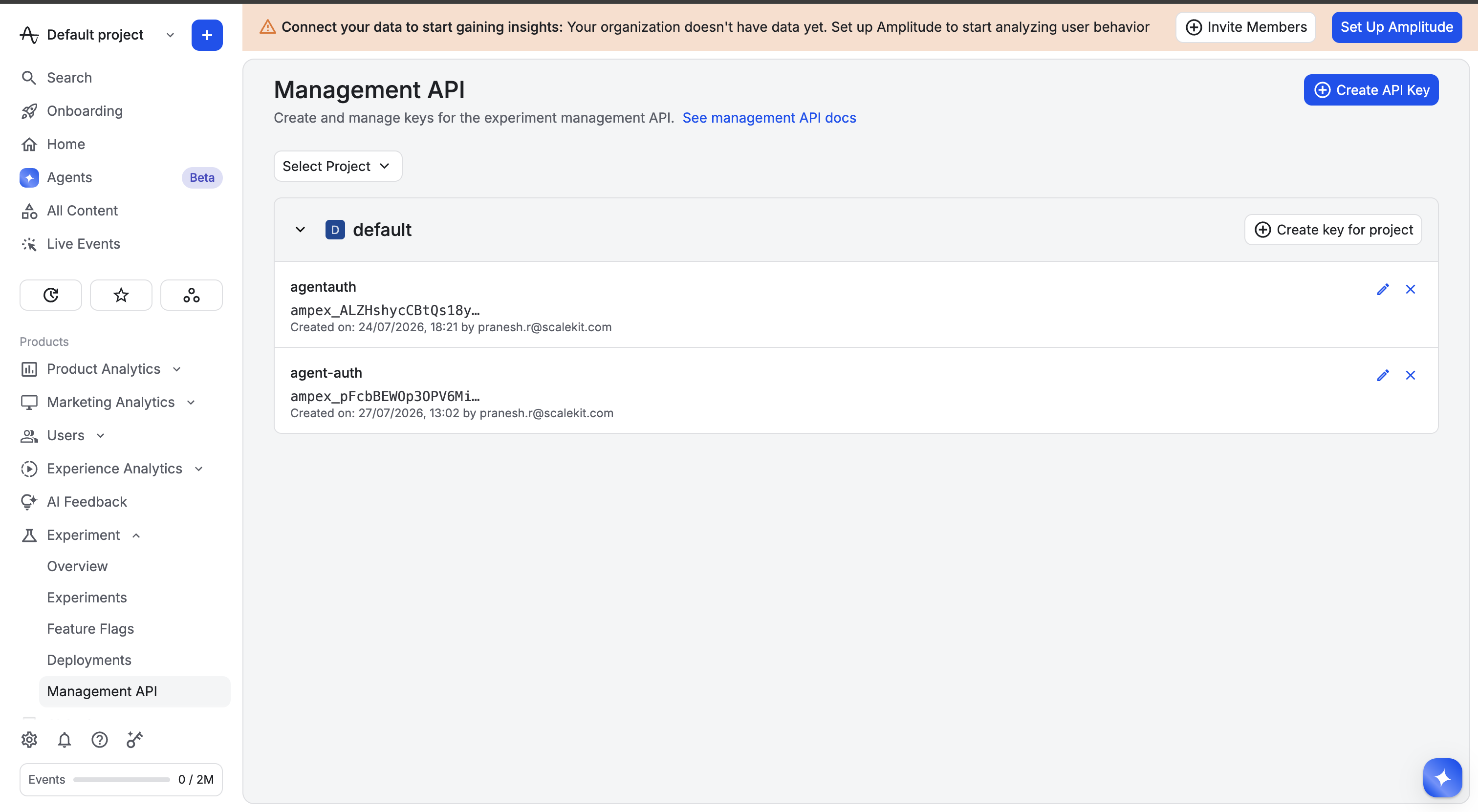
-
-
Create a connection in Scalekit
- In the Scalekit dashboard, go to AgentKit → Connections → Create Connection.
- Search for Amplitude Experiment Management and click Create.
- Note the Connection name — use this as
connection_namein your code (e.g.,amplitudeexperimentmanagement).
-
Add a connected account
Connected accounts link a specific user identifier in your system to a Management API key and region. Add one in the dashboard to test. In production, each user adds their own through the authorization link: they enter their credentials on the page it opens.
In the dashboard, to test
- Open the connection and click the Connected Accounts tab → Add account.
- Fill in Your User’s ID, the Management API Key, and select the Data Residency Region that matches the key.
- Click Save.
From your backend, if your app already has the credentials
For example, when users enter them on a settings page in your app:
import { ConnectorStatus } from '@scalekit-sdk/node'// Upsert the account, then make sure it is ACTIVE before the first tool call.async function connectUser(connectionName, identifier, details) {const authorizationDetails = { details: { case: 'staticAuth', value: { details } } }let { connectedAccount } = await scalekit.actions.upsertConnectedAccount({connectionName,identifier,authorizationDetails,})if (connectedAccount?.status !== ConnectorStatus.ACTIVE) {;({ connectedAccount } = await scalekit.actions.upsertConnectedAccount({connectionName,identifier,authorizationDetails,}))}return connectedAccount}// US region (default) — omit `domain` or set it to 'experiment.amplitude.com'await connectUser('amplitudeexperimentmanagement', 'user_123', {token: 'your-management-api-key',domain: 'experiment.amplitude.com',})// EU regionawait connectUser('amplitudeexperimentmanagement', 'user_123', {token: 'your-eu-management-api-key',domain: 'experiment.eu.amplitude.com',})# Upsert the account, then make sure it is ACTIVE before the first tool call.def connect_user(connection_name, identifier, details):authorization_details = {"static_auth": details}response = scalekit_client.actions.upsert_connected_account(connection_name=connection_name,identifier=identifier,authorization_details=authorization_details,)if response.connected_account.status != "ACTIVE":response = scalekit_client.actions.upsert_connected_account(connection_name=connection_name,identifier=identifier,authorization_details=authorization_details,)return response.connected_account# US region (default) — omit domain or set it to "experiment.amplitude.com"connect_user("amplitudeexperimentmanagement", "user_123", {"token": "your-management-api-key","domain": "experiment.amplitude.com",})# EU regionconnect_user("amplitudeexperimentmanagement", "user_123", {"token": "your-eu-management-api-key","domain": "experiment.eu.amplitude.com",})
-
Authorize a user and make your first call
quickstart.mts import { ScalekitClient } from '@scalekit-sdk/node'import 'dotenv/config'import { createInterface } from 'node:readline/promises'const scalekit = new ScalekitClient(process.env.SCALEKIT_ENVIRONMENT_URL,process.env.SCALEKIT_CLIENT_ID,process.env.SCALEKIT_CLIENT_SECRET,)const actions = scalekit.actionsconst connector = 'amplitudeexperimentmanagement'const identifier = 'user_123'// Generate an authorization link for the userconst { link } = await actions.getAuthorizationLink({ connectionName: connector, identifier })console.log('Authorize Amplitude Experiment Management:', link)const rl = createInterface({ input: process.stdin, output: process.stdout })await rl.question('Press Enter after authorizing...')rl.close()// Make your first callconst result = await actions.executeTool({connector,identifier,toolName: 'amplitudeexperimentmanagement_list_all_versions',toolInput: {},})console.log(result)Terminal window npx tsx quickstart.mtsquickstart.py import osfrom scalekit import ScalekitClientfrom dotenv import load_dotenvload_dotenv()scalekit_client = ScalekitClient(env_url=os.getenv("SCALEKIT_ENVIRONMENT_URL"),client_id=os.getenv("SCALEKIT_CLIENT_ID"),client_secret=os.getenv("SCALEKIT_CLIENT_SECRET"),)actions = scalekit_client.actionsconnection_name = "amplitudeexperimentmanagement"identifier = "user_123"# Generate an authorization link for the userlink_response = actions.get_authorization_link(connection_name=connection_name,identifier=identifier,)print("Authorize Amplitude Experiment Management:", link_response.link)input("Press Enter after authorizing...")# Make your first callresult = actions.execute_tool(tool_input={},tool_name="amplitudeexperimentmanagement_list_all_versions",connection_name=connection_name,identifier=identifier,)print(result)Terminal window python quickstart.pyEach user opens the link once and enters their Amplitude Experiment Management credentials there. If your app already has a user's credentials, add the account from your backend instead, as the console steps above show. See Authorize a user for the full flow and statuses.
Tools
Pass the exact name toexecute_toolamplitudeexperimentmanagement_get_experimentGet complete details for a single Amplitude experiment by its ID.Read-onlyGet Experiment
Get complete details for a single Amplitude experiment by its ID. Returns the full experiment object — its shape is CONFIRMED via a live-tested list_experiments call against this org (list_experiments returns objects of this same type): id, projectId, deployments[], key, name, decision (nullable), decisionReason (nullable), description, enabled, evaluationMode (remote|local), bucketingKey, bucketingSalt, bucketingUnit, variants[] (richer than Amplitude's docs show — real shape is {key, payload: [{data: {mutations: [...]}, action: "mutate"}]}), rolledOutVariant (nullable), rolloutPercentage, rolloutWeights{}, targetSegments[], parentDependencies{} (optional, undocumented by Amplitude), stickyBucketing, state (no published enum — only "planning" and "running" appear in Amplitude's own examples, treat any other value as unconfirmed), startDate (nullable), endDate (nullable), experimentType (a-b-test|multi-arm-bandit), deliveryMethod (feature|web), deleted, tags[], createdBy, lastModifiedBy, createdAt, lastModifiedAt — plus two fields Amplitude's docs never mention at all: testInstrumentation (boolean) and version (number). Rate limit: 100 requests/second and 100,000/day, shared across the whole Experiment Management API (not per-endpoint). CONFIRMED (live-tested, reproduced 4x): this specific operation returns HTTP 403 "User does not have permission (experimentation)" for this connected account, even though list_experiments (no ID) and create_experiment both work fine with the same credentials. This looks like a role/permission scope on the Amplitude user tied to this Management API key, not an org-wide entitlement gate (contrast with the Profile API's different "org does not have access" 401) — check the Amplitude user's Experiment role/permissions if you hit this.
Inputs
idstringrequired- The experiment's ID.
amplitudeexperimentmanagement_get_experiment_variantGet a single variant's details from an Amplitude experiment, by experiment ID and variant key (the variants[].key value, e.g.Read-onlyGet Experiment Variant
Get a single variant's details from an Amplitude experiment, by experiment ID and variant key (the variants[].key value, e.g. "control" or "treatment"). Use list_experiment_variants or the parent experiment's variants[] array to find valid keys. Amplitude's docs give no example response JSON for this endpoint; expect the same variant object shape as list_experiment_variants — live-confirmed richer shape {key, payload: [{data: {mutations: [...]}, action: "mutate"}]}, versus the docs' bare {"key": "control"} illustration. Rate limit: 100 requests/second and 100,000/day, shared across the whole Experiment Management API (not per-endpoint). CONFIRMED (live-tested): this exact operation returned HTTP 403 "User does not have permission (experimentation)" when called against a real, pre-existing experiment's real variant, but returned a normal HTTP 400 "Variant key does not exist" (reaching real business logic, not a permission wall) when called against a nonexistent variant key on a different, freshly-created test experiment with the same credentials. This suggests the "experimentation" permission gate may be scoped per-experiment (e.g. by delivery method, ownership, or another per-object attribute) rather than being a blanket gate on this operation — the root cause isn't confirmed, only the discrepancy itself.
Inputs
idstringrequired- The experiment's ID.
variant_keystringrequired- The variant's key.
amplitudeexperimentmanagement_get_experiment_variant_cohortsList the cohorts explicitly included in this experiment variant's targeting.Read-onlyGet Experiment Variant Cohorts
List the cohorts explicitly included in this experiment variant's targeting. CONFIRMED from Amplitude's docs: GET /api/1/experiments/{id}/variants/{variantKey}/cohorts, no query parameters documented (no pagination). Response is 200 OK with an array of cohort ID strings (not objects), per Amplitude's docs. Rate limit: 100 requests/second and 100,000/day, shared across the whole Experiment Management API (not per-endpoint). CONFIRMED (live-tested): this exact operation returned HTTP 403 "User does not have permission (experimentation)" when called against a real, pre-existing experiment's real variant, but returned a normal HTTP 400 "Variant key does not exist" (reaching real business logic, not a permission wall) when called against a nonexistent variant key on a different, freshly-created test experiment with the same credentials. This suggests the "experimentation" permission gate may be scoped per-experiment (e.g. by delivery method, ownership, or another per-object attribute) rather than being a blanket gate on this operation — the root cause isn't confirmed, only the discrepancy itself.
Inputs
idstringrequired- The experiment's ID.
variant_keystringrequired- The variant's key.
amplitudeexperimentmanagement_get_experiment_variant_usersList the users and devices explicitly force-bucketed into this experiment variant via inclusions — separate from, and in addition to, the experiment's normal allocation/targeting rules.Read-onlyGet Experiment Variant Users
List the users and devices explicitly force-bucketed into this experiment variant via inclusions — separate from, and in addition to, the experiment's normal allocation/targeting rules. CONFIRMED from Amplitude's docs: GET /api/1/experiments/{id}/variants/{variantKey}/users, no query parameters documented (no pagination). Response is 200 OK with the variant's inclusions as an array of JSON objects; Amplitude's docs don't show a concrete example of what fields are on each object, so treat the inclusion object's shape as unconfirmed until you inspect a live response — the sibling 'remove users from variant' endpoint does confirm these are addressable by a zero-indexed userIndex, which is a useful hint about the response's ordering. Rate limit: 100 requests/second and 100,000/day, shared across the whole Experiment Management API (not per-endpoint). CONFIRMED (live-tested): this exact operation returned HTTP 403 "User does not have permission (experimentation)" when called against a real, pre-existing experiment's real variant, but returned a normal HTTP 400 "Variant key does not exist" (reaching real business logic, not a permission wall) when called against a nonexistent variant key on a different, freshly-created test experiment with the same credentials. This suggests the "experimentation" permission gate may be scoped per-experiment (e.g. by delivery method, ownership, or another per-object attribute) rather than being a blanket gate on this operation — the root cause isn't confirmed, only the discrepancy itself.
Inputs
idstringrequired- The experiment's ID.
variant_keystringrequired- The variant's key.
amplitudeexperimentmanagement_get_experiment_versionGet a single historical version snapshot of an Amplitude experiment, by experiment ID and version ID.Read-onlyGet Experiment Version
Get a single historical version snapshot of an Amplitude experiment, by experiment ID and version ID. Use a version ID returned from list_experiment_versions. Amplitude's docs describe this endpoint only as returning "details of a specific version of an experiment" — no example response JSON and no query parameters are documented, so the exact snapshot shape is UNCONFIRMED; expect it to mirror the experiment object's fields as they existed at that version, plus version metadata (e.g. version number, createdBy, createdAt). Rate limit: 100 requests/second and 100,000/day, shared across the whole Experiment Management API (not per-endpoint). CONFIRMED (live-tested): this exact operation returned HTTP 403 "User does not have permission (experimentation)" when called against a real, pre-existing experiment's real variant, but returned a normal HTTP 400 "Variant key does not exist" (reaching real business logic, not a permission wall) when called against a nonexistent variant key on a different, freshly-created test experiment with the same credentials. This suggests the "experimentation" permission gate may be scoped per-experiment (e.g. by delivery method, ownership, or another per-object attribute) rather than being a blanket gate on this operation — the root cause isn't confirmed, only the discrepancy itself.
Inputs
idstringrequired- The experiment's ID.
version_idstringrequired- The version's ID, from a prior list_experiment_versions call.
amplitudeexperimentmanagement_get_flagGet the full configuration of a single Amplitude Experiment feature flag by its ID.Read-onlyGet Flag
Get the full configuration of a single Amplitude Experiment feature flag by its ID. Returns the flag's complete details as documented by Amplitude: id, projectId, deployments, key, name, description, enabled, evaluationMode, bucketingKey, bucketingSalt, bucketingUnit, variants, rolloutPercentage, rolloutWeights, targetSegments, deleted, tags, createdBy, lastModifiedBy, createdAt, and lastModifiedAt (timestamps in UTC ISO 8601). This org has confirmed Feature Experimentation entitlement (verified via live-tested List Flags and List Experiments calls against this same API), so this endpoint should not hit entitlement-gating errors. UNCONFIRMED: whether parentDependencies appears in this specific endpoint's response — Amplitude's docs for this endpoint don't show a full example response body, so its presence/shape here is inferred from the general flag object schema rather than directly observed. Rate limit: 100 requests/second and 100,000/day, shared across the whole Experiment Management API (not per-endpoint).
Inputs
idstringrequired- The flag's ID, as shown in the Amplitude app URL for the flag.
amplitudeexperimentmanagement_get_flag_variantGet a single variant's details from an Amplitude Experiment feature flag.Read-onlyGet Flag Variant
Get a single variant's details from an Amplitude Experiment feature flag. Returns a JSON object with key (required), and optional payload, name, and description fields. Variant keys may contain letters, numbers, underscores, and hyphens (per Amplitude's docs). This org has confirmed Feature Experimentation entitlement (verified via live-tested List Flags and List Experiments calls). Rate limit: 100 requests/second and 100,000/day, shared across the whole Experiment Management API (not per-endpoint).
Inputs
idstringrequired- The flag's ID, as shown in the Amplitude app URL for the flag.
variant_keystringrequired- The variant's key. May contain letters, numbers, underscores, and hyphens.
amplitudeexperimentmanagement_get_flag_variant_cohortsList the cohorts individually assigned (included) to a specific variant of an Amplitude Experiment feature flag.Read-onlyGet Flag Variant Cohorts
List the cohorts individually assigned (included) to a specific variant of an Amplitude Experiment feature flag. No query parameters, filters, or pagination are documented for this endpoint. Per Amplitude's docs, a successful call returns a 200 OK response with "the variant's cohort inclusions as an array of cohort IDs" — a flat array of ID strings. No literal example response body is published, but the docs are explicit that the array holds cohort IDs directly (unlike the sibling Get Flag Variant Users endpoint, whose array-of-JSON-objects shape is not documented in detail). CONFIRMED (live-tested): this org has Feature Experimentation entitlement. Rate limit: 100 requests/second and 100,000/day, shared across the whole Experiment Management API (not per-endpoint).
Inputs
idstringrequired- The flag's ID (not its key) — find it in the URL of the flag's page in the Amplitude app.
variant_keystringrequired- The key of the variant to fetch cohort inclusions for.
amplitudeexperimentmanagement_get_flag_variant_usersList the users and devices individually assigned (included) to a specific variant of an Amplitude Experiment feature flag — the explicit targeting list, separate from the variant's percentage-based rollout weight.Read-onlyGet Flag Variant Users
List the users and devices individually assigned (included) to a specific variant of an Amplitude Experiment feature flag — the explicit targeting list, separate from the variant's percentage-based rollout weight. No query parameters, filters, or pagination are documented for this endpoint. UNCONFIRMED: Amplitude's docs state the response is a 200 OK with "the variant's inclusions as an array of JSON objects", but do not publish an example response body or the field names inside those objects — treat the exact object shape as unconfirmed until you've inspected a live response. CONFIRMED (live-tested): this org has Feature Experimentation entitlement. Rate limit: 100 requests/second and 100,000/day, shared across the whole Experiment Management API (not per-endpoint).
Inputs
idstringrequired- The flag's ID (not its key) — find it in the URL of the flag's page in the Amplitude app.
variant_keystringrequired- The key of the variant to fetch user/device inclusions for.
amplitudeexperimentmanagement_get_flag_versionGet a single version snapshot of an Amplitude Experiment feature flag.Read-onlyGet Flag Version
Get a single version snapshot of an Amplitude Experiment feature flag. Returns a JSON object with createdAt, createdBy, version (a number), and flagConfig (the full flag configuration as it existed at that version — id, projectId, deployments, key, name, description, enabled, evaluationMode, bucketingKey, bucketingSalt, bucketingUnit, variants, rolloutPercentage, rolloutWeights, and targetSegments). UNCONFIRMED: the exact relationship between the versionId path value and the numeric `version` field returned by List Flag Versions — Amplitude's docs type versionId as a string and describe it only as "the version's ID" without a worked example, so pass the identifier exactly as returned by a prior List Flag Versions call rather than assuming it equals the stringified `version` number. This org has confirmed Feature Experimentation entitlement (verified via live-tested List Flags and List Experiments calls). Rate limit: 100 requests/second and 100,000/day, shared across the whole Experiment Management API (not per-endpoint).
Inputs
idstringrequired- The flag's ID, as shown in the Amplitude app URL for the flag.
version_idstringrequired- The version's ID. Pass the value exactly as returned by a prior List Flag Versions call.
amplitudeexperimentmanagement_get_holdout_groupRetrieve a single holdout group's full configuration by ID — expected to mirror the shape accepted by Create Holdout Group (name, description, holdoutPercentage, evaluationMode, bucketingKey, experiments, individualInclusion, individualExclusion).Read-onlyGet Holdout Group
Retrieve a single holdout group's full configuration by ID — expected to mirror the shape accepted by Create Holdout Group (name, description, holdoutPercentage, evaluationMode, bucketingKey, experiments, individualInclusion, individualExclusion). UNCONFIRMED (doc gap): Amplitude's own API reference does not publish an actual response body example for this endpoint — it only states that a successful call returns "a JSON object with the holdout group's details." The exact field names have not been independently verified. This org has confirmed Feature Experimentation entitlement (verified via live-tested List Flags and List Experiments calls). Rate limit: 100 requests/second and 100,000/day, shared across the whole Experiment Management API (not per-endpoint). LIKELY GATED (not independently tested): create_holdout_group and create_mutex_group both return 403 "User does not have permission (experiment_groups)" for this connected account — this operation touches the same resource type, so it likely hits the same permission wall, but wasn't directly confirmed since there was no way to create a real holdout/mutex group to test against. OBSERVED (EU probe, not conclusive): calling this with a syntactically valid but nonexistent id returns HTTP 400 "Flag or experiment not found" rather than a 403 — suggesting, but not proving, that GET may not be gated by the experiment_groups scope the way create_holdout_group is. Still not independently confirmed against a real holdout group, since there is no way to create one.
Inputs
idstringrequired- The holdout group's ID.
amplitudeexperimentmanagement_get_mutex_groupRetrieve a single mutex group's full configuration by ID — expected to include its slots and which experiments, holdouts, or individuals occupy each one, mirroring the shape accepted by Create Mutex Group (name, description, evaluationMode, bucketingKey, bucketingSalt, and a slots array of {percentage, experiments, holdouts, individuals}).Read-onlyGet Mutex Group
Retrieve a single mutex group's full configuration by ID — expected to include its slots and which experiments, holdouts, or individuals occupy each one, mirroring the shape accepted by Create Mutex Group (name, description, evaluationMode, bucketingKey, bucketingSalt, and a slots array of {percentage, experiments, holdouts, individuals}). UNCONFIRMED (doc gap): Amplitude's own API reference does not publish an actual response body example for this endpoint — it only states that a successful call returns "a 200 OK response and a JSON object with the mutex group's details." The exact field names and whether slots are included have not been independently verified. This org has confirmed Feature Experimentation entitlement (verified via live-tested List Flags and List Experiments calls). Rate limit: 100 requests/second and 100,000/day, shared across the whole Experiment Management API (not per-endpoint). LIKELY GATED (not independently tested): create_holdout_group and create_mutex_group both return 403 "User does not have permission (experiment_groups)" for this connected account — this operation touches the same resource type, so it likely hits the same permission wall, but wasn't directly confirmed since there was no way to create a real holdout/mutex group to test against. OBSERVED (EU probe, not conclusive): calling this with a syntactically valid but nonexistent id returns HTTP 400 "Flag or experiment not found" rather than a 403 — suggesting, but not proving, that GET may not be gated by the experiment_groups scope the way create_mutex_group is. Still not independently confirmed against a real mutex group, since there is no way to create one.
Inputs
idstringrequired- The mutex group's ID.
amplitudeexperimentmanagement_list_all_versionsList version history across ALL flags and experiments the API key can access, in one global, paginated feed — distinct from amplitudeexperimentmanagement_list_flag_versions and amplitudeexperimentmanagement_list_experiment_versions, which return the version history for one specific flag or experiment and do NOT support start/end/limit/cursor pagination.Read-onlyList All Versions
List version history across ALL flags and experiments the API key can access, in one global, paginated feed — distinct from amplitudeexperimentmanagement_list_flag_versions and amplitudeexperimentmanagement_list_experiment_versions, which return the version history for one specific flag or experiment and do NOT support start/end/limit/cursor pagination. This global endpoint DOES support all four. CONFIRMED from Amplitude's docs: versions are ordered by creation time, descending, and the response follows {"nextCursor": number, "versions": [{"createdAt": ISO 8601 string, "createdBy": userId number, "version": number, "flagConfig": {...full flag config snapshot...}}]}. UNCONFIRMED: Amplitude's docs only show flagConfig in the example, despite this endpoint's description explicitly covering both flags and experiments — whether experiment-type version entries carry an analogous experimentConfig key (or something else) instead of flagConfig is NOT confirmed by the docs and has not been independently verified. No default value for limit is documented, and no maximum time range for start/end is documented. This org has confirmed Feature Experimentation entitlement (verified via live-tested List Flags and List Experiments calls). Rate limit: 100 requests/second and 100,000/day, shared across the whole Experiment Management API (not per-endpoint). CONFIRMED (live-tested on EU, resolves a previously-open question): experiment-type version entries use the exact same "flagConfig" key as flag-type entries — there is no separate "experimentConfig" key. Distinguish the two only by the snapshot's own shape (e.g. presence of variants[].payload mutation objects) or by cross-referencing the id against list_experiments.
Inputs
cursorstring- Opaque pagination token from a previous response's nextCursor field. Don't construct this value yourself — pass back exactly what a prior call returned.
endstring- ISO 8601 formatted end time of versions to return (exclusive). Not explicitly marked required/optional by Amplitude's docs; treated as optional for consistency with limit/cursor on this same endpoint.
limitinteger- Maximum number of versions to return, capped at 1000. No documented default — omit to use Amplitude's own default page size.
startstring- ISO 8601 formatted start time of versions to return (inclusive). Not explicitly marked required/optional by Amplitude's docs; treated as optional for consistency with limit/cursor on this same endpoint.
amplitudeexperimentmanagement_list_deploymentsList all deployments in the project.Read-onlyList Deployments
List all deployments in the project. A deployment represents one SDK key / environment (for example "Production" or "Development") that flags and experiments get deployed to. CONFIRMED from Amplitude's docs: the response follows {"deployments": [{"id": ..., "projectId": ..., "label": ..., "key": ..., "deleted": ...}]}. UNCONFIRMED: Amplitude's docs don't show a nextCursor field on this specific response example (unlike List Flags/List Experiments), and don't state the primitive type of id/projectId in the response — treat pagination and exact numeric-vs-string typing as unconfirmed until verified live. This endpoint documents only limit/cursor — no key or projectId filter is documented. This org has confirmed Feature Experimentation entitlement (verified via live-tested List Flags and List Experiments calls). Rate limit: 100 requests/second and 100,000/day, shared across the whole Experiment Management API (not per-endpoint).
Inputs
cursorstring- Opaque pagination token from a previous response's nextCursor field. Don't construct this value yourself — pass back exactly what a prior call returned.
limitinteger- Maximum number of deployments to return, capped at 1000. No documented default — omit to use Amplitude's own default page size.
amplitudeexperimentmanagement_list_experiment_deploymentsList the deployments that an experiment is currently deployed to.Read-onlyList Experiment Deployments
List the deployments that an experiment is currently deployed to. Amplitude's docs for this endpoint describe the response only as a '200 OK response and an array of JSON objects with the experiment's deployment details', without a concrete field-level example on this specific page. Based on the shape of the equivalent account-level GET /api/1/deployments endpoint (documented elsewhere in Amplitude's docs), each object likely includes id, projectId, label, key, and deleted fields — treat this as inferred, not confirmed, until you've seen a live response from this exact endpoint. No query parameters are documented for this endpoint (no pagination). This org has confirmed Feature Experimentation entitlement (live-tested via the list endpoints); this specific endpoint's response has not been independently live-tested. Rate limit: 100 requests/second and 100,000/day, shared across the whole Experiment Management API (not per-endpoint). CONFIRMED (live-tested, reproduced 4x): this specific operation returns HTTP 403 "User does not have permission (experimentation)" for this connected account, even though list_experiments (no ID) and create_experiment both work fine with the same credentials. This looks like a role/permission scope on the Amplitude user tied to this Management API key, not an org-wide entitlement gate (contrast with the Profile API's different "org does not have access" 401) — check the Amplitude user's Experiment role/permissions if you hit this.
Inputs
idstringrequired- The experiment's ID. Find it in the URL of the experiment in the Amplitude app.
amplitudeexperimentmanagement_list_experiment_variantsList all variants defined on a single Amplitude experiment.Read-onlyList Experiment Variants
List all variants defined on a single Amplitude experiment. Amplitude's docs document no query parameters and give no example response JSON for this endpoint — expect an array of variant objects matching the variants[] entries embedded in the experiment resource. A live-tested list_experiments call against this org showed a richer variant shape than Amplitude's own Create Experiment example: {key, payload: [{data: {mutations: [...]}, action: "mutate"}]}, versus the docs' bare {"key": "control"} illustration — expect the same richer shape here, plus possibly name/description per the Create Experiment variant schema (key required; payload, name, description optional). Rate limit: 100 requests/second and 100,000/day, shared across the whole Experiment Management API (not per-endpoint). CONFIRMED (live-tested, reproduced 4x): this specific operation returns HTTP 403 "User does not have permission (experimentation)" for this connected account, even though list_experiments (no ID) and create_experiment both work fine with the same credentials. This looks like a role/permission scope on the Amplitude user tied to this Management API key, not an org-wide entitlement gate (contrast with the Profile API's different "org does not have access" 401) — check the Amplitude user's Experiment role/permissions if you hit this.
Inputs
idstringrequired- The experiment's ID whose variants to list.
amplitudeexperimentmanagement_list_experiment_versionsList the version history for a single Amplitude experiment — one entry per saved change.Read-onlyList Experiment Versions
List the version history for a single Amplitude experiment — one entry per saved change. Amplitude's docs state versions are "ordered by creation time, descending" but document no query parameters for this endpoint (no limit/cursor/date-range filtering) and give no example response JSON, so the exact envelope (bare array vs an object wrapper) and each version's field shape are UNCONFIRMED. Don't confuse this with the unrelated global GET /api/1/versions endpoint (flag-version history), which does document start/end/limit/cursor query params — those don't apply here. Each version is expected to be a snapshot of the experiment's configuration at that point plus version metadata (e.g. version number, createdBy, createdAt), by analogy with the sibling flag-versions endpoint, but this has not been live-tested. Use the returned version identifiers with get_experiment_version to fetch a specific snapshot. Rate limit: 100 requests/second and 100,000/day, shared across the whole Experiment Management API (not per-endpoint). CONFIRMED (live-tested, reproduced 4x): this specific operation returns HTTP 403 "User does not have permission (experimentation)" for this connected account, even though list_experiments (no ID) and create_experiment both work fine with the same credentials. This looks like a role/permission scope on the Amplitude user tied to this Management API key, not an org-wide entitlement gate (contrast with the Profile API's different "org does not have access" 401) — check the Amplitude user's Experiment role/permissions if you hit this.
Inputs
idstringrequired- The experiment's ID whose version history to list.
amplitudeexperimentmanagement_list_experimentsList Amplitude experiments for the project.Read-onlyList Experiments
List Amplitude experiments for the project. Supports cursor-based pagination — pass the response's nextCursor value back as cursor to get the next page — and optional filters. CONFIRMED (live-tested): the real response shape is {"experiments": [...], "nextCursor": ...} — Amplitude's own published example for this endpoint is malformed JSON (nextCursor nested inside the array instead of alongside it); this tool follows the confirmed real shape, not the docs' broken example. Live data also revealed two fields Amplitude's docs don't mention at all: testInstrumentation (boolean) and version (number) on the experiment object, plus a richer variant payload shape ({"data": {"mutations": [...]}, "action": "mutate"}) than the docs' bare {"key": "control"} example. Also note: the experiment state field has no published enum — only "planning" and "running" appear in Amplitude's own examples, so treat any other value you see as unconfirmed. CONFIRMED: this org has Feature Experimentation entitlement — a real call returned actual experiment data, not an entitlement error. Rate limit: 100 requests/second and 100,000/day, shared across the whole Experiment Management API (not per-endpoint).
Inputs
cursorstring- Opaque pagination token from a previous response's nextCursor field. Don't construct this value yourself — pass back exactly what a prior call returned.
delivery_methodstring- Filter by delivery method: feature or web. Omit to return both.one of
featureweb include_archivedboolean- When false (default), return only active experiments. When true, return active and archived experiments.default
false keystring- Filter to the experiment with this exact experiment key.
limitinteger- Maximum number of experiments to return, capped at 1000. No documented default — omit to use Amplitude's own default page size.
project_idinteger- Filter to experiments belonging to this project ID.
amplitudeexperimentmanagement_list_flag_deploymentsList the deployments a flag is currently deployed to.Read-onlyList Flag Deployments
List the deployments a flag is currently deployed to. Per Amplitude's official docs, a successful call returns 200 OK with an array of JSON objects describing each deployment. UNCONFIRMED: Amplitude's docs don't show a raw JSON response example for this specific flag-scoped endpoint, so the exact envelope shape is not fully verified — the docs' prose describes the body as "an array of JSON objects" (suggesting a bare array), but the general, non-flag-scoped GET /api/1/deployments endpoint wraps its array in a top-level {"deployments": [...]} object instead. Treat either shape as possible until verified live. Based on the general deployments endpoint's documented schema, each deployment object likely includes id, projectId, label, key, and deleted fields, though this hasn't been separately confirmed for the flag-scoped response. CONFIRMED (live-tested): this org has Feature Experimentation entitlement. Rate limit: 100 requests/second and 100,000/day, shared across the whole Experiment Management API (not per-endpoint).
Inputs
idstringrequired- The flag's ID.
amplitudeexperimentmanagement_list_flag_variantsList all variants defined on a single Amplitude Experiment feature flag.Read-onlyList Flag Variants
List all variants defined on a single Amplitude Experiment feature flag. Returns a JSON array of variant objects, each with key (required), and optional payload, name, and description fields. CONFIRMED from Amplitude's docs: no cursor/limit pagination parameters are documented for this endpoint — it returns the full variant list in one response. This org has confirmed Feature Experimentation entitlement (verified via live-tested List Flags and List Experiments calls). Rate limit: 100 requests/second and 100,000/day, shared across the whole Experiment Management API (not per-endpoint).
Inputs
idstringrequired- The flag's ID, as shown in the Amplitude app URL for the flag.
amplitudeexperimentmanagement_list_flag_versionsList the version history for a single Amplitude Experiment feature flag.Read-onlyList Flag Versions
List the version history for a single Amplitude Experiment feature flag. Returns a JSON array of version objects, each containing createdAt, createdBy, version (a number), and flagConfig (a full snapshot of the flag's configuration at that version, including id, projectId, deployments, key, name, description, enabled, evaluationMode, bucketingKey, bucketingSalt, bucketingUnit, variants, rolloutPercentage, rolloutWeights, and targetSegments). Versions are sorted in descending order (most recent first). CONFIRMED from Amplitude's docs: this per-flag endpoint does NOT document cursor/limit pagination parameters — unlike List Flags and List Experiments, and unlike Amplitude's separate global GET /api/1/versions endpoint (which lists versions across all flags and does support start/end/limit/cursor). This tool intentionally has no pagination input because none is documented for this specific path. This org has confirmed Feature Experimentation entitlement (verified via live-tested List Flags and List Experiments calls). Rate limit: 100 requests/second and 100,000/day, shared across the whole Experiment Management API (not per-endpoint).
Inputs
idstringrequired- The flag's ID, as shown in the Amplitude app URL for the flag.
amplitudeexperimentmanagement_list_flagsList Amplitude Experiment feature flags for the project.Read-onlyList Flags
List Amplitude Experiment feature flags for the project. Supports cursor-based pagination — pass the response's nextCursor value back as cursor to get the next page — and optional filters. CONFIRMED (live-tested): this org has Feature Experimentation entitlement — a real call returns a clean 200 with the {"flags": [...], "nextCursor": ...} envelope (an empty array here just means no flags exist yet, not an entitlement problem). Rate limit: 100 requests/second and 100,000/day, shared across the whole Experiment Management API (not per-endpoint).
Inputs
cursorstring- Opaque pagination token from a previous response's nextCursor field. Don't construct this value yourself — pass back exactly what a prior call returned.
include_archivedboolean- Include archived flags in the results. Defaults to false (active flags only).default
false keystring- Filter to the flag with this exact flag key.
limitinteger- Maximum number of flags to return, capped at 1000. No documented default — omit to use Amplitude's own default page size.
project_idinteger- Filter to flags belonging to this project ID.
amplitudeexperimentmanagement_list_holdout_groupsList all holdout groups in the project.Read-onlyList Holdout Groups
List all holdout groups in the project. A holdout group excludes a fixed percentage of users from every experiment associated with it, so you can measure the overall product impact of those experiments against a clean control population. UNCONFIRMED (doc gap): Amplitude's own API reference does not publish a response body schema or example for this endpoint — it only states that a successful call returns "a 200 OK response" with "a list of holdout groups encoded as JSON." By analogy with List Flags/List Experiments on this same API, the response most likely follows a {"holdouts": [...], "nextCursor": ...} envelope, but this exact shape (including the array's key name and whether holdoutPercentage/experiments/individualInclusion/individualExclusion are included) is NOT confirmed by Amplitude's docs and has not been independently verified. This endpoint documents only limit/cursor — unlike List Flags/List Experiments, Amplitude's docs do not mention a key or projectId filter for listing holdout groups. This org has confirmed Feature Experimentation entitlement (verified via live-tested List Flags and List Experiments calls). Rate limit: 100 requests/second and 100,000/day, shared across the whole Experiment Management API (not per-endpoint).
Inputs
cursorstring- Opaque pagination token from a previous response's nextCursor field. Don't construct this value yourself — pass back exactly what a prior call returned.
limitinteger- Maximum number of holdout groups to return, capped at 1000. No documented default — omit to use Amplitude's own default page size.
amplitudeexperimentmanagement_list_mutex_groupsList all mutex groups in the project.Read-onlyList Mutex Groups
List all mutex groups in the project. A mutex group defines a set of "slots" so that the experiments, flags, holdouts, and/or individuals assigned to the same slot never run simultaneously for the same user — useful for guaranteeing exclusivity between conflicting tests. UNCONFIRMED (doc gap): Amplitude's own API reference does not publish a response body schema or example for this endpoint — it only states that a successful call returns "a 200 OK response and a list of mutex groups encoded as JSON in the response body." By analogy with List Flags/List Experiments on this same API, the response most likely follows a {"mutexes": [...], "nextCursor": ...} envelope, but this exact shape (including the array's key name) is NOT confirmed by Amplitude's docs and has not been independently verified. This endpoint documents only limit/cursor — unlike List Flags/List Experiments, Amplitude's docs do not mention a key or projectId filter for listing mutex groups. This org has confirmed Feature Experimentation entitlement (verified via live-tested List Flags and List Experiments calls). Rate limit: 100 requests/second and 100,000/day, shared across the whole Experiment Management API (not per-endpoint).
Inputs
cursorstring- Opaque pagination token from a previous response's nextCursor field. Don't construct this value yourself — pass back exactly what a prior call returned.
limitinteger- Maximum number of mutex groups to return, capped at 1000. No documented default — omit to use Amplitude's own default page size.
amplitudeexperimentmanagement_add_experiment_variant_cohortsAdd specific cohorts to this experiment variant's targeting inclusions.WriteAdd Experiment Variant Cohorts
Add specific cohorts to this experiment variant's targeting inclusions. This adds to the variant's existing cohort inclusions; it does not replace them. CONFIRMED from Amplitude's docs: POST /api/1/experiments/{id}/variants/{variantKey}/cohorts with body {"inclusions": [...]}, an array of cohort ID strings. CONFIRMED no inclusion-count limit is documented for cohorts on either the Flags or Experiments API docs pages — the 2,000-inclusion cap that exists for user/device inclusions is stated by Amplitude as applying specifically to users on the Flags side, and cohorts aren't mentioned there at all. A successful call returns 200 OK with the literal text "OK", not a JSON body. Rate limit: 100 requests/second and 100,000/day, shared across the whole Experiment Management API (not per-endpoint). CONFIRMED (inferred from the identical flags-side finding, not independently confirmed): a well-formed request with a syntactically valid cohort_id that does not correspond to a REAL, existing Amplitude cohort returns a generic HTTP 400 "Internal server error" from Amplitude, not a clean validation error — unlike user_ids, which accept arbitrary/free-form identifiers without requiring them to pre-exist. Use a real cohort ID from this Amplitude project's Cohorts, or expect this error.
Inputs
cohort_idsstringrequired- Cohort IDs to add to this variant's targeting, as a JSON-encoded array of strings.
idstringrequired- The experiment's ID.
variant_keystringrequired- The variant's key.
amplitudeexperimentmanagement_add_experiment_variant_usersForce-bucket specific users or devices into this experiment variant — identified by user ID, device ID, or an email-style identifier — bypassing the experiment's normal allocation.WriteAdd Experiment Variant Users
Force-bucket specific users or devices into this experiment variant — identified by user ID, device ID, or an email-style identifier — bypassing the experiment's normal allocation. This adds to the variant's existing inclusions; it does not replace them. CONFIRMED from Amplitude's docs: POST /api/1/experiments/{id}/variants/{variantKey}/users with body {"inclusions": [...]}, an array of ID strings. UNCONFIRMED FOR EXPERIMENTS: Amplitude's Flags API docs state a hard cap of 2,000 inclusions per variant for the identical flag-variant endpoint ("You can have up to 2,000 inclusions per variant. If you exceed this limit, Amplitude returns a 400 error.") — the Experiments API docs page never repeats this limit for the experiment-variant endpoint, so it is NOT confirmed whether the same 2,000 cap applies to experiments. Treat it as likely (the two APIs otherwise mirror each other closely in every endpoint we checked) but unverified, and handle a 400 response defensively. A successful call returns 200 OK with the literal text "OK", not a JSON body. Rate limit: 100 requests/second and 100,000/day, shared across the whole Experiment Management API (not per-endpoint).
Inputs
idstringrequired- The experiment's ID.
user_idsstringrequired- User or device IDs to force-bucket into this variant, as a JSON-encoded array of strings. Amplitude accepts user IDs, device IDs, or email-style identifiers here.
variant_keystringrequired- The variant's key.
amplitudeexperimentmanagement_add_flag_variant_cohortsAdd specific cohorts as inclusions on a variant of an Amplitude Experiment feature flag — explicitly assigning these cohorts to this variant regardless of the variant's rollout weight.WriteAdd Flag Variant Cohorts
Add specific cohorts as inclusions on a variant of an Amplitude Experiment feature flag — explicitly assigning these cohorts to this variant regardless of the variant's rollout weight. UNCONFIRMED: unlike the users endpoint, Amplitude's docs don't mention any documented maximum on the number of cohort inclusions per variant, nor whether this call is additive or replaces the existing cohort list — treat both as unconfirmed until independently live-tested. CONFIRMED (live-tested): this org has Feature Experimentation entitlement. Per Amplitude's docs, a successful call returns a 200 OK response with the literal text "OK" as the body — not a JSON object — so the tool treats the response as raw text rather than parsing it as JSON. Rate limit: 100 requests/second and 100,000/day, shared across the whole Experiment Management API (not per-endpoint). FIXED (was broken, now live-tested): this field is JSON-encoded per its schema, but was previously mapped via a plain body_json_mapping template that sent the raw string instead of a parsed array/object — Amplitude rejected it (e.g. "\"inclusions\" must be an array"). Now uses a jsonnet_template with std.parseJson() to correctly convert it before sending, matching the pattern the Experiments-side tools already used. Confirmed working end-to-end live. CONFIRMED (live-tested): a well-formed request with a syntactically valid cohort_id that does not correspond to a REAL, existing Amplitude cohort returns a generic HTTP 400 "Internal server error" from Amplitude, not a clean validation error — unlike user_ids, which accept arbitrary/free-form identifiers without requiring them to pre-exist. Use a real cohort ID from this Amplitude project's Cohorts, or expect this error.
Inputs
cohort_idsstringrequired- JSON-encoded array of cohort IDs to add as inclusions on this variant.
idstringrequired- The flag's ID (not its key) — find it in the URL of the flag's page in the Amplitude app.
variant_keystringrequired- The key of the variant to add cohort inclusions to.
amplitudeexperimentmanagement_add_flag_variant_usersAdd specific users, devices, or emails as individual inclusions on a variant of an Amplitude Experiment feature flag — explicitly assigning these identities to this variant regardless of the variant's rollout weight.WriteAdd Flag Variant Users
Add specific users, devices, or emails as individual inclusions on a variant of an Amplitude Experiment feature flag — explicitly assigning these identities to this variant regardless of the variant's rollout weight. Amplitude allows up to 2,000 total inclusions per variant; exceeding that limit returns a 400 error (per Amplitude's docs, verbatim: "You can have up to 2,000 inclusions per variant. If you exceed this limit, Amplitude returns a 400 error."). UNCONFIRMED: the docs don't explicitly state whether this call is purely additive (merges with the existing inclusion list) or could replace it outright — the endpoint is titled and described as adding inclusions "to a flag's variant", which implies additive behavior, but this has not been independently live-tested. CONFIRMED (live-tested): this org has Feature Experimentation entitlement. Per Amplitude's docs, a successful call returns a 200 OK response with the literal text "OK" as the body — not a JSON object — so the tool treats the response as raw text rather than parsing it as JSON. Rate limit: 100 requests/second and 100,000/day, shared across the whole Experiment Management API (not per-endpoint). FIXED (was broken, now live-tested): this field is JSON-encoded per its schema, but was previously mapped via a plain body_json_mapping template that sent the raw string instead of a parsed array/object — Amplitude rejected it (e.g. "\"inclusions\" must be an array"). Now uses a jsonnet_template with std.parseJson() to correctly convert it before sending, matching the pattern the Experiments-side tools already used. Confirmed working end-to-end live.
Inputs
idstringrequired- The flag's ID (not its key) — find it in the URL of the flag's page in the Amplitude app.
user_idsstringrequired- JSON-encoded array of user IDs, device IDs, or email addresses to add as individual inclusions on this variant. Max 2,000 total inclusions per variant across all calls — see the tool description for the 400 error behavior.
variant_keystringrequired- The key of the variant to add user/device inclusions to.
amplitudeexperimentmanagement_create_deploymentCreate a new deployment in a project.WriteCreate Deployment
Create a new deployment in a project. Required fields per Amplitude's docs: projectId, label, and type. A deployment represents one SDK key / environment (for example "Production" or "Development") that flags and experiments get deployed to. A successful call returns a 200 OK with a JSON object containing only the new deployment's id — label, key, and type are not echoed back per Amplitude's documented example. UNCONFIRMED: Amplitude's docs don't document label-uniqueness or conflict behavior for this endpoint, nor the exact format of the auto-generated key beyond its client-/server- prefix. This org has confirmed Feature Experimentation entitlement (verified via live-tested List Flags and List Experiments calls). Rate limit: 100 requests/second and 100,000/day, shared across the whole Experiment Management API (not per-endpoint).
Inputs
labelstringrequired- Display label for the deployment. Must contain only alphanumeric characters and/or `_`, `-`, per Amplitude's docs.
project_idstringrequired- The ID of the Amplitude project to create the deployment in.
typestringrequired- Deployment type: `client` (for client-side SDKs running on a device the user controls, such as a browser or mobile app — the resulting key is prefixed client- and safe to expose publicly) or `server` (for server-side SDKs or to authorize Evaluation API requests — the resulting key is prefixed server- and must be kept secret). Required per Amplitude's docs.one of
clientserver
amplitudeexperimentmanagement_create_experimentCreate a new Amplitude experiment.WriteCreate Experiment
Create a new Amplitude experiment. Required: project_id, key. name is technically optional per this tool (Amplitude's docs disagree), but supply it anyway — every documented example includes it. deliveryMethod and rolloutPercentage are not create-time fields — only projectId, key, name, description, variants, bucketingKey, rolloutWeights, targetSegments, deployments, evaluationMode, experimentType are documented as create-time fields. CONFIRMED (live-tested both regions): created experiments default deliveryMethod to "feature" (visible via get_experiment/list_experiments) — real "web"-delivery experiments only come from Amplitude's visual editor and behave differently on update_experiment/create_experiment_deployment (see those tools). Set rolloutPercentage afterward via update_experiment. Complex nested fields (variants, rollout_weights, target_segments) are JSON-encoded strings, not native objects — parsed before sending. `parent_dependencies` looks settable by shape but is CONFIRMED (live-tested) rejected outright with 400 "parentDependencies is not allowed" — don't send it, it's read-only/derived. CONFIRMED (live-tested both regions): `variants`, `rollout_weights`, `target_segments`, `deployments` (a real deployment ID), `bucketing_key`, and `evaluation_mode` all work correctly together in one call with the default `a-b-test` experiment_type. `experiment_type: "multi-arm-bandit"` instead is gated by a third, distinct permission scope — 403 "User does not have permission (experiment_multi_armed_bandit)" — separate from `experimentation` and `experiment_groups`. Response: 200 {id, url}. Rate limit: 100 req/s, 100,000/day, shared across the whole API.
Inputs
keystringrequired- Unique experiment key (slug-like identifier) used to reference this experiment.
project_idstringrequired- The Amplitude project ID this experiment belongs to.
bucketing_keystring- User property Amplitude uses to consistently bucket the same user into the same variant (e.g. amplitude_id, user_id, device_id, or a custom property).
deploymentsarray- Deployment IDs to attach this experiment to at creation time.
descriptionstring- Human-readable experiment description.
evaluation_modestring- Where variant assignment is evaluated: remote (Amplitude's servers) or local (in your SDK).one of
remotelocal experiment_typestring- The experiment's statistical design. No confirmed documented default — Amplitude's own create example uses a-b-test.one of
a-b-testmulti-arm-bandit namestring- Human-readable experiment name. Amplitude's docs disagree on whether this is required; this tool treats it as optional but you should supply it.
parent_dependenciesstring- JSON-encoded object describing parent dependency relationships (e.g. mutex group or holdout membership) — observed on live experiment objects via list_experiments but NOT documented anywhere in Amplitude's Create or Update Experiment request schemas. Exposed here defensively for advanced use; Amplitude may ignore or reject this field since it looks read-only/derived rather than settable. Verify behavior with a real call before relying on it.
rollout_weightsstring- JSON-encoded object mapping each variant key to its relative distribution weight, e.g. '{"control": 1, "treatment": 1}' for an equal 50/50 split. Keys must match the variants[].key values above. Pass as a JSON-encoded STRING, not a native object.
target_segmentsstring- JSON-encoded array of target segment objects that define who is included in this experiment and at what percentage, evaluated in order. Documented shape per segment: {"name": string (required), "conditions": [{"type": "property" (fixed value), "prop": string, "op": one of is|is not|contains|does not contain|less|less or equal|greater|greater or equal|set is|set is not|set contains|set does not contain|glob match|glob does not match, "values": string[]}] (required), "percentage": number (required), "rolloutWeights": object (required, same shape as rollout_weights above)}. Cohort-based targeting is not supported. Pass as a JSON-encoded STRING, not a native array.
variantsstring- JSON-encoded array of variant objects to bucket users into. Amplitude's documented shape per variant: {"key": string (required), "payload": any JSON (optional), "name": string (optional), "description": string (optional)}. A live-tested list_experiments call against this org showed a richer real-world payload shape for feature-flag-backed experiments — "payload": [{"data": {"mutations": [...]}, "action": "mutate"}] instead of a bare value — use whichever shape matches your use case. Pass as a JSON-encoded STRING, not a native array; this tool parses it before sending. Omit to use Amplitude's own default variant set (unconfirmed what that default is).
amplitudeexperimentmanagement_create_experiment_deploymentDeploy an experiment to one or more deployments.WriteCreate Experiment Deployment
Deploy an experiment to one or more deployments. CONFIRMED directly from Amplitude's official docs (exact JSON example: {"deployments": ["<deploymentId>"]}): the request body field is the plural array 'deployments', not a singular 'deploymentId' — pass a one-element array to deploy to a single deployment, or multiple IDs to deploy to several deployments in one call. A successful call returns 200 OK with the literal text 'OK' (not a JSON body); this tool reports success from the status code, not from parsing a response payload. This org has confirmed Feature Experimentation entitlement (live-tested via the list endpoints); the request/response shape below is per Amplitude's published docs and has not been independently live-tested for this specific write endpoint. Rate limit: 100 requests/second and 100,000/day, shared across the whole Experiment Management API (not per-endpoint). CONFIRMED (live-tested on EU): deploying a real "Web"-delivery-method experiment (deliveryMethod: "web") fails with HTTP 400 "Web Experiments are not supported by Management API yet", a hard product limitation independent of the caller's permissions — check deliveryMethod before assuming a 403 is the only possible failure mode here.
Inputs
deployment_idsarrayrequired- Deployment IDs to deploy this experiment to. Sent as a JSON request body under Amplitude's documented field name 'deployments'. Pass a single-element array to target one deployment.
idstringrequired- The experiment's ID. Find it in the URL of the experiment in the Amplitude app.
amplitudeexperimentmanagement_create_experiment_variantAdd a new variant to an experiment.WriteCreate Experiment Variant
Add a new variant to an experiment. CONFIRMED from Amplitude's official docs (verified against the page's raw rendered source, not just its visible text): POST /api/1/experiments/{id}/variants with body {key, name, description, payload, rolloutWeight} — key is the only required field and can only contain letters, numbers, underscores (_), and hyphens (-). payload is passed here as a JSON-encoded string (any valid JSON element — object, array, or primitive); Amplitude's own docs example shows a bare object, but this org's live-tested data shows a real experiment variant payload shaped like [{"data":{"mutations":[]},"action":"mutate"}] — an array of mutation objects — so don't assume payload is always a plain object. rolloutWeight has no documented numeric range or scale in Amplitude's docs (unclear if it's 0-100, a relative share among variants, or something else) — match the scale your experiment's other variants already use. A successful call returns 200 OK with the literal text "OK", not a JSON body, so this tool does not attempt to parse the response as JSON. Rate limit: 100 requests/second and 100,000/day, shared across the whole Experiment Management API (not per-endpoint). CONFIRMED (live-tested, reproduced 4x): this specific operation returns HTTP 403 "User does not have permission (experimentation)" for this connected account, even though list_experiments (no ID) and create_experiment both work fine with the same credentials. This looks like a role/permission scope on the Amplitude user tied to this Management API key, not an org-wide entitlement gate (contrast with the Profile API's different "org does not have access" 401) — check the Amplitude user's Experiment role/permissions if you hit this.
Inputs
idstringrequired- The experiment's ID.
keystringrequired- The variant key. Can only contain letters, numbers, underscores (_), and hyphens (-).
descriptionstring- Description for the variant.
namestring- Display name for the variant.
payloadstring- Optional payload for the variant, as a JSON-encoded string. Must be a valid JSON element (object, array, or primitive). A real variant payload confirmed live on this org looked like [{"data":{"mutations":[]},"action":"mutate"}] — an array of mutation objects — rather than a bare object, so don't assume the shape without checking your own flag/experiment configuration.
rollout_weightnumber- Rollout weight for non-targeted users. Amplitude's docs don't document a numeric range or scale for this value.
amplitudeexperimentmanagement_create_flagCreate a new Amplitude Experiment feature flag.WriteCreate Flag
Create a new Amplitude Experiment feature flag. Required: projectId, key. All other fields are optional at creation. CONFIRMED from Amplitude's docs: tags, rolloutPercentage, enabled, and archive are NOT settable here — set them afterward via update_flag. parentDependencies isn't settable via either endpoint — treat it as read-only/UI-managed. Complex fields (variants, rolloutWeights, targetSegments) are JSON-encoded strings, not native objects. FIXED (confirmed live both regions): this field was previously sent as a raw string instead of a parsed array via body_json_mapping — now uses jsonnet_template + std.parseJson(). CONFIRMED (live-tested both regions): `deployments` works at creation — a flag created with a real deployment ID shows it immediately on get_flag. `bucketing_key`, `evaluation_mode`, `rollout_weights`, and `target_segments` (once each segment includes `rolloutWeights` — see that field's own description) all confirmed working together. The variant key value "off" is specifically rejected (400 "variants[1].key contains an invalid value") — "on" is fine; likely shared by the Experiments-side variants field but not independently confirmed there. Response: 200 {id, url}. Rate limit: 100 req/s, 100,000/day, shared across the whole API.
Inputs
keystringrequired- The flag's key, used to reference it in code and in the Amplitude app. Must be unique within the project.
project_idstringrequired- The ID of the Amplitude project to create the flag in.
bucketing_keystring- The user property to bucket users by when assigning variants.
deploymentsarray- Deployment IDs to attach this flag to at creation time.
descriptionstring- Description of the flag's purpose, shown in the Amplitude app.
evaluation_modestring- Evaluation mode for the flag: `remote` (evaluated server-side per request) or `local` (evaluated client-side from a downloaded ruleset). No default is documented by Amplitude — omit to use Amplitude's own default.one of
localremote namestring- Human-readable name for the flag, shown in the Amplitude app.
rollout_weightsstring- JSON-encoded string (not a native object) describing rollout weights for non-targeted users. Must decode to an object mapping each variant key to an integer weight. Example value to pass: {"control":50,"treatment":50}
target_segmentsstring- JSON-encoded string (not native JSON) describing target segments evaluated before the default rollout. Must decode to an array of objects: [{"name": "segment name", "conditions": [{"type": "property", "prop": "user property name", "op": "is", "values": ["value1"]}], "percentage": 100, "bucketingKey": "optional user property", "rolloutWeights": {"control":50,"treatment":50}}]. `name`, `conditions`, and `percentage` are required per segment; `bucketingKey` is optional. CORRECTION (live-tested both regions): `rolloutWeights` is NOT optional despite how this reads — omitting it fails validation with `"targetSegments[0].rolloutWeights" is required"`. Always include it, matching the sibling Experiments-side tools which document this correctly. Documented `op` values: is, is not, contains, does not contain, less, less or equal, greater, greater or equal, set is, set is not, set contains, set does not contain, glob match, glob does not match, version less than, version less than or equal to, version greater than, version greater than or equal to.
variantsstring- JSON-encoded string (not a native array) describing the flag's variants. Must decode to an array of objects: [{"key": "control", "payload": <optional, any JSON value>, "name": "optional display name", "description": "optional description"}]. Only `key` is required per variant. Example value to pass: [{"key":"control"},{"key":"treatment","payload":{"color":"blue"}}]
amplitudeexperimentmanagement_create_flag_deploymentDeploy a flag to one or more deployments.WriteCreate Flag Deployment
Deploy a flag to one or more deployments. Per Amplitude's official docs, the request body takes a deployments array of deployment ID strings — {"deployments": ["<deploymentId>"]} — not a single deploymentId field, so this tool accepts deployment_ids as an array (pass one ID to deploy to a single deployment, or several to deploy to multiple deployments in one call). Use List Flag Deployments first if you need to confirm which deployments a flag is already on. Per Amplitude's docs, a successful call returns 200 OK with the literal text "OK" as the body — not a JSON object. UNCONFIRMED: Amplitude's docs don't state what happens if the flag is already deployed to one of the given deployment IDs (error vs. idempotent no-op) — don't assume either behavior until verified live. CONFIRMED (live-tested): this org has Feature Experimentation entitlement. Rate limit: 100 requests/second and 100,000/day, shared across the whole Experiment Management API (not per-endpoint).
Inputs
deployment_idsarrayrequired- Array of deployment IDs to deploy this flag to. Per Amplitude's docs the wire field is called "deployments"; this tool maps deployment_ids to it.
idstringrequired- The flag's ID.
amplitudeexperimentmanagement_create_flag_variantCreate a new variant for an Amplitude Experiment feature flag.WriteCreate Flag Variant
Create a new variant for an Amplitude Experiment feature flag. Only the variant key is required — name, description, payload, and rollout weight are all optional. CONFIRMED (live-tested): this org has Feature Experimentation entitlement. Per Amplitude's docs, a successful call returns a 200 OK response with the literal text "OK" as the body — not a JSON object — so the tool treats the response as raw text rather than parsing it as JSON. Rate limit: 100 requests/second and 100,000/day, shared across the whole Experiment Management API (not per-endpoint). FIXED (was broken, now live-tested): this field is JSON-encoded per its schema, but was previously mapped via a plain body_json_mapping template that sent the raw string instead of a parsed array/object — Amplitude rejected it (e.g. "\"inclusions\" must be an array"). Now uses a jsonnet_template with std.parseJson() to correctly convert it before sending, matching the pattern the Experiments-side tools already used. Confirmed working end-to-end live.
Inputs
idstringrequired- The flag's ID (not its key) — find it in the URL of the flag's page in the Amplitude app.
keystringrequired- The variant key to create. Can only contain letters, numbers, underscores (_), and hyphens (-).
descriptionstring- Description for the variant, shown in the Amplitude UI.
namestring- Display name for the variant, shown in the Amplitude UI.
payloadstring- Variant payload as a JSON-encoded string. Amplitude accepts any valid JSON element here — an object, a quoted string, or a number — returned to your app when this variant is assigned. See the tool description for a note on richer payload shapes observed elsewhere in this API.
rollout_weightnumber- Rollout weight for users who aren't individually targeted by this variant, used to split traffic among a flag's variants. No documented range; Amplitude's own example uses 0.
amplitudeexperimentmanagement_create_holdout_groupCreate a new holdout group.WriteCreate Holdout Group
Create a new holdout group. Required: projectId, name, holdoutPercentage. `individualInclusion`/`individualExclusion` are named from the holdout's own point of view — inclusion in the holdout means exclusion from experiments, and vice versa. FIXED (confirmed live both regions): this field was previously sent as a raw string instead of a parsed array via body_json_mapping — now uses jsonnet_template + std.parseJson(). CONFIRMED (live-tested both regions): returns 403 "User does not have permission (experiment_groups)" — a distinct scope from `experimentation`; list_holdout_groups works fine with the same credentials, only creating is gated. `key`, `description`, `evaluation_mode`, `bucketing_key`, `individual_inclusion`, `individual_exclusion` all reach this same block regardless. `experiments`, if provided, needs at least 1 entry — an empty array fails validation, mirroring the mutex-slot minimum. Response: 200 {id, url}. Rate limit: 100 req/s, 100,000/day, shared across the whole API.
Inputs
holdout_percentageintegerrequired- Percentage of users to exclude from associated experiments, integer 1-99 inclusive.
namestringrequired- Display name for the holdout group.
project_idstringrequired- The ID of the Amplitude project to create the holdout group in.
bucketing_keystring- The user property to bucket users by. Amplitude's docs state this defaults to `amplitude_id` when omitted.default
amplitude_id descriptionstring- Description of the holdout group's purpose.
evaluation_modestring- Evaluation mode for the holdout group: `remote` (evaluated server-side per request) or `local` (evaluated client-side from a downloaded ruleset). Amplitude's docs state this defaults to `remote` when omitted.one of
localremotedefaultremote experimentsstring- JSON-encoded array of experiment IDs (numbers) to associate with this holdout at creation time, e.g. [21197].
individual_exclusionstring- JSON-encoded array of user or device ID strings to always exempt from this holdout — these individuals remain eligible for associated experiments even if randomly selected into the holdout percentage. Maps to Amplitude's individualExclusion field.
individual_inclusionstring- JSON-encoded array of user or device ID strings to always place in this holdout — these individuals are permanently excluded from every associated experiment, regardless of random assignment. Maps to Amplitude's individualInclusion field.
keystring- Unique key for the holdout group. Amplitude auto-generates one if omitted.
amplitudeexperimentmanagement_create_mutex_groupCreate a new mutex group.WriteCreate Mutex Group
Create a new mutex group. Required: projectId, name, slots (JSON-encoded string — see that field's description for shape). FIXED (confirmed live both regions): this field was previously sent as a raw string instead of a parsed array via body_json_mapping — now uses jsonnet_template + std.parseJson(). CONFIRMED (live-tested): each slot requires `percentage` plus at least one entry in EACH of experiments/holdouts/individuals — an empty array in any of the three fails validation naming the exact field. `holdouts` accepts a non-existent ID without complaint (format-only check). Once the payload is valid, returns 403 "User does not have permission (experiment_groups)" — a distinct scope from `experimentation`; list_mutex_groups works fine with the same credentials, only create/get/update on individual groups are gated. Response: 200 {id, url}. Rate limit: 100 req/s, 100,000/day, shared across the whole API.
Inputs
namestringrequired- Display name for the mutex group.
project_idstringrequired- The ID of the Amplitude project to create the mutex group in.
slotsstringrequired- JSON-encoded string (not a native array) describing the mutex group's slots. Must decode to an array of up to 20 objects, in order: [{"percentage": number (1-100), "experiments"?: [number,...], "holdouts"?: [number,...], "individuals"?: [string,...]}]. The percentage values across all slots must sum to exactly 100. Example value to pass: [{"percentage":40,"experiments":[123],"holdouts":[456]},{"percentage":60,"individuals":["x@amplitude.com"]}]
bucketing_keystring- The user property to bucket users by. Amplitude's docs state this defaults to `amplitude_id` when omitted.default
amplitude_id bucketing_saltstring- Salt value used in the bucketing hash calculation. Amplitude randomizes this if omitted.
descriptionstring- Description of the mutex group's purpose.
evaluation_modestring- Evaluation mode for the mutex group: `remote` (evaluated server-side per request) or `local` (evaluated client-side from a downloaded ruleset). Amplitude's docs state this defaults to `remote` when omitted.one of
localremotedefaultremote keystring- Unique key for the mutex group. Amplitude auto-generates one if omitted.
amplitudeexperimentmanagement_update_deploymentEdit an existing deployment's label, or archive/restore it.WriteUpdate Deployment
Edit an existing deployment's label, or archive/restore it. Only the provided fields are changed; omitted fields remain unchanged. CONFIRMED from Amplitude's docs: a successful call returns 200 OK with the literal text "OK" as the body, not a JSON object — this tool treats the response as raw text rather than parsing it as JSON. UNCONFIRMED: Amplitude's docs don't document label-uniqueness or conflict behavior for this endpoint. This org has confirmed Feature Experimentation entitlement (verified via live-tested List Flags and List Experiments calls). Rate limit: 100 requests/second and 100,000/day, shared across the whole Experiment Management API (not per-endpoint). CONFIRMED (live-tested both regions): `archive: true` fails with 400 "Cannot have unarchived flags or experiments or templates using this deployment" if any non-archived flag or experiment is still attached to it. Archive (or detach) every flag/experiment on this deployment first.
- Idempotent
Inputs
idstringrequired- The deployment's ID.
archiveboolean- When true, archives (soft-deletes) the deployment; set to false to restore it. Omit to leave unchanged.
labelstring- New display label for the deployment. Must contain only alphanumeric characters and/or `_`, `-`, per Amplitude's docs.
amplitudeexperimentmanagement_update_experimentUpdate an existing Amplitude experiment — partial update; only provided fields change (except end_date, see below).WriteUpdate Experiment
Update an existing Amplitude experiment — partial update; only provided fields change (except end_date, see below). Editable fields: name, description, bucketing_key, bucketing_salt, bucketing_unit, evaluation_mode (remote|local), rollout_percentage (0-100), target_segments (JSON-encoded string, REPLACES the segment list entirely, no cohort support), enabled, archive, experiment_type (a-b-test|multi-arm-bandit), sticky_bucketing, start_date, end_date (ISO 8601; send null explicitly to clear it), exposure_event (JSON-encoded string, shape undocumented by Amplitude), tags (UNCONFIRMED whether this replaces or diffs the existing list), decision, decision_reason, rolled_out_variant. State is not directly settable — Amplitude derives it from enabled (planning→running), archive (a separate axis), and decision: "rollout" ramps rollout_percentage to 100 favoring rolled_out_variant and disables sticky_bucketing; "rollback" zeroes rollout; "continue-running" pairs with a new end_date. This model is inferred from docs, not live-confirmed by a real PATCH — verify the returned state in practice. Complex fields (target_segments, exposure_event) are JSON-encoded strings, not native objects. Rate limit: 100 req/s, 100,000/day, shared across the whole API. CONFIRMED (live-tested, reproduced 4x): returns 403 "User does not have permission (experimentation)" — a role/permission scope on the Amplitude user, not an org-wide gate (list_experiments and create_experiment work fine with the same credentials). CONFIRMED (live-tested both regions): a real "web"-delivery experiment instead fails with 400 "Web Experiments are not supported by Management API yet" — checked BEFORE the permission wall, so check deliveryMethod (via get_experiment/list_experiments) before assuming a failure here is the 403.
- Idempotent
Inputs
idstringrequired- The experiment's ID to update.
archiveboolean- Archives (true) or unarchives (false) the experiment. A separate axis from enabled/decision.
bucketing_keystring- User property Amplitude uses to consistently bucket the same user into the same variant.
bucketing_saltstring- Salt value mixed into the bucketing hash — changing it re-randomizes user assignment across variants.
bucketing_unitstring- Group type from your Amplitude Accounts add-on to bucket by (e.g. an org or account-level group instead of the individual user).
decisionstring- Records a decision made when ending/completing an experiment. "rollout" ramps rollout_percentage to 100 and rollout weights to a 100/0 split favoring rolled_out_variant, and disables sticky_bucketing. "rollback" turns the experiment off and rollout percentages to 0. "continue-running" extends the experiment (pair with a new end_date). See the tool description's state-transition notes — this mechanism is inferred from Amplitude's docs, not live-tested.one of
rolloutrollbackcontinue-running decision_reasonstring- Free-text reason recorded alongside the decision field.
descriptionstring- New human-readable experiment description.
enabledboolean- Activates (true) or deactivates (false) the experiment. Based on Amplitude's docs, this is the closest documented mechanism to moving an experiment out of "planning" toward "running" — see the tool description's state-transition notes.
end_datestring- New end date/time for the experiment, ISO 8601 format. Amplitude's docs note this field "can be null" — pass null explicitly to clear an existing end date (this tool forwards an explicit null through to Amplitude), or omit the field entirely to leave the current end date unchanged.
evaluation_modestring- Where variant assignment is evaluated: remote (Amplitude's servers) or local (in your SDK).one of
remotelocal experiment_typestring- The experiment's statistical design.one of
a-b-testmulti-arm-bandit exposure_eventstring- JSON-encoded object configuring a custom exposure event for this experiment. Amplitude's docs name this field but do not document its internal shape beyond "custom exposure event configuration" — treat the shape as UNCONFIRMED and verify with a real call. Pass as a JSON-encoded STRING, not a native object.
namestring- New human-readable experiment name.
rolled_out_variantstring- The variant key or name being rolled out, used together with decision: "rollout".
rollout_percentagenumber- Percentage of non-targeted users (0-100) exposed to this experiment's variants.
start_datestring- New start date/time for the experiment, ISO 8601 format.
sticky_bucketingboolean- When true, a user keeps the same variant across evaluations even if rollout weights or targeting later change.
tagsarray- Tags for this experiment. Amplitude's docs disagree on whether this replaces the full tag list or diffs against it (adds/deletes) — see the tool description's NOTE on tags. Verify actual behavior with a real call.
target_segmentsstring- JSON-encoded array of target segment objects that REPLACES the experiment's existing segment list entirely. Documented shape per segment: {"name": string (required), "conditions": [{"type": "property" (fixed value), "prop": string, "op": one of is|is not|contains|does not contain|less|less or equal|greater|greater or equal|set is|set is not|set contains|set does not contain|glob match|glob does not match, "values": string[]}] (required), "percentage": number (required), "rolloutWeights": object mapping variant key to weight (required)}. Cohort-based targeting is not supported. Pass as a JSON-encoded STRING, not a native array.
amplitudeexperimentmanagement_update_experiment_variantEdit an existing experiment variant — rename its key, or update name, description, payload, or rolloutWeight.WriteUpdate Experiment Variant
Edit an existing experiment variant — rename its key, or update name, description, payload, or rolloutWeight. All body fields are optional; omit a field to leave its current value unchanged. CONFIRMED FROM RAW PAGE SOURCE (not just visible rendered text): this endpoint is PATCH, not POST — verified directly in Amplitude's rendered doc source, where both the section heading's one-line method summary and the full curl example agree: 'PATCH .../experiments/<id>/variants/<variantKey>'. Note that the equivalent Flags API doc page has a genuine docs bug for this same operation: its one-line method summary says POST, but the curl example directly beneath it uses PATCH — if you've seen POST associated with 'edit variant' elsewhere, that's this docs inconsistency, not a different real endpoint; the detailed curl example is the reliable source in both places, and it says PATCH on both the Flags and Experiments pages. payload REPLACES the entire existing payload (it is not merged); pass it as a JSON-encoded string, e.g. the shape confirmed live on this org: [{"data":{"mutations":[]},"action":"mutate"}]. rolloutWeight has no documented numeric range in Amplitude's docs. A successful call returns 200 OK with the literal text "OK", not a JSON body. Rate limit: 100 requests/second and 100,000/day, shared across the whole Experiment Management API (not per-endpoint).
- Idempotent
Inputs
idstringrequired- The experiment's ID.
variant_keystringrequired- The variant's key.
descriptionstring- Description for the variant.
keystring- New variant key, if you want to rename this variant. Can only contain letters, numbers, underscores (_), and hyphens (-).
namestring- Display name for the variant.
payloadstring- Payload for the variant, as a JSON-encoded string. Must be a valid JSON element (object, array, or primitive). This value REPLACES the existing payload entirely — it is not merged. A real variant payload confirmed live on this org looked like [{"data":{"mutations":[]},"action":"mutate"}].
rollout_weightnumber- Rollout weight for non-targeted users. Amplitude's docs don't document a numeric range or scale for this value.
amplitudeexperimentmanagement_update_flagEdit an existing Amplitude Experiment feature flag — partial update, only provided fields change.WriteUpdate Flag
Edit an existing Amplitude Experiment feature flag — partial update, only provided fields change. CONFIRMED editable: name, description, bucketingKey, bucketingSalt, bucketingUnit, evaluationMode, rolloutPercentage, targetSegments, enabled, archive, tags. CONFIRMED NOT editable: variants, deployments, projectId, key, the flag-level rolloutWeights object (only the copy nested inside each targetSegments entry is patchable), and parentDependencies. `archive: true`/`false` is the write-side counterpart of the flag's read-only `deleted` field. UNCONFIRMED whether array fields (targetSegments, tags) replace vs. merge on PATCH — treat as full replacement until shown otherwise. CONFIRMED (live-tested): `archive` must be sent ALONE — combining it with any other field fails with "Cannot edit archived flag", even on an unarchived flag. CONFIRMED (live-tested both regions, full field sweep): `enabled: true` fails with 400 "Cannot activate without deployments" unless the flag already has one attached. `bucketing_unit` must name a real, configured Group Type — an arbitrary string fails 400 "Invalid bucketing unit". All other fields (`bucketing_key`, `bucketing_salt`, `evaluation_mode`, `rollout_percentage`, `tags`, `target_segments`) confirmed working together in one call — `tags` is a native array, not a JSON string like `target_segments`. Rate limit: 100 req/s, 100,000/day, shared across the whole API.
- Idempotent
Inputs
idstringrequired- The flag's ID, as shown in the Amplitude app URL for the flag.
archiveboolean- Archive (true) or unarchive (false) the flag. Archiving is Amplitude's soft-delete for flags.
bucketing_keystring- The user property to bucket users by when assigning variants.
bucketing_saltstring- Salt value used in the bucketing hash calculation. Changing this reshuffles which variant each user is bucketed into.
bucketing_unitstring- Bucketing unit represented by a group type. Amplitude's docs don't document a fixed enum for this field — use a group type configured for your project.
descriptionstring- New description of the flag's purpose.
enabledboolean- Activate (true) or deactivate (false) the flag.
evaluation_modestring- Evaluation mode for the flag: `remote` (evaluated server-side per request) or `local` (evaluated client-side from a downloaded ruleset).one of
localremote namestring- New human-readable name for the flag.
rollout_percentagenumber- Rollout percentage for non-targeted users, range 0-100.
tagsarray- Tags for the flag. Amplitude's docs don't confirm whether this replaces the full tag list or merges with existing tags on PATCH — treat it as a full replacement unless testing shows otherwise.
target_segmentsstring- JSON-encoded string (not native JSON) describing target segments evaluated before the default rollout. Must decode to an array of objects: [{"name": "segment name", "conditions": [{"type": "property", "prop": "user property name", "op": "is", "values": ["value1"]}], "percentage": 100, "bucketingKey": "optional user property", "rolloutWeights": {"control":50,"treatment":50}}]. `name`, `conditions`, and `percentage` are required per segment; `bucketingKey` is optional. CORRECTION (live-tested both regions): `rolloutWeights` is NOT optional despite how this reads — omitting it fails validation with `"targetSegments[0].rolloutWeights" is required"`. Always include it, matching the sibling Experiments-side tools which document this correctly. Documented `op` values: is, is not, contains, does not contain, less, less or equal, greater, greater or equal, set is, set is not, set contains, set does not contain, glob match, glob does not match, version less than, version less than or equal to, version greater than, version greater than or equal to. Amplitude's docs don't confirm whether sending this replaces the full segment list or merges with existing segments — treat it as a full replacement unless testing shows otherwise.
amplitudeexperimentmanagement_update_flag_variantEdit an existing flag variant — partial update; a provided `payload` fully replaces the existing one rather than merging.WriteUpdate Flag Variant
Edit an existing flag variant — partial update; a provided `payload` fully replaces the existing one rather than merging. Amplitude's docs are self-contradictory on the HTTP method: the endpoint heading says POST, but the runnable curl example uses PATCH against the same URL. This tool uses PATCH, matching the example and standard partial-update semantics — flip to POST if you see 404/405. A successful call returns 200 OK with the literal text "OK", not JSON. FIXED (confirmed live both regions): this field was previously sent as a raw string instead of a parsed array via body_json_mapping — now uses jsonnet_template + std.parseJson(). CONFIRMED (live-tested both regions): renaming `key` does NOT also rename `name` if `name` was never set explicitly (it had defaulted to mirror the old `key`) — set both explicitly to keep them in sync. Rate limit: 100 req/s, 100,000/day, shared across the whole API.
- Idempotent
Inputs
idstringrequired- The flag's ID (not its key) — find it in the URL of the flag's page in the Amplitude app.
variant_keystringrequired- The key of the existing variant to edit.
descriptionstring- New description for the variant, shown in the Amplitude UI. Omit to keep the current description.
keystring- New key to rename this variant to. Can only contain letters, numbers, underscores (_), and hyphens (-). Omit to keep the variant's current key.
namestring- New display name for the variant, shown in the Amplitude UI. Omit to keep the current name.
payloadstring- New variant payload as a JSON-encoded string. Amplitude accepts any valid JSON element here — an object, a quoted string, or a number. This value REPLACES the existing payload entirely rather than merging with it; omit to keep the current payload. See the tool description for a note on richer payload shapes observed elsewhere in this API.
rollout_weightnumber- New rollout weight for users who aren't individually targeted by this variant. No documented range; Amplitude's own example uses 0. Omit to keep the current weight.
amplitudeexperimentmanagement_update_holdout_groupEdit an existing holdout group — partial update, only provided fields change.WriteUpdate Holdout Group
Edit an existing holdout group — partial update, only provided fields change. `individualInclusion`/`individualExclusion` are named from the holdout's own point of view — inclusion in the holdout means exclusion from experiments, and vice versa. UNCONFIRMED whether array fields (experiments, individualInclusion, individualExclusion) replace vs. merge on PATCH — treat as full replacement until shown otherwise. FIXED (confirmed on US): this field was previously sent as a raw string instead of a parsed array via body_json_mapping — now uses jsonnet_template + std.parseJson(). LIKELY GATED (not independently confirmed): create_holdout_group/create_mutex_group both return 403 "User does not have permission (experiment_groups)" — this touches the same resource type, so it likely hits the same wall, but there's no way to create a real holdout group to confirm against. OBSERVED (EU probe, inconclusive): a nonexistent id returns 400 "Flag or experiment not found" rather than 403. Rate limit: 100 req/s, 100,000/day, shared across the whole API.
- Idempotent
Inputs
idstringrequired- The holdout group's ID.
archiveboolean- When true, archives (soft-deletes) the holdout group and removes it from any experiments that reference it, per Amplitude's docs. Omit to leave the archived status unchanged.
descriptionstring- New description for the holdout group.
experimentsstring- JSON-encoded array of experiment IDs (numbers) to associate with this holdout, e.g. [123]. UNCONFIRMED: Amplitude's docs don't specify replace-vs-merge semantics for this field on PATCH — treat it as a full replacement of the existing list unless testing shows otherwise.
individual_exclusionstring- JSON-encoded array of user or device ID strings to always exempt from this holdout — these individuals remain eligible for experiments even if randomly selected into the holdout percentage. Maps to Amplitude's individualExclusion field. UNCONFIRMED replace-vs-merge semantics on PATCH.
individual_inclusionstring- JSON-encoded array of user or device ID strings to always place in this holdout — these individuals are permanently excluded from every experiment associated with the holdout, regardless of random assignment. Maps to Amplitude's individualInclusion field. UNCONFIRMED replace-vs-merge semantics on PATCH.
namestring- New display name for the holdout group.
amplitudeexperimentmanagement_update_mutex_groupEdit an existing mutex group's name, description, or archived state.WriteUpdate Mutex Group
Edit an existing mutex group's name, description, or archived state. Only the provided fields are changed; omitted fields remain unchanged. This endpoint does NOT edit slots — to change which experiments, holdouts, or individuals occupy a slot, use amplitudeexperimentmanagement_update_mutex_group_slot instead. UNCONFIRMED: Amplitude's docs don't document what happens to the mutex group's existing slots when archive is set to true beyond "removes from child experiments" — whether the slots themselves are cleared or merely deactivated is not specified. This org has confirmed Feature Experimentation entitlement (verified via live-tested List Flags and List Experiments calls). Rate limit: 100 requests/second and 100,000/day, shared across the whole Experiment Management API (not per-endpoint). LIKELY GATED (not independently tested): create_holdout_group and create_mutex_group both return 403 "User does not have permission (experiment_groups)" for this connected account — this operation touches the same resource type, so it likely hits the same permission wall, but wasn't directly confirmed since there was no way to create a real holdout/mutex group to test against. OBSERVED (EU probe, not conclusive): calling this with a syntactically valid but nonexistent id returns HTTP 400 "Flag or experiment not found" rather than a 403 — same inconclusive signal as get_mutex_group. Still not independently confirmed against a real mutex group.
- Idempotent
Inputs
idstringrequired- The mutex group's ID.
archiveboolean- When true, archives (soft-deletes) the mutex group and removes it from any child experiments/holdouts that reference it, per Amplitude's docs. Omit to leave the archived status unchanged.
descriptionstring- New description for the mutex group.
namestring- New display name for the mutex group.
amplitudeexperimentmanagement_update_mutex_group_slotEdit which experiments, holdouts, and/or individuals occupy one slot in a mutex group, without touching the slot's percentage or any other slot.WriteUpdate Mutex Group Slot
Edit which experiments, holdouts, and/or individuals occupy one slot in a mutex group, without touching the slot's percentage or any other slot. Complex fields are JSON-encoded strings, not native arrays. UNCONFIRMED whether omitting one of experiments/holdouts/individuals leaves it untouched or clears it — treat provided fields as full replacements and omitted ones as unchanged until verified live. FIXED (confirmed on US): this field was previously sent as a raw string instead of a parsed array via body_json_mapping — now uses jsonnet_template + std.parseJson(). LIKELY GATED (not independently confirmed): create_holdout_group/create_mutex_group both return 403 "User does not have permission (experiment_groups)" — this touches the same resource type, so it likely hits the same wall, but there's no way to create a real mutex group to confirm against. Rate limit: 100 req/s, 100,000/day, shared across the whole API.
- Idempotent
Inputs
idstringrequired- The mutex group's ID.
slot_indexintegerrequired- Zero-based index of the slot to edit within the mutex group's slots array (as returned by amplitudeexperimentmanagement_get_mutex_group). Amplitude's docs badge this path parameter as Number.
experimentsstring- JSON-encoded array of experiment IDs (numbers) to occupy this slot, e.g. [123,456]. Replaces the slot's existing experiment list. Amplitude's own docs are internally inconsistent about this field's element type between the Create Mutex Group and Edit Mutex Group Slot doc sections (one prose label says "string array", the other says "number array") — this tool follows the concrete JSON examples shown on both pages, which consistently use bare numbers.
holdoutsstring- JSON-encoded array of holdout group IDs (numbers) to occupy this slot, e.g. [456]. Replaces the slot's existing holdout list.
individualsstring- JSON-encoded array of user or device ID strings to occupy this slot, e.g. ["x@amplitude.com", "abcde-12345"]. Accepts email addresses or opaque device/user ID strings, per Amplitude's own examples. Replaces the slot's existing individuals list.
amplitudeexperimentmanagement_bulk_delete_experiment_variant_cohortsRemove a specific set of cohorts (by ID) from an experiment variant's targeting, leaving other included cohorts untouched.DestructiveBulk Delete Experiment Variant Cohorts
Remove a specific set of cohorts (by ID) from an experiment variant's targeting, leaving other included cohorts untouched. Limited to 100 IDs per request — split larger lists across multiple calls. CONFIRMED from Amplitude's docs: despite being a DELETE request, cohort IDs are sent as a JSON body (not query params), matching the bulk-delete-users pattern. The body field is literally named `users` even though it holds cohort IDs — not a copy-paste error, this is what Amplitude's docs show; this tool maps `cohort_ids` onto that `users` wire field for you. A successful call returns 200 OK with the literal text "OK", not JSON. FIXED (confirmed live both regions): this field was previously sent as a raw string instead of a parsed array via body_json_mapping — now uses jsonnet_template + std.parseJson(), matching the Experiments-side pattern. CONFIRMED (live-tested): a cohort_id that isn't a real Amplitude cohort returns 400 "Internal server error" — unlike user_ids, which accept arbitrary free-form identifiers. CONFIRMED (live-tested on EU): removing a cohort_id that IS real but not currently in the variant's list instead returns a different 400 "There are no users for this key". Neither case is a silent no-op. Rate limit: 100 req/s, 100,000/day, shared across the whole API.
- Idempotent
Inputs
cohort_idsarrayrequired- Cohort IDs to remove from the variant's targeting. Sent as a JSON request body under Amplitude's documented field name 'users' — a naming quirk in Amplitude's own API, confirmed from their docs, not a mistake in this tool. Limited to 100 per request.
idstringrequired- The experiment's ID. Find it in the URL of the experiment in the Amplitude app.
variant_keystringrequired- The variant's key.
amplitudeexperimentmanagement_bulk_delete_experiment_variant_usersRemove a specific set of users or devices (by ID) from an experiment variant's inclusion list, leaving all other included users untouched.DestructiveBulk Delete Experiment Variant Users
Remove a specific set of users or devices (by ID) from an experiment variant's inclusion list, leaving all other included users untouched. This is distinct from the remove-all-users tool, which wipes the entire inclusion list regardless of which IDs exist. Limited to 100 user/device IDs per request per Amplitude's docs — split larger lists across multiple calls. CONFIRMED directly from Amplitude's official docs (exact curl example: --data '{"users":["id1", "id2", "id3"]}'): despite this being a DELETE request, the target IDs are sent as a JSON request body, not a query parameter. DELETE-with-body is unusual, but it is exactly what Amplitude's docs show, and this tool sends the request the same way. A successful call returns 200 OK with the literal text 'OK' (not a JSON body); this tool reports success from the status code, not from parsing a response payload. This org has confirmed Feature Experimentation entitlement (live-tested via the list endpoints); the request/response shape below is per Amplitude's published docs and has not been independently live-tested for this specific write endpoint. Rate limit: 100 requests/second and 100,000/day, shared across the whole Experiment Management API (not per-endpoint). FIXED (was broken, now live-tested): this field is JSON-encoded per its schema, but was previously mapped via a plain body_json_mapping template that sent the raw string instead of a parsed array/object — Amplitude rejected it (e.g. "\"inclusions\" must be an array"). Now uses a jsonnet_template with std.parseJson() to correctly convert it before sending, matching the pattern the Experiments-side tools already used. Confirmed working end-to-end live.
- Idempotent
Inputs
idstringrequired- The experiment's ID. Find it in the URL of the experiment in the Amplitude app.
user_idsarrayrequired- User or device IDs to remove from the variant's inclusion list. Sent as a JSON request body (confirmed from Amplitude's docs) under the field name 'users'. Limited to 100 per request.
variant_keystringrequired- The variant's key.
amplitudeexperimentmanagement_bulk_delete_flag_variant_cohortsRemove a specific set of cohorts (by ID) from a flag variant's individual-inclusion list — the cohort analog of Bulk Delete Flag Variant Users.DestructiveBulk Delete Flag Variant Cohorts
Remove a specific set of cohorts (by ID) from a flag variant's individual-inclusion list — the cohort analog of Bulk Delete Flag Variant Users. CONFIRMED from Amplitude's docs: despite being a DELETE request, cohort IDs are sent as a JSON body (not query params). The body field is literally named `users` even though it holds cohort IDs — not a copy-paste error, this is what Amplitude's docs show; this tool maps `cohort_ids` onto that `users` wire field for you. Limited to 100 IDs per request. A successful call returns 200 OK with the literal text "OK", not JSON. FIXED (confirmed live both regions): this field was previously sent as a raw string instead of a parsed array via body_json_mapping — now uses jsonnet_template + std.parseJson(). CONFIRMED (live-tested): a cohort_id that isn't a real Amplitude cohort returns 400 "Internal server error". CONFIRMED (live-tested on EU, resolves a previously-open question): removing a cohort_id that IS real but not currently in the variant's list instead returns a different 400 "There are no users for this key" — both are real 400s, not silent no-ops. Rate limit: 100 req/s, 100,000/day, shared across the whole API.
- Idempotent
Inputs
cohort_idsarrayrequired- Array of cohort IDs to remove from the variant's individual-inclusion list. Limited to 100 IDs per request per Amplitude's docs. Sent on the wire as the "users" body key — a documented Amplitude API quirk, not an error in this tool.
idstringrequired- The flag's ID.
variant_keystringrequired- The variant's key.
amplitudeexperimentmanagement_bulk_delete_flag_variant_usersRemove a specific SET of users (by user/device ID) from a flag variant's individual-inclusion list — distinct from Remove All Flag Variant Users, which unconditionally clears every user regardless of ID.DestructiveBulk Delete Flag Variant Users
Remove a specific SET of users (by user/device ID) from a flag variant's individual-inclusion list — distinct from Remove All Flag Variant Users, which unconditionally clears every user regardless of ID. Per Amplitude's official docs (verified via two independent doc fetches), this is a DELETE request that carries a JSON request body — an unusual but real, documented pattern: {"users": ["id1", "id2", "id3"]} — the target IDs are NOT passed as query parameters or path segments. Limited to 100 user IDs per request per Amplitude's docs; split larger removals into multiple calls. UNCONFIRMED: Amplitude's docs don't state what happens if an ID in the list isn't currently in the variant's list (error vs. silent no-op) — don't assume either behavior until verified live. Per Amplitude's docs, a successful call returns 200 OK with the literal text "OK" as the body — not a JSON object. CONFIRMED (live-tested): this org has Feature Experimentation entitlement. Rate limit: 100 requests/second and 100,000/day, shared across the whole Experiment Management API (not per-endpoint). FIXED (was broken, now live-tested): this field is JSON-encoded per its schema, but was previously mapped via a plain body_json_mapping template that sent the raw string instead of a parsed array/object — Amplitude rejected it (e.g. "\"inclusions\" must be an array"). Now uses a jsonnet_template with std.parseJson() to correctly convert it before sending, matching the pattern the Experiments-side tools already used. Confirmed working end-to-end live.
- Idempotent
Inputs
idstringrequired- The flag's ID.
user_idsarrayrequired- Array of user/device IDs to remove from the variant's individual-inclusion list. Limited to 100 IDs per request per Amplitude's docs.
variant_keystringrequired- The variant's key.
amplitudeexperimentmanagement_delete_experiment_deploymentUndeploy an experiment from a specific deployment — the experiment is removed from that deployment only; any other deployments it's on are unaffected.DestructiveDelete Experiment Deployment
Undeploy an experiment from a specific deployment — the experiment is removed from that deployment only; any other deployments it's on are unaffected. A successful call returns 200 OK with the literal text 'OK' (not a JSON body); this tool reports success from the status code, not from parsing a response payload. This org has confirmed Feature Experimentation entitlement (live-tested via the list endpoints); the request/response shape below is per Amplitude's published docs and has not been independently live-tested for this specific write endpoint. Rate limit: 100 requests/second and 100,000/day, shared across the whole Experiment Management API (not per-endpoint). CONFIRMED (live-tested on EU): unlike create_experiment_deployment, calling this on the same real "Web"-delivery-method experiment does NOT hit the "Web Experiments are not supported" wall — it goes straight to a 403 "User does not have permission (experimentation)" instead. The web-experiment check that gates CREATE does not gate DELETE on this same endpoint family.
- Idempotent
Inputs
deployment_idstringrequired- The deployment's ID to undeploy this experiment from.
idstringrequired- The experiment's ID. Find it in the URL of the experiment in the Amplitude app.
amplitudeexperimentmanagement_delete_experiment_variantPermanently remove a variant from an experiment.DestructiveDelete Experiment Variant
Permanently remove a variant from an experiment. CONFIRMED from Amplitude's docs: DELETE /api/1/experiments/{id}/variants/{variantKey}, no request body. A successful call returns 200 OK with the literal text "OK" — Amplitude does not use 204 No Content here, unlike many REST APIs' delete conventions. Amplitude's docs don't document any guard against deleting a variant that's still receiving live traffic, nor what happens if you delete an experiment's only remaining variant — this is unconfirmed either way, so treat the operation as irreversible and verify the experiment's variant list and rollout state first. Rate limit: 100 requests/second and 100,000/day, shared across the whole Experiment Management API (not per-endpoint).
- Idempotent
Inputs
idstringrequired- The experiment's ID.
variant_keystringrequired- The variant's key.
amplitudeexperimentmanagement_delete_flag_deploymentUndeploy a flag from a specific deployment, identified by deploymentId.DestructiveDelete Flag Deployment
Undeploy a flag from a specific deployment, identified by deploymentId. This does not delete the deployment itself — a deployment is a shared target that other flags and experiments may also use — it only removes this one flag's association with that deployment. Use List Flag Deployments first to confirm the correct deploymentId if you don't already have it. Per Amplitude's docs, a successful call returns 200 OK with the literal text "OK" as the body — not a JSON object. CONFIRMED (live-tested): this org has Feature Experimentation entitlement. Rate limit: 100 requests/second and 100,000/day, shared across the whole Experiment Management API (not per-endpoint).
- Idempotent
Inputs
deployment_idstringrequired- The deployment's ID.
idstringrequired- The flag's ID.
amplitudeexperimentmanagement_delete_flag_variantPermanently remove a variant from an Amplitude Experiment feature flag.DestructiveDelete Flag Variant
Permanently remove a variant from an Amplitude Experiment feature flag. This deletes the variant definition itself — its key, name, description, payload, and rollout weight — not just its user or cohort inclusions. This is irreversible; any experiment allocations or targeting rules pointing at this variant key will need to be reconfigured. CONFIRMED (live-tested): this org has Feature Experimentation entitlement. Per Amplitude's docs, a successful call returns a 200 OK response with the literal text "OK" as the body — not a JSON object — so the tool treats the response as raw text rather than parsing it as JSON. Rate limit: 100 requests/second and 100,000/day, shared across the whole Experiment Management API (not per-endpoint).
- Idempotent
Inputs
idstringrequired- The flag's ID (not its key) — find it in the URL of the flag's page in the Amplitude app.
variant_keystringrequired- The key of the variant to permanently delete.
amplitudeexperimentmanagement_remove_all_experiment_variant_usersRemove ALL users and devices from an experiment variant's inclusion list in a single call — this clears the entire list, not one entry.DestructiveRemove All Experiment Variant Users
Remove ALL users and devices from an experiment variant's inclusion list in a single call — this clears the entire list, not one entry. To remove only one specific user, use the single-user removal tool (DELETE .../users/{userIndex}) instead. To remove a specific named set of users while leaving everyone else untouched, use the bulk-delete-users tool instead — this tool does not accept a list of IDs and wipes every explicitly-included user/device for the variant unconditionally. A successful call returns 200 OK with the literal text 'OK' (not a JSON body); this tool reports success from the status code, not from parsing a response payload. This org has confirmed Feature Experimentation entitlement (live-tested via the list endpoints); the request/response shape below is per Amplitude's published docs and has not been independently live-tested for this specific write endpoint. Rate limit: 100 requests/second and 100,000/day, shared across the whole Experiment Management API (not per-endpoint).
- Idempotent
Inputs
idstringrequired- The experiment's ID. Find it in the URL of the experiment in the Amplitude app.
variant_keystringrequired- The variant's key. Every user or device explicitly included in this variant is removed — the list is cleared entirely.
amplitudeexperimentmanagement_remove_all_flag_variant_usersRemove ALL users from a flag variant's individual-inclusion list in a single call.DestructiveRemove All Flag Variant Users
Remove ALL users from a flag variant's individual-inclusion list in a single call. This clears the ENTIRE user list for that variant unconditionally — every individually-included user is removed, not just one. There is no way to keep a subset with this endpoint. To remove only one user, use Remove Flag Variant User with that user's list index instead. To remove a specific named set of users (by ID) while leaving the rest of the list intact, use Bulk Delete Flag Variant Users instead — do not use this endpoint for a partial removal. Per Amplitude's docs, a successful call returns 200 OK with the literal text "OK" as the body — not a JSON object. CONFIRMED (live-tested): this org has Feature Experimentation entitlement. Rate limit: 100 requests/second and 100,000/day, shared across the whole Experiment Management API (not per-endpoint).
- Idempotent
Inputs
idstringrequired- The flag's ID.
variant_keystringrequired- The variant's key.
amplitudeexperimentmanagement_remove_experiment_variant_userRemove one specific user or device (by its zero-indexed position) from an experiment variant's inclusion list.DestructiveRemove Experiment Variant User
Remove one specific user or device (by its zero-indexed position) from an experiment variant's inclusion list. Per Amplitude's docs, the userIndex value should come from the 'Get variant inclusions' endpoint's response (GET /api/1/experiments/{id}/variants/{variantKey}/users) — don't invent your own index numbering, since indexes shift as users are added or removed. CONFIRMED documented quirk: Amplitude's own docs type userIndex as a string even though it represents a numeric position — this tool follows that documented type exactly. A successful call returns 200 OK with the literal text 'OK' (not a JSON body); this tool reports success from the status code, not from parsing a response payload. This org has confirmed Feature Experimentation entitlement (live-tested via the list endpoints); the request/response shape below is per Amplitude's published docs and has not been independently live-tested for this specific write endpoint. Rate limit: 100 requests/second and 100,000/day, shared across the whole Experiment Management API (not per-endpoint).
- Idempotent
Inputs
idstringrequired- The experiment's ID. Find it in the URL of the experiment in the Amplitude app.
user_indexstringrequired- Zero-indexed position of the user or device within the variant's inclusion list. Get this index from the 'Get variant inclusions' endpoint's response — don't guess it, since indexes shift as the list changes.
variant_keystringrequired- The variant's key.
amplitudeexperimentmanagement_remove_flag_variant_userRemove one specific user from a flag variant's individual-inclusion list, identified by the user's zero-indexed position in that list — not by user ID.DestructiveRemove Flag Variant User
Remove one specific user from a flag variant's individual-inclusion list, identified by the user's zero-indexed position in that list — not by user ID. Per Amplitude's official docs (confirmed via direct doc fetch), userIndex is documented as type string (e.g. "0", "1", "2"); get the index-based array of users for a variant from the Get Variant Inclusions endpoint (not part of this tool set) before calling this. This removes only the single user at that index. To clear every user from the variant in one call instead, use Remove All Flag Variant Users — that endpoint takes no index and empties the whole list unconditionally. To remove a specific set of users by ID rather than by list position, use Bulk Delete Flag Variant Users. Per Amplitude's docs, a successful call returns 200 OK with the literal text "OK" as the body — not a JSON object. CONFIRMED (live-tested): this org has Feature Experimentation entitlement. Rate limit: 100 requests/second and 100,000/day, shared across the whole Experiment Management API (not per-endpoint).
- Idempotent
Inputs
idstringrequired- The flag's ID.
user_indexstringrequired- The user's zero-indexed position within the variant's individual-inclusion user list. Not a user ID — get an index-based array of users from the Get Variant Inclusions endpoint first.
variant_keystringrequired- The variant's key.
No tools match.


