The Canva connector lets your AI agent act in each user's Canva account. Each user signs in to Canva once, and Scalekit stores and refreshes their tokens, so your agent never handles credentials. It comes with 48 tools.
- Tools
- 48
- What they doRead · write · destructive
- 31 · 15 · 231 read15 write2 destructive
- Users sign in with
- OAuth
- OAuth app
- Your own Canva app
Setup
Install the SDK
Terminal window npm install @scalekit-sdk/node dotenvTerminal window pip install scalekit-sdk-python python-dotenvSet your credentials
Add your Scalekit credentials to your
.envfile. Find values in app.scalekit.com > Developers > API Credentials..env SCALEKIT_ENVIRONMENT_URL=<your-environment-url>SCALEKIT_CLIENT_ID=<your-client-id>SCALEKIT_CLIENT_SECRET=<your-client-secret>Create the Canva connection
In AgentKit > Connections, create a Canva connection and copy its redirect URI. The name you give it is the
connection_nameyour code passes. See Configure connections.Register an OAuth app
Canva connections use your own OAuth app. Register one with Canva and add the redirect URI you copied.
Then enter the app's Client ID and Client Secret on the Canva connection.
Console steps with screenshots
Register your Scalekit environment with the Canva connector so Scalekit handles the authentication flow and token lifecycle for you. The connection name you create will be used to identify and invoke the connection programmatically. Then complete the configuration in your application as follows:
-
Create a Canva integration
-
In Scalekit dashboard, go to AgentKit > Connections > Create Connection. Find Canva and click Create.
-
Go to Canva Developer Portal > Your integrations and click Create an integration.
-
Choose Public or Private based on who should be able to install it, then enter an integration name (for example,
Agent Connect).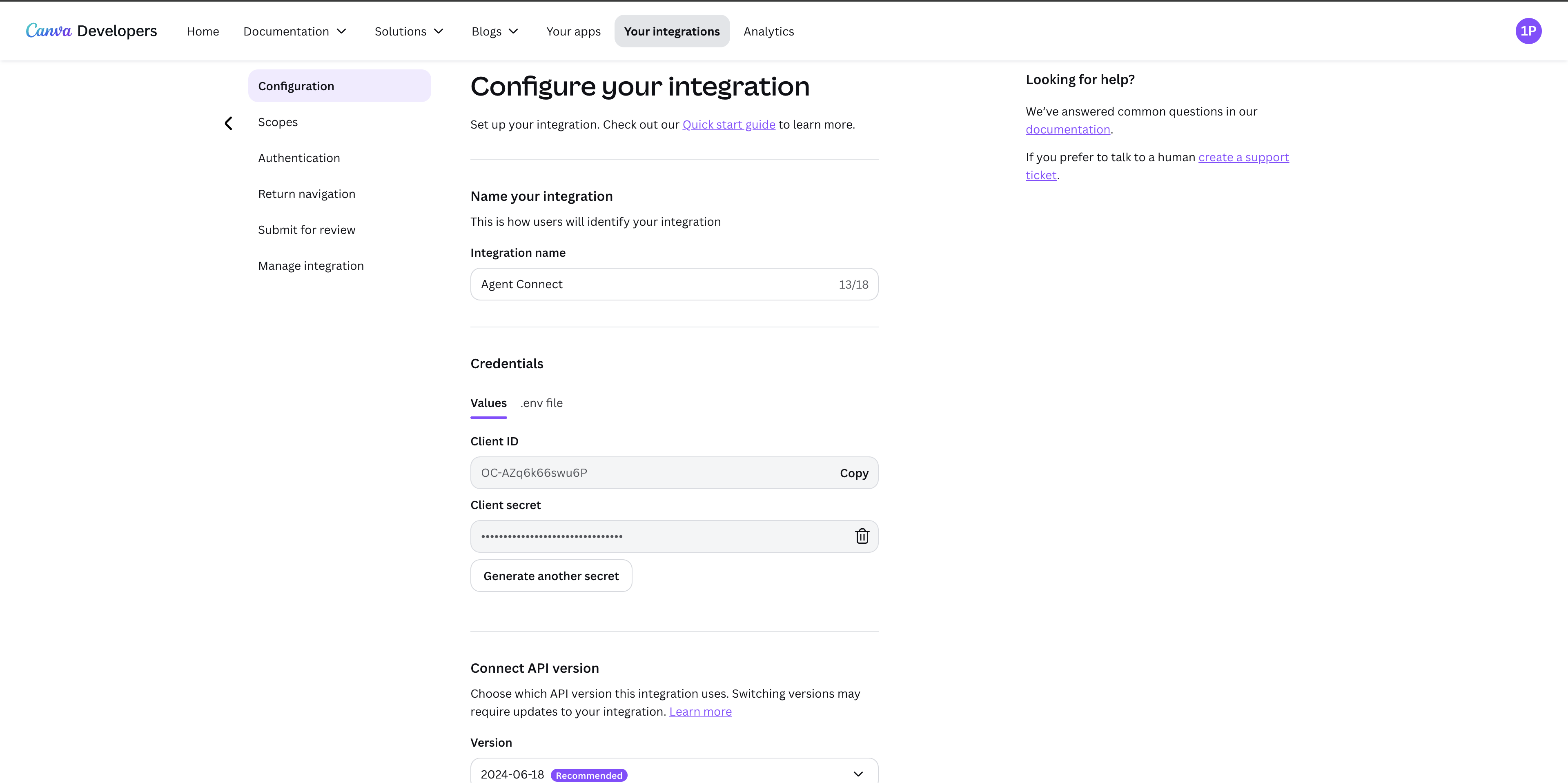
-
-
Get client credentials
- On the Configuration page, under Credentials, copy the Client ID.
- Click Generate a secret to create a Client Secret, then copy it. Canva only shows the secret once — store it securely.
-
Set up auth redirects
-
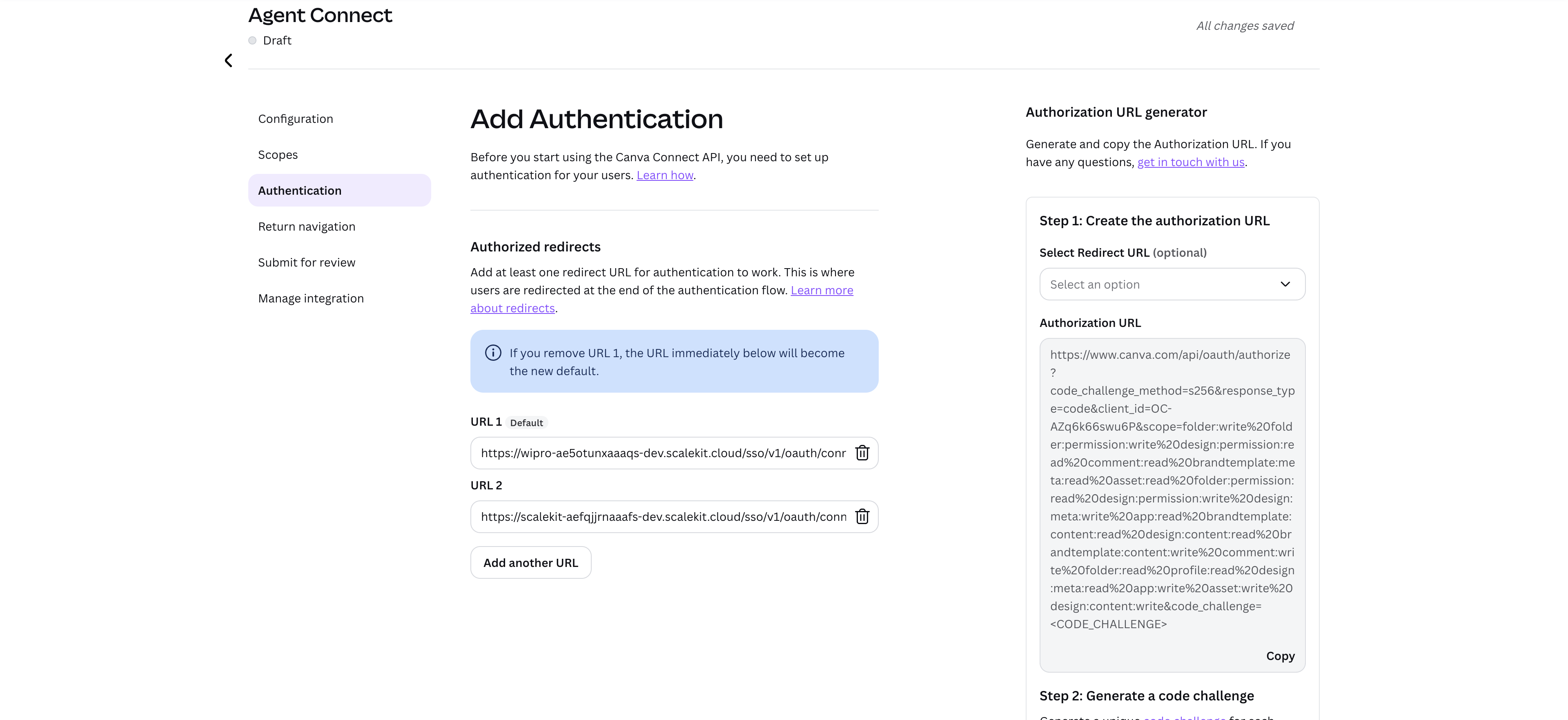
In the Scalekit dashboard, on the connection you created, copy the redirect URI. It looks like
https://<SCALEKIT_ENVIRONMENT_URL>/sso/v1/oauth/<CONNECTION_ID>/callback. -
In the Canva Developer Portal, go to Authentication in the left menu. Under Authorized redirects, click Add another URL, paste the redirect URI from Scalekit, and save.
-
-
Add credentials in Scalekit
- In the Scalekit dashboard, open the connection you created and enter:
- Client ID (from step 2)
- Client Secret (from step 2)
- Scopes (see Canva Connect API scopes reference — grant only what your agent needs, for example
design:content:readanddesign:content:write)
- Click Save.
- In the Scalekit dashboard, open the connection you created and enter:
-
Submit for review Required for production
Canva integrations start in Draft and only work for accounts on your own team. Before other users can connect, go to Submit for review in the Canva Developer Portal and follow the checklist to move your integration to production.
-
Authorize a user and make your first call
quickstart.mts import { ScalekitClient } from '@scalekit-sdk/node'import 'dotenv/config'import { createInterface } from 'node:readline/promises'const scalekit = new ScalekitClient(process.env.SCALEKIT_ENVIRONMENT_URL,process.env.SCALEKIT_CLIENT_ID,process.env.SCALEKIT_CLIENT_SECRET,)const actions = scalekit.actionsconst connector = 'canva'const identifier = 'user_123'// Generate an authorization link for the userconst { link } = await actions.getAuthorizationLink({ connectionName: connector, identifier })console.log('Authorize Canva:', link)const rl = createInterface({ input: process.stdin, output: process.stdout })await rl.question('Press Enter after authorizing...')rl.close()// Make your first callconst result = await actions.executeTool({connector,identifier,toolName: 'canva_oidc_userinfo_get',toolInput: {},})console.log(result)Terminal window npx tsx quickstart.mtsquickstart.py import osfrom scalekit import ScalekitClientfrom dotenv import load_dotenvload_dotenv()scalekit_client = ScalekitClient(env_url=os.getenv("SCALEKIT_ENVIRONMENT_URL"),client_id=os.getenv("SCALEKIT_CLIENT_ID"),client_secret=os.getenv("SCALEKIT_CLIENT_SECRET"),)actions = scalekit_client.actionsconnection_name = "canva"identifier = "user_123"# Generate an authorization link for the userlink_response = actions.get_authorization_link(connection_name=connection_name,identifier=identifier,)print("Authorize Canva:", link_response.link)input("Press Enter after authorizing...")# Make your first callresult = actions.execute_tool(tool_input={},tool_name="canva_oidc_userinfo_get",connection_name=connection_name,identifier=identifier,)print(result)Terminal window python quickstart.pyEach user signs in once. See Authorize a user for the full flow and statuses.
Tools
Pass the exact name toexecute_toolcanva_analytics_links_listLists trackable links and their metrics for a Canva design.Read-onlyList Design Analytics Links
Lists trackable links and their metrics for a Canva design. Each item includes the link ID, its user-visible name, total view count, unique viewer count, total and average view duration in seconds, and the Unix timestamp of the most recent view. Supports cursor-based pagination via the continuation token. Note: Canva restricts this API to users who are a member of a Canva Enterprise organization (or a limited trial on paid plans) -- accounts outside that tier receive a permission-denied error from Canva, which is expected account-tier behavior, not a tool defect. This is a preview API and may change without a version bump.
Inputs
designIdstringrequired- The unique ID of the Canva design these analytics apply to. Design IDs are alphanumeric strings (may include underscores or hyphens, 1-50 characters) and are found embedded in the design's Canva URL, e.g. the URL https://www.canva.com/design/DAFVztcvd9z/edit contains the design ID DAFVztcvd9z.
continuationstring- A pagination cursor token from a previous response. If the previous response's continuation field was non-empty, pass its value here to fetch the next page of trackable links.
limitinteger- The maximum number of trackable links to return per page. Must be between 1 and 100. Defaults to 50.default
50
canva_analytics_page_views_getLists page-level view duration data for a Canva design.Read-onlyGet Design Analytics Page Views
Lists page-level view duration data for a Canva design. This is a POST endpoint used as a read/query operation: pass the page IDs you want data for (plus optional filter and pagination controls) in the request body, and Canva returns each page's total view duration, average view duration, and unique viewer count. Use the List design pages tool first to discover page IDs. Note: Canva restricts this API to users who are a member of a Canva Enterprise organization (or a limited trial on paid plans) -- accounts outside that tier receive a permission-denied error from Canva, which is expected account-tier behavior, not a tool defect. This is a preview API and may change without a version bump.
Inputs
designIdstringrequired- The unique ID of the Canva design these analytics apply to. Design IDs are alphanumeric strings (may include underscores or hyphens, 1-50 characters) and are found embedded in the design's Canva URL, e.g. the URL https://www.canva.com/design/DAFVztcvd9z/edit contains the design ID DAFVztcvd9z.
page_idsarrayrequired- The design page IDs to retrieve page-level view duration data for. Provide between 1 and 100 page IDs (obtain them from the List design pages API). Example: ["PBBKfZml7MRHRQVw", "PBBKfZml7Mghjsdg"].
continuationstring- A pagination cursor token from a previous response. If the previous response's continuation field was non-empty, pass its value here to fetch the next page of page-view results.
filterobject- Optional filter object to narrow the page-view results. Must be one of three shapes, distinguished by their "type" field: {"type":"by_viewer","viewer_id":"<id>","link_id":"<optional link id>"} to scope to a specific viewer; {"type":"for_editor"} to scope to the design owner/editor's own views; or {"type":"by_link","link_id":"<id>"} to scope to traffic from a specific trackable link. Omit entirely to include all page views.
limitinteger- The maximum number of page results to return per page. Must be between 1 and 100. Defaults to 50.default
50
canva_analytics_summary_getGets the aggregated analytics for a Canva design, given its design ID.Read-onlyGet Design Analytics Summary
Gets the aggregated analytics for a Canva design, given its design ID. The response includes the total number of views, the number of unique viewers, the total view duration in seconds, and the average view duration per view in seconds. Note: Canva restricts this API to users who are a member of a Canva Enterprise organization (or a limited trial on paid plans) -- accounts outside that tier receive a permission-denied error from Canva, which is expected account-tier behavior, not a tool defect. This is a preview API and may change without a version bump.
Inputs
designIdstringrequired- The unique ID of the Canva design these analytics apply to. Design IDs are alphanumeric strings (may include underscores or hyphens, 1-50 characters) and are found embedded in the design's Canva URL, e.g. the URL https://www.canva.com/design/DAFVztcvd9z/edit contains the design ID DAFVztcvd9z.
canva_analytics_viewers_listLists viewers for a Canva design, ordered by most recent view first.Read-onlyList Design Analytics Viewers
Lists viewers for a Canva design, ordered by most recent view first. Each item includes the viewer's opaque viewer ID, user details (when visible), first/last viewed Unix timestamps, viewer type (editor/commenter/viewer), visibility, total view count and duration, pages viewed, device form factor, operating system, and city/country for anonymous viewers. Supports cursor-based pagination via the continuation token, and can be filtered by a specific trackable link ID or by a minimum first-viewed timestamp. Note: Canva restricts this API to users who are a member of a Canva Enterprise organization (or a limited trial on paid plans) -- accounts outside that tier receive a permission-denied error from Canva, which is expected account-tier behavior, not a tool defect. This is a preview API and may change without a version bump.
Inputs
designIdstringrequired- The unique ID of the Canva design these analytics apply to. Design IDs are alphanumeric strings (may include underscores or hyphens, 1-50 characters) and are found embedded in the design's Canva URL, e.g. the URL https://www.canva.com/design/DAFVztcvd9z/edit contains the design ID DAFVztcvd9z.
continuationstring- A pagination cursor token from a previous response. If the previous response's continuation field was non-empty, pass its value here to fetch the next page of viewers.
first_viewed_afterinteger- Only returns viewers whose first view happened after this time, expressed as a Unix timestamp in seconds since the Unix Epoch.
limitinteger- The maximum number of viewers to return per page. Must be between 1 and 100. Defaults to 50.default
50 link_idstring- Filters viewers by a specific trackable link ID. If omitted, only viewers who visited the design without using a trackable link are returned.
canva_analytics_views_over_time_getLists the view counts over time for a Canva design, bucketed into a sequence of time periods.Read-onlyGet Design Analytics Views Over Time
Lists the view counts over time for a Canva design, bucketed into a sequence of time periods. Each response item represents one time bucket, with a Unix timestamp for the bucket's start and the number of views recorded in that bucket. Optionally scope the request to a specific Unix-timestamp time range with start_time/end_time, control the bucketing timezone with a UTC offset, and page through results with limit and continuation. Note: Canva restricts this API to users who are a member of a Canva Enterprise organization (or a limited trial on paid plans) -- accounts outside that tier receive a permission-denied error from Canva, which is expected account-tier behavior, not a tool defect. This is a preview API and may change without a version bump.
Inputs
designIdstringrequired- The unique ID of the Canva design these analytics apply to. Design IDs are alphanumeric strings (may include underscores or hyphens, 1-50 characters) and are found embedded in the design's Canva URL, e.g. the URL https://www.canva.com/design/DAFVztcvd9z/edit contains the design ID DAFVztcvd9z.
continuationstring- A pagination cursor token from a previous response. If the previous response's continuation field was non-empty, pass its value here to fetch the next page of time buckets.
end_timeinteger- The inclusive end of the requested time range, expressed as a Unix timestamp in seconds since the Unix Epoch. Omit to have Canva pick a default end (typically now).
limitinteger- The maximum number of time buckets to return per page. Must be between 1 and 100. Defaults to 50.default
50 start_timeinteger- The inclusive start of the requested time range, expressed as a Unix timestamp in seconds since the Unix Epoch. Omit to have Canva pick a default start.
timezonestring- The timezone to use when bucketing views into time periods, expressed as a UTC offset in the form +HH:MM (for example +10:00). Defaults to +00:00 (UTC).default
+00:00
canva_asset_getRetrieve the metadata of a Canva asset (an uploaded image or video in the user's content library) by its asset ID.Read-onlyGet Asset
Retrieve the metadata of a Canva asset (an uploaded image or video in the user's content library) by its asset ID. Returns the asset's type (image or video), name, user-facing tags, creation and last-updated Unix timestamps, owner (team and user IDs), thumbnail image details, and type-specific metadata. Use this when you already know the asset ID (e.g. from an asset upload job result) and need its current metadata.
Inputs
assetIdstringrequired- The unique ID of the Canva asset to retrieve. Asset IDs are alphanumeric strings (may include underscores or hyphens, 1-50 characters), e.g. Msd59349ff. Obtain asset IDs from asset upload job results or from a design's asset references.
canva_asset_upload_getGet the current status and result of an asset upload job that was started by directly uploading file bytes (outside this connector, e.g.Read-onlyGet Asset Upload Job
Get the current status and result of an asset upload job that was started by directly uploading file bytes (outside this connector, e.g. via the Canva SDK or another integration), identified by its job ID. Returns a job object with `status` of `in_progress`, `success`, or `failed`. When `status` is `success`, the job includes the full `asset` object. When `status` is `failed`, the job includes an `error` object with a code (e.g. `file_too_big`, `import_failed`) and message. Note: this connector cannot itself start such a job, since the create endpoint requires a raw binary request body; use canva_asset_url_upload_create instead to both create and poll a job entirely through this connector.
Inputs
jobIdstringrequired- The ID of the asset upload job to check. Job IDs are alphanumeric strings (may include underscores or hyphens, 1-50 characters).
canva_asset_url_upload_getPREVIEW API.Read-onlyGet Asset Upload Job From URL
PREVIEW API. Get the current status and result of an asset upload-from-URL job that was started with canva_asset_url_upload_create, identified by its job ID. Returns a job object with `status` of `in_progress`, `success`, or `failed`. When `status` is `success`, the job includes the full `asset` object (ID, name, tags, timestamps, owner, thumbnail). When `status` is `failed`, the job includes an `error` object with a code (e.g. `file_too_big`, `import_failed`, `fetch_failed`) and message. You may need to poll this endpoint multiple times until the job reaches a terminal state.
Inputs
jobIdstringrequired- The ID of the URL asset upload job to check, as returned by canva_asset_url_upload_create. Job IDs are alphanumeric strings (may include underscores or hyphens, 1-50 characters).
canva_autofill_getGet the current status and result of a design autofill job that was started with canva_autofill_create, identified by its job ID.Read-onlyGet Design Autofill Job
Get the current status and result of a design autofill job that was started with canva_autofill_create, identified by its job ID. Returns a job object with `status` of `in_progress`, `success`, or `failed`. When `status` is `success`, the job includes a `result` object of type `create_design` containing the new design's summary (ID, title, URL, thumbnail) and, for non-Enterprise trial users, trial_information (uses_remaining, upgrade_url). When `status` is `failed`, the job includes an `error` object with a code (e.g. `autofill_error`, `thumbnail_generation_error`, `create_design_error`, `design_approval_error`) and message. Requires the acting user to be a member of a Canva Enterprise organization (or a limited trial on paid plans). You may need to poll this endpoint multiple times until the job reaches a terminal state.
Inputs
jobIdstringrequired- The ID of the design autofill job to check, as returned by canva_autofill_create. Job IDs are alphanumeric strings (may include underscores or hyphens, 1-50 characters).
canva_brand_template_dataset_getGet the dataset definition of a Canva brand template by its brand template ID.Read-onlyGet Brand Template Dataset
Get the dataset definition of a Canva brand template by its brand template ID. If the brand template contains autofill data fields, this returns a dataset object mapping each data field name to its type (image, text, or chart). Use this to discover what inputs a brand template accepts before calling Create Design Autofill Job -- the field names and types returned here correspond directly to the data payload that autofill expects. Note: chart data fields and autofilling a video are preview features that may change without a version bump. Only usable by a user on a Canva plan with brand template access (Canva Pro, Canva Teams, or Canva Enterprise). Brand template IDs were migrated to a new ID format in September 2025; old-format IDs are still accepted for a transition period. Requires the brandtemplate:content:read OAuth scope.
Inputs
brandTemplateIdstringrequired- The unique ID of the Canva brand template whose dataset definition you want to retrieve. Brand template IDs are alphanumeric strings (may include underscores or hyphens, 1-50 characters), e.g. DEMzWSwy3BI.
canva_brand_template_getRetrieve the metadata for a Canva brand template by its brand template ID.Read-onlyGet Brand Template
Retrieve the metadata for a Canva brand template by its brand template ID. Brand templates are shareable design templates used for consistent team content creation, and are only available to users on a Canva plan with brand template access (Canva Pro, Canva Teams, or Canva Enterprise). Returns the brand_template object containing its id, title, view_url (URL to view the template), create_url (URL to start a new design from the template), thumbnail, and created_at/updated_at Unix timestamps. Use this when you already know the brand template ID (e.g. from List Brand Templates or Publish Brand Template) and need its current metadata. Note: brand template IDs were migrated to a new ID format in September 2025; old-format IDs are still accepted for a transition period. Requires the brandtemplate:meta:read OAuth scope.
Inputs
brandTemplateIdstringrequired- The unique ID of the Canva brand template to retrieve. Brand template IDs are alphanumeric strings (may include underscores or hyphens, 1-50 characters), e.g. DEMzWSwy3BI. Returned by List Brand Templates or Publish Brand Template.
canva_brand_template_listList the brand templates that the authenticated Canva user has access to.Read-onlyList Brand Templates
List the brand templates that the authenticated Canva user has access to. Brand templates are shareable design templates used for consistent team content creation, and are only available to users on a Canva plan with brand template access (Canva Pro, Canva Teams, or Canva Enterprise). Supports free-text search via the query parameter, filtering by ownership (any, only templates the user owns, or ones shared with them) and by whether a template has an autofill dataset defined, plus sorting by relevance, last-modified date, or title. Results are paginated: if the response includes a continuation token, pass it back as the continuation input to fetch the next page — repeat until no continuation token is returned. Each returned brand_template includes its id, title, view_url, create_url, thumbnail, and created_at/updated_at Unix timestamps. Note: brand template IDs were migrated to a new ID format in September 2025; old-format IDs are still accepted for a transition period. Requires the brandtemplate:meta:read OAuth scope.
Inputs
continuationstring- Pagination continuation token from a previous List Brand Templates response. If a previous response included a continuation value, pass it here to fetch the next page of brand templates. Omit to get the first page.
datasetstring- Filter brand templates by whether they have an autofill dataset (data fields) defined. 'any' returns templates with and without dataset definitions; 'non_empty' returns only templates with one or more data fields defined (used with the autofill APIs).one of
anynon_emptydefaultany limitinteger- Maximum number of brand templates to return per page. Must be between 1 and 100. Defaults to 25.default
25 ownershipstring- Filter the list of brand templates by the user's ownership of them: 'any' (owned by and shared with the user), 'owned' (owned by the user only), or 'shared' (shared with the user only).one of
anyownedshareddefaultany querystring- Free-text search term(s) used to filter the brand templates available to the user by title, e.g. 'advertisement'. Leave blank to list all accessible templates.
sort_bystring- Sort order for the returned brand templates: 'relevance' (default), 'modified_descending', 'modified_ascending', 'title_descending', or 'title_ascending'.one of
relevancemodified_descendingmodified_ascendingtitle_descendingtitle_ascendingdefaultrelevance
canva_comment_reply_getGet a single reply to a comment or suggestion thread on a Canva design, by its design ID, thread ID, and reply ID.Read-onlyGet Comment Reply
Get a single reply to a comment or suggestion thread on a Canva design, by its design ID, thread ID, and reply ID. Returns the reply object, including its id, design_id, thread_id, author (may be missing if the account no longer exists), content, and mentions. This is a PREVIEW API: Canva may ship breaking changes to it without a new API version, and public integrations that rely on it will not pass Canva's app review process. Requires the comment:read OAuth scope.
Inputs
designIdstringrequired- The ID of the Canva design the thread belongs to. Design IDs are alphanumeric strings (may include underscores or hyphens, 1-50 characters) found in the design's Canva URL, e.g. the URL https://www.canva.com/design/DAFVztcvd9z/edit contains the design ID DAFVztcvd9z.
replyIdstringrequired- The ID of the reply to retrieve. Reply IDs are alphanumeric strings (may include underscores or hyphens, 1-50 characters), returned by Create Comment Reply or List Comment Replies.
threadIdstringrequired- The ID of the comment or suggestion thread the reply belongs to. Thread IDs are alphanumeric strings (may include underscores or hyphens, 1-50 characters), returned by Create Comment Thread or found in a reply's thread_id.
canva_comment_reply_listList the replies for a comment or suggestion thread on a Canva design.Read-onlyList Comment Replies
List the replies for a comment or suggestion thread on a Canva design. Results are paginated: if the response includes a continuation token, pass it back as the continuation input to fetch the next page of replies -- repeat until no continuation token is returned. Each returned reply includes its id, design_id, thread_id, author, content, and mentions. This is a PREVIEW API: Canva may ship breaking changes to it without a new API version, and public integrations that rely on it will not pass Canva's app review process. Requires the comment:read OAuth scope.
Inputs
designIdstringrequired- The ID of the Canva design the thread belongs to. Design IDs are alphanumeric strings (may include underscores or hyphens, 1-50 characters) found in the design's Canva URL, e.g. the URL https://www.canva.com/design/DAFVztcvd9z/edit contains the design ID DAFVztcvd9z.
threadIdstringrequired- The ID of the comment or suggestion thread whose replies you want to list. Thread IDs are alphanumeric strings (may include underscores or hyphens, 1-50 characters), returned by Create Comment Thread or found in a reply's thread_id.
continuationstring- Pagination continuation token from a previous List Comment Replies response. If a previous response included a continuation value, pass it here to fetch the next page of replies. Omit to get the first page.
limitinteger- Maximum number of replies to return per page. Must be between 1 and 100. Defaults to 50.default
50
canva_comment_thread_getGet a comment or suggestion thread on a Canva design by its design ID and thread ID.Read-onlyGet Comment Thread
Get a comment or suggestion thread on a Canva design by its design ID and thread ID. Returns the thread object, including its id, design_id, thread_type (a comment thread with content/mentions/assignee/resolver, or a suggestion thread with suggested_edits/status), author, and created_at/updated_at Unix timestamps. To retrieve a reply within a thread instead of the thread itself, use Get Comment Reply. This is a PREVIEW API: Canva may ship breaking changes to it without a new API version, and public integrations that rely on it will not pass Canva's app review process. Requires the comment:read OAuth scope.
Inputs
designIdstringrequired- The ID of the Canva design the comment thread belongs to. Design IDs are alphanumeric strings (may include underscores or hyphens, 1-50 characters) found in the design's Canva URL, e.g. the URL https://www.canva.com/design/DAFVztcvd9z/edit contains the design ID DAFVztcvd9z.
threadIdstringrequired- The ID of the comment or suggestion thread to retrieve. Thread IDs are alphanumeric strings (may include underscores or hyphens, 1-50 characters), returned by Create Comment Thread or found in a reply's thread_id.
canva_design_dataset_getGet the autofill dataset definition of a Canva design.Read-onlyGet Design Dataset
Get the autofill dataset definition of a Canva design. If the design contains autofill data fields, this returns an object mapping each data field's name to its type ('image', 'text', or 'chart') and any type-specific properties. Use the returned field names and types to build the `data` payload for the Create design autofill job tool (with type 'create_from_design'). Note: chart data fields and video autofill are preview features and may change without a version bump. Requires the design:content:read OAuth scope. This is a preview API: Canva may ship breaking changes to it without a version bump, and public integrations using it will not pass Canva's app review.
Inputs
designIdstringrequired- The unique ID of the Canva design to get the dataset definition for. Design IDs are alphanumeric strings (may include underscores or hyphens, 1-50 characters) and are found embedded in the design's Canva URL, e.g. the URL https://www.canva.com/design/DAFVztcvd9z/edit contains the design ID DAFVztcvd9z.
canva_design_export_formats_listList the file formats available for exporting a given Canva design (e.g.Read-onlyList Design Export Formats
List the file formats available for exporting a given Canva design (e.g. pdf, jpg, png, svg, pptx, gif, mp4, html_bundle, html_standalone, csv). The available formats depend on the design type and the types of pages it contains. Each format in the response includes any format-specific options (such as export quality or page size), and if a format is only supported by some pages, its `page_numbers` field lists which ones; if every page supports it, `page_numbers` is omitted. Use this before calling the Create design export job tool to confirm which format(s) you can request. Requires the design:content:read OAuth scope.
Inputs
designIdstringrequired- The unique ID of the Canva design to check available export formats for. Design IDs are alphanumeric strings (may include underscores or hyphens, 1-50 characters) and are found embedded in the design's Canva URL, e.g. the URL https://www.canva.com/design/DAFVztcvd9z/edit contains the design ID DAFVztcvd9z.
canva_design_getRetrieve the metadata for a Canva design by its design ID.Read-onlyGet Design
Retrieve the metadata for a Canva design by its design ID. Returns the design's title, owner information (team and user), thumbnail image details, temporary edit and view URLs, creation and last-updated Unix timestamps, page count, and design types (e.g. presentation, doc, whiteboard). Use this when you already know the design ID and need its current metadata rather than its full content.
Inputs
designIdstringrequired- The unique ID of the Canva design to retrieve. Design IDs are alphanumeric strings (may include underscores or hyphens, 1-50 characters) and are found embedded in the design's Canva URL, e.g. the URL https://www.canva.com/design/DAFVztcvd9z/edit contains the design ID DAFVztcvd9z.
canva_design_import_getGet the current status and result of a design import job that was started by directly uploading file bytes (outside this connector, e.g.Read-onlyGet Design Import Job
Get the current status and result of a design import job that was started by directly uploading file bytes (outside this connector, e.g. via the Canva SDK or another integration), identified by its job ID. Returns a job object with `status` of `in_progress`, `success`, or `failed`. When `status` is `success`, the job includes a `result.designs` array. When `status` is `failed`, the job includes an `error` object with a code (e.g. `invalid_file`, `fetch_failed`, `duplicate_import`) and message. Note: this connector cannot itself start such a job, since the create endpoint requires a raw binary request body; use canva_design_url_import_create instead to both create and poll a job entirely through this connector.
Inputs
jobIdstringrequired- The ID of the design import job to check, as returned when the import job was started.
canva_design_listList metadata for designs in the connected Canva user's projects, optionally filtered by a search term and/or ownership, sorted, and paginated with a continuation cursor.Read-onlyList Designs
List metadata for designs in the connected Canva user's projects, optionally filtered by a search term and/or ownership, sorted, and paginated with a continuation cursor. Each returned design includes its ID, title, owner (team and user), thumbnail, edit/view URLs, created/updated Unix timestamps, page count, and design types. If the response contains a `continuation` token, more designs are available -- pass that token back in as the `continuation` input to fetch the next page. Requires the design:meta:read OAuth scope.
Inputs
continuationstring- Continuation token from a previous List Designs response. Pass it back in to fetch the next page of results. Omit on the first request.
limitinteger- The number of designs to return per page. Must be between 1 and 100. Defaults to 25 if omitted.default
25 ownershipstring- Filter designs by the user's ownership relationship to them: 'any' (owned by and shared with the user), 'owned' (owned by the user only), or 'shared' (shared with the user only). Defaults to 'any'.one of
anyownedshareddefaultany querystring- A search term (up to 255 characters) used to filter the user's designs and designs shared with them, matching against design titles. Omit to list all designs.
sort_bystring- How to sort the returned designs. One of: 'relevance' (default, uses a relevance algorithm), 'modified_descending', 'modified_ascending', 'title_descending', 'title_ascending'.one of
relevancemodified_descendingmodified_ascendingtitle_descendingtitle_ascendingdefaultrelevance
canva_design_pages_listList metadata for pages in a Canva design, such as each page's ID, page number, dimensions, thumbnail, and design type.Read-onlyList Design Pages
List metadata for pages in a Canva design, such as each page's ID, page number, dimensions, thumbnail, and design type. Use `offset` (1-based page index to start from) and `limit` (how many pages to return) to page through designs with many pages. Note: some design types (e.g. Canva docs) don't have pages, in which case the returned list is empty. Requires the design:content:read OAuth scope. This is a preview API: Canva may ship breaking changes to it without a version bump, and public integrations using it will not pass Canva's app review.
Inputs
designIdstringrequired- The unique ID of the Canva design whose pages should be listed. Design IDs are alphanumeric strings (may include underscores or hyphens, 1-50 characters) and are found embedded in the design's Canva URL, e.g. the URL https://www.canva.com/design/DAFVztcvd9z/edit contains the design ID DAFVztcvd9z.
limitinteger- The number of pages to return, starting at the page index specified by `offset`. Must be between 1 and 200. Defaults to 50.default
50 offsetinteger- The 1-based page index to start the returned range of pages from. The first page in a design has index 1. Defaults to 1.default
1
canva_design_url_import_getGet the result of a URL import job created using the Create URL Import Job tool (canva_design_url_import_create).Read-onlyGet URL Import Job
Get the result of a URL import job created using the Create URL Import Job tool (canva_design_url_import_create). Returns the job's status (in_progress, success, or failed). When status is success, result.designs contains the metadata for the imported design(s) (usually one, but large files may be split into multiple designs). When status is failed, the error object contains a code and human-readable message. You may need to poll this repeatedly until the status is success or failed.
Inputs
jobIdstringrequired- The ID of the URL import job to retrieve, as returned by canva_design_url_import_create. Alphanumeric string (may include underscores or hyphens, 1-50 characters).
canva_export_getGet the current status and result of a design export job that was started with canva_export_create, identified by its export job ID.Read-onlyGet Design Export Job
Get the current status and result of a design export job that was started with canva_export_create, identified by its export job ID. Returns a job object with `status` of `in_progress`, `success`, or `failed`. When `status` is `success`, the job includes a `urls` array of download URLs (one per page for image formats; expire after 24 hours). When `status` is `failed`, the job includes an `error` object with a code (`license_required`, `approval_required`, or `internal_failure`) and message. You may need to poll this endpoint multiple times until the job reaches a terminal state.
Inputs
exportIdstringrequired- The ID of the design export job to check, as returned by canva_export_create. Job IDs are alphanumeric strings (may include underscores or hyphens).
canva_folder_getRetrieve the name and other metadata for a Canva folder using its folder ID.Read-onlyGet Folder
Retrieve the name and other metadata for a Canva folder using its folder ID. Returns the folder's id, name, creation timestamp, last-updated timestamp (both as Unix seconds), and thumbnail image details if available. Use this when you already know the folder ID and need its current details rather than listing its contents.
Inputs
folderIdstringrequired- The unique ID of the Canva folder to retrieve. Folder IDs are alphanumeric strings (may include underscores or hyphens, 1-50 characters).
canva_folder_items_listList the items inside a Canva folder, including each item's type (design, folder, image, or brand_template).Read-onlyList Folder Items
List the items inside a Canva folder, including each item's type (design, folder, image, or brand_template). Supports cursor-based pagination: if the response includes a continuation token, pass it back in as the continuation parameter to fetch the next page. Supports filtering by item type and pinned status, plus sorting. Note: brand_template items are only included if item_types explicitly lists brand_template, and are only returned for users on a Canva plan with brand template access (Pro, Teams, or Enterprise). Video assets are not currently returned.
Inputs
folderIdstringrequired- The unique ID of the Canva folder whose items you want to list. Folder IDs are alphanumeric strings (may include underscores or hyphens, 1-50 characters).
continuationstring- A continuation token returned by a previous call to this endpoint. Provide it to retrieve the next page of items. Omit it (or leave null) to fetch the first page.
item_typesstring- A comma-delimited list of item types to include, chosen from: design, folder, image, brand_template. If omitted, the Canva API defaults to returning design, folder, and image items. To include brand_template items you must explicitly list brand_template here.
limitinteger- The number of folder items to return, from 1 to 100. If omitted, the Canva API defaults to 50.
pin_statusstring- Filter the folder items by their pinned status. If omitted, the Canva API defaults to any (returns items regardless of pinned status).one of
anypinned sort_bystring- How to sort the returned folder items. If omitted, the Canva API defaults to modified_descending.one of
created_ascendingcreated_descendingmodified_ascendingmodified_descendingtitle_ascendingtitle_descending
canva_merge_getGets the result of a design merge job that was created using the Create design merge job tool.Read-onlyGet Design Merge Job
Gets the result of a design merge job that was created using the Create design merge job tool. Returns the job's id and status (in_progress, success, or failed). If the job succeeded, the response's result.design contains the created or updated design's metadata. If it failed, the response's error object includes a code and human-readable message. You might need to poll this endpoint multiple times until the status is success or failed. This is a preview API and may change without a version bump.
Inputs
jobIdstringrequired- The ID of the design merge job to retrieve, as returned by the Create design merge job tool's response (job.id). Job IDs are alphanumeric strings that may include underscores or hyphens, 1-50 characters.
canva_oidc_userinfo_getFetch standard OpenID Connect UserInfo claims for the authorized user -- the same claims returned in an id_token during authorization.Read-onlyGet OIDC User Info
Fetch standard OpenID Connect UserInfo claims for the authorized user -- the same claims returned in an id_token during authorization. `openid` scope is always required; `name`, `given_name`, and `family_name` are only returned when the `profile` scope was granted, and `email`/`email_verified` are only returned when the `email` scope was granted. Use canva_user_me_get instead if you only need the Canva user_id/team_id and no OAuth scopes were granted.
Inputs
This tool takes no inputs.
canva_resize_getGets the result of a design resize job that was created using the Create design resize job tool.Read-onlyGet Design Resize Job
Gets the result of a design resize job that was created using the Create design resize job tool. Returns the job's id and status (in_progress, success, or failed). If the job succeeded, the response's result contains a design summary for the new resized design plus trial_information (for Free-plan trial usage). If it failed, the response's error object includes a code and human-readable message. You might need to poll this endpoint multiple times until the status is success or failed. Requires the acting user to be on a Canva plan with premium features (such as Canva Pro); Free-plan users get a limited trial quota.
Inputs
jobIdstringrequired- The ID of the design resize job to retrieve, as returned by the Create design resize job tool's response (job.id). Job IDs are alphanumeric strings that may include underscores or hyphens, 1-50 characters.
canva_user_capabilities_getList the Canva API capabilities available to the user account associated with the connected access token.Read-onlyGet User Capabilities
List the Canva API capabilities available to the user account associated with the connected access token. Capabilities gate access to certain APIs based on the user's Canva plan or organization membership: 'analytics' and 'autofill' require Canva Enterprise membership; 'brand_template' requires a plan with brand template access (Canva Pro, Teams, or Enterprise); 'export_png_transparency' requires a paid plan (e.g. Canva Pro); 'resize' requires a plan with premium features (e.g. Canva Pro); 'team_restricted_app' requires Canva Enterprise or Canva for Education membership. Calling an API that needs a capability the user doesn't have will fail with a permission-style error -- use this tool first to check eligibility. Requires the profile:read OAuth scope.
Inputs
This tool takes no inputs.
canva_user_me_getReturn the Canva User ID and Team ID of the user associated with the connected access token.Read-onlyGet Current User
Return the Canva User ID and Team ID of the user associated with the connected access token. This is the most basic identity check for the connection -- unlike other Canva tools, it requires no OAuth scopes beyond a valid access token, so it works even for connections that were granted no scopes. Use it to confirm a connection is alive and to obtain `user_id`/`team_id` values needed by other Canva APIs.
Inputs
This tool takes no inputs.
canva_user_profile_getGet the profile of the Canva user associated with the connected access token.Read-onlyGet User Profile
Get the profile of the Canva user associated with the connected access token. Currently this only returns the user's `display_name` (the name shown in the Canva UI); more profile fields may be added by Canva in the future. Requires the profile:read OAuth scope.
Inputs
This tool takes no inputs.
canva_asset_updateUpdate the name and/or tags of a Canva asset by its asset ID.WriteUpdate Asset
Update the name and/or tags of a Canva asset by its asset ID. Updating tags replaces ALL existing tags on the asset (it is not additive) - to keep existing tags, include them in the new list. When name or tags is left blank, that attribute is left unchanged. Returns the updated asset metadata.
- Idempotent
Inputs
assetIdstringrequired- The unique ID of the Canva asset to update. Asset IDs are alphanumeric strings (may include underscores or hyphens, 1-50 characters), e.g. Msd59349ff.
namestring- The new name of the asset (max 50 characters). This is shown in the Canva UI. When left blank, the asset's name is not changed.
tagsarray- The replacement list of tags for the asset (max 50 tags, each up to 50 characters). This REPLACES all existing tags - it is not additive. When left blank, the asset's tags are not changed.
canva_asset_url_upload_createPREVIEW API.WriteCreate Asset Upload Job From URL
PREVIEW API. Start a new asynchronous job to upload an asset to the user's Canva content library by fetching it from a publicly-accessible URL, instead of sending raw bytes. Useful when the source file is already hosted online. Note: uploading a video from a URL is limited to a 100MB file size - for larger video files, use canva_asset_upload_create instead. The call returns immediately with a job in `in_progress` status; poll the job with canva_asset_url_upload_get (using the returned job ID) until its status becomes `success` or `failed`.
Inputs
namestringrequired- A display name for the asset (1-255 characters). This is shown in the Canva UI.
urlstringrequired- The publicly-accessible URL of the file to import as an asset (8-2048 characters). Must be reachable from the internet without authentication.
canva_autofill_createStart a new asynchronous job to create a new Canva design by autofilling a brand template with data.WriteCreate Design Autofill Job
Start a new asynchronous job to create a new Canva design by autofilling a brand template with data. Requires the acting user to be a member of a Canva Enterprise organization (users on paid plans get a limited trial while an integration is under development). Provide the brand_template_id of the source template and a data object whose keys are the template's data field names and whose values follow Canva's DatasetValue shape, e.g. {"type":"text","text":"..."} for a text field, {"type":"image","asset_id":"..."} for an image field, {"type":"video","asset_id":"..."} for a video field, or {"type":"chart","chart_data":{...}} / {"type":"sheet","sheet_data":{...}} for tabular data fields (chart/sheet/video autofill are preview features). Use canva_brand_template_dataset_get first to discover the exact data field names and expected types for a given brand template. The call returns immediately with a job in `in_progress` status; poll it with canva_autofill_get (using the returned job ID) until it becomes `success` or `failed`. Note: brand template IDs were migrated to a new format in September 2025; old-format IDs are still accepted for a transition period.
Inputs
brandTemplateIdstringrequired- The ID of the brand template to autofill from. Obtain this from canva_brand_template_list or canva_brand_template_get.
dataobjectrequired- Object mapping the brand template's data field names to their fill values. Each value must follow Canva's DatasetValue shape and include a `type` of `image`, `video`, `text`, `chart`, or `sheet`. Example: {"cute_pet_image_of_the_day": {"type": "image", "asset_id": "Msd59349ff"}, "cute_pet_witty_pet_says": {"type": "text", "text": "It was like this when I got here!"}}. Use canva_brand_template_dataset_get to discover a template's exact field names and expected types.
titlestring- Title to use for the newly created, autofilled design (1-255 characters). If not provided, the autofilled design uses the same title as the brand template.
typestring- Discriminator for the autofill source. This tool only supports autofilling from a brand template, so this is fixed to `create_from_brand_template`.one of
create_from_brand_templatedefaultcreate_from_brand_template
canva_brand_template_publishPublish an existing Canva design as a brand template.WritePublish Brand Template
Publish an existing Canva design as a brand template. Brand templates are design templates that can be shared across a team for consistent content creation; this API is only usable by a user on a Canva plan with brand template access (Canva Pro, Canva Teams, or Canva Enterprise) who also holds one of these roles: Team admin, Brand designer, Organization admin, or Organization designer. This is a create-from-design action, not a full template-authoring API -- pass the ID of an already-created design and Canva publishes it as a template. Supports two workflows: 'initial publish' (if the design is not linked to an existing brand template, a new brand template is created) and 'republish' (if the design is a draft of an existing brand template, that existing template is updated instead of a new one being created). The API returns the published brand_template immediately, though its thumbnail field may be null right after publishing since thumbnails generate asynchronously -- poll Get Brand Template to retrieve it once ready. This is a PREVIEW API: Canva may ship breaking changes to it without a new API version, and public integrations that rely on it will not pass Canva's app review process.
Inputs
design_idstringrequired- The ID of the Canva design to publish as a brand template. If this design is a draft of an existing brand template, that existing template is updated (republish); otherwise a new brand template is created. Design IDs are alphanumeric strings (may include underscores or hyphens, 1-50 characters) found in the design's Canva URL, e.g. the URL https://www.canva.com/design/DAFVztcvd9z/edit contains the design ID DAFVztcvd9z.
canva_comment_createDEPRECATED -- Canva's own API documentation marks this legacy top-level-comment endpoint as deprecated in favor of the newer Create Comment Thread API (canva_comment_thread_create).WriteCreate Comment (Deprecated)
DEPRECATED -- Canva's own API documentation marks this legacy top-level-comment endpoint as deprecated in favor of the newer Create Comment Thread API (canva_comment_thread_create). Prefer canva_comment_thread_create for all new integrations; this tool is kept only for compatibility with existing workflows built against the old /v1/comments endpoint. Create a new top-level comment on a Canva design (attached_to a design by design_id). Provide the plaintext message for the comment; you can mention a Canva user in the message using the format [user_id:team_id], and if you set assignee_id you MUST mention that same user in the message text. A design can have a maximum of 1000 comments. Returns the created (legacy-shape) comment object. This is a PREVIEW API: Canva may ship breaking changes to it without a new API version, and public integrations that rely on it will not pass Canva's app review process. Requires the comment:write OAuth scope.
Inputs
design_idstringrequired- The ID of the Canva design to attach this comment to. Design IDs are alphanumeric strings (may include underscores or hyphens, 1-50 characters) found in the design's Canva URL, e.g. the URL https://www.canva.com/design/DAFVztcvd9z/edit contains the design ID DAFVztcvd9z.
messagestringrequired- The plaintext comment message to show in the Canva UI (1-2048 characters). You can mention users by including [user_id:team_id] in the text -- required if assignee_id is set.
assignee_idstring- Optional Canva User ID to assign this comment to. If set, you MUST also mention this same user in the message field using the format [user_id:team_id].
canva_comment_reply_createCreate a reply to an existing comment or suggestion thread on a Canva design.WriteCreate Comment Reply
Create a reply to an existing comment or suggestion thread on a Canva design. Provide the design ID, the ID of the thread you're replying to (returned when the thread was created, or from the thread_id of an existing reply in the thread), and the plaintext reply message. You can mention a Canva user in the message using the format [user_id:team_id]. Each thread can have a maximum of 100 replies. Returns the created reply object, including its id, design_id, thread_id, author, content, and mentions. This is a PREVIEW API: Canva may ship breaking changes to it without a new API version, and public integrations that rely on it will not pass Canva's app review process. Requires the comment:write OAuth scope.
Inputs
designIdstringrequired- The ID of the Canva design the thread belongs to. Design IDs are alphanumeric strings (may include underscores or hyphens, 1-50 characters) found in the design's Canva URL, e.g. the URL https://www.canva.com/design/DAFVztcvd9z/edit contains the design ID DAFVztcvd9z.
message_plaintextstringrequired- The plaintext reply message to show in the Canva UI (1-2048 characters). You can mention users by including [user_id:team_id] in the text.
threadIdstringrequired- The ID of the comment or suggestion thread to reply to. Thread IDs are alphanumeric strings (may include underscores or hyphens, 1-50 characters), returned by Create Comment Thread or found in a reply's thread_id.
canva_comment_thread_createCreate a new top-level comment thread on a Canva design.WriteCreate Comment Thread
Create a new top-level comment thread on a Canva design. This is the current, preferred way to start a discussion on a design (use this instead of the legacy Create Comment API). Provide the plaintext message for the comment; you can mention a Canva user in the message using the format [user_id:team_id], and if you set assignee_id you MUST mention that same user in the message text. A design can have a maximum of 1000 comments. Returns the created thread object, including its id (used to reply via Create Reply, or to fetch via Get Comment Thread), design_id, thread_type, author, and created_at/updated_at Unix timestamps. This is a PREVIEW API: Canva may ship breaking changes to it without a new API version, and public integrations that rely on it will not pass Canva's app review process. Requires the comment:write OAuth scope.
Inputs
designIdstringrequired- The ID of the Canva design to add the comment thread to. Design IDs are alphanumeric strings (may include underscores or hyphens, 1-50 characters) found in the design's Canva URL, e.g. the URL https://www.canva.com/design/DAFVztcvd9z/edit contains the design ID DAFVztcvd9z.
message_plaintextstringrequired- The plaintext comment message to show in the Canva UI (1-2048 characters). You can mention users by including [user_id:team_id] in the text -- required if assignee_id is set.
assignee_idstring- Optional Canva User ID to assign this comment thread to. If set, you MUST also mention this same user in the message field using the format [user_id:team_id].
canva_design_createCreate a new Canva design.WriteCreate Design
Create a new Canva design. Choose a creation mode via `mode`: 'type_and_asset' (default) creates a design from a preset design type (doc, email, presentation, or whiteboard) or a custom width/height, optionally seeding it with an existing asset and/or a title -- at least one of design type or asset must be provided; 'design' (preview feature) creates a copy of an existing design by its design ID, optionally limited to specific page numbers; 'brand_template' (preview feature) creates a design from a brand template by its brand template ID, optionally limited to specific page numbers. Returns the newly created design's metadata (ID, title, owner, thumbnail, edit/view URLs, timestamps, page count, design types). Note: blank designs created without content are automatically and permanently deleted if not edited within 7 days, bypassing the Trash. Requires the design:content:write OAuth scope.
Inputs
asset_idstring- The ID of an asset (currently images only) in the user's projects to insert into the new design. Only used when `mode` is 'type_and_asset'.
brand_template_idstring- The ID of the brand template to create the design from. Required when `mode` is 'brand_template'; ignored otherwise. This mode is a preview feature.
custom_heightinteger- Custom design height, in pixels (40-8000). Required together with `custom_width` when `mode` is 'type_and_asset' and `design_type` is 'custom'. The total area (width x height) must not exceed 25,000,000 pixels squared.
custom_widthinteger- Custom design width, in pixels (40-8000). Required together with `custom_height` when `mode` is 'type_and_asset' and `design_type` is 'custom'. The total area (width x height) must not exceed 25,000,000 pixels squared.
design_idstring- The ID of an existing design to copy. Required when `mode` is 'design'; ignored otherwise. This mode is a preview feature.
design_typestring- For `mode` 'type_and_asset': whether to use a preset design type ('preset') or a custom width/height ('custom'). If 'preset', also set `preset_name`. If 'custom', also set `custom_width` and `custom_height`.one of
presetcustom modestring- Which way to create the design. 'type_and_asset' (default): create from a preset/custom design type and/or an asset. 'design' (preview feature): create a copy of an existing design. 'brand_template' (preview feature): create a design from a brand template. If omitted, Canva assumes 'type_and_asset' for backward compatibility.one of
type_and_assetdesignbrand_templatedefaulttype_and_asset page_numbersarray- One-based page numbers to copy from the source design or brand template. Only used when `mode` is 'design' or 'brand_template'. If omitted, all pages are copied.
preset_namestring- The preset design type name. Required when `mode` is 'type_and_asset' and `design_type` is 'preset'. One of: 'doc', 'email', 'presentation', 'whiteboard'.one of
docemailpresentationwhiteboard titlestring- The name of the new design (1-255 characters). Only used when `mode` is 'type_and_asset'.
canva_design_url_import_createStart a new asynchronous job to import an external file from a publicly-accessible URL as a new design in Canva.WriteCreate URL Import Job
Start a new asynchronous job to import an external file from a publicly-accessible URL as a new design in Canva. This is a supporting alternative to canva_design_import_create for when the source file is already hosted online rather than being uploaded as bytes. Supported file types are listed in the Canva design imports documentation. Returns a job object with a job ID and status; poll canva_design_url_import_get with that job ID until the status is success or failed.
Inputs
titlestringrequired- A title for the new design, 1-255 characters.
urlstringrequired- The URL of the file to import. This URL must be publicly accessible from the internet (no authentication required). 1-2048 characters.
mime_typestring- The MIME type of the file being imported. If not provided, Canva attempts to automatically detect the type of the file from the URL/content. 1-100 characters.
canva_export_createStart a new asynchronous job to export a Canva design as a downloadable file.WriteCreate Design Export Job
Start a new asynchronous job to export a Canva design as a downloadable file. Once the export succeeds, download URLs are returned (valid for 24 hours). Requires the design ID and a `format` object describing the desired export type and its options. Supported format `type` values and their extra fields: `pdf` (optional `export_quality`: regular|pro, `size`: a4|a3|letter|legal, `pages`: [int]); `jpg` (required `quality`: 1-100 integer, optional `export_quality`, `height`/`width` in pixels 40-25000, `pages`); `png` (optional `export_quality`, `height`/`width`, `lossless`: bool default true, `transparent_background`: bool default false, `as_single_image`: bool default false, `pages`); `gif` (optional `export_quality`, `height`/`width`, `pages`); `pptx` (optional `pages`); `mp4` (required `quality`: one of horizontal_480p|horizontal_720p|horizontal_1080p|horizontal_4k|vertical_480p|vertical_720p|vertical_1080p|vertical_4k, optional `export_quality`, `pages`); `html_bundle` (optional `pages`, at most 1 page - exports a zip of an HTML file plus assets); `html_standalone` (optional `pages`, at most 1 page); `csv` (optional `pages` - only works for designs containing tabular data, e.g. Canva Sheets). Example format object for a 2-page PDF: {"type": "pdf", "size": "a4", "pages": [1, 2]}. Poll the returned job with canva_export_get (using the returned job ID) until its status becomes `success` or `failed`. Rate limits: 750 exports per integration per 5-minute window, 75 exports per document per 5-minute window, 75 exports per user per 5-minute window.
Inputs
designIdstringrequired- The ID of the Canva design to export. Found in the design's Canva URL, e.g. the URL https://www.canva.com/design/DAFVztcvd9z/edit contains the design ID DAFVztcvd9z.
formatobjectrequired- The desired export format, as a JSON object with a `type` discriminator (one of pdf, jpg, png, gif, pptx, mp4, html_bundle, html_standalone, csv) plus that type's extra fields (see tool description for the full list per type). Example: {"type": "pdf", "size": "a4", "pages": [2, 3, 4]}. Another example: {"type": "jpg", "quality": 80, "width": 800}.
canva_folder_createCreate a new folder in a Canva user's projects.WriteCreate Folder
Create a new folder in a Canva user's projects. The folder can be created at the top level of the user's projects (using the literal parent ID "root"), inside the user's Uploads folder (using the literal parent ID "uploads"), or nested inside another existing folder (using that folder's ID). On success, returns the new folder's ID, name, and creation/update timestamps.
Inputs
namestringrequired- The name of the new folder, 1-255 characters, as it will appear in the Canva UI.
parent_folder_idstringrequired- The ID of the parent folder to create this folder in. Use the literal string "root" to create the folder at the top level of the user's projects, the literal string "uploads" to create it in the user's Uploads folder, or the ID of an existing folder to nest it there. 1-50 characters.
canva_folder_item_moveMove an item (a folder, design, image asset, or brand template) to another folder in Canva.WriteMove Folder Item
Move an item (a folder, design, image asset, or brand template) to another folder in Canva. You must specify the ID of the item to move and the ID of the destination folder. Use the literal folder ID "root" as the destination to move the item to the top level of the user's projects. Returns no response body on success. Note: if the item exists in multiple folders, the API returns an item_in_multiple_folders error and the move must be done via the Canva UI instead.
Inputs
item_idstringrequired- The ID of the item you want to move (a folder, design, or image asset ID). 1-50 characters. Video assets are not currently supported.
to_folder_idstringrequired- The ID of the destination folder to move the item into. Use the literal string "root" to move the item to the top level of the user's projects. 1-50 characters.
canva_folder_updateUpdate a Canva folder's details using its folder ID.WriteUpdate Folder
Update a Canva folder's details using its folder ID. Currently, only the folder's name can be updated. On success, returns the updated folder's metadata (id, name, timestamps, thumbnail).
- Idempotent
Inputs
folderIdstringrequired- The unique ID of the Canva folder to update. Folder IDs are alphanumeric strings (may include underscores or hyphens, 1-50 characters).
namestringrequired- The new folder name, 1-255 characters, as shown in the Canva UI.
canva_merge_createStarts a new asynchronous job that merges design pages by applying page operations (insert, move, or delete) to either produce a brand-new design or modify an existing one.WriteCreate Design Merge Job
Starts a new asynchronous job that merges design pages by applying page operations (insert, move, or delete) to either produce a brand-new design or modify an existing one. Set type to "create_new_design" to assemble a new design from pages inserted out of other designs (requires title, and only insert_pages operations are supported), or to "modify_existing_design" to insert/move/delete pages within an existing design (requires design_id). Only a single operation per request is supported by default -- contact Canva to enable multi-operation mode. Returns a job object with an id and status (in_progress/success/failed); poll it with the Get design merge job tool. On success, the job's result contains the created or updated design's metadata. This is a preview API and may change without a version bump.
Inputs
operationsarrayrequired- The list of page operations to apply, in order (1-500 items). Each operation is an object with a "type" field of "insert_pages", "move_pages", or "delete_pages": - insert_pages: {"type":"insert_pages","source":{"type":"design","design_id":"<id>","page_numbers":[1,2]},"after_page_number":2} -- inserts pages from a source design; page_numbers is optional (all pages if omitted); after_page_number is optional, 0 means insert at the start, omitted means append at the end. - move_pages: {"type":"move_pages","from_page_numbers":[1,3],"to_after_page_number":2} -- moves the given one-based page numbers to just after to_after_page_number (0 means move to the start). - delete_pages: {"type":"delete_pages","page_numbers":[2,4]} -- deletes the given one-based page numbers. Note: at this time Canva only supports a single operation per request by default; passing multiple operations fails unless Canva has enabled multi-operation mode for your integration.
typestringrequired- The type of merge job to create. Use "create_new_design" to build a brand-new design out of pages taken from other designs (only insert_pages operations are supported for this type). Use "modify_existing_design" to insert, move, or delete pages within an existing design (design_id is then required).one of
create_new_designmodify_existing_design design_idstring- The ID of the design to modify. Required when type is "modify_existing_design"; omit (or leave null) when type is "create_new_design".
titlestring- A title for the design. Required when type is "create_new_design" (1-255 characters). Optional when type is "modify_existing_design" -- if provided there, it renames the design.
canva_resize_createStarts a new asynchronous job to create a resized copy of a design.WriteCreate Design Resize Job
Starts a new asynchronous job to create a resized copy of a design. The Connect API always creates a brand-new design at the requested size (in-place resizing is only available in the Canva UI); the new design is placed at the top level of the user's projects. Resize either to a preset design type (doc, email, presentation, or whiteboard) by setting design_type to "preset" and design_type_name, or to custom pixel dimensions by setting design_type to "custom" with width and height (40-8000px each, area <= 25,000,000 px squared). Canva docs, emails, and Canva Code designs cannot be resized, and other types cannot be resized into a doc, email, or Canva Code design. Returns a job object with an id and status (in_progress/success/failed); poll it with the Get design resize job tool. Requires the acting user to be on a Canva plan with premium features (such as Canva Pro); Free-plan users get a limited trial quota.
Inputs
design_idstringrequired- The ID of the design to resize. A new design is created with the resized content; the original design is left unchanged. Design IDs are alphanumeric strings (may include underscores or hyphens, 1-50 characters) found in the design's Canva URL.
design_typestringrequired- Which shape of target dimensions to use. Use "preset" to resize to a common Canva design type (set design_type_name), or "custom" to resize to specific pixel dimensions (set width and height).one of
presetcustom design_type_namestring- The preset design type name to resize into. Required when design_type is "preset"; ignored otherwise.one of
docemailpresentationwhiteboard heightinteger- The height of the resized design, in pixels. Required when design_type is "custom"; ignored otherwise. Must be between 40 and 8000, and width x height must not exceed 25,000,000 pixels squared.
widthinteger- The width of the resized design, in pixels. Required when design_type is "custom"; ignored otherwise. Must be between 40 and 8000, and width x height must not exceed 25,000,000 pixels squared.
canva_asset_deleteDelete a Canva asset by its asset ID.DestructiveDelete Asset
Delete a Canva asset by its asset ID. This mirrors deleting an asset in the Canva UI: the asset is moved to the trash, not immediately purged. Deleting an asset does NOT remove it from designs that already use it. Returns no content on success (HTTP 204).
- Idempotent
Inputs
assetIdstringrequired- The unique ID of the Canva asset to delete. Asset IDs are alphanumeric strings (may include underscores or hyphens, 1-50 characters), e.g. Msd59349ff.
canva_folder_deleteDelete a Canva folder using its folder ID.DestructiveDelete Folder
Delete a Canva folder using its folder ID. Deleting a folder moves the user's own content in that folder to the Trash; content owned by other users is moved to the top level of the owner's projects instead of being deleted. This action cannot be undone via the API. Returns no response body on success.
- Idempotent
Inputs
folderIdstringrequired- The unique ID of the Canva folder to delete. Folder IDs are alphanumeric strings (may include underscores or hyphens, 1-50 characters).
No tools match.