
The ChiliPiper MCP connector routes your AI agent's tool calls to ChiliPiper's own MCP server through Scalekit. Each user connects their own ChiliPiper access token once, and Scalekit sends it with every call, so your agent never handles credentials. It comes with 156 tools.
- Tools
- 156
- What they doRead · write · destructive
- 67 · 62 · 2767 read62 write27 destructive
- Users sign in with
- Access token
Setup
Install the SDK
Terminal window npm install @scalekit-sdk/node dotenvTerminal window pip install scalekit-sdk-python python-dotenvSet your credentials
Add your Scalekit credentials to your
.envfile. Find values in app.scalekit.com > Developers > API Credentials..env SCALEKIT_ENVIRONMENT_URL=<your-environment-url>SCALEKIT_CLIENT_ID=<your-client-id>SCALEKIT_CLIENT_SECRET=<your-client-secret>Create the ChiliPiper MCP connection
In AgentKit > Connections, create a ChiliPiper MCP connection. The name you give it is the
connection_nameyour code passes. See Configure connections.Console steps with screenshots
Register your Chili Piper API token with Scalekit so it stores it securely and injects it into every request. Chili Piper uses bearer token authentication.
-
Get your Chili Piper API token
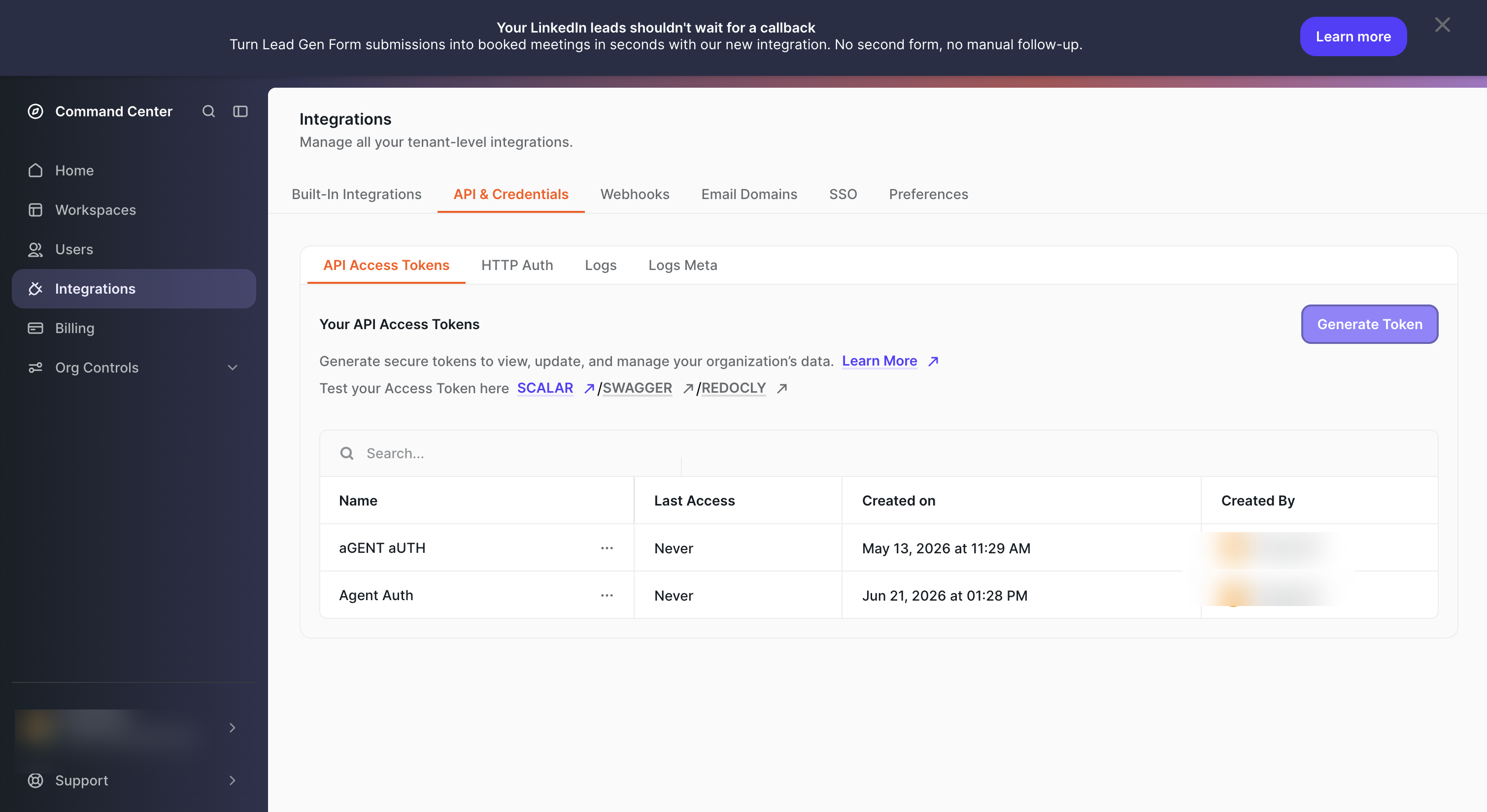
- Sign in to Chili Piper and go to Integrations in the left sidebar.
- Click the API & Credentials tab, then select API Access Tokens.
- Click Generate Token, give it a name (e.g.,
Agent Auth), and copy the token value immediately — it is only shown once.
-
Create a connection in Scalekit
- In Scalekit dashboard, go to AgentKit → Connections → Create Connection. Find ChiliPiper MCP and click Create.
- Note the Connection name — you will use this as
connection_namein your code (e.g.,chilipipermcp). - Click Save.
-
Add a connected account
Connected accounts link a specific user identifier in your system to their Chili Piper API token. Add one in the dashboard to test. In production, each user adds their own through the authorization link: they enter their credentials on the page it opens.
In the dashboard, to test
- Open the connection you created and click the Connected Accounts tab → Add account.
- Fill in:
- Your User’s ID — a unique identifier for this user in your system (e.g.,
user_123) - Token — the Chili Piper API token from step 1
- Your User’s ID — a unique identifier for this user in your system (e.g.,
- Click Create Account.
From your backend, if your app already has the credentials
For example, when users enter them on a settings page in your app:
import { Scalekit, ConnectorStatus } from '@scalekit-sdk/node';const scalekit = new Scalekit(process.env.SCALEKIT_ENVIRONMENT_URL,process.env.SCALEKIT_CLIENT_ID,process.env.SCALEKIT_CLIENT_SECRET,);// Never hard-code credentials — read from secure storage or user inputconst chilipiperToken = getUserChilipiperToken(); // retrieve from your secure storeconst authorizationDetails = {details: {case: 'staticAuth',value: {details: {token: chilipiperToken,},},},};let { connectedAccount } = await scalekit.actions.upsertConnectedAccount({connectionName: 'chilipipermcp',identifier: 'user_123',authorizationDetails,});// Make sure the account is ACTIVE before the first tool call.if (connectedAccount?.status !== ConnectorStatus.ACTIVE) {({ connectedAccount } = await scalekit.actions.upsertConnectedAccount({connectionName: 'chilipipermcp',identifier: 'user_123',authorizationDetails,}));}import osfrom scalekit import ScalekitClientscalekit_client = ScalekitClient(env_url=os.environ["SCALEKIT_ENVIRONMENT_URL"],client_id=os.environ["SCALEKIT_CLIENT_ID"],client_secret=os.environ["SCALEKIT_CLIENT_SECRET"],)# Never hard-code credentials — read from secure storage or user inputchilipiper_token = get_user_chilipiper_token() # retrieve from your secure storeauthorization_details = {"static_auth": {"token": chilipiper_token}}response = scalekit_client.actions.upsert_connected_account(connection_name="chilipipermcp",identifier="user_123",authorization_details=authorization_details,)# Make sure the account is ACTIVE before the first tool call.if response.connected_account.status != "ACTIVE":response = scalekit_client.actions.upsert_connected_account(connection_name="chilipipermcp",identifier="user_123",authorization_details=authorization_details,)
-
Authorize a user and make your first call
quickstart.mts import { ScalekitClient } from '@scalekit-sdk/node'import 'dotenv/config'import { createInterface } from 'node:readline/promises'const scalekit = new ScalekitClient(process.env.SCALEKIT_ENVIRONMENT_URL,process.env.SCALEKIT_CLIENT_ID,process.env.SCALEKIT_CLIENT_SECRET,)const actions = scalekit.actionsconst connector = 'chilipipermcp'const identifier = 'user_123'// Generate an authorization link for the userconst { link } = await actions.getAuthorizationLink({ connectionName: connector, identifier })console.log('Authorize ChiliPiper MCP:', link)const rl = createInterface({ input: process.stdin, output: process.stdout })await rl.question('Press Enter after authorizing...')rl.close()// Make your first callconst result = await actions.executeTool({connector,identifier,toolName: 'chilipipermcp_availability_configured',toolInput: {},})console.log(result)Terminal window npx tsx quickstart.mtsquickstart.py import osfrom scalekit import ScalekitClientfrom dotenv import load_dotenvload_dotenv()scalekit_client = ScalekitClient(env_url=os.getenv("SCALEKIT_ENVIRONMENT_URL"),client_id=os.getenv("SCALEKIT_CLIENT_ID"),client_secret=os.getenv("SCALEKIT_CLIENT_SECRET"),)actions = scalekit_client.actionsconnection_name = "chilipipermcp"identifier = "user_123"# Generate an authorization link for the userlink_response = actions.get_authorization_link(connection_name=connection_name,identifier=identifier,)print("Authorize ChiliPiper MCP:", link_response.link)input("Press Enter after authorizing...")# Make your first callresult = actions.execute_tool(tool_input={},tool_name="chilipipermcp_availability_configured",connection_name=connection_name,identifier=identifier,)print(result)Terminal window python quickstart.pyEach user opens the link once and enters their ChiliPiper MCP server credentials there. If your app already has a user's credentials, add the account from your backend instead, as the console steps above show. See Authorize a user for the full flow and statuses.
Tools
Pass the exact name toexecute_toolchilipipermcp_assignment_table_definition_getFetches one assignment-table definition (column schema) by its assignmentTableId.Read-onlyGet assignment table definition
Fetches one assignment-table definition (column schema) by its assignmentTableId. Use this to read the current column layout and a fresh revision before replacing the definition or patching a column. Use assignment-table-definition-list to browse. - workspaceId (req): the workspace that owns the table. - assignmentTableId (req): the table's id. → {id, name, inputs: [{key, name, required, typeHint?}], outputs: [{key, name, context, required}], allKeys, metadata: {revision, ...}} see: assignment-table-definition-list (browse), assignment-table-definition-replace (replace schema), assignment-table-get (read the rows)
Inputs
assignmentTableIdstringrequired- No description.
workspaceIdstringrequired- No description.
chilipipermcp_assignment_table_definition_listBrowses the assignment-table definitions (column schemas) in a workspace so you can discover assignmentTableIds, revisions, and column keys before reading/writing rows.Read-onlyList assignment table definitions
Browses the assignment-table definitions (column schemas) in a workspace so you can discover assignmentTableIds, revisions, and column keys before reading/writing rows. An assignment-table definition describes the table's input columns (the variables a rule matches on) and output columns (each pinned to a Record/Meeting/Conversation context). Paging defaults to page 0 / pageSize 10; optionally filter by name. - workspaceId (req): the workspace whose definitions to list. - name (opt): case-sensitive filter on the definition name. → {results: [{id, name, inputs: [{key, name, required, typeHint?}], outputs: [{key, name, context, required}], allKeys, metadata: {revision, ...}}], total, page, pageSize} see: assignment-table-definition-get (fetch one), assignment-table-definition-create (add a definition)
Inputs
workspaceIdstringrequired- No description.
namestring- No description.
paginationobject- No description.
chilipipermcp_assignment_table_getFetches the rows (data) of a single assignment table by its id.Read-onlyGet assignment table
Fetches the rows (data) of a single assignment table by its id. Each row maps input-column keys to values and output-column keys to a resolved assignment (a user or a distribution). Read the table's DEFINITION first (assignment-table-definition-get) to learn the column keys. - workspaceId (req): the workspace that owns the table. - assignmentTableId (req): the table's id. → {id, rows: [{inputs: {<columnKey>: <value>}, outputs: {<columnKey>: {tableOutType, value, humanReadableName?, context?}}}], metadata: {revision, ...}} see: assignment-table-get-by-ids (fetch several at once), assignment-table-upsert (write rows), assignment-table-definition-get (read the schema)
Inputs
assignmentTableIdstringrequired- No description.
workspaceIdstringrequired- No description.
chilipipermcp_assignment_table_get_by_idsFetches the rows of several assignment tables in one call.Read-onlyGet assignment tables by ids
Fetches the rows of several assignment tables in one call. Ids without a stored table are omitted from the response (no error). Useful to hydrate the tables referenced by a set of assignment rules. - workspaceId (req): the workspace that owns the tables. - ids (req): one or more assignmentTableIds. → {<assignmentTableId>: {id, rows, metadata}} Note: ids with no stored table are omitted from the map. see: assignment-table-get (fetch a single table)
Inputs
workspaceIdstringrequired- No description.
idsarray- No description.
chilipipermcp_availability_configuredBatch, side-effect-free check of whether each user has configured their availability.Read-onlyCheck whether users have configured their availability
Batch, side-effect-free check of whether each user has configured their availability. A user is "configured" when they have at least one custom schedule, or their default schedule's working hours / timezone differ from the bootstrap default (9-5, timezone synced from calendar). Users with no persisted schedule (and users not present in the request) are returned as false; reading does not create a default schedule for users that lack one. - userIds: the users to check. → [{userId, availabilityConfigured}] see: user-find (resolve userIds), availability-slots-v2
Inputs
userIdsarray- Users to check; each is returned with whether they have configured their availability.
chilipipermcp_availability_slots_v2Returns bookable start times for a meeting type over a time window, one page at a time, so a wide window never produces a single oversized response.Read-onlyList available meeting time slots (paginated)
Returns bookable start times for a meeting type over a time window, one page at a time, so a wide window never produces a single oversized response. Prefer this over the deprecated availability-slots (which had the same attendee model but no paging); page through wide windows rather than narrowing the interval. - attendees: non-empty list of who joins the meeting, discriminated by `type`: {type: "ManuallyAssigned", userId, required: true|false} {type: "DistributionAssignee", distributionId, required: true|false, userIds (opt): ranked shortlist} {type: "AssignedViaTeam", userId, teamId, required: true|false} {type: "AdditionalAttendee", userId, required: true|false} Note: each attendee's `required` flag is mandatory (omitting it returns 400) and gates the slot — `true` hides slots where that attendee is busy. - expectedHost: {type: "User", userId} or {type: "AssigneeFromDistribution", distributionId}. - meetingTypeOverride (opt): inline duration/buffer overrides; omit or pass null to use meeting-type defaults. - interval: {startsAt: ISO-8601, duration: "7 days"/"P7D"/etc.}. - pagination (opt): {page (0-indexed, default 0), pageSize (default 100, max 500)}. → {results: [{startTime, attendees}], total, page, pageSize} Note: slots are ordered by startTime; keep requesting page+1 until you have collected `total` slots. see: distribution-list, user-find
Inputs
attendeesarrayrequired- Attendees to schedule; availability is the intersection of the required ones.
expectedHoststringrequired- No description.
intervalobjectrequired- No description.
meetingTypeRefobjectrequired- No description.
meetingTypeOverrideobject- No description.
paginationobject- No description.
chilipipermcp_availability-slotsReturns available meeting slots for any attendee mix (round-robin, manual, team-assigned, additional).Read-onlyAvailability Slots
Returns available meeting slots for any attendee mix (round-robin, manual, team-assigned, additional).
Inputs
attendeesarrayrequired- No description.
expectedHoststringrequired- No description.
intervalstringrequired- No description.
meetingTypeRefstringrequired- No description.
meetingTypeOverridestring- No description.
chilipipermcp_campaign_listLists Salesforce campaigns for the tenant's connected org so you can find the `campaignId` used by a router's "Add to Campaign" CRM action.Read-onlyList Salesforce campaigns
Lists Salesforce campaigns for the tenant's connected org so you can find the `campaignId` used by a router's "Add to Campaign" CRM action. Salesforce-only. Use this to browse/paginate the full set; for large orgs prefer campaign-search. - isActive (opt): filter to active (true) or inactive (false) campaigns; omit for all - page (opt, default 0), pageSize (opt, default 10) → {results: [{id, name, status, startDate, endDate, active}], total, page, pageSize} Note: `id` is the Salesforce campaign id to drop into the Add-to-Campaign action's campaignId ⚠ Salesforce paginates via SOQL OFFSET, capped at 2000 rows — beyond that use campaign-search ⚠ 4xx if Salesforce is not connected for the tenant see: campaign-search (full-text search, preferred for large orgs)
Inputs
isActiveboolean- No description.
paginationobject- No description.
chilipipermcp_campaign_searchFull-text search of Salesforce campaigns for the tenant's connected org so you can find the `campaignId` used by a router's "Add to Campaign" CRM action.Read-onlySearch Salesforce campaigns
Full-text search of Salesforce campaigns for the tenant's connected org so you can find the `campaignId` used by a router's "Add to Campaign" CRM action. Salesforce-only. Preferred over campaign-list for large orgs. - searchText (required): text to match against campaign names; must be at least 2 characters - isActive (opt): filter to active (true) or inactive (false) campaigns; omit for all - page (opt, default 0), pageSize (opt, default 10) → {results: [{id, name, status, startDate, endDate, active}], page, pageSize} Note: `id` is the Salesforce campaign id to drop into the Add-to-Campaign action's campaignId; search does not return a total ⚠ 4xx if searchText is shorter than 2 characters, or if Salesforce is not connected for the tenant see: campaign-list (browse all campaigns)
Inputs
searchTextstringrequired- No description.
isActiveboolean- No description.
paginationobject- No description.
chilipipermcp_chat_logsReads a workspace's Chat AI conversation logs over a time window — the read-only audit trail of who chatted, how they were routed, and what got booked.Read-onlyReads Chat Conversation Logs
Reads a workspace's Chat AI conversation logs over a time window — the read-only audit trail of who chatted, how they were routed, and what got booked. Each entry carries the full bot/guest transcript, the routing outcome, and any meetings booked. Use it to inspect or debug live chat routing after the fact. The start/end window (ISO-8601) spans at most 30 days. Pass playbookId (repeatable) to restrict to specific chat playbooks. Narrow to a specific guest or rule with guestEmail (case-insensitive exact match), guestId (exact match), ruleId (exact match on any routing rule executed in the session; stable across rule renames), and/or ruleName (exact match on any routing rule executed in the session). Pages start at 0; pageSize defaults to 10, max 50. → {results: [{guestId, sessionId, playbookId, guestEmail, startedAt, endedAt, ended, targetedUrl, respondedUrl, routingOutcome, ruleId, ruleName, conversationAssigneeId, routedAt, repJoined, chatAiStarted, meetingBooked, meetings: [{assigneeId, origin, scheduledAt}], messages: [{role, content, timestamp}]}], total, page, pageSize} Note: routingOutcome is one of Routed | NotRouted | Abandoned; role is one of Bot | Guest; meetings[N].origin is one of Journey | Inbox | NoMeeting see: workspace-list (find workspaceId)
Inputs
endstringrequired- No description.
startstringrequired- No description.
workspaceIdstringrequired- No description.
guestEmailstring- No description.
guestIdstring- No description.
pageinteger- No description.
pageSizeinteger- No description.
playbookIdsarray- No description.
ruleIdstring- No description.
ruleNamestring- No description.
chilipipermcp_concierge_call_logsLists a Concierge router's phone-call flows over a time window — each flow is one inbound routing that dialed one or more reps, with the per-rep call legs nested underneath.Read-onlyReads Concierge Call Logs
Lists a Concierge router's phone-call flows over a time window — each flow is one inbound routing that dialed one or more reps, with the per-rep call legs nested underneath. start/end are ISO-8601 and the window may span at most 30 days. Newest flows first. → [{flowId, routingId, routerId, routerName, totalCallDuration, createdAt, updatedAt, calls: [{userId, status, twilioCallSid, createdAt, updatedAt}]}] Note: status is one of MissingPhoneNumber, Queued, Ringing, InProgress, Completed, Busy, Failed, NoAnswer, Canceled see: concierge-list-routers (find routerId+workspaceId)
Inputs
endstringrequired- No description.
routerIdstringrequired- No description.
startstringrequired- No description.
workspaceIdstringrequired- No description.
pageinteger- No description.
pageSizeinteger- No description.
chilipipermcp_concierge_router_getFetches one Concierge router: its identity, a lossy per-row summary of its routing, and its full-config dimensions (guest form, branding/cover, localizations).Read-onlyGet concierge router
Fetches one Concierge router: its identity, a lossy per-row summary of its routing, and its full-config dimensions (guest form, branding/cover, localizations). Call this before concierge-router-update to check routing.representable (whether a routing replace is accepted) and to see whether the webform is a Chili form (form) or a third-party form (thirdPartyForm). → {id, workspaceId, name?, slug?, routing: {known, representable, rows: [{ruleId?, ruleType?, outcome}], catchAll?: {outcome}}, form?, thirdPartyForm?, inAppButton?, routerLink?, branding?, localizations?} outcome (one of): {type: "Schedule", distributionId?, userId?, meetingTypeId?, crmActions?} | {type: "Redirect", url?} | {type: "OwnerAssign"} | {type: "ContactOptions"} | {type: "CrmAction"} | {type: "Other", kind} form: {representable, fields: [{dataField, label, description?, required, hidden?}], readOnlyTriggers: [string]} thirdPartyForm: {fields: [{formFieldName, dataField, label?}]} inAppButton: {fields: [{dataField}]} routerLink: {fields: [{dataField, label, required, hidden?}]} branding: {coverImage?, headingText?, language?} localizations: {"<lang-tag>": {"<key>": "<text>"}} Note: on a Schedule, crmActions (when present) is the readable post-booking chain — each {type: "ConvertLead"}, {type: "Notify", slackChannel?}, {type: "AddToCampaign", campaignId, memberStatus}, {type: "SalesforceUpdateFields", contact, lead}, {type: "HubspotUpdateFields", contact}, {type: "SalesforceUpsertRecord", settings}, {type: "HubspotUpsertRecord", settings}, {type: "SalesforceUpdateOwnership", contact, lead}, or {type: "HubspotUpdateOwnership", contact}; it is absent (null) when the chain uses a CRM action Edge can't model (then representable is false) Note: the routing summary is lossy by design — it NAMES each row's outcome (including ones Edge can't itself produce, e.g. Redirect/CrmAction) so you can see what the router does even when it was built in the app Note: routing.representable is true only when the current routing — both the draft tree and the published tree — is exactly what Edge's create/update would have produced; when false, an update with a new routing may be rejected (edit it in the Concierge app instead). A router that has no routing tree yet also reports representable=false, but an update setting routing on it is still accepted (nothing is destroyed). Note: form.representable is true when the router's webform is a Chili form (or absent) and false when it is a third-party form — then form.fields is empty and the mapping is surfaced under thirdPartyForm instead (a list of externalFieldName→dataField). Both a Chili form (via form) and a third-party form (via thirdPartyForm) are editable via concierge-router-update, and supplying either one converts a webform of the other kind. form.readOnlyTriggers is retained for compatibility but is now always empty. inAppButton/routerLink (when present) are the router's in-app-button / router-link triggers and ARE editable. branding/localizations are absent when unset. see: concierge-list-routers (browse to find a routerId), concierge-router-update (replace routing/form/branding/localizations)
Inputs
routerIdstringrequired- No description.
chilipipermcp_concierge-list-routersReturns all concierge routers in the workspace.Read-onlyConcierge List Routers
Returns all concierge routers in the workspace.
Inputs
workspaceIdstring- No description.
chilipipermcp_concierge-logsReturns logs of concierge routing activity for a given time range.Read-onlyConcierge Logs
Returns logs of concierge routing activity for a given time range.
Inputs
endstringrequired- No description.
routerIdstringrequired- No description.
startstringrequired- No description.
workspaceIdstringrequired- No description.
pageinteger- No description.
pageSizeinteger- No description.
chilipipermcp_crm-activityResolves the ChiliPiper meeting linked to a CRM event ID and returns its admin UI deep-link URL.Read-onlyCrm Activity
Resolves the ChiliPiper meeting linked to a CRM event ID and returns its admin UI deep-link URL. Accepts 15- or 18-character Salesforce IDs.
Inputs
crmEventIdstringrequired- String representing EventId or HubspotEngagementId
chilipipermcp_crm-getResolves the ChiliPiper meeting linked to a CRM event ID and returns its full record including status, attendees, and scheduled time.Read-onlyCrm Get
Resolves the ChiliPiper meeting linked to a CRM event ID and returns its full record including status, attendees, and scheduled time. Accepts 15- or 18-character Salesforce IDs.
Inputs
crmEventIdstringrequired- String representing EventId or HubspotEngagementId
chilipipermcp_data_field_getFetches one data field by its reference (a custom field's UUID, or a default/internal field's stable name).Read-onlyGet data field
Fetches one data field by its reference (a custom field's UUID, or a default/internal field's stable name). → {reference, objectType, label, dataType, mappings: [...]} see: data-field-list (find references)
Inputs
referencestringrequired- No description.
chilipipermcp_data_field_listLists every data field of the tenant — custom, default and internal — each with its reference, object type, label, value type and per-CRM mappings.Read-onlyList data fields
Lists every data field of the tenant — custom, default and internal — each with its reference, object type, label, value type and per-CRM mappings. → [{reference, objectType: "Person"|"Company"|"DeanonymizedCompany"|"DeanonymizedPerson", label, dataType, mappings: [...]}] Note: reference is a UUID for custom fields, or a stable name for default/internal fields. Only custom fields can be created, updated or deleted. see: data-field-get (one by reference), data-field-create (add a custom field)
Inputs
This tool takes no inputs.
chilipipermcp_describe_toolsFetch the full input schema(s) for one or more edge-fire MCP tools by name.Read-onlyDescribe tools
Fetch the full input schema(s) for one or more edge-fire MCP tools by name. Use after `search-tools` to load only the schemas you actually need before calling a tool. Unknown names are reported back under `notFound`.
Inputs
namesarrayrequired- Tool names to describe (as returned by `search-tools`).
chilipipermcp_distribution_workspace_settings_getReturns the workspace-level round-robin settings that shape the fairness/leveling equation applied on top of each distribution's per-user weights and calibration.Read-onlyGet workspace distribution settings
Returns the workspace-level round-robin settings that shape the fairness/leveling equation applied on top of each distribution's per-user weights and calibration. These knobs are shared by every distribution in the workspace, so an analysis skill should read them before reasoning about how assignments are balanced (otherwise it may misassume the leveling rules). Reflects the published (live) settings only. Pass the target `workspaceId` (from workspace-list). → {calibrateVacation, creditBackCancelled, creditBackNoShow, orderIfEqualState ("Random"|"AsConfigured"), resetPeriodicity, vacationBuffer: {daysBeforeStart, daysBeforeEnd, recognitionEnabled, freshness ("RealTime"|"Cached")}} - resetPeriodicity: discriminated by `type`: {type: "Monthly", timeZone} {type: "Quarterly", firstMonth (1-3), timeZone} {type: "Yearly", monthOfYear (1-12), timeZone} {type: "Never"} Note: creditBackCancelled / creditBackNoShow move a user back up the queue when a meeting is cancelled / no-showed; calibrateVacation excuses vacationing users from the fairness penalty. see: distribution-workspace-settings-update (edit these settings), workspace-list (resolve workspaceId), distribution-list-put (per-distribution weights/calibration)
Inputs
workspaceIdstringrequired- No description.
chilipipermcp_distribution-list-putReturns a paginated list of distributions with optional filters.Read-onlyDistribution List Put
Returns a paginated list of distributions with optional filters.
Inputs
assignmentTypestring- No description.
namestring- No description.
paginationobject- No description.
workspaceIdsarray- No description.
chilipipermcp_distro_list_routersBrowses every Distro router in the org to discover routerIds, activation status, and triggers.Read-onlyLists all distro routers
Browses every Distro router in the org to discover routerIds, activation status, and triggers. A Distro router routes CRM records (leads) to users via distributions, driven by a trigger. → {routers: [{id, name, status, trigger: {objectType, eventTypes: [{type, ...}], evaluation, delay}}]} Note: status is the router's activation state — one of {type:"Active"} | {type:"Inactive"} | {type:"Activating"} | {type:"Deactivating"} | {type:"Error", message}. A router created via the API is Inactive until distro-router-activate is called. Note: when an entry of trigger.eventTypes has type=Scheduled it carries schedulerId — that is the resourceSchedulerId expected by resource-scheduler-run. see: resource-scheduler-run (run a scheduled router on demand using schedulerId from a Scheduled trigger), distro-router-activate / distro-router-deactivate (toggle a router's status)
Inputs
This tool takes no inputs.
chilipipermcp_distro_log_getDrills into a single Distro log to explain a routing decision — the per-record evaluation trace that answers "why did this record route here / why didn't it route".Read-onlyGet distro log evaluation trace
Drills into a single Distro log to explain a routing decision — the per-record evaluation trace that answers "why did this record route here / why didn't it route". Use after distro-logs to debug a specific record; take logId and routerId from the log entry. → {log: {id, workspaceId, routerId, status, assignments, trigger?, createdAt, updatedAt}, events: [{stage, status, trigger?, triggerValidation?, changeEvaluation?, entryRule?, route?, slaRules, enrichments, assignments, error?, createdAt, updatedAt}]} Note: stage is the internal processing-stage name of the event (e.g. "ActionsSuccessful", "RuleEvalFailedV2"); entryRule, route.rules and slaRules entries are rule evaluations: {ruleId?, ruleName?, matched, logic?, conditions: [{index, conditionId?, kind, field?, recordId?, resolvedValue?, operator?, expectedValue?, expectedField?, matched, owners, error?}]}. Note: each condition shows the data-source field as source.object.field with the rule-builder source code (e.g. "SF.Lead.Email" for Salesforce), the resolved record id and value, the expected value(s) and whether it matched; logic combines condition indexes, e.g. "(1 and 2) or 3". Enrichment steps list per-field existing vs enriched values; route.matchers and route.duplicateMatches cover path matching and duplicate-match ownership. see: distro-logs (list logs to obtain logId and routerId)
Inputs
logIdstringrequired- No description.
routerIdstringrequired- No description.
chilipipermcp_distro_logsAudits a workspace's Distro router runs — a paginated, record-level trail of which records were routed, to whom, and how.Read-onlyList distro logs
Audits a workspace's Distro router runs — a paginated, record-level trail of which records were routed, to whom, and how. Use distro-log-get afterwards to drill into why a single record routed the way it did. Paging defaults to page 0 / pageSize 10. - body (req; send `{}` for no filtering): filter with optional fields: - userIds (opt): filter by assignee user IDs - status (opt): flow lifecycle outcome; one of: "NotTriggered" | "NotMatchedEntryRule" | "DelayInProgress" | "WorkingHours" | "SlaInProgress" | "NotRouted" | "Finished" | "SlaFinished" | "Error" - distributionMethod (opt): how the user was picked (a distribution-level decision, not a distro-level state); one of: "FromOwnershipArs" | "RoundRobinEvaluationSuccess" | "EvaluatedFromRoundRobinArs" | "FallbackTeam" | "FallbackUser" | "DuplicateMatchOwner" | "AssignmentTable" | "NoDistribution" | "NoUserAvailable" | "ClientError" - search (opt): text search - from (opt): start time (ISO8601 with zone, e.g. "2024-01-01T00:00:00Z") - to (opt): end time (ISO8601 with zone) → {results: [{log: {id, workspaceId, routerId, status, assignments: [{userId, distributionId?, method}], trigger?: {entityId, entityType, eventType}, createdAt, updatedAt}, router: {id, name, workspaceId}}], total, page, pageSize} see: distro-list-routers (find routers), distro-router-get (find a router's workspaceId)
Inputs
workspaceIdstringrequired- No description.
bodyobject- No description.
paginationobject- No description.
chilipipermcp_distro_router_getFetches one Distro router: its identity, activation status, and a lossy per-row summary of its lead-routing.Read-onlyGet distro router
Fetches one Distro router: its identity, activation status, and a lossy per-row summary of its lead-routing. Call this before distro-router-update to read back the current routing (update overlays your changes onto it — matching rows by ruleId — and preserves advanced config it can't show you) and to check status. (Implemented by filtering the router list — there is no internal get-by-id endpoint.) → {id, workspaceId, name?, description?, status, routing: {known, representable, rows: [{ruleId?, outcome}], catchAll?: outcome, routingSteps: [routingStep]}} status (one of): {type: "Active"} | {type: "Inactive"} | {type: "Activating"} | {type: "Deactivating"} | {type: "Error", message} outcome (one of): {type: "Route", distributionId?, actions: [action]} | {type: "Unrepresentable", kind} action (one of): {type: "ReassignRecord"} | {type: "UpdateOwnership", respectWorkingHours?, sendSlackNotification?, sendEmailNotification?, matchBy?} | {type: "UpdateField", field, value?, objectType?} | {type: "UpdateFieldDynamic", field, value: dynamicValue, objectType?} | {type: "SendSlackToAssignee"} | {type: "SendEmailReminderToAssignee"} dynamicValue (one of): {type: "RelativeDate", unit: "Day"|"Week"|"Month"|"Quarter"|"Year", offset?, timeZone?} | {type: "TemplateText", text} | {type: "VariableField", variableId, field, relation?} routingStep (one of): {type: "Enrichment", id?, fieldMappings: [{variableId, field, waterfallId, overwriteExisting?, relation?}]} | {type: "SpamCheck", id?, salesforceWrite: {type: "Off"} | {type: "Enabled", scoreField?, otherFields: [{objectType, field, value?}]}} | {type: "Unrepresentable", kind} Note: a Route outcome carries the distribution (who) and the CRM actions performed on the chosen assignee (what); it round-trips into distro-router-update. Unrepresentable rows use app-only features (SLAs, matchers, non-round-robin distributions, app-only actions) and carry a short kind, not the detail — but an update still edits them safely: the overlay changes only the distribution + actions you send for a matched ruleId and leaves that advanced config untouched Note: routingSteps are the pre-distribution steps (enrichment, spam-check) the router runs before the rows; they round-trip into distro-router-update. A routing step Edge cannot model reads back as {type:"Unrepresentable", kind} Note: routing.representable indicates only whether this lossy summary round-trips EXACTLY (every row, the catch-all AND every routing step representable); it is advisory — an update is accepted either way, because the overlay preserves advanced config rather than replacing it Note: status is the router's activation state; a router created via the API is Inactive until distro-router-activate is called, and must be Inactive to be deleted see: distro-list-routers (browse to find a routerId), distro-router-update (overlay routing), distro-router-activate / distro-router-deactivate (toggle status)
Inputs
routerIdstringrequired- No description.
chilipipermcp_handoff_router_getFetches one Handoff router: its identity plus a lossy per-row summary of what its routing does.Read-onlyGet handoff router
Fetches one Handoff router: its identity plus a lossy per-row summary of what its routing does. Call this before handoff-router-update to check whether the router's routing is representable (safe to replace via the API). → {id, workspaceId, name?, routing: {known, representable, rows: [{ruleId?, ruleType?, outcome}], catchAll?: {outcome}}} outcome (one of): {type: "Schedule", distributionId?, userId?, meetingTypeId?, crmActions?} | {type: "Redirect", url?} | {type: "OwnerAssign"} | {type: "ContactOptions"} | {type: "CrmAction"} | {type: "Other", kind} Note: on a Schedule, crmActions (when present) is the readable post-booking chain — each {type: "ConvertLead"}, {type: "AddToCampaign", campaignId, memberStatus}, {type: "SalesforceUpdateFields", contact, lead}, {type: "HubspotUpdateFields", contact}, {type: "SalesforceUpdateOwnership", contact, lead}, or {type: "HubspotUpdateOwnership", contact}; it is absent (null) when the chain uses a CRM action Edge can't model (then representable is false) Note: the summary is lossy by design — it NAMES each row's outcome (including ones Edge can't itself produce) so you can see what the router does even when it was built in the app Note: routing.representable is true only when the current routing — both the draft tree and the published tree — is exactly what Edge's create/update would have produced; when false, an update with a new routing may be rejected (edit it in the Handoff app instead). A router that has no routing tree yet also reports representable=false, but an update setting routing on it is still accepted (nothing is destroyed). see: handoff-router-list (browse to find a routerId), handoff-router-update (replace routing if representable)
Inputs
routerIdstringrequired- No description.
chilipipermcp_handoff_router_listBrowses Handoff routers to discover routerIds and see what each one routes.Read-onlyLists all handoff routers
Browses Handoff routers to discover routerIds and see what each one routes. A Handoff router routes SDR-to-AE handoffs to teams/users via rules. Each entry carries the router's identity plus a lossy per-row summary of its routing. Pass workspaceId to restrict to one workspace (must belong to this tenant); omit it to fan out across all workspaces. → [{id, workspaceId, name?, routing: {known, representable, rows: [{ruleId?, ruleType?, outcome}], catchAll?: {outcome}}}] Note: the routing summary is fully populated and has the same lossy-by-design shape as handoff-router-get see: workspace-list (find a workspaceId), handoff-router-get (fetch one), handoff-router-update (replace config)
Inputs
workspaceIdstring- No description.
chilipipermcp_health-pingVerifies API key is valid and service is reachable.Read-onlyHealth Ping
Verifies API key is valid and service is reachable. Call first in a session — if this fails, all other calls will too. → "ok" ⚠ 401 if key is missing/revoked; 5xx if service unavailable
Inputs
This tool takes no inputs.
chilipipermcp_integration_connectionReturns the org-wide (tenant-level) connection status for a single integration.Read-onlyGet org integration connection
Returns the org-wide (tenant-level) connection status for a single integration. Uniform and CRM-agnostic (status only, no CRM-specific metadata); the org-level connection is the right surface for "is this integration connected" — not the per-user find-users view. Consistent with the in-app integrations UI: org-credential integrations (Salesforce, Hubspot, Slack, Gong, Outreach) report the single org connection read from the backing service directly; every other (per-user) integration is the roll-up of its per-user statuses — Connected when every connected user is Connected, otherwise the most-severe status among them. - integration (required): integration service name (e.g. "Salesforce", "Hubspot", "Google") → {integration, status} Note: status is one of Connected, InTrouble, Disconnected, NeverConnected; for a per-user integration NeverConnected means no user has a connection, for an org-credential integration it means the org has never connected it see: integration-find-users (per-user connection status)
Inputs
integrationstringrequired- No description.one of
GoogleMicrosoftSalesforceHubspotGongGoToMeetingMicrosoftTeamsOutreachRingcentralSlackWebexZoomPhoneVerified
chilipipermcp_integration_find_usersReturns a paginated list of users with, per integration service, their connection status and CRM user-mapping status.Read-onlyFind users by integration status
Returns a paginated list of users with, per integration service, their connection status and CRM user-mapping status. Use this to audit who is disconnected, in trouble, or unmapped for a given integration (Salesforce, HubSpot, Google, etc.). Both maps come from the same aggregated source the in-app UI uses, for consistency. - integrations (opt): list of integration service names to include in the response (e.g. ["Salesforce","Google"]); omit to return all known connections/mappings for each user Note: when specified, users with no record for an integration are returned with connection status "NeverConnected" and mapping status "Unmapped" Note: "PhoneVerified" is a special dialer integration — its connection status reports whether the user has a verified outgoing caller id (Connected = can accept live calls, else NeverConnected). It is sourced from the dialer service, has no mapping status, and is only resolved when explicitly listed in `integrations` (never appears when `integrations` is omitted) - statuses (opt): filter to users who have at least one matching status across the requested integrations; supported values: Connected, InTrouble, Disconnected, NeverConnected (default: all) Note: NeverConnected requires `integrations` to be specified (returns 400 otherwise, since without a list of integrations there is no defined set to check against) - page (opt, default 0), pageSize (opt, default 10) → {results: [{userId, email, name, connections: {IntegrationService: status}, mappings: {IntegrationService: status}, notifiedAt}], total, page, pageSize} Note: `connections` maps integration service name to connection status (e.g. `{"Salesforce":"Disconnected","Google":"Connected"}`); `mappings` maps integration service name to CRM user-mapping status (Mapped or Unmapped); `notifiedAt` lists the last-notified time per integration if the user received a disconnection notification ⚠ in-memory filtering: the backend fetches up to 5000 users per call; tenants with more than 5000 users may receive incomplete results see: user-find-by-filter (general-purpose user search), user-read (full user profile by id)
Inputs
integrationsarray- No description.
paginationobject- No description.
statusesarray- No description.
chilipipermcp_integration_gong_usersResolves the given Chili Piper user ids to their mapped Gong users.Read-onlyGet Gong mapped users
Resolves the given Chili Piper user ids to their mapped Gong users. Gong identifies users by email, so each mapped user is just the Gong email. Gong-only; use integration-salesforce-users / integration-hubspot-users for the CRMs. - userIds: Chili Piper user ids to resolve → {UserId: {email}} Note: response is a JSON object keyed by Chili Piper user id; unmapped users are omitted see: integration-find-users (CRM-agnostic mapping status), integration-gong-set-mappings (replace mappings)
Inputs
userIdsarray- No description.
chilipipermcp_integration_hubspot_tenantFetches HubSpot-specific account configuration for the authenticated tenant — the connected account's portal id, UI domain, and account type.Read-onlyGet HubSpot tenant config
Fetches HubSpot-specific account configuration for the authenticated tenant — the connected account's portal id, UI domain, and account type. The tenant is inferred from the API key, so there are no inputs. HubSpot-only; use integration-salesforce-tenant for Salesforce. → {portalId, uiDomain, accountType} see: integration-find-users (CRM-agnostic connection status), integration-salesforce-tenant (Salesforce equivalent)
Inputs
This tool takes no inputs.
chilipipermcp_integration_hubspot_usersResolves the given Chili Piper user ids to their mapped HubSpot users (HubSpot id and email).Read-onlyGet HubSpot mapped users
Resolves the given Chili Piper user ids to their mapped HubSpot users (HubSpot id and email). HubSpot does not expose name or active status. HubSpot-only; use integration-salesforce-users for Salesforce. - userIds: Chili Piper user ids to resolve → {UserId: {id, email}} Note: response is a JSON object keyed by Chili Piper user id; unmapped users are omitted see: integration-find-users (CRM-agnostic mapping status), integration-salesforce-users (Salesforce equivalent)
Inputs
userIdsarray- No description.
chilipipermcp_integration_salesforce_tenantFetches Salesforce-specific org configuration for the authenticated tenant — the connected org's instance URL, organization id, and whether it is a sandbox.Read-onlyGet Salesforce tenant config
Fetches Salesforce-specific org configuration for the authenticated tenant — the connected org's instance URL, organization id, and whether it is a sandbox. The tenant is inferred from the API key, so there are no inputs. Salesforce-only; use integration-hubspot-tenant for HubSpot. → {instanceUrl, organizationId, isSandbox} see: integration-find-users (CRM-agnostic connection status), integration-hubspot-tenant (HubSpot equivalent)
Inputs
This tool takes no inputs.
chilipipermcp_integration_salesforce_usersResolves the given Chili Piper user ids to their mapped Salesforce users, including the Salesforce id, email, display name, and active flag.Read-onlyGet Salesforce mapped users
Resolves the given Chili Piper user ids to their mapped Salesforce users, including the Salesforce id, email, display name, and active flag. Use it to spot deactivated Salesforce users behind CP mappings. Salesforce-only; use integration-hubspot-users for HubSpot. - userIds: Chili Piper user ids to resolve → {UserId: {id, email, name, active}} Note: response is a JSON object keyed by Chili Piper user id; unmapped users are omitted see: integration-find-users (CRM-agnostic mapping status), integration-hubspot-users (HubSpot equivalent)
Inputs
userIdsarray- No description.
chilipipermcp_integration_slack_usersResolves the given Chili Piper user ids to their mapped Slack users — the linked Slack user id plus best-effort email and display name.Read-onlyGet Slack mapped users
Resolves the given Chili Piper user ids to their mapped Slack users — the linked Slack user id plus best-effort email and display name. Slack-only; use integration-salesforce-users / integration-hubspot-users for the CRMs. - userIds: Chili Piper user ids to resolve → {UserId: {id, email, name}} Note: response is a JSON object keyed by Chili Piper user id; unmapped users are omitted see: integration-find-users (CRM-agnostic mapping status), integration-slack-set-mappings (replace mappings)
Inputs
userIdsarray- No description.
chilipipermcp_integration_teams_usersResolves the given Chili Piper user ids to their mapped Microsoft Teams users — the linked Entra object id (aadObjectId) plus best-effort email and display name.Read-onlyGet Teams mapped users
Resolves the given Chili Piper user ids to their mapped Microsoft Teams users — the linked Entra object id (aadObjectId) plus best-effort email and display name. Teams-only; use integration-salesforce-users / integration-hubspot-users for the CRMs. - userIds: Chili Piper user ids to resolve → {UserId: {id, email, name}} Note: response is a JSON object keyed by Chili Piper user id; unmapped users are omitted see: integration-find-users (CRM-agnostic mapping status), integration-teams-set-mappings (replace mappings)
Inputs
userIdsarray- No description.
chilipipermcp_list_tool_categoriesList every edge-fire MCP tool category with the number of tools in each.Read-onlyList tool categories
List every edge-fire MCP tool category with the number of tools in each. Use this to orient before drilling in with `search-tools` (pass a `category` there to list a category's tools).
Inputs
This tool takes no inputs.
chilipipermcp_meeting_get_meeting_prepFetches the AI-generated meeting prep brief for a given meeting.Read-onlyGet Meeting Prep Brief
Fetches the AI-generated meeting prep brief for a given meeting. The brief is generated asynchronously before the meeting; this endpoint returns the current state of that generation. → {status: "InProgress"|"Ready"|"Failed"|"Skipped"|"Cancelled", content: "<brief text>", reason: "<skip/fail/cancel reason>", inviteTitle: "<calendar event title>"} Note: `content` is present only when status is `Ready`. `reason` is present for `Failed`, `Skipped`, and `Cancelled`. `inviteTitle` is the calendar event title used when the brief was delivered. see: meeting-get (fetch the meeting record)
Inputs
meetingIdstringrequired- No description.
chilipipermcp_meeting_type_getFetches one team meeting type by id, including its attached reminders (unlike meeting-type-list, which leaves reminders null).Read-onlyGet meeting type
Fetches one team meeting type by id, including its attached reminders (unlike meeting-type-list, which leaves reminders null). Use it before editing to read current state, or once you already know the id instead of browsing the list. → {id, workspaceId, name, description?, inviteTitle, inviteDescription, status, isActive, duration, location: {default: {type, index, host?, value?}, others: [{type, index, host?, value?}]}, buffers: {before?, after?}, meetingLimit?: {limitBy: "Email"|"Domain", timeframe: "Hourly"|"Daily"|"Weekly"|"Monthly"|"Yearly", count}, sharedWith?: {type: "Workspace"}|{type: "Teams", teamIds}, reminders: [{id, workspaceId, channel, trigger: {kind, offset?}, name, title?, body}]} Note: meetingLimit.timeframe is approximate — the backend's reset schedule (e.g. every-2-weeks) is summarised to the nearest timeframe; finer reset details (every-N, anchor day) are not surfaced. Note: sharedWith (the sharing scope: whole workspace vs specific teams) is read from the meeting type's admin (one-on-one) scheduling link; it is null when no such link, or more than one, is found — null means "indeterminate", not "workspace". ⚠ personal meeting types are not manageable here and return an error see: meeting-type-list (browse to find an id), meeting-type-update (edit), meeting-type-delete (remove)
Inputs
meetingTypeIdstringrequired- No description.
chilipipermcp_meeting_type_listBrowses the tenant's reusable team meeting types — the templates that scheduling links and routers reference.Read-onlyList meeting types
Browses the tenant's reusable team meeting types — the templates that scheduling links and routers reference. Personal meeting types are excluded. Omit workspaceId to fan out across every workspace; pass it to scope to one. → [{id, workspaceId, name, description?, inviteTitle, inviteDescription, status, isActive, duration, location: {default: {type, index, host?, value?}, others: [{type, index, host?, value?}]}, buffers: {before?, after?}, meetingLimit?: {limitBy: "Email"|"Domain", timeframe: "Hourly"|"Daily"|"Weekly"|"Monthly"|"Yearly", count}, sharedWith?: {type: "Workspace"}|{type: "Teams", teamIds}, reminders?: [{id, workspaceId, channel, trigger: {kind, offset?}, name, title?, body}]}] Note: reminders are not fetched on list (the field is null) — use meeting-type-get to read a meeting type's reminders; null means "not fetched", never "no reminders". Note: meetingLimit.timeframe is approximate — the backend's reset schedule (e.g. every-2-weeks) is summarised to the nearest timeframe; finer reset details (every-N, anchor day) are not surfaced. Note: sharedWith (the sharing scope: whole workspace vs specific teams) is read from the meeting type's admin (one-on-one) scheduling link; it is null when no such link, or more than one, is found — null means "indeterminate", not "workspace". see: meeting-type-get (fetch a single meeting type), meeting-type-create (add one), meeting-type-update (edit one)
Inputs
workspaceIdstring- No description.
chilipipermcp_meeting_type_reminder_listBrowses the tenant's reminders — workspace-scoped Email/Sms notifications that meeting types attach to fire before, after, or on booking.Read-onlyList meeting type reminders
Browses the tenant's reminders — workspace-scoped Email/Sms notifications that meeting types attach to fire before, after, or on booking. Omit workspaceId to fan out across every workspace; pass it to scope to one. → [{id, workspaceId, channel: "Email"|"Sms", trigger: {kind: "BeforeMeeting"|"BeforeMeetingNoResponse"|"MeetingBooked"|"AfterMeeting", offset?}, name, title?, body}] Note: reminders are lean here — advanced send-restrictions and email/sms behaviours are managed by the backend and not exposed. see: meeting-type-reminder-create (add one), meeting-type-reminder-update (edit one), meeting-type-reminder-delete (remove one)
Inputs
workspaceIdstring- No description.
chilipipermcp_meeting-activityReturns the admin UI deep-link URL for a meeting's activity page.Read-onlyMeeting Activity
Returns the admin UI deep-link URL for a meeting's activity page.
Inputs
meetingIdstringrequired- No description.
chilipipermcp_meeting-export-v2-putExports meetings in a time range with optional filters.Read-onlyMeeting Export V2 Put
Exports meetings in a time range with optional filters.
Inputs
endstringrequired- No description.
startstringrequired- No description.
assigneeIdsarray- No description.
bookerIdsarray- No description.
hostIdsarray- No description.
meetingTypeIdsarray- No description.
statusarray- No description.
workspaceIdsarray- No description.
chilipipermcp_meeting-getReturns details of a meeting by its ID.Read-onlyMeeting Get
Returns details of a meeting by its ID.
Inputs
meetingIdstringrequired- No description.
chilipipermcp_meeting-list-putReturns paginated meetings in a time range with optional filters.Read-onlyMeeting List Put
Returns paginated meetings in a time range with optional filters.
Inputs
endstringrequired- No description.
startstringrequired- No description.
assigneeIdsarray- No description.
guestEmailstring- No description.
hostIdsarray- No description.
meetingTypeIdsarray- No description.
paginationobject- No description.
statusarray- No description.
workspaceIdsarray- No description.
chilipipermcp_rule-getReturns details of a routing rule by its ID.Read-onlyRule Get
Returns details of a routing rule by its ID.
Inputs
ruleIdstringrequired- No description.
chilipipermcp_rule-listReturns a paginated list of routing rules with optional filters.Read-onlyRule List
Returns a paginated list of routing rules with optional filters.
Inputs
filterobject- No description.
paginationobject- No description.
chilipipermcp_scheduling_link_list_personal_v2Lists a user's own personal scheduling links (their individual booking URLs, not team/distribution-backed ones).Read-onlyScheduling Links - personal (v2)
Lists a user's own personal scheduling links (their individual booking URLs, not team/distribution-backed ones). Use scheduling-link-list-round-robin and the other list-* tools for team links. → {links: [{slug, meetingTypeId, meetingTypeName, bookingUrl}]} see: user-find (resolve userId), scheduling-link-list-round-robin (team/distribution-backed links)
Inputs
userIdstringrequired- No description.
chilipipermcp_scheduling-link-list-admin-one-on-oneReturns all admin one-on-one scheduling links.Read-onlyScheduling Link List Admin One On One
Returns all admin one-on-one scheduling links.
Inputs
filterLinkSlugsarray- No description.
filterMeetingTypeIdarray- No description.
filterWorkspaceIdsarray- No description.
chilipipermcp_scheduling-link-list-groupReturns all group scheduling links.Read-onlyScheduling Link List Group
Returns all group scheduling links.
Inputs
filterLinkSlugsarray- No description.
filterMeetingTypeIdarray- No description.
filterWorkspaceIdsarray- No description.
chilipipermcp_scheduling-link-list-ownershipReturns scheduling links owned by the current user.Read-onlyScheduling Link List Ownership
Returns scheduling links owned by the current user.
Inputs
filterDistributionIdsarray- No description.
filterLinkSlugsarray- No description.
filterMeetingTypeIdarray- No description.
filterWorkspaceIdsarray- No description.
chilipipermcp_scheduling-link-list-personalReturns personal scheduling links for a given user.Read-onlyScheduling Link List Personal
Returns personal scheduling links for a given user.
Inputs
userIdstringrequired- No description.
chilipipermcp_scheduling-link-list-round-robinReturns all round-robin scheduling links.Read-onlyScheduling Link List Round Robin
Returns all round-robin scheduling links.
Inputs
filterDistributionIdsarray- No description.
filterLinkSlugsarray- No description.
filterMeetingTypeIdarray- No description.
filterWorkspaceIdsarray- No description.
chilipipermcp_search_toolsDiscover edge-fire MCP tools without loading their full input schemas.Read-onlySearch tools
Discover edge-fire MCP tools without loading their full input schemas. Returns each tool's name, one-line summary, standard MCP safety `annotations` (readOnlyHint/destructiveHint), and a `_meta` block with its category (`chilipiper.com/category`) and the approximate token cost of its full schema (`chilipiper.com/schemaTokens`) so you can weigh whether fetching it is worth it — ranked by relevance to a keyword `query` and/or filtered by `category` (omit both to list the whole catalog). Matching is fuzzy (exact/prefix/substring/subsequence) across tool names, categories, subcommands and summaries. Use this first to find the right tool, then call `describe-tools` to fetch its full input schema. Available categories: assignment-table, assignment-table-definition, availability, campaign, chat, concierge, crm, data-field, distribution, distro, handoff, health, integration, meeting, meeting-type, meeting-type-reminder, resource-scheduler, rule, scheduling-link, team, tenant, user, web-experience, webhook, workspace.
Inputs
categorystring- Restrict results to a single category (see the list in this tool's description).
limitinteger- Maximum number of ranked results to return (default 25).
querystring- Case-insensitive keyword(s) fuzzy-matched against tool names, categories, subcommands and summaries; results are ranked.
chilipipermcp_team-list-putReturns a paginated list of teams.Read-onlyTeam List Put
Returns a paginated list of teams.
Inputs
memberstring- No description.
namestring- No description.
paginationobject- No description.
workspaceIdsarray- No description.
chilipipermcp_tenant-getFetches top-level config and metadata for the authenticated org — the tenant is inferred from the API key, so there are no inputs.Read-onlyTenant Get
Fetches top-level config and metadata for the authenticated org — the tenant is inferred from the API key, so there are no inputs. Use it to learn the org's subdomain and cluster, which other calls fold into URLs and identifiers. → {tenantData: {tenantId, cluster, subdomain}, tenantType: "Personal"|"Organization", email (Personal only), domains: [...] (Organization only)} Note: tenantId is at tenantData.tenantId (not top-level); subdomain is at tenantData.subdomain see: meeting-activity/crm-activity (use tenantData.subdomain for URL construction)
Inputs
This tool takes no inputs.
chilipipermcp_user-findSearches for users by a query string with pagination.Read-onlyUser Find
Searches for users by a query string with pagination.
Inputs
querystringrequired- No description.
paginationobject- No description.
chilipipermcp_user-find-by-filterReturns a paginated list of users matching the specified filter.Read-onlyUser Find By Filter
Returns a paginated list of users matching the specified filter.
Inputs
filterobjectrequired- No description.
paginationobject- No description.
chilipipermcp_user-find-by-idsBatch-fetches full profiles for a known set of userIds in one request — the id-list counterpart to user-read.Read-onlyUser Find By Ids
Batch-fetches full profiles for a known set of userIds in one request — the id-list counterpart to user-read. The body is a bare JSON array of userId UUIDs (e.g. ["uuid1", "uuid2"]), not wrapped in an object. → paginated list of users, each with: {id, name, email, isSuperAdmin, licenses, workspaces, salesforce: {email, id} (opt), hubspot: {email, id} (opt), slug (opt), managedWorkspaces, managedTeams} see: user-find/find-by-filter (look up userIds), user-update-licenses/team-add-users/workspace-add-users (act on results)
Inputs
userIdsarrayrequired- No description.
chilipipermcp_user-readReturns details of a user by their ID.Read-onlyUser Read
Returns details of a user by their ID.
Inputs
userIdstringrequired- No description.
chilipipermcp_web_experience_getFetches one Web Experience by id, as a full playbook view (current draft content + latest published state).Read-onlyGet web experience
Fetches one Web Experience by id, as a full playbook view (current draft content + latest published state). → {id, workspaceId, name, widgetType: "Chat"|"Scheduling"|"Offer"|"Message", trigger, conversation, passThrough?, languageSettings?, draftCreator, state?: "Enabled"|"Disabled"|"Removed", version?, publisher?, enabledCrms?} Note: an absent state means the experience is still a draft (never published). see: web-experience-list (find ids)
Inputs
webExperienceIdstringrequired- No description.
chilipipermcp_web_experience_listLists the tenant's Web Experiences (on-site Chat, Scheduling, Offer and Announcement embeds), each as a full playbook view: its current draft content plus its latest published state.Read-onlyList web experiences
Lists the tenant's Web Experiences (on-site Chat, Scheduling, Offer and Announcement embeds), each as a full playbook view: its current draft content plus its latest published state. Scope to one workspace with workspaceId, or omit it to fan out across all of the tenant's workspaces. → [{id, workspaceId, name, widgetType: "Chat"|"Scheduling"|"Offer"|"Message", trigger, conversation, passThrough?, languageSettings?, draftCreator, state?: "Enabled"|"Disabled"|"Removed", version?, publisher?, enabledCrms?}] Note: widgetType "Message" is the Announcement experience. trigger and conversation are the current draft content. The published-only fields (state, version, publisher, enabledCrms) appear only once the experience has been published; an absent state means it is still a draft — never published and not visible to site visitors. see: web-experience-get (one by id), web-experience-create (add one), web-experience-update (rename or enable/disable), web-experience-delete (remove one)
Inputs
workspaceIdstring- No description.
chilipipermcp_webhook_get_secretReturns the tenant's webhook signing secret — the single key shared by all of the tenant's webhooks that signs every delivery.Read-onlyGet webhook signing secret
Returns the tenant's webhook signing secret — the single key shared by all of the tenant's webhooks that signs every delivery. Verify a delivery by computing HMAC-SHA256 over the string "{X-Chili-Timestamp header}.{raw request body}" with this secret, then comparing the lowercase hex digest to the X-Chili-Signature header. The secret is provisioned automatically when the first webhook is created; if none exists yet this returns 404 — create a webhook, or call webhook-rotate-secret to provision one. → {secret} see: webhook-rotate-secret (generate a new secret), webhook-create
Inputs
This tool takes no inputs.
chilipipermcp_webhook_listReturns all webhooks configured for the tenant.Read-onlyList webhooks
Returns all webhooks configured for the tenant. A webhook delivers a signed POST to its url whenever the meeting lifecycle event fires. → {webhooks: [{triggerType, url, enabled}]} see: webhook-create (add one), webhook-update (toggle/edit), webhook-delete (remove one)
Inputs
This tool takes no inputs.
chilipipermcp_workspace-listReturns a paginated list of workspaces.Read-onlyWorkspace List
Returns a paginated list of workspaces.
Inputs
paginationobject- No description.
chilipipermcp_workspace-list-usersReturns a paginated list of users in a workspace.Read-onlyWorkspace List Users
Returns a paginated list of users in a workspace.
Inputs
paginationobject- No description.
workspaceIdstring- No description.
chilipipermcp_assignment_table_definition_createCreates the column definition (schema) for an assignment table.WriteCreate assignment table definition
Creates the column definition (schema) for an assignment table. This must exist before any rows are written (via assignment-table-upsert). Declare the input columns (variables the rule matches on) and output columns (each fixed to a context: Record for distro, Meeting for concierge/handoff, Conversation for chat). Column keys are generated from names; reference them later when writing rows. - workspaceId (req): the workspace to create the table in. - assignmentTableId (req): the id to create the table under (path). - name (req): human-readable table name. - inputs (req): at least one input column — {name, required?, typeHint?}. typeHint is one of {type: "StringColumnType"|"NumberColumnType"|"BooleanColumnType"} or {type: "ArrayColumnType", ofType?}. - outputs (opt): output columns — {name, context, required?}; context is one of "Record"|"Meeting"|"Conversation". → {id, name, inputs, outputs, allKeys, metadata: {revision: 1, ...}} see: assignment-table-upsert (write the rows), assignment-table-definition-replace (change the schema)
Inputs
assignmentTableIdstringrequired- No description.
bodyobjectrequired- No description.
workspaceIdstringrequired- No description.
chilipipermcp_assignment_table_definition_patch_columnRenames a single column in an assignment-table definition without replacing the whole schema.WritePatch assignment table column definition
Renames a single column in an assignment-table definition without replacing the whole schema. Uses optimistic concurrency: pass the current revision (re-fetch via assignment-table-definition-get right before calling). The column is addressed by its stable key, so renaming does not break existing rows. - workspaceId (req): the workspace that owns the table. - assignmentTableId (req): the table's id. - columnKey (req): the stable key of the column to rename (from the definition's allKeys / inputs / outputs). - revision (req): the definition's current revision. - newName (opt): the new column name; omit to leave the name unchanged. → {id, name, inputs, outputs, allKeys, metadata: {revision, ...}} ⚠ a stale revision causes a conflict — re-fetch and retry see: assignment-table-definition-replace (replace the whole schema)
Inputs
assignmentTableIdstringrequired- No description.
bodyobjectrequired- No description.
columnKeystringrequired- No description.
revisionintegerrequired- No description.
workspaceIdstringrequired- No description.
chilipipermcp_assignment_table_definition_replaceReplaces the whole column definition for an assignment table.WriteReplace assignment table definition
Replaces the whole column definition for an assignment table. This is a full replace of name+inputs+outputs, not a merge; column ids (keys) are preserved by name so existing rows keep matching where names are unchanged. Uses optimistic concurrency: pass the current revision (re-fetch it via assignment-table-definition-get right before calling). Removing or renaming a column can invalidate existing rows. - workspaceId (req): the workspace that owns the table. - assignmentTableId (req): the table's id. - revision (req): the definition's current revision (from assignment-table-definition-get). - name / inputs / outputs (req): the new schema (same shape as create). → {id, name, inputs, outputs, allKeys, metadata: {revision, ...}} ⚠ full replace; a stale revision causes a conflict — re-fetch and retry see: assignment-table-definition-patch-column (rename a single column instead), assignment-table-definition-get
Inputs
assignmentTableIdstringrequired- No description.
bodyobjectrequired- No description.
revisionintegerrequired- No description.
workspaceIdstringrequired- No description.
chilipipermcp_assignment_table_upsertCreates or replaces ALL rows of an assignment table, validating them against the persisted definition.WriteUpsert assignment table
Creates or replaces ALL rows of an assignment table, validating them against the persisted definition. This is a full replace of the table's rows, not an append. The table's DEFINITION must already exist (assignment-table-definition-create) — send definitionRevision equal to that definition's current revision so a write built against a stale schema is rejected. Optimistic concurrency on the table itself uses revision: omit it on the first upsert, otherwise pass the table's current revision. - workspaceId (req): the workspace that owns the table. - assignmentTableId (req): the table's id. - revision (opt): the table's current revision; omit on the first upsert. - table (req): {rows: [{inputs, outputs}]} — at least one row. inputs map input-column keys to JSON values; outputs map output-column keys to {tableOutType: "User"|"Distribution", value: {type: "UserAssignment", userId} | {type: "DistributionAssignment", distributionId}, humanReadableName?, context?}. - definitionRevision (req): revision of the definition the rows were authored against. → {id, rows, metadata: {revision, ...}} ⚠ full replace of rows; a stale table or definition revision causes a conflict — re-fetch and retry see: assignment-table-definition-get (get the definitionRevision), assignment-table-get (get the table revision)
Inputs
assignmentTableIdstringrequired- No description.
bodyobjectrequired- No description.
workspaceIdstringrequired- No description.
revisioninteger- No description.
chilipipermcp_concierge_router_createCreates a Concierge router and publishes it live in one step — there is no unpublished-draft state via the API.WriteCreate concierge router
Creates a Concierge router and publishes it live in one step — there is no unpublished-draft state via the API. workspaceId must be a team workspace of this tenant (400 otherwise). The URL slug is derived from name on publish (there is no separate slug field). Triggers are a PRODUCT of optional kinds — set a webform (either form for a Chili-hosted form OR thirdPartyForm for an external form — mutually exclusive), inAppButton, and routerLink in any combination; supplying NONE auto-generates a minimal email-only Chili webform. A routerLink is what gives the router a shareable Router Link URL. branding and localizations are optional. - routing (req): ordered rules evaluated top-down, plus an optional catch-all fallback. Each row's rule, when it matches, runs that row's `outcome`; the catch-all `outcome` runs when no row matches: {routes: [{ruleId, outcome}], catchAll?: outcome} outcome (one of): {type: "Schedule", assignment, meetingTypeId, timeout?, crmActions?} {type: "Redirect", url} Schedule assigns the lead and books a meeting type. assignment is {type: "Distribution", distributionId} (round-robin / ownership / whatever the distribution does) or {type: "User", userId} (a specific host). timeout (opt) {minutes, onTimeout} sets the no-show fallback; onTimeout is {type: "Landing"} or {type: "Url", url}; omit timeout for the default (10 min → Landing). crmActions (opt) is an ordered post-booking chain, each {type: "ConvertLead"}, {type: "Notify", slackChannel?} (omit slackChannel to notify the assigned host instead of a named channel), {type: "AddToCampaign", campaignId, memberStatus} (add the matched Salesforce lead/contact to a campaign with that member status; find campaignId with campaign-list / campaign-search), {type: "SalesforceUpdateFields", contact:[{object,field,value}], lead:[{field,value}]} (write field values onto the matched Salesforce contact/lead), {type: "HubspotUpdateFields", contact:[{object,field,value}]} (write property values onto the matched HubSpot record), {type: "SalesforceUpsertRecord", settings:{noMatch,whenMatch}} (create/update the matched Salesforce lead/contact), or {type: "HubspotUpsertRecord", settings:{noMatch,whenMatch}} (create/update the matched HubSpot contact), {type: "SalesforceUpdateOwnership", contact:[{object,field}], lead:[{field}]} (set the record owner to the booked host), or {type: "HubspotUpdateOwnership", contact:[{object,field}]} (set the record owner to the booked host). Redirect sends the lead to a URL instead of booking. ruleId is required on every row; an always-match route is the catchAll. catchAll is optional — a router with no catch-all simply has no fallback when no row matches. Provide at least one row or a catchAll (an empty matrix with neither is rejected). - form (opt): the Chili-hosted guest form fields the lead fills in; MUST include the email field (PersonEmail) or the create is rejected. Omit for a default email-only form: [{dataField, label, description?, required?, hidden?}] Note: dataField is a CRM data-field reference — a default field name (e.g. PersonEmail, PersonFirstName) or a custom-field UUID; a made-up name is rejected (400). label is the field's display name; required toggles whether the guest must fill it. hidden (opt) is a PREFILLED value (a string) stored on the field but NOT shown to the guest — it is a value, not a show/hide flag; omit it for a normal visible field. - thirdPartyForm (opt): a THIRD-PARTY (external) webform — a form hosted on the customer's own website (e.g. an embedded HubSpot/Marketo form) that posts to Chili Piper; the mapping from each external form field name to a CP data field. MUST include the email field (PersonEmail). Mutually exclusive with form (a router has a single webform): [{formFieldName, dataField, label?}] Note: formFieldName is the external form field's submitted name (e.g. "0-1/email"); dataField is a CRM data-field reference (as for form); label (opt) is a display label for a programmatic field name. A third-party form's enrichment waterfall is not settable via the API (preserved if already configured in the Concierge app). - inAppButton (opt): an in-app-button trigger — the data fields the button collects; MUST include the email field (PersonEmail): [{dataField}] - routerLink (opt): a router-link trigger — gives the router a shareable Router Link URL; the fields its form collects; MUST include the email field (PersonEmail): [{dataField, label, required?, hidden?}] Note: dataField/label/required/hidden are as for form. A router-link field's enrichment waterfall is not settable via the API (preserved if already configured in the Concierge app). - branding (opt): the booking page's cover/heading/language — {coverImage?, headingText?, language?} - localizations (opt): per-language text overrides — {"<lang-tag>": {"<key>": "<text>"}} → {id, workspaceId, name?, slug?, routing: {known, representable, rows: [{ruleId?, ruleType?, outcome}], catchAll?: {outcome}}, form?, thirdPartyForm?, inAppButton?, routerLink?, branding?, localizations?} Note: the returned routing is the lossy per-row summary (same shape as concierge-router-get), not the matrix you sent; form/thirdPartyForm/inAppButton/routerLink/branding/localizations echo the created config (same shape as concierge-router-get) ⚠ if the final publish step fails the router is left behind as an UNPUBLISHED draft (typed 422); retrying the create mints ANOTHER draft — fix or delete the leftover in the Concierge app see: concierge-list-routers (find a workspaceId), rule-list (find ruleIds), distribution-list (find distributionIds), user-find (find userIds), meeting-type-list (find meetingTypeIds), concierge-router-update (replace config afterwards)
Inputs
namestringrequired- Customer-facing router name; the slug is derived from it on publish.
routingobjectrequired- No description.
workspaceIdstringrequired- No description.
brandingobject- Cover image, heading and language for the routing page.
formarray- Chili webform guest fields; the mapping must include the email field (PersonEmail).
inAppButtonarray- In-app-button trigger field mappings; the mapping must include the email field (PersonEmail).
localizationsobject- Per-language string overrides for the routing page.
routerLinkarray- Router-link trigger field mappings (yields a shareable Router Link URL); must include the email field (PersonEmail).
thirdPartyFormarray- Third-party (external) webform field mappings (externalFieldName to dataField); must include PersonEmail. Mutually exclusive with form.
chilipipermcp_concierge_router_updateEdits a Concierge router and republishes it live.WriteUpdate concierge router
Edits a Concierge router and republishes it live. Only the fields you supply change; omitted fields (and config dimensions Edge doesn't model, e.g. router-link enrichment waterfalls and CRM-upsert settings) are preserved. Supplying name re-derives the URL slug. Each dimension you send is a full replace, except branding which merges per sub-field (see below). Triggers are a product of optional kinds: a webform (form OR thirdPartyForm — mutually exclusive), inAppButton, and routerLink each replace only their own kind — writing one never destroys the others. Call concierge-router-get first to inspect the current config. - routing (opt): when present, sets the routing matrix; when omitted, the current routing is kept. Each row's rule, when it matches, runs that row's `outcome`; the catch-all `outcome` runs when no row matches: {routes: [{ruleId, outcome}], catchAll?: outcome} outcome (one of): {type: "Schedule", assignment, meetingTypeId, timeout?, crmActions?} {type: "Redirect", url} Schedule assigns the lead and books a meeting type. assignment is {type: "Distribution", distributionId} or {type: "User", userId}. timeout (opt) {minutes, onTimeout} sets the no-show fallback; onTimeout is {type: "Landing"} or {type: "Url", url}; omit timeout for the default (10 min → Landing). crmActions (opt) is an ordered post-booking chain, each {type: "ConvertLead"}, {type: "Notify", slackChannel?} (omit slackChannel to notify the assigned host instead of a named channel), {type: "AddToCampaign", campaignId, memberStatus} (add the matched Salesforce lead/contact to a campaign with that member status; find campaignId with campaign-list / campaign-search), {type: "SalesforceUpdateFields", contact:[{object,field,value}], lead:[{field,value}]} (write field values onto the matched Salesforce contact/lead), {type: "HubspotUpdateFields", contact:[{object,field,value}]} (write property values onto the matched HubSpot record), {type: "SalesforceUpsertRecord", settings:{noMatch,whenMatch}} (create/update the matched Salesforce lead/contact), or {type: "HubspotUpsertRecord", settings:{noMatch,whenMatch}} (create/update the matched HubSpot contact), {type: "SalesforceUpdateOwnership", contact:[{object,field}], lead:[{field}]} (set the record owner to the booked host), or {type: "HubspotUpdateOwnership", contact:[{object,field}]} (set the record owner to the booked host). Redirect sends the lead to a URL instead of booking. ruleId is required on every row; an always-match route is the catchAll. routes may be empty (then only the catchAll applies). Note: catchAll is OPTIONAL on update — omit it to keep the router's current catch-all unchanged (a targeted edit of the rows only), including keeping a router that has no catch-all catch-all-less. Supply it to replace (or add) the catch-all outcome. - form (opt): when present, fully REPLACES the webform with a Chili form built from these fields (the in-app-button / router-link triggers, if any, are preserved); MUST include the email field (PersonEmail). If the router's current webform is a third-party form this CONVERTS it to a Chili form. Mutually exclusive with thirdPartyForm. Omit to keep the current webform: [{dataField, label, description?, required?, hidden?}] Note: dataField is a CRM data-field reference — a default field name (e.g. PersonEmail, PersonFirstName) or a custom-field UUID; a made-up name is rejected (400). label is the field's display name; required toggles whether the guest must fill it. hidden (opt) is a PREFILLED value (a string) stored on the field but NOT shown to the guest — it is a value, not a show/hide flag; omit it for a normal visible field. - thirdPartyForm (opt): when present, fully REPLACES the webform with a THIRD-PARTY (external) form — the mapping from each external form field name to a CP data field; MUST include the email field (PersonEmail). If the router's current webform is a Chili form this CONVERTS it to a third-party form. Mutually exclusive with form. Omit to keep the current webform: [{formFieldName, dataField, label?}] Note: formFieldName is the external form field's submitted name (e.g. "0-1/email"); dataField/label are as for form. An existing per-field enrichment waterfall is preserved (matched by formFieldName) across the replace, as is the automapped container URL; neither is settable via the API. - inAppButton (opt): when present, fully REPLACES the in-app-button trigger's fields (the form/router-link triggers, if any, are preserved); MUST include the email field (PersonEmail). Omit to keep the current button: [{dataField}] - routerLink (opt): when present, fully REPLACES the router-link trigger's fields (the form/in-app-button triggers, if any, are preserved); MUST include the email field (PersonEmail). Omit to keep the current link: [{dataField, label, required?, hidden?}] Note: a router-link field's enrichment waterfall is not settable via the API; an existing one is preserved (matched by dataField) across the replace. - branding (opt): the cover/heading/language. Merged PER SUB-FIELD: a sub-field you supply is replaced; one you omit is PRESERVED (so a partial {headingText} does not wipe coverImage/language). localizations are preserved. To clear a sub-field entirely, edit the router in the Concierge app. — {coverImage?, headingText?, language?} - localizations (opt): when present, fully REPLACES the per-language overrides (preserving branding) — {"<lang-tag>": {"<key>": "<text>"}} → {id, workspaceId, name?, slug?, routing: {known, representable, rows: [{ruleId?, ruleType?, outcome}], catchAll?: {outcome}}, form?, thirdPartyForm?, inAppButton?, routerLink?, branding?, localizations?} Note: the returned routing is the lossy per-row summary (same shape as concierge-router-get), not the matrix you sent ⚠ full-replace + publishes live immediately: supplying routing/form/thirdPartyForm/inAppButton/routerLink/localizations replaces that ENTIRE dimension, not a partial merge (branding is the exception — it merges per sub-field, see above) ⚠ routing REJECTED (409) when the router's existing routing — its DRAFT tree or its PUBLISHED tree — isn't representable in this simplified model (advanced routing built in the Concierge app — owner-assign, contact-options / multiple-choice, call-rep, multiple assignees per row, CRM actions beyond convert-lead / Slack-notify, enrichment or spam-check steps, etc.) — to avoid silently destroying it, edit those routers in the Concierge app instead. Check routing.representable via concierge-router-get first. ⚠ form and thirdPartyForm are mutually exclusive (a router has a single webform) — supplying both is rejected (400). Supplying form on a third-party-webform router (or thirdPartyForm on a Chili-webform router) CONVERTS the webform to the supplied kind, replacing the previous mapping. branding/localizations are always accepted. A name-only update always succeeds. ⚠ every update publishes the router's current DRAFT — if the draft carries unpublished edits made in the Concierge app, those go live as a side effect, even on a name-only patch ⚠ if the final publish step fails, the changes are saved on an UNPUBLISHED draft and a typed 422 error is returned — fix or delete the draft in the Concierge app see: concierge-router-get (check routing.representable / form.representable before replacing), rule-list (find ruleIds), distribution-list (find distributionIds), user-find (find userIds), meeting-type-list (find meetingTypeIds)
- Idempotent
Inputs
patchobjectrequired- No description.
routerIdstringrequired- No description.
chilipipermcp_concierge-routeExecutes routing logic without an explicit router slug — the router is resolved from the request body.WriteConcierge Route
Executes routing logic without an explicit router slug — the router is resolved from the request body. Identical to concierge-route-by-slug once resolved; optionally returns available slots when interval is provided.
Inputs
formarrayrequired- Chili webform guest fields; the mapping must include the email field (PersonEmail).
intervalobject- No description.
meetingTypeOverrideobject- No description.
optionsobject- No description.
chilipipermcp_concierge-route-by-slugExecutes routing logic for a specific router identified by its slug.WriteConcierge Route By Slug
Executes routing logic for a specific router identified by its slug. Optionally returns available slots for scheduling when an interval is provided.
Inputs
bodyobjectrequired- No description.
routerSlugstringrequired- No description.
chilipipermcp_concierge-scheduleSchedules a meeting through a concierge routing session using the routingId returned by concierge-route or concierge-route-by-slug.WriteConcierge Schedule
Schedules a meeting through a concierge routing session using the routingId returned by concierge-route or concierge-route-by-slug.
Inputs
bodyobjectrequired- No description.
routingIdstringrequired- No description.
chilipipermcp_crm_noshow_postMarks the Chili Piper meeting linked to a CRM event as no-show (v2 POST variant) — the CRM-keyed twin of meeting-noshow-post.WriteMark CRM Meeting No-Show (POST)
Marks the Chili Piper meeting linked to a CRM event as no-show (v2 POST variant) — the CRM-keyed twin of meeting-noshow-post. Resolves the CRM id (15- or 18-char Salesforce EventId or equivalent) to its meeting, marks it as no-show, and returns the updated meeting record. → {meetingId, meetingStatus: "NO_SHOW", ...} ⚠ not reversible via API (admin UI only); may trigger CRM/notification workflows; 404 if the CRM id has no linked meeting see: crm-get (verify before/after), meeting-noshow-post (if CP meetingId already known), crm-noshow (v1 GET variant)
Inputs
crmEventIdstringrequired- String representing EventId or HubspotEngagementId
chilipipermcp_crm-noshowResolves the ChiliPiper meeting linked to a CRM event ID and marks it as a no-show.WriteCrm Noshow
Resolves the ChiliPiper meeting linked to a CRM event ID and marks it as a no-show. Not reversible via API. Accepts 15- or 18-character Salesforce IDs.
Inputs
crmEventIdstringrequired- No description.
chilipipermcp_data_field_createCreates a new custom data field and publishes it in a single call — the underlying draft/publish steps are handled internally.WriteCreate data field
Creates a new custom data field and publishes it in a single call — the underlying draft/publish steps are handled internally. Request body: {label, description?, objectType: "Person"|"Company"|"DeanonymizedCompany"|"DeanonymizedPerson", dataType, mappings?: [...]} → {reference, objectType, label, dataType, mappings: [...]} Note: dataType list variants (Picklist/RadioButton/Checkbox) require a non-empty values list. see: data-field-update (edit it), data-field-list (find references)
Inputs
dataTypestringrequired- No description.
labelstringrequired- Human-readable name of the data field.
objectTypestringrequired- No description.one of
PersonCompanyDeanonymizedCompanyDeanonymizedPerson descriptionstring- Optional free-text description of the data field.
mappingsarray- Per-CRM mappings of the data field to a concrete CRM object/field.
chilipipermcp_data_field_updatePatches a custom data field, then republishes it.WriteUpdate data field
Patches a custom data field, then republishes it. Every field is optional; send only what you want to change and omitted fields keep their current value. Only custom fields can be updated. {label?, description?, objectType?, dataType?, mappings?: [...]} → {reference, objectType, label, dataType, mappings: [...]} see: data-field-get (check the current field before patching)
- Idempotent
Inputs
patchobjectrequired- No description.
referencestringrequired- No description.
chilipipermcp_distribution_workspace_settings_updateUpdates the workspace-level round-robin settings read by distribution-workspace-settings-get, publishing immediately (they apply to every distribution in the workspace).WriteUpdate workspace distribution settings
Updates the workspace-level round-robin settings read by distribution-workspace-settings-get, publishing immediately (they apply to every distribution in the workspace). MERGE semantics, not replace: every field is optional — a field you omit keeps its current value, a field you send is overwritten. `orderIfEqualState` is derived upstream and cannot be set. Returns the full updated settings. - resetPeriodicity (opt): replaces the whole value; discriminated by `type`: {type: "Monthly", timeZone} {type: "Quarterly", firstMonth (1-3), timeZone} {type: "Yearly", monthOfYear (1-12), timeZone} {type: "Never"} - vacationBuffer (opt): replaces the whole value: {daysBeforeStart (>=0), daysBeforeEnd (>=0), recognitionEnabled, freshness ("RealTime"|"Cached")} → {calibrateVacation, creditBackCancelled, creditBackNoShow, orderIfEqualState, resetPeriodicity, vacationBuffer} ⚠ applies immediately to all distributions in the workspace see: distribution-workspace-settings-get (read current), workspace-list (resolve workspaceId)
- Idempotent
Inputs
bodyobjectrequired- No description.
workspaceIdstringrequired- No description.
chilipipermcp_distribution-adjust-v3Merges adjustments (weights, manual calibration) into an existing distribution and publishes immediately.WriteDistribution Adjust V3
Merges adjustments (weights, manual calibration) into an existing distribution and publishes immediately. Uses v3 API — adjustments are additive, not replacements.
Inputs
bodyobjectrequired- No description.
distributionIdstringrequired- No description.
chilipipermcp_distribution-createCreates and immediately publishes a new distribution with the specified assignment type, team, and weights.WriteDistribution Create
Creates and immediately publishes a new distribution with the specified assignment type, team, and weights.
Inputs
assignmentTypeConfigobjectrequired- No description.
namestringrequired- No description.
teamIdstringrequired- No description.
workspaceIdstringrequired- No description.
cappingobject- No description.
manualCalibrationarray- No description.
weightsarray- No description.
chilipipermcp_distribution-update-v3Replaces an existing distribution configuration by its ID and publishes immediately.WriteDistribution Update V3
Replaces an existing distribution configuration by its ID and publishes immediately. Uses v3 API.
- Idempotent
Inputs
bodyobjectrequired- No description.
distributionIdstringrequired- No description.
chilipipermcp_distro_router_activateTurns a Distro router on (inactive → active) so it starts routing records.WriteActivate distro router
Turns a Distro router on (inactive → active) so it starts routing records. This is the step that makes a distro-router-create'd router (published but INACTIVE) live. Idempotent — activating an already-active router is a no-op. → {id, workspaceId, name?, description?, status, routing: {known, representable, rows, catchAll?, routingSteps}} Note: status is one of {type:"Active"} | {type:"Inactive"} | {type:"Activating"} | {type:"Deactivating"} | {type:"Error", message}; activation completes asynchronously, so status may read Activating until the backend settles it to Active ⚠ activation is REJECTED (422) if the backend validation fails (e.g. the trigger object type is not enabled for the workspace) — the router stays inactive; fix the cause and retry see: distro-router-create (creates a router inactive), distro-router-deactivate (turn it off), distro-router-get (check status)
- Idempotent
Inputs
routerIdstringrequired- No description.
chilipipermcp_distro_router_createCreates a Distro router and publishes it, but leaves it INACTIVE — it routes nothing until you call distro-router-activate.WriteCreate distro router
Creates a Distro router and publishes it, but leaves it INACTIVE — it routes nothing until you call distro-router-activate. Publish is implicit; activation is a deliberate separate step. Distro routes CRM records (leads), so a router needs a trigger and its routes carry NO meeting type. workspaceId must be a team workspace of this tenant (400 otherwise). - routing (req): the lead-routing matrix — a trigger, ordered rules evaluated top-down, a mandatory catch-all, plus optional pre-distribution routing steps. Each route/catch-all carries a distribution (who) AND CRM actions (what — at least one is required to publish): {trigger: {objectType, eventTypes: [{type, ...}], evaluation?, delay?}, routes: [{ruleId, distributionId, actions: [action]}], catchAll: {distributionId, actions: [action]}, routingSteps?: [routingStep]} action (one of): {type: "ReassignRecord"} | {type: "UpdateOwnership", respectWorkingHours?, sendSlackNotification?, sendEmailNotification?, matchBy?} | {type: "UpdateField", field, value?, objectType?} | {type: "UpdateFieldDynamic", field, value: dynamicValue, objectType?} | {type: "SendSlackToAssignee"} | {type: "SendEmailReminderToAssignee"} dynamicValue (one of): {type: "RelativeDate", unit: "Day"|"Week"|"Month"|"Quarter"|"Year", offset?, timeZone?} | {type: "TemplateText", text} | {type: "VariableField", variableId, field, relation?} routingStep (one of): {type: "Enrichment", id?, fieldMappings: [{variableId, field, waterfallId, overwriteExisting?, relation?}]} | {type: "SpamCheck", id?, salesforceWrite: {type: "Off"} | {type: "Enabled", scoreField?, otherFields: [{objectType, field, value?}]}} trigger.objectType is the CRM object (Lead, Contact, Account, Opportunity, …); trigger.eventTypes is a non-empty list of trigger events (e.g. {type:"NewRecord"}, {type:"UpdateField", expression}, {type:"Signal"}, {type:"Scheduled", schedulerId}). Each route row: if its rule matches, route the record via that distribution and run its actions. ruleId is required on every row; an always-match route is the catchAll (used when no row matches). routes may be empty (then only the catchAll applies). No meeting type anywhere — Distro routes leads, it does not book meetings. trigger.evaluation (opt) is a ruleId used as the router's entry rule (records that fail it are not routed); trigger.delay (opt) delays evaluation — {type:"AfterRecordEval"|"BeforeRecordEval", duration}. The distribution picks WHO gets the record; actions decide WHAT happens to the chosen assignee. Distro requires at least one action per route AND on the catch-all — an actionless route fails to publish. ReassignRecord (and UpdateOwnership, with optional working-hours / notification / Id-vs-Email match controls) assign the record's owner to the distributed user; UpdateField sets a CRM field to a static value (objectType defaults to the trigger object, omit value to clear it); UpdateFieldDynamic sets a field to a value resolved at routing time — a relative date ({type:"RelativeDate", unit, offset}), {!variable.Field} template text, or a variable-field reference; SendSlackToAssignee / SendEmailReminderToAssignee notify the chosen assignee. routingSteps (opt, default empty) run before the rows: Enrichment writes data-waterfall output to CRM fields (its variableId / waterfallId reference the router's variables & configured waterfalls — passed through, not validated here); SpamCheck scores the record and, when Enabled, writes the score to scoreField plus any otherFields. Supply a step id to keep it stable; omit it to mint a fresh one. → {id, workspaceId, name?, description?, status, routing: {known, representable, rows: [{ruleId?, outcome}], catchAll?: outcome, routingSteps: [routingStep]}} Note: the created router's status is Inactive — it does NOT route records until you call distro-router-activate. The returned routing is the per-row summary (same shape as distro-router-get) — representable rows echo back the distribution + actions, and routingSteps echo back, not necessarily the exact matrix object you sent ⚠ create is all-or-nothing: if any step (configure or publish — e.g. an invalid routing matrix) fails, the partially-created router is rolled back (force-deleted) and a typed 422 error is returned — nothing is left behind, so resolve the cause and retry see: distro-router-activate (make the new router live), workspace-list (find a workspaceId), rule-list (find ruleIds), distribution-list (find distributionIds), distro-router-update (replace config afterwards)
Inputs
namestringrequired- Router display name.
routingobjectrequired- No description.
workspaceIdstringrequired- Workspace to create the router in.
chilipipermcp_distro_router_deactivateTurns a Distro router off (active → inactive) so it stops routing records.WriteDeactivate distro router
Turns a Distro router off (active → inactive) so it stops routing records. Also the prerequisite for deletion: an active router cannot be deleted, so deactivate and wait for Inactive before distro-router-delete. Idempotent — deactivating an already-inactive router is a no-op. Set force=true to deactivate even when the router's revision is stale. → {id, workspaceId, name?, description?, status, routing: {known, representable, rows, catchAll?, routingSteps}} Note: deactivation completes asynchronously, so status typically reads {type:"Deactivating"} on return and settles to {type:"Inactive"} shortly after — poll distro-router-get until Inactive before calling distro-router-delete see: distro-router-activate (turn it back on), distro-router-delete (delete once inactive), distro-router-get (check status)
- Idempotent
Inputs
routerIdstringrequired- No description.
forceboolean- No description.
chilipipermcp_distro_router_updateEdits a Distro router and republishes it, preserving its activation — an active router stays active with the new config live immediately, an inactive one stays inactive (use distro-router-activate / distro-router-deactivate to change activation deliberately).WriteUpdate distro router
Edits a Distro router and republishes it, preserving its activation — an active router stays active with the new config live immediately, an inactive one stays inactive (use distro-router-activate / distro-router-deactivate to change activation deliberately). routing is REQUIRED; it is OVERLAID onto the router's current routing (routes matched by ruleId), NOT a blind full-replace — advanced config Edge can't model (SLAs, matchers, duplicate-matching, non-round-robin distributions, app-only actions) is preserved, so ANY router can be edited (there is no longer a not-representable rejection). To change only name/description, resend the current routing (from distro-router-get) alongside them. - name (opt): new display name - description (opt): new description - routing (req): the lead-routing matrix, applied as an OVERLAY. The trigger and routing steps are replaced from what you send; each route/catch-all is matched to the router's existing routing by ruleId (catch-all to catch-all) and only its distribution (who) + CRM actions (what) are swapped in — matchers, SLAs, campaign addition, lead-to-contact conversion, send-to-routers, duplicate-matching and any app-only actions on that route are PRESERVED. A row whose ruleId matches nothing is appended as a new route. Distro still requires at least one action per route AND on the catch-all to publish (a matched route keeps its existing actions, so supply actions only where you change them or on new rows): {trigger: {objectType, eventTypes: [{type, ...}], evaluation?, delay?}, routes: [{ruleId, distributionId, actions: [action]}], catchAll: {distributionId, actions: [action]}, routingSteps?: [routingStep]} action (one of): {type: "ReassignRecord"} | {type: "UpdateOwnership", respectWorkingHours?, sendSlackNotification?, sendEmailNotification?, matchBy?} | {type: "UpdateField", field, value?, objectType?} | {type: "UpdateFieldDynamic", field, value: dynamicValue, objectType?} | {type: "SendSlackToAssignee"} | {type: "SendEmailReminderToAssignee"} dynamicValue (one of): {type: "RelativeDate", unit: "Day"|"Week"|"Month"|"Quarter"|"Year", offset?, timeZone?} | {type: "TemplateText", text} | {type: "VariableField", variableId, field, relation?} routingStep (one of): {type: "Enrichment", id?, fieldMappings: [{variableId, field, waterfallId, overwriteExisting?, relation?}]} | {type: "SpamCheck", id?, salesforceWrite: {type: "Off"} | {type: "Enabled", scoreField?, otherFields: [{objectType, field, value?}]}} trigger.objectType is the CRM object (Lead, Contact, Account, Opportunity, …); trigger.eventTypes is a non-empty list of trigger events ({type:"NewRecord"}, {type:"UpdateField", expression}, {type:"Signal"}, {type:"Scheduled", schedulerId}). Each route row: if its rule matches, route via that distribution and run its actions. ruleId is required on every row; an always-match route is the catchAll. routes may be empty (then only the catchAll applies). No meeting type — Distro routes leads. trigger.evaluation (opt) is a ruleId used as the router's entry rule (records that fail it are not routed); trigger.delay (opt) delays evaluation — {type:"AfterRecordEval"|"BeforeRecordEval", duration}. The distribution picks WHO; actions decide WHAT (assign owner, set a field, notify the assignee). At least one action per route AND on the catch-all is required — an actionless route fails to publish. See distro-router-create for the action and routing-step catalogue. routingSteps (opt) within routing REPLACE the router's pre-distribution steps (enrichment, spam-check); an empty/absent list within routing CLEARS them, so to keep existing steps read them from distro-router-get first and send them back. Carry each step's id to keep it (and any variables that reference it) stable. → {id, workspaceId, name?, description?, status, routing: {known, representable, rows: [{ruleId?, outcome}], catchAll?: outcome, routingSteps: [routingStep]}} Note: status reflects the PRESERVED activation (an update never silently flips it); the returned routing is the per-row summary (same shape as distro-router-get) — representable rows echo back the distribution + actions and the routing steps, not necessarily the exact matrix object you sent ⚠ routing is REQUIRED (it is how you address rows to overlay, matched by ruleId) — an update without routing is REJECTED (400). The trigger and routing steps ARE replaced from what you send (an empty/absent routingSteps list CLEARS them), while per-route distribution + actions overlay onto existing rows; to change only name/description, resend the current routing (from distro-router-get) alongside them. ⚠ every update overlays onto and republishes the router's current editable DRAFT (Distro resolves the draft, or materializes one from the published router) — unpublished edits made in the Distro app are the base of the overlay (preserved), and the overlaid result goes live on publish ⚠ unlike create, a failed update is NOT rolled back (the router already existed): if the publish step fails the changes are saved on an UNPUBLISHED draft and the prior config stays live; if the router was active and the re-activation fails the new config is published but the router is left INACTIVE — a typed 422 error is returned in both cases; fix or activate the router in the Distro app see: distro-router-get (read current routing and status before overlaying), distro-router-activate / distro-router-deactivate (change activation), rule-list (find ruleIds), distribution-list (find distributionIds)
- Idempotent
Inputs
patchobjectrequired- No description.
routerIdstringrequired- No description.
chilipipermcp_handoff_router_createCreates a Handoff router and publishes it live in one step — there is no unpublished-draft state via the API.WriteCreate handoff router
Creates a Handoff router and publishes it live in one step — there is no unpublished-draft state via the API. workspaceId must be a team workspace of this tenant (400 otherwise). The routing matrix is a list of ordered rules evaluated top-down plus an optional catch-all fallback: - routing (req): ordered rules evaluated top-down, plus an optional catch-all fallback. Each row's rule, when it matches, runs that row's `outcome`; the catch-all `outcome` runs when no row matches: {routes: [{ruleId, outcome}], catchAll?: outcome} outcome: {type: "Schedule", assignment, meetingTypeId, crmActions?} Schedule assigns the lead and books a meeting type. assignment is {type: "Distribution", distributionId} (round-robin / ownership / whatever the distribution does) or {type: "User", userId} (a specific host). crmActions (opt) is an ordered post-booking chain, each {type: "ConvertLead"}, {type: "AddToCampaign", campaignId, memberStatus} (add the matched Salesforce lead/contact to a campaign with that member status; find campaignId with campaign-list / campaign-search), {type: "SalesforceUpdateFields", contact:[{object,field,value}], lead:[{field,value}]} (write field values onto the matched Salesforce contact/lead), {type: "HubspotUpdateFields", contact:[{object,field,value}]} (write property values onto the matched HubSpot record), {type: "SalesforceUpdateOwnership", contact:[{object,field}], lead:[{field}]} (set the record owner to the booked host), or {type: "HubspotUpdateOwnership", contact:[{object,field}]} (set the record owner to the booked host). ruleId is required on every row; an always-match route is the catchAll. catchAll is optional — a router with no catch-all simply has no fallback when no row matches. Provide at least one row or a catchAll (an empty matrix with neither is rejected). Note: handoff routers support only the Schedule outcome — Redirect outcomes, no-show timeouts, Notify (Slack), and the SalesforceUpsertRecord / HubspotUpsertRecord create-record CRM actions are concierge-only and are not part of the handoff schema (ConvertLead / AddToCampaign / SalesforceUpdateFields / HubspotUpdateFields / SalesforceUpdateOwnership / HubspotUpdateOwnership are the only CRM actions here). → {id, workspaceId, name?, routing: {known, representable, rows: [{ruleId?, ruleType?, outcome}], catchAll?: {outcome}}} Note: the returned routing is the lossy per-row summary (same shape as handoff-router-get), not the matrix you sent ⚠ if the final publish step fails the router is left behind as an UNPUBLISHED draft (typed 422); retrying the create mints ANOTHER draft — fix or delete the leftover in the Handoff app see: handoff-router-list (find a workspaceId), rule-list (find ruleIds), distribution-list (find distributionIds), user-find (find userIds), meeting-type-list (find meetingTypeIds), handoff-router-update (replace config afterwards)
Inputs
namestringrequired- Customer-facing router name; the slug is derived from it on publish.
routingobjectrequired- No description.
workspaceIdstringrequired- No description.
chilipipermcp_handoff_router_updateEdits a Handoff router and republishes it live.WriteUpdate handoff router
Edits a Handoff router and republishes it live. Only the fields you supply change; omitted fields are preserved. Use handoff-router-get first to confirm the routing is representable before replacing it. - routing (opt): when present, sets the routing matrix; when omitted, the current routing is kept. Each row's rule, when it matches, runs that row's `outcome`; the catch-all `outcome` runs when no row matches: {routes: [{ruleId, outcome}], catchAll?: outcome} outcome: {type: "Schedule", assignment, meetingTypeId, crmActions?} Schedule assigns the lead and books a meeting type. assignment is {type: "Distribution", distributionId} or {type: "User", userId}. crmActions (opt) is an ordered post-booking chain, each {type: "ConvertLead"}, {type: "AddToCampaign", campaignId, memberStatus} (add the matched Salesforce lead/contact to a campaign with that member status; find campaignId with campaign-list / campaign-search), {type: "SalesforceUpdateFields", contact:[{object,field,value}], lead:[{field,value}]} (write field values onto the matched Salesforce contact/lead), {type: "HubspotUpdateFields", contact:[{object,field,value}]} (write property values onto the matched HubSpot record), {type: "SalesforceUpdateOwnership", contact:[{object,field}], lead:[{field}]} (set the record owner to the booked host), or {type: "HubspotUpdateOwnership", contact:[{object,field}]} (set the record owner to the booked host). ruleId is required on every row; an always-match route is the catchAll. routes may be empty (then only the catchAll applies). Note: catchAll is OPTIONAL on update — omit it to keep the router's current catch-all unchanged (a targeted edit of the rows only), including keeping a router that has no catch-all catch-all-less. Supply it to replace (or add) the catch-all outcome. Note: handoff routers support only the Schedule outcome — Redirect outcomes, no-show timeouts, Notify (Slack), and the SalesforceUpsertRecord / HubspotUpsertRecord create-record CRM actions are concierge-only and are not part of the handoff schema (ConvertLead / AddToCampaign / SalesforceUpdateFields / HubspotUpdateFields / SalesforceUpdateOwnership / HubspotUpdateOwnership are the only CRM actions here). → {id, workspaceId, name?, routing: {known, representable, rows: [{ruleId?, ruleType?, outcome}], catchAll?: {outcome}}} Note: the returned routing is the lossy per-row summary (same shape as handoff-router-get), not the matrix you sent ⚠ publishes live immediately. For a representable router, routing replaces the whole matrix; for an app-built (non-representable) router, your rows are OVERLAID onto the existing tree by ruleId — the modeled dimensions (assignment, meeting type, CRM chain, and catch-all when supplied) are replaced in place and every app-only feature is preserved. Check routing.representable via handoff-router-get first. ⚠ every update publishes the router's current DRAFT — if the draft carries unpublished edits made in the Handoff app, those go live as a side effect, even on a name-only patch ⚠ if the final publish step fails, the changes are saved on an UNPUBLISHED draft and a typed 422 error is returned — fix or delete the draft in the Handoff app see: handoff-router-get (check routing.representable before replacing), rule-list (find ruleIds), distribution-list (find distributionIds), user-find (find userIds), meeting-type-list (find meetingTypeIds)
- Idempotent
Inputs
patchobjectrequired- No description.
routerIdstringrequired- No description.
chilipipermcp_handoff_select_simpleDownstream of handoff-init: for a chosen (routerId, pathId), generates booking artifacts (a suggested-times widget and/or a single-use scheduling link) to hand to the guest, without booking anything.WriteProduce booking artifacts for a selected handoff path
Downstream of handoff-init: for a chosen (routerId, pathId), generates booking artifacts (a suggested-times widget and/or a single-use scheduling link) to hand to the guest, without booking anything. Reuses the path's start times persisted by handoff-init, so it makes no extra availability call. Use this instead of handoff-schedule when you want the guest to pick the slot rather than booking one yourself. - body (req): SelectSimpleRequest — {outputs: [{type:"SuggestedTimes", slotCount?, slots?} | {type:"SingleUseLink"}], guestTimezone?} → {suggestedTimesWidget?: {html, slotIds}, singleUseLink?: {url}} see: handoff-init (mandatory prerequisite), handoff-schedule (to book a specific slot)
Inputs
bodyobjectrequired- No description.
pathIdstringrequired- No description.
routerIdstringrequired- No description.
routingIdstringrequired- No description.
chilipipermcp_handoff-initPhase 1 of 2: initializes a handoff flow — launches workspace routers, evaluates assignee availability, and returns routing paths with available slots.WriteHandoff Init
Phase 1 of 2: initializes a handoff flow — launches workspace routers, evaluates assignee availability, and returns routing paths with available slots. Must be followed by handoff-schedule to complete booking.
Inputs
bodyobjectrequired- No description.
userIdstringrequired- No description.
workspaceIdstringrequired- No description.
chilipipermcp_handoff-schedulePhase 2 of 2: completes a handoff by booking a meeting on a chosen path and slot.WriteHandoff Schedule
Phase 2 of 2: completes a handoff by booking a meeting on a chosen path and slot. Creates calendar events, sends confirmations, and requires the routingId and pathId returned by handoff-init.
Inputs
bodyobjectrequired- No description.
pathIdstringrequired- No description.
routerIdstringrequired- No description.
routingIdstringrequired- No description.
userIdstringrequired- No description.
chilipipermcp_meeting_noshow_postMarks a meeting as a no-show (v2 POST variant).WriteNo show a meeting (POST)
Marks a meeting as a no-show (v2 POST variant). Preferred for programmatic API consumers over the v1 GET noshow — same effect, but uses POST semantics: no redirect parameters, returns the updated meeting record on success. Status becomes NO_SHOW and can update the CRM record and trigger no-show automations. → {meetingId, meetingStatus: "NO_SHOW", ...} ⚠ not reversible via API (admin UI only); may trigger CRM/notification workflows see: meeting-get (verify before/after), meeting-noshow (v1 GET variant for browser redirect flows), crm-noshow-post (mark no-show by CRM id instead)
Inputs
meetingIdstringrequired- No description.
chilipipermcp_meeting_patchReschedules or edits a booked meeting.WriteUpdate a meeting
Reschedules or edits a booked meeting. Every field is optional — send only what you want to change. Setting `startTime` reschedules it (availability is re-checked and the new slot reserved before the change applies). `assignees` and `additionalGuests` are full replacements, not merges: send the complete desired list, `[]` to clear it, or omit to leave it untouched (`additionalGuests` only affects external guests, never internal attendees or the primary guest). → updated meeting object ⚠ triggers calendar event updates, CRM activity updates, distribution counter adjustments, and notification emails see: meeting-get (verify before/after), availability-slots (check open times before rescheduling)
Inputs
meetingIdstringrequired- No description.
additionalGuestsarray- No description.
assigneesarray- No description.
hostIdstring- No description.
startTimestring- No description.
chilipipermcp_meeting_type_attach_reminderLinks an existing reminder to a team meeting type so it starts sending it, and returns the updated meeting type.WriteAttach reminder to meeting type
Links an existing reminder to a team meeting type so it starts sending it, and returns the updated meeting type. The reminder must live in the same workspace (create one with meeting-type-reminder-create). Idempotent: re-attaching an already-attached reminder is a no-op. → {id, workspaceId, name, description?, inviteTitle, inviteDescription, status, isActive, duration, location: {default: {type, index, host?, value?}, others: [{type, index, host?, value?}]}, buffers: {before?, after?}, meetingLimit?: {limitBy: "Email"|"Domain", timeframe: "Hourly"|"Daily"|"Weekly"|"Monthly"|"Yearly", count}, sharedWith?: {type: "Workspace"}|{type: "Teams", teamIds}, reminders: [{id, workspaceId, channel, trigger: {kind, offset?}, name, title?, body}]} ⚠ takes effect immediately see: meeting-type-reminder-create (make a reminder first), meeting-type-get (confirm the association), meeting-type-detach-reminder (remove it)
- Idempotent
Inputs
meetingTypeIdstringrequired- No description.
reminderIdstringrequired- No description.
chilipipermcp_meeting_type_createCreates a reusable team meeting type; the backend fills in product defaults for anything you omit.WriteCreate meeting type
Creates a reusable team meeting type; the backend fills in product defaults for anything you omit. Only name, duration ("30 minutes") and the default location are set by the create call itself — description, inviteTitle, inviteDescription, location alternatives, and the admin scheduling link that carries sharedWith are applied by FURTHER calls immediately after. `description` is internal (never shown to guests); to set the guest-facing calendar invite use inviteTitle/inviteDescription, both of which accept {CP.*} merge tags. `sharedWith` is {type: "Workspace"} or {type: "Teams", teamIds}; supplying it provisions the admin (one-on-one) scheduling link that carries the scope — omit it and sharing can only be set later by managing that link directly. Note: creation is NOT atomic — if a follow-up call fails the meeting type exists without those fields, and re-creating duplicates it; fix with meeting-type-update instead. - location (opt): {default: <Location>, others: [<Location>]}; omit to keep the workspace default. Each <Location> is one of: {type: "ZoomOneTimeLink"|"TeamsMeetingLink"|"GongLink"|"GoToMeetingLink"|"RingCentralLink"|"WebexLink"|"HostsDefaultConferenceDetails"|"HostsDefaultPhysicalLocation", index, host: "Host"|"AssigneeIfExists"|"BookerIfExists"} {type: "CalendarPlatformConference", index} {type: "AskTheGuest", index} {type: "DefinedInMeetingType", index, value?} → {id, workspaceId, name, description?, inviteTitle, inviteDescription, status, isActive, duration, location: {default: {type, index, host?, value?}, others: [{type, index, host?, value?}]}, buffers: {before?, after?}, meetingLimit?: {limitBy: "Email"|"Domain", timeframe: "Hourly"|"Daily"|"Weekly"|"Monthly"|"Yearly", count}, sharedWith?: {type: "Workspace"}|{type: "Teams", teamIds}, reminders: [{id, workspaceId, channel, trigger: {kind, offset?}, name, title?, body}]} see: meeting-type-list (find a workspaceId), meeting-type-update (edit afterwards)
Inputs
durationstringrequired- Meeting length.
namestringrequired- Internal meeting-type name.
workspaceIdstringrequired- Workspace to create the meeting type in.
descriptionstring- Internal description; a product default is used when omitted.
inviteDescriptionstring- Calendar-invite body; supports {CP.*} merge tags.
inviteTitlestring- Calendar-invite subject; defaults to the name when omitted.
locationobject- No description.
sharedWithstring- No description.
chilipipermcp_meeting_type_detach_reminderUnlinks a reminder from a team meeting type (it stops sending it), and returns the updated meeting type.WriteDetach reminder from meeting type
Unlinks a reminder from a team meeting type (it stops sending it), and returns the updated meeting type. The reminder itself is NOT deleted — it stays available to re-attach or to use elsewhere; delete it entirely with meeting-type-reminder-delete. Idempotent: detaching a reminder that is not attached is a no-op. → {id, workspaceId, name, description?, inviteTitle, inviteDescription, status, isActive, duration, location: {default: {type, index, host?, value?}, others: [{type, index, host?, value?}]}, buffers: {before?, after?}, meetingLimit?: {limitBy: "Email"|"Domain", timeframe: "Hourly"|"Daily"|"Weekly"|"Monthly"|"Yearly", count}, sharedWith?: {type: "Workspace"}|{type: "Teams", teamIds}, reminders: [{id, workspaceId, channel, trigger: {kind, offset?}, name, title?, body}]} ⚠ takes effect immediately see: meeting-type-get (confirm), meeting-type-attach-reminder (re-attach), meeting-type-reminder-delete (delete the reminder entirely)
- Idempotent
Inputs
meetingTypeIdstringrequired- No description.
reminderIdstringrequired- No description.
chilipipermcp_meeting_type_reminder_createCreates a reminder in a workspace; attach it to a meeting type afterwards with meeting-type-attach-reminder.WriteCreate meeting type reminder
Creates a reminder in a workspace; attach it to a meeting type afterwards with meeting-type-attach-reminder. The backend fills in defaults for advanced send behaviours. `trigger` is {kind, offset?}: offset (e.g. "1 hour") is required for the timed kinds "BeforeMeeting"/"BeforeMeetingNoResponse"/"AfterMeeting" and must be omitted for "MeetingBooked". `title` is the email subject (Email only; ignored for Sms). → {id, workspaceId, channel: "Email"|"Sms", trigger: {kind, offset?}, name, title?, body} Note: reminders are lean — advanced send-restrictions and email/sms behaviours are backend-defaulted and not settable here. see: meeting-type-reminder-list (find a workspaceId), meeting-type-reminder-update (edit afterwards)
Inputs
bodystringrequired- Reminder message content delivered to the recipient.
channelstringrequired- No description.one of
EmailSms namestringrequired- Internal reminder name; not shown to recipients.
triggerobjectrequired- No description.
workspaceIdstringrequired- Workspace to create the reminder in.
titlestring- Optional subject line (used by the email channel).
chilipipermcp_meeting_type_reminder_updateEdits a reminder in place — attached meeting types pick up the change automatically.WriteUpdate meeting type reminder
Edits a reminder in place — attached meeting types pick up the change automatically. Send only the fields you want to change; the channel is fixed and cannot switch between Email and Sms. `trigger` is {kind, offset?} (offset required for the timed kinds, omitted for "MeetingBooked"). → {id, workspaceId, channel: "Email"|"Sms", trigger: {kind, offset?}, name, title?, body} Note: advanced send-restrictions and email/sms behaviours are preserved unchanged. ⚠ takes effect immediately see: meeting-type-reminder-list (find the reminderId and workspaceId before editing)
- Idempotent
Inputs
patchobjectrequired- No description.
reminderIdstringrequired- No description.
workspaceIdstringrequired- No description.
chilipipermcp_meeting_type_updateEdits a team meeting type.WriteUpdate meeting type
Edits a team meeting type. Every field is optional — send only what you want to change; omitted fields keep their current value. `description` is internal; change the guest-facing invite via inviteTitle/inviteDescription ({CP.*} merge tags). `location` is a full replacement of the conferencing config, not a merge. `meetingLimit` caps bookings per limitBy per timeframe. Prefer reading current state with meeting-type-get first. - status (opt): "Active" or "Inactive" - location (opt): replaces the full config — {default: <Location>, others: [<Location>]}; omit to leave unchanged. Each <Location> is one of: {type: "ZoomOneTimeLink"|"TeamsMeetingLink"|"GongLink"|"GoToMeetingLink"|"RingCentralLink"|"WebexLink"|"HostsDefaultConferenceDetails"|"HostsDefaultPhysicalLocation", index, host: "Host"|"AssigneeIfExists"|"BookerIfExists"} {type: "CalendarPlatformConference", index} {type: "AskTheGuest", index} {type: "DefinedInMeetingType", index, value?} - meetingLimit (opt): {limitBy: "Email"|"Domain", timeframe: "Hourly"|"Daily"|"Weekly"|"Monthly"|"Yearly", count} - sharedWith (opt): new scope — {type: "Workspace"} or {type: "Teams", teamIds}; applied to the admin (one-on-one) scheduling link, which must exist as exactly one (409 if none — set sharedWith at create time first — or more than one). Note: sharedWith is applied AFTER the other changes commit — a 409 here means those are already persisted (re-run without sharedWith, then fix the admin link directly). → {id, workspaceId, name, description?, inviteTitle, inviteDescription, status, isActive, duration, location: {default: {type, index, host?, value?}, others: [{type, index, host?, value?}]}, buffers: {before?, after?}, meetingLimit?: {limitBy: "Email"|"Domain", timeframe: "Hourly"|"Daily"|"Weekly"|"Monthly"|"Yearly", count}, sharedWith?: {type: "Workspace"}|{type: "Teams", teamIds}, reminders: [{id, workspaceId, channel, trigger: {kind, offset?}, name, title?, body}]} ⚠ takes effect immediately see: meeting-type-get (fetch current state before editing)
- Idempotent
Inputs
meetingTypeIdstringrequired- No description.
patchobjectrequired- No description.
chilipipermcp_meeting-noshowMarks a meeting as a no-show by its ID.WriteMeeting Noshow
Marks a meeting as a no-show by its ID. May trigger CRM and notification workflows.
Inputs
meetingIdstringrequired- No description.
chilipipermcp_resource-scheduler-runRuns a resource scheduler on demand: executes its configured query and dispatches matched records to the linked executing flow.WriteResource Scheduler Run
Runs a resource scheduler on demand: executes its configured query and dispatches matched records to the linked executing flow.
Inputs
resourceSchedulerIdstringrequired- No description.
chilipipermcp_rule-createCreates a reusable routing rule so routers can reference it.WriteRule Create
Creates a reusable routing rule so routers can reference it. It is live immediately (revision=1). Choose the dto variant matching the rule kind — ownership rules (which resolve a record owner) use CreateOwnershipRuleRequest and may carry a teamId; assignment-table rules (which resolve the assignee from an assignment table on match) use CreateAssignmentTableRuleRequest and carry an assignmentTableId; all others use CreateRuleRequest. Omit ruleId to auto-assign a UUID, or supply one to force it. The fastest safe path is to copy conditions (and workspaceId) from a rule-list result, since those already carry the required discriminators. - dto (req): rule definition — choose ONE variant: Non-ownership: {type: "CreateRuleRequest", workspaceId, name, conditions} Ownership: {type: "CreateOwnershipRuleRequest", workspaceId, name, conditions, teamId?} Assignment table: {type: "CreateAssignmentTableRuleRequest", workspaceId, name, assignmentTableId, conditions} - conditions: EVERY conditions object requires a "type" discriminator field. Example structure: {type: "ConditionGroup", id: "<any-string>", operator: "and"|"or", conditions: [ {type: "StaticValueCondition", conditionId: "<any-string>", dataReference: {source: "SF"|"DF"|"CP"|"HS"|"MK", object: "<CrmObject>", field: "<FieldName>"}, operator: ">"|"<"|">="|"<="|"equal"|"notEqual"|"isAnyOf"|"isNotAnyOf"|"contains"|"doesNotContain"| "containsAnyOf"|"containsNoneOf"|"startsWith"|"endsWith"|"startsWithAnyOf"|"endsWithAnyOf", value: <any JSON value>} {type: "SingleParameterCondition", conditionId: "<any-string>", dataReference: {source, object, field}, operator: "notEmpty"|"empty"} ]} → {type, id, workspaceId, name, conditions, ruleBuilderVersion, metadata: {revision: 1, ...}} ⚠ live immediately with no dry-run — a misconfigured rule may misroute leads in every router that references it see: rule-list (get workspaceId and copy conditions from an existing rule)
Inputs
dtostringrequired- No description.
chilipipermcp_rule-modifyModifies an existing routing rule by its ID.WriteRule Modify
Modifies an existing routing rule by its ID. Requires the current revision for optimistic locking.
Inputs
dtostringrequired- No description.
revisionintegerrequired- No description.
ruleIdstringrequired- No description.
chilipipermcp_scheduling_link_create_admin_one_on_oneCreates an admin (one-on-one) scheduling link — each booking gets a single fixed host, drawn from the sharedWith scope.WriteCreate admin (one-on-one) scheduling link
Creates an admin (one-on-one) scheduling link — each booking gets a single fixed host, drawn from the sharedWith scope. - slug: URL slug (lowercase letters, digits, hyphens, underscores). - sharedWith (opt): who can host, {type: "Workspace"} (default) or {type: "Teams", teamIds}. → {workspaceId, linkId, name, slug, meetingTypeIds, bookingUrl} see: scheduling-link-list-admin-one-on-one (browse existing)
Inputs
meetingTypeIdsarrayrequired- Meeting types offered on this link.
namestringrequired- No description.
slugstringrequired- URL slug for the link's public booking page; must be unique within the workspace.
workspaceIdstringrequired- No description.
sharedWithstring- No description.
chilipipermcp_scheduling_link_create_groupCreates a group scheduling link — a meeting with a fixed host plus additional members.WriteCreate group scheduling link
Creates a group scheduling link — a meeting with a fixed host plus additional members. Offered slots are the intersection of the host and required members' availability; optional members are invited but do not gate availability. - slug: URL slug (lowercase letters, digits, hyphens, underscores). - hostUserId: the host user; use user-find. - sharedWith (opt): sharing scope, {type: "Workspace"} (default) or {type: "Teams", teamIds}. → {workspaceId, linkId, name, slug, meetingTypeIds, bookingUrl} see: user-find (resolve user ids), scheduling-link-list-group (browse existing)
Inputs
hostUserIdstringrequired- Fixed host of every meeting booked through this link.
meetingTypeIdsarrayrequired- Meeting types offered on this link.
namestringrequired- No description.
slugstringrequired- URL slug for the link's public booking page; must be unique within the workspace.
workspaceIdstringrequired- No description.
optionalMemberIdsarray- Users invited but not required for availability.
requiredMemberIdsarray- Users who must attend; availability is the intersection of all required members.
sharedWithstring- No description.
chilipipermcp_scheduling_link_create_ownershipCreates an ownership scheduling link — routes each booking to the guest's CRM account owner, with a distribution-backed round-robin fallback when no owner matches.WriteCreate ownership scheduling link
Creates an ownership scheduling link — routes each booking to the guest's CRM account owner, with a distribution-backed round-robin fallback when no owner matches. - slug: URL slug (lowercase letters, digits, hyphens, underscores). - ownership: owner-routing config, {ownershipSettings, host, bookerInvitation, alwaysInvitedUsers}. - distribution: round-robin fallback config, {assignments: [{distributionId, required}], host, bookerInvitation, alwaysInvitedUsers}. - pageConfig (opt): {title?}. sharedWith (opt): {type: "Workspace"} (default) or {type: "Teams", teamIds}. Note: the ownership/distribution shapes mirror the scheduling-link-list-ownership response, except assignments here are lean {distributionId, required} — do not send the read-side members field (members are resolved from the distribution by the backend). → {workspaceId, linkId, name, slug, meetingTypeIds, ownership, distribution, pageConfig, sharedWith, bookingUrl} see: scheduling-link-list-ownership (browse existing for the exact ownership/distribution shape), distribution-list (find distributionIds)
Inputs
distributionobjectrequired- Fallback distribution-based routing used when ownership routing yields no assignee.
meetingTypeIdsarrayrequired- Meeting types offered on this link.
namestringrequired- No description.
ownershipobjectrequired- Primary ownership-based routing configuration.
slugstringrequired- URL slug for the link's public booking page; must be unique within the workspace.
workspaceIdstringrequired- No description.
pageConfigobject- Optional custom settings for the public booking page.
sharedWithstring- No description.
chilipipermcp_scheduling_link_create_round_robinCreates a round-robin scheduling link — bookings are distributed across the backing distributions' members.WriteCreate round-robin scheduling link
Creates a round-robin scheduling link — bookings are distributed across the backing distributions' members. Each distribution is a required assignee and the first one supplies the host. - slug: URL slug (lowercase letters, digits, hyphens, underscores). - distributionIds: one or more distributions; use distribution-list. - sharedWith (opt): sharing scope, {type: "Workspace"} (default) or {type: "Teams", teamIds}. → {workspaceId, linkId, name, slug, meetingTypeIds, assignments, bookingUrl} see: distribution-list (find distributionIds), scheduling-link-list-round-robin (browse existing)
Inputs
distributionIdsarrayrequired- Distributions across which bookings are round-robined; the first listed is used as the round-robin host.
meetingTypeIdsarrayrequired- Meeting types offered on this link.
namestringrequired- No description.
slugstringrequired- URL slug for the link's public booking page; must be unique within the workspace.
workspaceIdstringrequired- No description.
sharedWithstring- No description.
chilipipermcp_scheduling_link_update_admin_one_on_onePatches an admin (one-on-one) scheduling link.WriteUpdate admin (one-on-one) scheduling link
Patches an admin (one-on-one) scheduling link. Send only the fields you want to change; omitted fields keep their current value. → {workspaceId, linkId, name, slug, meetingTypeIds, bookingUrl} ⚠ takes effect immediately see: scheduling-link-list-admin-one-on-one (find a linkId)
- Idempotent
Inputs
linkIdstringrequired- No description.
patchobjectrequired- No description.
chilipipermcp_scheduling_link_update_groupPatches a group scheduling link.WriteUpdate group scheduling link
Patches a group scheduling link. Send only the fields you want to change; omitted fields keep their current value. Passing requiredMemberIds or optionalMemberIds replaces that member list wholesale. → {workspaceId, linkId, name, slug, meetingTypeIds, bookingUrl} ⚠ takes effect immediately see: user-find (resolve user ids), scheduling-link-list-group (find a linkId)
- Idempotent
Inputs
linkIdstringrequired- No description.
patchobjectrequired- No description.
chilipipermcp_scheduling_link_update_ownershipPatches an ownership scheduling link.WriteUpdate ownership scheduling link
Patches an ownership scheduling link. Send only the fields you want to change; omitted fields keep their current value. Passing ownership or distribution replaces that whole config block. As on create, distribution assignments are lean {distributionId, required} — no members field. → {workspaceId, linkId, name, slug, meetingTypeIds, ownership, distribution, pageConfig, sharedWith, bookingUrl} ⚠ takes effect immediately see: scheduling-link-list-ownership (find a linkId and inspect current config)
- Idempotent
Inputs
linkIdstringrequired- No description.
patchobjectrequired- No description.
chilipipermcp_scheduling_link_update_round_robinPatches a round-robin scheduling link.WriteUpdate round-robin scheduling link
Patches a round-robin scheduling link. Send only the fields you want to change; omitted fields keep their current value. Passing distributionIds replaces the backing distributions (the first becomes the host). → {workspaceId, linkId, name, slug, meetingTypeIds, assignments, bookingUrl} ⚠ takes effect immediately see: scheduling-link-list-round-robin (find a linkId)
- Idempotent
Inputs
linkIdstringrequired- No description.
patchobjectrequired- No description.
chilipipermcp_scheduling-link-initPhase 1 of 2: initializes a scheduling session from a link — fetches link metadata, queries attendee availability, and returns available slots.WriteScheduling Link Init
Phase 1 of 2: initializes a scheduling session from a link — fetches link metadata, queries attendee availability, and returns available slots. Must be followed by scheduling-link-schedule.
Inputs
linkstringrequired- No description.
bookerIdstring- No description.
guestEmailstring- No description.
guestTimezonestring- No description.
intervalobject- No description.
meetingTypeIdstring- No description.
meetingTypeOverrideobject- No description.
outputsarray- No description.
chilipipermcp_scheduling-link-schedulePhase 2 of 2: books a meeting on a chosen slot from a scheduling link session.WriteScheduling Link Schedule
Phase 2 of 2: books a meeting on a chosen slot from a scheduling link session. Requires the routeId returned by scheduling-link-init.
Inputs
bodyobjectrequired- No description.
routeIdstringrequired- No description.
chilipipermcp_team_createCreates a team inside a workspace to serve as a routing target for distributions.WriteCreate team
Creates a team inside a workspace to serve as a routing target for distributions. Optionally seed it with initial members (userIds); add more later with team-add-users. → {id, workspaceId, name, members, metadata} see: workspace-list (resolve workspaceId), user-find (resolve emails to member userIds), team-add-users (add more members later)
Inputs
namestringrequired- The new team's display name.
workspaceIdstringrequired- Workspace to create the team in.
membersarray- User ids to add as initial members. Omit to create an empty team.
chilipipermcp_team-add-usersAdds one or more users to a team.WriteTeam Add Users
Adds one or more users to a team.
- Idempotent
Inputs
teamIdstringrequired- No description.
userIdsarrayrequired- No description.
chilipipermcp_team-remove-usersRemoves one or more users from a specific team.WriteTeam Remove Users
Removes one or more users from a specific team.
- Idempotent
Inputs
teamIdstringrequired- No description.
userIdsarrayrequired- No description.
chilipipermcp_team-remove-users-allRemoves all specified users from every team they belong to.WriteTeam Remove Users All
Removes all specified users from every team they belong to.
- Idempotent
Inputs
userIdsarrayrequired- No description.
workspaceIdsarray- No description.
chilipipermcp_user_send_invitesSends invitation emails to existing users who have not yet been invited, or whose last invite is past the re-invite cooldown.WriteSends invitation emails to existing users
Sends invitation emails to existing users who have not yet been invited, or whose last invite is past the re-invite cooldown. - userIds (opt): list of user IDs to notify; omit to send to all eligible users in the org → {} ⚠ non-idempotent — triggers emails; users within the cooldown window are silently skipped see: user-invite (create a new user account, optionally sending the invite in one step), user-find (look up user IDs)
Inputs
userIdsarray- No description.
chilipipermcp_user-inviteInvites a new user to ChiliPiper by email.WriteUser Invite
Invites a new user to ChiliPiper by email.
Inputs
emailstringrequired- No description.
licensesarray- No description.
namestring- No description.
rolesarray- No description.
salesforceIdstring- No description.
sendInviteboolean- No description.
workspacesarray- No description.
chilipipermcp_user-update-licensesUpdates the license assignments for a user, replacing the current license set.WriteUser Update Licenses
Updates the license assignments for a user, replacing the current license set.
- Idempotent
Inputs
updateobjectrequired- No description.
chilipipermcp_web_experience_createCreates a Web Experience in a workspace from full, typed playbook content and immediately publishes it, so it goes Live (Enabled) and visible to site visitors at once — there is no draft-only create via this API.WriteCreate web experience
Creates a Web Experience in a workspace from full, typed playbook content and immediately publishes it, so it goes Live (Enabled) and visible to site visitors at once — there is no draft-only create via this API. If publishing fails the new draft is rolled back, so a failed create never leaves a half-created experience behind. Request body: {name, widgetType: "Chat"|"Scheduling"|"Offer"|"Message", trigger, conversation, passThrough?, languageSettings?} → {id, workspaceId, name, widgetType, trigger, conversation, passThrough?, languageSettings?, draftCreator, state: "Enabled", version, publisher, enabledCrms?} Note: the response is the created, published playbook view; state is "Enabled" and the published fields (version, publisher) are populated. ⚠ the experience goes Live on the customer's website immediately see: web-experience-list (find a workspaceId), web-experience-update (rename or pause/resume)
Inputs
playbookobjectrequired- No description.
workspaceIdstringrequired- No description.
chilipipermcp_web_experience_updatePatches a Web Experience — edit its content, rename it, and/or pause/resume it — then republishes so changes are Live immediately.WriteUpdate web experience
Patches a Web Experience — edit its content, rename it, and/or pause/resume it — then republishes so changes are Live immediately. Every field is optional; send only what you want to change and omitted fields keep their current value. enabled=true sets it Live (Enabled), enabled=false sets it Paused (Disabled). trigger, conversation, passThrough, and languageSettings patch the draft content (omitted content fields keep their current value). → {id, workspaceId, name, widgetType, trigger, conversation, passThrough?, languageSettings?, draftCreator, state, version, publisher, enabledCrms?} Note: the response is the updated, published playbook view. Renaming can fail with 423 while someone is editing the draft in the app's builder; on failure the rename is rolled back. ⚠ changes take effect immediately on the customer's website see: web-experience-get (check the current state before patching)
- Idempotent
Inputs
patchobjectrequired- No description.
webExperienceIdstringrequired- No description.
chilipipermcp_webhook_createSubscribes a url to a meeting lifecycle event (MeetingCreated | MeetingUpdated | MeetingDeleted); each firing delivers a signed POST to that absolute https url.WriteCreate webhook
Subscribes a url to a meeting lifecycle event (MeetingCreated | MeetingUpdated | MeetingDeleted); each firing delivers a signed POST to that absolute https url. The (triggerType, url) pair is the webhook's identity, so creating a duplicate is rejected. Set enabled=false to create it paused (no deliveries until a later update enables it). → the created {triggerType, url, enabled} see: webhook-list (see existing webhooks), webhook-update, webhook-delete
Inputs
enabledbooleanrequired- Whether the subscription is active; a disabled webhook does not fire.
triggerTypestringrequired- No description.one of
MeetingCreatedMeetingUpdatedMeetingDeleted urlstringrequired- Destination URL the event payload is POSTed to.
chilipipermcp_webhook_updateToggles a webhook's enabled state (pause or resume deliveries), matched by its (triggerType, url) identity.WriteUpdate webhook
Toggles a webhook's enabled state (pause or resume deliveries), matched by its (triggerType, url) identity. That pair is immutable here — to change the url or event, delete and re-create. Fails if no matching webhook exists. → the updated {triggerType, url, enabled} see: webhook-list (find the webhook), webhook-create, webhook-delete
- Idempotent
Inputs
enabledbooleanrequired- Whether the subscription is active; a disabled webhook does not fire.
triggerTypestringrequired- No description.one of
MeetingCreatedMeetingUpdatedMeetingDeleted urlstringrequired- Destination URL the event payload is POSTed to.
chilipipermcp_workspace-add-usersAdds one or more users to a workspace.WriteWorkspace Add Users
Adds one or more users to a workspace.
- Idempotent
Inputs
userIdsarrayrequired- No description.
workspaceIdstringrequired- No description.
chilipipermcp_workspace-remove-usersRemoves one or more users from a specific workspace.WriteWorkspace Remove Users
Removes one or more users from a specific workspace.
- Idempotent
Inputs
userIdsarrayrequired- No description.
workspaceIdstringrequired- No description.
chilipipermcp_workspace-remove-users-allStrips users out of every workspace at once, the workspace half of offboarding.WriteWorkspace Remove Users All
Strips users out of every workspace at once, the workspace half of offboarding. Accounts stay active, team memberships stay intact, and licenses stay assigned — pair with team-remove-users-all and user-update-licenses to fully offboard. → {} ⚠ broad scope — use primarily for offboarding; not atomic (partial failure possible); may disrupt active distributions; use team-remove-users-all and user-update-licenses separately see: user-find (resolve userIds), team-remove-users-all (team offboarding), user-update-licenses (revoke licenses)
- Idempotent
Inputs
userIdsarrayrequired- No description.
chilipipermcp_assignment_table_definition_deleteDeletes the column definition for an assignment table at the specified revision ONLY.DestructiveDelete assignment table definition
Deletes the column definition for an assignment table at the specified revision ONLY. Uses optimistic concurrency: pass the current revision (re-fetch via assignment-table-definition-get right before calling). Any rules that reference this table will no longer resolve an assignment. - workspaceId (req): the workspace that owns the table. - assignmentTableId (req): the table's id. - revision (req): the definition's current revision. → empty (204) on success ⚠ irreversible via API; a stale revision causes a conflict — re-fetch and retry see: assignment-table-definition-get (get a fresh revision immediately before calling)
Inputs
assignmentTableIdstringrequired- No description.
revisionintegerrequired- No description.
workspaceIdstringrequired- No description.
chilipipermcp_assignment_table_deleteDeletes the rows of an assignment table at the specified revision ONLY (the DEFINITION is left intact — remove it separately via assignment-table-definition-delete).DestructiveDelete assignment table
Deletes the rows of an assignment table at the specified revision ONLY (the DEFINITION is left intact — remove it separately via assignment-table-definition-delete). Uses optimistic concurrency: pass the table's current revision (re-fetch via assignment-table-get right before calling). - workspaceId (req): the workspace that owns the table. - assignmentTableId (req): the table's id. - revision (req): the table's current revision. → empty (204) on success ⚠ irreversible via API; a stale revision causes a conflict — re-fetch and retry see: assignment-table-get (get a fresh revision immediately before calling), assignment-table-definition-delete (remove the schema too)
Inputs
assignmentTableIdstringrequired- No description.
revisionintegerrequired- No description.
workspaceIdstringrequired- No description.
chilipipermcp_concierge_router_deleteDeletes a Concierge router by id.DestructiveRemove concierge router
Deletes a Concierge router by id. - routerId (req): the router's id (path) ⚠ irreversible via API; any embeds or links pointing at this router stop working see: concierge-list-routers or concierge-router-get (confirm the id before deleting)
Inputs
routerIdstringrequired- No description.
chilipipermcp_crm_cancel_postCancels the Chili Piper meeting linked to a CRM event (v2 POST variant) — the CRM-keyed twin of meeting-cancel-post.DestructiveCancel CRM Meeting (POST)
Cancels the Chili Piper meeting linked to a CRM event (v2 POST variant) — the CRM-keyed twin of meeting-cancel-post. Resolves the CRM id (15- or 18-char Salesforce EventId or equivalent) to its meeting, cancels it, and returns the updated meeting record. → {meetingId, meetingStatus: "CANCELLED", ...} ⚠ irreversible; may email attendees; 404 if the CRM id has no linked meeting see: crm-get (verify before/after), meeting-cancel-post (if CP meetingId already known), crm-cancel (v1 GET variant)
Inputs
crmEventIdstringrequired- String representing EventId or HubspotEngagementId
chilipipermcp_crm-cancelResolves the ChiliPiper meeting linked to a CRM event ID and permanently cancels it.DestructiveCrm Cancel
Resolves the ChiliPiper meeting linked to a CRM event ID and permanently cancels it. Irreversible — may email attendees. Accepts 15- or 18-character Salesforce IDs.
Inputs
crmEventIdstringrequired- No description.
chilipipermcp_data_field_deleteDeletes a custom data field by reference.DestructiveRemove data field
Deletes a custom data field by reference. Returns 204 No Content on success. Only custom fields can be deleted — default/internal references are rejected. → {} ⚠ irreversible via API see: data-field-get (confirm the field before deleting)
Inputs
referencestringrequired- No description.
chilipipermcp_distribution-deletePermanently deletes a distribution by its ID.DestructiveDistribution Delete
Permanently deletes a distribution by its ID.
Inputs
distributionIdstringrequired- No description.
chilipipermcp_distro_router_deletePermanently deletes a Distro router.DestructiveRemove distro router
Permanently deletes a Distro router. The router must be INACTIVE first — deactivate it via distro-router-deactivate and wait until distro-router-get shows Inactive before deleting. ⚠ REJECTED (409) when the router is still active (or mid-transition) — deactivate it first via distro-router-deactivate, then delete once distro-router-get shows status inactive ⚠ irreversible via API; any triggers or links pointing at this router stop working see: distro-router-deactivate (deactivate before deleting), distro-list-routers or distro-router-get (confirm the id and status before deleting)
Inputs
routerIdstringrequired- No description.
chilipipermcp_handoff_router_deletePermanently deletes a Handoff router.DestructiveRemove handoff router
Permanently deletes a Handoff router. ⚠ irreversible via API; any links or integrations pointing at this router stop working see: handoff-router-list or handoff-router-get (confirm the id before deleting)
Inputs
routerIdstringrequired- No description.
chilipipermcp_integration_gong_set_mappingsReplaces the ENTIRE set of Chili Piper ↔ Gong user mappings for the tenant with the submitted map.DestructiveReplace Gong user mappings
Replaces the ENTIRE set of Chili Piper ↔ Gong user mappings for the tenant with the submitted map. This is a strict full-replace, not a merge: any CP user NOT present in the map is left unmapped, and an empty map clears ALL Gong mappings for the tenant. Gong-only; use integration-salesforce-set-mappings / integration-hubspot-set-mappings for the CRMs. - body: a JSON object keyed by Chili Piper user id, whose value is the Gong user's email to map that CP user to (e.g. `{"<cpUserId>": "rep@example.com"}`); send `{}` to clear all mappings Note: Gong identifies users by email — the value is the Gong user's email, not a numeric id ⚠ atomic: if ANY submitted email does not resolve to a real Gong user, the WHOLE request is rejected (422) and nothing is changed → {UserId: {email}} Note: response echoes the resulting full mapping set (the same shape as integration-gong-users), so the caller sees exactly what is now mapped see: integration-gong-users (read current mappings)
- Idempotent
Inputs
mappingsobjectrequired- No description.
chilipipermcp_integration_hubspot_set_mappingsReplaces the ENTIRE set of Chili Piper ↔ HubSpot user mappings for the tenant with the submitted map.DestructiveReplace HubSpot user mappings
Replaces the ENTIRE set of Chili Piper ↔ HubSpot user mappings for the tenant with the submitted map. This is a strict full-replace, not a merge: any CP user NOT present in the map is left unmapped, and an empty map clears ALL HubSpot mappings for the tenant. HubSpot-only; use integration-salesforce-set-mappings for Salesforce. - body: a JSON object keyed by Chili Piper user id, whose value is the bare HubSpot user id to map that CP user to (e.g. `{"<cpUserId>": 12345678}`); send `{}` to clear all mappings Note: only the bare HubSpot id is required — edge resolves each id against live HubSpot to fill in owner id, internal user id, and email ⚠ atomic: if ANY submitted HubSpot id does not resolve to a real HubSpot user (or the resolved user has no email), the WHOLE request is rejected (422) and nothing is changed → {UserId: {id, email}} Note: response echoes the resulting full mapping set (the same shape as integration-hubspot-users), so the caller sees exactly what is now mapped see: integration-hubspot-users (read current mappings), integration-salesforce-set-mappings (Salesforce equivalent)
- Idempotent
Inputs
mappingsobjectrequired- No description.
chilipipermcp_integration_salesforce_set_mappingsReplaces the ENTIRE set of Chili Piper ↔ Salesforce user mappings for the tenant with the submitted map.DestructiveReplace Salesforce user mappings
Replaces the ENTIRE set of Chili Piper ↔ Salesforce user mappings for the tenant with the submitted map. This is a strict full-replace, not a merge: any CP user NOT present in the map is left unmapped, and an empty map clears ALL Salesforce mappings for the tenant. Salesforce-only; use integration-hubspot-set-mappings for HubSpot. - body: a JSON object keyed by Chili Piper user id, whose value is the bare Salesforce user id to map that CP user to (e.g. `{"<cpUserId>": "0055g00000AbCdEfGh"}`); send `{}` to clear all mappings Note: only the bare Salesforce id is required — edge resolves each id against live Salesforce to fill in email, name, and active flag ⚠ atomic: if ANY submitted Salesforce id does not resolve to a real Salesforce user, the WHOLE request is rejected (422) and nothing is changed → {UserId: {id, email, name, active}} Note: response echoes the resulting full mapping set (the same shape as integration-salesforce-users), so the caller sees exactly what is now mapped see: integration-salesforce-users (read current mappings), integration-hubspot-set-mappings (HubSpot equivalent)
- Idempotent
Inputs
mappingsobjectrequired- No description.
chilipipermcp_integration_slack_set_mappingsReplaces the ENTIRE set of Chili Piper ↔ Slack user mappings for the tenant with the submitted map.DestructiveReplace Slack user mappings
Replaces the ENTIRE set of Chili Piper ↔ Slack user mappings for the tenant with the submitted map. This is a strict full-replace, not a merge: any CP user NOT present in the map is left unmapped, and an empty map clears ALL Slack mappings for the tenant. Slack-only; use integration-salesforce-set-mappings / integration-hubspot-set-mappings for the CRMs. - body: a JSON object keyed by Chili Piper user id, whose value is the Slack user id to map that CP user to (e.g. `{"<cpUserId>": "U01ABC2DE3F"}`); send `{}` to clear all mappings Note: only the bare Slack user id is required — edge validates it against the tenant's Slack users and fills in email and display name ⚠ atomic: if ANY submitted Slack user id is not a real Slack user for the tenant, the WHOLE request is rejected (422) and nothing is changed → {UserId: {id, email, name}} Note: response echoes the resulting full mapping set (the same shape as integration-slack-users), so the caller sees exactly what is now mapped see: integration-slack-users (read current mappings)
- Idempotent
Inputs
mappingsobjectrequired- No description.
chilipipermcp_integration_teams_set_mappingsReplaces the ENTIRE set of Chili Piper ↔ Microsoft Teams user mappings for the tenant with the submitted map.DestructiveReplace Teams user mappings
Replaces the ENTIRE set of Chili Piper ↔ Microsoft Teams user mappings for the tenant with the submitted map. This is a strict full-replace, not a merge: any CP user NOT present in the map is left unmapped, and an empty map clears ALL Teams mappings for the tenant. Teams-only; use integration-salesforce-set-mappings / integration-hubspot-set-mappings for the CRMs. - body: a JSON object keyed by Chili Piper user id, whose value is the Entra object id (aadObjectId) of the Teams user to map that CP user to (e.g. `{"<cpUserId>": "8b0f1c2d-3e4f-5a6b-7c8d-9e0f1a2b3c4d"}`); send `{}` to clear all mappings Note: only the bare Entra object id is required — edge validates it against the tenant's Microsoft directory and fills in email and display name ⚠ atomic: if ANY submitted object id is not a real Microsoft directory user, the WHOLE request is rejected (422) and nothing is changed → {UserId: {id, email, name}} Note: response echoes the resulting full mapping set (the same shape as integration-teams-users), so the caller sees exactly what is now mapped see: integration-teams-users (read current mappings)
- Idempotent
Inputs
mappingsobjectrequired- No description.
chilipipermcp_meeting_cancel_postPermanently cancels a meeting (v2 POST variant).DestructiveCancel a meeting (POST)
Permanently cancels a meeting (v2 POST variant). Preferred for programmatic API consumers over the v1 GET cancel — same effect, but uses POST semantics: no redirect parameters, returns the updated meeting record on success. → {meetingId, meetingStatus: "CANCELLED", ...} ⚠ irreversible; may email attendees see: meeting-get (verify status before/after), meeting-cancel (v1 GET variant for browser redirect flows), crm-cancel-post (cancel by CRM id instead)
Inputs
meetingIdstringrequired- No description.
chilipipermcp_meeting_type_deleteDeletes a team meeting type by id.DestructiveRemove meeting type
Deletes a team meeting type by id. ⚠ irreversible via API; any scheduling links or routers referencing this meeting type stop working see: meeting-type-list or meeting-type-get (confirm the id before deleting)
Inputs
meetingTypeIdstringrequired- No description.
chilipipermcp_meeting_type_reminder_deleteDeletes a reminder entirely.DestructiveRemove meeting type reminder
Deletes a reminder entirely. To stop one meeting type sending it while keeping the reminder, use meeting-type-detach-reminder instead. → {} Note: an unknown reminder id (or one in another workspace) returns a typed 404, not a silent success — the id is verified in the workspace before deletion. ⚠ irreversible via API; any meeting types referencing this reminder stop sending it see: meeting-type-reminder-list (confirm the reminderId and workspaceId before deleting)
Inputs
reminderIdstringrequired- No description.
workspaceIdstringrequired- No description.
chilipipermcp_meeting-cancelPermanently cancels a meeting by its ID.DestructiveMeeting Cancel
Permanently cancels a meeting by its ID. Irreversible — may update calendar/CRM and email attendees.
Inputs
meetingIdstringrequired- No description.
chilipipermcp_rule-deleteDeletes a routing rule by its ID and revision.DestructiveRule Delete
Deletes a routing rule by its ID and revision.
Inputs
revisionintegerrequired- No description.
ruleIdstringrequired- No description.
chilipipermcp_scheduling_link_delete_admin_one_on_oneDeletes an admin (one-on-one) scheduling link by id.DestructiveRemove admin (one-on-one) scheduling link
Deletes an admin (one-on-one) scheduling link by id. - linkId (req): the admin link's id ⚠ irreversible via API; the booking URL stops working immediately see: scheduling-link-list-admin-one-on-one (confirm the id before deleting)
Inputs
linkIdstringrequired- No description.
chilipipermcp_scheduling_link_delete_groupDeletes a group scheduling link by id.DestructiveRemove group scheduling link
Deletes a group scheduling link by id. - linkId (req): the group link's id ⚠ irreversible via API; the booking URL stops working immediately see: scheduling-link-list-group (confirm the id before deleting)
Inputs
linkIdstringrequired- No description.
chilipipermcp_scheduling_link_delete_ownershipDeletes an ownership scheduling link by id.DestructiveRemove ownership scheduling link
Deletes an ownership scheduling link by id. - linkId (req): the ownership link's id ⚠ irreversible via API; the booking URL stops working immediately see: scheduling-link-list-ownership (confirm the id before deleting)
Inputs
linkIdstringrequired- No description.
chilipipermcp_scheduling_link_delete_round_robinDeletes a round-robin scheduling link by id.DestructiveRemove round-robin scheduling link
Deletes a round-robin scheduling link by id. - linkId (req): the round-robin link's id ⚠ irreversible via API; the booking URL stops working immediately see: scheduling-link-list-round-robin (confirm the id before deleting)
Inputs
linkIdstringrequired- No description.
chilipipermcp_team_deletePermanently deletes a team.DestructiveDelete team
Permanently deletes a team. Fails while any active distribution still references it — reassign those with distribution-update-v3 first. Members stay in the workspace; only the team grouping is removed. → {id, workspaceId, name, members, metadata} — the deleted team record ⚠ irreversible; does not remove members from the workspace see: team-list (find teamId), distribution-update-v3 (reassign before deleting)
Inputs
teamIdstringrequired- No description.
chilipipermcp_web_experience_deleteDeletes a Web Experience by id — the draft and every published version.DestructiveRemove web experience
Deletes a Web Experience by id — the draft and every published version. Returns 204 No Content on success. → {} ⚠ irreversible via API; if the experience is Live it disappears from the customer's website see: web-experience-get (confirm the experience before deleting), web-experience-update (pause instead of deleting)
Inputs
webExperienceIdstringrequired- No description.
chilipipermcp_webhook_deleteUnsubscribes a webhook, matched by its (triggerType, url) identity; deliveries for that subscription stop immediately.DestructiveDelete webhook
Unsubscribes a webhook, matched by its (triggerType, url) identity; deliveries for that subscription stop immediately. → {} ⚠ irreversible — re-create with webhook-create to restore see: webhook-list (verify before and after)
Inputs
triggerTypestringrequired- No description.one of
MeetingCreatedMeetingUpdatedMeetingDeleted urlstringrequired- Destination URL of the webhook to delete.
chilipipermcp_webhook_rotate_secretGenerates a new webhook signing secret for the tenant and returns it.DestructiveRotate webhook signing secret
Generates a new webhook signing secret for the tenant and returns it. The previous secret is invalidated immediately, so switch your signature verification to the new value right away. Also use this to provision a secret before any webhook exists. → {secret} ⚠ irreversible — the previous secret stops verifying deliveries immediately see: webhook-get-secret (read the current secret)
Inputs
This tool takes no inputs.
No tools match.