


The Daydream connector lets your AI agent act in each user's Daydream account. Each user connects their own Daydream access token once, and Scalekit sends it with every call, so your agent never handles credentials. It comes with 12 tools.
- Tools
- 12
- What they doRead · write · destructive
- 7 · 4 · 17 read4 write1 destructive
- Users sign in with
- Access token
Setup
Install the SDK
Terminal window npm install @scalekit-sdk/node dotenvTerminal window pip install scalekit-sdk-python python-dotenvSet your credentials
Add your Scalekit credentials to your
.envfile. Find values in app.scalekit.com > Developers > API Credentials..env SCALEKIT_ENVIRONMENT_URL=<your-environment-url>SCALEKIT_CLIENT_ID=<your-client-id>SCALEKIT_CLIENT_SECRET=<your-client-secret>Create the Daydream connection
In AgentKit > Connections, create a Daydream connection. The name you give it is the
connection_nameyour code passes. See Configure connections.Console steps with screenshots
Register your Daydream API key with Scalekit so it can authenticate requests to the Daydream API on behalf of your users.
-
Create a Daydream API key
-
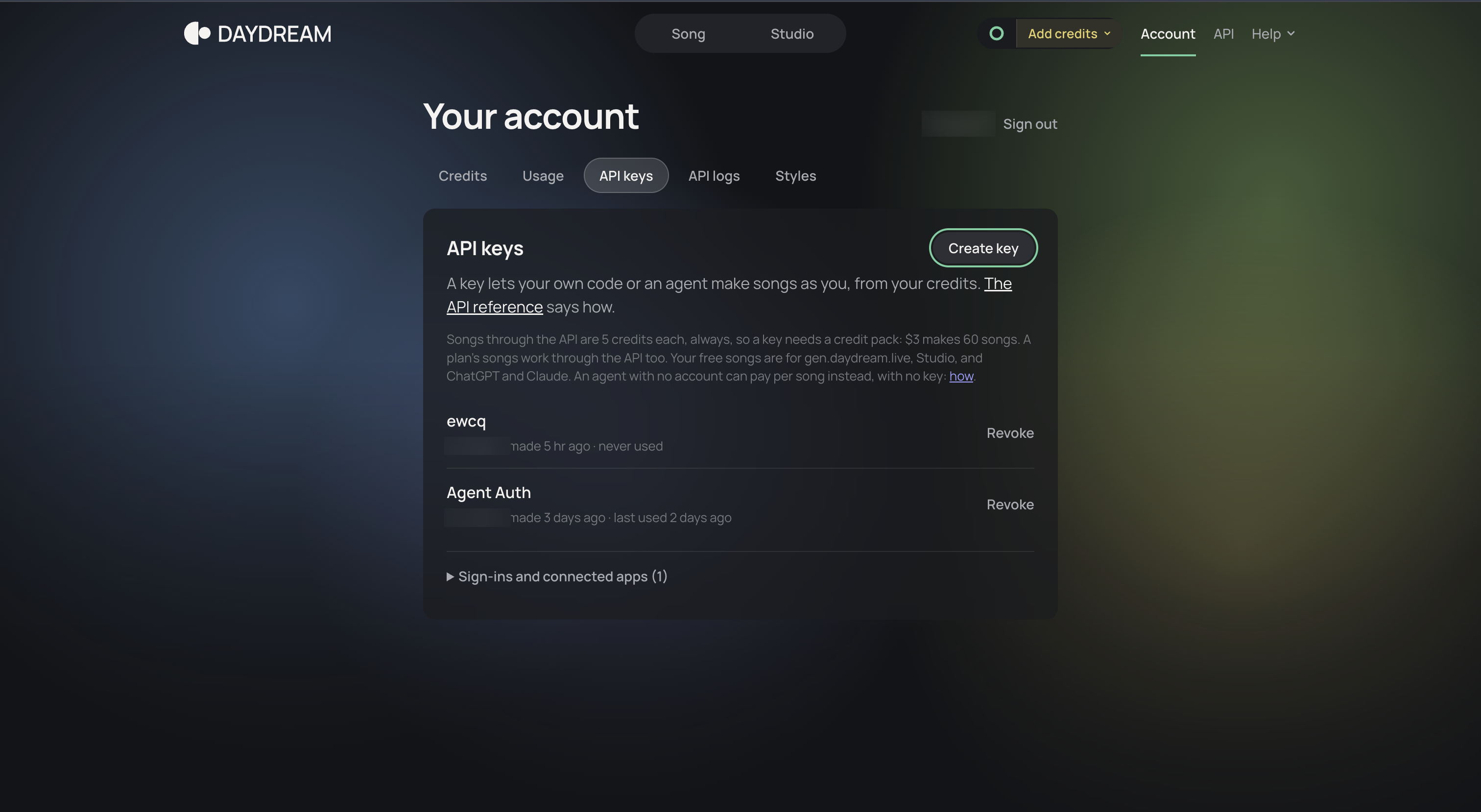
Sign in to your Daydream account and open the API keys tab.
-
Click Create an API key, enter a Name such as
Scalekit, and click Create key.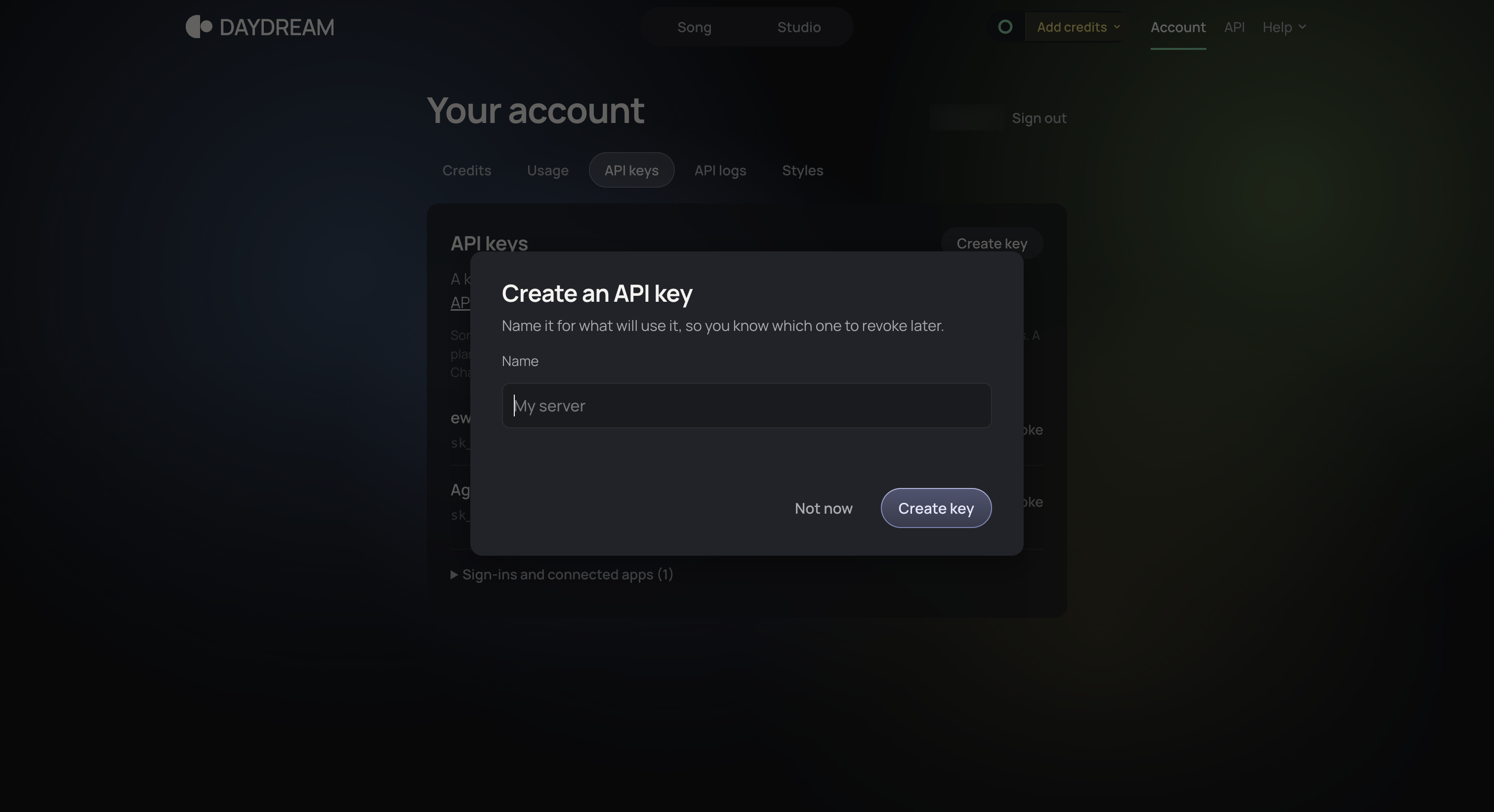
-
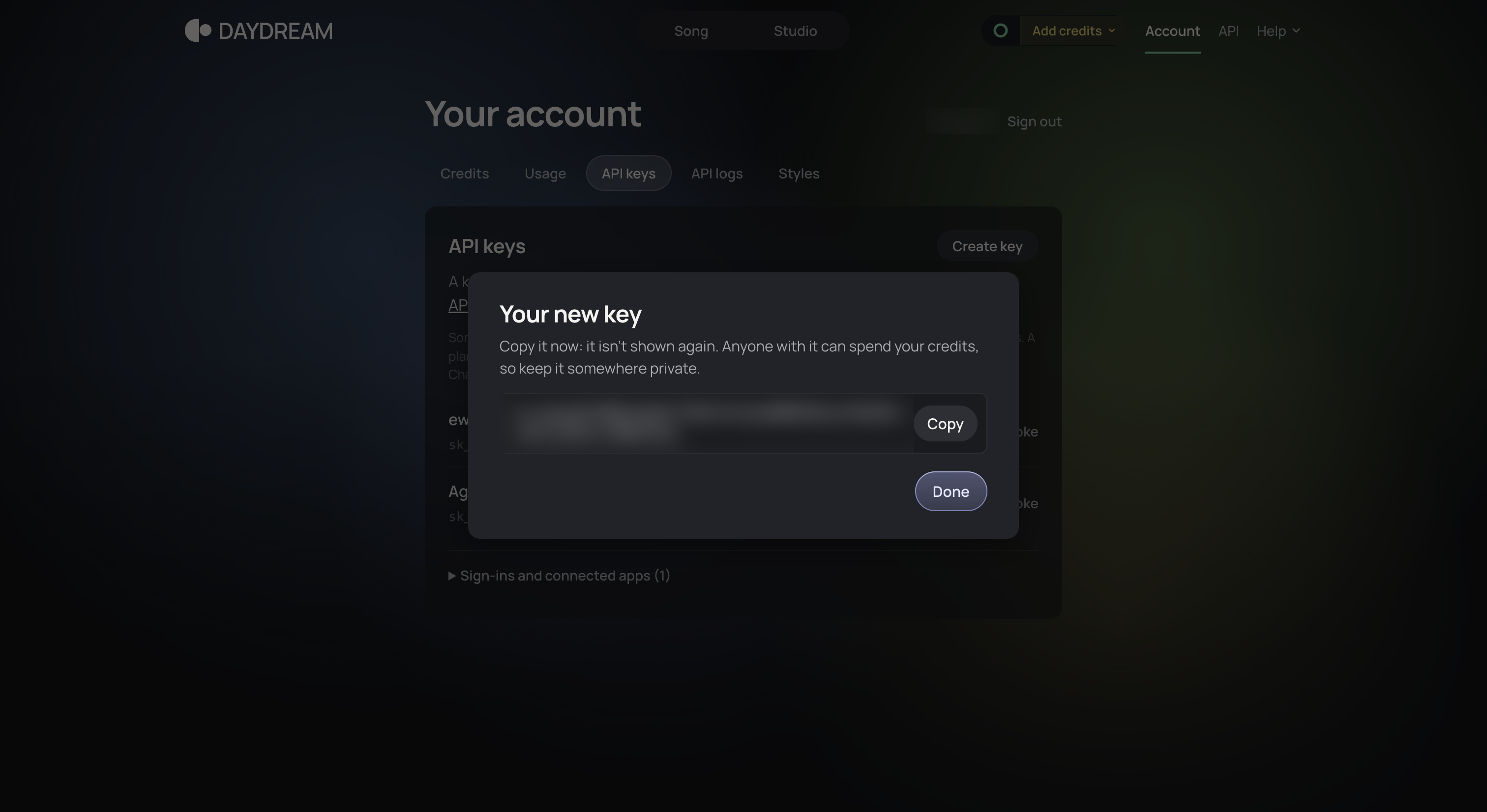
Copy the key from the Your new key dialog.
-
-
Create a connection in Scalekit
- In the Scalekit dashboard, go to AgentKit > Connections > Create Connection.
- Search for Daydream and click Create.
- Note the Connection name. Use it as
connection_namein your code (for example,daydream).
-
Add a connected account
- Open the connection, click Connected Accounts > Add account.
- Enter Your User’s ID and the API Key, then click Save.
To add the account from your backend:
await scalekit.actions.upsertConnectedAccount({connectionName: 'daydream',identifier: 'user_123',credentials: { token: 'YOUR_DAYDREAM_KEY' },});scalekit_client.actions.upsert_connected_account(connection_name="daydream",identifier="user_123",credentials={"token": "YOUR_DAYDREAM_KEY"},)
-
Authorize a user and make your first call
quickstart.mts import { ScalekitClient } from '@scalekit-sdk/node'import 'dotenv/config'import { createInterface } from 'node:readline/promises'const scalekit = new ScalekitClient(process.env.SCALEKIT_ENVIRONMENT_URL,process.env.SCALEKIT_CLIENT_ID,process.env.SCALEKIT_CLIENT_SECRET,)const actions = scalekit.actionsconst connector = 'daydream'const identifier = 'user_123'// Generate an authorization link for the userconst { link } = await actions.getAuthorizationLink({ connectionName: connector, identifier })console.log('Authorize Daydream:', link)const rl = createInterface({ input: process.stdin, output: process.stdout })await rl.question('Press Enter after authorizing...')rl.close()// Make your first callconst result = await actions.executeTool({connector,identifier,toolName: 'daydream_get_usage',toolInput: {},})console.log(result)Terminal window npx tsx quickstart.mtsquickstart.py import osfrom scalekit import ScalekitClientfrom dotenv import load_dotenvload_dotenv()scalekit_client = ScalekitClient(env_url=os.getenv("SCALEKIT_ENVIRONMENT_URL"),client_id=os.getenv("SCALEKIT_CLIENT_ID"),client_secret=os.getenv("SCALEKIT_CLIENT_SECRET"),)actions = scalekit_client.actionsconnection_name = "daydream"identifier = "user_123"# Generate an authorization link for the userlink_response = actions.get_authorization_link(connection_name=connection_name,identifier=identifier,)print("Authorize Daydream:", link_response.link)input("Press Enter after authorizing...")# Make your first callresult = actions.execute_tool(tool_input={},tool_name="daydream_get_usage",connection_name=connection_name,identifier=identifier,)print(result)Terminal window python quickstart.pyEach user opens the link once and enters their Daydream credentials there. If your app already has a user's credentials, add the account from your backend instead, as the console steps above show. See Authorize a user for the full flow and statuses.
Tools
Pass the exact name toexecute_tooldaydream_get_songGet one song: its status (queued, rendering, done or failed), its place in line while queued, its settings, and when done its versions in takes.Read-onlyGet Song
Get one song: its status (queued, rendering, done or failed), its place in line while queued, its settings, and when done its versions in takes. Each take has an MP3 link, a WAV link and, for songs with stems, five FLAC stems (drums, bass, guitar, keys, other) once stems_ready is true; stems appear a few seconds after the song is done, so poll again if they are missing. A sound effect (kind sfx) has an MP3 and a WAV per version and no stems. The file links need no authorization. Use it to poll a song made with daydream_create_song, every 2 seconds, until status is done or failed. Fails with 404 when the id is not a song on this account.
Inputs
idstringrequired- The song's id, returned by daydream_create_song or daydream_list_songs. Example: sng_4hT2kq9XbV1nLm0pQe3rZa
daydream_get_song_mp3Check that one version's MP3 (192 kbps, stereo, 48 kHz) exists, with GET /v1/songs/{id}/{n}.mp3.Read-onlyGet Song MP3
Check that one version's MP3 (192 kbps, stereo, 48 kHz) exists, with GET /v1/songs/{id}/{n}.mp3. The song must be done. On success Daydream answers with a redirect to the file and this tool returns an empty result, so it confirms that the file exists; it does not return the file or its link. Fails with 404 when there is no such file. To download the file, use takes[n].mp3_url from daydream_get_song.
Inputs
idstringrequired- The song's id, returned by daydream_create_song or daydream_list_songs. Example: sng_4hT2kq9XbV1nLm0pQe3rZa
nintegerrequired- Which version of the song: 1 or 2 (2 exists only when the song was made with variations: 2). Example: 1one of
12
daydream_get_song_partCheck that one segment of a version's mix exists as an MP3, with GET /v1/songs/{id}/{n}.part{k}.mp3, to play a song as it comes while it is still rendering.Read-onlyGet Song Part
Check that one segment of a version's mix exists as an MP3, with GET /v1/songs/{id}/{n}.part{k}.mp3, to play a song as it comes while it is still rendering. The segments that are up are listed in the song's parts (each with n, k, count, seconds, ready and mp3_url); parts is empty once the song is done, and the files to keep are then in takes. On success Daydream answers with a redirect to the file and this tool returns an empty result, so it confirms that the file exists; it does not return the file or its link. Fails with 404 when there is no such segment. To download the file, use parts[].mp3_url from daydream_get_song.
Inputs
idstringrequired- The song's id, returned by daydream_create_song or daydream_list_songs. Example: sng_4hT2kq9XbV1nLm0pQe3rZa
kintegerrequired- The segment, counting from 1. The song's parts says how many segments the version has (count) and which are ready. Example: 1
nintegerrequired- Which version of the song: 1 or 2 (2 exists only when the song was made with variations: 2). Example: 1one of
12
daydream_get_song_wavCheck that one version's WAV (16-bit, stereo, 48 kHz) exists, with GET /v1/songs/{id}/{n}.wav.Read-onlyGet Song WAV
Check that one version's WAV (16-bit, stereo, 48 kHz) exists, with GET /v1/songs/{id}/{n}.wav. The song must be done. On success Daydream answers with a redirect to the file and this tool returns an empty result, so it confirms that the file exists; it does not return the file or its link. Fails with 404 when there is no such file. To download the file, use takes[n].wav_url from daydream_get_song.
Inputs
idstringrequired- The song's id, returned by daydream_create_song or daydream_list_songs. Example: sng_4hT2kq9XbV1nLm0pQe3rZa
nintegerrequired- Which version of the song: 1 or 2 (2 exists only when the song was made with variations: 2). Example: 1one of
12
daydream_get_stem_flacCheck that one stem of one version (FLAC, lossless, 16-bit, stereo, 48 kHz) exists, with GET /v1/songs/{id}/{n}/{stem}.flac.Read-onlyGet Stem FLAC
Check that one stem of one version (FLAC, lossless, 16-bit, stereo, 48 kHz) exists, with GET /v1/songs/{id}/{n}/{stem}.flac. Stems are drums, bass, guitar, keys and other, and they add up to the mix. The song must be done and its stems_ready true. On success Daydream answers with a redirect to the file and this tool returns an empty result, so it confirms that the file exists; it does not return the file or its link. Fails with 404 when there is no such file or the version has no stems. To download the file, use takes[n].stems.<stem> from daydream_get_song.
Inputs
idstringrequired- The song's id, returned by daydream_create_song or daydream_list_songs. Example: sng_4hT2kq9XbV1nLm0pQe3rZa
nintegerrequired- Which version of the song: 1 or 2 (2 exists only when the song was made with variations: 2). Example: 1one of
12 stemstringrequired- Which stem: drums, bass, guitar, keys or other. Example: drumsone of
drumsbassguitarkeysother
daydream_get_usageGet how many songs the account has used and has left this month: the plan, the monthly limit (null when unlimited), songs used, and when the count resets.Read-onlyGet Usage
Get how many songs the account has used and has left this month: the plan, the monthly limit (null when unlimited), songs used, and when the count resets. Songs made through the API are paid with credits, 5 per song.
Inputs
This tool takes no inputs.
daydream_list_songsList the account's songs, newest first, with the same fields as daydream_get_song.Read-onlyList Songs
List the account's songs, newest first, with the same fields as daydream_get_song. Returns songs and next_cursor; pass next_cursor as cursor to get the next page, and stop when next_cursor is null.
Inputs
cursorstring- The next_cursor value from the previous page. Leave out for the first page.
limitinteger- Songs per page, 1 to 100. Default 20. Example: 20
daydream_buy_packStart a purchase of a pack of 10 songs for 0.50 USD (POST /v1/packs).WriteBuy Pack
Start a purchase of a pack of 10 songs for 0.50 USD (POST /v1/packs). Daydream answers HTTP 402 payment_required with a payment challenge (WWW-Authenticate for MPP, PAYMENT-REQUIRED for x402; USDC on Tempo or Base, or a card through Link's agent wallet); the purchase completes only when the same request is sent again with that payment, and the answer is an access_token that makes 10 songs when sent as the Bearer key on POST /v1/songs. This tool sends the request without a payment, so it returns the 402 challenge and does not charge anything. To buy credits for the connected account, use the credit packs at https://labs.daydream.live/account/#credits instead.
Inputs
This tool takes no inputs.
daydream_create_songMake a royalty-free instrumental song from a text description.WriteCreate Song
Make a royalty-free instrumental song from a text description. Returns the song at once with status queued; it is not ready yet. Call daydream_get_song every 2 seconds with the returned id until status is done or failed, then use takes[n].mp3_url and wav_url (and the stems, when stems_ready is true). Costs 5 credits per song through the API (given back if the song fails); one song is made with 1 or 2 versions. A description with no music in it (rain, footsteps, a crowd) makes a sound effect instead: kind is sfx, one stereo take up to 30 seconds, MP3 and WAV only, no stems, same cost as a song. Words asking for vocals or lyrics are dropped and artist names are removed from the prompt (the answer then has artist_names_removed: true). Fails with 402 when the account has no credits, and with 429 when more than 3 of your songs are already in line.
Inputs
promptstringrequired- What the song is, in words, 1 to 400 characters. Instrumental only. Example: warm lo-fi hip hop beat with soft piano, for a study video
bpminteger- Tempo in beats per minute, 60 to 200. Default is the genre's usual tempo, else 100. A tempo the prompt names is used instead. Example: 90
durationnumber- Length in seconds, from 2 to 120. Default 120. From 10 seconds the song is trimmed to whole bars with a short fade out (no fade when loop is true); under 10 seconds it is exactly as long as asked. A length the prompt names is used instead. Example: 30
keystring- Musical key, one of the 24 major and minor keys. Default none. A key the prompt names is used instead. Example: A minor
loopboolean- Set to true to make a seamless loop: as many whole bars as come nearest duration, with no fade. A prompt that asks for a loop makes one too. Default false. Example: true
seedinteger- Random seed, 0 to 2147483647, to repeat a result. Default random. Version n uses seed + n - 1. Example: 42
variationsinteger- How many versions to make, 1 or 2. Either way it counts as one song. Default 1. Example: 2one of
12
daydream_redo_stemMake one stem of a finished song again, or undo the last redo.WriteRedo Stem
Make one stem of a finished song again, or undo the last redo. With action redo, the chosen stem is made again with the other four exactly as they are; it counts as one song (5 credits) and returns 202 with the song, where the version's redo.making names the stem. Poll daydream_get_song until redo.making is gone (about a minute); the version then plays the new stem and the mix made with it. With action undo, the version goes back to how it was before its last redo, free; only the last redo can be undone and it returns 200 with the song. Fails with 402 when the account is out of credits, 404 when the song is not on this account, and 409 for no_stems (the version has none), redoing (one is being made, wait for it) or nothing to undo.
Inputs
actionstringrequired- redo to make the stem again (costs one song), or undo to put the version back as it was before its last redo (free). Example: redoone of
redoundo idstringrequired- The song's id, returned by daydream_create_song or daydream_list_songs. Example: sng_4hT2kq9XbV1nLm0pQe3rZa
nintegerrequired- Which version of the song: 1 or 2 (2 exists only when the song was made with variations: 2). Example: 1one of
12 stemstringrequired- Which stem: drums, bass, guitar, keys or other. Example: drumsone of
drumsbassguitarkeysother
daydream_rename_songName a song with PATCH /v1/songs/{id}.WriteRename Song
Name a song with PATCH /v1/songs/{id}. The name is shown in place of the prompt on the song's page and names its downloads. Returns the song with its title. The title must be 1 to 80 characters; this tool cannot take a name off again, because Daydream only clears a name with a JSON null. Fails with 400 when the title is empty or longer than 80 characters and with 404 when the id is not a song on this account.
- Idempotent
Inputs
idstringrequired- The song's id, returned by daydream_create_song or daydream_list_songs. Example: sng_4hT2kq9XbV1nLm0pQe3rZa
titlestringrequired- The song's new name, 1 to 80 characters; it is shown in place of the prompt on the song's page and names its downloads. Example: Night drive
daydream_delete_songDelete a finished or failed song for good with DELETE /v1/songs/{id}: both its versions, their files, their stems and the song's share page; its links answer 404 afterwards.DestructiveDelete Song
Delete a finished or failed song for good with DELETE /v1/songs/{id}: both its versions, their files, their stems and the song's share page; its links answer 404 afterwards. Returns an empty result on success (204). Deleting a song does not give back the month's songs or the credits it cost. Fails with 409 when the song is still queued or being made (delete it once it is done) and with 404 when the id is not a song on this account.
Inputs
idstringrequired- The song's id, returned by daydream_create_song or daydream_list_songs. Example: sng_4hT2kq9XbV1nLm0pQe3rZa
No tools match.


