
The Gong connector lets your AI agent act in each user's Gong account. Each user signs in to Gong once, and Scalekit stores and refreshes their tokens, so your agent never handles credentials. It comes with 69 tools.
- Tools
- 69
- What they doRead · write · destructive
- 39 · 24 · 639 read24 write6 destructive
- Users sign in with
- OAuth
- OAuth app
- Scalekit's or your own
Setup
Install the SDK
Terminal window npm install @scalekit-sdk/node dotenvTerminal window pip install scalekit-sdk-python python-dotenvSet your credentials
Add your Scalekit credentials to your
.envfile. Find values in app.scalekit.com > Developers > API Credentials..env SCALEKIT_ENVIRONMENT_URL=<your-environment-url>SCALEKIT_CLIENT_ID=<your-client-id>SCALEKIT_CLIENT_SECRET=<your-client-secret>Create the Gong connection
In AgentKit > Connections, create a Gong connection. The name you give it is the
connection_nameyour code passes. See Configure connections.Scalekit credentials are available for Gong, so you don't need to register an OAuth app. To show your own app on the consent screen, use your own credentials instead.
Use your own OAuth app
Register your Scalekit environment with the Gong connector so Scalekit handles the authentication flow and token lifecycle for you. The connection name you create will be used to identify and invoke the connection programmatically. You’ll need your app credentials from the Gong Developer Portal.
-
Set up auth redirects
-
In Scalekit dashboard, go to AgentKit > Connections > Create Connection.
-
Find Gong from the list of providers and click Create.
-
Click Use your own credentials and copy the redirect URI. It looks like
https://<SCALEKIT_ENVIRONMENT_URL>/sso/v1/oauth/<CONNECTION_ID>/callback.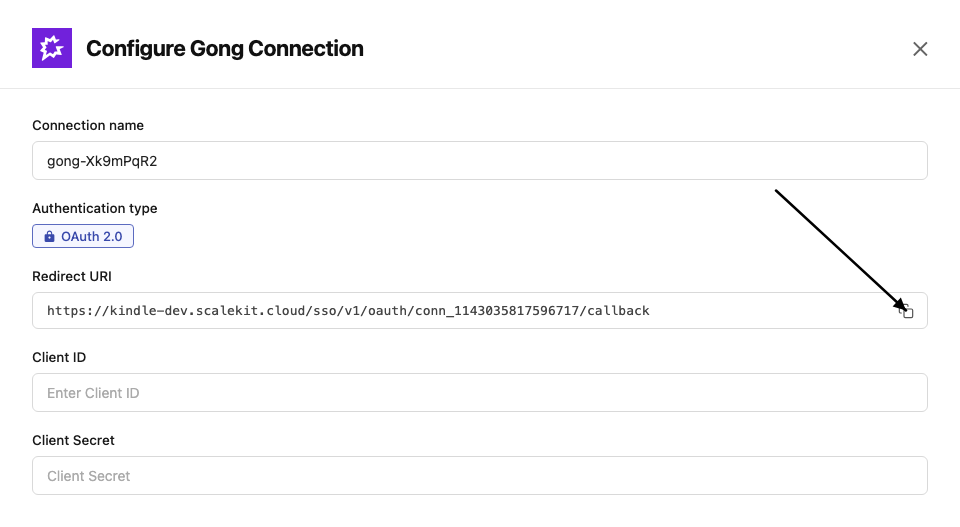
-
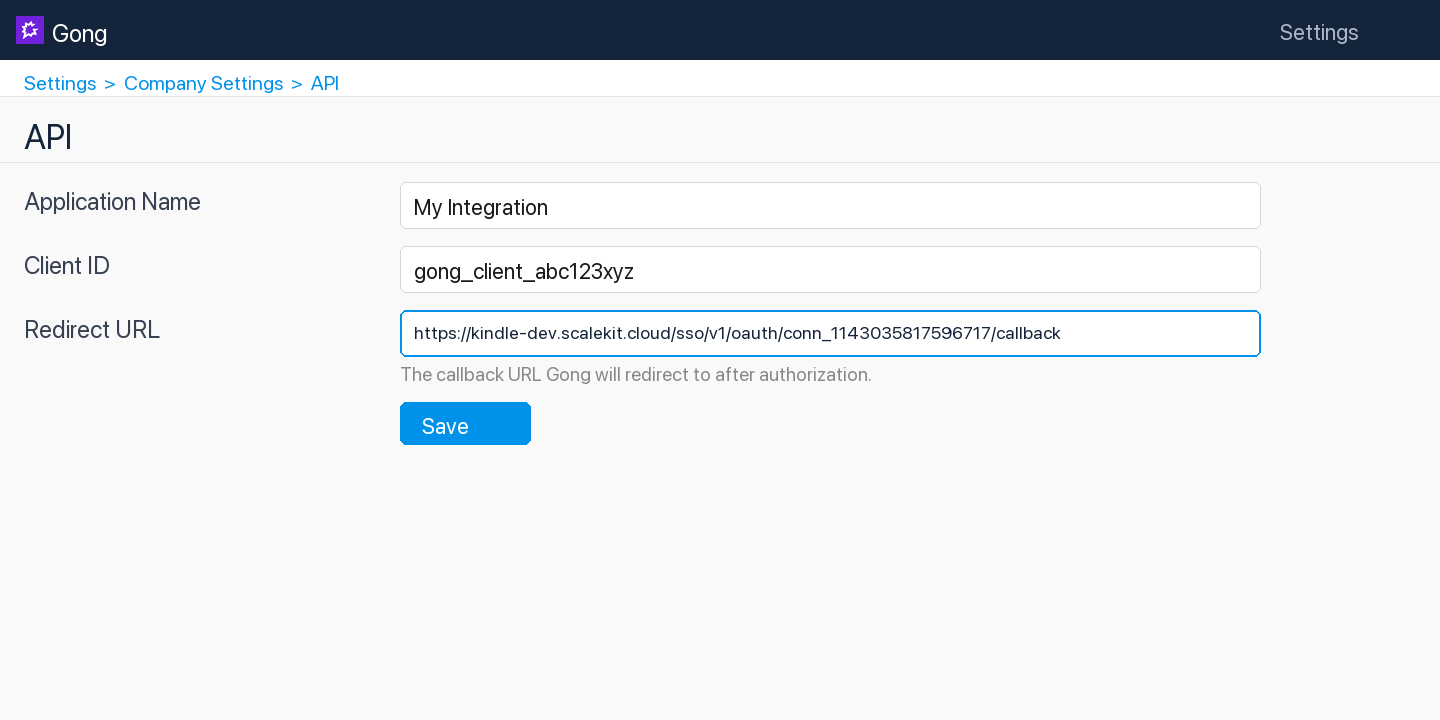
In the Gong Developer Portal, open your app.
-
Paste the copied URI into the Redirect URL field and click Save.
-
-
Get client credentials
- In the Gong Developer Portal, open your app:
- Client ID — listed under Client ID
- Client Secret — listed under Client Secret
- In the Gong Developer Portal, open your app:
-
Add credentials in Scalekit
-
In Scalekit dashboard, go to AgentKit > Connections and open the connection you created.
-
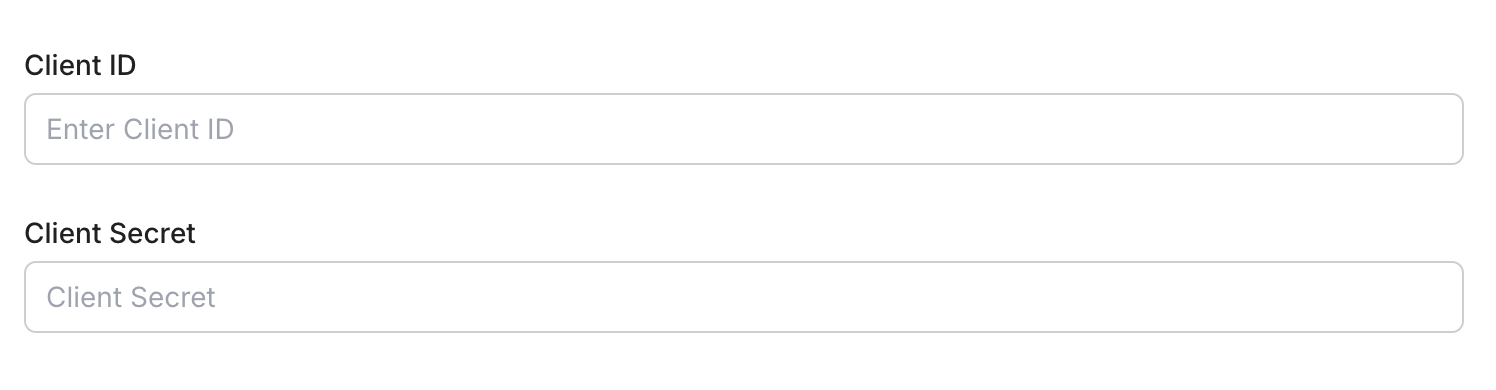
Enter your credentials:
- Client ID (from your Gong app)
- Client Secret (from your Gong app)
- Permissions — select the scopes your app needs
-
Click Save.
-
-
Authorize a user and make your first call
quickstart.mts import { ScalekitClient } from '@scalekit-sdk/node'import 'dotenv/config'import { createInterface } from 'node:readline/promises'const scalekit = new ScalekitClient(process.env.SCALEKIT_ENVIRONMENT_URL,process.env.SCALEKIT_CLIENT_ID,process.env.SCALEKIT_CLIENT_SECRET,)const actions = scalekit.actionsconst connector = 'gong'const identifier = 'user_123'// Generate an authorization link for the userconst { link } = await actions.getAuthorizationLink({ connectionName: connector, identifier })console.log('Authorize Gong:', link)const rl = createInterface({ input: process.stdin, output: process.stdout })await rl.question('Press Enter after authorizing...')rl.close()// Make your first callconst result = await actions.executeTool({connector,identifier,toolName: 'gong_call_outcomes_list',toolInput: {},})console.log(result)Terminal window npx tsx quickstart.mtsquickstart.py import osfrom scalekit import ScalekitClientfrom dotenv import load_dotenvload_dotenv()scalekit_client = ScalekitClient(env_url=os.getenv("SCALEKIT_ENVIRONMENT_URL"),client_id=os.getenv("SCALEKIT_CLIENT_ID"),client_secret=os.getenv("SCALEKIT_CLIENT_SECRET"),)actions = scalekit_client.actionsconnection_name = "gong"identifier = "user_123"# Generate an authorization link for the userlink_response = actions.get_authorization_link(connection_name=connection_name,identifier=identifier,)print("Authorize Gong:", link_response.link)input("Press Enter after authorizing...")# Make your first callresult = actions.execute_tool(tool_input={},tool_name="gong_call_outcomes_list",connection_name=connection_name,identifier=identifier,)print(result)Terminal window python quickstart.pyEach user signs in once. See Authorize a user for the full flow and statuses.
Tools
Pass the exact name toexecute_toolgong_call_getRetrieve basic data for a single Gong call by its ID: title, timing, direction, parties, and system/media info.Read-onlyGet Call
Retrieve basic data for a single Gong call by its ID: title, timing, direction, parties, and system/media info. For richer data (trackers, topics, CRM associations, interaction stats) with filtering across many calls at once, use Get Calls (Extensive) instead.
Inputs
idstringrequired- Gong's unique numeric identifier for the call (up to 20 digits).
gong_call_outcomes_listList all call outcome options configured in the Gong account.Read-onlyList Call Outcomes
List all call outcome options configured in the Gong account. Returns outcome definitions such as name and ID that can be applied to calls to indicate the result of a conversation.
Inputs
This tool takes no inputs.
gong_call_users_access_getRetrieve the users who have been given individual access to specific calls through the Gong API (via Add Call Users Access).Read-onlyGet Call Users Access
Retrieve the users who have been given individual access to specific calls through the Gong API (via Add Call Users Access). Does not report access granted through other means such as sharing, permission profiles, or team membership. Note: Gong implements this as a POST with a filter body even though it is a read-only lookup.
Inputs
call_idsarrayrequired- Array of Gong's unique numeric call IDs to look up access for.
gong_calls_ai_content_getRetrieve Gong's AI-generated content for one or more calls, such as the call brief, key points, highlights, and outline.Read-onlyGet Call AI Content
Retrieve Gong's AI-generated content for one or more calls, such as the call brief, key points, highlights, and outline. This is a separate, more focused endpoint than Get Calls (Extensive) for callers that only need the AI-generated summary content rather than full call metadata, parties, and interaction stats.
Inputs
call_idsarrayrequired- Array of Gong call IDs to retrieve AI-generated content for.
content_selectorarray- Which AI-generated content types to include. Valid values: brief, outline, highlights, keyPoints, callSummary. Leave empty to return all available types.
cursorstring- Cursor value from a previous API response for paginating to the next page of results.
gong_calls_getRetrieve extensive details for one or more Gong calls by their IDs.Read-onlyGet Calls (Extensive)
Retrieve extensive details for one or more Gong calls by their IDs. Returns enriched call data including participants, interaction stats, topics discussed, and CRM associations.
Inputs
call_idsarrayrequired- Array of Gong call IDs to retrieve extensive details for.
cursorstring- Cursor value from a previous API response for paginating to the next page of results.
from_date_timestring- Start of the date-time range to filter calls (ISO 8601 format).
include_mediaboolean- Set to true to include signed audio and video recording URLs (media.audioUrl and media.videoUrl) for each call. The URLs expire after 8 hours. Gong returns recording URLs only through this endpoint, and the connected credentials need the api:calls:read:media-url scope. Defaults to false.default
false to_date_timestring- End of the date-time range to filter calls (ISO 8601 format).
workspace_idstring- Optional workspace ID to restrict the results to a specific Gong workspace.
gong_calls_listList Gong calls with optional filters for date range, workspace, and specific call IDs.Read-onlyList Calls
List Gong calls with optional filters for date range, workspace, and specific call IDs. Returns a page of calls with metadata such as title, duration, participants, and direction.
Inputs
call_idsstring- Comma-separated list of specific call IDs to retrieve.
cursorstring- Cursor value from a previous API response for paginating to the next page of results.
from_date_timestring- Start of the date-time range for filtering calls (ISO 8601 format, e.g., 2024-01-01T00:00:00Z).
to_date_timestring- End of the date-time range for filtering calls (ISO 8601 format, e.g., 2024-12-31T23:59:59Z).
workspace_idstring- Optional workspace ID to restrict results to a specific Gong workspace.
gong_calls_transcript_getRetrieve transcripts for one or more Gong calls by their IDs.Read-onlyGet Call Transcripts
Retrieve transcripts for one or more Gong calls by their IDs. Returns speaker-attributed, sentence-level transcript segments with timing offsets for each call.
Inputs
call_idsarrayrequired- Array of Gong call IDs whose transcripts to retrieve.
cursorstring- Cursor value from a previous API response for paginating to the next page of results.
from_date_timestring- Start of the date-time range to filter calls (ISO 8601 format).
to_date_timestring- End of the date-time range to filter calls (ISO 8601 format).
workspace_idstring- Optional workspace ID to restrict the results to a specific Gong workspace.
gong_coaching_getGet coaching data from Gong, including coaching sessions and feedback provided by managers to their team members.Read-onlyGet Coaching Data
Get coaching data from Gong, including coaching sessions and feedback provided by managers to their team members. Supports cursor-based pagination for large result sets.
Inputs
cursorstring- Cursor value from a previous response for paginating to the next page of results.
gong_crm_integrations_listRetrieve the Generic CRM integration currently registered with Gong (via Register CRM Integration).Read-onlyList CRM Integrations
Retrieve the Generic CRM integration currently registered with Gong (via Register CRM Integration). Gong supports only one active Generic CRM integration at a time; this returns its integrationId and details, or an empty result if none is registered.
Inputs
This tool takes no inputs.
gong_crm_objects_listFetch specific CRM objects (accounts, contacts, deals, or leads) that were uploaded to Gong's Generic CRM integration, by their CRM IDs.Read-onlyList CRM Objects
Fetch specific CRM objects (accounts, contacts, deals, or leads) that were uploaded to Gong's Generic CRM integration, by their CRM IDs. Intended for development-phase verification that objects were uploaded and processed correctly in Gong — returns a map keyed by CRM ID, with null for any ID not found. Limited to 100 object IDs per request. Note: this call sends the requested object IDs as a JSON array in the request body even though the HTTP method is GET, matching Gong's documented API contract for this endpoint.
Inputs
integration_idintegerrequired- The integrationId generated when the CRM integration was registered (see List CRM Integrations).
object_idsarrayrequired- Array of CRM object IDs to fetch, up to 100 per request.
object_typestringrequired- The type of CRM object to retrieve.one of
ACCOUNTCONTACTDEALLEAD
gong_crm_request_status_getCheck the status of an asynchronous CRM request, such as a CRM integration deletion or a CRM object upload.Read-onlyGet CRM Request Status
Check the status of an asynchronous CRM request, such as a CRM integration deletion or a CRM object upload. Returns the status (PENDING, IN_PROGRESS, DONE or FAILED), up to 20 errors with line numbers, and the total success and error counts. Use this after gong_crm_integration_delete with the client request id you sent; gong_crm_objects_list verifies individual uploaded CRM objects. Requires the integration id from gong_crm_integrations_list and the client request id used in the original request. Required scope: api:crm:upload.
Inputs
client_request_idstringrequired- The client request ID used in the asynchronous endpoint you want to get a status for.
integration_idintegerrequired- Integration ID generated when creating the integration. Find it with gong_crm_integrations_list.
gong_crm_schema_fields_listRetrieve the object schema fields (name, label, type, picklist values) configured for a CRM object type in Gong's Generic CRM integration.Read-onlyList CRM Schema Fields
Retrieve the object schema fields (name, label, type, picklist values) configured for a CRM object type in Gong's Generic CRM integration. Use this to see what fields were registered via Upload Object Schema before uploading or reading CRM object data.
Inputs
integration_idintegerrequired- The integrationId generated when the CRM integration was registered (see List CRM Integrations).
object_typestringrequired- The CRM object type to retrieve schema fields for (case-sensitive).one of
ACCOUNTCONTACTDEALLEAD
gong_data_privacy_email_lookupShow the elements in the Gong system that reference a given email address: calls and email messages that mention it, and any leads or contacts with that email address.Read-onlyLook Up Data for Email Address
Show the elements in the Gong system that reference a given email address: calls and email messages that mention it, and any leads or contacts with that email address. Use this before Erase Data for Email Address to see what would be deleted.
Inputs
email_addressstringrequired- The email address to search for across calls, email messages, leads, and contacts.
gong_data_privacy_phone_lookupShow everything in Gong that references a phone number: leads and contacts with that number and their calls, meetings and email messages.Read-onlyLook Up Data for Phone Number
Show everything in Gong that references a phone number: leads and contacts with that number and their calls, meetings and email messages. Returns the related emails, calls, meetings and customer data (CRM objects), the supplied number, the matching phone numbers and the related email addresses. Use this before gong_data_privacy_phone_erase to preview what would be deleted, or gong_data_privacy_email_lookup to search by email address instead. The phone number must be a + sign followed by digits only, for example +14255552671. Required scope: api:data-privacy:read.
Inputs
phone_numberstringrequired- The phone number to look up: a + sign followed by the country code, area code and local number. Use the international format with digits only after the + (no spaces or punctuation), for example +14255552671.
gong_engage_flow_folders_listList all Gong Engage flow folders available to a user, including company folders, personal folders, and folders shared with the specified user.Read-onlyList Flow Folders
List all Gong Engage flow folders available to a user, including company folders, personal folders, and folders shared with the specified user.
Inputs
flow_owner_emailstringrequired- Email address of the Gong user whose flow folders to retrieve. Returns company folders plus personal and shared folders for this user.
cursorstring- Cursor value from a previous API response for paginating to the next page of results.
workspace_idstring- Optional workspace ID to filter flow folders by a specific workspace.
gong_engage_flows_listList all Gong Engage flows available to a user, including company flows, personal flows, and flows shared with the specified user.Read-onlyList Engage Flows
List all Gong Engage flows available to a user, including company flows, personal flows, and flows shared with the specified user.
Inputs
flow_owner_emailstringrequired- Email address of the Gong user whose flows to retrieve. Returns company flows plus personal and shared flows for this user.
cursorstring- Cursor value from a previous API response for paginating to the next page of results.
workspace_idstring- Optional workspace ID to filter flows by a specific workspace.
gong_engage_prospects_bulk_assign_statusRetrieve the status and result of a previously submitted bulk prospect-to-flow assignment operation using its assignment ID.Read-onlyGet Bulk Assignment Status
Retrieve the status and result of a previously submitted bulk prospect-to-flow assignment operation using its assignment ID.
Inputs
assignment_idstringrequired- The unique ID of the bulk assignment operation to check, returned from the Bulk Assign Prospects to Flow request.
gong_engage_tasks_listList Gong Engage tasks for a specified user, such as call tasks, email tasks, LinkedIn tasks, and other follow-up actions.Read-onlyList Engage Tasks
List Gong Engage tasks for a specified user, such as call tasks, email tasks, LinkedIn tasks, and other follow-up actions.
Inputs
assignee_emailstringrequired- Email address of the Gong user whose tasks to retrieve.
cursorstring- Cursor value from a previous response for paginating to the next page of results.
from_datestring- Start date for filtering tasks (ISO 8601 format, e.g., 2024-01-01T00:00:00Z).
to_datestring- End date for filtering tasks (ISO 8601 format, e.g., 2024-12-31T23:59:59Z).
workspace_idstring- Optional workspace ID to filter tasks by a specific workspace.
gong_engage_users_listList all active Gong users in the organization, useful for finding user emails to use as flow owners or assignees in Gong Engage.Read-onlyList Users
List all active Gong users in the organization, useful for finding user emails to use as flow owners or assignees in Gong Engage.
Inputs
cursorstring- Cursor value from a previous API response for paginating to the next page of results.
include_avatarsboolean- Whether to include avatar URLs in the response.
gong_engage_workspaces_listList all company workspaces in Gong, which can be used to scope Gong Engage flows and tasks to specific business units or teams.Read-onlyList Workspaces
List all company workspaces in Gong, which can be used to scope Gong Engage flows and tasks to specific business units or teams.
Inputs
This tool takes no inputs.
gong_library_folder_content_getGet the content of a specific Gong library folder by its folder ID.Read-onlyGet Library Folder Content
Get the content of a specific Gong library folder by its folder ID. Returns calls, clips, and other media items stored inside the folder.
Inputs
folder_idstringrequired- The unique identifier of the library folder whose content should be retrieved.
gong_library_folders_listList all library folders in the Gong account.Read-onlyList Library Folders
List all library folders in the Gong account. Returns folder names, IDs, and hierarchy information. Optionally filter by workspace to retrieve folders scoped to a specific business unit.
Inputs
workspace_idstring- Optional workspace ID to filter library folders belonging to a specific Gong workspace.
gong_logs_listRetrieve Gong audit/activity log entries within a time range, filtered by log type.Read-onlyList Logs
Retrieve Gong audit/activity log entries within a time range, filtered by log type. AccessLog records every endpoint/URL call with the user and IP; UserActivityLog records sensitive operations such as sharing a call, editing user settings, impersonating a user, deleting a call, requesting an API key, or changing permissions; UserCallPlay, ExternallySharedCallAccess, and ExternallySharedCallPlay track call playback and external sharing activity.
Inputs
from_date_timestringrequired- Start of the time range to retrieve logs for, in ISO-8601 format.
log_typestringrequired- The category of logs to retrieve.one of
AccessLogUserActivityLogUserCallPlayExternallySharedCallAccessExternallySharedCallPlay cursorstring- Cursor value from a previous response, used to fetch the next page of log records.
to_date_timestring- End of the time range to retrieve logs for, in ISO-8601 format. If omitted, logs end with the latest recorded entry.
gong_meetings_integration_statusCheck whether Gong's meeting recording integration is properly set up for a list of users, by email.Read-onlyValidate Meetings Integration Status
Check whether Gong's meeting recording integration is properly set up for a list of users, by email. Useful for diagnosing why Gong isn't joining or recording a given user's meetings.
Inputs
emailsarrayrequired- Array of user email addresses to check meeting-integration status for. Maximum 100 per request.
gong_permission_profile_getRetrieve one Gong permission profile by its id.Read-onlyGet Permission Profile
Retrieve one Gong permission profile by its id. Returns the profile (id, name, description, access levels for calls, deals, forecast, coaching, insights, usage and emails, and feature switches) with a request id. Use this to read a single profile; gong_permission_profiles_list finds profile ids for a workspace and gong_permission_profile_users_list lists the users a profile controls. Requires the profile id from gong_permission_profiles_list. Gong's API reference lists no OAuth scope for this endpoint.
Inputs
profile_idstringrequired- The Id of the permission profile to return. Find profile IDs with gong_permission_profiles_list.
gong_permission_profile_users_listList all users whose access is controlled by a given Gong permission profile.Read-onlyList Permission Profile Users
List all users whose access is controlled by a given Gong permission profile. Returns the users (id, full name, email address) with a request id. Use this to see who a profile applies to; gong_permission_profiles_list finds profile ids and gong_users_list lists all Gong users regardless of profile. Requires the profile id from gong_permission_profiles_list. Required scope: api:users:read.
Inputs
profile_idstringrequired- Permission profile identifier. Find profile IDs with gong_permission_profiles_list.
gong_permission_profiles_listList all permission profiles in a Gong workspace, in alphabetical order of profile name.Read-onlyList Permission Profiles
List all permission profiles in a Gong workspace, in alphabetical order of profile name. Returns every profile in the workspace (id, name, description, access levels and feature switches for each) with a request id. Use this to find profile ids; gong_permission_profile_get reads a single profile and gong_permission_profile_users_list lists the users a profile controls. Requires the workspace id from gong_engage_workspaces_list. Gong's API reference lists no OAuth scope for this endpoint.
Inputs
workspace_idstringrequired- Workspace identifier, the API will return only the profiles belonging to this workspace. You can retrieve the workspace using the "workspaces" (under "Settings") API. Find workspace IDs with gong_engage_workspaces_list.
gong_scorecards_listList all scorecard settings configured in the Gong account.Read-onlyList Scorecards
List all scorecard settings configured in the Gong account. Returns scorecard definitions including name, questions, and associated criteria used for call review and coaching.
Inputs
This tool takes no inputs.
gong_stats_activity_aggregateRetrieve aggregated activity statistics (calls, emails, meetings and similar counts) for one or more Gong users over a date range, with one summary record returned per user with any activity in the range.Read-onlyGet Aggregated User Activity
Retrieve aggregated activity statistics (calls, emails, meetings and similar counts) for one or more Gong users over a date range, with one summary record returned per user with any activity in the range.
Inputs
from_datestringrequired- Start date (inclusive) for the activity range, in the company's time zone. Format: YYYY-MM-DD.
to_datestringrequired- End date (exclusive) for the activity range, in the company's time zone. Must not exceed the current day. Format: YYYY-MM-DD.
cursorstring- Cursor value from a previous response for paginating to the next page of results.
user_idsarray- Gong user IDs to restrict the results to. Leave empty to include all users with activity in the range.
gong_stats_activity_aggregate_by_periodRetrieve aggregated activity statistics for one or more Gong users, grouped into calendar time periods (e.g.Read-onlyGet User Activity by Period
Retrieve aggregated activity statistics for one or more Gong users, grouped into calendar time periods (e.g. week by week) across a date range, instead of one single total per user. The first day of any week period is Monday.
Inputs
aggregation_periodstringrequired- The calendar period each activity total is grouped by. Commonly used values are DAY, WEEK, MONTH, and QUARTER; the first day of any week period is Monday.
from_datestringrequired- Start date (inclusive) for the activity range, in the company's time zone. Format: YYYY-MM-DD.
to_datestringrequired- End date (exclusive) for the activity range, in the company's time zone. Must not exceed the current day. Format: YYYY-MM-DD.
cursorstring- Cursor value from a previous response for paginating to the next page of results.
user_idsarray- Gong user IDs to restrict the results to. Leave empty to include all users with activity in the range.
gong_stats_activity_day_by_dayRetrieve day-by-day activity statistics for one or more Gong users across a date range, with one record per user per day that had activity.Read-onlyGet Daily User Activity
Retrieve day-by-day activity statistics for one or more Gong users across a date range, with one record per user per day that had activity. More granular than Get Aggregated User Activity, which returns a single total per user for the whole range.
Inputs
from_datestringrequired- Start date (inclusive) for the activity range, in the company's time zone. Format: YYYY-MM-DD.
to_datestringrequired- End date (exclusive) for the activity range, in the company's time zone. Must not exceed the current day. Format: YYYY-MM-DD.
cursorstring- Cursor value from a previous response for paginating to the next page of results.
user_idsarray- Gong user IDs to restrict the results to. Leave empty to include all users with activity in the range.
gong_stats_interactionGet aggregated interaction statistics for Gong calls within a date range.Read-onlyGet Interaction Statistics
Get aggregated interaction statistics for Gong calls within a date range. Returns metrics such as talk ratio, longest monologue, patience, question rate, and interactivity for each participant. Optionally filter by specific call IDs.
Inputs
from_date_timestringrequired- Start of the date range for retrieving interaction statistics (ISO 8601 format, e.g., 2024-01-01T00:00:00Z).
to_date_timestringrequired- End of the date range for retrieving interaction statistics (ISO 8601 format, e.g., 2024-12-31T23:59:59Z).
call_idsarray- Optional array of specific Gong call IDs to filter the statistics.
cursorstring- Cursor value from a previous response for paginating to the next page of results.
gong_stats_user_actionsGet user activity and scorecard statistics for Gong calls within a date range.Read-onlyGet User Activity Scorecards
Get user activity and scorecard statistics for Gong calls within a date range. Returns aggregated scorecard metrics and activity data per user. Optionally filter by specific user IDs.
Inputs
from_date_timestringrequired- Start of the date range for retrieving scorecard statistics (ISO 8601 format, e.g., 2024-01-01T00:00:00Z).
to_date_timestringrequired- End of the date range for retrieving scorecard statistics (ISO 8601 format, e.g., 2024-12-31T23:59:59Z).
cursorstring- Cursor value from a previous response for paginating to the next page of results.
user_idsarray- Optional array of Gong user IDs to filter scorecard statistics for specific users.
gong_tasks_listList the Gong Engage tasks owned by a user, filtered by task type (flow or manual), task action and status.Read-onlyList User Tasks
List the Gong Engage tasks owned by a user, filtered by task type (flow or manual), task action and status. Returns the tasks (id, owner, created and updated times, status, type, actions, due date, title and linked account, opportunity, flow and contacts) with a request id. Use this to find task ids; gong_task_update changes a task's status or due date, gong_engage_task_complete and gong_engage_task_skip finish or skip one, and gong_engage_tasks_list lists tasks by assignee email and date range. Requires the Gong user id of the task owner from gong_users_list. Required scope: api:tasks:read.
Inputs
statusarrayrequired- Only return tasks with one of these statuses (OPEN, DONE or DISMISSED). Each item is one of: OPEN, DONE, DISMISSED. Example: ["OPEN"].
task_actionarrayrequired- Task actions to include; the only documented action is CALL. Each item is one of: CALL. Example: ["CALL"].
typesarrayrequired- Defines whether to include tasks that were created as part of a flow, or were created as a one-off task. Each item is one of: FLOW, MANUAL. Example: ["FLOW"].
user_idstringrequired- The id of the Gong user who owns the task. Find user IDs with gong_users_list.
workspace_idstring- (Optional) The id of the workspace the tasks are in.
gong_trackers_listList all tracker (keyword tracker) settings configured in the Gong account.Read-onlyList Trackers
List all tracker (keyword tracker) settings configured in the Gong account. Returns tracker definitions including name, tracked phrases, and associated categories used for monitoring conversation topics.
Inputs
This tool takes no inputs.
gong_user_getRetrieve a single Gong user by their user ID.Read-onlyGet User
Retrieve a single Gong user by their user ID. For filtering many users at once by ID list or creation date range, use Get Users (Extensive) instead.
Inputs
idstringrequired- Gong's unique numeric identifier for the user (up to 20 digits).
gong_user_settings_history_getRetrieve the history of settings changes for a single Gong user, such as changes to their role, team, or permission profile over time.Read-onlyGet User Settings History
Retrieve the history of settings changes for a single Gong user, such as changes to their role, team, or permission profile over time. Useful for auditing account administration changes.
Inputs
idstringrequired- Gong's unique numeric identifier for the user (up to 20 digits).
gong_users_getGet detailed user information for specific Gong users using an extensive filter.Read-onlyGet Users (Extensive)
Get detailed user information for specific Gong users using an extensive filter. Filter by user IDs or by a creation date range. Returns full user profiles including settings, roles, and manager details.
Inputs
created_from_date_timestring- Return users created on or after this date-time (ISO 8601 format, e.g., 2024-01-01T00:00:00Z).
created_to_date_timestring- Return users created on or before this date-time (ISO 8601 format, e.g., 2024-12-31T23:59:59Z).
cursorstring- Cursor value from a previous response for paginating to the next page of results.
user_idsarray- Array of Gong user IDs to retrieve detailed information for.
gong_users_listList all users in the Gong account.Read-onlyList Users
List all users in the Gong account. Returns user profiles including name, email, title, and manager information. Supports cursor-based pagination and optionally includes avatar URLs.
Inputs
cursorstring- Cursor value from a previous response for paginating to the next page of results.
include_avatarsboolean- Whether to include avatar image URLs in the response.
gong_call_users_access_addGrant individual Gong users access to specific calls, beyond whatever access they already have via sharing, permission profiles, or team membership.WriteAdd Call Users Access
Grant individual Gong users access to specific calls, beyond whatever access they already have via sharing, permission profiles, or team membership. Accepts a batch of call-to-users mappings in a single request.
- Idempotent
Inputs
call_access_listarrayrequired- Array of objects, each specifying a call ID and the list of user IDs to grant access to that call. Each item shape: {"call_id": "...", "user_ids": ["..."]}.
gong_calls_createCreate (register) a new call in Gong.WriteCreate Call
Create (register) a new call in Gong. This adds a call record with metadata such as title, scheduled start time, participants, and direction. After creation, Gong returns a media upload URL that can be used to upload the call recording separately.
Inputs
actual_startstringrequired- The actual date and time the call started (ISO 8601 format, e.g., 2024-06-15T14:00:00Z).
call_provider_codestring- The telephony or conferencing system used (e.g., 'zoom', 'webex', 'ringcentral').
client_unique_idstring- A unique identifier for this call in your system, used to prevent duplicate uploads.
directionstring- Direction of the call: 'Inbound' or 'Outbound'.
dispositionstring- Outcome of the call (e.g., 'Connected', 'No Answer', 'Left Voicemail').
durationinteger- Duration of the call in seconds.
languagestring- Primary language spoken on the call as a BCP-47 language tag (e.g., 'en-US', 'es-ES').
partiesarray- Array of participant objects. Each participant should include emailAddress, name, speakerId, and userId fields.
purposestring- Purpose or topic of the call (e.g., 'Discovery', 'Demo', 'QBR').
scheduled_endstring- Scheduled end time for the call (ISO 8601 format).
scheduled_startstring- Scheduled start time for the call (ISO 8601 format).
titlestring- Title or subject of the call.
workspace_idstring- Workspace ID to associate this call with a specific Gong workspace.
gong_crm_integration_registerRegister a Generic CRM integration with Gong so that uploaded CRM data is associated correctly.WriteRegister CRM Integration
Register a Generic CRM integration with Gong so that uploaded CRM data is associated correctly. Returns the integration id to use in later CRM requests, with a request id. Use this once per company; Gong supports only one CRM integration, so call gong_crm_integration_delete first to replace an existing one and check gong_crm_integrations_list for what is already registered. Requires the integration name and the email address of the person responsible for it. Required scope: api:crm:integration:register.
Inputs
namestringrequired- The name of the integration.
owner_emailstringrequired- Email address of the person responsible for the integration.
gong_digital_interaction_createPost a digital interaction to Gong: an action a person performed on digital content, such as viewing a page or document, signing a contract or completing a course.WritePost Digital Interaction
Post a digital interaction to Gong: an action a person performed on digital content, such as viewing a page or document, signing a contract or completing a course. Returns a request id when Gong accepts the event. Use this for the /v2/digital-interaction endpoint, where the person is described in full or identified by a tracking id; gong_engage_digital_interactions_create posts to a different endpoint (/v2/digital-interactions) for Gong Engage prospects. Requires a unique event id, the event timestamp, the event type and the content title; send either person or tracking_id, never both, and give an anonymous person (no name, email or phone) a person_id and company.domain. Required scope: api:digital-interactions:write.
Inputs
contentobjectrequired- The content the person looked at. Provide an object with content_id, content_title, content_label, content_url, content_additional_info_url, numeric_content_details, step_content_details, search_object_details and content_custom_fields (required: content_title). Example: {"content_title": "Pricing Guide", "content_id": "234599484848423"}.
event_idstringrequired- The provider's unique identifier for the event used for deduplication.
event_typestringrequired- The type of the event, explaining the content and action performed. Values may be partner-aligned, for example, "link clicked", "page viewed".
timestampstringrequired- The date and time of the event in ISO 8601 format.
custom_fieldsarray- Include additional custom data about the event. Each value must match its data_type: a number for NUMBER, an ISO 8601 date for DATE, a URL for URL, seconds for DURATION. Provide a list of objects, each with name, value and data_type (required: name, value). Example: [{"name": "Version", "value": "2.0"}].
devicestring- The device used during the event. (one of: MOBILE, PC.)one of
MOBILEPC personobject- The person who did the event. Must be null if a tracking ID is sent instead. Send either person or tracking_id, never both. An anonymous person (no name, email, phone_number or person_business_context) must include person_id and company.domain. Provide an object with name, email, phone_number, person_id, person_business_context, location, company and person_custom_fields. Example: {"name": "Jane Doe", "email": "rep@company.com"}.
session_idstring- The identifier for the session, useful for tying related events together.
source_system_namestring- When integrating via IPaaS, the name of the technology partner the customer set up a Gong integration with via an IPaaS. When integrating directly with Gong: the name of the company setting up the integration with Gong.
tracking_idstring- The ID used for tracking the person who did the event. Must be null if a person is sent instead. Send either tracking_id or person, never both.
gong_engage_content_viewed_reportReport to Gong that an external participant viewed content (for example a prospect opened a contract) so it appears as an event in the activity timeline.WriteReport Content Viewed Event
Report to Gong that an external participant viewed content (for example a prospect opened a contract) so it appears as an event in the activity timeline. Returns a request id and an integration id. Use this for view events; gong_engage_content_shared_report reports a share, gong_engage_custom_action_report reports another action such as a signature, and gong_digital_interaction_create is the newer API that Gong recommends instead of this legacy endpoint. Requires the reporting system id, the event timestamp and the content id, URL and title; send either viewer or tracking_id, never both; Gong lists this endpoint family as a limited release (integration.requests@gong.io). Required scope: api:engagement-data:write.
Inputs
content_idstringrequired- The id of the content that was viewed in the reporting system.
content_titlestringrequired- Human readable title of the content.
content_urlstringrequired- The url of the content that was viewed in the reporting system. This is the url that is was accessed by the viewer.
event_timestampstringrequired- The date and time when the event happened in the ISO-8601 format (e.g., '2021-08-01T02:30:00+05:00' or '2021-08-01T08:00:00Z', where Z stands for UTC).
reporting_systemstringrequired- The unique identifier of the reporting system. It is the same value in all events originating from the same system.
action_namestring- The name of the action, like "Document Sent" or "Presentation Shared".
agent_platformstring- Platform on which the interaction was made. (one of: Windows, Linux, MacOS, iOS, Android.)one of
WindowsLinuxMacOSiOSAndroid content_propertiesarray- A list of additional properties for the content. Each value must match its data_type: a JSON-style number such as 3.14 for number, an ISO 8601 date for date, a URL for url. Provide a list of objects, each with name, value and data_type (all required). Example: [{"name": "document_type", "value": "contract", "data_type": "string"}].
crm_contextarray- A list of references to external systems such as CRM, Telephony System, Case Management, etc. Provide a list of objects, each with system and objects (required: system). Example: [{"system": "Salesforce", "objects": [{"object_type": "Opportunity", "object_id": "0013601230sV7grAAC"}]}].
event_idstring- The original id of the event as designated in the reporting system.
event_propertiesarray- A list of additional properties for the event. Each value must match its data_type: a JSON-style number such as 3.14 for number, an ISO 8601 date for date, a URL for url. Provide a list of objects, each with name, value and data_type (all required). Example: [{"name": "document_type", "value": "contract", "data_type": "string"}].
mobile_app_idstring- The application identification string in case of interaction via mobile application (bundle identifier or package name).
more_info_urlstring- URL of a page with more information about this event.
non_company_participantsarray- Participants from outside the company that are associated with the event. Provide a list of objects, each with email, name, title and context. Example: [{"email": "test@test.com", "name": "Test User"}].
share_idstring- The id of the share action that corresponds to this view event, in case there can be more than one share per content.
sharerobject- The Gong user who shared the content. Provide an object with id, email and name. Example: {"id": "234599484848423", "email": "test@test.com"}.
sharing_message_bodystring- The share message body. Can contain HTML and will be cleaned when it is presented.
sharing_message_subjectstring- The subject of the share email / message.
tracking_idstring- The ID used for tracking the person who did the event. Must be null if a viewer is sent instead. Send either tracking_id or viewer, never both.
user_agentstring- "User-Agent" header value for browser based interaction.
view_action_titlestring- The name of the action like "Document Viewed" or "Presentation Opened".
view_info_urlstring- The link to a page that presents additional information about this event.
viewerobject- The viewer. Send either viewer or tracking_id, never both. Provide an object with email, name, title and context. Example: {"email": "test@test.com", "name": "Test User"}.
workspace_idstring- Optional workspace identifier. If specified, the event will be placed into this workspace, otherwise, the default algorithm for workspace placement will be applied.
gong_engage_custom_action_reportReport to Gong that an external participant performed a custom action on content (for example a prospect signed a contract) so it appears as an event in the activity timeline.WriteReport Custom Action Event
Report to Gong that an external participant performed a custom action on content (for example a prospect signed a contract) so it appears as an event in the activity timeline. Returns a request id and an integration id. Use this for actions other than sharing or viewing; gong_engage_content_shared_report reports a share, gong_engage_content_viewed_report reports a view, and gong_digital_interaction_create is the newer API that Gong recommends instead of this legacy endpoint. Requires the reporting system id and the event timestamp; Gong lists this endpoint family as a limited release (integration.requests@gong.io). Required scope: api:engagement-data:write.
Inputs
event_timestampstringrequired- The date and time when the event happened in the ISO-8601 format (e.g., '2021-08-01T02:30:00+05:00' or '2021-08-01T08:00:00Z', where Z stands for UTC).
reporting_systemstringrequired- The unique identifier of the reporting system. It is the same value in all events originating from the same system.
action_namestring- The name of the action like "Document Viewed" or "Presentation Opened".
actorobject- The actor. Provide an object with email, name, title and context. Example: {"email": "test@test.com", "name": "Test User"}.
agent_platformstring- Platform on which the interaction was made. (one of: Windows, Linux, MacOS, iOS, Android.)one of
WindowsLinuxMacOSiOSAndroid content_idstring- The id of the content that was viewed in the reporting system.
content_propertiesarray- A list of additional properties for the content. Each value must match its data_type: a JSON-style number such as 3.14 for number, an ISO 8601 date for date, a URL for url. Provide a list of objects, each with name, value and data_type (all required). Example: [{"name": "document_type", "value": "contract", "data_type": "string"}].
content_titlestring- Human readable title of the content.
content_urlstring- The url of the content that was viewed in the reporting system. This is the url that is was accessed by the viewer.
crm_contextarray- A list of references to external systems such as CRM, Telephony System, Case Management, etc. Provide a list of objects, each with system and objects (required: system). Example: [{"system": "Salesforce", "objects": [{"object_type": "Opportunity", "object_id": "0013601230sV7grAAC"}]}].
event_idstring- The original id of the event as designated in the reporting system.
event_info_urlstring- The link to a page that presents additional information about this event.
event_propertiesarray- A list of additional properties for the event. Each value must match its data_type: a JSON-style number such as 3.14 for number, an ISO 8601 date for date, a URL for url. Provide a list of objects, each with name, value and data_type (all required). Example: [{"name": "document_type", "value": "contract", "data_type": "string"}].
mobile_app_idstring- The application identification string in case of interaction via mobile application (bundle identifier or package name).
more_info_urlstring- URL of a page with more information about this event.
non_company_participantsarray- Participants from outside the company that are associated with the event. Provide a list of objects, each with email, name, title and context. Example: [{"email": "test@test.com", "name": "Test User"}].
share_idstring- The share id.
sharerobject- The Gong user who shared the content. Provide an object with id, email and name. Example: {"id": "234599484848423", "email": "test@test.com"}.
sharing_message_bodystring- The share message body. Can contain HTML and will be cleaned when it is presented.
sharing_message_subjectstring- The subject of the share email / message.
tracking_idstring- ID used to track the person who performed the event.
user_agentstring- "User-Agent" header value for browser based interaction.
workspace_idstring- Optional workspace identifier. If specified, the event will be placed into this workspace, otherwise, the default algorithm for workspace placement will be applied.
gong_engage_digital_interactions_createAdd a digital interaction event (such as a web visit, content engagement, or other digital touchpoint) to a Gong Engage prospect's activity timeline.WriteAdd Digital Interaction
Add a digital interaction event (such as a web visit, content engagement, or other digital touchpoint) to a Gong Engage prospect's activity timeline.
Inputs
event_namestringrequired- Name of the digital interaction event (e.g., 'Visited Pricing Page', 'Downloaded Whitepaper').
event_timestampstringrequired- Timestamp when the digital interaction occurred (ISO 8601 format).
crm_account_idstring- The CRM account ID associated with this interaction.
crm_contact_idstring- The CRM contact ID associated with this interaction.
prospect_emailstring- Email address of the prospect who performed this digital interaction.
urlstring- URL associated with the digital interaction (e.g., the page visited or content accessed).
gong_engage_email_activity_reportReport email engagement events (opens, clicks, bounces, unsubscribes) to Gong Engage so they appear in the activity timeline for a prospect.WriteReport Email Engagement Activity
Report email engagement events (opens, clicks, bounces, unsubscribes) to Gong Engage so they appear in the activity timeline for a prospect.
Inputs
email_idstringrequired- External identifier for the email message that was engaged with.
event_timestampstringrequired- Timestamp when the engagement event occurred (ISO 8601 format).
event_typestringrequired- The type of email engagement event to report.one of
EMAIL_OPENEDEMAIL_LINK_CLICKEDEMAIL_BOUNCEDEMAIL_UNSUBSCRIBEDEMAIL_REPLIED prospect_emailstringrequired- Email address of the prospect who triggered this engagement event.
link_urlstring- For EMAIL_LINK_CLICKED events, the URL of the link that was clicked.
gong_engage_flow_content_overrideOverride field placeholder values in a Gong Engage flow for specific prospects, allowing personalized content without modifying the base flow template.WriteOverride Flow Content
Override field placeholder values in a Gong Engage flow for specific prospects, allowing personalized content without modifying the base flow template.
Inputs
field_valuesobjectrequired- Key-value pairs of field placeholder names and their override values to substitute into the flow content.
flow_instance_idstringrequired- The unique ID of the flow instance to override content for. Retrieve from the Get Flows for Prospects endpoint.
gong_engage_prospects_assignAssign up to 200 CRM prospects (contacts or leads) to a specific Gong Engage flow.WriteAssign Prospects to Flow
Assign up to 200 CRM prospects (contacts or leads) to a specific Gong Engage flow.
Inputs
crm_prospect_idsarrayrequired- Array of CRM prospect IDs (contacts or leads) to assign to the flow. Maximum 200 per request.
flow_idstringrequired- The unique ID of the Gong Engage flow to assign the prospects to.
flow_instance_owner_emailstringrequired- Email address of the Gong user who will own the flow to-dos and be responsible for this flow instance.
overridesobject- Optional overrides for specific steps and variables in the flow (Beta). Example: {"coolOffOverride": true, "steps": [{"number": 1, "subject": "Hi {{recipient.first_name}}", "body": "<div>Reaching out...</div>"}], "flowInstanceVariables": [{"name": "recipient.first_name", "value": "Mike"}]}
gong_engage_prospects_assign_cool_off_overrideAssign CRM prospects to a Gong Engage flow while overriding the cool-off period restriction that would normally prevent re-enrollment.WriteAssign Prospects to Flow (Cool-Off Override)
Assign CRM prospects to a Gong Engage flow while overriding the cool-off period restriction that would normally prevent re-enrollment.
Inputs
crm_prospect_idsarrayrequired- Array of CRM prospect IDs (contacts or leads) to assign to the flow, bypassing the cool-off period. Maximum 200 per request.
flow_idstringrequired- The unique ID of the Gong Engage flow to assign the prospects to.
flow_instance_owner_emailstring- Email address of the Gong user who will own the flow to-dos and be responsible for this flow instance.
gong_engage_prospects_bulk_assignAsynchronously bulk assign CRM prospects to a Gong Engage flow; returns an assignment ID that can be used to poll the operation status.WriteBulk Assign Prospects to Flow
Asynchronously bulk assign CRM prospects to a Gong Engage flow; returns an assignment ID that can be used to poll the operation status.
Inputs
crm_prospect_idsarrayrequired- Array of CRM prospect IDs (contacts or leads) to bulk assign to the flow.
flow_idstringrequired- The unique ID of the Gong Engage flow to assign the prospects to.
flow_instance_owner_emailstring- Email address of the Gong user who will own the flow to-dos and be responsible for this flow instance.
gong_engage_prospects_flows_listList all Gong Engage flows currently assigned to a given set of CRM prospects (contacts or leads).WriteGet Flows for Prospects
List all Gong Engage flows currently assigned to a given set of CRM prospects (contacts or leads).
Inputs
crm_prospect_idsarrayrequired- Array of CRM prospect IDs (contacts or leads) to look up flow assignments for. Maximum 200 prospects per request.
gong_engage_prospects_unassignUnassign CRM prospects (contacts or leads) from a specific Gong Engage flow using their CRM IDs, removing them from the flow sequence.WriteUnassign Prospects from Flow by CRM ID
Unassign CRM prospects (contacts or leads) from a specific Gong Engage flow using their CRM IDs, removing them from the flow sequence.
Inputs
crm_prospect_idsarrayrequired- Array of CRM prospect IDs (contacts or leads) to remove from the flow.
flow_idstringrequired- The unique ID of the Gong Engage flow to unassign the prospects from.
gong_engage_prospects_unassign_by_instanceUnassign prospects from a Gong Engage flow using flow instance IDs rather than CRM prospect IDs.WriteUnassign Prospects from Flow by Instance ID
Unassign prospects from a Gong Engage flow using flow instance IDs rather than CRM prospect IDs.
Inputs
flow_instance_idsarrayrequired- Array of flow instance IDs identifying the specific prospect-flow enrollments to remove.
gong_engage_task_completeMark a specific Gong Engage task as completed.WriteComplete Engage Task
Mark a specific Gong Engage task as completed.
Inputs
task_idstringrequired- The unique ID of the Gong Engage task to mark as completed.
completion_notesstring- Optional notes about how the task was completed.
gong_engage_task_skipSkip a specific Gong Engage task, indicating it should not be performed for this prospect.WriteSkip Engage Task
Skip a specific Gong Engage task, indicating it should not be performed for this prospect.
Inputs
task_idstringrequired- The unique ID of the Gong Engage task to skip.
skip_reasonstring- Optional reason for skipping this task.
gong_integration_settings_updateSet the origins Gong may use as iFrame sources for each integration type (email composer, account pages, dialer), for example per-customer sub domains such as https://acme.partner.com.WriteUpdate Integration Settings
Set the origins Gong may use as iFrame sources for each integration type (email composer, account pages, dialer), for example per-customer sub domains such as https://acme.partner.com. Returns the integration id and a request id. Use this when your iFrame integration is served from dynamic per-customer domains; Gong validates each origin to keep the integration secure. Requires a list with one entry per integration type and allowed origin, each origin written as scheme://host[:port] with no path. Required scope: api:integration-settings:write.
Inputs
integration_type_settingsarrayrequired- Set a list of dynamic origins for a company. Provide a list of objects, each with integration_type and allowed_origin (both required). Example: [{"integration_type": "EMAIL_COMPOSER", "allowed_origin": "https://acme.partner.com"}].
gong_meeting_createSchedule a new Gong meeting so Gong can join and record it.WriteCreate Meeting
Schedule a new Gong meeting so Gong can join and record it. Requires a start time, end time, organizer email, and at least one invitee; the Gong consent page shown to invitees follows the organizer's settings.
Inputs
end_timestringrequired- The meeting end time in ISO-8601 format, e.g. 2024-06-15T15:30:00-07:00 or 2024-06-15T22:30:00Z.
inviteesarrayrequired- List of invitees to the meeting (not including the organizer). Each item shape: {"email": "...", "display_name": "...", "first_name": "...", "last_name": "..."} — only email is commonly needed.
organizer_emailstringrequired- Email address of the Gong user creating the meeting. The Gong consent page link shown to invitees follows this user's settings.
start_timestringrequired- The meeting start time in ISO-8601 format, e.g. 2024-06-15T14:00:00-07:00 or 2024-06-15T21:00:00Z.
external_idstring- The ID of this meeting as it is formed on the external system that created it.
titlestring- Title of the meeting event.
gong_meeting_updateUpdate a Gong meeting created through the Meetings API: reschedule it or change its title, invitees, external id or organizer.WriteUpdate Meeting
Update a Gong meeting created through the Meetings API: reschedule it or change its title, invitees, external id or organizer. Returns the meeting id and a request id. Use this to change an existing meeting; gong_meeting_create schedules a new one and gong_meeting_delete removes one. Requires the meeting id returned by gong_meeting_create, and the start time, end time, invitees and organizer email must be sent again. Required scope: api:meetings:user:update.
- Idempotent
Inputs
end_timestringrequired- The meeting end time in ISO-8601 format (e.g., '2018-02-18T02:30:00-07:00' or '2018-02-18T08:00:00Z', where Z stands for UTC).
inviteesarrayrequired- A list of email addresses of invitees to the event (not including the organizer). Provide a list of objects, each with email, display_name, first_name and last_name. Example: [{"email": "cookie.monster@cookies.com", "display_name": "Test User"}].
meeting_idstringrequired- Gong's unique identifier for the meeting (up to 20 digits). Digits only. Returned by gong_meeting_create.
organizer_emailstringrequired- The email address of the user who created the meeting.
start_timestringrequired- The meeting start time in ISO-8601 format (e.g., '2018-02-18T02:30:00-07:00' or '2018-02-18T08:00:00Z', where Z stands for UTC).
external_idstring- The ID as it is formed on the external system.
titlestring- Title of the event.
gong_permission_profile_createCreate a permission profile in a Gong workspace, setting what its users can access (calls, deals, forecast, coaching, insights, usage, emails, library folders) and which features they can use.WriteCreate Permission Profile
Create a permission profile in a Gong workspace, setting what its users can access (calls, deals, forecast, coaching, insights, usage, emails, library folders) and which features they can use. Returns the created permission profile (id, name, description, access levels and feature switches) with a request id. Use this to add a new profile; gong_permission_profile_update changes an existing one, gong_permission_profiles_list and gong_permission_profile_get read profiles, and gong_permission_profile_users_list shows who a profile controls. Requires the workspace id from gong_engage_workspaces_list; library_folder_access, if sent, must include permission_level. Gong's API reference lists no OAuth scope for this endpoint.
Inputs
workspace_idstringrequired- The Id of the workspace to create the permission profile in. Find workspace IDs with gong_engage_workspaces_list.
accountboolean- User can view account pages.
activityboolean- User can view activity pages.
calls_accessobject- Calls access permission. Provide an object with permission_level and team_lead_ids. Example: {"permission_level": "all", "team_lead_ids": ["234599484848423"]}.
calls_and_searchboolean- User can view and search calls.
coachingboolean- User can view coaching pages.
coaching_accessobject- Coaching access permission. Provide an object with permission_level and team_lead_ids. Example: {"permission_level": "all", "team_lead_ids": ["234599484848423"]}.
create_edit_and_delete_deals_boardsboolean- User can create/edit/delete deals boards.
crm_data_importboolean- User can perform import of crm data.
crm_data_inline_editingboolean- User can perform inline editing of crm data.
dealsboolean- User can view deals pages.
deals_accessobject- Deals access permission. Provide an object with permission_level and team_lead_ids. Example: {"permission_level": "all", "team_lead_ids": ["234599484848423"]}.
deals_data_exportboolean- User can export deals data.
deals_inline_editingboolean- User can perform inline editing of deals.
delete_callsboolean- User can delete calls.
delete_emailsboolean- User can delete emails.
descriptionstring- Permission profile description.
download_call_mediaboolean- User can download call media.
emails_accessobject- Emails access permission. Provide an object with permission_level and team_lead_ids. Example: {"permission_level": "all", "team_lead_ids": ["234599484848423"]}.
engage_allow_crm_fields_view_changeboolean- User can change crm fields view.
engage_assign_flow_to_dos_to_othersboolean- User can assign flow to-dos to others.
engage_create_and_manage_rulesetsboolean- User can create and manage rulesets.
engage_manage_company_sequencesboolean- User can manage company sequences.
engage_manage_company_templatesboolean- User can manage company email templates.
engage_reassign_flow_to_dos_to_othersboolean- User can reassign flow to-dos to others.
engage_snooze_flow_to_dos_for_othersboolean- User can snooze flow in to dos for others.
export_calls_and_coaching_data_to_csvboolean- User can export calls and coaching metrics data to CSV.
forecastboolean- User can view forecast pages.
forecast_manageboolean- User can manage forecast boards and upload targets.
forecast_permissionsobject- All forecast permissions. Provide an object with forecast_access, forecast_edit_submissions and forecast_edit_targets. Example: {"forecast_access": {"permission_level": "all", "team_lead_ids": ["234599484848423"]}, "forecast_edit_submissions": {"permission_level": "all", "team_lead_ids": ["234599484848423"]}}.
initiativesboolean- User can view initiatives page.
insights_accessobject- Insights access permission. Provide an object with permission_level and team_lead_ids. Example: {"permission_level": "all", "team_lead_ids": ["234599484848423"]}.
libraryboolean- User can view library pages.
library_folder_accessobject- Library folder access permission. permission_level is required whenever library_folder_access is sent; library_folder_ids and the manage_public_folder, manage_streams, manage_folder_calls and share_folders_and_streams switches need a permission_level other than none. Provide an object with permission_level, library_folder_ids, manage_public_folder, manage_streams, manage_folder_calls and share_folders_and_streams (required: permission_level). Example: {"permission_level": "specific-folders", "library_folder_ids": ["234599484848423"]}.
listen_in_callsboolean- User can listen in calls.
manage_general_business_settingsboolean- User can manage general business settings.
manage_revenue_analyticsboolean- User can manage revenue analytics.
manage_scorecardsboolean- User can manage scorecards.
manually_schedule_and_upload_callsboolean- User can manually schedule and upload calls.
marketboolean- User can view market page.
namestring- Permission profile name.
override_scoreboolean- User can override someone else score.
private_callsboolean- User can set their own calls as private.
score_callsboolean- User can score calls.
share_calls_with_customersboolean- User can share calls with customers.
team_statsboolean- User can view team stats page.
trim_callsboolean- User can trim calls.
usageboolean- User can view usage pages.
usage_accessobject- Usage access permission. Provide an object with permission_level and team_lead_ids. Example: {"permission_level": "all", "team_lead_ids": ["234599484848423"]}.
view_engage_analytics_activityboolean- User can view engage analytics activity page.
view_engage_analytics_flowsboolean- User can view engage analytics flows page.
view_engage_analytics_performanceboolean- User can view engage analytics performance page.
view_revenue_analyticsboolean- User can view dashboards page.
gong_permission_profile_updateUpdate an existing Gong permission profile, changing its name, description, access levels or feature switches.WriteUpdate Permission Profile
Update an existing Gong permission profile, changing its name, description, access levels or feature switches. Returns the entire permission profile after the changes are applied, with a request id. Use this to change a profile; gong_permission_profile_get reads the current settings first and gong_permission_profile_create adds a new profile instead. Requires the profile id from gong_permission_profiles_list; library_folder_access, if sent, must include permission_level. Gong's API reference lists no OAuth scope for this endpoint.
- Idempotent
Inputs
profile_idstringrequired- The Id of the permission profile to udpate. Find profile IDs with gong_permission_profiles_list.
accountboolean- User can view account pages.
activityboolean- User can view activity pages.
calls_accessobject- Calls access permission. Provide an object with permission_level and team_lead_ids. Example: {"permission_level": "all", "team_lead_ids": ["234599484848423"]}.
calls_and_searchboolean- User can view and search calls.
coachingboolean- User can view coaching pages.
coaching_accessobject- Coaching access permission. Provide an object with permission_level and team_lead_ids. Example: {"permission_level": "all", "team_lead_ids": ["234599484848423"]}.
create_edit_and_delete_deals_boardsboolean- User can create/edit/delete deals boards.
crm_data_importboolean- User can perform import of crm data.
crm_data_inline_editingboolean- User can perform inline editing of crm data.
dealsboolean- User can view deals pages.
deals_accessobject- Deals access permission. Provide an object with permission_level and team_lead_ids. Example: {"permission_level": "all", "team_lead_ids": ["234599484848423"]}.
deals_data_exportboolean- User can export deals data.
deals_inline_editingboolean- User can perform inline editing of deals.
delete_callsboolean- User can delete calls.
delete_emailsboolean- User can delete emails.
descriptionstring- Permission profile description.
download_call_mediaboolean- User can download call media.
emails_accessobject- Emails access permission. Provide an object with permission_level and team_lead_ids. Example: {"permission_level": "all", "team_lead_ids": ["234599484848423"]}.
engage_allow_crm_fields_view_changeboolean- User can change crm fields view.
engage_assign_flow_to_dos_to_othersboolean- User can assign flow to-dos to others.
engage_create_and_manage_rulesetsboolean- User can create and manage rulesets.
engage_manage_company_sequencesboolean- User can manage company sequences.
engage_manage_company_templatesboolean- User can manage company email templates.
engage_reassign_flow_to_dos_to_othersboolean- User can reassign flow to-dos to others.
engage_snooze_flow_to_dos_for_othersboolean- User can snooze flow in to dos for others.
export_calls_and_coaching_data_to_csvboolean- User can export calls and coaching metrics data to CSV.
forecastboolean- User can view forecast pages.
forecast_manageboolean- User can manage forecast boards and upload targets.
forecast_permissionsobject- All forecast permissions. Provide an object with forecast_access, forecast_edit_submissions and forecast_edit_targets. Example: {"forecast_access": {"permission_level": "all", "team_lead_ids": ["234599484848423"]}, "forecast_edit_submissions": {"permission_level": "all", "team_lead_ids": ["234599484848423"]}}.
initiativesboolean- User can view initiatives page.
insights_accessobject- Insights access permission. Provide an object with permission_level and team_lead_ids. Example: {"permission_level": "all", "team_lead_ids": ["234599484848423"]}.
libraryboolean- User can view library pages.
library_folder_accessobject- Library folder access permission. permission_level is required whenever library_folder_access is sent; library_folder_ids and the manage_public_folder, manage_streams, manage_folder_calls and share_folders_and_streams switches need a permission_level other than none. Provide an object with permission_level, library_folder_ids, manage_public_folder, manage_streams, manage_folder_calls and share_folders_and_streams (required: permission_level). Example: {"permission_level": "specific-folders", "library_folder_ids": ["234599484848423"]}.
listen_in_callsboolean- User can listen in calls.
manage_general_business_settingsboolean- User can manage general business settings.
manage_revenue_analyticsboolean- User can manage revenue analytics.
manage_scorecardsboolean- User can manage scorecards.
manually_schedule_and_upload_callsboolean- User can manually schedule and upload calls.
marketboolean- User can view market page.
namestring- Permission profile name.
override_scoreboolean- User can override someone else score.
private_callsboolean- User can set their own calls as private.
score_callsboolean- User can score calls.
share_calls_with_customersboolean- User can share calls with customers.
team_statsboolean- User can view team stats page.
trim_callsboolean- User can trim calls.
usageboolean- User can view usage pages.
usage_accessobject- Usage access permission. Provide an object with permission_level and team_lead_ids. Example: {"permission_level": "all", "team_lead_ids": ["234599484848423"]}.
view_engage_analytics_activityboolean- User can view engage analytics activity page.
view_engage_analytics_flowsboolean- User can view engage analytics flows page.
view_engage_analytics_performanceboolean- User can view engage analytics performance page.
view_revenue_analyticsboolean- User can view dashboards page.
gong_task_updateUpdate the status (OPEN, DONE or DISMISSED) or the due date of an existing Gong Engage task.WriteUpdate Task
Update the status (OPEN, DONE or DISMISSED) or the due date of an existing Gong Engage task. Returns the updated task (id, owner, created and updated times, status, type, actions, due date, title and linked records) with a request id. Use this to mark a task done, dismiss it or reschedule it; gong_tasks_list finds task ids and gong_engage_task_complete and gong_engage_task_skip are the dedicated complete and skip tools. Requires the task id from gong_tasks_list and the id of the Gong user who owns the task. Required scope: api:tasks:write.
- Idempotent
Inputs
task_idstringrequired- Gong's unique numeric ID of the Engage task to update. Digits only (up to 19 digits). Find task IDs with gong_tasks_list.
user_idstringrequired- The id of the Gong user who owns the task. Find user IDs with gong_users_list.
due_datestring- (Optional) Sets a new due date and time for the task in ISO-8601 format (e.g., '2018-02-18T02:30:00-07:00' or '2018-02-18T08:00:00Z', where Z stands for UTC).
statusstring- (Optional) Sets a new status for the task. (one of: OPEN, DONE, DISMISSED.)one of
OPENDONEDISMISSED
gong_call_users_access_removeRemove individual users' access to specific calls, limited to access previously granted through the call users access API.DestructiveRemove Call Users Access
Remove individual users' access to specific calls, limited to access previously granted through the call users access API. Returns a request id; users without access are unaffected and access that came from sharing or permission profiles stays unchanged. Use this to revoke access granted with gong_call_users_access_add; gong_call_users_access_get shows who currently has individual access. Requires the call ids from gong_calls_list and the user ids from gong_users_list. Required scope: api:call-user-access:write.
- Idempotent
Inputs
call_access_listarrayrequired- A list, in which each item specifies a call and a list of users to be removed from the call. Find call IDs with gong_calls_list and user IDs with gong_users_list. Provide a list of objects, each with call_id and user_ids (both required). Example: [{"call_id": "7782342274025937895", "user_ids": ["234599484848423"]}].
gong_crm_integration_deleteDelete the Generic CRM integration in Gong together with all of its CRM objects (accounts, contacts, deals, leads and users); this cannot be undone.DestructiveDelete CRM Integration
Delete the Generic CRM integration in Gong together with all of its CRM objects (accounts, contacts, deals, leads and users); this cannot be undone. Returns the request id and the client request id you supplied; the deletion runs asynchronously and can take up to 24 hours. Use gong_crm_request_status_get with the same client request id to follow progress and gong_crm_integration_register to create a replacement afterwards, because Gong supports only one Generic CRM integration. Requires the integration id from gong_crm_integrations_list and a client request id that you generate (letters, numbers, dashes, underscores). Required scope: api:crm:integration:delete.
- Idempotent
Inputs
client_request_idstringrequired- A unique identifier generated and sent by you to allow troubleshooting. Valid characters are letters, numbers, dashes and underscores.
integration_idintegerrequired- The ID of the integration to delete. Find it with gong_crm_integrations_list.
gong_crm_schema_fields_uploadAdd, change or remove the fields in the schema of a CRM object type (account, contact, deal or lead) in Gong's Generic CRM integration so extra CRM data can be shown; setting is_deleted on a field deletes the field and all its data, which cannot be undone.DestructiveUpload CRM Object Schema
Add, change or remove the fields in the schema of a CRM object type (account, contact, deal or lead) in Gong's Generic CRM integration so extra CRM data can be shown; setting is_deleted on a field deletes the field and all its data, which cannot be undone. Returns a request id when Gong accepts the schema. Send every field you want to keep in each request, not only the changes; gong_crm_schema_fields_list reads the current schema first. Requires the integration id from gong_crm_integrations_list; a PICKLIST field needs ordered_value_list and a REFERENCE field needs reference_to. Required scope: api:crm:schema.
Inputs
fieldsarrayrequired- The fields of the object type's schema in Gong. Include all fields you want in the schema, including those sent in earlier requests; leaving out a previously sent field returns an error. A field of type PICKLIST needs ordered_value_list and a field of type REFERENCE needs reference_to. Provide a list of objects, each with unique_name, label, type, last_modified, is_deleted, reference_to and ordered_value_list (required: unique_name, label, type). Example: [{"unique_name": "accountowner", "label": "Account Owner", "type": "STRING"}].
integration_idintegerrequired- Integration ID generated when creating the integration. Find it with gong_crm_integrations_list.
object_typestringrequired- The object type to set the schema for (case-sensitive). (one of: ACCOUNT, CONTACT, DEAL, LEAD.)one of
ACCOUNTCONTACTDEALLEAD
gong_data_privacy_email_erasePermanently delete from Gong any calls or email messages that reference the given email address, plus any leads or contacts with that email address.DestructiveErase Data for Email Address
Permanently delete from Gong any calls or email messages that reference the given email address, plus any leads or contacts with that email address. Deletion is asynchronous and may take several hours to complete. Gong protects against deleting an abnormal number of objects — if the deletion fails, contact help@gong.io. Delete the data from your CRM and email system first, or it may be re-imported into Gong. Use Look Up Data for Email Address first to preview what will be removed.
- Idempotent
Inputs
email_addressstringrequired- The email address whose referencing calls, email messages, leads, and contacts should be permanently deleted.
gong_data_privacy_phone_erasePermanently delete from Gong any leads or contacts with the given phone number or mobile phone number, the email messages sent to or from them and the calls they appear in; this cannot be undone.DestructiveErase Data for Phone Number
Permanently delete from Gong any leads or contacts with the given phone number or mobile phone number, the email messages sent to or from them and the calls they appear in; this cannot be undone. Returns a request id; the deletion is asynchronous and can take several hours. Use gong_data_privacy_phone_lookup first to preview what will be removed, and gong_data_privacy_email_erase to erase by email address instead. Requires a phone number written as + followed by digits only; delete the data from your CRM and email system first or it may be re-imported into Gong, and note that Gong blocks deletions of an abnormal number of objects (contact help@gong.io if one fails). Required scope: api:data-privacy:delete.
- Idempotent
Inputs
phone_numberstringrequired- The phone number to erase: a + sign followed by the country code, area code and local number. Use the international format with digits only after the + (no spaces or punctuation), for example +14255552671.
gong_meeting_deleteDelete a scheduled Gong meeting by its meeting ID, so Gong no longer joins or records it.DestructiveDelete Meeting
Delete a scheduled Gong meeting by its meeting ID, so Gong no longer joins or records it. This is for meetings created through Gong's Meetings API (Create Meeting) — not for calls already recorded, which use the Calls API instead.
- Idempotent
Inputs
meeting_idstringrequired- Gong's unique identifier for the meeting (up to 20 digits), as returned by Create Meeting.
organizer_emailstring- Email address of the user who created the meeting.
No tools match.
Workflows
Proxy API call
const result = await actions.request({ connectionName: 'gong', identifier: 'user_123', path: '/v2/users', method: 'GET',});console.log(result);result = actions.request( connection_name='gong', identifier='user_123', path="/v2/users", method="GET")print(result)Execute a tool
const result = await actions.executeTool({ connector: 'gong', identifier: 'user_123', toolName: 'gong_call_outcomes_list', toolInput: {},});console.log(result);result = actions.execute_tool( connection_name='gong', identifier='user_123', tool_name='gong_call_outcomes_list', tool_input={},)print(result)