


The Discord connector lets your AI agent act in each user's Discord account. Each user signs in to Discord once, and Scalekit stores and refreshes their tokens, so your agent never handles credentials. It comes with 34 tools.
- Tools
- 34
- What they doRead · write · destructive
- 24 · 6 · 424 read6 write4 destructive
- Users sign in with
- OAuth
- OAuth app
- Scalekit's or your own
What you can do
- Read user profiles: fetch the signed-in user’s profile, linked accounts, and details of other users
- List servers and channels: see which servers the user belongs to and list a server’s channels
- Chat in lobbies: create or join lobbies, send and read lobby messages, and link a channel
- Check entitlements and subscriptions: look up a user’s premium entitlements and SKU subscriptions
- Resolve invites: look up invite codes, server widgets, and server templates
- Manage command permissions: read and edit who can use an app’s slash commands in a server
Setup
Install the SDK
Terminal window npm install @scalekit-sdk/node dotenvTerminal window pip install scalekit-sdk-python python-dotenvSet your credentials
Add your Scalekit credentials to your
.envfile. Find values in app.scalekit.com > Developers > API Credentials..env SCALEKIT_ENVIRONMENT_URL=<your-environment-url>SCALEKIT_CLIENT_ID=<your-client-id>SCALEKIT_CLIENT_SECRET=<your-client-secret>Create the Discord connection
In AgentKit > Connections, create a Discord connection. The name you give it is the
connection_nameyour code passes. See Configure connections.Scalekit credentials are available for Discord, so you don't need to register an OAuth app. To show your own app on the consent screen, use your own credentials instead.
Use your own OAuth app
Register your Scalekit environment with the Discord connector so Scalekit handles the OAuth 2.0 (PKCE) flow and token lifecycle for you. The connection name you create will be used to identify and invoke the connection programmatically.
-
Create a Discord application
-
Go to the Discord Developer Portal and sign in with your Discord account.
-
Click New Application, enter a name for your app (e.g.,
My Agent), accept the terms, and click Create.
-
-
Set up the OAuth2 redirect URI
-
In Scalekit dashboard, go to AgentKit > Connections > Create Connection. Find Discord and click Create. Copy the redirect URI shown — it looks like:
https://<SCALEKIT_ENVIRONMENT_URL>/sso/v1/oauth/<CONNECTION_ID>/callback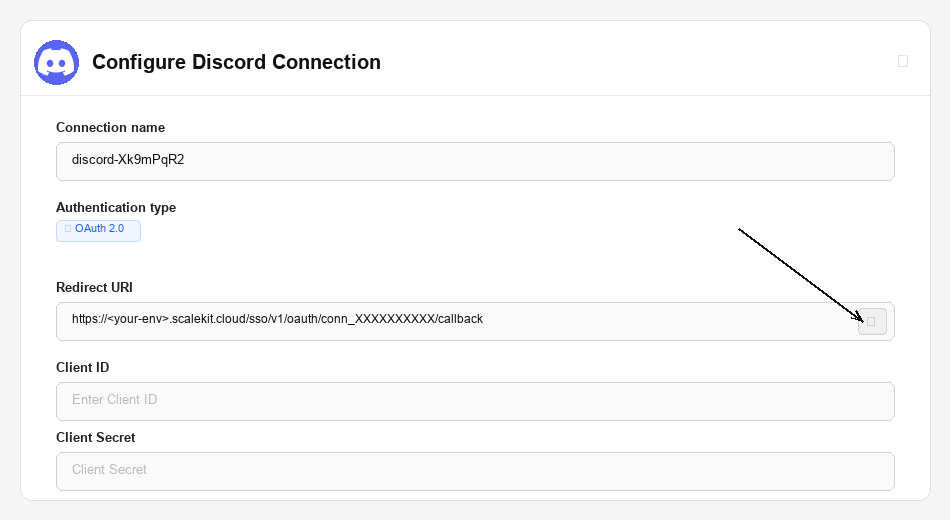
-
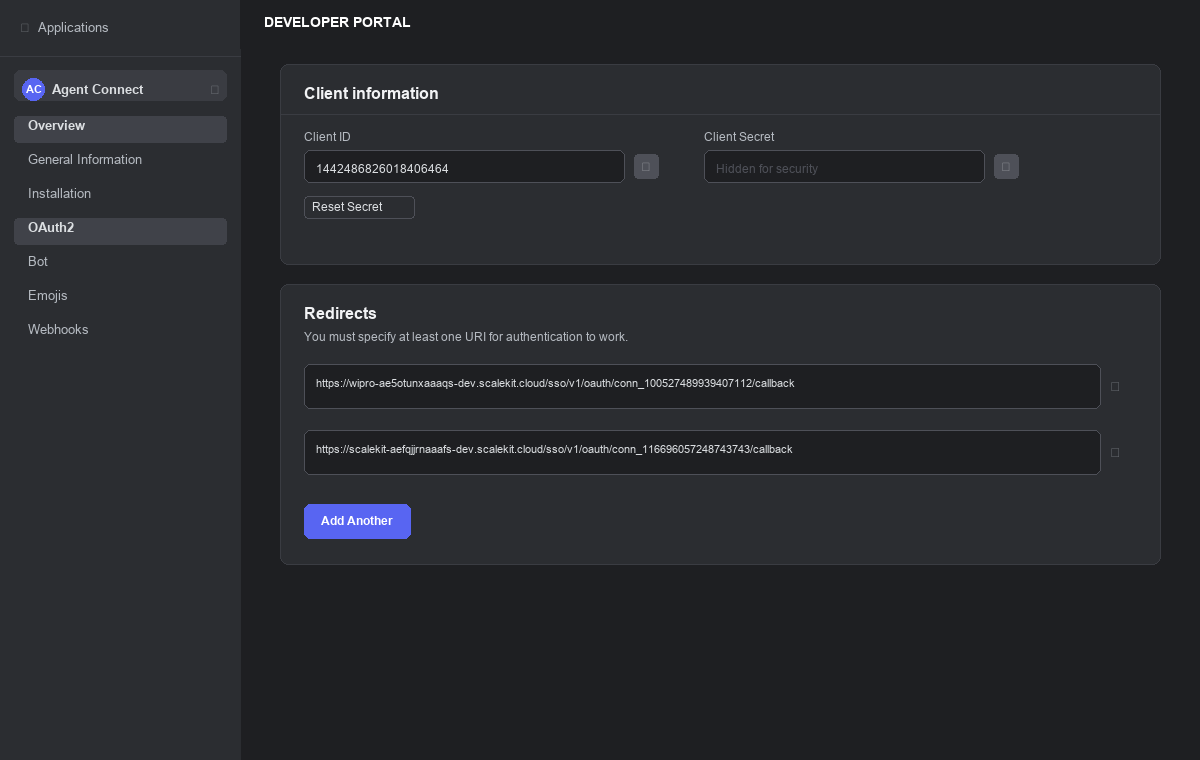
Back in the Discord Developer Portal, open your application and go to OAuth2 in the left sidebar.
-
Under Redirects, click Add Redirect, paste the URI from Scalekit, and click Save Changes.
-
-
Copy your credentials
-
On the OAuth2 page, copy the Client ID.
-
Click Reset Secret to generate a Client Secret and copy it immediately. It will not be shown again.
-
-
Add credentials in Scalekit
-
In Scalekit dashboard, go to AgentKit > Connections and open the connection you created.
-
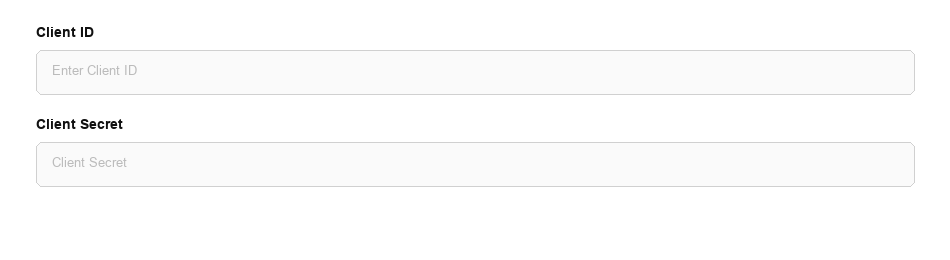
Enter the credentials you copied:
-
Client ID
-
Client Secret
-
Scopes — select the scopes your agent needs. Common scopes:
Scope What it grants identifyRead basic user profile (username, avatar, discriminator) emailRead the user’s email address guildsList the guilds the user belongs to guilds.members.readRead the user’s member data within a guild connectionsRead third-party accounts linked to the user’s Discord profile openidUse Discord as an OpenID Connect provider applications.entitlementsRead premium entitlements for your application
-
-
Click Save.
-
-
Configure the bot scope (optional)
If your agent needs to act as a bot in a server — sending messages, managing channels, or reacting to events — include the
botscope when you request authorization. Discord then asks the installing user to also grant a set of bot permissions.-
In the Scalekit connection settings, set:
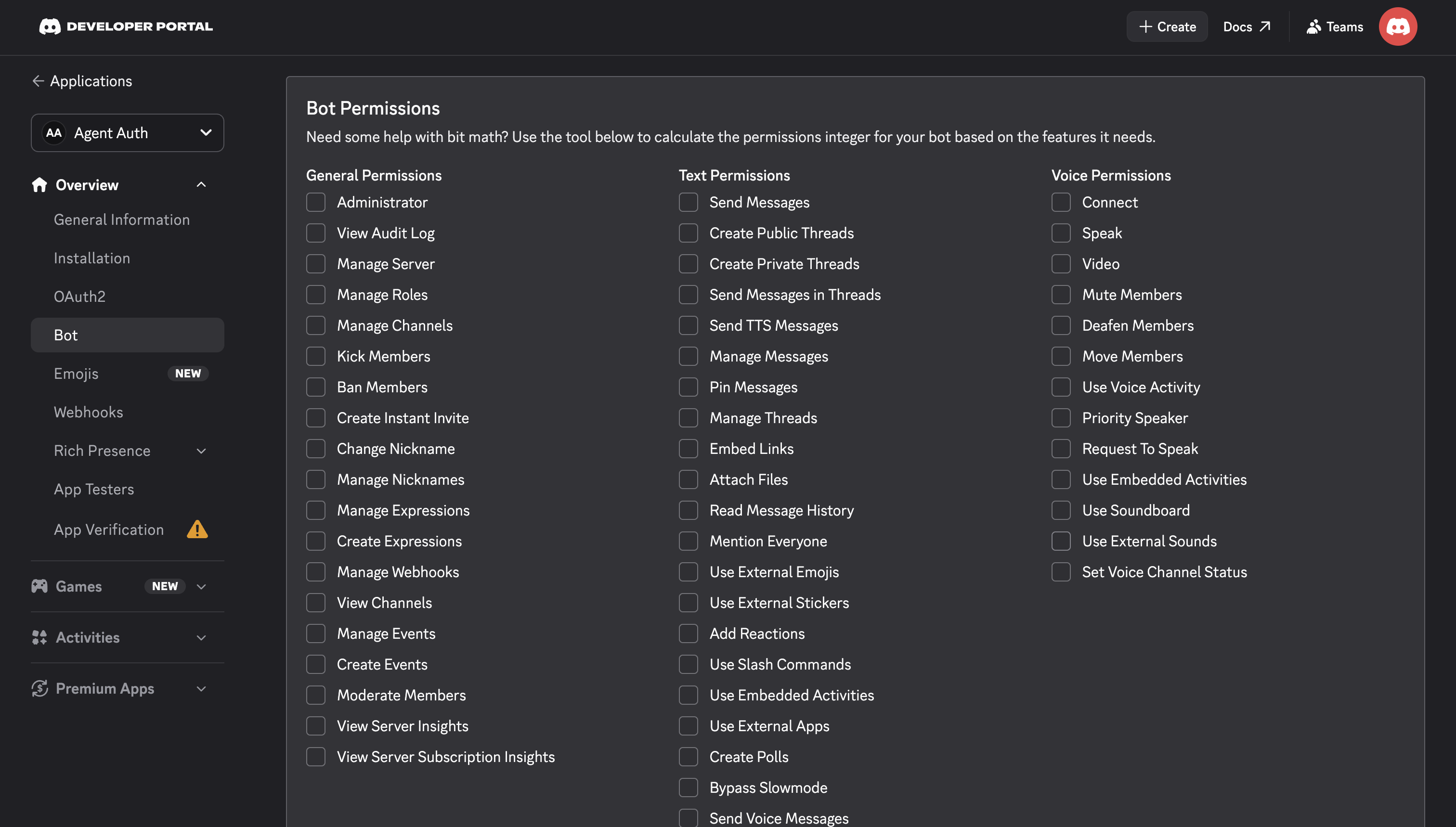
- Bot Permissions — a bitfield describing what your bot can do in the server. Use the permissions calculator on your application’s Bot page to generate this value, or use the recommended default
2260657982483703for common read/write access. - Pre-selected Guild ID — optional. Pre-fills Discord’s server picker with a specific server ID during authorization.
- Disable Guild Select — optional. When enabled with a Pre-selected Guild ID, the user cannot pick a different server.
- Installation Context — optional. Controls whether
applications.commandsinstalls to a server or to the authorizing user’s account.
- Bot Permissions — a bitfield describing what your bot can do in the server. Use the permissions calculator on your application’s Bot page to generate this value, or use the recommended default
-
-
Authorize a user and make your first call
quickstart.mts import { ScalekitClient } from '@scalekit-sdk/node'import 'dotenv/config'import { createInterface } from 'node:readline/promises'const scalekit = new ScalekitClient(process.env.SCALEKIT_ENVIRONMENT_URL,process.env.SCALEKIT_CLIENT_ID,process.env.SCALEKIT_CLIENT_SECRET,)const actions = scalekit.actionsconst connector = 'discord'const identifier = 'user_123'// Generate an authorization link for the userconst { link } = await actions.getAuthorizationLink({ connectionName: connector, identifier })console.log('Authorize Discord:', link)const rl = createInterface({ input: process.stdin, output: process.stdout })await rl.question('Press Enter after authorizing...')rl.close()// Make your first callconst result = await actions.executeTool({connector,identifier,toolName: 'discord_get_openid_connect_userinfo',toolInput: {},})console.log(result)Terminal window npx tsx quickstart.mtsquickstart.py import osfrom scalekit import ScalekitClientfrom dotenv import load_dotenvload_dotenv()scalekit_client = ScalekitClient(env_url=os.getenv("SCALEKIT_ENVIRONMENT_URL"),client_id=os.getenv("SCALEKIT_CLIENT_ID"),client_secret=os.getenv("SCALEKIT_CLIENT_SECRET"),)actions = scalekit_client.actionsconnection_name = "discord"identifier = "user_123"# Generate an authorization link for the userlink_response = actions.get_authorization_link(connection_name=connection_name,identifier=identifier,)print("Authorize Discord:", link_response.link)input("Press Enter after authorizing...")# Make your first callresult = actions.execute_tool(tool_input={},tool_name="discord_get_openid_connect_userinfo",connection_name=connection_name,identifier=identifier,)print(result)Terminal window python quickstart.pyEach user signs in once. See Authorize a user for the full flow and statuses.
Tools
Pass the exact name toexecute_tooldiscord_get_application_command_permissionsFetch permissions for a specific application command in a guild.Read-onlyGet Application Command Permissions
Fetch permissions for a specific application command in a guild. Returns a guild application command permissions object.
Inputs
application_idstringrequired- The ID of the application.
command_idstringrequired- The ID of the command to get permissions for.
guild_idstringrequired- The ID of the guild.
discord_get_current_user_application_entitlementsRetrieves entitlements for the current user for a given application.Read-onlyGet Current User Application Entitlements
Retrieves entitlements for the current user for a given application. Use when you need to check what premium offerings or subscriptions the authenticated user has access to. Requires the applications.entitlements OAuth2 scope.
Inputs
application_idstringrequired- The ID of the application to retrieve entitlements for.
afterstring- Retrieve entitlements after this entitlement ID (for pagination).
beforestring- Retrieve entitlements before this entitlement ID (for pagination).
exclude_deletedboolean- Whether to exclude deleted entitlements.
exclude_endedboolean- Whether to exclude ended entitlements.
guild_idstring- The ID of the guild to look up entitlements for.
limitinteger- Maximum number of entitlements to return (1–100).
sku_idsstring- Comma-delimited list of SKU IDs to check entitlements for.
user_idstring- The ID of the user to look up entitlements for.
discord_get_current_user_application_role_connectionReturns the application role connection for the current user and the given application.Read-onlyGet Current User Application Role Connection
Returns the application role connection for the current user and the given application. Requires an OAuth2 access token with the role_connections.write scope for the application specified in the path.
Inputs
application_idstringrequired- The ID of the application to get the role connection for.
discord_get_entitlementRetrieve a single entitlement for an application by ID.Read-onlyGet Entitlement
Retrieve a single entitlement for an application by ID. Use to check whether a specific entitlement is active, its type, and its expiration window. Per Discord's official OpenAPI spec, this endpoint also accepts an OAuth2 Bearer token with the `applications.entitlements` scope (in addition to Bot Token) — use this tool for user-authorized OAuth connections, or the equivalent discordbot_* tool for bot-token connections.
Inputs
application_idstringrequired- The ID of the application that owns the entitlement.
entitlement_idstringrequired- The ID of the entitlement to retrieve.
discord_get_gatewayRetrieves a valid WebSocket (wss) URL for establishing a Gateway connection to Discord.Read-onlyGet Gateway
Retrieves a valid WebSocket (wss) URL for establishing a Gateway connection to Discord. Use when you need to connect to the Discord Gateway for real-time events. No authentication required.
Inputs
This tool takes no inputs.
discord_get_guild_application_command_permissionsFetch permissions for all commands in a guild.Read-onlyGet Guild Application Command Permissions
Fetch permissions for all commands in a guild. Returns an array of guild application command permissions objects. Per Discord's official OpenAPI spec, this endpoint also accepts an OAuth2 Bearer token with the `applications.commands.permissions.update` scope (in addition to Bot Token) — use this tool for user-authorized OAuth connections, or the equivalent discordbot_* tool for bot-token connections.
Inputs
application_idstringrequired- The ID of the application.
guild_idstringrequired- The ID of the guild.
discord_get_guild_templateRetrieves information about a Discord guild template using its unique template code.Read-onlyGet Guild Template
Retrieves information about a Discord guild template using its unique template code. Use when you need to get details about a guild template for creating new servers.
Inputs
template_codestringrequired- The unique code of the guild template.
discord_get_guild_widgetRetrieves the guild widget in JSON format.Read-onlyGet Guild Widget
Retrieves the guild widget in JSON format. Returns public information about a Discord guild's widget including online member count and invite URL. The widget must be enabled in the guild's server settings.
Inputs
guild_idstringrequired- The ID of the Discord guild (server) to retrieve the widget for.
discord_get_guild_widget_pngRetrieves a PNG image widget for a Discord guild.Read-onlyGet Guild Widget PNG
Retrieves a PNG image widget for a Discord guild. Returns a visual representation of the guild widget that can be embedded on external websites. The widget must be enabled in the guild's server settings.
Inputs
guild_idstringrequired- The ID of the Discord guild (server) to retrieve the widget image for.
stylestring- Style of the widget image.one of
shieldbanner1banner2banner3banner4
discord_get_invite_deprecatedRetrieves information about a specific invite code, including guild and channel details.Read-onlyGet Invite
Retrieves information about a specific invite code, including guild and channel details. Use discord_resolve_invite instead, which supports additional query parameters such as guild_scheduled_event_id.
Inputs
invite_codestringrequired- The unique invite code to look up.
guild_scheduled_event_idstring- Guild scheduled event ID to include event details in the response.
with_countsboolean- Whether to include approximate member and presence counts.
discord_get_lobby_messagesRetrieve the most recent messages in a Discord lobby.Read-onlyGet Lobby Messages
Retrieve the most recent messages in a Discord lobby. The calling user must be a member of the lobby. Uses a Bearer token with the sdk.social_layer scope. Per Discord's official OpenAPI spec, this endpoint also accepts a Bot Token (in addition to OAuth2) — use this tool for user-authorized OAuth connections, or the equivalent discordbot_* tool for bot-token connections. Returns an array of lobby message objects.
Inputs
lobby_idstringrequired- The ID of the lobby to retrieve messages from.
limitinteger- Maximum number of messages to return (1-200). Defaults to 50.
discord_get_my_guild_memberRetrieves the guild member object for the currently authenticated user within a specified guild, provided they are a member of that guild.Read-onlyGet My Guild Member
Retrieves the guild member object for the currently authenticated user within a specified guild, provided they are a member of that guild. Requires the guilds.members.read OAuth2 scope.
Inputs
guild_idstringrequired- The ID of the guild to retrieve the current user's member object from.
discord_get_my_userFetches comprehensive profile information for the currently authenticated Discord user, including username, avatar, discriminator, locale, and email if the 'email' OAuth2 scope is granted.Read-onlyGet My User
Fetches comprehensive profile information for the currently authenticated Discord user, including username, avatar, discriminator, locale, and email if the 'email' OAuth2 scope is granted.
Inputs
This tool takes no inputs.
discord_get_openid_connect_userinfoRetrieves OpenID Connect compliant user information for the authenticated user.Read-onlyGet OpenID Connect Userinfo
Retrieves OpenID Connect compliant user information for the authenticated user. Returns standardized OIDC claims (sub, email, nickname, picture, locale, etc.) following the OpenID Connect specification. Requires an OAuth2 access token with the 'openid' scope; additional fields require 'identify' and 'email' scopes.
Inputs
This tool takes no inputs.
discord_get_public_keysRetrieves Discord OAuth2 public keys (JWKS).Read-onlyGet Public Keys
Retrieves Discord OAuth2 public keys (JWKS). Use when you need to verify OAuth2 tokens or access public keys for cryptographic operations such as signature verification.
Inputs
This tool takes no inputs.
discord_get_sku_subscriptionRetrieve a single subscription for a SKU by its ID.Read-onlyGet SKU Subscription
Retrieve a single subscription for a SKU by its ID. Returns a subscription object with its status, current billing period, and the entitlements it grants. Per Discord's official OpenAPI spec, this endpoint also accepts an OAuth2 Bearer token (in addition to Bot Token) — use this tool for user-authorized OAuth connections, or the equivalent discordbot_* tool for bot-token connections.
Inputs
sku_idstringrequired- The ID of the SKU the subscription belongs to.
subscription_idstringrequired- The ID of the subscription to retrieve.
user_idstring- Optional user ID to verify the subscription belongs to.
discord_get_userRetrieve information about a Discord user.Read-onlyGet User
Retrieve information about a Discord user. With OAuth Bearer token, use '@me' as user_id to return the authenticated user's information. With a Bot token, you can query any user by their ID. Returns username, avatar, discriminator, locale, premium status, and email (if email scope is granted).
Inputs
user_idstringrequired- The ID of the user to retrieve. Use '@me' to get the authenticated user's information.
discord_list_guild_channelsRetrieve all channels in a Discord guild (server).Read-onlyList Guild Channels
Retrieve all channels in a Discord guild (server). Returns a list of channel objects including text channels, voice channels, categories, and threads. Per Discord's official OpenAPI spec, this endpoint also accepts a plain OAuth2 Bearer token (no specific scope required beyond a valid authorization) in addition to Bot Token — use this tool for user-authorized OAuth connections, or the equivalent discordbot_* tool for bot-token connections.
Inputs
guild_idstringrequired- The ID of the guild to retrieve channels for.
discord_list_my_guildsLists the current user's guilds, returning partial data (id, name, icon, owner, permissions, features) for each.Read-onlyList My Guilds
Lists the current user's guilds, returning partial data (id, name, icon, owner, permissions, features) for each. Primarily used for displaying server lists or verifying guild memberships. Requires the 'guilds' OAuth2 scope.
Inputs
afterstring- Get guilds after this guild ID (for pagination).
beforestring- Get guilds before this guild ID (for pagination).
limitinteger- Maximum number of guilds to return (1–200, default 200).
with_countsboolean- Whether to include approximate member and presence counts for each guild.
discord_list_sku_subscriptionsRetrieve all subscriptions containing a given SKU, filtered by user.Read-onlyList SKU Subscriptions
Retrieve all subscriptions containing a given SKU, filtered by user. Returns a list of subscription objects representing recurring payments for that SKU. Per Discord's official OpenAPI spec, this endpoint also accepts an OAuth2 Bearer token (in addition to Bot Token) — use this tool for user-authorized OAuth connections, or the equivalent discordbot_* tool for bot-token connections. When called with an OAuth2 token, user_id is optional and defaults to the authorizing user; it is required for Bot Token requests. Supports cursor-based pagination via before/after and limit.
Inputs
sku_idstringrequired- The ID of the SKU to list subscriptions for.
afterstring- List subscriptions after this subscription ID (for pagination).
beforestring- List subscriptions before this subscription ID (for pagination).
limitinteger- Number of results to return (1-100). Defaults to 50.
user_idstring- The ID of the user to return subscriptions for. Optional for OAuth2 requests (defaults to the authorizing user).
discord_list_sticker_packsRetrieves all available Discord Nitro sticker packs.Read-onlyList Sticker Packs
Retrieves all available Discord Nitro sticker packs. Returns official Discord sticker packs including pack name, description, stickers, cover sticker, and banner asset.
Inputs
This tool takes no inputs.
discord_resolve_inviteResolves and retrieves information about a Discord invite code, including the associated guild, channel, event, and inviter.Read-onlyResolve Invite
Resolves and retrieves information about a Discord invite code, including the associated guild, channel, event, and inviter. Prefer this over the deprecated Get Invite tool for new integrations.
Inputs
invite_codestringrequired- The unique invite code to resolve.
guild_scheduled_event_idstring- Guild scheduled event ID to include event details in the response.
with_countsboolean- Whether to include approximate member and presence counts.
discord_retrieve_user_connectionsRetrieves a list of the authenticated user's connected third-party accounts on Discord, such as Twitch, YouTube, GitHub, Steam, and others.Read-onlyRetrieve User Connections
Retrieves a list of the authenticated user's connected third-party accounts on Discord, such as Twitch, YouTube, GitHub, Steam, and others. Requires the 'connections' OAuth2 scope.
Inputs
This tool takes no inputs.
discord_create_lobby_channel_invite_for_selfCreate a single-use guild invite to a lobby's linked channel, targeted at the calling user.WriteCreate Lobby Channel Invite For Self
Create a single-use guild invite to a lobby's linked channel, targeted at the calling user. The lobby must have a linked channel and the caller must be a member of the lobby. The invite expires after one hour. Uses a Bearer token with the sdk.social_layer scope. Per Discord's official OpenAPI spec, this endpoint also accepts a Bot Token (in addition to OAuth2) — use this tool for user-authorized OAuth connections, or the equivalent discordbot_* tool for bot-token connections. Returns a lobby invite object.
Inputs
lobby_idstringrequired- The ID of the lobby to create a channel invite for.
discord_create_or_join_lobbyCreate a new lobby identified by a secret, or join the calling user to the existing lobby with that secret if one already exists.WriteCreate Or Join Lobby
Create a new lobby identified by a secret, or join the calling user to the existing lobby with that secret if one already exists. Updates lobby metadata and the calling member's metadata on join. Uses a Bearer token with the sdk.social_layer scope. Per Discord's official OpenAPI spec, this endpoint also accepts a Bot Token (in addition to OAuth2) — use this tool for user-authorized OAuth connections, or the equivalent discordbot_* tool for bot-token connections. Returns a lobby object.
- Idempotent
Inputs
secretstringrequired- Secret used to identify the lobby. If a lobby for this application already exists with this secret, the caller joins it; otherwise a new lobby is created. Max 250 characters.
idle_timeout_secondsinteger- Seconds to wait before shutting down the lobby after it becomes idle. Between 5 and 604800 (7 days).
lobby_metadataobject- Optional dictionary of string key/value pairs to set on the lobby. Max total length 1000. Overwrites any existing lobby metadata.
member_metadataobject- Optional dictionary of string key/value pairs to set on the calling user's lobby member. Max total length 1000.
discord_edit_application_command_permissionsEdit the permissions for a specific application command in a guild.WriteEdit Application Command Permissions
Edit the permissions for a specific application command in a guild. Requires OAuth2 bearer token with applications.commands.permissions.update scope. Returns a guild application command permissions object.
- Idempotent
Inputs
application_idstringrequired- The ID of the application.
command_idstringrequired- The ID of the command to edit permissions for.
guild_idstringrequired- The ID of the guild.
permissionsarrayrequired- Array of application command permission objects specifying who can use the command.
discord_link_channel_to_lobbyLink an existing guild text channel to a Discord lobby, or unlink any currently linked channel by omitting channel_id.WriteLink/Unlink Channel To Lobby
Link an existing guild text channel to a Discord lobby, or unlink any currently linked channel by omitting channel_id. Uses a Bearer token for authorization; the caller must be a lobby member with the CanLinkLobby lobby member flag. Per Discord's official OpenAPI spec, this endpoint also accepts a Bot Token (in addition to OAuth2) — use this tool for user-authorized OAuth connections, or the equivalent discordbot_* tool for bot-token connections. Returns the updated lobby object.
- Idempotent
Inputs
lobby_idstringrequired- The ID of the lobby to link or unlink a channel for.
channel_idstring- The ID of the channel to link to the lobby. If omitted, any currently linked channel is unlinked from the lobby.
discord_send_lobby_messageSend a message to a Discord lobby.WriteSend Lobby Message
Send a message to a Discord lobby. The calling user must be a member of the lobby. Uses a Bearer token with the sdk.social_layer scope. Per Discord's official OpenAPI spec, this endpoint also accepts a Bot Token (in addition to OAuth2) — use this tool for user-authorized OAuth connections, or the equivalent discordbot_* tool for bot-token connections. If the lobby has a linked channel, the message is also forwarded there; if forwarding fails (for example due to AutoMod), the lobby message is still delivered to other lobby members. Returns the created lobby message object.
Inputs
contentstringrequired- Message content. Must be non-empty.
lobby_idstringrequired- The ID of the lobby to send the message to.
flagsinteger- Optional message flags combined as a bitfield. Only flags creatable by the Social SDK are accepted.
metadataobject- Optional dictionary of string key/value pairs delivered alongside the message to active clients via the Social SDK. Not persisted on the linked channel message.
discord_update_current_user_application_role_connectionUpdates and returns the application role connection for the current user and the given application.WriteUpdate Current User Application Role Connection
Updates and returns the application role connection for the current user and the given application. Requires an OAuth2 access token with the role_connections.write scope for the application specified in the path.
- Idempotent
Inputs
application_idstringrequired- The ID of the application to update the role connection for.
metadataobject- Object mapping application role connection metadata keys to their stringified value (max 100 characters) for the user on the platform a bot has connected.
platform_namestring- The vanity name of the platform a bot has connected (max 50 characters).
platform_usernamestring- The username on the platform a bot has connected (max 100 characters).
discord_consume_entitlementFor one-time purchase consumable SKUs, mark a given entitlement for the user as consumed.DestructiveConsume An Entitlement
For one-time purchase consumable SKUs, mark a given entitlement for the user as consumed. The entitlement will have consumed: true when listed afterward. This action cannot be undone. Returns 204 No Content on success. Per Discord's official OpenAPI spec, this endpoint also accepts an OAuth2 Bearer token with the `applications.entitlements` scope (in addition to Bot Token) — use this tool for user-authorized OAuth connections, or the equivalent discordbot_* tool for bot-token connections.
Inputs
application_idstringrequired- The ID of the application that owns the entitlement.
entitlement_idstringrequired- The ID of the entitlement to mark as consumed.
discord_delete_current_user_application_role_connectionDeletes the application role connection for the current user and the given application.DestructiveDelete Current User Application Role Connection
Deletes the application role connection for the current user and the given application. Requires an OAuth2 access token with the role_connections.write scope for the application specified in the path.
- Idempotent
Inputs
application_idstringrequired- The ID of the application to delete the role connection for.
discord_delete_test_entitlementDelete a currently-active test entitlement.DestructiveDelete Test Entitlement
Delete a currently-active test entitlement. Discord will act as though that user or guild no longer has entitlement to your premium offering. Returns 204 No Content on success. Per Discord's official OpenAPI spec, this endpoint also accepts an OAuth2 Bearer token with the `applications.entitlements` scope (in addition to Bot Token) — use this tool for user-authorized OAuth connections, or the equivalent discordbot_* tool for bot-token connections.
- Idempotent
Inputs
application_idstringrequired- The ID of the application that owns the entitlement.
entitlement_idstringrequired- The ID of the test entitlement to delete.
discord_leave_lobbyRemove the calling user from the specified Discord lobby.DestructiveLeave Lobby
Remove the calling user from the specified Discord lobby. Safe to call even if the user is no longer a member, but fails if the lobby does not exist. Uses a Bearer token for authorization. Per Discord's official OpenAPI spec, this endpoint also accepts a Bot Token (in addition to OAuth2) — use this tool for user-authorized OAuth connections, or the equivalent discordbot_* tool for bot-token connections. Returns nothing.
- Idempotent
Inputs
lobby_idstringrequired- The ID of the lobby to leave.
No tools match.
Workflows
Proxy API call
const user = await actions.request({ connectionName: 'discord', identifier: 'user_123', path: '/api/users/@me', method: 'GET',});console.log(user);user = actions.request( connection_name='discord', identifier='user_123', path="/api/users/@me", method="GET",)print(user)Execute a tool
const result = await actions.executeTool({ connector: 'discord', identifier: 'user_123', toolName: 'discord_get_current_user_application_entitlements', toolInput: {},});console.log(result);result = actions.execute_tool( connection_name='discord', identifier='user_123', tool_name='discord_get_current_user_application_entitlements', tool_input={},)print(result)

