


The EveryInfra MCP connector routes your AI agent's tool calls to EveryInfra's own MCP server through Scalekit. Each user connects their own EveryInfra access token once, and Scalekit sends it with every call, so your agent never handles credentials. It comes with 12 tools.
- Tools
- 12
- What they doRead · write · destructive
- 7 · 1 · 47 read1 write4 destructive
- Users sign in with
- Access token
Setup
Install the SDK
Terminal window npm install @scalekit-sdk/node dotenvTerminal window pip install scalekit-sdk-python python-dotenvSet your credentials
Add your Scalekit credentials to your
.envfile. Find values in app.scalekit.com > Developers > API Credentials..env SCALEKIT_ENVIRONMENT_URL=<your-environment-url>SCALEKIT_CLIENT_ID=<your-client-id>SCALEKIT_CLIENT_SECRET=<your-client-secret>Create the EveryInfra MCP connection
In AgentKit > Connections, create an EveryInfra MCP connection. The name you give it is the
connection_nameyour code passes. See Configure connections.Console steps with screenshots
Register your EveryInfra API key with Scalekit so it can authenticate requests to the EveryInfra MCP server on behalf of your users. EveryInfra MCP uses API key authentication.
-
Get an EveryInfra API key
-
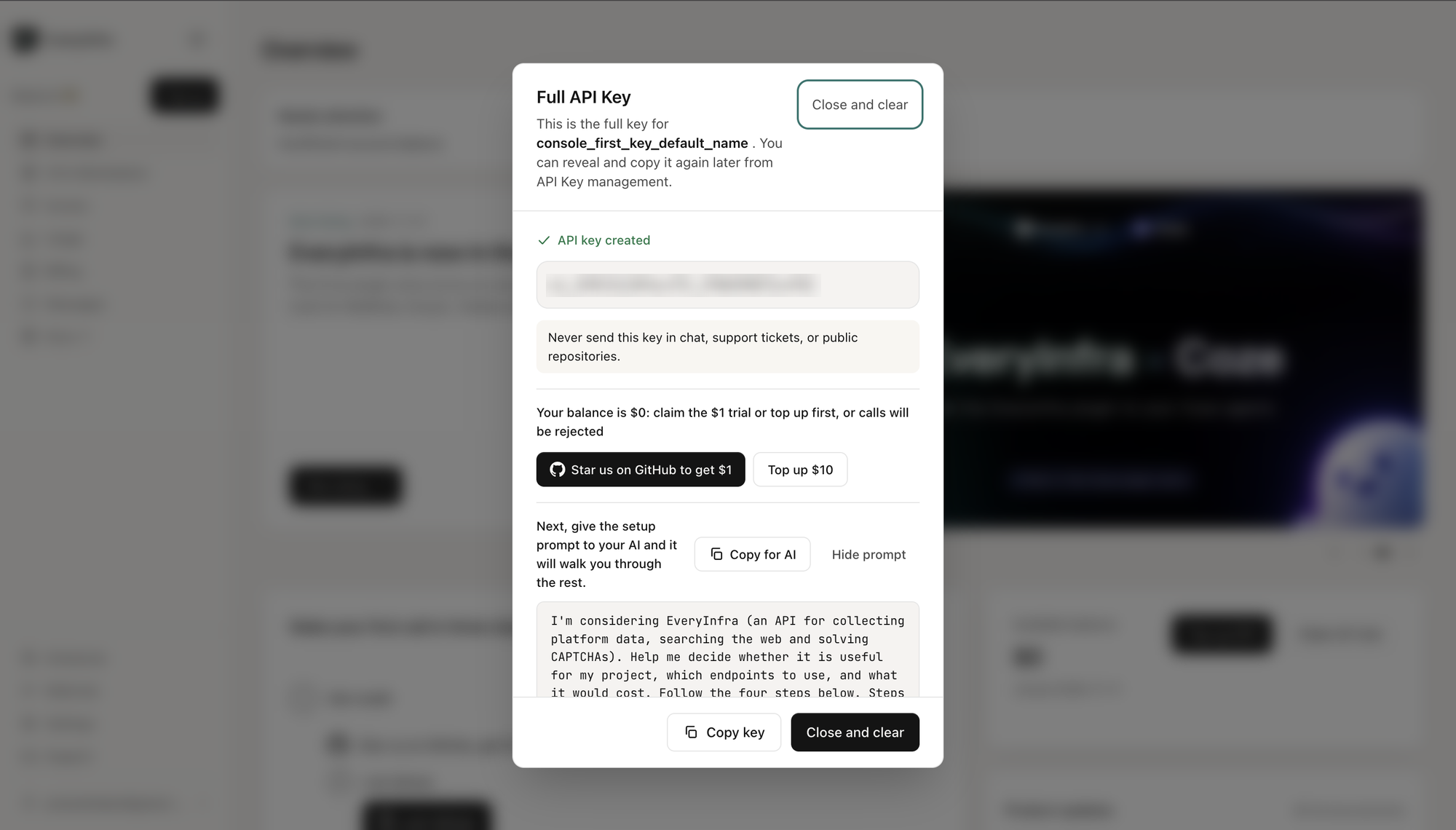
Sign in to the EveryInfra console. The first time you sign in, EveryInfra creates a key for you and shows it in a Full API Key dialog.
-
Copy the key. It starts with
ei_. -
Click Copy key, then Close and clear.
-
-
Create a connection in Scalekit
- In the Scalekit dashboard, go to AgentKit → Connections → Create Connection.
- Search for EveryInfra MCP and click Create.
- Note the Connection name — use this as
connection_namein your code (e.g.,everyinframcp).
-
Add a connected account
Connected accounts link a specific user identifier in your system to an EveryInfra API key. Add one in the dashboard to test. In production, each user adds their own through the authorization link: they enter their credentials on the page it opens.
In the dashboard, to test
- Open the connection and click the Connected Accounts tab → Add account.
- Fill in Your User’s ID and API Key, then click Save.
From your backend, if your app already has the credentials
For example, when users enter them on a settings page in your app:
import { ConnectorStatus } from '@scalekit-sdk/node'const authorizationDetails = {details: {case: 'staticAuth',value: { details: { token: 'ei_...' } },},};let { connectedAccount } = await scalekit.actions.upsertConnectedAccount({connectionName: 'everyinframcp',identifier: 'user_123',authorizationDetails,});// Make sure the account is ACTIVE before the first tool call.if (connectedAccount?.status !== ConnectorStatus.ACTIVE) {({ connectedAccount } = await scalekit.actions.upsertConnectedAccount({connectionName: 'everyinframcp',identifier: 'user_123',authorizationDetails,}));}authorization_details = {"static_auth": {"token": "ei_..."}}response = scalekit_client.actions.upsert_connected_account(connection_name="everyinframcp",identifier="user_123",authorization_details=authorization_details,)# Make sure the account is ACTIVE before the first tool call.if response.connected_account.status != "ACTIVE":response = scalekit_client.actions.upsert_connected_account(connection_name="everyinframcp",identifier="user_123",authorization_details=authorization_details,)
-
Authorize a user and make your first call
quickstart.mts import { ScalekitClient } from '@scalekit-sdk/node'import 'dotenv/config'import { createInterface } from 'node:readline/promises'const scalekit = new ScalekitClient(process.env.SCALEKIT_ENVIRONMENT_URL,process.env.SCALEKIT_CLIENT_ID,process.env.SCALEKIT_CLIENT_SECRET,)const actions = scalekit.actionsconst connector = 'everyinframcp'const identifier = 'user_123'// Generate an authorization link for the userconst { link } = await actions.getAuthorizationLink({ connectionName: connector, identifier })console.log('Authorize EveryInfra MCP:', link)const rl = createInterface({ input: process.stdin, output: process.stdout })await rl.question('Press Enter after authorizing...')rl.close()// Make your first callconst result = await actions.executeTool({connector,identifier,toolName: 'everyinframcp_everyinfra_get_account',toolInput: {},})console.log(result)Terminal window npx tsx quickstart.mtsquickstart.py import osfrom scalekit import ScalekitClientfrom dotenv import load_dotenvload_dotenv()scalekit_client = ScalekitClient(env_url=os.getenv("SCALEKIT_ENVIRONMENT_URL"),client_id=os.getenv("SCALEKIT_CLIENT_ID"),client_secret=os.getenv("SCALEKIT_CLIENT_SECRET"),)actions = scalekit_client.actionsconnection_name = "everyinframcp"identifier = "user_123"# Generate an authorization link for the userlink_response = actions.get_authorization_link(connection_name=connection_name,identifier=identifier,)print("Authorize EveryInfra MCP:", link_response.link)input("Press Enter after authorizing...")# Make your first callresult = actions.execute_tool(tool_input={},tool_name="everyinframcp_everyinfra_get_account",connection_name=connection_name,identifier=identifier,)print(result)Terminal window python quickstart.pyEach user opens the link once and enters their EveryInfra MCP server credentials there. If your app already has a user's credentials, add the account from your backend instead, as the console steps above show. See Authorize a user for the full flow and statuses.
Tools
Pass the exact name toexecute_tooleveryinframcp_everyinfra_get_accountRead the account behind this API key.Read-onlyCheck account balance and limits
Read the account behind this API key. Free, read-only, any key works. Returns: - balance: total_usd, paid_usd, bonus_usd and bonus_expiring (amount_usd, expires_at) - discount: this month's top-ups (month_topup_usd), the rate in effect and next (rate, threshold_usd, gap_usd = how much more to top up this month for it) - rate_limit: requests_per_minute for all keys combined, key_requests_per_minute, and any rate package with its expires_at - key: this key's id, name, prefix, created_at and expires_at - usage_24h: calls, succeeded, failed and spent_usd in the last 24 hours (this_key: the same for this key) Check the balance before a batch of paid calls; every paid call's billing also carries balance_after_usd.
Inputs
This tool takes no inputs.
everyinframcp_everyinfra_get_jobRead a job submitted with everyinfra_call_api(mode=async).Read-onlyGet an async job
Read a job submitted with everyinfra_call_api(mode=async). Free; it does not count against the per-minute limit. While status is submitting / running / finalizing, check again later; succeeded: the rows are in results (paged actions also return next_page_token); failed: see error.reason and error.charged; submit_unknown: the submission is still being confirmed — do not resubmit, follow next_action. Only jobs submitted with the same API key are visible.
Inputs
job_idstringrequired- The job_id returned by an async everyinfra_call_api
everyinframcp_everyinfra_get_ticketRead one support ticket: its status, what happens next, and its latest 100 messages, including support's replies.Read-onlyCheck a support ticket
Read one support ticket: its status, what happens next, and its latest 100 messages, including support's replies. Use it after everyinfra_create_ticket to check progress, or when the user asks whether support has answered. Pass ticket_id as a plain integer (the number shown as #N, without the #). The key that opened a ticket can always read it; reading the account's other tickets (opened in the console or with other keys) needs the account read permission "support:read" on this key. Any other number returns ticket_not_found. Free; the same result as GET /api/v1/support/tickets/{ticket_id}.
Inputs
ticket_idintegerrequired- The ticket_id everyinfra_create_ticket returned (#N in the console and emails)
everyinframcp_everyinfra_get_topup_linkReturns the console top-up page link (url) and the current balance (balance_usd).Read-onlyTop-up link
Returns the console top-up page link (url) and the current balance (balance_usd). Use it when a call fails with quota_exhausted or ai_topup_required, or when the user asks how to add funds. The account owner pays in the console; this tool creates no order and charges nothing. Any key can use it; accounts whose service provider handles top-ups get topup_unavailable. Free.
Inputs
This tool takes no inputs.
everyinframcp_everyinfra_list_capabilitiesList EveryInfra's data platforms and capabilities (106 platforms / 573 capabilities: search, detail, comments, profiles and more).Read-onlyList data capabilities
List EveryInfra's data platforms and capabilities (106 platforms / 573 capabilities: search, detail, comments, profiles and more). Use it before everyinfra_call_api to get the platform/action, required and optional params, the per-call row limit (max_limit, or page_size for page-based actions) and the price. Pass a platform to also get allowed values, returned fields and what they mean. Free. Data collection only — for AI chat use everyinfra_chat.
Inputs
platformstring- Optional; only this platform's capabilities, e.g. xiaohongshu / twitter / tiktok
everyinframcp_everyinfra_list_captcha_typesList the 52 CAPTCHA and bot-challenge types EveryInfra solves.Read-onlyList CAPTCHA types
List the 52 CAPTCHA and bot-challenge types EveryInfra solves. **Call it before everyinfra_solve_captcha** to get three things: the type name, the required/optional params, and **the shape of the solution** (token / cookie / text / number / fields / points / boxes / tokens / indices — a string to submit, coordinates to click yourself, or grid cells to click: each is used differently). Free.
Inputs
typestring- Optional; only this type, e.g. turnstile / recaptcha_v2 / cloudflare_challenge
everyinframcp_everyinfra_list_requestsThe account's call records, newest first: request_id, capability, status code, latency, rows returned, whether it was charged, and the amount.Read-onlyCalls and refunds
The account's call records, newest first: request_id, capability, status code, latency, rows returned, whether it was charged, and the amount. Pass request_id (the request_id / X-Request-Id of any call) to look up one call, including its charge's final state (charged, refunded or partly refunded) and any async job it started. failed_only=true lists failures only. Needs the account read permission "requests:read" on this key: keys not limited to product lines have the three read permissions by default; for a key limited to product lines, the account owner turns it on in the console (API Keys → permissions). Free.
Inputs
failed_onlyboolean- List failed calls only, default false
limitinteger- Rows, default 20
offsetinteger- Rows to skip, default 0
request_idstring- Look up one call; the other params are ignored when given
everyinframcp_everyinfra_create_ticketOpen a ticket with EveryInfra's human support team and get back the ticket number and a link the account owner can open.WriteContact human support
Open a ticket with EveryInfra's human support team and get back the ticket number and a link the account owner can open. Use it when calls keep failing or return wrong or missing data, for top-up, charge or refund questions, or to ask for a new platform, capability or field. Put one line in subject; in description say what you called (platform/action or endpoint), when (UTC), the error code and message and what you expected, and pass that call's request_id (and job_id for an async job); write other IDs with a label such as job_id: job_..., because a bare long ID reads as a secret. Never include API keys or passwords. Ask the user first and open it only if they agree. Errors whose fault is request or account need a fixed request or the user, not a ticket; an error's support field carries a ready draft. Any key on the account works and nothing is charged. Retrying the same request returns the same ticket, and the same capability and error code within 24 hours goes into that ticket. Human support is online 24/7, with a first reply within 10 minutes on average. Replies arrive in the ticket and the account owner also gets an email. Check progress and read support's replies with everyinfra_get_ticket (REST: GET /api/v1/support/tickets/{ticket_id}) using the same key, or at the returned link.
Inputs
descriptionstringrequired- What you called, when (UTC), the error code and message, what you expected; no API keys or passwords
subjectstringrequired- One line, e.g. "douyin/comments returns 503 since 10:20 UTC"
categorystring- Optional: incident (looks like an outage), integration (a call returns an error; parameters, auth, SDK or MCP setup), product (questions about data, platforms and fields, or asking for new ones), billing (top-ups, charges, refunds), order (resources such as proxies or numbers), generalone of
generalproductintegrationbillingorderincident contact_emailstring- Optional extra address for support to reach you; reply emails still go to the account's verified email
idempotency_keystring- Optional; keep it when retrying. Without it, the same subject and description sent again within 24 hours return the same ticket
job_idstring- The job_id of the async job this ticket is about
request_idstring- The request_id (X-Request-Id) of the call this ticket is about
everyinframcp_everyinfra_call_apiCall any EveryInfra data capability and get structured JSON.DestructiveCall a data capability
Call any EveryInfra data capability and get structured JSON. Priced per platform tier USD 0.56/1K–USD 5.56/1K; failed calls and empty results leave no final charge (anything reserved is restored). Most actions return up to `limit` rows in one call, billed once; multi-target arrays (urls, targets, usernames, tickers) are billed per element, and actions with rows_per_unit per block of rows asked for. Page-based actions (page_size in the catalog) return one page per call, of a fixed size unless page_size_varies (then a short page is not the end); for more, pass the response's top-level next_page_token (some actions repeat it on each row) as page_token — each page is one call. Check platform/action, required params and max_limit or page_size with everyinfra_list_capabilities first. For slow tasks or large limits pass mode=async: you get a job_id at once; read the result with everyinfra_get_job (free).
Inputs
actionstringrequired- e.g. search / profile / user_posts / post
platformstringrequired- e.g. xiaohongshu / twitter / tiktok / web
modestring- sync (default) waits for the result; async returns a job_id at once for slow tasks or large limits — read it with everyinfra_get_jobone of
syncasyncdefaultsync paramsobject- The capability's params, e.g. {"keyword":"AI tools","limit":20}
everyinframcp_everyinfra_chatEveryInfra's OpenAI-compatible text completions with multi-turn history and any input content or format.DestructiveGenerate or analyze text
EveryInfra's OpenAI-compatible text completions with multi-turn history and any input content or format. Free for accounts that have topped up (nothing is deducted); accounts that have not get ai_topup_required. Rate-limited per account by cumulative top-ups (under $100: 50 requests/minute, $100 or more: 500, $500 or more: 5,000, all keys combined); current models: GET /api/v1/models. Good for cleaning collected data: summaries, translation, sentiment labels, topic classification and structured extraction. messages may total up to 45,000 characters; beyond that you get input_too_large — split long documents into several calls.
Inputs
messagesarrayrequired- OpenAI-format conversation, e.g. [{"role":"user","content":"Hello"}] (role is system / user / assistant).
modelstring- Optional, default gemini-3.6-flash. Allowed: gemini-3.6-flash / gemini-flash-lite
everyinframcp_everyinfra_searchSearch and retrieve sources.DestructiveSearch and retrieve sources
Search and retrieve sources. 17 tools, chosen with `tool`: crawl: Crawl several pages of a site and return their text; say in plain language which pages you want. crosscheck: Run one question through several retrieval chains with different mechanisms, rank sources by how many mechanisms found them, and fetch the original text of the top tier. It answers how far a claim can be trusted, not just what was found. deep: Deep search with text excerpts; full=true also returns the full text. forum: Real people's discussions — an evidence source independent of official docs (when docs say 'supported' and forums describe where it breaks, trust the specific scenario). harvest: Structured site extraction (long-running: tens of seconds to minutes); use it only when crawl cannot get the data. lens: Reverse image search: give an image URL, find pages that use it (the opposite direction of media). map: List a site's page structure — URLs only, no text, fast. media: Find images and videos by keyword. news: News search. places: Places and businesses search. read: Fetch the text of a given URL; it retries other fetch paths automatically when one fails. scholar: Academic literature search; kind=patents switches to patents (publication number, applicant, inventor, filing and publication dates). semantic: Semantic search: describe what you want in one sentence instead of stacking keywords; it finds deep sources whose titles do not contain your words. mode=deep searches deeper (slower, costs more). shopping: Product search and price comparison. similar: Give a URL, find semantically similar pages — something keyword search cannot do. suggest: Search suggestions (autocomplete). web: General web search with site restriction, region, time window and paging. ⚠ To **assert a specific fact** (a version, a price, whether an API exists), use crosscheck: it returns verifiable sources and their agreement tier. Failed or empty searches leave no final charge (anything reserved is restored).
Inputs
toolstringrequired- Retrieval toolone of
crawlcrosscheckdeepforumharvestlensmapmedianewsplacesreadscholarsemanticshoppingsimilarsuggestweb paramsobject- The tool's params, e.g. {"q":"EU AI Act","num":10}
everyinframcp_everyinfra_solve_captchaSolve a CAPTCHA or bot challenge and get a ready-to-use solution.DestructiveSolve a CAPTCHA
Solve a CAPTCHA or bot challenge and get a ready-to-use solution. USD 0.000139/call–0.004583/call, **charged per successful solve (castle: per token, × count); failed or empty attempts leave no final charge (anything reserved is restored)**. Use it when a target site is blocked by Turnstile / reCAPTCHA / hCaptcha / a Cloudflare challenge page / GeeTest and the like. Params differ per type — check them with everyinfra_list_captcha_types first.
Inputs
typestringrequired- CAPTCHA type, e.g. turnstile / recaptcha_v2 / imageone of
akamai_bmpakamai_sec_cptakamai_webalibabaaltchaanubisatb_captchaaudioaws_wafaws_waf_classifybasiliskbinancebotdeflectorbounding_boxcaptchafoxcapycastlecloudflare_challengecoordinatescutcaptchacybersiaradatadomedatadome_interstitialf5_shapef5_tspdfriendly_captchafuncaptchageetesthcaptchahuntimageimpervakasadakasada_cdleminmtcaptchaperimeterxprosoporecaptcha_gridrecaptcha_v2recaptcha_v2_enterpriserecaptcha_v3recaptcha_v3_enterpriserotatesheinslidertemutencent_tenditext_captchaturnstileyandex_smartcaptchayidun paramsobject- Params for that type, e.g. {"website_url":"https://…","website_key":"0x…"}. ⚠ A few types need your own proxy: they deliver a cookie bound to the IP the challenge was solved from, so a solution from our exit IP would not work for you
No tools match.


