
The Supadata connector lets your AI agent act in each user's Supadata account. Each user connects their own Supadata API key once, and Scalekit sends it with every call, so your agent never handles credentials. It comes with 21 tools.
- Tools
- 21
- What they doRead · write · destructive
- 17 · 4 · 017 read4 write0 destructive
- Users sign in with
- API key
What you can do
- Get video transcripts: extract transcripts from YouTube, TikTok, Instagram, X, Facebook, or file URLs, and translate YouTube transcripts
- Fetch video metadata: read titles, descriptions, authors, and engagement stats for videos across platforms
- Explore YouTube: search YouTube and read channel, playlist, and video details, including batch lookups for many videos
- Scrape websites: turn a web page into clean Markdown, map a site’s URLs, or crawl every page
- Extract structured data: use AI to pull structured data from a video with a prompt or schema
Setup
Install the SDK
Terminal window npm install @scalekit-sdk/node dotenvTerminal window pip install scalekit-sdk-python python-dotenvSet your credentials
Add your Scalekit credentials to your
.envfile. Find values in app.scalekit.com > Developers > API Credentials..env SCALEKIT_ENVIRONMENT_URL=<your-environment-url>SCALEKIT_CLIENT_ID=<your-client-id>SCALEKIT_CLIENT_SECRET=<your-client-secret>Create the Supadata connection
In AgentKit > Connections, create a Supadata connection. The name you give it is the
connection_nameyour code passes. See Configure connections.Console steps with screenshots
Register your Scalekit environment with the Supadata connector so Scalekit can proxy API requests and inject your API key automatically. Supadata uses API key authentication.
-
Get a Supadata API key
Your Supadata API key is generated automatically when you create an account.
- Go to dash.supadata.ai and sign up or sign in. No credit card is required for the free tier.
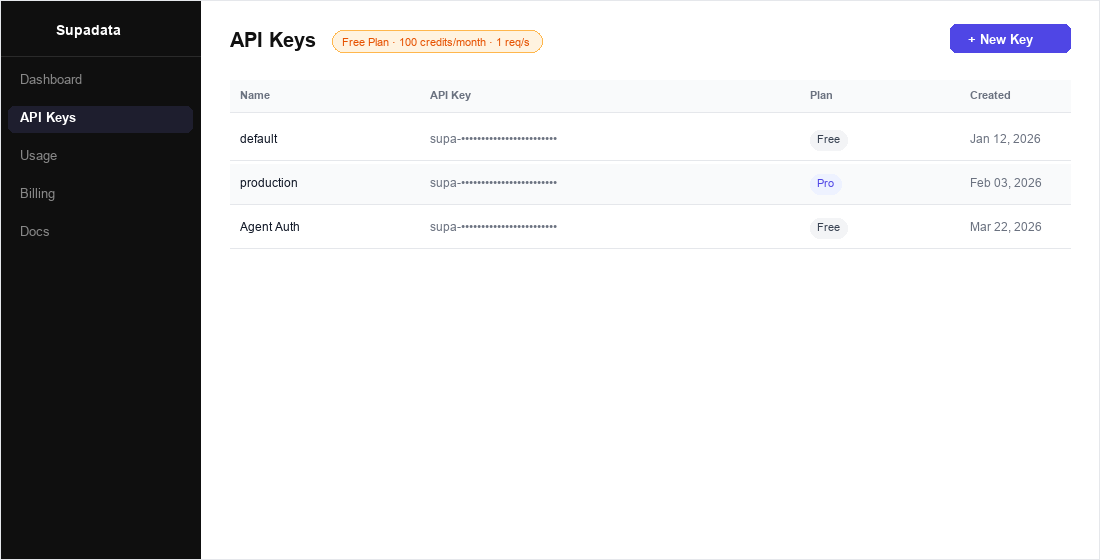
- After signing in, click API Keys in the left sidebar.
- Your auto-generated key is listed in the table. Click the key row to reveal or copy it.
- To create a new dedicated key for this integration, click + New Key, give it a name (e.g.,
Agent Auth), and click Create.
-
Create a connection in Scalekit
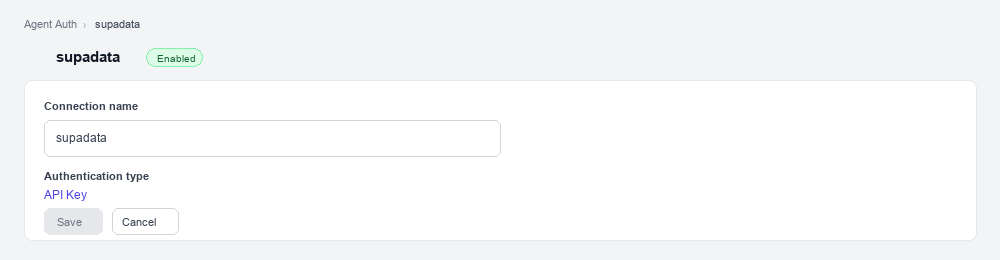
- In Scalekit dashboard, go to AgentKit > Connections > Create Connection. Find Supadata and click Create.
- Note the Connection name — you will use this as
connection_namein your code (e.g.,supadata). - Click Save.
-
Add a connected account
Connected accounts link a specific user identifier in your system to a Supadata API key. Add one in the dashboard to test. In production, each user adds their own through the authorization link: they enter their credentials on the page it opens.
In the dashboard, to test
-
Open the connection you created and click the Connected Accounts tab → Add account.
-
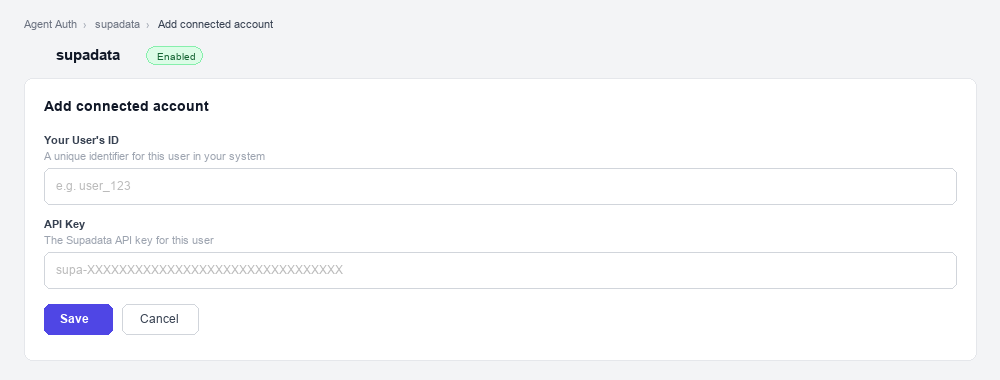
Fill in:
- Your User’s ID — a unique identifier for this user in your system (e.g.,
user_123) - API Key — the Supadata API key you copied in step 1
- Your User’s ID — a unique identifier for this user in your system (e.g.,
-
Click Save.
From your backend, if your app already has the credentials
For example, when users enter them on a settings page in your app:
import { ConnectorStatus } from '@scalekit-sdk/node'// Never hard-code API keys — read from secure storage or user inputconst supadataApiKey = getUserSupadataKey(); // retrieve from your secure storeconst authorizationDetails = {details: {case: 'staticAuth',value: { details: { api_key: supadataApiKey } },},};let { connectedAccount } = await scalekit.actions.upsertConnectedAccount({connectionName: 'supadata',identifier: 'user_123', // your user's unique IDauthorizationDetails,});// Make sure the account is ACTIVE before the first tool call.if (connectedAccount?.status !== ConnectorStatus.ACTIVE) {({ connectedAccount } = await scalekit.actions.upsertConnectedAccount({connectionName: 'supadata',identifier: 'user_123',authorizationDetails,}));}# Never hard-code API keys — read from secure storage or user inputsupadata_api_key = get_user_supadata_key() # retrieve from your secure storeauthorization_details = {"static_auth": {"api_key": supadata_api_key}}response = scalekit_client.actions.upsert_connected_account(connection_name="supadata",identifier="user_123",authorization_details=authorization_details,)# Make sure the account is ACTIVE before the first tool call.if response.connected_account.status != "ACTIVE":response = scalekit_client.actions.upsert_connected_account(connection_name="supadata",identifier="user_123",authorization_details=authorization_details,) -
-
Authorize a user and make your first call
quickstart.mts import { ScalekitClient } from '@scalekit-sdk/node'import 'dotenv/config'import { createInterface } from 'node:readline/promises'const scalekit = new ScalekitClient(process.env.SCALEKIT_ENVIRONMENT_URL,process.env.SCALEKIT_CLIENT_ID,process.env.SCALEKIT_CLIENT_SECRET,)const actions = scalekit.actionsconst connector = 'supadata'const identifier = 'user_123'// Generate an authorization link for the userconst { link } = await actions.getAuthorizationLink({ connectionName: connector, identifier })console.log('Authorize Supadata:', link)const rl = createInterface({ input: process.stdin, output: process.stdout })await rl.question('Press Enter after authorizing...')rl.close()// Make your first callconst result = await actions.executeTool({connector,identifier,toolName: 'supadata_account_get',toolInput: {},})console.log(result)Terminal window npx tsx quickstart.mtsquickstart.py import osfrom scalekit import ScalekitClientfrom dotenv import load_dotenvload_dotenv()scalekit_client = ScalekitClient(env_url=os.getenv("SCALEKIT_ENVIRONMENT_URL"),client_id=os.getenv("SCALEKIT_CLIENT_ID"),client_secret=os.getenv("SCALEKIT_CLIENT_SECRET"),)actions = scalekit_client.actionsconnection_name = "supadata"identifier = "user_123"# Generate an authorization link for the userlink_response = actions.get_authorization_link(connection_name=connection_name,identifier=identifier,)print("Authorize Supadata:", link_response.link)input("Press Enter after authorizing...")# Make your first callresult = actions.execute_tool(tool_input={},tool_name="supadata_account_get",connection_name=connection_name,identifier=identifier,)print(result)Terminal window python quickstart.pyEach user opens the link once and enters their Supadata credentials there. If your app already has a user's credentials, add the account from your backend instead, as the console steps above show. See Authorize a user for the full flow and statuses.
Tools
Pass the exact name toexecute_toolsupadata_account_getRetrieve organization details, plan information, and credit usage for the connected Supadata account.Read-onlyGet Account Info
Retrieve organization details, plan information, and credit usage for the connected Supadata account. Use this to check remaining credits before running credit-consuming operations.
Inputs
This tool takes no inputs.
supadata_extract_getCheck the status of an AI structured-data extraction job and retrieve its results once complete.Read-onlyGet Extract Results
Check the status of an AI structured-data extraction job and retrieve its results once complete. Use the jobId returned by Extract Structured Data.
Inputs
jobIdstringrequired- ID of the extraction job to check, returned by Extract Structured Data.
supadata_metadata_getRetrieve unified metadata for a video or media URL including title, description, author info, engagement stats, media details, and creation date.Read-onlyGet Media Metadata
Retrieve unified metadata for a video or media URL including title, description, author info, engagement stats, media details, and creation date. Supports YouTube, TikTok, Instagram, X (Twitter), Facebook, and more.
Inputs
urlstringrequired- URL of the video or media to retrieve metadata for.
supadata_transcript_getExtract transcripts from YouTube, TikTok, Instagram, X (Twitter), Facebook, or direct file URLs.Read-onlyGet Transcript
Extract transcripts from YouTube, TikTok, Instagram, X (Twitter), Facebook, or direct file URLs. Supports native captions, auto-generated captions, or AI-generated transcripts. Returns timestamped segments with speaker labels.
Inputs
urlstringrequired- URL of the video or media file to transcribe. Supports YouTube, TikTok, Instagram, X, Facebook, or direct video/audio file URLs.
chunkSizeinteger- Maximum number of characters per transcript segment chunk.
langstring- ISO 639-1 language code for the transcript (e.g., en, fr, de). Defaults to the video's original language.
modestring- Transcript generation mode: native (use existing captions, 1 credit), auto (native with AI fallback), or generate (AI-generated, 2 credits/minute).one of
nativeautogenerate textboolean- Return plain text instead of timestamped segments. Defaults to false.
supadata_transcript_job_getPoll the status and result of an asynchronous transcript job.Read-onlyGet Transcript Job
Poll the status and result of an asynchronous transcript job. supadata_transcript_get switches to async mode (returning a 202 with a jobId) for videos longer than roughly 20 minutes; use this tool to poll that jobId until status is completed or failed. Recommended poll interval is 1 second; results remain available for 1 hour after completion.
Inputs
jobIdstringrequired- ID of the transcript job to check, returned by Get Transcript when it responds asynchronously.
supadata_web_crawl_getCheck the status of a web crawl job and retrieve its results once complete.Read-onlyGet Web Crawl Results
Check the status of a web crawl job and retrieve its results once complete. Use the jobId returned by Start Web Crawl.
Inputs
jobIdstringrequired- ID of the crawl job to check, returned by Start Web Crawl.
supadata_web_mapDiscover and return all URLs found on a website.Read-onlyMap Website URLs
Discover and return all URLs found on a website. Useful for site structure analysis, link auditing, and building crawl lists. Costs 1 credit per request.
Inputs
urlstringrequired- Base URL of the website to map.
supadata_web_scrapeScrape a web page and return its content as clean Markdown.Read-onlyScrape Web Page
Scrape a web page and return its content as clean Markdown. Ideal for extracting readable content from any URL while stripping away navigation and ads.
Inputs
urlstringrequired- URL of the web page to scrape.
langstring- ISO 639-1 language code to request content in a specific language (e.g., en, fr, de).
noLinksboolean- Strip all hyperlinks from the Markdown output. Defaults to false.
supadata_youtube_batch_getCheck the status of a YouTube batch job (transcripts or video metadata) and retrieve its results once complete.Read-onlyGet YouTube Batch Results
Check the status of a YouTube batch job (transcripts or video metadata) and retrieve its results once complete. Use the jobId returned by Batch Get YouTube Transcripts or Batch Get YouTube Video Metadata.
Inputs
jobIdstringrequired- ID of the batch job to check.
supadata_youtube_channel_getRetrieve metadata for a YouTube channel including name, description, subscriber count, video count, and thumbnails.Read-onlyGet YouTube Channel
Retrieve metadata for a YouTube channel including name, description, subscriber count, video count, and thumbnails.
Inputs
channelIdstringrequired- YouTube channel ID, handle (@username), or full channel URL.
supadata_youtube_channel_videosRetrieve the video IDs published by a YouTube channel.Read-onlyGet YouTube Channel Videos
Retrieve the video IDs published by a YouTube channel. Use Get YouTube Channel first to resolve a handle to a channel ID if needed.
Inputs
channelIdstringrequired- YouTube channel ID, handle (@username), or full channel URL.
limitinteger- Maximum number of video IDs to return.
supadata_youtube_playlist_getRetrieve metadata and video list for a YouTube playlist including title, description, video count, and individual video details.Read-onlyGet YouTube Playlist
Retrieve metadata and video list for a YouTube playlist including title, description, video count, and individual video details.
Inputs
playlistIdstringrequired- YouTube playlist ID or full playlist URL.
supadata_youtube_playlist_videosRetrieve the video IDs contained in a YouTube playlist, in playlist order.Read-onlyGet YouTube Playlist Videos
Retrieve the video IDs contained in a YouTube playlist, in playlist order.
Inputs
playlistIdstringrequired- YouTube playlist ID or full playlist URL.
limitinteger- Maximum number of video IDs to return.
supadata_youtube_searchSearch YouTube for videos, channels, or playlists.Read-onlyYouTube Search
Search YouTube for videos, channels, or playlists. Returns results with titles, IDs, descriptions, thumbnails, and metadata.
Inputs
querystringrequired- Search query string to find videos, channels, or playlists on YouTube.
langstring- ISO 639-1 language code to filter results by language (e.g., en, fr).
limitinteger- Maximum number of results to return.
typestring- Type of results to return: video, channel, or playlist.one of
videochannelplaylist
supadata_youtube_transcript_getRetrieve the transcript for a YouTube video by video ID or URL.Read-onlyGet YouTube Transcript
Retrieve the transcript for a YouTube video by video ID or URL. Returns timestamped segments with text content.
Inputs
videoIdstringrequired- YouTube video ID or full YouTube URL to retrieve the transcript for.
langstring- ISO 639-1 language code for the transcript (e.g., en, fr, de).
textboolean- Return plain text instead of timestamped segments. Defaults to false.
supadata_youtube_transcript_translateRetrieve and translate a YouTube video transcript into a target language.Read-onlyTranslate YouTube Transcript
Retrieve and translate a YouTube video transcript into a target language. Returns translated timestamped segments.
Inputs
langstringrequired- ISO 639-1 language code to translate the transcript into (e.g., en, fr, es).
videoIdstringrequired- YouTube video ID or full YouTube URL to translate the transcript for.
textboolean- Return plain text instead of timestamped segments. Defaults to false.
supadata_youtube_video_getRetrieve detailed metadata for a YouTube video including title, description, view count, like count, duration, tags, thumbnails, and channel info.Read-onlyGet YouTube Video
Retrieve detailed metadata for a YouTube video including title, description, view count, like count, duration, tags, thumbnails, and channel info.
Inputs
videoIdstringrequired- YouTube video ID or full YouTube URL.
supadata_extractUse AI to analyze a video or media URL and extract structured data from it, guided by a natural-language prompt and/or a JSON schema.WriteExtract Structured Data
Use AI to analyze a video or media URL and extract structured data from it, guided by a natural-language prompt and/or a JSON schema. Returns a jobId — poll Get Extract Results with it until extraction finishes.
Inputs
urlstringrequired- URL of the video or media to extract structured data from.
promptstring- Natural-language instructions describing what data to extract.
schemaobject- JSON schema describing the exact shape of the structured data to extract.
supadata_web_crawl_startStart an asynchronous crawl job that extracts content from all pages on a website, following internal links up to the given page limit.WriteStart Web Crawl
Start an asynchronous crawl job that extracts content from all pages on a website, following internal links up to the given page limit. Returns a jobId — poll Get Web Crawl Results with it until the crawl finishes.
Inputs
urlstringrequired- Base URL of the website to crawl.
limitinteger- Maximum number of pages to crawl.
supadata_youtube_transcript_batchStart an asynchronous batch job that fetches transcripts for multiple YouTube videos in one call.WriteBatch Get YouTube Transcripts
Start an asynchronous batch job that fetches transcripts for multiple YouTube videos in one call. Returns a jobId — poll Get YouTube Batch Results with it until the batch finishes.
Inputs
videoIdsarrayrequired- JSON array of YouTube video IDs or URLs to fetch transcripts for.
langstring- ISO 639-1 language code for the transcripts (e.g., en, fr, de). Defaults to each video's original language.
textboolean- Return plain text instead of timestamped segments for each video. Defaults to false.
supadata_youtube_video_batchStart an asynchronous batch job that fetches metadata for multiple YouTube videos in one call.WriteBatch Get YouTube Video Metadata
Start an asynchronous batch job that fetches metadata for multiple YouTube videos in one call. Returns a jobId — poll Get YouTube Batch Results with it until the batch finishes.
Inputs
videoIdsarrayrequired- JSON array of YouTube video IDs or URLs to fetch metadata for.
No tools match.
Workflows
Proxy API call
// Get a YouTube transcript — no API key needed hereconst result = await actions.request({ connectionName: 'supadata', identifier: 'user_123', path: '/v1/youtube/transcript', method: 'GET', queryParams: { videoId: 'dQw4w9WgXcQ', text: 'true' },});console.log(result);# Get a YouTube transcript — no API key needed hereresult = actions.request( connection_name='supadata', identifier='user_123', path="/v1/youtube/transcript", method="GET", params={"videoId": "dQw4w9WgXcQ", "text": True})print(result)Execute a tool
const result = await actions.executeTool({ connector: 'supadata', identifier: 'user_123', toolName: 'supadata_metadata_get', toolInput: {},});console.log(result);result = actions.execute_tool( tool_input={}, tool_name='supadata_metadata_get', connection_name='supadata', identifier='user_123',)print(result)