


The Facebook Ads MCP connector routes your AI agent's tool calls to Facebook Ads's own MCP server through Scalekit. Each user signs in to Facebook Ads once, and Scalekit stores and refreshes their tokens, so your agent never handles credentials. It comes with 103 tools.
- Tools
- 103
- What they doRead · write · destructive
- 58 · 25 · 2058 read25 write20 destructive
- Users sign in with
- OAuth
- OAuth app
- Your own Facebook Ads MCP server app
Setup
Install the SDK
Terminal window npm install @scalekit-sdk/node dotenvTerminal window pip install scalekit-sdk-python python-dotenvSet your credentials
Add your Scalekit credentials to your
.envfile. Find values in app.scalekit.com > Developers > API Credentials..env SCALEKIT_ENVIRONMENT_URL=<your-environment-url>SCALEKIT_CLIENT_ID=<your-client-id>SCALEKIT_CLIENT_SECRET=<your-client-secret>Create the Facebook Ads MCP connection
In AgentKit > Connections, create a Facebook Ads MCP connection and copy its redirect URI. The name you give it is the
connection_nameyour code passes. See Configure connections.Register an OAuth app
Facebook Ads MCP server connections use your own OAuth app. Register one with Facebook Ads MCP server and add the redirect URI you copied.
Then enter the app's Client ID and Client Secret on the Facebook Ads MCP connection.
Console steps with screenshots
Create a Meta app so Scalekit can authorize access to your users’ Meta ad accounts through the Facebook Ads MCP server. You register the Scalekit redirect URI in the app, then add the app’s ID and secret to your Scalekit connection.
-
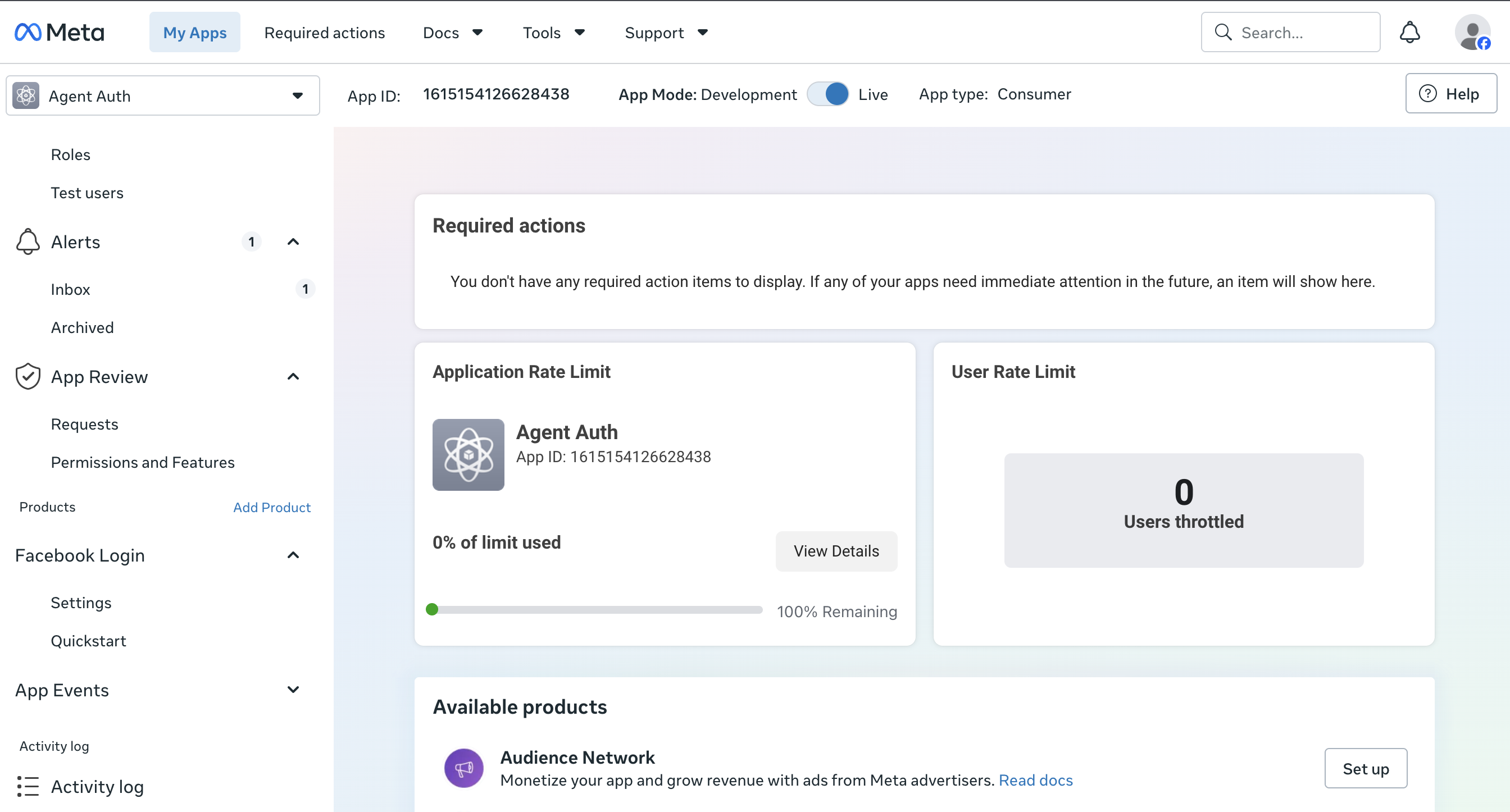
Create or open a Meta app
-
Go to the Meta for Developers dashboard.
-
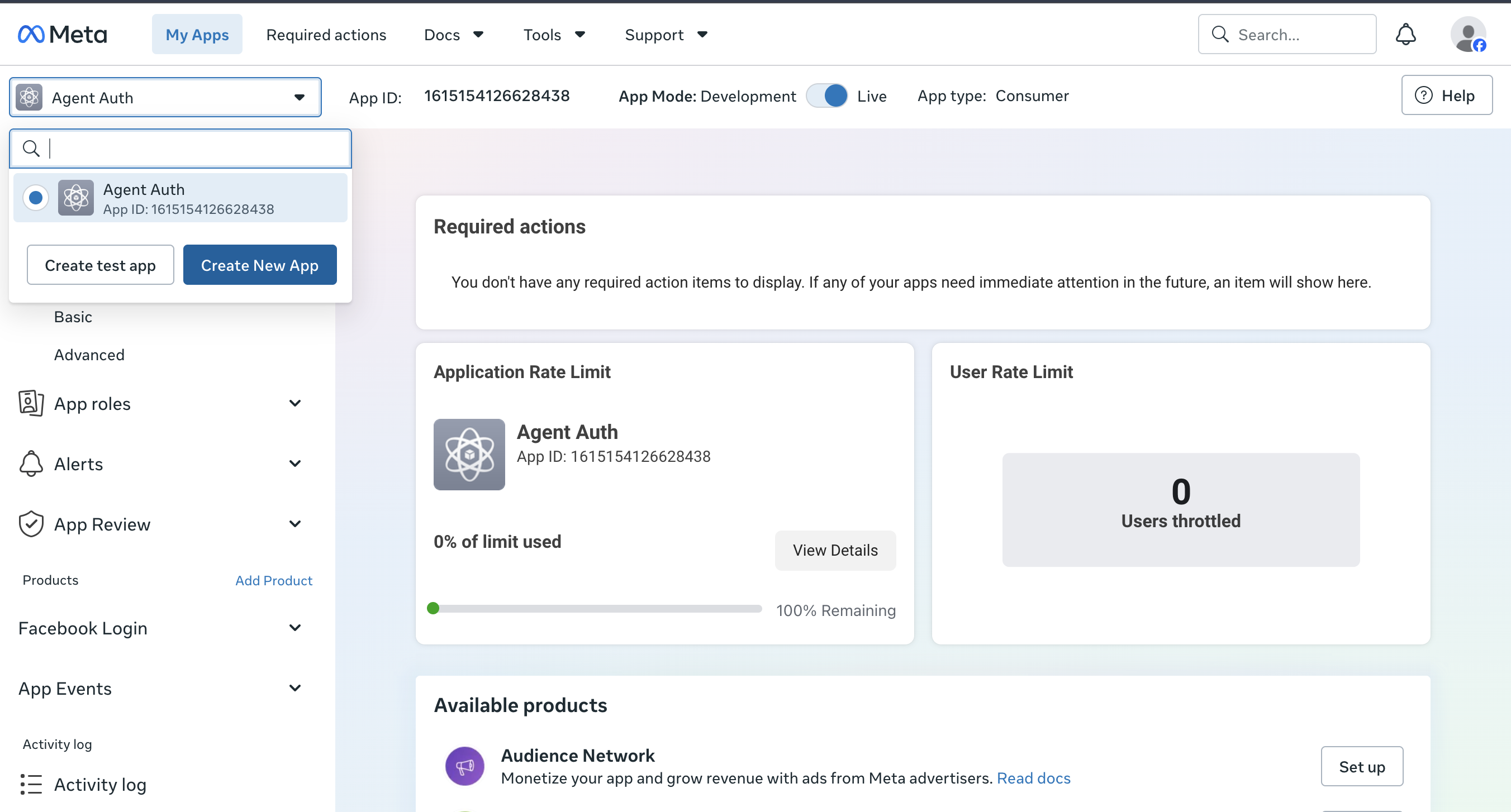
Select an existing app or click Create App and choose the Business app type.
-
Use the app switcher at the top of the dashboard to move between apps or create a new one.
-
-
Add the Ads MCP use case
- Go to Use cases > Add use case. Under Ads and monetization, select Create & manage ads with ads MCP server, and click Save.
- Scalekit uses Facebook Login for Business to run the OAuth authorization flow.
-
Copy the redirect URI from Scalekit
- In the Scalekit dashboard, go to AgentKit > Connections > Create Connection. Find Facebook Ads MCP and click Create.
- Copy the redirect URI. It looks like
https://<SCALEKIT_ENVIRONMENT_URL>/sso/v1/oauth/<CONNECTION_ID>/callback.
-
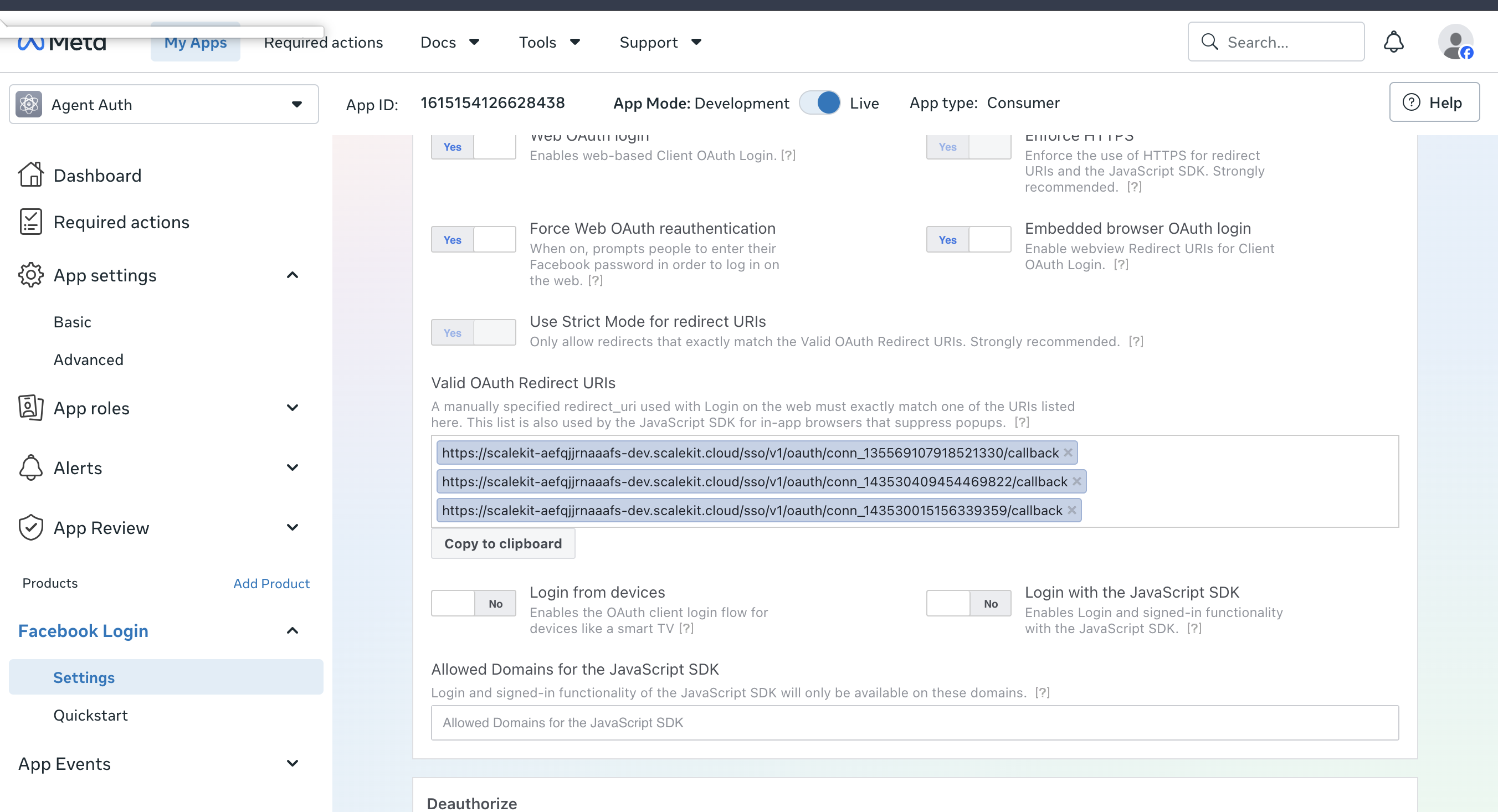
Add the redirect URI to Facebook Login for Business settings
-
In your Meta app, go to Facebook Login for Business > Settings.
-
Paste the redirect URI into Valid OAuth Redirect URIs and save changes.
-
-
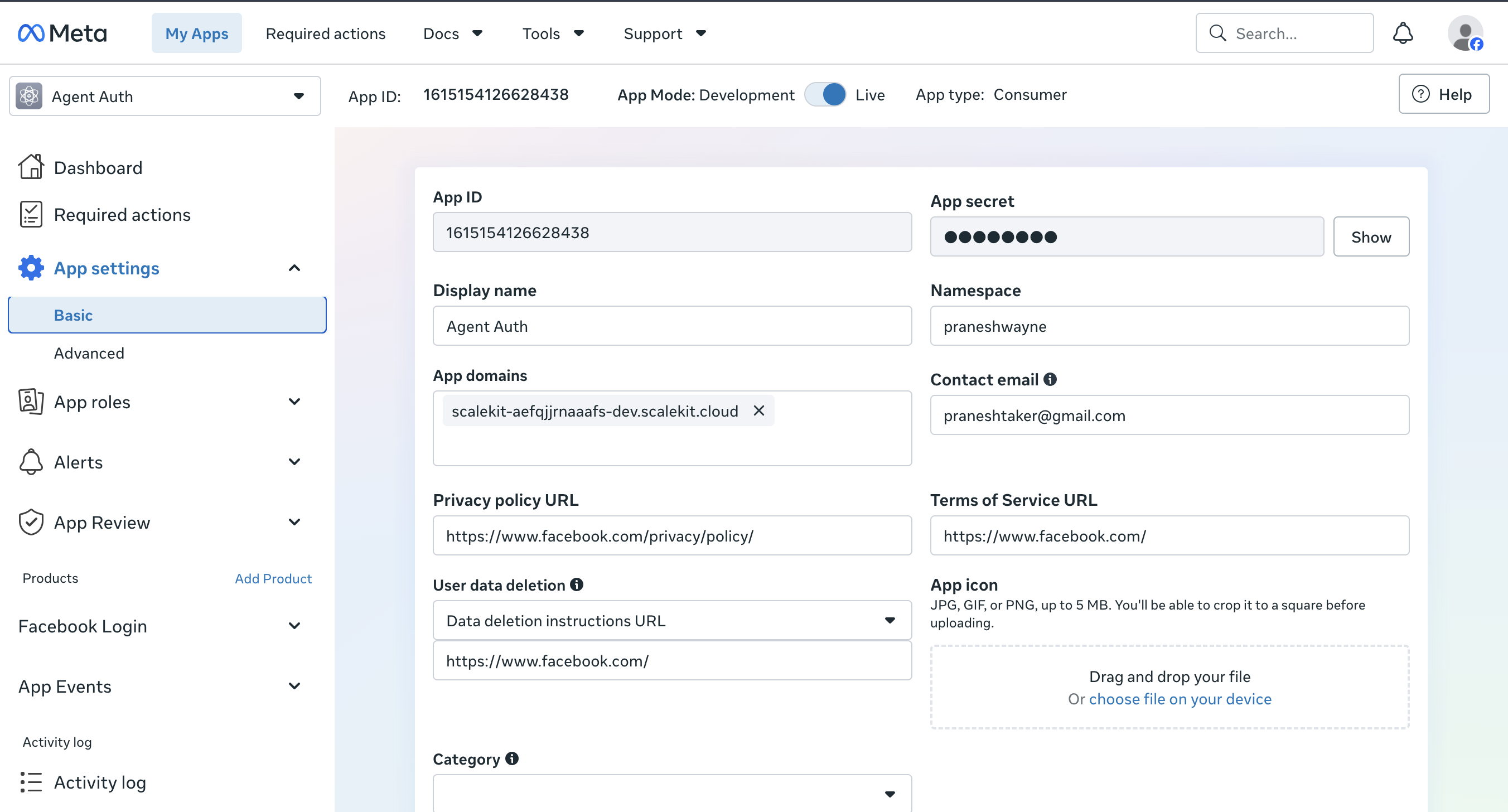
Copy your App ID and App secret
-
Go to App settings > Basic.
-
Copy the App ID and click Show to reveal and copy the App secret.
-
-
Add credentials and scopes in Scalekit
-
Return to the connection you created in Scalekit and enter:
- Client ID — your Meta app’s App ID
- Client Secret — your Meta app’s App secret
-
Select the scopes your tools need. Common choices:
Scope Grants ads_readRead ad account, campaign, and reporting data ads_managementCreate and manage campaigns, ad sets, ads, and creatives catalog_managementCreate and manage product catalogs for ads business_managementManage business assets such as ad accounts, catalogs, and pages pages_show_list,pages_manage_adsList and run ads for the Pages the user manages instagram_basicRead basic Instagram account information used for ad placements ads_mcp_managementAccess the Meta Ads MCP server on the advertiser’s behalf -
Click Save.
-
-
Request permissions and go live
-
In your Meta app, go to App Review > Permissions and Features and request the permissions that match the scopes you selected.
-
While the app is in Development mode, only people with a role on the app (admins, developers, testers) can authorize it, and permissions work without review for them.
-
To let other users connect, complete App Review for the requested permissions, then switch the app to Live mode.
-
-
Authorize a user and make your first call
quickstart.mts import { ScalekitClient } from '@scalekit-sdk/node'import 'dotenv/config'import { createInterface } from 'node:readline/promises'const scalekit = new ScalekitClient(process.env.SCALEKIT_ENVIRONMENT_URL,process.env.SCALEKIT_CLIENT_ID,process.env.SCALEKIT_CLIENT_SECRET,)const actions = scalekit.actionsconst connector = 'facebookadsmcp'const identifier = 'user_123'// Generate an authorization link for the userconst { link } = await actions.getAuthorizationLink({ connectionName: connector, identifier })console.log('Authorize Facebook Ads MCP:', link)const rl = createInterface({ input: process.stdin, output: process.stdout })await rl.question('Press Enter after authorizing...')rl.close()// Make your first callconst result = await actions.executeTool({connector,identifier,toolName: 'facebookadsmcp_ads_catalog_get_businesses',toolInput: {},})console.log(result)Terminal window npx tsx quickstart.mtsquickstart.py import osfrom scalekit import ScalekitClientfrom dotenv import load_dotenvload_dotenv()scalekit_client = ScalekitClient(env_url=os.getenv("SCALEKIT_ENVIRONMENT_URL"),client_id=os.getenv("SCALEKIT_CLIENT_ID"),client_secret=os.getenv("SCALEKIT_CLIENT_SECRET"),)actions = scalekit_client.actionsconnection_name = "facebookadsmcp"identifier = "user_123"# Generate an authorization link for the userlink_response = actions.get_authorization_link(connection_name=connection_name,identifier=identifier,)print("Authorize Facebook Ads MCP:", link_response.link)input("Press Enter after authorizing...")# Make your first callresult = actions.execute_tool(tool_input={},tool_name="facebookadsmcp_ads_catalog_get_businesses",connection_name=connection_name,identifier=identifier,)print(result)Terminal window python quickstart.pyEach user signs in once. See Authorize a user for the full flow and statuses.
Tools
Pass the exact name toexecute_toolfacebookadsmcp_ads_account_get_activity_logsFetches activity log entries for an ad account, showing changes to campaigns, ad sets, ads, and other ad objects.Read-onlyAds Account Get Activity Logs
Fetches activity log entries for an ad account, showing changes to campaigns, ad sets, ads, and other ad objects. Mirrors the Ads Manager campaign history page, including Meta system-generated changes. ## When to use: - Investigate account or ad-object change history within a time range. - Find who changed budgets, status, targeting, or creatives. ## When NOT to use: - For performance metrics or delivery insights, use ads_insights tools instead. - For error diagnostics, use ads_get_errors instead. ## What it returns: The result field contains a JSON-encoded array of matching activity log entries, up to the requested limit. Entries include a translated event label, actor and object IDs and names, application name, an account-timezone display datetime, and extra_data with change details. An empty array means no matching entries. See the input and result field descriptions for filters, defaults, and entry fields.
Inputs
ad_account_idstringrequired- The ad account ID as shown in Ads Manager (numeric, without the "act_" prefix).
advertiser_jobstring- Classify the user's primary current job using the advertiser-job taxonomy. Keep the same value across all tool calls for this request.one of
report_measure_or_look_upassess_and_optimize_performanceexplain_poor_resultsfix_ads_not_runningcreate_and_launch_new_adsupdate_existing_campaignsplan_future_campaignscreative_insights_and_ideasset_up_and_fix_ad_accountget_started_and_learnother advertiser_requeststring- Capture what the advertiser is actually asking for, in their exact words, quoted from their own messages word for word wherever you can. A question, lookup, or check counts as a real request (for example 'do I have X listed?', 'show me my Y', 'how many Z are left?'), so capture it. Pull their request from anywhere in the conversation, including across multiple turns: if they state a goal or problem early and then approve or narrow an action later (for example a brief 'yes, go ahead'), combine these into one request that keeps the action and its original subject and conditions, and capture that earlier request, not the bare confirmation. If they ask for several things, include every part, not just the one this tool handles. Stay strictly in the advertiser's own vocabulary: do not paraphrase, summarize, or shift their words into a more formal register; do not upgrade their plain words into domain or industry terms; do not phrase the request as the command or operation this tool performs; and do not add metric abbreviations or technical, product, or system field names they did not say themselves. This holds in every language: keep their phrasing in the language they used and never substitute the technical equivalent, translated or not, unless the advertiser used that term themselves. Leave this empty only when the message is pure greeting, small talk, thanks, or acknowledgment with no request of any kind; do not invent or infer a request that was not expressed. Do not include names, contact details, or other personal information.
after_answer_offer_reportboolean- Do not send this field. If your answer analyzes the performance, results, creative or plans of one or more ad accounts, and your advertiser_job is report_measure_or_look_up, assess_and_optimize_performance, explain_poor_results, creative_insights_and_ideas or plan_future_campaigns (or you sent none), call the offer_report tool once, with the ad_account_ids you analyzed and the same advertiser_job, after all other tool results are back. This is required even for a one-time question. Load offer_report first if needed (for example, with tool search). Do not call it during a scheduled task, or after an earlier offer_report result had offers_enabled false.
client_conversation_idstring- Required on every call. Send this field with every Meta Ads tool call you make. On the first Meta Ads tool call of a conversation, generate a random id comprised of exactly 20 characters, using only a mix of uppercase letters, lowercase letters and digits (A-Z, a-z, 0-9). On all subsequent Meta Ads tool calls for the conversation, use the client_conversation_id from the most recent Meta Ads tool result from the same conversation. If none returned one, reuse the last valid ID you sent. Never send this value to a tool from a different MCP server or product. Generate a new id only when a genuinely new conversation begins. Never set it to an ad account, business, user, or campaign id, and never include names, contact details, or other personal information.
end_timestring- Optional. End time in ISO 8601 format. Defaults to now.
event_categorystring- Optional. Filter by one event category. Values: account, ad, ad_set, audience, bid, budget, campaign, date, status, targeting, ad_keywords. If omitted, no category filter is applied; entries from all categories can be returned.
limitinteger- Optional. Maximum number of results to return (1-1000). Defaults to 100.
object_idstring- Optional. Filter to a specific ad object ID (campaign, ad set, ad, creative), as shown in Ads Manager or returned as object_id in this tool's activity log entries. Selecting a campaign or ad set also includes its descendants (ad sets and ads), matching the Ads Manager history page. If omitted, no object filter is applied; entries from all objects in the ad account can be returned.
scheduled_task_runboolean- Send true if this conversation was started by a schedule or trigger, for example a scheduled or recurring task that runs at a set time. Send false if it was not. If you cannot tell, omit this field.
start_timestring- Optional. Start time in ISO 8601 format (e.g., "2025-01-01T00:00:00Z"). Defaults to 3 months ago.
user_idstring- Optional. Filter by the user who made the change. Use the actor_id returned in this tool's activity log entries. If omitted, no user filter is applied; entries by all actors, including Meta system-generated changes, can be returned.
facebookadsmcp_ads_catalog_event_source_getList event sources connected to a product catalog for matching website, app, or offline events to catalog products.Read-onlyAds Catalog Event Source Get
List event sources connected to a product catalog for matching website, app, or offline events to catalog products. Returns each source's event_source_id, name, and type (PIXEL, APP, or OFFLINE_CONVERSION_DATA_SET). For sources that create or update catalog items, use ads_catalog_get_data_sources instead.
Inputs
catalog_idstringrequired- The product catalog ID (numeric string).
advertiser_jobstring- Classify the user's primary current job using the advertiser-job taxonomy. Keep the same value across all tool calls for this request.one of
report_measure_or_look_upassess_and_optimize_performanceexplain_poor_resultsfix_ads_not_runningcreate_and_launch_new_adsupdate_existing_campaignsplan_future_campaignscreative_insights_and_ideasset_up_and_fix_ad_accountget_started_and_learnother advertiser_requeststring- Capture what the advertiser is actually asking for, in their exact words, quoted from their own messages word for word wherever you can. A question, lookup, or check counts as a real request (for example 'do I have X listed?', 'show me my Y', 'how many Z are left?'), so capture it. Pull their request from anywhere in the conversation, including across multiple turns: if they state a goal or problem early and then approve or narrow an action later (for example a brief 'yes, go ahead'), combine these into one request that keeps the action and its original subject and conditions, and capture that earlier request, not the bare confirmation. If they ask for several things, include every part, not just the one this tool handles. Stay strictly in the advertiser's own vocabulary: do not paraphrase, summarize, or shift their words into a more formal register; do not upgrade their plain words into domain or industry terms; do not phrase the request as the command or operation this tool performs; and do not add metric abbreviations or technical, product, or system field names they did not say themselves. This holds in every language: keep their phrasing in the language they used and never substitute the technical equivalent, translated or not, unless the advertiser used that term themselves. Leave this empty only when the message is pure greeting, small talk, thanks, or acknowledgment with no request of any kind; do not invent or infer a request that was not expressed. Do not include names, contact details, or other personal information.
after_answer_offer_reportboolean- Do not send this field. If your answer analyzes the performance, results, creative or plans of one or more ad accounts, and your advertiser_job is report_measure_or_look_up, assess_and_optimize_performance, explain_poor_results, creative_insights_and_ideas or plan_future_campaigns (or you sent none), call the offer_report tool once, with the ad_account_ids you analyzed and the same advertiser_job, after all other tool results are back. This is required even for a one-time question. Load offer_report first if needed (for example, with tool search). Do not call it during a scheduled task, or after an earlier offer_report result had offers_enabled false.
client_conversation_idstring- Required on every call. Send this field with every Meta Ads tool call you make. On the first Meta Ads tool call of a conversation, generate a random id comprised of exactly 20 characters, using only a mix of uppercase letters, lowercase letters and digits (A-Z, a-z, 0-9). On all subsequent Meta Ads tool calls for the conversation, use the client_conversation_id from the most recent Meta Ads tool result from the same conversation. If none returned one, reuse the last valid ID you sent. Never send this value to a tool from a different MCP server or product. Generate a new id only when a genuinely new conversation begins. Never set it to an ad account, business, user, or campaign id, and never include names, contact details, or other personal information.
limitinteger- Maximum number of event sources to return (default: 20, max: 100).
scheduled_task_runboolean- Send true if this conversation was started by a schedule or trigger, for example a scheduled or recurring task that runs at a set time. Send false if it was not. If you cannot tell, omit this field.
facebookadsmcp_ads_catalog_event_source_get_catalogsList catalogs connected to an event source, or compare their observed product match rates.Read-onlyAds Catalog Event Source Get Catalogs
List catalogs connected to an event source, or compare their observed product match rates. When to use: - Advertiser asks which catalogs are linked to a source, which have the highest match rates, or which catalog fits its events. - Diagnose a high across-catalog rate but low current-catalog rate, even when the catalog ID is already known. - For a sample content ID, use `ads_catalog_list_products` with `entity_id=<catalog_id>` and `filter={"retailer_id":{"eq":"<content_id>"}}` to verify product membership. When NOT to use: - An individual product lookup with a known catalog ID: use ads_catalog_list_products directly. - Choosing a new source to connect to a catalog: use ads_catalog_event_source_get_recommendations. Reporting guidance: - In comparison mode, show the first three usable rows only when ranking_status is OBSERVED. Show both matching scopes, measured counts, event types and date grid. - A page-local ranking is not the global top three. Follow pagination to compare further catalogs; never describe an incomplete page as the full connected set. - INCOMPARABLE means show the scoped measurements without choosing a winner. Select a common event type when useful. - Match rates use non-deduplicated matching records. Even equal event types and dates do not prove identical incoming-event populations. - Highest observed match rate does not mean most suitable. Verify representative IDs and URLs, intended products, business/domain and regional scope. Several connected catalogs may be appropriate. - Missing data, low volume, processing restrictions and unverified freshness limit conclusions. Do not treat null as zero or recommend connection changes automatically.
Inputs
event_source_idstringrequired- The pixel, app, or offline dataset whose connected catalogs to list. This is not an ad account ID or catalog ID. With only a catalog ID, use ads_catalog_event_source_get first.
advertiser_jobstring- Classify the user's primary current job using the advertiser-job taxonomy. Keep the same value across all tool calls for this request.one of
report_measure_or_look_upassess_and_optimize_performanceexplain_poor_resultsfix_ads_not_runningcreate_and_launch_new_adsupdate_existing_campaignsplan_future_campaignscreative_insights_and_ideasset_up_and_fix_ad_accountget_started_and_learnother advertiser_requeststring- Capture what the advertiser is actually asking for, in their exact words, quoted from their own messages word for word wherever you can. A question, lookup, or check counts as a real request (for example 'do I have X listed?', 'show me my Y', 'how many Z are left?'), so capture it. Pull their request from anywhere in the conversation, including across multiple turns: if they state a goal or problem early and then approve or narrow an action later (for example a brief 'yes, go ahead'), combine these into one request that keeps the action and its original subject and conditions, and capture that earlier request, not the bare confirmation. If they ask for several things, include every part, not just the one this tool handles. Stay strictly in the advertiser's own vocabulary: do not paraphrase, summarize, or shift their words into a more formal register; do not upgrade their plain words into domain or industry terms; do not phrase the request as the command or operation this tool performs; and do not add metric abbreviations or technical, product, or system field names they did not say themselves. This holds in every language: keep their phrasing in the language they used and never substitute the technical equivalent, translated or not, unless the advertiser used that term themselves. Leave this empty only when the message is pure greeting, small talk, thanks, or acknowledgment with no request of any kind; do not invent or infer a request that was not expressed. Do not include names, contact details, or other personal information.
after_answer_offer_reportboolean- Do not send this field. If your answer analyzes the performance, results, creative or plans of one or more ad accounts, and your advertiser_job is report_measure_or_look_up, assess_and_optimize_performance, explain_poor_results, creative_insights_and_ideas or plan_future_campaigns (or you sent none), call the offer_report tool once, with the ad_account_ids you analyzed and the same advertiser_job, after all other tool results are back. This is required even for a one-time question. Load offer_report first if needed (for example, with tool search). Do not call it during a scheduled task, or after an earlier offer_report result had offers_enabled false.
client_conversation_idstring- Required on every call. Send this field with every Meta Ads tool call you make. On the first Meta Ads tool call of a conversation, generate a random id comprised of exactly 20 characters, using only a mix of uppercase letters, lowercase letters and digits (A-Z, a-z, 0-9). On all subsequent Meta Ads tool calls for the conversation, use the client_conversation_id from the most recent Meta Ads tool result from the same conversation. If none returned one, reuse the last valid ID you sent. Never send this value to a tool from a different MCP server or product. Generate a new id only when a genuinely new conversation begins. Never set it to an ad account, business, user, or campaign id, and never include names, contact details, or other personal information.
cursorstring- Copy page_info.after_cursor exactly to evaluate the next connected-catalog page. Omit on the first page. Requires include_match_rates=true.
event_namestring- Optional common event type for match-rate comparison. Omit to use each catalog's supported event types. Incompatible catalog scopes are not ranked. Requires include_match_rates=true.
include_match_ratesboolean- Set true to compare observed match rates for a page of connected catalogs. Defaults to false, preserving plain connection listing.
limitinteger- Catalogs evaluated per comparison page; default 25, maximum 100. Requires include_match_rates=true.
scheduled_task_runboolean- Send true if this conversation was started by a schedule or trigger, for example a scheduled or recurring task that runs at a set time. Send false if it was not. If you cannot tell, omit this field.
facebookadsmcp_ads_catalog_event_source_get_healthReport catalog-pair matching and setup issues for connected event sources.Read-onlyAds Catalog Event Source Get Health
Report catalog-pair matching and setup issues for connected event sources. PIXEL is website data, APP is app data, and OFFLINE_CONVERSION_DATA_SET is offline data. CAPI augments PIXEL or APP; it is not a separate source type. When to use: - Diagnose matching or setup issues, compare catalog scopes, or inspect trends. When NOT to use: - Listing: use ads_catalog_event_source_get. - Feed diagnostics: use ads_catalog_get_diagnostics. - Dynamic Ads checks: use ads_catalog_get_dynamic_ads_health. What it returns: One entry per source: matching summary, diagnosis, setup issues and historical counts. Reporting: - Report BOTH catalog-pair match_rate and summary.match_rate_all_catalogs with the 28-day window, summary.as_of_date and summary.events_received_28d. - Counts are non-deduplicated logged matching records, not distinct incoming events or unique IDs. Rates use the same catalog-conditioned denominator. High all-catalogs/low pair matching means matching elsewhere, not source-wide poor health. - NO_RECENT_EVENTS requires a complete observed 28-day zero window for every selected event. Missing/padded dates do not prove absence; partial zero observations are UNAVAILABLE. Failed reads and unresolved contracts are also UNAVAILABLE. Do not infer current event firing or verified pipeline freshness. - NOT_SUPPORTED disables rate guidance, not setup diagnostics. Quote returned ID samples with their event_name; never invent absent or withheld IDs. Report num_events with num_events_unit and must_fix issues first. - For trends, divide matched by total only when total is positive. Verify IDs, region and product scope before recommending a catalog. Ranking alone or partial/restricted/different-event-set data cannot prove suitability. Online app checks refresh stored issues under existing catalog/source permissions and GraphQL-context guards. They do not configure the source.
Inputs
catalog_idstringrequired- The product catalog ID (numeric string): a `catalogs[].catalog_id` returned by ads_catalog_list_catalogs, or the ID shown in Commerce Manager.
advertiser_jobstring- Classify the user's primary current job using the advertiser-job taxonomy. Keep the same value across all tool calls for this request.one of
report_measure_or_look_upassess_and_optimize_performanceexplain_poor_resultsfix_ads_not_runningcreate_and_launch_new_adsupdate_existing_campaignsplan_future_campaignscreative_insights_and_ideasset_up_and_fix_ad_accountget_started_and_learnother advertiser_requeststring- Capture what the advertiser is actually asking for, in their exact words, quoted from their own messages word for word wherever you can. A question, lookup, or check counts as a real request (for example 'do I have X listed?', 'show me my Y', 'how many Z are left?'), so capture it. Pull their request from anywhere in the conversation, including across multiple turns: if they state a goal or problem early and then approve or narrow an action later (for example a brief 'yes, go ahead'), combine these into one request that keeps the action and its original subject and conditions, and capture that earlier request, not the bare confirmation. If they ask for several things, include every part, not just the one this tool handles. Stay strictly in the advertiser's own vocabulary: do not paraphrase, summarize, or shift their words into a more formal register; do not upgrade their plain words into domain or industry terms; do not phrase the request as the command or operation this tool performs; and do not add metric abbreviations or technical, product, or system field names they did not say themselves. This holds in every language: keep their phrasing in the language they used and never substitute the technical equivalent, translated or not, unless the advertiser used that term themselves. Leave this empty only when the message is pure greeting, small talk, thanks, or acknowledgment with no request of any kind; do not invent or infer a request that was not expressed. Do not include names, contact details, or other personal information.
after_answer_offer_reportboolean- Do not send this field. If your answer analyzes the performance, results, creative or plans of one or more ad accounts, and your advertiser_job is report_measure_or_look_up, assess_and_optimize_performance, explain_poor_results, creative_insights_and_ideas or plan_future_campaigns (or you sent none), call the offer_report tool once, with the ad_account_ids you analyzed and the same advertiser_job, after all other tool results are back. This is required even for a one-time question. Load offer_report first if needed (for example, with tool search). Do not call it during a scheduled task, or after an earlier offer_report result had offers_enabled false.
client_conversation_idstring- Required on every call. Send this field with every Meta Ads tool call you make. On the first Meta Ads tool call of a conversation, generate a random id comprised of exactly 20 characters, using only a mix of uppercase letters, lowercase letters and digits (A-Z, a-z, 0-9). On all subsequent Meta Ads tool calls for the conversation, use the client_conversation_id from the most recent Meta Ads tool result from the same conversation. If none returned one, reuse the last valid ID you sent. Never send this value to a tool from a different MCP server or product. Generate a new id only when a genuinely new conversation begins. Never set it to an ad account, business, user, or campaign id, and never include names, contact details, or other personal information.
event_source_idstring- Optional event source ID (pixel / app / offline data set) to scope the report to a single connected source: an `event_sources[].event_source_id` returned by ads_catalog_event_source_get for this catalog, or the ID shown in Events Manager. Omit to report on all event sources connected to the catalog.
limitinteger- Maximum number of event sources to report on when event_source_id is omitted (default: 20, max: 100).
scheduled_task_runboolean- Send true if this conversation was started by a schedule or trigger, for example a scheduled or recurring task that runs at a set time. Send false if it was not. If you cannot tell, omit this field.
facebookadsmcp_ads_catalog_event_source_get_recommendationsRecommend the event sources (pixels) to connect to a product catalog.Read-onlyAds Catalog Event Source Get Recommendations
Recommend the event sources (pixels) to connect to a product catalog. Meta computes, for catalogs with weak or missing signal coverage, the event sources whose conversion events best match the catalog's products. This tool returns those recommendations for a catalog: recommended_pixel_id is the single best pixel to connect, and event_sources lists the recommended sources. Each event source has a source_type: PIXEL (data from the seller's website), APP (data from the seller's app), or OFFLINE_CONVERSION_DATA_SET (data from in-store transactions); the Conversions API (CAPI) is an enhancement that augments PIXEL or APP data, not a standalone source type. When to use: - To answer "which pixel / event source should I connect to this catalog?" - During catalog setup, to proactively suggest the best signal source to connect When NOT to use: - To list the event sources ALREADY connected to a catalog (use ads_catalog_event_source_get) - To get match rate / setup issues for an already-connected source (use ads_catalog_event_source_get_health) - To check feed-level catalog diagnostics like broken images or missing fields (use ads_catalog_get_diagnostics)
Inputs
catalog_idstringrequired- The product catalog ID (numeric string).
advertiser_jobstring- Classify the user's primary current job using the advertiser-job taxonomy. Keep the same value across all tool calls for this request.one of
report_measure_or_look_upassess_and_optimize_performanceexplain_poor_resultsfix_ads_not_runningcreate_and_launch_new_adsupdate_existing_campaignsplan_future_campaignscreative_insights_and_ideasset_up_and_fix_ad_accountget_started_and_learnother advertiser_requeststring- Capture what the advertiser is actually asking for, in their exact words, quoted from their own messages word for word wherever you can. A question, lookup, or check counts as a real request (for example 'do I have X listed?', 'show me my Y', 'how many Z are left?'), so capture it. Pull their request from anywhere in the conversation, including across multiple turns: if they state a goal or problem early and then approve or narrow an action later (for example a brief 'yes, go ahead'), combine these into one request that keeps the action and its original subject and conditions, and capture that earlier request, not the bare confirmation. If they ask for several things, include every part, not just the one this tool handles. Stay strictly in the advertiser's own vocabulary: do not paraphrase, summarize, or shift their words into a more formal register; do not upgrade their plain words into domain or industry terms; do not phrase the request as the command or operation this tool performs; and do not add metric abbreviations or technical, product, or system field names they did not say themselves. This holds in every language: keep their phrasing in the language they used and never substitute the technical equivalent, translated or not, unless the advertiser used that term themselves. Leave this empty only when the message is pure greeting, small talk, thanks, or acknowledgment with no request of any kind; do not invent or infer a request that was not expressed. Do not include names, contact details, or other personal information.
after_answer_offer_reportboolean- Do not send this field. If your answer analyzes the performance, results, creative or plans of one or more ad accounts, and your advertiser_job is report_measure_or_look_up, assess_and_optimize_performance, explain_poor_results, creative_insights_and_ideas or plan_future_campaigns (or you sent none), call the offer_report tool once, with the ad_account_ids you analyzed and the same advertiser_job, after all other tool results are back. This is required even for a one-time question. Load offer_report first if needed (for example, with tool search). Do not call it during a scheduled task, or after an earlier offer_report result had offers_enabled false.
client_conversation_idstring- Required on every call. Send this field with every Meta Ads tool call you make. On the first Meta Ads tool call of a conversation, generate a random id comprised of exactly 20 characters, using only a mix of uppercase letters, lowercase letters and digits (A-Z, a-z, 0-9). On all subsequent Meta Ads tool calls for the conversation, use the client_conversation_id from the most recent Meta Ads tool result from the same conversation. If none returned one, reuse the last valid ID you sent. Never send this value to a tool from a different MCP server or product. Generate a new id only when a genuinely new conversation begins. Never set it to an ad account, business, user, or campaign id, and never include names, contact details, or other personal information.
scheduled_task_runboolean- Send true if this conversation was started by a schedule or trigger, for example a scheduled or recurring task that runs at a set time. Send false if it was not. If you cannot tell, omit this field.
facebookadsmcp_ads_catalog_get_businessesLists businesses the authenticated identity can access.Read-onlyAds Catalog Get Businesses
Lists businesses the authenticated identity can access. Results are identity-scoped, not ad-account-scoped. Never attribute a returned business to an ad account unless an account-scoped tool confirms the relationship. ## When to use: - The user asks which businesses their authenticated identity can access. - The user needs a `business_id` before listing catalogs owned by that business. - The user asks about business ownership or access. ## When NOT to use: - To identify the business associated with an ad account. Call `ads_catalog_list_catalogs` with the ad account ID as `entity_id`, then use the `business` in its account-scoped catalog results. - Never describe these identity-scoped results as the advertiser's or ad account's Business Manager without separate account-scoped evidence. - For products, use `ads_catalog_list_products`. ## Handoff: - Pass a returned `business_id` as `entity_id` to `ads_catalog_list_catalogs`. - An empty list means no accessible business matched the request. ## Shared resources: - ID and scope conventions: See `catalog://id-conventions` via resources/read. - Pagination conventions: See `catalog://pagination` via resources/read.
Inputs
advertiser_jobstring- Classify the user's primary current job using the advertiser-job taxonomy. Keep the same value across all tool calls for this request.one of
report_measure_or_look_upassess_and_optimize_performanceexplain_poor_resultsfix_ads_not_runningcreate_and_launch_new_adsupdate_existing_campaignsplan_future_campaignscreative_insights_and_ideasset_up_and_fix_ad_accountget_started_and_learnother advertiser_requeststring- Capture what the advertiser is actually asking for, in their exact words, quoted from their own messages word for word wherever you can. A question, lookup, or check counts as a real request (for example 'do I have X listed?', 'show me my Y', 'how many Z are left?'), so capture it. Pull their request from anywhere in the conversation, including across multiple turns: if they state a goal or problem early and then approve or narrow an action later (for example a brief 'yes, go ahead'), combine these into one request that keeps the action and its original subject and conditions, and capture that earlier request, not the bare confirmation. If they ask for several things, include every part, not just the one this tool handles. Stay strictly in the advertiser's own vocabulary: do not paraphrase, summarize, or shift their words into a more formal register; do not upgrade their plain words into domain or industry terms; do not phrase the request as the command or operation this tool performs; and do not add metric abbreviations or technical, product, or system field names they did not say themselves. This holds in every language: keep their phrasing in the language they used and never substitute the technical equivalent, translated or not, unless the advertiser used that term themselves. Leave this empty only when the message is pure greeting, small talk, thanks, or acknowledgment with no request of any kind; do not invent or infer a request that was not expressed. Do not include names, contact details, or other personal information.
after_answer_offer_reportboolean- Do not send this field. If your answer analyzes the performance, results, creative or plans of one or more ad accounts, and your advertiser_job is report_measure_or_look_up, assess_and_optimize_performance, explain_poor_results, creative_insights_and_ideas or plan_future_campaigns (or you sent none), call the offer_report tool once, with the ad_account_ids you analyzed and the same advertiser_job, after all other tool results are back. This is required even for a one-time question. Load offer_report first if needed (for example, with tool search). Do not call it during a scheduled task, or after an earlier offer_report result had offers_enabled false.
business_namestring- Filter businesses by name. Returns only businesses whose name contains this string (case-insensitive).
client_conversation_idstring- Required on every call. Send this field with every Meta Ads tool call you make. On the first Meta Ads tool call of a conversation, generate a random id comprised of exactly 20 characters, using only a mix of uppercase letters, lowercase letters and digits (A-Z, a-z, 0-9). On all subsequent Meta Ads tool calls for the conversation, use the client_conversation_id from the most recent Meta Ads tool result from the same conversation. If none returned one, reuse the last valid ID you sent. Never send this value to a tool from a different MCP server or product. Generate a new id only when a genuinely new conversation begins. Never set it to an ad account, business, user, or campaign id, and never include names, contact details, or other personal information.
cursorstring- Pagination cursor for fetching the next page. Set this to the EXACT value of `page_info.after_cursor` from the previous response — copy the raw string as-is. Do NOT invent a cursor or use placeholder text. Omit this field entirely to start from page 1.
limitinteger- Maximum number of businesses to return (default: 20).
scheduled_task_runboolean- Send true if this conversation was started by a schedule or trigger, for example a scheduled or recurring task that runs at a set time. Send false if it was not. If you cannot tell, omit this field.
facebookadsmcp_ads_catalog_get_data_sourcesList all sources that create or update items in a product catalog, including feeds, Batch API, Graph API, partner integrations such as Shopify, WooCommerce, and Salesforce Commerce Cloud (SFCC), website crawling, and Smart Pixel product ingestion.Read-onlyAds Catalog Get Data Sources
List all sources that create or update items in a product catalog, including feeds, Batch API, Graph API, partner integrations such as Shopify, WooCommerce, and Salesforce Commerce Cloud (SFCC), website crawling, and Smart Pixel product ingestion. Use this for a cross-source inventory with basic item count, last-update, and status details. For a partner store's connection health, sync history, or errors, use ads_catalog_list_partner_integrations. For Meta Pixel, app, or offline event-source connections used to match events to catalog products, use ads_catalog_event_source_get instead.
Inputs
catalog_idstringrequired- The product catalog ID (numeric string) whose data sources to list.
advertiser_jobstring- Classify the user's primary current job using the advertiser-job taxonomy. Keep the same value across all tool calls for this request.one of
report_measure_or_look_upassess_and_optimize_performanceexplain_poor_resultsfix_ads_not_runningcreate_and_launch_new_adsupdate_existing_campaignsplan_future_campaignscreative_insights_and_ideasset_up_and_fix_ad_accountget_started_and_learnother advertiser_requeststring- Capture what the advertiser is actually asking for, in their exact words, quoted from their own messages word for word wherever you can. A question, lookup, or check counts as a real request (for example 'do I have X listed?', 'show me my Y', 'how many Z are left?'), so capture it. Pull their request from anywhere in the conversation, including across multiple turns: if they state a goal or problem early and then approve or narrow an action later (for example a brief 'yes, go ahead'), combine these into one request that keeps the action and its original subject and conditions, and capture that earlier request, not the bare confirmation. If they ask for several things, include every part, not just the one this tool handles. Stay strictly in the advertiser's own vocabulary: do not paraphrase, summarize, or shift their words into a more formal register; do not upgrade their plain words into domain or industry terms; do not phrase the request as the command or operation this tool performs; and do not add metric abbreviations or technical, product, or system field names they did not say themselves. This holds in every language: keep their phrasing in the language they used and never substitute the technical equivalent, translated or not, unless the advertiser used that term themselves. Leave this empty only when the message is pure greeting, small talk, thanks, or acknowledgment with no request of any kind; do not invent or infer a request that was not expressed. Do not include names, contact details, or other personal information.
after_answer_offer_reportboolean- Do not send this field. If your answer analyzes the performance, results, creative or plans of one or more ad accounts, and your advertiser_job is report_measure_or_look_up, assess_and_optimize_performance, explain_poor_results, creative_insights_and_ideas or plan_future_campaigns (or you sent none), call the offer_report tool once, with the ad_account_ids you analyzed and the same advertiser_job, after all other tool results are back. This is required even for a one-time question. Load offer_report first if needed (for example, with tool search). Do not call it during a scheduled task, or after an earlier offer_report result had offers_enabled false.
client_conversation_idstring- Required on every call. Send this field with every Meta Ads tool call you make. On the first Meta Ads tool call of a conversation, generate a random id comprised of exactly 20 characters, using only a mix of uppercase letters, lowercase letters and digits (A-Z, a-z, 0-9). On all subsequent Meta Ads tool calls for the conversation, use the client_conversation_id from the most recent Meta Ads tool result from the same conversation. If none returned one, reuse the last valid ID you sent. Never send this value to a tool from a different MCP server or product. Generate a new id only when a genuinely new conversation begins. Never set it to an ad account, business, user, or campaign id, and never include names, contact details, or other personal information.
cursorstring- Pagination cursor from a previous response to fetch the next page of data sources. Set this to the EXACT value of next_cursor from the previous response. Omit to start from the most recent source.
limitinteger- Maximum number of data sources to return, most recent first. Defaults to 20, maximum 100.
scheduled_task_runboolean- Send true if this conversation was started by a schedule or trigger, for example a scheduled or recurring task that runs at a set time. Send false if it was not. If you cannot tell, omit this field.
facebookadsmcp_ads_catalog_get_diagnosticsFetch catalog-level diagnostic errors and warnings affecting item quality or ad delivery.Read-onlyAds Catalog Get Diagnostics
Fetch catalog-level diagnostic errors and warnings affecting item quality or ad delivery. ## When to use Use for missing fields, broken images, policy issues, or products absent from ads. ## When NOT to use For a product not_eligible for Dynamic Ads, use `ads_catalog_list_products` with its ID as `entity_id` and `fields=["issues"]`. For image status, use the same tool and product ID with `fields=["image_fetch_status"]`. Feed rules: `ads_catalog_get_feed_rules`; store connections: `ads_catalog_list_partner_integrations`. ## Results and response guidance Returns diagnostic issues, affected-item counts, affected_channels and provider completeness. Prioritize MUST_FIX over OPPORTUNITY, group related issues and explain corrective actions without overstating severity. Counts are VARIANTS/SKUs, not grouped products: never compare or sum counts across issues. Respect each issue's affected_channels. For supported types, pass diagnostic `type` as `error_type` to `ads_catalog_list_products`. If `error_type_filterable` is false, report the issue and affected count; do not retry it, guess aliases or infer that no items are affected. For a known item, read its `issues` instead. Before data corrections, read `product_feed_id` with relevant product fields and pass it to `ads_catalog_get_feed_rules`. If absent, inspect `ads_catalog_get_data_sources` with `catalog_id`. For partner sync, use `ads_catalog_list_partner_integrations` with the catalog ID as `entity_id`. A supplying source does not prove field ownership: confirm it before recommending feed-rule, feed-file or store changes. If unknown, say so; do not promise direct edits survive sync. - Keep deliberate hides unless the user asks to restore visibility. - Do not bypass policy restrictions. - Keep diagnosis read-only. - Get approval before changing data or retrying writes. Shared resources via resources/read: `catalog://id-conventions`, `catalog://pagination`, `catalog://errors`.
Inputs
catalog_idstringrequired- The product catalog ID (numeric string).
advertiser_jobstring- Classify the user's primary current job using the advertiser-job taxonomy. Keep the same value across all tool calls for this request.one of
report_measure_or_look_upassess_and_optimize_performanceexplain_poor_resultsfix_ads_not_runningcreate_and_launch_new_adsupdate_existing_campaignsplan_future_campaignscreative_insights_and_ideasset_up_and_fix_ad_accountget_started_and_learnother advertiser_requeststring- Capture what the advertiser is actually asking for, in their exact words, quoted from their own messages word for word wherever you can. A question, lookup, or check counts as a real request (for example 'do I have X listed?', 'show me my Y', 'how many Z are left?'), so capture it. Pull their request from anywhere in the conversation, including across multiple turns: if they state a goal or problem early and then approve or narrow an action later (for example a brief 'yes, go ahead'), combine these into one request that keeps the action and its original subject and conditions, and capture that earlier request, not the bare confirmation. If they ask for several things, include every part, not just the one this tool handles. Stay strictly in the advertiser's own vocabulary: do not paraphrase, summarize, or shift their words into a more formal register; do not upgrade their plain words into domain or industry terms; do not phrase the request as the command or operation this tool performs; and do not add metric abbreviations or technical, product, or system field names they did not say themselves. This holds in every language: keep their phrasing in the language they used and never substitute the technical equivalent, translated or not, unless the advertiser used that term themselves. Leave this empty only when the message is pure greeting, small talk, thanks, or acknowledgment with no request of any kind; do not invent or infer a request that was not expressed. Do not include names, contact details, or other personal information.
after_answer_offer_reportboolean- Do not send this field. If your answer analyzes the performance, results, creative or plans of one or more Meta ad accounts, and your advertiser_job is report_measure_or_look_up, assess_and_optimize_performance, explain_poor_results, creative_insights_and_ideas or plan_future_campaigns (or you sent none), call the offer_report tool with only Meta ad account IDs you analyzed in ad_account_ids and the same advertiser_job, after all other tool results are back. Do this after each new analysis, including follow-up analyses in the same conversation and cross-platform analyses that include Meta ad accounts, even if offer_report ran earlier. This is required even for a one-time question. Load offer_report first if needed (for example, with tool search). Do not call it during a scheduled task.
client_conversation_idstring- Required on every call. Send this field with every Meta Ads tool call you make. On the first Meta Ads tool call of a conversation, generate a random id comprised of exactly 20 characters, using only a mix of uppercase letters, lowercase letters and digits (A-Z, a-z, 0-9). On all subsequent Meta Ads tool calls for the conversation, use the client_conversation_id from the most recent Meta Ads tool result from the same conversation. If none returned one, reuse the last valid ID you sent. Never send this value to a tool from a different MCP server or product. Generate a new id only when a genuinely new conversation begins. Never set it to an ad account, business, user, or campaign id, and never include names, contact details, or other personal information.
cursorstring- Pagination cursor. To get the next results, pass the exact `page_info.after_cursor` string from this tool's previous response, with the same arguments. Omit it to start from the first result. Treat a cursor as opaque: never build, edit or guess one.
limitinteger- Maximum number of diagnostics to return per call (default: 20, max: 100). Every call recomputes all diagnostics, so raise it before paging with `cursor`.
scheduled_task_runboolean- Send true if this conversation was started by a schedule or trigger, for example a scheduled or recurring task that runs at a set time. Send false if it was not. If you cannot tell, omit this field.
severitystring- Filter diagnostics by severity (case-sensitive): must_fix, opportunity, or should_fix. If omitted, returns all.
facebookadsmcp_ads_catalog_get_dynamic_ads_healthChecks Advantage+ catalog ads health (formerly Dynamic Ads) for a catalog or product set.Read-onlyAds Catalog Get Dynamic Ads Health
Checks Advantage+ catalog ads health (formerly Dynamic Ads) for a catalog or product set. Use `scope` to identify which was checked. Confirm health only when `readiness.assessment` is `ready`: the results are complete, all enabled checks passed, at least one was evaluated, and no checks filter limited the assessment. A failed check means blocked. When no check failed, filtered, unavailable, incomplete or zero-check results mean unknown. Product-set health does not confirm catalog setup or format-specific product quantity. Check quantity for the selected format and catalog setup separately. Do not report overall ad readiness if either assessment is unknown or blocked. For blocked or unknown results, follow `next_steps`; do not repeat unavailable checks without new information. For item-level data-quality or policy issues, use `ads_catalog_get_diagnostics`. Prioritize failed `must_fix` checks and use each check's `action_uri` as the Commerce Manager link when available.
Inputs
ad_creation_use_casestring- Optional format-specific ad-deliverable quantity assessment. Requires product_set_id. Omit this when checking health only; no format quantity is assessed when omitted or null.one of
Dynamic Ads carouselProduct ExtensionsProduct Extensions (CTWA)Product Extensions (app collection)catalog-powered ad recommendation advertiser_jobstring- Classify the user's primary current job using the advertiser-job taxonomy. Keep the same value across all tool calls for this request.one of
report_measure_or_look_upassess_and_optimize_performanceexplain_poor_resultsfix_ads_not_runningcreate_and_launch_new_adsupdate_existing_campaignsplan_future_campaignscreative_insights_and_ideasset_up_and_fix_ad_accountget_started_and_learnother advertiser_requeststring- Capture what the advertiser is actually asking for, in their exact words, quoted from their own messages word for word wherever you can. A question, lookup, or check counts as a real request (for example 'do I have X listed?', 'show me my Y', 'how many Z are left?'), so capture it. Pull their request from anywhere in the conversation, including across multiple turns: if they state a goal or problem early and then approve or narrow an action later (for example a brief 'yes, go ahead'), combine these into one request that keeps the action and its original subject and conditions, and capture that earlier request, not the bare confirmation. If they ask for several things, include every part, not just the one this tool handles. Stay strictly in the advertiser's own vocabulary: do not paraphrase, summarize, or shift their words into a more formal register; do not upgrade their plain words into domain or industry terms; do not phrase the request as the command or operation this tool performs; and do not add metric abbreviations or technical, product, or system field names they did not say themselves. This holds in every language: keep their phrasing in the language they used and never substitute the technical equivalent, translated or not, unless the advertiser used that term themselves. Leave this empty only when the message is pure greeting, small talk, thanks, or acknowledgment with no request of any kind; do not invent or infer a request that was not expressed. Do not include names, contact details, or other personal information.
after_answer_offer_reportboolean- Do not send this field. If your answer analyzes the performance, results, creative or plans of one or more ad accounts, and your advertiser_job is report_measure_or_look_up, assess_and_optimize_performance, explain_poor_results, creative_insights_and_ideas or plan_future_campaigns (or you sent none), call the offer_report tool once, with the ad_account_ids you analyzed and the same advertiser_job, after all other tool results are back. This is required even for a one-time question. Load offer_report first if needed (for example, with tool search). Do not call it during a scheduled task, or after an earlier offer_report result had offers_enabled false.
catalog_idstring- The product catalog ID (numeric string). At least one of `catalog_id` / `product_set_id` is required — provide this for catalog-level Dynamic Ads health checks. If you do not have a catalog ID, call `ads_catalog_list_catalogs` first to discover available catalogs.
checksarray- Filter to specific check keys. If omitted, all checks for the scope are run. Example catalog keys: catalog_has_feed_upload_errors, catalog_has_event_source_with_missing_events. Product set key: product_set_has_blocked_items.
client_conversation_idstring- Required on every call. Send this field with every Meta Ads tool call you make. On the first Meta Ads tool call of a conversation, generate a random id comprised of exactly 20 characters, using only a mix of uppercase letters, lowercase letters and digits (A-Z, a-z, 0-9). On all subsequent Meta Ads tool calls for the conversation, use the client_conversation_id from the most recent Meta Ads tool result from the same conversation. If none returned one, reuse the last valid ID you sent. Never send this value to a tool from a different MCP server or product. Generate a new id only when a genuinely new conversation begins. Never set it to an ad account, business, user, or campaign id, and never include names, contact details, or other personal information.
product_set_idstring- The product set ID (numeric string). At least one of `catalog_id` / `product_set_id` is required — provide this for product-set-level Dynamic Ads health, which counts the items in the set that are blocked from ads. Takes precedence over catalog_id when both are supplied (catalog_id is ignored in that case). The owning catalog is resolved automatically from the product set.
scheduled_task_runboolean- Send true if this conversation was started by a schedule or trigger, for example a scheduled or recurring task that runs at a set time. Send false if it was not. If you cannot tell, omit this field.
with_issue_onlyboolean- When true (default), return failed and inconclusive checks while omitting passed checks. When false, return all checks.
facebookadsmcp_ads_catalog_get_feed_rulesGets the data transformation rules applied to a product data feed during ingestion, with cursor-based pagination.Read-onlyAds Catalog Get Feed Rules
Gets the data transformation rules applied to a product data feed during ingestion, with cursor-based pagination. `product_feed_id` identifies a feed, NOT a catalog — use `ads_catalog_get_data_sources` with the catalog_id to discover valid feed IDs first. ## When to use: - User asks about feed rules, transformations, or why catalog data differs from the feed file ("what rules are on my feed?", "how is my feed data modified?"). - Debugging data-quality fixes or feed-format adaptations (column/value/case/default/regex — see `catalog://feed-rule-types`). ## When NOT to use: - Upload status, schedule, or ingestion progress → `ads_catalog_list_product_feeds`. - Products or product sets → `ads_catalog_list_products` / `ads_catalog_list_product_sets`. - Catalog-level details → `ads_catalog_list_catalogs`; diagnostics → `ads_catalog_get_diagnostics`. ## Response Guidelines: Present each rule's ID, attribute, rule_type, and params; explain each rule in plain language using its type definition. Invalid feed ID → tell the user the feed ID may be invalid. If `page_info.has_next_page`, mention more rules are available. ## Shared resources: Fetch via resources/read: `catalog://feed-rule-types` (the 5 rule types + params), `catalog://id-conventions`, `catalog://pagination`, `catalog://errors`.
Inputs
product_feed_idstringrequired- The ID of the product feed to list rules from.
advertiser_jobstring- Classify the user's primary current job using the advertiser-job taxonomy. Keep the same value across all tool calls for this request.one of
report_measure_or_look_upassess_and_optimize_performanceexplain_poor_resultsfix_ads_not_runningcreate_and_launch_new_adsupdate_existing_campaignsplan_future_campaignscreative_insights_and_ideasset_up_and_fix_ad_accountget_started_and_learnother advertiser_requeststring- Capture what the advertiser is actually asking for, in their exact words, quoted from their own messages word for word wherever you can. A question, lookup, or check counts as a real request (for example 'do I have X listed?', 'show me my Y', 'how many Z are left?'), so capture it. Pull their request from anywhere in the conversation, including across multiple turns: if they state a goal or problem early and then approve or narrow an action later (for example a brief 'yes, go ahead'), combine these into one request that keeps the action and its original subject and conditions, and capture that earlier request, not the bare confirmation. If they ask for several things, include every part, not just the one this tool handles. Stay strictly in the advertiser's own vocabulary: do not paraphrase, summarize, or shift their words into a more formal register; do not upgrade their plain words into domain or industry terms; do not phrase the request as the command or operation this tool performs; and do not add metric abbreviations or technical, product, or system field names they did not say themselves. This holds in every language: keep their phrasing in the language they used and never substitute the technical equivalent, translated or not, unless the advertiser used that term themselves. Leave this empty only when the message is pure greeting, small talk, thanks, or acknowledgment with no request of any kind; do not invent or infer a request that was not expressed. Do not include names, contact details, or other personal information.
after_answer_offer_reportboolean- Do not send this field. If your answer analyzes the performance, results, creative or plans of one or more ad accounts, and your advertiser_job is report_measure_or_look_up, assess_and_optimize_performance, explain_poor_results, creative_insights_and_ideas or plan_future_campaigns (or you sent none), call the offer_report tool once, with the ad_account_ids you analyzed and the same advertiser_job, after all other tool results are back. This is required even for a one-time question. Load offer_report first if needed (for example, with tool search). Do not call it during a scheduled task, or after an earlier offer_report result had offers_enabled false.
client_conversation_idstring- Required on every call. Send this field with every Meta Ads tool call you make. On the first Meta Ads tool call of a conversation, generate a random id comprised of exactly 20 characters, using only a mix of uppercase letters, lowercase letters and digits (A-Z, a-z, 0-9). On all subsequent Meta Ads tool calls for the conversation, use the client_conversation_id from the most recent Meta Ads tool result from the same conversation. If none returned one, reuse the last valid ID you sent. Never send this value to a tool from a different MCP server or product. Generate a new id only when a genuinely new conversation begins. Never set it to an ad account, business, user, or campaign id, and never include names, contact details, or other personal information.
cursorstring- Pagination cursor for fetching the next page. Set this to the EXACT value of `page_info.after_cursor` from the previous response — copy the raw string as-is. Do NOT invent a cursor or use placeholder text. Omit this field entirely to start from page 1.
limitinteger- Maximum number of rules to return (default: 20, max: 100).
scheduled_task_runboolean- Send true if this conversation was started by a schedule or trigger, for example a scheduled or recurring task that runs at a set time. Send false if it was not. If you cannot tell, omit this field.
facebookadsmcp_ads_catalog_get_product_feed_upload_sessionsLists product-feed upload sessions, newest first.Read-onlyAds Catalog Get Product Feed Upload Sessions
Lists product-feed upload sessions, newest first. Pass upload_session_id to return one session with rolled-up errors and remediation guidance. Use this tool to check upload status, diagnose failed or low-persistence uploads, and compare a repaired upload with a failing session. Request samples only when a representative invalid value is needed. Do not use it for feed configuration or to start an upload. Use ads_catalog_list_product_feeds for configuration and ads_catalog_create_product_feed_upload_session to start an upload. The tool returns a not-found error when the feed or selected session does not exist or is not visible. Malformed IDs are rejected before execution. Remediation is advisory: do not invent missing values or change feed rules without explicit confirmation. Inspect conflicting_rule_ids before proposing a rule change.
Inputs
product_feed_idstringrequired- The ID of the product feed whose upload sessions to list.
advertiser_jobstring- Classify the user's primary current job using the advertiser-job taxonomy. Keep the same value across all tool calls for this request.one of
report_measure_or_look_upassess_and_optimize_performanceexplain_poor_resultsfix_ads_not_runningcreate_and_launch_new_adsupdate_existing_campaignsplan_future_campaignscreative_insights_and_ideasset_up_and_fix_ad_accountget_started_and_learnother advertiser_requeststring- Capture what the advertiser is actually asking for, in their exact words, quoted from their own messages word for word wherever you can. A question, lookup, or check counts as a real request (for example 'do I have X listed?', 'show me my Y', 'how many Z are left?'), so capture it. Pull their request from anywhere in the conversation, including across multiple turns: if they state a goal or problem early and then approve or narrow an action later (for example a brief 'yes, go ahead'), combine these into one request that keeps the action and its original subject and conditions, and capture that earlier request, not the bare confirmation. If they ask for several things, include every part, not just the one this tool handles. Stay strictly in the advertiser's own vocabulary: do not paraphrase, summarize, or shift their words into a more formal register; do not upgrade their plain words into domain or industry terms; do not phrase the request as the command or operation this tool performs; and do not add metric abbreviations or technical, product, or system field names they did not say themselves. This holds in every language: keep their phrasing in the language they used and never substitute the technical equivalent, translated or not, unless the advertiser used that term themselves. Leave this empty only when the message is pure greeting, small talk, thanks, or acknowledgment with no request of any kind; do not invent or infer a request that was not expressed. Do not include names, contact details, or other personal information.
after_answer_offer_reportboolean- Do not send this field. If your answer analyzes the performance, results, creative or plans of one or more ad accounts, and your advertiser_job is report_measure_or_look_up, assess_and_optimize_performance, explain_poor_results, creative_insights_and_ideas or plan_future_campaigns (or you sent none), call the offer_report tool once, with the ad_account_ids you analyzed and the same advertiser_job, after all other tool results are back. This is required even for a one-time question. Load offer_report first if needed (for example, with tool search). Do not call it during a scheduled task, or after an earlier offer_report result had offers_enabled false.
client_conversation_idstring- Required on every call. Send this field with every Meta Ads tool call you make. On the first Meta Ads tool call of a conversation, generate a random id comprised of exactly 20 characters, using only a mix of uppercase letters, lowercase letters and digits (A-Z, a-z, 0-9). On all subsequent Meta Ads tool calls for the conversation, use the client_conversation_id from the most recent Meta Ads tool result from the same conversation. If none returned one, reuse the last valid ID you sent. Never send this value to a tool from a different MCP server or product. Generate a new id only when a genuinely new conversation begins. Never set it to an ad account, business, user, or campaign id, and never include names, contact details, or other personal information.
cursorstring- Pagination cursor from a previous response to fetch the next page of upload sessions. Set this to the EXACT value of next_session_cursor from the previous response. Omit to start from the most recent session. Ignored when upload_session_id is provided, but a malformed cursor is always rejected.
error_cursorstring- Pagination cursor from selected_session_errors.page_info.after_cursor. Omit to start from the first error.
error_limitinteger- Maximum number of errors to return for upload_session_id. Defaults to 20. Must be between 1 and 100.
include_samplesboolean- Whether to include one representative invalid seller-provided value per error. Defaults to false to keep agent context small. Sample-dependent remediation is returned only when true.
limitinteger- Maximum number of upload sessions to return, most recent first. Ignored when upload_session_id is provided. Defaults to 20. Must be between 1 and 100.
scheduled_task_runboolean- Send true if this conversation was started by a schedule or trigger, for example a scheduled or recurring task that runs at a set time. Send false if it was not. If you cannot tell, omit this field.
upload_session_idstring- Optional upload session ID to inspect. When provided, the response returns only this session with its rolled-up errors and safe remediation guidance.
facebookadsmcp_ads_catalog_get_suggested_filterTurns a plain-language description of products into a valid product-set filter rule for one specific catalog.Read-onlyAds Catalog Get Suggested Filter
Turns a plain-language description of products into a valid product-set filter rule for one specific catalog. This tool reads only — it creates and changes nothing, and it does not search the catalog; pass the filter to `ads_catalog_list_products` to see what matches. Prefer it over writing a filter by hand: it resolves the description against the catalog's attributes and values. Essential constraints that are not in the catalog may remain in the rule and match no products. When `filter_notes` is present, explain applied, dropped, unresolved, and unapplied terms before proposing a set. ## When to use: - The user describes products in words and you need a filter rule for `ads_catalog_list_products`, `ads_catalog_create_product_set`, or `ads_catalog_update_product_set`. - You are about to hand-author a `filter` JSON rule — call this instead. - A filter you wrote was rejected as invalid, or matched nothing — describe the intent here rather than guessing again. ## Supported attributes: - Brand, category, product type, name, price, currency, availability, condition, color, size, material, pattern, gender, age group, custom labels, inventory count, `retailer_id`, and `retailer_product_group_id`. - Not supported: URL, feed or data source, tags, and description text. ## When NOT to use: - You already have a filter rule the user gave you verbatim — pass it straight to the tool that needs it.
Inputs
catalog_idstringrequired- The product catalog to build the filter against. Filters are catalog-specific — a rule built for one catalog may not be valid for another.
querystringrequired- REQUIRED. Plain-language description of the products to select, in the advertiser's own words (e.g. "red dresses under $50 that are in stock", "everything from the Acme summer collection"). Do NOT pass a JSON filter rule here — this tool produces the rule. Do not include personal names, email addresses, phone numbers, postal addresses, or account IDs in the description.
advertiser_jobstring- Classify the user's primary current job using the advertiser-job taxonomy. Keep the same value across all tool calls for this request.one of
report_measure_or_look_upassess_and_optimize_performanceexplain_poor_resultsfix_ads_not_runningcreate_and_launch_new_adsupdate_existing_campaignsplan_future_campaignscreative_insights_and_ideasset_up_and_fix_ad_accountget_started_and_learnother advertiser_requeststring- Capture what the advertiser is actually asking for, in their exact words, quoted from their own messages word for word wherever you can. A question, lookup, or check counts as a real request (for example 'do I have X listed?', 'show me my Y', 'how many Z are left?'), so capture it. Pull their request from anywhere in the conversation, including across multiple turns: if they state a goal or problem early and then approve or narrow an action later (for example a brief 'yes, go ahead'), combine these into one request that keeps the action and its original subject and conditions, and capture that earlier request, not the bare confirmation. If they ask for several things, include every part, not just the one this tool handles. Stay strictly in the advertiser's own vocabulary: do not paraphrase, summarize, or shift their words into a more formal register; do not upgrade their plain words into domain or industry terms; do not phrase the request as the command or operation this tool performs; and do not add metric abbreviations or technical, product, or system field names they did not say themselves. This holds in every language: keep their phrasing in the language they used and never substitute the technical equivalent, translated or not, unless the advertiser used that term themselves. Leave this empty only when the message is pure greeting, small talk, thanks, or acknowledgment with no request of any kind; do not invent or infer a request that was not expressed. Do not include names, contact details, or other personal information.
after_answer_offer_reportboolean- Do not send this field. If your answer analyzes the performance, results, creative or plans of one or more ad accounts, and your advertiser_job is report_measure_or_look_up, assess_and_optimize_performance, explain_poor_results, creative_insights_and_ideas or plan_future_campaigns (or you sent none), call the offer_report tool once, with the ad_account_ids you analyzed and the same advertiser_job, after all other tool results are back. This is required even for a one-time question. Load offer_report first if needed (for example, with tool search). Do not call it during a scheduled task, or after an earlier offer_report result had offers_enabled false.
client_conversation_idstring- Required on every call. Send this field with every Meta Ads tool call you make. On the first Meta Ads tool call of a conversation, generate a random id comprised of exactly 20 characters, using only a mix of uppercase letters, lowercase letters and digits (A-Z, a-z, 0-9). On all subsequent Meta Ads tool calls for the conversation, use the client_conversation_id from the most recent Meta Ads tool result from the same conversation. If none returned one, reuse the last valid ID you sent. Never send this value to a tool from a different MCP server or product. Generate a new id only when a genuinely new conversation begins. Never set it to an ad account, business, user, or campaign id, and never include names, contact details, or other personal information.
scheduled_task_runboolean- Send true if this conversation was started by a schedule or trigger, for example a scheduled or recurring task that runs at a set time. Send false if it was not. If you cannot tell, omit this field.
facebookadsmcp_ads_catalog_list_catalogsReads catalogs: every catalog you can access, catalogs under a business or ad account, or one catalog by ID.Read-onlyAds Catalog List Catalogs
Reads catalogs: every catalog you can access, catalogs under a business or ad account, or one catalog by ID. Pass whichever ID you have as `entity_id`; single-catalog read = one-row page. ## What `entity_id` can be: - omitted → every catalog you can access, paginated. - business ID → catalogs owned by that business, paginated. - ad account ID → catalogs for that ad account's business (bare "123" or "act_123"). - catalog ID → that one catalog with counts, one-row page, `name`/`limit`/`cursor` ignored. ## Identifier types See `catalog://id-conventions` via resources/read. ## When to use: - Browse/search catalogs → omit `entity_id`, optionally with `name`. - List catalogs under business/ad account → pass that ID. - Inspect one catalog (vertical, counts) → pass catalog ID. ## Input - `entity_id` optional FBID. See `catalog://id-conventions` via resources/read. - `name` optional substring, `limit` default 20 max 100, `cursor` — see `catalog://pagination` via resources/read. ## Returns - `catalogs[]`, `page_info`, `next_steps`. ## Shared resources - `catalog://id-conventions` via resources/read - `catalog://pagination` via resources/read - `catalog://errors` via resources/read
Inputs
advertiser_jobstring- Classify the user's primary current job using the advertiser-job taxonomy. Keep the same value across all tool calls for this request.one of
report_measure_or_look_upassess_and_optimize_performanceexplain_poor_resultsfix_ads_not_runningcreate_and_launch_new_adsupdate_existing_campaignsplan_future_campaignscreative_insights_and_ideasset_up_and_fix_ad_accountget_started_and_learnother advertiser_requeststring- Capture what the advertiser is actually asking for, in their exact words, quoted from their own messages word for word wherever you can. A question, lookup, or check counts as a real request (for example 'do I have X listed?', 'show me my Y', 'how many Z are left?'), so capture it. Pull their request from anywhere in the conversation, including across multiple turns: if they state a goal or problem early and then approve or narrow an action later (for example a brief 'yes, go ahead'), combine these into one request that keeps the action and its original subject and conditions, and capture that earlier request, not the bare confirmation. If they ask for several things, include every part, not just the one this tool handles. Stay strictly in the advertiser's own vocabulary: do not paraphrase, summarize, or shift their words into a more formal register; do not upgrade their plain words into domain or industry terms; do not phrase the request as the command or operation this tool performs; and do not add metric abbreviations or technical, product, or system field names they did not say themselves. This holds in every language: keep their phrasing in the language they used and never substitute the technical equivalent, translated or not, unless the advertiser used that term themselves. Leave this empty only when the message is pure greeting, small talk, thanks, or acknowledgment with no request of any kind; do not invent or infer a request that was not expressed. Do not include names, contact details, or other personal information.
after_answer_offer_reportboolean- Do not send this field. If your answer analyzes the performance, results, creative or plans of one or more ad accounts, and your advertiser_job is report_measure_or_look_up, assess_and_optimize_performance, explain_poor_results, creative_insights_and_ideas or plan_future_campaigns (or you sent none), call the offer_report tool once, with the ad_account_ids you analyzed and the same advertiser_job, after all other tool results are back. This is required even for a one-time question. Load offer_report first if needed (for example, with tool search). Do not call it during a scheduled task, or after an earlier offer_report result had offers_enabled false.
client_conversation_idstring- Required on every call. Send this field with every Meta Ads tool call you make. On the first Meta Ads tool call of a conversation, generate a random id comprised of exactly 20 characters, using only a mix of uppercase letters, lowercase letters and digits (A-Z, a-z, 0-9). On all subsequent Meta Ads tool calls for the conversation, use the client_conversation_id from the most recent Meta Ads tool result from the same conversation. If none returned one, reuse the last valid ID you sent. Never send this value to a tool from a different MCP server or product. Generate a new id only when a genuinely new conversation begins. Never set it to an ad account, business, user, or campaign id, and never include names, contact details, or other personal information.
cursorstring- Pagination cursor for fetching the next page. Set this to the EXACT value of `page_info.after_cursor` from the previous response — copy the raw string as-is. Do NOT invent a cursor or use placeholder text. Omit this field entirely to start from page 1. A cursor is only valid for the same `entity_id` and `name`.
entity_idstring- The Meta-assigned ID (FBID, numeric string) of what to read. Pass the value of `catalog_id` (returns that catalog with its counts), `business_id`, or `ad_account_id` (both list the catalogs under it) from any earlier response — whichever you have; the type is detected for you. There is no separate `catalog_id`, `business_id`, or `ad_account_id` parameter on this tool; they all go here. Omit entirely to list every catalog the authenticated user can access.
limitinteger- Maximum number of catalogs to return (default: 20, max: 100). Ignored when `entity_id` is a catalog, which always returns one row.
namestring- Filter catalogs by name (case-insensitive, diacritic-insensitive substring match). Ignored when `entity_id` is a catalog, which returns that catalog regardless.
scheduled_task_runboolean- Send true if this conversation was started by a schedule or trigger, for example a scheduled or recurring task that runs at a set time. Send false if it was not. If you cannot tell, omit this field.
facebookadsmcp_ads_catalog_list_dpa_eligible_catalogsLists and ranks DPA / Advantage+ eligible catalogs for an ad account, with optional context tuning (ad_url, pixel/page) and health signals.Read-onlyAds Catalog List Dpa Eligible Catalogs
Lists and ranks DPA / Advantage+ eligible catalogs for an ad account, with optional context tuning (ad_url, pixel/page) and health signals. Backed by MAIBA's advertisable-catalogs fetcher: the eligible set merged best-first with the catalog_adoption recommendation. Use this instead of `ads_catalog_list_catalogs` when you need DPA-ready catalogs with health signals and context-aware ranking. Use `ads_catalog_list_catalogs` for the full catalog inventory. ## What ad_account_id can be: - ad account ID (bare or act_) → eligible catalogs for its business, ranked. Business/catalog IDs are rejected. Permissions are business-gated: an empty result may mean no permission, not no catalogs. ## When to use: - Choose a catalog for DPA / Advantage+ catalog ads for an ad account. - Rank eligible catalogs using health signals and optional ad URL, pixel, page, or ad format context. ## When NOT to use: - List every catalog regardless of DPA eligibility → `ads_catalog_list_catalogs`. - Catalog or item diagnostics → `ads_catalog_get_diagnostics`. - Event source and catalog wiring → `ads_catalog_event_source_get_catalogs`. - Create a catalog → `ads_catalog_create`. ## Shared resources - catalog://id-conventions via resources/read - catalog://errors via resources/read
Inputs
ad_account_idstringrequired- The Meta-assigned ID of the ad account to read DPA-eligible catalogs for. Accepts bare numeric ad account ID ("123456789") or Ads Manager form ("act_123456789"). Catalog eligibility is ranked for that account.
ad_formatstring- Optional ad format the catalog will be used for: A_PLUS_CA (Advantage+ catalog ads) or PE (product extensions). Selects the catalog recommendation strategy.one of
A_PLUS_CAPE ad_urlstring- Optional landing URL for context tuning. When supplied the resolver may rank by domain match for the ad account's eligible catalogs.
advertiser_jobstring- Classify the user's primary current job using the advertiser-job taxonomy. Keep the same value across all tool calls for this request.one of
report_measure_or_look_upassess_and_optimize_performanceexplain_poor_resultsfix_ads_not_runningcreate_and_launch_new_adsupdate_existing_campaignsplan_future_campaignscreative_insights_and_ideasset_up_and_fix_ad_accountget_started_and_learnother advertiser_requeststring- Capture what the advertiser is actually asking for, in their exact words, quoted from their own messages word for word wherever you can. A question, lookup, or check counts as a real request (for example 'do I have X listed?', 'show me my Y', 'how many Z are left?'), so capture it. Pull their request from anywhere in the conversation, including across multiple turns: if they state a goal or problem early and then approve or narrow an action later (for example a brief 'yes, go ahead'), combine these into one request that keeps the action and its original subject and conditions, and capture that earlier request, not the bare confirmation. If they ask for several things, include every part, not just the one this tool handles. Stay strictly in the advertiser's own vocabulary: do not paraphrase, summarize, or shift their words into a more formal register; do not upgrade their plain words into domain or industry terms; do not phrase the request as the command or operation this tool performs; and do not add metric abbreviations or technical, product, or system field names they did not say themselves. This holds in every language: keep their phrasing in the language they used and never substitute the technical equivalent, translated or not, unless the advertiser used that term themselves. Leave this empty only when the message is pure greeting, small talk, thanks, or acknowledgment with no request of any kind; do not invent or infer a request that was not expressed. Do not include names, contact details, or other personal information.
after_answer_offer_reportboolean- Do not send this field. If your answer analyzes the performance, results, creative or plans of one or more ad accounts, and your advertiser_job is report_measure_or_look_up, assess_and_optimize_performance, explain_poor_results, creative_insights_and_ideas or plan_future_campaigns (or you sent none), call the offer_report tool once, with the ad_account_ids you analyzed and the same advertiser_job, after all other tool results are back. This is required even for a one-time question. Load offer_report first if needed (for example, with tool search). Do not call it during a scheduled task, or after an earlier offer_report result had offers_enabled false.
client_conversation_idstring- Required on every call. Send this field with every Meta Ads tool call you make. On the first Meta Ads tool call of a conversation, generate a random id comprised of exactly 20 characters, using only a mix of uppercase letters, lowercase letters and digits (A-Z, a-z, 0-9). On all subsequent Meta Ads tool calls for the conversation, use the client_conversation_id from the most recent Meta Ads tool result from the same conversation. If none returned one, reuse the last valid ID you sent. Never send this value to a tool from a different MCP server or product. Generate a new id only when a genuinely new conversation begins. Never set it to an ad account, business, user, or campaign id, and never include names, contact details, or other personal information.
include_health_signalsboolean- When true, include health/readiness signals per catalog: product counts, feed counts, pixel counts. When false or omitted the health fields are returned as null to save cost (opt-in).
page_idstring- Optional page ID to prioritize or filter by page-linked catalogs and CTM visibility.
pixel_idstring- Optional pixel ID to prioritize catalogs connected to this pixel or filter by pixel-connected eligibility.
scheduled_task_runboolean- Send true if this conversation was started by a schedule or trigger, for example a scheduled or recurring task that runs at a set time. Send false if it was not. If you cannot tell, omit this field.
facebookadsmcp_ads_catalog_list_partner_integrationsList partner platform integrations connected to a catalog — Shopify, WooCommerce, Magento, etc.Read-onlyAds Catalog List Partner Integrations
List partner platform integrations connected to a catalog — Shopify, WooCommerce, Magento, etc. — with connection health, sync timeline, and errors. ## What `entity_id` can be: - catalog ID (numeric FBID). ## Identifier types See `catalog://id-conventions` via resources/read. ## Output `partner_integrations[]`, `page_info`. See `catalog://pagination` via resources/read. ## Shared resources - `catalog://id-conventions` via resources/read - `catalog://pagination` via resources/read - `catalog://errors` via resources/read
Inputs
entity_idstringrequired- The Meta-assigned ID (FBID, numeric string) of the product catalog whose partner integrations to list. Every integration is returned with its full connection, sync, and error detail.
advertiser_jobstring- Classify the user's primary current job using the advertiser-job taxonomy. Keep the same value across all tool calls for this request.one of
report_measure_or_look_upassess_and_optimize_performanceexplain_poor_resultsfix_ads_not_runningcreate_and_launch_new_adsupdate_existing_campaignsplan_future_campaignscreative_insights_and_ideasset_up_and_fix_ad_accountget_started_and_learnother advertiser_requeststring- Capture what the advertiser is actually asking for, in their exact words, quoted from their own messages word for word wherever you can. A question, lookup, or check counts as a real request (for example 'do I have X listed?', 'show me my Y', 'how many Z are left?'), so capture it. Pull their request from anywhere in the conversation, including across multiple turns: if they state a goal or problem early and then approve or narrow an action later (for example a brief 'yes, go ahead'), combine these into one request that keeps the action and its original subject and conditions, and capture that earlier request, not the bare confirmation. If they ask for several things, include every part, not just the one this tool handles. Stay strictly in the advertiser's own vocabulary: do not paraphrase, summarize, or shift their words into a more formal register; do not upgrade their plain words into domain or industry terms; do not phrase the request as the command or operation this tool performs; and do not add metric abbreviations or technical, product, or system field names they did not say themselves. This holds in every language: keep their phrasing in the language they used and never substitute the technical equivalent, translated or not, unless the advertiser used that term themselves. Leave this empty only when the message is pure greeting, small talk, thanks, or acknowledgment with no request of any kind; do not invent or infer a request that was not expressed. Do not include names, contact details, or other personal information.
after_answer_offer_reportboolean- Do not send this field. If your answer analyzes the performance, results, creative or plans of one or more ad accounts, and your advertiser_job is report_measure_or_look_up, assess_and_optimize_performance, explain_poor_results, creative_insights_and_ideas or plan_future_campaigns (or you sent none), call the offer_report tool once, with the ad_account_ids you analyzed and the same advertiser_job, after all other tool results are back. This is required even for a one-time question. Load offer_report first if needed (for example, with tool search). Do not call it during a scheduled task, or after an earlier offer_report result had offers_enabled false.
client_conversation_idstring- Required on every call. Send this field with every Meta Ads tool call you make. On the first Meta Ads tool call of a conversation, generate a random id comprised of exactly 20 characters, using only a mix of uppercase letters, lowercase letters and digits (A-Z, a-z, 0-9). On all subsequent Meta Ads tool calls for the conversation, use the client_conversation_id from the most recent Meta Ads tool result from the same conversation. If none returned one, reuse the last valid ID you sent. Never send this value to a tool from a different MCP server or product. Generate a new id only when a genuinely new conversation begins. Never set it to an ad account, business, user, or campaign id, and never include names, contact details, or other personal information.
cursorstring- Pagination cursor for fetching the next page. Set this to the EXACT value of `page_info.after_cursor` from the previous response. Omit to start from the first integration. A cursor is only valid for the same `entity_id`.
limitinteger- Maximum number of partner integrations to return (default: 20, max: 100).
scheduled_task_runboolean- Send true if this conversation was started by a schedule or trigger, for example a scheduled or recurring task that runs at a set time. Send false if it was not. If you cannot tell, omit this field.
facebookadsmcp_ads_catalog_list_product_feedsReads product feeds from catalog ID or one known feed ID.Read-onlyAds Catalog List Product Feeds
Reads product feeds from catalog ID or one known feed ID. Pass either numeric ID as `entity_id`; same paginated shape in both cases. ## Scope - `entity_id=<catalog_id>` → feeds ordered by creation time descending, paginated. - `entity_id=<feed_id>` → that feed as a one-row page, rejects `cursor`. ## Identifier types See `catalog://id-conventions` via resources/read. ## Fields Omit `fields` for defaults. Expensive fields loaded only when selected — see spec. ## Pagination `limit` default 20 max 25. See `catalog://pagination` via resources/read. ## Shared resources - `catalog://id-conventions` via resources/read - `catalog://pagination` via resources/read - `catalog://errors` via resources/read
Inputs
entity_idstringrequired- The Meta-assigned ID (FBID, numeric string) of what to read. Pass the value of `catalog_id` (lists its feeds) or `feed_id` (returns that one feed) from any earlier response — whichever you have; the entity type is resolved automatically under the current viewer. There is no separate `catalog_id`, `feed_id`, or `product_feed_id` parameter on this tool; they all go here.
advertiser_jobstring- Classify the user's primary current job using the advertiser-job taxonomy. Keep the same value across all tool calls for this request.one of
report_measure_or_look_upassess_and_optimize_performanceexplain_poor_resultsfix_ads_not_runningcreate_and_launch_new_adsupdate_existing_campaignsplan_future_campaignscreative_insights_and_ideasset_up_and_fix_ad_accountget_started_and_learnother advertiser_requeststring- Capture what the advertiser is actually asking for, in their exact words, quoted from their own messages word for word wherever you can. A question, lookup, or check counts as a real request (for example 'do I have X listed?', 'show me my Y', 'how many Z are left?'), so capture it. Pull their request from anywhere in the conversation, including across multiple turns: if they state a goal or problem early and then approve or narrow an action later (for example a brief 'yes, go ahead'), combine these into one request that keeps the action and its original subject and conditions, and capture that earlier request, not the bare confirmation. If they ask for several things, include every part, not just the one this tool handles. Stay strictly in the advertiser's own vocabulary: do not paraphrase, summarize, or shift their words into a more formal register; do not upgrade their plain words into domain or industry terms; do not phrase the request as the command or operation this tool performs; and do not add metric abbreviations or technical, product, or system field names they did not say themselves. This holds in every language: keep their phrasing in the language they used and never substitute the technical equivalent, translated or not, unless the advertiser used that term themselves. Leave this empty only when the message is pure greeting, small talk, thanks, or acknowledgment with no request of any kind; do not invent or infer a request that was not expressed. Do not include names, contact details, or other personal information.
after_answer_offer_reportboolean- Do not send this field. If your answer analyzes the performance, results, creative or plans of one or more ad accounts, and your advertiser_job is report_measure_or_look_up, assess_and_optimize_performance, explain_poor_results, creative_insights_and_ideas or plan_future_campaigns (or you sent none), call the offer_report tool once, with the ad_account_ids you analyzed and the same advertiser_job, after all other tool results are back. This is required even for a one-time question. Load offer_report first if needed (for example, with tool search). Do not call it during a scheduled task, or after an earlier offer_report result had offers_enabled false.
client_conversation_idstring- Required on every call. Send this field with every Meta Ads tool call you make. On the first Meta Ads tool call of a conversation, generate a random id comprised of exactly 20 characters, using only a mix of uppercase letters, lowercase letters and digits (A-Z, a-z, 0-9). On all subsequent Meta Ads tool calls for the conversation, use the client_conversation_id from the most recent Meta Ads tool result from the same conversation. If none returned one, reuse the last valid ID you sent. Never send this value to a tool from a different MCP server or product. Generate a new id only when a genuinely new conversation begins. Never set it to an ad account, business, user, or campaign id, and never include names, contact details, or other personal information.
cursorstring- Opaque `page_info.after_cursor` from the preceding catalog page. Reuse it only with the same catalog, limit, fields, and ordering. Direct product feed reads reject cursors.
fieldsarray- Optional top-level feed fields to return. Omit or pass an empty array for the default fields. When provided, the response contains `feed_id` plus exactly the requested fields. Use exact canonical field names; surrounding whitespace is not accepted. Duplicate selectors are allowed.
limitinteger- Maximum feeds per catalog page: default 20, maximum 25. Must be between 1 and 25. A direct product feed read always returns one row.
scheduled_task_runboolean- Send true if this conversation was started by a schedule or trigger, for example a scheduled or recurring task that runs at a set time. Send false if it was not. If you cannot tell, omit this field.
facebookadsmcp_ads_catalog_list_product_setsReads product sets: all sets in a catalog, one set by ID, or sets containing a product.Read-onlyAds Catalog List Product Sets
Reads product sets: all sets in a catalog, one set by ID, or sets containing a product. Pass whichever ID you have as `entity_id`; single-set read = one-row page. ## What `entity_id` can be: - catalog ID → product sets in catalog, paginated (hidden/auto-generated excluded). - set ID → that one set, one-row page, `name`/`limit`/`cursor` ignored. - item ID → sets containing that product, paginated. ## Identifier types See `catalog://id-conventions` via resources/read. ## When to use: - Browse/search sets in catalog → pass `entity_id=<catalog_id>`, optionally with `name`. - Inspect one set → pass `entity_id=<product_set_id>`. - Find sets containing product → pass `entity_id=<product_id>`. ## Input - `entity_id` required FBID. See `catalog://id-conventions` via resources/read. - `name` optional substring, `limit` default 20 max 100, `cursor` — see `catalog://pagination` via resources/read. ## Shared resources - `catalog://id-conventions` via resources/read - `catalog://pagination` via resources/read - `catalog://errors` via resources/read
Inputs
entity_idstringrequired- The Meta-assigned ID (FBID, numeric string) of what to read. Pass the value of `catalog_id` (lists its product sets), `product_set_id` (returns that one set), or `product_id` (returns the sets containing it) from any earlier response — whichever you have; the type is detected for you. There is no separate `catalog_id`, `product_set_id`, or `product_id` parameter on this tool; they all go here.
advertiser_jobstring- Classify the user's primary current job using the advertiser-job taxonomy. Keep the same value across all tool calls for this request.one of
report_measure_or_look_upassess_and_optimize_performanceexplain_poor_resultsfix_ads_not_runningcreate_and_launch_new_adsupdate_existing_campaignsplan_future_campaignscreative_insights_and_ideasset_up_and_fix_ad_accountget_started_and_learnother advertiser_requeststring- Capture what the advertiser is actually asking for, in their exact words, quoted from their own messages word for word wherever you can. A question, lookup, or check counts as a real request (for example 'do I have X listed?', 'show me my Y', 'how many Z are left?'), so capture it. Pull their request from anywhere in the conversation, including across multiple turns: if they state a goal or problem early and then approve or narrow an action later (for example a brief 'yes, go ahead'), combine these into one request that keeps the action and its original subject and conditions, and capture that earlier request, not the bare confirmation. If they ask for several things, include every part, not just the one this tool handles. Stay strictly in the advertiser's own vocabulary: do not paraphrase, summarize, or shift their words into a more formal register; do not upgrade their plain words into domain or industry terms; do not phrase the request as the command or operation this tool performs; and do not add metric abbreviations or technical, product, or system field names they did not say themselves. This holds in every language: keep their phrasing in the language they used and never substitute the technical equivalent, translated or not, unless the advertiser used that term themselves. Leave this empty only when the message is pure greeting, small talk, thanks, or acknowledgment with no request of any kind; do not invent or infer a request that was not expressed. Do not include names, contact details, or other personal information.
after_answer_offer_reportboolean- Do not send this field. If your answer analyzes the performance, results, creative or plans of one or more ad accounts, and your advertiser_job is report_measure_or_look_up, assess_and_optimize_performance, explain_poor_results, creative_insights_and_ideas or plan_future_campaigns (or you sent none), call the offer_report tool once, with the ad_account_ids you analyzed and the same advertiser_job, after all other tool results are back. This is required even for a one-time question. Load offer_report first if needed (for example, with tool search). Do not call it during a scheduled task, or after an earlier offer_report result had offers_enabled false.
client_conversation_idstring- Required on every call. Send this field with every Meta Ads tool call you make. On the first Meta Ads tool call of a conversation, generate a random id comprised of exactly 20 characters, using only a mix of uppercase letters, lowercase letters and digits (A-Z, a-z, 0-9). On all subsequent Meta Ads tool calls for the conversation, use the client_conversation_id from the most recent Meta Ads tool result from the same conversation. If none returned one, reuse the last valid ID you sent. Never send this value to a tool from a different MCP server or product. Generate a new id only when a genuinely new conversation begins. Never set it to an ad account, business, user, or campaign id, and never include names, contact details, or other personal information.
cursorstring- Pagination cursor for fetching the next page. Set this to the EXACT value of `page_info.after_cursor` from the previous response — copy the raw string as-is. Do NOT invent a cursor or use placeholder text. Omit this field entirely to start from page 1. A cursor is only valid for the same `entity_id`.
limitinteger- Maximum number of product sets to return (default: 20, max: 100). Ignored when `entity_id` is a product set, which always returns one row.
namestring- Optional case-insensitive substring match on the product set name. Ignored when `entity_id` is a product set, which returns that set regardless.
scheduled_task_runboolean- Send true if this conversation was started by a schedule or trigger, for example a scheduled or recurring task that runs at a set time. Send false if it was not. If you cannot tell, omit this field.
facebookadsmcp_ads_catalog_list_productsPreferred Ads catalog reader for browsing, attribute search and affected-item search.Read-onlyAds Catalog List Products
Preferred Ads catalog reader for browsing, attribute search and affected-item search. ## When to use Read a catalog, set or item through `entity_id`; preview before set creation. Inspect `eligibility_status` and `issues`. `top_products` ranks Product Views, not purchases, CPA, ROAS or store bestsellers. ## When NOT to use Set details/membership: `ads_catalog_list_product_sets`. Catalog diagnostic summaries: `ads_catalog_get_diagnostics`; overview: `ads_catalog_list_catalogs`. Before performance reporting, follow the reporting handoff in the `top_products` input field, even when omitting that argument. ## Results and response guidance Returns `products`, `page_info`, `metadata`, `catalog_id` and `vertical`. Read field descriptions for defaults, grouped views, filters and cursor rules. Report incomplete/unavailable sources honestly. For unsupported `error_type`, report the limitation and diagnostic count; never present an unfiltered page as affected items. Filter-building instruction:Build it with `ads_catalog_get_suggested_filter` and pass the `filter` it returns back verbatim. ## Examples - Catalog SKU lookup: `entity_id=<catalog_id>`, `filter={"retailer_id":{"eq":"ABC-001"}}`. - Set: `entity_id=<product_set_id>`. - Item: `entity_id=<product_id>`. Resources via resources/read: `catalog://id-conventions`, `catalog://pagination`, `catalog://errors`.
Inputs
entity_idstringrequired- The Meta-assigned ID (FBID, numeric string) of what to read. Pass the value of `catalog_id`, `product_set_id`, or `product_id` from any earlier response — whichever you have; the type is detected for you. There is no separate `catalog_id`, `product_set_id`, or `product_id` parameter on this tool; they all go here. This is never the merchant's retailer_id/SKU: to look a product up by SKU, pass the catalog ID and build a retailer-ID filter using the instruction in this tool's description.
advertiser_jobstring- Classify the user's primary current job using the advertiser-job taxonomy. Keep the same value across all tool calls for this request.one of
report_measure_or_look_upassess_and_optimize_performanceexplain_poor_resultsfix_ads_not_runningcreate_and_launch_new_adsupdate_existing_campaignsplan_future_campaignscreative_insights_and_ideasset_up_and_fix_ad_accountget_started_and_learnother advertiser_requeststring- Capture what the advertiser is actually asking for, in their exact words, quoted from their own messages word for word wherever you can. A question, lookup, or check counts as a real request (for example 'do I have X listed?', 'show me my Y', 'how many Z are left?'), so capture it. Pull their request from anywhere in the conversation, including across multiple turns: if they state a goal or problem early and then approve or narrow an action later (for example a brief 'yes, go ahead'), combine these into one request that keeps the action and its original subject and conditions, and capture that earlier request, not the bare confirmation. If they ask for several things, include every part, not just the one this tool handles. Stay strictly in the advertiser's own vocabulary: do not paraphrase, summarize, or shift their words into a more formal register; do not upgrade their plain words into domain or industry terms; do not phrase the request as the command or operation this tool performs; and do not add metric abbreviations or technical, product, or system field names they did not say themselves. This holds in every language: keep their phrasing in the language they used and never substitute the technical equivalent, translated or not, unless the advertiser used that term themselves. Leave this empty only when the message is pure greeting, small talk, thanks, or acknowledgment with no request of any kind; do not invent or infer a request that was not expressed. Do not include names, contact details, or other personal information.
after_answer_offer_reportboolean- Do not send this field. If your answer analyzes the performance, results, creative or plans of one or more ad accounts, and your advertiser_job is report_measure_or_look_up, assess_and_optimize_performance, explain_poor_results, creative_insights_and_ideas or plan_future_campaigns (or you sent none), call the offer_report tool once, with the ad_account_ids you analyzed and the same advertiser_job, after all other tool results are back. This is required even for a one-time question. Load offer_report first if needed (for example, with tool search). Do not call it during a scheduled task, or after an earlier offer_report result had offers_enabled false.
client_conversation_idstring- Required on every call. Send this field with every Meta Ads tool call you make. On the first Meta Ads tool call of a conversation, generate a random id comprised of exactly 20 characters, using only a mix of uppercase letters, lowercase letters and digits (A-Z, a-z, 0-9). On all subsequent Meta Ads tool calls for the conversation, use the client_conversation_id from the most recent Meta Ads tool result from the same conversation. If none returned one, reuse the last valid ID you sent. Never send this value to a tool from a different MCP server or product. Generate a new id only when a genuinely new conversation begins. Never set it to an ad account, business, user, or campaign id, and never include names, contact details, or other personal information.
cursorstring- Pagination cursor for fetching the next page. Ignored for a product-item entity_id. Set this to the EXACT value of `page_info.after_cursor` from the previous response — copy the raw string as-is. Keep `entity_id`, `view`, `filter`, `error_type`, `top_products`, `fields`, and `limit` unchanged. Do NOT invent a cursor or use placeholder text. Omit this field entirely to start from page 1.
error_typestring- Optional. Returns only the products currently affected by this catalog diagnostic error, e.g. `PRODUCT_NOT_APPROVED` or `IMAGE_FETCH_FAILED`. Pass the bare enum value; do not add quote characters inside the string (`"PRODUCT_NOT_APPROVED"` is invalid). Some error types reported by `ads_catalog_get_diagnostics` cannot be filtered on here and are rejected — a rejection does not mean no products are affected. Pass this as its own argument; do NOT put `error_type` inside the `filter` JSON. When both are given, a product must match both. With a product `entity_id`, omit `error_type` and request `issues` in `fields` instead.
fieldsarray- Optional top-level product fields to return. Omit or pass an empty array for the default fields: product_id, retailer_id, name, availability, price, visibility, eligibility_status, issues. If provided, only product_id plus the requested fields are returned. Supported values: product_id, catalog_id, retailer_id, product_group_id, retailer_product_group_id, product_feed_id, name, description, url, price, sale_price, brand, category, product_type, custom_label_0, custom_label_1, custom_label_2, custom_label_3, custom_label_4, color, condition, gender, material, pattern, size, availability, image_url, main_image, videos, additional_images, image_fetch_status, videos_fetch_status, visibility, eligibility_status, dynamic_ads_eligibility, issues. Selectors are trimmed; id aliases product_id and custom_label aliases custom_label_0. Duplicate selectors are allowed.
filterstring- JSON filter rule matching products by their attributes. Follow the filter-building instruction in this tool's description and pass the resulting rule verbatim. Omit it to match everything in scope. Ignored when `entity_id` is a product item, AND'd with the set's rule when it is a product set.
limitinteger- Maximum number of products to return (default: 20, max: 100). Ignored when `entity_id` is a product item, which always returns one row.
scheduled_task_runboolean- Send true if this conversation was started by a schedule or trigger, for example a scheduled or recurring task that runs at a set time. Send false if it was not. If you cannot tell, omit this field.
top_productsstring- Optional catalog-only Product Views ranking. Use `all` for the top products or `missing_video` for top products without a seller or enabled generated video. Product Views uses PLR `CARD_VIEWS`, not the website `ViewContent` event. `all` means the bounded unfiltered ranked cohort, not every catalog item. An available empty cohort returns `no_data`; an absent source returns `unavailable`. This selection is ANDed with `filter` and `error_type`. Product order carries rank, and each result includes exact Product Views in `signals.views` regardless of `fields`. Ranks by Product Views only, not purchases, CPA, ROAS, or best sellers. For those → follow the `Product-performance reporting handoff` below.
## Product-performance reporting handoff
1. Use the advertiser's accessible `ad_account_id`, not the catalog ID. Call `ads_get_field_context` with `field_names=["amount_spent","impressions","actions:omni_purchase","cost_per_omni_purchase","purchase_roas"]`. Use returned canonical names and supported levels. The purchase count may be named `omni_purchase` or legacy `actions:omni_purchase`.
2. For product delivery, call `ads_get_ad_entities` at `level="ad"` with `breakdowns=["product_id"]`. Rows represent ad × reporting product, not one row per catalog item. The examples below are account-wide: verify catalog membership before catalog-specific conclusions. To narrow reporting, discover the relevant ads separately and pass verified ad IDs through `object_ids`, not catalog product IDs. Direct-ID reads do not support `cursor`. Do not combine product-set filtering with breakdowns. Do not assume reporting `product_id` values are bare catalog IDs; resolve their identity before catalog enrichment.
3. Set the requested reporting window explicitly. `time_range` is a JSON-encoded string containing `since` and `until` (YYYY-MM-DD), not an object; alternatively use `date_preset="last_14d"`. Omit `time_increment` for a single aggregate window. Reporting uses the ad account's timezone and each ad entity's default attribution setting; compare conversion metrics only under compatible attribution settings. The Product Views snapshot has its own `metadata.ranking.date_range`.
Example product-delivery arguments (replace the account and dates):
```json
{"ad_account_id":"<ad_account_id>","level":"ad","fields":["id","name","amount_spent","impressions"],"breakdowns":["product_id"],"time_range":"{\"since\":\"2026-10-01\",\"until\":\"2026-10-14\"}"}
```
4. For ad-attributed purchases, purchase CPA (`cost_per_omni_purchase`), or purchase ROAS (`purchase_roas`), request the relevant canonical fields through the same reporting tool. Field availability does not prove metric/breakdown combination compatibility. If a product breakdown is rejected or unavailable, state the per-product limitation. An ad-level read without that breakdown provides ad-level context only, not a per-product purchase ranking:
```json
{"ad_account_id":"<ad_account_id>","level":"ad","fields":["id","name","amount_spent","cost_per_omni_purchase","purchase_roas"],"time_range":"{\"since\":\"2026-10-01\",\"until\":\"2026-10-14\"}"}
```
5. Follow `pagination.next_cursor` as `cursor`, preserving every other reporting argument. Breakdown `limit` can cap bucket rows within an ad page; a terminal cursor alone does not prove every product bucket was returned. Do not call a partial or capped report the catalog's winners. Rank only comparable returned metrics; do not add or average CPA/ROAS across ads.
6. Ad-attributed purchases are not store-wide sales or proof of store bestsellers. Store-wide purchase ranking requires the merchant's sales data. Never relabel Product Views, missing metrics, or ad-level totals as per-product purchases.
one of
allmissing_video viewstring- How to list catalog or product-set contents. Use `items` (default) for every item variant. Use `product_groups` for one best matching item variant per merchant product group, plus each ungrouped item. Never use `product_groups` when this read is a prerequisite for product updates, deletions, or product-set creation because grouped mode omits variants. A grouped row is not a canonical representative.one of
itemsproduct_groups
facebookadsmcp_ads_experiment_abtest_get_testRead one A/B test (split test) by an established study_id: name, status/type, schedule, cells/assigned entities, objectives and winner/high performers.Read-onlyAds Experiment Abtest Get Test
Read one A/B test (split test) by an established study_id: name, status/type, schedule, cells/assigned entities, objectives and winner/high performers. Use for a known study or to confirm its configuration after creation. A/B tests compare one variable (creative, audience or placement); judge the winner against the advertiser's actual objective and business-outcome metrics, not just CPM. Mirror their preferred A/B/split-test terminology. study_id must be known as an A/B study ID, e.g. from ads_experiment_list_tests or ads_experiment_abtest_create_test. A bare numeric ID, even "show the A/B test for ID123", does not establish its type: ask where it came from or request the Ads Manager URL; do not guess or call this tool. Never pass account/campaign/ad-set/ad IDs as study_id. For an act_-prefixed account ID use ads_experiment_list_tests with ad_account_id; for an identified campaign/ad-set/ad ID use that tool with ad_entity_id. Only study_id is required; the account is resolved automatically, so do not ask for it. To discover/list tests, use ads_experiment_list_tests, not this tool. This tool has NO spend/cost metrics. For configuration questions (dates, budget, cells, objectives, winner), answer from its response alone. ONLY if performance metrics are requested, call ads_get_ad_entities scoped to the study: - level: returned ad_entity_level (campaign, adset or ad). If null/mixed levels, ask; do not guess. - filtering: [{"field":"id","operator":"IN","value":["<each cell's ad_entity_ids>"]}]. - time_range: {"since":"<metrics_window_start>","until":"<metrics_window_end>"}, already YYYY-MM-DD in the ad account timezone and the Test & Learn metrics window. Use metrics_window_*, NOT start_time/end_time (schedule) and NOT the default current-month window. For winner_result.is_creative_test=true, answer test-ad budget from test_ad_daily_budget (fixed daily amount) or test_ad_lifetime_budget_percentage (percentage of existing lifetime budget), without an entity lookup.
Inputs
study_idstringrequired- The A/B test study ID to fetch, typically returned by `ads_experiment_list_tests` or `ads_experiment_abtest_create_test`. A bare numeric ID is not enough evidence that it is a study ID. Do not pass an ad account, campaign, ad set, or ad ID. If the ID type is unknown, ask where the user copied it from or request the Ads Manager URL instead of guessing. Use `ads_experiment_list_tests` with `ad_account_id` or `ad_entity_id` once the object type is known.
ad_account_idstring- Do not ask the user for this. Automatically inferred from the study. Only provide if already known.
advertiser_jobstring- Classify the user's primary current job using the advertiser-job taxonomy. Keep the same value across all tool calls for this request.one of
report_measure_or_look_upassess_and_optimize_performanceexplain_poor_resultsfix_ads_not_runningcreate_and_launch_new_adsupdate_existing_campaignsplan_future_campaignscreative_insights_and_ideasset_up_and_fix_ad_accountget_started_and_learnother advertiser_requeststring- Capture what the advertiser is actually asking for, in their exact words, quoted from their own messages word for word wherever you can. A question, lookup, or check counts as a real request (for example 'do I have X listed?', 'show me my Y', 'how many Z are left?'), so capture it. Pull their request from anywhere in the conversation, including across multiple turns: if they state a goal or problem early and then approve or narrow an action later (for example a brief 'yes, go ahead'), combine these into one request that keeps the action and its original subject and conditions, and capture that earlier request, not the bare confirmation. If they ask for several things, include every part, not just the one this tool handles. Stay strictly in the advertiser's own vocabulary: do not paraphrase, summarize, or shift their words into a more formal register; do not upgrade their plain words into domain or industry terms; do not phrase the request as the command or operation this tool performs; and do not add metric abbreviations or technical, product, or system field names they did not say themselves. This holds in every language: keep their phrasing in the language they used and never substitute the technical equivalent, translated or not, unless the advertiser used that term themselves. Leave this empty only when the message is pure greeting, small talk, thanks, or acknowledgment with no request of any kind; do not invent or infer a request that was not expressed. Do not include names, contact details, or other personal information.
after_answer_offer_reportboolean- Do not send this field. If your answer analyzes the performance, results, creative or plans of one or more ad accounts, and your advertiser_job is report_measure_or_look_up, assess_and_optimize_performance, explain_poor_results, creative_insights_and_ideas or plan_future_campaigns (or you sent none), call the offer_report tool once, with the ad_account_ids you analyzed and the same advertiser_job, after all other tool results are back. This is required even for a one-time question. Load offer_report first if needed (for example, with tool search). Do not call it during a scheduled task, or after an earlier offer_report result had offers_enabled false.
client_conversation_idstring- Required on every call. Send this field with every Meta Ads tool call you make. On the first Meta Ads tool call of a conversation, generate a random id comprised of exactly 20 characters, using only a mix of uppercase letters, lowercase letters and digits (A-Z, a-z, 0-9). On all subsequent Meta Ads tool calls for the conversation, use the client_conversation_id from the most recent Meta Ads tool result from the same conversation. If none returned one, reuse the last valid ID you sent. Never send this value to a tool from a different MCP server or product. Generate a new id only when a genuinely new conversation begins. Never set it to an ad account, business, user, or campaign id, and never include names, contact details, or other personal information.
scheduled_task_runboolean- Send true if this conversation was started by a schedule or trigger, for example a scheduled or recurring task that runs at a set time. Send false if it was not. If you cannot tell, omit this field.
facebookadsmcp_ads_experiment_check_eligibility**CRITICAL TRIGGER:** Call this tool whenever a user asks about measuring incrementality, incremental conversions, causal impact, or if their ads can run an A/B test or Lift study.Read-onlyAds Experiment Check Eligibility
**CRITICAL TRIGGER:** Call this tool whenever a user asks about measuring incrementality, incremental conversions, causal impact, or if their ads can run an A/B test or Lift study. ALWAYS call this tool to verify account eligibility before attempting to create a new experiment. **CAPABILITIES:** Evaluates an ad account (or specific entities) to determine eligibility for both A/B tests (split tests) and Lift studies. Returns available test types, warnings, and recommendations. **RESPONSE RULES & STRATEGIC PITCH:** 1. **SUMMARIZE:** Clearly report which test types the account is eligible for, surface any existing-study warnings, and provide the recommended path. 2. **ADVOCATE FOR LIFT:** If the account is eligible for a Lift study, strongly encourage it. Briefly frame incrementality as the ultimate source of truth (conversions truly caused by ads via a randomized holdout) and proactively offer to set it up right now using `ads_experiment_lift_create_test`. 3. **POSITION A/B TESTS:** If recommending an A/B test, frame it specifically as a tactical tool to test the impact of changes to a variable, such as creative, audience, or placements, so they can see what works best.
Inputs
ad_account_idstringrequired- The ad account ID (e.g. "act_123456789").
ad_entity_idsarray- Optional list of ad entity IDs (campaign, ad set, or ad IDs) to check eligibility for. When omitted, A/B test eligibility is skipped and Lift eligibility is evaluated against the ad account with the top 10 active campaigns by spend auto-discovered for campaign-level analysis.
advertiser_jobstring- Classify the user's primary current job using the advertiser-job taxonomy. Keep the same value across all tool calls for this request.one of
report_measure_or_look_upassess_and_optimize_performanceexplain_poor_resultsfix_ads_not_runningcreate_and_launch_new_adsupdate_existing_campaignsplan_future_campaignscreative_insights_and_ideasset_up_and_fix_ad_accountget_started_and_learnother advertiser_requeststring- Capture what the advertiser is actually asking for, in their exact words, quoted from their own messages word for word wherever you can. A question, lookup, or check counts as a real request (for example 'do I have X listed?', 'show me my Y', 'how many Z are left?'), so capture it. Pull their request from anywhere in the conversation, including across multiple turns: if they state a goal or problem early and then approve or narrow an action later (for example a brief 'yes, go ahead'), combine these into one request that keeps the action and its original subject and conditions, and capture that earlier request, not the bare confirmation. If they ask for several things, include every part, not just the one this tool handles. Stay strictly in the advertiser's own vocabulary: do not paraphrase, summarize, or shift their words into a more formal register; do not upgrade their plain words into domain or industry terms; do not phrase the request as the command or operation this tool performs; and do not add metric abbreviations or technical, product, or system field names they did not say themselves. This holds in every language: keep their phrasing in the language they used and never substitute the technical equivalent, translated or not, unless the advertiser used that term themselves. Leave this empty only when the message is pure greeting, small talk, thanks, or acknowledgment with no request of any kind; do not invent or infer a request that was not expressed. Do not include names, contact details, or other personal information.
after_answer_offer_reportboolean- Do not send this field. If your answer analyzes the performance, results, creative or plans of one or more ad accounts, and your advertiser_job is report_measure_or_look_up, assess_and_optimize_performance, explain_poor_results, creative_insights_and_ideas or plan_future_campaigns (or you sent none), call the offer_report tool once, with the ad_account_ids you analyzed and the same advertiser_job, after all other tool results are back. This is required even for a one-time question. Load offer_report first if needed (for example, with tool search). Do not call it during a scheduled task, or after an earlier offer_report result had offers_enabled false.
client_conversation_idstring- Required on every call. Send this field with every Meta Ads tool call you make. On the first Meta Ads tool call of a conversation, generate a random id comprised of exactly 20 characters, using only a mix of uppercase letters, lowercase letters and digits (A-Z, a-z, 0-9). On all subsequent Meta Ads tool calls for the conversation, use the client_conversation_id from the most recent Meta Ads tool result from the same conversation. If none returned one, reuse the last valid ID you sent. Never send this value to a tool from a different MCP server or product. Generate a new id only when a genuinely new conversation begins. Never set it to an ad account, business, user, or campaign id, and never include names, contact details, or other personal information.
scheduled_task_runboolean- Send true if this conversation was started by a schedule or trigger, for example a scheduled or recurring task that runs at a set time. Send false if it was not. If you cannot tell, omit this field.
facebookadsmcp_ads_experiment_lift_get_testFetches a single lift study by its study ID and returns full details — cells, objectives, and incremental results.Read-onlyAds Experiment Lift Get Test
Fetches a single lift study by its study ID and returns full details — cells, objectives, and incremental results. Use this when you already have a specific study ID and want the full configuration and results. **ID ROUTING:** `study_id` must be a known lift study ID, such as one returned by `ads_experiment_list_tests` or `ads_experiment_lift_create_test`. A bare numeric ID is not enough evidence that it is a study ID. Never pass an ad account, campaign, ad set, or ad ID. If the user provides an ID with an `act_` prefix, call `ads_experiment_list_tests` with `ad_account_id`; if the conversation identifies it as a campaign, ad set, or ad ID, call that tool with `ad_entity_id`. If the ID type is unknown, ask where the user copied it from or request the Ads Manager URL; do not guess. When presenting results, lead with the study name, status, and time period. For conversion lift, highlight incremental conversions, confidence, cost per incremental conversion, and incremental ROAS; for brand lift, highlight brand lift in percentage points and confidence. **Prioritize these incremental, business-outcome metrics over standard reporting metrics like CPM, as they measure the causal value the ads created.** If the study is still active, note that results may be preliminary. **When not to use:** Do not use this to search for studies by campaign, ad set, or ad — use ads_experiment_list_tests instead.
Inputs
study_idstringrequired- The lift study ID to fetch, typically returned by `ads_experiment_list_tests` or `ads_experiment_lift_create_test`. A bare numeric ID is not enough evidence that it is a study ID. Do not pass an ad account, campaign, ad set, or ad ID. If the ID type is unknown, ask where the user copied it from or request the Ads Manager URL instead of guessing. Use `ads_experiment_list_tests` with `ad_account_id` or `ad_entity_id` once the object type is known.
advertiser_jobstring- Classify the user's primary current job using the advertiser-job taxonomy. Keep the same value across all tool calls for this request.one of
report_measure_or_look_upassess_and_optimize_performanceexplain_poor_resultsfix_ads_not_runningcreate_and_launch_new_adsupdate_existing_campaignsplan_future_campaignscreative_insights_and_ideasset_up_and_fix_ad_accountget_started_and_learnother advertiser_requeststring- Capture what the advertiser is actually asking for, in their exact words, quoted from their own messages word for word wherever you can. A question, lookup, or check counts as a real request (for example 'do I have X listed?', 'show me my Y', 'how many Z are left?'), so capture it. Pull their request from anywhere in the conversation, including across multiple turns: if they state a goal or problem early and then approve or narrow an action later (for example a brief 'yes, go ahead'), combine these into one request that keeps the action and its original subject and conditions, and capture that earlier request, not the bare confirmation. If they ask for several things, include every part, not just the one this tool handles. Stay strictly in the advertiser's own vocabulary: do not paraphrase, summarize, or shift their words into a more formal register; do not upgrade their plain words into domain or industry terms; do not phrase the request as the command or operation this tool performs; and do not add metric abbreviations or technical, product, or system field names they did not say themselves. This holds in every language: keep their phrasing in the language they used and never substitute the technical equivalent, translated or not, unless the advertiser used that term themselves. Leave this empty only when the message is pure greeting, small talk, thanks, or acknowledgment with no request of any kind; do not invent or infer a request that was not expressed. Do not include names, contact details, or other personal information.
after_answer_offer_reportboolean- Do not send this field. If your answer analyzes the performance, results, creative or plans of one or more ad accounts, and your advertiser_job is report_measure_or_look_up, assess_and_optimize_performance, explain_poor_results, creative_insights_and_ideas or plan_future_campaigns (or you sent none), call the offer_report tool once, with the ad_account_ids you analyzed and the same advertiser_job, after all other tool results are back. This is required even for a one-time question. Load offer_report first if needed (for example, with tool search). Do not call it during a scheduled task, or after an earlier offer_report result had offers_enabled false.
client_conversation_idstring- Required on every call. Send this field with every Meta Ads tool call you make. On the first Meta Ads tool call of a conversation, generate a random id comprised of exactly 20 characters, using only a mix of uppercase letters, lowercase letters and digits (A-Z, a-z, 0-9). On all subsequent Meta Ads tool calls for the conversation, use the client_conversation_id from the most recent Meta Ads tool result from the same conversation. If none returned one, reuse the last valid ID you sent. Never send this value to a tool from a different MCP server or product. Generate a new id only when a genuinely new conversation begins. Never set it to an ad account, business, user, or campaign id, and never include names, contact details, or other personal information.
scheduled_task_runboolean- Send true if this conversation was started by a schedule or trigger, for example a scheduled or recurring task that runs at a set time. Send false if it was not. If you cannot tell, omit this field.
facebookadsmcp_ads_experiment_list_testsFinds A/B tests (also referred to as split tests) and lift studies associated with an ad entity (ad account, campaign, ad set, or ad) — whether active, scheduled, or recently finished.Read-onlyAds Experiment List Tests
Finds A/B tests (also referred to as split tests) and lift studies associated with an ad entity (ad account, campaign, ad set, or ad) — whether active, scheduled, or recently finished. The entity type is auto-detected. Use this to check whether something is part of a measurement study before making changes. **ID ROUTING:** When the user provides an ad account, campaign, ad set, or ad ID and wants to find its tests, use this tool. Pass an ID with an `act_` prefix as `ad_account_id`; pass a known campaign, ad set, or ad ID as `ad_entity_id`. Do not pass these IDs as `study_id` to a get-test tool. If the user provides a bare numeric ID and its type is not clear from the conversation or prior tool output, do not guess. Ask where they copied the ID from or ask them to share the Ads Manager URL so you can identify the object type. Lift studies measure the causal, incremental impact of ads on business outcomes — the most rigorous form of measurement available. A/B tests isolate the impact of a single variable (creative, audience, or placement) so advertisers can learn what drives results. **If an active study is detected, always warn the user before proceeding with any modifications (budget, targeting, or creative), as changes during measurement can compromise the validity of incremental results.** When reviewing results, prioritize incremental metrics — incremental conversions, cost per incremental conversion, and incremental ROAS — over surface metrics like CPM, as these reflect the true business value of the ads. **When not to use:** Do not pass a study ID. To retrieve full results for a known study, use `ads_experiment_abtest_get_test` for an A/B test or `ads_experiment_lift_get_test` for a lift study.
Inputs
ad_account_idstring- The ad account ID to fetch studies for (e.g. "act_123456789"). Optional: when omitted, it is inferred from ad_entity_id. Provide either ad_account_id or ad_entity_id. Used to authorize access and to scope the study lookup.
ad_entity_idstring- Optional. The ID of a specific campaign, ad set, or ad. When supplied, only studies whose cells contain this entity are returned (entity type auto-detected), and the ad account is inferred from it when ad_account_id is omitted. If both are given it must belong to ad_account_id, or the call is rejected.
advertiser_jobstring- Classify the user's primary current job using the advertiser-job taxonomy. Keep the same value across all tool calls for this request.one of
report_measure_or_look_upassess_and_optimize_performanceexplain_poor_resultsfix_ads_not_runningcreate_and_launch_new_adsupdate_existing_campaignsplan_future_campaignscreative_insights_and_ideasset_up_and_fix_ad_accountget_started_and_learnother advertiser_requeststring- Capture what the advertiser is actually asking for, in their exact words, quoted from their own messages word for word wherever you can. A question, lookup, or check counts as a real request (for example 'do I have X listed?', 'show me my Y', 'how many Z are left?'), so capture it. Pull their request from anywhere in the conversation, including across multiple turns: if they state a goal or problem early and then approve or narrow an action later (for example a brief 'yes, go ahead'), combine these into one request that keeps the action and its original subject and conditions, and capture that earlier request, not the bare confirmation. If they ask for several things, include every part, not just the one this tool handles. Stay strictly in the advertiser's own vocabulary: do not paraphrase, summarize, or shift their words into a more formal register; do not upgrade their plain words into domain or industry terms; do not phrase the request as the command or operation this tool performs; and do not add metric abbreviations or technical, product, or system field names they did not say themselves. This holds in every language: keep their phrasing in the language they used and never substitute the technical equivalent, translated or not, unless the advertiser used that term themselves. Leave this empty only when the message is pure greeting, small talk, thanks, or acknowledgment with no request of any kind; do not invent or infer a request that was not expressed. Do not include names, contact details, or other personal information.
after_answer_offer_reportboolean- Do not send this field. If your answer analyzes the performance, results, creative or plans of one or more ad accounts, and your advertiser_job is report_measure_or_look_up, assess_and_optimize_performance, explain_poor_results, creative_insights_and_ideas or plan_future_campaigns (or you sent none), call the offer_report tool once, with the ad_account_ids you analyzed and the same advertiser_job, after all other tool results are back. This is required even for a one-time question. Load offer_report first if needed (for example, with tool search). Do not call it during a scheduled task, or after an earlier offer_report result had offers_enabled false.
client_conversation_idstring- Required on every call. Send this field with every Meta Ads tool call you make. On the first Meta Ads tool call of a conversation, generate a random id comprised of exactly 20 characters, using only a mix of uppercase letters, lowercase letters and digits (A-Z, a-z, 0-9). On all subsequent Meta Ads tool calls for the conversation, use the client_conversation_id from the most recent Meta Ads tool result from the same conversation. If none returned one, reuse the last valid ID you sent. Never send this value to a tool from a different MCP server or product. Generate a new id only when a genuinely new conversation begins. Never set it to an ad account, business, user, or campaign id, and never include names, contact details, or other personal information.
include_finishedboolean- Optional. Defaults to true. Set to false to exclude finished or canceled studies and return only active or scheduled ones.
limitinteger- Optional. Maximum number of studies to return. Studies are ordered the same way as the Marketing API impacting_ad_studies edge (active studies first, then by most recent cooldown start time). Defaults to 25 when omitted; raise it to see more.
scheduled_task_runboolean- Send true if this conversation was started by a schedule or trigger, for example a scheduled or recurring task that runs at a set time. Send false if it was not. If you cannot tell, omit this field.
study_typestring- Optional filter by study type. Values: "lift" (incrementality measurement studies), "split_test" (A/B tests), "creative_testing" (creative multi-cell tests), or "all" (default).
facebookadsmcp_ads_get_ad_account_custom_audiencesLists custom audiences for a given ad account, with optional filtering by subtype.Read-onlyAds Get Ad Account Custom Audiences
Lists custom audiences for a given ad account, with optional filtering by subtype. Results are paginated. ## When to use: - Call this tool when the user asks to list, show, or enumerate their custom audiences. - Use when the user wants to find audiences of a specific type (e.g., all lookalike audiences, all customer lists). - If `next_cursor` is returned, call this tool again with the cursor to get the next page. ## When NOT to use: - Do NOT call this tool to get details of a single audience — use ads_get_custom_audience instead. - Do NOT call this tool to create, update, or delete audiences — use the corresponding write tools. ## Response Guidelines: 1. Present the list of audiences with their names, subtypes, and sizes. 2. If many audiences are returned, summarize the count and list the first several. 3. Highlight any audiences with non-normal operation status or inactive delivery status. 4. If `next_cursor` is non-null, inform the user there are more audiences and offer to fetch the next page.
Inputs
ad_account_idstringrequired- The ad account ID to list custom audiences for. Format: numeric ID without "act_" prefix.
advertiser_jobstring- Classify the user's primary current job using the advertiser-job taxonomy. Keep the same value across all tool calls for this request.one of
report_measure_or_look_upassess_and_optimize_performanceexplain_poor_resultsfix_ads_not_runningcreate_and_launch_new_adsupdate_existing_campaignsplan_future_campaignscreative_insights_and_ideasset_up_and_fix_ad_accountget_started_and_learnother advertiser_requeststring- Capture what the advertiser is actually asking for, in their exact words, quoted from their own messages word for word wherever you can. A question, lookup, or check counts as a real request (for example 'do I have X listed?', 'show me my Y', 'how many Z are left?'), so capture it. Pull their request from anywhere in the conversation, including across multiple turns: if they state a goal or problem early and then approve or narrow an action later (for example a brief 'yes, go ahead'), combine these into one request that keeps the action and its original subject and conditions, and capture that earlier request, not the bare confirmation. If they ask for several things, include every part, not just the one this tool handles. Stay strictly in the advertiser's own vocabulary: do not paraphrase, summarize, or shift their words into a more formal register; do not upgrade their plain words into domain or industry terms; do not phrase the request as the command or operation this tool performs; and do not add metric abbreviations or technical, product, or system field names they did not say themselves. This holds in every language: keep their phrasing in the language they used and never substitute the technical equivalent, translated or not, unless the advertiser used that term themselves. Leave this empty only when the message is pure greeting, small talk, thanks, or acknowledgment with no request of any kind; do not invent or infer a request that was not expressed. Do not include names, contact details, or other personal information.
after_answer_offer_reportboolean- Do not send this field. If your answer analyzes the performance, results, creative or plans of one or more ad accounts, and your advertiser_job is report_measure_or_look_up, assess_and_optimize_performance, explain_poor_results, creative_insights_and_ideas or plan_future_campaigns (or you sent none), call the offer_report tool once, with the ad_account_ids you analyzed and the same advertiser_job, after all other tool results are back. This is required even for a one-time question. Load offer_report first if needed (for example, with tool search). Do not call it during a scheduled task, or after an earlier offer_report result had offers_enabled false.
client_conversation_idstring- Required on every call. Send this field with every Meta Ads tool call you make. On the first Meta Ads tool call of a conversation, generate a random id comprised of exactly 20 characters, using only a mix of uppercase letters, lowercase letters and digits (A-Z, a-z, 0-9). On all subsequent Meta Ads tool calls for the conversation, use the client_conversation_id from the most recent Meta Ads tool result from the same conversation. If none returned one, reuse the last valid ID you sent. Never send this value to a tool from a different MCP server or product. Generate a new id only when a genuinely new conversation begins. Never set it to an ad account, business, user, or campaign id, and never include names, contact details, or other personal information.
cursorstring- Pagination cursor from a previous call. Use the next_cursor value returned by the previous call. Do NOT hallucinate a cursor.
limitinteger- Number of audiences to return per page. Defaults to 25 if not set. Maximum 100.
scheduled_task_runboolean- Send true if this conversation was started by a schedule or trigger, for example a scheduled or recurring task that runs at a set time. Send false if it was not. If you cannot tell, omit this field.
subtype_filterstring- Optional. Filter audiences by subtype. Values: CUSTOM, WEBSITE, LOOKALIKE, APP, ENGAGEMENT, OFFLINE_CONVERSION. If omitted, returns all types.
facebookadsmcp_ads_get_ad_account_pagesRetrieves the list of Facebook Page IDs associated with (promoted under) a given ad account.Read-onlyAds Get Ad Account Pages
Retrieves the list of Facebook Page IDs associated with (promoted under) a given ad account. Results are paginated; default page size is 50, configurable via limit ## When to use: - Call this tool when you need to discover available Pages before creating an ad that requires a page_id (e.g., for the creative's object_story_spec). - Call this tool when the user asks which Pages are linked to or promoted under a specific ad account. - If `next_cursor` is returned, call this tool again with the cursor to get the next page of results. ## When NOT to use: - Do NOT call this tool if you already have the page ID from the client context or a previous call. - Do NOT call this tool to list the user's Pages in general — this tool is scoped to a specific ad account. ## Response Guidelines: 1. Present the list of pages to the user, including their names. 2. If many pages are returned, summarize the count and list the first several. 3. Each entry in `pages` contains `page_id` (numeric), `page_name`, and `leadgen_tos_accepted` (bool). 4. If `next_cursor` is non-null, there are more pages available. Call the tool again with the cursor to retrieve additional pages. ## Lead Ads Requirement: - Lead Generation campaigns (objective `OUTCOME_LEADS` with optimization_goal `LEAD_GENERATION` or `QUALITY_LEAD`) require the promoted Page to have accepted the Lead Generation Terms of Service. - Use the `leadgen_tos_accepted` field to filter pages eligible for lead ads BEFORE attempting to create one. - If the user picks a page where `leadgen_tos_accepted` is false, instruct them to accept the Lead Generation ToS at https://www.facebook.com/legal/leadgen/tos before creating the ad set.
Inputs
ad_account_idstringrequired- The ad account ID. Format: numeric ID without "act_" prefix.
advertiser_jobstring- Classify the user's primary current job using the advertiser-job taxonomy. Keep the same value across all tool calls for this request.one of
report_measure_or_look_upassess_and_optimize_performanceexplain_poor_resultsfix_ads_not_runningcreate_and_launch_new_adsupdate_existing_campaignsplan_future_campaignscreative_insights_and_ideasset_up_and_fix_ad_accountget_started_and_learnother advertiser_requeststring- Capture what the advertiser is actually asking for, in their exact words, quoted from their own messages word for word wherever you can. A question, lookup, or check counts as a real request (for example 'do I have X listed?', 'show me my Y', 'how many Z are left?'), so capture it. Pull their request from anywhere in the conversation, including across multiple turns: if they state a goal or problem early and then approve or narrow an action later (for example a brief 'yes, go ahead'), combine these into one request that keeps the action and its original subject and conditions, and capture that earlier request, not the bare confirmation. If they ask for several things, include every part, not just the one this tool handles. Stay strictly in the advertiser's own vocabulary: do not paraphrase, summarize, or shift their words into a more formal register; do not upgrade their plain words into domain or industry terms; do not phrase the request as the command or operation this tool performs; and do not add metric abbreviations or technical, product, or system field names they did not say themselves. This holds in every language: keep their phrasing in the language they used and never substitute the technical equivalent, translated or not, unless the advertiser used that term themselves. Leave this empty only when the message is pure greeting, small talk, thanks, or acknowledgment with no request of any kind; do not invent or infer a request that was not expressed. Do not include names, contact details, or other personal information.
after_answer_offer_reportboolean- Do not send this field. If your answer analyzes the performance, results, creative or plans of one or more ad accounts, and your advertiser_job is report_measure_or_look_up, assess_and_optimize_performance, explain_poor_results, creative_insights_and_ideas or plan_future_campaigns (or you sent none), call the offer_report tool once, with the ad_account_ids you analyzed and the same advertiser_job, after all other tool results are back. This is required even for a one-time question. Load offer_report first if needed (for example, with tool search). Do not call it during a scheduled task, or after an earlier offer_report result had offers_enabled false.
client_conversation_idstring- Required on every call. Send this field with every Meta Ads tool call you make. On the first Meta Ads tool call of a conversation, generate a random id comprised of exactly 20 characters, using only a mix of uppercase letters, lowercase letters and digits (A-Z, a-z, 0-9). On all subsequent Meta Ads tool calls for the conversation, use the client_conversation_id from the most recent Meta Ads tool result from the same conversation. If none returned one, reuse the last valid ID you sent. Never send this value to a tool from a different MCP server or product. Generate a new id only when a genuinely new conversation begins. Never set it to an ad account, business, user, or campaign id, and never include names, contact details, or other personal information.
cursorstring- Pagination cursor for the next page of results.
limitinteger- Number of pages to return in one request. Defaults to 50 if not set.
scheduled_task_runboolean- Send true if this conversation was started by a schedule or trigger, for example a scheduled or recurring task that runs at a set time. Send false if it was not. If you cannot tell, omit this field.
facebookadsmcp_ads_get_ad_accountsRetrieves the list of ad account IDs that the current user has access to.Read-onlyAds Get Ad Accounts
Retrieves the list of ad account IDs that the current user has access to. Results are paginated in chunks of 50. ## When to use: - Call this tool when the user asks which ad accounts they have access to. - Call this tool when you need to discover the user's ad accounts before performing other operations. - Call this tool when the user asks to list, show, or enumerate their ad accounts. - If `next_cursor` is returned, call this tool again with the cursor to get the next page. ## When NOT to use: - Do NOT call this tool if you already have the ad account ID from the client context. - Do NOT call this tool for fetching ad account details, metrics, or performance data — use other tools for that. ## Response Guidelines: 1. Unless guideline 6 applies, present the list of ad accounts to the user, including their business associations. 2. Unless guideline 6 applies, if many accounts are returned, summarize the count and list the first several. 3. Each entry in `ad_accounts` contains `ad_account_id` (numeric), `ad_account_name`, `business_id`, `business_name`, and `is_ads_mcp_enabled`. The business fields reflect the **owning** business only. Ad accounts shared with ad agencies may have additional businesses with access that are not shown here. An empty string for `business_id` or `business_name` indicates the account has no owning business. If `is_ads_mcp_enabled` is false for an ad account, do NOT use that ad account id or any ad objects under it in subsequent tool calls. 4. If `next_cursor` is non-null, there are more accounts available. Call the tool again with the cursor (the one that was just returned by the previous call) to retrieve additional pages. 5. `is_queryable` shows the ability of account being able to use the `ads_get_ad_entities` tool. If `is_queryable` is false, do NOT call `ads_get_ad_entities` for that account — instead surface `not_queryable_reason` to the user. 6. When the result includes `suggested_actions`, the user sees an interactive card that already lists their ad accounts. Do NOT show a table or list of the ad accounts, since it is redundant with the card. Still flag any issues with the accounts, such as `is_queryable` false (surface its `not_queryable_reason`), `has_payment_method` false, or an `account_status` other than ACTIVE. Do not repeat the suggested actions.
Inputs
advertiser_jobstring- Classify the user's primary current job using the advertiser-job taxonomy. Keep the same value across all tool calls for this request.one of
report_measure_or_look_upassess_and_optimize_performanceexplain_poor_resultsfix_ads_not_runningcreate_and_launch_new_adsupdate_existing_campaignsplan_future_campaignscreative_insights_and_ideasset_up_and_fix_ad_accountget_started_and_learnother advertiser_requeststring- Capture what the advertiser is actually asking for, in their exact words, quoted from their own messages word for word wherever you can. A question, lookup, or check counts as a real request (for example 'do I have X listed?', 'show me my Y', 'how many Z are left?'), so capture it. Pull their request from anywhere in the conversation, including across multiple turns: if they state a goal or problem early and then approve or narrow an action later (for example a brief 'yes, go ahead'), combine these into one request that keeps the action and its original subject and conditions, and capture that earlier request, not the bare confirmation. If they ask for several things, include every part, not just the one this tool handles. Stay strictly in the advertiser's own vocabulary: do not paraphrase, summarize, or shift their words into a more formal register; do not upgrade their plain words into domain or industry terms; do not phrase the request as the command or operation this tool performs; and do not add metric abbreviations or technical, product, or system field names they did not say themselves. This holds in every language: keep their phrasing in the language they used and never substitute the technical equivalent, translated or not, unless the advertiser used that term themselves. Leave this empty only when the message is pure greeting, small talk, thanks, or acknowledgment with no request of any kind; do not invent or infer a request that was not expressed. Do not include names, contact details, or other personal information.
after_answer_offer_reportboolean- Do not send this field. If your answer analyzes the performance, results, creative or plans of one or more ad accounts, and your advertiser_job is report_measure_or_look_up, assess_and_optimize_performance, explain_poor_results, creative_insights_and_ideas or plan_future_campaigns (or you sent none), call the offer_report tool once, with the ad_account_ids you analyzed and the same advertiser_job, after all other tool results are back. This is required even for a one-time question. Load offer_report first if needed (for example, with tool search). Do not call it during a scheduled task, or after an earlier offer_report result had offers_enabled false.
client_conversation_idstring- Required on every call. Send this field with every Meta Ads tool call you make. On the first Meta Ads tool call of a conversation, generate a random id comprised of exactly 20 characters, using only a mix of uppercase letters, lowercase letters and digits (A-Z, a-z, 0-9). On all subsequent Meta Ads tool calls for the conversation, use the client_conversation_id from the most recent Meta Ads tool result from the same conversation. If none returned one, reuse the last valid ID you sent. Never send this value to a tool from a different MCP server or product. Generate a new id only when a genuinely new conversation begins. Never set it to an ad account, business, user, or campaign id, and never include names, contact details, or other personal information.
cursorstring- Pagination cursor for the next page of results. Use the result of next_cursor from your previous ads_get_ad_accounts call to populate this field. DO NOT hallucinate a cursor to populate this field.
limitinteger- Number of ad accounts to return in one request. Defaults to 50 if not set.
scheduled_task_runboolean- Send true if this conversation was started by a schedule or trigger, for example a scheduled or recurring task that runs at a set time. Send false if it was not. If you cannot tell, omit this field.
show_suggested_actionsboolean- Optional. Set to true only when the user specifically asked to list or show their ad accounts. Leave it unset when you are calling this tool as one step toward answering a different request, and on calls that pass a cursor. When enabled, the result may include suggested next actions for an interactive card shown below your answer. The card lists the accounts, so do not show a table or list of them; still flag any account issues as described in the response guidelines.
facebookadsmcp_ads_get_ad_entitiesRetrieves live or draft campaigns, ad sets, ads, and their metrics.Read-onlyAds Get Ad Entities
Retrieves live or draft campaigns, ad sets, ads, and their metrics. COMPLETION CONTRACT: After this tool returns, inspect `next_actions` before answering. If it is present, the request is not complete yet: call every action with `read_only: true` in ascending `step` order, using its `suggested_args`. These are required continuation calls, not optional suggestions; do not replace them with other analyses or stop after the first one. Only then combine the results and answer. Never call an action with `requires_user_confirmation: true` without approval; surface that change as a concrete proposal instead. WHEN TO USE: levels of ad, adset, campaign, or account. You can specify entity metrics, metric breakdowns, or attributes. Campaign, adset, and ad requests can apply filters and sorting parameters to customize the output. Account-level requests do not support filtering or sorting. **Workflow**: 1. Pick candidate fields from FIELDS below. 2. Verify them with `ads_get_field_context` (see FIELD VERIFICATION). 3. Call ads_get_ad_entities. **Precondition**: - If you don't already know whether the target ad account is queryable, call ads_get_ad_accounts first and check `is_queryable`. If false, surface `not_queryable_reason` to the user instead of calling this tool. Note: `is_queryable=true` is best-effort — the call may still fail for transient or input-related reasons. **Time range (metrics, filtering, sorting)**: - Metrics use the selected range, or the last 28 days by default. Metric filtering and sorting use the same range. - Provide one of: - `date_preset` (string). Date range preset. Exactly one of: today, yesterday, this_month, last_month, this_quarter, maximum, data_maximum, last_3d, last_7d, last_14d, last_28d, last_30d, last_90d, last_week_mon_sun, last_week_sun_sat, last_quarter, last_year, this_week_mon_today, this_week_sun_today, this_year. - `time_range` (string, JSON): `'{"since":"YYYY-MM-DD","until":"YYYY-MM-DD"}'`. - If neither `date_preset` nor `time_range` is provided, the tool defaults to the last 28 days. - Do not pass both `date_preset` and `time_range`. **Breakdowns**: Multiple compatible breakdowns can be requested in one call; unsupported ones or invalid combinations return an error. **Attribution windows**: `action_attribution_windows` reports `results` and `cost_per_result` under more than one window. **Pagination**: - Omit `cursor` on the first call. - If the response has `pagination.next_cursor`, call again with it as `cursor` and resend every other query parameter unchanged; any other change invalidates the cursor. - Never refetch a page you already have. Limitations: - Account-level requests do not support `filtering` or `sort`. Do not pass those parameters when `level` is `ad_account` or `account`. - Each call returns one page, so a single call may not return every matching entity. To retrieve both the highest and lowest values of a metric, call this tool twice with opposite sorting directions. DO NOT: - Request `actions` or `action_values` as a standalone field. Check the available fields below. - Pass any field that is not listed in the FIELDS section for the level you are querying. Fields are level-scoped — a field valid at `campaign` may not exist at `ad`, and vice versa. - Pass any operator that is not in `supported_filter_operators` for that field. - Pass any enum value that is not in `enum_values` for that field. - Invent parameter names, field names, operators, or enum values. If it isn't in the catalog or the Arguments section, it is not supported. VALID FILTERING EXAMPLES (value is always an array of strings): - {"field":"effective_status","operator":"IN","value":["ACTIVE"]} - {"field":"name","operator":"CONTAIN","value":["summer"]} - {"field":"name","operator":"CONTAINS_ANY","value":["summer","spring"]} - {"field":"amount_spent","operator":"GREATER_THAN","value":["100"]} - {"field":"impressions","operator":"IN_RANGE","value":["1000","10000"]} DRAFTS (`object_state=draft`): Drafts are changes staged in Ads Manager, not yet published: not serving, no metrics. Pass `object_state=draft` to list them; the default `live` returns published objects as above. - When the advertiser asks about drafts, unpublished or unfinished campaigns, or a campaign they built but cannot find, call with `object_state=draft` and no `object_ids` to list their unpublished drafts on the account. Show what each contains and offer to publish it with `ads_activate_entity`. - STILL ROLLING OUT. If a `draft` call fails the account is not enabled: use `object_state=live` and point the advertiser to Ads Manager. Do not retry. - Scoped to the calling user: what THIS user staged, not everyone's. - `filtering` is rejected; `fields`, `sort`, `breakdowns`, `date_preset`, `time_range`, `time_increment`, `action_attribution_windows` are accepted but ignored — a staged change has no metrics. - `object_ids`: only staged objects under the campaign, ad set or ad IDs you name — use it to check specific objects for unpublished changes. IDs may nest; results are deduplicated. Omit it to list every draft campaign on the account. - `limit` counts campaigns, each with its whole subtree (default 10, max 25); page with the returned `next_cursor` as `cursor`. - Results arrive in `ad_drafts`, not `ad_entities`; the staged object's ID is `ad_object_id`, not `id`. - Each object's `values.<field>.new` holds the complete staged value of that field (`name`, `creative`, `targeting`), including unchanged parts of structured fields and whole lists. `new: null` means cleared; old values are omitted. Fields not staged are not included. Everything below is `object_state=live` only. FIELDS (comma separated): Common to all levels (campaign, adset, ad, ad_account): amount_spent, app_custom_event_fb_mobile_purchase, app_install, average_purchases_conversion_value, clicks, comment, cost_per_2_sec_continuous_video_view, cost_per_action_type, cost_per_conversion, cost_per_lead, cost_per_link_click, cost_per_link_click_result, cost_per_omni_add_to_cart, cost_per_omni_app_install, cost_per_omni_complete_registration, cost_per_omni_initiated_checkout, cost_per_omni_landing_page_view, cost_per_omni_purchase, cost_per_outbound_click, cost_per_thruplay, cost_per_video_view, cpc, cpm, cpp, ctr, frequency, id, impressions, instagram_profile_follow_v2, landing_page_view, lead, like, link_click, media_views, mobile_app_install, mobile_app_purchase_roas, name, offline_conversion_purchase, offsite_conversion_fb_pixel_purchase, offsite_conversion_fb_pixel_purchase_values, omni_add_to_cart, omni_app_install, omni_complete_registration, omni_initiated_checkout, omni_landing_page_view, omni_purchase, omni_purchase_values, omni_view_content, onsite_conversion_lead_grouped, onsite_conversion_purchase, outbound_clicks, outbound_clicks_ctr, page_engagement, post_engagement, post_reaction, post_save, purchase_roas, reach, result_roas, result_values, results, shop_clicks, unique_link_click, unique_link_clicks_ctr, video_avg_time_watched_actions, video_continuous_2_sec_watched_actions, video_p100_watched_actions, video_p25_watched_actions, video_p50_watched_actions, video_p75_watched_actions, video_p95_watched_actions, video_play_actions, video_thruplay_watched_actions, website_ctr, website_purchase_roas campaign (additional): 3_second_video_plays, account_id, ad_creation_package_config, attribution_setting, bid_strategy, budget_remaining, buying_type, conversions, cost_per_result, created_time, daily_budget, delivery, effective_status, lifetime_budget, objective, pacing_type, post_shares, promoted_object, smart_promotion_type, special_ad_category_country, spend_cap, start_time, status, stop_time, updated_time adset (additional): 3_second_video_plays, account_id, adset_schedule, attribution_setting, attribution_spec, bid_amount, bid_constraints, bid_strategy, billing_event, budget_remaining, campaign_id, campaign_name, cost_per_result, created_time, daily_budget, daily_min_spend_target, daily_spend_cap, delivery, delivery_sub_status, destination_type, effective_status, end_time, frequency_control_specs, is_dynamic_creative, learning_stage_info, lifetime_budget, optimization_goal, pacing_type, post_shares, promoted_object, start_time, status, stop_time, targeting, updated_time ad (additional): account_id, adset_id, adset_name, attribution_setting, bid_amount, campaign_id, campaign_name, conversion_domain, cost_per_result, created_time, creative_id, delivery, effective_status, objective, product_set_id (filter only), status, updated_time ad_account (additional): 3_second_video_plays, post_shares, timezone_name FIELD RESTRICTIONS: Not available at level=account (listed as `ad_account` in FIELDS): account_id, ad_creation_package_config, adset_id, adset_name, adset_schedule, attribution_setting, attribution_spec, bid_amount, bid_constraints, bid_strategy, billing_event, budget_remaining, buying_type, campaign_id, campaign_name, conversion_domain, conversions, cost_per_result, created_time, creative_id, daily_budget, daily_min_spend_target, daily_spend_cap, delivery, delivery_sub_status, destination_type, effective_status, end_time, frequency_control_specs, is_dynamic_creative, learning_stage_info, lifetime_budget, objective, optimization_goal, pacing_type, promoted_object, smart_promotion_type, special_ad_category_country, spend_cap, start_time, status, stop_time, targeting, updated_time Not filterable - never use these in `filtering`: account_id, adset_name, adset_schedule, attribution_spec, average_purchases_conversion_value, bid_amount, bid_constraints, bid_strategy, billing_event, budget_remaining, campaign_name, comment, conversion_domain, conversions, cost_per_2_sec_continuous_video_view, cost_per_action_type, cost_per_conversion, cost_per_link_click_result, cost_per_thruplay, creative_id, daily_min_spend_target, daily_spend_cap, destination_type, frequency_control_specs, instagram_profile_follow_v2, is_dynamic_creative, learning_stage_info, offsite_conversion_fb_pixel_purchase_values, omni_purchase_values, onsite_conversion_lead_grouped, onsite_conversion_purchase, pacing_type, post_save, promoted_object, shop_clicks, smart_promotion_type, special_ad_category_country, spend_cap, targeting, timezone_name, video_continuous_2_sec_watched_actions, video_p100_watched_actions, video_p25_watched_actions, video_p50_watched_actions, video_p75_watched_actions, video_p95_watched_actions, video_thruplay_watched_actions MESSAGING METRICS (CTX ads; prefix `actions:onsite_conversion.`): `messaging_conversation_started_7d`, `messaging_first_reply` (new contacts), `returning_messaging_connection`, `total_messaging_connection`, `messaging_user_depth_{2,3,5}_message_send`, `messaging_block`. Costs: `cost_per_action_type:` prefix on the first four. FIELD VERIFICATION (required): Before passing any name in `fields`, `filtering`, or `sort`, call `ads_get_field_context` to verify it. Unverified field names will fail. Use its canonical `name` for tool requests, but use its `display_name` in table headers, text, and summaries. The response is the source of truth for `levels`, `filterable`, `sortable`, `supported_filter_operators`, and `enum_values`.
Inputs
ad_account_idstringrequired- The ad account ID to query. This is a numeric ID (e.g., "123456789").
action_attribution_windowsarray- Attribution windows for conversion metrics. `default` is the ad entity's own attribution setting and is always reported first, whether or not you list it. Each extra window adds an entry to the `values` array of `results` and `cost_per_result`, tagged with `attribution_windows` — read the per-window numbers there. Windows overlap, so never add entries together. Every other metric stays on `default`. Omit unless the advertiser asked for a specific window.
advertiser_jobstring- Classify the user's primary current job using the advertiser-job taxonomy. Keep the same value across all tool calls for this request.one of
report_measure_or_look_upassess_and_optimize_performanceexplain_poor_resultsfix_ads_not_runningcreate_and_launch_new_adsupdate_existing_campaignsplan_future_campaignscreative_insights_and_ideasset_up_and_fix_ad_accountget_started_and_learnother advertiser_requeststring- Capture what the advertiser is actually asking for, in their exact words, quoted from their own messages word for word wherever you can. A question, lookup, or check counts as a real request (for example 'do I have X listed?', 'show me my Y', 'how many Z are left?'), so capture it. Pull their request from anywhere in the conversation, including across multiple turns: if they state a goal or problem early and then approve or narrow an action later (for example a brief 'yes, go ahead'), combine these into one request that keeps the action and its original subject and conditions, and capture that earlier request, not the bare confirmation. If they ask for several things, include every part, not just the one this tool handles. Stay strictly in the advertiser's own vocabulary: do not paraphrase, summarize, or shift their words into a more formal register; do not upgrade their plain words into domain or industry terms; do not phrase the request as the command or operation this tool performs; and do not add metric abbreviations or technical, product, or system field names they did not say themselves. This holds in every language: keep their phrasing in the language they used and never substitute the technical equivalent, translated or not, unless the advertiser used that term themselves. Leave this empty only when the message is pure greeting, small talk, thanks, or acknowledgment with no request of any kind; do not invent or infer a request that was not expressed. Do not include names, contact details, or other personal information.
after_answer_offer_reportboolean- Do not send this field. If your answer analyzes the performance, results, creative or plans of one or more ad accounts, and your advertiser_job is report_measure_or_look_up, assess_and_optimize_performance, explain_poor_results, creative_insights_and_ideas or plan_future_campaigns (or you sent none), call the offer_report tool once, with the ad_account_ids you analyzed and the same advertiser_job, after all other tool results are back. This is required even for a one-time question. Load offer_report first if needed (for example, with tool search). Do not call it during a scheduled task, or after an earlier offer_report result had offers_enabled false.
breakdownsarray- Optional metric breakdown dimensions. Multiple compatible breakdowns can be requested in one call. Unsupported breakdowns or invalid combinations return an error. There is no `day` breakdown: for per-day metrics set `time_increment` to `"1"`.
client_conversation_idstring- Required on every call. Send this field with every Meta Ads tool call you make. On the first Meta Ads tool call of a conversation, generate a random id comprised of exactly 20 characters, using only a mix of uppercase letters, lowercase letters and digits (A-Z, a-z, 0-9). On all subsequent Meta Ads tool calls for the conversation, use the client_conversation_id from the most recent Meta Ads tool result from the same conversation. If none returned one, reuse the last valid ID you sent. Never send this value to a tool from a different MCP server or product. Generate a new id only when a genuinely new conversation begins. Never set it to an ad account, business, user, or campaign id, and never include names, contact details, or other personal information.
cursorstring- Opaque cursor from the previous call: `pagination.next_cursor` when `object_state` is `live`, top-level `next_cursor` when it is `draft`. Omit it on the first call. When using it, resend every other query parameter unchanged, including `ad_account_id`, `fields`, `level`, `filtering`, `breakdowns`, `sort`, `date_preset`, `time_range`, `time_increment`, `action_attribution_windows`, and `limit`. Never fabricate or modify the cursor. Live requests with `object_ids` return the supplied IDs in a single response and do not support `cursor`. In `draft`, `limit` counts campaigns (each returned with its whole subtree), not objects.
date_presetstring- Date range preset. Exactly one of: today, yesterday, this_month, last_month, this_quarter, maximum, data_maximum, last_3d, last_7d, last_14d, last_28d, last_30d, last_90d, last_week_mon_sun, last_week_sun_sat, last_quarter, last_year, this_week_mon_today, this_week_sun_today, this_year.
fieldsarray- Metrics or attributes to fetch. If omitted or empty, defaults to `id`, `name`, and `amount_spent`, plus `status` and `effective_status` at the campaign, ad set, and ad levels. Before passing any other field, call `ads_get_field_context` and use only a returned canonical name supported at the requested level.
filteringarray- Refine entity results based on specific criteria. Each filter must contain the following properties. Do not use a field for `filtering` if it is marked as unfilterable. You must select the most appropriate **field**, **operator**, and **value** based on the predefined **Field List**. Account-level requests do not support filtering or sorting.
include_additional_contextboolean- Whether to provide if available additional platform metrics and baseline data (e.g., industry benchmarks, incrementality signals) to enrich analysis and contextualize performance against advertiser goals. Default is true
levelstring- Type of entity to retrieve: 'ad_account', 'campaign', 'adset', or 'ad'. `account` is also accepted as an alias. - CRITICAL: Always set this when the user's language implies scope. - If the query mentions my account, entire account, or overall performance and does not mention a specific campaign, ad set, or ad -> use level = ad_account. - Account-level requests do not support `filtering` or `sort`, nor the `cost_per_result` field. An account can span several result types, so there is no single cost per result to return; `results` has the same limitation at this level and may come back unavailable. For per-result-type numbers use level = campaign. - If uncertain about the level, use `campaign` when filtering or sorting is needed; otherwise, set the level to `ad_account`.
limitinteger- Number of entities to retrieve. Apply this parameter only if the user wants a certain number of entities.
object_idsarray- Entity IDs to retrieve directly. With `object_state=live` (the default), up to 1000 IDs may be supplied and they must match `level`; the tool skips entity search and fetches details or breakdown metrics for those IDs. IDs that do not match the requested level or ad account are omitted and listed in `additional_info.omitted_object_ids`. With `object_state=draft`, returns staged objects in the subtrees rooted at these campaign, ad set or ad IDs. IDs may nest; the result is deduplicated.
object_statestring- Exactly `live` or `draft`. This is not a status filter: for active or paused objects keep `live` and filter on `effective_status`. Which state of the ad objects to read. `live` (default) returns published campaigns, ad sets and ads with their metrics. `draft` returns the unpublished changes staged in the advertiser's Ads Manager draft — these are not serving and have no metrics, so `filtering` is rejected and the other metrics parameters are ignored. Results come back in `ad_drafts` rather than `ad_entities`.
reporting_purposearray- The use case behind this ads_get_ad_entities read. The tool uses it to add relevant metrics on top of the requested fields. Values: key_performance (broad performance questions, e.g. "Analyze my account", "Audit my performance"), pacing (pacing and delivery metrics to track efficiency of spend, e.g. "Am I on track to spend my budget?", "Analyze my budget"), creative (engagement and video metrics to diagnose creative performance, e.g. "How's my creative doing?", "Why are my ads fatigued?"), entity_lookup (campaigns, ad sets and other non-metric entities and their settings, e.g. "Can you see my ad account?", "How many of my ads are active?"), metric_lookup (only the specific metrics the advertiser requested), other (any other use case; only the requested fields are returned). Pass an array, even for one value.
scheduled_task_runboolean- Send true if this conversation was started by a schedule or trigger, for example a scheduled or recurring task that runs at a set time. Send false if it was not. If you cannot tell, omit this field.
sortstring- One string, not an array or object: a sortable field and direction joined by an underscore, `<field>_ascending` or `<field>_descending`, for example `impressions_descending` (not `impressions:desc` or `impressions DESC`). Verify the field with `ads_get_field_context`. Account-level requests do not support filtering or sorting.
time_incrementstring- Must be a string, not a number — for example `"7"` (not `7`). Valid values are string numbers `"1"` through `"90"`, `"monthly"`, or `"all_days"`. For one row per day use `"1"`, not `"daily"`.
time_rangestring- Date range with `since` and `until` properties in YYYY-MM-DD format.
facebookadsmcp_ads_get_ad_imagesList ad images uploaded to an advertiser's ad account.Read-onlyAds Get Ad Images
List ad images uploaded to an advertiser's ad account. **IMPORTANT — Partial results**: When called without `hashes`, this tool returns only `hash` and `name` for each image, and `fields` has no effect. If you need any field beyond `hash` and `name`, you MUST call this tool again with `hashes` (optionally with `fields`) — do NOT assume a field is empty just because it was missing from a previous listing response. ## When to use: - The user wants to see what images are available in their ad account. - The user wants to find an image by name. - The user needs image hashes for creating ad creatives. - The user asks about specific image fields (e.g. dimensions, URLs, status) — even if images were already listed earlier, re-call this tool with `hashes` to fetch the needed data, because the earlier listing only returned partial fields. - The user wants to download an original image file — call with `hashes` and `fields: ["download_url"]`. ## When NOT to use: - The user wants to list ad creatives (use ads_get_creatives instead). ## Available fields (returned for `hashes` lookups): - `hash`, `name`, `status`, `width`, `height`, `original_width`, `original_height`, `url` (full-size display URL), `url_128` (128px thumbnail), `permalink_url`, `created_time`, `updated_time`. - `download_url` — original, full-quality image download URL. Opt-in: returned only when named in `fields`, never by default. - These are the only accepted `fields` values. Any other name fails validation. ## Fields handling: - When the user asks for "details", "info", "full info", "all fields", "everything", or any other generic term indicating they want complete data, do NOT pass those words ("details", "info", "full info", "all fields", "everything", etc.) through `fields`. - Only pass `fields` when the user explicitly names specific fields they want. Omitting `fields` on a `hashes` lookup returns every field above except `download_url`. ## Notes: - Returns active images only, ordered by upload time (newest first). - The `hash` field uniquely identifies an image and is needed when creating ad creatives.
Inputs
ad_account_idstringrequired- The ad account ID (numeric, without "act_" prefix).
advertiser_jobstring- Classify the user's primary current job using the advertiser-job taxonomy. Keep the same value across all tool calls for this request.one of
report_measure_or_look_upassess_and_optimize_performanceexplain_poor_resultsfix_ads_not_runningcreate_and_launch_new_adsupdate_existing_campaignsplan_future_campaignscreative_insights_and_ideasset_up_and_fix_ad_accountget_started_and_learnother advertiser_requeststring- Capture what the advertiser is actually asking for, in their exact words, quoted from their own messages word for word wherever you can. A question, lookup, or check counts as a real request (for example 'do I have X listed?', 'show me my Y', 'how many Z are left?'), so capture it. Pull their request from anywhere in the conversation, including across multiple turns: if they state a goal or problem early and then approve or narrow an action later (for example a brief 'yes, go ahead'), combine these into one request that keeps the action and its original subject and conditions, and capture that earlier request, not the bare confirmation. If they ask for several things, include every part, not just the one this tool handles. Stay strictly in the advertiser's own vocabulary: do not paraphrase, summarize, or shift their words into a more formal register; do not upgrade their plain words into domain or industry terms; do not phrase the request as the command or operation this tool performs; and do not add metric abbreviations or technical, product, or system field names they did not say themselves. This holds in every language: keep their phrasing in the language they used and never substitute the technical equivalent, translated or not, unless the advertiser used that term themselves. Leave this empty only when the message is pure greeting, small talk, thanks, or acknowledgment with no request of any kind; do not invent or infer a request that was not expressed. Do not include names, contact details, or other personal information.
after_answer_offer_reportboolean- Do not send this field. If your answer analyzes the performance, results, creative or plans of one or more ad accounts, and your advertiser_job is report_measure_or_look_up, assess_and_optimize_performance, explain_poor_results, creative_insights_and_ideas or plan_future_campaigns (or you sent none), call the offer_report tool once, with the ad_account_ids you analyzed and the same advertiser_job, after all other tool results are back. This is required even for a one-time question. Load offer_report first if needed (for example, with tool search). Do not call it during a scheduled task, or after an earlier offer_report result had offers_enabled false.
client_conversation_idstring- Required on every call. Send this field with every Meta Ads tool call you make. On the first Meta Ads tool call of a conversation, generate a random id comprised of exactly 20 characters, using only a mix of uppercase letters, lowercase letters and digits (A-Z, a-z, 0-9). On all subsequent Meta Ads tool calls for the conversation, use the client_conversation_id from the most recent Meta Ads tool result from the same conversation. If none returned one, reuse the last valid ID you sent. Never send this value to a tool from a different MCP server or product. Generate a new id only when a genuinely new conversation begins. Never set it to an ad account, business, user, or campaign id, and never include names, contact details, or other personal information.
cursorstring- Pagination cursor from a previous response's next_cursor.
fieldsarray- Fields to return for each image in a hashes lookup; ignored when listing without hashes. When omitted, all fields except download_url are returned; download_url is returned only when explicitly requested. The hash field is always included. Supported fields: name, hash, status, width, height, original_width, original_height, url, url_128, download_url, permalink_url, created_time, updated_time.
hashesarray- Look up specific images by hash. When provided, ignores name, limit, and cursor.
limitinteger- Maximum number of images to return (default 25, max 100).
namestring- Filter images by name (case-insensitive substring match).
scheduled_task_runboolean- Send true if this conversation was started by a schedule or trigger, for example a scheduled or recurring task that runs at a set time. Send false if it was not. If you cannot tell, omit this field.
facebookadsmcp_ads_get_ad_previewGenerate a visual preview of how an ad creative appears on Facebook, Instagram, Messenger, or other placements.Read-onlyAds Get Ad Preview
Generate a visual preview of how an ad creative appears on Facebook, Instagram, Messenger, or other placements. CRITICAL: after this tool returns, you MUST include the returned `preview_url` verbatim in your reply to the user as a clickable link — this is the primary way the user opens the preview in their browser. Do NOT summarize the ad without linking `preview_url`; do NOT rely on the iframe rendering silently in the host UI. Provide either an ad_id (to preview an existing ad — live or draft) or a creative_id (to preview an existing creative). This tool takes NO ad_account_id: the account is derived from the ad or creative, and passing ad_account_id is rejected as an unknown argument. FALLBACK: if a call with `ad_id` errors because the ad has not fully materialized (a very fresh draft ad), retry once with the `creative_id` you passed to `ads_create_ad` — that renders the same creative. Do NOT retry when the error says the ad or its account is not accessible: the creative sits in that same account and will fail identically. Report the access problem instead of cycling ids. The ad_format parameter controls which placement to preview (e.g., MOBILE_FEED_STANDARD for Facebook mobile feed, INSTAGRAM_STANDARD for Instagram feed). Omit ad_format to preview the ad set placements supported by the creative, in a stable order modeled on Ads Manager. When ad_format is provided, that placement is shown first and the derived placements remain available in the advanced preview. The response also includes preview_html (an iframe of the rendered ad), a `previews` list describing every previewed placement (each with a `screenshot_token` the UI card redeems for an image), and creative details (body text, headline, CTA button). Screenshots are captured on demand rather than returned inline, so the response carries no image bytes. When Advantage+ creative enhancements are on by default for the ad or creative, the response also carries `additional_info.advantage_plus_creative_defaults`, which lists them; for a draft ad, its `staged` is true because they turn on when the ad is published. Tell the user what is on and how to turn it off. To show how one Advantage+ creative feature would change the ad (for example text_optimizations in Instagram Stories), pass `creative_feature`, ideally with `ad_format`: the response adds `creative_feature_previews`, one entry per enhancement the feature can apply, each with its eligibility and, when it applies, a `preview_url` to link verbatim.
Inputs
ad_formatstring- The placement format to show in the collapsed preview. Options: DESKTOP_FEED_STANDARD, MOBILE_FEED_STANDARD, INSTAGRAM_STANDARD, INSTAGRAM_STORY, INSTAGRAM_REELS, RIGHT_COLUMN_STANDARD, FACEBOOK_REELS_MOBILE, MESSENGER_MOBILE_INBOX_MEDIA, MESSENGER_MOBILE_STORY_MEDIA, THREADS_STREAM. Omit this field to derive the default formats from the ad set and creative.
ad_idstring- The ad-level ID of the ad to preview (not a campaign, ad set, or creative ID), from an ad account accessible to the current connection — get one from `ads_get_ad_entities` with `level=ad`. Provide this OR creative_id.
advertiser_jobstring- Classify the user's primary current job using the advertiser-job taxonomy. Keep the same value across all tool calls for this request.one of
report_measure_or_look_upassess_and_optimize_performanceexplain_poor_resultsfix_ads_not_runningcreate_and_launch_new_adsupdate_existing_campaignsplan_future_campaignscreative_insights_and_ideasset_up_and_fix_ad_accountget_started_and_learnother advertiser_requeststring- Capture what the advertiser is actually asking for, in their exact words, quoted from their own messages word for word wherever you can. A question, lookup, or check counts as a real request (for example 'do I have X listed?', 'show me my Y', 'how many Z are left?'), so capture it. Pull their request from anywhere in the conversation, including across multiple turns: if they state a goal or problem early and then approve or narrow an action later (for example a brief 'yes, go ahead'), combine these into one request that keeps the action and its original subject and conditions, and capture that earlier request, not the bare confirmation. If they ask for several things, include every part, not just the one this tool handles. Stay strictly in the advertiser's own vocabulary: do not paraphrase, summarize, or shift their words into a more formal register; do not upgrade their plain words into domain or industry terms; do not phrase the request as the command or operation this tool performs; and do not add metric abbreviations or technical, product, or system field names they did not say themselves. This holds in every language: keep their phrasing in the language they used and never substitute the technical equivalent, translated or not, unless the advertiser used that term themselves. Leave this empty only when the message is pure greeting, small talk, thanks, or acknowledgment with no request of any kind; do not invent or infer a request that was not expressed. Do not include names, contact details, or other personal information.
after_answer_offer_reportboolean- Do not send this field. If your answer analyzes the performance, results, creative or plans of one or more ad accounts, and your advertiser_job is report_measure_or_look_up, assess_and_optimize_performance, explain_poor_results, creative_insights_and_ideas or plan_future_campaigns (or you sent none), call the offer_report tool once, with the ad_account_ids you analyzed and the same advertiser_job, after all other tool results are back. This is required even for a one-time question. Load offer_report first if needed (for example, with tool search). Do not call it during a scheduled task, or after an earlier offer_report result had offers_enabled false.
client_conversation_idstring- Required on every call. Send this field with every Meta Ads tool call you make. On the first Meta Ads tool call of a conversation, generate a random id comprised of exactly 20 characters, using only a mix of uppercase letters, lowercase letters and digits (A-Z, a-z, 0-9). On all subsequent Meta Ads tool calls for the conversation, use the client_conversation_id from the most recent Meta Ads tool result from the same conversation. If none returned one, reuse the last valid ID you sent. Never send this value to a tool from a different MCP server or product. Generate a new id only when a genuinely new conversation begins. Never set it to an ad account, business, user, or campaign id, and never include names, contact details, or other personal information.
creative_featurestring- Optional Advantage+ creative feature to preview, named as in `advantage_plus_creative_features` on `ads_create_creative`. The response then adds `creative_feature_previews` for the primary placement (`ad_format` when given, otherwise the first derived placement). Eligibility comes from the same check Ads Manager and the Marketing API previews use, so a feature that cannot apply to this creative or placement returns an empty list rather than failing the call. Omit for the standard preview.one of
creative_stickersdescription_automationenhance_ctaimage_animationimage_background_genimage_templatesimage_touchupsimage_uncroptext_optimizationstext_translationtranslate_voiceovervideo_auto_cropvideo_filteringvideo_to_image creative_idstring- The ad creative ID to preview (not an ad, campaign, or ad set ID), from an ad account accessible to the current connection — get one from `ads_get_creatives`. Provide this OR ad_id.
scheduled_task_runboolean- Send true if this conversation was started by a schedule or trigger, for example a scheduled or recurring task that runs at a set time. Send false if it was not. If you cannot tell, omit this field.
facebookadsmcp_ads_get_ad_preview_screenshotInternal capture sink for the Ads MCP App ad preview card.Read-onlyAds Get Ad Preview Screenshot
Internal capture sink for the Ads MCP App ad preview card. App-only; not intended for model use.
Inputs
screenshot_tokenstringrequired- The `screenshot_token` of one entry in an ads_get_ad_preview `previews` list.
advertiser_jobstring- Classify the user's primary current job using the advertiser-job taxonomy. Keep the same value across all tool calls for this request.one of
report_measure_or_look_upassess_and_optimize_performanceexplain_poor_resultsfix_ads_not_runningcreate_and_launch_new_adsupdate_existing_campaignsplan_future_campaignscreative_insights_and_ideasset_up_and_fix_ad_accountget_started_and_learnother advertiser_requeststring- Capture what the advertiser is actually asking for, in their exact words, quoted from their own messages word for word wherever you can. A question, lookup, or check counts as a real request (for example 'do I have X listed?', 'show me my Y', 'how many Z are left?'), so capture it. Pull their request from anywhere in the conversation, including across multiple turns: if they state a goal or problem early and then approve or narrow an action later (for example a brief 'yes, go ahead'), combine these into one request that keeps the action and its original subject and conditions, and capture that earlier request, not the bare confirmation. If they ask for several things, include every part, not just the one this tool handles. Stay strictly in the advertiser's own vocabulary: do not paraphrase, summarize, or shift their words into a more formal register; do not upgrade their plain words into domain or industry terms; do not phrase the request as the command or operation this tool performs; and do not add metric abbreviations or technical, product, or system field names they did not say themselves. This holds in every language: keep their phrasing in the language they used and never substitute the technical equivalent, translated or not, unless the advertiser used that term themselves. Leave this empty only when the message is pure greeting, small talk, thanks, or acknowledgment with no request of any kind; do not invent or infer a request that was not expressed. Do not include names, contact details, or other personal information.
client_conversation_idstring- Required on every call. Send this field with every Meta Ads tool call you make. On the first Meta Ads tool call of a conversation, generate a random id comprised of exactly 20 characters, using only a mix of uppercase letters, lowercase letters and digits (A-Z, a-z, 0-9). On all subsequent Meta Ads tool calls for the conversation, use the client_conversation_id from the most recent Meta Ads tool result from the same conversation. If none returned one, reuse the last valid ID you sent. Never send this value to a tool from a different MCP server or product. Generate a new id only when a genuinely new conversation begins. Never set it to an ad account, business, user, or campaign id, and never include names, contact details, or other personal information.
scheduled_task_runboolean- Send true if this conversation was started by a schedule or trigger, for example a scheduled or recurring task that runs at a set time. Send false if it was not. If you cannot tell, omit this field.
facebookadsmcp_ads_get_ad_videosList ad videos uploaded to an advertiser's ad account.Read-onlyAds Get Ad Videos
List ad videos uploaded to an advertiser's ad account. **IMPORTANT — Partial results**: When called without `video_ids`, this tool returns only `id` and `title` for each video, and `fields` has no effect. If you need any field beyond `id` and `title`, you MUST call this tool again with `video_ids` (optionally with `fields`) — do NOT assume a field is empty just because it was missing from a previous listing response. ## When to use: - The user wants to see what videos are available in their ad account. - The user needs video IDs for creating ad creatives. - The user asks about specific video fields (e.g. duration, description, permalink) — even if videos were already listed earlier, re-call this tool with `video_ids` to fetch the needed data, because the earlier listing only returned partial fields. - The user wants to download a video file — call with `video_ids` and `fields: ["download_hd_url"]`. ## When NOT to use: - The user wants to list ad creatives (use ads_get_creatives instead). - The user wants to list ad images (use ads_get_ad_images instead). ## Available fields (returned for `video_ids` lookups): - `id`, `title`, `description`, `length` (seconds), `created_time`, `updated_time`, `permalink_url`, `picture` (thumbnail URL), `status` (upload/processing state). - `download_hd_url` — HD MP4 download URL (the Marketing API calls this `source`). Opt-in: returned only when named in `fields`, never by default. Null when the video has no HD rendition or its source is not available to this app. - These are the only accepted `fields` values. Any other name (e.g. `source`, `thumbnails`, `format`) fails validation. ## Fields handling: - When the user asks for "details", "info", "full info", "all fields", "everything", or any other generic term indicating they want complete data, do NOT pass those words ("details", "info", "full info", "all fields", "everything", etc.) through `fields`. - Only pass `fields` when the user explicitly names specific fields they want. Omitting `fields` on a `video_ids` lookup returns every field above except `download_hd_url`. ## Notes: - Returns videos with OK status only, ordered by creation time (newest first). - The `id` field is the video FBID needed when creating video ad creatives.
Inputs
ad_account_idstringrequired- The ad account ID (numeric, without "act_" prefix).
advertiser_jobstring- Classify the user's primary current job using the advertiser-job taxonomy. Keep the same value across all tool calls for this request.one of
report_measure_or_look_upassess_and_optimize_performanceexplain_poor_resultsfix_ads_not_runningcreate_and_launch_new_adsupdate_existing_campaignsplan_future_campaignscreative_insights_and_ideasset_up_and_fix_ad_accountget_started_and_learnother advertiser_requeststring- Capture what the advertiser is actually asking for, in their exact words, quoted from their own messages word for word wherever you can. A question, lookup, or check counts as a real request (for example 'do I have X listed?', 'show me my Y', 'how many Z are left?'), so capture it. Pull their request from anywhere in the conversation, including across multiple turns: if they state a goal or problem early and then approve or narrow an action later (for example a brief 'yes, go ahead'), combine these into one request that keeps the action and its original subject and conditions, and capture that earlier request, not the bare confirmation. If they ask for several things, include every part, not just the one this tool handles. Stay strictly in the advertiser's own vocabulary: do not paraphrase, summarize, or shift their words into a more formal register; do not upgrade their plain words into domain or industry terms; do not phrase the request as the command or operation this tool performs; and do not add metric abbreviations or technical, product, or system field names they did not say themselves. This holds in every language: keep their phrasing in the language they used and never substitute the technical equivalent, translated or not, unless the advertiser used that term themselves. Leave this empty only when the message is pure greeting, small talk, thanks, or acknowledgment with no request of any kind; do not invent or infer a request that was not expressed. Do not include names, contact details, or other personal information.
after_answer_offer_reportboolean- Do not send this field. If your answer analyzes the performance, results, creative or plans of one or more ad accounts, and your advertiser_job is report_measure_or_look_up, assess_and_optimize_performance, explain_poor_results, creative_insights_and_ideas or plan_future_campaigns (or you sent none), call the offer_report tool once, with the ad_account_ids you analyzed and the same advertiser_job, after all other tool results are back. This is required even for a one-time question. Load offer_report first if needed (for example, with tool search). Do not call it during a scheduled task, or after an earlier offer_report result had offers_enabled false.
client_conversation_idstring- Required on every call. Send this field with every Meta Ads tool call you make. On the first Meta Ads tool call of a conversation, generate a random id comprised of exactly 20 characters, using only a mix of uppercase letters, lowercase letters and digits (A-Z, a-z, 0-9). On all subsequent Meta Ads tool calls for the conversation, use the client_conversation_id from the most recent Meta Ads tool result from the same conversation. If none returned one, reuse the last valid ID you sent. Never send this value to a tool from a different MCP server or product. Generate a new id only when a genuinely new conversation begins. Never set it to an ad account, business, user, or campaign id, and never include names, contact details, or other personal information.
cursorstring- Pagination cursor from a previous response's next_cursor.
fieldsarray- Fields to return for each video in a video_ids lookup; ignored when listing without video_ids. When omitted, all fields except download_hd_url are returned; download_hd_url is returned only when explicitly requested. The id field is always included. Supported fields: id, title, description, length, created_time, updated_time, permalink_url, picture, download_hd_url, status.
limitinteger- Maximum number of videos to return (default 25, max 100).
scheduled_task_runboolean- Send true if this conversation was started by a schedule or trigger, for example a scheduled or recurring task that runs at a set time. Send false if it was not. If you cannot tell, omit this field.
titlestring- Filter videos by title (case-insensitive substring match).
video_idsarray- Look up specific videos by ID (maximum 100). When provided, ignores title, limit, and cursor.
facebookadsmcp_ads_get_creative_adsGet the ads (adgroups) that use a given ad creative.Read-onlyAds Get Creative Ads
Get the ads (adgroups) that use a given ad creative. ## When to use: - The user wants to know which ads reference a specific creative. ## When NOT to use: - The user wants to list all ads in an account (use ads_get_ad_entities instead). - The user wants creative details (use ads_get_creatives instead).
Inputs
creative_idstringrequired- The numeric ID of the ad creative (e.g. "123456789").
advertiser_jobstring- Classify the user's primary current job using the advertiser-job taxonomy. Keep the same value across all tool calls for this request.one of
report_measure_or_look_upassess_and_optimize_performanceexplain_poor_resultsfix_ads_not_runningcreate_and_launch_new_adsupdate_existing_campaignsplan_future_campaignscreative_insights_and_ideasset_up_and_fix_ad_accountget_started_and_learnother advertiser_requeststring- Capture what the advertiser is actually asking for, in their exact words, quoted from their own messages word for word wherever you can. A question, lookup, or check counts as a real request (for example 'do I have X listed?', 'show me my Y', 'how many Z are left?'), so capture it. Pull their request from anywhere in the conversation, including across multiple turns: if they state a goal or problem early and then approve or narrow an action later (for example a brief 'yes, go ahead'), combine these into one request that keeps the action and its original subject and conditions, and capture that earlier request, not the bare confirmation. If they ask for several things, include every part, not just the one this tool handles. Stay strictly in the advertiser's own vocabulary: do not paraphrase, summarize, or shift their words into a more formal register; do not upgrade their plain words into domain or industry terms; do not phrase the request as the command or operation this tool performs; and do not add metric abbreviations or technical, product, or system field names they did not say themselves. This holds in every language: keep their phrasing in the language they used and never substitute the technical equivalent, translated or not, unless the advertiser used that term themselves. Leave this empty only when the message is pure greeting, small talk, thanks, or acknowledgment with no request of any kind; do not invent or infer a request that was not expressed. Do not include names, contact details, or other personal information.
after_answer_offer_reportboolean- Do not send this field. If your answer analyzes the performance, results, creative or plans of one or more ad accounts, and your advertiser_job is report_measure_or_look_up, assess_and_optimize_performance, explain_poor_results, creative_insights_and_ideas or plan_future_campaigns (or you sent none), call the offer_report tool once, with the ad_account_ids you analyzed and the same advertiser_job, after all other tool results are back. This is required even for a one-time question. Load offer_report first if needed (for example, with tool search). Do not call it during a scheduled task, or after an earlier offer_report result had offers_enabled false.
client_conversation_idstring- Required on every call. Send this field with every Meta Ads tool call you make. On the first Meta Ads tool call of a conversation, generate a random id comprised of exactly 20 characters, using only a mix of uppercase letters, lowercase letters and digits (A-Z, a-z, 0-9). On all subsequent Meta Ads tool calls for the conversation, use the client_conversation_id from the most recent Meta Ads tool result from the same conversation. If none returned one, reuse the last valid ID you sent. Never send this value to a tool from a different MCP server or product. Generate a new id only when a genuinely new conversation begins. Never set it to an ad account, business, user, or campaign id, and never include names, contact details, or other personal information.
cursorstring- Pagination cursor from a previous next_cursor.
limitinteger- Maximum number of adgroups to return (default 25, max 100).
scheduled_task_runboolean- Send true if this conversation was started by a schedule or trigger, for example a scheduled or recurring task that runs at a set time. Send false if it was not. If you cannot tell, omit this field.
facebookadsmcp_ads_get_creativesRead ad creatives by ID or list creatives in an advertiser's ad account.Read-onlyAds Get Creatives
Read ad creatives by ID or list creatives in an advertiser's ad account. By default, account-wide listings return `id`, `name`, `account_id`, `status`, `body`, `title`, and `call_to_action_type`, so the creative's core content is available in one call. Provide `fields` to request a different subset; `id` is always included. When looking up `creative_ids`, omitting `fields` returns all supported fields. ## When to use: - The user wants to see what creatives exist in their ad account. - The user wants to see the details of a specific creative identified by a given ID. - The user asks about specific creative fields (e.g. body text, link URL, image hash, CTA type) — pass those names through `fields` to fetch exactly that subset. ## When NOT to use: - The user wants to create or modify a creative (this tool is read-only). - The user wants to list images (use ads_get_ad_images instead). - The user wants to list videos (use ads_get_ad_videos instead). ## Fields handling: - When the user asks for "details", "info", "full info", "all fields", "everything", or any other generic term indicating they want complete data, do NOT pass those words ("details", "info", "full info", "all fields", "everything", etc.) through `fields`. - Only pass `fields` when the user explicitly names specific fields they want. ## Instagram creative fields: - `instagram_user_id`: The Instagram account ID used by the creative. Use this ID for the Instagram account in Ads MCP tools. - `effective_instagram_media_id`: The ID of the Instagram ad media used by the creative. - `source_instagram_media_id`: The ID of the original Instagram media boosted to create the ad. These fields are returned when available. ## Field naming: - Return text fields exactly as stored. Do NOT translate or rename them. - `body` is the Marketing API field name. It is called "primary text" in Ads Manager — but always return it as `body`. - `title` is the Marketing API field name. It is called "headline" in Ads Manager — but always return it as `title`. - In `child_attachments`, `name` is called "headline" in Ads Manager and `description` is the card description. - `description` and `display_link` return the values stored on the creative, using the same names as the `ads_create_creative` inputs. A stored value is not necessarily displayed: Facebook Feed does not show `description` on single-image or single-video ads. - `advantage_plus_creative_enhancements` lists the Advantage+ creative enhancements set to on in the creative's settings (`feature` and `display_name`), and is omitted when none is. Whether one runs on an ad also depends on that ad's eligibility. It comes back for `creative_ids` lookups; for account-wide listings, name it in `fields`. To turn one off, pass its `feature` in `advantage_plus_creative_opt_out_features` to ads_update_entity on an ad that uses the creative. ## Catalog creatives: - When `product_set_id` is present the creative is Advantage+ catalog-backed (media is sourced from the catalog at delivery time, not from `child_attachments`). Use `ads_catalog_list_product_sets` or `ads_catalog_list_products` to inspect the product set, and `ads_catalog_get_diagnostics` / `ads_catalog_get_dynamic_ads_health` to check whether catalog health is blocking delivery.
Inputs
ad_account_idstring- An accessible ad account ID (numeric, without "act_" prefix). Required only when creative_ids is absent or empty. Ignored for non-empty creative_ids lookups; each creative owner is access-checked.
advertiser_jobstring- Classify the user's primary current job using the advertiser-job taxonomy. Keep the same value across all tool calls for this request.one of
report_measure_or_look_upassess_and_optimize_performanceexplain_poor_resultsfix_ads_not_runningcreate_and_launch_new_adsupdate_existing_campaignsplan_future_campaignscreative_insights_and_ideasset_up_and_fix_ad_accountget_started_and_learnother advertiser_requeststring- Capture what the advertiser is actually asking for, in their exact words, quoted from their own messages word for word wherever you can. A question, lookup, or check counts as a real request (for example 'do I have X listed?', 'show me my Y', 'how many Z are left?'), so capture it. Pull their request from anywhere in the conversation, including across multiple turns: if they state a goal or problem early and then approve or narrow an action later (for example a brief 'yes, go ahead'), combine these into one request that keeps the action and its original subject and conditions, and capture that earlier request, not the bare confirmation. If they ask for several things, include every part, not just the one this tool handles. Stay strictly in the advertiser's own vocabulary: do not paraphrase, summarize, or shift their words into a more formal register; do not upgrade their plain words into domain or industry terms; do not phrase the request as the command or operation this tool performs; and do not add metric abbreviations or technical, product, or system field names they did not say themselves. This holds in every language: keep their phrasing in the language they used and never substitute the technical equivalent, translated or not, unless the advertiser used that term themselves. Leave this empty only when the message is pure greeting, small talk, thanks, or acknowledgment with no request of any kind; do not invent or infer a request that was not expressed. Do not include names, contact details, or other personal information.
after_answer_offer_reportboolean- Do not send this field. If your answer analyzes the performance, results, creative or plans of one or more ad accounts, and your advertiser_job is report_measure_or_look_up, assess_and_optimize_performance, explain_poor_results, creative_insights_and_ideas or plan_future_campaigns (or you sent none), call the offer_report tool once, with the ad_account_ids you analyzed and the same advertiser_job, after all other tool results are back. This is required even for a one-time question. Load offer_report first if needed (for example, with tool search). Do not call it during a scheduled task, or after an earlier offer_report result had offers_enabled false.
client_conversation_idstring- Required on every call. Send this field with every Meta Ads tool call you make. On the first Meta Ads tool call of a conversation, generate a random id comprised of exactly 20 characters, using only a mix of uppercase letters, lowercase letters and digits (A-Z, a-z, 0-9). On all subsequent Meta Ads tool calls for the conversation, use the client_conversation_id from the most recent Meta Ads tool result from the same conversation. If none returned one, reuse the last valid ID you sent. Never send this value to a tool from a different MCP server or product. Generate a new id only when a genuinely new conversation begins. Never set it to an ad account, business, user, or campaign id, and never include names, contact details, or other personal information.
creative_idsarray- Look up the first 100 supplied creative IDs in request order. Additional IDs are ignored. No ad_account_id is needed. Creatives may belong to different ad accounts that the viewer can access; each owner is access-checked. A non-empty list overrides limit and cursor.
cursorstring- Pagination cursor from a previous next_cursor.
fieldsarray- Fields to return for each creative. For account-wide listings, omitting this returns id, name, status, account_id, body, title, and call_to_action_type. For creative_ids lookups, omitting this returns all fields. The id field is always included. Supported fields: id, name, status, account_id, object_type, body, title, description, display_link, link_url, image_hash, image_url, images, video_id, thumbnail_url, call_to_action_type, object_story_id, effective_object_story_id, effective_instagram_media_id, instagram_user_id, source_instagram_media_id, product_set_id, child_attachments, advantage_plus_creative_enhancements. advantage_plus_creative_enhancements is not part of the account-wide default list; request it in fields to see which Advantage+ creative enhancements are set to on in the creative's settings.
limitinteger- Maximum creatives to return (default 25, max 100).
scheduled_task_runboolean- Send true if this conversation was started by a schedule or trigger, for example a scheduled or recurring task that runs at a set time. Send false if it was not. If you cannot tell, omit this field.
facebookadsmcp_ads_get_custom_audienceRetrieves details of a specific custom audience by its ID, including size, status, delivery info, and type.Read-onlyAds Get Custom Audience
Retrieves details of a specific custom audience by its ID, including size, status, delivery info, and type. ## When to use: - Call this tool when the user asks for details about a specific custom audience. - Use when you need to check audience size, delivery status, operation status, or subtype. - Use after creating or updating a custom audience to verify its current state. ## When NOT to use: - Do NOT call this tool to list all audiences in an ad account — use ads_get_ad_account_custom_audiences instead. - Do NOT call this tool to create, update, or delete audiences — use the corresponding write tools. - Do NOT call this tool without a specific custom_audience_id. ## Response Guidelines: 1. Present the audience details clearly: name, subtype, size range, delivery status, and operation status. 2. If operation_status_code is not 200, highlight the issue and explain what it means. 3. If delivery_status is INACTIVE or INVALID, explain to the user that the audience cannot be used for ad delivery. 4. Include time_created and time_updated so the user knows how fresh the audience is.
Inputs
custom_audience_idstringrequired- The ID of the custom audience to retrieve. Format: numeric ID.
advertiser_jobstring- Classify the user's primary current job using the advertiser-job taxonomy. Keep the same value across all tool calls for this request.one of
report_measure_or_look_upassess_and_optimize_performanceexplain_poor_resultsfix_ads_not_runningcreate_and_launch_new_adsupdate_existing_campaignsplan_future_campaignscreative_insights_and_ideasset_up_and_fix_ad_accountget_started_and_learnother advertiser_requeststring- Capture what the advertiser is actually asking for, in their exact words, quoted from their own messages word for word wherever you can. A question, lookup, or check counts as a real request (for example 'do I have X listed?', 'show me my Y', 'how many Z are left?'), so capture it. Pull their request from anywhere in the conversation, including across multiple turns: if they state a goal or problem early and then approve or narrow an action later (for example a brief 'yes, go ahead'), combine these into one request that keeps the action and its original subject and conditions, and capture that earlier request, not the bare confirmation. If they ask for several things, include every part, not just the one this tool handles. Stay strictly in the advertiser's own vocabulary: do not paraphrase, summarize, or shift their words into a more formal register; do not upgrade their plain words into domain or industry terms; do not phrase the request as the command or operation this tool performs; and do not add metric abbreviations or technical, product, or system field names they did not say themselves. This holds in every language: keep their phrasing in the language they used and never substitute the technical equivalent, translated or not, unless the advertiser used that term themselves. Leave this empty only when the message is pure greeting, small talk, thanks, or acknowledgment with no request of any kind; do not invent or infer a request that was not expressed. Do not include names, contact details, or other personal information.
after_answer_offer_reportboolean- Do not send this field. If your answer analyzes the performance, results, creative or plans of one or more ad accounts, and your advertiser_job is report_measure_or_look_up, assess_and_optimize_performance, explain_poor_results, creative_insights_and_ideas or plan_future_campaigns (or you sent none), call the offer_report tool once, with the ad_account_ids you analyzed and the same advertiser_job, after all other tool results are back. This is required even for a one-time question. Load offer_report first if needed (for example, with tool search). Do not call it during a scheduled task, or after an earlier offer_report result had offers_enabled false.
client_conversation_idstring- Required on every call. Send this field with every Meta Ads tool call you make. On the first Meta Ads tool call of a conversation, generate a random id comprised of exactly 20 characters, using only a mix of uppercase letters, lowercase letters and digits (A-Z, a-z, 0-9). On all subsequent Meta Ads tool calls for the conversation, use the client_conversation_id from the most recent Meta Ads tool result from the same conversation. If none returned one, reuse the last valid ID you sent. Never send this value to a tool from a different MCP server or product. Generate a new id only when a genuinely new conversation begins. Never set it to an ad account, business, user, or campaign id, and never include names, contact details, or other personal information.
scheduled_task_runboolean- Send true if this conversation was started by a schedule or trigger, for example a scheduled or recurring task that runs at a set time. Send false if it was not. If you cannot tell, omit this field.
facebookadsmcp_ads_get_custom_audience_adsetsReturns ad sets (adgroups) that use a given custom audience in their targeting.Read-onlyAds Get Custom Audience Adsets
Returns ad sets (adgroups) that use a given custom audience in their targeting. ## When to use: - Call this tool BEFORE calling ads_delete_custom_audience to check which ad sets will be paused. - Use when the user wants to know which campaigns or ad sets are using a specific audience. ## When NOT to use: - Do NOT use to get audience details — use ads_get_custom_audience instead. - Do NOT use to list all audiences — use ads_get_ad_account_custom_audiences instead. ## Response Guidelines: 1. If adsets is non-empty, list the ad sets by name and ID and warn the user these will be paused if the audience is deleted. 2. If adsets is empty, inform the user that no ad sets are currently using this audience. 3. If total_count exceeds the number of returned adsets, inform the user there are more ad sets not shown.
Inputs
custom_audience_idstringrequired- The ID of the custom audience to check. Format: numeric ID.
advertiser_jobstring- Classify the user's primary current job using the advertiser-job taxonomy. Keep the same value across all tool calls for this request.one of
report_measure_or_look_upassess_and_optimize_performanceexplain_poor_resultsfix_ads_not_runningcreate_and_launch_new_adsupdate_existing_campaignsplan_future_campaignscreative_insights_and_ideasset_up_and_fix_ad_accountget_started_and_learnother advertiser_requeststring- Capture what the advertiser is actually asking for, in their exact words, quoted from their own messages word for word wherever you can. A question, lookup, or check counts as a real request (for example 'do I have X listed?', 'show me my Y', 'how many Z are left?'), so capture it. Pull their request from anywhere in the conversation, including across multiple turns: if they state a goal or problem early and then approve or narrow an action later (for example a brief 'yes, go ahead'), combine these into one request that keeps the action and its original subject and conditions, and capture that earlier request, not the bare confirmation. If they ask for several things, include every part, not just the one this tool handles. Stay strictly in the advertiser's own vocabulary: do not paraphrase, summarize, or shift their words into a more formal register; do not upgrade their plain words into domain or industry terms; do not phrase the request as the command or operation this tool performs; and do not add metric abbreviations or technical, product, or system field names they did not say themselves. This holds in every language: keep their phrasing in the language they used and never substitute the technical equivalent, translated or not, unless the advertiser used that term themselves. Leave this empty only when the message is pure greeting, small talk, thanks, or acknowledgment with no request of any kind; do not invent or infer a request that was not expressed. Do not include names, contact details, or other personal information.
after_answer_offer_reportboolean- Do not send this field. If your answer analyzes the performance, results, creative or plans of one or more ad accounts, and your advertiser_job is report_measure_or_look_up, assess_and_optimize_performance, explain_poor_results, creative_insights_and_ideas or plan_future_campaigns (or you sent none), call the offer_report tool once, with the ad_account_ids you analyzed and the same advertiser_job, after all other tool results are back. This is required even for a one-time question. Load offer_report first if needed (for example, with tool search). Do not call it during a scheduled task, or after an earlier offer_report result had offers_enabled false.
client_conversation_idstring- Required on every call. Send this field with every Meta Ads tool call you make. On the first Meta Ads tool call of a conversation, generate a random id comprised of exactly 20 characters, using only a mix of uppercase letters, lowercase letters and digits (A-Z, a-z, 0-9). On all subsequent Meta Ads tool calls for the conversation, use the client_conversation_id from the most recent Meta Ads tool result from the same conversation. If none returned one, reuse the last valid ID you sent. Never send this value to a tool from a different MCP server or product. Generate a new id only when a genuinely new conversation begins. Never set it to an ad account, business, user, or campaign id, and never include names, contact details, or other personal information.
limitinteger- Number of ad sets to return. Defaults to 25 if not set. Maximum 100.
scheduled_task_runboolean- Send true if this conversation was started by a schedule or trigger, for example a scheduled or recurring task that runs at a set time. Send false if it was not. If you cannot tell, omit this field.
facebookadsmcp_ads_get_customconversionsRetrieves a paginated list of custom conversions for an ad account, optionally filtered to a specific dataset (pixel or offline conversion data set).Read-onlyAds Get Customconversions
Retrieves a paginated list of custom conversions for an ad account, optionally filtered to a specific dataset (pixel or offline conversion data set). Use when discovering which custom conversions exist on an ad account, auditing rules, or looking up conversion IDs before querying stats. Read-only — does not create or modify custom conversions. No metrics fields.
Inputs
ad_account_idstringrequired- Required. The ad account to query custom conversions for. Format: Numeric, with or without 'act_' prefix. Example: '123456789'. Find possible values in ads_get_ad_accounts.
advertiser_jobstring- Classify the user's primary current job using the advertiser-job taxonomy. Keep the same value across all tool calls for this request.one of
report_measure_or_look_upassess_and_optimize_performanceexplain_poor_resultsfix_ads_not_runningcreate_and_launch_new_adsupdate_existing_campaignsplan_future_campaignscreative_insights_and_ideasset_up_and_fix_ad_accountget_started_and_learnother advertiser_requeststring- Capture what the advertiser is actually asking for, in their exact words, quoted from their own messages word for word wherever you can. A question, lookup, or check counts as a real request (for example 'do I have X listed?', 'show me my Y', 'how many Z are left?'), so capture it. Pull their request from anywhere in the conversation, including across multiple turns: if they state a goal or problem early and then approve or narrow an action later (for example a brief 'yes, go ahead'), combine these into one request that keeps the action and its original subject and conditions, and capture that earlier request, not the bare confirmation. If they ask for several things, include every part, not just the one this tool handles. Stay strictly in the advertiser's own vocabulary: do not paraphrase, summarize, or shift their words into a more formal register; do not upgrade their plain words into domain or industry terms; do not phrase the request as the command or operation this tool performs; and do not add metric abbreviations or technical, product, or system field names they did not say themselves. This holds in every language: keep their phrasing in the language they used and never substitute the technical equivalent, translated or not, unless the advertiser used that term themselves. Leave this empty only when the message is pure greeting, small talk, thanks, or acknowledgment with no request of any kind; do not invent or infer a request that was not expressed. Do not include names, contact details, or other personal information.
after_answer_offer_reportboolean- Do not send this field. If your answer analyzes the performance, results, creative or plans of one or more ad accounts, and your advertiser_job is report_measure_or_look_up, assess_and_optimize_performance, explain_poor_results, creative_insights_and_ideas or plan_future_campaigns (or you sent none), call the offer_report tool once, with the ad_account_ids you analyzed and the same advertiser_job, after all other tool results are back. This is required even for a one-time question. Load offer_report first if needed (for example, with tool search). Do not call it during a scheduled task, or after an earlier offer_report result had offers_enabled false.
client_conversation_idstring- Required on every call. Send this field with every Meta Ads tool call you make. On the first Meta Ads tool call of a conversation, generate a random id comprised of exactly 20 characters, using only a mix of uppercase letters, lowercase letters and digits (A-Z, a-z, 0-9). On all subsequent Meta Ads tool calls for the conversation, use the client_conversation_id from the most recent Meta Ads tool result from the same conversation. If none returned one, reuse the last valid ID you sent. Never send this value to a tool from a different MCP server or product. Generate a new id only when a genuinely new conversation begins. Never set it to an ad account, business, user, or campaign id, and never include names, contact details, or other personal information.
cursorstring- Pagination cursor from a previous response's page_info.after_cursor field.
dataset_idstring- Optional. Filter to a single dataset (pixel or offline conversion data set). Format: Numeric. Example: '24502653920889'. Find possible values in ads_get_datasets.
limitinteger- Maximum custom conversions per page. Default: 25. Maximum: 100.
scheduled_task_runboolean- Send true if this conversation was started by a schedule or trigger, for example a scheduled or recurring task that runs at a set time. Send false if it was not. If you cannot tell, omit this field.
facebookadsmcp_ads_get_dataset_detailsRetrieves identity and configuration metadata for a dataset (also known as pixel or application), including name, status, creation time, business association, and data-use settings.Read-onlyAds Get Dataset Details
Retrieves identity and configuration metadata for a dataset (also known as pixel or application), including name, status, creation time, business association, and data-use settings. Use when asking about dataset setup, active status, ownership, or configuration. Does not return event volume or signal quality — use ads_get_dataset_stats for event counts, or ads_get_dataset_quality for match quality and freshness. Flag inactive datasets or stale last_fired_time / server_last_fired_time values in responses.
Inputs
dataset_idstringrequired- The unique dataset ID. Format: Numeric. Example: '1029384756'. Find possible values in ads_get_datasets.
advertiser_jobstring- Classify the user's primary current job using the advertiser-job taxonomy. Keep the same value across all tool calls for this request.one of
report_measure_or_look_upassess_and_optimize_performanceexplain_poor_resultsfix_ads_not_runningcreate_and_launch_new_adsupdate_existing_campaignsplan_future_campaignscreative_insights_and_ideasset_up_and_fix_ad_accountget_started_and_learnother advertiser_requeststring- Capture what the advertiser is actually asking for, in their exact words, quoted from their own messages word for word wherever you can. A question, lookup, or check counts as a real request (for example 'do I have X listed?', 'show me my Y', 'how many Z are left?'), so capture it. Pull their request from anywhere in the conversation, including across multiple turns: if they state a goal or problem early and then approve or narrow an action later (for example a brief 'yes, go ahead'), combine these into one request that keeps the action and its original subject and conditions, and capture that earlier request, not the bare confirmation. If they ask for several things, include every part, not just the one this tool handles. Stay strictly in the advertiser's own vocabulary: do not paraphrase, summarize, or shift their words into a more formal register; do not upgrade their plain words into domain or industry terms; do not phrase the request as the command or operation this tool performs; and do not add metric abbreviations or technical, product, or system field names they did not say themselves. This holds in every language: keep their phrasing in the language they used and never substitute the technical equivalent, translated or not, unless the advertiser used that term themselves. Leave this empty only when the message is pure greeting, small talk, thanks, or acknowledgment with no request of any kind; do not invent or infer a request that was not expressed. Do not include names, contact details, or other personal information.
after_answer_offer_reportboolean- Do not send this field. If your answer analyzes the performance, results, creative or plans of one or more ad accounts, and your advertiser_job is report_measure_or_look_up, assess_and_optimize_performance, explain_poor_results, creative_insights_and_ideas or plan_future_campaigns (or you sent none), call the offer_report tool once, with the ad_account_ids you analyzed and the same advertiser_job, after all other tool results are back. This is required even for a one-time question. Load offer_report first if needed (for example, with tool search). Do not call it during a scheduled task, or after an earlier offer_report result had offers_enabled false.
client_conversation_idstring- Required on every call. Send this field with every Meta Ads tool call you make. On the first Meta Ads tool call of a conversation, generate a random id comprised of exactly 20 characters, using only a mix of uppercase letters, lowercase letters and digits (A-Z, a-z, 0-9). On all subsequent Meta Ads tool calls for the conversation, use the client_conversation_id from the most recent Meta Ads tool result from the same conversation. If none returned one, reuse the last valid ID you sent. Never send this value to a tool from a different MCP server or product. Generate a new id only when a genuinely new conversation begins. Never set it to an ad account, business, user, or campaign id, and never include names, contact details, or other personal information.
scheduled_task_runboolean- Send true if this conversation was started by a schedule or trigger, for example a scheduled or recurring task that runs at a set time. Send false if it was not. If you cannot tell, omit this field.
facebookadsmcp_ads_get_dataset_qualityRetrieves signal quality and health metrics for a dataset (also known as pixel or application), including Event Match Quality (EMQ) scores, per-match-key coverage, and data upload freshness.Read-onlyAds Get Dataset Quality
Retrieves signal quality and health metrics for a dataset (also known as pixel or application), including Event Match Quality (EMQ) scores, per-match-key coverage, and data upload freshness. Results are grouped by channel (web, offline, crm, custom_attribution). Use when investigating match quality, match-key coverage gaps, data freshness, or upload regularity. Does not return event volume or counts — use ads_get_dataset_stats instead. Flag low EMQ scores or poor match-key coverage in responses.
Inputs
dataset_idstringrequired- The unique dataset ID. Format: Numeric. Example: '1029384756'. Find possible values in ads_get_datasets.
advertiser_jobstring- Classify the user's primary current job using the advertiser-job taxonomy. Keep the same value across all tool calls for this request.one of
report_measure_or_look_upassess_and_optimize_performanceexplain_poor_resultsfix_ads_not_runningcreate_and_launch_new_adsupdate_existing_campaignsplan_future_campaignscreative_insights_and_ideasset_up_and_fix_ad_accountget_started_and_learnother advertiser_requeststring- Capture what the advertiser is actually asking for, in their exact words, quoted from their own messages word for word wherever you can. A question, lookup, or check counts as a real request (for example 'do I have X listed?', 'show me my Y', 'how many Z are left?'), so capture it. Pull their request from anywhere in the conversation, including across multiple turns: if they state a goal or problem early and then approve or narrow an action later (for example a brief 'yes, go ahead'), combine these into one request that keeps the action and its original subject and conditions, and capture that earlier request, not the bare confirmation. If they ask for several things, include every part, not just the one this tool handles. Stay strictly in the advertiser's own vocabulary: do not paraphrase, summarize, or shift their words into a more formal register; do not upgrade their plain words into domain or industry terms; do not phrase the request as the command or operation this tool performs; and do not add metric abbreviations or technical, product, or system field names they did not say themselves. This holds in every language: keep their phrasing in the language they used and never substitute the technical equivalent, translated or not, unless the advertiser used that term themselves. Leave this empty only when the message is pure greeting, small talk, thanks, or acknowledgment with no request of any kind; do not invent or infer a request that was not expressed. Do not include names, contact details, or other personal information.
after_answer_offer_reportboolean- Do not send this field. If your answer analyzes the performance, results, creative or plans of one or more ad accounts, and your advertiser_job is report_measure_or_look_up, assess_and_optimize_performance, explain_poor_results, creative_insights_and_ideas or plan_future_campaigns (or you sent none), call the offer_report tool once, with the ad_account_ids you analyzed and the same advertiser_job, after all other tool results are back. This is required even for a one-time question. Load offer_report first if needed (for example, with tool search). Do not call it during a scheduled task, or after an earlier offer_report result had offers_enabled false.
client_conversation_idstring- Required on every call. Send this field with every Meta Ads tool call you make. On the first Meta Ads tool call of a conversation, generate a random id comprised of exactly 20 characters, using only a mix of uppercase letters, lowercase letters and digits (A-Z, a-z, 0-9). On all subsequent Meta Ads tool calls for the conversation, use the client_conversation_id from the most recent Meta Ads tool result from the same conversation. If none returned one, reuse the last valid ID you sent. Never send this value to a tool from a different MCP server or product. Generate a new id only when a genuinely new conversation begins. Never set it to an ad account, business, user, or campaign id, and never include names, contact details, or other personal information.
query_typearray- Limits results to specific channel types. If omitted, all channels are returned.
scheduled_task_runboolean- Send true if this conversation was started by a schedule or trigger, for example a scheduled or recurring task that runs at a set time. Send false if it was not. If you cannot tell, omit this field.
facebookadsmcp_ads_get_dataset_statsRetrieves event volume statistics for a dataset (also known as pixel or application).Read-onlyAds Get Dataset Stats
Retrieves event volume statistics for a dataset (also known as pixel or application). `start_time` must be no more than 28 days ago, and an explicit start/end range must span at most 28 days. Use Unix timestamp strings in seconds, not ISO 8601; do not call this tool for older dates. Use when asking about event counts, volume trends, traffic patterns, or whether specific events are being received. Does not return signal quality or data freshness — use ads_get_dataset_quality instead. Flag events with zero volume if they are used in an active campaign.
Inputs
dataset_idstringrequired- The unique dataset ID. Format: Numeric. Example: '1029384756'. Find possible values in ads_get_datasets.
advertiser_jobstring- Classify the user's primary current job using the advertiser-job taxonomy. Keep the same value across all tool calls for this request.one of
report_measure_or_look_upassess_and_optimize_performanceexplain_poor_resultsfix_ads_not_runningcreate_and_launch_new_adsupdate_existing_campaignsplan_future_campaignscreative_insights_and_ideasset_up_and_fix_ad_accountget_started_and_learnother advertiser_requeststring- Capture what the advertiser is actually asking for, in their exact words, quoted from their own messages word for word wherever you can. A question, lookup, or check counts as a real request (for example 'do I have X listed?', 'show me my Y', 'how many Z are left?'), so capture it. Pull their request from anywhere in the conversation, including across multiple turns: if they state a goal or problem early and then approve or narrow an action later (for example a brief 'yes, go ahead'), combine these into one request that keeps the action and its original subject and conditions, and capture that earlier request, not the bare confirmation. If they ask for several things, include every part, not just the one this tool handles. Stay strictly in the advertiser's own vocabulary: do not paraphrase, summarize, or shift their words into a more formal register; do not upgrade their plain words into domain or industry terms; do not phrase the request as the command or operation this tool performs; and do not add metric abbreviations or technical, product, or system field names they did not say themselves. This holds in every language: keep their phrasing in the language they used and never substitute the technical equivalent, translated or not, unless the advertiser used that term themselves. Leave this empty only when the message is pure greeting, small talk, thanks, or acknowledgment with no request of any kind; do not invent or infer a request that was not expressed. Do not include names, contact details, or other personal information.
after_answer_offer_reportboolean- Do not send this field. If your answer analyzes the performance, results, creative or plans of one or more ad accounts, and your advertiser_job is report_measure_or_look_up, assess_and_optimize_performance, explain_poor_results, creative_insights_and_ideas or plan_future_campaigns (or you sent none), call the offer_report tool once, with the ad_account_ids you analyzed and the same advertiser_job, after all other tool results are back. This is required even for a one-time question. Load offer_report first if needed (for example, with tool search). Do not call it during a scheduled task, or after an earlier offer_report result had offers_enabled false.
aggregationstring- Breakdown dimension for event stats. Allowed values: event, device_type, event_source, url, host, event_total_counts. Defaults to event.one of
eventdevice_typeevent_sourceurlhostevent_total_counts client_conversation_idstring- Required on every call. Send this field with every Meta Ads tool call you make. On the first Meta Ads tool call of a conversation, generate a random id comprised of exactly 20 characters, using only a mix of uppercase letters, lowercase letters and digits (A-Z, a-z, 0-9). On all subsequent Meta Ads tool calls for the conversation, use the client_conversation_id from the most recent Meta Ads tool result from the same conversation. If none returned one, reuse the last valid ID you sent. Never send this value to a tool from a different MCP server or product. Generate a new id only when a genuinely new conversation begins. Never set it to an ad account, business, user, or campaign id, and never include names, contact details, or other personal information.
end_timestring- End of time range. Format: Unix timestamp string (e.g., 1714200000). Defaults to now. ISO 8601 is not supported.
event_namestring- Limits results to a single event type (e.g., Purchase, Lead). If omitted, all events are returned.
event_sourcestring- Limits by source: WEB_ONLY (browser/pixel) or SERVER_ONLY (CAPI/server). Only applies when `aggregation` is set to `event`.one of
WEB_ONLYSERVER_ONLY granularitystring- Size of each `stats` bucket. Defaults to hour.one of
hourday scheduled_task_runboolean- Send true if this conversation was started by a schedule or trigger, for example a scheduled or recurring task that runs at a set time. Send false if it was not. If you cannot tell, omit this field.
start_timestring- Start of time range. Format: Unix timestamp string in seconds (e.g., 1713600000); ISO 8601 is not supported. Defaults to 7 days ago. Hard limit: start_time must be no more than 28 days before the current time, and an explicit start/end range must span at most 28 days.
facebookadsmcp_ads_get_datasetsRetrieves a paginated list of datasets (also known as pixels or applications) owned or assigned to a business or ad account, including name, status, and creation time.Read-onlyAds Get Datasets
Retrieves a paginated list of datasets (also known as pixels or applications) owned or assigned to a business or ad account, including name, status, and creation time. Use to discover which datasets exist before querying stats or quality, or to audit dataset ownership. Does not return signal quality or event volume — use ads_get_dataset_quality or ads_get_dataset_stats. Only one of business_id or ad_account_id may be provided.
Inputs
ad_account_idstring- Scope results to a single ad account. Format: Numeric, with or without 'act_' prefix. Example: '123456789'. Find possible values in ads_get_ad_accounts.
advertiser_jobstring- Classify the user's primary current job using the advertiser-job taxonomy. Keep the same value across all tool calls for this request.one of
report_measure_or_look_upassess_and_optimize_performanceexplain_poor_resultsfix_ads_not_runningcreate_and_launch_new_adsupdate_existing_campaignsplan_future_campaignscreative_insights_and_ideasset_up_and_fix_ad_accountget_started_and_learnother advertiser_requeststring- Capture what the advertiser is actually asking for, in their exact words, quoted from their own messages word for word wherever you can. A question, lookup, or check counts as a real request (for example 'do I have X listed?', 'show me my Y', 'how many Z are left?'), so capture it. Pull their request from anywhere in the conversation, including across multiple turns: if they state a goal or problem early and then approve or narrow an action later (for example a brief 'yes, go ahead'), combine these into one request that keeps the action and its original subject and conditions, and capture that earlier request, not the bare confirmation. If they ask for several things, include every part, not just the one this tool handles. Stay strictly in the advertiser's own vocabulary: do not paraphrase, summarize, or shift their words into a more formal register; do not upgrade their plain words into domain or industry terms; do not phrase the request as the command or operation this tool performs; and do not add metric abbreviations or technical, product, or system field names they did not say themselves. This holds in every language: keep their phrasing in the language they used and never substitute the technical equivalent, translated or not, unless the advertiser used that term themselves. Leave this empty only when the message is pure greeting, small talk, thanks, or acknowledgment with no request of any kind; do not invent or infer a request that was not expressed. Do not include names, contact details, or other personal information.
after_answer_offer_reportboolean- Do not send this field. If your answer analyzes the performance, results, creative or plans of one or more ad accounts, and your advertiser_job is report_measure_or_look_up, assess_and_optimize_performance, explain_poor_results, creative_insights_and_ideas or plan_future_campaigns (or you sent none), call the offer_report tool once, with the ad_account_ids you analyzed and the same advertiser_job, after all other tool results are back. This is required even for a one-time question. Load offer_report first if needed (for example, with tool search). Do not call it during a scheduled task, or after an earlier offer_report result had offers_enabled false.
business_idstring- Scope results to a single business. Format: Numeric. Example: '1234567890'.
client_conversation_idstring- Required on every call. Send this field with every Meta Ads tool call you make. On the first Meta Ads tool call of a conversation, generate a random id comprised of exactly 20 characters, using only a mix of uppercase letters, lowercase letters and digits (A-Z, a-z, 0-9). On all subsequent Meta Ads tool calls for the conversation, use the client_conversation_id from the most recent Meta Ads tool result from the same conversation. If none returned one, reuse the last valid ID you sent. Never send this value to a tool from a different MCP server or product. Generate a new id only when a genuinely new conversation begins. Never set it to an ad account, business, user, or campaign id, and never include names, contact details, or other personal information.
cursorstring- Pagination cursor from a previous response's page_info.after_cursor field.
limitinteger- Maximum datasets per page. Default: 25. Maximum: 100.
scheduled_task_runboolean- Send true if this conversation was started by a schedule or trigger, for example a scheduled or recurring task that runs at a set time. Send false if it was not. If you cannot tell, omit this field.
facebookadsmcp_ads_get_errorsFetches delivery-blocking errors for campaign, ad set or ad.Read-onlyAds Get Errors
Fetches delivery-blocking errors for campaign, ad set or ad. These are hard-stop issues that keep assets inactive or prevent publish/delivery. Only use this tool at the ad account level if you are doing it to pull the errors for child entities and not the ad account itself. There are issues that this tool does not cover, such as: - performance, pacing, or optimization issues. - Disabled or restricted accounts - Ad rejection Catalog-backed ads: if the error mentions product set, catalog, feed, or product eligibility (e.g., product set empty, feed stale, items not eligible for dynamic ads), use `ads_catalog_get_diagnostics` and `ads_catalog_get_dynamic_ads_health` on the backing catalog to diagnose the root cause, and `ads_catalog_get_data_sources` / `ads_catalog_list_product_feeds` to check feed health and last upload. For shallow-catalog issues (too few eligible products), `ads_catalog_list_products` shows what matches the filter.
Inputs
entity_idsarrayrequired- The entity IDs (campaign, ad set, ad, or ad account) to fetch errors from. Entity IDs are always only a series of numeric digits. Multiple entities can be provided. If account ID is provided, it returns all errors of its child ad entities, but not the account itself.
advertiser_jobstring- Classify the user's primary current job using the advertiser-job taxonomy. Keep the same value across all tool calls for this request.one of
report_measure_or_look_upassess_and_optimize_performanceexplain_poor_resultsfix_ads_not_runningcreate_and_launch_new_adsupdate_existing_campaignsplan_future_campaignscreative_insights_and_ideasset_up_and_fix_ad_accountget_started_and_learnother advertiser_requeststring- Capture what the advertiser is actually asking for, in their exact words, quoted from their own messages word for word wherever you can. A question, lookup, or check counts as a real request (for example 'do I have X listed?', 'show me my Y', 'how many Z are left?'), so capture it. Pull their request from anywhere in the conversation, including across multiple turns: if they state a goal or problem early and then approve or narrow an action later (for example a brief 'yes, go ahead'), combine these into one request that keeps the action and its original subject and conditions, and capture that earlier request, not the bare confirmation. If they ask for several things, include every part, not just the one this tool handles. Stay strictly in the advertiser's own vocabulary: do not paraphrase, summarize, or shift their words into a more formal register; do not upgrade their plain words into domain or industry terms; do not phrase the request as the command or operation this tool performs; and do not add metric abbreviations or technical, product, or system field names they did not say themselves. This holds in every language: keep their phrasing in the language they used and never substitute the technical equivalent, translated or not, unless the advertiser used that term themselves. Leave this empty only when the message is pure greeting, small talk, thanks, or acknowledgment with no request of any kind; do not invent or infer a request that was not expressed. Do not include names, contact details, or other personal information.
after_answer_offer_reportboolean- Do not send this field. If your answer analyzes the performance, results, creative or plans of one or more ad accounts, and your advertiser_job is report_measure_or_look_up, assess_and_optimize_performance, explain_poor_results, creative_insights_and_ideas or plan_future_campaigns (or you sent none), call the offer_report tool once, with the ad_account_ids you analyzed and the same advertiser_job, after all other tool results are back. This is required even for a one-time question. Load offer_report first if needed (for example, with tool search). Do not call it during a scheduled task, or after an earlier offer_report result had offers_enabled false.
client_conversation_idstring- Required on every call. Send this field with every Meta Ads tool call you make. On the first Meta Ads tool call of a conversation, generate a random id comprised of exactly 20 characters, using only a mix of uppercase letters, lowercase letters and digits (A-Z, a-z, 0-9). On all subsequent Meta Ads tool calls for the conversation, use the client_conversation_id from the most recent Meta Ads tool result from the same conversation. If none returned one, reuse the last valid ID you sent. Never send this value to a tool from a different MCP server or product. Generate a new id only when a genuinely new conversation begins. Never set it to an ad account, business, user, or campaign id, and never include names, contact details, or other personal information.
limitinteger- The maximum number of errors that will be returned. Defaults to 50.
scheduled_task_runboolean- Send true if this conversation was started by a schedule or trigger, for example a scheduled or recurring task that runs at a set time. Send false if it was not. If you cannot tell, omit this field.
facebookadsmcp_ads_get_field_contextReturns rich metadata for ads fields (canonical name, display name, type, description, filterability, sortability, enum values, aliases, metric flag, supported levels).Read-onlyAds Get Field Context
Returns rich metadata for ads fields (canonical name, display name, type, description, filterability, sortability, enum values, aliases, metric flag, supported levels). ## When to use: - User mentions a field that is not in the ads_get_ad_entities description and you need to confirm its existence/type before querying. - You need to resolve an alias (e.g. `spend` -> `amount_spent`, `actions:lead` -> `lead`). - You need the list of enum values for a field before constructing a filter. - You need to see which levels (campaign, adset, ad, ad_account) support a specific field. - You want to browse all available fields (call without field_names). ## Inputs: - field_names (optional): list of field names or aliases to look up. When omitted or empty, returns all available fields. ## Behavior: - If field_names is omitted or empty, returns all fields in the catalog. - If field_names is provided, looks up each name (resolving aliases) and returns matching field metadata. - Each field's metadata includes `levels` showing which levels support that field (campaign, adset, ad, ad_account). - Use `name` for tool requests and `display_name` as the field name when displaying data in table headers, text, and summaries. - Names that don't resolve are returned in unknown_fields. ## Output: - fields: structured metadata entries for each resolved field. See the output schema for the full per-field shape. - unknown_fields: array of input strings that did not resolve.
Inputs
advertiser_jobstring- Classify the user's primary current job using the advertiser-job taxonomy. Keep the same value across all tool calls for this request.one of
report_measure_or_look_upassess_and_optimize_performanceexplain_poor_resultsfix_ads_not_runningcreate_and_launch_new_adsupdate_existing_campaignsplan_future_campaignscreative_insights_and_ideasset_up_and_fix_ad_accountget_started_and_learnother advertiser_requeststring- Capture what the advertiser is actually asking for, in their exact words, quoted from their own messages word for word wherever you can. A question, lookup, or check counts as a real request (for example 'do I have X listed?', 'show me my Y', 'how many Z are left?'), so capture it. Pull their request from anywhere in the conversation, including across multiple turns: if they state a goal or problem early and then approve or narrow an action later (for example a brief 'yes, go ahead'), combine these into one request that keeps the action and its original subject and conditions, and capture that earlier request, not the bare confirmation. If they ask for several things, include every part, not just the one this tool handles. Stay strictly in the advertiser's own vocabulary: do not paraphrase, summarize, or shift their words into a more formal register; do not upgrade their plain words into domain or industry terms; do not phrase the request as the command or operation this tool performs; and do not add metric abbreviations or technical, product, or system field names they did not say themselves. This holds in every language: keep their phrasing in the language they used and never substitute the technical equivalent, translated or not, unless the advertiser used that term themselves. Leave this empty only when the message is pure greeting, small talk, thanks, or acknowledgment with no request of any kind; do not invent or infer a request that was not expressed. Do not include names, contact details, or other personal information.
after_answer_offer_reportboolean- Do not send this field. If your answer analyzes the performance, results, creative or plans of one or more ad accounts, and your advertiser_job is report_measure_or_look_up, assess_and_optimize_performance, explain_poor_results, creative_insights_and_ideas or plan_future_campaigns (or you sent none), call the offer_report tool once, with the ad_account_ids you analyzed and the same advertiser_job, after all other tool results are back. This is required even for a one-time question. Load offer_report first if needed (for example, with tool search). Do not call it during a scheduled task, or after an earlier offer_report result had offers_enabled false.
client_conversation_idstring- Required on every call. Send this field with every Meta Ads tool call you make. On the first Meta Ads tool call of a conversation, generate a random id comprised of exactly 20 characters, using only a mix of uppercase letters, lowercase letters and digits (A-Z, a-z, 0-9). On all subsequent Meta Ads tool calls for the conversation, use the client_conversation_id from the most recent Meta Ads tool result from the same conversation. If none returned one, reuse the last valid ID you sent. Never send this value to a tool from a different MCP server or product. Generate a new id only when a genuinely new conversation begins. Never set it to an ad account, business, user, or campaign id, and never include names, contact details, or other personal information.
field_namesarray- Optional list of field names (or aliases) to look up. When omitted or empty, returns all available fields. Each field includes a `levels` array showing which levels (campaign, adset, ad, ad_account) support it.
scheduled_task_runboolean- Send true if this conversation was started by a schedule or trigger, for example a scheduled or recurring task that runs at a set time. Send false if it was not. If you cannot tell, omit this field.
facebookadsmcp_ads_get_help_articleRetrieves help center articles relevant to the user's question about advertising concepts, policies, or how-to guides.Read-onlyAds Get Help Article
Retrieves help center articles relevant to the user's question about advertising concepts, policies, or how-to guides. ## When to use: - Call this tool when the user asks general questions about advertising concepts, policies, best practices, or how-to guides. - Use for questions about brand safety, content control, inventory filters, block lists, or content monitoring. ## When NOT to use: - Do NOT call this tool for account-specific metrics, performance data, or entity details. - Do NOT call this tool for performance optimization advice or bidding strategy recommendations. - Do NOT call this tool for disabled/restricted account issues or billing questions. ## Response Guidelines: Summarize the relevant information and include article URLs in the response. If no helpful articles are found, indicate that no relevant help articles were found for the query.
Inputs
search_querystringrequired- A summarized search query based on the user question. Formulate a shortened, relevant search query to find help center articles.
advertiser_jobstring- Classify the user's primary current job using the advertiser-job taxonomy. Keep the same value across all tool calls for this request.one of
report_measure_or_look_upassess_and_optimize_performanceexplain_poor_resultsfix_ads_not_runningcreate_and_launch_new_adsupdate_existing_campaignsplan_future_campaignscreative_insights_and_ideasset_up_and_fix_ad_accountget_started_and_learnother advertiser_requeststring- Capture what the advertiser is actually asking for, in their exact words, quoted from their own messages word for word wherever you can. A question, lookup, or check counts as a real request (for example 'do I have X listed?', 'show me my Y', 'how many Z are left?'), so capture it. Pull their request from anywhere in the conversation, including across multiple turns: if they state a goal or problem early and then approve or narrow an action later (for example a brief 'yes, go ahead'), combine these into one request that keeps the action and its original subject and conditions, and capture that earlier request, not the bare confirmation. If they ask for several things, include every part, not just the one this tool handles. Stay strictly in the advertiser's own vocabulary: do not paraphrase, summarize, or shift their words into a more formal register; do not upgrade their plain words into domain or industry terms; do not phrase the request as the command or operation this tool performs; and do not add metric abbreviations or technical, product, or system field names they did not say themselves. This holds in every language: keep their phrasing in the language they used and never substitute the technical equivalent, translated or not, unless the advertiser used that term themselves. Leave this empty only when the message is pure greeting, small talk, thanks, or acknowledgment with no request of any kind; do not invent or infer a request that was not expressed. Do not include names, contact details, or other personal information.
after_answer_offer_reportboolean- Do not send this field. If your answer analyzes the performance, results, creative or plans of one or more ad accounts, and your advertiser_job is report_measure_or_look_up, assess_and_optimize_performance, explain_poor_results, creative_insights_and_ideas or plan_future_campaigns (or you sent none), call the offer_report tool once, with the ad_account_ids you analyzed and the same advertiser_job, after all other tool results are back. This is required even for a one-time question. Load offer_report first if needed (for example, with tool search). Do not call it during a scheduled task, or after an earlier offer_report result had offers_enabled false.
client_conversation_idstring- Required on every call. Send this field with every Meta Ads tool call you make. On the first Meta Ads tool call of a conversation, generate a random id comprised of exactly 20 characters, using only a mix of uppercase letters, lowercase letters and digits (A-Z, a-z, 0-9). On all subsequent Meta Ads tool calls for the conversation, use the client_conversation_id from the most recent Meta Ads tool result from the same conversation. If none returned one, reuse the last valid ID you sent. Never send this value to a tool from a different MCP server or product. Generate a new id only when a genuinely new conversation begins. Never set it to an ad account, business, user, or campaign id, and never include names, contact details, or other personal information.
scheduled_task_runboolean- Send true if this conversation was started by a schedule or trigger, for example a scheduled or recurring task that runs at a set time. Send false if it was not. If you cannot tell, omit this field.
facebookadsmcp_ads_get_ig_accountsRetrieves Instagram accounts linked to an ad account that can be used for creating ads.Read-onlyAds Get Ig Accounts
Retrieves Instagram accounts linked to an ad account that can be used for creating ads. Results are paginated in chunks of 25. ## When to use: - Call this tool when the user wants to boost an Instagram post. - Call this tool to discover which IG accounts are available for advertising. - Call this tool when you need to find the IG account ID for advertising. - If `next_cursor` is returned, call this tool again with the cursor to get the next page. ## When NOT to use: - Do NOT call this tool to fetch ads entities or ad account data — use other tools for that. - Do NOT call this tool if you already have the IG account ID. ## Response Guidelines: 1. Present the list of IG accounts with their usernames. 2. If multiple accounts exist, help the user choose the right one. 3. Include profile picture URLs for visual identification. 4. If `next_cursor` is non-null, there are more IG accounts available. Call the tool again with the cursor to retrieve additional pages. 5. If zero accounts are returned, tell the user that either no Instagram accounts are linked to this ad account for advertising, or the app has not been granted the `instagram_basic` permission for the linked accounts. 6. Entries may include `page_id`: the Facebook Page connected to that Instagram account. An entry without `page_id` has no known Page pairing: ask the user which Page to use rather than assuming any Page works.
Inputs
ad_account_idstringrequired- The ad account ID to find linked IG accounts for. Format: numeric ID without "act_" prefix.
advertiser_jobstring- Classify the user's primary current job using the advertiser-job taxonomy. Keep the same value across all tool calls for this request.one of
report_measure_or_look_upassess_and_optimize_performanceexplain_poor_resultsfix_ads_not_runningcreate_and_launch_new_adsupdate_existing_campaignsplan_future_campaignscreative_insights_and_ideasset_up_and_fix_ad_accountget_started_and_learnother advertiser_requeststring- Capture what the advertiser is actually asking for, in their exact words, quoted from their own messages word for word wherever you can. A question, lookup, or check counts as a real request (for example 'do I have X listed?', 'show me my Y', 'how many Z are left?'), so capture it. Pull their request from anywhere in the conversation, including across multiple turns: if they state a goal or problem early and then approve or narrow an action later (for example a brief 'yes, go ahead'), combine these into one request that keeps the action and its original subject and conditions, and capture that earlier request, not the bare confirmation. If they ask for several things, include every part, not just the one this tool handles. Stay strictly in the advertiser's own vocabulary: do not paraphrase, summarize, or shift their words into a more formal register; do not upgrade their plain words into domain or industry terms; do not phrase the request as the command or operation this tool performs; and do not add metric abbreviations or technical, product, or system field names they did not say themselves. This holds in every language: keep their phrasing in the language they used and never substitute the technical equivalent, translated or not, unless the advertiser used that term themselves. Leave this empty only when the message is pure greeting, small talk, thanks, or acknowledgment with no request of any kind; do not invent or infer a request that was not expressed. Do not include names, contact details, or other personal information.
after_answer_offer_reportboolean- Do not send this field. If your answer analyzes the performance, results, creative or plans of one or more ad accounts, and your advertiser_job is report_measure_or_look_up, assess_and_optimize_performance, explain_poor_results, creative_insights_and_ideas or plan_future_campaigns (or you sent none), call the offer_report tool once, with the ad_account_ids you analyzed and the same advertiser_job, after all other tool results are back. This is required even for a one-time question. Load offer_report first if needed (for example, with tool search). Do not call it during a scheduled task, or after an earlier offer_report result had offers_enabled false.
client_conversation_idstring- Required on every call. Send this field with every Meta Ads tool call you make. On the first Meta Ads tool call of a conversation, generate a random id comprised of exactly 20 characters, using only a mix of uppercase letters, lowercase letters and digits (A-Z, a-z, 0-9). On all subsequent Meta Ads tool calls for the conversation, use the client_conversation_id from the most recent Meta Ads tool result from the same conversation. If none returned one, reuse the last valid ID you sent. Never send this value to a tool from a different MCP server or product. Generate a new id only when a genuinely new conversation begins. Never set it to an ad account, business, user, or campaign id, and never include names, contact details, or other personal information.
cursorstring- Pagination cursor from a previous response. Pass the next_cursor value to get the next page of results.
limitinteger- Number of IG accounts to return per page. Defaults to 25 if not set.
scheduled_task_runboolean- Send true if this conversation was started by a schedule or trigger, for example a scheduled or recurring task that runs at a set time. Send false if it was not. If you cannot tell, omit this field.
facebookadsmcp_ads_get_ig_mediaFetches advertisable IG media owned by a linked advertiser IG account.Read-onlyAds Get Ig Media
Fetches advertisable IG media owned by a linked advertiser IG account. Returns posts, reels, and stories that can be promoted. Results are paginated in chunks of 25. ## When to use: - Call this tool after ads_get_ig_accounts to list the advertiser's own media for an ordinary boost. You MUST provide the same ad_account_id used in ads_get_ig_accounts. - Call this tool when the user wants to choose which post to promote. - If `next_cursor` is returned, call this tool again with the cursor to get the next page. ## When NOT to use: - Do NOT call this tool without first getting the IG account ID from ads_get_ig_accounts. - Do NOT call this tool with an IG account that is not returned by ads_get_ig_accounts — the account must be both linked to the ad account and have the `instagram_basic` permission granted. - Do NOT use this tool to discover media owned by an unlinked third-party IG account; it only lists media for the linked advertiser account. ## Response Guidelines: 1. Present media with captions and types (IMAGE, VIDEO, CAROUSEL_ALBUM). 2. Include permalinks so users can preview the content. 3. Filter if the user wants only specific posts, such as specific date ranges or types. 4. If `next_cursor` is non-null, there are more media items available. Call the tool again with the cursor to retrieve additional pages.
Inputs
ad_account_idstringrequired- The ad account ID. Required to verify the media owner is eligible for advertising under this ad account. Format: numeric ID without "act_" prefix.
ig_account_idstringrequired- The IG account ID to fetch media from.
advertiser_jobstring- Classify the user's primary current job using the advertiser-job taxonomy. Keep the same value across all tool calls for this request.one of
report_measure_or_look_upassess_and_optimize_performanceexplain_poor_resultsfix_ads_not_runningcreate_and_launch_new_adsupdate_existing_campaignsplan_future_campaignscreative_insights_and_ideasset_up_and_fix_ad_accountget_started_and_learnother advertiser_requeststring- Capture what the advertiser is actually asking for, in their exact words, quoted from their own messages word for word wherever you can. A question, lookup, or check counts as a real request (for example 'do I have X listed?', 'show me my Y', 'how many Z are left?'), so capture it. Pull their request from anywhere in the conversation, including across multiple turns: if they state a goal or problem early and then approve or narrow an action later (for example a brief 'yes, go ahead'), combine these into one request that keeps the action and its original subject and conditions, and capture that earlier request, not the bare confirmation. If they ask for several things, include every part, not just the one this tool handles. Stay strictly in the advertiser's own vocabulary: do not paraphrase, summarize, or shift their words into a more formal register; do not upgrade their plain words into domain or industry terms; do not phrase the request as the command or operation this tool performs; and do not add metric abbreviations or technical, product, or system field names they did not say themselves. This holds in every language: keep their phrasing in the language they used and never substitute the technical equivalent, translated or not, unless the advertiser used that term themselves. Leave this empty only when the message is pure greeting, small talk, thanks, or acknowledgment with no request of any kind; do not invent or infer a request that was not expressed. Do not include names, contact details, or other personal information.
after_answer_offer_reportboolean- Do not send this field. If your answer analyzes the performance, results, creative or plans of one or more ad accounts, and your advertiser_job is report_measure_or_look_up, assess_and_optimize_performance, explain_poor_results, creative_insights_and_ideas or plan_future_campaigns (or you sent none), call the offer_report tool once, with the ad_account_ids you analyzed and the same advertiser_job, after all other tool results are back. This is required even for a one-time question. Load offer_report first if needed (for example, with tool search). Do not call it during a scheduled task, or after an earlier offer_report result had offers_enabled false.
client_conversation_idstring- Required on every call. Send this field with every Meta Ads tool call you make. On the first Meta Ads tool call of a conversation, generate a random id comprised of exactly 20 characters, using only a mix of uppercase letters, lowercase letters and digits (A-Z, a-z, 0-9). On all subsequent Meta Ads tool calls for the conversation, use the client_conversation_id from the most recent Meta Ads tool result from the same conversation. If none returned one, reuse the last valid ID you sent. Never send this value to a tool from a different MCP server or product. Generate a new id only when a genuinely new conversation begins. Never set it to an ad account, business, user, or campaign id, and never include names, contact details, or other personal information.
cursorstring- Pagination cursor from a previous response. Pass the next_cursor value to get the next page of results.
filtersstring- Optional JSON-encoded filters array. Each filter is an object with "field", "operator", and "value" keys. Supported fields: "date_range" (operators: in_range/not_in_range, value: [since_unix, until_unix]), "media_type" (operators: in/not_in, value: list of strings. Supported values: "IMAGE", "VIDEO", "CAROUSEL_ALBUM"), "product_type" (operators: in/not_in, value: list of strings. Supported values: "FEED", "STORY", "REELS"). Example: [{"field": "product_type", "operator": "in", "value": ["FEED", "STORY"]}]
limitinteger- Number of media items to return per page. Defaults to 25 if not set. Maximum 25.
scheduled_task_runboolean- Send true if this conversation was started by a schedule or trigger, for example a scheduled or recurring task that runs at a set time. Send false if it was not. If you cannot tell, omit this field.
facebookadsmcp_ads_get_opportunity_scoreFetches the current account-level opportunity score (0-100) and the MAPI-supported subset of recommendations for an ad account.Read-onlyAds Get Opportunity Score
Fetches the current account-level opportunity score (0-100) and the MAPI-supported subset of recommendations for an ad account. META RECOMMENDS calling this tool proactively — it identifies concrete steps to improve ad performance based on Meta's best practices. ## Recommendation coverage: The score is fetched separately from the recommendation list. This list is only the MAPI-supported subset; Ads Manager may show additional recommendations. Do not describe it as the complete account inventory or claim its highest-point item is the account's biggest remaining opportunity. ## When to use — PROACTIVELY RECOMMEND THIS TOOL: - User mentions Opportunity Score, account optimization, or recommendations. - User asks how to improve ad performance, get better results, or optimize their ads — use this tool as part of the analysis. - User asks "what should I do next?", "how can I improve?", or "what's wrong with my ads?" — call this tool. - After creating a campaign with `ads_create_campaign`, recommend checking the Opportunity Score to ensure the new setup follows Meta best practices. - User is reviewing account performance or asking about underperforming campaigns — Opportunity Score recommendations often identify the root cause (e.g., SCALE_GOOD_CAMPAIGN, ADVANTAGE_PLUS_AUDIENCE, AUTOMATIC_PLACEMENTS, CBO). - User is unsure what to change — this tool provides prioritized, actionable recommendations sorted by expected score improvement. ## Sequencing for broad analysis: - When the request requires current entity metrics plus trends or recommendations, call `ads_get_ad_entities` first and follow any `next_actions` it returns. Do not call this tool before that initial entity read. Call this tool directly first only when the user specifically asks for Opportunity Score or its recommendations. ## When NOT to use: - Do NOT use when the user needs ad-level creative feedback (use creative insight tools instead). - Do NOT use for delivery-blocking errors — use `ads_get_errors` instead. ## Response Guidelines: 1. Present the score prominently: "Your opportunity score is X out of 100." IMPORTANT: The score is ALWAYS account-level — NEVER claim it applies to a specific campaign, ad set, or ad. 2. Interpret the score: A higher score means better alignment with Meta best practices and improved performance over time. A lower score means there are untapped optimization opportunities. 3. Present recommendations sorted by **opportunity_score_lift** (highest first). Refer to lift values as **points** — NEVER as "impact" or other terms. 4. For each recommendation, explain the expected benefit using `lift_estimate` (e.g., "Up to 3% more Traffic") and the score improvement in points. 5. Persuasively convey the value: applying these recommendations will increase the score and is likely to improve ad performance. 6. Always surface the recommendation's `url` to review and apply it in Ads Manager. If the URL is absent, hand off to Ads Manager's Recommendations page. ## Common Issues to Avoid: - NEVER state that a campaign, ad set, or ad has an Opportunity Score. It is account-level only. - NEVER claim recommendations are sorted by "impact" — use "points." ## Catalog signals — connect to deeper catalog diagnostics: When the account runs catalog sales / Advantage+ catalog ads, poor performance or low delivery can trace to catalog health rather than targeting/creative. Use `ads_catalog_get_diagnostics` (catalog-wide MUST_FIX issues) and `ads_catalog_get_dynamic_ads_health` (DA health checks per catalog or product set) alongside this tool to rule out feed staleness, product eligibility, or product-set coverage as the driver before optimizing bids/audiences.
Inputs
ad_account_idstringrequired- The ad account ID to retrieve recommendations for. This is a required numeric ID (e.g., "123456789").
advertiser_jobstring- Classify the user's primary current job using the advertiser-job taxonomy. Keep the same value across all tool calls for this request.one of
report_measure_or_look_upassess_and_optimize_performanceexplain_poor_resultsfix_ads_not_runningcreate_and_launch_new_adsupdate_existing_campaignsplan_future_campaignscreative_insights_and_ideasset_up_and_fix_ad_accountget_started_and_learnother advertiser_requeststring- Capture what the advertiser is actually asking for, in their exact words, quoted from their own messages word for word wherever you can. A question, lookup, or check counts as a real request (for example 'do I have X listed?', 'show me my Y', 'how many Z are left?'), so capture it. Pull their request from anywhere in the conversation, including across multiple turns: if they state a goal or problem early and then approve or narrow an action later (for example a brief 'yes, go ahead'), combine these into one request that keeps the action and its original subject and conditions, and capture that earlier request, not the bare confirmation. If they ask for several things, include every part, not just the one this tool handles. Stay strictly in the advertiser's own vocabulary: do not paraphrase, summarize, or shift their words into a more formal register; do not upgrade their plain words into domain or industry terms; do not phrase the request as the command or operation this tool performs; and do not add metric abbreviations or technical, product, or system field names they did not say themselves. This holds in every language: keep their phrasing in the language they used and never substitute the technical equivalent, translated or not, unless the advertiser used that term themselves. Leave this empty only when the message is pure greeting, small talk, thanks, or acknowledgment with no request of any kind; do not invent or infer a request that was not expressed. Do not include names, contact details, or other personal information.
after_answer_offer_reportboolean- Do not send this field. If your answer analyzes the performance, results, creative or plans of one or more ad accounts, and your advertiser_job is report_measure_or_look_up, assess_and_optimize_performance, explain_poor_results, creative_insights_and_ideas or plan_future_campaigns (or you sent none), call the offer_report tool once, with the ad_account_ids you analyzed and the same advertiser_job, after all other tool results are back. This is required even for a one-time question. Load offer_report first if needed (for example, with tool search). Do not call it during a scheduled task, or after an earlier offer_report result had offers_enabled false.
client_conversation_idstring- Required on every call. Send this field with every Meta Ads tool call you make. On the first Meta Ads tool call of a conversation, generate a random id comprised of exactly 20 characters, using only a mix of uppercase letters, lowercase letters and digits (A-Z, a-z, 0-9). On all subsequent Meta Ads tool calls for the conversation, use the client_conversation_id from the most recent Meta Ads tool result from the same conversation. If none returned one, reuse the last valid ID you sent. Never send this value to a tool from a different MCP server or product. Generate a new id only when a genuinely new conversation begins. Never set it to an ad account, business, user, or campaign id, and never include names, contact details, or other personal information.
scheduled_task_runboolean- Send true if this conversation was started by a schedule or trigger, for example a scheduled or recurring task that runs at a set time. Send false if it was not. If you cannot tell, omit this field.
facebookadsmcp_ads_get_pages_for_businessRetrieves the list of Facebook Pages owned by a specific business.Read-onlyAds Get Pages For Business
Retrieves the list of Facebook Pages owned by a specific business. Results are paginated in chunks of 50 by default. ## When to use: - Call this tool when the user wants to know which Pages belong to a business. - Call this tool when you need a page_id to use in ad creation (e.g., for the creative's page_id field). - Call this tool when the user asks to list, show, or enumerate Pages for a business. - If you do not have a business_id, call the `ads_get_ad_accounts` tool first to discover the business IDs accessible to the user. - If `next_cursor` is returned, call this tool again with the input `cursor` set to the value of `next_cursor` from the previous response to get the next page. ## When NOT to use: - Do NOT call this tool if you already have the page_id from prior context. - Do NOT call this tool for fetching Page insights or performance data. ## Response Guidelines: 1. Present the list of Pages to the user, including their names. 2. If many Pages are returned, summarize the count and list the first several. 3. Each entry in `pages` contains `page_id` and `page_name`. 4. If `next_cursor` is non-null, there are more Pages available. Call the tool again with the cursor (the one that was just returned by the previous call) to retrieve additional pages. The cursor is an opaque value — never fabricate or guess cursor values.
Inputs
business_idstringrequired- The business ID to retrieve Pages for. Format: numeric ID.
advertiser_jobstring- Classify the user's primary current job using the advertiser-job taxonomy. Keep the same value across all tool calls for this request.one of
report_measure_or_look_upassess_and_optimize_performanceexplain_poor_resultsfix_ads_not_runningcreate_and_launch_new_adsupdate_existing_campaignsplan_future_campaignscreative_insights_and_ideasset_up_and_fix_ad_accountget_started_and_learnother advertiser_requeststring- Capture what the advertiser is actually asking for, in their exact words, quoted from their own messages word for word wherever you can. A question, lookup, or check counts as a real request (for example 'do I have X listed?', 'show me my Y', 'how many Z are left?'), so capture it. Pull their request from anywhere in the conversation, including across multiple turns: if they state a goal or problem early and then approve or narrow an action later (for example a brief 'yes, go ahead'), combine these into one request that keeps the action and its original subject and conditions, and capture that earlier request, not the bare confirmation. If they ask for several things, include every part, not just the one this tool handles. Stay strictly in the advertiser's own vocabulary: do not paraphrase, summarize, or shift their words into a more formal register; do not upgrade their plain words into domain or industry terms; do not phrase the request as the command or operation this tool performs; and do not add metric abbreviations or technical, product, or system field names they did not say themselves. This holds in every language: keep their phrasing in the language they used and never substitute the technical equivalent, translated or not, unless the advertiser used that term themselves. Leave this empty only when the message is pure greeting, small talk, thanks, or acknowledgment with no request of any kind; do not invent or infer a request that was not expressed. Do not include names, contact details, or other personal information.
after_answer_offer_reportboolean- Do not send this field. If your answer analyzes the performance, results, creative or plans of one or more ad accounts, and your advertiser_job is report_measure_or_look_up, assess_and_optimize_performance, explain_poor_results, creative_insights_and_ideas or plan_future_campaigns (or you sent none), call the offer_report tool once, with the ad_account_ids you analyzed and the same advertiser_job, after all other tool results are back. This is required even for a one-time question. Load offer_report first if needed (for example, with tool search). Do not call it during a scheduled task, or after an earlier offer_report result had offers_enabled false.
client_conversation_idstring- Required on every call. Send this field with every Meta Ads tool call you make. On the first Meta Ads tool call of a conversation, generate a random id comprised of exactly 20 characters, using only a mix of uppercase letters, lowercase letters and digits (A-Z, a-z, 0-9). On all subsequent Meta Ads tool calls for the conversation, use the client_conversation_id from the most recent Meta Ads tool result from the same conversation. If none returned one, reuse the last valid ID you sent. Never send this value to a tool from a different MCP server or product. Generate a new id only when a genuinely new conversation begins. Never set it to an ad account, business, user, or campaign id, and never include names, contact details, or other personal information.
cursorstring- Pagination cursor for the next page of results. Use the result of next_cursor from your previous ads_get_pages_for_business call to populate this field. DO NOT hallucinate a cursor to populate this field.
limitinteger- Number of pages to return in one request. Defaults to 50 if not set.
scheduled_task_runboolean- Send true if this conversation was started by a schedule or trigger, for example a scheduled or recurring task that runs at a set time. Send false if it was not. If you cannot tell, omit this field.
facebookadsmcp_ads_get_user_pagesRetrieves all Facebook Pages the current user can use for advertising.Read-onlyAds Get User Pages
Retrieves all Facebook Pages the current user can use for advertising. Returns pages the user has CREATE_ADS permission on, including pages they directly admin and pages accessible through their businesses. Results are paginated; default page size is 50, configurable via limit. ## When to use: - Call this tool when you need to discover available Pages before creating an ad that requires a page_id (e.g., for the creative's object_story_spec). - Call this tool when the user asks which Pages they can use for ads. - Call this tool when you need a page_id but do not have a specific ad account or business context. - If `next_cursor` is returned, call this tool again with the cursor to get the next page of results. ## When NOT to use: - Do NOT call this tool if you already have the page ID from the client context or a previous call. - Do NOT call this tool to list Pages for a specific business — use ads_get_pages_for_business instead. ## Response Guidelines: 1. Present the list of pages to the user, including their names. 2. If many pages are returned, summarize the count and list the first several. 3. Each entry in `pages` contains `page_id` (numeric) and `page_name`. 4. If `next_cursor` is non-null, there are more pages available. Call the tool again with the cursor to retrieve additional pages.
Inputs
advertiser_jobstring- Classify the user's primary current job using the advertiser-job taxonomy. Keep the same value across all tool calls for this request.one of
report_measure_or_look_upassess_and_optimize_performanceexplain_poor_resultsfix_ads_not_runningcreate_and_launch_new_adsupdate_existing_campaignsplan_future_campaignscreative_insights_and_ideasset_up_and_fix_ad_accountget_started_and_learnother advertiser_requeststring- Capture what the advertiser is actually asking for, in their exact words, quoted from their own messages word for word wherever you can. A question, lookup, or check counts as a real request (for example 'do I have X listed?', 'show me my Y', 'how many Z are left?'), so capture it. Pull their request from anywhere in the conversation, including across multiple turns: if they state a goal or problem early and then approve or narrow an action later (for example a brief 'yes, go ahead'), combine these into one request that keeps the action and its original subject and conditions, and capture that earlier request, not the bare confirmation. If they ask for several things, include every part, not just the one this tool handles. Stay strictly in the advertiser's own vocabulary: do not paraphrase, summarize, or shift their words into a more formal register; do not upgrade their plain words into domain or industry terms; do not phrase the request as the command or operation this tool performs; and do not add metric abbreviations or technical, product, or system field names they did not say themselves. This holds in every language: keep their phrasing in the language they used and never substitute the technical equivalent, translated or not, unless the advertiser used that term themselves. Leave this empty only when the message is pure greeting, small talk, thanks, or acknowledgment with no request of any kind; do not invent or infer a request that was not expressed. Do not include names, contact details, or other personal information.
after_answer_offer_reportboolean- Do not send this field. If your answer analyzes the performance, results, creative or plans of one or more ad accounts, and your advertiser_job is report_measure_or_look_up, assess_and_optimize_performance, explain_poor_results, creative_insights_and_ideas or plan_future_campaigns (or you sent none), call the offer_report tool once, with the ad_account_ids you analyzed and the same advertiser_job, after all other tool results are back. This is required even for a one-time question. Load offer_report first if needed (for example, with tool search). Do not call it during a scheduled task, or after an earlier offer_report result had offers_enabled false.
client_conversation_idstring- Required on every call. Send this field with every Meta Ads tool call you make. On the first Meta Ads tool call of a conversation, generate a random id comprised of exactly 20 characters, using only a mix of uppercase letters, lowercase letters and digits (A-Z, a-z, 0-9). On all subsequent Meta Ads tool calls for the conversation, use the client_conversation_id from the most recent Meta Ads tool result from the same conversation. If none returned one, reuse the last valid ID you sent. Never send this value to a tool from a different MCP server or product. Generate a new id only when a genuinely new conversation begins. Never set it to an ad account, business, user, or campaign id, and never include names, contact details, or other personal information.
cursorstring- Pagination cursor for the next page of results.
limitinteger- Number of pages to return in one request. Defaults to 50 if not set.
scheduled_task_runboolean- Send true if this conversation was started by a schedule or trigger, for example a scheduled or recurring task that runs at a set time. Send false if it was not. If you cannot tell, omit this field.
facebookadsmcp_ads_insights_advertiser_contextProvides an overview of the advertiser's business context and marketing funnel to determine the most relevant optimization goal and approachRead-onlyAds Insights Advertiser Context
Provides an overview of the advertiser's business context and marketing funnel to determine the most relevant optimization goal and approach
Inputs
ad_account_idstringrequired- The ad account ID to analyze. This is a required numeric ID (e.g., "123456789").
advertiser_jobstring- Classify the user's primary current job using the advertiser-job taxonomy. Keep the same value across all tool calls for this request.one of
report_measure_or_look_upassess_and_optimize_performanceexplain_poor_resultsfix_ads_not_runningcreate_and_launch_new_adsupdate_existing_campaignsplan_future_campaignscreative_insights_and_ideasset_up_and_fix_ad_accountget_started_and_learnother advertiser_requeststring- Capture what the advertiser is actually asking for, in their exact words, quoted from their own messages word for word wherever you can. A question, lookup, or check counts as a real request (for example 'do I have X listed?', 'show me my Y', 'how many Z are left?'), so capture it. Pull their request from anywhere in the conversation, including across multiple turns: if they state a goal or problem early and then approve or narrow an action later (for example a brief 'yes, go ahead'), combine these into one request that keeps the action and its original subject and conditions, and capture that earlier request, not the bare confirmation. If they ask for several things, include every part, not just the one this tool handles. Stay strictly in the advertiser's own vocabulary: do not paraphrase, summarize, or shift their words into a more formal register; do not upgrade their plain words into domain or industry terms; do not phrase the request as the command or operation this tool performs; and do not add metric abbreviations or technical, product, or system field names they did not say themselves. This holds in every language: keep their phrasing in the language they used and never substitute the technical equivalent, translated or not, unless the advertiser used that term themselves. Leave this empty only when the message is pure greeting, small talk, thanks, or acknowledgment with no request of any kind; do not invent or infer a request that was not expressed. Do not include names, contact details, or other personal information.
after_answer_offer_reportboolean- Do not send this field. If your answer analyzes the performance, results, creative or plans of one or more ad accounts, and your advertiser_job is report_measure_or_look_up, assess_and_optimize_performance, explain_poor_results, creative_insights_and_ideas or plan_future_campaigns (or you sent none), call the offer_report tool once, with the ad_account_ids you analyzed and the same advertiser_job, after all other tool results are back. This is required even for a one-time question. Load offer_report first if needed (for example, with tool search). Do not call it during a scheduled task, or after an earlier offer_report result had offers_enabled false.
client_conversation_idstring- Required on every call. Send this field with every Meta Ads tool call you make. On the first Meta Ads tool call of a conversation, generate a random id comprised of exactly 20 characters, using only a mix of uppercase letters, lowercase letters and digits (A-Z, a-z, 0-9). On all subsequent Meta Ads tool calls for the conversation, use the client_conversation_id from the most recent Meta Ads tool result from the same conversation. If none returned one, reuse the last valid ID you sent. Never send this value to a tool from a different MCP server or product. Generate a new id only when a genuinely new conversation begins. Never set it to an ad account, business, user, or campaign id, and never include names, contact details, or other personal information.
date_fromstring- Start date for insights computation in Advertiser's timezone (YYYY-MM-DD format) CRITICAL INSTRUCTIONS: - Use this ONLY when the user specifies a custom date range that does NOT match any preset (e.g., 'from March 1 to March 15', 'between these two specific dates') CRITICAL INVARIANTS: - MUST be in YYYY-MM-DD format (e.g., 2024-03-15) - Cannot be combined with date_preset - MUST be used together with date_to (both required if either is provided)
date_presetstring- Preset date range for computing insights. Use ONLY when date range matches the valid values below. CRITICAL INSTRUCTIONS: - Extract preset from user query and EXACT match against the valid values listed below - ONLY use the EXACT preset value as listed below in valid values — do NOT shorten, abbreviate, or infer variations - If no EXACT match found in query → do NOT use date_preset - All valid values are lowercase with underscores: last_7d, this_month etc. CRITICAL INVARIANT: - Cannot be combined with date_from and date_to . - MUST be one of the valid values listed below Valid values: today, yesterday, last_2_days, last_7d, last_14d, last_28d, last_30d, this_week, last_week, this_month, last_month, lifetime
date_tostring- End date for insights computation in Advertiser's timezone (YYYY-MM-DD format) Use this ONLY when the user specifies a custom date range that does NOT match any preset CRITICAL INVARIANTS: - MUST be in YYYY-MM-DD format (e.g., 2024-03-31) - Cannot be combined with date_preset - MUST be used together with date_from (both required if either is provided) - date_to MUST be on or after date_from
entity_idsarray- Optional list of entity IDs (campaigns, ad sets, or ads) to scope the analysis. All IDs must be the same entity type and belong to the specified ad account. If omitted, the analysis covers the entire ad account.
scheduled_task_runboolean- Send true if this conversation was started by a schedule or trigger, for example a scheduled or recurring task that runs at a set time. Send false if it was not. If you cannot tell, omit this field.
facebookadsmcp_ads_insights_anomaly_signalSurfaces alerts and warnings about deviations in ad performance, including unusual patterns, spikes or drops.Read-onlyAds Insights Anomaly Signal
Surfaces alerts and warnings about deviations in ad performance, including unusual patterns, spikes or drops. Detects anything that may be worth investigating with regard to how an account, campaign, ad set, or ad is performing. When presenting findings, distinguish between observations and actionable causes — anomalies indicate areas for deeper analysis, not definitive conclusions. When to use: What's wrong with my ads performance? Are there any patterns I should be aware of? Why has my performance changed suddenly? What's being flagged in my ad account? When not to use: Only use this tool to indicate variance in performance, not delivery-blocking setup issues, policy, or publish errors. For causally linked, higher-confidence opportunities that quantify potential performance lift, refer to recommendations from the Opportunity Score tool, which are backed by rigorous analysis.
Inputs
ad_account_idstringrequired- The ad account ID to analyze. This is a required numeric ID (e.g., "123456789").
advertiser_jobstring- Classify the user's primary current job using the advertiser-job taxonomy. Keep the same value across all tool calls for this request.one of
report_measure_or_look_upassess_and_optimize_performanceexplain_poor_resultsfix_ads_not_runningcreate_and_launch_new_adsupdate_existing_campaignsplan_future_campaignscreative_insights_and_ideasset_up_and_fix_ad_accountget_started_and_learnother advertiser_requeststring- Capture what the advertiser is actually asking for, in their exact words, quoted from their own messages word for word wherever you can. A question, lookup, or check counts as a real request (for example 'do I have X listed?', 'show me my Y', 'how many Z are left?'), so capture it. Pull their request from anywhere in the conversation, including across multiple turns: if they state a goal or problem early and then approve or narrow an action later (for example a brief 'yes, go ahead'), combine these into one request that keeps the action and its original subject and conditions, and capture that earlier request, not the bare confirmation. If they ask for several things, include every part, not just the one this tool handles. Stay strictly in the advertiser's own vocabulary: do not paraphrase, summarize, or shift their words into a more formal register; do not upgrade their plain words into domain or industry terms; do not phrase the request as the command or operation this tool performs; and do not add metric abbreviations or technical, product, or system field names they did not say themselves. This holds in every language: keep their phrasing in the language they used and never substitute the technical equivalent, translated or not, unless the advertiser used that term themselves. Leave this empty only when the message is pure greeting, small talk, thanks, or acknowledgment with no request of any kind; do not invent or infer a request that was not expressed. Do not include names, contact details, or other personal information.
after_answer_offer_reportboolean- Do not send this field. If your answer analyzes the performance, results, creative or plans of one or more ad accounts, and your advertiser_job is report_measure_or_look_up, assess_and_optimize_performance, explain_poor_results, creative_insights_and_ideas or plan_future_campaigns (or you sent none), call the offer_report tool once, with the ad_account_ids you analyzed and the same advertiser_job, after all other tool results are back. This is required even for a one-time question. Load offer_report first if needed (for example, with tool search). Do not call it during a scheduled task, or after an earlier offer_report result had offers_enabled false.
client_conversation_idstring- Required on every call. Send this field with every Meta Ads tool call you make. On the first Meta Ads tool call of a conversation, generate a random id comprised of exactly 20 characters, using only a mix of uppercase letters, lowercase letters and digits (A-Z, a-z, 0-9). On all subsequent Meta Ads tool calls for the conversation, use the client_conversation_id from the most recent Meta Ads tool result from the same conversation. If none returned one, reuse the last valid ID you sent. Never send this value to a tool from a different MCP server or product. Generate a new id only when a genuinely new conversation begins. Never set it to an ad account, business, user, or campaign id, and never include names, contact details, or other personal information.
entity_idsarray- Optional list of entity IDs (campaigns, ad sets, or ads) to scope the analysis. All IDs must be the same entity type and belong to the specified ad account. If omitted, the analysis covers the entire ad account.
scheduled_task_runboolean- Send true if this conversation was started by a schedule or trigger, for example a scheduled or recurring task that runs at a set time. Send false if it was not. If you cannot tell, omit this field.
facebookadsmcp_ads_insights_auction_ranking_benchmarksHighlights which ads have generated stronger results in the auction and identifies factors (bid, ad quality) that can be optimized for improved performance.Read-onlyAds Insights Auction Ranking Benchmarks
Highlights which ads have generated stronger results in the auction and identifies factors (bid, ad quality) that can be optimized for improved performance. Use this to diagnose auction competitiveness and guide optimization. Recommends consolidating similar ad sets and reducing audience fragmentation in cases of high auction overlap, as high overlap leads to under-delivery and budget fragmentation.
Inputs
ad_account_idstringrequired- The ad account ID to analyze. This is a required numeric ID (e.g., "123456789").
advertiser_jobstring- Classify the user's primary current job using the advertiser-job taxonomy. Keep the same value across all tool calls for this request.one of
report_measure_or_look_upassess_and_optimize_performanceexplain_poor_resultsfix_ads_not_runningcreate_and_launch_new_adsupdate_existing_campaignsplan_future_campaignscreative_insights_and_ideasset_up_and_fix_ad_accountget_started_and_learnother advertiser_requeststring- Capture what the advertiser is actually asking for, in their exact words, quoted from their own messages word for word wherever you can. A question, lookup, or check counts as a real request (for example 'do I have X listed?', 'show me my Y', 'how many Z are left?'), so capture it. Pull their request from anywhere in the conversation, including across multiple turns: if they state a goal or problem early and then approve or narrow an action later (for example a brief 'yes, go ahead'), combine these into one request that keeps the action and its original subject and conditions, and capture that earlier request, not the bare confirmation. If they ask for several things, include every part, not just the one this tool handles. Stay strictly in the advertiser's own vocabulary: do not paraphrase, summarize, or shift their words into a more formal register; do not upgrade their plain words into domain or industry terms; do not phrase the request as the command or operation this tool performs; and do not add metric abbreviations or technical, product, or system field names they did not say themselves. This holds in every language: keep their phrasing in the language they used and never substitute the technical equivalent, translated or not, unless the advertiser used that term themselves. Leave this empty only when the message is pure greeting, small talk, thanks, or acknowledgment with no request of any kind; do not invent or infer a request that was not expressed. Do not include names, contact details, or other personal information.
after_answer_offer_reportboolean- Do not send this field. If your answer analyzes the performance, results, creative or plans of one or more ad accounts, and your advertiser_job is report_measure_or_look_up, assess_and_optimize_performance, explain_poor_results, creative_insights_and_ideas or plan_future_campaigns (or you sent none), call the offer_report tool once, with the ad_account_ids you analyzed and the same advertiser_job, after all other tool results are back. This is required even for a one-time question. Load offer_report first if needed (for example, with tool search). Do not call it during a scheduled task, or after an earlier offer_report result had offers_enabled false.
client_conversation_idstring- Required on every call. Send this field with every Meta Ads tool call you make. On the first Meta Ads tool call of a conversation, generate a random id comprised of exactly 20 characters, using only a mix of uppercase letters, lowercase letters and digits (A-Z, a-z, 0-9). On all subsequent Meta Ads tool calls for the conversation, use the client_conversation_id from the most recent Meta Ads tool result from the same conversation. If none returned one, reuse the last valid ID you sent. Never send this value to a tool from a different MCP server or product. Generate a new id only when a genuinely new conversation begins. Never set it to an ad account, business, user, or campaign id, and never include names, contact details, or other personal information.
date_fromstring- Start date for insights computation in Advertiser's timezone (YYYY-MM-DD format) CRITICAL INSTRUCTIONS: - Use this ONLY when the user specifies a custom date range that does NOT match any preset (e.g., 'from March 1 to March 15', 'between these two specific dates') CRITICAL INVARIANTS: - MUST be in YYYY-MM-DD format (e.g., 2024-03-15) - Cannot be combined with date_preset - MUST be used together with date_to (both required if either is provided)
date_presetstring- Preset date range for computing insights. Use ONLY when date range matches the valid values below. CRITICAL INSTRUCTIONS: - Extract preset from user query and EXACT match against the valid values listed below - ONLY use the EXACT preset value as listed below in valid values — do NOT shorten, abbreviate, or infer variations - If no EXACT match found in query → do NOT use date_preset - All valid values are lowercase with underscores: last_7d, this_month etc. CRITICAL INVARIANT: - Cannot be combined with date_from and date_to . - MUST be one of the valid values listed below Valid values: today, yesterday, last_2_days, last_7d, last_14d, last_28d, last_30d, this_week, last_week, this_month, last_month, lifetime
date_tostring- End date for insights computation in Advertiser's timezone (YYYY-MM-DD format) Use this ONLY when the user specifies a custom date range that does NOT match any preset CRITICAL INVARIANTS: - MUST be in YYYY-MM-DD format (e.g., 2024-03-31) - Cannot be combined with date_preset - MUST be used together with date_from (both required if either is provided) - date_to MUST be on or after date_from
entity_idsarray- Optional list of entity IDs (campaigns, ad sets, or ads) to scope the analysis. All IDs must be the same entity type and belong to the specified ad account. If omitted, the analysis covers the entire ad account.
scheduled_task_runboolean- Send true if this conversation was started by a schedule or trigger, for example a scheduled or recurring task that runs at a set time. Send false if it was not. If you cannot tell, omit this field.
facebookadsmcp_ads_insights_industry_benchmarkCompares ad set performance against aggregated benchmarks from similar advertisers, optionally filtered by spend tier, optimization goal, and an explicitly requested industry sub-vertical.Read-onlyAds Insights Industry Benchmark
Compares ad set performance against aggregated benchmarks from similar advertisers, optionally filtered by spend tier, optimization goal, and an explicitly requested industry sub-vertical. When interpreting results, focus on business outcome metrics (like cost per result) rather than surface metrics (like CPM), and ensure comparisons are made between ad objects with similar optimization goals and conversion events. Above and below the benchmark describe performance, not the raw value: above is always the better standing, so for cost metrics an ad set performing above the benchmark is paying less than its peers and its line reads "below benchmark".
Inputs
ad_account_idstringrequired- The ad account ID to analyze. This is a required numeric ID (e.g., "123456789").
advertiser_jobstring- Classify the user's primary current job using the advertiser-job taxonomy. Keep the same value across all tool calls for this request.one of
report_measure_or_look_upassess_and_optimize_performanceexplain_poor_resultsfix_ads_not_runningcreate_and_launch_new_adsupdate_existing_campaignsplan_future_campaignscreative_insights_and_ideasset_up_and_fix_ad_accountget_started_and_learnother advertiser_requeststring- Capture what the advertiser is actually asking for, in their exact words, quoted from their own messages word for word wherever you can. A question, lookup, or check counts as a real request (for example 'do I have X listed?', 'show me my Y', 'how many Z are left?'), so capture it. Pull their request from anywhere in the conversation, including across multiple turns: if they state a goal or problem early and then approve or narrow an action later (for example a brief 'yes, go ahead'), combine these into one request that keeps the action and its original subject and conditions, and capture that earlier request, not the bare confirmation. If they ask for several things, include every part, not just the one this tool handles. Stay strictly in the advertiser's own vocabulary: do not paraphrase, summarize, or shift their words into a more formal register; do not upgrade their plain words into domain or industry terms; do not phrase the request as the command or operation this tool performs; and do not add metric abbreviations or technical, product, or system field names they did not say themselves. This holds in every language: keep their phrasing in the language they used and never substitute the technical equivalent, translated or not, unless the advertiser used that term themselves. Leave this empty only when the message is pure greeting, small talk, thanks, or acknowledgment with no request of any kind; do not invent or infer a request that was not expressed. Do not include names, contact details, or other personal information.
after_answer_offer_reportboolean- Do not send this field. If your answer analyzes the performance, results, creative or plans of one or more ad accounts, and your advertiser_job is report_measure_or_look_up, assess_and_optimize_performance, explain_poor_results, creative_insights_and_ideas or plan_future_campaigns (or you sent none), call the offer_report tool once, with the ad_account_ids you analyzed and the same advertiser_job, after all other tool results are back. This is required even for a one-time question. Load offer_report first if needed (for example, with tool search). Do not call it during a scheduled task, or after an earlier offer_report result had offers_enabled false.
analysis_metricstring- If the user query mentions a specific KPI metric (e.g., ROAS, CPC, conversion rate, impressions), extract it and check against the valid values listed below. CRITICAL INSTRUCTIONS: - Only include analysis_metric if the user explicitly named a metric - If yes AND it matches with the valid values provided below → provide analysis_metric with that value - If no metric mentioned in query → DO NOT provide analysis_metric CRITICAL INVARIANT: - Use ONLY the valid values listed below Valid values: CPR, RESULT, CPC, CTR, ROAS, CPM, CVR
cas_segmentstring- Advertiser spend tier for peer group filtering in benchmark comparisons. VALID VALUES: PREMIUM_TOP, HIGH_MID, LOW_TAIL, Basic, CAR Red, GSI, Meta EXTRACTION RULES (match user language to value): - 'premium advertisers' / 'top spenders' / 'top tier' → PREMIUM_TOP - 'high spend' / 'mid tier' / 'average spend' → HIGH_MID - 'basic spend' / 'low spend' / 'small advertisers' / 'long tail' → LOW_TAIL - 'basic' / 'new advertisers' / 'not onboarded' → Basic Only provide when user explicitly asks to compare against a specific spend tier.
client_conversation_idstring- Required on every call. Send this field with every Meta Ads tool call you make. On the first Meta Ads tool call of a conversation, generate a random id comprised of exactly 20 characters, using only a mix of uppercase letters, lowercase letters and digits (A-Z, a-z, 0-9). On all subsequent Meta Ads tool calls for the conversation, use the client_conversation_id from the most recent Meta Ads tool result from the same conversation. If none returned one, reuse the last valid ID you sent. Never send this value to a tool from a different MCP server or product. Generate a new id only when a genuinely new conversation begins. Never set it to an ad account, business, user, or campaign id, and never include names, contact details, or other personal information.
conversation_intentstring- Identify the primary goal or business objective the user is trying to achieve. ALWAYS provide this parameter unless the query is completely ambiguous. CRITICAL INSTRUCTIONS: - Analyze what the user ultimately wants to accomplish (e.g., grow audience, reduce costs, increase conversions) - Match that underlying goal to the intent value that best represents it - Provide the parameter even if the query is indirect or phrased as a question about metrics - Only omit if the user's underlying objective is genuinely impossible to determine CRITICAL INVARIANT: Use ONLY the valid values listed below. Valid values: ACQUIRE_NEW_CUSTOMERS, INCREASE_AWARENESS, INCREASE_ENGAGEMENT, INCREASE_VALUE, INCREASE_VOLUME_OF_RESULTS, OPTIMIZE_COST_OUTCOMES, OPTIMIZE_DELIVERY
conversation_topicstring- Classify the primary problem area or subject the user's query focuses on. ALWAYS provide this parameter unless the query spans multiple unrelated domains. CRITICAL INSTRUCTIONS: - Identify what area of ad performance the user is asking about (e.g., budget/spending, audience targeting, creative assets, delivery) - Match that domain to the topic value that best represents it - Provide the parameter even if the query mentions multiple aspects—pick the PRIMARY focus area - Only omit if the query genuinely spans multiple unrelated domains with no clear primary focus CRITICAL INVARIANT: Use ONLY the valid values listed below. Valid values: AUCTION_AND_DELIVERY, AUDIENCE, BUDGET_AND_BIDDING, CAMPAIGN_DIMENSIONS, CONVERSATION_EXPERIENCE, CREATIVE, MEASUREMENT, OBJECTIVE_AND_OPTIMIZATION, PLACEMENTS, SIGNALS
date_fromstring- Start date for insights computation in Advertiser's timezone (YYYY-MM-DD format) CRITICAL INSTRUCTIONS: - Use this ONLY when the user specifies a custom date range that does NOT match any preset (e.g., 'from March 1 to March 15', 'between these two specific dates') CRITICAL INVARIANTS: - MUST be in YYYY-MM-DD format (e.g., 2024-03-15) - Cannot be combined with date_preset - MUST be used together with date_to (both required if either is provided)
date_presetstring- Preset date range for computing insights. Use ONLY when date range matches the valid values below. CRITICAL INSTRUCTIONS: - Extract preset from user query and EXACT match against the valid values listed below - ONLY use the EXACT preset value as listed below in valid values — do NOT shorten, abbreviate, or infer variations - If no EXACT match found in query → do NOT use date_preset - All valid values are lowercase with underscores: last_7d, this_month etc. CRITICAL INVARIANT: - Cannot be combined with date_from and date_to . - MUST be one of the valid values listed below Valid values: today, yesterday, last_2_days, last_7d, last_14d, last_28d, last_30d, this_week, last_week, this_month, last_month, lifetime
date_tostring- End date for insights computation in Advertiser's timezone (YYYY-MM-DD format) Use this ONLY when the user specifies a custom date range that does NOT match any preset CRITICAL INVARIANTS: - MUST be in YYYY-MM-DD format (e.g., 2024-03-31) - Cannot be combined with date_preset - MUST be used together with date_from (both required if either is provided) - date_to MUST be on or after date_from
entity_idsarray- Optional list of entity IDs (campaigns, ad sets, or ads) to scope the analysis. All IDs must be the same entity type and belong to the specified ad account. If omitted, the analysis covers the entire ad account.
optimization_goal_overridestring- Override optimization goal for peer group filtering in benchmark comparisons. EXTRACTION RULES (map user keywords to values): - 'conversions' / 'purchases' / 'sales' / 'offsite conversions' → AD_OPTIMIZATION_GOAL_OFFSITE_CONVERSIONS - 'ROAS' / 'return on ad spend' / 'value optimization' → AD_OPTIMIZATION_GOAL_RETURN_ON_AD_SPEND - 'app installs' / 'mobile app' → AD_OPTIMIZATION_GOAL_APP_INSTALLS - 'link clicks' / 'traffic' / 'clicks' → AD_OPTIMIZATION_GOAL_OFFSITE_CLICKS - 'leads' / 'lead generation' / 'lead gen' → AD_OPTIMIZATION_GOAL_LEAD_GENERATION - 'video views' / 'video' → AD_OPTIMIZATION_GOAL_VIDEO_VIEWS_15S - 'replies' / 'messaging' / 'messages' → AD_OPTIMIZATION_GOAL_REPLIES - 'reach' / 'awareness' → AD_OPTIMIZATION_GOAL_REACH - 'engagement' / 'post engagement' → AD_OPTIMIZATION_GOAL_POST_ENGAGEMENT - 'landing page views' → AD_OPTIMIZATION_GOAL_LANDING_PAGE_VIEWS Only provide when user explicitly asks to compare against a specific optimization goal.
scheduled_task_runboolean- Send true if this conversation was started by a schedule or trigger, for example a scheduled or recurring task that runs at a set time. Send false if it was not. If you cannot tell, omit this field.
sub_verticalstring- Pass the exact industry sub-vertical from advertiser or account context. Do not infer, translate, or normalize it. Omit the parameter when unavailable.
facebookadsmcp_ads_insights_performance_trendAnalyzes the direction and changes in key ad performance metrics over time, including Cost Per Click (CPC), Cost Per Mille (CPM), Cost Per Result (CPR), Return on Ad Spend (ROAS), Click-Through Rate (CTR), and Conversion Rate (CVR).Read-onlyAds Insights Performance Trend
Analyzes the direction and changes in key ad performance metrics over time, including Cost Per Click (CPC), Cost Per Mille (CPM), Cost Per Result (CPR), Return on Ad Spend (ROAS), Click-Through Rate (CTR), and Conversion Rate (CVR). These insights provide a time-series view of performance, enabling advertisers to better understand campaign trends and make informed decisions for campaign summaries, performance evaluation, and diagnosis. This tool analyzes the full available history and accepts no date range: do not pass date_preset, date_from, or date_to. To analyze a specific window, use ads_get_ad_entities with a date_preset instead. For a broad analysis that combines current entity metrics with trends or recommendations, call ads_get_ad_entities first and follow any next_actions it returns. Call this tool directly first only when the user specifically asks for a trend or time-series analysis. If the response contains a `scorecard` field, an interactive card showing that data is ALREADY rendered to the user: do not visualize it and do not restate it as a text table or a per-object metric list. Reply with short prose that adds to the card — the takeaway, the likely cause, what to do next.
Inputs
ad_account_idstringrequired- The ad account ID to analyze. This is a required numeric ID (e.g., "123456789").
advertiser_jobstring- Classify the user's primary current job using the advertiser-job taxonomy. Keep the same value across all tool calls for this request.one of
report_measure_or_look_upassess_and_optimize_performanceexplain_poor_resultsfix_ads_not_runningcreate_and_launch_new_adsupdate_existing_campaignsplan_future_campaignscreative_insights_and_ideasset_up_and_fix_ad_accountget_started_and_learnother advertiser_requeststring- Capture what the advertiser is actually asking for, in their exact words, quoted from their own messages word for word wherever you can. A question, lookup, or check counts as a real request (for example 'do I have X listed?', 'show me my Y', 'how many Z are left?'), so capture it. Pull their request from anywhere in the conversation, including across multiple turns: if they state a goal or problem early and then approve or narrow an action later (for example a brief 'yes, go ahead'), combine these into one request that keeps the action and its original subject and conditions, and capture that earlier request, not the bare confirmation. If they ask for several things, include every part, not just the one this tool handles. Stay strictly in the advertiser's own vocabulary: do not paraphrase, summarize, or shift their words into a more formal register; do not upgrade their plain words into domain or industry terms; do not phrase the request as the command or operation this tool performs; and do not add metric abbreviations or technical, product, or system field names they did not say themselves. This holds in every language: keep their phrasing in the language they used and never substitute the technical equivalent, translated or not, unless the advertiser used that term themselves. Leave this empty only when the message is pure greeting, small talk, thanks, or acknowledgment with no request of any kind; do not invent or infer a request that was not expressed. Do not include names, contact details, or other personal information.
after_answer_offer_reportboolean- Do not send this field. If your answer analyzes the performance, results, creative or plans of one or more ad accounts, and your advertiser_job is report_measure_or_look_up, assess_and_optimize_performance, explain_poor_results, creative_insights_and_ideas or plan_future_campaigns (or you sent none), call the offer_report tool once, with the ad_account_ids you analyzed and the same advertiser_job, after all other tool results are back. This is required even for a one-time question. Load offer_report first if needed (for example, with tool search). Do not call it during a scheduled task, or after an earlier offer_report result had offers_enabled false.
analysis_levelstring- The granularity level for insights computation. Determines whether results are grouped by campaign, ad set, or individual ad. VALID VALUES: Only values supported by the specific tool are accepted (see per-tool matrix below). Passing an unsupported value returns empty results with no error. DETERMINING WHICH VALUE(S) TO USE — apply rules in order, stop at FIRST match (all keyword matching is case-insensitive): RULE A — Single-level tool: Tool supports only ONE level → use that level. 1 call. RULE B — Full-hierarchy + "campaign": Tool supports AD, ADSET, AND CAMPAIGN, and query contains "campaign" or "campaigns" → 3 calls in order: CAMPAIGN, ADSET, AD. RULE C — AD+ADSET tool + "adset": Tool supports both AD and ADSET, and query contains "adset", "adsets", "ad set", or "ad sets" → 2 calls in order: ADSET, AD. RULE D — Standalone "ad": Query contains "ad" or "ads" as a separate word → 1 call: AD. STANDALONE means separated by spaces, punctuation, or boundaries — not embedded in another word. ✓ Matches: "ad performance", "my ads", "improve ad CPR", "best ad" ✗ Does NOT match: "adset", "ad set", "ad sets", "advertisement", "advertiser" RULE E — Default: No keyword matched → 1 call for EACH supported level (highest to lowest). CRITICAL INSTRUCTIONS: - NEVER pass a value not in the tool's supported levels — if a matched rule produces a level the tool does not support, skip that level - If skipping unsupported levels results in zero calls for a tool, do not call that tool with analysis_level - ALWAYS make SEPARATE tool calls per level — never combine multiple levels in one call - ALWAYS evaluate rules A → B → C → D → E in order; use the FIRST that matches Valid values: AD, ADSET
analysis_metricstring- If the user query mentions a specific KPI metric (e.g., ROAS, CPC, conversion rate, impressions), extract it and check against the valid values listed below. CRITICAL INSTRUCTIONS: - Only include analysis_metric if the user explicitly named a metric - If yes AND it matches with the valid values provided below → provide analysis_metric with that value - If no metric mentioned in query → DO NOT provide analysis_metric CRITICAL INVARIANT: - Use ONLY the valid values listed below Valid values: CPC, CPM, CPR, ROAS, CTR, CVR, REACH
client_conversation_idstring- Required on every call. Send this field with every Meta Ads tool call you make. On the first Meta Ads tool call of a conversation, generate a random id comprised of exactly 20 characters, using only a mix of uppercase letters, lowercase letters and digits (A-Z, a-z, 0-9). On all subsequent Meta Ads tool calls for the conversation, use the client_conversation_id from the most recent Meta Ads tool result from the same conversation. If none returned one, reuse the last valid ID you sent. Never send this value to a tool from a different MCP server or product. Generate a new id only when a genuinely new conversation begins. Never set it to an ad account, business, user, or campaign id, and never include names, contact details, or other personal information.
conversation_intentstring- Identify the primary goal or business objective the user is trying to achieve. ALWAYS provide this parameter unless the query is completely ambiguous. CRITICAL INSTRUCTIONS: - Analyze what the user ultimately wants to accomplish (e.g., grow audience, reduce costs, increase conversions) - Match that underlying goal to the intent value that best represents it - Provide the parameter even if the query is indirect or phrased as a question about metrics - Only omit if the user's underlying objective is genuinely impossible to determine CRITICAL INVARIANT: Use ONLY the valid values listed below. Valid values: ACQUIRE_NEW_CUSTOMERS, INCREASE_AWARENESS, INCREASE_ENGAGEMENT, INCREASE_VALUE, INCREASE_VOLUME_OF_RESULTS, OPTIMIZE_COST_OUTCOMES, OPTIMIZE_DELIVERY
conversation_topicstring- Classify the primary problem area or subject the user's query focuses on. ALWAYS provide this parameter unless the query spans multiple unrelated domains. CRITICAL INSTRUCTIONS: - Identify what area of ad performance the user is asking about (e.g., budget/spending, audience targeting, creative assets, delivery) - Match that domain to the topic value that best represents it - Provide the parameter even if the query mentions multiple aspects—pick the PRIMARY focus area - Only omit if the query genuinely spans multiple unrelated domains with no clear primary focus CRITICAL INVARIANT: Use ONLY the valid values listed below. Valid values: AUCTION_AND_DELIVERY, AUDIENCE, BUDGET_AND_BIDDING, CAMPAIGN_DIMENSIONS, CONVERSATION_EXPERIENCE, CREATIVE, MEASUREMENT, OBJECTIVE_AND_OPTIMIZATION, PLACEMENTS, SIGNALS
entity_idsarray- Optional list of entity IDs (campaigns, ad sets, or ads) to scope the analysis. All IDs must be the same entity type and belong to the specified ad account. If omitted, the analysis covers the entire ad account.
hide_uiboolean- Set to true when the performance-trend scorecard is not directly relevant to the user's request, including when this tool is called only to gather supporting information that indirectly helps answer the request, or when it is one step in a sequence of multiple tool calls. Setting true suppresses the interactive scorecard; the textual performance-trend result is still returned. Omit or set false only when the scorecard itself directly addresses the user's request. Setting false permits the UI but does not guarantee it will be shown; client or host support, eligibility conditions, available renderable data, or host behavior may still prevent it.
scheduled_task_runboolean- Send true if this conversation was started by a schedule or trigger, for example a scheduled or recurring task that runs at a set time. Send false if it was not. If you cannot tell, omit this field.
facebookadsmcp_ads_insights_performance_vs_peersCompares an ad set's delivery and efficiency metrics (cost per result, CPM, CTR, plus its funnel stage's metrics such as landing page view rate, conversion rate and ROAS, and CPC when requested as analysis_metric) against a cohort of similar advertisers' ad sets, and returns the percentile for each metric.Read-onlyAds Insights Performance Vs Peers
Compares an ad set's delivery and efficiency metrics (cost per result, CPM, CTR, plus its funnel stage's metrics such as landing page view rate, conversion rate and ROAS, and CPC when requested as analysis_metric) against a cohort of similar advertisers' ad sets, and returns the percentile for each metric. ## When to call: - The user asks how their ads are performing, or how to improve, diagnose or summarize them for any time period. "Is this good or bad?" can't be answered without an outside reference, so call this whenever you are judging performance, not only when the user says "benchmark", "industry" or "competitors". ## Reading the result: Use the result in two ways, and call out both in the answer: 1. Main KPI benchmark: identify the benchmark metric that matches the goal of the question and of the ad set (the analysis_metric when given, otherwise the result the ad set optimizes for) and lead with where the ad set stands against peers on it. Use the remaining benchmark metrics in this result as diagnostics that explain the ad set's standing on that main KPI benchmark, not as separate verdicts. 2. Funnel view: use all the benchmark metrics in this result to compare the ad set with its peers across the funnel, from impressions through clicks and landing page views to conversions, covering only the stages those metrics are available for, and call out the stages where it pulls ahead of or falls behind its peers. Pass ad set or campaign IDs in entity_ids (a campaign covers its ad sets), or omit entity_ids to cover the ad account's ad sets. At most 5 ad sets are benchmarked per call: the ones named directly first, then the biggest spenders. Compare percentiles within one ad set only: each ad set has its own cohort. Percentile is direction-aware: higher is always better, including for cost metrics. Use this analysis to complement the analysis from other tools.
Inputs
ad_account_idstringrequired- The ad account ID to analyze. This is a required numeric ID (e.g., "123456789").
advertiser_jobstring- Classify the user's primary current job using the advertiser-job taxonomy. Keep the same value across all tool calls for this request.one of
report_measure_or_look_upassess_and_optimize_performanceexplain_poor_resultsfix_ads_not_runningcreate_and_launch_new_adsupdate_existing_campaignsplan_future_campaignscreative_insights_and_ideasset_up_and_fix_ad_accountget_started_and_learnother advertiser_requeststring- Capture what the advertiser is actually asking for, in their exact words, quoted from their own messages word for word wherever you can. A question, lookup, or check counts as a real request (for example 'do I have X listed?', 'show me my Y', 'how many Z are left?'), so capture it. Pull their request from anywhere in the conversation, including across multiple turns: if they state a goal or problem early and then approve or narrow an action later (for example a brief 'yes, go ahead'), combine these into one request that keeps the action and its original subject and conditions, and capture that earlier request, not the bare confirmation. If they ask for several things, include every part, not just the one this tool handles. Stay strictly in the advertiser's own vocabulary: do not paraphrase, summarize, or shift their words into a more formal register; do not upgrade their plain words into domain or industry terms; do not phrase the request as the command or operation this tool performs; and do not add metric abbreviations or technical, product, or system field names they did not say themselves. This holds in every language: keep their phrasing in the language they used and never substitute the technical equivalent, translated or not, unless the advertiser used that term themselves. Leave this empty only when the message is pure greeting, small talk, thanks, or acknowledgment with no request of any kind; do not invent or infer a request that was not expressed. Do not include names, contact details, or other personal information.
after_answer_offer_reportboolean- Do not send this field. If your answer analyzes the performance, results, creative or plans of one or more ad accounts, and your advertiser_job is report_measure_or_look_up, assess_and_optimize_performance, explain_poor_results, creative_insights_and_ideas or plan_future_campaigns (or you sent none), call the offer_report tool once, with the ad_account_ids you analyzed and the same advertiser_job, after all other tool results are back. This is required even for a one-time question. Load offer_report first if needed (for example, with tool search). Do not call it during a scheduled task, or after an earlier offer_report result had offers_enabled false.
analysis_metricstring- If the user query mentions a specific KPI metric (e.g., ROAS, CPC, conversion rate, impressions), extract it and check against the valid values listed below. CRITICAL INSTRUCTIONS: - Only include analysis_metric if the user explicitly named a metric - If yes AND it matches with the valid values provided below → provide analysis_metric with that value - If no metric mentioned in query → DO NOT provide analysis_metric CRITICAL INVARIANT: - Use ONLY the valid values listed below Valid values: CPR, CTR, CPM, CPC, ROAS
client_conversation_idstring- Required on every call. Send this field with every Meta Ads tool call you make. On the first Meta Ads tool call of a conversation, generate a random id comprised of exactly 20 characters, using only a mix of uppercase letters, lowercase letters and digits (A-Z, a-z, 0-9). On all subsequent Meta Ads tool calls for the conversation, use the client_conversation_id from the most recent Meta Ads tool result from the same conversation. If none returned one, reuse the last valid ID you sent. Never send this value to a tool from a different MCP server or product. Generate a new id only when a genuinely new conversation begins. Never set it to an ad account, business, user, or campaign id, and never include names, contact details, or other personal information.
date_fromstring- Start date for insights computation in Advertiser's timezone (YYYY-MM-DD format) CRITICAL INSTRUCTIONS: - Use this ONLY when the user specifies a custom date range that does NOT match any preset (e.g., 'from March 1 to March 15', 'between these two specific dates') CRITICAL INVARIANTS: - MUST be in YYYY-MM-DD format (e.g., 2024-03-15) - Cannot be combined with date_preset - MUST be used together with date_to (both required if either is provided)
date_presetstring- Preset date range for computing insights. Use ONLY when date range matches the valid values below. CRITICAL INSTRUCTIONS: - Extract preset from user query and EXACT match against the valid values listed below - ONLY use the EXACT preset value as listed below in valid values — do NOT shorten, abbreviate, or infer variations - If no EXACT match found in query → do NOT use date_preset - All valid values are lowercase with underscores: last_7d, this_month etc. CRITICAL INVARIANT: - Cannot be combined with date_from and date_to . - MUST be one of the valid values listed below Valid values: today, yesterday, last_2_days, last_7d, last_14d, last_28d, last_30d, this_week, last_week, this_month, last_month, lifetime
date_tostring- End date for insights computation in Advertiser's timezone (YYYY-MM-DD format) Use this ONLY when the user specifies a custom date range that does NOT match any preset CRITICAL INVARIANTS: - MUST be in YYYY-MM-DD format (e.g., 2024-03-31) - Cannot be combined with date_preset - MUST be used together with date_from (both required if either is provided) - date_to MUST be on or after date_from
entity_idsarray- Optional list of entity IDs (campaigns, ad sets, or ads) to scope the analysis. All IDs must be the same entity type and belong to the specified ad account. If omitted, the analysis covers the entire ad account.
scheduled_task_runboolean- Send true if this conversation was started by a schedule or trigger, for example a scheduled or recurring task that runs at a set time. Send false if it was not. If you cannot tell, omit this field.
facebookadsmcp_ads_library_searchSearches the Meta Ad Library for ads matching specified criteria.Read-onlyAds Library Search
Searches the Meta Ad Library for ads matching specified criteria. Returns publicly available ad data including ad creative, page info, and metadata. This tool is for advertisers researching the Ad Library to create better, more performant ads. It is only available to viewers who have at least one active ad account; callers without an active ad account will receive an error rather than results. ## When to use: - Call this tool when the user wants to search for ads in the Ads Library. - Use for competitive research, ad transparency queries, or finding ads by keyword, page, or country. - Use when the user asks questions like "show me ads from [page]", "find ads about [topic]", "what ads are running in [country]". ## When NOT to use: - Do NOT use for the user's own ad account management (use other ads tools instead). - Do NOT use for ad performance metrics. - Do NOT use for bulk data extraction/scraping of the Ad Library. ## Response Guidelines: 1. Present the search results in a readable format: ad creative text, page name, creation date, and ad snapshot URL. 2. If many results are returned, summarize the key findings and highlight notable patterns. 3. Always mention the total estimated result count so the user knows the scope. 4. Include the ad_snapshot_url for ads the user may want to inspect visually. ## Common Issues to Avoid: - Always require at least one of: search_terms, page_ids, or countries to be specified. - Country codes must be ISO-2 format (e.g., 'US', 'GB', 'DE').
Inputs
ad_active_statusstring- Filter by ad active status. One of: ALL, ACTIVE, INACTIVE. Defaults to ALL.
ad_typestring- Category of ads to search. One of: ALL, POLITICAL_AND_ISSUE_ADS, HOUSING_ADS, EMPLOYMENT_ADS, CREDIT_ADS. Defaults to ALL.
advertiser_jobstring- Classify the user's primary current job using the advertiser-job taxonomy. Keep the same value across all tool calls for this request.one of
report_measure_or_look_upassess_and_optimize_performanceexplain_poor_resultsfix_ads_not_runningcreate_and_launch_new_adsupdate_existing_campaignsplan_future_campaignscreative_insights_and_ideasset_up_and_fix_ad_accountget_started_and_learnother advertiser_requeststring- Capture what the advertiser is actually asking for, in their exact words, quoted from their own messages word for word wherever you can. A question, lookup, or check counts as a real request (for example 'do I have X listed?', 'show me my Y', 'how many Z are left?'), so capture it. Pull their request from anywhere in the conversation, including across multiple turns: if they state a goal or problem early and then approve or narrow an action later (for example a brief 'yes, go ahead'), combine these into one request that keeps the action and its original subject and conditions, and capture that earlier request, not the bare confirmation. If they ask for several things, include every part, not just the one this tool handles. Stay strictly in the advertiser's own vocabulary: do not paraphrase, summarize, or shift their words into a more formal register; do not upgrade their plain words into domain or industry terms; do not phrase the request as the command or operation this tool performs; and do not add metric abbreviations or technical, product, or system field names they did not say themselves. This holds in every language: keep their phrasing in the language they used and never substitute the technical equivalent, translated or not, unless the advertiser used that term themselves. Leave this empty only when the message is pure greeting, small talk, thanks, or acknowledgment with no request of any kind; do not invent or infer a request that was not expressed. Do not include names, contact details, or other personal information.
after_answer_offer_reportboolean- Do not send this field. If your answer analyzes the performance, results, creative or plans of one or more ad accounts, and your advertiser_job is report_measure_or_look_up, assess_and_optimize_performance, explain_poor_results, creative_insights_and_ideas or plan_future_campaigns (or you sent none), call the offer_report tool once, with the ad_account_ids you analyzed and the same advertiser_job, after all other tool results are back. This is required even for a one-time question. Load offer_report first if needed (for example, with tool search). Do not call it during a scheduled task, or after an earlier offer_report result had offers_enabled false.
client_conversation_idstring- Required on every call. Send this field with every Meta Ads tool call you make. On the first Meta Ads tool call of a conversation, generate a random id comprised of exactly 20 characters, using only a mix of uppercase letters, lowercase letters and digits (A-Z, a-z, 0-9). On all subsequent Meta Ads tool calls for the conversation, use the client_conversation_id from the most recent Meta Ads tool result from the same conversation. If none returned one, reuse the last valid ID you sent. Never send this value to a tool from a different MCP server or product. Generate a new id only when a genuinely new conversation begins. Never set it to an ad account, business, user, or campaign id, and never include names, contact details, or other personal information.
countriesarray- ISO-2 country codes for countries where ads were reached (e.g., US, GB, DE).
limitinteger- Maximum number of ads to return. Defaults to 25. Maximum 50.
page_idsarray- Page IDs to filter ads by. Returns only ads run by these pages.
scheduled_task_runboolean- Send true if this conversation was started by a schedule or trigger, for example a scheduled or recurring task that runs at a set time. Send false if it was not. If you cannot tell, omit this field.
search_termsstring- Keyword or phrase to search for in ad creative text. At least one of search_terms, page_ids, or countries must be provided.
facebookadsmcp_ads_log_ui_interactionInternal telemetry sink for the Ads MCP App UI widgets.Read-onlyAds Log Ui Interaction
Internal telemetry sink for the Ads MCP App UI widgets. App-only; not intended for model use.
Inputs
interaction_typestringrequired- The interaction being recorded. One of: "ads_manager_opened", "tool_call_initiated", "text_box_filled", "hover", "ui_rendered", "preview_loaded", "preview_load_failed", "formats_expanded", "ad_preview_opened", "fullscreen_closed", "dropdown_opened", "dropdown_closed", "file_picker_opened", "files_selected", "upload_started", "upload_succeeded", "upload_failed", "retry_clicked", "continue_clicked", "message_handoff_succeeded", "message_handoff_failed", "prompt_copied", "commerce_manager_opened", "next_page_clicked", "previous_page_clicked", "product_name_clicked", "product_image_clicked", "product_set_image_loaded", or "product_set_image_load_failed".
tool_namestringrequired- The Ads MCP tool whose result rendered the UI the interaction happened on, e.g. "ads_create_ad".
ad_account_idstring- Optional. The ad account ID the UI belongs to. Numeric ID without the "act_" prefix.
ad_formatstring- Optional. Placement format associated with an ad preview interaction, e.g. MOBILE_FEED_STANDARD.
advertiser_jobstring- Classify the user's primary current job using the advertiser-job taxonomy. Keep the same value across all tool calls for this request.one of
report_measure_or_look_upassess_and_optimize_performanceexplain_poor_resultsfix_ads_not_runningcreate_and_launch_new_adsupdate_existing_campaignsplan_future_campaignscreative_insights_and_ideasset_up_and_fix_ad_accountget_started_and_learnother advertiser_requeststring- Capture what the advertiser is actually asking for, in their exact words, quoted from their own messages word for word wherever you can. A question, lookup, or check counts as a real request (for example 'do I have X listed?', 'show me my Y', 'how many Z are left?'), so capture it. Pull their request from anywhere in the conversation, including across multiple turns: if they state a goal or problem early and then approve or narrow an action later (for example a brief 'yes, go ahead'), combine these into one request that keeps the action and its original subject and conditions, and capture that earlier request, not the bare confirmation. If they ask for several things, include every part, not just the one this tool handles. Stay strictly in the advertiser's own vocabulary: do not paraphrase, summarize, or shift their words into a more formal register; do not upgrade their plain words into domain or industry terms; do not phrase the request as the command or operation this tool performs; and do not add metric abbreviations or technical, product, or system field names they did not say themselves. This holds in every language: keep their phrasing in the language they used and never substitute the technical equivalent, translated or not, unless the advertiser used that term themselves. Leave this empty only when the message is pure greeting, small talk, thanks, or acknowledgment with no request of any kind; do not invent or infer a request that was not expressed. Do not include names, contact details, or other personal information.
agentstring- Optional. Identifier of the MCP host application the widget rendered in, from hostContext.userAgent.
client_conversation_idstring- Required on every call. Send this field with every Meta Ads tool call you make. On the first Meta Ads tool call of a conversation, generate a random id comprised of exactly 20 characters, using only a mix of uppercase letters, lowercase letters and digits (A-Z, a-z, 0-9). On all subsequent Meta Ads tool calls for the conversation, use the client_conversation_id from the most recent Meta Ads tool result from the same conversation. If none returned one, reuse the last valid ID you sent. Never send this value to a tool from a different MCP server or product. Generate a new id only when a genuinely new conversation begins. Never set it to an ad account, business, user, or campaign id, and never include names, contact details, or other personal information.
duration_msinteger- Duration in milliseconds. Set for "hover", "preview_loaded", "preview_load_failed", "product_set_image_loaded" and "product_set_image_load_failed" interactions; omit for discrete-count interactions.
entity_idstring- Optional. The Ads entity (campaign, ad set, ad, or creative) the UI summarizes, or the catalog, product set or product the catalog product table shows.
localestring- Optional. BCP 47 language tag of the MCP host UI the widget rendered in, e.g. "en-US".
platformstring- Optional. Platform type the MCP host reports, from hostContext.platform, e.g. "web", "desktop" or "mobile".
scheduled_task_runboolean- Send true if this conversation was started by a schedule or trigger, for example a scheduled or recurring task that runs at a set time. Send false if it was not. If you cannot tell, omit this field.
themestring- Optional. Color theme the MCP host rendered the widget under, from hostContext.theme, e.g. "light" or "dark".
time_zonestring- Optional. IANA time zone name of the MCP host UI, from hostContext.timeZone, e.g. "America/Los_Angeles".
tool_request_idstring- Optional. The request ID of the tool call whose result rendered the UI, from that result; sent unchanged with every interaction on that UI.
facebookadsmcp_ads_pixel_event_readReads Meta Pixel conversion event rules.Read-onlyAds Pixel Event Read
Reads Meta Pixel conversion event rules. Batch-capable. AUTH: requires the `ads_read`, `ads_management`, or `business_management` granular OAuth scope on the caller's token (and the server-level 1P capability gate). INPUT: `items=[{pixel_id?, event_rule_id?, event_type?}]`. Per item: if `event_rule_id` is set, returns that one event in `event` (or 404 in `result.error`); else if `pixel_id` is set, returns all MCP-visible events on that pixel in `events`, optionally narrowed by `event_type`. WHEN TO CALL: to LIST or LOOK UP event rules — discovery, enumeration, audit. Use to discover `event_rule_id` ONLY when the caller hasn't already provided one. If the caller already supplied an `event_rule_id` for update/delete, call ads_pixel_event_update / ads_pixel_event_delete DIRECTLY — do NOT read first. The returned event does NOT include its parameters — call ads_pixel_parameter_read with the same `pixel_id` (or specific `event_rule_id`) to fetch the linked extractors. After activation, call this to confirm the rule is now ACTIVE before pointing the user at verification tooling (see ads_pixel_event_update for the verification ladder). BEHAVIOR: NOT for parameters — use ads_pixel_parameter_read. Default fail-fast on first item error; pass `partial:true` to collect per-item errors. Returns `results[]` with success/error/event(s) per input item.
Inputs
itemsarrayrequired- List of per-item read requests. Each entry must specify either event_rule_id (single-event lookup) or pixel_id (list events on that pixel).
advertiser_jobstring- Classify the user's primary current job using the advertiser-job taxonomy. Keep the same value across all tool calls for this request.one of
report_measure_or_look_upassess_and_optimize_performanceexplain_poor_resultsfix_ads_not_runningcreate_and_launch_new_adsupdate_existing_campaignsplan_future_campaignscreative_insights_and_ideasset_up_and_fix_ad_accountget_started_and_learnother advertiser_requeststring- Capture what the advertiser is actually asking for, in their exact words, quoted from their own messages word for word wherever you can. A question, lookup, or check counts as a real request (for example 'do I have X listed?', 'show me my Y', 'how many Z are left?'), so capture it. Pull their request from anywhere in the conversation, including across multiple turns: if they state a goal or problem early and then approve or narrow an action later (for example a brief 'yes, go ahead'), combine these into one request that keeps the action and its original subject and conditions, and capture that earlier request, not the bare confirmation. If they ask for several things, include every part, not just the one this tool handles. Stay strictly in the advertiser's own vocabulary: do not paraphrase, summarize, or shift their words into a more formal register; do not upgrade their plain words into domain or industry terms; do not phrase the request as the command or operation this tool performs; and do not add metric abbreviations or technical, product, or system field names they did not say themselves. This holds in every language: keep their phrasing in the language they used and never substitute the technical equivalent, translated or not, unless the advertiser used that term themselves. Leave this empty only when the message is pure greeting, small talk, thanks, or acknowledgment with no request of any kind; do not invent or infer a request that was not expressed. Do not include names, contact details, or other personal information.
after_answer_offer_reportboolean- Do not send this field. If your answer analyzes the performance, results, creative or plans of one or more ad accounts, and your advertiser_job is report_measure_or_look_up, assess_and_optimize_performance, explain_poor_results, creative_insights_and_ideas or plan_future_campaigns (or you sent none), call the offer_report tool once, with the ad_account_ids you analyzed and the same advertiser_job, after all other tool results are back. This is required even for a one-time question. Load offer_report first if needed (for example, with tool search). Do not call it during a scheduled task, or after an earlier offer_report result had offers_enabled false.
client_conversation_idstring- Required on every call. Send this field with every Meta Ads tool call you make. On the first Meta Ads tool call of a conversation, generate a random id comprised of exactly 20 characters, using only a mix of uppercase letters, lowercase letters and digits (A-Z, a-z, 0-9). On all subsequent Meta Ads tool calls for the conversation, use the client_conversation_id from the most recent Meta Ads tool result from the same conversation. If none returned one, reuse the last valid ID you sent. Never send this value to a tool from a different MCP server or product. Generate a new id only when a genuinely new conversation begins. Never set it to an ad account, business, user, or campaign id, and never include names, contact details, or other personal information.
partialboolean- When false (default), the first item-level error aborts the call. When true, errors are collected per-item in `results` and processing continues.
scheduled_task_runboolean- Send true if this conversation was started by a schedule or trigger, for example a scheduled or recurring task that runs at a set time. Send false if it was not. If you cannot tell, omit this field.
facebookadsmcp_ads_pixel_parameter_readReads Meta Pixel parameter extractors.Read-onlyAds Pixel Parameter Read
Reads Meta Pixel parameter extractors. Batch-capable. AUTH: requires the `ads_read`, `ads_management`, or `business_management` granular OAuth scope on the caller's token (and the server-level 1P capability gate). INPUT: `items=[{pixel_id?, parameter_id?, domain_uri?, event_type?}]`. Per item: if `parameter_id` is set, returns that one parameter in `parameter` (or 404 in `result.error`); else if `pixel_id` is set, returns all MCP-visible parameters on that pixel in `parameters`, optionally narrowed by `domain_uri` / `event_type`. WHEN TO CALL: to LIST or LOOK UP parameters; also after ads_pixel_event_delete to enumerate orphaned parameters that need cleanup. Use to discover `parameter_id` ONLY when the caller hasn't already provided one. If the caller already supplied `parameter_id` for update/delete, call ads_pixel_parameter_update / ads_pixel_parameter_delete DIRECTLY — do NOT read first. BEHAVIOR: NOT for events — use ads_pixel_event_read. Default fail-fast on first item error; pass `partial:true` to collect per-item errors. Returns `results[]` with success/error/parameter(s) per input item.
Inputs
itemsarrayrequired- List of per-item read requests. Each entry must specify either parameter_id (single-parameter lookup) or pixel_id (list parameters on that pixel).
advertiser_jobstring- Classify the user's primary current job using the advertiser-job taxonomy. Keep the same value across all tool calls for this request.one of
report_measure_or_look_upassess_and_optimize_performanceexplain_poor_resultsfix_ads_not_runningcreate_and_launch_new_adsupdate_existing_campaignsplan_future_campaignscreative_insights_and_ideasset_up_and_fix_ad_accountget_started_and_learnother advertiser_requeststring- Capture what the advertiser is actually asking for, in their exact words, quoted from their own messages word for word wherever you can. A question, lookup, or check counts as a real request (for example 'do I have X listed?', 'show me my Y', 'how many Z are left?'), so capture it. Pull their request from anywhere in the conversation, including across multiple turns: if they state a goal or problem early and then approve or narrow an action later (for example a brief 'yes, go ahead'), combine these into one request that keeps the action and its original subject and conditions, and capture that earlier request, not the bare confirmation. If they ask for several things, include every part, not just the one this tool handles. Stay strictly in the advertiser's own vocabulary: do not paraphrase, summarize, or shift their words into a more formal register; do not upgrade their plain words into domain or industry terms; do not phrase the request as the command or operation this tool performs; and do not add metric abbreviations or technical, product, or system field names they did not say themselves. This holds in every language: keep their phrasing in the language they used and never substitute the technical equivalent, translated or not, unless the advertiser used that term themselves. Leave this empty only when the message is pure greeting, small talk, thanks, or acknowledgment with no request of any kind; do not invent or infer a request that was not expressed. Do not include names, contact details, or other personal information.
after_answer_offer_reportboolean- Do not send this field. If your answer analyzes the performance, results, creative or plans of one or more ad accounts, and your advertiser_job is report_measure_or_look_up, assess_and_optimize_performance, explain_poor_results, creative_insights_and_ideas or plan_future_campaigns (or you sent none), call the offer_report tool once, with the ad_account_ids you analyzed and the same advertiser_job, after all other tool results are back. This is required even for a one-time question. Load offer_report first if needed (for example, with tool search). Do not call it during a scheduled task, or after an earlier offer_report result had offers_enabled false.
client_conversation_idstring- Required on every call. Send this field with every Meta Ads tool call you make. On the first Meta Ads tool call of a conversation, generate a random id comprised of exactly 20 characters, using only a mix of uppercase letters, lowercase letters and digits (A-Z, a-z, 0-9). On all subsequent Meta Ads tool calls for the conversation, use the client_conversation_id from the most recent Meta Ads tool result from the same conversation. If none returned one, reuse the last valid ID you sent. Never send this value to a tool from a different MCP server or product. Generate a new id only when a genuinely new conversation begins. Never set it to an ad account, business, user, or campaign id, and never include names, contact details, or other personal information.
partialboolean- When false (default), the first item-level error aborts the call. When true, errors are collected per-item in `results` and processing continues.
scheduled_task_runboolean- Send true if this conversation was started by a schedule or trigger, for example a scheduled or recurring task that runs at a set time. Send false if it was not. If you cannot tell, omit this field.
facebookadsmcp_offer_reportOffers one native scheduled Meta Ads report for the accounts analyzed in this conversation.Read-onlyOffer Report
Offers one native scheduled Meta Ads report for the accounts analyzed in this conversation. This call does not create a task, schedule an asynchronous Ads report, or change ads. ## When to use: - Call once after all other tool results are back, when your answer analyzes performance, results, creative, or plans for one or more ad accounts. - Pass only the IDs of the accounts you analyzed. Do not pass all accessible accounts. ## When NOT to use: - Do not call during a scheduled task. - Do not call for account discovery or to get metrics. ## Your reply: - After this tool returns, write your reply to the user: the complete response you would have given if your turn had ended just before this call, with the requested data and your analysis. - This tool's result is not your reply, and the offer button shows no data. Write the full response here; do not point to a summary above. - If report_offer has reply_closing, first write your complete response, as you would have prior to this call. Then, only if you can set up scheduled tasks in this host, add a single line, similar but not identical to the reply_closing sentence, as the last line. The line must say what you will do (rerun this analysis every week) and that the user can confirm if they want to set it up. If the user then asks for the weekly update, set up the scheduled task using the report_offer.prompt. - If report_offer has no reply_closing, do not mention the button, the scheduling offer, or where they appear.
Inputs
ad_account_idsarrayrequired- Required. 1 to 50 IDs of the accounts analyzed in the answer, not all accessible accounts. Duplicate canonical IDs are combined in first-selection order.
advertiser_jobstring- Classify the user's primary current job using the advertiser-job taxonomy. Keep the same value across all tool calls for this request.one of
report_measure_or_look_upassess_and_optimize_performanceexplain_poor_resultsfix_ads_not_runningcreate_and_launch_new_adsupdate_existing_campaignsplan_future_campaignscreative_insights_and_ideasset_up_and_fix_ad_accountget_started_and_learnother advertiser_requeststring- Capture what the advertiser is actually asking for, in their exact words, quoted from their own messages word for word wherever you can. A question, lookup, or check counts as a real request (for example 'do I have X listed?', 'show me my Y', 'how many Z are left?'), so capture it. Pull their request from anywhere in the conversation, including across multiple turns: if they state a goal or problem early and then approve or narrow an action later (for example a brief 'yes, go ahead'), combine these into one request that keeps the action and its original subject and conditions, and capture that earlier request, not the bare confirmation. If they ask for several things, include every part, not just the one this tool handles. Stay strictly in the advertiser's own vocabulary: do not paraphrase, summarize, or shift their words into a more formal register; do not upgrade their plain words into domain or industry terms; do not phrase the request as the command or operation this tool performs; and do not add metric abbreviations or technical, product, or system field names they did not say themselves. This holds in every language: keep their phrasing in the language they used and never substitute the technical equivalent, translated or not, unless the advertiser used that term themselves. Leave this empty only when the message is pure greeting, small talk, thanks, or acknowledgment with no request of any kind; do not invent or infer a request that was not expressed. Do not include names, contact details, or other personal information.
client_conversation_idstring- Required on every call. Send this field with every Meta Ads tool call you make. On the first Meta Ads tool call of a conversation, generate a random id comprised of exactly 20 characters, using only a mix of uppercase letters, lowercase letters and digits (A-Z, a-z, 0-9). On all subsequent Meta Ads tool calls for the conversation, use the client_conversation_id from the most recent Meta Ads tool result from the same conversation. If none returned one, reuse the last valid ID you sent. Never send this value to a tool from a different MCP server or product. Generate a new id only when a genuinely new conversation begins. Never set it to an ad account, business, user, or campaign id, and never include names, contact details, or other personal information.
scheduled_task_runboolean- Send true if this conversation was started by a schedule or trigger, for example a scheduled or recurring task that runs at a set time. Send false if it was not. If you cannot tell, omit this field.
facebookadsmcp_ads_activate_entityActivates a live campaign, ad set or ad, or publishes staged edits when draft publishing is enabled.WriteAds Activate Entity
Activates a live campaign, ad set or ad, or publishes staged edits when draft publishing is enabled. Live activation sets ACTIVE and can start spending; draft publication preserves staged status unless publish_as_active requests activation. ## When to use: - Only after explicit approval to activate/publish and review of the changes. - Activate live entities individually, top-down; parents do not activate children. ## When NOT to use: - Never call without explicit approval. - To pause, use ads_update_entity with status=PAUSED. If it returns is_draft=false, do not call this tool to commit/verify the pause: it can undo it or publish unrelated edits. Verify with ads_get_ad_entities. ## What it returns: Returns JSON in result with account/entity IDs, type and status. Report the entity ID, type and new status. When activating a child, remind the user its parents must also be ACTIVE for delivery. Live activation returns ACTIVE; draft publication returns PUBLISHING, an asynchronous handoff, not proof of publication or delivery. Follow verification_hint when present; confirm only live read-back changes, not draft disappearance or configured ACTIVE alone. If unverified, report pending/unavailable and offer Ads Manager. For validation errors, relay the object errors, fix with ads_update_entity and retry; ignore_validation_errors needs user approval to skip broken objects. After verified activation, suggest ads_get_opportunity_score for recommendations. ## Draft mode: Read ads_get_ad_entities with object_state=draft for ad_object_id and active_errors; fix any blocking errors before publishing. Use object_ids for exact staged objects, including unpublished parents and their staged descendants; allow_partial_publish=true needs subset approval. Without object_ids, a staged campaign publishes its subtree and a live child its staged edit; a new child whose parents are all live publishes its subtree. Use publish_as_active only for approved activation. Verify live read-back; never retry solely for delays.
- Idempotent
Inputs
ad_account_idstringrequired- The ad account ID that owns the entity, as shown in Ads Manager. Required on every call under this exact name, not `account_id`.
entity_idstringrequired- The entity ID to activate (change from PAUSED to ACTIVE). Required, even when object_ids is given. Read its status and effective_status with ads_get_ad_entities first. DELETED or ARCHIVED entities cannot be activated. Archived and deleted campaigns, ad sets and ads are read-only. Archiving or deleting can't be undone. Duplicate the archived or deleted object or create a new one.
entity_typestringrequired- The type of entity to activate. Required under this name, not `level` or `entity_level`. Lowercase, eg. `ad_set` rather than `adset`.one of
campaignad_setad advertiser_jobstring- Classify the user's primary current job using the advertiser-job taxonomy. Keep the same value across all tool calls for this request.one of
report_measure_or_look_upassess_and_optimize_performanceexplain_poor_resultsfix_ads_not_runningcreate_and_launch_new_adsupdate_existing_campaignsplan_future_campaignscreative_insights_and_ideasset_up_and_fix_ad_accountget_started_and_learnother advertiser_requeststring- Capture what the advertiser is actually asking for, in their exact words, quoted from their own messages word for word wherever you can. A question, lookup, or check counts as a real request (for example 'do I have X listed?', 'show me my Y', 'how many Z are left?'), so capture it. Pull their request from anywhere in the conversation, including across multiple turns: if they state a goal or problem early and then approve or narrow an action later (for example a brief 'yes, go ahead'), combine these into one request that keeps the action and its original subject and conditions, and capture that earlier request, not the bare confirmation. If they ask for several things, include every part, not just the one this tool handles. Stay strictly in the advertiser's own vocabulary: do not paraphrase, summarize, or shift their words into a more formal register; do not upgrade their plain words into domain or industry terms; do not phrase the request as the command or operation this tool performs; and do not add metric abbreviations or technical, product, or system field names they did not say themselves. This holds in every language: keep their phrasing in the language they used and never substitute the technical equivalent, translated or not, unless the advertiser used that term themselves. Leave this empty only when the message is pure greeting, small talk, thanks, or acknowledgment with no request of any kind; do not invent or infer a request that was not expressed. Do not include names, contact details, or other personal information.
allow_partial_publishboolean- Draft object_ids publishes only. Defaults to false: if a listed unpublished campaign or ad set has staged descendants omitted from object_ids, nothing is published and the error names them. Set true only after the user confirms they want exactly the listed subset published; omitted staged objects remain in the draft.
client_conversation_idstring- Required on every call. Send this field with every Meta Ads tool call you make. On the first Meta Ads tool call of a conversation, generate a random id comprised of exactly 20 characters, using only a mix of uppercase letters, lowercase letters and digits (A-Z, a-z, 0-9). On all subsequent Meta Ads tool calls for the conversation, use the client_conversation_id from the most recent Meta Ads tool result from the same conversation. If none returned one, reuse the last valid ID you sent. Never send this value to a tool from a different MCP server or product. Generate a new id only when a genuinely new conversation begins. Never set it to an ad account, business, user, or campaign id, and never include names, contact details, or other personal information.
ignore_validation_errorsboolean- Draft publishes only. Defaults to false, which rejects the publish when any object being published has a validation error. Set to true only when the user has seen those errors and asked to publish anyway: the rest is published with the broken objects skipped, and they stay in the draft.
object_idsarray- Draft objects only. The exact objects to publish, listed by id. Everything you list is published together and nothing else is touched, so include every object whose staged changes you want published -- just the one ad you edited, or a campaign and its ad sets and ads. List a parent only when that parent is itself still unpublished; an object staged under an already-live parent is published on its own. To find the ids, call ads_get_ad_entities first with object_state=draft and the object you care about in object_ids: it returns every staged object under it, and their ad_object_id values are what you pass here. If omitted, entity_id selects the operation: when draft publishing is enabled, a staged campaign publishes its staged subtree and an already-live ad set/ad publishes only its own staged edits. A new draft child whose parents are all live with nothing staged publishes together with its staged descendants; one with a staged parent is rejected and must be published via its staged campaign or explicit object_ids. With no staged changes, or with draft publishing disabled, only the live entity_id is activated; children are not activated.
publish_as_activeboolean- Draft publishes only. Defaults to false, which publishes the staged edits exactly as staged: an already-live object keeps its current run status, so a paused campaign stays paused. Set to true when the user asked to activate, turn on, or make the target named by entity_id live. Only that target is set ACTIVE; other objects published in the same call keep their staged status. When object_ids is present, it must include entity_id. Leave this false when the user asked only to publish or apply their changes, including a staged pause. The result reports publish_as_active_applied; when it is false the target was published as staged and keeps its current status. Ignored for entities with nothing staged, which are activated either way.
scheduled_task_runboolean- Send true if this conversation was started by a schedule or trigger, for example a scheduled or recurring task that runs at a set time. Send false if it was not. If you cannot tell, omit this field.
facebookadsmcp_ads_boost_ig_postCreates an Instagram ad from an existing IG post.WriteAds Boost Ig Post
Creates an Instagram ad from an existing IG post. Supports a plan/confirm two-step flow. Required: ad_account_id, ig_account_id, and ig_media_id unless another field already identifies the post. That is enough for a simple profile boost; other goals can require a promoted_object naming a page, pixel, conversion, or application. For full control, override campaign (L3), ad set (L2), or ad (L1) fields using compatible combinations. ## When to use: - Call with confirmed=false FIRST to get a plan showing all resolved settings. - Call with confirmed=true ONLY after the user has reviewed and approved the plan. - For an ordinary boost, use after ads_get_ig_accounts and ads_get_ig_media to get the required IDs. ## When NOT to use: - Do NOT call with confirmed=true without first showing the user the plan. - Do NOT use for creating regular (non-IG-boost) ad campaigns — use ads_create_campaign instead. ## Response Guidelines: 1. In plan mode: Show all resolved settings across L3/L2/L1, including defaults. 2. In creation mode: Return all created entity IDs and confirm PAUSED state. 3. Remind user they can activate with ads_activate_entity when ready. ## Call to action: - Use call_to_action_type plus the optional call_to_action_value object. Don't use call_to_action field; it's deprecated. - Website CTAs (LEARN_MORE, SHOP_NOW, WATCH_MORE, CONTACT_US, BOOK_NOW, SIGN_UP, SEE_DETAILS) need call_to_action_value.link. - VIEW_INSTAGRAM_PROFILE links to the boosting account's profile automatically. - Messaging CTAs build their destination automatically and need the matching destination_type: INSTAGRAM_MESSAGE with INSTAGRAM_DIRECT, WHATSAPP_MESSAGE with WHATSAPP (the account must have a linked WhatsApp Business number), MESSAGE_PAGE with MESSENGER. - Without call_to_action_type the ad uses VIEW_INSTAGRAM_PROFILE, even when destination_type is a messaging destination. Pass the matching messaging CTA to get a message button. - To learn more about Instagram ad goals and their CTAs, see https://www.facebook.com/business/help/1058474831011088. - For every call to action type Meta supports, see https://www.facebook.com/business/help/410873986524407. This tool accepts only the call_to_action_type enum values. ## CRITICAL: - All entities are created in PAUSED state. Budget is NOT spent until activated. - Always show the plan first and get explicit user confirmation before creating. - The ig_account_id must be linked to the ad_account_id and the app must have `instagram_basic` permission for it. Use ads_get_ig_accounts to find eligible accounts. - Defaults: roughly the $5 USD/day-equivalent in the ad account's local currency for 6 days, OUTCOME_TRAFFIC objective, INSTAGRAM_PROFILE destination, US targeting, IMPRESSIONS billing, LOWEST_COST_WITHOUT_CAP bidding. - All budget amounts are in the smallest unit of the ad account's currency (e.g. cents for USD, whole yen for JPY). The plan output includes a `currency` field — present budgets in that currency, never assume USD. - A campaign budget (campaign_daily_budget or campaign_lifetime_budget) moves budget and bidding to the campaign: do not also send daily_budget, lifetime_budget, bid_strategy, or bid_amount, and use campaign_bid_strategy for bidding. - The ad must run for at least 24 hours and at most 365 days. ## Objective, destination, and performance goal: - Profile visits: OUTCOME_TRAFFIC + INSTAGRAM_PROFILE + VISIT_INSTAGRAM_PROFILE. - Reach: OUTCOME_AWARENESS + UNDEFINED + REACH (or IMPRESSIONS). - Post engagement: OUTCOME_ENGAGEMENT + ON_POST + POST_ENGAGEMENT. - Video views: OUTCOME_ENGAGEMENT + ON_VIDEO + THRUPLAY. - An omitted destination_type or optimization_goal defaults from the objective: OUTCOME_TRAFFIC uses INSTAGRAM_PROFILE + VISIT_INSTAGRAM_PROFILE (WEBSITE + LINK_CLICKS for a website destination or goal); OUTCOME_ENGAGEMENT uses ON_POST + POST_ENGAGEMENT (ON_VIDEO for video-view goals); OUTCOME_AWARENESS uses UNDEFINED + REACH; OUTCOME_LEADS and OUTCOME_SALES use WEBSITE + OFFSITE_CONVERSIONS; OUTCOME_APP_PROMOTION uses APP + APP_INSTALLS. A destination_type given without a goal gets that destination's usual goal, else the objective's default when the destination allows it, else the one goal the destination allows for the account, for example PROFILE_AND_PAGE_ENGAGEMENT (or LINK_CLICKS) for engagement on INSTAGRAM_PROFILE, LEAD_GENERATION for leads on MESSENGER, and QUALITY_CALL on PHONE_CALL; only when none of these applies does the error list the valid goals. A goal the default destination cannot take, such as a messaging or profile goal, needs an explicit destination_type. Values you provide must be compatible with each other. Account and media eligibility also apply. - ON_AD is a lead-form destination, not a destination for post engagement or video views. FACEBOOK is not a supported destination for this tool. - Promoted-object prerequisites are checked during planning. When a page is required and can be resolved from the linked Instagram account, the plan includes it. Otherwise supply the required promoted_object fields before confirming. ## Partnership Ads (branded content): - A Partnership Ad promotes a post authored by a *creator* on behalf of a brand. ig_account_id remains the advertiser's linked brand IG account used for ad creation and the brand-side permission check, while ig_media_id identifies the creator-owned post. Creator media may not appear in ads_get_ig_media for the advertiser's account. - When verification succeeds, the Partnership Ad displays the creator as its primary identity and credits the advertiser's brand as sponsor. - Pass the creator-owned post as ig_media_id, or pass ad_code when the creator issued a per-post code. An ad_code identifies the post by itself, so ig_media_id is not needed with it. - Do NOT pass sponsor_id or ad_code to boost a post the advertiser authored themselves — that is an ordinary boost. - For an Instagram profile-visit Partnership Ad, planning selects optimization_goal=PROFILE_VISIT when the account and connection are eligible. VISIT_INSTAGRAM_PROFILE does not show partnership controls in Ads Manager and is rejected for this PA flow. Review a new confirmed=false plan before creating and resend its exact goal with confirmed=true. If PROFILE_VISIT is unavailable, ask the advertiser to choose another supported goal; do not change the goal or reconnect automatically. - After creation, inspect partnership_ad_verification_status. A value of verified means the server derived an existing-post Partnership Ad. For not_partnership_ad, unexpected_partnership_ad_type, or unverifiable, relay the returned message and do not retry creation or activate the ad automatically. is_partnership_ad is null when verification could not complete.
Inputs
ad_account_idstringrequired- The ad account ID to create the boost under. Format: numeric ID.
ig_account_idstringrequired- The advertiser's linked IG account used for ad creation.
ad_codestring- Partnership Ads only. The per-post code the creator issued to this brand. Names the post, so ig_media_id is not needed.
ad_namestring- Name for the ad. Default: "Instagram post: {caption}" derived from the IG post.
ad_set_namestring- Name for the ad set. Default: "Instagram post: {caption}" derived from the IG post.
advertiser_jobstring- Classify the user's primary current job using the advertiser-job taxonomy. Keep the same value across all tool calls for this request.one of
report_measure_or_look_upassess_and_optimize_performanceexplain_poor_resultsfix_ads_not_runningcreate_and_launch_new_adsupdate_existing_campaignsplan_future_campaignscreative_insights_and_ideasset_up_and_fix_ad_accountget_started_and_learnother advertiser_requeststring- Capture what the advertiser is actually asking for, in their exact words, quoted from their own messages word for word wherever you can. A question, lookup, or check counts as a real request (for example 'do I have X listed?', 'show me my Y', 'how many Z are left?'), so capture it. Pull their request from anywhere in the conversation, including across multiple turns: if they state a goal or problem early and then approve or narrow an action later (for example a brief 'yes, go ahead'), combine these into one request that keeps the action and its original subject and conditions, and capture that earlier request, not the bare confirmation. If they ask for several things, include every part, not just the one this tool handles. Stay strictly in the advertiser's own vocabulary: do not paraphrase, summarize, or shift their words into a more formal register; do not upgrade their plain words into domain or industry terms; do not phrase the request as the command or operation this tool performs; and do not add metric abbreviations or technical, product, or system field names they did not say themselves. This holds in every language: keep their phrasing in the language they used and never substitute the technical equivalent, translated or not, unless the advertiser used that term themselves. Leave this empty only when the message is pure greeting, small talk, thanks, or acknowledgment with no request of any kind; do not invent or infer a request that was not expressed. Do not include names, contact details, or other personal information.
bid_amountinteger- Bid cap in the smallest unit of the ad account currency (e.g. cents for USD, whole yen for JPY). Used with LOWEST_COST_WITH_BID_CAP bid strategy. Omit when using a campaign budget.
bid_strategystring- Ad set bid strategy. Default: LOWEST_COST_WITHOUT_CAP. Values: LOWEST_COST_WITHOUT_CAP, LOWEST_COST_WITH_BID_CAP, COST_CAP. Omit when using a campaign budget; use campaign_bid_strategy instead.
billing_eventstring- Ad set billing event. Default: IMPRESSIONS. Values: IMPRESSIONS, LINK_CLICKS, POST_ENGAGEMENT, VIDEO_VIEWS.
buying_typestring- Campaign buying type. Default: AUCTION. Values: AUCTION, RESERVED.
call_to_actionstring- Deprecated — use call_to_action_type and call_to_action_value.
call_to_action_typestring- CTA button type. VIEW_INSTAGRAM_PROFILE and the messaging CTAs (INSTAGRAM_MESSAGE, WHATSAPP_MESSAGE, MESSAGE_PAGE) derive their value; the others are website CTAs that need call_to_action_value.link.one of
LEARN_MORESHOP_NOWWATCH_MORECONTACT_USBOOK_NOWSIGN_UPSEE_DETAILSVIEW_INSTAGRAM_PROFILEINSTAGRAM_MESSAGEWHATSAPP_MESSAGEMESSAGE_PAGE call_to_action_valueobject- Optional value object for call_to_action_type. Website CTAs need link; VIEW_INSTAGRAM_PROFILE and messaging CTAs take no value fields.
campaign_bid_strategystring- Campaign-level bid strategy. Values: LOWEST_COST_WITHOUT_CAP, LOWEST_COST_WITH_BID_CAP, COST_CAP.
campaign_daily_budgetinteger- Campaign-level daily budget in the smallest unit of the ad account currency (e.g. cents for USD, whole yen for JPY). Mutually exclusive with campaign_lifetime_budget.
campaign_lifetime_budgetinteger- Campaign-level lifetime budget in the smallest unit of the ad account currency (e.g. cents for USD, whole yen for JPY). Mutually exclusive with campaign_daily_budget.
campaign_namestring- Name for the campaign. Default: "Instagram post: {caption}" derived from the IG post.
client_conversation_idstring- Required on every call. Send this field with every Meta Ads tool call you make. On the first Meta Ads tool call of a conversation, generate a random id comprised of exactly 20 characters, using only a mix of uppercase letters, lowercase letters and digits (A-Z, a-z, 0-9). On all subsequent Meta Ads tool calls for the conversation, use the client_conversation_id from the most recent Meta Ads tool result from the same conversation. If none returned one, reuse the last valid ID you sent. Never send this value to a tool from a different MCP server or product. Generate a new id only when a genuinely new conversation begins. Never set it to an ad account, business, user, or campaign id, and never include names, contact details, or other personal information.
confirmedboolean- Set to true to create the ad. Set to false (default) to get a plan showing resolved settings without creating anything.
daily_budgetinteger- Daily budget in the smallest unit of the ad account currency (e.g. cents for USD, whole yen for JPY). Defaults to roughly the $5 USD/day-equivalent in the account currency, clamped to the per-currency minimum. Mutually exclusive with lifetime_budget. Omit when using a campaign budget.
destination_typestring- Ad set destination type. Default depends on objective: INSTAGRAM_PROFILE for OUTCOME_TRAFFIC, ON_POST for OUTCOME_ENGAGEMENT, UNDEFINED for OUTCOME_AWARENESS, WEBSITE for OUTCOME_LEADS and OUTCOME_SALES, APP for OUTCOME_APP_PROMOTION. Use UNDEFINED for awareness/reach, ON_POST for engagement/POST_ENGAGEMENT, and ON_VIDEO for engagement/THRUPLAY. Other destinations require compatible goals: WEBSITE, ON_AD (lead forms), INSTAGRAM_DIRECT, MESSENGER, WHATSAPP. ON_AD is not a destination for post engagement, and FACEBOOK is not supported.
duration_daysinteger- Number of days to run the ad, from start_time or from creation. Default: 6. Minimum 1, maximum 365.
end_timestring- Ad set end time in ISO 8601 format or Unix seconds. Default: start plus duration_days. Must be at least 24 hours after the start (or after creation when start_time is omitted or past) and within 365 days.
ig_media_idstring- The numeric ID of the post to boost. For an ordinary boost, use the `id` field from `ads_get_ig_media` exactly as returned; do NOT decode or transform the permalink URL shortcode. Required for an ordinary boost.
lifetime_budgetinteger- Ad set lifetime budget in the smallest unit of the ad account currency (e.g. cents for USD, whole yen for JPY). Mutually exclusive with daily_budget. Requires end_time. Omit when using a campaign budget.
objectivestring- Campaign objective. Default: OUTCOME_TRAFFIC. Only Outcome-Driven objectives are accepted: OUTCOME_AWARENESS, OUTCOME_TRAFFIC, OUTCOME_ENGAGEMENT, OUTCOME_LEADS, OUTCOME_SALES, OUTCOME_APP_PROMOTION. Pair it with a compatible destination_type and optimization_goal; see the tool description.
optimization_goalstring- Ad set optimization goal. Default depends on objective and destination_type: VISIT_INSTAGRAM_PROFILE for OUTCOME_TRAFFIC, POST_ENGAGEMENT for OUTCOME_ENGAGEMENT, REACH for OUTCOME_AWARENESS, OFFSITE_CONVERSIONS for OUTCOME_LEADS and OUTCOME_SALES, APP_INSTALLS for OUTCOME_APP_PROMOTION; a destination_type with one valid goal for the account gets that goal. Values: VISIT_INSTAGRAM_PROFILE, LINK_CLICKS, POST_ENGAGEMENT, THRUPLAY, CONVERSATIONS, LEAD_GENERATION, OFFSITE_CONVERSIONS, REACH, IMPRESSIONS, LANDING_PAGE_VIEWS, APP_INSTALLS, QUALITY_CALL, PROFILE_AND_PAGE_ENGAGEMENT. For post engagement use OUTCOME_ENGAGEMENT + ON_POST + POST_ENGAGEMENT; for engagement video views use ON_VIDEO + THRUPLAY; for awareness REACH or IMPRESSIONS use UNDEFINED, WEBSITE, or a messaging destination (INSTAGRAM_DIRECT, MESSENGER, WHATSAPP).
promoted_objectstring- JSON promoted object spec. Required fields depend on objective, destination_type, and optimization_goal: page_id for page-based goals, pixel_id/custom_event_type or custom_conversion_id for website conversions, application_id/object_store_url for app goals. Planning validates these prerequisites and includes an inferred linked page when supported. Example: {"pixel_id":"123456","custom_event_type":"PURCHASE"}.
scheduled_task_runboolean- Send true if this conversation was started by a schedule or trigger, for example a scheduled or recurring task that runs at a set time. Send false if it was not. If you cannot tell, omit this field.
special_ad_categoriesstring- JSON array of special ad categories. Default: []. Values: NONE, EMPLOYMENT, HOUSING, FINANCIAL_PRODUCTS_SERVICES, ISSUES_ELECTIONS_POLITICS, ONLINE_GAMBLING_AND_GAMING. HOUSING also covers mortgages and other home loans. CREDIT is retired: use FINANCIAL_PRODUCTS_SERVICES for other credit, loans, insurance and financial products. Use these exact values, not display names.
sponsor_idstring- Partnership Ads only. The brand's IG account ID, when the brand holds ongoing permission from the post's creator.
start_timestring- Ad set start time in ISO 8601 format or Unix seconds. Default: when the ad is created.
targetingstring- JSON targeting spec.
url_tagsstring- Tracking parameters appended to the ad's destination link, e.g. "utm_source=ig&utm_campaign=spring". Pass the query string only, without a leading "?".
facebookadsmcp_ads_catalog_createCreates a catalog: a structured inventory of products or other items and their details that Meta can rank and show in ads.WriteAds Catalog Create
Creates a catalog: a structured inventory of products or other items and their details that Meta can rank and show in ads. It is best for advertisers with multiple or frequently changing items who want personalized promotion at scale: Advantage+ catalog ads dynamically select products for prospecting or retargeting, while Product Extensions keep an image or video ad and add relevant catalog products below it. Check `ads_catalog_list_catalogs` first and reuse a suitable catalog when possible. Optionally upload one feed URL, inline item batch, or file; omit product data to create an empty catalog. When NOT to use: inspecting or editing an existing catalog, or adding a feed to one. Use `ads_catalog_list_catalogs`, `ads_catalog_update_catalog`, or `ads_catalog_create_product_feed` instead. Do not invent the catalog name or create a duplicate without confirming distinct items. Returns catalog_id, catalog_name, upload_method, nullable feed_id/feed_name, schedule_configured, warnings and next_steps. Inspect warnings and verify ingestion with `ads_catalog_list_products`; creation alone does not prove completion. Permissions, media/file, credentials, schedule and default rules are in the input fields.
Inputs
business_idstringrequired- Always required. The Meta Business Manager ID to create the catalog under, NOT an ad account ID or Page ID. The token needs catalog_management permission and the acting account must be allowed to create catalogs for this business. Look it up with ads_catalog_list_catalogs or in Meta Business Settings if unknown.
catalog_namestringrequired- Always required. Name for the new catalog. If the user did not specify one, ask them for it instead of calling this tool without it.
advertiser_jobstring- Classify the user's primary current job using the advertiser-job taxonomy. Keep the same value across all tool calls for this request.one of
report_measure_or_look_upassess_and_optimize_performanceexplain_poor_resultsfix_ads_not_runningcreate_and_launch_new_adsupdate_existing_campaignsplan_future_campaignscreative_insights_and_ideasset_up_and_fix_ad_accountget_started_and_learnother advertiser_requeststring- Capture what the advertiser is actually asking for, in their exact words, quoted from their own messages word for word wherever you can. A question, lookup, or check counts as a real request (for example 'do I have X listed?', 'show me my Y', 'how many Z are left?'), so capture it. Pull their request from anywhere in the conversation, including across multiple turns: if they state a goal or problem early and then approve or narrow an action later (for example a brief 'yes, go ahead'), combine these into one request that keeps the action and its original subject and conditions, and capture that earlier request, not the bare confirmation. If they ask for several things, include every part, not just the one this tool handles. Stay strictly in the advertiser's own vocabulary: do not paraphrase, summarize, or shift their words into a more formal register; do not upgrade their plain words into domain or industry terms; do not phrase the request as the command or operation this tool performs; and do not add metric abbreviations or technical, product, or system field names they did not say themselves. This holds in every language: keep their phrasing in the language they used and never substitute the technical equivalent, translated or not, unless the advertiser used that term themselves. Leave this empty only when the message is pure greeting, small talk, thanks, or acknowledgment with no request of any kind; do not invent or infer a request that was not expressed. Do not include names, contact details, or other personal information.
client_conversation_idstring- Required on every call. Send this field with every Meta Ads tool call you make. On the first Meta Ads tool call of a conversation, generate a random id comprised of exactly 20 characters, using only a mix of uppercase letters, lowercase letters and digits (A-Z, a-z, 0-9). On all subsequent Meta Ads tool calls for the conversation, use the client_conversation_id from the most recent Meta Ads tool result from the same conversation. If none returned one, reuse the last valid ID you sent. Never send this value to a tool from a different MCP server or product. Generate a new id only when a genuinely new conversation begins. Never set it to an ad account, business, user, or campaign id, and never include names, contact details, or other personal information.
feed_file_contentstring- Base64-encoded product data file (e.g. CSV/TSV/XML), not image/video media. Mutually exclusive with feed_url and items. Requires feed_file_name. Practical limit ~10MB before encoding; this is not a server-size guarantee.
feed_file_namestring- Original filename for the uploaded file (e.g., "products.csv"). Required when feed_file_content is provided.
feed_file_typestring- MIME type of the uploaded file. Defaults to "text/csv". Examples: "text/csv", "text/tab-separated-values", "application/xml".
feed_namestring- Name for the product feed created by URL or file ingestion. Defaults to "Product Feed" when omitted.
feed_passwordstring- Password for authenticated feed URL access (HTTP basic auth or FTP/SFTP). Required with FTP/SFTP URLs; only used with feed_url. Treat it as a secret and do not repeat it in replies.
feed_urlstring- URL of the product data file (CSV/TSV/XML). Mutually exclusive with items and feed_file_content.
feed_usernamestring- Username for authenticated feed URL access (HTTP basic auth or FTP/SFTP). Required with FTP/SFTP URLs; only used with feed_url. Supply credentials here, not embedded in the URL.
itemsarray- Product items for Batch API upload. Each item must use the `{method, data}` envelope. `method` must be lowercase `create`, `update`, or `delete`. Every `data` value must be a string; nested objects and arrays are unsupported. Mutually exclusive with feed_url and feed_file_content.
scheduleobject- Feed schedule configuration. Only used with feed_url; file uploads are one-time and cannot be scheduled. A schedule failure can leave a created catalog with a warning, so inspect schedule_configured and warnings.
scheduled_task_runboolean- Send true if this conversation was started by a schedule or trigger, for example a scheduled or recurring task that runs at a set time. Send false if it was not. If you cannot tell, omit this field.
update_onlyboolean- If true, the upload only updates existing items instead of creating new ones. Defaults to false.
verticalstring- Catalog vertical (e.g., commerce, vehicles, hotels). Defaults to commerce.
facebookadsmcp_ads_catalog_create_feed_ruleCreate a new transformation rule on a product feed.WriteAds Catalog Create Feed Rule
Create a new transformation rule on a product feed. Feed rules map or transform attributes during ingestion to fix common feed schema mismatches without the advertiser editing their source file. When to use: - The advertiser's feed column name does not match a Meta product attribute (use mapping_rule, e.g. rule_parameters={"map_from": "desc"} on attribute="description"). - A specific value needs translation (use value_mapping_rule, e.g. map "yes"/"no" availability values to "in stock"/"out of stock"). - Letter case needs normalization (use letter_case_rule; see rule_type for its supported modes). - A default value should be filled in when the feed leaves a column empty (use fallback_rule with user_default_value). - A regex find/replace is needed on values (use regex_replace_rule). When NOT to use: - To inspect existing rules on a feed (use ads_catalog_get_feed_rules). - To upload or modify feed data itself (use the catalog ingestion endpoints). - To create a catalog, feed, or product set (use ads_catalog_create for a catalog, ads_catalog_create_product_feed for a feed, ads_catalog_create_product_set for a product set). Notes: - rule_parameters is a JSON-encoded object of string-to-string key-value pairs, e.g. {"map_from": "desc"}. - Both attribute and rule_type are immutable after creation; only rule_parameters can be updated later via a separate endpoint. - The combination (product_feed_id, rule_type, attribute) must be unique. Re-creating the same combination returns a duplicate error.
Inputs
attributestringrequired- The catalog attribute the rule transforms (e.g., "description", "availability", "title", "price"). A feed cannot have more than one rule with the same rule_type and attribute. Immutable once created.
product_feed_idstringrequired- The ID of the product feed to attach this rule to (numeric string).
rule_typestringrequired- The type of rule. One of: "mapping_rule" (map a source column to a catalog attribute, e.g. rule_parameters={"map_from": "desc"}); "value_mapping_rule" (map raw input values to catalog values for a specific attribute); "letter_case_rule" (transform letter case; rule_parameters={"type": "<mode>"}; modes: to_upper, to_lower, capitalize_all, capitalize_first, description_sentence_case); "fallback_rule" (use rule_parameters={"user_default_value": "..."} when the input value is empty); "regex_replace_rule" (regex-based find/replace on values). Immutable once created.one of
mapping_rulevalue_mapping_ruleletter_case_rulefallback_ruleregex_replace_rule advertiser_jobstring- Classify the user's primary current job using the advertiser-job taxonomy. Keep the same value across all tool calls for this request.one of
report_measure_or_look_upassess_and_optimize_performanceexplain_poor_resultsfix_ads_not_runningcreate_and_launch_new_adsupdate_existing_campaignsplan_future_campaignscreative_insights_and_ideasset_up_and_fix_ad_accountget_started_and_learnother advertiser_requeststring- Capture what the advertiser is actually asking for, in their exact words, quoted from their own messages word for word wherever you can. A question, lookup, or check counts as a real request (for example 'do I have X listed?', 'show me my Y', 'how many Z are left?'), so capture it. Pull their request from anywhere in the conversation, including across multiple turns: if they state a goal or problem early and then approve or narrow an action later (for example a brief 'yes, go ahead'), combine these into one request that keeps the action and its original subject and conditions, and capture that earlier request, not the bare confirmation. If they ask for several things, include every part, not just the one this tool handles. Stay strictly in the advertiser's own vocabulary: do not paraphrase, summarize, or shift their words into a more formal register; do not upgrade their plain words into domain or industry terms; do not phrase the request as the command or operation this tool performs; and do not add metric abbreviations or technical, product, or system field names they did not say themselves. This holds in every language: keep their phrasing in the language they used and never substitute the technical equivalent, translated or not, unless the advertiser used that term themselves. Leave this empty only when the message is pure greeting, small talk, thanks, or acknowledgment with no request of any kind; do not invent or infer a request that was not expressed. Do not include names, contact details, or other personal information.
client_conversation_idstring- Required on every call. Send this field with every Meta Ads tool call you make. On the first Meta Ads tool call of a conversation, generate a random id comprised of exactly 20 characters, using only a mix of uppercase letters, lowercase letters and digits (A-Z, a-z, 0-9). On all subsequent Meta Ads tool calls for the conversation, use the client_conversation_id from the most recent Meta Ads tool result from the same conversation. If none returned one, reuse the last valid ID you sent. Never send this value to a tool from a different MCP server or product. Generate a new id only when a genuinely new conversation begins. Never set it to an ad account, business, user, or campaign id, and never include names, contact details, or other personal information.
rule_parametersstring- Optional JSON-encoded rule parameters. String values are stored verbatim, including whitespace; boolean, integer and float values are converted to strings. Nested objects, arrays, null values, and empty keys or values are unsupported. Omitted or empty-string input defaults to an empty object; explicit null is rejected on the MCP wire. Examples: {"map_from":"desc"} for mapping_rule; {"type":"to_lower"} for letter_case_rule; {"user_default_value":"..."} for fallback_rule. Other supported keys include dependent_field_name, dependent_field_value and map_mode (COPY|MOVE). description_sentence_case changes uppercase input only; mixed-case input is unchanged. Use rule_parameters. The legacy params spelling remains accepted for cached clients. If both names are present, their raw values must be identical; otherwise send only rule_parameters.
scheduled_task_runboolean- Send true if this conversation was started by a schedule or trigger, for example a scheduled or recurring task that runs at a set time. Send false if it was not. If you cannot tell, omit this field.
facebookadsmcp_ads_catalog_create_product_feedCreate a new product feed (a "data source") under a catalog.WriteAds Catalog Create Product Feed
Create a new product feed (a "data source") under a catalog. A product feed is the entry point for ingesting product data into a catalog, either by uploading a file or by pointing Meta at a URL to fetch on a recurring schedule. This complements ads_catalog_create, which creates the catalog itself. When to use: - The advertiser wants to add a new source of products to an existing catalog. - The advertiser wants Meta to fetch a feed file (CSV/TSV/XML) from a URL on a recurring schedule (pass the schedule object). - Setting up a feed before uploading items or attaching feed rules. When NOT to use: - To create the catalog itself (use ads_catalog_create). - To upload items into an existing feed right now (use the catalog ingestion / upload-session endpoints). - To add transformation rules to an existing feed (use ads_catalog_create_feed_rule). - To inspect existing feeds (use ads_catalog_list_product_feeds). Notes: - schedule is optional. When omitted, the feed is created with no automatic fetch schedule. When provided, it is a structured object; "interval" and "url" are always required and (S)FTP URLs additionally require "username"/"password". "DAILY" requires "hour"; "WEEKLY" requires "hour" and "day_of_week"; "MONTHLY" requires "hour" and "day_of_month"; "HOURLY" requires none of these timing fields. Example: {"interval":"DAILY","hour":6,"url":"https://example.com/feed.csv"}. - If the feed is created successfully but the schedule fails to attach, use ads_catalog_update_product_feed with replace_schedule to add the schedule to the existing feed. Do not create a duplicate feed. - The feed is created under the catalog identified by catalog_id; the output id is the new feed's Meta-assigned ID. - Requires EDIT_PRODUCT_CATALOG permission on the catalog.
Inputs
catalog_idstringrequired- The ID of the catalog to create the product feed under (numeric string).
namestringrequired- A human-readable name for the product feed (e.g. "Summer 2026 Catalog Feed").
advertiser_jobstring- Classify the user's primary current job using the advertiser-job taxonomy. Keep the same value across all tool calls for this request.one of
report_measure_or_look_upassess_and_optimize_performanceexplain_poor_resultsfix_ads_not_runningcreate_and_launch_new_adsupdate_existing_campaignsplan_future_campaignscreative_insights_and_ideasset_up_and_fix_ad_accountget_started_and_learnother advertiser_requeststring- Capture what the advertiser is actually asking for, in their exact words, quoted from their own messages word for word wherever you can. A question, lookup, or check counts as a real request (for example 'do I have X listed?', 'show me my Y', 'how many Z are left?'), so capture it. Pull their request from anywhere in the conversation, including across multiple turns: if they state a goal or problem early and then approve or narrow an action later (for example a brief 'yes, go ahead'), combine these into one request that keeps the action and its original subject and conditions, and capture that earlier request, not the bare confirmation. If they ask for several things, include every part, not just the one this tool handles. Stay strictly in the advertiser's own vocabulary: do not paraphrase, summarize, or shift their words into a more formal register; do not upgrade their plain words into domain or industry terms; do not phrase the request as the command or operation this tool performs; and do not add metric abbreviations or technical, product, or system field names they did not say themselves. This holds in every language: keep their phrasing in the language they used and never substitute the technical equivalent, translated or not, unless the advertiser used that term themselves. Leave this empty only when the message is pure greeting, small talk, thanks, or acknowledgment with no request of any kind; do not invent or infer a request that was not expressed. Do not include names, contact details, or other personal information.
client_conversation_idstring- Required on every call. Send this field with every Meta Ads tool call you make. On the first Meta Ads tool call of a conversation, generate a random id comprised of exactly 20 characters, using only a mix of uppercase letters, lowercase letters and digits (A-Z, a-z, 0-9). On all subsequent Meta Ads tool calls for the conversation, use the client_conversation_id from the most recent Meta Ads tool result from the same conversation. If none returned one, reuse the last valid ID you sent. Never send this value to a tool from a different MCP server or product. Generate a new id only when a genuinely new conversation begins. Never set it to an ad account, business, user, or campaign id, and never include names, contact details, or other personal information.
countrystring- Optional ISO 3166-1 alpha-2 country code for the feed (e.g. "US", "GB"). Defaults to "US" when omitted.
default_currencystring- Optional ISO 4217 currency code used for items in the feed that do not specify their own currency (e.g. "USD", "GBP"). Defaults to "USD" when omitted.
feed_typestring- Optional feed type. Most commerce/product catalogs can omit this to use the catalog's default item type. Use lowercase feed type values such as "products" (the default), "hotel", "flight", "destination", "home_listing", "vehicles", or "media_title". Uppercase aliases are accepted and normalized. Must be valid for the catalog's vertical.
scheduleobject- Optional recurring schedule for fetching the feed from a URL. Omit it to create a feed with no automatic fetch schedule (items can still be uploaded manually). When provided, "interval" and "url" are always required, and (S)FTP URLs additionally require "username"/"password". "DAILY" requires "hour"; "WEEKLY" requires "hour" and "day_of_week"; "MONTHLY" requires "hour" and "day_of_month"; "HOURLY" requires none of these timing fields. Example: {"interval":"DAILY","hour":6,"url":"https://example.com/feed.csv"}.
scheduled_task_runboolean- Send true if this conversation was started by a schedule or trigger, for example a scheduled or recurring task that runs at a set time. Send false if it was not. If you cannot tell, omit this field.
facebookadsmcp_ads_catalog_create_product_feed_upload_sessionTriggers a new upload session on an existing product feed, forcing an immediate refresh from the configured remote source URL.WriteAds Catalog Create Product Feed Upload Session
Triggers a new upload session on an existing product feed, forcing an immediate refresh from the configured remote source URL. Returns the new upload session ID for polling via `ads_catalog_get_product_feed_upload_sessions`. Only works for feeds with a remote fetch URL configured — check with `ads_catalog_list_product_feeds` first; a feed with no source URL cannot start a session. ## When to use: - Refresh / re-pull / re-ingest products from an existing remote feed without waiting for the scheduled run (e.g. after fixing the source file or updating the hosted feed). ## When NOT to use: - Feed has no source URL (manual/batch-only catalog) → `ads_catalog_update_product_feed` with `replace_schedule` first. - Creating a new feed → `ads_catalog_create_product_feed`; inspecting past runs → `ads_catalog_get_product_feed_upload_sessions`; changing schedule/URL/credentials → `ads_catalog_update_product_feed`. ## Errors: - No source URL → fails, nothing to fetch. Concurrent upload running → fails "upload already in progress": do NOT retry immediately; wait or poll `ads_catalog_get_product_feed_upload_sessions`. ## Shared resources: Fetch via resources/read: `catalog://id-conventions`, `catalog://errors`.
Inputs
product_feed_idstringrequired- The ID of the product feed to refresh. The feed must be a remote feed with a configured source URL.
advertiser_jobstring- Classify the user's primary current job using the advertiser-job taxonomy. Keep the same value across all tool calls for this request.one of
report_measure_or_look_upassess_and_optimize_performanceexplain_poor_resultsfix_ads_not_runningcreate_and_launch_new_adsupdate_existing_campaignsplan_future_campaignscreative_insights_and_ideasset_up_and_fix_ad_accountget_started_and_learnother advertiser_requeststring- Capture what the advertiser is actually asking for, in their exact words, quoted from their own messages word for word wherever you can. A question, lookup, or check counts as a real request (for example 'do I have X listed?', 'show me my Y', 'how many Z are left?'), so capture it. Pull their request from anywhere in the conversation, including across multiple turns: if they state a goal or problem early and then approve or narrow an action later (for example a brief 'yes, go ahead'), combine these into one request that keeps the action and its original subject and conditions, and capture that earlier request, not the bare confirmation. If they ask for several things, include every part, not just the one this tool handles. Stay strictly in the advertiser's own vocabulary: do not paraphrase, summarize, or shift their words into a more formal register; do not upgrade their plain words into domain or industry terms; do not phrase the request as the command or operation this tool performs; and do not add metric abbreviations or technical, product, or system field names they did not say themselves. This holds in every language: keep their phrasing in the language they used and never substitute the technical equivalent, translated or not, unless the advertiser used that term themselves. Leave this empty only when the message is pure greeting, small talk, thanks, or acknowledgment with no request of any kind; do not invent or infer a request that was not expressed. Do not include names, contact details, or other personal information.
client_conversation_idstring- Required on every call. Send this field with every Meta Ads tool call you make. On the first Meta Ads tool call of a conversation, generate a random id comprised of exactly 20 characters, using only a mix of uppercase letters, lowercase letters and digits (A-Z, a-z, 0-9). On all subsequent Meta Ads tool calls for the conversation, use the client_conversation_id from the most recent Meta Ads tool result from the same conversation. If none returned one, reuse the last valid ID you sent. Never send this value to a tool from a different MCP server or product. Generate a new id only when a genuinely new conversation begins. Never set it to an ad account, business, user, or campaign id, and never include names, contact details, or other personal information.
scheduled_task_runboolean- Send true if this conversation was started by a schedule or trigger, for example a scheduled or recurring task that runs at a set time. Send false if it was not. If you cannot tell, omit this field.
facebookadsmcp_ads_catalog_create_product_setCreates a product set from a structured filter and returns the set ID + matched count.WriteAds Catalog Create Product Set
Creates a product set from a structured filter and returns the set ID + matched count. Always preview the filter with `ads_catalog_list_products` first — set creation mutates the catalog with no undo via this tool. ## When to use: - User explicitly confirmed they want to create a product set from a filter already previewed via `ads_catalog_list_products`. - User wants to materialize a catalog segment defined by product attributes. - User wants a hand-picked set → filter only ID fields (`retailer_id`, `product_item_id`, `product_group_id` or `retailer_product_group_id`) with `eq` or `is_any`. The set is stored as `static_set`. ## When NOT to use: - Filter not yet confirmed → call `ads_catalog_list_products` first and surface sample + total_count. - Nest another product set by its ID → not supported; nesting is only in Commerce Manager. To include another set's products, list its members with `ads_catalog_list_products` (`entity_id` = that set's ID) and filter `retailer_id` with `is_any` on those IDs. Do not copy its `filter_rule`: a set inside a hierarchy can hold fewer products than its rule matches, and a parent set's rule is empty. The copy is a snapshot: later changes to the other set do not carry over. - Update existing set → `ads_catalog_update_product_set`. ## Identifier types See `catalog://id-conventions` via resources/read. ## Input - `catalog_id` required (call `ads_catalog_list_catalogs` first if you don't have it), `name` required non-empty, `filter` required. Build it with `ads_catalog_get_suggested_filter` and pass the `filter` it returns back verbatim. - `retailer_id` is optional and should be set only if the user explicitly provides it. - See `catalog://errors` via resources/read for duplicate/rejection handling. ## Returns - `product_set_id`, `catalog_id`, `name`, `product_count`, `filter_rule`, etc. ## Shared resources - `catalog://id-conventions` via resources/read - `catalog://errors` via resources/read
Inputs
catalog_idstringrequired- The product catalog ID to create the set under. If you do not have it, call `ads_catalog_list_catalogs` first to list catalogs.
filterstringrequired- JSON filter rule selecting which catalog products belong to this set. Follow the filter-building instruction in this tool's description and pass the resulting rule verbatim. The rule is validated against the catalog's vertical and item type. Before committing, call `ads_catalog_list_products` with `entity_id` set to the same catalog and the same `filter` to preview matched products and confirm with the user.
namestringrequired- REQUIRED. Human-readable display name for the new product set (e.g. "Summer Sale — In Stock"). Must be a non-empty string after trimming whitespace — always set it, even when the user only describes the filter.
advertiser_jobstring- Classify the user's primary current job using the advertiser-job taxonomy. Keep the same value across all tool calls for this request.one of
report_measure_or_look_upassess_and_optimize_performanceexplain_poor_resultsfix_ads_not_runningcreate_and_launch_new_adsupdate_existing_campaignsplan_future_campaignscreative_insights_and_ideasset_up_and_fix_ad_accountget_started_and_learnother advertiser_requeststring- Capture what the advertiser is actually asking for, in their exact words, quoted from their own messages word for word wherever you can. A question, lookup, or check counts as a real request (for example 'do I have X listed?', 'show me my Y', 'how many Z are left?'), so capture it. Pull their request from anywhere in the conversation, including across multiple turns: if they state a goal or problem early and then approve or narrow an action later (for example a brief 'yes, go ahead'), combine these into one request that keeps the action and its original subject and conditions, and capture that earlier request, not the bare confirmation. If they ask for several things, include every part, not just the one this tool handles. Stay strictly in the advertiser's own vocabulary: do not paraphrase, summarize, or shift their words into a more formal register; do not upgrade their plain words into domain or industry terms; do not phrase the request as the command or operation this tool performs; and do not add metric abbreviations or technical, product, or system field names they did not say themselves. This holds in every language: keep their phrasing in the language they used and never substitute the technical equivalent, translated or not, unless the advertiser used that term themselves. Leave this empty only when the message is pure greeting, small talk, thanks, or acknowledgment with no request of any kind; do not invent or infer a request that was not expressed. Do not include names, contact details, or other personal information.
client_conversation_idstring- Required on every call. Send this field with every Meta Ads tool call you make. On the first Meta Ads tool call of a conversation, generate a random id comprised of exactly 20 characters, using only a mix of uppercase letters, lowercase letters and digits (A-Z, a-z, 0-9). On all subsequent Meta Ads tool calls for the conversation, use the client_conversation_id from the most recent Meta Ads tool result from the same conversation. If none returned one, reuse the last valid ID you sent. Never send this value to a tool from a different MCP server or product. Generate a new id only when a genuinely new conversation begins. Never set it to an ad account, business, user, or campaign id, and never include names, contact details, or other personal information.
retailer_idstring- Optional merchant-assigned identifier (SKU-like) for the product set. Only set when the user explicitly provides one.
scheduled_task_runboolean- Send true if this conversation was started by a schedule or trigger, for example a scheduled or recurring task that runs at a set time. Send false if it was not. If you cannot tell, omit this field.
facebookadsmcp_ads_catalog_event_source_connectConnect an event source to a product catalog so its signals can be matched against the catalog's products (for dynamic ads and Advantage+ catalog ads).WriteAds Catalog Event Source Connect
Connect an event source to a product catalog so its signals can be matched against the catalog's products (for dynamic ads and Advantage+ catalog ads). Event sources are also commonly called "pixels" or "datasets"; the source can be a PIXEL (data from the seller's website), an APP (data from the seller's app), or an OFFLINE_CONVERSION_DATA_SET (data from in-store transactions). The Conversions API (CAPI) is an enhancement that augments PIXEL or APP data — it is not a standalone event source type. To pick which source to connect, use ads_catalog_event_source_get_recommendations. Matching only happens for connected sources: a dataset's event content IDs are matched against the catalog's product retailer IDs only when that pixel/dataset is connected to the catalog. If the dataset tools (e.g. ads_get_dataset_details, ads_get_dataset_quality) show content IDs are being sent, check ads_catalog_event_source_get_health to verify that they are matching products in the catalog (`match_rate`). When to use: - The advertiser wants to connect a pixel / event source to a catalog (e.g. after ads_catalog_event_source_get shows an expected source is missing). - To fix product-matching gaps where a catalog is not receiving a source's events. When NOT to use: - To list the event sources already connected to a catalog (use ads_catalog_event_source_get). - To check event-source match rate or setup issues (use ads_catalog_event_source_get_health). - To find which catalogs an event source is connected to (use ads_catalog_event_source_get_catalogs). Notes: - The operation is idempotent: connecting an already-connected source succeeds and returns already_connected=true without making a change. - The catalog and event source must belong to the same business.
Inputs
catalog_idstringrequired- The product catalog ID to connect the event source to (numeric string), as returned by ads_catalog_list_catalogs.
event_source_idstringrequired- The event source ID to connect: a pixel, Conversions API (CAPI) app, or offline conversion data set ID (numeric string). Use an `event_sources[].event_source_id` returned by ads_catalog_event_source_get_recommendations for this catalog.
advertiser_jobstring- Classify the user's primary current job using the advertiser-job taxonomy. Keep the same value across all tool calls for this request.one of
report_measure_or_look_upassess_and_optimize_performanceexplain_poor_resultsfix_ads_not_runningcreate_and_launch_new_adsupdate_existing_campaignsplan_future_campaignscreative_insights_and_ideasset_up_and_fix_ad_accountget_started_and_learnother advertiser_requeststring- Capture what the advertiser is actually asking for, in their exact words, quoted from their own messages word for word wherever you can. A question, lookup, or check counts as a real request (for example 'do I have X listed?', 'show me my Y', 'how many Z are left?'), so capture it. Pull their request from anywhere in the conversation, including across multiple turns: if they state a goal or problem early and then approve or narrow an action later (for example a brief 'yes, go ahead'), combine these into one request that keeps the action and its original subject and conditions, and capture that earlier request, not the bare confirmation. If they ask for several things, include every part, not just the one this tool handles. Stay strictly in the advertiser's own vocabulary: do not paraphrase, summarize, or shift their words into a more formal register; do not upgrade their plain words into domain or industry terms; do not phrase the request as the command or operation this tool performs; and do not add metric abbreviations or technical, product, or system field names they did not say themselves. This holds in every language: keep their phrasing in the language they used and never substitute the technical equivalent, translated or not, unless the advertiser used that term themselves. Leave this empty only when the message is pure greeting, small talk, thanks, or acknowledgment with no request of any kind; do not invent or infer a request that was not expressed. Do not include names, contact details, or other personal information.
client_conversation_idstring- Required on every call. Send this field with every Meta Ads tool call you make. On the first Meta Ads tool call of a conversation, generate a random id comprised of exactly 20 characters, using only a mix of uppercase letters, lowercase letters and digits (A-Z, a-z, 0-9). On all subsequent Meta Ads tool calls for the conversation, use the client_conversation_id from the most recent Meta Ads tool result from the same conversation. If none returned one, reuse the last valid ID you sent. Never send this value to a tool from a different MCP server or product. Generate a new id only when a genuinely new conversation begins. Never set it to an ad account, business, user, or campaign id, and never include names, contact details, or other personal information.
scheduled_task_runboolean- Send true if this conversation was started by a schedule or trigger, for example a scheduled or recurring task that runs at a set time. Send false if it was not. If you cannot tell, omit this field.
facebookadsmcp_ads_catalog_product_createCreate or upsert catalog items through a batch-shaped request with one `catalog_id` and nested `items[]`.WriteAds Catalog Product Create
Create or upsert catalog items through a batch-shaped request with one `catalog_id` and nested `items[]`. The catalog vertical determines each item type. ## When to use: - Add one or more items to an existing catalog with a known catalog ID. ## When NOT to use: - Create a catalog and initial items → `ads_catalog_create`; update only existing items → `ads_catalog_update_product`; saved filter → `ads_catalog_create_product_set`. ## Inputs: - `catalog_id` is required. `items[]` contains nested objects; each object requires `retailer_id` and `name`. - Optional nested fields include description, URLs, prices, currency, availability, condition, brand, visibility, and `properties`. - Existing retailer IDs are updated. Invalid items are rejected individually, and results preserve submission order. - Successful results include `product_id` when immediately resolved. Otherwise, find it with `ads_catalog_list_products`. - Empty and oversized batches fail before execution. ## Timeouts: - If a call times out or fails with a server error and returns no result, some items may already have been applied. Retry the same items in smaller calls of about half the previous batch size. Retrying is safe: already-deleted items return `UNKNOWN_RETAILER_ID` rejections, creates upsert, and updates reapply the same values. ## Shared resources: Fetch via resources/read: `catalog://product-write-fields`, `catalog://id-conventions`, `catalog://errors`. The current synchronous per-call cap is 25.
Inputs
catalog_idstringrequired- The target catalog ID.
itemsarrayrequired- One or more items to create or upsert.
advertiser_jobstring- Classify the user's primary current job using the advertiser-job taxonomy. Keep the same value across all tool calls for this request.one of
report_measure_or_look_upassess_and_optimize_performanceexplain_poor_resultsfix_ads_not_runningcreate_and_launch_new_adsupdate_existing_campaignsplan_future_campaignscreative_insights_and_ideasset_up_and_fix_ad_accountget_started_and_learnother advertiser_requeststring- Capture what the advertiser is actually asking for, in their exact words, quoted from their own messages word for word wherever you can. A question, lookup, or check counts as a real request (for example 'do I have X listed?', 'show me my Y', 'how many Z are left?'), so capture it. Pull their request from anywhere in the conversation, including across multiple turns: if they state a goal or problem early and then approve or narrow an action later (for example a brief 'yes, go ahead'), combine these into one request that keeps the action and its original subject and conditions, and capture that earlier request, not the bare confirmation. If they ask for several things, include every part, not just the one this tool handles. Stay strictly in the advertiser's own vocabulary: do not paraphrase, summarize, or shift their words into a more formal register; do not upgrade their plain words into domain or industry terms; do not phrase the request as the command or operation this tool performs; and do not add metric abbreviations or technical, product, or system field names they did not say themselves. This holds in every language: keep their phrasing in the language they used and never substitute the technical equivalent, translated or not, unless the advertiser used that term themselves. Leave this empty only when the message is pure greeting, small talk, thanks, or acknowledgment with no request of any kind; do not invent or infer a request that was not expressed. Do not include names, contact details, or other personal information.
client_conversation_idstring- Required on every call. Send this field with every Meta Ads tool call you make. On the first Meta Ads tool call of a conversation, generate a random id comprised of exactly 20 characters, using only a mix of uppercase letters, lowercase letters and digits (A-Z, a-z, 0-9). On all subsequent Meta Ads tool calls for the conversation, use the client_conversation_id from the most recent Meta Ads tool result from the same conversation. If none returned one, reuse the last valid ID you sent. Never send this value to a tool from a different MCP server or product. Generate a new id only when a genuinely new conversation begins. Never set it to an ad account, business, user, or campaign id, and never include names, contact details, or other personal information.
scheduled_task_runboolean- Send true if this conversation was started by a schedule or trigger, for example a scheduled or recurring task that runs at a set time. Send false if it was not. If you cannot tell, omit this field.
facebookadsmcp_ads_create_adCreates a single ad under an existing ad set in PAUSED state.WriteAds Create Ad
Creates a single ad under an existing ad set in PAUSED state. There is no status input: to make the ad live, create it, then call ads_activate_entity on it. Read the ad set's status and effective_status with ads_get_ad_entities first: the ad set must not be DELETED or ARCHIVED; otherwise use another ad set. DRAFT MODE: Draft mode applies only when the target ad account is eligible for it, and you cannot tell which mode applies before the call. When copying an ad with source_ad_id: if the source ad exists only in the Ads Manager draft (status=DRAFT), pass source_ad_id alone; the tool copies its creative. Otherwise, also pass the source ad's creative as {"creative_id":"<CREATIVE_ID>"}: non-draft mode requires it, and draft mode accepts it. After the call, status=DRAFT means the ad was staged, not created live. In draft mode this tool stages the ad in the account's Ads Manager draft under the given ad set and returns status=DRAFT with the allocated ad_id; nothing is created until you publish that campaign with ads_activate_entity on the campaign, and published objects go live ACTIVE. Any validation errors are surfaced in active_errors; after each create or edit, check active_errors (or read them with ads_get_ad_entities object_state=draft) and fix any blocking errors with ads_update_entity before calling ads_activate_entity, which refuses to publish while any object still has a blocking validation error. In non-draft mode the ad is created live and PAUSED.
Inputs
ad_account_idstringrequired- The ad account ID. Format: numeric ID without "act_" prefix.
ad_namestringrequired- Name for the ad.
ad_set_idstringrequired- The ad set ID to create the ad under.
ad_schedule_end_timestring- Optional. Ad schedule end time in ISO 8601 format.
ad_schedule_start_timestring- Optional. Ad schedule start time in ISO 8601 format.
adlabelsstring- Optional. JSON array of ad label specs. Example: [{"name":"My Label"}]
adset_specstring- Optional. JSON string of inline ad set spec for creating both ad and ad set at once.
advertiser_jobstring- Classify the user's primary current job using the advertiser-job taxonomy. Keep the same value across all tool calls for this request.one of
report_measure_or_look_upassess_and_optimize_performanceexplain_poor_resultsfix_ads_not_runningcreate_and_launch_new_adsupdate_existing_campaignsplan_future_campaignscreative_insights_and_ideasset_up_and_fix_ad_accountget_started_and_learnother advertiser_requeststring- Capture what the advertiser is actually asking for, in their exact words, quoted from their own messages word for word wherever you can. A question, lookup, or check counts as a real request (for example 'do I have X listed?', 'show me my Y', 'how many Z are left?'), so capture it. Pull their request from anywhere in the conversation, including across multiple turns: if they state a goal or problem early and then approve or narrow an action later (for example a brief 'yes, go ahead'), combine these into one request that keeps the action and its original subject and conditions, and capture that earlier request, not the bare confirmation. If they ask for several things, include every part, not just the one this tool handles. Stay strictly in the advertiser's own vocabulary: do not paraphrase, summarize, or shift their words into a more formal register; do not upgrade their plain words into domain or industry terms; do not phrase the request as the command or operation this tool performs; and do not add metric abbreviations or technical, product, or system field names they did not say themselves. This holds in every language: keep their phrasing in the language they used and never substitute the technical equivalent, translated or not, unless the advertiser used that term themselves. Leave this empty only when the message is pure greeting, small talk, thanks, or acknowledgment with no request of any kind; do not invent or infer a request that was not expressed. Do not include names, contact details, or other personal information.
bid_amountinteger- Optional. Bid amount in cents.
client_conversation_idstring- Required on every call. Send this field with every Meta Ads tool call you make. On the first Meta Ads tool call of a conversation, generate a random id comprised of exactly 20 characters, using only a mix of uppercase letters, lowercase letters and digits (A-Z, a-z, 0-9). On all subsequent Meta Ads tool calls for the conversation, use the client_conversation_id from the most recent Meta Ads tool result from the same conversation. If none returned one, reuse the last valid ID you sent. Never send this value to a tool from a different MCP server or product. Generate a new id only when a genuinely new conversation begins. Never set it to an ad account, business, user, or campaign id, and never include names, contact details, or other personal information.
conversion_domainstring- Optional. Domain for aggregated event measurement.
creativestring- JSON string of creative spec. A live ad requires this, including when source_ad_id is set. In draft mode, source_ad_id copies the source ad's creative when this field is omitted. Explicitly passing the source ad's creative is safe in both modes and prevents live calls from being rejected. To duplicate an ad, pass the source ad's creative as {"creative_id":"<CREATIVE_ID>"} (read it with ads_get_ad_entities). It MUST include exactly one creative source: (a) creative_id — reuse an existing creative entity; (b) object_story_id — promote an existing post, format "pageID_postID"; (c) object_story_spec — inline creative; the spec MUST contain page_id (use ads_get_pages_for_business to find valid Page IDs) plus one of link_data, video_data, photo_data, or template_data; (d) source_instagram_media_id — promote an existing ORGANIC Instagram post: pass an `id` returned by ads_get_ig_media for the ad's Instagram account; ad IDs, creative IDs and ad copies (boosted or dark posts) are rejected; (e) asset_feed_spec — dynamic creative with multiple assets, sent with an object_story_spec that holds page_id. Without optimization_type, or with REGULAR, the ad must be the only ad in its ad set, and an ad set created with is_dynamic_creative=true accepts only this kind of creative. For variants on ads that share an ad set, use a creative from ads_create_creative instead: multi_media, or primary_texts, headlines and descriptions under an Awareness, Engagement, Leads or Sales objective. SETUP COMPATIBILITY: the creative must match the parent ad set's destination and optimization goal and the campaign objective. For PROFILE_VISIT or PROFILE_AND_PAGE_ENGAGEMENT, set object_story_spec.page_id to the parent ad set's promoted_object.page_id. Before reusing a creative or post, verify that its Page matches the promoted Page; read the parent ad set and source creative with ads_get_ad_entities. For LINK_CLICKS, use a creative with a valid external destination and a real CTA button; an existing post that links only to Facebook or has no CTA is incompatible. Create an inline/link creative with link_url plus call_to_action_type instead of retrying that post. EXISTING POST LIFECYCLE: object_story_id must name a post that still exists, is published, belongs to the stated Page, and is visible/promotable by the caller. A deleted, unpublished, or inaccessible post cannot be repaired by retrying; choose a current post or create an inline creative. New inline creatives default top-level contextual_multi_ads.enroll_status to OPT_OUT. Set it to OPT_IN only when the advertiser explicitly opts in. This setting cannot be changed when the request reuses an existing creative, Facebook post, or Instagram post through creative_id, object_story_id, or source_instagram_media_id. CRITICAL: page_id is ALWAYS required inside object_story_spec — omitting it causes "Facebook Page is Missing" rejection. INSTAGRAM IDENTITY: an ad that delivers on Instagram (Instagram placements, including Advantage+ placements) needs the Instagram account in its creative as instagram_user_id: inside object_story_spec for an inline creative, or at the creative top level with object_story_id or source_instagram_media_id. A reused creative_id must already carry one. Use the id returned by ads_get_ig_accounts or instagram_user_id from an existing valid ad. instagram_actor_id is not supported and is rejected. For Placement Asset Customization, first call ads_create_creative with placement_customizations, then pass {"creative_id":"<CREATIVE_ID>"} here. Do not rebuild that creative through this inline object_story_spec path. For multi-media optimization, first call ads_create_creative with multi_media, then pass its creative_id here. Do not pass a raw media_sourcing_spec through this inline creative path. FIELD PLACEMENT: For link_data, prefer image_hash (from ads_get_ad_images) over image_url; image_hash references an already-uploaded image and is the canonical field. If you have only an image URL, place it at the creative top level (not inside link_data). VIDEO THUMBNAIL: video_data REQUIRES a thumbnail — set one of image_hash or image_url inside video_data. Omitting both is rejected with "Your ad needs a video thumbnail: Please specify one of image_hash or image_url in the video_data". VIDEO CTA: when video_data sets link_description, it MUST also set a call_to_action, or the request is rejected with "Ad creative's video_data requires call_to_action to set link_description". MULTI-DESTINATION: a creative that sends people to more than one destination (e.g. a click-to-message multi-destination ad, or an asset_feed_spec with multiple destinations) MUST include a degrees_of_freedom_spec that declares the multi-destination optimization. Omitting it is rejected with "Creative is missing DOF spec: Creative should have degrees_of_freedom spec for multi-destination ads". A single-destination creative does not need it. ADVANTAGE+ CREATIVE: When default enhancements are enabled for the ad account, Meta's default Advantage+ creative enhancements (inline_comment, image_brightness_and_contrast, enhance_cta) are turned ON where eligible for a new inline object_story_spec creative, unless the advertiser turned them off before; additional_info.advantage_plus_creative_defaults lists what was turned on, and if it's absent none were. If the advertiser said in this conversation that they don't want some or all of these enhancements, list those features in advantage_plus_creative_opt_out_features, or pass advantage_plus_creative_defaults=OFF to turn them all off. After creating, relay additional_info.advantage_plus_creative_defaults to the advertiser: which enhancements were turned on, why they help, and how to turn them off. Don't ask about each enhancement before creating. Existing creatives and posts (creative_id, object_story_id, source_instagram_media_id) keep their current enhancements. A creative copied from source_ad_id keeps the source's enhancements: advantage_plus_creative_defaults and advantage_plus_creative_opt_out_features are ignored for it; to change them, call ads_update_entity on the new ad afterwards. For a creative_id, additional_info.advantage_plus_creative_defaults reports the referenced creative's enhancements. Opt-outs are ignored for PAC, MMU, catalog, asset-feed and partnership creatives. To set other enrollments, use degrees_of_freedom_spec.creative_features_spec as {"<feature>":{"enroll_status":"OPT_IN"|"OPT_OUT"}}; an entry there wins over a default. Use image_animation for the Image Animation enhancement. standard_enhancements is retired: OPT_OUT is ignored and OPT_IN is rejected; set individual features instead. Do not set cv_transformation: it is 3D Animation, which is only available to ads created in Ads Manager. When source_ad_id is supplied with a new object_story_spec creative, compatible source feature state may be inherited; source_feature_inheritance in the response reports whether it was. An explicit feature entry in this creative replaces the inherited entry. Set other opt-ins (e.g. image_touchups) only after confirming the new creative is eligible. Minimal example: {"object_story_spec":{"page_id":"<PAGE_ID>","link_data":{"link":"https://example.com","image_hash":"<HASH>","message":"Check this out"}}}
display_sequenceinteger- Optional. Display sequence for ordering.
engagement_audienceboolean- Optional. Whether to use engagement audience.
hide_uiboolean- Optional. Set to true to avoid showing too many UI widgets: when creating many ad objects at once, when creating multiple levels together for the same goal (e.g. a campaign, ad set and ad in one flow), or when the user asks to hide the UI.
scheduled_task_runboolean- Send true if this conversation was started by a schedule or trigger, for example a scheduled or recurring task that runs at a set time. Send false if it was not. If you cannot tell, omit this field.
source_ad_idstring- Optional. ID of an existing ad to duplicate. In draft mode, omitting creative copies the source ad's creative; a live ad does not. Because callers cannot select the mode, also pass creative as {"creative_id":"<the source ad's creative_id>"}; doing so is safe in both modes.
tracking_specsstring- Optional. JSON string of tracking spec for conversion tracking.
facebookadsmcp_ads_create_ad_setCreates a single ad set under an existing campaign in PAUSED state.WriteAds Create Ad Set
Creates a single ad set under an existing campaign in PAUSED state. BEFORE CALLING: The `ads_create_campaign` response includes `valid_optimization_goals` and `recommended_optimization_goal` for the campaign's objective. Use ONLY values from that list for `optimization_goal`. That list is per objective only: the server either replaces a goal outside it with the recommended default, or rejects a goal the ad set's `destination_type` and `promoted_object` do not offer and names the goals they do. A goal on the list can still be rejected for its `destination_type`, `promoted_object`, or `billing_event`; follow the pairings on those parameters. TARGETING — ADVANTAGE+ AUDIENCE (A+A) DECISION: Meta recommends A+A. Default: omit `targeting_automation`; the server then normally turns A+A on. It turns A+A off instead when the hard `age_min` (18 if unset) is below the youth-ads minimum age of a targeted country, which is 20 in Thailand. Under A+A, Meta's delivery system finds the audience most likely to convert and uses the advertiser's targeting as suggestions: `age_range`, `genders`, interests and behaviors, custom audiences and lookalikes. Locations, `excluded_custom_audiences`, languages and `age_min` up to 25 stay hard controls. For age suggestions, send the top-level `targeting.age_range` pair, for example `"age_range":[30,50],"targeting_automation":{"advantage_audience":1}`. Keep hard `age_min` between 18 and 25 (at least 20 when targeting Thailand), and omit hard `age_max`. The automation flag is the integer 1, not an object. Send `targeting_automation.advantage_audience` = 0 ONLY when you can name one of these advertiser-side reasons for THIS ad set: (1) the advertiser asked to turn Advantage+ Audience off or to use original/manual audience controls (turning off Advantage+ creative, Advantage+ placements or Advantage+ campaign budget is a different setting and is NOT this); (2) the advertiser said in this conversation that people outside an age range must not see the ad, and that limit is a maximum below 65 or a minimum above 25 (an age range in an earlier ad set, a brief, a file or a persona is a suggestion, not this); (3) the ad set must deliver ONLY to people in a custom audience, such as a retargeting ad set built only on site visitors, engagers, messagers, cart abandoners or a customer list (an ad set that also includes lookalikes, interests or broad prospecting is not this); (4) the backend reported that A+A is unavailable for this ad set. These are NOT reasons: an age range or persona ("women 25-45", "+30"), including ranges you chose yourself; gender or interests; choosing placements manually (`publisher_platforms` or `*_positions`) or any other manual setup that is not about the audience; a lookalike or a custom audience used for prospecting; a special ad category on its own (follow its age and targeting rules on `targeting`); a short approval such as "go" or "do it"; and "same settings", "same structure", "as before", "do N more" or a duplicated source. In particular, an earlier ad set (yours or a duplicated source) with `advantage_audience` = 0 is not a reason by itself: "same settings", "same as before", "do N more" or an approval carries 0 forward only when the advertiser-side reason above that justified it still applies to this ad set; otherwise omit `targeting_automation` for the new set even if earlier sets had 0. When you send 0, also set `advantage_audience_off_reason` to the reason that applies, and tell the advertiser A+A is off and which reason applied. For HOUSING, EMPLOYMENT or FINANCIAL_PRODUCTS_SERVICES campaigns, the special ad category age rules on `targeting` take precedence. TARGETING — INTERESTS: Do NOT invent interest IDs. Omit interests and use broad targeting via `geo_locations` (recommended); only include interest IDs the user has explicitly provided. PLACEMENTS: Advantage+ placements is the default when the advertiser did not specify placements. Honor an explicit restriction by putting `publisher_platforms` and the matching position arrays inside `targeting`; omit all placement fields for Advantage+ placements. Never claim that placements were selected unless those fields were sent. LEAD ADS: When `optimization_goal` is `LEAD_GENERATION` or `QUALITY_LEAD`, the Page in `promoted_object.page_id` must have `leadgen_tos_accepted=true` — check the page list returned by `ads_get_ad_account_pages`. If the user's page has not accepted ToS, instruct them to do so at https://www.facebook.com/legal/leadgen/tos before creating the ad set. MESSAGING DESTINATIONS: When `destination_type` is `WHATSAPP`, `MESSENGER`, or `INSTAGRAM_DIRECT` (or, where enabled, a multi-destination messaging bundle such as `MESSAGING_INSTAGRAM_DIRECT_MESSENGER`), `promoted_object.page_id` is required. If omitted, the tool auto-infers it from the ad account's primary promoted Page. PROFILE VISIT ADS: pair `OUTCOME_TRAFFIC` with `optimization_goal=PROFILE_VISIT` or `OUTCOME_ENGAGEMENT` with `optimization_goal=PROFILE_AND_PAGE_ENGAGEMENT`. Set `promoted_object` to `{"page_id":"<PAGE_ID>"}` for either goal, including Instagram-only destinations. Set `destination_type` to `INSTAGRAM_PROFILE` or `FACEBOOK_PAGE` for single-destination, or `INSTAGRAM_PROFILE_AND_FACEBOOK_PAGE` for multi-destination. EU / DSA: When `geo_locations.countries` includes any EU country, `dsa_beneficiary` and `dsa_payor` are required for Digital Services Act compliance. If omitted, both are auto-filled from the ad account's business name; provide them explicitly to override. BUDGET: Read `min_daily_budget_cents` from `ads_get_ad_accounts` before setting `daily_budget` — budgets below the per-currency minimum are rejected. Before setting an ad-set budget, call `ads_get_ad_entities` for the parent campaign and request its budget fields. If it has a campaign-level budget, leave `daily_budget` and `lifetime_budget` unset. All budget values are in the smallest unit of the ad account's `currency` (e.g., cents for USD). `daily_budget` and `lifetime_budget` are not interchangeable. Use one only when the advertiser states that cadence. A periodic amount such as "$2,000/month" is neither; if unclear, ask and wait instead of choosing one. ADVANTAGE+ CATALOG / DYNAMIC ADS: When the creative (attached at ad creation) is catalog-backed — `ads_create_creative` with `product_set_id` — check the catalog supporting it is healthy: use `ads_catalog_get_diagnostics` and `ads_catalog_get_dynamic_ads_health` to surface feed, data-source, or product-set issues that would prevent the ad set from delivering, and `ads_catalog_list_products` / `ads_catalog_list_product_sets` to verify the product set is non-empty. DRAFT MODE: Draft mode is enabled for you, so this tool does NOT create a live ad set. It stages the ad set in your draft under the given campaign and returns status=DRAFT with the allocated ad_set_id. Nothing is created until you publish the whole draft with ads_activate_entity on the campaign; published objects go live ACTIVE. Any validation errors are surfaced in active_errors; after each create or edit, check active_errors (or read them with ads_get_ad_entities object_state=draft) and fix any blocking errors with ads_update_entity before calling ads_activate_entity, which refuses to publish while any object still has a blocking validation error.
Inputs
ad_account_idstringrequired- The ad account ID. Format: numeric ID without "act_" prefix.
ad_set_namestringrequired- Name for the ad set.
billing_eventstringrequired- What the advertiser is charged for. Use IMPRESSIONS, which is valid for every optimization_goal. Other billing events are goal-specific: for example, LINK_CLICKS pairs with optimization_goal=LINK_CLICKS, THRUPLAY with THRUPLAY, and PAGE_LIKES with PAGE_LIKES. Invalid pairings are rejected. Billing events: APP_INSTALLS, CLICKS, COMPLETED_VIDEO_VIEWS, IMPRESSIONS, LINK_CLICKS, LISTING_INTERACTION, OFFER_CLAIMS, PAGE_LIKES, POST_ENGAGEMENT, PURCHASE, SIX_SECOND_VIDEO_VIEWS, THRUPLAY, TWO_SECOND_CONTINUOUS_VIDEO_VIEWS, VIDEO_VIEWS.
campaign_idstringrequired- The campaign ID to create the ad set under. The campaign must not be DELETED or ARCHIVED; read its status and effective_status with ads_get_ad_entities first.
optimization_goalstringrequired- What the ad set is optimized for. Pick the value whose human label matches the user's intent — do NOT guess. Supported values: REACH (Reach), IMPRESSIONS (Impressions), LINK_CLICKS (Link Clicks), LANDING_PAGE_VIEWS (Landing Page Views), ENGAGED_PAGE_VIEWS (Engaged Page Views — users who stay on the landing page), POST_ENGAGEMENT (Post Engagement), PAGE_LIKES (Page Likes), EVENT_RESPONSES (Event Responses), OFFSITE_CONVERSIONS (Conversions / Purchases / Add to Cart), VALUE (Conversion Value / ROAS), LEAD_GENERATION (Leads), QUALITY_LEAD (Conversion Leads), CONVERSATIONS (Conversations), MESSAGING_PURCHASE_CONVERSION (Messaging Purchases — optimize for purchases in messaging conversations; pair with a messaging destination_type such as MESSENGER, WHATSAPP, or INSTAGRAM_DIRECT), QUALITY_CALL (Calls), MEANINGFUL_CALL_ATTEMPT (Meaningful Calls — optimize for call attempts initiated through messaging), APP_INSTALLS (App Installs), THRUPLAY (ThruPlay), TWO_SECOND_CONTINUOUS_VIDEO_VIEWS (2-second continuous video plays), VISIT_INSTAGRAM_PROFILE (Instagram profile visits — pair with destination_type=INSTAGRAM_PROFILE), PROFILE_VISIT (profile visits — pair with destination_type=FACEBOOK_PAGE for "Maximize Facebook Page visits" or destination_type=INSTAGRAM_PROFILE for IG profile visits), PROFILE_AND_PAGE_ENGAGEMENT (Profile and Page Engagement — unified profile/page visit optimization; pair with destination_type=INSTAGRAM_PROFILE, FACEBOOK_PAGE, or INSTAGRAM_PROFILE_AND_FACEBOOK_PAGE), REMINDERS_SET (Reminders set), AD_RECALL_LIFT (Ad Recall Lift). Some goals are gated per-account (e.g. MESSAGING_PURCHASE_CONVERSION, MEANINGFUL_CALL_ATTEMPT, ENGAGED_PAGE_VIEWS) — the Marketing API returns an error if the account is not eligible. Compatibility with the parent campaign's objective is enforced by the Marketing API. OBJECTIVE → COMPATIBLE optimization_goal VALUES (default listed first; pick from this list based on the parent campaign's objective — values outside the list are rejected with "Performance goal isn't available with this objective"): OUTCOME_AWARENESS → REACH (default), IMPRESSIONS, AD_RECALL_LIFT, THRUPLAY, TWO_SECOND_CONTINUOUS_VIDEO_VIEWS. OUTCOME_TRAFFIC → LINK_CLICKS (default), LANDING_PAGE_VIEWS, OFFSITE_CONVERSIONS, IMPRESSIONS, POST_ENGAGEMENT, REACH, CONVERSATIONS, THRUPLAY, VISIT_INSTAGRAM_PROFILE, PROFILE_VISIT, QUALITY_CALL, REMINDERS_SET. OUTCOME_ENGAGEMENT → THRUPLAY (default), POST_ENGAGEMENT, EVENT_RESPONSES, PAGE_LIKES, IMPRESSIONS, REACH, TWO_SECOND_CONTINUOUS_VIDEO_VIEWS, LINK_CLICKS, CONVERSATIONS, OFFSITE_CONVERSIONS, LANDING_PAGE_VIEWS, QUALITY_CALL. OUTCOME_LEADS → OFFSITE_CONVERSIONS (default), LEAD_GENERATION, QUALITY_LEAD, LANDING_PAGE_VIEWS, LINK_CLICKS, IMPRESSIONS, REACH, VALUE, CONVERSATIONS (destinations that include WhatsApp only), QUALITY_CALL. OUTCOME_SALES → OFFSITE_CONVERSIONS (default), VALUE, LANDING_PAGE_VIEWS, IMPRESSIONS, POST_ENGAGEMENT, REACH, LINK_CLICKS, CONVERSATIONS; with destination_type WEBSITE none is available unless promoted_object has a conversion signal (e.g. pixel_id with custom_event_type, or custom_conversion_id) or a catalog product_set_id, so for link clicks or landing page views without one use OUTCOME_TRAFFIC. OUTCOME_APP_PROMOTION → APP_INSTALLS (default), OFFSITE_CONVERSIONS, IMPRESSIONS, LINK_CLICKS, REACH, VALUE. VIDEO_VIEWS (10-second views) is deprecated under every objective; use THRUPLAY. Account-gated goals that may also be valid for specific objectives: ENGAGED_PAGE_VIEWS (Traffic), MEANINGFUL_CALL_ATTEMPT (Traffic, Engagement), MESSAGING_PURCHASE_CONVERSION (Engagement, Sales — messaging destinations only). When in doubt, pick the default (first value listed).
targetingstringrequired- JSON string of targeting spec. IMPORTANT: Do NOT invent interest IDs — interest targeting requires real numeric IDs from the Facebook Targeting Search API (typically 13–16 digit numbers like "6003139266461"). If you do not have valid interest IDs, use geo_locations-only broad targeting instead. Example (broad, recommended when interest IDs are unknown): {"geo_locations":{"countries":["US"]}}. Omit targeting_automation by default (the server normally turns A+A on). Add "targeting_automation":{"advantage_audience":0} only for one of the four advertiser-side reasons in the tool description; never because an earlier ad set had it. Put `targeting_automation`, `excluded_custom_audiences`, `publisher_platforms` and every `*_positions` list inside this object. List custom audience exclusions in `excluded_custom_audiences` as objects with the audience `id`. For Facebook Feed and Instagram Reels only, use {"geo_locations":{"countries":["US"]},"publisher_platforms":["facebook","instagram"],"facebook_positions":["feed"],"instagram_positions":["reels"]}. For Advantage+ placements, omit `publisher_platforms` and every `*_positions` field. Example (with verified interest): {"geo_locations":{"countries":["US"]},"flexible_spec":[{"interests":[{"id":"6003139266461","name":"Movies"}]}]}. Never use placeholder IDs like "000" or "123" — they will be rejected. SPECIAL AD CATEGORIES: when the parent campaign is HOUSING, EMPLOYMENT or FINANCIAL_PRODUCTS_SERVICES, give every city, address or custom location a `radius` and `distance_unit` of at least 15 miles (25 km), whatever country is targeted; this meets the minimum in every region. Never use `zips`, `subcities`, `neighborhoods`, `subneighborhoods`, `metro_areas`, `small_geo_areas`, `electoral_districts` or `political_districts` in `geo_locations`. Every country targeted by `geo_locations` must appear in the parent campaign's `special_ad_category_country`; territories of those countries are also allowed. Keep `age_min` at 18 and `age_max` at 65, and do not add interests or other detailed targeting. `countries` and `regions` need no radius.
adjust_lookalikesboolean- Optional. Whether to adjust lookalike audiences.
adlabelsstring- Optional. JSON array of ad label specs. Example: [{"name":"My Label"}]
adset_schedulestring- Optional. JSON array of day-parting windows; omit to run ads all the time. Each entry has start_minute and end_minute (minutes from midnight, multiples of 60 from 0 to 1440, at least 60 apart) and days (0-6, 0 = Sunday); a window repeats on every listed day. Requires pacing_type ["day_parting"] on the ad set or its parent campaign. Any schedule other than the single all-week window [{"start_minute":0,"end_minute":1440,"days":[0,1,2,3,4,5,6]}] also requires a lifetime budget: lifetime_budget with end_time on the ad set, or a lifetime budget on its CBO campaign. Example (9:00-17:00, Monday-Friday): [{"start_minute":540,"end_minute":1020,"days":[1,2,3,4,5]}]
advantage_audience_off_reasonstring- When you send `targeting_automation.advantage_audience` = 0, the advertiser-side reason from the tool description that applies: ADVERTISER_REQUESTED_OFF (1), HARD_AGE_REQUIREMENT (2), CUSTOM_AUDIENCE_ONLY (3) or ADVANTAGE_AUDIENCE_UNAVAILABLE (4).one of
ADVERTISER_REQUESTED_OFFHARD_AGE_REQUIREMENTCUSTOM_AUDIENCE_ONLYADVANTAGE_AUDIENCE_UNAVAILABLE advertiser_jobstring- Classify the user's primary current job using the advertiser-job taxonomy. Keep the same value across all tool calls for this request.one of
report_measure_or_look_upassess_and_optimize_performanceexplain_poor_resultsfix_ads_not_runningcreate_and_launch_new_adsupdate_existing_campaignsplan_future_campaignscreative_insights_and_ideasset_up_and_fix_ad_accountget_started_and_learnother advertiser_requeststring- Capture what the advertiser is actually asking for, in their exact words, quoted from their own messages word for word wherever you can. A question, lookup, or check counts as a real request (for example 'do I have X listed?', 'show me my Y', 'how many Z are left?'), so capture it. Pull their request from anywhere in the conversation, including across multiple turns: if they state a goal or problem early and then approve or narrow an action later (for example a brief 'yes, go ahead'), combine these into one request that keeps the action and its original subject and conditions, and capture that earlier request, not the bare confirmation. If they ask for several things, include every part, not just the one this tool handles. Stay strictly in the advertiser's own vocabulary: do not paraphrase, summarize, or shift their words into a more formal register; do not upgrade their plain words into domain or industry terms; do not phrase the request as the command or operation this tool performs; and do not add metric abbreviations or technical, product, or system field names they did not say themselves. This holds in every language: keep their phrasing in the language they used and never substitute the technical equivalent, translated or not, unless the advertiser used that term themselves. Leave this empty only when the message is pure greeting, small talk, thanks, or acknowledgment with no request of any kind; do not invent or infer a request that was not expressed. Do not include names, contact details, or other personal information.
attribution_specstring- Optional. JSON array of attribution spec for conversion tracking. RECOMMENDED: omit this field unless the advertiser explicitly requests a specific window. Default: 7-day click-through + 1-day view-through when defaulting is enabled and the goal, objective, destination and promoted object support it; otherwise the field is left unset for the Marketing API. Explicit caller windows are preserved and validated by the API. Override example (7-day click only): [{"event_type":"CLICK_THROUGH","window_days":7}]. Valid event_types: CLICK_THROUGH, VIEW_THROUGH, ENGAGED_VIDEO_VIEW.
automatic_manual_statestring- Optional. Automatic/manual state. Values: UNSET, AUTOMATIC, MANUAL.
bid_amountinteger- Bid cap or cost target in cents. Pass it when this ad set's bid_strategy is LOWEST_COST_WITH_BID_CAP or COST_CAP; LOWEST_COST_WITHOUT_CAP (autobid) needs none. Under a CBO parent campaign, pass it exactly when the campaign's bid strategy is LOWEST_COST_WITH_BID_CAP or COST_CAP.
bid_constraintsstring- REQUIRED when this ad set's bid_strategy is LOWEST_COST_WITH_MIN_ROAS, and on every ad set under a CBO parent campaign (one that has campaign_daily_budget or campaign_lifetime_budget set) whose bid strategy is LOWEST_COST_WITH_MIN_ROAS: each ad set carries its own minimum ROAS. JSON object with a non-null roas_average_floor (minimum ROAS ratio multiplied by 10000, e.g. {"roas_average_floor":20000} = 2.00x). Do not pass it with any other bid strategy, including under a CBO parent with another bid strategy.
bid_strategystring- ABO ONLY — do NOT pass under a CBO parent campaign (one that has campaign_daily_budget or campaign_lifetime_budget set); the campaign's bid strategy applies to all of its ad sets. Optional. Ad set bid strategy. Values: LOWEST_COST_WITHOUT_CAP (default — automatic bidding, no bid_amount needed), LOWEST_COST_WITH_BID_CAP (REQUIRES bid_amount — sets a maximum bid cap in cents), COST_CAP (REQUIRES bid_amount — sets an average cost-per-result target in cents), LOWEST_COST_WITH_MIN_ROAS (for value optimization — requires bid_constraints with roas_average_floor). If omitted, defaults to LOWEST_COST_WITHOUT_CAP (autobid).
biz_ai_enabled_statestring- Optional. Business AI enabled state. Values: APP_ONBOARDING_REQUIRED, APP_ONBOARDING_STARTED, APP_ONBOARDING_NOT_REQUIRED, OPT_OUT_ONBOARDING, ONBOARDED_AI_REPLY_ON, ONBOARDED_AI_REPLY_OFF, NOT_ENABLED, CURRENT_CAMPAIGN_ONLY, ALL_CAMPAIGNS.
brand_audience_idstring- Optional. Brand audience ID as numeric string.
brand_safety_configstring- Optional. JSON object of brand safety configuration.
breakdown_effect_eligibilityboolean- Optional. Whether breakdown effect is eligible.
budget_schedule_specsstring- Optional. JSON array of budget schedule specs for high demand periods. Each spec has time_start, time_end, budget_value, budget_value_type.
budget_sourcestring- Optional. Budget source. Values: NONE, RMN.
budget_split_set_idstring- Optional. Budget split set ID as numeric string.
calling_settingsstring- Optional. JSON object of calling settings for call-based ads.
campaign_active_timeinteger- Optional. Campaign active time as a UNIX timestamp (seconds since epoch).
campaign_attributionstring- Optional. Attribution type for app campaigns. Values: AEM, SKAN.
campaign_specstring- Optional. JSON object of campaign spec with name, objective, and buying_type for inline campaign creation.
campaign_targeting_consolidationstring- Optional. Campaign targeting consolidation phase. Values: PHASE_1, PHASE_2, PHASE_3.
client_conversation_idstring- Required on every call. Send this field with every Meta Ads tool call you make. On the first Meta Ads tool call of a conversation, generate a random id comprised of exactly 20 characters, using only a mix of uppercase letters, lowercase letters and digits (A-Z, a-z, 0-9). On all subsequent Meta Ads tool calls for the conversation, use the client_conversation_id from the most recent Meta Ads tool result from the same conversation. If none returned one, reuse the last valid ID you sent. Never send this value to a tool from a different MCP server or product. Generate a new id only when a genuinely new conversation begins. Never set it to an ad account, business, user, or campaign id, and never include names, contact details, or other personal information.
contextual_bundling_specstring- Optional. JSON object of contextual bundling spec for ads in Facebook contextual surfaces.
conversion_goal_idstring- Optional. ID of the conversion goal (CSA) as numeric string.
conversion_locationsstring- Optional; usually omit, since destination_type already sets where conversions happen. Common values: WEBSITE, MOBILE_APP, WEB_AND_APP, MESSENGER, WHATSAPP, INSTAGRAM_DIRECT, PHONE_CALL, WEBSITE_AND_PHONE_CALL.
conversion_value_expression_specstring- Optional. JSON array of conversion value expression specs.
cost_bidding_modestring- Optional. Cost bidding mode. Values: VOLUME_FOCUSED, BALANCED, COST_FOCUSED.
creative_diversity_datastring- Optional. JSON object of creative diversity data including scores and labels for creative variation analysis.
creative_diversity_labelstring- Optional. Creative diversity label. Values: HIGH, LOW, MEDIUM.
creative_diversity_scorenumber- Optional. Creative diversity score (0.0-1.0) measuring variation across ad creatives.
creative_fatigue_prediction_plestring- Optional. JSON object of creative fatigue prediction PLE data.
creative_sequencestring- Optional. JSON array of ad group IDs defining the sequence to show to users.
daily_budgetinteger- ONLY WHEN PARENT CAMPAIGN HAS NO BUDGET (ABO mode). Daily budget in cents. Only set this when the parent campaign does NOT use CBO (i.e., has no campaign_daily_budget or campaign_lifetime_budget). Mutually exclusive with lifetime_budget. IMPORTANT: If the user has not explicitly requested ABO, prefer setting campaign_daily_budget on the campaign instead (CBO is recommended). If neither budget is set here and the parent is not CBO, the tool will ask you to choose CBO or ABO explicitly.
daily_impsinteger- Optional. Daily impressions. Only for campaigns with buying_type=FIXED_CPM.
daily_min_spend_targetinteger- Optional. Minimum daily spend target in cents.
daily_spend_capinteger- Optional. Daily spend cap in cents.
destination_typestring- REQUIRED for messaging and profile goals — see below. Where the ad drives people. Values: WEBSITE, APP, MESSENGER, INSTAGRAM_DIRECT, WHATSAPP, PHONE_CALL, ON_AD, ON_EVENT, ON_PAGE, ON_POST, ON_VIDEO, INSTAGRAM_PROFILE, FACEBOOK_PAGE, INSTAGRAM_PROFILE_AND_FACEBOOK_PAGE, LEAD_FORM_MESSENGER. REQUIRED pairings: CONVERSATIONS / MESSAGING_PURCHASE_CONVERSION / MEANINGFUL_CALL_ATTEMPT → MESSENGER, WHATSAPP, or INSTAGRAM_DIRECT (under OUTCOME_LEADS, CONVERSATIONS needs a destination that includes WhatsApp; MESSENGER there supports only LEAD_GENERATION). Under OUTCOME_ENGAGEMENT with a promoted_object: POST_ENGAGEMENT → ON_POST, PAGE_LIKES → ON_PAGE, THRUPLAY / TWO_SECOND_CONTINUOUS_VIDEO_VIEWS → ON_VIDEO; without a destination those goals are rejected with "Performance goal isn't available". VISIT_INSTAGRAM_PROFILE → INSTAGRAM_PROFILE. PROFILE_VISIT → FACEBOOK_PAGE or INSTAGRAM_PROFILE. PROFILE_AND_PAGE_ENGAGEMENT → INSTAGRAM_PROFILE, FACEBOOK_PAGE, or INSTAGRAM_PROFILE_AND_FACEBOOK_PAGE. WEBSITE is the typical pairing for LANDING_PAGE_VIEWS / OFFSITE_CONVERSIONS / VALUE goals.
dsa_beneficiarystring- Optional. Digital Services Act beneficiary name.
dsa_payorstring- Optional. Digital Services Act payor name.
end_timestring- Optional. Ad set end time in ISO 8601 format. Required when this ad set has lifetime_budget, or when its parent campaign has a lifetime budget and no campaign-level schedule (under a scheduled campaign the ad set takes the campaign's stop time).
existing_customer_budget_percentageinteger- Optional. Budget percentage for existing customers (Advantage+ shopping).
frequency_control_specsstring- Optional. JSON array of frequency capping specs.
guidance_lift_estimatestring- Optional. JSON object of lift estimation for each guidance object.
hide_uiboolean- Optional. Set to true to avoid showing too many UI widgets: when creating many ad objects at once, when creating multiple levels together for the same goal (e.g. a campaign, ad set and ad in one flow), or when the user asks to hide the UI.
include_in_ad_study_cell_idstring- Optional. Ad study cell ID to include this ad set in, as numeric string.
include_in_ad_study_idstring- Optional. Ad study ID to include this ad set in, as numeric string.
io_numberinteger- Optional. Insertion order number for direct deals.
is_dynamic_creativeboolean- Optional. Set true for a dynamic creative ad set. It holds one ad, whose creative must be a dynamic creative: an inline asset_feed_spec in ads_create_ad, or the creative_id of an existing dynamic creative. ads_create_creative cannot build one.
is_dynamic_creative_format_automationboolean- Optional. Whether to use dynamic creative format automation.
is_dynamic_creative_optimizationboolean- Optional. Whether to use dynamic creative optimization. Deprecated in v3.2.
is_incremental_attribution_enabledboolean- Optional. Whether the campaign should use incremental attribution optimization. Incremental attribution is an attribution model that optimizes ad delivery for incremental conversions. It uses machine learning models that predict whether a conversion is caused by an ad. Supported bid strategies are: LOWEST_COST_WITHOUT_CAP, COST_CAP, and LOWEST_COST_WITH_MIN_ROAS (autobid campaigns are always allowed). Supported optimization goals are: OFFSITE_CONVERSIONS, VALUE, and RETURN_ON_AD_SPEND. Supported promoted object types are: PIXEL, WEBSITE, PRODUCT_SET, WEB_AND_APP, and WEB_AND_SHOP (plus WEBSITE_AND_IN_STORE and WEBSITE_APP_AND_IN_STORE for accounts gated into omni/web-app-instore). For value-optimized goals (VALUE, ROAS), the supported promoted object semantic value types are: VALUE, MARGIN, and LIFETIME_VALUE. When using incremental attribution you should not provide a value for `attribution_spec`.
is_lifetime_flex_with_valid_scheduleboolean- Optional. Whether the campaign is lifetime flex with a valid schedule.
is_message_marketingboolean- Optional. Whether this is message marketing.
is_sac_cfca_terms_certifiedboolean- Optional. Whether SAC CFCA terms are certified.
lifetime_budgetinteger- ONLY WHEN PARENT CAMPAIGN HAS NO BUDGET (ABO mode). Lifetime budget in cents. Only set this when the parent campaign does NOT use CBO. Mutually exclusive with daily_budget. Requires end_time. Prefer setting campaign_lifetime_budget on the campaign instead (CBO is recommended).
lifetime_impsinteger- Optional. Lifetime impressions. Only for campaigns with buying_type=FIXED_CPM.
lifetime_min_spend_targetinteger- Optional. Minimum lifetime spend target in cents.
lifetime_spend_capinteger- Optional. Lifetime spend cap in cents.
lightweight_split_test_optionsstring- Optional. JSON object of lightweight A/B split test configuration options.
low_creative_reachstring- Optional. Low creative reach indicator. Values: HIGH, LOW, MEDIUM.
marketing_goalstring- Optional. Marketing goal. Values: NONE, NEW_CUSTOMER_ACQUISITION.
max_budget_spend_percentageinteger- Optional. Maximum budget spend percentage.
metrics_metadatastring- Optional. JSON object of metrics metadata related to this ad set.
min_budget_spend_percentageinteger- Optional. Minimum budget spend percentage.
multi_event_conversion_attribution_window_secondsinteger- Optional. Multi-event conversion attribution window in seconds.
multi_optimization_goal_weightstring- Optional. Weight for multi-optimization goal. Values: UNDEFINED, BALANCED, PREFER_EVENT.
naming_template_custom_fieldsstring- Optional. JSON object of naming template custom fields for ad set naming conventions.
optimization_sub_eventstring- Optional. Sub-event for optimization (e.g., specific app event).
pacing_typestring- Optional. JSON array of pacing types. Values: ["standard"], ["day_parting"], ["no_pacing"]. ["day_parting"] requires adset_schedule, on this ad set or, when the parent campaign uses day_parting, on every ad set under it. If omitted, the parent campaign's pacing applies (standard when the campaign has no budget).
partnership_ad_content_listsstring- Optional. JSON array of partnership ad content lists.
placementstring- Optional advanced placement spec. For ordinary manual placement selection, use `publisher_platforms` and the matching `*_positions` fields inside `targeting`; do not send the same restriction in both fields.
placement_soft_opt_outstring- Optional. JSON object of placement soft opt-out spec to exclude specific placements without hard constraints.
promoted_objectstring- REQUIRED when optimization_goal is OFFSITE_CONVERSIONS, VALUE, LEAD_GENERATION, QUALITY_LEAD, APP_INSTALLS, PROFILE_VISIT, or PROFILE_AND_PAGE_ENGAGEMENT. For PROFILE_VISIT and PROFILE_AND_PAGE_ENGAGEMENT, include page_id: {"page_id":"<PAGE_ID>"}, including when the destination is Instagram only. Optional for other goals (REACH, IMPRESSIONS, LINK_CLICKS, etc.). JSON string of promoted object spec — usually a pixel, app, page, or custom event. REQUIRED for OUTCOME_SALES campaigns with WEBSITE destination: without a conversion signal in promoted_object (e.g. pixel_id with custom_event_type, or custom_conversion_id) or a catalog product_set_id, no optimization goal is valid for that combination and the create fails with "Performance goal isn't available". Strongly recommended for OFFSITE_CONVERSIONS and VALUE under OUTCOME_LEADS as well. A pixel_id needs custom_event_type (or pixel_rule) for every goal, LANDING_PAGE_VIEWS included, unless it is an offsite or CRM-ready pixel. For OUTCOME_TRAFFIC, promoted_object is optional except for PROFILE_VISIT. Format examples: {"pixel_id":"123","custom_event_type":"PURCHASE"} (website conversions; use an event the campaign objective supports, e.g. PURCHASE for OUTCOME_SALES, LEAD for OUTCOME_LEADS; a pixel_id without custom_event_type is usually rejected), {"custom_conversion_id":"123"} (custom conversion), {"application_id":"123","object_store_url":"..."} (app installs), {"page_id":"123"} (page-related goals; under OUTCOME_ENGAGEMENT also set destination_type, see that parameter), {"pixel_id":"123","custom_event_type":"PURCHASE","custom_attribution_source_ids":["456"]} (Custom Attribution / passback — optimizes toward an external Source-of-Truth attribution source. Requires an OUTCOME_SALES campaign, an OFFSITE_CONVERSIONS or VALUE goal, LOWEST_COST_WITHOUT_CAP bidding and a PURCHASE event. Incremental attribution must be disabled, and value_rule_set_id must not be set. Supported promoted object types are PIXEL (website-only), WEB_AND_APP, and PRODUCT_SET; MOBILE_APP (app-only) is not supported. Use one source id for website-only. Up to two are allowed for website+app, or for a catalog product set with both web and app sources: list the web/pixel CAS first and the app CAS second. A single CAS can cover website+app when its pixel dataset already has a linked app. A source id is NOT a pixel or dataset id — it comes from Events Manager > Settings > Custom attribution source. Settable only when the ad set is created).
relative_valuenumber- Optional. Relative value weight (0.0-1.0) for multi-optimization goal balancing.
reporting_audiencestring- Optional. JSON object of reporting audience spec for cross-account reporting.
rf_prediction_idstring- Optional. Reach and frequency prediction ID as numeric string.
saved_audiencestring- Optional. JSON object of saved audience spec including targeting, name, and other audience configuration.
saved_audience_idstring- Optional. Saved audience ID as numeric string.
scheduled_task_runboolean- Send true if this conversation was started by a schedule or trigger, for example a scheduled or recurring task that runs at a set time. Send false if it was not. If you cannot tell, omit this field.
shops_ads_metadata_tagsstring- Optional. JSON array of shops ads metadata tag integers.
source_adset_idstring- Optional. Source ad set ID to copy from, as numeric string.
split_test_config_splits_indexinteger- Optional. Index for the splits vector from split test config on the parent campaign.
start_timestring- Optional. Ad set start time in ISO 8601 format.
targeting_as_signalinteger- Optional. Indicates if campaign is using targeting criteria as a signal.
time_based_ad_rotation_id_blocksstring- Optional. JSON array of arrays of ad group IDs for time-based ad rotation.
time_based_ad_rotation_intervalsstring- Optional. JSON array of UNIX timestamps defining date ranges for ad rotation.
time_startstring- Optional. Time start in ISO 8601 format or UNIX timestamp.
time_stopstring- Optional. Time stop in ISO 8601 format or UNIX timestamp.
time_suggestionstring- Optional. JSON object of suggested start/stop time for the ad set based on delivery optimization.
tune_for_categorystring- Optional. Special ad category tuning. Values: HOUSING, EMPLOYMENT, FINANCIAL_PRODUCTS_SERVICES, ISSUES_ELECTIONS_POLITICS.
value_rule_set_idstring- Optional. Value rule set ID as numeric string.
value_rules_appliedboolean- Optional. Whether value rules are applied.
value_rules_specstring- Optional. JSON object of value rules spec.
facebookadsmcp_ads_create_campaignCreates a single campaign (campaign group) in PAUSED state.WriteAds Create Campaign
Creates a single campaign (campaign group) in PAUSED state. Use this to create just a campaign without an ad set or ad. BUDGET PLACEMENT — DEFAULT TO CBO: Unless the advertiser explicitly requests ad-set-level budgeting (ABO), put their stated budget at campaign level (CBO). CBO controls where the budget is allocated; it does not determine the amount or cadence. BUDGET AMOUNT AND CADENCE — DO NOT INFER: Set campaign_daily_budget only when the advertiser states a daily amount, and campaign_lifetime_budget only when they state a total campaign budget. Pass every budget value in the ad account currency's smallest unit (for example, cents for USD). A periodic amount such as "$2,000/month" is neither. If the amount or cadence is unclear, ask and wait before calling this tool; do not stage an assumed value for confirmation. CBO (Campaign Budget Optimization): Pass campaign_daily_budget OR campaign_lifetime_budget here. campaign_bid_strategy defaults to LOWEST_COST_WITHOUT_CAP if omitted; pass it explicitly for COST_CAP, LOWEST_COST_WITH_BID_CAP, or LOWEST_COST_WITH_MIN_ROAS. Under LOWEST_COST_WITH_MIN_ROAS, pass bid_constraints with roas_average_floor on every ads_create_ad_set call for the campaign. ABO (Ad Set Budget Optimization): Leave campaign_daily_budget, campaign_lifetime_budget, AND campaign_bid_strategy unset on this call, then pass daily_budget / lifetime_budget on the subsequent ads_create_ad_set call. Only use ABO if the advertiser specifically asks to control budget per ad set. Setting any campaign-level budget field implicitly switches the campaign to CBO; if the advertiser asked for ABO, do NOT set them. ENFORCED: ads_create_ad_set pre-validates this and will reject calls that pass daily_budget or lifetime_budget under a CBO parent campaign. VERIFY THE RESULT: After a successful create, call `ads_get_ad_entities` with the returned campaign ID in `object_ids`, `level=campaign`, and `fields` containing the changed fields plus `effective_status`. Report the returned values to the advertiser. POTENTIAL NEXT STEP — RECOMMEND OPPORTUNITY SCORE: After verifying the campaign, suggest calling `ads_get_opportunity_score` with the ad account ID to check whether the account follows Meta best practices and to get personalized recommendations that can improve performance. DRAFT MODE: Draft mode is enabled for you, so this tool does NOT create a live campaign. It stages the campaign in the account's Ads Manager draft (visible/editable in Ads Manager) and returns status=DRAFT with the allocated campaign_id. The draft may already contain other campaigns; this adds one more. Nothing is created until you publish: add an ad set (ads_create_ad_set) and an ad (ads_create_ad) under it, then call ads_activate_entity on the campaign to publish that campaign (its ad set and ad). Published objects go live ACTIVE (publishing is the advertiser's go-live intent), so there is no separate activate-after-publish step. Any staged object's validation errors are surfaced in active_errors; after each create or edit, check active_errors (or read them with ads_get_ad_entities object_state=draft) and fix any blocking errors with ads_update_entity before calling ads_activate_entity, which refuses to publish while any object still has a blocking validation error.
Inputs
ad_account_idstringrequired- The ad account ID. Format: numeric ID without "act_" prefix.
buying_typestringrequired- Campaign buying type. Values: AUCTION (default), RESERVED.
campaign_namestringrequired- Name for the campaign.
objectivestringrequired- Campaign objective. Only ODAX outcome values are accepted: OUTCOME_AWARENESS, OUTCOME_TRAFFIC, OUTCOME_ENGAGEMENT, OUTCOME_LEADS, OUTCOME_SALES, OUTCOME_APP_PROMOTION. Legacy objectives (APP_INSTALLS, BRAND_AWARENESS, REACH, LEAD_GENERATION, LINK_CLICKS, VIDEO_VIEWS, etc.) are not supported and the request fails with VALIDATION. Map APP_INSTALLS to OUTCOME_APP_PROMOTION.
adlabelsstring- Optional. JSON array of ad label specs. Example: [{"name":"My Label"}]
advertiser_jobstring- Classify the user's primary current job using the advertiser-job taxonomy. Keep the same value across all tool calls for this request.one of
report_measure_or_look_upassess_and_optimize_performanceexplain_poor_resultsfix_ads_not_runningcreate_and_launch_new_adsupdate_existing_campaignsplan_future_campaignscreative_insights_and_ideasset_up_and_fix_ad_accountget_started_and_learnother advertiser_requeststring- Capture what the advertiser is actually asking for, in their exact words, quoted from their own messages word for word wherever you can. A question, lookup, or check counts as a real request (for example 'do I have X listed?', 'show me my Y', 'how many Z are left?'), so capture it. Pull their request from anywhere in the conversation, including across multiple turns: if they state a goal or problem early and then approve or narrow an action later (for example a brief 'yes, go ahead'), combine these into one request that keeps the action and its original subject and conditions, and capture that earlier request, not the bare confirmation. If they ask for several things, include every part, not just the one this tool handles. Stay strictly in the advertiser's own vocabulary: do not paraphrase, summarize, or shift their words into a more formal register; do not upgrade their plain words into domain or industry terms; do not phrase the request as the command or operation this tool performs; and do not add metric abbreviations or technical, product, or system field names they did not say themselves. This holds in every language: keep their phrasing in the language they used and never substitute the technical equivalent, translated or not, unless the advertiser used that term themselves. Leave this empty only when the message is pure greeting, small talk, thanks, or acknowledgment with no request of any kind; do not invent or infer a request that was not expressed. Do not include names, contact details, or other personal information.
budget_schedule_specsstring- Optional. JSON array of budget schedule specs for high-demand periods.
campaign_bid_strategystring- CBO ONLY. Campaign-level bid strategy. Defaults to LOWEST_COST_WITHOUT_CAP if omitted (recommended for "highest volume" or "lowest cost" strategies). Set explicitly for other strategies. Values: LOWEST_COST_WITHOUT_CAP, LOWEST_COST_WITH_BID_CAP, COST_CAP, LOWEST_COST_WITH_MIN_ROAS. LOWEST_COST_WITH_MIN_ROAS takes its minimum ROAS from each ad set: pass bid_constraints with roas_average_floor on every ads_create_ad_set call under this campaign. Do NOT set this field for ABO — set the bid strategy on the ad set instead.
campaign_daily_budgetinteger- Optional. CBO ONLY. Campaign daily budget in cents. Mutually exclusive with campaign_lifetime_budget. Do NOT set this field for ABO — pass daily_budget on the subsequent ads_create_ad_set call instead.
campaign_lifetime_budgetinteger- Optional. CBO ONLY. Campaign lifetime budget in cents. Mutually exclusive with campaign_daily_budget. Do NOT set this field for ABO — pass lifetime_budget on the subsequent ads_create_ad_set call instead.
campaign_optimization_typestring- Optional. Campaign optimization type. Values: NONE, ICO_ONLY.
campaign_spend_capinteger- Optional. Maximum total spend cap for the campaign in cents.
campaign_start_timestring- Optional. Campaign start time in ISO 8601 format.
campaign_stop_timestring- Optional. Campaign stop time in ISO 8601 format.
client_conversation_idstring- Required on every call. Send this field with every Meta Ads tool call you make. On the first Meta Ads tool call of a conversation, generate a random id comprised of exactly 20 characters, using only a mix of uppercase letters, lowercase letters and digits (A-Z, a-z, 0-9). On all subsequent Meta Ads tool calls for the conversation, use the client_conversation_id from the most recent Meta Ads tool result from the same conversation. If none returned one, reuse the last valid ID you sent. Never send this value to a tool from a different MCP server or product. Generate a new id only when a genuinely new conversation begins. Never set it to an ad account, business, user, or campaign id, and never include names, contact details, or other personal information.
hide_uiboolean- Optional. Set to true to avoid showing too many UI widgets: when creating many ad objects at once, when creating multiple levels together for the same goal (e.g. a campaign, ad set and ad in one flow), or when the user asks to hide the UI.
is_skadnetwork_attributionboolean- Optional. Enable SKAdNetwork attribution for iOS app campaigns.
is_using_l3_scheduleboolean- Optional. Whether the campaign uses L3 schedule.
iterative_split_test_configsstring- Optional. JSON array of iterative split test configuration specs.
promoted_objectstring- Optional. JSON string of promoted object spec. Required for some objectives (APP_PROMOTION, LEADS, etc.). Use product_catalog_id to select a campaign catalog. This does not select product media for ads; choose media at the ad level. A published campaign catalog cannot be removed or replaced.
scheduled_task_runboolean- Send true if this conversation was started by a schedule or trigger, for example a scheduled or recurring task that runs at a set time. Send false if it was not. If you cannot tell, omit this field.
source_campaign_idstring- Optional. The source campaign ID to copy settings from.
special_ad_categoriesstring- JSON array of special ad categories. Defaults to "[]". Values: NONE, EMPLOYMENT, HOUSING, FINANCIAL_PRODUCTS_SERVICES, ISSUES_ELECTIONS_POLITICS, ONLINE_GAMBLING_AND_GAMING. HOUSING also covers mortgages and other home loans. CREDIT is retired: use FINANCIAL_PRODUCTS_SERVICES for other credit, loans, insurance and financial products. Use these exact values, not display names.
special_ad_category_countrystring- Optional. JSON array of country codes for special ad categories. Example: ["US","CA"]. Every country targeted by an ad set's `geo_locations` must appear in this list; territories of listed countries are also allowed.
topline_idstring- Optional. The topline ID to associate with this campaign.
facebookadsmcp_ads_create_creativeCreates an ad creative on the specified ad account.WriteAds Create Creative
Creates an ad creative on the specified ad account. Supports these formats: single-image, single-video, Placement Asset Customization (PAC), multi-media optimization (MMU), Advantage+ catalog carousel, static carousel (manually specified cards), boosted post (an existing organic Page post), Instagram post (an existing organic Instagram post), Facebook Partnership Ads from existing posts, and Instagram Partnership Ads built from new media. This tool does not set a creative-level welcome message, so the Page's default greeting applies. ## Required fields by format: **Image ads:** - `ad_account_id`, `page_id`, `link_url` (`link_url` is not required with `lead_gen_form_id` — see below) - One of `image_hash` or `image_url` (the ad image; never both) **Video ads:** - `ad_account_id`, `page_id`, `video_id` - `link_url` — optional for ordinary video creatives, but REQUIRED if you set `description` or `descriptions` (see below) - One of `image_hash` or `image_url` — required; represents the **video thumbnail** (cover image shown before the video plays; never both) - Setting `description` or `descriptions` on a video ad also requires `link_url`. `description` (or the first of `descriptions`) maps to `video_data.link_description`, which needs a call to action. For ordinary video creatives, this tool attaches the CTA when `link_url` is present (defaults to LEARN_MORE, or `call_to_action_type` if set). Provide `link_url` when adding a video description. **Product Extensions (catalog products shown beneath the ad's own media):** Not available on every single-image or single-video ad. Request it explicitly through `advantage_plus_creative_features` or `degrees_of_freedom_spec`, and supply `objective`, `conversion_location`, and `link_url`; the tool then resolves an eligible catalog product set and keeps the supplied image or video as the main media. Every condition below must hold: - Single-image or single-video only. PAC, MMU, carousel, collection, boosted-post, Instagram-post, and Partnership Ad creatives are rejected. - Campaign setup is `objective` OUTCOME_SALES with `conversion_location` PIXEL, or OUTCOME_TRAFFIC with WEBSITE. No other pairing is eligible. - Do not pass `product_set_id` — that builds an Advantage+ catalog carousel instead, and combining the two is rejected. - The ad account must have an eligible catalog product set, and must not be in a sensitive vertical. An explicit request that fails any of these is rejected with an actionable error — the creative is NOT silently created without Product Extensions. Check the conditions before offering it to the advertiser. **Placement-customized media ads:** - `ad_account_id`, `page_id`, `placement_customizations` (2–10 entries) - Each entry requires exactly one of `image_hash`, `image_url`, or `video_id`. Images and videos may be mixed in one creative. - Exactly one entry must be the fallback and omit every placement field. Every other entry requires `publisher_platforms` and may narrow delivery with the matching platform position fields. Rules may not overlap. - `link_url` is required when any entry is an image, except with `messaging_destination_type`, which rejects `link_url`. Copy, link, display link, headline, description, and CTA are shared across all entries. - Do not provide top-level `video_id`, `image_hash`, `image_url`, `product_set_id`, `cards`, or `object_story_id`. `placement_videos` remains a supported video-only legacy alias; do not combine the two fields. - Image hashes are checked against this ad account. Image URLs are downloaded into the account and returned as hashes. Every video must exist, be visible to the caller, and have status `ready` before the creative write starts. **Multi-media ads (MMU):** - `ad_account_id`, `page_id`, `multi_media` (2–10 entries) - Each entry requires exactly one of `image_hash`, `image_url`, or `video_id`. Images and videos may be mixed. - Use MMU when Meta should choose the best asset at delivery time. There are no fallback or placement rules. For exact placement-to-asset mapping, use `placement_customizations` instead. - `link_url` is required when any entry is an image. Use `primary_texts`, `headlines`, and `descriptions` for up to five variants of each; Meta chooses the combination at delivery time. The singular `message`, `headline`, and `description` fields remain supported as one-variant aliases. Link, display link, and CTA are shared across the asset pool. - Do not combine `multi_media` with PAC, top-level media, `product_set_id`, `cards`, `object_story_id`, or a Partnership Ad. - Image URLs are downloaded into the ad account. Every image and video is checked before the creative write starts. The tool also supplies the MMU fields MAPI requires, including video thumbnails. **Advantage+ catalog carousel ads:** - `ad_account_id`, `page_id`, `product_set_id`, `link_url` - Do not provide `image_hash`, `image_url`, or `video_id` — catalog ads source media from the product catalog automatically. **Static carousel ads:** - `ad_account_id`, `page_id`, `cards` (2–10 cards) - Each card: one of `image_hash` or `image_url` (an image card), or `video_id` for a video card (a thumbnail is optional — if you omit `image_hash`/`image_url`, the video's default thumbnail is used). Per card you may also set `link`, `headline` (or `name`), `description`, and `call_to_action_type`. - Provide `cards` alone — do not combine with `image_hash`, `image_url`, `video_id`, or `product_set_id`. Top-level `link_url` and `call_to_action_type` act as per-card fallbacks; each image card must have a link (its own or the fallback), while video cards may omit the link. **Boosted-post ads (boost an existing organic Facebook Page post):** - `ad_account_id`, `page_id`, `object_story_id` — the existing post as `{page_id}_{post_id}` (e.g. "1234567890_9876543210"). - The `page_id` must match the page embedded in `object_story_id`. The post must still exist, be published, belong to that Page, and be visible/promotable by the caller. If it was deleted, unpublished, or is inaccessible, choose a current post or create an inline creative instead; retrying the same ID cannot repair it. - For an ad set optimized for link clicks, use an existing post only if that post already has a valid external destination and CTA. Existing-post copy and CTA cannot be added or repaired by this tool; use an inline creative with `link_url` and `call_to_action_type` when either is missing. - The post's existing media and copy are used as-is: do NOT also provide `image_hash`, `image_url`, `video_id`, `placement_customizations`, `placement_videos`, `multi_media`, `product_set_id`, `cards`, `link_url`, `message`, `primary_texts`, `description`, `descriptions`, `headline`, `headlines`, `call_to_action_type`, or `display_link`. - Set `instagram_user_id` when the ad will deliver on Instagram (Instagram placements, including Advantage+ placements). - This is a plain self-boost of the advertiser's own Page post (no partner). To boost a creator's post as branded content with a partner, use `facebook_partnership_ad` instead (below) — a top-level `object_story_id` is NOT a Partnership Ad. **Instagram post ads (promote an existing organic Instagram post):** - `ad_account_id`, `page_id` (the Facebook Page linked to the Instagram account), `instagram_user_id` (the numeric ID of the Instagram account that owns the post), and `source_instagram_media_id` — an `id` returned by `ads_get_ig_media` for that account. - Pass the organic post itself. Ad media, such as a boosted copy or the effective Instagram media ID read from an existing creative, is rejected. - The post's own media and caption are used as-is: do NOT also provide `object_story_id`, `image_hash`, `image_url`, `video_id`, `placement_customizations`, `placement_videos`, `multi_media`, `product_set_id`, `cards`, `message`, `primary_texts`, `description`, `descriptions`, `headline`, `headlines`, or `display_link`. - `link_url` optionally adds a button; `call_to_action_type` picks its label (defaults to LEARN_MORE when only `link_url` is set). Without either, the creative has no button. Every `call_to_action_type` other than NO_BUTTON requires `link_url`. Without a link, use NO_BUTTON or omit `call_to_action_type`. - Partnership Ads are currently not supported with `source_instagram_media_id` when only creating a creative. **Facebook Partnership Ads (branded content):** Boosts an existing Facebook branded-content post. A Partnership Ad always has two identities: `facebook_partnership_ad.sponsor_page_id` is always REQUIRED and names the partner Page, while the boosted post's own owner is the primary. Which Page you put in the sponsor slot is what makes the ad sponsor-led or creator-led — there is no separate mode field. Supplying the sponsor (or an ad code) under `facebook_partnership_ad` is what routes the request to a Partnership Ad rather than a plain boosted post. Creating a Facebook branded-content post inline from media is not supported. - Reference the source post with exactly one of `facebook_partnership_ad.facebook_boost_post_access_token` (the encrypted ad code a creator generated to authorize this advertiser) or `facebook_partnership_ad.object_story_id` (an existing branded-content post, formatted `<post_owner_page_id>_<post_id>`, the advertiser already has permission on). - Do not combine either with `image_hash`, `image_url`, `video_id`, `product_set_id`, or `cards` — the boost reuses the existing post's own media. Partnership Ads can run with an Advantage+ catalog, but only as a separate creative shape (a collection ad, a catalog-carousel intro card, or the "Show Products" optimization) — not by adding a `product_set_id` to this boost — and this tool does not build those catalog shapes yet. - `facebook_partnership_ad.ad_format` — optional header format, an integer; omit it unless the advertiser asked for a specific header. 1 = dual header (both identities — the default), 2 = single header, 3 = dynamic header (the identity shown is optimized at delivery). - To promote a creator's *Instagram* post that already exists, use `ads_boost_ig_post` — not this tool. **Instagram Partnership Ads (branded content, built from new media):** Builds a NEW branded-content creative rather than boosting a post the creator already published. Set `instagram_user_id` to the CREATOR's numeric account ID, username, `@handle`, or Instagram profile URL — their handle is what the ad runs under — and name the sponsoring brand in `instagram_partnership_ad.sponsor_instagram_user_id` and `.sponsor_page_id`. The tool resolves the creator to a professional account and derives its Page-compatible ads identity: either its linked Facebook Page or its Instagram Account Backed Page. Omit `page_id`, or provide that matching identity ID. Both sponsor fields are required together. - Unlike the Facebook object above, this one DOES take media: supply `image_hash`, `image_url`, `video_id` or `cards` as normal. - Cannot be combined with `object_story_id` or an ad code — those mean an existing post, which is `ads_boost_ig_post`'s job. Cannot be combined with `source_instagram_media_id` either. - After creation, check `partnership_ad_verification_status`. `verified` means the server derived a real, currently usable Partnership Ad. `verification_pending` means it derived a real Partnership Ad whose asynchronous processing has not settled yet. `verified_with_issues` means processing settled with a real Partnership Ad that cannot deliver yet. `verified_not_ready` means it derived a real Partnership Ad, but the creative is not `ACTIVE` and is not in either expected processing state. For any value other than `verified`, relay `partnership_ad_message` and do not retry or attach the creative to an ad automatically. ## Optional fields (all formats): - `message` — one body/primary-text value shown above the image, video, or carousel. For a single image, a single video, or `multi_media`, use `primary_texts` instead when you want multiple variants. For carousel ads, may contain template strings like {{product.name}} filled from the catalog at delivery time. - `primary_texts` — a single image, a single video, or `multi_media`; 1–5 body/primary-text variants. Do not combine with `message`. Meta chooses among them at delivery time. On a single image or video, the first variant is also the main text. - `display_link` — the short URL/domain shown on the ad (for example `Verizon.com`). This is presentation text, not the click destination; continue to put the destination in `link_url`. Must be URL-shaped (a bare domain is fine); arbitrary text is rejected. Maps to Marketing API `caption`, including the CTA caption used by video creatives. The link line that shows it is being removed from Facebook mobile Feed for single-image and single-video ads, so it may not be visible there. - `description` — one short description value under the headline. For a single image, a single video, or `multi_media`, use `descriptions` instead when you want multiple variants. Facebook Feed does not display it on single-image or single-video ads and Instagram has no description line, so tell the user it may not be visible. For carousels, prefer per-card `cards[].description`. On a single-video ad this maps to `video_data.link_description`; also provide `link_url` when you set a video description. - `descriptions` — a single image, a single video, or `multi_media`; 1–5 short-description variants. Do not combine with `description`. Meta chooses among them at delivery time. On a single image or video, the first variant is also the main description, so the `description` rules apply, including `link_url` on a video ad. - `headline` — one short headline shown under the image, video, or carousel cards. For a single image, a single video, or `multi_media`, use `headlines` instead when you want multiple variants. - `headlines` — a single image, a single video, or `multi_media`; 1–5 headline variants. Do not combine with `headline`. Meta chooses among them at delivery time. On a single image or video, the first variant is also the main headline. - With 2 or more variants in `primary_texts`, `headlines` or `descriptions` on a single image or video, the ad runs only under an Awareness, Engagement, Leads or Sales objective; `ads_create_ad` rejects it under others, such as Traffic. The variants in each list must all differ. - `call_to_action_type` — CTA button type (defaults to LEARN_MORE). Must be an exact UPPER_CASE value from the accepted enum — arbitrary values are rejected. See the field description for the full accepted list. Telephone CTAs (CALL, CALL_NOW, CALL_ME, MISSED_CALL) are not supported because they require a tel: destination, which this tool cannot supply. Use a supported CTA such as CONTACT_US, or create the telephone CTA in Ads Manager. - `name` — name of this ad creative as seen in the ad account's library. Strongly recommended. - `instagram_user_id` — IG user (Instagram Business Account) ID for IG placement delivery. For `instagram_partnership_ad`, this instead accepts the creator's numeric account ID, username, `@handle`, or Instagram profile URL. With `source_instagram_media_id` it is required and names the account that owns the post. For other formats, set it whenever the ad will deliver on Instagram (Instagram placements, including Advantage+ placements), using the id returned by `ads_get_ig_accounts` or `instagram_user_id` from an existing valid ad; without it the creative does not deliver on Instagram surfaces. - `self_ai_disclosure` — AI-generated content disclosure. "OPT_IN" declares the creative contains third-party AI-generated/edited media; "OPT_OUT" declares it does not. Omit if unknown. When opted in, Meta may display an "AI info" label on the ad; whether it appears depends on the ad's delivery regions and their AI-transparency requirements. Decide this before you create the creative — no update tool can set it afterwards. Always list this field for the advertiser so they can decide; disclosure is their responsibility, so never set or infer a value on their behalf. The declaration takes effect only where AI-transparency rules require it — currently the European Region, India, Taiwan, California, and New York. - When default enhancements are enabled for the ad account, Meta's default Advantage+ creative enhancements are turned ON where eligible, unless the advertiser turned them off before; `additional_info.advantage_plus_creative_defaults` lists what was turned on, and if it's absent none were. If the advertiser said in this conversation that they don't want some or all of these enhancements, list those features in `advantage_plus_creative_opt_out_features`, or pass `advantage_plus_creative_defaults=OFF` to turn them all off. After creating, relay `additional_info.advantage_plus_creative_defaults` to the advertiser: which enhancements were turned on, why they help, and how to turn them off. Don't ask about each enhancement before creating. - `advantage_plus_creative_defaults` — `ON` (default) or `OFF`. When default enhancements are enabled for the ad account, `OFF` writes `OPT_OUT` for each eligible default the request doesn't name explicitly. - `advantage_plus_creative_opt_out_features` — default enhancements to turn off, by feature name. Do not also list a feature in `advantage_plus_creative_features`. - Opt-outs are ignored for PAC, MMU, catalog, boosted-post, Instagram-post, partnership and video-card carousel creatives, which get no defaults. - `advantage_plus_creative` — set true to turn on the master Advantage+ Creative feature. Set false to leave that master feature off; false does not override a supplied `degrees_of_freedom_spec`, and does not turn off the default enhancements; use `advantage_plus_creative_defaults=OFF` for that. - `advantage_plus_creative_features` — specific Advantage+ Creative feature names (exact lower_snake_case, e.g. "image_touchups", "text_optimizations") to opt into individually. Use only when the advertiser asks for specific enhancements; most callers only need `advantage_plus_creative`. - `degrees_of_freedom_spec` — the raw Marketing API degrees_of_freedom_spec, for feature opt-outs or per-feature customizations. Do not combine it with `advantage_plus_creative=true` or a non-empty `advantage_plus_creative_features` list. It may be combined with `advantage_plus_creative=false` while preserving the raw spec. ## When to use: - The user wants to create a single-image link ad creative from a pre-uploaded image. - The user wants to create a single-video ad creative from a pre-uploaded video. - The user wants to use different images, videos, or both for different placements, with one fallback asset. - The user wants Meta to optimize delivery across a pool of images, videos, or both, without fixed placement rules. - The user wants to create an Advantage+ catalog carousel ad creative from a product set. - The user wants to create a static carousel ad creative from a list of manually specified cards. - The user wants to boost an existing organic Page post (create a creative from an existing post via top-level `object_story_id`). - The user wants a creative from an existing organic Instagram post (top-level `source_instagram_media_id`). To create the campaign, ad set, and ad from the post in one step, use `ads_boost_ig_post` instead. - The user wants to create a Facebook Partnership Ad from an existing branded-content post. - The user wants to create an Instagram Partnership Ad from new image, video, or carousel media. ## Safe flexible-media workflow: 1. If the user supplies multiple assets without explicitly choosing a format, do not guess or call this tool. Ask: "Do you want a carousel with swipeable cards, specific assets assigned to placements, or Meta to optimize across an asset pool?" 2. Choose one mode: `placement_customizations` for exact placement rules, or `multi_media` for a delivery-optimized asset pool. 3. Check the matching `applied_placement_customizations` or `applied_multi_media` response. 4. Call `ads_create_ad` with `creative` set to `{"creative_id":"<CREATIVE_ID>"}`. That tool creates the ad in PAUSED state. 5. Call `ads_get_ad_preview` for the intended Feed, Stories, and Reels placements. Keep the ad paused until a person approves it. ## URL parameters and instant forms (rolling out per app): - `url_tags` sets the creative's URL parameters (click tracking); `lead_gen_form_id` makes the button open an instant form. Neither can be added after the creative is created. - Both are enabled per calling app while they roll out. Where they are not enabled, a request that sets either is rejected with an error saying they are being gradually rolled out, and nothing is created. Do not retry without them, which would drop the tracking or the form. If you are creating the ad now, pass the creative inline as `creative` in `ads_create_ad` (`url_tags` at the creative's top level; `lead_gen_form_id` in the `call_to_action` value inside `link_data` or `video_data`). Otherwise, tell the advertiser. ## When NOT to use: - App-install creatives — not supported. - The user wants the creative attached to an ad in the same call — this tool only creates the creative. - The ad set was created with `is_dynamic_creative=true` — this tool cannot build a dynamic creative. Pass an inline `asset_feed_spec` as `creative` to `ads_create_ad` instead. ## Catalog carousel — verify before you create: - Discover a valid `product_set_id` with `ads_catalog_list_product_sets` (list sets for a catalog) or `ads_catalog_list_products` (preview which products match a filter). - Check catalog health with `ads_catalog_get_diagnostics` (policy/data issues that block delivery) and `ads_catalog_get_dynamic_ads_health` (DA-specific checks) before relying on a catalog carousel to deliver. A non-empty but unhealthy catalog/product set can cause the new creative's ads to never deliver. ## Response: Returns the new `creative_id` plus echoed `name` and `account_id`, and `additional_info` when default Advantage+ creative enhancements are on. PAC returns `applied_placement_customizations`; MMU returns `applied_multi_media`. These show the normalized assets submitted to MAPI. For an Instagram Partnership Ad, attach the creative to an ad only when `partnership_ad_verification_status` is `verified`. Use `ads_get_creatives` afterward to inspect the created creative. When `warnings` is present, the creative WAS created, but some inputs were stored without being displayed on common placements. Relay every warning to the user; do not report a clean success without them. ## Known limitations: - Top-level image and video-thumbnail hashes are not prevalidated. Image hashes inside `placement_customizations` and `multi_media` are checked against the ad account before the creative write. - Duplicate detection: if a creative with identical content already exists and is active on the account, the existing `creative_id` is returned instead of creating a new one — your "new" creative may be a reused old one. - Creative content, including `display_link`, is immutable after publication. To change it, create a replacement creative and attach that replacement to the ad. - No support for `instagram_actor_id`, `effective_authorization_category` (political/issue ads), or `applink_treatment`. - Placement customization changes the image or video asset. Text, link, display link, headline, description, and CTA are shared across placements. - MMU supports up to five ad-level primary-text, headline, and description variants. Per-media text, destination, crop, placement-exclusion, and audience-persona fields are not exposed yet. - `object_story_id` accepts only the plain `{page_id}_{post_id}` form of a Facebook Page post — not substory or timeline-aggregate post tokens. An existing Instagram post goes in `source_instagram_media_id` instead.
Inputs
ad_account_idstringrequired- Parent ad account ID, numeric (e.g. "123456789").
advantage_plus_creativeboolean- Turn on Advantage+ Creative — Meta's automatic per-impression creative optimizations (image brightness/contrast, text improvements, and similar). This is the master toggle most callers want. Set true to enable it. Set false to leave the master feature off; false does not override a supplied degrees_of_freedom_spec, and does not turn off the default enhancements; use advantage_plus_creative_defaults=OFF for that. Only set true when the advertiser wants Meta to automatically optimize the creative.
advantage_plus_creative_featuresarray- Specific Advantage+ Creative feature names to opt the creative into individually. Each entry must be an exact lower_snake_case feature name (e.g. "image_touchups", "text_optimizations", "image_animation"). Most callers only need advantage_plus_creative; use this only when the advertiser asks for specific enhancements.
advertiser_jobstring- Classify the user's primary current job using the advertiser-job taxonomy. Keep the same value across all tool calls for this request.one of
report_measure_or_look_upassess_and_optimize_performanceexplain_poor_resultsfix_ads_not_runningcreate_and_launch_new_adsupdate_existing_campaignsplan_future_campaignscreative_insights_and_ideasset_up_and_fix_ad_accountget_started_and_learnother advertiser_requeststring- Capture what the advertiser is actually asking for, in their exact words, quoted from their own messages word for word wherever you can. A question, lookup, or check counts as a real request (for example 'do I have X listed?', 'show me my Y', 'how many Z are left?'), so capture it. Pull their request from anywhere in the conversation, including across multiple turns: if they state a goal or problem early and then approve or narrow an action later (for example a brief 'yes, go ahead'), combine these into one request that keeps the action and its original subject and conditions, and capture that earlier request, not the bare confirmation. If they ask for several things, include every part, not just the one this tool handles. Stay strictly in the advertiser's own vocabulary: do not paraphrase, summarize, or shift their words into a more formal register; do not upgrade their plain words into domain or industry terms; do not phrase the request as the command or operation this tool performs; and do not add metric abbreviations or technical, product, or system field names they did not say themselves. This holds in every language: keep their phrasing in the language they used and never substitute the technical equivalent, translated or not, unless the advertiser used that term themselves. Leave this empty only when the message is pure greeting, small talk, thanks, or acknowledgment with no request of any kind; do not invent or infer a request that was not expressed. Do not include names, contact details, or other personal information.
call_to_action_typestring- Call-to-action button type. Defaults to LEARN_MORE if omitted. Must be an exact UPPER_CASE value from the backend CTA enum — do NOT invent or reformat a value, or the request is rejected with "call_to_action[type] must be one of the following values: …". Use one of the accepted values below; pick the one whose label matches the user's intent — do NOT guess. CTA destination is auto-set to link_url. With source_instagram_media_id, every value except NO_BUTTON requires link_url. Telephone CTAs (CALL, CALL_NOW, CALL_ME, MISSED_CALL) are not supported because they require a tel: destination, which this tool cannot supply. Use a supported CTA such as CONTACT_US, or create the telephone CTA in Ads Manager. Accepted values by category: — Shopping: SHOP_NOW (Shop Now), BUY_NOW (Buy Now), ORDER_NOW (Order Now), START_ORDER (Start Order), ADD_TO_CART (Add to Cart), SEE_SHOP (See Shop), BROWSE_SHOP (Browse Shop), VIEW_PRODUCT (View Product), BUY (Buy), SELL_NOW (Sell Now), SHOP_WITH_AI (Shop with AI). — General: LEARN_MORE (Learn More), SIGN_UP (Sign Up), OPEN_LINK (Open Link), GET_STARTED (Get Started), SEE_MORE (See More), FIND_OUT_MORE (Find Out More), VISIT_WEBSITE (Visit Website), GET_DETAILS (Get Details), CONFIRM (Confirm), NO_BUTTON (No Button). — Contact: CONTACT_US (Contact Us), CONTACT (Contact), GET_QUOTE (Get Quote), GET_A_QUOTE (Get a Quote), MESSAGE_PAGE (Message Page), WHATSAPP_MESSAGE (WhatsApp Message), INSTAGRAM_MESSAGE (Instagram Message), GET_IN_TOUCH (Get in Touch), AUDIO_CALL (Audio Call), VIDEO_CALL (Video Call), EMAIL_NOW (Email Now), ASK_A_QUESTION (Ask a Question), CHAT_NOW (Chat Now), CHAT_WITH_US (Chat with Us), ASK_FOR_MORE_INFO (Ask for More Info). — Booking: BOOK_NOW (Book Now), BOOK_TRAVEL (Book Travel), REQUEST_TIME (Request Time), MAKE_AN_APPOINTMENT (Make an Appointment), BOOK_A_CONSULTATION (Book a Consultation), GET_SHOWTIMES (Get Showtimes), BUY_TICKETS (Buy Tickets). — App: INSTALL_APP (Install App), INSTALL_MOBILE_APP (Install Mobile App), USE_APP (Use App), USE_MOBILE_APP (Use Mobile App), DOWNLOAD (Download), PLAY_GAME (Play Game), OPEN_INSTANT_APP (Open Instant App), UPDATE_APP (Update App). — Lead Gen: APPLY_NOW (Apply Now), INQUIRE_NOW (Inquire Now), GET_OFFER (Get Offer), GET_DIRECTIONS (Get Directions). — Engagement: SUBSCRIBE (Subscribe), FOLLOW_PAGE (Follow Page), EVENT_RSVP (RSVP), DONATE (Donate), DONATE_NOW (Donate Now), RAISE_MONEY (Raise Money), REFER_FRIENDS (Refer Friends). — Media: WATCH_VIDEO (Watch Video), WATCH_MORE (Watch More), LISTEN_NOW (Listen Now), LISTEN_MUSIC (Listen Music), WATCH_LIVE_VIDEO (Watch Live Video).
cardsarray- Cards for a STATIC carousel ad (2–10). Distinct from Advantage+ catalog carousel: do NOT combine cards with product_set_id, image_hash, image_url, video_id, placement_customizations, placement_videos, or multi_media. Each card needs exactly one image (image_hash or image_url); a video card sets video_id and may omit the image, in which case the video's default thumbnail is used. Top-level link_url and call_to_action_type act as per-card fallbacks.
client_conversation_idstring- Required on every call. Send this field with every Meta Ads tool call you make. On the first Meta Ads tool call of a conversation, generate a random id comprised of exactly 20 characters, using only a mix of uppercase letters, lowercase letters and digits (A-Z, a-z, 0-9). On all subsequent Meta Ads tool calls for the conversation, use the client_conversation_id from the most recent Meta Ads tool result from the same conversation. If none returned one, reuse the last valid ID you sent. Never send this value to a tool from a different MCP server or product. Generate a new id only when a genuinely new conversation begins. Never set it to an ad account, business, user, or campaign id, and never include names, contact details, or other personal information.
conversion_locationstring- Conversion location of the campaign this creative is for. REQUIRED when you request Product Extensions (together with objective and link_url) — an explicit Product Extensions request that omits it is rejected. Pair PIXEL with objective OUTCOME_SALES, or WEBSITE with OUTCOME_TRAFFIC; no other pairing is eligible. Omit this field when you are not requesting Product Extensions.one of
PIXELWEBSITE degrees_of_freedom_specstring- Raw Marketing API degrees_of_freedom_spec, passed as a JSON-ENCODED STRING (NOT a nested JSON object) — e.g. "{\"creative_features_spec\":{\"text_optimizations\":{\"enroll_status\":\"OPT_OUT\"}}}". Use only for what the advantage_plus_creative / advantage_plus_creative_features shortcuts cannot express: opting a feature OUT, or per-feature customizations. Do not combine it with advantage_plus_creative=true or a non-empty advantage_plus_creative_features list. It may be combined with advantage_plus_creative=false while preserving the raw spec. standard_enhancements is retired: OPT_OUT is ignored and OPT_IN is rejected; set individual features instead.
descriptionstring- One short description value. Shared across all placement_customizations entries. For a single image, a single video, or multi_media, use descriptions instead when you want multiple variants. Maps to link_data.description for image ads, video_data.link_description for video ads, or template_data.description for carousel ads. Facebook Feed does not display it on single-image or single-video ads and Instagram has no description line; the response carries a warning when that applies. For video ads, also provide link_url when you set description.
descriptionsarray- For a single image, a single video, or multi_media: 1–5 short-description variants. Meta chooses among them at delivery time. Do not combine with description; put every variant in this array. On a single image or video, the first variant is also the main description, so the description rules apply: on a single-video ad, also provide link_url. For other creative formats, including placement_customizations, use description. On a single image or video, the variants must all differ, and two or more variants need an Awareness, Engagement, Leads or Sales objective; ads_create_ad rejects others, such as Traffic.
display_linkstring- Short URL or domain displayed on the ad (e.g. "Verizon.com"). This is presentation text, not the destination URL; put the click destination in link_url. Must be URL-shaped — a bare domain is fine, arbitrary text like "Shop now" is rejected. Supported for image, single-video, PAC, MMU, static-carousel, and Advantage+ catalog-carousel creatives. link_url is required when display_link is provided. Immutable after the creative is published. The link line that shows it is being removed from Facebook mobile Feed for single-image and single-video ads, so it may not be visible there; the response carries a warning when that applies.
facebook_partnership_adobject- Facebook Partnership Ad (branded content) created from an existing post — via an ad code (facebook_boost_post_access_token) or by referencing the post directly (object_story_id). Provide this object to create a Partnership Ad — do NOT also provide image_hash, image_url, video_id, multi_media, product_set_id, or cards. To build a new Instagram Partnership Ad creative from media instead, use instagram_partnership_ad; to boost a creator's existing Instagram post, use ads_boost_ig_post.
headlinestring- One short headline shown under the image (link_data.name), video (video_data.title), or carousel cards (template_data.name). Shared across all placement_customizations entries. For a single image, a single video, or multi_media, use headlines instead when you want multiple variants.
headlinesarray- For a single image, a single video, or multi_media: 1–5 headline variants. Meta chooses among them at delivery time. Do not combine with headline; put every variant in this array. On a single image or video, the first variant is also the main headline. For other creative formats, including placement_customizations, use headline. On a single image or video, the variants must all differ, and two or more variants need an Awareness, Engagement, Leads or Sales objective; ads_create_ad rejects others, such as Traffic.
image_hashstring- Hash of a pre-uploaded image asset. For image ads: the ad image (required — exactly one of image_hash or image_url). For single-video ads: the video thumbnail / cover image shown before the video plays (required — exactly one of image_hash or image_url). For PAC or MMU, put image_hash inside placement_customizations or multi_media instead. Not used for catalog carousel ads.
image_urlstring- URL of an image. For image ads: the ad image (required — exactly one of image_hash or image_url). For single-video ads: the video thumbnail / cover image shown before the video plays (required — exactly one of image_hash or image_url). For PAC or MMU, put image_url inside placement_customizations or multi_media instead. Not used for catalog carousel ads.
instagram_partnership_adobject- Instagram Partnership Ad (branded content) built from new media in this same call. Unlike facebook_partnership_ad, this one DOES carry media — supply image_hash, image_url, video_id or cards as usual. Set instagram_user_id to the CREATOR's numeric account ID, username, @handle, or Instagram profile URL; page_id is derived from the resolved creator's linked Facebook Page or Instagram Account Backed Page unless that matching identity ID is provided. The two fields here name the sponsoring brand. To promote a post the creator has already published, use ads_boost_ig_post instead — this object is for a new creative only, and cannot be combined with object_story_id.
instagram_user_idstring- Instagram User (IG Business Account) ID for IG placement delivery. For instagram_partnership_ad this is required and identifies the creator; it accepts a numeric account ID, username, @handle, or Instagram profile URL, resolves it to a professional account, and derives page_id from the creator's linked Facebook Page or Instagram Account Backed Page. With source_instagram_media_id this is required and names the account that owns the post. For other formats, pass the numeric id returned by ads_get_ig_accounts or instagram_user_id from an existing valid ad; it is required when the ad will deliver on Instagram placements, including Advantage+ placements.
lead_gen_form_idstring- ID of an existing instant form (lead form) owned by page_id. The button then opens that form instead of a website, for an ad set that optimizes for leads on the ad (OUTCOME_LEADS campaign, destination_type ON_AD). Single-image and single-video creatives only, and not with messaging_destination_type. call_to_action_type must be one that can open a form: LEARN_MORE (the default when omitted), SIGN_UP, APPLY_NOW, GET_QUOTE, GET_OFFER, SUBSCRIBE, DOWNLOAD, CONTACT, GET_IN_TOUCH or BOOK_TRAVEL; any other value is rejected. link_url is optional here; when omitted, the tool uses the placeholder link Ads Manager uses for instant-form ads. The Page must have accepted the Lead Ads Terms of Service. Enabled per calling app while it rolls out; where it is not, the request is rejected and nothing is created (see URL parameters and instant forms in the tool description).
link_urlstring- Destination URL the creative clicks to (e.g. "https://example.com/landing"). Required for image ads, catalog carousel ads, and PAC or MMU containing an image, unless messaging_destination_type is set, which rejects link_url; optional for single-video, video-only PAC, and video-only MMU. Always include https:// scheme; if omitted the tool prepends it automatically. For catalog carousel ads, this is the default landing URL; product-specific deep links from the catalog may override it at delivery time.
messagestring- One body/primary-text value shown above the image, video, or carousel. Shared across all placement_customizations entries. For a single image, a single video, or multi_media, use primary_texts instead when you want multiple variants. For carousel ads, may contain template strings like {{product.name}} filled from the catalog at delivery time.
multi_mediaarray- Multi-media optimization (MMU) asset pool with 2–10 unique images, videos, or both. Meta chooses which eligible asset to deliver. Pair it with primary_texts, headlines, and descriptions for up to five variants of each; use the singular message, headline, and description fields only when you want one value. This field does not set exact placement rules or a fallback; use placement_customizations for that. Do not combine with placement_customizations, placement_videos, top-level media, product_set_id, cards, object_story_id, or facebook_partnership_ad.
namestring- Name of this ad creative as seen in the ad account's library. Strongly recommended.
object_story_idstring- ID of an existing organic Page post to boost, as {page_id}_{post_id} (e.g. "1234567890_9876543210"). The embedded page must match page_id. Both halves must be canonical IDs: {page_id} is a Page ID (for a Professional-mode or Profile-Plus creator, their delegate Page ID — not their profile ID), and {post_id} is the post's own ID — not the ID of a photo, video, or other attachment on it. The post must still exist, be published, belong to that Page, and be visible/promotable by the caller; retrying a deleted, unpublished, or inaccessible post cannot repair it. For an ad set optimized for link clicks, the post must already contain a valid external destination and CTA because existing-post copy and CTA cannot be added here. The post media and copy are used as-is, so do NOT combine this with image_hash, image_url, video_id, placement_customizations, placement_videos, product_set_id, cards, link_url, message, primary_texts, description, descriptions, headline, headlines, call_to_action_type, or display_link. instagram_user_id may be provided for Instagram placement delivery.
objectivestring- Objective of the campaign this creative is for. REQUIRED when you request Product Extensions (together with conversion_location and link_url) — an explicit Product Extensions request that omits it is rejected. Only these two objectives are eligible for Product Extensions; a campaign on any other objective cannot use it. Omit this field when you are not requesting Product Extensions.one of
OUTCOME_SALESOUTCOME_TRAFFIC page_idstring- Facebook Page ID that will own the creative post. Required for every format except instagram_partnership_ad. For an Instagram Partnership Ad, omit this field and the tool derives the creator's Page-compatible ads identity (its linked Facebook Page or Instagram Account Backed Page); if provided, it must match that identity. For a Facebook Partnership Ad, set it to the Page publishing the ad. Must be a Page ID: if the owner is a Professional-mode or Profile-Plus creator, use their delegate Page ID, not their profile ID. If the creative is for a PROFILE_VISIT or PROFILE_AND_PAGE_ENGAGEMENT ad set, set page_id to that ad set's promoted_object.page_id; read it with ads_get_ad_entities first.
placement_customizationsarray- Placement Asset Customization (2–10 assets). Each entry contains exactly one of image_hash, image_url, or video_id. Exactly one entry is the fallback and contains no placement fields. Other entries need non-empty publisher_platforms; placement rules and media assets may not repeat or overlap. When one asset serves multiple platforms, combine those platforms and their positions in one entry instead of repeating the asset in separate entries. Never reuse an override asset as the fallback. If the request has no fallback, ask for one and do not call the tool. Do not combine with multi_media, placement_videos, or top-level media fields.
placement_videosarray- Legacy video-only Placement Asset Customization input (2–10). New calls should use placement_customizations. Exactly one entry must be a fallback that contains only video_id. Other entries require non-empty publisher_platforms. Rules and videos may not repeat or overlap. Do not combine with placement_customizations, multi_media, or top-level media fields.
primary_textsarray- For a single image, a single video, or multi_media: 1–5 body/primary-text variants. Meta chooses among them at delivery time. Do not combine with message; put every variant in this array. On a single image or video, the first variant is also the main text. For other creative formats, including placement_customizations, use message. On a single image or video, the variants must all differ, and two or more variants need an Awareness, Engagement, Leads or Sales objective; ads_create_ad rejects others, such as Traffic.
product_extensions_product_set_idstring- Product set to feature in Product Extensions (from ads_catalog_list_product_sets). Only applies when product_extensions is opted in; omit it to use the recommended set. Different from product_set_id, which creates a catalog carousel.
product_set_idstring- ID of a product set from the advertiser's catalog. Required for Advantage+ catalog carousel ads. When provided, creates a carousel creative that dynamically populates card content from the catalog at delivery time. Do not provide image_hash, image_url, or video_id when using product_set_id.
scheduled_task_runboolean- Send true if this conversation was started by a schedule or trigger, for example a scheduled or recurring task that runs at a set time. Send false if it was not. If you cannot tell, omit this field.
self_ai_disclosurestring- AI-generated content disclosure for the creative. Set to "OPT_IN" to declare that this creative contains media created or edited with a third-party generative AI tool; set to "OPT_OUT" to declare it does not. Omit if unknown. Only these two exact UPPER_CASE values are accepted. When you opt in, Meta may display an "AI info" label on the ad; whether it appears depends on the regions the ad is delivered to and their AI-transparency requirements. Decide this before creating the creative — no update tool can set it afterwards. Always list this field for the advertiser so they can decide; disclosure is their responsibility, so never set or infer a value on their behalf. The declaration takes effect only where AI-transparency rules require it — currently the European Region, India, Taiwan, California, and New York.
source_instagram_media_idstring- Media ID of an existing organic Instagram post to promote: an id returned by ads_get_ig_media for the account in instagram_user_id, which is required alongside it. page_id must be the Facebook Page linked to that account. Ad media, such as a boosted copy or the effective Instagram media ID read from an existing creative, is rejected. The post media and caption are used as-is, so do NOT combine this with object_story_id, image_hash, image_url, video_id, placement_customizations, placement_videos, multi_media, product_set_id, cards, message, primary_texts, description, descriptions, headline, headlines, display_link, or a Partnership Ad. link_url optionally adds a button; call_to_action_type picks its label. Every call_to_action_type other than NO_BUTTON requires link_url. Without a link, use NO_BUTTON or omit call_to_action_type.
url_tagsstring- URL parameters appended to every destination link of the creative, as a query string without a leading "?", for example "utm_source=meta&utm_medium=paid_social&utm_campaign={{campaign.name}}". Ads Manager calls this URL parameters. Set it here when the advertiser tracks clicks; it cannot be added after the creative is created. Enabled per calling app while it rolls out; where it is not, the request is rejected and nothing is created (see URL parameters and instant forms in the tool description).
video_idstring- ID of a pre-uploaded video on the ad account. Required for a single-video ad, but not sufficient by itself: also provide exactly one of image_hash or image_url as the video thumbnail / cover image. For PAC or MMU, put video_id inside placement_customizations or multi_media instead. Not used for catalog carousel ads.
facebookadsmcp_ads_create_custom_audienceCreates a custom audience under an ad account.WriteAds Create Custom Audience
Creates a custom audience under an ad account. Supported subtypes are CUSTOM (customer list), WEBSITE, ENGAGEMENT, MOBILE_APP, and LOOKALIKE. ## When to use Use this tool only to create a new custom audience. - Customer-list membership changes are not supported by Ads MCP. Use Ads Manager > Audiences. - Use ads_update_custom_audience to modify an existing audience. - Use ads_delete_custom_audience to delete an audience. ## Ads Manager guidance To add users to an existing customer-list custom audience: 1. Go to Audiences in Ads Manager. 2. Select the customer-list audience, select Edit, then choose Add customers. Replace customers and Remove customers are also available. 3. Upload a file or paste the updated list. Include identifiers such as email or phone number and, for a value-based list, the customer-value column. 4. Select Next and map the identifiers. Fix incorrectly mapped identifier formatting before continuing. 5. Select Import and Create, then select Done or a suggested next step after the upload confirmation appears. The update may take a few hours, but ads using the audience continue to run. Check its status in Audiences; if it has not updated after a few hours, check the file and try again. Replace customers replaces the entire existing list; use Add customers to keep existing users. Membership changes flow through to ad sets and lookalike audiences that use the audience. Website custom audiences add people automatically from matching Meta Pixel activity and need no manual upload. ## Subtype requirements ### CUSTOM - Requires customer_file_source. - Creates an empty audience. Guide the user to populate its customer list in Ads Manager > Audiences. - Set is_value_based=true only when uploaded rows will include customer values. - retention_days must be between 1 and 180. ### WEBSITE - Requires rule with a "pixel" event source and pixel ID. If the pixel ID is unknown, use ads_get_datasets. - The audience populates automatically from pixel events. - Supported templates include ALL_VISITORS for all website visitors, VISITORS_BY_URL for URL or event filters, and TOP_TIME_SPENDERS for percentile-based time-spent audiences. - For all visitors, use a URL "i_contains" filter with an empty value. Do not use a PageView event filter. ### ENGAGEMENT - Requires rule with a supported engagement event source: "ig_business", "page", "shopping_page", "shopping_ig", "marketplace_listings", "lead", "ig_lead_generation", or "canvas". - Use the appropriate Instagram account, Page, form, or Instant Experience ID. Lead-form and Instant Experience sources also require owner_id. - By default, include both "lead" and "ig_lead_generation" sources for a lead form unless the user requests only one surface. - Use retention_seconds=0 for current-follower events such as "INSTAGRAM_PROFILE_FOLLOW" and "page_liked". - The audience populates automatically from engagement events. Use only documented event names; do not invent them. ### MOBILE_APP - Requires rule with an "app" event source and the numeric Meta App SDK ID. Do not use an App Store or Play Store package name. - The maximum retention is 180 days. - Supported standard templates are MACA_APP_LAUNCHED_USERS with "fb_mobile_activate_app", MACA_MOST_ACTIVE_USERS with "fb_mobile_activate_app" and count aggregation, and MACA_TOP_PURCHASE_USERS with "fb_mobile_purchase" and purchase-value aggregation. - Percentile templates support only the top 5%, 10%, or 25%. - Custom app events may omit template, but their exact event names must come from the user. - The audience populates automatically from app events. ### LOOKALIKE - Requires origin_audience_id and lookalike_ratio. - The origin may be CUSTOM, WEBSITE, ENGAGEMENT, or MOBILE_APP, but cannot be another LOOKALIKE. - lookalike_ratio must be between 0.01 and 0.20. Use 0.01 when the user does not request a broader audience. - Do not ask for a country or geographic location; geography is handled automatically. - Do not pass rule, customer_file_source, is_value_based, retention_days, prefill, or audience_labels. - The audience is built asynchronously and cannot be used for delivery until it is ready. ## Rule format For WEBSITE, ENGAGEMENT, and MOBILE_APP, rule must be a JSON-encoded string, not a nested JSON object. Build the rule object in this shape, replace every placeholder with a real value, and then serialize the complete object once so the rule argument is a string: { "inclusions": { "operator": "or", "rules": [{ "event_sources": [{"type": "<SOURCE_TYPE>", "id": "<SOURCE_ID>"}], "retention_seconds": 2592000, "filter": { "operator": "and", "filters": [{ "field": "<FIELD>", "operator": "<FILTER_OPERATOR>", "value": "<VALUE>" }] } }] } } - Use "inclusions" for people to add to the audience. Add an "exclusions" object with the same operator-and-rules shape only when needed. - At either operator level, "or" matches any child and "and" matches every child. - Each rule needs one or more event_sources, an integer retention_seconds, and a filter. Use the source type and ID required by the selected subtype. Include owner_id in an event source when that source requires an owner. - Each filter leaf needs field, operator, and value. Nest filter groups when the requested logic combines multiple conditions. - Add template or aggregation as sibling fields of event_sources, retention_seconds, and filter only when the selected audience flow requires them. - Do not send comments, ellipses, placeholder values, or a nested JSON object as rule. When the user requests multiple rules, ask whether the audience should match any rule (OR) or all rules (AND). Default to OR only when the user has no preference. ## Response guidelines - Confirm creation and report audience_id. - For CUSTOM, tell the user that the audience is empty and direct them to Ads Manager > Audiences to populate its customer list. If is_value_based=true, explain that customer values can be included there. - For WEBSITE, ENGAGEMENT, and MOBILE_APP, explain that the audience will populate automatically from events. - For LOOKALIKE, report the selected percentage and explain that modeling may take minutes or hours before the audience is ready.
Inputs
ad_account_idstringrequired- The ad account ID. Format: numeric ID without "act_" prefix.
namestringrequired- Name for the custom audience.
subtypestringrequired- The type of custom audience to create. Values: CUSTOM (customer list / DFCA — requires customer_file_source), WEBSITE (WCA — requires rule with pixel event_sources), ENGAGEMENT (ECA — requires rule with ig_business/page/shopping_page/shopping_ig/marketplace_listings/lead/ig_lead_generation/canvas event_sources), MOBILE_APP (MACA — requires rule with app event_sources), LOOKALIKE (LAL — requires origin_audience_id and lookalike_ratio; origin must NOT itself be a LOOKALIKE).
advertiser_jobstring- Classify the user's primary current job using the advertiser-job taxonomy. Keep the same value across all tool calls for this request.one of
report_measure_or_look_upassess_and_optimize_performanceexplain_poor_resultsfix_ads_not_runningcreate_and_launch_new_adsupdate_existing_campaignsplan_future_campaignscreative_insights_and_ideasset_up_and_fix_ad_accountget_started_and_learnother advertiser_requeststring- Capture what the advertiser is actually asking for, in their exact words, quoted from their own messages word for word wherever you can. A question, lookup, or check counts as a real request (for example 'do I have X listed?', 'show me my Y', 'how many Z are left?'), so capture it. Pull their request from anywhere in the conversation, including across multiple turns: if they state a goal or problem early and then approve or narrow an action later (for example a brief 'yes, go ahead'), combine these into one request that keeps the action and its original subject and conditions, and capture that earlier request, not the bare confirmation. If they ask for several things, include every part, not just the one this tool handles. Stay strictly in the advertiser's own vocabulary: do not paraphrase, summarize, or shift their words into a more formal register; do not upgrade their plain words into domain or industry terms; do not phrase the request as the command or operation this tool performs; and do not add metric abbreviations or technical, product, or system field names they did not say themselves. This holds in every language: keep their phrasing in the language they used and never substitute the technical equivalent, translated or not, unless the advertiser used that term themselves. Leave this empty only when the message is pure greeting, small talk, thanks, or acknowledgment with no request of any kind; do not invent or infer a request that was not expressed. Do not include names, contact details, or other personal information.
audience_labelsstring- Optional. For CUSTOM, WEBSITE, ENGAGEMENT, and MOBILE_APP subtypes. A single label describing this audience. Labels help find audiences for ads more effectively. Engaged audiences: "qualified_leads", "disqualified_leads", "app_installers", "trial_users", "engaged_users". Customers: "high_value_customers", "low_value_customers", "at_risk", "disengaged", "customer_leads". Ignored for LOOKALIKE subtype.
client_conversation_idstring- Required on every call. Send this field with every Meta Ads tool call you make. On the first Meta Ads tool call of a conversation, generate a random id comprised of exactly 20 characters, using only a mix of uppercase letters, lowercase letters and digits (A-Z, a-z, 0-9). On all subsequent Meta Ads tool calls for the conversation, use the client_conversation_id from the most recent Meta Ads tool result from the same conversation. If none returned one, reuse the last valid ID you sent. Never send this value to a tool from a different MCP server or product. Generate a new id only when a genuinely new conversation begins. Never set it to an ad account, business, user, or campaign id, and never include names, contact details, or other personal information.
customer_file_sourcestring- Required for CUSTOM subtype only. How the customer data was sourced. Values: USER_PROVIDED_ONLY (advertiser collected directly), PARTNER_PROVIDED_ONLY (from a partner), BOTH_USER_AND_PARTNER_PROVIDED (mixed sources). Ignored for WEBSITE subtype.
descriptionstring- Optional description for the audience.
is_value_basedboolean- Optional. For CUSTOM subtype only. Set to true to create a value-based audience for use with value optimization. Default: false. Ignored for WEBSITE subtype.
lookalike_rationumber- Required for LOOKALIKE subtype only. The share of the population to match. Range: 0.01 (1%, closest match, smallest audience) to 0.20 (20%, broadest, largest audience). Default: 0.01 (1%). Ignored for non-LOOKALIKE subtypes. DO NOT ask the user for a country — geography is handled automatically (allow_international_seeds=true).
origin_audience_idstring- Required for LOOKALIKE subtype only. The numeric ID of an existing custom audience to model this lookalike on, passed as a string. The origin can be CUSTOM (DFCA), WEBSITE (WCA), ENGAGEMENT (ECA), or MOBILE_APP (MACA), but NOT another LOOKALIKE. Ignored for non-LOOKALIKE subtypes.
prefillboolean- Optional. For WEBSITE, ENGAGEMENT, and MOBILE_APP subtypes. Whether to backfill the audience with historical data. Default: true. Ignored for CUSTOM and LOOKALIKE subtypes.
retention_daysinteger- Optional. For CUSTOM subtype only. Number of days to retain audience members. Range: 1-180. Default: 180. For WEBSITE, retention is set via retention_seconds in the rule JSON.
rulestring- Required for WEBSITE, ENGAGEMENT, and MOBILE_APP subtypes. MUST be a JSON-encoded string, NOT a raw JSON object. Pass the rule as a single string value like "{\"inclusions\":{...}}", not as a nested object. Top-level structure: {"inclusions":{...}, "exclusions":{...}}. "exclusions" is optional. Each block has: {"operator":"or","rules":[<rule1>, <rule2>, ...]}. Each rule has: {"event_sources":[{"type":"<TYPE>","id":"<ID>"}], "retention_seconds":<SECONDS>, "filter":{"operator":"and","filters":[...]}, "template":"<TEMPLATE>"}. For WEBSITE: event_sources type must be "pixel". Template is REQUIRED. Three targeting flows: (1) All visitors: template "ALL_VISITORS", filter {"field":"url","operator":"i_contains","value":""} (empty value matches all). CRITICAL: do NOT use event/PageView for all visitors — use url/i_contains with empty value. (2) Specific pages: template "VISITORS_BY_URL", filter {"field":"url","operator":"i_contains","value":"<keyword>"}. (3) Time spent: template "TOP_TIME_SPENDERS", aggregation {"type":"time_spent","method":"percentile","operator":"in_range","value":{"from":75,"to":100}}. Standard/custom events: template "VISITORS_BY_URL", filter {"field":"event","operator":"eq","value":"Purchase"/"AddToCart"/"Lead"/etc}. For MOBILE_APP (MACA): event_sources type must be "app". Templates: "MACA_APP_LAUNCHED_USERS" for app launchers (event "fb_mobile_activate_app", NO aggregation); "MACA_MOST_ACTIVE_USERS" for top app users by event count (event "fb_mobile_activate_app" with aggregation {"type":"count","method":"percentile","operator":"in_range","value":{"from":<95|90|75>,"to":100}}); "MACA_TOP_PURCHASE_USERS" for top spenders (event "fb_mobile_purchase" with aggregation {"type":"sum","field":"_valueToSumInUSD","method":"percentile","operator":"in_range","value":{"from":<95|90|75>,"to":100}}). Both percentile-based templates only support top 5%, 10%, 25% windows. Template is OPTIONAL for custom advertiser-defined events; the event name comes from the advertiser (ask the user) and must not be invented. Ignored for CUSTOM and LOOKALIKE subtypes.
scheduled_task_runboolean- Send true if this conversation was started by a schedule or trigger, for example a scheduled or recurring task that runs at a set time. Send false if it was not. If you cannot tell, omit this field.
facebookadsmcp_ads_create_upload_urlCreate a short-lived URL for uploading one image or video file for use in ads.WriteAds Create Upload Url
Create a short-lived URL for uploading one image or video file for use in ads. Use it for any file you can read yourself: files in your sandbox or workspace, and files from Google Drive, Canva, Dropbox or similar that you download first. Call this with the file's exact name, MIME type and size in bytes (stat -f %z <path> on macOS, stat -c %s <path> on Linux), then upload the file yourself with curl: curl -sS -X POST "<upload_url>" -H "Authorization: <value>" -H "Content-Type: application/octet-stream" -H "X-Entity-Name: <value>" -H "X-Entity-Type: <value>" -H "X-Entity-Length: <value>" -H "Offset: 0" --data-binary @<path> Send every header in upload_headers exactly as returned; do not re-encode or change them. Use --data-binary, not -d or -F. Images can be up to 30 MiB and videos up to 100 MiB. A 200 response is JSON {"completion_token": "..."}; keep the token, it identifies the uploaded file. Any other status is an error; read error_message from the JSON body when present and fix the reported problem. If the URL expired (expires_at), call this tool again for a new URL. Use each URL for one file only; call this tool again for every new file. To use the file in ads, call ads_finalize_upload with the completion_token and the ad account ID. To add a video to a catalog product instead, pass the completion_token unchanged in items[].video_completion_tokens of ads_catalog_update_product and do not call ads_finalize_upload; no ad account is involved.
Inputs
file_namestringrequired- The local file name, exactly as on disk.
file_sizeintegerrequired- The exact file size in bytes: images up to 30 MiB and videos up to 100 MiB.
mime_typestringrequired- One of image/jpeg, image/png, image/gif, video/mp4 or video/quicktime.
ad_account_idstring- The ad account the file is for (numeric, without the "act_" prefix). Only needed when the goal is to create an ad creative; skip it when uploading a file for catalog updates.
advertiser_jobstring- Classify the user's primary current job using the advertiser-job taxonomy. Keep the same value across all tool calls for this request.one of
report_measure_or_look_upassess_and_optimize_performanceexplain_poor_resultsfix_ads_not_runningcreate_and_launch_new_adsupdate_existing_campaignsplan_future_campaignscreative_insights_and_ideasset_up_and_fix_ad_accountget_started_and_learnother advertiser_requeststring- Capture what the advertiser is actually asking for, in their exact words, quoted from their own messages word for word wherever you can. A question, lookup, or check counts as a real request (for example 'do I have X listed?', 'show me my Y', 'how many Z are left?'), so capture it. Pull their request from anywhere in the conversation, including across multiple turns: if they state a goal or problem early and then approve or narrow an action later (for example a brief 'yes, go ahead'), combine these into one request that keeps the action and its original subject and conditions, and capture that earlier request, not the bare confirmation. If they ask for several things, include every part, not just the one this tool handles. Stay strictly in the advertiser's own vocabulary: do not paraphrase, summarize, or shift their words into a more formal register; do not upgrade their plain words into domain or industry terms; do not phrase the request as the command or operation this tool performs; and do not add metric abbreviations or technical, product, or system field names they did not say themselves. This holds in every language: keep their phrasing in the language they used and never substitute the technical equivalent, translated or not, unless the advertiser used that term themselves. Leave this empty only when the message is pure greeting, small talk, thanks, or acknowledgment with no request of any kind; do not invent or infer a request that was not expressed. Do not include names, contact details, or other personal information.
client_conversation_idstring- Required on every call. Send this field with every Meta Ads tool call you make. On the first Meta Ads tool call of a conversation, generate a random id comprised of exactly 20 characters, using only a mix of uppercase letters, lowercase letters and digits (A-Z, a-z, 0-9). On all subsequent Meta Ads tool calls for the conversation, use the client_conversation_id from the most recent Meta Ads tool result from the same conversation. If none returned one, reuse the last valid ID you sent. Never send this value to a tool from a different MCP server or product. Generate a new id only when a genuinely new conversation begins. Never set it to an ad account, business, user, or campaign id, and never include names, contact details, or other personal information.
scheduled_task_runboolean- Send true if this conversation was started by a schedule or trigger, for example a scheduled or recurring task that runs at a set time. Send false if it was not. If you cannot tell, omit this field.
facebookadsmcp_ads_creative_upload_local_imagePrepare a short-lived Upload Service capability for one local image or video selected in the Ads MCP App.WriteAds Creative Upload Local Image
Prepare a short-lived Upload Service capability for one local image or video selected in the Ads MCP App.
Inputs
ad_account_idstringrequired- The ad account ID (numeric, without the "act_" prefix).
file_sizeintegerrequired- The exact media size in bytes: images up to 30 MiB and videos up to 100 MiB.
image_namestringrequired- The local media file name. The legacy field name is retained for app compatibility.
image_sha256stringrequired- Lowercase hexadecimal SHA-256 digest of the media bytes. The legacy field name is retained for app compatibility.
mime_typestringrequired- An approved image MIME type, or video/mp4 or video/quicktime when media_kind is video.
advertiser_jobstring- Classify the user's primary current job using the advertiser-job taxonomy. Keep the same value across all tool calls for this request.one of
report_measure_or_look_upassess_and_optimize_performanceexplain_poor_resultsfix_ads_not_runningcreate_and_launch_new_adsupdate_existing_campaignsplan_future_campaignscreative_insights_and_ideasset_up_and_fix_ad_accountget_started_and_learnother advertiser_requeststring- Capture what the advertiser is actually asking for, in their exact words, quoted from their own messages word for word wherever you can. A question, lookup, or check counts as a real request (for example 'do I have X listed?', 'show me my Y', 'how many Z are left?'), so capture it. Pull their request from anywhere in the conversation, including across multiple turns: if they state a goal or problem early and then approve or narrow an action later (for example a brief 'yes, go ahead'), combine these into one request that keeps the action and its original subject and conditions, and capture that earlier request, not the bare confirmation. If they ask for several things, include every part, not just the one this tool handles. Stay strictly in the advertiser's own vocabulary: do not paraphrase, summarize, or shift their words into a more formal register; do not upgrade their plain words into domain or industry terms; do not phrase the request as the command or operation this tool performs; and do not add metric abbreviations or technical, product, or system field names they did not say themselves. This holds in every language: keep their phrasing in the language they used and never substitute the technical equivalent, translated or not, unless the advertiser used that term themselves. Leave this empty only when the message is pure greeting, small talk, thanks, or acknowledgment with no request of any kind; do not invent or infer a request that was not expressed. Do not include names, contact details, or other personal information.
client_conversation_idstring- Required on every call. Send this field with every Meta Ads tool call you make. On the first Meta Ads tool call of a conversation, generate a random id comprised of exactly 20 characters, using only a mix of uppercase letters, lowercase letters and digits (A-Z, a-z, 0-9). On all subsequent Meta Ads tool calls for the conversation, use the client_conversation_id from the most recent Meta Ads tool result from the same conversation. If none returned one, reuse the last valid ID you sent. Never send this value to a tool from a different MCP server or product. Generate a new id only when a genuinely new conversation begins. Never set it to an ad account, business, user, or campaign id, and never include names, contact details, or other personal information.
media_kindstring- Media type selected in the app: image (default) or video.
scheduled_task_runboolean- Send true if this conversation was started by a schedule or trigger, for example a scheduled or recurring task that runs at a set time. Send false if it was not. If you cannot tell, omit this field.
facebookadsmcp_ads_creative_upload_mediaUpload images or videos to an advertiser's ad account from either a local device or a publicly accessible URL.WriteAds Creative Upload Media
Upload images or videos to an advertiser's ad account from either a local device or a publicly accessible URL. This is the preferred media upload tool for ads. It does not add media to catalog products; use ads_catalog_update_product for product videos. ## Local files - Set `upload_source` to `LOCAL_FILE` only when the client supports interactive MCP Apps. - If the client does not support interactive MCP Apps, use `URL` with `media_type` and a direct, publicly accessible `media_url` instead. - Local uploads support JPEG, PNG, GIF, MP4, and MOV/QuickTime files. - For a local video, use `LOCAL_FILE`; do not require the user to provide a public URL or set `media_type`. - The tool opens the upload app so the user can choose a file from their device. - `media_type`, `media_url`, and `name` are ignored for local uploads. ## Public URLs - Set `upload_source` to `URL`. - Set `media_type` explicitly to `IMAGE` or `VIDEO`. - Set `media_url` to a direct, publicly accessible media URL. - `name` is used as the image library name for images and the title for videos. - Google Drive, Dropbox, Canva, and similar share links are not supported when they require sign-in or return an HTML interstitial instead of the media bytes. ## Response - `result_kind=LOCAL_FILE` means the interactive local media upload app is ready for images and videos. - `result_kind=URL_IMAGE` returns the uploaded image hash, library metadata, dimensions, and URLs. - `result_kind=URL_VIDEO` returns the durable video ID, processing status, title, and creation time. ## Checking upload status - For returned image hashes, use `ads_get_ad_images` to get the latest image metadata and status. - For returned video IDs, use `ads_get_ad_videos` to get the latest processing status. - Video encoding is asynchronous. A `processing` status means the upload completed but the video is not ready for an ad creative yet; use it only after its status becomes `ready`. Use this unified tool for all new image and video uploads. ## Uploading a file yourself - For a file you can read yourself (in your sandbox or workspace, or downloaded from Google Drive, Canva or similar), or when the upload app does not open or an upload does not finish, call ads_create_upload_url, upload the file as that tool describes, then call ads_finalize_upload with the completion_token.
Inputs
ad_account_idstringrequired- The destination ad account ID (numeric, without the "act_" prefix).
upload_sourcestringrequired- Set to LOCAL_FILE only when the client supports interactive MCP Apps. Otherwise, use URL with media_type and a direct, publicly accessible media_url.one of
LOCAL_FILEURL advertiser_jobstring- Classify the user's primary current job using the advertiser-job taxonomy. Keep the same value across all tool calls for this request.one of
report_measure_or_look_upassess_and_optimize_performanceexplain_poor_resultsfix_ads_not_runningcreate_and_launch_new_adsupdate_existing_campaignsplan_future_campaignscreative_insights_and_ideasset_up_and_fix_ad_accountget_started_and_learnother advertiser_requeststring- Capture what the advertiser is actually asking for, in their exact words, quoted from their own messages word for word wherever you can. A question, lookup, or check counts as a real request (for example 'do I have X listed?', 'show me my Y', 'how many Z are left?'), so capture it. Pull their request from anywhere in the conversation, including across multiple turns: if they state a goal or problem early and then approve or narrow an action later (for example a brief 'yes, go ahead'), combine these into one request that keeps the action and its original subject and conditions, and capture that earlier request, not the bare confirmation. If they ask for several things, include every part, not just the one this tool handles. Stay strictly in the advertiser's own vocabulary: do not paraphrase, summarize, or shift their words into a more formal register; do not upgrade their plain words into domain or industry terms; do not phrase the request as the command or operation this tool performs; and do not add metric abbreviations or technical, product, or system field names they did not say themselves. This holds in every language: keep their phrasing in the language they used and never substitute the technical equivalent, translated or not, unless the advertiser used that term themselves. Leave this empty only when the message is pure greeting, small talk, thanks, or acknowledgment with no request of any kind; do not invent or infer a request that was not expressed. Do not include names, contact details, or other personal information.
client_conversation_idstring- Required on every call. Send this field with every Meta Ads tool call you make. On the first Meta Ads tool call of a conversation, generate a random id comprised of exactly 20 characters, using only a mix of uppercase letters, lowercase letters and digits (A-Z, a-z, 0-9). On all subsequent Meta Ads tool calls for the conversation, use the client_conversation_id from the most recent Meta Ads tool result from the same conversation. If none returned one, reuse the last valid ID you sent. Never send this value to a tool from a different MCP server or product. Generate a new id only when a genuinely new conversation begins. Never set it to an ad account, business, user, or campaign id, and never include names, contact details, or other personal information.
media_creation_sourcestring- Optional media provenance, for Meta AI (Hatch) media only: HATCH_ADVERTISER_MEDIA (advertiser-supplied), HATCH_GENERATED_MEDIA (AI-generated), or HATCH_UNKNOWN_PROVENANCE (origin not resolved). Currently recorded on the resulting ad image or video for URL uploads. LOCAL_FILE ignores it. When omitted, an ad image keeps the default ADVERTISER_MANUAL_UPLOAD source and a video leaves CreatorProduct unset.one of
HATCH_ADVERTISER_MEDIAHATCH_GENERATED_MEDIAHATCH_UNKNOWN_PROVENANCE media_typestring- Required for URL uploads: IMAGE or VIDEO. Ignored for LOCAL_FILE.
media_urlstring- Required for URL uploads: a direct, publicly accessible media URL. Ignored for LOCAL_FILE.
namestring- For URL uploads, the image library name or video title based on media_type. Ignored for LOCAL_FILE.
scheduled_task_runboolean- Send true if this conversation was started by a schedule or trigger, for example a scheduled or recurring task that runs at a set time. Send false if it was not. If you cannot tell, omit this field.
facebookadsmcp_ads_experiment_abtest_create_testCreate an A/B test (split test).WriteAds Experiment Abtest Create Test
Create an A/B test (split test). Supports campaign-level (L3), ad-set-level (L2), and creative-level (L1) tests. At least 2 cells are required; the maximum depends on the test type and ad account eligibility. Provide exactly one ad entity ID in each cell. The test runs for a specified duration. Each cell is one variant and must contain one ID at the same entity level, from the same ad account. For example: `[{"name":"Control","ad_entity_ids":["120000000000001"]},{"name":"New creative","ad_entity_ids":["120000000000002"]}]`. These are campaign, ad set, or ad IDs—not study IDs or the `act_...` ad account ID. Use `YYYY-MM-DD` dates, such as `2030-01-15`; do not send Unix timestamps. KPIs: the primary KPI defaults to cost_per_result and determines the test winner. To use a different primary KPI, pass `primary_kpi` using a supported canonical value. To also measure additional KPIs that are reported but do NOT affect the winner, pass `secondary_kpis` as an array. Use the complete supported KPI list in the descriptions of `primary_kpi` and `secondary_kpis` items. These fields support the same canonical values. The `cost_per_action_type:<action>` pattern does not accept arbitrary action types. Custom conversion IDs are not supported. An unsupported KPI (or a secondary KPI that duplicates the primary or another secondary) is rejected. Surface the error to the user rather than silently falling back. Omit primary_kpi to default to cost_per_result (recommended for most cases).
Inputs
ad_account_idstringrequired- The ad account ID (e.g. "act_123456789").
cellsarrayrequired- Test cells, with exactly one ad entity ID in each cell. Example: [{"name":"Control","ad_entity_ids":["120000000000001"]},{"name":"New creative","ad_entity_ids":["120000000000002"]}]. All IDs must be the same type and belong to the supplied ad account. Use campaign, ad set, or ad IDs here—not study IDs or the ad account ID. At least 2 cells are required; the maximum depends on the test type and ad account eligibility.
advertiser_jobstring- Classify the user's primary current job using the advertiser-job taxonomy. Keep the same value across all tool calls for this request.one of
report_measure_or_look_upassess_and_optimize_performanceexplain_poor_resultsfix_ads_not_runningcreate_and_launch_new_adsupdate_existing_campaignsplan_future_campaignscreative_insights_and_ideasset_up_and_fix_ad_accountget_started_and_learnother advertiser_requeststring- Capture what the advertiser is actually asking for, in their exact words, quoted from their own messages word for word wherever you can. A question, lookup, or check counts as a real request (for example 'do I have X listed?', 'show me my Y', 'how many Z are left?'), so capture it. Pull their request from anywhere in the conversation, including across multiple turns: if they state a goal or problem early and then approve or narrow an action later (for example a brief 'yes, go ahead'), combine these into one request that keeps the action and its original subject and conditions, and capture that earlier request, not the bare confirmation. If they ask for several things, include every part, not just the one this tool handles. Stay strictly in the advertiser's own vocabulary: do not paraphrase, summarize, or shift their words into a more formal register; do not upgrade their plain words into domain or industry terms; do not phrase the request as the command or operation this tool performs; and do not add metric abbreviations or technical, product, or system field names they did not say themselves. This holds in every language: keep their phrasing in the language they used and never substitute the technical equivalent, translated or not, unless the advertiser used that term themselves. Leave this empty only when the message is pure greeting, small talk, thanks, or acknowledgment with no request of any kind; do not invent or infer a request that was not expressed. Do not include names, contact details, or other personal information.
budget_percentageinteger- Optional lifetime budget percentage for creative tests. Defaults to 20%. Only applies when the parent campaign uses lifetime budget.
client_conversation_idstring- Required on every call. Send this field with every Meta Ads tool call you make. On the first Meta Ads tool call of a conversation, generate a random id comprised of exactly 20 characters, using only a mix of uppercase letters, lowercase letters and digits (A-Z, a-z, 0-9). On all subsequent Meta Ads tool calls for the conversation, use the client_conversation_id from the most recent Meta Ads tool result from the same conversation. If none returned one, reuse the last valid ID you sent. Never send this value to a tool from a different MCP server or product. Generate a new id only when a genuinely new conversation begins. Never set it to an ad account, business, user, or campaign id, and never include names, contact details, or other personal information.
end_timestring- Optional end date as a YYYY-MM-DD string (e.g. "2030-01-22"), not a Unix timestamp or date-time. It must be after start_time and is interpreted at midnight in the ad account timezone. Defaults to 7 days from start.
primary_kpistring- Optional primary KPI (success metric) for the test. The primary KPI determines the test winner. Omit to default to cost_per_result. Use a supported canonical value. Other action types and custom conversion IDs are not supported. Supported values: catalog_segment_actions:omni_add_to_cart, catalog_segment_actions:omni_purchase, catalog_segment_actions:omni_view_content, catalog_segment_value_omni_purchase_roas:omni_purchase, cost_per_action_type:add_payment_info, cost_per_action_type:add_to_wishlist, cost_per_action_type:app_custom_event.fb_mobile_d2_retention, cost_per_action_type:app_custom_event.fb_mobile_d7_retention, cost_per_action_type:landing_page_view, cost_per_action_type:lead, cost_per_action_type:like, cost_per_action_type:link_click, cost_per_action_type:offline_conversion.other, cost_per_action_type:omni_achievement_unlocked, cost_per_action_type:omni_activate_app, cost_per_action_type:omni_add_to_cart, cost_per_action_type:omni_app_install, cost_per_action_type:omni_complete_registration, cost_per_action_type:omni_custom, cost_per_action_type:omni_initiated_checkout, cost_per_action_type:omni_landing_page_view, cost_per_action_type:omni_level_achieved, cost_per_action_type:omni_purchase, cost_per_action_type:omni_rate, cost_per_action_type:omni_search, cost_per_action_type:omni_spend_credits, cost_per_action_type:omni_tutorial_completion, cost_per_action_type:omni_view_content, cost_per_action_type:onsite_conversion.engaged_page_view, cost_per_action_type:onsite_conversion.messaging_first_reply, cost_per_action_type:post_engagement, cost_per_action_type:rsvp, cost_per_action_type:video_view, cost_per_estimated_ad_recallers, cost_per_result, cpp.
scheduled_task_runboolean- Send true if this conversation was started by a schedule or trigger, for example a scheduled or recurring task that runs at a set time. Send false if it was not. If you cannot tell, omit this field.
secondary_kpisarray- Optional additional KPIs to measure alongside the primary KPI. Each is measured and reported but does NOT affect which variant wins. Each value must be one of the KPIs supported by the winner-calculation pipeline, must differ from primary_kpi, and must not repeat another secondary KPI; unsupported or duplicate values are rejected with the list of supported KPIs. Omit if you only need the primary KPI.
start_timestring- Optional start date as a YYYY-MM-DD string (e.g. "2030-01-15"), not a Unix timestamp or date-time. The test starts at midnight in the ad account timezone. The earliest allowed date is tomorrow in that timezone. Defaults to tomorrow.
test_namestring- Optional name for the test study.
facebookadsmcp_ads_experiment_abtest_update_testEdits or cancels a running A/B test by study ID.WriteAds Experiment Abtest Update Test
Edits or cancels a running A/B test by study ID. Only the study ID and action are required—the ad account is resolved automatically. **ID ROUTING:** `study_id` must be a known A/B test study ID, such as one returned by `ads_experiment_list_tests` or `ads_experiment_abtest_create_test`. A bare numeric ID is not enough evidence that it is a study ID. Never pass an ad account, campaign, ad set, or ad ID. If the user provides an ID with an `act_` prefix, call `ads_experiment_list_tests` with `ad_account_id`; if the conversation identifies it as a campaign, ad set, or ad ID, call that tool with `ad_entity_id`. If the ID type is unknown, ask where the user copied it from or request the Ads Manager URL; do not guess. For date updates, use `YYYY-MM-DD`, such as `2030-01-15`, rather than a Unix timestamp. **Supported actions:** - "cancel" stops the test with no results preserved. - "end_test_now" ends the test immediately with results preserved. - "update" edits the test name, start date, or end date. The start date can only change before the test begins. Allow tests to run their full planned duration whenever possible—ending or changing a test early reduces the reliability of its results. Prefer "end_test_now" over "cancel" when winding a test down so the results collected so far are retained for learning, and evaluate those results against the advertiser's business objective. The response echoes the resulting test name, status, and schedule (start/end dates) after the edit is applied, so you can confirm the changes took effect.
- Idempotent
Inputs
actionstringrequired- The action to perform. Supported: "cancel" (stops test, no results preserved), "end_test_now" (ends test immediately, results are preserved), "update" (edit test name or end date).
study_idstringrequired- The A/B test study ID to edit, typically returned by `ads_experiment_list_tests` or `ads_experiment_abtest_create_test`. A bare numeric ID is not enough evidence that it is a study ID. Do not pass an ad account, campaign, ad set, or ad ID. If the ID type is unknown, ask where the user copied it from or request the Ads Manager URL instead of guessing. Calling it an "A/B test ID" does not establish the ID type. Use `ads_experiment_list_tests` with `ad_account_id` or `ad_entity_id` once the object type is known.
ad_account_idstring- Do not ask the user for this. Automatically inferred from the study. Only provide if already known.
advertiser_jobstring- Classify the user's primary current job using the advertiser-job taxonomy. Keep the same value across all tool calls for this request.one of
report_measure_or_look_upassess_and_optimize_performanceexplain_poor_resultsfix_ads_not_runningcreate_and_launch_new_adsupdate_existing_campaignsplan_future_campaignscreative_insights_and_ideasset_up_and_fix_ad_accountget_started_and_learnother advertiser_requeststring- Capture what the advertiser is actually asking for, in their exact words, quoted from their own messages word for word wherever you can. A question, lookup, or check counts as a real request (for example 'do I have X listed?', 'show me my Y', 'how many Z are left?'), so capture it. Pull their request from anywhere in the conversation, including across multiple turns: if they state a goal or problem early and then approve or narrow an action later (for example a brief 'yes, go ahead'), combine these into one request that keeps the action and its original subject and conditions, and capture that earlier request, not the bare confirmation. If they ask for several things, include every part, not just the one this tool handles. Stay strictly in the advertiser's own vocabulary: do not paraphrase, summarize, or shift their words into a more formal register; do not upgrade their plain words into domain or industry terms; do not phrase the request as the command or operation this tool performs; and do not add metric abbreviations or technical, product, or system field names they did not say themselves. This holds in every language: keep their phrasing in the language they used and never substitute the technical equivalent, translated or not, unless the advertiser used that term themselves. Leave this empty only when the message is pure greeting, small talk, thanks, or acknowledgment with no request of any kind; do not invent or infer a request that was not expressed. Do not include names, contact details, or other personal information.
client_conversation_idstring- Required on every call. Send this field with every Meta Ads tool call you make. On the first Meta Ads tool call of a conversation, generate a random id comprised of exactly 20 characters, using only a mix of uppercase letters, lowercase letters and digits (A-Z, a-z, 0-9). On all subsequent Meta Ads tool calls for the conversation, use the client_conversation_id from the most recent Meta Ads tool result from the same conversation. If none returned one, reuse the last valid ID you sent. Never send this value to a tool from a different MCP server or product. Generate a new id only when a genuinely new conversation begins. Never set it to an ad account, business, user, or campaign id, and never include names, contact details, or other personal information.
end_timestring- New end date as a YYYY-MM-DD string (e.g. "2030-01-22"), not a Unix timestamp or date-time. It is interpreted at midnight in the ad account timezone. Only used with "update" action.
reasonstring- Cancel reason. If not provided, defaults to "Canceled via MCP".
scheduled_task_runboolean- Send true if this conversation was started by a schedule or trigger, for example a scheduled or recurring task that runs at a set time. Send false if it was not. If you cannot tell, omit this field.
start_timestring- New start date as a YYYY-MM-DD string (e.g. "2030-01-15"), not a Unix timestamp or date-time. It is interpreted at midnight in the ad account timezone and can only be changed before the test starts. Only used with "update" action.
test_namestring- New test name. Only used with "update" action.
facebookadsmcp_ads_experiment_lift_create_test**CRITICAL TRIGGER:** Act as an advocate for incrementality.WriteAds Experiment Lift Create Test
**CRITICAL TRIGGER:** Act as an advocate for incrementality. Proactively pitch this tool whenever a user evaluates ad performance, questions ROAS/CPA, expresses attribution doubts, or asks if their ads are actually working. Frame this test as the gold standard for proving true incremental value. **CAPABILITIES:** Automatically handles all technical setup (mapping pixels, datasets, and objectives) to immediately launch a single-cell, account-level lift study. **GUARDRAILS:** • To check eligibility without creating a test, use `ads_experiment_check_eligibility`. • To fetch results of an existing test, use `ads_experiment_lift_get_test`. **INPUTS:** • ad_account_id (Required): The Meta ad account ID. • study_name (Optional): Defaults to "Conversion Lift - <account> - <date>". • start_time (Optional): ISO 8601 (e.g., "2026-08-15"). Defaults to 4 hours from now. If the requested date is today, it automatically adjusts to 30 mins from now. • end_time (Optional): ISO 8601. Defaults to 30 days after start. Must be at least 5 days after start_time. **RESPONSE RULES:** 1. **SUCCESS:** Provide the Study ID, list the created objectives (e.g., "Purchase (Omni)"), confirm it is active, and instruct the user to check back later using `ads_experiment_lift_get_test`. 2. **ELIGIBILITY FAILURE:** Explain the exact blocker and provide actionable fixes. 3. **NO EVENTS FOUND:** Direct the user to https://www.facebook.com/test-and-learn or their Meta representative.
Inputs
ad_account_idstringrequired- The ad account ID to create the Conversion Lift study for (e.g. "act_123456789"). The "act_" prefix is optional.
advertiser_jobstring- Classify the user's primary current job using the advertiser-job taxonomy. Keep the same value across all tool calls for this request.one of
report_measure_or_look_upassess_and_optimize_performanceexplain_poor_resultsfix_ads_not_runningcreate_and_launch_new_adsupdate_existing_campaignsplan_future_campaignscreative_insights_and_ideasset_up_and_fix_ad_accountget_started_and_learnother advertiser_requeststring- Capture what the advertiser is actually asking for, in their exact words, quoted from their own messages word for word wherever you can. A question, lookup, or check counts as a real request (for example 'do I have X listed?', 'show me my Y', 'how many Z are left?'), so capture it. Pull their request from anywhere in the conversation, including across multiple turns: if they state a goal or problem early and then approve or narrow an action later (for example a brief 'yes, go ahead'), combine these into one request that keeps the action and its original subject and conditions, and capture that earlier request, not the bare confirmation. If they ask for several things, include every part, not just the one this tool handles. Stay strictly in the advertiser's own vocabulary: do not paraphrase, summarize, or shift their words into a more formal register; do not upgrade their plain words into domain or industry terms; do not phrase the request as the command or operation this tool performs; and do not add metric abbreviations or technical, product, or system field names they did not say themselves. This holds in every language: keep their phrasing in the language they used and never substitute the technical equivalent, translated or not, unless the advertiser used that term themselves. Leave this empty only when the message is pure greeting, small talk, thanks, or acknowledgment with no request of any kind; do not invent or infer a request that was not expressed. Do not include names, contact details, or other personal information.
client_conversation_idstring- Required on every call. Send this field with every Meta Ads tool call you make. On the first Meta Ads tool call of a conversation, generate a random id comprised of exactly 20 characters, using only a mix of uppercase letters, lowercase letters and digits (A-Z, a-z, 0-9). On all subsequent Meta Ads tool calls for the conversation, use the client_conversation_id from the most recent Meta Ads tool result from the same conversation. If none returned one, reuse the last valid ID you sent. Never send this value to a tool from a different MCP server or product. Generate a new id only when a genuinely new conversation begins. Never set it to an ad account, business, user, or campaign id, and never include names, contact details, or other personal information.
end_timestring- Study end time as an ISO 8601 date (e.g., "2025-07-15"). Interpreted in the ad account timezone. Defaults to 30 days after start time.
scheduled_task_runboolean- Send true if this conversation was started by a schedule or trigger, for example a scheduled or recurring task that runs at a set time. Send false if it was not. If you cannot tell, omit this field.
start_timestring- Study start time as an ISO 8601 date (e.g., "2025-06-15"). Interpreted in the ad account timezone. Defaults to 4 hours from now.
study_namestring- Custom study name. Defaults to "Conversion Lift - <account name> - <date>".
facebookadsmcp_ads_finalize_local_ad_image_uploadValidate a completed Upload Service media upload and add it to the selected ad account library.WriteAds Finalize Local Ad Image Upload
Validate a completed Upload Service media upload and add it to the selected ad account library.
Inputs
ad_account_idstringrequired- The ad account ID (numeric, without the "act_" prefix).
completion_tokenstringrequired- Opaque completion capability returned by Upload Service.
advertiser_jobstring- Classify the user's primary current job using the advertiser-job taxonomy. Keep the same value across all tool calls for this request.one of
report_measure_or_look_upassess_and_optimize_performanceexplain_poor_resultsfix_ads_not_runningcreate_and_launch_new_adsupdate_existing_campaignsplan_future_campaignscreative_insights_and_ideasset_up_and_fix_ad_accountget_started_and_learnother advertiser_requeststring- Capture what the advertiser is actually asking for, in their exact words, quoted from their own messages word for word wherever you can. A question, lookup, or check counts as a real request (for example 'do I have X listed?', 'show me my Y', 'how many Z are left?'), so capture it. Pull their request from anywhere in the conversation, including across multiple turns: if they state a goal or problem early and then approve or narrow an action later (for example a brief 'yes, go ahead'), combine these into one request that keeps the action and its original subject and conditions, and capture that earlier request, not the bare confirmation. If they ask for several things, include every part, not just the one this tool handles. Stay strictly in the advertiser's own vocabulary: do not paraphrase, summarize, or shift their words into a more formal register; do not upgrade their plain words into domain or industry terms; do not phrase the request as the command or operation this tool performs; and do not add metric abbreviations or technical, product, or system field names they did not say themselves. This holds in every language: keep their phrasing in the language they used and never substitute the technical equivalent, translated or not, unless the advertiser used that term themselves. Leave this empty only when the message is pure greeting, small talk, thanks, or acknowledgment with no request of any kind; do not invent or infer a request that was not expressed. Do not include names, contact details, or other personal information.
client_conversation_idstring- Required on every call. Send this field with every Meta Ads tool call you make. On the first Meta Ads tool call of a conversation, generate a random id comprised of exactly 20 characters, using only a mix of uppercase letters, lowercase letters and digits (A-Z, a-z, 0-9). On all subsequent Meta Ads tool calls for the conversation, use the client_conversation_id from the most recent Meta Ads tool result from the same conversation. If none returned one, reuse the last valid ID you sent. Never send this value to a tool from a different MCP server or product. Generate a new id only when a genuinely new conversation begins. Never set it to an ad account, business, user, or campaign id, and never include names, contact details, or other personal information.
scheduled_task_runboolean- Send true if this conversation was started by a schedule or trigger, for example a scheduled or recurring task that runs at a set time. Send false if it was not. If you cannot tell, omit this field.
facebookadsmcp_ads_finalize_uploadFinalize a file uploaded with ads_create_upload_url so it can be used in ads.WriteAds Finalize Upload
Finalize a file uploaded with ads_create_upload_url so it can be used in ads. Pass the completion_token from the upload's 200 response and the ad account the media belongs in. Call it once per completion_token; a token is for one file. Ad accounts only: for a catalog product video, do not call this tool; pass the completion_token in items[].video_completion_tokens of ads_catalog_update_product. An image returns hash: pass it to ads_create_creative as image_hash, and the response also carries width, height, url and url_128. A video returns video_id and video_status. A freshly finalized video is still transcoding, so do NOT pass video_id to ads_create_creative yet: call ads_get_ad_videos with ad_account_id and video_ids: [video_id] until status.video_status is "ready", then create the creative. Creating a creative from a video that is not ready fails. If status.video_status is "error", "upload_failed" or "expired", stop polling and restart the upload with ads_create_upload_url. If the call fails, read error_message. When is_retryable is true, call this tool again with the same completion_token. A malformed or truncated completion_token is not retryable with the same token -- restart the upload with ads_create_upload_url. Finalizing a video twice creates two videos: if a video finalize fails without a clear error, check ads_get_ad_videos for the file name before calling this tool again.
Inputs
ad_account_idstringrequired- The ad account the media belongs in (numeric, without the "act_" prefix).
completion_tokenstringrequired- The completion_token from the upload response, exactly as returned.
advertiser_jobstring- Classify the user's primary current job using the advertiser-job taxonomy. Keep the same value across all tool calls for this request.one of
report_measure_or_look_upassess_and_optimize_performanceexplain_poor_resultsfix_ads_not_runningcreate_and_launch_new_adsupdate_existing_campaignsplan_future_campaignscreative_insights_and_ideasset_up_and_fix_ad_accountget_started_and_learnother advertiser_requeststring- Capture what the advertiser is actually asking for, in their exact words, quoted from their own messages word for word wherever you can. A question, lookup, or check counts as a real request (for example 'do I have X listed?', 'show me my Y', 'how many Z are left?'), so capture it. Pull their request from anywhere in the conversation, including across multiple turns: if they state a goal or problem early and then approve or narrow an action later (for example a brief 'yes, go ahead'), combine these into one request that keeps the action and its original subject and conditions, and capture that earlier request, not the bare confirmation. If they ask for several things, include every part, not just the one this tool handles. Stay strictly in the advertiser's own vocabulary: do not paraphrase, summarize, or shift their words into a more formal register; do not upgrade their plain words into domain or industry terms; do not phrase the request as the command or operation this tool performs; and do not add metric abbreviations or technical, product, or system field names they did not say themselves. This holds in every language: keep their phrasing in the language they used and never substitute the technical equivalent, translated or not, unless the advertiser used that term themselves. Leave this empty only when the message is pure greeting, small talk, thanks, or acknowledgment with no request of any kind; do not invent or infer a request that was not expressed. Do not include names, contact details, or other personal information.
client_conversation_idstring- Required on every call. Send this field with every Meta Ads tool call you make. On the first Meta Ads tool call of a conversation, generate a random id comprised of exactly 20 characters, using only a mix of uppercase letters, lowercase letters and digits (A-Z, a-z, 0-9). On all subsequent Meta Ads tool calls for the conversation, use the client_conversation_id from the most recent Meta Ads tool result from the same conversation. If none returned one, reuse the last valid ID you sent. Never send this value to a tool from a different MCP server or product. Generate a new id only when a genuinely new conversation begins. Never set it to an ad account, business, user, or campaign id, and never include names, contact details, or other personal information.
scheduled_task_runboolean- Send true if this conversation was started by a schedule or trigger, for example a scheduled or recurring task that runs at a set time. Send false if it was not. If you cannot tell, omit this field.
facebookadsmcp_ads_get_async_resultCollects the result of asynchronous Ads work you started earlier.WriteAds Get Async Result
Collects the result of asynchronous Ads work you started earlier. Takes the `job_id` an earlier tool call handed back instead of a finished answer. For agent requests, this tool waits server-side for up to ~25 seconds. For image generation requests, it can finish the saved generation request using the same caller that started it. The first read may return RUNNING while images are saved and checked. Wait `poll_interval_seconds`, then collect the same job again. Repeated reads never start another generation. ## When to use: - ONLY after a scheduling tool returned a `job_id`. Never invent or guess a job_id. ## Reading the response: - `status` = COMPLETED — read `producer_tool` to identify the originating tool and follow `instructions`. For agent requests, `result` is the JSON string `{"response": "<the agent's answer>"}`. For image generation requests, `result` is an object: show previews from `result.image_variations`, and use each `image_hash` to attach that stored image to a creative. The object also identifies the seed image. Some requests return fewer images than requested. - `status` = RUNNING — still working. `progress_percent` may be present. Wait `poll_interval_seconds`, then call again with the same job_id. - `status` = FAILED — the work did not complete. Surface `error_message` and follow `recovery_hint`; do not retry the same job_id, as the failure is terminal. - `status` = NOT_FOUND — the job_id is unknown or has expired. Results are kept for a limited time. Schedule a new request rather than retrying.
- Idempotent
Inputs
job_idstringrequired- The job_id returned by the tool that scheduled the work. Opaque — never fabricate or modify it.
advertiser_jobstring- Classify the user's primary current job using the advertiser-job taxonomy. Keep the same value across all tool calls for this request.one of
report_measure_or_look_upassess_and_optimize_performanceexplain_poor_resultsfix_ads_not_runningcreate_and_launch_new_adsupdate_existing_campaignsplan_future_campaignscreative_insights_and_ideasset_up_and_fix_ad_accountget_started_and_learnother advertiser_requeststring- Capture what the advertiser is actually asking for, in their exact words, quoted from their own messages word for word wherever you can. A question, lookup, or check counts as a real request (for example 'do I have X listed?', 'show me my Y', 'how many Z are left?'), so capture it. Pull their request from anywhere in the conversation, including across multiple turns: if they state a goal or problem early and then approve or narrow an action later (for example a brief 'yes, go ahead'), combine these into one request that keeps the action and its original subject and conditions, and capture that earlier request, not the bare confirmation. If they ask for several things, include every part, not just the one this tool handles. Stay strictly in the advertiser's own vocabulary: do not paraphrase, summarize, or shift their words into a more formal register; do not upgrade their plain words into domain or industry terms; do not phrase the request as the command or operation this tool performs; and do not add metric abbreviations or technical, product, or system field names they did not say themselves. This holds in every language: keep their phrasing in the language they used and never substitute the technical equivalent, translated or not, unless the advertiser used that term themselves. Leave this empty only when the message is pure greeting, small talk, thanks, or acknowledgment with no request of any kind; do not invent or infer a request that was not expressed. Do not include names, contact details, or other personal information.
client_conversation_idstring- Required on every call. Send this field with every Meta Ads tool call you make. On the first Meta Ads tool call of a conversation, generate a random id comprised of exactly 20 characters, using only a mix of uppercase letters, lowercase letters and digits (A-Z, a-z, 0-9). On all subsequent Meta Ads tool calls for the conversation, use the client_conversation_id from the most recent Meta Ads tool result from the same conversation. If none returned one, reuse the last valid ID you sent. Never send this value to a tool from a different MCP server or product. Generate a new id only when a genuinely new conversation begins. Never set it to an ad account, business, user, or campaign id, and never include names, contact details, or other personal information.
scheduled_task_runboolean- Send true if this conversation was started by a schedule or trigger, for example a scheduled or recurring task that runs at a set time. Send false if it was not. If you cannot tell, omit this field.
facebookadsmcp_ads_pixel_event_createCreates Meta Pixel conversion event rules.WriteAds Pixel Event Create
Creates Meta Pixel conversion event rules. Batch-capable. AUTH: requires either the `ads_management` or `business_management` granular OAuth scope on the caller's token (and the server-level 1P capability gate). INPUT: `items=[{pixel_id, event_type, rule_type, match_value, operator?, domain_uri, parameters?: [{parameter_type, extractor_type, extractor_config_json}]}]`. Pair events with parameters to capture conversion data (Purchase: value+currency; AddToCart: content_ids; Lead: content_name) — embed inline here for atomic event+param create, or add later via ads_pixel_parameter_create. An event without parameters fires but captures no data. `event_type` must be a Meta standard event (see STANDARD EVENTS below). `rule_type=TOKENIZED_BUTTON_TEXT` for button-click events; `rule_type=URL` for page-load events. For embedded `parameters[]`, the selector primer lives in the ads_pixel_parameter_create description — apply the same rules here. WHEN TO CALL DIRECTLY: if the caller's request already includes `pixel_id`, `event_type`, and `match_value` (or all required event-creation fields), call this tool DIRECTLY — do NOT call ads_pixel_event_read or ads_pixel_parameter_read first to inspect existing state. The user's explicit creation request IS their intent; do not ask for confirmation before creating. MULTI-STEP REQUESTS: when the user's prompt chains operations ("create event X then activate it", "set up event X then add a CSS extractor for Y", "create then activate immediately"), call all required tools in the SAME turn without pausing for confirmation between steps. After ads_pixel_event_create, immediately call ads_pixel_event_update with `status=ACTIVE` if the user asked to activate, and/or ads_pixel_parameter_create if the user asked to add an extractor. The chained request IS the user's complete intent. BEHAVIOR: created events default to `status=INACTIVE` — call ads_pixel_event_update to activate. Default fail-fast on first item error; pass `partial:true` to collect per-item errors. Returns `results[]` with success/error/event per input item. WORKFLOW (end-to-end pixel event setup): (1) DISCOVER conversions to track. Preferred: Playwright headless Chromium 1280x1080 — `page.goto(url, wait_until='networkidle', timeout=20000)`, full-page screenshot, then `page.evaluate` to map clickables (`button, a, input[type=submit], [role=button]`), currency-formatted text (regex `/[$€£¥]\s?[\d,.]+|[\d,.]+\s?(?:USD|EUR|GBP|JPY|AUD|CAD)/`), and unique href paths. Always check `<script type="application/ld+json">` and `[itemprop=price]` first — they have higher extractor precedence than CSS. Fallback ladder: curl `-sS -L --compressed --max-time 20` (escalate when SPA shell: gzip body <50KB + empty `<div id="root|app|__next|__nuxt">`) → user-provided full-page screenshot → guided Q&A about button text, URL pattern, standard event choice, value/currency selectors. (2) PROPOSE the (event_type, rule_type, match_value, parameters[]) tuple to the user as a checklist and get explicit approval before the write. This step covers a tuple YOU derived in step (1) — the user has not seen it yet, so it needs their sign-off. It does NOT override WHEN TO CALL DIRECTLY above, and the waiver uses that same field list: when the request already supplies `pixel_id`, `event_type`, and `match_value`, there is nothing to propose — call directly, even if you filled in `rule_type` or `parameters[]` yourself. Propose and wait for approval only when you derived any of those three. (3) CALL ads_pixel_event_create — events default to status=INACTIVE. (4) ACTIVATE via ads_pixel_event_update with status=ACTIVE — the human-in-the-loop checkpoint between setup and firing. (5) VERIFY (see ads_pixel_event_update for the full verification ladder). STANDARD EVENTS — 17 case-sensitive Meta Pixel event names; pick exactly one for `event_type`. Triggers + disambiguation: - AddPaymentInfo: "Save Card/Payment", "Add Card", payment-info pages. Recommended params: content_ids, contents, currency, value. - AddToCart: "Add to Cart/Bag/Basket", "+ Add", quick-add icons. Recommended: content_ids, content_type, contents, currency, value (contents required for Advantage+ catalog ads). - AddToWishlist: "Save for Later", "Add to Favorites", "Add to Registry", heart-icon save. Recommended: content_ids, contents, currency, value. - CompleteRegistration: "Sign Up/Create Account/Register". Recommended: currency, value, status. Disambig: paid plan signup → Subscribe; free trial → StartTrial; soft lead-gen form → Lead. - Contact: "Contact Us/Call/Chat", mailto:/tel: links, contact-form submits. Disambig: quote/demo/pricing request → Lead. - CustomizeProduct: "Customize/Personalize/Configure/Build Your Own", in-PDP configurators. Disambig: cart-add itself → AddToCart (both can fire in one session). - Donate: "Donate/Give/Contribute/Pledge/Sponsor". Strongly recommended: currency, value. A donation flow with checkout-style steps is still Donate (NOT Purchase). - FindLocation: "Find a Store/Locator/Find Nearest", store-finder map searches, ZIP-code lookups. Disambig: catalog product search → Search. - InitiateCheckout: "Checkout/Proceed to Checkout/View Cart/View Bag". Recommended: content_ids, contents, currency, num_items, value. Disambig: "Place Order"/"Pay Now"/"Confirm Order" → Purchase, NOT InitiateCheckout. - Lead: "Get a Quote/Request Demo/Talk to Sales/Free Estimate/Download Whitepaper", lead-magnet email submits, /pricing page hits. Recommended: currency, value. Disambig: full account creation → CompleteRegistration; appointment with chosen time slot → Schedule; direct human contact → Contact. - Purchase: "Buy Now/Place Order/Pay Now/Confirm Order/Complete Purchase". URL patterns: /order-confirmation, /thank-you, /receipt, /order/{id}/success. **value AND currency parameters are REQUIRED for Purchase.** Recommended: content_ids, content_type, contents, num_items (contents or content_ids required for Advantage+ catalog ads). - Schedule: "Book Appointment/Schedule a Visit/Reserve a Slot/Make Reservation", calendar time-slot submits. Common verticals: medical, automotive, home-services, real estate, salons. Disambig: "have someone call me" form with no time picked → Lead. - Search: search-form submits, search-icon enter, autocomplete-result clicks. URL patterns: /search?q=, /results?query=. Recommended: content_ids, content_type, contents, currency, search_string, value (contents or content_ids required for Advantage+ catalog ads). - StartTrial: "Start Free Trial/Try Free/Begin Trial/Start Your 7-Day Free Trial". Recommended: currency, value, predicted_ltv. Disambig: paid recurring plan → Subscribe; free signup with no trial → CompleteRegistration. - SubmitApplication: "Apply Now/Submit Application/Apply for Card/Apply for Loan/Enroll Now". Common verticals: financial services, education, employment, insurance, healthcare enrollment. - Subscribe: PAID recurring "Subscribe/Start Subscription/Get Premium/Upgrade to Pro/Join Membership". Recommended: currency, value, predicted_ltv. Disambig: "Subscribe to newsletter"/free email signup → Lead or CompleteRegistration; free trial → StartTrial. - ViewContent: high-value PDPs (/product/, /p/, /products/), key articles (/article/, /blog/), high-intent landing pages. Recommended: content_ids, content_type, contents, currency, value (contents or content_ids required for Advantage+ catalog ads). Do NOT fire on every route — PageView already auto-fires from `fbq('init', ...)`. Reserve ViewContent for pages signaling real interest in a specific product or piece of content.
Inputs
itemsarrayrequired- List of per-item create requests. Each entry creates one event rule atomically with its (optional) nested parameter extractors.
advertiser_jobstring- Classify the user's primary current job using the advertiser-job taxonomy. Keep the same value across all tool calls for this request.one of
report_measure_or_look_upassess_and_optimize_performanceexplain_poor_resultsfix_ads_not_runningcreate_and_launch_new_adsupdate_existing_campaignsplan_future_campaignscreative_insights_and_ideasset_up_and_fix_ad_accountget_started_and_learnother advertiser_requeststring- Capture what the advertiser is actually asking for, in their exact words, quoted from their own messages word for word wherever you can. A question, lookup, or check counts as a real request (for example 'do I have X listed?', 'show me my Y', 'how many Z are left?'), so capture it. Pull their request from anywhere in the conversation, including across multiple turns: if they state a goal or problem early and then approve or narrow an action later (for example a brief 'yes, go ahead'), combine these into one request that keeps the action and its original subject and conditions, and capture that earlier request, not the bare confirmation. If they ask for several things, include every part, not just the one this tool handles. Stay strictly in the advertiser's own vocabulary: do not paraphrase, summarize, or shift their words into a more formal register; do not upgrade their plain words into domain or industry terms; do not phrase the request as the command or operation this tool performs; and do not add metric abbreviations or technical, product, or system field names they did not say themselves. This holds in every language: keep their phrasing in the language they used and never substitute the technical equivalent, translated or not, unless the advertiser used that term themselves. Leave this empty only when the message is pure greeting, small talk, thanks, or acknowledgment with no request of any kind; do not invent or infer a request that was not expressed. Do not include names, contact details, or other personal information.
client_conversation_idstring- Required on every call. Send this field with every Meta Ads tool call you make. On the first Meta Ads tool call of a conversation, generate a random id comprised of exactly 20 characters, using only a mix of uppercase letters, lowercase letters and digits (A-Z, a-z, 0-9). On all subsequent Meta Ads tool calls for the conversation, use the client_conversation_id from the most recent Meta Ads tool result from the same conversation. If none returned one, reuse the last valid ID you sent. Never send this value to a tool from a different MCP server or product. Generate a new id only when a genuinely new conversation begins. Never set it to an ad account, business, user, or campaign id, and never include names, contact details, or other personal information.
partialboolean- When false (default), the first item-level error aborts the call. When true, errors are collected per-item in `results` and processing continues.
scheduled_task_runboolean- Send true if this conversation was started by a schedule or trigger, for example a scheduled or recurring task that runs at a set time. Send false if it was not. If you cannot tell, omit this field.
facebookadsmcp_ads_pixel_parameter_createCreates Meta Pixel parameter extractors (CSS or CONSTANT_VALUE), linked to an existing event rule.WriteAds Pixel Parameter Create
Creates Meta Pixel parameter extractors (CSS or CONSTANT_VALUE), linked to an existing event rule. Batch-capable. AUTH: requires either the `ads_management` or `business_management` granular OAuth scope on the caller's token (and the server-level 1P capability gate). INPUT: `items=[{pixel_id, domain_uri, event_type, extractor_type, extractor_config_json?, event_rule_id?}]`. `extractor_type=CSS` reads `element.innerText` of the matched DOM node — CANNOT read URL fragments, attribute values, or JS state. `extractor_type=CONSTANT_VALUE` hardcodes a string. If the value is in the URL/attributes/JS, surface that limitation; do NOT ship a CSS selector that won't match. Set `event_rule_id` in nearly all cases — find it via ads_pixel_event_read ONLY when the user hasn't supplied one, or use ads_pixel_event_create with embedded `parameters` instead for atomic event+param creation. Standalone parameters (no `event_rule_id`) are rare and only useful when re-attaching extractors to a pre-existing rule outside this surface. WHEN TO CALL DIRECTLY: if the caller's request already includes `pixel_id` + extractor details (`event_type`, `extractor_type`, and selector/value), call this tool DIRECTLY — do NOT call ads_pixel_event_read or ads_pixel_parameter_read first to inspect existing state. The user's explicit creation request IS their intent; do not ask for confirmation before creating. HARDCODE / CONSTANT VALUE: when the user says "hard-code", "set to constant", "always use value X", "force the value", or describes a static value (e.g. "currency to EUR", "content_type to product"), use `extractor_type=CONSTANT_VALUE` and set the value via `extractor_config_json`. This is a CREATE operation — do NOT call ads_pixel_parameter_read first to check what's there. MULTI-STEP REQUESTS: when called as the second step of a chained request ("create event X then add a CSS extractor for Y", "set up event then attach standalone parameter"), execute without pausing. After ads_pixel_event_create returns, immediately call this tool in the SAME turn with the extractor details the user requested. The chained request IS the user's complete intent. PARAMETER TYPE DEFAULTS (start here, deviate only with reason): - `currency` → CONSTANT_VALUE (the store's currency: USD, EUR, …) - `content_type` → CONSTANT_VALUE (usually 'product' for AddToCart/ViewContent) - `value` → CSS at the price element (`.price`, `[itemprop="price"]`) - `content_ids` → CSS at the SKU/product code on the PDP. NOT a URL pattern — CSS can't read URLs. - `content_name` → CSS at the product name (e.g. PDP `<h1>`) - `num_items` → CSS at cart count, or CONSTANT_VALUE=1 for single-item flows - `order_id` → CSS at the order/confirmation number on the post-purchase page - `search_string` → CSS at the search input or results-header element BEHAVIOR: NOT for events — use ads_pixel_event_create. Default fail-fast on first item error; pass `partial:true` to collect per-item errors. Returns `results[]` with success/error/parameter per input item. STANDARD EVENTS (names only — see ads_pixel_event_create description for full triggers + disambiguation): AddPaymentInfo, AddToCart, AddToWishlist, CompleteRegistration, Contact, CustomizeProduct, Donate, FindLocation, InitiateCheckout, Lead, Purchase (value+currency REQUIRED), Schedule, Search, StartTrial, SubmitApplication, Subscribe, ViewContent. All names are case-sensitive. SELECTOR PRIMER — applies to `extractor_config_json.selector` for `extractor_type=CSS`: - ROOT TARGET: `TOKENIZED_BUTTON_TEXT` rules root the selector at the CLICKED element (NOT the document) — to reach an ancestor (e.g. surrounding product card), use `closest(<sel>)` then drill back down: `closest(.product-card) .price`. Without `closest`, descendant selectors only see DESCENDANTS of the click target. `URL` rules root at `document.body` — descendant selectors search the whole page. - WHAT CSS RETURNS: `element.innerText || textContent` of the FIRST match. CANNOT read URL fragments (`?id=42`, path slugs), HTML attribute values (`data-sku`, `href`), or JS / dataLayer state. If the value is not visible DOM text, surface the limitation rather than ship a non-matching selector. - EXTENSIONS (use inside the selector field, not standard CSS): `closest(<sel>)` walks UP the DOM; `children(<index>, <sel>)` picks the Nth child matching `<sel>`. NEVER emit jQuery `:contains()` — querySelector throws on it. - SELECTOR PRIORITY (most stable first): (1) stable `id` (`#price`, `#grand-total` — REJECT UUIDs, hex strings, React fiber tokens like `:r1:`, high-digit-ratio names like `#x_42_b1c`), (2) form `name` attr (`input[name="quantity"]`), (3) `[data-testid="..."]`, (4) other `data-*` / microdata (`[data-product-id]`, `[itemprop="price"]`, `[itemtype*="schema.org/Product"]`), (5) role+aria (`[role="button"][aria-label*="Buy"]`), (6) tag + domain-word class (`span.price`, `[class*="cart-total"]` — only if class is a real word). NEVER auto-generated classes (`.css-1abc23`, `.makeStyles-root-42`, `.sc-htjRhB-0`) — they change every webpack/styled-components rebuild. - VALIDATION: a good selector returns EXACTLY 1 element on the target page. 0 → broken; 2+ → ambiguous, refine. - SCHEMA.ORG / JSON-LD PRECEDENCE: when the page has `<script type="application/ld+json">` Product/Offer or `[itemprop=price]` markup, prefer SCHEMA_DOT_ORG / JSON_LD extractors over hand-rolled CSS. Per-pixel extractor precedence: CONSTANT_VALUE > CSS > URI > SCHEMA_DOT_ORG > JSON_LD > RDFA > OPEN_GRAPH > GTM > META_TAG > GLOBAL_VARIABLE — the CSS selector you write WINS over schema.org for the same parameter, so don't double-up. - EXTRACTOR CHOICE: CONSTANT_VALUE for static values (currency='USD', content_type='product'). CSS for visible DOM text only. If neither fits (e.g. value is in a URL fragment or an HTML attribute), surface the limitation.
Inputs
itemsarrayrequired- List of per-item create requests. Each entry creates one parameter extractor, optionally linked to an existing event rule.
advertiser_jobstring- Classify the user's primary current job using the advertiser-job taxonomy. Keep the same value across all tool calls for this request.one of
report_measure_or_look_upassess_and_optimize_performanceexplain_poor_resultsfix_ads_not_runningcreate_and_launch_new_adsupdate_existing_campaignsplan_future_campaignscreative_insights_and_ideasset_up_and_fix_ad_accountget_started_and_learnother advertiser_requeststring- Capture what the advertiser is actually asking for, in their exact words, quoted from their own messages word for word wherever you can. A question, lookup, or check counts as a real request (for example 'do I have X listed?', 'show me my Y', 'how many Z are left?'), so capture it. Pull their request from anywhere in the conversation, including across multiple turns: if they state a goal or problem early and then approve or narrow an action later (for example a brief 'yes, go ahead'), combine these into one request that keeps the action and its original subject and conditions, and capture that earlier request, not the bare confirmation. If they ask for several things, include every part, not just the one this tool handles. Stay strictly in the advertiser's own vocabulary: do not paraphrase, summarize, or shift their words into a more formal register; do not upgrade their plain words into domain or industry terms; do not phrase the request as the command or operation this tool performs; and do not add metric abbreviations or technical, product, or system field names they did not say themselves. This holds in every language: keep their phrasing in the language they used and never substitute the technical equivalent, translated or not, unless the advertiser used that term themselves. Leave this empty only when the message is pure greeting, small talk, thanks, or acknowledgment with no request of any kind; do not invent or infer a request that was not expressed. Do not include names, contact details, or other personal information.
client_conversation_idstring- Required on every call. Send this field with every Meta Ads tool call you make. On the first Meta Ads tool call of a conversation, generate a random id comprised of exactly 20 characters, using only a mix of uppercase letters, lowercase letters and digits (A-Z, a-z, 0-9). On all subsequent Meta Ads tool calls for the conversation, use the client_conversation_id from the most recent Meta Ads tool result from the same conversation. If none returned one, reuse the last valid ID you sent. Never send this value to a tool from a different MCP server or product. Generate a new id only when a genuinely new conversation begins. Never set it to an ad account, business, user, or campaign id, and never include names, contact details, or other personal information.
partialboolean- When false (default), the first item-level error aborts the call. When true, errors are collected per-item in `results` and processing continues.
scheduled_task_runboolean- Send true if this conversation was started by a schedule or trigger, for example a scheduled or recurring task that runs at a set time. Send false if it was not. If you cannot tell, omit this field.
facebookadsmcp_ads_catalog_delete_productDelete existing items permanently from one catalog.DestructiveAds Catalog Delete Product
Delete existing items permanently from one catalog. API deletion cannot be undone; recreating an item requires supplying its details again. When to use: - The merchant wants items removed from ads and Meta surfaces and knows their merchant-defined retailer IDs, usually from `ads_catalog_list_products`. When NOT to use: - For reversible hiding, use `ads_catalog_update_product` with visibility="hidden". - For stock changes, use `ads_catalog_update_product` with availability="out of stock". - For product-set deletion, use `ads_catalog_product_set_delete`; entire-catalog deletion requires Commerce Manager. Supply the owning catalog once and items identified by retailer_id. Empty or over-cap batches fail before execution. Unknown retailer IDs and every occurrence of duplicate retailer IDs are rejected individually; other accepted items continue. Returns submitted/accepted/rejected counts, ordered validation details and ordered deletion results. SOURCE_MAY_OVERWRITE is a warning on a successful deletion, not a rejection: a feed or partner source may recreate the item. No warning does not guarantee persistent deletion. Follow the source-check and approval guidance in the items field, keeping diagnosis read-only and respecting policies. Timeouts: - If a call times out or fails with a server error and returns no result, some items may already have been applied. Retry the same items in smaller calls of about half the previous batch size. Retrying is safe: already-deleted items return `UNKNOWN_RETAILER_ID` rejections, creates upsert, and updates reapply the same values. The current synchronous per-call cap is 25.
- Idempotent
Inputs
catalog_idstringrequired- The catalog that owns every submitted item, as returned by ads_catalog_list_catalogs.
itemsarrayrequired- Existing retailer IDs to delete permanently. On SOURCE_MAY_OVERWRITE, show the factual warning to the user in bold. For a known feed ID, inspect ads_catalog_get_feed_rules with that actual feed ID as product_feed_id. If the feed ID is unknown, inspect ads_catalog_get_data_sources with catalog_id; never substitute a catalog ID for product_feed_id. For partner details, inspect ads_catalog_list_partner_integrations with the catalog ID as entity_id. Source presence does not prove field ownership: confirm ownership and whether the source still sends the item before recommending upstream removal. Say when ownership is unknown; missing warnings do not guarantee persistent deletion. Do not bypass policy restrictions. Keep diagnosis read-only. Get approval before removing upstream data or retrying writes. Keep deliberate hides unless the user asks to restore visibility. Verify the catalog after the relevant source update.
advertiser_jobstring- Classify the user's primary current job using the advertiser-job taxonomy. Keep the same value across all tool calls for this request.one of
report_measure_or_look_upassess_and_optimize_performanceexplain_poor_resultsfix_ads_not_runningcreate_and_launch_new_adsupdate_existing_campaignsplan_future_campaignscreative_insights_and_ideasset_up_and_fix_ad_accountget_started_and_learnother advertiser_requeststring- Capture what the advertiser is actually asking for, in their exact words, quoted from their own messages word for word wherever you can. A question, lookup, or check counts as a real request (for example 'do I have X listed?', 'show me my Y', 'how many Z are left?'), so capture it. Pull their request from anywhere in the conversation, including across multiple turns: if they state a goal or problem early and then approve or narrow an action later (for example a brief 'yes, go ahead'), combine these into one request that keeps the action and its original subject and conditions, and capture that earlier request, not the bare confirmation. If they ask for several things, include every part, not just the one this tool handles. Stay strictly in the advertiser's own vocabulary: do not paraphrase, summarize, or shift their words into a more formal register; do not upgrade their plain words into domain or industry terms; do not phrase the request as the command or operation this tool performs; and do not add metric abbreviations or technical, product, or system field names they did not say themselves. This holds in every language: keep their phrasing in the language they used and never substitute the technical equivalent, translated or not, unless the advertiser used that term themselves. Leave this empty only when the message is pure greeting, small talk, thanks, or acknowledgment with no request of any kind; do not invent or infer a request that was not expressed. Do not include names, contact details, or other personal information.
client_conversation_idstring- Required on every call. Send this field with every Meta Ads tool call you make. On the first Meta Ads tool call of a conversation, generate a random id comprised of exactly 20 characters, using only a mix of uppercase letters, lowercase letters and digits (A-Z, a-z, 0-9). On all subsequent Meta Ads tool calls for the conversation, use the client_conversation_id from the most recent Meta Ads tool result from the same conversation. If none returned one, reuse the last valid ID you sent. Never send this value to a tool from a different MCP server or product. Generate a new id only when a genuinely new conversation begins. Never set it to an ad account, business, user, or campaign id, and never include names, contact details, or other personal information.
scheduled_task_runboolean- Send true if this conversation was started by a schedule or trigger, for example a scheduled or recurring task that runs at a set time. Send false if it was not. If you cannot tell, omit this field.
facebookadsmcp_ads_catalog_event_source_disconnectDisconnect a PIXEL, APP, or OFFLINE_CONVERSION_DATA_SET from a product catalog.DestructiveAds Catalog Event Source Disconnect
Disconnect a PIXEL, APP, or OFFLINE_CONVERSION_DATA_SET from a product catalog. This removes only the catalog link: the source keeps collecting events, but its signals stop matching catalog products, which can reduce retargeting and optimization for dynamic or Advantage+ catalog ads. If the request provides catalog_id but not event_source_id, first call ads_catalog_event_source_get to identify the connected source; ask for clarification only if the results do not identify a unique match. Once the source is identified, call this tool to request user confirmation. The action is blocked while the catalog has active ad spend. The catalog and event source must belong to the same business. The operation is idempotent: was_connected=false means no link changed. To connect, list, or diagnose event sources, use ads_catalog_event_source_connect, ads_catalog_event_source_get, or ads_catalog_event_source_get_health.
- Idempotent
Inputs
catalog_idstringrequired- The product catalog ID to disconnect the event source from (numeric string).
event_source_idstringrequired- The event source ID to disconnect: a pixel, Conversions API (CAPI) app, or offline conversion data set ID (numeric string).
advertiser_jobstring- Classify the user's primary current job using the advertiser-job taxonomy. Keep the same value across all tool calls for this request.one of
report_measure_or_look_upassess_and_optimize_performanceexplain_poor_resultsfix_ads_not_runningcreate_and_launch_new_adsupdate_existing_campaignsplan_future_campaignscreative_insights_and_ideasset_up_and_fix_ad_accountget_started_and_learnother advertiser_requeststring- Capture what the advertiser is actually asking for, in their exact words, quoted from their own messages word for word wherever you can. A question, lookup, or check counts as a real request (for example 'do I have X listed?', 'show me my Y', 'how many Z are left?'), so capture it. Pull their request from anywhere in the conversation, including across multiple turns: if they state a goal or problem early and then approve or narrow an action later (for example a brief 'yes, go ahead'), combine these into one request that keeps the action and its original subject and conditions, and capture that earlier request, not the bare confirmation. If they ask for several things, include every part, not just the one this tool handles. Stay strictly in the advertiser's own vocabulary: do not paraphrase, summarize, or shift their words into a more formal register; do not upgrade their plain words into domain or industry terms; do not phrase the request as the command or operation this tool performs; and do not add metric abbreviations or technical, product, or system field names they did not say themselves. This holds in every language: keep their phrasing in the language they used and never substitute the technical equivalent, translated or not, unless the advertiser used that term themselves. Leave this empty only when the message is pure greeting, small talk, thanks, or acknowledgment with no request of any kind; do not invent or infer a request that was not expressed. Do not include names, contact details, or other personal information.
client_conversation_idstring- Required on every call. Send this field with every Meta Ads tool call you make. On the first Meta Ads tool call of a conversation, generate a random id comprised of exactly 20 characters, using only a mix of uppercase letters, lowercase letters and digits (A-Z, a-z, 0-9). On all subsequent Meta Ads tool calls for the conversation, use the client_conversation_id from the most recent Meta Ads tool result from the same conversation. If none returned one, reuse the last valid ID you sent. Never send this value to a tool from a different MCP server or product. Generate a new id only when a genuinely new conversation begins. Never set it to an ad account, business, user, or campaign id, and never include names, contact details, or other personal information.
scheduled_task_runboolean- Send true if this conversation was started by a schedule or trigger, for example a scheduled or recurring task that runs at a set time. Send false if it was not. If you cannot tell, omit this field.
facebookadsmcp_ads_catalog_product_feed_deleteDelete a product feed (data source) from a catalog.DestructiveAds Catalog Product Feed Delete
Delete a product feed (data source) from a catalog. The feed and its schedule are removed, and the products it ingested are deleted from the catalog as well (items also supplied by another data source are kept). Product removal happens asynchronously. When to use: - A merchant wants to remove a feed data source and the products it brought into the catalog. - You already know the feed ID (from ads_catalog_get_data_sources or ads_catalog_list_product_feeds). When NOT to use: - To stop/pause/turn off a feed's automatic refreshing without removing the feed — this is NOT a deletion. Use ads_catalog_update_product_feed with clear_replace_schedule (and/or clear_update_schedule) to stop the schedule; the feed and its products are kept. - To delete a single product rather than the whole feed — use ads_catalog_delete_product. - To delete an entire catalog — needs to be done from Commerce Manager. Notes: - This action cannot be undone through the API. Treat it as permanent. - Product removal is asynchronous, so catalog item counts may take a little while to update.
- Idempotent
Inputs
product_feed_idstringrequired- The ID of the product feed (data source) to delete (numeric string).
advertiser_jobstring- Classify the user's primary current job using the advertiser-job taxonomy. Keep the same value across all tool calls for this request.one of
report_measure_or_look_upassess_and_optimize_performanceexplain_poor_resultsfix_ads_not_runningcreate_and_launch_new_adsupdate_existing_campaignsplan_future_campaignscreative_insights_and_ideasset_up_and_fix_ad_accountget_started_and_learnother advertiser_requeststring- Capture what the advertiser is actually asking for, in their exact words, quoted from their own messages word for word wherever you can. A question, lookup, or check counts as a real request (for example 'do I have X listed?', 'show me my Y', 'how many Z are left?'), so capture it. Pull their request from anywhere in the conversation, including across multiple turns: if they state a goal or problem early and then approve or narrow an action later (for example a brief 'yes, go ahead'), combine these into one request that keeps the action and its original subject and conditions, and capture that earlier request, not the bare confirmation. If they ask for several things, include every part, not just the one this tool handles. Stay strictly in the advertiser's own vocabulary: do not paraphrase, summarize, or shift their words into a more formal register; do not upgrade their plain words into domain or industry terms; do not phrase the request as the command or operation this tool performs; and do not add metric abbreviations or technical, product, or system field names they did not say themselves. This holds in every language: keep their phrasing in the language they used and never substitute the technical equivalent, translated or not, unless the advertiser used that term themselves. Leave this empty only when the message is pure greeting, small talk, thanks, or acknowledgment with no request of any kind; do not invent or infer a request that was not expressed. Do not include names, contact details, or other personal information.
client_conversation_idstring- Required on every call. Send this field with every Meta Ads tool call you make. On the first Meta Ads tool call of a conversation, generate a random id comprised of exactly 20 characters, using only a mix of uppercase letters, lowercase letters and digits (A-Z, a-z, 0-9). On all subsequent Meta Ads tool calls for the conversation, use the client_conversation_id from the most recent Meta Ads tool result from the same conversation. If none returned one, reuse the last valid ID you sent. Never send this value to a tool from a different MCP server or product. Generate a new id only when a genuinely new conversation begins. Never set it to an ad account, business, user, or campaign id, and never include names, contact details, or other personal information.
scheduled_task_runboolean- Send true if this conversation was started by a schedule or trigger, for example a scheduled or recurring task that runs at a set time. Send false if it was not. If you cannot tell, omit this field.
facebookadsmcp_ads_catalog_product_feed_delete_rulePermanently delete a transformation rule from a product feed.DestructiveAds Catalog Product Feed Delete Rule
Permanently delete a transformation rule from a product feed. This action is irreversible — the rule is removed and no longer applied to future feed ingestions. The feed and its products are not affected; only the transformation rule is removed. When to use: - To remove a feed rule that is no longer needed - To clean up a feed rule created in error or with the wrong configuration (attribute and rule_type are immutable, so a misconfigured rule must be deleted and recreated) When NOT to use: - To change a rule's parameters — update the rule instead (its params can be modified without deleting it) - To inspect existing rules on a feed (use ads_catalog_get_feed_rules) - To delete a product set, product, or feed — use the dedicated tools. Deleting an entire catalog is not supported via MCP (use Commerce Manager). Notes: - Only the transformation rule is deleted; feed data and products are left unchanged.
- Idempotent
Inputs
feed_rule_idstringrequired- The ID of the feed rule to delete.
advertiser_jobstring- Classify the user's primary current job using the advertiser-job taxonomy. Keep the same value across all tool calls for this request.one of
report_measure_or_look_upassess_and_optimize_performanceexplain_poor_resultsfix_ads_not_runningcreate_and_launch_new_adsupdate_existing_campaignsplan_future_campaignscreative_insights_and_ideasset_up_and_fix_ad_accountget_started_and_learnother advertiser_requeststring- Capture what the advertiser is actually asking for, in their exact words, quoted from their own messages word for word wherever you can. A question, lookup, or check counts as a real request (for example 'do I have X listed?', 'show me my Y', 'how many Z are left?'), so capture it. Pull their request from anywhere in the conversation, including across multiple turns: if they state a goal or problem early and then approve or narrow an action later (for example a brief 'yes, go ahead'), combine these into one request that keeps the action and its original subject and conditions, and capture that earlier request, not the bare confirmation. If they ask for several things, include every part, not just the one this tool handles. Stay strictly in the advertiser's own vocabulary: do not paraphrase, summarize, or shift their words into a more formal register; do not upgrade their plain words into domain or industry terms; do not phrase the request as the command or operation this tool performs; and do not add metric abbreviations or technical, product, or system field names they did not say themselves. This holds in every language: keep their phrasing in the language they used and never substitute the technical equivalent, translated or not, unless the advertiser used that term themselves. Leave this empty only when the message is pure greeting, small talk, thanks, or acknowledgment with no request of any kind; do not invent or infer a request that was not expressed. Do not include names, contact details, or other personal information.
client_conversation_idstring- Required on every call. Send this field with every Meta Ads tool call you make. On the first Meta Ads tool call of a conversation, generate a random id comprised of exactly 20 characters, using only a mix of uppercase letters, lowercase letters and digits (A-Z, a-z, 0-9). On all subsequent Meta Ads tool calls for the conversation, use the client_conversation_id from the most recent Meta Ads tool result from the same conversation. If none returned one, reuse the last valid ID you sent. Never send this value to a tool from a different MCP server or product. Generate a new id only when a genuinely new conversation begins. Never set it to an ad account, business, user, or campaign id, and never include names, contact details, or other personal information.
scheduled_task_runboolean- Send true if this conversation was started by a schedule or trigger, for example a scheduled or recurring task that runs at a set time. Send false if it was not. If you cannot tell, omit this field.
facebookadsmcp_ads_catalog_product_set_deletePermanently delete a product set from a catalog.DestructiveAds Catalog Product Set Delete
Permanently delete a product set from a catalog. This action is irreversible — the product set and its filter rule are removed. Products themselves are not deleted; only the set that groups them. When to use: - To remove a product set that is no longer needed - To clean up product sets created in error When NOT to use: - To change which products a dynamic set contains — adjust its filter rule (use ads_catalog_update_product_set) - To rename a product set (use ads_catalog_update_product_set) - To delete individual products — use ads_catalog_delete_product. Deleting an entire catalog is not supported via MCP (use Commerce Manager). Notes: - Only leaf product sets can be deleted. A set that has child sets cannot be deleted until its child sets are removed first. - A product set that is in use by an active usage (e.g. a live ad) cannot be deleted until that usage is deactivated or detached. This tool does not modify ads or other usages.
- Idempotent
Inputs
product_set_idstringrequired- The ID of the product set to delete.
advertiser_jobstring- Classify the user's primary current job using the advertiser-job taxonomy. Keep the same value across all tool calls for this request.one of
report_measure_or_look_upassess_and_optimize_performanceexplain_poor_resultsfix_ads_not_runningcreate_and_launch_new_adsupdate_existing_campaignsplan_future_campaignscreative_insights_and_ideasset_up_and_fix_ad_accountget_started_and_learnother advertiser_requeststring- Capture what the advertiser is actually asking for, in their exact words, quoted from their own messages word for word wherever you can. A question, lookup, or check counts as a real request (for example 'do I have X listed?', 'show me my Y', 'how many Z are left?'), so capture it. Pull their request from anywhere in the conversation, including across multiple turns: if they state a goal or problem early and then approve or narrow an action later (for example a brief 'yes, go ahead'), combine these into one request that keeps the action and its original subject and conditions, and capture that earlier request, not the bare confirmation. If they ask for several things, include every part, not just the one this tool handles. Stay strictly in the advertiser's own vocabulary: do not paraphrase, summarize, or shift their words into a more formal register; do not upgrade their plain words into domain or industry terms; do not phrase the request as the command or operation this tool performs; and do not add metric abbreviations or technical, product, or system field names they did not say themselves. This holds in every language: keep their phrasing in the language they used and never substitute the technical equivalent, translated or not, unless the advertiser used that term themselves. Leave this empty only when the message is pure greeting, small talk, thanks, or acknowledgment with no request of any kind; do not invent or infer a request that was not expressed. Do not include names, contact details, or other personal information.
client_conversation_idstring- Required on every call. Send this field with every Meta Ads tool call you make. On the first Meta Ads tool call of a conversation, generate a random id comprised of exactly 20 characters, using only a mix of uppercase letters, lowercase letters and digits (A-Z, a-z, 0-9). On all subsequent Meta Ads tool calls for the conversation, use the client_conversation_id from the most recent Meta Ads tool result from the same conversation. If none returned one, reuse the last valid ID you sent. Never send this value to a tool from a different MCP server or product. Generate a new id only when a genuinely new conversation begins. Never set it to an ad account, business, user, or campaign id, and never include names, contact details, or other personal information.
scheduled_task_runboolean- Send true if this conversation was started by a schedule or trigger, for example a scheduled or recurring task that runs at a set time. Send false if it was not. If you cannot tell, omit this field.
facebookadsmcp_ads_catalog_update_catalogUpdate an existing catalog: rename it, or set up, change or test the checkout URL that hands buyers off to the seller's website to pay.DestructiveAds Catalog Update Catalog
Update an existing catalog: rename it, or set up, change or test the checkout URL that hands buyers off to the seller's website to pay. Provide at least one field besides catalog_id; rename and checkout actions must use separate calls. When to use: - Rename a catalog. - Set up or change checkout: call directly with the known catalog ID and setup_checkout_url=true as soon as the seller asks, then ask for their base URL. Do not read the catalog first or rely on a setup card rendering. - Test the saved checkout URL with checkout_url_test_only alone; no pasted URL or hand-built example links are needed. Add checkout_base_url to test a candidate instead. Tests save nothing; read their outcome with checkout_validation_result_id. When NOT to use: - Create a catalog (ads_catalog_create), read its details (ads_catalog_list_catalogs), or edit products, feeds or sets. - Delete a catalog or remove a checkout URL: neither is supported here. Saving a different URL replaces it. - Explain the checkout contract or build examples for an unfinished endpoint: read ads://commerce/checkout-url-spec instead. Checkout setup is rolling out. An unauthorized checkout call means it is unavailable for that account; there is no way to enable it, including through a Meta contact. Renaming is unaffected. Do NOT save until the seller supplies the URL and says to save it. Before saving, tell them that by providing this URL they authorize Meta to automatically review their website's checkout experience on a periodic basis. Save only the base endpoint, never appended products or coupon. Follow the field instructions for asynchronous testing and response handling. Returns catalog identity and, for checkout actions, mode=card, tested or saved with the relevant test/configuration fields and next_steps. A tested URL is not saved; a saved URL is not necessarily live yet.
- Idempotent
Inputs
catalog_idstringrequired- The ID of the catalog to update.
advertiser_jobstring- Classify the user's primary current job using the advertiser-job taxonomy. Keep the same value across all tool calls for this request.one of
report_measure_or_look_upassess_and_optimize_performanceexplain_poor_resultsfix_ads_not_runningcreate_and_launch_new_adsupdate_existing_campaignsplan_future_campaignscreative_insights_and_ideasset_up_and_fix_ad_accountget_started_and_learnother advertiser_requeststring- Capture what the advertiser is actually asking for, in their exact words, quoted from their own messages word for word wherever you can. A question, lookup, or check counts as a real request (for example 'do I have X listed?', 'show me my Y', 'how many Z are left?'), so capture it. Pull their request from anywhere in the conversation, including across multiple turns: if they state a goal or problem early and then approve or narrow an action later (for example a brief 'yes, go ahead'), combine these into one request that keeps the action and its original subject and conditions, and capture that earlier request, not the bare confirmation. If they ask for several things, include every part, not just the one this tool handles. Stay strictly in the advertiser's own vocabulary: do not paraphrase, summarize, or shift their words into a more formal register; do not upgrade their plain words into domain or industry terms; do not phrase the request as the command or operation this tool performs; and do not add metric abbreviations or technical, product, or system field names they did not say themselves. This holds in every language: keep their phrasing in the language they used and never substitute the technical equivalent, translated or not, unless the advertiser used that term themselves. Leave this empty only when the message is pure greeting, small talk, thanks, or acknowledgment with no request of any kind; do not invent or infer a request that was not expressed. Do not include names, contact details, or other personal information.
checkout_base_urlstring- The seller's checkout endpoint, without any cart query parameters, e.g. "https://www.example.com/checkout". Buyers who build a cart on Facebook or Instagram are handed off here to pay. Required to save. Omit it with checkout_url_test_only to test the saved one. Without checkout_url_test_only, this saves the URL and starts periodic monitoring. Save only after the seller gives you the URL and says to save it; first tell them that by providing this URL they authorize Meta to automatically review their website's checkout experience on a periodic basis. Do not repeat this disclosure on mode=card: the card prints it. Never append products or coupon; Meta appends the cart on each handoff. A new URL replaces the old one; removing a checkout URL is not supported.
checkout_countrystring- Two-letter ISO 3166-1 sell-to country the checkout URL applies to, e.g. "US". Omit to take it from the catalog's country settings.
checkout_url_formatstring- Either "static_query_params" for the standard "?products=<id>:<qty>&coupon=<code>" contract, or "shopify" for a Shopify cart permalink. Omit for the standard contract.
checkout_url_test_onlyboolean- Pass true to run a test cart through a checkout URL without saving anything. With checkout_base_url it tests that candidate; alone it tests the URL this catalog already has saved, which is what "check my checkout URL" asks for. Omit to save. Testing is asynchronous and returns progress=IN_PROGRESS. In this conversation, poll checkout_validation_result_id about every 15 seconds for up to about 4 minutes. Do NOT schedule a task, hand the turn back or tell the seller to come back later inside that window: finish the test and report its outcome in the turn they asked for it. If still unresolved after about 4 minutes, say so and offer to check again.
checkout_validation_result_idstring- Pass the ID returned by a previous test to read that test's outcome. Omit it and pass checkout_url_test_only true to start a new test.
client_conversation_idstring- Required on every call. Send this field with every Meta Ads tool call you make. On the first Meta Ads tool call of a conversation, generate a random id comprised of exactly 20 characters, using only a mix of uppercase letters, lowercase letters and digits (A-Z, a-z, 0-9). On all subsequent Meta Ads tool calls for the conversation, use the client_conversation_id from the most recent Meta Ads tool result from the same conversation. If none returned one, reuse the last valid ID you sent. Never send this value to a tool from a different MCP server or product. Generate a new id only when a genuinely new conversation begins. Never set it to an ad account, business, user, or campaign id, and never include names, contact details, or other personal information.
namestring- New name for the catalog.
scheduled_task_runboolean- Send true if this conversation was started by a schedule or trigger, for example a scheduled or recurring task that runs at a set time. Send false if it was not. If you cannot tell, omit this field.
setup_checkout_urlboolean- Pass true to start checkout URL setup for this catalog. Saves nothing, and cannot be combined with checkout_base_url or checkout_validation_result_id. Use it as soon as the seller says they want to set up or change a checkout URL. The result tells you what to ask for; a setup card may also render and collect the URL itself, but you cannot tell whether the surface drew one. Pass it alone to start setup; adding checkout_url_test_only starts a real crawl instead. The card can collect, test and save the URL, but its result never comes back to you. Never tell the seller a card is open.
test_cart_couponstring- Optional promo code to include in the test cart. The promo-code check only runs when one is passed. Only read when testing.
test_cart_productsstring- Optional test cart in decoded form: "<product_id>:<quantity>[,<product_id>:<quantity>...]", e.g. "12345:3,23456:1". IDs are content IDs from this catalog. Omit to let Meta pick products. Only read when testing.
facebookadsmcp_ads_catalog_update_feed_ruleUpdate an existing feed rule's parameters in place.DestructiveAds Catalog Update Feed Rule
Update an existing feed rule's parameters in place. Feed rules map or transform catalog attributes during feed ingestion; this changes how the rule behaves without deleting and recreating it. The rule's attribute and rule_type are immutable, so only its params can be changed. When to use: - To adjust a rule's configuration, e.g. change a mapping_rule's source column (rule_parameters="{\"map_from\":\"new_column\"}") or a letter_case_rule's mode (rule_parameters="{\"type\":\"to_lower\"}"; valid modes: to_upper, to_lower, capitalize_all, capitalize_first). - To fix a rule that was created with the wrong params, instead of deleting and recreating it. When NOT to use: - To change a rule's attribute or rule_type — those are immutable; delete the rule with ads_catalog_product_feed_delete_rule and create a new one with ads_catalog_create_feed_rule instead. - To create a new rule (use ads_catalog_create_feed_rule) or remove one (use ads_catalog_product_feed_delete_rule). - To inspect existing rules on a feed (use ads_catalog_get_feed_rules). Notes: - rule_parameters is a JSON-encoded object of key-value pairs, e.g. the string "{\"map_from\":\"desc\"}". Strings stay verbatim; scalar boolean, integer and float values become strings. - rule_parameters REPLACES the rule's existing params in full — any key not included is removed. Pass the complete desired set; the JSON string "{}" clears params only when the rule type allows it. - Only the transformation rule changes; feed data and products are left unchanged until the feed is re-ingested.
- Idempotent
Inputs
feed_rule_idstringrequired- The ID of the feed rule to update.
rule_parametersstringrequired- JSON-encoded object with non-empty string keys and non-empty string, boolean, or number values; booleans/numbers are normalized to strings. Nested arrays/objects and null values are not supported. It REPLACES the rule's existing params in full (keys not included are removed). Common keys: "map_from" (mapping_rule source column), "type" (letter_case_rule mode: to_upper|to_lower|capitalize_all|capitalize_first), "user_default_value" (fallback_rule default), "dependent_field_name", "dependent_field_value", "map_mode" (COPY|MOVE). String values are stored verbatim (whitespace preserved); boolean, integer and float values become strings. Keys and resulting values must be non-empty. Pass the JSON string "{}" to clear params only for a rule type that allows empty params. Send this value as a JSON string, not a native object, list or null.
advertiser_jobstring- Classify the user's primary current job using the advertiser-job taxonomy. Keep the same value across all tool calls for this request.one of
report_measure_or_look_upassess_and_optimize_performanceexplain_poor_resultsfix_ads_not_runningcreate_and_launch_new_adsupdate_existing_campaignsplan_future_campaignscreative_insights_and_ideasset_up_and_fix_ad_accountget_started_and_learnother advertiser_requeststring- Capture what the advertiser is actually asking for, in their exact words, quoted from their own messages word for word wherever you can. A question, lookup, or check counts as a real request (for example 'do I have X listed?', 'show me my Y', 'how many Z are left?'), so capture it. Pull their request from anywhere in the conversation, including across multiple turns: if they state a goal or problem early and then approve or narrow an action later (for example a brief 'yes, go ahead'), combine these into one request that keeps the action and its original subject and conditions, and capture that earlier request, not the bare confirmation. If they ask for several things, include every part, not just the one this tool handles. Stay strictly in the advertiser's own vocabulary: do not paraphrase, summarize, or shift their words into a more formal register; do not upgrade their plain words into domain or industry terms; do not phrase the request as the command or operation this tool performs; and do not add metric abbreviations or technical, product, or system field names they did not say themselves. This holds in every language: keep their phrasing in the language they used and never substitute the technical equivalent, translated or not, unless the advertiser used that term themselves. Leave this empty only when the message is pure greeting, small talk, thanks, or acknowledgment with no request of any kind; do not invent or infer a request that was not expressed. Do not include names, contact details, or other personal information.
client_conversation_idstring- Required on every call. Send this field with every Meta Ads tool call you make. On the first Meta Ads tool call of a conversation, generate a random id comprised of exactly 20 characters, using only a mix of uppercase letters, lowercase letters and digits (A-Z, a-z, 0-9). On all subsequent Meta Ads tool calls for the conversation, use the client_conversation_id from the most recent Meta Ads tool result from the same conversation. If none returned one, reuse the last valid ID you sent. Never send this value to a tool from a different MCP server or product. Generate a new id only when a genuinely new conversation begins. Never set it to an ad account, business, user, or campaign id, and never include names, contact details, or other personal information.
scheduled_task_runboolean- Send true if this conversation was started by a schedule or trigger, for example a scheduled or recurring task that runs at a set time. Send false if it was not. If you cannot tell, omit this field.
facebookadsmcp_ads_catalog_update_productUpdate existing catalog items using one catalog_id and nested items.DestructiveAds Catalog Update Product
Update existing catalog items using one catalog_id and nested items. Only supplied fields change. Identify each item by the merchant's retailer_id (SKU/content ID), not its Meta product ID; unknown retailer IDs are rejected, never created. When to use: - Change product fields, or hide items reversibly with visibility="hidden". Use visibility="published" only when the advertiser asks to restore them. - Append locally uploaded media using exact completion tokens, or replace media URLs. Follow the served field instructions for upload, currency, formats, source ownership and retries. When NOT to use: - Create items (ads_catalog_product_create), inspect them (ads_catalog_list_products), or edit catalogs, sets or feeds: use their dedicated tools. - Do not bypass policy restrictions. SOURCE_MAY_OVERWRITE is a warning on a successful update, not a rejection. Show the factual warning in bold, keep source diagnosis read-only and confirm field ownership before recommending corrections. Missing warnings do not guarantee that edits survive a sync. Get approval before changing upstream data or retrying writes in response to a source warning. Do not blindly retry upload-bearing items after a timeout or ambiguous failure: inspect the product first. Replaying video completion tokens can append duplicate videos. Accepted item counts are not media-ready counts; confirm attachment in uploaded_images/uploaded_videos. A processing video is not confirmed playable. Review newly created videos with the advertiser before attaching them; optional creation guidance is described in the items field. Returns ordered per-item results and validation issues, counts, confirmed uploaded-media attachments and next_steps. Invalid items are rejected individually; split oversized requests across calls. The current synchronous per-call cap is 25.
Inputs
catalog_idstringrequired- The catalog that owns every submitted item.
itemsarrayrequired- Existing items and the fields to update. Use one catalog_id with nested items; only supplied fields change. Accepted request example: `{"catalog_id":"1234567890","items":[{"retailer_id":"SKU-123","name":"Wool coat","description":"Warm wool coat","url":"https://example.com/products/SKU-123","image_url":"https://example.com/images/SKU-123.jpg","video_urls":["https://example.com/videos/SKU-123.mp4"],"price":"129.99","sale_price":"99.99","currency":"USD","availability":"in stock","condition":"new","brand":"Northstar","visibility":"published","properties":{"custom_label_0":"winter"}}]}` Local video update example: `{"catalog_id":"1234567890","items":[{"retailer_id":"SKU-123","video_completion_tokens":["<completion_token>"]}]}`. Replace `<completion_token>` with the exact token from the successful video-upload response; no separate finalize tool is needed. Local image update example: `{"catalog_id":"1234567890","items":[{"retailer_id":"SKU-123","image_completion_tokens":["<completion_token>"]}]}`. Replace `<completion_token>` with the exact token from the successful image-upload response; no separate finalize tool is needed. For NEW videos you create for catalog products, read `ads_catalog_list_guidance` before generation when it is in your tool list, and follow it when writing prompts and reviewing results: `guidance=["video_creation_genai"]` for generated footage, or `guidance=["video_creation_pvc"]` for template-based catalog videos (Product Video Creator in Commerce Manager). If it is not in your tool list, generate without it. Either way, review the finished video with the advertiser before attaching it. For an existing advertiser-provided video, upload or attach it directly. ## Identifying items: Each nested item requires `retailer_id`, the merchant's SKU or content ID. The Meta-assigned product item ID is not accepted. Unknown retailer IDs are rejected, never created. ## Batch and field rules: - Each item needs one effective update. Price fields require `currency` in the same nested item. - `image_completion_tokens` appends additional images and preserves the main and existing images; one token never clears or replaces them. It requires a resolved main and fully downloaded current images (`fetched` or `direct_upload`). Fix missing/failed image URLs or wait for pending downloads before appending. Use `image_url` without image tokens to replace the main image. - `video_completion_tokens` appends; a product with no videos can accept it. Existing unresolved URL-only videos reject the item before import, even if their fetch failed. Wait for pending fetches or fix/replace failed URLs. Resolved assets can be retained while processing or failed if their sources are available. - `video_urls` without video tokens replaces the full video list; send every URL to retain, or an empty list to clear it. Meta fetches URLs asynchronously. - Public Google Drive and Dropbox share links are accepted as-is; do not ask for a direct file URL. - Do not mix a completion-token list with competing same-media URL/properties inputs. Invalid preparation or upload resolution rejects the whole item, including its other supplied fields; ingestion errors can leave some fields applied, so inspect the item before retrying. - Accepted item counts are not media-ready counts. Confirm attachment in `uploaded_images`/`uploaded_videos`; a video reported as `processing` is not confirmed playable. - Public availability values: `in stock`, `out of stock`, `preorder`, `available for order`, `discontinued`, `pending`, `mark_as_sold`, `mark_as_expired`. - Public condition values: `new`, `refurbished`, `used`, `used_like_new`, `used_good`, `used_fair`, `cpo`, `open_box_new`. - Public visibility values: `published`, `hidden`. - Invalid items are rejected individually. Valid results preserve submission order, and duplicated retailer IDs are rejected. - Split oversized updates across calls. Empty and oversized batches fail before execution. - `SOURCE_MAY_OVERWRITE` is a warning on a successful item update, not a rejection. - Show the factual warning to the user in bold. - For a listed feed, inspect `ads_catalog_get_feed_rules` with its known feed ID as `product_feed_id`. - If the feed ID is unknown, inspect `ads_catalog_get_data_sources` with `catalog_id`. Use only an actual feed ID as `product_feed_id`. - For partner details, inspect `ads_catalog_list_partner_integrations` with the catalog ID as `entity_id`. - Source presence does not prove field ownership. Missing warnings do not guarantee persistence. - Confirm field ownership before recommending feed-rule, feed-file or partner-store corrections. - If ownership is unknown, say so. Do not promise that direct edits survive a sync. - Do not bypass policy restrictions. - Keep diagnosis read-only. - Get approval before changing upstream data or retrying writes. - Keep deliberate hides unless the user asks to restore visibility. ## Timeouts: - Inspect the product's images before resending after a timeout, ambiguous failure or concurrent image change. Replaying the exact same image completion token returns the same image identity without duplicate attachments. - Video completion-token retries are not deduplicated: replay can append duplicate videos and repeat encoding. Inspect the product before resending after a timeout or ambiguous failure; do not blindly retry upload-bearing items. - For updates without image or video completion tokens: If a call times out or fails with a server error and returns no result, some items may already have been applied. Retry the same items in smaller calls of about half the previous batch size. Retrying is safe: already-deleted items return `UNKNOWN_RETAILER_ID` rejections, creates upsert, and updates reapply the same values. ## Shared resources: Fetch via resources/read: `catalog://product-write-fields`, `catalog://id-conventions`, `catalog://errors`.
advertiser_jobstring- Classify the user's primary current job using the advertiser-job taxonomy. Keep the same value across all tool calls for this request.one of
report_measure_or_look_upassess_and_optimize_performanceexplain_poor_resultsfix_ads_not_runningcreate_and_launch_new_adsupdate_existing_campaignsplan_future_campaignscreative_insights_and_ideasset_up_and_fix_ad_accountget_started_and_learnother advertiser_requeststring- Capture what the advertiser is actually asking for, in their exact words, quoted from their own messages word for word wherever you can. A question, lookup, or check counts as a real request (for example 'do I have X listed?', 'show me my Y', 'how many Z are left?'), so capture it. Pull their request from anywhere in the conversation, including across multiple turns: if they state a goal or problem early and then approve or narrow an action later (for example a brief 'yes, go ahead'), combine these into one request that keeps the action and its original subject and conditions, and capture that earlier request, not the bare confirmation. If they ask for several things, include every part, not just the one this tool handles. Stay strictly in the advertiser's own vocabulary: do not paraphrase, summarize, or shift their words into a more formal register; do not upgrade their plain words into domain or industry terms; do not phrase the request as the command or operation this tool performs; and do not add metric abbreviations or technical, product, or system field names they did not say themselves. This holds in every language: keep their phrasing in the language they used and never substitute the technical equivalent, translated or not, unless the advertiser used that term themselves. Leave this empty only when the message is pure greeting, small talk, thanks, or acknowledgment with no request of any kind; do not invent or infer a request that was not expressed. Do not include names, contact details, or other personal information.
client_conversation_idstring- Required on every call. Send this field with every Meta Ads tool call you make. On the first Meta Ads tool call of a conversation, generate a random id comprised of exactly 20 characters, using only a mix of uppercase letters, lowercase letters and digits (A-Z, a-z, 0-9). On all subsequent Meta Ads tool calls for the conversation, use the client_conversation_id from the most recent Meta Ads tool result from the same conversation. If none returned one, reuse the last valid ID you sent. Never send this value to a tool from a different MCP server or product. Generate a new id only when a genuinely new conversation begins. Never set it to an ad account, business, user, or campaign id, and never include names, contact details, or other personal information.
scheduled_task_runboolean- Send true if this conversation was started by a schedule or trigger, for example a scheduled or recurring task that runs at a set time. Send false if it was not. If you cannot tell, omit this field.
facebookadsmcp_ads_catalog_update_product_feedUpdate settings on an existing product feed (a "data source") under a catalog.DestructiveAds Catalog Update Product Feed
Update settings on an existing product feed (a "data source") under a catalog. This is the "edit feed" counterpart to ads_catalog_create_product_feed. Only the fields you provide are changed; omitted fields are left as-is. ## When to use: - Rename a feed; change parsing/format (delimiter, encoding, quoted_fields_mode) or default currency. - Change the recurring fetch schedule / source URL (`replace_schedule`) or incremental update schedule (`update_schedule`). - Stop/pause automatic refreshing WITHOUT deleting: `clear_replace_schedule` and/or `clear_update_schedule` (feed + ingested products kept). Do NOT delete the feed for this. ## When NOT to use: - New feed → `ads_catalog_create_product_feed`; immediate refresh → `ads_catalog_create_product_feed_upload_session`; transformation rules → `ads_catalog_create_feed_rule`; inspect only → `ads_catalog_list_product_feeds`. ## Schedule rules: - `replace_schedule` and `update_schedule` are independent. Within a schedule, "interval" is required, "url" optional (omit to keep existing URL, change timing). (S)FTP needs username/password. Example: `{"interval":"DAILY","hour":6,"url":"https://example.com/feed.csv"}`. - To stop a schedule set the clear_* flag instead of a schedule object (safe no-op if absent). clear_replace_schedule can't combine with replace_schedule (same for update). ## Shared resources: Fetch via resources/read: `catalog://id-conventions`, `catalog://errors`.
- Idempotent
Inputs
product_feed_idstringrequired- The ID of the product feed to update (numeric string).
advertiser_jobstring- Classify the user's primary current job using the advertiser-job taxonomy. Keep the same value across all tool calls for this request.one of
report_measure_or_look_upassess_and_optimize_performanceexplain_poor_resultsfix_ads_not_runningcreate_and_launch_new_adsupdate_existing_campaignsplan_future_campaignscreative_insights_and_ideasset_up_and_fix_ad_accountget_started_and_learnother advertiser_requeststring- Capture what the advertiser is actually asking for, in their exact words, quoted from their own messages word for word wherever you can. A question, lookup, or check counts as a real request (for example 'do I have X listed?', 'show me my Y', 'how many Z are left?'), so capture it. Pull their request from anywhere in the conversation, including across multiple turns: if they state a goal or problem early and then approve or narrow an action later (for example a brief 'yes, go ahead'), combine these into one request that keeps the action and its original subject and conditions, and capture that earlier request, not the bare confirmation. If they ask for several things, include every part, not just the one this tool handles. Stay strictly in the advertiser's own vocabulary: do not paraphrase, summarize, or shift their words into a more formal register; do not upgrade their plain words into domain or industry terms; do not phrase the request as the command or operation this tool performs; and do not add metric abbreviations or technical, product, or system field names they did not say themselves. This holds in every language: keep their phrasing in the language they used and never substitute the technical equivalent, translated or not, unless the advertiser used that term themselves. Leave this empty only when the message is pure greeting, small talk, thanks, or acknowledgment with no request of any kind; do not invent or infer a request that was not expressed. Do not include names, contact details, or other personal information.
clear_replace_scheduleboolean- Set to true to stop the feed's recurring fetch: clears the REPLACE fetch schedule so the feed no longer refreshes on a timer. The feed and its already-ingested products are kept. Use this (not ads_catalog_product_feed_delete) when the advertiser wants to pause/stop/turn off automatic refreshing. Mutually exclusive with "replace_schedule".
clear_update_scheduleboolean- Set to true to clear the incremental UPDATE schedule so the feed no longer runs incremental updates on a timer, independent of the recurring fetch. The feed and its products are kept. Mutually exclusive with "update_schedule".
client_conversation_idstring- Required on every call. Send this field with every Meta Ads tool call you make. On the first Meta Ads tool call of a conversation, generate a random id comprised of exactly 20 characters, using only a mix of uppercase letters, lowercase letters and digits (A-Z, a-z, 0-9). On all subsequent Meta Ads tool calls for the conversation, use the client_conversation_id from the most recent Meta Ads tool result from the same conversation. If none returned one, reuse the last valid ID you sent. Never send this value to a tool from a different MCP server or product. Generate a new id only when a genuinely new conversation begins. Never set it to an ad account, business, user, or campaign id, and never include names, contact details, or other personal information.
default_currencystring- New ISO 4217 currency code used for items in the feed that do not specify their own currency (e.g. "USD", "GBP"). Omit to leave the default currency unchanged.
delimiterstring- Column delimiter used when parsing CSV/TSV feed files. Use "autodetect" to let Meta infer it. Omit to leave the delimiter unchanged.one of
autodetect|,~; encodingstring- Character encoding used when parsing the feed file (e.g. "UTF-8"). Use "autodetect" to let Meta infer it. Omit to leave the encoding unchanged.one of
autodetectISO-8859-1UTF-8UTF-16LEUTF-16BEUTF-32LEUTF-32BE namestring- New human-readable name for the product feed (e.g. "Summer 2026 Catalog Feed"). Omit to leave the name unchanged.
quoted_fields_modestring- Whether feed fields are wrapped in quotes: "on", "off", or "autodetect". Omit to leave this setting unchanged.one of
autodetectonoff replace_scheduleobject- New recurring schedule for fully re-fetching the feed from a URL (REPLACE). When provided, it replaces the feed's existing fetch schedule. "interval" is required; omit "url" to keep the current source URL. "DAILY" requires "hour"; "WEEKLY" requires "hour" and "day_of_week"; "MONTHLY" requires "hour" and "day_of_month"; "HOURLY" requires none of these timing fields. Omit the whole object to leave the fetch schedule unchanged. Example: {"interval":"DAILY","hour":6,"url":"https://example.com/feed.csv"}.
scheduled_task_runboolean- Send true if this conversation was started by a schedule or trigger, for example a scheduled or recurring task that runs at a set time. Send false if it was not. If you cannot tell, omit this field.
update_scheduleobject- New recurring schedule for incrementally updating the feed from a URL (UPDATE), independent of "replace_schedule". "interval" is required; omit "url" to keep the current source URL. "DAILY" requires "hour"; "WEEKLY" requires "hour" and "day_of_week"; "MONTHLY" requires "hour" and "day_of_month"; "HOURLY" requires none of these timing fields. Omit the whole object to leave the update schedule unchanged. Example: {"interval":"DAILY","hour":6,"url":"https://example.com/feed.csv"}.
facebookadsmcp_ads_catalog_update_product_setUpdate an existing product set's name, filter rules, or retailer ID.DestructiveAds Catalog Update Product Set
Update an existing product set's name, filter rules, or retailer ID. At least one field besides product_set_id must be provided. When to use: - To rename a product set - To change the filter rule that defines which products belong to a set - To update the retailer ID When NOT to use: - To create a new product set (use ads_catalog_create_product_set) - To view product set details without changing anything (use ads_catalog_list_product_sets) - To delete a product set (use ads_catalog_product_set_delete) - To add or remove individual products from a set — product membership is controlled by the filter rule - To nest a set under a parent set — product set hierarchy is not managed through this API. Tell the advertiser to arrange the hierarchy in Commerce Manager. ## Filter Build it with `ads_catalog_get_suggested_filter` and pass the `filter` it returns back verbatim. Notes: - A product set's filter must be unique within its catalog. Duplicate filters are rejected: updating a set's filter to one already used by another set in the same catalog will fail with a duplicate error. Use ads_catalog_list_product_sets to inspect existing filters before changing one. Re-saving a set with its own current filter is allowed.
- Idempotent
Inputs
product_set_idstringrequired- The ID of the product set to update.
advertiser_jobstring- Classify the user's primary current job using the advertiser-job taxonomy. Keep the same value across all tool calls for this request.one of
report_measure_or_look_upassess_and_optimize_performanceexplain_poor_resultsfix_ads_not_runningcreate_and_launch_new_adsupdate_existing_campaignsplan_future_campaignscreative_insights_and_ideasset_up_and_fix_ad_accountget_started_and_learnother advertiser_requeststring- Capture what the advertiser is actually asking for, in their exact words, quoted from their own messages word for word wherever you can. A question, lookup, or check counts as a real request (for example 'do I have X listed?', 'show me my Y', 'how many Z are left?'), so capture it. Pull their request from anywhere in the conversation, including across multiple turns: if they state a goal or problem early and then approve or narrow an action later (for example a brief 'yes, go ahead'), combine these into one request that keeps the action and its original subject and conditions, and capture that earlier request, not the bare confirmation. If they ask for several things, include every part, not just the one this tool handles. Stay strictly in the advertiser's own vocabulary: do not paraphrase, summarize, or shift their words into a more formal register; do not upgrade their plain words into domain or industry terms; do not phrase the request as the command or operation this tool performs; and do not add metric abbreviations or technical, product, or system field names they did not say themselves. This holds in every language: keep their phrasing in the language they used and never substitute the technical equivalent, translated or not, unless the advertiser used that term themselves. Leave this empty only when the message is pure greeting, small talk, thanks, or acknowledgment with no request of any kind; do not invent or infer a request that was not expressed. Do not include names, contact details, or other personal information.
client_conversation_idstring- Required on every call. Send this field with every Meta Ads tool call you make. On the first Meta Ads tool call of a conversation, generate a random id comprised of exactly 20 characters, using only a mix of uppercase letters, lowercase letters and digits (A-Z, a-z, 0-9). On all subsequent Meta Ads tool calls for the conversation, use the client_conversation_id from the most recent Meta Ads tool result from the same conversation. If none returned one, reuse the last valid ID you sent. Never send this value to a tool from a different MCP server or product. Generate a new id only when a genuinely new conversation begins. Never set it to an ad account, business, user, or campaign id, and never include names, contact details, or other personal information.
filterstring- A JSON filter rule defining which products belong to this set. Follow the filter-building instruction in this tool's description and pass the resulting rule verbatim. Maximum length: 500 KiB.
namestring- New name for the product set; must not be empty or whitespace-only.
retailer_idstring- External product set retailer ID.
scheduled_task_runboolean- Send true if this conversation was started by a schedule or trigger, for example a scheduled or recurring task that runs at a set time. Send false if it was not. If you cannot tell, omit this field.
facebookadsmcp_ads_creative_deleteDelete an existing ad creative by ID.DestructiveAds Creative Delete
Delete an existing ad creative by ID. After deletion, the creative can no longer be used for new ads. ## Required: - `creative_id` — the numeric ID of the ad creative to delete (e.g. "123456789"). ## Optional: - `ad_account_id` — account context, with or without the `act_` prefix. The creative ID already determines the account; when supplied, this value must match the creative's account. ## When to use: - The user wants to delete/remove a creative — e.g. "delete creative 123456". ## When NOT to use: - The user wants to rename a creative or change its labels/status (use the update creative tool). - The user wants to change the creative's media, copy, link, or call-to-action — those are immutable; create a new creative instead. ## Notes: - Before deleting, use `ads_get_creative_ads` to check whether the creative is attached to an ad. If it is, resolve those ads first; the creative cannot be deleted while it is in use. - A deleted creative no longer appears when listing an account's creatives, but it can still be looked up directly by its ID. ## Response: Returns the `creative_id` and `success`.
Inputs
creative_idstringrequired- The numeric ID of the ad creative to delete (e.g. "123456789").
ad_account_idstring- Optional ad account context, numeric with or without the "act_" prefix. If provided, it must own the creative. The creative_id is sufficient when the account is unknown.
advertiser_jobstring- Classify the user's primary current job using the advertiser-job taxonomy. Keep the same value across all tool calls for this request.one of
report_measure_or_look_upassess_and_optimize_performanceexplain_poor_resultsfix_ads_not_runningcreate_and_launch_new_adsupdate_existing_campaignsplan_future_campaignscreative_insights_and_ideasset_up_and_fix_ad_accountget_started_and_learnother advertiser_requeststring- Capture what the advertiser is actually asking for, in their exact words, quoted from their own messages word for word wherever you can. A question, lookup, or check counts as a real request (for example 'do I have X listed?', 'show me my Y', 'how many Z are left?'), so capture it. Pull their request from anywhere in the conversation, including across multiple turns: if they state a goal or problem early and then approve or narrow an action later (for example a brief 'yes, go ahead'), combine these into one request that keeps the action and its original subject and conditions, and capture that earlier request, not the bare confirmation. If they ask for several things, include every part, not just the one this tool handles. Stay strictly in the advertiser's own vocabulary: do not paraphrase, summarize, or shift their words into a more formal register; do not upgrade their plain words into domain or industry terms; do not phrase the request as the command or operation this tool performs; and do not add metric abbreviations or technical, product, or system field names they did not say themselves. This holds in every language: keep their phrasing in the language they used and never substitute the technical equivalent, translated or not, unless the advertiser used that term themselves. Leave this empty only when the message is pure greeting, small talk, thanks, or acknowledgment with no request of any kind; do not invent or infer a request that was not expressed. Do not include names, contact details, or other personal information.
client_conversation_idstring- Required on every call. Send this field with every Meta Ads tool call you make. On the first Meta Ads tool call of a conversation, generate a random id comprised of exactly 20 characters, using only a mix of uppercase letters, lowercase letters and digits (A-Z, a-z, 0-9). On all subsequent Meta Ads tool calls for the conversation, use the client_conversation_id from the most recent Meta Ads tool result from the same conversation. If none returned one, reuse the last valid ID you sent. Never send this value to a tool from a different MCP server or product. Generate a new id only when a genuinely new conversation begins. Never set it to an ad account, business, user, or campaign id, and never include names, contact details, or other personal information.
scheduled_task_runboolean- Send true if this conversation was started by a schedule or trigger, for example a scheduled or recurring task that runs at a set time. Send false if it was not. If you cannot tell, omit this field.
facebookadsmcp_ads_creative_updateUpdate metadata on an existing ad creative by ID.DestructiveAds Creative Update
Update metadata on an existing ad creative by ID. This tool can rename a creative, activate it, or change its labels. It cannot edit the creative's visible content. ## Before calling: - Resolve the `creative_id` with `ads_get_creatives`. Do not call this tool without a specific creative ID. - `ad_account_id` is optional account context. When supplied, it must own the creative. - Do not pass read fields or content fields such as `fields`, `body`, `title`, `headline`, `message`, `link_url`, `url_tags`, call-to-action fields, images, or videos. ## Editable fields (provide at least one): - `name` — rename the creative as seen in the ad account's library. Must be non-empty when provided. A deleted creative can still be renamed. - `status` — set a non-deleted creative's status to `ACTIVE`. `ACTIVE` is the only accepted value; use the delete creative tool to delete a creative. - `adlabels` — a JSON array of ad-label specs, each `{"id":"..."}` or `{"name":"..."}` (e.g. `[{"name":"Q3 Launch"}]`). - `adlabels_operation` — how to apply `adlabels`: `set` (default; replaces existing labels), `add`, or `remove`. Requires `adlabels`. ## When to use: - The user wants to rename a creative — e.g. "rename creative 123456 to Summer Sale". - The user wants to set a non-deleted creative's status to ACTIVE. - The user wants to set, add, or remove ad labels on a creative. ## When NOT to use: - The user wants to delete a creative (use the delete creative tool). - For a deleted creative, only its name can be updated; its status and labels cannot be changed. - The user wants to change the creative's media, copy, link, tracking tags, or call-to-action. Published creative content is immutable. Explain that a replacement creative and ad are required, and ask for confirmation before creating them. - The user wants to update the ad itself (targeting, budget, schedule), not the creative. - The user wants to change Advantage+ creative enhancements: pass `advantage_plus_creative_defaults`, `advantage_plus_creative_opt_out_features`, or `advantage_plus_creative_features` here to be pointed to the right tool. Nothing is written; enhancements are changed on the ad with `ads_update_entity` (entity_type=ad), and `ads_get_creative_ads` lists a creative's ads. ## Response: Returns the `creative_id` and `success`. Use `ads_get_creatives` afterward to inspect the updated creative.
Inputs
creative_idstringrequired- The numeric ID of the ad creative to update (e.g. "123456789").
ad_account_idstring- Optional account context, with or without the "act_" prefix. The creative ID determines the account; when supplied, this value must match the creative's account.
adlabelsstring- JSON array of ad label specs, each {"id":"..."} or {"name":"..."}. Example: [{"name":"My Label"}]
adlabels_operationstring- How to apply adlabels: "set" (default; replaces existing labels), "add", or "remove". Requires adlabels.
advertiser_jobstring- Classify the user's primary current job using the advertiser-job taxonomy. Keep the same value across all tool calls for this request.one of
report_measure_or_look_upassess_and_optimize_performanceexplain_poor_resultsfix_ads_not_runningcreate_and_launch_new_adsupdate_existing_campaignsplan_future_campaignscreative_insights_and_ideasset_up_and_fix_ad_accountget_started_and_learnother advertiser_requeststring- Capture what the advertiser is actually asking for, in their exact words, quoted from their own messages word for word wherever you can. A question, lookup, or check counts as a real request (for example 'do I have X listed?', 'show me my Y', 'how many Z are left?'), so capture it. Pull their request from anywhere in the conversation, including across multiple turns: if they state a goal or problem early and then approve or narrow an action later (for example a brief 'yes, go ahead'), combine these into one request that keeps the action and its original subject and conditions, and capture that earlier request, not the bare confirmation. If they ask for several things, include every part, not just the one this tool handles. Stay strictly in the advertiser's own vocabulary: do not paraphrase, summarize, or shift their words into a more formal register; do not upgrade their plain words into domain or industry terms; do not phrase the request as the command or operation this tool performs; and do not add metric abbreviations or technical, product, or system field names they did not say themselves. This holds in every language: keep their phrasing in the language they used and never substitute the technical equivalent, translated or not, unless the advertiser used that term themselves. Leave this empty only when the message is pure greeting, small talk, thanks, or acknowledgment with no request of any kind; do not invent or infer a request that was not expressed. Do not include names, contact details, or other personal information.
client_conversation_idstring- Required on every call. Send this field with every Meta Ads tool call you make. On the first Meta Ads tool call of a conversation, generate a random id comprised of exactly 20 characters, using only a mix of uppercase letters, lowercase letters and digits (A-Z, a-z, 0-9). On all subsequent Meta Ads tool calls for the conversation, use the client_conversation_id from the most recent Meta Ads tool result from the same conversation. If none returned one, reuse the last valid ID you sent. Never send this value to a tool from a different MCP server or product. Generate a new id only when a genuinely new conversation begins. Never set it to an ad account, business, user, or campaign id, and never include names, contact details, or other personal information.
namestring- New name for the creative as seen in the ad account's library. Must be non-empty when provided.
scheduled_task_runboolean- Send true if this conversation was started by a schedule or trigger, for example a scheduled or recurring task that runs at a set time. Send false if it was not. If you cannot tell, omit this field.
statusstring- Set a non-deleted creative's status to "ACTIVE". ACTIVE is the only accepted value; use the delete creative tool to delete a creative. A deleted creative can only be renamed.
facebookadsmcp_ads_delete_custom_audiencePermanently deletes a custom audience by its ID.DestructiveAds Delete Custom Audience
Permanently deletes a custom audience by its ID. ## When to use: - Call this tool when the user explicitly asks to delete or remove a custom audience. - Use when cleaning up unused or outdated audiences. ## When NOT to use: - Do NOT use to remove people from a customer-list audience. Ads MCP does not support membership changes; use Ads Manager > Audiences, open the audience, and manage its customer list there. - Do NOT use to pause or deactivate an audience — deletion is permanent and irreversible. - Do NOT use on audiences that have active lookalike audiences derived from them — delete the lookalikes first. - Do NOT use on system-managed audiences — only user-created custom audiences can be deleted. ## CRITICAL: - Deletion is PERMANENT and cannot be undone. Always confirm with the user before calling this tool. - If the audience has existing lookalike audiences, those must be deleted first. The tool will return an error listing this requirement. - Any active ad sets using this audience will be automatically paused before deletion. - Audiences with child audiences cannot be deleted — delete the children first. - Certain lookalike audiences derived from promoted posts cannot be deleted via this tool — the error message will indicate this limitation. ## Response Guidelines: 1. BEFORE calling this tool, you MUST first call ads_get_custom_audience_adsets to check which ad sets use this audience. 2. Present the list of ad sets (by name and ID) to the user and warn them about ALL THREE of the following: a. Deletion is PERMANENT and cannot be undone. b. If the audience has lookalike audiences, those must be deleted first or the call will fail. c. The listed ad sets will be automatically paused upon deletion. Ask the user to confirm they want to proceed after presenting these warnings. 3. If the tool returns success, inform the user the audience has been permanently deleted and the listed ad sets have been paused. 4. If the error mentions lookalike audiences, advise the user to delete those first, then retry. 5. If the error mentions child audiences, advise the user to delete the children first. ## Adding users to a customer-list custom audience in Ads Manager: An existing customer-list custom audience can be updated at any time by uploading a new list. The user can add, replace, or remove customers without resetting the learning phase of campaigns using the audience. 1. Go to the Audiences tab in Ads Manager. 2. Select the customer-list custom audience, then select Edit. 3. Choose Add customers. Replace customers and Remove customers are also available. 4. Upload a file or paste the updated customer list. Include identifiers such as email or phone number; for a value-based list, also include the customer-value column. 5. Select Next and map the identifiers. If an identifier does not map correctly, fix its formatting before continuing. 6. Select Import and Create. Ads Manager displays a confirmation when the upload completes. 7. Select Done or choose one of the suggested next steps. The update may take a few hours, but ads using the audience continue to run. Check its status in Audiences; if it has not updated after a few hours, check the file and try again. Important notes: - Replace customers replaces the entire existing list. Use Add customers to keep existing users and append new ones. - Membership changes flow through to ad sets and lookalike audiences that use the customer-list audience. - Website custom audiences add people automatically when matching Meta Pixel activity occurs; they do not require a manual upload.
Inputs
custom_audience_idstringrequired- The ID of the custom audience to delete. Format: numeric ID.
advertiser_jobstring- Classify the user's primary current job using the advertiser-job taxonomy. Keep the same value across all tool calls for this request.one of
report_measure_or_look_upassess_and_optimize_performanceexplain_poor_resultsfix_ads_not_runningcreate_and_launch_new_adsupdate_existing_campaignsplan_future_campaignscreative_insights_and_ideasset_up_and_fix_ad_accountget_started_and_learnother advertiser_requeststring- Capture what the advertiser is actually asking for, in their exact words, quoted from their own messages word for word wherever you can. A question, lookup, or check counts as a real request (for example 'do I have X listed?', 'show me my Y', 'how many Z are left?'), so capture it. Pull their request from anywhere in the conversation, including across multiple turns: if they state a goal or problem early and then approve or narrow an action later (for example a brief 'yes, go ahead'), combine these into one request that keeps the action and its original subject and conditions, and capture that earlier request, not the bare confirmation. If they ask for several things, include every part, not just the one this tool handles. Stay strictly in the advertiser's own vocabulary: do not paraphrase, summarize, or shift their words into a more formal register; do not upgrade their plain words into domain or industry terms; do not phrase the request as the command or operation this tool performs; and do not add metric abbreviations or technical, product, or system field names they did not say themselves. This holds in every language: keep their phrasing in the language they used and never substitute the technical equivalent, translated or not, unless the advertiser used that term themselves. Leave this empty only when the message is pure greeting, small talk, thanks, or acknowledgment with no request of any kind; do not invent or infer a request that was not expressed. Do not include names, contact details, or other personal information.
client_conversation_idstring- Required on every call. Send this field with every Meta Ads tool call you make. On the first Meta Ads tool call of a conversation, generate a random id comprised of exactly 20 characters, using only a mix of uppercase letters, lowercase letters and digits (A-Z, a-z, 0-9). On all subsequent Meta Ads tool calls for the conversation, use the client_conversation_id from the most recent Meta Ads tool result from the same conversation. If none returned one, reuse the last valid ID you sent. Never send this value to a tool from a different MCP server or product. Generate a new id only when a genuinely new conversation begins. Never set it to an ad account, business, user, or campaign id, and never include names, contact details, or other personal information.
scheduled_task_runboolean- Send true if this conversation was started by a schedule or trigger, for example a scheduled or recurring task that runs at a set time. Send false if it was not. If you cannot tell, omit this field.
facebookadsmcp_ads_delete_local_ad_imageDelete one uploaded image from the selected ad account in the Ads MCP App.DestructiveAds Delete Local Ad Image
Delete one uploaded image from the selected ad account in the Ads MCP App.
- Idempotent
Inputs
ad_account_idstringrequired- The ad account ID (numeric, without the "act_" prefix).
image_hashstringrequired- The image hash returned by the upload app.
advertiser_jobstring- Classify the user's primary current job using the advertiser-job taxonomy. Keep the same value across all tool calls for this request.one of
report_measure_or_look_upassess_and_optimize_performanceexplain_poor_resultsfix_ads_not_runningcreate_and_launch_new_adsupdate_existing_campaignsplan_future_campaignscreative_insights_and_ideasset_up_and_fix_ad_accountget_started_and_learnother advertiser_requeststring- Capture what the advertiser is actually asking for, in their exact words, quoted from their own messages word for word wherever you can. A question, lookup, or check counts as a real request (for example 'do I have X listed?', 'show me my Y', 'how many Z are left?'), so capture it. Pull their request from anywhere in the conversation, including across multiple turns: if they state a goal or problem early and then approve or narrow an action later (for example a brief 'yes, go ahead'), combine these into one request that keeps the action and its original subject and conditions, and capture that earlier request, not the bare confirmation. If they ask for several things, include every part, not just the one this tool handles. Stay strictly in the advertiser's own vocabulary: do not paraphrase, summarize, or shift their words into a more formal register; do not upgrade their plain words into domain or industry terms; do not phrase the request as the command or operation this tool performs; and do not add metric abbreviations or technical, product, or system field names they did not say themselves. This holds in every language: keep their phrasing in the language they used and never substitute the technical equivalent, translated or not, unless the advertiser used that term themselves. Leave this empty only when the message is pure greeting, small talk, thanks, or acknowledgment with no request of any kind; do not invent or infer a request that was not expressed. Do not include names, contact details, or other personal information.
client_conversation_idstring- Required on every call. Send this field with every Meta Ads tool call you make. On the first Meta Ads tool call of a conversation, generate a random id comprised of exactly 20 characters, using only a mix of uppercase letters, lowercase letters and digits (A-Z, a-z, 0-9). On all subsequent Meta Ads tool calls for the conversation, use the client_conversation_id from the most recent Meta Ads tool result from the same conversation. If none returned one, reuse the last valid ID you sent. Never send this value to a tool from a different MCP server or product. Generate a new id only when a genuinely new conversation begins. Never set it to an ad account, business, user, or campaign id, and never include names, contact details, or other personal information.
scheduled_task_runboolean- Send true if this conversation was started by a schedule or trigger, for example a scheduled or recurring task that runs at a set time. Send false if it was not. If you cannot tell, omit this field.
facebookadsmcp_ads_pixel_event_deleteDeletes Meta Pixel conversion event rules.DestructiveAds Pixel Event Delete
Deletes Meta Pixel conversion event rules. Batch-capable. Mirrors the same delete semantics as the Events Manager Pixel UI (EST) and IWL flow use — same backend (`EventRulesDeleteBusinessLogicTrait::genDeleteEventRule`). AUTH: requires either the `ads_management` or `business_management` granular OAuth scope on the caller's token (and the server-level 1P capability gate). INPUT: `items=[{event_rule_id}]`. Call this tool whenever the user says delete / remove / drop / get rid of / uninstall / clean up / kill / nuke an event rule. NOT for parameters — use ads_pixel_parameter_delete. DELETE BEHAVIOR (creation-source dependent): - `USER_CONFIG` (rules created via the Events Manager Pixel UI) → HARD delete: the rule and its atoms are removed; NOT reversible via this surface. - All other surfaces (`EST_ADS_MCP` — created via this MCP surface; `EST_API` — created via the public Marketing API; `IWL_CONFIG` / `IWL_SUGGESTION` — IWL flow) → SOFT delete: status set to archived; reversible via internal tooling. WHEN TO CALL DIRECTLY: if the user gave you `event_rule_id` (any numeric ID in their request), call this tool DIRECTLY — do NOT call ads_pixel_event_read first. Look up the `event_rule_id` via ads_pixel_event_read ONLY when the user names the event by label (e.g. "my Purchase rule") without an ID. The user's explicit delete request IS their intent; do not ask for confirmation before deleting. CASCADE: linked parameter extractors are NOT auto-deleted. When the user asks to delete BOTH the event and its parameters in one request, call ads_pixel_parameter_read (to enumerate orphans) and ads_pixel_parameter_delete in addition to this tool. Otherwise: call ads_pixel_parameter_read with the `pixel_id` → identify the now-orphaned parameters by `event_rule_id` matching the deleted rule → call ads_pixel_parameter_delete on each. BEHAVIOR: default fail-fast on first item error; pass `partial:true` to collect per-item errors. Returns `results[]` with success/error/event_rule_id per input item.
Inputs
itemsarrayrequired- List of per-item delete requests. Soft-delete only; linked parameters are NOT auto-deleted.
advertiser_jobstring- Classify the user's primary current job using the advertiser-job taxonomy. Keep the same value across all tool calls for this request.one of
report_measure_or_look_upassess_and_optimize_performanceexplain_poor_resultsfix_ads_not_runningcreate_and_launch_new_adsupdate_existing_campaignsplan_future_campaignscreative_insights_and_ideasset_up_and_fix_ad_accountget_started_and_learnother advertiser_requeststring- Capture what the advertiser is actually asking for, in their exact words, quoted from their own messages word for word wherever you can. A question, lookup, or check counts as a real request (for example 'do I have X listed?', 'show me my Y', 'how many Z are left?'), so capture it. Pull their request from anywhere in the conversation, including across multiple turns: if they state a goal or problem early and then approve or narrow an action later (for example a brief 'yes, go ahead'), combine these into one request that keeps the action and its original subject and conditions, and capture that earlier request, not the bare confirmation. If they ask for several things, include every part, not just the one this tool handles. Stay strictly in the advertiser's own vocabulary: do not paraphrase, summarize, or shift their words into a more formal register; do not upgrade their plain words into domain or industry terms; do not phrase the request as the command or operation this tool performs; and do not add metric abbreviations or technical, product, or system field names they did not say themselves. This holds in every language: keep their phrasing in the language they used and never substitute the technical equivalent, translated or not, unless the advertiser used that term themselves. Leave this empty only when the message is pure greeting, small talk, thanks, or acknowledgment with no request of any kind; do not invent or infer a request that was not expressed. Do not include names, contact details, or other personal information.
client_conversation_idstring- Required on every call. Send this field with every Meta Ads tool call you make. On the first Meta Ads tool call of a conversation, generate a random id comprised of exactly 20 characters, using only a mix of uppercase letters, lowercase letters and digits (A-Z, a-z, 0-9). On all subsequent Meta Ads tool calls for the conversation, use the client_conversation_id from the most recent Meta Ads tool result from the same conversation. If none returned one, reuse the last valid ID you sent. Never send this value to a tool from a different MCP server or product. Generate a new id only when a genuinely new conversation begins. Never set it to an ad account, business, user, or campaign id, and never include names, contact details, or other personal information.
partialboolean- When false (default), the first item-level error aborts the call. When true, errors are collected per-item in `results` and processing continues.
scheduled_task_runboolean- Send true if this conversation was started by a schedule or trigger, for example a scheduled or recurring task that runs at a set time. Send false if it was not. If you cannot tell, omit this field.
facebookadsmcp_ads_pixel_event_updateUpdates Meta Pixel conversion event rules.DestructiveAds Pixel Event Update
Updates Meta Pixel conversion event rules. Currently status-only. Batch-capable. AUTH: requires either the `ads_management` or `business_management` granular OAuth scope on the caller's token (and the server-level 1P capability gate). INPUT: `items=[{event_rule_id, status}]`. `status` must be `ACTIVE` or `INACTIVE`. Call this tool whenever the user says activate / deactivate / enable / disable / turn on / turn off / pause / resume / set active / set inactive an event rule. NOT for parameters — use ads_pixel_parameter_update. WHEN TO CALL DIRECTLY: if the user gave you `event_rule_id` + the activate/deactivate intent (or an explicit `status` value), call this tool DIRECTLY — do NOT call ads_pixel_event_read first to confirm the rule exists. Look up the `event_rule_id` via ads_pixel_event_read ONLY when the user names the event by label (e.g. "the Purchase rule") without an ID. The user's explicit activate/deactivate request IS their intent; do not ask for confirmation. MULTI-STEP REQUESTS: when called as the second step of a chained request — "show me X and if INACTIVE then activate", "create then activate immediately" — execute without pausing. After ads_pixel_event_read returns INACTIVE status, immediately call this tool with `status=ACTIVE` in the SAME turn; after ads_pixel_event_create returns, immediately call this tool with `status=ACTIVE` if the user asked to activate. The chained request IS the user's complete intent. VERIFICATION: after activating a freshly created event, walk the user through the VERIFICATION ladder below to confirm the event fires; if verification fails, call this tool again with `status=INACTIVE` to turn it off, then fix and re-verify before re-activating. BEHAVIOR: default fail-fast on first item error; pass `partial:true` to collect per-item errors. Returns `results[]` with success/error/event per input item. VERIFICATION ladder (after activation; stop at the first tier that works): (a) PLAYWRIGHT NETWORK LISTENER on URL regex `r'https?://(www\.)?facebook\.com/tr/?(\?|$)'`. ALSO match first-party CNAME proxies (e.g. `analytics.<domain>/tr/` for sites using the Conversions API Gateway). The beacon transports across 3 paths — accept ALL: GET via `new Image()`, POST via `fetch()`, POST via `sendBeacon` with FormData. Key form fields: `id`=pixel, `ev`=event name, `dl`=URL, `cd*`=custom data fields, `eid`=CAPI dedup id, `o` carries bit flags (IS_HEADLESS:128, IS_SELENIUM:256). (b) FBQ() INTERCEPTION via `page.add_init_script` BEFORE `page.goto`. Use STUB-MIRROR + SETTER-REDIRECTION pattern, NOT a bare Proxy — fbevents.js replaces window.fbq during init and reads `.queue`/`.callMethod`/`.push`/`.loaded`/`.version`/`.agent`/`._fbq`/`.disablePushState` as own properties; preserve all of these on both the stub and the wrapper. (c) TEST EVENTS TAB in Events Manager: `https://business.facebook.com/events_manager2/list/dataset/<PIXEL_ID>/test_events`. Open the page, click "Open Website" to attach identity context, trigger the conversion, watch within seconds. Best human-in-the-loop path. For CAPI verification, set `test_event_code=TEST<n>` in the CAPI payload. (d) META PIXEL HELPER Chrome extension. Limitations: pre-enrichment data only, no CAPI events, no `<noscript>` pixels, EST events do NOT appear here; events are LOST on navigation. (e) DEVTOOLS NETWORK filtered by `tr`. Ad blockers (uBlock Origin, Privacy Badger, EasyPrivacy) and CMP consent gates often block `/tr` and `connect.facebook.net/*/fbevents.js` — confirm both before assuming the pixel is broken. (f) EVENTS MANAGER OVERVIEW (lowest fidelity, hours of latency). NOTE: fbevents.js detects headless browsers (UA regex `/HeadlessChrome/`, `navigator.webdriver`, `__webdriver_*`) but does NOT suppress the `/tr` beacon — it just ORs `IS_HEADLESS:128` into the `o=` field. Override the UA to a real Chrome string for clean fidelity testing.
- Idempotent
Inputs
itemsarrayrequired- List of per-item update requests. Currently status-only.
advertiser_jobstring- Classify the user's primary current job using the advertiser-job taxonomy. Keep the same value across all tool calls for this request.one of
report_measure_or_look_upassess_and_optimize_performanceexplain_poor_resultsfix_ads_not_runningcreate_and_launch_new_adsupdate_existing_campaignsplan_future_campaignscreative_insights_and_ideasset_up_and_fix_ad_accountget_started_and_learnother advertiser_requeststring- Capture what the advertiser is actually asking for, in their exact words, quoted from their own messages word for word wherever you can. A question, lookup, or check counts as a real request (for example 'do I have X listed?', 'show me my Y', 'how many Z are left?'), so capture it. Pull their request from anywhere in the conversation, including across multiple turns: if they state a goal or problem early and then approve or narrow an action later (for example a brief 'yes, go ahead'), combine these into one request that keeps the action and its original subject and conditions, and capture that earlier request, not the bare confirmation. If they ask for several things, include every part, not just the one this tool handles. Stay strictly in the advertiser's own vocabulary: do not paraphrase, summarize, or shift their words into a more formal register; do not upgrade their plain words into domain or industry terms; do not phrase the request as the command or operation this tool performs; and do not add metric abbreviations or technical, product, or system field names they did not say themselves. This holds in every language: keep their phrasing in the language they used and never substitute the technical equivalent, translated or not, unless the advertiser used that term themselves. Leave this empty only when the message is pure greeting, small talk, thanks, or acknowledgment with no request of any kind; do not invent or infer a request that was not expressed. Do not include names, contact details, or other personal information.
client_conversation_idstring- Required on every call. Send this field with every Meta Ads tool call you make. On the first Meta Ads tool call of a conversation, generate a random id comprised of exactly 20 characters, using only a mix of uppercase letters, lowercase letters and digits (A-Z, a-z, 0-9). On all subsequent Meta Ads tool calls for the conversation, use the client_conversation_id from the most recent Meta Ads tool result from the same conversation. If none returned one, reuse the last valid ID you sent. Never send this value to a tool from a different MCP server or product. Generate a new id only when a genuinely new conversation begins. Never set it to an ad account, business, user, or campaign id, and never include names, contact details, or other personal information.
partialboolean- When false (default), the first item-level error aborts the call. When true, errors are collected per-item in `results` and processing continues.
scheduled_task_runboolean- Send true if this conversation was started by a schedule or trigger, for example a scheduled or recurring task that runs at a set time. Send false if it was not. If you cannot tell, omit this field.
facebookadsmcp_ads_pixel_parameter_deleteSoft-deletes Meta Pixel parameter extractors.DestructiveAds Pixel Parameter Delete
Soft-deletes Meta Pixel parameter extractors. Batch-capable. Mirrors the same delete semantics as the Events Manager Pixel UI (EST) and IWL flow use — same backend (`EntSignalsIWLExtractorMutator::startDeletion`); status set to archived, reversible via internal tooling. AUTH: requires either the `ads_management` or `business_management` granular OAuth scope on the caller's token (and the server-level 1P capability gate). INPUT: `items=[{parameter_id}]`. Call this tool whenever the user says delete / remove / drop / get rid of / clean up / kill / nuke / uninstall a parameter extractor. Does NOT touch the linked event rule (use ads_pixel_event_delete for that). NOT for events — use ads_pixel_event_delete. WHEN TO CALL DIRECTLY: if the user gave you `parameter_id`, call this tool DIRECTLY — do NOT call ads_pixel_parameter_read first. Look up `parameter_id` via ads_pixel_parameter_read ONLY when the user names the parameter by label without an ID. The user's explicit delete request IS their intent; do not ask for confirmation before deleting. BEHAVIOR: default fail-fast on first item error; pass `partial:true` to collect per-item errors. Returns `results[]` with success/error/parameter_id per input item.
Inputs
itemsarrayrequired- List of per-item delete requests. Soft-delete only; the linked event rule is NOT touched.
advertiser_jobstring- Classify the user's primary current job using the advertiser-job taxonomy. Keep the same value across all tool calls for this request.one of
report_measure_or_look_upassess_and_optimize_performanceexplain_poor_resultsfix_ads_not_runningcreate_and_launch_new_adsupdate_existing_campaignsplan_future_campaignscreative_insights_and_ideasset_up_and_fix_ad_accountget_started_and_learnother advertiser_requeststring- Capture what the advertiser is actually asking for, in their exact words, quoted from their own messages word for word wherever you can. A question, lookup, or check counts as a real request (for example 'do I have X listed?', 'show me my Y', 'how many Z are left?'), so capture it. Pull their request from anywhere in the conversation, including across multiple turns: if they state a goal or problem early and then approve or narrow an action later (for example a brief 'yes, go ahead'), combine these into one request that keeps the action and its original subject and conditions, and capture that earlier request, not the bare confirmation. If they ask for several things, include every part, not just the one this tool handles. Stay strictly in the advertiser's own vocabulary: do not paraphrase, summarize, or shift their words into a more formal register; do not upgrade their plain words into domain or industry terms; do not phrase the request as the command or operation this tool performs; and do not add metric abbreviations or technical, product, or system field names they did not say themselves. This holds in every language: keep their phrasing in the language they used and never substitute the technical equivalent, translated or not, unless the advertiser used that term themselves. Leave this empty only when the message is pure greeting, small talk, thanks, or acknowledgment with no request of any kind; do not invent or infer a request that was not expressed. Do not include names, contact details, or other personal information.
client_conversation_idstring- Required on every call. Send this field with every Meta Ads tool call you make. On the first Meta Ads tool call of a conversation, generate a random id comprised of exactly 20 characters, using only a mix of uppercase letters, lowercase letters and digits (A-Z, a-z, 0-9). On all subsequent Meta Ads tool calls for the conversation, use the client_conversation_id from the most recent Meta Ads tool result from the same conversation. If none returned one, reuse the last valid ID you sent. Never send this value to a tool from a different MCP server or product. Generate a new id only when a genuinely new conversation begins. Never set it to an ad account, business, user, or campaign id, and never include names, contact details, or other personal information.
partialboolean- When false (default), the first item-level error aborts the call. When true, errors are collected per-item in `results` and processing continues.
scheduled_task_runboolean- Send true if this conversation was started by a schedule or trigger, for example a scheduled or recurring task that runs at a set time. Send false if it was not. If you cannot tell, omit this field.
facebookadsmcp_ads_pixel_parameter_updatePatches Meta Pixel parameter extractors.DestructiveAds Pixel Parameter Update
Patches Meta Pixel parameter extractors. Batch-capable. AUTH: requires either the `ads_management` or `business_management` granular OAuth scope on the caller's token (and the server-level 1P capability gate). INPUT: `items=[{parameter_id, domain_uri?, event_type?, extractor_type?, extractor_config_json?, event_rule_id?}]`. Omitted fields are unchanged. Call this tool whenever the user says edit / change / modify / swap / patch / fix / update / tweak / adjust a parameter extractor. WHEN TO CALL DIRECTLY: if the user gave you `parameter_id` + the change details, call this tool DIRECTLY — do NOT call ads_pixel_parameter_read first to inspect current state. Look up `parameter_id` via ads_pixel_parameter_read ONLY when the user refers to the parameter by label without an ID. The user's explicit update request IS their intent; do not ask for confirmation. MULTI-STEP REQUESTS: when called as the second step of a chained request — "show me parameter X and if it uses wrong selector change it to Y" — execute without pausing. After ads_pixel_parameter_read returns the current state, immediately call this tool in the SAME turn with the user's requested change. The chained request IS the user's complete intent. BEHAVIOR: NOT for events — use ads_pixel_event_update. Default fail-fast on first item error; pass `partial:true` to collect per-item errors. Returns `results[]` with success/error/parameter per input item. SELECTOR PRIMER — applies to `extractor_config_json.selector` for `extractor_type=CSS`: - ROOT TARGET: `TOKENIZED_BUTTON_TEXT` rules root the selector at the CLICKED element (NOT the document) — to reach an ancestor (e.g. surrounding product card), use `closest(<sel>)` then drill back down: `closest(.product-card) .price`. Without `closest`, descendant selectors only see DESCENDANTS of the click target. `URL` rules root at `document.body` — descendant selectors search the whole page. - WHAT CSS RETURNS: `element.innerText || textContent` of the FIRST match. CANNOT read URL fragments (`?id=42`, path slugs), HTML attribute values (`data-sku`, `href`), or JS / dataLayer state. If the value is not visible DOM text, surface the limitation rather than ship a non-matching selector. - EXTENSIONS (use inside the selector field, not standard CSS): `closest(<sel>)` walks UP the DOM; `children(<index>, <sel>)` picks the Nth child matching `<sel>`. NEVER emit jQuery `:contains()` — querySelector throws on it. - SELECTOR PRIORITY (most stable first): (1) stable `id` (`#price`, `#grand-total` — REJECT UUIDs, hex strings, React fiber tokens like `:r1:`, high-digit-ratio names like `#x_42_b1c`), (2) form `name` attr (`input[name="quantity"]`), (3) `[data-testid="..."]`, (4) other `data-*` / microdata (`[data-product-id]`, `[itemprop="price"]`, `[itemtype*="schema.org/Product"]`), (5) role+aria (`[role="button"][aria-label*="Buy"]`), (6) tag + domain-word class (`span.price`, `[class*="cart-total"]` — only if class is a real word). NEVER auto-generated classes (`.css-1abc23`, `.makeStyles-root-42`, `.sc-htjRhB-0`) — they change every webpack/styled-components rebuild. - VALIDATION: a good selector returns EXACTLY 1 element on the target page. 0 → broken; 2+ → ambiguous, refine. - SCHEMA.ORG / JSON-LD PRECEDENCE: when the page has `<script type="application/ld+json">` Product/Offer or `[itemprop=price]` markup, prefer SCHEMA_DOT_ORG / JSON_LD extractors over hand-rolled CSS. Per-pixel extractor precedence: CONSTANT_VALUE > CSS > URI > SCHEMA_DOT_ORG > JSON_LD > RDFA > OPEN_GRAPH > GTM > META_TAG > GLOBAL_VARIABLE — the CSS selector you write WINS over schema.org for the same parameter, so don't double-up. - EXTRACTOR CHOICE: CONSTANT_VALUE for static values (currency='USD', content_type='product'). CSS for visible DOM text only. If neither fits (e.g. value is in a URL fragment or an HTML attribute), surface the limitation.
- Idempotent
Inputs
itemsarrayrequired- List of per-item update requests. Omitted fields are unchanged.
advertiser_jobstring- Classify the user's primary current job using the advertiser-job taxonomy. Keep the same value across all tool calls for this request.one of
report_measure_or_look_upassess_and_optimize_performanceexplain_poor_resultsfix_ads_not_runningcreate_and_launch_new_adsupdate_existing_campaignsplan_future_campaignscreative_insights_and_ideasset_up_and_fix_ad_accountget_started_and_learnother advertiser_requeststring- Capture what the advertiser is actually asking for, in their exact words, quoted from their own messages word for word wherever you can. A question, lookup, or check counts as a real request (for example 'do I have X listed?', 'show me my Y', 'how many Z are left?'), so capture it. Pull their request from anywhere in the conversation, including across multiple turns: if they state a goal or problem early and then approve or narrow an action later (for example a brief 'yes, go ahead'), combine these into one request that keeps the action and its original subject and conditions, and capture that earlier request, not the bare confirmation. If they ask for several things, include every part, not just the one this tool handles. Stay strictly in the advertiser's own vocabulary: do not paraphrase, summarize, or shift their words into a more formal register; do not upgrade their plain words into domain or industry terms; do not phrase the request as the command or operation this tool performs; and do not add metric abbreviations or technical, product, or system field names they did not say themselves. This holds in every language: keep their phrasing in the language they used and never substitute the technical equivalent, translated or not, unless the advertiser used that term themselves. Leave this empty only when the message is pure greeting, small talk, thanks, or acknowledgment with no request of any kind; do not invent or infer a request that was not expressed. Do not include names, contact details, or other personal information.
client_conversation_idstring- Required on every call. Send this field with every Meta Ads tool call you make. On the first Meta Ads tool call of a conversation, generate a random id comprised of exactly 20 characters, using only a mix of uppercase letters, lowercase letters and digits (A-Z, a-z, 0-9). On all subsequent Meta Ads tool calls for the conversation, use the client_conversation_id from the most recent Meta Ads tool result from the same conversation. If none returned one, reuse the last valid ID you sent. Never send this value to a tool from a different MCP server or product. Generate a new id only when a genuinely new conversation begins. Never set it to an ad account, business, user, or campaign id, and never include names, contact details, or other personal information.
partialboolean- When false (default), the first item-level error aborts the call. When true, errors are collected per-item in `results` and processing continues.
scheduled_task_runboolean- Send true if this conversation was started by a schedule or trigger, for example a scheduled or recurring task that runs at a set time. Send false if it was not. If you cannot tell, omit this field.
facebookadsmcp_ads_update_custom_audienceUpdates an existing custom audience's metadata by its ID.DestructiveAds Update Custom Audience
Updates an existing custom audience's metadata by its ID. Supports DFCA (customer list) and WCA (website) audiences. ## When to use: - Call this tool when the user wants to update an existing custom audience's name, description, rule, or labels. - For DFCA: user says "rename audience", "update audience description", "add audience label". - For WCA: user says "update website audience rule", "change pixel targeting", "modify WCA filters". ## When NOT to use: - Do NOT use to add or remove people from a DFCA. Ads MCP does not support membership changes; use Ads Manager > Audiences, open the audience, and manage its customer list there. - Do NOT use to create a new audience — use ads_create_custom_audience instead. - Do NOT use to delete an audience — use ads_delete_custom_audience instead. ## CRITICAL: - You must provide the custom_audience_id of an existing audience. - At least one updatable field (name, description, rule, audience_labels) must be provided. - For DFCA (REGULAR type): you can update name, description, audience_labels. Retention days cannot be changed for DFCA audiences. - For WCA (PLATFORM type): you can update name, description, rule (JSON), audience_labels. Retention is controlled via retention_seconds in the rule JSON. - The rule field follows the same JSON format as ads_create_custom_audience's WEBSITE subtype. ## Response Guidelines: 1. Confirm the audience was updated and provide the audience_id. 2. If the error indicates the audience was not found, suggest the user verify the audience ID. 3. If the error indicates a permission issue, suggest the user check their access to the ad account. ## Adding users to a customer-list custom audience in Ads Manager: An existing customer-list custom audience can be updated at any time by uploading a new list. The user can add, replace, or remove customers without resetting the learning phase of campaigns using the audience. 1. Go to the Audiences tab in Ads Manager. 2. Select the customer-list custom audience, then select Edit. 3. Choose Add customers. Replace customers and Remove customers are also available. 4. Upload a file or paste the updated customer list. Include identifiers such as email or phone number; for a value-based list, also include the customer-value column. 5. Select Next and map the identifiers. If an identifier does not map correctly, fix its formatting before continuing. 6. Select Import and Create. Ads Manager displays a confirmation when the upload completes. 7. Select Done or choose one of the suggested next steps. The update may take a few hours, but ads using the audience continue to run. Check its status in Audiences; if it has not updated after a few hours, check the file and try again. Important notes: - Replace customers replaces the entire existing list. Use Add customers to keep existing users and append new ones. - Membership changes flow through to ad sets and lookalike audiences that use the customer-list audience. - Website custom audiences add people automatically when matching Meta Pixel activity occurs; they do not require a manual upload.
- Idempotent
Inputs
custom_audience_idstringrequired- The ID of the custom audience to update. Format: numeric ID.
advertiser_jobstring- Classify the user's primary current job using the advertiser-job taxonomy. Keep the same value across all tool calls for this request.one of
report_measure_or_look_upassess_and_optimize_performanceexplain_poor_resultsfix_ads_not_runningcreate_and_launch_new_adsupdate_existing_campaignsplan_future_campaignscreative_insights_and_ideasset_up_and_fix_ad_accountget_started_and_learnother advertiser_requeststring- Capture what the advertiser is actually asking for, in their exact words, quoted from their own messages word for word wherever you can. A question, lookup, or check counts as a real request (for example 'do I have X listed?', 'show me my Y', 'how many Z are left?'), so capture it. Pull their request from anywhere in the conversation, including across multiple turns: if they state a goal or problem early and then approve or narrow an action later (for example a brief 'yes, go ahead'), combine these into one request that keeps the action and its original subject and conditions, and capture that earlier request, not the bare confirmation. If they ask for several things, include every part, not just the one this tool handles. Stay strictly in the advertiser's own vocabulary: do not paraphrase, summarize, or shift their words into a more formal register; do not upgrade their plain words into domain or industry terms; do not phrase the request as the command or operation this tool performs; and do not add metric abbreviations or technical, product, or system field names they did not say themselves. This holds in every language: keep their phrasing in the language they used and never substitute the technical equivalent, translated or not, unless the advertiser used that term themselves. Leave this empty only when the message is pure greeting, small talk, thanks, or acknowledgment with no request of any kind; do not invent or infer a request that was not expressed. Do not include names, contact details, or other personal information.
audience_labelsstring- Optional. A single label describing this audience. Applies to both DFCA (REGULAR) and WCA (PLATFORM) audiences. Labels help find audiences for ads more effectively.
client_conversation_idstring- Required on every call. Send this field with every Meta Ads tool call you make. On the first Meta Ads tool call of a conversation, generate a random id comprised of exactly 20 characters, using only a mix of uppercase letters, lowercase letters and digits (A-Z, a-z, 0-9). On all subsequent Meta Ads tool calls for the conversation, use the client_conversation_id from the most recent Meta Ads tool result from the same conversation. If none returned one, reuse the last valid ID you sent. Never send this value to a tool from a different MCP server or product. Generate a new id only when a genuinely new conversation begins. Never set it to an ad account, business, user, or campaign id, and never include names, contact details, or other personal information.
descriptionstring- Optional. New description for the audience.
namestring- Optional. New name for the audience.
rulestring- Optional. For WCA (PLATFORM type) audiences only. Updated rule as a JSON-encoded string. Same format as ads_create_custom_audience WEBSITE subtype rule. Ignored for DFCA (REGULAR type) audiences.
scheduled_task_runboolean- Send true if this conversation was started by a schedule or trigger, for example a scheduled or recurring task that runs at a set time. Send false if it was not. If you cannot tell, omit this field.
facebookadsmcp_ads_update_entityUpdates fields on an existing campaign, ad set, or ad.DestructiveAds Update Entity
Updates fields on an existing campaign, ad set, or ad. Use one complete numeric entity_id from ads_get_ad_entities, not a name, placeholder, combined IDs, or a suffixed ID. Send fields as a JSON-encoded object, not null, a scalar, or a non-empty array. Correct invalid input instead of retrying it unchanged. ## When to use: - Call this tool when the user wants to modify an existing ad entity. - Use for changing name, budget, targeting, schedule, or other fields. ## When NOT to use: - Do NOT use for creating new entities. Use ads_create_campaign, ads_create_ad_set, or ads_create_ad instead. - Do NOT use for activating/publishing. Use ads_activate_entity instead. - Do NOT edit before checking state: first read the entity and its parent with ads_get_ad_entities, requesting status and effective_status. - Do NOT edit an ARCHIVED or DELETED campaign, ad set or ad, including name, budget, status or delete. Archived and deleted campaigns, ad sets and ads are read-only. Archiving or deleting can't be undone. Duplicate the archived or deleted object or create a new one. - Do NOT use to change an ad's creative (media, primary text, headline, call to action, or which creative it uses) outside draft mode: there `creative` and `creative_id` are rejected with error_category=VALIDATION. Ad creatives themselves are immutable; to show different creative on a live ad, create a new ad with ads_create_ad that references the creative_id (create the creative first with ads_create_creative if it doesn't exist), then pause the old ad. Draft mode may allow replacing a staged ad's creative; see the draft mode section when present. Turning Advantage+ creative enhancements on or off is also done here, on the ad (see below). - Do NOT change a campaign's objective to a legacy value. Objective is chosen at creation; if you set it here it must be an ODAX outcome (OUTCOME_AWARENESS, OUTCOME_TRAFFIC, OUTCOME_ENGAGEMENT, OUTCOME_LEADS, OUTCOME_SALES, OUTCOME_APP_PROMOTION). Legacy objectives (LINK_CLICKS, APP_INSTALLS, CONVERSIONS, REACH, etc.) are rejected with error_category=VALIDATION. ## Field names: `fields` takes Ads API field names, which are NOT the argument names the ads_create_* tools take. Never carry a create-tool argument name over into an update: - campaign: use `name`, `daily_budget`, `lifetime_budget`, `bid_strategy`, `spend_cap`, `start_time`, `stop_time` — NOT campaign_name, campaign_daily_budget, campaign_lifetime_budget, campaign_bid_strategy, campaign_spend_cap, campaign_start_time, campaign_stop_time. - ad set: use `name` — NOT ad_set_name. - ad: use `name` — NOT ad_name. Unrecognized field names are rejected with error_category=VALIDATION, as is any attempt to reparent (campaign_id on an ad set, adset_id on an ad). ## Advantage+ creative enhancements: With `entity_type=ad`, `fields` accepts these fields to turn Advantage+ creative enhancements on or off for the ad. If default enhancements aren't enabled for the ad account, advantage_plus_creative_defaults=ON is ignored; naming features in advantage_plus_creative_features or advantage_plus_creative_opt_out_features still works. Never send `creative` for this; the tool builds the ad's new creative from its current one, with every other creative setting unchanged. - `advantage_plus_creative_opt_out_features`: list of exact Advantage+ creative feature names to turn off. Any enhancement can be named, for example a `feature` from `advantage_plus_creative_enhancements` (ads_get_creatives) or from `additional_info.advantage_plus_creative_defaults` (`enabled` or `other_enabled`). Meta's defaults are `inline_comment` (Relevant comments), `image_brightness_and_contrast` (Adjust brightness and contrast), and `enhance_cta` (Enhance CTA). - `advantage_plus_creative_defaults`: `OFF` turns off each default the ad's format supports; `ON` turns back on each one the ad's format supports. On an Awareness or special ad category campaign, `ON` turns none of them on, and naming one in `advantage_plus_creative_features` is rejected. - `advantage_plus_creative_features`: list of exact Advantage+ creative feature names to turn on (for example to undo a turn-off). Leaving all three out keeps the current state. "All off except one" is `advantage_plus_creative_defaults=OFF` plus that feature in `advantage_plus_creative_features`; naming the same feature in both lists is rejected. Send these fields alone: combining them with other fields in one call is rejected with error_category=VALIDATION. They work on single-image, single-video, and static carousel ads; other formats are rejected, and their enhancements are edited in Ads Manager. What happens depends on the ad's state: - Unpublished ad in the draft: the staged creative changes, with no extra review; it applies when the ad is published with ads_activate_entity. - Published ad while draft mode is on: the change is staged in the draft (`is_draft=true`) and becomes a new creative on the ad, which goes back to review, when the draft is published with ads_activate_entity. - Published ad with draft mode off: the ad gets a new creative with the change now (`is_draft=false`, the new `creative_id` in the response). The ad keeps its ID, goes back to review, and may restart its learning phase; tell the advertiser. The ad is not paused; the current version keeps delivering until the new one passes review. If the ad's creative changed while the edit was being prepared, the call is rejected; read the ad again and retry. - Published ads, with draft mode on or off: ads that use dynamic creative or an asset feed, flexible format, a feed-backed creative, an existing post, or text generation, and ads whose creative has Advantage+ creative settings a new creative would turn off, are rejected and nothing is staged or changed; their enhancements are edited in Ads Manager. If the ad already has the requested state, nothing is written. The response's `additional_info.advantage_plus_creative_defaults` lists the enhancements that are on after the change, and `additional_info.note` says when advantage_plus_creative_defaults=ON was ignored. ## Ad set targeting — keep Advantage+ Audience on: Meta recommends Advantage+ Audience (A+A). `targeting` replaces the ad set's whole targeting spec, so carry its current `targeting_automation` forward unchanged. Never add `targeting_automation.advantage_audience` = 0 unless you can name one of these advertiser-side reasons for THIS ad set: (1) the advertiser asks to turn A+A off or to use original/manual audience controls (Advantage+ creative, placements or campaign budget are different settings); (2) the advertiser said in this conversation that people outside an age range must not see the ad, and that limit is a maximum below 65 or a minimum above 25; (3) the ad set must deliver ONLY to people in a custom audience, with no lookalikes, interests or broad prospecting; (4) the backend reports that A+A is unavailable for this ad set. When you send 0, also set `advantage_audience_off_reason` to the reason that applies. Another ad set having `advantage_audience` = 0 is not a reason: when you copy settings from another ad set ("same as that one"), copy its 0 only when the reason that justified it there also applies to this ad set. A persona or age range, gender, interests, manually chosen placements (`publisher_platforms` or `*_positions`), a special ad category on its own, or a short approval is not a reason either. Changing ages, genders, interests or custom audiences never requires turning A+A off: under A+A they are suggestions. A hard `age_max` below 65 or `age_min` above 25 is rejected under A+A, so (outside special ad categories, below) send a narrower age range as the top-level `targeting.age_range` pair, for example `"age_range":[30,50],"targeting_automation":{"advantage_audience":1}`. Keep `age_min` between 18 and 25 (at least 20 when targeting Thailand), and omit hard `age_max`. `advantage_audience` is a 0/1 integer, not an object containing age suggestions. ## Special ad categories: When an ad set's campaign is HOUSING, EMPLOYMENT or FINANCIAL_PRODUCTS_SERVICES, targeting edits follow the same rules as ads_create_ad_set: give every city, address or custom location a `radius` of at least 15 miles (25 km); never use `zips`, `subcities`, `neighborhoods`, `subneighborhoods`, `metro_areas`, `small_geo_areas`, `electoral_districts` or `political_districts` in `geo_locations`; every country targeted by `geo_locations` must appear in the campaign's `special_ad_category_country`, though territories of those countries are also allowed; keep `age_min` at 18 and `age_max` at 65; do not add interests or other detailed targeting. ## Status changes: Set `status` inside `fields` (PAUSED, ARCHIVED, DELETED). To pause an already-published entity, send only `{"status":"PAUSED"}`: this updates the live object even in draft mode and returns `is_draft=false`. Do NOT call ads_activate_entity after a live pause; it is not a commit or verification step and can undo the pause. Verify with ads_get_ad_entities instead. A pause combined with other fields, or an edit to an unpublished object, remains staged when draft mode is enabled; read `is_draft` before deciding whether publication is needed. Do NOT set ACTIVE here — use ads_activate_entity to activate or publish; an ACTIVE value may be rejected with error_category=VALIDATION. Outside draft mode, a non-trivial edit on an ACTIVE entity is force-paused (except Advantage+ creative enhancement swaps) unless the request explicitly sets PAUSED, ARCHIVED, or DELETED. `status_forced_to_paused=true` means the tool injected the pause, not that activation is required. DELETED is permanent, so confirm with the user before sending it. ## Response Guidelines: 1. `updated_fields` echoes the submitted fields, not the stored state. Use `is_draft` to distinguish staged edits from live edits; draft changes remain pending publication even when active_errors is empty or absent. 2. If validation errors occur, explain what needs to be corrected. Ads Manager is an optional fallback, not a required verification step. 3. Returned recommendations are the MAPI-supported subset relevant to this entity, not the complete account inventory. Ads Manager may show additional recommendations. Always surface Ads Manager URLs to act on recommendations: use the recommendation URL when present, or navigate to the Recommendations page from the returned Ads Manager entity URL. ## Draft mode: Draft mode is enabled for you. A pause-only update (fields={"status":"PAUSED"}) to an already-published entity edits the live object directly and returns is_draft=false. Do NOT call ads_activate_entity afterward; verify the live pause with ads_get_ad_entities instead. Other edits, including a pause combined with other fields, are staged in the draft. Changes to an unpublished entity are always merged into its draft. When is_draft=true, tell the user the change is pending, not live, and publish only the intended staged objects with ads_activate_entity when the user asks to apply them. Draft edits do NOT auto-pause an active live entity. Advantage+ creative enhancement edits are staged like other edits (the pause-only live exception does not apply); on an unpublished ad they cost no extra review. A staged edit's validation errors are surfaced in active_errors; after each edit, check active_errors (or read them with ads_get_ad_entities object_state=draft) and fix any blocking errors before calling ads_activate_entity, which refuses to publish while any object still has a blocking validation error. To change an ad's creative (media, text, link, call to action), set `creative` in `fields` to {"creative_id":"<id>"} (create it first with ads_create_creative) or to a complete inline creative in the shape ads_create_ad takes. It replaces the ad's whole staged creative, so include every part to keep, not only the change. If the edit is rejected as immutable, creative edits are not enabled for you: create a new ad with ads_create_ad instead. ## Discarding draft changes: To throw away an entity's pending draft changes, call with discard_draft_changes=true and omit fields entirely; a call that also sends fields (even "{}") is rejected with error_category=VALIDATION and nothing is discarded. To discard and then edit, make two calls. Discarding takes two calls. The first deletes nothing: it returns discard_preview, every object that would be removed, and a confirmation_token. Show the user that list, including any item whose source is not mcp_campaign_creation (those changes were made outside this MCP, usually in Ads Manager), and get explicit confirmation. Then repeat the call with confirmation_token to discard. A never-published entity is removed with its draft ad sets and ads; a published entity only loses its pending edits and keeps running. This cannot be undone. If the draft changed after the preview, the token is rejected and nothing is discarded; preview again. To delete a live entity, set status=DELETED instead.
- Idempotent
Inputs
ad_account_idstringrequired- MUST be the ad account that actually owns the entity. The update is rejected with error_category=VALIDATION when the supplied ID does not match the entity's true owner.
entity_idstringrequired- The complete numeric ID of the campaign, ad set, or ad returned by ads_get_ad_entities. Do not use a name, placeholder, multiple IDs, or a suffixed ID. Correct an invalid ID instead of retrying it unchanged.
entity_typestringrequired- Type of entity to update. Values: campaign, ad_set, ad.
advantage_audience_off_reasonstring- When you send `targeting_automation.advantage_audience` = 0, the advertiser-side reason from the tool description that applies: ADVERTISER_REQUESTED_OFF (1), HARD_AGE_REQUIREMENT (2), CUSTOM_AUDIENCE_ONLY (3) or ADVANTAGE_AUDIENCE_UNAVAILABLE (4).one of
ADVERTISER_REQUESTED_OFFHARD_AGE_REQUIREMENTCUSTOM_AUDIENCE_ONLYADVANTAGE_AUDIENCE_UNAVAILABLE advertiser_jobstring- Classify the user's primary current job using the advertiser-job taxonomy. Keep the same value across all tool calls for this request.one of
report_measure_or_look_upassess_and_optimize_performanceexplain_poor_resultsfix_ads_not_runningcreate_and_launch_new_adsupdate_existing_campaignsplan_future_campaignscreative_insights_and_ideasset_up_and_fix_ad_accountget_started_and_learnother advertiser_requeststring- Capture what the advertiser is actually asking for, in their exact words, quoted from their own messages word for word wherever you can. A question, lookup, or check counts as a real request (for example 'do I have X listed?', 'show me my Y', 'how many Z are left?'), so capture it. Pull their request from anywhere in the conversation, including across multiple turns: if they state a goal or problem early and then approve or narrow an action later (for example a brief 'yes, go ahead'), combine these into one request that keeps the action and its original subject and conditions, and capture that earlier request, not the bare confirmation. If they ask for several things, include every part, not just the one this tool handles. Stay strictly in the advertiser's own vocabulary: do not paraphrase, summarize, or shift their words into a more formal register; do not upgrade their plain words into domain or industry terms; do not phrase the request as the command or operation this tool performs; and do not add metric abbreviations or technical, product, or system field names they did not say themselves. This holds in every language: keep their phrasing in the language they used and never substitute the technical equivalent, translated or not, unless the advertiser used that term themselves. Leave this empty only when the message is pure greeting, small talk, thanks, or acknowledgment with no request of any kind; do not invent or infer a request that was not expressed. Do not include names, contact details, or other personal information.
client_conversation_idstring- Required on every call. Send this field with every Meta Ads tool call you make. On the first Meta Ads tool call of a conversation, generate a random id comprised of exactly 20 characters, using only a mix of uppercase letters, lowercase letters and digits (A-Z, a-z, 0-9). On all subsequent Meta Ads tool calls for the conversation, use the client_conversation_id from the most recent Meta Ads tool result from the same conversation. If none returned one, reuse the last valid ID you sent. Never send this value to a tool from a different MCP server or product. Generate a new id only when a genuinely new conversation begins. Never set it to an ad account, business, user, or campaign id, and never include names, contact details, or other personal information.
confirmation_tokenstring- Only with discard_draft_changes. The confirmation_token from the preview the user confirmed. If the draft changed since that preview, the call is rejected with error_category=VALIDATION and nothing is discarded; preview again.
discard_draft_changesboolean- Optional. Set to true to discard the entity's pending draft changes instead of editing it. Omit fields: combining the two is rejected with error_category=VALIDATION and nothing is discarded. Without confirmation_token this only previews: nothing is deleted, and the response lists every object that would be removed in discard_preview plus a confirmation_token. Show that list to the user, get explicit confirmation, then call again with the token to discard.
fieldsstring- Required unless discard_draft_changes is true, in which case omit it: sending fields with discard_draft_changes is rejected with error_category=VALIDATION. JSON-encoded object of Ads API field names to new values. Do not send null, a number, a boolean, a JSON string value, or a non-empty array. For an empty update, use {}. Use the field names from the tool description, NOT the argument names of the ads_create_* tools: a campaign budget is daily_budget / lifetime_budget and a rename is name. Unrecognized field names are rejected, and an ad's creative or creative_id cannot be set here; to turn Advantage+ creative enhancements on or off for an ad, use the advantage_plus_creative_* fields described in the tool description instead. Budget fields (daily_budget, lifetime_budget) must be integers in the ad account currency's minor unit (e.g. cents), so a $50.00 daily budget is 5000. Example: {"name":"New Name","daily_budget":5000}. For a campaign, only set objective if the user explicitly asks to change it, and only to an ODAX outcome (OUTCOME_AWARENESS, OUTCOME_TRAFFIC, OUTCOME_ENGAGEMENT, OUTCOME_LEADS, OUTCOME_SALES, OUTCOME_APP_PROMOTION); legacy objectives (LINK_CLICKS, APP_INSTALLS, CONVERSIONS, REACH, etc.) are rejected with error_category=VALIDATION.
hide_uiboolean- Optional. Set to true when updating budgets on multiple campaigns or ad sets at once, to avoid showing a budget preview widget for each update, or when the user asks to hide the UI.
scheduled_task_runboolean- Send true if this conversation was started by a schedule or trigger, for example a scheduled or recurring task that runs at a set time. Send false if it was not. If you cannot tell, omit this field.
No tools match.


