The Fathom connector lets your AI agent act in each user's Fathom account. Each user connects their own Fathom API key once, and Scalekit sends it with every call, so your agent never handles credentials. It comes with 11 tools.
- Tools
- 11
- What they doRead · write · destructive
- 8 · 2 · 18 read2 write1 destructive
- Users sign in with
- API key
What you can do
- Find meetings: list recorded meetings filtered by date, meeting type, team, recorder, or invitee domain
- Get summaries and transcripts: retrieve AI-generated summaries and full transcripts for any recording
- Download recordings: request video or audio files for a recording and check when they are ready
- Browse teams and users: list teams, team members, meeting types, and users in the organization
- Get notified of new recordings: create and delete webhooks that send meeting data when recordings are ready
Setup
Install the SDK
Terminal window npm install @scalekit-sdk/node dotenvTerminal window pip install scalekit-sdk-python python-dotenvSet your credentials
Add your Scalekit credentials to your
.envfile. Find values in app.scalekit.com > Developers > API Credentials..env SCALEKIT_ENVIRONMENT_URL=<your-environment-url>SCALEKIT_CLIENT_ID=<your-client-id>SCALEKIT_CLIENT_SECRET=<your-client-secret>Create the Fathom connection
In AgentKit > Connections, create a Fathom connection. The name you give it is the
connection_nameyour code passes. See Configure connections.Console steps with screenshots
Register your Fathom API key with Scalekit so it can authenticate and proxy requests on behalf of your users. Fathom uses API key authentication.
-
Generate a Fathom API key
- Sign in to app.fathom.video and click Settings in the top navigation bar.
- Go to API and click Generate API Key.
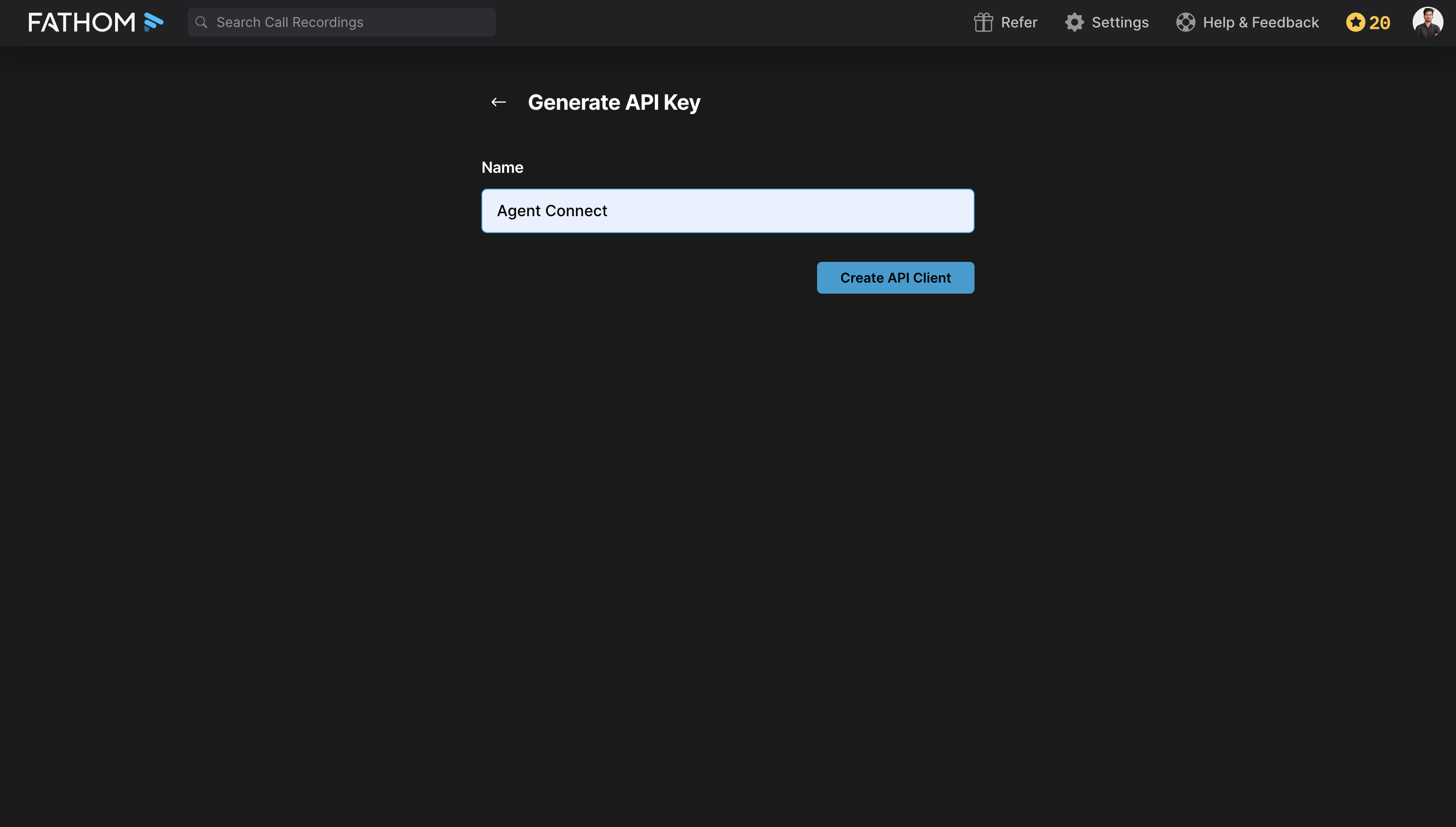
- Enter a Name for the key, for example
Agent Connect, and click Create API Client.
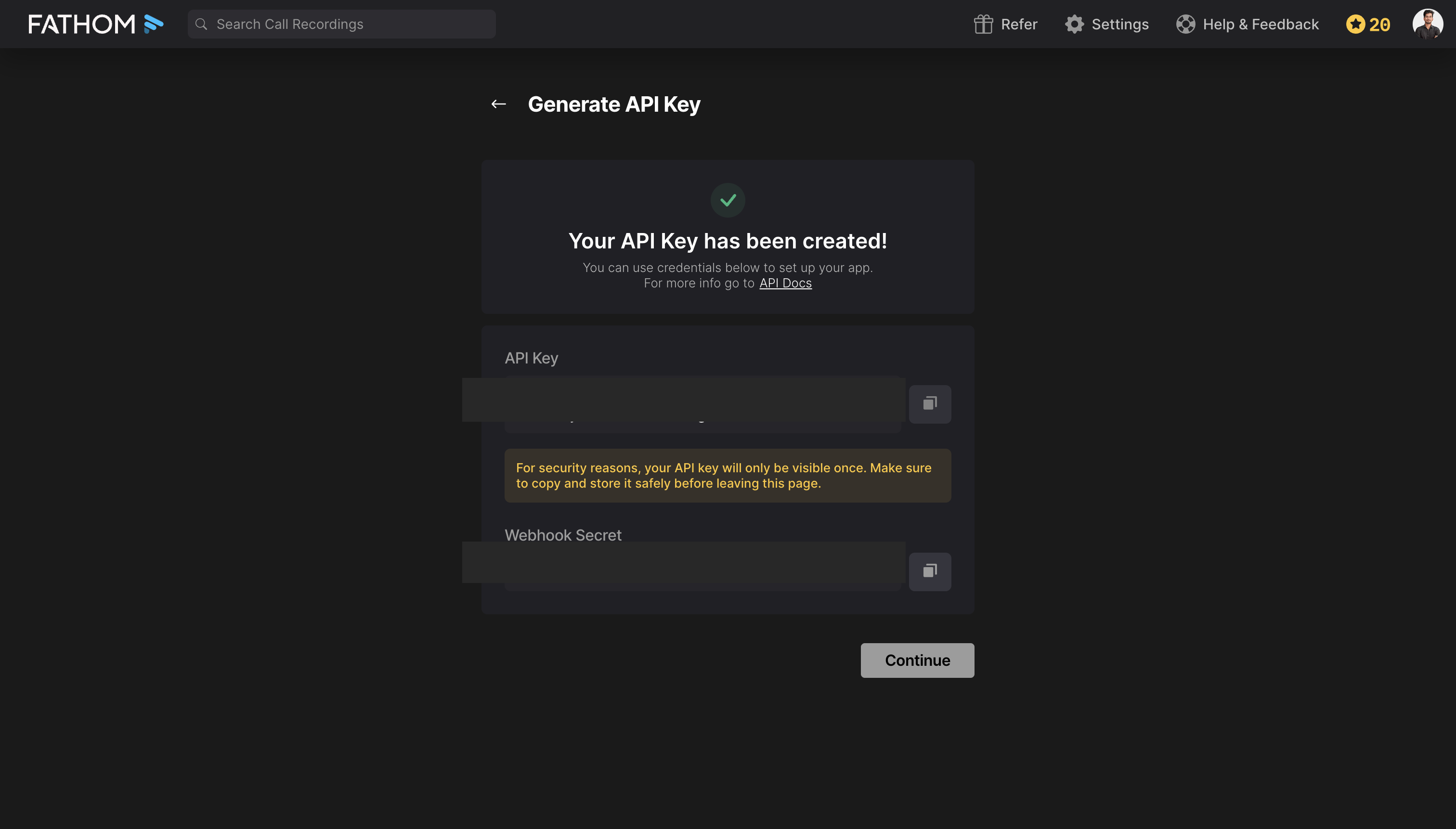
Fathom displays your new API Key and a Webhook Secret. Copy the API Key immediately.
-
Create a connection in Scalekit
- In Scalekit dashboard, go to AgentKit > Connections > Create Connection. Find Fathom and click Create.
- Note the Connection name — you will use this as
connection_namein your code (e.g.,fathom).
-
Add a connected account
Connected accounts link a specific user identifier in your system to a Fathom API key. Add one in the dashboard to test. In production, each user adds their own through the authorization link: they enter their credentials on the page it opens.
In the dashboard, to test
- Open the connection you created and click the Connected Accounts tab → Add account.
- Fill in:
- Your User’s ID — a unique identifier for this user in your system (e.g.,
user_123) - API Key — the Fathom API key you copied in step 1
- Your User’s ID — a unique identifier for this user in your system (e.g.,
- Click Save.
From your backend, if your app already has the credentials
For example, when users enter them on a settings page in your app:
import { ConnectorStatus } from '@scalekit-sdk/node'const authorizationDetails = {details: {case: 'staticAuth',value: { details: { api_key: 'your-fathom-api-key' } },},};let { connectedAccount } = await scalekit.actions.upsertConnectedAccount({connectionName: 'fathom',identifier: 'user_123',authorizationDetails,});// Make sure the account is ACTIVE before the first tool call.if (connectedAccount?.status !== ConnectorStatus.ACTIVE) {({ connectedAccount } = await scalekit.actions.upsertConnectedAccount({connectionName: 'fathom',identifier: 'user_123',authorizationDetails,}));}authorization_details = {"static_auth": {"api_key": "your-fathom-api-key"}}response = scalekit_client.actions.upsert_connected_account(connection_name="fathom",identifier="user_123",authorization_details=authorization_details,)# Make sure the account is ACTIVE before the first tool call.if response.connected_account.status != "ACTIVE":response = scalekit_client.actions.upsert_connected_account(connection_name="fathom",identifier="user_123",authorization_details=authorization_details,)
-
Authorize a user and make your first call
quickstart.mts import { ScalekitClient } from '@scalekit-sdk/node'import 'dotenv/config'import { createInterface } from 'node:readline/promises'const scalekit = new ScalekitClient(process.env.SCALEKIT_ENVIRONMENT_URL,process.env.SCALEKIT_CLIENT_ID,process.env.SCALEKIT_CLIENT_SECRET,)const actions = scalekit.actionsconst connector = 'fathom'const identifier = 'user_123'// Generate an authorization link for the userconst { link } = await actions.getAuthorizationLink({ connectionName: connector, identifier })console.log('Authorize Fathom:', link)const rl = createInterface({ input: process.stdin, output: process.stdout })await rl.question('Press Enter after authorizing...')rl.close()// Make your first callconst result = await actions.executeTool({connector,identifier,toolName: 'fathom_list_meeting_types',toolInput: {},})console.log(result)Terminal window npx tsx quickstart.mtsquickstart.py import osfrom scalekit import ScalekitClientfrom dotenv import load_dotenvload_dotenv()scalekit_client = ScalekitClient(env_url=os.getenv("SCALEKIT_ENVIRONMENT_URL"),client_id=os.getenv("SCALEKIT_CLIENT_ID"),client_secret=os.getenv("SCALEKIT_CLIENT_SECRET"),)actions = scalekit_client.actionsconnection_name = "fathom"identifier = "user_123"# Generate an authorization link for the userlink_response = actions.get_authorization_link(connection_name=connection_name,identifier=identifier,)print("Authorize Fathom:", link_response.link)input("Press Enter after authorizing...")# Make your first callresult = actions.execute_tool(tool_input={},tool_name="fathom_list_meeting_types",connection_name=connection_name,identifier=identifier,)print(result)Terminal window python quickstart.pyEach user opens the link once and enters their Fathom credentials there. If your app already has a user's credentials, add the account from your backend instead, as the console steps above show. See Authorize a user for the full flow and statuses.
Tools
Pass the exact name toexecute_toolfathom_get_recording_download_statusCheck the status of a previously requested recording download in Fathom, identified by recording_id and the download_id returned by Request Recording Download.Read-onlyGetRecordingDownloadStatus
Check the status of a previously requested recording download in Fathom, identified by recording_id and the download_id returned by Request Recording Download. Returns processing, completed, failed, or expired. Once completed, the video and/or audio objects contain short-lived signed URLs (expire after about 24 hours) for the generated file.
Inputs
download_idstringrequired- The download identifier returned by Request Recording Download's download_id field.
recording_idintegerrequired- The numeric ID of the recording the download belongs to. Found in the recording_id field of a Meeting object from the List Meetings response.
fathom_get_recording_summaryRetrieve the AI-generated summary for a specific Fathom recording by its recording ID.Read-onlyGetRecordingSummary
Retrieve the AI-generated summary for a specific Fathom recording by its recording ID. The recording_id is found in the Meeting object returned by List Meetings. If destination_url is provided, the result is posted asynchronously to that URL instead of returned directly.
Inputs
recording_idintegerrequired- The numeric ID of the recording whose summary to retrieve. Found in the recording_id field of a Meeting object from the List Meetings response.
destination_urlstring- Optional webhook URL to receive the summary asynchronously. When set, Fathom posts the result to this URL instead of returning it in the response. Must be a valid HTTPS URL. Example: https://yourserver.example.com/webhooks/fathom.
fathom_get_recording_transcriptRetrieve the full transcript for a specific Fathom recording by its recording ID.Read-onlyGetRecordingTranscript
Retrieve the full transcript for a specific Fathom recording by its recording ID. The recording_id is found in the Meeting object returned by List Meetings. If destination_url is provided, the transcript is posted asynchronously to that URL instead of returned directly.
Inputs
recording_idintegerrequired- The numeric ID of the recording whose transcript to retrieve. Found in the recording_id field of a Meeting object from the List Meetings response.
destination_urlstring- Optional webhook URL to receive the transcript asynchronously. When set, Fathom posts the result to this URL instead of returning it in the response. Must be a valid HTTPS URL. Example: https://yourserver.example.com/webhooks/fathom.
fathom_list_meeting_typesList all meeting types configured in Fathom.Read-onlyListMeetingTypes
List all meeting types configured in Fathom. Meeting types categorize recordings (e.g., 'Sales Call', 'Demo', 'Onboarding'). Use the returned type names to filter meetings in the List Meetings tool.
Inputs
cursorstring- Pagination cursor returned by a previous List Meeting Types response. Pass this value to retrieve the next page of results.
fathom_list_meetingsList meetings recorded by Fathom with optional filters.Read-onlyListMeetings
List meetings recorded by Fathom with optional filters. Returns paginated meeting records including participants, recording IDs, and metadata. Use cursor for pagination. Array parameters (calendar_invitees_domains, recorded_by, teams) must be sent with bracket notation (e.g., calendar_invitees_domains[]=example.com) — the API handles this automatically when you pass arrays.
Inputs
calendar_invitees_domainsarray- Filter meetings by company domains of calendar invitees. Provide as an array of domain strings, e.g. ["acme.com", "example.org"]. Sent as calendar_invitees_domains[] query params.
calendar_invitees_domains_typestring- Controls how the calendar_invitees_domains filter is applied. Valid values: all (all invitees match), only_internal (only internal domains), one_or_more_external (at least one external domain).one of
allonly_internalone_or_more_external created_afterstring- Return only meetings created after this ISO 8601 datetime. Example: 2025-01-01T00:00:00Z.
created_beforestring- Return only meetings created before this ISO 8601 datetime. Example: 2025-12-31T23:59:59Z.
cursorstring- Pagination cursor returned by a previous List Meetings response. Pass this value to retrieve the next page of results.
include_action_itemsboolean- When true, each meeting record includes extracted action items from the AI analysis.
include_crm_matchesboolean- When true, each meeting record includes matched CRM data (contacts, deals, companies).
include_highlightsboolean- When true, each meeting record includes AI-generated highlights from the recording.
include_summaryboolean- When true, each meeting record includes the AI-generated meeting summary.
include_transcriptboolean- When true, each meeting record includes the full meeting transcript.
meeting_typestring- Filter meetings by their meeting type name (e.g., 'Sales Call', 'Demo'). Must match a meeting type name configured in Fathom.
recorded_byarray- Filter meetings by recorder email addresses. Provide as an array of email strings. Sent as recorded_by[] query params.
teamsarray- Filter meetings by team names. Provide as an array of team name strings. Sent as teams[] query params.
fathom_list_team_membersList team members in Fathom.Read-onlyListTeamMembers
List team members in Fathom. Returns user details including names and email addresses. Optionally filter by team name to retrieve members of a specific team.
Inputs
cursorstring- Pagination cursor returned by a previous List Team Members response. Pass this value to retrieve the next page of results.
teamstring- Filter members by team name. Must match a team name returned by the List Teams tool. Example: 'Sales'.
fathom_list_teamsList all teams configured in Fathom.Read-onlyListTeams
List all teams configured in Fathom. Returns team names and metadata. Use the returned team names to filter meetings via the teams parameter in the List Meetings tool.
Inputs
cursorstring- Pagination cursor returned by a previous List Teams response. Pass this value to retrieve the next page of results.
fathom_list_usersList users in your Fathom organization along with their settings and meeting-view permissions.Read-onlyListUsers
List users in your Fathom organization along with their settings and meeting-view permissions. Admin only — returns a 403 error unless the API key belongs to a user with account_admin settings access. Optionally filter by team name, account status, or settings access level; the invited status value cannot be combined with the settings_access filter. The permissions object is omitted for users with invited status.
Inputs
cursorstring- Pagination cursor returned by a previous List Users response. Pass this value to retrieve the next page of results.
settings_accessstring- Filter users by settings access level. Valid values: none (no settings access), team_admin (admin of one or more teams), account_admin (admin of the entire account).one of
noneteam_adminaccount_admin statusstring- Filter users by account status. Valid values: active, deactivated, invited. The invited value cannot be combined with the settings_access filter.one of
activedeactivatedinvited teamstring- Filter users by team name. Must match a team name returned by the List Teams tool.
fathom_create_webhookCreate a new webhook subscription in Fathom.WriteCreateWebhook
Create a new webhook subscription in Fathom. Fathom will POST meeting data to the destination_url when recordings matching the triggered_for criteria are available. The triggered_for field controls whose recordings trigger the webhook. At least one of the include_summary, include_transcript, include_action_items, or include_crm_matches flags must be set to true — the API returns an error if all content flags are omitted or null.
Inputs
destination_urlstringrequired- The HTTPS URL that Fathom will POST webhook payloads to. Must be a publicly accessible URL. Example: https://yourserver.example.com/webhooks/fathom.
triggered_forarrayrequired- Array of recording scopes that trigger this webhook. Valid values: my_recordings (your own recordings), shared_external_recordings (recordings shared from outside your org), my_shared_with_team_recordings (your recordings shared with a team), shared_team_recordings (recordings shared within the team). At least one value is required.
include_action_itemsboolean- When true, the webhook payload includes extracted action items from the meeting.
include_crm_matchesboolean- When true, the webhook payload includes matched CRM data (contacts, deals, companies).
include_summaryboolean- When true, the webhook payload includes the AI-generated meeting summary.
include_transcriptboolean- When true, the webhook payload includes the full meeting transcript.
fathom_request_recording_downloadRequest Fathom to generate a downloadable video and/or audio file for a specific recording.WriteRequestRecordingDownload
Request Fathom to generate a downloadable video and/or audio file for a specific recording. Starts asynchronous file generation and returns a download_id — poll Get Recording Download Status with that ID to check progress, or provide destination_url to have Fathom POST the completed payload to your endpoint instead of polling. The response status is one of processing, completed, failed, or expired; once completed, the video and/or audio objects contain short-lived signed URLs (expire after about 24 hours). Returns a 422 error if the recording has no downloadable media.
Inputs
recording_idintegerrequired- The numeric ID of the recording to generate a download for. Found in the recording_id field of a Meeting object from the List Meetings response.
destination_urlstring- Optional webhook URL to receive the completed download payload asynchronously. When set, Fathom POSTs the result to this URL instead of requiring you to poll Get Recording Download Status. Must be a valid HTTPS URL. Example: https://yourserver.example.com/webhooks/fathom.
fathom_delete_webhookDelete a webhook subscription in Fathom by its ID.DestructiveDeleteWebhook
Delete a webhook subscription in Fathom by its ID. Once deleted, Fathom will stop sending webhook POST requests to the associated destination URL. The webhook ID is returned in the Create Webhook response.
- Idempotent
Inputs
idstringrequired- The unique identifier of the webhook to delete. Returned as the id field in the Create Webhook response.
No tools match.
Workflows
Proxy API call
const result = await actions.request({ connectionName: 'fathom', identifier: 'user_123', path: '/v1/users/me', method: 'GET',});console.log(result);result = actions.request( connection_name='fathom', identifier='user_123', path="/v1/users/me", method="GET",)print(result)Execute a tool
const result = await actions.executeTool({ connector: 'fathom', identifier: 'user_123', toolName: 'fathom_list_meetings', toolInput: {},});console.log(result);result = actions.execute_tool( connection_name='fathom', identifier='user_123', tool_name='fathom_list_meetings', tool_input={},)print(result)