


The Instagram connector lets your AI agent act in each user's Instagram account. Each user signs in to Instagram once, and Scalekit stores and refreshes their tokens, so your agent never handles credentials. It comes with 30 tools.
- Tools
- 30
- What they doRead · write · destructive
- 21 · 8 · 121 read8 write1 destructive
- Users sign in with
- OAuth
- OAuth app
- Your own Instagram app
Setup
Install the SDK
Terminal window npm install @scalekit-sdk/node dotenvTerminal window pip install scalekit-sdk-python python-dotenvSet your credentials
Add your Scalekit credentials to your
.envfile. Find values in app.scalekit.com > Developers > API Credentials..env SCALEKIT_ENVIRONMENT_URL=<your-environment-url>SCALEKIT_CLIENT_ID=<your-client-id>SCALEKIT_CLIENT_SECRET=<your-client-secret>Create the Instagram connection
In AgentKit > Connections, create an Instagram connection and copy its redirect URI. The name you give it is the
connection_nameyour code passes. See Configure connections.Register an OAuth app
Instagram connections use your own OAuth app. Register one with Instagram and add the redirect URI you copied.
Then enter the app's Client ID and Client Secret on the Instagram connection.
Console steps with screenshots
Create a Meta app with Facebook Login enabled so Scalekit can authorize access to your Instagram Business or Creator account on behalf of your users. You’ll register the Scalekit redirect URI in the app, then add the app’s ID and secret to your Scalekit connection.
-
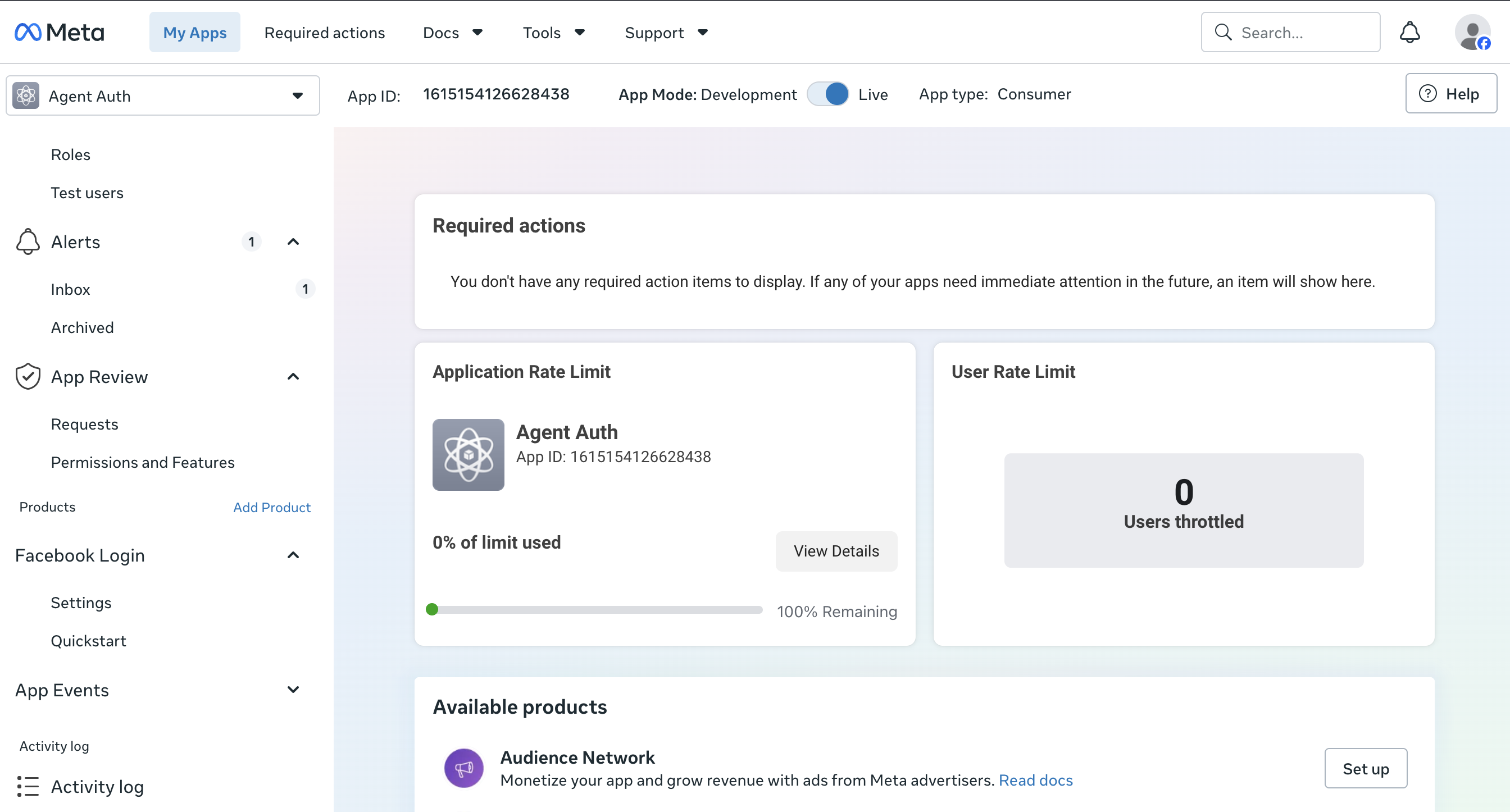
Create or open a Meta app
-
Go to the Meta for Developers dashboard.
-
Select an existing app or click Create App and choose the Business app type.
-
-
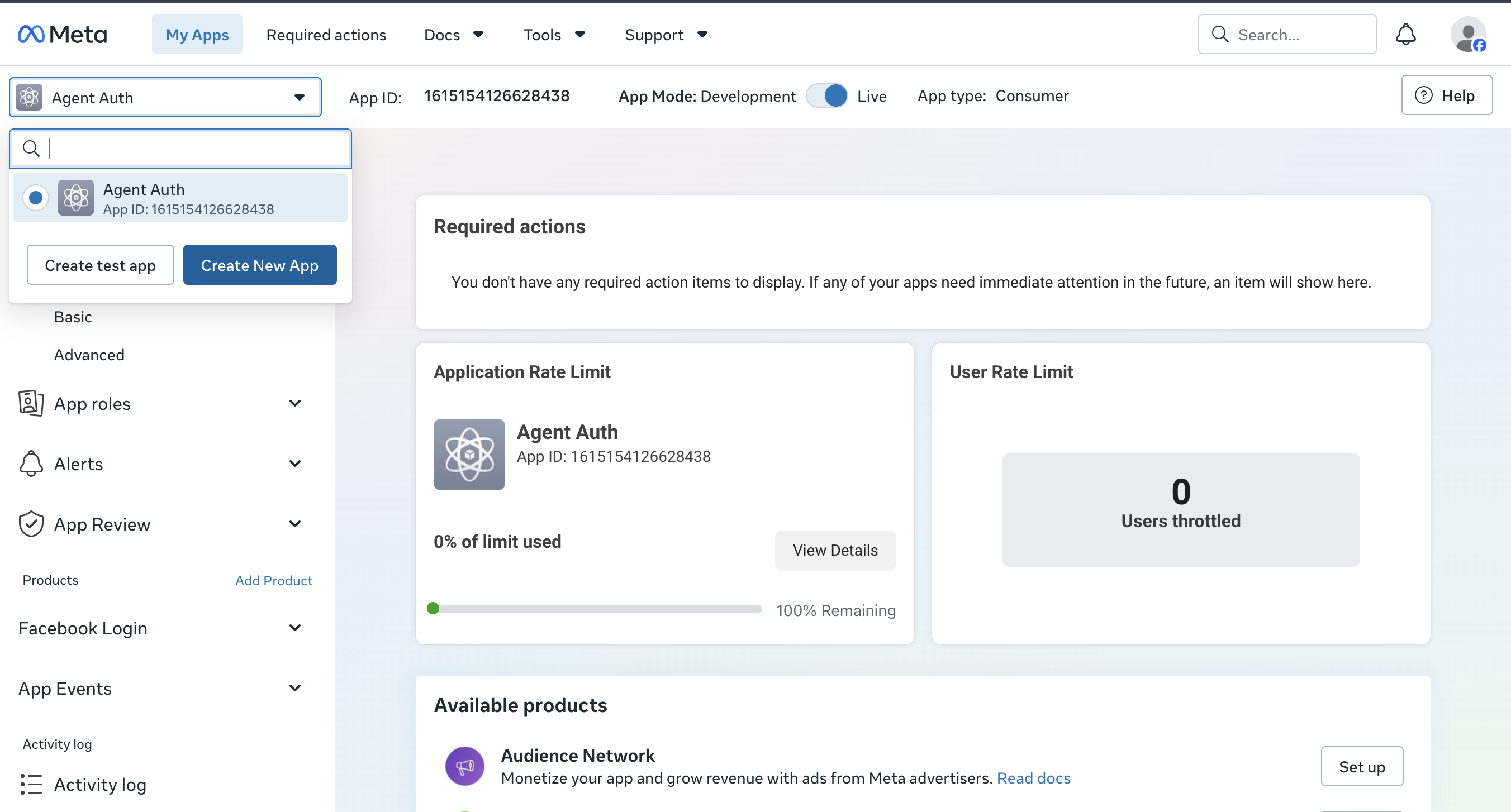
Add the Instagram Graph API and Facebook Login products
-
From the app’s Add Product page, add Instagram Graph API so the app can read and publish content on Instagram Business and Creator accounts.
-
Add Facebook Login as well, since Scalekit uses it to run the OAuth authorization flow.
-
-
Copy the redirect URI from Scalekit
-
In the Scalekit dashboard, go to AgentKit > Connections > Create Connection. Find Instagram and click Create.
-
Click Use your own credentials and copy the redirect URI. It looks like
https://<SCALEKIT_ENVIRONMENT_URL>/sso/v1/oauth/<CONNECTION_ID>/callback.
-
-
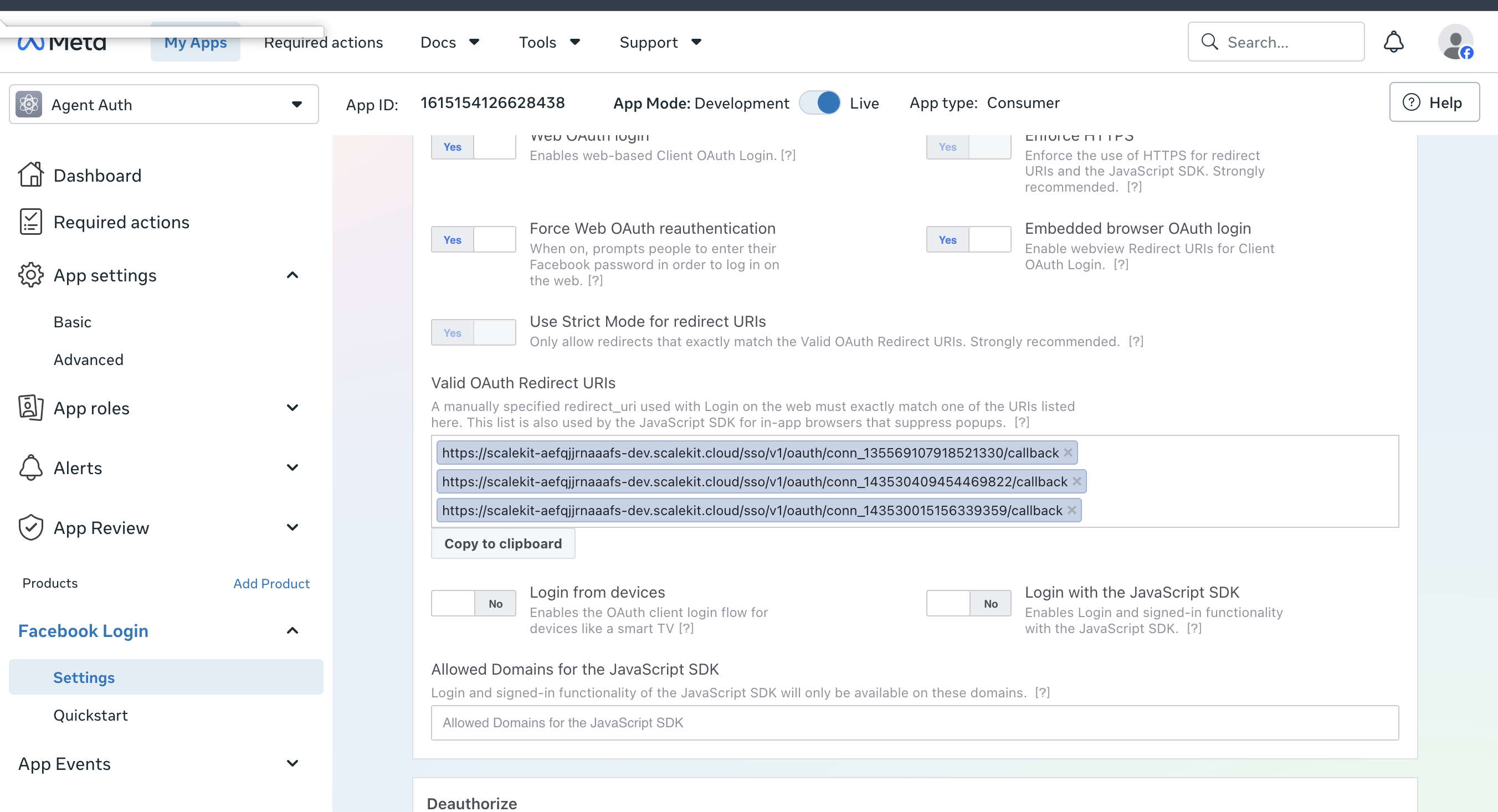
Add the redirect URI to Facebook Login settings
-
In your Meta app, go to Facebook Login > Settings.
-
Paste the redirect URI you copied into Valid OAuth Redirect URIs and save changes.
-
-
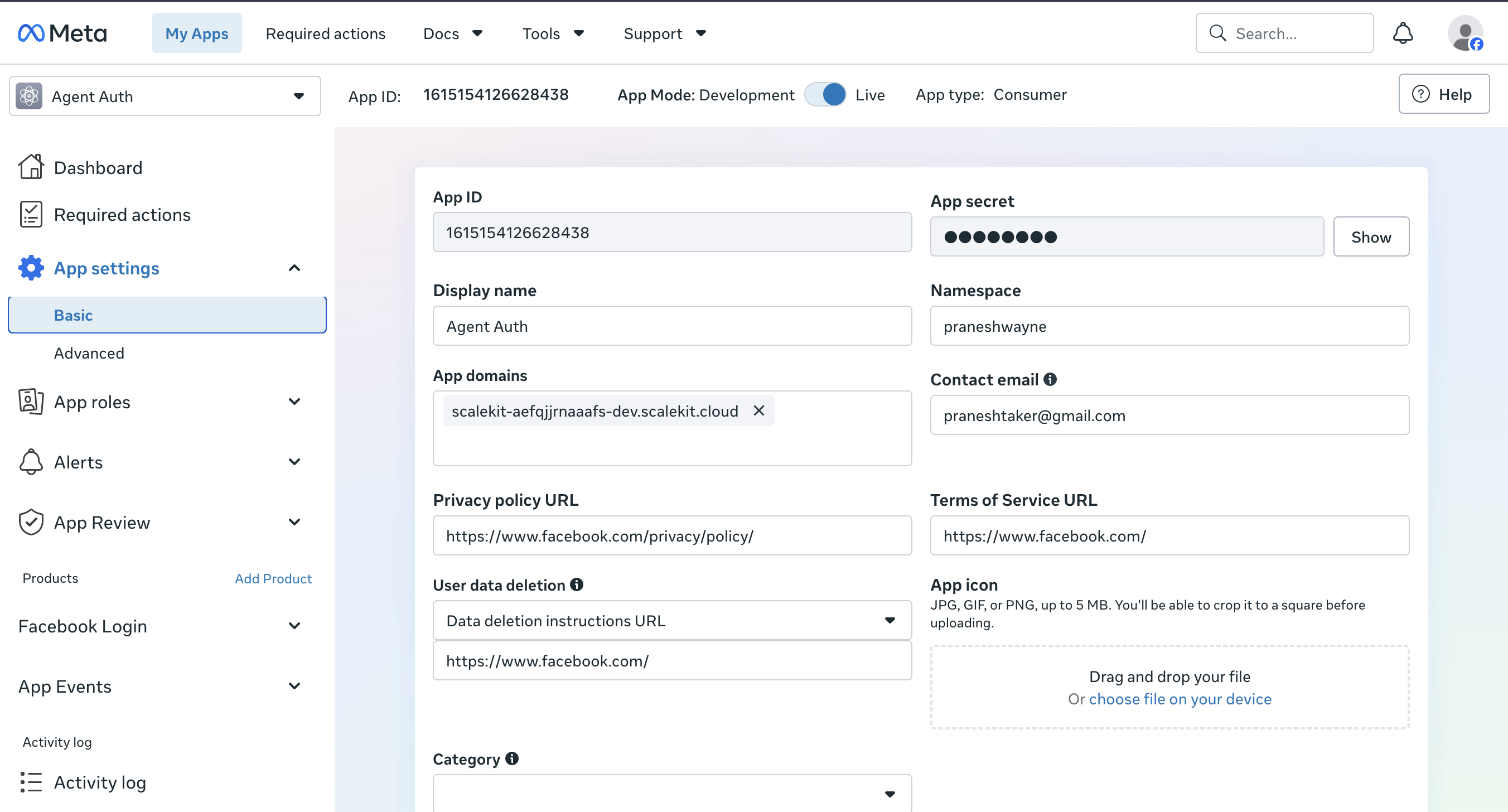
Copy your App ID and App secret
-
Go to App settings > Basic.
-
Copy the App ID and click Show to reveal and copy the App secret.
-
-
Add credentials in Scalekit
-
Return to the connection you created in Scalekit and enter:
- Client ID — your Meta app’s App ID
- Client Secret — your Meta app’s App secret
-
Click Save.
-
-
Authorize a user and make your first call
quickstart.mts import { ScalekitClient } from '@scalekit-sdk/node'import 'dotenv/config'import { createInterface } from 'node:readline/promises'const scalekit = new ScalekitClient(process.env.SCALEKIT_ENVIRONMENT_URL,process.env.SCALEKIT_CLIENT_ID,process.env.SCALEKIT_CLIENT_SECRET,)const actions = scalekit.actionsconst connector = 'instagram'const identifier = 'user_123'// Generate an authorization link for the userconst { link } = await actions.getAuthorizationLink({ connectionName: connector, identifier })console.log('Authorize Instagram:', link)const rl = createInterface({ input: process.stdin, output: process.stdout })await rl.question('Press Enter after authorizing...')rl.close()// Make your first callconst result = await actions.executeTool({connector,identifier,toolName: 'instagram_comment_replies_list',toolInput: { comment_id: 'YOUR_COMMENT_ID' },})console.log(result)Terminal window npx tsx quickstart.mtsquickstart.py import osfrom scalekit import ScalekitClientfrom dotenv import load_dotenvload_dotenv()scalekit_client = ScalekitClient(env_url=os.getenv("SCALEKIT_ENVIRONMENT_URL"),client_id=os.getenv("SCALEKIT_CLIENT_ID"),client_secret=os.getenv("SCALEKIT_CLIENT_SECRET"),)actions = scalekit_client.actionsconnection_name = "instagram"identifier = "user_123"# Generate an authorization link for the userlink_response = actions.get_authorization_link(connection_name=connection_name,identifier=identifier,)print("Authorize Instagram:", link_response.link)input("Press Enter after authorizing...")# Make your first callresult = actions.execute_tool(tool_input={"comment_id":"YOUR_COMMENT_ID"},tool_name="instagram_comment_replies_list",connection_name=connection_name,identifier=identifier,)print(result)Terminal window python quickstart.pyEach user signs in once. See Authorize a user for the full flow and statuses.
Tools
Pass the exact name toexecute_toolinstagram_account_insights_getGet account-level Instagram insights (impressions, reach, profile views, follower count) over a period or date range.Read-onlyGet Account Insights
Get account-level Instagram insights (impressions, reach, profile views, follower count) over a period or date range.
Inputs
ig_user_idstringrequired- The Instagram professional account ID.
metricstringrequired- Comma-separated list of metric names to retrieve.
periodstring- Aggregation period for the metrics.
sinceinteger- Start of the date range (Unix timestamp).
untilinteger- End of the date range (Unix timestamp).
instagram_business_discovery_getLook up the public profile and recent media of any other Instagram professional (Business or Creator) account by username, without needing to connect that account.Read-onlyGet Business Discovery
Look up the public profile and recent media of any other Instagram professional (Business or Creator) account by username, without needing to connect that account. Returns username, name, website, followers_count, media_count, biography, profile_picture_url, and recent media summaries for the target account. Use this for competitor or influencer research. Use instagram_user_get_profile instead when looking up the connected account's own profile. Requires the connected account's ig_user_id and the instagram_basic permission; the target account must itself be a public Business or Creator account.
Inputs
ig_user_idstringrequired- The connected Instagram professional account's ID performing the lookup.
target_usernamestringrequired- The Instagram username of the other public Business or Creator account to look up (without the @ symbol).
instagram_comment_replies_listList replies to a specific Instagram comment, cursor-paginated.Read-onlyList Comment Replies
List replies to a specific Instagram comment, cursor-paginated.
Inputs
comment_idstringrequired- The Instagram comment ID to list replies for.
afterstring- Pagination cursor to fetch the next page of results.
fieldsstring- Comma-separated list of fields to return per reply.
limitinteger- Max number of replies to return per page.
instagram_comments_listList top-level comments on an Instagram media object, cursor-paginated.Read-onlyList Media Comments
List top-level comments on an Instagram media object, cursor-paginated.
Inputs
media_idstringrequired- The Instagram media ID to list comments on.
afterstring- Pagination cursor to fetch the next page of results.
fieldsstring- Comma-separated list of fields to return per comment.
limitinteger- Max number of comments to return per page.
instagram_content_publishing_limit_getCheck how much of the Instagram account's daily content publishing quota has been used.Read-onlyGet Content Publishing Limit
Check how much of the Instagram account's daily content publishing quota has been used. Returns the configured quota (config) and current usage count (quota_usage) — accounts can typically publish up to 25 posts within a rolling 24-hour window. Use this before a bulk-publishing run to confirm quota is available, avoiding failed instagram_media_publish calls. Requires the account's ig_user_id and the instagram_content_publish permission.
Inputs
ig_user_idstringrequired- The Instagram professional account ID to check the publishing quota for.
fieldsstring- Comma-separated list of fields to return. Defaults to config and quota_usage.default
config,quota_usage
instagram_conversation_messages_listList the messages within a single Instagram Direct conversation.Read-onlyList Conversation Messages
List the messages within a single Instagram Direct conversation. Returns the conversation id along with a messages array containing each message's id, created_time, from, to, and text. Use this after instagram_conversations_list to read a specific thread's message history. Requires the conversation_id from instagram_conversations_list and the instagram_manage_messages permission.
Inputs
conversation_idstringrequired- The ID of the conversation to fetch messages for, from instagram_conversations_list.
fieldsstring- Comma-separated list of fields to return, typically the nested messages field expansion.default
messages{id,created_time,from,to,message}
instagram_conversations_listList Instagram Direct conversations for a connected professional account.Read-onlyList Conversations
List Instagram Direct conversations for a connected professional account. Returns a paginated array of conversations with id, updated_time, and participants. Use this to see who has messaged the account. Use instagram_conversation_messages_list to fetch the messages inside one conversation. Requires the instagram_manage_messages permission.
Inputs
ig_user_idstringrequired- The Instagram professional account ID whose Direct conversations should be listed.
fieldsstring- Comma-separated list of conversation fields to return per item.default
id,updated_time,participants limitinteger- Maximum number of conversations to return in this page.default
25
instagram_hashtag_recent_media_listList the most recent public media posts tagged with a given Instagram hashtag.Read-onlyList Hashtag Recent Media
List the most recent public media posts tagged with a given Instagram hashtag. Returns a paginated array of media objects with id, caption, media_type, media_url, permalink, and timestamp. Use this to monitor fresh activity around a hashtag. Use instagram_hashtag_top_media_list for the hashtag's most popular posts instead. Requires the hashtag_id from instagram_hashtag_search and the account's ig_user_id.
Inputs
hashtag_idstringrequired- The ID of the hashtag to fetch recent media for, from instagram_hashtag_search.
ig_user_idstringrequired- The Instagram professional account ID performing the query.
fieldsstring- Comma-separated list of media fields to return per item.default
id,caption,media_type,media_url,permalink,timestamp
instagram_hashtag_searchLook up an Instagram hashtag by name to get its hashtag ID.Read-onlySearch Hashtag
Look up an Instagram hashtag by name to get its hashtag ID. Returns the hashtag's id, which is required by instagram_hashtag_recent_media_list and instagram_hashtag_top_media_list. Use this first when you only know the hashtag text (e.g. "travel") and need its ID for further hashtag queries. Requires the account's ig_user_id (queries are scoped per-account) and the hashtag name without the leading # symbol.
Inputs
hashtagstringrequired- The hashtag name to search for, without the leading # symbol.
ig_user_idstringrequired- The Instagram professional account ID performing the search.
instagram_hashtag_top_media_listList the most popular public media posts tagged with a given Instagram hashtag.Read-onlyList Hashtag Top Media
List the most popular public media posts tagged with a given Instagram hashtag. Returns a paginated array of media objects with id, caption, media_type, media_url, permalink, and timestamp. Use this for competitive or trend analysis of a hashtag's top-performing content. Use instagram_hashtag_recent_media_list for the newest posts instead. Requires the hashtag_id from instagram_hashtag_search and the account's ig_user_id.
Inputs
hashtag_idstringrequired- The ID of the hashtag to fetch top media for, from instagram_hashtag_search.
ig_user_idstringrequired- The Instagram professional account ID performing the query.
fieldsstring- Comma-separated list of media fields to return per item.default
id,caption,media_type,media_url,permalink,timestamp
instagram_media_children_listList the child media items (photos/videos) inside an Instagram carousel album post.Read-onlyList Media Children
List the child media items (photos/videos) inside an Instagram carousel album post. Returns an array of child media objects with id, media_type, media_url, and permalink. Use this to enumerate a carousel's individual items directly. instagram_media_get with fields=children{...} returns the same data inline if you're already fetching the parent post. Requires the media_id of a CAROUSEL_ALBUM item, typically obtained from instagram_media_list.
Inputs
media_idstringrequired- The ID of the parent CAROUSEL_ALBUM media item whose children should be listed.
fieldsstring- Comma-separated list of fields to return per child media item.default
id,media_type,media_url,permalink,timestamp
instagram_media_container_status_getPoll the processing status of a media container before publishing it — required for video/reels containers, which process asynchronously.Read-onlyGet Container Status
Poll the processing status of a media container before publishing it — required for video/reels containers, which process asynchronously.
Inputs
container_idstringrequired- The media container ID to check.
instagram_media_getGet details of a single Instagram media object (image, video, carousel, or reel) by ID.Read-onlyGet Media
Get details of a single Instagram media object (image, video, carousel, or reel) by ID.
Inputs
media_idstringrequired- The Instagram media ID.
fieldsstring- Comma-separated list of fields to return.
instagram_media_insights_getGet performance metrics for a single Instagram media object (engagement, impressions, reach, saved, likes, comments, shares, plays).Read-onlyGet Media Insights
Get performance metrics for a single Instagram media object (engagement, impressions, reach, saved, likes, comments, shares, plays).
Inputs
media_idstringrequired- The Instagram media ID to get insights for.
metricstringrequired- Comma-separated list of metric names to retrieve.
instagram_media_listList media (posts, reels, stories) published on an Instagram account, cursor-paginated.Read-onlyList Media
List media (posts, reels, stories) published on an Instagram account, cursor-paginated.
Inputs
ig_user_idstringrequired- The Instagram professional account ID.
afterstring- Pagination cursor to fetch the next page of results.
fieldsstring- Comma-separated list of fields to return per media item.
limitinteger- Max number of media items to return per page.
instagram_mentions_listDiscover @mentions of this Instagram account in a specific comment or media caption, via Graph API field-expansion on the account node.Read-onlyGet Mentioned Content
Discover @mentions of this Instagram account in a specific comment or media caption, via Graph API field-expansion on the account node.
Inputs
fieldsstringrequired- Graph API field-expansion string naming the mentioned comment or media, and which sub-fields to return.
ig_user_idstringrequired- The Instagram professional account ID that was mentioned.
instagram_oembed_getGet embeddable HTML and thumbnail info for any public Instagram post or reel URL.Read-onlyGet oEmbed
Get embeddable HTML and thumbnail info for any public Instagram post or reel URL. Returns oEmbed fields such as html (the embed markup), author_name, thumbnail_url, width, and height. Use this to embed an Instagram post/reel in a webpage or preview its thumbnail, without needing the account's own ig_user_id. Works for any public post URL; the connected account's own access token is used to authorize the request.
Inputs
urlstringrequired- The public URL of the Instagram post or reel to embed, e.g. https://www.instagram.com/p/Cabcdefghij/.
hidecaptionboolean- Whether to omit the post's caption from the returned embed HTML.default
false maxwidthinteger- Maximum width in pixels for the returned embed HTML/thumbnail.
omitscriptboolean- Whether to omit the embed.js script tag from the returned HTML (set true if the page already loads it once).default
false
instagram_stories_listList the currently active (not yet expired) stories posted by a connected Instagram professional account.Read-onlyList Stories
List the currently active (not yet expired) stories posted by a connected Instagram professional account. Returns an array of story media objects with id, media_type, media_url, permalink, and timestamp. Stories drop off this list 24 hours after posting. Use this to review or archive active stories. Use instagram_media_list for the account's permanent feed posts instead. Requires the account's ig_user_id.
Inputs
ig_user_idstringrequired- The Instagram professional account ID whose active stories should be listed.
fieldsstring- Comma-separated list of story fields to return per item.default
id,media_type,media_url,permalink,timestamp
instagram_tagged_media_listList media where the connected Instagram professional account has been photo-tagged by other accounts.Read-onlyList Tagged Media
List media where the connected Instagram professional account has been photo-tagged by other accounts. Returns a paginated array of media objects with id, caption, media_type, media_url, permalink, timestamp, and the tagging account's username. Use this to monitor photo tags of the account. Use instagram_mentions_list instead to look up a specific @mention inside a known comment or caption by ID. Requires the account's ig_user_id.
Inputs
ig_user_idstringrequired- The Instagram professional account ID whose tags should be listed.
fieldsstring- Comma-separated list of media fields to return per item.default
id,caption,media_type,media_url,permalink,timestamp,username limitinteger- Maximum number of tagged media items to return in this page.default
25
instagram_user_get_profileGet an Instagram Business/Creator account's profile info (username, bio, follower count, media count, etc.).Read-onlyGet User Profile
Get an Instagram Business/Creator account's profile info (username, bio, follower count, media count, etc.).
Inputs
ig_user_idstringrequired- The Instagram professional (Business/Creator) account ID.
fieldsstring- Comma-separated list of fields to return.
instagram_comment_hide_updateHide or unhide a comment on an Instagram media object without deleting it.WriteHide/Unhide Comment
Hide or unhide a comment on an Instagram media object without deleting it.
- Idempotent
Inputs
comment_idstringrequired- The Instagram comment ID to hide or unhide.
hidebooleanrequired- Set true to hide the comment, false to unhide it.
instagram_comment_private_reply_createSend a private Instagram Direct message to the author of a public comment, without posting a visible public reply.WriteSend Private Reply to Comment
Send a private Instagram Direct message to the author of a public comment, without posting a visible public reply. Returns the recipient id and the new message id. Use this to move a public conversation to DMs (e.g. for order support or sensitive details). Use instagram_comment_reply_create instead for a visible public reply. Requires the comment_id being replied to and the instagram_manage_messages permission; only available within a limited window after the comment was posted.
Inputs
comment_idstringrequired- The ID of the public comment to send a private reply to.
messagestringrequired- Text content of the private message.
instagram_comment_reply_createReply to a comment on an Instagram media object.WriteReply To Comment
Reply to a comment on an Instagram media object.
Inputs
comment_idstringrequired- The Instagram comment ID to reply to.
messagestringrequired- The reply text.
instagram_media_container_createStep 1 of the Instagram publish flow: create a media container (image, video, reel, or carousel item) from a source URL.WriteCreate Media Container
Step 1 of the Instagram publish flow: create a media container (image, video, reel, or carousel item) from a source URL. Poll instagram_media_container_status_get before publishing, then call instagram_media_publish with the returned container id.
Inputs
ig_user_idstringrequired- The Instagram professional account ID to create the container under.
captionstring- Caption text for the post (ignored for carousel item containers — set it on the parent carousel container instead).
childrenstring- Comma-separated list of child container IDs (max 10) — only used when media_type is CAROUSEL.
image_urlstring- Publicly accessible URL of the image to post. Required unless video_url is given.
is_carousel_itemboolean- Set true when this container is a child item of a carousel (do not publish it directly).default
false media_typestring- Media type of the container: VIDEO, REELS, or CAROUSEL. Omit for a plain image post.
video_urlstring- Publicly accessible URL of the video to post. Required unless image_url is given.
instagram_media_publishStep 2 of the Instagram publish flow: publish a previously created media container (from instagram_media_container_create) to the account's feed.WritePublish Media
Step 2 of the Instagram publish flow: publish a previously created media container (from instagram_media_container_create) to the account's feed.
Inputs
creation_idstringrequired- The container ID returned from instagram_media_container_create.
ig_user_idstringrequired- The Instagram professional account ID publishing the container.
instagram_message_attachment_sendSend an image, video, or audio attachment via Instagram Direct message from a connected professional account to a specific recipient.WriteSend Message Attachment
Send an image, video, or audio attachment via Instagram Direct message from a connected professional account to a specific recipient. Returns the recipient id and the new message id. Use this instead of instagram_message_send when sharing media rather than plain text, within the standard 24-hour messaging window. Requires the recipient's Instagram-scoped user ID (IGSID), a publicly accessible attachment URL, and the instagram_manage_messages permission.
Inputs
attachment_typestringrequired- The type of media being sent.one of
imagevideoaudio attachment_urlstringrequired- Publicly accessible URL of the image, video, or audio file to send.
ig_user_idstringrequired- The Instagram professional account ID sending the attachment.
recipient_idstringrequired- The Instagram-scoped user ID (IGSID) of the message recipient, obtained from a prior conversation or message webhook.
instagram_message_sendSend an Instagram Direct text message from a connected professional account to a specific recipient.WriteSend Message
Send an Instagram Direct text message from a connected professional account to a specific recipient. Returns the recipient id and the new message id. Use this to reply within the standard 24-hour messaging window after a user has messaged the account. Use instagram_conversations_list and instagram_conversation_messages_list to find the recipient's scoped ID first. Requires the recipient's Instagram-scoped user ID (IGSID) and the instagram_manage_messages permission.
Inputs
ig_user_idstringrequired- The Instagram professional account ID sending the message.
recipient_idstringrequired- The Instagram-scoped user ID (IGSID) of the message recipient, obtained from a prior conversation or message webhook.
textstringrequired- Text content of the message to send.
instagram_sender_action_sendSend a typing indicator or mark-as-seen signal in an Instagram Direct conversation.WriteSend Sender Action
Send a typing indicator or mark-as-seen signal in an Instagram Direct conversation. Returns a success confirmation; no message is created. Use this to show the recipient a typing indicator (TYPING_ON/TYPING_OFF) or to mark their last message as seen (MARK_SEEN), around instagram_message_send or instagram_message_attachment_send calls. Requires the recipient's Instagram-scoped user ID (IGSID) and the instagram_manage_messages permission.
Inputs
ig_user_idstringrequired- The Instagram professional account ID sending the sender action.
recipient_idstringrequired- The Instagram-scoped user ID (IGSID) of the conversation participant.
sender_actionstringrequired- The sender action to send.one of
TYPING_ONTYPING_OFFMARK_SEEN
instagram_comment_deletePermanently delete a comment or reply on an Instagram media object.DestructiveDelete Comment
Permanently delete a comment or reply on an Instagram media object.
- Idempotent
Inputs
comment_idstringrequired- The Instagram comment ID to delete.
No tools match.


