


The Lusha MCP connector routes your AI agent's tool calls to Lusha's own MCP server through Scalekit. Each user connects their own Lusha API key once, and Scalekit sends it with every call, so your agent never handles credentials. It comes with 57 tools.
- Tools
- 57
- What they doRead · write · destructive
- 11 · 42 · 411 read42 write4 destructive
- Users sign in with
- API key
Setup
Install the SDK
Terminal window npm install @scalekit-sdk/node dotenvTerminal window pip install scalekit-sdk-python python-dotenvSet your credentials
Add your Scalekit credentials to your
.envfile. Find values in app.scalekit.com > Developers > API Credentials..env SCALEKIT_ENVIRONMENT_URL=<your-environment-url>SCALEKIT_CLIENT_ID=<your-client-id>SCALEKIT_CLIENT_SECRET=<your-client-secret>Create the Lusha MCP connection
In AgentKit > Connections, create a Lusha MCP connection. The name you give it is the
connection_nameyour code passes. See Configure connections.Console steps with screenshots
Register your Lusha API key with Scalekit so it stores it securely and injects it into every request. Lusha uses API key authentication.
-
Get your Lusha API key
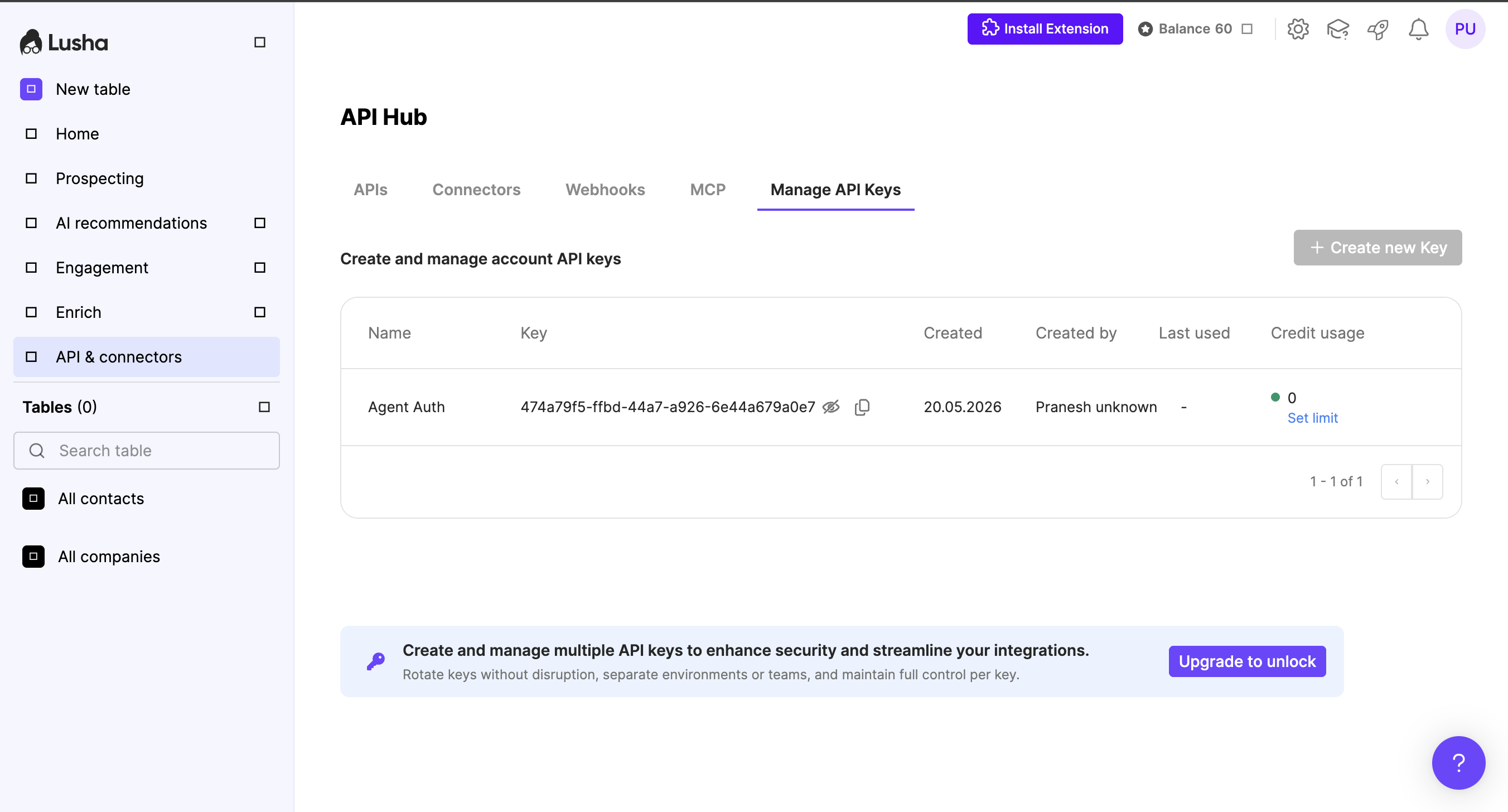
- Sign in to Lusha and go to API & connectors → Manage API Keys.
- Click + Create new Key to generate a new key, or copy the key value from an existing entry.
-
Create a connection in Scalekit
- In Scalekit dashboard, go to AgentKit → Connections → Create Connection. Find Lusha MCP and click Create.
- Note the Connection name — you will use this as
connection_namein your code (e.g.,lushamcp). - Click Save.
-
Add a connected account
Connected accounts link a specific user identifier in your system to their Lusha API key. Add one in the dashboard to test. In production, each user adds their own through the authorization link: they enter their credentials on the page it opens.
In the dashboard, to test
- Open the connection you created and click the Connected Accounts tab → Add account.
- Fill in:
- Your User’s ID — a unique identifier for this user in your system (e.g.,
user_123) - API Key — the Lusha API key from step 1
- Your User’s ID — a unique identifier for this user in your system (e.g.,
- Click Create Account.
From your backend, if your app already has the credentials
For example, when users enter them on a settings page in your app:
import { Scalekit, ConnectorStatus } from '@scalekit-sdk/node';const scalekit = new Scalekit(process.env.SCALEKIT_ENVIRONMENT_URL,process.env.SCALEKIT_CLIENT_ID,process.env.SCALEKIT_CLIENT_SECRET,);// Never hard-code credentials — read from secure storage or user inputconst lushaApiKey = getUserLushaApiKey(); // retrieve from your secure storeconst authorizationDetails = {details: {case: 'staticAuth',value: {details: {api_key: lushaApiKey,},},},};let { connectedAccount } = await scalekit.actions.upsertConnectedAccount({connectionName: 'lushamcp',identifier: 'user_123',authorizationDetails,});// Make sure the account is ACTIVE before the first tool call.if (connectedAccount?.status !== ConnectorStatus.ACTIVE) {({ connectedAccount } = await scalekit.actions.upsertConnectedAccount({connectionName: 'lushamcp',identifier: 'user_123',authorizationDetails,}));}import osfrom scalekit import ScalekitClientscalekit_client = ScalekitClient(env_url=os.environ["SCALEKIT_ENVIRONMENT_URL"],client_id=os.environ["SCALEKIT_CLIENT_ID"],client_secret=os.environ["SCALEKIT_CLIENT_SECRET"],)# Never hard-code credentials — read from secure storage or user inputlusha_api_key = get_user_lusha_api_key() # retrieve from your secure storeauthorization_details = {"static_auth": {"api_key": lusha_api_key}}response = scalekit_client.actions.upsert_connected_account(connection_name="lushamcp",identifier="user_123",authorization_details=authorization_details,)# Make sure the account is ACTIVE before the first tool call.if response.connected_account.status != "ACTIVE":response = scalekit_client.actions.upsert_connected_account(connection_name="lushamcp",identifier="user_123",authorization_details=authorization_details,)
-
Authorize a user and make your first call
quickstart.mts import { ScalekitClient } from '@scalekit-sdk/node'import 'dotenv/config'import { createInterface } from 'node:readline/promises'const scalekit = new ScalekitClient(process.env.SCALEKIT_ENVIRONMENT_URL,process.env.SCALEKIT_CLIENT_ID,process.env.SCALEKIT_CLIENT_SECRET,)const actions = scalekit.actionsconst connector = 'lushamcp'const identifier = 'user_123'// Generate an authorization link for the userconst { link } = await actions.getAuthorizationLink({ connectionName: connector, identifier })console.log('Authorize Lusha MCP:', link)const rl = createInterface({ input: process.stdin, output: process.stdout })await rl.question('Press Enter after authorizing...')rl.close()// Make your first callconst result = await actions.executeTool({connector,identifier,toolName: 'lushamcp_account_usage',toolInput: { reason_for_invocation: 'YOUR_REASON_FOR_INVOCATION' },})console.log(result)Terminal window npx tsx quickstart.mtsquickstart.py import osfrom scalekit import ScalekitClientfrom dotenv import load_dotenvload_dotenv()scalekit_client = ScalekitClient(env_url=os.getenv("SCALEKIT_ENVIRONMENT_URL"),client_id=os.getenv("SCALEKIT_CLIENT_ID"),client_secret=os.getenv("SCALEKIT_CLIENT_SECRET"),)actions = scalekit_client.actionsconnection_name = "lushamcp"identifier = "user_123"# Generate an authorization link for the userlink_response = actions.get_authorization_link(connection_name=connection_name,identifier=identifier,)print("Authorize Lusha MCP:", link_response.link)input("Press Enter after authorizing...")# Make your first callresult = actions.execute_tool(tool_input={"reason_for_invocation":"YOUR_REASON_FOR_INVOCATION"},tool_name="lushamcp_account_usage",connection_name=connection_name,identifier=identifier,)print(result)Terminal window python quickstart.pyEach user opens the link once and enters their Lusha MCP server credentials there. If your app already has a user's credentials, add the account from your backend instead, as the console steps above show. See Authorize a user for the full flow and statuses.
Tools
Pass the exact name toexecute_toollushamcp_account_usageRetrieve account credit balance, rate-limit status, plan info, and per-action credit pricing.Read-onlyAccount Usage
Retrieve account credit balance, rate-limit status, plan info, and per-action credit pricing.
Inputs
reason_for_invocationstringrequired- Brief explanation of why you chose this tool for the current task. Optional audit field; max 500 characters (longer values are truncated). Plain text only.
conversation_idstring- Conversation correlation ID. Present only when an earlier tool response in this conversation returned one; that value is carried unchanged on subsequent calls. Omitted on the first call.
lushamcp_get_supported_integrationsLusha: returns every CRM Lusha supports (both connected and not), each with its live connection state and export limits.Read-onlyGet Supported Integrations
Lusha: returns every CRM Lusha supports (both connected and not), each with its live connection state and export limits. Useful as a first step in any connect-or-export flow: it shows whether to connect or go straight to export, and which connection to use when more than one exists. Use when: the user asks which CRMs Lusha supports or integrates with; whether they're connected and to which CRM ("is my Salesforce still connected?", "which CRMs do I have linked?"); or what their export limits are. Also useful before offering or starting any CRM export to determine the connect-vs-export path, and right after a connection completes to confirm state. Do not use when: connecting a CRM (connect_crm); or exporting contacts/companies (use the CRM export tools). Returns ALL supported platforms, not only connected ones â read isAccountConnected / isUserConnected for connection state. Requires an OAuth (user-scoped) session; API-key callers get a 403. Returns: data[]: integrationName, instanceUrl, status, isAccountConnected, isUserConnected, supportedObjects, exportContactLimits, exportCompanyLimits, createdAt, updatedAt. Credits: does not consume credits.
Inputs
reason_for_invocationstringrequired- Brief explanation of why you chose this tool for the current task. Required; at least 20 characters and at most 500 (longer values are truncated). Plain text only.
conversation_idstring- Conversation correlation ID: the conversation_id returned by the most recent Lusha tool response in this conversation that included one, passed back unchanged. Calls that carry the same value are linked as one conversation. Absent on the first call of a conversation.
next_step_refstring- Next-step reference: the ref of the next step this call carries out, when the user chose it from the next_step_hints of an earlier Lusha tool response, passed back unchanged. Absent otherwise.
lushamcp_recommendations_companies_filtersReturn the target ICPs and signal types accepted by recommendations_companys filters.Read-onlyRecommendations Companies Filters
Return the target ICPs and signal types accepted by recommendations_companys filters. OAuth-only; API key sessions receive a 403.
Inputs
reason_for_invocationstringrequired- Brief explanation of why you chose this tool for the current task. Optional audit field; max 500 characters (longer values are truncated). Plain text only.
conversation_idstring- Conversation correlation ID. Present only when an earlier tool response in this conversation returned one; that value is carried unchanged on subsequent calls. Omitted on the first call.
lushamcp_recommendations_contacts_filtersReturn the target ICPs and signal types accepted by recommendations_contacts filters.Read-onlyRecommendations Contacts Filters
Return the target ICPs and signal types accepted by recommendations_contacts filters. OAuth-only; API key sessions receive a 403.
Inputs
reason_for_invocationstringrequired- Brief explanation of why you chose this tool for the current task. Optional audit field; max 500 characters (longer values are truncated). Plain text only.
conversation_idstring- Conversation correlation ID. Present only when an earlier tool response in this conversation returned one; that value is carried unchanged on subsequent calls. Omitted on the first call.
lushamcp_signals_company_filtersDiscover available company signal types and filter values for signals searches.Read-onlySignals Company Filters
Discover available company signal types and filter values for signals searches.
Inputs
reason_for_invocationstringrequired- Brief explanation of why you chose this tool for the current task. Optional audit field; max 500 characters (longer values are truncated). Plain text only.
conversation_idstring- Conversation correlation ID. Present only when an earlier tool response in this conversation returned one; that value is carried unchanged on subsequent calls. Omitted on the first call.
filterTypestring- Optional. Omit to discover signal types and the directory of available filter types. Set to fetch values for a single filter (e.g., 'newsEventTypes', 'hiringByDepartments', 'hiringByLocations', 'intentCategories', 'intentTopics'). 'intentTopics' searches the full intent topic catalog by name (literal substring) and returns up to 50 { topic, category, description } matches, best match first, plus 'total' and 'truncated' (true means more matched; narrow the query), for filters.include.intentTopics.one of
newsEventTypeshiringByDepartmentshiringByLocationsintentCategoriesintentTopics querystring- Search text. Required when filterType is 'hiringByLocations' or 'intentTopics' (neither is enumerable; intentTopics needs at least 2 letters or digits). Not supported for other filterTypes or when filterType is omitted.
lushamcp_signals_contact_filtersReturn available contact signal types accepted by contacts signals tools.Read-onlySignals Contact Filters
Return available contact signal types accepted by contacts signals tools.
Inputs
reason_for_invocationstringrequired- Brief explanation of why you chose this tool for the current task. Optional audit field; max 500 characters (longer values are truncated). Plain text only.
conversation_idstring- Conversation correlation ID. Present only when an earlier tool response in this conversation returned one; that value is carried unchanged on subsequent calls. Omitted on the first call.
lushamcp_table_get_entitiesRead a page of a Workspace table's rows, including populated column values.Read-onlyTable Get Entities
Read a page of a Workspace table's rows, including populated column values.
Inputs
entity_typestringrequired- Which Lusha entity the table holds: 'contacts' or 'companies'. Routes the call to /v3/contacts/* or /v3/companies/*; a table only ever holds one entity type.one of
contactscompanies reason_for_invocationstringrequired- Brief explanation of why you chose this tool for the current task. Optional audit field; max 500 characters (longer values are truncated). Plain text only.
table_idstringrequired- The target Workspace table's UUID, as returned by table_create or table_list.
conversation_idstring- Conversation correlation ID. Present only when an earlier tool response in this conversation returned one; that value is carried unchanged on subsequent calls. Omitted on the first call.
emailstring- Owner email: the user in the account that owns the table (the API resolves it to a userId). Needed only when the credential has no associated user, such as an API key that does not resolve to a specific user. With OAuth, or an API key already scoped to a user, the caller's own userId identifies the owner and email can be omitted; it may still be passed to act on behalf of another owner.
pageinteger- Page number (0-based, max 100).
page_sizeinteger- Items per page (1-100, default 100). Also sets how many credits are reserved before the read: the full page size, not the rows returned.
lushamcp_table_listList the caller's Workspace contacts or companies tables with pagination and name/status filters.Read-onlyTable List
List the caller's Workspace contacts or companies tables with pagination and name/status filters.
Inputs
entity_typestringrequired- Which Lusha entity the table holds: 'contacts' or 'companies'. Routes the call to /v3/contacts/* or /v3/companies/*; a table only ever holds one entity type.one of
contactscompanies reason_for_invocationstringrequired- Brief explanation of why you chose this tool for the current task. Optional audit field; max 500 characters (longer values are truncated). Plain text only.
conversation_idstring- Conversation correlation ID. Present only when an earlier tool response in this conversation returned one; that value is carried unchanged on subsequent calls. Omitted on the first call.
emailstring- Filter to tables owned by this email. REQUIRED when authenticating with an API key (there is no signed-in user to default to); with OAuth the caller is identified by the token, so it is optional and defaults to the caller.
namestring- Filter by name (substring match).
pageinteger- Page number (0-based, max 100).
page_sizeinteger- Items per page (1-100, default 100).
statusstring- Filter tables by lifecycle status.one of
activearchiveddeleted
lushamcp_table_list_columnsList a Workspace table's columns with per-status row counts.Read-onlyTable List Columns
List a Workspace table's columns with per-status row counts.
Inputs
entity_typestringrequired- Which Lusha entity the table holds: 'contacts' or 'companies'. Routes the call to /v3/contacts/* or /v3/companies/*; a table only ever holds one entity type.one of
contactscompanies reason_for_invocationstringrequired- Brief explanation of why you chose this tool for the current task. Optional audit field; max 500 characters (longer values are truncated). Plain text only.
table_idstringrequired- The target Workspace table's UUID, as returned by table_create or table_list.
conversation_idstring- Conversation correlation ID. Present only when an earlier tool response in this conversation returned one; that value is carried unchanged on subsequent calls. Omitted on the first call.
emailstring- Owner email: the user in the account that owns the table (the API resolves it to a userId). Needed only when the credential has no associated user, such as an API key that does not resolve to a specific user. With OAuth, or an API key already scoped to a user, the caller's own userId identifies the owner and email can be omitted; it may still be passed to act on behalf of another owner.
lushamcp_table_statusReturn one Workspace table's entity count and per-column run aggregates (processing/success/failed rows).Read-onlyTable Status
Return one Workspace table's entity count and per-column run aggregates (processing/success/failed rows).
Inputs
entity_typestringrequired- Which Lusha entity the table holds: 'contacts' or 'companies'. Routes the call to /v3/contacts/* or /v3/companies/*; a table only ever holds one entity type.one of
contactscompanies reason_for_invocationstringrequired- Brief explanation of why you chose this tool for the current task. Optional audit field; max 500 characters (longer values are truncated). Plain text only.
table_idstringrequired- The target Workspace table's UUID, as returned by table_create or table_list.
conversation_idstring- Conversation correlation ID. Present only when an earlier tool response in this conversation returned one; that value is carried unchanged on subsequent calls. Omitted on the first call.
emailstring- Owner email: the user in the account that owns the table (the API resolves it to a userId). Needed only when the credential has no associated user, such as an API key that does not resolve to a specific user. With OAuth, or an API key already scoped to a user, the caller's own userId identifies the owner and email can be omitted; it may still be passed to act on behalf of another owner.
lushamcp_website_visits_searchRank companies that visited the account's tracked websites by visit engagement.Read-onlyWebsite Visits Search
Rank companies that visited the account's tracked websites by visit engagement.
Inputs
reason_for_invocationstringrequired- Brief explanation of why you chose this tool for the current task. Optional audit field; max 500 characters (longer values are truncated). Plain text only.
conversation_idstring- Conversation correlation ID. Present only when an earlier tool response in this conversation returned one; that value is carried unchanged on subsequent calls. Omitted on the first call.
domainsarray- Tracked domains configured in the dashboard. Omit to use all configured tracked sites for the account; each result's trackedDomain shows which tracked domain it came from.
endDatestring- Window end (YYYY-MM-DD). Optional; defaults to today (UTC). The resolved range cannot exceed 3 months.
filtersobject- Optional behavioral filters applied to the ranking.
paginationobject- Pagination. Defaults to page 0, size 25.
sortobject- Optional sort field and direction.
startDatestring- Window start (YYYY-MM-DD). Optional; defaults to 30 days before endDate.
lushamcp_companies_searchLook up known companies in the Lusha database by name, domain, or FQDN, supporting batches of up to 25.WriteCompanies Search
Look up known companies in the Lusha database by name, domain, or FQDN, supporting batches of up to 25.
Inputs
companiesarrayrequired- No description.
reason_for_invocationstringrequired- Brief explanation of why you chose this tool for the current task. Optional audit field; max 500 characters (longer values are truncated). Plain text only.
conversation_idstring- Conversation correlation ID. Present only when an earlier tool response in this conversation returned one; that value is carried unchanged on subsequent calls. Omitted on the first call.
enrichboolean- Auto-enrich the results. When true (default) the response includes firmographics, technologies and intent in one call and consumes reveal credits. When false only the search preview is returned (no premium fields, no reveal credits); follow up with prospecting_company_enrich on the returned ids when reveals are needed.
lushamcp_connect_crmLusha: generates a secure OAuth link the user opens to connect (or reconnect) their CRM â Salesforce, HubSpot, and other supported CRMs â to Lusha.WriteConnect Crm
Lusha: generates a secure OAuth link the user opens to connect (or reconnect) their CRM â Salesforce, HubSpot, and other supported CRMs â to Lusha. Connecting unlocks exporting records to the CRM, "in my CRM" / "not in my CRM" filtering, and CRM enrichment, so treat it as the gateway to every CRM feature. Use when: the user wants to connect, link, set up, reconnect, re-authorize, or "add" a CRM; says their CRM is disconnected, expired, or "not working"; or is trying to export or use any CRM feature but has no active connection. Proactively offer it the moment a CRM action is blocked by a missing or expired connection. Do not use when: the user only wants to see which CRMs are supported or check their connection status (use get_supported_integrations), or wants to export records (use the CRM export tools). Admin-only: if the user isn't an admin, return the message asking them to have their account admin connect it â do not generate a link. Present the returned redirectUrl as a clickable link â the OAuth flow completes in the browser, not in chat. Expired or invalid connections re-trigger the same flow; the URL is always fresh. Returns: redirectUrl to open in the browser to complete OAuth. Credits: does not consume credits.
Inputs
crm_typestringrequired- CRM to connect, e.g. 'salesforce' or 'hubspot'. Use get_supported_integrations to list valid values.
reason_for_invocationstringrequired- Brief explanation of why you chose this tool for the current task. Required; at least 20 characters and at most 500 (longer values are truncated). Plain text only.
conversation_idstring- Conversation correlation ID: the conversation_id returned by the most recent Lusha tool response in this conversation that included one, passed back unchanged. Calls that carry the same value are linked as one conversation. Absent on the first call of a conversation.
next_step_refstring- Next-step reference: the ref of the next step this call carries out, when the user chose it from the next_step_hints of an earlier Lusha tool response, passed back unchanged. Absent otherwise.
lushamcp_contacts_enrich_job_listLusha prospecting: lists the account's recent background contact-enrichment jobs, newest first.WriteContacts Enrich Job List
Lusha prospecting: lists the account's recent background contact-enrichment jobs, newest first. Use when: a background enrichment was started earlier and its job id is no longer to hand. Do not use when: the job id is known (contacts_enrich_job_status reports one job directly), or no enrich response has carried a job block in this session. Takes no arguments and reports scalars only; jobs[].jobId feeds contacts_enrich_job_status and contacts_enrich_job_results. An account with nothing running returns an empty jobs array rather than an error. Jobs stay listed for about 3 hours after the enrich request that created them, ordered by most recent activity. Returns: requestId, jobCount, activeJobCount and jobs[] with jobId, status, requestId, createdAt, expiresAt, contactCount and outstandingCount. No contact data. Credits: does not consume credits.
Inputs
reason_for_invocationstringrequired- Brief explanation of why you chose this tool for the current task. Required; at least 20 characters and at most 500 (longer values are truncated). Plain text only.
conversation_idstring- Conversation correlation ID: the conversation_id returned by the most recent Lusha tool response in this conversation that included one, passed back unchanged. Calls that carry the same value are linked as one conversation. Absent on the first call of a conversation.
lushamcp_contacts_enrich_job_resultsLusha prospecting: returns a window of the enriched contacts a background enrichment job has produced so far.WriteContacts Enrich Job Results
Lusha prospecting: returns a window of the enriched contacts a background enrichment job has produced so far. Use when: reading the emails, phones and profile data an enrichment job has produced, for a job id from a prior enrich response. Do not use when: only progress counts are wanted (contacts_enrich_job_status returns them without contact data), or the enrich response carried no job block and already held the contacts. Prerequisite: a job id from the job.id field of a prospecting_contact_enrich or contacts_search response. Each response mirrors every contact in the job, so a window read before the job is terminal carries partial reveals; fields still running read ASYNC_PROCESSING in missingDataPoints and settle to NOT_FOUND once terminal. contactOffset and contactLimit window the mirror into the response budget; contactPage.nextContactOffset carries the next window while hasMore is true. creditsCharged is the running total for the whole enrich request, synchronous reveals included, rather than a background-only increment. Returns: jobId, requestId, status, isTerminal, pollAgainInSeconds, contacts[] (emails, phones, previousEmployment, profile, missingDataPoints), contactPage (offset, limit, returned, totalContacts, hasMore, nextContactOffset, truncatedByCharBudget) and creditsCharged. Credits: does not consume credits.
Inputs
jobIdstringrequired- Id of the asynchronous enrichment job, as returned in job.id by prospecting_contact_enrich or contacts_search. Unrelated to the injected conversation_id field.
reason_for_invocationstringrequired- Brief explanation of why you chose this tool for the current task. Required; at least 20 characters and at most 500 (longer values are truncated). Plain text only.
contactLimitinteger- Contacts per window (1-25, default 10). A window is shortened further when its serialized size would exceed the 25k-token response budget.
contactOffsetinteger- 0-based index of the first contact in the window. Defaults to 0.
conversation_idstring- Conversation correlation ID: the conversation_id returned by the most recent Lusha tool response in this conversation that included one, passed back unchanged. Calls that carry the same value are linked as one conversation. Absent on the first call of a conversation.
lushamcp_contacts_enrich_job_statusLusha prospecting: returns progress counts for a background contact-enrichment job, with no contact data.WriteContacts Enrich Job Status
Lusha prospecting: returns progress counts for a background contact-enrichment job, with no contact data. Use when: a prior enrich response carried a job block and the question is whether its outstanding reveals have landed yet. Do not use when: the enriched contacts themselves are wanted (contacts_enrich_job_results returns them), or the enrich response carried no job block, which makes it already final. Prerequisite: a job id from the job.id field of a prospecting_contact_enrich or contacts_search response. isTerminal false with pollAgainInSeconds set describes a job still running; isTerminal true means the data is final and later reads return the same body. pollsRemainingBeforeExpiry counts the reads that fit before the nominal 3-hour expiry at the returned cadence; 0 alongside isTerminal false describes a job past that window whose store lease keeps sliding, so one more read can still succeed. creditsCharged is the running total for the whole enrich request, synchronous reveals included, rather than a background-only increment. Returns: jobId, requestId, status, isTerminal, pollAgainInSeconds, secondsUntilExpiry, pollsRemainingBeforeExpiry, pastExpiry, contactCount, contactsWithOutstanding, outstandingCount, outstandingByType, resolvedCount, notFoundCount, coversRemaining and creditsCharged. No emails, phones or profile data. Credits: does not consume credits.
Inputs
jobIdstringrequired- Id of the asynchronous enrichment job, as returned in job.id by prospecting_contact_enrich or contacts_search. Unrelated to the injected conversation_id field.
reason_for_invocationstringrequired- Brief explanation of why you chose this tool for the current task. Required; at least 20 characters and at most 500 (longer values are truncated). Plain text only.
conversation_idstring- Conversation correlation ID: the conversation_id returned by the most recent Lusha tool response in this conversation that included one, passed back unchanged. Calls that carry the same value are linked as one conversation. Absent on the first call of a conversation.
lushamcp_contacts_searchLook up a known business contact in Lusha by name, company, LinkedIn URL, or email.WriteContacts Search
Look up a known business contact in Lusha by name, company, LinkedIn URL, or email.
Inputs
reason_for_invocationstringrequired- Brief explanation of why you chose this tool for the current task. Optional audit field; max 500 characters (longer values are truncated). Plain text only.
company_namestring- Company name the contact works at. (Deprecated; kept for backward compatibility. The 'contacts' array is the canonical shape.) Required when looking up by name (first_name + last_name + company_name).
contactsarray- Optional batch of 1-25 contacts to look up in one call. Each item uses the same lookup paths as the top-level convenience fields (id | email | linkedin_url | first_name + last_name + company_name). Mutually exclusive with the top-level fields - provide one or the other, not both. Split larger lists across multiple calls to stay within the response budget.
conversation_idstring- Conversation correlation ID. Present only when an earlier tool response in this conversation returned one; that value is carried unchanged on subsequent calls. Omitted on the first call.
emailstring- Contact's email address. (Deprecated; kept for backward compatibility. The 'contacts' array is the canonical shape.) Standalone lookup path.
enrichboolean- Auto-enrich the result. When true (default) the response includes emails and phones in one call and consumes reveal credits. When false only the search preview is returned (no emails/phones, no reveal credits); follow up with prospecting_contact_enrich on the returned id when reveals are needed.
first_namestring- Contact's first name. (Deprecated; kept for backward compatibility. The 'contacts' array is the canonical shape.) Use with last_name + company_name as one of the supported lookup paths.
idstring- Lusha contact ID. (Deprecated; kept for backward compatibility. The 'contacts' array is the canonical shape.) Standalone lookup path. Accepts strings (encrypted form like 'v1.AbCdâ¦') or legacy positive integers - both normalized to strings.
last_namestring- Contact's last name. (Deprecated; kept for backward compatibility. The 'contacts' array is the canonical shape.) Use with first_name + company_name as one of the supported lookup paths.
linkedin_urlstring- Contact's LinkedIn profile URL. (Deprecated; kept for backward compatibility. The 'contacts' array is the canonical shape.) Standalone lookup path.
lushamcp_conversations_searchFind the account's recorded sales calls by keyword, date, participant, domain, or title.WriteConversations Search
Find the account's recorded sales calls by keyword, date, participant, domain, or title.
Inputs
reason_for_invocationstringrequired- Brief explanation of why you chose this tool for the current task. Optional audit field; max 500 characters (longer values are truncated). Plain text only.
companyDomainsarray- Domains of the external participants, such as acme.com (up to 10 values, ORed). This matches on domain rather than display name; companies_search resolves a company name to its domain.
contactNamesarray- Partial, case-insensitive match on participant names (up to 10 values, ORed).
conversation_idstring- Conversation correlation ID. Present only when an earlier tool response in this conversation returned one; that value is carried unchanged on subsequent calls. Omitted on the first call.
conversationIdsarray- Restricts results to these conversation ids (1-25). Unknown ids are omitted from the response rather than erroring.
dateFromstring- Earliest meeting date, inclusive, as YYYY-MM-DD.
dateTostring- Latest meeting date, inclusive, as YYYY-MM-DD.
detailstring- Response depth. 'compact' (default) returns the summary and flags whether coaching and chapters exist; 'full' includes them and limits pageSize to 5.one of
compactfull meetingTitlesarray- Partial, case-insensitive match on the meeting title (up to 10 values, ORed).
pageinteger- 1-based page index. Defaults to 1.
pageSizeinteger- Conversations per page (1-25, default 10). Capped at 25 so a page costs a single credit and fits the 25k-token response budget.
querystring- Free-text search over what was said on the call, ranked by relevance. It overrides the structural filters, so one search uses either this or them.
lushamcp_conversations_transcript_getReturn the speaker-attributed transcript of one recorded call, in windows.WriteConversations Transcript Get
Return the speaker-attributed transcript of one recorded call, in windows.
Inputs
conversationIdstringrequired- Id of the recorded call, as returned in conversations[].id by conversations_search. This is the call identifier and is unrelated to the chat-session conversation_id field.
reason_for_invocationstringrequired- Brief explanation of why you chose this tool for the current task. Optional audit field; max 500 characters (longer values are truncated). Plain text only.
conversation_idstring- Conversation correlation ID. Present only when an earlier tool response in this conversation returned one; that value is carried unchanged on subsequent calls. Omitted on the first call.
segmentLimitinteger- Segments per window (1-200, default 100). A window is shortened further when its text would exceed the 25k-token response budget.
segmentOffsetinteger- 0-based index of the first transcript segment in the window. Defaults to 0.
lushamcp_decision_makers_buying_group_searchLusha: finds the decision makers and full buying committee (decision makers, potential champions, end users) at given companies â who to contact and who signs off, ranked.WriteDecision Makers Buying Group Search
Lusha: finds the decision makers and full buying committee (decision makers, potential champions, end users) at given companies â who to contact and who signs off, ranked. Use when: the user asks who to reach out to, who decides, or who the decision makers, buyers, stakeholders, champions, or buying committee are at one or more specific companies, whether the user names them or they are known by domain or Lusha id. Do not use when: a specific named contact is already known (contacts_search), or people must be found by specific job titles or by title/seniority filters without a company list (prospecting_contact_search). 1-25 companies; needs 'domain' or 'id'. A company named by the user is passed as its website domain (e.g. microsoft.com); companies_search resolves the domain of an unfamiliar name. 'personas' (see schema). contactsLimit 1-100/company (default 100); page 0-based, size 10-100. Returns: Per-company contacts with roles[] (or NOT_FOUND), pagination, billing.creditsCharged. Credits: consumes Lusha credits per contact returned. Rate limits apply per Lusha plan (per-minute/hourly/daily); exceeding returns HTTP 429. The account_usage tool returns current limits and remaining headroom.
Inputs
companiesarrayrequired- Companies to find buying group members for (1-25). Each entry must include exactly one of 'domain' or 'id', plus an optional clientReferenceId echoed back per result.
reason_for_invocationstringrequired- Brief explanation of why you chose this tool for the current task. Required; at least 20 characters and at most 500 (longer values are truncated). Plain text only.
contactsLimitinteger- Maximum number of buying group contacts to return per company (1-100). Defaults to 100. Billing is per contact returned, so keep this as low as the task allows.default
100 conversation_idstring- Conversation correlation ID: the conversation_id returned by the most recent Lusha tool response in this conversation that included one, passed back unchanged. Calls that carry the same value are linked as one conversation. Absent on the first call of a conversation.
next_step_refstring- Next-step reference: the ref of the next step this call carries out, when the user chose it from the next_step_hints of an earlier Lusha tool response, passed back unchanged. Absent otherwise.
paginationobject- Optional pagination over the ranked buying group members (0-based `page`, `size` 10-100). Omit to receive the provider default page.
personasarray- Persona filter â return only contacts whose primary role matches one of the supplied values. Omit to return all personas. Allowed values: 'decision_maker', 'potential_champion', 'end_user'.
lushamcp_export_companies_to_crmLusha: exports known Lusha companies to the account's connected CRM, creating or updating the matching CRM records and returning per-company outcome, CRM link, and credits charged in one response.WriteExport Companies To Crm
Lusha: exports known Lusha companies to the account's connected CRM, creating or updating the matching CRM records and returning per-company outcome, CRM link, and credits charged in one response. Use when: the user wants companies pushed, sent, exported, or synced into their CRM, from a search or enrichment run or from Lusha company ids they already hold. Do not use when: connecting or reconnecting a CRM (connect_crm); checking which CRMs are connected and their export limits (get_supported_integrations); or exporting contacts (export_contacts_to_crm). Prerequisite: Lusha company ids from a company search or enrich tool, and a connected CRM whose integrationName is passed as platform_name. User-scoped: OAuth sessions and member-owned API keys are accepted; account-wide API keys get a 403. An expired connection returns a 401 with redirectUrl, a fresh OAuth link; nothing is charged on that path and the export can be retried once it completes. An existing CRM record is always updated with Lusha data: the upstream accepts only UPDATE_ORIGINAL, so there is no duplication setting to pass. Returns: exportId, total, exported and failed counts, results[] (companyId, status of exported / already_exists / failed, crmLink, error), and billing.creditsCharged. Credits: consumes Lusha export credits per company the CRM actually writes; companies already present and left unchanged cost nothing. The amount charged comes back as billing.creditsCharged on the same response. account_usage does not quote an export rate today. Rate limits apply per Lusha plan (per-minute/hourly/daily); exceeding returns HTTP 429. The account_usage tool returns current limits and remaining headroom.
Inputs
company_idsarrayrequired- Lusha company ids to export, 1-100 per request. Larger lists are exported across several calls.
platform_namestringrequired- The CRM to export into, e.g. 'hubspot' or 'salesforce'. get_supported_integrations lists the account's connected platforms under integrationName.
reason_for_invocationstringrequired- Brief explanation of why you chose this tool for the current task. Required; at least 20 characters and at most 500 (longer values are truncated). Plain text only.
conversation_idstring- Conversation correlation ID: the conversation_id returned by the most recent Lusha tool response in this conversation that included one, passed back unchanged. Calls that carry the same value are linked as one conversation. Absent on the first call of a conversation.
lushamcp_export_contacts_to_crmLusha: exports known Lusha contacts to the account's connected CRM, creating or updating the matching CRM records and returning per-contact outcome, CRM link, and credits charged in one response.WriteExport Contacts To Crm
Lusha: exports known Lusha contacts to the account's connected CRM, creating or updating the matching CRM records and returning per-contact outcome, CRM link, and credits charged in one response. Use when: the user wants contacts pushed, sent, exported, or synced into their CRM, from a search or enrichment run or from Lusha contact ids they already hold. Do not use when: connecting or reconnecting a CRM (connect_crm); checking which CRMs are connected and their export limits (get_supported_integrations); or exporting companies (export_companies_to_crm). Prerequisite: Lusha contact ids from a contact search or enrich tool, and a connected CRM whose integrationName is passed as platform_name. User-scoped: OAuth sessions and member-owned API keys are accepted; account-wide API keys get a 403. An expired connection returns a 401 with redirectUrl, a fresh OAuth link; nothing is charged on that path and the export can be retried once it completes. object_name selects the CRM object type: defaults to 'Contact'; pass 'Lead' on Salesforce when targeting leads. Returns: exportId, total, exported and failed counts, results[] (contactId, status of exported / already_exists / failed / duplicate, crmLink, error), and billing.creditsCharged. 'duplicate' means the id resolved to the same contact as an earlier id in the batch, which was sent once; error names that id. Credits: consumes Lusha export credits per contact the CRM actually writes; contacts already present, left unchanged, or flagged duplicate cost nothing. The amount charged comes back as billing.creditsCharged on the same response. account_usage does not quote an export rate today. Rate limits apply per Lusha plan (per-minute/hourly/daily); exceeding returns HTTP 429. The account_usage tool returns current limits and remaining headroom.
Inputs
contact_idsarrayrequired- Lusha contact ids to export, 1-100 per request. Larger lists are exported across several calls.
platform_namestringrequired- The CRM to export into, e.g. 'hubspot' or 'salesforce'. get_supported_integrations lists the account's connected platforms under integrationName.
reason_for_invocationstringrequired- Brief explanation of why you chose this tool for the current task. Required; at least 20 characters and at most 500 (longer values are truncated). Plain text only.
conversation_idstring- Conversation correlation ID: the conversation_id returned by the most recent Lusha tool response in this conversation that included one, passed back unchanged. Calls that carry the same value are linked as one conversation. Absent on the first call of a conversation.
next_step_refstring- Next-step reference: the ref of the next step this call carries out, when the user chose it from the next_step_hints of an earlier Lusha tool response, passed back unchanged. Absent otherwise.
object_namestring- CRM object type to create or update. Defaults to 'Contact'. Use 'Lead' on Salesforce when the workflow targets leads rather than contacts.
lushamcp_icp_filters_getLusha: returns the account and persona criteria a Target Profile supports, each with its legal values, plus the account's intent topics and the Lusha-based exclusion options.WriteIcp Filters Get
Lusha: returns the account and persona criteria a Target Profile supports, each with its legal values, plus the account's intent topics and the Lusha-based exclusion options. Use when: grounding targeting language in valid criteria and values before reading or changing a Lusha Target Profile. Do not use when: resolving filter values for a one-off prospecting search (prospecting_company_filters and prospecting_contact_filters cover that case). Account criteria describe the companies to target; persona criteria describe the people. A criterion whose values are not listed inline returns a lookup path to search with a query term. Intent topics are only those already chosen for the account in the Lusha platform; the list is empty when there are none. The response carries profile_questions: the order a profile is settled with the user, one question at a time â account criteria, each persona, intent topics, then Lusha-based exclusions. Only these criteria are accepted. Member-owned API keys allowed; account-wide keys get 403. Returns: the criteria for each half of a profile, each with its valid values or where to look them up, the account intent topics, the Lusha-based exclusion options, profile limits and profile_questions. Credits: does not consume credits. Rate limits apply per Lusha plan (per-minute/hourly/daily); exceeding returns HTTP 429. The account_usage tool returns current limits and remaining headroom.
Inputs
reason_for_invocationstringrequired- Brief explanation of why you chose this tool for the current task. Required; at least 20 characters and at most 500 (longer values are truncated). Plain text only.
conversation_idstring- Conversation correlation ID: the conversation_id returned by the most recent Lusha tool response in this conversation that included one, passed back unchanged. Calls that carry the same value are linked as one conversation. Absent on the first call of a conversation.
lushamcp_icp_fit_score_companiesLusha: scores known companies against 1-3 of the caller's ICP Hub Target Profiles and returns how well each fits (batch of 1-100).WriteIcp Fit Score Companies
Lusha: scores known companies against 1-3 of the caller's ICP Hub Target Profiles and returns how well each fits (batch of 1-100). Use when: checking how well specific companies match the caller's own ICP, not just whether they show real-world momentum; scoring a batch of known companies against Target Profiles already defined in ICP Hub; or building ICP-based prioritization or routing on the caller's own account list. Do not use when: real-world momentum is wanted instead of ICP match (signal_score_companies), full firmographic details are needed (prospecting_company_enrich), new companies that fit a profile are wanted (recommendations_companies), or the caller has no Target Profile at all: the call errors and points to ICP Hub, with no fallback score. Prerequisite: the Target Profile ids, listed by icp_profiles_get. One identifier per entry: id, domain, name, or email. A score of 0 means the company fits none of the profiles; it is a real answer and is billed. Account-wide API keys can score against shared profiles only. Common sequence: this tool, then signal_score_companies, then prospecting_company_enrich for the top-fit, high-signal subset. Together the two scores make up the in-app Score: the overall fit of a lead for the caller's business, 0-1. Returns: results[] per company (id, name, domain, icpFitScore 0-1 and topProfile for the best match, profileScores per profile when more than one is requested, or error) and billing. icpFitScore is how closely the company matches the caller's ideal customer, where higher means a closer match; the app shows it as ICP fit score. Credits: consumes Lusha credits per scored company, including a score of 0; see billing.creditsCharged. Rate limits apply per Lusha plan (per-minute/hourly/daily); exceeding returns HTTP 429. The account_usage tool returns current limits and remaining headroom.
Inputs
companiesarrayrequired- Companies to score (1-100). Each entry has exactly one identifier (id, domain, name, or email) plus an optional clientReferenceId.
reason_for_invocationstringrequired- Brief explanation of why you chose this tool for the current task. Required; at least 20 characters and at most 500 (longer values are truncated). Plain text only.
targetProfileIdsarrayrequired- Target Profile ids to score against (1-3, unique), as listed by icp_profiles_get. Each profile is the caller's own or one shared with the account, and active. Account-wide API keys can score against shared profiles only.
conversation_idstring- Conversation correlation ID: the conversation_id returned by the most recent Lusha tool response in this conversation that included one, passed back unchanged. Calls that carry the same value are linked as one conversation. Absent on the first call of a conversation.
lushamcp_icp_fit_score_contactsLusha: scores known contacts against 1-3 of the caller's ICP Hub Target Profiles and returns how well each fits (batch of 1-100).WriteIcp Fit Score Contacts
Lusha: scores known contacts against 1-3 of the caller's ICP Hub Target Profiles and returns how well each fits (batch of 1-100). Use when: checking how well specific contacts match the caller's own ICP and its personas, not just whether they show real-world momentum; scoring a batch of known contacts against Target Profiles already defined in ICP Hub; or building ICP-based prioritization or routing on the caller's own contact list. Do not use when: real-world momentum is wanted instead of ICP match (signal_score_contacts), full contact details are needed (prospecting_contact_enrich), new contacts that fit a profile are wanted (recommendations_contacts), or the caller has no Target Profile at all: the call errors and points to ICP Hub, with no fallback score. Prerequisite: the Target Profile ids, listed by icp_profiles_get. One lookup path per entry: id, linkedinUrl, email, or name + company. A score of 0 means the contact fits none of the profiles; it is a real answer and is billed. Account-wide API keys can score against shared profiles only. Common sequence: this tool, then signal_score_contacts, then prospecting_contact_enrich for the top-fit, high-signal subset. Together the two scores make up the in-app Score: the overall fit of a lead for the caller's business, 0-1. Returns: results[] per contact (id, fullName, company, icpFitScore 0-1 and topProfile for the best match, profileScores per profile when more than one is requested, or error) and billing. icpFitScore is how closely the contact matches the caller's ideal customer, where higher means a closer match; the app shows it as ICP fit score. Credits: consumes Lusha credits per scored contact, including a score of 0; see billing.creditsCharged. Rate limits apply per Lusha plan (per-minute/hourly/daily); exceeding returns HTTP 429. The account_usage tool returns current limits and remaining headroom.
Inputs
contactsarrayrequired- Contacts to score (1-100). Each entry uses one lookup path (id | linkedinUrl | email | firstName + lastName + (companyName | companyDomain)) plus an optional clientReferenceId.
reason_for_invocationstringrequired- Brief explanation of why you chose this tool for the current task. Required; at least 20 characters and at most 500 (longer values are truncated). Plain text only.
targetProfileIdsarrayrequired- Target Profile ids to score against (1-3, unique), as listed by icp_profiles_get. Each profile is the caller's own or one shared with the account, and active. Account-wide API keys can score against shared profiles only.
conversation_idstring- Conversation correlation ID: the conversation_id returned by the most recent Lusha tool response in this conversation that included one, passed back unchanged. Calls that carry the same value are linked as one conversation. Absent on the first call of a conversation.
lushamcp_icp_profile_createLusha: creates a Target Profile from account and persona criteria, and by default activates it.WriteIcp Profile Create
Lusha: creates a Target Profile from account and persona criteria, and by default activates it. Use when: setting up Lusha targeting for an account that has none, or adding a further profile alongside the existing ones. Do not use when: changing a profile that already exists (icp_profile_update and icp_profile_status_set cover that case). An active profile changes every recommendation the account receives from then on. Criterion keys and values come from icp_filters_get; anything else is refused with the valid options named. A criterion left unset is not targeted, so a profile setting only a few matches broadly; profiles are usually settled with the user one criterion at a time, account criteria first and then each persona. Intent topics (intent_topics) and Lusha-based exclusions (lusha_exclusions) are steps of a profile like the criteria, each settled with the user; CRM exclusions are set in the Lusha platform. Weighting per criterion is the Lusha platform default and cannot be set. Sharing across the account is admin-only and affects every user on it. Limits: 10 profiles per user, 10 shared per account, 4 personas and 1 account criteria set per profile. Member-owned API keys allowed; account-wide keys get 403. Returns: the created profile, including its id and a link to it in the Lusha platform. Credits: does not consume credits. Rate limits apply per Lusha plan (per-minute/hourly/daily); exceeding returns HTTP 429. The account_usage tool returns current limits and remaining headroom.
Inputs
reason_for_invocationstringrequired- Brief explanation of why you chose this tool for the current task. Required; at least 20 characters and at most 500 (longer values are truncated). Plain text only.
accessstring- Whether the profile is private to its owner or shared across the account. Sharing is admin-only and changes recommendations for everyone. Defaults to private.one of
privateshared account_criteriaobject- Criteria describing the companies to target. A profile holds one set.
conversation_idstring- Conversation correlation ID: the conversation_id returned by the most recent Lusha tool response in this conversation that included one, passed back unchanged. Calls that carry the same value are linked as one conversation. Absent on the first call of a conversation.
intent_topicsarray- Intent topics that boost recommendations, each by id or exact name. Only the account's own topics, listed by icp_filters_get, are accepted. On update the list replaces the stored one and [] clears it.
lusha_exclusionsarray- Records kept out of recommendations because of activity in Lusha, each field at most once. On update the list replaces the stored one and [] clears it.
namestring- Profile name. Generated from the criteria when omitted.
personasarray- Criteria describing the people to target, up to 4.
statusstring- Whether the profile feeds recommendations straight away. Defaults to active, which changes every recommendation the account receives.one of
activedisabled
lushamcp_icp_profile_status_setLusha: activates or pauses a Target Profile without changing its criteria.WriteIcp Profile Status Set
Lusha: activates or pauses a Target Profile without changing its criteria. Use when: pausing the targeting behind Lusha recommendations, or resuming a profile that was paused earlier. Do not use when: removing a profile for good (icp_profile_delete covers that case). Pausing is reversible and keeps the criteria; the profile stops feeding recommendations while disabled. Recommendations stop altogether when the account has no other active profile. A profile already in the requested state needs no call. Member-owned API keys allowed; account-wide keys get 403. Returns: the profile with its new status. Credits: does not consume credits. Rate limits apply per Lusha plan (per-minute/hourly/daily); exceeding returns HTTP 429. The account_usage tool returns current limits and remaining headroom.
Inputs
profile_idstringrequired- Identifier of the profile, from icp_profiles_get.
reason_for_invocationstringrequired- Brief explanation of why you chose this tool for the current task. Required; at least 20 characters and at most 500 (longer values are truncated). Plain text only.
statusstringrequired- active resumes the profile feeding recommendations; disabled pauses it, reversibly and without losing its criteria.one of
activedisabled conversation_idstring- Conversation correlation ID: the conversation_id returned by the most recent Lusha tool response in this conversation that included one, passed back unchanged. Calls that carry the same value are linked as one conversation. Absent on the first call of a conversation.
lushamcp_icp_profile_updateLusha: changes the name, sharing, criteria, personas, intent topics or exclusions of an existing Target Profile.WriteIcp Profile Update
Lusha: changes the name, sharing, criteria, personas, intent topics or exclusions of an existing Target Profile. Use when: refining the targeting behind Lusha recommendations that are returning the wrong kind of company or contact. Do not use when: only pausing or resuming a profile (icp_profile_status_set covers that case). Prerequisite: the profile configuration read through icp_profiles_get, since criteria are replaced rather than merged. Only the fields passed change; supplying a set of personas, or the account criteria, replaces that set in full. An update cannot leave a profile with no criteria. Intent topics and Lusha exclusions change only when passed, each list replacing the stored one; CRM exclusions are set in the Lusha platform and left untouched. A shared profile affects everyone on the account. Member-owned API keys allowed; account-wide keys get 403. Returns: the updated profile in the same shape icp_profiles_get returns for one profile. Credits: does not consume credits. Rate limits apply per Lusha plan (per-minute/hourly/daily); exceeding returns HTTP 429. The account_usage tool returns current limits and remaining headroom.
Inputs
profile_idstringrequired- Identifier of the profile to change, from icp_profiles_get.
reason_for_invocationstringrequired- Brief explanation of why you chose this tool for the current task. Required; at least 20 characters and at most 500 (longer values are truncated). Plain text only.
accessstring- Whether the profile is private to its owner or shared across the account. Sharing is admin-only and changes recommendations for everyone. Defaults to private.one of
privateshared account_criteriaobject- Criteria describing the companies to target. A profile holds one set.
conversation_idstring- Conversation correlation ID: the conversation_id returned by the most recent Lusha tool response in this conversation that included one, passed back unchanged. Calls that carry the same value are linked as one conversation. Absent on the first call of a conversation.
intent_topicsarray- Intent topics that boost recommendations, each by id or exact name. Only the account's own topics, listed by icp_filters_get, are accepted. On update the list replaces the stored one and [] clears it.
lusha_exclusionsarray- Records kept out of recommendations because of activity in Lusha, each field at most once. On update the list replaces the stored one and [] clears it.
namestring- Profile name. Generated from the criteria when omitted.
personasarray- Criteria describing the people to target, up to 4.
lushamcp_icp_profiles_getLusha: lists the account Target Profiles, or returns one profile configuration in full when given its id.WriteIcp Profiles Get
Lusha: lists the account Target Profiles, or returns one profile configuration in full when given its id. Use when: answering what targeting a Lusha account has configured, or why particular recommendations are appearing. Do not use when: fetching recommended companies or contacts (recommendations_companies and recommendations_contacts cover that case). Without profile_id the response lists every visible profile; with it the response carries that profile's criteria and personas. Profiles shared by an admin appear alongside the caller's own. The id comes from the list response, not from the user. Member-owned API keys allowed; account-wide keys get 403. Returns: the visible profiles, or one profile with its account criteria, personas, weighting and platform link. Credits: does not consume credits. Rate limits apply per Lusha plan (per-minute/hourly/daily); exceeding returns HTTP 429. The account_usage tool returns current limits and remaining headroom.
Inputs
reason_for_invocationstringrequired- Brief explanation of why you chose this tool for the current task. Required; at least 20 characters and at most 500 (longer values are truncated). Plain text only.
accessstring- Narrows the list to profiles with these access rights: 'private' to their owner, or 'shared' across the account. Ignored when profile_id is given.one of
privateshared conversation_idstring- Conversation correlation ID: the conversation_id returned by the most recent Lusha tool response in this conversation that included one, passed back unchanged. Calls that carry the same value are linked as one conversation. Absent on the first call of a conversation.
profile_idstring- Identifier of a single Target Profile, as returned in the list response. Omitted, the response lists every visible profile.
statusstring- Narrows the list to profiles in this state. Only 'active' profiles feed recommendations. Ignored when profile_id is given.one of
activedisabled
lushamcp_lookalike_companiesDiscover companies similar to a set of seed companies, returning paginated lookalike candidates.WriteLookalike Companies
Discover companies similar to a set of seed companies, returning paginated lookalike candidates.
Inputs
reason_for_invocationstringrequired- Brief explanation of why you chose this tool for the current task. Optional audit field; max 500 characters (longer values are truncated). Plain text only.
seedsobjectrequired- Seed companies to find lookalikes for. Total unique identifiers across both arrays must be 5-100.
conversation_idstring- Conversation correlation ID. Present only when an earlier tool response in this conversation returned one; that value is carried unchanged on subsequent calls. Omitted on the first call.
dedupeSessionIdstring- Opaque pagination/dedupe token (UUID). Omit on first call to start a new run; the response includes a dedupeSessionId to pass back on subsequent calls for the same seeds. Sessions expire after 30 days of inactivity.
excludeobject- Optional companies to exclude from results (e.g., existing customers). Total identifiers max 500. Distinct from dedupeSessionId, which excludes companies already returned by prior pagination calls.
limitinteger- Number of results per call (1-100). Defaults to 25 when omitted.
table_idstring- Target Workspace table UUID that these results are also saved into, as returned by table_create or table_list. Present only when the caller wants the results persisted into that existing table; absent for a plain call that just returns results. The table's entity type matches this tool.
lushamcp_lookalike_contactsDiscover contacts similar to a set of seed contacts, returning paginated lookalike candidates.WriteLookalike Contacts
Discover contacts similar to a set of seed contacts, returning paginated lookalike candidates.
Inputs
reason_for_invocationstringrequired- Brief explanation of why you chose this tool for the current task. Optional audit field; max 500 characters (longer values are truncated). Plain text only.
seedsobjectrequired- Seed contacts to find lookalikes for. Total unique identifiers across all arrays must be 5-100.
conversation_idstring- Conversation correlation ID. Present only when an earlier tool response in this conversation returned one; that value is carried unchanged on subsequent calls. Omitted on the first call.
dedupeSessionIdstring- Opaque pagination/dedupe token (UUID). Omit on first call to start a new run; the response includes a dedupeSessionId to pass back on subsequent calls for the same seeds. Sessions expire after 30 days of inactivity.
excludeobject- Optional contacts to exclude from results (e.g., existing customers). Total identifiers max 500. Distinct from dedupeSessionId, which excludes contacts already returned by prior pagination calls.
limitinteger- Number of results per call (1-50). Defaults to 25 when omitted.
next_step_refstring- Next-step reference: the ref of the next step this call carries out, when the user chose it from the next_step_hints of an earlier Lusha tool response, passed back unchanged. Absent otherwise.
table_idstring- Target Workspace table UUID that these results are also saved into, as returned by table_create or table_list. Present only when the caller wants the results persisted into that existing table; absent for a plain call that just returns results. The table's entity type matches this tool.
lushamcp_prospecting_company_enrichReveal full firmographic details for one or more Lusha company IDs.WriteProspecting Company Enrich
Reveal full firmographic details for one or more Lusha company IDs.
Inputs
idsarrayrequired- Lusha company IDs to enrich (from prospecting_company_search or companies_search results). Accepts strings (encrypted form like 'v1.AbCdâ¦') or legacy positive integers - both normalized to strings. Capped at 25 per request to fit the 25k-token response budget.
reason_for_invocationstringrequired- Brief explanation of why you chose this tool for the current task. Optional audit field; max 500 characters (longer values are truncated). Plain text only.
conversation_idstring- Conversation correlation ID. Present only when an earlier tool response in this conversation returned one; that value is carried unchanged on subsequent calls. Omitted on the first call.
revealarray- Company premium fields to reveal. Source of truth: the prior search response's `canReveal[].field`; per-field credit cost for this account is in `canReveal[].credits`. `facebook` and `x` company social links are always included at no cost and need no token. When omitted, V3 returns only the free 'intent' field â chargeable firmographics require an explicit list of fields. Values not present in the prior response's `canReveal` are rejected by V3 â `canReveal` reflects this account's entitlements and per-company data availability.
table_idstring- Target Workspace table UUID that these results are also saved into, as returned by table_create or table_list. Present only when the caller wants the results persisted into that existing table; absent for a plain call that just returns results. The table's entity type matches this tool.
lushamcp_prospecting_company_filtersLusha: resolves valid filter values accepted by prospecting_company_search.WriteProspecting Company Filters
Lusha: resolves valid filter values accepted by prospecting_company_search. Use when: resolving valid filter values before calling prospecting_company_search. Do not use when: looking up specific known companies (companies_search covers that case). Query-required filter types: names, locations, technologies (the "q" parameter is required and narrows results). All other filter types ignore "q" and return their values via GET (enumerable types a fixed list, free-text types an empty list). Resolves one filter type per call. Credits: does not consume credits. Rate limits apply per Lusha plan (per-minute/hourly/daily); exceeding returns HTTP 429. The account_usage tool returns current limits and remaining headroom.
Inputs
reason_for_invocationstringrequired- Brief explanation of why you chose this tool for the current task. Required; at least 20 characters and at most 500 (longer values are truncated). Plain text only.
typestringrequired- Type of Lusha company filter to resolve. Large result types (naics, sics) return all available values; pass 'q' to narrow names, locations, and technologies. Enumerable types business_model, company_type, funding_coverage, funding_event_rounds, and funding_event_names return their fixed value list. Free-text types linkedin_urls and founded_year return an empty list; keywords and specialities return an empty list unless 'q' is given. signal_types returns the signal names prospecting_company_search accepts in signals.names.one of
namessizesrevenueslocationssicsnaicsindustries_labelsintent_topicstechnologiesbusiness_modelcompany_typelinkedin_urlsfounded_yearkeywordsspecialitiesfunding_coveragefunding_event_roundsfunding_event_namessignal_types conversation_idstring- Conversation correlation ID: the conversation_id returned by the most recent Lusha tool response in this conversation that included one, passed back unchanged. Calls that carry the same value are linked as one conversation. Absent on the first call of a conversation.
qstring- Narrowing query. Required for: names, locations, technologies. Optional for: keywords, specialities. Ignored for other types.
lushamcp_prospecting_company_searchLusha prospecting: filters are flat top-level fields; only `exclude` groups other filters (`exclude.companies`), and object-valued fields such as `signals` keep their own schema.WriteProspecting Company Search
Lusha prospecting: filters are flat top-level fields; only `exclude` groups other filters (`exclude.companies`), and object-valued fields such as `signals` keep their own schema. Finds companies by those filters; requires at least one company-side filter. Use when: finding multiple companies by criteria. Do not use when: known company (companies_search); signals for known IDs (signals_companies_get). Prerequisite: valid filter values are returned by prospecting_company_filters. Example: `{"locations": [{"country": "United States"}], "keywords": ["fintech"], "exclude": {"companies": {"domains": ["acme.com"]}}}`. There is no include or filters wrapper; an unrecognized top-level key returns an error that restates this shape and, for a filter nested under a wrapper, names its flat field; nothing is searched or charged. An empty array means no filter on that field. Also saves results into a Workspace table by id. Returns: paginated Lusha companies. prospecting_company_enrich returns full firmographic details for selected IDs. Credits: may consume Lusha credits per request. Rate limits apply per Lusha plan (per-minute/hourly/daily); exceeding returns HTTP 429. The account_usage tool returns current limits and remaining headroom.
Inputs
reason_for_invocationstringrequired- Brief explanation of why you chose this tool for the current task. Required; at least 20 characters and at most 500 (longer values are truncated). Plain text only.
businessModelarray- Lusha prospecting: company business models (e.g., B2B, B2C, B2G). Use values from prospecting_company_filters (type='business_model').
companyIdsarray- Lusha prospecting: filter to a specific set of Lusha company IDs (encrypted like 'v1.AbCdâ¦' or legacy positive integers).
companyLocationsarray- Lusha prospecting: company worldwide locations (company prospecting only).
companyTypearray- Lusha prospecting: company types (e.g., Government, Private Company, Public Company, Educational, Non Profit, Self Employed). Use values from prospecting_company_filters (type='company_type').
conversation_idstring- Conversation correlation ID: the conversation_id returned by the most recent Lusha tool response in this conversation that included one, passed back unchanged. Calls that carry the same value are linked as one conversation. Absent on the first call of a conversation.
domainsarray- Lusha prospecting: company domains to include (e.g., 'lusha.com'). Top-level field; not nested under an include, filters or companies object.
employeesInLinkedInobject- Lusha prospecting: LinkedIn employee-count range (min/max).
exactKeywordsarray- Lusha prospecting: exact-match company keywords.
exactSpecialitiesarray- Lusha prospecting: exact-match company specialities.
excludeobject- Optional exclusions, and the only filter that groups other filters: `{companies: {...}}`, e.g. `exclude: {companies: {domains: ['acme.com']}}`. Include filters are not nested this way; they are the flat top-level fields of this tool (domains, locations, mainIndustriesIds, ...), with no include or filters wrapper. `exclude.companies` takes the same names as the top-level filters, except sizes for sizesFilterOption. `exclude` removes matches; to find companies with a value, use the top-level field. Signals are not supported on the exclude side. Unrecognized keys inside exclude return a 400.
foundedYeararray- Lusha prospecting: company founded-year ranges; each entry sets min and/or max as inclusive year bounds (e.g., {min: 1990, max: 2010}).
fundingobject- Lusha prospecting: company funding criteria (isIpo, amount ranges, event rounds, event names, each with an optional coverage bucket). Valid coverage/round/name values come from prospecting_company_filters (type='funding_coverage', 'funding_event_rounds', 'funding_event_names').
geographicDetailsarray- Lusha prospecting: company geographic detail filters (country, zipcode, radius distance in miles).
headquarterZipcodesarray- Lusha prospecting: company headquarter zipcode filters (countryIso2 + zipcode).
industriesLabelsarray- Lusha prospecting: industry label names (e.g., 'Software Development'), resolved server-side to industry ids; unmatched labels are dropped. Use values from prospecting_company_filters (type='industries_labels').
intentMaxScorenumber- Lusha prospecting: maximum intent score.
intentMinScorenumber- Lusha prospecting: minimum intent score.
intentTopicsarray- Lusha prospecting: intent topics. Use values from prospecting_company_filters (type='intent_topics').
intentTopicsConditionstring- Lusha prospecting: how intentTopics combine ('and'/'or').one of
orand intentTopicsOperatorstring- Lusha prospecting: intent topics operator ('or'/'and'; 'any'/'all' are accepted aliases).one of
orandanyall keywordsarray- Lusha prospecting: free-text company keywords.
keywordsSearchFieldsarray- Lusha prospecting: company fields the keywords search should target.
linkedinUrlsarray- Lusha prospecting: company LinkedIn page URLs (e.g., 'https://www.linkedin.com/company/lusha').
locationsarray- Lusha prospecting: company locations. Use values from prospecting_company_filters (type='locations'). Top-level field; not nested under an include, filters or companies object.
locationsZipcodesarray- Lusha prospecting: company location zipcode filters (countryIso2 + zipcode).
mainIndustriesIdsarray- Lusha prospecting: main industry IDs. Use values from prospecting_company_filters (type='industries_labels'). Top-level field; not nested under an include, filters or companies object.
naicsCodesarray- Lusha prospecting: NAICS codes. Use values from prospecting_company_filters (type='naics').
namesarray- Lusha prospecting: company names to include. Use values from prospecting_company_filters (type='names'). Top-level field; not nested under an include, filters or companies object.
pageinteger- Page number for pagination (0-based).
page_sizeinteger- Items per page (min 10, max 50, default 20).
previousCompanyDomainsarray- Lusha prospecting: filter by a contact's previous employer, by company domain.
previousCompanyNamesarray- Lusha prospecting: filter by a contact's previous employer, by company name.
revenuesarray- Lusha prospecting: revenue ranges (annual USD). Use values from prospecting_company_filters (type='revenues').
sicsCodesarray- Lusha prospecting: SIC codes. Use values from prospecting_company_filters (type='sics').
signalsobject- Premium filter: narrow results to companies with recent signal activity. Charges Lusha credits per signal type that returns results, in addition to base prospecting credits.
sizesFilterOptionarray- Lusha prospecting: company size ranges (employee count). Valid min/max ranges are returned by prospecting_company_filters (type='sizes'); custom ranges are not supported. Top-level field; not nested under an include, filters or companies object.
specialitiesarray- Lusha prospecting: free-text company specialities.
subIndustriesIdsarray- Lusha prospecting: sub industry IDs. Use values from prospecting_company_filters (type='industries_labels').
table_idstring- Target Workspace table UUID that these results are also saved into, as returned by table_create or table_list. Present only when the caller wants the results persisted into that existing table; absent for a plain call that just returns results. The table's entity type matches this tool.
technologiesarray- Lusha prospecting: technologies. Use values from prospecting_company_filters (type='technologies').
technologiesConditionstring- Lusha prospecting: how technologies combine ('and' requires all, 'or' requires any).one of
orand topicCountThresholdarray- Lusha prospecting: intent topic count thresholds (min required, max optional per entry).
lushamcp_prospecting_company_search_by_textFind companys by describing the target audience in plain language; Lusha converts the text into structured prospecting filters server-side.WriteProspecting Company Search By Text
Find companys by describing the target audience in plain language; Lusha converts the text into structured prospecting filters server-side.
Inputs
reason_for_invocationstringrequired- Brief explanation of why you chose this tool for the current task. Optional audit field; max 500 characters (longer values are truncated). Plain text only.
conversation_idstring- Conversation correlation ID. Present only when an earlier tool response in this conversation returned one; that value is carried unchanged on subsequent calls. Omitted on the first call.
pagination_tokenstring- Opaque token returned by a prior call to this tool. Pass it back verbatim to fetch the NEXT page of that same search. Do not construct, edit, or guess it; only ever echo one this tool returned. When a response has no pagination_token, there are no more results.
textstring- Lusha prospecting: a natural-language description of the target audience (e.g., 'CMOs from Apple and Google in California'). Lusha's server converts this text into structured prospecting filters and runs the search. 2-1024 characters. Provide this for a NEW search; omit it when paging with pagination_token.
lushamcp_prospecting_contact_enrichReveal emails and phone numbers for one or more Lusha contact IDs.WriteProspecting Contact Enrich
Reveal emails and phone numbers for one or more Lusha contact IDs.
Inputs
idsarrayrequired- Lusha contact IDs to enrich (from prospecting_contact_search or contacts_search results). Accepts strings (encrypted form like 'v1.AbCdâ¦') or legacy positive integers - both normalized to strings. Capped at 50 per request to fit the 25k-token response budget.
reason_for_invocationstringrequired- Brief explanation of why you chose this tool for the current task. Optional audit field; max 500 characters (longer values are truncated). Plain text only.
conversation_idstring- Conversation correlation ID. Present only when an earlier tool response in this conversation returned one; that value is carried unchanged on subsequent calls. Omitted on the first call.
next_step_refstring- Next-step reference: the ref of the next step this call carries out, when the user chose it from the next_step_hints of an earlier Lusha tool response, passed back unchanged. Absent otherwise.
revealarray- Contact premium fields to reveal. Source of truth: the prior search response's `canReveal[].field` (typically 'emails', 'phones'); per-field credit cost for this account is in `canReveal[].credits`. When omitted, V3 returns every field listed in each contact's `canReveal`. Values not present in the prior response's `canReveal` are rejected by V3 â `canReveal` reflects this account's entitlements and per-contact data availability.
table_idstring- Target Workspace table UUID that these results are also saved into, as returned by table_create or table_list. Present only when the caller wants the results persisted into that existing table; absent for a plain call that just returns results. The table's entity type matches this tool.
waterfallEnabledboolean- Controls external-vendor fallback (the 'data waterfall') on a Lusha miss for requested emails/phones. Defaults to the account setting in the Lusha API (waterfall runs automatically when the account has it active). Set false to force a Lusha-only reveal for this call - no vendor fallback and no extra vendor credits. Omit to use the account default.
lushamcp_prospecting_contact_filtersLusha: resolves valid filter values accepted by prospecting_contact_search.WriteProspecting Contact Filters
Lusha: resolves valid filter values accepted by prospecting_contact_search. Use when: resolving valid filter values before calling prospecting_contact_search. Do not use when: looking up specific known contacts (contacts_search covers that case). No-query filter types: departments, seniority, all_countries, existing_data_points, skills. Requires "locationSearchText": locations. Requires "q": job_titles, certifications, awards. Resolves one filter type per call. Credits: does not consume credits. Rate limits apply per Lusha plan (per-minute/hourly/daily); exceeding returns HTTP 429. The account_usage tool returns current limits and remaining headroom.
Inputs
reason_for_invocationstringrequired- Brief explanation of why you chose this tool for the current task. Required; at least 20 characters and at most 500 (longer values are truncated). Plain text only.
typestringrequired- Type of Lusha contact filter to resolve. job_titles, certifications, and awards are text-searched via 'q'; skills is autocompleted via optional 'q' (empty list without it). signal_types returns the signal names prospecting_contact_search accepts in signals.names.one of
departmentsseniorityall_countrieslocationsexisting_data_pointsskillsjob_titlescertificationsawardssignal_types conversation_idstring- Conversation correlation ID: the conversation_id returned by the most recent Lusha tool response in this conversation that included one, passed back unchanged. Calls that carry the same value are linked as one conversation. Absent on the first call of a conversation.
locationSearchTextstring- Narrowing text for location-based searches. Required when type='locations'.
qstring- Narrowing query for text-searched types. Required for: job_titles, certifications, awards. Optional for: skills. Ignored for other types.
lushamcp_prospecting_contact_searchLusha prospecting: filters are flat top-level fields; only `exclude` groups other filters (`exclude.contacts`, `exclude.companies`), and object-valued fields such as `signals` keep their own schema.WriteProspecting Contact Search
Lusha prospecting: filters are flat top-level fields; only `exclude` groups other filters (`exclude.contacts`, `exclude.companies`), and object-valued fields such as `signals` keep their own schema. Finds business contacts by those filters; requires at least one contact-side or company-side filter. Use when: finding multiple contacts by criteria. Do not use when: known contact (contacts_search); signals for known IDs (signals_contacts_get); the decision makers, buying committee, or who to contact at specific named companies, with no particular job title asked for (decision_makers_buying_group_search, by company domain). Prerequisite: valid filter values are returned by prospecting_contact_filters. Example: `{"jobTitles": ["VP of Sales"], "countries": ["US"], "exclude": {"contacts": {"jobTitles": ["Assistant"]}, "companies": {"domains": ["acme.com"]}}}`. There is no include or filters wrapper; an unrecognized top-level key returns an error that restates this shape and, for a filter nested under a wrapper, names its flat field; nothing is searched or charged. An empty array means no filter on that field. Also saves results into a Workspace table by id. Returns: paginated Lusha contacts. prospecting_contact_enrich: emails/phones + profile for selected IDs. Credits: may consume Lusha credits per request. Rate limits apply per Lusha plan (per-minute/hourly/daily); exceeding returns HTTP 429. The account_usage tool returns current limits and remaining headroom.
Inputs
reason_for_invocationstringrequired- Brief explanation of why you chose this tool for the current task. Required; at least 20 characters and at most 500 (longer values are truncated). Plain text only.
awardsarray- Lusha prospecting: contact awards. Use values from prospecting_contact_filters (type='awards').
businessModelarray- Lusha prospecting: filter by company business models (e.g., B2B, B2C, B2G). Use values from prospecting_company_filters (type='business_model').
certificationsarray- Lusha prospecting: contact certifications. Use values from prospecting_contact_filters (type='certifications').
companyDomainsarray- Lusha prospecting: filter by company domains (e.g., 'lusha.com'). Top-level field; not nested under an include, filters, contacts or companies object.
companyGeographicDetailsarray- Lusha prospecting: company geographic detail filters (country, zipcode, radius distance in miles). Distinct from the contact-scope geographicDetails (a contact's location).
companyIdsarray- Lusha prospecting: filter contacts to a specific set of Lusha company IDs (from prospecting_company_search, companies_search, or contacts_search results). Accepts strings (encrypted form like 'v1.AbCdâ¦') or legacy positive integers - both normalized to strings.
companyLinkedinUrlsarray- Lusha prospecting: filter by company LinkedIn page URLs (e.g., 'https://www.linkedin.com/company/lusha'). Distinct from the contact-scope linkedinUrls (a person's profile URL).
companyLocationsarray- Lusha prospecting: filter by company locations. Use values from prospecting_company_filters (type='locations').
companyNamesarray- Lusha prospecting: filter by company names. Top-level field; not nested under an include, filters, contacts or companies object.
companyTypearray- Lusha prospecting: filter by company types (e.g., Government, Private Company, Public Company, Educational, Non Profit, Self Employed). Use values from prospecting_company_filters (type='company_type').
conversation_idstring- Conversation correlation ID: the conversation_id returned by the most recent Lusha tool response in this conversation that included one, passed back unchanged. Calls that carry the same value are linked as one conversation. Absent on the first call of a conversation.
countriesarray- Lusha prospecting: ISO-2 country codes, two letters each (e.g., 'GB', 'US'); country names such as 'United Kingdom' are rejected. Codes come from prospecting_contact_filters (type='all_countries'). Top-level field; not nested under an include, filters, contacts or companies object.
departmentsarray- Lusha prospecting: department names. Use values from prospecting_contact_filters (type='departments'). Top-level field; not nested under an include, filters, contacts or companies object.
educationobject- Lusha prospecting: education filters (degrees, fieldsOfStudy, schools, and start/graduation year bounds).
emailsarray- Lusha prospecting: contact emails to include.
employeesInLinkedInobject- Lusha prospecting: LinkedIn employee-count range (min/max).
exactKeywordsarray- Lusha prospecting: exact-match company keywords.
exactSpecialitiesarray- Lusha prospecting: exact-match company specialities.
excludeobject- Optional exclusions, and the only filter that groups other filters: `{contacts: {...}, companies: {...}}`, e.g. `exclude: {contacts: {jobTitles: ['Intern']}}`. Include filters are not nested this way; they are the flat top-level fields of this tool (jobTitles, countries, companyDomains, ...), with no include or filters wrapper. `exclude.contacts` takes the same names as the top-level contact filters. `exclude.companies` takes the unprefixed names where the top level prefixes them (domains, names, locations, linkedinUrls, geographicDetails), and sizes for sizesFilterOption; companyIds keeps its name. Any contact/company matching any exclude filter is dropped. `exclude` removes matches; to find people/companies with a value, use the top-level field. Signals are not supported on the exclude side. Unrecognized keys inside exclude return a 400.
existing_data_pointsarray- Lusha prospecting: required data types on contacts. Use values from prospecting_contact_filters (type='existing_data_points').
existingDataPointsConditionstring- Lusha prospecting: how existing_data_points combine ('and' requires all, 'or' requires any).one of
orand foundedYeararray- Lusha prospecting: filter by company founded-year ranges; each entry sets min and/or max as inclusive year bounds (e.g., {min: 1990, max: 2010}).
fundingobject- Lusha prospecting: company funding criteria (isIpo, amount ranges, event rounds, event names, each with an optional coverage bucket). Valid coverage/round/name values come from prospecting_company_filters (type='funding_coverage', 'funding_event_rounds', 'funding_event_names').
geographicDetailsarray- Lusha prospecting: geographic detail filters (country, zipcode, and radius distance in miles).
headquarterZipcodesarray- Lusha prospecting: company headquarter zipcode filters (countryIso2 + zipcode).
idsarray- Lusha prospecting: encrypted contact IDs (as returned in search results) to include.
industriesLabelsarray- Lusha prospecting: industry label names (e.g., 'Software Development'), resolved server-side to industry ids; unmatched labels are dropped. Use values from prospecting_company_filters (type='industries_labels').
intentMaxScorenumber- Lusha prospecting: maximum intent score.
intentMinScorenumber- Lusha prospecting: minimum intent score.
intentTopicsarray- Lusha prospecting: filter by company intent topics. Use values from prospecting_company_filters (type='intent_topics').
intentTopicsConditionstring- Lusha prospecting: how intentTopics combine ('and'/'or').one of
orand intentTopicsOperatorstring- Lusha prospecting: intent topics operator ('or'/'and'; 'any'/'all' are accepted aliases).one of
orandanyall jobChangedAfterDatestring- Lusha prospecting: only contacts whose job changed after this date (YYYY-MM-DD).
jobChangedLastViewDatestring- Lusha prospecting: only contacts whose job changed since this last-view date (YYYY-MM-DD).
jobTitlesarray- Lusha prospecting: contact job titles to include, as free-form strings (e.g., 'VP of Sales'). Suggestions come from prospecting_contact_filters (type='job_titles'); the search field itself is jobTitles. Top-level field; not nested under an include, filters, contacts or companies object.
jobTitlesExactMatcharray- Lusha prospecting: exact-match contact job titles; matches the full title, not a substring. Top-level field; not nested under an include, filters, contacts or companies object.
keywordsarray- Lusha prospecting: filter by free-text company keywords.
keywordsSearchFieldsarray- Lusha prospecting: company fields the keywords search should target.
linkedinUrlsarray- Lusha prospecting: contact LinkedIn profile URLs (e.g., 'https://www.linkedin.com/in/john-doe').
locationsarray- Lusha prospecting: contact locations. Use values from prospecting_contact_filters (type='locations'). Top-level field; not nested under an include, filters, contacts or companies object.
locationsZipcodesarray- Lusha prospecting: company location zipcode filters (countryIso2 + zipcode).
mainIndustriesIdsarray- Lusha prospecting: main industry IDs. Use values from prospecting_company_filters (type='industries_labels').
naicsCodesarray- Lusha prospecting: NAICS codes. Use values from prospecting_company_filters (type='naics').
namesarray- Lusha prospecting: contact names to include.
next_step_refstring- Next-step reference: the ref of the next step this call carries out, when the user chose it from the next_step_hints of an earlier Lusha tool response, passed back unchanged. Absent otherwise.
normalizedJobTitlesarray- Lusha prospecting: normalized job titles (e.g., 'engineer').
pageinteger- Page number for pagination (0-based) - use with page_size.
page_sizeinteger- Items per page (min 10, max 50, default 20) - use with page.
previousCompanyDomainsarray- Lusha prospecting: filter by a contact's previous employer, by company domain.
previousCompanyNamesarray- Lusha prospecting: filter by a contact's previous employer, by company name.
previousEmailsarray- Lusha prospecting: previous contact emails to include.
previousJobTitlearray- Lusha prospecting: previous contact job titles.
revenuesarray- Lusha prospecting: company revenue ranges (annual USD). Use values from prospecting_company_filters (type='revenues').
scoreobject- Lusha prospecting: contact score range (minScore/maxScore).
seniorityarray- Lusha prospecting: seniority levels, by numeric id. Use the `id` values from prospecting_contact_filters (type='seniority') - this is the only way to filter on level, and the ids that directory returns are the whole vocabulary. Job-title words like 'vp' or 'head' are not levels and belong in jobTitles. Top-level field; not nested under an include, filters, contacts or companies object.
sicsCodesarray- Lusha prospecting: SIC codes. Use values from prospecting_company_filters (type='sics').
signalsobject- Premium filter: narrow results to contacts with recent signal activity. Charges Lusha credits per signal type that returns results, in addition to base prospecting credits.
sizesFilterOptionarray- Lusha prospecting: company size ranges (employee count). Valid min/max ranges are returned by prospecting_company_filters (type='sizes').
skillsarray- Lusha prospecting: free-text contact skills.
specialitiesarray- Lusha prospecting: free-text company specialities.
subIndustriesIdsarray- Lusha prospecting: sub industry IDs. Use values from prospecting_company_filters (type='industries_labels').
table_idstring- Target Workspace table UUID that these results are also saved into, as returned by table_create or table_list. Present only when the caller wants the results persisted into that existing table; absent for a plain call that just returns results. The table's entity type matches this tool.
technologiesarray- Lusha prospecting: filter by company technologies. Use values from prospecting_company_filters (type='technologies').
technologiesConditionstring- Lusha prospecting: how technologies combine ('and' requires all, 'or' requires any).one of
orand topicCountThresholdarray- Lusha prospecting: intent topic count thresholds (min required, max optional per entry).
lushamcp_prospecting_contact_search_by_textFind contacts by describing the target audience in plain language; Lusha converts the text into structured prospecting filters server-side.WriteProspecting Contact Search By Text
Find contacts by describing the target audience in plain language; Lusha converts the text into structured prospecting filters server-side.
Inputs
reason_for_invocationstringrequired- Brief explanation of why you chose this tool for the current task. Optional audit field; max 500 characters (longer values are truncated). Plain text only.
conversation_idstring- Conversation correlation ID. Present only when an earlier tool response in this conversation returned one; that value is carried unchanged on subsequent calls. Omitted on the first call.
pagination_tokenstring- Opaque token returned by a prior call to this tool. Pass it back verbatim to fetch the NEXT page of that same search. Do not construct, edit, or guess it; only ever echo one this tool returned. When a response has no pagination_token, there are no more results.
textstring- Lusha prospecting: a natural-language description of the target audience (e.g., 'CMOs from Apple and Google in California'). Lusha's server converts this text into structured prospecting filters and runs the search. 2-1024 characters. Provide this for a NEW search; omit it when paging with pagination_token.
lushamcp_recommendations_companiesReturn recommended companys ranked by lead, signal, and ICP-fit scores.WriteRecommendations Companies
Return recommended companys ranked by lead, signal, and ICP-fit scores. OAuth-only; API key sessions receive a 403.
Inputs
reason_for_invocationstringrequired- Brief explanation of why you chose this tool for the current task. Optional audit field; max 500 characters (longer values are truncated). Plain text only.
conversation_idstring- Conversation correlation ID. Present only when an earlier tool response in this conversation returned one; that value is carried unchanged on subsequent calls. Omitted on the first call.
filtersobject- No description.
paginationobject- 0-based page index (0-1000) and page size (10-100); defaults to page 0 / size 25. `size` is the credit dial: exactly one credit per record returned. Use size 10 to preview before committing to a full page.
sortarray- Optional. Omit it: results already come back sorted by leadScore descending, which is right for almost every ask. Override only when the user asks for something specific, e.g. signalScore first for "who's hot right now". Up to 4 entries, all sharing one direction - mixed asc/desc returns a 400.
lushamcp_recommendations_contactsReturn recommended contacts ranked by lead, signal, and ICP-fit scores.WriteRecommendations Contacts
Return recommended contacts ranked by lead, signal, and ICP-fit scores. OAuth-only; API key sessions receive a 403.
Inputs
reason_for_invocationstringrequired- Brief explanation of why you chose this tool for the current task. Optional audit field; max 500 characters (longer values are truncated). Plain text only.
conversation_idstring- Conversation correlation ID. Present only when an earlier tool response in this conversation returned one; that value is carried unchanged on subsequent calls. Omitted on the first call.
filtersobject- No description.
paginationobject- 0-based page index (0-1000) and page size (10-100); defaults to page 0 / size 25. `size` is the credit dial: exactly one credit per record returned. Use size 10 to preview before committing to a full page.
sortarray- Optional. Omit it: results already come back sorted by leadScore descending, which is right for almost every ask. Override only when the user asks for something specific, e.g. signalScore first for "who's hot right now". Up to 4 entries, all sharing one direction - mixed asc/desc returns a 400.
lushamcp_signal_score_companiesScore known companies (batch of 1-50) by their currently active buying signals.WriteSignal Score Companies
Score known companies (batch of 1-50) by their currently active buying signals.
Inputs
companiesarrayrequired- Companies to score (1-50). Each entry has exactly one identifier (id, domain, name, or email) plus an optional clientReferenceId.
reason_for_invocationstringrequired- Brief explanation of why you chose this tool for the current task. Optional audit field; max 500 characters (longer values are truncated). Plain text only.
conversation_idstring- Conversation correlation ID. Present only when an earlier tool response in this conversation returned one; that value is carried unchanged on subsequent calls. Omitted on the first call.
lushamcp_signal_score_contactsScore known contacts (batch of 1-50) by their currently active buying signals.WriteSignal Score Contacts
Score known contacts (batch of 1-50) by their currently active buying signals.
Inputs
contactsarrayrequired- Contacts to score (1-50). Each entry uses one lookup path (id | linkedinUrl | email | firstName + lastName + (companyName | companyDomain)) plus an optional clientReferenceId.
reason_for_invocationstringrequired- Brief explanation of why you chose this tool for the current task. Optional audit field; max 500 characters (longer values are truncated). Plain text only.
conversation_idstring- Conversation correlation ID. Present only when an earlier tool response in this conversation returned one; that value is carried unchanged on subsequent calls. Omitted on the first call.
lushamcp_signals_companies_getReturn recent activity signals (hiring, headcount, IT spend, news) for known Lusha company IDs.WriteSignals Companies Get
Return recent activity signals (hiring, headcount, IT spend, news) for known Lusha company IDs.
Inputs
companyIdsarrayrequired- Lusha company IDs as strings (encrypted form like 'v1.AbCdâ¦') or legacy positive integers - both accepted and normalized to strings. 1-25 per request. Capped at 25 to fit the 25k-token response budget once signal events are merged; split larger lists into multiple calls.
reason_for_invocationstringrequired- Brief explanation of why you chose this tool for the current task. Optional audit field; max 500 characters (longer values are truncated). Plain text only.
conversation_idstring- Conversation correlation ID. Present only when an earlier tool response in this conversation returned one; that value is carried unchanged on subsequent calls. Omitted on the first call.
filtersobject- Optional filters narrowing news/hiring/intent company signal results. Pair with 'riskNews', 'commercialActivityNews', etc. (newsEventTypes), 'surgeInHiringByDepartment' / 'surgeInHiringByLocation' (hiringByDepartments / hiringByLocations), 'linkedinActivityIntent' (intentCategories), and the intent signals (intentTopics).
maxResultsPerSignalinteger- Maximum number of signal instances per signal type per company (1-100). Defaults to 10 when omitted.
next_step_refstring- Next-step reference: the ref of the next step this call carries out, when the user chose it from the next_step_hints of an earlier Lusha tool response, passed back unchanged. Absent otherwise.
signalsarray- Deprecated: use 'signalTypes'. Kept for backward compatibility; will be removed in a future release.
signalTypesarray- Company signal type identifiers (e.g., 'surgeInHiring', 'newJobPost', 'headcountIncrease3m', 'riskNews'); 'allSignals' selects every supported type except the intent signals ('newIntentTopic', 'intentScoreIncrease', 'intentScoreDecrease', 'intentTopicRemoved'), which are returned only when named. Intent signals report weekly changes in what the company researches, one item per topic: 'score' is 0-100 (high = researching the topic more than usual); intentScoreIncrease / intentScoreDecrease also carry 'previousScore' and 'changeRatePercent' versus the previous week; intentTopicRemoved means the topic dropped below the activity threshold, so it has no score. Every intent item is charged: find exact topic names first with signals_company_filters (filterType 'intentTopics' + query), then pass them in filters.include.intentTopics. Source of truth: signals_company_filters - resolve valid values from there before calling. Invalid values return a 400 from the Lusha API.
startDatestring- Start date for signal retrieval (YYYY-MM-DD). Must be a valid calendar date and not in the future. Defaults to last 6 months when omitted.
table_idstring- Target Workspace table UUID that these results are also saved into, as returned by table_create or table_list. Present only when the caller wants the results persisted into that existing table; absent for a plain call that just returns results. The table's entity type matches this tool.
lushamcp_signals_companies_searchResolve companies by domain or name and return their recent activity signals.WriteSignals Companies Search
Resolve companies by domain or name and return their recent activity signals.
Inputs
companiesarrayrequired- Companies to identify and enrich with signals (1-25 per request). Capped at 25 to fit the 25k-token response budget once signal events are merged.
reason_for_invocationstringrequired- Brief explanation of why you chose this tool for the current task. Optional audit field; max 500 characters (longer values are truncated). Plain text only.
conversation_idstring- Conversation correlation ID. Present only when an earlier tool response in this conversation returned one; that value is carried unchanged on subsequent calls. Omitted on the first call.
filtersobject- Optional filters narrowing news/hiring/intent company signal results. Pair with 'riskNews', 'commercialActivityNews', etc. (newsEventTypes), 'surgeInHiringByDepartment' / 'surgeInHiringByLocation' (hiringByDepartments / hiringByLocations), 'linkedinActivityIntent' (intentCategories), and the intent signals (intentTopics).
maxResultsPerSignalinteger- Maximum number of signal instances per signal type per company (1-100). Defaults to 10 when omitted.
signalsarray- Deprecated: use 'signalTypes'. Kept for backward compatibility; will be removed in a future release.
signalTypesarray- Company signal type identifiers (e.g., 'surgeInHiring', 'newJobPost', 'headcountIncrease3m', 'riskNews', 'linkedinActivityIntent'); 'allSignals' selects every supported type. Refine 'linkedinActivityIntent' with filters.include.intentCategories. The intent signals ('newIntentTopic', 'intentScoreIncrease', 'intentScoreDecrease', 'intentTopicRemoved') are not available here: they are read by Lusha company ID only. Source of truth: signals_company_filters - resolve valid values from there before calling. Invalid values return a 400 from the Lusha API.
startDatestring- Start date for signal retrieval (YYYY-MM-DD). Must be a valid calendar date and not in the future. Defaults to last 6 months when omitted.
lushamcp_signals_contacts_getReturn recent activity signals (promotions, company changes) for known Lusha contact IDs.WriteSignals Contacts Get
Return recent activity signals (promotions, company changes) for known Lusha contact IDs.
Inputs
contactIdsarrayrequired- Lusha contact IDs as strings (encrypted form like 'v1.AbCdâ¦') or legacy positive integers - both accepted and normalized to strings. 1-25 per request. Capped at 25 to fit the 25k-token response budget once signal events are merged; split larger lists into multiple calls.
reason_for_invocationstringrequired- Brief explanation of why you chose this tool for the current task. Optional audit field; max 500 characters (longer values are truncated). Plain text only.
conversation_idstring- Conversation correlation ID. Present only when an earlier tool response in this conversation returned one; that value is carried unchanged on subsequent calls. Omitted on the first call.
maxResultsPerSignalinteger- Maximum number of signal instances per signal type per contact (1-100). Defaults to 10 when omitted.
next_step_refstring- Next-step reference: the ref of the next step this call carries out, when the user chose it from the next_step_hints of an earlier Lusha tool response, passed back unchanged. Absent otherwise.
signalsarray- Deprecated: use 'signalTypes'. Kept for backward compatibility; will be removed in a future release.
signalTypesarray- Contact signal type identifiers (e.g., 'allSignals', 'promotion', 'companyChange'). Source of truth: signals_contact_filters - resolve valid values from there before calling. Invalid values return a 400 from the Lusha API.
startDatestring- Start date for signal retrieval (YYYY-MM-DD). Must be a valid calendar date and not in the future. Defaults to last 6 months when omitted.
table_idstring- Target Workspace table UUID that these results are also saved into, as returned by table_create or table_list. Present only when the caller wants the results persisted into that existing table; absent for a plain call that just returns results. The table's entity type matches this tool.
lushamcp_signals_contacts_searchResolve contacts by LinkedIn URL, email, or name and return their recent activity signals.WriteSignals Contacts Search
Resolve contacts by LinkedIn URL, email, or name and return their recent activity signals.
Inputs
contactsarrayrequired- Contacts to identify and enrich with signals (1-25 per request). Capped at 25 to fit the 25k-token response budget once signal events are merged.
reason_for_invocationstringrequired- Brief explanation of why you chose this tool for the current task. Optional audit field; max 500 characters (longer values are truncated). Plain text only.
conversation_idstring- Conversation correlation ID. Present only when an earlier tool response in this conversation returned one; that value is carried unchanged on subsequent calls. Omitted on the first call.
maxResultsPerSignalinteger- Maximum number of signal instances per signal type per contact (1-100). Defaults to 10 when omitted.
signalsarray- Deprecated: use 'signalTypes'. Kept for backward compatibility; will be removed in a future release.
signalTypesarray- Contact signal type identifiers (e.g., 'allSignals', 'promotion', 'companyChange'). Source of truth: signals_contact_filters - resolve valid values from there before calling. Invalid values return a 400 from the Lusha API.
startDatestring- Start date for signal retrieval (YYYY-MM-DD). Must be a valid calendar date and not in the future. Defaults to last 6 months when omitted.
lushamcp_table_add_columnsLusha Workspace: adds one or more Lusha catalog columns to a table and populates them across its rows.WriteTable Add Columns
Lusha Workspace: adds one or more Lusha catalog columns to a table and populates them across its rows. Use when: enriching a table with Lusha datapoints, one or several in a single call. Do not use when: refreshing a column already on the table (table_run_column) or removing one (table_remove_column). Prerequisite: column keys come from table_columns_catalog; the target tableId comes from table_create or table_list. A Lusha column is filled over the whole sheet, so adding one starts its run and there is no add-without-run; progress is read from table_status. Outcomes come back per column in request order, so one column failing (a duplicate, say) leaves the others added. Lusha catalog columns only: crm, ai, signal and score columns are not addable through the public API. Returns: per-column status (added/failed) with columnId and name, plus added/failed totals. Credits: consumes Lusha credits per billable row the added columns populate. Rate limits apply per Lusha plan (per-minute/hourly/daily); exceeding returns HTTP 429. The account_usage tool returns current limits and remaining headroom.
Inputs
column_keysarrayrequired- Catalog keys of the Lusha columns to add, as table_columns_catalog returns them in columnKey (for example 'jobTitle', 'hqCity'), 1-10 per call. Each key is passed without the table's own entity prefix: the entity_type already says whether this is a contacts or companies table. A contacts table also takes the company columns (the contact's employer: HQ location, headcount, revenue, industry, funding), which keep their prefix there ('company_hqCity', 'company_employeeHeadcountMax').
entity_typestringrequired- Which Lusha entity the table holds: 'contacts' or 'companies'. Routes the call to /v3/contacts/* or /v3/companies/*; a table only ever holds one entity type.one of
contactscompanies reason_for_invocationstringrequired- Brief explanation of why you chose this tool for the current task. Required; at least 20 characters and at most 500 (longer values are truncated). Plain text only.
table_idstringrequired- The target Workspace table's UUID, as returned by table_create or table_list.
conversation_idstring- Conversation correlation ID: the conversation_id returned by the most recent Lusha tool response in this conversation that included one, passed back unchanged. Calls that carry the same value are linked as one conversation. Absent on the first call of a conversation.
emailstring- Owner email: the user in the account that owns the table (the API resolves it to a userId). Needed only when the credential has no associated user, such as an API key that does not resolve to a specific user. With OAuth, or an API key already scoped to a user, the caller's own userId identifies the owner and email can be omitted; it may still be passed to act on behalf of another owner.
lushamcp_table_add_entitiesAdd known Lusha entity ids (contacts or companies) to a Workspace table; duplicates are deduped.WriteTable Add Entities
Add known Lusha entity ids (contacts or companies) to a Workspace table; duplicates are deduped.
Inputs
entity_idsarrayrequired- Lusha entity ids to add (deduped automatically). Up to 500 per call.
entity_typestringrequired- Which Lusha entity the table holds: 'contacts' or 'companies'. Routes the call to /v3/contacts/* or /v3/companies/*; a table only ever holds one entity type.one of
contactscompanies reason_for_invocationstringrequired- Brief explanation of why you chose this tool for the current task. Optional audit field; max 500 characters (longer values are truncated). Plain text only.
table_idstringrequired- The target Workspace table's UUID, as returned by table_create or table_list.
company_idsarray- Contacts tables only: lushaCompanyId per contact, index-aligned with entity_ids, so the workspace can enrich the contact (person + company pair). Ignored for companies tables.
conversation_idstring- Conversation correlation ID. Present only when an earlier tool response in this conversation returned one; that value is carried unchanged on subsequent calls. Omitted on the first call.
emailstring- Owner email: the user in the account that owns the table (the API resolves it to a userId). Needed only when the credential has no associated user, such as an API key that does not resolve to a specific user. With OAuth, or an API key already scoped to a user, the caller's own userId identifies the owner and email can be omitted; it may still be passed to act on behalf of another owner.
next_step_refstring- Next-step reference: the ref of the next step this call carries out, when the user chose it from the next_step_hints of an earlier Lusha tool response, passed back unchanged. Absent otherwise.
lushamcp_table_columns_catalogLusha Workspace: lists every Lusha data column available to add to a contacts or companies table.WriteTable Columns Catalog
Lusha Workspace: lists every Lusha data column available to add to a contacts or companies table. Use when: choosing which columns to enrich a table with, or resolving a datapoint to the columnKey that table_add_columns takes. Do not use when: listing the columns a table already holds (table_list_columns) or reading row values (table_get_entities). Per entity_type and independent of any table; keys come back unprefixed ('jobTitle', not 'contact_jobTitle'). Returns: catalog entries (category, displayName, columnKey, type) for the entity type. Credits: does not consume credits. Rate limits apply per Lusha plan (per-minute/hourly/daily); exceeding returns HTTP 429. The account_usage tool returns current limits and remaining headroom.
Inputs
entity_typestringrequired- Which Lusha entity the table holds: 'contacts' or 'companies'. Routes the call to /v3/contacts/* or /v3/companies/*; a table only ever holds one entity type.one of
contactscompanies reason_for_invocationstringrequired- Brief explanation of why you chose this tool for the current task. Required; at least 20 characters and at most 500 (longer values are truncated). Plain text only.
conversation_idstring- Conversation correlation ID: the conversation_id returned by the most recent Lusha tool response in this conversation that included one, passed back unchanged. Calls that carry the same value are linked as one conversation. Absent on the first call of a conversation.
lushamcp_table_createCreate an empty Workspace table (contacts or companies) to collect and enrich saved records.WriteTable Create
Create an empty Workspace table (contacts or companies) to collect and enrich saved records.
Inputs
entity_typestringrequired- Which Lusha entity the table holds: 'contacts' or 'companies'. Routes the call to /v3/contacts/* or /v3/companies/*; a table only ever holds one entity type.one of
contactscompanies namestringrequired- Table name (1-255 chars).
reason_for_invocationstringrequired- Brief explanation of why you chose this tool for the current task. Optional audit field; max 500 characters (longer values are truncated). Plain text only.
conversation_idstring- Conversation correlation ID. Present only when an earlier tool response in this conversation returned one; that value is carried unchanged on subsequent calls. Omitted on the first call.
emailstring- Owner email: the user in the account that owns the table (the API resolves it to a userId). Needed only when the credential has no associated user, such as an API key that does not resolve to a specific user. With OAuth, or an API key already scoped to a user, the caller's own userId identifies the owner and email can be omitted; it may still be passed to act on behalf of another owner.
next_step_refstring- Next-step reference: the ref of the next step this call carries out, when the user chose it from the next_step_hints of an earlier Lusha tool response, passed back unchanged. Absent otherwise.
visibilitystring- Table visibility: 'private' (default) or 'shared' with the account.one of
privateshared
lushamcp_table_run_columnRun (populate) a Workspace table column across all, missing-only, or specific rows.WriteTable Run Column
Run (populate) a Workspace table column across all, missing-only, or specific rows.
Inputs
column_idstringrequired- Column id to run (from table_list_columns).
entity_typestringrequired- Which Lusha entity the table holds: 'contacts' or 'companies'. Routes the call to /v3/contacts/* or /v3/companies/*; a table only ever holds one entity type.one of
contactscompanies reason_for_invocationstringrequired- Brief explanation of why you chose this tool for the current task. Optional audit field; max 500 characters (longer values are truncated). Plain text only.
run_scopestringrequired- Which rows to run: 'all', 'missing', or 'specific' (requires entity_ids).one of
allmissingspecific table_idstringrequired- The target Workspace table's UUID, as returned by table_create or table_list.
conversation_idstring- Conversation correlation ID. Present only when an earlier tool response in this conversation returned one; that value is carried unchanged on subsequent calls. Omitted on the first call.
emailstring- Owner email: the user in the account that owns the table (the API resolves it to a userId). Needed only when the credential has no associated user, such as an API key that does not resolve to a specific user. With OAuth, or an API key already scoped to a user, the caller's own userId identifies the owner and email can be omitted; it may still be passed to act on behalf of another owner.
entity_idsarray- Entity ids to run when run_scope='specific'.
lushamcp_table_updateRename a Workspace table, change its visibility, or archive/unarchive it.WriteTable Update
Rename a Workspace table, change its visibility, or archive/unarchive it.
Inputs
entity_typestringrequired- Which Lusha entity the table holds: 'contacts' or 'companies'. Routes the call to /v3/contacts/* or /v3/companies/*; a table only ever holds one entity type.one of
contactscompanies reason_for_invocationstringrequired- Brief explanation of why you chose this tool for the current task. Optional audit field; max 500 characters (longer values are truncated). Plain text only.
table_idstringrequired- The target Workspace table's UUID, as returned by table_create or table_list.
archivedboolean- Archive (true) or unarchive (false) the table.
conversation_idstring- Conversation correlation ID. Present only when an earlier tool response in this conversation returned one; that value is carried unchanged on subsequent calls. Omitted on the first call.
emailstring- Owner email: the user in the account that owns the table (the API resolves it to a userId). Needed only when the credential has no associated user, such as an API key that does not resolve to a specific user. With OAuth, or an API key already scoped to a user, the caller's own userId identifies the owner and email can be omitted; it may still be passed to act on behalf of another owner.
namestring- New table name (1-255 chars).
visibilitystring- Table visibility: 'private' (default) or 'shared' with the account.one of
privateshared
lushamcp_icp_profile_deleteLusha: permanently deletes a Target Profile and stops the recommendations it drives.DestructiveIcp Profile Delete
Lusha: permanently deletes a Target Profile and stops the recommendations it drives. Use when: removing Lusha targeting that is no longer wanted at all. Do not use when: pausing targeting temporarily (icp_profile_status_set keeps the criteria and is reversible). Irreversible: the criteria and personas are gone with it. Refused while it is the only active profile on the account, since recommendations would stop. A profile owned by someone else cannot be deleted unless the caller is an account admin. Member-owned API keys allowed; account-wide keys get 403. Returns: deleted: true once the profile is gone. Credits: does not consume credits. Rate limits apply per Lusha plan (per-minute/hourly/daily); exceeding returns HTTP 429. The account_usage tool returns current limits and remaining headroom.
Inputs
profile_idstringrequired- Identifier of the profile to delete, from icp_profiles_get.
reason_for_invocationstringrequired- Brief explanation of why you chose this tool for the current task. Required; at least 20 characters and at most 500 (longer values are truncated). Plain text only.
conversation_idstring- Conversation correlation ID: the conversation_id returned by the most recent Lusha tool response in this conversation that included one, passed back unchanged. Calls that carry the same value are linked as one conversation. Absent on the first call of a conversation.
lushamcp_table_deletePermanently delete a Workspace table and its rows/columns.DestructiveTable Delete
Permanently delete a Workspace table and its rows/columns.
Inputs
entity_typestringrequired- Which Lusha entity the table holds: 'contacts' or 'companies'. Routes the call to /v3/contacts/* or /v3/companies/*; a table only ever holds one entity type.one of
contactscompanies reason_for_invocationstringrequired- Brief explanation of why you chose this tool for the current task. Optional audit field; max 500 characters (longer values are truncated). Plain text only.
table_idstringrequired- The target Workspace table's UUID, as returned by table_create or table_list.
conversation_idstring- Conversation correlation ID. Present only when an earlier tool response in this conversation returned one; that value is carried unchanged on subsequent calls. Omitted on the first call.
emailstring- Owner email: the user in the account that owns the table (the API resolves it to a userId). Needed only when the credential has no associated user, such as an API key that does not resolve to a specific user. With OAuth, or an API key already scoped to a user, the caller's own userId identifies the owner and email can be omitted; it may still be passed to act on behalf of another owner.
lushamcp_table_remove_columnRemove a non-default column from a Workspace table.DestructiveTable Remove Column
Remove a non-default column from a Workspace table.
Inputs
column_idstringrequired- Column id to remove (from table_list_columns).
entity_typestringrequired- Which Lusha entity the table holds: 'contacts' or 'companies'. Routes the call to /v3/contacts/* or /v3/companies/*; a table only ever holds one entity type.one of
contactscompanies reason_for_invocationstringrequired- Brief explanation of why you chose this tool for the current task. Optional audit field; max 500 characters (longer values are truncated). Plain text only.
table_idstringrequired- The target Workspace table's UUID, as returned by table_create or table_list.
conversation_idstring- Conversation correlation ID. Present only when an earlier tool response in this conversation returned one; that value is carried unchanged on subsequent calls. Omitted on the first call.
emailstring- Owner email: the user in the account that owns the table (the API resolves it to a userId). Needed only when the credential has no associated user, such as an API key that does not resolve to a specific user. With OAuth, or an API key already scoped to a user, the caller's own userId identifies the owner and email can be omitted; it may still be passed to act on behalf of another owner.
lushamcp_table_remove_entitiesRemove rows (by Lusha entity id) from a Workspace table.DestructiveTable Remove Entities
Remove rows (by Lusha entity id) from a Workspace table.
Inputs
entity_idsarrayrequired- Lusha entity ids to remove. Up to 500 per call.
entity_typestringrequired- Which Lusha entity the table holds: 'contacts' or 'companies'. Routes the call to /v3/contacts/* or /v3/companies/*; a table only ever holds one entity type.one of
contactscompanies reason_for_invocationstringrequired- Brief explanation of why you chose this tool for the current task. Optional audit field; max 500 characters (longer values are truncated). Plain text only.
table_idstringrequired- The target Workspace table's UUID, as returned by table_create or table_list.
conversation_idstring- Conversation correlation ID. Present only when an earlier tool response in this conversation returned one; that value is carried unchanged on subsequent calls. Omitted on the first call.
emailstring- Owner email: the user in the account that owns the table (the API resolves it to a userId). Needed only when the credential has no associated user, such as an API key that does not resolve to a specific user. With OAuth, or an API key already scoped to a user, the caller's own userId identifies the owner and email can be omitted; it may still be passed to act on behalf of another owner.
No tools match.


