
The Render connector lets your AI agent act in each user's Render account. Each user connects their own Render access token once, and Scalekit sends it with every call, so your agent never handles credentials. It comes with 205 tools.
- Tools
- 205
- What they doRead · write · destructive
- 100 · 72 · 33100 read72 write33 destructive
- Users sign in with
- Access token
Setup
Install the SDK
Terminal window npm install @scalekit-sdk/node dotenvTerminal window pip install scalekit-sdk-python python-dotenvSet your credentials
Add your Scalekit credentials to your
.envfile. Find values in app.scalekit.com > Developers > API Credentials..env SCALEKIT_ENVIRONMENT_URL=<your-environment-url>SCALEKIT_CLIENT_ID=<your-client-id>SCALEKIT_CLIENT_SECRET=<your-client-secret>Create the Render connection
In AgentKit > Connections, create a Render connection. The name you give it is the
connection_nameyour code passes. See Configure connections.Console steps with screenshots
Create a Render API key so Scalekit can manage your services, deployments, and environment variables on your behalf.
-
Open API Keys in Render account settings
-
Log in to your Render dashboard.
-
Click your workspace name, then Account Settings.
-
Select API Keys from the settings sidebar.
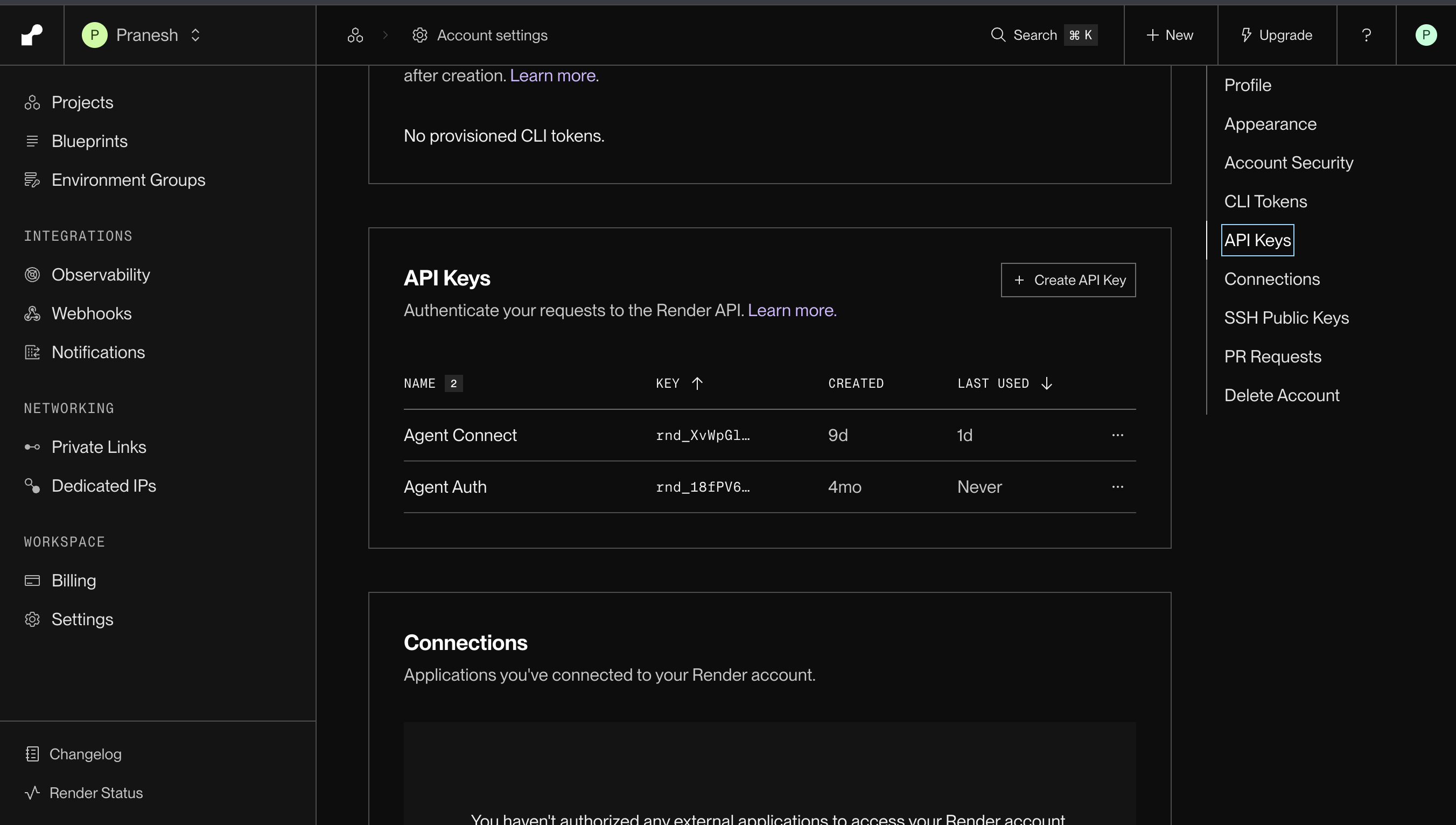
-
-
Create a new API key
- Click Create API Key.
- Give it a descriptive name (for example,
Scalekit) so you can identify it later. - Copy the key immediately — Render shows the full value only once.
-
Add the API key in Scalekit
- In the Scalekit dashboard, go to AgentKit > Connections > Create Connection. Find Render and click Create.
- Paste the API key you copied and click Save.
-
Authorize a user and make your first call
quickstart.mts import { ScalekitClient } from '@scalekit-sdk/node'import 'dotenv/config'import { createInterface } from 'node:readline/promises'const scalekit = new ScalekitClient(process.env.SCALEKIT_ENVIRONMENT_URL,process.env.SCALEKIT_CLIENT_ID,process.env.SCALEKIT_CLIENT_SECRET,)const actions = scalekit.actionsconst connector = 'render'const identifier = 'user_123'// Generate an authorization link for the userconst { link } = await actions.getAuthorizationLink({ connectionName: connector, identifier })console.log('Authorize Render:', link)const rl = createInterface({ input: process.stdin, output: process.stdout })await rl.question('Press Enter after authorizing...')rl.close()// Make your first callconst result = await actions.executeTool({connector,identifier,toolName: 'render_blueprints_list',toolInput: {},})console.log(result)Terminal window npx tsx quickstart.mtsquickstart.py import osfrom scalekit import ScalekitClientfrom dotenv import load_dotenvload_dotenv()scalekit_client = ScalekitClient(env_url=os.getenv("SCALEKIT_ENVIRONMENT_URL"),client_id=os.getenv("SCALEKIT_CLIENT_ID"),client_secret=os.getenv("SCALEKIT_CLIENT_SECRET"),)actions = scalekit_client.actionsconnection_name = "render"identifier = "user_123"# Generate an authorization link for the userlink_response = actions.get_authorization_link(connection_name=connection_name,identifier=identifier,)print("Authorize Render:", link_response.link)input("Press Enter after authorizing...")# Make your first callresult = actions.execute_tool(tool_input={},tool_name="render_blueprints_list",connection_name=connection_name,identifier=identifier,)print(result)Terminal window python quickstart.pyEach user opens the link once and enters their Render credentials there. If your app already has a user's credentials, add the account from your backend instead, as the console steps above show. See Authorize a user for the full flow and statuses.
Tools
Pass the exact name toexecute_toolrender_blueprint_getRetrieve full details for one Blueprint by its ID.Read-onlyRetrieve Blueprint
Retrieve full details for one Blueprint by its ID. Returns the Blueprint's name, sync status, auto-sync setting, connected repo, branch, render.yaml file path, last sync time, and the list of resources (services, databases, etc.) it manages. Use render_blueprint_get when you already have a Blueprint ID. Use render_blueprints_list to find a Blueprint ID by browsing or filtering.
Inputs
blueprint_idstringrequired- The ID of the Blueprint to retrieve. Render Blueprint IDs use the `exs-` prefix, e.g. exs-cph1rs3idesc73a2b2mg.
render_blueprint_syncs_listList the sync runs (deploy history) for a specific Blueprint.Read-onlyList Blueprint Syncs
List the sync runs (deploy history) for a specific Blueprint. Returns an array of sync records paired with a pagination cursor, each with the sync id, triggering commit id, start/completion times, and state (created, pending, running, error, or success). Use render_blueprint_syncs_list to review a Blueprint's sync history. Use render_blueprint_get for the Blueprint's current overall status.
Inputs
blueprint_idstringrequired- The ID of the Blueprint whose syncs should be listed. Render Blueprint IDs use the `exs-` prefix, e.g. exs-cph1rs3idesc73a2b2mg.
cursorstring- Pagination cursor from a previous response. Each returned sync is paired with a cursor value; pass the last one back here to fetch the next page. Omit for the first page.
limitinteger- Maximum number of syncs to return in this page of results. Between 1 and 100; defaults to 20.default
20
render_blueprints_listList Blueprints connected to your Render workspaces, optionally filtered by owner (workspace) ID.Read-onlyList Blueprints
List Blueprints connected to your Render workspaces, optionally filtered by owner (workspace) ID. Returns an array of Blueprint records paired with a pagination cursor, each with the Blueprint id, name, sync status, auto-sync setting, repo, branch, render.yaml path, last sync time, and the resources it manages. Use render_blueprints_list to browse or filter across all Blueprints. Use render_blueprint_get to fetch full details for one specific Blueprint by ID.
Inputs
cursorstring- Pagination cursor from a previous response. Each returned Blueprint is paired with a cursor value; pass the last one back here to fetch the next page. Omit for the first page.
limitinteger- Maximum number of Blueprints to return in this page of results. Between 1 and 100; defaults to 20.default
20 owner_idarray- Filter to Blueprints belonging to one of these Render workspace (owner) IDs. Provide an array of workspace ID strings. If omitted, returns all Blueprints the API key has access to.
render_custom_domain_getRetrieve a single custom domain configured on a Render service, identified by its ID or its exact name.Read-onlyRetrieve Custom Domain
Retrieve a single custom domain configured on a Render service, identified by its ID or its exact name. Returns the domain id, name, domain type (apex or subdomain), public suffix, verification status, and creation time. Use render_custom_domain_get to fetch full details for one specific domain. Use render_custom_domains_list to browse or filter all domains on a service.
Inputs
custom_domain_id_or_namestringrequired- The ID or the exact name of the custom domain to retrieve. Custom domain IDs use the `cdm-` prefix; alternatively, pass the domain's exact name (e.g. www.example.com).
service_idstringrequired- The ID of the Render service the custom domain belongs to. Render service IDs use the `srv-` prefix, e.g. srv-abc123def456.
render_custom_domains_listList the custom domains configured on a Render service, optionally filtered by name, domain type, verification status, or creation time window.Read-onlyList Custom Domains
List the custom domains configured on a Render service, optionally filtered by name, domain type, verification status, or creation time window. Returns an array of custom domain records paired with a pagination cursor, each with the domain id, name, domain type (apex or subdomain), public suffix, verification status, and creation time. Use render_custom_domains_list to browse or filter domains on a service. Use render_custom_domain_get to fetch full details for one specific domain by ID or name.
Inputs
service_idstringrequired- The ID of the Render service whose custom domains to list. Render service IDs use the `srv-` prefix, e.g. srv-abc123def456.
created_afterstring- Only return custom domains created after this timestamp. Provide an ISO 8601 datetime, e.g. 2021-02-17T08:15:30Z.
created_beforestring- Only return custom domains created before this timestamp. Provide an ISO 8601 datetime, e.g. 2021-06-17T08:15:30Z.
cursorstring- Pagination cursor from a previous response. Each returned domain is paired with a cursor value; pass the last one back here to fetch the next page. Omit for the first page.
domain_typestring- Filter to custom domains of a specific type. Valid values: apex (e.g. example.com), subdomain (e.g. www.example.com).one of
apexsubdomain limitinteger- Maximum number of custom domains to return in this page of results. Between 1 and 100; defaults to 20.default
20 namearray- Filter to custom domains whose name matches one of these values. Provide an array of exact domain names.
verification_statusstring- Filter to custom domains with a specific DNS verification status. Valid values: verified, unverified.one of
verifiedunverified
render_dedicated_ip_getRetrieve a single dedicated IP set by its ID.Read-onlyRetrieve Dedicated IP Set
Retrieve a single dedicated IP set by its ID. Returns the dedicated IP set's id, name, description, owner (workspace) ID, region, scoped environment IDs, assigned IPv4 addresses, provisioning status, and creation/update timestamps. Use render_dedicated_ip_get to check a specific set's details, such as polling after render_dedicated_ip_create until status becomes RUNNING and ips is populated. Use render_dedicated_ips_list to browse all sets in a workspace instead.
Inputs
dedicated_ip_idstringrequired- The ID of the dedicated IP set to retrieve, as returned by render_dedicated_ips_list or render_dedicated_ip_create.
render_dedicated_ips_listList dedicated IP sets for a Render workspace, optionally filtered to a single environment.Read-onlyList Dedicated IPs
List dedicated IP sets for a Render workspace, optionally filtered to a single environment. Returns an array of dedicated IP set records, each with its id, name, description, owner (workspace) ID, region, scoped environment IDs, assigned IPv4 addresses, provisioning status, and creation/update timestamps. Use render_dedicated_ips_list to browse all dedicated IP sets in a workspace. Use render_dedicated_ip_get to fetch one specific set by ID.
Inputs
owner_idstringrequired- ID of the Render workspace (team/owner) to list dedicated IP sets for. Find it in your Render workspace settings or via a workspace/owners list endpoint. Example: tea-cjnxpkdhshc73d12t9i0.
environment_idstring- Restrict results to the dedicated IP set (if any) scoped to this specific Render environment ID. Excludes workspace-wide dedicated IP sets from the results. Omit to list all dedicated IP sets for the workspace, both workspace-wide and environment-scoped.
render_deploy_getRetrieve full details for one deploy of a Render service by its deploy ID.Read-onlyRetrieve Deploy
Retrieve full details for one deploy of a Render service by its deploy ID. Returns the deploy id, commit or image info, status, trigger, and start/finish timestamps. Use render_deploy_get when you already have a specific deploy ID. Use render_deploys_list to browse or search deploy history first.
Inputs
deploy_idstringrequired- ID of the deploy to retrieve. Example: dep-cq3e6ttumphs73fk1nn0.
service_idstringrequired- ID of the Render service the deploy belongs to. Example: srv-c7ff2gp8fa8c73a1lj7g.
render_deploys_listList deploys for a Render service, optionally filtered by status or by creation/update/finish time window.Read-onlyList Deploys
List deploys for a Render service, optionally filtered by status or by creation/update/finish time window. Returns an array of deploy records paired with a pagination cursor, each containing the deploy id, commit or image info, status, trigger, and start/finish timestamps. Use render_deploys_list to browse deploy history for a service. Use render_deploy_get to fetch full details for one specific deploy by ID.
Inputs
service_idstringrequired- ID of the Render service whose deploys should be listed. Example: srv-c7ff2gp8fa8c73a1lj7g.
created_afterstring- Only return deploys created after this timestamp. Provide an ISO 8601 datetime, e.g. 2021-02-17T08:15:30Z.
created_beforestring- Only return deploys created before this timestamp. Provide an ISO 8601 datetime, e.g. 2021-06-17T08:15:30Z.
cursorstring- Pagination cursor from a previous response. Each returned deploy is paired with a cursor value; pass the last one back here to fetch the next page. Omit for the first page.
finished_afterstring- Only return deploys that finished after this timestamp. Provide an ISO 8601 datetime, e.g. 2021-02-17T08:15:30Z.
finished_beforestring- Only return deploys that finished before this timestamp. Provide an ISO 8601 datetime, e.g. 2021-06-17T08:15:30Z.
limitinteger- Maximum number of deploys to return in this page of results. Between 1 and 100; defaults to 20.default
20 statusarray- Filter to deploys with one of these statuses. Valid values: created, queued, build_in_progress, update_in_progress, live, deactivated, build_failed, update_failed, canceled, pre_deploy_in_progress, pre_deploy_failed.
updated_afterstring- Only return deploys updated after this timestamp. Provide an ISO 8601 datetime, e.g. 2021-02-17T08:15:30Z.
updated_beforestring- Only return deploys updated before this timestamp. Provide an ISO 8601 datetime, e.g. 2021-06-17T08:15:30Z.
render_disk_getRetrieve full details for one persistent disk in your Render workspace by its disk ID.Read-onlyRetrieve Disk
Retrieve full details for one persistent disk in your Render workspace by its disk ID. Returns the disk id, name, mount path, size in GB, attached service id, and creation/update timestamps. Use render_disk_get when you already have a specific disk ID. Use render_disks_list to browse or filter disks first.
Inputs
disk_idstringrequired- The ID of the disk to retrieve. Render disk IDs use the `dsk-` prefix, e.g. dsk-cph1rs3idesc73a2b2mg.
render_disk_snapshots_listList available snapshots for one persistent disk in your Render workspace, identified by disk ID.Read-onlyList Snapshots
List available snapshots for one persistent disk in your Render workspace, identified by disk ID. Each snapshot is a point-in-time copy of the disk's data. Returns an array of snapshot records, each with its snapshotKey, the instance ID whose disk was captured, and its creation timestamp. IMPORTANT: each snapshotKey expires 24 hours after this call returns it -- if a later restore fails with an expired-key error, call render_disk_snapshots_list again to get a fresh key. Use render_disk_snapshots_list to find a snapshot to restore. Use render_disk_snapshot_restore with a fresh snapshotKey from this response to actually restore the disk.
Inputs
disk_idstringrequired- The ID of the disk whose snapshots should be listed. Render disk IDs use the `dsk-` prefix, e.g. dsk-cph1rs3idesc73a2b2mg.
render_disks_listList persistent disks in your Render workspace, optionally filtered by disk ID, name, attached service, owner, or creation/update time window.Read-onlyList Disks
List persistent disks in your Render workspace, optionally filtered by disk ID, name, attached service, owner, or creation/update time window. Returns an array of disk records, each paired with a pagination cursor, containing the disk id, name, mount path, size in GB, attached service id, and creation/update timestamps. Use render_disks_list to browse or filter across all disks. Use render_disk_get to fetch full details for one specific disk by ID.
Inputs
created_afterstring- Only return disks created after this timestamp. Provide an ISO 8601 datetime, e.g. 2021-02-17T08:15:30Z.
created_beforestring- Only return disks created before this timestamp. Provide an ISO 8601 datetime, e.g. 2021-06-17T08:15:30Z.
cursorstring- Pagination cursor from a previous response. Each returned disk is paired with a cursor value; pass the last one back here to fetch the next page. Omit for the first page.
disk_idarray- Filter to disks with one of these exact disk IDs. Provide an array of disk ID strings, each using the `dsk-` prefix.
limitinteger- Maximum number of disks to return in this page of results. Between 1 and 100; defaults to 20.default
20 namearray- Filter to disks whose name matches one of these values. Provide an array of exact disk names.
owner_idarray- Filter to disks owned by one of these Render workspace (owner) IDs. Provide an array of workspace ID strings.
service_idarray- Filter to disks attached to one of these Render service IDs. Provide an array of service ID strings.
updated_afterstring- Only return disks last updated after this timestamp. Provide an ISO 8601 datetime, e.g. 2021-06-17T08:15:30Z.
updated_beforestring- Only return disks last updated before this timestamp. Provide an ISO 8601 datetime, e.g. 2021-06-17T08:15:30Z.
render_env_group_env_var_getRetrieve a single environment variable from an environment group by its key.Read-onlyGet Environment Group Variable
Retrieve a single environment variable from an environment group by its key. Returns the variable's key and current value. Use render_env_group_env_var_get to check one variable's value. Use render_env_group_get to fetch every variable and secret file in the group at once.
Inputs
env_group_idstringrequired- ID of the environment group that contains the variable.
env_var_keystringrequired- Name (key) of the environment variable to retrieve, e.g. DATABASE_URL.
render_env_group_getRetrieve a single environment group by its ID.Read-onlyGet Environment Group
Retrieve a single environment group by its ID. Returns the group's id, name, owner id, linked services, timestamps, and its full list of environment variables (key/value pairs) and secret files (name/content). Use render_env_group_get to inspect one group's complete contents. Use render_env_groups_list to browse or filter across all groups without fetching each one's full contents.
Inputs
env_group_idstringrequired- ID of the environment group to retrieve.
render_env_group_secret_file_getRetrieve a single secret file from a Render environment group by its filename.Read-onlyGet Environment Group Secret File
Retrieve a single secret file from a Render environment group by its filename. Returns the secret file's name and its full plaintext content. Use render_env_group_secret_file_get to read one known secret file's contents. Use render_env_group_get to see the names of every secret file (and env var) attached to the group without exposing their contents.
Inputs
env_group_idstringrequired- The ID of the Render environment group that owns the secret file, as returned by render_env_groups_list or render_env_group_get. Environment group IDs use the `evg-` prefix, e.g. evg-d0m3n1a1fgac73c3jkfg.
namestringrequired- The filename of the secret file to retrieve, e.g. .env or credentials.json.
render_env_groups_listList environment groups in your Render workspace, optionally filtered by name, owner, environment, or creation/update time window.Read-onlyList Environment Groups
List environment groups in your Render workspace, optionally filtered by name, owner, environment, or creation/update time window. Returns an array of environment group summaries, each with its id, name, owner id, linked services, and timestamps (env var and secret file contents are not included). Use render_env_groups_list to browse or filter across all environment groups. Use render_env_group_get to fetch full details, including env vars and secret files, for one specific group by ID.
Inputs
created_afterstring- Only return environment groups created after this timestamp. Provide an ISO 8601 datetime, e.g. 2021-02-17T08:15:30Z.
created_beforestring- Only return environment groups created before this timestamp. Provide an ISO 8601 datetime, e.g. 2021-06-17T08:15:30Z.
cursorstring- Pagination cursor from a previous response. Each returned environment group is paired with a cursor value; pass the last one back here to fetch the next page. Omit for the first page.
environment_idarray- Filter to environment groups that belong to one of these Render environment IDs. Provide an array of environment ID strings.
limitinteger- Maximum number of environment groups to return in this page of results. Between 1 and 100; defaults to 20.default
20 namearray- Filter to environment groups whose name matches one of these values. Provide an array of exact group names.
owner_idarray- Filter to environment groups owned by one of these Render workspace (owner) IDs. Provide an array of workspace ID strings.
updated_afterstring- Only return environment groups last updated after this timestamp. Provide an ISO 8601 datetime, e.g. 2021-06-17T08:15:30Z.
updated_beforestring- Only return environment groups last updated before this timestamp. Provide an ISO 8601 datetime, e.g. 2021-06-17T08:15:30Z.
render_environment_getRetrieve full details for a single Render environment by its ID.Read-onlyRetrieve Environment
Retrieve full details for a single Render environment by its ID. Returns the environment's id, name, project ID, associated resource IDs (services, databases, Key Value/Redis instances, env groups), IP allow list, protection status, and network isolation setting. Use render_environment_get to look up one environment you already have the ID for. Use render_environments_list to browse or filter across a project's environments.
Inputs
environment_idstringrequired- The ID of the environment to retrieve, as returned by render_environments_list or render_environment_create. Render environment IDs use the `evm-` prefix, e.g. evm-cq2u42dsc6pc73fnjrb0.
render_environments_listList a Render project's environments, optionally filtered by name, environment ID, owner workspace, or creation/update time window.Read-onlyList Environments
List a Render project's environments, optionally filtered by name, environment ID, owner workspace, or creation/update time window. Returns an array of environment records, each paired with a pagination cursor, containing the environment id, name, project ID, associated resource IDs (services, databases, Key Value/Redis instances, env groups), protection status, and network isolation setting. Use render_environments_list to browse or filter a project's environments. Use render_environment_get to fetch full details for one specific environment by ID.
Inputs
project_idarrayrequired- Filter to environments belonging to one of these Render project IDs. This is required — provide an array of project ID strings, e.g. ["prj-c9pn6ffds738e88f0i8g"].
created_afterstring- Only return environments created after this timestamp. Provide an ISO 8601 datetime, e.g. 2021-02-17T08:15:30Z.
created_beforestring- Only return environments created before this timestamp. Provide an ISO 8601 datetime, e.g. 2021-06-17T08:15:30Z.
cursorstring- Pagination cursor from a previous response. Each returned environment is paired with a cursor value; pass the last one back here to fetch the next page. Omit for the first page.
environment_idarray- Filter to these specific Render environment IDs. Provide an array of environment ID strings — useful for fetching several environments' full records in one call.
limitinteger- Maximum number of environments to return in this page of results. Between 1 and 100; defaults to 20.default
20 namearray- Filter to environments whose name matches one of these values. Provide an array of exact environment names.
owner_idarray- Filter to environments owned by one of these Render workspace (owner) IDs. Provide an array of workspace ID strings.
updated_afterstring- Only return environments updated after this timestamp. Provide an ISO 8601 datetime, e.g. 2021-06-17T08:15:30Z.
updated_beforestring- Only return environments updated before this timestamp. Provide an ISO 8601 datetime, e.g. 2021-06-17T08:15:30Z.
render_event_getRetrieve the full details of a single Render event by its event ID.Read-onlyGet Event
Retrieve the full details of a single Render event by its event ID. Events record activity across your workspace such as deploys, builds, autoscaling, disk changes, and Postgres lifecycle activity. Returns the event's id, timestamp, associated service id, event type, and a type-specific details object. Use render_event_get when you already have an event ID (for example from a webhook or a prior listing). This event is a global, workspace-level resource and is not scoped to a specific service in the request itself.
Inputs
event_idstringrequired- The ID of the event to retrieve, e.g. evt-cph1rs3idesc73a2b2mg.
render_header_rules_listList a Render service's response header rules, optionally filtered by request path, header name, or header value.Read-onlyList Header Rules
List a Render service's response header rules, optionally filtered by request path, header name, or header value. Returns an array of header rule records paired with a pagination cursor, each containing the rule id, the request path it applies to, and the header name/value it sets. Use render_header_rules_list to review the response header rules configured for a service. Use render_header_rule_create or render_header_rules_replace to change them.
Inputs
service_idstringrequired- ID of the Render service whose header rules should be listed. Example: srv-c7ff2gp8fa8c73a1lj7g.
cursorstring- Pagination cursor from a previous response. Each returned header rule is paired with a cursor value; pass the last one back here to fetch the next page. Omit for the first page.
limitinteger- Maximum number of header rules to return in this page of results. Between 1 and 100; defaults to 20.default
20 namearray- Filter to header rules with one of these header names. Provide an array of exact header name strings, e.g. ["Cache-Control"].
patharray- Filter to header rules that apply to one of these request paths. Provide an array of exact path strings, e.g. ["/static/*"].
valuearray- Filter to header rules with one of these header values. Provide an array of exact header value strings, e.g. ["public, max-age=604800"].
render_job_getRetrieve full details of one specific one-off job on a Render service by its job ID.Read-onlyGet Job
Retrieve full details of one specific one-off job on a Render service by its job ID. Returns the job's id, service id, start command, plan id, status, and creation/start/finish timestamps. Use render_job_get to check the status or result of a job you already know the ID of. Use render_jobs_list to browse or filter jobs for a service when you don't have the job ID.
Inputs
job_idstringrequired- The ID of the job to retrieve, e.g. job-cph1rs3idesc73a2b2mg.
service_idstringrequired- The Render service ID the job belongs to.
render_jobs_listList one-off jobs for a Render service, optionally filtered by status or creation/start/finish time window.Read-onlyList Jobs
List one-off jobs for a Render service, optionally filtered by status or creation/start/finish time window. Returns an array of job records, each paired with a pagination cursor, containing the job id, service id, start command, plan id, status, and timestamps. Use render_jobs_list to browse or filter jobs for a service. Use render_job_get to fetch full details for one specific job by ID.
Inputs
service_idstringrequired- The Render service ID whose jobs you want to list.
created_afterstring- Only return jobs created after this timestamp. Provide an ISO 8601 datetime, e.g. 2021-02-17T08:15:30Z.
created_beforestring- Only return jobs created before this timestamp. Provide an ISO 8601 datetime, e.g. 2021-06-17T08:15:30Z.
cursorstring- Pagination cursor from a previous response. Each returned job is paired with a cursor value; pass the last one back here to fetch the next page. Omit for the first page.
finished_afterstring- Only return jobs that finished after this timestamp. Provide an ISO 8601 datetime, e.g. 2021-02-17T08:15:30Z.
finished_beforestring- Only return jobs that finished before this timestamp. Provide an ISO 8601 datetime, e.g. 2021-06-17T08:15:30Z.
limitinteger- Maximum number of jobs to return in this page of results. Between 1 and 100; defaults to 20.default
20 started_afterstring- Only return jobs that started after this timestamp. Provide an ISO 8601 datetime, e.g. 2021-02-17T08:15:30Z.
started_beforestring- Only return jobs that started before this timestamp. Provide an ISO 8601 datetime, e.g. 2021-06-17T08:15:30Z.
statusarray- Filter to jobs in one of these statuses. Valid values: pending, running, succeeded, failed, canceled.
render_key_value_connection_info_getRetrieve the connection details for a Key Value instance (Render's managed Redis-compatible data store) by ID, for connecting an application or CLI to it.Read-onlyRetrieve Key Value Connection Info
Retrieve the connection details for a Key Value instance (Render's managed Redis-compatible data store) by ID, for connecting an application or CLI to it. This information is sensitive: it includes live credentials embedded in connection strings and a ready-to-run CLI command. Returns the internal connection string (for use from within Render), the external connection string (for use outside Render), and the redis-cli/valkey-cli command to connect. Use render_key_value_connection_info_get when you need to connect to the instance directly. Never log, display, or forward this response outside of a trusted context.
Inputs
redis_idstringrequired- The ID of the Key Value instance to retrieve connection info for, as returned by render_key_value_instances_list or render_key_value_instance_create.
render_key_value_instance_getRetrieve full details for one Key Value instance (Render's managed Redis-compatible data store) by ID.Read-onlyRetrieve Key Value Instance
Retrieve full details for one Key Value instance (Render's managed Redis-compatible data store) by ID. Returns the instance's id, status, plan, region, owner, connection options (max memory policy, persistence mode), IP allow list, version, and any pending maintenance. Use render_key_value_instance_get when you already know the instance ID. Use render_key_value_instances_list to browse or search across instances first.
Inputs
redis_idstringrequired- The ID of the Key Value instance to retrieve, as returned by render_key_value_instances_list or render_key_value_instance_create.
render_key_value_instances_listList Key Value instances (Render's managed Redis-compatible data store) in your workspace, optionally filtered by name, region, owner, environment, or creation/update time window.Read-onlyList Key Value Instances
List Key Value instances (Render's managed Redis-compatible data store) in your workspace, optionally filtered by name, region, owner, environment, or creation/update time window. Returns an array of Key Value instance records, each paired with a pagination cursor, containing the instance id, name, status, plan, region, owner, and connection options. Use render_key_value_instances_list to browse or filter across all Key Value instances. Use render_key_value_instance_get to fetch full details for one specific instance by ID.
Inputs
created_afterstring- Only return Key Value instances created after this timestamp. Provide an ISO 8601 datetime, e.g. 2021-02-17T08:15:30Z.
created_beforestring- Only return Key Value instances created before this timestamp. Provide an ISO 8601 datetime, e.g. 2021-06-17T08:15:30Z.
cursorstring- Pagination cursor from a previous response. Each returned instance is paired with a cursor value; pass the last one back here to fetch the next page. Omit for the first page.
environment_idarray- Filter to instances that belong to one of these Render environment IDs. Provide an array of environment ID strings.
limitinteger- Maximum number of Key Value instances to return in this page of results. Between 1 and 100; defaults to 20.default
20 namearray- Filter to instances whose name matches one of these values. Provide an array of exact instance names.
owner_idarray- Filter to instances owned by one of these Render workspace (owner) IDs. Provide an array of workspace ID strings.
regionarray- Filter to instances deployed in one of these regions. Valid values: frankfurt, oregon, ohio, singapore, virginia.
updated_afterstring- Only return Key Value instances updated after this timestamp. Provide an ISO 8601 datetime, e.g. 2021-06-17T08:15:30Z.
updated_beforestring- Only return Key Value instances updated before this timestamp. Provide an ISO 8601 datetime, e.g. 2021-06-17T08:15:30Z.
render_log_stream_getRetrieve the default log stream destination configured for a Render workspace (owner).Read-onlyRetrieve Workspace Log Stream
Retrieve the default log stream destination configured for a Render workspace (owner). Returns the workspace's log-stream endpoint URL and whether logs are currently being sent or dropped. This is the workspace-wide default: it applies to every resource (service, database, etc.) owned by the workspace unless that individual resource has its own log stream override configured. Use render_log_stream_override_get to check whether a specific resource has an override in place.
Inputs
owner_idstringrequired- The ID of the Render workspace (owner) to return log stream information for. Render workspace IDs use the `tea-` prefix, e.g. tea-cjnxpkdhshc73d12t9i0.
render_log_stream_override_getRetrieve the log stream override configured for a specific resource (a service, cron job, Postgres database, or Key Value/Redis instance).Read-onlyRetrieve Log Stream Override
Retrieve the log stream override configured for a specific resource (a service, cron job, Postgres database, or Key Value/Redis instance). Returns the resource ID, log-stream endpoint URL, and send/drop setting. A resource-level override takes precedence over its workspace's default log stream: when set, this resource streams its logs here instead of to the workspace default (see render_log_stream_get). If the resource has no override, this call returns a 404 and the resource simply follows the workspace default.
Inputs
resource_idstringrequired- The ID of the resource (service, cron job, Postgres database, or Key Value/Redis instance) to retrieve the log stream override for.
render_log_stream_overrides_listList resource-level log stream overrides, optionally filtered by workspace, log stream ID, resource ID, or send/drop setting.Read-onlyList Log Stream Overrides
List resource-level log stream overrides, optionally filtered by workspace, log stream ID, resource ID, or send/drop setting. Returns an array of override records, each paired with a pagination cursor, containing the resource ID, log-stream endpoint URL, and send/drop setting. A resource-level log stream override takes precedence over its workspace's default log stream (managed via render_log_stream_get / render_log_stream_update): any resource that appears here is streaming its own logs independently of the workspace default. Use render_log_stream_overrides_list to browse or filter across all overrides. Use render_log_stream_override_get to fetch the override for one specific resource by ID.
Inputs
cursorstring- Pagination cursor from a previous response. Each returned override is paired with a cursor value; pass the last one back here to fetch the next page. Omit for the first page.
limitinteger- Maximum number of overrides to return in this page of results. Between 1 and 100; defaults to 20.default
20 log_stream_idarray- Filter to overrides belonging to one of these log stream IDs. Provide an array of log stream ID strings.
owner_idarray- Filter to overrides belonging to resources owned by one of these Render workspace (owner) IDs. Provide an array of workspace ID strings.
resource_idarray- Filter to overrides for one of these resource IDs (a service, cron job, Postgres database, or Key Value/Redis instance). Provide an array of resource ID strings.
settingarray- Filter to overrides with one of these send/drop settings. Valid values: send, drop.
render_log_values_listList all distinct values seen for one log label (such as instance, host, status code, method, level, or type) across the logs matching the given filters and time window.Read-onlyList Log Label Values
List all distinct values seen for one log label (such as instance, host, status code, method, level, or type) across the logs matching the given filters and time window. Returns a plain array of string values for the requested label. Use render_log_values_list to discover what values are available for a label (for example, which log types exist for a service) before filtering with render_logs_list. Use render_logs_list itself once you know the value(s) you want to filter on.
Inputs
labelstringrequired- The log label to list distinct values for. Valid values: instance, host, statusCode, method, level, type.one of
instancehoststatusCodemethodleveltype owner_idstringrequired- The ID of the Render workspace (owner) to return log label values for.
resourcearrayrequired- The resource(s) to inspect logs for. Each value is the ID of a server, cron job, job, Postgres, Key Value, workflow, or sandbox group. All resources in one call must be in the same region and belong to the same owner.
directionstring- Direction to read logs in relative to the time window. Valid values: backward (most recent logs first, the default), forward (oldest logs in the window first).one of
forwardbackwarddefaultbackward end_timestring- End of the time range to consider, as an ISO 8601 / RFC3339 timestamp. Defaults to now() if omitted.
hostarray- Filter logs by host before collecting label values. Accepts an array of host values; wildcards and regex are supported.
instancearray- Filter logs by the specific running instance they were emitted from before collecting label values. Provide an array of instance IDs.
levelarray- Filter logs by severity level before collecting label values. Accepts an array of level values; wildcards and regex are supported.
limitinteger- Maximum number of values to return in this page of results. Between 1 and 100; defaults to 20.default
20 methodarray- Filter request logs by HTTP method before collecting label values. Accepts an array of method values; wildcards and regex are supported.
patharray- Filter request logs by request path before collecting label values. Accepts an array of path values; wildcards and regex are supported.
sandboxarray- Filter logs by sandbox ID before collecting label values. Accepts an array of sandbox IDs.
start_timestring- Start of the time range to consider, as an ISO 8601 / RFC3339 timestamp. Defaults to now() minus 1 hour if omitted.
status_codearray- Filter request logs by HTTP status code before collecting label values. Accepts an array of status code values; wildcards and regex are supported.
taskarray- Filter logs by task ID(s) before collecting label values, for logs emitted by workflow tasks. Accepts an array of task IDs.
task_runarray- Filter logs by task run ID(s) before collecting label values. Accepts an array of task run IDs.
textarray- Free-text search across the log message before collecting label values. Accepts an array of search terms; wildcards and regex are supported.
typearray- Filter logs by type before collecting label values. Common values include app, request, and build.
render_logs_listList logs for one or more Render resources (servers, cron jobs, jobs, Postgres, Key Value, workflows, or sandboxes) within a time window, optionally filtered by text, level, type, instance, host, status code, method, or path.Read-onlyList Logs
List logs for one or more Render resources (servers, cron jobs, jobs, Postgres, Key Value, workflows, or sandboxes) within a time window, optionally filtered by text, level, type, instance, host, status code, method, or path. Returns an array of log entries (each with an id, message, timestamp, and label list) plus hasMore, nextStartTime, and nextEndTime for continuing to the next page. Use render_logs_list to search or tail logs for specific resources you already know the IDs of. Use render_log_values_list first to discover the valid values for a log label (such as which log types exist) before filtering. All resources queried in one call must belong to the same workspace (owner) and the same region.
Inputs
owner_idstringrequired- The ID of the Render workspace (owner) to return logs for.
resourcearrayrequired- The resource(s) to fetch logs for. Each value is the ID of a server, cron job, job, Postgres, Key Value, workflow, or sandbox group. All resources in one call must be in the same region and belong to the same owner.
directionstring- Direction to read logs in relative to the time window. Valid values: backward (most recent logs first, the default), forward (oldest logs in the window first).one of
forwardbackwarddefaultbackward end_timestring- End of the time range to fetch logs for, as an ISO 8601 / RFC3339 timestamp. Defaults to now() if omitted. To fetch the next page after a response with hasMore true, pass that response's nextEndTime value here.
hostarray- Filter request logs by host. Accepts an array of host values; wildcards and regex are supported per Render's log filtering syntax.
instancearray- Filter logs by the specific running instance (server) they were emitted from. Provide an array of instance IDs.
levelarray- Filter logs by severity level. Accepts an array of level values (e.g. info, warning, error); wildcards and regex are supported.
limitinteger- Maximum number of log entries to return in this page of results. Between 1 and 100; defaults to 20.default
20 methodarray- Filter request logs by HTTP method. Accepts an array of method values; wildcards and regex are supported.
patharray- Filter request logs by request path. Accepts an array of path values; wildcards and regex are supported.
sandboxarray- Filter logs by sandbox ID. Accepts an array of sandbox IDs.
start_timestring- Start of the time range to fetch logs for, as an ISO 8601 / RFC3339 timestamp. Defaults to now() minus 1 hour if omitted. To fetch the next page after a response with hasMore true, pass that response's nextStartTime value here.
status_codearray- Filter request logs by HTTP status code. Accepts an array of status code values; wildcards and regex are supported.
taskarray- Filter logs by task ID(s), for logs emitted by workflow tasks. Accepts an array of task IDs.
task_runarray- Filter logs by task run ID(s), for logs emitted by a specific workflow task run. Accepts an array of task run IDs.
textarray- Free-text search across the log message. Accepts an array of search terms; wildcards and regex are supported.
typearray- Filter logs by type. Common values include app (application logs), request (request logs), and build (build logs). Use render_log_values_list with label=type to discover the full set available for your query.
render_maintenance_run_getRetrieve full details for one maintenance run in your Render workspace by its maintenance run ID.Read-onlyRetrieve Maintenance Run
Retrieve full details for one maintenance run in your Render workspace by its maintenance run ID. Returns the run's id, type, resource id, scheduled time, current state (scheduled, in_progress, user_fix_required, cancelled, succeeded, or failed), and, if set, the latest time by which the maintenance must be scheduled. Use render_maintenance_run_get when you already have a specific maintenance run ID, or to check progress after calling render_maintenance_run_update or render_maintenance_run_trigger. Use render_maintenance_runs_list to browse or filter maintenance runs first.
Inputs
maintenance_run_idstringrequired- The ID of the maintenance run to retrieve. Render maintenance run IDs use the `mrn-` prefix, e.g. mrn-cph1rs3idesc73a2b2mg.
render_maintenance_runs_listList scheduled and completed maintenance runs for your Render resources, optionally filtered by resource ID, owner (workspace), or run state.Read-onlyList Maintenance Runs
List scheduled and completed maintenance runs for your Render resources, optionally filtered by resource ID, owner (workspace), or run state. Returns an array of maintenance run records, each with its id, type, resource id, scheduled time, and current state (scheduled, in_progress, user_fix_required, cancelled, succeeded, or failed). Use render_maintenance_runs_list to browse or filter maintenance runs. Use render_maintenance_run_get to fetch full details for one specific run by ID.
Inputs
owner_idarray- Filter to maintenance runs on resources owned by one of these Render workspace (owner) IDs. Provide an array of workspace ID strings.
resource_idarray- Filter to maintenance runs for one of these resource IDs. A resource can be a Render service, a Postgres instance, or a Key Value (Redis) instance. Provide an array of resource ID strings.
statearray- Filter to maintenance runs in one of these states. Valid values: scheduled, in_progress, user_fix_required, cancelled, succeeded, failed.
render_metrics_active_connections_getGet the number of active client connections for one or more Postgres databases or Key Value (Redis-compatible) instances over a time range.Read-onlyGet Active Connection Count
Get the number of active client connections for one or more Postgres databases or Key Value (Redis-compatible) instances over a time range. This metric applies only to Postgres and Key Value resources, not to web/background services. Returns an array of time series, each labeled with the resource and paired with a list of timestamped values and a unit. Use render_metrics_active_connections_get to monitor connection load and catch connection-pool exhaustion on a database.
Inputs
end_timestring- End of the time range to return, as an ISO 8601 datetime. Defaults to the current time if omitted. Example: 2021-06-17T08:30:30Z.
resolution_secondsnumber- The resolution, in seconds, of the returned data points. Must be at least 30. Defaults to 60 (one data point per minute); larger values return fewer, more coarsely aggregated points over the same time range.default
60 resourcearray- Resource ID(s) to query. Provide an array of Postgres IDs or Key Value (Redis) IDs; when multiple are given they are ORed together. Services are not valid here. Example: ["dpg-abc123", "red-abc123"].
start_timestring- Start of the time range to return, as an ISO 8601 datetime. Defaults to one hour before now if omitted. Example: 2021-06-17T08:15:30Z.
render_metrics_application_filter_values_listList the instance values available to filter application metrics by, for one or more services.Read-onlyList Application Metric Filter Values
List the instance values available to filter application metrics by, for one or more services. Returns an array of filter objects, each with a filter name (instance) and the list of matching instance ID values. Use render_metrics_application_filter_values_list to discover valid instance IDs before querying CPU, memory, or other application metrics. Use render_metrics_http_filter_values_list for HTTP host/status code values, or render_metrics_path_filter_values_list for path suggestions.
Inputs
end_timestring- End of the time range to query, as an ISO 8601 datetime, e.g. 2021-06-17T08:30:30Z. Defaults to the current time if omitted.
resolution_secondsnumber- The resolution of the returned data, in seconds. Must be at least 30. Defaults to 60.default
60 resourcearray- One or more Render service IDs to query filter values for. When multiple IDs are provided, they are ORed together (any match is included).
servicestring- Deprecated alias for the resource parameter: a single Render service ID to query filter values for. Prefer resource, which also supports multiple IDs.
start_timestring- Start of the time range to query, as an ISO 8601 datetime, e.g. 2021-06-17T08:15:30Z. Defaults to one hour before the current time if omitted.
render_metrics_bandwidth_getGet total bandwidth usage for one or more Render services over a time range.Read-onlyGet Bandwidth Usage
Get total bandwidth usage for one or more Render services over a time range. Returns an array of time series, each labeled with the resource and paired with a list of timestamped values and a unit. Use render_metrics_bandwidth_get for a single combined bandwidth figure. Use render_metrics_bandwidth_sources_get to break usage down by traffic source (HTTP, WebSocket, NAT, PrivateLink) instead.
Inputs
end_timestring- End of the time range to return, as an ISO 8601 datetime. Defaults to the current time if omitted. Example: 2021-06-17T08:30:30Z.
resourcearray- Service ID(s) to query. Provide an array of Render service IDs; when multiple are given they are ORed together. Example: ["srv-abc123"].
servicearray- Deprecated filter, superseded by `resource`. Service ID(s) to query; when multiple are provided they are ORed together. Prefer the resource field instead.
start_timestring- Start of the time range to return, as an ISO 8601 datetime. Defaults to one hour before now if omitted. Example: 2021-06-17T08:15:30Z.
render_metrics_bandwidth_sources_getGet bandwidth usage for one or more Render services broken down by traffic source (HTTP, WebSocket, NAT, PrivateLink), with hourly data points.Read-onlyGet Bandwidth Usage By Traffic Source
Get bandwidth usage for one or more Render services broken down by traffic source (HTTP, WebSocket, NAT, PrivateLink), with hourly data points. Traffic-source breakdown data is only available for dates on or after 2025-03-09; a query whose time range starts earlier than that returns a 400 error. Returns a data array of time series, each labeled with the resource and traffic source (total, http, websocket, nat, or privatelink) and paired with a list of timestamped values. Use render_metrics_bandwidth_sources_get to see which traffic source drives usage for a service. Use render_metrics_bandwidth_get for a single aggregate bandwidth figure without the breakdown, or when you need data from before 2025-03-09.
Inputs
end_timestring- End of the time range to return, as an ISO 8601 datetime. Defaults to the current time if omitted. Example: 2021-06-17T08:30:30Z.
resourcearray- Service ID(s) to query. Provide an array of Render service IDs; when multiple are given they are ORed together. At most 30 resources may be queried at once. Example: ["srv-abc123"].
servicearray- Deprecated filter, superseded by `resource`. Service ID(s) to query; when multiple are provided they are ORed together. Prefer the resource field instead.
start_timestring- Start of the time range to return, as an ISO 8601 datetime. Defaults to one hour before now if omitted. Example: 2021-06-17T08:15:30Z. Traffic-source breakdown data is only available for dates on or after 2025-03-09; a query whose time range starts earlier than that returns a 400 error.
render_metrics_cpu_getGet CPU usage metrics for one or more Render resources over a time range.Read-onlyGet CPU Usage
Get CPU usage metrics for one or more Render resources over a time range. Returns a list of time series; each has resource/instance labels, a unit, and timestamped values. Use render_metrics_cpu_get for actual CPU usage. Use render_metrics_cpu_limit_get for the CPU limit configured on a resource, or render_metrics_cpu_target_get for its autoscaling CPU target.
Inputs
aggregation_methodstring- The aggregation method to apply when a query resolves to multiple time series (e.g. multiple instances of a resource). Valid values: AVG, MAX, MIN.one of
AVGMAXMIN end_timestring- End of the time range to return, as an ISO 8601 datetime, e.g. 2021-06-17T08:30:30Z. If omitted, Render defaults to the current time.
instancearray- Specific instance ID(s) to filter to within the given resource(s), e.g. individual running instance identifiers. When multiple values are given, they are ORed together. Example: ["srv-d1a2b3c4d5e6f7g8h9i0-6f8c9"].
resolution_secondsnumber- The resolution (time-bucket size, in seconds) of the returned data points. Minimum 30. Defaults to 60 seconds if omitted.default
60 resourcearray- Resource ID(s) to query metrics for. Accepts Render service IDs, Postgres IDs, or Key Value (Redis) IDs. When multiple values are given, they are ORed together (matches any of them). Example: ["srv-d1a2b3c4d5e6f7g8h9i0"].
servicestring- Deprecated: legacy single service ID filter, equivalent to `resource` but limited to one service and not combinable with it. Prefer the Resource IDs field instead. Example: srv-d1a2b3c4d5e6f7g8h9i0.
start_timestring- Start of the time range to return, as an ISO 8601 datetime, e.g. 2021-06-17T08:15:30Z. If omitted, Render defaults to one hour before now.
render_metrics_cpu_limit_getGet the CPU limit configured for one or more Render resources over a time range.Read-onlyGet CPU Limit
Get the CPU limit configured for one or more Render resources over a time range. Returns a list of time series; each has resource/instance labels, a unit, and timestamped values. Use render_metrics_cpu_limit_get to see the CPU ceiling a resource is allotted. Use render_metrics_cpu_get for actual CPU usage, or render_metrics_cpu_target_get for the autoscaling CPU target.
Inputs
aggregation_methodstring- The aggregation method to apply when a query resolves to multiple time series (e.g. multiple instances of a resource). Valid values: AVG, MAX, MIN.one of
AVGMAXMIN end_timestring- End of the time range to return, as an ISO 8601 datetime, e.g. 2021-06-17T08:30:30Z. If omitted, Render defaults to the current time.
instancearray- Specific instance ID(s) to filter to within the given resource(s), e.g. individual running instance identifiers. When multiple values are given, they are ORed together. Example: ["srv-d1a2b3c4d5e6f7g8h9i0-6f8c9"].
resolution_secondsnumber- The resolution (time-bucket size, in seconds) of the returned data points. Minimum 30. Defaults to 60 seconds if omitted.default
60 resourcearray- Resource ID(s) to query metrics for. Accepts Render service IDs, Postgres IDs, or Key Value (Redis) IDs. When multiple values are given, they are ORed together (matches any of them). Example: ["srv-d1a2b3c4d5e6f7g8h9i0"].
servicestring- Deprecated: legacy single service ID filter, equivalent to `resource` but limited to one service and not combinable with it. Prefer the Resource IDs field instead. Example: srv-d1a2b3c4d5e6f7g8h9i0.
start_timestring- Start of the time range to return, as an ISO 8601 datetime, e.g. 2021-06-17T08:15:30Z. If omitted, Render defaults to one hour before now.
render_metrics_cpu_target_getGet the CPU autoscaling target for one or more Render resources over a time range.Read-onlyGet CPU Target
Get the CPU autoscaling target for one or more Render resources over a time range. Returns a list of time series; each has resource/instance labels, a unit, and timestamped values. Use render_metrics_cpu_target_get to see the target CPU level used for autoscaling decisions. Use render_metrics_cpu_get for actual CPU usage, or render_metrics_cpu_limit_get for the configured CPU limit.
Inputs
aggregation_methodstring- The aggregation method to apply when a query resolves to multiple time series (e.g. multiple instances of a resource). Valid values: AVG, MAX, MIN.one of
AVGMAXMIN end_timestring- End of the time range to return, as an ISO 8601 datetime, e.g. 2021-06-17T08:30:30Z. If omitted, Render defaults to the current time.
instancearray- Specific instance ID(s) to filter to within the given resource(s), e.g. individual running instance identifiers. When multiple values are given, they are ORed together. Example: ["srv-d1a2b3c4d5e6f7g8h9i0-6f8c9"].
resolution_secondsnumber- The resolution (time-bucket size, in seconds) of the returned data points. Minimum 30. Defaults to 60 seconds if omitted.default
60 resourcearray- Resource ID(s) to query metrics for. Accepts Render service IDs, Postgres IDs, or Key Value (Redis) IDs. When multiple values are given, they are ORed together (matches any of them). Example: ["srv-d1a2b3c4d5e6f7g8h9i0"].
servicestring- Deprecated: legacy single service ID filter, equivalent to `resource` but limited to one service and not combinable with it. Prefer the Resource IDs field instead. Example: srv-d1a2b3c4d5e6f7g8h9i0.
start_timestring- Start of the time range to return, as an ISO 8601 datetime, e.g. 2021-06-17T08:15:30Z. If omitted, Render defaults to one hour before now.
render_metrics_disk_capacity_getGet persistent disk capacity (total provisioned size) for one or more Render services, Postgres databases, or Key Value (Redis-compatible) instances over a time range.Read-onlyGet Disk Capacity
Get persistent disk capacity (total provisioned size) for one or more Render services, Postgres databases, or Key Value (Redis-compatible) instances over a time range. Returns an array of time series, each labeled with the resource and paired with a list of timestamped values and a unit. Use render_metrics_disk_capacity_get to see total provisioned disk size. Use render_metrics_disk_usage_get for actual disk usage instead.
Inputs
end_timestring- End of the time range to return, as an ISO 8601 datetime. Defaults to the current time if omitted. Example: 2021-06-17T08:30:30Z.
resolution_secondsnumber- The resolution, in seconds, of the returned data points. Must be at least 30. Defaults to 60 (one data point per minute); larger values return fewer, more coarsely aggregated points over the same time range.default
60 resourcearray- Resource ID(s) to query. Provide an array of Render service IDs, Postgres IDs, or Key Value (Redis) IDs; when multiple are given they are ORed together. Example: ["srv-abc123", "dpg-abc123", "red-abc123"].
servicearray- Deprecated filter, superseded by `resource`. Service ID(s) to query; when multiple are provided they are ORed together. Prefer the resource field instead.
start_timestring- Start of the time range to return, as an ISO 8601 datetime. Defaults to one hour before now if omitted. Example: 2021-06-17T08:15:30Z.
render_metrics_disk_usage_getGet persistent disk usage for one or more Render services, Postgres databases, or Key Value (Redis-compatible) instances over a time range.Read-onlyGet Disk Usage
Get persistent disk usage for one or more Render services, Postgres databases, or Key Value (Redis-compatible) instances over a time range. Returns an array of time series, each labeled with the resource and paired with a list of timestamped values and a unit. Use render_metrics_disk_usage_get to see how much disk space is actually used. Use render_metrics_disk_capacity_get for the total provisioned disk size instead.
Inputs
end_timestring- End of the time range to return, as an ISO 8601 datetime. Defaults to the current time if omitted. Example: 2021-06-17T08:30:30Z.
resolution_secondsnumber- The resolution, in seconds, of the returned data points. Must be at least 30. Defaults to 60 (one data point per minute); larger values return fewer, more coarsely aggregated points over the same time range.default
60 resourcearray- Resource ID(s) to query. Provide an array of Render service IDs, Postgres IDs, or Key Value (Redis) IDs; when multiple are given they are ORed together. Example: ["srv-abc123", "dpg-abc123", "red-abc123"].
servicearray- Deprecated filter, superseded by `resource`. Service ID(s) to query; when multiple are provided they are ORed together. Prefer the resource field instead.
start_timestring- Start of the time range to return, as an ISO 8601 datetime. Defaults to one hour before now if omitted. Example: 2021-06-17T08:15:30Z.
render_metrics_http_filter_values_listList the host and status code values available to filter HTTP metrics by, for one or more services.Read-onlyList HTTP Metric Filter Values
List the host and status code values available to filter HTTP metrics by, for one or more services. Returns an array of filter objects, each with a filter name (host or statusCode) and the list of matching values. Use render_metrics_http_filter_values_list to discover valid host and status code values before querying HTTP request metrics. Use render_metrics_path_filter_values_list for path suggestions, or render_metrics_application_filter_values_list for instance values.
Inputs
end_timestring- End of the time range to query, as an ISO 8601 datetime, e.g. 2021-06-17T08:30:30Z. Defaults to the current time if omitted.
hostarray- One or more hosts of HTTP requests to filter to, e.g. example.com. When multiple hosts are provided, they are ORed together.
resolution_secondsnumber- The resolution of the returned data, in seconds. Must be at least 30. Defaults to 60.default
60 resourcearray- One or more Render service IDs to query filter values for. When multiple IDs are provided, they are ORed together (any match is included). Note: on this specific endpoint, Render's live API currently rejects this parameter with "resource is not a valid field" (confirmed by live testing) even though the equivalent parameter works on other metrics endpoints — use the service field below instead until Render fixes this.
servicestring- A single Render service ID to query filter values for. Despite being marked deprecated in favor of resource, this is currently the ONLY working service filter on this specific endpoint — Render's live API rejects the resource parameter here with a 400 (confirmed by live testing). Use this field until that's fixed upstream.
start_timestring- Start of the time range to query, as an ISO 8601 datetime, e.g. 2021-06-17T08:15:30Z. Defaults to one hour before the current time if omitted.
status_codearray- One or more HTTP status codes of requests to filter to, e.g. 200. When multiple status codes are provided, they are ORed together.
render_metrics_http_latency_getGet HTTP latency metrics for one or more Render services over a time range, optionally filtered by host or path and by one or more latency quantiles (e.g.Read-onlyGet HTTP Latency
Get HTTP latency metrics for one or more Render services over a time range, optionally filtered by host or path and by one or more latency quantiles (e.g. p50, p99). Returns an array of time series, each labeled with the resource and paired with a list of timestamped values and a unit. Use render_metrics_http_latency_get to see response time percentiles. Use render_metrics_http_requests_get for request volume instead.
Inputs
end_timestring- End of the time range to return, as an ISO 8601 datetime. Defaults to the current time if omitted. Example: 2021-06-17T08:30:30Z.
hostarray- Hosts of HTTP requests to filter to. Provide an array of hostnames; when multiple are given they are ORed together. Example: ["example.com"].
patharray- Request paths to filter to. Provide an array of path strings; when multiple are given they are ORed together. Example: ["/graphql"].
quantilearray- Latency quantiles to fetch, as decimals between 0 and 1 (e.g. 0.5 for the median, 0.99 for the 99th percentile). Provide an array of numbers; when multiple are given they are ORed together and each returns its own time series. Example: [0.5, 0.99].
resolution_secondsnumber- The resolution, in seconds, of the returned data points. Must be at least 30. Defaults to 60 (one data point per minute); larger values return fewer, more coarsely aggregated points over the same time range.default
60 resourcearray- Service ID(s) to query. Provide an array of Render service IDs; when multiple are given they are ORed together (results include requests to any of them). Example: ["srv-abc123"].
servicearray- Deprecated filter, superseded by `resource`. Service ID(s) to query; when multiple are provided they are ORed together. Prefer the resource field instead.
start_timestring- Start of the time range to return, as an ISO 8601 datetime. Defaults to one hour before now if omitted. Example: 2021-06-17T08:15:30Z.
render_metrics_http_requests_getGet the HTTP request count for one or more Render services over a time range, optionally filtered by host or path, or aggregated by status code or host.Read-onlyGet HTTP Request Count
Get the HTTP request count for one or more Render services over a time range, optionally filtered by host or path, or aggregated by status code or host. Returns an array of time series, each labeled with the resource (and, if aggregated, status code or host) and paired with a list of timestamped values and a unit. Use render_metrics_http_requests_get to see request volume. Use render_metrics_http_latency_get for response time percentiles instead.
Inputs
aggregate_bystring- Field to aggregate the request count by, so the response breaks results down per value of this field instead of returning a single combined series. Valid values: statusCode, host.one of
statusCodehost end_timestring- End of the time range to return, as an ISO 8601 datetime. Defaults to the current time if omitted. Example: 2021-06-17T08:30:30Z.
hostarray- Hosts of HTTP requests to filter to. Provide an array of hostnames; when multiple are given they are ORed together. Example: ["example.com"].
patharray- Request paths to filter to. Provide an array of path strings; when multiple are given they are ORed together. Example: ["/graphql"].
resolution_secondsnumber- The resolution, in seconds, of the returned data points. Must be at least 30. Defaults to 60 (one data point per minute); larger values return fewer, more coarsely aggregated points over the same time range.default
60 resourcearray- Service ID(s) to query. Provide an array of Render service IDs; when multiple are given they are ORed together (results include requests to any of them). Example: ["srv-abc123"].
servicearray- Deprecated filter, superseded by `resource`. Service ID(s) to query; when multiple are provided they are ORed together. Prefer the resource field instead.
start_timestring- Start of the time range to return, as an ISO 8601 datetime. Defaults to one hour before now if omitted. Example: 2021-06-17T08:15:30Z.
render_metrics_instance_count_getGet the number of running instances for one or more Render services, Postgres databases, or Key Value (Redis-compatible) instances over a time range.Read-onlyGet Instance Count
Get the number of running instances for one or more Render services, Postgres databases, or Key Value (Redis-compatible) instances over a time range. Returns an array of time series, each labeled with the resource and paired with a list of timestamped values and a unit. Use render_metrics_instance_count_get to track autoscaling or replica count changes over time.
Inputs
end_timestring- End of the time range to return, as an ISO 8601 datetime. Defaults to the current time if omitted. Example: 2021-06-17T08:30:30Z.
resolution_secondsnumber- The resolution, in seconds, of the returned data points. Must be at least 30. Defaults to 60 (one data point per minute); larger values return fewer, more coarsely aggregated points over the same time range.default
60 resourcearray- Resource ID(s) to query. Provide an array of Render service IDs, Postgres IDs, or Key Value (Redis) IDs; when multiple are given they are ORed together. Example: ["srv-abc123", "dpg-abc123", "red-abc123"].
servicearray- Deprecated filter, superseded by `resource`. Service ID(s) to query; when multiple are provided they are ORed together. Prefer the resource field instead.
start_timestring- Start of the time range to return, as an ISO 8601 datetime. Defaults to one hour before now if omitted. Example: 2021-06-17T08:15:30Z.
render_metrics_memory_getGet memory usage metrics for one or more Render resources over a time range.Read-onlyGet Memory Usage
Get memory usage metrics for one or more Render resources over a time range. Returns a list of time series; each has resource/instance labels, a unit, and timestamped values. Use render_metrics_memory_get for actual memory usage. Use render_metrics_memory_limit_get for the memory limit configured on a resource, or render_metrics_memory_target_get for its autoscaling memory target.
Inputs
aggregation_methodstring- The aggregation method to apply when a query resolves to multiple time series (e.g. multiple instances of a resource). Valid values: AVG, MAX, MIN.one of
AVGMAXMIN end_timestring- End of the time range to return, as an ISO 8601 datetime, e.g. 2021-06-17T08:30:30Z. If omitted, Render defaults to the current time.
instancearray- Specific instance ID(s) to filter to within the given resource(s), e.g. individual running instance identifiers. When multiple values are given, they are ORed together. Example: ["srv-d1a2b3c4d5e6f7g8h9i0-6f8c9"].
resolution_secondsnumber- The resolution (time-bucket size, in seconds) of the returned data points. Minimum 30. Defaults to 60 seconds if omitted.default
60 resourcearray- Resource ID(s) to query metrics for. Accepts Render service IDs, Postgres IDs, or Key Value (Redis) IDs. When multiple values are given, they are ORed together (matches any of them). Example: ["srv-d1a2b3c4d5e6f7g8h9i0"].
servicestring- Deprecated: legacy single service ID filter, equivalent to `resource` but limited to one service and not combinable with it. Prefer the Resource IDs field instead. Example: srv-d1a2b3c4d5e6f7g8h9i0.
start_timestring- Start of the time range to return, as an ISO 8601 datetime, e.g. 2021-06-17T08:15:30Z. If omitted, Render defaults to one hour before now.
render_metrics_memory_limit_getGet the memory limit configured for one or more Render resources over a time range.Read-onlyGet Memory Limit
Get the memory limit configured for one or more Render resources over a time range. Returns a list of time series; each has resource/instance labels, a unit, and timestamped values. Use render_metrics_memory_limit_get to see the memory ceiling a resource is allotted. Use render_metrics_memory_get for actual memory usage, or render_metrics_memory_target_get for the autoscaling memory target.
Inputs
aggregation_methodstring- The aggregation method to apply when a query resolves to multiple time series (e.g. multiple instances of a resource). Valid values: AVG, MAX, MIN.one of
AVGMAXMIN end_timestring- End of the time range to return, as an ISO 8601 datetime, e.g. 2021-06-17T08:30:30Z. If omitted, Render defaults to the current time.
instancearray- Specific instance ID(s) to filter to within the given resource(s), e.g. individual running instance identifiers. When multiple values are given, they are ORed together. Example: ["srv-d1a2b3c4d5e6f7g8h9i0-6f8c9"].
resolution_secondsnumber- The resolution (time-bucket size, in seconds) of the returned data points. Minimum 30. Defaults to 60 seconds if omitted.default
60 resourcearray- Resource ID(s) to query metrics for. Accepts Render service IDs, Postgres IDs, or Key Value (Redis) IDs. When multiple values are given, they are ORed together (matches any of them). Example: ["srv-d1a2b3c4d5e6f7g8h9i0"].
servicestring- Deprecated: legacy single service ID filter, equivalent to `resource` but limited to one service and not combinable with it. Prefer the Resource IDs field instead. Example: srv-d1a2b3c4d5e6f7g8h9i0.
start_timestring- Start of the time range to return, as an ISO 8601 datetime, e.g. 2021-06-17T08:15:30Z. If omitted, Render defaults to one hour before now.
render_metrics_memory_target_getGet the memory autoscaling target for one or more Render resources over a time range.Read-onlyGet Memory Target
Get the memory autoscaling target for one or more Render resources over a time range. Returns a list of time series; each has resource/instance labels, a unit, and timestamped values. Use render_metrics_memory_target_get to see the target memory level used for autoscaling decisions. Use render_metrics_memory_get for actual memory usage, or render_metrics_memory_limit_get for the configured memory limit.
Inputs
aggregation_methodstring- The aggregation method to apply when a query resolves to multiple time series (e.g. multiple instances of a resource). Valid values: AVG, MAX, MIN.one of
AVGMAXMIN end_timestring- End of the time range to return, as an ISO 8601 datetime, e.g. 2021-06-17T08:30:30Z. If omitted, Render defaults to the current time.
instancearray- Specific instance ID(s) to filter to within the given resource(s), e.g. individual running instance identifiers. When multiple values are given, they are ORed together. Example: ["srv-d1a2b3c4d5e6f7g8h9i0-6f8c9"].
resolution_secondsnumber- The resolution (time-bucket size, in seconds) of the returned data points. Minimum 30. Defaults to 60 seconds if omitted.default
60 resourcearray- Resource ID(s) to query metrics for. Accepts Render service IDs, Postgres IDs, or Key Value (Redis) IDs. When multiple values are given, they are ORed together (matches any of them). Example: ["srv-d1a2b3c4d5e6f7g8h9i0"].
servicestring- Deprecated: legacy single service ID filter, equivalent to `resource` but limited to one service and not combinable with it. Prefer the Resource IDs field instead. Example: srv-d1a2b3c4d5e6f7g8h9i0.
start_timestring- Start of the time range to return, as an ISO 8601 datetime, e.g. 2021-06-17T08:15:30Z. If omitted, Render defaults to one hour before now.
render_metrics_path_filter_values_listList suggested request path values available to filter HTTP metrics by, for one or more services.Read-onlyList Path Metric Filter Values
List suggested request path values available to filter HTTP metrics by, for one or more services. Returns an array of path strings drawn from the most recent 5000 log lines that match the given filters. Use render_metrics_path_filter_values_list to discover valid path values before querying HTTP request metrics by path. Use render_metrics_http_filter_values_list for host and status code values, or render_metrics_application_filter_values_list for instance values.
Inputs
end_timestring- End of the time range to query, as an ISO 8601 datetime, e.g. 2021-06-17T08:30:30Z. Defaults to the current time if omitted.
hostarray- One or more hosts of HTTP requests to filter to, e.g. example.com. When multiple hosts are provided, they are ORed together.
patharray- One or more request paths to filter to, e.g. /graphql. When multiple paths are provided, they are ORed together.
resourcearray- One or more Render service IDs to query filter values for. When multiple IDs are provided, they are ORed together (any match is included).
servicestring- Deprecated alias for the resource parameter: a single Render service ID to query filter values for. Prefer resource, which also supports multiple IDs.
start_timestring- Start of the time range to query, as an ISO 8601 datetime, e.g. 2021-06-17T08:15:30Z. Defaults to one hour before the current time if omitted.
status_codearray- One or more HTTP status codes of requests to filter to, e.g. 200. When multiple status codes are provided, they are ORed together.
render_metrics_replication_lag_getGet replica lag, in seconds, for a Postgres database over a time range.Read-onlyGet Replica Lag
Get replica lag, in seconds, for a Postgres database over a time range. This metric only applies to Postgres instances that have a high-availability (HA) replica configured; it is not meaningful for standalone Postgres instances. Returns an array of time series, each labeled with the resource and paired with a list of timestamped values and a unit. Use render_metrics_replication_lag_get to monitor how far behind an HA replica is from its primary.
Inputs
end_timestring- End of the time range to return, as an ISO 8601 datetime. Defaults to the current time if omitted. Example: 2021-06-17T08:30:30Z.
resolution_secondsnumber- The resolution, in seconds, of the returned data points. Must be at least 30. Defaults to 60 (one data point per minute); larger values return fewer, more coarsely aggregated points over the same time range.default
60 resourcearray- Postgres ID(s) to query. Provide an array of Render Postgres IDs; when multiple are given they are ORed together. Example: ["dpg-abc123"].
start_timestring- Start of the time range to return, as an ISO 8601 datetime. Defaults to one hour before now if omitted. Example: 2021-06-17T08:15:30Z.
render_metrics_stream_getRetrieve the metrics stream integration configured for a Render workspace (owner).Read-onlyRetrieve Metrics Stream
Retrieve the metrics stream integration configured for a Render workspace (owner). Returns the streaming provider (e.g. Datadog, Grafana, New Relic), the destination URL, and the workspace ID, if one is configured. Use render_metrics_stream_get to check the current configuration. Use render_metrics_stream_update to create or change it, or render_metrics_stream_delete to remove it.
Inputs
owner_idstringrequired- The ID of the Render workspace (owner) whose metrics stream integration should be retrieved. Render workspace IDs use the `tea-` prefix, e.g. tea-cjnxpkdhshc73d12t9i0.
render_metrics_task_runs_completed_getGet the number of task runs that completed for one or more Render tasks, as a time series over a given time range, optionally filtered by completion state or aggregated by state.Read-onlyGet Task Runs Completed
Get the number of task runs that completed for one or more Render tasks, as a time series over a given time range, optionally filtered by completion state or aggregated by state. Returns an array of time series, each with labels identifying the task (and state, when aggregating by state) and a list of timestamped values with a unit. Use render_metrics_task_runs_completed_get to monitor succeeded/failed run counts over time. Use render_metrics_task_runs_queued_get for queued run counts instead.
Inputs
aggregate_bystring- Field to aggregate the returned time series by. The only supported value is state, which returns separate series for each completion state instead of one combined series.one of
state aggregation_methodstring- How to aggregate the metric across multiple matching tasks/time series. This is a cumulative counter metric — Render only accepts SUM here (AVG/MAX/MIN/NONE are all rejected with a 400). Defaults to SUM; you should not normally need to change it.one of
SUMdefaultSUM end_timestring- End of the time range to query, as an ISO 8601 datetime, e.g. 2021-06-17T08:30:30Z. Defaults to the current time if omitted.
resolution_secondsnumber- The resolution of the returned data, in seconds. Must be at least 30. Defaults to 60.default
60 resourcearray- One or more Render task IDs to query completed run counts for. When multiple IDs are provided, they are ORed together (any match is included).
start_timestring- Start of the time range to query, as an ISO 8601 datetime, e.g. 2021-06-17T08:15:30Z. Defaults to one hour before the current time if omitted.
statearray- Filter to completed task runs in one of these states. Valid values: succeeded, failed. When multiple states are provided, they are ORed together.
render_metrics_task_runs_queued_getGet the number of task runs that were queued for one or more Render tasks, as a time series over a given time range.Read-onlyGet Task Runs Queued
Get the number of task runs that were queued for one or more Render tasks, as a time series over a given time range. Returns an array of time series, each with labels identifying the task and a list of timestamped values with a unit. Use render_metrics_task_runs_queued_get to monitor queue depth over time. Use render_metrics_task_runs_completed_get for completed run counts instead.
Inputs
aggregation_methodstring- How to aggregate the metric across multiple matching tasks/time series. This is a cumulative counter metric — Render only accepts SUM here (AVG/MAX/MIN/NONE are all rejected with a 400). Defaults to SUM; you should not normally need to change it.one of
SUMdefaultSUM end_timestring- End of the time range to query, as an ISO 8601 datetime, e.g. 2021-06-17T08:30:30Z. Defaults to the current time if omitted.
resolution_secondsnumber- The resolution of the returned data, in seconds. Must be at least 30. Defaults to 60.default
60 resourcearray- One or more Render task IDs to query queued run counts for. When multiple IDs are provided, they are ORed together (any match is included).
start_timestring- Start of the time range to query, as an ISO 8601 datetime, e.g. 2021-06-17T08:15:30Z. Defaults to one hour before the current time if omitted.
render_notification_override_getRetrieve the notification override for one Render service, identified by its service ID (not an override ID).Read-onlyRetrieve Notification Override
Retrieve the notification override for one Render service, identified by its service ID (not an override ID). Returns the service ID along with its preview-notification and notification-outcome override values, each either an explicit override or "default" to inherit the workspace-wide setting. Use render_notification_override_get when you already have a service ID. Use render_notification_overrides_list to find a service's override by browsing or filtering.
Inputs
service_idstringrequired- The ID of the Render service whose notification override to retrieve. Provide a service ID, not the ID of an override record.
render_notification_overrides_listList per-service notification overrides, optionally filtered by workspace (owner) ID or service ID.Read-onlyList Notification Overrides
List per-service notification overrides, optionally filtered by workspace (owner) ID or service ID. If no filters are provided, returns all overrides for every workspace you belong to. Returns an array of overrides paired with a pagination cursor, each containing the service ID and its preview-notification and notification-outcome override values. Use render_notification_overrides_list to browse or filter overrides across services. Use render_notification_override_get to fetch the override for one specific service by ID.
Inputs
cursorstring- Pagination cursor from a previous response. Each returned override is paired with a cursor value; pass the last one back here to fetch the next page. Omit for the first page.
limitinteger- Maximum number of overrides to return in this page of results. Between 1 and 100; defaults to 20.default
20 owner_idarray- Filter to overrides belonging to one of these Render workspace (owner) IDs. Provide an array of workspace ID strings.
service_idarray- Filter to the override for one of these specific Render service IDs. Provide an array of service ID strings.
render_notification_settings_getRetrieve the workspace-wide notification settings for a Render workspace (owner).Read-onlyRetrieve Notification Settings
Retrieve the workspace-wide notification settings for a Render workspace (owner). Returns whether Slack and email notifications are enabled, whether preview environment notifications are enabled, and which event outcomes (none, failure, or all) trigger notifications. Use render_notification_settings_get for workspace-wide settings. Use render_notification_override_get for a specific service's override of these settings.
Inputs
owner_idstringrequired- The ID of the Render workspace (owner) whose notification settings to retrieve. This is a workspace ID, not the ID of a particular resource.
render_organization_audit_logs_listList audit log entries for a Render organization, optionally filtered by a start/end time window and paged forward or backward.Read-onlyList Organization Audit Logs
List audit log entries for a Render organization, optionally filtered by a start/end time window and paged forward or backward. Returns an array of audit log entries paired with a pagination cursor, each containing the event id, timestamp, event type, status, actor, and metadata. Use render_organization_audit_logs_list for organization-level audit history. Use render_workspace_audit_logs_list for workspace-level audit history instead.
Inputs
org_idstringrequired- The unique identifier of the Render organization whose audit logs to retrieve.
cursorstring- Pagination cursor from a previous response. Each returned audit log entry is paired with a cursor value; pass the last one back here to fetch the next page. Omit for the first page.
directionstring- The direction to page through audit log entries. "backward" returns the most recent entries first; "forward" starts from the oldest entry in the time range. Defaults to backward.one of
forwardbackwarddefaultbackward end_timestring- Only return audit log entries recorded at or before this timestamp. Provide an ISO 8601 datetime, e.g. 2023-12-31T23:59:59Z.
limitinteger- Maximum number of audit log entries to return in this page of results. Between 1 and 1000; defaults to 20.default
20 start_timestring- Only return audit log entries recorded at or after this timestamp. Provide an ISO 8601 datetime, e.g. 2023-01-01T00:00:00Z.
render_postgres_connection_info_getRetrieve connection details for a Postgres instance by its ID.Read-onlyRetrieve Postgres Connection Info
Retrieve connection details for a Postgres instance by its ID. The response contains sensitive credentials — the database password, internal and external connection strings (and pooled variants, if connection pooling is enabled), and a ready-to-use psql command. Returns the instance's password, internalConnectionString, externalConnectionString, internalConnectionPoolString, externalConnectionPoolString, and psqlCommand. Use render_postgres_connection_info_get when you need to actually connect to the database (e.g. to hand a connection string to another service). Handle the returned values as secrets — do not log or expose them.
Inputs
postgres_idstringrequired- The ID of the Postgres instance to retrieve connection info for. Render Postgres IDs use the `dpg-` prefix, e.g. dpg-cph1rs3idesc73a2b2mg.
render_postgres_exports_listList the logical (SQL dump) exports that have been created for a Render Postgres instance by ID.Read-onlyList Postgres Exports
List the logical (SQL dump) exports that have been created for a Render Postgres instance by ID. Returns an array of export records, each with an id, a createdAt timestamp, and a URL for downloading the export file. Use render_postgres_exports_list to find and download a previously created export. Use render_postgres_export_create to start a new one.
Inputs
postgres_idstringrequired- The ID of the Render Postgres instance whose exports should be listed. Render Postgres IDs use the `dpg-` prefix, e.g. dpg-cph1qb3idesc73a2a3ig.
render_postgres_instance_getRetrieve full details for one Postgres instance by its ID.Read-onlyRetrieve Postgres Instance
Retrieve full details for one Postgres instance by its ID. Returns the instance's id, name, status, plan, region, PostgreSQL version, database name/user, disk size, high availability setting, IP allow list, read replicas, owner, and connection pool setting. Use render_postgres_instance_get when you already have a Postgres instance ID. Use render_postgres_instances_list to find an instance ID by browsing or filtering.
Inputs
postgres_idstringrequired- The ID of the Postgres instance to retrieve. Render Postgres IDs use the `dpg-` prefix, e.g. dpg-cph1rs3idesc73a2b2mg.
render_postgres_instances_listList Postgres instances in your Render workspace, optionally filtered by name, region, suspension state, owner, environment, or creation/update time window.Read-onlyList Postgres Instances
List Postgres instances in your Render workspace, optionally filtered by name, region, suspension state, owner, environment, or creation/update time window. Returns an array of Postgres instance records paired with a pagination cursor, each including id, name, plan, region, PostgreSQL version, status, database name/user, disk size, and IP allow list. Use render_postgres_instances_list to browse or filter across all Postgres instances. Use render_postgres_instance_get to fetch full details for one specific instance by ID.
Inputs
created_afterstring- Only return Postgres instances created after this timestamp. Provide an ISO 8601 datetime, e.g. 2021-02-17T08:15:30Z.
created_beforestring- Only return Postgres instances created before this timestamp. Provide an ISO 8601 datetime, e.g. 2021-06-17T08:15:30Z.
cursorstring- Pagination cursor from a previous response. Each returned instance is paired with a cursor value; pass the last one back here to fetch the next page. Omit for the first page.
environment_idarray- Filter to Postgres instances that belong to one of these Render environment IDs. Provide an array of environment ID strings.
include_replicasboolean- Whether to include read replica instances in the results.default
true limitinteger- Maximum number of Postgres instances to return in this page of results. Between 1 and 100; defaults to 20.default
20 namearray- Filter to Postgres instances whose name matches one of these values. Provide an array of exact instance names.
owner_idarray- Filter to Postgres instances owned by one of these Render workspace (owner) IDs. Provide an array of workspace ID strings.
regionarray- Filter to Postgres instances deployed in one of these regions. Valid values: frankfurt, oregon, ohio, singapore, virginia.
suspendedarray- Filter Postgres instances by suspension state. Valid values: suspended, not_suspended.
updated_afterstring- Only return Postgres instances updated after this timestamp. Provide an ISO 8601 datetime, e.g. 2021-06-17T08:15:30Z.
updated_beforestring- Only return Postgres instances updated before this timestamp. Provide an ISO 8601 datetime, e.g. 2021-06-17T08:15:30Z.
render_postgres_processes_listList the queries currently running against a Render Postgres instance by ID, read live from pg_stat_activity.Read-onlyList Postgres Live Queries
List the queries currently running against a Render Postgres instance by ID, read live from pg_stat_activity. Returns an array of process records, each with the process ID, database name, username, application name, client address, backend/query start times, state, wait event, query text, duration in seconds, and whether it ran against the primary instance. Use render_postgres_processes_list to diagnose long-running or blocking queries right now. Use render_postgres_top_queries_list instead for aggregated historical query performance.
Inputs
postgres_idstringrequired- The ID of the Render Postgres instance whose live queries should be listed. Render Postgres IDs use the `dpg-` prefix, e.g. dpg-cph1qb3idesc73a2a3ig.
render_postgres_recovery_info_getRetrieve the point-in-time recovery availability status for a Postgres instance by its ID.Read-onlyRetrieve Postgres Recovery Info
Retrieve the point-in-time recovery availability status for a Postgres instance by its ID. Returns a recoveryStatus (AVAILABLE, BACKUP_NOT_READY, or NOT_AVAILABLE) and, when available, the earliest startsAt timestamp that can be restored to. Use render_postgres_recovery_info_get to check what recovery window is available before calling render_postgres_recover to trigger an actual point-in-time restore.
Inputs
postgres_idstringrequired- The ID of the Postgres instance to check recovery status for. Render Postgres IDs use the `dpg-` prefix, e.g. dpg-cph1rs3idesc73a2b2mg.
render_postgres_sizes_listList the on-disk sizes of the databases, tables, and indexes on a Render Postgres instance by ID.Read-onlyList Postgres Sizes
List the on-disk sizes of the databases, tables, and indexes on a Render Postgres instance by ID. Returns an array of size records, each identifying a database, schema, table, or index alongside its size in bytes. Use render_postgres_sizes_list to find what is consuming disk space or track growth over time. Use render_postgres_table_scans_list instead to look for tables that need better indexing.
Inputs
postgres_idstringrequired- The ID of the Render Postgres instance whose database, table, and index sizes should be listed. Render Postgres IDs use the `dpg-` prefix, e.g. dpg-cph1qb3idesc73a2a3ig.
render_postgres_table_scans_listList the number of sequential scans performed against each table on a Render Postgres instance by ID.Read-onlyList Postgres Table Scans
List the number of sequential scans performed against each table on a Render Postgres instance by ID. Returns an array of records, each identifying a database, schema, and table along with its sequential scan count. Use render_postgres_table_scans_list to spot tables that are missing useful indexes. Use render_postgres_sizes_list instead to check disk space usage.
Inputs
postgres_idstringrequired- The ID of the Render Postgres instance whose table scan counts should be listed. Render Postgres IDs use the `dpg-` prefix, e.g. dpg-cph1qb3idesc73a2a3ig.
render_postgres_top_queries_listList the top 50 queries by total execution time on a Render Postgres instance by ID, aggregated from pg_stat_statements.Read-onlyList Postgres Top Queries
List the top 50 queries by total execution time on a Render Postgres instance by ID, aggregated from pg_stat_statements. Returns an array of up to 50 query records, each with the query's ID, text, call count, total/min/max/mean/stddev execution time in milliseconds, rows returned, and shared/local/temp block I/O counters. Use render_postgres_top_queries_list to find which queries consume the most database time overall. Use render_postgres_processes_list instead to see what is executing right now.
Inputs
postgres_idstringrequired- The ID of the Render Postgres instance whose top queries should be listed. Render Postgres IDs use the `dpg-` prefix, e.g. dpg-cph1qb3idesc73a2a3ig.
render_postgres_users_listList the PostgreSQL users (credentials) that exist for a Render Postgres instance.Read-onlyList PostgreSQL Users
List the PostgreSQL users (credentials) that exist for a Render Postgres instance. Returns an array of user records, each with the username, whether it is the database's current default user, its creation time, and its current number of open connections. Use render_postgres_users_list to see who can connect to a Postgres database before adding or removing a user. Use render_postgres_user_create to add a new user.
Inputs
postgres_idstringrequired- The ID of the Render Postgres instance whose users should be listed. Render Postgres IDs use the `dpg-` prefix, e.g. dpg-cph1qb3idesc73a2a3ig.
render_project_getRetrieve full details for one Render project by its ID.Read-onlyRetrieve Project
Retrieve full details for one Render project by its ID. Returns the project record with its id, name, owner, creation/update times, and the IDs of the environments it groups. Use render_project_get when you already have a project ID. Use render_projects_list to find a project's ID by name or owner first.
Inputs
project_idstringrequired- The ID of the project to retrieve. Render project IDs use the `prj-` prefix, e.g. prj-c9pn6ffds738e88f0i8g.
render_projects_listList projects in your Render workspace, optionally filtered by name, owner workspace, or creation/update time window.Read-onlyList Projects
List projects in your Render workspace, optionally filtered by name, owner workspace, or creation/update time window. Returns an array of project records, each paired with a pagination cursor, containing the project id, name, owner, creation/update times, and the IDs of the environments it groups. Use render_projects_list to browse or filter across all projects. Use render_project_get to fetch full details for one specific project by ID.
Inputs
created_afterstring- Only return projects created after this timestamp. Provide an ISO 8601 datetime, e.g. 2021-02-17T08:15:30Z.
created_beforestring- Only return projects created before this timestamp. Provide an ISO 8601 datetime, e.g. 2021-06-17T08:15:30Z.
cursorstring- Pagination cursor from a previous response. Each returned project is paired with a cursor value; pass the last one back here to fetch the next page. Omit for the first page.
limitinteger- Maximum number of projects to return in this page of results. Between 1 and 100; defaults to 20.default
20 namearray- Filter to projects whose name matches one of these values. Provide an array of exact project names.
owner_idarray- Filter to projects owned by one of these Render workspace (owner) IDs. Provide an array of workspace ID strings.
updated_afterstring- Only return projects updated after this timestamp. Provide an ISO 8601 datetime, e.g. 2021-06-17T08:15:30Z.
updated_beforestring- Only return projects updated before this timestamp. Provide an ISO 8601 datetime, e.g. 2021-06-17T08:15:30Z.
render_redis_connection_info_get⚠️ Deprecated: Render recommends the Key Value API (render_key_value_* tools) instead.Read-onlyRetrieve Redis Connection Info (Deprecated)
⚠️ Deprecated: Render recommends the Key Value API (render_key_value_* tools) instead. Retrieve connection details for a classic Redis instance by its ID, including sensitive credentials. Returns the internal connection string (for use from within Render), the external connection string (for use outside Render), and a ready-to-run redis-cli command. Use render_redis_connection_info_get when you need to actually connect to a Redis instance (e.g. from an app or the CLI), not just to inspect its metadata (use render_redis_instance_get for that).
Inputs
redis_idstringrequired- The ID of the Redis instance to retrieve connection info for. Render Redis instance IDs use the `red-` prefix, e.g. red-abc123.
render_redis_instance_get⚠️ Deprecated: Render recommends the Key Value API (render_key_value_* tools) instead.Read-onlyRetrieve Redis Instance (Deprecated)
⚠️ Deprecated: Render recommends the Key Value API (render_key_value_* tools) instead. Retrieve full details for one classic Redis instance by its ID. Returns the instance record: id, creation/update timestamps, status, region, plan, name, owner, options (eviction policy and persistence mode), IP allow list, environment ID, version, dashboard URL, and any pending maintenance. Use render_redis_instance_get when you already have a Redis instance ID (e.g. from render_redis_instances_list). Use render_key_value_instance_get for the current Key Value API instead.
Inputs
redis_idstringrequired- The ID of the Redis instance to retrieve. Render Redis instance IDs use the `red-` prefix, e.g. red-abc123.
render_redis_instances_list⚠️ Deprecated: Render recommends the Key Value API (render_key_value_* tools) instead.Read-onlyList Redis Instances (Deprecated)
⚠️ Deprecated: Render recommends the Key Value API (render_key_value_* tools) instead. List classic Redis instances in your Render workspace, optionally filtered by name, region, owner, environment, or creation/update time window. Returns an array of Redis instance records paired with a pagination cursor, each containing the instance id, name, status, region, plan, and owner. Use render_redis_instances_list to browse or filter existing classic Redis instances (only relevant if your workspace still has any). Use render_key_value_instances_list for the current Key Value API instead, or render_redis_instance_get to fetch full details for one specific Redis instance by ID.
Inputs
created_afterstring- Only return Redis instances created after this timestamp. Provide an ISO 8601 datetime, e.g. 2021-02-17T08:15:30Z.
created_beforestring- Only return Redis instances created before this timestamp. Provide an ISO 8601 datetime, e.g. 2021-06-17T08:15:30Z.
cursorstring- Pagination cursor from a previous response. Each returned Redis instance is paired with a cursor value; pass the last one back here to fetch the next page. Omit for the first page.
environment_idarray- Filter to Redis instances that belong to one of these Render environment IDs. Provide an array of environment ID strings.
limitinteger- Maximum number of Redis instances to return in this page of results. Between 1 and 100; defaults to 20.default
20 namearray- Filter to Redis instances whose name matches one of these values. Provide an array of exact instance names.
owner_idarray- Filter to Redis instances owned by one of these Render workspace (owner) IDs. Provide an array of workspace ID strings.
regionarray- Filter to Redis instances deployed in one of these regions. Valid values: frankfurt, oregon, ohio, singapore, virginia.
updated_afterstring- Only return Redis instances updated after this timestamp. Provide an ISO 8601 datetime, e.g. 2021-06-17T08:15:30Z.
updated_beforestring- Only return Redis instances updated before this timestamp. Provide an ISO 8601 datetime, e.g. 2021-06-17T08:15:30Z.
render_registry_credential_getRetrieve a single registry credential in your Render workspace by its ID.Read-onlyRetrieve Registry Credential
Retrieve a single registry credential in your Render workspace by its ID. Returns the credential's id, name, registry type, username, and last-updated time (the stored auth token itself is never returned). Use render_registry_credential_get when you already have a registry credential ID. Use render_registry_credentials_list to find one by browsing or filtering.
Inputs
registry_credential_idstringrequired- The ID of the registry credential to retrieve, as returned by render_registry_credentials_list or render_registry_credential_create, e.g. rgc-d0m3n1a1fgac73c3jkfg.
render_registry_credentials_listList registry credentials in your Render workspace, optionally filtered by name, username, registry type, owner, or creation/update time window.Read-onlyList Registry Credentials
List registry credentials in your Render workspace, optionally filtered by name, username, registry type, owner, or creation/update time window. Returns an array of credential records containing the credential id, name, registry type, username, and last-updated time (the stored auth token itself is never returned). Use render_registry_credentials_list to browse or filter across all registry credentials. Use render_registry_credential_get to fetch one specific credential by ID.
Inputs
created_afterstring- Only return registry credentials created after this timestamp. Provide an ISO 8601 datetime, e.g. 2021-02-17T08:15:30Z.
created_beforestring- Only return registry credentials created before this timestamp. Provide an ISO 8601 datetime, e.g. 2021-06-17T08:15:30Z.
cursorstring- Pagination cursor from a previous response. Each returned credential is paired with a cursor value; pass the last one back here to fetch the next page. Omit for the first page.
limitinteger- Maximum number of registry credentials to return in this page of results. Between 1 and 100; defaults to 20.default
20 namearray- Filter to registry credentials whose name matches one of these values. Provide an array of exact credential names.
owner_idarray- Filter to registry credentials owned by one of these Render workspace (owner) IDs. Provide an array of workspace ID strings.
typearray- Filter to registry credentials for one of these registry types. Valid values: GITHUB, GITLAB, DOCKER, GOOGLE_ARTIFACT, AWS_ECR.
updated_afterstring- Only return registry credentials updated after this timestamp. Provide an ISO 8601 datetime, e.g. 2021-02-17T08:15:30Z.
updated_beforestring- Only return registry credentials updated before this timestamp. Provide an ISO 8601 datetime, e.g. 2021-06-17T08:15:30Z.
usernamearray- Filter to registry credentials whose username matches one of these values. Provide an array of exact usernames.
render_routes_listList the redirect/rewrite rules configured on a Render service, optionally filtered by rule type, source pattern, or destination pattern.Read-onlyList Routes
List the redirect/rewrite rules configured on a Render service, optionally filtered by rule type, source pattern, or destination pattern. Returns an array of route rules paired with a pagination cursor, each with the route id, type (redirect or rewrite), source pattern, destination pattern, and priority. Use render_routes_list to browse or filter existing rules. Use render_route_create to add a new rule, render_routes_replace to replace all rules at once, or render_route_update to change one rule's priority.
Inputs
service_idstringrequired- The ID of the Render service whose redirect/rewrite rules to list. Render service IDs use the `srv-` prefix, e.g. srv-abc123def456.
cursorstring- Pagination cursor from a previous response. Each returned rule is paired with a cursor value; pass the last one back here to fetch the next page. Omit for the first page.
destinationarray- Filter to rules whose destination path matches one of these values. Provide an array of exact destination pattern strings.
limitinteger- Maximum number of rules to return in this page of results. Between 1 and 100; defaults to 20.default
20 sourcearray- Filter to rules whose source path pattern matches one of these values. Provide an array of exact source pattern strings.
typearray- Filter to rules of one of these types. Valid values: redirect, rewrite.
render_service_env_var_getRetrieve a single environment variable set directly on a Render service, by its key.Read-onlyRetrieve Environment Variable
Retrieve a single environment variable set directly on a Render service, by its key. This only applies to variables set directly on the service, not to variables inherited from a linked environment group. Returns the environment variable's key and value. Use render_service_env_var_get when you already know the exact key. Use render_service_env_vars_list to see every variable on the service.
Inputs
env_var_keystringrequired- The name (key) of the environment variable to retrieve, e.g. NODE_ENV.
service_idstringrequired- The ID of the Render service that owns the environment variable. Service IDs start with the `srv-` prefix and can be found via render_services_list or the Render Dashboard.
render_service_env_vars_listList all environment variables set directly on a Render service.Read-onlyList Environment Variables
List all environment variables set directly on a Render service. Returns an array of environment variable records, each paired with a pagination cursor, containing the variable's key and value. Use render_service_env_vars_list to see everything currently set on the service. Use render_service_env_var_get to fetch a single variable by key. Note: this does not include variables inherited from a linked environment group.
Inputs
service_idstringrequired- The ID of the Render service whose environment variables should be listed. Service IDs start with the `srv-` prefix and can be found via render_services_list or the Render Dashboard.
cursorstring- Pagination cursor from a previous response. Each returned environment variable is paired with a cursor value; pass the last one back here to fetch the next page. Omit for the first page.
limitinteger- Maximum number of environment variables to return in this page of results. Between 1 and 100; defaults to 20.default
20
render_service_events_listList recent events for a Render service — deploys, builds, restarts, scaling changes, suspensions, and similar — optionally filtered by event type or time range.Read-onlyList Events
List recent events for a Render service — deploys, builds, restarts, scaling changes, suspensions, and similar — optionally filtered by event type or time range. Returns an array of event records, each paired with a pagination cursor, containing the event id, timestamp, type, and event-specific details. Use render_service_events_list to browse or filter a service's event history. Use render_service_get to fetch the current state of the service itself.
Inputs
service_idstringrequired- The ID of the Render service, e.g. srv-abc123def456. Find it in the Render dashboard URL or from render_services_list.
cursorstring- Pagination cursor from a previous response. Each returned event is paired with a cursor value; pass the last one back here to fetch the next page. Omit for the first page.
end_timestring- Only return events that occurred at or before this timestamp. Provide an ISO 8601 datetime, e.g. 2021-06-17T08:30:30Z. Defaults to now.
limitinteger- Maximum number of events to return in this page of results. Between 1 and 100; defaults to 20.default
20 start_timestring- Only return events that occurred at or after this timestamp. Provide an ISO 8601 datetime, e.g. 2021-06-17T08:15:30Z. Defaults to one hour before now.
typestring- Filter to events of this type only, e.g. deploy_started, deploy_ended, build_started, build_ended, autoscaling_started, service_suspended, server_restarted. Valid values: artifact_fetch_failed, artifact_source_changed, autoscaling_config_changed, autoscaling_ended, autoscaling_started, branch_deleted, build_ended, build_started, commit_ignored, cron_job_run_ended, cron_job_run_started, deploy_ended, deploy_started, disk_created, disk_updated, disk_deleted, service_disk_usage_high, service_disk_usage_recovered, image_pull_failed, initial_deploy_hook_ended, initial_deploy_hook_started, instance_count_changed, job_run_ended, maintenance_mode_enabled, maintenance_mode_uri_updated, maintenance_ended, maintenance_started, pipeline_minutes_exhausted, plan_changed, pre_deploy_ended, pre_deploy_started, server_available, server_failed, server_hardware_failure, server_restarted, service_resumed, service_suspended, suspender_added, suspender_removed, zero_downtime_redeploy_ended, zero_downtime_redeploy_started, auto_deploy_disabled, auto_deploy_enabled. Omit to return events of every type.one of
artifact_fetch_failedartifact_source_changedautoscaling_config_changedautoscaling_endedautoscaling_startedbranch_deletedbuild_endedbuild_startedcommit_ignoredcron_job_run_endedcron_job_run_starteddeploy_endeddeploy_starteddisk_createddisk_updateddisk_deletedservice_disk_usage_highservice_disk_usage_recoveredimage_pull_failedinitial_deploy_hook_endedinitial_deploy_hook_startedinstance_count_changedjob_run_endedmaintenance_mode_enabledmaintenance_mode_uri_updatedmaintenance_endedmaintenance_startedpipeline_minutes_exhaustedplan_changedpre_deploy_endedpre_deploy_startedserver_availableserver_failedserver_hardware_failureserver_restartedservice_resumedservice_suspendedsuspender_addedsuspender_removedzero_downtime_redeploy_endedzero_downtime_redeploy_startedauto_deploy_disabledauto_deploy_enabled
render_service_getRetrieve full details for a single Render service by its ID.Read-onlyRetrieve Service
Retrieve full details for a single Render service by its ID. Returns the service's id, name, type, runtime, region, owner, repo/branch, suspension state, and the type-specific serviceDetails object (build/start commands, plan, disk, autoscaling, etc.). Use render_service_get when you already know the service ID. Use render_services_list to browse or filter across all services first.
Inputs
service_idstringrequired- The ID of the Render service to retrieve. Service IDs start with the `srv-` prefix and can be found via render_services_list or the Render Dashboard.
render_service_instances_listList the running instances for a Render service.Read-onlyList Instances
List the running instances for a Render service. Returns an array of instance records, each containing the instance id and its creation timestamp. Use render_service_instances_list to see how many instances a service currently has and when each one started.
Inputs
service_idstringrequired- The ID of the Render service, e.g. srv-abc123def456. Find it in the Render dashboard URL or from render_services_list.
render_service_outbound_ips_getRetrieve the IP addresses a Render service's outbound network traffic originates from.Read-onlyRetrieve Service Outbound IPs
Retrieve the IP addresses a Render service's outbound network traffic originates from. Returns whether the service uses a shared or dedicated IP set (plus the dedicated IP set's ID when applicable) and the list of outbound IP addresses. Use render_service_outbound_ips_get to find which IPs to allowlist on any downstream system the service connects to.
Inputs
service_idstringrequired- The ID of the Render service, e.g. srv-abc123def456. Find it in the Render dashboard URL or from render_services_list.
render_service_secret_file_getRetrieve a single secret file configured directly on a Render service, identified by file name.Read-onlyRetrieve Secret File
Retrieve a single secret file configured directly on a Render service, identified by file name. Returns the file's name and its full text content. Use render_service_secret_file_get to fetch one specific file. Use render_service_secret_files_list to browse all secret files on a service.
Inputs
file_namestringrequired- The name (path) of the secret file to retrieve, e.g. .npmrc. Case-sensitive; must match an existing secret file set directly on the service.
service_idstringrequired- The ID of the Render service, e.g. srv-abc123def456. Find it in the Render dashboard URL or from render_services_list.
render_service_secret_files_listList all secret files configured directly on a Render service.Read-onlyList Secret Files
List all secret files configured directly on a Render service. Returns an array of secret file records, each paired with a pagination cursor, containing the file's name and full text content. Use render_service_secret_files_list to browse or page through a service's secret files. Use render_service_secret_file_get to fetch one specific file by name.
Inputs
service_idstringrequired- The ID of the Render service, e.g. srv-abc123def456. Find it in the Render dashboard URL or from render_services_list.
cursorstring- Pagination cursor from a previous response. Each returned secret file is paired with a cursor value; pass the last one back here to fetch the next page. Omit for the first page.
limitinteger- Maximum number of secret files to return in this page of results. Between 1 and 100; defaults to 20.default
20
render_services_listList services in your Render workspace, optionally filtered by name, service type, region, owner, environment, suspension state, or creation/update time window.Read-onlyList Services
List services in your Render workspace, optionally filtered by name, service type, region, owner, environment, suspension state, or creation/update time window. Returns an array of service records, each paired with a pagination cursor, containing the service id, name, type, runtime, region, owner, and suspension status. Use render_services_list to browse or filter across all services. Use render_service_get to fetch full details for one specific service by ID.
Inputs
created_afterstring- Only return services created after this timestamp. Provide an ISO 8601 datetime, e.g. 2021-02-17T08:15:30Z.
created_beforestring- Only return services created before this timestamp. Provide an ISO 8601 datetime, e.g. 2021-06-17T08:15:30Z.
cursorstring- Pagination cursor from a previous response. Each returned service is paired with a cursor value; pass the last one back here to fetch the next page. Omit for the first page.
environment_idarray- Filter to services that belong to one of these Render environment IDs. Provide an array of environment ID strings.
include_previewsboolean- Whether to include preview environment services in the results.default
true limitinteger- Maximum number of services to return in this page of results. Between 1 and 100; defaults to 20.default
20 namearray- Filter to services whose name matches one of these values. Provide an array of exact service names.
owner_idarray- Filter to services owned by one of these Render workspace (owner) IDs. Provide an array of workspace ID strings.
regionarray- Filter to services deployed in one of these regions. Valid values: frankfurt, oregon, ohio, singapore, virginia.
runtimearray- Deprecated filter on the runtime/environment a service runs in (Render's `env` query filter). Valid values: docker, elixir, go, node, python, ruby, rust, image. Prefer the type and name filters where possible, as this filter is deprecated upstream.
suspendedarray- Filter services by suspension state. Valid values: suspended, not_suspended.
typearray- Filter to services of one of these types. Valid values: static_site, web_service, private_service, background_worker, cron_job.
updated_afterstring- Only return services updated after this timestamp. Provide an ISO 8601 datetime, e.g. 2021-06-17T08:15:30Z.
updated_beforestring- Only return services updated before this timestamp. Provide an ISO 8601 datetime, e.g. 2021-06-17T08:15:30Z.
render_task_getRetrieve full details of one specific workflow task in Render by its task ID.Read-onlyGet Task
Retrieve full details of one specific workflow task in Render by its task ID. Returns the task's id, name, creation timestamp, workflow id, and workflow version id. Use render_task_get to look up a task you already know the ID of, e.g. before running it with render_task_run_create. Use render_tasks_list to browse or filter tasks when you don't have the ID.
Inputs
task_idstringrequired- The ID of the task to retrieve, e.g. tsk-c9h6xr7sc6c73frmyd0g.
render_task_run_getRetrieve full details of one specific workflow task run in Render by its task run ID, including its input, results, and per-attempt history.Read-onlyGet Task Run
Retrieve full details of one specific workflow task run in Render by its task run ID, including its input, results, and per-attempt history. Returns the run's id, task id, status, input, results, error (if failed), start/completion timestamps, parent/root run ids, retry count, and attempt history. Use render_task_run_get to check the status or output of a run you already started with render_task_run_create. Use render_task_runs_list to browse or filter task run history when you don't have the run ID.
Inputs
task_run_idstringrequired- The ID of the task run to retrieve, e.g. tskr-c9h6xr7sc6c73frmyd0g.
render_task_runs_listList workflow task runs in your Render workspace, optionally filtered by task slug, workflow, root task run, or owner.Read-onlyList Task Runs
List workflow task runs in your Render workspace, optionally filtered by task slug, workflow, root task run, or owner. Returns an array of task run records, each paired with a pagination cursor, containing the run id, task id, status, start/completion timestamps, parent/root run ids, retry count, and per-attempt history. Use render_task_runs_list to browse or filter task run history. Use render_task_run_get to fetch full details (including input and results) for one specific run by ID.
Inputs
cursorstring- Pagination cursor from a previous response. Each returned task run is paired with a cursor value; pass the last one back here to fetch the next page. Omit for the first page.
limitinteger- Maximum number of task runs to return in this page of results. Between 1 and 100; defaults to 20.default
20 owner_idarray- Filter to task runs owned by one of these Render workspace (owner) IDs. Provide an array of workspace ID strings.
root_task_run_idarray- Filter to task runs that descend from one of these root task run IDs (i.e. sub-runs spawned by these top-level runs). Provide an array of task run ID strings.
task_slugarray- Filter to task runs whose task slug matches one of these values. Provide an array of task slugs in the format workflow-slug/task-name, optionally with a version suffix (workflow-slug/task-name:version). If no version is given, the latest version is matched.
workflow_idarray- Filter to task runs belonging to one of these Render workflow IDs. Provide an array of workflow ID strings.
workflow_version_idarray- Filter to task runs belonging to one of these Render workflow version IDs. Provide an array of workflow version ID strings.
render_tasks_listList workflow tasks in your Render workspace, optionally filtered by task slug, workflow, or owner.Read-onlyList Tasks
List workflow tasks in your Render workspace, optionally filtered by task slug, workflow, or owner. Returns an array of task records, each paired with a pagination cursor, containing the task id, name, creation timestamp, workflow id, and workflow version id. Use render_tasks_list to browse or filter tasks across workflows. Use render_task_get to fetch full details for one specific task by ID.
Inputs
cursorstring- Pagination cursor from a previous response. Each returned task is paired with a cursor value; pass the last one back here to fetch the next page. Omit for the first page.
limitinteger- Maximum number of tasks to return in this page of results. Between 1 and 100; defaults to 20.default
20 owner_idarray- Filter to tasks owned by one of these Render workspace (owner) IDs. Provide an array of workspace ID strings.
task_slugarray- Filter to tasks whose slug matches one of these values. Provide an array of task slugs in the format workflow-slug/task-name, optionally with a version suffix (workflow-slug/task-name:version). If no version is given, the latest version is matched.
workflow_idarray- Filter to tasks belonging to one of these Render workflow IDs. Provide an array of workflow ID strings.
workflow_version_idarray- Filter to tasks belonging to one of these Render workflow version IDs. Provide an array of workflow version ID strings.
render_user_getGet the Render user identity associated with the current API key.Read-onlyGet Authenticated User
Get the Render user identity associated with the current API key. Returns a single user object with the user's id, email address, and name. Use render_user_get to confirm which account or API key you are authenticated as before performing other operations. It takes no input.
Inputs
This tool takes no inputs.
render_webhook_events_listList the delivery history for a single outbound webhook in your Render workspace, optionally filtered to a timestamp window.Read-onlyList Webhook Events
List the delivery history for a single outbound webhook in your Render workspace, optionally filtered to a timestamp window. Returns an array of delivery records, each paired with a pagination cursor, containing the webhook event id, the id and type of the underlying Render event that triggered it, when it was sent, the HTTP status code and response body Render received back (or an error message if the delivery failed, e.g. on a timeout). Use render_webhook_events_list to audit or debug what a specific webhook has sent and how the destination responded. Use render_webhook_get first if you need the webhook's ID.
Inputs
webhook_idstringrequired- The ID of the webhook whose delivery history you want to list, e.g. whk-d04m9b1r0fns73ckp94f.
cursorstring- Pagination cursor from a previous response. Each returned event is paired with a cursor value; pass the last one back here to fetch the next page. Omit for the first page.
limitinteger- Maximum number of webhook events to return in this page of results. Between 1 and 100; defaults to 20.default
20 sent_afterstring- Only return webhook events sent after this timestamp. Provide an ISO 8601 datetime, e.g. 2021-02-17T08:15:30Z.
sent_beforestring- Only return webhook events sent before this timestamp. Provide an ISO 8601 datetime, e.g. 2021-06-17T08:15:30Z.
render_webhook_getRetrieve the full details of a single outbound webhook subscription in your Render workspace by its ID.Read-onlyGet Webhook
Retrieve the full details of a single outbound webhook subscription in your Render workspace by its ID. Returns the webhook's id, name, url, enabled state, and event filter. Use render_webhook_get when you already have a webhook ID (for example from render_webhooks_list or render_webhook_create). Use render_webhooks_list to browse or filter across all webhooks.
Inputs
webhook_idstringrequired- The ID of the webhook to retrieve, e.g. whk-d04m9b1r0fns73ckp94f.
render_webhooks_listList outbound webhook subscriptions configured in your Render workspace, optionally filtered by owner (team or personal account).Read-onlyList Webhooks
List outbound webhook subscriptions configured in your Render workspace, optionally filtered by owner (team or personal account). Returns an array of webhook records, each paired with a pagination cursor, containing the webhook's id, name, url, enabled state, and event filter (the signing secret is not included in list results). Use render_webhooks_list to browse or filter existing webhooks. Use render_webhook_get to fetch full details for one specific webhook by ID.
Inputs
cursorstring- Pagination cursor from a previous response. Each returned webhook is paired with a cursor value; pass the last one back here to fetch the next page. Omit for the first page.
limitinteger- Maximum number of webhooks to return in this page of results. Between 1 and 100; defaults to 20.default
20 owner_idarray- Filter to webhooks owned by one of these Render workspace (owner) IDs. Provide an array of workspace ID strings.
render_workflow_getRetrieve details for a specific Render workflow by ID.Read-onlyRetrieve Workflow
Retrieve details for a specific Render workflow by ID. Returns the workflow's id, name, owner, region, slug, run command, build configuration, and autodeploy trigger. Use render_workflow_get when you already have a workflow ID. Use render_workflows_list to browse or search across all workflows.
Inputs
workflow_idstringrequired- ID of the Render workflow to retrieve. Workflow IDs use the `wfl-` prefix, e.g. wfl-c7ff2gp8fa8c73a1lj7g.
render_workflow_version_getRetrieve details for a specific Render workflow version by ID.Read-onlyRetrieve Workflow Version
Retrieve details for a specific Render workflow version by ID. Returns the version's id, parent workflow id, name, status (e.g. building, ready, build_failed), and creation timestamp. Use render_workflow_version_get when you already have a version ID. Use render_workflow_versions_list to browse or filter version history.
Inputs
workflow_version_idstringrequired- ID of the workflow version to retrieve. Workflow version IDs use the `wfv-` prefix, e.g. wfv-c7ff2gp8fa8c73a1lj7g.
render_workflow_versions_listList known versions of Render workflows, optionally filtered by workflow, owner, or specific version IDs.Read-onlyList Workflow Versions
List known versions of Render workflows, optionally filtered by workflow, owner, or specific version IDs. Returns an array of workflow version records paired with a pagination cursor, each with the version's id, parent workflow id, name, status, and creation timestamp. Use render_workflow_versions_list to browse or filter version history. Use render_workflow_version_get to fetch full details for one specific version by ID.
Inputs
cursorstring- Pagination cursor from a previous response. Each returned version is paired with a cursor value; pass the last one back here to fetch the next page. Omit for the first page.
limitinteger- Maximum number of workflow versions to return in this page of results. Between 1 and 100; defaults to 20.default
20 owner_idarray- Filter to versions of workflows owned by one of these Render workspace (owner) IDs. Provide an array of workspace ID strings.
workflow_idarray- Filter to versions belonging to one of these workflows. Provide an array of workflow ID strings.
workflow_version_idarray- Filter to one or more specific workflow versions by ID. Provide an array of workflow version ID strings.
render_workflows_listList workflows in your Render workspace, optionally filtered by name, owner, workflow ID, or environment.Read-onlyList Workflows
List workflows in your Render workspace, optionally filtered by name, owner, workflow ID, or environment. Returns an array of workflow records paired with a pagination cursor, each with the workflow's id, name, owner, region, run command, and build configuration. Use render_workflows_list to browse or filter across all workflows. Use render_workflow_get to fetch full details for one specific workflow by ID.
Inputs
cursorstring- Pagination cursor from a previous response. Each returned workflow is paired with a cursor value; pass the last one back here to fetch the next page. Omit for the first page.
environment_idarray- Filter to workflows that belong to one of these Render environment IDs. Provide an array of environment ID strings.
limitinteger- Maximum number of workflows to return in this page of results. Between 1 and 100; defaults to 20.default
20 namearray- Filter to workflows whose name matches one of these values. Provide an array of exact workflow names.
owner_idarray- Filter to workflows owned by one of these Render workspace (owner) IDs. Provide an array of workspace ID strings.
workflow_idarray- Filter to workflows with one of these IDs. Provide an array of workflow ID strings.
render_workspace_audit_logs_listList audit log entries for a Render workspace, optionally filtered by a start/end time window and paged forward or backward.Read-onlyList Workspace Audit Logs
List audit log entries for a Render workspace, optionally filtered by a start/end time window and paged forward or backward. Returns an array of audit log entries paired with a pagination cursor, each containing the event id, timestamp, event type, status, actor, and metadata. Use render_workspace_audit_logs_list for workspace-level audit history. Use render_organization_audit_logs_list for organization-level audit history instead.
Inputs
owner_idstringrequired- The ID of the Render workspace (owner) whose audit logs to retrieve.
cursorstring- Pagination cursor from a previous response. Each returned audit log entry is paired with a cursor value; pass the last one back here to fetch the next page. Omit for the first page.
directionstring- The direction to page through audit log entries. "backward" returns the most recent entries first; "forward" starts from the oldest entry in the time range. Defaults to backward.one of
forwardbackwarddefaultbackward end_timestring- Only return audit log entries recorded at or before this timestamp. Provide an ISO 8601 datetime, e.g. 2023-12-31T23:59:59Z.
limitinteger- Maximum number of audit log entries to return in this page of results. Between 1 and 1000; defaults to 20.default
20 start_timestring- Only return audit log entries recorded at or after this timestamp. Provide an ISO 8601 datetime, e.g. 2023-01-01T00:00:00Z.
render_workspace_getRetrieve a single Render workspace (owner) by its ID.Read-onlyRetrieve Workspace
Retrieve a single Render workspace (owner) by its ID. Returns the workspace's name, email, type (user or team), IP allow list, and (for user-type owners) whether two-factor authentication is enabled. Use render_workspace_get when you already have a workspace ID. Use render_workspaces_list to find one by browsing or filtering. Passing a user ID (own- prefix) instead of a workspace ID (tea- prefix) returns that user's default workspace.
Inputs
owner_idstringrequired- The ID of the workspace to retrieve. Workspace IDs use the `tea-` prefix; a user ID (`own-` prefix) returns that user's default workspace instead.
render_workspace_members_listList the members of a Render workspace (team) by its workspace ID.Read-onlyList Workspace Members
List the members of a Render workspace (team) by its workspace ID. Returns an array of members, each with their user id, name, email, active/inactive status, workspace role, and whether MFA is enabled. Use render_workspace_members_list to see who has access to a workspace before updating a member's role or removing them.
Inputs
owner_idstringrequired- The ID of the workspace (team) whose members should be listed. Workspace IDs use the `tea-` prefix.
render_workspaces_listList the Render workspaces (owners) your API key has access to, optionally filtered by exact workspace name or owner email address.Read-onlyList Workspaces
List the Render workspaces (owners) your API key has access to, optionally filtered by exact workspace name or owner email address. Returns an array of workspace records paired with a pagination cursor, each with the workspace id, name, email, type (user or team), IP allow list, and two-factor authentication status. Use render_workspaces_list to browse or filter across all workspaces you can access. Use render_workspace_get to fetch one workspace by ID.
Inputs
cursorstring- Pagination cursor from a previous response. Each returned workspace is paired with a cursor value; pass the last one back here to fetch the next page. Omit for the first page.
emailarray- Filter to workspaces owned by one of these email addresses. Provide an array of exact email address strings.
limitinteger- Maximum number of workspaces to return in this page of results. Between 1 and 100; defaults to 20.default
20 namearray- Filter to workspaces whose name matches one of these values. Provide an array of exact workspace names; only exact matches are returned.
render_blueprint_updateUpdate settings on an existing Blueprint, such as its display name, auto-sync behavior, or the path to its render.yaml file in the repo.WriteUpdate Blueprint
Update settings on an existing Blueprint, such as its display name, auto-sync behavior, or the path to its render.yaml file in the repo. Returns the updated Blueprint record with its id, name, sync status, auto-sync setting, repo, branch, path, and last sync time. Use render_blueprint_update to change how a Blueprint syncs. Any field left blank is unchanged; only the fields you provide are updated.
- Idempotent
Inputs
blueprint_idstringrequired- The ID of the Blueprint to update. Render Blueprint IDs use the `exs-` prefix, e.g. exs-cph1rs3idesc73a2b2mg.
auto_syncboolean- Whether changes to the render.yaml file should be automatically synced. Set true to enable automatic syncing, or false to require manual syncs.
namestring- New display name for the Blueprint. Leave blank to keep the current name.
pathstring- New path to the Blueprint (render.yaml) file within the connected repository. Leave blank to keep the current path.
render_cron_job_runTrigger an immediate run of a Render cron job, canceling any run currently in progress for that cron job first.WriteTrigger Cron Job Run
Trigger an immediate run of a Render cron job, canceling any run currently in progress for that cron job first. This starts a real, billed execution on the target cron job service. Returns the new run's id, status (pending, successful, unsuccessful, or canceled), start/finish timestamps, and who triggered or canceled it. Use render_cron_job_run to kick off a cron job on demand outside its schedule. Use render_cron_job_run_cancel to stop the run it starts.
Inputs
cron_job_idstringrequired- The ID of the Render cron job to trigger a run for.
render_custom_domain_createAdd a custom domain to a Render service so it can serve traffic at that domain once DNS is configured.WriteAdd Custom Domain
Add a custom domain to a Render service so it can serve traffic at that domain once DNS is configured. Returns the created custom domain record with its id, name, domain type (apex or subdomain), public suffix, verification status, and creation time. Use render_custom_domain_create to register a new domain, then point its DNS at Render and call render_custom_domain_verify to check the configuration.
Inputs
namestringrequired- The custom domain name to add, exactly as it will be used to reach the service (e.g. an apex domain like example.com, or a subdomain like www.example.com).
service_idstringrequired- The ID of the Render service to add the custom domain to. Render service IDs use the `srv-` prefix, e.g. srv-abc123def456.
render_custom_domain_verifyTrigger DNS verification for a custom domain on a Render service, identified by its ID or its exact name.WriteVerify Custom Domain DNS
Trigger DNS verification for a custom domain on a Render service, identified by its ID or its exact name. Render (re)checks whether the domain's DNS records correctly point to the service. Returns no content — the request only triggers verification; call render_custom_domain_get or render_custom_domains_list afterward to see the updated verification status. Use render_custom_domain_verify after you've pointed a domain's DNS at Render, or to re-check a domain that previously failed verification.
Inputs
custom_domain_id_or_namestringrequired- The ID or the exact name of the custom domain to verify. Custom domain IDs use the `cdm-` prefix; alternatively, pass the domain's exact name (e.g. www.example.com).
service_idstringrequired- The ID of the Render service the custom domain belongs to. Render service IDs use the `srv-` prefix, e.g. srv-abc123def456.
render_dedicated_ip_createCreate a new dedicated IP set in a Render workspace and region.WriteCreate Dedicated IP Set
Create a new dedicated IP set in a Render workspace and region. Provisioning is asynchronous: this call returns immediately with status CREATING and an empty ips array, then Render assigns the addresses in the background and status becomes RUNNING with ips populated. Returns the created dedicated IP set's id, name, description, owner ID, region, scoped environment IDs, ips (empty until provisioning finishes), status, and creation time. Use render_dedicated_ip_create to provision a new dedicated IP set, then poll render_dedicated_ip_get with the returned id until status is RUNNING and ips is populated. Use render_dedicated_ips_list to see what already exists before creating another.
Inputs
namestringrequired- Name for the dedicated IP set, used to identify it in the Render dashboard and API.
owner_idstringrequired- ID of the Render workspace (team/owner) that will own this dedicated IP set. Find it in your Render workspace settings or via a workspace/owners list endpoint. Example: tea-cjnxpkdhshc73d12t9i0.
regionstringrequired- Render region to provision the dedicated IP set in. Valid values: frankfurt, oregon, ohio, singapore, virginia.one of
frankfurtoregonohiosingaporevirginia descriptionstring- Free-form description for this dedicated IP set, e.g. what it's used for. Optional.
environment_idsarray- Render environment IDs to scope this dedicated IP set to. If omitted or given an empty array, the IP set applies to every service in the workspace within the selected region. If you provide one or more environment IDs, the IP set applies only to services in those specific environments (in that region) instead of the whole workspace. Provide an array of environment ID strings, e.g. ["evm-cq2u42dsc6pc73fnjrb0"].
render_dedicated_ip_updateUpdate a dedicated IP set's name, description, or environment scoping.WriteUpdate Dedicated IP Set
Update a dedicated IP set's name, description, or environment scoping. Every field is optional and any field you leave out is left unchanged from its current value. Returns the updated dedicated IP set's id, name, description, owner ID, region, scoped environment IDs, assigned IPv4 addresses, status, and timestamps. Use render_dedicated_ip_update to rename a set, edit its description, or change which environments it's scoped to — pass an empty list for environment_ids to switch it from environment-scoped back to applying workspace-wide. Use render_dedicated_ip_get first to see the current values before changing them.
- Idempotent
Inputs
dedicated_ip_idstringrequired- The ID of the dedicated IP set to update, as returned by render_dedicated_ips_list or render_dedicated_ip_create.
descriptionstring- New free-form description for this dedicated IP set. Leave unset to keep the current description unchanged.
environment_idsarray- New list of Render environment IDs to scope this dedicated IP set to. Leave this field out entirely to keep the current scoping unchanged. Pass an explicit empty array ([]) to remove environment scoping and make the set apply workspace-wide in its region again, or pass one or more environment IDs to scope it to just those environments. Note: an omitted field and an explicit empty array behave differently here — omit the field to leave scoping untouched; send [] on purpose to widen it back to the whole workspace.
namestring- New name for this dedicated IP set. Leave unset to keep the current name unchanged.
render_deploy_cancelCancel an in-progress deploy for a Render service.WriteCancel Deploy
Cancel an in-progress deploy for a Render service. Not supported for cron jobs. Returns the deploy's id, status, trigger, and timestamps after the cancellation is requested. Use render_deploy_cancel to stop a deploy that is still building or updating. Use render_deploy_get to check a deploy's current status first.
Inputs
deploy_idstringrequired- ID of the in-progress deploy to cancel. Example: dep-cq3e6ttumphs73fk1nn0.
service_idstringrequired- ID of the Render service the deploy belongs to. Example: srv-c7ff2gp8fa8c73a1lj7g.
render_deploy_createTrigger a new deploy for a Render service, optionally deploying a specific commit or image, clearing the build cache, or deploying without a rebuild.WriteTrigger Deploy
Trigger a new deploy for a Render service, optionally deploying a specific commit or image, clearing the build cache, or deploying without a rebuild. Returns the created deploy's id, status, trigger, and timestamps. Use render_deploy_create to kick off a new deploy. Use render_deploys_list or render_deploy_get to check on deploy progress afterward.
Inputs
service_idstringrequired- ID of the Render service to deploy. Example: srv-c7ff2gp8fa8c73a1lj7g.
clear_cachestring- Whether Render should clear the service's build cache before deploying. Valid values: clear, do_not_clear. Defaults to do_not_clear. Useful if you're seeing stale build issues. Cannot be combined with deploy_mode.one of
cleardo_not_cleardefaultdo_not_clear commit_idstring- SHA of a specific Git commit to deploy. Defaults to the latest commit on the service's connected branch if omitted. Deploying a specific commit does not disable autodeploys. Not supported for cron jobs, and cannot be combined with deploy_mode.
deploy_modestring- Controls deploy behavior. deploy_only redeploys the last successful build without rebuilding (minimizes downtime); build_and_deploy builds new code and deploys it (default). deploy_mode cannot be combined with commit_id, image_url, or clear_cache.one of
deploy_onlybuild_and_deploydefaultbuild_and_deploy image_urlstring- URL of the image to deploy for an image-backed service. The host, repository, and image name must all match the service's currently configured image. Cannot be combined with deploy_mode.
render_deploy_rollbackTrigger a rollback of a Render service to a previous deploy.WriteRoll Back Deploy
Trigger a rollback of a Render service to a previous deploy. Triggering a rollback does not disable autodeploys, so a later autodeploy could restore the changes you just rolled back. Returns the newly created rollback deploy's id, status, trigger, and timestamps. Use render_deploy_rollback when a recent deploy needs to be reverted. Use render_deploys_list first to find the ID of the deploy you want to roll back to.
Inputs
deploy_idstringrequired- ID of the previous deploy to roll back to. Find candidate deploy IDs via render_deploys_list. Example: dep-cq3e6ttumphs73fk1nn0.
service_idstringrequired- ID of the Render service to roll back. Example: srv-c7ff2gp8fa8c73a1lj7g.
render_disk_createAttach a new persistent disk to a Render web service, private service, or background worker.WriteAdd Disk
Attach a new persistent disk to a Render web service, private service, or background worker. Provide a name, the mount path within the service's filesystem, a size in GB, and the ID of the service to attach it to. Returns the created disk record with its id, name, mount path, size in GB, attached service id, and creation/update timestamps. Use render_disk_create to provision a new disk for a service; the service must be redeployed afterward for the disk to actually attach and become usable. Use render_disk_update instead to resize or edit a disk that already exists.
Inputs
mount_pathstringrequired- Absolute filesystem path within the service's runtime environment where the disk should be mounted, e.g. /var/data.
namestringrequired- Display name for the new disk. This is a label you choose to identify the disk; it does not need to be unique.
service_idstringrequired- ID of the Render service (web service, private service, or background worker) to attach the disk to. Render service IDs use the `srv-` prefix, e.g. srv-c7ff2gp8fa8c73a1lj7g.
size_gbintegerrequired- Size of the disk in gigabytes.
render_disk_snapshot_restoreRestore a persistent disk to a specific point-in-time snapshot, identified by a snapshotKey obtained from render_disk_snapshots_list.WriteRestore Snapshot
Restore a persistent disk to a specific point-in-time snapshot, identified by a snapshotKey obtained from render_disk_snapshots_list. WARNING: this operation is irreversible and immediately overwrites the disk's current data with the snapshot's data; it may also trigger a new deploy of the attached service. Returns the disk record reflecting the restore, with its id, name, mount path, size in GB, attached service id, and update timestamp. Use render_disk_snapshot_restore only after confirming the correct snapshot with render_disk_snapshots_list. Snapshot keys expire 24 hours after being listed -- if this call fails with an expired-key error, call render_disk_snapshots_list again to get a fresh snapshotKey and retry.
Inputs
disk_idstringrequired- The ID of the disk to restore. Render disk IDs use the `dsk-` prefix, e.g. dsk-cph1rs3idesc73a2b2mg.
snapshot_keystringrequired- The snapshotKey identifying which point-in-time snapshot to restore, obtained from a prior render_disk_snapshots_list call. This key expires 24 hours after being issued -- if the restore fails with an expired-key error, call render_disk_snapshots_list again to get a fresh key and retry.
instance_idstring- ID of the specific scaled instance whose disk snapshot should be restored. Only needed when the service runs multiple scaled instances -- each instance has its own independent disk snapshots that must be restored separately. Omit for single-instance services.
render_disk_updateUpdate the name, mount path, or size of an existing persistent disk in your Render workspace.WriteUpdate Disk
Update the name, mount path, or size of an existing persistent disk in your Render workspace. When resizing, the new size in GB must be strictly greater than the disk's current size -- Render does not support shrinking a disk -- and the disk's associated service must be deployed and active for the change to take effect. Returns the updated disk record with its id, name, mount path, size in GB, attached service id, and creation/update timestamps. Use render_disk_update to rename, remount, or resize a disk. Any field left blank keeps its current value. Use render_disk_get first if you need to know the disk's current size before resizing it.
- Idempotent
Inputs
disk_idstringrequired- The ID of the disk to update. Render disk IDs use the `dsk-` prefix, e.g. dsk-cph1rs3idesc73a2b2mg.
mount_pathstring- New absolute filesystem path where the disk should be mounted within the service. Leave blank to keep the current mount path.
namestring- New display name for the disk. Leave blank to keep the current name.
size_gbinteger- New size for the disk in gigabytes. Must be strictly greater than the disk's current size -- Render does not support shrinking a disk. Leave blank to keep the current size. Call render_disk_get first if you need to check the current size.
render_env_group_createCreate a new environment group in your Render workspace, optionally seeding it with initial environment variables, secret files, and linked services.WriteCreate Environment Group
Create a new environment group in your Render workspace, optionally seeding it with initial environment variables, secret files, and linked services. Returns the created environment group's id, name, owner id, linked services, and timestamps, plus the environment variables and secret files that were set. Use render_env_group_create to start a new shared set of config for multiple services. Use render_env_group_env_var_update to add or change individual variables afterward, or render_env_group_service_link to link additional services later.
Inputs
env_varsarrayrequired- Initial environment variables for this group, as a JSON array of objects. Each object must have a "key" and either a "value" (a literal string you supply) or "generateValue": true (Render generates a strong random value automatically) — provide exactly one of value or generateValue per entry, never both. Pass an empty array if you don't want to set any variables yet. Example: [{"key": "API_URL", "value": "https://api.example.com"}, {"key": "SESSION_SECRET", "generateValue": true}].
namestringrequired- Name of the environment group, used to identify it in the Render dashboard and API.
owner_idstringrequired- ID of the Render workspace (team/owner) this environment group belongs to. Find it in your Render workspace settings or via a workspace list endpoint. Example: tea-cjnxpkdhshc73d12t9i0.
environment_idstring- ID of the Render environment this group should belong to. Optional — omit to create the group without an associated environment.
secret_filesarray- Secret files to seed the group with, as a JSON array of objects, each with a "name" (file name) and "content" (the file's full text content). Example: [{"name": ".env.production", "content": "DEBUG=false\n"}]. Omit to create the group with no secret files.
service_idsarray- IDs of existing Render services to link to this group at creation time, as an array of service ID strings. Linked services gain access to the group's environment variables and secret files. Omit to create the group unlinked.
render_env_group_env_var_updateAdd a new environment variable to an environment group, or update an existing one, by key.WriteAdd or Update Environment Group Variable
Add a new environment variable to an environment group, or update an existing one, by key. Returns the environment group's id, name, owner id, linked services, timestamps, and its full updated list of environment variables and secret files. Use render_env_group_env_var_update to set a variable's literal value, or to have Render auto-generate a strong random value instead. Use render_env_group_env_var_get to read a variable's current value first.
- Idempotent
Inputs
env_group_idstringrequired- ID of the environment group that contains (or should contain) the variable.
env_var_keystringrequired- Name (key) of the environment variable to add or update, e.g. DATABASE_URL. If a variable with this key already exists in the group, its value is replaced; otherwise a new variable is added.
generate_valueboolean- If true, Render generates a strong random value for this variable instead of using a literal value you provide. Provide exactly one of value or generate_value, never both.
valuestring- Literal value to set for this environment variable. Provide exactly one of value or generate_value, never both.
render_env_group_secret_file_updateAdd a new secret file to a Render environment group, or overwrite the content of an existing one with the same filename.WriteAdd or Update Environment Group Secret File
Add a new secret file to a Render environment group, or overwrite the content of an existing one with the same filename. Returns the full updated environment group, including its id, name, owner, and the complete arrays of env vars and secret files (names and content) now attached to it. Use render_env_group_secret_file_update to create or replace one secret file's plaintext content in one call. Every service linked to this environment group picks up the new content on its next deploy.
- Idempotent
Inputs
contentstringrequired- The full plaintext content to store in the secret file, replacing any existing content if the file already exists.
env_group_idstringrequired- The ID of the Render environment group to add or update the secret file in, as returned by render_env_groups_list or render_env_group_get. Environment group IDs use the `evg-` prefix, e.g. evg-d0m3n1a1fgac73c3jkfg.
namestringrequired- The filename of the secret file to add or update, e.g. .env or credentials.json. If a file with this name already exists in the group, its content is overwritten; otherwise a new file is created.
render_env_group_service_linkLink a service to an environment group so the service gains access to the group's environment variables and secret files.WriteLink Service to Environment Group
Link a service to an environment group so the service gains access to the group's environment variables and secret files. Returns the environment group's id, name, owner id, updated list of linked services, timestamps, and its environment variables and secret files. Use render_env_group_service_link to share config across an additional service. Use render_env_group_service_unlink to remove that access later.
Inputs
env_group_idstringrequired- ID of the environment group to link the service to.
service_idstringrequired- ID of the service to link to the environment group. The service will gain access to the group's environment variables and secret files.
render_env_group_updateRename an existing environment group.WriteUpdate Environment Group
Rename an existing environment group. Returns the updated environment group's id, name, owner id, linked services, timestamps, and its full list of environment variables and secret files. Use render_env_group_update to change a group's display name. Use render_env_group_env_var_update to add or change individual environment variables instead of the group's name.
- Idempotent
Inputs
env_group_idstringrequired- ID of the environment group to update.
namestringrequired- New name for the environment group.
render_environment_createCreate a new environment belonging to an existing Render project, optionally protecting it, isolating its network from other environments, or restricting inbound access with an IP allow list.WriteCreate Environment
Create a new environment belonging to an existing Render project, optionally protecting it, isolating its network from other environments, or restricting inbound access with an IP allow list. Returns the created environment record with its id, name, project ID, associated resource IDs (services, databases, Key Value/Redis instances, env groups), IP allow list, protection status, and network isolation setting. Use render_environment_create to add another environment to an existing project. Use render_project_create instead to create a brand-new project along with its first environment(s) in one call.
Inputs
namestringrequired- The name of the new environment, shown in the Render dashboard and API responses.
project_idstringrequired- The ID of the Render project this environment will belong to. Render project IDs use the `prj-` prefix, e.g. prj-c9pn6ffds738e88f0i8g.
ip_allow_listarray- List of CIDR blocks allowed to connect to resources in this environment from outside Render's private network. Each entry needs a cidrBlock (e.g. 203.0.113.0/24) and a description explaining what it's for. If omitted, Render applies its account-level default allow list. Example: [{"cidrBlock": "203.0.113.0/24", "description": "office network"}].
network_isolation_enabledboolean- Whether network connections across environments are allowed. Set to true to isolate this environment's private network traffic from other environments in the same project; false (or omitted) leaves cross-environment connections allowed.
protected_statusstring- Whether the environment is `unprotected` or `protected`. Only admin users can perform destructive actions in `protected` environments. Defaults to `unprotected` if omitted.one of
unprotectedprotected
render_environment_resources_addAdd one or more existing resources — services, Postgres databases, Key Value/Redis instances, or env groups — to a Render environment.WriteAdd Resources To Environment
Add one or more existing resources — services, Postgres databases, Key Value/Redis instances, or env groups — to a Render environment. Returns the updated environment record with its id, name, project ID, and the full list of resource IDs (services, databases, Key Value/Redis instances, env groups) now associated with it. Use render_environment_resources_add to move resources into an environment. Use render_environment_resources_remove to detach resources from an environment without deleting the resources themselves.
Inputs
environment_idstringrequired- The ID of the environment to add resources to, as returned by render_environments_list or render_environment_create. Render environment IDs use the `evm-` prefix, e.g. evm-cq2u42dsc6pc73fnjrb0.
resource_idsarrayrequired- The IDs of the resources to add to this environment. Each entry must be an existing env group ID (`evg-` prefix), service ID (`srv-` prefix), Postgres database ID (`dpg-` prefix), or Redis/Key Value instance ID (`red-` prefix). Example: ["srv-c81mtdvipqbc73eblq7g"].
render_environment_updateUpdate environment-level details on an existing Render environment — its name, protection status, network isolation setting, or IP allow list.WriteUpdate Environment
Update environment-level details on an existing Render environment — its name, protection status, network isolation setting, or IP allow list. Returns the updated environment record with its id, name, project ID, associated resource IDs (services, databases, Key Value/Redis instances, env groups), IP allow list, protection status, and network isolation setting. Use render_environment_update to change an individual environment's own settings. Use render_project_update instead if you only need to rename the parent project — that tool does not touch any environment's details.
- Idempotent
Inputs
environment_idstringrequired- The ID of the environment to update, as returned by render_environments_list or render_environment_create. Render environment IDs use the `evm-` prefix, e.g. evm-cq2u42dsc6pc73fnjrb0.
ip_allow_listarray- Replacement list of CIDR blocks allowed to connect to resources in this environment from outside Render's private network. Each entry needs a cidrBlock (e.g. 203.0.113.0/24) and a description explaining what it's for. Providing this replaces the existing allow list entirely. Leave unset to keep the current list. Example: [{"cidrBlock": "203.0.113.0/24", "description": "office network"}].
namestring- New name for the environment. Leave unset to keep the current name.
network_isolation_enabledboolean- Whether network connections across environments are allowed. Set to true to isolate this environment's private network traffic from other environments in the same project; false allows cross-environment connections. Leave unset to keep the current setting.
protected_statusstring- Whether the environment is `unprotected` or `protected`. Only admin users can perform destructive actions in `protected` environments. Leave unset to keep the current setting.one of
unprotectedprotected
render_header_rule_createAdd one response header rule to a Render service, applying a header name/value to requests matching a path (wildcards supported).WriteAdd Header Rule
Add one response header rule to a Render service, applying a header name/value to requests matching a path (wildcards supported). Returns the newly created header rule's id, path, header name, and header value. Use render_header_rule_create to add a single rule without disturbing existing ones. Use render_header_rules_replace only when you intend to replace the entire rule set for the service.
Inputs
namestringrequired- Name of the response header to set. Example: Cache-Control.
pathstringrequired- Request path this header applies to. Wildcards (*) apply the header to all matching paths. Example: /static/*.
service_idstringrequired- ID of the Render service to add the header rule to. Example: srv-c7ff2gp8fa8c73a1lj7g.
valuestringrequired- Value to set for the response header. Example: public, max-age=604800.
render_job_cancelCancel a running one-off job on a Render service by its job ID.WriteCancel Job
Cancel a running one-off job on a Render service by its job ID. Returns the updated job record showing its (now canceled) status along with the id, service id, start command, plan id, and timestamps. Use render_job_cancel to stop a one-off job you started with render_job_create. Use render_job_get first if you need to confirm the job is still running.
Inputs
job_idstringrequired- The ID of the job to cancel, e.g. job-cph1rs3idesc73a2b2mg.
service_idstringrequired- The Render service ID the job belongs to.
render_job_createCreate and run a one-off job on a Render service, executing a shell command in the service's environment.WriteCreate Job
Create and run a one-off job on a Render service, executing a shell command in the service's environment. This starts a real, billed job run on the target service. Returns the created job record with its id, service id, start command, plan id, status, and creation timestamp. Use render_job_create to kick off a one-off task (e.g. a database migration or maintenance script). Use render_job_get to check its status afterward, and render_job_cancel to stop it early.
Inputs
service_idstringrequired- The Render service ID to run the one-off job against. The job runs using this service's environment (env vars, disks, etc.).
start_commandstringrequired- Shell command to execute for this job run, e.g. a database migration or a one-off maintenance script. This runs immediately in the service's environment and creates a real, billed job execution on the Render account — it is not a dry run.
plan_idstring- Resource plan to run the job on, overriding the service's default plan for this job only. Provide a Render plan ID, e.g. plan-srv-004. Leave blank to use the service's own plan.
render_key_value_instance_createCreate a new Key Value instance (Render's managed Redis-compatible data store, the modern replacement for the deprecated Redis API) in your workspace.WriteCreate Key Value Instance
Create a new Key Value instance (Render's managed Redis-compatible data store, the modern replacement for the deprecated Redis API) in your workspace. Returns the created instance's id, status, plan, region, owner, connection options, IP allow list, and version. Use render_key_value_instance_create to provision a new instance for caching or as a shared data store. Use render_key_value_instance_update afterward to change its plan or settings, and render_key_value_connection_info_get to retrieve how to connect to it.
Inputs
namestringrequired- The name of the Key Value instance, shown in the Render dashboard and API responses.
owner_idstringrequired- ID of the Render workspace (team/owner) this instance belongs to. Find it via a workspace/owners list endpoint or your workspace settings.
planstringrequired- The instance plan, which determines memory size and pricing. Valid values: free, starter, standard, pro, pro_plus, custom, 256mb, 1g, 5g, 10g, 20g, 40g.one of
freestarterstandardpropro_pluscustom256mb1g5g10g20g40g environment_idstring- ID of the Render environment this instance should belong to. Environments group related resources (services, databases) together. Omit to create the instance without an environment.
ip_allow_listarray- List of CIDR blocks allowed to connect to this Key Value instance from outside Render's private network. Each entry needs a cidrBlock (e.g. 203.0.113.0/24) and a description explaining what it's for. If omitted, Render applies its account-level default allow list. Example: [{"cidrBlock": "203.0.113.0/24", "description": "office network"}].
maxmemory_policystring- The key eviction policy to use once the instance reaches its memory limit. Valid values: noeviction, allkeys_lfu, allkeys_lru, allkeys_random, volatile_lfu, volatile_lru, volatile_random, volatile_ttl. Leave unset to use Render's default.one of
noevictionallkeys_lfuallkeys_lruallkeys_randomvolatile_lfuvolatile_lruvolatile_randomvolatile_ttl persistence_modestring- The persistence mode for the instance. The default for paid instances is journal_snapshot (both journaling and snapshots); only turn off persistence (off) if you're using this instance purely as a cache and can tolerate losing data. Free instances do not support persistence. Valid values: journal_snapshot, snapshot, off.one of
journal_snapshotsnapshotoff regionstring- The region to deploy the instance in. Valid values: frankfurt, oregon, ohio, singapore, virginia. Defaults to oregon. This cannot be changed after creation.one of
frankfurtoregonohiosingaporevirginiadefaultoregon
render_key_value_instance_resumeResume a previously suspended Key Value instance (Render's managed Redis-compatible data store) by ID, making it reachable and available again.WriteResume Key Value Instance
Resume a previously suspended Key Value instance (Render's managed Redis-compatible data store) by ID, making it reachable and available again. Returns no content on success; the instance's status transitions back toward available. Use render_key_value_instance_resume to bring a suspended instance back online. Use render_key_value_instance_suspend to pause one.
Inputs
redis_idstringrequired- The ID of the Key Value instance to resume, as returned by render_key_value_instances_list or render_key_value_instance_create.
render_key_value_instance_suspendSuspend a Key Value instance (Render's managed Redis-compatible data store) by ID, stopping it and making it temporarily unreachable while preserving its data and configuration.WriteSuspend Key Value Instance
Suspend a Key Value instance (Render's managed Redis-compatible data store) by ID, stopping it and making it temporarily unreachable while preserving its data and configuration. Returns no content on success; the instance's status becomes suspended. Use render_key_value_instance_suspend to pause an instance you don't currently need without deleting it. Use render_key_value_instance_resume to bring it back online.
Inputs
redis_idstringrequired- The ID of the Key Value instance to suspend, as returned by render_key_value_instances_list or render_key_value_instance_create.
render_key_value_instance_updateUpdate settings on an existing Key Value instance (Render's managed Redis-compatible data store) by ID, such as its name, plan, eviction policy, persistence mode, or IP allow list.WriteUpdate Key Value Instance
Update settings on an existing Key Value instance (Render's managed Redis-compatible data store) by ID, such as its name, plan, eviction policy, persistence mode, or IP allow list. Changing the plan, max memory policy, or persistence mode restarts the instance, causing a brief interruption. Returns the updated instance record with its current status, plan, region, owner, connection options, and IP allow list. Use render_key_value_instance_update to change configuration on an existing instance. Use render_key_value_instance_suspend or render_key_value_instance_resume to pause or resume it without changing its configuration.
- Idempotent
Inputs
redis_idstringrequired- The ID of the Key Value instance to update, as returned by render_key_value_instances_list or render_key_value_instance_create.
ip_allow_listarray- Replacement list of CIDR blocks allowed to connect to this Key Value instance from outside Render's private network. Each entry needs a cidrBlock (e.g. 203.0.113.0/24) and a description explaining what it's for. Providing this replaces the existing allow list entirely. Example: [{"cidrBlock": "203.0.113.0/24", "description": "office network"}].
maxmemory_policystring- The key eviction policy to use once the instance reaches its memory limit. Valid values: noeviction, allkeys_lfu, allkeys_lru, allkeys_random, volatile_lfu, volatile_lru, volatile_random, volatile_ttl. Leave unset to keep the current policy. Changing this restarts the instance.one of
noevictionallkeys_lfuallkeys_lruallkeys_randomvolatile_lfuvolatile_lruvolatile_randomvolatile_ttl namestring- New name for the Key Value instance. Leave unset to keep the current name.
persistence_modestring- The persistence mode for the instance. Valid values: journal_snapshot, snapshot, off. Only turn off persistence if you're using this instance purely as a cache and can tolerate losing data. Leave unset to keep the current setting. Changing this restarts the instance.one of
journal_snapshotsnapshotoff planstring- New plan for the instance, which determines memory size and pricing. Valid values: free, starter, standard, pro, pro_plus, custom, 256mb, 1g, 5g, 10g, 20g, 40g. Leave unset to keep the current plan. Changing this restarts the instance.one of
freestarterstandardpropro_pluscustom256mb1g5g10g20g40g
render_log_stream_override_updateConfigure a log stream override for a specific resource (a service, cron job, Postgres database, or Key Value/Redis instance), so its logs are streamed independently of the workspace's default log stream.WriteUpdate Log Stream Override
Configure a log stream override for a specific resource (a service, cron job, Postgres database, or Key Value/Redis instance), so its logs are streamed independently of the workspace's default log stream. Returns the updated resource ID, log-stream endpoint URL, and send/drop setting. A resource-level override takes precedence over the workspace default set via render_log_stream_update: once configured, this resource's logs go to this endpoint (or are dropped) instead of following the workspace-wide setting. Set the setting to `send` with an endpoint to start streaming this resource's logs independently, or to `drop` to stop streaming this resource's logs externally.
- Idempotent
Inputs
resource_idstringrequired- The ID of the resource (service, cron job, Postgres database, or Key Value/Redis instance) to update the log stream override for.
settingstringrequired- Whether this resource's log stream override should send logs to the configured endpoint or drop them. Valid values: send, drop.one of
senddrop endpointstring- The destination endpoint URL to stream this resource's logs to (e.g. a Datadog HTTP intake URL or another log collector's ingest URL). Must be present when setting is `send`; must be omitted or null when setting is `drop`.
tokenstring- Optional authentication token/API key sent to the log stream endpoint to authenticate the requests. Leave null if the endpoint does not require one.
render_log_stream_updateConfigure the default log stream destination for a Render workspace (owner).WriteUpdate Workspace Log Stream
Configure the default log stream destination for a Render workspace (owner). Returns the updated workspace log-stream endpoint URL and send/drop setting. This sets the workspace-wide default: unless overridden, every resource (service, database, etc.) owned by the workspace sends its logs here. An individual resource's own log stream override (set via render_log_stream_override_update) takes precedence over this workspace default. Set the send/drop setting to `send` with an endpoint to start streaming, or to `drop` to stop streaming logs externally.
- Idempotent
Inputs
owner_idstringrequired- The ID of the Render workspace (owner) to update log stream information for. Render workspace IDs use the `tea-` prefix, e.g. tea-cjnxpkdhshc73d12t9i0.
previewstringrequired- Whether the workspace default log stream should send logs to the configured endpoint or drop them. Valid values: send, drop.one of
senddrop endpointstring- The destination endpoint URL to stream logs to (e.g. a Datadog HTTP intake URL or another log collector's ingest URL). Required when preview is set to `send`; omit or leave null when preview is `drop`.
tokenstring- Optional authentication token/API key sent to the log stream endpoint to authenticate the requests. Leave null if the endpoint does not require one.
render_maintenance_run_triggerTrigger a scheduled maintenance run in your Render workspace to start immediately instead of waiting for its scheduled time.WriteTrigger Maintenance Run
Trigger a scheduled maintenance run in your Render workspace to start immediately instead of waiting for its scheduled time. Triggering is asynchronous -- call render_maintenance_run_get afterward to check progress, as the run's state moves from scheduled to in_progress and then to a terminal state such as succeeded or failed. Returns no content on success; the maintenance run starts shortly after this call. Use render_maintenance_run_trigger to start maintenance now. Use render_maintenance_run_update instead to reschedule maintenance for a later time rather than starting it immediately.
Inputs
maintenance_run_idstringrequired- The ID of the maintenance run to trigger. Render maintenance run IDs use the `mrn-` prefix, e.g. mrn-cph1rs3idesc73a2b2mg.
render_maintenance_run_updateReschedule a pending maintenance run in your Render workspace to a new date and time.WriteUpdate Maintenance Run
Reschedule a pending maintenance run in your Render workspace to a new date and time. The new time must be before the run's pendingMaintenanceBy deadline, if one is set. This update is applied asynchronously -- call render_maintenance_run_get afterward to confirm the new scheduled time took effect. Returns no content on success; the update is processed in the background. Use render_maintenance_run_update to move a scheduled maintenance run earlier or later. Use render_maintenance_run_trigger instead to start scheduled maintenance immediately rather than rescheduling it.
- Idempotent
Inputs
maintenance_run_idstringrequired- The ID of the maintenance run to reschedule. Render maintenance run IDs use the `mrn-` prefix, e.g. mrn-cph1rs3idesc73a2b2mg.
scheduled_atstring- New date-time at which the maintenance run should start, as an ISO 8601 datetime. Must be before the run's pendingMaintenanceBy deadline (visible via render_maintenance_run_get), if one is set. This is the only field this endpoint updates, so it should normally be provided.
render_metrics_stream_updateCreate or update the metrics stream integration for a Render workspace (owner), so Render forwards metrics to an external observability provider.WriteCreate or Update Metrics Stream
Create or update the metrics stream integration for a Render workspace (owner), so Render forwards metrics to an external observability provider. Returns the saved workspace ID, streaming provider, and destination URL. Use render_metrics_stream_update to set up or change where metrics are streamed. Use render_metrics_stream_get to check the current configuration first, or render_metrics_stream_delete to remove it.
- Idempotent
Inputs
owner_idstringrequired- The ID of the Render workspace (owner) whose metrics stream integration should be created or updated. Render workspace IDs use the `tea-` prefix, e.g. tea-cjnxpkdhshc73d12t9i0.
providerstring- The external provider to stream metrics to. Valid values: BETTER_STACK, GRAFANA, DATADOG, NEW_RELIC, HONEYCOMB, SIGNOZ, GROUNDCOVER, LOGFIRE, CUSTOM. Required to actually configure a working stream, e.g. DATADOG.one of
BETTER_STACKGRAFANADATADOGNEW_RELICHONEYCOMBSIGNOZGROUNDCOVERLOGFIRECUSTOM tokenstring- Authentication token or API key used to authenticate against the destination URL. Required by most providers (e.g. a Datadog API key); leave blank only if the destination does not need one.
urlstring- The destination endpoint URL that Render should stream metrics to. Required together with provider to set up a working stream, e.g. https://metrics-intake.example.com/v1/ingest.
render_notification_override_updateUpdate the notification override for one Render service, identified by its service ID (not an override ID).WriteUpdate Notification Override
Update the notification override for one Render service, identified by its service ID (not an override ID). Only the fields you provide are changed; omitted fields keep their current value. Returns the updated override, containing the service ID and its preview-notification and notification-outcome override values. Use render_notification_override_update to change a per-service override. Use render_notification_settings_update to change workspace-wide notification settings instead.
- Idempotent
Inputs
service_idstringrequired- The ID of the Render service whose notification override to update. Provide a service ID, not the ID of an override record.
notifications_to_sendstring- Override for which event outcomes should trigger a notification for this service. Valid values: none (never notify), failure (only failed events), all (every event), or default (inherit the workspace-wide setting). Omit to leave unchanged.one of
defaultnonefailureall preview_notifications_enabledstring- Override for preview-environment notifications on this service. Valid values: "true" (enable), "false" (disable), or "default" (inherit the workspace-wide setting). Omit to leave unchanged.one of
defaultfalsetrue
render_notification_settings_updateUpdate the workspace-wide notification settings for a Render workspace (owner).WriteUpdate Notification Settings
Update the workspace-wide notification settings for a Render workspace (owner). Only the fields you provide are changed; omitted fields keep their current value. Returns the full updated settings, including whether Slack and email notifications are enabled, whether preview notifications are enabled, and which event outcomes trigger notifications. Use render_notification_settings_update for workspace-wide settings. Use render_notification_override_update to change a specific service's override instead.
- Idempotent
Inputs
owner_idstringrequired- The ID of the Render workspace (owner) whose notification settings to update.
email_enabledboolean- Whether to enable email notifications for this workspace. Set to true to enable, false to disable, or omit to leave unchanged.
notifications_to_sendstring- Which event outcomes should trigger a notification for this workspace. Valid values: none (never notify), failure (only failed events), all (every event). Omit to leave unchanged.one of
nonefailureall preview_notifications_enabledboolean- Whether to enable notifications for events in preview environments. Set to true to enable, false to disable, or omit to leave unchanged.
render_postgres_export_createStart a new logical (SQL dump) export of a Render Postgres instance by ID.WriteCreate Postgres Export
Start a new logical (SQL dump) export of a Render Postgres instance by ID. This kicks off a real export job against the live database and can add load to it while the export runs. Returns no content on success; the export runs asynchronously in the background. Use render_postgres_export_create to snapshot a database for backup or migration. Use render_postgres_exports_list afterward to check status and retrieve the download URL once the export finishes.
Inputs
postgres_idstringrequired- The ID of the Render Postgres instance to export. Render Postgres IDs use the `dpg-` prefix, e.g. dpg-cph1qb3idesc73a2a3ig.
render_postgres_failoverTrigger a failover on a highly available Render Postgres instance by ID, promoting its standby replica to primary.WriteFailover Postgres Instance
Trigger a failover on a highly available Render Postgres instance by ID, promoting its standby replica to primary. Returns no content on success; client connections briefly drop while the new primary takes over. Use render_postgres_failover only on Postgres instances with high availability enabled -- it is not applicable to standalone instances. This action interrupts live traffic against a real database, so use it deliberately, such as to test failover behavior or move off a degraded primary.
Inputs
postgres_idstringrequired- The ID of the highly available Render Postgres instance to fail over. Render Postgres IDs use the `dpg-` prefix, e.g. dpg-cph1qb3idesc73a2a3ig.
render_postgres_instance_createCreate a new managed Postgres instance in a Render workspace, choosing its plan, region, and PostgreSQL version, with optional disk size, high availability, IP allow list, read replicas, and Datadog monitoring.WriteCreate Postgres Instance
Create a new managed Postgres instance in a Render workspace, choosing its plan, region, and PostgreSQL version, with optional disk size, high availability, IP allow list, read replicas, and Datadog monitoring. Returns the created Postgres instance record, including its id, status, dashboard URL, database name/user, plan, region, and connection pool setting. Use render_postgres_instance_create to provision a brand-new database. Use render_postgres_instance_update to change settings on an existing one.
Inputs
namestringrequired- The name of the database as it will appear in the Render Dashboard.
owner_idstringrequired- The ID of the Render workspace to create the database for.
planstringrequired- The instance plan/size for the database, which determines its resources and pricing.one of
freestarterstandardpropro_pluscustombasic_256mbbasic_1gbbasic_4gbpro_4gbpro_8gbpro_16gbpro_32gbpro_64gbpro_128gbpro_192gbpro_256gbpro_384gbpro_512gbaccelerated_16gbaccelerated_32gbaccelerated_64gbaccelerated_128gbaccelerated_256gbaccelerated_384gbaccelerated_512gbaccelerated_768gbaccelerated_1024gb0.1c-256mb0.5c-1g1c-2g1c-4g2c-4g2c-8g2c-16g4c-16g4c-32g8c-32g8c-64g16c-64g16c-128g32c-128g32c-256g48c-192g48c-384g64c-256g64c-512g96c-384g96c-768g128c-512g128c-1024g versionstringrequired- The major PostgreSQL version to provision.one of
1112131415161718 connection_poolstring- Connection pooling mode for the new database. Valid values: pgbouncer, none. Defaults to none.one of
pgbouncernone database_namestring- The name of the underlying PostgreSQL database. If omitted, Render generates a random name.
database_userstring- The name of the PostgreSQL database user. If omitted, Render generates a random username.
datadog_api_keystring- Datadog API key for the Datadog agent to monitor the new database. Omit to skip Datadog monitoring.
datadog_sitestring- Datadog region/site to use for monitoring the new database, e.g. US1. Defaults to US1.
disk_size_gbinteger- The number of gigabytes of disk space to allocate for the database. If omitted, Render uses the plan's default disk size.
enable_disk_autoscalingboolean- Whether to automatically grow the database's disk as it fills up. Defaults to false.default
false enable_high_availabilityboolean- Whether to enable a high-availability standby for this database. Defaults to false.default
false environment_idstring- The ID of the Render environment to create this database in. Omit to create it outside of any environment.
ip_allow_listarray- List of CIDR blocks allowed to access this database from outside Render's network. Each entry needs a cidrBlock (e.g. 203.0.113.0/24) and a description explaining what it's for. Example: [{"cidrBlock": "203.0.113.0/24", "description": "Office network"}]. Leave empty to block all external access.
parameter_overridesobject- Postgres configuration parameter overrides, as a JSON object mapping parameter name to string value. Example: {"max_connections": "200"}.
read_replicasarray- Read replica instances to create alongside the primary database. Each entry needs a name and may include parameterOverrides (a JSON object of parameter name to string value). Example: [{"name": "my-app-db-replica"}].
regionstring- The Render region to deploy this database in. Valid values: frankfurt, oregon, ohio, singapore, virginia. Defaults to oregon.one of
frankfurtoregonohiosingaporevirginiadefaultoregon
render_postgres_instance_restartRestart a running Render Postgres instance by ID, briefly disconnecting all active connections.WriteRestart Postgres Instance
Restart a running Render Postgres instance by ID, briefly disconnecting all active connections. Returns no content on success; the database comes back online once the restart completes. Use render_postgres_instance_restart to recover from connectivity issues or apply changes that require a restart. Use render_postgres_instance_resume instead if the database is currently suspended rather than just misbehaving.
Inputs
postgres_idstringrequired- The ID of the Render Postgres instance to restart. Render Postgres IDs use the `dpg-` prefix, e.g. dpg-cph1qb3idesc73a2a3ig.
render_postgres_instance_resumeResume a suspended Render Postgres instance by ID, restoring its ability to accept connections.WriteResume Postgres Instance
Resume a suspended Render Postgres instance by ID, restoring its ability to accept connections. Returns no content on success. Use render_postgres_instance_resume to bring a suspended database back online. Use render_postgres_instance_restart instead if the database is already running but needs a restart.
Inputs
postgres_idstringrequired- The ID of the Render Postgres instance to resume. Render Postgres IDs use the `dpg-` prefix, e.g. dpg-cph1qb3idesc73a2a3ig.
render_postgres_instance_suspendSuspend a Postgres instance by its ID, stopping it while preserving its data and configuration.WriteSuspend Postgres Instance
Suspend a Postgres instance by its ID, stopping it while preserving its data and configuration. Suspended instances are not billed for compute but remain available to resume later. Returns no content on success. Use render_postgres_instance_suspend to temporarily stop a database without deleting it. Use render_postgres_instance_delete instead if you want to permanently remove it and its data.
Inputs
postgres_idstringrequired- The ID of the Postgres instance to suspend. Render Postgres IDs use the `dpg-` prefix, e.g. dpg-cph1rs3idesc73a2b2mg.
render_postgres_instance_updateUpdate settings on an existing Postgres instance, such as its name, plan, disk size, disk autoscaling, high availability, connection pooling, IP allow list, read replicas, parameter overrides, or Datadog monitoring.WriteUpdate Postgres Instance
Update settings on an existing Postgres instance, such as its name, plan, disk size, disk autoscaling, high availability, connection pooling, IP allow list, read replicas, parameter overrides, or Datadog monitoring. Returns the updated Postgres instance record with its id, name, status, plan, region, disk size, high availability setting, and connection pool setting. Use render_postgres_instance_update to change how an existing database is configured. Any field left blank is unchanged; only the fields you provide are updated.
- Idempotent
Inputs
postgres_idstringrequired- The ID of the Postgres instance to update. Render Postgres IDs use the `dpg-` prefix, e.g. dpg-cph1rs3idesc73a2b2mg.
connection_poolstring- Connection pooling mode for the database. Valid values: pgbouncer, none. Leave blank to keep the current setting.one of
pgbouncernone datadog_api_keystring- Datadog API key for the Datadog agent to monitor this database. Pass an empty string to remove existing monitoring. Changing this restarts Postgres.
datadog_sitestring- Datadog region/site to use for monitoring this database, e.g. US1. Leave blank to keep the current setting.
disk_size_gbinteger- The number of gigabytes of disk space to allocate for the database. Leave blank to keep the current disk size.
enable_disk_autoscalingboolean- Whether to automatically grow the database's disk as it fills up. Leave blank to keep the current setting.
enable_high_availabilityboolean- Whether to enable a high-availability standby for this database. Leave blank to keep the current setting.
ip_allow_listarray- Replacement list of CIDR blocks allowed to access this database from outside Render's network. Each entry needs a cidrBlock (e.g. 203.0.113.0/24) and a description. Example: [{"cidrBlock": "203.0.113.0/24", "description": "Office network"}]. Leave blank to keep the current list.
namestring- New display name for the database in the Render Dashboard. Leave blank to keep the current name.
parameter_overridesobject- Postgres configuration parameter overrides, as a JSON object mapping parameter name to string value. Example: {"max_connections": "200"}. Leave blank to keep the current overrides.
planstring- New instance plan/size for the database. Leave blank to keep the current plan.one of
freestarterstandardpropro_pluscustombasic_256mbbasic_1gbbasic_4gbpro_4gbpro_8gbpro_16gbpro_32gbpro_64gbpro_128gbpro_192gbpro_256gbpro_384gbpro_512gbaccelerated_16gbaccelerated_32gbaccelerated_64gbaccelerated_128gbaccelerated_256gbaccelerated_384gbaccelerated_512gbaccelerated_768gbaccelerated_1024gb0.1c-256mb0.5c-1g1c-2g1c-4g2c-4g2c-8g2c-16g4c-16g4c-32g8c-32g8c-64g16c-64g16c-128g32c-128g32c-256g48c-192g48c-384g64c-256g64c-512g96c-384g96c-768g128c-512g128c-1024g read_replicasarray- Read replica instances to create alongside the primary database. Each entry needs a name and may include parameterOverrides (a JSON object of parameter name to string value). Example: [{"name": "my-app-db-replica"}]. Leave blank to keep the current replicas.
render_postgres_recoverTrigger point-in-time recovery on a Postgres instance by its ID, creating a new database restored to an earlier state.WriteTrigger Postgres Point-in-Time Recovery
Trigger point-in-time recovery on a Postgres instance by its ID, creating a new database restored to an earlier state. Check render_postgres_recovery_info_get first to see the available restore window. Returns the newly created Postgres instance record for the restored database. Use render_postgres_recover when you need to recover data as of a specific past point in time rather than the database's current state. The original database is left untouched; a new instance is created.
Inputs
postgres_idstringrequired- The ID of the Postgres instance to recover from. Render Postgres IDs use the `dpg-` prefix, e.g. dpg-cph1rs3idesc73a2b2mg.
datadog_api_keystring- Datadog API key to use for monitoring the new restored database. Defaults to the API key of the original database. Pass an empty string to prevent copying the API key to the new database.
datadog_sitestring- Datadog region/site to use for monitoring the new restored database. Defaults to the region code of the original database. Pass an empty string to prevent copying the region code.
environment_idstring- The Render environment to create the new restored database in. Defaults to the environment of the original database.
planstring- The instance plan to use for the new restored database. Defaults to the same plan as the original database. Cannot be a lower tier plan than the original database.
restore_namestring- Display name for the new database created by this recovery. If omitted, Render assigns a default name.
restore_timestring- The point in time to restore the database to, as an ISO 8601 datetime. Check render_postgres_recovery_info_get for the available restore window (startsAt through now).
render_postgres_user_createCreate a new PostgreSQL user (credential) for a Render Postgres instance.WriteCreate PostgreSQL User
Create a new PostgreSQL user (credential) for a Render Postgres instance. Per Render's API, this new user becomes the database's new "default" user. Returns no content; the request is accepted and the user is created asynchronously. Use render_postgres_user_create to add a login for a Postgres database. Use render_postgres_users_list afterward to confirm the new user and see the current default user.
Inputs
postgres_idstringrequired- The ID of the Render Postgres instance to create the user on. Render Postgres IDs use the `dpg-` prefix, e.g. dpg-cph1qb3idesc73a2a3ig.
usernamestringrequired- Name for the new PostgreSQL user. This user becomes the database's new default user once created.
render_project_createCreate a new project in your Render workspace, seeded with one or more environments.WriteCreate Project
Create a new project in your Render workspace, seeded with one or more environments. A project is a collection of environments used to group related services and resources. Returns the created project record with its id, name, owner, creation/update times, and the IDs of the environments that were created. Use render_project_create to start a new project with its initial environment(s). Use render_project_update afterward to change the project's own name.
Inputs
environmentsarrayrequired- The environments to create along with the project. Provide an array of environment objects, each with a required name, and optionally a protectedStatus ("unprotected" or "protected" — only admins can perform destructive actions in a protected environment), a networkIsolationEnabled flag (whether connections across environments are allowed), and an ipAllowList (array of {cidrBlock, description} objects restricting inbound access). Example: [{"name": "production", "protectedStatus": "protected"}].
namestringrequired- The name of the project.
owner_idstringrequired- The ID of the Render workspace (owner) that the project belongs to. Workspace IDs use the `tea-` prefix.
render_project_updateUpdate project-level details (currently just the name) for an existing Render project.WriteUpdate Project
Update project-level details (currently just the name) for an existing Render project. Returns the updated project record with its id, name, owner, creation/update times, and the IDs of the environments it groups. Use render_project_update only to rename the project itself. To change an individual environment's own settings (protectedStatus, networkIsolationEnabled, ipAllowList, name), use the render_environment_update tool instead — this tool does not touch environment-level details.
- Idempotent
Inputs
namestringrequired- New name for the project. Required — Render's update endpoint has no other field to change and rejects a request that omits it.
project_idstringrequired- The ID of the project to update. Render project IDs use the `prj-` prefix, e.g. prj-c9pn6ffds738e88f0i8g.
render_redis_instance_create⚠️ Deprecated: Render recommends the Key Value API (render_key_value_* tools) instead.WriteCreate Redis Instance (Deprecated)
⚠️ Deprecated: Render recommends the Key Value API (render_key_value_* tools) instead. Create a new classic Redis instance in your Render workspace, specifying a name, owning workspace, and plan, with optional region, environment, eviction policy, persistence mode, and IP allow list. Returns the created Redis instance record, including its id, status, region, plan, connection-relevant options, and dashboard URL. Use render_redis_instance_create only if you need a legacy Redis instance for compatibility with an existing setup. For new deployments, use render_key_value_instance_create instead.
Inputs
namestringrequired- The name of the new Redis instance. Must be unique within the owning workspace. Example: my-redis-cache.
owner_idstringrequired- The ID of the Render workspace (owner) that will own this Redis instance. Render workspace IDs use the `tea-` (team) or `usr-` (user) prefix.
planstringrequired- The instance plan, which determines available memory and price. Valid values: free, starter, standard, pro, pro_plus, custom, 256mb, 1g, 5g, 10g, 20g, 40g.one of
freestarterstandardpropro_pluscustom256mb1g5g10g20g40g environment_idstring- The ID of the Render environment to associate the new Redis instance with. Omit to create it without an environment.
ip_allow_listarray- List of CIDR blocks allowed to access the Redis instance from outside Render. Each entry needs a cidrBlock (e.g. "203.0.113.0/24") and a human-readable description. Omit to leave the existing/default allow list rules in place.
maxmemory_policystring- The eviction policy to use once the instance reaches its memory limit. Valid values: noeviction, allkeys_lfu, allkeys_lru, allkeys_random, volatile_lfu, volatile_lru, volatile_random, volatile_ttl. Omit to use Render's default.one of
noevictionallkeys_lfuallkeys_lruallkeys_randomvolatile_lfuvolatile_lruvolatile_randomvolatile_ttl persistence_modestring- The persistence mode for the Redis instance. Valid values: journal_snapshot (both journaling and snapshots, the default for paid instances), snapshot, or off. Only turn persistence off if you're using this instance purely as a cache and are okay with losing data on restart. Free instances do not have persistence.one of
journal_snapshotsnapshotoff regionstring- The region to deploy the Redis instance in. Valid values: frankfurt, oregon, ohio, singapore, virginia. Defaults to oregon.one of
frankfurtoregonohiosingaporevirginiadefaultoregon
render_redis_instance_resume⚠️ Deprecated: Render recommends the Key Value API (render_key_value_* tools) instead.WriteResume Redis Instance (Deprecated)
⚠️ Deprecated: Render recommends the Key Value API (render_key_value_* tools) instead. Resume a previously suspended classic Redis instance by its ID, bringing it back online. Returns no content on success (HTTP 202); the resume is applied asynchronously. Use render_redis_instance_resume to bring a suspended legacy Redis instance back online. Use render_redis_instance_suspend to take it offline again. Requires a Redis instance ID, typically obtained from render_redis_instances_list or render_redis_instance_get.
Inputs
redis_idstringrequired- The ID of the Redis instance to resume. Render Redis instance IDs use the `red-` prefix, e.g. red-abc123.
render_redis_instance_suspend⚠️ Deprecated: Render recommends the Key Value API (render_key_value_* tools) instead.WriteSuspend Redis Instance (Deprecated)
⚠️ Deprecated: Render recommends the Key Value API (render_key_value_* tools) instead. Suspend a classic Redis instance by its ID, stopping it from running without deleting the instance, its data, or its configuration. Returns no content on success (HTTP 202); the suspension is applied asynchronously. Use render_redis_instance_suspend to take a legacy Redis instance offline (e.g. to pause billing on one you're not using). Use render_redis_instance_resume to bring it back online, or render_redis_instance_delete to remove it permanently instead. Requires a Redis instance ID, typically obtained from render_redis_instances_list or render_redis_instance_get.
Inputs
redis_idstringrequired- The ID of the Redis instance to suspend. Render Redis instance IDs use the `red-` prefix, e.g. red-abc123.
render_redis_instance_update⚠️ Deprecated: Render recommends the Key Value API (render_key_value_* tools) instead.WriteUpdate Redis Instance (Deprecated)
⚠️ Deprecated: Render recommends the Key Value API (render_key_value_* tools) instead. Update an existing classic Redis instance by ID: rename it, change its plan, eviction policy, persistence mode, or IP allow list. Only the fields you provide are changed. Returns the updated Redis instance record with its current status, plan, options, and IP allow list. Use render_redis_instance_update to modify an existing legacy Redis instance in place. Use render_key_value_instance_update for the current Key Value API instead.
- Idempotent
Inputs
redis_idstringrequired- The ID of the Redis instance to update. Render Redis instance IDs use the `red-` prefix, e.g. red-abc123.
ip_allow_listarray- Replacement list of CIDR blocks allowed to access the Redis instance from outside Render. Each entry needs a cidrBlock (e.g. "203.0.113.0/24") and a human-readable description. Omit to leave the existing allow list unchanged.
maxmemory_policystring- The eviction policy to use once the instance reaches its memory limit. Valid values: noeviction, allkeys_lfu, allkeys_lru, allkeys_random, volatile_lfu, volatile_lru, volatile_random, volatile_ttl. Omit to leave it unchanged.one of
noevictionallkeys_lfuallkeys_lruallkeys_randomvolatile_lfuvolatile_lruvolatile_randomvolatile_ttl namestring- New name for the Redis instance. Omit to leave the current name unchanged.
persistence_modestring- The persistence mode for the Redis instance. Valid values: journal_snapshot (both journaling and snapshots), snapshot, or off. Only turn persistence off if you're using this instance purely as a cache and are okay with losing data on restart. Omit to leave it unchanged.one of
journal_snapshotsnapshotoff planstring- New instance plan, which determines available memory and price. Valid values: free, starter, standard, pro, pro_plus, custom, 256mb, 1g, 5g, 10g, 20g, 40g. Omit to leave the current plan unchanged.one of
freestarterstandardpropro_pluscustom256mb1g5g10g20g40g
render_registry_credential_createCreate a new registry credential in your Render workspace for pulling private container images from GitHub Container Registry, GitLab Container Registry, Docker Hub, Google Artifact Registry, or Amazon ECR.WriteCreate Registry Credential
Create a new registry credential in your Render workspace for pulling private container images from GitHub Container Registry, GitLab Container Registry, Docker Hub, Google Artifact Registry, or Amazon ECR. Returns the created credential's id, name, registry type, username, and last-updated time (the auth token itself is never returned). Use render_registry_credential_create to add a new credential before referencing it from an image-backed service. Use render_registry_credential_update to change an existing credential's value, or render_registry_credential_delete to remove one.
Inputs
auth_tokenstringrequired- Authentication token or password used to pull images from the registry, e.g. a Docker Hub access token, a GitHub/GitLab personal access token with registry read scope, or the equivalent credential for Google Artifact Registry / AWS ECR. Render stores this securely and never returns it from the API.
namestringrequired- Descriptive name to identify this credential in the Render dashboard and API, e.g. "prod-docker-hub".
owner_idstringrequired- ID of the Render workspace (team/owner) this credential belongs to. Find it in your Render workspace settings or via a workspace/owners list endpoint. Example: tea-cjnxpkdhshc73d12t9i0.
registrystringrequired- Container registry provider this credential authenticates with. Valid values: GITHUB (GitHub Container Registry), GITLAB (GitLab Container Registry), DOCKER (Docker Hub), GOOGLE_ARTIFACT (Google Artifact Registry), AWS_ECR (Amazon Elastic Container Registry).one of
GITHUBGITLABDOCKERGOOGLE_ARTIFACTAWS_ECR usernamestringrequired- Username to authenticate with the registry, e.g. your Docker Hub username, GitHub/GitLab account or org name, or the specific literal username your registry provider requires (check its docs, e.g. Google Artifact Registry commonly uses "oauth2accesstoken").
render_registry_credential_updateUpdate an existing registry credential in your Render workspace, replacing its name, registry type, username, and auth token in one call.WriteUpdate Registry Credential
Update an existing registry credential in your Render workspace, replacing its name, registry type, username, and auth token in one call. Services that use this credential must be redeployed to pick up the new values. Returns the updated credential's id, name, registry type, username, and last-updated time (the auth token itself is never returned). Use render_registry_credential_update to rotate a credential's token or rename it. Use render_registry_credential_get first if you need to confirm the current values, since this call replaces all four fields at once.
- Idempotent
Inputs
auth_tokenstringrequired- New authentication token or password used to pull images from the registry, e.g. a Docker Hub access token, a GitHub/GitLab personal access token with registry read scope, or the equivalent credential for Google Artifact Registry / AWS ECR. Render stores this securely and never returns it from the API. Must be supplied on every update even if unchanged.
namestringrequired- New descriptive name to identify this credential in the Render dashboard and API, e.g. "prod-docker-hub". Must be supplied on every update even if unchanged.
registrystringrequired- Container registry provider this credential authenticates with. Valid values: GITHUB (GitHub Container Registry), GITLAB (GitLab Container Registry), DOCKER (Docker Hub), GOOGLE_ARTIFACT (Google Artifact Registry), AWS_ECR (Amazon Elastic Container Registry). Must be supplied on every update even if unchanged.one of
GITHUBGITLABDOCKERGOOGLE_ARTIFACTAWS_ECR registry_credential_idstringrequired- The ID of the registry credential to update, as returned by render_registry_credentials_list or render_registry_credential_create, e.g. rgc-d0m3n1a1fgac73c3jkfg.
usernamestringrequired- New username to authenticate with the registry, e.g. your Docker Hub username, GitHub/GitLab account or org name, or the specific literal username your registry provider requires. Must be supplied on every update even if unchanged.
render_route_createAdd a single redirect or rewrite rule to a Render service, matching an incoming request path pattern to a destination path.WriteAdd Route
Add a single redirect or rewrite rule to a Render service, matching an incoming request path pattern to a destination path. Returns the created route rule with its id, type, source, destination, and assigned priority (rules are applied in priority order starting at 0; new rules default to last unless a priority is given). Use render_route_create to add one new rule without disturbing existing ones. Use render_routes_replace to redefine every rule for the service at once, or render_route_update to change an existing rule's priority.
Inputs
destinationstringrequired- The destination path (or full URL for redirects) that matching requests are sent or rewritten to. Example: /foo/:bar.
service_idstringrequired- The ID of the Render service to add the rule to. Render service IDs use the `srv-` prefix, e.g. srv-abc123def456.
sourcestringrequired- The source path pattern to match against incoming requests. Supports Render's path-matching syntax, including wildcards/placeholders like `:bar`. Example: /:bar/foo.
typestringrequired- The kind of rule to create. `redirect` sends the client an HTTP redirect to the destination; `rewrite` serves the destination's content while keeping the original URL.one of
redirectrewrite priorityinteger- Priority at which this rule is evaluated; rules are applied starting at priority 0. Leave blank to add the rule at the end of the current priority list.
render_route_updateChange the priority of one redirect/rewrite rule on a Render service, moving it to a specific position in the evaluation order (rules are checked starting at priority 0, and the first match wins).WriteUpdate Route Priority
Change the priority of one redirect/rewrite rule on a Render service, moving it to a specific position in the evaluation order (rules are checked starting at priority 0, and the first match wins). Returns the updated route rule with its id, type, source, destination, and new priority. Use render_route_update to reorder a single existing rule — Render automatically shifts other rules' priorities by 1 as needed to make room, without changing their relative order. Use render_routes_replace if you need to redefine every rule for the service at once.
- Idempotent
Inputs
priorityintegerrequired- The new priority to move this rule to. Rules are applied in priority order starting at 0; Render shifts other rules' priorities by 1 as needed to make space for this change.
route_idstringrequired- The ID of the redirect/rewrite rule to update. Get this from render_routes_list.
service_idstringrequired- The ID of the Render service the rule belongs to. Render service IDs use the `srv-` prefix, e.g. srv-abc123def456.
render_service_autoscaling_updateConfigure autoscaling for a Render service, setting whether autoscaling is on, the allowed range of instance counts, and the CPU and memory utilization targets that drive scaling decisions.WriteUpdate Autoscaling Config
Configure autoscaling for a Render service, setting whether autoscaling is on, the allowed range of instance counts, and the CPU and memory utilization targets that drive scaling decisions. Returns the applied autoscaling configuration: whether it's enabled, the min/max instance counts, and the CPU/memory criteria with each one's enabled state and target percentage. Use render_service_autoscaling_update to turn on autoscaling or change its thresholds. Use render_service_scale instead for a one-time fixed instance count, or render_service_autoscaling_delete to remove the autoscaling configuration entirely. Requires a service ID, typically obtained from render_services_list or render_service_get.
- Idempotent
Inputs
cpu_enabledbooleanrequired- Whether CPU utilization should be used as an autoscaling trigger for this service.
cpu_target_percentageintegerrequired- The target average CPU utilization percentage, e.g. 60. If actual utilization is significantly above or below this target, Render increases or decreases the instance count.
enabledbooleanrequired- Whether autoscaling should be enabled for this service. Set false to keep the configuration stored but inactive.
max_instancesintegerrequired- The maximum number of instances Render is allowed to scale this service up to, e.g. 5.
memory_enabledbooleanrequired- Whether memory utilization should be used as an autoscaling trigger for this service.
memory_target_percentageintegerrequired- The target average memory utilization percentage, e.g. 60. If actual utilization is significantly above or below this target, Render increases or decreases the instance count.
min_instancesintegerrequired- The minimum number of instances Render should keep running for this service, e.g. 1.
service_idstringrequired- The ID of the Render service whose autoscaling config to update. Render service IDs use the `srv-` prefix, e.g. srv-abc123.
render_service_cache_purgeTrigger a cache purge for a Render web service, if caching is enabled for it.WritePurge Web Service Cache
Trigger a cache purge for a Render web service, if caching is enabled for it. Returns a 202 Accepted response; the purge runs asynchronously and does not return the purge result directly. Use render_service_cache_purge to force fresh responses after a deploy or content change. Only applies to web services with a cache profile configured (see render_service_update's cache settings).
Inputs
service_idstringrequired- The ID of the Render web service whose cache should be purged. Service IDs start with the `srv-` prefix and can be found via render_services_list or the Render Dashboard.
render_service_createCreate a new Render service -- a static_site, web_service, private_service, background_worker, or cron_job -- from a Git repo or a container image.WriteCreate Service
Create a new Render service -- a static_site, web_service, private_service, background_worker, or cron_job -- from a Git repo or a container image. Configure build/start (or Docker) commands, compute plan, region, disk, environment variables, and more in one call; unsupported combinations for the chosen type are ignored by Render. Returns the newly created service record, including its id and dashboardUrl. Use render_service_create to provision a brand-new service. Use render_service_update to change settings on one that already exists, and render_services_list to check whether a service with that name already exists first.
Inputs
namestringrequired- The service's name. Must be unique within the workspace.
owner_idstringrequired- The ID of the Render workspace the service belongs to. Find it on the workspace's Settings page in the Render Dashboard.
typestringrequired- The kind of service to create. Valid values: static_site (static frontend assets), web_service (an app that serves HTTP traffic), private_service (an app reachable only from other services in the same workspace), background_worker (a long-running process with no public endpoint), or cron_job (a task that runs on a schedule).one of
static_siteweb_serviceprivate_servicebackground_workercron_job auto_deploystring- Whether Render automatically deploys new commits pushed to the configured branch. Valid values: yes, no. Defaults to yes.one of
yesnodefaultyes branchstring- The repo branch to pull, build, and deploy. If omitted, uses the repository's default branch.
build_commandstring- Shell command Render runs to build the service. For static_site this is the only build field needed. For web_service/private_service/background_worker/cron_job with a native (non-docker) runtime, this is required together with start_command.
build_filter_ignored_pathsarray- List of path glob patterns; a new commit does not trigger a deploy if it only changes files matching these paths. Provide together with build_filter_paths.
build_filter_pathsarray- List of path glob patterns; a new commit only triggers a deploy if it changes a file matching one of these paths. Provide together with build_filter_ignored_paths.
disk_mount_pathstring- Filesystem path where the persistent disk is mounted inside the service. Applies to web_service, private_service, and background_worker only. Provide together with disk_name.
disk_namestring- Name for a persistent disk to attach to the service. Applies to web_service, private_service, and background_worker only. Provide together with disk_mount_path.
disk_size_gbinteger- Size of the persistent disk in gigabytes. Only used when disk_name/disk_mount_path are set. Defaults to 1.default
1 docker_commandstring- Overrides the Dockerfile's CMD instruction. Only used when runtime is docker.
docker_contextstring- Path to the Docker build context, relative to the repo root. Only used when runtime is docker.
docker_dockerfile_pathstring- Path to the Dockerfile, relative to the repo root. Only used when runtime is docker. Defaults to ./Dockerfile if omitted.
docker_registry_credential_idstring- ID of a stored registry credential to use when pulling the base image for this docker build. Only used when runtime is docker, for web_service, private_service, and background_worker. Not supported for cron_job via this tool (Render's API models the cron job registry credential differently); create the cron job without one and attach a credential from the Render Dashboard afterward if needed.
env_varsarray- Environment variables to set on the new service. Each item is an object with a key and either a literal value string, or generateValue: true to have Render generate a strong random value for that key. Example: [{"key": "NODE_ENV", "value": "production"}, {"key": "SESSION_SECRET", "generateValue": true}].
environment_idstring- The ID of the Render environment this service belongs to, if any. Find it on the environment's Settings page in the Render Dashboard.
health_check_pathstring- HTTP path Render polls to determine whether the web service is healthy. Applies to web_service only.
image_owner_idstring- ID of the workspace that owns this image; should match owner_id and the owner of any registry credential. Required when image_path is set. Defaults to owner_id if left blank.
image_pathstring- Path to the container image to deploy, e.g. docker.io/library/nginx:latest. Set this (with image_owner_id) instead of repo/branch to create an image-backed service without a connected Git repo.
image_registry_credential_idstring- ID of a stored registry credential used to pull the image, if the registry requires authentication.
ip_allow_listarray- List of CIDR blocks allowed to access the service; requests from other IPs are blocked. Each item needs a cidrBlock and a human-readable description. Applies to static_site and web_service only. Example: [{"cidrBlock": "203.0.113.0/24", "description": "office network"}].
maintenance_mode_enabledboolean- Whether to put the web service into maintenance mode, serving a maintenance page instead of the app. Applies to web_service only. Provide together with maintenance_mode_uri.
maintenance_mode_uristring- The page to serve when maintenance mode is enabled. When empty, Render's default maintenance page is served. Applies to web_service only. Provide together with maintenance_mode_enabled.
max_shutdown_delay_secondsinteger- Maximum time, in seconds (1-300), Render waits for your process to exit gracefully after sending SIGTERM. Applies to web_service, private_service, and background_worker. Defaults to 30.default
30 num_instancesinteger- For a manually-scaled service, the number of instances to run. Applies to web_service, private_service, and background_worker only (not static_site or cron_job). Defaults to 1.default
1 planstring- The compute plan to use. Applies to web_service, private_service, background_worker, and cron_job (not static_site, which is free). Web Services may additionally use free, custom, or a *_legacy plan. If omitted, Private Services, Background Workers, and Cron Jobs default to 0.5c-512mb; Web Services require an explicit choice.one of
starterstarter_plusstandardstandard_pluspropro_pluspro_maxpro_ultrafreecustomstarter_legacystandard_legacystandard_plus_legacypro_legacypro_plus_legacy0.5c-512mb1c-2g2c-4g2c-8g2c-16g4c-8g4c-16g4c-32g8c-16g8c-32g8c-64g12c-24g12c-48g12c-96g pre_deploy_commandstring- Shell command Render runs before starting a new deploy (e.g. database migrations). Applies to web_service, private_service, background_worker, and cron_job (not static_site).
previews_generationstring- Controls automatic preview environments for pull requests. Valid values: off, manual, automatic. Applies to static_site, web_service, private_service, and background_worker (not cron_job). Defaults to off.one of
offmanualautomaticdefaultoff publish_pathstring- Directory (relative to the repo root, after build) that Render serves as the site's contents. Applies to static_site only. Defaults to public.default
public regionstring- Region to deploy the service in. Valid values: frankfurt, oregon, ohio, singapore, virginia. Applies to web_service, private_service, background_worker, and cron_job (not static_site). Defaults to oregon.one of
frankfurtoregonohiosingaporevirginiadefaultoregon render_subdomain_policystring- Controls whether the service's *.onrender.com subdomain is reachable. Valid values: enabled, disabled. Applies to static_site and web_service only.one of
enableddisabled repostring- The service's Git repository URL. Do not include a branch in this string; use branch instead. Required for repo-backed services unless image_path/image_owner_id are provided instead for an image-backed service.
root_dirstring- Directory (relative to the repo root) where Render looks for code to build and deploy, e.g. for a monorepo.
runtimestring- The runtime/language environment the service runs in. Valid values: docker, elixir, go, node, python, ruby, rust, image. Required for web_service, private_service, background_worker, and cron_job (not used for static_site). When set to docker, use the docker_* fields below instead of build_command/start_command; use image for a service deployed purely from a container image.one of
dockerelixirgonodepythonrubyrustimage schedulestring- Cron expression controlling when the job runs, e.g. 0 0 * * * for daily at midnight UTC. Required for cron_job; not used for other service types.
secret_filesarray- Secret files to create on the new service. Each item is an object with a name and its content as a string. Example: [{"name": ".env", "content": "KEY=value"}].
start_commandstring- Shell command Render runs to start the service. Required together with build_command for web_service, private_service, background_worker, and cron_job when runtime is a native (non-docker) runtime. Not used for static_site or when runtime is docker.
render_service_env_var_updateAdd a new environment variable to a Render service, or update it if a variable with that key already exists.WriteAdd or Update Environment Variable
Add a new environment variable to a Render service, or update it if a variable with that key already exists. This only affects variables set directly on the service, not ones in a linked environment group. Provide either a literal value, or set generate_value to have Render generate a strong random value for this key -- not both. Returns the environment variable's key and (for literal values) its value. Use render_service_env_var_update to set or change a single variable. Use render_service_env_vars_update to replace the entire set of variables at once.
- Idempotent
Inputs
env_var_keystringrequired- The name (key) of the environment variable to add or update, e.g. NODE_ENV.
service_idstringrequired- The ID of the Render service to add or update the environment variable on. Service IDs start with the `srv-` prefix and can be found via render_services_list or the Render Dashboard.
generate_valueboolean- If true, Render generates a strong random value for this environment variable and the `value` field is ignored. Cannot be combined with a literal `value`. Defaults to false.default
false valuestring- The literal value to set for this environment variable. Required unless generate_value is set to true.
render_service_env_vars_updateReplace ALL environment variables set directly on a Render service with the exact list provided.WriteReplace All Environment Variables
Replace ALL environment variables set directly on a Render service with the exact list provided. WARNING: any of the service's existing environment variables not included in this call will be deleted. This only affects variables set directly on the service, not ones inherited from a linked environment group. Returns the full, updated array of environment variable records for the service. Use render_service_env_vars_update to overwrite the entire set of environment variables in one call (e.g. after fetching, editing, and resubmitting the full list from render_service_env_vars_list). Use render_service_env_var_update to add or change a single variable without touching the rest.
- Idempotent
Inputs
env_varsarrayrequired- The complete, final list of environment variables the service should have after this call. Each item is an object with a `key` and either a literal `value` string, or `generateValue: true` to have Render generate a strong random value for that key (cannot combine `value` and `generateValue` on the same item). Any variable currently on the service that is omitted from this array will be deleted. Example: [{"key": "NODE_ENV", "value": "production"}, {"key": "SESSION_SECRET", "generateValue": true}].
service_idstringrequired- The ID of the Render service whose environment variables should be fully replaced. Service IDs start with the `srv-` prefix and can be found via render_services_list or the Render Dashboard.
render_service_preview_createCreate a preview instance of an image-backed Render service, copying the base service's settings except for the image path, name, or plan you override here.WriteCreate Service Preview
Create a preview instance of an image-backed Render service, copying the base service's settings except for the image path, name, or plan you override here. This only works for image-backed services — Render does not support creating previews via the API for Git-backed services, and calling this on one will fail. Returns the created preview service and its initial deploy, including the preview service's id, name, and image, plus the new deploy's id and status. Use render_service_preview_create to spin up a temporary, disposable instance of an image-backed service (e.g. to test a new image tag) without touching the base service. View and manage active previews from the base service's Previews tab in the Render Dashboard. Requires the ID of an image-backed base service, typically obtained from render_services_list or render_service_get.
Inputs
image_pathstringrequired- The image to run in the preview, as a full URL or a path relative to the base service's image. If relative, Render resolves it against the base service's image URL, so only the tag or SHA may differ. For example, if the base image is docker.io/library/nginx:latest, valid relative values include docker.io/library/nginx:<tag-or-sha>, library/nginx:<tag-or-sha>, or nginx:<tag-or-sha>.
service_idstringrequired- The ID of the image-backed base Render service to create a preview of. Render service IDs use the `srv-` prefix, e.g. srv-abc123. Must belong to an image-backed service; Git-backed services can't have previews created via the API.
namestring- A name for the preview service instance. If omitted, Render generates one from the base service's name and the image tag or SHA.
planstring- The compute plan for the preview instance. Valid values: starter, starter_plus, standard, standard_plus, pro, pro_plus, pro_max, pro_ultra, free, custom, starter_legacy, standard_legacy, standard_plus_legacy, pro_legacy, pro_plus_legacy, 0.5c-512mb, 1c-2g, 2c-4g, 2c-8g, 2c-16g, 4c-8g, 4c-16g, 4c-32g, 8c-16g, 8c-32g, 8c-64g, 12c-24g, 12c-48g, 12c-96g. If omitted, the base service's plan is used. Note: a base service on any paid plan can't create a preview on the free plan.one of
starterstarter_plusstandardstandard_pluspropro_pluspro_maxpro_ultrafreecustomstarter_legacystandard_legacystandard_plus_legacypro_legacypro_plus_legacy0.5c-512mb1c-2g2c-4g2c-8g2c-16g4c-8g4c-16g4c-32g8c-16g8c-32g8c-64g12c-24g12c-48g12c-96g
render_service_restartRestart a running Render service by its ID, stopping and starting its instance(s) without changing its configuration or triggering a new deploy.WriteRestart Service
Restart a running Render service by its ID, stopping and starting its instance(s) without changing its configuration or triggering a new deploy. Not supported for cron job services. Returns no content on success (HTTP 200). Use render_service_restart to recover a service that's stuck or to pick up an external change (e.g. a new secret value) without a full redeploy. Use render_service_suspend/render_service_resume instead if you need to stop the service entirely rather than just cycle it. Requires a service ID, typically obtained from render_services_list or render_service_get.
Inputs
service_idstringrequired- The ID of the Render service to restart. Render service IDs use the `srv-` prefix, e.g. srv-abc123. This action is not supported for services of type cron_job.
render_service_resumeResume a suspended Render service by its ID, restoring it to normal operation.WriteResume Service
Resume a suspended Render service by its ID, restoring it to normal operation. Returns no content on success (HTTP 202); if the service was not suspended, this call has no effect. Resuming happens asynchronously and the service will begin starting/deploying again. Use render_service_resume to bring a previously suspended service back online. Use render_service_suspend to take it offline again. Requires a service ID, typically obtained from render_services_list or render_service_get.
Inputs
service_idstringrequired- The ID of the Render service to resume. Render service IDs use the `srv-` prefix, e.g. srv-abc123.
render_service_scaleSet the exact number of running instances for a Render service by its ID.WriteScale Service
Set the exact number of running instances for a Render service by its ID. Returns no content on success (HTTP 202); Render scales the service to the requested instance count asynchronously. Use render_service_scale for a one-time manual instance count. Use render_service_autoscaling_update instead if you want Render to automatically raise and lower the instance count based on CPU/memory load. Requires a service ID, typically obtained from render_services_list or render_service_get.
Inputs
num_instancesintegerrequired- The exact number of instances the service should run, e.g. 3. Render immediately begins scaling up or down to reach this count.
service_idstringrequired- The ID of the Render service to scale. Render service IDs use the `srv-` prefix, e.g. srv-abc123.
render_service_secret_file_updateAdd a new secret file or update an existing one on a Render service, identified by file name.WriteAdd or Update Secret File
Add a new secret file or update an existing one on a Render service, identified by file name. Returns the file's name and content after the write. Use render_service_secret_file_update to add or update a single file without touching the service's other secret files. Use render_service_secret_files_update to replace the entire set of secret files at once.
- Idempotent
Inputs
contentstringrequired- The full text content to write into the secret file, replacing any existing content.
file_namestringrequired- The name (path) of the secret file to add or update, e.g. .npmrc. If a secret file with this name already exists on the service, its content is overwritten; otherwise a new secret file is created.
service_idstringrequired- The ID of the Render service, e.g. srv-abc123def456. Find it in the Render dashboard URL or from render_services_list.
render_service_suspendSuspend a Render service by its ID, stopping it from running or serving traffic without deleting the service or its configuration.WriteSuspend Service
Suspend a Render service by its ID, stopping it from running or serving traffic without deleting the service or its configuration. Returns no content on success (HTTP 202); the suspension is applied asynchronously. Use render_service_suspend to take a service offline (e.g. to pause billing on a service you're not using). Use render_service_resume to bring it back online, or render_service_restart to cycle a service that's still running. Requires a service ID, typically obtained from render_services_list or render_service_get.
Inputs
service_idstringrequired- The ID of the Render service to suspend. Render service IDs use the `srv-` prefix, e.g. srv-abc123.
render_service_updateUpdate configuration for an existing Render service: name, repo/branch, build/start or Docker commands, compute plan, health check, maintenance mode, PR previews, CDN cache, IP allow list, and more.WriteUpdate Service
Update configuration for an existing Render service: name, repo/branch, build/start or Docker commands, compute plan, health check, maintenance mode, PR previews, CDN cache, IP allow list, and more. Only the fields you provide are changed; everything else is left as-is. Returns the updated service record. Use render_service_update to change settings on a service that already exists. Use render_service_create to create a new one, and render_services_list or render_service_get to inspect current settings first.
- Idempotent
Inputs
service_idstringrequired- The ID of the Render service to update. Service IDs start with the `srv-` prefix and can be found via render_services_list or the Render Dashboard.
service_typestringrequired- The service's actual type: static_site, web_service, private_service, background_worker, or cron_job. This value is NOT sent to Render -- it is only used by this tool to place your other fields correctly (e.g. build/start command placement, or whether health_check_path applies), since Render's update endpoint accepts different sub-fields per service type. Get the type first with render_service_get if unsure.one of
static_siteweb_serviceprivate_servicebackground_workercron_job auto_deploystring- Whether Render automatically deploys new commits pushed to the configured branch. Valid values: yes, no. Defaults to yes.one of
yesnodefaultyes branchstring- New repo branch to pull, build, and deploy. If omitted, the service keeps its current branch.
build_commandstring- Shell command Render runs to build the service. For static_site, this is the only build field. For web_service/private_service/background_worker/cron_job with a non-docker runtime, pair this with start_command.
build_filter_ignored_pathsarray- List of path glob patterns; a new commit does not trigger a deploy if it only changes files matching these paths. Provide together with build_filter_paths.
build_filter_pathsarray- List of path glob patterns; a new commit only triggers a deploy if it changes a file matching one of these paths. Provide together with build_filter_ignored_paths.
cache_profilestring- Caching behavior for the web service's CDN. Valid values: no-cache, origin-controlled, origin-controlled-all. Applies to web_service only. Defaults to no-cache. Use render_service_cache_purge to force a purge afterward.one of
no-cacheorigin-controlledorigin-controlled-alldefaultno-cache docker_commandstring- Overrides the Dockerfile's CMD instruction. Only used when runtime is docker, for web_service, private_service, background_worker, or cron_job.
docker_contextstring- Path to the Docker build context, relative to the repo root. Only used when runtime is docker.
docker_dockerfile_pathstring- Path to the Dockerfile, relative to the repo root. Only used when runtime is docker. Defaults to ./Dockerfile on Render's side if omitted.
docker_registry_credential_idstring- ID of a stored registry credential to use when pulling the base image for this docker build. Only used when runtime is docker. Omit to leave the stored credential unchanged; send an empty string to clear it.
health_check_pathstring- HTTP path Render polls to determine whether the web service is healthy. Applies to web_service only.
image_owner_idstring- ID of the workspace that owns this image; should match the service's owner and any registry credential's owner. Provide together with image_path.
image_pathstring- Path to the container image to deploy for an image-backed service, e.g. docker.io/library/nginx:latest. Provide together with image_owner_id.
image_registry_credential_idstring- ID of a stored registry credential used to pull the image, if the registry requires authentication.
ip_allow_listarray- List of CIDR blocks allowed to access the service; requests from other IPs are blocked. Each item needs a cidrBlock and a human-readable description. Applies to static_site and web_service only. Example: [{"cidrBlock": "203.0.113.0/24", "description": "office network"}]. Leave unset to leave the current allow list unchanged; pass an empty array to remove all restrictions.
maintenance_mode_enabledboolean- Whether to put the web service into maintenance mode, serving a maintenance page instead of the app. Applies to web_service only. Provide together with maintenance_mode_uri.
maintenance_mode_uristring- The page to serve when maintenance mode is enabled. When empty, Render's default maintenance page is served. Applies to web_service only. Provide together with maintenance_mode_enabled.
max_shutdown_delay_secondsinteger- Maximum time, in seconds (1-300), Render waits for your process to exit gracefully after sending SIGTERM. Applies to web_service, private_service, and background_worker. Defaults to 30.default
30 namestring- New name for the service. Must be unique within the workspace.
planstring- The compute plan to use. Applies to web_service, private_service, background_worker, and cron_job (not static_site, which is free). Web Services may additionally use free, custom, or a *_legacy plan; Private Services, Background Workers, and Cron Jobs default to 0.5c-512mb when unset.one of
starterstarter_plusstandardstandard_pluspropro_pluspro_maxpro_ultrafreecustomstarter_legacystandard_legacystandard_plus_legacypro_legacypro_plus_legacy0.5c-512mb1c-2g2c-4g2c-8g2c-16g4c-8g4c-16g4c-32g8c-16g8c-32g8c-64g12c-24g12c-48g12c-96g pre_deploy_commandstring- Shell command Render runs before starting a new deploy (e.g. database migrations). Applies to web_service, private_service, and background_worker only (not static_site or cron_job).
previews_generationstring- Controls automatic preview environments for pull requests. Valid values: off, manual, automatic. Applies to static_site, web_service, private_service, and background_worker (not cron_job). Defaults to off.one of
offmanualautomaticdefaultoff publish_pathstring- Directory (relative to the repo root, after build) that Render serves as the site's contents. Applies to static_site only. Defaults to public.default
public render_subdomain_policystring- Controls whether the service's *.onrender.com subdomain is reachable. Valid values: enabled, disabled. Applies to static_site and web_service only.one of
enableddisabled repostring- New repository URL for the service. Do not include a branch in this string; use branch instead.
root_dirstring- Directory (relative to the repo root) where Render looks for code to build and deploy, e.g. for a monorepo.
runtimestring- The runtime/language environment the service runs in. Valid values: docker, elixir, go, node, python, ruby, rust, image. Applies to web_service, private_service, background_worker, and cron_job (not static_site). When set to docker, use the docker_* fields below instead of build_command/start_command.one of
dockerelixirgonodepythonrubyrustimage schedulestring- Cron expression controlling when the job runs, e.g. 0 0 * * * for daily at midnight UTC. Applies to cron_job only.
start_commandstring- Shell command Render runs to start the service. Applies to web_service, private_service, background_worker, and cron_job when runtime is a native (non-docker) runtime. Not used for static_site or when runtime is docker.
render_task_run_createKick off a run of a Render workflow task, passing input data for its declared parameters.WriteRun Task
Kick off a run of a Render workflow task, passing input data for its declared parameters. This starts a real, billed execution of the task on Render. Returns the newly created task run record with its id, task id, status, timestamps, parent/root run ids, retry count, and initial attempt history. Use render_task_run_create to run ("execute") a task on demand. Use render_task_get first if you need to confirm the task's slug, and render_task_run_get afterward to check the run's status and results.
Inputs
input_dataobjectrequired- Input data to pass to the task, matching the shape the target task's own function signature expects. Each task defines its own input schema (it is not fixed by this tool), so look up the task first with render_task_get or your workflow's source to confirm what it needs. Provide a JSON array for positional arguments, e.g. ["arg1", 2], or a JSON object for named keyword parameters, e.g. {"key": "value"}.
task_slugstringrequired- Slug of the task to run, in the format workflow-slug/task-name. An optional version can be appended (workflow-slug/task-name:version); if no version is given, the latest version runs. Cannot be blank.
render_webhook_createCreate a new outbound webhook subscription in your Render workspace, delivering selected event types (or all events) as HTTP POST requests to a URL you control.WriteCreate Webhook
Create a new outbound webhook subscription in your Render workspace, delivering selected event types (or all events) as HTTP POST requests to a URL you control. Returns the created webhook's id, name, url, enabled state, and event filter, plus a signing secret used to verify payload authenticity — save this secret securely as soon as you receive it, since Render only returns the raw value at creation time. Use render_webhook_create to set up a new subscription. Use render_webhook_update to change an existing webhook's settings, or render_webhooks_list / render_webhook_get to review webhooks that already exist.
Inputs
enabledbooleanrequired- Whether the webhook should be active immediately after creation. Set to false to create it in a disabled state so it does not receive deliveries until you turn it on.
event_filterarrayrequired- The event types that will trigger this webhook, as an array of Render event-type strings (e.g. deploy_started, deploy_ended, build_ended, autoscaling_started, postgres_backup_completed). Provide an empty array to subscribe to every event type instead of a specific subset. Example: ["deploy_started", "deploy_ended"].
namestringrequired- A descriptive name for this webhook, shown in the Render dashboard, e.g. "prod-deploy-notifications".
owner_idstringrequired- ID of the Render workspace (team or personal account) that will own this webhook. Find it in your Render workspace settings or via a workspace/owners list endpoint. Example: tea-cjnxpkdhshc73d12t9i0.
urlstringrequired- The HTTPS endpoint Render will send event payloads to via POST request whenever a matching event occurs, e.g. https://example.com/render-webhook.
render_webhook_updateUpdate an existing outbound webhook subscription in your Render workspace.WriteUpdate Webhook
Update an existing outbound webhook subscription in your Render workspace. Only the fields you provide are changed; omitted fields keep their current value. Returns the updated webhook's id, name, url, enabled state, and event filter. Use render_webhook_update to rename a webhook, change its destination URL, enable or disable it, or change which event types it subscribes to. Use render_webhook_get first if you need to confirm the current values.
- Idempotent
Inputs
webhook_idstringrequired- The ID of the webhook to update, as returned by render_webhooks_list or render_webhook_create, e.g. whk-d04m9b1r0fns73ckp94f.
enabledboolean- Whether the webhook should be active. Set to false to pause deliveries without deleting the webhook, or true to resume them. Omit to leave the current enabled state unchanged.
event_filterarray- The event types that will trigger this webhook, as an array of Render event-type strings (e.g. deploy_started, deploy_ended, build_ended, autoscaling_started, postgres_backup_completed). Provide an empty array to subscribe to every event type instead of a specific subset. Example: ["deploy_started", "deploy_ended"]. Omit to leave the current event filter unchanged.
namestring- New descriptive name for this webhook, e.g. "prod-deploy-notifications". Omit to leave the current name unchanged.
urlstring- New HTTPS endpoint Render will send event payloads to, e.g. https://example.com/render-webhook. Omit to leave the current URL unchanged.
render_workflow_createCreate a new Render Workflow, a durable-execution service built from a Git repository, a runtime, and a run command.WriteCreate Workflow
Create a new Render Workflow, a durable-execution service built from a Git repository, a runtime, and a run command. Returns the created workflow's id, name, owner, region, run command, build configuration, and creation timestamp. Use render_workflow_create to provision a new workflow. Use render_workflow_version_create afterward to build and deploy its first version.
Inputs
build_commandstringrequired- Shell command Render runs to build the workflow, e.g. installing dependencies or compiling code.
namestringrequired- Name of the new workflow, shown in the Render dashboard.
owner_idstringrequired- The ID of the Render workspace (owner) that will own this workflow.
regionstringrequired- Render region to run the workflow in. Valid values: frankfurt, oregon, ohio, singapore, virginia.one of
frankfurtoregonohiosingaporevirginia repostringrequired- URL of the Git repository Render should build the workflow from. Cannot be blank.
run_commandstringrequired- Shell command Render runs to start the workflow. Cannot be blank.
runtimestringrequired- Runtime environment used to build and run the workflow. Valid values: elixir, go, node, python, ruby.one of
elixirgonodepythonruby auto_deploy_triggerstring- Controls autodeploy behavior for the workflow. Valid values: commit (deploy on every push to the branch), checksPass (wait for CI checks to pass before deploying), off (disable autodeploy). Defaults to commit.one of
commitoffchecksPassdefaultcommit branchstring- Git branch to build from, if the repository uses a branch other than the default.
env_varsarray- Environment variables to set on the workflow when it's created. Each item needs a key and either a fixed value string, or generateValue set to true to have Render generate a strong random secret for that key instead — provide exactly one of value or generateValue per item, not both. Example: [{"key": "API_TOKEN", "value": "abc123"}, {"key": "SECRET_KEY", "generateValue": true}].
root_dirstring- Root directory within the repository to use for the build, if the workflow's code lives in a subdirectory.
render_workflow_updateUpdate the name, run command, build configuration, or autodeploy trigger of an existing Render workflow.WriteUpdate Workflow
Update the name, run command, build configuration, or autodeploy trigger of an existing Render workflow. Only the fields you provide are changed; everything else is left as-is. Returns the updated workflow's id, name, owner, region, run command, build configuration, and autodeploy trigger. Use render_workflow_update to change a workflow's configuration. Use render_workflow_version_create afterward to build and deploy a new version with the updated config.
- Idempotent
Inputs
workflow_idstringrequired- ID of the Render workflow to update. Workflow IDs use the `wfl-` prefix, e.g. wfl-c7ff2gp8fa8c73a1lj7g.
auto_deploy_triggerstring- New autodeploy behavior for the workflow. Valid values: commit (deploy on every push to the branch), checksPass (wait for CI checks to pass before deploying), off (disable autodeploy). Leave blank to keep the current setting.one of
commitoffchecksPass branchstring- New Git branch to build from. Leave blank to keep the current branch.
build_commandstring- New shell command Render should run to build the workflow. Leave blank to keep the current build command.
namestring- New display name for the workflow. Leave blank to keep the current name.
repostring- New Git repository URL to build the workflow from. Leave blank to keep the current repository.
root_dirstring- New root directory within the repository to build from. Leave blank to keep the current root directory.
run_commandstring- New shell command Render should run to start the workflow. Leave blank to keep the current run command.
runtimestring- New runtime environment for the workflow. Valid values: elixir, go, node, python, ruby. Leave blank to keep the current runtime.one of
elixirgonodepythonruby
render_workflow_version_createCreate and deploy a new version of a Render workflow, optionally pinned to a specific Git commit.WriteDeploy Workflow Version
Create and deploy a new version of a Render workflow, optionally pinned to a specific Git commit. Returns no content on success; the new version begins building and deploying asynchronously. Use render_workflow_version_create to ship a new build of a workflow. Use render_workflow_version_get or render_workflow_versions_list afterward to track its build status.
Inputs
workflow_idstringrequired- ID of the Render workflow to deploy a new version of. Workflow IDs use the `wfl-` prefix, e.g. wfl-c7ff2gp8fa8c73a1lj7g.
commitstring- SHA of a specific Git commit to build and deploy. Defaults to the latest commit on the workflow's connected branch if omitted.
render_workspace_member_updateUpdate the workspace role of an existing member in a Render workspace.WriteUpdate Workspace Member Role
Update the workspace role of an existing member in a Render workspace. Returns the updated member record with their user id, name, email, active/inactive status, new role, and MFA status. Use render_workspace_member_update to change a member's permission level. Use render_workspace_members_list first to find the member's user ID.
- Idempotent
Inputs
owner_idstringrequired- The ID of the workspace (team) the member belongs to. Workspace IDs use the `tea-` prefix.
rolestringrequired- The new workspace role to assign to the member. One of ADMIN, DEVELOPER, WORKSPACE_CONTRIBUTOR, WORKSPACE_BILLING, or WORKSPACE_VIEWER.one of
ADMINDEVELOPERWORKSPACE_CONTRIBUTORWORKSPACE_BILLINGWORKSPACE_VIEWER user_idstringrequired- The ID of the user whose role should be updated. Render user IDs use the `usr-` prefix, e.g. usr-5k6m7n8p9q0r1s2t3u4v.
render_blueprint_disconnectDisconnect a Blueprint by its ID, stopping automatic resource syncing from its render.yaml file.DestructiveDisconnect Blueprint
Disconnect a Blueprint by its ID, stopping automatic resource syncing from its render.yaml file. Returns no content on success. Disconnecting does not delete any services or other resources previously managed by the Blueprint. Use render_blueprint_disconnect when you want to stop a Blueprint from auto-syncing without removing the resources it created.
- Idempotent
Inputs
blueprint_idstringrequired- The ID of the Blueprint to disconnect. Render Blueprint IDs use the `exs-` prefix, e.g. exs-cph1rs3idesc73a2b2mg.
render_cron_job_run_cancelCancel the currently running run of a Render cron job.DestructiveCancel Cron Job Run
Cancel the currently running run of a Render cron job. Returns no response body on success. Use render_cron_job_run_cancel to stop a run started manually with render_cron_job_run or by the cron job's own schedule. Use render_event_get or render_jobs_list-style monitoring to confirm the cron job has no active run first if you're unsure.
- Idempotent
Inputs
cron_job_idstringrequired- The ID of the Render cron job whose currently running run should be canceled.
render_custom_domain_deleteDelete a custom domain from a Render service, identified by its ID or its exact name.DestructiveDelete Custom Domain
Delete a custom domain from a Render service, identified by its ID or its exact name. Returns no content on success. Use render_custom_domain_delete to remove a domain a service no longer needs. Use render_custom_domains_list first if you need to look up the domain's ID or confirm its exact name.
- Idempotent
Inputs
custom_domain_id_or_namestringrequired- The ID or the exact name of the custom domain to delete. Custom domain IDs use the `cdm-` prefix; alternatively, pass the domain's exact name (e.g. www.example.com).
service_idstringrequired- The ID of the Render service the custom domain belongs to. Render service IDs use the `srv-` prefix, e.g. srv-abc123def456.
render_dedicated_ip_deletePermanently delete a dedicated IP set from a Render workspace by its ID.DestructiveDelete Dedicated IP Set
Permanently delete a dedicated IP set from a Render workspace by its ID. This cannot be undone; the assigned IPv4 addresses are released and any services that were sending outbound traffic through them will fall back to shared IPs. Returns no content on success. Use render_dedicated_ip_delete once you're sure the dedicated IP set is no longer needed. Use render_dedicated_ip_get first to confirm which set you're about to remove.
- Idempotent
Inputs
dedicated_ip_idstringrequired- The ID of the dedicated IP set to delete, as returned by render_dedicated_ips_list or render_dedicated_ip_create.
render_disk_deletePermanently delete a persistent disk from a Render service by its disk ID.DestructiveDelete Disk
Permanently delete a persistent disk from a Render service by its disk ID. WARNING: all data stored on the disk will be lost, and this cannot be undone -- the attached service immediately loses access to the disk. Returns no content on success. Use render_disk_delete only when you are certain the disk's data is no longer needed. Use render_disk_snapshots_list and render_disk_snapshot_restore beforehand if you might need to recover the data onto a new disk later.
- Idempotent
Inputs
disk_idstringrequired- The ID of the disk to permanently delete. Render disk IDs use the `dsk-` prefix, e.g. dsk-cph1rs3idesc73a2b2mg.
render_env_group_deleteDelete an environment group, permanently removing it along with every environment variable and secret file it contains.DestructiveDelete Environment Group
Delete an environment group, permanently removing it along with every environment variable and secret file it contains. Returns no content on success. Use render_env_group_delete only when you want to remove the whole group and its contents outright. Use render_env_group_service_unlink instead if you only want to stop one service from using the group without deleting it.
- Idempotent
Inputs
env_group_idstringrequired- ID of the environment group to delete. This also deletes every environment variable and secret file inside it.
render_env_group_env_var_deleteRemove a single environment variable from a Render environment group by its key.DestructiveDelete Environment Group Env Var
Remove a single environment variable from a Render environment group by its key. Returns no content on success; the variable is immediately removed from the group. Use render_env_group_env_var_delete to remove just one variable from a group. Every service linked to this environment group loses access to the variable and should be redeployed to pick up the change.
- Idempotent
Inputs
env_group_idstringrequired- The ID of the Render environment group to remove the variable from, as returned by render_env_groups_list or render_env_group_get. Environment group IDs use the `evg-` prefix, e.g. evg-d0m3n1a1fgac73c3jkfg.
keystringrequired- The key (name) of the environment variable to remove from the group, e.g. DATABASE_URL.
render_env_group_secret_file_deleteRemove a single secret file from a Render environment group by its filename.DestructiveDelete Environment Group Secret File
Remove a single secret file from a Render environment group by its filename. Returns no content on success; the file is immediately removed from the group. Use render_env_group_secret_file_delete to remove just one secret file from a group. Every service linked to this environment group loses access to the file and should be redeployed to pick up the change.
- Idempotent
Inputs
env_group_idstringrequired- The ID of the Render environment group to remove the secret file from, as returned by render_env_groups_list or render_env_group_get. Environment group IDs use the `evg-` prefix, e.g. evg-d0m3n1a1fgac73c3jkfg.
namestringrequired- The filename of the secret file to remove from the group, e.g. .env or credentials.json.
render_env_group_service_unlinkUnlink a service from an environment group, revoking its access to the group's environment variables and secret files.DestructiveUnlink Service from Environment Group
Unlink a service from an environment group, revoking its access to the group's environment variables and secret files. Returns no content on success. Use render_env_group_service_unlink to stop one service from using a shared config group without deleting the group itself. Use render_env_group_delete to remove the group entirely, including its contents.
- Idempotent
Inputs
env_group_idstringrequired- ID of the environment group to unlink the service from.
service_idstringrequired- ID of the service to unlink from the environment group. The service will lose access to the group's environment variables and secret files.
render_environment_deleteDelete a Render environment by its ID.DestructiveDelete Environment
Delete a Render environment by its ID. The environment must be empty — containing no services or other resources — or this fails with a 409 conflict. Returns no content on success. Use render_environment_delete once every service, database, and other resource has been moved out of or removed from the environment. Use render_environment_get first to confirm which resources it still contains, and render_environment_resources_remove to detach resources without deleting them.
- Idempotent
Inputs
environment_idstringrequired- The ID of the environment to delete. It must be empty (no services or other resources) or the deletion fails with a 409. Render environment IDs use the `evm-` prefix, e.g. evm-cq2u42dsc6pc73fnjrb0.
render_environment_resources_removeRemove one or more resources — services, Postgres databases, Key Value/Redis instances, or env groups — from a Render environment.DestructiveRemove Resources From Environment
Remove one or more resources — services, Postgres databases, Key Value/Redis instances, or env groups — from a Render environment. This detaches the resources from the environment; it does not delete the resources themselves. Returns no content on success. Use render_environment_resources_remove to detach resources from an environment. Use render_environment_resources_add to attach resources to a (possibly different) environment afterward.
- Idempotent
Inputs
environment_idstringrequired- The ID of the environment to remove resources from, as returned by render_environments_list or render_environment_create. Render environment IDs use the `evm-` prefix, e.g. evm-cq2u42dsc6pc73fnjrb0.
resource_idsarrayrequired- The IDs of the resources to remove from this environment. Each entry must be an existing env group ID (`evg-` prefix), service ID (`srv-` prefix), Postgres database ID (`dpg-` prefix), or Redis/Key Value instance ID (`red-` prefix). Example: ["srv-c81mtdvipqbc73eblq7g"].
render_header_rule_deletePermanently delete one response header rule from a Render service.DestructiveDelete Header Rule
Permanently delete one response header rule from a Render service. Returns no content on success. Use render_header_rule_delete to remove a single rule by ID. Use render_header_rules_list first to find the id of the rule you want to delete.
- Idempotent
Inputs
header_idstringrequired- ID of the header rule to delete. Find it via render_header_rules_list. Example: rhr-c8t2mg6l6vc73fk3v9k0.
service_idstringrequired- ID of the Render service the header rule belongs to. Example: srv-c7ff2gp8fa8c73a1lj7g.
render_header_rules_replaceReplace ALL response header rules for a Render service with the provided list in one call.DestructiveReplace Header Rules
Replace ALL response header rules for a Render service with the provided list in one call. This is a full overwrite, not a merge: any existing header rule for the service that is not included in header_rules is deleted. Returns an array of the header rules now in effect, each with its id, path, header name, and header value. Use render_header_rules_replace only when you want to set the service's complete header rule set at once. Use render_header_rule_create to add a single rule without touching the others, and render_header_rules_list first to see what currently exists so you don't accidentally drop rules.
- Idempotent
Inputs
header_rulesarrayrequired- Complete list of header rules that should exist for this service after this call. Each rule is an object with path (request path, wildcards allowed), name (header name), and value (header value). Any rule not included here will be deleted. Pass an empty array to remove all header rules. Example: [{"path": "/static/*", "name": "Cache-Control", "value": "public, max-age=604800"}].
service_idstringrequired- ID of the Render service whose header rules should be replaced. Example: srv-c7ff2gp8fa8c73a1lj7g.
render_key_value_instance_deletePermanently delete a Key Value instance (Render's managed Redis-compatible data store) by ID.DestructiveDelete Key Value Instance
Permanently delete a Key Value instance (Render's managed Redis-compatible data store) by ID. This immediately and irreversibly removes the instance and all of its data. Returns no content on success. Use render_key_value_instance_delete only once you're sure the instance is no longer needed. Use render_key_value_instance_suspend instead if you only want to temporarily stop the instance while keeping its data.
- Idempotent
Inputs
redis_idstringrequired- The ID of the Key Value instance to delete, as returned by render_key_value_instances_list or render_key_value_instance_create.
render_log_stream_deleteRemove the default log stream configured for a Render workspace (owner), so the workspace stops streaming logs to an external endpoint.DestructiveDelete Workspace Log Stream
Remove the default log stream configured for a Render workspace (owner), so the workspace stops streaming logs to an external endpoint. Returns no content on success. This only removes the workspace-wide default. Individual resources with their own log stream override (managed via render_log_stream_override_delete) are unaffected and continue to use their override.
- Idempotent
Inputs
owner_idstringrequired- The ID of the Render workspace (owner) to delete the log stream for. Render workspace IDs use the `tea-` prefix, e.g. tea-cjnxpkdhshc73d12t9i0.
render_log_stream_override_deleteRemove the log stream override for a specific resource (a service, cron job, Postgres database, or Key Value/Redis instance).DestructiveDelete Log Stream Override
Remove the log stream override for a specific resource (a service, cron job, Postgres database, or Key Value/Redis instance). Returns no content on success. After deletion, the resource stops using its own override and instead follows its workspace's default log stream (managed via render_log_stream_get / render_log_stream_update). The workspace default itself is unaffected.
- Idempotent
Inputs
resource_idstringrequired- The ID of the resource (service, cron job, Postgres database, or Key Value/Redis instance) whose log stream override should be deleted.
render_metrics_stream_deleteDelete the metrics stream integration configured for a Render workspace (owner), stopping metrics from being forwarded to the external provider.DestructiveDelete Metrics Stream
Delete the metrics stream integration configured for a Render workspace (owner), stopping metrics from being forwarded to the external provider. Returns no content on success. Use render_metrics_stream_delete to remove an existing integration. Use render_metrics_stream_get first to confirm one is configured, or render_metrics_stream_update to change it instead of deleting it.
- Idempotent
Inputs
owner_idstringrequired- The ID of the Render workspace (owner) whose metrics stream integration should be deleted. Render workspace IDs use the `tea-` prefix, e.g. tea-cjnxpkdhshc73d12t9i0.
render_postgres_instance_deletePermanently delete a Postgres instance by its ID.DestructiveDelete Postgres Instance
Permanently delete a Postgres instance by its ID. This operation is irreversible and all data on the instance will be lost. Returns no content on success. Use render_postgres_instance_delete only when you are certain the database and all its data should be permanently removed. Consider render_postgres_instance_suspend instead if you only want to temporarily stop the instance.
- Idempotent
Inputs
postgres_idstringrequired- The ID of the Postgres instance to delete. Render Postgres IDs use the `dpg-` prefix, e.g. dpg-cph1rs3idesc73a2b2mg.
render_postgres_user_deleteDelete a PostgreSQL user (credential) from a Render Postgres instance by username.DestructiveDelete PostgreSQL User
Delete a PostgreSQL user (credential) from a Render Postgres instance by username. Returns no content on success; the user's login is permanently removed from the database. Use render_postgres_user_delete to revoke a database login you no longer need. Use render_postgres_users_list first to confirm the exact username, since a default user generally should not be deleted without first creating a replacement.
- Idempotent
Inputs
postgres_idstringrequired- The ID of the Render Postgres instance the user belongs to. Render Postgres IDs use the `dpg-` prefix, e.g. dpg-cph1qb3idesc73a2a3ig.
usernamestringrequired- The username of the PostgreSQL user to delete.
render_project_deleteDelete a Render project by its ID.DestructiveDelete Project
Delete a Render project by its ID. All of the project's environments must be empty (containing no services or other resources) or this fails with a 409 conflict. Returns no content on success. Use render_project_delete once every environment in the project has had its services and resources moved or deleted. Use render_project_get first to confirm the project's environment IDs, then check each environment is empty before deleting.
- Idempotent
Inputs
project_idstringrequired- The ID of the project to delete. Render project IDs use the `prj-` prefix, e.g. prj-c9pn6ffds738e88f0i8g.
render_redis_instance_delete⚠️ Deprecated: Render recommends the Key Value API (render_key_value_* tools) instead.DestructiveDelete Redis Instance (Deprecated)
⚠️ Deprecated: Render recommends the Key Value API (render_key_value_* tools) instead. Permanently delete a classic Redis instance by its ID. This immediately and irreversibly destroys the instance and all data stored in it. Returns no content on success. Use render_redis_instance_delete only to permanently remove a legacy Redis instance you no longer need. Use render_redis_instance_suspend instead if you just want to stop it temporarily without losing data.
- Idempotent
Inputs
redis_idstringrequired- The ID of the Redis instance to delete. Render Redis instance IDs use the `red-` prefix, e.g. red-abc123. This action is irreversible.
render_registry_credential_deletePermanently delete a registry credential from your Render workspace by its ID.DestructiveDelete Registry Credential
Permanently delete a registry credential from your Render workspace by its ID. This cannot be undone; any service still configured to use this credential will fail to pull new images until it is reconfigured with a different credential. Returns no content on success. Use render_registry_credential_delete once you are sure the credential is no longer needed. Use render_registry_credential_get first to confirm which credential you're about to remove.
- Idempotent
Inputs
registry_credential_idstringrequired- The ID of the registry credential to delete, as returned by render_registry_credentials_list or render_registry_credential_create, e.g. rgc-d0m3n1a1fgac73c3jkfg.
render_route_deleteDelete one redirect/rewrite rule from a Render service, identified by its route ID.DestructiveDelete Route
Delete one redirect/rewrite rule from a Render service, identified by its route ID. Returns no content on success. Use render_route_delete to remove a single rule. Use render_routes_list first to look up a rule's ID, or render_routes_replace if you need to redefine every rule for the service at once.
- Idempotent
Inputs
route_idstringrequired- The ID of the redirect/rewrite rule to delete. Get this from render_routes_list.
service_idstringrequired- The ID of the Render service the rule belongs to. Render service IDs use the `srv-` prefix, e.g. srv-abc123def456.
render_routes_replaceReplace ALL redirect/rewrite rules on a Render service with the provided list, in one call.DestructiveReplace Routes
Replace ALL redirect/rewrite rules on a Render service with the provided list, in one call. Rule priority is assigned by list order — the first rule you provide gets the highest priority (0). Returns the full updated array of route rules, each with its id, type, source, destination, and assigned priority. **This deletes every existing rule for the service that isn't included in the list you pass in — it does not merge with existing rules.** Use render_route_create instead if you only want to add one rule without touching the others, or render_route_update to reorder a single existing rule.
- Idempotent
Inputs
routesarrayrequired- The complete list of redirect/rewrite rules this service should have after the call, in priority order (first item = highest priority, 0). Every rule needs a type (redirect or rewrite), a source path pattern, and a destination path. Any current rule not represented in this list is deleted. Example: [{"type": "redirect", "source": "/:bar/foo", "destination": "/foo/:bar"}].
service_idstringrequired- The ID of the Render service whose rules to replace. Render service IDs use the `srv-` prefix, e.g. srv-abc123def456.
render_service_autoscaling_deleteDelete the autoscaling configuration for a Render service by its ID, turning autoscaling off and reverting the service to a fixed instance count.DestructiveDelete Autoscaling Config
Delete the autoscaling configuration for a Render service by its ID, turning autoscaling off and reverting the service to a fixed instance count. Returns no content on success (HTTP 204). Use render_service_autoscaling_delete to remove autoscaling entirely. Use render_service_autoscaling_update instead to change the configuration without removing it, or render_service_scale to set a specific fixed instance count afterward. Requires a service ID, typically obtained from render_services_list or render_service_get.
- Idempotent
Inputs
service_idstringrequired- The ID of the Render service whose autoscaling config to delete. Render service IDs use the `srv-` prefix, e.g. srv-abc123.
render_service_deletePermanently delete a Render service by its ID.DestructiveDelete Service
Permanently delete a Render service by its ID. This stops the service, removes it from the workspace, and cannot be undone. Returns no content on success. Use render_service_delete only when you intend to permanently remove the service; use render_service_update to change its configuration instead.
- Idempotent
Inputs
service_idstringrequired- The ID of the Render service to permanently delete. Service IDs start with the `srv-` prefix and can be found via render_services_list or the Render Dashboard.
render_service_env_var_deleteDelete a single environment variable from a Render service by its key.DestructiveDelete Environment Variable
Delete a single environment variable from a Render service by its key. Returns no content on success. Use render_service_env_var_delete to remove one variable at a time; use render_service_env_vars_update to replace a service's entire environment variable set in one call. Only removes variables set directly on the service — variables inherited from a linked environment group are unaffected.
- Idempotent
Inputs
env_var_keystringrequired- The name (key) of the environment variable to delete, e.g. DATABASE_URL. Case-sensitive; must match an existing variable set directly on the service.
service_idstringrequired- The ID of the Render service, e.g. srv-abc123def456. Find it in the Render dashboard URL or from render_services_list.
render_service_secret_file_deleteDelete a single secret file from a Render service by file name.DestructiveDelete Secret File
Delete a single secret file from a Render service by file name. Returns no content on success. Use render_service_secret_file_delete to remove one file at a time; use render_service_secret_files_update to replace the entire set of secret files in one call. Only removes files set directly on the service — files inherited from a linked environment group are unaffected.
- Idempotent
Inputs
file_namestringrequired- The name (path) of the secret file to delete, e.g. .npmrc. Case-sensitive; must match an existing secret file set directly on the service.
service_idstringrequired- The ID of the Render service, e.g. srv-abc123def456. Find it in the Render dashboard URL or from render_services_list.
render_service_secret_files_updateReplace all secret files configured directly on a Render service with the exact list provided.DestructiveUpdate Secret Files
Replace all secret files configured directly on a Render service with the exact list provided. Returns the resulting array of secret file records, each paired with a pagination cursor. Use render_service_secret_files_update to replace the entire set of secret files in one call; use render_service_secret_file_update to add or update a single file without disturbing the others. Warning: this is a full replace, not a merge — any existing secret file not included in the list is deleted.
- Idempotent
Inputs
secret_filesarrayrequired- The complete list of secret files the service should have after this call. Each entry needs a name (the file's name/path as mounted on the service, e.g. .npmrc) and content (the file's full text content). This list REPLACES the service's entire current set of secret files: any existing secret file whose name is not included here is deleted. Pass an empty array to remove all secret files. Example: [{"name": ".npmrc", "content": "//registry.npmjs.org/:_authToken=xxxx"}].
service_idstringrequired- The ID of the Render service, e.g. srv-abc123def456. Find it in the Render dashboard URL or from render_services_list.
render_task_run_cancelCancel a currently running workflow task run in Render by its task run ID.DestructiveCancel Task Run
Cancel a currently running workflow task run in Render by its task run ID. Returns no content on success. Use render_task_run_cancel to stop a task run you started with render_task_run_create that is still in progress. Use render_task_run_get first if you need to confirm the run is still running.
- Idempotent
Inputs
task_run_idstringrequired- The ID of the running task run to cancel, e.g. tskr-c9h6xr7sc6c73frmyd0g.
render_webhook_deletePermanently delete an outbound webhook subscription from your Render workspace by its ID.DestructiveDelete Webhook
Permanently delete an outbound webhook subscription from your Render workspace by its ID. This cannot be undone; Render immediately stops sending event deliveries to it. Returns no content on success. Use render_webhook_delete once you are sure the webhook is no longer needed. Use render_webhook_get first to confirm which webhook you're about to remove.
- Idempotent
Inputs
webhook_idstringrequired- The ID of the webhook to delete, as returned by render_webhooks_list or render_webhook_create, e.g. whk-d04m9b1r0fns73ckp94f.
render_workflow_deletePermanently delete a Render workflow by ID, including its deployed versions.DestructiveDelete Workflow
Permanently delete a Render workflow by ID, including its deployed versions. This cannot be undone. Returns no content on success. Use render_workflow_delete only when you're sure the workflow should be removed. Use render_workflow_get first to confirm you have the right workflow.
- Idempotent
Inputs
workflow_idstringrequired- ID of the Render workflow to delete. Workflow IDs use the `wfl-` prefix, e.g. wfl-c7ff2gp8fa8c73a1lj7g.
render_workspace_member_removeRemove a member from a Render workspace by workspace and user ID.DestructiveRemove Workspace Member
Remove a member from a Render workspace by workspace and user ID. Returns no content on success; the user loses access to the workspace's services, databases, and other resources. Use render_workspace_member_remove to revoke a member's access entirely. Use render_workspace_member_update instead if you only want to change their role.
- Idempotent
Inputs
owner_idstringrequired- The ID of the workspace (team) to remove the member from. Workspace IDs use the `tea-` prefix.
user_idstringrequired- The ID of the user to remove from the workspace. Render user IDs use the `usr-` prefix, e.g. usr-5k6m7n8p9q0r1s2t3u4v.
No tools match.