
The GitHub connector lets your AI agent act in each user's GitHub account. Each user signs in to GitHub once, and Scalekit stores and refreshes their tokens, so your agent never handles credentials. It comes with 217 tools.
- Tools
- 217
- What they doRead · write · destructive
- 106 · 76 · 35106 read76 write35 destructive
- Users sign in with
- OAuth
- OAuth app
- Scalekit's or your own
What you can do
- Read repositories: fetch repo metadata, files, commits, branches, and tags
- Manage issues: create, update, close, and comment on issues
- Work with pull requests: open PRs, post reviews, and merge changes
- Search code: search across repositories by keyword, language, or file path
- Trigger workflows: dispatch GitHub Actions workflow runs
Setup
Install the SDK
Terminal window npm install @scalekit-sdk/node dotenvTerminal window pip install scalekit-sdk-python python-dotenvSet your credentials
Add your Scalekit credentials to your
.envfile. Find values in app.scalekit.com > Developers > API Credentials..env SCALEKIT_ENVIRONMENT_URL=<your-environment-url>SCALEKIT_CLIENT_ID=<your-client-id>SCALEKIT_CLIENT_SECRET=<your-client-secret>Create the GitHub connection
In AgentKit > Connections, create a GitHub connection. The name you give it is the
connection_nameyour code passes. See Configure connections.Scalekit credentials are available for GitHub, so you don't need to register an OAuth app. To show your own app on the consent screen, use your own credentials instead.
Use your own OAuth app
Register your Scalekit environment with the GitHub connector so Scalekit handles the authentication flow and token lifecycle for you. The connection name you create will be used to identify and invoke the connection programmatically. Then complete the configuration in your application as follows:
-
Set up auth redirects
-
In Scalekit dashboard, go to AgentKit > Connections > Create Connection. Find GitHub and click Create.
-
Click Use your own credentials and copy the redirect URI. It looks like
https://<SCALEKIT_ENVIRONMENT_URL>/sso/v1/oauth/<CONNECTION_ID>/callback.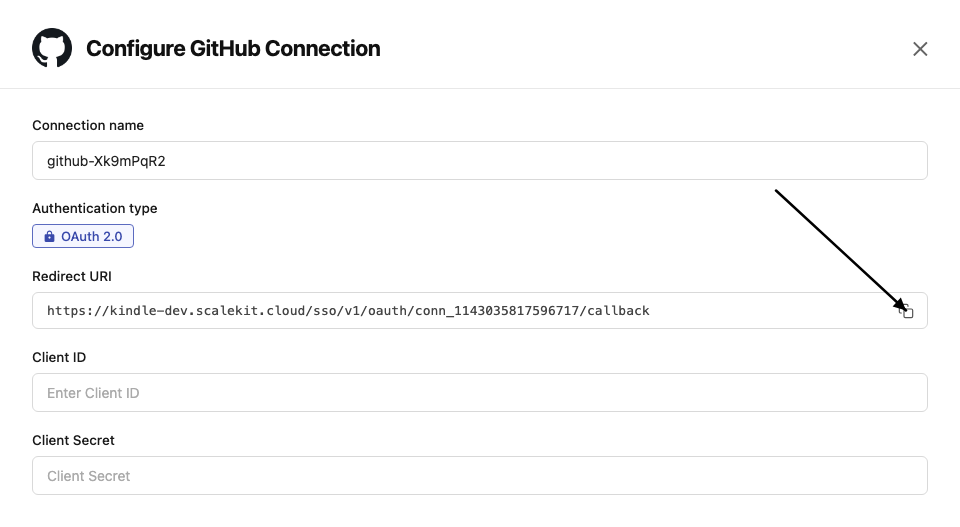
-
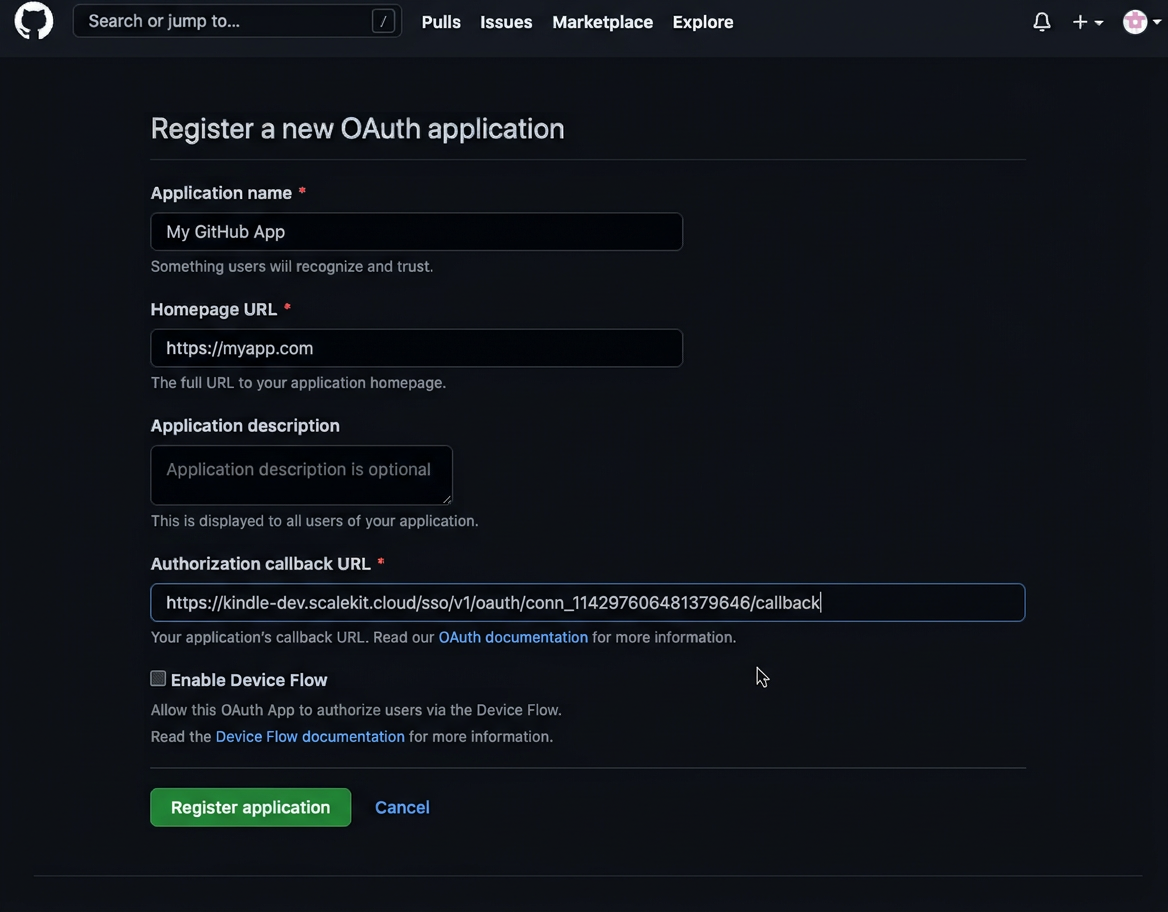
Go to GitHub Developer Settings and open your OAuth app.
-
Under General, paste the copied URI into the Authorization callback URL field and click Save application.
-
-
Get client credentials
In GitHub Developer Settings, open your OAuth app:
- Client ID — listed on the app’s main settings page
- Client Secret — click Generate a new client secret if you don’t have one
-
Add credentials in Scalekit
-
In Scalekit dashboard, go to AgentKit > Connections and open the connection you created.
-
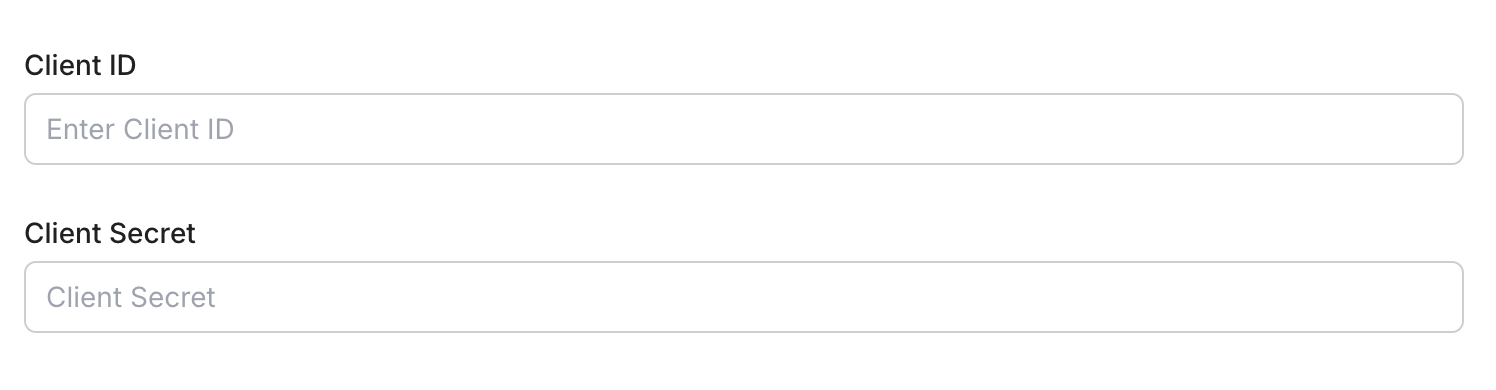
Enter your credentials:
- Client ID (from your GitHub OAuth app)
- Client Secret (from your GitHub OAuth app)
-
Click Save.
-
-
Authorize a user and make your first call
quickstart.mts import { ScalekitClient } from '@scalekit-sdk/node'import 'dotenv/config'import { createInterface } from 'node:readline/promises'const scalekit = new ScalekitClient(process.env.SCALEKIT_ENVIRONMENT_URL,process.env.SCALEKIT_CLIENT_ID,process.env.SCALEKIT_CLIENT_SECRET,)const actions = scalekit.actionsconst connector = 'github'const identifier = 'user_123'// Generate an authorization link for the userconst { link } = await actions.getAuthorizationLink({ connectionName: connector, identifier })console.log('Authorize GitHub:', link)const rl = createInterface({ input: process.stdin, output: process.stdout })await rl.question('Press Enter after authorizing...')rl.close()// Make your first callconst result = await actions.executeTool({connector,identifier,toolName: 'github_gists_list',toolInput: {},})console.log(result)Terminal window npx tsx quickstart.mtsquickstart.py import osfrom scalekit import ScalekitClientfrom dotenv import load_dotenvload_dotenv()scalekit_client = ScalekitClient(env_url=os.getenv("SCALEKIT_ENVIRONMENT_URL"),client_id=os.getenv("SCALEKIT_CLIENT_ID"),client_secret=os.getenv("SCALEKIT_CLIENT_SECRET"),)actions = scalekit_client.actionsconnection_name = "github"identifier = "user_123"# Generate an authorization link for the userlink_response = actions.get_authorization_link(connection_name=connection_name,identifier=identifier,)print("Authorize GitHub:", link_response.link)input("Press Enter after authorizing...")# Make your first callresult = actions.execute_tool(tool_input={},tool_name="github_gists_list",connection_name=connection_name,identifier=identifier,)print(result)Terminal window python quickstart.pyEach user signs in once. See Authorize a user for the full flow and statuses.
Tools
Pass the exact name toexecute_toolgithub_artifact_getGet a single workflow run artifact's metadata by its ID.Read-onlyGet Artifact
Get a single workflow run artifact's metadata by its ID.
Inputs
artifact_idnumberrequired- The unique identifier of the artifact
ownerstringrequired- The account owner of the repository
repostringrequired- The name of the repository
github_artifacts_listList artifacts produced by workflow runs in a repository.Read-onlyList Repository Artifacts
List artifacts produced by workflow runs in a repository.
Inputs
ownerstringrequired- The account owner of the repository
repostringrequired- The name of the repository
namestring- Filter artifacts by exact match on their name
pagenumber- Page number of the results to fetch
per_pagenumber- The number of results per page (max 100)
github_branch_getGet details of a specific branch in a GitHub repository.Read-onlyGet Branch
Get details of a specific branch in a GitHub repository. Returns the branch name, latest commit SHA, and protection status.
Inputs
branchstringrequired- The name of the branch to retrieve
ownerstringrequired- The account owner of the repository
repostringrequired- The name of the repository
github_branch_protection_getGet the branch protection settings currently configured for a branch.Read-onlyGet Branch Protection
Get the branch protection settings currently configured for a branch.
Inputs
branchstringrequired- The name of the branch
ownerstringrequired- The account owner of the repository
repostringrequired- The name of the repository
github_branches_listList all branches in a GitHub repository.Read-onlyList Branches
List all branches in a GitHub repository. Returns branch names, commit SHAs, and protection status. Supports pagination.
Inputs
ownerstringrequired- The account owner of the repository
repostringrequired- The name of the repository
pageinteger- Page number of results to return (default 1)
per_pageinteger- Number of results per page (max 100, default 30)
protectedboolean- Filter to only protected branches
github_check_run_getGet a single check run using its id.Read-onlyGet Check Run
Get a single check run using its id. OAuth app tokens and personal access tokens (classic) need the repo scope for private repositories.
Inputs
check_run_idnumberrequired- The unique identifier of the check run
ownerstringrequired- The account owner of the repository
repostringrequired- The name of the repository
github_check_runs_list_for_refList check runs for a commit ref.Read-onlyList Check Runs for a Git Reference
List check runs for a commit ref. The ref can be a SHA, branch name, or tag name.
Inputs
ownerstringrequired- The account owner of the repository
refstringrequired- The commit reference. Can be a commit SHA, branch name (heads/BRANCH_NAME), or tag name (tags/TAG_NAME)
repostringrequired- The name of the repository
check_namestring- Returns check runs with the specified name
pagenumber- Page number of results to fetch
per_pagenumber- Number of results per page (max 100)
statusstring- Returns check runs with the specified statusone of
queuedin_progresscompleted
github_code_scanning_alerts_listList code scanning alerts for a repository.Read-onlyList Code Scanning Alerts for a Repository
List code scanning alerts for a repository. To use this endpoint, you must have read access to the repository, and for private/internal repositories your token needs the security_events scope (public_repo is sufficient for public repositories).
Inputs
ownerstringrequired- The account owner of the repository
repostringrequired- The name of the repository
afterstring- A cursor, as given in the Link response header. Only search for results after this cursor.
assigneesstring- Comma-separated list of user handles to filter by, or '*' for alerts with at least one assignee, or 'none' for unassigned alerts
beforestring- A cursor, as given in the Link response header. Only search for results before this cursor.
directionstring- The direction to sort the results byone of
ascdesc pagenumber- Page number of results to fetch
per_pagenumber- Number of results per page (max 100)
prnumber- Only list alerts for this pull request number
refstring- The Git reference for the results, e.g. refs/heads/main or simply main. Use refs/pull/<number>/merge for a pull request.
severitystring- Only list alerts with this severityone of
criticalhighmediumlowwarningnoteerror sortstring- The property by which to sort the resultsone of
createdupdated statestring- Only list alerts with this stateone of
opencloseddismissedfixed tool_guidstring- Only list alerts from the code scanning tool with this GUID. Cannot be used together with tool_name.
tool_namestring- Only list alerts from this code scanning tool. Cannot be used together with tool_guid.
github_collaborator_checkCheck if a user is a collaborator on a repository.Read-onlyCheck Repository Collaborator
Check if a user is a collaborator on a repository. Returns a 404 if the user is not a collaborator.
Inputs
ownerstringrequired- The account owner of the repository
repostringrequired- The name of the repository
usernamestringrequired- The handle for the GitHub user account
github_collaborators_listList collaborators for a repository, optionally filtered by affiliation or permission level.Read-onlyList Collaborators
List collaborators for a repository, optionally filtered by affiliation or permission level.
Inputs
ownerstringrequired- The account owner of the repository
repostringrequired- The name of the repository
affiliationstring- Filter collaborators by affiliation: outside, direct, or allone of
outsidedirectall pagenumber- Page number of results to fetch
per_pagenumber- Number of results per page (max 100)
permissionstring- Filter collaborators by permission levelone of
pulltriagepushmaintainadmin
github_commit_combined_status_getAccess a combined view of commit statuses for a given ref (SHA, branch name, or tag name).Read-onlyGet the Combined Status for a Specific Reference
Access a combined view of commit statuses for a given ref (SHA, branch name, or tag name). Returns a combined state of failure, pending, or success.
Inputs
ownerstringrequired- The account owner of the repository
refstringrequired- The commit SHA, branch name, or tag name
repostringrequired- The name of the repository
pagenumber- Page number of results to fetch
per_pagenumber- Number of results per page (max 100)
github_commit_comment_getGet a single commit comment by its ID.Read-onlyGet Commit Comment
Get a single commit comment by its ID.
Inputs
comment_idnumberrequired- The unique identifier of the comment
ownerstringrequired- The account owner of the repository
repostringrequired- The name of the repository
github_commit_comments_listLists the comments for a specified commit.Read-onlyList Commit Comments
Lists the comments for a specified commit.
Inputs
commit_shastringrequired- The SHA of the commit
ownerstringrequired- The account owner of the repository
repostringrequired- The name of the repository
pagenumber- Page number of results to fetch
per_pagenumber- Number of results per page (max 100)
github_commit_getGet the contents of a single commit reference, including files changed and stats.Read-onlyGet Commit
Get the contents of a single commit reference, including files changed and stats.
Inputs
ownerstringrequired- The account owner of the repository
refstringrequired- The commit reference. Can be a commit SHA, branch name, or tag name
repostringrequired- The name of the repository
pagenumber- Page number of results to fetch
per_pagenumber- Number of results per page (max 100)
github_commit_pull_requests_listList the merged pull request that introduced a commit to a repository, plus unmerged pull requests that reference the commit.Read-onlyList Pull Requests Associated with a Commit
List the merged pull request that introduced a commit to a repository, plus unmerged pull requests that reference the commit.
Inputs
commit_shastringrequired- The SHA of the commit
ownerstringrequired- The account owner of the repository
repostringrequired- The name of the repository
pagenumber- Page number of the results to fetch
per_pagenumber- The number of results per page (max 100)
github_commit_statuses_listLists commit statuses for a given ref (SHA, branch name, or tag name).Read-onlyList Commit Statuses for a Reference
Lists commit statuses for a given ref (SHA, branch name, or tag name). Statuses are returned in reverse chronological order; the first status is the latest.
Inputs
ownerstringrequired- The account owner of the repository
refstringrequired- The commit SHA, branch name, or tag name
repostringrequired- The name of the repository
pagenumber- Page number of results to fetch
per_pagenumber- Number of results per page (max 100)
github_commits_compareCompare two commits against one another.Read-onlyCompare Commits
Compare two commits against one another. Equivalent to running 'git log BASE..HEAD', returning commits in chronological order along with details of changed files.
Inputs
baseheadstringrequired- The base branch and head branch to compare, in the format BASE...HEAD. Both must be branch names in repo, or USERNAME:BASE...USERNAME:HEAD to compare across forks
ownerstringrequired- The account owner of the repository
repostringrequired- The name of the repository
pagenumber- Page number of results to fetch
per_pagenumber- Number of results per page (max 100)
github_commits_listList commits on a repository, optionally filtered by SHA/branch, file path, author, or a date range.Read-onlyList Commits
List commits on a repository, optionally filtered by SHA/branch, file path, author, or a date range.
Inputs
ownerstringrequired- The account owner of the repository
repostringrequired- The name of the repository
authorstring- GitHub username or email address to use to filter by commit author
pagenumber- Page number of results to fetch
pathstring- Only commits containing this file path will be returned
per_pagenumber- Number of results per page (max 100)
shastring- SHA or branch to start listing commits from. Default: the repository's default branch (usually main).
sincestring- Only show results that were last updated after the given time. Timestamp in ISO 8601 format: YYYY-MM-DDTHH:MM:SSZ
untilstring- Only commits before this date will be returned. Timestamp in ISO 8601 format: YYYY-MM-DDTHH:MM:SSZ
github_dependabot_alerts_listList Dependabot alerts for a repository.Read-onlyList Dependabot Alerts for a Repository
List Dependabot alerts for a repository. To use this endpoint, you must have read access to the repository, and for private repositories your token needs the security_events scope (public_repo is sufficient for public repositories).
Inputs
ownerstringrequired- The account owner of the repository
repostringrequired- The name of the repository
afterstring- A cursor, as given in the Link response header. Only search for results after this cursor.
assigneestring- Filter by assignee username, '*' for any assignee, or 'none' for unassigned
beforestring- A cursor, as given in the Link response header. Only search for results before this cursor.
classificationstring- Comma-separated list of vulnerability classifications to filter by
directionstring- The direction to sort the results byone of
ascdesc ecosystemstring- Comma-separated list of package ecosystems to filter by
epss_percentagestring- Filter by EPSS percentage: an exact number, a comparator expression (>n, <n, >=n, <=n), or a range (n..n), where n is between 0.0 and 1.0
hasstring- Filter alerts that have the given attribute. Currently only 'patch' is supported (alerts for which a patch is available).
manifeststring- Comma-separated list of full manifest file paths to filter by
packagestring- Comma-separated list of package names to filter by
per_pagenumber- Number of results per page (max 100)
relationshipstring- Comma-separated list of relationships of the vulnerable dependency to your project (e.g. direct, transitive) to filter by
scopestring- The scope of the vulnerable dependency to filter byone of
developmentruntime severitystring- Comma-separated list of severities to filter by
sortstring- The property by which to sort the resultsone of
createdupdatedepss_percentage statestring- Comma-separated list of states to filter by
github_deployment_getGet a single deployment by its ID.Read-onlyGet Deployment
Get a single deployment by its ID.
Inputs
deployment_idnumberrequired- The unique identifier of the deployment
ownerstringrequired- The account owner of the repository
repostringrequired- The name of the repository
github_deployments_listList deployments for a repository, optionally filtered by ref, task, or environment.Read-onlyList Deployments
List deployments for a repository, optionally filtered by ref, task, or environment.
Inputs
ownerstringrequired- The account owner of the repository
repostringrequired- The name of the repository
environmentstring- The name of the environment that was deployed to (e.g., staging or production)
pagenumber- Page number of the results to fetch
per_pagenumber- The number of results per page (max 100)
refstring- The name of the ref, branch, or tag
shastring- The SHA recorded at creation time
taskstring- The name of the task for the deployment (e.g., deploy or deploy:migrations)
github_environments_listList the deployment environments configured for a repository (e.g.Read-onlyList Environments
List the deployment environments configured for a repository (e.g. staging, production), including their protection rules.
Inputs
ownerstringrequired- The account owner of the repository
repostringrequired- The name of the repository
pagenumber- Page number of results to fetch
per_pagenumber- Number of results per page (max 100)
github_file_contents_getGet the contents of a file or directory from a GitHub repository.Read-onlyGet File Contents
Get the contents of a file or directory from a GitHub repository. Returns Base64 encoded content for files.
Inputs
ownerstringrequired- The account owner of the repository
pathstringrequired- The content path (file or directory path in the repository)
repostringrequired- The name of the repository
refstring- The name of the commit/branch/tag
github_gist_comments_listList comments left on a gist.Read-onlyList Gist Comments
List comments left on a gist.
Inputs
gist_idstringrequired- The unique identifier of the gist
pagenumber- Page number of the results to fetch
per_pagenumber- The number of results per page (max 100)
github_gist_getGet a specified gist by its ID.Read-onlyGet Gist
Get a specified gist by its ID.
Inputs
gist_idstringrequired- The unique identifier of the gist
github_gists_listList the authenticated user's gists, sorted by most recently updated to least recently updated.Read-onlyList Gists
List the authenticated user's gists, sorted by most recently updated to least recently updated.
Inputs
pagenumber- Page number of results to fetch
per_pagenumber- Number of results per page (max 100)
sincestring- Only show results updated after the given time (ISO 8601 format)
github_git_ref_getReturns a single reference from the Git database.Read-onlyGet a Reference
Returns a single reference from the Git database. The ref must be formatted as heads/<branch name> for branches and tags/<tag name> for tags.
Inputs
ownerstringrequired- The account owner of the repository
refstringrequired- The reference name, formatted as heads/<branch name> or tags/<tag name>
repostringrequired- The name of the repository
github_git_tag_getGet a single Git tag object from the repository's low-level Git database by its SHA.Read-onlyGet a Tag
Get a single Git tag object from the repository's low-level Git database by its SHA. Note this returns the annotated tag object, not the tag ref itself.
Inputs
ownerstringrequired- The account owner of the repository
repostringrequired- The name of the repository
tag_shastringrequired- The SHA of the tag object to retrieve
github_git_tree_getGet a Git tree by its SHA or ref.Read-onlyGet a Tree
Get a Git tree by its SHA or ref. Optionally return the full recursive tree including all subtrees.
Inputs
ownerstringrequired- The account owner of the repository
repostringrequired- The name of the repository
tree_shastringrequired- The SHA1 value or ref (branch or tag) name of the tree
recursiveboolean- Whether to recursively return objects or subtrees referenced by the tree
github_gitignore_template_getGet the content of a gitignore template by name.Read-onlyGet Gitignore Template
Get the content of a gitignore template by name.
Inputs
namestringrequired- The name of the gitignore template
github_gitignore_templates_listList all gitignore templates available to pass as an option when creating a repository.Read-onlyList Gitignore Templates
List all gitignore templates available to pass as an option when creating a repository.
Inputs
This tool takes no inputs.
github_issue_comment_getGet a single issue comment by its ID.Read-onlyGet Issue Comment
Get a single issue comment by its ID.
Inputs
comment_idnumberrequired- The unique identifier of the comment
ownerstringrequired- The account owner of the repository
repostringrequired- The name of the repository
github_issue_comments_listList comments on an issue or pull request, ordered by ascending ID.Read-onlyList Issue Comments
List comments on an issue or pull request, ordered by ascending ID. Every pull request is an issue, but not every issue is a pull request.
Inputs
issue_numbernumberrequired- The number that identifies the issue
ownerstringrequired- The account owner of the repository
repostringrequired- The name of the repository
pagenumber- Page number of results to fetch
per_pagenumber- Number of results per page (max 100)
sincestring- Only show comments updated after this timestamp (ISO 8601 format)
github_issue_events_listList events for an issue, such as labeling, assignment, and milestone changes.Read-onlyList Issue Events
List events for an issue, such as labeling, assignment, and milestone changes.
Inputs
issue_numbernumberrequired- The number that identifies the issue
ownerstringrequired- The account owner of the repository
repostringrequired- The name of the repository
pagenumber- Page number of the results to fetch
per_pagenumber- The number of results per page (max 100)
github_issue_getGet a single issue in a repository by its number.Read-onlyGet Issue
Get a single issue in a repository by its number. Both issues and pull requests are returned as issues in the GitHub API.
Inputs
issue_numbernumberrequired- The number that identifies the issue
ownerstringrequired- The account owner of the repository
repostringrequired- The name of the repository
github_issue_reaction_listList the reactions (emoji) left on an issue.Read-onlyList Issue Reactions
List the reactions (emoji) left on an issue. Optionally filter to a single reaction type.
Inputs
issue_numbernumberrequired- The number that identifies the issue
ownerstringrequired- The account owner of the repository
repostringrequired- The name of the repository
contentstring- Filter results to only include reactions of this typeone of
+1-1laughconfusedhearthoorayrocketeyes pagenumber- Page number of results to fetch
per_pagenumber- Number of results per page (max 100)
github_issue_timeline_listList timeline events for an issue, including comments, cross-references, and state changes, in chronological order.Read-onlyList Issue Timeline Events
List timeline events for an issue, including comments, cross-references, and state changes, in chronological order.
Inputs
issue_numbernumberrequired- The number that identifies the issue
ownerstringrequired- The account owner of the repository
repostringrequired- The name of the repository
pagenumber- Page number of the results to fetch
per_pagenumber- The number of results per page (max 100)
github_issues_listList issues in a repository.Read-onlyList Repository Issues
List issues in a repository. Both issues and pull requests are returned as issues in the GitHub API.
Inputs
ownerstringrequired- The account owner of the repository
repostringrequired- The name of the repository
assigneestring- Filter by assigned user
creatorstring- Filter by issue creator
directionstring- Sort orderone of
ascdesc labelsstring- Filter by comma-separated list of label names
milestonestring- Filter by milestone number or state
pagenumber- Page number of results to fetch
per_pagenumber- Number of results per page (max 100)
sincestring- Show issues updated after this timestamp (ISO 8601 format)
sortstring- Property to sort issues byone of
createdupdatedcomments statestring- Filter by issue stateone of
openclosedall
github_label_getGet a single label by name.Read-onlyGet Label
Get a single label by name.
Inputs
label_namestringrequired- The name of the label
ownerstringrequired- The account owner of the repository
repostringrequired- The name of the repository
github_labels_listList all labels for a repository.Read-onlyList Labels
List all labels for a repository.
Inputs
ownerstringrequired- The account owner of the repository
repostringrequired- The name of the repository
pagenumber- Page number of results to fetch
per_pagenumber- Number of results per page (max 100)
github_license_getGet information about a specific open source license by its SPDX keyword (e.g.Read-onlyGet License
Get information about a specific open source license by its SPDX keyword (e.g. 'mit').
Inputs
licensestringrequired- The license keyword (SPDX id)
github_milestone_getGet a single milestone by its number.Read-onlyGet Milestone
Get a single milestone by its number.
Inputs
milestone_numbernumberrequired- The number that identifies the milestone
ownerstringrequired- The account owner of the repository
repostringrequired- The name of the repository
github_milestones_listList milestones for a repository, with optional filtering by state and sorting.Read-onlyList Milestones
List milestones for a repository, with optional filtering by state and sorting.
Inputs
ownerstringrequired- The account owner of the repository
repostringrequired- The name of the repository
directionstring- The direction of the sort. Either asc or descone of
ascdesc pagenumber- Page number of results to fetch
per_pagenumber- Number of results per page (max 100)
sortstring- What to sort results by. Either due_on or completenessone of
due_oncompleteness statestring- The state of the milestone. Either open, closed, or allone of
openclosedall
github_notifications_listList notifications for the authenticated user across all repositories they have access to.Read-onlyList Notifications for the Authenticated User
List notifications for the authenticated user across all repositories they have access to. By default only unread notifications are returned.
Inputs
allboolean- If true, show notifications marked as read
beforestring- Only show notifications updated before this time, in ISO 8601 format: YYYY-MM-DDTHH:MM:SSZ
pagenumber- Page number of results to fetch
participatingboolean- If true, only show notifications in which the user is directly participating or mentioned
per_pagenumber- Number of results per page (max 50)
sincestring- Only show results updated after this time, in ISO 8601 format: YYYY-MM-DDTHH:MM:SSZ
github_org_getGet information about an organization, including its profile details, billing settings visibility, and security settings.Read-onlyGet Organization
Get information about an organization, including its profile details, billing settings visibility, and security settings.
Inputs
orgstringrequired- The organization name (case-insensitive)
github_org_issue_types_listList the issue types (e.g.Read-onlyList Issue Types for an Organization
List the issue types (e.g. Bug, Feature, Task) configured for an organization. Issue types can be assigned to issues to categorize them.
Inputs
orgstringrequired- The organization name (case-insensitive)
github_org_issues_listList issues in an organization assigned to the authenticated user, across all visible repositories.Read-onlyList Organization Issues
List issues in an organization assigned to the authenticated user, across all visible repositories.
Inputs
orgstringrequired- The organization name (case-insensitive)
directionstring- The direction to sort the results byone of
ascdesc filterstring- Indicates which sorts of issues to returnone of
assignedcreatedmentionedsubscribedreposall labelsstring- A list of comma separated label names
pagenumber- Page number of the results to fetch
per_pagenumber- The number of results per page (max 100)
sincestring- Only show results updated after this time (ISO 8601 format)
sortstring- What to sort results byone of
createdupdatedcomments statestring- Indicates the state of the issues to returnone of
openclosedall
github_org_members_listList all users who are members of an organization.Read-onlyList Organization Members
List all users who are members of an organization. If the authenticated user is also a member, both concealed and public members are returned.
Inputs
orgstringrequired- The organization name (case-insensitive)
filterstring- Filter members returned in the list. 2fa_disabled means only members without two-factor authentication enabled will be returned (organization owners only).one of
2fa_disabled2fa_insecureall pagenumber- Page number of results to fetch
per_pagenumber- Number of results per page (max 100)
rolestring- Filter members returned by their roleone of
alladminmember
github_org_membership_getGet a user's membership with an organization.Read-onlyGet Organization Membership for a User
Get a user's membership with an organization. The authenticated user must be an organization member. The response's 'state' field identifies the user's membership status.
Inputs
orgstringrequired- The organization name (case-insensitive)
usernamestringrequired- The handle for the GitHub user account
github_public_repos_listList public repositories for a specified user.Read-onlyList Public Repositories
List public repositories for a specified user. Does not require authentication.
Inputs
usernamestringrequired- The GitHub username to list repositories for
directionstring- Sort orderone of
ascdesc pagenumber- Page number of results to fetch
per_pagenumber- Number of results per page (max 100)
sortstring- Property to sort repositories byone of
createdupdatedpushedfull_name typestring- Filter repositories by typeone of
allpublicprivateforkssourcesmember
github_pull_request_commits_listList the commits on a pull request.Read-onlyList Pull Request Commits
List the commits on a pull request. Results may not include all commits on very large pull requests.
Inputs
ownerstringrequired- The account owner of the repository
pull_numbernumberrequired- The number that identifies the pull request
repostringrequired- The name of the repository
pagenumber- Page number of the results to fetch
per_pagenumber- The number of results per page (max 100)
github_pull_request_files_listList the files changed in a specified pull request.Read-onlyList Pull Request Files
List the files changed in a specified pull request. Responses include a maximum of 3000 files, paginated at 30 files per page by default.
Inputs
ownerstringrequired- The account owner of the repository
pull_numbernumberrequired- The number that identifies the pull request
repostringrequired- The name of the repository
pagenumber- Page number of results to fetch
per_pagenumber- Number of results per page (max 100)
github_pull_request_getGet details of a pull request by its number, including mergeable status, commits, and metadata.Read-onlyGet Pull Request
Get details of a pull request by its number, including mergeable status, commits, and metadata.
Inputs
ownerstringrequired- The account owner of the repository
pull_numbernumberrequired- The number that identifies the pull request
repostringrequired- The name of the repository
github_pull_request_merge_checkChecks if a pull request has been merged into the base branch.Read-onlyCheck If Pull Request Is Merged
Checks if a pull request has been merged into the base branch. GitHub signals this via HTTP status only: 204 means merged, 404 means the pull request has not been merged (this is a normal, non-error outcome, not a failure).
Inputs
ownerstringrequired- The account owner of the repository
pull_numbernumberrequired- The number that identifies the pull request
repostringrequired- The name of the repository
github_pull_request_requested_reviewers_listGet the users and teams whose review has been requested but not yet given for a pull request.Read-onlyList Requested Reviewers for a Pull Request
Get the users and teams whose review has been requested but not yet given for a pull request.
Inputs
ownerstringrequired- The account owner of the repository
pull_numbernumberrequired- The number that identifies the pull request
repostringrequired- The name of the repository
github_pull_request_review_comment_getGet a single review comment on a pull request by its ID.Read-onlyGet Pull Request Review Comment
Get a single review comment on a pull request by its ID.
Inputs
comment_idnumberrequired- The unique identifier of the comment
ownerstringrequired- The account owner of the repository
repostringrequired- The name of the repository
github_pull_request_review_comments_listList review comments left on a pull request's diff.Read-onlyList Pull Request Review Comments
List review comments left on a pull request's diff.
Inputs
ownerstringrequired- The account owner of the repository
pull_numbernumberrequired- The number that identifies the pull request
repostringrequired- The name of the repository
directionstring- The direction to sort results byone of
ascdesc pagenumber- Page number of the results to fetch
per_pagenumber- The number of results per page (max 100)
sincestring- Only show results updated after this time (ISO 8601 format)
sortstring- The property to sort results byone of
createdupdated
github_pull_request_review_getGet a single review left on a pull request by its ID.Read-onlyGet Pull Request Review
Get a single review left on a pull request by its ID.
Inputs
ownerstringrequired- The account owner of the repository
pull_numbernumberrequired- The number that identifies the pull request
repostringrequired- The name of the repository
review_idnumberrequired- The unique identifier of the review
github_pull_request_reviews_listList all reviews for a specified pull request, returned in chronological order.Read-onlyList Pull Request Reviews
List all reviews for a specified pull request, returned in chronological order.
Inputs
ownerstringrequired- The account owner of the repository
pull_numbernumberrequired- The number that identifies the pull request
repostringrequired- The name of the repository
pagenumber- Page number of results to fetch
per_pagenumber- Number of results per page (max 100)
github_pull_requests_listList pull requests in a repository with optional filtering by state, head, and base branches.Read-onlyList Pull Requests
List pull requests in a repository with optional filtering by state, head, and base branches.
Inputs
ownerstringrequired- The account owner of the repository
repostringrequired- The name of the repository
basestring- Filter by base branch name
directionstring- Sort orderone of
ascdesc headstring- Filter by head branch (format: user:ref-name)
pagenumber- Page number of results to fetch
per_pagenumber- Number of results per page (max 100)
sortstring- Property to sort pull requests byone of
createdupdatedpopularitylong-running statestring- Filter by pull request stateone of
openclosedall
github_readme_getGet the preferred README for a repository.Read-onlyGet Repository README
Get the preferred README for a repository.
Inputs
ownerstringrequired- The account owner of the repository
repostringrequired- The name of the repository
refstring- The name of the commit/branch/tag. Default: the repository's default branch
github_release_asset_getGet a single release asset's metadata by its ID.Read-onlyGet Release Asset
Get a single release asset's metadata by its ID.
Inputs
asset_idnumberrequired- The unique identifier of the release asset
ownerstringrequired- The account owner of the repository
repostringrequired- The name of the repository
github_release_assets_listList the assets (binary files) attached to a release in a repository.Read-onlyList Release Assets
List the assets (binary files) attached to a release in a repository.
Inputs
ownerstringrequired- The account owner of the repository
release_idnumberrequired- The unique identifier of the release
repostringrequired- The name of the repository
pagenumber- Page number of results to fetch
per_pagenumber- Number of results per page (max 100)
github_release_getGet a public release with the specified release ID.Read-onlyGet Release
Get a public release with the specified release ID.
Inputs
ownerstringrequired- The account owner of the repository
release_idnumberrequired- The unique identifier of the release
repostringrequired- The name of the repository
github_release_get_by_tagGet a published release with the specified tag.Read-onlyGet Release by Tag Name
Get a published release with the specified tag.
Inputs
ownerstringrequired- The account owner of the repository
repostringrequired- The name of the repository
tagstringrequired- The name of the tag
github_release_get_latestView the latest published full release for the repository.Read-onlyGet Latest Release
View the latest published full release for the repository. The latest release is the most recent non-prerelease, non-draft release, sorted by created_at.
Inputs
ownerstringrequired- The account owner of the repository
repostringrequired- The name of the repository
github_releases_listList releases for a repository.Read-onlyList Releases
List releases for a repository. Does not include Git tags that have not been associated with a release.
Inputs
ownerstringrequired- The account owner of the repository
repostringrequired- The name of the repository
pagenumber- Page number of results to fetch
per_pagenumber- Number of results per page (max 100)
github_repo_contributors_listList contributors to a repository, sorted by number of commits, and including anonymous contributors when requested.Read-onlyList Repository Contributors
List contributors to a repository, sorted by number of commits, and including anonymous contributors when requested.
Inputs
ownerstringrequired- The account owner of the repository
repostringrequired- The name of the repository
anonstring- Set to '1' or 'true' to include anonymous contributors in the results
pagenumber- Page number of the results to fetch
per_pagenumber- The number of results per page (max 100)
github_repo_forks_listList forks of a repository.Read-onlyList Forks
List forks of a repository.
Inputs
ownerstringrequired- The account owner of the repository
repostringrequired- The name of the repository
pagenumber- Page number of the results to fetch
per_pagenumber- The number of results per page (max 100)
sortstring- The sort order for the resultsone of
newestoldeststargazerswatchers
github_repo_getGet detailed information about a GitHub repository including metadata, settings, and statistics.Read-onlyGet Repository Information
Get detailed information about a GitHub repository including metadata, settings, and statistics.
Inputs
ownerstringrequired- The account owner of the repository (case-insensitive)
repostringrequired- The name of the repository without the .git extension (case-insensitive)
github_repo_invitations_listList all currently open repository invitations.Read-onlyList Repository Invitations
List all currently open repository invitations.
Inputs
ownerstringrequired- The account owner of the repository
repostringrequired- The name of the repository
pagenumber- Page number of the results to fetch
per_pagenumber- The number of results per page (max 100)
github_repo_languages_listList the programming languages used in a repository, with the number of bytes of code written in each language.Read-onlyList Repository Languages
List the programming languages used in a repository, with the number of bytes of code written in each language.
Inputs
ownerstringrequired- The account owner of the repository
repostringrequired- The name of the repository
github_repo_license_getGet the contents of the repository's license file, if one is detected.Read-onlyGet Repository License
Get the contents of the repository's license file, if one is detected.
Inputs
ownerstringrequired- The account owner of the repository
repostringrequired- The name of the repository
refstring- The name of the commit/branch/tag. Default: the repository's default branch
github_repo_org_repos_listList repositories for the specified organization.Read-onlyList Organization Repositories
List repositories for the specified organization.
Inputs
orgstringrequired- The organization name
directionstring- The order to sort by. Default: asc when using full_name, otherwise descone of
ascdesc pagenumber- Page number of results to fetch
per_pagenumber- Number of results per page (max 100)
sortstring- The property to sort the results byone of
createdupdatedpushedfull_name typestring- Specifies the types of repositories you want returnedone of
allpublicprivateforkssourcesmember
github_repo_secret_getGet metadata about a single Actions secret on a repository.Read-onlyGet Repository Actions Secret
Get metadata about a single Actions secret on a repository. The value is never returned by the GitHub API.
Inputs
ownerstringrequired- The account owner of the repository
repostringrequired- The name of the repository
secret_namestringrequired- The name of the secret
github_repo_secrets_listList the names of Actions secrets configured on a repository.Read-onlyList Repository Actions Secrets
List the names of Actions secrets configured on a repository. Secret values are never returned by the GitHub API.
Inputs
ownerstringrequired- The account owner of the repository
repostringrequired- The name of the repository
pagenumber- Page number of the results to fetch
per_pagenumber- The number of results per page (max 100)
github_repo_topics_getGet all topics associated with a repository.Read-onlyGet All Repository Topics
Get all topics associated with a repository.
Inputs
ownerstringrequired- The account owner of the repository
repostringrequired- The name of the repository
pagenumber- Page number of the results to fetch
per_pagenumber- The number of results per page (max 100)
github_repo_variable_getGet a single Actions variable's name and value from a repository.Read-onlyGet Repository Actions Variable
Get a single Actions variable's name and value from a repository.
Inputs
ownerstringrequired- The account owner of the repository
repostringrequired- The name of the repository
variable_namestringrequired- The name of the variable
github_repo_variables_listList the Actions variables configured on a repository, including their values.Read-onlyList Repository Actions Variables
List the Actions variables configured on a repository, including their values.
Inputs
ownerstringrequired- The account owner of the repository
repostringrequired- The name of the repository
pagenumber- Page number of the results to fetch
per_pagenumber- The number of results per page (max 100)
github_search_codeSearch for code across GitHub using search qualifiers (e.g.Read-onlySearch Code
Search for code across GitHub using search qualifiers (e.g. 'addClass in:file language:js repo:jquery/jquery'). Returns up to 100 results per page. Requires authentication and is limited to 10 requests per minute.
Inputs
qstringrequired- Search query with optional qualifiers (e.g. 'addClass in:file language:js repo:jquery/jquery')
orderstring- Sort orderone of
ascdesc pagenumber- Page number of results to fetch
per_pagenumber- Number of results per page (max 100)
sortstring- Sort results by indexed (how recently the file was indexed)one of
indexed
github_search_commitsSearch for commits across all of GitHub, or scoped with search qualifiers.Read-onlySearch Commits
Search for commits across all of GitHub, or scoped with search qualifiers.
Inputs
qstringrequired- The search query, using GitHub search syntax
orderstring- Determines whether the first search result returned is the highest or lowest number of matchesone of
descasc pagenumber- Page number of the results to fetch
per_pagenumber- The number of results per page (max 100)
sortstring- Sorts the results by author-date or committer-date. Default: best matchone of
author-datecommitter-date
github_search_issuesSearch for issues and pull requests across GitHub by state and keyword (e.g.Read-onlySearch Issues and Pull Requests
Search for issues and pull requests across GitHub by state and keyword (e.g. 'windows label:bug language:python state:open'). Returns up to 100 results per page, sortable by comments, reactions, interactions, created, or updated.
Inputs
qstringrequired- Search query with optional qualifiers (e.g. 'windows label:bug language:python state:open')
orderstring- Sort orderone of
ascdesc pagenumber- Page number of results to fetch
per_pagenumber- Number of results per page (max 100)
sortstring- Sort results by comments, reactions, reactions-+1, reactions--1, reactions-smile, reactions-thinking_face, reactions-heart, reactions-tada, interactions, created, or updatedone of
commentsreactionsreactions-+1reactions--1reactions-smilereactions-thinking_facereactions-heartreactions-tadainteractionscreatedupdated
github_search_reposSearch for repositories via GitHub's search qualifiers (e.g.Read-onlySearch Repositories
Search for repositories via GitHub's search qualifiers (e.g. 'tetris language:assembly'). Returns up to 100 results per page, sortable by stars, forks, help-wanted-issues, or updated.
Inputs
qstringrequired- Search query with optional qualifiers (e.g. 'tetris language:assembly')
orderstring- Sort orderone of
ascdesc pagenumber- Page number of results to fetch
per_pagenumber- Number of results per page (max 100)
sortstring- Sort results by stars, forks, help-wanted-issues, or updatedone of
starsforkshelp-wanted-issuesupdated
github_search_topicsSearch for topics defined on GitHub.Read-onlySearch Topics
Search for topics defined on GitHub.
Inputs
qstringrequired- The search query, using GitHub search syntax
pagenumber- Page number of the results to fetch
per_pagenumber- The number of results per page (max 100)
github_search_usersSearch for users across GitHub via search qualifiers (e.g.Read-onlySearch Users
Search for users across GitHub via search qualifiers (e.g. 'tom repos:>42 followers:>1000'). Returns up to 100 results per page, sortable by followers, repositories, or joined date.
Inputs
qstringrequired- Search query with optional qualifiers (e.g. 'tom repos:>42 followers:>1000')
orderstring- Sort orderone of
ascdesc pagenumber- Page number of results to fetch
per_pagenumber- Number of results per page (max 100)
sortstring- Sort results by followers, repositories, or joined dateone of
followersrepositoriesjoined
github_secret_scanning_alerts_listList secret scanning alerts for a repository.Read-onlyList Secret Scanning Alerts for a Repository
List secret scanning alerts for a repository. To use this endpoint, you must have read access to the repository, and your token needs the repo scope (or security_events for public repositories).
Inputs
ownerstringrequired- The account owner of the repository
repostringrequired- The name of the repository
afterstring- A cursor, as given in the Link response header. Only search for results after this cursor.
assigneestring- Filter by assignee username, '*' for any assignee, or 'none' for unassigned
beforestring- A cursor, as given in the Link response header. Only search for results before this cursor.
directionstring- The direction to sort the results byone of
ascdesc exclude_providersstring- Comma-separated list of provider slugs to exclude. Cannot be combined with providers.
exclude_secret_typesstring- Comma-separated list of secret types to exclude. Cannot be combined with secret_type.
is_multi_repoboolean- Filter alerts by whether the multi-repo tag is present
is_publicly_leakedboolean- Filter alerts by whether the publicly-leaked tag is present
pagenumber- Page number of results to fetch
per_pagenumber- Number of results per page (max 100)
providersstring- Comma-separated list of provider slugs to filter by. Cannot be combined with exclude_providers.
resolutionstring- Comma-separated list of resolutions to filter by
secret_typestring- Comma-separated list of secret types to return. All default secret patterns are returned when omitted.
sortstring- The property by which to sort the resultsone of
createdupdated statestring- Set to filter alerts by stateone of
openresolved validitystring- Comma-separated list of validities to filter by
github_stargazers_listLists the people that have starred the repository.Read-onlyList Stargazers
Lists the people that have starred the repository.
Inputs
ownerstringrequired- The account owner of the repository
repostringrequired- The name of the repository
pagenumber- Page number of results to fetch
per_pagenumber- Number of results per page (max 100)
github_starred_repos_listList repositories the authenticated user has starred.Read-onlyList Starred Repositories
List repositories the authenticated user has starred.
Inputs
directionstring- Direction to sort resultsone of
ascdesc pagenumber- Page number of results to fetch
per_pagenumber- Number of results per page (max 100)
sortstring- The property to sort the results by. 'created' means when the repository was starred. 'updated' means when the repository was last pushed to.one of
createdupdated
github_sub_issues_listList the sub-issues that have been added underneath a parent issue.Read-onlyList Sub-Issues
List the sub-issues that have been added underneath a parent issue.
Inputs
issue_numbernumberrequired- The number that identifies the parent issue
ownerstringrequired- The account owner of the repository
repostringrequired- The name of the repository
pagenumber- Page number of results to fetch
per_pagenumber- Number of results per page (max 100)
github_team_getGet a team using the team's slug.Read-onlyGet Team by Name
Get a team using the team's slug. To create the slug, GitHub replaces special characters in the name, lowercases all words, and replaces spaces with a '-' separator.
Inputs
orgstringrequired- The organization name (case-insensitive)
team_slugstringrequired- The slug of the team name
github_team_members_listList a team's members, including members of child teams.Read-onlyList Team Members
List a team's members, including members of child teams. Each member includes their role on the team (member or maintainer) and whether the membership is inherited. The team must be visible to the authenticated user.
Inputs
orgstringrequired- The organization name (case-insensitive)
team_slugstringrequired- The slug of the team name
pagenumber- Page number of results to fetch
per_pagenumber- Number of results per page (max 100)
rolestring- Filters members returned by their role in the teamone of
membermaintainerall
github_team_membership_getGet a user's membership state and role (member or maintainer) on a team.Read-onlyGet Team Membership for a User
Get a user's membership state and role (member or maintainer) on a team.
Inputs
orgstringrequired- The organization name (case-insensitive)
team_slugstringrequired- The slug of the team name
usernamestringrequired- The handle for the GitHub user account
github_team_repos_listList a team's repositories visible to the authenticated user.Read-onlyList Team Repositories
List a team's repositories visible to the authenticated user.
Inputs
orgstringrequired- The organization name (case-insensitive)
team_slugstringrequired- The slug of the team name
pagenumber- Page number of results to fetch
per_pagenumber- Number of results per page (max 100)
github_teams_listList all teams in an organization that are visible to the authenticated user.Read-onlyList Teams
List all teams in an organization that are visible to the authenticated user.
Inputs
orgstringrequired- The organization name (case-insensitive)
pagenumber- Page number of results to fetch
per_pagenumber- Number of results per page (max 100)
github_user_get_authenticatedGet the profile information for the currently authenticated user.Read-onlyGet the Authenticated User
Get the profile information for the currently authenticated user. OAuth app tokens and personal access tokens (classic) need the 'user' scope to include private profile information.
Inputs
This tool takes no inputs.
github_user_get_by_usernameGet publicly available profile information about a user with a GitHub account.Read-onlyGet a User
Get publicly available profile information about a user with a GitHub account.
Inputs
usernamestringrequired- The handle for the GitHub user account
github_user_issues_listList issues assigned to the authenticated user across all visible repositories, including owned, member, and organization repositories.Read-onlyList User Issues
List issues assigned to the authenticated user across all visible repositories, including owned, member, and organization repositories. Use the filter parameter to fetch issues not necessarily assigned to you.
Inputs
directionstring- Sort orderone of
ascdesc filterstring- Indicates which sorts of issues to return. 'assigned' means issues assigned to you, 'created' means issues created by you, 'mentioned' means issues mentioning you, 'subscribed' means issues you're subscribed to updates for, 'all' or 'repos' means all issues you can seeone of
assignedcreatedmentionedsubscribedreposall labelsstring- Filter by comma-separated list of label names
pagenumber- Page number of results to fetch
per_pagenumber- Number of results per page (max 100)
sincestring- Show issues updated after this timestamp (ISO 8601 format)
sortstring- Property to sort issues byone of
createdupdatedcomments statestring- Indicates the state of the issues to returnone of
openclosedall
github_user_repos_listList repositories for the authenticated user.Read-onlyList User Repositories
List repositories for the authenticated user. Requires authentication.
Inputs
directionstring- Sort orderone of
ascdesc pagenumber- Page number of results to fetch
per_pagenumber- Number of results per page (max 100)
sortstring- Property to sort repositories byone of
createdupdatedpushedfull_name typestring- Filter repositories by typeone of
allpublicprivateforkssourcesmember
github_webhook_getGet a single repository webhook by its ID.Read-onlyGet Repository Webhook
Get a single repository webhook by its ID.
Inputs
hook_idnumberrequired- The unique identifier of the webhook
ownerstringrequired- The account owner of the repository
repostringrequired- The name of the repository
github_webhooks_listList webhooks configured on a repository.Read-onlyList Repository Webhooks
List webhooks configured on a repository.
Inputs
ownerstringrequired- The account owner of the repository
repostringrequired- The name of the repository
pagenumber- Page number of the results to fetch
per_pagenumber- The number of results per page (max 100)
github_workflow_getGet a single workflow by its ID or filename.Read-onlyGet Workflow
Get a single workflow by its ID or filename.
Inputs
ownerstringrequired- The account owner of the repository
repostringrequired- The name of the repository
workflow_idstringrequired- The ID of the workflow, or the workflow file name
github_workflow_run_getGet a specific workflow run for a repository.Read-onlyGet a Workflow Run
Get a specific workflow run for a repository.
Inputs
ownerstringrequired- The account owner of the repository
repostringrequired- The name of the repository
run_idnumberrequired- The unique identifier of the workflow run
github_workflow_run_jobs_listList all jobs for a workflow run, including jobs from old executions of the run if requested.Read-onlyList Jobs for a Workflow Run
List all jobs for a workflow run, including jobs from old executions of the run if requested.
Inputs
ownerstringrequired- The account owner of the repository
repostringrequired- The name of the repository
run_idnumberrequired- The unique identifier of the workflow run
filterstring- Filters jobs by their completed_at timestamp. latest returns jobs from the most recent execution; all returns every job including old executionsone of
latestall pagenumber- Page number of results to fetch
per_pagenumber- Number of results per page (max 100)
github_workflow_runs_listList all workflow runs for a repository.Read-onlyList Workflow Runs for a Repository
List all workflow runs for a repository. You can filter by actor, branch, event, and status.
Inputs
ownerstringrequired- The account owner of the repository
repostringrequired- The name of the repository
actorstring- Returns someone's workflow runs. Use the login for the user who created the push
branchstring- Returns workflow runs associated with a branch. Use the name of the branch of the push
eventstring- Returns workflow runs triggered by the event you specify, e.g. push, pull_request, or issue
pagenumber- Page number of results to fetch
per_pagenumber- Number of results per page (max 100)
statusstring- Returns workflow runs with the check run status or conclusion that you specifyone of
completedaction_requiredcancelledfailureneutralskippedstalesuccesstimed_outin_progressqueuedrequestedwaitingpending
github_workflows_listList the workflows defined in a repository.Read-onlyList Repository Workflows
List the workflows defined in a repository.
Inputs
ownerstringrequired- The account owner of the repository
repostringrequired- The name of the repository
pagenumber- Page number of results to fetch
per_pagenumber- Number of results per page (max 100)
github_branch_createCreate a new branch in a GitHub repository.WriteCreate Branch
Create a new branch in a GitHub repository. Requires the SHA of the commit to branch from (typically the HEAD of main).
Inputs
branch_namestringrequired- Name of the new branch to create
ownerstringrequired- The account owner of the repository
repostringrequired- The name of the repository
shastringrequired- The SHA of the commit to branch from. Use the HEAD SHA of the base branch (e.g. main).
github_branch_mergeMerge a branch (or commit) into another branch, creating a merge commit.WriteMerge a Branch
Merge a branch (or commit) into another branch, creating a merge commit. Returns 204 when the base branch is already up to date and no merge was necessary.
Inputs
basestringrequired- The name of the base branch that the head will be merged into
headstringrequired- The head to merge. This can be a branch name or a commit SHA1
ownerstringrequired- The account owner of the repository
repostringrequired- The name of the repository
commit_messagestring- Commit message to use for the merge commit. If omitted, a default message is used
github_branch_merge_upstreamSync a branch of a forked repository to keep it up-to-date with the upstream repository.WriteSync Fork Branch with Upstream
Sync a branch of a forked repository to keep it up-to-date with the upstream repository.
Inputs
branchstringrequired- The name of the branch which should be updated to match upstream
ownerstringrequired- The account owner of the repository
repostringrequired- The name of the repository
github_branch_protection_updateProtect a branch, or update an existing branch's protection settings.WriteUpdate Branch Protection
Protect a branch, or update an existing branch's protection settings. Protecting a branch requires admin or owner permissions.
- Idempotent
Inputs
branchstringrequired- The name of the branch
enforce_adminsbooleanrequired- Enforce all configured restrictions for administrators. Set to null to disable
ownerstringrequired- The account owner of the repository
repostringrequired- The name of the repository
required_pull_request_reviewsobjectrequired- Require at least one approving review before merging. Set to null to disable. Pass the object as null to disable that protection. Provide the object as an opaque JSON value; see GitHub's branch protection documentation for the full nested schema.
required_status_checksobjectrequired- Require status checks to pass before merging. Set to null to disable. Pass the object as null to disable that protection. Provide the object as an opaque JSON value; see GitHub's branch protection documentation for the full nested schema.
restrictionsobjectrequired- Restrict who can push to the protected branch. Set to null to disable. Pass the object as null to disable that protection. Provide the object as an opaque JSON value; see GitHub's branch protection documentation for the full nested schema.
allow_deletionsboolean- Allow users with push access to delete the branch
allow_force_pushesboolean- Permit force pushes for all users with push access
allow_fork_syncingboolean- Whether users can pull changes from upstream when the branch is locked
block_creationsboolean- Restrict pushes that create matching branches
lock_branchboolean- Whether to set the branch as read-only, preventing any pushes to it
required_conversation_resolutionboolean- Require all conversations on code to be resolved before a pull request can be merged
required_linear_historyboolean- Enforce a linear commit history and prevent merge commits from being pushed
github_branch_renameRename a branch in a repository.WriteRename Branch
Rename a branch in a repository. Tags and releases are not updated by this operation.
Inputs
branchstringrequired- The name of the branch
new_namestringrequired- The new name of the branch
ownerstringrequired- The account owner of the repository
repostringrequired- The name of the repository
github_check_run_createCreate a new check run for a specific commit in a repository.WriteCreate Check Run
Create a new check run for a specific commit in a repository. Creating a check run requires a GitHub App; OAuth apps and authenticated users are not able to create a check suite.
Inputs
head_shastringrequired- The SHA of the commit
namestringrequired- The name of the check. For example, 'code-coverage'.
ownerstringrequired- The account owner of the repository
repostringrequired- The name of the repository
conclusionstring- The final conclusion of the check. Required if you provide completed_at or a status of completed.one of
action_requiredcancelledfailureneutralsuccessskippedstaletimed_out outputobject- Check runs can accept a variety of data in the output object, including a title and summary, and can optionally provide descriptive details about the run.
started_atstring- The time that the check run began. This is a timestamp in ISO 8601 format: YYYY-MM-DDTHH:MM:SSZ.
statusstring- The current status of the check run. Only GitHub Actions can set a status of waiting, pending, or requested.one of
queuedin_progresscompletedwaitingrequestedpending
github_collaborator_addAdd a user as a collaborator to a repository with a specified permission level.WriteAdd Collaborator
Add a user as a collaborator to a repository with a specified permission level. On organization-owned repositories this may create an invitation.
- Idempotent
Inputs
ownerstringrequired- The account owner of the repository
repostringrequired- The name of the repository
usernamestringrequired- The username of the collaborator to add
permissionstring- The permission to grant the collaborator (only valid on organization-owned repositories)one of
pulltriagepushmaintainadmin
github_commit_comment_createCreate a comment for a commit using its SHA.WriteCreate Commit Comment
Create a comment for a commit using its SHA. Triggers notifications.
Inputs
bodystringrequired- The contents of the comment
commit_shastringrequired- The SHA of the commit to comment on
ownerstringrequired- The account owner of the repository
repostringrequired- The name of the repository
linenumber- Line number in the file to comment on (deprecated, use position instead)
pathstring- Relative path of the file to comment on
positionnumber- Line index in the diff to comment on
github_commit_comment_updateUpdate the text of an existing commit comment.WriteUpdate Commit Comment
Update the text of an existing commit comment.
- Idempotent
Inputs
bodystringrequired- The contents of the comment
comment_idnumberrequired- The unique identifier of the comment
ownerstringrequired- The account owner of the repository
repostringrequired- The name of the repository
github_commit_status_createCreate a commit status for a given SHA.WriteCreate a Commit Status
Create a commit status for a given SHA. Requires push access to the repository. Limited to 1000 statuses per sha and context.
Inputs
ownerstringrequired- The account owner of the repository
repostringrequired- The name of the repository
shastringrequired- The commit SHA to create a status for
statestringrequired- The state of the statusone of
errorfailurependingsuccess contextstring- A string label to differentiate this status from the status of other systems
descriptionstring- A short description of the status
target_urlstring- The target URL to associate with this status, linked from the GitHub UI
github_deployment_createCreate a deployment for a ref (branch, tag, or SHA).WriteCreate Deployment
Create a deployment for a ref (branch, tag, or SHA). Deployments offer a way to track the status of code as it is deployed to different environments.
Inputs
ownerstringrequired- The account owner of the repository
refstringrequired- The ref to deploy. This can be a branch, tag, or SHA
repostringrequired- The name of the repository
auto_mergeboolean- Attempts to automatically merge the default branch into the requested ref, if it is behind the default branch
descriptionstring- Short description of the deployment
environmentstring- Name for the target deployment environment (e.g., production, staging, qa)
payloadobject- JSON payload with extra information about the deployment
production_environmentboolean- Specifies if the given environment is one that end-users directly interact with
required_contextsarray- Status contexts to verify against commit status checks. Pass an empty array to bypass checking entirely. Defaults to all unique contexts
taskstring- Specifies a task to execute (e.g., deploy or deploy:migrations)
transient_environmentboolean- Specifies if the given environment is specific to this deployment and will no longer exist at some point in the future
github_deployment_status_createCreate a new status for a deployment, used to track the deployment's progress through states like in_progress, success, or failure.WriteCreate Deployment Status
Create a new status for a deployment, used to track the deployment's progress through states like in_progress, success, or failure.
Inputs
deployment_idnumberrequired- The unique identifier of the deployment
ownerstringrequired- The account owner of the repository
repostringrequired- The name of the repository
statestringrequired- The state of the statusone of
errorfailureinactivein_progressqueuedpendingsuccess auto_inactiveboolean- Adds an inactive status to all prior non-transient, non-production deployments with the same repository and environment name
descriptionstring- A short description of the status. Maximum 140 characters
environmentstring- Name for the target deployment environment, which can be changed when setting a deploy status
environment_urlstring- Sets the URL for accessing your environment
log_urlstring- The full URL of the deployment's output, shown while the task runs or as historical information afterward
github_environment_create_updateCreate a new deployment environment on a repository, or update an existing one's protection rules (wait timer, required reviewers, deployment branch policy).WriteCreate or Update Environment
Create a new deployment environment on a repository, or update an existing one's protection rules (wait timer, required reviewers, deployment branch policy). Environment creation requires admin access to the repository.
- Idempotent
Inputs
environment_namestringrequired- The name of the environment to create or update
ownerstringrequired- The account owner of the repository
repostringrequired- The name of the repository
deployment_branch_policyobject- Restricts which branches/tags can deploy to this environment. Set to null to allow all branches to deploy. Shape: {"protected_branches": bool, "custom_branch_policies": bool} — exactly one of the two booleans may be true.
prevent_self_reviewboolean- Whether or not a user who created the job is prevented from approving their own job
reviewersarray- Up to 6 users or teams that must approve deployments to this environment. Each item is an object like {"type": "User", "id": 123} or {"type": "Team", "id": 456}, where id is the numeric user or team id.
wait_timernumber- The amount of time (in minutes, 0-43200) to delay a job after the job is initially triggered
github_gist_comment_createCreate a comment on a gist.WriteCreate Gist Comment
Create a comment on a gist.
Inputs
bodystringrequired- The comment text
gist_idstringrequired- The unique identifier of the gist
github_gist_comment_updateUpdate the text of an existing gist comment.WriteUpdate Gist Comment
Update the text of an existing gist comment.
- Idempotent
Inputs
bodystringrequired- The comment text
comment_idnumberrequired- The unique identifier of the comment
gist_idstringrequired- The unique identifier of the gist
github_gist_createCreate a new gist with one or more files.WriteCreate Gist
Create a new gist with one or more files. Files are provided as a map of filename to an object containing the file's content.
Inputs
filesobjectrequired- Names and content for the files that make up the gist. Each key is a filename, mapped to an object with a 'content' field.
descriptionstring- Description of the gist
publicboolean- Flag indicating whether the gist is public
github_gist_starStar a gist for the authenticated user.WriteStar Gist
Star a gist for the authenticated user.
- Idempotent
Inputs
gist_idstringrequired- The unique identifier of the gist
github_gist_updateUpdate a gist's description and/or update, rename, or delete its files.WriteUpdate Gist
Update a gist's description and/or update, rename, or delete its files. Files from the previous version that aren't explicitly changed remain unchanged. At least one of description or files is required.
- Idempotent
Inputs
gist_idstringrequired- The unique identifier of the gist to update
descriptionstring- The description of the gist
filesobject- The gist files to be updated, renamed, or deleted. Each key must match the current filename of the targeted gist file. To delete a file, set its value to null.
github_git_blob_createCreate a Git blob object in a repository.WriteCreate a Blob
Create a Git blob object in a repository. Requires push access to the repository.
Inputs
contentstringrequired- The new blob's content
ownerstringrequired- The account owner of the repository
repostringrequired- The name of the repository
encodingstring- The encoding used for content. Currently utf-8 and base64 are supportedone of
utf-8base64
github_git_commit_createCreates a new Git commit object.WriteCreate a Commit
Creates a new Git commit object. Requires push access to the repository.
Inputs
messagestringrequired- The commit message
ownerstringrequired- The account owner of the repository
repostringrequired- The name of the repository
treestringrequired- The SHA of the tree object this commit points to
authorobject- Information about the author of the commit: name, email, and optional ISO 8601 date. By default the author is the authenticated user and the current date. Expected shape: {"name": "Monalisa Octocat", "email": "octocat@github.com", "date": "2008-07-09T16:13:30+12:00"}
parentsarray- The full SHAs of the commits that were the parents of this commit. If omitted or empty, the commit is written as a root commit. Provide an array of one SHA for a normal commit, or more than one for a merge commit. Expected shape: ["7d1b31e74ee336d15cbd21741bc88a537ed063a0"]
github_git_ref_updateUpdates the provided reference to point to a new SHA.WriteUpdate a Reference
Updates the provided reference to point to a new SHA. Leaving force out or false ensures the update is a fast-forward update.
- Idempotent
Inputs
ownerstringrequired- The account owner of the repository
refstringrequired- The reference name, formatted as heads/<branch name> or tags/<tag name>
repostringrequired- The name of the repository
shastringrequired- The SHA1 value to set this reference to
forceboolean- Indicates whether to force the update or to make sure the update is a fast-forward update
github_git_tag_createCreate a Git tag object in the repository's low-level Git database (an annotated tag).WriteCreate a Tag Object
Create a Git tag object in the repository's low-level Git database (an annotated tag). Note this only creates the tag object itself — to make it a real ref you can list/checkout, also create a matching reference at refs/tags/<tag> pointing at this tag object's SHA.
Inputs
messagestringrequired- The tag message
objectstringrequired- The SHA of the git object this is tagging
ownerstringrequired- The account owner of the repository
repostringrequired- The name of the repository
tagstringrequired- The tag's name, typically a version such as 'v0.0.1'
typestringrequired- The type of the object being taggedone of
committreeblob tagger_datestring- When this tag was created, in ISO 8601 format: YYYY-MM-DDTHH:MM:SSZ
tagger_emailstring- Email of the person creating the tag. Required if any tagger field is provided.
tagger_namestring- Name of the person creating the tag. Required if any tagger field is provided.
github_git_tree_createCreates a Git tree object, accepting nested entries.WriteCreate a Tree
Creates a Git tree object, accepting nested entries. If both a tree and a nested path modifying that tree are specified, this overwrites the contents of the tree and creates a new tree structure. Returns an error if trying to delete a file that does not exist.
Inputs
ownerstringrequired- The account owner of the repository
repostringrequired- The name of the repository
treearrayrequired- Array of objects specifying a tree structure, each with path, mode (100644 file, 100755 executable, 040000 subdirectory, 160000 submodule, 120000 symlink), type (blob, tree, or commit), and either sha or content. Expected shape: [{"path": "file.rb", "mode": "100644", "type": "blob", "sha": "44b4fc6d56897b048c772eb4087f854f46256132"}]
base_treestring- The SHA1 of an existing Git tree object to use as the base for the new tree. If provided, a new tree is created from entries in base_tree plus entries in the tree parameter (which overwrite base_tree entries with the same path). If omitted, only entries in tree are used, and any files from the parent commit not defined in tree will be listed as deleted.
github_issue_assignees_addAdd up to 10 assignees to an issue.WriteAdd Issue Assignees
Add up to 10 assignees to an issue. Users already assigned remain assigned; only users with push access are actually added.
Inputs
issue_numbernumberrequired- The number that identifies the issue
ownerstringrequired- The account owner of the repository
repostringrequired- The name of the repository
assigneesarray- Usernames of people to assign to this issue
github_issue_comment_createCreate a comment on an issue or pull request.WriteCreate Issue Comment
Create a comment on an issue or pull request. Every pull request is an issue, but not every issue is a pull request.
Inputs
bodystringrequired- The contents of the comment
issue_numbernumberrequired- The number that identifies the issue
ownerstringrequired- The account owner of the repository
repostringrequired- The name of the repository
github_issue_comment_updateUpdate a comment on an issue or pull request.WriteUpdate Issue Comment
Update a comment on an issue or pull request. Every pull request is an issue, but not every issue is a pull request.
- Idempotent
Inputs
bodystringrequired- The contents of the comment
comment_idnumberrequired- The unique identifier of the comment
ownerstringrequired- The account owner of the repository
repostringrequired- The name of the repository
github_issue_createCreate a new issue in a repository.WriteCreate Issue
Create a new issue in a repository. Requires push access to set assignees, milestones, and labels.
Inputs
ownerstringrequired- The account owner of the repository
repostringrequired- The name of the repository
titlestringrequired- The title of the issue
assigneesarray- GitHub usernames to assign to the issue
bodystring- The contents of the issue
labelsarray- Labels to associate with the issue
milestonenumber- Milestone number to associate with the issue
typestring- The name of the issue type
github_issue_labels_addAdd labels to an issue, appending to any existing labels.WriteAdd Issue Labels
Add labels to an issue, appending to any existing labels. To replace all labels instead, use github_issue_labels_set.
Inputs
issue_numbernumberrequired- The number that identifies the issue
labelsarrayrequired- The names of the labels to add to the issue's existing labels
ownerstringrequired- The account owner of the repository
repostringrequired- The name of the repository
github_issue_labels_setRemove any previous labels and set the new labels for an issue.WriteSet Issue Labels
Remove any previous labels and set the new labels for an issue. Pass an empty array to remove all labels.
- Idempotent
Inputs
issue_numbernumberrequired- The number that identifies the issue
labelsarrayrequired- The names of the labels to set for the issue, replacing any existing labels. Pass an empty array to remove all labels
ownerstringrequired- The account owner of the repository
repostringrequired- The name of the repository
github_issue_lockLock an issue or pull request conversation to prevent further comments from being added.WriteLock Issue
Lock an issue or pull request conversation to prevent further comments from being added. Only users with push access can lock an issue or pull request conversation.
- Idempotent
Inputs
issue_numbernumberrequired- The number that identifies the issue
ownerstringrequired- The account owner of the repository
repostringrequired- The name of the repository
lock_reasonstring- The reason for locking the issue or pull request conversationone of
off-topictoo heatedresolvedspam
github_issue_reaction_createCreate a reaction (emoji) to an issue.WriteCreate Issue Reaction
Create a reaction (emoji) to an issue. If you create a reaction that already exists on this issue, GitHub responds with a 200 OK and returns the existing reaction instead of creating a duplicate.
Inputs
contentstringrequired- The reaction type to add to the issueone of
+1-1laughconfusedhearthoorayrocketeyes issue_numbernumberrequired- The number that identifies the issue
ownerstringrequired- The account owner of the repository
repostringrequired- The name of the repository
github_issue_updateUpdate an existing issue in a repository.WriteUpdate Issue
Update an existing issue in a repository. Issue owners and users with push access or Triage role can edit an issue.
- Idempotent
Inputs
issue_numbernumberrequired- The number that identifies the issue
ownerstringrequired- The account owner of the repository
repostringrequired- The name of the repository
assigneesarray- Usernames to replace the set of assignees on this issue. Send an empty array to clear all assignees
bodystring- The contents of the issue
labelsarray- Labels to replace the set of labels on this issue. Send an empty array to clear all labels
milestonenumber- Milestone number to associate with the issue, or null to remove the current milestone
statestring- The open or closed state of the issueone of
openclosed state_reasonstring- The reason for the state change. Ignored unless state is changedone of
completednot_plannedduplicatereopened titlestring- The title of the issue
github_label_createCreate a label for a repository with the given name and color.WriteCreate Label
Create a label for a repository with the given name and color. The name and color are required; color must be a hexadecimal code without the leading '#'.
Inputs
namestringrequired- The name of the label
ownerstringrequired- The account owner of the repository
repostringrequired- The name of the repository
colorstring- The hexadecimal color code for the label, without the leading '#'
descriptionstring- A short description of the label. Must be 100 characters or fewer
github_label_updateUpdate a label in a repository using its current name.WriteUpdate Label
Update a label in a repository using its current name.
- Idempotent
Inputs
namestringrequired- The current name of the label to update
ownerstringrequired- The account owner of the repository
repostringrequired- The name of the repository
colorstring- The hexadecimal color code for the label, without the leading '#'
descriptionstring- A short description of the label. Must be 100 characters or fewer
new_namestring- The new name of the label
github_milestone_createCreate a milestone in a repository.WriteCreate Milestone
Create a milestone in a repository.
Inputs
ownerstringrequired- The account owner of the repository
repostringrequired- The name of the repository
titlestringrequired- The title of the milestone
descriptionstring- A description of the milestone
due_onstring- The milestone due date, in ISO 8601 format: YYYY-MM-DDTHH:MM:SSZ
statestring- The state of the milestone. Either open or closedone of
openclosed
github_milestone_updateUpdate a milestone in a repository using the given milestone number.WriteUpdate Milestone
Update a milestone in a repository using the given milestone number. All fields are optional.
- Idempotent
Inputs
milestone_numbernumberrequired- The number that identifies the milestone
ownerstringrequired- The account owner of the repository
repostringrequired- The name of the repository
descriptionstring- A description of the milestone
due_onstring- The milestone due date, in ISO 8601 format: YYYY-MM-DDTHH:MM:SSZ
statestring- The state of the milestone. Either open or closedone of
openclosed titlestring- The title of the milestone
github_org_membership_setAdd or update a user's membership in an organization, optionally inviting them if they are not already a member.WriteSet Organization Membership for a User
Add or update a user's membership in an organization, optionally inviting them if they are not already a member.
- Idempotent
Inputs
orgstringrequired- The organization name (case-insensitive)
usernamestringrequired- The handle for the GitHub user account
rolestring- The role to give the user in the organizationone of
adminmember
github_org_updateUpdate the profile and settings of an organization.WriteUpdate Organization
Update the profile and settings of an organization. Requires admin access.
- Idempotent
Inputs
orgstringrequired- The organization name (case-insensitive)
billing_emailstring- Billing email address; not publicized
companystring- The company name
default_repository_permissionstring- Default permission level members have for organization repositoriesone of
readwriteadminnone descriptionstring- The description of the company. Maximum 160 characters
emailstring- The publicly visible email address
has_organization_projectsboolean- Whether an organization can use organization projects
has_repository_projectsboolean- Whether repositories that belong to the organization can use repository projects
locationstring- The location
members_can_create_repositoriesboolean- Whether non-admin organization members can create repositories
namestring- The shorthand name of the company
github_pull_request_branch_updateUpdate a pull request branch with the latest upstream changes by merging the base branch into the head branch, asynchronously.WriteUpdate Pull Request Branch
Update a pull request branch with the latest upstream changes by merging the base branch into the head branch, asynchronously.
- Idempotent
Inputs
ownerstringrequired- The account owner of the repository
pull_numbernumberrequired- The number that identifies the pull request
repostringrequired- The name of the repository
expected_head_shastring- The expected SHA of the pull request's HEAD ref. Default: the SHA of the pull request's current HEAD ref
github_pull_request_comment_createCreate a review comment on the diff of a specified pull request at a specific line.WriteCreate Pull Request Review Comment
Create a review comment on the diff of a specified pull request at a specific line. Use line and side (and optionally start_line/start_side for multi-line comments); the position parameter is deprecated in favor of line.
Inputs
bodystringrequired- The text of the review comment
commit_idstringrequired- The SHA of the commit needing a comment. Not using the latest commit SHA may render the comment outdated if a later commit modifies the specified line
ownerstringrequired- The account owner of the repository
pathstringrequired- The relative path to the file that necessitates a comment
pull_numbernumberrequired- The number that identifies the pull request
repostringrequired- The name of the repository
linenumber- The line of the blob in the pull request diff that the comment applies to. Required unless using subject_type:file. For a multi-line comment, the last line of the range
positionnumber- Deprecated. The position in the diff where you want to add a review comment, counted from the first @@ hunk header. Use line instead
sidestring- In a split diff view, the side of the diff the changes appear on. LEFT for deletions, RIGHT for additions or unchanged context linesone of
LEFTRIGHT start_linenumber- Required when using multi-line comments unless using in_reply_to. The first line in the pull request diff that the multi-line comment applies to
start_sidestring- Required when using multi-line comments unless using in_reply_to. The starting side of the diff the comment applies toone of
LEFTRIGHT
github_pull_request_createCreate a new pull request in a repository.WriteCreate Pull Request
Create a new pull request in a repository. Requires write access to the head branch.
Inputs
basestringrequired- The name of the branch you want the changes pulled into
headstringrequired- The name of the branch where your changes are implemented (format: user:branch)
ownerstringrequired- The account owner of the repository
repostringrequired- The name of the repository
bodystring- The contents of the pull request description
draftboolean- Indicates whether the pull request is a draft
maintainer_can_modifyboolean- Indicates whether maintainers can modify the pull request
titlestring- The title of the pull request
github_pull_request_review_comment_updateUpdate the text of a pull request review comment.WriteUpdate Pull Request Review Comment
Update the text of a pull request review comment.
- Idempotent
Inputs
bodystringrequired- The text of the reply to the review comment
comment_idnumberrequired- The unique identifier of the comment
ownerstringrequired- The account owner of the repository
repostringrequired- The name of the repository
github_pull_request_review_createCreate a review on a pull request.WriteCreate Pull Request Review
Create a review on a pull request. Leave event blank to create a PENDING review that must later be submitted, or set event to APPROVE, REQUEST_CHANGES, or COMMENT to submit it immediately.
Inputs
ownerstringrequired- The account owner of the repository
pull_numbernumberrequired- The number that identifies the pull request
repostringrequired- The name of the repository
bodystring- The body text of the review. Required when event is REQUEST_CHANGES or COMMENT
commentsarray- Draft review comments specifying the location, destination, and contents of inline comments. Each item needs path and body, plus line/position to locate the diff line
commit_idstring- The SHA of the commit that needs a review. Defaults to the most recent commit in the pull request when not specified
eventstring- The review action to perform. Leave blank to create a PENDING reviewone of
APPROVEREQUEST_CHANGESCOMMENT
github_pull_request_review_dismissDismiss a review on a pull request.WriteDismiss Pull Request Review
Dismiss a review on a pull request. Dismissed reviews no longer count toward required review approvals.
- Idempotent
Inputs
messagestringrequired- The message for the pull request review dismissal
ownerstringrequired- The account owner of the repository
pull_numbernumberrequired- The number that identifies the pull request
repostringrequired- The name of the repository
review_idnumberrequired- The unique identifier of the review
eventstring- The dismissal eventone of
DISMISS
github_pull_request_review_submitSubmit a pending review for a pull request that was previously created without an event (PENDING state).WriteSubmit Pull Request Review
Submit a pending review for a pull request that was previously created without an event (PENDING state).
- Idempotent
Inputs
eventstringrequired- The review action to perform. Leaving this blank returns HTTP 422 since a submitted review requires an actionone of
APPROVEREQUEST_CHANGESCOMMENT ownerstringrequired- The account owner of the repository
pull_numbernumberrequired- The number that identifies the pull request
repostringrequired- The name of the repository
review_idnumberrequired- The unique identifier of the pending review to submit
bodystring- The body text of the pull request review
github_pull_request_review_updateUpdate the body text of an existing pull request review.WriteUpdate Pull Request Review
Update the body text of an existing pull request review.
- Idempotent
Inputs
bodystringrequired- The body text of the pull request review
ownerstringrequired- The account owner of the repository
pull_numbernumberrequired- The number that identifies the pull request
repostringrequired- The name of the repository
review_idnumberrequired- The unique identifier of the review
github_pull_request_reviewers_requestRequest reviews for a pull request from a given set of users and/or teams.WriteRequest Pull Request Reviewers
Request reviews for a pull request from a given set of users and/or teams. Triggers notifications to the requested reviewers.
Inputs
ownerstringrequired- The account owner of the repository
pull_numbernumberrequired- The number that identifies the pull request
repostringrequired- The name of the repository
reviewersarray- An array of user logins that will be requested to review
team_reviewersarray- An array of team slugs that will be requested to review
github_pull_request_updateUpdate a pull request's title, body, state, or base branch.WriteUpdate Pull Request
Update a pull request's title, body, state, or base branch. Requires write access to the head or source branch.
- Idempotent
Inputs
ownerstringrequired- The account owner of the repository
pull_numbernumberrequired- The number that identifies the pull request
repostringrequired- The name of the repository
basestring- The name of the branch you want your changes pulled into. Must be an existing branch on the current repository
bodystring- The contents of the pull request
statestring- State of this pull request. Either open or closedone of
openclosed titlestring- The title of the pull request
github_release_createCreate a new release in a repository.WriteCreate Release
Create a new release in a repository. Requires push access to the repository.
Inputs
ownerstringrequired- The account owner of the repository
repostringrequired- The name of the repository
tag_namestringrequired- The name of the tag
bodystring- Text describing the contents of the tag
draftboolean- true to create a draft (unpublished) release, false to create a published one
generate_release_notesboolean- Whether to automatically generate the name and body for this release. If name is specified, it will be used; otherwise a name is auto-generated. If body is specified, it is pre-pended to the automatically generated notes
namestring- The name of the release
prereleaseboolean- true to identify the release as a prerelease, false to identify the release as a full release
target_commitishstring- Specifies the commitish value that determines where the Git tag is created from. Can be any branch or commit SHA. Unused if the Git tag already exists. Default: the repository's default branch
github_release_updateUpdate an existing release.WriteUpdate Release
Update an existing release. Requires push access to the repository. All fields except owner, repo, and release_id are optional.
- Idempotent
Inputs
ownerstringrequired- The account owner of the repository
release_idnumberrequired- The unique identifier of the release
repostringrequired- The name of the repository
bodystring- Text describing the contents of the tag
draftboolean- true makes the release a draft, and false publishes the release
generate_release_notesboolean- Whether to automatically generate the name and body for this release. If name is specified, it will be used; otherwise a name is auto-generated. If body is specified, it is pre-pended to the automatically generated notes
namestring- The name of the release
prereleaseboolean- true to identify the release as a prerelease, false to identify the release as a full release
tag_namestring- The name of the tag
target_commitishstring- Specifies the commitish value that determines where the Git tag is created from. Can be any branch or commit SHA. Unused if the Git tag already exists. Default: the repository's default branch
github_repo_create_for_userCreate a new repository for the authenticated user.WriteCreate Repository For Authenticated User
Create a new repository for the authenticated user.
Inputs
namestringrequired- The name of the repository
auto_initboolean- Whether the repository is initialized with a minimal README
descriptionstring- A short description of the repository
gitignore_templatestring- The desired language or platform to apply to the .gitignore
has_issuesboolean- Whether issues are enabled
has_projectsboolean- Whether projects are enabled
has_wikiboolean- Whether the wiki is enabled
homepagestring- A URL with more information about the repository
is_templateboolean- Whether this repository acts as a template that can be used to generate new repositories
license_templatestring- The license keyword of the open source license for this repository
privateboolean- Whether the repository is private
github_repo_create_from_templateCreate a new repository using a repository template.WriteCreate Repository from Template
Create a new repository using a repository template. The authenticated user must own or be a member of an organization that owns the template.
Inputs
namestringrequired- The name of the new repository
template_ownerstringrequired- The account owner of the template repository
template_repostringrequired- The name of the template repository
descriptionstring- A short description of the new repository
include_all_branchesboolean- Set to true to include the directory structure and files from all branches in the template, not just the default branch
ownerstring- The organization or person who will own the new repository
privateboolean- Either true to create a new private repository or false to create a new public one
github_repo_create_in_orgCreate a new repository in the specified organization.WriteCreate Organization Repository
Create a new repository in the specified organization. The authenticated user must be a member of the organization.
Inputs
namestringrequired- The name of the repository
orgstringrequired- The organization name
auto_initboolean- Pass true to create an initial commit with empty README
descriptionstring- A short description of the repository
gitignore_templatestring- Desired language or platform .gitignore template to apply
has_issuesboolean- Either true to enable issues for this repository or false to disable them
has_projectsboolean- Either true to enable projects for this repository or false to disable them
has_wikiboolean- Either true to enable the wiki for this repository or false to disable it
homepagestring- A URL with more information about the repository
is_templateboolean- Either true to make this repo available as a template repository or false to prevent it
license_templatestring- License keyword such as mit or mpl-2.0
privateboolean- Whether the repository is private
github_repo_dispatch_event_createTrigger a repository_dispatch webhook event that workflows listening for the repository_dispatch event can use to run a workflow.WriteCreate Repository Dispatch Event
Trigger a repository_dispatch webhook event that workflows listening for the repository_dispatch event can use to run a workflow.
Inputs
event_typestringrequired- A custom webhook event name. Must be 100 characters or fewer
ownerstringrequired- The account owner of the repository
repostringrequired- The name of the repository
client_payloadobject- JSON payload with extra information about the event. Maximum 10 top-level properties and 64KB total size
github_repo_fork_createCreate a fork of a repository for the authenticated user.WriteCreate Fork
Create a fork of a repository for the authenticated user. Forking happens asynchronously; git objects may not be immediately accessible.
Inputs
ownerstringrequired- The account owner of the repository
repostringrequired- The name of the repository
default_branch_onlyboolean- When forking from an existing repository, fork with only the default branch
namestring- When forking from an existing repository, a new name for the fork
organizationstring- Optional parameter to specify the organization name if forking into an organization
github_repo_invitation_updateUpdate an existing repository invitation, changing the permission level the invitee will receive when they accept.WriteUpdate Repository Invitation
Update an existing repository invitation, changing the permission level the invitee will receive when they accept.
- Idempotent
Inputs
invitation_idnumberrequired- The unique identifier of the repository invitation
ownerstringrequired- The account owner of the repository
repostringrequired- The name of the repository
permissionsstring- The permissions that the associated user will have on the repositoryone of
readwritemaintaintriageadmin
github_repo_starStar a repository for the authenticated user.WriteStar Repository
Star a repository for the authenticated user. Requires authentication and starring permissions.
- Idempotent
Inputs
ownerstringrequired- The account owner of the repository
repostringrequired- The name of the repository without the .git extension
github_repo_subscription_setWatch or unwatch a repository.WriteSet Repository Subscription
Watch or unwatch a repository. Set 'subscribed' to true to watch the repository, or 'ignored' to true to stop notifications from it.
- Idempotent
Inputs
ownerstringrequired- The account owner of the repository
repostringrequired- The name of the repository
ignoredboolean- Determines if all notifications should be blocked from this repository
subscribedboolean- Determines if notifications should be received from this repository
github_repo_topics_replaceReplace all topics for a repository.WriteReplace All Repository Topics
Replace all topics for a repository. Send an empty array to clear all topics. Topic names are saved as lowercase.
- Idempotent
Inputs
namesarrayrequired- An array of topics to add to the repository, replacing the existing set of topics
ownerstringrequired- The account owner of the repository
repostringrequired- The name of the repository
github_repo_transferTransfer a repository owned by an organization or personal account to a new owner.WriteTransfer Repository
Transfer a repository owned by an organization or personal account to a new owner. Requires admin access, and the new owner must accept the transfer if it is not owned by an org you also own.
Inputs
new_ownerstringrequired- The username or organization name the repository will be transferred to
ownerstringrequired- The account owner of the repository
repostringrequired- The name of the repository
new_namestring- The new name to be given to the repository
team_idsarray- ID of the team or teams to add to the repository (organization-owned repositories only)
github_repo_updateUpdate a repository's settings such as name, description, visibility, default branch, and issue/wiki features.WriteUpdate Repository
Update a repository's settings such as name, description, visibility, default branch, and issue/wiki features.
- Idempotent
Inputs
ownerstringrequired- The account owner of the repository
repostringrequired- The name of the repository
allow_auto_mergeboolean- Either true to allow auto-merge on pull requests, or false to disallow auto-merge
allow_forkingboolean- Either true to allow private forks, or false to prevent private forks
allow_merge_commitboolean- Either true to allow merging pull requests with a merge commit, or false to prevent it
allow_rebase_mergeboolean- Either true to allow rebase-merging pull requests, or false to prevent it
allow_squash_mergeboolean- Either true to allow squash-merging pull requests, or false to prevent squash-merging
archivedboolean- Whether to archive this repository. false will unarchive a previously archived repository
default_branchstring- Updates the default branch for this repository
delete_branch_on_mergeboolean- Either true to allow automatically deleting head branches when pull requests are merged, or false to prevent it
descriptionstring- A short description of the repository
has_issuesboolean- Either true to enable issues for this repository or false to disable them
has_projectsboolean- Either true to enable projects for this repository or false to disable them
has_wikiboolean- Either true to enable the wiki for this repository or false to disable it
homepagestring- A URL with more information about the repository
namestring- The name of the repository
privateboolean- Either true to make the repository private or false to make it public
github_repo_variable_createCreate a new Actions variable on a repository, for use in GitHub Actions workflows.WriteCreate Repository Actions Variable
Create a new Actions variable on a repository, for use in GitHub Actions workflows.
Inputs
namestringrequired- The name of the variable
ownerstringrequired- The account owner of the repository
repostringrequired- The name of the repository
valuestringrequired- The value of the variable
github_repo_variable_updateUpdate the name or value of an existing Actions variable on a repository.WriteUpdate Repository Actions Variable
Update the name or value of an existing Actions variable on a repository.
- Idempotent
Inputs
ownerstringrequired- The account owner of the repository
repostringrequired- The name of the repository
variable_namestringrequired- The name of the variable
namestring- The name of the variable
valuestring- The value of the variable
github_sub_issue_addAdd an existing issue as a sub-issue of a parent issue, creating a parent/child relationship between them.WriteAdd Sub-Issue
Add an existing issue as a sub-issue of a parent issue, creating a parent/child relationship between them.
Inputs
issue_numbernumberrequired- The number that identifies the parent issue
ownerstringrequired- The account owner of the repository
repostringrequired- The name of the repository
sub_issue_idnumberrequired- The internal id (not the issue number) of the issue to add as a sub-issue. Find it in the 'id' field of the get-issue response for the issue you want to add.
replace_parentboolean- When true, replaces the sub-issue's current parent issue (if it already has one) with this parent
github_team_createCreate a new team in an organization.WriteCreate Team
Create a new team in an organization. The authenticated user must be an organization owner or a team maintainer.
Inputs
namestringrequired- The name of the team
orgstringrequired- The organization name (case-insensitive)
descriptionstring- The description of the team
maintainersarray- GitHub usernames of organization members who will become team maintainers
parent_team_idnumber- The ID of a team to set as the parent team
privacystring- The level of privacy this team should haveone of
secretclosed repo_namesarray- Full name (e.g., 'org/repo') of repositories to add the team to
github_team_membership_setAdd an organization member to a team, or update their role on the team.WriteAdd or Update Team Membership for a User
Add an organization member to a team, or update their role on the team. An authenticated organization owner or team maintainer can perform this action. If the user is not an organization member, this sends an email invitation and the membership stays 'pending' until accepted.
- Idempotent
Inputs
orgstringrequired- The organization name (case-insensitive)
team_slugstringrequired- The slug of the team name
usernamestringrequired- The handle for the GitHub user account
rolestring- The role that this user should have in the teamone of
membermaintainer
github_team_repo_addAdd a repository to a team, or update the team's permission level on a repository it already has access to.WriteAdd or Update Team Repository Permissions
Add a repository to a team, or update the team's permission level on a repository it already has access to.
- Idempotent
Inputs
orgstringrequired- The organization name (case-insensitive)
ownerstringrequired- The account owner of the repository
repostringrequired- The name of the repository
team_slugstringrequired- The slug of the team name
permissionstring- The permission to grant the team on this repository. Custom repository roles are also accepted if the organization has defined anyone of
pulltriagepushmaintainadmin
github_team_updateUpdate a team's name, description, privacy, or parent team.WriteUpdate Team
Update a team's name, description, privacy, or parent team.
- Idempotent
Inputs
orgstringrequired- The organization name (case-insensitive)
team_slugstringrequired- The slug of the team name
descriptionstring- The description of the team
namestring- The name of the team
parent_team_idnumber- The ID of a team to set as the parent team
privacystring- The level of privacy this team should haveone of
secretclosed
github_webhook_createCreate a webhook on a repository.WriteCreate Repository Webhook
Create a webhook on a repository. Repositories can have up to 20 webhooks.
Inputs
configobjectrequired- Key/value pairs to provide settings for this webhook, including url, content_type, secret, and insecure_ssl
ownerstringrequired- The account owner of the repository
repostringrequired- The name of the repository
activeboolean- Determines if notifications are sent when the webhook is triggered
eventsarray- Determines what events the hook is triggered for
namestring- Use 'web' to create a webhook. Default: web. This parameter only accepts the value 'web'
github_webhook_pingTrigger a ping event to test that a repository webhook is configured correctly.WritePing Repository Webhook
Trigger a ping event to test that a repository webhook is configured correctly.
Inputs
hook_idnumberrequired- The unique identifier of the webhook
ownerstringrequired- The account owner of the repository
repostringrequired- The name of the repository
github_webhook_updateUpdate the configuration, events, or active state of an existing repository webhook.WriteUpdate Repository Webhook
Update the configuration, events, or active state of an existing repository webhook.
- Idempotent
Inputs
hook_idnumberrequired- The unique identifier of the webhook
ownerstringrequired- The account owner of the repository
repostringrequired- The name of the repository
activeboolean- Determines if notifications are sent when the webhook is triggered
add_eventsarray- A list of events to be added to the list of events that the hook triggers for
configobject- Key/value pairs to provide settings for this webhook, including url, content_type, secret, and insecure_ssl
eventsarray- Determines what events the hook is triggered for. This replaces the entire array of events
remove_eventsarray- A list of events to be removed from the list of events that the hook triggers for
github_workflow_disableDisable a workflow, preventing it from running until re-enabled.WriteDisable Workflow
Disable a workflow, preventing it from running until re-enabled.
- Idempotent
Inputs
ownerstringrequired- The account owner of the repository
repostringrequired- The name of the repository
workflow_idstringrequired- The ID of the workflow, or the workflow file name
github_workflow_dispatchTrigger a workflow run using the workflow's ID or filename.WriteCreate a Workflow Dispatch Event
Trigger a workflow run using the workflow's ID or filename. The workflow must declare a workflow_dispatch trigger to be dispatched this way.
Inputs
ownerstringrequired- The account owner of the repository
refstringrequired- The git reference for the workflow. The reference can be a branch or tag name
repostringrequired- The name of the repository
workflow_idstringrequired- The ID of the workflow, or the workflow file name
inputsobject- Input keys and values configured in the workflow file. The maximum number of properties is 25
github_workflow_enableEnable a workflow that was previously disabled.WriteEnable Workflow
Enable a workflow that was previously disabled.
- Idempotent
Inputs
ownerstringrequired- The account owner of the repository
repostringrequired- The name of the repository
workflow_idstringrequired- The ID of the workflow, or the workflow file name
github_workflow_run_cancelCancel a workflow run using its ID.WriteCancel a Workflow Run
Cancel a workflow run using its ID. You can use this endpoint to cancel a workflow run that is either in_progress or queued.
Inputs
ownerstringrequired- The account owner of the repository
repostringrequired- The name of the repository
run_idnumberrequired- The unique identifier of the workflow run
github_workflow_run_rerunTrigger a re-run of all the jobs in a workflow run using its ID.WriteRe-run a Workflow
Trigger a re-run of all the jobs in a workflow run using its ID.
Inputs
ownerstringrequired- The account owner of the repository
repostringrequired- The name of the repository
run_idnumberrequired- The unique identifier of the workflow run
enable_debug_loggingboolean- Whether to enable debug logging for the re-run
github_artifact_deleteDelete a workflow run artifact.DestructiveDelete Artifact
Delete a workflow run artifact.
- Idempotent
Inputs
artifact_idnumberrequired- The unique identifier of the artifact
ownerstringrequired- The account owner of the repository
repostringrequired- The name of the repository
github_branch_protection_deleteRemove all branch protection settings from a branch.DestructiveDelete Branch Protection
Remove all branch protection settings from a branch.
- Idempotent
Inputs
branchstringrequired- The name of the branch
ownerstringrequired- The account owner of the repository
repostringrequired- The name of the repository
github_collaborator_removeRemove a collaborator from a repository.DestructiveRemove Collaborator
Remove a collaborator from a repository. Requires admin access to the repository.
- Idempotent
Inputs
ownerstringrequired- The account owner of the repository
repostringrequired- The name of the repository
usernamestringrequired- The username of the collaborator to remove
github_commit_comment_deleteDelete a commit comment.DestructiveDelete Commit Comment
Delete a commit comment.
- Idempotent
Inputs
comment_idnumberrequired- The unique identifier of the comment
ownerstringrequired- The account owner of the repository
repostringrequired- The name of the repository
github_deployment_deleteDelete a deployment.DestructiveDelete Deployment
Delete a deployment. Only inactive deployments can be deleted; transition the deployment to inactive first.
- Idempotent
Inputs
deployment_idnumberrequired- The unique identifier of the deployment
ownerstringrequired- The account owner of the repository
repostringrequired- The name of the repository
github_file_create_updateCreate a new file or update an existing file in a GitHub repository.DestructiveCreate or Update File
Create a new file or update an existing file in a GitHub repository. Content must be Base64 encoded. Requires SHA when updating existing files.
Inputs
contentstringrequired- The new file content (Base64 encoded)
messagestringrequired- The commit message for this change
ownerstringrequired- The account owner of the repository
pathstringrequired- The file path in the repository
repostringrequired- The name of the repository
authorobject- Author information object with name and email
branchstring- The branch name
committerobject- Committer information object with name and email
shastring- The blob SHA of the file being replaced (required when updating existing files)
github_file_deleteDelete a file in a repository.DestructiveDelete File
Delete a file in a repository. Requires the blob SHA of the file being deleted.
Inputs
messagestringrequired- The commit message
ownerstringrequired- The account owner of the repository
pathstringrequired- The path to the file to delete
repostringrequired- The name of the repository
shastringrequired- The blob SHA of the file being deleted
branchstring- The branch name. Default: the repository's default branch
github_gist_comment_deleteDelete a gist comment.DestructiveDelete Gist Comment
Delete a gist comment.
- Idempotent
Inputs
comment_idnumberrequired- The unique identifier of the comment
gist_idstringrequired- The unique identifier of the gist
github_gist_deletePermanently delete a gist owned by the authenticated user.DestructiveDelete Gist
Permanently delete a gist owned by the authenticated user.
- Idempotent
Inputs
gist_idstringrequired- The unique identifier of the gist to delete
github_gist_unstarUnstar a gist for the authenticated user.DestructiveUnstar Gist
Unstar a gist for the authenticated user.
- Idempotent
Inputs
gist_idstringrequired- The unique identifier of the gist
github_git_ref_deleteDeletes the provided reference.DestructiveDelete a Reference
Deletes the provided reference. This permanently removes a branch or tag ref from the Git database.
- Idempotent
Inputs
ownerstringrequired- The account owner of the repository
refstringrequired- The reference name, formatted as heads/<branch name> or tags/<tag name>
repostringrequired- The name of the repository
github_issue_assignees_removeRemove one or more assignees from an issue.DestructiveRemove Issue Assignees
Remove one or more assignees from an issue.
- Idempotent
Inputs
issue_numbernumberrequired- The number that identifies the issue
ownerstringrequired- The account owner of the repository
repostringrequired- The name of the repository
assigneesarray- Usernames of assignees to remove from the issue
github_issue_comment_deleteDelete a comment on an issue or pull request.DestructiveDelete Issue Comment
Delete a comment on an issue or pull request. Every pull request is an issue, but not every issue is a pull request.
- Idempotent
Inputs
comment_idnumberrequired- The unique identifier of the comment
ownerstringrequired- The account owner of the repository
repostringrequired- The name of the repository
github_issue_label_removeRemove a single label from an issue.DestructiveRemove Issue Label
Remove a single label from an issue.
- Idempotent
Inputs
issue_numbernumberrequired- The number that identifies the issue
label_namestringrequired- The name of the label
ownerstringrequired- The account owner of the repository
repostringrequired- The name of the repository
github_issue_labels_remove_allRemove all labels from an issue.DestructiveRemove All Issue Labels
Remove all labels from an issue.
- Idempotent
Inputs
issue_numbernumberrequired- The number that identifies the issue
ownerstringrequired- The account owner of the repository
repostringrequired- The name of the repository
github_issue_unlockUnlock an issue, allowing new comments from users who are not collaborators.DestructiveUnlock Issue
Unlock an issue, allowing new comments from users who are not collaborators.
- Idempotent
Inputs
issue_numbernumberrequired- The number that identifies the issue
ownerstringrequired- The account owner of the repository
repostringrequired- The name of the repository
github_label_deleteDelete a label from a repository using the given label name.DestructiveDelete Label
Delete a label from a repository using the given label name.
- Idempotent
Inputs
namestringrequired- The name of the label to delete
ownerstringrequired- The account owner of the repository
repostringrequired- The name of the repository
github_milestone_deleteDelete a milestone from a repository using the given milestone number.DestructiveDelete Milestone
Delete a milestone from a repository using the given milestone number.
- Idempotent
Inputs
milestone_numbernumberrequired- The number that identifies the milestone
ownerstringrequired- The account owner of the repository
repostringrequired- The name of the repository
github_org_member_removeRemove a member from an organization.DestructiveRemove Organization Member
Remove a member from an organization. Removing them will also remove them from all teams and revoke access to organization repositories.
- Idempotent
Inputs
orgstringrequired- The organization name (case-insensitive)
usernamestringrequired- The handle for the GitHub user account
github_pull_request_mergeMerge a pull request into its base branch using the merge, squash, or rebase method.DestructiveMerge Pull Request
Merge a pull request into its base branch using the merge, squash, or rebase method.
- Idempotent
Inputs
ownerstringrequired- The account owner of the repository
pull_numbernumberrequired- The number that identifies the pull request
repostringrequired- The name of the repository
commit_messagestring- Extra detail to append to automatic merge commit message
commit_titlestring- Title for the automatic merge commit message
merge_methodstring- The merge method to useone of
mergesquashrebase shastring- SHA that pull request head must match to allow merge
github_pull_request_review_comment_deleteDelete a pull request review comment.DestructiveDelete Pull Request Review Comment
Delete a pull request review comment.
- Idempotent
Inputs
comment_idnumberrequired- The unique identifier of the comment
ownerstringrequired- The account owner of the repository
repostringrequired- The name of the repository
github_pull_request_review_deleteDelete a pull request review that is still pending (has not been submitted).DestructiveDelete Pending Pull Request Review
Delete a pull request review that is still pending (has not been submitted).
- Idempotent
Inputs
ownerstringrequired- The account owner of the repository
pull_numbernumberrequired- The number that identifies the pull request
repostringrequired- The name of the repository
review_idnumberrequired- The unique identifier of the review
github_pull_request_reviewers_removeRemove requested reviewers, users and/or teams, from a pull request.DestructiveRemove Requested Reviewers from a Pull Request
Remove requested reviewers, users and/or teams, from a pull request.
- Idempotent
Inputs
ownerstringrequired- The account owner of the repository
pull_numbernumberrequired- The number that identifies the pull request
repostringrequired- The name of the repository
reviewersarrayrequired- An array of user logins whose review requests will be removed
team_reviewersarray- An array of team slugs whose review requests will be removed
github_release_asset_deleteDelete a release asset from a repository.DestructiveDelete Release Asset
Delete a release asset from a repository. This permanently removes the uploaded binary file from the release.
- Idempotent
Inputs
asset_idnumberrequired- The unique identifier of the release asset
ownerstringrequired- The account owner of the repository
repostringrequired- The name of the repository
github_release_deleteDelete a release.DestructiveDelete Release
Delete a release. Requires push access to the repository. This action cannot be undone.
- Idempotent
Inputs
ownerstringrequired- The account owner of the repository
release_idnumberrequired- The unique identifier of the release
repostringrequired- The name of the repository
github_repo_deleteDelete a repository.DestructiveDelete Repository
Delete a repository. Deleting a repository requires admin access. This action is irreversible.
- Idempotent
Inputs
ownerstringrequired- The account owner of the repository
repostringrequired- The name of the repository
github_repo_invitation_deleteDelete a repository invitation, revoking the invite before it is accepted.DestructiveDelete Repository Invitation
Delete a repository invitation, revoking the invite before it is accepted.
- Idempotent
Inputs
invitation_idnumberrequired- The unique identifier of the repository invitation
ownerstringrequired- The account owner of the repository
repostringrequired- The name of the repository
github_repo_secret_deleteDelete an Actions secret from a repository.DestructiveDelete Repository Actions Secret
Delete an Actions secret from a repository.
- Idempotent
Inputs
ownerstringrequired- The account owner of the repository
repostringrequired- The name of the repository
secret_namestringrequired- The name of the secret
github_repo_unstarUnstar a repository that the authenticated user has previously starred.DestructiveUnstar Repository
Unstar a repository that the authenticated user has previously starred.
- Idempotent
Inputs
ownerstringrequired- The account owner of the repository
repostringrequired- The name of the repository
github_repo_variable_deleteDelete an Actions variable from a repository.DestructiveDelete Repository Actions Variable
Delete an Actions variable from a repository.
- Idempotent
Inputs
ownerstringrequired- The account owner of the repository
repostringrequired- The name of the repository
variable_namestringrequired- The name of the variable
github_sub_issue_removeRemove a sub-issue from its parent issue, breaking the parent/child relationship between them.DestructiveRemove Sub-Issue
Remove a sub-issue from its parent issue, breaking the parent/child relationship between them. The issue itself is not deleted.
- Idempotent
Inputs
issue_numbernumberrequired- The number that identifies the parent issue
ownerstringrequired- The account owner of the repository
repostringrequired- The name of the repository
sub_issue_idnumberrequired- The internal id (not the issue number) of the sub-issue to remove from the parent
github_team_deleteDelete a team from an organization.DestructiveDelete Team
Delete a team from an organization. This does not delete the repositories the team had access to; only the team itself.
- Idempotent
Inputs
orgstringrequired- The organization name (case-insensitive)
team_slugstringrequired- The slug of the team name
github_team_member_removeRemove a user from a team.DestructiveRemove Team Membership for a User
Remove a user from a team. Does not remove them from the organization itself.
- Idempotent
Inputs
orgstringrequired- The organization name (case-insensitive)
team_slugstringrequired- The slug of the team name
usernamestringrequired- The handle for the GitHub user account
github_team_repo_removeRemove a repository from a team.DestructiveRemove Team Repository
Remove a repository from a team. The repository itself is not deleted, only the team's access to it.
- Idempotent
Inputs
orgstringrequired- The organization name (case-insensitive)
ownerstringrequired- The account owner of the repository
repostringrequired- The name of the repository
team_slugstringrequired- The slug of the team name
github_webhook_deleteDelete a repository webhook.DestructiveDelete Repository Webhook
Delete a repository webhook.
- Idempotent
Inputs
hook_idnumberrequired- The unique identifier of the webhook
ownerstringrequired- The account owner of the repository
repostringrequired- The name of the repository
No tools match.
Workflows
Proxy API call
const result = await actions.request({ connectionName: 'github', identifier: 'user_123', path: '/user', method: 'GET',});console.log(result);result = actions.request( connection_name='github', identifier='user_123', path="/user", method="GET",)print(result)Execute a tool
const result = await actions.executeTool({ connector: 'github', identifier: 'user_123', toolName: 'github_branch_create', toolInput: {},});console.log(result);result = actions.execute_tool( connection_name='github', identifier='user_123', tool_name='github_branch_create', tool_input={},)print(result)