


The Salesforce Marketing Cloud connector lets your AI agent work with Salesforce Marketing Cloud. You connect it once with a server-to-server OAuth app, and Scalekit authenticates every call, so your agent never handles credentials. It comes with 288 tools.
- Tools
- 288
- What they doRead · write · destructive
- 134 · 118 · 36134 read118 write36 destructive
- Users sign in with
- Service account
Setup
Install the SDK
Terminal window npm install @scalekit-sdk/node dotenvTerminal window pip install scalekit-sdk-python python-dotenvSet your credentials
Add your Scalekit credentials to your
.envfile. Find values in app.scalekit.com > Developers > API Credentials..env SCALEKIT_ENVIRONMENT_URL=<your-environment-url>SCALEKIT_CLIENT_ID=<your-client-id>SCALEKIT_CLIENT_SECRET=<your-client-secret>Create the Salesforce Marketing Cloud connection
In AgentKit > Connections, create a Salesforce Marketing Cloud connection. The name you give it is the
connection_nameyour code passes. See Configure connections.Console steps with screenshots
Register a Server-to-Server Installed Package with Marketing Cloud so Scalekit can authenticate requests on your behalf using OAuth 2.0 client credentials. There is no redirect URI or user-facing authorize flow — Marketing Cloud issues a Client ID and Client Secret directly.
-
Open Setup in Marketing Cloud
-
Sign in to Salesforce Marketing Cloud and click your profile menu in the top right, then select Setup.
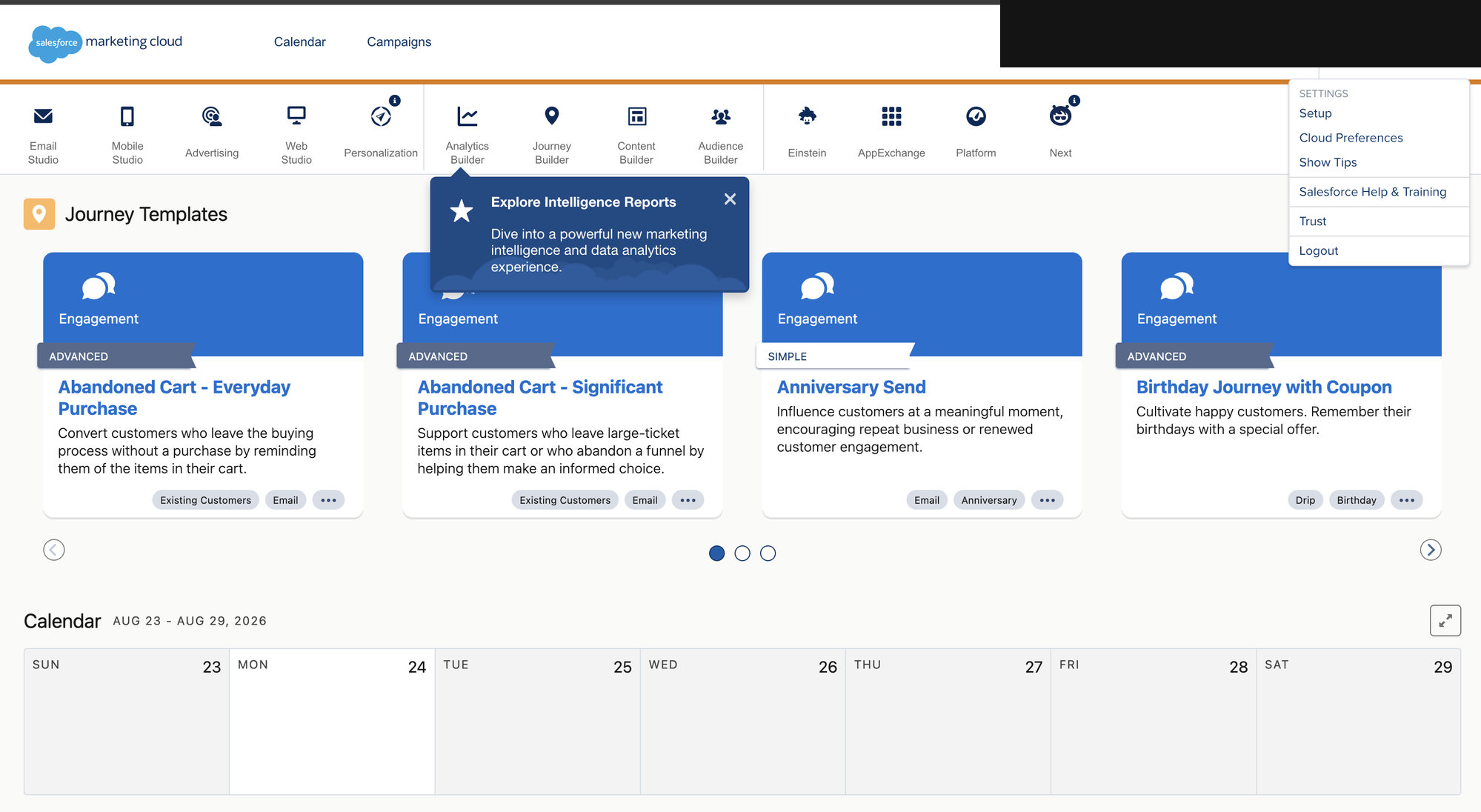
-
-
Go to Installed Packages
-
In Setup, under Platform Tools > Apps, click Installed Packages.
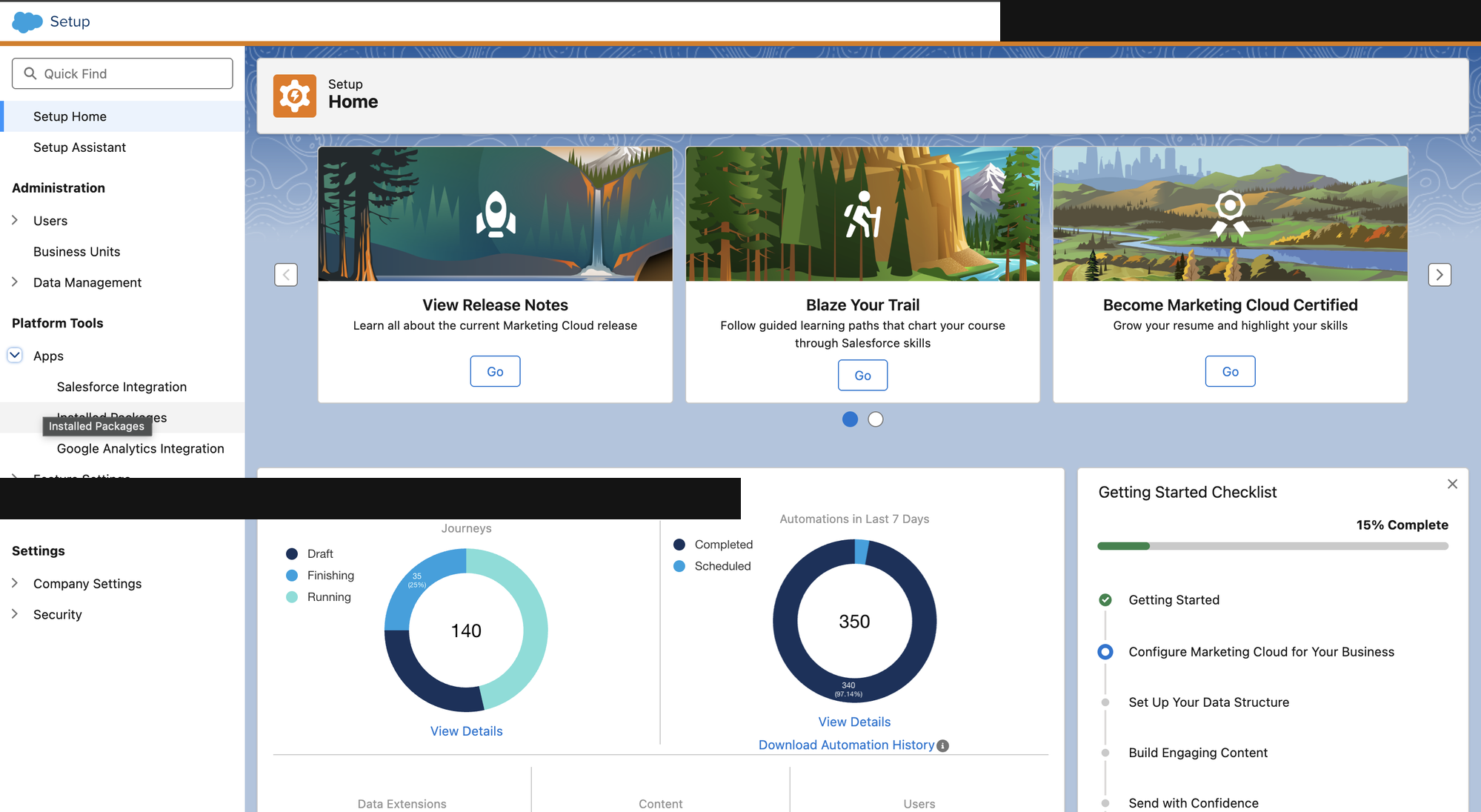
-
Click New and give the package a name, for example
Scalekit Agent Auth.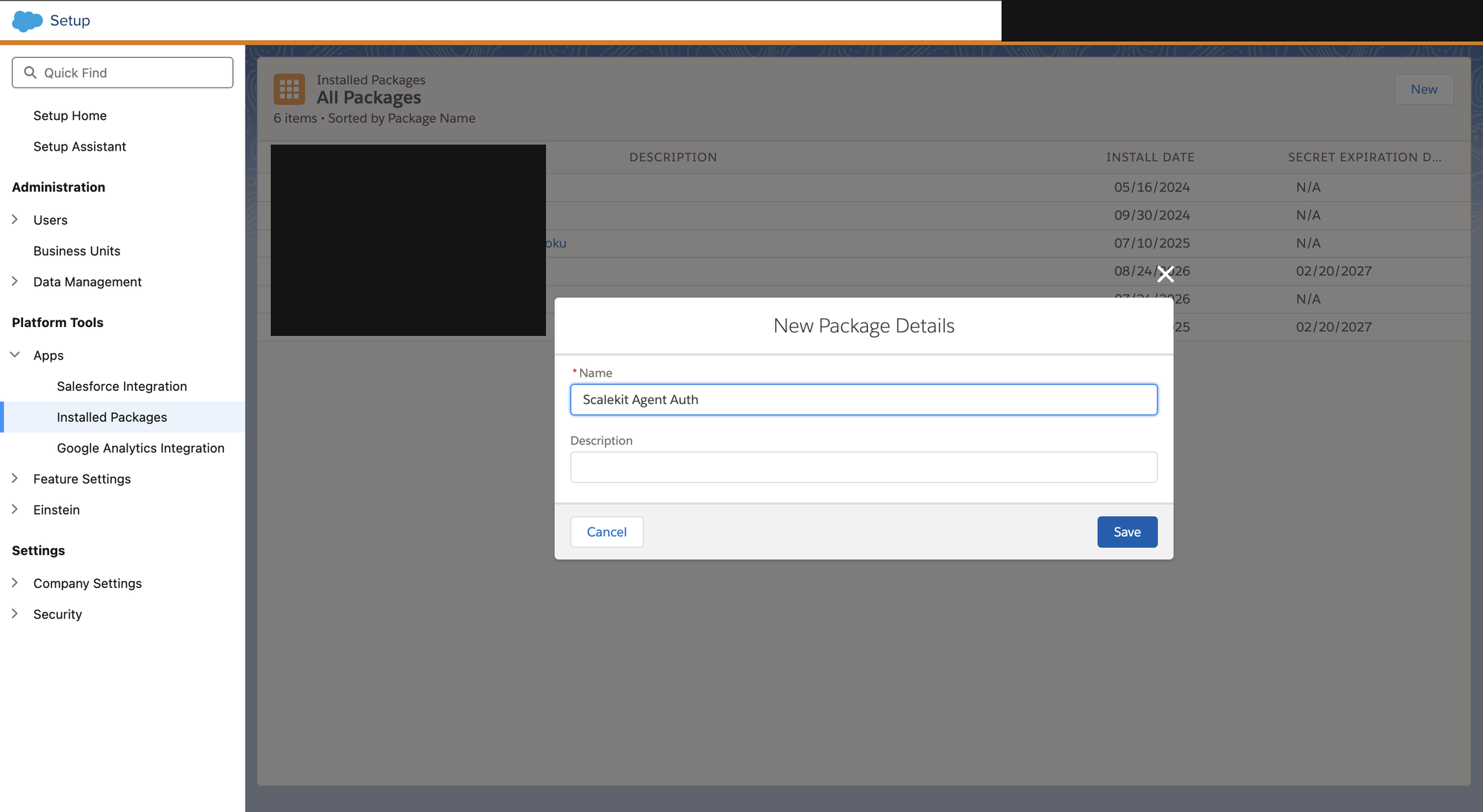
-
Click Save. Marketing Cloud creates the package with no components yet.
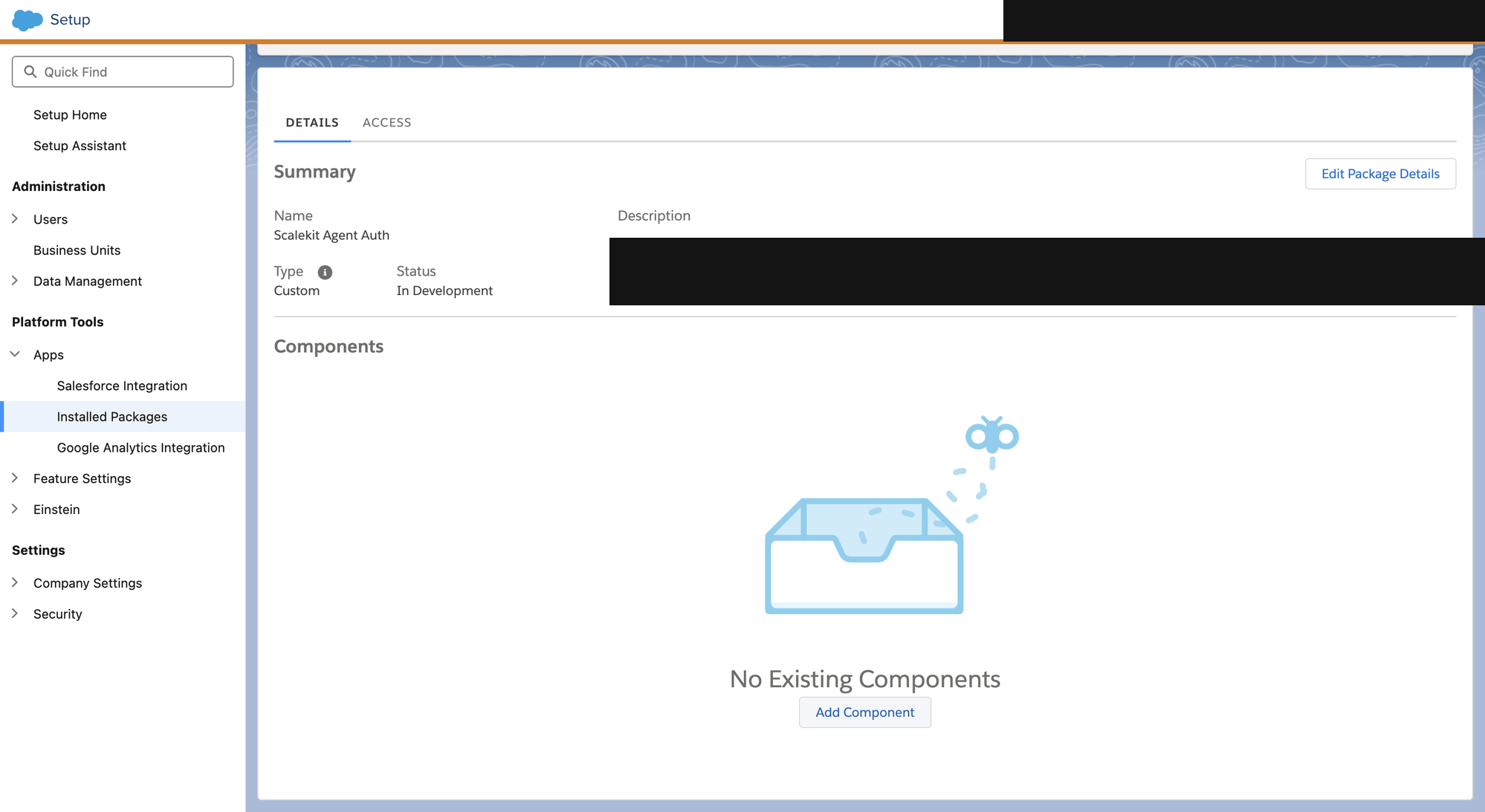
-
-
Add an API Integration component
-
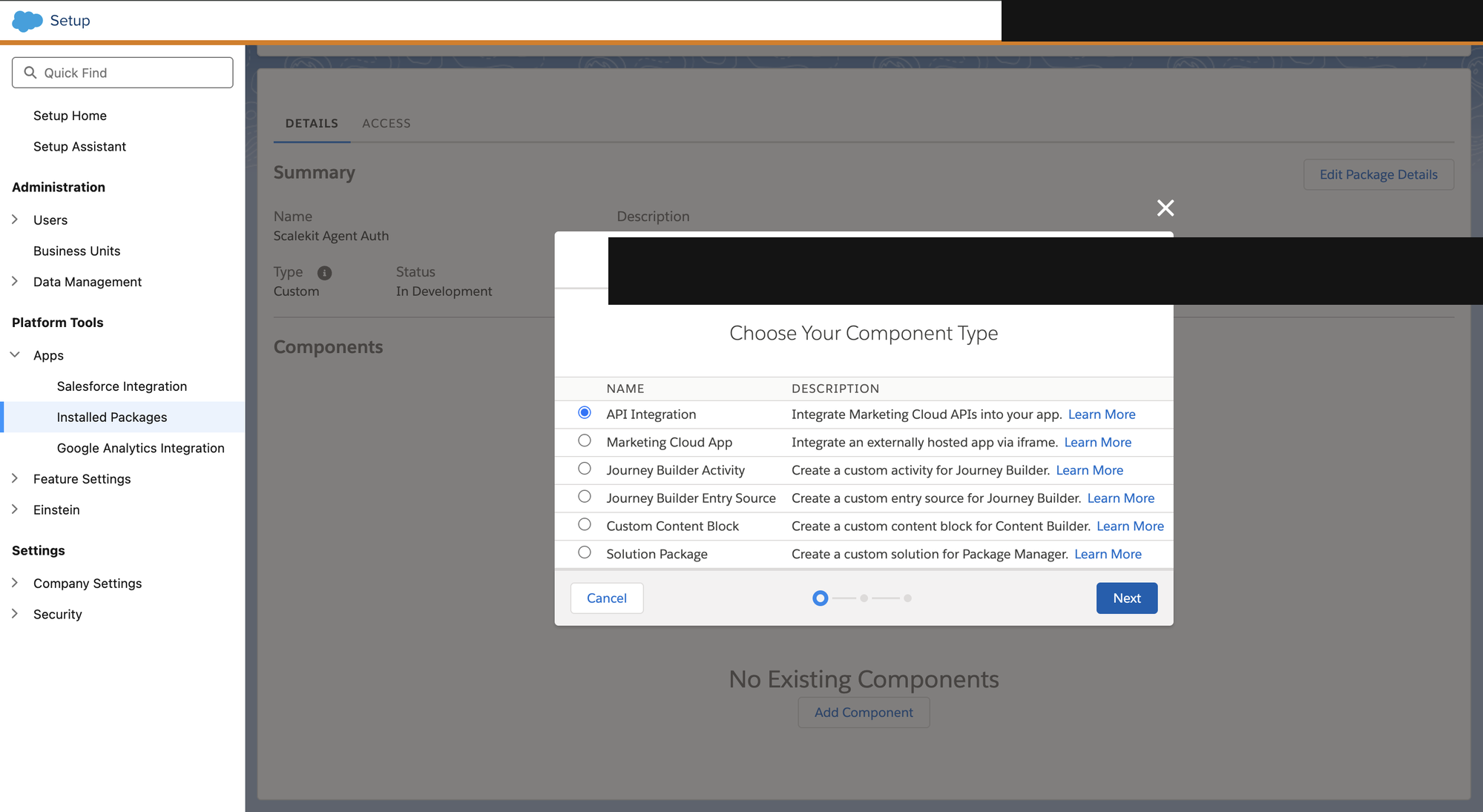
Click Add Component, choose API Integration as the component type, and click Next.
-
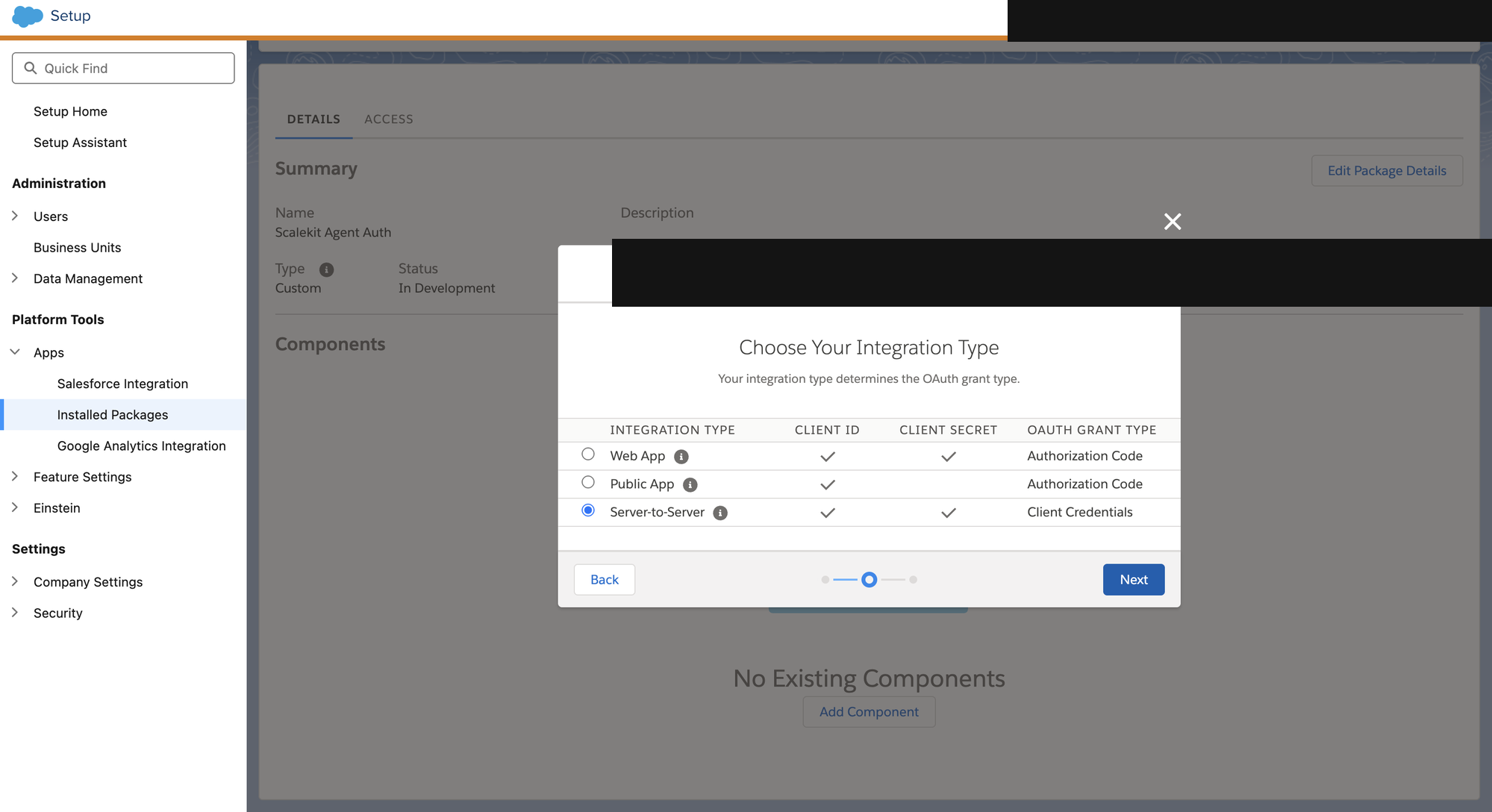
Choose Server-to-Server as the integration type and click Next. This is the OAuth 2.0 client credentials grant — the only integration type that issues both a Client ID and Client Secret without a redirect URI.
-
-
Set the scope and save
-
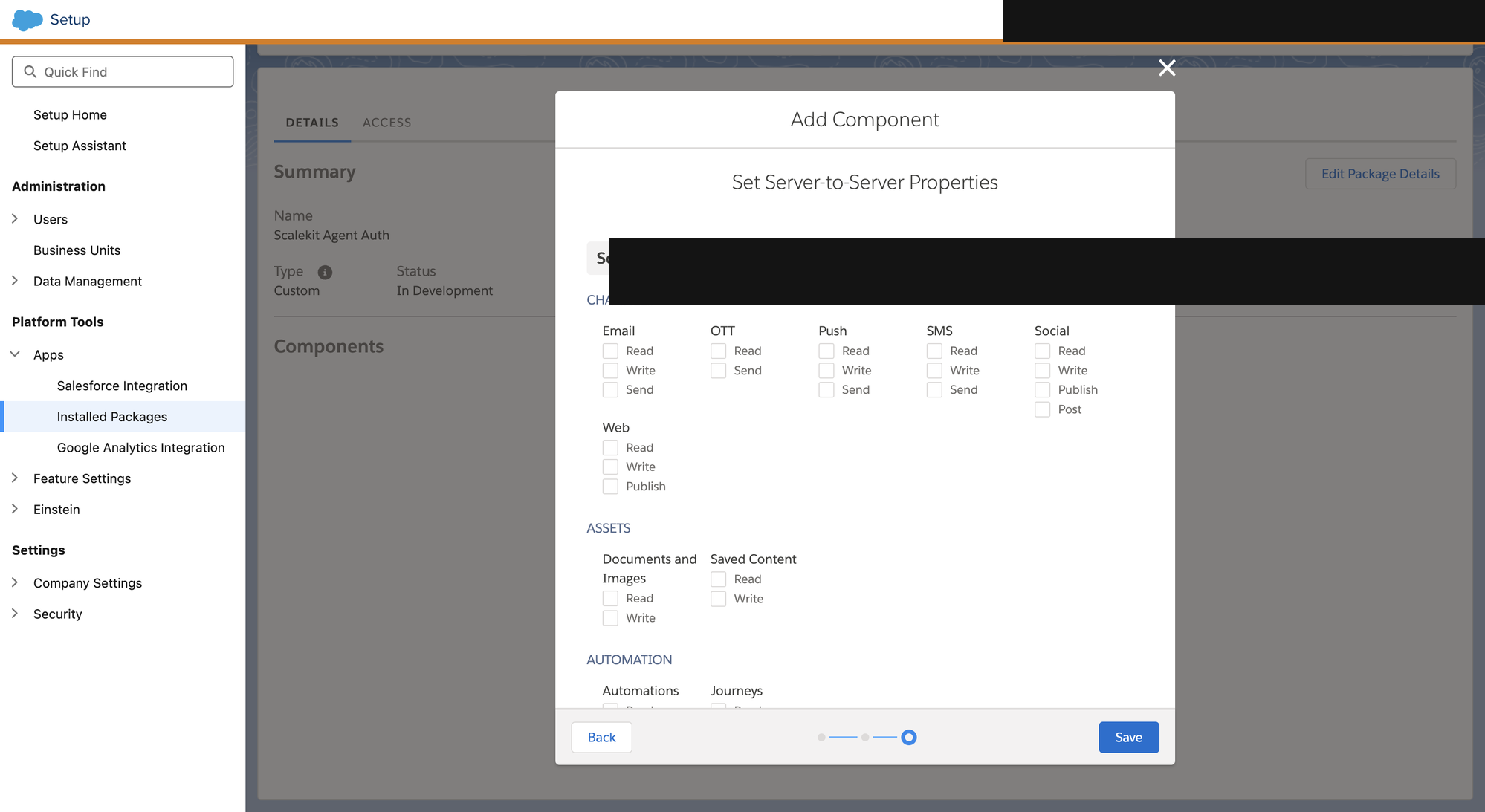
Select the read/write permissions your agent needs across Channels (Email, SMS, Push, and so on), Assets, and Automation. Grant only what your tools call — you can add more scope later by editing the component.
-
Click Save.
-
-
Copy the Client Secret
-
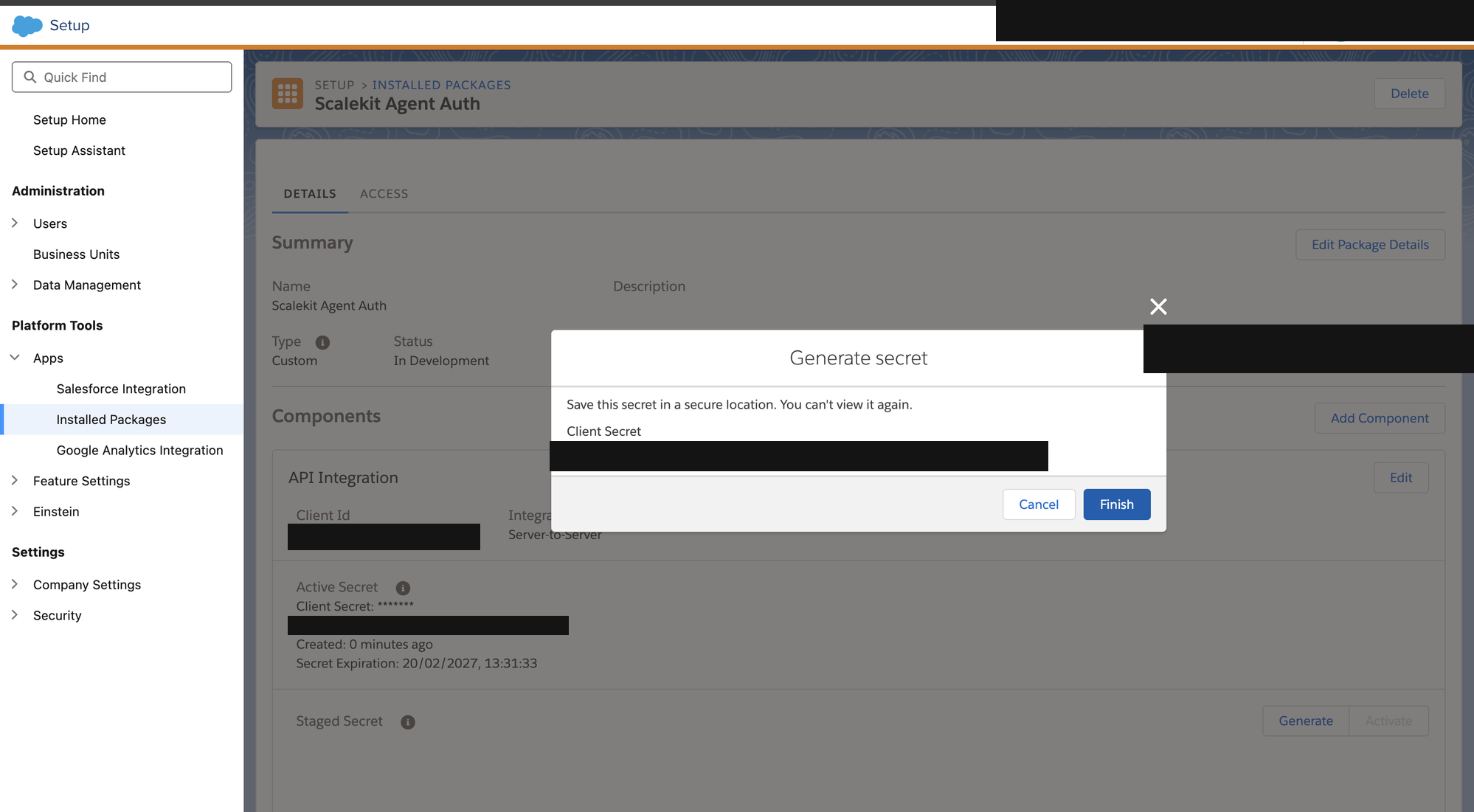
Marketing Cloud shows the Client Secret once, immediately after you save. Copy it and store it securely.
-
-
Copy the Client ID and tenant subdomain
-
Back on the package’s summary page, copy the Client Id and the Authentication Base URI.
-
Your tenant subdomain is the part of the Authentication Base URI before
.auth.marketingcloudapis.com— for example,mc549xxxxxxxxxxxxxxxxxxxxxxxxinhttps://mc549xxxxxxxxxxxxxxxxxxxxxxxx.auth.marketingcloudapis.com/.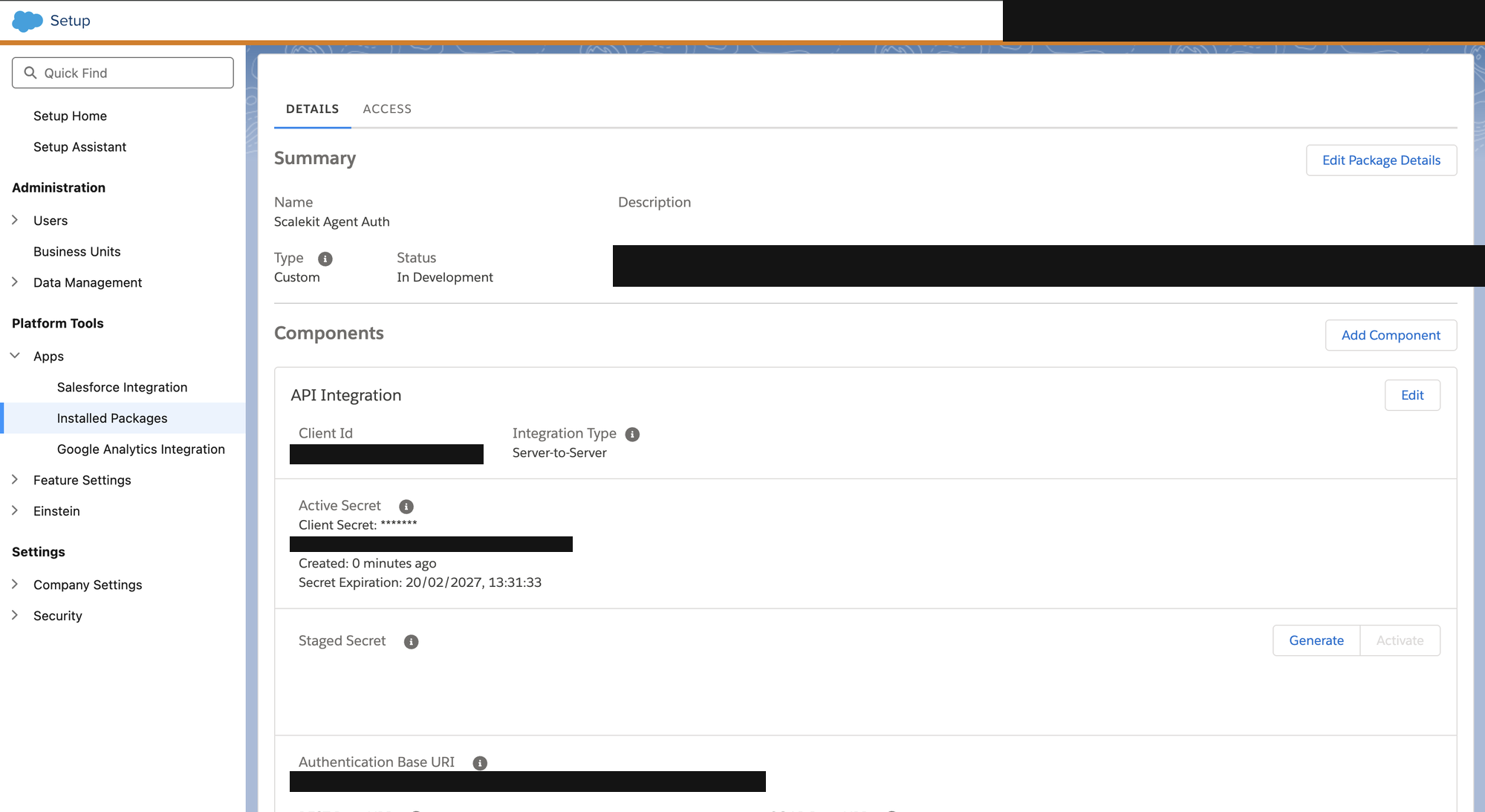
-
-
Add credentials in Scalekit
- In the Scalekit dashboard, go to AgentKit > Connections > Create Connection. Find Salesforce Marketing Cloud and click Create.
- Note the Connection name — use this as
connection_namein your code.
Add a connected account via the dashboard for testing, or via the Scalekit API in production.
In the dashboard, to test
- Open the connection, click the Connected Accounts tab > Add account.
- Fill in Your User’s ID, the Tenant Subdomain, Client ID, Client Secret, and optionally the Account ID (MID) of the business unit that created the package.
- Click Save.
In production
Each user adds their own account through the authorization link: they enter their credentials on the page it opens.
From your backend, if your app already has the credentials
For example, when users enter them on a settings page in your app:
import { ConnectorStatus } from '@scalekit-sdk/node'const authorizationDetails = {details: {case: 'staticAuth',value: {details: {domain: 'your-tenant-subdomain',client_id: 'your-client-id',client_secret: 'your-client-secret',},},},}let { connectedAccount } = await scalekit.actions.upsertConnectedAccount({connectionName: 'salesforcemarketingcloud',identifier: 'user_123',authorizationDetails,})// Make sure the account is ACTIVE before the first tool call.if (connectedAccount?.status !== ConnectorStatus.ACTIVE) {;({ connectedAccount } = await scalekit.actions.upsertConnectedAccount({connectionName: 'salesforcemarketingcloud',identifier: 'user_123',authorizationDetails,}))}authorization_details = {"static_auth": {"domain": "your-tenant-subdomain","client_id": "your-client-id","client_secret": "your-client-secret",},}response = scalekit_client.actions.upsert_connected_account(connection_name="salesforcemarketingcloud",identifier="user_123",authorization_details=authorization_details,)# Make sure the account is ACTIVE before the first tool call.if response.connected_account.status != "ACTIVE":response = scalekit_client.actions.upsert_connected_account(connection_name="salesforcemarketingcloud",identifier="user_123",authorization_details=authorization_details,)
-
Tools
Pass the exact name toexecute_toolsalesforcemarketingcloud_address_email_validateValidate an email address's syntax and deliverability using Marketing Cloud's Address Verification API.Read-onlyValidate Email Address
Validate an email address's syntax and deliverability using Marketing Cloud's Address Verification API. Choose one or more validators: SyntaxValidator checks for basic structural validity (e.g. presence of '@' and a domain with a '.'), MXValidator checks the domain has a valid DNS MX record, and ListDetectiveValidator checks the address's username or domain against a known bad-address filtering list. This is a read-only check -- it does not modify any Marketing Cloud data. Returns a validation result indicating whether the address passed each requested validator. Example: email 'help@example.com' with all three validators.
Inputs
emailstringrequired- The email address to validate, e.g. 'help@example.com'.
validatorsarray- Which validators to run against the email address. SyntaxValidator checks basic format, MXValidator checks the domain's DNS MX record, and ListDetectiveValidator checks against a known bad-address list. Defaults to running all three.
salesforcemarketingcloud_approval_item_getRetrieve a single approval item by its unique ID from Salesforce Marketing Cloud's Approvals v2 REST API.Read-onlyGet Approval Item
Retrieve a single approval item by its unique ID from Salesforce Marketing Cloud's Approvals v2 REST API. The approval item must belong to (be visible to) the current user's approval context. The response includes the approval's name, description, workflow state (e.g. draft, submitted, reviewed, approved), workflow type, deadline, comment counts, and the workflow item's current state and available transitions based on the current user's roles.
Inputs
idstringrequired- The unique ID of the approval item to retrieve. Obtain this from the List Approval Items tool's response (approvalItemId).
salesforcemarketingcloud_approval_item_roles_listList the roles defined for a given Approvals v2 item and the users assigned to each role, via GET /hub/v1/approvals-v2/{id}/roles on Salesforce Marketing Cloud's Approvals REST API.Read-onlyList Approval Item Roles
List the roles defined for a given Approvals v2 item and the users assigned to each role, via GET /hub/v1/approvals-v2/{id}/roles on Salesforce Marketing Cloud's Approvals REST API. Use this alongside Get Approval Item to see who can act on (review or approve) a specific approval item, and in what capacity. Confidence note: existence of this route was confirmed only via a search-indexed documentation page title; the exact shape of the returned roles/assignments has not been independently verified, so treat the returned fields as best-effort until confirmed against a live response.
Inputs
idstringrequired- The unique ID of the approval item whose roles you want to list. Obtain this from the List Approval Items tool's response (approvalItemId).
salesforcemarketingcloud_approval_items_listList approval items in Salesforce Marketing Cloud that belong to the current user's approval workflow context, using the Approvals v2 REST API.Read-onlyList Approval Items
List approval items in Salesforce Marketing Cloud that belong to the current user's approval workflow context, using the Approvals v2 REST API. Results can be filtered by workflow state, workflow type, object type, and other attributes, and are paginated. Use this to see what content (emails, journeys, assets, etc.) is pending, in review, or already approved. Each item in the response includes its approval ID, name, workflow state, workflow type, deadline, and comment counts.
Inputs
object_typestring- Filter results to approval items for a specific object type, e.g. 'EmailSendDefinition' or 'InteractionStudio.DefinitionInfo' (journey). Leave blank to return items for all object types.
pageinteger- Page number of results to retrieve, starting at 1. Use with page_size to page through large result sets.default
1 page_sizeinteger- Number of approval items to return per page. Defaults to 25 if not specified.default
25 sortstring- Sort order for results, formatted as '<field> <ASC|DESC>'. Sortable fields are Name, CreatedDate, WorkflowState, and Deadline. Example: 'Deadline ASC'.
workflow_statestring- Filter results to approval items currently in this workflow state. Leave blank to return items in all states.one of
draftsubmittedreviewedreturnedapproveddefining
salesforcemarketingcloud_approval_settings_getRetrieve the Approvals v2 configuration/settings that apply to the current user, via GET /hub/v1/approvals-v2/settings on Salesforce Marketing Cloud's Approvals REST API.Read-onlyGet Approval Settings
Retrieve the Approvals v2 configuration/settings that apply to the current user, via GET /hub/v1/approvals-v2/settings on Salesforce Marketing Cloud's Approvals REST API. Use this alongside List Approval Items and Get Approval Item to understand how approvals are configured (for example, notification or workflow-related settings) before creating or acting on approval items. Confidence note: existence of this route was confirmed only via a search-indexed documentation page title; the exact shape of the returned settings object has not been independently verified, and no query or request-body parameters are documented for it, so this tool takes no input beyond authentication. Treat the response fields as best-effort until confirmed against a live call.
Inputs
This tool takes no inputs.
salesforcemarketingcloud_asset_category_getRetrieve a single Content Builder category (folder) by its numeric ID, using GET /asset/v1/content/categories/{id}.Read-onlyGet Content Category
Retrieve a single Content Builder category (folder) by its numeric ID, using GET /asset/v1/content/categories/{id}. This returns just that one folder's id, name, parentId, and categoryType, rather than the full list returned by List Content Categories. Confirmed via two independently indexed official Salesforce documentation pages both titled 'Get Category by ID' -- developer.salesforce.com's current JS-rendered docs platform returns 404 to direct automated fetches of this deep-linked reference page, so the exact response shape was not read first-hand in this session; it is inferred from the equivalent List Content Categories response and the sibling Get Content Asset tool.
Inputs
idintegerrequired- The numeric ID of the Content Builder category (folder) to retrieve, e.g. 3916. Find it in the Content Builder folder URL, or from a previous List Content Categories or Create Content Category response.
salesforcemarketingcloud_asset_category_listList Content Builder categories (folders) owned by or shared with your Marketing Cloud account (MID), using the Asset REST API.Read-onlyList Content Categories
List Content Builder categories (folders) owned by or shared with your Marketing Cloud account (MID), using the Asset REST API. Supports pagination ($page/$pagesize), sorting ($orderBy), simple filtering ($filter), and requesting categories shared from other business units (scope=Shared). Each returned category includes its id, name, parentId, and categoryType. Use this to discover valid category IDs before creating or moving assets/folders.
Inputs
filterstring- Simple filter expression to narrow results, using the same '$filter' Simple Query grammar as the Content Builder Assets endpoint: '<property> <operator> <value>' with a space-separated keyword operator, e.g. "parentId eq 3916" or "name eq 'Newsletters'". Supported operators: eq, neq, lt, lte, gt, gte, like. Quote string values with single quotes; leave numeric values (like parentId) unquoted. Do NOT use "==" -- Salesforce's Simple Query API rejects that syntax with a 400 'Invalid Query Format' error.
order_bystring- Field and direction to sort results by, e.g. "name asc" or "id desc".
pageinteger- 1-based page number of results to return. Defaults to page 1 if omitted.
page_sizeinteger- Number of categories to return per page. Defaults to the API's standard page size if omitted.
scopestring- Set to "Shared" to request categories that have been shared with your MID from other business units, instead of ones your MID owns.
salesforcemarketingcloud_asset_channel_view_getGet the compiled output of one channel view of a Content Builder asset (for example the html, text, subjectline or preheader view of an email).Read-onlyGet Asset Channel View
Get the compiled output of one channel view of a Content Builder asset (for example the html, text, subjectline or preheader view of an email). Returns the view's compiled content as the API returns it; the output can be large for rich emails. Use this to read the final rendered content of a single view. Use salesforcemarketingcloud_asset_get to read the asset's full metadata and every view definition at once, and salesforcemarketingcloud_asset_salutations_get_by_id for only an email's header and footer. Requires the documents_and_images_read scope and the numeric asset ID, which you can find with salesforcemarketingcloud_asset_list or salesforcemarketingcloud_asset_query.
Inputs
idintegerrequired- The numeric ID of the Content Builder asset whose channel view to retrieve, e.g. 20331. This is the asset's internal ID, not its customerKey.
view_namestringrequired- The name of the channel view to retrieve. Valid names are the keys under the asset's views object, such as html, text, subjectline or preheader for an email. The full list of valid names is not documented, so call salesforcemarketingcloud_asset_get for the asset and use one of the keys under its views object. Example: html.
salesforcemarketingcloud_asset_getRetrieve a single Content Builder asset by its numeric asset ID using the Salesforce Marketing Cloud Asset REST API.Read-onlyGet Content Asset
Retrieve a single Content Builder asset by its numeric asset ID using the Salesforce Marketing Cloud Asset REST API. Returns the asset's full metadata and content, including name, customerKey, description, assetType (id/name/displayName), category, tags, views (e.g. html/text/subjectline/preheader for emails), content, data, and file properties (for images/documents). Use this to inspect an existing email, template, content block, image, or other Content Builder asset before updating or reusing it. Example asset id: 20331.
Inputs
idintegerrequired- The numeric ID of the Content Builder asset to retrieve, e.g. 20331. This is the asset's internal ID (visible in the Content Builder URL or in the response of a create/list call), not its customerKey.
salesforcemarketingcloud_asset_get_fileBest-effort tool: retrieve the raw file bytes of a Content Builder asset (the actual image, document, or other binary payload) rather than its JSON metadata, using GET /asset/v1/content/assets/{id}/file.Read-onlyGet Content Asset File
Best-effort tool: retrieve the raw file bytes of a Content Builder asset (the actual image, document, or other binary payload) rather than its JSON metadata, using GET /asset/v1/content/assets/{id}/file. This is distinct from the Get Content Asset tool, which returns the asset's JSON object (name, category, views, etc.) but not the underlying file content. This exact sub-path was not confirmed against an official Salesforce documentation page in this session -- developer.salesforce.com's JS-rendered docs platform 404s to automated fetches and no exact matching official page title was found by search -- so it is corroborated only by three independent secondary sources (ampscript.xyz, ssjsdocs.xyz/salesforcefan.com, and a LinkedIn SFMC REST API walkthrough) that all cite this identical path and GET-binary behavior. Verify against a live tenant or Postman collection before relying on this in production; only use it for assets you already know contain a file (e.g. image or document asset types).
Inputs
idintegerrequired- The numeric ID of the Content Builder asset whose file bytes should be retrieved, e.g. 20331. This is the same ID used with Get Content Asset -- look it up there first if unsure whether the asset has an associated file.
salesforcemarketingcloud_asset_listList and paginate Content Builder assets (emails, templates, blocks, images, documents, and other content items) using the Asset REST API's GET /asset/v1/content/assets resource.Read-onlyList Content Builder Assets
List and paginate Content Builder assets (emails, templates, blocks, images, documents, and other content items) using the Asset REST API's GET /asset/v1/content/assets resource. Supports simple filtering with the $filter query syntax (e.g. Name like 'welcome' or assetType.name eq htmlemail), sorting with $orderBy (property plus asc/desc, e.g. 'id desc'), limiting returned properties with $fields, and pagination via $page/$pageSize. For complex AND/OR filter logic or filtering by nested subproperties, use the dedicated asset query tool instead.
Inputs
fieldsstring- Comma-separated list of asset property names to include in the response, to reduce payload size, e.g. 'id,name,assetType,category'.
filterstring- Simple filter expression using SFMC's $filter syntax, e.g. "Name like 'welcome'" or "assetType.name eq 'htmlemail'". Supported operators: eq, neq, lt, lte, gt, gte, like.
order_bystring- Sort order as an asset property name followed by 'asc' or 'desc', e.g. 'id desc'. Separate multiple properties with commas.
pageinteger- The page number of results to fetch, starting at 1.default
1 page_sizeinteger- Number of assets to return per page.default
50
salesforcemarketingcloud_asset_queryAdvanced search for Content Builder assets using the Asset REST API's POST /asset/v1/content/assets/query resource, for filter logic that the simple GET list endpoint can't express (AND/OR combinations, or filtering by nested subproperties).Read-onlyQuery Content Builder Assets
Advanced search for Content Builder assets using the Asset REST API's POST /asset/v1/content/assets/query resource, for filter logic that the simple GET list endpoint can't express (AND/OR combinations, or filtering by nested subproperties). Provide a query object using SFMC's asset query grammar: either a simple form {"property": "assetType.id", "simpleOperator": "IN", "value": ["20","21"]}, or a compound form {"leftOperand": {...}, "logicalOperator": "AND", "rightOperand": {...}} for combining conditions. Optionally add sort (array of {property, direction}) and fields (array of asset properties to return, e.g. thumbnail, category, content, data) to shape the response, plus page/page_size for pagination.
Inputs
queryobjectrequired- The asset search filter, in SFMC's query grammar. Simple form: {"property": "assetType.id", "simpleOperator": "IN", "value": ["20","21"]}. Compound form for AND/OR: {"leftOperand": {...}, "logicalOperator": "AND", "rightOperand": {...}}.
fieldsarray- Optional array of asset property names to include in each returned asset, e.g. ["thumbnail", "category", "content", "data"]. If omitted, the API's default field set is returned.
pageinteger- The page number of results to fetch, starting at 1.default
1 page_sizeinteger- Number of assets to return per page.default
50 sortarray- Optional array of sort instructions, each an object with 'property' (asset property name) and 'direction' ('ASC' or 'DESC'). Example: [{"property": "id", "direction": "ASC"}].
salesforcemarketingcloud_asset_salutations_getGet the default header and footer (salutation) configured for the Marketing Cloud account.Read-onlyGet Default Header and Footer
Get the default header and footer (salutation) configured for the Marketing Cloud account. Returns an object with the HTML header, HTML footer, text header and text footer as separate string fields, passed through as the API returns them. Use this to read the account-wide defaults. Use salesforcemarketingcloud_asset_salutations_get_by_id for the header and footer of one specific email asset. Requires the documents_and_images_read scope; takes no inputs.
Inputs
This tool takes no inputs.
salesforcemarketingcloud_asset_salutations_get_by_idGet the header and footer (salutation) of a specific email asset in Content Builder.Read-onlyGet Email Header and Footer
Get the header and footer (salutation) of a specific email asset in Content Builder. Returns an object with the HTML header, HTML footer, text header and text footer as separate string fields, passed through as the API returns them. Behavior for assets that are not emails is not documented. Use this to read the header and footer of one email by asset ID. Use salesforcemarketingcloud_asset_salutations_get for the account-wide default header and footer, and salesforcemarketingcloud_asset_get for the email's content and metadata. Requires the documents_and_images_read scope and the numeric asset ID of an email, which you can find with salesforcemarketingcloud_asset_list or salesforcemarketingcloud_asset_query.
Inputs
idintegerrequired- The numeric ID of the email asset whose header and footer to retrieve, e.g. 20331. This is the asset's internal ID, not its customerKey.
salesforcemarketingcloud_asset_types_listList the Content Builder asset types supported by Salesforce Marketing Cloud, using the Asset REST API.Read-onlyList Asset Types
List the Content Builder asset types supported by Salesforce Marketing Cloud, using the Asset REST API. Each entry includes the numeric id, name (e.g. htmlemail, template, htmlblock, jpg), and displayName of an asset type. Use this to look up the correct asset_type_id when creating a new asset with the Create Content Asset tool, instead of hardcoding type IDs.
Inputs
This tool takes no inputs.
salesforcemarketingcloud_audit_events_listRetrieve logged Audit Trail audit events for this Salesforce Marketing Cloud account and its child business units, using GET /data/v1/audit/auditEvents.Read-onlyList Audit Events
Retrieve logged Audit Trail audit events for this Salesforce Marketing Cloud account and its child business units, using GET /data/v1/audit/auditEvents. Audit events record administrative/configuration changes such as user and role updates, security settings changes, and other account-object modifications (logins are audited separately at the enterprise level via the sibling GET /data/v1/audit/securityEvents endpoint). Each item in the response includes an id, createdDate, memberId, enterpriseId, the employee who performed the action (id, employeeName, userName), the objectType affected (id, name, e.g. 'MemberEmployee', 'SecuritySettings'), the operation performed (id, name, e.g. 'Update'), the affected object (id, name), and a transactionId. Results are paginated and sortable. Requires the account's Installed Package to have the Tracking Events Read (tracking_events_read) scope. Confirmed against Salesforce's official 'Salesforce Marketing Cloud APIs' Postman collection (folder: REST > Audit > Get Audit Events / Get Security Events); a fully public Salesforce Developers reference page for this exact operation could not be independently reloaded at authoring time. The page-size query parameter is sent as the lower-cased '$pagesize' (not '$pageSize'), matching the exact casing used in that collection's example request for the sibling Security Events endpoint in the same /data/v1/audit/ family — the full set of supported query parameters beyond page/$pagesize/orderBy (e.g. a possible $filter) is still not guaranteed and should be confirmed in testing.
Inputs
order_bystring- Sort order for the results, as a field name followed by 'asc' or 'desc', e.g. 'createdDate desc'. Defaults to 'createdDate desc' (most recent first).default
createdDate desc pageinteger- Page number of results to retrieve, starting at 1. Use with page_size to page through large result sets.default
1 page_sizeinteger- Number of audit events to return per page. Defaults to 50 if not specified.default
50
salesforcemarketingcloud_auth_userinfo_getGet information about the Salesforce Marketing Cloud account and user associated with the currently authenticated access token, using GET /v2/userinfo.Read-onlyGet User Info
Get information about the Salesforce Marketing Cloud account and user associated with the currently authenticated access token, using GET /v2/userinfo. Unlike every other tool in this connector, this endpoint is served from the tenant's AUTH subdomain (https://{{domain}}.auth.marketingcloudapis.com) rather than the REST subdomain (.rest.marketingcloudapis.com) — no path or query parameters are needed, since the access token itself (sent as the Bearer credential) identifies both the account and the user. The response includes user details (e.g. id, email, locale, timezone) and organization/account details (e.g. enterprise ID, member ID/MID, stack key, region), along with the account's REST and SOAP base instance URLs and the OAuth scopes granted to the current token. Use this to verify which account/MID a token is scoped to, confirm granted scopes before calling a scope-gated endpoint, or discover the account's own REST/SOAP base URLs at runtime.
Inputs
This tool takes no inputs.
salesforcemarketingcloud_automation_getRetrieve an automation's (Automation Studio program's) full definition and current status from Salesforce Marketing Cloud via GET /automation/v1/automations/{id}.Read-onlyGet Automation
Retrieve an automation's (Automation Studio program's) full definition and current status from Salesforce Marketing Cloud via GET /automation/v1/automations/{id}. Requires the automation's ObjectID (a GUID), as returned by the Create Automation or List Automations tools. Returns fields such as name, key, description, status (e.g. Building, Ready, Running, Paused, Stopped, Scheduled, AwaitingTrigger), categoryId, the ordered steps array (each step's activities), the startSource (schedule or file-drop trigger configuration), and an automationLegacyId — a separate numeric identifier needed by the legacy-namespaced status and pause tools (Get Automation Status, Pause Automation). Example id: 8f14e45f-ceea-467e-bd3a-45b3f4b3e21f.
Inputs
idstringrequired- The ObjectID (GUID) of the automation to retrieve, as returned by Create Automation or List Automations. Example: 8f14e45f-ceea-467e-bd3a-45b3f4b3e21f.
salesforcemarketingcloud_automation_listList automations (Automation Studio programs) in the Salesforce Marketing Cloud account via GET /automation/v1/automations, the collection form of the same Automation REST API used by the Get Automation, Create Automation, and Update Automation tools (which operate on /automation/v1/automations/{id}).Read-onlyList Automations
List automations (Automation Studio programs) in the Salesforce Marketing Cloud account via GET /automation/v1/automations, the collection form of the same Automation REST API used by the Get Automation, Create Automation, and Update Automation tools (which operate on /automation/v1/automations/{id}). Returns each automation's id, key, name, description, and status (e.g. Building, Ready, Running, Paused, Stopped, Scheduled, AwaitingTrigger). Supports optional pagination. Note: Salesforce's rendered API reference for this Automation Studio resource is a JavaScript-driven page that could not be fully inspected during authoring; the item-level GET/POST/PATCH on this same /automation/v1/automations resource are confirmed working via production tooling, and this list form follows the same collection+item REST convention used elsewhere in this API (e.g. GET /interaction/v1/interactions). Verify during testing and adjust the pagination parameter names if the API rejects them.
Inputs
pageinteger- Page number of results to return, for accounts with many automations. Starts at 1.
page_sizeinteger- Number of automations to return per page.
salesforcemarketingcloud_automation_status_getGet extended run/status details for an automation (Automation Studio program) in Salesforce Marketing Cloud via GET /legacy/v1/beta/bulk/automations/automation/definition/{automationLegacyId} — confirmed via production SFMC tooling as the source of richer runtime status than the main Get Automation tool provides.Read-onlyGet Automation Status
Get extended run/status details for an automation (Automation Studio program) in Salesforce Marketing Cloud via GET /legacy/v1/beta/bulk/automations/automation/definition/{automationLegacyId} — confirmed via production SFMC tooling as the source of richer runtime status than the main Get Automation tool provides. Requires the automation's numeric automationLegacyId (NOT the GUID ObjectID used by Get/Start/Delete Automation) — find it in the automationLegacyId field of the Create Automation or Get Automation response. Returns fields including automationType, status (e.g. Building, Ready, Running, Paused, Stopped, Scheduled, AwaitingTrigger, Skipped, Initialized, Error), createdBy/createdDate, lastSavedBy/lastSaveDate, lastPausedBy/lastPausedDate, the scheduleObject (id, description, iCalRecur, startDate, timeZone — its id is the scheduleLegacyId needed by the Pause Automation tool), and the processes array describing each step's workers/activities. Poll this after Start Automation to watch status move from Running back to Ready/Scheduled. Example automationLegacyId: 4821.
Inputs
automation_legacy_idstringrequired- The automation's numeric legacy ID (automationLegacyId), not its GUID ObjectID. Find it in the automationLegacyId field returned by Create Automation or Get Automation. Example: 4821.
salesforcemarketingcloud_automation_trigger_status_getCheck the status of a Trigger API request that was submitted to start a file-drop automation.Read-onlyGet Automation Trigger Status
Check the status of a Trigger API request that was submitted to start a file-drop automation. Returns the request's current state as one of Processing, Queued, Triggered, NoAutomationFound, ErrorMultipleAutomationsFound, Skipped, Deduplicated or Error. Read the state from the response body. A 404 error means the request ID does not exist. Use this right after salesforcemarketingcloud_automation_trigger_start to find out whether the request actually fired an automation; it only reads and never starts anything. Use salesforcemarketingcloud_automation_get or salesforcemarketingcloud_automation_status_get to inspect the automation itself once it has been triggered. Prerequisites: the request ID returned by salesforcemarketingcloud_automation_trigger_start, and an Installed Package with the automations_read scope. Salesforce documents this endpoint as Beta.
Inputs
request_idstringrequired- The request ID (a GUID) that salesforcemarketingcloud_automation_trigger_start returned when the trigger request was submitted. Example: 3f2b8c1e-6d4a-4b7f-9a52-1c8e7d0f4a96.
salesforcemarketingcloud_bulk_ingest_job_status_getCheck the status and progress of a bulk ingest job created via the Create Bulk Ingest Job tool, as step 4 of Salesforce Marketing Cloud's Bulk Data Ingest workflow.Read-onlyGet Bulk Ingest Job Status
Check the status and progress of a bulk ingest job created via the Create Bulk Ingest Job tool, as step 4 of Salesforce Marketing Cloud's Bulk Data Ingest workflow. Salesforce's public documentation mentions monitoring job progress and reviewing completed-job summaries (row counts, error details) only in prose - the exact path is not confirmed from a fetchable reference/OpenAPI source in this session. The path used here (GET /data/v1/bulk/ingest/{bulkApiDefinitionId}) is inferred by analogy with the create-job endpoint and Salesforce's general Bulk API 2.0 convention of GET-ing a job resource by its ID to retrieve its current state. Poll this after calling the Complete Bulk Ingest Job tool until the job reaches a terminal state before assuming the import has finished. Do not rely on this tool in production before smoke-testing it against a real Marketing Cloud sandbox and correcting the path_template if the API responds with a 404 or an unexpected shape.
Inputs
bulk_api_definition_idstringrequired- The bulkApiDefinitionId of the job to check, returned by the Create Bulk Ingest Job tool. Example: 3fa85f64-5717-4562-b3fc-2c963f66afa6.
salesforcemarketingcloud_campaign_asset_getRetrieve a single asset association of a campaign from Marketing Cloud's Hub Campaigns API.Read-onlyGet Campaign Asset
Retrieve a single asset association of a campaign from Marketing Cloud's Hub Campaigns API. Returns the association record linking that asset to the campaign. Use this to inspect one known link; use campaign_assets_list to see every asset on a campaign, campaign_asset_add to link a new one, and campaign_get for the campaign itself. Requires the campaign_read scope (the Campaigns > Access permission), a campaign id from campaign_list, and an asset id taken from campaign_assets_list or campaign_asset_add.
Inputs
asset_idstringrequired- The ID of the asset within the campaign, for example 3325. Salesforce labels this parameter only 'Asset ID'. Use the id of the entry returned by campaign_assets_list or campaign_asset_add; if the lookup returns not found, try the id of the linked item instead.
idstringrequired- The unique id of the campaign the asset is associated with, as returned by campaign_list or campaign_create, for example 3130.
salesforcemarketingcloud_campaign_assets_listList the Content Builder assets currently associated with a Salesforce Marketing Cloud campaign via the Hub API.Read-onlyList Campaign Assets
List the Content Builder assets currently associated with a Salesforce Marketing Cloud campaign via the Hub API. Returns each linked asset's id and association metadata. Accepts optional page and pageSize query parameters to page through results. Note: a live test found this Hub API endpoint did not honor pageSize to shrink the result count below the account's default page size (results stayed at 50 regardless of the value sent) -- use page to page through the full result set and don't rely on pageSize to limit how many assets come back.
Inputs
idstringrequired- The unique id of the campaign whose associated assets should be listed.
pageinteger- 1-based page number of results to retrieve. Omit to fetch the first page.
page_sizeinteger- Number of assets to return per page. Omit to use the API's default page size. Caveat from live testing: this endpoint has been observed ignoring pageSize values smaller than the default (results still came back at the default page size of 50) -- treat this as a hint rather than a guarantee.
salesforcemarketingcloud_campaign_getRetrieve a single Salesforce Marketing Cloud campaign by its id via the Hub API.Read-onlyGet Campaign
Retrieve a single Salesforce Marketing Cloud campaign by its id via the Hub API. Returns the campaign's id, name, description, campaignCode, color (hex), favorite flag, createdDate, and modifiedDate. Use campaign_list to find a campaign's id if you don't already have it.
Inputs
idstringrequired- The unique id of the campaign to retrieve, as returned by campaign_list or campaign_create.
salesforcemarketingcloud_campaign_listList campaigns defined in Salesforce Marketing Cloud via the Hub API (Content Builder Campaigns feature used to group and tag related Content Builder assets).Read-onlyList Campaigns
List campaigns defined in Salesforce Marketing Cloud via the Hub API (Content Builder Campaigns feature used to group and tag related Content Builder assets). Returns a paginated collection of campaign objects (id, name, description, campaignCode, color, favorite, createdDate, modifiedDate). Accepts optional page and pageSize query parameters to page through results; leave both blank to fetch the API's default first page. Note: a live test found this Hub API endpoint did not honor pageSize to shrink the result count below the account's default page size (results stayed at 50 regardless of the value sent) -- use page to page through the full result set and don't rely on pageSize to limit how many campaigns come back.
Inputs
pageinteger- 1-based page number of results to retrieve. Omit to fetch the first page.
page_sizeinteger- Number of campaigns to return per page. Omit to use the API's default page size. Caveat from live testing: this endpoint has been observed ignoring pageSize values smaller than the default (results still came back at the default page size of 50) -- treat this as a hint rather than a guarantee.
salesforcemarketingcloud_contact_addresses_listLook up the Contact Key(s) associated with one or more email addresses, via POST /contacts/v1/addresses/email/search.Read-onlyLook Up Contact Keys by Email Address
Look up the Contact Key(s) associated with one or more email addresses, via POST /contacts/v1/addresses/email/search. Note: Marketing Cloud does not expose a plain 'list all addresses' endpoint; the real, documented way to resolve contact/address identity from channel addresses is this email-to-contact-key search. Returns, for each email address supplied, the matching contact key(s) and the date each was created.
Inputs
email_addressesarrayrequired- Array of email addresses to find contact keys for. Example: ["jane.doe@example.com"].
maximum_countinteger- Maximum number of contact keys to return per email address, in case multiple contacts share the same address. Defaults to 1.default
1
salesforcemarketingcloud_contact_attribute_group_getRetrieve a single attribute group of a contact data schema in Contact Builder, identified by its GUID, its key, or its name.Read-onlyGet Contact Attribute Group
Retrieve a single attribute group of a contact data schema in Contact Builder, identified by its GUID, its key, or its name. Returns the attribute group with its ID, key, name, parent schema ID, whether it is system defined, the owning application ID and key, template ID, fully qualified name, group type, and links to the related schema and attribute set definitions. Use this when you already know which attribute group you want, for example key:com.exacttarget.mobilepush.ETMobilePush. Use salesforcemarketingcloud_contact_attribute_groups_list to enumerate every attribute group of a schema, and salesforcemarketingcloud_contact_attribute_set_get to read an attribute set definition. Requires the list_and_subscribers_read scope and the ID of the contact data schema, which you can find with salesforcemarketingcloud_contact_schemas_list.
Inputs
idstringrequired- Identifier of the attribute group to retrieve, written as exactly one of three forms: the attribute group's GUID (for example 4de15aca-2c17-e311-bb14-00237d5401ce), the attribute group's key prefixed with 'key:' (for example key:com.exacttarget.mobilepush.ETMobilePush), or the attribute group's name prefixed with 'name:' (for example name:ExactTarget%20MobilePush, where the space is written as %20 as in the official example).
schema_idstringrequired- The ID (GUID) of the contact data schema that the attribute group belongs to. Find it with the contact schemas list tool. Example: 36E001F0-6B8F-E311-A274-08EDB9DDEBF0.
salesforcemarketingcloud_contact_attribute_groups_listList attribute groups in Contact Builder via GET /contacts/v1/schemas/{schemaId}/attributeGroups.Read-onlyList Contact Attribute Groups
List attribute groups in Contact Builder via GET /contacts/v1/schemas/{schemaId}/attributeGroups. Attribute groups organize related attribute sets (e.g. 'ExactTarget MobilePush'). Marketing Cloud schemas are tenant-specific; find your account's schema id first by calling GET /contacts/v1/schema (the Get Schemas Collection endpoint) and using the 'id' of the schema with schemaType 'Contacts'. Note: a live test against this endpoint found that it may return the same full set of attribute groups for the account regardless of which valid schema_id is supplied -- despite schema_id appearing in the path, treat this endpoint as 'list this account's attribute groups' rather than a reliable per-schema filter, and verify against your own tenant before assuming scoped results.
Inputs
schema_idstringrequired- The GUID of the contact data schema to list attribute groups for. Retrieve this from GET /contacts/v1/schema (look for the schema with schemaType 'Contacts'). Example: 71c1f974-9812-e411-9ef0-08edb9ddebf0.
salesforcemarketingcloud_contact_attribute_set_data_searchRetrieve the attribute value data rows of a specified Contact Builder attribute set by name, via GET /contacts/v1/attributeSets/name:{name}.Read-onlySearch Contact Attribute Set Data
Retrieve the attribute value data rows of a specified Contact Builder attribute set by name, via GET /contacts/v1/attributeSets/name:{name}. The literal text 'name:' is part of the URL path itself, immediately followed by the attribute set's name (e.g. a call for the 'Email Addresses' attribute set hits /contacts/v1/attributeSets/name:Email Addresses). This is expected to return the contact-level data rows stored under that attribute set, similar in spirit to the by-id attribute set definition lookup but keyed by name and returning data instead of the definition. This endpoint was located via a Salesforce documentation search-index page title rather than a fully loaded reference page, so its exact response shape and any supported query filters have not been independently verified -- only the name path parameter is modeled here as a result.
Inputs
namestringrequired- Name of the attribute set to look up, exactly as it appears in Contact Builder (e.g. from the name field returned by the List Contact Attribute Set Definitions tool). Example: Email Addresses.
salesforcemarketingcloud_contact_attribute_set_getRetrieve a single Contact Builder attribute set definition by its UUID, via GET /contacts/v1/attributeSetDefinitions/{id}.Read-onlyGet Contact Attribute Set Definition
Retrieve a single Contact Builder attribute set definition by its UUID, via GET /contacts/v1/attributeSetDefinitions/{id}. An attribute set definition describes a data extension or system attribute group (e.g. Email Addresses, MobilePush Demographics) that can be attached to a contact, and is expected to return the same kind of item found in the List Contact Attribute Set Definitions tool's results -- id, key, name, whether it is sendable, and its attribute/field list -- just narrowed to the one definition. This by-id endpoint was located via a Salesforce documentation search-index page title rather than a fully loaded reference page, so its exact response shape has not been independently re-verified; use the List Contact Attribute Set Definitions tool first to find the id you want, then call this to fetch just that one definition.
Inputs
idstringrequired- UUID of the attribute set definition to retrieve. Get this from the id field of an item returned by the List Contact Attribute Set Definitions tool. Example: 8f14e45f-ceea-467e-bd97-97f78d9c8f1e.
salesforcemarketingcloud_contact_attribute_sets_listList all attribute set definitions available in the account's Contact Builder data model, via GET /contacts/v1/attributeSetDefinitions (note: the real Marketing Cloud path is 'attributeSetDefinitions', not 'attributeSets').Read-onlyList Contact Attribute Set Definitions
List all attribute set definitions available in the account's Contact Builder data model, via GET /contacts/v1/attributeSetDefinitions (note: the real Marketing Cloud path is 'attributeSetDefinitions', not 'attributeSets'). Each attribute set definition represents a data extension or system attribute group (e.g. 'Email Addresses', 'MobilePush Demographics') that can be attached to a contact, and includes its id, key, name, whether it is sendable, and its attribute/field list. Use this to discover valid attribute set names and field names before calling Create/Update Contact.
Inputs
pageinteger- Page number of results to return, for accounts with many attribute set definitions. Starts at 1.
page_sizeinteger- Number of attribute set definitions to return per page. The API's own default page size is 50.
salesforcemarketingcloud_contact_count_getCount the contacts in the account, either all of them or only those that match a single attribute filter.Read-onlyGet Contact Count
Count the contacts in the account, either all of them or only those that match a single attribute filter. Returns the number of matching contacts together with the request and response message IDs, the time the response was generated, and any result messages; a failed call also carries an error flag and error messages. It does not return the contacts themselves. Use this when you only need a number. It is a read-only lookup even though it is sent as a POST. Use salesforcemarketingcloud_contact_search to retrieve the matching contacts and their addresses for one attribute, and salesforcemarketingcloud_contact_addresses_list to resolve contact keys from email addresses. Only one filter condition is supported, and the only supported comparison is Equal. Requires the audiences_read scope (the Contacts > Audiences > Read > View All Contacts permission).
Inputs
has_criteriabooleanrequired- Whether the count is filtered. Set false to count every contact in the account; the filter inputs are then not used. Set true to count only the contacts that match the attribute code and values you provide.
customer_data_definition_idinteger- Numeric code of the contact attribute to filter on: 101 for ContactKey, 102 for LastModfiedDate (spelled this way in the API), 103 for Source, 104 for Channel, 105 for Status, 106 for AudienceID. Required, together with values, when has_criteria is true; leave it empty when has_criteria is false.one of
101102103104105106 valuesarray- Strings the chosen attribute must equal, for example ["EMAIL"] when filtering on Channel (104). For Channel the supported values are MOBILE, PUSH, LINE and EMAIL (the official example writes Push in title case, so case sensitivity is not documented). The reference documents value formats only for Channel (104); it does not say how to write a LastModfiedDate (102) value, so prefer 101, 103, 104, 105 or 106 here, and use salesforcemarketingcloud_contact_search for date ranges. Required when has_criteria is true, together with the attribute code; leave it empty when has_criteria is false.
salesforcemarketingcloud_contact_custom_object_field_relationships_getRetrieve the relationship details of one custom object field that is registered in the contacts model.Read-onlyGet Custom Object Field Relationships
Retrieve the relationship details of one custom object field that is registered in the contacts model. Returns the requested custom object field ID and, for each relationship, the parent attribute set and the contact attribute the field corresponds to (each with its definition ID, name and key) and the attribute groups the field belongs to, plus the request and response message IDs and any result messages. Use this to see where one field of a custom object (data extension) is used in Contact Builder. Use salesforcemarketingcloud_contact_custom_object_info_get to ask whether a whole custom object is used in the contact model, and salesforcemarketingcloud_contact_attribute_group_get to read one of the attribute groups it returns. Requires the list_and_subscribers_read scope and the ID (GUID) of a custom object field; a missing or invalid ID is rejected with a 400 error.
Inputs
custom_object_field_idstringrequired- The ID (GUID) of the custom object field, that is a single field of a custom object (data extension) registered in the contacts model, not the ID of the custom object itself. A missing or invalid ID is rejected with a 400 error. Example: 8a5f3c2e-1b4d-4e6a-9c7f-0d2e4a6b8c1d.
salesforcemarketingcloud_contact_custom_object_info_getCheck whether a custom object (data extension) is used in the account's contact model, via GET /contacts/v1/customObject/{id}/isUsedInContacts.Read-onlyCheck Custom Object Usage in Contacts
Check whether a custom object (data extension) is used in the account's contact model, via GET /contacts/v1/customObject/{id}/isUsedInContacts. Existence of this endpoint is confirmed only via a Salesforce documentation search-index page title -- the exact response shape was not independently verified, so treat the returned payload as best-effort and inspect it at runtime rather than assuming a specific structure. Use this before deleting or restructuring a custom object, to check whether the account's contact model depends on it.
Inputs
custom_object_idstringrequired- The ObjectID (GUID) of the custom object / data extension to check, as returned by the data extension's ObjectID field (e.g. from Get or List Data Extension). Example: 8a5f3c2e-1b4d-4e6a-9c7f-0d2e4a6b8c1d.
salesforcemarketingcloud_contact_delete_operations_listList asynchronous contact delete operations that have been submitted for this account, via GET /contacts/v1/contacts/deleteOperations.Read-onlyList Contact Delete Operations
List asynchronous contact delete operations that have been submitted for this account, via GET /contacts/v1/contacts/deleteOperations. Each item is expected to represent one delete request batch (with an operation identifier and a status you can look up with the Get Contact Delete Status tool), letting you audit or monitor bulk contact-deletion activity without knowing an individual operation ID in advance. This endpoint was located via a Salesforce documentation search-index page title rather than a fully loaded reference page, so its exact response shape is not independently confirmed. Optional page and page_size fields are included on a best-effort basis, following the $page/$pageSize pagination convention confirmed on the sibling /contacts/v1/attributeSetDefinitions endpoint in the same Contacts API family -- they have not been confirmed specifically for this operation and can be left blank if the API ignores or rejects them.
Inputs
pageinteger- Page number of results to return, starting at 1. Best-effort: follows the $page convention used by the sibling attributeSetDefinitions list endpoint, not independently confirmed for this operation. Leave blank to get the default (first) page.
page_sizeinteger- Number of delete operations to return per page. Best-effort: follows the $pageSize convention used by the sibling attributeSetDefinitions list endpoint (whose own default page size is 50), not independently confirmed for this operation.
salesforcemarketingcloud_contact_delete_options_getRetrieve the delete options registered for contact deletion in Salesforce Marketing Cloud, optionally narrowed by list type, delete operation type, or application (a read-only lookup).Read-onlyGet Contact Delete Options
Retrieve the delete options registered for contact deletion in Salesforce Marketing Cloud, optionally narrowed by list type, delete operation type, or application (a read-only lookup). Returns an items array with one entry per adapter (adapter ID and key, plus the application it belongs to), each holding the options that adapter offers with their key, display name, description, input type, data type, and default value. Use this to discover which delete options exist for each application; leave every filter blank to get all registered options. Use salesforcemarketingcloud_contact_delete to submit deletions and salesforcemarketingcloud_contact_delete_settings_update to change delete configuration. Requires the list_and_subscribers_write scope.
Inputs
application_idstring- ID (GUID) of the Marketing Cloud application whose delete options to return, as shown in the applicationID of an adapter in an earlier options response. Example: e25893f9-08f3-480f-8def-7f8ab0583611. Omit to return options for all applications.
delete_operation_typestring- Type of delete operation the options apply to: ContactAndAttributes or AttributesOnly. Omit to return options for every delete operation type.one of
ContactAndAttributesAttributesOnly list_typestring- Type of list the options apply to: Audience or List. Omit to return options for every list type.one of
AudienceList
salesforcemarketingcloud_contact_delete_requests_detailsGet details of contact delete requests submitted over a date range, via GET /contacts/v1/contacts/analytics/deleterequests.Read-onlyGet Contact Delete Request Details
Get details of contact delete requests submitted over a date range, via GET /contacts/v1/contacts/analytics/deleterequests. This is expected to list the individual delete requests made in that window (e.g. who/when/how many contacts, and each request's status), which is useful for auditing bulk contact-deletion activity over time. The endpoint's existence and purpose were confirmed via a Salesforce documentation search-index page title rather than a fully loaded reference page; the start_date/end_date fields are sent as 'startDate'/'endDate' on a best-effort basis, since the exact query parameter names were not independently verified.
Inputs
end_datestringrequired- End of the date range to report on, as an ISO 8601 date (YYYY-MM-DD). Sent as the 'endDate' query parameter on a best-effort basis. Example: 2024-01-31.
start_datestringrequired- Start of the date range to report on, as an ISO 8601 date (YYYY-MM-DD). Sent as the 'startDate' query parameter on a best-effort basis. Example: 2024-01-01.
salesforcemarketingcloud_contact_delete_requests_summaryGet a status-count summary of contact delete requests submitted over a date range, via GET /contacts/v1/contacts/analytics/deleterequests/summary.Read-onlyGet Contact Delete Request Summary
Get a status-count summary of contact delete requests submitted over a date range, via GET /contacts/v1/contacts/analytics/deleterequests/summary. This is expected to return aggregate counts of delete requests grouped by status (e.g. how many completed, are in progress, or failed) for the given window, complementing the Get Contact Delete Request Details tool's per-request listing with a rolled-up view. The endpoint's existence and purpose were confirmed via a Salesforce documentation search-index page title rather than a fully loaded reference page; the start_date/end_date fields are sent as 'startDate'/'endDate' on a best-effort basis, since the exact query parameter names were not independently verified.
Inputs
end_datestringrequired- End of the date range to summarize, as an ISO 8601 date (YYYY-MM-DD). Sent as the 'endDate' query parameter on a best-effort basis. Example: 2024-01-31.
start_datestringrequired- Start of the date range to summarize, as an ISO 8601 date (YYYY-MM-DD). Sent as the 'startDate' query parameter on a best-effort basis. Example: 2024-01-01.
salesforcemarketingcloud_contact_delete_status_getGet the status of an asynchronous contact delete operation, via GET /contacts/v1/contacts/actions/delete/status.Read-onlyGet Contact Delete Status
Get the status of an asynchronous contact delete operation, via GET /contacts/v1/contacts/actions/delete/status. Because this path has no {id} segment, the operation identifier must be supplied as a query parameter; the operation_id field here is sent as 'operationId' on a best-effort basis (the exact query parameter name and casing were not independently confirmed, only the endpoint's existence and purpose -- get an operation ID from a previous contact-delete request or from the List Contact Delete Operations tool). Use this to poll whether a bulk or single contact deletion has completed, is still running, or failed.
Inputs
operation_idstringrequired- Identifier of the contact delete operation to check, as returned when the delete was submitted or by the List Contact Delete Operations tool. Sent as the 'operationId' query parameter on a best-effort basis. Example: a2f4c8e0-1234-4abc-9def-56789abcdef0.
salesforcemarketingcloud_contact_preferences_get_by_idGet consent/subscription preferences for a single contact by their numeric Contact ID, via GET /contacts/v1/contacts/id:{contactId}/Preferences.Read-onlyGet Contact Preferences by Contact ID
Get consent/subscription preferences for a single contact by their numeric Contact ID, via GET /contacts/v1/contacts/id:{contactId}/Preferences. Existence of this endpoint is confirmed only via a Salesforce documentation search-index page title -- the exact response shape was not independently verified, so treat the returned payload as best-effort and inspect it at runtime rather than assuming specific fields. If you only have the contact's Subscriber/Contact Key instead of its numeric ID, use the by-key variant of this tool instead.
Inputs
contact_idstringrequired- The numeric Contact ID of the contact whose preferences to retrieve, as returned by the contact's ContactID field (e.g. from a contact search or contact create response). Example: 123456789.
salesforcemarketingcloud_contact_preferences_get_by_keyGet consent/subscription preferences for a single contact by their Contact Key (Subscriber Key), via GET /contacts/v1/contacts/key:{contactKey}/Preferences.Read-onlyGet Contact Preferences by Contact Key
Get consent/subscription preferences for a single contact by their Contact Key (Subscriber Key), via GET /contacts/v1/contacts/key:{contactKey}/Preferences. Existence of this endpoint is confirmed only via a Salesforce documentation search-index page title -- the exact response shape was not independently verified, so treat the returned payload as best-effort and inspect it at runtime rather than assuming specific fields. If you only have the contact's numeric Contact ID instead of its key, use the by-id variant of this tool instead.
Inputs
contact_keystringrequired- The Contact Key / Subscriber Key of the contact whose preferences to retrieve. Example: CONTACT-00123.
salesforcemarketingcloud_contact_preferences_searchLook up tracking-consent preferences (whether each contact has opted out of tracking) for a batch of contacts identified either by contact key or by numeric contact ID; this is a read-only lookup sent as a POST and it changes nothing.Read-onlySearch Contact Preferences
Look up tracking-consent preferences (whether each contact has opted out of tracking) for a batch of contacts identified either by contact key or by numeric contact ID; this is a read-only lookup sent as a POST and it changes nothing. Returns the matching contacts, each with its contact ID and opt-out flag, plus the number of rows returned, the request and service message IDs, and any result messages. Use this to read preferences for many contacts in one call (Salesforce recommends batching for performance). Use salesforcemarketingcloud_contact_preferences_get_by_id or salesforcemarketingcloud_contact_preferences_get_by_key for a single contact, and salesforcemarketingcloud_contact_preferences_add to change preferences. Requires the list_and_subscribers_read scope (IMH Contacts > Access, which Salesforce's scope table calls Contacts_access).
Inputs
itemsarrayrequired- The contacts to look up: contact keys when reference_type is 1, or numeric contact IDs when reference_type is 2. Put as many contacts as practical into one call. Examples: [12345, 67890] for contact IDs, or ["CRM-00123", "CRM-00456"] for contact keys.
reference_typeintegerrequired- Tells Marketing Cloud how to interpret the entries in items: 1 means they are contact keys, 2 means they are numeric contact IDs. Example: 2.one of
12
salesforcemarketingcloud_contact_restrict_status_getGet the status of an asynchronous contact restrict operation, via GET /contacts/v1/contacts/actions/restrict/status.Read-onlyGet Contact Restrict Status
Get the status of an asynchronous contact restrict operation, via GET /contacts/v1/contacts/actions/restrict/status. Because this path has no {id} segment, the operation identifier must be supplied as a query parameter; by analogy with this connector's confirmed Get Contact Delete Status tool (the equivalent GET /contacts/v1/contacts/actions/delete/status endpoint, which takes an 'operationId' query parameter), operation_id here is sent as 'operationId' on a best-effort basis -- the exact query parameter name and casing for this specific endpoint were not independently confirmed, only its existence and general purpose. Use this to poll whether a bulk contact restrict (suppress-from-sends) operation has completed, is still running, or failed.
Inputs
operation_idstringrequired- Identifier of the contact restrict operation to check, as returned when the restrict request was submitted. Sent as the 'operationId' query parameter on a best-effort basis. Example: a2f4c8e0-1234-4abc-9def-56789abcdef0.
salesforcemarketingcloud_contact_schemas_listList all contact data schemas defined in the account, via GET /contacts/v1/schema (the Get Schemas Collection endpoint).Read-onlyList Contact Data Schemas
List all contact data schemas defined in the account, via GET /contacts/v1/schema (the Get Schemas Collection endpoint). This account-wide call takes no parameters. Existence is confirmed both via a Salesforce documentation search-index page title and because this connector's List Contact Attribute Groups tool already documents calling this same endpoint to obtain a schema id -- the exact response shape was not independently verified beyond that, so treat the returned payload as best-effort. Use the 'id' of the schema with schemaType 'Contacts' as input to schema-scoped tools like List Contact Attribute Groups.
Inputs
This tool takes no inputs.
salesforcemarketingcloud_contact_searchSearch for contacts and their associated addresses in Salesforce Marketing Cloud by a single filterable attribute.Read-onlySearch Contacts by Address Attribute
Search for contacts and their associated addresses in Salesforce Marketing Cloud by a single filterable attribute. Uses the Contacts/Addresses REST search endpoint: POST /contacts/v1/addresses/search/{attributeName}. Choose the attribute to filter on (ContactKey, LastModfiedDate, Source, Channel, Status, or AudienceID [note: 'LastModfiedDate' is spelled exactly this way, without the second 'i', in Salesforce's own API] ) and provide the value to match; currently only the 'Is' comparison operator is supported. Returns matching addresses with their contactID/contactKey and channel-specific value sets (e.g. email or mobile number details).
Inputs
attribute_namestringrequired- The contact/address attribute to filter on. One of: ContactKey, LastModfiedDate (last modified date range), Source, Channel (MOBILE, PUSH, LINE, or EMAIL), Status, or AudienceID.one of
ContactKeyLastModfiedDateSourceChannelStatusAudienceID filter_condition_valuestringrequired- The value to match against the chosen attribute_name. For Channel use MOBILE, PUSH, LINE, or EMAIL. For LastModfiedDate, separate a start and end date with 'AND', e.g. '2024-01-01T00:00:00 AND 2024-12-31T23:59:59'. Example for ContactKey: CRM-00123.
filter_condition_operatorstring- Comparison operator to apply. Marketing Cloud currently supports only 'Is'.one of
IsdefaultIs
salesforcemarketingcloud_data_extension_fields_getRetrieve just the field/column definitions of a Data Extension's schema from Salesforce Marketing Cloud's Custom Object REST API: GET /data/v1/customobjects/{id}/fields.Read-onlyGet Data Extension Fields
Retrieve just the field/column definitions of a Data Extension's schema from Salesforce Marketing Cloud's Custom Object REST API: GET /data/v1/customobjects/{id}/fields. This is meant as a narrower sub-resource of the full Get Data Extension response (which already returns a fields array alongside the data extension's other metadata) -- use it when you only need the column list. IMPORTANT (confirmed by live testing against a real Marketing Cloud connection): despite this operation appearing in the Custom Objects API reference as a sibling of the create/update/delete/get-by-id operations, the path parameter only works when you pass the Data Extension's internal ObjectID (a GUID, e.g. 51195004-bc92-ef11-a5d1-5cba2c191058) -- the same GUID returned as 'id' by List Data Extensions or Get Data Extension. Passing the customer/external key instead (e.g. 'Customer_Master_DE'), with or without spaces, and even with a 'key:' prefix, was confirmed live to fail with HTTP 400 'Id is invalid' -- the exact same failure the sibling Get Data Extension tool produces for the same external key, which only succeeds once given the GUID. If this returns a 404 or 400 'Id is invalid', use Get Data Extension with the GUID instead and read its fields array.
Inputs
keystringrequired- The Data Extension's internal ObjectID (a GUID), e.g. 51195004-bc92-ef11-a5d1-5cba2c191058. Confirmed by live testing: this endpoint only accepts the ObjectID GUID here, NOT the customer/external key -- passing the external key (with or without spaces, with or without a 'key:' prefix) fails with HTTP 400 'Id is invalid'. Get the ObjectID from the 'id' field returned by List Data Extensions or Get Data Extension.
salesforcemarketingcloud_data_extension_getRetrieve a Data Extension's schema (fields and properties) from Salesforce Marketing Cloud using the Custom Object REST API, looked up by its customer key (external key).Read-onlyGet Data Extension
Retrieve a Data Extension's schema (fields and properties) from Salesforce Marketing Cloud using the Custom Object REST API, looked up by its customer key (external key). Returns the Data Extension's metadata (name, customer key, description, category, sendable configuration such as isSendable/sendableCustomObjectField/sendableSubscriberField) and its full fields array, where each field includes name, data type, length, ordinal position, and constraints such as isPrimaryKey and isNullable. Use this to inspect a Data Extension's structure before reading or writing rows to it. Example key: Customer_Master_DE.
Inputs
keystringrequired- The customer key (external key) of the Data Extension to retrieve, e.g. Customer_Master_DE. This is the unique, human-assigned identifier for the Data Extension, not its internal ObjectID GUID.
salesforcemarketingcloud_data_extension_import_status_getCheck the status and row-count summary of a one-time Data Extension import job in Salesforce Marketing Cloud (queued by the Start Data Extension Import tool), using GET /data/v1/async/import/{id}/summary.Read-onlyGet Data Extension Import Status
Check the status and row-count summary of a one-time Data Extension import job in Salesforce Marketing Cloud (queued by the Start Data Extension Import tool), using GET /data/v1/async/import/{id}/summary. Pass the id returned when the import was started. The response reports the job's overall progress/outcome plus row counts (e.g. total, successful, and errored rows) once the job reaches a terminal state. Poll this endpoint until the job's status is terminal (complete or errored) before assuming the import has finished, then use the Get Data Extension Import Validation Summary and Get Data Extension Import Validation Result tools to inspect the specifics of any rejected rows. as with the Start Data Extension Import tool, Salesforce's official reference page for this resource (developer.salesforce.com/docs/marketing/marketing-cloud/references/mc-import_job_api) is a client-rendered page that returned a 403/empty shell on every fetch attempt at authoring time -- the same bot-protection behavior already documented on this connector's File Transfer Location tools. The path itself (an id-scoped .../summary GET returning row counts) is corroborated by an independent third-party technical reconstruction of this Spring '24 SFMC REST API family, but the exact response field names were not directly confirmed against the primary source -- verify the live response shape before depending on a specific field name downstream.
Inputs
idstringrequired- The id returned when the import job was queued by the Start Data Extension Import tool. Example: 8f14e45f-ceea-467e-b7ac-1a1a1a1a1a1a.
salesforcemarketingcloud_data_extension_import_validation_result_getGet row-level validation details for a one-time Data Extension import job in Salesforce Marketing Cloud, using GET /data/v1/async/import/{id}/validationresult.Read-onlyGet Data Extension Import Validation Result
Get row-level validation details for a one-time Data Extension import job in Salesforce Marketing Cloud, using GET /data/v1/async/import/{id}/validationresult. Pass the id returned when the import was started (Start Data Extension Import tool). This returns the specific records that failed validation and, per publicly documented behavior of this endpoint, names the problematic field(s) on each -- use it after Get Data Extension Import Validation Summary has told you rows failed, when you need to know exactly which rows and fields caused the failures (for example, to fix and re-import them). Typically called after Get Data Extension Import Status shows the job reached a terminal state and reported errored rows. Salesforce's official reference page for this resource (developer.salesforce.com/docs/marketing/marketing-cloud/references/mc-import_job_api) is a client-rendered page that returned a 403/empty shell on every fetch attempt at authoring time -- the same bot-protection behavior already documented on this connector's File Transfer Location tools. This exact path and its 'per-record, per-field detail' behavior are corroborated by independent third-party summaries of this Spring '24 SFMC REST API family, but the precise response field names (e.g. row number, field name, error message) were not directly confirmed against the primary source -- verify the live response shape before depending on a specific field name downstream.
Inputs
idstringrequired- The id returned when the import job was queued by the Start Data Extension Import tool. Example: 8f14e45f-ceea-467e-b7ac-1a1a1a1a1a1a.
salesforcemarketingcloud_data_extension_import_validation_summary_getGet the validation summary for a one-time Data Extension import job in Salesforce Marketing Cloud, using GET /data/v1/async/import/{id}/validationsummary.Read-onlyGet Data Extension Import Validation Summary
Get the validation summary for a one-time Data Extension import job in Salesforce Marketing Cloud, using GET /data/v1/async/import/{id}/validationsummary. Pass the id returned when the import was started (Start Data Extension Import tool). This returns a high-level rollup of how many rows in the source file passed vs. failed validation and, per publicly documented behavior of this endpoint, groups failures by category (for example, rows missing a required field) -- it does not list every individual failing row or which specific fields on which rows were the problem; use the Get Data Extension Import Validation Result tool for that row-level detail. Typically called after Get Data Extension Import Status shows the job reached a terminal state and reported errored rows. Salesforce's official reference page for this resource (developer.salesforce.com/docs/marketing/marketing-cloud/references/mc-import_job_api) is a client-rendered page that returned a 403/empty shell on every fetch attempt at authoring time -- the same bot-protection behavior already documented on this connector's File Transfer Location tools. This exact path and its 'grouped counts, not row-level detail' behavior are corroborated by independent third-party summaries of this Spring '24 SFMC REST API family, but the precise response field names were not directly confirmed against the primary source -- verify the live response shape before depending on a specific field name downstream.
Inputs
idstringrequired- The id returned when the import job was queued by the Start Data Extension Import tool. Example: 8f14e45f-ceea-467e-b7ac-1a1a1a1a1a1a.
salesforcemarketingcloud_data_extension_listSearch/list data extensions (custom objects) in the account via GET /data/v1/customobjects, the collection form of the Custom Object REST API used by the Get Data Extension tool (GET /data/v1/customobjects/{key}).Read-onlyList Data Extensions
Search/list data extensions (custom objects) in the account via GET /data/v1/customobjects, the collection form of the Custom Object REST API used by the Get Data Extension tool (GET /data/v1/customobjects/{key}). Returns each matching data extension's external key, name, and schema metadata. IMPORTANT: this endpoint is a search, not an unfiltered listing — Salesforce requires a non-empty '$search' query parameter on every call (confirmed live: omitting it fails with HTTP 400 'errorcode 10005: $search is a required parameter'), and per Salesforce's own Marketing Cloud Engagement MCP server documentation, that search term must be real text — wildcards such as '*' or '%' are rejected, so there is no way to request 'all data extensions' in a single call. Pass a substring of the data extension's name to search for; supports optional pagination. Note: Salesforce's rendered documentation for this collection-level GET was not directly accessible during authoring (consistent with the rest of this connector's build notes); the $search requirement and its constraints were confirmed via a live 400 response plus Salesforce's official MCE MCP server blog post, and the single-item GET by key on this same resource family is separately confirmed working. Verify pagination parameter names during testing and adjust if the API rejects them.
Inputs
searchstringrequired- Required search term used to find data extensions by name (substring match). Salesforce's Custom Object REST API rejects requests with no $search value, an empty string, or a wildcard such as '*' or '%' — a real, non-empty search term must be supplied on every call. Example: 'Customer' to find data extensions with 'Customer' in their name.
pageinteger- Page number of results to return, for accounts with many data extensions. Starts at 1.
page_sizeinteger- Number of data extensions to return per page.
salesforcemarketingcloud_data_extension_row_async_results_getRetrieve the detailed, row-level results of a completed asynchronous Data Extension row job (insert/upsert/delete) in Salesforce Marketing Cloud, using GET /data/v1/async/{requestId}/results.Read-onlyGet Async Data Extension Row Job Results
Retrieve the detailed, row-level results of a completed asynchronous Data Extension row job (insert/upsert/delete) in Salesforce Marketing Cloud, using GET /data/v1/async/{requestId}/results. This is distinct from the Get Async Row Job Status tool (GET /data/v1/async/{requestId}/status), which only reports overall job state (requestStatus, resultStatus, hasErrors) -- this endpoint returns the outcome of each individual row in the batch, so you can tell exactly which rows succeeded and which failed, with a status and error detail per row. Pass the same requestId returned when the row job was queued (async insert/upsert/delete tools), and call the Get Async Row Job Status tool first, fetching results only once that shows the job reached a terminal state. Results are paginated. request_id MUST be a well-formed GUID copied verbatim from a prior async row job -- as with the async row status tool, passing an arbitrary or malformed string is not guaranteed to be rejected cleanly and may return an ungraceful server error instead of a clean 400. Salesforce's official reference page for this resource (developer.salesforce.com/docs/marketing/marketing-cloud/references/mc-data_extension_rows_async) is a client-rendered page that returned a 403/empty shell on every fetch attempt at authoring time -- the same bot-protection behavior already documented on this connector's File Transfer Location tools. The path itself is corroborated by the page's own indexed sub-section title ('Get Results of Asynchronous Request'); the response shape used here (requestId, page, pageSize, count, and an items array of per-row {status, errorCode, message} objects) and the page/pageSize request parameters below come from an independent third-party technical reconstruction, not the primary source -- verify the live request/response shape before depending on a specific field or parameter name, and omit page/pageSize entirely if the API does not honor them as expected.
Inputs
request_idstringrequired- The requestId returned when the asynchronous Data Extension row job was queued (from the async row insert/upsert/delete tool), or reported by the Get Async Row Job Status tool. Must be the exact GUID returned by that prior call, e.g. 3fa85f64-5717-4562-b3fc-2c963f66afa6 -- not an arbitrary string.
pageinteger- Page number of row-level results to return, starting at 1. Use with page_size to page through large batches. Not independently confirmed against Salesforce's primary documentation -- see the tool description.default
1 page_sizeinteger- Number of row-level results to return per page. Not independently confirmed against Salesforce's primary documentation -- see the tool description.default
50
salesforcemarketingcloud_data_extension_row_async_statusCheck the status and result of an asynchronous Data Extension row job (created by the asynchronous row insert/upsert/delete tools) in Salesforce Marketing Cloud, using the requestId returned when the job was queued.Read-onlyGet Async Data Extension Row Job Status
Check the status and result of an asynchronous Data Extension row job (created by the asynchronous row insert/upsert/delete tools) in Salesforce Marketing Cloud, using the requestId returned when the job was queued. The response includes a nested status object with fields such as requestStatus (e.g. 'InProgress', 'Complete', 'Error'), resultStatus (e.g. 'OK' or an error indicator), hasErrors, callDateTime, and completionDateTime. Poll this endpoint until requestStatus reaches a terminal state before assuming the row write has finished. request_id MUST be a well-formed GUID copied verbatim from the requestId a prior async row job (insert/upsert/delete) returned when it was queued — passing an arbitrary or malformed string is not rejected with a clean 400 but instead causes Salesforce to return an ungraceful HTTP 500. Example requestId: 3fa85f64-5717-4562-b3fc-2c963f66afa6.
Inputs
request_idstringrequired- The requestId returned when the asynchronous Data Extension row job was queued (from the async row insert/upsert/delete tool). Must be the exact GUID returned by that prior call, e.g. 3fa85f64-5717-4562-b3fc-2c963f66afa6 — not an arbitrary string.
salesforcemarketingcloud_data_extension_row_getRetrieve a single row from a Data Extension in Salesforce Marketing Cloud using the Custom Object Data REST API, looked up by the Data Extension's customer key (external key) plus the row's primary key value(s).Read-onlyGet Data Extension Row
Retrieve a single row from a Data Extension in Salesforce Marketing Cloud using the Custom Object Data REST API, looked up by the Data Extension's customer key (external key) plus the row's primary key value(s). If the Data Extension has a single primary key field, pass just its value (e.g. "user@example.com"). If it has a composite (multi-column) primary key, pass comma-separated Field:Value pairs (e.g. "Email:user@example.com,Country:US"). The response splits the row into a 'keys' object (the primary key field(s) and their values) and a 'values' object (every other field and its value). Example key: Customer_Master_DE.
Inputs
keystringrequired- The customer key (external key) of the Data Extension to read the row from, e.g. Customer_Master_DE. This is the unique, human-assigned identifier for the Data Extension, not its internal ObjectID GUID.
primary_keystringrequired- The primary key value identifying the row to retrieve. For a Data Extension with a single primary key field, pass just the value (e.g. "user@example.com"). For a composite primary key, pass comma-separated Field:Value pairs (e.g. "Email:user@example.com,Country:US").
salesforcemarketingcloud_data_extension_row_listRetrieve rows of data from a Data Extension in Salesforce Marketing Cloud using the Custom Object Data REST API, looked up by the Data Extension's customer key (external key).Read-onlyList Data Extension Rows
Retrieve rows of data from a Data Extension in Salesforce Marketing Cloud using the Custom Object Data REST API, looked up by the Data Extension's customer key (external key). Each returned row is split into a 'keys' object (the primary key field(s) and their values) and a 'values' object (every other field and its value). Supports an OData-style $filter expression to narrow results (e.g. "Status eq 'Active'"), and $page/$pageSize for pagination (up to 2500 rows per page). Filtering, sorting, and paging beyond the first page are only fully supported for sendable Data Extensions — requests against non-sendable Data Extensions can return a maximum of 200 rows. Example key: Customer_Master_DE.
Inputs
keystringrequired- The customer key (external key) of the Data Extension to read rows from, e.g. Customer_Master_DE. This is the unique, human-assigned identifier for the Data Extension, not its internal ObjectID GUID.
$filterstring- OData-style filter expression to narrow which rows are returned. Example: "Status eq 'Active'" or "LoyaltyPoints gt 100". Leave blank to return all rows (subject to paging limits).
$pageinteger- Page number of results to return, starting at 1. Use with $pageSize to page through large result sets.default
1 $pageSizeinteger- Number of rows to return per page. Up to 2500 rows can be retrieved per page for sendable Data Extensions; non-sendable Data Extensions are capped at 200 total rows regardless of this value.default
50
salesforcemarketingcloud_domain_verification_listList the domain verification/authentication records configured for this Salesforce Marketing Cloud account, using GET /messaging/v1/domainverification.Read-onlyList Domain Verification Records
List the domain verification/authentication records configured for this Salesforce Marketing Cloud account, using GET /messaging/v1/domainverification. Domain Verification is a new resource category for this connector: it tracks the DNS-based authentication status of sending domains, separate from the existing seed list and address validation tools. Each item in the response includes the domain name, its status (e.g. 'Verify' for pending, 'Verified' for complete), domainType (e.g. SenderDomain, TrackingDomain), and isSendable (whether Marketing Cloud will currently send from that domain). Supports pagination with $page/$pageSize, sorting with $orderBy (a field name plus 'asc' or 'desc'), and simple narrowing with $filter (e.g. "Status in ('Verify')" to see only domains still pending verification).
Inputs
filterstring- Optional $filter expression to narrow results, e.g. "Status in ('Verify')" to show only domains still pending verification, or "DomainType eq 'SenderDomain'" to show only one domain type. Combine conditions with 'and'/'or' as needed.
order_bystring- Sort order for the results, as a field name followed by 'asc' or 'desc', e.g. 'domain asc'. Separate multiple fields with commas.
pageinteger- Page number of results to retrieve, starting at 1. Use with page_size to page through large result sets.default
1 page_sizeinteger- Number of domain verification records to return per page. Defaults to 50 if not specified.default
50
salesforcemarketingcloud_email_definition_send_delivery_getGet the delivery record for a single recipient of a message-definition (triggered send) send in Salesforce Marketing Cloud, via the Messaging API's deliveryRecords sub-resource (GET /messaging/v1/messageDefinitionSends/{key}/deliveryRecords/{RecipientSendId}).Read-onlyGet Message Definition Send Delivery Record
Get the delivery record for a single recipient of a message-definition (triggered send) send in Salesforce Marketing Cloud, via the Messaging API's deliveryRecords sub-resource (GET /messaging/v1/messageDefinitionSends/{key}/deliveryRecords/{RecipientSendId}). Use this after calling the triggered-send/message-definition send endpoint to check whether that recipient's message was delivered, is still queued, or errored. On success the response includes status ('Sent', 'Queued', or 'Error'), deliveryTime, id, messageId, and the recipient's to.address/to.id/to.key; an 'Error' status also includes a messageErrors array describing what went wrong. Example send definition key: key:Welcome_TriggeredSend. Example recipient send id: 8f14e45f-ceea-467e-b789-4b2f7e0b1a12.
Inputs
recipientSendIdstringrequired- The RecipientSendId that uniquely identifies this specific recipient's message within the send. This value is returned in the response of the message-definition send call (one RecipientSendId per recipient) — you cannot guess it, it must come from that earlier response.
sendDefinitionKeystringrequired- Identifier of the triggered send / message definition that the recipient's message was sent from. Provide either the definition's internal ObjectID (a GUID, used as-is) or its external key prefixed with 'key:' (e.g. key:Welcome_TriggeredSend). This is the same definition identifier used when configuring or triggering the send in Email Studio.
salesforcemarketingcloud_event_notification_callback_getRetrieve details of a single registered Event Notification Service (ENS) callback by its ID, using GET /platform/v1/ens-callbacks/{callbackId}.Read-onlyGet Event Notification Callback
Retrieve details of a single registered Event Notification Service (ENS) callback by its ID, using GET /platform/v1/ens-callbacks/{callbackId}. The response includes the callback's name, URL, maximum batch size, and its verification status (e.g. verified) with a status reason. Use this to check whether a callback is verified and ready to be used in a subscription.
Inputs
callback_idstringrequired- The unique ID (UUID) of the callback to retrieve.
salesforcemarketingcloud_event_notification_callback_listList every Event Notification Service (ENS) callback registered on this Marketing Cloud account, using GET /platform/v1/ens-callbacks (confirmed via Salesforce's official 'Get All Callbacks' reference page).Read-onlyList Event Notification Callbacks
List every Event Notification Service (ENS) callback registered on this Marketing Cloud account, using GET /platform/v1/ens-callbacks (confirmed via Salesforce's official 'Get All Callbacks' reference page). The connector can already create a callback (Create Event Notification Callback) and fetch one by ID (Get Event Notification Callback), but had no way to discover which callback IDs already exist -- this tool closes that gap. Returns an array of callback objects, each with callbackId (UUID), callbackName, url, maxBatchSize, and its verification status/statusReason (e.g. whether it's verified and ready to use in a subscription). No query parameters are documented for this endpoint -- it returns the full list in one call, with no pagination or filtering options confirmed.
Inputs
This tool takes no inputs.
salesforcemarketingcloud_event_notification_subscription_getRetrieve a single Event Notification Service (ENS) subscription by its subscription ID, using GET /platform/v1/ens-subscriptions/{subscriptionId}.Read-onlyGet Event Notification Subscription
Retrieve a single Event Notification Service (ENS) subscription by its subscription ID, using GET /platform/v1/ens-subscriptions/{subscriptionId}. Returns the subscription's current configuration, including the owning callback ID and name, the subscribed event category types (e.g. TransactionalSendEvents.EmailSent), any scoping filters, and its status (active or paused) with a status reason if paused. Use this to inspect a subscription's settings before updating or deleting it.
Inputs
subscription_idstringrequired- The unique ID (UUID) of the ENS subscription to retrieve, as returned when the subscription was created.
salesforcemarketingcloud_event_notification_subscription_listList all Event Notification Service (ENS) subscriptions registered for a specific callback in Salesforce Marketing Cloud, using GET /platform/v1/ens-subscriptions-by-cb/{callbackId}.Read-onlyList Event Notification Subscriptions
List all Event Notification Service (ENS) subscriptions registered for a specific callback in Salesforce Marketing Cloud, using GET /platform/v1/ens-subscriptions-by-cb/{callbackId}. ENS subscriptions are scoped to the callback that owns them (there is no single endpoint that lists subscriptions across all callbacks), so provide the callback's ID to see which event types it's currently subscribed to. Each returned subscription includes its subscription ID, name, event category types, filters, and status.
Inputs
callback_idstringrequired- The unique ID (UUID) of the callback whose subscriptions should be listed.
salesforcemarketingcloud_file_transfer_activity_getRetrieve one Automation Studio File Transfer activity by its id.Read-onlyGet File Transfer Activity
Retrieve one Automation Studio File Transfer activity by its id. Returns the activity's name, customer key, description, file name pattern, the id of the file transfer location it uses, its upload flag, its compression, encryption and PGP settings, its file age and import frequency limits, its id, and its created and modified dates. Use this to inspect a single activity, or to read the file transfer location id from an existing activity when you need to reuse it in salesforcemarketingcloud_file_transfer_activity_create. Use salesforcemarketingcloud_file_transfer_activity_list when you do not yet know the id. Requires the automations_read scope and the activity's GUID id from salesforcemarketingcloud_file_transfer_activity_list or salesforcemarketingcloud_file_transfer_activity_create.
Inputs
file_transfer_idstringrequired- The id (GUID) of the File Transfer activity to retrieve, as returned in the id field by the list and create tools. Passing the activity's customer key instead is not documented as supported. Example: 8f14e45f-ceea-467e-bd3a-45b3f4b3e21f.
salesforcemarketingcloud_file_transfer_activity_listList Automation Studio File Transfer activities in the Marketing Cloud account, optionally filtered by name and paged.Read-onlyList File Transfer Activities
List Automation Studio File Transfer activities in the Marketing Cloud account, optionally filtered by name and paged. Returns a paged envelope with the total count, the page number, the page size and an items array. Each item identifies one activity, including its name, customer key and activity id; the list may return fewer fields than the get tool (for example the file transfer location id may only appear in the get response), so call salesforcemarketingcloud_file_transfer_activity_get for the full definition. Use this to browse activities or to find an activity id before calling salesforcemarketingcloud_file_transfer_activity_get, salesforcemarketingcloud_file_transfer_activity_start or salesforcemarketingcloud_file_transfer_activity_delete. These are the activities themselves, not the FTP/SFTP connection profiles they point to (use salesforcemarketingcloud_file_transfer_location_list for those) and not whole automations (use salesforcemarketingcloud_automation_list). Requires the automations_read scope.
Inputs
filterstring- Optional filter expression applied server side. Filter by activity name with the eq operator, written as: name eq <activity name>. The match can also return activities with similar names, so compare the name of each returned item. Leave blank to list every activity. Example: name eq Nightly_Export_Transfer.
pageinteger- Page number of results to retrieve, for accounts with many File Transfer activities. Leave blank to fetch the API's default first page. Example: 2.
page_sizeinteger- Number of File Transfer activities to return per page. Leave blank to use the API's default page size. Example: 50.
salesforcemarketingcloud_file_transfer_location_getRetrieve a single external file transfer location by its Customer Key from Salesforce Marketing Cloud, using GET /data/v1/filetransferlocation/{key}.Read-onlyGet File Transfer Location
Retrieve a single external file transfer location by its Customer Key from Salesforce Marketing Cloud, using GET /data/v1/filetransferlocation/{key}. Returns the location's saved connection profile (name, description, connection type such as External SFTP/FTP/FTPS, Amazon S3, Azure Blob Storage, Google Cloud Storage, Enhanced FTP, or Safehouse) as referenced by Automation Studio's File Transfer, Import, and Data Extract activities. Sensitive fields such as passwords or keys are not returned in the response. Use List File Transfer Locations first to find a location's Customer Key. NOTE (2026-08-24 fix): this tool previously called GET /automation/v1/filelocations/{id}, which returned a generic 404 on every live call -- that base path/resource name was simply wrong. The correct resource lives under /data/v1/filetransferlocation/{key} instead, confirmed via Salesforce's own actively-maintained open-source DevOps tooling (Accenture/sfmc-devtools), which uses this exact path against real tenants; the official reference page for this resource (linked above) could not be independently fetched at authoring time (consistent hard 404 from Salesforce's own doc site, verified across dozens of fetch techniques over multiple sibling reference pages that DID load fine), so this path should still be smoke-tested against a real tenant.
Inputs
idstringrequired- The Customer Key of the file transfer location to retrieve, as returned by List File Transfer Locations. This is a short unique key, not a numeric ObjectID -- for locations created via the newer connection types (SFTP, S3, Azure, GCS) it is typically a GUID; for older/legacy FTP-type locations it may equal the location's name instead.
salesforcemarketingcloud_file_transfer_location_listList the external file transfer locations configured in this Salesforce Marketing Cloud account, using GET /data/v1/filetransferlocations.Read-onlyList File Transfer Locations
List the external file transfer locations configured in this Salesforce Marketing Cloud account, using GET /data/v1/filetransferlocations. A file transfer location is a saved connection profile (External FTP/SFTP/FTPS, Enhanced FTP, Safehouse, Amazon S3, Azure Blob Storage, or Google Cloud Storage) that Automation Studio's File Transfer, Import, and Data Extract activities reference to move files in or out of Marketing Cloud. NOTE (2026-08-24 fix): this tool previously called GET /automation/v1/filelocations, which returned an identical generic 404 on every live call, including with zero parameters -- that base path/resource name was simply wrong. /automation/v1/ is the legacy Automation Studio surface, which only exposes a read-only, non-updatable subset of older FTP-type locations under /automation/v1/ftplocations (no create/update/validate); the current, full-featured File Transfer Locations resource lives under the data platform base path instead, confirmed via Salesforce's own actively-maintained open-source DevOps tooling (Accenture/sfmc-devtools) which retrieves via GET /data/v1/filetransferlocations and GET /data/v1/filetransferlocation/{key} against real tenants -- the official reference page for this resource (linked above) could not be independently fetched at authoring time (consistent hard 404 from Salesforce's own doc site, verified across dozens of fetch techniques over multiple sibling reference pages that DID load fine), so this path should still be smoke-tested against a real tenant. This endpoint returns every location in a single response (no server-side pagination -- there is no $page/$pageSize support), so the page/page_size parameters previously exposed here have been removed as non-functional. Use this to find a location's Customer Key before retrieving, updating, or referencing it in an automation.
Inputs
This tool takes no inputs.
salesforcemarketingcloud_file_transfer_location_validateValidate connectivity for an existing external file transfer location in Salesforce Marketing Cloud, by its Customer Key, using POST /data/v1/filetransferlocation/{key}/validate.Read-onlyValidate File Transfer Location
Validate connectivity for an existing external file transfer location in Salesforce Marketing Cloud, by its Customer Key, using POST /data/v1/filetransferlocation/{key}/validate. This attempts to connect to the saved location (External FTP/SFTP/FTPS, Amazon S3, Azure Blob Storage, Google Cloud Storage, Enhanced FTP, or Safehouse) using its stored host/credentials and reports whether the connection succeeds, mirroring the 'Validate' action available on the File Locations setup screen before saving a location. This is a read-only connectivity check -- it does not modify the saved location's configuration. Use List/Get File Transfer Locations first to find a location's Customer Key. NOTE (2026-08-24 fix): this tool previously called POST /automation/v1/filelocations/{id}/validate, which returned a generic 404 on every live call -- that base path/resource name was simply wrong (same root cause confirmed across List/Get/Validate: /automation/v1/filelocations does not exist as a resource). The corrected base path here, POST /data/v1/filetransferlocation/{key}/validate, is a best-evidence reconstruction: the /data/v1/filetransferlocation(s) base and {key}-scoped singular path are confirmed via Salesforce's own actively-maintained open-source DevOps tooling (Accenture/sfmc-devtools), which uses that exact base for GET/POST/PATCH/DELETE against real tenants, but that tooling has no need for a live connectivity check and does not implement Validate, so the trailing '/validate' action-segment placement (vs. e.g. a query-param or collection-level variant) is inferred by convention from other SFMC REST families (id-scoped action suffixes), not independently confirmed. 'Validate a file transfer location' is a confirmed real operation -- it appears as its own entry under the 'File Transfer Locations' category in Salesforce's live Marketing Cloud Engagement REST API reference navigation (its href is exactly /docs/marketing/marketing-cloud/references/mc-file_transfer_locations, scraped directly from that nav), and independently as an indexed reference page titled 'Validate a file transfer location | File Transfer Locations | ... | Salesforce Developers' -- but the exact HTTP method/path and response shape still could not be directly loaded at authoring time (the reference page returns a genuine 404 from Salesforce's own doc site on every fetch attempt, across dozens of techniques, even though sibling reference pages in the same family loaded fine -- this looks like a live bug/dead link on Salesforce's own site, not a bot-protection issue). Smoke-test this path against a real tenant before relying on it.
Inputs
idstringrequired- The Customer Key of the file transfer location to validate, as returned by List File Transfer Locations. This is a short unique key, not a numeric ObjectID -- for locations created via the newer connection types (SFTP, S3, Azure, GCS) it is typically a GUID; for older/legacy FTP-type locations it may equal the location's name instead.
salesforcemarketingcloud_journey_audit_log_getRetrieve the paginated audit log history for a journey by its GUID id, using the Interaction REST API.Read-onlyGet Journey Audit Log
Retrieve the paginated audit log history for a journey by its GUID id, using the Interaction REST API. Corrected endpoint: GET /interaction/v1/interactions/{id}/audit/{action} (the action segment is required in the path, not a separate 'auditLog' resource). Filter by action type (create, modify, publish, unpublish, delete, or all), optionally scope to a single versionNumber, and paginate with page/page_size. The response includes Page, PageSize, Count, and an Items array where each entry describes the action taken, a timestamp, the acting user, and status details such as publishStatus or ContactsEjected. WARNING: do not combine version_number with most_recent_version_only=true in the same call. Unlike List Journeys (which returns a clear validation error for the equivalent conflicting-filter combination), this audit-log endpoint fails that combination with an opaque generic error (HTTP error code 30000, "Oops we've encountered an error") that gives no indication the two filters are mutually exclusive. Set at most one of the two.
Inputs
idstringrequired- The GUID (ObjectID) of the journey whose audit log you want. Example: 8f14e45f-ceea-467e-bd3a-45b3f4b3e21f.
actionstring- The type of audit action to retrieve: 'all', 'create', 'modify', 'publish', 'unpublish', or 'delete'.one of
allcreatemodifypublishunpublishdeletedefaultall most_recent_version_onlyboolean- If true, restricts results to only the journey's most recent version. Do not set this together with version_number -- combining the two causes an opaque generic API error (error code 30000) rather than a clear validation message.
pageinteger- The page number of results to fetch, starting at 1.default
1 page_sizeinteger- Number of audit log entries per page (1-50).default
50 statusstring- Optional filter by journey status at the time of the audit entry (e.g. Published, Draft, Stopped).
version_numberinteger- Restrict the audit log to a single journey version number. If omitted, entries for all versions are returned. Do not set this together with most_recent_version_only=true -- combining the two causes an opaque generic API error (error code 30000) rather than a clear validation message.
salesforcemarketingcloud_journey_audit_log_get_by_keyRetrieve the paginated audit log history for a journey by its external key, using the Interaction REST API: GET /interaction/v1/interactions/key:{key}/audit/{action}.Read-onlyGet Journey Audit Log by Key
Retrieve the paginated audit log history for a journey by its external key, using the Interaction REST API: GET /interaction/v1/interactions/key:{key}/audit/{action}. This is the key-based counterpart to the Get Journey Audit Log tool (which takes the journey's GUID id) -- use this one when you only know the journey's customer key, not its ObjectID. Filter by action type (create, modify, publish, unpublish, delete, or all), optionally scope to a single versionNumber, and paginate with page/page_size. The response includes Page, PageSize, Count, and an Items array where each entry describes the action taken, a timestamp, the acting user, and status details such as publishStatus or ContactsEjected. Confidence note: existence of this route was confirmed via a search-indexed documentation page title; the response shape is assumed to match the id-based version (which is independently confirmed and documented), and the key: prefix syntax mirrors the same convention documented for Get Event Definition, but the key-based form of this specific audit endpoint has not been independently re-verified beyond that. WARNING: do not combine version_number with most_recent_version_only=true in the same call -- on the id-based version this combination fails with an opaque generic error (HTTP error code 30000, "Oops we've encountered an error") rather than a clear validation message, and the same is expected to apply here. Set at most one of the two.
Inputs
keystringrequired- The external (customer) key of the journey whose audit log you want. Example: Welcome_Series_Journey.
actionstring- The type of audit action to retrieve: 'all', 'create', 'modify', 'publish', 'unpublish', or 'delete'.one of
allcreatemodifypublishunpublishdeletedefaultall most_recent_version_onlyboolean- If true, restricts results to only the journey's most recent version. Do not set this together with version_number -- combining the two is expected to cause an opaque generic API error (error code 30000) rather than a clear validation message.
pageinteger- The page number of results to fetch, starting at 1.default
1 page_sizeinteger- Number of audit log entries per page (1-50).default
50 statusstring- Optional filter by journey status at the time of the audit entry (e.g. Published, Draft, Stopped).
version_numberinteger- Restrict the audit log to a single journey version number. If omitted, entries for all versions are returned. Do not set this together with most_recent_version_only=true -- combining the two is expected to cause an opaque generic API error (error code 30000) rather than a clear validation message, matching the behavior confirmed on the id-based Get Journey Audit Log tool.
salesforcemarketingcloud_journey_contact_exit_status_getCheck the status of a previously submitted Remove Contact From Journey request in Salesforce Marketing Cloud, using POST /interaction/v1/interactions/contactexit/status.Read-onlyGet Contact Exit Status
Check the status of a previously submitted Remove Contact From Journey request in Salesforce Marketing Cloud, using POST /interaction/v1/interactions/contactexit/status. This closes the polling gap the Remove Contact From Journey tool's own description points to: that tool submits an exit request asynchronously (HTTP 202) and directs callers to this status endpoint to confirm completion. Confirmed via Salesforce's official documentation ('Get the Status of Removing a Contact from a Journey'): the request body is an array of lookups (up to 50), each identified by ContactKey and DefinitionKey (and optionally the same Versions array used on the original exit request), and the API responds 200 with, per contact, a status array describing the outcome for each targeted journey version — fields include version, message (e.g. 'Exit process Completed', 'Exit request Ignored - Duplicate Request', or 'Exit request Cancelled - Contact not in this Interaction'), and definitionInstanceId when applicable. This tool checks the status for one contact per invocation, mirroring Remove Contact From Journey's single-contact design. Pass exactly the same contact_key, definition_key, and versions you used on the original exit request.
Inputs
contact_keystringrequired- The unique identifier (Subscriber Key / Contact Key) of the contact whose exit status you want to check. Must match the contact_key used on the original Remove Contact From Journey call.
definition_keystringrequired- The journey's external customer key (shared across all versions), not its GUID, matching the definition_key used on the original Remove Contact From Journey call.
versionsarray- Optional array of specific journey version numbers to check, matching the versions used on the original exit request. If omitted, status for every version the contact was in is returned.
salesforcemarketingcloud_journey_contact_membership_getList the journeys, and the journey versions, that each of up to 50 contact keys is found in.Read-onlyGet Journey Contact Membership
List the journeys, and the journey versions, that each of up to 50 contact keys is found in. Returns a results object holding the memberships found, each with the contact key, the journey's definition key and the journey version number, and the list of contact keys that were not found in any journey. Use this to see which journeys a contact was found in, for example before removing it with salesforcemarketingcloud_journey_contact_exit (check the outcome with salesforcemarketingcloud_journey_contact_exit_status_get). It is a read-only lookup even though it is sent as a POST. Use salesforcemarketingcloud_journey_list, which can filter by external key, to look up a journey from the definition key returned here. Requires the journeys_read scope (the Journey Builder > General > Access, View permission; the official reference also lists the Journey Builder | Automation and Interaction Studio | Access permissions) and the contact keys to look up.
Inputs
contact_keysarrayrequired- The contact keys to look up, as an array of strings with at most 50 entries. Example: ["CONTACT-00123", "CONTACT-00456"].
salesforcemarketingcloud_journey_contacts_by_status_getList contacts currently sitting in a given activity type and status (e.g.Read-onlyList Journey Contacts by Activity Status
List contacts currently sitting in a given activity type and status (e.g. waiting, completed, errored) within one specific version of a journey in Salesforce Marketing Cloud Journey Builder, via GET /interaction/v1/journeys/{id}/versions/{version}/summary/contacts/{type}/{status}. This exact path could not be confirmed: a full enumeration of Salesforce's officially published Interaction REST API reference navigation (every entry under Journeys and Events, from Insert Journey through Get Journey History Download Estimate) contains no 'journeys' resource and no 'summary/contacts' sub-path -- only the singular 'interactions' resource is documented, alongside the narrower goalstatistics/{id} and waitstatistics/{id} endpoints, which return aggregate counts rather than contact lists and don't accept a type/status pair. This tool's shape is a best-effort reconstruction of the endpoint pattern requested for this connector, matching the general capability Journey Builder's UI exposes (its Activity view lets you drill into an activity and see which contacts are Waiting, Completed, or Errored there) -- but the resource name, the accepted values for type and status, and the response shape are all unconfirmed. id is assumed to be the journey's GUID (as used by every other Get/Pause/Resume/Stop Journey tool in this connector) and version its numeric published version number; type and status are passed through verbatim as free-text path segments -- try a specific activity's type or key (as seen in the activities returned by Get Journey with extras=activities) for type, and values like waiting, completed, or errored for status, but treat both as guesses, not confirmed enums, until verified against a real tenant. Smoke-test against a real tenant before relying on it in production.
Inputs
idstringrequired- The GUID (ObjectID) of the journey to inspect. Example: 8f14e45f-ceea-467e-bd3a-45b3f4b3e21f.
statusstringrequired- The contact status to filter by within the given activity type/version. UNCONFIRMED enum -- try values such as waiting, completed, or errored.
typestringrequired- The activity type or activity key whose contacts to list. UNCONFIRMED format -- try an activity type name or the specific activity's key as returned by Get Journey with extras=activities.
versionintegerrequired- The published version number of the journey to inspect.
salesforcemarketingcloud_journey_contacts_enter_batch_status_getCheck the status of a previously submitted batch contact-entry request in Salesforce Marketing Cloud, using GET /interaction/v1/async/events/status.Read-onlyGet Batch Contact Entry Status
Check the status of a previously submitted batch contact-entry request in Salesforce Marketing Cloud, using GET /interaction/v1/async/events/status. This closes the polling gap that Enter Contacts Into Journey (Batch)'s own description points to: that tool queues up to 100 contacts asynchronously and returns a requestId to poll here. Confirmed via Salesforce's official documentation ('Get Status of Async Journey Insertion Request'): the endpoint accepts requestId, contactKey, eventInstanceId, eventDefinitionKey, and/or type as query parameters, and requires at least one of them to be supplied — a request with none of the five is rejected. request_id (the value returned by the batch-entry call) is normally the most useful single filter, since it scopes results to exactly the batch you just submitted. The response is paginated: {page, pageSize, count, items[]}, where each item has eventCategoryType (observed values include Processed and Queued; an Error category is also expected for failed entries), a timestamp, eventDefinitionKey, requestId, and an info object with contactKey and eventInstanceId. Poll until every contact in your batch shows a terminal eventCategoryType.
Inputs
contact_keystring- Filter results to a single contact by their Subscriber Key / Contact Key. Combine with or use instead of request_id.
event_definition_keystring- Filter results to entries for a specific entry event, using the same event_definition_key (API Event key) supplied to Enter Contacts Into Journey (Batch).
event_instance_idstring- Filter results to a single event instance by its eventInstanceId, as returned in a prior status check's info object.
request_idstring- The requestId returned when the batch contact-entry request was queued (from Enter Contacts Into Journey (Batch)). Filters results to just that batch. Example: c77598e6-cae3-4244-913b-6231e6e8a17b.
typestring- Filter results to a specific eventCategoryType. Observed values include Processed and Queued; an Error category is also expected for failed entries, but the complete set of values is not exhaustively documented.
salesforcemarketingcloud_journey_discovery_getFetch the Journey API discovery document, a summary list of the methods of the Journey Builder REST service (GET /interaction/v1/rest).Read-onlyGet Journey API Discovery Document
Fetch the Journey API discovery document, a summary list of the methods of the Journey Builder REST service (GET /interaction/v1/rest). Returns a methods object keyed by operation name; each entry gives the operation's path relative to /interaction/v1/, its HTTP method, a short description and a parameters object that is empty for nearly every operation. The list is not exhaustive: it omits operations such as pause, resume, contact exit, audit log and validation. Use it only to see which operations the document catalogues. It describes the API, not your data, so to list or read journeys use salesforcemarketingcloud_journey_list or salesforcemarketingcloud_journey_get, and to list event definitions use salesforcemarketingcloud_journey_event_definition_list; it carries no request or response shapes. Takes no input and no other tool must run first. Salesforce lists no required permission for this call; if it is rejected as unauthorized, grant the API integration the Automation | Interactions | Read scope.
Inputs
This tool takes no inputs.
salesforcemarketingcloud_journey_event_definition_getRetrieve a single event definition by ID or key from Salesforce Marketing Cloud Journey Builder (GET /interaction/v1/eventDefinitions/{id}).Read-onlyGet Event Definition
Retrieve a single event definition by ID or key from Salesforce Marketing Cloud Journey Builder (GET /interaction/v1/eventDefinitions/{id}). Returns the event definition's metadata (name, type, mode, eventDefinitionKey, dataExtensionId, schema, createdDate) used by journey entry sources and the Fire Journey Event tool.
Inputs
idstringrequired- The event definition's ID expressed as a GUID (UUID), or use the form key:{key} to look it up by its eventDefinitionKey instead. Example: 8f14e45f-ceea-467e-adde-3fb5ba90140e or key:APIEvent-Welcome.
salesforcemarketingcloud_journey_event_definition_get_by_keyRetrieve a single Journey Builder event definition by its eventDefinitionKey instead of its GUID id, via GET /interaction/v1/eventDefinitions/key:{key} on Salesforce Marketing Cloud's Interaction REST API.Read-onlyGet Event Definition by Key
Retrieve a single Journey Builder event definition by its eventDefinitionKey instead of its GUID id, via GET /interaction/v1/eventDefinitions/key:{key} on Salesforce Marketing Cloud's Interaction REST API. This is a convenience wrapper around the same underlying route as the Get Event Definition tool: the official getEventDefinition.html documentation page states verbatim that the id path segment also accepts the form key:{key} to look an event definition up by its key, and the official discovery document lists this key: form as a distinct route. This tool builds that key: prefix for you, so you only need to supply the bare key rather than remembering to type key: yourself. Returns the same event definition metadata as Get Event Definition -- name, type, mode, eventDefinitionKey, dataExtensionId, schema, and createdDate -- used by journey entry sources and the Fire Journey Event tool.
Inputs
keystringrequired- The event definition's eventDefinitionKey (not its GUID id). Example: APIEvent-Welcome.
salesforcemarketingcloud_journey_event_definition_listRetrieve a paginated collection of event definitions from Salesforce Marketing Cloud Journey Builder (GET /interaction/v1/eventDefinitions).Read-onlyList Event Definitions
Retrieve a paginated collection of event definitions from Salesforce Marketing Cloud Journey Builder (GET /interaction/v1/eventDefinitions). Event definitions describe events that can be used as journey entry sources or fired to move contacts through journeys. Optionally filter by name and page through results.
Inputs
namestring- Filter results to event definitions whose name matches this string. Leave blank to return all event definitions.
pageinteger- Page number of results to retrieve. Defaults to 1.default
1 pageSizeinteger- Number of results to return per page. Default and maximum is 50.default
50
salesforcemarketingcloud_journey_event_definition_trigger_statistics_getRetrieve how many times an entry event (event definition) has fired in Salesforce Marketing Cloud Journey Builder (GET /interaction/v1/triggerstats/{eventDefinitionID}).Read-onlyGet Event Definition Trigger Statistics
Retrieve how many times an entry event (event definition) has fired in Salesforce Marketing Cloud Journey Builder (GET /interaction/v1/triggerstats/{eventDefinitionID}). Useful for confirming an API Event or other entry source is actually receiving/firing events for the journeys listening on it. this path and its one-line description ('Retrieve trigger statistics') are confirmed to exist in Salesforce's own REST discovery document for the Interaction API, but Salesforce does not publish a full parameter/response reference page for it -- no request/response schema and no confirmation of optional query parameters. The id parameter is modeled here, by analogy with the documented Get Event Definition endpoint (GET /interaction/v1/eventDefinitions/{id}), as accepting either the event definition's GUID or a key:{key} reference to its eventDefinitionKey; this key: support is NOT independently confirmed for triggerstats specifically. Verify against a sandbox account before relying on it in production.
Inputs
idstringrequired- The GUID (UUID) of the event definition whose trigger statistics you want, or (inferred, not independently confirmed for this endpoint) the form key:{key} to reference it by its eventDefinitionKey. Example: 8f14e45f-ceea-467e-adde-3fb5ba90140e or key:APIEvent-Welcome.
salesforcemarketingcloud_journey_getRetrieve a journey (interaction) by its ID from Salesforce Marketing Cloud Journey Builder using the Interaction REST API (GET /interaction/v1/interactions/{id}).Read-onlyGet Journey
Retrieve a journey (interaction) by its ID from Salesforce Marketing Cloud Journey Builder using the Interaction REST API (GET /interaction/v1/interactions/{id}). Returns the journey's metadata (name, key, description, status, version, workflowApiVersion, createdDate, modifiedDate) plus its triggers, goals, and activities. Pass a version number to retrieve a specific version, or omit it to retrieve the latest version. Use the extras parameter to include additional data such as activity details or stats.
Inputs
idstringrequired- The journey's ID expressed as a GUID (UUID), or use the form key:{key} to look the journey up by its user-defined key instead of its ID. Example: 8f14e45f-ceea-467e-adde-3fb5ba90140e or key:onboarding-journey-2024.
extrasstring- Additional data to include in the response beyond the base journey metadata. Valid values: all, activities, outcomes, stats. Leave blank to return only the base journey object.one of
allactivitiesoutcomesstats versionNumberinteger- Specific journey version number to retrieve. If omitted, the latest version is returned.
salesforcemarketingcloud_journey_goal_statistics_getRetrieve goal-completion statistics for a journey in Salesforce Marketing Cloud Journey Builder (GET /interaction/v1/goalstatistics/{id}).Read-onlyGet Journey Goal Statistics
Retrieve goal-completion statistics for a journey in Salesforce Marketing Cloud Journey Builder (GET /interaction/v1/goalstatistics/{id}). Returns metrics describing how many contacts have met the journey's configured goal. LIVE-CONFIRMED (2026-08-24): requires the journey's bare GUID plus a versionNumber query parameter -- a live call with only the GUID returned "A valid version number is required". The key:{key} external-key form is confirmed NOT supported for this endpoint -- a live call with it returned "Must provide a valid Interaction ID" (a different, more fundamental rejection than a not-found), unlike the Get Journey/Get Event Definition endpoints this tool was originally modeled after. Use journey_get or journey_list to find the journey's current versionNumber.
Inputs
idstringrequired- The GUID (UUID) of the journey whose goal statistics you want. The key:{key} external-key form is confirmed NOT supported for this endpoint -- pass the bare GUID.
version_numberintegerrequired- The journey version number to get goal statistics for. Confirmed required -- a live call without it returns "A valid version number is required". Use journey_get or journey_list to find the journey's current version.
salesforcemarketingcloud_journey_history_downloadDownload journey history, the activity-level event rows for contacts moving through Journey Builder journeys, as CSV or TSV text for a bounded time window with optional journey, activity, contact, and status filters.Read-onlyDownload Journey History
Download journey history, the activity-level event rows for contacts moving through Journey Builder journeys, as CSV or TSV text for a bounded time window with optional journey, activity, contact, and status filters. Returns the raw delimited text with a header row (not JSON); the default columns are transaction time, contact key, status, journey id and name, and activity id, name and type. Each request is limited to 1 GB, history is kept for 30 days, and a failed download cannot be resumed. Use this to pull the event rows themselves. Call salesforcemarketingcloud_journey_history_download_estimate_get first to check the row count and size, and salesforcemarketingcloud_journey_history_download_freshness_get to see how far history trails live events. Keep the window small (about an hour) and filter to one journey where possible; the reference does not mark start and end as required, but this tool requires them so a response stays a manageable size. Prerequisites: the journey GUIDs to filter on (look them up with salesforcemarketingcloud_journey_list). Salesforce does not document a specific scope for this endpoint.
Inputs
endstringrequired- End of the time window to retrieve events for, as an ISO 8601 date and time in UTC. Example: 2025-07-11T21:00:00Z.
startstringrequired- Start of the time window to retrieve events for, as an ISO 8601 date and time in UTC. Example: 2025-07-11T06:00:00Z. Keep the window short (about one hour is recommended) because downloads are limited to 1 GB and cannot be resumed.
activity_idsarray- List of journey activity IDs to retrieve events for, as GUID strings. Use it to focus on a single activity in a journey. Example: ["730a1428-85c5-4779-ae56-b698b11e9744"].
activity_typesarray- List of activity types to retrieve events for, such as trigger, emailv2, smssync, wait, randomsplit, or restdecision. Use the lowercase values from the accepted list. Example: ["trigger"].
columnsstring- Comma-separated list of columns to include. Leave blank to use the API default of TransactionTime, ContactKey, Status, DefinitionId, DefinitionName, ActivityId, ActivityName, ActivityType. Accepted columns: ActivityId, ActivityName, ActivityType, ClientStatus, ContactKey, CreatedDate, DefinitionId, DefinitionInstanceId, DefinitionName, EndDate, EntrySource, EpochTimeInMilliseconds, EventId, EventName, Id, Message, OutcomeActivityId, SourceType, StartDate, Status, TransactionTime, Result.Messages, Result.Outcome, Result.Status, Result.Tags. Request only the columns you need to shrink the file, and omit a column that a filter already pins to one value (for example Status when statuses has a single value). Example: ActivityId,ContactKey.
contact_keysarray- List of contact keys to retrieve events for, sent as a JSON array. Example: ["TestContact-71", "TestContact-19"].
definition_idsarray- List of journey (definition) IDs to retrieve events for, as GUID strings. Restricting to one journey is the best way to keep the download small. Example: ["58c2edb1-703e-45d8-9841-9e5d63ed1117"].
definition_instance_idsarray- List of journey definition instance IDs (a specific published run of a journey version) to retrieve events for. Example: ["3f2a9c1e-7b14-4d6e-9a58-0c1d2e3f4a5b"].
formatstring- Output file format used for the download: csv or tsv. The API default is csv.one of
csvtsvdefaultcsv statusesarray- List of event statuses to retrieve events for, such as Failed, Complete, DidNotMeetEntryCriteria, ContactExitedByApi, or Waiting. Accepted values: Active, Complete, ContactAlreadyInInteraction, ContactExitedAsOutOfMarketAudienceSegment, ContactExitedByApi, ContactIsDeleted, ContactIsRestricted, ContactKeyNotProvided, ContactNotFound, ContactObjectNull, ContactPreviouslyInSameInteraction, ContactStatusIsUnknown, CouldNotParseInteractionId, CurrentlyWaitingInSameInteraction, Deactivated, DidNotMeetEntryCriteria, ErrorDeterminingInitialActivity, ErrorOccurredinProcessing, ErrorProcessingWaitActivity, ErrorValidatingContact, ExitCriteriaMet, Failed, GoalCriteriaAlreadyMet, GoalCriteriaMet, GoalCriteriaMetInWait, GoalCriteriaNotMet, GoalNotDefined, InteractionNotPublished, InvalidInteractionId, MetCriteria, MovedToHigherPriorityInteraction, NotEvaluatingEntryCriteria, StoppedByUser, UnableToDeserializeMessage, Unknown, WaitActivtyAlreadyProcessed, Waiting, WaitingForAsync, WaitUntilEventCriteriaMet, WaitUntilEventCriteriaNotMet. The reference table lists these PascalCase values while its examples use lowercase (for example failed), and case-sensitivity is not documented; use the PascalCase form first and try lowercase if a filter unexpectedly returns no rows. Example: ["Failed"].
salesforcemarketingcloud_journey_history_download_estimate_getEstimate how many rows and how many bytes a journey history download would produce for a set of filters, without downloading any data.Read-onlyEstimate Journey History Download
Estimate how many rows and how many bytes a journey history download would produce for a set of filters, without downloading any data. It sends a POST but only returns an estimate. Returns a JSON object with rowCount (approximate number of rows), downloadSize (estimated uncompressed size in bytes) and compressedSize (estimated compressed size in bytes). Use this before salesforcemarketingcloud_journey_history_download with the same time window and filters (tags is available only on this estimate tool); if compressedSize exceeds 1 GB, narrow the time window or filters first. Use salesforcemarketingcloud_journey_history_download_freshness_get instead to learn how far history trails live journey events. Prerequisites: the journey GUIDs to filter on if you want a single journey (look them up with salesforcemarketingcloud_journey_list). Salesforce does not document a specific scope for this endpoint.
Inputs
activity_idsarray- List of journey activity IDs to retrieve events for, as GUID strings. Use it to focus on a single activity in a journey. Example: ["730a1428-85c5-4779-ae56-b698b11e9744"].
activity_typesarray- List of activity types to retrieve events for, such as trigger, emailv2, smssync, wait, randomsplit, or restdecision. Use the lowercase values from the accepted list. Example: ["trigger"].
columnsstring- Comma-separated list of columns to include. Leave blank to use the API default of TransactionTime, ContactKey, Status, DefinitionId, DefinitionName, ActivityId, ActivityName, ActivityType. Accepted columns: ActivityId, ActivityName, ActivityType, ClientStatus, ContactKey, CreatedDate, DefinitionId, DefinitionInstanceId, DefinitionName, EndDate, EntrySource, EpochTimeInMilliseconds, EventId, EventName, Id, Message, OutcomeActivityId, SourceType, StartDate, Status, TransactionTime, Result.Messages, Result.Outcome, Result.Status, Result.Tags. Request only the columns you need to shrink the estimated size, and omit a column that a filter already pins to one value (for example Status when statuses has a single value). Example: ActivityId,ContactKey.
contact_keysarray- List of contact keys to retrieve events for, sent as a JSON array. Example: ["TestContact-71", "TestContact-19"].
definition_idsarray- List of journey (definition) IDs to retrieve events for, as GUID strings. Restricting to one journey is the best way to keep the estimate small. Example: ["58c2edb1-703e-45d8-9841-9e5d63ed1117"].
definition_instance_idsarray- List of journey definition instance IDs (a specific published run of a journey version) to retrieve events for. Example: ["3f2a9c1e-7b14-4d6e-9a58-0c1d2e3f4a5b"].
endstring- End of the time window to estimate events for, as an ISO 8601 date and time in UTC. Example: 2025-07-11T21:00:00Z.
formatstring- File format the estimate is calculated for: csv or tsv. The API default is csv.one of
csvtsvdefaultcsv startstring- Start of the time window to estimate events for, as an ISO 8601 date and time in UTC. Example: 2025-07-11T06:00:00Z.
statusesarray- List of event statuses to retrieve events for, such as Failed, Complete, DidNotMeetEntryCriteria, ContactExitedByApi, or Waiting. Accepted values: Active, Complete, ContactAlreadyInInteraction, ContactExitedAsOutOfMarketAudienceSegment, ContactExitedByApi, ContactIsDeleted, ContactIsRestricted, ContactKeyNotProvided, ContactNotFound, ContactObjectNull, ContactPreviouslyInSameInteraction, ContactStatusIsUnknown, CouldNotParseInteractionId, CurrentlyWaitingInSameInteraction, Deactivated, DidNotMeetEntryCriteria, ErrorDeterminingInitialActivity, ErrorOccurredinProcessing, ErrorProcessingWaitActivity, ErrorValidatingContact, ExitCriteriaMet, Failed, GoalCriteriaAlreadyMet, GoalCriteriaMet, GoalCriteriaMetInWait, GoalCriteriaNotMet, GoalNotDefined, InteractionNotPublished, InvalidInteractionId, MetCriteria, MovedToHigherPriorityInteraction, NotEvaluatingEntryCriteria, StoppedByUser, UnableToDeserializeMessage, Unknown, WaitActivtyAlreadyProcessed, Waiting, WaitingForAsync, WaitUntilEventCriteriaMet, WaitUntilEventCriteriaNotMet. The reference table lists these PascalCase values while its examples use lowercase (for example failed), and case-sensitivity is not documented; use the PascalCase form first and try lowercase if a filter unexpectedly returns no rows. Example: ["Failed"].
tagsarray- List of tags to retrieve events for. Only available on this estimate tool, not on salesforcemarketingcloud_journey_history_download. Example: ["onboarding"].
salesforcemarketingcloud_journey_history_download_freshness_getGet how many seconds journey history events currently trail behind the actual events happening in journeys.Read-onlyGet Journey History Freshness
Get how many seconds journey history events currently trail behind the actual events happening in journeys. Returns a JSON object with a single field secondsBehind, the number of seconds history trails live events; for example 1200 means history is 20 minutes behind, so a contact who exited a journey 10 minutes ago shows only a partial path. Use this before reading history with salesforcemarketingcloud_journey_history_download to know whether recent activity has landed yet, and use salesforcemarketingcloud_journey_history_download_estimate_get instead to size a download. Prerequisites: none; it takes no parameters. Salesforce does not document a specific scope for this endpoint.
Inputs
This tool takes no inputs.
salesforcemarketingcloud_journey_listSearch/list journeys (Journey Builder interactions) in Salesforce Marketing Cloud via GET /interaction/v1/interactions, the collection form of the Interaction REST API used by the Get Journey tool.Read-onlyList Journeys
Search/list journeys (Journey Builder interactions) in Salesforce Marketing Cloud via GET /interaction/v1/interactions, the collection form of the Interaction REST API used by the Get Journey tool. Requires the Automation | Journeys | Read scope. Supports filtering by status, a text search across name/description, external key, journey ID (returns all versions of that journey), tag, and definitionType, plus pagination and sorting. By default only the most recent version of each journey is returned. Use extras to include activity details, outcomes, or stats alongside each journey's base metadata. Each result includes id, key, name, description, status, version, createdDate, and modifiedDate. Example nameOrDescription search: "onboarding".
Inputs
definitionTypestring- Filter to a specific journey definition type. Currently the only documented accepted value is 'transactional'. Leave blank to include all journey types.one of
transactional extrasstring- Additional data to include in each returned journey beyond base metadata. Valid values: all, activities, outcome, stats (note: Salesforce's List Journeys reference documents this as singular 'outcome', unlike the plural 'outcomes' accepted by the Get Journey tool). Leave blank to return only base journey metadata (faster for large lists).one of
allactivitiesoutcomestats idstring- Filter to a specific journey by its GUID (ObjectID). When set, all versions of that journey are returned (subject to mostRecentVersionOnly). Leave blank to list journeys across the account.
keystring- Filter to a specific journey by its external key. Leave blank to list journeys across the account.
mostRecentVersionOnlyboolean- If true (the default), only the latest version of each journey is returned. Set to false to include every version of every matching journey.default
true nameOrDescriptionstring- Free-text search term matched against journey name and description. Leave blank to skip this filter.
orderBystring- Sort order for results, as '<field> <direction>'. Sortable fields: ModifiedDate, Name, Performance. Direction: ASC or DESC. Defaults to modifiedDate DESC. Example: 'name ASC'.
pageinteger- Page number of results to retrieve. Defaults to 1.default
1 pageSizeinteger- Number of journeys to return per page. Default and maximum is 50.default
50 statusstring- Filter to journeys in a specific status. Valid values: Draft, Published, Paused, Stopped, Deleted, Unpublished, ScheduledToPublish, ScheduledToSend, Sent (the last two, plus Stopped, apply only to single-send/transactional journeys). Leave blank to include journeys in any status.one of
DraftPublishedPausedStoppedDeletedUnpublishedScheduledToPublishScheduledToSendSent tagstring- Filter to journeys associated with this tag. Leave blank to skip this filter.
versionNumberinteger- Specific version number to retrieve when filtering by id or key. Leave blank to use mostRecentVersionOnly behavior instead.
salesforcemarketingcloud_journey_publish_status_getCheck the status of an asynchronous journey publish request in Salesforce Marketing Cloud (GET /interaction/v1/interactions/publishStatus/{id}).Read-onlyGet Journey Publish Status
Check the status of an asynchronous journey publish request in Salesforce Marketing Cloud (GET /interaction/v1/interactions/publishStatus/{id}). Pass the statusId returned by the Publish Journey tool. Returns one of PublishInProcess, PublishCompleted, or Error, along with an errors array describing any publishing problems.
Inputs
idstringrequired- The statusId GUID returned by a prior call to the Publish Journey tool. Example: bd93502a-773c-4588-81d9-d3c7ca0cc10a.
salesforcemarketingcloud_journey_trace_events_searchSearch execution trace events to debug a specific contact's path through a Salesforce Marketing Cloud journey -- e.g.Read-onlySearch Journey Trace Events
Search execution trace events to debug a specific contact's path through a Salesforce Marketing Cloud journey -- e.g. to find out why a contact didn't receive an email, where they exited, or which activities they hit (POST /interaction/v1/interactions/traceevents/search). Salesforce's own REST discovery document for the Interaction API confirms a path with this description exists ('Search for trace events stored in ElasticSearch') but publishes no request/response schema, so the request body shape here (interactionId, versionNumber, contactKey, activityId, startDate/endDate, page, pageSize) is inferred rather than documented. A live test against a real, valid journey returned a 404 regardless of body content, suggesting the journey ID may belong in the path (as with sibling endpoints like journey_pause) rather than the body, or that the field names differ from what's modeled here -- treat this tool as needing further verification before relying on it in production.
Inputs
interactionIdstringrequired- The journey's ID (GUID/UUID) to scope the trace-event search to, or (inferred, not officially documented) the form key:{key} to reference it by external key. Example: 8f14e45f-ceea-467e-adde-3fb5ba90140e.
activityIdstring- Restrict results to trace events for one specific activity (step) within the journey. Leave blank to include all activities. Field name inferred -- not officially documented. Example: 3c1a2b4d-5e6f-7890-1234-56789abcdef0.
contactKeystring- The subscriber/contact key (typically SubscriberKey or email address) to trace through the journey -- the primary way to answer 'why didn't this contact receive their email'. Leave blank to search across all contacts. Field name inferred -- not officially documented. Example: subscriber@example.com.
endDatestring- Only include trace events at or before this ISO 8601 timestamp. Leave blank for no upper bound. Field name inferred -- not officially documented. Example: 2026-08-24T23:59:59Z.
pageinteger- Page number of results to fetch, starting at 1. Pagination shape inferred from other search/query endpoints in this connector -- not officially documented for this endpoint.default
1 pageSizeinteger- Number of trace events to return per page. Pagination shape inferred from other search/query endpoints in this connector -- not officially documented for this endpoint.default
50 startDatestring- Only include trace events at or after this ISO 8601 timestamp. Leave blank for no lower bound. Field name inferred -- not officially documented. Example: 2026-08-01T00:00:00Z.
versionNumberinteger- Restrict the search to one specific journey version. Leave blank to search across all versions. Field name inferred -- not officially documented.
salesforcemarketingcloud_journey_validate_status_getCheck the status of an asynchronous journey validation request in Salesforce Marketing Cloud (GET /interaction/v1/interactions/validateStatus/{id}).Read-onlyGet Journey Validation Status
Check the status of an asynchronous journey validation request in Salesforce Marketing Cloud (GET /interaction/v1/interactions/validateStatus/{id}). Pass the statusId returned by the Validate Journey tool. By analogy with the confirmed, identically-patterned Get Journey Publish Status endpoint, the response is expected to include a status such as ValidateInProcess, ValidateCompleted, or Error, plus an errors array describing any validation problems. Salesforce's public REST discovery document and reference pages for the Interaction API do not currently list validateAsync/validateStatus at all (unlike publishAsync/publishStatus, which are fully documented). This tool is built by direct analogy to that documented publish-status pair; verify the actual status/field names against a sandbox account before relying on them in production.
Inputs
idstringrequired- The statusId GUID returned by a prior call to the Validate Journey tool. Example: bd93502a-773c-4588-81d9-d3c7ca0cc10a.
salesforcemarketingcloud_journey_wait_statistics_getRetrieve counts of contacts currently sitting in Wait activities (Wait By Duration, Wait Until, Wait Until API Event, etc.) for a journey in Salesforce Marketing Cloud Journey Builder (GET /interaction/v1/waitstatistics/{id}).Read-onlyGet Journey Wait Statistics
Retrieve counts of contacts currently sitting in Wait activities (Wait By Duration, Wait Until, Wait Until API Event, etc.) for a journey in Salesforce Marketing Cloud Journey Builder (GET /interaction/v1/waitstatistics/{id}). Useful for seeing how many contacts are currently paused at each wait step. this path and its one-line description ('Retrieve wait activity counts for a journey') are confirmed to exist in Salesforce's own REST discovery document for the Interaction API, but Salesforce does not publish a full parameter/response reference page for it -- no request/response schema and no confirmation of optional query parameters. The id parameter is modeled here, by analogy with the documented Get Journey and Get Event Definition endpoints in this same Interaction API, as accepting either the journey's GUID or a key:{key} external-key reference; this key: support is NOT independently confirmed for waitstatistics specifically. Verify against a sandbox account before relying on it in production.
Inputs
idstringrequired- The GUID (UUID) of the journey whose wait-activity statistics you want, or (inferred, not independently confirmed for this endpoint) the form key:{key} to reference it by its external key. Example: 8f14e45f-ceea-467e-adde-3fb5ba90140e or key:onboarding-journey-2024.
salesforcemarketingcloud_nested_tag_getRetrieve a single tag definition by its numeric tag ID from Salesforce Marketing Cloud's Nested Tags REST API (GET /hub/v1/nestedtags/{tagId}).Read-onlyGet Tag
Retrieve a single tag definition by its numeric tag ID from Salesforce Marketing Cloud's Nested Tags REST API (GET /hub/v1/nestedtags/{tagId}). The response includes the tag's ID, name, description, parent tag ID (if nested), last modified date, and -- depending on the depth parameter -- its nested/child tags. Use this to inspect a specific tag before updating or deleting it, or to look up its current nested children.
Inputs
tag_idintegerrequired- The numeric ID of the tag to retrieve. Obtain this from the List Tags tool or from the response of a previous Create Tag call.
depthinteger- Number of nested tag levels to include below this tag in the response. 0 returns only this tag's own fields with no nested children expanded.default
0
salesforcemarketingcloud_ott_chat_registration_getRetrieve one registered Facebook Messenger page or LINE channel by platform and OTT property id.Read-onlyGet Chat Messaging Registration
Retrieve one registered Facebook Messenger page or LINE channel by platform and OTT property id. Returns the platform name and that registration's non-secret attributes, such as application, page or channel ids and names, endpoint URL, and the active, transactional and test-channel flags. The documented response contains no secret fields such as the application secret or access tokens. Use this to check a single registration, for example to confirm it is active before sending; use salesforcemarketingcloud_ott_chat_registration_list to browse all registrations for a platform and salesforcemarketingcloud_ott_chat_registration_create to add or change one. The documented examples use the Messenger page id or the LINE channel id as the property id. Requires the Provisioning > OTT Channels > Read permission on the installed package (the Chat Messaging API uses installed-package permissions only).
Inputs
ott_property_idstringrequired- The ID of the registered OTT property to retrieve. The documented examples use the Facebook page ID for Messenger and the channel ID for LINE, for example 1732555047025799.
platformstringrequired- The OTT platform the property belongs to: messenger for a Facebook Messenger page or line for a LINE channel.one of
linemessenger
salesforcemarketingcloud_ott_chat_registration_listList the Facebook Messenger pages or LINE channels registered for one OTT platform in the Chat Messaging API, one page of results at a time.Read-onlyList Chat Messaging Registrations
List the Facebook Messenger pages or LINE channels registered for one OTT platform in the Chat Messaging API, one page of results at a time. Returns count, page, pageSize, pagination links (self, previous, next) and an items array; each item holds the platform name and its non-secret attributes such as page or channel ids and names, endpoint URL, and the active, transactional and test-channel flags. The documented response contains no secret fields such as the application secret or access tokens. Use this to browse registrations or find the page or channel id to use as the sender in salesforcemarketingcloud_ott_chat_message_send; use salesforcemarketingcloud_ott_chat_registration_get for one known registration. Start at page 1 and increase it until no items come back. In the documented example the link hrefs are relative and omit the /ott prefix, so request the next page by passing page + 1 instead of following them. Requires the Provisioning > OTT Channels > Read permission on the installed package (the Chat Messaging API uses installed-package permissions only).
Inputs
platformstringrequired- The OTT platform whose registrations to list: messenger for Facebook Messenger pages or line for LINE channels.one of
linemessenger pageinteger- 1-based page number of results to return. Start with 1 and continue until a page returns no items. Leave blank to let the API choose its default page.
page_sizeinteger- Number of registrations to return per page. The documentation does not state a default or a maximum; its examples use 50. Leave blank to let the API choose.
salesforcemarketingcloud_ott_chat_sent_message_getRetrieve the original request and the status event history of a Messenger or LINE message submitted through the Chat Messaging API.Read-onlyGet Sent Chat Message
Retrieve the original request and the status event history of a Messenger or LINE message submitted through the Chat Messaging API. Returns requestBody (the stored send request, including messageKey, ottRequestId, sender, recipient, message and validity period) and a status array of events (Created, Queued, Sent, or Error) with their timestamps. The documented event types are Created, Queued, Sent and Error; no delivered or read events are documented. Use this after salesforcemarketingcloud_ott_chat_message_send to see whether a message was queued, sent or errored. Look it up with either the message key you supplied or the ottRequestId from the send response. Requires the Channels > OTT > Read permission on the installed package (the Chat Messaging API uses installed-package permissions only).
Inputs
message_idstringrequired- The ID of the send request to retrieve: either the message key you supplied when sending, or the ottRequestId returned by the send call. Example: 812ed7d7-f11c-43dd-9eaa-b32ca3264278.
salesforcemarketingcloud_platform_endpoint_getResolve the base URL for a specific Marketing Cloud internal service or application by its symbolic name, using the Marketing Cloud Platform API's Endpoint resource (GET /platform/v1/endpoints/{name}).Read-onlyGet Platform Endpoint
Resolve the base URL for a specific Marketing Cloud internal service or application by its symbolic name, using the Marketing Cloud Platform API's Endpoint resource (GET /platform/v1/endpoints/{name}). This is a low-level discovery call occasionally needed when integrating with Marketing Cloud sub-systems that publish their base URI dynamically per account/tenant rather than at a fixed, well-known host. Returns the resolved endpoint URL for the requested name. Valid names are account/tenant-specific and not a fixed, universal set (a live test against a real tenant confirmed a previously-documented-here example name, 'content_odata', is not valid on every account and returns "No endpoint exists for key 'content_odata'"), so don't assume any single name works everywhere. To discover the exact names valid for your account, call GET /platform/v1/endpoints (no name suffix), which returns every endpoint key configured for the tenant.
Inputs
namestringrequired- The symbolic name of the Marketing Cloud service/application whose base endpoint URL should be resolved. This is an internal service identifier, not a Data Extension or asset name. Valid names are account/tenant-specific (there is no fixed, universal list) and must be discovered per account, e.g. by listing GET /platform/v1/endpoints first.
salesforcemarketingcloud_platform_endpoints_listList every symbolic platform endpoint key configured for this Salesforce Marketing Cloud tenant, along with each key's resolved base URL, using the Marketing Cloud Platform API's Endpoint resource (GET /platform/v1/endpoints, no name suffix).Read-onlyList Platform Endpoints
List every symbolic platform endpoint key configured for this Salesforce Marketing Cloud tenant, along with each key's resolved base URL, using the Marketing Cloud Platform API's Endpoint resource (GET /platform/v1/endpoints, no name suffix). Valid endpoint names are account/tenant-specific and not a fixed, universal set across all Marketing Cloud accounts -- the Get Platform Endpoint tool's own documentation flags this discoverability gap (a previously-documented example name, 'content_odata', was confirmed invalid on a live tenant). Call this tool first to see the exact endpoint keys and resolved URLs valid for your account, then pass one of the returned names to the Get Platform Endpoint tool if you need to resolve it again on demand.
Inputs
This tool takes no inputs.
salesforcemarketingcloud_push_app_custom_key_listList all custom key values associated with a MobilePush app.Read-onlyList Push App Custom Keys
List all custom key values associated with a MobilePush app. Returns the app's custom key values as JSON; read the returned structure rather than assuming a fixed shape. Use to review every custom key on an app before changing anything. Use salesforcemarketingcloud_push_app_get for the app's own details, salesforcemarketingcloud_push_app_custom_key_delete to remove a single key, and salesforcemarketingcloud_push_app_custom_key_delete_all to remove every key. Requires the push_read scope (Mobile Push > General > Access user permission) and the id of an existing MobilePush app.
Inputs
app_idstringrequired- The id of the MobilePush app whose custom key values should be listed. Example: d9a1c4b7-3e52-4f8a-8c16-7b2e90f5a1d3.
salesforcemarketingcloud_push_app_getRetrieve a single MobilePush app (application) associated with the Marketing Cloud account by its id.Read-onlyGet Push App
Retrieve a single MobilePush app (application) associated with the Marketing Cloud account by its id. Returns the app's details as JSON; read the returned fields rather than assuming a fixed shape. Invalid input returns a 400 error with error details. Use to look up one specific app. Use salesforcemarketingcloud_push_app_custom_key_list to see the custom key values stored on that app instead of the app itself. Requires the push_read scope (Mobile Push > General > Access user permission) and the id of an existing MobilePush app.
Inputs
app_idstringrequired- The id of the MobilePush app to retrieve. Example: d9a1c4b7-3e52-4f8a-8c16-7b2e90f5a1d3.
salesforcemarketingcloud_push_audience_refresh_status_getGet the status of a MobilePush list (audience) refresh, identified by the list id and the refresh token.Read-onlyGet Push Audience Refresh Status
Get the status of a MobilePush list (audience) refresh, identified by the list id and the refresh token. Returns the refresh details for that list and token as a JSON object (documented fields: tokenId and publishDate). Use this after salesforcemarketingcloud_push_audience_refresh, which only starts the refresh, to check the refresh result. For SMS lists use salesforcemarketingcloud_sms_audience_refresh_status_get instead. Requires the push_read scope (Mobile Push > General > Access user permission) and the tokenId returned by salesforcemarketingcloud_push_audience_refresh.
Inputs
list_idstringrequired- The id of the list that was refreshed, passed as an opaque string; use the same list id that was passed to the refresh request. Example: bzZ0cENGam1FZUtNX0poTDRYZzhlQTo2Mzow.
token_idstringrequired- The token returned when the refresh was started with salesforcemarketingcloud_push_audience_refresh. Pass it exactly as returned, without modification. Example: NDo8NDow.
salesforcemarketingcloud_push_location_getRetrieve a single MobilePush location (a geofence or a beacon) by its id.Read-onlyGet Push Location
Retrieve a single MobilePush location (a geofence or a beacon) by its id. Returns the stored definition of that location as a JSON object; the response fields are not specified here, so read what comes back rather than assuming a fixed shape. Use this to inspect one location whose id you already know, for example before changing it with salesforcemarketingcloud_push_location_update. Use salesforcemarketingcloud_push_location_create to define a new one. Requires the push_read scope (Mobile Push > General > Access user permission) and the id of an existing location, for example one returned when it was created with salesforcemarketingcloud_push_location_create.
Inputs
location_idstringrequired- The id of the MobilePush location to retrieve, for example the id returned when the location was created with the Create Push Location tool.
salesforcemarketingcloud_push_message_app_delivery_getGet the delivery status of a MobilePush message that was sent to all users of an app (messageApp), identified by the message id and the send token.Read-onlyGet Push App Send Delivery Status
Get the delivery status of a MobilePush message that was sent to all users of an app (messageApp), identified by the message id and the send token. Returns the delivery status for that specific send as a JSON object; the documented example contains the message name, a count and a createDate, but read what comes back rather than assuming a fixed structure. Use this for sends made through the messageApp send request; use salesforcemarketingcloud_push_message_tag_delivery_get for sends made to tagged users, salesforcemarketingcloud_push_message_list_delivery_get for sends made to lists, and salesforcemarketingcloud_push_message_contact_delivery_get for sends made to contacts. Requires the push_read scope (Mobile Push > General > Access user permission) and the send token returned by the messageApp send request (POST /push/v1/messageApp/{messageId}/send).
Inputs
message_idstringrequired- The id of the push message, exactly as it was used in the path of the messageApp send request that produced the token. Example: ODM6MTE0OjA.
token_idstringrequired- The send token returned by the messageApp send request for this message. It identifies the specific send whose delivery status you want. Pass it exactly as returned, without modification. Example: MENqMHZHV2x3a0M1dG1iOHVnam9LZzo3OTow.
salesforcemarketingcloud_push_message_contact_delivery_getGet the delivery status of a MobilePush message that was sent to specific contacts or devices, identified by the message id and the send token.Read-onlyGet Push Contact Send Delivery Status
Get the delivery status of a MobilePush message that was sent to specific contacts or devices, identified by the message id and the send token. Returns the delivery status for that specific send as a JSON object with messageId, message.id, status, count, createDate, scheduledDate and triggeredSendStatus. Use this for sends made through the messageContact send request (Send Message to Mobile Devices); use salesforcemarketingcloud_push_message_list_delivery_get for sends made to lists, salesforcemarketingcloud_push_message_app_delivery_get for sends made to all app users, and salesforcemarketingcloud_push_message_tag_delivery_get for sends made to tagged users. Requires the push_read scope (Mobile Push > General > Access user permission) and the token returned by the messageContact send request (POST /push/v1/messageContact/{messageId}/send); the caller must supply that token from the earlier send response.
Inputs
message_idstringrequired- The id of the push message, exactly as it was used in the path of the messageContact send request that produced the token. Example: OEl8ODow.
token_idstringrequired- The token returned by the messageContact send request for this message, in the form of a GUID. It identifies the specific send whose delivery status you want. Pass it exactly as returned, without modification. Example: 1b1a8ca8-ee31-4f50-9ab3-efb30efef72d.
salesforcemarketingcloud_push_message_delivery_getGet the delivery status of a previous send job for a push message in Salesforce Marketing Cloud MobilePush, via GET /push/v1/message/{id}/deliveries.Read-onlyGet Push Message Deliveries
Get the delivery status of a previous send job for a push message in Salesforce Marketing Cloud MobilePush, via GET /push/v1/message/{id}/deliveries. Returns a paginated collection of delivery records for the push message, showing per-send-job status information (e.g. queued/sent/failed counts and timestamps) for each time this message has been sent. Use this to check the outcome of a send triggered with the Send Push Message tool.
Inputs
idstringrequired- The unique numeric id of the push message whose delivery history you want to check. Obtain this from the List Push Messages tool or from the response of the Create Push Message tool.
pageinteger- Page number of delivery records to retrieve, starting at 1.default
1 pageSizeinteger- Number of delivery records to return per page. Defaults to 50.default
50
salesforcemarketingcloud_push_message_getRetrieve a single push message template from Salesforce Marketing Cloud MobilePush by its id, via GET /push/v1/message/{id}.Read-onlyGet Push Message
Retrieve a single push message template from Salesforce Marketing Cloud MobilePush by its id, via GET /push/v1/message/{id}. Returns the message's full definition (name, keyword, message content/alert, sound, targeting configuration, and status). Use the List Push Messages tool to find a message's id if you don't already have it.
Inputs
idstringrequired- The unique numeric id of the push message to retrieve. Obtain this from the List Push Messages tool or from the response of the Create Push Message tool.
salesforcemarketingcloud_push_message_listRetrieve and sort push message templates configured in Salesforce Marketing Cloud MobilePush, via GET /push/v1/message.Read-onlyList Push Messages
Retrieve and sort push message templates configured in Salesforce Marketing Cloud MobilePush, via GET /push/v1/message. Push messages are the message templates created with the Create Push Message tool for sending to a subscriber list, audience inclusion list, or data extension. Supports paging ($page/$pageSize) and an $orderBy expression to sort results (e.g. by name or lastUpdated). Use this to find an existing push message's id before getting its details, updating it, sending it, or checking its delivery status.
Inputs
orderBystring- Sort expression for the results, formatted as '<field> <asc|desc>'. Example: 'name asc' or 'modifiedDate desc'. Leave blank for the API's default order.
pageinteger- Page number of results to retrieve, starting at 1. Use with pageSize to page through large result sets.default
1 pageSizeinteger- Number of push messages to return per page. Defaults to 50.default
50
salesforcemarketingcloud_push_message_list_delivery_getGet the delivery status of a MobilePush message that was sent to lists, identified by the message id and the send token.Read-onlyGet Push List Send Delivery Status
Get the delivery status of a MobilePush message that was sent to lists, identified by the message id and the send token. Returns the delivery status for that specific send as a JSON object with messageId, message.id, status, count (the number of contacts the send attempted to reach, not including those who opted out), createDate and completeDate. Use this for sends made through the messageList send request; use salesforcemarketingcloud_push_message_contact_delivery_get for sends made to specific contacts or devices, salesforcemarketingcloud_push_message_app_delivery_get for sends made to all app users, and salesforcemarketingcloud_push_message_tag_delivery_get for sends made to tagged users. Requires the push_read scope (Mobile Push > General > Access user permission) and the token returned by the messageList send request (POST /push/v1/messageList/{messageId}/send); the caller must supply that token from the earlier send response.
Inputs
message_idstringrequired- The API key of the push message definition (configured in the MobilePush user interface), exactly as it was used in the path of the messageList send request that produced the token. Example: ODg5MzoxMMM1MM.
token_idstringrequired- The token returned by the messageList send request for this message. It identifies the specific send whose delivery status you want. Pass it exactly as returned, without modification. Example: aa11bb2c-1a03-4b50-9f97-81c88e233274.
salesforcemarketingcloud_push_message_tag_delivery_getGet the delivery status of a MobilePush message that was sent to tagged users (messageTag), identified by the message id and the send token.Read-onlyGet Push Tag Send Delivery Status
Get the delivery status of a MobilePush message that was sent to tagged users (messageTag), identified by the message id and the send token. Returns the delivery status for that specific send as a JSON object; the documented example contains the message name, a count and a createDate, but read what comes back rather than assuming a fixed structure. Use this to check a tag send made with salesforcemarketingcloud_push_message_send_to_tag; use salesforcemarketingcloud_push_message_app_delivery_get for sends made to all app users, salesforcemarketingcloud_push_message_list_delivery_get for sends made to lists, and salesforcemarketingcloud_push_message_contact_delivery_get for sends made to contacts. Requires the push_read scope (Mobile Push > General > Access user permission) and the send token returned by salesforcemarketingcloud_push_message_send_to_tag.
Inputs
message_idstringrequired- The id of the push message, exactly as it was used in the path of the messageTag send request that produced the token. Example: ODM6MTE0OjA.
token_idstringrequired- The send token returned by the messageTag send request for this message. It identifies the specific send whose delivery status you want. Pass it exactly as returned, without modification. Example: MENqMHZHV2x3a0M1dG1iOHVnam9LZzo3OTow.
salesforcemarketingcloud_script_activity_listList the SSJS (Server-Side JavaScript) script activities in Automation Studio, optionally filtered, trimmed to chosen fields and paged.Read-onlyList Script Activities
List the SSJS (Server-Side JavaScript) script activities in Automation Studio, optionally filtered, trimmed to chosen fields and paged. Returns a page of results with the total count, the page number, the page size and an items list; each item carries the activity's ID (ssjsActivityId), name, key, status, category, created and modified dates and the full script source, so responses can be large. Use this to find a script activity and its ID before calling salesforcemarketingcloud_script_activity_start. Pass fields to request only chosen properties (for example to leave out the script source), and filter to look up one activity by name. Use salesforcemarketingcloud_automation_list to browse automations rather than script activities. Prerequisites: an Installed Package with the automations_read scope.
Inputs
fieldsstring- Comma-separated list of the properties to return for each script activity, to limit the properties returned for each item (the full script source is otherwise included). Example: ssjsActivityId,name,status.
filterstring- Filter expression of the form property operator value, as used with this endpoint. Examples: name like 'Daily' or name eq RestAPIScript.
pageinteger- 1-based page number of results to retrieve. Omit to fetch the first page.
page_sizeinteger- Number of script activities to return per page. Omit to use the API's default page size. Keep it small when the script source is included, since each item carries its full code.
salesforcemarketingcloud_security_events_listRetrieve logged Security Events for this Salesforce Marketing Cloud account and its child business units, using GET /data/v1/audit/securityEvents.Read-onlyList Security Events
Retrieve logged Security Events for this Salesforce Marketing Cloud account and its child business units, using GET /data/v1/audit/securityEvents. Security Events record enterprise-level login/authentication activity (e.g. successful and failed sign-in attempts), as distinct from the sibling GET /data/v1/audit/auditEvents endpoint, which records administrative/configuration changes such as user and role updates. Each item in the response includes an id, createdDate, memberId, enterpriseId, the employee involved (id, employeeName, userName), the event/objectType (e.g. a login-related type), the operation performed, source details such as the originating IP address, and a transactionId — exact field names should be confirmed against a live response, since a fully public Salesforce Developers reference page for this exact operation could not be independently reloaded at authoring time. Results are paginated and sortable. Requires the account's Installed Package to have the Tracking Events Read (tracking_events_read) scope. Confirmed against Salesforce's official 'Salesforce Marketing Cloud APIs' Postman collection (folder: REST > Audit > Get Audit Events / Get Security Events) — the same collection the sibling audit_events_list tool in this connector was verified against. The page-size query parameter is sent as the lower-cased '$pagesize' (not '$pageSize'), matching the exact casing confirmed in that collection's example request for this endpoint; the full set of supported query parameters beyond $page/$pagesize/$orderBy (e.g. a possible $filter) is still not guaranteed and should be confirmed in testing.
Inputs
order_bystring- Sort order for the results, as a field name followed by 'asc' or 'desc', e.g. 'createdDate desc'. Defaults to 'createdDate desc' (most recent first).default
createdDate desc pageinteger- Page number of results to retrieve, starting at 1. Use with page_size to page through large result sets.default
1 page_sizeinteger- Number of security events to return per page. Defaults to 50 if not specified.default
50
salesforcemarketingcloud_security_header_applied_listList the HTTP security headers currently applied to the business unit's SAP-branded view and click domains.Read-onlyList Applied Security Headers
List the HTTP security headers currently applied to the business unit's SAP-branded view and click domains. Returns one entry per page type (view or click), each holding the id and name of every header applied to that domain, plus a requestId. Header values are not included. Use this to check the current state before changing it, or to confirm the result after salesforcemarketingcloud_security_header_update or salesforcemarketingcloud_security_header_delete, which return HTTP 202 (Accepted). Use salesforcemarketingcloud_security_header_available_list instead to see every header that could be applied and its default value. Prerequisites: the integration user needs the Security > HTTP Headers > View user permission; the docs name no API scope for this endpoint, but the connector's http_headers_view scope corresponds to that permission.
Inputs
This tool takes no inputs.
salesforcemarketingcloud_security_header_available_listList every HTTP security header that Marketing Cloud lets you apply to SAP-branded view and click domains, together with each header's default value.Read-onlyList Available Security Headers
List every HTTP security header that Marketing Cloud lets you apply to SAP-branded view and click domains, together with each header's default value. Returns the full catalog of nine headers, each with its numeric id, header name and default value, plus a requestId. Image and CloudPage domains are not covered by this API. Use this to look up valid header ids and exact names before changing anything. Use salesforcemarketingcloud_security_header_applied_list instead to see which headers a business unit currently has applied, which is a different and usually smaller set. Prerequisites: the integration user needs the Security > HTTP Headers > View user permission; the docs name no API scope for this endpoint, but the connector's http_headers_view scope corresponds to that permission. Take the ids and names returned here and pass them unchanged to salesforcemarketingcloud_security_header_update.
Inputs
This tool takes no inputs.
salesforcemarketingcloud_seed_list_account_getRead the account-level auto-seed settings for the business unit (MID) behind the access token: which seed list is applied automatically, its threshold, and whether auto-seed is enabled.Read-onlyGet Seed List Account Settings
Read the account-level auto-seed settings for the business unit (MID) behind the access token: which seed list is applied automatically, its threshold, and whether auto-seed is enabled. Returns the auto-seed list's GUID and name, the auto-seed threshold and the enabled flag; the body is an empty object when the MID has no seed-list account entry, and a 400 means no active auto-seed-list mapping exists for the MID. Use this to see how automatic seeding is configured for the account. Use salesforcemarketingcloud_seed_list_get or salesforcemarketingcloud_seed_list_list instead to read the seed lists themselves and their email addresses; they do not return these account settings. Use salesforcemarketingcloud_seed_list_account_update to change these settings. Prerequisites: requires the email_read scope (Email > Content > Email > View permission); the seed-list APIs return 403 when that permission is missing, and the MID may also need to be activated for seed lists as a partner app.
Inputs
This tool takes no inputs.
salesforcemarketingcloud_seed_list_getRetrieve a single seed list by its GUID from Salesforce Marketing Cloud using the Email Seed List REST API.Read-onlyGet Seed List
Retrieve a single seed list by its GUID from Salesforce Marketing Cloud using the Email Seed List REST API. A seed list is a set of monitored inbox addresses (seeds) used for inbox-placement and deliverability testing of email sends. The response includes the seed list's id, name, description, and its array of seed email addresses. The seed list must belong to the same MID/Partner AppID used for authentication, or the request returns a 401/404. Obtain the id from the List Seed Lists tool's response. Example id: 8f14e45f-ceea-467e-9575-3ab4f8f8f8f8.
Inputs
idstringrequired- The GUID of the seed list to retrieve. Obtain this from the List Seed Lists tool's response. The seed list must belong to the currently authenticated MID/Partner AppID.
salesforcemarketingcloud_seed_list_listList the email seed lists configured for this Salesforce Marketing Cloud account, using GET /messaging/v1/email/seed-lists.Read-onlyList Seed Lists
List the email seed lists configured for this Salesforce Marketing Cloud account, using GET /messaging/v1/email/seed-lists. A seed list is a set of monitored inbox addresses used for inbox rendering and deliverability testing before sending a real campaign. Each item in the response includes the seed list's ID, name, description, and active seed count. An account can have up to 20 seed lists.
Inputs
pageinteger- Page number of results to retrieve, starting at 1. Use with page_size to page through large result sets.default
1 page_sizeinteger- Number of seed lists to return per page. Defaults to 50 if not specified.default
50
salesforcemarketingcloud_sms_audience_refresh_status_getGet the status of a previously triggered SMS audience/list refresh, via GET /sms/v1/contacts/refreshList/{id}/status/{tokenId}.Read-onlyGet SMS Audience Refresh Status
Get the status of a previously triggered SMS audience/list refresh, via GET /sms/v1/contacts/refreshList/{id}/status/{tokenId}. The id is the MobileConnect list ID that was refreshed, and tokenId is the value returned by the Refresh SMS Audience tool. Salesforce's own example response returns tokenId and publishDate, confirming the refresh completed and when the list was republished; the existing Refresh SMS Audience tool only triggers the refresh, so use this tool to check whether it finished. If the request is invalid, Salesforce returns HTTP 400 with error details. Example id: bzZ0cENGam1FZUtNX0poTDRYZzhlQTo2Mzow, example tokenId: NDo8NDow.
Inputs
idstringrequired- The ID of the MobileConnect list that was refreshed, as shown in the MobileConnect interface. This is the same list_id passed to the Refresh SMS Audience tool. Example: bzZ0cENGam1FZUtNX0poTDRYZzhlQTo2Mzow.
tokenIdstringrequired- The unique tokenId returned by the Refresh SMS Audience call. Example: NDo8NDow.
salesforcemarketingcloud_sms_contact_import_status_getGet the status of a queued SMS contact import job, via GET /sms/v1/contacts/queueImport/{id}/status/{tokenId}.Read-onlyGet SMS Contact Import Status
Get the status of a queued SMS contact import job, via GET /sms/v1/contacts/queueImport/{id}/status/{tokenId}. The id is the MobileConnect list ID the import targeted, and tokenId is the value returned by the Queue SMS Contact Import call. Salesforce's own example response returns tokenId, status (e.g. Completed), createdDate, and type. Example id: UEhwdktFWXpFZUs3Z3hRUW45R2dBQTo2Mzow, example tokenId: NzY2MTU6NDI6MA.
Inputs
idstringrequired- The ID of the MobileConnect list the import was queued against, as shown in the MobileConnect interface. Example: UEhwdktFWXpFZUs3Z3hRUW45R2dBQTo2Mzow.
tokenIdstringrequired- The unique tokenId returned by the Queue SMS Contact Import call. Example: NzY2MTU6NDI6MA.
salesforcemarketingcloud_sms_import_send_status_getGet the status of a SMS ImportSend automation job in Salesforce Marketing Cloud, via GET /sms/v1/automation/importSend/{tokenid}/status.Read-onlyGet SMS Import/Send Status
Get the status of a SMS ImportSend automation job in Salesforce Marketing Cloud, via GET /sms/v1/automation/importSend/{tokenid}/status. The tokenid is the tokenId returned in the response of the Import Contacts and Send SMS call. Salesforce's own example response returns status (e.g. Complete), lastUpdate, createdTime, startTime, completedTime, lastRunTime, source (the original file/data extension name), and counts of inserted, updated, and invalid records from the import. Example tokenId: NDo8NDow.
Inputs
tokenidstringrequired- The tokenId returned by the Import Contacts and Send SMS call whose status you want to check. Example: NDo8NDow.
salesforcemarketingcloud_sms_message_delivery_getRetrieve the overall delivery status of a MobileConnect SMS message sent to a contact, plus the per-recipient tracking history.Read-onlyGet SMS Message Delivery Status
Retrieve the overall delivery status of a MobileConnect SMS message sent to a contact, plus the per-recipient tracking history. Requires the message ID and the token ID that were both returned in the response of the original send call (POST /sms/v1/messageContact/{id}/send). Returns a top-level status (New, Queuing, Started, Finished, or Error), the message count, create/complete timestamps, and a tracking array with one entry per recipient containing mobileNumber, statusCode, standardStatusCode, and description. Because carriers can report multiple status codes over time for the same message, infer the final delivery outcome from the tracking entry with the highest-numbered standard status code. Both IDs are opaque encoded strings (not GUIDs) — Salesforce's own docs show values like messageId 'MTA3ODo3ODow', tokenId 'MENqMHZHV2x3a0M1dG1iOHVnam9LZzo3OTow'.
Inputs
message_idstringrequired- The message ID returned when the SMS was originally sent via the Post Message to Number/List (messageContact) API. Identifies the specific send job whose delivery status you want to check. This is an opaque encoded string (not a GUID/UUID), e.g. MTA3ODo3ODow.
token_idstringrequired- The token ID returned alongside the message ID in the original send response. Identifies the specific recipient/job token whose delivery status you want to check. This is an opaque encoded string (not a GUID/UUID), e.g. MENqMHZHV2x3a0M1dG1iOHVnam9LZzo3OTow.
salesforcemarketingcloud_sms_message_history_getRetrieve the message history for a specific mobile number tied to a MobileConnect SMS send job.Read-onlyGet SMS Message History
Retrieve the message history for a specific mobile number tied to a MobileConnect SMS send job. Requires the message ID and token ID returned by the original send call (POST /sms/v1/messageContact/{id}/send) plus the recipient's mobile number. Returns the last message(s) sent to that mobile number for the job, including message type, content, and timestamp for each history entry. Use this to inspect exactly what content a specific recipient received. Both IDs are opaque encoded strings (not GUIDs) — Salesforce's own docs show values like messageId 'MTA3ODo3ODow', tokenId 'MENqMHZHV2x3a0M1dG1iOHVnam9LZzo3OTow', mobileNumber 1120816001.
Inputs
message_idstringrequired- The message ID returned when the SMS was originally sent via the Post Message to Number/List (messageContact) API. This is an opaque encoded string (not a GUID/UUID), e.g. MTA3ODo3ODow.
mobile_numberstringrequired- The recipient's mobile number to look up history for, in the normalized country-code format used by MobileConnect (digits only, including country code, no leading '+' or '00'). Example: 15551234567 for a US number.
token_idstringrequired- The token ID returned alongside the message ID in the original send response. This is an opaque encoded string (not a GUID/UUID), e.g. MENqMHZHV2x3a0M1dG1iOHVnam9LZzo3OTow.
salesforcemarketingcloud_sms_message_list_delivery_getRetrieve the delivery status of a MobileConnect SMS message sent to a contact list, via GET /sms/v1/messageList/{id}/deliveries/{tokenId}.Read-onlyGet SMS Message List Delivery Status
Retrieve the delivery status of a MobileConnect SMS message sent to a contact list, via GET /sms/v1/messageList/{id}/deliveries/{tokenId}. This is the list-send counterpart to the existing per-contact delivery status tool: pass the message list definition ID and the token ID returned by the original Send SMS to List call. Returns a top-level status (New, Queuing, Started, Finished, or Error), a message count, create/complete timestamps, and a tracking array with one entry per recipient (mobile number, carrier status code, and message). Confirmed directly from Salesforce's REST API reference (Get Message List Status), which documents this exact response shape with a 200 response on success and a 400 with an errors array on invalid parameters.
Inputs
message_list_idstringrequired- The ID of the MobileConnect message list definition the send was made through -- the same ID used in the original Send SMS to List call, e.g. MzA6Nzg6MA.
token_idstringrequired- The token ID returned in the response of the original Send SMS to List call. Identifies the specific send job whose delivery status you want to check. This is an opaque encoded string (not a GUID/UUID), e.g. MENqMHZHV2x3a0M1dG1iOHVnam9LZzo3OTow.
salesforcemarketingcloud_sms_mo_message_delivery_getRetrieve the delivery status of a queued mobile-originated (MO) message, via GET /sms/v1/queueMO/deliveries/{tokenId}.Read-onlyGet Queued MO Message Delivery Status
Retrieve the delivery status of a queued mobile-originated (MO) message, via GET /sms/v1/queueMO/deliveries/{tokenId}. Pass the token ID returned by the original Queue Mobile-Originated (MO) Message call. Returns a tracking array with one entry per simulated recipient, each containing the mobile number, carrier status code, and a status message (e.g. 'Carrier Success') -- useful for confirming that a simulated inbound test message was accepted and processed. Confirmed directly from Salesforce's REST API reference (getQueueMODelivery), which documents this exact response shape.
Inputs
token_idstringrequired- The token ID returned in the response of the original Queue Mobile-Originated (MO) Message call. This is an opaque encoded string (not a GUID/UUID), e.g. MENqMHZHV2x3a0M1dG1iOHVnam9LZzo3OTow.
salesforcemarketingcloud_sms_mo_message_history_getRetrieve the full interaction history of a queued mobile-originated (MO) message, via GET /sms/v1/queueMO/history/{tokenId}.Read-onlyGet Queued MO Message History
Retrieve the full interaction history of a queued mobile-originated (MO) message, via GET /sms/v1/queueMO/history/{tokenId}. Pass the token ID returned by the original Queue Mobile-Originated (MO) Message call. Returns a message count, create timestamp, overall status, and a history array of individual message/response events (each with a type of MT or MO, the message text, and a timestamp) -- useful for tracing the full back-and-forth an inbound test message triggered, such as keyword auto-replies or double opt-in prompts. Confirmed directly from Salesforce's REST API reference (getQueueMOHistory), which documents this exact response shape.
Inputs
token_idstringrequired- The token ID returned in the response of the original Queue Mobile-Originated (MO) Message call. This is an opaque encoded string (not a GUID/UUID), e.g. MENqMHZHV2x3a0M1dG1iOHVnam9LZzo3OTow.
salesforcemarketingcloud_transactional_email_definition_getRetrieve a Transactional Messaging email send definition from Salesforce Marketing Cloud by its definition key, via GET /messaging/v1/email/definitions/{definitionKey}.Read-onlyGet Transactional Email Definition
Retrieve a Transactional Messaging email send definition from Salesforce Marketing Cloud by its definition key, via GET /messaging/v1/email/definitions/{definitionKey}. Returns the definition's configuration: name, description, classification, the Content Builder email asset it sends (content.customerKey), its subscriptions settings (list, data extension, autoAddSubscriber, updateSubscriber), and send options (trackLinks, cc, bcc). Use this to inspect a transactional email definition's configuration before sending through it or before updating it. Example definition key: order_confirmation_transactional.
Inputs
definitionKeystringrequired- The unique definitionKey (external key) of the transactional email send definition to retrieve, e.g. order_confirmation_transactional. This is the key assigned when the definition was created.
salesforcemarketingcloud_transactional_email_definition_listGet a paginated list of every Transactional Messaging email send definition in the account, via GET /messaging/v1/email/definitions -- the collection form of the Get Transactional Email Definition tool (GET /messaging/v1/email/definitions/{definitionKey}).Read-onlyList Transactional Email Definitions
Get a paginated list of every Transactional Messaging email send definition in the account, via GET /messaging/v1/email/definitions -- the collection form of the Get Transactional Email Definition tool (GET /messaging/v1/email/definitions/{definitionKey}). Each entry is expected to carry the same kind of configuration as the single-definition get: name, description, classification, the Content Builder email asset it sends, subscription settings, and send options. Use this to enumerate all email send definitions before looking up or updating a specific one by key. Confidence note: this endpoint's existence was confirmed via a Salesforce documentation search-index page title, but its exact response shape and pagination parameter names were not independently verified (no live call was made during authoring). The optional page and page_size inputs below are modeled on the pagination style used elsewhere in this Messaging API family as a best-effort default -- if Salesforce's real parameter names differ, drop or adjust them once you see an actual response.
Inputs
pageinteger- Page number of results to return, for accounts with many email send definitions. Starts at 1. Best-effort parameter name -- not independently confirmed against a live response.
page_sizeinteger- Number of email send definitions to return per page. Best-effort parameter name -- not independently confirmed against a live response.
salesforcemarketingcloud_transactional_email_definition_queue_getGet queue metrics for a Transactional Messaging email send definition, via GET /messaging/v1/email/definitions/{definitionKey}/queue.Read-onlyGet Transactional Email Definition Queue
Get queue metrics for a Transactional Messaging email send definition, via GET /messaging/v1/email/definitions/{definitionKey}/queue. Intended to report how many records are currently waiting to be processed for this definition and how long the oldest unprocessed record has been sitting in the queue, so you can spot an email send definition that is backed up before it causes delivery delays -- the email equivalent of the Get Transactional SMS Definition Queue tool. Confidence note: this endpoint's existence was confirmed via a Salesforce documentation search-index page title; the exact field names in the response were not independently verified (no live call was made during authoring), so treat the returned payload's shape as approximate until you've seen a real response. Example definition key: order_confirmation_transactional.
Inputs
definitionKeystringrequired- The unique definitionKey (external key) of the transactional email send definition whose queue you want to inspect, e.g. order_confirmation_transactional. This is the key assigned when the definition was created.
salesforcemarketingcloud_transactional_email_messages_not_sent_getGet a paginated list of Transactional Messaging email messages that were NOT sent to their recipients, oldest to newest, via GET /messaging/v1/email/messages/?type=notSent.Read-onlyList Transactional Email Messages Not Sent
Get a paginated list of Transactional Messaging email messages that were NOT sent to their recipients, oldest to newest, via GET /messaging/v1/email/messages/?type=notSent. This is the email equivalent of the SMS 'messages not sent' list tool, and the bulk counterpart to the Get Transactional Email Send Status tool (which looks up one message by messageKey) -- use it to sweep for failed sends across a definition instead of checking messages one at a time. Each entry is expected to identify the message and describe why it wasn't sent (an event/category type, a timestamp, and details such as the failing status code and message). Confidence note: this endpoint's existence was confirmed via a Salesforce documentation search-index page title; the exact response shape and pagination parameter names were not independently verified (no live call was made during authoring). The optional page and page_size inputs below are a best-effort guess at pagination based on similar list endpoints in this API family -- adjust them once you've seen a real response.
Inputs
pageinteger- Page number of results to return. Starts at 1. Best-effort parameter name -- not independently confirmed against a live response.
page_sizeinteger- Number of not-sent messages to return per page. Best-effort parameter name -- not independently confirmed against a live response.
salesforcemarketingcloud_transactional_email_send_status_getGet the send status of a transactional email message in Salesforce Marketing Cloud by its messageKey, via GET /messaging/v1/email/messages/{messageKey}.Read-onlyGet Transactional Email Send Status
Get the send status of a transactional email message in Salesforce Marketing Cloud by its messageKey, via GET /messaging/v1/email/messages/{messageKey}. This is the email equivalent of the Get Transactional SMS Send Status tool -- the messageKey is the caller-supplied unique identifier that was provided as the path segment when the message was sent with the Send Transactional Email tool. Expected to return an event/category type (e.g. an equivalent of TransactionalSendEvents.EmailSent, EmailQueued, or EmailNotSent for SMS), a timestamp, and an info object identifying the message and recipient, with a failure code/message included when the send did not succeed. Confidence note: this endpoint's existence was confirmed via a Salesforce documentation search-index page title, by direct analogy to the confirmed SMS status-get endpoint at the same API path shape; the exact response field names were not independently verified (no live call was made during authoring). Example messageKey: order-42981-email-01.
Inputs
messageKeystringrequired- The unique messageKey that was used as the path segment when the transactional email was sent (see the Send Transactional Email tool). Must match exactly, e.g. order-42981-email-01.
salesforcemarketingcloud_transactional_ott_definition_getRetrieve an OTT (over-the-top messaging: Facebook Messenger or LINE) send definition from Salesforce Marketing Cloud by its definition key, using the Transactional Messaging - OTT API (GET /messaging/v1/ott/definitions/{definitionKey}).Read-onlyGet OTT Send Definition
Retrieve an OTT (over-the-top messaging: Facebook Messenger or LINE) send definition from Salesforce Marketing Cloud by its definition key, using the Transactional Messaging - OTT API (GET /messaging/v1/ott/definitions/{definitionKey}). Returns the definition's metadata (name, description, status), its configured message content, and its sending network/account configuration. Use this to inspect an OTT definition before sending or updating it. Example key: OTT_OrderUpdates.
Inputs
definition_keystringrequired- The customer key (external key) of the OTT send definition to retrieve, e.g. OTT_OrderUpdates.
salesforcemarketingcloud_transactional_push_definition_getRetrieve a transactional push notification send definition from Salesforce Marketing Cloud by its definition key, using the Transactional Messaging - Push API (GET /messaging/v1/push/definitions/{definitionKey}).Read-onlyGet Transactional Push Definition
Retrieve a transactional push notification send definition from Salesforce Marketing Cloud by its definition key, using the Transactional Messaging - Push API (GET /messaging/v1/push/definitions/{definitionKey}). Returns the definition's metadata (name, description, status) and its configured notification content and subscription/app targeting. Use this to inspect a push definition's current configuration before sending or updating it. KNOWN SALESFORCE BEHAVIOR: the path and method here are correct and match the identical /messaging/v1/<channel>/definitions/{key} pattern used by the sibling Get Transactional Email/SMS Definition endpoints, but for a nonexistent definition_key this particular Push endpoint has been observed to return a raw HTTP 500 (body like {"errorcode":0,"message":"Internal Server Error"}) instead of the structured not-found error (MCMS_UTM_Runtime_ObjectNotFound-style) that the Email/SMS definition-get endpoints return for the same scenario. Treat a 500 from this call as 'definition_key probably doesn't exist' and re-verify the key (e.g. via the Create/Update response or Marketing Cloud UI) rather than assuming an outage. Example key: PUSH_OrderShipped.
Inputs
definition_keystringrequired- The customer key (external key) of the transactional push send definition to retrieve, e.g. PUSH_OrderShipped.
salesforcemarketingcloud_transactional_sms_definition_getRetrieve a Transactional Messaging SMS send definition from Salesforce Marketing Cloud by its definition key, via GET /messaging/v1/sms/definitions/{definitionKey}.Read-onlyGet Transactional SMS Definition
Retrieve a Transactional Messaging SMS send definition from Salesforce Marketing Cloud by its definition key, via GET /messaging/v1/sms/definitions/{definitionKey}. Returns the definition's configuration: name, description, status (active/inactive), message content, subscriptions settings (shortCode, countryCode, keyword, autoAddSubscriber, updateSubscriber), and options (URL shortener settings, regulatory template id). Use this to inspect a transactional SMS definition's configuration before sending through it or before updating it. Example definition key: order_shipped_sms.
Inputs
definitionKeystringrequired- The unique definitionKey (external key) of the transactional SMS send definition to retrieve, e.g. order_shipped_sms. This is the key assigned when the definition was created.
salesforcemarketingcloud_transactional_sms_definition_listGet a paginated list of every Transactional Messaging SMS send definition in the account, via GET /messaging/v1/sms/definitions -- the collection form of the Get Transactional SMS Definition tool (GET /messaging/v1/sms/definitions/{definitionKey}).Read-onlyList Transactional SMS Definitions
Get a paginated list of every Transactional Messaging SMS send definition in the account, via GET /messaging/v1/sms/definitions -- the collection form of the Get Transactional SMS Definition tool (GET /messaging/v1/sms/definitions/{definitionKey}). Each entry is expected to carry the same kind of configuration as the single-definition get: name, description, active/inactive status, message content, and subscription settings. Use this to enumerate all SMS send definitions before looking up or updating a specific one by key. Confidence note: this endpoint's existence was confirmed via a Salesforce documentation search-index page title, but its exact response shape and pagination parameter names were not independently verified (no live call was made during authoring). The optional page and page_size inputs below are modeled on the pagination style used elsewhere in this Messaging API family (e.g. the notSent message list endpoints) as a best-effort default -- if Salesforce's real parameter names differ, drop or adjust them once you see an actual response.
Inputs
pageinteger- Page number of results to return, for accounts with many SMS send definitions. Starts at 1. Best-effort parameter name -- not independently confirmed against a live response.
page_sizeinteger- Number of SMS send definitions to return per page. Best-effort parameter name -- not independently confirmed against a live response.
salesforcemarketingcloud_transactional_sms_definition_queue_getGet queue metrics for a Transactional Messaging SMS send definition, via GET /messaging/v1/sms/definitions/{definitionKey}/queue.Read-onlyGet Transactional SMS Definition Queue
Get queue metrics for a Transactional Messaging SMS send definition, via GET /messaging/v1/sms/definitions/{definitionKey}/queue. Intended to report how many records are currently waiting to be processed for this definition and how long the oldest unprocessed record has been sitting in the queue, so you can spot a send definition that is backed up before it causes delivery delays. Confidence note: this endpoint's existence was confirmed via a Salesforce documentation search-index page title; the exact field names in the response were not independently verified (no live call was made during authoring), so treat the returned payload's shape as approximate until you've seen a real response. Example definition key: order_shipped_sms.
Inputs
definitionKeystringrequired- The unique definitionKey (external key) of the transactional SMS send definition whose queue you want to inspect, e.g. order_shipped_sms. This is the key assigned when the definition was created.
salesforcemarketingcloud_transactional_sms_messages_not_sent_getGet a paginated list of Transactional Messaging SMS messages that were NOT sent to their recipients, oldest to newest, via GET /messaging/v1/sms/messages/?type=notSent.Read-onlyList Transactional SMS Messages Not Sent
Get a paginated list of Transactional Messaging SMS messages that were NOT sent to their recipients, oldest to newest, via GET /messaging/v1/sms/messages/?type=notSent. This is the bulk/list counterpart to the Get Transactional SMS Send Status tool (which looks up one message by messageKey) -- use it to sweep for failed sends across a definition instead of checking messages one at a time. Each entry is expected to be similar in shape to the single-message status lookup: an eventCategoryType such as TransactionalSendEvents.SMSNotSent, a timestamp, and an info object identifying the message and the failure reason. Confidence note: this endpoint's existence was confirmed via a Salesforce documentation search-index page title; the exact response shape and pagination parameter names were not independently verified (no live call was made during authoring). The optional page and page_size inputs below are a best-effort guess at pagination based on similar list endpoints in this API family -- adjust them once you've seen a real response.
Inputs
pageinteger- Page number of results to return. Starts at 1. Best-effort parameter name -- not independently confirmed against a live response.
page_sizeinteger- Number of not-sent messages to return per page. Best-effort parameter name -- not independently confirmed against a live response.
salesforcemarketingcloud_transactional_sms_send_status_getGet the send status of a transactional SMS message in Salesforce Marketing Cloud by its messageKey, via GET /messaging/v1/sms/messages/{messageKey}.Read-onlyGet Transactional SMS Send Status
Get the send status of a transactional SMS message in Salesforce Marketing Cloud by its messageKey, via GET /messaging/v1/sms/messages/{messageKey}. The messageKey is the caller-supplied unique identifier that was provided as the path segment when the message was sent with the Send Transactional SMS tool. This route is rate-limited and intended for infrequent, ad-hoc verification (statuses are retrievable for up to 3 days); for real-time tracking at scale, subscribe to transactional send events via the Event Notification Service instead. Returns eventCategoryType (e.g. TransactionalSendEvents.SMSSent, TransactionalSendEvents.SMSQueued, or TransactionalSendEvents.SMSNotSent), a timestamp, and an info object with messageKey, contactKey, and — if not sent — statusCode/statusMessage describing the failure reason. If more than one message was sent with the same messageKey, the status of the most recently sent message is returned. Example messageKey: order-42981-sms-01.
Inputs
messageKeystringrequired- The unique messageKey that was used as the path segment when the transactional SMS was sent (see the Send Transactional SMS tool). Must match exactly, e.g. order-42981-sms-01.
salesforcemarketingcloud_workflow_teams_listRetrieve active workflow teams from Salesforce Marketing Cloud's Approvals Hub REST API (GET /hub/v1/workflowteams/{objecttype}).Read-onlyList Workflow Teams
Retrieve active workflow teams from Salesforce Marketing Cloud's Approvals Hub REST API (GET /hub/v1/workflowteams/{objecttype}). Workflow teams are the groups of users that approval items (content pending review, e.g. emails or journeys) can be assigned to. Optionally scope results to a specific workflow object type (e.g. EmailSendDefinition) or leave the default '@all' to return teams for every object type, filter to only the teams the current user belongs to, and include each team's role/user membership in the response. Use this before assigning or reassigning an approval item to a team. Note: Salesforce's own documentation does not describe any restriction or interaction between object_type, assignee, and extra, but live testing observed identical object_type='@all' calls returning a 403 'Insufficient Privileges' in one case and a 400 'No workflow teams foundt type: @all' in another, depending on which other parameters were also supplied — this is undocumented Salesforce-side behavior, not a parameter-combination rule this tool enforces, so treat either error as a sign to retry with a specific object_type or to check the account's Approvals/workflow permissions rather than as a definitive 'no teams exist' result.
Inputs
assigneestring- Filter results to workflow teams the specified assignee belongs to. The only documented value is '@current', which returns only the workflow teams the current authenticated user is assigned to. Leave blank to return all workflow teams regardless of assignee.
extrastring- Set to 'roleusers' to include each workflow team's role and user membership details in the response. Leave blank for a lighter-weight response without membership detail.
object_typestring- The workflow object type to scope results to, e.g. 'EmailSendDefinition' or 'InteractionStudio.DefinitionInfo' (journey). Defaults to '@all' to return workflow teams for every object type.default
@all
salesforcemarketingcloud_approval_item_createCreate an approval item and its associated workflow item in Salesforce Marketing Cloud via the Approvals API.WriteCreate Approval Item
Create an approval item and its associated workflow item in Salesforce Marketing Cloud via the Approvals API. Approval items route a Marketing Cloud object (such as an email send, journey, or asset) through a configured approval workflow before it can proceed. Requires the id of an existing workflow item (workflow_item_id) — approval workflows are configured in Marketing Cloud Setup. Fails with 409 if an active approval already exists for the given object, or 400 if required fields are missing or the workflow/team/approver configuration is invalid.
Inputs
deadlinestringrequired- Deadline for the approval item as an ISO 8601 datetime, e.g. 2026-09-01T17:00:00Z. After this time the approval may be flagged as overdue depending on workflow configuration.
descriptionstringrequired- Description of the approval item, explaining what is being approved and any relevant context for approvers.
namestringrequired- Name of the approval item, shown in the Approvals UI.
object_idstringrequired- The unique id of the Marketing Cloud object this approval item is associated with, e.g. an email send definition key or asset id, matching object_type.
object_typestringrequired- The type of Marketing Cloud object this approval item is associated with, e.g. an email definition, asset, or journey. Consult your Marketing Cloud Approvals configuration for the exact object type strings supported in your account.
workflow_item_idstringrequired- The id of the existing approval workflow item to attach this approval to. Approval workflows are configured in Marketing Cloud Setup under Approvals.
salesforcemarketingcloud_approval_item_updateModify the name, description and deadline of an existing approval item in the Marketing Cloud Approvals v2 API.WriteUpdate Approval Item
Modify the name, description and deadline of an existing approval item in the Marketing Cloud Approvals v2 API. Returns the updated approval item: its name, description, workflow state, workflow type, deadline, comment counts, and the workflow item's current state with the transitions available to the current user's roles. Use this to rename or re-date an approval; use approval_item_get to read an item first, and workflow_item_transition to move it through its workflow (submit, approve, reject). Name, description and has_deadline are all required on every call, so read the item first and resend the values you want to keep. Requires the approvals_write scope and the id of an existing approval item from approval_items_list or approval_item_create.
- Idempotent
Inputs
descriptionstringrequired- New description for the approval item, explaining what is being approved. The API requires a description on every update, so resend the current text if you are not changing it.
has_deadlinebooleanrequired- Set to true if the approval item should have a deadline (then also provide deadline), or false if it should have none (then leave deadline empty). Salesforce documents this field as a string; this tool accepts a boolean and sends it as a JSON boolean.
idstringrequired- The ID of the approval item to update, for example 10482. Salesforce's reference calls this the workflow item ID, but the route sits under approvals-v2 and its 404 message refers to the approval, so pass the approvalItemId returned by approval_items_list or approval_item_create. If an unknown ID returns 404 (error code 30003), try the workflowItemId shown on the item (approval_item_get) instead.
namestringrequired- New name for the approval item, shown in the Approvals UI. The API requires a name on every update, so resend the current name if you are not changing it.
deadlinestring- New deadline for the approval item as an ISO 8601 datetime string, for example 2026-12-31T17:00:00.000. Provide it when has_deadline is true. Leave it null when has_deadline is false; Salesforce says to set the deadline to NULL in that case, and this tool always sends the Deadline field (as null when empty) because the API treats it as required. Salesforce's reference says the value should include a time offset but its sample value (2016-05-01T14:18:12.430) shows none; if the API rejects the value, retry with an explicit offset such as 2026-12-31T17:00:00.000-06:00.
salesforcemarketingcloud_approval_settings_updateUpdate an approvals setting in Marketing Cloud's Approvals v2 API; currently only the EnableEmailApprovals setting can be changed.WriteUpdate Approval Settings
Update an approvals setting in Marketing Cloud's Approvals v2 API; currently only the EnableEmailApprovals setting can be changed. Returns the approvals settings for the current user, as a key and its true/false value. Use this to turn email approvals on or off for the account; use approval_settings_get to read the current settings first. Requires the approvals_write scope (the Approvals permission that allows enabling approvals for any channel).
- Idempotent
Inputs
keystringrequired- The name of the approvals setting to change. EnableEmailApprovals is the only setting the API currently allows you to update.one of
EnableEmailApprovals valuebooleanrequired- The new true/false value for the setting: true to enable it, false to disable it. Salesforce documents this field as a string but rejects non-boolean values with 'Value should be boolean.'; this tool accepts a boolean and sends it as a JSON boolean.
salesforcemarketingcloud_asset_category_createCreate a new category (folder) in Content Builder under a given parent folder, using the Salesforce Marketing Cloud Asset REST API.WriteCreate Content Category
Create a new category (folder) in Content Builder under a given parent folder, using the Salesforce Marketing Cloud Asset REST API. Requires a Name and the numeric ParentId of the folder it should be created inside (use the List Content Categories tool to find valid parent IDs, such as your account's root Content Builder folder). Returns the created category, including its newly assigned numeric id.
Inputs
namestringrequired- Name of the new folder as it will appear in Content Builder.
parent_idintegerrequired- Numeric ID of the parent category (folder) this new folder should be created inside. Use the List Content Categories tool to find your account's root or an existing folder's ID.
category_typestring- Type of category to create. "asset" is the standard value for Content Builder folders.default
asset
salesforcemarketingcloud_asset_category_updateRename or move a Content Builder category (folder) in Salesforce Marketing Cloud.WriteUpdate Content Category
Rename or move a Content Builder category (folder) in Salesforce Marketing Cloud. This is a full replace of the category record, so provide its current name and parent_id even if you are only changing one of them (e.g. keep name the same while changing parent_id to move the folder, or keep parent_id the same while changing name to rename it).
- Idempotent
Inputs
idintegerrequired- The numeric ID of the category (folder) to update.
namestringrequired- The name the folder should have after this update. Provide the existing name unchanged if you are only moving the folder.
parent_idintegerrequired- The numeric ID of the parent folder this category should belong to after this update. Provide the existing parent_id unchanged if you are only renaming the folder.
category_typestring- Type of the category. "asset" is the standard value for Content Builder folders.default
asset
salesforcemarketingcloud_asset_createCreate a new Content Builder asset in Salesforce Marketing Cloud, such as an HTML email, template, content block, or image.WriteCreate Content Asset
Create a new Content Builder asset in Salesforce Marketing Cloud, such as an HTML email, template, content block, or image. Requires a name and an assetType (the numeric type ID, e.g. 208 for htmlemail, 207 for templatebasedemail, 197 for htmlblock, 8 for image). Content is supplied either via the views object (e.g. views.html.content for the HTML body of an email, views.subjectline.content for the subject line), the top-level content string, or a base64-encoded file for binary asset types. Returns the created asset object including its assigned numeric id.
Inputs
asset_type_idintegerrequired- Numeric ID of the asset type to create. Common values: 208=htmlemail, 207=templatebasedemail, 197=htmlblock, 8=image, 23=jpg, 28=png. See Salesforce's 'List of Asset Types' reference for the full list.
namestringrequired- Display name of the asset, shown in Content Builder.
asset_type_namestring- Optional name of the asset type (e.g. htmlemail, template, htmlblock). If provided but it doesn't match asset_type_id, the API uses the ID and corrects the name automatically.
category_idinteger- Numeric ID of the Content Builder category (folder) to create the asset in. Omit to create it in the account's default/root content area.
contentstring- Raw content string for simple asset types (e.g. plain HTML for a content block). For multi-view assets like emails, prefer the views field instead.
customer_keystring- Optional external key (customer key) to assign to the asset for later lookup. If omitted, Marketing Cloud auto-generates one.
dataobject- Optional property bag object containing asset-type-specific data (e.g. layout metadata for templates or blocks). Passed through as-is.
descriptionstring- Optional human-readable description of the asset, shown in Content Builder.
filestring- Base64-encoded file content, required for binary/file asset types such as images or documents.
tagsarray- Optional array of tag strings to associate with the asset for organization/search.
viewsobject- Views object for multi-part asset types like emails. Example: {"html": {"content": "<h1>Hello</h1>"}, "subjectline": {"content": "Hello!"}, "preheader": {"content": "A quick note"}, "text": {}}.
salesforcemarketingcloud_asset_updatePartially update an existing Content Builder asset in Salesforce Marketing Cloud by its numeric asset ID.WriteUpdate Content Asset
Partially update an existing Content Builder asset in Salesforce Marketing Cloud by its numeric asset ID. Only the fields you provide are changed; omitted fields keep their current values. Use this to rename an asset, move it to a different category, edit its content/views (e.g. an email's HTML body or subject line), or update its tags/description.
- Idempotent
Inputs
idintegerrequired- The numeric ID of the Content Builder asset to update, e.g. 20331.
category_idinteger- Numeric ID of the Content Builder category (folder) to move the asset into. Omit to leave the asset in its current folder.
contentstring- New raw content string for simple asset types (e.g. plain HTML for a content block). For multi-view assets like emails, use the views field instead.
dataobject- Optional property bag object containing asset-type-specific data to merge/replace. Passed through as-is.
descriptionstring- New human-readable description of the asset, shown in Content Builder.
namestring- New display name for the asset, shown in Content Builder.
tagsarray- New array of tag strings to associate with the asset. Replaces the existing tag list.
viewsobject- Views object for multi-part asset types like emails. Example: {"html": {"content": "<h1>Updated</h1>"}, "subjectline": {"content": "New subject"}}. Only the sub-keys you include are updated.
salesforcemarketingcloud_automation_createCreate a new automation (Automation Studio program) in Salesforce Marketing Cloud via POST /automation/v1/automations.WriteCreate Automation
Create a new automation (Automation Studio program) in Salesforce Marketing Cloud via POST /automation/v1/automations. An automation is a saved chain of steps, where each step runs one or more activities (e.g. a Query Activity, Data Extract, File Transfer, or Send) in sequence, kicked off by a schedule or a file-drop trigger. Provide the automation's name and, optionally, its key, description, folder (categoryId), the ordered steps array, and a startSource object describing how it runs. Steps and startSource can be omitted to create an empty automation shell that you configure later in Automation Studio or via the Update Automation tool. Each step object looks like {"stepNumber": 1, "activities": [{"name": "My Query", "objectTypeId": 300, "activityObjectId": "<GUID of an existing Query Activity>", "displayOrder": 1}]} — activityObjectId must reference an activity definition that already exists in Automation Studio (this tool does not create the underlying activities). objectTypeId identifies the kind of activity: common values are 300=Query Activity, 43=Import Activity, 45=File Transfer, 423=Script Activity -- don't reuse 43 for a Query Activity, that id belongs to Import. A startSource of {"typeId": 1, "schedule": {...}} schedules the automation on a recurring basis; {"typeId": 2, "fileDrop": {"folderLocation": "...", "filenamePatternTypeId": 0, "queueFiles": true}} triggers it on a file drop. If no key is provided, Marketing Cloud generates one automatically. The response includes the new automation's ObjectID (GUID, use this as 'id' for the Get/Update/Start/Delete Automation tools) and its automationLegacyId (a separate numeric ID needed by the legacy-namespaced Get Automation Status and Pause Automation tools). Note: the Automation Studio REST API is not part of Salesforce's officially documented API surface, though it is widely used in production integrations; verify request/response shapes during testing.
Inputs
namestringrequired- Display name of the automation as shown in Automation Studio. Required. Example: Nightly Customer Export.
categoryIdinteger- The numeric ID of the Automation Studio folder (category) to save this automation into. Leave blank to save it in the default/root automations folder.
descriptionstring- Optional free-text description of the automation's purpose, shown in the Automation Studio list.
keystring- User-defined unique key (external identifier, aka CustomerKey) for the automation. If omitted, Marketing Cloud generates one automatically. Use a stable, human-readable key if you plan to reference this automation later. Example: nightly_customer_export.
startSourceobject- Object describing how the automation is triggered to run. Use {"typeId": 1, "schedule": {...}} for a recurring schedule, or {"typeId": 2, "fileDrop": {"folderLocation": "Import/MyFolder/", "filenamePatternTypeId": 0, "queueFiles": true}} for a file-drop trigger (filenamePatternTypeId: 0=no pattern, 1=contains, 2=begins with, 3=ends with; add "filenamePattern" for options 1-3). Leave blank to create the automation without a start source, configuring it later.
stepsarray- Array of step objects defining the automation's ordered chain of activities. Each step has a stepNumber and an activities array; each activity references an existing Automation Studio activity by activityObjectId. Example: [{"stepNumber": 1, "activities": [{"name": "Export Query", "objectTypeId": 300, "activityObjectId": "8f14e45f-ceea-467e-bd3a-45b3f4b3e21f", "displayOrder": 1}]}]. objectTypeId identifies the activity kind -- 300=Query Activity, 43=Import Activity, 45=File Transfer, 423=Script Activity; use the id matching the activity type activityObjectId actually points to. Leave blank to create an empty automation shell to build out in Automation Studio.
salesforcemarketingcloud_automation_pausePause a scheduled automation (Automation Studio program) in Salesforce Marketing Cloud so it won't run again until reactivated, via POST /legacy/v1/beta/bulk/automations/automation/definition/?action=pauseSchedule — confirmed via production SFMC tooling as the real mechanism behind Automation Studio's 'Pause' button (there is no /automation/v1/automations/{id}/actions/pause endpoint; pausing operates on the automation's schedule in the legacy REST namespace).WritePause Automation
Pause a scheduled automation (Automation Studio program) in Salesforce Marketing Cloud so it won't run again until reactivated, via POST /legacy/v1/beta/bulk/automations/automation/definition/?action=pauseSchedule — confirmed via production SFMC tooling as the real mechanism behind Automation Studio's 'Pause' button (there is no /automation/v1/automations/{id}/actions/pause endpoint; pausing operates on the automation's schedule in the legacy REST namespace). Requires two numeric legacy identifiers, both found via the Get Automation Status tool: automation_legacy_id (the automation's automationLegacyId) and schedule_legacy_id (the id inside that response's scheduleObject). Pausing only applies to schedule-triggered automations — file-drop and trigger-based automations don't have a schedule to pause. After pausing, the automation's status becomes Paused; use the Get Automation Status tool to confirm, and Automation Studio's UI (or a subsequent schedule update) to resume it. Example automation_legacy_id: 4821, example schedule_legacy_id: 9310.
Inputs
automation_legacy_idstringrequired- The automation's numeric legacy ID (automationLegacyId), not its GUID ObjectID. Find it via the Get Automation Status tool. Example: 4821.
schedule_legacy_idstringrequired- The numeric legacy ID of the automation's schedule (scheduleObject.id), obtained from the Get Automation Status tool's response. Example: 9310.
salesforcemarketingcloud_automation_startManually start an automation (Automation Studio program) immediately in Salesforce Marketing Cloud via POST /automation/v1/automations/{id}/actions/start, bypassing its configured schedule or file-drop trigger.WriteStart Automation
Manually start an automation (Automation Studio program) immediately in Salesforce Marketing Cloud via POST /automation/v1/automations/{id}/actions/start, bypassing its configured schedule or file-drop trigger. Requires the automation's ObjectID (a GUID), as returned by the Create Automation or List Automations tools; the caller's Installed Package needs the automations_execute scope. The automation must be in a runnable state (e.g. Ready) — starting one that is already Running, Building, or has a configuration error will fail. Each call kicks off one run; calling it again while a run is already in progress starts a separate concurrent run rather than being a no-op. Use the Get Automation or Get Automation Status tool afterward to confirm the run started and to monitor its progress. Note: this action endpoint follows the same /actions/<verb> convention documented for other Automation Studio resources (e.g. Query Activities' /automation/v1/queries/{id}/actions/start) but is not itself part of Salesforce's officially published REST API reference; verify behavior during testing. Example id: 8f14e45f-ceea-467e-bd3a-45b3f4b3e21f.
Inputs
idstringrequired- The ObjectID (GUID) of the automation to start immediately, as returned by Create Automation or List Automations. Example: 8f14e45f-ceea-467e-bd3a-45b3f4b3e21f.
salesforcemarketingcloud_automation_trigger_startStart an Automation Studio automation that uses a file-drop Trigger start source, by reporting the file that landed on its file location.WriteStart Automation From File Trigger
Start an Automation Studio automation that uses a file-drop Trigger start source, by reporting the file that landed on its file location. Returns a request ID (a GUID) for the trigger request; find it in the response body and pass it to salesforcemarketingcloud_automation_trigger_status_get as request_id. The call only registers the request, so the outcome (Queued, Triggered, NoAutomationFound and so on) is read with the status tool, and duplicate requests can be reported as Deduplicated. Use this after a file arrives on SFTP, Amazon S3 or Azure Blob Storage to fire the automation whose Trigger start source matches that file location and file name. Check the outcome with salesforcemarketingcloud_automation_trigger_status_get using the returned request ID. Use salesforcemarketingcloud_automation_start to run an automation on demand without a file-drop trigger. Prerequisites: an automation whose Trigger start source is configured with a matching file location and file naming pattern, the file location's external key (Customer Key) from salesforcemarketingcloud_file_transfer_location_list, and an Installed Package with the Automation | Automations Execute permission (community guidance for this route also lists Read and Write, so grant Read, Write and Execute if the call is rejected). Salesforce documents the related Check Trigger Status endpoint as Beta, so the Trigger API may need to be enabled for the account.
Inputs
file_transfer_location_keystringrequired- External key of the Marketing Cloud file location (for example an External SFTP, Amazon S3 or Azure Blob location configured under File Locations) where the file was dropped. It must be the file location used by the automation's Trigger start source. Find it (as the Customer Key) with the List File Transfer Locations tool. Example: Customer_SFTP_Drop.
filenamestringrequired- Name of the file that was dropped, including its extension. It must match the file naming pattern (begins with, ends with, contains or exact match) set on the automation's Trigger start source. Example: orders_20241001.csv.
relative_pathstring- Path of the dropped file on the file location (the Trigger API "relativepath" value, for example the SFTP file path). Optional in this tool; it is only sent when provided. Example: /Import/daily.
salesforcemarketingcloud_automation_updateUpdate an existing automation's (Automation Studio program's) definition in Salesforce Marketing Cloud via PATCH /automation/v1/automations/{id} (confirmed via production SFMC tooling; PATCH, not PUT).WriteUpdate Automation
Update an existing automation's (Automation Studio program's) definition in Salesforce Marketing Cloud via PATCH /automation/v1/automations/{id} (confirmed via production SFMC tooling; PATCH, not PUT). Requires the automation's ObjectID (a GUID). Only the fields you provide are changed; omit a field to leave it as-is. You can rename it, change its description or folder (categoryId), replace its steps (the ordered chain of activities), or replace its startSource (schedule or file-drop trigger configuration) — see the Create Automation tool for the shape of steps and startSource. Replacing steps or startSource typically requires the automation to not be currently running. Example id: 8f14e45f-ceea-467e-bd3a-45b3f4b3e21f.
- Idempotent
Inputs
idstringrequired- The ObjectID (GUID) of the automation to update, as returned by Create Automation or List Automations. Example: 8f14e45f-ceea-467e-bd3a-45b3f4b3e21f.
categoryIdinteger- New numeric ID of the Automation Studio folder (category) to move this automation into. Omit to leave unchanged.
descriptionstring- New free-text description of the automation's purpose. Omit to leave unchanged.
namestring- New display name for the automation. Omit to leave unchanged.
startSourceobject- Replacement startSource object describing how the automation is triggered. Use {"typeId": 1, "schedule": {...}} for a recurring schedule, or {"typeId": 2, "fileDrop": {"folderLocation": "Import/MyFolder/", "filenamePatternTypeId": 0, "queueFiles": true}} for a file-drop trigger. Omit to leave the current start source unchanged.
stepsarray- Replacement array of step objects defining the automation's ordered chain of activities (this replaces the entire steps array, not a merge). Example: [{"stepNumber": 1, "activities": [{"name": "Export Query", "objectTypeId": 300, "activityObjectId": "8f14e45f-ceea-467e-bd3a-45b3f4b3e21f", "displayOrder": 1}]}]. objectTypeId identifies the activity kind -- 300=Query Activity, 43=Import Activity, 45=File Transfer, 423=Script Activity; use the id matching the activity type activityObjectId actually points to. Omit to leave the current steps unchanged.
salesforcemarketingcloud_bulk_ingest_job_completeSignal that all data has been staged for a bulk ingest job, as step 3 of Salesforce Marketing Cloud's Bulk Data Ingest workflow, triggering Marketing Cloud to validate the staged rows and begin importing them into the target Data Extension.WriteComplete Bulk Ingest Job
Signal that all data has been staged for a bulk ingest job, as step 3 of Salesforce Marketing Cloud's Bulk Data Ingest workflow, triggering Marketing Cloud to validate the staged rows and begin importing them into the target Data Extension. Salesforce's public documentation describes this step ('complete the ingest job') only in prose - the exact path is not confirmed from a fetchable reference/OpenAPI source in this session. The path used here (POST /data/v1/bulk/ingest/{bulkApiDefinitionId}/complete) is inferred by analogy with the create-job endpoint and Salesforce's general Bulk API 2.0 convention of a '.../complete' or job-state-transition sub-resource. Call this once, after all batches have been uploaded with the Stage Bulk Ingest Job Data tool, then poll the Get Bulk Ingest Job Status tool to track validation/import progress and surface any row-level errors. Do not rely on this tool in production before smoke-testing it against a real Marketing Cloud sandbox and correcting the path_template if the API responds with a 404 or an unexpected error.
Inputs
bulk_api_definition_idstringrequired- The bulkApiDefinitionId of the job to finalize, returned by the Create Bulk Ingest Job tool. All batches must already be staged for this job via the Stage Bulk Ingest Job Data tool before completing it. Example: 3fa85f64-5717-4562-b3fc-2c963f66afa6.
salesforcemarketingcloud_bulk_ingest_job_createCreate a bulk ingest job definition targeting a Data Extension in Salesforce Marketing Cloud, using the Bulk Data Ingest REST API (POST /data/v1/bulk/ingest, operation createBulkIngestJob).WriteCreate Bulk Ingest Job
Create a bulk ingest job definition targeting a Data Extension in Salesforce Marketing Cloud, using the Bulk Data Ingest REST API (POST /data/v1/bulk/ingest, operation createBulkIngestJob). This is step 1 of the four-step Bulk Data Ingest workflow, purpose-built for loading millions of rows without the performance penalty of many small synchronous/async calls: (1) create the job definition here, (2) upload row batches to it with the stage-data tool, (3) finalize with the complete tool to trigger validation and import, (4) poll the status tool for progress/results. Provide destinationCustomerKey (the target Data Extension's customer/external key), updateType (how new vs. existing rows are handled), and optionally jobExpirationHours (how long the job definition stays valid before it must be completed, up to 8 hours). On success, returns a requestId and a bulkApiDefinitionId — the bulkApiDefinitionId is the job identifier required by the stage-data, complete, and status tools. This endpoint/operation is confirmed against an independently-generated OpenAPI specification that matches Salesforce's own documented operation name createBulkIngestJob for this route.
Inputs
destination_customer_keystringrequired- The customer key (external key) of the target Data Extension that this bulk ingest job will load rows into. This is the Data Extension's human-assigned unique identifier, not its internal ObjectID GUID. Example: Customer_Master_DE.
update_typestringrequired- How the bulk load should handle rows relative to existing data in the Data Extension: 'AddAndUpdate' inserts new rows and updates existing ones matched by primary key (upsert), 'AddAndDoNotUpdate' inserts new rows only and skips rows that already exist, 'UpdateButDoNotAdd' updates existing rows only and skips rows with no existing match, and 'Overwrite' clears the Data Extension first and loads only the new rows. Example: AddAndUpdate.one of
AddAndUpdateAddAndDoNotUpdateUpdateButDoNotAddOverwrite job_expiration_hoursinteger- Number of hours the job definition remains valid for staging data before it must be completed, from 1 up to a maximum of 8. If omitted, Marketing Cloud applies its own default expiration window. Example: 4.
salesforcemarketingcloud_bulk_ingest_job_stage_dataUpload one batch of rows to the staging area of a bulk ingest job created with the Create Bulk Ingest Job tool, as step 2 of Salesforce Marketing Cloud's Bulk Data Ingest workflow.WriteStage Bulk Ingest Job Data
Upload one batch of rows to the staging area of a bulk ingest job created with the Create Bulk Ingest Job tool, as step 2 of Salesforce Marketing Cloud's Bulk Data Ingest workflow. Salesforce's public documentation describes this step ('stage your data') only in prose - the exact path and request-body shape are not confirmed from a fetchable reference/OpenAPI source in this session. The path used here (PUT /data/v1/bulk/ingest/{bulkApiDefinitionId}) is inferred by analogy with the create-job endpoint (POST /data/v1/bulk/ingest) and with Salesforce's general Bulk API 2.0 convention of PUT-ing batches to a job resource identified by its ID. The request body is sent as a bare JSON array of row objects (each object's keys matching the target Data Extension's column names), mirroring how Bulk API 2.0 batch payloads are structured - but whether Marketing Cloud expects a bare array here versus an object wrapper (e.g. {"items": [...]}) is also unconfirmed. Call this repeatedly to upload sequential batches for the same bulkApiDefinitionId, then call the Complete Bulk Ingest Job tool once all batches are staged. Do not rely on this tool in production before smoke-testing it against a real Marketing Cloud sandbox and correcting the path_template/body shape if the API responds with a 404 or a body-shape error.
Inputs
bulk_api_definition_idstringrequired- The bulkApiDefinitionId returned by the Create Bulk Ingest Job tool, identifying the job to stage this batch of rows into. Example: 3fa85f64-5717-4562-b3fc-2c963f66afa6.
itemsarrayrequired- Array of rows in this batch. Each row is a flat object mapping the target Data Extension's column names to values; rows missing a required primary key field are expected to be skipped by Marketing Cloud. Example: [{"SubscriberKey": "12345", "FirstName": "Jane", "EmailAddress": "jane@example.com"}]
salesforcemarketingcloud_campaign_asset_addAssociate one or more existing Content Builder assets (emails, templates, images, etc.) or other Marketing Cloud objects (automations, data extensions, landing pages, etc.) with a campaign via the Hub API.WriteAdd Campaign Asset
Associate one or more existing Content Builder assets (emails, templates, images, etc.) or other Marketing Cloud objects (automations, data extensions, landing pages, etc.) with a campaign via the Hub API. The asset(s) must already exist — use the Content Builder Asset API to find numeric ids first. This does not create a new asset; it only links existing ones to the campaign for organization and reporting. Requires a type describing what kind of object the ids refer to (e.g. EMAIL for Content Builder emails, CMS_asset for other Content Builder assets).
Inputs
asset_idsarrayrequired- Array of Content Builder asset ids (or other object ids matching type) to associate with the campaign, e.g. ["98765"]. When associating a Template Based Email created with the Classic editor, use its legacyID instead (retrievable via the asset advanced query).
idstringrequired- The unique id of the campaign to associate the asset with, as returned by campaign_list or campaign_create.
typestringrequired- The type of object that asset_ids refers to. Use EMAIL for Content Builder emails, or CMS_asset for other Content Builder assets (templates, blocks, images, documents).one of
EMAILautomation_definitioncalendar_eventtriggeredlistgroupdata_extensionsendable_custom_objectlanding_pagefacebook_tabct_facebook_postct_twitter_postsms_messagepush_messageCMS_asset
salesforcemarketingcloud_campaign_createCreate a new campaign in Salesforce Marketing Cloud via the Hub API (Content Builder Campaigns feature).WriteCreate Campaign
Create a new campaign in Salesforce Marketing Cloud via the Hub API (Content Builder Campaigns feature). Campaigns are used to group and tag related Content Builder assets (emails, templates, etc.) for organization and reporting. All five fields (name, description, campaign_code, color, favorite) are required by the API. Returns the created campaign object including its system-assigned id.
Inputs
campaign_codestringrequired- A unique identifier for the campaign, up to 36 characters. Often a short slug or external tracking code distinct from the display name.
colorstringrequired- Hex color value used to visually tag the campaign in the Marketing Cloud UI, e.g. #FF5733.
descriptionstringrequired- Description of the campaign, up to 512 characters.
favoritebooleanrequired- Whether this campaign should be flagged as a favorite for quick access in the Marketing Cloud UI.
namestringrequired- Name of the campaign, up to 128 characters.
salesforcemarketingcloud_campaign_updateUpdate an existing Salesforce Marketing Cloud campaign identified by id, via the Hub API.WriteUpdate Campaign
Update an existing Salesforce Marketing Cloud campaign identified by id, via the Hub API. This is a full replace of the campaign's editable fields, so supply all current values (not just the ones you're changing) — fetch the campaign first with campaign_get if you need to preserve existing values. Returns the updated campaign object.
- Idempotent
Inputs
campaign_codestringrequired- A unique identifier for the campaign, up to 36 characters.
colorstringrequired- Hex color value used to visually tag the campaign in the Marketing Cloud UI, e.g. #FF5733.
descriptionstringrequired- Description of the campaign, up to 512 characters.
favoritebooleanrequired- Whether this campaign should be flagged as a favorite for quick access in the Marketing Cloud UI.
idstringrequired- The unique id of the campaign to update, as returned by campaign_list or campaign_create.
namestringrequired- Name of the campaign, up to 128 characters.
salesforcemarketingcloud_contact_attribute_set_data_insertInsert new data rows into a Contact Builder attribute set, addressing the set by its GUID or by its name with a name: prefix; each row is a list of attribute name and value pairs.WriteInsert Contact Attribute Set Data
Insert new data rows into a Contact Builder attribute set, addressing the set by its GUID or by its name with a name: prefix; each row is a list of attribute name and value pairs. Returns the operation status, the number of rows affected, a result for each submitted row (whether it was inserted, its position in the request, the stored attribute values with their IDs, and any messages), and the attribute set's ID, key, name and schema ID. Use this to add rows to an attribute set. Use salesforcemarketingcloud_contact_attribute_set_data_update to change rows that already exist and salesforcemarketingcloud_contact_attribute_set_data_search to read an attribute set's data by name. Use salesforcemarketingcloud_contact_update instead to write attribute data for one contact identified by its contact key. Requires the list_and_subscribers_write scope and the attribute set's GUID or exact name, which salesforcemarketingcloud_contact_attribute_sets_list can help you find.
Inputs
attribute_set_refstringrequired- Identifies the attribute set to insert rows into: either its GUID, for example abe05aca-2c17-e311-bb14-00237d5401ce, or its name preceded by the text name:, for example name:Retail%20Orders. Percent-encode any special characters in a name (space as %20, % as %25, / as %2F, ? as %3F, # as %23).
itemsarrayrequired- The rows to insert, one entry per row. Each row holds a list of attribute name and value pairs, using the attribute names exactly as they are defined in the attribute set. Give every value as text, for example "177.99" for a numeric attribute, as Salesforce's example does. Example: [{"values": [{"name": "Customer Key", "value": "sgest@example.com"}, {"name": "Order Number", "value": "123456"}, {"name": "Order Total", "value": "177.99"}]}]
salesforcemarketingcloud_contact_attribute_set_data_updateUpdate existing data rows in a Contact Builder attribute set, addressing the set by its GUID or by its name with a name: prefix; each row is a list of attribute name and value pairs carrying the new values.WriteUpdate Contact Attribute Set Data
Update existing data rows in a Contact Builder attribute set, addressing the set by its GUID or by its name with a name: prefix; each row is a list of attribute name and value pairs carrying the new values. Returns the operation status, the number of rows affected, a result for each submitted row (whether it was updated, its position in the request, the resulting attribute values with their IDs, and any messages), and the attribute set's ID, key, name and schema ID. Use this to change rows already in an attribute set. Use salesforcemarketingcloud_contact_attribute_set_data_insert to add new rows and salesforcemarketingcloud_contact_attribute_set_data_search to read an attribute set's data by name. Use salesforcemarketingcloud_contact_update instead to change attribute data for one contact identified by its contact key. Requires the list_and_subscribers_read and list_and_subscribers_write scopes, and the attribute set's GUID or exact name, which salesforcemarketingcloud_contact_attribute_sets_list can help you find.
- Idempotent
Inputs
attribute_set_refstringrequired- Identifies the attribute set whose rows should be updated: either its GUID, for example abe05aca-2c17-e311-bb14-00237d5401ce, or its name preceded by the text name:, for example name:Retail%20Orders. Prefer the GUID when you have it, as it is the form Salesforce's update example uses. Percent-encode any special characters in a name (space as %20, % as %25, / as %2F, ? as %3F, # as %23).
itemsarrayrequired- The rows to update, one entry per row. Each row holds a list of attribute name and value pairs with the new values, using the attribute names exactly as they are defined in the attribute set. Give every value as text, for example "177.99" for a numeric attribute. The documentation does not say how the row to change is matched to an existing record; the sample request includes an attribute named Customer Key in the row. Example: [{"values": [{"name": "Customer Key", "value": "sgest@example.com"}, {"name": "Order Number", "value": "123456"}, {"name": "Order Total", "value": "177.99"}]}]
salesforcemarketingcloud_contact_createCreate a new contact in Salesforce Marketing Cloud's Contact Builder using the Contacts REST API.WriteCreate Contact
Create a new contact in Salesforce Marketing Cloud's Contact Builder using the Contacts REST API. A contact is identified by a unique Contact Key and is populated by writing one or more attribute sets (Contact Builder data extensions/attribute groups such as 'Email Addresses', 'Email Demographics', 'MobileConnect', or a custom data extension attribute set) onto it. At least one attribute set is required; to make the contact usable for Email Studio sends you typically must include the 'Email Addresses' attribute set with 'Email Address' and 'HTML Enabled' values. Returns operation status, whether the contact key was newly created, and the resulting numeric contactId.
Inputs
attribute_setsarrayrequired- Array of attribute sets to write onto the contact. Each item has shape {"name": "<attribute set name>", "items": [{"values": [{"name": "<attribute name>", "value": "<attribute value>"}]}]}. Each call accepts only one instance of each attribute set. Example: [{"name": "Email Addresses", "items": [{"values": [{"name": "Email Address", "value": "jane.doe@example.com"}, {"name": "HTML Enabled", "value": "true"}]}]}]
contact_keystringrequired- The unique Contact Key to assign to this new contact. This is the human-assigned identifier Marketing Cloud uses to unify a person's data across channels (email, SMS, push, etc.). Example: 5f3a1b2c-4d5e-6f78-9012-3456789abcde or a business identifier like CRM-00123.
salesforcemarketingcloud_contact_delete_settings_updateUpdate the configuration settings of the Contact Delete framework in Salesforce Marketing Cloud; the only supported setting is SuppressionRestoreUntilDays, the number of days contacts stay suppressed before a contact delete takes effect (documented values: 0 days or 1 day).WriteUpdate Contact Delete Settings
Update the configuration settings of the Contact Delete framework in Salesforce Marketing Cloud; the only supported setting is SuppressionRestoreUntilDays, the number of days contacts stay suppressed before a contact delete takes effect (documented values: 0 days or 1 day). Returns a confirmation with a rows-affected count, the response timestamp, request and service message IDs, and any result messages. Use this to change how the delete framework is configured; it does not submit deletions. Use salesforcemarketingcloud_contact_delete to submit contact deletions, and salesforcemarketingcloud_contact_delete_options_get to look up the delete options registered for an application. Requires the list_and_subscribers_write scope.
- Idempotent
Inputs
suppression_restore_until_daysstringrequired- Value of the SuppressionRestoreUntilDays setting (days contacts stay suppressed before a delete takes effect), sent as a string. Use "-1" to set 0 days or "1" to set 1 day. Example: "-1".one of
-11
salesforcemarketingcloud_contact_get_or_createEstablish one or more contacts by Contact Key: returns each contact's internal reference (contactID, contactType, contactStatus) if it already exists, or silently creates a bare contact record for any key that doesn't exist yet.WriteGet or Create Contact
Establish one or more contacts by Contact Key: returns each contact's internal reference (contactID, contactType, contactStatus) if it already exists, or silently creates a bare contact record for any key that doesn't exist yet. This is the fastest way to get a stable contactID for a Contact Key before writing attribute data with Create/Update Contact. Note: the real Marketing Cloud endpoint for this operation is POST /contacts/v1/establish (not a nested /contacts/actions/ path).
- Idempotent
Inputs
contact_keysarrayrequired- Array of Contact Keys to establish (look up or create). Example: ["CRM-00123", "CRM-00124"].
contact_typeinteger- Numeric contact type to establish under. Defaults to 0 (the standard Default contact type). Leave as the default unless your account uses custom contact types.default
0 correlate_response_itemboolean- When true, the order of items in the response array matches the order of contact_keys in the request.default
true include_new_contact_awarenessboolean- When true, each response item includes an isNewContact flag indicating whether the contact was just created by this call versus already existing.default
false return_resultsboolean- Whether to return the established contact reference details in the response. Set false for a fire-and-forget establish call.default
true
salesforcemarketingcloud_contact_population_createCreate a new population, a type of attribute group, in Contact Builder under the name you supply.WriteCreate Contact Population
Create a new population, a type of attribute group, in Contact Builder under the name you supply. Returns the newly created population item, the operation status, and the service message IDs of the request and the response; on failure it returns an error message and an error code. Use this only to add a new population. Use salesforcemarketingcloud_contact_attribute_groups_list or salesforcemarketingcloud_contact_attribute_group_get to check which attribute groups already exist first, so you do not create a duplicate. Requires the list_and_subscribers_write scope (the IMH Contacts > Add user permission).
Inputs
namestringrequired- Name of the new population to create in Contact Builder. Example: Loyalty Members.
salesforcemarketingcloud_contact_preferences_addRecord tracking-consent preferences (whether each contact has opted out of tracking) for many contacts at once, with every contact identified by its numeric contact ID.WriteAdd Contact Preferences
Record tracking-consent preferences (whether each contact has opted out of tracking) for many contacts at once, with every contact identified by its numeric contact ID. Returns the submitted contact entries together with counts of preferences inserted, updated and deleted, the request and service message IDs, and any result messages. Use this to write preferences for a batch of contacts in one request (Salesforce recommends batching for performance). Pass a one-item list to set a single contact's preference, and use salesforcemarketingcloud_contact_preferences_search, salesforcemarketingcloud_contact_preferences_get_by_id or salesforcemarketingcloud_contact_preferences_get_by_key to read current preferences. Requires the list_and_subscribers_read scope (IMH Contacts > Access, which Salesforce's scope table calls Contacts_access) and the numeric contact ID of every contact, which salesforcemarketingcloud_contact_search can look up.
Inputs
itemsarrayrequired- The contacts whose consent preferences should be recorded, one entry per contact. Each entry needs the contact's numeric contact ID and a true/false flag saying whether that contact has opted out of tracking (true means opted out). The flag is optional in Salesforce's documentation, but it is the only preference this call carries, so include it. Put as many contacts as practical into one call rather than calling once per contact. Example: [{"contactID": 45678, "hasOptedOutTracking": false}, {"contactID": 12345, "hasOptedOutTracking": true}]
salesforcemarketingcloud_contact_restrictRestrict processing for contacts in Salesforce Marketing Cloud, identified either by numeric Contact IDs or by Contact Keys.WriteRestrict Contacts
Restrict processing for contacts in Salesforce Marketing Cloud, identified either by numeric Contact IDs or by Contact Keys. The operation runs asynchronously. Returns an operation ID to track the request, a flag saying whether the operation was initiated, a has-errors flag, and result messages along with request and service message IDs. Use the returned operation ID with salesforcemarketingcloud_contact_restrict_status_get to poll progress, and with salesforcemarketingcloud_contact_restrict_retry if the operation fails. This restricts processing only; use salesforcemarketingcloud_contact_delete to permanently remove contacts. Requires the list_and_subscribers_write scope.
Inputs
identifier_typestringrequired- Whether the values you are providing are numeric Contact IDs or string Contact Keys. Controls the 'type' query parameter: 'ids' or 'keys'.one of
idskeys valuesarrayrequired- Array of contact identifiers to restrict, matching identifier_type. For 'ids' provide numbers, e.g. [12345678, 12345679]. For 'keys' provide strings, e.g. ["CRM-00123", "CRM-00124"].
salesforcemarketingcloud_contact_restrict_retryRetry a failed contact restrict operation in Salesforce Marketing Cloud by its operation ID.WriteRetry Contact Restrict Operation
Retry a failed contact restrict operation in Salesforce Marketing Cloud by its operation ID. Returns the operation ID, a flag saying whether the operation restarted, the response timestamp, request and service message IDs, and any result messages. Use this only after a restrict request has failed. Use salesforcemarketingcloud_contact_restrict_status_get to check an operation's outcome (before or after the retry) and salesforcemarketingcloud_contact_restrict to submit a new restrict request rather than retry an old one. Requires the list_and_subscribers_write scope and the operation ID returned by an earlier restrict request.
Inputs
operation_idintegerrequired- Numeric ID of the failed contact restrict operation to retry, as returned when the restrict request was submitted. Example: 16411.
salesforcemarketingcloud_contact_updateUpdate an existing contact's attribute data in Salesforce Marketing Cloud using the Contacts REST API.WriteUpdate Contact
Update an existing contact's attribute data in Salesforce Marketing Cloud using the Contacts REST API. Identify the contact by its Contact Key and supply one or more attribute sets (Contact Builder data extensions/attribute groups) whose values should be written. Only the attribute sets you include are modified; other data on the contact is left unchanged. Returns operation status and the resulting contactId.
- Idempotent
Inputs
attribute_setsarrayrequired- Array of attribute sets to update on the contact. Each item has shape {"name": "<attribute set name>", "items": [{"values": [{"name": "<attribute name>", "value": "<attribute value>"}]}]}. Each call accepts only one instance of each attribute set. Example: [{"name": "Email Addresses", "items": [{"values": [{"name": "Email Address", "value": "jane.doe@example.com"}]}]}]
contact_keystringrequired- The Contact Key of the existing contact to update. Example: CRM-00123.
salesforcemarketingcloud_data_extension_createCreate a new data extension (custom object) schema in Salesforce Marketing Cloud via the Custom Object REST API (POST /data/v1/customobjects).WriteCreate Data Extension
Create a new data extension (custom object) schema in Salesforce Marketing Cloud via the Custom Object REST API (POST /data/v1/customobjects). Define the data extension's name, folder, optional external key, whether it's usable as a send audience, and its columns (each with a name, type, and which one serves as the primary key). Live-confirmed: the folder ID is required -- a call without it is rejected, despite this field once implying an account default existed. Get a valid folder ID from the categoryId of any existing data extension (returned by Get or List Data Extension) or from Contact Builder / Email Studio's folder view. This only creates the schema/structure; use a separate data-rows tool to insert rows afterward. On success, returns the created data extension's key, name, and fields.
Inputs
category_idintegerrequired- Numeric ID of the Contact Builder/Email Studio folder (category) to create this data extension in. Confirmed required by Salesforce -- a call without it is rejected with "A valid categoryId must be provided". Get a valid ID from the categoryId of any existing data extension (Get or List Data Extension) or from the folder view in Contact Builder / Email Studio.
fieldsarrayrequired- Array of field (column) definitions for the data extension. Each field needs a name and a type -- Text, Number, Date, Boolean, EmailAddress, Phone, Decimal, or Locale, with Text/Decimal fields also taking a length and an ordinal for column ordering. Mark the column(s) that uniquely identify a row as the primary key; primary key columns can't be nullable. A handful of less-common flags (template/inheritance/override/visibility behavior, mainly relevant to Shared Data Extensions) can also be set per field but are rarely needed. Example: [{"name": "SubscriberKey", "type": "Text", "length": 254, "ordinal": 1, "isPrimaryKey": true, "isNullable": false}, {"name": "EmailAddress", "type": "EmailAddress", "ordinal": 2, "isPrimaryKey": false, "isNullable": true}]
namestringrequired- Display name of the new data extension, shown in Email Studio / Contact Builder under Subscribers > Data Extensions. Example: Customer Master.
is_sendableboolean- Whether this data extension can be used as an email/SMS send audience. If true, sendable_custom_object_field and sendable_subscriber_field should also be provided. Omit for a standard (non-sendable) data extension.
keystring- External key (customer key) for the data extension. If omitted, Marketing Cloud generates one automatically. Providing your own key makes the data extension easier to reference later (e.g. from other tools by its customer key). Example: Customer_Master_DE.
sendable_custom_object_fieldstring- Name of the field on this data extension used to relate its rows to subscribers when is_sendable is true (e.g. the field holding the subscriber's email address or key). Required if is_sendable is true.
sendable_subscriber_fieldstring- The subscriber-side field this data extension's sendable field maps to, typically '_SubscriberKey' or '_EmailAddress'. Required if is_sendable is true.
salesforcemarketingcloud_data_extension_import_startQueue and start a one-time import of data from a file already sitting on a configured File Transfer Location directly into a Data Extension in Salesforce Marketing Cloud, using POST /data/v1/async/import.WriteStart Data Extension Import
Queue and start a one-time import of data from a file already sitting on a configured File Transfer Location directly into a Data Extension in Salesforce Marketing Cloud, using POST /data/v1/async/import. This lets you trigger a bulk file-based import without first creating a reusable Import Definition/Automation Studio import activity -- the source file, target Data Extension, column-mapping strategy, and file transfer location are all specified inline in a single call. The call returns immediately with an id identifying the queued import job; poll the Get Data Extension Import Status tool (GET /data/v1/async/import/{id}/summary) with that id to check progress and row counts, and use the Get Data Extension Import Validation Summary/Result tools to inspect any rejected rows. Before calling this: the source file must already exist at the given location (upload it there separately -- this tool does not upload file bytes), the File Transfer Location must already exist (see the File Transfer Location tools), and the target Data Extension must already exist (see Create Data Extension). Salesforce's official reference page for this resource (developer.salesforce.com/docs/marketing/marketing-cloud/references/mc-import_job_api) is a client-rendered page that returned a 403/empty shell on every fetch attempt at authoring time -- the same bot-protection behavior already documented on this connector's File Transfer Location tools -- so the exact request body shape below could not be confirmed against the primary source. It is instead a best-effort reconstruction cross-checked across multiple independent third-party technical write-ups describing this Spring '24 Salesforce Marketing Cloud REST API feature (a dedicated SFMC blog post and its author's own translated mirror, corroborated by several independent secondary summaries that separately named the same field names: source.fileInfo.{specifier,contentType,hasMultipleFiles,standardQuotedStrings}, target.{type,key,updateType}, mapping.{fieldMappingType,allowErrors}, transport.key). Smoke-test this call against a real tenant before relying on it in production -- updateType and fieldMappingType's exact accepted values are the most likely point of divergence from your account's behavior, and Overwrite is destructive to the target Data Extension's existing contents if chosen.
Inputs
data_extension_keystringrequired- Customer key (external key) of the target Data Extension that rows will be imported into, e.g. Customer_Master_DE. This is the unique, human-assigned identifier for the Data Extension, not its internal ObjectID GUID. The Data Extension must already exist -- create one with the Create Data Extension tool if needed.
file_specifierstringrequired- Name or file-matching pattern of the source file to import, as located on the file transfer location given in transport_key, relative to that location's configured directory. Example: TransactionData_20250301.csv. If has_multiple_files is true, this can be a pattern matching several files to import together.
transport_keystringrequired- Customer Key of the File Transfer Location where the source file (file_specifier) is located. Create or find one with the File Transfer Location tools -- List File Transfer Locations returns each location's Customer Key.
update_typestringrequired- How imported rows are reconciled against existing rows in the target Data Extension, matched on primary key. AddAndUpdate inserts new rows and updates existing ones (upsert). AddAndDoNotUpdate inserts only new rows and skips rows that already exist. UpdateButDoNotAdd updates only rows that already exist and skips new ones. Overwrite replaces the Data Extension's entire contents with the imported file -- this is destructive to existing data.one of
AddAndUpdateAddAndDoNotUpdateUpdateButDoNotAddOverwrite allow_errorsboolean- Whether the import job should skip rows with errors and keep processing the rest of the file (true, the documented example default), rather than aborting the entire job on the first bad row (false).default
true field_mapping_typestring- How columns in the source file are matched to Data Extension fields. InferFromColumnHeadings (default) matches by comparing the file's header row column names against field names; MapByOrdinal matches purely by column position, ignoring header names entirely.one of
InferFromColumnHeadingsMapByOrdinaldefaultInferFromColumnHeadings file_content_typestring- Delimiter format of the source file. CSV for comma-separated values (default), TAB for tab-separated values.one of
CSVTABdefaultCSV has_multiple_filesboolean- Whether file_specifier should be treated as a pattern matching multiple files to import together in one job (true), or a single exact file name (false, default).default
false standard_quoted_stringsboolean- Whether field values in the source file follow standard CSV quoting rules (double quotes wrapping values that contain the delimiter or newlines, with internal quotes doubled to escape them). Defaults to true; set to false only if the file uses non-standard quoting.default
true
salesforcemarketingcloud_data_extension_row_async_insertQueue an asynchronous INSERT of rows into a Data Extension addressed by its external key; the rows are written in the background rather than before the call returns.WriteAsynchronously Insert Data Extension Rows
Queue an asynchronous INSERT of rows into a Data Extension addressed by its external key; the rows are written in the background rather than before the call returns. Returns a request ID (requestId) for the queued job; the write outcome is not part of this response. Use this to load large batches of new rows. Use salesforcemarketingcloud_data_extension_row_async_upsert when rows may already exist and should be updated, and salesforcemarketingcloud_data_extension_row_insert for small writes that must complete immediately. Poll the returned request ID with salesforcemarketingcloud_data_extension_row_async_status, then read per-row outcomes with salesforcemarketingcloud_data_extension_row_async_results_get. Prefer the upsert tool when rows with the same primary key may already exist. Requires the data_extensions_write scope (polling the status and results needs data_extensions_read) and the external key of an existing Data Extension.
Inputs
itemsarrayrequired- The rows to insert, as a JSON array. Each row is a flat object that maps field names to values and includes the Data Extension's primary key field(s). Salesforce enforces a request payload size limit on the Data API, so split very large loads across several calls. Example: [{"SubscriberKey": "GUID-1", "FirstName": "John", "LastName": "Doe", "EmailAddress": "john@example.com"}]
keystringrequired- The external key (customer key) of the Data Extension to insert rows into, for example Customer_Master_DE. This is the human-assigned key shown on the Data Extension's properties, not its internal ObjectID GUID.
salesforcemarketingcloud_data_extension_row_async_insert_by_idQueue an asynchronous INSERT of rows into a Data Extension addressed by its ID instead of its external key; the rows are written in the background rather than before the call returns.WriteAsynchronously Insert Data Extension Rows by ID
Queue an asynchronous INSERT of rows into a Data Extension addressed by its ID instead of its external key; the rows are written in the background rather than before the call returns. Returns a request ID (requestId) for the queued job; the write outcome is not part of this response. Use this only when you hold the Data Extension's ID and not its external key. Prefer salesforcemarketingcloud_data_extension_row_async_insert, which addresses the Data Extension by external key. Use salesforcemarketingcloud_data_extension_row_async_upsert_by_id when rows may already exist and should be updated. Poll the returned request ID with salesforcemarketingcloud_data_extension_row_async_status, then read per-row outcomes with salesforcemarketingcloud_data_extension_row_async_results_get. Requires the data_extensions_write scope (polling the status and results needs data_extensions_read) and the ID of an existing Data Extension and the ID (GUID) of an existing Data Extension.
Inputs
idstringrequired- The ID (GUID) of the Data Extension to insert rows into, for example 5d1c2b4e-7a3f-4c8e-9b21-0f6a8d3e4c17. Use the external key tool instead if you only know the external key.
itemsarrayrequired- The rows to insert, as a JSON array. Each row is a flat object that maps field names to values and includes the Data Extension's primary key field(s). Salesforce enforces a request payload size limit on the Data API, so split very large loads across several calls. Example: [{"SubscriberKey": "GUID-1", "FirstName": "John", "LastName": "Doe", "EmailAddress": "john@example.com"}]
salesforcemarketingcloud_data_extension_row_async_upsertQueue an asynchronous job to insert or update (upsert) a large batch of rows into a Data Extension in Salesforce Marketing Cloud, looked up by the Data Extension's customer key (external key).WriteAsynchronously Upsert Data Extension Rows
Queue an asynchronous job to insert or update (upsert) a large batch of rows into a Data Extension in Salesforce Marketing Cloud, looked up by the Data Extension's customer key (external key). Unlike the synchronous row insert/upsert tools, this is designed for large payloads and returns immediately with a requestId rather than waiting for the write to complete — poll the async row status tool with that requestId to check progress and results. Each row is a flat object of field name to value pairs, including the Data Extension's primary key field(s); rows whose primary key already exists are updated, others are inserted. Example key: Customer_Master_DE.
- Idempotent
Inputs
itemsarrayrequired- Array of rows to insert or upsert asynchronously. Each row is a flat object mapping field name to value, and must include the Data Extension's primary key field(s). Example: [{"SubscriberKey": "12345", "FirstName": "Jane", "EmailAddress": "jane@example.com"}]
keystringrequired- The customer key (external key) of the Data Extension to upsert rows into, e.g. Customer_Master_DE. This is the unique, human-assigned identifier for the Data Extension, not its internal ObjectID GUID.
salesforcemarketingcloud_data_extension_row_async_upsert_by_idQueue an asynchronous UPSERT of rows into a Data Extension addressed by its ID instead of its external key; rows whose primary key exists are updated, the others are inserted, and the work happens in the background.WriteAsynchronously Upsert Data Extension Rows by ID
Queue an asynchronous UPSERT of rows into a Data Extension addressed by its ID instead of its external key; rows whose primary key exists are updated, the others are inserted, and the work happens in the background. Returns a request ID (requestId) for the queued job; the write outcome is not part of this response. Use this only when you hold the Data Extension's ID and not its external key. Prefer salesforcemarketingcloud_data_extension_row_async_upsert, which addresses the Data Extension by external key. Use salesforcemarketingcloud_data_extension_row_async_insert_by_id for new rows only. Poll the returned request ID with salesforcemarketingcloud_data_extension_row_async_status, then read per-row outcomes with salesforcemarketingcloud_data_extension_row_async_results_get. Requires the data_extensions_write scope (polling the status and results needs data_extensions_read) and the ID of an existing Data Extension and the ID (GUID) of an existing Data Extension.
Inputs
idstringrequired- The ID (GUID) of the Data Extension to upsert rows into, for example 5d1c2b4e-7a3f-4c8e-9b21-0f6a8d3e4c17. Use the external key tool instead if you only know the external key.
itemsarrayrequired- The rows to upsert, as a JSON array. Each row is a flat object that maps field names to values and includes the Data Extension's primary key field(s). Salesforce enforces a request payload size limit on the Data API, so split very large loads across several calls. Example: [{"SubscriberKey": "GUID-1", "FirstName": "John", "LastName": "Doe", "EmailAddress": "john@example.com"}]
salesforcemarketingcloud_data_extension_row_column_incrementAtomically increment (or decrement, with a negative amount) a numeric column on a single Data Extension row in Salesforce Marketing Cloud, without a read-then-write round trip.WriteIncrement Data Extension Row Column
Atomically increment (or decrement, with a negative amount) a numeric column on a single Data Extension row in Salesforce Marketing Cloud, without a read-then-write round trip. Uses the Data Extension Rows (Synchronous) API's route PUT /hub/v1/dataevents/key:{externalKey}/rows/{primaryKey}:{primaryKeyValue}/column/{column}/increment, confirmed directly on Salesforce's live 'Data Extension Rows (Synchronous)' reference page (the 'Increment Column Value by Using a Data Extension External Key' operation). The row is identified by the Data Extension's external (customer) key plus the name and value of its primary key field; the column to modify is a separate path segment. This tool sends the increment amount in the request body as {"value": <amount>} - that specific body field name follows this route family's typical convention but could not be independently re-confirmed against the live doc content in this session (the page renders its endpoint details via client-side JavaScript that this tool's fetcher cannot execute), so smoke-test the body shape once against a sandbox Data Extension and adjust rest_api_info.body_json_mapping if Marketing Cloud rejects the 'value' key. This only works on a Data Extension with a simple (non-composite) primary key matching primary_key_field/primary_key_value; composite-key Data Extensions are not supported by this route. Example: external_key Customer_Master_DE, primary_key_field SubscriberKey, primary_key_value 12345, column LoginCount, increment_by 1.
Inputs
columnstringrequired- Name of the numeric column on the Data Extension to increment. Example: LoginCount.
external_keystringrequired- The customer key (external key) of the Data Extension containing the row to update, e.g. Customer_Master_DE. This is the unique, human-assigned identifier for the Data Extension, not its internal ObjectID GUID.
increment_bynumberrequired- The amount to add to the current column value. Use a negative number to decrement instead. Example: 1.
primary_key_fieldstringrequired- The name of the Data Extension's (single, non-composite) primary key field that identifies the row to update. Example: SubscriberKey.
primary_key_valuestringrequired- The value of the primary key field identifying the specific row to update. Example: 12345.
salesforcemarketingcloud_data_extension_row_insertSynchronously insert one or more new rows into a Data Extension in Salesforce Marketing Cloud using the Custom Object Data REST API, looked up by the Data Extension's customer key (external key).WriteInsert Data Extension Rows
Synchronously insert one or more new rows into a Data Extension in Salesforce Marketing Cloud using the Custom Object Data REST API, looked up by the Data Extension's customer key (external key). Each row is provided as an object with a 'keys' sub-object (the Data Extension's primary key field name(s) and value(s)) and a 'values' sub-object (every other field name and value to set). Best suited for small, immediate inserts (a handful to a few hundred rows); for large bulk loads, use the asynchronous row insert/upsert tool instead. Inserting a row whose primary key already exists typically fails — use the upsert tool if the row may already exist. Example key: Customer_Master_DE.
Inputs
itemsarrayrequired- Array of rows to insert. Each row object has a 'keys' object containing the Data Extension's primary key field name(s) and value(s), and an optional 'values' object containing every other field name and value to set. Example: [{"keys": {"Email": "user@example.com"}, "values": {"FirstName": "Jane", "Status": "Active"}}]
keystringrequired- The customer key (external key) of the Data Extension to insert rows into, e.g. Customer_Master_DE. This is the unique, human-assigned identifier for the Data Extension, not its internal ObjectID GUID.
salesforcemarketingcloud_data_extension_row_upsertSynchronously insert or update (upsert) one or more rows in a Data Extension in Salesforce Marketing Cloud using the Custom Object Data REST API, looked up by the Data Extension's customer key (external key).WriteUpsert Data Extension Rows
Synchronously insert or update (upsert) one or more rows in a Data Extension in Salesforce Marketing Cloud using the Custom Object Data REST API, looked up by the Data Extension's customer key (external key). Each row is provided as an object with a 'keys' sub-object (the Data Extension's primary key field name(s) and value(s)) and a 'values' sub-object (every other field name and value to set). If a row with the given key(s) already exists it is updated in place; otherwise a new row is created. Best suited for small, immediate upserts (a handful to a few hundred rows); for large bulk loads, use the asynchronous row insert/upsert tool instead. Example key: Customer_Master_DE.
- Idempotent
Inputs
itemsarrayrequired- Array of rows to insert or update. Each row object has a 'keys' object containing the Data Extension's primary key field name(s) and value(s), and an optional 'values' object containing every other field name and value to set. Example: [{"keys": {"Email": "user@example.com"}, "values": {"FirstName": "Jane", "Status": "Active"}}]
keystringrequired- The customer key (external key) of the Data Extension to upsert rows into, e.g. Customer_Master_DE. This is the unique, human-assigned identifier for the Data Extension, not its internal ObjectID GUID.
salesforcemarketingcloud_data_extension_updateUpdate an existing Data Extension's schema in Salesforce Marketing Cloud using the Custom Object REST API (PATCH), looked up by its customer key (external key).WriteUpdate Data Extension
Update an existing Data Extension's schema in Salesforce Marketing Cloud using the Custom Object REST API (PATCH), looked up by its customer key (external key). Use this to rename the Data Extension, change its description or folder (category), update its sendable configuration (isSendable/sendableCustomObjectField/sendableSubscriberField), or add new fields / modify existing fields. To modify an existing field rather than create a new one, reference it by its exact current field name — adding a field object with a name that doesn't already exist creates a brand-new column instead. Fields cannot be removed via this endpoint. Only the properties you supply are changed; any property left blank keeps its current value. Example key: Customer_Master_DE.
- Idempotent
Inputs
keystringrequired- The customer key (external key) of the Data Extension to update, e.g. Customer_Master_DE. This is the unique, human-assigned identifier for the Data Extension, not its internal ObjectID GUID.
category_idinteger- ID of the Content Builder/Data Extension folder (category) to move this Data Extension into. Leave blank to keep its current folder.
descriptionstring- New description text for the Data Extension. Leave blank to keep the current description.
fieldsarray- Array of field definitions to add or update. To add a new field, include an object with at least name and fieldType (e.g. Text, Number, Date, Boolean, EmailAddress, Decimal, Locale, Phone) plus any relevant attributes (maxLength, isRequired, isPrimaryKey, defaultValue, scale). To modify an existing field, reference it by its exact current name instead of introducing a new one. Example: [{"name": "LoyaltyTier", "fieldType": "Text", "maxLength": 50, "isRequired": false}]
is_sendableboolean- Whether this Data Extension can be used as an email/SMS send audience. Set to true to make it sendable (requires sendable_custom_object_field and sendable_subscriber_field to also be configured, either now or previously). Leave blank to keep the current setting.
namestring- New name for the Data Extension. Leave blank to keep the current name.
sendable_custom_object_fieldstring- Name of the field within this Data Extension that maps to the subscriber attribute named in sendable_subscriber_field (e.g. 'SubscriberKey' or 'EmailAddress'). Used together with is_sendable.
sendable_subscriber_fieldstring- Name of the corresponding subscriber attribute that this Data Extension's sendable_custom_object_field maps to, e.g. '_SubscriberKey' or '_EmailAddress' — the underscore-prefixed system subscriber attribute name (not the human-readable label shown in the Email Studio UI dropdown, e.g. not 'Subscriber Key' with a space). Used together with is_sendable.
salesforcemarketingcloud_domain_verification_bulk_submitQueue an asynchronous bulk domain verification check in Salesforce Marketing Cloud, using POST /messaging/v1/domainverification/bulk/insert.WriteBulk Submit Domain Verification Check
Queue an asynchronous bulk domain verification check in Salesforce Marketing Cloud, using POST /messaging/v1/domainverification/bulk/insert. Domain Verification is a new resource category for this connector. Supply a notification_email to be notified when the job completes, plus either an explicit addresses array of email addresses to check, or a Data Extension column reference (de_table + de_column) so Marketing Cloud pulls the addresses to check from an existing Data Extension column instead -- provide exactly one of addresses or the de_table/de_column pair, not both. The call returns immediately with HTTP 201 and an async requestId identifying the queued job; the job's outcome is delivered via the notification email rather than in this call's response.
Inputs
notification_emailstringrequired- Email address to notify when the bulk domain verification check completes, e.g. 'ops@example.com'.
addressesarray- Explicit array of email addresses to check, e.g. ["a@example.com", "b@example.com"]. Provide this OR de_table/de_column, not both.
de_columnstring- Name of the column within de_table that holds the email addresses to check, e.g. 'EmailAddress'. Required together with de_table when not supplying an explicit addresses array.
de_tablestring- Name or customer key of the Data Extension containing the email addresses to check. Required together with de_column when not supplying an explicit addresses array.
salesforcemarketingcloud_domain_verification_createCreate a From Address Management record for a sender email address in Salesforce Marketing Cloud and trigger a verification email.WriteCreate Domain Verification Record
Create a From Address Management record for a sender email address in Salesforce Marketing Cloud and trigger a verification email. Returns HTTP 201 with a plain confirmation string (documented example: 'test@test.com successfully added.') rather than a JSON object of record details. Use this to add a sender address record and start email-based verification. Use salesforcemarketingcloud_domain_verification_register instead for the DNS-based flow, which registers a root domain and returns a verification key to publish as a DNS TXT record, and salesforcemarketingcloud_domain_verification_list to review existing records. Prerequisites: requires the saved_content_read and email_write scopes.
Inputs
domainstringrequired- The sender email address to add as a From Address Management record and verify, e.g. sender@example.com. Pass the full email address.
salesforcemarketingcloud_domain_verification_pushPush one or more registered domains from an Enterprise (parent) account to all of its existing child business units, so that each child business unit receives every domain in the list.WritePush Domains to Child Business Units
Push one or more registered domains from an Enterprise (parent) account to all of its existing child business units, so that each child business unit receives every domain in the list. Returns a JSON array with one entry per submitted domain, each holding the domain and a result message such as 'Success' or 'Not an Enterprise Account'. Individual failures are reported inside a successful HTTP 200 response, so inspect every entry rather than relying on the status code. Use this to propagate domains already registered in the parent account across all child business units in one call. It has a cross-business-unit side effect and only makes sense from an Enterprise parent account. Use salesforcemarketingcloud_domain_verification_register to register a domain in the first place. Prerequisites: requires the saved_content_read and email_write scopes. The domains must already be registered, and the call must be made with an Enterprise (parent) account token.
Inputs
domain_listarrayrequired- The registered domains to push to the existing child business units, as an array of domain names. Each child business unit receives every domain in this list. Example: ["mail.example.com", "news.example.com"].
salesforcemarketingcloud_domain_verification_registerRegister a new sending domain for verification/authentication in Salesforce Marketing Cloud, using POST /messaging/v1/domainverification/register with body {"domain": "<domain>"}.WriteRegister Domain for Verification
Register a new sending domain for verification/authentication in Salesforce Marketing Cloud, using POST /messaging/v1/domainverification/register with body {"domain": "<domain>"}. Domain Verification is a new resource category for this connector, covering the DNS-based sender-domain authentication workflow that complements the existing seed list and address validation tools. On success, Marketing Cloud returns the registered domain along with a verification key/token (formatted like 'SFMC-a1b2c3d4e5f67890') that must be published as a DNS TXT record on that domain; once the DNS record is in place and has propagated, call the Verify Registered Domain tool with the same domain and key to complete verification. The domain is not usable for sending until verification succeeds.
Inputs
domainstringrequired- The fully-qualified sending domain to register for verification, e.g. 'mail.example.com'. Do not include a protocol (http/https), path, or trailing slash.
salesforcemarketingcloud_domain_verification_verifyComplete DNS-based verification for a sending domain previously registered with the Register Domain for Verification tool, using POST /messaging/v1/domainverification/verify.WriteVerify Registered Domain
Complete DNS-based verification for a sending domain previously registered with the Register Domain for Verification tool, using POST /messaging/v1/domainverification/verify. Domain Verification is a new resource category for this connector. Submit the domain name and the verification key/token that was returned at registration (formatted like 'SFMC-a1b2c3d4e5f67890'); Marketing Cloud checks DNS for a TXT record on that domain matching the key and, if found, marks the domain verified (updating its status and isSendable flag, visible via the List Domain Verification Records tool). Run this only after the TXT record has been published and has had time to propagate -- calling it too early, or with a key that doesn't match the domain, returns a failure rather than retrying automatically.
Inputs
domainstringrequired- The domain previously registered via the Register Domain for Verification tool, e.g. 'mail.example.com'. Must match exactly what was registered.
verification_keystringrequired- The verification key/token returned by the Register Domain for Verification tool for this domain, e.g. 'SFMC-a1b2c3d4e5f67890'. This value must already be published as a DNS TXT record on the domain before calling this tool.
salesforcemarketingcloud_email_definition_sendSend a transactional/triggered email using a pre-configured Email Studio triggered-send definition (a TriggeredSendDefinition built around an existing email asset), via the Marketing Cloud Messaging REST API.WriteSend Triggered Email
Send a transactional/triggered email using a pre-configured Email Studio triggered-send definition (a TriggeredSendDefinition built around an existing email asset), via the Marketing Cloud Messaging REST API. Requires the triggered send definition's identifier (its ObjectID GUID or its external/customer key), the recipient's email address, and a SubscriberKey that uniquely identifies the recipient in Marketing Cloud. Optionally pass contact_attributes for personalization (must match the fields the definition's data extension expects) and override the From address/name. Defaults to asynchronous processing; check delivery status separately via the Email Delivery Details endpoint.
Inputs
subscriber_keystringrequired- The unique SubscriberKey identifying the recipient in Marketing Cloud (used to match/create the subscriber and track sends).
to_addressstringrequired- The recipient's email address.
triggered_send_definition_idstringrequired- The identifier of the Email Studio triggered-send definition to send through. Accepts either the definition's ObjectID GUID (as returned when the TriggeredSendDefinition was created) or its external key/customer key set in Email Studio.
contact_attributesobject- Optional object of subscriber attribute name/value pairs used to personalize the email (e.g. merge fields referenced in the email content). The expected keys depend on how the triggered send definition's data extension is configured.
from_addressstring- Optional sender email address to override the triggered send definition's default From address.
from_namestring- Optional sender display name to override the triggered send definition's default From name.
request_typestring- Whether the send should be processed asynchronously (ASYNC, default; returns a queued status immediately) or synchronously (SYNC; waits for the send result).one of
ASYNCSYNCdefaultASYNC
salesforcemarketingcloud_event_notification_authentication_createCreate an OAuth2 authentication scheme that the Event Notification Service (ENS) uses to obtain a bearer token from your own authorization server before pushing events to a callback, using either the client_credentials or the password grant.WriteCreate Event Notification Authentication
Create an OAuth2 authentication scheme that the Event Notification Service (ENS) uses to obtain a bearer token from your own authorization server before pushing events to a callback, using either the client_credentials or the password grant. Returns an array with one object holding the generated authId, authType, grantType and authUrl (plus scope when you supply one); the client id, client secret, username and password are never echoed back. Use it before an ENS callback that must authenticate; keep the returned authId, because the update tool needs it. Use salesforcemarketingcloud_event_notification_authentication_update to change an existing scheme. salesforcemarketingcloud_event_notification_callback_create does not currently expose an authId input, so this tool does not attach the scheme to a callback. Prerequisites: your authorization server's token URL must be public HTTPS and already return a token for the credentials you supply. The Marketing Cloud permissions table lists no scope for this route; it is documented only in the ENS OAuth2 guide.
Inputs
auth_urlstringrequired- Public HTTPS token endpoint of your own authorization server, where ENS requests an access token. It must be reachable from the internet, answer within 2 seconds, accept form-encoded UTF-8 requests and include an access_token in a successful response; for the password grant it must also support HTTP Basic client authentication. Example: https://example.com/oauth/token.
client_idstringrequired- OAuth2 client id that ENS presents to your authorization server when it requests a token. Required for both grant types and never returned in the response. Example: ens-integration-client.
client_secretstringrequired- OAuth2 client secret that pairs with the client id. Required for both grant types. It is treated as a secret and is never returned in the response. Example: example-client-secret.
grant_typestringrequired- OAuth2 grant type ENS uses against your authorization server. Use client_credentials for service-to-service tokens (needs only client id, client secret and token URL), or password for the legacy resource-owner password grant, which additionally needs username and password. Example: client_credentials.one of
client_credentialspassword passwordstring- Resource-owner password for the password grant. Required only when grant_type is password; leave blank for client_credentials. It is treated as a secret and is never returned in the response. Example: example-password.
scopestring- Optional scope value stored with the authentication scheme. The official examples use write; the guide does not describe its behavior further, so leave it blank unless your authorization server expects a scope. Example: write.
usernamestring- Resource-owner username for the password grant. Required only when grant_type is password; leave blank for client_credentials. It is never returned in the response. Example: ens-service-user.
salesforcemarketingcloud_event_notification_authentication_updateUpdate an existing Event Notification Service (ENS) OAuth2 authentication scheme, identified by its authId, with a new grant type, credentials and token URL.WriteUpdate Event Notification Authentication
Update an existing Event Notification Service (ENS) OAuth2 authentication scheme, identified by its authId, with a new grant type, credentials and token URL. Returns an array with one object holding the updated authId, authType, grantType and authUrl; the client id, client secret, username and password are never echoed back. Callbacks that use the scheme can take a few minutes to pick up the change. Use it to rotate a client secret or password or to point ENS at a new token URL. Use salesforcemarketingcloud_event_notification_authentication_create to make a new scheme instead. Prerequisites: the authId returned when the scheme was created, because no list or get route is documented for authentication schemes. Re-send the full credential set for the grant type, since partial updates are not documented, and make sure the token URL already returns a token. The documented update payload has no scope field, and the Marketing Cloud permissions table lists no scope for this route.
- Idempotent
Inputs
auth_idstringrequired- The authId of the ENS authentication scheme to update, as returned by the create call. There is no documented way to look an authId up later, so keep the value from the create response. Example: 22z825az-c2b5-46fe-81d0-d6abcbe8111c.
auth_urlstringrequired- Public HTTPS token endpoint of your own authorization server, where ENS requests an access token. It must be reachable from the internet, answer within 2 seconds, accept form-encoded UTF-8 requests and include an access_token in a successful response; for the password grant it must also support HTTP Basic client authentication. Verify that it returns a token before updating. Example: https://example.com/oauth/token.
client_idstringrequired- OAuth2 client id that ENS presents to your authorization server. Re-send it on every update because it is not documented whether omitted credentials are kept. Never returned in the response. Example: ens-integration-client.
client_secretstringrequired- OAuth2 client secret that pairs with the client id. Re-send it on every update because it is not documented whether omitted credentials are kept. It is treated as a secret and is never returned in the response. Example: example-client-secret.
grant_typestringrequired- OAuth2 grant type ENS uses against your authorization server. Use client_credentials for service-to-service tokens (needs only client id, client secret and token URL), or password for the legacy resource-owner password grant, which additionally needs username and password. Example: client_credentials.one of
client_credentialspassword passwordstring- Resource-owner password for the password grant. Required only when grant_type is password, and then re-send it on every update; leave blank for client_credentials. It is treated as a secret and is never returned in the response. Example: example-password.
usernamestring- Resource-owner username for the password grant. Required only when grant_type is password, and then re-send it on every update; leave blank for client_credentials. It is never returned in the response. Example: ens-service-user.
salesforcemarketingcloud_event_notification_callback_createRegister a new callback (webhook) URL with Salesforce Marketing Cloud's Event Notification Service (ENS), using POST /platform/v1/ens-callbacks.WriteCreate Event Notification Callback
Register a new callback (webhook) URL with Salesforce Marketing Cloud's Event Notification Service (ENS), using POST /platform/v1/ens-callbacks. Your endpoint must already be online and reachable: as soon as you create the callback, ENS immediately posts verification details to it and expects an HTTP 200 OK response within 30 seconds, or the request fails with 400 Bad Request. Once created and verified, the callback's ID can be used to create subscriptions (see Create Event Notification Subscription) that route specific event types to this URL. The response includes a generated callback_id and a signature_key used to verify the authenticity of incoming webhook payloads.
Inputs
callback_namestringrequired- A unique, human-readable name for this callback registration.
urlstringrequired- The HTTPS URL that will receive event notification webhook payloads. Must be publicly reachable, syntactically valid, and not already registered as a callback. Ports and query strings are not supported.
max_batch_sizeinteger- Maximum number of events to include in a single notification batch posted to this callback URL. Defaults to 1000 if not specified.default
1000
salesforcemarketingcloud_event_notification_callback_regenerate_keyRegenerate the signature key for a registered Event Notification Service (ENS) callback in Salesforce Marketing Cloud, using PUT /platform/v1/ens-regenerate.WriteRegenerate Event Notification Callback Signature Key
Regenerate the signature key for a registered Event Notification Service (ENS) callback in Salesforce Marketing Cloud, using PUT /platform/v1/ens-regenerate. The callback's previous signature key is immediately deactivated, so any webhook receiver validating incoming payloads must be updated with the new key before this is called, or signature verification will start failing. Confirmed via the official Salesforce documentation page for Regenerate Signature Key: the response includes the callback's name, ID, HTTPS URL, and the newly generated signature key.
Inputs
callback_idstringrequired- The unique ID (UUID) of the callback whose signature key should be regenerated. Its old signature key is deactivated as soon as this call succeeds.
salesforcemarketingcloud_event_notification_callback_updateUpdate an existing registered Event Notification Service (ENS) callback in Salesforce Marketing Cloud, using PUT /platform/v1/ens-callbacks.WriteUpdate Event Notification Callback
Update an existing registered Event Notification Service (ENS) callback in Salesforce Marketing Cloud, using PUT /platform/v1/ens-callbacks. Like ENS subscriptions, callbacks are updated by PUTting an array containing the full replacement callback object to the collection endpoint (there is no /{id} path variant for update) -- identify which callback to update via callback_id, and supply the callback's full name again even if it isn't changing. You can also adjust the maximum batch size used when posting notification batches to this callback's URL. Confirmed via the official Salesforce documentation page for Update Callback; the API returns 200, 201, or 304 depending on whether the update was applied.
- Idempotent
Inputs
callback_idstringrequired- The unique ID (UUID) of the callback to update, as returned when it was created or listed.
callback_namestringrequired- The callback's name after this update. The API requires this field on every update call, so supply the existing name again if you only intend to change max_batch_size.
max_batch_sizeinteger- Maximum number of events to include in a single notification batch posted to this callback's URL. Accepts values from 100 to 1000; defaults to 1000 if not specified.default
1000
salesforcemarketingcloud_event_notification_callback_verifyManually complete two-step verification of an Event Notification Service (ENS) callback in Salesforce Marketing Cloud, using POST /platform/v1/ens-verify (confirmed via Salesforce's official 'Verify Callback' reference page).WriteVerify Event Notification Callback
Manually complete two-step verification of an Event Notification Service (ENS) callback in Salesforce Marketing Cloud, using POST /platform/v1/ens-verify (confirmed via Salesforce's official 'Verify Callback' reference page). When a callback is created (Create Event Notification Callback), ENS immediately issues an HTTPS POST to its URL carrying a callback ID and a unique, single-use verification key, and normally expects that callback's own webhook receiver to echo the verification key straight back within 4 hours to auto-complete verification. If the receiver can't respond programmatically -- e.g. it's a manual endpoint, or the payload was captured out-of-band -- use this tool to submit the same callback_id and verification_key yourself and complete verification manually. Returns HTTP 200 on success. Verification must be completed within 4 hours of the callback's creation or it expires and the callback registration fails.
Inputs
callback_idstringrequired- The unique ID (UUID) of the callback to verify, as returned when it was created or listed.
verification_keystringrequired- The unique, single-use verification key that ENS sent to the callback's URL when the callback was created. Must be submitted within 4 hours of creation.
salesforcemarketingcloud_event_notification_subscription_createSubscribe a previously registered and verified callback to one or more Event Notification Service (ENS) event types in Salesforce Marketing Cloud, using POST /platform/v1/ens-subscriptions.WriteCreate Event Notification Subscription
Subscribe a previously registered and verified callback to one or more Event Notification Service (ENS) event types in Salesforce Marketing Cloud, using POST /platform/v1/ens-subscriptions. A subscription determines which event categories (e.g. TransactionalSendEvents.EmailSent) are delivered to a given callback URL, and can optionally be scoped further with filter criteria such as a specific definitionKey. The callback referenced by callback_id must already exist and be verified (see Create Event Notification Callback). You can create up to 200 subscriptions per callback, and a new subscription can take up to two minutes to become active.
Inputs
callback_idstringrequired- The unique ID (UUID) of the verified callback that should receive notifications for this subscription's event types.
event_category_typesarrayrequired- Array of fully-qualified ENS event type names to subscribe to, e.g. 'TransactionalSendEvents.EmailSent' or 'TransactionalSendEvents.EmailNotSent'. Adding a subscription filter (see filters) that targets a specific definitionKey prevents that subscription from also receiving generic open/click events, so a separate subscription with the same callback may be needed for those.
subscription_namestringrequired- A unique, human-readable name for this subscription.
filtersarray- Optional array of 'key=value' filter strings to scope this subscription, e.g. 'definitionKey=12345' to only receive notifications for a specific transactional send definition. Leave blank to receive notifications for all matching events regardless of source definition.
salesforcemarketingcloud_event_notification_subscription_updateUpdate an existing Event Notification Service (ENS) subscription in Salesforce Marketing Cloud, using PUT /platform/v1/ens-subscriptions.WriteUpdate Event Notification Subscription
Update an existing Event Notification Service (ENS) subscription in Salesforce Marketing Cloud, using PUT /platform/v1/ens-subscriptions. Unlike most REST resources, ENS subscriptions are updated by PUTting an array containing the full replacement subscription object to the collection endpoint (there is no /{id} path variant for update) — identify which subscription to update via subscription_id inside the request body. Use this to change the subscribed event_category_types, adjust scoping filters, rename the subscription, or pause/resume it. To pause an active subscription set status to 'paused', and to resume a paused subscription set status to 'active'; a status_reason should be supplied whenever status is changed. A new subscription can take up to two minutes to become fully active after an update.
- Idempotent
Inputs
event_category_typesarrayrequired- Array of fully-qualified ENS event type names this subscription should be subscribed to after the update, e.g. 'TransactionalSendEvents.EmailSent'. This replaces the subscription's full set of event types, so include every type it should keep receiving, not just new ones.
subscription_idstringrequired- The unique ID (UUID) of the ENS subscription to update, as returned when the subscription was created.
filtersarray- Optional array of 'key=value' filter strings to scope this subscription, e.g. 'definitionKey=12345'. This replaces any existing filters on the subscription. Leave blank to remove filtering (receive all matching events) or to leave filters unchanged if the API treats an absent field as 'no change' — verify behavior for your account.
statusstring- Set to 'paused' to pause an active subscription, or 'active' to resume a paused one. Leave blank to leave the current status unchanged. When set, status_reason should also be supplied.one of
activepaused status_reasonstring- Human-readable reason for the status change. Required by the API whenever status is supplied (e.g. explaining why a subscription was paused, such as 'max retries exhausted trying to post to callback url'). Leave blank if status is not being changed.
subscription_namestring- A unique, human-readable name for this subscription. Leave blank to keep the existing name.
salesforcemarketingcloud_file_transfer_activity_createCreate an Automation Studio File Transfer activity that moves, unzips or decrypts a file between Marketing Cloud Safehouse and a file transfer location.WriteCreate File Transfer Activity
Create an Automation Studio File Transfer activity that moves, unzips or decrypts a file between Marketing Cloud Safehouse and a file transfer location. Returns the API's response for the created activity, which is expected to include its id (GUID); the exact response shape is not confirmed. Use this to define a new transfer step. It only defines the activity and does not run it: call salesforcemarketingcloud_file_transfer_activity_start to run it once, or add it to an automation with salesforcemarketingcloud_automation_create. Which fields are mandatory is not confirmed in Salesforce's reference; in practice supply at least a name, a customer key, a file spec and a file transfer location id, plus is_upload=true when pushing a file out or is_compressed=true on an unzip step. Use salesforcemarketingcloud_file_transfer_location_list to find a location id. Requires the automations_read and automations_write scopes and an existing file transfer location whose GUID you pass as the location id.
Inputs
customer_keystring- External (customer) key for the activity, which should be unique in the account; a duplicate key is expected to be rejected. Supply one in practice. Example: nightly_export_transfer_key.
descriptionstring- Optional free-text description of what the activity does. Example: Pushes the nightly export file from Safehouse to the partner SFTP server.
file_specstring- File name or file name pattern the activity transfers. It supports Marketing Cloud personalization strings such as %%Year%%%%Month%%%%Day%% to embed the run date in the name. Supply one in practice. Example: user_agent_info_extract_%%Year%%%%Month%%%%Day%%.zip.
file_transfer_location_idstring- The id (GUID) of the file transfer location the activity reads from or writes to. This is the location's GUID, not its customer key. The location list may not return the Enhanced SFTP location; in that case copy the id from an existing activity's details using salesforcemarketingcloud_file_transfer_activity_get. Supply one in practice. Example: 8f14e45f-ceea-467e-bd3a-45b3f4b3e21f.
is_compressedboolean- Compression flag for the activity. Set it to true on a step that unzips a file and leave is_upload blank on that step. Whether it also compresses on upload is not documented. Example: true.
is_encryptedboolean- Encryption flag for the activity. Set it to true when the activity should handle an encrypted file, together with the PGP flag and the public key management id when PGP is used. Its exact behavior is not documented. Example: true.
is_file_spec_localizedboolean- Whether the file specification is localized. It can be set to true together with a file spec that uses date personalization strings; its exact effect is not confirmed. Example: true.
is_pgpboolean- PGP flag for the activity. Set it to true when the file is PGP encrypted or signed; it is used together with the public key management id. Its exact behavior is not documented. Example: true.
is_uploadboolean- Direction flag. Set it to true to push a file out from Safehouse to the file transfer location (for example an SFTP server). The effect of false or omitting the flag is not confirmed. Example: true.
max_file_ageinteger- Maximum file age setting for the activity, as an integer. The unit is not documented, so leave it blank unless you are copying a value from an existing activity returned by salesforcemarketingcloud_file_transfer_activity_get. Example: 0.
max_file_age_schedule_offsetinteger- Offset applied to the maximum file age, as an integer. The unit is not documented, so leave it blank unless you are copying a value from an existing activity returned by salesforcemarketingcloud_file_transfer_activity_get. Example: 0.
max_import_frequencyinteger- Maximum import frequency setting for the activity, as an integer. The unit is not documented, so leave it blank unless you are copying a value from an existing activity returned by salesforcemarketingcloud_file_transfer_activity_get. Example: 0.
namestring- Name of the File Transfer activity as shown in Automation Studio. Supply one in practice. Example: Nightly Export Transfer.
public_key_management_idinteger- Numeric id of the public key management entry to use when the activity handles PGP or encrypted files. Leave blank when no encryption is involved. Example: 1001.
salesforcemarketingcloud_file_transfer_activity_startQueue an Automation Studio File Transfer activity to run one time, on demand.WriteStart File Transfer Activity
Queue an Automation Studio File Transfer activity to run one time, on demand. Returns the API's acknowledgement that the run was queued; comparable start routes return the plain text OK, and the exact response for this route could not be confirmed. The run is asynchronous, so a success response means the run was queued, not that the file has finished transferring. Use this to run a single transfer right away, for example after creating the activity with salesforcemarketingcloud_file_transfer_activity_create. To run a whole automation that contains the activity, use salesforcemarketingcloud_automation_start instead. Not idempotent: every call queues another run. Requires the automations_read and automations_execute scopes and the activity's GUID id from salesforcemarketingcloud_file_transfer_activity_list or salesforcemarketingcloud_file_transfer_activity_create.
Inputs
file_transfer_idstringrequired- The id (GUID) of the File Transfer activity to queue for a one-time run, as returned in the id field by the list and create tools. Example: 8f14e45f-ceea-467e-bd3a-45b3f4b3e21f.
salesforcemarketingcloud_file_transfer_location_createCreate a new external file transfer location in Salesforce Marketing Cloud, using POST /automation/v1/filelocations.WriteCreate File Transfer Location
Create a new external file transfer location in Salesforce Marketing Cloud, using POST /automation/v1/filelocations. A file transfer location is a saved connection profile (FTP, SFTP, Enhanced FTP, or similar external server) that Automation Studio's File Transfer, Import, and Data Extract activities reference to move files in or out of Marketing Cloud, instead of embedding raw server credentials in every activity. Username and password are required for password-authenticated FTP/SFTP/Enhanced FTP servers; some connection types (e.g. key-based SFTP, or internal Enhanced FTP/Safehouse storage) may not need them. NOTE: the exact set of fields accepted by this endpoint could not be independently verified against live API documentation at authoring time (the Salesforce docs page for this resource is a JavaScript-rendered reference that could not be fetched) — field names are a best-effort reconstruction from the Marketing Cloud 'File Locations' setup screen and should be validated in testing.
Inputs
hoststringrequired- Hostname or IP address of the external file transfer server.
location_typestringrequired- The connection/protocol type for this location. Common Marketing Cloud values are 'FTP', 'SFTP', and 'Enhanced FTP' (FTPS/TLS); some accounts also support 'HTTP' or an internal Safehouse location. Confirm the exact accepted value for your account before relying on this in production.
namestringrequired- A unique, human-readable name for this file transfer location.
descriptionstring- Optional human-readable description of this file transfer location.
directorystring- Default remote directory/path on the server that activities should read from or write to when using this location. Leave blank to use the server's root/home directory.
passwordstring- Password for the account on the external server. Required for password-authenticated FTP/SFTP/Enhanced FTP connections; leave blank for key-based authentication or connection types that don't require it. Not returned by subsequent GET calls once set.
portinteger- Port number to connect on. Leave blank to use the protocol's default (typically 21 for FTP, 22 for SFTP).
usernamestring- Username for the account on the external server. Required for password-authenticated FTP/SFTP/Enhanced FTP connections.
salesforcemarketingcloud_file_transfer_location_updateUpdate an existing external file transfer location in Salesforce Marketing Cloud, using PATCH /automation/v1/filelocations/{id}.WriteUpdate File Transfer Location
Update an existing external file transfer location in Salesforce Marketing Cloud, using PATCH /automation/v1/filelocations/{id}. Only the fields you supply are changed; leave a field blank to keep its current value. Use this to rotate credentials, change the host/port/directory, or rename a location referenced by Automation Studio's File Transfer, Import, and Data Extract activities. NOTE: the exact set of fields accepted by this endpoint could not be independently verified against live API documentation at authoring time (the Salesforce docs page for this resource is a JavaScript-rendered reference that could not be fetched) — field names are a best-effort reconstruction from the Marketing Cloud 'File Locations' setup screen and should be validated in testing.
- Idempotent
Inputs
idstringrequired- The unique ID of the file transfer location to update, as returned by List File Transfer Locations.
descriptionstring- New human-readable description of this file transfer location. Leave blank to keep the current description.
directorystring- New default remote directory/path on the server. Leave blank to keep the current directory.
hoststring- New hostname or IP address of the external file transfer server. Leave blank to keep the current host.
namestring- New unique, human-readable name for this file transfer location. Leave blank to keep the current name.
passwordstring- New password for the account on the external server. Leave blank to keep the current credential unchanged.
portinteger- New port number to connect on. Leave blank to keep the current port.
usernamestring- New username for the account on the external server. Leave blank to keep the current username.
salesforcemarketingcloud_journey_contact_exitRemove a single contact from a running journey (or from specific versions of it), using the Interaction REST API's contact-exit endpoint (POST /interaction/v1/interactions/contactexit).WriteRemove Contact From Journey
Remove a single contact from a running journey (or from specific versions of it), using the Interaction REST API's contact-exit endpoint (POST /interaction/v1/interactions/contactexit). Identify the contact by contact_key and the journey by its external definition_key (the customer key shared across all versions of the journey, not its GUID). Optionally restrict the exit to specific version numbers via versions; if omitted, the contact exits from every version they are currently in. The request is processed asynchronously (HTTP 202 Accepted); use the corresponding 'get exit status' endpoint to confirm completion. The underlying API also supports removing up to 50 contacts in a single call, but this tool submits one contact per invocation for predictable results.
Inputs
contact_keystringrequired- The unique identifier (Subscriber Key / Contact Key) of the contact to remove from the journey.
definition_keystringrequired- The journey's external customer key (shared across all versions), not its GUID. Found on the journey's Properties panel in Journey Builder as the journey's 'External Key'.
versionsarray- Optional array of specific journey version numbers to exit the contact from. If omitted, the contact is exited from every version of the journey they are currently in.
salesforcemarketingcloud_journey_contacts_enter_batchAsynchronously insert a batch of up to 100 contacts into a Journey Builder journey using the Batch Event API.WriteEnter Contacts Into Journey (Batch)
Asynchronously insert a batch of up to 100 contacts into a Journey Builder journey using the Batch Event API. Supply the eventDefinitionKey (the API Event entry source key configured on the journey, found in Journey Builder's Entry Source > API Event details panel — not the journey's own key) and an array of members, each identified by a contactKey and optional personalization data. The request is queued and processed asynchronously; the response returns a requestId used to poll the status endpoint, plus a count of contacts accepted and any per-contact errors. Corrected endpoint: POST /interaction/v1/async/events (the older synchronous single-contact endpoint is /interaction/v1/events; a distinct experimental bulk endpoint also exists but is unsupported).
Inputs
event_definition_keystringrequired- The key (customer key) of the journey's entry event (API Event), not the journey's own external key. Found in Journey Builder under the entry source's API Event configuration. Example: APIEvent-abc12345-6789-def0-1234-56789abcdef0.
membersarrayrequired- Array of up to 100 contacts to enter into the journey. Each member requires a contactKey (the subscriber's unique identifier, typically their Subscriber Key or Contact Key in Marketing Cloud) and may include an optional data object of personalization attributes matching the entry event's data extension schema.
salesforcemarketingcloud_journey_createCreate (insert) a new journey definition in Salesforce Marketing Cloud Journey Builder using the Interaction REST API (POST /interaction/v1/interactions).WriteCreate Journey
Create (insert) a new journey definition in Salesforce Marketing Cloud Journey Builder using the Interaction REST API (POST /interaction/v1/interactions). Provide the journey's name and, optionally, its triggers (entry sources such as an API Event or Contact Data Entry), goals, and activities (the ordered sequence of steps such as emails, wait activities, and decision splits) as JSON arrays following the Journey Specification. Fields such as id, createdDate, modifiedDate, status, and definitionId are assigned by Journey Builder and must never be supplied. If no key is provided, Marketing Cloud generates one automatically. The journey is created in Draft status and must be published separately (see the Publish Journey tool) before it goes live.
Inputs
namestringrequired- Display name of the journey as shown in Journey Builder. Required. Example: New Subscriber Onboarding.
activitiesarray- Array of activity objects defining the ordered steps of the journey (e.g. email sends, wait activities, decision splits, updates). Each activity is a JSON object per the Journey Specification. Example: [{"key":"EMAILV2-1","name":"Send Welcome Email","type":"EMAILV2","outcomes":[],"arguments":{}}]. Leave empty to create an empty journey canvas to build out later in Journey Builder.
descriptionstring- Optional free-text description of the journey's purpose, shown in Journey Builder's journey list.
goalsarray- Array of goal objects defining the journey's success criteria (e.g. a data extension or event that marks a contact as having completed the journey's goal). Each goal is a JSON object per the Journey Specification. Example: [{"key":"GOAL-1","name":"Purchase Goal","type":"multicriteria.goal","arguments":{}}].
keystring- User-defined unique key (external identifier) for the journey. If omitted, Marketing Cloud generates a GUID automatically. Use a stable, human-readable key if you plan to reference or update this journey later (e.g. via the Update Journey tool). Example: onboarding-journey-2024.
triggersarray- Array of trigger objects defining the journey's entry source(s), such as an API Event, Contact Data Entry from a data extension, or Salesforce Data Entry. Each trigger is a JSON object per the Journey Specification. Example: [{"key":"TRIGGER-1","name":"API Event","type":"APIEvent","eventDefinitionKey":"APIEvent-Welcome"}].
workflowApiVersionnumber- The Journey Builder workflow API version. Use 1 (current) for new journeys, or 0.5 for the legacy workflow. Defaults to 1.one of
0.51default1
salesforcemarketingcloud_journey_event_definition_createCreate an event definition in Salesforce Marketing Cloud Journey Builder (POST /interaction/v1/eventDefinitions).WriteCreate Event Definition
Create an event definition in Salesforce Marketing Cloud Journey Builder (POST /interaction/v1/eventDefinitions). An event definition names and describes the schema of an event that can be used as a journey entry source (trigger) or waypoint, and is referenced by its eventDefinitionKey when firing events via the Fire Journey Event tool. Provide either a dataExtensionId (pointing at an existing data extension whose schema defines the event's data fields) or a schema object describing the fields directly — one of the two is required. The type field determines the kind of event; use Event (the generic/default type) for events fired programmatically via the REST API — Salesforce's docs do not define an 'APIEvent' type value despite the eventDefinitionKey naming convention (e.g. 'APIEvent-Welcome').
Inputs
eventDefinitionKeystringrequired- Unique key identifying this event definition. Cannot contain periods or spaces. This is the key you pass as EventDefinitionKey when firing the event or referencing it as a journey trigger. Example: APIEvent-Welcome.
namestringrequired- Display name of the event definition as shown in Journey Builder. Example: API Event - Welcome.
dataExtensionIdstring- ObjectID (GUID) of an existing data extension whose fields define this event's data schema. Required if the schema field is not provided. Example: 8f14e45f-ceea-467e-adde-3fb5ba90140e.
descriptionstring- Optional free-text description of the event definition's purpose.
iconUrlstring- Optional URL of an icon to display for this event in the Journey Builder entry-source picker.
isVisibleInPickerboolean- Whether this event should be visible as a selectable entry source in the Journey Builder UI picker. Defaults to true.default
true modestring- Operating mode of the event definition: Production or Test. Defaults to Production.one of
ProductionTestdefaultProduction schemaobject- Object describing the event's data schema directly, as an alternative to dataExtensionId. Shape: {"sendableCustomObjectField":"SubscriberKey","sendableSubscriberField":"Subscriber Key","fields":[{"name":"EmailAddress","dataType":"EmailAddress","isNullable":true}]}. Required if dataExtensionId is not provided.
typestring- The kind of event definition to create. Per Salesforce's documentation, Event is the generic/default type and is what's used for events fired programmatically via the REST API (the most common case for integrations); there is no separate 'APIEvent' type value. Other values (ContactEvent, DateEvent, RestEvent) correspond to other entry-source types configured in Marketing Cloud.one of
EventContactEventDateEventRestEventdefaultEvent
salesforcemarketingcloud_journey_event_definition_updateUpdate an existing event definition by ID in Salesforce Marketing Cloud Journey Builder (PUT /interaction/v1/eventDefinitions/{id}).WriteUpdate Event Definition
Update an existing event definition by ID in Salesforce Marketing Cloud Journey Builder (PUT /interaction/v1/eventDefinitions/{id}). Once an event definition is created, only a limited set of properties can be updated (name, description, icon, visibility, and its underlying data extension); its type and eventDefinitionKey cannot be changed. Only include the fields you want to change.
- Idempotent
Inputs
idstringrequired- The event definition's ID expressed as a GUID (UUID), or use the form key:{key} to identify it by its eventDefinitionKey instead. Example: 8f14e45f-ceea-467e-adde-3fb5ba90140e or key:APIEvent-Welcome.
dataExtensionIdstring- New ObjectID (GUID) of the data extension that defines this event's data schema. Leave blank to keep the current data extension.
descriptionstring- Updated free-text description of the event definition's purpose. Leave blank to keep the current description.
iconUrlstring- Updated URL of an icon to display for this event in the Journey Builder entry-source picker. Leave blank to keep the current icon.
isVisibleInPickerboolean- Whether this event should be visible as a selectable entry source in the Journey Builder UI picker. Leave blank to keep the current setting.
namestring- Updated display name of the event definition as shown in Journey Builder. Leave blank to keep the current name.
salesforcemarketingcloud_journey_event_fireFire an event to enter a contact into any journeys in Salesforce Marketing Cloud that are listening for it (POST /interaction/v1/events).WriteFire Journey Event
Fire an event to enter a contact into any journeys in Salesforce Marketing Cloud that are listening for it (POST /interaction/v1/events). Provide the contact's ContactKey (typically the subscriber key or email address), the EventDefinitionKey of the event definition to fire (created via the Create Event Definition tool), and any additional data fields the event definition's schema requires. On success, returns an eventInstanceId. The contact must have an Active status, and the EventDefinitionKey must not contain periods.
Inputs
contactKeystringrequired- The unique identifier of the subscriber/contact to enter into the journey (typically their SubscriberKey or email address). The contact's status must be Active. Example: subscriber@example.com.
eventDefinitionKeystringrequired- The key of the event definition to fire, as created via the Create Event Definition tool or Event Administration UI. Cannot contain periods. Example: APIEvent-Welcome.
dataobject- Additional data fields for the event, matching the schema of the referenced event definition (e.g. fields from its underlying data extension). Example: {"FirstName":"Jane","SignupDate":"2026-08-17"}. Omit if the event definition requires no extra data.
salesforcemarketingcloud_journey_pausePause a currently running standard journey (Journey Builder Interaction REST API), by its GUID id.WritePause Journey
Pause a currently running standard journey (Journey Builder Interaction REST API), by its GUID id. Corrected endpoint: POST /interaction/v1/interactions/pause/{id} (not '.../pauseByDefinitionId/{id}'). You must supply either versionNumber (to pause one specific published version) or set allVersions to true (to pause every running version); providing neither is rejected by the API. Optional body settings control the pause behavior: extendWaitEndDates shifts any in-flight Wait activities by the pause duration, guardrailAction controls what happens if a paused journey isn't resumed within pausedDays ('stop', 'resume', or 'none'), pausedDays sets the auto-guardrail window (API default 14 if omitted), and retainContactInjectionWhileJourneyPaused controls whether new contacts can still enter the journey while paused. This only applies to standard multi-step journeys, not transactional send journeys. Requires the Automation | Journeys | Activate/Stop/Pause/Resume/Send/ScheduleActivate scope.
Inputs
idstringrequired- The GUID (ObjectID) of the journey to pause. Example: 8f14e45f-ceea-467e-bd3a-45b3f4b3e21f.
all_versionsboolean- If true, pauses every running version of the journey instead of a single versionNumber. Required to be true if version_number is not provided.default
false extend_wait_end_datesboolean- If true, extends the end dates of any in-flight Wait activities by the duration of the pause, so contacts don't skip ahead unexpectedly on resume.
guardrail_actionstring- What happens if the journey remains paused longer than paused_days: 'stop' ends the journey for contacts, 'resume' automatically resumes it, or 'none' takes no automatic action.one of
stopresumenone paused_daysinteger- Number of days the journey may remain paused before the guardrail_action is applied. The API defaults to 14 days if omitted.
retain_contact_injection_while_journey_pausedboolean- If true, new contacts can still enter the journey's entry event while it is paused (they wait until resume); if false, new entries are blocked while paused.
version_numberinteger- The version number of the journey to pause. Required unless all_versions is set to true.
salesforcemarketingcloud_journey_pause_by_keyPause a running standard Journey Builder journey that you identify by its external (definition) key instead of its GUID.WritePause Journey by Key
Pause a running standard Journey Builder journey that you identify by its external (definition) key instead of its GUID. Returns HTTP 202 with a status of Accepted and no journey details, so check the journey status afterwards to confirm the pause. Use this when you only know the journey's external key; use salesforcemarketingcloud_journey_pause when you have the GUID id and salesforcemarketingcloud_journey_resume_by_key to reverse the pause. It does not apply to transactional send journeys, which are paused with salesforcemarketingcloud_transactional_journey_pause. Pass either version_number or all_versions=true, because the API rejects a call with neither. Prerequisites: the journey's external key (look it up with salesforcemarketingcloud_journey_list or salesforcemarketingcloud_journey_get if unknown) and the journeys_read scope (Automation | Journeys | Read) together with the journeys_aspr scope (the Automation | Journeys | Activate/Stop/Pause/Resume/Send/Schedule permission).
Inputs
keystringrequired- The external (definition) key of the journey to pause, not its GUID id. Pass only the key itself; the key: prefix is added to the URL automatically. Example: Welcome_Series_Journey.
all_versionsboolean- Set to true to pause every version of the journey instead of a single version_number. If false, a version_number must be provided. The API default is false.default
false extend_wait_end_datesboolean- Whether to extend the wait periods of Wait by Duration activities while the journey is paused. If true, each wait end date is pushed out by the number of days in paused_days. It applies only to Wait by Duration waits. The API default is false.default
false guardrail_actionstring- The action to take once the number of days in paused_days has elapsed: stop ends the journey, resume resumes it, and none does nothing. The API default is none.one of
stopresumenonedefaultnone paused_daysinteger- The number of days to pause the journey; it is also the window after which guardrail_action is applied. The API default is 14.default
14 retain_contact_injection_while_journey_pausedboolean- How new contacts are handled while the journey is paused. If true, new contacts are added to a queue and processed when the journey resumes; if false, they are ignored. The API default is false.default
false version_numberinteger- The version number of the journey to pause. Required unless all_versions is set to true. Example: 1.
salesforcemarketingcloud_journey_publishPublish a specific version of a journey in Salesforce Marketing Cloud Journey Builder, making it live so contacts can enter it (POST /interaction/v1/interactions/publishAsync/{id}?versionNumber={versionNumber}).WritePublish Journey
Publish a specific version of a journey in Salesforce Marketing Cloud Journey Builder, making it live so contacts can enter it (POST /interaction/v1/interactions/publishAsync/{id}?versionNumber={versionNumber}). Publishing happens asynchronously: this call returns a statusId immediately; use the Get Journey Publish Status tool with that statusId to poll for completion (PublishInProcess, PublishCompleted, or Error). Requires the journey's GUID and the specific version number to publish.
Inputs
idstringrequired- The GUID (UUID) of the journey to publish. Example: 8f14e45f-ceea-467e-adde-3fb5ba90140e.
versionNumberintegerrequired- The version number of the journey to publish. Example: 1.
salesforcemarketingcloud_journey_publish_by_keyStart an asynchronous publish of one version of a journey identified by its external key, so that version goes live.WritePublish Journey by Key
Start an asynchronous publish of one version of a journey identified by its external key, so that version goes live. Returns a statusId (a GUID) immediately rather than the final result; the publish continues in the background. Use this when you hold the journey's key; use salesforcemarketingcloud_journey_publish when you hold its GUID id. Poll the returned statusId with salesforcemarketingcloud_journey_publish_status_get until it reports PublishCompleted or Error (PublishInProcess means it is still running). Requires the journeys_read scope (Automation | Journeys | Read), as documented for the by-id form, together with the Automation | Journeys | Write permission. This key form has no dedicated Salesforce reference page; if the API rejects it, retry with salesforcemarketingcloud_journey_publish and the journey's GUID id.
Inputs
keystringrequired- The external key of the journey to publish (the user-defined key set when the journey was created, not its GUID id), given without the key: prefix because the tool adds that prefix to the URL for you. Example: onboarding-journey-2024.
version_numberintegerrequired- The version number of the journey to publish. Only this version is published. Example: 1.
salesforcemarketingcloud_journey_resumeResume a currently paused standard journey (Journey Builder Interaction REST API), by its GUID id.WriteResume Journey
Resume a currently paused standard journey (Journey Builder Interaction REST API), by its GUID id. Corrected endpoint: POST /interaction/v1/interactions/resume/{id} (not '.../resumeByDefinitionId/{id}'). You must supply either versionNumber (to resume one specific paused version) or set allVersions to true (to resume every paused version); providing neither is rejected by the API. No request body is needed. A successful call returns HTTP 202 Accepted with {"status": "Accepted"}. Requires the Automation | Journeys | Activate/Stop/Pause/Resume/Send/ScheduleActivate scope.
Inputs
idstringrequired- The GUID (ObjectID) of the journey to resume. Example: 8f14e45f-ceea-467e-bd3a-45b3f4b3e21f.
all_versionsboolean- If true, resumes every paused version of the journey instead of a single versionNumber. Required to be true if version_number is not provided.default
false version_numberinteger- The version number of the journey to resume. Required unless all_versions is set to true.
salesforcemarketingcloud_journey_resume_by_keyResume a paused Journey Builder journey that you identify by its external (definition) key instead of its GUID.WriteResume Journey by Key
Resume a paused Journey Builder journey that you identify by its external (definition) key instead of its GUID. Returns HTTP 202 with a status of Accepted and no journey details, so check the journey status afterwards to confirm the resume. Use this when you only know the journey's external key; use salesforcemarketingcloud_journey_resume when you have the GUID id and salesforcemarketingcloud_journey_pause_by_key to pause. For transactional send journeys see salesforcemarketingcloud_transactional_journey_resume. Pass either version_number or all_versions=true, because the API rejects a call with neither. Prerequisites: the journey must already be paused, you need its external key (look it up with salesforcemarketingcloud_journey_list or salesforcemarketingcloud_journey_get if unknown), and the token needs the journeys_read scope (Automation | Journeys | Read) together with the journeys_aspr scope (the Automation | Journeys | Activate/Stop/Pause/Resume/Send/Schedule permission).
Inputs
keystringrequired- The external (definition) key of the paused journey to resume, not its GUID id. Pass only the key itself; the key: prefix is added to the URL automatically. Example: Welcome_Series_Journey.
all_versionsboolean- Set to true to resume every paused version of the journey instead of a single version_number. It is only needed when version_number is not provided; the official example sends versionNumber=1 together with allVersions=false.default
false version_numberinteger- The version number of the paused journey to resume. Required unless all_versions is set to true. Example: 1.
salesforcemarketingcloud_journey_stopStop a running version of a journey for all contacts currently in it, using the Interaction REST API.WriteStop Journey
Stop a running version of a journey for all contacts currently in it, using the Interaction REST API. Requires both the journey's GUID id and the versionNumber of the specific published version to stop; only that version is affected. Stopping a journey halts activity for contacts still progressing through it but does not delete the journey. Requires the Automation | Interactions | Read scope on the API integration.
Inputs
idstringrequired- The GUID (ObjectID) of the journey to stop. Example: 8f14e45f-ceea-467e-bd3a-45b3f4b3e21f.
version_numberintegerrequired- The version number of the journey to stop. Only this published/paused version is stopped.
salesforcemarketingcloud_journey_stop_by_keyStop one running version of a journey identified by its external key, halting processing for the contacts still in that version; the journey definition itself is not deleted.WriteStop Journey by Key
Stop one running version of a journey identified by its external key, halting processing for the contacts still in that version; the journey definition itself is not deleted. Returns an empty HTTP 200 on success, or an error message with an errorcode (for example when the version number is missing or no matching running version is found). Use this when you hold the journey's key; use salesforcemarketingcloud_journey_stop when you hold its GUID id. Only the version given in version_number is stopped. To pause a journey rather than end it, use salesforcemarketingcloud_journey_pause. Requires the journeys_read scope (Automation | Journeys | Read), as documented for the by-id form, together with the Automation | Journeys | Activate/Stop/Pause/Resume/Send/Schedule permission. This key form has no dedicated Salesforce reference page; if the API rejects it, retry with salesforcemarketingcloud_journey_stop and the journey's GUID id.
Inputs
keystringrequired- The external key of the journey to stop (the user-defined key set when the journey was created, not its GUID id), given without the key: prefix because the tool adds that prefix to the URL for you. Example: onboarding-journey-2024.
version_numberintegerrequired- The version number of the journey to stop. Only this version is stopped; other versions of the journey are not affected. Example: 1.
salesforcemarketingcloud_journey_updateUpdate a journey version in Salesforce Marketing Cloud Journey Builder (PUT /interaction/v1/interactions).WriteUpdate Journey
Update a journey version in Salesforce Marketing Cloud Journey Builder (PUT /interaction/v1/interactions). Requires the journey's key, name, version number, workflowApiVersion, and its current modifiedDate (which must match the value on the server to prevent overwriting concurrent changes — fetch it fresh via the Get Journey tool first). Only journeys in Draft status can typically be updated; a published journey must usually be updated as a new version. If the supplied data exactly matches what's already on the server, the API returns HTTP 304 (no change) instead of 200.
- Idempotent
Inputs
keystringrequired- The user-defined key (external identifier) of the journey to update. Example: onboarding-journey-2024.
modifiedDatestringrequired- The journey's current modifiedDate exactly as returned by the Get Journey tool, used to detect and prevent concurrent-update conflicts. Format: ISO 8601, e.g. 2026-08-17T08:11:12.
namestringrequired- Display name of the journey as shown in Journey Builder.
versionintegerrequired- The version number of the journey being updated. Example: 2.
activitiesarray- Array of activity objects defining the ordered steps of the journey. Each activity is a JSON object per the Journey Specification. Omit to leave activities unchanged (depending on API behavior, generally you should resend the full current set).
descriptionstring- Updated free-text description of the journey's purpose.
goalsarray- Array of goal objects defining the journey's success criteria. Each goal is a JSON object per the Journey Specification.
triggersarray- Array of trigger objects defining the journey's entry source(s). Each trigger is a JSON object per the Journey Specification.
workflowApiVersionnumber- The Journey Builder workflow API version. Use 1 (current) or 0.5 (legacy). Defaults to 1.one of
0.51default1
salesforcemarketingcloud_journey_validateAsynchronously validate a specific version of a journey's configuration in Salesforce Marketing Cloud Journey Builder before publishing it, without making the journey live (POST /interaction/v1/interactions/validateAsync/{id}?versionNumber={versionNumber}).WriteValidate Journey
Asynchronously validate a specific version of a journey's configuration in Salesforce Marketing Cloud Journey Builder before publishing it, without making the journey live (POST /interaction/v1/interactions/validateAsync/{id}?versionNumber={versionNumber}). Runs the same technical checks Journey Builder performs when you click its 'Validate' button (entry source, activities, goals, exit criteria) and returns a statusId immediately; poll that statusId with the Get Journey Validation Status tool. unlike Publish Journey / Get Journey Publish Status (whose publishAsync/publishStatus pairing is fully documented at developer.salesforce.com/docs/marketing/marketing-cloud/references/mc_rest_interaction), this validateAsync/validateStatus pair does not currently appear in Salesforce's public REST discovery document or reference pages for the Interaction API. This tool is built by direct analogy to the confirmed, identically-shaped publishAsync endpoint (same {id}?versionNumber= signature, same fire-and-poll statusId response pattern) -- verify behavior against a sandbox account before relying on it in production.
Inputs
idstringrequired- The GUID (UUID) of the journey to validate, or use the form key:{key} to reference it by its external key instead (inferred by analogy with Get Journey and other Interaction endpoints that accept either form; this key: support is not independently confirmed for validateAsync). Example: 8f14e45f-ceea-467e-adde-3fb5ba90140e or key:onboarding-journey-2024.
versionNumberintegerrequired- The version number of the journey to validate. Mirrors the required versionNumber query parameter of the documented Publish Journey (publishAsync) endpoint. Example: 1.
salesforcemarketingcloud_nested_tag_createCreate a new tag definition in Salesforce Marketing Cloud's tag hierarchy, optionally with nested child tags created in the same request, using the Nested Tags REST API (POST /hub/v1/nestedtags).WriteCreate Tag
Create a new tag definition in Salesforce Marketing Cloud's tag hierarchy, optionally with nested child tags created in the same request, using the Nested Tags REST API (POST /hub/v1/nestedtags). This creates the reusable tag definition itself (e.g. 'Membership Level' with child tags 'Gold', 'Silver', 'Bronze') -- it does NOT associate any tag with an object. To associate a tag name with a campaign, journey, or Content Builder asset, use the separate Create Tag Associations tool (POST /hub/v1/objects/{objectTypeName}/tags/), which operates on a different resource and will auto-create a tag by that name if it doesn't already exist. Returns the created tag's generated ID and, if provided, the generated IDs of its nested child tags.
Inputs
namestringrequired- Name of the tag, up to 120 characters. Allowed special characters are period (.) and apostrophe (').
descriptionstring- Description of the tag, up to 256 characters. Allowed special characters are period (.), apostrophe ('), comma (,), and forward slash (/).
parent_idinteger- The numeric ID of an existing tag to nest this new tag under. Omit (or leave null) to create a root-level tag with no parent.
tagsarray- Array of child tags to create nested directly under this new tag in the same request. Each item needs a name (required) and may include a description. Example: [{"name": "Gold", "description": "Gold Membership Level"}].
salesforcemarketingcloud_nested_tag_replaceReplace an entire tag in Marketing Cloud's tag hierarchy with a full payload covering its name, description, parent and nested child tags.WriteReplace Tag
Replace an entire tag in Marketing Cloud's tag hierarchy with a full payload covering its name, description, parent and nested child tags. Returns the updated tag with its id, name, description, parentId, modifiedDate and nested tags. Use this only when you intend to overwrite the whole tag: a description, parent_id or tags value you omit is erased (the description is cleared, the parent is reset to none, and existing nested tags are removed). Use nested_tag_update to change only some fields, and nested_tag_create to add a new tag. Requires the tags_read and tags_write scopes (the Tags > Edit permission) and the numeric tag id from tags_list or nested_tag_get; read the current tag with nested_tag_get first so you can resend what you want to keep.
- Idempotent
Inputs
namestringrequired- Name of the tag, up to 120 characters. The only special characters allowed are period (.) and apostrophe ('). This is required on every call, even if the name is not changing.
tag_idintegerrequired- The numeric ID of the tag to replace, for example 14. This ID is also sent as the tag's own id in the request body, as the API requires. Obtain it from tags_list or nested_tag_get.
descriptionstring- Description of the tag, up to 256 characters. Allowed special characters are period (.), apostrophe ('), comma (,), and forward slash (/). Because this call replaces the whole tag, leaving this blank erases any existing description, so resend the current text to keep it.
parent_idinteger- Numeric ID of the tag that should be the parent of this tag. Because this call replaces the whole tag, leaving this blank resets the parent to zero, meaning no parent tag, so resend the current parent ID to keep the tag where it is in the hierarchy.
tagsarray- The nested child tags this tag should have after the update. Because this call replaces the whole tag, leaving this blank removes all existing nested tags, so resend the current children to keep them. In Salesforce's example each child carries a name, and may also carry a description, its existing tag id, and its parent tag id (as parentId). When resending children read from nested_tag_get, copy only each child's id, name, description and parentId; drop modifiedDate and any nested tags field, which this tool does not accept. Example: [{"id": 15, "name": "Bronze", "description": "Bronze Membership Level - the lowest level", "parentId": 14}].
salesforcemarketingcloud_nested_tag_updatePartially update an existing tag definition in Salesforce Marketing Cloud's tag hierarchy, using the Nested Tags REST API (PATCH /hub/v1/nestedtags/{tagId}).WriteUpdate Tag
Partially update an existing tag definition in Salesforce Marketing Cloud's tag hierarchy, using the Nested Tags REST API (PATCH /hub/v1/nestedtags/{tagId}). Only the fields you provide are changed -- omitted fields (name, description, parent_id, tags) keep their current values. Use this to rename a tag, change its description, or move it under a different parent tag. This updates the tag definition itself, not any tag-to-object associations created via the Create Tag Associations tool.
- Idempotent
Inputs
tag_idintegerrequired- The numeric ID of the tag to update. Obtain this from the List Tags or Get Tag tools.
descriptionstring- New description for the tag, up to 256 characters. Allowed special characters are period (.), apostrophe ('), comma (,), and forward slash (/). Leave blank to keep the tag's current description unchanged.
namestring- New name for the tag, up to 120 characters. Allowed special characters are period (.) and apostrophe ('). Leave blank to keep the tag's current name unchanged.
parent_idinteger- New parent tag's numeric ID, to move this tag to nest under a different parent. Leave blank to keep the tag's current parent unchanged.
tagsarray- Array of additional child tags to create nested under this tag as part of this update. Each item needs a name (required) and may include a description. Leave blank to leave the tag's existing nested children unchanged -- this field only adds new nested tags, it does not replace or remove existing ones. Example: [{"name": "Gold", "description": "Gold Membership Level"}].
salesforcemarketingcloud_ott_chat_message_sendSend a Facebook Messenger or LINE message to one recipient through the Chat Messaging API, from a registered and active page or channel.WriteSend Chat Messaging Message
Send a Facebook Messenger or LINE message to one recipient through the Chat Messaging API, from a registered and active page or channel. Returns the ottRequestId of the queued request (HTTP 201). Delivery is asynchronous, so a 201 only means the request was accepted. Use this for one-to-one Messenger or LINE sends, then check the outcome with salesforcemarketingcloud_ott_chat_sent_message_get using the returned ottRequestId or your message key. Messenger takes exactly one content block and needs a messaging type; LINE takes up to five content blocks and needs the recipient's OTT ID. This is not the Transactional Messaging OTT send (salesforcemarketingcloud_transactional_ott_send), which sends from an OTT send definition. Requires the Channels > OTT > Send permission on the installed package (the Chat Messaging API uses installed-package permissions only) and a sender registered with salesforcemarketingcloud_ott_chat_registration_create.
Inputs
contentsarrayrequired- The message content blocks to send, as a JSON array of objects. Messenger accepts exactly one block; LINE accepts up to five. Every block needs a type of text, image, audio, video or native. A text block needs its text. Image, audio and video blocks need the url of the media file; on LINE, image and video blocks also need an alternate url (the preview) and audio blocks need the audio length in the "duration" key. Use a native block to send network-specific content, such as Messenger templates or LINE stickers, locations and button templates, by passing that network's own message JSON under the "nativePayload" key. Messenger media blocks can also mark the attachment as reusable or reference a reusable attachment by id. Example: [{"type": "text", "text": "Thanks for your purchase"}]. LINE image example: [{"type": "image", "url": "https://example.com/original.jpg", "altUrl": "https://example.com/preview.jpg"}]. LINE audio example: [{"type": "audio", "url": "https://example.com/original.m4a", "duration": 13141}].
message_keystringrequired- Your own unique identifier for this send, for example a GUID. Keep it: it can be passed later as the message id when looking up the send's status.
sender_idstringrequired- The Messenger Page ID or LINE Channel ID that sends the message. It must be registered and active, otherwise the API rejects the request as unregistered or inactive. Example: 503868699681937.
sender_typestringrequired- The OTT network of the sender: messenger or line. It must match the kind of page or channel given as the sender ID. Example: messenger.one of
linemessenger validity_periodintegerrequired- How long the send request stays valid. Required. The documentation types this as a string but every example sends a number (30), and it does not state the unit, so verify the unit in your account before relying on a specific value.
custom_keysarray- Pass-through sending options for the message, as a JSON array of objects. Required for Messenger: send one object whose messaging type is RESPONSE, UPDATE or MESSAGE_TAG, and when it is MESSAGE_TAG also set a "tag" key to the Messenger message tag. The optional "notificationType" key (REGULAR, SILENT_PUSH or NO_PUSH) controls push behavior. Leave blank for LINE. Example: [{"messagingType": "RESPONSE"}]. With a push option: [{"messagingType": "UPDATE", "notificationType": "SILENT_PUSH"}].
message_group_keystring- Optional user-defined identifier used to group several send requests together, for example one per campaign.
subjectstring- Optional name for the message. Example: Order confirmation.
to_ott_idstring- The recipient's ID on the OTT network. Required for LINE. For Messenger, provide this or the user reference. If both are given, the user reference is used; on LINE, if the user reference turns out to be invalid, the send is retried with this ID. Example: FBfacdb735074f7c492c0bf190fa99020.
to_user_referencestring- An alternate recipient ID: the user_ref value for Messenger, or the reply token for LINE. If both this and the recipient OTT ID are given, this one is used for the send. Leave blank when you only have the OTT ID. Example: 1938cd4d34cc4db0b109756b8a9b14ff.
salesforcemarketingcloud_ott_chat_registration_createRegister a Facebook Messenger page or LINE channel for the Chat Messaging API, or overwrite the stored details when that page or channel is already registered.WriteRegister Chat Messaging Property
Register a Facebook Messenger page or LINE channel for the Chat Messaging API, or overwrite the stored details when that page or channel is already registered. Returns an empty HTTP 201 response on success, with no registration object in the body. Use this once per page or channel before sending from it with salesforcemarketingcloud_ott_chat_message_send, and again to replace stored details; there is no separate update call. Confirm the result with salesforcemarketingcloud_ott_chat_registration_get or salesforcemarketingcloud_ott_chat_registration_list. This is the GroupConnect Chat Messaging API for Messenger and LINE only, separate from the Transactional Messaging OTT API (/messaging/v1/ott/*) behind the salesforcemarketingcloud_transactional_ott_* tools. Requires the Provisioning > OTT Channels > Update permission on the installed package (the Chat Messaging API uses installed-package permissions only), plus the app, page or channel credentials issued by Meta or LINE.
Inputs
endpoint_urlstringrequired- Send API URL of the OTT network. Required for both platforms. The documented Messenger example uses the Facebook Graph messages URL; the documented LINE example uses a placeholder address and the docs do not explain what LINE expects here. Example (Messenger): https://graph.facebook.com/v2.6/me/messages.
is_activeintegerrequired- Whether the registration is active and can be used as a sender. Required for both platforms. Use 1 (or true) for active and 0 (or false) for inactive. The documentation table specifies an integer 0 or 1 while its examples send true or false, so this tool passes whichever form you give unchanged.one of
01truefalse ott_platform_namestringrequired- The OTT network the page or channel belongs to: messenger for a Facebook Messenger page, or line for a LINE channel. This choice decides which platform fields are needed. Messenger registrations need the application ID, application secret, page ID, page name, page access token and callback verify token. LINE registrations need the channel ID, channel name, channel secret, and the transactional and test-channel flags. Endpoint URL and the active flag are needed for both. Example: messenger.one of
linemessenger application_idstring- Facebook Application ID of the Meta app that owns the Messenger page. Required when registering a Messenger page; leave blank for LINE. Example: 1093076390764037.
application_secretstring- Facebook Application Secret of the Meta app that owns the Messenger page. Required when registering a Messenger page; leave blank for LINE. Treat this as a secret; the documented registration read responses do not include it.
callback_verify_tokenstring- The verify token Facebook uses to verify callback (webhook) events for the page. Required when registering a Messenger page; leave blank for LINE. Treat this as a secret; the documented registration read responses do not include it.
channel_idstring- LINE channel ID. Required when registering a LINE channel; leave blank for Messenger. This is also the sender ID to use when sending LINE messages with this channel. Example: 23493453984234345.
channel_namestring- LINE channel name. Required when registering a LINE channel; leave blank for Messenger. Example: SFMC Engineers.
channel_secretstring- LINE channel secret. Required when registering a LINE channel; leave blank for Messenger. Treat this as a secret; the documented registration read responses do not include it.
customer_connect_secretstring- LINE Customer Connect Secret, needed to validate inbound LINE events when the Switcher API is used. Optional, and only meaningful for LINE; leave blank otherwise. Treat this as a secret; the documented registration read responses do not include it.
is_test_channelinteger- LINE only: whether the channel is a test channel. Use 1 (or true) for a test channel and 0 (or false) for a normal channel. Required when registering a LINE channel; leave blank for Messenger. The documentation table specifies an integer while its examples send a boolean, so this tool passes whichever form you give unchanged.one of
01truefalse is_transactionalinteger- LINE only: whether the channel is a Transactional channel or a Reseller channel. Use 1 (or true) for Transactional and 0 (or false) for Reseller. Required when registering a LINE channel; leave blank for Messenger. The documentation table specifies an integer while its examples send a boolean, so this tool passes whichever form you give unchanged.one of
01truefalse page_access_tokenstring- The access token Marketing Cloud uses to authenticate send-message requests to Facebook for this page. Required when registering a Messenger page; leave blank for LINE. Treat this as a secret; the documented registration read responses do not include it.
page_idstring- Facebook Page ID. Required when registering a Messenger page; leave blank for LINE. This is also the sender ID to use when sending Messenger messages from this page, and registering an existing page ID overwrites its stored details. Example: 1732555047025799.
page_namestring- Facebook Page name. Required when registering a Messenger page; leave blank for LINE. Example: SFMC Engineers.
salesforcemarketingcloud_push_audience_refreshStart a refresh of a MobilePush list (audience) by its list id.WriteRefresh Push Audience
Start a refresh of a MobilePush list (audience) by its list id. Returns a JSON object with the tokenId that identifies the refresh request and a lastPublishDate. Use this to trigger the refresh, then call salesforcemarketingcloud_push_audience_refresh_status_get with the same list id and the returned tokenId to check the refresh. For SMS lists use salesforcemarketingcloud_sms_audience_refresh instead. Requires the push_send scope (Mobile Push > Message > Schedule And Send Message user permission).
Inputs
list_idstringrequired- The id of the list to refresh, passed as an opaque string; it is sent as the {id} segment of the request path. Example: bzZ0cENGam1FZUtNX0poTDRYZzhlQTo2Mzow.
salesforcemarketingcloud_push_location_createCreate a MobilePush location in Salesforce Marketing Cloud, either a geofence (a circle defined by a center point and a radius in meters) or a beacon (defined by a proximity UUID plus major and minor values).WriteCreate Push Location
Create a MobilePush location in Salesforce Marketing Cloud, either a geofence (a circle defined by a center point and a radius in meters) or a beacon (defined by a proximity UUID plus major and minor values). Returns the API's response for the new location. The response shape is not specified here; the location's id, which salesforcemarketingcloud_push_location_get, salesforcemarketingcloud_push_location_update and salesforcemarketingcloud_push_location_delete need, is expected to be in that response. Use this to define a brand-new location. Use salesforcemarketingcloud_push_location_update to change an existing one, salesforcemarketingcloud_push_location_get to read one back, and salesforcemarketingcloud_push_location_delete to remove one. Requires the push_send scope (Salesforce files location create and update under its Schedule And Send Message permission).
Inputs
namestringrequired- Name of the location. Required. Example: Downtown Store.
attributesarray- Custom attributes to store on the location, as a list of objects that each pair an attribute name with a value. Example: [{"attribute": "StoreType", "value": "Flagship"}].
centerobject- Center point of the location's circle, given as an object with a latitude and a longitude in decimal degrees (provide both). Used together with radius to define a geofence. Example: {"latitude": 37.7749, "longitude": -122.4194}.
descriptionstring- Free-text description or notes for the location. Example: Flagship store near the main entrance.
locationstring- Text that defines the location, usually a physical or mailing address. Example: 123 Main St, San Francisco, CA 94105.
location_typeinteger- Kind of location to create: 1 for a geofence or 3 for a beacon. The API treats a geofence as the default when this is not set. When this is 3, also provide proximity_uuid, major and minor.one of
13default1 majorinteger- Major value of the beacon's identifier, an integer. Required only when location_type is 3 (beacon); leave blank for geofences. Example: 1.
minorinteger- Minor value of the beacon's identifier, an integer. Required only when location_type is 3 (beacon); leave blank for geofences. Example: 2.
proximity_uuidstring- Unique identifier (UUID) used to distinguish one beacon from another. Required only when location_type is 3 (beacon); leave blank for geofences. Example: B9407F30-F5F8-466E-AFF9-25556B57FE6D.
radiusinteger- Radius of the location's circle in meters, as an integer. Used together with center to define a geofence. Example: 500.
salesforcemarketingcloud_push_location_updateUpdate an existing MobilePush location (a geofence or a beacon) in Salesforce Marketing Cloud, identified by its location id.WriteUpdate Push Location
Update an existing MobilePush location (a geofence or a beacon) in Salesforce Marketing Cloud, identified by its location id. Returns the API's response for the updated location. The response shape is not specified here, and it is not known whether fields you leave out are kept or cleared, so send the full location definition rather than only the changed fields. Use this to edit a location that already exists. Use salesforcemarketingcloud_push_location_get first to read its current definition, and salesforcemarketingcloud_push_location_create to define a new location instead. Requires the push_send scope (Salesforce files location create and update under its Schedule And Send Message permission). The location id comes from the response of salesforcemarketingcloud_push_location_create.
- Idempotent
Inputs
location_idstringrequired- The id of the MobilePush location to update, for example the id returned when the location was created with the Create Push Location tool.
namestringrequired- Name of the location. Required on every update, even when the name is not changing. Example: Downtown Store.
attributesarray- Custom attributes to store on the location, as a list of objects that each pair an attribute name with a value. Example: [{"attribute": "StoreType", "value": "Flagship"}]. It is not known whether omitted fields are kept, so if the location already has a value for this, resend it (read it with Get Push Location).
centerobject- Center point of the location's circle, given as an object with a latitude and a longitude in decimal degrees (provide both). Used together with radius to define a geofence. Example: {"latitude": 37.7749, "longitude": -122.4194}. It is not known whether omitted fields are kept, so if the location already has a value for this, resend it (read it with Get Push Location).
descriptionstring- Free-text description or notes for the location. Example: Flagship store near the main entrance. It is not known whether omitted fields are kept, so if the location already has a value for this, resend it (read it with Get Push Location).
locationstring- Text that defines the location, usually a physical or mailing address. Example: 123 Main St, San Francisco, CA 94105. It is not known whether omitted fields are kept, so if the location already has a value for this, resend it (read it with Get Push Location).
location_typeinteger- Kind of location: 1 for a geofence or 3 for a beacon. It is not known whether leaving it out keeps the current type, so send it on every update (read the current value with Get Push Location). When this is 3, also provide proximity_uuid, major and minor.one of
13 majorinteger- Major value of the beacon's identifier, an integer. Required only when location_type is 3 (beacon); leave blank for geofences. Example: 1. It is not known whether omitted fields are kept, so if the location already has a value for this, resend it (read it with Get Push Location).
minorinteger- Minor value of the beacon's identifier, an integer. Required only when location_type is 3 (beacon); leave blank for geofences. Example: 2. It is not known whether omitted fields are kept, so if the location already has a value for this, resend it (read it with Get Push Location).
proximity_uuidstring- Unique identifier (UUID) used to distinguish one beacon from another. Required only when location_type is 3 (beacon); leave blank for geofences. Example: B9407F30-F5F8-466E-AFF9-25556B57FE6D. It is not known whether omitted fields are kept, so if the location already has a value for this, resend it (read it with Get Push Location).
radiusinteger- Radius of the location's circle in meters, as an integer. Used together with center to define a geofence. Example: 500. It is not known whether omitted fields are kept, so if the location already has a value for this, resend it (read it with Get Push Location).
salesforcemarketingcloud_push_message_createCreate a push message template in Salesforce Marketing Cloud MobilePush, via POST /push/v1/message.WriteCreate Push Message
Create a push message template in Salesforce Marketing Cloud MobilePush, via POST /push/v1/message. Per Salesforce's documentation, this creates a push message template for sending to a subscriber list, an audience inclusion list, or a data extension, and each recipient's message can be personalized with personalization strings or AMPscript lookups from a data extension. Because Salesforce's push message schema has many optional, MobilePush-specific fields (message text/alert, sound, badge, media, custom keys, and one of subscriberKeys/listId/dataExtension for targeting), supply the complete message definition object exactly as documented in the Create Push Message reference (see help link) — it is sent through unmodified as the request body. On success, returns the created message's id, which you then use with the Send Push Message, Get Push Message, Update Push Message, and Get Push Message Deliveries tools. IMPORTANT: accounts with more than one MobilePush Application configured (e.g. separate iOS and Android apps) MUST include an applicationId field identifying which MobilePush Application the message belongs to — Salesforce rejects the request with HTTP 400 'Application is required' if it's omitted and the account is ambiguous. Find your Application's ID in Marketing Cloud under Mobile Push > Settings > [your app] (labeled 'Application ID' / API Key), and add it to the object below. Example minimal object: {"name": "Order Shipped Push", "keyword": "ORDERSHIPPED", "message": "Your order has shipped!", "subscriberKeys": ["contact-123"], "applicationId": "YOUR_MOBILEPUSH_APPLICATION_ID"}.
Inputs
push_messageobjectrequired- The complete push message definition object, exactly as documented by Salesforce's Create Push Message API. Must include the fields Salesforce requires for a push message template (typically a name, the message content/alert text, an audience target such as subscriberKeys, a list, or a data extension, and — for accounts with more than one MobilePush Application — an applicationId identifying which app the message belongs to). This object is sent through unmodified as the JSON request body.
salesforcemarketingcloud_push_message_sendSend an existing push message to specified devices of a push-enabled app in Salesforce Marketing Cloud MobilePush, via POST /push/v1/message/{id}/send.WriteSend Push Message
Send an existing push message to specified devices of a push-enabled app in Salesforce Marketing Cloud MobilePush, via POST /push/v1/message/{id}/send. The id identifies a push message template created with the Create Push Message tool. Because Salesforce's send-targeting schema for this endpoint has several optional fields (e.g. which subscribers/devices to target and any text overrides), supply the complete send request object exactly as documented in the Send Message to Mobile Devices reference (see help link) — it is sent through unmodified as the request body. Use the Get Push Message Deliveries tool afterward to check the outcome of the send.
Inputs
idstringrequired- The unique numeric id of the push message template to send. Obtain this from the List Push Messages tool or from the response of the Create Push Message tool.
send_requestobjectrequired- The complete send request object, exactly as documented by Salesforce's Send Message to Mobile Devices API — typically the set of subscriber keys or devices to target and any optional text/content overrides for this specific send. This object is sent through unmodified as the JSON request body.
salesforcemarketingcloud_push_message_send_to_tagSend an existing MobilePush message to the devices and users that carry the specified tags, optionally excluding other tags and overriding the message text for this send.WriteSend Push Message to Tagged Users
Send an existing MobilePush message to the devices and users that carry the specified tags, optionally excluding other tags and overriding the message text for this send. Returns the API's send response, a JSON object with a tokenId that identifies this send; pass it with the message id to salesforcemarketingcloud_push_message_tag_delivery_get. Use this to target a push send by tag, and salesforcemarketingcloud_push_message_tag_delivery_get afterward to check the status of the tag send by its token. Requires the push_send scope (Mobile Push > Message > Schedule And Send Message user permission), tags already implemented in the MobilePush app, and the id of an existing MobilePush message. This sends real notifications to real users, so confirm the tags first.
Inputs
inclusion_tagsarrayrequired- Required list of tag values that select the recipients: the message is sent to the devices and users that carry these tags. Example: ["Hiking"].
message_idstringrequired- The id of the existing MobilePush message to send to the tagged users, in the form the messageTag send path expects. Example: ODM6MTE0OjA.
exclusion_tagsarray- Optional list of tag values whose holders are left out of the send, even if they also carry one of the inclusion tags. Leave empty to exclude no one. Example: ["Camping"].
message_textstring- Replacement text to send instead of the message's saved text. Required when override is true. Example: Hiking Only Message.
overrideboolean- Set to true to send message_text in place of the message's saved text; message_text is then required. Leave empty to send the message as saved.
salesforcemarketingcloud_push_message_updateUpdate an existing push message template in Salesforce Marketing Cloud MobilePush by its id, via PUT /push/v1/message/{id}.WriteUpdate Push Message
Update an existing push message template in Salesforce Marketing Cloud MobilePush by its id, via PUT /push/v1/message/{id}. Per Salesforce's documentation, this updates a push message, optionally letting you override the message text specified in the definition. Because Salesforce's push message schema has many optional, MobilePush-specific fields, supply the complete, updated message definition object exactly as documented in the Update Push Message reference (see help link) — it is sent through unmodified as the request body. Use the List Push Messages or Get Push Message tool first to retrieve the current definition, then submit it back with your changes applied.
- Idempotent
Inputs
idstringrequired- The unique numeric id of the push message to update. Obtain this from the List Push Messages tool or from the response of the Create Push Message tool.
push_messageobjectrequired- The complete, updated push message definition object, exactly as documented by Salesforce's Update Push Message API. This object is sent through unmodified as the JSON request body and generally replaces the message's configuration, so include all fields you want to keep, not only the ones you're changing.
salesforcemarketingcloud_script_activity_startQueue an SSJS (Server-Side JavaScript) script activity in Automation Studio to run one time.WriteStart Script Activity
Queue an SSJS (Server-Side JavaScript) script activity in Automation Studio to run one time. Returns a short acknowledgement, typically the text OK, once the run is queued; success means it was queued, not that the script has finished, and every call queues another run. Use this to execute a single script activity on demand. Find the activity ID with salesforcemarketingcloud_script_activity_list. Use salesforcemarketingcloud_automation_start to queue a whole automation instead of one script. Prerequisites: the script activity's ID (ssjsActivityId) from salesforcemarketingcloud_script_activity_list, and an Installed Package with the automations_read and automations_execute scopes.
Inputs
script_activity_idstringrequired- The ID (a GUID, the ssjsActivityId field) of the SSJS script activity to run once, as returned by the List Script Activities tool. Example: 5b1e9a3c-72d4-4f08-b6a1-9c3d2e7f8a14.
salesforcemarketingcloud_security_header_updateSet the HTTP security headers applied to the business unit's SAP-branded view domain or click domain by submitting the list of headers that domain should carry.WriteUpdate Security Headers
Set the HTTP security headers applied to the business unit's SAP-branded view domain or click domain by submitting the list of headers that domain should carry. Returns HTTP 202 with a data array giving the securityHeaders for each pageType (the docs say the response confirms the submitted request data) plus a requestId. The docs do not say whether the submitted list replaces or merges with the existing set, so always include every header that should stay applied, and confirm the result with salesforcemarketingcloud_security_header_applied_list. Use this to turn headers on or change the set for one page type. Use salesforcemarketingcloud_security_header_delete to clear every header from a page type instead of submitting an empty list, whose effect is undocumented. Use salesforcemarketingcloud_security_header_applied_list to read the current set first. Prerequisites: the integration user needs the Security > HTTP Headers > Update user permission; the docs name no API scope for this endpoint, but the connector's http_headers_update scope corresponds to that permission (reading the current state with the sibling list tools uses http_headers_view). Get valid ids and exact names from salesforcemarketingcloud_security_header_available_list first.
Inputs
page_typestringrequired- Which SAP-branded domain to apply the headers to: 'view' for the view domain or 'click' for the click domain. Only one page type is changed per call. Example: click.one of
viewclick security_headersarrayrequired- The headers to apply to this domain. Each entry names one header by its numeric id and its name, both exactly as returned by salesforcemarketingcloud_security_header_available_list. The list is most likely treated as the complete set for the chosen page type, so include every header that should remain applied, not only new ones. Example: [{"id": 6, "name": "Cache-Control"}, {"id": 3, "name": "X-Content-Type-Options"}]
salesforcemarketingcloud_seed_list_account_updateUpdate the account-level auto-seed settings of the business unit (MID) behind the access token: turn auto-seeding on or off and choose the default seed list and threshold used while it is on.WriteUpdate Account Auto-Seed Settings
Update the account-level auto-seed settings of the business unit (MID) behind the access token: turn auto-seeding on or off and choose the default seed list and threshold used while it is on. Returns isSuccessful true on success; the saved auto-seed list, threshold and enabled flag may also be echoed. Use this to switch automatic seeding on or off or to change its default list and threshold for the whole business unit. Use salesforcemarketingcloud_seed_list_account_get to read the current settings and salesforcemarketingcloud_seed_list_update to change the addresses inside a seed list instead. Disabling sends only the enabled flag, which clears the default seed list and resets the threshold to 10000. Prerequisites: requires the email_write scope (Email > Content > Email > Update permission). When enabling, the default seed list must already exist and be active, so look up its GUID with salesforcemarketingcloud_seed_list_list; the call is rejected if that list belongs to a disabled partner.
- Idempotent
Inputs
auto_seed_enabledbooleanrequired- Whether auto-seeding is turned on for the account. Set true to enable it (and also supply auto_seed_list_id), or false to disable it. When false, only this flag is sent: the default seed list is cleared and the threshold goes back to its default of 10000, so any auto_seed_list_id or auto_seed_threshold you pass is ignored.
auto_seed_list_idstring- GUID of the existing, active seed list to use as the account's default auto-seed list, e.g. f21cec40-0227-4e46-8a0e-a4223c0ec1ea. Required when auto_seed_enabled is true; it cannot be empty or a default GUID. Find the GUID with the List Seed Lists tool. Not sent when auto_seed_enabled is false.
auto_seed_thresholdinteger- Threshold for auto-seeding: a whole number from 1 to 2147483647. Optional; when omitted Marketing Cloud applies its default of 10000. Only used when auto_seed_enabled is true, and not sent when it is false. Example: 1000.
salesforcemarketingcloud_seed_list_createCreate a new email seed list in Salesforce Marketing Cloud, using POST /messaging/v1/email/seed-lists/.WriteCreate Seed List
Create a new email seed list in Salesforce Marketing Cloud, using POST /messaging/v1/email/seed-lists/. A seed list is a set of monitored inbox addresses (e.g. test mailboxes at Gmail, Outlook, Yahoo) that inbox-rendering and deliverability tools send test copies to before a real campaign goes out. Seed lists have a 60-day retention period and must be updated at least every 30 days to stay active; each account supports up to 20 seed lists with up to 500 email addresses per list. The response contains the new seed list's generated ID.
Inputs
namestringrequired- A unique, human-readable name for this seed list.
seedsarrayrequired- Array of email addresses to include as seeds on this list. Each address should be a monitored inbox used to check inbox placement and rendering. Up to 500 addresses per list.
descriptionstring- Optional human-readable description of this seed list.
salesforcemarketingcloud_seed_list_updateUpdate an existing email seed list in Salesforce Marketing Cloud by its GUID, using PUT /messaging/v1/email/seed-lists/{id}.WriteUpdate Seed List
Update an existing email seed list in Salesforce Marketing Cloud by its GUID, using PUT /messaging/v1/email/seed-lists/{id}. A seed list is a set of monitored inbox addresses (seeds) used for inbox-placement and deliverability testing of email sends. Supply any combination of name, description, and seeds — only the fields you provide are changed; fields left blank keep their current value. Provide at least one of name, description, or seeds, otherwise the request has nothing to update. Seed lists must be updated at least every 30 days to stay active (60-day retention period), so this tool can also be used purely to 'touch' a list and reset its retention clock by re-submitting its existing seeds. The seed list must belong to the same MID/Partner AppID used for authentication, or the request returns a 401/404. Obtain the id from the List Seed Lists tool's response.
- Idempotent
Inputs
idstringrequired- The GUID of the seed list to update. Obtain this from the List Seed Lists tool's response. The seed list must belong to the currently authenticated MID/Partner AppID.
descriptionstring- New human-readable description of this seed list. Leave blank to keep the current description.
namestring- New unique, human-readable name for this seed list. Leave blank to keep the current name.
seedsarray- Full replacement array of email addresses for this seed list. If provided, this replaces the entire existing set of seed addresses (not a merge/append) — include every address the list should keep, not just new ones. Leave blank to keep the current seeds unchanged. Up to 500 addresses per list.
salesforcemarketingcloud_sms_audience_refreshTrigger a refresh of a filtered SMS list/audience in MobileConnect, recalculating its membership against current subscriber data.WriteRefresh SMS Audience
Trigger a refresh of a filtered SMS list/audience in MobileConnect, recalculating its membership against current subscriber data. Requires the list's ID — Salesforce's own examples show this as an opaque encoded string (like the targetListIds/exclusionListIds used with Send SMS to List), not a short decimal number. Returns HTTP 202 Accepted with a tokenId and lastPublishDate; the refresh runs asynchronously, so poll the Get Refresh List Status endpoint (GET /sms/v1/contacts/refreshList/{id}/status/{tokenId}) with that tokenId to check completion. Example: list_id 'bzZ0cENGam1FZUtNX0poTDRYZzhlQTo2Mzow'.
Inputs
list_idstringrequired- The ID of the filtered SMS list/audience to refresh. Salesforce's MobileConnect list IDs are opaque encoded strings (the same format as targetListIds/exclusionListIds), not plain decimal numbers. Example: bzZ0cENGam1FZUtNX0poTDRYZzhlQTo2Mzow.
salesforcemarketingcloud_sms_contact_import_queueQueue an asynchronous CSV audience/contact import into a MobileConnect SMS list, via POST /sms/v1/contacts/queueImport/{id}.WriteQueue SMS Contact Import
Queue an asynchronous CSV audience/contact import into a MobileConnect SMS list, via POST /sms/v1/contacts/queueImport/{id}. The id is the list's ID as shown in the MobileConnect interface. Salesforce's own example sends the same list ID again inside the body as ListId alongside the file's name, short code, and keyword to opt contacts on to; set is_first_row_header to indicate whether the CSV's first row is a header, and optionally provide field_maps to map source columns to destination fields (e.g. _MobileNumber, _SubscriberKey, _CountryCode) when import_mapping_type is a manual mapping mode. The call returns HTTP 202 Accepted with a tokenId; poll the Get SMS Contact Import Status tool with that tokenId and the list id to track progress. Example field_maps entry: {"destination": "_MobileNumber", "ordinal": 2, "source": "mobile number"}.
Inputs
idstringrequired- The ID of the MobileConnect list to import contacts into, as shown in the MobileConnect interface. This is also sent again inside the body as ListId. Example: UEhwdktFWXpFZUs3Z3hRUW45R2dBQTo2Mzow.
email_addressstring- Email address to notify when send_email_notification is enabled. Required if send_email_notification is true.
field_mapsarray- Array of column mappings from the source CSV to MobileConnect destination fields (e.g. _MobileNumber, _SubscriberKey, _CountryCode), each with an ordinal position. Used together with a manual import_mapping_type such as MapByOrdinal. Example: [{"destination": "_MobileNumber", "ordinal": 2, "source": "mobile number"}, {"destination": "_SubscriberKey", "ordinal": 1, "source": "subscriber key"}].
file_namestring- The name of the CSV file to import, including its extension. The file must already be present in the location MobileConnect expects (e.g. the account's Enhanced FTP import folder). Example: testdata.csv.
file_typestring- The type of the file being imported. Salesforce currently only supports 'csv'.default
csv import_mapping_typestring- How CSV columns are mapped to destination fields, e.g. MapByOrdinal (use field_maps) or an automatic header-inference mode. Omit to use the account default.
is_first_row_headerboolean- Whether the first row of the CSV file is a header row rather than data.
keywordstring- A keyword already configured on short_code that imported contacts should be opted on to. Example: WELCOME.
send_email_notificationboolean- Whether to email a notification when the import completes. If true, email_address is required.
short_codestring- The short code the imported contacts belong to. Example: 90913.
salesforcemarketingcloud_sms_contact_subscription_status_getBatch-check MobileConnect SMS subscription status for up to 500 contacts at once, via POST /sms/v1/contacts/subscriptions.WriteGet SMS Contact Subscription Status
Batch-check MobileConnect SMS subscription status for up to 500 contacts at once, via POST /sms/v1/contacts/subscriptions. Salesforce exposes this lookup as a POST with a batch body rather than a GET, even though it only reads data -- provide either mobile_numbers or subscriber_keys (up to 500 entries each; Salesforce's own example sends only mobile_numbers, so provide at least one of the two arrays). Returns a count, createDate/completeDate, and a contacts array where each entry includes the mobile number, the shortCode and keyword it is subscribed under, and its optInDate. Example mobile_numbers: ["15555555555"].
Inputs
mobile_numbersarray- Array of mobile numbers to check subscription status for, up to 500. Numbers should include country code (e.g. U.S. numbers as 1 plus area code and number). Provide this and/or subscriber_keys. Example: ["15555555555"].
subscriber_keysarray- Array of subscriber keys to check subscription status for, up to 500. Provide this and/or mobile_numbers. Example: ["contact-001"].
salesforcemarketingcloud_sms_import_and_sendImport a contact file or data extension and send an SMS message in a single call, via POST /sms/v1/automation/importSend.WriteImport Contacts and Send SMS
Import a contact file or data extension and send an SMS message in a single call, via POST /sms/v1/automation/importSend. Salesforce documents this as supported only for Outbound Message templates (not keyword/inbound templates). The import_definition is a one-item array describing where the contacts come from: set ImportType to FILE and provide FileName plus a FieldMaps array mapping source columns to destination fields (e.g. _MobileNumber, _SubscriberKey), or set ImportType to DATA_EXTENSION and provide DataExtensionName with an ImportMappingType (e.g. InferFromColumnHeadings). The call returns HTTP 202 Accepted with a tokenId; poll the ImportSend Status tool with that tokenId to track import progress and record counts. Example import_definition (FILE): [{"ImportType": "FILE", "FileName": "MyTestList.csv", "ImportMappingType": "ManualMap", "FieldMaps": [{"Destination": "_MobileNumber", "Source": "Mobile"}, {"Destination": "_SubscriberKey", "Source": "Subscriber Key"}]}]. Example import_definition (DATA_EXTENSION): [{"ImportType": "DATA_EXTENSION", "ImportMappingType": "InferFromColumnHeadings", "DataExtensionName": "MyDataExtension", "IsFirstRowHeader": true}].
Inputs
import_definitionarrayrequired- One-item array (Salesforce currently limits this to a single entry) describing the source of contacts to import before sending. Use ImportType 'FILE' with FileName and a FieldMaps array (Destination/Source pairs, e.g. _MobileNumber, _SubscriberKey, _CountryCode) to import from an uploaded file, or ImportType 'DATA_EXTENSION' with DataExtensionName and ImportMappingType to import from an existing data extension. Example: [{"ImportType": "DATA_EXTENSION", "ImportMappingType": "InferFromColumnHeadings", "DataExtensionName": "MyDataExtension", "IsFirstRowHeader": true}].
keywordstringrequired- A valid keyword already configured on the account's short code, used to opt the imported mobile numbers on to that keyword. Example: JOIN.
messageIdstringrequired- The encoded ID of the Outbound Message template to send. Find this via the SMS message definitions API or Mobile Studio.
isDuplicationAllowedboolean- Whether the same mobile number can receive this message more than once. Omit to use the account/message default.
isVisibleboolean- Whether the generated import definition and its resulting list are made visible in the MobileConnect interface. Omit to use the default.
notificationEmailstring- Email address to notify when the import starts and completes. Omit to skip email notifications.
overrideboolean- Whether to replace the template's configured message text with overrideText for this send. Omit to send the template's own text.
overrideTextstring- Replacement message text to send instead of the template's configured text. Required when override is true.
salesforcemarketingcloud_sms_import_send_delivery_report_createGenerate a CSV delivery report for a Salesforce Marketing Cloud MessageList/ImportSend job, via POST /sms/v1/automation/importSend/{id}/deliveryReport.WriteCreate SMS Import/Send Delivery Report
Generate a CSV delivery report for a Salesforce Marketing Cloud MessageList/ImportSend job, via POST /sms/v1/automation/importSend/{id}/deliveryReport. The id is the tokenId returned by the MessageList send or ImportSend call the report covers. The resulting .csv file, containing SMS delivery information for that job, is written to the account's Enhanced FTP 'reports' folder under the file_name you provide -- Salesforce's docs do not show an example response body, so success is inferred from the HTTP status. Example id: NDo8NDow.
Inputs
file_namestringrequired- The name to give the generated delivery report .csv file in the account's Enhanced FTP 'reports' folder. Example: DeliveryReportFileName.csv.
idstringrequired- The tokenId of the MessageList send or ImportSend job to generate a delivery report for. Example: NDo8NDow.
salesforcemarketingcloud_sms_keyword_createCreate a keyword on your MobileConnect account's short code or long code.WriteCreate SMS Keyword
Create a keyword on your MobileConnect account's short code or long code. Contacts who text this keyword to your number trigger whatever automation (auto-reply, subscription, journey entry) is configured for it in Marketing Cloud. You must supply the keyword text and its two-letter country code, plus at least one of short_code or long_code identifying the number the keyword is created on. Returns HTTP 202 Accepted with the new KeywordId; keyword creation is processed asynchronously. Example: keyword 'JOIN', country_code 'US', short_code '12345'.
Inputs
country_codestringrequired- The two-letter country code specifying the country the short code (or long code) belongs to, e.g. 'US' for the United States.
keywordstringrequired- The keyword text to create, e.g. 'JOIN'. This is the exact word a contact must text in to trigger the associated automation.
long_codestring- The long code the keyword will be created on, e.g. '+15551234567'. Provide either short_code or long_code (not necessarily both) to identify which MobileConnect number this keyword belongs to.
short_codestring- The short code the keyword will be created on, e.g. '12345'. Provide either short_code or long_code (not necessarily both) to identify which MobileConnect number this keyword belongs to.
salesforcemarketingcloud_sms_message_list_delivery_report_createGenerate a CSV delivery report for a MobileConnect SMS message list send, via POST /sms/v1/messageList/{messageID}/deliveryReport/{tokenId}.WriteCreate SMS Message List Delivery Report
Generate a CSV delivery report for a MobileConnect SMS message list send, via POST /sms/v1/messageList/{messageID}/deliveryReport/{tokenId}. Pass the message list definition ID and the token ID returned by the original Send SMS to List call, plus a file name; Marketing Cloud writes the report as a CSV file into your account's FTP/reports folder under that name. Confirmed directly from Salesforce's REST API reference (Create MessageList Delivery Report), which documents the path parameters and the required fileName body field. The exact success response body and status code are not shown in that reference, so this tool is configured leniently (any 2xx) rather than asserting a specific status -- treat any 2xx as success and check your FTP/reports folder for the file.
Inputs
file_namestringrequired- Name to give the generated report file. Marketing Cloud writes it as a CSV into your account's FTP/reports folder under this name, e.g. 'list_send_delivery_report'. Do not include a file extension unless your account setup expects one.
message_list_idstringrequired- The ID of the MobileConnect message list definition the send was made through -- the same ID used in the original Send SMS to List call, e.g. MzA6Nzg6MA.
token_idstringrequired- The token ID returned in the response of the original Send SMS to List call. This is an opaque encoded string (not a GUID/UUID), e.g. MENqMHZHV2x3a0M1dG1iOHVnam9LZzo3OTow.
salesforcemarketingcloud_sms_message_send_to_listInitiate a Salesforce Marketing Cloud MobileConnect SMS send to one or more contact lists, via POST /sms/v1/messageList/{id}/send.WriteSend SMS to List
Initiate a Salesforce Marketing Cloud MobileConnect SMS send to one or more contact lists, via POST /sms/v1/messageList/{id}/send. The id is the internal id of an existing MobileConnect keyword/message definition (find it via the SMS definitions API or Mobile Studio). By default the send goes to the target and exclusion lists configured on the definition; set overrideTemplateTargetLists to 'true' and provide targetListIds to send to different lists instead (likewise for exclusions). If overrideMessageText is 'true', messageText is required and replaces the text configured on the definition. The API responds asynchronously (202 Accepted) with a tokenId you can use to check send status; a 400 response indicates a validation error.
Inputs
idstringrequired- The internal id of the MobileConnect keyword/message definition to send through, e.g. MzA6Nzg6MA. Find this via the SMS definitions list API or the Mobile Studio keyword configuration.
allowDuplicationboolean- Whether the same mobile number can receive this message more than once (e.g. if present on multiple target lists). Defaults to false.default
false blackoutWindowEndstring- End time of a blackout window during which the message should not be delivered, in HHmm format relative to blackoutWindowUtcOffset. Required if any blackout window field is set.
blackoutWindowStartstring- Start time of a blackout window during which the message should not be delivered, in HHmm format relative to blackoutWindowUtcOffset. Required if any blackout window field is set.
blackoutWindowUtcOffsetstring- UTC offset the blackoutWindowStart/blackoutWindowEnd times are expressed in, e.g. '-0500'. Required if any blackout window field is set.
contentUrlstring- URL of media content to include for an MMS send. Leave blank for a plain-text SMS.
exclusionListIdsarray- List IDs to exclude from this send. Only used when overrideTemplateExclusionLists is 'true'; otherwise the definition's configured exclusion lists apply.
ignoreExclusionListsboolean- Whether to ignore all exclusion lists, including the account's default exclusion list, for this send. Defaults to false. Use with caution.default
false messageTextstring- Text of the message to send, overriding the text configured on the message definition. Required when overrideMessageText is 'true'.
overrideMessageTextstring- Whether to override the message text configured on the definition with messageText. Pass 'true' or 'false' as a string. Defaults to 'false'.one of
truefalsedefaultfalse overrideTemplateExclusionListsstring- Whether to use exclusionListIds instead of the definition's configured exclusion lists. Pass 'true' or 'false' as a string. Defaults to 'false'.one of
truefalsedefaultfalse overrideTemplateTargetListsstring- Whether to use targetListIds instead of the definition's configured target lists. Pass 'true' or 'false' as a string. Defaults to 'false'. If 'true', targetListIds should be provided.one of
truefalsedefaultfalse sendTimestring- UTC date/time to schedule the send for, formatted like '2026-09-01 17:01' (yyyy-MM-dd HH:mm). Leave blank to send immediately.
targetListIdsarray- List IDs to send to. Only used when overrideTemplateTargetLists is 'true'; otherwise the definition's configured target lists apply.
salesforcemarketingcloud_sms_message_send_to_numberInitiate a Salesforce Marketing Cloud MobileConnect SMS send to one or more mobile numbers, via POST /sms/v1/messageContact/{id}/send.WriteSend SMS to Number
Initiate a Salesforce Marketing Cloud MobileConnect SMS send to one or more mobile numbers, via POST /sms/v1/messageContact/{id}/send. The id is the internal id of an existing MobileConnect keyword/message definition (find it via the SMS definitions API or Mobile Studio). Provide either mobileNumbers (plain phone numbers) or subscribers (mobile number + subscriber key pairs, up to 250), but not both. Mobile numbers must include the numeric country code with no formatting characters (e.g. 13175551212 for a US number). If subscribe or resubscribe is true, keyword is required. If override is true, messageText is required and replaces the message text configured on the definition. The API responds asynchronously (202 Accepted) with a tokenId you can use to check send status; a 400 response indicates a validation error.
Inputs
idstringrequired- The internal id of the MobileConnect keyword/message definition to send through, e.g. MzA6Nzg6MA. Find this via the SMS definitions list API or the Mobile Studio keyword configuration.
blackoutWindowEndstring- End time of a blackout window during which the message should not be delivered, in HHmm format relative to blackoutWindowUtcOffset. Required if any blackout window field is set.
blackoutWindowStartstring- Start time of a blackout window during which the message should not be delivered, in HHmm format relative to blackoutWindowUtcOffset. Required if any blackout window field is set.
blackoutWindowUtcOffsetstring- UTC offset the blackoutWindowStart/blackoutWindowEnd times are expressed in, e.g. '-0500'. Required if any blackout window field is set.
contentUrlstring- URL of media content to include for an MMS send. Leave blank for a plain-text SMS.
keywordstring- The SMS keyword tied to this message. Required when subscribe or resubscribe is true.
messageTextstring- Text of the message to send, overriding the text configured on the message definition. Required when override is true.
mobileNumbersarray- Array of mobile numbers to send the SMS to, including numeric country code and no formatting characters (e.g. 13175551212). Provide this or subscribers, not both.
overrideboolean- Whether to override the message text configured on the definition with messageText. Defaults to false.default
false resubscribeboolean- Whether to reset the recipient's subscription if they are currently unsubscribed. Defaults to false. If true, keyword is required.default
false sendTimestring- UTC date/time to schedule the send for, formatted like '2026-09-01 17:01'. Leave blank to send immediately.
subscribeboolean- Whether to create a subscription for the recipient if none exists yet. Defaults to false. If true, keyword is required.default
false subscribersarray- Array of up to 250 subscriber objects to send to, each with mobileNumber (required), subscriberKey (required), and optional attributes (key-value pairs used for message personalization). Provide this or mobileNumbers, not both.
salesforcemarketingcloud_sms_mo_message_queueQueue a simulated mobile-originated (MO) message on your MobileConnect short code, primarily used to test keyword flows and double opt-in journeys without needing an actual mobile device to text in.WriteQueue Mobile-Originated (MO) Message
Queue a simulated mobile-originated (MO) message on your MobileConnect short code, primarily used to test keyword flows and double opt-in journeys without needing an actual mobile device to text in. Requires short_code and message_text (the inbound text body, e.g. a keyword like 'JOIN'), plus either mobile_numbers (raw phone numbers) or subscribers (existing contacts identified by mobile number + SubscriberKey) -- provide exactly one of the two, not both. Accepts at most 250 entries in whichever list you provide. Returns HTTP 202 Accepted with an identifier and per-message result status.
Inputs
message_textstringrequired- The text body of the simulated inbound message, e.g. a keyword like 'JOIN' or a double opt-in confirmation reply like 'Y'.
short_codestringrequired- The short code the simulated inbound message is sent to. Must be a short code already configured on the account.
mobile_numbersarray- Array of normalized mobile phone numbers (digits only, including country code, 8-15 characters each) to simulate the MO message from, up to 250 entries. Provide this or subscribers, not both.
subscribersarray- Array of subscriber objects (up to 250) to simulate the MO message from, when targeting existing contacts by SubscriberKey rather than raw mobile numbers. Each object must include mobilenumber and subscriberkey. Provide this or mobile_numbers, not both. Example: [{"mobilenumber": "15551234567", "subscriberkey": "contact-001"}].
salesforcemarketingcloud_tag_createAssociate one or more tags with one or more objects (e.g.WriteCreate Tag Associations
Associate one or more tags with one or more objects (e.g. campaigns, journeys, Content Builder media) in Salesforce Marketing Cloud, using the Objects Tagging REST API. The API creates one tag-object association for every combination of the supplied object IDs and tag names (e.g. 3 tag names x 2 object IDs creates 6 associations). If a supplied tag name doesn't already exist, it's created automatically. For journeys, pass the journey's OriginalDefinitionId as the object ID.
Inputs
object_idsarrayrequired- Array of unique object IDs to tag. For journeys, use each journey's OriginalDefinitionId rather than its VersionId.
object_type_namestringrequired- The type of object being tagged.one of
campaignInteractionStudio.DefinitionInfomedia tag_namesarrayrequired- Array of tag names to assign to the given objects. Tag names that don't already exist are created automatically. Journey tags are limited to 128 characters.
salesforcemarketingcloud_transactional_email_definition_createCreate a Transactional Messaging email send definition in Salesforce Marketing Cloud, via POST /messaging/v1/email/definitions.WriteCreate Transactional Email Definition
Create a Transactional Messaging email send definition in Salesforce Marketing Cloud, via POST /messaging/v1/email/definitions. A send definition binds a unique definitionKey to a Content Builder email asset (referenced by its customerKey) plus subscription and delivery-option settings; once created, use the Send Transactional Email tool with this definitionKey to send. On success returns 201 Created with the definition's requestId, definitionKey, definitionId, and echoed configuration. Example: definitionKey 'order_confirmation_transactional', name 'Order Confirmation - Transactional', contentCustomerKey 'TXN_OrderConfirmation_v2' (the customerKey of an existing Content Builder email asset).
Inputs
contentCustomerKeystringrequired- The customerKey (external key) of an existing Content Builder email asset that this send definition will send. The asset must already exist in Content Builder.
definitionKeystringrequired- A unique key you choose to identify this send definition, used afterward to send messages and to get/update/delete the definition. Must be unique within your Marketing Cloud account.
namestringrequired- A unique, human-readable name for this send definition, shown in Email Studio / Marketing Cloud UI.
autoAddSubscriberboolean- Whether to automatically add the recipient's contactKey to Marketing Cloud as a subscriber if they don't already exist. Must be true if updateSubscriber is true. Defaults to true.default
true bccEmailsarray- Optional list of email addresses to BCC on every send through this definition.
ccEmailsarray- Optional list of email addresses to CC on every send through this definition.
classificationstring- The Email Studio sending classification (delivery profile / sender profile grouping) this definition should send under, e.g. 'Default Transactional'. Classifications are configured per-account in Email Studio Administration; leave blank to use the account's default transactional classification.
dataExtensionKeystring- Optional customer key of a data extension to log every send/status event from this definition to, for auditing and troubleshooting.
descriptionstring- Optional free-text description of what this send definition is used for.
listNamestring- Optional name of a publication/subscriber list that recipients should be associated with when auto-added as subscribers.
trackLinksboolean- Whether links in the sent email should be click-tracked by Marketing Cloud. Defaults to true.default
true updateSubscriberboolean- Whether to update the subscriber's data in Marketing Cloud with each send's attributes. If true, autoAddSubscriber must also be true — the API rejects the request otherwise. Defaults to true.default
true
salesforcemarketingcloud_transactional_email_definition_updateUpdate an existing Transactional Messaging email send definition in Salesforce Marketing Cloud by its definition key, via PATCH /messaging/v1/email/definitions/{definitionKey}.WriteUpdate Transactional Email Definition
Update an existing Transactional Messaging email send definition in Salesforce Marketing Cloud by its definition key, via PATCH /messaging/v1/email/definitions/{definitionKey}. Only the fields you provide are included in the update request; fields left blank are omitted from the request body rather than cleared. Use this to change the definition's name, description, sending classification, which Content Builder email asset it sends, its subscription behavior, or its delivery options (link tracking, cc/bcc). Example: definitionKey 'order_confirmation_transactional', trackLinks true.
- Idempotent
Inputs
definitionKeystringrequired- The unique definitionKey (external key) of the transactional email send definition to update, e.g. order_confirmation_transactional.
autoAddSubscriberboolean- Whether to automatically add the recipient's contactKey as a subscriber if they don't already exist. Must be true if updateSubscriber is true. Leave blank to keep the current setting.
bccEmailsarray- Replacement list of email addresses to BCC on every send through this definition. Leave blank to keep the current setting.
ccEmailsarray- Replacement list of email addresses to CC on every send through this definition. Leave blank to keep the current setting.
classificationstring- The Email Studio sending classification this definition should send under. Leave blank to keep the current setting.
contentCustomerKeystring- The customerKey of a Content Builder email asset to switch this definition to send. Leave blank to keep sending the currently configured asset.
dataExtensionKeystring- Customer key of a data extension to log send/status events to. Leave blank to keep the current setting.
descriptionstring- Replacement free-text description for this send definition. Leave blank to keep the current setting.
listNamestring- Name of a publication/subscriber list newly auto-added subscribers should be placed on. Leave blank to keep the current setting.
namestring- Replacement human-readable name for this send definition. Leave blank to keep the current setting.
trackLinksboolean- Whether links in the sent email should be click-tracked. Leave blank to keep the current setting.
updateSubscriberboolean- Whether to update subscriber data with each send's attributes. If true, autoAddSubscriber must also be true. Leave blank to keep the current setting.
salesforcemarketingcloud_transactional_email_sendSend a transactional email to a single recipient in Salesforce Marketing Cloud via a previously created send definition, via POST /messaging/v1/email/messages/{messageKey}.WriteSend Transactional Email
Send a transactional email to a single recipient in Salesforce Marketing Cloud via a previously created send definition, via POST /messaging/v1/email/messages/{messageKey}. You supply the messageKey — a unique ID you choose for this specific message — as the path segment; the same value is used later with the Get Transactional Email Definition Send Status flow to check delivery. Personalization values placed in the 'attributes' object are substituted into the definition's content wherever it references those field names (e.g. AMPscript/personalization strings). Returns 202 Accepted with a requestId; the message is queued and processed asynchronously — actual delivery status must be checked separately. Example: messageKey 'order-42981-email-01', definitionKey 'order_confirmation_transactional', contactKey 'CUST-98765', to 'customer@example.com'.
Inputs
contactKeystringrequired- The unique subscriber/contact key identifying the recipient in Marketing Cloud. If the definition's autoAddSubscriber is enabled and this contactKey doesn't already exist, a new subscriber is created.
definitionKeystringrequired- The definitionKey of the transactional email send definition to send through, created previously with the Create Transactional Email Definition tool.
messageKeystringrequired- A unique identifier you choose for this specific message send, used as the URL path segment. Must be unique among the keys your business unit has used recently; reusing a value can return the status of the earlier send instead of creating a new one.
tostringrequired- The recipient's email address that the message is sent to.
attributesobject- Optional key-value object of personalization attributes substituted into the send definition's email content for this recipient. Example: {"FirstName": "Sarah", "OrderNumber": "ORD-2025-44210"}.
salesforcemarketingcloud_transactional_email_send_multipleSend a transactional email to many recipients in one request, up to 2000, through an existing transactional email send definition, with optional per-recipient message keys and personalization attributes.WriteSend Transactional Email to Multiple Recipients
Send a transactional email to many recipients in one request, up to 2000, through an existing transactional email send definition, with optional per-recipient message keys and personalization attributes. Returns HTTP 202 with a request-level requestId and a responses list holding one entry per recipient (its messageKey, plus an error code and message if that recipient failed to queue). A failure for one recipient does not fail the batch, and acceptance only confirms the request was well formed, not that anything was delivered. Use this to message several recipients at once. Use salesforcemarketingcloud_transactional_email_send for a single recipient addressed by a message key in the URL, and salesforcemarketingcloud_transactional_email_send_status_get to check what happened to one message afterwards. Prerequisites: requires the email_send scope and an existing send definition, created with salesforcemarketingcloud_transactional_email_definition_create. Message keys must be unique across the business unit for 72 hours.
Inputs
definition_keystringrequired- The definition key of the transactional email send definition to send through, as assigned when the definition was created, e.g. order_confirmation_transactional.
recipientsarrayrequired- The recipients to send to, between 1 and 2000 per request (Salesforce recommends no more than 500 when per-recipient attributes are included). Each recipient needs a contact_key, the unique subscriber identifier in Marketing Cloud, which can be an existing subscriber key or one created at send time from the email address. Each recipient should also carry the email address to send to in to, and may carry a message_key of up to 100 characters that you choose for tracking that one message (it must be unique for every recipient in the request, and one is generated for you if you leave it out), plus an attributes object of personalization values for that recipient. Example: [{"contact_key": "CUST-98765", "to": "customer1@example.com", "message_key": "order-42981-email-01", "attributes": {"FirstName": "Sarah"}}, {"contact_key": "CUST-98766", "to": "customer2@example.com"}].
attributesobject- Optional key-value object of personalization values that apply to the whole request, matching profile attributes, content attributes or triggered send data extension attributes referenced by the send definition's email content. Values for an individual recipient go in that recipient's own attributes object instead. Example: {"UserAttribute_a": "value_a", "UserAttribute_b": "value_b"}.
salesforcemarketingcloud_transactional_journey_pausePause a Transactional Messaging email send definition in Salesforce Marketing Cloud, via PATCH /messaging/v1/email/definitions/{definitionKey} with status set to Inactive.WritePause Transactional Journey
Pause a Transactional Messaging email send definition in Salesforce Marketing Cloud, via PATCH /messaging/v1/email/definitions/{definitionKey} with status set to Inactive. The standard Journey Pause tool explicitly does not apply to transactional (single-send) journeys -- per Salesforce's own documentation ('Pause and Resume a Transactional Send Journey'), the confirmed mechanism for pausing one is updating its underlying Transactional Messaging email definition's status property instead. While paused, sends against this definitionKey are rejected until it's resumed (Active).
- Idempotent
Inputs
definitionKeystringrequired- The unique definitionKey (external key) of the transactional email send definition to pause, e.g. order_confirmation_transactional.
salesforcemarketingcloud_transactional_journey_resumeResume a paused Transactional Messaging email send definition in Salesforce Marketing Cloud, via PATCH /messaging/v1/email/definitions/{definitionKey} with status set to Active.WriteResume Transactional Journey
Resume a paused Transactional Messaging email send definition in Salesforce Marketing Cloud, via PATCH /messaging/v1/email/definitions/{definitionKey} with status set to Active. The standard Journey Resume tool explicitly does not apply to transactional (single-send) journeys -- per Salesforce's own documentation ('Pause and Resume a Transactional Send Journey'), the confirmed mechanism for resuming one is updating its underlying Transactional Messaging email definition's status property instead.
- Idempotent
Inputs
definitionKeystringrequired- The unique definitionKey (external key) of the transactional email send definition to resume, e.g. order_confirmation_transactional.
salesforcemarketingcloud_transactional_ott_definition_createCreate a new OTT (over-the-top messaging: Facebook Messenger or LINE) send definition in Salesforce Marketing Cloud using the Transactional Messaging - OTT API (POST /messaging/v1/ott/definitions).WriteCreate OTT Send Definition
Create a new OTT (over-the-top messaging: Facebook Messenger or LINE) send definition in Salesforce Marketing Cloud using the Transactional Messaging - OTT API (POST /messaging/v1/ott/definitions). A send definition is a reusable template pairing message content with a sending channel/account, later referenced by its definition key when sending OTT messages. Provide a unique definition key, a name, the sending network and sender ID, and the message content (a contents array of text/image/audio/video/native items). Example key: OTT_OrderUpdates.
Inputs
contentobjectrequired- The message content for this definition, as a JSON object with a 'contents' array (maximum 1 item). Each item has a 'type' (text, image, audio, video, or native) and the matching field: 'text' for text messages, or 'url' for image/audio/video. Example: {"contents": [{"type": "text", "text": "Your order has shipped!"}]}.
definition_keystringrequired- A unique customer key (external key) to assign to this new OTT send definition, e.g. OTT_OrderUpdates.
namestringrequired- The display name of the OTT send definition.
sender_idstringrequired- The sender/account ID for the OTT network, e.g. your Facebook Page ID or LINE channel ID configured for OTT sending in Marketing Cloud.
sender_typestringrequired- The OTT network this definition sends through. One of: messenger (Facebook Messenger), line (LINE).one of
messengerline descriptionstring- Free-text description of the OTT send definition's purpose.
statusstring- Initial status of the OTT send definition. One of: active, inactive.one of
activeinactive
salesforcemarketingcloud_transactional_ott_definition_updateUpdate an existing Transactional Messaging OTT (Facebook Messenger / LINE) send definition in Salesforce Marketing Cloud by its definition key, via PATCH /messaging/v1/ott/definitions/{definitionKey}.WriteUpdate OTT Send Definition
Update an existing Transactional Messaging OTT (Facebook Messenger / LINE) send definition in Salesforce Marketing Cloud by its definition key, via PATCH /messaging/v1/ott/definitions/{definitionKey}. Only include the fields you want to change — any field left blank keeps its current value on the definition. You can update the display name, description, sending classification, the referenced Content Builder OTT content asset (by customerKey), and the definition's subscriptions and options objects (channel-specific settings such as the bound OTT app/page and delivery options, e.g. URL shortener behavior). The definitionKey itself and the OTT channel type cannot be changed after creation — delete and recreate the definition instead. Example definition key: order_shipped_messenger.
- Idempotent
Inputs
definitionKeystringrequired- The unique definitionKey (external key) of the Transactional Messaging OTT send definition to update, e.g. order_shipped_messenger. This is the key assigned when the definition was created and cannot itself be changed.
classificationstring- Updated sending classification (delivery profile grouping) this definition should send under. Leave blank to keep the current classification.
contentCustomerKeystring- Updated customerKey (external key) of an existing Content Builder OTT content asset (Messenger/LINE template) this send definition should use. Leave blank to keep the currently referenced asset.
descriptionstring- Updated free-text description of what this send definition is used for. Leave blank to keep the current description.
namestring- Updated human-readable name for this send definition, shown in the Marketing Cloud UI. Leave blank to keep the current name.
optionsobject- Updated options object controlling delivery behavior for this definition (e.g. link/URL shortener settings). Passed through as-is to Salesforce's definitionUpdateRequest 'options' object — see the help link for the exact fields Salesforce documents for the OTT channel. Leave blank to keep the current options.
subscriptionsobject- Updated subscriptions object describing the OTT channel binding for this definition (e.g. which Messenger page or LINE channel it sends through, and subscriber auto-add behavior). Passed through as-is to Salesforce's definitionUpdateRequest 'subscriptions' object — see the help link for the exact fields Salesforce documents for the OTT channel. Leave blank to keep the current subscriptions configuration.
salesforcemarketingcloud_transactional_ott_sendSend an OTT (over-the-top messaging: Facebook Messenger or LINE) message to a recipient using an existing OTT send definition, via Salesforce Marketing Cloud's Transactional Messaging - OTT API (POST /messaging/v1/ott/messages/{messageKey}).WriteSend OTT Message
Send an OTT (over-the-top messaging: Facebook Messenger or LINE) message to a recipient using an existing OTT send definition, via Salesforce Marketing Cloud's Transactional Messaging - OTT API (POST /messaging/v1/ott/messages/{messageKey}). Reference the send definition by its definitionKey, identify the recipient with either their OTT ID (ottId, the platform-specific user identifier such as a Messenger PSID) or a Marketing Cloud userReference (if both are given, userReference is used), and optionally override the message content. The messageKey you supply is a client-generated tracking identifier for this specific send (not the definition key). NOTE: Salesforce's documentation for this exact endpoint path could not be fully machine-verified at generation time (the reference page uses client-side rendering); this path and shape were inferred from the parallel, fully-verified Transactional Messaging - SMS/Email send pattern (POST /messaging/v1/<channel>/messages/{messageKey}) plus the confirmed OTT message content schema from Marketing Cloud's related Chat Messaging OTT send API. Verify against current Salesforce docs if you see errors.
Inputs
definition_keystringrequired- The customer key (external key) of the OTT send definition to use for this send, e.g. OTT_OrderUpdates.
message_keystringrequired- A unique, client-generated identifier for tracking this specific send attempt, up to 100 characters. Must be unique per business unit within a rolling window. Not the same as the definition key.
content_overrideobject- Optional JSON object to override the send definition's default message content for this send only. Shape: {"contents": [{"type": "text", "text": "Your order has shipped!"}]} (maximum 1 item in contents).
ott_idstring- The platform-specific OTT user identifier for the recipient, e.g. a Facebook Messenger PSID or LINE user ID. Provide this or user_reference (if both are given, user_reference is used).
user_referencestring- A Marketing Cloud user reference identifying the recipient (e.g. a linked contact/subscriber reference), used instead of a raw platform ott_id. If both ott_id and user_reference are provided, user_reference is used.
salesforcemarketingcloud_transactional_push_definition_createCreate a new transactional push notification send definition in Salesforce Marketing Cloud using the Transactional Messaging - Push API (POST /messaging/v1/push/definitions).WriteCreate Transactional Push Definition
Create a new transactional push notification send definition in Salesforce Marketing Cloud using the Transactional Messaging - Push API (POST /messaging/v1/push/definitions). A send definition is a reusable template that pairs a notification payload (content) with delivery configuration; once created, it is referenced by its definition key when sending transactional push notifications to MobilePush-registered contacts. Provide a unique definition key, a name, and the notification content (typically a title/body alert, and optionally sound, badge count, a deep-link URL, and custom key/value data). Example key: PUSH_OrderShipped.
Inputs
contentobjectrequired- The push notification payload for this definition, as a JSON object. Typical shape: {"alert": {"title": "Order Shipped", "body": "Your order is on its way!"}, "sound": "default", "badgeCount": 1, "url": "https://example.com/orders/123", "customKeys": {"orderId": "123"}}. Exact supported keys depend on your Marketing Cloud MobilePush app configuration.
definition_keystringrequired- A unique customer key (external key) to assign to this new push send definition, e.g. PUSH_OrderShipped.
namestringrequired- The display name of the push send definition.
descriptionstring- Free-text description of the push send definition's purpose.
statusstring- Initial status of the push send definition. One of: active, inactive.one of
activeinactive subscriptionsobject- Optional JSON object specifying which MobilePush app(s)/channels this definition targets, if your Marketing Cloud account has more than one MobilePush app configured. Leave blank to use the account default.
salesforcemarketingcloud_transactional_push_definition_updateUpdate an existing transactional push notification send definition in Salesforce Marketing Cloud, identified by its definition key, using the Transactional Messaging - Push API (PATCH /messaging/v1/push/definitions/{definitionKey}).WriteUpdate Transactional Push Definition
Update an existing transactional push notification send definition in Salesforce Marketing Cloud, identified by its definition key, using the Transactional Messaging - Push API (PATCH /messaging/v1/push/definitions/{definitionKey}). Only the fields you provide are changed; update the notification content, status, or app/channel targeting as needed. Example key: PUSH_OrderShipped.
- Idempotent
Inputs
definition_keystringrequired- The customer key (external key) of the transactional push send definition to update, e.g. PUSH_OrderShipped.
namestringrequired- The display name of the push send definition.
contentobject- Updated push notification payload for this definition, as a JSON object, e.g. {"alert": {"title": "Order Shipped", "body": "Your order is on its way!"}, "sound": "default"}. Leave blank to keep the existing content.
descriptionstring- Updated free-text description of the push send definition's purpose.
statusstring- Status to set on the push send definition. One of: active, inactive.one of
activeinactive subscriptionsobject- Optional JSON object specifying which MobilePush app(s)/channels this definition targets. Leave blank to keep the existing configuration.
salesforcemarketingcloud_transactional_push_sendSend a transactional push notification to a recipient using an existing push send definition, via Salesforce Marketing Cloud's Transactional Messaging - Push API (POST /messaging/v1/push/messages/{messageKey}).WriteSend Transactional Push Notification
Send a transactional push notification to a recipient using an existing push send definition, via Salesforce Marketing Cloud's Transactional Messaging - Push API (POST /messaging/v1/push/messages/{messageKey}). Identify the recipient by their Marketing Cloud contact key (the subscriber must already be registered for push in a MobilePush app), reference the send definition by its definitionKey, and optionally override the notification content or pass per-recipient personalization attributes. The messageKey you supply is a client-generated tracking identifier for this specific send (must be unique per business unit within a rolling window, not the definition key). NOTE: Salesforce's newer documentation for this endpoint could not be fully machine-verified at generation time (the reference page uses client-side rendering); this path and shape were inferred from the parallel, fully-verified Transactional Messaging - SMS/Email send pattern (POST /messaging/v1/<channel>/messages/{messageKey}). Verify against the current Salesforce docs if you see errors.
Inputs
contact_keystringrequired- The Marketing Cloud contact key of the recipient. The contact must already be subscribed/registered for push notifications through a MobilePush app.
definition_keystringrequired- The customer key (external key) of the push send definition to use for this send, e.g. PUSH_OrderShipped.
message_keystringrequired- A unique, client-generated identifier for tracking this specific send attempt, up to 100 characters. Must be unique per business unit within roughly a 2-day window. Not the same as the definition key.
attributesobject- Optional JSON object of personalization attribute name/value pairs available to the send definition's content for this specific recipient.
content_overrideobject- Optional JSON object to override the send definition's default notification content for this send only, e.g. {"alert": {"title": "Order Shipped", "body": "Your order is on its way!"}}.
salesforcemarketingcloud_transactional_sms_definition_createCreate a Transactional Messaging SMS send definition in Salesforce Marketing Cloud, via POST /messaging/v1/sms/definitions.WriteCreate Transactional SMS Definition
Create a Transactional Messaging SMS send definition in Salesforce Marketing Cloud, via POST /messaging/v1/sms/definitions. A send definition binds a unique definitionKey to message content, the short/long code and keyword it sends from, and subscription settings; once created, use the Send Transactional SMS tool with this definitionKey to send. On success returns 201 Created with requestId, definitionKey, definitionId, and echoed configuration. Note: if updateSubscriber is true, autoAddSubscriber must also be true, or the API returns an error. Example: definitionKey 'order_shipped_sms', name 'Order Shipped - Transactional SMS', message 'Your order {{OrderNumber}} has shipped!', shortCode '12345', keyword 'SHIPPED'.
Inputs
definitionKeystringrequired- A unique key you choose to identify this send definition, used afterward to send messages and to get/update/delete the definition. Must be unique within your Marketing Cloud account.
keywordstringrequired- The keyword associated with this send definition on the short/long code, used for message tracking and opt-out handling.
messagestringrequired- The SMS message text to send. Supports AMPscript personalization strings that are resolved at send time or overridden per-send.
namestringrequired- A unique, human-readable name for this send definition, shown in the Marketing Cloud UI.
shortCodestringrequired- The short code (with countryCode) or a long code / full international phone number (numeric country code prefixed directly on the number, no countryCode needed) that this definition sends from.
autoAddSubscriberboolean- Whether to automatically add the recipient's contactKey as a subscriber if they don't already exist. Must be true if updateSubscriber is true. Defaults to true.default
true countryCodestring- Alphabetic country code for the short code (used only when shortCode refers to a short code, not a long code/international number).
descriptionstring- Optional free-text description of what this send definition is used for.
isLinkShorteningEnabledboolean- Optional. Enable Marketing Cloud's built-in URL shortener for links in the message.
isSubscriberTrackingEnabledboolean- Optional. When link shortening is enabled, also track per-subscriber clicks on shortened links.
smsMessageRegulatoryAuthorityTemplateIdstring- Optional DLT (Distributed Ledger Technology) regulatory template ID required in some countries (e.g. India TRAI) for pre-registered SMS templates.
statusstring- Whether the definition is active and available to send through immediately after creation. One of: active, inactive. Defaults to active.one of
activeinactivedefaultactive updateSubscriberboolean- Whether to update the subscriber's data with each send's attributes. If true, autoAddSubscriber must also be true — the API rejects the request otherwise. Defaults to true.default
true
salesforcemarketingcloud_transactional_sms_definition_updateUpdate an existing transactional SMS send definition in Salesforce Marketing Cloud, identified by its definition key.WriteUpdate Transactional SMS Definition
Update an existing transactional SMS send definition in Salesforce Marketing Cloud, identified by its definition key. Uses the Transactional Messaging - SMS API (PATCH /messaging/v1/sms/definitions/{definitionKey}). Only the fields you provide are changed; provide the SMS body text, short code/keyword subscription settings, and link-shortening options as needed. Changes can take up to two minutes to apply to outbound messages. Example key: SMS_OrderConfirmation.
- Idempotent
Inputs
definition_keystringrequired- The unique customer key (external key) of the transactional SMS send definition to update, e.g. SMS_OrderConfirmation.
namestringrequired- The display name of the SMS send definition.
auto_add_subscriberboolean- Whether a contact who replies with the keyword should be automatically added as a subscriber to the short code/keyword combination.
country_codestring- Two-letter country code associated with the short/long code used for this SMS definition, e.g. US.
descriptionstring- Updated free-text description of the SMS send definition's purpose.
is_link_shortening_enabledboolean- Whether links in the SMS message body are automatically shortened.
is_subscriber_tracking_enabledboolean- Whether click tracking is enabled for shortened links sent to subscribers.
keywordstring- The SMS keyword associated with this definition's short code subscription, e.g. CONFIRM.
messagestring- Updated text content of the SMS message body, e.g. 'Your order %%OrderId%% has shipped!'. Supports AMPscript personalization strings (%%FieldName%%).
regulatory_authority_template_idstring- Regulatory authority (e.g. DLT, for India-based senders) template ID required by local telecom regulations for this message content.
short_codestring- The short code or long code number this SMS definition sends from, e.g. 12345.
statusstring- Status to set on the SMS send definition. One of: active, inactive.one of
activeinactive
salesforcemarketingcloud_transactional_sms_sendSend a transactional SMS to a single recipient in Salesforce Marketing Cloud via a previously created send definition, via POST /messaging/v1/sms/messages/{messageKey}.WriteSend Transactional SMS
Send a transactional SMS to a single recipient in Salesforce Marketing Cloud via a previously created send definition, via POST /messaging/v1/sms/messages/{messageKey}. You supply the messageKey — a unique ID you choose for this specific message — as the path segment; the same value is used later with the Get Transactional SMS Send Status tool to check delivery. Personalization values placed in 'attributes' are substituted into the definition's message content; 'messageOverride' can replace the definition's default message text entirely for this one send. Returns 202 Accepted with a requestId and messageKey. Note: a messageKey must be unique among keys used in your business unit over roughly the last 2 days. Example: messageKey 'order-42981-sms-01', definitionKey 'order_shipped_sms', contactKey 'CUST-98765', to '+14155552671'.
Inputs
contactKeystringrequired- The unique subscriber/contact key identifying the recipient in Marketing Cloud. If the definition's autoAddSubscriber is enabled and this contactKey doesn't already exist, a new subscriber is created.
definitionKeystringrequired- The definitionKey of the transactional SMS send definition to send through, created previously with the Create Transactional SMS Definition tool.
messageKeystringrequired- A unique identifier you choose for this specific message send, used as the URL path segment. Must be unique among the keys your business unit has used over roughly the last 2 days; reusing a value can return the status of the earlier send instead of creating a new one.
tostringrequired- The recipient's mobile phone number, including country code, e.g. +14155552671.
attributesobject- Optional key-value object of personalization attributes substituted into the send definition's message content for this recipient. Example: {"OrderNumber": "ORD-2025-44210"}.
messageOverridestring- Optional replacement for the send definition's default message text, used only for this send.
resubscribeboolean- Optional. If the recipient had previously opted out of this short/long code and keyword, set to true to resubscribe them as part of this send.
salesforcemarketingcloud_transactional_sms_send_multipleSend a transactional SMS through an existing send definition to several recipients in one asynchronous batch request, optionally overriding the definition's message text or resubscribing previously opted-out numbers.WriteSend Transactional SMS to Multiple Recipients
Send a transactional SMS through an existing send definition to several recipients in one asynchronous batch request, optionally overriding the definition's message text or resubscribing previously opted-out numbers. Returns a request ID for the whole request and a responses array with one messageKey per message attempted; a message that failed also carries the reason, and one failed message never fails the rest of the batch. A successful response confirms the API received a well-formed request, not that the recipients received the SMS. Use when one call must reach multiple recipients. Use Send Transactional SMS for a single recipient (single sends are processed faster than multi-recipient requests), and check results afterward with Get Transactional SMS Send Status for one messageKey or List Transactional SMS Messages Not Sent for failures. Prerequisites: a transactional SMS send definition must exist (see Create Transactional SMS Definition and List Transactional SMS Definitions); requires the sms_send scope.
Inputs
definition_keystringrequired- The key of the transactional SMS send definition to send through, as assigned when the definition was created, e.g. order_shipped_sms. Every recipient in this request is sent the message defined by it.
recipientsarrayrequired- The list of recipients to send the message to. Each recipient needs a contact_key (the unique subscriber identifier, which can be created at send time if the contact does not exist yet) and a to value (the recipient's mobile phone number). Each recipient may also have a message_key, your own unique ID for tracking that one message (up to 100 characters, unique across your business unit for the past 72 hours; Marketing Cloud generates one when omitted), and an attributes object of personalization values for that recipient. Example: [{"contact_key": "CUST-98765", "to": "+14155552671", "message_key": "order-42981-sms-01", "attributes": {"OrderNumber": "ORD-2025-44210"}}].
attributesobject- Optional key-value object of personalization attributes that apply to the whole request; the keys match profile attributes or content attributes used by the message. How these combine with the per-recipient attributes when the same key appears in both is unspecified, so avoid setting the same key in both places. Example: {"StoreName": "Downtown Store"}.
message_overridestring- Optional replacement for the message content defined in the send definition, applied to this request only. Substitution strings in the text are used to personalize it per recipient. Leave blank to send the definition's own message.
resubscribeboolean- Optional. If true, each recipient's mobile number is subscribed to the short code even if they previously opted out by replying STOP, so that critical transactional messages are still delivered. Leave blank to respect existing opt-outs.
salesforcemarketingcloud_workflow_item_transitionTransition a workflow item's state in Salesforce Marketing Cloud, using the Approvals Hub REST API (POST /hub/v1/workflowitems/{workflowItemId}/transitions).WriteTransition Workflow Item
Transition a workflow item's state in Salesforce Marketing Cloud, using the Approvals Hub REST API (POST /hub/v1/workflowitems/{workflowItemId}/transitions). A workflow item is the underlying state machine behind an approval item (e.g. content pending review); this moves it from one state to another via a transitionId, for example from Draft to Submitted via the 'submit' transition, or from Submitted to Approved via an 'approve' transition. Valid transition IDs are specific to how the workflow's states are configured for your account -- consult the workflow item's current state and available transitions (surfaced via the Get Approval Item tool) rather than assuming a fixed set of names works for every workflow.
Inputs
transition_idstringrequired- The identifier of the transition to apply to the workflow item, e.g. 'submit' to move a workflow item from Draft to Submitted. Valid transition IDs depend on the workflow's configured states and are tenant/workflow-specific -- look them up from the workflow item's current state and available transitions, as returned by the Get Approval Item tool for the approval item backed by this workflow item.
workflow_item_idstringrequired- The unique ID of the workflow item to transition. This is the same identifier used when creating an approval item (workflow_item_id on the Create Approval Item tool), or the workflow item ID embedded in an approval item's details from the Get Approval Item tool.
override_notification_idstring- Optional override notification flag. The only documented value is '9', which forces Marketing Cloud to send workflow notification emails for this transition even if the workflow's normal notification rules would otherwise suppress them. Leave blank for default notification behavior.one of
9
salesforcemarketingcloud_workflow_team_user_createAssign a user to a specific role instance on a workflow item in Salesforce Marketing Cloud, using the Approvals Hub REST API (POST /hub/v1/workflowitems/{workflowItemId}/roles/{workflowRoleInstanceId}).WriteAssign User to Workflow Role
Assign a user to a specific role instance on a workflow item in Salesforce Marketing Cloud, using the Approvals Hub REST API (POST /hub/v1/workflowitems/{workflowItemId}/roles/{workflowRoleInstanceId}). Use this to staff a role (e.g. Approver, Reviewer) on a workflow item's approval process with a specific user, identified by both their user ID and username. Returns the created role-user assignment, including a generated workflowRoleInstanceUserId.
Inputs
user_idstringrequired- The unique identifier of the user to assign to this workflow role. This is the Marketing Cloud user ID (not the workflow role instance ID), typically found in Setup > Users or via your account's user management tools.
user_namestringrequired- The username of the user to assign to this workflow role, typically the user's Marketing Cloud login/email address. Must correspond to the same user identified by user_id.
workflow_item_idstringrequired- The unique ID of the workflow item that has the role to assign this user to. Obtain this from the workflow item associated with an approval item (see Create Approval Item / Get Approval Item).
workflow_role_instance_idstringrequired- The unique ID of the specific role instance on the workflow item to assign the user to (e.g. an 'Approver' or 'Reviewer' role instance for this particular workflow item). This is distinct from a workflow team's general role definition ID returned by the List Workflow Teams tool -- it identifies a role slot on this specific workflow item. Salesforce's public reference does not document a dedicated endpoint to look up workflowRoleInstanceId values directly; in practice it is obtained from the workflow item's own detail payload (its roles collection) as surfaced by your Marketing Cloud Approvals configuration.
salesforcemarketingcloud_asset_category_deletePermanently delete a Content Builder category (folder) from Salesforce Marketing Cloud by its numeric category ID.DestructiveDelete Content Category
Permanently delete a Content Builder category (folder) from Salesforce Marketing Cloud by its numeric category ID. This action is irreversible. Deleting a folder that still contains assets or sub-folders may fail or move its contents depending on your account configuration, so verify the folder is empty first using the List Content Categories and Get/List asset tools.
- Idempotent
Inputs
idintegerrequired- The numeric ID of the Content Builder category (folder) to permanently delete, e.g. 3916.
salesforcemarketingcloud_asset_deletePermanently delete a Content Builder asset (email, template, block, image, etc.) from Salesforce Marketing Cloud by its numeric asset ID.DestructiveDelete Content Asset
Permanently delete a Content Builder asset (email, template, block, image, etc.) from Salesforce Marketing Cloud by its numeric asset ID. This action is irreversible and will remove the asset from Content Builder; any emails or templates still referencing it may break. Optionally set delete_from_cdn to also purge a cached image/file asset from Salesforce's CDN.
- Idempotent
Inputs
idintegerrequired- The numeric ID of the Content Builder asset to permanently delete, e.g. 20331.
delete_from_cdnboolean- Set to true to also purge the asset's cached copy from Salesforce's CDN (relevant for image/file asset types). Corresponds to the isCdnDelete=1 query parameter.
salesforcemarketingcloud_automation_deletePermanently delete an automation (Automation Studio program) from Salesforce Marketing Cloud via DELETE /automation/v1/automations/{id}.DestructiveDelete Automation
Permanently delete an automation (Automation Studio program) from Salesforce Marketing Cloud via DELETE /automation/v1/automations/{id}. Requires the automation's ObjectID (a GUID), as returned by the Create Automation or List Automations tools; the caller's Installed Package needs the automations_write scope. This does not delete the underlying activities referenced by the automation's steps (e.g. Query Activities, Data Extracts), only the automation/program that chains them together, and it does not delete an in-progress run's results. This action is irreversible. Note: while GET/POST/PATCH on /automation/v1/automations/{id} are confirmed working via production SFMC tooling, that same tooling deletes automations via the SOAP API rather than REST DELETE; this REST DELETE endpoint follows the standard collection+item REST convention used elsewhere in the Marketing Cloud API but was not independently confirmed during authoring — verify during testing. Example id: 8f14e45f-ceea-467e-bd3a-45b3f4b3e21f.
- Idempotent
Inputs
idstringrequired- The ObjectID (GUID) of the automation to delete, as returned by Create Automation or List Automations. Example: 8f14e45f-ceea-467e-bd3a-45b3f4b3e21f.
salesforcemarketingcloud_campaign_deleteDelete a campaign from Marketing Cloud's Hub Campaigns API by its id.DestructiveDelete Campaign
Delete a campaign from Marketing Cloud's Hub Campaigns API by its id. Returns a success status with an empty or minimal body; no campaign object comes back. Use this to remove a campaign you no longer need. Treat the deletion as permanent, since Salesforce flags this operation as destructive; the API reference does not say what happens to assets still linked to the campaign, so review them with campaign_assets_list first. Use campaign_update to edit a campaign instead of deleting it. Requires the campaign_write scope (the Campaigns > Delete permission) and a campaign id from campaign_list, campaign_get or campaign_create.
- Idempotent
Inputs
idstringrequired- The unique id of the campaign to delete, as returned by campaign_list or campaign_create, for example 12345.
salesforcemarketingcloud_contact_deleteAsynchronously and irreversibly delete one or more contacts and their attribute data from Salesforce Marketing Cloud, via POST /contacts/v1/contacts/actions/delete?type=ids|keys.DestructiveDelete Contacts
Asynchronously and irreversibly delete one or more contacts and their attribute data from Salesforce Marketing Cloud, via POST /contacts/v1/contacts/actions/delete?type=ids|keys. Identify the contacts either by their numeric contact IDs or by their Contact Keys. The operation runs asynchronously in Marketing Cloud and returns an OperationID; check progress with GET /contacts/v1/contacts/actions/delete/status?operationID={id}. This permanently removes the contact and its attribute data and cannot be undone.
Inputs
identifier_typestringrequired- Whether the values you're providing are numeric Contact IDs or string Contact Keys. Controls the 'type' query parameter: 'ids' or 'keys'.one of
idskeys valuesarrayrequired- Array of contact identifiers to delete, matching identifier_type. For 'ids' provide numbers, e.g. [12345678, 12345679]. For 'keys' provide strings, e.g. ["CRM-00123", "CRM-00124"].
delete_operation_typestring- The scope of the delete operation. Currently the only documented value is 'ContactAndAttributes', which deletes the contact and all of its attribute data.one of
ContactAndAttributesdefaultContactAndAttributes
salesforcemarketingcloud_contact_delete_retryRetry a failed contact delete operation in Salesforce Marketing Cloud by its operation ID, restarting an irreversible deletion of the contacts in that operation.DestructiveRetry Contact Delete Operation
Retry a failed contact delete operation in Salesforce Marketing Cloud by its operation ID, restarting an irreversible deletion of the contacts in that operation. Returns the operation ID, a flag saying whether the operation restarted, the response timestamp, request and service message IDs, and any result messages. Use this only after a delete has failed. Use salesforcemarketingcloud_contact_delete_status_get to check an operation's outcome (before or after the retry), salesforcemarketingcloud_contact_delete_operations_list to find operation IDs, and salesforcemarketingcloud_contact_delete to submit a new delete rather than retry an old one. Requires the list_and_subscribers_write scope and the operation ID from an earlier contact delete request.
Inputs
operation_idintegerrequired- Numeric ID of the failed contact delete operation to retry, as returned when the delete request was submitted or listed by salesforcemarketingcloud_contact_delete_operations_list. Retrying restarts an irreversible deletion, so confirm the operation failed first. Example: 10315.
salesforcemarketingcloud_data_extension_deletePermanently delete a Data Extension (and every row of data it contains) from Salesforce Marketing Cloud using the Custom Object REST API (DELETE), looked up by its customer key (external key).DestructiveDelete Data Extension
Permanently delete a Data Extension (and every row of data it contains) from Salesforce Marketing Cloud using the Custom Object REST API (DELETE), looked up by its customer key (external key). This action is irreversible — once deleted, the Data Extension's rows cannot be recovered. A Data Extension that has active data relationships (in Contact Builder/Data Designer) or that is referenced by a triggered send definition typically cannot be deleted until those relationships or references are removed first. Example key: Customer_Master_DE.
- Idempotent
Inputs
keystringrequired- The customer key (external key) of the Data Extension to delete, e.g. Customer_Master_DE. This is the unique, human-assigned identifier for the Data Extension, not its internal ObjectID GUID.
salesforcemarketingcloud_data_extension_row_deletePermanently delete every row in a Data Extension in Salesforce Marketing Cloud that matches an OData-style filter, using the Custom Object Data REST API, looked up by the Data Extension's customer key (external key).DestructiveDelete Data Extension Rows
Permanently delete every row in a Data Extension in Salesforce Marketing Cloud that matches an OData-style filter, using the Custom Object Data REST API, looked up by the Data Extension's customer key (external key). This is a bulk, filter-based delete — all rows matching the filter are removed and cannot be recovered. To delete a single, specific row instead, use the delete-row-by-primary-key tool. Example key: Customer_Master_DE, example filter: "Status eq 'Inactive'".
Inputs
$filterstringrequired- OData-style filter expression selecting which rows to delete. Only rows matching this filter are removed. Example: "Status eq 'Inactive'" or "LastActivityDate lt '2024-01-01'". This tool has no 'delete everything' mode — a filter is always required.
keystringrequired- The customer key (external key) of the Data Extension to delete rows from, e.g. Customer_Master_DE. This is the unique, human-assigned identifier for the Data Extension, not its internal ObjectID GUID.
salesforcemarketingcloud_data_extension_row_delete_by_keyPermanently delete a single row from a Data Extension in Salesforce Marketing Cloud using the Custom Object Data REST API, looked up by the Data Extension's customer key (external key) plus the row's primary key value(s).DestructiveDelete Data Extension Row by Primary Key
Permanently delete a single row from a Data Extension in Salesforce Marketing Cloud using the Custom Object Data REST API, looked up by the Data Extension's customer key (external key) plus the row's primary key value(s). If the Data Extension has a single primary key field, pass just its value (e.g. "user@example.com"). If it has a composite (multi-column) primary key, pass comma-separated Field:Value pairs (e.g. "Email:user@example.com,Country:US"). This action is irreversible. To delete multiple rows matching a condition instead, use the filter-based bulk delete tool. Example key: Customer_Master_DE.
- Idempotent
Inputs
keystringrequired- The customer key (external key) of the Data Extension to delete the row from, e.g. Customer_Master_DE. This is the unique, human-assigned identifier for the Data Extension, not its internal ObjectID GUID.
primary_keystringrequired- The primary key value identifying the row to delete. For a Data Extension with a single primary key field, pass just the value (e.g. "user@example.com"). For a composite primary key, pass comma-separated Field:Value pairs (e.g. "Email:user@example.com,Country:US").
salesforcemarketingcloud_data_extension_row_delete_rowsetSynchronously and permanently delete a batch of rows from a Data Extension in Salesforce Marketing Cloud, given an explicit list of primary-key values, using the Data Extension Rows (Synchronous) API's rowset delete route (POST /hub/v1/dataevents/key:{dEExternalKey}/rowset/delete, operationId deleteDERowSetByKey).DestructiveDelete Data Extension Row Set
Synchronously and permanently delete a batch of rows from a Data Extension in Salesforce Marketing Cloud, given an explicit list of primary-key values, using the Data Extension Rows (Synchronous) API's rowset delete route (POST /hub/v1/dataevents/key:{dEExternalKey}/rowset/delete, operationId deleteDERowSetByKey). Each item in the request identifies one row to delete via a 'keys' object containing the Data Extension's primary key field name(s) and value(s) - the same keys/values row shape used by this API family's rowset insert/upsert route, but with only 'keys' needed since no field values are being written. This is irreversible - deleted rows cannot be recovered. Use this for a known, explicit list of primary keys; to delete rows matching a filter condition instead, use the OData filter-based bulk delete tool, and to delete a single row use the delete-row-by-primary-key tool. Example key: Customer_Master_DE, example items: [{"keys": {"SubscriberKey": "12345"}}, {"keys": {"SubscriberKey": "67890"}}]. LIVE-CONFIRMED (2026-08-25): the endpoint itself is real -- sending the request body wrapped in an {"items": [...]} envelope got a genuine 'JSON Deserialization Exception' from Salesforce, but sending the bare array directly as the request body got a clean 403 (Insufficient Privileges), proving Salesforce accepted and parsed the request correctly once the envelope was removed. The tool's wire format has been corrected to send a bare array.
- Idempotent
Inputs
itemsarrayrequired- Array of rows to delete, each identified by a 'keys' object containing the Data Extension's primary key field name(s) and value(s). Example: [{"keys": {"SubscriberKey": "12345"}}, {"keys": {"SubscriberKey": "67890"}}]
keystringrequired- The customer key (external key) of the Data Extension to delete rows from, e.g. Customer_Master_DE. This is the unique, human-assigned identifier for the Data Extension, not its internal ObjectID GUID.
salesforcemarketingcloud_domain_verification_deleteRemove one or more domain verification/authentication records from Salesforce Marketing Cloud, using POST /messaging/v1/domainverification/delete.DestructiveDelete Domain Verification Records
Remove one or more domain verification/authentication records from Salesforce Marketing Cloud, using POST /messaging/v1/domainverification/delete. Domain Verification is a new resource category for this connector. The request body is a JSON array of entries, each identifying a record to remove by its EmailAddress (the sender/domain-owner address the authentication record is tied to) and DomainType (the kind of domain record, e.g. 'SenderDomain' or 'TrackingDomain' -- match the domainType value shown for that record by the List Domain Verification Records tool). This permanently deletes the matching stored records and cannot be undone; it does not remove the DNS TXT record you published on the domain, so registering the same domain again later starts a fresh verification flow. This path and body shape are drawn from a secondhand summary of Salesforce's Domain Verification reference rather than the primary page itself, which still 404s to every automated fetch attempt. LIVE-CONFIRMED (2026-08-25): a real call with a well-formed array body reached Salesforce and returned a clean 403 (Insufficient Privileges) with no deserialization complaint -- meaningfully stronger evidence than a doc match alone, since a malformed body shape at this endpoint would be expected to fail parsing before reaching the authorization check (as an earlier, incorrectly-shaped sibling tool's body did). The exact per-call semantics (a batch of records vs. a single domain per call) still isn't independently confirmed, since a 403 happens before Salesforce evaluates the body's business meaning -- verify against a live sandbox with write access before relying on this for a real deletion.
- Idempotent
Inputs
recordsarrayrequired- Array of domain verification records to delete. Each entry must include the EmailAddress and DomainType of an existing record, as shown by the List Domain Verification Records tool. Example: [{"EmailAddress": "sender@example.com", "DomainType": "SenderDomain"}]
salesforcemarketingcloud_event_notification_callback_deletePermanently delete a registered Event Notification Service (ENS) callback from Salesforce Marketing Cloud, using DELETE /platform/v1/ens-callbacks/{callbackId}.DestructiveDelete Event Notification Callback
Permanently delete a registered Event Notification Service (ENS) callback from Salesforce Marketing Cloud, using DELETE /platform/v1/ens-callbacks/{callbackId}. This action is irreversible. Confirmed via the official Salesforce documentation page for Delete Callback: all subscriptions attached to this callback must already be deleted first (use the Delete Event Notification Subscription tool for each one) -- attempting to delete a callback that still has subscriptions returns a 409 Conflict.
- Idempotent
Inputs
callback_idstringrequired- The unique ID (UUID) of the callback to permanently delete. All subscriptions on this callback must be deleted first, or the API returns 409 Conflict.
salesforcemarketingcloud_event_notification_subscription_deletePermanently delete an Event Notification Service (ENS) subscription in Salesforce Marketing Cloud, using DELETE /platform/v1/ens-subscriptions/{subscriptionId}.DestructiveDelete Event Notification Subscription
Permanently delete an Event Notification Service (ENS) subscription in Salesforce Marketing Cloud, using DELETE /platform/v1/ens-subscriptions/{subscriptionId}. This is irreversible: the callback stops receiving notifications for this subscription's event types immediately. It does not delete the underlying callback registration itself (see Create/Get Event Notification Callback), only this specific subscription. Example subscription ID: d89c87c4-70f8-43d6-be1e-f01dce97fe4c.
- Idempotent
Inputs
subscription_idstringrequired- The unique ID (UUID) of the ENS subscription to permanently delete.
salesforcemarketingcloud_file_transfer_activity_deletePermanently delete an Automation Studio File Transfer activity.DestructiveDelete File Transfer Activity
Permanently delete an Automation Studio File Transfer activity. Returns the API's confirmation of the deletion; comparable Automation Studio delete routes return the plain text OK, and the exact response for this route could not be confirmed. Use this to remove an activity you no longer need. Treat deletion as permanent; what happens when an automation still uses the activity could not be confirmed, so check the automations first with salesforcemarketingcloud_automation_list or salesforcemarketingcloud_automation_get. Use salesforcemarketingcloud_file_transfer_activity_get to confirm you have the right activity before deleting. Requires the automations_write scope and the activity's GUID id from salesforcemarketingcloud_file_transfer_activity_list.
- Idempotent
Inputs
file_transfer_idstringrequired- The id (GUID) of the File Transfer activity to permanently delete, as returned in the id field by the list and create tools. Example: 8f14e45f-ceea-467e-bd3a-45b3f4b3e21f.
salesforcemarketingcloud_file_transfer_location_deleteDelete an external file transfer location in Salesforce Marketing Cloud, identified by its Customer Key.DestructiveDelete File Transfer Location
Delete an external file transfer location in Salesforce Marketing Cloud, identified by its Customer Key. Returns the API's confirmation response for the removal (the body shape is not documented); an error status means the request was rejected. Use this to retire an unused or obsolete external file transfer location. Use salesforcemarketingcloud_file_transfer_location_get to inspect a location before removing it and salesforcemarketingcloud_file_transfer_location_validate to only test its connectivity. Salesforce's REST reference calls this operation Delete a file transfer location while its MCP tool catalog describes it as deactivating the location, and what happens to Automation Studio File Transfer, Import, or Data Extract activities that still reference it is not documented, so confirm nothing depends on it first. Prerequisites: the Installed Package needs Write access to Automations (listed as Automation | Automations | Write in Salesforce's MCP tool catalog) and may also need the File Locations Write scope, and the Customer Key comes from salesforcemarketingcloud_file_transfer_location_list.
- Idempotent
Inputs
keystringrequired- The Customer Key of the file transfer location to delete, as returned by the List File Transfer Locations tool. This is the location's unique customer-defined key, not a numeric ObjectID, for example a1b2c3d4-e5f6-7890-abcd-ef1234567890. Removing the location is potentially irreversible, so confirm the key with the Get File Transfer Location tool first.
salesforcemarketingcloud_journey_deletePermanently delete a journey (irreversible) using the Interaction REST API.DestructiveDelete Journey
Permanently delete a journey (irreversible) using the Interaction REST API. Identify the journey by its GUID id, or by its external key using the form key:{ExternalKey}. If versionNumber is omitted, ALL versions of the journey are deleted; provide versionNumber to delete only a specific version. Deleted journeys and their history cannot be recovered. If you delete the last remaining version of a journey that is associated with a tag, you must separately remove the tag association.
- Idempotent
Inputs
idstringrequired- The journey's unique identifier: either its GUID (ObjectID) or its external key expressed as key:{ExternalKey}. Example GUID: 8f14e45f-ceea-467e-bd3a-45b3f4b3e21f. Example key form: key:Welcome_Series_Journey.
version_numberinteger- The specific version number of the journey to delete. If omitted, ALL versions of the journey are deleted, which cannot be undone.
salesforcemarketingcloud_journey_event_definition_deletePermanently delete a journey entry event definition (irreversible) by its GUID id, using the Interaction REST API.DestructiveDelete Event Definition
Permanently delete a journey entry event definition (irreversible) by its GUID id, using the Interaction REST API. Event definitions represent the entry sources (e.g. API Event, Data Extension, Salesforce Data) that trigger contacts to enter a journey; deleting one that is still referenced by an active journey can break that journey's entry point. This action cannot be undone.
- Idempotent
Inputs
idstringrequired- The GUID (ObjectID) of the event definition to delete. Example: 3c9c2f6a-1b2d-4e5f-8a9b-0c1d2e3f4a5b.
salesforcemarketingcloud_journey_event_definition_delete_by_keyDelete a Journey Builder event definition (an entry source such as an API Event) identified by its event definition key; this is a destructive operation.DestructiveDelete Event Definition by Key
Delete a Journey Builder event definition (an entry source such as an API Event) identified by its event definition key; this is a destructive operation. Returns a success response without event definition data, or an error message with an errorcode if the deletion is rejected. Use this when you hold the event definition's key (its eventDefinitionKey); use salesforcemarketingcloud_journey_event_definition_delete when you hold its GUID id, and salesforcemarketingcloud_journey_event_definition_get_by_key first to confirm which definition a key points to. Check that no journey still uses the definition as its entry source. Requires the journeys_read scope (Automation | Journeys | Read) together with the Automation | Journeys | Delete permission on the API integration.
- Idempotent
Inputs
keystringrequired- The key of the event definition to delete (its eventDefinitionKey, not its GUID id), given without the key: prefix because the tool adds that prefix to the URL for you. Example: APIEvent-Welcome.
salesforcemarketingcloud_nested_tag_deletePermanently delete a tag definition and all of its nested/child tags from Salesforce Marketing Cloud's tag hierarchy, using the Nested Tags REST API (DELETE /hub/v1/nestedtags/{tagId}).DestructiveDelete Tag
Permanently delete a tag definition and all of its nested/child tags from Salesforce Marketing Cloud's tag hierarchy, using the Nested Tags REST API (DELETE /hub/v1/nestedtags/{tagId}). This action is irreversible and removes the entire tag subtree rooted at the given tag ID. This deletes the tag definition itself -- it does not, by itself, remove any tag-to-object associations that referenced this tag's name via the Create Tag Associations tool; verify no critical associations depend on this tag before deleting it.
- Idempotent
Inputs
tag_idintegerrequired- The numeric ID of the tag to permanently delete. Deleting a tag also deletes all of its nested/child tags. Obtain this from the List Tags or Get Tag tools.
salesforcemarketingcloud_push_app_custom_key_deleteDelete a single custom key value from a MobilePush app, identified by the app id and the key name.DestructiveDelete Push App Custom Key
Delete a single custom key value from a MobilePush app, identified by the app id and the key name. Returns the API's confirmation response; the response body is not documented, so treat any 2xx status as a successful delete. Use this to remove one custom key and leave the app's other custom keys untouched; use salesforcemarketingcloud_push_app_custom_key_delete_all to clear every custom key on the app, and salesforcemarketingcloud_push_app_custom_key_list to review the keys first. Requires the push_write scope (Mobile Push > Message > Delete user permission) and the id of an existing MobilePush app that has the custom key.
- Idempotent
Inputs
app_idstringrequired- The id of the MobilePush app that the custom key belongs to. Example: d9a1c4b7-3e52-4f8a-8c16-7b2e90f5a1d3.
keystringrequired- The name of the custom key to delete from the app, at most 15 characters long. Only this key is removed. Example: loyalty_tier.
salesforcemarketingcloud_push_app_custom_key_delete_allDelete all custom key values associated with a MobilePush app in a single call.DestructiveDelete All Push App Custom Keys
Delete all custom key values associated with a MobilePush app in a single call. Returns the API's response, which may be empty; treat any 2xx status as a successful delete. Every custom key on the app is removed at once, so treat the deletion as permanent. Use only when the app's entire set of custom keys must be cleared. Call salesforcemarketingcloud_push_app_custom_key_list first to review what will be lost, and use salesforcemarketingcloud_push_app_custom_key_delete to remove just one key instead. Requires the push_write scope (Mobile Push > General > Administer Mobile Push user permission) and the id of an existing MobilePush app.
- Idempotent
Inputs
app_idstringrequired- The id of the MobilePush app whose custom key values will ALL be deleted. Double-check this id, because every custom key on the app is removed. Example: d9a1c4b7-3e52-4f8a-8c16-7b2e90f5a1d3.
salesforcemarketingcloud_push_location_deleteDelete an existing MobilePush location (a geofence or beacon location used for location-based push messaging) by its id.DestructiveDelete Push Location
Delete an existing MobilePush location (a geofence or beacon location used for location-based push messaging) by its id. Returns the API's response, which may be empty; treat any 2xx status as a successful delete. Deletion should be treated as permanent, so confirm the id before calling. Use to remove a location that is no longer needed. Use salesforcemarketingcloud_push_location_get to inspect a location before deleting it, and salesforcemarketingcloud_push_location_update to change a location instead of deleting and recreating it. Requires the push_write scope (Mobile Push > Message > Delete user permission) and the id of an existing location, which is returned in the response of salesforcemarketingcloud_push_location_create.
- Idempotent
Inputs
location_idstringrequired- The id of the MobilePush location to delete. The location must already exist. Obtain the id from the response of salesforcemarketingcloud_push_location_create.
salesforcemarketingcloud_push_message_deleteDelete a MobilePush push message template from Salesforce Marketing Cloud, identified by its message id.DestructiveDelete Push Message
Delete a MobilePush push message template from Salesforce Marketing Cloud, identified by its message id. Returns the API's response to the deletion. The response body is not specified here, so treat any 2xx status as a successful delete even if the body is empty; an invalid message id returns an HTTP 400 error. Use this to remove a template that is no longer needed, and treat the deletion as permanent. Use salesforcemarketingcloud_push_message_get to confirm what an id refers to before deleting, and salesforcemarketingcloud_push_message_update to change a template instead of removing it. Requires the push_write scope (Mobile Push > Message > Delete user permission). Get the message id from salesforcemarketingcloud_push_message_list or from the response of salesforcemarketingcloud_push_message_create.
- Idempotent
Inputs
message_idstringrequired- The id of the MobilePush push message template to delete. Obtain it from the List Push Messages tool or from the response of the Create Push Message tool. Example: 116.
salesforcemarketingcloud_security_header_deleteDelete all HTTP security headers applied to either the view or the click SAP-branded domain of the business unit.DestructiveDelete Security Headers
Delete all HTTP security headers applied to either the view or the click SAP-branded domain of the business unit. Returns HTTP 202 with only a requestId; the request is accepted (HTTP 202) and no header list comes back. There is no per-header delete, so every header on that page type is removed in one call. Use this to clear a page type completely. Use salesforcemarketingcloud_security_header_update instead to change which headers are applied, and salesforcemarketingcloud_security_header_applied_list to see what would be removed before calling, and to confirm afterwards. Prerequisites: the integration user needs the Security > HTTP Headers > Delete user permission; the docs name no API scope for this endpoint, but the connector's http_headers_delete scope corresponds to that permission.
- Idempotent
Inputs
page_typestringrequired- Which SAP-branded domain to clear: 'click' for the click domain or 'view' for the view domain. Every security header applied to that domain is deleted. Example: click.one of
clickview
salesforcemarketingcloud_seed_list_deletePermanently delete (inactivate) a seed list from Salesforce Marketing Cloud using the Email Seed List REST API (DELETE), looked up by its GUID.DestructiveDelete Seed List
Permanently delete (inactivate) a seed list from Salesforce Marketing Cloud using the Email Seed List REST API (DELETE), looked up by its GUID. Every seed address within the seed list is inactivated. This is irreversible — the seed list can no longer be used for inbox-placement/deliverability testing once deleted. The seed list must belong to the same MID/Partner AppID used for authentication, or the request returns a 400/404. Example id: 8f14e45f-ceea-467e-9575-3ab4f8f8f8f8.
- Idempotent
Inputs
idstringrequired- The GUID of the seed list to delete. Obtain this from the List Seed Lists tool's response. Deleting inactivates every seed address in the list and cannot be undone.
salesforcemarketingcloud_sms_keyword_delete_by_idPermanently delete a MobileConnect SMS keyword from your Salesforce Marketing Cloud account by its encoded keyword ID, via DELETE /sms/v1/keyword/{keywordId}.DestructiveDelete SMS Keyword by ID
Permanently delete a MobileConnect SMS keyword from your Salesforce Marketing Cloud account by its encoded keyword ID, via DELETE /sms/v1/keyword/{keywordId}. Once deleted, contacts texting that keyword to your short/long code no longer trigger the associated automation. This is irreversible -- recreate the keyword with the Create SMS Keyword tool if needed. Confirmed directly from Salesforce's REST API reference (deleteKeywordViaKeywordId), which documents a 202 Accepted response containing a Status message confirming the delete.
- Idempotent
Inputs
keyword_idstringrequired- The encoded ID of the keyword to permanently delete, e.g. MzA6Nzg6MA. This is not the keyword text itself -- find it from a previous keyword list/create response or from Mobile Studio's keyword configuration.
salesforcemarketingcloud_sms_keyword_delete_by_longcodePermanently delete a MobileConnect SMS keyword by its keyword text plus the long code it's configured on, via DELETE /sms/v1/keyword/{keyword}/{longCode}.DestructiveDelete SMS Keyword by Long Code
Permanently delete a MobileConnect SMS keyword by its keyword text plus the long code it's configured on, via DELETE /sms/v1/keyword/{keyword}/{longCode}. Use this when you know the keyword text and long code but not the keyword's encoded ID (use the by-ID delete tool instead if you have that). Once deleted, contacts texting that keyword to the long code no longer trigger the associated automation; this is irreversible. Confirmed directly from Salesforce's REST API reference (deleteKeywordViaKeywordLongCode), which documents a request body echoing Keyword and LongCode and a 202 Accepted response with a Status confirmation message.
- Idempotent
Inputs
keywordstringrequired- The exact keyword text to delete, e.g. 'TEST'. Must match the keyword text exactly as configured on the long code.
long_codestringrequired- The long code the keyword is configured on, e.g. '5550003232'. Identifies which MobileConnect number's keyword to delete.
salesforcemarketingcloud_sms_keyword_delete_by_shortcodePermanently delete a MobileConnect SMS keyword by its keyword text plus the short code and country code it's configured on, via DELETE /sms/v1/keyword/{keyword}/{shortCode}/{countryCode}.DestructiveDelete SMS Keyword by Short Code
Permanently delete a MobileConnect SMS keyword by its keyword text plus the short code and country code it's configured on, via DELETE /sms/v1/keyword/{keyword}/{shortCode}/{countryCode}. Use this when you know the keyword text, short code, and country but not the keyword's encoded ID (use the by-ID delete tool instead if you have that). Once deleted, contacts texting that keyword to the short code no longer trigger the associated automation; this is irreversible. Confirmed directly from Salesforce's REST API reference (deleteKeywordViaKeywordShortCodeCountryCode), which documents a request body echoing Keyword, ShortCode, and CountryCode and a 202 Accepted response with a Status confirmation message.
- Idempotent
Inputs
country_codestringrequired- The two-letter country code the short code operates in, e.g. 'US'.
keywordstringrequired- The exact keyword text to delete, e.g. 'TEST'. Must match the keyword text exactly as configured on the short code.
short_codestringrequired- The short code the keyword is configured on, e.g. '89239'.
salesforcemarketingcloud_tag_deleteRemove tag-to-object associations in Salesforce Marketing Cloud, using the Objects Tagging REST API's delete-associations action (POST /hub/v1/objects/{objectTypeName}/tags/delete).DestructiveDelete Tag Associations
Remove tag-to-object associations in Salesforce Marketing Cloud, using the Objects Tagging REST API's delete-associations action (POST /hub/v1/objects/{objectTypeName}/tags/delete). For each combination of the supplied object IDs and tag names, the association is removed only if it currently exists; the tag definitions themselves are not deleted, only their links to the specified objects. This action is irreversible for the removed associations.
- Idempotent
Inputs
object_idsarrayrequired- Array of unique object IDs whose tag associations should be removed. For journeys, use each journey's OriginalDefinitionId rather than its VersionId.
object_type_namestringrequired- The type of object the tags are being removed from.one of
campaignInteractionStudio.DefinitionInfomedia tag_namesarrayrequired- Array of tag names whose association with the given object IDs should be removed. Only associations that currently exist are deleted; the underlying tag definitions are not deleted.
salesforcemarketingcloud_transactional_email_definition_deletePermanently delete a Transactional Messaging email send definition from Salesforce Marketing Cloud by its definition key, via DELETE /messaging/v1/email/definitions/{definitionKey}.DestructiveDelete Transactional Email Definition
Permanently delete a Transactional Messaging email send definition from Salesforce Marketing Cloud by its definition key, via DELETE /messaging/v1/email/definitions/{definitionKey}. This is irreversible — any integration still sending against this definitionKey will start failing immediately. It does not delete the underlying Content Builder email asset the definition referenced. Example definition key: order_confirmation_transactional.
- Idempotent
Inputs
definitionKeystringrequired- The unique definitionKey (external key) of the transactional email send definition to permanently delete, e.g. order_confirmation_transactional.
salesforcemarketingcloud_transactional_email_definition_queue_deleteDelete the queue of unsent messages held for a transactional email send definition, discarding every message still waiting to be processed so none of them is sent.DestructiveDelete Transactional Email Definition Queue
Delete the queue of unsent messages held for a transactional email send definition, discarding every message still waiting to be processed so none of them is sent. Returns a request ID and a status message (documented example: 'Queued') acknowledging the request. Use this to clear a backlog or unwanted queued messages on a definition. Use salesforcemarketingcloud_transactional_email_definition_queue_get to inspect the queue first, and salesforcemarketingcloud_transactional_email_definition_delete to remove the definition itself rather than its queue. Prerequisites: requires the email_write scope. The definition must already be inactive, otherwise the API rejects the request with error code 30001; set it inactive first with salesforcemarketingcloud_transactional_journey_pause.
- Idempotent
Inputs
definition_keystringrequired- The unique definition key of the transactional email send definition whose queued messages should be deleted, e.g. order_confirmation_transactional. This is the key assigned when the definition was created, and the definition must be inactive for the delete to be accepted.
salesforcemarketingcloud_transactional_ott_definition_deletePermanently delete a Transactional Messaging OTT (Facebook Messenger / LINE) send definition from Salesforce Marketing Cloud by its definition key, via DELETE /messaging/v1/ott/definitions/{definitionKey}.DestructiveDelete OTT Send Definition
Permanently delete a Transactional Messaging OTT (Facebook Messenger / LINE) send definition from Salesforce Marketing Cloud by its definition key, via DELETE /messaging/v1/ott/definitions/{definitionKey}. This is irreversible — any integration still sending against this definitionKey will start failing immediately. It does not delete the underlying Content Builder OTT content asset the definition referenced. Example definition key: order_shipped_messenger.
- Idempotent
Inputs
definitionKeystringrequired- The unique definitionKey (external key) of the Transactional Messaging OTT send definition to permanently delete, e.g. order_shipped_messenger.
salesforcemarketingcloud_transactional_push_definition_deletePermanently delete a transactional push notification send definition in Salesforce Marketing Cloud, identified by its definition key, using the Transactional Messaging - Push API (DELETE /messaging/v1/push/definitions/{definitionKey}).DestructiveDelete Transactional Push Definition
Permanently delete a transactional push notification send definition in Salesforce Marketing Cloud, identified by its definition key, using the Transactional Messaging - Push API (DELETE /messaging/v1/push/definitions/{definitionKey}). This is irreversible: the deleted definition is archived internally and cannot be restored, though its key can typically be reused for a new definition afterward. Example key: PUSH_OrderShipped.
- Idempotent
Inputs
definition_keystringrequired- The customer key (external key) of the transactional push send definition to delete, e.g. PUSH_OrderShipped.
salesforcemarketingcloud_transactional_sms_definition_deletePermanently delete a transactional SMS send definition in Salesforce Marketing Cloud, identified by its definition key, using the Transactional Messaging - SMS API (DELETE /messaging/v1/sms/definitions/{definitionKey}).DestructiveDelete Transactional SMS Definition
Permanently delete a transactional SMS send definition in Salesforce Marketing Cloud, identified by its definition key, using the Transactional Messaging - SMS API (DELETE /messaging/v1/sms/definitions/{definitionKey}). This is irreversible: the deleted definition is archived internally and cannot be restored, though its key can be reused for a new definition afterward since the archived data is copied to a new internal identifier. Example key: SMS_OrderConfirmation.
- Idempotent
Inputs
definition_keystringrequired- The unique customer key (external key) of the transactional SMS send definition to delete, e.g. SMS_OrderConfirmation.
salesforcemarketingcloud_transactional_sms_definition_queue_deleteDelete the queue of messages waiting on a transactional SMS send definition, removing the messages still queued for it.DestructiveDelete Transactional SMS Definition Queue
Delete the queue of messages waiting on a transactional SMS send definition, removing the messages still queued for it. Returns the request ID and the status of the delete request. Use to clear a backlog on a send definition that was set to inactive (messages sent to an inactive definition are held in its queue for up to three days). Use Get Transactional SMS Definition Queue to inspect the queue first, Update Transactional SMS Definition to set the status to inactive beforehand, and Delete Transactional SMS Definition to remove the definition itself rather than its queue. Prerequisites: the send definition must be inactive; requires the sms_write scope.
Inputs
definition_keystringrequired- The unique key of the transactional SMS send definition whose queued messages should be deleted, e.g. order_shipped_sms. This is the key assigned when the definition was created, and the definition must be inactive.
salesforcemarketingcloud_workflow_team_user_deletePermanently remove a user's assignment from a specific role instance on a workflow item in Salesforce Marketing Cloud, using the Approvals Hub REST API (DELETE /hub/v1/workflowitems/{workflowItemId}/roles/{workflowRoleInstanceId}/Users/{userId}).DestructiveRemove User from Workflow Role
Permanently remove a user's assignment from a specific role instance on a workflow item in Salesforce Marketing Cloud, using the Approvals Hub REST API (DELETE /hub/v1/workflowitems/{workflowItemId}/roles/{workflowRoleInstanceId}/Users/{userId}). This un-staffs the role (e.g. Approver, Reviewer) for this workflow item -- it does not delete the underlying user account or the role definition itself, and it does not affect the user's assignments on other workflow items. Fails with 404 if the role-user assignment isn't currently active.
- Idempotent
Inputs
user_idstringrequired- The unique identifier of the user to remove from this workflow role. This only removes the user's assignment to the role -- it does not delete the user account itself.
workflow_item_idstringrequired- The unique ID of the workflow item that has the role assignment to remove.
workflow_role_instance_idstringrequired- The unique ID of the role instance on the workflow item that the user is currently assigned to. Use the same value that was supplied when the assignment was created with the Assign User to Workflow Role tool.
No tools match.


