


The Salesloft connector lets your AI agent act in each user's Salesloft account. Each user signs in to Salesloft once, and Scalekit stores and refreshes their tokens, so your agent never handles credentials. It comes with 201 tools.
- Tools
- 201
- What they doRead · write · destructive
- 115 · 64 · 22115 read64 write22 destructive
- Users sign in with
- OAuth
- OAuth app
- Your own Salesloft app
Setup
Install the SDK
Terminal window npm install @scalekit-sdk/node dotenvTerminal window pip install scalekit-sdk-python python-dotenvSet your credentials
Add your Scalekit credentials to your
.envfile. Find values in app.scalekit.com > Developers > API Credentials..env SCALEKIT_ENVIRONMENT_URL=<your-environment-url>SCALEKIT_CLIENT_ID=<your-client-id>SCALEKIT_CLIENT_SECRET=<your-client-secret>Create the Salesloft connection
In AgentKit > Connections, create a Salesloft connection and copy its redirect URI. The name you give it is the
connection_nameyour code passes. See Configure connections.Register an OAuth app
Salesloft connections use your own OAuth app. Register one with Salesloft and add the redirect URI you copied.
Then enter the app's Client ID and Client Secret on the Salesloft connection.
Console steps with screenshots
Register your Scalekit environment with the Salesloft connector so Scalekit handles the OAuth 2.0 flow and token lifecycle for you. The connection name you create will be used to identify and invoke the connection programmatically.
-
Create a Salesloft OAuth application
-
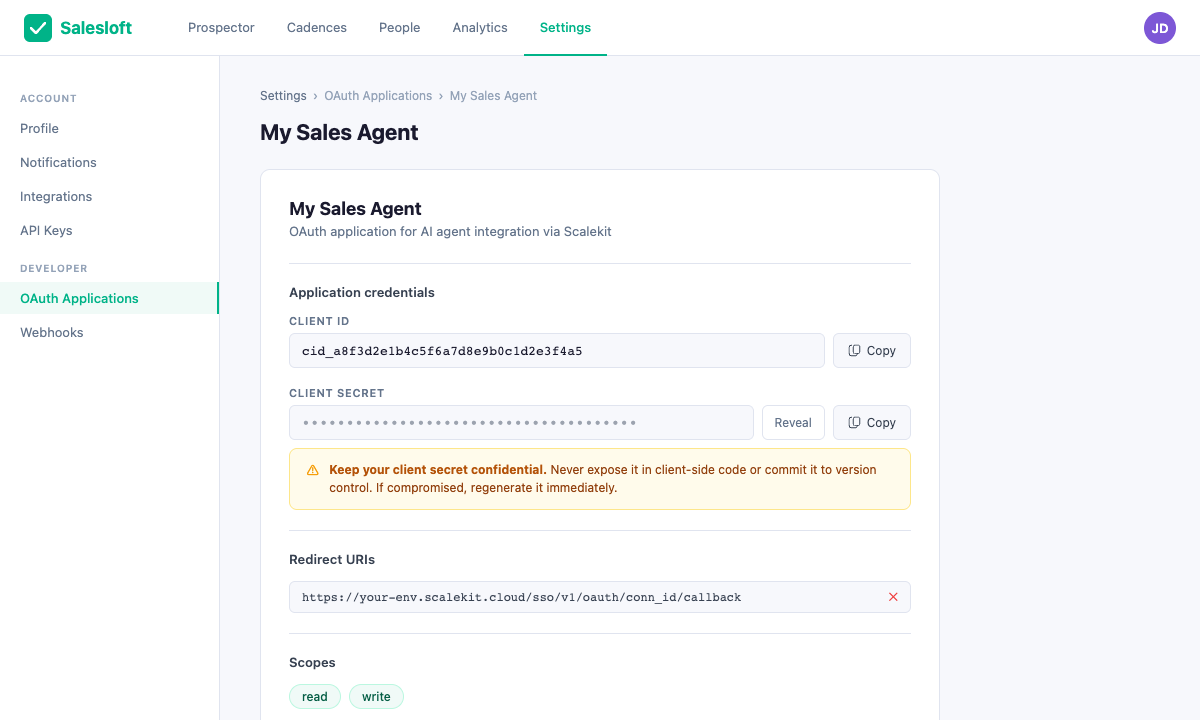
Sign in to Salesloft and go to Settings → Your Applications → OAuth Applications.
-
Click + New Application.
-
Fill in the application name (e.g.,
My Sales Agent) and description. -
In the Redirect URI field, paste the redirect URI from Scalekit (see step 2 — you can return to add it after).
-
Under Scopes, select the permissions your agent needs:
Scope Enables readRead access to contacts, cadences, and activities writeCreate and update records -
Click Save. On the application detail page, copy your Client ID and Client Secret.
-
-
Create a connection in Scalekit
- In Scalekit dashboard, go to AgentKit > Connections > Create Connection. Find Salesloft and click Create.
- Click Use your own credentials and copy the Redirect URI:
https://<SCALEKIT_ENVIRONMENT_URL>/sso/v1/oauth/<CONNECTION_ID>/callback - Return to your Salesloft OAuth app and add this redirect URI.
- Back in Scalekit, enter your Client ID, Client Secret, and the Permissions (scopes) you selected.
- Note the Connection name (e.g.,
salesloft) — use this asconnection_namein your code. - Click Save.
-
Add a connected account
Via dashboard (for testing)
- Open the connection and click the Connected Accounts tab → Add account.
- Enter a User ID and click Save. You will be redirected to Salesloft to authorize access.
Via API (for production)
const { link } = await scalekit.actions.getAuthorizationLink({connectionName: 'salesloft',identifier: 'user_123',});// Redirect your user to `link` to authorize accessconsole.log('Authorize at:', link);response = scalekit_client.actions.get_authorization_link(connection_name="salesloft",identifier="user_123")# Redirect your user to response.link to authorize accessprint("Authorize at:", response.link)
-
Authorize a user and make your first call
quickstart.mts import { ScalekitClient } from '@scalekit-sdk/node'import 'dotenv/config'import { createInterface } from 'node:readline/promises'const scalekit = new ScalekitClient(process.env.SCALEKIT_ENVIRONMENT_URL,process.env.SCALEKIT_CLIENT_ID,process.env.SCALEKIT_CLIENT_SECRET,)const actions = scalekit.actionsconst connector = 'salesloft'const identifier = 'user_123'// Generate an authorization link for the userconst { link } = await actions.getAuthorizationLink({ connectionName: connector, identifier })console.log('Authorize Salesloft:', link)const rl = createInterface({ input: process.stdin, output: process.stdout })await rl.question('Press Enter after authorizing...')rl.close()// Make your first callconst result = await actions.executeTool({connector,identifier,toolName: 'salesloft_account_stages_list',toolInput: {},})console.log(result)Terminal window npx tsx quickstart.mtsquickstart.py import osfrom scalekit import ScalekitClientfrom dotenv import load_dotenvload_dotenv()scalekit_client = ScalekitClient(env_url=os.getenv("SCALEKIT_ENVIRONMENT_URL"),client_id=os.getenv("SCALEKIT_CLIENT_ID"),client_secret=os.getenv("SCALEKIT_CLIENT_SECRET"),)actions = scalekit_client.actionsconnection_name = "salesloft"identifier = "user_123"# Generate an authorization link for the userlink_response = actions.get_authorization_link(connection_name=connection_name,identifier=identifier,)print("Authorize Salesloft:", link_response.link)input("Press Enter after authorizing...")# Make your first callresult = actions.execute_tool(tool_input={},tool_name="salesloft_account_stages_list",connection_name=connection_name,identifier=identifier,)print(result)Terminal window python quickstart.pyEach user signs in once. See Authorize a user for the full flow and statuses.
Tools
Pass the exact name toexecute_toolsalesloft_account_stages_getGet an account stage in Salesloft.Read-onlyFetch an account stage
Get an account stage in Salesloft. Returns the record (id, name, created_at, updated_at, order, active). Use this when you already have the id; use salesloft_account_stages_list to find records. Requires the account stage id.
Inputs
account_stage_idstringrequired- Account Stage ID Find it with salesloft_account_stages_list.
salesloft_account_stages_listFetch the account pipeline stages configured in Salesloft -- useful context for interpreting or setting an account's company_stage_id.Read-onlyList Account Stages
Fetch the account pipeline stages configured in Salesloft -- useful context for interpreting or setting an account's company_stage_id. The records can be filtered, paged, and sorted.
Inputs
created_at_gtstring- Filter stages created after this ISO8601 timestamp (exclusive)
created_at_ltstring- Filter stages created before this ISO8601 timestamp (exclusive)
idsstring- Filter by specific account stage IDs. Comma-separated list of IDs.
include_paging_countsboolean- Whether to include total count and page count in the response metadata
limit_paging_countsboolean- Specifies whether the max limit of 10k records should be applied to pagination counts
namestring- Filter account stages by name.
pageinteger- Page number for pagination, starting from 1
per_pageinteger- Number of results per page in the range [1, 100]. Defaults to 25.
sort_bystring- Field to sort results by. Common values: name, created_at, updated_at. Defaults to updated_at.
sort_directionstring- Direction of sort: ASC or DESC. Defaults to DESC.
updated_at_gtstring- Filter stages updated after this ISO8601 timestamp (exclusive)
updated_at_ltstring- Filter stages updated before this ISO8601 timestamp (exclusive)
salesloft_account_team_member_roles_listList CRM Account Team Member Roles in Salesloft.Read-onlyList CRM Account Team Member Roles
List CRM Account Team Member Roles in Salesloft. Returns a page of records (id, name) with paging metadata. Use this to browse or find ids. Page with page and per_page (max 100); set include_paging_counts for totals.
Inputs
include_paging_countsboolean- Whether to include total_pages and total_count in the metadata. Defaults to false.
limit_paging_countsboolean- Specifies whether the max limit of 10k records should be applied to pagination counts. Affects the total_count and total_pages data.
pageinteger- The current page to fetch results from. Defaults to 1.
per_pageinteger- How many records to show per page in the range [1, 100]. Defaults to 25.
searchstring- Search term to filter Account Team Members Roles.
sort_bystring- Key to sort on, must be one of: created_at, updated_at. Defaults to updated_at.
sort_directionstring- Direction to sort in, must be one of: ASC, DESC. Defaults to DESC.
salesloft_account_tiers_getGet an account tier in Salesloft.Read-onlyFetch an account tier
Get an account tier in Salesloft. Returns the record (id, name, order, created_at, updated_at, active). Use this when you already have the id; use salesloft_account_tiers_list to find records. Requires the account tier id.
Inputs
account_tier_idstringrequired- Account Tier ID Find it with salesloft_account_tiers_list.
salesloft_account_tiers_listList Account Tiers in Salesloft.Read-onlyList Account Tiers
List Account Tiers in Salesloft. Returns a page of records (id, name, order, created_at, updated_at, active) with paging metadata. Use this to browse or find ids; use salesloft_account_tiers_get to read one record. Page with page and per_page (max 100); set include_paging_counts for totals.
Inputs
activeboolean- Filters Account Tiers by the value of the active flag.
idsarray- IDs of Account Tiers to fetch. If a record can't be found, that record won't be returned and your request will be successful.
include_paging_countsboolean- Whether to include total_pages and total_count in the metadata. Defaults to false.
limit_paging_countsboolean- Specifies whether the max limit of 10k records should be applied to pagination counts. Affects the total_count and total_pages data.
namearray- Filters Account Tiers by name. Multiple names can be applied.
pageinteger- The current page to fetch results from. Defaults to 1.
per_pageinteger- How many records to show per page in the range [1, 100]. Defaults to 25.
sort_bystring- Key to sort on, must be one of: created_at, updated_at, order. Defaults to updated_at.
sort_directionstring- Direction to sort in, must be one of: ASC, DESC. Defaults to DESC.
salesloft_account_types_listList distinct account types in Salesloft.Read-onlyList distinct account types
List distinct account types in Salesloft. Returns a page of records (name) with paging metadata. Use this to browse or find ids. No prerequisites.
Inputs
This tool takes no inputs.
salesloft_accounts_getFetch a single account record from Salesloft by its ID.Read-onlyGet Account
Fetch a single account record from Salesloft by its ID.
Inputs
account_idintegerrequired- The unique identifier of the account to fetch
salesloft_accounts_listFetch multiple account records from Salesloft.Read-onlyList Accounts
Fetch multiple account records from Salesloft. The records can be filtered by domain, owner, tags, timestamps, and more, and paged and sorted according to the respective parameters.
Inputs
account_stage_idinteger- Filter accounts by account stage ID
account_tier_idinteger- Filter accounts by account tier ID
account_typestring- Filter accounts by type (e.g. prospect, customer, partner)
archivedboolean- Filter to return archived accounts only
citystring- Filter accounts by city
countrystring- Filter accounts by country
created_at_gtstring- Filter accounts created after this ISO8601 timestamp (exclusive)
created_at_gtestring- Filter accounts created at or after this ISO8601 timestamp (inclusive)
created_at_ltstring- Filter accounts created before this ISO8601 timestamp (exclusive)
created_at_ltestring- Filter accounts created at or before this ISO8601 timestamp (inclusive)
crm_idstring- Filter accounts by CRM record ID
domainstring- Filter accounts by domain. Domains are unique and lowercase.
has_open_opportunityboolean- Filter to accounts that have an open opportunity
idsstring- Filter by specific account IDs. Comma-separated list of IDs.
include_paging_countsboolean- Whether to include total count and page count in the response metadata
industrystring- Filter accounts by industry
last_contacted_gtstring- Filter accounts last contacted after this ISO8601 timestamp (exclusive)
last_contacted_gtestring- Filter accounts last contacted at or after this ISO8601 timestamp (inclusive)
last_contacted_ltstring- Filter accounts last contacted before this ISO8601 timestamp (exclusive)
last_contacted_ltestring- Filter accounts last contacted at or before this ISO8601 timestamp (inclusive)
limit_paging_countsboolean- Limit the paging counts returned in the response metadata
localesstring- Filter accounts by locale. Comma-separated list of locales.
namestring- Filter accounts by name
owner_crm_idstring- Filter accounts by the CRM ID of the owner
owner_idinteger- Filter accounts by owner user ID
owner_is_activeboolean- Filter accounts whose owner is active (true) or inactive (false)
pageinteger- Page number for pagination, starting from 1
per_pageinteger- Number of results per page in the range [1, 100]. Defaults to 25.
prospector_engagement_levelstring- Filter accounts by prospector engagement level
sort_bystring- Field to sort results by. Accepted values: created_at, updated_at, last_contacted_at, account_stage, account_stage_name, account_tier, account_tier_name, name, counts_people, prospector_engagement_score. Defaults to updated_at.
sort_directionstring- Direction of sort: ASC or DESC. Defaults to DESC.
statestring- Filter accounts by state or region
tagstring- Filter accounts by tag name
tag_idinteger- Filter accounts by tag ID
updated_at_gtstring- Filter accounts updated after this ISO8601 timestamp (exclusive)
updated_at_gtestring- Filter accounts updated at or after this ISO8601 timestamp (inclusive)
updated_at_ltstring- Filter accounts updated before this ISO8601 timestamp (exclusive)
updated_at_ltestring- Filter accounts updated at or before this ISO8601 timestamp (inclusive)
websitestring- Filter accounts by website URL
your_related_accounts_activeboolean- Filter to accounts where you have an active relationship
salesloft_action_details_call_instructions_getGet a call instructions in Salesloft.Read-onlyFetch a call instructions
Get a call instructions in Salesloft. Returns the record (id, created_at, updated_at, instructions). Use this when you already have the id; use salesloft_action_details_call_instructions_list to find records. Requires the call instruction id.
Inputs
call_instruction_idstringrequired- Call instructions ID Find it with salesloft_action_details_call_instructions_list.
salesloft_action_details_call_instructions_listList call instructions in Salesloft.Read-onlyList call instructions
List call instructions in Salesloft. Returns a page of records (id, created_at, updated_at, instructions) with paging metadata. Use this to browse or find ids; use salesloft_action_details_call_instructions_get to read one record. Page with page and per_page (max 100); set include_paging_counts for totals.
Inputs
idsarray- IDs of call instructions to fetch.
include_paging_countsboolean- Whether to include total_pages and total_count in the metadata. Defaults to false.
limit_paging_countsboolean- Specifies whether the max limit of 10k records should be applied to pagination counts. Affects the total_count and total_pages data.
pageinteger- The current page to fetch results from. Defaults to 1.
per_pageinteger- How many records to show per page in the range [1, 100]. Defaults to 25.
sort_bystring- Key to sort on, must be one of: created_at, updated_at. Defaults to updated_at.
sort_directionstring- Direction to sort in, must be one of: ASC, DESC. Defaults to DESC.
salesloft_actions_getFetch a single action record from Salesloft by its ID.Read-onlyGet Action
Fetch a single action record from Salesloft by its ID. Actions represent individual cadence steps that are due to be performed.
Inputs
action_idintegerrequired- The unique identifier of the action to fetch
salesloft_actions_listFetch multiple action records from Salesloft.Read-onlyList Actions
Fetch multiple action records from Salesloft. Actions are individual steps within cadences that are due to be performed. The records can be filtered, paged, and sorted.
Inputs
cadence_idinteger- Filter actions by cadence ID
due_on_gtstring- Filter actions with due date after this ISO8601 timestamp (exclusive)
due_on_gtestring- Filter actions with due date at or after this ISO8601 timestamp (inclusive)
due_on_ltstring- Filter actions with due date before this ISO8601 timestamp (exclusive)
due_on_ltestring- Filter actions with due date at or before this ISO8601 timestamp (inclusive)
idsstring- Filter by specific action IDs. Comma-separated list of IDs.
include_paging_countsboolean- Whether to include total count and page count in the response metadata
limit_paging_countsboolean- Limit the paging counts returned in the response metadata
multitouch_group_idinteger- Filter actions by multitouch group ID
pageinteger- Page number for pagination, starting from 1
per_pageinteger- Number of results per page in the range [1, 100]. Defaults to 25.
person_idinteger- Filter actions by associated person ID
sort_bystring- Field to sort results by. Accepted values: created_at, updated_at. Defaults to updated_at.
sort_directionstring- Direction of sort: ASC or DESC. Defaults to DESC.
step_idinteger- Filter actions by cadence step ID
typestring- Filter actions by type (e.g. email, phone, other)
updated_at_gtstring- Filter actions updated after this ISO8601 timestamp (exclusive)
updated_at_gtestring- Filter actions updated at or after this ISO8601 timestamp (inclusive)
updated_at_ltstring- Filter actions updated before this ISO8601 timestamp (exclusive)
updated_at_ltestring- Filter actions updated at or before this ISO8601 timestamp (inclusive)
user_guidstring- Filter actions by user GUID
salesloft_activity_histories_listFetch the customer's past activities from the Salesloft Activity Feed, a single combined stream of everything that happened across the account: calls, emails sent/received, notes, meetings booked/held, completed cadence steps, successes, tasks, voicemails, and opportunity changes.Read-onlyList Activity Histories
Fetch the customer's past activities from the Salesloft Activity Feed, a single combined stream of everything that happened across the account: calls, emails sent/received, notes, meetings booked/held, completed cadence steps, successes, tasks, voicemails, and opportunity changes.
Inputs
pageinteger- Page number for pagination, starting from 1.
per_pageinteger- Number of results per page in the range [1, 100]. Defaults to 25.
salesloft_audit_reports_getGet an audit report in Salesloft.Read-onlyFetch an audit report
Get an audit report in Salesloft. Returns the record (user_guid, until, status, started_on, since, requestor_name, requestor_email, and more). Use this when you already have the id; use salesloft_audit_reports_list to find records. Requires the audit report id.
Inputs
audit_report_idintegerrequired- The id of the audit report to show Find it with salesloft_audit_reports_list.
salesloft_audit_reports_listList generated audit reports in Salesloft.Read-onlyList generated audit reports
List generated audit reports in Salesloft. Returns a page of records (user_guid, until, status, started_on, since, requestor_name, and more) with paging metadata. Use this to browse or find ids; use salesloft_audit_reports_get to read one record. Page with page and per_page (max 100); set include_paging_counts for totals.
Inputs
include_paging_countsboolean- Whether to include total_pages and total_count in the metadata. Defaults to false.
pageinteger- The current page to fetch results from. Defaults to 1.
per_pageinteger- How many records to show per page in the range [1, 100]. Defaults to 25.
sort_bystring- Key to sort on, must be one of: inserted_at. Defaults to inserted_at.
sort_directionstring- Direction to sort in, must be one of: ASC, DESC. Defaults to DESC.
salesloft_bulk_jobs_getGet a bulk job in Salesloft.Read-onlyFetch a bulk job
Get a bulk job in Salesloft. Returns the record (updated_at, type, total, state, started_at, scopes, ready_to_execute, and more). Use this when you already have the id; use salesloft_bulk_jobs_list to find records. Requires the bulk job id.
Inputs
bulk_job_idintegerrequired- The id for the Bulk Job Find it with salesloft_bulk_jobs_list.
salesloft_bulk_jobs_job_data_listList job data for a bulk job in Salesloft.Read-onlyList job data for a bulk job
List job data for a bulk job in Salesloft. Returns a page of records (status, resource, record, id, error) with paging metadata. Use this to browse or find ids. Requires the bulk jobs id.
Inputs
bulk_jobs_idintegerrequired- The id for the bulk job to which the job data relates
id_gtinteger- Filter by id using comparison operators. Only supports greater than (gt) comparison (i.e. id[gt]=123).
per_pageinteger- How many records to show per page in the range [1, 100]. Defaults to 25.
statusarray- Filter by result status. Accepts multiple statuses. Each status must be one of pending, success, error, retrying, cancelled.
salesloft_bulk_jobs_listList bulk jobs in Salesloft.Read-onlyList bulk jobs
List bulk jobs in Salesloft. Returns a page of records (updated_at, type, total, state, started_at, scopes, and more) with paging metadata. Use this to browse or find ids; use salesloft_bulk_jobs_get to read one record. No prerequisites.
Inputs
id_gtinteger- Filter by id using comparison operators. Only supports greater than (gt) comparison (i.e. id[gt]=123).
per_pageinteger- How many records to show per page in the range [1, 100]. Defaults to 25.
statearray- The state of the bulk job. Accepts multiple states. Each state must be one of: open, executing, done.
salesloft_bulk_jobs_results_listList job data for a completed bulk job.Read-onlyList job data for a completed bulk job.
List job data for a completed bulk job. in Salesloft. Returns a page of records (status, resource, record, id, error) with paging metadata. Use this to browse or find ids. Requires the bulk jobs id.
Inputs
bulk_jobs_idintegerrequired- The id for the Bulk Job
id_gtinteger- Filter by id using comparison operators. Only supports greater than (gt) comparison (i.e. id[gt]=123).
per_pageinteger- How many records to show per page in the range [1, 100]. Defaults to 25.
statusarray- Filter by result status. Accepts multiple statuses. Each status must be one of pending, success, error, retrying, cancelled.
salesloft_cadence_collection_exports_getExport a cadence collection in Salesloft.Read-onlyExport a cadence collection
Export a cadence collection in Salesloft. Returns the record (cadence_collection_content). Use this when you already have the id. Requires the cadence collection export id.
Inputs
cadence_collection_export_idstringrequired- Cadence Collection ID
salesloft_cadence_collections_getGet a cadence collection in Salesloft.Read-onlyFetch a cadence collection
Get a cadence collection in Salesloft. Returns the record (id, name, description, account_id, team_collection, starred, bounced_stage_setting_id, and more). Use this when you already have the id; use salesloft_cadence_collections_list to find records. Requires the cadence collection id.
Inputs
cadence_collection_idintegerrequired- ID of the cadence collection Find it with salesloft_cadence_collections_list.
salesloft_cadence_collections_listList cadence collections in Salesloft.Read-onlyList cadence collections
List cadence collections in Salesloft. Returns a page of records (id, name, description, account_id, team_collection, starred, and more) with paging metadata. Use this to browse or find ids; use salesloft_cadence_collections_get to read one record. Page with page and per_page (max 100); set include_paging_counts for totals.
Inputs
collection_typestring- Filter by collection type: 'team' or 'personal'.
include_paging_countsboolean- Whether to include total_pages and total_count in the metadata. Defaults to false.
limit_paging_countsboolean- Specifies whether the max limit of 10k records should be applied to pagination counts. Affects the total_count and total_pages data.
pageinteger- The current page to fetch results from. Defaults to 1.
per_pageinteger- How many records to show per page in the range [1, 100]. Defaults to 25.
searchstring- Filters cadence collections by name.
sort_bystring- Key to sort on, must be one of: name. When omitted, results are ordered by starred collections first, then most recently created.
sort_directionstring- Direction to sort in, must be one of: ASC, DESC. Defaults to ASC. Only applies when sort_by is provided; otherwise it is ignored.
salesloft_cadence_exports_getExport a cadence in Salesloft.Read-onlyExport a cadence
Export a cadence in Salesloft. Returns the record (cadence_content). Use this when you already have the id. Requires the cadence export id.
Inputs
cadence_export_idstringrequired- Cadence ID
salesloft_cadence_memberships_getFetch a single cadence membership record from Salesloft by its ID.Read-onlyGet Cadence Membership
Fetch a single cadence membership record from Salesloft by its ID.
Inputs
membership_idintegerrequired- The unique identifier of the cadence membership to fetch
salesloft_cadence_memberships_listFetch multiple cadence membership records from Salesloft.Read-onlyList Cadence Memberships
Fetch multiple cadence membership records from Salesloft. A cadence membership is the association between a person and their current and historical time on a cadence.
Inputs
cadence_idinteger- Filter memberships by cadence ID
currently_on_cadenceboolean- Filter to memberships where the person is currently active on the cadence
idsstring- Filter by specific membership IDs. Comma-separated list of IDs.
include_paging_countsboolean- Whether to include total count and page count in the response metadata
limit_paging_countsboolean- Limit the paging counts returned in the response metadata
pageinteger- Page number for pagination, starting from 1
per_pageinteger- Number of results per page in the range [1, 100]. Defaults to 25.
person_idinteger- Filter memberships by person ID
sort_bystring- Field to sort results by. Accepted values: added_at, updated_at. Defaults to updated_at.
sort_directionstring- Direction of sort: ASC or DESC. Defaults to DESC.
updated_at_gtstring- Filter memberships updated after this ISO8601 timestamp (exclusive)
updated_at_gtestring- Filter memberships updated at or after this ISO8601 timestamp (inclusive)
updated_at_ltstring- Filter memberships updated before this ISO8601 timestamp (exclusive)
updated_at_ltestring- Filter memberships updated at or before this ISO8601 timestamp (inclusive)
salesloft_cadence_stats_getGet stats for a cadence in Salesloft.Read-onlyFetch stats for a cadence
Get stats for a cadence in Salesloft. Returns the record (cadence_people_count, people_acted_on_count, in_progress_people_count, sent_emails_count, bounced_count, delivered_count, calls_count, and more). Use this when you already have the id. Requires the cadence stat id.
Inputs
cadence_stat_idstringrequired- Cadence ID
salesloft_cadences_getFetch a single cadence record from Salesloft by its ID.Read-onlyGet Cadence
Fetch a single cadence record from Salesloft by its ID.
Inputs
cadence_idintegerrequired- The unique identifier of the cadence to fetch
salesloft_cadences_listFetch multiple cadence records from Salesloft.Read-onlyList Cadences
Fetch multiple cadence records from Salesloft. The records can be filtered, paged, and sorted according to the respective parameters.
Inputs
archivedboolean- Filter to return archived cadences
group_idsstring- Filter cadences by group IDs. Comma-separated list or JSON array string.
idsstring- Filter by specific cadence IDs. Comma-separated list of IDs.
include_paging_countsboolean- Whether to include total count and page count in the response metadata
limit_paging_countsboolean- Limit the paging counts returned in the response metadata
namestring- Filter cadences by name
override_contact_restrictionsboolean- Override contact restrictions when filtering cadences
owned_by_guidstring- Filter cadences by owner GUID
pageinteger- Page number for pagination, starting from 1
pending_actions_assigned_tostring- Filter cadences by the user GUID that pending actions are assigned to
people_addableboolean- Filter to cadences that people can be added to
per_pageinteger- Number of results per page in the range [1, 100]. Defaults to 25.
sharedboolean- Filter to cadences that are shared
sort_bystring- Field to sort results by. Accepted values: created_at, updated_at, name. Defaults to updated_at.
sort_directionstring- Direction of sort: ASC or DESC. Defaults to DESC.
tag_idsstring- Filter cadences by tag IDs. Comma-separated list of tag IDs.
team_cadenceboolean- Filter by team cadences (true) or personal cadences (false)
updated_at_gtstring- Filter cadences updated after this ISO8601 timestamp (exclusive)
updated_at_gtestring- Filter cadences updated at or after this ISO8601 timestamp (inclusive)
updated_at_ltstring- Filter cadences updated before this ISO8601 timestamp (exclusive)
updated_at_ltestring- Filter cadences updated at or before this ISO8601 timestamp (inclusive)
salesloft_cadences_step_groups_getGet a step group in Salesloft.Read-onlyFetch a step group
Get a step group in Salesloft. Returns the record (id, created_at, updated_at, day, order, multitouch_enabled, automated, and more). Use this when you already have the id; use salesloft_cadences_step_groups_list to find records. Requires the cadence id and the step group id.
Inputs
cadence_idstringrequired- Cadence ID
step_group_idstringrequired- Step Group ID Find it with salesloft_cadences_step_groups_list.
salesloft_cadences_step_groups_listList step groups in Salesloft.Read-onlyList step groups
List step groups in Salesloft. Returns a page of records (id, created_at, updated_at, day, order, multitouch_enabled, and more) with paging metadata. Use this to browse or find ids; use salesloft_cadences_step_groups_get to read one record. Requires the cadence id. Page with page and per_page (max 100); set include_paging_counts for totals.
Inputs
cadence_idstringrequired- Cadence ID
dayinteger- Filter by the day the step group is scheduled on.
idsarray- IDs of step groups to fetch.
include_paging_countsboolean- Whether to include total_pages and total_count in the metadata. Defaults to false.
limit_paging_countsboolean- Specifies whether the max limit of 10k records should be applied to pagination counts. Affects the total_count and total_pages data.
pageinteger- The current page to fetch results from. Defaults to 1.
per_pageinteger- How many records to show per page in the range [1, 100]. Defaults to 25.
salesloft_calendar_availabilities_getGet open calendar time slots for the connected Salesloft user between a start and end date.Read-onlyGet Calendar Availabilities
Get open calendar time slots for the connected Salesloft user between a start and end date. Returns the record (calendar_date, meeting_duration, total_available_count, calendar_available_times). Use this to find open meeting times before booking one with salesloft_calendar_events_create. No prerequisites.
Inputs
durationintegerrequired- Duration of desired open time in minutes.
end_datestringrequired- Availability end date.
start_datestringrequired- Availability start date.
client_tzstring- Browser timezone.
with_slotsboolean- Include available slots.
salesloft_calendar_events_listList calendar events in Salesloft.Read-onlyList calendar events
List calendar events in Salesloft. Returns a page of records (end_time, attendees, created_at, title, time_zone, last_occurrence_at, and more) with paging metadata. Use this to browse or find ids. Page with page and per_page (max 100); set include_paging_counts for totals.
Inputs
end_timestring- Upper bound (exclusive) for a calendar event's start time to filter by. Must be in ISO 8601 format. Example: `2022-02-14T10:12:59+00:00`.
include_paging_countsboolean- Whether to include total_pages and total_count in the metadata. Defaults to false.
pageinteger- The current page to fetch results from. Defaults to 1.
per_pageinteger- How many records to show per page in the range [1, 100]. Defaults to 25.
sort_bystring- Key to sort on, must be one of: start_time. Defaults to start_time.
sort_directionstring- Direction to sort in, must be one of: ASC, DESC. Defaults to DESC.
start_timestring- Lower bound (inclusive) for a calendar event's end time to filter by. Must be in ISO 8601 format. Example: `2022-02-14T10:12:59+00:00`.
user_guidstring- user_guid of the user who created or included as a guest to the event.
salesloft_calendar_events_with_recurring_listList calendar events with recurring occurrences in Salesloft.Read-onlyList calendar events with recurring occurrences
List calendar events with recurring occurrences in Salesloft. Returns a page of records (end_time, attendees, created_at, title, time_zone, last_occurrence_at, and more) with paging metadata. Use this to browse or find ids. Page with page and per_page (max 100); set include_paging_counts for totals.
Inputs
end_timestringrequired- Upper bound (exclusive) for a calendar event's start time to filter by. Must be in ISO 8601 format. Example: `2022-02-14T10:12:59+00:00`.
start_timestringrequired- Lower bound (inclusive) for a calendar event's end time to filter by. Must be in ISO 8601 format. Example: `2022-02-14T10:12:59+00:00`.
include_paging_countsboolean- Whether to include total_pages and total_count in the metadata. Defaults to false.
pageinteger- The current page to fetch results from. Defaults to 1.
per_pageinteger- How many records to show per page in the range [1, 100]. Defaults to 25.
sort_bystring- Key to sort on, must be one of: start_time. Defaults to start_time.
sort_directionstring- Direction to sort in, must be one of: ASC, DESC. Defaults to DESC.
user_guidstring- user_guid of the user who created or included as a guest to the event.
salesloft_call_data_records_getGet a call data record in Salesloft.Read-onlyFetch a call data record
Get a call data record in Salesloft. Returns the record (user, updated_at, to, status, started_at, recording, id, and more). Use this when you already have the id; use salesloft_call_data_records_list to find records. Requires the call data record id.
Inputs
call_data_record_idintegerrequired- The ID of the call data record Find it with salesloft_call_data_records_list.
salesloft_call_data_records_listList call data records in Salesloft.Read-onlyList call data records
List call data records in Salesloft. Returns a page of records (user, updated_at, to, status, started_at, recording, and more) with paging metadata. Use this to browse or find ids; use salesloft_call_data_records_get to read one record. Page with page and per_page (max 100); set include_paging_counts for totals.
Inputs
call_uuidsarray- UUIDs of calls to fetch call data records for. If a record can't be found, that record won't be returned and your request will be successful.
created_atarray- Equality filters that are applied to the created_at field. A single filter can be used by itself or combined with other filters to create a range.
directionstring- Filters by specified direction (inbound or outbound).
dispositionstring- Filters by specified disposition.
group_idinteger- Filters list by group id.
has_callboolean- Return only call data records which have or do not have a call logged for them.
idsarray- IDs of call data records to fetch. If a record can't be found, that record won't be returned and your request will be successful.
include_paging_countsboolean- Whether to include total_pages and total_count in the metadata. Defaults to false.
limit_paging_countsboolean- Specifies whether the max limit of 10k records should be applied to pagination counts. Affects the total_count and total_pages data.
pageinteger- The current page to fetch results from. Defaults to 1.
per_pageinteger- How many records to show per page in the range [1, 100]. Defaults to 25.
person_idarray- Filters list by person_id. Multiple person ids can be applied.
recordings_onlyboolean- Filters based on the recording existence.
sentimentstring- Filters by specified sentiment.
sort_bystring- Key to sort on, must be one of: created_at, updated_at. Defaults to created_at.
sort_directionstring- Direction to sort in, must be one of: ASC, DESC. Defaults to DESC.
started_atstring- Filter by call start time. Supports gt, gte, lt and lte. Combine with more filters to create a range.
statusstring- Filters by specified status.
updated_atarray- Equality filters that are applied to the updated_at field. A single filter can be used by itself or combined with other filters to create a range.
user_guidarray- Filters list to only include guids.
salesloft_call_dispositions_getGet a call disposition in Salesloft.Read-onlyFetch a call disposition
Get a call disposition in Salesloft. Returns the record (id, created_at, updated_at, name, crm_value). Use this when you already have the id; use salesloft_call_dispositions_list to find records. Requires the call disposition id.
Inputs
call_disposition_idintegerrequired- Call Disposition ID Find it with salesloft_call_dispositions_list.
salesloft_call_dispositions_listList call dispositions in Salesloft.Read-onlyList call dispositions
List call dispositions in Salesloft. Returns a page of records (id, created_at, updated_at, name, crm_value) with paging metadata. Use this to browse or find ids; use salesloft_call_dispositions_get to read one record. Page with page and per_page (max 100); set include_paging_counts for totals.
Inputs
include_paging_countsboolean- Whether to include total_pages and total_count in the metadata. Defaults to false.
limit_paging_countsboolean- Specifies whether the max limit of 10k records should be applied to pagination counts. Affects the total_count and total_pages data.
pageinteger- The current page to fetch results from. Defaults to 1.
per_pageinteger- How many records to show per page in the range [1, 100]. Defaults to 25.
sort_bystring- Key to sort on, must be one of: name, updated_at. Defaults to name.
sort_directionstring- Direction to sort in, must be one of: ASC, DESC. Defaults to ASC.
salesloft_call_sentiments_getGet a call sentiment in Salesloft.Read-onlyFetch a call sentiment
Get a call sentiment in Salesloft. Returns the record (id, created_at, updated_at, name). Use this when you already have the id; use salesloft_call_sentiments_list to find records. Requires the call sentiment id.
Inputs
call_sentiment_idintegerrequired- Call Sentiment ID Find it with salesloft_call_sentiments_list.
salesloft_call_sentiments_listList call sentiments in Salesloft.Read-onlyList call sentiments
List call sentiments in Salesloft. Returns a page of records (id, created_at, updated_at, name) with paging metadata. Use this to browse or find ids; use salesloft_call_sentiments_get to read one record. Page with page and per_page (max 100); set include_paging_counts for totals.
Inputs
include_paging_countsboolean- Whether to include total_pages and total_count in the metadata. Defaults to false.
limit_paging_countsboolean- Specifies whether the max limit of 10k records should be applied to pagination counts. Affects the total_count and total_pages data.
namestring- Filters call sentiments by name.
pageinteger- The current page to fetch results from. Defaults to 1.
per_pageinteger- How many records to show per page in the range [1, 100]. Defaults to 25.
sort_bystring- Key to sort on, must be one of: name, updated_at. Defaults to name.
sort_directionstring- Direction to sort in, must be one of: ASC, DESC. Defaults to ASC.
salesloft_calls_getFetch a single call activity record from Salesloft by its ID.Read-onlyGet Call
Fetch a single call activity record from Salesloft by its ID.
Inputs
call_idintegerrequired- The unique identifier of the call to fetch
salesloft_calls_listFetch multiple call activity records from Salesloft.Read-onlyList Calls
Fetch multiple call activity records from Salesloft. The records can be filtered by person, user, sentiment, disposition, and timestamps, and paged and sorted.
Inputs
connectedboolean- Filter to calls where a connection was made
created_at_gtstring- Filter calls created after this ISO8601 timestamp (exclusive)
created_at_gtestring- Filter calls created at or after this ISO8601 timestamp (inclusive)
created_at_ltstring- Filter calls created before this ISO8601 timestamp (exclusive)
created_at_ltestring- Filter calls created at or before this ISO8601 timestamp (inclusive)
dispositionstring- Filter calls by disposition (e.g. answered, voicemail, no_answer)
idsstring- Filter by specific call IDs. Comma-separated list of IDs.
include_paging_countsboolean- Whether to include total count and page count in the response metadata
limit_paging_countsboolean- Limit the paging counts returned in the response metadata
pageinteger- Page number for pagination, starting from 1
per_pageinteger- Number of results per page in the range [1, 100]. Defaults to 25.
person_idinteger- Filter calls by associated person ID
positiveboolean- Filter to calls marked as positive
sentimentstring- Filter calls by sentiment (e.g. positive, neutral, negative)
sort_bystring- Field to sort results by. Accepted values: created_at, updated_at. Defaults to updated_at.
sort_directionstring- Direction of sort: ASC or DESC. Defaults to DESC.
updated_at_gtstring- Filter calls updated after this ISO8601 timestamp (exclusive)
updated_at_gtestring- Filter calls updated at or after this ISO8601 timestamp (inclusive)
updated_at_ltstring- Filter calls updated before this ISO8601 timestamp (exclusive)
updated_at_ltestring- Filter calls updated at or before this ISO8601 timestamp (inclusive)
user_guidstring- Filter calls by user GUID
salesloft_conversation_extensive_getGet one Salesloft conversation together with its AI-generated intelligence in a single call.Read-onlyGet Conversation (Extensive)
Get one Salesloft conversation together with its AI-generated intelligence in a single call. Returns the conversation record plus, when Salesloft has generated them, the AI summary, action items, key moments, attendees, MEDDPICC fields, and owner_email. Use this for the AI insights of one conversation. Use salesloft_transcriptions_list with salesloft_transcription_sentences_list for the verbatim transcript, and salesloft_conversation_recording_get for the recording media. Requires a conversation ID from salesloft_conversations_list and the Conversations add-on on the connected Salesloft account.
Inputs
conversation_idstringrequired- ID (UUID) of the Salesloft conversation to fetch, from salesloft_conversations_list. Example: 71d91aec-80bc-463b-b072-475aea744805
salesloft_conversation_recording_getGet the recording media for one Salesloft conversation.Read-onlyGet Conversation Recording
Get the recording media for one Salesloft conversation. Returns the conversation record together with its media (recording) details. Use this when you need the call audio or video. Use salesloft_conversation_extensive_get for the AI summary and action items instead. Requires a conversation ID from salesloft_conversations_list. The connected Salesloft user must hold the 'Download Conversations' role permission, otherwise the call returns 403.
Inputs
conversation_idstringrequired- ID (UUID) of the Salesloft conversation whose recording to fetch, from salesloft_conversations_list. Example: 71d91aec-80bc-463b-b072-475aea744805
salesloft_conversations_getGet a conversation in Salesloft.Read-onlyFetch a conversation
Get a conversation in Salesloft. Returns the record (id, duration, is_api, platform, media_type, organization_id, title, and more). Use this when you already have the id; use salesloft_conversations_list to find records. Requires the conversation id. Allowed OAuth scopes: public:all, system:all, internal, conversations:read.
Inputs
conversation_idstringrequired- Conversation ID Find it with salesloft_conversations_list.
salesloft_conversations_listFetch call/conversation-intelligence records (Salesloft Conversations) -- recorded and transcribed calls with engagement analytics.Read-onlyList Conversations
Fetch call/conversation-intelligence records (Salesloft Conversations) -- recorded and transcribed calls with engagement analytics. The records can be filtered, paged, and sorted. Requires the 'conversations:read' OAuth scope and the Conversations add-on to be enabled on the connected Salesloft account; if the add-on is not enabled, calls to this endpoint will fail even with valid credentials.
Inputs
call_idstring- Filter conversations by the associated call ID. Comma-separated list for multiple values.
created_at_gtstring- Filter conversations created after this ISO8601 timestamp (exclusive)
created_at_ltstring- Filter conversations created before this ISO8601 timestamp (exclusive)
idsstring- Filter by specific conversation IDs. Comma-separated list of IDs.
include_paging_countsboolean- Whether to include total count and page count in the response metadata
limit_paging_countsboolean- Specifies whether the max limit of 10k records should be applied to pagination counts
pageinteger- Page number for pagination, starting from 1
per_pageinteger- Number of results per page in the range [1, 100]. Defaults to 25.
sort_bystring- Field to sort results by. Common values: created_at, updated_at. Defaults to updated_at.
sort_directionstring- Direction of sort: ASC or DESC. Defaults to DESC.
updated_at_gtstring- Filter conversations updated after this ISO8601 timestamp (exclusive)
updated_at_ltstring- Filter conversations updated before this ISO8601 timestamp (exclusive)
user_idstring- Filter conversations by the user (rep) who took the call. Comma-separated list for multiple values.
salesloft_crm_account_team_members_listList CRM Account Team Members in Salesloft.Read-onlyList CRM Account Team Members
List CRM Account Team Members in Salesloft. Returns a page of records (id, crm_id, account_crm_id, user_crm_id, team_member_role, account_access_level, and more) with paging metadata. Use this to browse or find ids. Page with page and per_page (max 100); set include_paging_counts for totals.
Inputs
company_crm_idarray- crm_id of the company to fetch CRM Account Team Members for.
include_paging_countsboolean- Whether to include total_pages and total_count in the metadata. Defaults to false.
limit_paging_countsboolean- Specifies whether the max limit of 10k records should be applied to pagination counts. Affects the total_count and total_pages data.
pageinteger- The current page to fetch results from. Defaults to 1.
per_pageinteger- How many records to show per page in the range [1, 100]. Defaults to 25.
sort_bystring- Key to sort on, must be one of: created_at, updated_at. Defaults to updated_at.
sort_directionstring- Direction to sort in, must be one of: ASC, DESC. Defaults to DESC.
salesloft_crm_activities_getGet a crm activity in Salesloft.Read-onlyFetch a crm activity
Get a crm activity in Salesloft. Returns the record (id, created_at, updated_at, subject, description, crm_id, activity_type, and more). Use this when you already have the id; use salesloft_crm_activities_list to find records. Requires the crm activity id.
Inputs
crm_activity_idstringrequired- Crm activity ID Find it with salesloft_crm_activities_list.
salesloft_crm_activities_listList crm activities in Salesloft.Read-onlyList crm activities
List crm activities in Salesloft. Returns a page of records (id, created_at, updated_at, subject, description, crm_id, and more) with paging metadata. Use this to browse or find ids; use salesloft_crm_activities_get to read one record. Page with page and per_page (max 100); set include_paging_counts for totals.
Inputs
idsarray- IDs of crm activities to fetch.
include_paging_countsboolean- Whether to include total_pages and total_count in the metadata. Defaults to false.
limit_paging_countsboolean- Specifies whether the max limit of 10k records should be applied to pagination counts. Affects the total_count and total_pages data.
pageinteger- The current page to fetch results from. Defaults to 1.
per_pageinteger- How many records to show per page in the range [1, 100]. Defaults to 25.
sort_bystring- Key to sort on, must be one of: created_at, updated_at. Defaults to updated_at.
sort_directionstring- Direction to sort in, must be one of: ASC, DESC. Defaults to DESC.
updated_at_gtstring- Returns all matching records that are greater than the provided iso8601 timestamp. The comparison is done using microsecond precision.
updated_at_gtestring- Returns all matching records that are greater than or equal to the provided iso8601 timestamp. The comparison is done using microsecond precision.
updated_at_ltstring- Returns all matching records that are less than the provided iso8601 timestamp. The comparison is done using microsecond precision.
updated_at_ltestring- Returns all matching records that are less than or equal to the provided iso8601 timestamp. The comparison is done using microsecond precision.
salesloft_crm_activity_fields_listList crm activity fields in Salesloft.Read-onlyList crm activity fields
List crm activity fields in Salesloft. Returns a page of records (id, created_at, updated_at, title, salesforce_object_type, crm_object_type, and more) with paging metadata. Use this to browse or find ids. Page with page and per_page (max 100); set include_paging_counts for totals.
Inputs
editable_sourcestring- Return only records with this editable source.
include_paging_countsboolean- Whether to include total_pages and total_count in the metadata. Defaults to false.
limit_paging_countsboolean- Specifies whether the max limit of 10k records should be applied to pagination counts. Affects the total_count and total_pages data.
pageinteger- The current page to fetch results from. Defaults to 1.
per_pageinteger- How many records to show per page in the range [1, 100]. Defaults to 25.
sort_bystring- Key to sort on, must be one of: title, updated_at. Defaults to title.
sort_directionstring- Direction to sort in, must be one of: ASC, DESC. Defaults to ASC.
sourcestring- Return only records with this source.
salesloft_crm_team_members_with_roles_listList CRM Account Team Members With Roles in Salesloft.Read-onlyList CRM Account Team Members With Roles
List CRM Account Team Members With Roles in Salesloft. Returns a page of records (user_crm_id, team_member_role, account_email, account_name) with paging metadata. Use this to browse or find ids. Page with page and per_page (max 100); set include_paging_counts for totals.
Inputs
include_paging_countsboolean- Whether to include total_pages and total_count in the metadata. Defaults to false.
limit_paging_countsboolean- Specifies whether the max limit of 10k records should be applied to pagination counts. Affects the total_count and total_pages data.
pageinteger- The current page to fetch results from. Defaults to 1.
per_pageinteger- How many records to show per page in the range [1, 100]. Defaults to 25.
person_idstring- Person ID.
searchstring- Search term to filter CRM Account Team Members by email, name, or role.
sort_bystring- Key to sort on, must be one of: team_member_role. Defaults to team_member_role.
sort_directionstring- Direction to sort in, must be one of: ASC, DESC. Defaults to asc.
salesloft_crm_users_listList crm users in Salesloft.Read-onlyList crm users
List crm users in Salesloft. Returns a page of records (id, crm_id, created_at, updated_at, first_name, last_name, and more) with paging metadata. Use this to browse or find ids. Page with page and per_page (max 100); set include_paging_counts for totals.
Inputs
crm_idarray- Filters crm users by crm_ids.
idsarray- IDs of crm users to fetch. If a record can't be found, that record won't be returned and your request will be successful.
include_paging_countsboolean- Whether to include total_pages and total_count in the metadata. Defaults to false.
limit_paging_countsboolean- Specifies whether the max limit of 10k records should be applied to pagination counts. Affects the total_count and total_pages data.
pageinteger- The current page to fetch results from. Defaults to 1.
per_pageinteger- How many records to show per page in the range [1, 100]. Defaults to 25.
searcharray- List of keywords used to find case-insensitive substring matches against account First Name, Last Name.
sort_bystring- Key to sort on, must be one of: id, name, updated_at. Defaults to id.
sort_directionstring- Direction to sort in, must be one of: ASC, DESC. Defaults to DESC.
updated_at_gtstring- Returns all matching records that are greater than the provided iso8601 timestamp. The comparison is done using microsecond precision.
updated_at_gtestring- Returns all matching records that are greater than or equal to the provided iso8601 timestamp. The comparison is done using microsecond precision.
updated_at_ltstring- Returns all matching records that are less than the provided iso8601 timestamp. The comparison is done using microsecond precision.
updated_at_ltestring- Returns all matching records that are less than or equal to the provided iso8601 timestamp. The comparison is done using microsecond precision.
user_guidarray- Filters crm users by user guids.
user_idarray- Filters crm users by user_ids.
salesloft_custom_fields_getGet a custom field in Salesloft.Read-onlyFetch a custom field
Get a custom field in Salesloft. Returns the record (id, name, field_type, value_type, created_at, updated_at). Use this when you already have the id; use salesloft_custom_fields_list to find records. Requires the custom field id.
Inputs
custom_field_idstringrequired- Custom Field ID Find it with salesloft_custom_fields_list.
salesloft_custom_fields_listFetch the custom field definitions configured on the Salesloft team -- useful for discovering valid custom_fields keys before creating or updating people or accounts.Read-onlyList Custom Fields
Fetch the custom field definitions configured on the Salesloft team -- useful for discovering valid custom_fields keys before creating or updating people or accounts. The records can be filtered, paged, and sorted.
Inputs
created_at_gtstring- Filter custom fields created after this ISO8601 timestamp (exclusive)
created_at_ltstring- Filter custom fields created before this ISO8601 timestamp (exclusive)
idsstring- Filter by specific custom field IDs. Comma-separated list of IDs.
include_paging_countsboolean- Whether to include total count and page count in the response metadata
limit_paging_countsboolean- Specifies whether the max limit of 10k records should be applied to pagination counts
namestring- Filter custom fields by name.
pageinteger- Page number for pagination, starting from 1
per_pageinteger- Number of results per page in the range [1, 100]. Defaults to 25.
sort_bystring- Field to sort results by. Common values: name, created_at, updated_at. Defaults to updated_at.
sort_directionstring- Direction of sort: ASC or DESC. Defaults to DESC.
updated_at_gtstring- Filter custom fields updated after this ISO8601 timestamp (exclusive)
updated_at_ltstring- Filter custom fields updated before this ISO8601 timestamp (exclusive)
salesloft_custom_roles_getGet a custom role in Salesloft.Read-onlyFetch a custom role
Get a custom role in Salesloft. Returns the record (id, name, permissions). Use this when you already have the id; use salesloft_custom_roles_list to find records. Requires the custom role id.
Inputs
custom_role_idstringrequired- Custom Role ID Find it with salesloft_custom_roles_list.
salesloft_custom_roles_listList custom roles in Salesloft.Read-onlyList custom roles
List custom roles in Salesloft. Returns a page of records (id, name, permissions) with paging metadata. Use this to browse or find ids; use salesloft_custom_roles_get to read one record. Page with page and per_page (max 100); set include_paging_counts for totals.
Inputs
idsarray- IDs of roles to fetch.
include_paging_countsboolean- Whether to include total_pages and total_count in the metadata. Defaults to false.
limit_paging_countsboolean- Specifies whether the max limit of 10k records should be applied to pagination counts. Affects the total_count and total_pages data.
pageinteger- The current page to fetch results from. Defaults to 1.
per_pageinteger- How many records to show per page in the range [1, 100]. Defaults to 25.
sort_bystring- Key to sort on, must be one of: id, name. Defaults to id.
sort_directionstring- Direction to sort in, must be one of: ASC, DESC. Defaults to DESC.
salesloft_data_control_requests_getGet a Request record in Salesloft.Read-onlyFetch a Request record
Get a Request record in Salesloft. Returns the record (team_id, request_type, user_guid, dry_run, metadata, events, id). Use this when you already have the id; use salesloft_data_control_requests_list to find records. Requires the request id.
Inputs
request_idintegerrequired- ID of the Request Find it with salesloft_data_control_requests_list.
salesloft_data_control_requests_listList retrieve a list of Requests in Salesloft.Read-onlyRetrieve a list of Requests
List retrieve a list of Requests in Salesloft. Returns a page of records (team_id, request_type, user_guid, dry_run, metadata, events, and more) with paging metadata. Use this to browse or find ids; use salesloft_data_control_requests_get to read one record. Page with page and per_page (max 100); set include_paging_counts for totals.
Inputs
dry_runboolean- Whether or not the Request was a dry run.
include_paging_countsboolean- Whether to include total_pages and total_count in the metadata. Defaults to false.
pageinteger- The current page to fetch results from. Defaults to 1.
per_pageinteger- How many records to show per page in the range [1, 100]. Defaults to 25.
request_typestring- Standardized type of the Request.
sort_bystring- Key to sort on, must be one of: inserted_at. Defaults to inserted_at.
sort_directionstring- Direction to sort in, must be one of: ASC, DESC. Defaults to DESC.
team_idinteger- Internal Use Only.
user_guidstring- User guid.
salesloft_email_template_attachments_listList email template attachments in Salesloft.Read-onlyList email template attachments
List email template attachments in Salesloft. Returns a page of records (id, attachment_id, email_template, name, download_url, attachment_file_size, and more) with paging metadata. Use this to browse or find ids. Page with page and per_page (max 100); set include_paging_counts for totals.
Inputs
email_template_idarray- Filters email template attachments by email template IDs.
idsarray- IDs of email template attachments to fetch. If a record can't be found, that record won't be returned and your request will be successful.
include_paging_countsboolean- Whether to include total_pages and total_count in the metadata. Defaults to false.
limit_paging_countsboolean- Specifies whether the max limit of 10k records should be applied to pagination counts. Affects the total_count and total_pages data.
pageinteger- The current page to fetch results from. Defaults to 1.
per_pageinteger- How many records to show per page in the range [1, 100]. Defaults to 25.
sort_bystring- Key to sort on, must be one of: id. Defaults to id.
sort_directionstring- Direction to sort in, must be one of: ASC, DESC. Defaults to ASC.
salesloft_email_templates_getFetch a single email template record from Salesloft by its ID.Read-onlyGet Email Template
Fetch a single email template record from Salesloft by its ID.
Inputs
email_template_idintegerrequired- The unique identifier of the email template to fetch
include_signatureboolean- Whether to include the email signature in the response
salesloft_email_templates_listFetch multiple email template records from Salesloft.Read-onlyList Email Templates
Fetch multiple email template records from Salesloft. The records can be filtered by title, tag, group, cadence, and timestamps, and paged and sorted.
Inputs
cadence_idinteger- Filter email templates by cadence ID
filter_by_ownerboolean- Filter to return only templates owned by the authenticated user
group_idinteger- Filter email templates by group ID
idsstring- Filter by specific email template IDs. Comma-separated list of IDs.
include_archived_templatesboolean- Whether to include archived templates in the results
include_cadence_templatesboolean- Whether to include cadence-specific templates in the results
include_paging_countsboolean- Whether to include total count and page count in the response metadata
limit_paging_countsboolean- Limit the paging counts returned in the response metadata
linked_to_team_templateboolean- Filter to return only templates linked to a team template
pageinteger- Page number for pagination, starting from 1
per_pageinteger- Number of results per page in the range [1, 100]. Defaults to 25.
searchstring- Filter email templates by title or subject
sort_bystring- Field to sort results by. Accepted values: created_at, updated_at, last_used_at. Defaults to updated_at.
sort_directionstring- Direction of sort: ASC or DESC. Defaults to DESC.
tagstring- Filter email templates by tag name
tag_idsstring- Filter email templates by tag IDs. Comma-separated list of tag IDs.
updated_at_gtstring- Filter templates updated after this ISO8601 timestamp (exclusive)
updated_at_gtestring- Filter templates updated at or after this ISO8601 timestamp (inclusive)
updated_at_ltstring- Filter templates updated before this ISO8601 timestamp (exclusive)
updated_at_ltestring- Filter templates updated at or before this ISO8601 timestamp (inclusive)
salesloft_emails_getFetch a single email activity record from Salesloft by its ID.Read-onlyGet Email
Fetch a single email activity record from Salesloft by its ID.
Inputs
email_idintegerrequired- The unique identifier of the email to fetch
scoped_fieldsstring- Comma-separated list of fields to scope the response to
salesloft_emails_listFetch multiple email activity records from Salesloft.Read-onlyList Emails
Fetch multiple email activity records from Salesloft. The records can be filtered by person, account, cadence, status, timestamps, and engagement signals, and paged and sorted.
Inputs
account_idinteger- Filter emails by associated account ID
action_idinteger- Filter emails by action ID
bouncedboolean- Filter to only bounced emails
cadence_idinteger- Filter emails by cadence ID
crm_activity_idstring- Filter emails by CRM activity ID
draft_with_aiboolean- Filter to emails drafted with AI assistance
email_addressesstring- Filter emails by recipient email address(es). Comma-separated list.
email_template_idinteger- Filter emails by the email template used
has_clicksboolean- Filter to emails that have link clicks
has_repliesboolean- Filter to emails that have replies
has_viewsboolean- Filter to emails that have been viewed/opened
idsstring- Filter by specific email IDs. Comma-separated list of IDs.
include_paging_countsboolean- Whether to include total count and page count in the response metadata
limit_paging_countsboolean- Limit the paging counts returned in the response metadata
one_offboolean- Filter to one-off emails (not part of a cadence)
pageinteger- Page number for pagination, starting from 1
per_pageinteger- Number of results per page in the range [1, 100]. Defaults to 25.
person_idinteger- Filter emails by associated person ID
personalizationstring- Filter emails by personalization value
scoped_fieldsstring- Comma-separated list of fields to scope the response to
sent_at_gtstring- Filter emails sent after this ISO8601 timestamp (exclusive)
sent_at_gtestring- Filter emails sent at or after this ISO8601 timestamp (inclusive)
sent_at_ltstring- Filter emails sent before this ISO8601 timestamp (exclusive)
sent_at_ltestring- Filter emails sent at or before this ISO8601 timestamp (inclusive)
sort_bystring- Field to sort results by. Accepted values: updated_at, recipient, send_time, account, subject, views, clicks, replies. Defaults to updated_at.
sort_directionstring- Direction of sort: ASC or DESC. Defaults to DESC.
statusstring- Filter emails by status
step_idinteger- Filter emails by cadence step ID
updated_at_gtstring- Filter emails updated after this ISO8601 timestamp (exclusive)
updated_at_gtestring- Filter emails updated at or after this ISO8601 timestamp (inclusive)
updated_at_ltstring- Filter emails updated before this ISO8601 timestamp (exclusive)
updated_at_ltestring- Filter emails updated at or before this ISO8601 timestamp (inclusive)
user_idinteger- Filter emails by user ID
salesloft_external_configurations_listList team configurations in Salesloft.Read-onlyList team configurations
List team configurations in Salesloft. Returns a page of records (source_type, source_id, object_type, id, external_type, deleted) with paging metadata. Use this to browse or find ids. Page with page and per_page (max 100); set include_paging_counts for totals.
Inputs
deletedboolean- Filter by deleted.
external_typestring- Filter by external type.
include_paging_countsboolean- Whether to include total_pages and total_count in the metadata. Defaults to false.
object_typestring- Filter by object type.
pageinteger- The current page to fetch results from. Defaults to 1.
per_pageinteger- How many records to show per page in the range [1, 100]. Defaults to 25.
sort_bystring- Key to sort on, must be one of: id. Defaults to id.
sort_directionstring- Direction to sort in, must be one of: ASC, DESC. Defaults to DESC.
salesloft_external_mappings_listList team mappings in Salesloft.Read-onlyList team mappings
List team mappings in Salesloft. Returns a page of records (tenant_id, object_type, object_id, inserted_at, id, external_type, and more) with paging metadata. Use this to browse or find ids. Page with page and per_page (max 100); set include_paging_counts for totals.
Inputs
deletedboolean- Filter by deleted status. Example: true.
external_idstring- Filter by external id. Example: ABC1234.
external_typestring- Filter by external type. Example: salesforce.
include_paging_countsboolean- Whether to include total_pages and total_count in the metadata. Defaults to false.
object_idinteger- Filter by SalesLoft object id. Example: 1343567.
object_typestring- Filter by SalesLoft object type. Example: person.
pageinteger- The current page to fetch results from. Defaults to 1.
per_pageinteger- How many records to show per page in the range [1, 100]. Defaults to 25.
sort_bystring- Key to sort on, must be one of: id. Defaults to id.
sort_directionstring- Direction to sort in, must be one of: ASC, DESC. Defaults to DESC.
salesloft_groups_getGet a group in Salesloft.Read-onlyFetch a group
Get a group in Salesloft. Returns the record (id, name, parent_id, created_at, updated_at, accessible_groups, parent_groups). Use this when you already have the id; use salesloft_groups_list to find records. Requires the group id.
Inputs
group_idstringrequired- Group ID Find it with salesloft_groups_list.
salesloft_groups_listFetch the Groups (org sub-teams) configured in Salesloft -- useful context for filtering people, cadences, or users by team.Read-onlyList Groups
Fetch the Groups (org sub-teams) configured in Salesloft -- useful context for filtering people, cadences, or users by team. The records can be filtered, paged, and sorted.
Inputs
created_at_gtstring- Filter groups created after this ISO8601 timestamp (exclusive)
created_at_ltstring- Filter groups created before this ISO8601 timestamp (exclusive)
idsstring- Filter by specific group IDs. Comma-separated list of IDs.
include_paging_countsboolean- Whether to include total count and page count in the response metadata
limit_paging_countsboolean- Specifies whether the max limit of 10k records should be applied to pagination counts
namestring- Filter groups by name.
pageinteger- Page number for pagination, starting from 1
per_pageinteger- Number of results per page in the range [1, 100]. Defaults to 25.
sort_bystring- Field to sort results by. Common values: name, created_at, updated_at. Defaults to updated_at.
sort_directionstring- Direction of sort: ASC or DESC. Defaults to DESC.
updated_at_gtstring- Filter groups updated after this ISO8601 timestamp (exclusive)
updated_at_ltstring- Filter groups updated before this ISO8601 timestamp (exclusive)
salesloft_imports_getGet an import in Salesloft.Read-onlyFetch an import
Get an import in Salesloft. Returns the record (id, name, created_at, updated_at, current_people_count, imported_people_count, errors_list, and more). Use this when you already have the id; use salesloft_imports_list to find records. Requires the import id.
Inputs
import_idstringrequired- Import ID Find it with salesloft_imports_list.
salesloft_imports_listList imports in Salesloft.Read-onlyList imports
List imports in Salesloft. Returns a page of records (id, name, created_at, updated_at, current_people_count, imported_people_count, and more) with paging metadata. Use this to browse or find ids; use salesloft_imports_get to read one record. Page with page and per_page (max 100); set include_paging_counts for totals.
Inputs
created_at_gtstring- Returns all matching records that are greater than the provided iso8601 timestamp. The comparison is done using microsecond precision.
created_at_gtestring- Returns all matching records that are greater than or equal to the provided iso8601 timestamp. The comparison is done using microsecond precision.
created_at_ltstring- Returns all matching records that are less than the provided iso8601 timestamp. The comparison is done using microsecond precision.
created_at_ltestring- Returns all matching records that are less than or equal to the provided iso8601 timestamp. The comparison is done using microsecond precision.
idsarray- IDs of imports to fetch. If a record can't be found, that record won't be returned and your request will be successful.
import_typearray- Filter imports by import type or import types.
include_paging_countsboolean- Whether to include total_pages and total_count in the metadata. Defaults to false.
limit_paging_countsboolean- Specifies whether the max limit of 10k records should be applied to pagination counts. Affects the total_count and total_pages data.
namearray- Names of imports to fetch, name matches are partial and case insensitive.
pageinteger- The current page to fetch results from. Defaults to 1.
per_pageinteger- How many records to show per page in the range [1, 100]. Defaults to 25.
sort_bystring- Key to sort on, must be one of: created_at, updated_at, user_id, import_type, name, imported_people_count. Defaults to created_at.
sort_directionstring- Direction to sort in, must be one of: ASC, DESC. Defaults to DESC.
user_idsarray- ID of users to fetch imports for. Using this filter will return an empty array for non-admin users who request other user's imports.
salesloft_integrations_signals_registrations_getGet a Signal Registration in Salesloft.Read-onlyFetch a Signal Registration
Get a Signal Registration in Salesloft. Returns the record (type, signal_name, owner_user_guid, integration_slug, integration, indicators, id, and more). Use this when you already have the id; use salesloft_integrations_signals_registrations_list to find records. Requires the registration id.
Inputs
registration_idintegerrequired- The signal registration to show Find it with salesloft_integrations_signals_registrations_list.
salesloft_integrations_signals_registrations_listList Signal Registrations in Salesloft.Read-onlyList Signal Registrations
List Signal Registrations in Salesloft. Returns a page of records (type, signal_name, owner_user_guid, integration_slug, integration, indicators, and more) with paging metadata. Use this to browse or find ids; use salesloft_integrations_signals_registrations_get to read one record. Page with page and per_page (max 100); set include_paging_counts for totals.
Inputs
include_paging_countsboolean- Whether to include total_pages and total_count in the metadata. Defaults to false.
integration_idarray- Integration IDs of signal registrations to fetch. Not applied by default.
pageinteger- The current page to fetch results from. Defaults to 1.
per_pageinteger- How many records to show per page in the range [1, 100]. Defaults to 25.
signal_namestring- Conversational name of the signal.
sort_bystring- Key to sort on, must be one of: id, updated_at. Defaults to updated_at.
sort_directionstring- Direction to sort in, must be one of: ASC, DESC. Defaults to DESC.
typearray- Types of signal registrations to fetch.
updated_at_gtstring- Returns all matching records that are greater than the provided iso8601 timestamp. The comparison is done using microsecond precision.
updated_at_gtestring- Returns all matching records that are greater than or equal to the provided iso8601 timestamp. The comparison is done using microsecond precision.
updated_at_ltstring- Returns all matching records that are less than the provided iso8601 timestamp. The comparison is done using microsecond precision.
updated_at_ltestring- Returns all matching records that are less than or equal to the provided iso8601 timestamp. The comparison is done using microsecond precision.
salesloft_integrations_signals_registrations_plays_getGet a Play Registration in Salesloft.Read-onlyFetch a Play Registration
Get a Play Registration in Salesloft. Returns the record (state, signal_type, signal_registration, owner_user_guid, owner_tenant_id, name, label, and more). Use this when you already have the id; use salesloft_integrations_signals_registrations_plays_list to find records. Requires the play id.
Inputs
play_idintegerrequired- The Play Registration ID. Find it with salesloft_integrations_signals_registrations_plays_list.
salesloft_integrations_signals_registrations_plays_listList Play Registrations in Salesloft.Read-onlyList Play Registrations
List Play Registrations in Salesloft. Returns a page of records (state, signal_type, signal_registration, owner_user_guid, owner_tenant_id, name, and more) with paging metadata. Use this to browse or find ids; use salesloft_integrations_signals_registrations_plays_get to read one record. Page with page and per_page (max 100); set include_paging_counts for totals.
Inputs
include_paging_countsboolean- Whether to include total_pages and total_count in the metadata. Defaults to false.
limitinteger- The number to limit results returned. Defaults to 2000.
pageinteger- The current page to fetch results from. Defaults to 1.
per_pageinteger- How many records to show per page in the range [1, 100]. Defaults to 25.
sort_bystring- Key to sort on, must be one of: id, updated_at, enabled_at. Defaults to enabled_at.
sort_directionstring- Direction to sort in, must be one of: ASC, DESC. Defaults to DESC.
salesloft_meetings_listFetch multiple meeting records from Salesloft.Read-onlyList Meetings
Fetch multiple meeting records from Salesloft. Meetings are calendar events synced from a connected calendar (e.g. booked or held meetings with a person), and can be filtered and paged.
Inputs
pageinteger- Page number for pagination, starting from 1.
per_pageinteger- Number of results per page in the range [1, 100]. Defaults to 25.
person_idstring- Filter by the person the meeting is with. Comma-separated list of person IDs for multiple values.
start_time_gtstring- Filter meetings starting after this ISO8601 timestamp (exclusive).
start_time_ltstring- Filter meetings starting before this ISO8601 timestamp (exclusive).
user_idstring- Filter by the Salesloft user who owns the meeting. Comma-separated list of user IDs for multiple values.
salesloft_meetings_reschedule_links_getGet a reschedule meeting link in Salesloft.Read-onlyFetch a reschedule meeting link
Get a reschedule meeting link in Salesloft. Returns the record (reschedule_link). Use this when you already have the id. Requires the reschedule link id.
Inputs
reschedule_link_idstringrequired- Reschedule GUID
salesloft_meetings_settings_searchSearch meeting settings in Salesloft, optionally filtered by user GUIDs, calendar type, or updated time.Read-onlySearch Meeting Settings
Search meeting settings in Salesloft, optionally filtered by user GUIDs, calendar type, or updated time. Returns the matching meeting settings, each with id, user, user_slug, primary_calendar_id, and more. Use this to find meeting settings; it is a POST-based read and changes nothing. Use salesloft_meetings_settings_update to change one. No prerequisites.
Inputs
calendar_typearray- Filters meeting settings by calendar type.
include_paging_countsboolean- Whether to include total_pages and total_count in the metadata. Defaults to false.
limit_paging_countsboolean- Specifies whether the max limit of 10k records should be applied to pagination counts. Affects the total_count and total_pages data.
pageinteger- The current page to fetch results from. Defaults to 1.
per_pageinteger- How many records to show per page in the range [1, 100]. Defaults to 25.
sort_bystring- Key to sort on, must be one of: id, created_at, updated_at. Defaults to id.
sort_directionstring- Direction to sort in, must be one of: ASC, DESC. Defaults to DESC.
updated_at_gtstring- Returns all matching records that are greater than the provided iso8601 timestamp. The comparison is done using microsecond precision.
updated_at_gtestring- Returns all matching records that are greater than or equal to the provided iso8601 timestamp. The comparison is done using microsecond precision.
updated_at_ltstring- Returns all matching records that are less than the provided iso8601 timestamp. The comparison is done using microsecond precision.
updated_at_ltestring- Returns all matching records that are less than or equal to the provided iso8601 timestamp. The comparison is done using microsecond precision.
user_guidsarray- Filters meeting settings by array of user_guids.
salesloft_mime_email_payloads_getGet the MIME content for email in Salesloft.Read-onlyFetch the MIME content for email
Get the MIME content for email in Salesloft. Returns the record (id, mailbox, message_id, raw). Use this when you already have the id. Requires the mime email payload id.
Inputs
mime_email_payload_idstringrequired- ID of Email
salesloft_notes_getFetch a single note record from Salesloft by its ID.Read-onlyGet Note
Fetch a single note record from Salesloft by its ID.
Inputs
note_idintegerrequired- The unique identifier of the note to fetch
salesloft_notes_listFetch multiple note records from Salesloft.Read-onlyList Notes
Fetch multiple note records from Salesloft. The records can be filtered by associated object, timestamps, and IDs, and paged and sorted.
Inputs
associated_with_idinteger- Filter notes by the ID of the associated person or account. associated_with_type must also be present.
associated_with_typestring- Type of the associated object. Accepted values: person, account
idsstring- Filter by specific note IDs. Comma-separated list of IDs.
include_paging_countsboolean- Whether to include total count and page count in the response metadata
limit_paging_countsboolean- Limit the paging counts returned in the response metadata
pageinteger- Page number for pagination, starting from 1
per_pageinteger- Number of results per page in the range [1, 100]. Defaults to 25.
sort_bystring- Field to sort results by. Accepted values: created_at, updated_at. Defaults to updated_at.
sort_directionstring- Direction of sort: ASC or DESC. Defaults to DESC.
updated_at_gtstring- Filter notes updated after this ISO8601 timestamp (exclusive)
updated_at_gtestring- Filter notes updated at or after this ISO8601 timestamp (inclusive)
updated_at_ltstring- Filter notes updated before this ISO8601 timestamp (exclusive)
updated_at_ltestring- Filter notes updated at or before this ISO8601 timestamp (inclusive)
salesloft_opportunities_getFetch a single Opportunity record from Salesloft by its ID.Read-onlyGet Opportunity
Fetch a single Opportunity record from Salesloft by its ID. Returns opportunity data synced from the CRM or created via API.
Inputs
opportunity_idintegerrequired- The unique identifier of the opportunity to fetch
salesloft_opportunities_listFetch multiple Opportunity records from Salesloft -- CRM deals synced from a connected CRM (Salesforce, Dynamics, HubSpot) or created directly via API.Read-onlyList Opportunities
Fetch multiple Opportunity records from Salesloft -- CRM deals synced from a connected CRM (Salesforce, Dynamics, HubSpot) or created directly via API. The records can be filtered, paged, and sorted. Note: teams using a synced CRM can only read opportunity data here; creates/updates must go through the CRM or the External Mapping upsert endpoint.
Inputs
account_idstring- Filter opportunities by linked account ID. Comma-separated list for multiple values.
close_date_gtstring- Filter opportunities with a close date after this ISO8601 date (exclusive)
close_date_gtestring- Filter opportunities with a close date at or after this ISO8601 date (inclusive)
close_date_ltstring- Filter opportunities with a close date before this ISO8601 date (exclusive)
close_date_ltestring- Filter opportunities with a close date at or before this ISO8601 date (inclusive)
created_at_gtstring- Filter opportunities created after this ISO8601 timestamp (exclusive)
created_at_gtestring- Filter opportunities created at or after this ISO8601 timestamp (inclusive)
created_at_ltstring- Filter opportunities created before this ISO8601 timestamp (exclusive)
created_at_ltestring- Filter opportunities created at or before this ISO8601 timestamp (inclusive)
crm_idstring- Filter opportunities by their external CRM record ID. Comma-separated list for multiple values.
idsstring- Filter by specific opportunity IDs. Comma-separated list of IDs.
include_paging_countsboolean- Whether to include total count and page count in the response metadata
is_closedboolean- Filter to opportunities that are closed (true) or still open (false)
is_wonboolean- Filter to opportunities that were won (true) or lost/open (false)
limit_paging_countsboolean- Specifies whether the max limit of 10k records should be applied to pagination counts
namestring- Filter opportunities by name.
opportunity_typestring- Filter opportunities by type (e.g. New Business, Renewal, Upsell). Comma-separated list for multiple values.
owner_idstring- Filter opportunities by owner user ID. Comma-separated list for multiple values.
pageinteger- Page number for pagination, starting from 1
per_pageinteger- Number of results per page in the range [1, 100]. Defaults to 25.
sort_bystring- Field to sort results by. Common values: created_at, updated_at, close_date, name. Defaults to updated_at.
sort_directionstring- Direction of sort: ASC or DESC. Defaults to DESC.
stage_namestring- Filter opportunities by pipeline stage name. Comma-separated list for multiple values.
updated_at_gtstring- Filter opportunities updated after this ISO8601 timestamp (exclusive)
updated_at_gtestring- Filter opportunities updated at or after this ISO8601 timestamp (inclusive)
updated_at_ltstring- Filter opportunities updated before this ISO8601 timestamp (exclusive)
updated_at_ltestring- Filter opportunities updated at or before this ISO8601 timestamp (inclusive)
salesloft_opportunity_people_listFetch multiple Opportunity Person records from Salesloft -- the associations between Salesloft people and opportunities, used to represent members of a buying group on a deal.Read-onlyList Opportunity People
Fetch multiple Opportunity Person records from Salesloft -- the associations between Salesloft people and opportunities, used to represent members of a buying group on a deal. The records can be filtered, paged, and sorted.
Inputs
created_at_gtstring- Filter associations created after this ISO8601 timestamp (exclusive)
created_at_gtestring- Filter associations created at or after this ISO8601 timestamp (inclusive)
created_at_ltstring- Filter associations created before this ISO8601 timestamp (exclusive)
created_at_ltestring- Filter associations created at or before this ISO8601 timestamp (inclusive)
idsstring- Filter by specific opportunity_people association IDs. Comma-separated list of IDs.
include_paging_countsboolean- Whether to include total count and page count in the response metadata
limit_paging_countsboolean- Specifies whether the max limit of 10k records should be applied to pagination counts
opportunity_idstring- Filter associations by opportunity ID. Comma-separated list for multiple values.
pageinteger- Page number for pagination, starting from 1
per_pageinteger- Number of results per page in the range [1, 100]. Defaults to 25.
person_idstring- Filter associations by person ID. Comma-separated list for multiple values.
sort_bystring- Field to sort results by. Common values: created_at, updated_at. Defaults to updated_at.
sort_directionstring- Direction of sort: ASC or DESC. Defaults to DESC.
updated_at_gtstring- Filter associations updated after this ISO8601 timestamp (exclusive)
updated_at_gtestring- Filter associations updated at or after this ISO8601 timestamp (inclusive)
updated_at_ltstring- Filter associations updated before this ISO8601 timestamp (exclusive)
updated_at_ltestring- Filter associations updated at or before this ISO8601 timestamp (inclusive)
salesloft_opportunity_stages_getGet an Opportunity Stage in Salesloft.Read-onlyFetch an Opportunity Stage
Get an Opportunity Stage in Salesloft. Returns the record (id, name, created_at, updated_at, order, active). Use this when you already have the id; use salesloft_opportunity_stages_list to find records. Requires the opportunity stage id.
Inputs
opportunity_stage_idstringrequired- Opportunity Stage ID Find it with salesloft_opportunity_stages_list.
salesloft_opportunity_stages_listFetch the opportunity pipeline stages configured in Salesloft (synced from the CRM or created via API) -- useful context for interpreting or creating opportunities by stage_name.Read-onlyList Opportunity Stages
Fetch the opportunity pipeline stages configured in Salesloft (synced from the CRM or created via API) -- useful context for interpreting or creating opportunities by stage_name. The records can be filtered, paged, and sorted.
Inputs
created_at_gtstring- Filter stages created after this ISO8601 timestamp (exclusive)
created_at_ltstring- Filter stages created before this ISO8601 timestamp (exclusive)
idsstring- Filter by specific opportunity stage IDs. Comma-separated list of IDs.
include_paging_countsboolean- Whether to include total count and page count in the response metadata
limit_paging_countsboolean- Specifies whether the max limit of 10k records should be applied to pagination counts
namestring- Filter opportunity stages by name.
pageinteger- Page number for pagination, starting from 1
per_pageinteger- Number of results per page in the range [1, 100]. Defaults to 25.
sort_bystring- Field to sort results by. Common values: name, created_at, updated_at. Defaults to updated_at.
sort_directionstring- Direction of sort: ASC or DESC. Defaults to DESC.
updated_at_gtstring- Filter stages updated after this ISO8601 timestamp (exclusive)
updated_at_ltstring- Filter stages updated before this ISO8601 timestamp (exclusive)
salesloft_pending_emails_listList pending emails in Salesloft.Read-onlyList pending emails
List pending emails in Salesloft. Returns a page of records (id, mailbox, mime_email_payload) with paging metadata. Use this to browse or find ids. Page with page and per_page (max 100); set include_paging_counts for totals.
Inputs
include_paging_countsboolean- Whether to include total_pages and total_count in the metadata. Defaults to false.
limit_paging_countsboolean- Specifies whether the max limit of 10k records should be applied to pagination counts. Affects the total_count and total_pages data.
pageinteger- The current page to fetch results from. Defaults to 1.
per_pageinteger- How many records to show per page in the range [1, 100]. Defaults to 25.
salesloft_people_getFetch a single person record from Salesloft by their ID.Read-onlyGet Person
Fetch a single person record from Salesloft by their ID.
Inputs
person_idintegerrequired- The unique identifier of the person to fetch
salesloft_people_listFetch multiple person records from Salesloft.Read-onlyList People
Fetch multiple person records from Salesloft. The records can be filtered by email, account, stage, owner, cadence, contact restrictions, timestamps, and more, and paged and sorted.
Inputs
account_idstring- Filter people by account ID. Comma-separated list for multiple values.
active_cadencesboolean- Filter people by whether they have an active cadence
bouncedboolean- Filter people by whether an email sent to them bounced
cadence_idstring- Filter people by the cadence they are currently on. Comma-separated list. Use _is_null to filter people not on a cadence.
can_callboolean- Filter people who can be called given do_not_contact and contact_restrictions
can_emailboolean- Filter people who can be emailed given do_not_contact and contact_restrictions
can_textboolean- Filter people who can be sent a text message given do_not_contact and contact_restrictions
citystring- Filter people by city. Supports partial matching. Comma-separated list for multiple values.
companystring- Filter people by company name. Comma-separated list for multiple values.
countrystring- Filter people by country. Supports partial matching. Comma-separated list for multiple values.
created_at_gtstring- Filter people created after this ISO8601 timestamp (exclusive)
created_at_gtestring- Filter people created at or after this ISO8601 timestamp (inclusive)
created_at_ltstring- Filter people created before this ISO8601 timestamp (exclusive)
created_at_ltestring- Filter people created at or before this ISO8601 timestamp (inclusive)
crm_idstring- Filter people by CRM ID. Comma-separated list for multiple values.
custom_fieldsobject- Filter people by custom field values. Custom field names are case-sensitive; values are case-insensitive.
do_not_contactboolean- Filter people by their do_not_contact status
email_addressesstring- Filter people by email address(es). Comma-separated list. Use _is_null to filter people with no email.
eu_residentboolean- Filter people by whether they are marked as a European Union Resident
first_namestring- Filter people by first name. Comma-separated list for multiple values.
idsstring- Filter by specific person IDs. Comma-separated list of IDs.
import_idstring- Filter people by import ID. Comma-separated list. Use _is_null to filter people not imported.
include_paging_countsboolean- Whether to include total count and page count in the response metadata
job_senioritystring- Filter people by job seniority. Comma-separated list. Use _is_null to filter people without a seniority.
last_contacted_gtstring- Filter people last contacted after this ISO8601 timestamp (exclusive)
last_contacted_gtestring- Filter people last contacted at or after this ISO8601 timestamp (inclusive)
last_contacted_ltstring- Filter people last contacted before this ISO8601 timestamp (exclusive)
last_contacted_ltestring- Filter people last contacted at or before this ISO8601 timestamp (inclusive)
last_contacted_typestring- Filter people by last contacted type. Comma-separated list for multiple values.
last_namestring- Filter people by last name. Comma-separated list for multiple values.
limit_paging_countsboolean- Specifies whether the max limit of 10k records should be applied to pagination counts
localesstring- Filter people by locale. Comma-separated list. Use Null to filter people without a locale.
newboolean- Filter people who have never been on a cadence or contacted in any way
owned_by_guidstring- Filter people by the owner's GUID. Comma-separated list for multiple values.
owner_crm_idstring- Filter people by owner CRM ID. Comma-separated list. Use _is_null to filter unowned people.
owner_idstring- Filter people by owner user ID. Comma-separated list for multiple values.
owner_is_activeboolean- Filter people by whether the owner is active
pageinteger- Page number for pagination, starting from 1
per_pageinteger- Number of results per page in the range [1, 100]. Defaults to 25.
person_stage_idstring- Filter people by person stage ID. Comma-separated list. Use _is_null to filter people with no stage.
phone_numberboolean- Filter people by whether they have a phone number
repliedboolean- Filter people by whether they have replied to an email
sort_bystring- Field to sort results by. Accepted values: created_at, updated_at, last_contacted_at, name, title, job_seniority, call_count, sent_emails, clicked_emails, replied_emails, viewed_emails, account, cadence_stage_name. Defaults to updated_at.
sort_directionstring- Direction of sort: ASC or DESC. Defaults to DESC.
starred_by_guidstring- Filter people who have been starred by the given user GUIDs. Comma-separated list.
statestring- Filter people by state. Supports partial matching. Comma-separated list for multiple values.
successboolean- Filter people by whether they have been marked as a success
tag_idstring- Filter people by tag ID. Comma-separated list. Use _is_null or _is_not_null to filter by tag presence.
titlestring- Filter people by job title. Supports partial matching. Comma-separated list for multiple values.
updated_at_gtstring- Filter people updated after this ISO8601 timestamp (exclusive)
updated_at_gtestring- Filter people updated at or after this ISO8601 timestamp (inclusive)
updated_at_ltstring- Filter people updated before this ISO8601 timestamp (exclusive)
updated_at_ltestring- Filter people updated at or before this ISO8601 timestamp (inclusive)
salesloft_person_stages_getGet a person stage in Salesloft.Read-onlyFetch a person stage
Get a person stage in Salesloft. Returns the record (id, name, created_at, updated_at, order, active). Use this when you already have the id; use salesloft_person_stages_list to find records. Requires the person stage id.
Inputs
person_stage_idstringrequired- Stage ID Find it with salesloft_person_stages_list.
salesloft_person_stages_listFetch the person/lead pipeline stages configured in Salesloft -- useful context for interpreting or setting a person's person_stage_id.Read-onlyList Person Stages
Fetch the person/lead pipeline stages configured in Salesloft -- useful context for interpreting or setting a person's person_stage_id. The records can be filtered, paged, and sorted.
Inputs
created_at_gtstring- Filter stages created after this ISO8601 timestamp (exclusive)
created_at_ltstring- Filter stages created before this ISO8601 timestamp (exclusive)
idsstring- Filter by specific person stage IDs. Comma-separated list of IDs.
include_paging_countsboolean- Whether to include total count and page count in the response metadata
limit_paging_countsboolean- Specifies whether the max limit of 10k records should be applied to pagination counts
namestring- Filter person stages by name.
pageinteger- Page number for pagination, starting from 1
per_pageinteger- Number of results per page in the range [1, 100]. Defaults to 25.
sort_bystring- Field to sort results by. Common values: name, created_at, updated_at. Defaults to updated_at.
sort_directionstring- Direction of sort: ASC or DESC. Defaults to DESC.
updated_at_gtstring- Filter stages updated after this ISO8601 timestamp (exclusive)
updated_at_ltstring- Filter stages updated before this ISO8601 timestamp (exclusive)
salesloft_phone_number_assignments_getGet a phone number assignment in Salesloft.Read-onlyFetch a phone number assignment
Get a phone number assignment in Salesloft. Returns the record (id, number, user). Use this when you already have the id; use salesloft_phone_number_assignments_list to find records. Requires the phone number assignment id.
Inputs
phone_number_assignment_idstringrequired- PhoneNumberAssignment ID Find it with salesloft_phone_number_assignments_list.
salesloft_phone_number_assignments_listList phone number assignments in Salesloft.Read-onlyList phone number assignments
List phone number assignments in Salesloft. Returns a page of records (id, number, user) with paging metadata. Use this to browse or find ids; use salesloft_phone_number_assignments_get to read one record. Page with page and per_page (max 100); set include_paging_counts for totals.
Inputs
idsarray- IDs of phone number assignments to fetch.
include_paging_countsboolean- Whether to include total_pages and total_count in the metadata. Defaults to false.
limit_paging_countsboolean- Specifies whether the max limit of 10k records should be applied to pagination counts. Affects the total_count and total_pages data.
pageinteger- The current page to fetch results from. Defaults to 1.
per_pageinteger- How many records to show per page in the range [1, 100]. Defaults to 25.
sort_bystring- Key to sort on, must be one of: created_at, updated_at. Defaults to updated_at.
sort_directionstring- Direction to sort in, must be one of: ASC, DESC. Defaults to DESC.
salesloft_phone_numbers_caller_ids_listList caller ids in Salesloft.Read-onlyList caller ids
List caller ids in Salesloft. Returns a page of records (display_name, title, account_name, person) with paging metadata. Use this to browse or find ids. No prerequisites.
Inputs
phone_numberstringrequired- E.164 Phone Number.
salesloft_phone_numbers_recording_settings_getGet recording setting in Salesloft.Read-onlyFetch recording setting
Get recording setting in Salesloft. Returns the record (recording_default, parties_to_record). Use this when you already have the id. Requires the recording setting id.
Inputs
recording_setting_idstringrequired- E.164 Phone Number
salesloft_saved_list_views_getGet a saved list view in Salesloft.Read-onlyFetch a saved list view
Get a saved list view in Salesloft. Returns the record (id, view, name, view_params, is_default, shared). Use this when you already have the id; use salesloft_saved_list_views_list to find records. Requires the saved list view id.
Inputs
saved_list_view_idstringrequired- Saved List View ID Find it with salesloft_saved_list_views_list.
salesloft_saved_list_views_listList saved list views in Salesloft.Read-onlyList saved list views
List saved list views in Salesloft. Returns a page of records (id, view, name, view_params, is_default, shared) with paging metadata. Use this to browse or find ids; use salesloft_saved_list_views_get to read one record. Page with page and per_page (max 100); set include_paging_counts for totals.
Inputs
idsarray- IDs of saved list views to fetch. If a record can't be found, that record won't be returned and your request will be successful.
include_paging_countsboolean- Whether to include total_pages and total_count in the metadata. Defaults to false.
include_sharedboolean- Whether including shared views or not.
limit_paging_countsboolean- Specifies whether the max limit of 10k records should be applied to pagination counts. Affects the total_count and total_pages data.
pageinteger- The current page to fetch results from. Defaults to 1.
per_pageinteger- How many records to show per page in the range [1, 100]. Defaults to 25.
sharedboolean- Whether the view is shared or not.
sort_bystring- Key to sort on, must be one of: name. Defaults to name.
sort_directionstring- Direction to sort in, must be one of: ASC, DESC. Defaults to DESC.
viewstring- Type of saved list views to fetch.
salesloft_steps_getGet a step in Salesloft.Read-onlyFetch a step
Get a step in Salesloft. Returns the record (id, created_at, updated_at, disabled, type, name, display_name, and more). Use this when you already have the id; use salesloft_steps_list to find records. Requires the step id.
Inputs
step_idstringrequired- Step ID Find it with salesloft_steps_list.
salesloft_steps_listFetch cadence Step definitions from Salesloft -- the configured touchpoints (phone, email, integration, other) within a cadence.Read-onlyList Steps
Fetch cadence Step definitions from Salesloft -- the configured touchpoints (phone, email, integration, other) within a cadence. Distinct from 'actions', which represent per-person executions of a step. The records can be filtered, paged, and sorted.
Inputs
cadence_idstring- Filter steps by the cadence they belong to. Comma-separated list for multiple values.
created_at_gtstring- Filter steps created after this ISO8601 timestamp (exclusive)
created_at_ltstring- Filter steps created before this ISO8601 timestamp (exclusive)
enabledboolean- Filter to steps that are currently enabled (true) or disabled (false)
has_due_actionsboolean- Filter to steps that currently have due actions
idsstring- Filter by specific step IDs. Comma-separated list of IDs.
include_paging_countsboolean- Whether to include total count and page count in the response metadata
limit_paging_countsboolean- Specifies whether the max limit of 10k records should be applied to pagination counts
pageinteger- Page number for pagination, starting from 1
per_pageinteger- Number of results per page in the range [1, 100]. Defaults to 25.
sort_bystring- Field to sort results by. Common values: created_at, updated_at. Defaults to updated_at.
sort_directionstring- Direction of sort: ASC or DESC. Defaults to DESC.
typestring- Filter steps by type. Accepted values: Phone, Email, Integration, Other.
updated_at_gtstring- Filter steps updated after this ISO8601 timestamp (exclusive)
updated_at_ltstring- Filter steps updated before this ISO8601 timestamp (exclusive)
salesloft_successes_listFetch logged 'Success' milestone records from Salesloft (e.g.Read-onlyList Successes
Fetch logged 'Success' milestone records from Salesloft (e.g. a deal won, or another team-defined win condition reached for a person). The records can be filtered by person, cadence, and creation date, and paged and sorted.
Inputs
cadence_idstring- Filter successes by the cadence the person was on when the success was logged. Comma-separated list for multiple values.
created_at_gtstring- Filter successes created after this ISO8601 timestamp (exclusive)
created_at_gtestring- Filter successes created at or after this ISO8601 timestamp (inclusive)
created_at_ltstring- Filter successes created before this ISO8601 timestamp (exclusive)
created_at_ltestring- Filter successes created at or before this ISO8601 timestamp (inclusive)
idsstring- Filter by specific success IDs. Comma-separated list of IDs.
include_paging_countsboolean- Whether to include total count and page count in the response metadata
limit_paging_countsboolean- Specifies whether the max limit of 10k records should be applied to pagination counts
pageinteger- Page number for pagination, starting from 1
per_pageinteger- Number of results per page in the range [1, 100]. Defaults to 25.
person_idstring- Filter successes by the person they are recorded against. Comma-separated list for multiple values.
sort_bystring- Field to sort results by. Common values: created_at, updated_at. Defaults to created_at.
sort_directionstring- Direction of sort: ASC or DESC. Defaults to DESC.
salesloft_tasks_counts_getGet Salesloft task counts for the tasks matching the filters.Read-onlyGet Task Counts
Get Salesloft task counts for the tasks matching the filters. Returns the record (call, email, general, integration, other, total, custom). Use this for totals by task type; use salesloft_tasks_list to read the tasks themselves. No prerequisites.
Inputs
account_idarray- Filters tasks by the account to which they are associated.
completed_time_intervalstring- Filters tasks by time interval. Valid time_intervals include: ['today', 'yesterday', 'this_week', 'previous_week', 'this_month'].
current_statearray- Filters tasks by their current state. Valid current_states include: ['scheduled', 'completed'].
idempotency_keystring- Filters tasks by idempotency key.
idsarray- IDs of tasks to fetch.
localearray- Filters tasks by locale of the person to which they are associated.
person_idarray- Filters tasks by the person to which they are associated.
sort_bystring- Key to sort on, must be one of: salesloft.prioritizers/rhythm.
sort_directionstring- Direction to sort in, must be one of: ASC, DESC.
sourcearray- Filters tasks by source.
task_typearray- Filters tasks by their task type. Valid task_types include: ['call', 'email', 'general'].
time_interval_filterstring- Filters tasks by time interval. Valid time_intervals include: ['overdue', 'today', 'tomorrow', 'this_week', 'next_week'].
user_idarray- Filters tasks by the user to which they are assigned.
salesloft_tasks_getFetch a single task record from Salesloft by its ID.Read-onlyGet Task
Fetch a single task record from Salesloft by its ID.
Inputs
task_idintegerrequired- The unique identifier of the task to fetch
salesloft_tasks_listFetch multiple task records from Salesloft.Read-onlyList Tasks
Fetch multiple task records from Salesloft. The records can be filtered by user, person, account, state, type, time interval, timestamps, and more, and paged and sorted.
Inputs
account_idstring- Filter tasks by the account to which they are associated. Comma-separated list for multiple values.
completed_at_gtstring- Filter tasks completed after this ISO8601 timestamp (exclusive)
completed_at_gtestring- Filter tasks completed at or after this ISO8601 timestamp (inclusive)
completed_at_ltstring- Filter tasks completed before this ISO8601 timestamp (exclusive)
completed_at_ltestring- Filter tasks completed at or before this ISO8601 timestamp (inclusive)
completed_time_intervalstring- Filter completed tasks by time interval. Accepted values: today, yesterday, this_week, previous_week, this_month
current_statestring- Filter tasks by current state. Comma-separated list. Accepted values: scheduled, completed
idempotency_keystring- Filter tasks by idempotency key
idsstring- Filter by specific task IDs. Comma-separated list of IDs.
include_counts_acted_on_gtstring- Include counts acted on after this ISO8601 timestamp (exclusive)
include_counts_acted_on_gtestring- Include counts acted on at or after this ISO8601 timestamp (inclusive)
include_counts_acted_on_ltstring- Include counts acted on before this ISO8601 timestamp (exclusive)
include_counts_acted_on_ltestring- Include counts acted on at or before this ISO8601 timestamp (inclusive)
include_paging_countsboolean- Whether to include total count and page count in the response metadata
limit_paging_countsboolean- Specifies whether the max limit of 10k records should be applied to pagination counts
localestring- Filter tasks by locale of the associated person. Comma-separated list for multiple values.
pageinteger- Page number for pagination, starting from 1
per_pageinteger- Number of results per page in the range [1, 100]. Defaults to 25.
person_idstring- Filter tasks by the person to which they are associated. Comma-separated list for multiple values.
sort_bystring- Field to sort results by. Accepted values: due_date, due_at, utc_offset, company, updated_at, completed_at, salesloft.prioritizers/rhythm. Defaults to due_date.
sort_directionstring- Direction of sort: ASC or DESC. Defaults to ASC.
sourcestring- Filter tasks by source. Comma-separated list for multiple values.
task_typestring- Filter tasks by type. Comma-separated list. Accepted values: call, email, general
time_interval_filterstring- Filter tasks by time interval. Accepted values: overdue, today, tomorrow, this_week, next_week
updated_at_gtstring- Filter tasks updated after this ISO8601 timestamp (exclusive)
updated_at_gtestring- Filter tasks updated at or after this ISO8601 timestamp (inclusive)
updated_at_ltstring- Filter tasks updated before this ISO8601 timestamp (exclusive)
updated_at_ltestring- Filter tasks updated at or before this ISO8601 timestamp (inclusive)
user_idstring- Filter tasks by the user to which they are assigned. Comma-separated list for multiple values.
salesloft_team_getFetch the Salesloft team that the authenticated user belongs to, including the team's name and ID.Read-onlyGet Team
Fetch the Salesloft team that the authenticated user belongs to, including the team's name and ID.
Inputs
This tool takes no inputs.
salesloft_team_template_attachments_listList team template attachments in Salesloft.Read-onlyList team template attachments
List team template attachments in Salesloft. Returns a page of records (id, attachment_id, team_template, name, download_url, attachment_file_size) with paging metadata. Use this to browse or find ids. Page with page and per_page (max 100); set include_paging_counts for totals.
Inputs
idsarray- IDs of team template attachments to fetch. If a record can't be found, that record won't be returned and your request will be successful.
include_paging_countsboolean- Whether to include total_pages and total_count in the metadata. Defaults to false.
limit_paging_countsboolean- Specifies whether the max limit of 10k records should be applied to pagination counts. Affects the total_count and total_pages data.
pageinteger- The current page to fetch results from. Defaults to 1.
per_pageinteger- How many records to show per page in the range [1, 100]. Defaults to 25.
team_template_idarray- Filters template attachments by team template IDs.
salesloft_team_templates_getGet a team template in Salesloft.Read-onlyFetch a team template
Get a team template in Salesloft. Returns the record (id, title, subject, body, body_preview, created_at, updated_at, and more). Use this when you already have the id; use salesloft_team_templates_list to find records. Requires the team template id.
Inputs
team_template_idstringrequired- Team Template ID Find it with salesloft_team_templates_list.
include_signatureboolean- Optionally will return the templates with the current user's email signature.
salesloft_team_templates_listList team templates in Salesloft.Read-onlyList team templates
List team templates in Salesloft. Returns a page of records (id, title, subject, body, body_preview, created_at, and more) with paging metadata. Use this to browse or find ids; use salesloft_team_templates_get to read one record. Page with page and per_page (max 100); set include_paging_counts for totals.
Inputs
idsarray- IDs of team templates to fetch. If a record can't be found, that record won't be returned and your request will be successful.
include_archived_templatesboolean- Filters email templates to include archived templates or not.
include_paging_countsboolean- Whether to include total_pages and total_count in the metadata. Defaults to false.
limit_paging_countsboolean- Specifies whether the max limit of 10k records should be applied to pagination counts. Affects the total_count and total_pages data.
pageinteger- The current page to fetch results from. Defaults to 1.
per_pageinteger- How many records to show per page in the range [1, 100]. Defaults to 25.
searchstring- Filters email templates by title or subject.
sort_bystring- Key to sort on, must be one of: created_at, updated_at, last_used_at. Defaults to updated_at.
sort_directionstring- Direction to sort in, must be one of: ASC, DESC. Defaults to DESC.
tagarray- Filters team templates by tags applied to the template, not to exceed 100 tags.
tag_idsarray- Filters email templates by tags applied to the template by tag ID, not to exceed 100 IDs.
updated_at_gtstring- Returns all matching records that are greater than the provided iso8601 timestamp. The comparison is done using microsecond precision.
updated_at_gtestring- Returns all matching records that are greater than or equal to the provided iso8601 timestamp. The comparison is done using microsecond precision.
updated_at_ltstring- Returns all matching records that are less than the provided iso8601 timestamp. The comparison is done using microsecond precision.
updated_at_ltestring- Returns all matching records that are less than or equal to the provided iso8601 timestamp. The comparison is done using microsecond precision.
salesloft_transcription_sentences_listList the sentences of one Salesloft conversation transcription in spoken order.Read-onlyList Transcription Sentences
List the sentences of one Salesloft conversation transcription in spoken order. Returns a paginated list where each sentence has its text, start_time, end_time, order_number, and recording_attendee_id (the speaker), plus a reference to the conversation. Use this to read the actual transcript text. Use salesloft_conversation_extensive_get for the AI summary instead. Requires a transcription id from salesloft_transcriptions_list. Page through with page and per_page (max 100) until a page returns no more sentences.
Inputs
transcription_idstringrequired- ID (UUID) of the transcription whose sentences to list, from salesloft_transcriptions_list. Example: 3f2b8c1e-9a4d-4e6f-8b7a-1c2d3e4f5a6b
include_paging_countsboolean- Set to true to add total_count and total_pages to the response metadata. Defaults to false.
pageinteger- Page number to fetch, starting at 1. Defaults to 1.
per_pageinteger- Number of records to return per page, from 1 to 100. Defaults to 25.
salesloft_transcriptions_artifact_getGet a Transcription Artifact in Salesloft.Read-onlyFetch a Transcription Artifact
Get a Transcription Artifact in Salesloft. Returns the record (id, language_code, url, content_type, created_at, updated_at, conversation). Use this when you already have the id. Requires the artifact id. Allowed OAuth scopes: public:all, system:all, internal, transcriptions:read.
Inputs
artifact_idstringrequired- Transcription ID
salesloft_transcriptions_getGet a Transcription in Salesloft.Read-onlyFetch a Transcription
Get a Transcription in Salesloft. Returns the record (id, language_code, created_at, updated_at, conversation, transcription_sentences, transcription_artifact). Use this when you already have the id; use salesloft_transcriptions_list to find records. Requires the transcription id. Allowed OAuth scopes: public:all, system:all, internal, transcriptions:read.
Inputs
transcription_idstringrequired- Transcription ID Find it with salesloft_transcriptions_list.
salesloft_transcriptions_listList Salesloft conversation transcriptions, optionally filtered by ID, language, or created and updated time.Read-onlyList Transcriptions
List Salesloft conversation transcriptions, optionally filtered by ID, language, or created and updated time. Returns a paginated list of transcription records, each with its id, language_code, created_at, updated_at, and references (id and _href) to its conversation, its sentences, and its artifact. Use this to map a conversation to its transcription id (each record's conversation.id) before reading the text with salesloft_transcription_sentences_list. Use salesloft_conversations_list to browse the calls themselves. Requires the Conversations add-on on the connected Salesloft account.
Inputs
created_at_gtstring- Return transcriptions created after this ISO 8601 timestamp (exclusive). Example: 2025-01-01T00:00:00Z
created_at_gtestring- Return transcriptions created at or after this ISO 8601 timestamp (inclusive). Example: 2025-01-01T00:00:00Z
created_at_ltstring- Return transcriptions created before this ISO 8601 timestamp (exclusive). Example: 2025-02-01T00:00:00Z
created_at_ltestring- Return transcriptions created at or before this ISO 8601 timestamp (inclusive). Example: 2025-01-01T00:00:00Z
idsarray- Transcription IDs to fetch, as a list. Example: ["3f2b8c1e-9a4d-4e6f-8b7a-1c2d3e4f5a6b"]
include_paging_countsboolean- Set to true to add total_count and total_pages to the response metadata. Defaults to false.
language_codestring- Return only transcriptions in this conversation language, as a locale code such as en-US, en-GB, es-ES, fr-FR, or de-DE.
pageinteger- Page number to fetch, starting at 1. Defaults to 1.
per_pageinteger- Number of records to return per page, from 1 to 100. Defaults to 25.
sort_bystring- Field to sort results by: created_at or updated_at. Defaults to created_at.
updated_at_gtstring- Return transcriptions updated after this ISO 8601 timestamp (exclusive). Use with sort_by=updated_at to pick up new or changed transcriptions. Example: 2025-01-01T00:00:00Z
updated_at_gtestring- Return transcriptions updated at or after this ISO 8601 timestamp (inclusive). Example: 2025-01-01T00:00:00Z
updated_at_ltstring- Return transcriptions updated before this ISO 8601 timestamp (exclusive). Example: 2025-02-01T00:00:00Z
updated_at_ltestring- Return transcriptions updated at or before this ISO 8601 timestamp (inclusive). Example: 2025-01-01T00:00:00Z
salesloft_users_getFetch a single Salesloft user by their User ID or User GUID.Read-onlyGet User
Fetch a single Salesloft user by their User ID or User GUID. Use Get Current User to fetch the authenticated caller's own record instead.
Inputs
user_idstringrequired- The Salesloft User ID or User GUID to fetch.
salesloft_users_get_currentFetch the authenticated current user's information from Salesloft.Read-onlyGet Current User
Fetch the authenticated current user's information from Salesloft. This endpoint does not accept any parameters.
Inputs
This tool takes no inputs.
salesloft_users_listFetch multiple user records from Salesloft.Read-onlyList Users
Fetch multiple user records from Salesloft. Non-admin users will only see their own user or all on team depending on group visibility policy.
Inputs
activeboolean- Filter users by active status. Defaults to not applied.
calendar_connection_statusboolean- Filter users by calendar connection status. True returns only users with a connected calendar; false returns only users without.
emailsstring- Filter users by exact email address match. Comma-separated list for multiple values.
group_idstring- Filter users by group ID. Comma-separated list. Use _is_null to filter users not in any group.
guidstring- Filter users by GUID. Comma-separated list for multiple values.
has_crm_userboolean- Filter users by whether they have a CRM user mapped
idsstring- Filter by specific user IDs. Comma-separated list of IDs.
include_calendar_connection_statusboolean- Whether to include calendar connection status in the response. When true, adds a calendar_connection_status object to each user.
include_paging_countsboolean- Whether to include total count and page count in the response metadata
last_loginstring- Filter users based on last login time
managed_arboolean- Filter users based on whether they manage Automation Rules
manager_user_guidstring- Filter users by their manager's user GUID. Comma-separated list for multiple values.
pageinteger- Page number for pagination, starting from 1
per_pageinteger- Number of results per page in the range [1, 100]. Defaults to 25.
permissionsstring- Filter users by specific permissions. Comma-separated list for multiple values.
role_idstring- Filter users by role ID. Comma-separated list for multiple values.
searchstring- Space-separated keywords to search First Name, Last Name, or Email (case-insensitive substring match)
seat_packagestring- Filter users by assigned license. Comma-separated list for multiple values.
sort_bystring- Field to sort results by. Accepted values: id, seat_package, email, name, group, last_login, role. Defaults to id.
sort_directionstring- Direction of sort: ASC or DESC. Defaults to DESC.
visible_onlyboolean- When true, only shows users actionable based on team privacy settings. When false, shows all users including deactivated. Defaults to true.
work_countrystring- Filter users by assigned work country. Comma-separated list for multiple values.
salesloft_webhook_subscriptions_getGet a webhook subscription in Salesloft.Read-onlyFetch a webhook subscription
Get a webhook subscription in Salesloft. Returns the record (user_guid, tenant_id, id, event_type, enabled, callback_url, callback_token). Use this when you already have the id; use salesloft_webhook_subscriptions_list to find records. Requires the webhook subscription id.
Inputs
webhook_subscription_idintegerrequired- The id for the Webhook Subscription Find it with salesloft_webhook_subscriptions_list.
salesloft_webhook_subscriptions_listFetch the webhook subscriptions configured for the connected Salesloft application, including each subscription's callback URL and subscribed event type.Read-onlyList Webhook Subscriptions
Fetch the webhook subscriptions configured for the connected Salesloft application, including each subscription's callback URL and subscribed event type. The records can be filtered, paged, and sorted.
Inputs
callback_urlstring- Filter subscriptions by their exact callback URL.
created_at_gtstring- Filter subscriptions created after this ISO8601 timestamp (exclusive)
created_at_ltstring- Filter subscriptions created before this ISO8601 timestamp (exclusive)
event_typestring- Filter subscriptions by the event type they are subscribed to.
idsstring- Filter by specific webhook subscription IDs. Comma-separated list of IDs.
include_paging_countsboolean- Whether to include total count and page count in the response metadata
limit_paging_countsboolean- Specifies whether the max limit of 10k records should be applied to pagination counts
pageinteger- Page number for pagination, starting from 1
per_pageinteger- Number of results per page in the range [1, 100]. Defaults to 25.
sort_bystring- Field to sort results by. Common values: created_at, updated_at. Defaults to created_at.
sort_directionstring- Direction of sort: ASC or DESC. Defaults to DESC.
salesloft_account_upserts_createCreate or update an account record in a single call: Salesloft looks up an existing account using the field named by upsert_key (matched against the value you supply for that same field in this request) and updates it if found, or creates a new account if not.WriteUpsert Account
Create or update an account record in a single call: Salesloft looks up an existing account using the field named by upsert_key (matched against the value you supply for that same field in this request) and updates it if found, or creates a new account if not. Create and update behavior is otherwise the same as the individual create/update endpoints.
- Idempotent
Inputs
upsert_keystringrequired- The field name Salesloft should use to look up an existing account. The value for that same field must also be included in this request. Accepted values: id, domain, crm_id.
account_tier_idinteger- ID of the Account Tier for this account
citystring- City where the account is located
company_stage_idinteger- ID of the CompanyStage assigned to this account
company_typestring- Type of company (e.g. prospect, customer, partner)
conversational_namestring- Conversational name of the company (e.g. Acme instead of Acme Corporation)
countrystring- Country where the account is located
crm_idstring- CRM record ID for this account. Requires crm_id_type. Required if using crm_id as the upsert_key.
crm_id_typestring- The CRM that the provided crm_id is for. Must be: salesforce
custom_fieldsobject- Custom fields defined by the team. Only fields with values appear in the API.
descriptionstring- Description of the account
do_not_contactboolean- If true, the account will be marked as do not contact
domainstring- Domain of the account (e.g. acmecorp.com). Required if using domain as the upsert_key, and required when creating a new account.
foundedstring- Date or year of founding
idinteger- The Salesloft ID of the account to match on. Required if using id as the upsert_key.
industrystring- Industry of the account
linkedin_urlstring- LinkedIn page URL for the account
localestring- Time locale for the account
namestring- Name of the account/company. Required when creating a new account.
owner_idinteger- ID of the user who owns this account
phonestring- Phone number for the account
postal_codestring- Postal/ZIP code of the account
revenue_rangestring- Revenue range of the account
sizestring- Number of employees at the account
statestring- State or region where the account is located
streetstring- Street address of the account
tagsarray- All tags applied to this account
twitter_handlestring- Twitter handle for the account (without @)
websitestring- Website URL of the account
salesloft_accounts_createCreate a new account record in Salesloft.WriteCreate Account
Create a new account record in Salesloft. Both name and domain are required; domain must be unique on the team.
Inputs
domainstringrequired- Domain of the account (e.g. acmecorp.com). Used as the unique identifier for the account.
namestringrequired- Name of the account/company
account_tier_idinteger- ID of the Account Tier for this account
citystring- City where the account is located
company_stage_idinteger- ID of the CompanyStage assigned to this account
company_typestring- Type of company (e.g. prospect, customer, partner)
conversational_namestring- Conversational name of the company (e.g. Acme instead of Acme Corporation)
countrystring- Country where the account is located
crm_idstring- CRM record ID for this account. Requires Salesforce.
crm_id_typestring- The CRM that the provided crm_id is for. Must be: salesforce
custom_fieldsobject- Custom fields defined by the team. Only fields with values appear in the API.
descriptionstring- Description of the account
do_not_contactboolean- If true, the account will be marked as do not contact
foundedstring- Date or year of founding
industrystring- Industry of the account
linkedin_urlstring- LinkedIn page URL for the account
localestring- Time locale for the account
owner_idinteger- ID of the user who owns this account
phonestring- Phone number for the account
postal_codestring- Postal/ZIP code of the account
revenue_rangestring- Revenue range of the account
sizestring- Number of employees at the account
statestring- State or region where the account is located
streetstring- Street address of the account
tagsarray- All tags applied to this account
twitter_handlestring- Twitter handle for the account (without @)
websitestring- Website URL of the account
salesloft_accounts_updateUpdate an existing account record in Salesloft by its ID.WriteUpdate Account
Update an existing account record in Salesloft by its ID.
- Idempotent
Inputs
account_idintegerrequired- The unique identifier of the account to update
account_tier_idinteger- Updated Account Tier ID for this account
archivedboolean- Whether this account should be archived. Setting to true sets archived_at to now; setting to false clears it.
citystring- Updated city of the account
company_stage_idinteger- Updated CompanyStage ID for this account
company_typestring- Updated type of company
conversational_namestring- Updated conversational name of the company
countrystring- Updated country of the account
crm_idstring- Updated CRM record ID for this account
crm_id_typestring- The CRM that the provided crm_id is for. Must be: salesforce
custom_fieldsobject- Updated custom fields for the account
descriptionstring- Updated description of the account
do_not_contactboolean- Updated do not contact status of the account
domainstring- Updated domain of the account
foundedstring- Updated date or year of founding
industrystring- Updated industry of the account
linkedin_urlstring- Updated LinkedIn page URL for the account
localestring- Updated time locale for the account
namestring- Updated name of the account/company
owner_idinteger- Updated owner user ID for the account
phonestring- Updated phone number for the account
postal_codestring- Updated postal/ZIP code of the account
revenue_rangestring- Updated revenue range of the account
sizestring- Updated number of employees at the account
statestring- Updated state or region of the account
streetstring- Updated street address of the account
tagsarray- Updated tags applied to this account
twitter_handlestring- Updated Twitter handle for the account
websitestring- Updated website URL of the account
salesloft_activities_calls_createCreate a call in Salesloft.WriteCreate a call
Create a call in Salesloft. Returns the record (id, to, duration, sentiment, disposition, positive, connected, and more). Use this to add a new record. No prerequisites.
Inputs
action_idinteger- Action that this call is being logged for. This will validate that the action is still valid before completing it. The same action can never be successfully passed twice to this endpoint. The action must have a type of 'phone'.
crm_activity_metadataobject- Sets the CRM activity metadata on the call log.
crm_paramsobject- CRM specific parameters. Some parameters are required on a per-team basis. Consume the CrmActivityFields endpoint to receive a list of valid parameters. The "field" property is passed as the key of this object, and the value of this object is the value that you would like to set. If CrmActivityField has a non-null value, then that value must be submitted, or excluded from API calls, as these values are automatically applied.
dispositionstring- The disposition of the call. Can be required on a per-team basis. Must be present in the disposition list.
durationinteger- The length of the call, in seconds.
linked_call_data_record_idsarray- CallDataRecord associations that will become linked to the created call. It is possible to pass multiple CallDataRecord ids in this field; this can be used to represent multiple phone calls that made up a single call. Any call data record that is used must not already be linked to a call. It is not possible to link a call data record to multiple calls, and it is not possible to re-assign a call data record to a different call.
notesstring- Notes to log for the call. This is similar to the notes endpoint, but ensures that the notes get synced to the user's CRM.
person_idinteger- The ID of the person whom this call will be logged for.
sentimentstring- The sentiment of the call. Can be required on a per-team basis. Must be present in the sentiment list.
task_idinteger- Task that this call is being logged for. This will validate that the task is still valid before completing it. The same task can never be successfully passed twice to this endpoint. The task must have a type of 'call.' Can not be present if action_id was also provided.
tostring- The phone number that was called.
user_guidstring- Guid of the user whom this call should be logged for. Defaults to the authenticated user. Only team admins can pass another user's guid.
salesloft_activities_createCreate an activity in Salesloft.WriteCreate an activity
Create an activity in Salesloft. Returns the record (updated_at). Use this to add a new record. No prerequisites.
Inputs
action_idinteger- Action that is being completed. This will validate that the action is still valid before completed it. The same action can never be successfully passed twice to this endpoint. The action must have a type of 'integration'.
task_idinteger- Task that is being completed. This will validate that the task is still valid before completed it. The same action can never be successfully passed twice to this endpoint. The task must have a type of 'integration'.
salesloft_audit_reports_createCreate a new audit report in Salesloft.WriteCreate a new audit report
Create a new audit report in Salesloft. Returns the record (user_guid, until, status, started_on, since, requestor_name, requestor_email, and more). Use this to add a new record; use salesloft_audit_reports_list to check for existing ones first. No prerequisites.
Inputs
actionsstring- The actions to be audited.
data_sourcestring- The data source of the records. E.G. 'datalakehouse'.
email_notificationboolean- Whether or not an email notification should be sent out.
namestring- Name of the audit report.
record_idsinteger- Ids of the records for the audit report.
record_typestring- Type of Record.
salesloft_bulk_jobs_createCreate a bulk job in Salesloft.WriteCreate a bulk job
Create a bulk job in Salesloft. Returns the record (updated_at, type, total, state, started_at, scopes, ready_to_execute, and more). Use this to add a new record; use salesloft_bulk_jobs_update to change an existing one, and use salesloft_bulk_jobs_list to check for existing ones first. No prerequisites.
Inputs
typestringrequired- Type of bulk job. Must be a valid type. Follow link to the bulk job details page above to view supported types.
namestring- Name for your bulk job.
salesloft_bulk_jobs_job_data_createCreate job data for a bulk job in Salesloft.WriteCreate job data for a bulk job
Create job data for a bulk job in Salesloft. Returns the record (records). Use this to add a new record; use salesloft_bulk_jobs_job_data_list to check for existing ones first. Requires the bulk jobs id.
Inputs
bulk_jobs_idintegerrequired- The id for the bulk job to which the job data relates
dataarrayrequired- Array of objects containing parameters to be used to execute an instance of each. Array must be 5,000 records or less.
salesloft_bulk_jobs_updateUpdate a bulk job in Salesloft.WriteUpdate a bulk job
Update a bulk job in Salesloft. Returns the record (updated_at, type, total, state, started_at, scopes, ready_to_execute, and more). Use this to change an existing record; use salesloft_bulk_jobs_get to read its current values. Requires the bulk job id.
- Idempotent
Inputs
bulk_job_idintegerrequired- The id for the bulk job to which the job data relates Find it with salesloft_bulk_jobs_list.
namestring- Name for your bulk job.
ready_to_executeboolean- Whether the job is ready to be executed. Must be true or false.
salesloft_cadence_collection_export_downloads_createCreate a cadence collection export download in Salesloft.WriteCreate a cadence collection export download
Create a cadence collection export download in Salesloft. Returns the Salesloft response for the request. Use this to add a new record. No prerequisites.
Inputs
collection_idsarray- Filter to export only the specified collections and their associated cadences.
team_collectionboolean- Filter cadence collections by team collection flag.
salesloft_cadence_collection_imports_createImport cadence collections from JSON in Salesloft.WriteImport cadence collections from JSON
Import cadence collections from JSON in Salesloft. Returns the Salesloft response for the request. Use this to add a new record. No prerequisites.
Inputs
cadence_idsarray- IDs of cadences to attach to the new collection.
settingsobject- Settings for a cadence collection.
sharing_settingsobject- The sharing settings for a cadence collection.
salesloft_cadence_export_downloads_createCreate a cadence export download in Salesloft.WriteCreate a cadence export download
Create a cadence export download in Salesloft. Returns the Salesloft response for the request. Use this to add a new record. No prerequisites.
Inputs
account_idinteger- Filter cadences by account id when selected_owner_option is set to 'specific'.
campaign_linking_statusstring- Filter cadences by campaign linking status. Options are 'linked', 'not_linked'.'.
current_statearray- Filter cadences by current state.
filter_by_active_peoplestring- Filter cadences with active people.
filter_group_idsarray- Filter cadences by group ids.
filter_tag_idsarray- Filter cadences by tag ids.
filter_tagsarray- Filter cadences by tags.
operational_onlyboolean- Only include operational cadences in the export.
selected_owner_optionstring- Filter cadences by owner. Options are 'all', 'all_including_inactive', 'inactive', 'specific'.
team_cadenceboolean- Filter cadences by team cadences.
salesloft_cadence_imports_createImport cadences from JSON in Salesloft.WriteImport cadences from JSON
Import cadences from JSON in Salesloft. Returns the record (cadence). Use this to add a new record. No prerequisites.
Inputs
cadence_contentobject- Import data for cadence.
collection_idinteger- ID of the cadence collection to place the imported cadence into.
settingsobject- Settings for a cadence.
sharing_settingsobject- The shared settings for a cadence.
salesloft_cadence_memberships_createAdd a person to a cadence by creating a cadence membership in Salesloft.WriteAdd Person to Cadence
Add a person to a cadence by creating a cadence membership in Salesloft. person_id and cadence_id are required and must be visible to the authenticated user.
Inputs
cadence_idintegerrequired- The ID of the cadence to add the person to
person_idintegerrequired- The ID of the person to add to the cadence
step_idinteger- ID of the step on which the person should start the cadence. Defaults to the first step.
task_idinteger- ID of the task that causes this action. The task will be completed automatically on success.
user_idinteger- ID of the user to create the cadence membership for. The associated cadence must be owned by the user or be a team cadence.
salesloft_cadence_memberships_create_bulkEnroll every person matching a people filter into a Salesloft cadence in one call.WriteCreate Cadence Memberships in Bulk
Enroll every person matching a people filter into a Salesloft cadence in one call. Returns the record (people_filter, people_found, cadence, user). Use this for bulk enrollment; preview the audience first with salesloft_people_list using the same filter, and use salesloft_cadence_memberships_create to enroll one person. Requires people_filter and cadence_id. This starts cadence activity for every matching person, so check the filter before calling.
Inputs
cadence_idintegerrequired- ID of the cadence to create a cadence membership for.
people_filterobjectrequired- People filter parameters to match. Refer to "People - List people" for the details.
step_idinteger- ID of the step on which the people should start the cadence. Start on first step is the default behavior without this parameter.
task_idinteger- ID of the task that causes the requested action. The task will be completed automatically upon success.
user_idinteger- ID of the user to create a cadence membership for. The associated cadence must be owned by the user, or it must be a team cadence. If null is passed, it defaults to the current owner of the person record.
salesloft_cadences_activateActivate a draft Salesloft cadence.WriteActivate Cadence
Activate a draft Salesloft cadence. Returns the Salesloft response for the request. Use this when a draft cadence is ready to run; use salesloft_cadences_get to read it first. Requires the cadence id.
Inputs
cadence_idintegerrequired- Cadence ID
salesloft_cadences_archive_bulkArchive up to 100 Salesloft cadences in one call.WriteArchive Cadences in Bulk
Archive up to 100 Salesloft cadences in one call. Returns the record (cadence_ids, skipped_cadence_ids, remove_all_people). Use this to retire several cadences at once; set remove_all_people only when everyone enrolled should also be removed (it defaults to false). Requires cadence_ids.
Inputs
cadence_idsarrayrequired- IDs of the cadences to archive. Up to 100 IDs are accepted.
allboolean- Ignore cadences owned by inactive users when set to true. Any other value is treated as false. Defaults to false.
remove_all_peopleboolean- Remove all people from the cadences when they are archived. Defaults to false.
salesloft_calendar_events_createCreate a Meeting in Salesloft.WriteCreate a Meeting
Create a Meeting in Salesloft. Returns the Salesloft response for the request. Use this to add a new record; use salesloft_calendar_events_update to change an existing one, and use salesloft_calendar_events_list to check for existing ones first. No prerequisites.
Inputs
cadence_idinteger- Cadence ID.
calendar_idstring- Calendar id.
calendar_typestring- Calendar type. Supported values: gmail, azure, nylas, cerebro, external, internal. Use 'internal' for events that should not sync to external calendars.
crm_custom_fieldsobject- Activities custom fields.
crm_referencesobject- CRM references of the meeting.
descriptionstring- Description of the meeting.
do_not_notify_organizerboolean- Prevent notifications to the organizer.
do_not_sync_external_calendarboolean- Prevent event from syncing to external calendar.
enable_dynamic_locationboolean- Enable dynamic location for the meeting.
end_timestring- End time of the meeting.
guestsarray- Emails of attendees to invite.
ignored_meeting_idsarray- List of ID's of events on the User's calendar to ignore when calculating availability.
locationstring- Location of the meeting.
mark_busyboolean- Mark the event as busy on the calendar.
meeting_detailstring- Meeting details.
meeting_type_idinteger- Meeting type ID.
notesstring- Notes for the event.
on_behalf_ofstring- User GUID on behalf of whom meeting is created.
partial_personsarray- Emails of attendees that do not yet exist as Salesloft people; merged into guests when the event is on-demand and the ENABLE_LOG_MEETING_CREATE_PERSON flag is enabled. Must contain valid emails and at most 15 entries.
person_idstring- Associated person ID.
recipient_companystring- Recipient company of the meeting.
recipient_emailstring- Recipient email of the meeting.
recipient_namestring- Recipient name of the meeting.
recipient_phonestring- Recipient phone of the meeting.
start_timestring- Start time of the meeting.
titlestring- Title of the meeting.
salesloft_calendar_events_updateUpdate a meeting in Salesloft.WriteUpdate a meeting
Update a meeting in Salesloft. Returns the record (i_cal_uid). Use this to change an existing record. Requires the calendar event id.
- Idempotent
Inputs
calendar_event_idstringrequired- Meeting ID Find it with salesloft_calendar_events_list.
event_idstring- Meeting ID from the calendar provider.
i_cal_uidstring- Meeting unique identifier (iCalUID).
no_showboolean- Whether the meeting is a No Show meeting.
reschedule_statusstring- Status of the meeting rescheduling progress. Possible values are: pending, booked, failed, retry.
statusstring- Status of the meeting creation progress. Possible values are: pending, booked, failed, retry.
salesloft_calendar_events_upsertCreate or update a synced calendar event in Salesloft, matched on the event's upsert key.WriteUpsert Calendar Event
Create or update a synced calendar event in Salesloft, matched on the event's upsert key. Returns the Salesloft response for the request. Use this to sync an event from an external calendar without creating duplicates; use salesloft_calendar_events_create to book a Salesloft meeting instead. No prerequisites.
Inputs
calendar_idstringrequired- Calendar ID of the calendar event owner. For the External Calendar connection use `external_{salesloft_user_guid}` format. Example: `external_00210d1a-df8a-459f-af75-89b953b618b0`.
end_timestringrequired- End time of the calendar event, as a combined date-time value in the ISO 8601 format with a time zone offset. Example: `2022-02-14T10:12:59+00:00`.
i_cal_uidstringrequired- icalUID of the calendar event. Unique identifier for a calendar event across calendars. Used as an upsert key.
idstringrequired- Id of the calendar event, different for each occurrence in a recurring series. Used as an upsert key.
start_timestringrequired- Start time of the calendar event, as a combined date-time value in the ISO 8601 format with a time zone offset. Example: `2022-02-14T10:12:59+00:00`.
all_dayboolean- Should be set to `true` for all day calendar events.
attendeesobject- List of attendees of the calendar event. Example: ``` { ... "attendees": [ { "name": "Alice", "email": "alice@example.com", "status": "accepted", "organizer": true }, { "name": "Bob", "email": "bob@example.com", "status": "needsAction", "organizer": false } ] } ``` `name`: full name of the attendee `email`: email address of the attendee `status`: one of the following - needsAction, accepted, tentative, declined `organizer`: whether the attendee is the organizer of the calendar event.
busyboolean- Should be set to `true` if the user is busy during the calendar event. Can be used in exchange with transparency param. Busy param has higher priority. Default: `true`.
canceled_atstring- Cancellation time of the calendar event, as a combined date-time value in the ISO 8601 format with a time zone offset. Example: `2022-02-14T10:12:59+00:00`.
descriptionstring- Description of the calendar event.
locationstring- Location of the calendar event as free-form text.
organizerstring- Email address of the organizer.
recurrencearray- List of RRULE for a recurring event, as specified in RFC5545. This field is omitted for single events or instances of recurring events. For recurring events, you can optionally include the 'UNTIL' key to specify the date/time after which the recurrence rule should stop repeating. The 'UNTIL' value must be in UTC and in the format 'YYYYMMDD'T'HHMMSS'Z'. Example: `["RRULE:FREQ=DAILY;INTERVAL=1;UNTIL=20230731T000000Z"]`.
recurringboolean- Should be set to `true` if this is one of recurring series calendar event.
statusstring- Status of the calendar event. Depending on the status, the calendar event will or will not impact user's availability. Possible values: `confirmed`, `tentative`, `cancelled`. Example: `confirmed`.
titlestring- Title of the calendar event.
transparencystring- Transparency of the calendar event. Possible values: `opaque`, `transparent`. Example: `opaque`.
updated_atstring- Last modification time of the event in the ISO 8601 format with a time zone offset. The event will not be updated if the 'updated_at' timestamp from the payload is earlier than the one in the database. Example: `2022-02-14T10:12:59+00:00`.
upsert_keyarray- This parameter customizes the keys used for identifying events in our database. Default: `["id", "i_cal_uid"]`. By default, events are identified based on both :id and :i_cal_uid fields. Example: If `:upsert_key` is set to `["id"]`, events will be identified using :id & :user_guid as keys. This will help prevent creating duplicates in cases where i_cal_uid changes during event updates.
salesloft_call_data_records_createCreate a call data record in Salesloft.WriteCreate a call data record
Create a call data record in Salesloft. Returns the Salesloft response for the request. Use this to add a new record; use salesloft_call_data_records_update to change an existing one, and use salesloft_call_data_records_list to check for existing ones first. No prerequisites.
Inputs
external_call_idstringrequired- External call ID. Must be unique, or the request will be treated as an update to the existing record.
fromstringrequired- Phone number that placed the call.
tostringrequired- Phone number that received the call.
account_idinteger- Account ID.
call_ended_atinteger- Timestamp when the call ended.
call_started_atinteger- Timestamp when the call started.
call_typestring- Type of the call. Can be one of: call, bridge, collaboration. Though exact values may change over time.
directionstring- Direction of the call. Can be one of: inbound, outbound.
durationinteger- Length of the call in seconds.
melody_call_idinteger- Call Log ID.
person_idinteger- Person ID.
providerstring- Provider of the call.
recordingobject- Object with a "url" property containing the URL of the recording file. This will be processed asynchronously. Example: ``` {"url": "https://example.com/recording.mp3"} ```.
statusstring- The status of the call. Can be one of: queued, initiated, ringing, in-progress, completed, busy, no-answer, canceled, failed.
salesloft_call_data_records_updateUpdate a call data record in Salesloft.WriteUpdate a call data record
Update a call data record in Salesloft. Returns the record (user, updated_at, to, status, started_at, recording, id, and more). Use this to change an existing record; use salesloft_call_data_records_get to read its current values. Requires the call data record id.
- Idempotent
Inputs
call_data_record_idintegerrequired- ID of the call data record Find it with salesloft_call_data_records_list.
call_ended_atinteger- Timestamp when the call ended.
call_started_atinteger- Timestamp when the call started.
durationinteger- Length of the call in seconds.
melody_call_idinteger- Call Log ID. Cannot be updated once it is set.
person_idinteger- Person ID.
recordingobject- Object with a "url" property containing the URL of the recording file. This will be processed asynchronously. Cannot be updated once it is set. Example: ``` {"url": "https://example.com/recording.mp3"}) ```.
statusstring- The status of the call. Can be one of: queued, initiated, ringing, in-progress, completed, busy, no-answer, canceled, failed.
salesloft_conversations_calls_createLog a call that happened outside Salesloft into Conversations, with the numbers, duration, direction and a recording URL, so Salesloft can transcribe and analyze it.WriteCreate a new call
Log a call that happened outside Salesloft into Conversations, with the numbers, duration, direction and a recording URL, so Salesloft can transcribe and analyze it. Returns the created call (to, from, duration, call_created_at, user_guid, direction, recording). Use this to import a recorded call; use salesloft_conversations_list to browse conversations already in Salesloft. Requires the caller and callee phone numbers, the duration in seconds, and a recording object with the url of an .mp3, .wav, .ogg or .m4a file. Allowed OAuth scopes: public:all, system:all, internal, conversations:write.
Inputs
durationnumberrequired- Duration of call in seconds.
fromstringrequired- Phone number that call was made from.
recordingobjectrequired- Recording info for the call: an object holding the url of a supported audio file (.mp3, .wav, .ogg or .m4a).
tostringrequired- Phone number that call was made to.
call_created_atstring- Timestamp for when the call started. If not provided, will default to the time the request was received. (ISO 8601 date-time, for example 2025-01-31T09:00:00Z.)
directionstring- Direction of the call. (one of: inbound, outbound.)one of
inboundoutbound user_guidstring- Guid of the Salesloft User to assign the call to. If not provided, will default to the user within the authentication token.
salesloft_custom_fields_createCreate a custom field in Salesloft.WriteCreate a custom field
Create a custom field in Salesloft. Returns the record (id, name, field_type, value_type, created_at, updated_at). Use this to add a new record; use salesloft_custom_fields_list to check for existing ones first. No prerequisites.
Inputs
field_typestring- The field type of the custom field. Value must be one of: person, company, opportunity.
namestring- The name of the custom field.
salesloft_email_templates_createCreate Personal Email Template in Salesloft.WriteCreate Personal Email Template
Create Personal Email Template in Salesloft. Returns the record (id, title, subject, body, body_preview, created_at, updated_at, and more). Use this to add a new record; use salesloft_email_templates_update to change an existing one, and use salesloft_email_templates_list to check for existing ones first. No prerequisites.
Inputs
attachment_idsarray- A list of attachment IDs to associate with the email template.
bodystring- The main body of the email content.
click_trackingboolean- Indicates if click tracking is enabled for the email.
open_trackingboolean- Indicates if open tracking is enabled for the email.
owner_idinteger- ID of the User that will own this email template. Only available for team admins.
sharedboolean- Indicates if the email template is shared with the team.
subjectstring- The subject line of the email content.
titlestring- The title of the email content.
salesloft_email_templates_updateUpdate Personal Email Template in Salesloft.WriteUpdate Personal Email Template
Update Personal Email Template in Salesloft. Returns the record (id, title, subject, body, body_preview, created_at, updated_at, and more). Use this to change an existing record; use salesloft_email_templates_get to read its current values. Requires the email template id.
- Idempotent
Inputs
email_template_idstringrequired- Template ID Find it with salesloft_email_templates_list.
archived_atstring- The date and time the email template was archived.
attachment_idsarray- A list of attachment IDs to associate with the email template.
bodystring- The main body of the email content.
click_trackingboolean- Indicates if click tracking is enabled for the email.
open_trackingboolean- Indicates if open tracking is enabled for the email.
owner_idinteger- ID of the User that will own this email template. Only available for team admins.
sharedboolean- Indicates if the email template is shared with the team.
subjectstring- The subject line of the email content.
titlestring- The title of the email content.
salesloft_external_configurations_createCreate a configuration in Salesloft.WriteCreate a configuration
Create a configuration in Salesloft. Returns the record (source_type, source_id, object_type, id, external_type, deleted). Use this to add a new record; use salesloft_external_configurations_list to check for existing ones first. No prerequisites.
Inputs
external_typestringrequired- External type. This is a user created value to identify your system of record. Example: salesforce.
object_typestringrequired- Object type. Valid object types are: people, users, accounts, and opportunities. Example: people.
salesloft_external_emails_createCreate an External Email in Salesloft.WriteCreate an External Email
Create an External Email in Salesloft. Returns the Salesloft response for the request. Use this to add a new record. No prerequisites.
Inputs
mailboxstring- Email address of mailbox email was sent to.
rawstring- Base64 encoded MIME email content.
salesloft_external_mappings_createCreate a mapping in Salesloft.WriteCreate a mapping
Create a mapping in Salesloft. Returns the record (tenant_id, object_type, object_id, inserted_at, id, external_type, external_id, and more). Use this to add a new record; use salesloft_external_mappings_list to check for existing ones first. No prerequisites.
Inputs
external_idstringrequired- External ID. This is the unique identifier for the object in your system of record. Example: 3456.
external_typestringrequired- External type. This is a user created value to identify your system of record. Example: salesforce.
object_idintegerrequired- Object ID. This is the unique identifier for the object in Salesloft. Example: 1343567.
object_typestringrequired- Object type. Valid object types are: people, users, accounts, and opportunities. Example: people.
salesloft_groups_createCreate a group in Salesloft.WriteCreate a group
Create a group in Salesloft. Returns the Salesloft response for the request. Use this to add a new record; use salesloft_groups_update to change an existing one, and use salesloft_groups_list to check for existing ones first. No prerequisites.
Inputs
namestring- The name of the group.
parent_idinteger- ID of the parent group.
salesloft_groups_updateUpdate a group in Salesloft.WriteUpdate a group
Update a group in Salesloft. Returns the record (id, name, parent_id, created_at, updated_at, accessible_groups, parent_groups). Use this to change an existing record; use salesloft_groups_get to read its current values. Requires the group id.
- Idempotent
Inputs
group_idintegerrequired- ID of the Group record Find it with salesloft_groups_list.
namestring- The name of the group.
parent_idinteger- ID of the parent group.
salesloft_imports_createCreate an import in Salesloft.WriteCreate an import
Create an import in Salesloft. Returns the record (id, name, created_at, updated_at, current_people_count, imported_people_count, errors_list, and more). Use this to add a new record; use salesloft_imports_update to change an existing one, and use salesloft_imports_list to check for existing ones first. No prerequisites.
Inputs
namestring- Name, recommended to be easily identifiable to a user.
user_idinteger- ID of the User that owns this Import.
salesloft_imports_updateUpdate an import in Salesloft.WriteUpdate an import
Update an import in Salesloft. Returns the record (id, name, created_at, updated_at, current_people_count, imported_people_count, errors_list, and more). Use this to change an existing record; use salesloft_imports_get to read its current values. Requires the import id.
- Idempotent
Inputs
import_idstringrequired- Import ID Find it with salesloft_imports_list.
namestring- Name, recommended to be easily identifiable to a user.
user_idinteger- ID of the User that owns this Import.
salesloft_integrations_signals_registrations_createCreate a Signal Registration in Salesloft.WriteCreate a Signal Registration
Create a Signal Registration in Salesloft. Returns the record (type, signal_name, owner_user_guid, integration_slug, integration, indicators, id, and more). Use this to add a new record; use salesloft_integrations_signals_registrations_update to change an existing one, and use salesloft_integrations_signals_registrations_list to check for existing ones first. No prerequisites.
Inputs
attributionarrayrequired- List of possible attributions the signals can have.
descriptionobjectrequired- Signal description.
indicatorsarrayrequired- Array of signal indicators. Example: ``` [ { "description": { "de-de": "Signal, das erzeugt wird, wenn ein Video Co.-Video angesehen wurde - {view_count}", "en-gb": "Signal produced when a Video Co. video has been watched - {view_count}", "en-us": "Signal produced when a Video Co. video has been watched - {view_count}", "es-es": "Señal producida cuando se ha visto un video de Video Co. - {view_count}", "fr-fr": "Signal produit lorsqu'une vidéo Video Co. a été visionnée - {view_count}" }, "key": "unique_indicator_key_0", "metadata_shape": { "view_count": { "type": "number" } } } ] ```.
integration_idintegerrequired- Integration id linked to this registration.
signal_namestringrequired- Signal name.
typestringrequired- Signal type.
data_shapeobject- JSON schema of the signal data.
salesloft_integrations_signals_registrations_plays_createCreate a Play Registration in Salesloft.WriteCreate a Play Registration
Create a Play Registration in Salesloft. Returns the record (state, signal_type, signal_registration, owner_user_guid, owner_tenant_id, name, label, and more). Use this to add a new record; use salesloft_integrations_signals_registrations_plays_update to change an existing one, and use salesloft_integrations_signals_registrations_plays_list to check for existing ones first. No prerequisites.
Inputs
attributesobjectrequired- The attributes that describe the default settings for the Play, including default task values. The supported task types are 'call', 'email', and 'add_to_cadence'. **Call task - fields** ``` - `task_type`: The default type of task to be created. Must be `"call"` for call tasks. - type: `"call"` - required - `task_subject`: The subject of the task created by the Play. If {{name}} is included in the subject, it will be replaced with the name of the record associated with the Signal. - type: `String` - required - `description`: The default call notes displayed on the task. - type: `String` - optional - remind_hours: The default number of hours before the task is due that the Play will remind the user. - type: Integer (`0`, `24`, or`48` only) - default: `0` - optional ``` **Call task - example** ``` { task_type: "call", task_subject: "Follow-up with {{name}}", description: "Follow-up call to discuss the video watched.", remind_hours: 24 } ``` **Email task - fields** ``` - `task_type`: The default type of task to be created. Must be `"email"` for email tasks. - type: `"email"` - required - `task_subject`: The subject of the task created by the Play. If {{name}} is included in the subject, it will be replaced with the name of the record associated with the Signal. - type: `String` - required - `email_subject`: The default subject of the email created by the Play. - type: `String` - optional - `email_body`: The default body of the email created by the Play. Should in Markdown format. - type: `String` - optional - `use_recommended_content`: Whether to use recommended content in the email body. Requires recommended content to be configured and sent with the Signal. - type: `Boolean` - optional - remind_hours: The default number of hours before the task is due that the Play will remind the user. - type: Integer (`0`, `24`, or`48` only) - default: `0` - optional ``` **Email task - example** ``` { task_type: "email", task_subject: "Follow-up with {{name}}", email_subject: "Follow-up on video watched", email_body: "Hi {{name}}, I noticed you watched the video. Let's schedule a call to discuss how we can help you.", use_recommended_content: false, remind_hours: 24 } ``` **Add to Cadence task - fields** ``` - `task_type`: The default type of task to be created. Must be `"add_to_cadence"` for add to cadence tasks. - type: `"add_to_cadence"` - required - `task_subject`: The subject of the task created by the Play. If {{name}} is included in the subject, it will be replaced with the name of the record associated with the Signal. - type: `String` - required - `remind_hours`: The default number of hours before the task is due that the Play will remind the user. - type: Integer (`0`, `24`, or`48` only) - default: `0` - optional ``` **Add to Cadence task - example** ``` { task_type: "add_to_cadence", task_subject: "Add {{name}} to cadence", remind_hours: 24 } ```.
descriptionobjectrequired- The localized mapping of the Play Registration's description, which provides a more detailed description of the signal and action combination. ``` { "en-us": "This Play helps convert potential buyers by surfacing buyer actions. When a potential buyer watches a video completely, this play will schedule a follow-up task.", "es-mx": "Esta Play ayuda a convertir a compradores potenciales al mostrar las acciones de los compradores. Cuando un comprador potencial ve un vídeo por completo, esta reproducción programará una tarea de seguimiento." } ```.
indicatorsarrayrequired- List of indicators that must be present on the Signal for the Play to execute. Indicators come from Signal Registration Indicators. Only one indicator per Play is suggested. Example: ``` ["indicator_key_0"] ``` Execution Examples: ``` - Example 1 - Indicator present on Signal: ["indicator_key_0"] - Indicators registered on Play: ["indicator_key_0"] - Result: Play will execute. - Example 2 - Indicator present on Signal: ["indicator_key_0", "indicator_key_1"] - Indicators registered on Play: ["indicator_key_0"] - Result: Play will execute. - Example 3 - Indicator present on Signal: ["indicator_key_1"] - Indicators registered on Play: ["indicator_key_0"] - Result: Play will NOT execute. - Example 4 - Indicator present on Signal: ["indicator_key_1"] - Indicators registered on Play: ["indicator_key_0", "indicator_key_1"] - Result: Play will NOT execute. ```.
labelobjectrequired- The localized mapping of the Play Registration's label, which provides a short description used to explain the signal and action combination. Example: ``` { "en-us": "Video Fully Watched", "es-mx": "Vídeo Visto en su Totalidad" } ```.
nameobjectrequired- The localized mapping of the Play Registration's name, which is displayed as the default title for the Play. Example: ``` { "en-us": "Video Watched", "es-mx": "Vídeo Visto" } ```.
signal_registration_idintegerrequired- The Signal Registration ID to be associated with this Play Registration.
salesloft_integrations_signals_registrations_plays_updateUpdate a Play Registration in Salesloft.WriteUpdate a Play Registration
Update a Play Registration in Salesloft. Returns the record (state, signal_type, signal_registration, owner_user_guid, owner_tenant_id, name, label, and more). Use this to change an existing record; use salesloft_integrations_signals_registrations_plays_get to read its current values. Requires the play id.
- Idempotent
Inputs
play_idintegerrequired- The Play Registration ID. Find it with salesloft_integrations_signals_registrations_plays_list.
attributesobject- The attributes that describe the default settings for the Play, including default task values. Values will be merged into existing `attributes`. If you would like to remove a field's value, set it to `null`. See Create Play Registration documentation for supported attributes. Example: ``` { "task_subject": "Updated Task Subject" } ```.
descriptionobject- The localized mapping of the Play Registration's description, which provides a more detailed description of the signal and action combination. ``` { "en-us": "This Play helps convert potential buyers by surfacing buyer actions. When a potential buyer watches a video completely, this play will schedule a follow-up task.", "es-mx": "Esta Play ayuda a convertir a compradores potenciales al mostrar las acciones de los compradores. Cuando un comprador potencial ve un vídeo por completo, esta reproducción programará una tarea de seguimiento." } ```.
indicatorsarray- List of indicators that must be present on the Signal for the Play to execute. Indicators come from Signal Registration Indicators. Only one indicator per Play is suggested. See Create Play Registration documentation for examples of how indicators are used to trigger Plays. Note: Indicators cannot be updated after a Play is made globally available.
labelobject- The localized mapping of the Play Registration's label, which provides a short description used to explain the signal and action combination. Example: ``` { "en-us": "Video Fully Watched", "es-mx": "Vídeo Visto en su Totalidad" } ```.
nameobject- The localized mapping of the Play Registration's name, which is displayed as the default title for the Play. Example: ``` { "en-us": "Video Watched", "es-mx": "Vídeo Visto" } ```.
salesloft_integrations_signals_registrations_updateUpdate a Signal Registration in Salesloft.WriteUpdate a Signal Registration
Update a Signal Registration in Salesloft. Returns the record (type, signal_name, owner_user_guid, integration_slug, integration, indicators, id, and more). Use this to change an existing record; use salesloft_integrations_signals_registrations_get to read its current values. Requires the registration id.
- Idempotent
Inputs
registration_idintegerrequired- Registration ID. Find it with salesloft_integrations_signals_registrations_list.
attributionarray- Array of possible attributions.
data_shapeobject- JSON schema of the signal data.
descriptionobject- Localized signal description.
indicatorsarray- Array of signal indicators. Example: ``` [ { "description": { "de-de": "Signal, das erzeugt wird, wenn ein Video Co.-Video angesehen wurde - {view_count}", "en-gb": "Signal produced when a Video Co. video has been watched - {view_count}", "en-us": "Signal produced when a Video Co. video has been watched - {view_count}", "es-es": "Señal producida cuando se ha visto un video de Video Co. - {view_count}", "fr-fr": "Signal produit lorsqu'une vidéo Video Co. a été visionnée - {view_count}" }, "key": "unique_indicator_key_0", "metadata_shape": { "view_count": { "type": "number" } } } ] ```.
signal_namestring- Signal name.
typestring- Signal registration type.
salesloft_live_website_tracking_parameters_createCreate a Live Website Tracking Parameter in Salesloft.WriteCreate an Live Website Tracking Parameter
Create a Live Website Tracking Parameter in Salesloft. Returns the record (parameters). Use this to add a new record. No prerequisites.
Inputs
person_idinteger- The person to create the LiveWebsiteTrackingParameter for.
salesloft_meetings_settings_updateUpdate a meeting setting in Salesloft.WriteUpdate a meeting setting
Update a meeting setting in Salesloft. Returns the record (id, user, user_slug, primary_calendar_id, primary_calendar_name, email_address, user_details, and more). Use this to change an existing record. Requires the setting id.
- Idempotent
Inputs
setting_idstringrequired- MeetingSetting ID
allow_booking_on_behalfboolean- Allow other team members to schedule on you behalf.
allow_booking_overtimeboolean- Allow team members to insert available time outside your working hours.
allow_event_overlapboolean- Allow team members to double book events on your calendar.
availability_limitinteger- The number of days out the user allows a prospect to schedule a meeting.
availability_limit_enabledboolean- If Availability Limits have been turned on.
buffer_time_durationinteger- Default buffer duration in minutes set by a user.
calendar_typestring- Calendar type.
default_meeting_lengthinteger- Default meeting length in minutes set by the user.
descriptionstring- Default description of the meeting.
enable_calendar_syncboolean- Determines if a user enabled Calendar Sync feature.
enable_dynamic_locationboolean- Determines if location will be filled via third-party service (Zoom, GoToMeeting, etc.).
enable_ooo_calendar_syncboolean- Determines if out-of-office calendar sync is enabled.
locationstring- Default location of the meeting.
ooo_automation_actionstring- OOO automation action. Allowed values: "pause_only" (pause meetings during the OOO period) and "shift_relative" (shift meetings relative to the OOO period).
primary_calendar_connection_failedboolean- Determines if the user lost calendar connection.
primary_calendar_idstring- ID of the primary calendar.
primary_calendar_namestring- Display name of the primary calendar.
reschedule_meetings_enabledboolean- Determines if a user enabled reschedule meetings feature.
resumed_atstring- Timestamp when the user resumed/activated their calendar settings (ISO8601 format).
schedule_buffer_enabledboolean- Determines if meetings are scheduled with a 15 minute buffer between them.
schedule_delayinteger- The number of hours in advance a user requires someone to a book a meeting with them.
share_event_detailboolean- Allow team members to see the details of events on your calendar.
time_zonestring- Time zone for current calendar.
times_availableobject- Times available set by a user that can be used to book meetings.
titlestring- Default title of the meeting.
salesloft_meetings_updateUpdate a Salesloft meeting by ID.WriteUpdate Meeting
Update a Salesloft meeting by ID. Only the fields provided are changed; omitted fields are left as-is.
- Idempotent
Inputs
meeting_idstringrequired- The ID of the meeting to update.
descriptionstring- Updated description or agenda for the meeting.
end_timestring- Updated end time of the meeting, in ISO8601 format.
start_timestring- Updated start time of the meeting, in ISO8601 format.
titlestring- Updated title of the meeting.
salesloft_notes_createCreate a new note in Salesloft.WriteCreate Note
Create a new note in Salesloft. Notes require content, an associated object type (person or account), and the ID of that object. Optionally link the note to a call.
Inputs
associated_with_idintegerrequired- ID of the person or account to associate the note with
associated_with_typestringrequired- Type of object the note is associated with. Accepted values: person, account
contentstringrequired- The text content of the note
call_idinteger- ID of the call to associate this note with. The call cannot already have a note.
crm_activity_metadataobject- JSONB metadata for CRM activity tracking
skip_crm_syncboolean- If true, the note will not be synced to the CRM
subjectstring- The subject of the note's CRM activity. Defaults to 'Note'.
user_guidstring- GUID of the user to create the note for. Only team admins may create notes on behalf of other users. Defaults to the requesting user.
salesloft_notes_updateUpdate an existing note in Salesloft by its ID.WriteUpdate Note
Update an existing note in Salesloft by its ID.
- Idempotent
Inputs
contentstringrequired- The text content of the note
note_idintegerrequired- The unique identifier of the note to update
call_idinteger- ID of the call to associate this note with. If the note is already associated to a call, it will become associated to the requested call.
crm_activity_metadataobject- JSONB metadata for CRM activity tracking
salesloft_ongoing_actions_createCreate an ongoing action in Salesloft.WriteCreate an ongoing action
Create an ongoing action in Salesloft. Returns the record (id, due, created_at, updated_at, type, status, due_on, and more). Use this to add a new record. No prerequisites.
Inputs
action_idinteger- Action that is being marked ongoing. This will validate that the action is still valid before modifying it. Ongoing actions can not be marked ongoing.
salesloft_opportunity_people_createCreate an Opportunity and Person Association in Salesloft.WriteCreate an Opportunity and Person Association
Create an Opportunity and Person Association in Salesloft. Returns the record (id, person_id, opportunity_id, opportunity_crm_id, person_crm_id, crm_id, is_primary, and more). Use this to add a new record; use salesloft_opportunity_people_list to check for existing ones first. No prerequisites.
Inputs
opportunity_idinteger- Opportunity ID.
person_idinteger- Person ID.
salesloft_opportunity_stages_createCreate an Opportunity Stage in Salesloft.WriteCreate an Opportunity Stage
Create an Opportunity Stage in Salesloft. Returns the record (id, name, created_at, updated_at, order, active). Use this to add a new record; use salesloft_opportunity_stages_update to change an existing one, and use salesloft_opportunity_stages_list to check for existing ones first. No prerequisites.
Inputs
namestring- The name of the new stage.
orderinteger- The order of the new stage.
salesloft_opportunity_stages_updateUpdate an Opportunity Stage in Salesloft.WriteUpdate an Opportunity Stage
Update an Opportunity Stage in Salesloft. Returns the record (id, name, created_at, updated_at, order, active). Use this to change an existing record; use salesloft_opportunity_stages_get to read its current values. Requires the opportunity stage id.
- Idempotent
Inputs
opportunity_stage_idstringrequired- Opportunity Stage ID Find it with salesloft_opportunity_stages_list.
namestring- The name of the Opportunity Stage.
orderinteger- The order of the Opportunity Stage.
salesloft_pending_emails_updateUpdate a pending email in Salesloft.WriteUpdate a pending email
Update a pending email in Salesloft. Returns the record (id, mailbox, mime_email_payload). Use this to change an existing record. Requires the pending email id.
- Idempotent
Inputs
pending_email_idstringrequired- Email ID Find it with salesloft_pending_emails_list.
error_messagestring- The error message indicating why the email failed to send.
message_idstring- The message id of the email that was sent.
sent_atstring- The time that the email was actually sent in iso8601 format.
statusstring- Delivery status of the email. Valid statuses are 'sent' and 'failed'.
salesloft_people_createCreate a new person record in Salesloft.WriteCreate Person
Create a new person record in Salesloft. Either email_address or phone and last_name must be provided as a unique lookup on the team.
Inputs
account_idinteger- ID of the Account to link this person to
autotag_dateboolean- Whether to add today's date as a tag to this person in Y-m-d format. Default is false.
citystring- City where the person is located
contact_restrictionsarray- Communication methods to prevent for this person. Accepted values: call, email, message
countrystring- Country where the person is located
crm_idstring- ID of the person in your external CRM. Requires crm_id_type. Salesforce IDs must be exactly 18 characters and a Lead (00Q) or Contact (003) object.
crm_id_typestring- The CRM that the provided crm_id is for. Must be one of: salesforce
custom_fieldsobject- Custom fields defined by the team for this person
do_not_contactboolean- If true, prevents this person from being called, emailed, or added to a cadence
email_addressstring- Email address of the person. Required if phone and last_name are not provided.
eu_residentboolean- Whether this person is a European Resident for GDPR compliance
external_sourcestring- The name of the external source from where this person was imported
first_namestring- First name of the person
home_phonestring- Home phone number without formatting
import_idinteger- ID of the Import this person is a part of
job_senioritystring- Job seniority of the person. Accepted values: director, executive, individual_contributor, manager, vice_president, unknown
last_namestring- Last name of the person. Required together with phone if email_address is not provided.
linkedin_urlstring- LinkedIn profile URL of the person
localestring- Time locale of the person
mobile_phonestring- Mobile phone number without formatting
owner_idinteger- ID of the User that owns this person
person_company_industrystring- Company industry specific to this person, unrelated to the linked company object
person_company_namestring- Company name specific to this person, unrelated to the linked company object
person_company_websitestring- Company website specific to this person, unrelated to the linked company object
person_stage_idinteger- ID of the PersonStage of this person
personal_email_addressstring- Personal email address of the person
personal_websitestring- Personal website URL of the person
phonestring- Phone number without formatting
phone_extensionstring- Phone extension without formatting
secondary_email_addressstring- Alternate email address of the person
skip_permission_checksboolean- Flag to indicate this is an intake form request that should bypass permission checks
statestring- State or region where the person is located
tagsarray- All tags applied to this person
titlestring- Job title of the person
twitter_handlestring- Twitter handle of the person
work_citystring- Work location city of the person
work_countrystring- Work location country of the person
work_statestring- Work location state or region of the person
salesloft_people_updateUpdate an existing person record in Salesloft by their ID.WriteUpdate Person
Update an existing person record in Salesloft by their ID.
- Idempotent
Inputs
person_idintegerrequired- The unique identifier of the person to update
account_idinteger- Updated account ID for this person
citystring- Updated city of the person
contact_restrictionsarray- Communication methods to prevent for this person. Accepted values: call, email, message
countrystring- Updated country of the person
crm_idstring- ID of the person in your external CRM. Requires crm_id_type. Salesforce IDs must be exactly 18 characters and a Lead (00Q) or Contact (003) object.
crm_id_typestring- The CRM that the provided crm_id is for. Must be one of: salesforce
custom_fieldsobject- Updated custom fields for the person
do_not_contactboolean- Update the do not contact status of the person
email_addressstring- Updated email address of the person
eu_residentboolean- Whether this person is a European Resident for GDPR compliance
external_sourcestring- The name of the external source from where this person was imported
first_namestring- Updated first name of the person
home_phonestring- Updated home phone number of the person
import_idinteger- ID of the import this person was part of
job_senioritystring- Job seniority of the person. Accepted values: director, executive, individual_contributor, manager, vice_president, unknown
last_namestring- Updated last name of the person
linkedin_urlstring- Updated LinkedIn profile URL
localestring- Updated time locale for the person
mobile_phonestring- Updated mobile phone number of the person
owner_idinteger- Updated owner user ID for this person record
person_company_industrystring- Updated company industry associated with this person
person_company_namestring- Updated company name associated with this person
person_company_websitestring- Updated company website associated with this person
person_stage_idinteger- Updated person stage ID
personal_email_addressstring- Updated personal email address of the person
personal_websitestring- Updated personal website URL of the person
phonestring- Updated phone number of the person
phone_extensionstring- Updated phone extension of the person
secondary_email_addressstring- Updated secondary email address of the person
skip_permission_checksboolean- Flag to indicate this is an intake form request that should bypass permission checks
statestring- Updated state or region of the person
tagsarray- Updated tags applied to this person
titlestring- Updated job title of the person
twitter_handlestring- Updated Twitter handle of the person (without @)
work_citystring- Updated work city of the person
work_countrystring- Updated work country of the person
work_statestring- Updated work state or region of the person
salesloft_person_stages_createCreate a person stage in Salesloft.WriteCreate a person stage
Create a person stage in Salesloft. Returns the record (id, name, created_at, updated_at, order, active). Use this to add a new record; use salesloft_person_stages_update to change an existing one, and use salesloft_person_stages_list to check for existing ones first. No prerequisites.
Inputs
namestring- The name of the new stage.
salesloft_person_stages_updateUpdate a person stage in Salesloft.WriteUpdate a person stage
Update a person stage in Salesloft. Returns the record (id, name, created_at, updated_at, order, active). Use this to change an existing record; use salesloft_person_stages_get to read its current values. Requires the person stage id.
- Idempotent
Inputs
person_stage_idstringrequired- Stage ID Find it with salesloft_person_stages_list.
namestring- The name of the stage.
salesloft_person_upserts_createCreate or update a person record in a single call: Salesloft looks up an existing person using the field named by upsert_key (matched against the value you supply for that same field in this request) and updates it if found, or creates a new person if not.WriteUpsert Person
Create or update a person record in a single call: Salesloft looks up an existing person using the field named by upsert_key (matched against the value you supply for that same field in this request) and updates it if found, or creates a new person if not. Useful for idempotent syncing without first checking whether the person exists.
- Idempotent
Inputs
upsert_keystringrequired- The field name Salesloft should use to look up an existing person. The value for that same field must also be included in this request. Common values: email_address, phone, crm_id.
account_idinteger- ID of the Account to link this person to
autotag_dateboolean- Whether to add today's date as a tag to this person in Y-m-d format. Default is false.
citystring- City where the person is located
contact_restrictionsarray- Communication methods to prevent for this person. Accepted values: call, email, message
countrystring- Country where the person is located
crm_idstring- ID of the person in your external CRM. Requires crm_id_type. Required if using crm_id as the upsert_key. Salesforce IDs must be exactly 18 characters and a Lead (00Q) or Contact (003) object.
crm_id_typestring- The CRM that the provided crm_id is for. Must be one of: salesforce
custom_fieldsobject- Custom fields defined by the team for this person
do_not_contactboolean- If true, prevents this person from being called, emailed, or added to a cadence
email_addressstring- Email address of the person. Required if using email_address as the upsert_key.
eu_residentboolean- Whether this person is a European Resident for GDPR compliance
external_sourcestring- The name of the external source from where this person was imported
first_namestring- First name of the person
home_phonestring- Home phone number without formatting
import_idinteger- ID of the Import this person is a part of
job_senioritystring- Job seniority of the person. Accepted values: director, executive, individual_contributor, manager, vice_president, unknown
last_namestring- Last name of the person. Required together with phone if using phone as the upsert_key.
linkedin_urlstring- LinkedIn profile URL of the person
localestring- Time locale of the person
mobile_phonestring- Mobile phone number without formatting
owner_idinteger- ID of the User that owns this person
person_company_industrystring- Company industry specific to this person, unrelated to the linked account object
person_company_namestring- Company name specific to this person, unrelated to the linked account object
person_company_websitestring- Company website specific to this person, unrelated to the linked account object
person_stage_idinteger- ID of the PersonStage of this person
personal_email_addressstring- Personal email address of the person
personal_websitestring- Personal website URL of the person
phonestring- Phone number without formatting. Required if using phone as the upsert_key.
phone_extensionstring- Phone extension without formatting
secondary_email_addressstring- Alternate email address of the person
skip_permission_checksboolean- Flag to indicate this is an intake form request that should bypass permission checks
statestring- State or region where the person is located
tagsarray- All tags applied to this person
titlestring- Job title of the person
twitter_handlestring- Twitter handle of the person
work_citystring- Work location city of the person
work_countrystring- Work location country of the person
work_statestring- Work location state or region of the person
salesloft_saved_list_views_createCreate a saved list view in Salesloft.WriteCreate a saved list view
Create a saved list view in Salesloft. Returns the record (id, view, name, view_params, is_default, shared). Use this to add a new record; use salesloft_saved_list_views_update to change an existing one, and use salesloft_saved_list_views_list to check for existing ones first. No prerequisites.
Inputs
is_defaultboolean- Whether the saved list view is the default.
namestring- The name of the saved list view.
sharedboolean- Whether the saved list view is public or not.
viewstring- The type of objects in the saved list view. Value must be one of: people, companies, or recordings.
view_paramsobject- JSON object of list view parameters.
salesloft_saved_list_views_updateUpdate a saved list view in Salesloft.WriteUpdate a saved list view
Update a saved list view in Salesloft. Returns the record (id, view, name, view_params, is_default, shared). Use this to change an existing record; use salesloft_saved_list_views_get to read its current values. Requires the saved list view id.
- Idempotent
Inputs
saved_list_view_idstringrequired- Saved List View ID Find it with salesloft_saved_list_views_list.
is_defaultboolean- Whether the saved list view is the default.
namestring- The name of the saved list view.
sharedboolean- Whether the saved list view is shared or not.
view_paramsobject- JSON object of list view parameters.
salesloft_signals_createCreate a Signal in Salesloft.WriteCreate a Signal
Create a Signal in Salesloft. Returns the record (is_change_type, is_high_volume, display_name, artifacts, object_type, definition, description, and more). Use this to add a new record. No prerequisites.
Inputs
attributionobjectrequired- The object containing Salesloft object IDs that were defined on signal_type registration. These ids can be retrieved using Salesloft API or integration context. Example: ``` { "person_id": 12, "account_id": 22 } ```.
dataobjectrequired- The object containing the context metadata that could be shown to the end user. Example: ``` { "video_url": "https://salesloft_video.com/some-video", "video_date": "2018-11-13" } ```.
idempotency_keystringrequired- A UUID4 that uniquely identifies the signal in the partner system. If we receive two signals with the same idempotency_key one of them will be dropped. The first one wins.
indicatorsarrayrequired- Array of signal events that happened during the session. Example: ``` [ { "key": "shared", "metadata":{ "share_count": 8 } } ] ```.
occurred_atstringrequired- The ISO 8601 timestamp of when the signal happened on the partner's system. (ISO 8601 date-time, for example 2025-01-31T09:00:00Z.)
typestringrequired- Signal type.
urgencystringrequired- A way for the partner to define the urgency level. Accepted values are: high, medium, and low.
broadcast_notificationboolean- Determines if the signal will display in the user's live feed. Defaults to true.
salesloft_tasks_createCreate a new task in Salesloft.WriteCreate Task
Create a new task in Salesloft. A subject is required. Optionally link the task to a person, user, and cadence step.
Inputs
subjectstringrequired- Subject line of the task
descriptionstring- A description of the task recorded for the person at completion time
due_datestring- Date the task is due, in ISO-8601 date format (YYYY-MM-DD)
idempotency_keystring- Unique identifier to prevent duplicate tasks from being created
person_idstring- ID of the person to be contacted
remind_atstring- Datetime at which to remind the user of the task, in ISO-8601 datetime format
task_typestring- Type of the task. Accepted values: call, email, general
user_guidstring- GUID of the user linked to the task. Defaults to the authenticated user.
user_idinteger- ID of the user linked to the task. Defaults to the authenticated user.
salesloft_tasks_reschedule_bulkReschedule many Salesloft tasks to a new due date in one call.WriteReschedule Tasks in Bulk
Reschedule many Salesloft tasks to a new due date in one call. Returns the Salesloft response for the request. Use this for several tasks at once; use salesloft_tasks_update to change a single task. No prerequisites.
Inputs
due_datestringrequired- Date of when the Task is due, ISO-8601 date format required.
task_idsarrayrequired- The IDs of the tasks.
salesloft_tasks_updateUpdate an existing task in Salesloft by its ID.WriteUpdate Task
Update an existing task in Salesloft by its ID.
- Idempotent
Inputs
task_idintegerrequired- The unique identifier of the task to update
current_statestring- Current state of the task. Valid option: completed
descriptionstring- A description of the task recorded for the person at completion time
due_atstring- Datetime the task is due, in ISO-8601 datetime format
due_datestring- Date the task is due, in ISO-8601 date format (YYYY-MM-DD)
is_loggedboolean- A flag to indicate that the task should only be logged
person_idstring- ID of the person to be contacted
remind_atstring- Datetime at which to remind the user of the task, in ISO-8601 datetime format
subjectstring- Subject line of the task
task_typestring- Task type. Accepted values: call, email, general
user_guidstring- GUID of the user linked to the task. Defaults to the authenticated user.
user_idinteger- ID of the user linked to the task. Defaults to the authenticated user.
salesloft_team_templates_createCreate Team Email Template in Salesloft.WriteCreate Team Email Template
Create Team Email Template in Salesloft. Returns the record (id, title, subject, body, body_preview, created_at, updated_at, and more). Use this to add a new record; use salesloft_team_templates_update to change an existing one, and use salesloft_team_templates_list to check for existing ones first. No prerequisites.
Inputs
attachment_idsarray- A list of attachment IDs to associate with the email template.
bodystring- The main body of the email content.
click_trackingboolean- Indicates if click tracking is enabled for the email.
open_trackingboolean- Indicates if open tracking is enabled for the email.
owner_idinteger- The ID of the user to create the team template for. Requires team admin permissions. When not provided, defaults to the authenticated user.
subjectstring- The subject line of the email content.
titlestring- The title of the email content.
salesloft_team_templates_updateUpdate Team Email Template in Salesloft.WriteUpdate Team Email Template
Update Team Email Template in Salesloft. Returns the record (id, title, subject, body, body_preview, created_at, updated_at, and more). Use this to change an existing record; use salesloft_team_templates_get to read its current values. Requires the team template id.
- Idempotent
Inputs
team_template_idstringrequired- Template ID Find it with salesloft_team_templates_list.
attachment_idsarray- A list of attachment IDs to associate with the email template.
bodystring- The main body of the email content.
click_trackingboolean- Indicates if click tracking is enabled for the email.
open_trackingboolean- Indicates if open tracking is enabled for the email.
owner_idinteger- The ID of the user to transfer ownership of the team template to. Requires team admin permissions.
subjectstring- The subject line of the email content.
titlestring- The title of the email content.
salesloft_third_party_live_feed_items_createCreate a live feed item in Salesloft.WriteCreate a live feed item
Create a live feed item in Salesloft. Returns the record (user_guid, title, rollup_key, path, metadata, message, id, and more). Use this to add a new record. No prerequisites.
Inputs
event_occurred_atstringrequired- The iso8601 time the item was created. Provide this to account for any latency.
idempotency_keystringrequired- Uniquely provided string specific to this event. This should be a value which can't be duplicated between external systems, meaning that an id is not sufficient.
messagestringrequired- The message that relates to the subject. This message should start with a lower-case past-tense verb and end with a period (e.g. "received a package."). When live feed items are displayed to users, the subject's name is concatenated with the message and a joining space. Only HTML tags with an "href" attribute are allowed. Other attributes and tags will be stripped.
subject_idintegerrequired- The ID of the subject of the live feed item (i.e. the "person" id).
subject_typestringrequired- The type of the subject of the live feed item.
user_guidstringrequired- The guid for the user that this live feed item should be shown to.
salesloft_users_updateUpdate a user, by User ID or User GUID in Salesloft.WriteUpdate a user, by User ID or User GUID
Update a user, by User ID or User GUID in Salesloft. Returns the record (id, guid, name, email). Use this to change an existing record; use salesloft_users_get to read its current values. Requires the user id.
- Idempotent
Inputs
user_idstringrequired- User ID or User GUID Find it with salesloft_users_list.
activeboolean- Active status of the user's account.
group_idinteger- Group assigned to the user.
manager_user_guidstring- Manager user guid.
role_idstring- Role assigned to the user. Must be one of: Admin, User, or a custom role ID.
seat_packagestring- Seat package assigned to the user.
work_countrystring- The user's work country (alpha-2 code).
salesloft_webhook_subscriptions_createCreate a webhook subscription so Salesloft pushes events (e.g.WriteCreate Webhook Subscription
Create a webhook subscription so Salesloft pushes events (e.g. person updated, email sent, call logged) as an HTTP POST payload to a callback URL. Scope requirements vary by the event_type being subscribed to -- see Salesloft's Event Types documentation.
Inputs
callback_urlstringrequired- The URL Salesloft will POST event payloads to when the subscribed event occurs.
event_typestringrequired- The event type to subscribe to, e.g. person.updated, cadence.person_added, call.created. See Salesloft's Event Types documentation for the full list of accepted values.
tagstring- An optional label to distinguish this subscription from other subscriptions to the same event_type (e.g. when registering multiple callback URLs for one event).
salesloft_webhook_subscriptions_updateUpdate a webhook subscription in Salesloft.WriteUpdate a webhook subscription
Update a webhook subscription in Salesloft. Returns the record (user_guid, tenant_id, id, event_type, enabled, callback_url, callback_token). Use this to change an existing record; use salesloft_webhook_subscriptions_get to read its current values. Requires the webhook subscription id.
- Idempotent
Inputs
webhook_subscription_idintegerrequired- The Webhook Suscription id to update Find it with salesloft_webhook_subscriptions_list.
enabledboolean- Enable or disable the webhook subscription.
salesloft_accounts_deleteDelete an account from Salesloft by its ID.DestructiveDelete Account
Delete an account from Salesloft by its ID. This operation is not reversible without contacting support.
- Idempotent
Inputs
account_idintegerrequired- The unique identifier of the account to delete
salesloft_bulk_jobs_cancelCancel a Salesloft bulk job by its ID.DestructiveCancel Bulk Job
Cancel a Salesloft bulk job by its ID. Returns an empty response when the request succeeds. Use this to stop a bulk job you no longer want to run; use salesloft_bulk_jobs_get to check its status first. Requires the bulk job id.
- Idempotent
Inputs
bulk_job_idintegerrequired- The id for the bulk job to cancel Find it with salesloft_bulk_jobs_list.
salesloft_cadence_memberships_deleteRemove a person from a cadence by deleting their cadence membership in Salesloft.DestructiveRemove Person from Cadence
Remove a person from a cadence by deleting their cadence membership in Salesloft.
- Idempotent
Inputs
membership_idintegerrequired- The unique identifier of the cadence membership to delete
salesloft_custom_fields_deleteDelete a custom field in Salesloft.DestructiveDelete a custom field
Delete a custom field in Salesloft. Returns an empty response when the request succeeds. Use this only when the record must be removed. Requires the custom field id. Deletion cannot be undone.
- Idempotent
Inputs
custom_field_idstringrequired- Custom Field ID Find it with salesloft_custom_fields_list.
salesloft_data_control_account_and_people_redaction_createSubmit an account and people redaction request in Salesloft.DestructiveSubmit an account and people redaction request
Submit an account and people redaction request in Salesloft. Returns the record (team_id, request_type, user_guid, dry_run, metadata, events, id). Use this to add a new record. This submits an irreversible data-privacy request; confirm the target before calling.
Inputs
account_idintegerrequired- The ID of the account to be redacted.
dry_runboolean- Whether or not to change data. Defaults to true.
scheduleobject- The date, time, and recurrence of a workflow's execution. All of these values are optional. Without a schedule, workflows are executed immediately and only once. Example: ``` { "schedule": { "time_of_day": { // this will execute at 5:31pm UTC "hour": 18, "minute": 31, }, "initial_date": "2023-06-26", // YYYY-MM-DD, execution(s) won't start until this date "recurrence": { // when this workflow is executed again "days": 7 // every 7 days } } } ``` If "time_of_day" or "initial_date" has already passed, the current date/time will be used for the first execution. Recurrence can also be set to a specific day of the month: ``` "recurrence": { "day_of_month": 1 // every first of the month "day_of_month": 31 // every last day of the month } ``` If the current month doesn't include the given day, it will roll back to the previous valid day. For example, "day_of_month" set to 31 in April will execute on the 30th; in February, the 28th.
team_idinteger- Internal Use Only.
salesloft_data_control_account_redaction_createExecute an account redaction workflow in Salesloft.DestructiveExecute an account redaction workflow
Execute an account redaction workflow in Salesloft. Returns the record (team_id, request_type, user_guid, dry_run, metadata, events, id). Use this to add a new record. This submits an irreversible data-privacy request; confirm the target before calling.
Inputs
account_idintegerrequired- The ID of the account to be redacted.
dry_runboolean- Whether or not to change data. Defaults to true.
scheduleobject- The date, time, and recurrence of a workflow's execution. All of these values are optional. Without a schedule, workflows are executed immediately and only once. Example: ``` { "schedule": { "time_of_day": { // this will execute at 5:31pm UTC "hour": 18, "minute": 31, }, "initial_date": "2023-06-26", // YYYY-MM-DD, execution(s) won't start until this date "recurrence": { // when this workflow is executed again "days": 7 // every 7 days } } } ``` If "time_of_day" or "initial_date" has already passed, the current date/time will be used for the first execution. Recurrence can also be set to a specific day of the month: ``` "recurrence": { "day_of_month": 1 // every first of the month "day_of_month": 31 // every last day of the month } ``` If the current month doesn't include the given day, it will roll back to the previous valid day. For example, "day_of_month" set to 31 in April will execute on the 30th; in February, the 28th.
team_idinteger- Internal Use Only.
salesloft_data_control_people_soft_deletion_createSubmit a people soft deletion request in Salesloft.DestructiveSubmit a people soft deletion request
Submit a people soft deletion request in Salesloft. Returns the record (team_id, request_type, user_guid, dry_run, metadata, events, id). Use this to add a new record. This submits an irreversible data-privacy request; confirm the target before calling.
Inputs
people_idsarrayrequired- List of people IDs.
dry_runboolean- Whether or not to change data. Defaults to true.
scheduleobject- The date, time, and recurrence of a workflow's execution. All of these values are optional. Without a schedule, workflows are executed immediately and only once. Example: ``` { "schedule": { "time_of_day": { // this will execute at 5:31pm UTC "hour": 18, "minute": 31, }, "initial_date": "2023-06-26", // YYYY-MM-DD, execution(s) won't start until this date "recurrence": { // when this workflow is executed again "days": 7 // every 7 days } } } ``` If "time_of_day" or "initial_date" has already passed, the current date/time will be used for the first execution. Recurrence can also be set to a specific day of the month: ``` "recurrence": { "day_of_month": 1 // every first of the month "day_of_month": 31 // every last day of the month } ``` If the current month doesn't include the given day, it will roll back to the previous valid day. For example, "day_of_month" set to 31 in April will execute on the 30th; in February, the 28th.
team_idinteger- Internal Use Only.
salesloft_data_control_right_to_be_forgotten_createSubmit a right to be forgotten request in Salesloft.DestructiveSubmit a right to be forgotten request
Submit a right to be forgotten request in Salesloft. Returns the record (team_id, request_type, user_guid, dry_run, metadata, events, id). Use this to add a new record. This submits an irreversible data-privacy request; confirm the target before calling.
Inputs
people_idsarrayrequired- People IDs.
dry_runboolean- Whether or not to change data. Defaults to true.
scheduleobject- The date, time, and recurrence of a workflow's execution. All of these values are optional. Without a schedule, workflows are executed immediately and only once. Example: ``` { "schedule": { "time_of_day": { // this will execute at 5:31pm UTC "hour": 18, "minute": 31, }, "initial_date": "2023-06-26", // YYYY-MM-DD, execution(s) won't start until this date "recurrence": { // when this workflow is executed again "days": 7 // every 7 days } } } ``` If "time_of_day" or "initial_date" has already passed, the current date/time will be used for the first execution. Recurrence can also be set to a specific day of the month: ``` "recurrence": { "day_of_month": 1 // every first of the month "day_of_month": 31 // every last day of the month } ``` If the current month doesn't include the given day, it will roll back to the previous valid day. For example, "day_of_month" set to 31 in April will execute on the 30th; in February, the 28th.
team_idinteger- Internal Use Only.
salesloft_external_configurations_deleteDelete a configuration in Salesloft.DestructiveDelete a configuration
Delete a configuration in Salesloft. Returns an empty response when the request succeeds. Use this only when the record must be removed. Requires the configuration id. Deletion cannot be undone.
- Idempotent
Inputs
configuration_idintegerrequired- Id of the configuration Find it with salesloft_external_configurations_list.
salesloft_external_mappings_deleteDelete a mapping in Salesloft.DestructiveDelete a mapping
Delete a mapping in Salesloft. Returns an empty response when the request succeeds. Use this only when the record must be removed. Requires the mapping id. Deletion cannot be undone.
- Idempotent
Inputs
mapping_idintegerrequired- ID of the mapping Find it with salesloft_external_mappings_list.
salesloft_groups_deleteDelete a Group by ID in Salesloft.DestructiveDeletes a Group by ID
Delete a Group by ID in Salesloft. Returns an empty response when the request succeeds. Use this only when the record must be removed; use salesloft_groups_update to change it instead. Requires the group id. Deletion cannot be undone.
- Idempotent
Inputs
group_idintegerrequired- ID of the Group record Find it with salesloft_groups_list.
salesloft_imports_deleteDelete an import in Salesloft.DestructiveDelete an import
Delete an import in Salesloft. Returns an empty response when the request succeeds. Use this only when the record must be removed; use salesloft_imports_update to change it instead. Requires the import id. Deletion cannot be undone.
- Idempotent
Inputs
import_idstringrequired- Import ID Find it with salesloft_imports_list.
undostring- Whether to delete people on this Import. Possible values are: [not present], all, single. 'single' will delete people who are only present in this Import. 'all' will delete people even if they are present in other Imports. Not specifying this parameter will not delete any people.
salesloft_integrations_signals_registrations_deleteDelete a Signal Registration in Salesloft.DestructiveDeletes a Signal Registration
Delete a Signal Registration in Salesloft. Returns an empty response when the request succeeds. Use this only when the record must be removed; use salesloft_integrations_signals_registrations_update to change it instead. Requires the registration id. Deletion cannot be undone.
- Idempotent
Inputs
registration_idintegerrequired- Registration ID. Find it with salesloft_integrations_signals_registrations_list.
salesloft_integrations_signals_registrations_plays_deleteDelete a Play Registration in Salesloft.DestructiveDelete a Play Registration
Delete a Play Registration in Salesloft. Returns an empty response when the request succeeds. Use this only when the record must be removed; use salesloft_integrations_signals_registrations_plays_update to change it instead. Requires the play id. Deletion cannot be undone.
- Idempotent
Inputs
play_idintegerrequired- The Play Registration ID. Find it with salesloft_integrations_signals_registrations_plays_list.
salesloft_notes_deleteDelete a note from Salesloft by its ID.DestructiveDelete Note
Delete a note from Salesloft by its ID. Only notes owned by the authorized account can be deleted.
- Idempotent
Inputs
note_idintegerrequired- The unique identifier of the note to delete
salesloft_opportunity_people_deleteDelete an Opportunity and Person Association in Salesloft.DestructiveDelete an Opportunity and Person Association
Delete an Opportunity and Person Association in Salesloft. Returns an empty response when the request succeeds. Use this only when the record must be removed. Requires the opportunity people id. Deletion cannot be undone.
- Idempotent
Inputs
opportunity_people_idintegerrequired- ID of the Sales Opportunity record Find it with salesloft_opportunity_people_list.
salesloft_opportunity_stages_deleteDelete an Opportunity Stage in Salesloft.DestructiveDelete an Opportunity Stage
Delete an Opportunity Stage in Salesloft. Returns an empty response when the request succeeds. Use this only when the record must be removed; use salesloft_opportunity_stages_update to change it instead. Requires the opportunity stage id. Deletion cannot be undone.
- Idempotent
Inputs
opportunity_stage_idintegerrequired- ID of the Opportunity Stage record to delete Find it with salesloft_opportunity_stages_list.
salesloft_people_deleteDelete a person from Salesloft by their ID.DestructiveDelete Person
Delete a person from Salesloft by their ID. This operation is not reversible without contacting support.
- Idempotent
Inputs
person_idintegerrequired- The unique identifier of the person to delete
salesloft_person_stages_deleteDelete an person stage in Salesloft.DestructiveDelete an person stage
Delete an person stage in Salesloft. Returns an empty response when the request succeeds. Use this only when the record must be removed; use salesloft_person_stages_update to change it instead. Requires the person stage id. Deletion cannot be undone.
- Idempotent
Inputs
person_stage_idstringrequired- Stage ID Find it with salesloft_person_stages_list.
salesloft_saved_list_views_deleteDelete a saved list view in Salesloft.DestructiveDelete a saved list view
Delete a saved list view in Salesloft. Returns an empty response when the request succeeds. Use this only when the record must be removed; use salesloft_saved_list_views_update to change it instead. Requires the saved list view id. Deletion cannot be undone.
- Idempotent
Inputs
saved_list_view_idstringrequired- Saved List View ID Find it with salesloft_saved_list_views_list.
salesloft_tasks_deleteDelete a task from Salesloft by its ID.DestructiveDelete Task
Delete a task from Salesloft by its ID. This operation is not reversible.
- Idempotent
Inputs
task_idintegerrequired- The unique identifier of the task to delete
salesloft_webhook_subscriptions_deleteDelete a webhook subscription in Salesloft.DestructiveDelete a webhook subscription
Delete a webhook subscription in Salesloft. Returns an empty response when the request succeeds. Use this only when the record must be removed; use salesloft_webhook_subscriptions_update to change it instead. Requires the webhook subscription id. Deletion cannot be undone.
- Idempotent
Inputs
webhook_subscription_idintegerrequired- The id of the Webhook Subscription to delete Find it with salesloft_webhook_subscriptions_list.
No tools match.


