The Spotify connector lets your AI agent act in each user's Spotify account. Each user signs in to Spotify once, and Scalekit stores and refreshes their tokens, so your agent never handles credentials. It comes with 47 tools.
- Tools
- 47
- What they doRead · write · destructive
- 30 · 15 · 230 read15 write2 destructive
- Users sign in with
- OAuth
- OAuth app
- Your own Spotify app
Setup
Install the SDK
Terminal window npm install @scalekit-sdk/node dotenvTerminal window pip install scalekit-sdk-python python-dotenvSet your credentials
Add your Scalekit credentials to your
.envfile. Find values in app.scalekit.com > Developers > API Credentials..env SCALEKIT_ENVIRONMENT_URL=<your-environment-url>SCALEKIT_CLIENT_ID=<your-client-id>SCALEKIT_CLIENT_SECRET=<your-client-secret>Create the Spotify connection
In AgentKit > Connections, create a Spotify connection and copy its redirect URI. The name you give it is the
connection_nameyour code passes. See Configure connections.Register an OAuth app
Spotify connections use your own OAuth app. Register one with Spotify and add the redirect URI you copied.
Then enter the app's Client ID and Client Secret on the Spotify connection.
Console steps with screenshots
Create a Spotify app so Scalekit can authorize access to your users’ Spotify accounts. You’ll register the Scalekit redirect URI in the app, then add the app’s Client ID and Client secret to your Scalekit connection.
-
Create a Spotify app
-
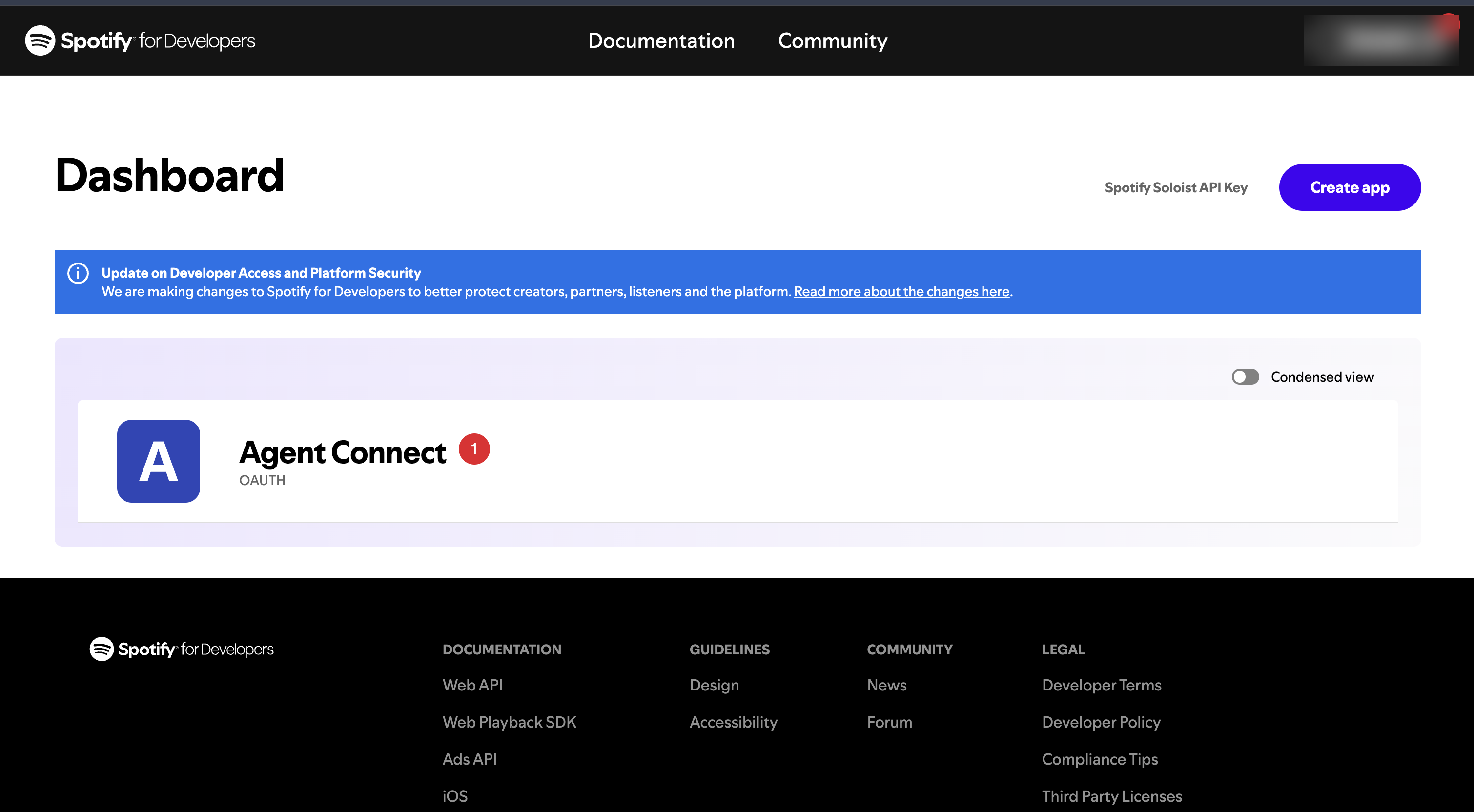
Sign in to the Spotify for Developers dashboard.
-
Click Create app, enter an app name and description, and select Web API under APIs used.
-
-
Copy the redirect URI from Scalekit
- In the Scalekit dashboard, go to AgentKit > Connections > Create Connection. Find Spotify and click Create.
- Click Use your own credentials and copy the redirect URI. It looks like
https://<SCALEKIT_ENVIRONMENT_URL>/sso/v1/oauth/<CONNECTION_ID>/callback.
-
Add the redirect URI to your Spotify app
-
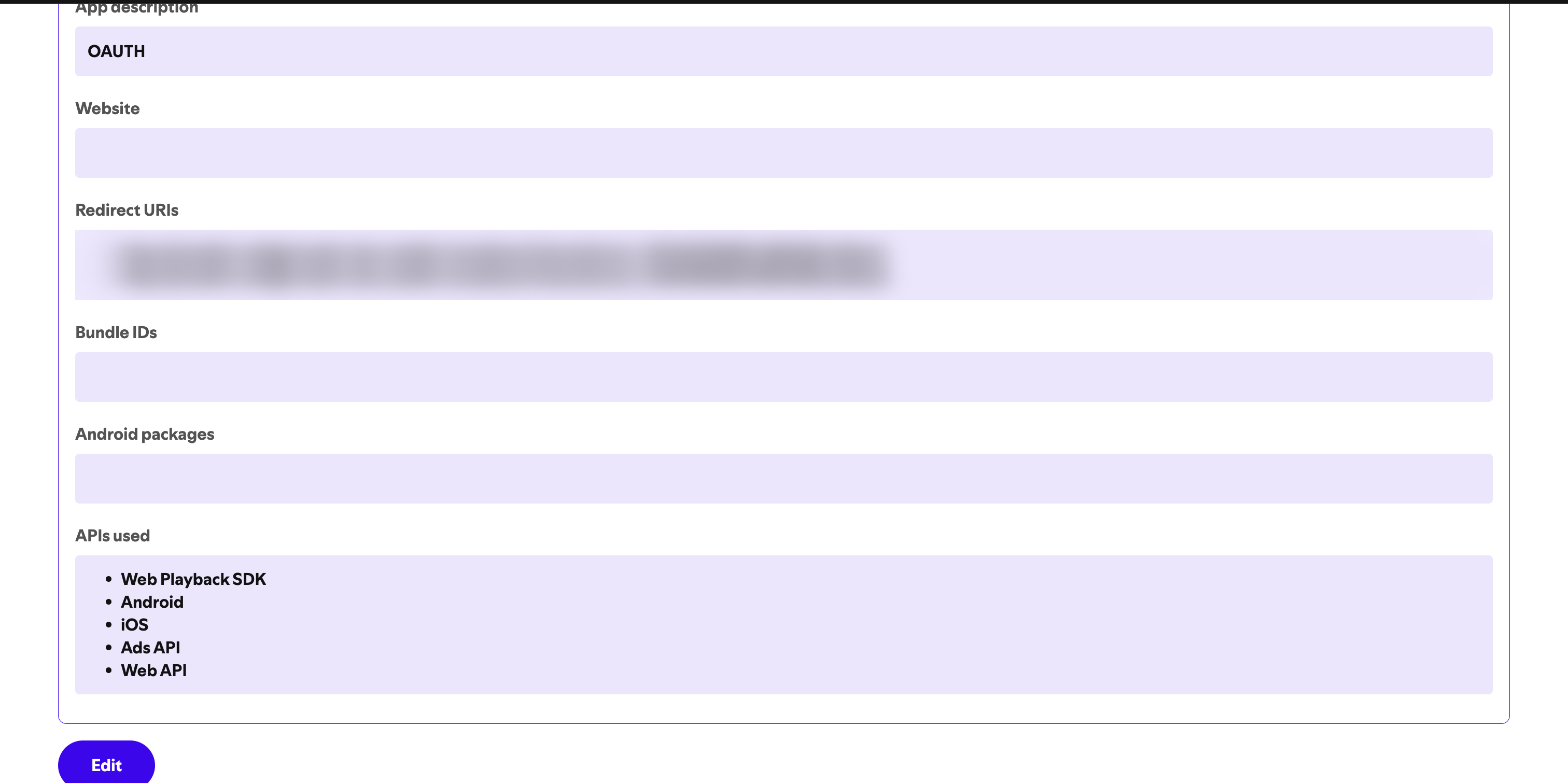
In your Spotify app, open Settings.
-
Under Redirect URIs, paste the Scalekit redirect URI, click Add, and then Save.
-
-
Copy your Client ID and Client secret
-
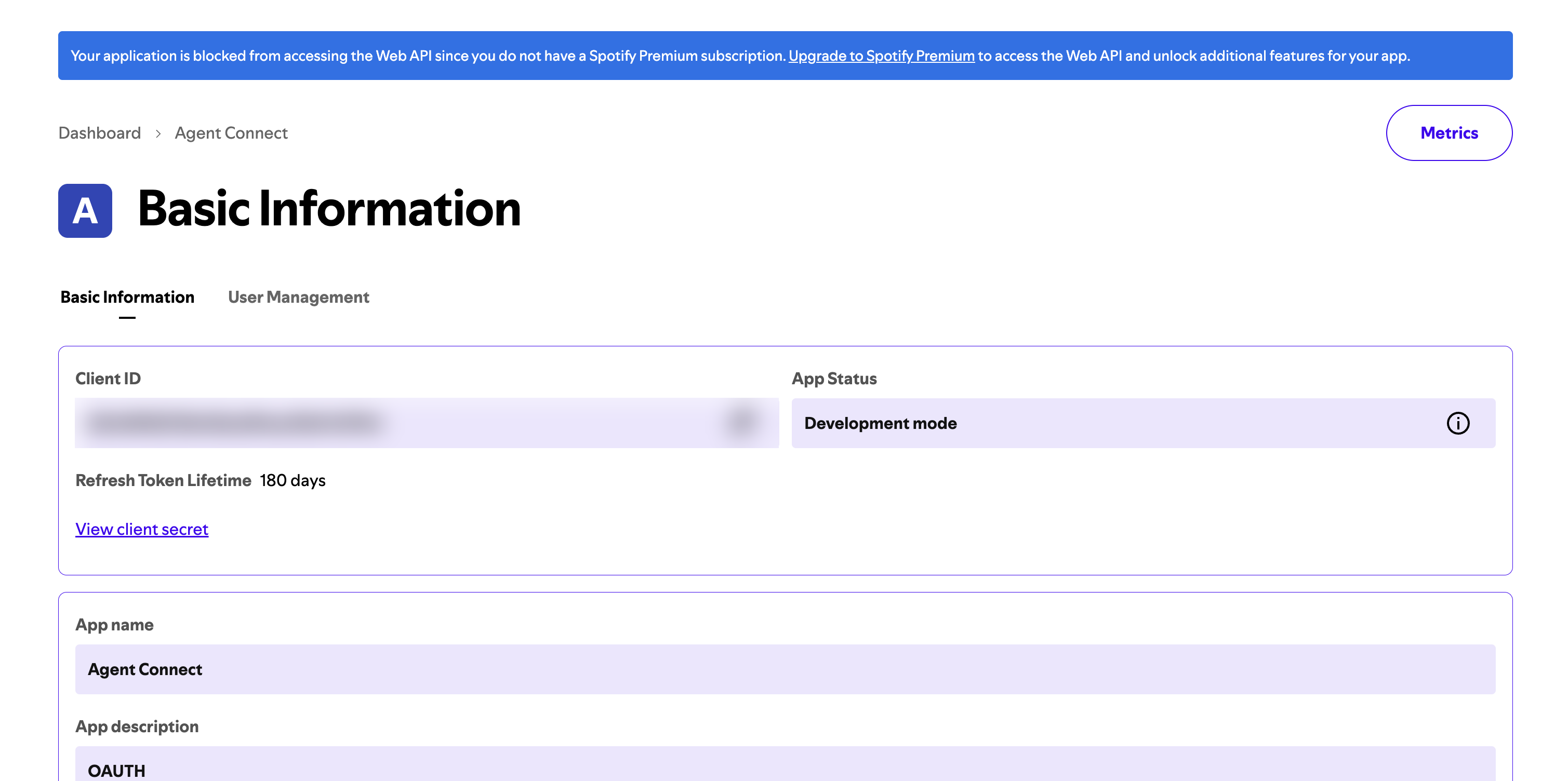
On the same Basic Information page, copy the Client ID.
-
Click View client secret and copy the Client secret.
-
-
Add the credentials in Scalekit
- Return to your Spotify connection in Scalekit.
- Enter the Client ID and Client secret, select the scopes your tools need, and click Save.
-
Authorize a user and make your first call
quickstart.mts import { ScalekitClient } from '@scalekit-sdk/node'import 'dotenv/config'import { createInterface } from 'node:readline/promises'const scalekit = new ScalekitClient(process.env.SCALEKIT_ENVIRONMENT_URL,process.env.SCALEKIT_CLIENT_ID,process.env.SCALEKIT_CLIENT_SECRET,)const actions = scalekit.actionsconst connector = 'spotify'const identifier = 'user_123'// Generate an authorization link for the userconst { link } = await actions.getAuthorizationLink({ connectionName: connector, identifier })console.log('Authorize Spotify:', link)const rl = createInterface({ input: process.stdin, output: process.stdout })await rl.question('Press Enter after authorizing...')rl.close()// Make your first callconst result = await actions.executeTool({connector,identifier,toolName: 'spotify_devices_get',toolInput: {},})console.log(result)Terminal window npx tsx quickstart.mtsquickstart.py import osfrom scalekit import ScalekitClientfrom dotenv import load_dotenvload_dotenv()scalekit_client = ScalekitClient(env_url=os.getenv("SCALEKIT_ENVIRONMENT_URL"),client_id=os.getenv("SCALEKIT_CLIENT_ID"),client_secret=os.getenv("SCALEKIT_CLIENT_SECRET"),)actions = scalekit_client.actionsconnection_name = "spotify"identifier = "user_123"# Generate an authorization link for the userlink_response = actions.get_authorization_link(connection_name=connection_name,identifier=identifier,)print("Authorize Spotify:", link_response.link)input("Press Enter after authorizing...")# Make your first callresult = actions.execute_tool(tool_input={},tool_name="spotify_devices_get",connection_name=connection_name,identifier=identifier,)print(result)Terminal window python quickstart.pyEach user signs in once. See Authorize a user for the full flow and statuses.
Tools
Pass the exact name toexecute_toolspotify_album_getGet Spotify catalog information for a single album by its Spotify ID.Read-onlyGet Album
Get Spotify catalog information for a single album by its Spotify ID.
Inputs
idstringrequired- The Spotify ID of the album
marketstring- ISO 3166-1 alpha-2 country code for market filtering
Also accepts
schema_versionandtool_versionto pin a version.spotify_album_tracks_getGet Spotify catalog information about an album's tracks.Read-onlyGet Album Tracks
Get Spotify catalog information about an album's tracks. Returns paginated list of simplified track objects.
Inputs
idstringrequired- The Spotify ID of the album
limitinteger- Maximum number of tracks to return (default 20, max 50)
marketstring- ISO 3166-1 alpha-2 country code
offsetinteger- Index of the first track to return (default 0)
Also accepts
schema_versionandtool_versionto pin a version.spotify_artist_albums_getGet Spotify catalog information about an artist's albums.Read-onlyGet Artist's Albums
Get Spotify catalog information about an artist's albums. Optionally filter by album group.
Inputs
idstringrequired- The Spotify ID of the artist
include_groupsstring- Comma-separated list of album types to include: album, single, appears_on, compilation
limitinteger- Maximum number of items to return (default 20, max 50)
marketstring- ISO 3166-1 alpha-2 country code
offsetinteger- Index of the first item to return (default 0)
Also accepts
schema_versionandtool_versionto pin a version.spotify_artist_getGet Spotify catalog information for a single artist by their Spotify ID.Read-onlyGet Artist
Get Spotify catalog information for a single artist by their Spotify ID.
Inputs
idstringrequired- The Spotify ID of the artist
Also accepts
schema_versionandtool_versionto pin a version.spotify_audiobook_chapters_getGet Spotify catalog information for an audiobook's chapters.Read-onlyGet Audiobook Chapters
Get Spotify catalog information for an audiobook's chapters. Requires a valid Spotify ID for the audiobook.
Inputs
idstringrequired- The Spotify ID of the audiobook
limitinteger- Maximum number of chapters to return (default 20, max 50)
marketstring- ISO 3166-1 alpha-2 country code
offsetinteger- Index of the first chapter to return for pagination
Also accepts
schema_versionandtool_versionto pin a version.spotify_audiobook_getGet Spotify catalog information for a single audiobook.Read-onlyGet Audiobook
Get Spotify catalog information for a single audiobook. Only available for markets where audiobooks are available.
Inputs
idstringrequired- The Spotify ID of the audiobook
marketstring- ISO 3166-1 alpha-2 country code
Also accepts
schema_versionandtool_versionto pin a version.spotify_chapter_getGet Spotify catalog information for a single audiobook chapter by its Spotify ID.Read-onlyGet Chapter
Get Spotify catalog information for a single audiobook chapter by its Spotify ID.
Inputs
idstringrequired- The Spotify ID of the chapter
marketstring- ISO 3166-1 alpha-2 country code
Also accepts
schema_versionandtool_versionto pin a version.spotify_devices_getGet information about a user's available playback devices.Read-onlyGet Available Devices
Get information about a user's available playback devices. Returns device IDs, names, types, and active status. Requires user-read-playback-state scope.
Inputs
This tool takes no inputs.
Also accepts
schema_versionandtool_versionto pin a version.spotify_episode_getGet Spotify catalog information for a single podcast episode by its Spotify ID.Read-onlyGet Episode
Get Spotify catalog information for a single podcast episode by its Spotify ID.
Inputs
idstringrequired- The Spotify ID of the episode
marketstring- ISO 3166-1 alpha-2 country code
Also accepts
schema_versionandtool_versionto pin a version.spotify_following_getGet the current user's followed artists.Read-onlyGet Followed Artists
Get the current user's followed artists. Requires user-follow-read scope.
Inputs
typestringrequired- Type of entity to return (only 'artist' is supported)
afterstring- The last artist ID from the previous page (for cursor-based pagination)
limitinteger- Maximum number of items to return (default 20, max 50)
Also accepts
schema_versionandtool_versionto pin a version.spotify_get_currently_playingSome random change for this tool.Read-onlyGet Currently Playing Track
Some random change for this tool. Get the user's currently playing track or episode.
Inputs
additional_typesstring- Comma-separated list of additional content types to include: track, episode
marketstring- ISO 3166-1 alpha-2 country code for track relinking
Also accepts
schema_versionandtool_versionto pin a version.spotify_get_user_playlistsGet a list of the playlists owned or followed by the current Spotify user.Read-onlyGet User Playlists
Get a list of the playlists owned or followed by the current Spotify user. Returns playlist names, IDs, track counts, and visibility. Requires playlist-read-private scope.
Inputs
limitinteger- Maximum number of playlists to return (default 20, max 50)
offsetinteger- Index of the first playlist to return for pagination
Also accepts
schema_versionandtool_versionto pin a version.spotify_library_checkCheck whether items are already in the current user's Spotify library by URI: tracks, albums, episodes, shows and audiobooks are checked as saved, artists, users and playlists as followed.Read-onlyCheck Items in Library
Check whether items are already in the current user's Spotify library by URI: tracks, albums, episodes, shows and audiobooks are checked as saved, artists, users and playlists as followed. Returns a JSON array of booleans; true means the item is saved or followed. Use for any supported item type in one call; it replaces the per-type tools spotify_saved_tracks_check, spotify_saved_albums_check, spotify_saved_episodes_check, spotify_saved_shows_check, spotify_saved_audiobooks_check and spotify_following_check (artists, users), whose Spotify endpoints are removed for Development Mode apps (Extended Quota Mode apps keep them). Use spotify_saved_tracks_get or the other saved-item list tools to list what is saved. Needs 1 to 40 comma-separated URIs (taken from the uri field of spotify_search results or of get tools such as spotify_track_get) of type spotify:track, spotify:album, spotify:episode, spotify:show, spotify:audiobook, spotify:artist, spotify:user or spotify:playlist; the connection needs user-library-read, user-follow-read and playlist-read-private, depending on the URI types.
Inputs
urisstringrequired- Comma-separated list of Spotify URIs to look up in the current user's library, 1 to 40 per call. Supported URI types: spotify:track:{id}, spotify:album:{id}, spotify:episode:{id}, spotify:show:{id}, spotify:audiobook:{id}, spotify:artist:{id}, spotify:user:{id}, spotify:playlist:{id}. The result is a JSON array of booleans; true means the item is saved or, for artists, users and playlists, followed. Use plain URIs separated by commas with no spaces. Example: spotify:track:4iV5W9uYEdYUVa79Axb7Rh,spotify:album:4aawyAB9vmqN3uQ7FjRGTy,spotify:artist:0TnOYISbd1XYRBk9myaseg
Also accepts
schema_versionandtool_versionto pin a version.spotify_me_getGet detailed profile information about the current authenticated user.Read-onlyGet Current User Profile
Get detailed profile information about the current authenticated user. Requires user-read-private and user-read-email scopes.
Inputs
This tool takes no inputs.
Also accepts
schema_versionandtool_versionto pin a version.spotify_playback_state_getGet information about the user's current playback state including track, progress, device, shuffle, and repeat.Read-onlyGet Playback State
Get information about the user's current playback state including track, progress, device, shuffle, and repeat. Requires user-read-playback-state scope.
Inputs
additional_typesstring- Comma-separated list of additional content types: episode
marketstring- ISO 3166-1 alpha-2 country code for track relinking
Also accepts
schema_versionandtool_versionto pin a version.spotify_playlist_cover_getGet the current image of a playlist.Read-onlyGet Playlist Cover Image
Get the current image of a playlist. Returns an array of image objects with URL, height, and width.
Inputs
playlist_idstringrequired- The Spotify ID of the playlist
Also accepts
schema_versionandtool_versionto pin a version.spotify_playlist_getGet a playlist by its Spotify ID.Read-onlyGet Playlist
Get a playlist by its Spotify ID. Returns playlist metadata, owner info, and optionally track list.
Inputs
playlist_idstringrequired- The Spotify ID of the playlist
additional_typesstring- Comma-separated list of item types to include alongside tracks: episode
fieldsstring- Filters for the query: a comma-separated list of fields to return
marketstring- ISO 3166-1 alpha-2 country code
Also accepts
schema_versionandtool_versionto pin a version.spotify_playlist_items_getGet full details of the tracks or episodes in a playlist.Read-onlyGet Playlist Items
Get full details of the tracks or episodes in a playlist. Returns paginated list of playlist items.
Inputs
playlist_idstringrequired- The Spotify ID of the playlist
additional_typesstring- Comma-separated list of additional content types to include: episode
fieldsstring- Comma-separated list of fields to return
limitinteger- Maximum number of items to return (default 20, max 50)
marketstring- ISO 3166-1 alpha-2 country code
offsetinteger- Index of the first item to return (default 0)
Also accepts
schema_versionandtool_versionto pin a version.spotify_queue_getGet the list of objects that make up the user's queue.Read-onlyGet User's Queue
Get the list of objects that make up the user's queue. Returns current track and upcoming tracks. Requires user-read-currently-playing scope.
Inputs
This tool takes no inputs.
Also accepts
schema_versionandtool_versionto pin a version.spotify_recently_played_getGet tracks from the current user's recently played tracks.Read-onlyGet Recently Played Tracks
Get tracks from the current user's recently played tracks. Requires user-read-recently-played scope.
Inputs
afterinteger- Unix timestamp in milliseconds to return items after this cursor
beforeinteger- Unix timestamp in milliseconds to return items before this cursor
limitinteger- Maximum number of items to return (default 20, max 50)
Also accepts
schema_versionandtool_versionto pin a version.spotify_saved_albums_getGet a list of albums saved in the current user's library.Read-onlyGet Saved Albums
Get a list of albums saved in the current user's library. Requires user-library-read scope.
Inputs
limitinteger- Maximum number of albums to return (default 20, max 50)
marketstring- ISO 3166-1 alpha-2 country code
offsetinteger- Index of the first album to return (default 0)
Also accepts
schema_versionandtool_versionto pin a version.spotify_saved_audiobooks_getGet a list of audiobooks saved in the current Spotify user's library.Read-onlyGet Saved Audiobooks
Get a list of audiobooks saved in the current Spotify user's library. Requires user-library-read scope.
Inputs
limitinteger- Maximum number of audiobooks to return (default 20, max 50)
offsetinteger- Index of the first audiobook to return for pagination
Also accepts
schema_versionandtool_versionto pin a version.spotify_saved_episodes_getGet a list of episodes saved in the current user's library.Read-onlyGet Saved Episodes
Get a list of episodes saved in the current user's library. Requires user-library-read scope.
Inputs
limitinteger- Maximum number of episodes to return (default 20, max 50)
marketstring- ISO 3166-1 alpha-2 country code
offsetinteger- Index of the first episode to return (default 0)
Also accepts
schema_versionandtool_versionto pin a version.spotify_saved_shows_getGet a list of shows saved in the current user's library.Read-onlyGet Saved Shows
Get a list of shows saved in the current user's library. Requires user-library-read scope.
Inputs
limitinteger- Maximum number of shows to return (default 20, max 50)
offsetinteger- Index of the first show to return (default 0)
Also accepts
schema_versionandtool_versionto pin a version.spotify_saved_tracks_getGet a list of tracks saved in the current user's library (liked songs).Read-onlyGet Saved Tracks
Get a list of tracks saved in the current user's library (liked songs). Requires user-library-read scope.
Inputs
limitinteger- Maximum number of tracks to return (default 20, max 50)
marketstring- ISO 3166-1 alpha-2 country code
offsetinteger- Index of the first track to return (default 0)
Also accepts
schema_versionandtool_versionto pin a version.spotify_searchSearch Spotify's catalog for tracks, artists, albums, playlists, shows, or episodes.Read-onlySearch Spotify
Search Spotify's catalog for tracks, artists, albums, playlists, shows, or episodes. Returns matching items with metadata.
Inputs
qstringrequired- Search query string (e.g. artist name, track title, album name)
typestringrequired- Comma-separated list of item types to search: track, artist, album, playlist, show, episode
limitinteger- Maximum number of results per type to return (default 10, max 50)
marketstring- ISO 3166-1 alpha-2 country code to filter results by market availability
offsetinteger- Index of the first result to return for pagination
Also accepts
schema_versionandtool_versionto pin a version.spotify_show_episodes_getGet Spotify catalog information about episodes of a podcast show.Read-onlyGet Show Episodes
Get Spotify catalog information about episodes of a podcast show.
Inputs
idstringrequired- The Spotify ID of the show
limitinteger- Maximum number of episodes to return (default 20, max 50)
marketstring- ISO 3166-1 alpha-2 country code
offsetinteger- Index of the first episode to return (default 0)
Also accepts
schema_versionandtool_versionto pin a version.spotify_show_getGet Spotify catalog information for a single podcast show (podcast) by its Spotify ID.Read-onlyGet Show
Get Spotify catalog information for a single podcast show (podcast) by its Spotify ID.
Inputs
idstringrequired- The Spotify ID of the show
marketstring- ISO 3166-1 alpha-2 country code
Also accepts
schema_versionandtool_versionto pin a version.spotify_top_items_getGet the current user's top artists or tracks based on calculated affinity.Read-onlyGet User's Top Items
Get the current user's top artists or tracks based on calculated affinity. Requires user-top-read scope.
Inputs
typestringrequired- Type of top items to return: artists or tracks
limitinteger- Maximum number of items to return (default 20, max 50)
offsetinteger- Index of the first item to return (default 0)
time_rangestring- Time range for affinity computation: long_term (~1 year), medium_term (~6 months), short_term (~4 weeks)
Also accepts
schema_versionandtool_versionto pin a version.spotify_track_getGet Spotify catalog information for a single track by its Spotify ID.Read-onlyGet Track
Get Spotify catalog information for a single track by its Spotify ID.
Inputs
idstringrequired- The Spotify ID of the track
marketstring- ISO 3166-1 alpha-2 country code
Also accepts
schema_versionandtool_versionto pin a version.spotify_add_to_playlistAdd one or more tracks or episodes to a playlist, appended at the end or inserted at a zero-based position.WriteAdd Items to Playlist
Add one or more tracks or episodes to a playlist, appended at the end or inserted at a zero-based position. Returns the playlist's new snapshot_id. Pass item URIs (spotify:track:... or spotify:episode:...), comma-separated, up to 100 per call; read the current items with spotify_playlist_items_get and remove items with spotify_playlist_items_remove. The current user must own or collaborate on the playlist; needs playlist-modify-public or playlist-modify-private.
Inputs
playlist_idstringrequired- Spotify ID of the playlist to add items to
urisstringrequired- Comma-separated Spotify track or episode URIs, up to 100 per call, e.g. spotify:track:4iV5W9uYEdYUVa79Axb7Rh,spotify:episode:512ojhOuo1ktJprKbVcKyQ. Items are added in the order given.
positioninteger- Zero-based position to insert items. Appends to end if omitted.
Also accepts
schema_versionandtool_versionto pin a version.spotify_library_saveSave items to the current user's Spotify library by URI: tracks, albums, episodes, shows and audiobooks are saved, users and playlists are followed.WriteSave Items to Library
Save items to the current user's Spotify library by URI: tracks, albums, episodes, shows and audiobooks are saved, users and playlists are followed. Returns an empty success response (HTTP 200); confirm the change with spotify_library_check. Use for any supported item type in one call; it replaces the per-type tools spotify_saved_tracks_save, spotify_saved_albums_save, spotify_saved_episodes_save, spotify_saved_shows_save, spotify_saved_audiobooks_save and spotify_playlist_follow and, for users, spotify_follow, whose Spotify endpoints are removed for Development Mode apps (Extended Quota Mode apps keep them). Use spotify_library_remove to undo. Needs 1 to 40 comma-separated URIs (taken from the uri field of spotify_search results or of get tools such as spotify_track_get) of type spotify:track, spotify:album, spotify:episode, spotify:show, spotify:audiobook, spotify:user or spotify:playlist; the connection needs user-library-modify, user-follow-modify and playlist-modify-public, depending on the URI types.
- Idempotent
Inputs
urisstringrequired- Comma-separated list of Spotify URIs to save to the current user's library, 1 to 40 per call. Supported URI types: spotify:track:{id}, spotify:album:{id}, spotify:episode:{id}, spotify:show:{id}, spotify:audiobook:{id}, spotify:user:{id}, spotify:playlist:{id}. Tracks, albums, episodes, shows and audiobooks are saved; a user or playlist URI follows that user or playlist. Artist URIs are not in Spotify's list of supported types for this call. Use plain URIs separated by commas with no spaces. Example: spotify:track:4iV5W9uYEdYUVa79Axb7Rh,spotify:album:4aawyAB9vmqN3uQ7FjRGTy
Also accepts
schema_versionandtool_versionto pin a version.spotify_playback_nextSkip to the next track in the queue.WriteSkip to Next Track
Skip to the next track in the queue. Requires user-modify-playback-state scope.
Inputs
device_idstring- The device ID to skip next on
Also accepts
schema_versionandtool_versionto pin a version.spotify_playback_pausePause playback on the user's account.WritePause Playback
Pause playback on the user's account. Requires user-modify-playback-state scope.
- Idempotent
Inputs
device_idstring- The device ID to pause playback on
Also accepts
schema_versionandtool_versionto pin a version.spotify_playback_previousSkip to the previous track in the queue.WriteSkip to Previous Track
Skip to the previous track in the queue. Requires user-modify-playback-state scope.
Inputs
device_idstring- The device ID to skip previous on
Also accepts
schema_versionandtool_versionto pin a version.spotify_playback_seekSeek to a specific position in the currently playing track.WriteSeek to Position
Seek to a specific position in the currently playing track. Requires user-modify-playback-state scope.
- Idempotent
Inputs
position_msintegerrequired- Position in milliseconds to seek to
device_idstring- The device ID to seek on
Also accepts
schema_versionandtool_versionto pin a version.spotify_playback_startStart or resume playback.WriteStart or Resume Playback
Start or resume playback. Optionally set a context (album, artist, playlist) or specific tracks, and set an offset. Requires user-modify-playback-state scope.
Inputs
context_uristring- Spotify URI of the context to play (album, artist, or playlist)
device_idstring- The device ID to start playback on
position_msinteger- Position in milliseconds to start playback from
urisstring- Comma-separated list of Spotify track URIs to play
Also accepts
schema_versionandtool_versionto pin a version.spotify_playback_transferTransfer playback to a new device.WriteTransfer Playback
Transfer playback to a new device. Optionally keep or start playing. Requires user-modify-playback-state scope.
Inputs
device_idstringrequired- The Spotify device ID to transfer playback to
playboolean- Whether to start playback on transfer (default false = keep current state)
Also accepts
schema_versionandtool_versionto pin a version.spotify_playlist_createCreate an empty playlist owned by the current user; it is public unless public is set to false.WriteCreate Playlist
Create an empty playlist owned by the current user; it is public unless public is set to false. Returns the new playlist's id, uri, name, description, public, collaborative, snapshot_id and owner. Use spotify_add_to_playlist to fill it and spotify_playlist_update to change its details later. Needs playlist-modify-public (default) or playlist-modify-private (public=false); a collaborative playlist needs both scopes and public=false.
Inputs
namestringrequired- Name for the new playlist
collaborativeboolean- Whether the playlist is collaborative (other users can add and remove items). Only works together with public=false, so set both; the API default for public is true. Needs the playlist-modify-public and playlist-modify-private scopes.
descriptionstring- Description of the playlist (displayed in Spotify clients)
publicboolean- Whether the playlist is public (default true)
Also accepts
schema_versionandtool_versionto pin a version.spotify_playlist_items_reorderReorder items in a playlist by moving a range of items to a new position.WriteReorder Playlist Items
Reorder items in a playlist by moving a range of items to a new position. Requires playlist-modify-public or playlist-modify-private scope.
Inputs
insert_beforeintegerrequired- The position where the items should be inserted (zero-based index)
playlist_idstringrequired- The Spotify ID of the playlist
range_startintegerrequired- Position of the first item to move (zero-based index)
range_lengthinteger- Number of items to move (default 1)
snapshot_idstring- Snapshot ID of the current playlist state to validate against
Also accepts
schema_versionandtool_versionto pin a version.spotify_playlist_updateChange a playlist's name, description, public/private status, or collaborative setting.WriteUpdate Playlist Details
Change a playlist's name, description, public/private status, or collaborative setting. Requires playlist-modify-public or playlist-modify-private scope.
- Idempotent
Inputs
playlist_idstringrequired- The Spotify ID of the playlist
collaborativeboolean- Whether the playlist is collaborative (only private playlists can be collaborative)
descriptionstring- New description for the playlist
namestring- New name for the playlist
publicboolean- Whether the playlist is public
Also accepts
schema_versionandtool_versionto pin a version.spotify_queue_addAdd an item (track or episode) to the end of the user's playback queue.WriteAdd Item to Queue
Add an item (track or episode) to the end of the user's playback queue. Requires user-modify-playback-state scope.
Inputs
uristringrequired- The Spotify URI of the track or episode to add
device_idstring- The device ID to add to queue on
Also accepts
schema_versionandtool_versionto pin a version.spotify_repeat_mode_setSet the repeat mode for the user's playback.WriteSet Repeat Mode
Set the repeat mode for the user's playback. Options are track (repeat single track), context (repeat context), or off. Requires user-modify-playback-state scope.
- Idempotent
Inputs
statestringrequired- Repeat mode: track, context, or off
device_idstring- The device ID to set repeat mode on
Also accepts
schema_versionandtool_versionto pin a version.spotify_shuffle_setToggle shuffle on or off for the user's playback.WriteToggle Shuffle
Toggle shuffle on or off for the user's playback. Requires user-modify-playback-state scope.
- Idempotent
Inputs
statebooleanrequired- Whether shuffle should be enabled (true) or disabled (false)
device_idstring- The device ID to toggle shuffle on
Also accepts
schema_versionandtool_versionto pin a version.spotify_volume_setSet the volume for the user's current playback device (0-100).WriteSet Playback Volume
Set the volume for the user's current playback device (0-100). Requires user-modify-playback-state scope.
- Idempotent
Inputs
volume_percentintegerrequired- Volume percent (0-100)
device_idstring- The device ID to set volume on
Also accepts
schema_versionandtool_versionto pin a version.spotify_library_removeRemove items from the current user's Spotify library by URI: tracks, albums, episodes, shows and audiobooks are removed, users and playlists are unfollowed.DestructiveRemove Items from Library
Remove items from the current user's Spotify library by URI: tracks, albums, episodes, shows and audiobooks are removed, users and playlists are unfollowed. Returns an empty success response (HTTP 200); confirm the change with spotify_library_check. Use for any supported item type in one call; it replaces the per-type tools spotify_saved_tracks_remove, spotify_saved_albums_remove, spotify_saved_episodes_remove, spotify_saved_shows_remove, spotify_saved_audiobooks_remove and spotify_playlist_unfollow and, for users, spotify_unfollow, whose Spotify endpoints are removed for Development Mode apps (Extended Quota Mode apps keep them). Use spotify_library_save to add items. Needs 1 to 40 comma-separated URIs (taken from the uri field of saved-item lists such as spotify_saved_tracks_get, or of spotify_search results) of type spotify:track, spotify:album, spotify:episode, spotify:show, spotify:audiobook, spotify:user or spotify:playlist; the connection needs user-library-modify, user-follow-modify and playlist-modify-public, depending on the URI types.
- Idempotent
Inputs
urisstringrequired- Comma-separated list of Spotify URIs to remove from the current user's library, 1 to 40 per call. Supported URI types: spotify:track:{id}, spotify:album:{id}, spotify:episode:{id}, spotify:show:{id}, spotify:audiobook:{id}, spotify:user:{id}, spotify:playlist:{id}. Tracks, albums, episodes, shows and audiobooks are removed from the library; a user or playlist URI unfollows that user or playlist. Artist URIs are not in Spotify's list of supported types for this call. Use plain URIs separated by commas with no spaces. Example: spotify:track:4iV5W9uYEdYUVa79Axb7Rh,spotify:album:4aawyAB9vmqN3uQ7FjRGTy
Also accepts
schema_versionandtool_versionto pin a version.spotify_playlist_items_removeRemove one or more tracks or episodes from a playlist.DestructiveRemove Playlist Items
Remove one or more tracks or episodes from a playlist. Provide track/episode URIs to remove. Requires playlist-modify-public or playlist-modify-private scope.
Inputs
playlist_idstringrequired- The Spotify ID of the playlist
urisstringrequired- Comma-separated list of Spotify track or episode URIs to remove
snapshot_idstring- Snapshot ID of the current playlist state to validate against
Also accepts
schema_versionandtool_versionto pin a version.
No tools match.