
The YouTube connector lets your AI agent act in each user's YouTube account. Each user signs in to YouTube once, and Scalekit stores and refreshes their tokens, so your agent never handles credentials. It comes with 45 tools.
- Tools
- 45
- What they doRead · write · destructive
- 19 · 18 · 819 read18 write8 destructive
- Users sign in with
- OAuth
- OAuth app
- Your own Google app
What you can do
- Search and read videos: search videos, channels, and playlists, and fetch video details and statistics
- Manage your videos: update video titles and details, like or dislike videos, and delete videos
- Manage playlists: create, update, and delete playlists, and add or remove videos
- Moderate comments: read comment threads, post and edit replies, and approve, reject, or delete comments
- Query analytics: pull views, watch time, subscribers, and revenue, and schedule daily reporting jobs
- Run live streams: create live broadcasts and streams, bind them, and move broadcasts through testing and live
Setup
Install the SDK
Terminal window npm install @scalekit-sdk/node dotenvTerminal window pip install scalekit-sdk-python python-dotenvSet your credentials
Add your Scalekit credentials to your
.envfile. Find values in app.scalekit.com > Developers > API Credentials..env SCALEKIT_ENVIRONMENT_URL=<your-environment-url>SCALEKIT_CLIENT_ID=<your-client-id>SCALEKIT_CLIENT_SECRET=<your-client-secret>Create the YouTube connection
In AgentKit > Connections, create a YouTube connection and copy its redirect URI. The name you give it is the
connection_nameyour code passes. See Configure connections.Register a Google OAuth app
YouTube connections use your own OAuth app. Register one with Google and add the redirect URI you copied.
Then enter the app's Client ID and Client Secret on the YouTube connection.
Console steps with screenshots
Register your Google OAuth 2.0 credentials with Scalekit so it can manage the OAuth 2.0 authentication flow and token lifecycle for YouTube on your behalf. You’ll need a Client ID and Client Secret from the Google Cloud Console.
-
Create an OAuth 2.0 client in Google Cloud
-
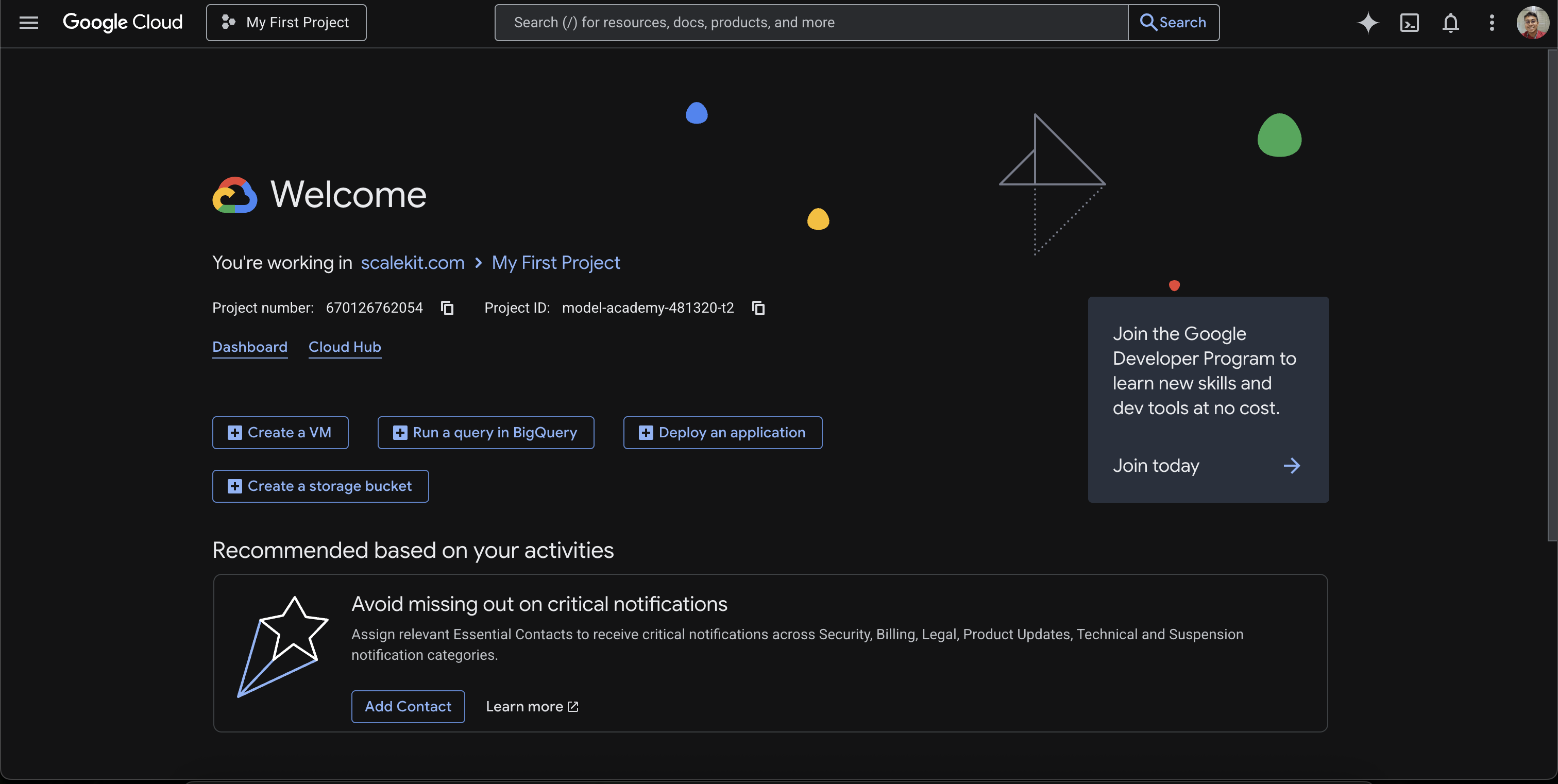
Go to the Google Cloud Console and select your project (or create a new one).
-
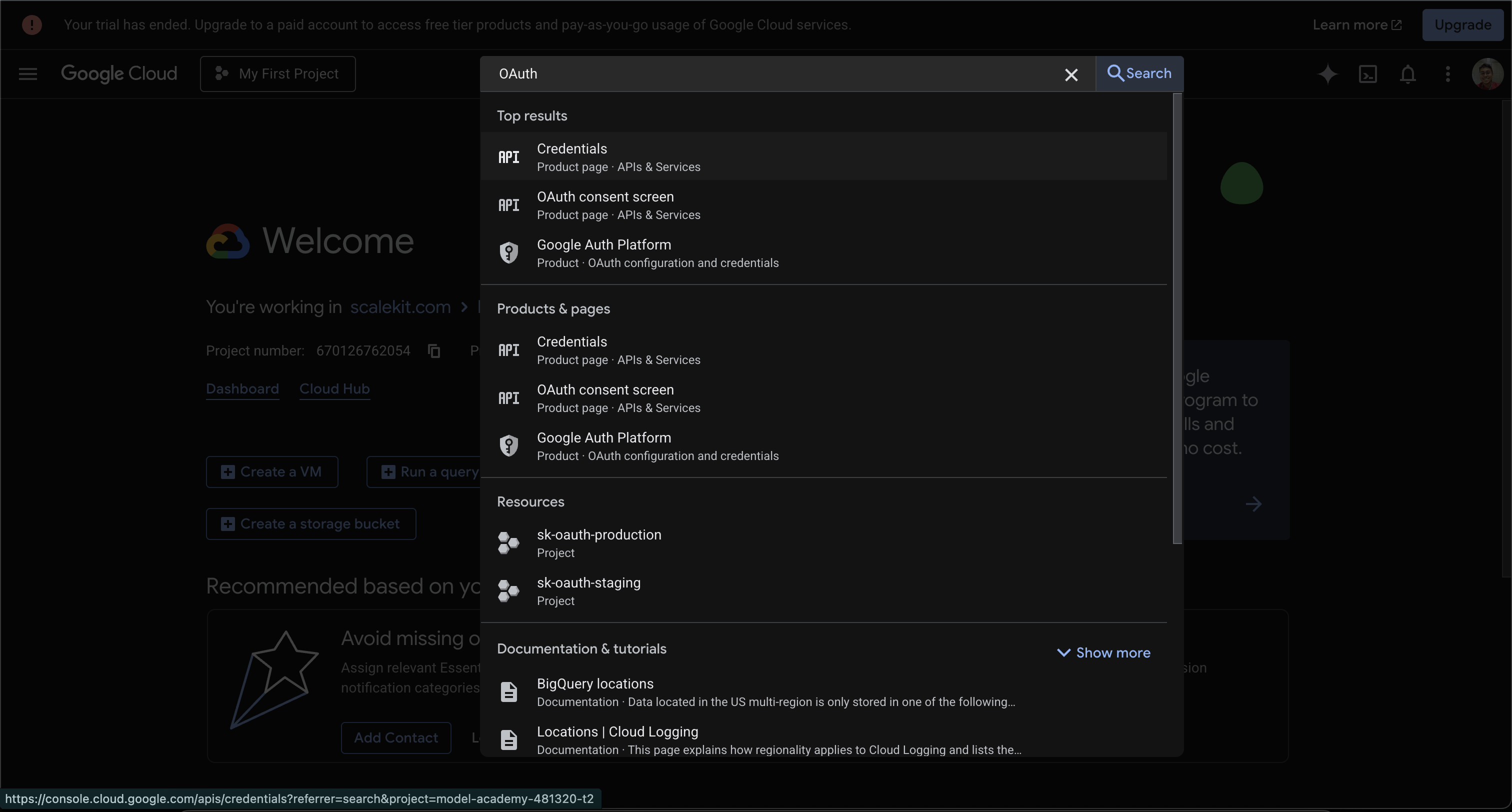
Search for OAuth in the top search bar. Select Credentials under APIs & Services.
-
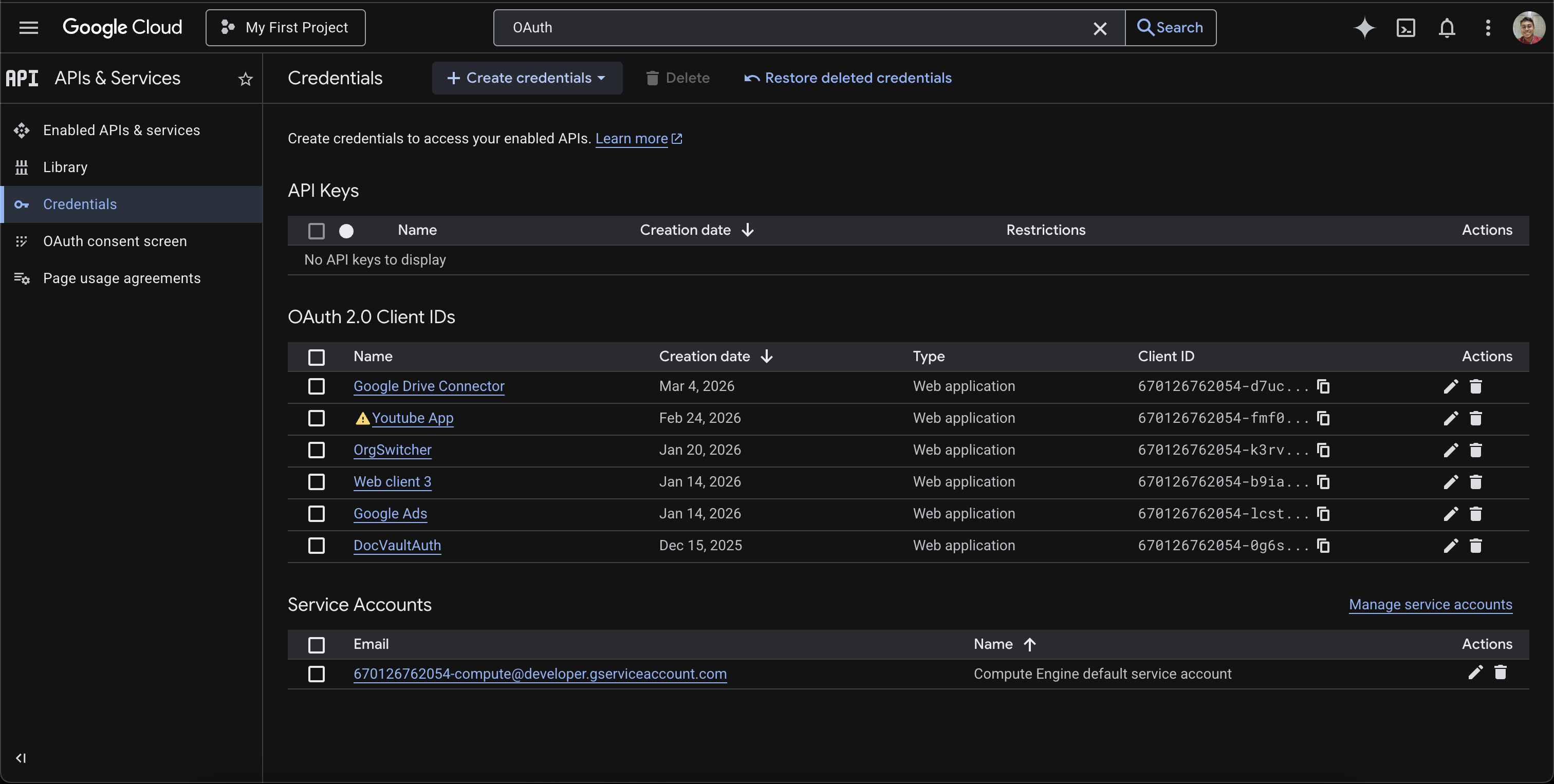
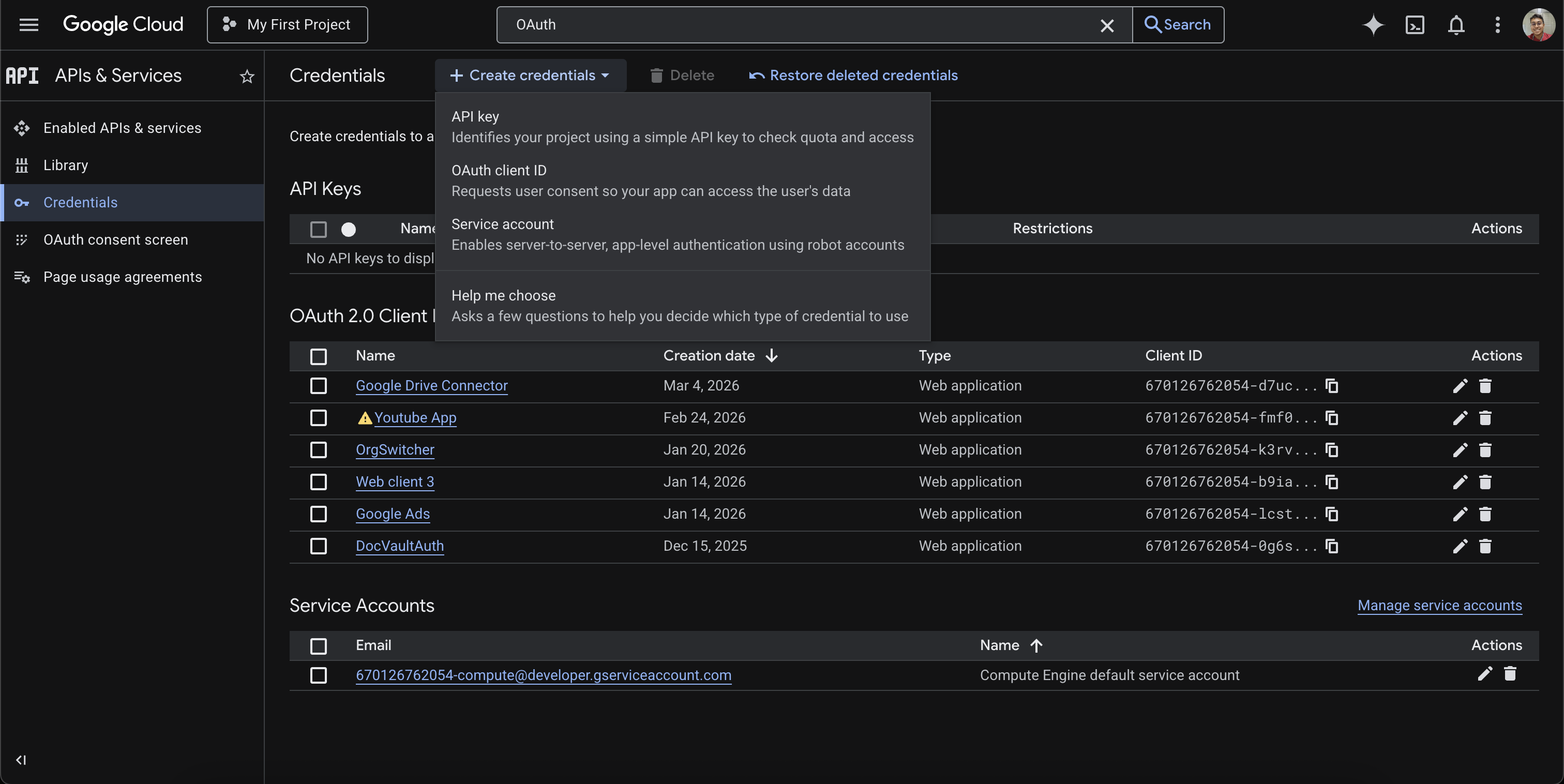
On the Credentials page, click + Create credentials and select OAuth client ID.
-
Set the Application type to Web application and enter a Name (e.g.,
Scalekit).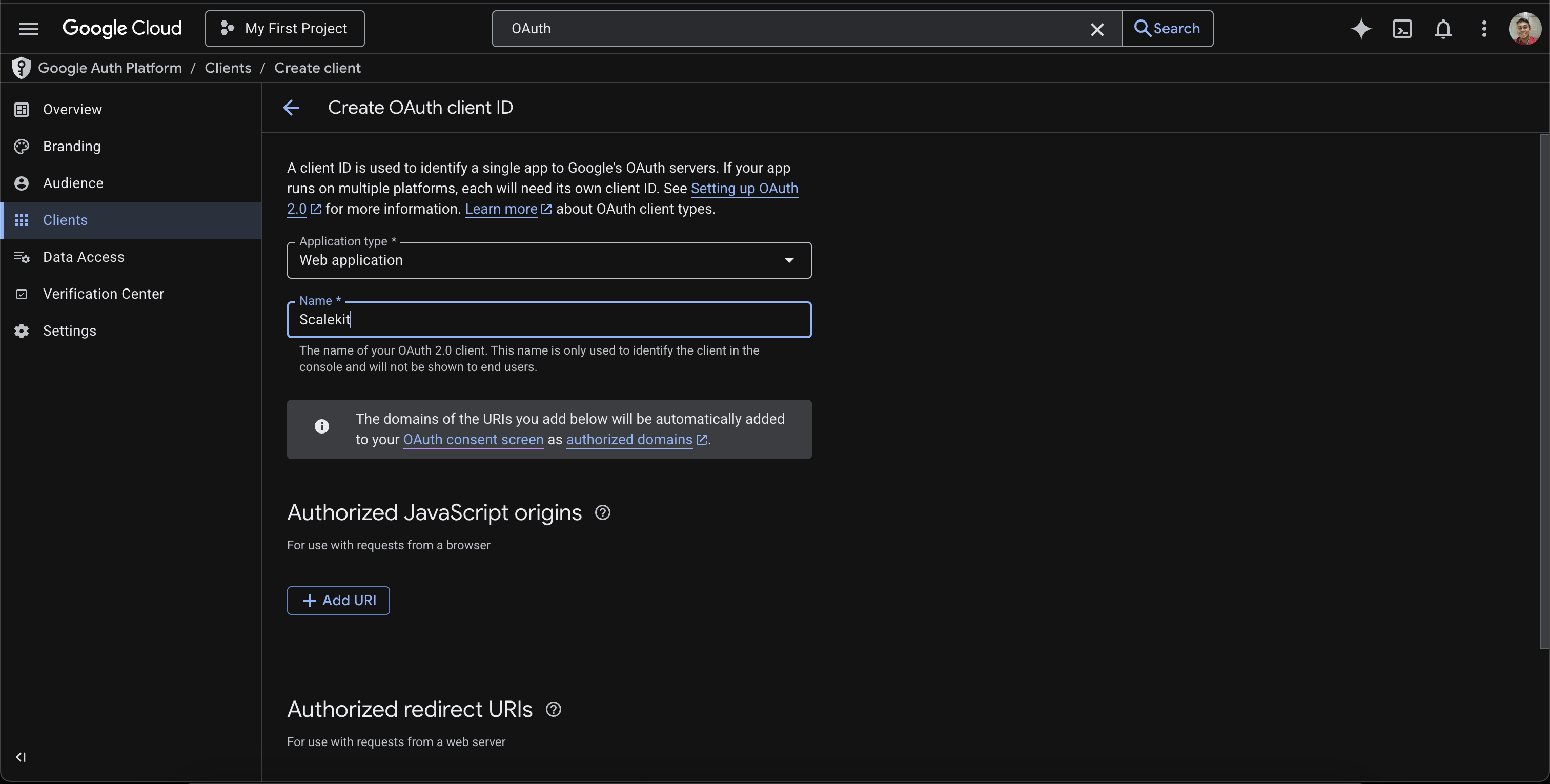
-
Leave the Authorized redirect URIs section empty for now — you’ll add the Scalekit redirect URI in a later step.
-
-
Create a connection in Scalekit
-
In Scalekit dashboard, go to AgentKit > Connections > Create Connection.
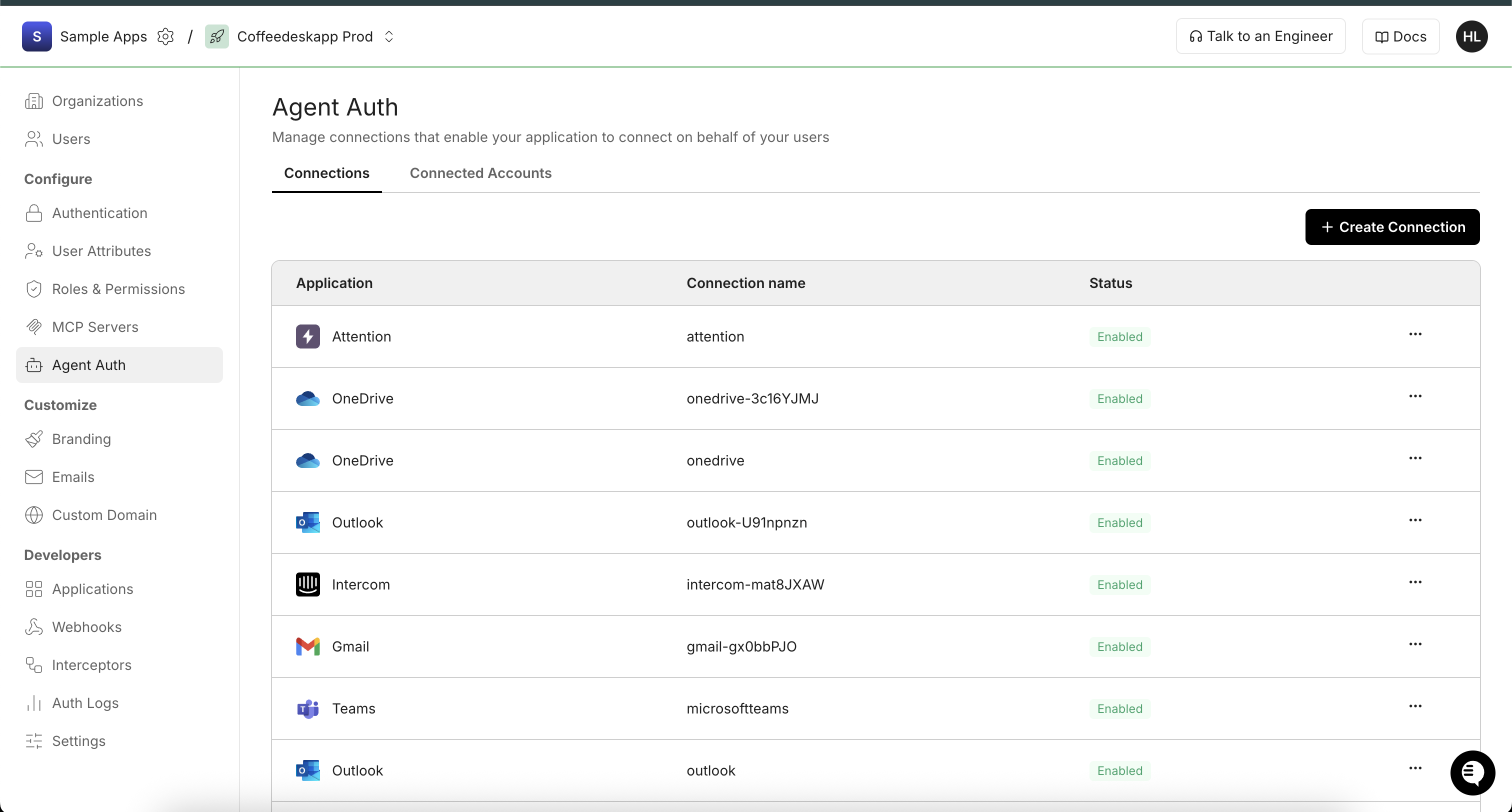
-
Search for YouTube and click Create.
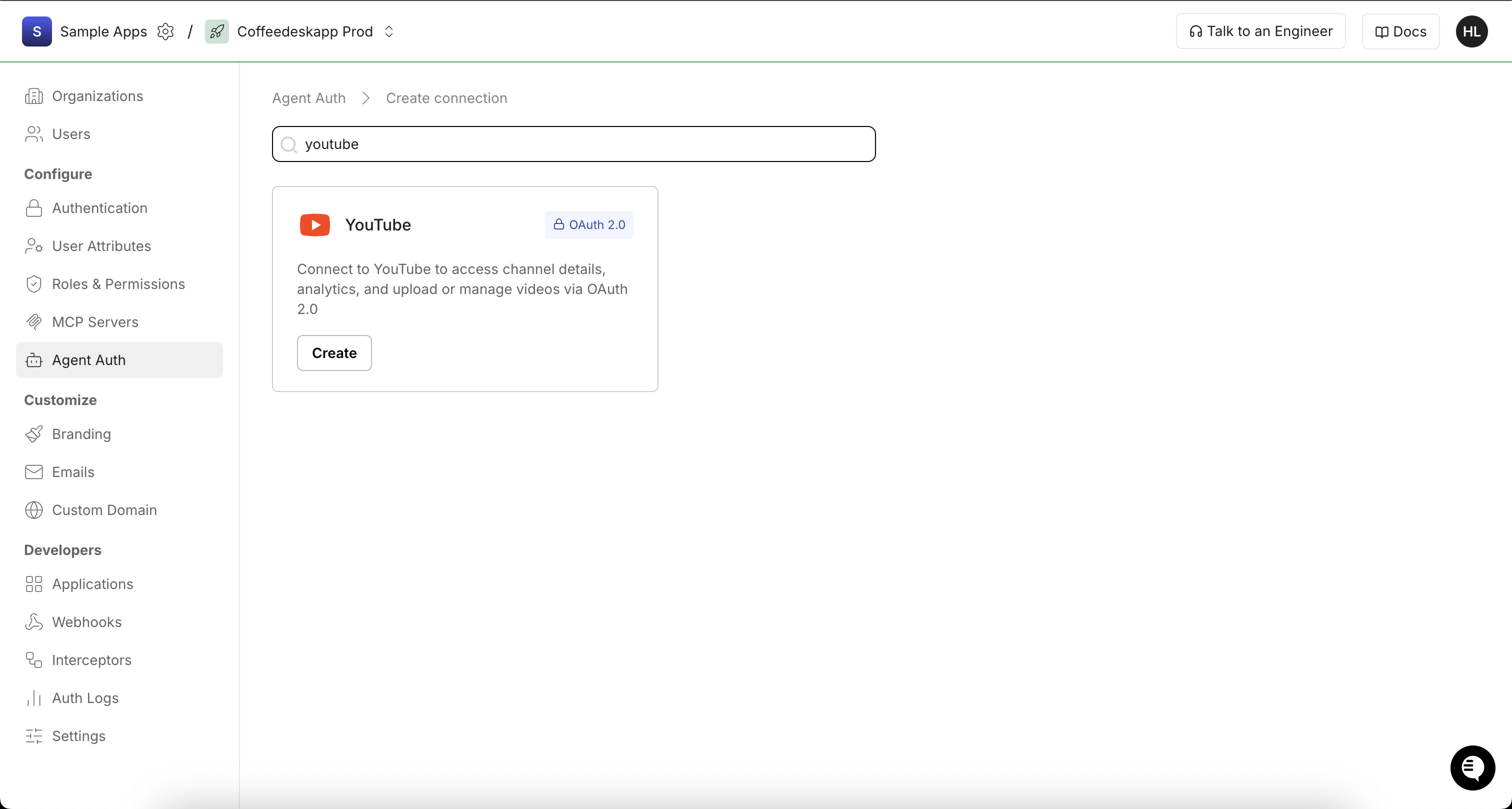
-
Copy the Redirect URI from the connection configuration panel. It looks like
https://<SCALEKIT_ENVIRONMENT_URL>/sso/v1/oauth/<CONNECTION_ID>/callback.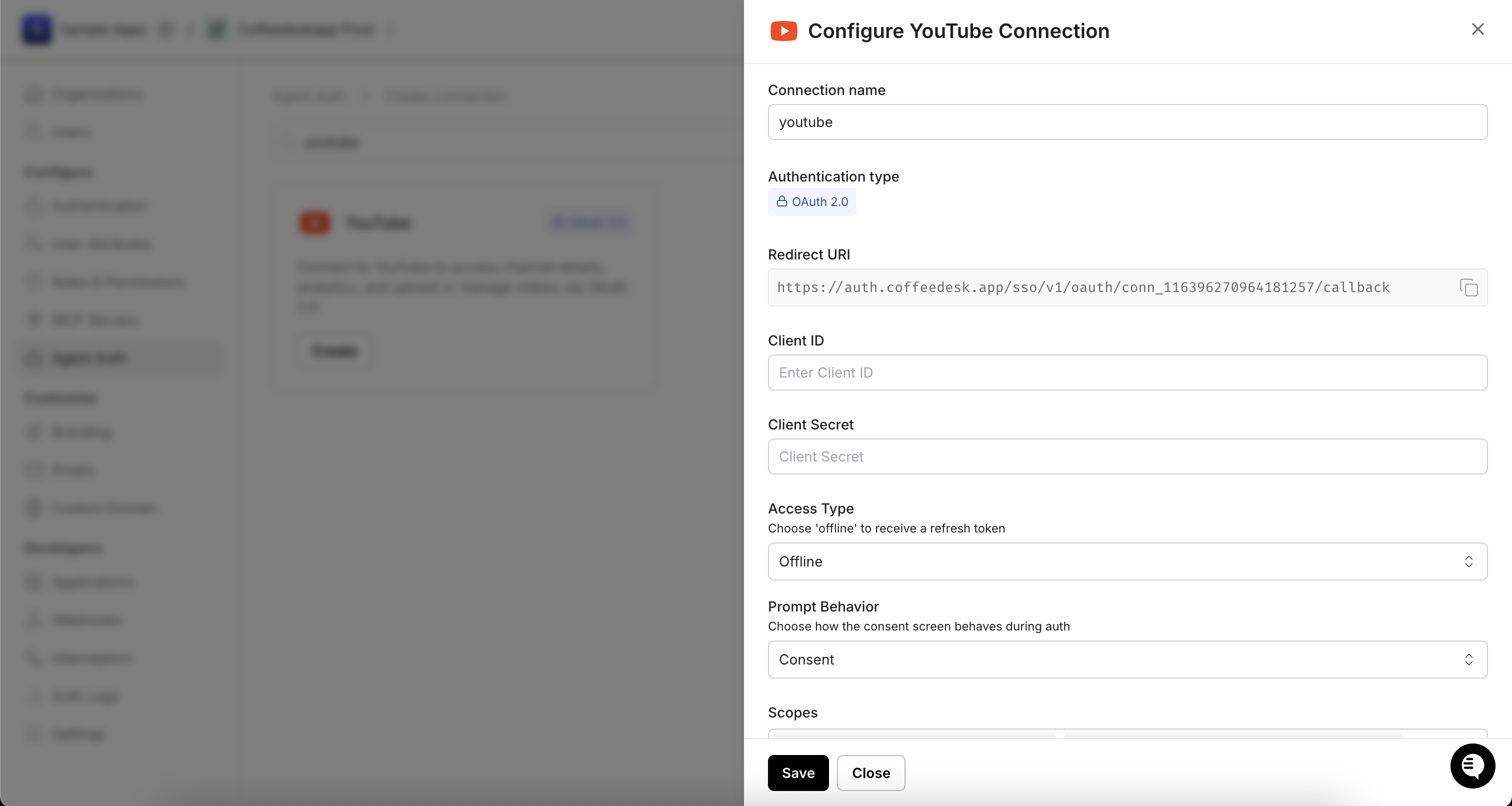
-
-
Configure the redirect URI in Google Cloud
-
Back in the Google Cloud Console, open your OAuth 2.0 client (or continue from step 1).
-
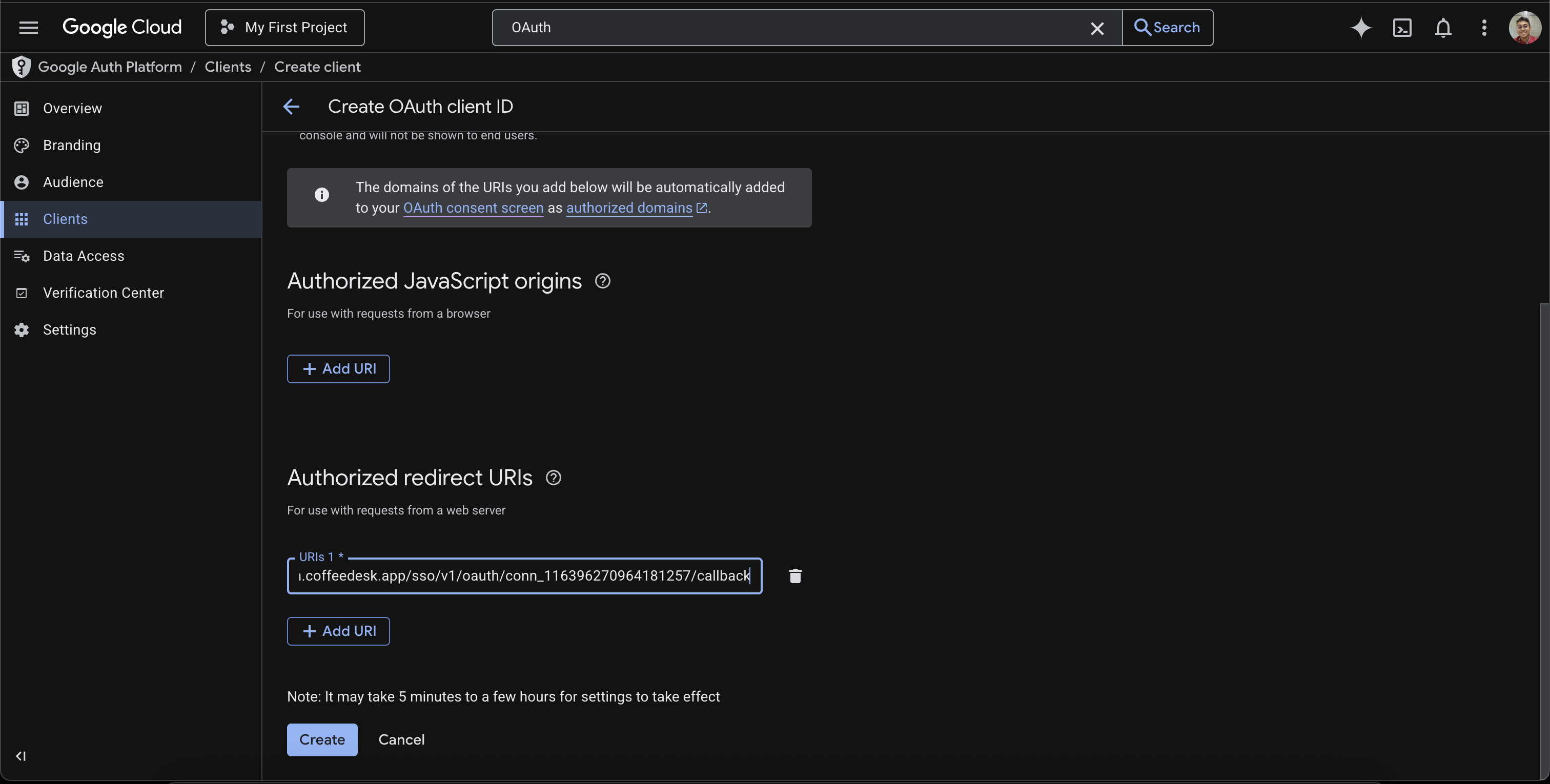
Under Authorized redirect URIs, click + Add URI and paste the Scalekit Redirect URI.
-
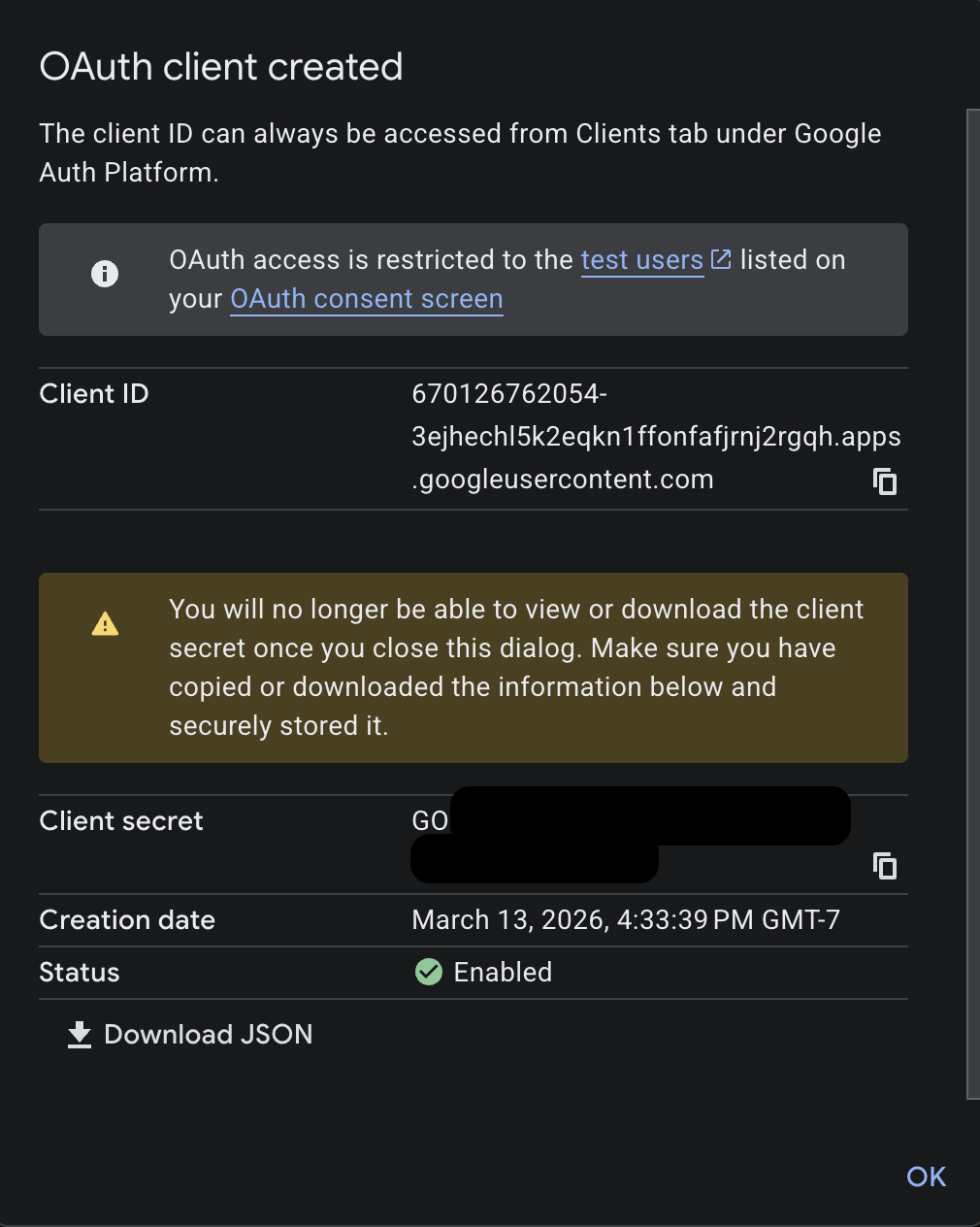
Click Create (or Save if editing an existing client). A dialog displays your Client ID and Client secret. Copy both values.
-
-
Add credentials in Scalekit
-
In Scalekit dashboard, go to AgentKit > Connections and open the YouTube connection you created.
-
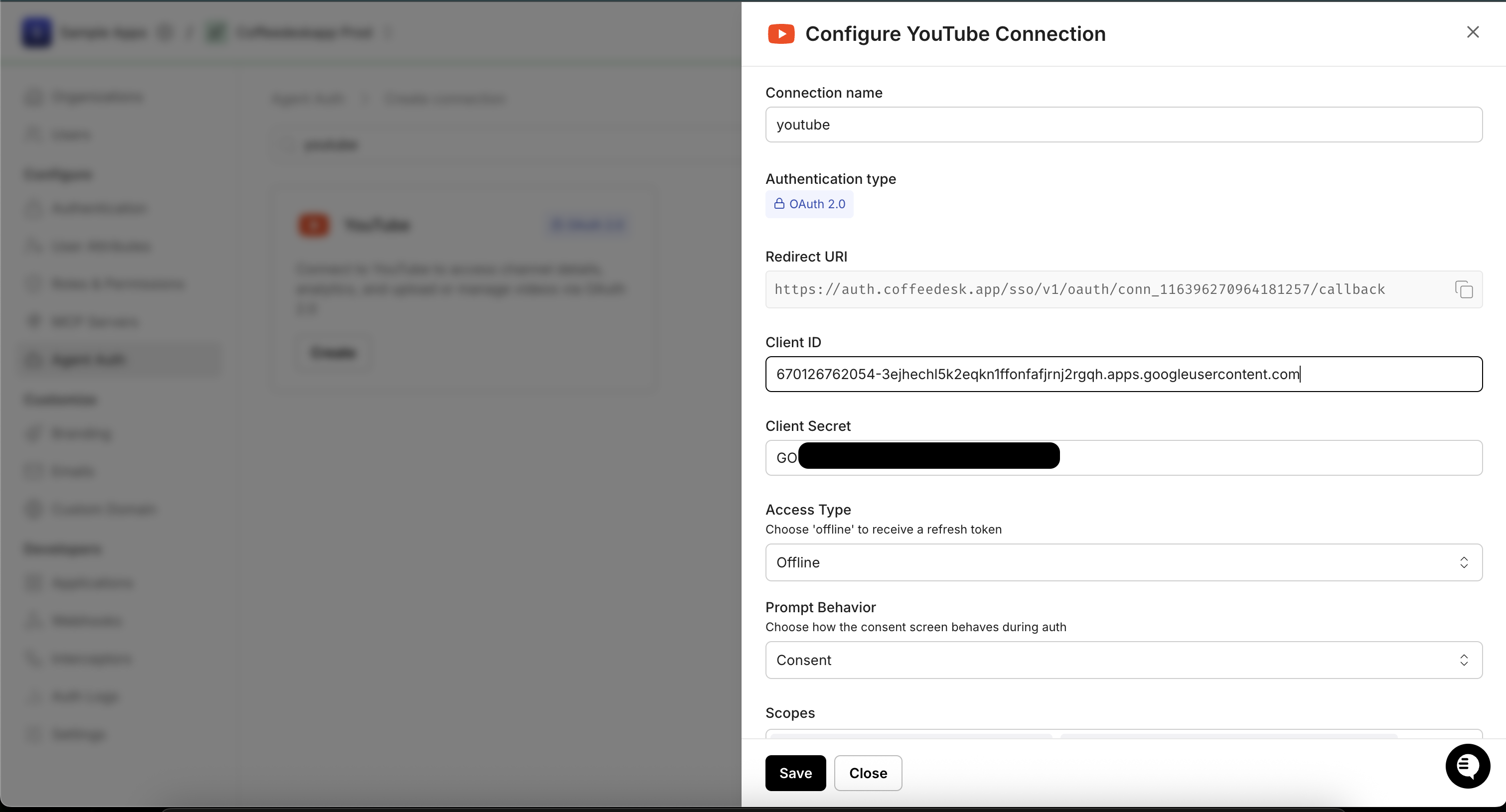
Enter your credentials:
- Client ID — the Client ID from your Google OAuth 2.0 client
- Client Secret — the Client secret from the dialog in step 3
- Scopes — select the scopes your app needs (e.g.,
youtube.readonly,youtube,youtube.force-ssl,yt-analytics.readonly)
-
Click Save.
-
-
Authorize a user and make your first call
quickstart.mts import { ScalekitClient } from '@scalekit-sdk/node'import 'dotenv/config'import { createInterface } from 'node:readline/promises'const scalekit = new ScalekitClient(process.env.SCALEKIT_ENVIRONMENT_URL,process.env.SCALEKIT_CLIENT_ID,process.env.SCALEKIT_CLIENT_SECRET,)const actions = scalekit.actionsconst connector = 'youtube'const identifier = 'user_123'// Generate an authorization link for the userconst { link } = await actions.getAuthorizationLink({ connectionName: connector, identifier })console.log('Authorize YouTube:', link)const rl = createInterface({ input: process.stdin, output: process.stdout })await rl.question('Press Enter after authorizing...')rl.close()// Make your first callconst result = await actions.executeTool({connector,identifier,toolName: 'youtube_analytics_groups_list',toolInput: {},})console.log(result)Terminal window npx tsx quickstart.mtsquickstart.py import osfrom scalekit import ScalekitClientfrom dotenv import load_dotenvload_dotenv()scalekit_client = ScalekitClient(env_url=os.getenv("SCALEKIT_ENVIRONMENT_URL"),client_id=os.getenv("SCALEKIT_CLIENT_ID"),client_secret=os.getenv("SCALEKIT_CLIENT_SECRET"),)actions = scalekit_client.actionsconnection_name = "youtube"identifier = "user_123"# Generate an authorization link for the userlink_response = actions.get_authorization_link(connection_name=connection_name,identifier=identifier,)print("Authorize YouTube:", link_response.link)input("Press Enter after authorizing...")# Make your first callresult = actions.execute_tool(tool_input={},tool_name="youtube_analytics_groups_list",connection_name=connection_name,identifier=identifier,)print(result)Terminal window python quickstart.pyEach user signs in once. See Authorize a user for the full flow and statuses.
Tools
Pass the exact name toexecute_toolyoutube_analytics_group_items_listRetrieve a list of items (videos, playlists, channels, or assets) that belong to a YouTube Analytics group.Read-onlyList Analytics Group Items
Retrieve a list of items (videos, playlists, channels, or assets) that belong to a YouTube Analytics group.
Inputs
group_idstringrequired- ID of the group whose items to retrieve
on_behalf_of_content_ownerstring- Content owner ID on whose behalf the request is being made
youtube_analytics_groups_listRetrieve a list of YouTube Analytics groups for a channel or content owner.Read-onlyList Analytics Groups
Retrieve a list of YouTube Analytics groups for a channel or content owner. Specify either id or mine to filter results.
Inputs
idstring- Comma-separated list of group IDs to retrieve
mineboolean- If true, return only groups owned by the authenticated user. Required if id is not set.
on_behalf_of_content_ownerstring- Content owner ID on whose behalf the request is being made
page_tokenstring- Token for retrieving the next page of results
youtube_analytics_queryQuery YouTube Analytics data to retrieve metrics like views, watch time, subscribers, revenue, etc.Read-onlyQuery YouTube Analytics
Query YouTube Analytics data to retrieve metrics like views, watch time, subscribers, revenue, etc. for channels or content owners.
Inputs
end_datestringrequired- End date for the analytics report in YYYY-MM-DD format
idsstringrequired- Channel or content owner ID. Format: channel==CHANNEL_ID or contentOwner==CONTENT_OWNER_ID
metricsstringrequired- Comma-separated list of metrics to retrieve (e.g., views,estimatedMinutesWatched,likes,subscribersGained)
start_datestringrequired- Start date for the analytics report in YYYY-MM-DD format
currencystring- Currency for monetary metrics (ISO 4217 code, e.g., USD)
dimensionsstring- Comma-separated list of dimensions to group results by (e.g., day,country,video)
filtersstring- Filter expression to narrow results (e.g., country==US, video==VIDEO_ID)
include_historical_channel_databoolean- Include historical channel data recorded before the channel was linked to a content owner
max_resultsinteger- Maximum number of rows to return in the response (maximum value: 200)
sortstring- Comma-separated list of columns to sort by. Prefix with - for descending order (e.g., -views)
start_indexinteger- 1-based index of the first row to return (for pagination)
youtube_captions_listRetrieve a list of caption tracks for a YouTube video.Read-onlyList Captions
Retrieve a list of caption tracks for a YouTube video. The part parameter is fixed to 'snippet'. Requires youtube.force-ssl scope.
Inputs
video_idstringrequired- ID of the video to list captions for
idstring- Comma-separated list of caption track IDs to filter results
youtube_channels_listRetrieve information about one or more YouTube channels including subscriber count, video count, and channel metadata.Read-onlyGet Channel Details
Retrieve information about one or more YouTube channels including subscriber count, video count, and channel metadata. You must provide exactly one filter: id, mine, for_handle, for_username, or managed_by_me. Requires a valid YouTube OAuth2 connection.
Inputs
partstringrequired- Comma-separated list of channel resource parts to include in the response
for_handlestring- YouTube channel handle to look up (e.g., @MrBeast). Use instead of id, mine, or for_username.
for_usernamestring- YouTube username of the channel to look up (legacy). Use instead of id, mine, or for_handle.
idstring- Comma-separated list of YouTube channel IDs. Use instead of mine, for_handle, or for_username.
managed_by_meboolean- Return channels managed by the authenticated user (content partners only). Use instead of id, mine, for_handle, or for_username.
max_resultsinteger- Maximum number of results to return (0-50, default: 5)
mineboolean- Return the authenticated user's channel. Use instead of id, for_handle, or for_username.
page_tokenstring- Token for pagination
youtube_comment_threads_listRetrieve top-level comment threads for a YouTube video or channel.Read-onlyList Comment Threads
Retrieve top-level comment threads for a YouTube video or channel. You must provide exactly one filter: video_id, all_threads_related_to_channel_id, or id. Each thread includes the top-level comment and optionally its replies. Requires a valid YouTube OAuth2 connection.
Inputs
partstringrequired- Comma-separated list of comment thread resource parts to include
all_threads_related_to_channel_idstring- Return all comment threads associated with a specific channel. Use instead of video_id or id.
idstring- Comma-separated list of comment thread IDs to retrieve. Use instead of video_id or all_threads_related_to_channel_id.
max_resultsinteger- Maximum number of comment threads to return (1-100, default: 20)default
20 orderstring- Sort order for comment threadsone of
relevancetimedefaulttime page_tokenstring- Token for pagination
search_termsstring- Limit results to comments containing these search terms
video_idstring- YouTube video ID to fetch comment threads for. Use instead of all_threads_related_to_channel_id or id.
youtube_comments_listRetrieve a list of replies to a specific YouTube comment thread.Read-onlyList Comment Replies
Retrieve a list of replies to a specific YouTube comment thread. You must provide exactly one filter: parent_id or id. The part parameter is fixed to 'snippet'. Requires youtube.readonly scope.
Inputs
idstring- Comma-separated list of comment IDs to retrieve. Use instead of parent_id.
max_resultsinteger- Maximum number of replies to return (1-100, default: 20). Cannot be used with id filter.default
20 page_tokenstring- Token for pagination to retrieve the next page of replies. Cannot be used with id filter.
parent_idstring- ID of the comment thread (top-level comment) to list replies for. Use instead of id.
text_formatstring- Format of the comment text in the responseone of
htmlplainTextdefaulthtml
youtube_live_broadcasts_listList live broadcasts owned by the authenticated user's YouTube channel.Read-onlyList Live Broadcasts
List live broadcasts owned by the authenticated user's YouTube channel. Filter by broadcast status (active, upcoming, completed) or by specific broadcast IDs. Requires youtube or youtube.readonly scope.
Inputs
partstringrequired- Comma-separated list of liveBroadcast resource parts to include in the response. Valid values: id, snippet, contentDetails, status.
broadcast_statusstring- Filter broadcasts by their current status.one of
activeallcompletedupcoming idstring- Comma-separated list of specific YouTube live broadcast IDs to retrieve. Use instead of broadcast_status.
max_resultsinteger- Maximum number of results to return (1-50, default 5).
page_tokenstring- Token for pagination.
youtube_live_streams_listList video streams owned by the authenticated user's YouTube channel.Read-onlyList Live Streams
List video streams owned by the authenticated user's YouTube channel. A stream carries the actual ingested video/audio and is bound to one or more live broadcasts. Requires youtube or youtube.readonly scope.
Inputs
partstringrequired- Comma-separated list of liveStream resource parts to include in the response. Valid values: id, snippet, cdn, contentDetails, status.
idstring- Comma-separated list of specific YouTube live stream IDs to retrieve. Use instead of mine.
max_resultsinteger- Maximum number of results to return (1-50, default 5).
mineboolean- Restrict results to streams owned by the authenticated user. Use instead of id.
page_tokenstring- Token for pagination.
youtube_playlist_items_listRetrieve a list of videos in a YouTube playlist.Read-onlyList Playlist Items
Retrieve a list of videos in a YouTube playlist. Returns playlist items with video details, positions, and metadata. Requires a valid YouTube OAuth2 connection.
Inputs
partstringrequired- Comma-separated list of playlist item resource parts to include
playlist_idstringrequired- YouTube playlist ID to retrieve items from
max_resultsinteger- Maximum number of playlist items to return (0-50, default: 5)default
5 page_tokenstring- Token for pagination to retrieve the next page
video_idstring- Filter results to items containing a specific video
youtube_playlists_listRetrieve a list of YouTube playlists for a channel or the authenticated user.Read-onlyList Playlists
Retrieve a list of YouTube playlists for a channel or the authenticated user. You must provide exactly one filter: channel_id, id, or mine. Requires a valid YouTube OAuth2 connection.
Inputs
partstringrequired- Comma-separated list of playlist resource parts to include
channel_idstring- Return playlists for a specific channel. Use instead of id or mine.
idstring- Comma-separated list of playlist IDs to retrieve. Use instead of channel_id or mine.
max_resultsinteger- Maximum number of playlists to return (0-50, default: 5)default
5 mineboolean- Return playlists owned by the authenticated user. Use instead of channel_id or id.
page_tokenstring- Token for pagination
youtube_reporting_list_jobsList all YouTube Reporting API jobs scheduled for a channel or content owner.Read-onlyList Reporting Jobs
List all YouTube Reporting API jobs scheduled for a channel or content owner.
Inputs
include_system_managedboolean- If true, include system-managed reporting jobs in the response
on_behalf_of_content_ownerstring- Content owner ID on whose behalf the request is being made
page_sizeinteger- Maximum number of jobs to return per page
page_tokenstring- Token for retrieving the next page of results
youtube_reporting_list_report_typesList all YouTube Reporting API report types available for a channel or content owner (e.g., channel_basic_a2, channel_demographics_a1).Read-onlyList Report Types
List all YouTube Reporting API report types available for a channel or content owner (e.g., channel_basic_a2, channel_demographics_a1).
Inputs
include_system_managedboolean- If true, include system-managed report types in the response
on_behalf_of_content_ownerstring- Content owner ID on whose behalf the request is being made
page_sizeinteger- Maximum number of report types to return per page
page_tokenstring- Token for retrieving the next page of results
youtube_reporting_list_reportsList reports that have been generated for a YouTube reporting job.Read-onlyList Reports for Job
List reports that have been generated for a YouTube reporting job. Each report is a downloadable CSV file.
Inputs
job_idstringrequired- ID of the reporting job whose reports to list
created_afterstring- Only return reports created after this timestamp (RFC3339 format, e.g., 2024-01-01T00:00:00Z)
on_behalf_of_content_ownerstring- Content owner ID on whose behalf the request is being made
page_sizeinteger- Maximum number of reports to return per page
page_tokenstring- Token for retrieving the next page of results
start_time_at_or_afterstring- Only return reports whose data start time is at or after this timestamp (RFC3339 format)
start_time_beforestring- Only return reports whose data start time is before this timestamp (RFC3339 format)
youtube_searchSearch for videos, channels, and playlists on YouTube.Read-onlySearch YouTube
Search for videos, channels, and playlists on YouTube. Returns a list of resources matching the search query. The part parameter is fixed to 'snippet'. Requires a valid YouTube OAuth2 connection.
Inputs
channel_idstring- Restrict search results to a specific channel
max_resultsinteger- Maximum number of results to return (0-50, default: 10)default
10 orderstring- Sort order for search resultsone of
dateratingrelevancetitlevideoCountviewCountdefaultrelevance page_tokenstring- Token for pagination to retrieve the next page of results
published_afterstring- Filter results to resources published after this date (RFC 3339 format)
published_beforestring- Filter results to resources published before this date (RFC 3339 format)
qstring- Search query keywords
safe_searchstring- Safe search filter levelone of
moderatenonestrictdefaultmoderate typestring- Restrict results to a specific resource typeone of
videochannelplaylistdefaultvideo video_durationstring- Filter videos by duration (only applies when type is 'video')one of
anylongmediumshort
youtube_subscriptions_listRetrieve a list of YouTube channel subscriptions for the authenticated user or a specific channel.Read-onlyList Subscriptions
Retrieve a list of YouTube channel subscriptions for the authenticated user or a specific channel. You must provide exactly one filter: channel_id, id, mine, my_recent_subscribers, or my_subscribers. Requires a valid YouTube OAuth2 connection with youtube.readonly scope.
Inputs
partstringrequired- Comma-separated list of subscription resource parts to include
channel_idstring- Return subscriptions for a specific channel. Use instead of id, mine, my_recent_subscribers, or my_subscribers.
for_channel_idstring- Filter subscriptions to specific channels (comma-separated channel IDs)
idstring- Comma-separated list of subscription IDs to retrieve. Use instead of channel_id, mine, my_recent_subscribers, or my_subscribers.
max_resultsinteger- Maximum number of subscriptions to return (0-50, default: 5)
mineboolean- Return subscriptions for the authenticated user. Use instead of channel_id, id, my_recent_subscribers, or my_subscribers.
my_recent_subscribersboolean- Return the authenticated user's recent subscribers. Use instead of channel_id, id, mine, or my_subscribers.
my_subscribersboolean- Return the authenticated user's subscribers. Use instead of channel_id, id, mine, or my_recent_subscribers.
orderstring- Sort order for subscriptionsone of
alphabeticalrelevanceunread page_tokenstring- Token for pagination
youtube_video_categories_listRetrieve a list of YouTube video categories available in a given region or by ID.Read-onlyList Video Categories
Retrieve a list of YouTube video categories available in a given region or by ID. You must provide exactly one filter: id or region_code. The part parameter is fixed to 'snippet'. Useful for setting the category when updating a video. Requires youtube.readonly scope.
Inputs
hlstring- Language for the category names in the response (BCP-47)default
en_US idstring- Comma-separated list of category IDs to retrieve. Use instead of region_code.
region_codestring- ISO 3166-1 alpha-2 country code to retrieve categories available in that region. Use instead of id.
youtube_videos_get_ratingRetrieve the authenticated user's rating (like, dislike, or none) for one or more YouTube videos.Read-onlyGet Video Ratings
Retrieve the authenticated user's rating (like, dislike, or none) for one or more YouTube videos. The part parameter is fixed to 'id'. Requires youtube.readonly scope.
Inputs
idstringrequired- Comma-separated list of YouTube video IDs to get ratings for
youtube_videos_listRetrieve detailed information about one or more YouTube videos including statistics, snippet, content details, and status.Read-onlyGet Video Details
Retrieve detailed information about one or more YouTube videos including statistics, snippet, content details, and status. You must provide exactly one filter: id, chart, or my_rating. Requires a valid YouTube OAuth2 connection.
Inputs
partstringrequired- Comma-separated list of video resource parts to include in the response
chartstring- Retrieve a chart of the most popular videos. Use instead of id or my_rating.one of
mostPopular idstring- Comma-separated list of YouTube video IDs. Use instead of chart or my_rating.
max_resultsinteger- Maximum number of results to return when using chart filter (1-50, default: 5)default
5 my_ratingstring- Filter videos by the authenticated user's rating. Use instead of id or chart.one of
dislikelike page_tokenstring- Token for pagination
region_codestring- ISO 3166-1 alpha-2 country code to filter trending videos by region
video_category_idstring- Filter most popular videos by category ID
youtube_analytics_group_createCreate a YouTube Analytics group to organize videos, playlists, channels, or assets for collective analytics reporting.WriteCreate Analytics Group
Create a YouTube Analytics group to organize videos, playlists, channels, or assets for collective analytics reporting.
Inputs
item_typestringrequired- Type of items the group will containone of
youtube#videoyoutube#playlistyoutube#channelyoutube#userActivity titlestringrequired- Title of the analytics group
on_behalf_of_content_ownerstring- Content owner ID. For content partners only.
youtube_analytics_group_item_insertAdd a video, playlist, or channel to a YouTube Analytics group.WriteAdd Item to Analytics Group
Add a video, playlist, or channel to a YouTube Analytics group.
Inputs
group_idstringrequired- ID of the Analytics group to add the item to
resource_idstringrequired- ID of the resource (video ID, channel ID, or playlist ID)
resource_kindstringrequired- Type of the resourceone of
youtube#videoyoutube#channelyoutube#playlist on_behalf_of_content_ownerstring- Content owner ID. For content partners only.
youtube_analytics_groups_updateUpdate the title of an existing YouTube Analytics group.WriteUpdate Analytics Group
Update the title of an existing YouTube Analytics group.
- Idempotent
Inputs
group_idstringrequired- ID of the Analytics group to update
titlestringrequired- New title for the Analytics group
on_behalf_of_content_ownerstring- Content owner ID. For content partners only.
youtube_comment_threads_insertPost a new top-level comment on a YouTube video.WritePost Comment
Post a new top-level comment on a YouTube video. Requires youtube.force-ssl scope.
Inputs
textstringrequired- Text of the comment
video_idstringrequired- ID of the video to comment on
youtube_comments_insertPost a reply to an existing top-level YouTube comment thread.WriteReply to Comment
Post a reply to an existing top-level YouTube comment thread. Requires youtube.force-ssl scope.
Inputs
parent_idstringrequired- ID of the top-level comment to reply to
textstringrequired- Text of the reply
youtube_comments_set_moderation_statusSet the moderation status of a comment on a video or channel you own or moderate — approve it, reject it, or hold it for review.WriteSet Comment Moderation Status
Set the moderation status of a comment on a video or channel you own or moderate — approve it, reject it, or hold it for review. Requires youtube.force-ssl scope.
- Idempotent
Inputs
comment_idstringrequired- Comma-separated list of comment IDs to moderate
moderation_statusstringrequired- The new moderation status to applyone of
publishedheldForReviewrejected ban_authorboolean- Whether to additionally ban the comment's author from the channel. Only valid when moderation_status is rejected.
youtube_comments_updateEdit the text of an existing YouTube comment or reply that you have permission to modify.WriteEdit Comment
Edit the text of an existing YouTube comment or reply that you have permission to modify. Requires youtube.force-ssl scope.
- Idempotent
Inputs
comment_idstringrequired- ID of the comment to update
textstringrequired- New text for the comment
youtube_live_broadcasts_bindBind a YouTube live broadcast to a video stream so the broadcast will show that stream's video once it goes live, or remove an existing binding by omitting stream_id.WriteBind Live Broadcast to Stream
Bind a YouTube live broadcast to a video stream so the broadcast will show that stream's video once it goes live, or remove an existing binding by omitting stream_id. A broadcast can be bound to only one stream at a time, though a stream can be bound to multiple broadcasts. Requires youtube scope.
- Idempotent
Inputs
idstringrequired- The unique ID of the broadcast to bind.
partstring- Comma-separated list of liveBroadcast resource parts to include in the response.
stream_idstring- The unique ID of the stream to bind the broadcast to. Omit to remove any existing binding.
youtube_live_broadcasts_insertCreate a new YouTube live broadcast (an event with metadata, a schedule, and a monitor stream) on the authenticated user's channel.WriteCreate Live Broadcast
Create a new YouTube live broadcast (an event with metadata, a schedule, and a monitor stream) on the authenticated user's channel. After creating both a broadcast and a stream (see live_streams_insert), bind them together with live_broadcasts_bind before going live. Requires youtube scope.
Inputs
privacy_statusstringrequired- Privacy setting for the broadcast.one of
publicprivateunlisted scheduled_start_timestringrequired- The scheduled start time for the broadcast, in ISO 8601 format.
titlestringrequired- Title of the broadcast (1-100 characters).
descriptionstring- Description of the broadcast (up to 5000 characters).
enable_auto_startboolean- Whether the broadcast automatically transitions to live status when YouTube receives stream data.
enable_auto_stopboolean- Whether the broadcast automatically transitions to complete status after a period of inactivity.
enable_dvrboolean- Whether viewers can access DVR controls (pause/rewind) while watching the broadcast.
scheduled_end_timestring- The scheduled end time for the broadcast, in ISO 8601 format.
youtube_live_broadcasts_transitionChange the status of a YouTube live broadcast, driving it through its lifecycle.WriteTransition Live Broadcast Status
Change the status of a YouTube live broadcast, driving it through its lifecycle. Transitioning to 'testing' starts sending video to the monitor stream, 'live' makes the broadcast visible to the audience, and 'complete' ends the broadcast. Requires youtube scope.
Inputs
broadcast_statusstringrequired- The target status for the broadcast.one of
testinglivecomplete idstringrequired- The unique ID of the broadcast to transition.
partstring- Comma-separated list of liveBroadcast resource parts to include in the response.
youtube_live_streams_insertCreate a new YouTube live stream, representing the ingestion endpoint that receives encoder video/audio data.WriteCreate Live Stream
Create a new YouTube live stream, representing the ingestion endpoint that receives encoder video/audio data. Bind the resulting stream to a broadcast with live_broadcasts_bind before going live. Requires youtube or youtube.force-ssl scope.
Inputs
frame_ratestringrequired- The frame rate of the encoded video stream.one of
30fps60fpsvariable ingestion_typestringrequired- The method used to transmit video to YouTube.one of
rtmpdashhls resolutionstringrequired- The resolution of the encoded video stream.one of
240p360p480p720p1080p1440p2160pvariable titlestringrequired- Title of the stream (1-128 characters).
descriptionstring- Description of the stream (up to 10000 characters).
is_reusableboolean- Whether this stream can be bound to multiple broadcasts, one at a time, and reused across events.
youtube_playlist_insertCreate a new YouTube playlist for the authenticated user.WriteCreate Playlist
Create a new YouTube playlist for the authenticated user. Requires youtube scope.
Inputs
titlestringrequired- Playlist title
default_languagestring- Default language of the playlist
descriptionstring- Playlist description
privacy_statusstring- Privacy settingone of
publicunlistedprivate tagsarray- Tags for the playlist
youtube_playlist_items_insertAdd a video to a YouTube playlist at an optional position.WriteAdd Video to Playlist
Add a video to a YouTube playlist at an optional position. Requires youtube scope.
Inputs
playlist_idstringrequired- Playlist to add the video to
video_idstringrequired- YouTube video ID to add
notestring- Optional note for this playlist item
positioninteger- Zero-based position in the playlist. Omit to add at end.
youtube_playlist_updateUpdate an existing YouTube playlist's title, description, privacy status, or default language.WriteUpdate Playlist
Update an existing YouTube playlist's title, description, privacy status, or default language. Requires youtube scope.
- Idempotent
Inputs
playlist_idstringrequired- ID of the playlist to update
default_languagestring- Language of the playlist
descriptionstring- New playlist description
privacy_statusstring- New privacy settingone of
publicunlistedprivate titlestring- New playlist title
youtube_reporting_create_jobCreate a YouTube reporting job to schedule daily generation of a specific report type.WriteCreate Reporting Job
Create a YouTube reporting job to schedule daily generation of a specific report type. Once created, YouTube will generate the report daily.
Inputs
namestringrequired- Human-readable name for the reporting job
report_type_idstringrequired- ID of the report type to generate (e.g., channel_basic_a2, channel_demographics_a1)
on_behalf_of_content_ownerstring- Content owner ID on whose behalf the job is being created
youtube_subscriptions_insertSubscribe the authenticated user to a YouTube channel.WriteSubscribe to Channel
Subscribe the authenticated user to a YouTube channel. Requires youtube scope.
Inputs
channel_idstringrequired- ID of the YouTube channel to subscribe to
youtube_videos_rateLike, dislike, or remove a rating from a YouTube video on behalf of the authenticated user.WriteRate a Video
Like, dislike, or remove a rating from a YouTube video on behalf of the authenticated user. Requires youtube scope with youtube.force-ssl.
- Idempotent
Inputs
ratingstringrequired- Rating to apply to the videoone of
dislikelikenone video_idstringrequired- YouTube video ID to rate
youtube_videos_updateUpdate metadata for an existing YouTube video.WriteUpdate Video
Update metadata for an existing YouTube video. When updating snippet, both title and category_id are required together. Requires youtube scope.
- Idempotent
Inputs
video_idstringrequired- ID of the video to update
category_idstring- YouTube video category ID. Required together with title when updating snippet.
default_languagestring- Language of the video
descriptionstring- New video description
embeddableboolean- Whether the video can be embedded
licensestring- Video licenseone of
youtubecreativeCommon privacy_statusstring- New privacy settingone of
publicunlistedprivate public_stats_viewableboolean- Whether stats are publicly visible
tagsarray- Video tags
titlestring- New video title. Required together with category_id when updating snippet.
youtube_analytics_group_items_deleteRemove an item (video, channel, or playlist) from a YouTube Analytics group.DestructiveDelete Analytics Group Item
Remove an item (video, channel, or playlist) from a YouTube Analytics group.
- Idempotent
Inputs
idstringrequired- ID of the group item to remove
on_behalf_of_content_ownerstring- Content owner ID on whose behalf the request is being made
youtube_analytics_groups_deleteDelete a YouTube Analytics group.DestructiveDelete Analytics Group
Delete a YouTube Analytics group. This removes the group but does not delete the videos, channels, or playlists within it.
- Idempotent
Inputs
group_idstringrequired- ID of the Analytics group to delete
on_behalf_of_content_ownerstring- Content owner ID on whose behalf the request is being made
youtube_comments_deletePermanently delete a YouTube comment or reply that you have permission to remove.DestructiveDelete Comment
Permanently delete a YouTube comment or reply that you have permission to remove. Requires youtube.force-ssl scope.
- Idempotent
Inputs
comment_idstringrequired- ID of the comment to delete
youtube_playlist_deletePermanently delete a YouTube playlist.DestructiveDelete Playlist
Permanently delete a YouTube playlist. This action cannot be undone. Requires youtube scope.
- Idempotent
Inputs
playlist_idstringrequired- ID of the playlist to delete
youtube_playlist_items_deleteRemove a video from a YouTube playlist by its playlist item ID.DestructiveRemove Playlist Item
Remove a video from a YouTube playlist by its playlist item ID. Requires youtube scope.
- Idempotent
Inputs
playlist_item_idstringrequired- ID of the playlist item to remove (not the video ID)
youtube_reporting_jobs_deleteDelete a scheduled YouTube Reporting API job.DestructiveDelete Reporting Job
Delete a scheduled YouTube Reporting API job. Stopping a job means new reports will no longer be generated.
- Idempotent
Inputs
job_idstringrequired- ID of the reporting job to delete
on_behalf_of_content_ownerstring- Content owner ID on whose behalf the request is being made
youtube_subscriptions_deleteUnsubscribe the authenticated user from a YouTube channel using the subscription ID.DestructiveUnsubscribe from Channel
Unsubscribe the authenticated user from a YouTube channel using the subscription ID. Requires youtube scope.
- Idempotent
Inputs
subscription_idstringrequired- ID of the subscription to delete
youtube_videos_deletePermanently delete a YouTube video.DestructiveDelete Video
Permanently delete a YouTube video. This action cannot be undone. Requires youtube scope.
- Idempotent
Inputs
video_idstringrequired- ID of the video to delete
No tools match.
Workflows
Google OAuth consent screen verification
Before you use your own Google OAuth credentials in production, understand what end users see on Google’s consent screen when they authorize a connected account.
| Audience type | Consent screen behavior | When to use |
|---|---|---|
| Internal | Shows your App Name and logo from Branding settings | Only users in your Google Workspace or Cloud Identity organization can authorize the connector |
| External | Shows {env_name}.scalekit.dev until Google verifies your app | Any user with a Google account can authorize the connector |
Why External is required for most AgentKit connectors:
- Internal restricts authorization to users in your Google Workspace or Cloud Identity organization. Users with
@gmail.comor other Google accounts outside your organization cannot complete OAuth. - External is required when end users outside your organization authorize tool access through connected accounts.
- Organization-managed OAuth clients follow the same rules as personal or developer OAuth clients. Switching to an org-owned client does not bypass Google verification.
- Until Google completes verification of your External app, users see
scalekit.devon the consent screen. After verification, your App Name and logo appear.
During development:
- Add Test users under APIs & Services → OAuth consent screen while publishing status is Testing.
- On unverified apps, users can click Advanced → Go to app (unsafe) to proceed during testing.
- Google Workspace admins may need to allowlist your OAuth client.
For Google’s verification requirements and timeline, refer to Google’s OAuth consent screen verification guide.