
The Diarize connector lets your AI agent act in each user's Diarize account. Each user connects their own Diarize access token once, and Scalekit sends it with every call, so your agent never handles credentials. It comes with 3 tools.
- Tools
- 3
- What they doRead · write · destructive
- 2 · 1 · 02 read1 write0 destructive
- Users sign in with
- Access token
What you can do
- Transcribe media: submit audio or video links from YouTube, X, Instagram, or TikTok for transcription with speaker labels
- Track and download transcripts: check job progress and download finished transcripts as JSON, TXT, SRT, or VTT with word timestamps
Setup
Install the SDK
Terminal window npm install @scalekit-sdk/node dotenvTerminal window pip install scalekit-sdk-python python-dotenvSet your credentials
Add your Scalekit credentials to your
.envfile. Find values in app.scalekit.com > Developers > API Credentials..env SCALEKIT_ENVIRONMENT_URL=<your-environment-url>SCALEKIT_CLIENT_ID=<your-client-id>SCALEKIT_CLIENT_SECRET=<your-client-secret>Create the Diarize connection
In AgentKit > Connections, create a Diarize connection. The name you give it is the
connection_nameyour code passes. See Configure connections.Console steps with screenshots
Register your Diarize API key with Scalekit so it can authenticate and proxy transcription requests on behalf of your users. Diarize uses API key authentication.
-
Get a Diarize API key
-
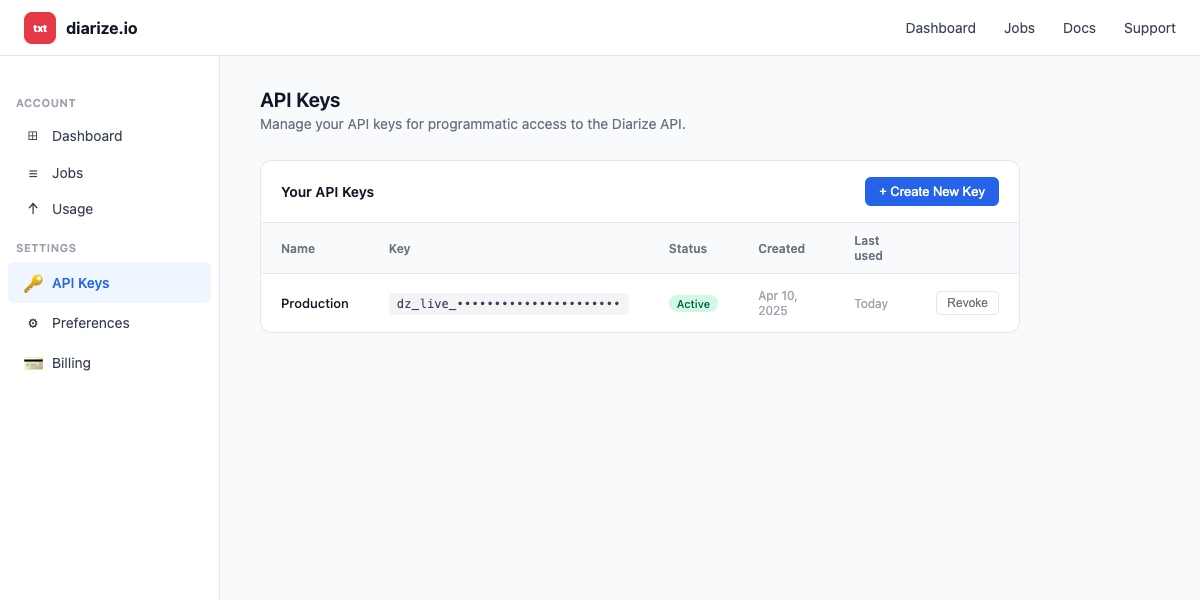
Sign in to diarize.io and go to Settings → API Keys.
-
Click + Create New Key, give it a name (e.g.,
Agent Auth), and confirm. -
Copy the key value — store it securely, as you will not be able to view it again.
-
-
Create a connection in Scalekit
-
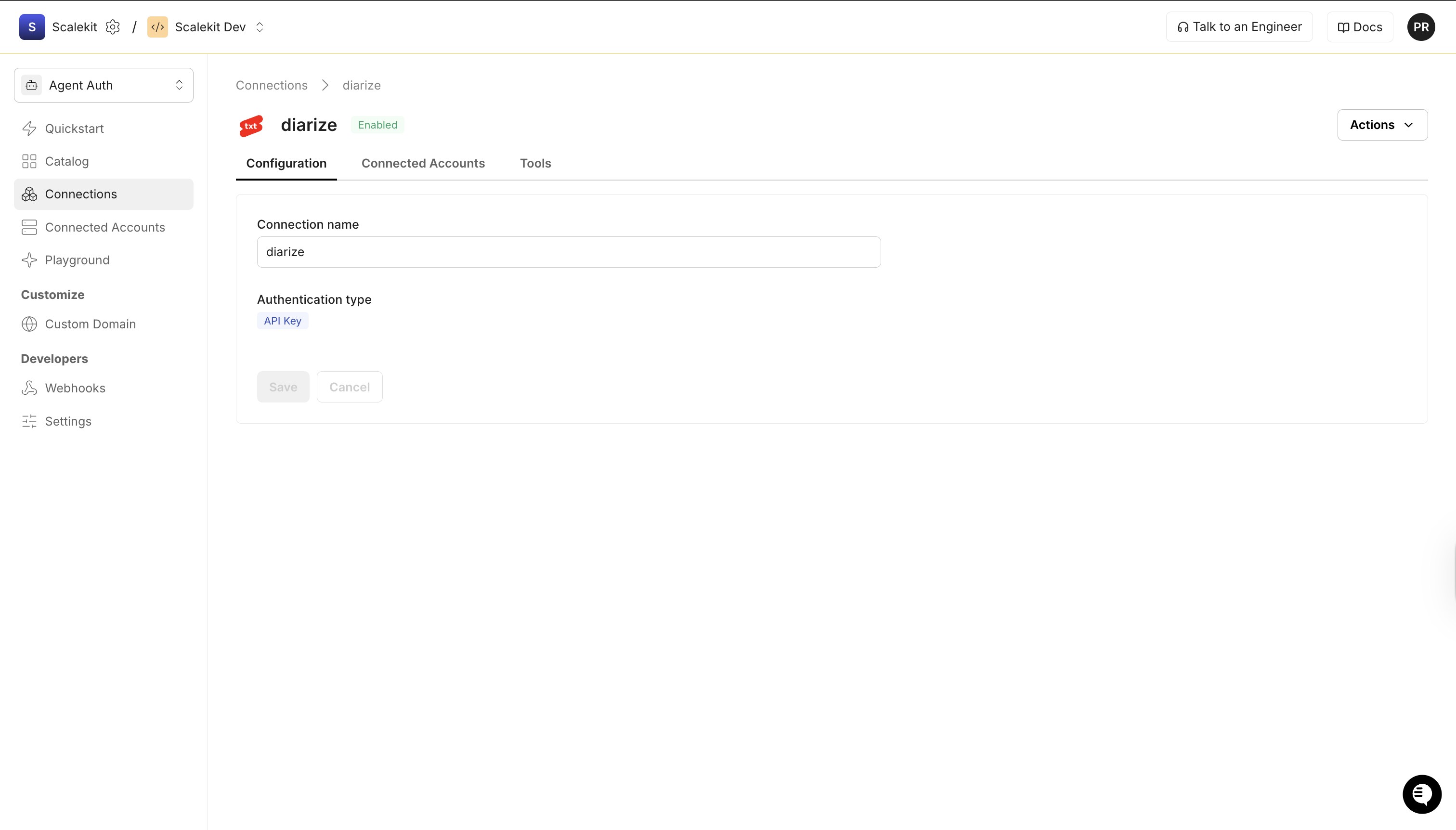
In Scalekit dashboard, go to AgentKit > Connections > Create Connection. Find Diarize and click Create.
-
Note the Connection name — you will use this as
connection_namein your code (e.g.,diarize). -
Click Save.
-
-
Add a connected account
Connected accounts link a specific user identifier in your system to a Diarize API key. Add one in the dashboard to test. In production, each user adds their own through the authorization link: they enter their credentials on the page it opens.
In the dashboard, to test
-
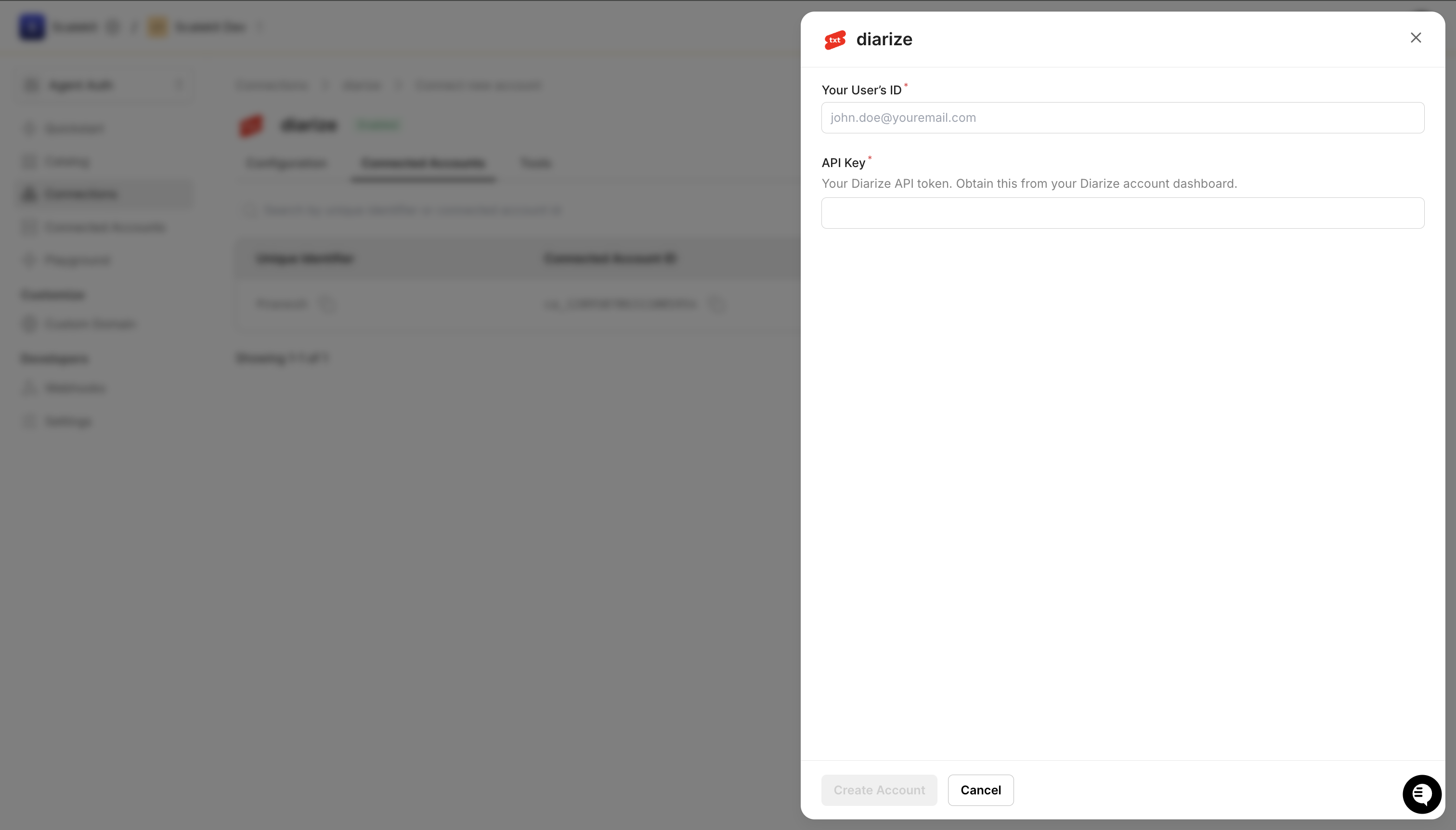
Open the connection you created and click the Connected Accounts tab → Add account.
-
Fill in:
- Your User’s ID — a unique identifier for this user in your system (e.g.,
user_123) - API Key — the Diarize API key you copied in step 1
- Your User’s ID — a unique identifier for this user in your system (e.g.,
-
Click Create Account.
From your backend, if your app already has the credentials
For example, when users enter them on a settings page in your app:
import { ConnectorStatus } from '@scalekit-sdk/node'// Never hard-code API keys — read from secure storage or user inputconst diarizeApiKey = getUserDiarizeKey(); // retrieve from your secure storeconst authorizationDetails = {details: {case: 'staticAuth',value: { details: { token: diarizeApiKey } },},};let { connectedAccount } = await scalekit.actions.upsertConnectedAccount({connectionName: 'diarize',identifier: 'user_123', // your user's unique IDauthorizationDetails,});// Make sure the account is ACTIVE before the first tool call.if (connectedAccount?.status !== ConnectorStatus.ACTIVE) {({ connectedAccount } = await scalekit.actions.upsertConnectedAccount({connectionName: 'diarize',identifier: 'user_123',authorizationDetails,}));}# Never hard-code API keys — read from secure storage or user inputdiarize_api_key = get_user_diarize_key() # retrieve from your secure storeauthorization_details = {"static_auth": {"token": diarize_api_key}}response = scalekit_client.actions.upsert_connected_account(connection_name="diarize",identifier="user_123",authorization_details=authorization_details,)# Make sure the account is ACTIVE before the first tool call.if response.connected_account.status != "ACTIVE":response = scalekit_client.actions.upsert_connected_account(connection_name="diarize",identifier="user_123",authorization_details=authorization_details,) -
-
Authorize a user and make your first call
quickstart.mts import { ScalekitClient } from '@scalekit-sdk/node'import 'dotenv/config'import { createInterface } from 'node:readline/promises'const scalekit = new ScalekitClient(process.env.SCALEKIT_ENVIRONMENT_URL,process.env.SCALEKIT_CLIENT_ID,process.env.SCALEKIT_CLIENT_SECRET,)const actions = scalekit.actionsconst connector = 'diarize'const identifier = 'user_123'// Generate an authorization link for the userconst { link } = await actions.getAuthorizationLink({ connectionName: connector, identifier })console.log('Authorize Diarize:', link)const rl = createInterface({ input: process.stdin, output: process.stdout })await rl.question('Press Enter after authorizing...')rl.close()// Make your first callconst result = await actions.executeTool({connector,identifier,toolName: 'diarize_download_transcript',toolInput: { job_id: 'YOUR_JOB_ID' },})console.log(result)Terminal window npx tsx quickstart.mtsquickstart.py import osfrom scalekit import ScalekitClientfrom dotenv import load_dotenvload_dotenv()scalekit_client = ScalekitClient(env_url=os.getenv("SCALEKIT_ENVIRONMENT_URL"),client_id=os.getenv("SCALEKIT_CLIENT_ID"),client_secret=os.getenv("SCALEKIT_CLIENT_SECRET"),)actions = scalekit_client.actionsconnection_name = "diarize"identifier = "user_123"# Generate an authorization link for the userlink_response = actions.get_authorization_link(connection_name=connection_name,identifier=identifier,)print("Authorize Diarize:", link_response.link)input("Press Enter after authorizing...")# Make your first callresult = actions.execute_tool(tool_input={"job_id":"YOUR_JOB_ID"},tool_name="diarize_download_transcript",connection_name=connection_name,identifier=identifier,)print(result)Terminal window python quickstart.pyEach user opens the link once and enters their Diarize credentials there. If your app already has a user's credentials, add the account from your backend instead, as the console steps above show. See Authorize a user for the full flow and statuses.
Tools
Pass the exact name toexecute_tooldiarize_download_transcriptDownload the transcript output for a completed transcription job in JSON, TXT, SRT, or VTT format, including speaker diarization, segments, and word-level timestamps.Read-onlyDownload Transcript
Download the transcript output for a completed transcription job in JSON, TXT, SRT, or VTT format, including speaker diarization, segments, and word-level timestamps.
Inputs
job_idstringrequired- The unique ID of the completed transcription job
formatstring- Output format for the transcript. Supported formats: 'json', 'txt', 'srt', 'vtt'.one of
jsontxtsrtvttdefaultjson
Also accepts
schema_versionandtool_versionto pin a version.diarize_get_job_statusRetrieve the current status of a transcription job by its job ID.Read-onlyGet Job Status
Retrieve the current status of a transcription job by its job ID. Returns job state (pending, processing, completed, failed), metadata, and an estimatedTime field (in seconds) indicating how long processing is expected to take. Use estimatedTime to determine polling frequency and max wait duration — for example, a 49-minute episode may have an estimatedTime of ~891s (~15 mins), so the agent should wait at least that long before giving up.
Inputs
job_idstringrequired- The unique ID of the transcription job to check
Also accepts
schema_versionandtool_versionto pin a version.diarize_create_transcription_jobSubmit a new transcription and diarization job for an audio or video URL (YouTube, X, Instagram, TikTok).WriteCreate Transcription Job
Submit a new transcription and diarization job for an audio or video URL (YouTube, X, Instagram, TikTok). Returns a job ID that can be used to check status and download results.
Inputs
urlstringrequired- The URL of the audio or video content to transcribe (e.g. YouTube, X, Instagram, TikTok link)
languagestring- Language code for transcription (e.g. 'en', 'es', 'fr'). Defaults to auto-detection if not provided.
num_speakersinteger- Expected number of speakers in the audio. Helps improve diarization accuracy.
Also accepts
schema_versionandtool_versionto pin a version.
No tools match.
Workflows
Tool calling
Use this connector when you want an agent to transcribe and diarize audio or video from YouTube, X, Instagram, or TikTok.
- Use
diarize_create_transcription_jobto submit a URL for transcription. Returns anid(job ID) and anestimatedTime(in seconds) for how long processing will take. - Use
diarize_get_job_statusto poll untilstatusisCOMPLETEDorFAILED. UseestimatedTimeto set a sensible timeout — do not give up before that time has elapsed. - Use
diarize_download_transcriptto retrieve the result once complete. Choosejsonfor structured speaker diarization data, ortxt,srt,vttfor plain-text and subtitle formats.
import time
# Step 1: Submit a transcription jobcreate_result = actions.execute_tool( connection_name='diarize', identifier='user_123', tool_name="diarize_create_transcription_job", tool_input={ "url": "https://www.youtube.com/watch?v=example", "language": "en", # optional — omit for auto-detection "num_speakers": 2, # optional — improves speaker diarization },)job_id = create_result.data["id"]estimated_seconds = create_result.data.get("estimatedTime", 120)deadline = time.time() + estimated_seconds * 2print(f"Job {job_id} submitted. Estimated: {estimated_seconds}s")
# Step 2: Poll until completewhile True: if time.time() > deadline: raise TimeoutError(f"Job {job_id} timed out after {estimated_seconds * 2}s") time.sleep(15) status_result = actions.execute_tool( connection_name='diarize', identifier='user_123', tool_name="diarize_get_job_status", tool_input={"job_id": job_id}, ) status = status_result.data["status"] print("Status:", status) if status == "COMPLETED": break if status == "FAILED": raise RuntimeError(f"Job {job_id} failed")
# Step 3: Download the diarized transcripttranscript_result = actions.execute_tool( connection_name='diarize', identifier='user_123', tool_name="diarize_download_transcript", tool_input={"job_id": job_id, "format": "json"},)# handle the transcript_result// Step 1: Submit a transcription jobconst createResult = await actions.executeTool({ connector: 'diarize', identifier: 'user_123', toolName: 'diarize_create_transcription_job', toolInput: { url: 'https://www.youtube.com/watch?v=example', language: 'en', // optional — omit for auto-detection num_speakers: 2, // optional — improves speaker diarization },});const jobId = createResult.data.id;const estimatedSeconds = createResult.data.estimatedTime ?? 120;const deadline = Date.now() + estimatedSeconds * 2 * 1000;console.log(`Job ${jobId} submitted. Estimated: ${estimatedSeconds}s`);
// Step 2: Poll until completelet status = 'PENDING';while (status !== 'COMPLETED' && status !== 'FAILED') { if (Date.now() > deadline) throw new Error(`Job ${jobId} timed out after ${estimatedSeconds * 2}s`); await new Promise(r => setTimeout(r, 15_000)); const statusResult = await actions.executeTool({ connector: 'diarize', identifier: 'user_123', toolName: 'diarize_get_job_status', toolInput: { job_id: jobId }, }); status = statusResult.data.status; console.log('Status:', status);}if (status === 'FAILED') throw new Error(`Job ${jobId} failed`);
// Step 3: Download the diarized transcriptconst transcriptResult = await actions.executeTool({ connector: 'diarize', identifier: 'user_123', toolName: 'diarize_download_transcript', toolInput: { job_id: jobId, format: 'json' },});// handle the transcriptResult