
The Tango MCP connector routes your AI agent's tool calls to Tango's own MCP server through Scalekit. Each user connects their own Tango API key once, and Scalekit sends it with every call, so your agent never handles credentials. It comes with 6 tools.
- Tools
- 6
- What they doRead · write · destructive
- 5 · 1 · 05 read1 write0 destructive
- Users sign in with
- API key
Setup
Install the SDK
Terminal window npm install @scalekit-sdk/node dotenvTerminal window pip install scalekit-sdk-python python-dotenvSet your credentials
Add your Scalekit credentials to your
.envfile. Find values in app.scalekit.com > Developers > API Credentials..env SCALEKIT_ENVIRONMENT_URL=<your-environment-url>SCALEKIT_CLIENT_ID=<your-client-id>SCALEKIT_CLIENT_SECRET=<your-client-secret>Create the Tango MCP connection
In AgentKit > Connections, create a Tango MCP connection. The name you give it is the
connection_nameyour code passes. See Configure connections.Console steps with screenshots
Register your Tango API key with Scalekit so it can authenticate and proxy federal procurement data requests on behalf of your users. Tango MCP uses API key authentication.
-
Get a Tango API key
- Go to the Tango developer portal and sign in.
- Click Manage Account in the top navigation.
- Under API Keys, your Default Key is shown — click Click to copy to copy it.
- To create additional keys, click Manage API keys →.
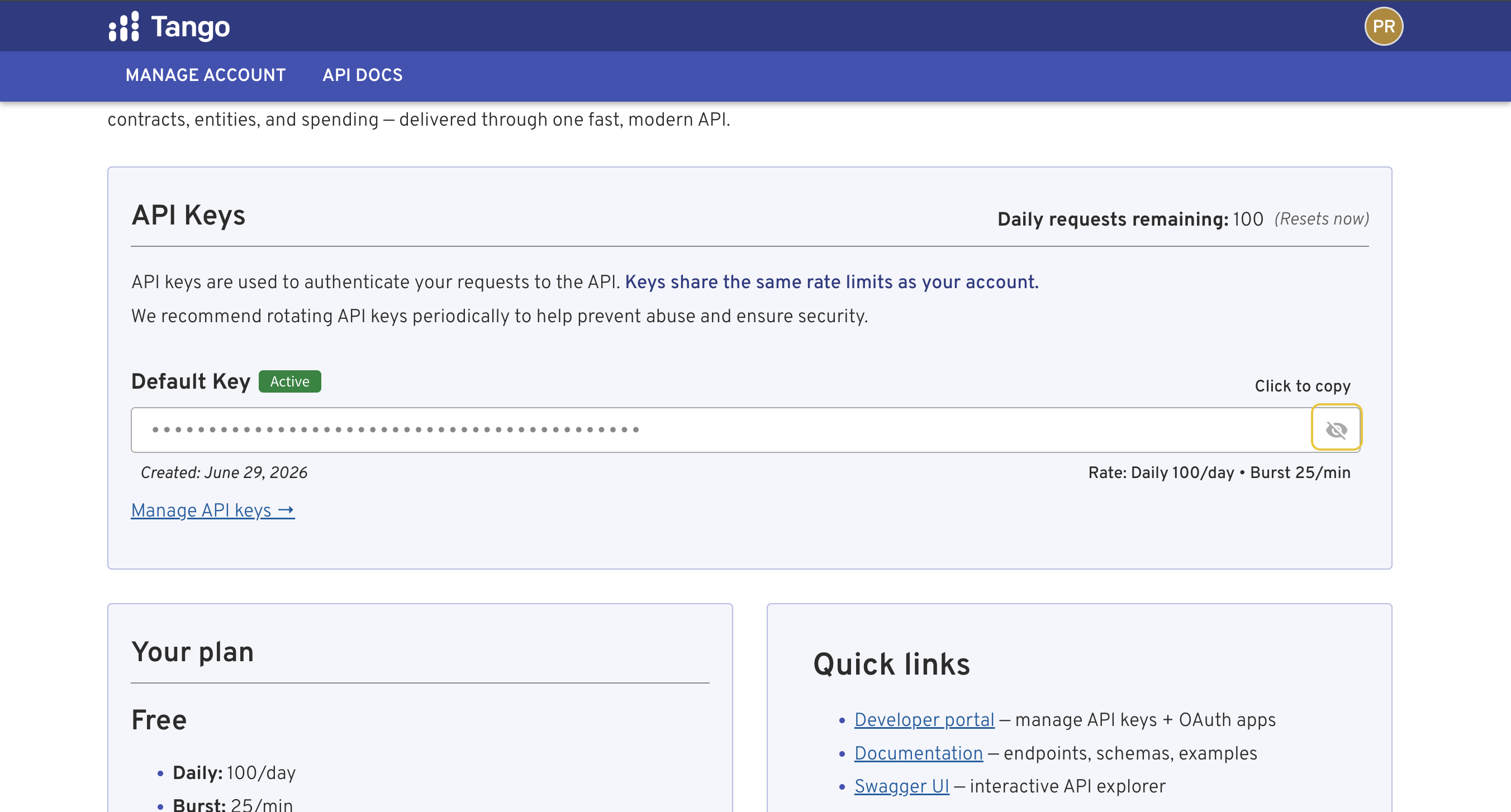
-
Create a connection in Scalekit
- In the Scalekit dashboard, go to AgentKit → Connections → Create Connection.
- Search for Tango MCP and click Create.
- Note the Connection name — use this as
connection_namein your code (e.g.,tangomcp).
-
Add a connected account
Connected accounts link a specific user identifier in your system to a Tango API key. Add one in the dashboard to test. In production, each user adds their own through the authorization link: they enter their credentials on the page it opens.
In the dashboard, to test
- Open the connection and click the Connected Accounts tab → Add account.
- Fill in Your User’s ID and API Key, then click Save.
From your backend, if your app already has the credentials
For example, when users enter them on a settings page in your app:
import { ConnectorStatus } from '@scalekit-sdk/node'const authorizationDetails = {details: {case: 'staticAuth',value: { details: { api_key: 'your-tango-api-key' } },},}let { connectedAccount } = await scalekit.actions.upsertConnectedAccount({connectionName: 'tangomcp',identifier: 'user_123',authorizationDetails,})// Make sure the account is ACTIVE before the first tool call.if (connectedAccount?.status !== ConnectorStatus.ACTIVE) {;({ connectedAccount } = await scalekit.actions.upsertConnectedAccount({connectionName: 'tangomcp',identifier: 'user_123',authorizationDetails,}))}authorization_details = {"static_auth": {"api_key": "your-tango-api-key"}}response = scalekit_client.actions.upsert_connected_account(connection_name="tangomcp",identifier="user_123",authorization_details=authorization_details,)# Make sure the account is ACTIVE before the first tool call.if response.connected_account.status != "ACTIVE":response = scalekit_client.actions.upsert_connected_account(connection_name="tangomcp",identifier="user_123",authorization_details=authorization_details,)
-
Authorize a user and make your first call
quickstart.mts import { ScalekitClient } from '@scalekit-sdk/node'import 'dotenv/config'import { createInterface } from 'node:readline/promises'const scalekit = new ScalekitClient(process.env.SCALEKIT_ENVIRONMENT_URL,process.env.SCALEKIT_CLIENT_ID,process.env.SCALEKIT_CLIENT_SECRET,)const actions = scalekit.actionsconst connector = 'tangomcp'const identifier = 'user_123'// Generate an authorization link for the userconst { link } = await actions.getAuthorizationLink({ connectionName: connector, identifier })console.log('Authorize Tango MCP:', link)const rl = createInterface({ input: process.stdin, output: process.stdout })await rl.question('Press Enter after authorizing...')rl.close()// Make your first callconst result = await actions.executeTool({connector,identifier,toolName: 'tangomcp_search',toolInput: {},})console.log(result)Terminal window npx tsx quickstart.mtsquickstart.py import osfrom scalekit import ScalekitClientfrom dotenv import load_dotenvload_dotenv()scalekit_client = ScalekitClient(env_url=os.getenv("SCALEKIT_ENVIRONMENT_URL"),client_id=os.getenv("SCALEKIT_CLIENT_ID"),client_secret=os.getenv("SCALEKIT_CLIENT_SECRET"),)actions = scalekit_client.actionsconnection_name = "tangomcp"identifier = "user_123"# Generate an authorization link for the userlink_response = actions.get_authorization_link(connection_name=connection_name,identifier=identifier,)print("Authorize Tango MCP:", link_response.link)input("Press Enter after authorizing...")# Make your first callresult = actions.execute_tool(tool_input={},tool_name="tangomcp_search",connection_name=connection_name,identifier=identifier,)print(result)Terminal window python quickstart.pyEach user opens the link once and enters their Tango MCP server credentials there. If your app already has a user's credentials, add the account from your backend instead, as the console steps above show. See Authorize a user for the full flow and statuses.
Tools
Pass the exact name toexecute_tooltangomcp_fetch_api_docsFetch detailed Tango API documentation for a specific section.Read-onlyFetch API documentation
Fetch detailed Tango API documentation for a specific section. Use when you need the full list of filtering parameters, valid enum values, ordering options, response shaping syntax, or advanced query patterns beyond what the tool descriptions provide.
Inputs
sectionstringrequired- No description.
tangomcp_get_detailsGet detailed information about a single item — entity, contract, IDV, vehicle, opportunity, OTA, OTIDV, organization, protest, SIN, GSA eLibrary contract, IT investment, NAICS/PSC code, budget account, DIBBS RFQ/RFP/award, SAM exclusion, or SBIR topic/solicitation.Read-onlyGet entity details
Get detailed information about a single item — entity, contract, IDV, vehicle, opportunity, OTA, OTIDV, organization, protest, SIN, GSA eLibrary contract, IT investment, NAICS/PSC code, budget account, DIBBS RFQ/RFP/award, SAM exclusion, or SBIR topic/solicitation. Use after search or resolve to drill into a specific record, optionally enriched with related data.
Inputs
idstringrequired- No description.
typestringrequired- No description.one of
entitycontractidvvehicleopportunityforecastotaotidvorganizationprotestcontract_appealsubawardsingsa_elibrary_contractitdashboardnaicspscbudget_accountdibbs_rfqdibbs_rfpdibbs_awardexclusionsbir_topicsbir_solicitationsled_opportunitysled_forecastfederal_registerebuy attachment_idsstring- No description.
attachment_offsetinteger- No description.default
0 awardee_pageinteger- No description.default
1 awardee_searchstring- No description.
fieldsstring- No description.
include_attachment_textboolean- No description.default
false include_relatedboolean- No description.default
false monthsinteger- No description.default
24 periodstring- No description.one of
yearquartermonthdefaultyear
tangomcp_resolveFind entities, vehicles, NAICS/PSC codes, GSA MAS SINs, contracts, opportunities, IDVs, OTAs, subawards, organizations, and GAO bid protests matching a search query.Read-onlyResolve entities
Find entities, vehicles, NAICS/PSC codes, GSA MAS SINs, contracts, opportunities, IDVs, OTAs, subawards, organizations, and GAO bid protests matching a search query. Use this tool first when you have a name or keyword and need to discover what's in the data — returns identifiers (UEI, organization key, etc.) you can use with other tools.
Inputs
querystringrequired- No description.
limitinteger- No description.default
5 typestring- No description.one of
entityvehiclenaicspscsincontractopportunityidvotaotidvsubawardorganizationprotestitdashboard
tangomcp_searchSearch contracts, IDVs, vehicles, GSA eLibrary Schedule holders, CALC labor rates, OTAs, OTIDVs, subawards, organizations, GAO bid protests, federal grants, federal budget accounts, DIBBS awards, SAM exclusions (debarments), and SAM entity registrations (vendors).Read-onlySearch
Search contracts, IDVs, vehicles, GSA eLibrary Schedule holders, CALC labor rates, OTAs, OTIDVs, subawards, organizations, GAO bid protests, federal grants, federal budget accounts, DIBBS awards, SAM exclusions (debarments), and SAM entity registrations (vendors). This is the primary data retrieval tool — use it to find records by vendor, organization, NAICS/PSC code, date range, or type-specific filters. Set include_summary=true to get aggregate statistics computed across a hard-capped sample of matching records. For appropriations data use type='budget_account'; for labor rate benchmarking use type='lcat'; for GSA Schedule holder lookups use type='gsa_elibrary'; for vendor debarment checks use type='exclusion'; for DLA parts spending use type='dibbs_award'; for vendor population/attribute queries use type='entity'.
Inputs
account_titlestring- No description.
activate_date_afterstring- No description.
activate_date_beforestring- No description.
activeboolean- No description.
agency_codestring- No description.
agency_namestring- No description.
appellantstring- No description.
applicant_typesstring- No description.
award_date_endstring- No description.
award_date_startstring- No description.
award_keystring- No description.
award_numberstring- No description.
award_typestring- No description.
awardee_cagestring- No description.
awarding_orgstring- No description.
bea_categorystring- No description.
boardstring- No description.
bureau_namestring- No description.
business_sizestring- No description.
cage_codestring- No description.
case_typestring- No description.
cfda_numberstring- No description.
cfr_partstring- No description.
cfr_titleinteger- No description.
cgacstring- No description.
cio_ratinginteger- No description.
cio_rating_maxinteger- No description.
classification_typestring- No description.
comments_openboolean- No description.
commercial_item_acquisition_proceduresstring- No description.
contract_numberstring- No description.
contract_typestring- No description.
decision_date_endstring- No description.
decision_date_startstring- No description.
decision_typestring- No description.
delistedboolean- No description.
delivery_order_numberstring- No description.
docket_numberstring- No description.
document_numberstring- No description.
document_typestring- No description.
education_levelstring- No description.
effective_date_endstring- No description.
effective_date_startstring- No description.
entity_statestring- No description.
entity_ueistring- No description.
excluding_agency_codestring- No description.
excluding_agency_namestring- No description.
exclusion_programstring- No description.
exclusion_typestring- No description.
executive_order_numberstring- No description.
expiring_endstring- No description.
expiring_startstring- No description.
federal_account_symbolstring- No description.
fieldsstring- No description.
filed_date_endstring- No description.
filed_date_startstring- No description.
fiscal_yearinteger- No description.
fiscal_year_endinteger- No description.
fiscal_year_startinteger- No description.
funding_categoriesstring- No description.
funding_instrumentsstring- No description.
funding_orgstring- No description.
grant_idstring- No description.
idv_count_maxinteger- No description.
idv_count_mininteger- No description.
idv_keystring- No description.
idv_typestring- No description.
include_inactiveboolean- No description.
include_summaryboolean- No description.default
false investment_typestring- No description.
judgestring- No description.
keywordstring- No description.
labor_categorystring- No description.
last_date_to_order_endstring- No description.
last_date_to_order_startstring- No description.
levelinteger- No description.
limitinteger- No description.default
25 min_years_experience_gteinteger- No description.
min_years_experience_lteinteger- No description.
naics_codestring- No description.
npistring- No description.
nsnstring- No description.
obligated_gtenumber- No description.
obligated_ltenumber- No description.
on_off_budgetstring- No description.
opportunity_numberstring- No description.
orderstring- No description.
order_count_maxinteger- No description.
order_count_mininteger- No description.
org_typestring- No description.
organizationstring- No description.
outcomestring- No description.
parentstring- No description.
part_numberstring- No description.
performance_riskboolean- No description.
piidstring- No description.
pop_end_date_endstring- No description.
pop_end_date_startstring- No description.
pop_start_date_endstring- No description.
pop_start_date_startstring- No description.
posted_date_afterstring- No description.
posted_date_beforestring- No description.
posted_date_endstring- No description.
posted_date_startstring- No description.
price_gtenumber- No description.
price_ltenumber- No description.
prime_ueistring- No description.
program_acronymstring- No description.
protester_namestring- No description.
psc_codestring- No description.
purchase_requeststring- No description.
purpose_of_registration_codestring- No description.
recipient_namestring- No description.
recipient_ueistring- No description.
response_date_endstring- No description.
response_date_startstring- No description.
rinstring- No description.
schedulestring- No description.
security_clearancestring- No description.
set_aside_typestring- No description.
significantboolean- No description.
sinstring- No description.
socioeconomicstring- No description.
solicitation_identifierstring- No description.
sortstring- No description.
source_systemstring- No description.
statusstring- No description.
sub_ueistring- No description.
termination_date_afterstring- No description.
termination_date_beforestring- No description.
total_contract_price_maxnumber- No description.
total_contract_price_minnumber- No description.
total_obligated_maxnumber- No description.
total_obligated_minnumber- No description.
typestring- No description.one of
contractidvvehicleallotaotidvsubawardorganizationprotestcontract_appealgsa_elibrarylcatitdashboardgrantbudget_accountdibbs_awardexclusionentityfederal_registerdefaultcontract update_date_afterstring- No description.
update_date_beforestring- No description.
updated_afterstring- No description.
updated_beforestring- No description.
vehicle_typestring- No description.
who_can_usestring- No description.
worksitestring- No description.
zip_codestring- No description.
tangomcp_search_opportunitiesSearch open federal pre-award procurement records — SAM.gov opportunities, procurement forecasts, DLA DIBBS RFQs/RFPs, and SBIR/STTR topics and solicitations.Read-onlySearch Opportunities
Search open federal pre-award procurement records — SAM.gov opportunities, procurement forecasts, DLA DIBBS RFQs/RFPs, and SBIR/STTR topics and solicitations. Filter by organization, NAICS/PSC code, set-aside type, notice type, place of performance, response deadline, and family-specific filters (nsn/part_number for DIBBS, topic_number/program for SBIR). Returns a list of matching records with total count.
Inputs
activeboolean- No description.
activitystring- No description.
award_date_afterstring- No description.
award_date_beforestring- No description.
awardedboolean- No description.
awardee_ueiarray- No description.
buyer_agencystring- No description.
buyer_codestring- No description.
category_codestring- No description.
change_seen_afterstring- No description.
contract_numberstring- No description.
cycle_namestring- No description.
doc_sourcestring- No description.
fieldsstring- No description.
first_notice_date_afterstring- No description.
first_notice_date_beforestring- No description.
first_seen_afterstring- No description.
first_seen_beforestring- No description.
fiscal_yearinteger- No description.
fiscal_year_endinteger- No description.
fiscal_year_startinteger- No description.
has_documentsboolean- No description.
incumbent_namestring- No description.
jurisdictionstring- No description.
keywordstring- No description.
last_notice_date_afterstring- No description.
last_notice_date_beforestring- No description.
limitinteger- No description.default
25 modified_afterstring- No description.
modified_beforestring- No description.
naics_codesarray- No description.
naics_starts_withstring- No description.
notice_typestring- No description.
nsnstring- No description.
orderingstring- No description.
orgstring- No description.
organizationstring- No description.
out_of_cycleboolean- No description.
part_numberstring- No description.
place_of_performancestring- No description.
programstring- No description.
psc_codesarray- No description.
purchase_requeststring- No description.
quantity_maxinteger- No description.
quantity_mininteger- No description.
release_date_afterstring- No description.
release_date_beforestring- No description.
request_typestring- No description.
response_deadline_afterstring- No description.
response_deadline_beforestring- No description.
revision_kindstring- No description.
rfq_idstring- No description.
schedulestring- No description.
set_aside_flagstring- No description.
set_aside_typesarray- No description.
sinstring- No description.
solicitation_numberstring- No description.
solicitation_statusstring- No description.
solicitation_typestring- No description.
source_systemstring- No description.
statestring- No description.
statusstring- No description.
status_codestring- No description.
topic_numberstring- No description.
typestring- No description.one of
opportunityforecastdibbs_rfqdibbs_rfpsbir_topicsbir_solicitationsled_opportunitysled_forecastebuydefaultopportunity yearinteger- No description.
tangomcp_send_feedbackTell the Tango team how its tools worked for you — your own assessment, not the user's.WriteSend Feedback
Tell the Tango team how its tools worked for you — your own assessment, not the user's. Call this when a tool made the task harder than it should have been: a result was wrong or implausible, data you expected was missing, a parameter or error message misled you, you needed several retries to find the right call, or the tools could not do what the user asked. Also welcome when something worked notably well. One call per distinct issue, at the moment you notice it; do not wait until the end of the conversation. Do not include secrets or personal details about the user. Args: message: What happened and what you expected instead. Name the calls, parameters, and values involved. category: wrong_data, missing_data, confusing_tool, bug, feature_request, worked_well, or other. tool: The tool the feedback is about (e.g. "search_opportunities"), if any. goal: One sentence on what the user was trying to accomplish. follow_up: True only if the user said they want to hear back about this, or asked to be told when it's fixed. Never ask the user just to fill this in, and never set it on your own judgment. When true, the Tango team may email the account holder once the issue is resolved.
Inputs
messagestringrequired- No description.
categorystring- No description.one of
wrong_datamissing_dataconfusing_toolbugfeature_requestworked_wellotherdefaultother follow_upboolean- No description.default
false goalstring- No description.
toolstring- No description.
No tools match.