
The Trello connector lets your AI agent act in each user's Trello account. Each user signs in to Trello once, and Scalekit stores their tokens, so your agent never handles credentials. It comes with 36 tools.
- Tools
- 36
- What they doRead · write · destructive
- 12 · 17 · 712 read17 write7 destructive
- Users sign in with
- OAuth
- OAuth app
- Your own Trello app
Setup
Install the SDK
Terminal window npm install @scalekit-sdk/node dotenvTerminal window pip install scalekit-sdk-python python-dotenvSet your credentials
Add your Scalekit credentials to your
.envfile. Find values in app.scalekit.com > Developers > API Credentials..env SCALEKIT_ENVIRONMENT_URL=<your-environment-url>SCALEKIT_CLIENT_ID=<your-client-id>SCALEKIT_CLIENT_SECRET=<your-client-secret>Create the Trello connection
In AgentKit > Connections, create a Trello connection and copy its redirect URI. The name you give it is the
connection_nameyour code passes. See Configure connections.Register an OAuth app
Trello connections use your own OAuth app. Register one with Trello and add the redirect URI you copied.
Then enter the app's Client ID and Client Secret on the Trello connection.
Console steps with screenshots
Register your Trello API key and application name with Scalekit so it can authenticate and manage the OAuth 1.0a flow on your behalf.
-
Copy the redirect URI from Scalekit
-
In the Scalekit dashboard, go to AgentKit > Connections > Create Connection. Find Trello and click Create.
-
Click Use your own credentials and copy the redirect URI. It looks like
https://<SCALEKIT_ENVIRONMENT_URL>/sso/v1/oauth/<CONNECTION_ID>/callback.
-
-
Create a Power-Up app in Trello
-
Sign in to trello.com/power-ups/admin and click New to create an app (or open an existing one, for example
Agent Auth).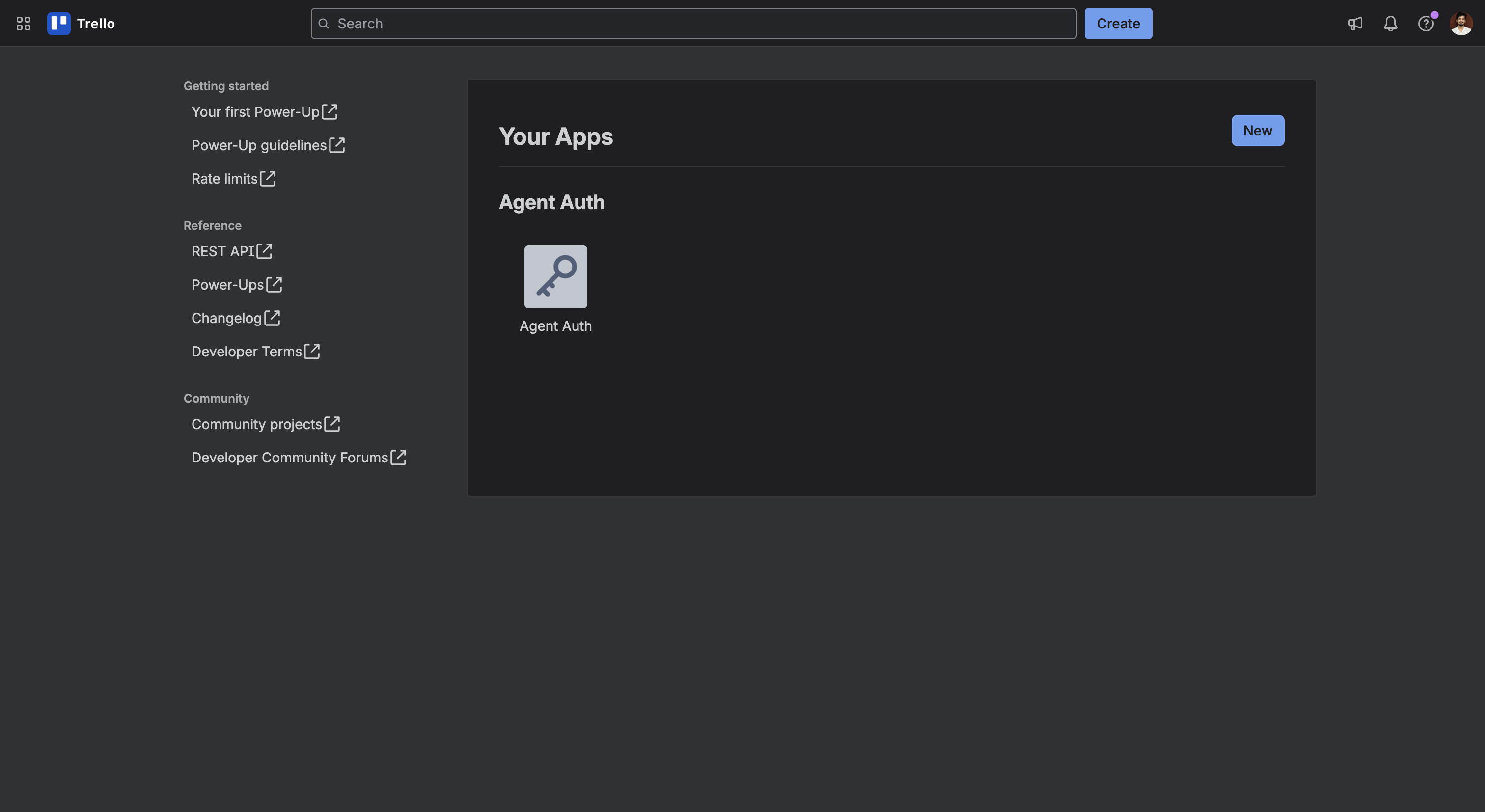
-
-
Add the redirect URI and copy your API Key
-
Open the app and go to the API key tab.
-
Under Allowed origins, paste the redirect URI you copied from Scalekit and click Add.
-
Copy the API key value — you’ll use this as the
client_idin Scalekit.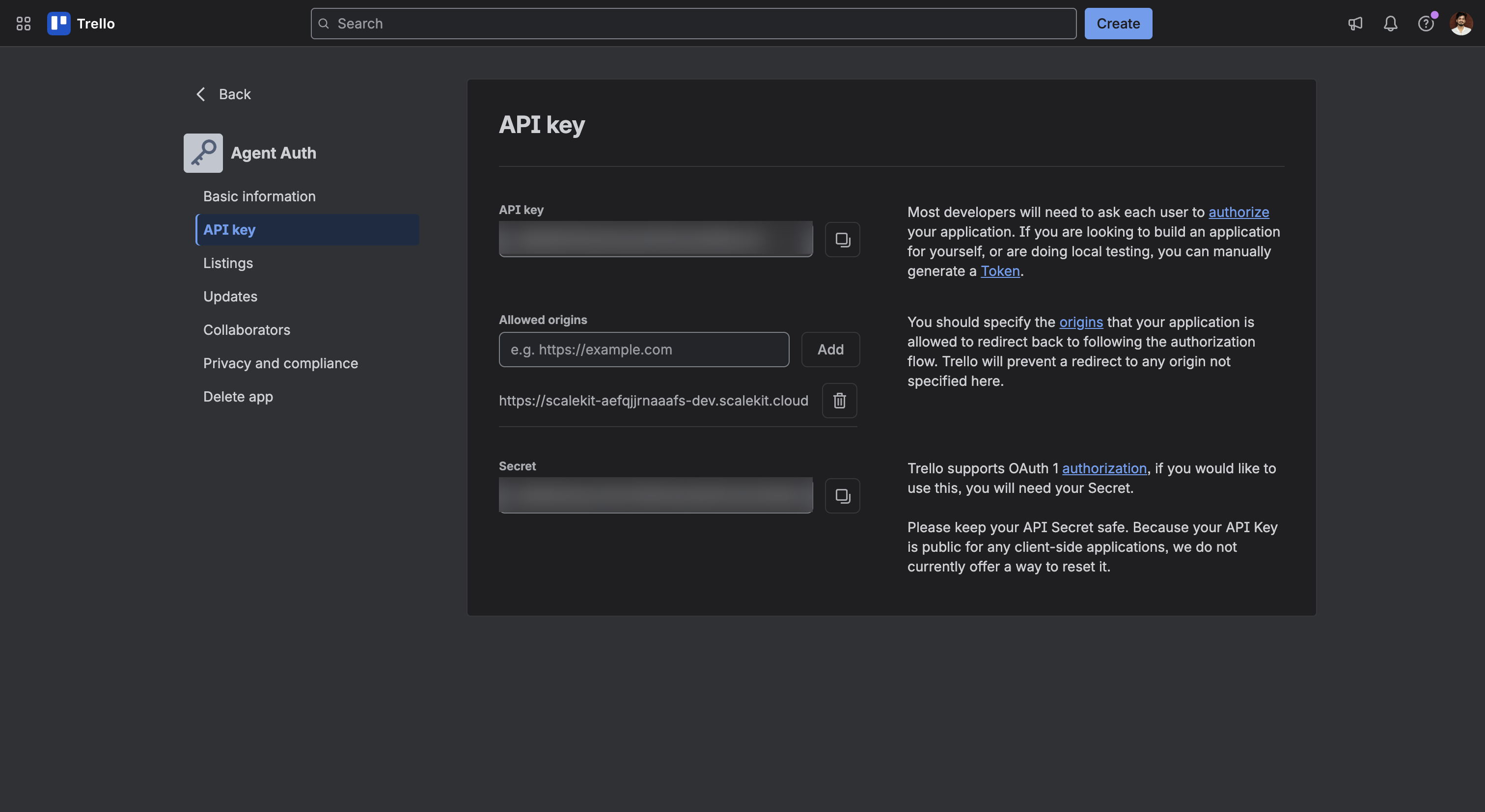
-
-
Add credentials in Scalekit
- Return to the connection you created in Scalekit and enter:
- API Key — the API key you copied from Trello (used as
client_id) - Application Name — the name shown to users on Trello’s authorization page (for example,
Agent Auth)
- API Key — the API key you copied from Trello (used as
- Click Save.
- Return to the connection you created in Scalekit and enter:
-
Tools
Pass the exact name toexecute_tooltrello_get_boardGet a Trello board by its ID, including optional fields, cards, lists, and members.Read-onlyGet Board
Get a Trello board by its ID, including optional fields, cards, lists, and members.
Inputs
idstringrequired- The ID of the board to retrieve
cardsstring- Which cards to returnone of
noneopenclosedall fieldsstring- Comma-separated list of board fields to return
listsstring- Which lists to returnone of
noneopenclosedall membersstring- Which members to returnone of
nonenormaladminsownersall
trello_get_board_actionsGet the activity log (actions) for a Trello board.Read-onlyGet Board Actions
Get the activity log (actions) for a Trello board.
Inputs
idstringrequired- The ID of the board
filterstring- Comma-separated list of action types to filter by
limitinteger- Maximum number of actions to return
pageinteger- Page number for pagination
trello_get_board_cardsGet all cards on a Trello board, optionally filtered by status.Read-onlyGet Board Cards
Get all cards on a Trello board, optionally filtered by status.
Inputs
idstringrequired- The ID of the board
fieldsstring- Comma-separated list of card fields to return
filterstring- Filter cards by statusone of
noneopenclosedalldefaultopen
trello_get_board_labelsGet all labels defined on a Trello board.Read-onlyGet Board Labels
Get all labels defined on a Trello board.
Inputs
idstringrequired- The ID of the board
fieldsstring- Comma-separated list of label fields to return
limitinteger- Maximum number of labels to return (0–1000)
trello_get_board_listsGet all lists on a Trello board, optionally filtered by status.Read-onlyGet Board Lists
Get all lists on a Trello board, optionally filtered by status.
Inputs
idstringrequired- The ID of the board
filterstring- Filter lists by statusone of
noneopenclosedalldefaultopen
trello_get_board_membersGet all members of a Trello board, optionally filtered by role.Read-onlyGet Board Members
Get all members of a Trello board, optionally filtered by role.
Inputs
idstringrequired- The ID of the board
filterstring- Filter members by roleone of
nonenormaladminsownersall
trello_get_cardGet a Trello card by its ID.Read-onlyGet Card
Get a Trello card by its ID.
Inputs
idstringrequired- The ID of the card to retrieve
fieldsstring- Comma-separated list of card fields to return
trello_get_checklistGet a Trello checklist by its ID, including its check items.Read-onlyGet Checklist
Get a Trello checklist by its ID, including its check items.
Inputs
idstringrequired- The ID of the checklist to retrieve
checkItemsstring- Whether to include check items in the responseone of
allnonedefaultall fieldsstring- Comma-separated list of checklist fields to return
trello_get_current_memberGet the authenticated user's own Trello member info (profile, username, boards/organizations membership summary).Read-onlyGet Current Member
Get the authenticated user's own Trello member info (profile, username, boards/organizations membership summary).
Inputs
fieldsstring- Comma-separated list of member fields to return
trello_get_webhookGet a Trello webhook's current details and status by ID.Read-onlyGet Webhook
Get a Trello webhook's current details and status by ID. Complements Create Webhook and Delete Webhook.
Inputs
idstringrequired- The ID of the webhook to retrieve
trello_list_my_boardsList the boards the authenticated user belongs to.Read-onlyList My Boards
List the boards the authenticated user belongs to. Use this to discover board IDs before calling other board, card, or list tools.
Inputs
fieldsstring- Comma-separated list of board fields to return
filterstring- Which boards to return
trello_searchGlobal keyword search across Trello boards, cards, members, and organizations that the authenticated user can access.Read-onlySearch
Global keyword search across Trello boards, cards, members, and organizations that the authenticated user can access.
Inputs
querystringrequired- The search query text
boards_limitinteger- Maximum number of boards to return (max 1000)
card_fieldsstring- Comma-separated list of card fields to return
cards_limitinteger- Maximum number of cards to return (max 1000)
idBoardsstring- Restrict search to specific board IDs
idCardsstring- Restrict search to specific card IDs
idOrganizationsstring- Restrict search to specific Workspace (organization) IDs
modelTypesstring- Which model types to include in resultsdefault
all partialboolean- Whether to also match partial words
trello_add_attachment_to_cardAttach a URL to a Trello card.WriteAdd Attachment To Card
Attach a URL to a Trello card. Trello fetches the URL and shows a preview when it recognizes the link type (e.g. images, YouTube, Google Drive).
Inputs
idstringrequired- The ID of the card to attach the URL to
urlstringrequired- URL of the attachment
namestring- Display name for the attachment
trello_add_checklist_itemAdd a new item to a Trello checklist.WriteAdd Checklist Item
Add a new item to a Trello checklist.
Inputs
idstringrequired- The ID of the checklist to add the item to
namestringrequired- Text of the checklist item
checkedboolean- Whether the item starts checked off
posstring- Position of the item in the checklist: top, bottom, or a positive number
trello_add_comment_to_cardAdd a comment to a Trello card.WriteAdd Comment To Card
Add a comment to a Trello card.
Inputs
idstringrequired- The ID of the card to comment on
textstringrequired- The comment text
trello_add_label_to_cardApply an existing board label to a Trello card.WriteAdd Label To Card
Apply an existing board label to a Trello card. Use Get Board Labels or Create Label to find or create a label ID first.
- Idempotent
Inputs
idstringrequired- The ID of the card to label
idLabelstringrequired- The ID of the label to add
trello_add_member_to_cardAssign a member to a Trello card.WriteAdd Member To Card
Assign a member to a Trello card.
- Idempotent
Inputs
idstringrequired- The ID of the card to assign the member to
idMemberstringrequired- The ID of the member to add
trello_create_boardCreate a new Trello board.WriteCreate Board
Create a new Trello board.
Inputs
namestringrequired- Name of the board
defaultListsboolean- Whether to seed the board with the default To Do / Doing / Done lists
descstring- Description of the board
idOrganizationstring- ID of the Workspace (organization) to create the board in
trello_create_cardCreate a new card on a Trello list.WriteCreate Card
Create a new card on a Trello list.
Inputs
idListstringrequired- The ID of the list to create the card in
descstring- Description of the card
duestring- Due date for the card, ISO 8601 format
idLabelsstring- Comma-separated list of label IDs to apply to the card
idMembersstring- Comma-separated list of member IDs to assign to the card
namestring- Name (title) of the card
posstring- Position of the card in the list: top, bottom, or a positive number
trello_create_checklistCreate a new checklist on a Trello card.WriteCreate Checklist
Create a new checklist on a Trello card.
Inputs
idCardstringrequired- The ID of the card to add the checklist to
namestringrequired- Name of the checklist
posstring- Position of the checklist on the card: top, bottom, or a positive number
trello_create_labelCreate a new label on a Trello board.WriteCreate Label
Create a new label on a Trello board. Use Add Label To Card afterward to apply it.
Inputs
colorstringrequired- Color of the labelone of
yellowpurpleblueredgreenorangeblackskypinklime idBoardstringrequired- The ID of the board to create the label on
namestringrequired- Name of the label
trello_create_listCreate a new list on a Trello board.WriteCreate List
Create a new list on a Trello board.
Inputs
idBoardstringrequired- The ID of the board to create the list on
namestringrequired- Name of the list
posstring- Position of the list on the board: top, bottom, or a positive number
trello_create_webhookCreate a webhook that notifies a callback URL whenever a Trello board, card, list, or other model changes.WriteCreate Webhook
Create a webhook that notifies a callback URL whenever a Trello board, card, list, or other model changes.
Inputs
callbackURLstringrequired- The publicly reachable URL Trello will POST updates to
idModelstringrequired- The ID of the board, card, list, or other model to watch
activeboolean- Whether the webhook is active immediately
descriptionstring- Description of the webhook
trello_remove_label_from_cardRemove a label from a Trello card.WriteRemove Label From Card
Remove a label from a Trello card. Complements Add Label To Card.
- Idempotent
Inputs
idstringrequired- The ID of the card to remove the label from
idLabelstringrequired- The ID of the label to remove
trello_remove_member_from_cardRemove a member from a Trello card.WriteRemove Member From Card
Remove a member from a Trello card. Complements Add Member To Card.
- Idempotent
Inputs
idstringrequired- The ID of the card to remove the member from
idMemberstringrequired- The ID of the member to remove
trello_update_cardUpdate a Trello card's name, description, due date, list, position, or archived state.WriteUpdate Card
Update a Trello card's name, description, due date, list, position, or archived state.
- Idempotent
Inputs
idstringrequired- The ID of the card to update
closedboolean- Archive (true) or unarchive (false) the card
descstring- New description for the card
duestring- New due date, ISO 8601 format. Pass an empty string to clear it.
idListstring- ID of the list to move the card to
namestring- New name (title) for the card
posstring- New position: top, bottom, or a positive number
trello_update_checklist_itemUpdate a checklist item's text or checked state.WriteUpdate Checklist Item
Update a checklist item's text or checked state. Trello scopes this update by both the card and the check item ID.
- Idempotent
Inputs
idCardstringrequired- The ID of the card that owns the checklist
idCheckItemstringrequired- The ID of the checklist item to update
namestring- New text for the checklist item
statestring- Checked state of the itemone of
completeincomplete
trello_update_labelRename or recolor an existing Trello label.WriteUpdate Label
Rename or recolor an existing Trello label.
- Idempotent
Inputs
idstringrequired- The ID of the label to update
colorstring- New color for the labelone of
yellowpurpleblueredgreenorangeblackskypinklime namestring- New name for the label
trello_update_listRename, reposition, or archive/unarchive a Trello list.WriteUpdate List
Rename, reposition, or archive/unarchive a Trello list. Trello has no permanent list deletion — archiving (closed=true) is the standard way to remove a list from view.
- Idempotent
Inputs
idstringrequired- The ID of the list to update
closedboolean- Archive (true) or unarchive (false) the list
namestring- New name for the list
posstring- New position: top, bottom, or a positive number
trello_delete_attachmentPermanently delete an attachment from a Trello card.DestructiveDelete Attachment
Permanently delete an attachment from a Trello card. Complements Add Attachment To Card.
- Idempotent
Inputs
idstringrequired- The ID of the card the attachment belongs to
idAttachmentstringrequired- The ID of the attachment to delete
trello_delete_cardPermanently delete a Trello card.DestructiveDelete Card
Permanently delete a Trello card. This cannot be undone — to keep the card but hide it, use Update Card with closed=true instead.
Inputs
idstringrequired- The ID of the card to delete
trello_delete_checklistPermanently delete a Trello checklist.DestructiveDelete Checklist
Permanently delete a Trello checklist. Complements Create Checklist.
- Idempotent
Inputs
idstringrequired- The ID of the checklist to delete
trello_delete_checklist_itemRemove a single item from a Trello checklist.DestructiveDelete Checklist Item
Remove a single item from a Trello checklist. Complements Add Checklist Item.
- Idempotent
Inputs
idstringrequired- The ID of the checklist the item belongs to
idCheckItemstringrequired- The ID of the checklist item to remove
trello_delete_commentDelete a comment from a Trello card.DestructiveDelete Comment
Delete a comment from a Trello card. Comments are represented as actions of type commentCard; pass that action's ID. Complements Add Comment To Card.
- Idempotent
Inputs
idstringrequired- The ID of the card the comment belongs to
idActionstringrequired- The ID of the comment action to delete
trello_delete_labelPermanently delete a Trello label from a board.DestructiveDelete Label
Permanently delete a Trello label from a board. This removes it from every card that uses it and cannot be undone.
Inputs
idstringrequired- The ID of the label to delete
trello_delete_webhookPermanently delete a Trello webhook by its ID, stopping any further callbacks.DestructiveDelete Webhook
Permanently delete a Trello webhook by its ID, stopping any further callbacks.
Inputs
idstringrequired- The ID of the webhook to delete
No tools match.
Workflows
Proxy API call
const result = await actions.request({ connectionName: 'trello', identifier: 'user_123', path: '/1/members/me', method: 'GET',});console.log(result);result = actions.request( connection_name='trello', identifier='user_123', path="/1/members/me", method="GET")print(result)Execute a tool
const result = await actions.executeTool({ connector: 'trello', identifier: 'user_123', toolName: 'trello_list_my_boards', toolInput: {},});console.log(result);result = actions.execute_tool( tool_input={}, tool_name='trello_list_my_boards', connection_name='trello', identifier='user_123',)print(result)