
The Notion connector lets your AI agent act in each user's Notion account. Each user signs in to Notion once, and Scalekit stores and refreshes their tokens, so your agent never handles credentials. It comes with 51 tools.
- Tools
- 51
- What they doRead · write · destructive
- 26 · 20 · 526 read20 write5 destructive
- Users sign in with
- OAuth
- OAuth app
- Scalekit's or your own
What you can do
- Read pages and databases: retrieve page content and query database entries
- Create pages: add new pages and database rows with full content
- Update content: edit existing page blocks, properties, and database fields
- Search: find pages and databases across the user’s Notion workspace
Setup
Install the SDK
Terminal window npm install @scalekit-sdk/node dotenvTerminal window pip install scalekit-sdk-python python-dotenvSet your credentials
Add your Scalekit credentials to your
.envfile. Find values in app.scalekit.com > Developers > API Credentials..env SCALEKIT_ENVIRONMENT_URL=<your-environment-url>SCALEKIT_CLIENT_ID=<your-client-id>SCALEKIT_CLIENT_SECRET=<your-client-secret>Create the Notion connection
In AgentKit > Connections, create a Notion connection. The name you give it is the
connection_nameyour code passes. See Configure connections.Scalekit credentials are available for Notion, so you don't need to register an OAuth app. To show your own app on the consent screen, use your own credentials instead.
Use your own OAuth app
Register your Scalekit environment with the Notion connector so Scalekit handles the authentication flow and token lifecycle for you. The connection name you create will be used to identify and invoke the connection programmatically. Then complete the configuration in your application as follows:
-
Set up auth redirects
-
In Scalekit dashboard, go to AgentKit > Connections > Create Connection. Find Notion and click Create. Copy the redirect URI. It looks like
https://<SCALEKIT_ENVIRONMENT_URL>/sso/v1/oauth/<CONNECTION_ID>/callback.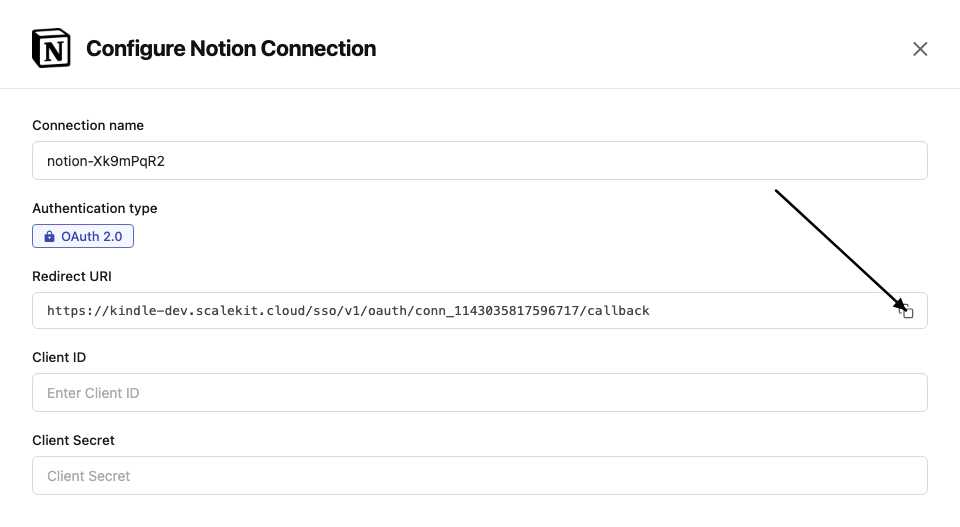
-
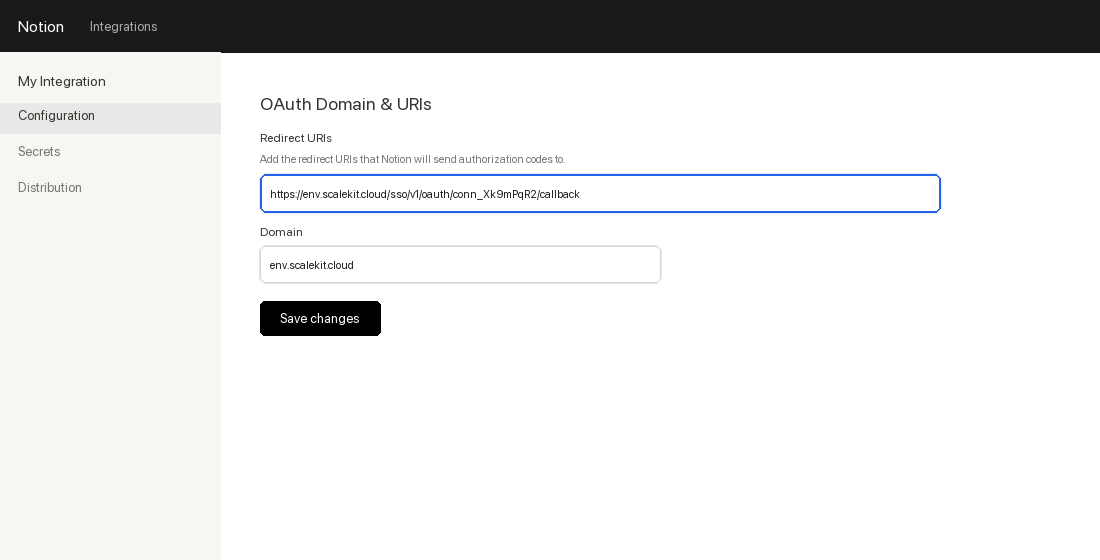
Go to Notion Integrations and click New integration.
-
Fill in the integration name and select your workspace. In the OAuth Domain & URIs section, paste the redirect URI from Scalekit and click Submit.
-
-
Get client credentials
-
In your Notion integration settings, go to the Secrets tab.
-
Copy the OAuth client ID and OAuth client secret.
-
-
Add credentials in Scalekit
-
In Scalekit dashboard, go to AgentKit > Connections and open the connection you created.
-
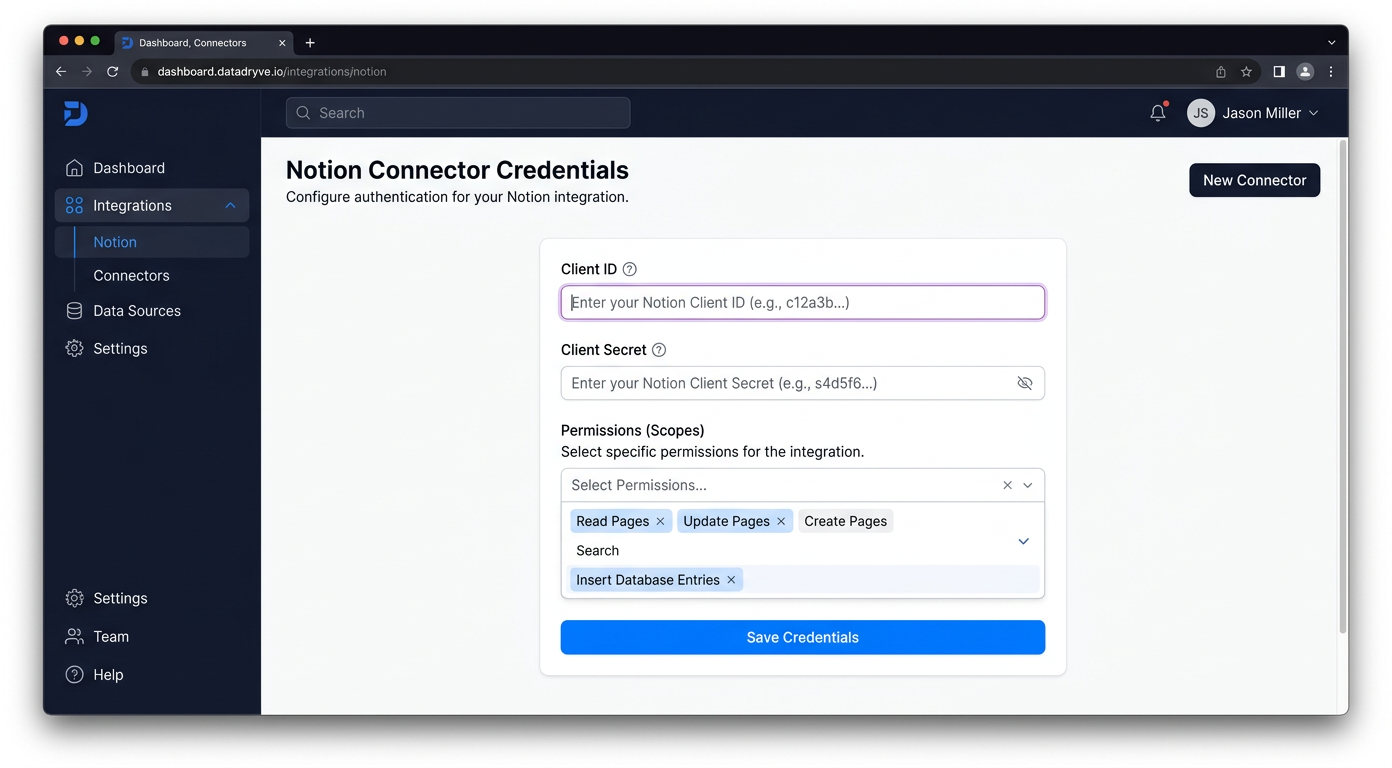
Enter your credentials:
- Client ID (OAuth client ID from above)
- Client Secret (OAuth client secret from above)
- Permissions (capabilities — see Notion capabilities reference)
-
Click Save.
-
-
Authorize a user and make your first call
quickstart.mts import { ScalekitClient } from '@scalekit-sdk/node'import 'dotenv/config'import { createInterface } from 'node:readline/promises'const scalekit = new ScalekitClient(process.env.SCALEKIT_ENVIRONMENT_URL,process.env.SCALEKIT_CLIENT_ID,process.env.SCALEKIT_CLIENT_SECRET,)const actions = scalekit.actionsconst connector = 'notion'const identifier = 'user_123'// Generate an authorization link for the userconst { link } = await actions.getAuthorizationLink({ connectionName: connector, identifier })console.log('Authorize Notion:', link)const rl = createInterface({ input: process.stdin, output: process.stdout })await rl.question('Press Enter after authorizing...')rl.close()// Make your first callconst result = await actions.executeTool({connector,identifier,toolName: 'notion_custom_emojis_list',toolInput: {},})console.log(result)Terminal window npx tsx quickstart.mtsquickstart.py import osfrom scalekit import ScalekitClientfrom dotenv import load_dotenvload_dotenv()scalekit_client = ScalekitClient(env_url=os.getenv("SCALEKIT_ENVIRONMENT_URL"),client_id=os.getenv("SCALEKIT_CLIENT_ID"),client_secret=os.getenv("SCALEKIT_CLIENT_SECRET"),)actions = scalekit_client.actionsconnection_name = "notion"identifier = "user_123"# Generate an authorization link for the userlink_response = actions.get_authorization_link(connection_name=connection_name,identifier=identifier,)print("Authorize Notion:", link_response.link)input("Press Enter after authorizing...")# Make your first callresult = actions.execute_tool(tool_input={},tool_name="notion_custom_emojis_list",connection_name=connection_name,identifier=identifier,)print(result)Terminal window python quickstart.pyEach user signs in once. See Authorize a user for the full flow and statuses.
Tools
Pass the exact name toexecute_toolnotion_async_task_retrieveRetrieve the status of an asynchronous Notion operation by task ID.Read-onlyRetrieve Async Task
Retrieve the status of an asynchronous Notion operation by task ID. Use this to poll long-running operations (such as notion_page_markdown_update when allow_async is set) until status is no longer queued/running/retrying. When complete, the response includes a result object with the operation's outcome.
Inputs
task_idstringrequired- The ID of the async task to retrieve
notion_block_retrieveRetrieve a single Notion block by its ID.Read-onlyRetrieve Block
Retrieve a single Notion block by its ID. Returns the block object (type, content, and metadata) but not its children — use notion_page_content_get to fetch child blocks.
Inputs
block_idstringrequired- The ID of the block to retrieve
notion_comment_retrieveRetrieve a single Notion comment by its `comment_id`.Read-onlyRetrieve Comment
Retrieve a single Notion comment by its `comment_id`. LLM tip: you typically obtain `comment_id` from the response of creating a comment or by first listing comments for a page/block and selecting the desired item’s `id`.
Inputs
comment_idstringrequired- The identifier of the comment to retrieve (hyphenated UUID). Obtain it from Create-Comment responses or from a prior List-Comments call.
notion_versionstring- Optional Notion-Version header override (e.g., 2022-06-28).default
2022-06-28
Also accepts
schema_versionandtool_versionto pin a version.notion_comments_fetchFetch comments for a given Notion block.Read-onlyFetch Comments
Fetch comments for a given Notion block. Provide a `block_id` (the target page/block ID, hyphenated UUID). Supports pagination via `start_cursor` and `page_size` (1–100). LLM tip: extract `block_id` from a Notion URL’s trailing 32-char id, then insert hyphens (8-4-4-4-12).
Inputs
block_idstringrequired- Target Notion block (or page) ID to fetch comments for. Use a hyphenated UUID.
notion_versionstring- Optional Notion-Version header override (e.g., 2022-06-28).default
2022-06-28 page_sizeinteger- Maximum number of comments to return (1–100).default
10 start_cursorstring- Cursor to fetch the next page of results.default
Also accepts
schema_versionandtool_versionto pin a version.notion_custom_emojis_listList custom emojis available in the Notion workspace.Read-onlyList Custom Emojis
List custom emojis available in the Notion workspace. Supports optional exact-name filtering (useful for resolving a custom emoji name to its ID) and pagination via page_size and start_cursor.
Inputs
namestring- If supplied, filters custom emojis by exact name match. Useful for resolving a custom emoji name to its ID.
notion_versionstring- Optional override for the Notion-Version header (e.g., 2022-06-28).default
2022-06-28 page_sizeinteger- Maximum number of custom emojis to return (1–100).default
10 start_cursorstring- Cursor to fetch the next page of results.default
Also accepts
schema_versionandtool_versionto pin a version.notion_data_fetchFetch data from Notion using the workspace search API (/search).Read-onlyFetch Data
Fetch data from Notion using the workspace search API (/search). Supports pagination via start_cursor.
Inputs
page_sizeinteger- Max number of results to return (1–100)default
10 querystring- Text query used by /searchdefault
start_cursorstring- Cursor for pagination; pass the previous response's next_cursor
Also accepts
schema_versionandtool_versionto pin a version.notion_data_source_fetchRetrieve a Notion database's schema, title, and properties using the Notion 2025-09-03 API.Read-onlyFetch Database (Data Sources)
Retrieve a Notion database's schema, title, and properties using the Notion 2025-09-03 API. Unlike notion_database_fetch, this returns a data_sources array — each entry contains a data_source_id required by notion_data_source_query and notion_data_source_insert_row. Use this as the first step when working with merged, synced, or multi-source databases. For standard single-source databases, notion_database_fetch is sufficient. LLM guidance: extract data_sources[0].id (or the relevant source) from the response and pass it to the query or insert tools.
Inputs
database_idstringrequired- The target database ID in UUID format with hyphens.
notion_data_source_queryQuery rows (pages) from a Notion data source using the 2025-09-03 API.Read-onlyQuery Data Source
Query rows (pages) from a Notion data source using the 2025-09-03 API. Required for merged, synced, or multi-source databases — these cannot be queried via notion_database_query as that tool uses the older /databases/{id}/query endpoint which does not support multiple data sources. Provide the data_source_id obtained from notion_data_source_fetch (data_sources[].id). Supports filtering by property values, sorting, and cursor-based pagination. LLM guidance: step 1 — call notion_data_source_fetch with the database_id to retrieve the data_source_id; step 2 — pass that id here along with an optional filter, sorts, and page_size.
Inputs
data_source_idstringrequired- The ID of the data source to query. Retrieve from notion_database_fetch response under data_sources[].id.
filterobject- Notion filter object to narrow results. Example: {"property": "Status", "select": {"equals": "Done"}}. Supports compound filters with 'and'/'or' arrays.
page_sizeinteger- Maximum number of rows to return (1-100).default
10 sortsarray- Order the results. Each item must include either property or timestamp, plus direction.
start_cursorstring- Cursor to fetch the next page of results.
notion_data_source_retrieveRetrieve a Notion data source (2025-09-03 API) by its ID.Read-onlyRetrieve Data Source
Retrieve a Notion data source (2025-09-03 API) by its ID. A data source is the underlying table/collection of a database; returns its properties schema, title, icon, and parent database. Use notion_database_fetch to look up the data_source_id from a database_id first.
Inputs
data_source_idstringrequired- The ID of the data source to retrieve
notion_data_source_templates_listList the page templates available in a Notion data source.Read-onlyList Data Source Templates
List the page templates available in a Notion data source. Provide data_source_id (obtain via notion_data_source_fetch). Supports optional name filtering (case-insensitive substring match) and pagination via page_size and start_cursor.
Inputs
data_source_idstringrequired- The ID of the Notion data source to list templates for (hyphenated UUID). Obtain via notion_data_source_fetch.
namestring- Filter templates by name using a case-insensitive substring match.
notion_versionstring- Optional override for the Notion-Version header (e.g., 2025-09-03).default
2025-09-03 page_sizeinteger- Maximum number of templates to return (1–100).default
10 start_cursorstring- Cursor to fetch the next page of results.default
Also accepts
schema_versionandtool_versionto pin a version.notion_database_fetchRetrieve a Notion database's full definition, including title, properties, and schema.Read-onlyFetch Database
Retrieve a Notion database's full definition, including title, properties, and schema. Required: database_id (hyphenated UUID). LLM tip: Extract the last 32 characters from a Notion database URL, then insert hyphens (8-4-4-4-12).
Inputs
database_idstringrequired- The target database ID in UUID format with hyphens.
notion_database_property_retrieveQuery a Notion database and return only specific properties by supplying one or more property IDs.Read-onlyQuery Database (Filter Properties)
Query a Notion database and return only specific properties by supplying one or more property IDs. Use when you need page rows but want to limit the returned properties to reduce payload. Provide the database_id and an array of filter_properties (each item is a property id like "title")
Inputs
database_idstringrequired- Target database ID (hyphenated UUID).
property_idstring- property ID to filter results by a specific property. get the property id by querying database.
Also accepts
schema_versionandtool_versionto pin a version.notion_database_queryQuery a Notion database for rows (pages) using the 2022-06-28 API.Read-onlyQuery Database
Query a Notion database for rows (pages) using the 2022-06-28 API. Works for standard single-source databases. NOTE: If you encounter an 'Invalid request URL' error or are working with a merged, synced, or multi-source database, use the newer data source tools instead — call notion_data_source_fetch with the database_id to get the data_source_id, then call notion_data_source_query with that id. Provide database_id (hyphenated UUID). Optional: filter (Notion filter object), page_size (default 10), start_cursor for pagination, and sorts. LLM guidance: extract the last 32 characters from a Notion database URL and insert hyphens (8-4-4-4-12) to form database_id. Sort rules: each sort item MUST include either property OR timestamp (last_edited_time/created_time), not both.
Inputs
database_idstringrequired- Target database ID (hyphenated UUID).
filterobject- Notion filter object to narrow results. Example: {"property": "Status", "select": {"equals": "Done"}}. Supports compound filters with 'and'/'or' arrays.
page_sizeinteger- Maximum number of rows to return (1–100).default
10 sortsarray- Order the results. Each item must include either property or timestamp, plus direction.
start_cursorstring- Cursor to fetch the next page of results.default
Also accepts
schema_versionandtool_versionto pin a version.notion_file_upload_listList file upload objects for the workspace.Read-onlyList File Uploads
List file upload objects for the workspace. Supports optional filtering by status (pending, uploaded, expired, failed) and pagination via page_size and start_cursor.
Inputs
notion_versionstring- Optional override for the Notion-Version header (e.g., 2022-06-28).default
2022-06-28 page_sizeinteger- Maximum number of file uploads to return (1–100).default
10 start_cursorstring- Cursor to fetch the next page of results.default
statusstring- Filter file uploads by status.one of
pendinguploadedexpiredfailed
Also accepts
schema_versionandtool_versionto pin a version.notion_file_upload_retrieveRetrieve a single Notion file upload object by its file_upload_id, including its status (pending, uploaded, expired, failed), upload_url, and file metadata.Read-onlyRetrieve File Upload
Retrieve a single Notion file upload object by its file_upload_id, including its status (pending, uploaded, expired, failed), upload_url, and file metadata.
Inputs
file_upload_idstringrequired- Identifier for the Notion file upload object to retrieve (hyphenated UUID). Obtain it from a prior notion_file_upload_create or notion_file_upload_list call.
notion_versionstring- Optional override for the Notion-Version header (e.g., 2022-06-28).default
2022-06-28
Also accepts
schema_versionandtool_versionto pin a version.notion_page_content_getRetrieve the content (blocks) of a Notion page or block.Read-onlyGet Page Content
Retrieve the content (blocks) of a Notion page or block. Returns all child blocks with their type and text content.
Inputs
block_idstringrequired- The ID of the page or block whose children to retrieve
page_sizenumber- Number of blocks to return (max 100)
start_cursorstring- Cursor for pagination from a previous response
notion_page_getRetrieve a Notion page by its ID.Read-onlyGet Page
Retrieve a Notion page by its ID. Returns the page properties, metadata, and parent information.
Inputs
page_idstringrequired- The ID of the Notion page to retrieve
notion_page_markdown_getRetrieve a Notion page's content rendered as enhanced Markdown.Read-onlyGet Page as Markdown
Retrieve a Notion page's content rendered as enhanced Markdown. Returns the markdown string along with a truncated flag (true if content exceeded the record count limit) and any unknown_block_ids that could not be resolved inline.
Inputs
page_idstringrequired- The ID of the Notion page to retrieve as markdown
include_transcriptboolean- Whether to include full meeting note transcripts in the markdown. Defaults to false, showing a placeholder with the meeting note URL instead.default
false
notion_page_property_retrieveRetrieve a single property value from a Notion page by property ID.Read-onlyRetrieve a Page Property
Retrieve a single property value from a Notion page by property ID. For properties that hold multiple values (e.g. relation, rollup, or people properties that don't fit in a single response), the result is paginated using start_cursor and page_size.
Inputs
page_idstringrequired- The ID of the Notion page containing the property
property_idstringrequired- The ID of the property to retrieve
page_sizeinteger- Maximum number of property items to return for paginated properties (e.g. relation, rollup).
start_cursorstring- Cursor to fetch the next page of a paginated property value.
notion_page_searchSearch Notion pages by text query.Read-onlySearch Pages
Search Notion pages by text query. Returns matching pages with their titles, IDs, and metadata. Optionally sort by last_edited_time or created_time, and paginate with start_cursor.
Inputs
page_sizeinteger- Maximum number of pages to return (1–100).default
10 querystring- Text to search for across Notion pages.
sort_directionstring- Direction to sort results.one of
ascendingdescendingdefaultdescending sort_timestampstring- Timestamp field to sort results by.one of
last_edited_timecreated_timedefaultlast_edited_time start_cursorstring- Cursor to fetch the next page of results.
notion_user_getRetrieve a specific Notion user (person or bot) by their user ID.Read-onlyGet User
Retrieve a specific Notion user (person or bot) by their user ID. Returns the user's name, avatar, type, and (for person users) email if the integration has user information access.
Inputs
user_idstringrequired- The ID of the Notion user to retrieve
notion_user_get_selfRetrieve the bot user associated with this integration's access token.Read-onlyGet Self (Bot User)
Retrieve the bot user associated with this integration's access token. Useful for confirming which workspace and identity the current Notion connection is authenticated as. No parameters required.
Inputs
This tool takes no inputs.
notion_user_listList all users in the Notion workspace including people and bots.Read-onlyList Users
List all users in the Notion workspace including people and bots.
Inputs
page_sizenumber- Number of users to return (max 100)
start_cursorstring- Cursor for pagination from a previous response
notion_view_listList views for a Notion database or data source.Read-onlyList Views
List views for a Notion database or data source. Views represent saved presentations (table, board, list, calendar, timeline, gallery, form, chart, map, dashboard) over a data source. Provide at least one of database_id or data_source_id. Supports cursor-based pagination via start_cursor and page_size.
Inputs
data_source_idstring- ID of a data source to list all views for, including linked views across the workspace. At least one of database_id or data_source_id is required.
database_idstring- ID of a Notion database to list views for. At least one of database_id or data_source_id is required.
page_sizeinteger- The number of items from the full list desired in the response. Maximum: 100.default
10 start_cursorstring- If supplied, this endpoint will return a page of results starting after the cursor provided.default
notion_view_query_results_getRetrieve cached results for a previously created view query, identified by view_id and query_id (from notion_view_query_create).Read-onlyGet View Query Results
Retrieve cached results for a previously created view query, identified by view_id and query_id (from notion_view_query_create). Supports cursor-based pagination via start_cursor and page_size to page through the full result set while the cached query remains valid.
Inputs
query_idstringrequired- The ID of the query to fetch results for.
view_idstringrequired- The ID of the view the query was executed against.
page_sizeinteger- The number of results to return per page. Maximum: 100.default
10 start_cursorstring- If supplied, this endpoint will return a page of results starting after the cursor provided.default
notion_view_retrieveRetrieve a Notion view by its ID.Read-onlyRetrieve View
Retrieve a Notion view by its ID. Returns the view's configuration, filter, sorts, quick filters, and metadata.
Inputs
view_idstringrequired- ID of a Notion view.
notion_block_updateUpdate the text content of an existing Notion block.WriteUpdate Block
Update the text content of an existing Notion block. Supports paragraph, heading, list item, quote, callout, and code blocks.
- Idempotent
Inputs
block_idstringrequired- The ID of the block to update
textstringrequired- New text content for the block
typestringrequired- The block type (must match the existing block type)one of
paragraphheading_1heading_2heading_3bulleted_list_itemnumbered_list_itemquotecalloutcode languagestring- Programming language for code blocks
notion_comment_createCreate a comment in Notion.WriteCreate Comment
Create a comment in Notion. Provide a comment object with rich_text content and either a parent object (with page_id) for a page-level comment or a discussion_id to reply in an existing thread.
Inputs
commentobjectrequired- Comment object containing a rich_text array. Example: {"rich_text":[{"type":"text","text":{"content":"Hello"}}]}
discussion_idstring- Existing discussion thread ID to reply to.
notion_versionstring- Optional override for the Notion-Version header (e.g., 2022-06-28).default
2022-06-28 parentobject- Parent object for a new top-level comment. Shape: {"page_id":"<uuid>"}.
Also accepts
schema_versionandtool_versionto pin a version.notion_comment_updateUpdate the content of an existing Notion comment.WriteUpdate Comment
Update the content of an existing Notion comment. Provide comment_id and either a rich_text array (structured Notion rich text) or a markdown string. Only one of rich_text or markdown should be provided; if both are set, rich_text takes precedence.
- Idempotent
Inputs
comment_idstringrequired- The ID of the comment to update (hyphenated UUID).
markdownstring- Updated content of the comment as a Markdown string. Supports inline formatting only (bold, italic, strikethrough, code, links), inline equations ($expression$), and mentions. Block-level Markdown (headings, lists, tables, blockquotes) does not render as structured blocks in comments. Provide this OR rich_text, not both.
notion_versionstring- Optional override for the Notion-Version header (e.g., 2022-06-28).default
2022-06-28 rich_textarray- Array of rich text objects representing the updated comment content. Example: [{"type":"text","text":{"content":"Updated comment text"}}]. Provide this OR markdown, not both.
Also accepts
schema_versionandtool_versionto pin a version.notion_data_source_createCreate a new data source (table) within an existing Notion database using the 2025-09-03 API.WriteCreate Data Source
Create a new data source (table) within an existing Notion database using the 2025-09-03 API. This is distinct from notion_database_create (legacy POST /v1/databases, which creates a database directly under a page): this endpoint adds a new data source under an existing parent database_id. Provide the parent database_id, a properties schema object defining columns, and optionally a title and icon.
Inputs
parent_database_idstringrequired- The ID of the parent database (with or without dashes) under which this new data source will be created.
propertiesobjectrequired- Data source schema object defining properties (columns). Example: {"Name": {"title": {}}, "Status": {"select": {"options": [{"name": "Todo"}, {"name": "Doing"}, {"name": "Done"}]}}}
iconobject- Icon to set on the new data source.
titlestring- Title of the new data source as plain text (converted internally to a Notion rich_text array).
notion_data_source_insert_rowCreate a new row (page) in a Notion data source using the 2025-09-03 API.WriteInsert Data Source Row
Create a new row (page) in a Notion data source using the 2025-09-03 API. Required for merged, synced, or multi-source databases — these require parent.data_source_id instead of parent.database_id which the older notion_database_insert_row uses. Provide the data_source_id from notion_data_source_fetch (data_sources[].id) and a properties object mapping column names to Notion property value shapes. Optionally attach child blocks (page content), an icon, or a cover image. LLM guidance: step 1 — call notion_data_source_fetch to get the data_source_id; step 2 — build the properties object using exact column names from the schema (use 'title' key for title-type fields); step 3 — call this tool.
Inputs
data_source_idstringrequired- The ID of the data source to insert a row into. Retrieve from notion_database_fetch response under data_sources[].id.
propertiesobjectrequired- Object mapping column names (or property ids) to property values. Example: {"title": {"title": [{"text": {"content": "Task A"}}]}, "Status": {"select": {"name": "Todo"}}}
child_blocksarray- Optional array of Notion blocks to append as page content.
coverobject- Optional page cover object. Example: {"type":"external","external":{"url":"https://example.com/cover.jpg"}}
iconobject- Optional page icon object. Example: {"type":"emoji","emoji":"📝"}
notion_data_source_updateUpdate a Notion data source's (2025-09-03 API) title, icon, or property schema.WriteUpdate Data Source
Update a Notion data source's (2025-09-03 API) title, icon, or property schema. A data source is the underlying table/collection of a database; use notion_data_source_fetch to obtain a data_source_id from a database_id. This is the new-style equivalent of notion_database_update for multi-source or synced databases.
- Idempotent
Inputs
data_source_idstringrequired- The ID of the data source to update
iconobject- New icon for the data source. Notion icon object (emoji or external URL), or null to remove.
propertiesobject- Property schema updates (add, rename, or reconfigure columns) as Notion property schema objects, keyed by property name.
titlestring- New title for the data source, provided as plain text (converted internally to a Notion rich_text array).
notion_database_createCreate a new database in Notion under a parent page.WriteCreate Database
Create a new database in Notion under a parent page. Provide a parent object with page_id, a database title (rich_text array), and a properties object that defines the database schema (columns).
Inputs
parentobjectrequired- Parent object specifying the page under which the database is created. Example: {"page_id": "2561ab6c-418b-8072-beec-c4779fa811cf"}
propertiesobjectrequired- Database schema object defining properties (columns). Example: {"Name": {"title": {}}, "Status": {"select": {"options": [{"name": "Todo"}, {"name": "Doing"}, {"name": "Done"}]}}}
titlearrayrequired- Database title as a Notion rich_text array.
Also accepts
schema_versionandtool_versionto pin a version.notion_database_insert_rowInsert a new row (page) into a Notion database.WriteInsert Database Row
Insert a new row (page) into a Notion database. Required: `database_id` (hyphenated UUID) and `properties` (object mapping database column names to Notion **property values**). Optional: `child_blocks` (content blocks), `icon` (page icon object), and `cover` (page cover object). LLM guidance: - `properties` must use **property values** (not schema). Example: { "title": { "title": [ { "text": { "content": "Task A" } } ] }, "Status": { "select": { "name": "Todo" } }, "Due": { "date": { "start": "2025-09-01" } } } - Use the **exact property key** as defined in the database (case‑sensitive), or the property **id`. - `icon` example (emoji): {"type":"emoji","emoji":"📝"} - `cover` example (external): {"type":"external","external":{"url":"https://example.com/image.jpg"}} - Runtime note: the executor/host should synthesize `parent = {"database_id": database_id}` before sending to Notion.
Inputs
database_idstringrequired- Target database ID (hyphenated UUID).
propertiesobjectrequired- Object mapping **column names (or property ids)** to **property values**. ️ **CRITICAL: Property Identification Rules:** - For title fields: ALWAYS use 'title' as the property key (not 'Name' or display names) - For other properties: Use exact property names from database schema (case-sensitive) - DO NOT use URL-encoded property IDs with special characters **Recommended Workflow:** 1. Call fetch_database first to see exact property names 2. Use 'title' for title-type properties 3. Match other property names exactly as shown in schema Example: { "title": { "title": [ { "text": { "content": "Task A" } } ] }, "Status": { "select": { "name": "Todo" } }, "Due": { "date": { "start": "2025-09-01" } } }
_parentobject- Computed by host: `{ "database_id": "<database_id>" }`. Do not supply manually.
child_blocksarray- Optional array of Notion blocks to append as page content (paragraph, heading, to_do, etc.).
coverobject- Optional page cover object. Example external: {"type":"external","external":{"url":"https://example.com/cover.jpg"}}.
iconobject- Optional page icon object. Examples: {"type":"emoji","emoji":"📝"} or {"type":"external","external":{"url":"https://..."}}.
Also accepts
schema_versionandtool_versionto pin a version.notion_database_updateUpdate a Notion database's title, description, or property schema.WriteUpdate Database
Update a Notion database's title, description, or property schema.
- Idempotent
Inputs
database_idstringrequired- The ID of the database to update
descriptionstring- New description for the database
propertiesobject- Property schema updates (add, rename, or reconfigure columns)
titlestring- New title for the database
notion_file_upload_completeComplete a multi-part Notion file upload after all parts have been sent to the upload_url.WriteComplete File Upload
Complete a multi-part Notion file upload after all parts have been sent to the upload_url. Call this once every part from a multi_part file_upload has been uploaded; it finalizes the upload and marks the file_upload status as uploaded so it can be attached to blocks or pages.
- Idempotent
Inputs
file_upload_idstringrequired- The ID of the multi-part file upload to complete.
notion_versionstring- Optional override for the Notion-Version header (e.g., 2022-06-28).default
2022-06-28
notion_file_upload_createCreate a Notion file upload record.WriteCreate File Upload
Create a Notion file upload record. This only creates the file_upload object (returning its id, upload_url, and status) — it does NOT send the file's binary content. Use mode 'single_part' for files under 20MB, 'multi_part' for larger files (requires number_of_parts and filename), or 'external_url' to import a publicly accessible file (requires external_url). After creating a single_part or multi_part upload, send the binary content to upload_url via the generic proxy-request mechanism; this tool does not perform that step.
Inputs
content_typestring- MIME type of the file to be created. Recommended when sending the file in multiple parts. Must match the content type of the file that's sent, and the extension of filename if any.
external_urlstring- When mode is 'external_url', the HTTPS URL of a publicly accessible file to import into your workspace. Required when mode is external_url.
filenamestring- Name of the file to be created. Required when mode is 'multi_part'. Otherwise optional and used to override the filename. Must include an extension, or have one inferred from content_type.
modestring- How the file is being sent. Use 'multi_part' for files larger than 20MB. Use 'external_url' for files that are temporarily hosted publicly elsewhere. Default is 'single_part'.one of
single_partmulti_partexternal_urldefaultsingle_part notion_versionstring- Optional override for the Notion-Version header (e.g., 2022-06-28).default
2022-06-28 number_of_partsinteger- When mode is 'multi_part', the number of parts you are uploading. This must match the number of parts as well as the final part_number you send. Required when mode is multi_part.
Also accepts
schema_versionandtool_versionto pin a version.notion_meeting_note_createCreate a Notion meeting note from an audio/video source.WriteCreate Meeting Note
Create a Notion meeting note from an audio/video source. Use exactly one source mode: provide file_upload_id (plus required parent_page_id) to transcribe a completed Notion file upload into a new page, OR provide source_block_id to generate a meeting note from an existing audio/video/file block. Notion transcribes the source and can optionally kick off summary generation. Source rules: - Use file_upload_id OR source_block_id (not both) - If file_upload_id is provided → parent_page_id is required - If source_block_id is provided → parent_page_id is not accepted (the note is attached to the existing block's page)
Inputs
file_upload_idstring- ID of a completed Notion file upload to use as the meeting note's audio/video source. Requires parent_page_id.
kickoff_summaryboolean- Whether to start summary generation immediately after transcription completes.
languagestring- Language hint for transcription. Defaults to automatic detection (auto).one of
autoenzh-CNzh-TWesfrdejakoptruthviiddafinonlitsvarhepl notion_versionstring- Optional override for the Notion-Version header (e.g., 2022-06-28).default
2022-06-28 parent_page_idstring- Page under which the new meeting note page is created. Required when file_upload_id is provided; not accepted for source_block_id.
source_block_idstring- ID of an existing audio, video, or file block to use as the meeting note's source, instead of a file upload.
titlestring- Title for the meeting note (max 2000 characters).
notion_meeting_notes_queryQuery Notion meeting notes blocks using filter, sort, and limit options.WriteQuery Meeting Notes
Query Notion meeting notes blocks using filter, sort, and limit options. Filter supports combinator nodes ({operator: 'and'|'or', filters: [...]}) nested with property filters ({property, filter: {operator, value}}) on fields like title and attendees. Sort accepts an array of {property, direction} pairs where property is one of title, attendees, created_time, created_by, last_edited_time, last_edited_by. Limit caps the number of results (1-50, default 50).
- Idempotent
Inputs
filterobject- Filter object for meeting notes. Top-level shape is a combinator: {operator: 'and'|'or', filters: [...]}, where each entry in filters is either a nested combinator or a property filter of the form {property: 'title'|'attendees'|..., filter: {operator: '<op>', value: <value>}}. Example: {"operator":"and","filters":[{"property":"title","filter":{"operator":"string_contains","value":{"type":"exact","value":"Weekly sync"}}},{"property":"attendees","filter":{"operator":"is_not_empty"}}]}
limitinteger- Maximum number of results to return (1–50). Defaults to 50.default
50 notion_versionstring- Optional override for the Notion-Version header (e.g., 2022-06-28).default
2022-06-28 sortarray- Sort order for the results. Each entry specifies a property (title, attendees, created_time, created_by, last_edited_time, last_edited_by) and a direction (ascending or descending).
Also accepts
schema_versionandtool_versionto pin a version.notion_page_content_appendAppend blocks to a Notion page or block.WriteAppend Page Content
Append blocks to a Notion page or block. IMPORTANT: This tool uses a simplified block format — do NOT pass raw Notion API block objects. Each block takes a 'type' and a 'text' string (plain text only). The tool internally converts these into the Notion API format. Supported types: paragraph, heading_1, heading_2, heading_3, bulleted_list_item, numbered_list_item, code, quote, callout, divider. For code blocks, add a 'language' field. Dividers require only the 'type' field. Example: [{"type": "heading_1", "text": "My Title"}, {"type": "paragraph", "text": "Some content"}, {"type": "code", "text": "print('hi')", "language": "python"}, {"type": "divider"}].
Inputs
block_idstringrequired- The ID of the page or block to append content to
blocksarrayrequired- Array of blocks to append. Each block uses a simplified format with 'type' and 'text' fields — NOT the raw Notion API format. Do not pass Notion block objects with rich_text arrays.
notion_page_createCreate a page in Notion either inside a database (as a row) or as a child of a page.WriteCreate Page
Create a page in Notion either inside a database (as a row) or as a child of a page. Use exactly one parent mode: provide database_id to create a database row (page with properties) OR provide parent_page_id to create a child page. When creating in a database, properties must use Notion property value shapes and the title property key must be "title" (not the display name). Children (content blocks), icon, and cover are optional. The executor should synthesize the Notion parent object from the chosen parent input. Target rules: - Use database_id OR parent_page_id (not both) - If database_id is provided → properties are required - If parent_page_id is provided → properties are optional
Inputs
_parentobject- Computed by the executor: {"database_id": "..."} OR {"page_id": "..."} derived from database_id/parent_page_id.
child_blocksarray- Optional blocks to add as page content (children).
coverobject- Optional page cover object.
database_idstring- Create a page as a new row in this database (hyphenated UUID). Extract from the database URL (last 32 chars → hyphenate 8-4-4-4-12).
iconobject- Optional page icon object.
notion_versionstring- Optional Notion-Version header override.default
2022-06-28 parent_page_idstring- Create a child page under this page (hyphenated UUID). Extract from the parent page URL.
propertiesobject- For database rows, supply property values keyed by property name (or id). For title properties, the key must be "title". Example (database row): { "title": { "title": [ { "text": { "content": "Task A" } } ] }, "Status": { "select": { "name": "Todo" } }, "Due": { "date": { "start": "2025-09-01" } } }
Also accepts
schema_versionandtool_versionto pin a version.notion_page_moveMove a Notion page to a new parent, either another page or a data source (database collection).WriteMove Page
Move a Notion page to a new parent, either another page or a data source (database collection). Provide exactly one of new_parent_page_id or new_parent_data_source_id to specify the destination.
- Idempotent
Inputs
page_idstringrequired- The ID of the Notion page to move
new_parent_data_source_idstring- The ID of the destination data source (database collection) to move the page into, with or without dashes. Do not provide new_parent_page_id if this is set.
new_parent_page_idstring- The ID of the destination parent page to move the page under, with or without dashes. Do not provide new_parent_data_source_id if this is set.
notion_page_updateUpdate a Notion page's properties, archive/unarchive it, or change its icon and cover.WriteUpdate Page
Update a Notion page's properties, archive/unarchive it, or change its icon and cover.
- Idempotent
Inputs
page_idstringrequired- The ID of the Notion page to update
archivedboolean- Set to true to archive (delete) the page, false to unarchive it
coverobject- Page cover image to set
iconobject- Page icon to set
propertiesobject- Page properties to update using Notion property value shapes
notion_view_createCreate a new view over a Notion data source (e.g.WriteCreate View
Create a new view over a Notion data source (e.g. table, board, list, calendar, timeline, gallery, form, chart, map, dashboard). Requires data_source_id, name, and type. Provide exactly one of database_id, view_id, or create_database to place the new view: database_id creates a tab on an existing database, view_id adds the view as a widget on a dashboard view, create_database creates a new linked database block on a page. Optional filter, sorts, quick_filters, and configuration objects use the same shapes as the data source query API.
Inputs
data_source_idstringrequired- The ID of the data source this view should be scoped to.
namestringrequired- The name of the view.
typestringrequired- The type of view to create.one of
tableboardlistcalendartimelinegalleryformchartmapdashboard configurationobject- View presentation configuration object. The type field within must match the view's type (e.g. {"type": "table", ...}).
create_databaseobject- Create a new linked database block on a page and add the view to it. Mutually exclusive with database_id and view_id.
database_idstring- The ID of the database to create a view (tab) in. Mutually exclusive with view_id and create_database.
filterobject- Filter to apply to the view. Uses the same format as the data source query filter.
placementobject- Where to place the new widget in a dashboard view. Only applicable when view_id is provided. Defaults to creating a new row at the end.
positionobject- Where to place the new view in the database's view tab bar. Only applicable when database_id is provided. Defaults to "end" (append).
quick_filtersobject- Quick filters to pin in the view's filter bar. Keys are property names or IDs. Values are filter conditions (same shape as a property filter but without the property field).
sortsarray- Sorts to apply to the view. Uses the same format as the data source query sorts.
notion_view_query_createExecute a view's underlying query and cache the results server-side, returning a query_id and the first page of results.WriteCreate View Query
Execute a view's underlying query and cache the results server-side, returning a query_id and the first page of results. Use notion_view_query_results_get with the returned view_id and query_id to retrieve subsequent pages while the cached results remain valid (see expires_at in the response). If the data source has more rows than the server-side pagination depth limit allows, request_status will indicate an incomplete result.
Inputs
view_idstringrequired- The ID of the view to query.
page_sizeinteger- The number of results to return per page. Maximum: 100.default
10
notion_view_updateUpdate a Notion view's name, filter, sorts, quick filters, or configuration.WriteUpdate View
Update a Notion view's name, filter, sorts, quick filters, or configuration. Pass filter, sorts, or a quick_filters entry as null to clear that setting; only property-based sorts are supported for updates (timestamp sorts are not). Only the fields you provide are changed; omitted fields are left as-is.
- Idempotent
Inputs
view_idstringrequired- ID of a Notion view.
configurationobject- View presentation configuration object. The type field within must match the view's type. Individual nullable fields within the configuration can be set to null to clear them.
filterobject- Filter to apply to the view. Uses the same format as the data source query filter. Pass null to clear the filter.
namestring- New name for the view.
quick_filtersobject- Quick filters for the view's filter bar. Keys are property names or IDs. Set a key to a filter condition to add/update that quick filter. Set a key to null to remove it. Pass null for the entire field to clear all quick filters. Unmentioned quick filters are preserved.
sortsarray- Property sorts to apply to the view. Only property-based sorts are supported (timestamp sorts are not). Pass null to clear the sorts.
notion_block_deleteDelete (archive) a Notion block by its ID.DestructiveDelete Block
Delete (archive) a Notion block by its ID. This also deletes all child blocks within it.
- Idempotent
Inputs
block_idstringrequired- The ID of the block to delete
notion_comment_deleteDelete a Notion comment by its comment_id.DestructiveDelete Comment
Delete a Notion comment by its comment_id. This permanently removes the comment from its page or discussion thread.
- Idempotent
Inputs
comment_idstringrequired- The ID of the comment to delete (hyphenated UUID).
notion_versionstring- Optional override for the Notion-Version header (e.g., 2022-06-28).default
2022-06-28
Also accepts
schema_versionandtool_versionto pin a version.notion_page_markdown_updateUpdate a Notion page's content using enhanced Markdown edit operations.DestructiveUpdate Page Markdown
Update a Notion page's content using enhanced Markdown edit operations. Choose one operation_type: 'update_content' (search-and-replace one or more old_str/new_str pairs — recommended for targeted edits), 'replace_content' (overwrite the entire page body with new_str), 'insert_content' (deprecated — insert markdown at start, end, or after a text selection), or 'replace_content_range' (deprecated — replace a selected text range). Operations that could delete child pages or databases require allow_deleting_content=true. If allow_async is set to true, the API may accept the request and process it in the background, returning an async_task object instead of the updated page_markdown — poll notion_async_task_retrieve with the returned task id until it completes.
Inputs
operation_typestringrequired- Which markdown edit operation to perform on the page.one of
insert_contentreplace_content_rangeupdate_contentreplace_content page_idstringrequired- The ID of the Notion page whose markdown content to update
allow_asyncboolean- Set to true to opt into receiving an async_task result when this update is accepted for background execution.default
false allow_deleting_contentboolean- Set to true to allow this operation to delete child pages or databases as part of the edit. Applies to replace_content, replace_content_range, and update_content operations.default
false content_rangestring- For operation_type=replace_content_range only (deprecated): selection of existing content to replace, using the ellipsis format ("start text...end text"). Required for this operation type.
content_updatesarray- For operation_type=update_content only: array of search-and-replace operations, each with old_str (must exactly match existing content), new_str (replacement), and optional replace_all_matches (defaults to false; if false, the operation fails when old_str matches more than once). Required for this operation type. Maximum 100 items.
insert_afterstring- For operation_type=insert_content only: selection of existing content to insert after, using the ellipsis format ("start text...end text"). Omit to append at the end of the page. Do not combine with insert_position.
insert_positionstring- For operation_type=insert_content only: explicit position for inserted content, either 'start' or 'end'. Cannot be combined with insert_after.one of
startend markdown_contentstring- The enhanced markdown content for this operation. For insert_content this is the content to insert; for replace_content_range this is the replacement for the matched range; for replace_content this is the full new page body. Not used for update_content (use content_updates instead).
notion_view_deleteDelete a Notion view by its ID.DestructiveDelete View
Delete a Notion view by its ID. This removes the saved view (table, board, list, calendar, timeline, gallery, form, chart, map, or dashboard widget) permanently.
- Idempotent
Inputs
view_idstringrequired- ID of a Notion view to delete.
notion_view_query_deleteDelete a cached view query and its results by view_id and query_id.DestructiveDelete View Query
Delete a cached view query and its results by view_id and query_id. Use this to release server-side cached results once you are done polling them.
- Idempotent
Inputs
query_idstringrequired- The ID of the query to delete.
view_idstringrequired- The ID of the view the query was executed against.
No tools match.
Workflows
Proxy API call
const result = await actions.request({ connectionName: 'notion', identifier: 'user_123', path: '/v1/users/me', method: 'GET',});console.log(result);result = actions.request( connection_name='notion', identifier='user_123', path="/v1/users/me", method="GET")print(result)Execute a tool
const result = await actions.executeTool({ connector: 'notion', identifier: 'user_123', toolName: 'notion_user_list', toolInput: {},});console.log(result);result = actions.execute_tool( connection_name='notion', identifier='user_123', tool_name='notion_user_list', tool_input={},)print(result)