
The ZoomInfo connector lets your AI agent act in each user's ZoomInfo account. Each user signs in to ZoomInfo once, and Scalekit stores and refreshes their tokens, so your agent never handles credentials. It comes with 97 tools.
- Tools
- 97
- What they doRead · write · destructive
- 56 · 30 · 1156 read30 write11 destructive
- Users sign in with
- OAuth
- OAuth app
- Your own ZoomInfo app
What you can do
- Search companies and contacts: find companies and people by name, title, industry, revenue, headcount, and location
- Enrich company and contact data: add emails, phone numbers, firmographics, technologies, and corporate hierarchy to companies and contacts you already have
- Track buying signals: pull intent signals, news, scoops, and insights for target companies
- Find lookalikes and recommendations: surface similar companies and contacts and ranked contacts to reach at a target account
- Build and manage audiences: create, enrich, update, and delete audiences, their rows, columns, and folders
- Define your market: create and update ideal customer profiles, buyer personas, competitors, and product offerings
Setup
Install the SDK
Terminal window npm install @scalekit-sdk/node dotenvTerminal window pip install scalekit-sdk-python python-dotenvSet your credentials
Add your Scalekit credentials to your
.envfile. Find values in app.scalekit.com > Developers > API Credentials..env SCALEKIT_ENVIRONMENT_URL=<your-environment-url>SCALEKIT_CLIENT_ID=<your-client-id>SCALEKIT_CLIENT_SECRET=<your-client-secret>Create the ZoomInfo connection
In AgentKit > Connections, create a ZoomInfo connection and copy its redirect URI. The name you give it is the
connection_nameyour code passes. See Configure connections.Register an OAuth app
ZoomInfo connections use your own OAuth app. Register one with ZoomInfo and add the redirect URI you copied.
Then enter the app's Client ID and Client Secret on the ZoomInfo connection.
Console steps with screenshots
Create a ZoomInfo OAuth app in the developer portal to get a client ID and client secret, then register your Scalekit redirect URI.
-
Create a ZoomInfo API app
- Go to developer.zoominfo.com and sign in with your ZoomInfo account.
- In the top-right corner, click + Create App.
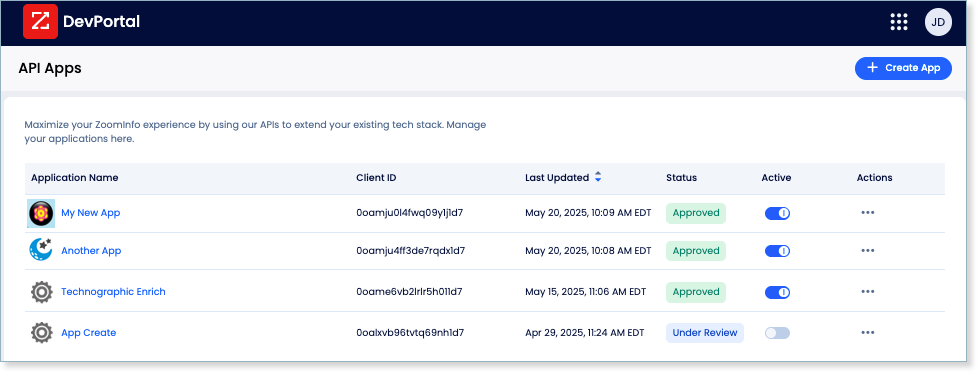
-
Configure OAuth settings
On the app creation form:
- Enter an Application Name (e.g.
Agent Auth). - Under OAuth, set the Redirect URI to your Scalekit redirect URI.
- Copy the Client ID shown on the app settings page.
- Click Show to reveal and copy the Client Secret.
- Enter an Application Name (e.g.
-
Create a connection in Scalekit
- In the Scalekit dashboard, go to AgentKit → Connections → Create Connection.
- Search for ZoomInfo and click Create.
- Enter the Client ID and Client Secret from your ZoomInfo app.
- Note the Connection name — use this as
connection_namein your code (e.g.,zoominfo).
-
Authorize a user and make your first call
quickstart.mts import { ScalekitClient } from '@scalekit-sdk/node'import 'dotenv/config'import { createInterface } from 'node:readline/promises'const scalekit = new ScalekitClient(process.env.SCALEKIT_ENVIRONMENT_URL,process.env.SCALEKIT_CLIENT_ID,process.env.SCALEKIT_CLIENT_SECRET,)const actions = scalekit.actionsconst connector = 'zoominfo'const identifier = 'user_123'// Generate an authorization link for the userconst { link } = await actions.getAuthorizationLink({ connectionName: connector, identifier })console.log('Authorize ZoomInfo:', link)const rl = createInterface({ input: process.stdin, output: process.stdout })await rl.question('Press Enter after authorizing...')rl.close()// Make your first callconst result = await actions.executeTool({connector,identifier,toolName: 'zoominfo_enrich_news',toolInput: {},})console.log(result)Terminal window npx tsx quickstart.mtsquickstart.py import osfrom scalekit import ScalekitClientfrom dotenv import load_dotenvload_dotenv()scalekit_client = ScalekitClient(env_url=os.getenv("SCALEKIT_ENVIRONMENT_URL"),client_id=os.getenv("SCALEKIT_CLIENT_ID"),client_secret=os.getenv("SCALEKIT_CLIENT_SECRET"),)actions = scalekit_client.actionsconnection_name = "zoominfo"identifier = "user_123"# Generate an authorization link for the userlink_response = actions.get_authorization_link(connection_name=connection_name,identifier=identifier,)print("Authorize ZoomInfo:", link_response.link)input("Press Enter after authorizing...")# Make your first callresult = actions.execute_tool(tool_input={},tool_name="zoominfo_enrich_news",connection_name=connection_name,identifier=identifier,)print(result)Terminal window python quickstart.pyEach user signs in once. See Authorize a user for the full flow and statuses.
Tools
Pass the exact name toexecute_toolzoominfo_ask_account_summaryAsk a natural language question about a company's account summary.Read-onlyAsk Account Summary Question
Ask a natural language question about a company's account summary. Returns an AI-generated answer using ZoomInfo's account intelligence data. Requires a ZoomInfo company ID and a question.
Inputs
companyIdintegerrequired- ZoomInfo unique company ID.
questionstringrequired- The question to ask about the company's account data.
Also accepts
schema_versionandtool_versionto pin a version.zoominfo_enrich_companiesEnrich up to 25 company records with detailed ZoomInfo firmographic data including revenue, headcount, industry, technographics, and more.Read-onlyEnrich Companies
Enrich up to 25 company records with detailed ZoomInfo firmographic data including revenue, headcount, industry, technographics, and more. Specify output fields and provide match criteria (companyId, name, or website). Each matched record consumes a credit. Use Search Companies first to get companyIds for best match accuracy.
Inputs
matchCompanyInputarrayrequired- List of up to 25 companies to match and enrich.
outputFieldsarrayrequired- Fields to include in the response for each enriched company.
requiredFieldsarray- Fields that must be present in the result for a record to be returned.
Also accepts
schema_versionandtool_versionto pin a version.zoominfo_enrich_contactsEnrich up to 25 contact records with detailed ZoomInfo data including emails, phone numbers, job titles, and company details.Read-onlyEnrich Contacts
Enrich up to 25 contact records with detailed ZoomInfo data including emails, phone numbers, job titles, and company details. Specify output fields to return and provide match criteria (personId, email, name, or phone). Each matched record consumes a credit. Use Search Contacts first to get personIds for best match accuracy.
Inputs
matchPersonInputarrayrequired- List of up to 25 contacts to match and enrich. Each object can include personId, email, name, phone, or company details.
outputFieldsarrayrequired- Fields to include in the response for each enriched contact.
requiredFieldsarray- Fields that must be present in the result for a record to be returned.
Also accepts
schema_versionandtool_versionto pin a version.zoominfo_enrich_corporate_hierarchyEnrich the corporate hierarchy for up to 25 companies.Read-onlyEnrich Corporate Hierarchy
Enrich the corporate hierarchy for up to 25 companies. Returns the full family tree including parent company, subsidiaries, acquisitions, former names, and known locations. If the matched company is not the top-level parent, also returns all parent companies up to the ultimate parent. Each matched record consumes a credit.
Inputs
matchCompanyInputarrayrequired- List of up to 25 companies to match and retrieve hierarchy for.
outputFieldsarrayrequired- Fields to include in the response for each enriched company hierarchy.
Also accepts
schema_versionandtool_versionto pin a version.zoominfo_enrich_intentFetch buying intent signals for a specific company by providing up to 50 intent topics.Read-onlyEnrich Intent
Fetch buying intent signals for a specific company by providing up to 50 intent topics. At least one company identifier (companyId, companyName, or companyWebsite) and at least one topic are required. Returns signal score, audience strength, and optional recommended contacts. Charges one credit for the company plus record credits per signal returned.
Inputs
topicsarrayrequired- Array of up to 50 intent topic names to fetch signals for.
audienceStrengthMaxstring- Maximum audience strength (A-E, where A = largest audience).
audienceStrengthMinstring- Minimum audience strength (A-E, where A = largest audience).
companyIdinteger- ZoomInfo unique company ID. Provide at least one of companyId, companyName, or companyWebsite.
companyNamestring- Company name. Provide at least one of companyId, companyName, or companyWebsite.
companyWebsitestring- Company website URL. Provide at least one of companyId, companyName, or companyWebsite.
findRecommendedContactsboolean- Set to false to exclude recommended contacts from results. Default is true.
pageNumberinteger- Page number for pagination, starting from 1.
pageSizeinteger- Results per page. Valid values: 1-100. Default is 25.
signalEndDatestring- End date for intent signals in YYYY-MM-DD format.
signalScoreMaxinteger- Maximum signal score (60-100).
signalScoreMininteger- Minimum signal score (60-100).
signalStartDatestring- Start date for intent signals in YYYY-MM-DD format.
sortstring- Sort field. Valid values: audiencestrength, category, companyname, issuedate, signaldate, signalscore, signalstrength, surgescore, topic. Prefix with - for descending.
Also accepts
schema_versionandtool_versionto pin a version.zoominfo_enrich_newsFetch news articles for a specific company by providing at least one company identifier (companyId, companyName, or companyWebsite).Read-onlyEnrich News
Fetch news articles for a specific company by providing at least one company identifier (companyId, companyName, or companyWebsite). Optionally filter by news category, URL, and date range. Charges one credit for the enriched company plus record credits per article returned. Use Search News to find articles across all companies.
Inputs
categoriesarray- News article categories to filter by.
companyIdinteger- ZoomInfo unique company ID.
companyNamestring- Company name.
companyWebsitestring- Company website URL.
pageDateMaxstring- Latest publishing date for news articles.
pageDateMinstring- Earliest publishing date for news articles.
pageNumberinteger- Page number for pagination.
pageSizeinteger- Results per page.
urlarray- News article URLs to filter by.
Also accepts
schema_versionandtool_versionto pin a version.zoominfo_enrich_org_chartsGet org chart data for a company by department.Read-onlyEnrich Org Charts
Get org chart data for a company by department. Returns ZoomInfo contacts organized by seniority level within the specified department(s). Requires a ZoomInfo company ID and at least one department. Charges one credit per request regardless of contacts returned.
Inputs
companyIdstringrequired- ZoomInfo company ID to get org chart for.
departmentstringrequired- Comma-separated department IDs to get org chart data for.
contactAccuracyScoreMaxstring- Maximum contact accuracy score (70-99).
contactAccuracyScoreMinstring- Minimum contact accuracy score (70-99).
pageNumberinteger- Page number for pagination.
pageSizeinteger- Results per page.
sortstring- Sort field.
Also accepts
schema_versionandtool_versionto pin a version.zoominfo_enrich_scoopsFetch scoops (business intelligence signals) for a specific company.Read-onlyEnrich Scoops
Fetch scoops (business intelligence signals) for a specific company. At least one company identifier (companyId, companyName, or companyWebsite) is required. Optionally filter by scoop type, topic, department, and date range. Charges one credit for the enriched company plus record credits per scoop returned.
Inputs
companyIdstring- ZoomInfo company ID.
companyNamestring- Company name.
companyWebsitestring- Company website URL.
departmentstring- Department associated with the scoop.
descriptionstring- Keywords to search in scoop descriptions.
pageNumberinteger- Page number.
pageSizeinteger- Results per page.
publishedEndDatestring- End date for scoop publication range.
publishedStartDatestring- Start date for scoop publication range.
scoopIdstring- ZoomInfo scoop ID.
scoopTopicstring- Scoop topic IDs.
scoopTypestring- Scoop type IDs.
sortstring- Sort field.
updatedSinceCreationboolean- Return only scoops updated since publishedStartDate.
Also accepts
schema_versionandtool_versionto pin a version.zoominfo_enrich_technologiesGet the technology stack for a specific company by ZoomInfo company ID.Read-onlyEnrich Technologies
Get the technology stack for a specific company by ZoomInfo company ID. Returns technologies identified through website analysis, job postings, company announcements, and data partnerships. Charges one credit for the enriched company.
Inputs
companyIdintegerrequired- ZoomInfo unique company ID.
Also accepts
schema_versionandtool_versionto pin a version.zoominfo_get_account_summaryGet an AI-generated account summary for a specific company including recent news, intent signals, key contacts, and strategic priorities.Read-onlyGet Account Summary
Get an AI-generated account summary for a specific company including recent news, intent signals, key contacts, and strategic priorities. Requires a ZoomInfo company ID.
Inputs
companyIdintegerrequired- ZoomInfo unique company ID.
Also accepts
schema_versionandtool_versionto pin a version.zoominfo_get_agent_teamGet full details for an Agent Team by ID including configured input parameters required when running it.Read-onlyGet Agent Team Details
Get full details for an Agent Team by ID including configured input parameters required when running it. Use List Agent Teams to find the agentTeamId.
Inputs
agentTeamIdstringrequired- Required. Unique identifier of the Agent Team.
Also accepts
schema_versionandtool_versionto pin a version.zoominfo_get_agent_team_run_resultsGet the status and results of a specific Agent Team run by agentTeamId and runId.Read-onlyGet Agent Team Run Results
Get the status and results of a specific Agent Team run by agentTeamId and runId. Poll this endpoint after triggering a run to monitor progress.
Inputs
agentTeamIdstringrequired- Required. Unique identifier of the Agent Team.
runIdstringrequired- Required. Unique identifier of the run returned by Run Agent Team.
Also accepts
schema_versionandtool_versionto pin a version.zoominfo_get_audienceRetrieve the full state of a single audience by UUID.Read-onlyGet Audience
Retrieve the full state of a single audience by UUID. Returns name, type, origin, record count, folder location, timestamps, and complete column structure. Returns 404 if not found.
Inputs
audienceIdstringrequired- UUID of the audience.
Also accepts
schema_versionandtool_versionto pin a version.zoominfo_get_audience_filter_metadataGet available filter operators for each column in an audience.Read-onlyGet Audience Filter Metadata
Get available filter operators for each column in an audience. Returns operator types (EQUALS, CONTAINS, NOT_EQUALS, etc.), whether multiple values are supported, value count limits, and minimum character requirements. Use before building row queries to validate filter inputs.
Inputs
audienceIdstringrequired- UUID of the audience to get filter metadata for.
Also accepts
schema_versionandtool_versionto pin a version.zoominfo_get_audience_job_statusGet the current status and progress of an async audience job (AUDIENCE_CREATE, AUDIENCE_ENRICH, or ROW_UPSERT).Read-onlyGet Audience Job Status
Get the current status and progress of an async audience job (AUDIENCE_CREATE, AUDIENCE_ENRICH, or ROW_UPSERT). Status values: SCHEDULED, RUNNING, SUCCEEDED, PARTIALLY_SUCCEEDED, FAILED, CANCELLED. Returns percentProgress. Use jobId returned by the originating operation.
Inputs
audienceIdstringrequired- UUID of the audience the job belongs to.
jobIdstringrequired- UUID of the async job to check.
Also accepts
schema_versionandtool_versionto pin a version.zoominfo_get_audience_rowRetrieve a single row from an audience by rowId.Read-onlyGet Audience Row
Retrieve a single row from an audience by rowId. Returns all cell values with their state (RESULT, BLANK, LOADING, ERROR, NO_RESULT). Optionally limit response to specific columns.
Inputs
audienceIdstringrequired- UUID of the audience.
rowIdstringrequired- UUID of the row to retrieve.
columnsarray- Column IDs to include in the response.
Also accepts
schema_versionandtool_versionto pin a version.zoominfo_get_buyer_personaRetrieve a single buyer persona by its UUID.Read-onlyGet Buyer Persona
Retrieve a single buyer persona by its UUID. Returns full persona configuration including role, objectives, messaging angles, and custom fields. Returns 404 if the persona does not exist.
Inputs
buyerPersonaIdstringrequired- UUID of the buyer persona to retrieve.
Also accepts
schema_versionandtool_versionto pin a version.zoominfo_get_column_data_dependenciesGet available data dependencies for AI-powered audience columns.Read-onlyGet Column Data Dependencies
Get available data dependencies for AI-powered audience columns. Returns which audience columns and knowledge sources can be used as context for the selected AI tool type. Use before creating AI columns to discover valid grounding sources.
Inputs
audienceIdstringrequired- UUID of the audience.
toolstringrequired- AI tool type to get data dependencies for.one of
AI_DATA_ANALYSISAI_WEB_RESEARCHAI_CONVERSATION_INTELLIGENCEAI_EMAILER
Also accepts
schema_versionandtool_versionto pin a version.zoominfo_get_company_lookalikesFind up to 100 companies similar to a reference company using ZoomInfo's ML model.Read-onlyFind Similar Companies
Find up to 100 companies similar to a reference company using ZoomInfo's ML model. Analyzes industry, revenue, headcount, and firmographic signals to rank lookalikes by similarity score. Provide companyId for best results, or companyName if the ID is unavailable. Results are ordered from most to least similar.
Inputs
filter_companyIdstring- ZoomInfo unique company ID to use as the reference for finding lookalikes.
filter_companyNamestring- Name of the reference company to find lookalikes for.
Also accepts
schema_versionandtool_versionto pin a version.zoominfo_get_competitorRetrieve a single competitor record by its UUID.Read-onlyGet Competitor
Retrieve a single competitor record by its UUID. Returns full competitive intelligence including products, win/loss analysis, and displacement scenarios. Returns 404 if not found.
Inputs
competitorIdstringrequired- UUID of the competitor.
Also accepts
schema_versionandtool_versionto pin a version.zoominfo_get_contact_lookalikesFind up to 100 contacts similar to a reference person using ZoomInfo's ML model.Read-onlyGet Contact Lookalikes
Find up to 100 contacts similar to a reference person using ZoomInfo's ML model. Matches on title, seniority, department, and company attributes. Optionally scope the search to a specific target company. Returns results ordered from most to least similar by score.
Inputs
filter_referencePersonIdintegerrequired- ZoomInfo person ID of the reference contact to find lookalikes for.
filter_targetCompanyIdinteger- Constrain lookalike search to a specific target company.
page_sizeinteger- Number of lookalike contacts to return (1-100).
Also accepts
schema_versionandtool_versionto pin a version.zoominfo_get_contact_recommendationsGet up to 100 ranked contact recommendations at a target company for a specific sales motion (prospecting, deal acceleration, or renewal and growth).Read-onlyGet Contact Recommendations
Get up to 100 ranked contact recommendations at a target company for a specific sales motion (prospecting, deal acceleration, or renewal and growth). Uses ML to surface the most relevant personas based on past user interactions, CRM data, and engagement signals. Results are ordered from most to least relevant.
Inputs
filter_useCaseTypestringrequired- Sales motion type to drive recommendations.one of
PROSPECTINGDEAL_ACCELERATIONRENEWAL_AND_GROWTH filter_ziCompanyIdintegerrequired- ZoomInfo company ID of the target account to get contact recommendations for.
page_sizeinteger- Number of recommendations to return (1-100).
Also accepts
schema_versionandtool_versionto pin a version.zoominfo_get_content_interactionRetrieve a specific content interaction engagement by its ID.Read-onlyGet Content Interaction
Retrieve a specific content interaction engagement by its ID.
Inputs
idstringrequired- Required. Unique identifier of the content interaction engagement.
Also accepts
schema_versionandtool_versionto pin a version.zoominfo_get_entitlementsRetrieve the authenticated user's entitlements filtered by admin status and role type.Read-onlyGet Entitlements
Retrieve the authenticated user's entitlements filtered by admin status and role type. Use this to check which features, integrations, or data sets the account has access to.
Inputs
filter_adminbooleanrequired- Whether to retrieve admin entitlements. Admin entitlements are only available to users with admin privileges and are keyed like adm:roleCode, e.g. adm:fea:api.
filter_roleTypestringrequired- The role type to filter entitlements by.one of
featureintegrationdatadataset_detailactionintentlimitinfosignalvertical_dataset
zoominfo_get_folderRetrieve a single folder by its UUID.Read-onlyGet Folder
Retrieve a single folder by its UUID. Returns all attributes including name, starred status, description, notes, timestamps, and the list of audience IDs in the folder. Returns 404 if not found.
Inputs
folderIdstringrequired- UUID of the folder.
Also accepts
schema_versionandtool_versionto pin a version.zoominfo_get_gtm_entity_fieldsRetrieve detailed metadata and field definitions for a specific GTM data model entity, including each field's data type, whether it is required, its classification, and any pick-list values.Read-onlyGet GTM Entity Fields
Retrieve detailed metadata and field definitions for a specific GTM data model entity, including each field's data type, whether it is required, its classification, and any pick-list values. Use List GTM Entities first to discover valid entity names.
Inputs
entityNamestringrequired- The unique identifier of the GTM entity to fetch field definitions for.one of
accountcontactuser
zoominfo_get_insightsRetrieve sales intelligence signals (insights) for up to 50 companies, filtered by signal type.Read-onlyGet Insights by Type
Retrieve sales intelligence signals (insights) for up to 50 companies, filtered by signal type. Insights include funding events, leadership changes, intent spikes, hiring anomalies, website visits, and more. Signals are filtered for relevance and recency based on your team's focus areas.
Inputs
ziCompanyIdsarrayrequired- List of ZoomInfo company IDs to retrieve insights for (max 50).
signalTypesarray- Optional filter for specific insight/signal types. Returns all types if omitted.
Also accepts
schema_versionandtool_versionto pin a version.zoominfo_get_marketing_audienceRetrieve a single ZoomInfo marketing audience by its ID.Read-onlyGet Marketing Audience
Retrieve a single ZoomInfo marketing audience by its ID.
Inputs
audienceIdstringrequired- ID of the marketing audience.
Also accepts
schema_versionandtool_versionto pin a version.zoominfo_get_marketing_audience_upload_statusGet the upload status for a previously submitted marketing audience upload job.Read-onlyGet Audience Upload Status
Get the upload status for a previously submitted marketing audience upload job. Returns the current status and progress.
Inputs
audienceIdstringrequired- ID of the marketing audience.
uploadIdstringrequired- ID of the upload job.
Also accepts
schema_versionandtool_versionto pin a version.zoominfo_get_offeringRetrieve a single product or service by UUID.Read-onlyGet Product or Service
Retrieve a single product or service by UUID. Returns full configuration including positioning, pain points, and value proposition. Returns 404 if not found.
Inputs
offeringIdstringrequired- UUID of the product or service.
Also accepts
schema_versionandtool_versionto pin a version.zoominfo_get_segmentRetrieve a single ICP by its UUID.Read-onlyGet ICP
Retrieve a single ICP by its UUID. Returns full profile configuration. Returns 404 if not found.
Inputs
segmentIdstringrequired- UUID of the ICP segment.
Also accepts
schema_versionandtool_versionto pin a version.zoominfo_get_settingsRetrieve the customer settings for the authenticated ZoomInfo customer.Read-onlyGet Company Settings
Retrieve the customer settings for the authenticated ZoomInfo customer. Settings include company name, description, elevator pitch, and strategic GTM priorities used to power AI recommendations. Returns 404 if no settings have been configured yet.
Inputs
This tool takes no inputs.
Also accepts
schema_versionandtool_versionto pin a version.zoominfo_get_usageGet the current user's API usage statistics and limits including credits consumed, records returned, and request counts.Read-onlyGet API Usage
Get the current user's API usage statistics and limits including credits consumed, records returned, and request counts. Use this to monitor consumption against your ZoomInfo plan limits.
Inputs
This tool takes no inputs.
Also accepts
schema_versionandtool_versionto pin a version.zoominfo_get_workflow_execution_statusGet the status of a workflow execution previously triggered with Execute Workflow.Read-onlyGet Workflow Execution Status
Get the status of a workflow execution previously triggered with Execute Workflow.
Inputs
idstringrequired- Unique identifier of the workflow execution.
zoominfo_list_agent_team_runsList all runs for an Agent Team, sorted in reverse chronological order.Read-onlyList Agent Team Runs
List all runs for an Agent Team, sorted in reverse chronological order. Use Get Agent Team Results to poll for status of a specific run.
Inputs
agentTeamIdstringrequired- Required. Unique identifier of the Agent Team.
pageNumberinteger- Page number for pagination. Default is 1.
pageSizeinteger- Results per page (1-100). Default is 25.
Also accepts
schema_versionandtool_versionto pin a version.zoominfo_list_agent_teamsList all Agent Teams with optional filtering and sorting.Read-onlyList Agent Teams
List all Agent Teams with optional filtering and sorting. Returns team names, registered triggers, and active status.
Inputs
filter_namestring- Filter agent teams by name.
pageNumberinteger- Page number for pagination. Default is 1.
pageSizeinteger- Results per page (1-100). Default is 25.
sortstring- Sort field. Valid values: name, createdAt, updatedAt. Prefix with - for descending.
Also accepts
schema_versionandtool_versionto pin a version.zoominfo_list_audience_rowsSearch and list rows in an audience with optional filtering, sorting, and pagination.Read-onlyList Audience Rows
Search and list rows in an audience with optional filtering, sorting, and pagination. Supports complex filter groups with AND/OR logic. Optionally retrieve specific row IDs. Returns up to 500 rows per page.
Inputs
audienceIdstringrequired- UUID of the audience.
columnsarray- Column IDs to include in response.
filterobject- Filter group with logical operator and filter conditions.
idsarray- Specific row IDs to retrieve.
pageNumberinteger- Page number.
pageSizeinteger- Results per page.
sortstring- Column ID to sort by.
Also accepts
schema_versionandtool_versionto pin a version.zoominfo_list_audiencesList all GTM Studio audiences with optional filtering and sorting.Read-onlyList Audiences
List all GTM Studio audiences with optional filtering and sorting. Use this to browse audiences or find an audienceId before operating on rows, columns, or enrichment.
Inputs
filter_searchTextstring- Filter audiences by name using a case-insensitive contains match.
filter_typestring- Filter by audience record type.one of
CONTACTCOMPANY pageNumberinteger- Page number for pagination. Default is 1.
pageSizeinteger- Results per page. Valid values: 1-100. Default is 25.
sortstring- Sort field. Valid values: name, createdAt, updatedAt, recordCount. Prefix with - for descending. Default: -updatedAt.
Also accepts
schema_versionandtool_versionto pin a version.zoominfo_list_buyer_personasList all buyer personas configured for the authenticated ZoomInfo customer.Read-onlyList Buyer Personas
List all buyer personas configured for the authenticated ZoomInfo customer. Buyer personas represent ideal buyer profiles including role, objectives, and purchasing motivations. Use this to discover persona IDs for use in other API operations.
Inputs
This tool takes no inputs.
Also accepts
schema_versionandtool_versionto pin a version.zoominfo_list_competitorsList all competitors configured for the authenticated ZoomInfo customer.Read-onlyList Competitors
List all competitors configured for the authenticated ZoomInfo customer. Competitor records capture competitive intelligence including competing products, win/loss analysis, and displacement history. Use this to discover competitor IDs for other operations.
Inputs
pageNumberinteger- Page number.
pageSizeinteger- Results per page.
Also accepts
schema_versionandtool_versionto pin a version.zoominfo_list_foldersList all folders in ZoomInfo GTM Studio with optional filtering and sorting.Read-onlyList Folders
List all folders in ZoomInfo GTM Studio with optional filtering and sorting. Useful for browsing folder structure or finding a folderId before creating or moving audiences.
Inputs
filter_createdAfterstring- Filter folders created after this date (ISO 8601).
filter_createdBeforestring- Filter folders created before this date (ISO 8601).
filter_searchTextstring- Filter folders by partial name match.
filter_updatedAfterstring- Filter folders updated after this date (ISO 8601).
filter_updatedBeforestring- Filter folders updated before this date (ISO 8601).
pageNumberinteger- Page number for pagination. Default is 1.
pageSizeinteger- Results per page. Valid values: 1-100. Default is 25.
sortstring- Sort field. Valid values: name, createdAt, updatedAt, audienceCount, recentlyViewed. Prefix with - for descending. Default: -updatedAt.
Also accepts
schema_versionandtool_versionto pin a version.zoominfo_list_gtm_entitiesRetrieve a list of all GTM data model entities available to your organization (e.g.Read-onlyList GTM Entities
Retrieve a list of all GTM data model entities available to your organization (e.g. account, contact, user). Use this to discover which entities you can inspect with Get GTM Entity Fields or write to with Upsert GTM Entity Records. Takes no parameters.
Inputs
This tool takes no inputs.
zoominfo_list_marketing_audiencesList all ZoomInfo marketing audiences with optional pagination.Read-onlyList Marketing Audiences
List all ZoomInfo marketing audiences with optional pagination.
Inputs
pageSizeinteger- Number of audiences per page.
pageTokenstring- Pagination token from previous response.
Also accepts
schema_versionandtool_versionto pin a version.zoominfo_list_offeringsList all products and services configured for the authenticated ZoomInfo customer.Read-onlyList Products and Services
List all products and services configured for the authenticated ZoomInfo customer. Products serve as the central linking object across GTM config, connecting buyer personas, ICPs, and competitors. Use this to discover offering IDs for other operations.
Inputs
pageNumberinteger- Page number.
pageSizeinteger- Results per page.
Also accepts
schema_versionandtool_versionto pin a version.zoominfo_list_pulsesList the authenticated user's active intelligence pulses — lightweight signals optimized for LLM consumption.Read-onlyList Pulses
List the authenticated user's active intelligence pulses — lightweight signals optimized for LLM consumption. Each pulse includes a plain-text summary, priority (HIGH/MEDIUM/LOW), category, and company/contact references. Dismissed, saved, and expired pulses are excluded.
Inputs
pageNumberinteger- Page number for pagination.
pageSizeinteger- Results per page (1-100).
Also accepts
schema_versionandtool_versionto pin a version.zoominfo_list_segmentsList all Ideal Customer Profiles (ICPs) configured for the authenticated ZoomInfo customer.Read-onlyList ICPs
List all Ideal Customer Profiles (ICPs) configured for the authenticated ZoomInfo customer. ICPs define target company profiles by firmographic attributes like industry, size, revenue, and geography. Use this to discover segment IDs for other operations.
Inputs
pageNumberinteger- Page number.
pageSizeinteger- Results per page.
Also accepts
schema_versionandtool_versionto pin a version.zoominfo_list_workflowsGet a list of ZoomInfo workflows with optional filtering and pagination.Read-onlyList Workflows
Get a list of ZoomInfo workflows with optional filtering and pagination. Filter by whether a workflow is runnable on demand, whether it is active, or by name. Use Execute Workflow to trigger a workflow that supports on-demand runs.
Inputs
filter_activeboolean- Filter by active workflows.
filter_namestring- Filter by a workflow's name.
filter_runnableOnDemandboolean- Filter by workflows that can be run on demand.
pageNumberinteger- Page number for pagination.
pageSizeinteger- Number of items per page.
sortstring- Sort field. Valid values: name, createdAt, updatedAt. Prefix with - for descending order.
zoominfo_lookup_dataGet valid values for ZoomInfo filter fields such as industries, departments, intent topics, scoop types, tech products, countries, and more.Read-onlyLookup Data
Get valid values for ZoomInfo filter fields such as industries, departments, intent topics, scoop types, tech products, countries, and more. Use this to discover accepted values before calling search or enrich endpoints.
Inputs
fieldNamestringrequired- The lookup field to retrieve valid values for.one of
board-membersbuying-groupscompany-rankingscompany-typescontinentscountriesdepartmentsemployee-counthashtagsindustriesintent-topicsjob-functionsjob-titlesmanagement-levelsmetro-regionsnaics-codesnews-categoriesrevenue-rangesscoop-departmentsscoop-topicsscoop-typessic-codesstatessub-unit-typestech-categoriestech-productstech-skillstech-vendorsyears-of-experience filter_categorystring- Category filter (hashtags and tech lookups only).
filter_parentCategorystring- Parent category filter (hashtags and tech lookups only).
filter_subCategorystring- Sub-category filter (hashtags and tech lookups only).
filter_vendorstring- Vendor filter (hashtags and tech lookups only).
Also accepts
schema_versionandtool_versionto pin a version.zoominfo_lookup_enrich_fieldsGet available input or output fields for ZoomInfo enrich endpoints by entity type.Read-onlyLookup Enrich Fields
Get available input or output fields for ZoomInfo enrich endpoints by entity type. Use this to discover which fields you can pass as match criteria (input) or request in enriched results (output) for contacts, companies, scoops, news, intent, technologies, hashtags, org charts, and corporate hierarchy.
Inputs
filter_entitystringrequired- Entity type to get enrich fields for.one of
companycontactscoopnewsintenttechnologyhashtagorgChartcorporate-hierarchy filter_fieldTypestringrequired- Field type — input fields for match criteria or output fields for response.one of
inputoutput
Also accepts
schema_versionandtool_versionto pin a version.zoominfo_lookup_search_fieldsGet available input or output fields for ZoomInfo search endpoints by entity type.Read-onlyLookup Search Fields
Get available input or output fields for ZoomInfo search endpoints by entity type. Use this to discover which fields you can filter by (input) or request in results (output) for contact, company, scoop, news, or intent searches.
Inputs
filter_entitystringrequired- Entity type to get search fields for.one of
contactcompanyscoopnewsintent filter_fieldTypestringrequired- Field type to return — input fields for filtering or output fields for response.one of
inputoutput
Also accepts
schema_versionandtool_versionto pin a version.zoominfo_search_companiesSearch ZoomInfo's company database using name, industry, revenue, headcount, location, funding, and technology filters.Read-onlySearch Companies
Search ZoomInfo's company database using name, industry, revenue, headcount, location, funding, and technology filters. Does not consume credits. Use Enrich Companies to get full firmographic details.
Inputs
companyDescriptionstring- Keywords to search in company descriptions.
companyIdstring- ZoomInfo unique identifier for a company.
companyNamestring- Filter by company name.
companyRankingstring- Company ranking ID (e.g. Fortune 500). Comma-separated list of IDs.
companyTypestring- Filter by company type. Accepts comma-separated list.
companyWebsitestring- Filter by company website URL. Accepts comma-separated list.
continentstring- Continent of the primary address.
countrystring- Country of the primary address.
employeeCountstring- Pre-defined employee count range. Accepts comma-separated values.
employeeRangeMaxstring- Maximum employee count.
employeeRangeMinstring- Minimum employee count.
excludeDefunctCompaniesboolean- Set to true to exclude defunct companies from results.
excludeTechAttributeTagListstring- Exclude companies with these tech tags. Comma-separated.
fundingAmountMaxinteger- Maximum funding amount in thousands of USD.
fundingAmountMininteger- Minimum funding amount in thousands of USD.
fundingEndDatestring- End date for funding range in YYYY-MM-DD format.
fundingStartDatestring- Start date for funding range in YYYY-MM-DD format.
industryCodesstring- Comma-separated list of industry codes.
industryKeywordsstring- Industry keywords. Supports AND/OR operators.
metroRegionstring- Metro area. Comma-separated list of US/Canada metro areas.
naicsCodesstring- Comma-separated list of NAICS codes.
oneYearEmployeeGrowthRateMaxstring- Maximum 1-year employee growth rate percentage.
oneYearEmployeeGrowthRateMinstring- Minimum 1-year employee growth rate percentage.
pageNumberinteger- Page number for pagination, starting from 1.
pageSizeinteger- Results per page. Valid values: 1-100. Default is 25.
parentIdstring- ZoomInfo Company ID for the parent company.
revenueMaxinteger- Maximum annual revenue in thousands of USD.
revenueMininteger- Minimum annual revenue in thousands of USD.
sicCodesstring- Comma-separated list of SIC codes.
sortstring- Sort field. Valid values: name, employeeCount, revenue. Prefix with - for descending.
statestring- State or province of the company's address.
techAttributeTagListstring- Technology product tag IDs. Comma-separated, supports AND logic.
zipCodestring- Zip or postal code.
Also accepts
schema_versionandtool_versionto pin a version.zoominfo_search_contactsSearch ZoomInfo's contact database using name, title, company, location, industry, and other filters.Read-onlySearch Contacts
Search ZoomInfo's contact database using name, title, company, location, industry, and other filters. Returns contact profiles with accuracy scores. Does not consume credits. Use Enrich Contacts to get emails and phone numbers.
Inputs
companyIdstring- ZoomInfo company ID.
companyNamestring- Filter by company name.
companyWebsitestring- Filter by company website URL.
contactAccuracyScoreMinstring- Minimum contact accuracy score (70-99).
countrystring- Country of the company's primary address.
departmentstring- Filter by department. Accepts comma-separated list.
emailAddressstring- Filter by email address.
employeeRangeMaxstring- Maximum employee count.
employeeRangeMinstring- Minimum employee count.
exactJobTitlestring- Filter by exact job title match.
excludeJobTitlestring- Comma-separated list of job titles to exclude.
executivesOnlyboolean- Set to true to return only executive-level contacts.
firstNamestring- Filter by contact's first name.
fullNamestring- Filter by contact's full name.
industryCodesstring- Comma-separated list of industry codes. Use lookup/data to get valid values.
jobTitlestring- Filter by job title. Use OR to combine multiple titles.
lastNamestring- Filter by contact's last name.
lastUpdatedDateAfterstring- Return only contacts updated after this date (YYYY-MM-DD).
managementLevelstring- Filter by management level.
naicsCodesstring- Comma-separated list of NAICS codes.
pageNumberinteger- Page number for pagination, starting from 1.
pageSizeinteger- Results per page. Valid values: 1-100. Default is 25.
personIdstring- ZoomInfo unique identifier for the contact.
requiredFieldsstring- Required data fields. Accepted values: email, phone, directPhone, personalEmail, mobilePhone.
revenueMaxinteger- Maximum annual revenue in thousands of USD.
revenueMininteger- Minimum annual revenue in thousands of USD.
sicCodesstring- Comma-separated list of SIC codes.
sortstring- Sort field. Valid values: contactAccuracyScore, lastName, companyName, hierarchy, sourceCount, lastMentioned, relevance. Prefix with - for descending.
statestring- State or province of the company's address.
validDateAfterstring- Return only contacts with a valid date after this date (YYYY-MM-DD).
Also accepts
schema_versionandtool_versionto pin a version.zoominfo_search_intentSearch ZoomInfo buying intent signals by topic and company filters.Read-onlySearch Intent Signals
Search ZoomInfo buying intent signals by topic and company filters. Topics are required (up to 50). Returns companies showing intent with signal score and audience strength. Counts as record credits.
Inputs
topicsarrayrequired- Required. Array of up to 50 intent topic names. Use lookup/data to get valid topic values.
audienceStrengthMaxstring- Maximum audience strength (A-E, where A = largest audience).
audienceStrengthMinstring- Minimum audience strength (A-E, where A = largest audience).
companyIdstring- Filter by ZoomInfo company ID.
companyNamestring- Filter by company name.
countrystring- Filter by country.
employeeRangeMaxstring- Maximum employee count.
employeeRangeMinstring- Minimum employee count.
findRecommendedContactsboolean- Set to false to exclude recommended contacts from results. Default is true.
industryCodesstring- Comma-separated list of industry codes.
pageNumberinteger- Page number for pagination, starting from 1.
pageSizeinteger- Results per page. Valid values: 1-100. Default is 25.
revenueMaxinteger- Maximum annual revenue in thousands of USD.
revenueMininteger- Minimum annual revenue in thousands of USD.
signalEndDatestring- End date for intent signals in YYYY-MM-DD format.
signalScoreMaxinteger- Maximum signal score (60-100).
signalScoreMininteger- Minimum signal score (60-100).
signalStartDatestring- Start date for intent signals in YYYY-MM-DD format.
sortstring- Sort field. Valid values: signalDate, companyName, signalScore, category, topic, audienceStrength. Prefix with - for descending.
statestring- Filter by state or province.
Also accepts
schema_versionandtool_versionto pin a version.zoominfo_search_newsSearch ZoomInfo news articles by category, URL, and date range.Read-onlySearch News
Search ZoomInfo news articles by category, URL, and date range. Returns news articles across all ZoomInfo companies. At least one filter must be provided. Does not consume credits but counts toward record and request limits. Use Enrich News to get articles for a specific company.
Inputs
categoriesarray- Category of news articles to filter by.
pageDateMaxstring- Latest publishing date for news articles.
pageDateMinstring- Earliest publishing date for news articles.
pageNumberinteger- Page number for pagination.
pageSizeinteger- Results per page.
urlarray- News article URLs to search for.
Also accepts
schema_versionandtool_versionto pin a version.zoominfo_search_scoopsSearch ZoomInfo scoops — real-time business intelligence signals about leadership changes, funding, partnerships, and strategic events.Read-onlySearch Scoops
Search ZoomInfo scoops — real-time business intelligence signals about leadership changes, funding, partnerships, and strategic events. Filter by scoop type, topic, department, date range, contact, and company criteria. Does not consume credits but counts toward record and request limits.
Inputs
companyIdstring- ZoomInfo company ID.
companyNamestring- Filter by company name.
contactAccuracyScoreMinstring- Minimum contact accuracy score (70-99).
countrystring- Country of the company's primary address.
departmentstring- Department associated with the scoop. See Scoop Departments lookup for valid values.
descriptionstring- Keywords to search in scoop descriptions. Space-separated list of words.
employeeRangeMaxstring- Maximum employee count.
employeeRangeMinstring- Minimum employee count.
executivesOnlyboolean- Set to true to return only executive-level contacts. Default is false.
firstNamestring- Filter by contact's first name mentioned in scoop.
fundingAmountMaxinteger- Maximum funding amount in thousands of USD.
fundingAmountMininteger- Minimum funding amount in thousands of USD.
fundingEndDatestring- End date for funding range in YYYY-MM-DD format.
fundingStartDatestring- Start date for funding range in YYYY-MM-DD format.
industryCodesstring- Comma-separated list of industry codes.
jobTitlestring- Filter by contact's job title.
lastNamestring- Filter by contact's last name mentioned in scoop.
managementLevelstring- Filter by contact's management level.
metroRegionstring- Metro area. Comma-separated list of US/Canada metro areas.
naicsCodesstring- Comma-separated list of NAICS codes.
pageNumberinteger- Page number for pagination, starting from 1.
pageSizeinteger- Results per page. Valid values: 1-100. Default is 25.
publishedEndDatestring- End date for scoop publication date range in YYYY-MM-DD format.
publishedStartDatestring- Start date for scoop publication date range in YYYY-MM-DD format.
revenueMaxinteger- Maximum annual revenue in thousands of USD.
revenueMininteger- Minimum annual revenue in thousands of USD.
scoopIdstring- ZoomInfo unique scoop ID. Accepts comma-separated list.
scoopTopicstring- Scoop topic IDs. Comma-separated list from the lookup endpoint (e.g. integration, consolidation, compliance).
scoopTypestring- Scoop type IDs. Comma-separated list from the lookup endpoint (e.g. earnings, awards, partnerships).
sicCodesstring- Comma-separated list of SIC codes.
sortstring- Sort field. Valid values: scoopId, originalPublishedDate, description, link, linkText. Prefix with - for descending.
statestring- State or province of the company's address.
updatedSinceCreationboolean- Set to true to only return scoops updated since publishedStartDate. Default is false.
Also accepts
schema_versionandtool_versionto pin a version.zoominfo_archive_buyer_personaArchive a buyer persona to hide it from active use without permanently deleting it.WriteArchive Buyer Persona
Archive a buyer persona to hide it from active use without permanently deleting it. The persona can be unarchived later. Use this instead of delete when you may need to restore the persona.
Inputs
buyerPersonaIdstringrequired- UUID of the buyer persona.
Also accepts
schema_versionandtool_versionto pin a version.zoominfo_archive_competitorArchive a competitor to hide it from active use without permanently deleting it.WriteArchive Competitor
Archive a competitor to hide it from active use without permanently deleting it. The record can be restored later using Unarchive Competitor.
Inputs
competitorIdstringrequired- UUID of the competitor.
Also accepts
schema_versionandtool_versionto pin a version.zoominfo_archive_offeringArchive a product or service to hide it from active use without deleting it.WriteArchive Product or Service
Archive a product or service to hide it from active use without deleting it. Reversible with Unarchive.
Inputs
offeringIdstringrequired- UUID of the product or service.
Also accepts
schema_versionandtool_versionto pin a version.zoominfo_archive_segmentArchive an ICP to hide it from active use without permanently deleting it.WriteArchive ICP
Archive an ICP to hide it from active use without permanently deleting it. Reversible with Unarchive ICP.
Inputs
segmentIdstringrequired- UUID of the ICP segment.
Also accepts
schema_versionandtool_versionto pin a version.zoominfo_create_audienceCreate a new GTM Studio audience — a collection of contacts or companies for marketing and sales.WriteCreate Audience
Create a new GTM Studio audience — a collection of contacts or companies for marketing and sales. Only CUSTOM source audiences are supported. Optionally define columns at creation or add them later. If folderId is omitted, a new folder matching the audience name is created automatically.
Inputs
namestringrequired- Required. Display name of the audience.
typestringrequired- Record type the audience holds (CONTACT or COMPANY).one of
CONTACTCOMPANY autoMatchCriteriaboolean- Enable AI auto-mapping of column match criteria.
columnsarray- Column definitions to add to the audience at creation.
descriptionstring- Optional description of the audience's purpose.
folderIdstring- UUID of the folder to place this audience in. If omitted, a new folder matching the audience name is created automatically.
notesstring- Optional internal notes about the audience.
Also accepts
schema_versionandtool_versionto pin a version.zoominfo_create_audience_columnsAdd one or more columns to an existing audience in a single bulk operation.WriteCreate Audience Columns
Add one or more columns to an existing audience in a single bulk operation. Supports CUSTOM (static), FORMULA, AI, and ZOOMINFO_MATCH column types. Returns 201 with created column IDs.
Inputs
audienceIdstringrequired- UUID of the audience to add columns to.
columnsarrayrequired- Array of column definitions to create.
Also accepts
schema_versionandtool_versionto pin a version.zoominfo_create_folderCreate a new folder for organizing audiences in ZoomInfo GTM Studio.WriteCreate Folder
Create a new folder for organizing audiences in ZoomInfo GTM Studio. Folders group related audiences by campaign, region, or team. The folder is created empty — assign audiences via Create Audience or Update Audience using the returned folderId.
Inputs
namestringrequired- Display name of the folder.
descriptionstring- Optional description of the folder's purpose.
notesstring- Optional internal notes about the folder.
starredboolean- Whether the folder is starred for quick access.
Also accepts
schema_versionandtool_versionto pin a version.zoominfo_create_marketing_audienceCreate a new ZoomInfo marketing audience for B2B or B2C targeting.WriteCreate Marketing Audience
Create a new ZoomInfo marketing audience for B2B or B2C targeting. Marketing audiences are separate from GTM Studio audiences.
Inputs
audienceTypestringrequired- Audience type — B2B or B2C.one of
B2BB2C namestringrequired- Name of the audience.
Also accepts
schema_versionandtool_versionto pin a version.zoominfo_enrich_audienceStart an async enrichment job to append ZoomInfo intelligence to audience rows.WriteEnrich Audience
Start an async enrichment job to append ZoomInfo intelligence to audience rows. Use scope=AUDIENCE to enrich all rows, or scope=ROW with specific rowIds. Returns 202 with a jobId to poll via Get Audience Job Status.
Inputs
audienceIdstringrequired- UUID of the audience to enrich.
scopestringrequired- Enrichment scope.one of
AUDIENCEROW columnsarray- Column IDs to enrich (optional for any scope).
rowsarray- Row IDs to enrich (required when scope=ROW).
Also accepts
schema_versionandtool_versionto pin a version.zoominfo_execute_workflowExecute a ZoomInfo workflow that supports on-demand runs.WriteExecute Workflow
Execute a ZoomInfo workflow that supports on-demand runs. Optionally provide a callback URL to be notified with the execution results. Returns the execution record; poll Get Workflow Execution Status with its id to track progress.
Inputs
idstringrequired- Unique identifier of the workflow to execute.
callback_urlstring- Optional URL to call back with the execution results once the workflow finishes.
zoominfo_run_agent_teamTrigger an Agent Team run.WriteRun Agent Team
Trigger an Agent Team run. Returns 202 with a run ID to poll via List Agent Team Runs or Get Agent Team Results. Any team can be run manually regardless of active/inactive status.
Inputs
agentTeamIdstringrequired- Required. Unique identifier of the Agent Team to run.
inputsarray- Optional named input values for the run.
Also accepts
schema_versionandtool_versionto pin a version.zoominfo_unarchive_buyer_personaRestore a previously archived buyer persona to active status, making it available again for use in GTM workflows.WriteUnarchive Buyer Persona
Restore a previously archived buyer persona to active status, making it available again for use in GTM workflows.
Inputs
buyerPersonaIdstringrequired- UUID of the buyer persona.
Also accepts
schema_versionandtool_versionto pin a version.zoominfo_unarchive_competitorRestore a previously archived competitor record to active status.WriteUnarchive Competitor
Restore a previously archived competitor record to active status.
Inputs
competitorIdstringrequired- UUID of the competitor.
Also accepts
schema_versionandtool_versionto pin a version.zoominfo_unarchive_offeringRestore a previously archived product or service to active status.WriteUnarchive Product or Service
Restore a previously archived product or service to active status.
Inputs
offeringIdstringrequired- UUID of the product or service.
Also accepts
schema_versionandtool_versionto pin a version.zoominfo_unarchive_segmentRestore a previously archived ICP to active status.WriteUnarchive ICP
Restore a previously archived ICP to active status.
Inputs
segmentIdstringrequired- UUID of the ICP segment.
Also accepts
schema_versionandtool_versionto pin a version.zoominfo_update_audienceUpdate an audience's name, folder, description, or notes.WriteUpdate Audience
Update an audience's name, folder, description, or notes. Only provided fields are modified (partial update). Use this to rename an audience or move it to a different folder.
Inputs
audienceIdstringrequired- UUID of the audience to update.
descriptionstring- Updated description.
folderIdstring- UUID of the folder to move the audience to.
namestring- New display name.
notesstring- Updated notes.
Also accepts
schema_versionandtool_versionto pin a version.zoominfo_update_audience_columnUpdate a column's name, frozen state, or visibility within an audience.WriteUpdate Audience Column
Update a column's name, frozen state, or visibility within an audience. Only provided fields are modified. Cannot update columns with isEditable=false.
Inputs
audienceIdstringrequired- UUID of the audience.
columnIdstringrequired- UUID of the column to update.
isFrozenboolean- Whether the column is pinned to the left in grid views.
isHiddenboolean- Whether the column is hidden from grid views.
namestring- New display name for the column.
Also accepts
schema_versionandtool_versionto pin a version.zoominfo_update_folderUpdate a folder's name, description, notes, or starred status.WriteUpdate Folder
Update a folder's name, description, notes, or starred status. Only provided fields are modified (partial update).
Inputs
folderIdstringrequired- UUID of the folder to update.
descriptionstring- Updated description.
namestring- New display name for the folder.
notesstring- Updated notes.
starredboolean- Whether the folder is starred.
Also accepts
schema_versionandtool_versionto pin a version.zoominfo_update_marketing_audienceUpdate the name of an existing ZoomInfo marketing audience.WriteUpdate Marketing Audience
Update the name of an existing ZoomInfo marketing audience.
Inputs
audienceIdstringrequired- ID of the audience to update.
namestringrequired- New name for the audience.
Also accepts
schema_versionandtool_versionto pin a version.zoominfo_upload_marketing_audienceAdd or remove records from a ZoomInfo marketing audience.WriteUpload Audience Members
Add or remove records from a ZoomInfo marketing audience. Define the schema using fields (column names) and provide records as arrays matching the field order. Returns 201 with the upload job.
Inputs
audienceIdstringrequired- ID of the marketing audience.
fieldsarrayrequired- Schema defining which fields are in each record.
operationTypestringrequired- Type of upload operation.one of
ADDDELETE recordsarrayrequired- List of records to upload, each matching the field schema order.
Also accepts
schema_versionandtool_versionto pin a version.zoominfo_upsert_audience_match_criteriaSet or update column match criteria for an audience, mapping audience columns to ZoomInfo attributes (e.g.WriteSet Audience Match Criteria
Set or update column match criteria for an audience, mapping audience columns to ZoomInfo attributes (e.g. an 'Email' column to CONTACT_EMAIL). If matchCriteria is omitted, the system uses AI to auto-map columns. Replaces existing match criteria.
Inputs
audienceIdstringrequired- UUID of the audience.
matchCriteriaarray- Array of column-to-ZoomInfo-attribute mappings.
Also accepts
schema_versionandtool_versionto pin a version.zoominfo_upsert_audience_rowsCreate and/or update up to 500 rows in an audience in one operation.WriteBulk Upsert Audience Rows
Create and/or update up to 500 rows in an audience in one operation. Include id (rowId) to update; omit it to create. Optionally trigger enrichment on affected rows after upsert by setting runEnrichment=true.
Inputs
audienceIdstringrequired- UUID of the audience.
rowsarrayrequired- Array of row objects to create or update (max 500).
columnsarray- Column IDs to enrich (only used when runEnrichment=true).
runEnrichmentboolean- Whether to run enrichment after upsert.
Also accepts
schema_versionandtool_versionto pin a version.zoominfo_upsert_audience_rows_syncSynchronously create and/or update up to 50 rows in an audience in one call, returning results immediately in the response.WriteUpsert Audience Rows (Sync)
Synchronously create and/or update up to 50 rows in an audience in one call, returning results immediately in the response. Include id (rowId) to update; omit it to create. Distinct from zoominfo_upsert_audience_rows, which hits the async bulk endpoint (up to 500 rows, requires polling zoominfo_get_audience_job_status) — use this small/fast endpoint when you need an immediate result for 50 rows or fewer.
Inputs
audienceIdstringrequired- UUID of the audience.
rowsarrayrequired- Array of row objects to create or update (max 50).
columnsarray- Column IDs to enrich (only used when runEnrichment=true).
runEnrichmentboolean- Whether to run enrichment after upsert.
Also accepts
schema_versionandtool_versionto pin a version.zoominfo_upsert_buyer_personaCreate a new buyer persona or update an existing one.WriteCreate or Update Buyer Persona
Create a new buyer persona or update an existing one. Include id to update; omit it to create. Only name is required for creation. Buyer personas capture buyer role, objectives, priorities, and engagement insights for GTM alignment.
Inputs
customFieldsarray- Custom key-value fields for extended persona metadata.
descriptionstring- Detailed description of the persona's role and relevance to the sales process. Max 10,000 chars.
idstring- Persona ID to update. Omit to create a new persona.
namestring- Name of the buyer persona (required for creation, 1-1024 chars).
personalObjectivesstring- Personal objectives, KPIs, and success metrics that drive this persona's purchasing decisions. Max 10,000 chars.
relevantOfferingsstring- Offerings from your portfolio that this persona would be interested in. Max 10,000 chars.
titlesFunctionsSenioritystring- Typical job titles, functional areas, and seniority levels for this persona. Max 10,000 chars.
whatDoesThisPersonaCareAboutstring- Messaging angle — what this persona cares about in your offering. Max 10,000 chars.
Also accepts
schema_versionandtool_versionto pin a version.zoominfo_upsert_competitorCreate a new competitor record or update an existing one.WriteCreate or Update Competitor
Create a new competitor record or update an existing one. Include id to update; omit it to create. Only name is required for creation. Captures competitive intelligence including win/loss analysis, competing products, and displacement scenarios.
Inputs
competitiveProductsstring- Your own products that directly compete with this competitor. Max 10,000 chars.
competitorProductsstring- Competitor products that overlap with your portfolio. Max 10,000 chars.
customersWeWonstring- Accounts won from this competitor. Useful for competitive proof points. Max 10,000 chars.
customFieldsarray- Custom key-value fields for extended competitor intelligence.
descriptionstring- Detailed description of the competitor including market position and strengths. Max 10,000 chars.
idstring- Competitor ID to update. Omit to create a new competitor.
namestring- Name of the competitor company (required for creation, 1-1024 chars).
reasonsTheyLosestring- Why this competitor loses deals — weaknesses and gaps where you hold an advantage. Max 10,000 chars.
reasonsTheyWinstring- Why this competitor wins deals — key strengths and differentiators. Max 10,000 chars.
urlstring- Competitor's website URL. Max 1,024 chars.
Also accepts
schema_versionandtool_versionto pin a version.zoominfo_upsert_content_interactionsCreate or update a content interaction engagement record (website visit, email click, form submission, etc.).WriteUpsert Content Interactions
Create or update a content interaction engagement record (website visit, email click, form submission, etc.). Records participant details, interaction type, channel, and content type.
Inputs
actionPerformedAtstringrequired- Required. Timestamp when the interaction started (ISO 8601).
channelstringrequired- Required. Source or medium of the interaction.one of
WebsiteEmail companyDomainstringrequired- Required. Company domain of the participant.
contentTypestringrequired- Required. Category or format of the content.one of
DemoDocumentEmailFormVideoWebsite engagementIdstringrequired- Required. Unique content interaction identifier.
instanceIdstringrequired- Required. Unique identifier of the customer's organization in the external platform.
interactionTypestringrequired- Required. Specific action performed.one of
ClickSaveSendSignSubmitView statusstringrequired- Required. Interaction status.one of
Completed companyNamestring- Participant company name.
durationinteger- Length of interaction in seconds.
emailstring- Participant email address.
endedAtstring- Timestamp when the interaction ended (ISO 8601).
firstNamestring- Participant first name.
instanceUrlstring- URL of the customer's organization in the external platform.
interactionDetailsobject- Additional interaction attributes as key-value pairs.
lastNamestring- Participant last name.
phoneNumberstring- Participant phone number.
targetNamestring- Target name.
targetUrlstring- Target URL of the interaction.
titlestring- Participant job title.
Also accepts
schema_versionandtool_versionto pin a version.zoominfo_upsert_gtm_entity_recordsCreate or update records for a GTM data model entity (account, contact, or user).WriteUpsert GTM Entity Records
Create or update records for a GTM data model entity (account, contact, or user). Provide an array of records, each with an optional id (include to update an existing record, omit to create) and an attributes object of field name/value pairs matching the entity's field definitions from Get GTM Entity Fields. Returns counts of records processed, successful, and failed.
Inputs
entityNamestringrequired- The GTM entity type the records belong to.one of
accountcontactuser recordsarrayrequired- Array of records to create or update. Each record is an object with an optional 'id' (to update) and a required 'attributes' object of field values, e.g. [{"id": "rec_123", "attributes": {"firstName": "Jane"}}, {"attributes": {"firstName": "John"}}].
zoominfo_upsert_offeringCreate a new product/service or update an existing one.WriteCreate or Update Product or Service
Create a new product/service or update an existing one. Include id to update; omit it to create. Only name is required for creation. Products serve as the central linking object connecting buyer personas, ICPs, and competitors in your GTM config.
Inputs
competitorsstring- Text description of competitors relevant to this product. Max 10,000 chars.
customFieldsarray- Custom key-value fields for extended product metadata.
descriptionstring- Detailed description including purpose, target audience, and key benefits. Max 10,000 chars.
idstring- Product/service ID to update. Omit to create a new record.
idealCompanySegmentstring- Text description of the ideal company segment for this product. Max 10,000 chars.
namestring- Name of the product or service (required for creation, 1-1024 chars).
offeringBuyerPersonasstring- Text description of the buyer personas relevant to this product. Max 10,000 chars.
painPointsarray- Customer pain points this product addresses. Array of strings, max 100 items.
proofPointsarray- Reviews, testimonials, or case-study references validating effectiveness. Array of strings, max 100 items.
urlstring- URL of the product or service webpage. Max 1,024 chars.
valuePropositionarray- Key reasons a buyer should choose this product. Array of strings, max 100 items.
Also accepts
schema_versionandtool_versionto pin a version.zoominfo_upsert_segmentCreate a new Ideal Customer Profile (ICP) or update an existing one.WriteCreate or Update ICP
Create a new Ideal Customer Profile (ICP) or update an existing one. Include id to update; omit it to create. Only name is required for creation. ICPs define target company profiles using firmographic criteria like industry, size, revenue, and geography.
Inputs
customFieldsarray- Custom key-value fields for extended ICP criteria.
descriptionstring- Description of the ICP including industry, company size, revenue range, and geography. Max 10,000 chars.
idstring- ICP segment ID to update. Omit to create a new ICP.
namestring- Name of the ICP (required for creation, 1-1024 chars).
Also accepts
schema_versionandtool_versionto pin a version.zoominfo_upsert_settingsCreate or update the customer settings singleton for the authenticated ZoomInfo account.WriteCreate or Update Customer Settings
Create or update the customer settings singleton for the authenticated ZoomInfo account. Settings include company name, elevator pitch, description, and strategic priorities used by AI recommendations. At least one attribute must be provided. Updates are partial — only provided fields are modified.
Inputs
customFieldsarray- Custom key-value fields for extended settings.
descriptionstring- Company description including market position and target audience (max 10,000 chars).
elevatorPitchstring- Brief elevator pitch or value proposition. Used by AI agents to understand your core offering (max 1,024 chars).
namestring- Editable display name for the customer organization (max 1,024 chars).
strategicPrioritiesstring- Key business objectives, growth targets, and focus areas used by AI to align GTM recommendations (max 10,000 chars).
Also accepts
schema_versionandtool_versionto pin a version.zoominfo_delete_audiencePermanently delete an audience by UUID.DestructiveDelete Audience
Permanently delete an audience by UUID. Removes all rows, columns, and configuration. This action is irreversible. Returns 204 on success.
Inputs
audienceIdstringrequired- UUID of the audience to delete.
Also accepts
schema_versionandtool_versionto pin a version.zoominfo_delete_audience_columnPermanently remove a column from an audience, including all cell values in that column across every row.DestructiveDelete Audience Column
Permanently remove a column from an audience, including all cell values in that column across every row. Only columns where isDeletable=true can be removed. This action is irreversible. Returns 204 on success.
Inputs
audienceIdstringrequired- UUID of the audience.
columnIdstringrequired- UUID of the column to delete.
Also accepts
schema_versionandtool_versionto pin a version.zoominfo_delete_audience_rowsPermanently delete up to 1000 rows from an audience in one bulk operation.DestructiveDelete Audience Rows
Permanently delete up to 1000 rows from an audience in one bulk operation. This is an async operation — returns 202 with a jobId. Poll Get Audience Job Status to confirm deletion. Cannot be undone.
Inputs
audienceIdstringrequired- UUID of the audience.
rowIdsarrayrequired- Array of row IDs to permanently delete (max 1000).
Also accepts
schema_versionandtool_versionto pin a version.zoominfo_delete_buyer_personaPermanently delete a buyer persona by UUID.DestructiveDelete Buyer Persona
Permanently delete a buyer persona by UUID. This is a hard delete — the persona cannot be recovered. Returns 204 on success, 404 if not found. Use Archive Buyer Persona instead if you want to hide it without deleting.
Inputs
buyerPersonaIdstringrequired- UUID of the buyer persona to permanently delete.
Also accepts
schema_versionandtool_versionto pin a version.zoominfo_delete_competitorPermanently delete a competitor record by UUID.DestructiveDelete Competitor
Permanently delete a competitor record by UUID. This is a hard delete and cannot be undone. Returns 204 on success. Use Archive Competitor to hide without deleting.
Inputs
competitorIdstringrequired- UUID of the competitor to delete.
Also accepts
schema_versionandtool_versionto pin a version.zoominfo_delete_content_interactionDelete a content interaction engagement record by ID.DestructiveDelete Content Interaction
Delete a content interaction engagement record by ID. Returns 204 on success.
Inputs
idstringrequired- Required. Unique identifier of the content interaction to delete.
Also accepts
schema_versionandtool_versionto pin a version.zoominfo_delete_folderPermanently delete a folder by its UUID.DestructiveDelete Folder
Permanently delete a folder by its UUID. Returns 204 on success. Audiences inside the folder are not deleted — they are unassigned from the folder.
Inputs
folderIdstringrequired- UUID of the folder to delete.
Also accepts
schema_versionandtool_versionto pin a version.zoominfo_delete_marketing_audiencePermanently delete a ZoomInfo marketing audience by ID.DestructiveDelete Marketing Audience
Permanently delete a ZoomInfo marketing audience by ID. Returns 204 on success.
Inputs
audienceIdstringrequired- ID of the audience to delete.
Also accepts
schema_versionandtool_versionto pin a version.zoominfo_delete_offeringPermanently delete a product or service by UUID.DestructiveDelete Product or Service
Permanently delete a product or service by UUID. Hard delete — cannot be undone. Returns 204.
Inputs
offeringIdstringrequired- UUID of the product or service.
Also accepts
schema_versionandtool_versionto pin a version.zoominfo_delete_segmentPermanently delete an ICP by UUID.DestructiveDelete ICP
Permanently delete an ICP by UUID. Hard delete — cannot be undone. Returns 204 on success.
Inputs
segmentIdstringrequired- UUID of the ICP segment.
Also accepts
schema_versionandtool_versionto pin a version.zoominfo_delete_settingsPermanently delete all customer settings for the authenticated ZoomInfo account.DestructiveDelete Company Settings
Permanently delete all customer settings for the authenticated ZoomInfo account. This removes the company name, elevator pitch, description, and strategic priorities. Returns 204 on success.
Inputs
This tool takes no inputs.
Also accepts
schema_versionandtool_versionto pin a version.
No tools match.