


The Zoom connector lets your AI agent act in each user's Zoom account. Each user signs in to Zoom once, and Scalekit stores and refreshes their tokens, so your agent never handles credentials. It comes with 58 tools.
- Tools
- 58
- What they doRead · write · destructive
- 30 · 21 · 730 read21 write7 destructive
- Users sign in with
- OAuth
- OAuth app
- Your own Zoom app
Setup
Install the SDK
Terminal window npm install @scalekit-sdk/node dotenvTerminal window pip install scalekit-sdk-python python-dotenvSet your credentials
Add your Scalekit credentials to your
.envfile. Find values in app.scalekit.com > Developers > API Credentials..env SCALEKIT_ENVIRONMENT_URL=<your-environment-url>SCALEKIT_CLIENT_ID=<your-client-id>SCALEKIT_CLIENT_SECRET=<your-client-secret>Create the Zoom connection
In AgentKit > Connections, create a Zoom connection and copy its redirect URI. The name you give it is the
connection_nameyour code passes. See Configure connections.Register an OAuth app
Zoom connections use your own OAuth app. Register one with Zoom and add the redirect URI you copied.
Then enter the app's Client ID and Client Secret on the Zoom connection.
Console steps with screenshots
Register your Scalekit environment with the Zoom connector so Scalekit handles the authentication flow and token lifecycle for you. The connection name you create will be used to identify and invoke the connection programmatically. You’ll need your app credentials from the Zoom App Marketplace.
-
Set up auth redirects
-
In Scalekit dashboard, go to AgentKit > Connections > Create Connection. Find Zoom and click Create. Copy the redirect URI. It looks like
https://<SCALEKIT_ENVIRONMENT_URL>/sso/v1/oauth/<CONNECTION_ID>/callback.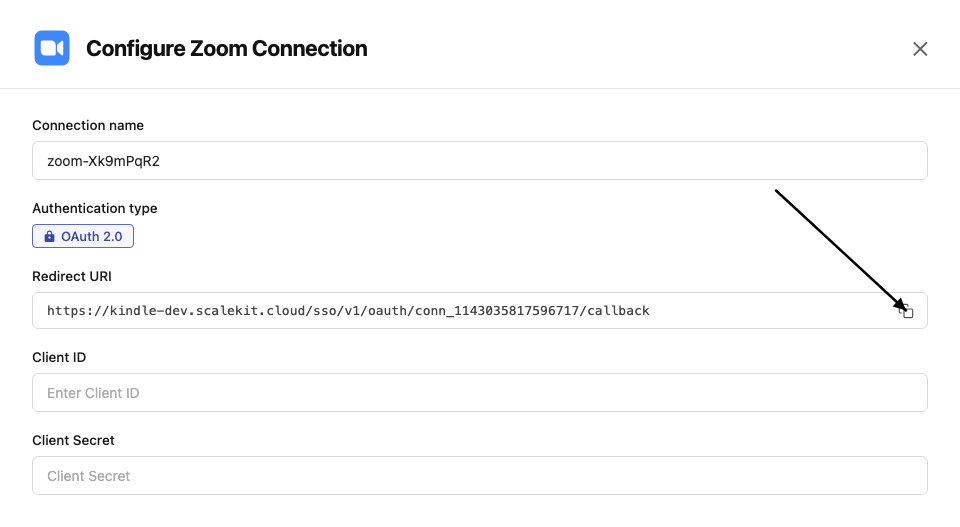
-
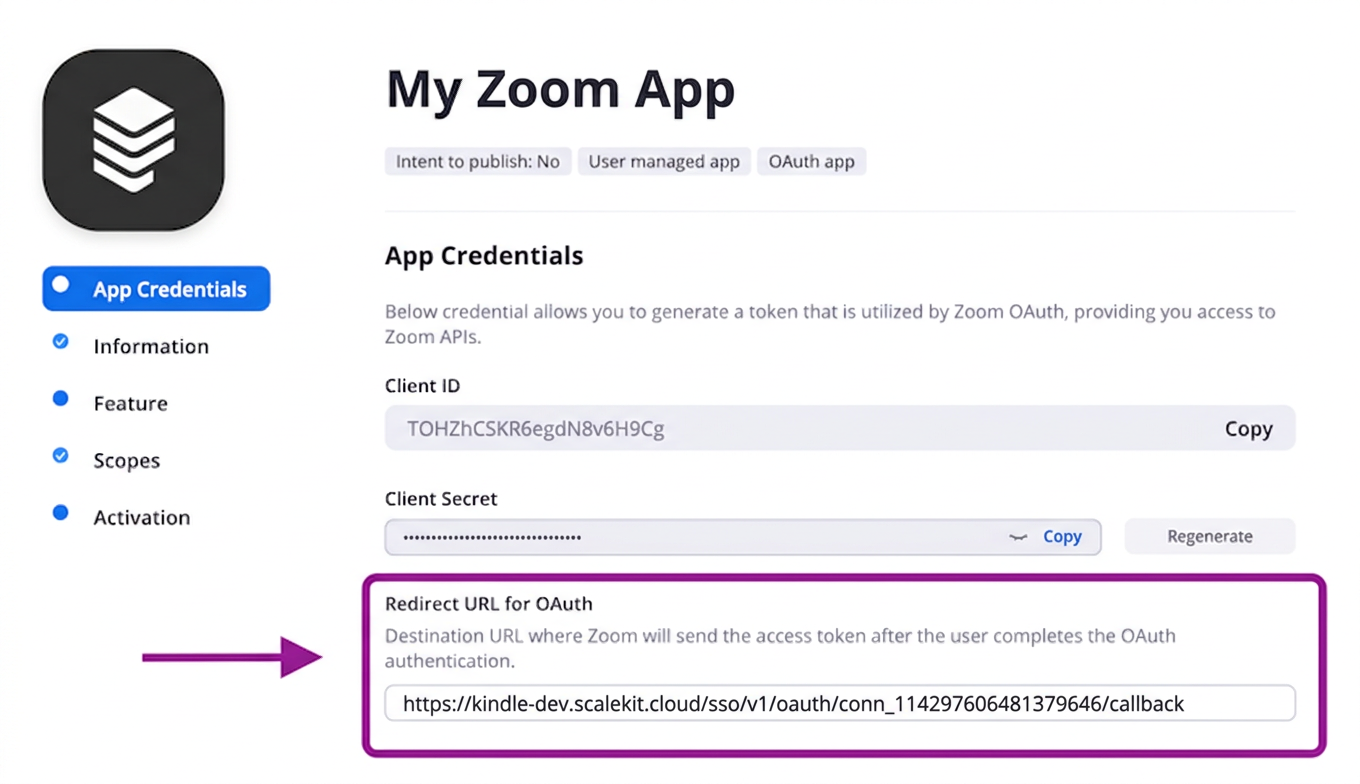
In the Zoom App Marketplace, open your app and go to App Credentials.
-
Paste the copied URI into the Redirect URL for OAuth field and also add it to the OAuth allow list.
-
-
Get client credentials
- In the Zoom App Marketplace, open your app and go to App Credentials:
- Client ID — listed under Client ID
- Client Secret — listed under Client Secret
- In the Zoom App Marketplace, open your app and go to App Credentials:
-
Add credentials in Scalekit
-
In Scalekit dashboard, go to AgentKit > Connections and open the connection you created.
-
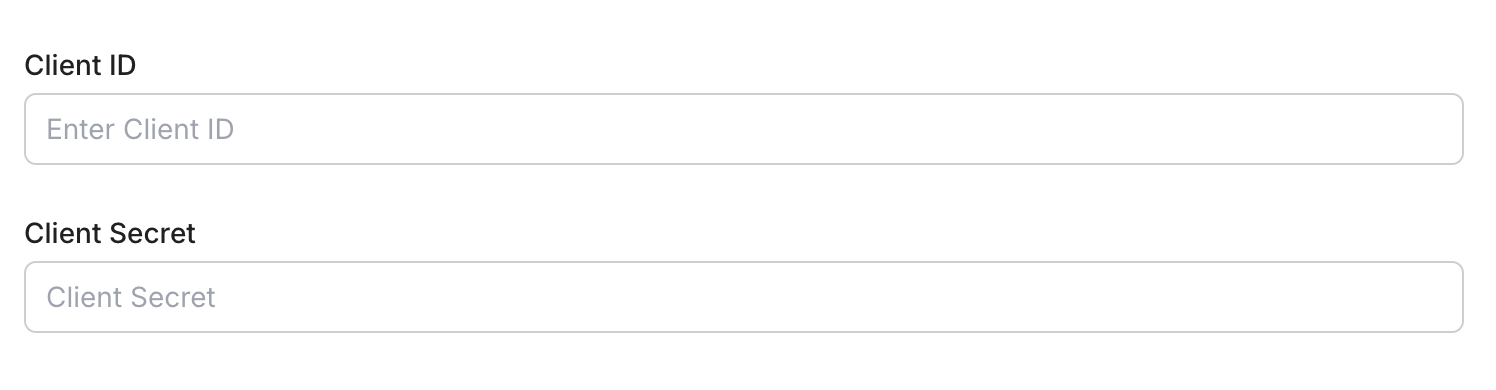
Enter your credentials:
- Client ID (from your Zoom app)
- Client Secret (from your Zoom app)
- Permissions — select the scopes your app needs
-
Click Save.
-
-
Authorize a user and make your first call
quickstart.mts import { ScalekitClient } from '@scalekit-sdk/node'import 'dotenv/config'import { createInterface } from 'node:readline/promises'const scalekit = new ScalekitClient(process.env.SCALEKIT_ENVIRONMENT_URL,process.env.SCALEKIT_CLIENT_ID,process.env.SCALEKIT_CLIENT_SECRET,)const actions = scalekit.actionsconst connector = 'zoom'const identifier = 'user_123'// Generate an authorization link for the userconst { link } = await actions.getAuthorizationLink({ connectionName: connector, identifier })console.log('Authorize Zoom:', link)const rl = createInterface({ input: process.stdin, output: process.stdout })await rl.question('Press Enter after authorizing...')rl.close()// Make your first callconst result = await actions.executeTool({connector,identifier,toolName: 'zoom_chat_channels_list',toolInput: {},})console.log(result)Terminal window npx tsx quickstart.mtsquickstart.py import osfrom scalekit import ScalekitClientfrom dotenv import load_dotenvload_dotenv()scalekit_client = ScalekitClient(env_url=os.getenv("SCALEKIT_ENVIRONMENT_URL"),client_id=os.getenv("SCALEKIT_CLIENT_ID"),client_secret=os.getenv("SCALEKIT_CLIENT_SECRET"),)actions = scalekit_client.actionsconnection_name = "zoom"identifier = "user_123"# Generate an authorization link for the userlink_response = actions.get_authorization_link(connection_name=connection_name,identifier=identifier,)print("Authorize Zoom:", link_response.link)input("Press Enter after authorizing...")# Make your first callresult = actions.execute_tool(tool_input={},tool_name="zoom_chat_channels_list",connection_name=connection_name,identifier=identifier,)print(result)Terminal window python quickstart.pyEach user signs in once. See Authorize a user for the full flow and statuses.
Tools
Pass the exact name toexecute_toolzoom_chat_channel_getGet details of a specific Team Chat channel.Read-onlyGet Chat Channel
Get details of a specific Team Chat channel.
Inputs
channel_idstringrequired- The channel ID
zoom_chat_channel_members_listList members of a Team Chat channel.Read-onlyList Chat Channel Members
List members of a Team Chat channel.
Inputs
channel_idstringrequired- The channel ID
next_page_tokenstring- Token for next page of results
page_sizeinteger- Number of members per page (max 50)
zoom_chat_channel_messages_listList messages in a Zoom Team Chat channel.Read-onlyList Chat Channel Messages
List messages in a Zoom Team Chat channel.
Inputs
channel_idstringrequired- The channel ID to list messages from
user_idstringrequired- The user ID or 'me' for the authenticated user
datestring- Date to retrieve messages for (yyyy-MM-dd). Defaults to today.
next_page_tokenstring- Token for next page
page_sizeinteger- Number of messages per page (max 50)
zoom_chat_channels_listList all Zoom Team Chat channels the authenticated user belongs to.Read-onlyList Chat Channels
List all Zoom Team Chat channels the authenticated user belongs to.
Inputs
next_page_tokenstring- Token for next page
page_sizeinteger- Number of channels per page (max 50)
zoom_group_getGet the details of a specific Zoom group.Read-onlyGet Group
Get the details of a specific Zoom group.
Inputs
group_idstringrequired- The group ID
zoom_groups_listList all groups in the Zoom account.Read-onlyList Groups
List all groups in the Zoom account.
Inputs
This tool takes no inputs.
zoom_meeting_getRetrieve details of a specific Zoom meeting.Read-onlyGet Meeting
Retrieve details of a specific Zoom meeting.
Inputs
meeting_idstringrequired- The meeting ID
zoom_meeting_invitation_getRetrieve the invitation text for a Zoom meeting.Read-onlyGet Meeting Invitation
Retrieve the invitation text for a Zoom meeting.
Inputs
meeting_idstringrequired- The meeting ID
zoom_meeting_poll_getGet the details of a specific Zoom meeting poll.Read-onlyGet Meeting Poll
Get the details of a specific Zoom meeting poll.
Inputs
meeting_idstringrequired- The meeting ID
poll_idstringrequired- The poll ID
zoom_meeting_polls_listList all polls created for a Zoom meeting.Read-onlyList Meeting Polls
List all polls created for a Zoom meeting.
Inputs
meeting_idstringrequired- The meeting ID
zoom_meeting_recordings_getRetrieve all cloud recordings for a specific meeting.Read-onlyGet Meeting Recordings
Retrieve all cloud recordings for a specific meeting.
Inputs
meeting_idstringrequired- The meeting ID or UUID
zoom_meeting_registrants_listList all registrants for a Zoom meeting.Read-onlyList Meeting Registrants
List all registrants for a Zoom meeting.
Inputs
meeting_idstringrequired- The meeting ID
next_page_tokenstring- Token for next page
occurrence_idstring- Occurrence ID for recurring meetings
page_sizeinteger- Number of records per page (max 300)
statusstring- Filter by status: pending, approved, denied
zoom_meetings_listList all meetings scheduled by a user.Read-onlyList Meetings
List all meetings scheduled by a user.
Inputs
user_idstringrequired- User ID or 'me' for the authenticated user
next_page_tokenstring- Token for next page of results
page_sizeinteger- Number of records per page (max 300)
typestring- Filter: scheduled, live, upcoming, upcoming_meetings, previous_meetings
zoom_past_meeting_getRetrieve details of an ended Zoom meeting.Read-onlyGet Past Meeting Details
Retrieve details of an ended Zoom meeting.
Inputs
meeting_uuidstringrequired- The meeting UUID (double-encode if contains / or //)
zoom_phone_call_logs_listRetrieve account-level Zoom Phone call logs within a date range, including caller, callee, duration, and call result.Read-onlyList Zoom Phone Call Logs
Retrieve account-level Zoom Phone call logs within a date range, including caller, callee, duration, and call result. Requires a Zoom Phone license and phone:read:admin scope.
Inputs
fromstring- Start date of the range in yyyy-MM-dd format
next_page_tokenstring- Token for next page
page_sizeinteger- Number of records per page (max 300)
tostring- End date of the range in yyyy-MM-dd format
typestring- Filter by call typeone of
allmissed
zoom_phone_users_listList all users enabled with a Zoom Phone license on the account, including their extension and phone numbers.Read-onlyList Zoom Phone Users
List all users enabled with a Zoom Phone license on the account, including their extension and phone numbers. Requires a Zoom Phone license and phone:read:admin scope.
Inputs
next_page_tokenstring- Token for next page
page_sizeinteger- Number of records per page (max 100)
site_idstring- Filter users by a specific Zoom Phone site
zoom_recordings_listList all cloud recordings for a user.Read-onlyList User Recordings
List all cloud recordings for a user.
Inputs
user_idstringrequired- User ID or 'me' for the authenticated user
fromstring- Start date in yyyy-MM-dd format (default: current date minus 1 month)
mcstring- Set to true to retrieve recordings from Zoom Room
next_page_tokenstring- Token for next page
page_sizeinteger- Number of records per page (max 300)
tostring- End date in yyyy-MM-dd format (max 1 month range)
trashboolean- Set to true to list trashed recordings
zoom_report_daily_usageRetrieve the account-level daily usage report showing new users, meetings, participants, and meeting minutes for each day of a given month.Read-onlyGet Daily Usage Report
Retrieve the account-level daily usage report showing new users, meetings, participants, and meeting minutes for each day of a given month. Requires owner or admin privileges and report:read scope.
Inputs
monthintegerrequired- Month to retrieve the report for (1-12)
yearintegerrequired- Year to retrieve the report for
zoom_report_meeting_participantsRetrieve a report of participants who attended a past Zoom meeting, including join/leave times.Read-onlyGet Meeting Participants Report
Retrieve a report of participants who attended a past Zoom meeting, including join/leave times. Requires a Pro or higher plan and report:read scope.
Inputs
meeting_idstringrequired- The meeting ID or UUID to retrieve the participants report for
next_page_tokenstring- Token for next page
page_sizeinteger- Number of records per page (max 300)
zoom_report_user_meetingsRetrieve a report of meetings hosted by a Zoom user within a date range, including duration and participant counts.Read-onlyGet User Meeting Report
Retrieve a report of meetings hosted by a Zoom user within a date range, including duration and participant counts. Requires a Pro or higher plan and report:read scope.
Inputs
fromstringrequired- Start date of the report range in yyyy-MM-dd format
tostringrequired- End date of the report range in yyyy-MM-dd format
user_idstringrequired- User ID or 'me' for the authenticated user
next_page_tokenstring- Token for next page
page_sizeinteger- Number of records per page (max 300)
typestring- Type of meetings to include: past, pastOne, or liveone of
livepastpastOnedefaultpast
zoom_report_webinar_participantsRetrieve a report of participants who attended a past Zoom webinar, including join/leave times.Read-onlyGet Webinar Participants Report
Retrieve a report of participants who attended a past Zoom webinar, including join/leave times. Requires a Pro or higher plan and report:read scope.
Inputs
webinar_idstringrequired- The webinar ID or UUID to retrieve the participants report for
next_page_tokenstring- Token for next page
page_sizeinteger- Number of records per page (max 300)
zoom_tracking_field_getGet the details of a specific tracking field.Read-onlyGet Tracking Field
Get the details of a specific tracking field.
Inputs
field_idstringrequired- The tracking field ID
zoom_tracking_fields_listList the account's custom tracking fields used for meetings and webinars.Read-onlyList Tracking Fields
List the account's custom tracking fields used for meetings and webinars.
Inputs
This tool takes no inputs.
zoom_user_getRetrieve details of a specific Zoom user.Read-onlyGet User
Retrieve details of a specific Zoom user.
Inputs
user_idstringrequired- User ID or 'me' for the authenticated user
zoom_user_permissions_getRetrieve permissions for a Zoom user.Read-onlyGet User Permissions
Retrieve permissions for a Zoom user.
Inputs
user_idstringrequired- User ID or 'me' for the authenticated user
zoom_user_settings_getRetrieve settings for a Zoom user.Read-onlyGet User Settings
Retrieve settings for a Zoom user.
Inputs
user_idstringrequired- User ID or 'me' for the authenticated user
zoom_users_listList all users on a Zoom account.Read-onlyList Users
List all users on a Zoom account.
Inputs
next_page_tokenstring- Token for next page
page_sizeinteger- Number of records per page (max 300)
role_idstring- Filter users by role ID
statusstring- Filter by status: active, inactive, pending
zoom_webinar_getRetrieve details of a scheduled Zoom webinar, including its settings, agenda, and occurrence information.Read-onlyGet Webinar
Retrieve details of a scheduled Zoom webinar, including its settings, agenda, and occurrence information.
Inputs
webinar_idstringrequired- The webinar ID to retrieve
occurrence_idstring- Occurrence ID for a recurring webinar
zoom_webinar_registrants_listList all registrants for a Zoom webinar.Read-onlyList Webinar Registrants
List all registrants for a Zoom webinar.
Inputs
webinar_idstringrequired- The webinar ID to list registrants for
next_page_tokenstring- Token for next page
page_sizeinteger- Number of records per page (max 300)
statusstring- Filter by registrant status: pending, approved, deniedone of
approveddeniedpending
zoom_webinars_listList all scheduled webinars for a Zoom user.Read-onlyList Webinars
List all scheduled webinars for a Zoom user.
Inputs
user_idstringrequired- User ID or 'me' for the authenticated user
next_page_tokenstring- Token for next page
page_sizeinteger- Number of records per page (max 300)
zoom_chat_channel_createCreate a new Team Chat channel.WriteCreate Chat Channel
Create a new Team Chat channel.
Inputs
namestringrequired- Name of the channel
membersarray- List of member objects with email field to add to the channel
typeinteger- Channel type: 1=private, 2=private with external users, 3=public, 4=new external
zoom_chat_channel_member_inviteInvite one or more members to a Team Chat channel.WriteInvite Member to Chat Channel
Invite one or more members to a Team Chat channel.
Inputs
channel_idstringrequired- The channel ID
membersarrayrequired- Array of member objects with email field
zoom_chat_channel_member_removeRemove a member from a Team Chat channel.WriteRemove Member from Chat Channel
Remove a member from a Team Chat channel.
Inputs
channel_idstringrequired- The channel ID
member_idstringrequired- The member ID or email to remove
zoom_chat_channel_updateUpdate the name or settings of a Team Chat channel.WriteUpdate Chat Channel
Update the name or settings of a Team Chat channel.
Inputs
channel_idstringrequired- The channel ID
namestring- New name for the channel
zoom_chat_message_sendSend a message in a Zoom Team Chat channel or to a user.WriteSend Chat Message
Send a message in a Zoom Team Chat channel or to a user.
Inputs
messagestringrequired- The message text to send
user_idstringrequired- Sender's user ID or 'me'
to_channelstring- Channel ID to send the message to
to_jidstring- JID of the user to send a direct message to
zoom_group_createCreate a new user group in the Zoom account.WriteCreate Group
Create a new user group in the Zoom account.
Inputs
namestringrequired- Name of the group
zoom_group_updateRename an existing Zoom group.WriteUpdate Group
Rename an existing Zoom group.
Inputs
group_idstringrequired- The group ID to update
namestringrequired- New name for the group
zoom_meeting_createSchedule a new Zoom meeting for a user.WriteCreate Meeting
Schedule a new Zoom meeting for a user.
Inputs
topicstringrequired- Meeting topic/title
user_idstringrequired- User ID or 'me' for the authenticated user
agendastring- Meeting description or agenda
durationinteger- Meeting duration in minutes
passwordstring- Meeting passcode (max 10 chars)
start_timestring- Meeting start time in ISO 8601 UTC format
timezonestring- Timezone for the meeting (e.g. America/New_York)
typeinteger- 1=Instant, 2=Scheduled, 3=Recurring no fixed time, 8=Recurring fixed time
zoom_meeting_poll_createCreate a poll for a scheduled Zoom meeting.WriteCreate Meeting Poll
Create a poll for a scheduled Zoom meeting.
Inputs
meeting_idstringrequired- The meeting ID
questionsarrayrequired- Array of poll question objects
titlestringrequired- Title of the poll
anonymousboolean- Whether to keep the poll anonymous
poll_typeinteger- 1 = classic Poll, 2 = Advanced Poll (enables rating/matching/rank order/short-long answer question types)
zoom_meeting_registrant_addRegister a participant for a Zoom meeting.WriteAdd Meeting Registrant
Register a participant for a Zoom meeting.
Inputs
emailstringrequired- Registrant's email address
first_namestringrequired- Registrant's first name
meeting_idstringrequired- The meeting ID
last_namestring- Registrant's last name
occurrence_idsstring- Comma-separated occurrence IDs for recurring meetings
zoom_meeting_registrant_status_updateApprove, deny, or cancel one or more registrants for a Zoom meeting.WriteUpdate Meeting Registrant Status
Approve, deny, or cancel one or more registrants for a Zoom meeting.
Inputs
actionstringrequired- Action to take on the given registrantsone of
approvedenycancel meeting_idstringrequired- The meeting ID
registrantsarrayrequired- Array of registrant objects to update, each with id and/or email
occurrence_idstring- Occurrence ID for recurring meetings
zoom_meeting_status_updateUpdate the status of a Zoom meeting (e.g., end a meeting in progress).WriteUpdate Meeting Status
Update the status of a Zoom meeting (e.g., end a meeting in progress).
Inputs
actionstringrequired- Action to perform: 'end' to end the meeting
meeting_idstringrequired- The meeting ID
zoom_meeting_updateUpdate an existing Zoom meeting's details.WriteUpdate Meeting
Update an existing Zoom meeting's details.
Inputs
meeting_idstringrequired- The meeting ID to update
agendastring- New meeting agenda
durationinteger- New duration in minutes
passwordstring- New meeting passcode
start_timestring- New start time in ISO 8601 UTC format
timezonestring- Timezone for the meeting
topicstring- New meeting topic
zoom_tracking_field_createCreate a custom tracking field for meetings and webinars.WriteCreate Tracking Field
Create a custom tracking field for meetings and webinars.
Inputs
fieldstringrequired- Name of the tracking field
field_requiredboolean- Whether this tracking field is required when scheduling a meeting or webinar. Maps to Zoom's 'required' field.
recommended_valuesarray- Suggested values for this tracking field
visibleboolean- Whether this tracking field is visible when scheduling a meeting or webinar
zoom_tracking_field_updateUpdate a custom tracking field.WriteUpdate Tracking Field
Update a custom tracking field.
Inputs
field_idstringrequired- The tracking field ID to update
fieldstring- New name of the tracking field
field_requiredboolean- Whether this tracking field is required when scheduling a meeting or webinar. Maps to Zoom's 'required' field.
recommended_valuesarray- Suggested values for this tracking field
visibleboolean- Whether this tracking field is visible when scheduling a meeting or webinar
zoom_user_updateUpdate a Zoom user's profile information.WriteUpdate User
Update a Zoom user's profile information.
Inputs
user_idstringrequired- User ID or 'me' for the authenticated user
companystring- User's company name
display_namestring- New display name
first_namestring- New first name
job_titlestring- User's job title
last_namestring- New last name
locationstring- User's location
phone_numberstring- User's phone number
zoom_webinar_createSchedule a new Zoom webinar for a user.WriteCreate Webinar
Schedule a new Zoom webinar for a user. Requires a Zoom account with a webinar license.
Inputs
topicstringrequired- Webinar topic/title
user_idstringrequired- User ID or 'me' for the authenticated user who will host the webinar
agendastring- Webinar description or agenda
durationinteger- Webinar duration in minutes
start_timestring- Webinar start time in ISO 8601 UTC format
timezonestring- Timezone for the webinar (e.g. America/New_York)
typeinteger- Webinar type: 5=Webinar, 6=Recurring webinar with no fixed time, 9=Recurring webinar with fixed timeone of
569default5
zoom_webinar_panelist_addAdd one or more panelists to a Zoom webinar.WriteAdd Webinar Panelist
Add one or more panelists to a Zoom webinar.
Inputs
panelistsarrayrequired- Array of panelist objects, each with name and email
webinar_idstringrequired- The webinar ID
zoom_webinar_registrant_addRegister a new attendee for a Zoom webinar.WriteAdd Webinar Registrant
Register a new attendee for a Zoom webinar. Returns a join URL for the registrant.
Inputs
emailstringrequired- Registrant's email address
first_namestringrequired- Registrant's first name
webinar_idstringrequired- The webinar ID to register the attendee for
last_namestring- Registrant's last name
zoom_webinar_registrant_status_updateApprove, deny, or cancel one or more registrants for a Zoom webinar.WriteUpdate Webinar Registrant Status
Approve, deny, or cancel one or more registrants for a Zoom webinar.
Inputs
actionstringrequired- Action to take on the given registrantsone of
approvedenycancel registrantsarrayrequired- Array of registrant objects to update, each with id and/or email
webinar_idstringrequired- The webinar ID
occurrence_idstring- Occurrence ID for recurring webinars
zoom_webinar_updateUpdate an existing Zoom webinar's topic, schedule, or agenda.WriteUpdate Webinar
Update an existing Zoom webinar's topic, schedule, or agenda. Only the fields you provide are changed.
- Idempotent
Inputs
webinar_idstringrequired- The webinar ID to update
agendastring- New webinar agenda
durationinteger- New duration in minutes
start_timestring- New start time in ISO 8601 UTC format
timezonestring- New timezone for the webinar
topicstring- New webinar topic
zoom_chat_channel_deleteDelete a Team Chat channel.DestructiveDelete Chat Channel
Delete a Team Chat channel.
Inputs
channel_idstringrequired- The channel ID
zoom_group_deleteDelete a Zoom group.DestructiveDelete Group
Delete a Zoom group.
Inputs
group_idstringrequired- The group ID to delete
zoom_meeting_deleteDelete a Zoom meeting.DestructiveDelete Meeting
Delete a Zoom meeting.
Inputs
meeting_idstringrequired- The meeting ID to delete
occurrence_idstring- Occurrence ID for recurring meeting instances
zoom_meeting_recordings_deleteDelete all cloud recordings for a specific meeting.DestructiveDelete Meeting Recordings
Delete all cloud recordings for a specific meeting.
Inputs
meeting_idstringrequired- The meeting ID or UUID
actionstring- trash (move to trash, default) or delete (permanent)
zoom_tracking_field_deleteDelete a custom tracking field.DestructiveDelete Tracking Field
Delete a custom tracking field.
Inputs
field_idstringrequired- The tracking field ID to delete
zoom_user_deleteDisassociate or permanently delete a Zoom user.DestructiveDelete User
Disassociate or permanently delete a Zoom user.
Inputs
user_idstringrequired- The user ID to delete
actionstring- disassociate (default) or delete
transfer_emailstring- Email to transfer data to before deletion
zoom_webinar_deletePermanently delete a scheduled Zoom webinar.DestructiveDelete Webinar
Permanently delete a scheduled Zoom webinar. This action is irreversible and cancels the webinar for all registrants.
- Idempotent
Inputs
webinar_idstringrequired- The webinar ID to delete
occurrence_idstring- Occurrence ID to delete a single occurrence of a recurring webinar
No tools match.
Workflows
Proxy API call
const result = await actions.request({ connectionName: 'zoom', identifier: 'user_123', path: '/v2/users/me', method: 'GET',});console.log(result);result = actions.request( connection_name='zoom', identifier='user_123', path="/v2/users/me", method="GET")print(result)Execute a tool
const result = await actions.executeTool({ connector: 'zoom', identifier: 'user_123', toolName: 'zoom_users_list', toolInput: {},});console.log(result);result = actions.execute_tool( tool_input={}, tool_name='zoom_users_list', connection_name='zoom', identifier='user_123',)print(result)

