

Verify users
Confirm that the person who authorized an AgentKit connection is the user your app meant, with a verification callback in production or Scalekit users only.
User verification applies to OAuth-based connectors only. For API key, basic auth, and key pair connectors, the user provides credentials directly. No OAuth flow, no verification step needed.
For OAuth connectors, user verification confirms that the user who completed the OAuth consent is the same user your app intended to connect, before Scalekit activates the connected account. It stops an authorization link from activating the wrong account, for example when a link is forwarded or phished.
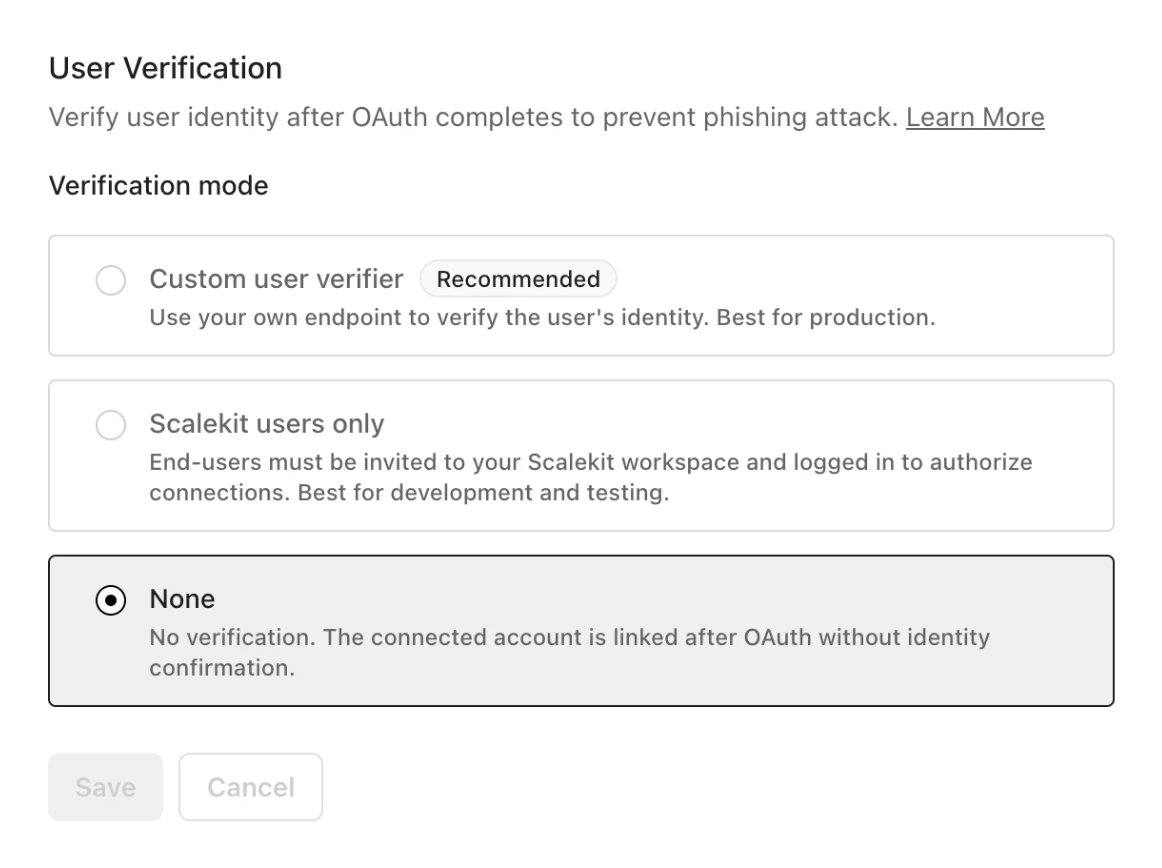
Choose a mode in AgentKit > Settings > User Verification:
- Custom user verifier (recommended): your server confirms that the authorizing user matches the user your app intended to connect. Use it in production.
- Scalekit users only: Scalekit checks that the authorizing user is invited to your Scalekit workspace and signed in to the dashboard. No code required. Use it for development and testing, when every user is on your team.
- None: no verification. The connected account activates as soon as OAuth completes, so anyone who opens an authorization link can activate it.
New environments start with None, because your agent may run somewhere that can’t confirm which user is signed in. Switch to Custom user verifier before you onboard real users.
With Custom user verifier, your application implements the verify step. End users never interact with Scalekit directly.
When the user finishes OAuth, Scalekit redirects to your verify URL with auth_request_id and state params. Your route reads the user from your session, calls Scalekit’s verify API with the auth_request_id and the original identifier, and if they match, the connected account activates.
Review the verification sequence
Implement verification in your app
Section titled “Implement verification in your app”If you haven’t installed the SDK yet, see the quickstart.
Generate the authorization link
Section titled “Generate the authorization link”Pass these fields when creating the authorization link:
| Field | Description |
|---|---|
identifier | Required. Your user’s ID in your system, such as user_123. Use a stable internal ID, not an email address: a user can change their email, and an old address can be reassigned to someone else, so the identifier would no longer point to the same person. An email is also easy to guess, which makes misuse easier. Scalekit stores it and checks that the verify call sends the same value. |
user_verify_url | Required. Your callback URL; Scalekit redirects the user here after OAuth completes. |
state | Recommended. A random value to prevent CSRF. |
import secrets
# Generate a state value to prevent CSRFstate = secrets.token_urlsafe(32)# Store state in a secure, HTTP-only cookie to validate on callback
response = scalekit_client.actions.get_authorization_link(    connection_name=connector,    identifier=user_id,    user_verify_url="https://app.yourapp.com/user/verify",    state=state,)
import crypto from 'node:crypto';
// Generate a state value to prevent CSRFconst state = crypto.randomUUID();// Store state in a secure, HTTP-only cookie to validate on callback
const { link } = await scalekit.actions.getAuthorizationLink({ identifier: userId, connectionName: connector, userVerifyUrl: 'https://app.yourapp.com/user/verify', state,});Handle the verification callback
Section titled “Handle the verification callback”After OAuth completes, Scalekit redirects to your user_verify_url:
GET https://app.yourapp.com/user/verify?auth_request_id=req_xyz&state=<your_state>Validate state against your cookie, then call Scalekit’s verify endpoint server-side.
# 1. Validate state from query param matches state in cookie# 2. Read user identity from your session, not from the URL
response = scalekit_client.actions.verify_connected_account_user(    auth_request_id=auth_request_id,    identifier=user_id,    # must match what was stored at link creation)# On success: redirect to response.post_user_verify_redirect_url
// 1. Validate state from query param matches state in cookie// 2. Read user identity from your session, not from the URL
const { postUserVerifyRedirectUrl } = await scalekit.actions.verifyConnectedAccountUser({ authRequestId: auth_request_id, identifier: userId, // must match what was stored at link creation });// On success: redirect to postUserVerifyRedirectUrlOn success, the connected account is activated. Redirect the user using post_user_verify_redirect_url.
Common scenarios
Section titled “Common scenarios”Why does creating the authorization link fail with user_verify_url is required when user_verify_mode is b2b?
The environment is set to Custom user verifier, and the request for the authorization link didn’t include user_verify_url. The call fails with a 400 before any link is created. Pass user_verify_url and state when you generate the authorization link, or, for internal testing, switch the mode to Scalekit users only.
Why does authorization fail when no verification redirect URL is configured?
The authorization flow fails with a failed_to_exchange_token error (user_verify_url not configured for verification redirect) when the environment is set to Custom user verifier, but the flow started without a user_verify_url. Scalekit completes the OAuth exchange but has nowhere to redirect the user for verification.
Resolve it in one of two ways:
- In production, pass
user_verify_urlwhen you generate the authorization link, and implement the verification callback at that URL. - In development or internal testing, set the mode to Scalekit users only in AgentKit > Settings > User Verification. This mode needs no
user_verify_urland no verify route, as long as every authorizing user is signed in to your Scalekit dashboard.
Why does the connection page say “Session expired or not available”?
The environment uses Scalekit users only, and the person authorizing isn’t signed in to the Scalekit dashboard. Sign in to the dashboard in the same browser and start again, or switch to Custom user verifier for users who aren’t on your team. See session_not_found.
API reference
The endpoints this page's code calls, with every field and the SDK method for each: