

Dryrun
Try your authentication flows locally before any integration code is written
Use npx @scalekit-sdk/dryrun when you want to confirm your Scalekit authentication configuration works end-to-end before implementing auth integration into your app.
Dryrun command executes a complete authentication flow locally - spinning up a server, opening your browser, and displaying the authenticated user’s profile and tokens, so you can catch configuration errors early.
Works with Full Stack Authentication and Modular SSO.
Prerequisites
Section titled “Prerequisites”Before running Dryrun, ensure you have:
- Node.js 20 or higher installed locally.
- A Scalekit environment with an OAuth client configured.
- A redirect URI (
http://localhost:12456/auth/callback) added in the Scalekit Dashboard under Authentication > Redirect URIs.
Run Dryrun
Section titled “Run Dryrun”From any directory:
# Refer to prerequisites before running the commandnpx @scalekit-sdk/dryrun \ --env_url=<url> \ --client_id=<id> \ [--mode=<sso|fsa>] \ [--organization_id=<id>]| Option | Description |
|---|---|
--env_url | Scalekit environment URL, for example https://env-abc123.scalekit.cloud. Required |
--client_id | OAuth client ID from the Scalekit Dashboard (starts with skc_). Required |
--mode | fsa for full-stack auth, sso for SSO. Defaults to fsa. Optional |
--organization_id | Organization ID to authenticate against when --mode=sso. Required (SSO only) |
--help | Show CLI usage help. Optional |
Review authentication results
Section titled “Review authentication results”After successful authentication, the browser shows a local dashboard with:
- User profile: Name, email, avatar (when available).
- ID token claims: All claims returned in the ID token.
- Token details: A view of the raw token response.
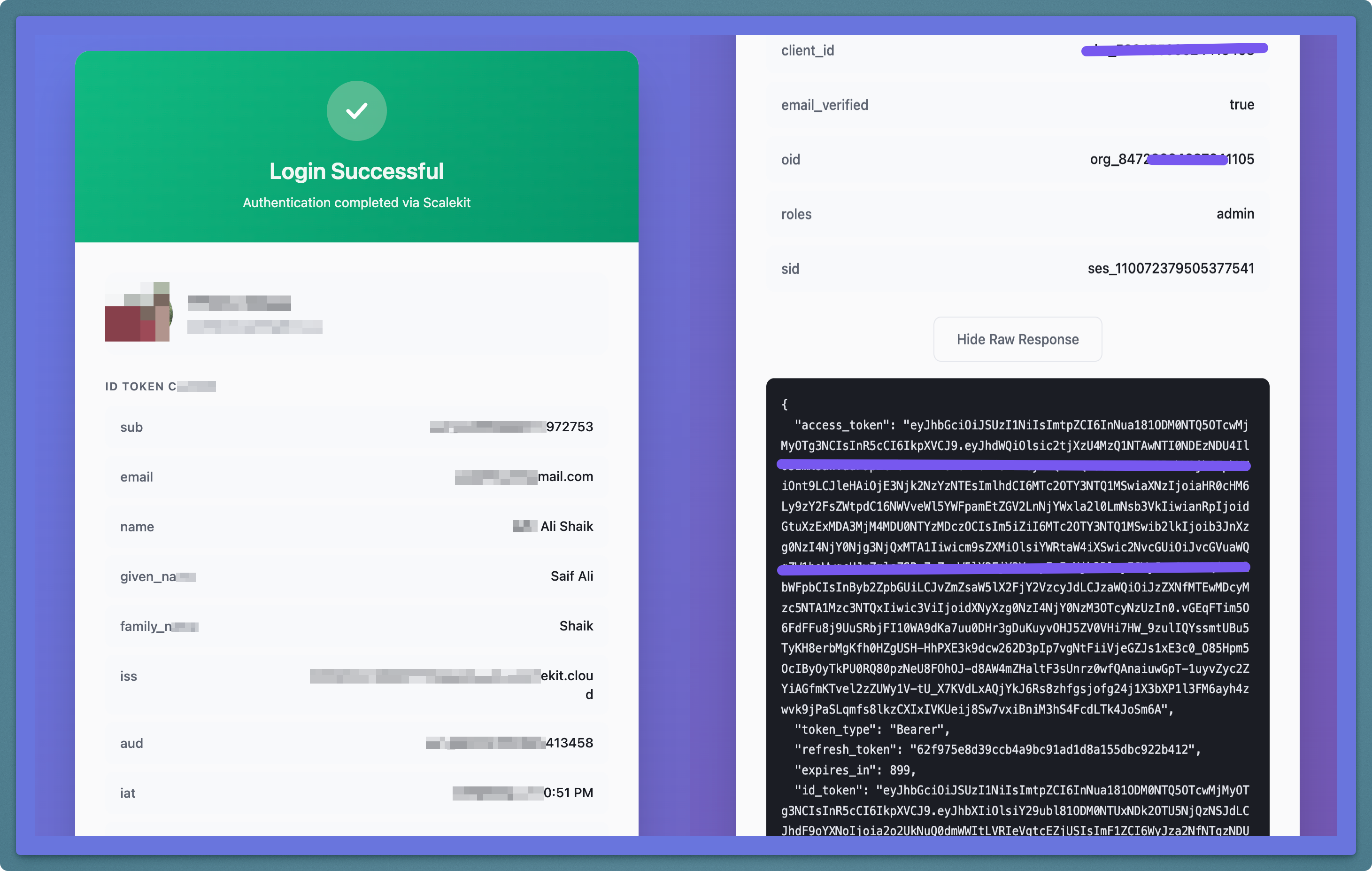
Use this view to confirm:
- The correct user is returned for your test login.
- Claims such as
email,sub, and any custom claims are present as expected. - The flow works for both
fsaandssomodes when configured.
Common error scenarios
Section titled “Common error scenarios”How do I fix redirect_uri mismatch errors?
If you see a redirect_uri mismatch error:
- Verify that
http://localhost:12456/auth/callbackis added in the Scalekit Dashboard under Authentication > Redirect URIs. - Confirm that you spelled the URI exactly, including the port and path.
How do I fix invalid client_id errors?
If the CLI reports an invalid client ID:
- Copy the client ID directly from the dashboard to avoid typos.
- Make sure you are using a client from the same environment as
--env_url.
How do I resolve port conflicts?
If port 12456 is already in use:
- Stop any process that is already listening on port
12456. - Close other local tools or frameworks that use
http://localhost:12456and try again.
How do I fix organization issues in SSO mode?
If you see errors related to --organization_id:
- Confirm that the organization exists in your Scalekit environment.
- Verify that SSO is configured for that organization in the dashboard.
- Ensure you are using the correct
org_...identifier.