The Google Calendar connector lets your AI agent act in each user's Google Calendar account. Each user signs in to Google Calendar once, and Scalekit stores and refreshes their tokens, so your agent never handles credentials. It comes with 30 tools.
- Tools
- 30
- What they doRead · write · destructive
- 13 · 11 · 613 read11 write6 destructive
- Users sign in with
- OAuth
- OAuth app
- Your own Google app
What you can do
- Read events: list and retrieve calendar events across any of the user’s calendars
- Create and update events: schedule meetings, set attendees, and modify existing events
- Delete events: cancel and remove events from the user’s calendar
- List calendars: enumerate all calendars the user has access to
Setup
Install the SDK
Terminal window npm install @scalekit-sdk/node dotenvTerminal window pip install scalekit-sdk-python python-dotenvSet your credentials
Add your Scalekit credentials to your
.envfile. Find values in app.scalekit.com > Developers > API Credentials..env SCALEKIT_ENVIRONMENT_URL=<your-environment-url>SCALEKIT_CLIENT_ID=<your-client-id>SCALEKIT_CLIENT_SECRET=<your-client-secret>Create the Google Calendar connection
In AgentKit > Connections, create a Google Calendar connection and copy its redirect URI. The name you give it is the
connection_nameyour code passes. See Configure connections.Register a Google OAuth app
Google Calendar connections use your own OAuth app. Register one with Google and add the redirect URI you copied.
Then enter the app's Client ID and Client Secret on the Google Calendar connection.
Console steps with screenshots
Register your Scalekit environment with the Google Calendar connector so Scalekit handles the authentication flow and token lifecycle for you. The connection name you create will be used to identify and invoke the connection programmatically. Then complete the configuration in your application as follows:
-
Set up auth redirects
-
In Scalekit dashboard, go to AgentKit > Connections > Create Connection. Find Google Calendar and click Create. Click Use your own credentials and copy the redirect URI. It looks like
https://<SCALEKIT_ENVIRONMENT_URL>/sso/v1/oauth/<CONNECTION_ID>/callback.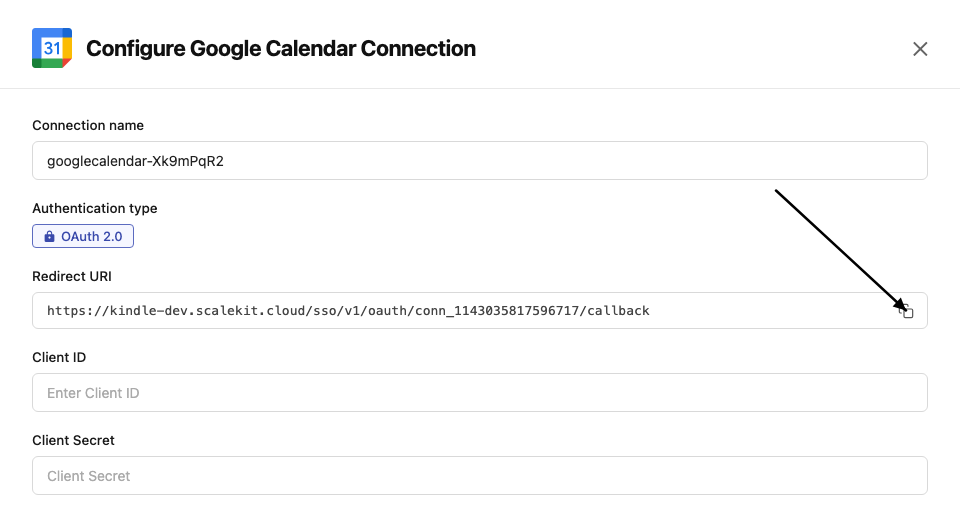
-
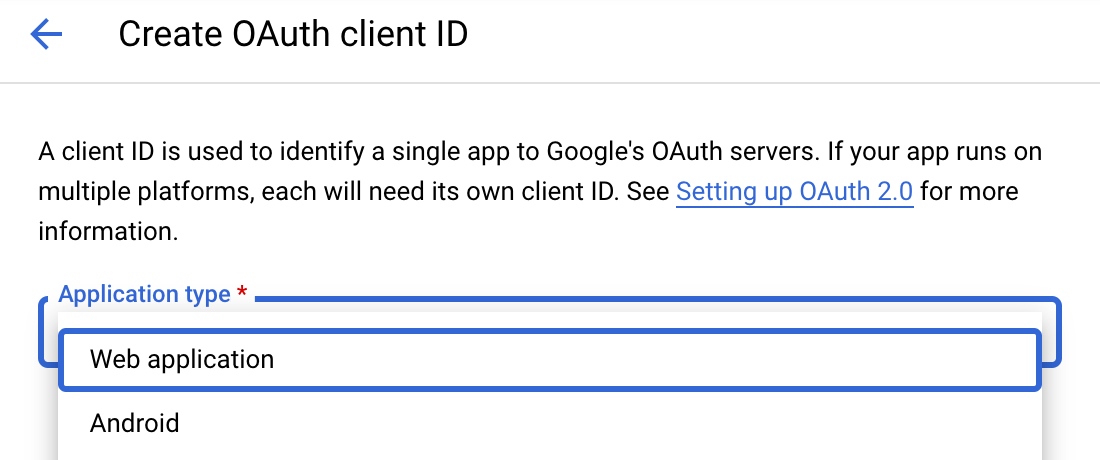
Navigate to Google Cloud Console → APIs & Services → Credentials. Select + Create Credentials, then OAuth client ID. Choose Web application from the Application type menu.
-
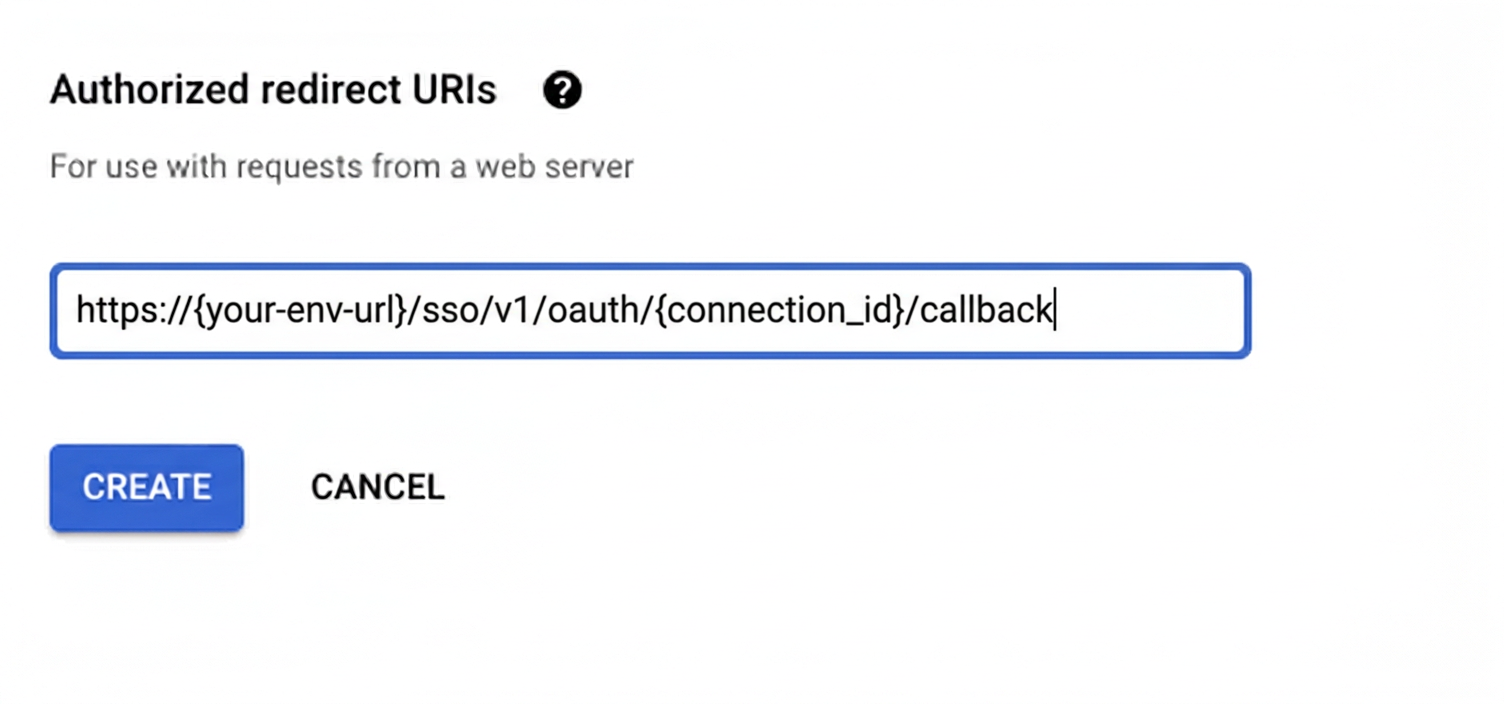
Under Authorized redirect URIs, click + Add URI, paste the redirect URI, and click Create.
-
-
Enable the Google Calendar API
- In Google Cloud Console, go to APIs & Services → Library. Search for “Google Calendar API” and click Enable.
-
Get client credentials
- Google provides your Client ID and Client Secret after you create the OAuth client ID in step 1.
-
Add credentials in Scalekit
-
In Scalekit dashboard, go to AgentKit > Connections and open the connection you created.
-
Copy the Connection name shown on that connection and use that exact value in your code as
connection_nameorconnectionName. It may be something likemeeting-prep-agent-googlecalendar, notgooglecalendar. -
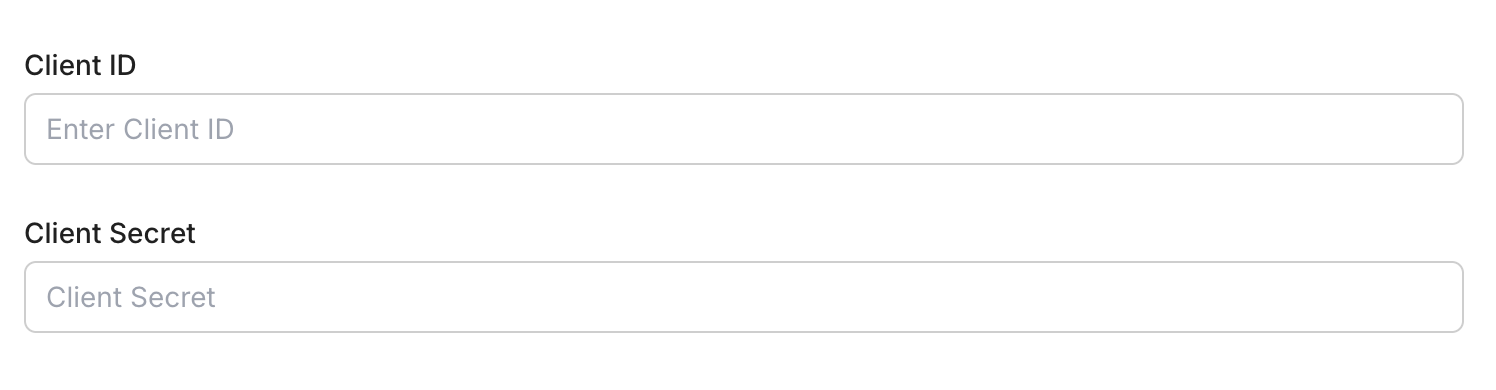
Enter your credentials:
- Client ID (from above)
- Client Secret (from above)
- Permissions (scopes — see Google API Scopes reference)
-
Click Save.
-
-
Authorize a user and make your first call
quickstart.mts import { ScalekitClient } from '@scalekit-sdk/node'import 'dotenv/config'import { createInterface } from 'node:readline/promises'const scalekit = new ScalekitClient(process.env.SCALEKIT_ENVIRONMENT_URL,process.env.SCALEKIT_CLIENT_ID,process.env.SCALEKIT_CLIENT_SECRET,)const actions = scalekit.actionsconst connector = 'googlecalendar'const identifier = 'user_123'// Generate an authorization link for the userconst { link } = await actions.getAuthorizationLink({ connectionName: connector, identifier })console.log('Authorize Google Calendar:', link)const rl = createInterface({ input: process.stdin, output: process.stdout })await rl.question('Press Enter after authorizing...')rl.close()// Make your first callconst result = await actions.executeTool({connector,identifier,toolName: 'googlecalendar_get_colors',toolInput: {},})console.log(result)Terminal window npx tsx quickstart.mtsquickstart.py import osfrom scalekit import ScalekitClientfrom dotenv import load_dotenvload_dotenv()scalekit_client = ScalekitClient(env_url=os.getenv("SCALEKIT_ENVIRONMENT_URL"),client_id=os.getenv("SCALEKIT_CLIENT_ID"),client_secret=os.getenv("SCALEKIT_CLIENT_SECRET"),)actions = scalekit_client.actionsconnection_name = "googlecalendar"identifier = "user_123"# Generate an authorization link for the userlink_response = actions.get_authorization_link(connection_name=connection_name,identifier=identifier,)print("Authorize Google Calendar:", link_response.link)input("Press Enter after authorizing...")# Make your first callresult = actions.execute_tool(tool_input={},tool_name="googlecalendar_get_colors",connection_name=connection_name,identifier=identifier,)print(result)Terminal window python quickstart.pyEach user signs in once. See Authorize a user for the full flow and statuses.
Tools
Pass the exact name toexecute_toolgooglecalendar_get_acl_ruleRetrieve a single access control rule for a calendar in a connected Google Calendar account by its rule ID.Read-onlyGet Calendar ACL Rule
Retrieve a single access control rule for a calendar in a connected Google Calendar account by its rule ID. Requires a valid Google Calendar OAuth2 connection.
Inputs
calendar_idstringrequired- Calendar ID the ACL rule belongs to
rule_idstringrequired- The ID of the ACL rule to fetch
googlecalendar_get_calendarRetrieve metadata for a calendar in a connected Google Calendar account, including its summary, description, and timezone.Read-onlyGet Calendar
Retrieve metadata for a calendar in a connected Google Calendar account, including its summary, description, and timezone. Requires a valid Google Calendar OAuth2 connection.
Inputs
calendar_idstringrequired- Calendar ID to retrieve
Also accepts
schema_versionandtool_versionto pin a version.googlecalendar_get_calendar_list_entryRetrieve a calendar from the authenticated user's calendar list, including their personal settings for it (color, visibility, notifications, default reminders).Read-onlyGet Calendar List Entry
Retrieve a calendar from the authenticated user's calendar list, including their personal settings for it (color, visibility, notifications, default reminders). Requires a valid Google Calendar OAuth2 connection.
Inputs
calendar_idstringrequired- Calendar ID to fetch from the user's calendar list
googlecalendar_get_colorsRetrieve the color definitions Google Calendar uses for calendars and events, including each color ID's background and foreground hex values.Read-onlyGet Colors
Retrieve the color definitions Google Calendar uses for calendars and events, including each color ID's background and foreground hex values. Requires a valid Google Calendar OAuth2 connection.
Inputs
This tool takes no inputs.
googlecalendar_get_event_by_idRetrieve a specific calendar event by its ID using optional filtering and list parameters.Read-onlyGet Calendar Event by ID
Retrieve a specific calendar event by its ID using optional filtering and list parameters.
Inputs
event_idstringrequired- The unique identifier of the calendar event to fetch
calendar_idstring- The calendar ID to search indefault
primary event_typesarray- Filter by Google event types
querystring- Free text search query
show_deletedboolean- Include deleted events in resultsdefault
false single_eventsboolean- Expand recurring events into instancesdefault
true time_maxstring- Upper bound for event start time (RFC3339)
time_minstring- Lower bound for event start time (RFC3339)
updated_minstring- Filter events updated after this time (RFC3339)
Also accepts
schema_versionandtool_versionto pin a version.googlecalendar_get_settingRetrieve a single user preference setting from a connected Google Calendar account, such as the user's timezone or week start day.Read-onlyGet User Setting
Retrieve a single user preference setting from a connected Google Calendar account, such as the user's timezone or week start day. Requires a valid Google Calendar OAuth2 connection.
Inputs
settingstringrequired- The ID of the user setting to fetchone of
autoAddHangoutsdateFieldOrderdefaultEventLengthformat24HourTimehideInvitationshideWeekendslocaleremindOnRespondedEventsOnlyshowDeclinedEventstimezoneuseKeyboardShortcutsweekStart
googlecalendar_list_acl_rulesList the access control rules for a calendar in a connected Google Calendar account, showing who has access and their permission level.Read-onlyList Calendar ACL Rules
List the access control rules for a calendar in a connected Google Calendar account, showing who has access and their permission level. Requires a valid Google Calendar OAuth2 connection.
Inputs
calendar_idstringrequired- Calendar ID to list ACL rules for
max_resultsinteger- Maximum number of ACL rules to fetch
page_tokenstring- Page token for pagination
Also accepts
schema_versionandtool_versionto pin a version.googlecalendar_list_calendarsList all accessible Google Calendar calendars for the authenticated user.Read-onlyList Calendars
List all accessible Google Calendar calendars for the authenticated user. Supports filters and pagination.
Inputs
max_resultsinteger- Maximum number of calendars to fetchdefault
10 min_access_rolestring- Minimum access role to include in resultsone of
freeBusyReaderreaderwriterowner page_tokenstring- Token to retrieve the next page of results
show_deletedboolean- Include deleted calendars in the listdefault
false show_hiddenboolean- Include calendars that are hidden from the calendar listdefault
false sync_tokenstring- Token to get updates since the last sync
Also accepts
schema_versionandtool_versionto pin a version.googlecalendar_list_event_instancesList the individual instances of a recurring event in a connected Google Calendar account.Read-onlyList Event Instances
List the individual instances of a recurring event in a connected Google Calendar account. Requires a valid Google Calendar OAuth2 connection.
Inputs
calendar_idstringrequired- Calendar ID containing the recurring eventdefault
primary event_idstringrequired- The ID of the recurring calendar event
max_resultsinteger- Maximum number of instances to fetch
page_tokenstring- Page token for pagination
time_maxstring- Upper bound for an instance's start time (RFC3339 timestamp)
time_minstring- Lower bound for an instance's start time (RFC3339 timestamp)
Also accepts
schema_versionandtool_versionto pin a version.googlecalendar_list_eventsList events from a connected Google Calendar account with filtering options.Read-onlyList Calendar Events
List events from a connected Google Calendar account with filtering options. Requires a valid Google Calendar OAuth2 connection.
Inputs
calendar_idstring- Calendar ID to list events fromdefault
primary max_resultsinteger- Maximum number of events to fetchdefault
10 order_bystring- Order of events in the resultone of
startTimeupdateddefaultstartTime page_tokenstring- Page token for pagination
querystring- Free text search query
single_eventsboolean- Expand recurring events into single eventsdefault
true time_maxstring- Upper bound for event start time (RFC3339 timestamp)
time_minstring- Lower bound for event start time (RFC3339 timestamp)
Also accepts
schema_versionandtool_versionto pin a version.googlecalendar_list_settingsList all user preference settings for the authenticated user's connected Google Calendar account.Read-onlyList User Settings
List all user preference settings for the authenticated user's connected Google Calendar account. Requires a valid Google Calendar OAuth2 connection.
Inputs
max_resultsinteger- Maximum number of settings to fetchdefault
100 page_tokenstring- Token to retrieve the next page of results
sync_tokenstring- Token to get updates since the last sync
googlecalendar_query_freebusyQuery free/busy information for one or more calendars in a connected Google Calendar account.Read-onlyQuery Free/Busy
Query free/busy information for one or more calendars in a connected Google Calendar account. Returns busy time ranges for each requested calendar within the given time window. Requires a valid Google Calendar OAuth2 connection.
Inputs
calendar_idsarrayrequired- Calendar IDs to query free/busy information for
time_maxstringrequired- Upper bound for the free/busy query (RFC3339 timestamp)
time_minstringrequired- Lower bound for the free/busy query (RFC3339 timestamp)
timezonestring- Timezone for the query (IANA time zone identifier)default
UTC
Also accepts
schema_versionandtool_versionto pin a version.googlecalendar_search_eventsSearch events in a connected Google Calendar account with free-text query and time-range filtering.Read-onlySearch Calendar Events
Search events in a connected Google Calendar account with free-text query and time-range filtering. Requires a valid Google Calendar OAuth2 connection.
Inputs
calendar_idstringrequired- Calendar ID to search events indefault
primary max_resultsinteger- Maximum number of events to fetch
order_bystring- Order of events in the resultone of
startTimeupdated page_tokenstring- Page token for pagination
querystring- Free text search query
single_eventsboolean- Expand recurring events into single eventsdefault
true time_maxstring- Upper bound for event start time (RFC3339 timestamp)
time_minstring- Lower bound for event start time (RFC3339 timestamp)
Also accepts
schema_versionandtool_versionto pin a version.googlecalendar_add_calendar_to_listSubscribe the authenticated user to an existing calendar by adding it to their calendar list.WriteAdd Calendar to List
Subscribe the authenticated user to an existing calendar by adding it to their calendar list. This does not create a new calendar; use Create Calendar for that. Requires a valid Google Calendar OAuth2 connection.
Inputs
calendar_idstringrequired- ID of the existing calendar to subscribe to
color_idstring- Color ID for this calendar in the user's list, from the calendar section of the Colors resource
hiddenboolean- Whether the calendar is hidden from the user's calendar list UIdefault
false selectedboolean- Whether the calendar's events are displayed in the UIdefault
true
googlecalendar_create_calendarCreate a new secondary calendar in a connected Google Calendar account.WriteCreate Calendar
Create a new secondary calendar in a connected Google Calendar account. Requires a valid Google Calendar OAuth2 connection.
Inputs
summarystringrequired- Title of the calendar
descriptionstring- Optional description of the calendar
locationstring- Geographic location of the calendar as free-form text
timezonestring- Timezone of the calendar (IANA time zone identifier)
Also accepts
schema_versionandtool_versionto pin a version.googlecalendar_create_eventCreate a new event in a connected Google Calendar account.WriteCreate Calendar Event
Create a new event in a connected Google Calendar account. Supports meeting links, recurrence, attendees, and more.
Inputs
start_datetimestringrequired- Event start time in RFC3339 format
summarystringrequired- Event title/summary
attendees_emailsarray- Attendee email addresses
calendar_idstring- Calendar ID to create the event indefault
primary create_meeting_roomboolean- Generate a Google Meet link for this eventdefault
false descriptionstring- Optional event description
event_duration_hourinteger- Duration of event in hours
event_duration_minutesinteger- Duration of event in minutesdefault
30 event_typestring- Event type for display purposesone of
defaultfocusTimeoutOfOfficeworkingLocationdefaultdefault guests_can_invite_othersboolean- Allow guests to invite othersdefault
false guests_can_modifyboolean- Allow guests to modify the eventdefault
false guests_can_see_other_guestsboolean- Allow guests to see each otherdefault
false locationstring- Location of the event
recurrencearray- Recurrence rules (iCalendar RRULE format)
send_updatesboolean- Send update notifications to attendeesdefault
false timezonestring- Timezone for the event (IANA time zone identifier)default
UTC transparencystring- Calendar transparency (free/busy)one of
opaquetransparentdefaultopaque visibilitystring- Visibility of the eventone of
defaultpublicprivateconfidentialdefaultdefault
Also accepts
schema_versionandtool_versionto pin a version.googlecalendar_import_eventImport a private copy of an existing event, identified by its iCalUID, into a calendar in a connected Google Calendar account.WriteImport Calendar Event
Import a private copy of an existing event, identified by its iCalUID, into a calendar in a connected Google Calendar account. Intended for migrating events from another calendaring system without triggering normal attendee invitations. Only events with eventType 'default' are supported. Requires a valid Google Calendar OAuth2 connection.
Inputs
calendar_idstringrequired- Calendar ID to import the event intodefault
primary end_datetimestringrequired- Event end time in RFC3339 format
ical_uidstringrequired- Event unique identifier as defined in RFC5545, used to identify the source event
start_datetimestringrequired- Event start time in RFC3339 format
summarystringrequired- Event title/summary
attendees_emailsarray- Attendee email addresses to record on the imported event
descriptionstring- Optional event description
locationstring- Location of the event
statusstring- Status of the imported eventone of
confirmedtentativecancelled timezonestring- Timezone for the event (IANA time zone identifier)default
UTC
googlecalendar_insert_acl_ruleGrant a user, group, domain, or the public access to a calendar in a connected Google Calendar account by inserting a new access control rule.WriteInsert Calendar ACL Rule
Grant a user, group, domain, or the public access to a calendar in a connected Google Calendar account by inserting a new access control rule. Requires a valid Google Calendar OAuth2 connection.
Inputs
calendar_idstringrequired- Calendar ID to grant access to
rolestringrequired- Access role to grantone of
nonefreeBusyReaderreaderwriterowner scope_typestringrequired- Type of scope for this ACL ruleone of
defaultusergroupdomain scope_valuestring- Email address or domain the scope applies to
send_notificationsboolean- Whether to send notification emails about the sharing changedefault
true
Also accepts
schema_versionandtool_versionto pin a version.googlecalendar_move_eventMove an existing event from one calendar to another in a connected Google Calendar account.WriteMove Calendar Event
Move an existing event from one calendar to another in a connected Google Calendar account. Requires a valid Google Calendar OAuth2 connection.
Inputs
calendar_idstringrequired- Calendar ID that currently contains the eventdefault
primary destination_calendar_idstringrequired- Calendar ID to move the event to
event_idstringrequired- The ID of the calendar event to move
send_updatesstring- Whether to send notifications about the event moveone of
allexternalOnlynonedefaultnone
Also accepts
schema_versionandtool_versionto pin a version.googlecalendar_quick_add_eventCreate an event in a connected Google Calendar account by parsing a natural-language description of the event, e.g., 'Dinner with Alice on Friday at 7pm'.WriteQuick Add Event
Create an event in a connected Google Calendar account by parsing a natural-language description of the event, e.g., 'Dinner with Alice on Friday at 7pm'. Requires a valid Google Calendar OAuth2 connection.
Inputs
calendar_idstringrequired- Calendar ID to add the event todefault
primary textstringrequired- Natural-language text describing the event
send_updatesstring- Whether to send notifications about the event creationone of
allexternalOnlynonedefaultnone
Also accepts
schema_versionandtool_versionto pin a version.googlecalendar_update_acl_ruleChange the access role of an existing access control rule for a calendar in a connected Google Calendar account.WriteUpdate Calendar ACL Rule
Change the access role of an existing access control rule for a calendar in a connected Google Calendar account. Requires a valid Google Calendar OAuth2 connection.
- Idempotent
Inputs
calendar_idstringrequired- Calendar ID the ACL rule belongs to
rolestringrequired- New access role to assign to this ruleone of
nonefreeBusyReaderreaderwriterowner rule_idstringrequired- The ID of the ACL rule to update
send_notificationsboolean- Whether to send notification emails about the sharing changedefault
true
googlecalendar_update_calendarUpdate metadata for an existing calendar in a connected Google Calendar account.WriteUpdate Calendar
Update metadata for an existing calendar in a connected Google Calendar account. Only provided fields will be updated. Requires a valid Google Calendar OAuth2 connection.
- Idempotent
Inputs
calendar_idstringrequired- Calendar ID to update
descriptionstring- Optional description of the calendar
locationstring- Geographic location of the calendar as free-form text
summarystring- Title of the calendar
timezonestring- Timezone of the calendar (IANA time zone identifier)
Also accepts
schema_versionandtool_versionto pin a version.googlecalendar_update_calendar_list_entryUpdate the authenticated user's personal display settings for a calendar in their calendar list, such as its color, visibility, or whether it's shown.WriteUpdate Calendar List Entry
Update the authenticated user's personal display settings for a calendar in their calendar list, such as its color, visibility, or whether it's shown. This does not change the underlying calendar's shared metadata; use Update Calendar for that. Requires a valid Google Calendar OAuth2 connection.
- Idempotent
Inputs
calendar_idstringrequired- Calendar ID in the user's calendar list to update
color_idstring- Color ID for this calendar in the user's list, from the calendar section of the Colors resource
hiddenboolean- Whether the calendar is hidden from the user's calendar list UI
selectedboolean- Whether the calendar's events are displayed in the UI
summary_overridestring- Custom display name for this calendar, overriding its shared summary, visible only to the authenticated user
googlecalendar_update_eventUpdate an existing event in a connected Google Calendar account.WriteUpdate Calendar Event
Update an existing event in a connected Google Calendar account. Only provided fields will be updated. Supports updating time, attendees, location, meeting links, and more.
- Idempotent
Inputs
calendar_idstringrequired- Calendar ID containing the eventdefault
primary event_idstringrequired- The ID of the calendar event to update
attendees_emailsarray- Attendee email addresses
create_meeting_roomboolean- Generate a Google Meet link for this eventdefault
false descriptionstring- Optional event description
end_datetimestring- Event end time in RFC3339 format
event_duration_hourinteger- Duration of event in hours
event_duration_minutesinteger- Duration of event in minutesdefault
30 event_typestring- Event type for display purposesone of
defaultfocusTimeoutOfOfficeworkingLocationdefaultdefault guests_can_invite_othersboolean- Allow guests to invite othersdefault
false guests_can_modifyboolean- Allow guests to modify the eventdefault
false guests_can_see_other_guestsboolean- Allow guests to see each otherdefault
false locationstring- Location of the event
recurrencearray- Recurrence rules (iCalendar RRULE format)
send_updatesboolean- Send update notifications to attendeesdefault
false start_datetimestring- Event start time in RFC3339 format
summarystring- Event title/summary
timezonestring- Timezone for the event (IANA time zone identifier)default
UTC transparencystring- Calendar transparency (free/busy)one of
opaquetransparentdefaultopaque visibilitystring- Visibility of the eventone of
defaultpublicprivateconfidentialdefaultdefault
Also accepts
schema_versionandtool_versionto pin a version.googlecalendar_clear_calendarPermanently delete all events on the authenticated user's primary Google Calendar.DestructiveClear Calendar
Permanently delete all events on the authenticated user's primary Google Calendar. This action cannot be undone and only works on the primary calendar, not secondary ones. Requires a valid Google Calendar OAuth2 connection.
- Idempotent
Inputs
calendar_idstringrequired- Calendar ID to clear. Must be the user's primary calendardefault
primary
googlecalendar_delete_acl_rulePermanently revoke a user's, group's, domain's, or the public's access to a calendar in a connected Google Calendar account by deleting an access control rule.DestructiveDelete Calendar ACL Rule
Permanently revoke a user's, group's, domain's, or the public's access to a calendar in a connected Google Calendar account by deleting an access control rule. This action cannot be undone. Requires a valid Google Calendar OAuth2 connection.
- Idempotent
Inputs
calendar_idstringrequired- Calendar ID the ACL rule belongs to
rule_idstringrequired- The ID of the ACL rule to delete
Also accepts
schema_versionandtool_versionto pin a version.googlecalendar_delete_calendarPermanently delete a secondary calendar from a connected Google Calendar account.DestructiveDelete Calendar
Permanently delete a secondary calendar from a connected Google Calendar account. This action cannot be undone. Requires a valid Google Calendar OAuth2 connection.
- Idempotent
Inputs
calendar_idstringrequired- Calendar ID to delete
Also accepts
schema_versionandtool_versionto pin a version.googlecalendar_delete_eventDelete an event from a connected Google Calendar account.DestructiveDelete Calendar Event
Delete an event from a connected Google Calendar account. Requires the calendar ID and event ID.
Inputs
event_idstringrequired- The ID of the calendar event to delete
calendar_idstring- The ID of the calendar from which the event should be deleteddefault
primary
Also accepts
schema_versionandtool_versionto pin a version.googlecalendar_remove_calendar_from_listUnsubscribe the authenticated user from a calendar by removing it from their calendar list.DestructiveRemove Calendar from List
Unsubscribe the authenticated user from a calendar by removing it from their calendar list. This does not delete the underlying calendar for other users; use Delete Calendar to permanently remove a calendar you own. Requires a valid Google Calendar OAuth2 connection.
- Idempotent
Inputs
calendar_idstringrequired- Calendar ID to remove from the user's calendar list
googlecalendar_transfer_calendar_ownershipTransfer ownership of a secondary calendar to another user within a Google Workspace organization.DestructiveTransfer Calendar Ownership
Transfer ownership of a secondary calendar to another user within a Google Workspace organization. Requires the authenticated user to hold the Manage Calendars administrator privilege, and the calendar must be active (not disabled or deleted). Requires a valid Google Calendar OAuth2 connection.
Inputs
calendar_idstringrequired- ID of the secondary calendar to transfer
new_data_ownerstringrequired- Email address of the user who will become the new data owner of the calendar
No tools match.
Workflows
Execute a tool
const accountResponse = await actions.getOrCreateConnectedAccount({ connectionName: 'googlecalendar', identifier: 'user_123',});const connectedAccountId = accountResponse.connectedAccount?.id;
if (!connectedAccountId) { throw new Error('Authorize the Google Calendar connection before listing events.');}
const response = await actions.executeTool({ connector: 'googlecalendar', identifier: 'user_123', toolName: 'googlecalendar_list_events', toolInput: { calendar_id: 'primary', max_results: 10, },});
const events = Array.isArray(response.data?.events) ? response.data.events : [];const nextPageToken = typeof response.data?.next_page_token === 'string' ? response.data.next_page_token : '';
console.log('Events returned:', events.length);console.log('Next page token:', nextPageToken);account_response = actions.get_or_create_connected_account( connection_name='googlecalendar', identifier='user_123',)connected_account = account_response.connected_account
if not connected_account.id: raise RuntimeError("Authorize the Google Calendar connection before listing events.")
response = actions.execute_tool( connection_name='googlecalendar', identifier='user_123', tool_name="googlecalendar_list_events", tool_input={ "calendar_id": "primary", "max_results": 10, },)
data = response.data or {}events = data.get("events", [])next_page_token = data.get("next_page_token", "")
print("Events returned:", len(events))print("Next page token:", next_page_token)Proxy API call
const result = await actions.request({ connectionName: 'googlecalendar', identifier: 'user_123', path: '/calendar/v3/users/me/calendarList', method: 'GET',});console.log(result);result = actions.request( connection_name='googlecalendar', identifier='user_123', path="/calendar/v3/users/me/calendarList", method="GET")print(result)Google OAuth consent screen verification
Before you use your own Google OAuth credentials in production, understand what end users see on Google’s consent screen when they authorize a connected account.
| Audience type | Consent screen behavior | When to use |
|---|---|---|
| Internal | Shows your App Name and logo from Branding settings | Only users in your Google Workspace or Cloud Identity organization can authorize the connector |
| External | Shows {env_name}.scalekit.dev until Google verifies your app | Any user with a Google account can authorize the connector |
Why External is required for most AgentKit connectors:
- Internal restricts authorization to users in your Google Workspace or Cloud Identity organization. Users with
@gmail.comor other Google accounts outside your organization cannot complete OAuth. - External is required when end users outside your organization authorize tool access through connected accounts.
- Organization-managed OAuth clients follow the same rules as personal or developer OAuth clients. Switching to an org-owned client does not bypass Google verification.
- Until Google completes verification of your External app, users see
scalekit.devon the consent screen. After verification, your App Name and logo appear.
During development:
- Add Test users under APIs & Services → OAuth consent screen while publishing status is Testing.
- On unverified apps, users can click Advanced → Go to app (unsafe) to proceed during testing.
- Google Workspace admins may need to allowlist your OAuth client.
For Google’s verification requirements and timeline, refer to Google’s OAuth consent screen verification guide.