


The Google Business Profile connector lets your AI agent act in each user's Google Business Profile account. Each user signs in to Google Business Profile once, and Scalekit stores and refreshes their tokens, so your agent never handles credentials. It comes with 56 tools.
- Tools
- 56
- What they doRead · write · destructive
- 28 · 20 · 828 read20 write8 destructive
- Users sign in with
- OAuth
- OAuth app
- Your own Google app
Setup
Install the SDK
Terminal window npm install @scalekit-sdk/node dotenvTerminal window pip install scalekit-sdk-python python-dotenvSet your credentials
Add your Scalekit credentials to your
.envfile. Find values in app.scalekit.com > Developers > API Credentials..env SCALEKIT_ENVIRONMENT_URL=<your-environment-url>SCALEKIT_CLIENT_ID=<your-client-id>SCALEKIT_CLIENT_SECRET=<your-client-secret>Create the Google Business Profile connection
In AgentKit > Connections, create a Google Business Profile connection and copy its redirect URI. The name you give it is the
connection_nameyour code passes. See Configure connections.Register a Google OAuth app
Google Business Profile connections use your own OAuth app. Register one with Google and add the redirect URI you copied.
Then enter the app's Client ID and Client Secret on the Google Business Profile connection.
Console steps with screenshots
Register your Scalekit environment with the Google Business Profile connector so Scalekit handles the authentication flow and token lifecycle for you. The connection name you create will be used to identify and invoke the connection programmatically. Then complete the configuration in your application as follows:
-
Set up auth redirects
-
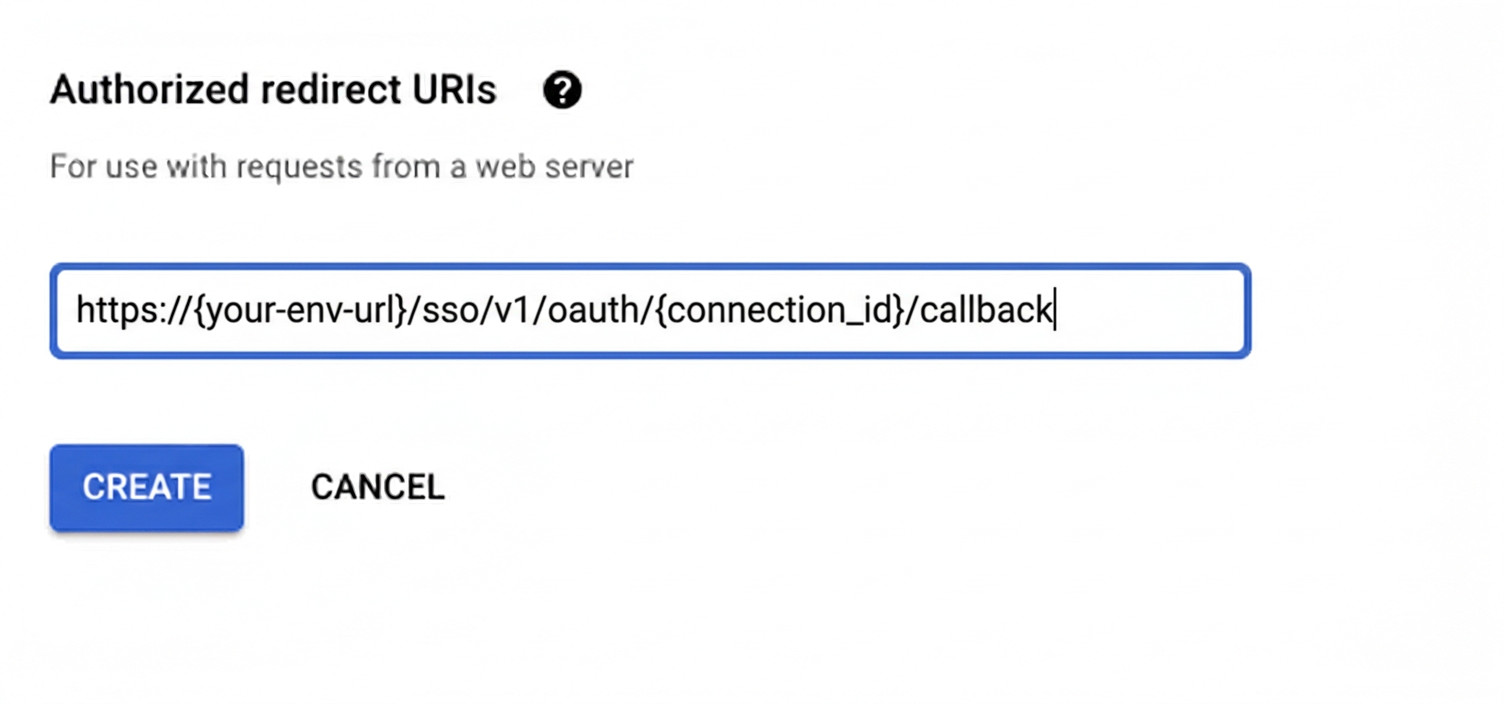
In Scalekit dashboard, go to AgentKit > Connections > Create Connection. Find Google Business Profile and click Create. Click Use your own credentials and copy the redirect URI. It looks like
https://<SCALEKIT_ENVIRONMENT_URL>/sso/v1/oauth/<CONNECTION_ID>/callback. -
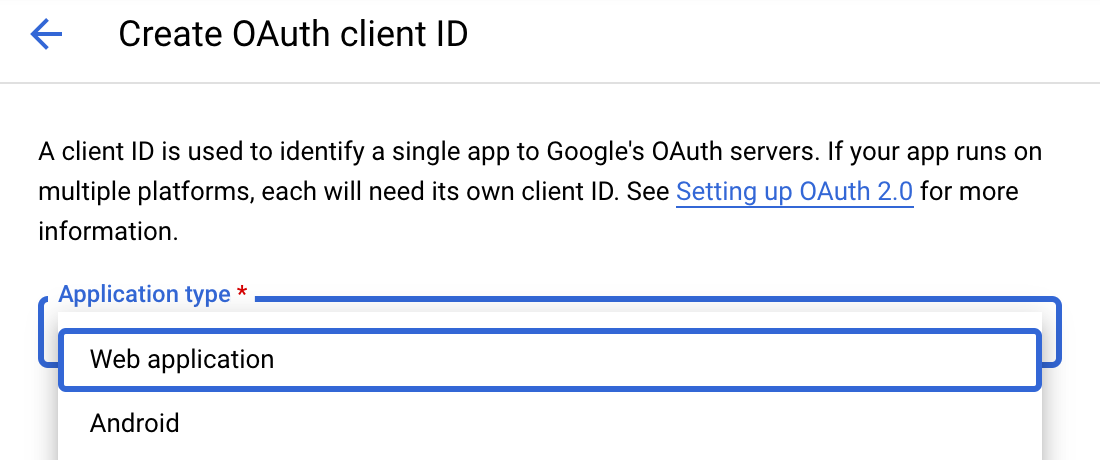
Navigate to Google Cloud Console → APIs & Services → Credentials. Select + Create Credentials, then OAuth client ID. Choose Web application from the Application type menu.
-
Under Authorized redirect URIs, click + Add URI, paste the redirect URI, and click Create.
-
-
Enable the Google Business Profile API
- In Google Cloud Console, go to APIs & Services → Library. Search for “Google Business Profile API” (previously “My Business Business Information API”) and click Enable.
-
Get client credentials
- Google provides your Client ID and Client Secret after you create the OAuth client ID in step 1.
-
Add credentials in Scalekit
-
In Scalekit dashboard, go to AgentKit > Connections and open the connection you created.
-
Copy the Connection name shown on that connection and use that exact value in your code as
connection_nameorconnectionName. It may be something likelocal-seo-agent-googlebusinessprofile, notgooglebusinessprofile. -
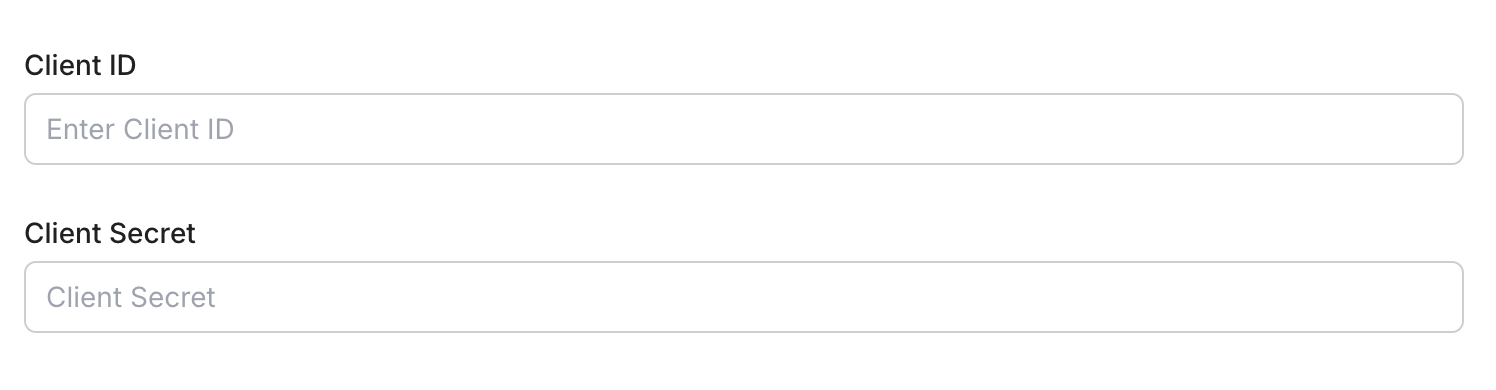
Enter your credentials:
- Client ID (from above)
- Client Secret (from above)
- Permissions (scopes — see Google API Scopes reference)
-
Click Save.
-
-
Authorize a user and make your first call
quickstart.mts import { ScalekitClient } from '@scalekit-sdk/node'import 'dotenv/config'import { createInterface } from 'node:readline/promises'const scalekit = new ScalekitClient(process.env.SCALEKIT_ENVIRONMENT_URL,process.env.SCALEKIT_CLIENT_ID,process.env.SCALEKIT_CLIENT_SECRET,)const actions = scalekit.actionsconst connector = 'googlebusinessprofile'const identifier = 'user_123'// Generate an authorization link for the userconst { link } = await actions.getAuthorizationLink({ connectionName: connector, identifier })console.log('Authorize Google Business Profile:', link)const rl = createInterface({ input: process.stdin, output: process.stdout })await rl.question('Press Enter after authorizing...')rl.close()// Make your first callconst result = await actions.executeTool({connector,identifier,toolName: 'googlebusinessprofile_list_accounts',toolInput: {},})console.log(result)Terminal window npx tsx quickstart.mtsquickstart.py import osfrom scalekit import ScalekitClientfrom dotenv import load_dotenvload_dotenv()scalekit_client = ScalekitClient(env_url=os.getenv("SCALEKIT_ENVIRONMENT_URL"),client_id=os.getenv("SCALEKIT_CLIENT_ID"),client_secret=os.getenv("SCALEKIT_CLIENT_SECRET"),)actions = scalekit_client.actionsconnection_name = "googlebusinessprofile"identifier = "user_123"# Generate an authorization link for the userlink_response = actions.get_authorization_link(connection_name=connection_name,identifier=identifier,)print("Authorize Google Business Profile:", link_response.link)input("Press Enter after authorizing...")# Make your first callresult = actions.execute_tool(tool_input={},tool_name="googlebusinessprofile_list_accounts",connection_name=connection_name,identifier=identifier,)print(result)Terminal window python quickstart.pyEach user signs in once. See Authorize a user for the full flow and statuses.
Tools
Pass the exact name toexecute_toolgooglebusinessprofile_categories_batch_getFetch the localized display names for one or more specific Google Business Profile category IDs at once, given a language code.Read-onlyBatch Get Business Categories
Fetch the localized display names for one or more specific Google Business Profile category IDs at once, given a language code. Complements List Business Categories, which enumerates all available categories, by resolving a known set of category resource names directly.
Inputs
language_codestringrequired- BCP 47 language code to localize the category display names, e.g. en.
namesarrayrequired- The category resource names to look up, e.g. categories/gcid:restaurant. Obtain valid IDs from the List Business Categories tool.
region_codestring- ISO 3166-1 alpha-2 country code to further localize the results.
viewstring- The level of detail to return for each category. BASIC returns only name; FULL also returns additional details.one of
CATEGORY_VIEW_UNSPECIFIEDBASICFULL
googlebusinessprofile_get_accountFetch details for a single Google Business Profile account by its resource name.Read-onlyGet Account
Fetch details for a single Google Business Profile account by its resource name. Returns the account's display name, type (PERSONAL, LOCATION_GROUP, USER_GROUP, ORGANIZATION), the caller's role (PRIMARY_OWNER, OWNER, MANAGER, SITE_MANAGER), verification state, vetted state, and account number.
Inputs
namestringrequired- The account resource name to fetch, in the form accounts/{account_id}. Example: accounts/106234523651626475467.
googlebusinessprofile_get_chainGet a single business chain's full details by its resource name (chains/{chain_id}): its chain names and the websites and location counts associated with it.Read-onlyGet Chain
Get a single business chain's full details by its resource name (chains/{chain_id}): its chain names and the websites and location counts associated with it. Use Search Business Chains first to find a chain's resource name by its display name.
Inputs
namestringrequired- The resource name of the chain to retrieve, in the form chains/{chain_id}.
googlebusinessprofile_get_daily_metricFetch a time series for a single daily performance metric (views, searches, calls, direction requests, bookings, food orders, etc.) for a Google Business Profile location over a specified daily date range.Read-onlyGet Daily Metric Time Series
Fetch a time series for a single daily performance metric (views, searches, calls, direction requests, bookings, food orders, etc.) for a Google Business Profile location over a specified daily date range. Requires the location resource name, exactly one DailyMetric enum value, and a complete start/end date (year, month, day for each). Returns a time series of daily values for the requested metric. Use Get Location Insights instead if you need multiple metrics in one call.
Inputs
dailyMetricstringrequired- The single DailyMetric enum value to fetch a time series for. Valid values: BUSINESS_IMPRESSIONS_DESKTOP_MAPS, BUSINESS_IMPRESSIONS_DESKTOP_SEARCH, BUSINESS_IMPRESSIONS_MOBILE_MAPS, BUSINESS_IMPRESSIONS_MOBILE_SEARCH, BUSINESS_CONVERSATIONS, BUSINESS_DIRECTION_REQUESTS, CALL_CLICKS, WEBSITE_CLICKS, BUSINESS_BOOKINGS, BUSINESS_FOOD_ORDERS, BUSINESS_FOOD_MENU_CLICKS.one of
DAILY_METRIC_UNKNOWNBUSINESS_IMPRESSIONS_DESKTOP_MAPSBUSINESS_IMPRESSIONS_DESKTOP_SEARCHBUSINESS_IMPRESSIONS_MOBILE_MAPSBUSINESS_IMPRESSIONS_MOBILE_SEARCHBUSINESS_CONVERSATIONSBUSINESS_DIRECTION_REQUESTSCALL_CLICKSWEBSITE_CLICKSBUSINESS_BOOKINGSBUSINESS_FOOD_ORDERSBUSINESS_FOOD_MENU_CLICKS end_dayintegerrequired- Day of the end date for the metric range (1-31), e.g. 30. Required together with end_year and end_month.
end_monthintegerrequired- Month of the end date for the metric range (1-12), e.g. 6. Required together with end_year and end_day.
end_yearintegerrequired- Year of the end date for the metric range, e.g. 2026. Required together with end_month and end_day to form a complete end date.
namestringrequired- The location resource name to fetch the metric for, in the form locations/{location_id}. Example: locations/12345678901234567890.
start_dayintegerrequired- Day of the start date for the metric range (1-31), e.g. 1. Required together with start_year and start_month.
start_monthintegerrequired- Month of the start date for the metric range (1-12), e.g. 6. Required together with start_year and start_day.
start_yearintegerrequired- Year of the start date for the metric range, e.g. 2026. Required together with start_month and start_day to form a complete start date.
googlebusinessprofile_get_insightsFetch one or more daily performance metrics (views, searches, calls, direction requests, bookings, food orders, etc.) for a Google Business Profile location over a specified daily date range.Read-onlyGet Location Insights
Fetch one or more daily performance metrics (views, searches, calls, direction requests, bookings, food orders, etc.) for a Google Business Profile location over a specified daily date range. Requires the location resource name, at least one DailyMetric enum value, and a complete start/end date (year, month, day for each). Returns a time series of daily values per requested metric.
Inputs
dailyMetricsarrayrequired- One or more DailyMetric enum values to fetch time series for. At least one is required. Valid values: BUSINESS_IMPRESSIONS_DESKTOP_MAPS, BUSINESS_IMPRESSIONS_DESKTOP_SEARCH, BUSINESS_IMPRESSIONS_MOBILE_MAPS, BUSINESS_IMPRESSIONS_MOBILE_SEARCH, BUSINESS_CONVERSATIONS, BUSINESS_DIRECTION_REQUESTS, CALL_CLICKS, WEBSITE_CLICKS, BUSINESS_BOOKINGS, BUSINESS_FOOD_ORDERS, BUSINESS_FOOD_MENU_CLICKS.
end_dayintegerrequired- Day of the end date for the metrics range (1-31), e.g. 30. Required together with end_year and end_month.
end_monthintegerrequired- Month of the end date for the metrics range (1-12), e.g. 6. Required together with end_year and end_day.
end_yearintegerrequired- Year of the end date for the metrics range, e.g. 2026. Required together with end_month and end_day to form a complete end date.
locationstringrequired- The location resource name to fetch performance metrics for, in the form locations/{location_id}. Example: locations/12345678901234567890.
start_dayintegerrequired- Day of the start date for the metrics range (1-31), e.g. 1. Required together with start_year and start_month.
start_monthintegerrequired- Month of the start date for the metrics range (1-12), e.g. 6. Required together with start_year and start_day.
start_yearintegerrequired- Year of the start date for the metrics range, e.g. 2026. Required together with start_month and start_day to form a complete start date.
googlebusinessprofile_get_locationFetch merchant-set data for a single Google Business Profile location by its resource name.Read-onlyGet Location
Fetch merchant-set data for a single Google Business Profile location by its resource name. Requires a readMask specifying which Location fields to return (e.g. name,title,storefrontAddress,phoneNumbers,regularHours,categories). Returns only the requested fields.
Inputs
namestringrequired- The location resource name to fetch, in the form locations/{location_id}. Example: locations/12345678901234567890.
readMaskstring- Required. Comma-separated list of Location fields to return, using the Location resource's field names. Defaults to name,title,storefrontAddress,phoneNumbers,regularHours,categories if not specified.default
name,title,storefrontAddress,phoneNumbers,regularHours,categories
googlebusinessprofile_get_location_attributesFetch the merchant-set attributes for a Google Business Profile location, such as amenities, payment options, accessibility features, and other category-specific attributes.Read-onlyGet Location Attributes
Fetch the merchant-set attributes for a Google Business Profile location, such as amenities, payment options, accessibility features, and other category-specific attributes. Requires the attributes resource name in the form locations/{location_id}/attributes. Returns the current attribute values (booleans, enums, URLs, or repeated-enum selections) for the location.
Inputs
namestringrequired- The resource name of the attributes to fetch, in the form locations/{location_id}/attributes. Example: locations/12345678901234567890/attributes.
googlebusinessprofile_get_location_google_updatedSee Google's version of a Business Profile location's data, including any crowd-sourced edits Google has applied that differ from the data the business submitted.Read-onlyGet Location (Google-Updated View)
See Google's version of a Business Profile location's data, including any crowd-sourced edits Google has applied that differ from the data the business submitted. Useful for auditing drift between what the merchant set and what is actually showing on Google Search and Maps.
Inputs
namestringrequired- The location resource name to check, in the form locations/{location_id}.
read_maskstring- Comma-separated list of Location fields to return, e.g. title,phoneNumbers,storefrontAddress. Defaults to all fields if omitted.
googlebusinessprofile_get_notification_settingsFetch the Google Pub/Sub notification settings configured for a Google Business Profile account.Read-onlyGet Notification Settings
Fetch the Google Pub/Sub notification settings configured for a Google Business Profile account. Requires the notification setting resource name in the form accounts/{account_id}/notificationSetting. Returns the Pub/Sub topic that receives notifications and the list of NotificationType events subscribed (e.g. NEW_REVIEW, NEW_QUESTION, GOOGLE_UPDATE).
Inputs
namestringrequired- The resource name of the notification setting to fetch, in the form accounts/{account_id}/notificationSetting. Example: accounts/106234523651626475467/notificationSetting.
googlebusinessprofile_get_postFetch a single local post (What's New update) for a Google Business Profile location using the legacy My Business API v4.Read-onlyGet Local Post
Fetch a single local post (What's New update) for a Google Business Profile location using the legacy My Business API v4. Requires the account ID, location ID, and post ID. Note: this legacy v4 endpoint requires separate Google allow-list approval for the OAuth client; a 403 response may indicate the client has not been allow-listed rather than a tool defect.
Inputs
accountIdstringrequired- The Business Profile account ID that owns the location. Example: 106234523651626475467.
locationIdstringrequired- The location ID under the account that owns the post. Example: 12345678901234567890.
postIdstringrequired- The ID of the local post to retrieve. Example: 9876543210987654321.
googlebusinessprofile_get_reviewFetch a single customer review by ID for a Google Business Profile location using the legacy My Business API v4.Read-onlyGet Review
Fetch a single customer review by ID for a Google Business Profile location using the legacy My Business API v4. Requires the account ID, location ID, and review ID. Returns the reviewer, star rating, comment text, create/update time, and any existing business reply. Note: this legacy v4 endpoint requires separate Google allow-list approval for the OAuth client; a 403 response may indicate the client has not been allow-listed rather than a tool defect.
Inputs
accountIdstringrequired- The Business Profile account ID that owns the location, without the accounts/ prefix. Example: 106234523651626475467.
locationIdstringrequired- The location ID that owns the review, without the locations/ prefix. Example: 12345678901234567890.
reviewIdstringrequired- The ID of the review to fetch. Example: AbFvOqk1a2b3c4d5e6f7.
googlebusinessprofile_get_voice_of_merchant_stateCheck whether a Google Business Profile location has 'Voice of Merchant' — meaning it is verified, not suspended, and eligible to have its edits reflected on Google Search and Maps.Read-onlyGet Voice of Merchant State
Check whether a Google Business Profile location has 'Voice of Merchant' — meaning it is verified, not suspended, and eligible to have its edits reflected on Google Search and Maps. Returns which conditions (if any) are blocking the location from having full control over its listing.
Inputs
namestringrequired- The location resource name to check, in the form locations/{location_id}.
googlebusinessprofile_list_account_adminsList the administrators (owners, managers, site managers) of a Business Profile account using the Account Management API.Read-onlyList Account Admins
List the administrators (owners, managers, site managers) of a Business Profile account using the Account Management API.
Inputs
parentstringrequired- The account resource name to list admins for, in the form accounts/{account_id}. Example: accounts/106234523651626475467.
googlebusinessprofile_list_accountsList all Google Business Profile accounts accessible to the authenticated user, including personal accounts and any location groups, user groups, or organizations they belong to.Read-onlyList Accounts
List all Google Business Profile accounts accessible to the authenticated user, including personal accounts and any location groups, user groups, or organizations they belong to. Supports pagination and an optional filter (e.g. by account type). Returns each account's resource name, display name, type, role, and verification/vetted state.
Inputs
filterstring- Optional filter expression to constrain results, e.g. by account type. Supports filtering on the 'type' field, e.g. type=USER_GROUP. Leave blank to return all accessible accounts.
pageSizeinteger- Maximum number of accounts to fetch per page. The API default and maximum is 20. Example: 20.
pageTokenstring- Token from a previous list_accounts response's nextPageToken field, used to fetch the next page of results. Leave blank to fetch the first page.
parentAccountstring- Resource name of the Organization or User Group whose accounts should be listed, in the form accounts/{account_id}. Leave blank to list accounts directly accessible to the authenticated user.
googlebusinessprofile_list_answersList the answers submitted for a customer question on a Google Business Profile location, using the legacy My Business API v4.Read-onlyList Answers
List the answers submitted for a customer question on a Google Business Profile location, using the legacy My Business API v4. Supports pagination and sorting. Note: this legacy v4 endpoint requires separate Google allow-list approval for the OAuth client; a 403 response may indicate the client has not been allow-listed rather than a tool defect.
Inputs
parentstringrequired- The resource name of the question whose answers to list, in the form accounts/{account_id}/locations/{location_id}/questions/{question_id}.
order_bystring- Ordering for the returned answers. Valid values: updateTime desc, upvoteCount desc.
page_sizeinteger- Maximum number of answers to fetch per page. Default 10, maximum 50.
page_tokenstring- Token from a previous list_answers response's nextPageToken field.
googlebusinessprofile_list_attribute_metadataList the metadata describing which attributes are available to set for a location, based on its category and/or country/language.Read-onlyList Attribute Metadata
List the metadata describing which attributes are available to set for a location, based on its category and/or country/language. Use this to discover valid attribute names and their expected value types before calling Update Location Attributes. At least one of parent (a location resource name) or categoryName is typically needed to get a useful result; regionCode and languageCode further narrow the localized results. Returns a page of AttributeMetadata objects (attribute name, display name, value type, whether it's repeatable) plus a next page token.
Inputs
categoryNamestring- The primary category stable ID to look up available attributes for, in the form categories/{category_id}. Example: categories/gcid:restaurant. Leave blank if using parent instead.
languageCodestring- BCP 47 language code to localize the attribute display names for, e.g. en. Leave blank to use the default language.
pageSizeinteger- Maximum number of attribute metadata entries to return. Default 200, minimum 1. Leave blank to use the API default.
pageTokenstring- Token from a previous list_attribute_metadata call's response to fetch the next page of results. Leave blank to fetch the first page.
parentstring- Resource name of the location to look up available attributes for, in the form locations/{location_id}. When supplied, results reflect the attributes available for that specific location's category and country. Leave blank to look up by categoryName instead.
regionCodestring- ISO 3166-1 alpha-2 country code to localize the attribute metadata for, e.g. US. Leave blank to use the default region.
showAllboolean- If true, metadata for all available attributes is returned regardless of whether they are commonly used. Leave blank for default behavior.
googlebusinessprofile_list_categoriesList the Google Business Profile categories available for a given region and language, for use when creating or updating a location's primary or additional categories.Read-onlyList Business Categories
List the Google Business Profile categories available for a given region and language, for use when creating or updating a location's primary or additional categories. Requires regionCode, languageCode, and view. Optionally filter by displayName. Returns a page of Category objects (name, displayName) plus a next page token.
Inputs
languageCodestringrequired- BCP 47 language code to localize category display names, e.g. en.
regionCodestringrequired- ISO 3166-1 alpha-2 country code to list categories for, e.g. US.
viewstringrequired- The level of detail to return for each category. BASIC returns only name; FULL also returns additional details like service types. Valid values: CATEGORY_VIEW_UNSPECIFIED, BASIC, FULL.one of
CATEGORY_VIEW_UNSPECIFIEDBASICFULL filterstring- Filter string to search categories by displayName, e.g. displayName=restaurant. The only field supported is displayName. Leave blank to list all categories.
pageSizeinteger- Maximum number of categories to return per page. Default 100, maximum 100. Leave blank to use the API default.
pageTokenstring- Token from a previous list_categories call's response to fetch the next page of results. Leave blank to fetch the first page.
googlebusinessprofile_list_invitationsList pending invitations for the calling user to become an administrator of a Google Business Profile account, using the Account Management API.Read-onlyList Account Invitations
List pending invitations for the calling user to become an administrator of a Google Business Profile account, using the Account Management API.
Inputs
parentstringrequired- The account resource name to list pending invitations for, in the form accounts/{account_id}.
target_typestring- Restrict the invitations returned by how they can be accepted. Valid values: ALL, URL, EMAIL.one of
ALLURLEMAIL
googlebusinessprofile_list_location_verificationsList a Google Business Profile location's verification history — past and current verification attempts, ordered by create time.Read-onlyList Location Verifications
List a Google Business Profile location's verification history — past and current verification attempts, ordered by create time. Complements Fetch Verification Options (eligible methods), Verify Location (start a new attempt), and Complete Verification (submit a PIN), none of which show prior verification records.
Inputs
parentstringrequired- The resource name of the location whose verifications should be listed, in the form locations/{location_id}.
pageSizeinteger- Maximum number of verifications to return per page (1-100, default 100).
pageTokenstring- Token for fetching the next page of results.
googlebusinessprofile_list_locationsList locations belonging to a Google Business Profile account.Read-onlyList Locations
List locations belonging to a Google Business Profile account. Requires the account resource name and a readMask specifying which Location fields to return (e.g. name,title,storefrontAddress). Supports pagination, filtering, and ordering by title or store_code.
Inputs
parentstringrequired- The account resource name to fetch locations from, in the form accounts/{account_id}. Example: accounts/106234523651626475467.
filterstring- Optional filter expression to constrain results, following the Location Data Guide filter syntax (e.g. labels:"store front"). Leave blank to return all locations.
orderBystring- Optional comma-separated ordering fields using SQL syntax. Valid fields: title, store_code. Example: title desc.
pageSizeinteger- Maximum number of locations to fetch per page. Default is 10, minimum 1, maximum 100. Example: 25.
pageTokenstring- Token from a previous list_locations response's nextPageToken field, used to fetch the next page of results. Leave blank to fetch the first page.
readMaskstring- Required. Comma-separated list of Location fields to return, using the Location resource's field names (e.g. name,title,storefrontAddress,phoneNumbers,categories). Defaults to name,title,storefrontAddress if not specified.default
name,title,storefrontAddress
googlebusinessprofile_list_mediaList media items (photos and videos) associated with a Google Business Profile location using the legacy My Business API v4, with pagination support.Read-onlyList Media Items
List media items (photos and videos) associated with a Google Business Profile location using the legacy My Business API v4, with pagination support. Note: this legacy v4 endpoint requires separate Google allow-list approval for the OAuth client; a 403 response may indicate the client has not been allow-listed rather than a tool defect.
Inputs
accountIdstringrequired- The Business Profile account ID that owns the location. Example: 106234523651626475467.
locationIdstringrequired- The location ID whose media items should be listed. Example: 12345678901234567890.
pageSizeinteger- Maximum number of media items to return per page. If omitted, the API default is used.
pageTokenstring- A page token from a previous list_media call, used to fetch the next page of results.
googlebusinessprofile_list_postsList local posts (What's New updates) for a Google Business Profile location using the legacy My Business API v4.Read-onlyList Local Posts
List local posts (What's New updates) for a Google Business Profile location using the legacy My Business API v4. Requires the account ID and location ID. Supports pagination via pageSize and pageToken. Returns each post's topic type, summary, state, and call-to-action/media details. Note: this legacy v4 endpoint requires separate Google allow-list approval for the OAuth client; a 403 response may indicate the client has not been allow-listed rather than a tool defect.
Inputs
accountIdstringrequired- The Business Profile account ID that owns the location, without the accounts/ prefix. Example: 106234523651626475467.
locationIdstringrequired- The location ID to list local posts for, without the locations/ prefix. Example: 12345678901234567890.
pageSizeinteger- Maximum number of local posts to fetch per page. Example: 20.
pageTokenstring- Token from a previous list_posts response's nextPageToken field, used to fetch the next page of results. Leave blank to fetch the first page.
googlebusinessprofile_list_questionsList the customer questions posted on a Google Business Profile location using the legacy My Business API v4.Read-onlyList Questions
List the customer questions posted on a Google Business Profile location using the legacy My Business API v4. Supports pagination, sorting, and optionally including a preview of each question's top answers. Note: this legacy v4 endpoint requires separate Google allow-list approval for the OAuth client; a 403 response may indicate the client has not been allow-listed rather than a tool defect.
Inputs
parentstringrequired- The parent location resource name to list questions for, in the form accounts/{account_id}/locations/{location_id}.
answers_per_questioninteger- How many of the top answers to include per question in the response. Default 1, maximum 10.
filterstring- Filter expression restricting which questions are returned. Currently only filtering by ignoreAnsweredQuestions=true is supported.
order_bystring- Ordering for the returned questions. Valid values: updateTime desc, upvoteCount desc.
page_sizeinteger- Maximum number of questions to fetch per page. Default 10, maximum 50.
page_tokenstring- Token from a previous list_questions response's nextPageToken field.
googlebusinessprofile_list_reviewsList customer reviews for a Google Business Profile location using the legacy My Business API v4.Read-onlyList Reviews
List customer reviews for a Google Business Profile location using the legacy My Business API v4. Requires the account ID and location ID. Supports pagination via pageSize and pageToken. Returns each review's reviewer, star rating, comment, create/update time, and any existing reply. Note: this legacy v4 endpoint requires separate Google allow-list approval for the OAuth client; a 403 response may indicate the client has not been allow-listed rather than a tool defect.
Inputs
accountIdstringrequired- The Business Profile account ID that owns the location, without the accounts/ prefix. Example: 106234523651626475467.
locationIdstringrequired- The location ID to list reviews for, without the locations/ prefix. Example: 12345678901234567890.
pageSizeinteger- Maximum number of reviews to fetch per page. Example: 20.
pageTokenstring- Token from a previous list_reviews response's nextPageToken field, used to fetch the next page of results. Leave blank to fetch the first page.
googlebusinessprofile_report_local_post_insightsGet view and call-to-action click metrics for up to 100 local posts (What's New updates) on a single location, in one call, using the legacy My Business API v4.Read-onlyReport Local Post Insights
Get view and call-to-action click metrics for up to 100 local posts (What's New updates) on a single location, in one call, using the legacy My Business API v4. All requested posts must belong to the location given in name. Note: this legacy v4 endpoint requires separate Google allow-list approval for the OAuth client; a 403 response may indicate the client has not been allow-listed rather than a tool defect.
Inputs
localPostNamesarrayrequired- Resource names of the local posts to report on (max 100), each in the form accounts/{account_id}/locations/{location_id}/localPosts/{post_id}. All must belong to the location in the name field.
metricsarrayrequired- Which local post metrics to report. LOCAL_POST_VIEWS_SEARCH is view counts on Google Search; LOCAL_POST_ACTIONS_CALL_TO_ACTION is call-to-action button clicks.
namestringrequired- The location these posts belong to, in the form accounts/{account_id}/locations/{location_id}.
end_timestring- End of the reporting window, as an RFC3339 timestamp. Omit together with start_time to use the API default range.
start_timestring- Start of the reporting window, as an RFC3339 timestamp. Omit together with end_time to use the API default range.
googlebusinessprofile_search_chainsSearch for a business chain by name, to associate a Google Business Profile location with it.Read-onlySearch Business Chains
Search for a business chain by name, to associate a Google Business Profile location with it. Requires chainName (the chain's display name to search for, e.g. Starbucks). Returns a list of matching Chain objects (chain resource name, display name, and associated location counts by group) ranked by relevance.
Inputs
chainNamestringrequired- The chain name to search for, e.g. Starbucks. Search is not case-sensitive and returns chains whose name matches or is similar.
pageSizeinteger- Maximum number of matching chains to return. Default 10, maximum 500. Leave blank to use the API default.
googlebusinessprofile_search_google_locationsSearch Google's existing Maps location data by free-text query (business name and address) before creating or claiming a new location.Read-onlySearch Google Locations
Search Google's existing Maps location data by free-text query (business name and address) before creating or claiming a new location. Helps avoid creating duplicate listings for a business that already exists on Google. Returns candidate matches.
Inputs
querystringrequired- Free-text search query combining the business name and address, e.g. 'Acme Coffee Shop, 123 Main St, Springfield, IL'.
page_sizeinteger- Maximum number of matching candidates to return. Default 3, maximum 10.
googlebusinessprofile_search_keywordsList the search keywords customers used to find a Google Business Profile location on Search or Maps, with monthly aggregated impression counts.Read-onlySearch Keyword Impressions
List the search keywords customers used to find a Google Business Profile location on Search or Maps, with monthly aggregated impression counts. Requires the location resource name and a complete start/end month (year and month for each). Supports pagination via pageSize and pageToken. Returns a page of keyword/impression-count entries plus a next page token.
Inputs
end_monthintegerrequired- Month of the end month for the impressions range (1-12), e.g. 6. Required together with end_year.
end_yearintegerrequired- Year of the end month for the impressions range, e.g. 2026. Required together with end_month.
parentstringrequired- The location resource name to fetch keyword impressions for, in the form locations/{location_id}. Example: locations/12345678901234567890.
start_monthintegerrequired- Month of the start month for the impressions range (1-12), e.g. 1. Required together with start_year.
start_yearintegerrequired- Year of the start month for the impressions range, e.g. 2026. Required together with start_month.
pageSizeinteger- Maximum number of keyword impression entries to return per page. Default 100, maximum 100. Leave blank to use the API default.
pageTokenstring- Token from a previous search_keywords call's response to fetch the next page of results. Leave blank to fetch the first page.
googlebusinessprofile_accept_invitationAccept a pending invitation to become an administrator (owner or manager) of a Google Business Profile account.WriteAccept Account Invitation
Accept a pending invitation to become an administrator (owner or manager) of a Google Business Profile account. Requires the invitation resource name in the form accounts/{account_id}/invitations/{invitation_id}. The request body is empty. Returns an empty response on success; once accepted, the invitation is consumed and the caller becomes an admin of the account.
Inputs
namestringrequired- The resource name of the invitation to accept, in the form accounts/{account_id}/invitations/{invitation_id}. Example: accounts/106234523651626475467/invitations/109876543210987654321.
googlebusinessprofile_complete_verificationComplete a pending Google Business Profile location verification by submitting the PIN code received via the chosen verification method (SMS, phone call, postcard, etc.).WriteComplete Verification
Complete a pending Google Business Profile location verification by submitting the PIN code received via the chosen verification method (SMS, phone call, postcard, etc.). Requires the verification resource name and the PIN.
Inputs
namestringrequired- The resource name of the pending verification to complete, in the form locations/{location_id}/verifications/{verification_id}. Obtain this from Verify Location's response or List Verifications.
pinstringrequired- The PIN code received via the verification method (SMS, phone, postcard, etc.).
googlebusinessprofile_create_accountCreate a new Business Profile account using the Account Management API.WriteCreate Account
Create a new Business Profile account using the Account Management API. Requires an account name and a type (e.g. ORGANIZATION or LOCATION_GROUP). PERSONAL accounts cannot typically be created via this API; use ORGANIZATION, LOCATION_GROUP, or USER_GROUP for programmatic account creation.
Inputs
accountNamestringrequired- The name of the account to create. For an ORGANIZATION this is typically the business's legal or brand name. Example: Cascade Coffee Holdings.
typestringrequired- The type of account to create. PERSONAL accounts cannot generally be created via this API.one of
ACCOUNT_TYPE_UNSPECIFIEDPERSONALLOCATION_GROUPUSER_GROUPORGANIZATION
googlebusinessprofile_create_locationCreate a new location under a Google Business Profile account.WriteCreate Location
Create a new location under a Google Business Profile account. Requires the parent account resource name and a business title. Optionally supply a storefront address, phone numbers, primary/additional categories, and regular business hours. Set validateOnly to true to validate the request without creating the location.
Inputs
parentstringrequired- The account resource name under which to create the location, in the form accounts/{account_id}. Example: accounts/106234523651626475467.
titlestringrequired- The business name (title) for the new location, reflecting the real-world business name as used consistently on the storefront. No taglines or special characters. Example: Cascade Coffee Roasters.
language_codestring- The BCP 47 language code for the location's data (e.g. "en", "fr", "de"). Required by Google — defaults to "en" if not specified.default
en primary_category_namestring- Primary category resource name for the location, e.g. categories/gcid:restaurant. Maps to categories.primaryCategory.name. Optional but recommended.
primary_phonestring- Primary phone number for the location, in E.164 or local format. Maps to phoneNumbers.primaryPhone. Optional.
regular_hours_periodsarray- Regular business hours as an array of time periods. Each period is an object: {"openDay": "MONDAY", "openTime": "09:00", "closeDay": "MONDAY", "closeTime": "17:00"}. openDay/closeDay must be one of MONDAY, TUESDAY, WEDNESDAY, THURSDAY, FRIDAY, SATURDAY, SUNDAY. openTime/closeTime are 24-hour HH:MM strings. Optional.
requestIdstring- Optional unique request ID (max 50 chars) used to detect duplicate creation requests. Leave blank to omit.
storefront_address_linesarray- Street address lines for the location's storefront address (up to 5 lines), e.g. ["1600 Amphitheatre Pkwy"]. Required together with storefront_locality and storefront_region_code if providing a storefront address.
storefront_administrative_areastring- State or administrative area of the storefront address, e.g. CA. Optional even when providing an address.
storefront_localitystring- City/locality of the storefront address. Required together with storefront_address_lines and storefront_region_code if providing a storefront address.
storefront_postal_codestring- Postal/ZIP code of the storefront address. Optional even when providing an address.
storefront_region_codestring- CLDR region code (ISO 3166-1 alpha-2) of the storefront address's country, e.g. US. Required together with storefront_address_lines and storefront_locality if providing a storefront address.
validateOnlyboolean- If true, validates the request without actually creating the location. Useful for checking field values before committing. Defaults to false.default
false
googlebusinessprofile_create_mediaAdd a new media item (photo or video, referenced by a publicly accessible source URL) to a Google Business Profile location using the legacy My Business API v4.WriteAdd Media Item
Add a new media item (photo or video, referenced by a publicly accessible source URL) to a Google Business Profile location using the legacy My Business API v4. Requires the account ID, location ID, media format, source URL, and a location association category describing what the media depicts. Note: this legacy v4 endpoint requires separate Google allow-list approval for the OAuth client; a 403 response may indicate the client has not been allow-listed rather than a tool defect.
Inputs
accountIdstringrequired- The Business Profile account ID that owns the location. Example: 106234523651626475467.
categorystringrequired- The category describing what this media item depicts, used for locationAssociation.category. Example: EXTERIOR.one of
CATEGORY_UNSPECIFIEDCOVERPROFILELOGOEXTERIORINTERIORPRODUCTAT_WORKFOOD_AND_DRINKMENUCOMMON_AREAROOMSTEAMSADDITIONAL locationIdstringrequired- The location ID to add the media item to. Example: 12345678901234567890.
mediaFormatstringrequired- The format of the media item being added.one of
MEDIA_FORMAT_UNSPECIFIEDPHOTOVIDEO sourceUrlstringrequired- A publicly accessible URL where the media item can be retrieved from. Example: https://example.com/photo.jpg.
googlebusinessprofile_create_postCreate a local post (What's New update) for a Google Business Profile location using the legacy My Business API v4.WriteCreate Local Post
Create a local post (What's New update) for a Google Business Profile location using the legacy My Business API v4. Requires the parent resource name (accounts/{account_id}/locations/{location_id}), a topicType, and a summary. Supports STANDARD posts with an optional call-to-action button and photo/video media. EVENT and OFFER post types can be attempted by also supplying the event or offer object as raw JSON, but are not deeply validated by this tool. Note: this legacy v4 endpoint requires separate Google allow-list approval for the OAuth client; a 403 response may indicate the client has not been allow-listed rather than a tool defect.
Inputs
parentstringrequired- The parent resource name under which to create the local post, in the form accounts/{account_id}/locations/{location_id}. Example: accounts/106234523651626475467/locations/12345678901234567890.
summarystringrequired- The main text content of the local post. Required for all topic types. Example: 'Join us this weekend for our summer sale!'
topicTypestringrequired- The topic type of the local post. STANDARD is a general update. EVENT requires the event field to also be set. OFFER requires the offer field to also be set. ALERT is used for urgent announcements (e.g. COVID-19).one of
LOCAL_POST_TOPIC_TYPE_UNSPECIFIEDSTANDARDEVENTOFFERALERT callToActionTypestring- The type of call-to-action button to show on the post. One of BOOK, ORDER, SHOP, LEARN_MORE, SIGN_UP, CALL. Omit for no call-to-action button.one of
ACTION_TYPE_UNSPECIFIEDBOOKORDERSHOPLEARN_MORESIGN_UPCALL callToActionUrlstring- The target URL for the call-to-action button. Required if callToActionType is set to a value other than CALL. Example: https://example.com/summer-sale.
eventobject- Required when topicType is EVENT. A JSON object describing the event: {"title": string, "schedule": {"startDate": {"year":Y,"month":M,"day":D}, "startTime": {"hours":H,"minutes":M}, "endDate": {...}, "endTime": {...}}}. Example: {"title": "Summer Sale Kickoff", "schedule": {"startDate": {"year":2026,"month":7,"day":10}, "endDate": {"year":2026,"month":7,"day":10}}}.
languageCodestring- The language of the local post content, as a BCP 47 language code. Example: en-US. If omitted, the account's default language is used.
mediaarray- Optional array of media items (photos or videos) to attach to the post. Each item is an object with mediaFormat (PHOTO or VIDEO) and sourceUrl (a publicly accessible URL to the media file). Example: [{"mediaFormat": "PHOTO", "sourceUrl": "https://example.com/photo.jpg"}].
offerobject- Optional when topicType is OFFER. A JSON object describing the offer: {"couponCode": string, "redeemOnlineUrl": string, "termsConditions": string}. Example: {"couponCode": "SUMMER26", "redeemOnlineUrl": "https://example.com/redeem", "termsConditions": "Valid through July 31, 2026."}.
googlebusinessprofile_create_questionPost a new customer question on a Google Business Profile location's Q&A section using the legacy My Business API v4.WriteCreate Question
Post a new customer question on a Google Business Profile location's Q&A section using the legacy My Business API v4. Requires the parent location resource name and the question text. Note: this legacy v4 endpoint requires separate Google allow-list approval for the OAuth client; a 403 response may indicate the client has not been allow-listed rather than a tool defect.
Inputs
parentstringrequired- The parent location resource name to post the question under, in the form accounts/{account_id}/locations/{location_id}. Example: accounts/106234523651626475467/locations/12345678901234567890.
textstringrequired- The text of the question to post. Example: 'Do you offer curbside pickup?'.
googlebusinessprofile_fetch_multi_daily_metricsFetch time series data for several daily performance metrics (views, calls, direction requests, bookings, etc.) for a single Google Business Profile location in one call, instead of calling Get Daily Metric Time Series once per metric.WriteFetch Multiple Daily Metrics
Fetch time series data for several daily performance metrics (views, calls, direction requests, bookings, etc.) for a single Google Business Profile location in one call, instead of calling Get Daily Metric Time Series once per metric. Requires the location resource name, a list of DailyMetric enum values, and a complete start/end date.
- Idempotent
Inputs
daily_metricsarrayrequired- The DailyMetric enum values to fetch, e.g. ["CALL_CLICKS", "WEBSITE_CLICKS"]. Valid values: BUSINESS_IMPRESSIONS_DESKTOP_MAPS, BUSINESS_IMPRESSIONS_DESKTOP_SEARCH, BUSINESS_IMPRESSIONS_MOBILE_MAPS, BUSINESS_IMPRESSIONS_MOBILE_SEARCH, BUSINESS_CONVERSATIONS, BUSINESS_DIRECTION_REQUESTS, CALL_CLICKS, WEBSITE_CLICKS, BUSINESS_BOOKINGS, BUSINESS_FOOD_ORDERS, BUSINESS_FOOD_MENU_CLICKS.
end_dayintegerrequired- Day of the end date for the metric range (1-31).
end_monthintegerrequired- Month of the end date for the metric range (1-12).
end_yearintegerrequired- Year of the end date for the metric range.
namestringrequired- The location resource name to fetch metrics for, in the form locations/{location_id}.
start_dayintegerrequired- Day of the start date for the metric range (1-31).
start_monthintegerrequired- Month of the start date for the metric range (1-12).
start_yearintegerrequired- Year of the start date for the metric range.
googlebusinessprofile_fetch_verification_optionsReport the eligible verification methods (ADDRESS, EMAIL, PHONE_CALL, SMS, AUTO) available for a Google Business Profile location, in a specific language.WriteFetch Verification Options
Report the eligible verification methods (ADDRESS, EMAIL, PHONE_CALL, SMS, AUTO) available for a Google Business Profile location, in a specific language. Requires the location resource name (locations/{location_id}) and a BCP 47 language code. Returns a list of VerificationOption objects describing, for each eligible method, the destination the PIN would be sent to (e.g. masked email address or phone number, or postcard mailing address) -- use these exact values as inputs to the Verify Location tool.
Inputs
languageCodestringrequired- Required. The BCP 47 language code representing the language to use for the verification process. Available options may vary by language. Example: en-US.
locationstringrequired- The resource name of the location to check verification options for, in the form locations/{location_id}. Example: locations/12345678901234567890.
googlebusinessprofile_invite_account_adminInvite a user to become an administrator of a Business Profile account using the Account Management API.WriteInvite Account Admin
Invite a user to become an administrator of a Business Profile account using the Account Management API. The invitee receives an email invitation which they must accept before becoming an active admin. Requires the account resource name, the invitee's email address, and the role to grant.
Inputs
adminstringrequired- The email address of the user to invite as an administrator. Example: jane.doe@example.com.
parentstringrequired- The account resource name to invite the admin to, in the form accounts/{account_id}. Example: accounts/106234523651626475467.
rolestringrequired- The role to grant the invited administrator. OWNER has full control, MANAGER can manage most settings, COMMUNITY_MANAGER can only manage posts/reviews/Q&A.one of
OWNERMANAGERCOMMUNITY_MANAGER
googlebusinessprofile_reply_to_reviewCreate or update the business's reply to a customer review on a Google Business Profile location, using the legacy My Business API v4.WriteReply to Review
Create or update the business's reply to a customer review on a Google Business Profile location, using the legacy My Business API v4. Requires the account ID, location ID, review ID, and the reply comment text. Calling this again for the same review overwrites the existing reply. Note: this legacy v4 endpoint requires separate Google allow-list approval for the OAuth client; a 403 response may indicate the client has not been allow-listed rather than a tool defect.
- Idempotent
Inputs
accountIdstringrequired- The Business Profile account ID that owns the location, without the accounts/ prefix. Example: 106234523651626475467.
commentstringrequired- The text of the business's reply to the review. Replaces any existing reply. Example: 'Thank you for your feedback! We're glad you enjoyed your visit.'
locationIdstringrequired- The location ID that owns the review, without the locations/ prefix. Example: 12345678901234567890.
reviewIdstringrequired- The ID of the review to reply to. Example: AbFvOqk1a2b3c4d5e6f7.
googlebusinessprofile_update_accountUpdate a Business Profile account's display name using the Account Management API (PATCH).WriteUpdate Account
Update a Business Profile account's display name using the Account Management API (PATCH). Only accountName is supported for update by this API, so the updateMask query parameter is statically set to 'accountName' (unlike googlebusinessprofile_update_listing, which dynamically covers multiple maskable fields, this tool's underlying Account resource only exposes one writable field beyond immutable/read-only ones, so a static mask is correct and sufficient).
- Idempotent
Inputs
accountNamestringrequired- The new display name for the account. Example: Cascade Coffee Holdings.
namestringrequired- The account resource name to update, in the form accounts/{account_id}. Example: accounts/106234523651626475467.
googlebusinessprofile_update_account_adminChange the role of an existing administrator on a Google Business Profile account, using the Account Management API.WriteUpdate Account Admin
Change the role of an existing administrator on a Google Business Profile account, using the Account Management API. Requires the admin resource name in the form accounts/{account_id}/admins/{admin_id} and the new role to grant.
- Idempotent
Inputs
namestringrequired- The resource name of the admin to update, in the form accounts/{account_id}/admins/{admin_id}. Example: accounts/106234523651626475467/admins/109876543210987654321.
rolestringrequired- The new role to grant the administrator. OWNER has full control, MANAGER can manage most settings, COMMUNITY_MANAGER can only manage posts/reviews/Q&A.one of
OWNERMANAGERCOMMUNITY_MANAGER
googlebusinessprofile_update_listingUpdate a Google Business Profile location's business information (a partial update via PATCH).WriteUpdate Business Listing
Update a Google Business Profile location's business information (a partial update via PATCH). Provide the location resource name, only the fields you want to change, and an update_mask naming exactly those fields — Google clears any field named in update_mask that is left blank in the request body, so update_mask must match the fields you actually supply. Supports updating the business title, primary phone number, website URL, regular hours (as a list of open/close periods), storefront address, and primary category.
- Idempotent
Inputs
locationstringrequired- The location resource name to update, in the form locations/{location_id}. Example: locations/12345678901234567890.
update_maskstringrequired- Comma-separated list of top-level Location fields to update, matching exactly the fields you supply in this request (e.g. "title" if you only set title; "title,phoneNumbers" if you set both title and primary_phone). Valid field names: title, phoneNumbers, websiteUri, regularHours, storefrontAddress, categories. WARNING: Google clears any field named here that you leave blank — do not include a field name unless you are also supplying its value.
primary_category_namestring- New primary category resource name for the location, e.g. categories/gcid:restaurant. Maps to categories.primaryCategory.name. Leave blank to keep the existing primary category.
primary_phonestring- New primary phone number for the location, in E.164 or local format. Maps to phoneNumbers.primaryPhone. Leave blank to keep the existing phone number.
regular_hours_periodsarray- New regular business hours as an array of time periods, replacing the existing regularHours entirely. Each period is an object: {"openDay": "MONDAY", "openTime": "09:00", "closeDay": "MONDAY", "closeTime": "17:00"}. openDay/closeDay must be one of MONDAY, TUESDAY, WEDNESDAY, THURSDAY, FRIDAY, SATURDAY, SUNDAY. openTime/closeTime are 24-hour HH:MM strings. Leave blank to keep existing hours.
storefront_address_linesarray- New street address lines for the location's storefront address (e.g. ["1600 Amphitheatre Pkwy"]). Required together with storefront_locality and storefront_region_code if updating the storefront address.
storefront_administrative_areastring- State or administrative area of the storefront address, e.g. CA. Optional even when updating the address.
storefront_localitystring- City/locality of the storefront address. Required together with storefront_address_lines if updating the storefront address.
storefront_postal_codestring- Postal/ZIP code of the storefront address. Optional even when updating the address.
storefront_region_codestring- CLDR region code (ISO 3166-1 alpha-2) of the storefront address's country, e.g. US. Required together with storefront_address_lines and storefront_locality if updating the storefront address.
titlestring- New business name (title) for the location. Google does not allow marketing taglines or special characters. Leave blank to keep the existing title.
website_uristring- New website URL for the location. Leave blank to keep the existing website URL.
googlebusinessprofile_update_location_attributesUpdate the merchant-set attributes for a Google Business Profile location (e.g.WriteUpdate Location Attributes
Update the merchant-set attributes for a Google Business Profile location (e.g. wheelchair accessible, wifi, outdoor seating, payment options). Requires the attributes resource name, an array of attribute objects to set, and an attributeMask naming exactly the attribute IDs being updated (comma-separated, e.g. attributes/has_wifi,attributes/has_wheelchair_accessible_entrance). Each attribute has a name (the attribute ID, e.g. attributes/has_wifi) and one of: values (for BOOL/ENUM attributes, e.g. [true] or ["attributes/has_wifi/enum/1"]), uriValues (for URL attributes, e.g. [{"uri": "https://example.com/menu"}]), or repeatedEnumValue (for REPEATED_ENUM attributes, e.g. {"setValues": [...], "unsetValues": [...]}). Google clears any attribute named in attributeMask that is left out of the attributes array, so attributeMask must match the attribute names you actually supply.
- Idempotent
Inputs
attributeMaskstringrequired- Comma-separated list of attribute IDs being updated, matching the 'name' values inside the attributes array, e.g. attributes/has_wifi,attributes/has_wheelchair_accessible_entrance. Google clears any attribute listed here that is not included in the attributes array, so this must match exactly the attributes you are setting.
attributesarrayrequired- Array of attribute objects to set on the location. Each object must have a 'name' (attribute ID, e.g. attributes/has_wifi) and one of 'values' (array, for BOOL/ENUM types), 'uriValues' (array of {"uri": string}, for URL type), or 'repeatedEnumValue' ({"setValues": [string], "unsetValues": [string]}, for REPEATED_ENUM type). Example: [{"name": "attributes/has_wifi", "values": [true]}].
namestringrequired- The resource name of the attributes to update, in the form locations/{location_id}/attributes. Example: locations/12345678901234567890/attributes.
googlebusinessprofile_update_notification_settingsUpdate the Google Pub/Sub notification settings for a Google Business Profile account: which Pub/Sub topic receives notifications and which NotificationType events are subscribed (e.g.WriteUpdate Notification Settings
Update the Google Pub/Sub notification settings for a Google Business Profile account: which Pub/Sub topic receives notifications and which NotificationType events are subscribed (e.g. NEW_REVIEW, NEW_QUESTION, GOOGLE_UPDATE).
- Idempotent
Inputs
namestringrequired- The resource name of the notification setting to update, in the form accounts/{account_id}/notificationSetting.
notification_typesarray- The list of NotificationType events to subscribe to. Valid values include GOOGLE_UPDATE, NEW_REVIEW, UPDATED_REVIEW, NEW_CUSTOMER_MEDIA, NEW_QUESTION, NEW_ANSWER, UPDATED_ANSWER, LOSS_OF_VOICE_OF_MERCHANT, VOICE_OF_MERCHANT_UPDATED.
pubsub_topicstring- The Google Cloud Pub/Sub topic that will receive notifications, in the form projects/{project_id}/topics/{topic_id}. Leave blank to stop sending notifications.
googlebusinessprofile_update_postUpdate an existing local post (What's New update) for a Google Business Profile location using the legacy My Business API v4 (PATCH).WriteUpdate Local Post
Update an existing local post (What's New update) for a Google Business Profile location using the legacy My Business API v4 (PATCH). Provide the account ID, location ID, post ID, only the fields you want to change (summary, callToActionType/callToActionUrl, topicType), and an update_mask naming exactly those fields — Google clears any field named in update_mask that is left blank in the request body, so update_mask must match the fields you actually supply. Note: this legacy v4 endpoint requires separate Google allow-list approval for the OAuth client; a 403 response may indicate the client has not been allow-listed rather than a tool defect.
- Idempotent
Inputs
accountIdstringrequired- The Business Profile account ID that owns the location. Example: 106234523651626475467.
locationIdstringrequired- The location ID under the account that owns the post. Example: 12345678901234567890.
postIdstringrequired- The ID of the local post to update. Example: 9876543210987654321.
update_maskstringrequired- Comma-separated list of top-level LocalPost fields to update, matching exactly the fields you supply in this request (e.g. "summary" if you only set summary; "summary,topicType" if you set both). Valid field names: summary, callToAction, topicType. WARNING: Google clears any field named here that you leave blank — do not include a field name unless you are also supplying its value.
callToActionTypestring- New call-to-action button type for the post. One of BOOK, ORDER, SHOP, LEARN_MORE, SIGN_UP, CALL. Leave blank to keep the existing call-to-action.one of
ACTION_TYPE_UNSPECIFIEDBOOKORDERSHOPLEARN_MORESIGN_UPCALL callToActionUrlstring- New target URL for the call-to-action button. Required if callToActionType is set to a value other than CALL. Leave blank to keep the existing URL.
summarystring- New body text of the local post. Leave blank to keep the existing summary.
topicTypestring- New topic type of the local post. STANDARD is a general update. EVENT requires an event object to already be set on the post. OFFER requires an offer object to already be set. ALERT is used for urgent announcements. Leave blank to keep the existing topic type.one of
LOCAL_POST_TOPIC_TYPE_UNSPECIFIEDSTANDARDEVENTOFFERALERT
googlebusinessprofile_update_questionUpdate the text of an existing customer question on a Google Business Profile location using the legacy My Business API v4.WriteUpdate Question
Update the text of an existing customer question on a Google Business Profile location using the legacy My Business API v4. Note: this legacy v4 endpoint requires separate Google allow-list approval for the OAuth client; a 403 response may indicate the client has not been allow-listed rather than a tool defect.
- Idempotent
Inputs
namestringrequired- The resource name of the question to update, in the form accounts/{account_id}/locations/{location_id}/questions/{question_id}.
textstringrequired- The updated question text.
googlebusinessprofile_upsert_answerCreate or replace the caller's answer to a customer question on a Google Business Profile location, using the legacy My Business API v4.WriteUpsert Answer
Create or replace the caller's answer to a customer question on a Google Business Profile location, using the legacy My Business API v4. Each user can have at most one answer per question; calling this again replaces the caller's existing answer. Note: this legacy v4 endpoint requires separate Google allow-list approval for the OAuth client; a 403 response may indicate the client has not been allow-listed rather than a tool defect.
- Idempotent
Inputs
parentstringrequired- The resource name of the question to answer, in the form accounts/{account_id}/locations/{location_id}/questions/{question_id}.
textstringrequired- The text of the answer.
googlebusinessprofile_verify_locationStart the verification process for a Google Business Profile location using a chosen method.WriteVerify Location
Start the verification process for a Google Business Profile location using a chosen method. Requires the location resource name (locations/{location_id}) and a verification method (ADDRESS, EMAIL, PHONE_CALL, SMS, or AUTO). EMAIL requires emailAddress, PHONE_CALL/SMS require phoneNumber, ADDRESS optionally accepts mailerContact; the emailAddress/phoneNumber values must be one of the options previously returned by Fetch Verification Options. AUTO requires no additional identifying field. Returns the created Verification resource, including its verification ID and state, which is needed to complete verification (e.g. submitting the received PIN) via a separate API call.
Inputs
methodstringrequired- The verification method to use. ADDRESS sends a postcard with a PIN. EMAIL sends a PIN to an email address (requires emailAddress). PHONE_CALL/SMS send a PIN via call or text (requires phoneNumber). AUTO verifies without extra user action, if eligible for the location.one of
VERIFICATION_METHOD_UNSPECIFIEDADDRESSEMAILPHONE_CALLSMSAUTO namestringrequired- The resource name of the location to verify, in the form locations/{location_id}. Example: locations/12345678901234567890.
emailAddressstring- Required when method is EMAIL. The email address the verification PIN should be sent to. Must be one of the email addresses previously returned by Fetch Verification Options for this location. Example: owner@example.com.
languageCodestring- The BCP 47 language code representing the language to use for the verification process. Example: en-US. Optional; if omitted, Google chooses a default.
mailerContactstring- Optional, used only with the ADDRESS method. The contact name the postcard should be addressed to.
phoneNumberstring- Required when method is PHONE_CALL or SMS. The phone number the verification PIN should be sent to via call or text. Must be one of the phone numbers previously returned by Fetch Verification Options for this location. Example: +14155551234.
googlebusinessprofile_decline_invitationDecline a pending invitation to become an administrator of a Google Business Profile account.DestructiveDecline Account Invitation
Decline a pending invitation to become an administrator of a Google Business Profile account. Requires the invitation resource name in the form accounts/{account_id}/invitations/{invitation_id}. The request body is empty. Once declined, the invitation is consumed and no longer usable.
Inputs
namestringrequired- The resource name of the invitation to decline, in the form accounts/{account_id}/invitations/{invitation_id}.
googlebusinessprofile_delete_answerDelete the caller's own answer to a customer question on a Google Business Profile location, using the legacy My Business API v4.DestructiveDelete Answer
Delete the caller's own answer to a customer question on a Google Business Profile location, using the legacy My Business API v4. Note: this legacy v4 endpoint requires separate Google allow-list approval for the OAuth client; a 403 response may indicate the client has not been allow-listed rather than a tool defect.
- Idempotent
Inputs
parentstringrequired- The resource name of the question whose caller's answer should be deleted, in the form accounts/{account_id}/locations/{location_id}/questions/{question_id}.
googlebusinessprofile_delete_locationDelete a location from a Google Business Profile account.DestructiveDelete Location
Delete a location from a Google Business Profile account. Requires the location resource name in the form locations/{location_id}. This is a destructive, generally irreversible operation that removes the location's presence from Search and Maps. Some locations cannot be deleted via the API (per their LocationState) and must instead be removed via the Google Business Profile website. Returns an empty response on success.
- Idempotent
Inputs
namestringrequired- The resource name of the location to delete, in the form locations/{location_id}. Example: locations/12345678901234567890.
googlebusinessprofile_delete_mediaDelete a media item (photo or video) from a Google Business Profile location using the legacy My Business API v4.DestructiveDelete Media Item
Delete a media item (photo or video) from a Google Business Profile location using the legacy My Business API v4. Requires the account ID, location ID, and media key. This is a destructive, irreversible operation -- the media item is permanently removed from the location's profile. Note: this legacy v4 endpoint requires separate Google allow-list approval for the OAuth client; a 403 response may indicate the client has not been allow-listed rather than a tool defect. Returns an empty response on success.
- Idempotent
Inputs
accountIdstringrequired- The Business Profile account ID that owns the location. Example: 106234523651626475467.
locationIdstringrequired- The location ID that owns the media item. Example: 12345678901234567890.
mediaKeystringrequired- The unique identifier (media key) of the media item to delete. Example: AF1QipN8k7...
googlebusinessprofile_delete_postDelete a local post (What's New update) from a Google Business Profile location using the legacy My Business API v4.DestructiveDelete Local Post
Delete a local post (What's New update) from a Google Business Profile location using the legacy My Business API v4. Requires the account ID, location ID, and post ID. This is a destructive, irreversible operation -- the post is permanently removed from Search and Maps. Note: this legacy v4 endpoint requires separate Google allow-list approval for the OAuth client; a 403 response may indicate the client has not been allow-listed rather than a tool defect. Returns an empty response on success.
- Idempotent
Inputs
accountIdstringrequired- The Business Profile account ID that owns the location. Example: 106234523651626475467.
locationIdstringrequired- The location ID that owns the post. Example: 12345678901234567890.
postIdstringrequired- The ID of the local post to delete. Example: 987654321098765432.
googlebusinessprofile_delete_questionDelete a customer question (and all its answers) from a Google Business Profile location using the legacy My Business API v4.DestructiveDelete Question
Delete a customer question (and all its answers) from a Google Business Profile location using the legacy My Business API v4. This is permanent. Note: this legacy v4 endpoint requires separate Google allow-list approval for the OAuth client; a 403 response may indicate the client has not been allow-listed rather than a tool defect.
- Idempotent
Inputs
namestringrequired- The resource name of the question to delete, in the form accounts/{account_id}/locations/{location_id}/questions/{question_id}.
googlebusinessprofile_remove_account_adminRemove an administrator from a Google Business Profile account, revoking their access.DestructiveRemove Account Admin
Remove an administrator from a Google Business Profile account, revoking their access. Requires the admin resource name in the form accounts/{account_id}/admins/{admin_id}. This is a destructive, irreversible operation -- the removed admin will need to be re-invited to regain access. Returns an empty response on success.
- Idempotent
Inputs
namestringrequired- The resource name of the admin to remove from the account, in the form accounts/{account_id}/admins/{admin_id}. Example: accounts/106234523651626475467/admins/109876543210987654321.
googlebusinessprofile_transfer_locationMove a Google Business Profile location from an account the caller owns to another account the caller also administers (at least as a manager).DestructiveTransfer Location
Move a Google Business Profile location from an account the caller owns to another account the caller also administers (at least as a manager). Requires the location resource name (locations/{location_id}) and the destination account resource name (accounts/{account_id}). This is a destructive operation with respect to the source account's association -- the location is removed from the source account and attached to the destination account. Returns an empty response on success.
Inputs
destination_accountstringrequired- The resource name of the account to transfer the location to, in the form accounts/{account_id}. The caller must be at least a manager of this destination account. Example: accounts/106234523651626475467.
namestringrequired- The resource name of the location to transfer, in the form locations/{location_id}. Example: locations/12345678901234567890.
No tools match.


