


The Alpha Vantage connector lets your AI agent act in each user's Alpha Vantage account. Each user connects their own Alpha Vantage API key once, and Scalekit sends it with every call, so your agent never handles credentials. It comes with 72 tools.
- Tools
- 72
- What they doRead · write · destructive
- 72 · 0 · 072 read0 write0 destructive
- Users sign in with
- API key
Setup
Install the SDK
Terminal window npm install @scalekit-sdk/node dotenvTerminal window pip install scalekit-sdk-python python-dotenvSet your credentials
Add your Scalekit credentials to your
.envfile. Find values in app.scalekit.com > Developers > API Credentials..env SCALEKIT_ENVIRONMENT_URL=<your-environment-url>SCALEKIT_CLIENT_ID=<your-client-id>SCALEKIT_CLIENT_SECRET=<your-client-secret>Create the Alpha Vantage connection
In AgentKit > Connections, create an Alpha Vantage connection. The name you give it is the
connection_nameyour code passes. See Configure connections.Console steps with screenshots
Register your Alpha Vantage API key with Scalekit so it can authenticate requests to the Alpha Vantage API on behalf of your users.
-
Get an Alpha Vantage API key
-
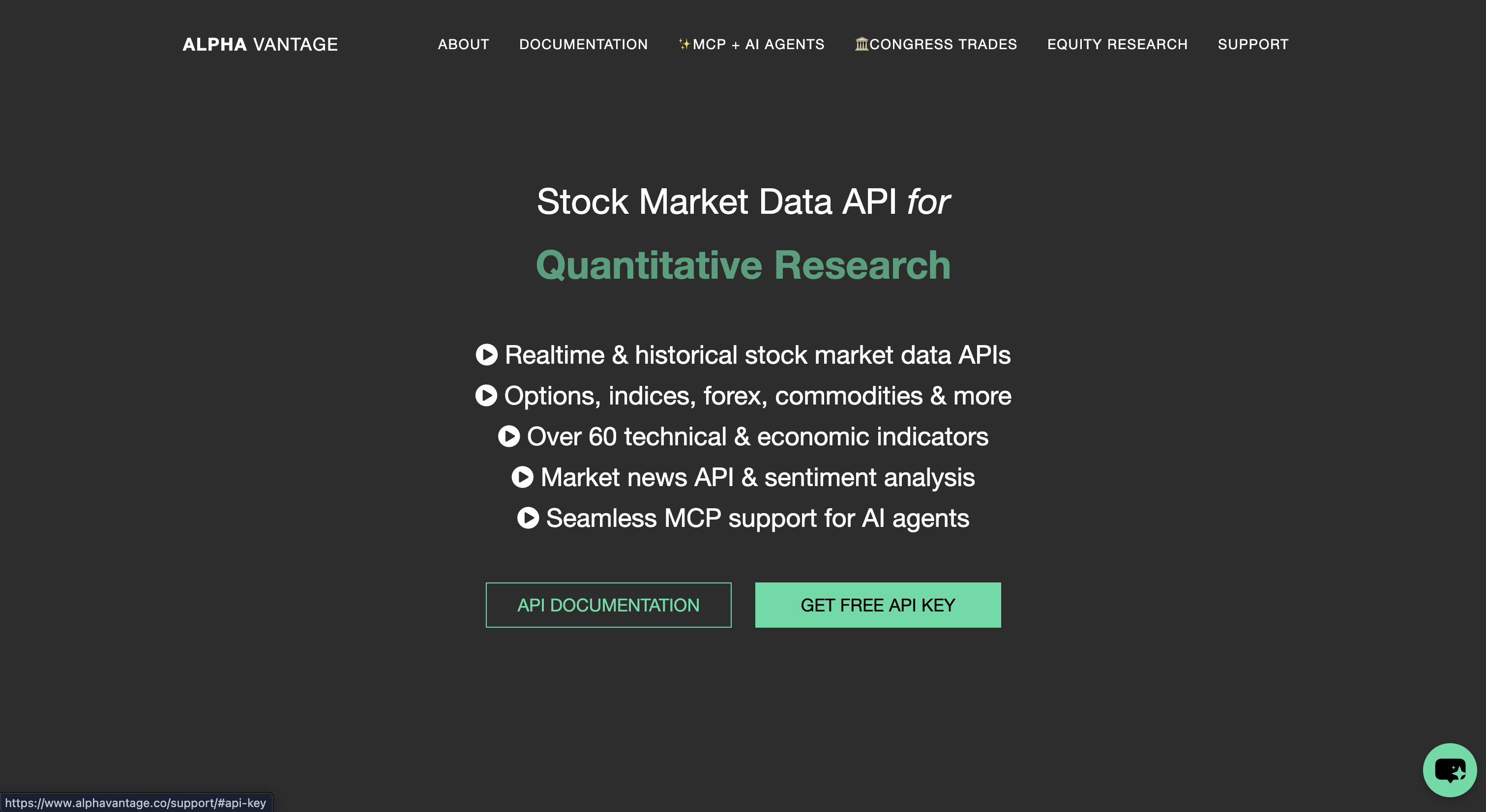
Go to alphavantage.co and click GET FREE API KEY.
-
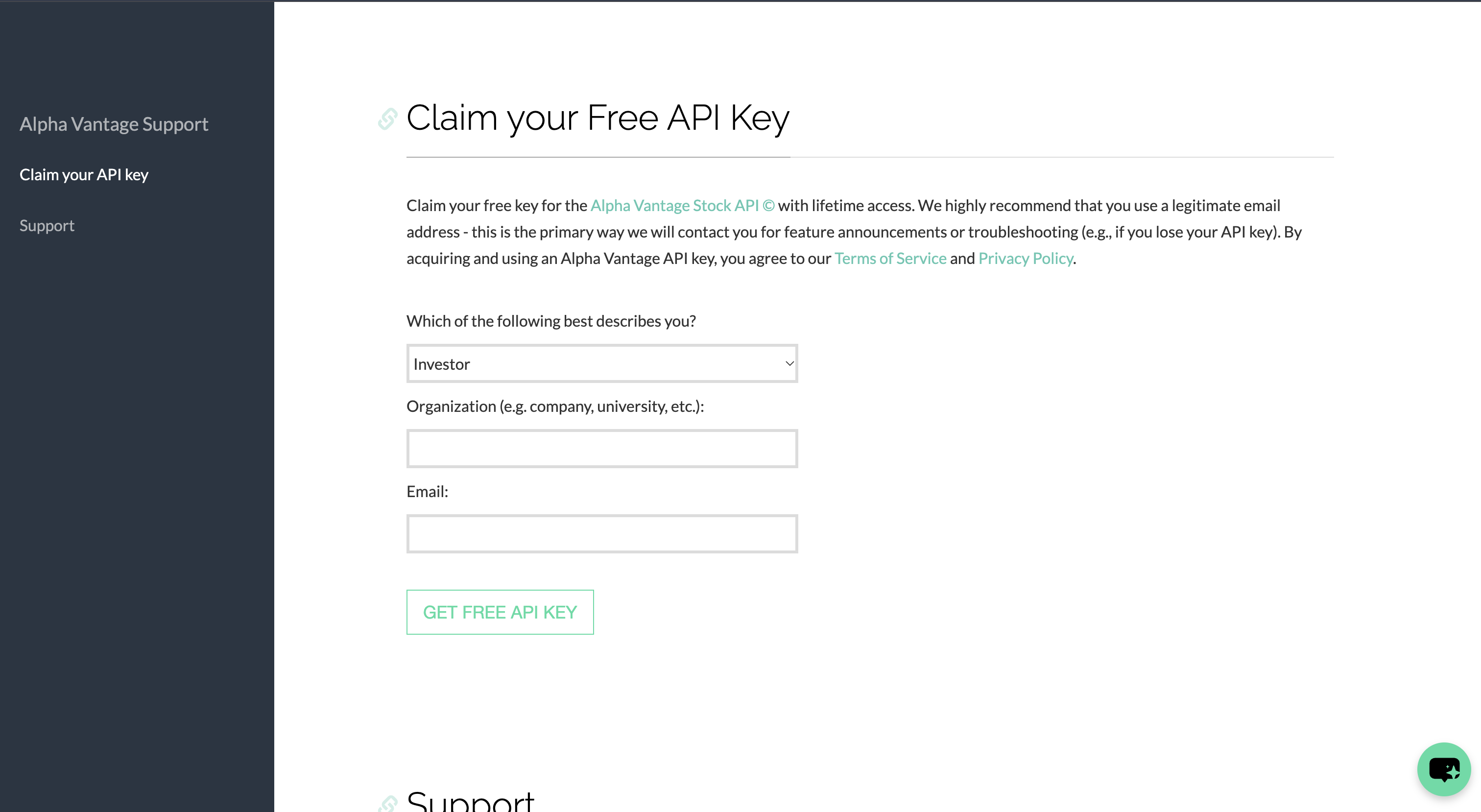
Select your role, enter your organization and email, and click GET FREE API KEY.
-
Copy the key Alpha Vantage shows you.
-
-
Create a connection in Scalekit
- In the Scalekit dashboard, go to AgentKit > Connections > Create Connection.
- Search for Alpha Vantage and click Create.
- Note the Connection name. Use it as
connection_namein your code (for example,alphavantage).
-
Add a connected account
- Open the connection, click Connected Accounts > Add account.
- Enter Your User’s ID and the API Key, then click Save.
To add the account from your backend:
await scalekit.actions.upsertConnectedAccount({connectionName: 'alphavantage',identifier: 'user_123',credentials: { api_key: 'YOUR_ALPHA_VANTAGE_KEY' },});scalekit_client.actions.upsert_connected_account(connection_name="alphavantage",identifier="user_123",credentials={"api_key": "YOUR_ALPHA_VANTAGE_KEY"},)
-
Authorize a user and make your first call
quickstart.mts import { ScalekitClient } from '@scalekit-sdk/node'import 'dotenv/config'import { createInterface } from 'node:readline/promises'const scalekit = new ScalekitClient(process.env.SCALEKIT_ENVIRONMENT_URL,process.env.SCALEKIT_CLIENT_ID,process.env.SCALEKIT_CLIENT_SECRET,)const actions = scalekit.actionsconst connector = 'alphavantage'const identifier = 'user_123'// Generate an authorization link for the userconst { link } = await actions.getAuthorizationLink({ connectionName: connector, identifier })console.log('Authorize Alpha Vantage:', link)const rl = createInterface({ input: process.stdin, output: process.stdout })await rl.question('Press Enter after authorizing...')rl.close()// Make your first callconst result = await actions.executeTool({connector,identifier,toolName: 'alphavantage_get_congress_trades',toolInput: {},})console.log(result)Terminal window npx tsx quickstart.mtsquickstart.py import osfrom scalekit import ScalekitClientfrom dotenv import load_dotenvload_dotenv()scalekit_client = ScalekitClient(env_url=os.getenv("SCALEKIT_ENVIRONMENT_URL"),client_id=os.getenv("SCALEKIT_CLIENT_ID"),client_secret=os.getenv("SCALEKIT_CLIENT_SECRET"),)actions = scalekit_client.actionsconnection_name = "alphavantage"identifier = "user_123"# Generate an authorization link for the userlink_response = actions.get_authorization_link(connection_name=connection_name,identifier=identifier,)print("Authorize Alpha Vantage:", link_response.link)input("Press Enter after authorizing...")# Make your first callresult = actions.execute_tool(tool_input={},tool_name="alphavantage_get_congress_trades",connection_name=connection_name,identifier=identifier,)print(result)Terminal window python quickstart.pyEach user opens the link once and enters their Alpha Vantage credentials there. If your app already has a user's credentials, add the account from your backend instead, as the console steps above show. See Authorize a user for the full flow and statuses.
Tools
Pass the exact name toexecute_toolalphavantage_get_adoscGet the Chaikin A/D oscillator (ADOSC) series for an equity.Read-onlyGet Chaikin A/D Oscillator
Get the Chaikin A/D oscillator (ADOSC) series for an equity. Returns Meta Data plus a Technical Analysis: ADOSC object keyed by date. Use alphavantage_get_price_volume_indicator for the underlying A/D line and OBV. Use alphavantage_get_moving_average, alphavantage_get_rsi, alphavantage_get_macd, alphavantage_get_bollinger_bands or alphavantage_get_stochastic for the other common indicators. Free keys are limited to 25 requests a day. Set datatype to csv to get CSV text instead of JSON. Alpha Vantage reports errors as HTTP 200: if the response has an `Error Message`, `Information` or `Note` key, the call failed and that key holds the reason (bad parameter, rate limit, or a premium-only function).
Inputs
intervalstringrequired- Time between data points. One of 1min, 5min, 15min, 30min, 60min, daily, weekly, monthly.one of
1min5min15min30min60mindailyweeklymonthly symbolstringrequired- Ticker symbol of the equity or ETF. Non-US listings use an exchange suffix, such as TSCO.LON. Example: IBM.
datatypestring- Output format: json (default) or csv. With csv the response is plain CSV text, returned as {"result": "<csv text>"} instead of a JSON object.one of
jsoncsv entitlementstring- Market-data entitlement for premium plans: realtime for real-time US data, delayed for 15-minute delayed data. Omit it on a free key.one of
realtimedelayed fastperiodinteger- Time period of the fast EMA. Default 3.
monthstring- Return data for one calendar month in history, format YYYY-MM. Example: 2024-01. Omit to use the default range (the most recent data).
slowperiodinteger- Time period of the slow EMA. Default 10.
alphavantage_get_balance_sheetGet annual and quarterly balance sheets for a company.Read-onlyGet Balance Sheet
Get annual and quarterly balance sheets for a company. Returns symbol, annualReports and quarterlyReports arrays of line items, normalized to GAAP and IFRS taxonomies. Use it for statement detail; use alphavantage_get_company_overview for summary ratios. Free keys are limited to 25 requests a day. Alpha Vantage reports errors as HTTP 200: if the response has an `Error Message`, `Information` or `Note` key, the call failed and that key holds the reason (bad parameter, rate limit, or a premium-only function).
Inputs
symbolstringrequired- Ticker symbol of the equity or ETF. Non-US listings use an exchange suffix, such as TSCO.LON. Example: IBM.
alphavantage_get_bollinger_bandsGet Bollinger Bands (upper, middle and lower bands) for an equity.Read-onlyGet Bollinger Bands
Get Bollinger Bands (upper, middle and lower bands) for an equity. Returns Meta Data plus a Technical Analysis: BBANDS object keyed by date with Real Upper Band, Real Middle Band and Real Lower Band. Use alphavantage_get_macd or alphavantage_get_rsi for other indicators. Free keys are limited to 25 requests a day. Set datatype to csv to get CSV text instead of JSON. Alpha Vantage reports errors as HTTP 200: if the response has an `Error Message`, `Information` or `Note` key, the call failed and that key holds the reason (bad parameter, rate limit, or a premium-only function).
Inputs
intervalstringrequired- Time between data points. One of 1min, 5min, 15min, 30min, 60min, daily, weekly, monthly.one of
1min5min15min30min60mindailyweeklymonthly series_typestringrequired- Price field the indicator is computed from: close, open, high or low.one of
closeopenhighlow symbolstringrequired- Ticker symbol of the equity or ETF. Non-US listings use an exchange suffix, such as TSCO.LON. Example: IBM.
time_periodintegerrequired- Number of data points used to calculate each value. Example: 60.
datatypestring- Output format: json (default) or csv. With csv the response is plain CSV text, returned as {"result": "<csv text>"} instead of a JSON object.one of
jsoncsv entitlementstring- Market-data entitlement for premium plans: realtime for real-time US data, delayed for 15-minute delayed data. Omit it on a free key.one of
realtimedelayed matypeinteger- Moving-average type of the middle band, 0 to 8. Default 0 (SMA).one of
012345678 monthstring- Return data for one calendar month in history, format YYYY-MM. Example: 2024-01. Omit to use the default range (the most recent data).
nbdevdninteger- Standard deviations for the lower band. Default 2.
nbdevupinteger- Standard deviations for the upper band. Default 2.
alphavantage_get_bulk_bid_ask_pricesGet realtime bid and ask prices for up to 100 US symbols in one call, across regular and extended trading hours.Read-onlyGet Bulk Bid and Ask Prices
Get realtime bid and ask prices for up to 100 US symbols in one call, across regular and extended trading hours. Returns a data array with symbol, timestamp, bid_price, bid_size, ask_price and ask_size for each symbol. Use alphavantage_get_bulk_quotes for last-trade quotes and alphavantage_get_quote for one symbol. The vendor documentation marks this as a premium function. Without a premium plan Alpha Vantage returns artificial sample data together with a `message` that says it is a premium endpoint, so check `message` before trusting the data. Set datatype to csv to get CSV text instead of JSON. Alpha Vantage reports errors as HTTP 200: if the response has an `Error Message`, `Information` or `Note` key, the call failed and that key holds the reason (bad parameter, rate limit, or a premium-only function).
Inputs
symbolstringrequired- Comma-separated ticker symbols, up to 100 (symbols beyond the first 100 are ignored). Example: MSFT,AAPL,IBM.
datatypestring- Output format: json (default) or csv. With csv the response is plain CSV text, returned as {"result": "<csv text>"} instead of a JSON object.one of
jsoncsv
alphavantage_get_bulk_quotesGet realtime quotes for up to 100 US symbols in one call.Read-onlyGet Bulk Quotes
Get realtime quotes for up to 100 US symbols in one call. Returns a data array with symbol, timestamp, open, high, low, close (the latest price), volume, previous_close, change, change_percent, extended_hours_quote, extended_hours_change and extended_hours_change_percent for each symbol. Use alphavantage_get_quote for a single symbol. The vendor documentation marks this as a premium API function (realtime US market data plan). Without a premium plan Alpha Vantage returns artificial sample data together with a `message` that says it is a premium endpoint, so check `message` before trusting the data. Set datatype to csv to get CSV text instead of JSON. Alpha Vantage reports errors as HTTP 200: if the response has an `Error Message`, `Information` or `Note` key, the call failed and that key holds the reason (bad parameter, rate limit, or a premium-only function).
Inputs
symbolstringrequired- Comma-separated ticker symbols, up to 100. Example: MSFT,AAPL,IBM.
datatypestring- Output format: json (default) or csv. With csv the response is plain CSV text, returned as {"result": "<csv text>"} instead of a JSON object.one of
jsoncsv
alphavantage_get_cash_flowGet annual and quarterly cash flow statements for a company.Read-onlyGet Cash Flow
Get annual and quarterly cash flow statements for a company. Returns symbol, annualReports and quarterlyReports arrays of line items, normalized to GAAP and IFRS taxonomies. Use it for statement detail; use alphavantage_get_company_overview for summary ratios. Free keys are limited to 25 requests a day. Alpha Vantage reports errors as HTTP 200: if the response has an `Error Message`, `Information` or `Note` key, the call failed and that key holds the reason (bad parameter, rate limit, or a premium-only function).
Inputs
symbolstringrequired- Ticker symbol of the equity or ETF. Non-US listings use an exchange suffix, such as TSCO.LON. Example: IBM.
alphavantage_get_commodity_pricesGet historical prices for a commodity: WTI or Brent crude, natural gas, copper, aluminum, wheat, corn, cotton, sugar, coffee, or the global commodities index.Read-onlyGet Commodity Prices
Get historical prices for a commodity: WTI or Brent crude, natural gas, copper, aluminum, wheat, corn, cotton, sugar, coffee, or the global commodities index. Returns name, interval, unit and a data array of date and value points. Use alphavantage_get_gold_silver_spot or alphavantage_get_gold_silver_history for gold and silver, and alphavantage_get_economic_indicator for macro series. Free keys are limited to 25 requests a day. Set datatype to csv to get CSV text instead of JSON. Alpha Vantage reports errors as HTTP 200: if the response has an `Error Message`, `Information` or `Note` key, the call failed and that key holds the reason (bad parameter, rate limit, or a premium-only function).
Inputs
commoditystringrequired- Commodity to fetch. One of WTI, BRENT, NATURAL_GAS, COPPER, ALUMINUM, WHEAT, CORN, COTTON, SUGAR, COFFEE, ALL_COMMODITIES.one of
WTIBRENTNATURAL_GASCOPPERALUMINUMWHEATCORNCOTTONSUGARCOFFEEALL_COMMODITIES datatypestring- Output format: json (default) or csv. With csv the response is plain CSV text, returned as {"result": "<csv text>"} instead of a JSON object.one of
jsoncsv intervalstring- Data frequency. WTI, BRENT and NATURAL_GAS accept daily, weekly or monthly; the others accept monthly, quarterly or annual. Default monthly.one of
dailyweeklymonthlyquarterlyannual
alphavantage_get_company_logoGet the logo of a publicly traded company in PNG and SVG formats.Read-onlyGet Company Logo
Get the logo of a publicly traded company in PNG and SVG formats. Returns symbol, logo_url_png and logo_url_svg. Use alphavantage_get_company_overview for company facts. Free keys are limited to 25 requests a day. Alpha Vantage reports errors as HTTP 200: if the response has an `Error Message`, `Information` or `Note` key, the call failed and that key holds the reason (bad parameter, rate limit, or a premium-only function).
Inputs
symbolstringrequired- Ticker symbol of the company. Non-US listings use an exchange suffix, such as TSCO.LON. Example: IBM.
alphavantage_get_company_overviewGet a company profile with key financial ratios and metrics.Read-onlyGet Company Overview
Get a company profile with key financial ratios and metrics. Returns Symbol, Name, Description, Sector, Industry, Exchange, MarketCapitalization, EBITDA, PERatio, EPS, DividendYield, 52WeekHigh, 52WeekLow and many more fields. Use it for a one-call company snapshot; use the statement tools for full financial statements. The vendor documentation marks this as a premium API function. Alpha Vantage reports errors as HTTP 200: if the response has an `Error Message`, `Information` or `Note` key, the call failed and that key holds the reason (bad parameter, rate limit, or a premium-only function).
Inputs
symbolstringrequired- Ticker symbol of the equity or ETF. Non-US listings use an exchange suffix, such as TSCO.LON. Example: IBM.
alphavantage_get_congress_tradesGet the latest and historical stock trades disclosed by US congressional representatives, for a stock symbol, a politician, or both.Read-onlyGet Congress Trades
Get the latest and historical stock trades disclosed by US congressional representatives, for a stock symbol, a politician, or both. Returns the queried symbol and bioguide_id plus a trades array with chamber, politician, party, state, symbol, asset_name, transaction_type, transaction_date, notification_date, amount_min, amount_max, owner_code and filing details. Use alphavantage_get_politician_metadata to look up a representative's bioguide ID. At least one of symbol or bioguide_id is required. Free keys are limited to 25 requests a day. Set datatype to csv to get CSV text instead of JSON. Alpha Vantage reports errors as HTTP 200: if the response has an `Error Message`, `Information` or `Note` key, the call failed and that key holds the reason (bad parameter, rate limit, or a premium-only function).
Inputs
bioguide_idstring- Bioguide ID of the politician, from alphavantage_get_politician_metadata. At least one of symbol or bioguide_id is required. Example: S000510.
datatypestring- Output format: json (default) or csv. With csv the response is plain CSV text, returned as {"result": "<csv text>"} instead of a JSON object.one of
jsoncsv symbolstring- Ticker symbol to list congressional trades for. At least one of symbol or bioguide_id is required. Example: AAPL.
alphavantage_get_crypto_dailyGet daily open, high, low, close and volume for a cryptocurrency, priced in a chosen market currency.Read-onlyGet Crypto Daily
Get daily open, high, low, close and volume for a cryptocurrency, priced in a chosen market currency. Returns Meta Data plus a Time Series (Digital Currency Daily) object keyed by date. Use alphavantage_get_crypto_monthly for monthly history and alphavantage_get_exchange_rate for the current rate. Free keys are limited to 25 requests a day. Set datatype to csv to get CSV text instead of JSON. Alpha Vantage reports errors as HTTP 200: if the response has an `Error Message`, `Information` or `Note` key, the call failed and that key holds the reason (bad parameter, rate limit, or a premium-only function).
Inputs
marketstringrequired- Market currency the prices are quoted in. Example: EUR.
symbolstringrequired- Cryptocurrency symbol. Example: BTC.
datatypestring- Output format: json (default) or csv. With csv the response is plain CSV text, returned as {"result": "<csv text>"} instead of a JSON object.one of
jsoncsv
alphavantage_get_crypto_intradayGet intraday open, high, low, close and volume for a cryptocurrency in a chosen market, updated realtime.Read-onlyGet Crypto Intraday
Get intraday open, high, low, close and volume for a cryptocurrency in a chosen market, updated realtime. Returns Meta Data plus a Time Series Crypto (<interval>) object keyed by timestamp, for example Time Series Crypto (5min). Use alphavantage_get_crypto_daily for daily history and alphavantage_get_exchange_rate for the current rate. The vendor documentation marks this as a premium function. Set datatype to csv to get CSV text instead of JSON. Alpha Vantage reports errors as HTTP 200: if the response has an `Error Message`, `Information` or `Note` key, the call failed and that key holds the reason (bad parameter, rate limit, or a premium-only function).
Inputs
intervalstringrequired- Minutes between data points. One of 1min, 5min, 15min, 30min, 60min.one of
1min5min15min30min60min marketstringrequired- Market currency the prices are quoted in. Example: USD.
symbolstringrequired- Cryptocurrency symbol. Example: ETH.
datatypestring- Output format: json (default) or csv. With csv the response is plain CSV text, returned as {"result": "<csv text>"} instead of a JSON object.one of
jsoncsv outputsizestring- How much history to return. compact is the latest 100 data points, full is the entire history (can exceed 1 MB). Default compact.one of
compactfull
alphavantage_get_crypto_monthlyGet monthly open, high, low, close and volume for a cryptocurrency, priced in a chosen market currency.Read-onlyGet Crypto Monthly
Get monthly open, high, low, close and volume for a cryptocurrency, priced in a chosen market currency. Returns Meta Data plus a Time Series (Digital Currency Monthly) object keyed by date (month-end dates for completed months; the current partial month is keyed by its latest available date). Use alphavantage_get_crypto_daily for daily history. Free keys are limited to 25 requests a day. Set datatype to csv to get CSV text instead of JSON. Alpha Vantage reports errors as HTTP 200: if the response has an `Error Message`, `Information` or `Note` key, the call failed and that key holds the reason (bad parameter, rate limit, or a premium-only function).
Inputs
marketstringrequired- Market currency the prices are quoted in. Example: EUR.
symbolstringrequired- Cryptocurrency symbol. Example: BTC.
datatypestring- Output format: json (default) or csv. With csv the response is plain CSV text, returned as {"result": "<csv text>"} instead of a JSON object.one of
jsoncsv
alphavantage_get_crypto_weeklyGet weekly open, high, low, close and volume for a cryptocurrency, priced in a chosen market currency and in USD.Read-onlyGet Crypto Weekly
Get weekly open, high, low, close and volume for a cryptocurrency, priced in a chosen market currency and in USD. Returns Meta Data plus a Time Series (Digital Currency Weekly) object keyed by week. Use alphavantage_get_crypto_daily or alphavantage_get_crypto_monthly for other resolutions. Free keys are limited to 25 requests a day. Set datatype to csv to get CSV text instead of JSON. Alpha Vantage reports errors as HTTP 200: if the response has an `Error Message`, `Information` or `Note` key, the call failed and that key holds the reason (bad parameter, rate limit, or a premium-only function).
Inputs
marketstringrequired- Market currency the prices are quoted in. Example: EUR.
symbolstringrequired- Cryptocurrency symbol. Example: BTC.
datatypestring- Output format: json (default) or csv. With csv the response is plain CSV text, returned as {"result": "<csv text>"} instead of a JSON object.one of
jsoncsv
alphavantage_get_daily_adjusted_time_seriesGet daily open, high, low, close, adjusted close, volume, dividend amount and split coefficient for an equity.Read-onlyGet Daily Adjusted Time Series
Get daily open, high, low, close, adjusted close, volume, dividend amount and split coefficient for an equity. Returns Meta Data plus a Time Series (Daily) object keyed by date; open, high, low, close and volume are raw as-traded values and the adjusted close is adjusted for splits and dividends. Use alphavantage_get_daily_time_series when you only need raw prices. The vendor documentation marks this as a premium API function. outputsize=full is premium-only. Set datatype to csv to get CSV text instead of JSON. Alpha Vantage reports errors as HTTP 200: if the response has an `Error Message`, `Information` or `Note` key, the call failed and that key holds the reason (bad parameter, rate limit, or a premium-only function).
Inputs
symbolstringrequired- Ticker symbol of the equity or ETF. Non-US listings use an exchange suffix, such as TSCO.LON. Example: IBM.
datatypestring- Output format: json (default) or csv. With csv the response is plain CSV text, returned as {"result": "<csv text>"} instead of a JSON object.one of
jsoncsv entitlementstring- Market-data entitlement for premium plans: realtime for real-time US data, delayed for 15-minute delayed data. Omit it on a free key.one of
realtimedelayed outputsizestring- How much history to return. compact is the latest 100 data points, full is the entire history (can exceed 1 MB). Default compact.one of
compactfull
alphavantage_get_daily_time_seriesGet raw daily open, high, low, close and volume for an equity over its history.Read-onlyGet Daily Time Series
Get raw daily open, high, low, close and volume for an equity over its history. Returns Meta Data plus a Time Series (Daily) object keyed by date; compact is the latest 100 trading days, full is the whole history. Use alphavantage_get_daily_adjusted_time_series for adjusted close, dividends and split factors, and alphavantage_get_quote for only the latest price. outputsize=full is premium-only. Free keys are limited to 25 requests a day. Set datatype to csv to get CSV text instead of JSON. Alpha Vantage reports errors as HTTP 200: if the response has an `Error Message`, `Information` or `Note` key, the call failed and that key holds the reason (bad parameter, rate limit, or a premium-only function).
Inputs
symbolstringrequired- Ticker symbol of the equity or ETF. Non-US listings use an exchange suffix, such as TSCO.LON. Example: IBM.
datatypestring- Output format: json (default) or csv. With csv the response is plain CSV text, returned as {"result": "<csv text>"} instead of a JSON object.one of
jsoncsv outputsizestring- How much history to return. compact is the latest 100 data points, full is the entire history (can exceed 1 MB). Default compact.one of
compactfull
alphavantage_get_dividendsGet historical and declared dividend distributions for a company.Read-onlyGet Dividends
Get historical and declared dividend distributions for a company. Returns symbol and a data array with ex-dividend date, declaration, record and payment dates, and amount. Use alphavantage_get_splits for stock splits. Free keys are limited to 25 requests a day. Set datatype to csv to get CSV text instead of JSON. Alpha Vantage reports errors as HTTP 200: if the response has an `Error Message`, `Information` or `Note` key, the call failed and that key holds the reason (bad parameter, rate limit, or a premium-only function).
Inputs
symbolstringrequired- Ticker symbol of the equity or ETF. Non-US listings use an exchange suffix, such as TSCO.LON. Example: IBM.
datatypestring- Output format: json (default) or csv. With csv the response is plain CSV text, returned as {"result": "<csv text>"} instead of a JSON object.one of
jsoncsv
alphavantage_get_earningsGet annual and quarterly earnings per share for a company; quarterly entries add analyst estimates and surprises.Read-onlyGet Earnings
Get annual and quarterly earnings per share for a company; quarterly entries add analyst estimates and surprises. Returns symbol, annualEarnings (fiscalDateEnding, reportedEPS) and quarterlyEarnings (fiscalDateEnding, reportedDate, reportedEPS, estimatedEPS, surprise, surprisePercentage, reportTime). Use alphavantage_get_earnings_estimates for forward-looking analyst estimates. Free keys are limited to 25 requests a day. Alpha Vantage reports errors as HTTP 200: if the response has an `Error Message`, `Information` or `Note` key, the call failed and that key holds the reason (bad parameter, rate limit, or a premium-only function).
Inputs
symbolstringrequired- Ticker symbol of the equity or ETF. Non-US listings use an exchange suffix, such as TSCO.LON. Example: IBM.
alphavantage_get_earnings_calendarList company earnings expected in the next 3, 6 or 12 months, for one symbol or all companies.Read-onlyGet Earnings Calendar
List company earnings expected in the next 3, 6 or 12 months, for one symbol or all companies. Returns CSV text (a header row, then one row per report with symbol, name, report date, fiscal date ending, estimate and currency), not JSON. Use alphavantage_get_earnings for past reported EPS and alphavantage_get_earnings_estimates for analyst estimates. Free keys are limited to 25 requests a day. A refused or failed call does not return an error object: the calendars return the header row followed by the single row `I,n,f,o,r,m,a`, and listing status returns `{}`; treat either as a failed call. Alpha Vantage reports errors as HTTP 200: if the response has an `Error Message`, `Information` or `Note` key, the call failed and that key holds the reason (bad parameter, rate limit, or a premium-only function).
Inputs
horizonstring- Look-ahead window: 3month (default), 6month or 12month.one of
3month6month12month symbolstring- Only return earnings for this ticker. Omit to return every scheduled report. Example: IBM.
alphavantage_get_earnings_call_transcriptGet the full transcript of a company's quarterly earnings call, with sentiment for each speaker segment.Read-onlyGet Earnings Call Transcript
Get the full transcript of a company's quarterly earnings call, with sentiment for each speaker segment. Returns symbol, quarter and a transcript array of speaker, title, content and sentiment entries (tens of KB). Use alphavantage_get_news_sentiment for news articles and alphavantage_get_earnings for reported EPS. Free keys are limited to 25 requests a day. Alpha Vantage reports errors as HTTP 200: if the response has an `Error Message`, `Information` or `Note` key, the call failed and that key holds the reason (bad parameter, rate limit, or a premium-only function).
Inputs
quarterstringrequired- Fiscal quarter, format YYYYQn where n is 1 to 4. Example: 2024Q1.
symbolstringrequired- Ticker symbol of the equity or ETF. Non-US listings use an exchange suffix, such as TSCO.LON. Example: IBM.
alphavantage_get_earnings_estimatesGet analyst estimates for a company's earnings per share and revenue.Read-onlyGet Earnings Estimates
Get analyst estimates for a company's earnings per share and revenue. Returns symbol and estimates arrays with average, high and low figures, analyst counts and revisions for upcoming periods. Use alphavantage_get_earnings for reported EPS and surprises. Free keys are limited to 25 requests a day. Alpha Vantage reports errors as HTTP 200: if the response has an `Error Message`, `Information` or `Note` key, the call failed and that key holds the reason (bad parameter, rate limit, or a premium-only function).
Inputs
symbolstringrequired- Ticker symbol of the equity or ETF. Non-US listings use an exchange suffix, such as TSCO.LON. Example: IBM.
alphavantage_get_economic_indicatorGet a US economic indicator time series: real GDP, GDP per capita, federal funds rate, CPI, inflation, retail sales, durable goods orders, unemployment rate or nonfarm payroll.Read-onlyGet Economic Indicator
Get a US economic indicator time series: real GDP, GDP per capita, federal funds rate, CPI, inflation, retail sales, durable goods orders, unemployment rate or nonfarm payroll. Returns name, interval, unit and a data array of date and value points. Use alphavantage_get_treasury_yield for treasury yields and alphavantage_get_commodity_prices for commodities. Free keys are limited to 25 requests a day. Set datatype to csv to get CSV text instead of JSON. Alpha Vantage reports errors as HTTP 200: if the response has an `Error Message`, `Information` or `Note` key, the call failed and that key holds the reason (bad parameter, rate limit, or a premium-only function).
Inputs
indicatorstringrequired- Economic indicator to fetch. One of REAL_GDP, REAL_GDP_PER_CAPITA, FEDERAL_FUNDS_RATE, CPI, INFLATION, RETAIL_SALES, DURABLES, UNEMPLOYMENT, NONFARM_PAYROLL.one of
REAL_GDPREAL_GDP_PER_CAPITAFEDERAL_FUNDS_RATECPIINFLATIONRETAIL_SALESDURABLESUNEMPLOYMENTNONFARM_PAYROLL datatypestring- Output format: json (default) or csv. With csv the response is plain CSV text, returned as {"result": "<csv text>"} instead of a JSON object.one of
jsoncsv intervalstring- Data frequency, only for some indicators: REAL_GDP annual (default) or quarterly; FEDERAL_FUNDS_RATE daily, weekly or monthly (default); CPI monthly (default) or semiannual. Other indicators ignore it.one of
annualquarterlydailyweeklymonthlysemiannual
alphavantage_get_etf_profileGet key facts about an ETF: net assets, expense ratio, yield, sector weights and top holdings.Read-onlyGet ETF Profile
Get key facts about an ETF: net assets, expense ratio, yield, sector weights and top holdings. Returns net_assets, net_expense_ratio, portfolio_turnover, dividend_yield, inception_date, last_updated, leveraged, a sectors array (sector, weight) and a holdings array (symbol, description, weight). Use alphavantage_get_company_overview for operating companies. Free keys are limited to 25 requests a day. Alpha Vantage reports errors as HTTP 200: if the response has an `Error Message`, `Information` or `Note` key, the call failed and that key holds the reason (bad parameter, rate limit, or a premium-only function).
Inputs
symbolstringrequired- Ticker symbol of the ETF. Non-US listings use an exchange suffix, such as TSCO.LON. Example: QQQ.
alphavantage_get_exchange_rateGet the realtime exchange rate for any pair of fiat currencies or cryptocurrencies.Read-onlyGet Exchange Rate
Get the realtime exchange rate for any pair of fiat currencies or cryptocurrencies. Returns a Realtime Currency Exchange Rate object with the rate, bid and ask, last refresh time and timezone. Use alphavantage_get_fx_daily or alphavantage_get_fx_monthly for fiat rate history, and the crypto time series tools for crypto history. Free keys are limited to 25 requests a day. Alpha Vantage reports errors as HTTP 200: if the response has an `Error Message`, `Information` or `Note` key, the call failed and that key holds the reason (bad parameter, rate limit, or a premium-only function).
Inputs
from_currencystringrequired- Currency to convert from, as a 3-letter fiat code or a crypto symbol. Example: USD or BTC.
to_currencystringrequired- Currency to convert to, as a 3-letter fiat code or a crypto symbol. Example: JPY or EUR.
alphavantage_get_fixed_window_analyticsCompute advanced analytics (returns, variance, correlation and more) for one or more symbols over a fixed date range.Read-onlyGet Fixed Window Analytics
Compute advanced analytics (returns, variance, correlation and more) for one or more symbols over a fixed date range. Returns meta_data and payload with RETURNS_CALCULATIONS keyed by the requested calculations, per symbol and, for correlation or covariance, per pair. Use it for portfolio statistics; use the time series tools for raw prices. Up to 5 symbols on a free key and up to 50 on a premium plan. Free keys are limited to 25 requests a day. Alpha Vantage reports errors as HTTP 200: if the response has an `Error Message`, `Information` or `Note` key, the call failed and that key holds the reason (bad parameter, rate limit, or a premium-only function).
Inputs
CALCULATIONSstringrequired- Comma-separated calculations, such as MEAN, MEDIAN, CUMULATIVE_RETURN, VARIANCE, STDDEV, MAX_DRAWDOWN, HISTOGRAM, AUTOCORRELATION, COVARIANCE, CORRELATION. Example: MEAN,STDDEV,CORRELATION.
INTERVALstringrequired- Time between data points. One of 1min, 5min, 15min, 30min, 60min, DAILY, WEEKLY, MONTHLY.one of
1min5min15min30min60minDAILYWEEKLYMONTHLY RANGEarrayrequired- Date range as one or two values. Two ISO dates give a window, such as ["2023-07-01", "2023-08-31"]; one value may be a period like full, 30day, 3month or 1year, and for intraday intervals also 30minute or 6hour. Maximum two values. Intraday intervals reject long windows: a two-month window with INTERVAL=1min was refused with "RANGE" is too large for intra-day data calculation!, so keep intraday windows short.
SYMBOLSstringrequired- Comma-separated ticker symbols. Example: AAPL,MSFT,IBM.
OHLCstring- Price field to use: open, high, low or close. Default close.one of
openhighlowclose
alphavantage_get_fx_dailyGet daily open, high, low and close rates for a fiat currency pair.Read-onlyGet FX Daily
Get daily open, high, low and close rates for a fiat currency pair. Returns Meta Data plus a Time Series FX (Daily) object keyed by date. Use alphavantage_get_exchange_rate for the current rate and alphavantage_get_fx_monthly for monthly history. Free keys are limited to 25 requests a day. Set datatype to csv to get CSV text instead of JSON. Alpha Vantage reports errors as HTTP 200: if the response has an `Error Message`, `Information` or `Note` key, the call failed and that key holds the reason (bad parameter, rate limit, or a premium-only function).
Inputs
from_symbolstringrequired- Base currency as a 3-letter code. Example: EUR.
to_symbolstringrequired- Quote currency as a 3-letter code. Example: USD.
datatypestring- Output format: json (default) or csv. With csv the response is plain CSV text, returned as {"result": "<csv text>"} instead of a JSON object.one of
jsoncsv outputsizestring- How much history to return. compact is the latest 100 data points, full is the entire history (can exceed 1 MB). Default compact.one of
compactfull
alphavantage_get_fx_intradayGet intraday open, high, low and close rates for a fiat currency pair, updated realtime.Read-onlyGet FX Intraday
Get intraday open, high, low and close rates for a fiat currency pair, updated realtime. Returns Meta Data plus a Time Series FX (<interval>) object keyed by timestamp, for example Time Series FX (5min). Use alphavantage_get_fx_daily for daily history and alphavantage_get_exchange_rate for the current rate. The vendor documentation marks this as a premium function. Set datatype to csv to get CSV text instead of JSON. Alpha Vantage reports errors as HTTP 200: if the response has an `Error Message`, `Information` or `Note` key, the call failed and that key holds the reason (bad parameter, rate limit, or a premium-only function).
Inputs
from_symbolstringrequired- Base currency as a 3-letter code. Example: EUR.
intervalstringrequired- Minutes between data points. One of 1min, 5min, 15min, 30min, 60min.one of
1min5min15min30min60min to_symbolstringrequired- Quote currency as a 3-letter code. Example: USD.
datatypestring- Output format: json (default) or csv. With csv the response is plain CSV text, returned as {"result": "<csv text>"} instead of a JSON object.one of
jsoncsv outputsizestring- How much history to return. compact is the latest 100 data points, full is the entire history (can exceed 1 MB). Default compact.one of
compactfull
alphavantage_get_fx_monthlyGet monthly open, high, low and close rates for a fiat currency pair.Read-onlyGet FX Monthly
Get monthly open, high, low and close rates for a fiat currency pair. Returns Meta Data plus a Time Series FX (Monthly) object keyed by date (the last trading day of each completed month; the current partial month is keyed by its latest available date). Use alphavantage_get_fx_daily for daily history. Free keys are limited to 25 requests a day. Set datatype to csv to get CSV text instead of JSON. Alpha Vantage reports errors as HTTP 200: if the response has an `Error Message`, `Information` or `Note` key, the call failed and that key holds the reason (bad parameter, rate limit, or a premium-only function).
Inputs
from_symbolstringrequired- Base currency as a 3-letter code. Example: EUR.
to_symbolstringrequired- Quote currency as a 3-letter code. Example: USD.
datatypestring- Output format: json (default) or csv. With csv the response is plain CSV text, returned as {"result": "<csv text>"} instead of a JSON object.one of
jsoncsv
alphavantage_get_fx_weeklyGet weekly open, high, low and close rates for a fiat currency pair, with the latest point covering the current week.Read-onlyGet FX Weekly
Get weekly open, high, low and close rates for a fiat currency pair, with the latest point covering the current week. Returns Meta Data plus a Time Series FX (Weekly) object keyed by week. Use alphavantage_get_fx_daily or alphavantage_get_fx_monthly for other resolutions. Free keys are limited to 25 requests a day. Set datatype to csv to get CSV text instead of JSON. Alpha Vantage reports errors as HTTP 200: if the response has an `Error Message`, `Information` or `Note` key, the call failed and that key holds the reason (bad parameter, rate limit, or a premium-only function).
Inputs
from_symbolstringrequired- Base currency as a 3-letter code. Example: EUR.
to_symbolstringrequired- Quote currency as a 3-letter code. Example: USD.
datatypestring- Output format: json (default) or csv. With csv the response is plain CSV text, returned as {"result": "<csv text>"} instead of a JSON object.one of
jsoncsv
alphavantage_get_gold_silver_historyGet historical prices for gold or silver at a daily, weekly or monthly interval.Read-onlyGet Gold and Silver Price History
Get historical prices for gold or silver at a daily, weekly or monthly interval. Returns the pair name (`nominal`, e.g. XAGUSD) and a `data` array of date and price points. Use alphavantage_get_gold_silver_spot for the live price. Free keys are limited to 25 requests a day. Alpha Vantage reports errors as HTTP 200: if the response has an `Error Message`, `Information` or `Note` key, the call failed and that key holds the reason (bad parameter, rate limit, or a premium-only function).
Inputs
intervalstringrequired- Data frequency: daily, weekly or monthly.one of
dailyweeklymonthly symbolstringrequired- Metal to price: GOLD or XAU for gold, SILVER or XAG for silver.one of
GOLDXAUSILVERXAG
alphavantage_get_gold_silver_spotGet the live spot price of gold or silver.Read-onlyGet Gold and Silver Spot Price
Get the live spot price of gold or silver. Returns the pair name (`nominal`, e.g. XAGUSD), the spot `price` and a `timestamp`. Use alphavantage_get_gold_silver_history for historical prices. Free keys are limited to 25 requests a day. Alpha Vantage reports errors as HTTP 200: if the response has an `Error Message`, `Information` or `Note` key, the call failed and that key holds the reason (bad parameter, rate limit, or a premium-only function).
Inputs
symbolstringrequired- Metal to price: GOLD or XAU for gold, SILVER or XAG for silver.one of
GOLDXAUSILVERXAG
alphavantage_get_hilbert_transform_indicatorGet a Hilbert Transform indicator series for an equity: instantaneous trendline, sine wave, trend versus cycle mode, dominant cycle period, dominant cycle phase or phasor components.Read-onlyGet Hilbert Transform Indicator
Get a Hilbert Transform indicator series for an equity: instantaneous trendline, sine wave, trend versus cycle mode, dominant cycle period, dominant cycle phase or phasor components. Returns Meta Data plus a Technical Analysis object keyed by date, with the chosen indicator's values. Use alphavantage_get_moving_average, alphavantage_get_rsi, alphavantage_get_macd, alphavantage_get_bollinger_bands or alphavantage_get_stochastic for the other common indicators. Free keys are limited to 25 requests a day. Set datatype to csv to get CSV text instead of JSON. Alpha Vantage reports errors as HTTP 200: if the response has an `Error Message`, `Information` or `Note` key, the call failed and that key holds the reason (bad parameter, rate limit, or a premium-only function).
Inputs
indicatorstringrequired- Indicator to compute. One of HT_TRENDLINE, HT_SINE, HT_TRENDMODE, HT_DCPERIOD, HT_DCPHASE, HT_PHASOR.one of
HT_TRENDLINEHT_SINEHT_TRENDMODEHT_DCPERIODHT_DCPHASEHT_PHASOR intervalstringrequired- Time between data points. One of 1min, 5min, 15min, 30min, 60min, daily, weekly, monthly.one of
1min5min15min30min60mindailyweeklymonthly series_typestringrequired- Price field the indicator is computed from: close, open, high or low.one of
closeopenhighlow symbolstringrequired- Ticker symbol of the equity or ETF. Non-US listings use an exchange suffix, such as TSCO.LON. Example: IBM.
datatypestring- Output format: json (default) or csv. With csv the response is plain CSV text, returned as {"result": "<csv text>"} instead of a JSON object.one of
jsoncsv entitlementstring- Market-data entitlement for premium plans: realtime for real-time US data, delayed for 15-minute delayed data. Omit it on a free key.one of
realtimedelayed monthstring- Return data for one calendar month in history, format YYYY-MM. Example: 2024-01. Omit to use the default range (the most recent data).
alphavantage_get_historical_optionsGet the historical US options chain for a symbol on a given date, covering 15+ years, with implied volatility and Greeks.Read-onlyGet Historical Options
Get the historical US options chain for a symbol on a given date, covering 15+ years, with implied volatility and Greeks. Returns a data array of that date's contracts (contractID, symbol, expiration, strike, type, last, mark, bid, bid_size, ask, ask_size, volume, open_interest, date) sorted by expiration and then strike, with implied volatility and Greeks. Use alphavantage_get_options_chain for the live chain and alphavantage_get_options_ratio for historical ratios. The vendor documentation marks this as a premium function. Set datatype to csv to get CSV text instead of JSON. Alpha Vantage reports errors as HTTP 200: if the response has an `Error Message`, `Information` or `Note` key, the call failed and that key holds the reason (bad parameter, rate limit, or a premium-only function).
Inputs
symbolstringrequired- Ticker symbol of the equity or ETF. Non-US listings use an exchange suffix, such as TSCO.LON. Example: IBM.
contractstring- US options contract ID to return. Omit to return the whole option chain for the symbol. Example: IBM270115C00200000.
datatypestring- Output format: json (default) or csv. With csv the response is plain CSV text, returned as {"result": "<csv text>"} instead of a JSON object.one of
jsoncsv datestring- Trading date to return, format YYYY-MM-DD; any date after 2008-01-01 is accepted. Omit for the previous trading session. Example: 2024-05-31.
expirationstring- Only return contracts expiring on this date, format YYYY-MM-DD. Omit to return all expirations. Example: 2027-01-15.
alphavantage_get_income_statementGet annual and quarterly income statements for a company.Read-onlyGet Income Statement
Get annual and quarterly income statements for a company. Returns symbol, annualReports and quarterlyReports arrays of line items, normalized to GAAP and IFRS taxonomies. Use it for statement detail; use alphavantage_get_company_overview for summary ratios. Free keys are limited to 25 requests a day. Alpha Vantage reports errors as HTTP 200: if the response has an `Error Message`, `Information` or `Note` key, the call failed and that key holds the reason (bad parameter, rate limit, or a premium-only function).
Inputs
symbolstringrequired- Ticker symbol of the equity or ETF. Non-US listings use an exchange suffix, such as TSCO.LON. Example: IBM.
alphavantage_get_index_dataGet decades of daily, weekly or monthly open, high, low and close data for a major market index, such as the Dow Jones Industrial Average (DJI).Read-onlyGet Index Data
Get decades of daily, weekly or monthly open, high, low and close data for a major market index, such as the Dow Jones Industrial Average (DJI). Returns the index symbol, name and interval plus a data array of date, open, high, low and close values. Use alphavantage_list_index_catalog to find valid index symbols, and the equity time series tools for individual stocks. The vendor documentation marks this as a premium function. Set datatype to csv to get CSV text instead of JSON. Alpha Vantage reports errors as HTTP 200: if the response has an `Error Message`, `Information` or `Note` key, the call failed and that key holds the reason (bad parameter, rate limit, or a premium-only function).
Inputs
intervalstringrequired- Data frequency: daily, weekly or monthly.one of
dailyweeklymonthly symbolstringrequired- Index symbol. Use alphavantage_list_index_catalog for the full list. Example: DJI.
datatypestring- Output format: json (default) or csv. With csv the response is plain CSV text, returned as {"result": "<csv text>"} instead of a JSON object.one of
jsoncsv
alphavantage_get_insider_transactionsGet the latest and historical insider transactions for a company, including open-market purchases and sales as well as equity grants, option exercises, tax withholdings and gifts.Read-onlyGet Insider Transactions
Get the latest and historical insider transactions for a company, including open-market purchases and sales as well as equity grants, option exercises, tax withholdings and gifts. Returns a data array with transaction date, executive name and title, security type, acquisition_or_disposal transaction-type code (A, F, G, I, J, M, P or S; only P and S are open-market or private purchases and sales), shares and share price. Use it to track insider activity; use alphavantage_get_news_sentiment for news. Free keys are limited to 25 requests a day. Alpha Vantage reports errors as HTTP 200: if the response has an `Error Message`, `Information` or `Note` key, the call failed and that key holds the reason (bad parameter, rate limit, or a premium-only function).
Inputs
symbolstringrequired- Ticker symbol of the equity or ETF. Non-US listings use an exchange suffix, such as TSCO.LON. Example: IBM.
fromstring- Only return transactions on or after this date, format YYYY-MM-DD. Example: 2024-01-01.
alphavantage_get_institutional_holdingsGet the institutional ownership and holdings for an equity.Read-onlyGet Institutional Holdings
Get the institutional ownership and holdings for an equity. Returns symbol and summary totals (total_institutional_holders, total_institutional_shares, counts and shares of holders that increased, decreased or kept their holdings, total_institutional_ownership_percentage) plus a holdings array with holder_name, shares_held, shares_changed, shares_changed_percentage, change_type and last_reported. Use alphavantage_get_insider_transactions for insider buys and sells and alphavantage_get_shares_outstanding for share counts. Free keys are limited to 25 requests a day. Alpha Vantage reports errors as HTTP 200: if the response has an `Error Message`, `Information` or `Note` key, the call failed and that key holds the reason (bad parameter, rate limit, or a premium-only function).
Inputs
symbolstringrequired- Ticker symbol of the equity or ETF. Non-US listings use an exchange suffix, such as TSCO.LON. Example: IBM.
alphavantage_get_intraday_time_seriesGet intraday open, high, low, close and volume bars for an equity, at 1 to 60 minute intervals.Read-onlyGet Intraday Time Series
Get intraday open, high, low, close and volume bars for an equity, at 1 to 60 minute intervals. Returns Meta Data plus a Time Series (<interval>) object keyed by timestamp, for example Time Series (5min); compact is the latest 100 bars, full is the trailing 30 days or the chosen month. Use alphavantage_get_daily_time_series for daily bars and alphavantage_get_rsi or alphavantage_get_macd for indicators. The vendor documentation marks this as a premium endpoint (realtime, delayed and historical intraday data). Free keys are limited to 25 requests a day. Set datatype to csv to get CSV text instead of JSON. Alpha Vantage reports errors as HTTP 200: if the response has an `Error Message`, `Information` or `Note` key, the call failed and that key holds the reason (bad parameter, rate limit, or a premium-only function).
Inputs
intervalstringrequired- Minutes between bars. One of 1min, 5min, 15min, 30min, 60min.one of
1min5min15min30min60min symbolstringrequired- Ticker symbol of the equity or ETF. Non-US listings use an exchange suffix, such as TSCO.LON. Example: IBM.
adjustedboolean- Whether bars are adjusted for splits and dividends. Default true.
datatypestring- Output format: json (default) or csv. With csv the response is plain CSV text, returned as {"result": "<csv text>"} instead of a JSON object.one of
jsoncsv entitlementstring- Market-data entitlement for premium plans: realtime for real-time US data, delayed for 15-minute delayed data. Omit it on a free key.one of
realtimedelayed extended_hoursboolean- Whether to include pre-market and after-hours bars. Default true.
monthstring- Return data for one calendar month in history, format YYYY-MM. Example: 2024-01. Omit to use the default range (the most recent data).
outputsizestring- How much data to return. compact is the latest 100 data points; full is the trailing 30 days of intraday data, or the whole chosen month when month is set (can exceed 1 MB). Default compact.one of
compactfull
alphavantage_get_ipo_calendarList the IPOs expected in the next 3 months.Read-onlyGet IPO Calendar
List the IPOs expected in the next 3 months. Returns CSV text (a header row, then one row per IPO), not JSON. Use alphavantage_get_earnings_calendar for expected earnings reports. Free keys are limited to 25 requests a day. A refused or failed call does not return an error object: the calendars return the header row followed by the single row `I,n,f,o,r,m,a`, and listing status returns `{}`; treat either as a failed call. Alpha Vantage reports errors as HTTP 200: if the response has an `Error Message`, `Information` or `Note` key, the call failed and that key holds the reason (bad parameter, rate limit, or a premium-only function).
Inputs
This tool takes no inputs.
alphavantage_get_macdGet the Moving Average Convergence Divergence (MACD) series for an equity.Read-onlyGet MACD
Get the Moving Average Convergence Divergence (MACD) series for an equity. Returns Meta Data plus a Technical Analysis: MACD object keyed by date with MACD, MACD_Signal and MACD_Hist values. Use alphavantage_get_rsi for momentum and alphavantage_get_bollinger_bands for volatility bands. The vendor documentation marks this as a premium API function. Set datatype to csv to get CSV text instead of JSON. Alpha Vantage reports errors as HTTP 200: if the response has an `Error Message`, `Information` or `Note` key, the call failed and that key holds the reason (bad parameter, rate limit, or a premium-only function).
Inputs
intervalstringrequired- Time between data points. One of 1min, 5min, 15min, 30min, 60min, daily, weekly, monthly.one of
1min5min15min30min60mindailyweeklymonthly series_typestringrequired- Price field the indicator is computed from: close, open, high or low.one of
closeopenhighlow symbolstringrequired- Ticker symbol of the equity or ETF. Non-US listings use an exchange suffix, such as TSCO.LON. Example: IBM.
datatypestring- Output format: json (default) or csv. With csv the response is plain CSV text, returned as {"result": "<csv text>"} instead of a JSON object.one of
jsoncsv entitlementstring- Market-data entitlement for premium plans: realtime for real-time US data, delayed for 15-minute delayed data. Omit it on a free key.one of
realtimedelayed fastperiodinteger- Fast moving average period. Default 12.
monthstring- Return data for one calendar month in history, format YYYY-MM. Example: 2024-01. Omit to use the default range (the most recent data).
signalperiodinteger- Signal line period. Default 9.
slowperiodinteger- Slow moving average period. Default 26.
alphavantage_get_macdextGet the MACD series with a controllable moving-average type (MACDEXT) for an equity.Read-onlyGet MACDEXT
Get the MACD series with a controllable moving-average type (MACDEXT) for an equity. Returns Meta Data plus a Technical Analysis: MACDEXT object keyed by date with MACD, MACD_Signal and MACD_Hist values. Use alphavantage_get_macd for the standard MACD. Use alphavantage_get_moving_average, alphavantage_get_rsi, alphavantage_get_macd, alphavantage_get_bollinger_bands or alphavantage_get_stochastic for the other common indicators. Free keys are limited to 25 requests a day. Set datatype to csv to get CSV text instead of JSON. Alpha Vantage reports errors as HTTP 200: if the response has an `Error Message`, `Information` or `Note` key, the call failed and that key holds the reason (bad parameter, rate limit, or a premium-only function).
Inputs
intervalstringrequired- Time between data points. One of 1min, 5min, 15min, 30min, 60min, daily, weekly, monthly.one of
1min5min15min30min60mindailyweeklymonthly series_typestringrequired- Price field the indicator is computed from: close, open, high or low.one of
closeopenhighlow symbolstringrequired- Ticker symbol of the equity or ETF. Non-US listings use an exchange suffix, such as TSCO.LON. Example: IBM.
datatypestring- Output format: json (default) or csv. With csv the response is plain CSV text, returned as {"result": "<csv text>"} instead of a JSON object.one of
jsoncsv entitlementstring- Market-data entitlement for premium plans: realtime for real-time US data, delayed for 15-minute delayed data. Omit it on a free key.one of
realtimedelayed fastmatypeinteger- Moving-average type of the fast average, 0 to 8. Default 0 (SMA).one of
012345678 fastperiodinteger- Fast moving average period. Default 12.
monthstring- Return data for one calendar month in history, format YYYY-MM. Example: 2024-01. Omit to use the default range (the most recent data).
signalmatypeinteger- Moving-average type of the signal line, 0 to 8. Default 0 (SMA).one of
012345678 signalperiodinteger- Signal line period. Default 9.
slowmatypeinteger- Moving-average type of the slow average, 0 to 8. Default 0 (SMA).one of
012345678 slowperiodinteger- Slow moving average period. Default 26.
alphavantage_get_mamaGet the MESA Adaptive Moving Average (MAMA) and FAMA series for an equity.Read-onlyGet MAMA
Get the MESA Adaptive Moving Average (MAMA) and FAMA series for an equity. Returns Meta Data plus a Technical Analysis: MAMA object keyed by date with MAMA and FAMA values. Use alphavantage_get_moving_average, alphavantage_get_rsi, alphavantage_get_macd, alphavantage_get_bollinger_bands or alphavantage_get_stochastic for the other common indicators. Free keys are limited to 25 requests a day. Set datatype to csv to get CSV text instead of JSON. Alpha Vantage reports errors as HTTP 200: if the response has an `Error Message`, `Information` or `Note` key, the call failed and that key holds the reason (bad parameter, rate limit, or a premium-only function).
Inputs
intervalstringrequired- Time between data points. One of 1min, 5min, 15min, 30min, 60min, daily, weekly, monthly.one of
1min5min15min30min60mindailyweeklymonthly series_typestringrequired- Price field the indicator is computed from: close, open, high or low.one of
closeopenhighlow symbolstringrequired- Ticker symbol of the equity or ETF. Non-US listings use an exchange suffix, such as TSCO.LON. Example: IBM.
datatypestring- Output format: json (default) or csv. With csv the response is plain CSV text, returned as {"result": "<csv text>"} instead of a JSON object.one of
jsoncsv entitlementstring- Market-data entitlement for premium plans: realtime for real-time US data, delayed for 15-minute delayed data. Omit it on a free key.one of
realtimedelayed fastlimitnumber- Fast limit as a positive number. Default 0.01.
monthstring- Return data for one calendar month in history, format YYYY-MM. Example: 2024-01. Omit to use the default range (the most recent data).
slowlimitnumber- Slow limit as a positive number. Default 0.01.
alphavantage_get_market_statusGet the current open or closed status of the major trading venues worldwide.Read-onlyGet Market Status
Get the current open or closed status of the major trading venues worldwide. Returns a markets array with market type, region, primary exchanges, local open and close times, current status and notes. Use it to check whether a market is trading before requesting realtime data. Free keys are limited to 25 requests a day. Alpha Vantage reports errors as HTTP 200: if the response has an `Error Message`, `Information` or `Note` key, the call failed and that key holds the reason (bad parameter, rate limit, or a premium-only function).
Inputs
This tool takes no inputs.
alphavantage_get_monthly_adjusted_time_seriesGet monthly open, high, low, close, adjusted close, volume and dividend amount for an equity.Read-onlyGet Monthly Adjusted Time Series
Get monthly open, high, low, close, adjusted close, volume and dividend amount for an equity. Returns Meta Data plus a Monthly Adjusted Time Series object keyed by month-end date, covering the full history. Use alphavantage_get_weekly_adjusted_time_series for weekly bars. Free keys are limited to 25 requests a day. Set datatype to csv to get CSV text instead of JSON. Alpha Vantage reports errors as HTTP 200: if the response has an `Error Message`, `Information` or `Note` key, the call failed and that key holds the reason (bad parameter, rate limit, or a premium-only function).
Inputs
symbolstringrequired- Ticker symbol of the equity or ETF. Non-US listings use an exchange suffix, such as TSCO.LON. Example: IBM.
datatypestring- Output format: json (default) or csv. With csv the response is plain CSV text, returned as {"result": "<csv text>"} instead of a JSON object.one of
jsoncsv
alphavantage_get_monthly_time_seriesGet raw monthly open, high, low, close and volume for an equity, covering 25+ years.Read-onlyGet Monthly Time Series
Get raw monthly open, high, low, close and volume for an equity, covering 25+ years. Returns Meta Data plus a Monthly Time Series object keyed by the last trading day of each month. Use alphavantage_get_monthly_adjusted_time_series for adjusted close and dividends, and alphavantage_get_weekly_time_series for weekly bars. Free keys are limited to 25 requests a day. Set datatype to csv to get CSV text instead of JSON. Alpha Vantage reports errors as HTTP 200: if the response has an `Error Message`, `Information` or `Note` key, the call failed and that key holds the reason (bad parameter, rate limit, or a premium-only function).
Inputs
symbolstringrequired- Ticker symbol of the equity or ETF. Non-US listings use an exchange suffix, such as TSCO.LON. Example: IBM.
datatypestring- Output format: json (default) or csv. With csv the response is plain CSV text, returned as {"result": "<csv text>"} instead of a JSON object.one of
jsoncsv
alphavantage_get_moving_averageGet a moving average series for an equity: SMA, EMA, WMA, DEMA, TEMA, TRIMA, KAMA or T3.Read-onlyGet Moving Average
Get a moving average series for an equity: SMA, EMA, WMA, DEMA, TEMA, TRIMA, KAMA or T3. Returns Meta Data plus a Technical Analysis object keyed by date, with the chosen average for each point. Use alphavantage_get_rsi, alphavantage_get_macd, alphavantage_get_bollinger_bands or alphavantage_get_stochastic for other indicators. Free keys are limited to 25 requests a day. Set datatype to csv to get CSV text instead of JSON. Alpha Vantage reports errors as HTTP 200: if the response has an `Error Message`, `Information` or `Note` key, the call failed and that key holds the reason (bad parameter, rate limit, or a premium-only function).
Inputs
indicatorstringrequired- Moving average type. One of SMA, EMA, WMA, DEMA, TEMA, TRIMA, KAMA, T3.one of
SMAEMAWMADEMATEMATRIMAKAMAT3 intervalstringrequired- Time between data points. One of 1min, 5min, 15min, 30min, 60min, daily, weekly, monthly.one of
1min5min15min30min60mindailyweeklymonthly series_typestringrequired- Price field the indicator is computed from: close, open, high or low.one of
closeopenhighlow symbolstringrequired- Ticker symbol of the equity or ETF. Non-US listings use an exchange suffix, such as TSCO.LON. Example: IBM.
time_periodintegerrequired- Number of data points used to calculate each value. Example: 60.
datatypestring- Output format: json (default) or csv. With csv the response is plain CSV text, returned as {"result": "<csv text>"} instead of a JSON object.one of
jsoncsv entitlementstring- Market-data entitlement for premium plans: realtime for real-time US data, delayed for 15-minute delayed data. Omit it on a free key.one of
realtimedelayed monthstring- Return data for one calendar month in history, format YYYY-MM. Example: 2024-01. Omit to use the default range (the most recent data).
alphavantage_get_news_sentimentSearch live and historical market news with sentiment scores for tickers, topics and time ranges.Read-onlyGet News and Sentiment
Search live and historical market news with sentiment scores for tickers, topics and time ranges. Returns items, sentiment_score_definition and relevance_score_definition plus a feed of articles with title, url, time_published, authors, summary, source, topics, overall_sentiment_score, overall_sentiment_label and per-ticker ticker_sentiment. Use it to find news about a company, asset or theme; use alphavantage_get_earnings_call_transcript for earnings call text. The vendor documentation marks this as a premium API function. Alpha Vantage reports errors as HTTP 200: if the response has an `Error Message`, `Information` or `Note` key, the call failed and that key holds the reason (bad parameter, rate limit, or a premium-only function).
Inputs
limitinteger- Maximum number of articles to return, 1 to 1000. Default 50.
sortstring- Article order: LATEST (default), EARLIEST or RELEVANCE.one of
LATESTEARLIESTRELEVANCE tickersstring- Comma-separated symbols the articles must mention. Prefix crypto with CRYPTO: and forex with FOREX:. Example: AAPL,CRYPTO:BTC.
time_fromstring- Earliest article time, format YYYYMMDDTHHMM. Example: 20240101T0000.
time_tostring- Latest article time, format YYYYMMDDTHHMM. Example: 20240131T2359.
topicsstring- Comma-separated topics, such as technology, earnings, ipo, mergers_and_acquisitions, financial_markets, economy_macro, economy_monetary, economy_fiscal, energy_transportation, finance, life_sciences, manufacturing, real_estate, retail_wholesale or blockchain.
alphavantage_get_options_chainGet the realtime US options chain for a symbol, sorted by expiration date and then strike price, optionally with Greeks and implied volatility.Read-onlyGet Options Chain
Get the realtime US options chain for a symbol, sorted by expiration date and then strike price, optionally with Greeks and implied volatility. Returns a data array of contracts with contractID, symbol, expiration, strike, type, last, mark, bid, bid_size, ask, ask_size, volume, open_interest and date, plus implied volatility and Greeks when require_greeks is true. Use alphavantage_get_historical_options for a past date and alphavantage_get_options_ratio for put-call and volume ratios. The vendor documentation marks this as a premium function. Without a premium plan Alpha Vantage returns artificial sample data together with a `message` that says it is a premium endpoint, so check `message` before trusting the data. Set datatype to csv to get CSV text instead of JSON. Alpha Vantage reports errors as HTTP 200: if the response has an `Error Message`, `Information` or `Note` key, the call failed and that key holds the reason (bad parameter, rate limit, or a premium-only function).
Inputs
symbolstringrequired- Ticker symbol of the equity or ETF. Non-US listings use an exchange suffix, such as TSCO.LON. Example: IBM.
contractstring- US options contract ID to return. Omit to return the whole option chain for the symbol. Example: IBM270115C00200000.
datatypestring- Output format: json (default) or csv. With csv the response is plain CSV text, returned as {"result": "<csv text>"} instead of a JSON object.one of
jsoncsv expirationstring- Only return contracts expiring on this date, format YYYY-MM-DD. Omit to return all expirations. Example: 2027-01-15.
require_greeksboolean- Whether to include Greeks and implied volatility fields. Default false.
alphavantage_get_options_ratioGet an options sentiment ratio for a US symbol: put-call ratio or volume to open-interest ratio, realtime or historical.Read-onlyGet Options Ratio
Get an options sentiment ratio for a US symbol: put-call ratio or volume to open-interest ratio, realtime or historical. Returns, for the put-call ratio variants, symbol, put_call_ratio_full_chain and a put_call_ratio_by_expiration array of date and value; for the volume to open-interest variants, symbol and a data array of contractID, expiration, strike, type, date and volume_open_interest_ratio. The historical variants also return the date. Use alphavantage_get_options_chain or alphavantage_get_historical_options for the underlying contracts. Free keys are limited to 25 requests a day. Alpha Vantage reports errors as HTTP 200: if the response has an `Error Message`, `Information` or `Note` key, the call failed and that key holds the reason (bad parameter, rate limit, or a premium-only function).
Inputs
ratiostringrequired- Which ratio to fetch. One of REALTIME_PUT_CALL_RATIO, REALTIME_VOLUME_OPEN_INTEREST_RATIO, HISTORICAL_PUT_CALL_RATIO, HISTORICAL_VOLUME_OPEN_INTEREST_RATIO.one of
REALTIME_PUT_CALL_RATIOREALTIME_VOLUME_OPEN_INTEREST_RATIOHISTORICAL_PUT_CALL_RATIOHISTORICAL_VOLUME_OPEN_INTEREST_RATIO symbolstringrequired- Ticker symbol of the equity or ETF. Non-US listings use an exchange suffix, such as TSCO.LON. Example: NVDA.
datestring- Trading date for the HISTORICAL_ ratios, format YYYY-MM-DD; any date after 2008-01-01 is accepted. Omit for the previous trading session. Ignored by the REALTIME_ ratios.
alphavantage_get_period_indicatorGet a time-period technical indicator series for an equity: Williams %R, ADX, ADXR, CCI, Aroon, Aroon oscillator, MFI, DX, plus and minus directional indicator and movement, midprice, ATR or NATR.Read-onlyGet Period Indicator
Get a time-period technical indicator series for an equity: Williams %R, ADX, ADXR, CCI, Aroon, Aroon oscillator, MFI, DX, plus and minus directional indicator and movement, midprice, ATR or NATR. Returns Meta Data plus a Technical Analysis object keyed by date, with the chosen indicator's values. Use alphavantage_get_moving_average, alphavantage_get_rsi, alphavantage_get_macd, alphavantage_get_bollinger_bands or alphavantage_get_stochastic for the other common indicators. Free keys are limited to 25 requests a day. Set datatype to csv to get CSV text instead of JSON. Alpha Vantage reports errors as HTTP 200: if the response has an `Error Message`, `Information` or `Note` key, the call failed and that key holds the reason (bad parameter, rate limit, or a premium-only function).
Inputs
indicatorstringrequired- Indicator to compute. One of WILLR, ADX, ADXR, CCI, AROON, AROONOSC, MFI, DX, MINUS_DI, PLUS_DI, MINUS_DM, PLUS_DM, MIDPRICE, ATR, NATR.one of
WILLRADXADXRCCIAROONAROONOSCMFIDXMINUS_DIPLUS_DIMINUS_DMPLUS_DMMIDPRICEATRNATR intervalstringrequired- Time between data points. One of 1min, 5min, 15min, 30min, 60min, daily, weekly, monthly.one of
1min5min15min30min60mindailyweeklymonthly symbolstringrequired- Ticker symbol of the equity or ETF. Non-US listings use an exchange suffix, such as TSCO.LON. Example: IBM.
time_periodintegerrequired- Number of data points used to calculate each value. Example: 60.
datatypestring- Output format: json (default) or csv. With csv the response is plain CSV text, returned as {"result": "<csv text>"} instead of a JSON object.one of
jsoncsv entitlementstring- Market-data entitlement for premium plans: realtime for real-time US data, delayed for 15-minute delayed data. Omit it on a free key.one of
realtimedelayed monthstring- Return data for one calendar month in history, format YYYY-MM. Example: 2024-01. Omit to use the default range (the most recent data).
alphavantage_get_period_price_indicatorGet a technical indicator computed from a price field over a time period for an equity: momentum, CMO, rate of change, ROC ratio, TRIX or midpoint.Read-onlyGet Period Price Indicator
Get a technical indicator computed from a price field over a time period for an equity: momentum, CMO, rate of change, ROC ratio, TRIX or midpoint. Returns Meta Data plus a Technical Analysis object keyed by date, with the chosen indicator's values. Use alphavantage_get_moving_average, alphavantage_get_rsi, alphavantage_get_macd, alphavantage_get_bollinger_bands or alphavantage_get_stochastic for the other common indicators. Free keys are limited to 25 requests a day. Set datatype to csv to get CSV text instead of JSON. Alpha Vantage reports errors as HTTP 200: if the response has an `Error Message`, `Information` or `Note` key, the call failed and that key holds the reason (bad parameter, rate limit, or a premium-only function).
Inputs
indicatorstringrequired- Indicator to compute. One of MOM, CMO, ROC, ROCR, TRIX, MIDPOINT.one of
MOMCMOROCROCRTRIXMIDPOINT intervalstringrequired- Time between data points. One of 1min, 5min, 15min, 30min, 60min, daily, weekly, monthly.one of
1min5min15min30min60mindailyweeklymonthly series_typestringrequired- Price field the indicator is computed from: close, open, high or low.one of
closeopenhighlow symbolstringrequired- Ticker symbol of the equity or ETF. Non-US listings use an exchange suffix, such as TSCO.LON. Example: IBM.
time_periodintegerrequired- Number of data points used to calculate each value. Example: 60.
datatypestring- Output format: json (default) or csv. With csv the response is plain CSV text, returned as {"result": "<csv text>"} instead of a JSON object.one of
jsoncsv entitlementstring- Market-data entitlement for premium plans: realtime for real-time US data, delayed for 15-minute delayed data. Omit it on a free key.one of
realtimedelayed monthstring- Return data for one calendar month in history, format YYYY-MM. Example: 2024-01. Omit to use the default range (the most recent data).
alphavantage_get_politician_metadataGet key metadata for US congressional representatives, such as bioguide ID, district and time in service.Read-onlyGet Politician Metadata
Get key metadata for US congressional representatives, such as bioguide ID, district and time in service. Returns a politicians array with bioguide_id, display_name, aliases, chamber, state, district, party and terms (chamber, state, district, start_date, end_date). Use it together with alphavantage_get_congress_trades. Free keys are limited to 25 requests a day. Alpha Vantage reports errors as HTTP 200: if the response has an `Error Message`, `Information` or `Note` key, the call failed and that key holds the reason (bad parameter, rate limit, or a premium-only function).
Inputs
This tool takes no inputs.
alphavantage_get_price_oscillatorGet the Absolute Price Oscillator (APO) or Percentage Price Oscillator (PPO) series for an equity.Read-onlyGet Price Oscillator
Get the Absolute Price Oscillator (APO) or Percentage Price Oscillator (PPO) series for an equity. Returns Meta Data plus a Technical Analysis object keyed by date, with the chosen oscillator's values. Use alphavantage_get_macd for the related MACD. Use alphavantage_get_moving_average, alphavantage_get_rsi, alphavantage_get_macd, alphavantage_get_bollinger_bands or alphavantage_get_stochastic for the other common indicators. Free keys are limited to 25 requests a day. Set datatype to csv to get CSV text instead of JSON. Alpha Vantage reports errors as HTTP 200: if the response has an `Error Message`, `Information` or `Note` key, the call failed and that key holds the reason (bad parameter, rate limit, or a premium-only function).
Inputs
indicatorstringrequired- Oscillator to compute: APO or PPO.one of
APOPPO intervalstringrequired- Time between data points. One of 1min, 5min, 15min, 30min, 60min, daily, weekly, monthly.one of
1min5min15min30min60mindailyweeklymonthly series_typestringrequired- Price field the indicator is computed from: close, open, high or low.one of
closeopenhighlow symbolstringrequired- Ticker symbol of the equity or ETF. Non-US listings use an exchange suffix, such as TSCO.LON. Example: IBM.
datatypestring- Output format: json (default) or csv. With csv the response is plain CSV text, returned as {"result": "<csv text>"} instead of a JSON object.one of
jsoncsv entitlementstring- Market-data entitlement for premium plans: realtime for real-time US data, delayed for 15-minute delayed data. Omit it on a free key.one of
realtimedelayed fastperiodinteger- Fast moving average period. Default 12.
matypeinteger- Moving-average type, 0 to 8. Default 0 (SMA).one of
012345678 monthstring- Return data for one calendar month in history, format YYYY-MM. Example: 2024-01. Omit to use the default range (the most recent data).
slowperiodinteger- Slow moving average period. Default 26.
alphavantage_get_price_volume_indicatorGet a price or volume technical indicator series for an equity: balance of power, true range, Chaikin A/D line or on-balance volume.Read-onlyGet Price and Volume Indicator
Get a price or volume technical indicator series for an equity: balance of power, true range, Chaikin A/D line or on-balance volume. Returns Meta Data plus a Technical Analysis object keyed by date, with the chosen indicator's values. Use alphavantage_get_vwap for the volume weighted average price. Use alphavantage_get_moving_average, alphavantage_get_rsi, alphavantage_get_macd, alphavantage_get_bollinger_bands or alphavantage_get_stochastic for the other common indicators. Free keys are limited to 25 requests a day. Set datatype to csv to get CSV text instead of JSON. Alpha Vantage reports errors as HTTP 200: if the response has an `Error Message`, `Information` or `Note` key, the call failed and that key holds the reason (bad parameter, rate limit, or a premium-only function).
Inputs
indicatorstringrequired- Indicator to compute. One of BOP, TRANGE, AD, OBV.one of
BOPTRANGEADOBV intervalstringrequired- Time between data points. One of 1min, 5min, 15min, 30min, 60min, daily, weekly, monthly.one of
1min5min15min30min60mindailyweeklymonthly symbolstringrequired- Ticker symbol of the equity or ETF. Non-US listings use an exchange suffix, such as TSCO.LON. Example: IBM.
datatypestring- Output format: json (default) or csv. With csv the response is plain CSV text, returned as {"result": "<csv text>"} instead of a JSON object.one of
jsoncsv entitlementstring- Market-data entitlement for premium plans: realtime for real-time US data, delayed for 15-minute delayed data. Omit it on a free key.one of
realtimedelayed monthstring- Return data for one calendar month in history, format YYYY-MM. Example: 2024-01. Omit to use the default range (the most recent data).
alphavantage_get_quoteGet the latest price, change, volume and previous close for one equity.Read-onlyGet Quote
Get the latest price, change, volume and previous close for one equity. Returns a Global Quote object with open, high, low, price, volume, latest trading day, previous close, change and change percent. Use alphavantage_get_bulk_quotes for many symbols at once and alphavantage_get_daily_time_series for history. Free keys are limited to 25 requests a day. The entitlement parameter needs a realtime or delayed premium plan. Set datatype to csv to get CSV text instead of JSON. Alpha Vantage reports errors as HTTP 200: if the response has an `Error Message`, `Information` or `Note` key, the call failed and that key holds the reason (bad parameter, rate limit, or a premium-only function).
Inputs
symbolstringrequired- Ticker symbol of the equity or ETF. Non-US listings use an exchange suffix, such as TSCO.LON. Example: IBM.
datatypestring- Output format: json (default) or csv. With csv the response is plain CSV text, returned as {"result": "<csv text>"} instead of a JSON object.one of
jsoncsv entitlementstring- Market-data entitlement for premium plans: realtime for real-time US data, delayed for 15-minute delayed data. Omit it on a free key.one of
realtimedelayed
alphavantage_get_rsiGet the Relative Strength Index (RSI) series for an equity.Read-onlyGet RSI
Get the Relative Strength Index (RSI) series for an equity. Returns Meta Data plus a Technical Analysis: RSI object keyed by date. Use alphavantage_get_stochastic for another momentum oscillator and alphavantage_get_moving_average for trend averages. Free keys are limited to 25 requests a day. Set datatype to csv to get CSV text instead of JSON. Alpha Vantage reports errors as HTTP 200: if the response has an `Error Message`, `Information` or `Note` key, the call failed and that key holds the reason (bad parameter, rate limit, or a premium-only function).
Inputs
intervalstringrequired- Time between data points. One of 1min, 5min, 15min, 30min, 60min, daily, weekly, monthly.one of
1min5min15min30min60mindailyweeklymonthly series_typestringrequired- Price field the indicator is computed from: close, open, high or low.one of
closeopenhighlow symbolstringrequired- Ticker symbol of the equity or ETF. Non-US listings use an exchange suffix, such as TSCO.LON. Example: IBM.
time_periodintegerrequired- Number of data points used to calculate each value. Example: 60.
datatypestring- Output format: json (default) or csv. With csv the response is plain CSV text, returned as {"result": "<csv text>"} instead of a JSON object.one of
jsoncsv entitlementstring- Market-data entitlement for premium plans: realtime for real-time US data, delayed for 15-minute delayed data. Omit it on a free key.one of
realtimedelayed monthstring- Return data for one calendar month in history, format YYYY-MM. Example: 2024-01. Omit to use the default range (the most recent data).
alphavantage_get_sarGet the Parabolic SAR series for an equity.Read-onlyGet Parabolic SAR
Get the Parabolic SAR series for an equity. Returns Meta Data plus a Technical Analysis: SAR object keyed by date. Use alphavantage_get_moving_average, alphavantage_get_rsi, alphavantage_get_macd, alphavantage_get_bollinger_bands or alphavantage_get_stochastic for the other common indicators. Free keys are limited to 25 requests a day. Set datatype to csv to get CSV text instead of JSON. Alpha Vantage reports errors as HTTP 200: if the response has an `Error Message`, `Information` or `Note` key, the call failed and that key holds the reason (bad parameter, rate limit, or a premium-only function).
Inputs
intervalstringrequired- Time between data points. One of 1min, 5min, 15min, 30min, 60min, daily, weekly, monthly.one of
1min5min15min30min60mindailyweeklymonthly symbolstringrequired- Ticker symbol of the equity or ETF. Non-US listings use an exchange suffix, such as TSCO.LON. Example: IBM.
accelerationnumber- Acceleration factor as a positive number. Default 0.01.
datatypestring- Output format: json (default) or csv. With csv the response is plain CSV text, returned as {"result": "<csv text>"} instead of a JSON object.one of
jsoncsv entitlementstring- Market-data entitlement for premium plans: realtime for real-time US data, delayed for 15-minute delayed data. Omit it on a free key.one of
realtimedelayed maximumnumber- Maximum acceleration factor as a positive number. Default 0.20.
monthstring- Return data for one calendar month in history, format YYYY-MM. Example: 2024-01. Omit to use the default range (the most recent data).
alphavantage_get_sliding_window_analyticsCompute advanced analytics (returns, variance, auto-correlation and more) over sliding time windows for one or more symbols.Read-onlyGet Sliding Window Analytics
Compute advanced analytics (returns, variance, auto-correlation and more) over sliding time windows for one or more symbols. Returns meta_data and payload with RETURNS_CALCULATIONS keyed by the requested calculations, one value per window. Use alphavantage_get_fixed_window_analytics for a single fixed date range. Free keys are limited to 5 symbols and 1 calculation per request; premium keys allow more. Free keys are limited to 25 requests a day. Alpha Vantage reports errors as HTTP 200: if the response has an `Error Message`, `Information` or `Note` key, the call failed and that key holds the reason (bad parameter, rate limit, or a premium-only function).
Inputs
CALCULATIONSstringrequired- Comma-separated calculations, such as MEAN, MEDIAN, CUMULATIVE_RETURN, VARIANCE, STDDEV, MAX_DRAWDOWN, HISTOGRAM, AUTOCORRELATION, COVARIANCE, CORRELATION. Example: MEAN,STDDEV.
INTERVALstringrequired- Time between data points. One of 1min, 5min, 15min, 30min, 60min, DAILY, WEEKLY, MONTHLY.one of
1min5min15min30min60minDAILYWEEKLYMONTHLY RANGEarrayrequired- Date range as one or two values. Two ISO dates give a window, such as ["2023-07-01", "2023-08-31"]; one value may be a period like full, 30day, 3month or 1year, and for intraday intervals also 30minute or 6hour. Maximum two values. Intraday intervals reject long windows: a two-month window with INTERVAL=1min was refused with "RANGE" is too large for intra-day data calculation!, so keep intraday windows short.
SYMBOLSstringrequired- Comma-separated ticker symbols. Example: AAPL,IBM.
WINDOW_SIZEintegerrequired- Number of data points in each sliding window; the minimum is 10 and a larger window is recommended. Example: 20.
OHLCstring- Price field to use: open, high, low or close. Default close.one of
openhighlowclose
alphavantage_get_splitsGet the historical stock split events for a company.Read-onlyGet Splits
Get the historical stock split events for a company. Returns symbol and a data array with effective date and split factor. Use alphavantage_get_dividends for dividend history. Free keys are limited to 25 requests a day. Set datatype to csv to get CSV text instead of JSON. Alpha Vantage reports errors as HTTP 200: if the response has an `Error Message`, `Information` or `Note` key, the call failed and that key holds the reason (bad parameter, rate limit, or a premium-only function).
Inputs
symbolstringrequired- Ticker symbol of the equity or ETF. Non-US listings use an exchange suffix, such as TSCO.LON. Example: IBM.
datatypestring- Output format: json (default) or csv. With csv the response is plain CSV text, returned as {"result": "<csv text>"} instead of a JSON object.one of
jsoncsv
alphavantage_get_stochasticGet the Stochastic Oscillator (SlowK and SlowD) series for an equity.Read-onlyGet Stochastic Oscillator
Get the Stochastic Oscillator (SlowK and SlowD) series for an equity. Returns Meta Data plus a Technical Analysis: STOCH object keyed by date with SlowK and SlowD values. Use alphavantage_get_rsi for another momentum oscillator. Free keys are limited to 25 requests a day. Set datatype to csv to get CSV text instead of JSON. Alpha Vantage reports errors as HTTP 200: if the response has an `Error Message`, `Information` or `Note` key, the call failed and that key holds the reason (bad parameter, rate limit, or a premium-only function).
Inputs
intervalstringrequired- Time between data points. One of 1min, 5min, 15min, 30min, 60min, daily, weekly, monthly.one of
1min5min15min30min60mindailyweeklymonthly symbolstringrequired- Ticker symbol of the equity or ETF. Non-US listings use an exchange suffix, such as TSCO.LON. Example: IBM.
datatypestring- Output format: json (default) or csv. With csv the response is plain CSV text, returned as {"result": "<csv text>"} instead of a JSON object.one of
jsoncsv entitlementstring- Market-data entitlement for premium plans: realtime for real-time US data, delayed for 15-minute delayed data. Omit it on a free key.one of
realtimedelayed fastkperiodinteger- Time period of the fast %K line. Default 5.
monthstring- Return data for one calendar month in history, format YYYY-MM. Example: 2024-01. Omit to use the default range (the most recent data).
slowdmatypeinteger- Moving-average type of the slow %D line, 0 to 8. Default 0 (SMA).one of
012345678 slowdperiodinteger- Time period of the slow %D line. Default 3.
slowkmatypeinteger- Moving-average type of the slow %K line, 0 to 8. Default 0 (SMA).one of
012345678 slowkperiodinteger- Time period of the slow %K line. Default 3.
alphavantage_get_stochfGet the Stochastic Fast (FastK and FastD) series for an equity.Read-onlyGet Stochastic Fast
Get the Stochastic Fast (FastK and FastD) series for an equity. Returns Meta Data plus a Technical Analysis: STOCHF object keyed by date with FastK and FastD values. Use alphavantage_get_stochastic for the slow stochastic and alphavantage_get_stochrsi for the stochastic of RSI. Free keys are limited to 25 requests a day. Set datatype to csv to get CSV text instead of JSON. Alpha Vantage reports errors as HTTP 200: if the response has an `Error Message`, `Information` or `Note` key, the call failed and that key holds the reason (bad parameter, rate limit, or a premium-only function).
Inputs
intervalstringrequired- Time between data points. One of 1min, 5min, 15min, 30min, 60min, daily, weekly, monthly.one of
1min5min15min30min60mindailyweeklymonthly symbolstringrequired- Ticker symbol of the equity or ETF. Non-US listings use an exchange suffix, such as TSCO.LON. Example: IBM.
datatypestring- Output format: json (default) or csv. With csv the response is plain CSV text, returned as {"result": "<csv text>"} instead of a JSON object.one of
jsoncsv entitlementstring- Market-data entitlement for premium plans: realtime for real-time US data, delayed for 15-minute delayed data. Omit it on a free key.one of
realtimedelayed fastdmatypeinteger- Moving-average type of the fast %D line, 0 to 8. Default 0 (SMA).one of
012345678 fastdperiodinteger- Time period of the fast %D line. Default 3.
fastkperiodinteger- Time period of the fast %K line. Default 5.
monthstring- Return data for one calendar month in history, format YYYY-MM. Example: 2024-01. Omit to use the default range (the most recent data).
alphavantage_get_stochrsiGet the Stochastic RSI (FastK and FastD) series for an equity.Read-onlyGet Stochastic RSI
Get the Stochastic RSI (FastK and FastD) series for an equity. Returns Meta Data plus a Technical Analysis: STOCHRSI object keyed by date with FastK and FastD values. Use alphavantage_get_rsi for plain RSI and alphavantage_get_stochf for the fast stochastic. Free keys are limited to 25 requests a day. Set datatype to csv to get CSV text instead of JSON. Alpha Vantage reports errors as HTTP 200: if the response has an `Error Message`, `Information` or `Note` key, the call failed and that key holds the reason (bad parameter, rate limit, or a premium-only function).
Inputs
intervalstringrequired- Time between data points. One of 1min, 5min, 15min, 30min, 60min, daily, weekly, monthly.one of
1min5min15min30min60mindailyweeklymonthly series_typestringrequired- Price field the indicator is computed from: close, open, high or low.one of
closeopenhighlow symbolstringrequired- Ticker symbol of the equity or ETF. Non-US listings use an exchange suffix, such as TSCO.LON. Example: IBM.
time_periodintegerrequired- Number of data points used to calculate each value. Example: 60.
datatypestring- Output format: json (default) or csv. With csv the response is plain CSV text, returned as {"result": "<csv text>"} instead of a JSON object.one of
jsoncsv entitlementstring- Market-data entitlement for premium plans: realtime for real-time US data, delayed for 15-minute delayed data. Omit it on a free key.one of
realtimedelayed fastdmatypeinteger- Moving-average type of the fast %D line, 0 to 8. Default 0 (SMA).one of
012345678 fastdperiodinteger- Time period of the fast %D line. Default 3.
fastkperiodinteger- Time period of the fast %K line. Default 5.
monthstring- Return data for one calendar month in history, format YYYY-MM. Example: 2024-01. Omit to use the default range (the most recent data).
alphavantage_get_top_gainers_losersGet the top 20 US stocks by percentage gain, percentage loss and trading volume.Read-onlyGet Top Gainers and Losers
Get the top 20 US stocks by percentage gain, percentage loss and trading volume. Returns last_updated plus top_gainers, top_losers and most_actively_traded arrays with ticker, price, change_amount, change_percentage and volume. Use it for a market movers snapshot; use alphavantage_get_quote for one symbol. The entitlement parameter needs a realtime or delayed premium plan. Alpha Vantage reports errors as HTTP 200: if the response has an `Error Message`, `Information` or `Note` key, the call failed and that key holds the reason (bad parameter, rate limit, or a premium-only function).
Inputs
entitlementstring- Market-data entitlement for premium plans: realtime for real-time US data, delayed for 15-minute delayed data. Omit it on a free key.one of
realtimedelayed
alphavantage_get_treasury_yieldGet the US treasury yield for a maturity at a daily, weekly or monthly interval.Read-onlyGet Treasury Yield
Get the US treasury yield for a maturity at a daily, weekly or monthly interval. Returns name, interval, unit and a data array of date and yield points. Use alphavantage_get_economic_indicator for other macro series. Free keys are limited to 25 requests a day. Set datatype to csv to get CSV text instead of JSON. Alpha Vantage reports errors as HTTP 200: if the response has an `Error Message`, `Information` or `Note` key, the call failed and that key holds the reason (bad parameter, rate limit, or a premium-only function).
Inputs
datatypestring- Output format: json (default) or csv. With csv the response is plain CSV text, returned as {"result": "<csv text>"} instead of a JSON object.one of
jsoncsv intervalstring- Data frequency: daily, weekly or monthly. Default monthly.one of
dailyweeklymonthly maturitystring- Treasury maturity: 3month, 2year, 5year, 7year, 10year or 30year. Default 10year.one of
3month2year5year7year10year30year
alphavantage_get_ultoscGet the Ultimate Oscillator (ULTOSC) series for an equity.Read-onlyGet Ultimate Oscillator
Get the Ultimate Oscillator (ULTOSC) series for an equity. Returns Meta Data plus a Technical Analysis: ULTOSC object keyed by date. Use alphavantage_get_moving_average, alphavantage_get_rsi, alphavantage_get_macd, alphavantage_get_bollinger_bands or alphavantage_get_stochastic for the other common indicators. Free keys are limited to 25 requests a day. Set datatype to csv to get CSV text instead of JSON. Alpha Vantage reports errors as HTTP 200: if the response has an `Error Message`, `Information` or `Note` key, the call failed and that key holds the reason (bad parameter, rate limit, or a premium-only function).
Inputs
intervalstringrequired- Time between data points. One of 1min, 5min, 15min, 30min, 60min, daily, weekly, monthly.one of
1min5min15min30min60mindailyweeklymonthly symbolstringrequired- Ticker symbol of the equity or ETF. Non-US listings use an exchange suffix, such as TSCO.LON. Example: IBM.
datatypestring- Output format: json (default) or csv. With csv the response is plain CSV text, returned as {"result": "<csv text>"} instead of a JSON object.one of
jsoncsv entitlementstring- Market-data entitlement for premium plans: realtime for real-time US data, delayed for 15-minute delayed data. Omit it on a free key.one of
realtimedelayed monthstring- Return data for one calendar month in history, format YYYY-MM. Example: 2024-01. Omit to use the default range (the most recent data).
timeperiod1integer- First time period. Default 7.
timeperiod2integer- Second time period. Default 14.
timeperiod3integer- Third time period. Default 28.
alphavantage_get_vwapGet the Volume Weighted Average Price (VWAP) series for an equity, on intraday bars only.Read-onlyGet VWAP
Get the Volume Weighted Average Price (VWAP) series for an equity, on intraday bars only. Returns Meta Data plus a Technical Analysis: VWAP object keyed by timestamp. Use alphavantage_get_price_volume_indicator for balance of power, true range, A/D line and on-balance volume. The vendor documentation marks this as a premium function. Only the intraday intervals 1min, 5min, 15min, 30min and 60min are supported. Set datatype to csv to get CSV text instead of JSON. Alpha Vantage reports errors as HTTP 200: if the response has an `Error Message`, `Information` or `Note` key, the call failed and that key holds the reason (bad parameter, rate limit, or a premium-only function).
Inputs
intervalstringrequired- Minutes between bars. One of 1min, 5min, 15min, 30min, 60min (VWAP supports only intraday intervals).one of
1min5min15min30min60min symbolstringrequired- Ticker symbol of the equity or ETF. Non-US listings use an exchange suffix, such as TSCO.LON. Example: IBM.
datatypestring- Output format: json (default) or csv. With csv the response is plain CSV text, returned as {"result": "<csv text>"} instead of a JSON object.one of
jsoncsv entitlementstring- Market-data entitlement for premium plans: realtime for real-time US data, delayed for 15-minute delayed data. Omit it on a free key.one of
realtimedelayed monthstring- Return data for one calendar month in history, format YYYY-MM. Example: 2024-01. Omit to use the default range (the most recent data).
alphavantage_get_weekly_adjusted_time_seriesGet weekly open, high, low, close, adjusted close, volume and dividend amount for an equity.Read-onlyGet Weekly Adjusted Time Series
Get weekly open, high, low, close, adjusted close, volume and dividend amount for an equity. Returns Meta Data plus a Weekly Adjusted Time Series object keyed by week-ending date, covering the full history (hundreds of KB). Use alphavantage_get_monthly_adjusted_time_series for monthly bars and alphavantage_get_daily_time_series for daily bars. Free keys are limited to 25 requests a day. Set datatype to csv to get CSV text instead of JSON. Alpha Vantage reports errors as HTTP 200: if the response has an `Error Message`, `Information` or `Note` key, the call failed and that key holds the reason (bad parameter, rate limit, or a premium-only function).
Inputs
symbolstringrequired- Ticker symbol of the equity or ETF. Non-US listings use an exchange suffix, such as TSCO.LON. Example: IBM.
datatypestring- Output format: json (default) or csv. With csv the response is plain CSV text, returned as {"result": "<csv text>"} instead of a JSON object.one of
jsoncsv
alphavantage_get_weekly_time_seriesGet raw weekly open, high, low, close and volume for an equity, covering 25+ years.Read-onlyGet Weekly Time Series
Get raw weekly open, high, low, close and volume for an equity, covering 25+ years. Returns Meta Data plus a Weekly Time Series object keyed by the last trading day of each week. Use alphavantage_get_weekly_adjusted_time_series for adjusted close and dividends, and alphavantage_get_daily_time_series for daily bars. Free keys are limited to 25 requests a day. Set datatype to csv to get CSV text instead of JSON. Alpha Vantage reports errors as HTTP 200: if the response has an `Error Message`, `Information` or `Note` key, the call failed and that key holds the reason (bad parameter, rate limit, or a premium-only function).
Inputs
symbolstringrequired- Ticker symbol of the equity or ETF. Non-US listings use an exchange suffix, such as TSCO.LON. Example: IBM.
datatypestring- Output format: json (default) or csv. With csv the response is plain CSV text, returned as {"result": "<csv text>"} instead of a JSON object.one of
jsoncsv
alphavantage_list_index_catalogList every index symbol Alpha Vantage supports, with its long-form name.Read-onlyList Index Catalog
List every index symbol Alpha Vantage supports, with its long-form name. Returns an object keyed by index symbol (for example DJI, SPX, COMP, NDX) with each index's long-form name as the value. Use it to find the symbol to pass to alphavantage_get_index_data. Free keys are limited to 25 requests a day. Set datatype to csv to get CSV text instead of JSON. Alpha Vantage reports errors as HTTP 200: if the response has an `Error Message`, `Information` or `Note` key, the call failed and that key holds the reason (bad parameter, rate limit, or a premium-only function).
Inputs
datatypestring- Output format: json (default) or csv. With csv the response is plain CSV text, returned as {"result": "<csv text>"} instead of a JSON object.one of
jsoncsv
alphavantage_list_listing_statusList active or delisted US stocks and ETFs, as of the latest trading day or a date in history.Read-onlyList Listing Status
List active or delisted US stocks and ETFs, as of the latest trading day or a date in history. Returns CSV text (a header row, then one row per asset with symbol, name, exchange, asset type, IPO date, delisting date and status), not JSON. Use alphavantage_search_symbols to find one symbol by name. Free keys are limited to 25 requests a day. The response is large (about 1 MB). A refused or failed call does not return an error object: the calendars return the header row followed by the single row `I,n,f,o,r,m,a`, and listing status returns `{}`; treat either as a failed call. Alpha Vantage reports errors as HTTP 200: if the response has an `Error Message`, `Information` or `Note` key, the call failed and that key holds the reason (bad parameter, rate limit, or a premium-only function).
Inputs
datestring- Return the listing status as of this date, format YYYY-MM-DD. Omit for the latest trading day. Example: 2024-01-02.
statestring- active (default) for actively traded assets or delisted for delisted assets.one of
activedelisted
alphavantage_search_symbolsSearch for ticker symbols by company name or keyword.Read-onlySearch Symbols
Search for ticker symbols by company name or keyword. Returns bestMatches with symbol, name, type, region, market hours, timezone, currency and a match score. Use it to find the right symbol before calling any other Alpha Vantage tool. Free keys are limited to 25 requests a day. Set datatype to csv to get CSV text instead of JSON. Alpha Vantage reports errors as HTTP 200: if the response has an `Error Message`, `Information` or `Note` key, the call failed and that key holds the reason (bad parameter, rate limit, or a premium-only function).
Inputs
keywordsstringrequired- Text to search for in symbols and company names. Example: tesla.
datatypestring- Output format: json (default) or csv. With csv the response is plain CSV text, returned as {"result": "<csv text>"} instead of a JSON object.one of
jsoncsv
No tools match.


