
The Xero connector lets your AI agent act in each user's Xero account. Each user signs in to Xero once, and Scalekit stores and refreshes their tokens, so your agent never handles credentials. It comes with 94 tools.
- Tools
- 94
- What they doRead · write · destructive
- 55 · 34 · 555 read34 write5 destructive
- Users sign in with
- OAuth
- OAuth app
- Scalekit's or your own
What you can do
- Manage invoices and bills: create, update, void, and email invoices and bills, and get their online links
- Record payments: apply payments and batch payments to invoices, bills, and credit notes
- Manage contacts: create and update customers and suppliers and organize them into contact groups
- Run financial reports: pull profit and loss, balance sheet, trial balance, aged receivables, and aged payables
- Track bank transactions: create, update, and list spend and receive money transactions, and view bank transfers
- Manage quotes and purchase orders: create, update, and list quotes, purchase orders, and credit notes
Setup
Install the SDK
Terminal window npm install @scalekit-sdk/node dotenvTerminal window pip install scalekit-sdk-python python-dotenvSet your credentials
Add your Scalekit credentials to your
.envfile. Find values in app.scalekit.com > Developers > API Credentials..env SCALEKIT_ENVIRONMENT_URL=<your-environment-url>SCALEKIT_CLIENT_ID=<your-client-id>SCALEKIT_CLIENT_SECRET=<your-client-secret>Create the Xero connection
In AgentKit > Connections, create a Xero connection. The name you give it is the
connection_nameyour code passes. See Configure connections.Scalekit credentials are available for Xero, so you don't need to register an OAuth app. To show your own app on the consent screen, use your own credentials instead.
Use your own OAuth app
Register your Scalekit environment with the Xero connector so Scalekit handles the OAuth 2.0 flow and token lifecycle for you. The connection name you create is used to identify and invoke the connection in your code.
-
Set up auth redirects
-
In Scalekit dashboard, go to AgentKit > Connections > Create Connection. Find Xero and click Create. Copy the redirect URI — it looks like
https://<SCALEKIT_ENVIRONMENT_URL>/sso/v1/oauth/<CONNECTION_ID>/callback. -
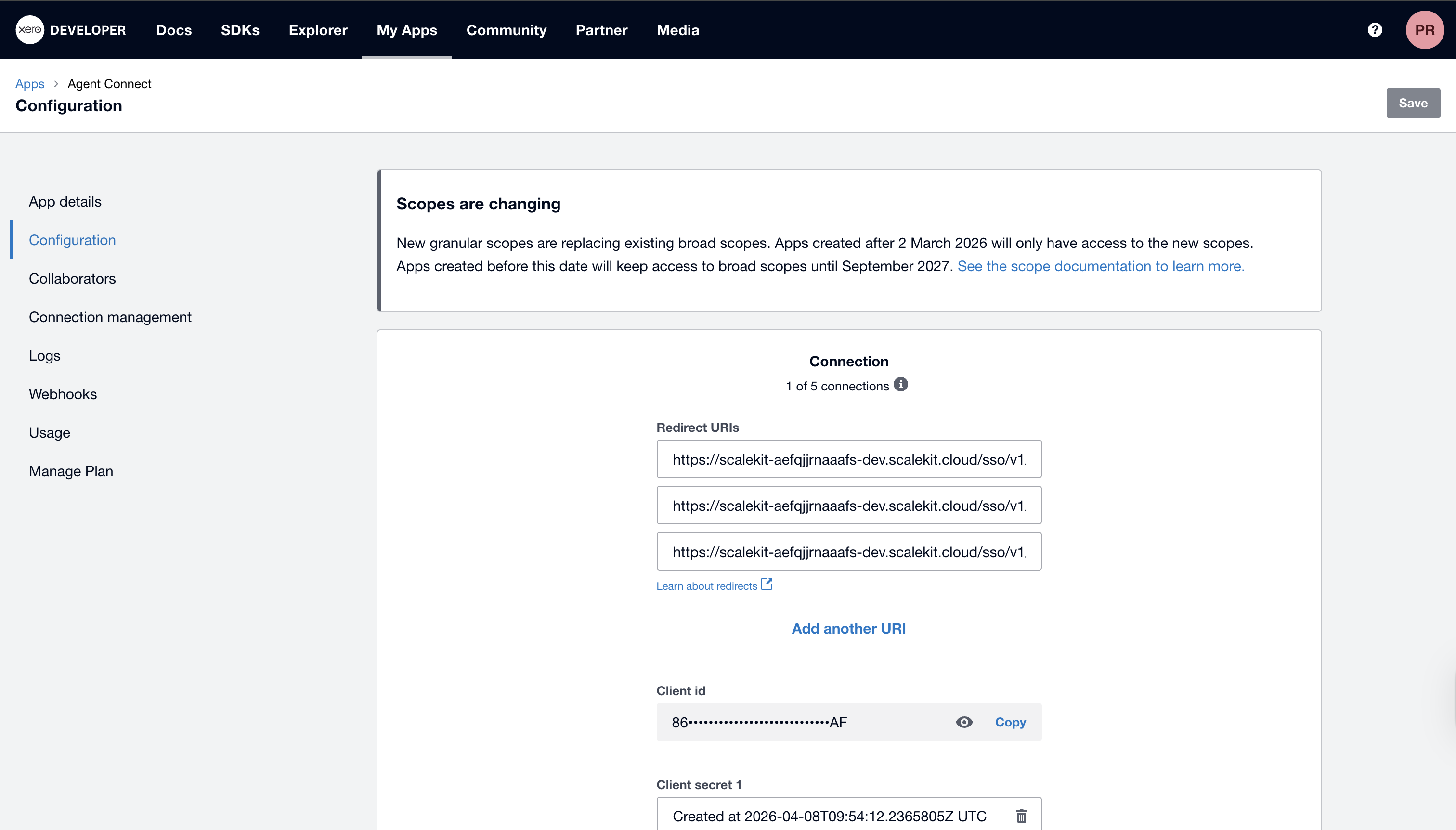
Log in to developer.xero.com, open your app (or create one under My Apps → New app), and go to Configuration.
-
Paste the redirect URI into the Redirect URIs field and click Save.
-
-
Get client credentials
-
In your Xero app, open the Configuration tab.
-
Copy your Client ID and generate a Client Secret.
-
-
Add credentials in Scalekit
-
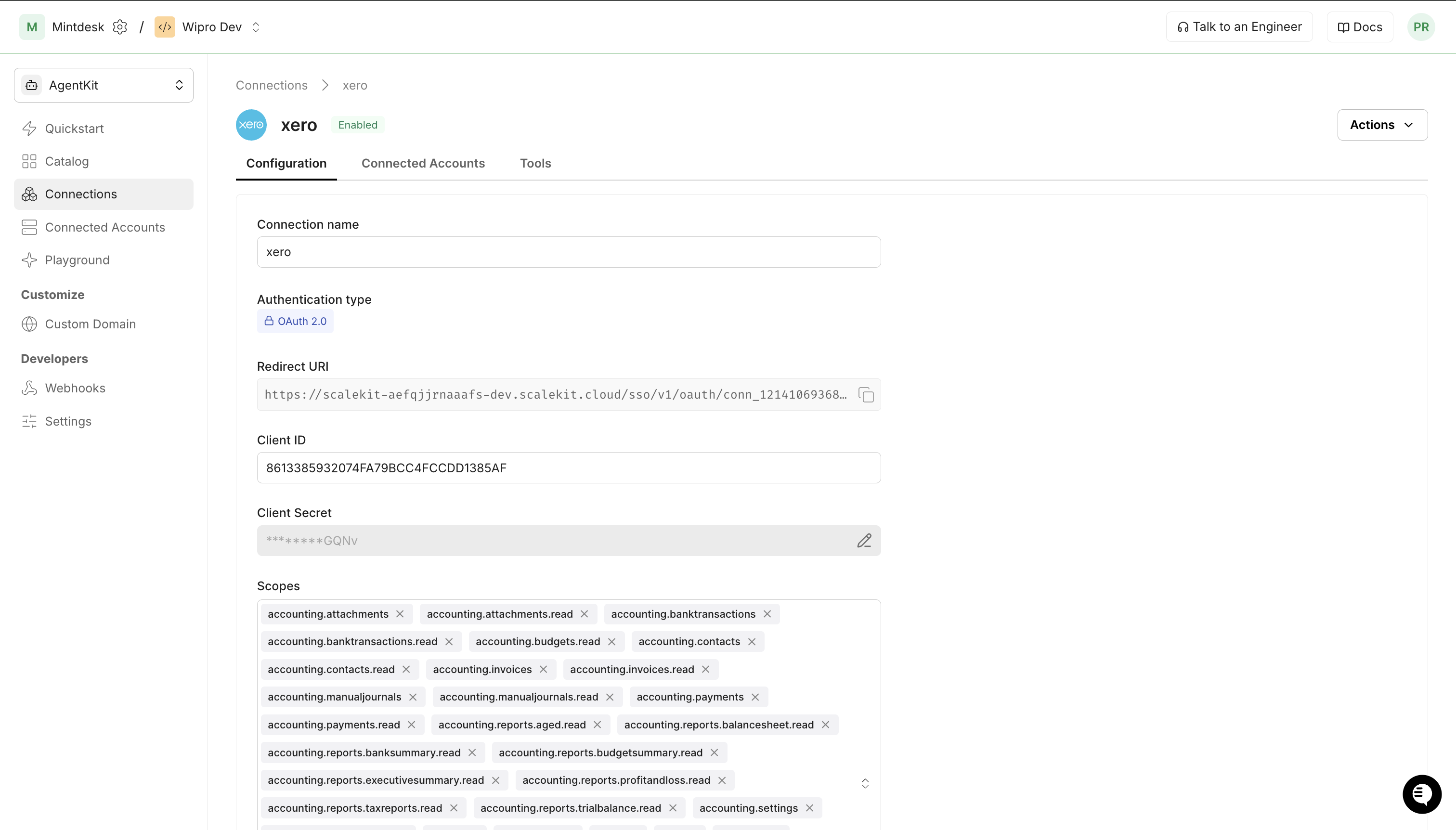
In Scalekit dashboard, go to AgentKit > Connections and open the connection you created.
-
Enter your Xero Client ID and Client Secret, then click Save.
-
-
Connect a user account
Your users must authorize access to their Xero organisation. Generate an authorization link and direct them through the OAuth flow.
Via dashboard (for testing)
-
Open the connection and click the Connected Accounts tab → Add Account.
-
Fill in Your User’s ID (e.g.,
user_123) and follow the Xero OAuth prompt.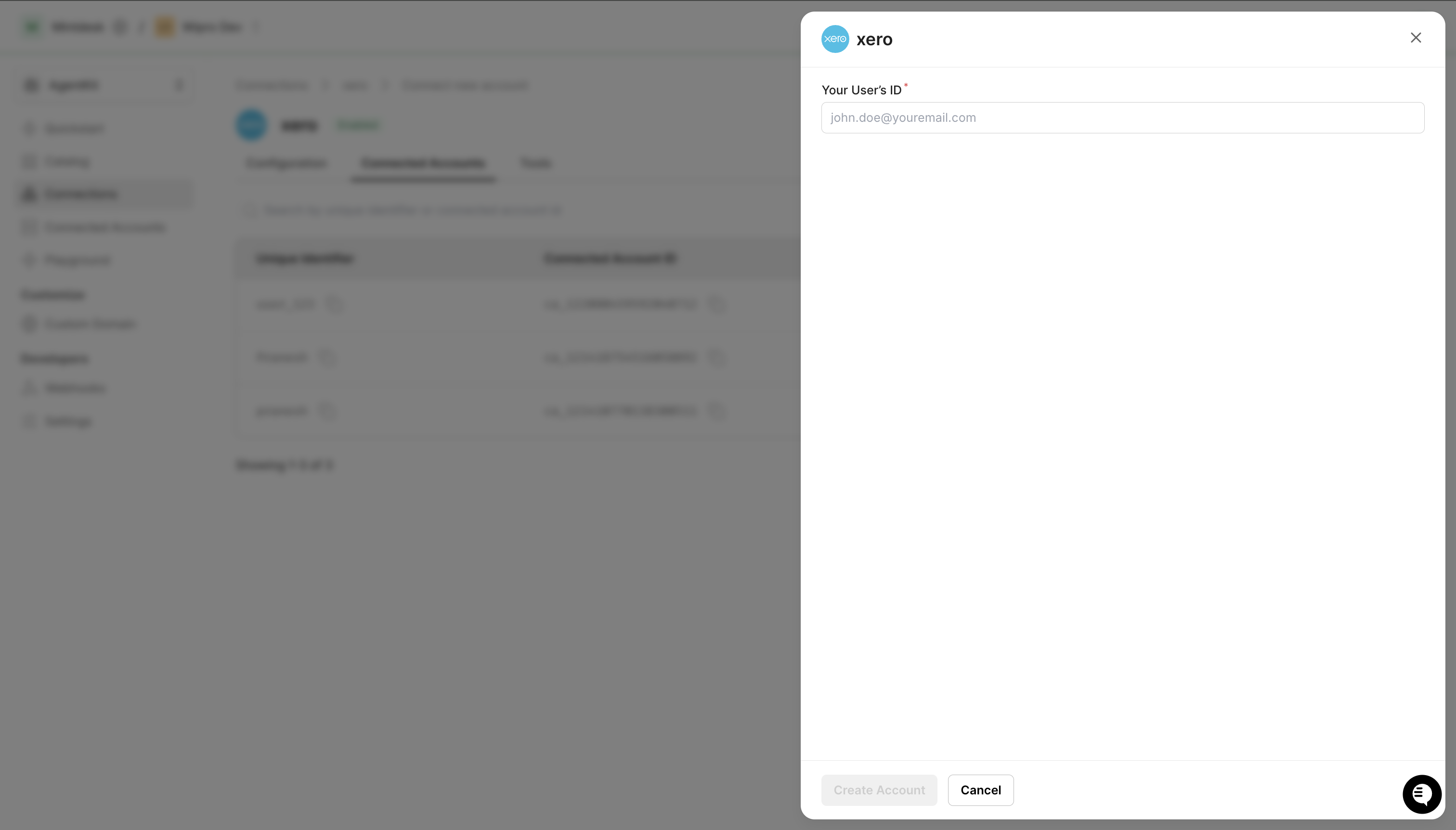
Via API (for production)
const { link } = await scalekit.actions.getAuthorizationLink({connectionName: 'xero',identifier: 'user_123',});// Redirect your user to `link` — they complete OAuth on Xero's sideconsole.log('Authorize Xero:', link);link_response = scalekit_client.actions.get_authorization_link(connection_name="xero",identifier="user_123")# Redirect your user to link_response.linkprint("Authorize Xero:", link_response.link) -
-
Authorize a user and make your first call
quickstart.mts import { ScalekitClient } from '@scalekit-sdk/node'import 'dotenv/config'import { createInterface } from 'node:readline/promises'const scalekit = new ScalekitClient(process.env.SCALEKIT_ENVIRONMENT_URL,process.env.SCALEKIT_CLIENT_ID,process.env.SCALEKIT_CLIENT_SECRET,)const actions = scalekit.actionsconst connector = 'xero'const identifier = 'user_123'// Generate an authorization link for the userconst { link } = await actions.getAuthorizationLink({ connectionName: connector, identifier })console.log('Authorize Xero:', link)const rl = createInterface({ input: process.stdin, output: process.stdout })await rl.question('Press Enter after authorizing...')rl.close()// Make your first callconst result = await actions.executeTool({connector,identifier,toolName: 'xero_accounts_list',toolInput: {},})console.log(result)Terminal window npx tsx quickstart.mtsquickstart.py import osfrom scalekit import ScalekitClientfrom dotenv import load_dotenvload_dotenv()scalekit_client = ScalekitClient(env_url=os.getenv("SCALEKIT_ENVIRONMENT_URL"),client_id=os.getenv("SCALEKIT_CLIENT_ID"),client_secret=os.getenv("SCALEKIT_CLIENT_SECRET"),)actions = scalekit_client.actionsconnection_name = "xero"identifier = "user_123"# Generate an authorization link for the userlink_response = actions.get_authorization_link(connection_name=connection_name,identifier=identifier,)print("Authorize Xero:", link_response.link)input("Press Enter after authorizing...")# Make your first callresult = actions.execute_tool(tool_input={},tool_name="xero_accounts_list",connection_name=connection_name,identifier=identifier,)print(result)Terminal window python quickstart.pyEach user signs in once. See Authorize a user for the full flow and statuses.
Common patterns
Section titled “Common patterns”Void (delete) an invoice
xero_invoice_delete voids an invoice by setting its status to VOIDED. Xero only allows voiding invoices that are in AUTHORISED status — calling it on a DRAFT invoice returns a validation error.
The correct sequence is:
- Authorise the invoice with
xero_invoice_update, passingStatus: "AUTHORISED"and aDueDate. - Call
xero_invoice_deletewith the sameinvoice_id.
Node.js example
// Step 1 — authorise the invoiceawait actions.executeTool({ connector: connectionName, identifier, toolName: 'xero_invoice_update', toolInput: { invoice_id: invoiceId, Status: 'AUTHORISED', DueDate: '2026-06-30', },});
// Step 2 — void itawait actions.executeTool({ connector: connectionName, identifier, toolName: 'xero_invoice_delete', toolInput: { invoice_id: invoiceId },});Python example
# Step 1 — authorise the invoiceactions.execute_tool( connection_name=connection_name, identifier=identifier, tool_name="xero_invoice_update", tool_input={ "invoice_id": invoice_id, "Status": "AUTHORISED", "DueDate": "2026-06-30", },)
# Step 2 — void itactions.execute_tool( connection_name=connection_name, identifier=identifier, tool_name="xero_invoice_delete", tool_input={"invoice_id": invoice_id},)Pass Contact and LineItems correctly
Several tools (xero_invoice_create, xero_credit_note_create, xero_purchase_order_create, xero_quote_create) take a Contact field and a LineItems field.
Contact— pass as a JSON string:'{"ContactID": "abc123..."}'LineItems— pass as a JSON array (not a string):[{"Description": "...", "Quantity": 1, "UnitAmount": 100, "AccountCode": "200"}]
Include AccountCode in each line item whenever the invoice may later be authorised or voided.
Quotes require a Date
xero_quote_create and xero_quote_update both require a Date field (ISO 8601, e.g. "2026-04-29"). Xero returns a validation error "Date cannot be empty" without it.
xero_quote_update also requires Contact (JSON string) in addition to Date.
Aged reports require a contactID
xero_report_aged_payables and xero_report_aged_receivables require a contactID parameter. The other five report tools (xero_report_balance_sheet, xero_report_profit_and_loss, xero_report_trial_balance, xero_report_bank_summary, xero_report_executive_summary) require no inputs beyond the auto-injected tenant ID.
Update an item
xero_item_update requires Code in the request body (in addition to item_id in the path). Pass the item’s existing code or a new one — Xero uses it to identify the item being updated.
Tools
Pass the exact name toexecute_toolxero_account_getRetrieve a single account by its AccountID.Read-onlyGet Account
Retrieve a single account by its AccountID.
Inputs
account_idstringrequired- Xero account GUID.
xero_accounts_listRetrieve the full chart of accounts for a Xero organisation.Read-onlyList Accounts
Retrieve the full chart of accounts for a Xero organisation.
Inputs
modified_afterstring- Return records modified after this UTC datetime (ISO 8601).
orderstring- Order results (e.g. Name ASC).
wherestring- Filter expression (e.g. Type=="BANK").
xero_bank_transaction_getRetrieve a single spend or receive money bank transaction by its BankTransactionID.Read-onlyGet Bank Transaction
Retrieve a single spend or receive money bank transaction by its BankTransactionID.
Inputs
bank_transaction_idstringrequired- Xero bank transaction GUID.
xero_bank_transaction_history_getGet the change history and notes trail for a Xero bank transaction.Read-onlyGet Bank Transaction History
Get the change history and notes trail for a Xero bank transaction.
Inputs
bank_transaction_idstringrequired- Xero bank transaction GUID.
xero_bank_transactions_listRetrieve spend or receive money bank transactions from Xero.Read-onlyList Bank Transactions
Retrieve spend or receive money bank transactions from Xero.
Inputs
modified_afterstring- Modified after UTC datetime.
orderstring- Sort order.
pagenumber- Page number.
wherestring- Filter expression.
xero_bank_transfers_listRetrieve bank transfers between accounts in Xero.Read-onlyList Bank Transfers
Retrieve bank transfers between accounts in Xero.
Inputs
modified_afterstring- Modified after UTC datetime.
orderstring- Sort order.
wherestring- Filter expression.
xero_batch_payment_getRetrieve a specific batch payment using a unique batch payment ID.Read-onlyGet Batch Payment
Retrieve a specific batch payment using a unique batch payment ID.
Inputs
batch_payment_idstringrequired- Xero batch payment GUID.
xero_batch_payments_listRetrieve batch payments from a Xero organisation.Read-onlyList Batch Payments
Retrieve batch payments from a Xero organisation.
Inputs
modified_afterstring- Modified after UTC datetime.
orderstring- Sort order.
wherestring- Filter expression.
xero_contact_getRetrieve a single contact by its ContactID.Read-onlyGet Contact
Retrieve a single contact by its ContactID.
Inputs
contact_idstringrequired- Xero contact GUID.
xero_contact_group_getRetrieve a single contact group by its ContactGroupID.Read-onlyGet Contact Group
Retrieve a single contact group by its ContactGroupID.
Inputs
contact_group_idstringrequired- Xero contact group GUID.
xero_contact_groups_listRetrieve all contact groups in a Xero organisation.Read-onlyList Contact Groups
Retrieve all contact groups in a Xero organisation.
Inputs
orderstring- Sort order.
wherestring- Filter expression.
xero_contacts_listRetrieve contacts (customers and suppliers) from a Xero organisation.Read-onlyList Contacts
Retrieve contacts (customers and suppliers) from a Xero organisation.
Inputs
modified_afterstring- Return contacts modified after this UTC datetime.
orderstring- Sort order (e.g. Name ASC).
pagenumber- Page number for pagination.
pageSizenumber- Number of records per page (max 1000).
searchTermstring- Search term to filter contacts by name or email.
wherestring- Filter expression (e.g. IsSupplier==true).
xero_credit_note_getRetrieve a single credit note by its CreditNoteID.Read-onlyGet Credit Note
Retrieve a single credit note by its CreditNoteID.
Inputs
credit_note_idstringrequired- Xero credit note GUID.
xero_credit_notes_listRetrieve credit notes from a Xero organisation.Read-onlyList Credit Notes
Retrieve credit notes from a Xero organisation.
Inputs
modified_afterstring- Modified after UTC datetime.
orderstring- Sort order.
pagenumber- Page number.
wherestring- Filter expression.
xero_currencies_listRetrieve enabled currencies for a Xero organisation.Read-onlyList Currencies
Retrieve enabled currencies for a Xero organisation.
Inputs
orderstring- Sort order.
wherestring- Filter expression.
xero_employee_getRetrieve a single employee by their EmployeeID.Read-onlyGet Employee
Retrieve a single employee by their EmployeeID.
Inputs
employee_idstringrequired- Xero employee GUID.
xero_employees_listRetrieve employees from a Xero organisation.Read-onlyList Employees
Retrieve employees from a Xero organisation.
Inputs
modified_afterstring- Modified after UTC datetime.
orderstring- Sort order.
wherestring- Filter expression.
xero_invoice_attachments_listList attachments (receipts, supporting PDFs or images) on a Xero invoice.Read-onlyList Invoice Attachments
List attachments (receipts, supporting PDFs or images) on a Xero invoice.
Inputs
invoice_idstringrequired- Xero invoice GUID.
xero_invoice_getRetrieve a single invoice or bill by its InvoiceID.Read-onlyGet Invoice
Retrieve a single invoice or bill by its InvoiceID.
Inputs
invoice_idstringrequired- Xero invoice GUID.
xero_invoice_online_url_getRetrieve the shareable online invoice URL for a specific Xero invoice.Read-onlyGet Online Invoice URL
Retrieve the shareable online invoice URL for a specific Xero invoice.
Inputs
invoice_idstringrequired- Xero invoice GUID.
xero_invoices_listRetrieve sales invoices and bills from a Xero organisation.Read-onlyList Invoices
Retrieve sales invoices and bills from a Xero organisation.
Inputs
ContactIDsstring- Comma-separated ContactIDs to filter invoices.
modified_afterstring- Return invoices modified after this UTC datetime.
orderstring- Sort order.
pagenumber- Page number.
pageSizenumber- Records per page (max 1000).
Statusesstring- Comma-separated statuses to filter (e.g. DRAFT,AUTHORISED).
wherestring- Filter expression (e.g. Type=="ACCREC" && Status=="AUTHORISED").
xero_item_getRetrieve a single item by its ItemID or Code.Read-onlyGet Item
Retrieve a single item by its ItemID or Code.
Inputs
item_idstringrequired- Xero item GUID or item Code.
xero_items_listRetrieve inventory items from a Xero organisation.Read-onlyList Items
Retrieve inventory items from a Xero organisation.
Inputs
modified_afterstring- Modified after UTC datetime.
orderstring- Sort order.
wherestring- Filter expression.
xero_journal_getRetrieve a specific system-generated accounting journal using a unique journal ID.Read-onlyGet Journal
Retrieve a specific system-generated accounting journal using a unique journal ID.
Inputs
journal_idstringrequired- Xero journal GUID.
xero_journals_listRetrieve the system-generated accounting journals for a Xero organisation.Read-onlyList Journals
Retrieve the system-generated accounting journals for a Xero organisation.
Inputs
offsetinteger- Offset by a specific journal number to fetch journals after that point (max 100 returned per call).
paymentsOnlyboolean- Filter to journals from payments only.
xero_manual_journal_getRetrieve a single manual journal by its ManualJournalID.Read-onlyGet Manual Journal
Retrieve a single manual journal by its ManualJournalID.
Inputs
manual_journal_idstringrequired- Xero manual journal GUID.
xero_manual_journals_listRetrieve manual journals from a Xero organisation.Read-onlyList Manual Journals
Retrieve manual journals from a Xero organisation.
Inputs
modified_afterstring- Modified after UTC datetime.
orderstring- Sort order.
pagenumber- Page number.
wherestring- Filter expression.
xero_overpayment_getRetrieve a specific overpayment using a unique overpayment ID.Read-onlyGet Overpayment
Retrieve a specific overpayment using a unique overpayment ID.
Inputs
overpayment_idstringrequired- Xero overpayment GUID.
xero_overpayments_listRetrieve overpayments from a Xero organisation.Read-onlyList Overpayments
Retrieve overpayments from a Xero organisation.
Inputs
modified_afterstring- Modified after UTC datetime.
orderstring- Sort order.
pagenumber- Page number.
wherestring- Filter expression.
xero_payment_getRetrieve a specific payment for invoices and credit notes using a unique payment ID.Read-onlyGet Payment
Retrieve a specific payment for invoices and credit notes using a unique payment ID.
Inputs
payment_idstringrequired- Xero payment GUID.
xero_payments_listRetrieve payments applied to invoices, credit notes, or prepayments in Xero.Read-onlyList Payments
Retrieve payments applied to invoices, credit notes, or prepayments in Xero.
Inputs
modified_afterstring- Modified after UTC datetime.
orderstring- Sort order.
pagenumber- Page number.
wherestring- Filter expression.
xero_prepayment_getRetrieve a specific prepayment using a unique prepayment ID.Read-onlyGet Prepayment
Retrieve a specific prepayment using a unique prepayment ID.
Inputs
prepayment_idstringrequired- Xero prepayment GUID.
xero_prepayments_listRetrieve prepayments from a Xero organisation.Read-onlyList Prepayments
Retrieve prepayments from a Xero organisation.
Inputs
modified_afterstring- Modified after UTC datetime.
orderstring- Sort order.
pagenumber- Page number.
wherestring- Filter expression.
xero_purchase_order_getRetrieve a single purchase order by its PurchaseOrderID.Read-onlyGet Purchase Order
Retrieve a single purchase order by its PurchaseOrderID.
Inputs
purchase_order_idstringrequired- Xero purchase order GUID.
xero_purchase_orders_listRetrieve purchase orders from a Xero organisation.Read-onlyList Purchase Orders
Retrieve purchase orders from a Xero organisation.
Inputs
DateFromstring- Filter POs issued from this date (YYYY-MM-DD).
DateTostring- Filter POs issued to this date (YYYY-MM-DD).
orderstring- Sort order.
pagenumber- Page number.
Statusstring- Filter by status (DRAFT, SUBMITTED, AUTHORISED, BILLED, DELETED).
xero_quote_getRetrieve a single quote by its QuoteID.Read-onlyGet Quote
Retrieve a single quote by its QuoteID.
Inputs
quote_idstringrequired- Xero quote GUID.
xero_quotes_listRetrieve quotes from a Xero organisation.Read-onlyList Quotes
Retrieve quotes from a Xero organisation.
Inputs
ContactIDstring- Filter by contact GUID.
DateFromstring- Quote date from (YYYY-MM-DD).
DateTostring- Quote date to (YYYY-MM-DD).
orderstring- Sort order.
pagenumber- Page number.
Statusstring- Filter by status (DRAFT, SENT, DECLINED, ACCEPTED, INVOICED, DELETED).
xero_repeating_invoice_getRetrieve a specific repeating invoice template using a unique repeating invoice ID.Read-onlyGet Repeating Invoice
Retrieve a specific repeating invoice template using a unique repeating invoice ID.
Inputs
repeating_invoice_idstringrequired- Xero repeating invoice GUID.
xero_repeating_invoices_listRetrieve repeating invoice templates from a Xero organisation.Read-onlyList Repeating Invoices
Retrieve repeating invoice templates from a Xero organisation.
Inputs
orderstring- Sort order.
wherestring- Filter expression.
xero_report_aged_payablesRetrieve the Aged Payables Outstanding report for a Xero organisation.Read-onlyReport: Aged Payables
Retrieve the Aged Payables Outstanding report for a Xero organisation.
Inputs
contactIDstringrequired- Contact GUID (required by Xero for AgedPayablesByContact report).
datestring- Report date (YYYY-MM-DD).
fromDatestring- Start date for transactions.
toDatestring- End date for transactions.
xero_report_aged_receivablesRetrieve the Aged Receivables Outstanding report for a Xero organisation.Read-onlyReport: Aged Receivables
Retrieve the Aged Receivables Outstanding report for a Xero organisation.
Inputs
contactIDstringrequired- Contact GUID (required by Xero for AgedReceivablesByContact report).
datestring- Report date (YYYY-MM-DD).
fromDatestring- Start date for transactions.
toDatestring- End date for transactions.
xero_report_balance_sheetRetrieve the Balance Sheet report for a Xero organisation.Read-onlyReport: Balance Sheet
Retrieve the Balance Sheet report for a Xero organisation.
Inputs
datestring- Report date (YYYY-MM-DD). Defaults to today.
periodsnumber- Number of periods to compare.
standardLayoutboolean- Use standard layout.
timeframestring- Timeframe for comparison: MONTH, QUARTER, or YEAR.
trackingCategoryIDstring- Tracking category ID to segment by.
xero_report_bank_summaryRetrieve the Bank Summary report for a Xero organisation.Read-onlyReport: Bank Summary
Retrieve the Bank Summary report for a Xero organisation.
Inputs
fromDatestring- Start date (YYYY-MM-DD).
toDatestring- End date (YYYY-MM-DD).
xero_report_budget_summaryRetrieve the Budget Summary report for a Xero organisation.Read-onlyReport: Budget Summary
Retrieve the Budget Summary report for a Xero organisation.
Inputs
datestring- Report date (YYYY-MM-DD). Defaults to today.
periodsinteger- Number of periods to compare (integer from 1 to 12).
timeframeinteger- Period size to compare to: 1=month, 3=quarter, 12=year.
xero_report_by_id_getRetrieve a specific ad-hoc report using a unique ReportID, e.g.Read-onlyGet Report by ID
Retrieve a specific ad-hoc report using a unique ReportID, e.g. one returned by List Available Reports.
Inputs
report_idstringrequired- Xero ReportID to retrieve.
xero_report_executive_summaryRetrieve the Executive Summary report for a Xero organisation.Read-onlyReport: Executive Summary
Retrieve the Executive Summary report for a Xero organisation.
Inputs
datestring- Report month (YYYY-MM-DD, first day of month).
xero_report_profit_and_lossRetrieve the Profit and Loss report for a Xero organisation.Read-onlyReport: Profit and Loss
Retrieve the Profit and Loss report for a Xero organisation.
Inputs
fromDatestring- Report start date (YYYY-MM-DD).
periodsnumber- Number of periods to compare.
standardLayoutboolean- Use standard layout.
timeframestring- Timeframe: MONTH, QUARTER, or YEAR.
toDatestring- Report end date (YYYY-MM-DD).
trackingCategoryIDstring- Tracking category ID to segment by.
xero_report_trial_balanceRetrieve the Trial Balance report for a Xero organisation.Read-onlyReport: Trial Balance
Retrieve the Trial Balance report for a Xero organisation.
Inputs
datestring- Report date (YYYY-MM-DD).
paymentsOnlyboolean- If true, include only cash-basis transactions.
xero_reports_listRetrieve a list of the organisation's available ad-hoc reports, each with a unique ReportID needed to fetch its contents.Read-onlyList Available Reports
Retrieve a list of the organisation's available ad-hoc reports, each with a unique ReportID needed to fetch its contents.
Inputs
This tool takes no inputs.
xero_tax_rate_getRetrieve a specific tax rate according to a given TaxType code.Read-onlyGet Tax Rate
Retrieve a specific tax rate according to a given TaxType code.
Inputs
tax_typestringrequired- Xero TaxType code to look up.
xero_tax_rates_listRetrieve tax rates from a Xero organisation.Read-onlyList Tax Rates
Retrieve tax rates from a Xero organisation.
Inputs
orderstring- Sort order.
TaxTypestring- Filter by specific tax type.
wherestring- Filter expression.
xero_tracking_categories_listRetrieve tracking categories and their options from Xero.Read-onlyList Tracking Categories
Retrieve tracking categories and their options from Xero.
Inputs
orderstring- Sort order.
wherestring- Filter expression.
xero_tracking_category_getRetrieve a specific tracking category and its options using a unique tracking category ID.Read-onlyGet Tracking Category
Retrieve a specific tracking category and its options using a unique tracking category ID.
Inputs
tracking_category_idstringrequired- Xero tracking category GUID.
xero_user_getRetrieve a single Xero organisation user by their UserID.Read-onlyGet User
Retrieve a single Xero organisation user by their UserID.
Inputs
user_idstringrequired- Xero user GUID.
xero_users_listRetrieve users of a Xero organisation.Read-onlyList Users
Retrieve users of a Xero organisation.
Inputs
modified_afterstring- Modified after UTC datetime.
orderstring- Sort order.
wherestring- Filter expression.
xero_account_createCreate a new account in the Xero chart of accounts.WriteCreate Account
Create a new account in the Xero chart of accounts.
- Idempotent
Inputs
Codestringrequired- Customer defined alpha numeric account code.
Namestringrequired- Name of the account.
Typestringrequired- Account type (e.g. BANK, CURRENT, EQUITY, EXPENSE, FIXED, LIABILITY, OTHERINCOME, OVERHEADS, PREPAYMENT, REVENUE, SALES, TERMLIAB, PAYGLIABILITY).
BankAccountNumberstring- For bank accounts, the bank account number.
CurrencyCodestring- For bank accounts, the currency of the account.
Descriptionstring- Description of the account.
EnablePaymentsToAccountboolean- If true, payments can be made to this account.
TaxTypestring- Default tax type for the account.
xero_account_updateUpdate an existing account in the Xero chart of accounts.WriteUpdate Account
Update an existing account in the Xero chart of accounts.
Inputs
account_idstringrequired- Xero account GUID.
Codestring- Updated account code.
Descriptionstring- Updated description.
EnablePaymentsToAccountboolean- Enable/disable payments to account.
Namestring- Updated name of the account.
TaxTypestring- Updated tax type.
xero_bank_transaction_createCreate a new spend or receive money bank transaction in Xero.WriteCreate Bank Transaction
Create a new spend or receive money bank transaction in Xero.
- Idempotent
Inputs
BankAccountstringrequired- Bank account object with Code or AccountID e.g. {"Code":"090"}.
LineItemsarrayrequired- Array of line items. Each needs Description, Quantity, UnitAmount, AccountCode.
Typestringrequired- Bank transaction type: SPEND, RECEIVE, SPEND-OVERPAYMENT, RECEIVE-OVERPAYMENT, SPEND-PREPAYMENT, or RECEIVE-PREPAYMENT.
Contactstring- Contact object with ContactID e.g. {"ContactID":"guid"}.
CurrencyCodestring- Currency (defaults to org default).
Datestring- Date of the transaction in YYYY-MM-DD format.
Referencestring- Reference for the transaction (SPEND/RECEIVE only).
Statusstring- Bank transaction status (DRAFT or AUTHORISED).
xero_bank_transaction_updateUpdate an existing spend or receive money bank transaction in Xero.WriteUpdate Bank Transaction
Update an existing spend or receive money bank transaction in Xero.
Inputs
bank_transaction_idstringrequired- Xero bank transaction GUID to update.
LineItemsarray- Updated array of line items. Each needs Description, Quantity, UnitAmount, AccountCode.
Referencestring- Updated reference for the transaction.
Statusstring- Updated status (DRAFT, AUTHORISED, or DELETED).
Urlstring- Updated URL link to a source document.
xero_batch_payment_createCreate a batch payment covering one or more invoice or credit note payments in Xero.WriteCreate Batch Payment
Create a batch payment covering one or more invoice or credit note payments in Xero.
- Idempotent
Inputs
Accountstringrequired- Bank account object with AccountID or Code e.g. {"AccountID":"guid"}.
Datestringrequired- Date of the batch payment in YYYY-MM-DD format.
Paymentsarrayrequired- Array of payment objects, each with Invoice, Account, Date, and Amount.
Detailsstring- Details to appear on the bank statement (max 18 chars, UK/NZ only).
Particularsstring- Particulars to appear on the bank statement (max 12 chars, NZ only).
Referencestring- Reference for the batch payment.
xero_contact_createCreate a new contact (customer or supplier) in Xero.WriteCreate Contact
Create a new contact (customer or supplier) in Xero.
- Idempotent
Inputs
Namestringrequired- Full name of the contact / company.
AccountNumberstring- Unique account number for this contact.
Addressesarray- Array of address objects.
DefaultCurrencystring- Default currency for this contact.
EmailAddressstring- Email address of the contact.
FirstNamestring- First name of primary contact person.
IsCustomerboolean- True if contact is a customer.
IsSupplierboolean- True if contact is a supplier.
LastNamestring- Last name of primary contact person.
Phonesarray- Array of phone objects e.g. [{"PhoneType":"DEFAULT","PhoneNumber":"021-123456"}].
xero_contact_group_createCreate a new contact group in Xero.WriteCreate Contact Group
Create a new contact group in Xero.
- Idempotent
Inputs
Namestringrequired- Name of the contact group.
xero_contact_group_updateUpdate a contact group name in Xero.WriteUpdate Contact Group
Update a contact group name in Xero.
Inputs
contact_group_idstringrequired- Xero contact group GUID.
Namestringrequired- New name for the contact group.
xero_contact_updateUpdate an existing contact in Xero.WriteUpdate Contact
Update an existing contact in Xero.
Inputs
contact_idstringrequired- Xero contact GUID.
DefaultCurrencystring- Updated default currency.
EmailAddressstring- Updated email address.
FirstNamestring- Updated first name.
IsCustomerboolean- Update customer flag.
IsSupplierboolean- Update supplier flag.
LastNamestring- Updated last name.
Namestring- Updated name.
xero_credit_note_allocation_createAllocate a specific credit note to an invoice in Xero.WriteCreate Credit Note Allocation
Allocate a specific credit note to an invoice in Xero.
- Idempotent
Inputs
Amountnumberrequired- Amount of the credit note to allocate.
credit_note_idstringrequired- Xero credit note GUID to allocate from.
Datestringrequired- Date the allocation is made in YYYY-MM-DD format.
Invoicestringrequired- Invoice object with InvoiceID e.g. {"InvoiceID":"guid"}.
xero_credit_note_createCreate a new credit note in Xero.WriteCreate Credit Note
Create a new credit note in Xero.
- Idempotent
Inputs
Contactstringrequired- Contact object e.g. {"ContactID":"guid"}.
LineItemsarrayrequired- Array of line item objects.
Typestringrequired- Credit note type: ACCRECCREDIT (sales credit) or ACCPAYCREDIT (purchase credit).
CurrencyCodestring- Currency code.
Datestring- Date of credit note (YYYY-MM-DD).
Referencestring- Reference number.
Statusstring- Status: DRAFT or AUTHORISED.
xero_credit_note_updateUpdate an existing credit note in Xero.WriteUpdate Credit Note
Update an existing credit note in Xero.
Inputs
credit_note_idstringrequired- Xero credit note GUID.
Referencestring- Updated reference.
Statusstring- New status (DRAFT, AUTHORISED, VOIDED).
xero_employee_createCreate a new employee record in Xero.WriteCreate Employee
Create a new employee record in Xero.
- Idempotent
Inputs
FirstNamestringrequired- First name of the employee.
LastNamestringrequired- Last name of the employee.
ExternalLinkstring- Link to employee in external system e.g. {"Url":"https://...","Description":"Employee record"}.
Statusstring- Employee status (ACTIVE or TERMINATED).
xero_employee_updateUpdate an existing employee in Xero.WriteUpdate Employee
Update an existing employee in Xero.
Inputs
employee_idstringrequired- Xero employee GUID.
FirstNamestring- Updated first name.
LastNamestring- Updated last name.
Statusstring- Updated status (ACTIVE or TERMINATED).
xero_invoice_createCreate a new invoice (ACCREC) or bill (ACCPAY) in Xero.WriteCreate Invoice
Create a new invoice (ACCREC) or bill (ACCPAY) in Xero.
- Idempotent
Inputs
Contactstringrequired- Contact object with ContactID e.g. {"ContactID":"guid"}.
LineItemsarrayrequired- Array of line items. Each needs Description, Quantity, UnitAmount, AccountCode.
Typestringrequired- Invoice type: ACCREC (sales invoice) or ACCPAY (bill/purchase invoice).
CurrencyCodestring- Currency (defaults to org default).
DueDatestring- Due date in YYYY-MM-DD format.
InvoiceNumberstring- Custom invoice reference number.
Referencestring- Additional reference number.
Statusstring- Invoice status (DRAFT or AUTHORISED).
xero_invoice_deleteVoid (soft-delete) an invoice or bill in Xero by setting its status to VOIDED.WriteVoid Invoice
Void (soft-delete) an invoice or bill in Xero by setting its status to VOIDED.
Inputs
invoice_idstringrequired- Xero invoice GUID to void.
xero_invoice_email_sendSend a copy of a specific Xero invoice to its related contact via email.WriteEmail Invoice
Send a copy of a specific Xero invoice to its related contact via email.
Inputs
invoice_idstringrequired- Xero invoice GUID to email.
xero_invoice_updateUpdate an existing invoice or bill in Xero.WriteUpdate Invoice
Update an existing invoice or bill in Xero. Note: DueDate is required when setting Status to AUTHORISED.
Inputs
invoice_idstringrequired- Xero invoice GUID.
DueDatestring- Updated due date (YYYY-MM-DD). Required when Status is AUTHORISED.
LineItemsarray- Updated line items array.
Referencestring- Updated reference.
Statusstring- New status (DRAFT, SUBMITTED, AUTHORISED, DELETED, VOIDED).
xero_item_createCreate a new inventory item in Xero.WriteCreate Item
Create a new inventory item in Xero.
- Idempotent
Inputs
Codestringrequired- Unique item code.
Descriptionstring- Description for sales invoices.
InventoryAssetAccountCodestring- Account code for inventory asset (required if tracked).
IsTrackedAsInventoryboolean- Track this item as inventory.
Namestring- Name of the item.
PurchaseDescriptionstring- Description for purchase orders.
PurchaseDetailsstring- Purchase pricing JSON e.g. {"UnitPrice":5.00,"AccountCode":"300","TaxType":"INPUT2"}.
SalesDetailsstring- Sales pricing JSON e.g. {"UnitPrice":9.99,"AccountCode":"200","TaxType":"OUTPUT2"}.
xero_item_updateUpdate an existing inventory item in Xero.WriteUpdate Item
Update an existing inventory item in Xero.
Inputs
Codestringrequired- Item code (required by Xero for item updates).
item_idstringrequired- Xero item GUID.
Descriptionstring- Updated sales description.
Namestring- Updated item name.
PurchaseDescriptionstring- Updated purchase description.
PurchaseDetailsstring- Updated purchase details JSON.
SalesDetailsstring- Updated sales details JSON.
xero_manual_journal_createCreate a new manual journal entry in Xero.WriteCreate Manual Journal
Create a new manual journal entry in Xero.
- Idempotent
Inputs
JournalLinesarrayrequired- Array of journal line objects with LineAmount, AccountCode, Description.
Narrationstringrequired- Description of the manual journal.
Datestring- Journal date (YYYY-MM-DD).
Statusstring- Status: DRAFT or POSTED.
xero_manual_journal_updateUpdate an existing manual journal in Xero.WriteUpdate Manual Journal
Update an existing manual journal in Xero. Note: JournalLines are required when setting Status to POSTED.
Inputs
manual_journal_idstringrequired- Xero manual journal GUID.
Datestring- Updated date (YYYY-MM-DD).
JournalLinesarray- Array of journal lines (required when changing Status to POSTED).
Narrationstring- Updated narration.
Statusstring- Updated status (DRAFT or POSTED).
xero_payment_createCreate a new payment against an invoice, bill, or credit note in Xero.WriteCreate Payment
Create a new payment against an invoice, bill, or credit note in Xero.
- Idempotent
Inputs
Accountstringrequired- Account object with Code or AccountID e.g. {"Code":"970"}.
Amountnumberrequired- Amount of the payment.
Datestringrequired- Date the payment is being made in YYYY-MM-DD format.
Invoicestringrequired- Invoice object with InvoiceID e.g. {"InvoiceID":"guid"}.
Referencestring- Reference for the payment.
xero_purchase_order_createCreate a new purchase order in Xero.WriteCreate Purchase Order
Create a new purchase order in Xero.
- Idempotent
Inputs
Contactstringrequired- Supplier contact object e.g. {"ContactID":"guid"}.
LineItemsarrayrequired- Array of line item objects.
CurrencyCodestring- Currency code.
Datestring- PO date (YYYY-MM-DD).
DeliveryDatestring- Expected delivery date (YYYY-MM-DD).
PurchaseOrderNumberstring- Custom PO number.
Referencestring- Reference.
Statusstring- Status: DRAFT or SUBMITTED.
xero_purchase_order_updateUpdate an existing purchase order in Xero.WriteUpdate Purchase Order
Update an existing purchase order in Xero.
Inputs
purchase_order_idstringrequired- Xero purchase order GUID.
DeliveryDatestring- Updated delivery date (YYYY-MM-DD).
LineItemsarray- Updated line items.
Referencestring- Updated reference.
Statusstring- New status (DRAFT, SUBMITTED, AUTHORISED, BILLED, DELETED).
xero_quote_createCreate a new quote in Xero.WriteCreate Quote
Create a new quote in Xero.
- Idempotent
Inputs
Contactstringrequired- Contact object e.g. {"ContactID":"guid"}.
Datestringrequired- Quote date (YYYY-MM-DD).
LineItemsarrayrequired- Array of line item objects.
CurrencyCodestring- Currency code.
ExpiryDatestring- Quote expiry date (YYYY-MM-DD).
QuoteNumberstring- Custom quote number.
Referencestring- Reference.
Statusstring- Status: DRAFT or SENT.
Summarystring- Quote summary.
Titlestring- Quote title.
xero_quote_updateUpdate an existing quote in Xero.WriteUpdate Quote
Update an existing quote in Xero.
Inputs
Contactstringrequired- Contact object e.g. {"ContactID":"guid"} (required by Xero for quote updates).
Datestringrequired- Quote date YYYY-MM-DD (required by Xero for quote updates).
quote_idstringrequired- Xero quote GUID.
ExpiryDatestring- Updated expiry date (YYYY-MM-DD).
LineItemsarray- Updated line items.
Referencestring- Updated reference.
Statusstring- New status (DRAFT, SENT, DECLINED, ACCEPTED, INVOICED, DELETED).
xero_repeating_invoice_createCreate a new repeating invoice template in Xero.WriteCreate Repeating Invoice
Create a new repeating invoice template in Xero.
- Idempotent
Inputs
Contactstringrequired- Contact object with ContactID e.g. {"ContactID":"guid"}.
LineItemsarrayrequired- Array of line items. Each needs Description, Quantity, UnitAmount, AccountCode.
Schedulestringrequired- Schedule object describing recurrence e.g. {"Period":1,"Unit":"MONTHLY","DueDate":10,"DueDateType":"OFFOLLOWINGMONTH","StartDate":"2024-07-01"}.
Typestringrequired- Invoice type: ACCREC (sales invoice) or ACCPAY (bill/purchase invoice).
Referencestring- Reference for the generated invoices. Supports placeholders such as [Week] or [Month].
Statusstring- Status of the repeating invoice template (DRAFT or AUTHORISED).
xero_tax_rate_createCreate a new tax rate in Xero.WriteCreate Tax Rate
Create a new tax rate in Xero.
- Idempotent
Inputs
Namestringrequired- Name of the tax rate.
TaxComponentsarrayrequired- Array of tax components e.g. [{"Name":"GST","Rate":15,"IsCompound":false}].
xero_tax_rate_updateUpdate an existing tax rate in Xero.WriteUpdate Tax Rate
Update an existing tax rate in Xero.
Inputs
TaxComponentsarrayrequired- Array of tax component objects e.g. [{"Name":"Tax","Rate":15,"IsCompound":false}]. Required by Xero when updating a tax rate.
TaxTypestringrequired- Tax type identifier to update.
Namestring- Updated name.
Statusstring- Updated status (ACTIVE or DELETED).
xero_tracking_category_createCreate a new tracking category in Xero.WriteCreate Tracking Category
Create a new tracking category in Xero.
- Idempotent
Inputs
Namestringrequired- Name of the tracking category.
xero_tracking_category_updateUpdate a tracking category name or status in Xero.WriteUpdate Tracking Category
Update a tracking category name or status in Xero.
Inputs
tracking_category_idstringrequired- Xero tracking category GUID.
Namestring- Updated name.
Statusstring- Updated status (ACTIVE or ARCHIVED).
xero_tracking_option_createCreate a new option within a tracking category in Xero.WriteCreate Tracking Option
Create a new option within a tracking category in Xero.
- Idempotent
Inputs
Namestringrequired- Name of the tracking option.
tracking_category_idstringrequired- Xero tracking category GUID.
xero_tracking_option_updateUpdate a specific option for a specific tracking category in Xero.WriteUpdate Tracking Option
Update a specific option for a specific tracking category in Xero.
Inputs
Namestringrequired- Updated name of the tracking option.
tracking_category_idstringrequired- Xero tracking category GUID.
tracking_option_idstringrequired- Xero tracking option GUID to update.
xero_account_deleteArchive (soft-delete) an account from the Xero chart of accounts by setting its status to ARCHIVED.DestructiveArchive Account
Archive (soft-delete) an account from the Xero chart of accounts by setting its status to ARCHIVED.
Inputs
account_idstringrequired- Xero account GUID to archive.
xero_contact_group_deleteDelete (soft-delete) a contact group in Xero by setting its status to DELETED.DestructiveDelete Contact Group
Delete (soft-delete) a contact group in Xero by setting its status to DELETED.
Inputs
contact_group_idstringrequired- Xero contact group GUID to delete.
xero_item_deleteDelete an inventory item from Xero.DestructiveDelete Item
Delete an inventory item from Xero.
Inputs
item_idstringrequired- Xero item GUID to delete.
xero_tracking_category_deleteDelete a tracking category from Xero.DestructiveDelete Tracking Category
Delete a tracking category from Xero.
Inputs
tracking_category_idstringrequired- Xero tracking category GUID to delete.
xero_tracking_option_deleteDelete a specific option for a specific tracking category in Xero.DestructiveDelete Tracking Option
Delete a specific option for a specific tracking category in Xero.
Inputs
tracking_category_idstringrequired- Xero tracking category GUID.
tracking_option_idstringrequired- Xero tracking option GUID to delete.
No tools match.
Workflows
Proxy API call
For raw proxy requests, you must supply the Xero-Tenant-Id header yourself. Trigger any tool call first (e.g. xero_accounts_list) so Scalekit caches the tenant ID, then retrieve it from the connected account’s api_config.path_variables.
const { connectedAccount } = await actions.getConnectedAccount({  connectionName: 'xero',  identifier: 'user_123',});const xeroTenantId = connectedAccount.apiConfig?.pathVariables?.xero_tenant_id;
const result = await actions.request({  connectionName: 'xero',  identifier: 'user_123',  path: '/Invoices',  method: 'GET',  headers: { 'Xero-Tenant-Id': xeroTenantId },});console.log(result);
connected_account = actions.get_connected_account( connection_name='xero', identifier='user_123').connected_accountxero_tenant_id = connected_account.api_config["path_variables"]["xero_tenant_id"]
result = actions.request( connection_name='xero', identifier='user_123', path="/Invoices", method="GET", headers={"Xero-Tenant-Id": xero_tenant_id},)print(result)Create and authorise an invoice
The Contact field must be a JSON string and LineItems must be a JSON array. Include AccountCode in each line item — Xero requires it when authorising or voiding the invoice.
const contacts = await actions.executeTool({ connector: 'xero', identifier: 'user_123', toolName: 'xero_contacts_list', toolInput: {},});const contactId = contacts.Contacts[0].ContactID;
const invoice = await actions.executeTool({ connector: 'xero', identifier: 'user_123', toolName: 'xero_invoice_create', toolInput: { Type: 'ACCREC', Contact: JSON.stringify({ ContactID: contactId }), LineItems: [ { Description: 'Consulting services', Quantity: 1, UnitAmount: 500, AccountCode: '200' }, ], },});const invoiceId = invoice.Invoices[0].InvoiceID;
await actions.executeTool({ connector: 'xero', identifier: 'user_123', toolName: 'xero_invoice_update', toolInput: { invoice_id: invoiceId, Status: 'AUTHORISED', DueDate: '2026-06-30', },});import json
contacts = actions.execute_tool( connection_name='xero', identifier='user_123', tool_name="xero_contacts_list", tool_input={},)contact_id = contacts["Contacts"][0]["ContactID"]
invoice = actions.execute_tool( connection_name='xero', identifier='user_123', tool_name="xero_invoice_create", tool_input={ "Type": "ACCREC", "Contact": json.dumps({"ContactID": contact_id}), "LineItems": [ {"Description": "Consulting services", "Quantity": 1, "UnitAmount": 500, "AccountCode": "200"}, ], },)invoice_id = invoice["Invoices"][0]["InvoiceID"]
actions.execute_tool( connection_name='xero', identifier='user_123', tool_name="xero_invoice_update", tool_input={ "invoice_id": invoice_id, "Status": "AUTHORISED", "DueDate": "2026-06-30", },)Void an invoice
xero_invoice_delete voids an invoice by setting its status to VOIDED. Xero only permits voiding AUTHORISED invoices — calling it on a DRAFT invoice returns a validation error. Authorise the invoice first (see above), then call delete.
await actions.executeTool({ connector: 'xero', identifier: 'user_123', toolName: 'xero_invoice_delete', toolInput: { invoice_id: invoiceId },});actions.execute_tool( connection_name='xero', identifier='user_123', tool_name="xero_invoice_delete", tool_input={"invoice_id": invoice_id},)Create a quote
xero_quote_create requires Contact (JSON string), LineItems (array), and Date (ISO 8601). Without Date, Xero returns "Date cannot be empty".
const quote = await actions.executeTool({ connector: 'xero', identifier: 'user_123', toolName: 'xero_quote_create', toolInput: { Contact: JSON.stringify({ ContactID: contactId }), LineItems: [{ Description: 'Project estimate', Quantity: 1, UnitAmount: 2000 }], Date: '2026-04-29', },});const quoteId = quote.Quotes[0].QuoteID;import json
quote = actions.execute_tool( connection_name='xero', identifier='user_123', tool_name="xero_quote_create", tool_input={ "Contact": json.dumps({"ContactID": contact_id}), "LineItems": [{"Description": "Project estimate", "Quantity": 1, "UnitAmount": 2000}], "Date": "2026-04-29", },)quote_id = quote["Quotes"][0]["QuoteID"]Run aged payables or receivables report
The aged report tools require a contactID parameter. The other reports (Balance Sheet, Profit & Loss, Trial Balance, Bank Summary, Executive Summary) need no inputs beyond the auto-injected tenant ID.
const report = await actions.executeTool({ connector: 'xero', identifier: 'user_123', toolName: 'xero_report_aged_receivables', toolInput: { contactID: contactId },});report = actions.execute_tool( connection_name='xero', identifier='user_123', tool_name="xero_report_aged_receivables", tool_input={"contactID": contact_id},)