


The Box MCP connector routes your AI agent's tool calls to Box's own MCP server through Scalekit. Each user signs in to Box once, and Scalekit stores and refreshes their tokens, so your agent never handles credentials. It comes with 44 tools.
- Tools
- 44
- What they doRead · write · destructive
- 18 · 18 · 818 read18 write8 destructive
- Users sign in with
- OAuth
- OAuth app
- Scalekit's or your own
Setup
Install the SDK
Terminal window npm install @scalekit-sdk/node dotenvTerminal window pip install scalekit-sdk-python python-dotenvSet your credentials
Add your Scalekit credentials to your
.envfile. Find values in app.scalekit.com > Developers > API Credentials..env SCALEKIT_ENVIRONMENT_URL=<your-environment-url>SCALEKIT_CLIENT_ID=<your-client-id>SCALEKIT_CLIENT_SECRET=<your-client-secret>Create the Box MCP connection
In AgentKit > Connections, create a Box MCP connection. The name you give it is the
connection_nameyour code passes. See Configure connections.Scalekit credentials are available for Box, so you don't need to register an OAuth app. To show your own app on the consent screen, use your own credentials instead.
Use your own OAuth app
Register your Scalekit environment with Box MCP so Scalekit handles the OAuth flow and token lifecycle for your users. Create a Box OAuth application, then add its Client ID and Client Secret to your Scalekit connection.
-
Copy the redirect URI from Scalekit
-
In the Scalekit dashboard, go to AgentKit > Connections > Create Connection. Find Box MCP and click Create.
-
Click Use your own credentials and copy the redirect URI. It looks like
https://<SCALEKIT_ENVIRONMENT_URL>/sso/v1/oauth/<CONNECTION_ID>/callback.
-
-
Create or open a Box OAuth app
-
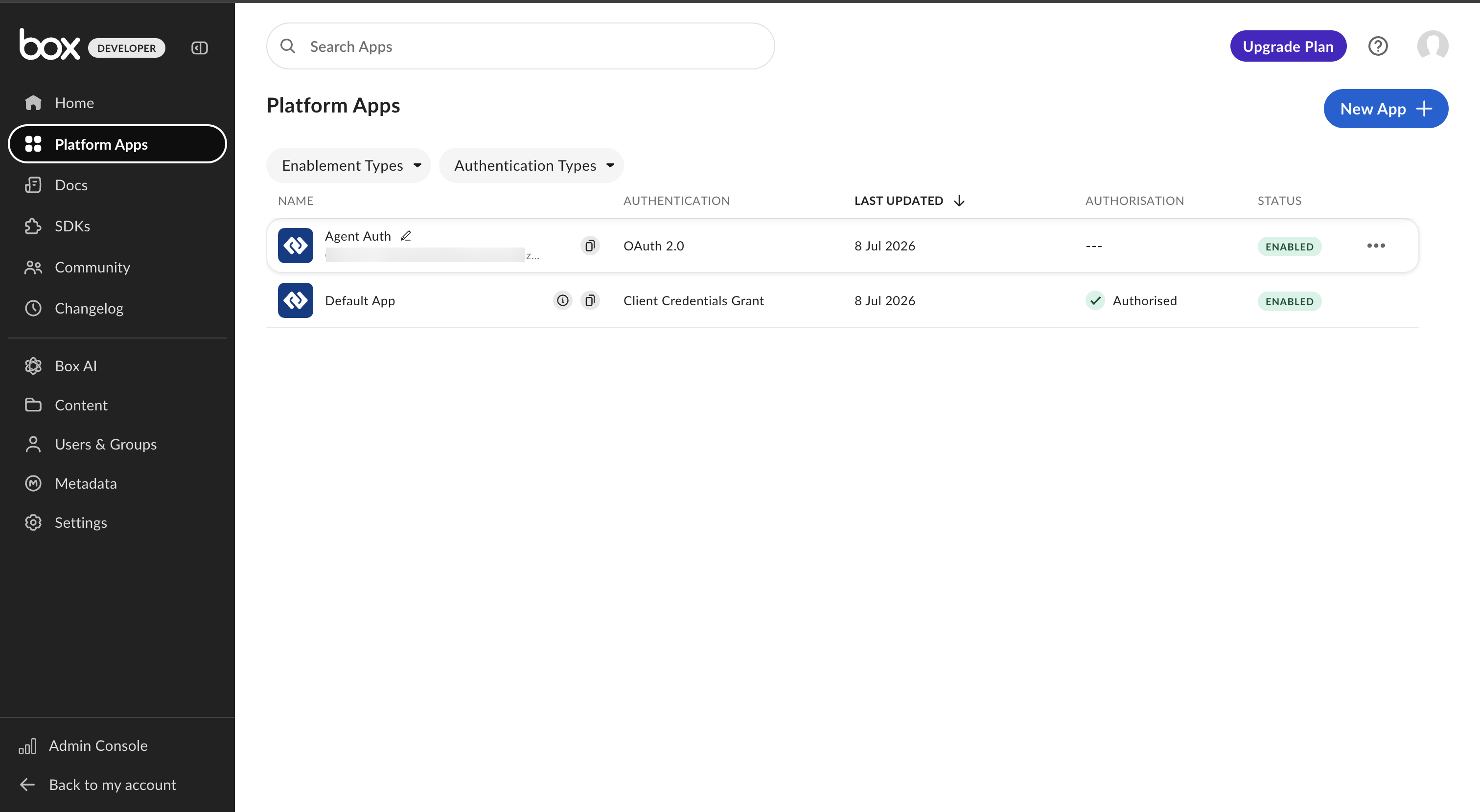
Go to the Box Developer Console and click Platform Apps in the sidebar.
-
Click New App to create one, or open an existing app that uses OAuth 2.0 authentication.
-
-
Add the redirect URI
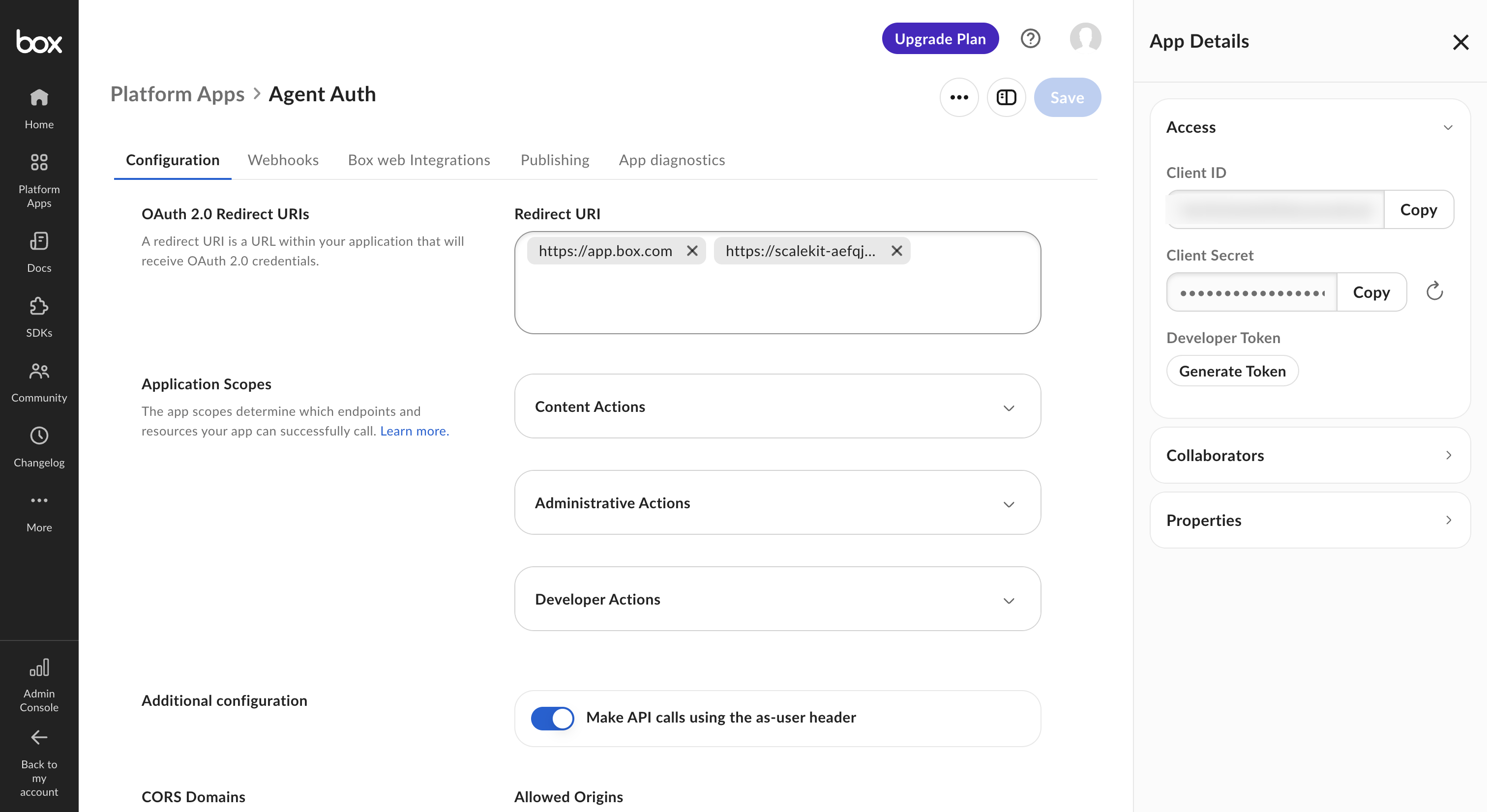
- Open the app’s Configuration tab.
- Under OAuth 2.0 Redirect URIs, paste the redirect URI you copied from Scalekit and click Save.
-
Copy your Client ID and Client Secret
-
In the App Details panel, copy the Client ID.
-
Click Copy next to Client Secret to copy it.
-
-
Add credentials in Scalekit
- Return to the connection you created in Scalekit and enter:
- Client ID — from your Box app
- Client Secret — from your Box app
- Click Save.
- Return to the connection you created in Scalekit and enter:
-
Authorize a user and make your first call
quickstart.mts import { ScalekitClient } from '@scalekit-sdk/node'import 'dotenv/config'import { createInterface } from 'node:readline/promises'const scalekit = new ScalekitClient(process.env.SCALEKIT_ENVIRONMENT_URL,process.env.SCALEKIT_CLIENT_ID,process.env.SCALEKIT_CLIENT_SECRET,)const actions = scalekit.actionsconst connector = 'boxmcp'const identifier = 'user_123'// Generate an authorization link for the userconst { link } = await actions.getAuthorizationLink({ connectionName: connector, identifier })console.log('Authorize Box MCP:', link)const rl = createInterface({ input: process.stdin, output: process.stdout })await rl.question('Press Enter after authorizing...')rl.close()// Make your first callconst result = await actions.executeTool({connector,identifier,toolName: 'boxmcp_list_hubs',toolInput: {},})console.log(result)Terminal window npx tsx quickstart.mtsquickstart.py import osfrom scalekit import ScalekitClientfrom dotenv import load_dotenvload_dotenv()scalekit_client = ScalekitClient(env_url=os.getenv("SCALEKIT_ENVIRONMENT_URL"),client_id=os.getenv("SCALEKIT_CLIENT_ID"),client_secret=os.getenv("SCALEKIT_CLIENT_SECRET"),)actions = scalekit_client.actionsconnection_name = "boxmcp"identifier = "user_123"# Generate an authorization link for the userlink_response = actions.get_authorization_link(connection_name=connection_name,identifier=identifier,)print("Authorize Box MCP:", link_response.link)input("Press Enter after authorizing...")# Make your first callresult = actions.execute_tool(tool_input={},tool_name="boxmcp_list_hubs",connection_name=connection_name,identifier=identifier,)print(result)Terminal window python quickstart.pyEach user signs in once. See Authorize a user for the full flow and statuses.
Tools
Pass the exact name toexecute_toolboxmcp_get_file_contentRetrieves the text content of a Box file by its ID.Read-onlyGetFileContent
Retrieves the text content of a Box file by its ID. Useful for reading documents, notes, and other text-based files.
Inputs
file_idstringrequired- The ID of the Box file to retrieve content from.
boxmcp_get_file_detailsRetrieves detailed metadata about a specific Box file including name, size, timestamps, owner, and other properties.Read-onlyGetFileDetails
Retrieves detailed metadata about a specific Box file including name, size, timestamps, owner, and other properties.
Inputs
file_idstringrequired- The ID of the Box file to retrieve details for.
fieldsarray- List of additional fields to include in the response.
boxmcp_get_file_previewDisplays an interactive preview widget for a Box file.Read-onlyGetFilePreview
Displays an interactive preview widget for a Box file. Supports common document, image, and spreadsheet formats (e.g. pdf, doc, docx, ppt, pptx, xls, xlsx, png, jpg, csv, and more). PDFs use a direct download; other types use a generated representation. Not usable when the preview payload would exceed 3MB. For file metadata instead of a visual preview, use get_file_details. To read the content of a specific page after previewing, use get_preview_page.
Inputs
fileIdstringrequired- The ID of the Box file to preview.
boxmcp_get_folder_detailsRetrieves detailed metadata about a specific Box folder including name, size, timestamps, owner, and other properties.Read-onlyGetFolderDetails
Retrieves detailed metadata about a specific Box folder including name, size, timestamps, owner, and other properties.
Inputs
folder_idstringrequired- The ID of the Box folder to retrieve details for.
fieldsarray- List of additional fields to include in the response.
boxmcp_get_hub_detailsRetrieves detailed information about a specific Box Hub including its name, description, and settings.Read-onlyGetHubDetails
Retrieves detailed information about a specific Box Hub including its name, description, and settings.
Inputs
hub_idstringrequired- The unique identifier of the Box Hub to retrieve details for.
boxmcp_get_hub_itemsRetrieves the items (files and folders) contained in a specific Box Hub.Read-onlyGetHubItems
Retrieves the items (files and folders) contained in a specific Box Hub.
Inputs
hub_idstringrequired- The unique identifier of the Box Hub whose items to retrieve.
limitinteger- The maximum number of items to return per page.default
100 markerstring- A pagination cursor returned from a previous call to continue listing from a specific position.
boxmcp_get_metadata_template_schemaRetrieves the schema definition for a specific metadata template in Box, including all field definitions, types, and options.Read-onlyGetMetadataTemplateSchema
Retrieves the schema definition for a specific metadata template in Box, including all field definitions, types, and options.
Inputs
scopestringrequired- The scope of the metadata template.one of
globalenterprise template_keystringrequired- The unique key identifying the metadata template.
boxmcp_get_preview_pageReturns a specific page of a Box file previewed with get_file_preview as an image, so its content (figures, text, charts, etc.) can be analyzed.Read-onlyGetPreviewPage
Returns a specific page of a Box file previewed with get_file_preview as an image, so its content (figures, text, charts, etc.) can be analyzed. Use the fileId and page number from the active file preview context.
Inputs
fileIdstringrequired- The ID of the Box file whose preview page you want to retrieve.
pageintegerrequired- The 1-based page number to return as a PNG image.
boxmcp_list_file_commentsRetrieves all comments associated with a specific Box file.Read-onlyListFileComments
Retrieves all comments associated with a specific Box file.
Inputs
file_idstringrequired- The ID of the Box file to list comments for.
fieldsarray- List of fields to include in each comment in the response.
limitinteger- Maximum number of comments to return.default
100 offsetinteger- The offset of the comment at which to begin the response.default
0
boxmcp_list_folder_content_by_folder_idLists files, folders, and web links contained in a folder.Read-onlyListFolderContentByFolderId
Lists files, folders, and web links contained in a folder. Returns a paginated list. Use folder_id "0" for the root folder.
Inputs
folder_idstringrequired- The ID of the folder to list contents of. Use "0" for the root folder.
fieldsarray- List of fields to include in the response for each item.
limitinteger- Maximum number of items to return.default
30 offsetinteger- The offset of the item at which to begin the response.default
0
boxmcp_list_hubsLists all Box Hubs accessible to the authenticated user.Read-onlyListHubs
Lists all Box Hubs accessible to the authenticated user. Box Hubs are curated collections of content.
Inputs
limitinteger- The maximum number of hubs to return per page. Defaults to 100, maximum is 1000.default
100 markerstring- A pagination cursor returned from a previous call to continue listing from a specific position.
boxmcp_list_item_collaborationsLists all collaborations (shared access) for up to 10 Box files and/or folders in a single request.Read-onlyListItemCollaborations
Lists all collaborations (shared access) for up to 10 Box files and/or folders in a single request. Returns detailed collaboration information (user details, roles, status, timestamps) for each item, with partial-failure handling: collaborations for successful items are still returned even if some items in the batch fail to load.
Inputs
itemsarrayrequired- Array of items (files and/or folders) to list collaborations for.
boxmcp_list_metadata_templatesLists all metadata templates available in the Box enterprise or global scope.Read-onlyListMetadataTemplates
Lists all metadata templates available in the Box enterprise or global scope.
Inputs
scopestringrequired- The scope of metadata templates to list: 'global' or 'enterprise'.one of
globalenterprise limitinteger- Maximum number of metadata templates to return.default
100 markerstring- A pagination marker for fetching the next page of results.
boxmcp_list_tasksLists tasks assigned to the authenticated user or associated with a specific file in Box.Read-onlyListTasks
Lists tasks assigned to the authenticated user or associated with a specific file in Box.
Inputs
file_idstringrequired- The ID of the Box file to list tasks for.
boxmcp_search_files_keywordSearches for files using keywords with support for metadata filters (mdfilters), file extension filtering, date range filters (including deleted/trashed items), and field selection.Read-onlySearchFilesKeyword
Searches for files using keywords with support for metadata filters (mdfilters), file extension filtering, date range filters (including deleted/trashed items), and field selection. Maps to Box's searchForContent API.
Inputs
querystringrequired- The keyword or phrase to search for in file names and content.
ancestor_folder_idstring- ID of a parent folder to scope the search within.
created_at_rangestring- Filter files by creation date range (ISO 8601 range string).
deleted_at_rangestring- Filter trashed files by deletion date range (ISO 8601 range string).
fieldsarray- List of fields to include in the response for each file.
file_extensionsarray- List of file extensions to filter results by.
limitinteger- Maximum number of files to return.default
30 mdfiltersarray- Metadata template filters to further narrow the search. Each entry specifies a template's scope and templateKey, plus field-level filter conditions (exact value, a list of values, or a {"gt": ..., "lt": ...} range).
updated_at_rangestring- Filter files by last updated date range (ISO 8601 range string).
boxmcp_search_files_metadataSearches for files using SQL-like metadata queries.Read-onlySearchFilesMetadata
Searches for files using SQL-like metadata queries. Requires 'from' (e.g. enterprise_123456.templateKey from list_metadata_templates) and 'query' (a SQL-like filter using field keys from get_metadata_template_schema). ancestor_folder_id defaults to "0" (root) if omitted. Use list_metadata_templates and get_metadata_template_schema first to discover templates and field keys.
Inputs
fromstringrequired- The metadata template to search against in 'scope.templateKey' format.
querystringrequired- A SQL-like query to filter metadata fields.
ancestor_folder_idstring- Limit search results to items in a specific folder. Defaults to "0" (root) if omitted.
fieldsarray- Metadata fields to return in the results.
limitinteger- Maximum number of results to return (max 100).default
30 query_paramsobject- Parameters for the query placeholders.
boxmcp_search_folders_by_nameSearches for folders by name within Box using keyword matching.Read-onlySearchFoldersByName
Searches for folders by name within Box using keyword matching. Can be scoped to search within a particular parent folder. Returns basic folder information including ID, type, and name. Supports optional comma-separated RFC3339 date range filters for folder creation, last update, and deletion timestamps (e.g. "2024-01-01T00:00:00Z,2024-12-31T23:59:59Z"; omit either side of the comma to leave that end of the range open).
Inputs
folder_namestringrequired- The name or keyword to search for in folder names.
ancestor_folder_idstring- ID of a parent folder to scope the search within.
created_at_rangestring- Filter folders by creation date range (comma-separated RFC3339 timestamps).
deleted_at_rangestring- Filter folders by deletion date range (comma-separated RFC3339 timestamps).
limitinteger- Maximum number of folders to return.default
30 updated_at_rangestring- Filter folders by last updated date range (comma-separated RFC3339 timestamps).
boxmcp_who_am_iReturns detailed information about the currently authenticated Box user, including user profile data, identification, contact information, role details, and account settings.Read-onlyWhoAmI
Returns detailed information about the currently authenticated Box user, including user profile data, identification, contact information, role details, and account settings. No input parameters required.
Inputs
This tool takes no inputs.
boxmcp_add_items_to_hubAdds files or folders to an existing Box Hub.WriteAddItemsToHub
Adds files or folders to an existing Box Hub.
Inputs
hub_idstringrequired- The unique identifier of the Box Hub to add items to.
itemsarrayrequired- A list of items (files or folders) to add to the hub. Each item must include an 'id' and a 'type'.
boxmcp_ai_extract_freeformExtracts data from one or more Box files using a freeform AI prompt.WriteAiExtractFreeform
Extracts data from one or more Box files using a freeform AI prompt. Supports analyzing multiple files simultaneously for comparative extraction. Returns unstructured extracted information based on the prompt.
Inputs
file_idsarrayrequired- The IDs of the Box files to extract data from.
promptstringrequired- A freeform prompt describing what data to extract.
boxmcp_ai_extract_structured_from_fieldsExtracts structured data from one or more Box files using AI based on specified field definitions.WriteAiExtractStructuredFromFields
Extracts structured data from one or more Box files using AI based on specified field definitions. Supports multi-file extraction for comparative analysis. Returns structured key-value pairs.
Inputs
fieldsarrayrequired- Field definitions specifying what structured data to extract.
file_idsarrayrequired- The IDs of the Box files to extract structured data from.
boxmcp_ai_extract_structured_from_fields_enhancedEnhanced version of AI structured extraction from fields, using Box AI's Enhanced Extract Agent for improved extraction quality.WriteAiExtractStructuredFromFieldsEnhanced
Enhanced version of AI structured extraction from fields, using Box AI's Enhanced Extract Agent for improved extraction quality. Extracts structured data from one or more Box files based on specified field definitions. More expensive than the standard tool - use only when the user explicitly requests enhanced extraction.
Inputs
fieldsarrayrequired- Field definitions specifying what structured data to extract.
file_idsarrayrequired- The IDs of the Box files to extract structured data from.
boxmcp_ai_extract_structured_from_metadata_templateExtracts structured data from one or more Box files using AI based on an existing metadata template schema.WriteAiExtractStructuredFromMetadataTemplate
Extracts structured data from one or more Box files using AI based on an existing metadata template schema. Both the template key and the template's scope are required to identify the template.
Inputs
file_idsarrayrequired- The IDs of the Box files to extract data from.
scopestringrequired- The scope of the metadata template.
template_keystringrequired- The key of the metadata template to use for structured extraction.
boxmcp_ai_extract_structured_from_metadata_template_enhancedEnhanced version of AI structured extraction using a metadata template, using Box AI's Enhanced Extract Agent for improved extraction quality.WriteAiExtractStructuredFromMetadataTemplateEnhanced
Enhanced version of AI structured extraction using a metadata template, using Box AI's Enhanced Extract Agent for improved extraction quality. Extracts data from one or more Box files based on an existing metadata template. Both the template key and the template's scope are required. More expensive than the standard tool - use only when the user explicitly requests enhanced extraction.
Inputs
file_idsarrayrequired- The IDs of the Box files to extract data from.
scopestringrequired- The scope of the metadata template.
template_keystringrequired- The key of the metadata template to use for structured extraction.
boxmcp_ai_qa_hubAsks a question about the content of a Box Hub using Box AI.WriteAiQaHub
Asks a question about the content of a Box Hub using Box AI. Returns an AI-generated answer based on the hub's content, including citations to the source content when available.
Inputs
hub_idstringrequired- The unique identifier of the Box Hub to query with AI.
questionstringrequired- The question to ask Box AI about the hub's content.
boxmcp_ai_qa_multi_fileAsks a question across multiple Box files using Box AI.WriteAiQaMultiFile
Asks a question across multiple Box files using Box AI. Returns an AI-generated answer synthesized from all provided files, including citations to the source content when available.
Inputs
file_idsarrayrequired- The IDs of the Box files to ask a question about.
questionstringrequired- The question to ask Box AI about the files.
boxmcp_ai_qa_single_fileAsks a question about a single Box file using Box AI.WriteAiQaSingleFile
Asks a question about a single Box file using Box AI. Returns an AI-generated answer based on the file's content, including citations to the source content when available.
Inputs
file_idstringrequired- The ID of the Box file to ask a question about.
questionstringrequired- The question to ask Box AI about the file.
boxmcp_copy_fileCreates a copy of a Box file in a destination folder.WriteCopyFile
Creates a copy of a Box file in a destination folder. The source file is not modified. If no destination folder is provided, the copy is placed in the user's root folder. Optionally provide a new name for the copy; otherwise the original file name is used.
Inputs
file_idstringrequired- The ID of the Box file to copy.
namestring- The new name for the copied file. Defaults to the original name if not provided.
parent_folder_idstring- The ID of the destination folder for the copied file. Defaults to "0" (the user's root folder).default
0
boxmcp_copy_folderCreates a copy of a Box folder and all its contents in a destination folder.WriteCopyFolder
Creates a copy of a Box folder and all its contents in a destination folder. The source folder is not modified. The root folder (folder_id "0") cannot be copied. If no destination folder is provided, the copy is placed in the user's root folder. Optionally provide a new name for the copy; otherwise the original folder name is used.
Inputs
folder_idstringrequired- The ID of the Box folder to copy.
namestring- The new name for the copied folder. Defaults to the original name if not provided.
parent_folder_idstring- The ID of the destination folder where the copy will be placed. Defaults to "0" (the user's root folder).default
0
boxmcp_copy_hubCreates a copy of an existing Box Hub via the Hubs v3 API.WriteCopyHub
Creates a copy of an existing Box Hub via the Hubs v3 API. The source hub is not modified. The copy includes the source hub's shareable items and, unless overridden, its description. Only items the requesting user has permission to share into the new hub are copied; items visible only through the hub itself (without share permission) are not copied.
Inputs
hub_idstringrequired- The unique identifier of the source Box Hub to copy.
descriptionstring- Optional description for the new hub. When omitted, the source hub's description is copied to the new hub.
titlestring- Optional title for the new hub. Up to 50 characters.
boxmcp_create_file_commentAdds a comment to a Box file.WriteCreateFileComment
Adds a comment to a Box file.
Inputs
file_idstringrequired- The ID of the Box file to comment on.
messagestringrequired- The text content of the comment.
boxmcp_create_folderCreates a new folder in Box.WriteCreateFolder
Creates a new folder in Box. If no parent folder is provided, the folder is created in the user's root directory.
Inputs
namestringrequired- The name of the new folder (max 255 characters; no slashes, leading/trailing spaces, or dots). Must be unique within the parent folder.
parent_folder_idstring- The ID of the parent folder where the new folder will be created. Defaults to "0" (root directory).default
0
boxmcp_create_hubCreates a new Box Hub for organizing and sharing content around a specific topic, project, or team.WriteCreateHub
Creates a new Box Hub for organizing and sharing content around a specific topic, project, or team. Accepts a required title (up to 50 characters) and an optional description (up to 1000 characters) providing context about the hub's purpose and contents.
Inputs
titlestringrequired- The title of the new hub.
descriptionstring- Optional description for the new hub providing context about its purpose and contents.
boxmcp_create_metadata_templateCreates a new enterprise metadata template in Box.WriteCreateMetadataTemplate
Creates a new enterprise metadata template in Box. scope must be "enterprise"; each field requires type, key, and display_name. Optionally set template_key, hidden, copy_instance_on_item_copy, and enum/multiSelect/taxonomy field options (with an optional color_id 0-7 for enum options).
Inputs
display_namestringrequired- The human-readable name of the metadata template.
scopestringrequired- The scope of the metadata template. Must be "enterprise" — apps cannot create global templates.one of
enterprise copy_instance_on_item_copyboolean- Whether to copy metadata instances of this template when the file/folder they're attached to is copied.
fieldsarray- Ordered field definitions for the template (string, float, date, enum, multiSelect, or taxonomy).
hiddenboolean- Whether the metadata template is hidden from users in the Box UI.default
false template_keystring- The unique machine-readable key for the metadata template. Auto-generated from display_name if not provided.
boxmcp_upload_fileUploads a new text file to Box.WriteUploadFile
Uploads a new text file to Box. Provide the file name (including its extension) and the text content to upload; a parent folder ID can optionally be provided to place the file, defaulting to the root folder ("0") if omitted. Fails if a file with the same name already exists in the target folder. Supports text-based file types only (txt, md, boxnote, html, svg, xml, csv, json, js, ts, py, sh) — use get_upload_url to upload binary files.
Inputs
file_contentstringrequired- The file content as text.
file_namestringrequired- The name to give the uploaded file, including its extension.
parent_folder_idstring- The ID of the destination Box folder to upload the file into. Defaults to "0" (the user's root folder).default
0
boxmcp_upload_file_versionUploads a new version of an existing Box file by replacing its content with the provided text.WriteUploadFileVersion
Uploads a new version of an existing Box file by replacing its content with the provided text. The file ID must correspond to an existing file, otherwise an error is returned. Supports text content only — use get_upload_url to upload binary files.
Inputs
file_contentstringrequired- The new file content as text.
file_idstringrequired- The ID of the existing Box file to upload a new version for.
boxmcp_move_fileMoves a Box file to a different folder.DestructiveMoveFile
Moves a Box file to a different folder. The file stays the same item (same ID); only its parent folder changes. A destination parent_folder_id is required. Optionally rename the file while moving by providing a new name.
Inputs
file_idstringrequired- The ID of the Box file to move.
parent_folder_idstringrequired- The ID of the folder that will become the file's new parent. Use "0" for the user's root folder.
namestring- The new name for the file. Defaults to the original name if not provided.
boxmcp_move_folderMoves a Box folder to a different parent folder.DestructiveMoveFolder
Moves a Box folder to a different parent folder. The folder keeps the same ID; only its parent changes. This is not for restoring items from trash. A destination parent_folder_id is required. Optionally rename the folder while moving by providing a new name.
Inputs
folder_idstringrequired- The ID of the Box folder to move.
parent_folder_idstringrequired- The ID of the folder that will become this folder's new parent. Use "0" for the user's root folder.
namestring- The new name for the folder. Defaults to the original name if not provided.
boxmcp_set_file_metadataCreates or updates a metadata template instance on a Box file (applies the template the first time, or updates it if already applied).DestructiveSetFileMetadata
Creates or updates a metadata template instance on a Box file (applies the template the first time, or updates it if already applied). Use list_metadata_templates and get_metadata_template_schema first to determine the correct scope, template_key, and field keys for metadata_fields.
- Idempotent
Inputs
file_idstringrequired- The ID of the Box file to attach or update metadata on.
metadata_fieldsobjectrequired- Field keys and values for this template. Use get_metadata_template_schema for valid field keys.
scopestringrequired- The scope of the metadata template. Either 'enterprise' or 'global'.one of
enterpriseglobal template_keystringrequired- The key of the metadata template to use.
boxmcp_set_folder_metadataCreates or updates a metadata template instance on a Box folder (applies the template the first time, or updates it if already applied).DestructiveSetFolderMetadata
Creates or updates a metadata template instance on a Box folder (applies the template the first time, or updates it if already applied). Does not apply to the root folder (ID "0"). Use list_metadata_templates and get_metadata_template_schema first to determine the correct scope, template_key, and field keys for metadata_fields.
- Idempotent
Inputs
folder_idstringrequired- The ID of the Box folder to attach or update metadata on. Root folder "0" is not supported.
metadata_fieldsobjectrequired- Field keys and values for this template. Use get_metadata_template_schema for valid field keys.
scopestringrequired- The scope of the metadata template. Either 'enterprise' or 'global'.one of
enterpriseglobal template_keystringrequired- The key of the metadata template to use.
boxmcp_update_file_propertiesUpdates file metadata: name, description, tags, and collections.DestructiveUpdateFileProperties
Updates file metadata: name, description, tags, and collections. When renaming, always preserve the original file extension unless explicitly instructed to change it.
- Idempotent
Inputs
file_idstringrequired- The unique identifier of the file to update.
collectionsarray- Array of collection objects with IDs to add the file to.
descriptionstring- New description for the file.
namestring- New name for the file (including extension).
tagsarray- Array of tags to apply to the file.
boxmcp_update_folder_propertiesUpdates folder metadata: name, description, tags, and collections.DestructiveUpdateFolderProperties
Updates folder metadata: name, description, tags, and collections.
- Idempotent
Inputs
folder_idstringrequired- The unique identifier of the folder to update.
collectionsarray- Array of collection objects with IDs to add the folder to.
descriptionstring- New description for the folder.
namestring- New name for the folder (max 255 chars, no / \ . .. or leading/trailing spaces).
tagsarray- Array of tags to apply to the folder.
boxmcp_update_hubUpdates the title or description of a specific Box Hub.DestructiveUpdateHub
Updates the title or description of a specific Box Hub. You can update one or more properties by providing the hub ID and the fields you want to change; only the fields you specify are updated, others remain unchanged.
Inputs
hub_idstringrequired- The unique numeric identifier of the hub to update.
descriptionstring- New description for the hub. Leave empty to keep the existing description.
titlestring- New title for the hub. Leave empty to keep the existing title.
boxmcp_update_metadata_templateUpdates a metadata template schema (add, edit, remove, or reorder fields, enum options, or multiSelect options; or rename the template).DestructiveUpdateMetadataTemplate
Updates a metadata template schema (add, edit, remove, or reorder fields, enum options, or multiSelect options; or rename the template). Use scope and template_key from list_metadata_templates or get_metadata_template_schema. Each operation needs an 'op'; use camelCase in data per the Box API. For Shield classifications (template_key "securityClassification-6VMVochwUWo"), set the color via data.staticConfig.classification.colorID (0=Yellow, 1=Orange, 2=Red, 3=Purple, 4=LightBlue, 5=DarkBlue, 6=Green, 7=Grey).
- Idempotent
Inputs
operationsarrayrequired- A list of operations to perform on the metadata template, such as adding, editing, or reordering fields, enum options, or multiSelect options.
scopestringrequired- The scope of the metadata template. Either 'enterprise' or 'global'.one of
enterpriseglobal template_keystringrequired- The unique key of the metadata template to update.
No tools match.


